@workos/mcp-docs-server 0.1.0
This diff represents the content of publicly available package versions that have been released to one of the supported registries. The information contained in this diff is provided for informational purposes only and reflects changes between package versions as they appear in their respective public registries.
- package/.docs/organized/changelogs/workos-platform.json +277 -0
- package/.docs/organized/docs/admin-portal/_navigation.mdx +16 -0
- package/.docs/organized/docs/admin-portal/custom-branding.mdx +111 -0
- package/.docs/organized/docs/admin-portal/example-apps.mdx +46 -0
- package/.docs/organized/docs/admin-portal/index.mdx +240 -0
- package/.docs/organized/docs/audit-logs/_navigation.mdx +22 -0
- package/.docs/organized/docs/audit-logs/admin-portal.mdx +20 -0
- package/.docs/organized/docs/audit-logs/editing-events.mdx +27 -0
- package/.docs/organized/docs/audit-logs/exporting-events.mdx +29 -0
- package/.docs/organized/docs/audit-logs/index.mdx +110 -0
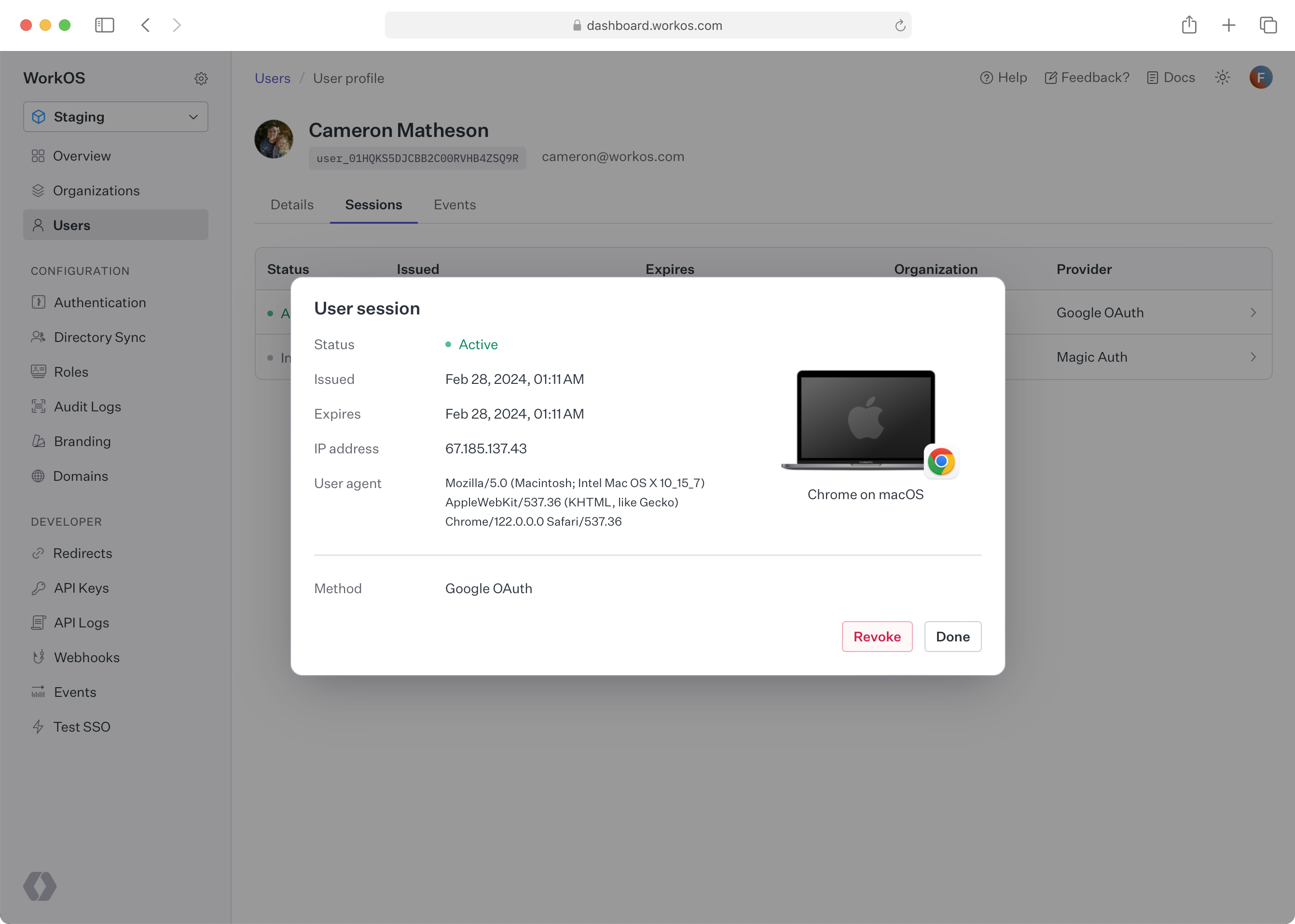
- package/.docs/organized/docs/audit-logs/log-streams.mdx +56 -0
- package/.docs/organized/docs/audit-logs/metadata-schema.mdx +21 -0
- package/.docs/organized/docs/custom-domains/_navigation.mdx +16 -0
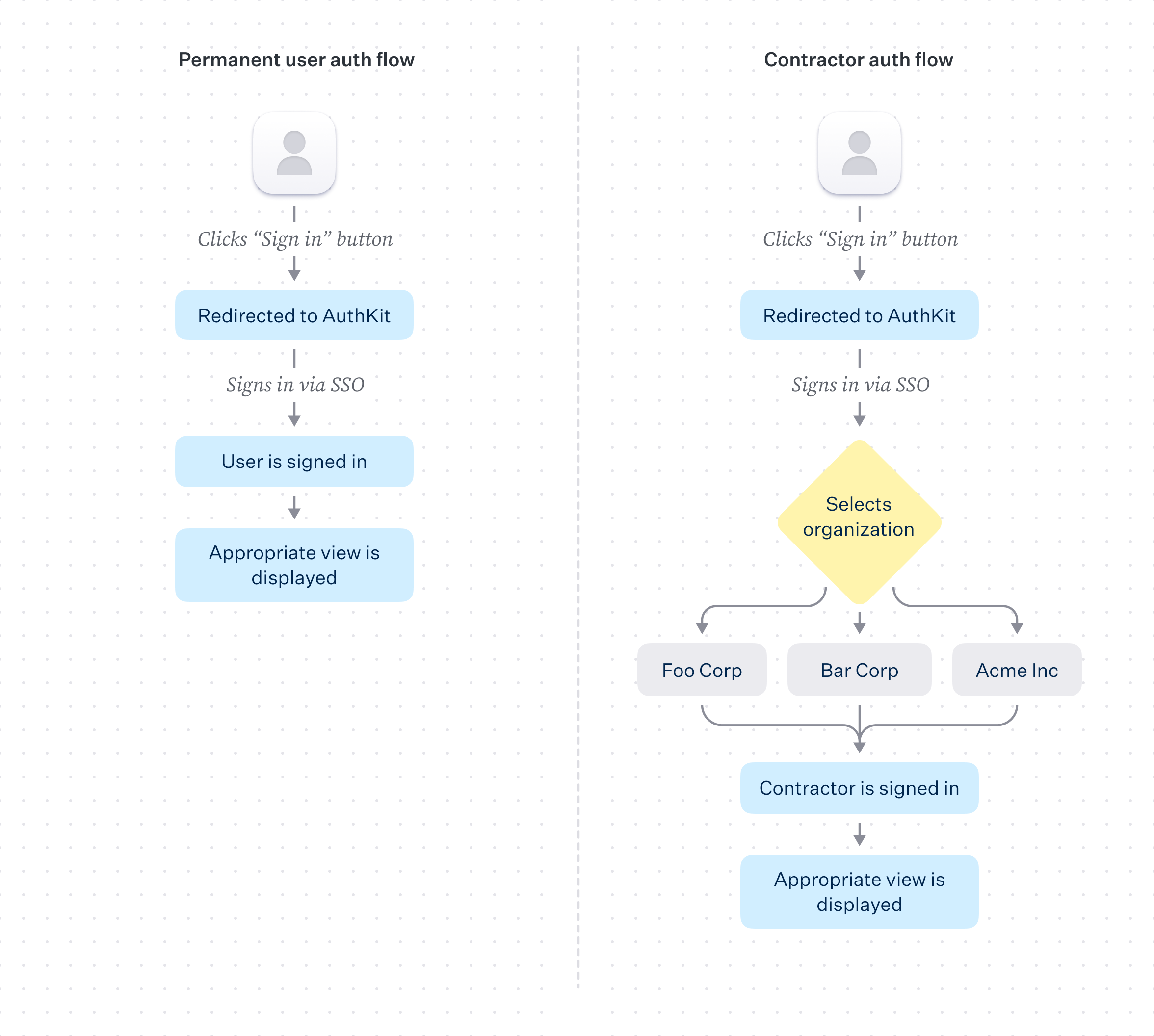
- package/.docs/organized/docs/custom-domains/admin-portal.mdx +38 -0
- package/.docs/organized/docs/custom-domains/auth-api.mdx +59 -0
- package/.docs/organized/docs/custom-domains/authkit.mdx +36 -0
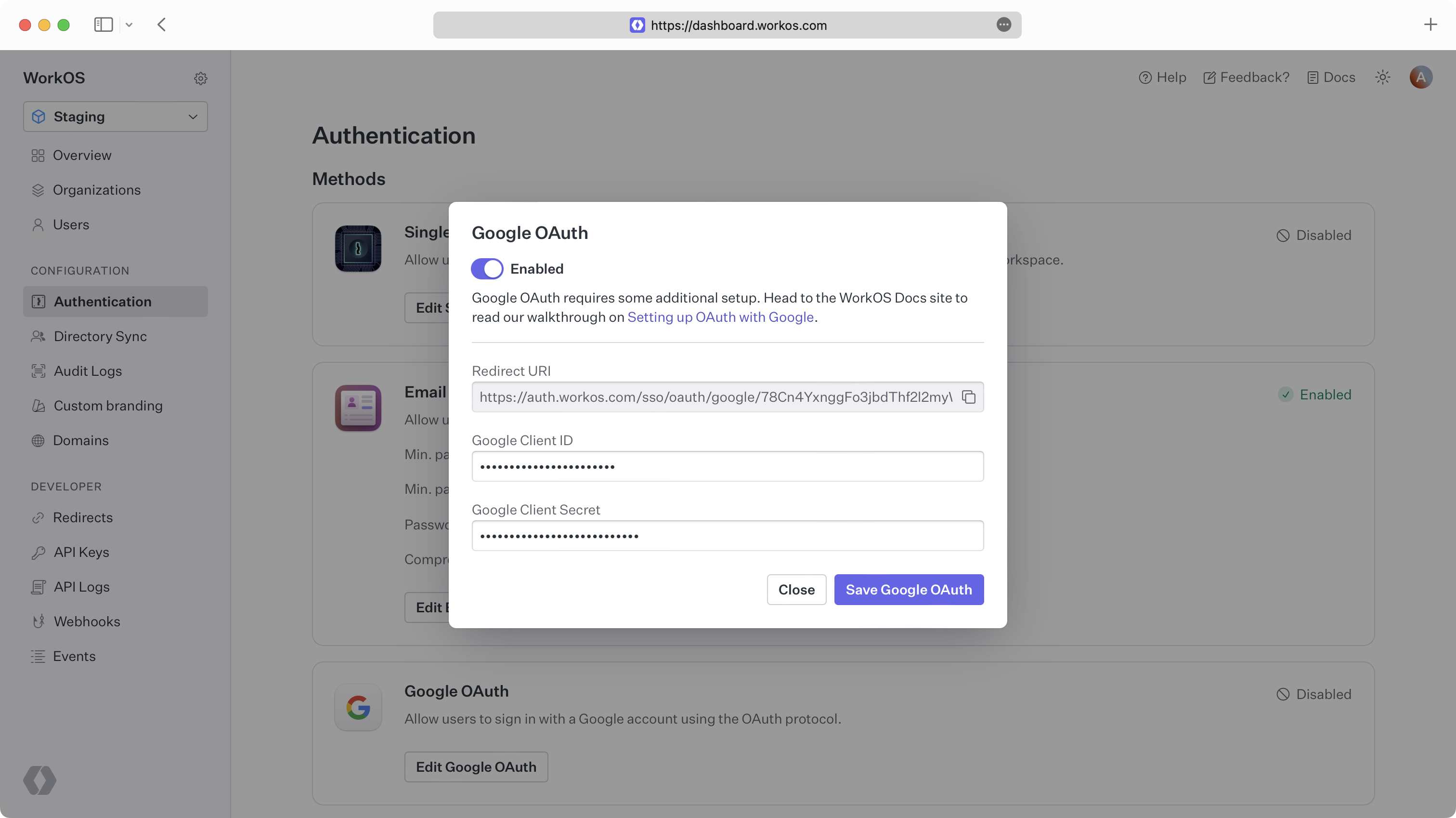
- package/.docs/organized/docs/custom-domains/email.mdx +41 -0
- package/.docs/organized/docs/custom-domains/index.mdx +19 -0
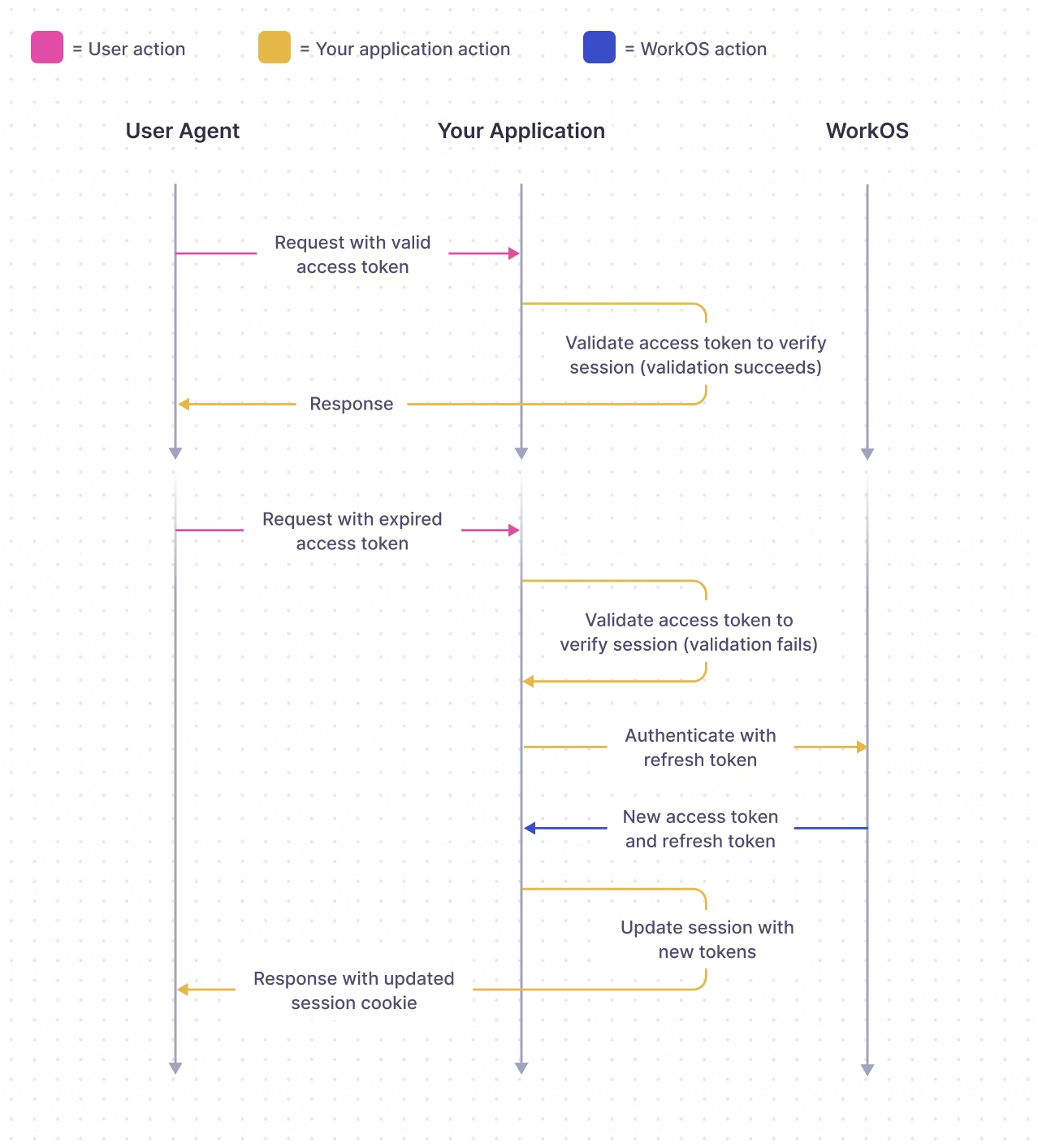
- package/.docs/organized/docs/dashboard.mdx +244 -0
- package/.docs/organized/docs/demo/_navigation.mdx +26 -0
- package/.docs/organized/docs/demo/accordion.mdx +34 -0
- package/.docs/organized/docs/demo/checklist.mdx +33 -0
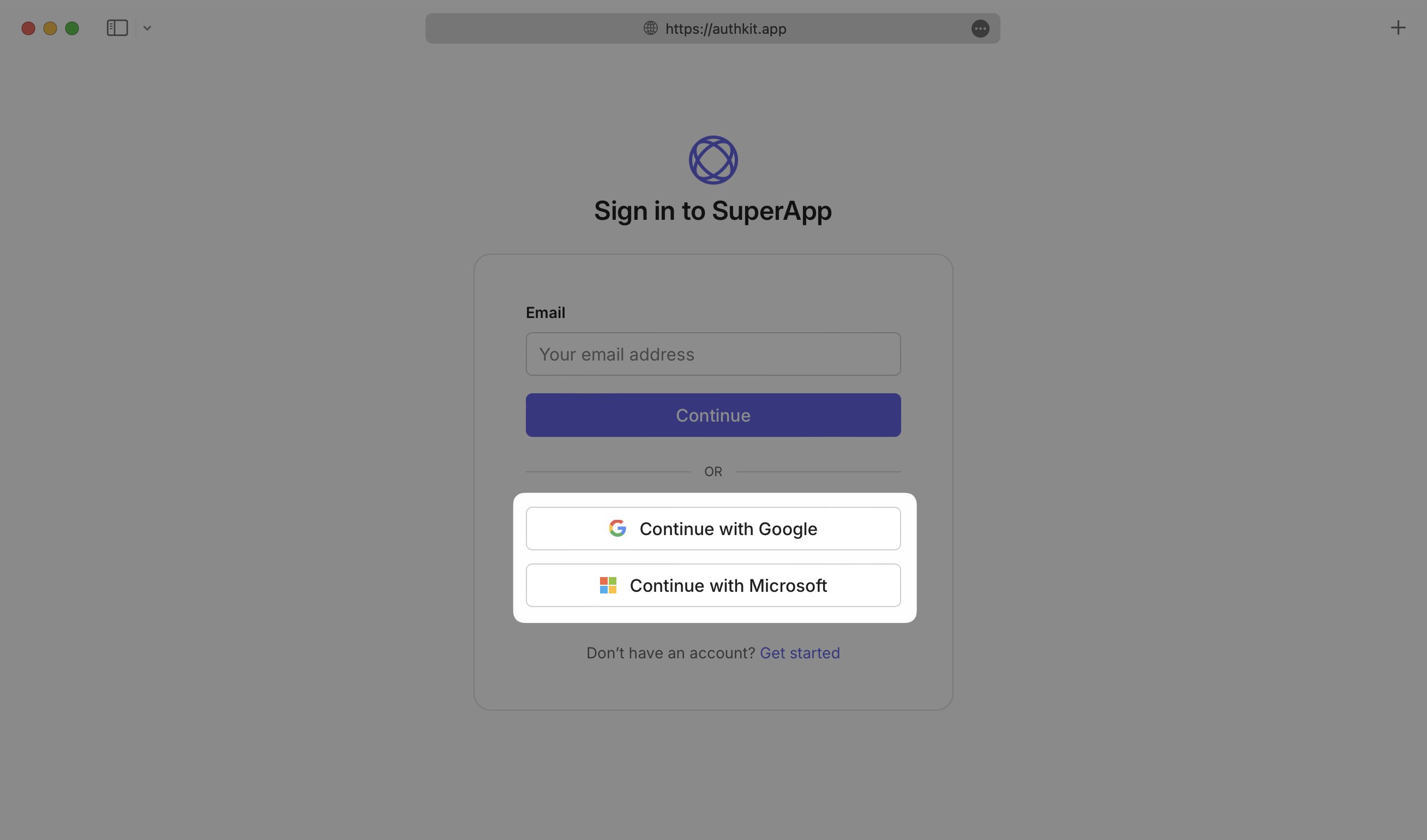
- package/.docs/organized/docs/demo/code-block.mdx +185 -0
- package/.docs/organized/docs/demo/definition-list.mdx +35 -0
- package/.docs/organized/docs/demo/index.mdx +7 -0
- package/.docs/organized/docs/demo/punctuation.mdx +37 -0
- package/.docs/organized/docs/demo/replacements.mdx +26 -0
- package/.docs/organized/docs/demo/table.mdx +26 -0
- package/.docs/organized/docs/demo/tabs.mdx +17 -0
- package/.docs/organized/docs/directory-sync/_navigation.mdx +28 -0
- package/.docs/organized/docs/directory-sync/attributes.mdx +209 -0
- package/.docs/organized/docs/directory-sync/example-apps.mdx +46 -0
- package/.docs/organized/docs/directory-sync/handle-inactive-users.mdx +52 -0
- package/.docs/organized/docs/directory-sync/identity-provider-role-assignment.mdx +134 -0
- package/.docs/organized/docs/directory-sync/index.mdx +107 -0
- package/.docs/organized/docs/directory-sync/quick-start.mdx +129 -0
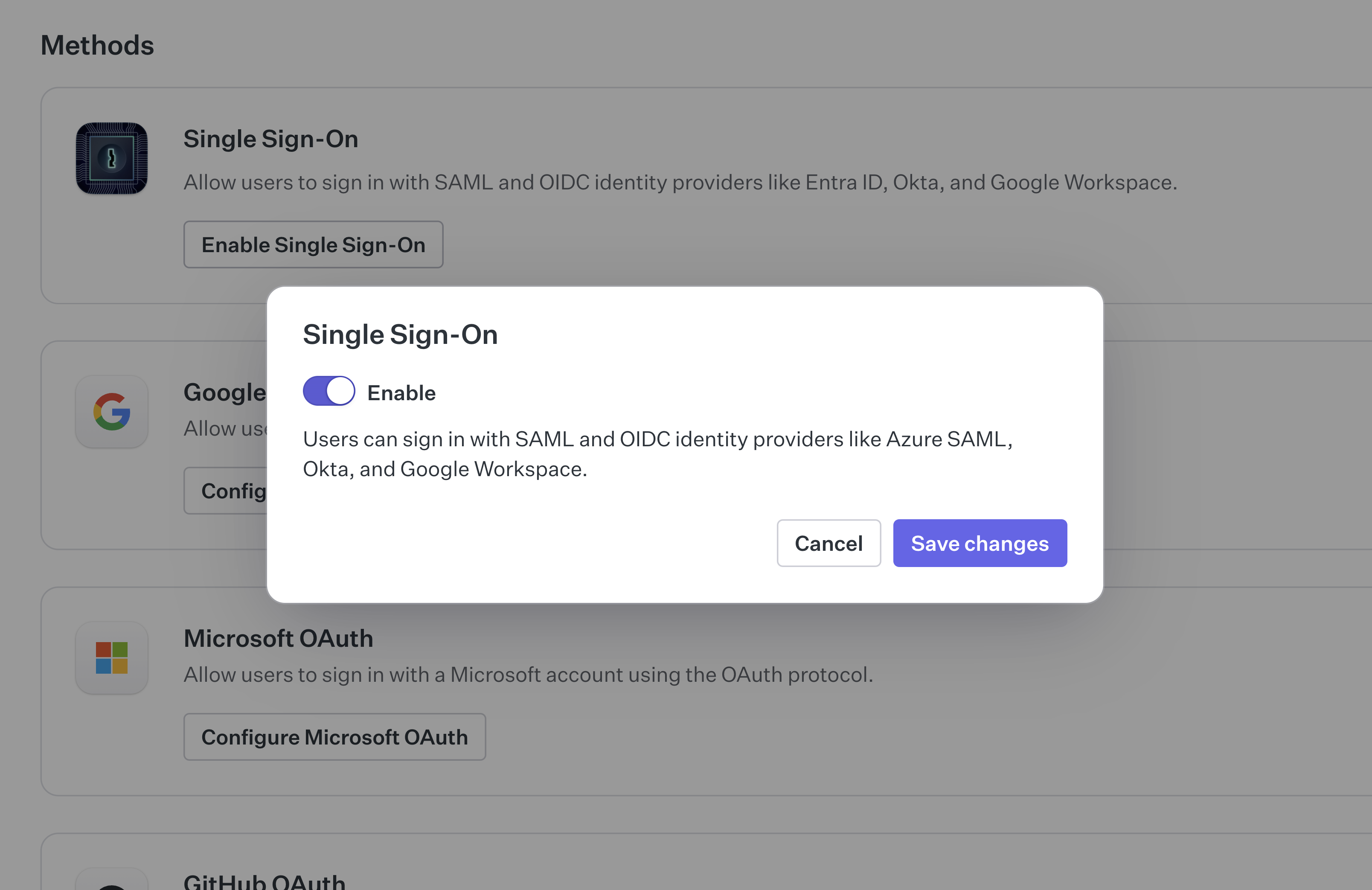
- package/.docs/organized/docs/directory-sync/understanding-events.mdx +209 -0
- package/.docs/organized/docs/domain-verification/_navigation.mdx +10 -0
- package/.docs/organized/docs/domain-verification/api.mdx +60 -0
- package/.docs/organized/docs/domain-verification/index.mdx +67 -0
- package/.docs/organized/docs/email.mdx +109 -0
- package/.docs/organized/docs/events/_navigation.mdx +22 -0
- package/.docs/organized/docs/events/data-syncing/data-reconciliation.mdx +56 -0
- package/.docs/organized/docs/events/data-syncing/events-api.mdx +114 -0
- package/.docs/organized/docs/events/data-syncing/index.mdx +66 -0
- package/.docs/organized/docs/events/data-syncing/webhooks.mdx +173 -0
- package/.docs/organized/docs/events/index.mdx +783 -0
- package/.docs/organized/docs/events/observability/datadog.mdx +76 -0
- package/.docs/organized/docs/fga/_navigation.mdx +64 -0
- package/.docs/organized/docs/fga/identity-provider-sessions.mdx +68 -0
- package/.docs/organized/docs/fga/index.mdx +60 -0
- package/.docs/organized/docs/fga/local-development.mdx +155 -0
- package/.docs/organized/docs/fga/modeling/abac.mdx +107 -0
- package/.docs/organized/docs/fga/modeling/blocklist.mdx +84 -0
- package/.docs/organized/docs/fga/modeling/conditional-roles.mdx +99 -0
- package/.docs/organized/docs/fga/modeling/custom-roles.mdx +90 -0
- package/.docs/organized/docs/fga/modeling/entitlements.mdx +127 -0
- package/.docs/organized/docs/fga/modeling/managed-service-provider.mdx +131 -0
- package/.docs/organized/docs/fga/modeling/org-roles-and-permissions.mdx +95 -0
- package/.docs/organized/docs/fga/modeling/policy-context.mdx +231 -0
- package/.docs/organized/docs/fga/modeling/public-access.mdx +61 -0
- package/.docs/organized/docs/fga/modeling/shareable-content.mdx +106 -0
- package/.docs/organized/docs/fga/modeling/superusers.mdx +74 -0
- package/.docs/organized/docs/fga/modeling/user-groups.mdx +92 -0
- package/.docs/organized/docs/fga/operations-usage.mdx +104 -0
- package/.docs/organized/docs/fga/playground.mdx +12 -0
- package/.docs/organized/docs/fga/policies.mdx +462 -0
- package/.docs/organized/docs/fga/query-language.mdx +112 -0
- package/.docs/organized/docs/fga/quick-start.mdx +174 -0
- package/.docs/organized/docs/fga/resources.mdx +92 -0
- package/.docs/organized/docs/fga/schema-management.mdx +224 -0
- package/.docs/organized/docs/fga/schema.mdx +388 -0
- package/.docs/organized/docs/fga/warrant-tokens.mdx +44 -0
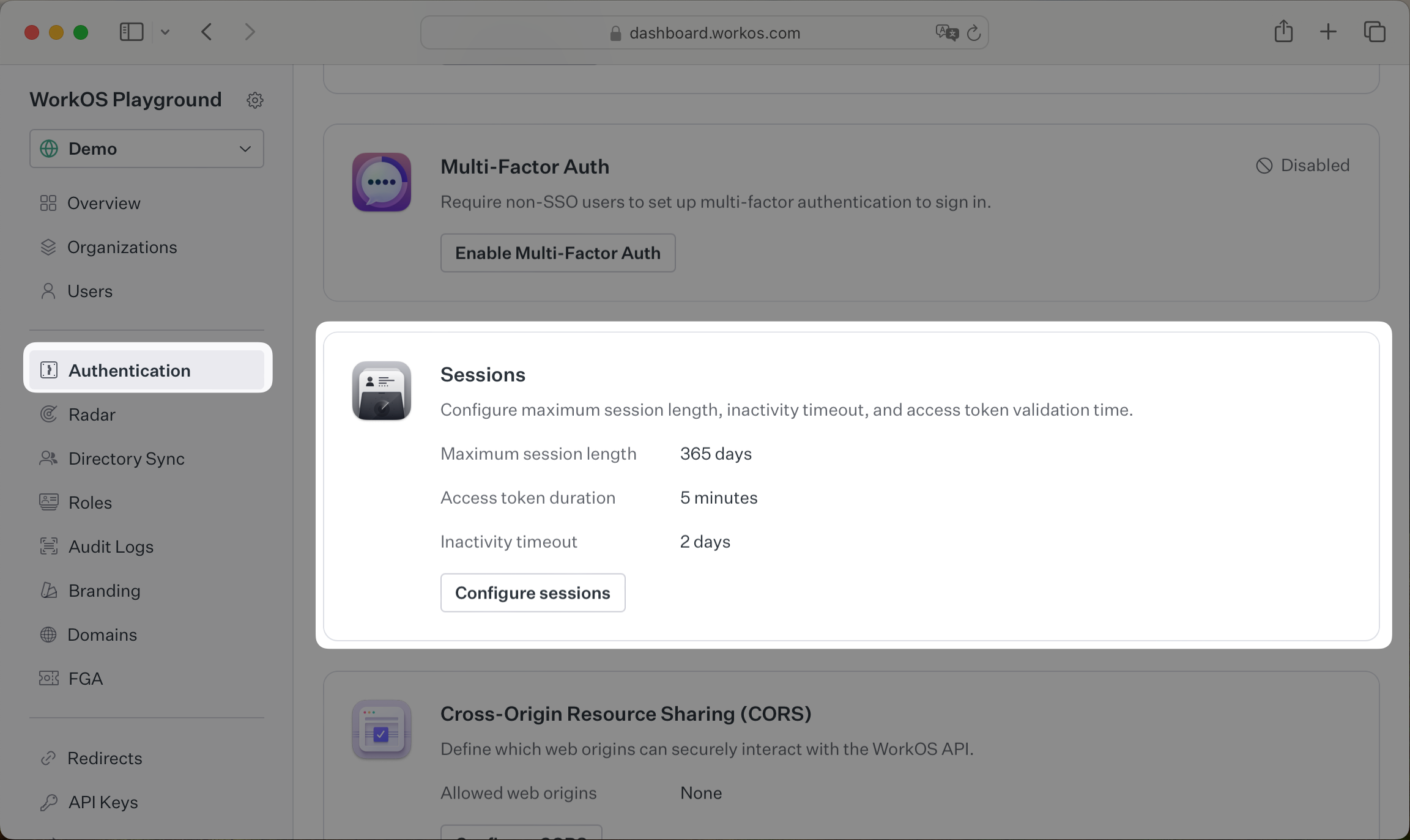
- package/.docs/organized/docs/fga/warrants.mdx +92 -0
- package/.docs/organized/docs/glossary.mdx +184 -0
- package/.docs/organized/docs/integrations/_navigation.mdx +6 -0
- package/.docs/organized/docs/integrations/access-people-hr.mdx +87 -0
- package/.docs/organized/docs/integrations/adp-oidc.mdx +103 -0
- package/.docs/organized/docs/integrations/apple.mdx +169 -0
- package/.docs/organized/docs/integrations/auth0-directory-sync.mdx +78 -0
- package/.docs/organized/docs/integrations/auth0-enterprise-connection.mdx +92 -0
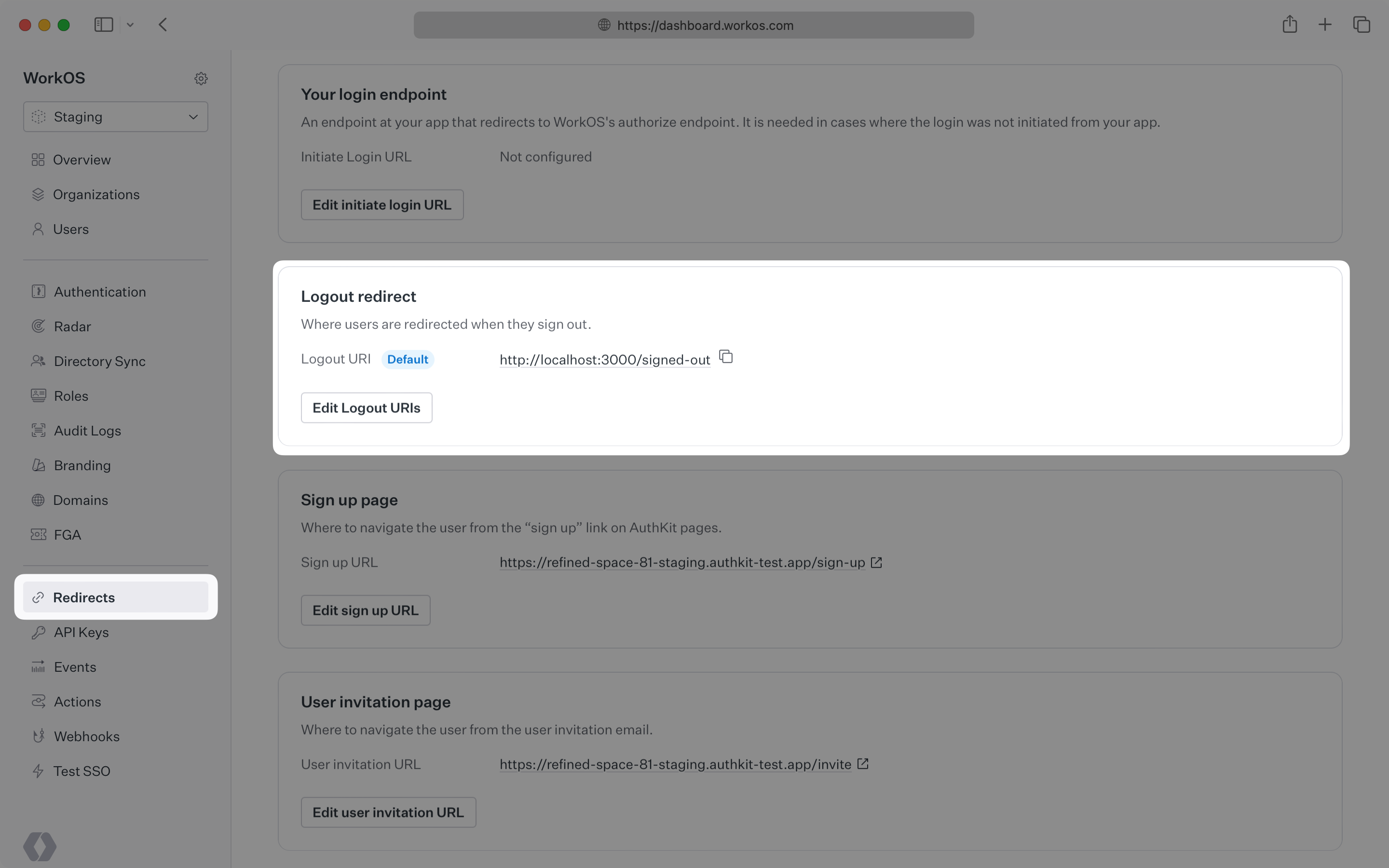
- package/.docs/organized/docs/integrations/auth0-saml.mdx +81 -0
- package/.docs/organized/docs/integrations/aws-cognito.mdx +81 -0
- package/.docs/organized/docs/integrations/bamboohr.mdx +90 -0
- package/.docs/organized/docs/integrations/breathe-hr.mdx +89 -0
- package/.docs/organized/docs/integrations/bubble.mdx +129 -0
- package/.docs/organized/docs/integrations/cas-saml.mdx +65 -0
- package/.docs/organized/docs/integrations/cezanne.mdx +74 -0
- package/.docs/organized/docs/integrations/classlink-saml.mdx +100 -0
- package/.docs/organized/docs/integrations/cloudflare-saml.mdx +164 -0
- package/.docs/organized/docs/integrations/cyberark-saml.mdx +138 -0
- package/.docs/organized/docs/integrations/cyberark-scim.mdx +100 -0
- package/.docs/organized/docs/integrations/duo-saml.mdx +127 -0
- package/.docs/organized/docs/integrations/entra-id-saml.mdx +156 -0
- package/.docs/organized/docs/integrations/entra-id-scim.mdx +218 -0
- package/.docs/organized/docs/integrations/firebase.mdx +98 -0
- package/.docs/organized/docs/integrations/fourth.mdx +66 -0
- package/.docs/organized/docs/integrations/github-oauth.mdx +85 -0
- package/.docs/organized/docs/integrations/gitlab-oauth.mdx +81 -0
- package/.docs/organized/docs/integrations/google-directory-sync.mdx +86 -0
- package/.docs/organized/docs/integrations/google-oauth.mdx +173 -0
- package/.docs/organized/docs/integrations/google-saml.mdx +135 -0
- package/.docs/organized/docs/integrations/hibob.mdx +98 -0
- package/.docs/organized/docs/integrations/jumpcloud-saml.mdx +96 -0
- package/.docs/organized/docs/integrations/jumpcloud-scim.mdx +106 -0
- package/.docs/organized/docs/integrations/keycloak-saml.mdx +128 -0
- package/.docs/organized/docs/integrations/lastpass-saml.mdx +134 -0
- package/.docs/organized/docs/integrations/linkedin-oauth.mdx +77 -0
- package/.docs/organized/docs/integrations/login-gov-oidc.mdx +103 -0
- package/.docs/organized/docs/integrations/microsoft-ad-fs-saml.mdx +96 -0
- package/.docs/organized/docs/integrations/microsoft-oauth.mdx +101 -0
- package/.docs/organized/docs/integrations/miniorange-saml.mdx +124 -0
- package/.docs/organized/docs/integrations/net-iq-saml.mdx +75 -0
- package/.docs/organized/docs/integrations/next-auth.mdx +257 -0
- package/.docs/organized/docs/integrations/oidc.mdx +64 -0
- package/.docs/organized/docs/integrations/okta-saml.mdx +144 -0
- package/.docs/organized/docs/integrations/okta-scim.mdx +210 -0
- package/.docs/organized/docs/integrations/onelogin-saml.mdx +131 -0
- package/.docs/organized/docs/integrations/onelogin-scim.mdx +150 -0
- package/.docs/organized/docs/integrations/oracle-saml.mdx +76 -0
- package/.docs/organized/docs/integrations/pingfederate-saml.mdx +103 -0
- package/.docs/organized/docs/integrations/pingfederate-scim.mdx +150 -0
- package/.docs/organized/docs/integrations/pingone-saml.mdx +86 -0
- package/.docs/organized/docs/integrations/react-native-expo.mdx +93 -0
- package/.docs/organized/docs/integrations/rippling-saml.mdx +174 -0
- package/.docs/organized/docs/integrations/rippling-scim.mdx +148 -0
- package/.docs/organized/docs/integrations/salesforce-saml.mdx +143 -0
- package/.docs/organized/docs/integrations/saml.mdx +64 -0
- package/.docs/organized/docs/integrations/scim.mdx +64 -0
- package/.docs/organized/docs/integrations/sftp.mdx +150 -0
- package/.docs/organized/docs/integrations/shibboleth-generic-saml.mdx +84 -0
- package/.docs/organized/docs/integrations/shibboleth-unsolicited-saml.mdx +84 -0
- package/.docs/organized/docs/integrations/simple-saml-php.mdx +78 -0
- package/.docs/organized/docs/integrations/slack-oauth.mdx +102 -0
- package/.docs/organized/docs/integrations/supabase.mdx +68 -0
- package/.docs/organized/docs/integrations/vmware-saml.mdx +100 -0
- package/.docs/organized/docs/integrations/workday.mdx +156 -0
- package/.docs/organized/docs/integrations/xero-oauth.mdx +83 -0
- package/.docs/organized/docs/magic-link/_navigation.mdx +16 -0
- package/.docs/organized/docs/magic-link/example-apps.mdx +46 -0
- package/.docs/organized/docs/magic-link/index.mdx +199 -0
- package/.docs/organized/docs/magic-link/launch-checklist.mdx +27 -0
- package/.docs/organized/docs/mfa/_navigation.mdx +18 -0
- package/.docs/organized/docs/mfa/example-apps.mdx +46 -0
- package/.docs/organized/docs/mfa/index.mdx +140 -0
- package/.docs/organized/docs/mfa/ux/enrollment.mdx +74 -0
- package/.docs/organized/docs/mfa/ux/sign-in.mdx +30 -0
- package/.docs/organized/docs/migrate/_navigation.mdx +6 -0
- package/.docs/organized/docs/migrate/auth0.mdx +98 -0
- package/.docs/organized/docs/migrate/aws-cognito.mdx +115 -0
- package/.docs/organized/docs/migrate/clerk.mdx +106 -0
- package/.docs/organized/docs/migrate/firebase.mdx +80 -0
- package/.docs/organized/docs/migrate/other-services.mdx +179 -0
- package/.docs/organized/docs/migrate/standalone-sso.mdx +105 -0
- package/.docs/organized/docs/on-prem-deployment.mdx +119 -0
- package/.docs/organized/docs/postman.mdx +90 -0
- package/.docs/organized/docs/reference/_navigation.mdx +527 -0
- package/.docs/organized/docs/reference/admin-portal/index.mdx +6 -0
- package/.docs/organized/docs/reference/admin-portal/portal-link/generate.mdx +268 -0
- package/.docs/organized/docs/reference/admin-portal/portal-link/index.mdx +15 -0
- package/.docs/organized/docs/reference/admin-portal/provider-icons/index.mdx +52 -0
- package/.docs/organized/docs/reference/api-keys.mdx +22 -0
- package/.docs/organized/docs/reference/audit-logs/audit-log-export.mdx +239 -0
- package/.docs/organized/docs/reference/audit-logs/audit-log-schema.mdx +69 -0
- package/.docs/organized/docs/reference/audit-logs/create-event.mdx +673 -0
- package/.docs/organized/docs/reference/audit-logs/create-export.mdx +308 -0
- package/.docs/organized/docs/reference/audit-logs/create-schema.mdx +95 -0
- package/.docs/organized/docs/reference/audit-logs/get-export.mdx +117 -0
- package/.docs/organized/docs/reference/audit-logs/get-retention.mdx +34 -0
- package/.docs/organized/docs/reference/audit-logs/index.mdx +6 -0
- package/.docs/organized/docs/reference/audit-logs/list-actions.mdx +40 -0
- package/.docs/organized/docs/reference/audit-logs/list-schemas.mdx +40 -0
- package/.docs/organized/docs/reference/audit-logs/set-retention.mdx +39 -0
- package/.docs/organized/docs/reference/client-libraries.mdx +19 -0
- package/.docs/organized/docs/reference/directory-sync/directory/delete.mdx +90 -0
- package/.docs/organized/docs/reference/directory-sync/directory/get.mdx +105 -0
- package/.docs/organized/docs/reference/directory-sync/directory/index.mdx +385 -0
- package/.docs/organized/docs/reference/directory-sync/directory/list.mdx +281 -0
- package/.docs/organized/docs/reference/directory-sync/directory-group/get.mdx +105 -0
- package/.docs/organized/docs/reference/directory-sync/directory-group/index.mdx +277 -0
- package/.docs/organized/docs/reference/directory-sync/directory-group/list.mdx +295 -0
- package/.docs/organized/docs/reference/directory-sync/directory-user/get.mdx +112 -0
- package/.docs/organized/docs/reference/directory-sync/directory-user/index.mdx +470 -0
- package/.docs/organized/docs/reference/directory-sync/directory-user/list.mdx +304 -0
- package/.docs/organized/docs/reference/directory-sync/index.mdx +10 -0
- package/.docs/organized/docs/reference/domain-verification/create.mdx +38 -0
- package/.docs/organized/docs/reference/domain-verification/get.mdx +32 -0
- package/.docs/organized/docs/reference/domain-verification/index.mdx +84 -0
- package/.docs/organized/docs/reference/domain-verification/verify.mdx +36 -0
- package/.docs/organized/docs/reference/errors.mdx +30 -0
- package/.docs/organized/docs/reference/events/index.mdx +9 -0
- package/.docs/organized/docs/reference/events/list.mdx +246 -0
- package/.docs/organized/docs/reference/fga/batch-check.mdx +277 -0
- package/.docs/organized/docs/reference/fga/check.mdx +563 -0
- package/.docs/organized/docs/reference/fga/index.mdx +6 -0
- package/.docs/organized/docs/reference/fga/policy/create.mdx +27 -0
- package/.docs/organized/docs/reference/fga/policy/delete.mdx +18 -0
- package/.docs/organized/docs/reference/fga/policy/get.mdx +23 -0
- package/.docs/organized/docs/reference/fga/policy/index.mdx +52 -0
- package/.docs/organized/docs/reference/fga/policy/list.mdx +41 -0
- package/.docs/organized/docs/reference/fga/policy/update.mdx +26 -0
- package/.docs/organized/docs/reference/fga/query.mdx +375 -0
- package/.docs/organized/docs/reference/fga/resource/batch-write.mdx +175 -0
- package/.docs/organized/docs/reference/fga/resource/create.mdx +130 -0
- package/.docs/organized/docs/reference/fga/resource/delete.mdx +86 -0
- package/.docs/organized/docs/reference/fga/resource/get.mdx +88 -0
- package/.docs/organized/docs/reference/fga/resource/index.mdx +98 -0
- package/.docs/organized/docs/reference/fga/resource/list.mdx +188 -0
- package/.docs/organized/docs/reference/fga/resource/update.mdx +115 -0
- package/.docs/organized/docs/reference/fga/resource-type/apply.mdx +35 -0
- package/.docs/organized/docs/reference/fga/resource-type/create.mdx +24 -0
- package/.docs/organized/docs/reference/fga/resource-type/delete.mdx +22 -0
- package/.docs/organized/docs/reference/fga/resource-type/get.mdx +23 -0
- package/.docs/organized/docs/reference/fga/resource-type/index.mdx +68 -0
- package/.docs/organized/docs/reference/fga/resource-type/list.mdx +36 -0
- package/.docs/organized/docs/reference/fga/resource-type/update.mdx +23 -0
- package/.docs/organized/docs/reference/fga/schema/apply.mdx +42 -0
- package/.docs/organized/docs/reference/fga/schema/get.mdx +24 -0
- package/.docs/organized/docs/reference/fga/schema/index.mdx +39 -0
- package/.docs/organized/docs/reference/fga/warrant/batch-write.mdx +226 -0
- package/.docs/organized/docs/reference/fga/warrant/create.mdx +215 -0
- package/.docs/organized/docs/reference/fga/warrant/delete.mdx +212 -0
- package/.docs/organized/docs/reference/fga/warrant/index.mdx +186 -0
- package/.docs/organized/docs/reference/fga/warrant/list.mdx +282 -0
- package/.docs/organized/docs/reference/idempotency.mdx +21 -0
- package/.docs/organized/docs/reference/index.mdx +194 -0
- package/.docs/organized/docs/reference/magic-link/index.mdx +8 -0
- package/.docs/organized/docs/reference/magic-link/passwordless-session/create.mdx +268 -0
- package/.docs/organized/docs/reference/magic-link/passwordless-session/index.mdx +203 -0
- package/.docs/organized/docs/reference/magic-link/passwordless-session/send-email.mdx +158 -0
- package/.docs/organized/docs/reference/mfa/authentication-challenge.mdx +217 -0
- package/.docs/organized/docs/reference/mfa/authentication-factor.mdx +381 -0
- package/.docs/organized/docs/reference/mfa/challenge-factor.mdx +170 -0
- package/.docs/organized/docs/reference/mfa/delete-factor.mdx +93 -0
- package/.docs/organized/docs/reference/mfa/enroll-factor.mdx +241 -0
- package/.docs/organized/docs/reference/mfa/get-factor.mdx +108 -0
- package/.docs/organized/docs/reference/mfa/index.mdx +8 -0
- package/.docs/organized/docs/reference/mfa/verify-challenge.mdx +228 -0
- package/.docs/organized/docs/reference/organization/create.mdx +216 -0
- package/.docs/organized/docs/reference/organization/delete.mdx +89 -0
- package/.docs/organized/docs/reference/organization/get-by-external-id.mdx +40 -0
- package/.docs/organized/docs/reference/organization/get.mdx +104 -0
- package/.docs/organized/docs/reference/organization/index.mdx +274 -0
- package/.docs/organized/docs/reference/organization/list.mdx +258 -0
- package/.docs/organized/docs/reference/organization/update.mdx +236 -0
- package/.docs/organized/docs/reference/organization-domain.mdx +189 -0
- package/.docs/organized/docs/reference/pagination.mdx +244 -0
- package/.docs/organized/docs/reference/radar/attempts/create.mdx +115 -0
- package/.docs/organized/docs/reference/radar/attempts/index.mdx +7 -0
- package/.docs/organized/docs/reference/radar/attempts/update.mdx +34 -0
- package/.docs/organized/docs/reference/radar/index.mdx +8 -0
- package/.docs/organized/docs/reference/radar/lists/delete.mdx +36 -0
- package/.docs/organized/docs/reference/radar/lists/index.mdx +7 -0
- package/.docs/organized/docs/reference/radar/lists/update.mdx +36 -0
- package/.docs/organized/docs/reference/rate-limits.mdx +50 -0
- package/.docs/organized/docs/reference/roles/index.mdx +268 -0
- package/.docs/organized/docs/reference/roles/list-for-organization.mdx +152 -0
- package/.docs/organized/docs/reference/sso/connection/delete.mdx +89 -0
- package/.docs/organized/docs/reference/sso/connection/get.mdx +104 -0
- package/.docs/organized/docs/reference/sso/connection/index.mdx +388 -0
- package/.docs/organized/docs/reference/sso/connection/list.mdx +320 -0
- package/.docs/organized/docs/reference/sso/get-authorization-url/error-codes.mdx +28 -0
- package/.docs/organized/docs/reference/sso/get-authorization-url/index.mdx +434 -0
- package/.docs/organized/docs/reference/sso/get-authorization-url/redirect-uri.mdx +21 -0
- package/.docs/organized/docs/reference/sso/index.mdx +8 -0
- package/.docs/organized/docs/reference/sso/logout/authorize.mdx +47 -0
- package/.docs/organized/docs/reference/sso/logout/index.mdx +14 -0
- package/.docs/organized/docs/reference/sso/logout/redirect.mdx +32 -0
- package/.docs/organized/docs/reference/sso/profile/get-profile-and-token.mdx +229 -0
- package/.docs/organized/docs/reference/sso/profile/get-user-profile.mdx +127 -0
- package/.docs/organized/docs/reference/sso/profile/index.mdx +364 -0
- package/.docs/organized/docs/reference/testing.mdx +8 -0
- package/.docs/organized/docs/reference/user-management/access-token/index.mdx +13 -0
- package/.docs/organized/docs/reference/user-management/authentication/code.mdx +448 -0
- package/.docs/organized/docs/reference/user-management/authentication/email-verification.mdx +359 -0
- package/.docs/organized/docs/reference/user-management/authentication/get-authorization-url/error-codes.mdx +25 -0
- package/.docs/organized/docs/reference/user-management/authentication/get-authorization-url/index.mdx +425 -0
- package/.docs/organized/docs/reference/user-management/authentication/get-authorization-url/pkce.mdx +9 -0
- package/.docs/organized/docs/reference/user-management/authentication/get-authorization-url/redirect-uri.mdx +23 -0
- package/.docs/organized/docs/reference/user-management/authentication/index.mdx +66 -0
- package/.docs/organized/docs/reference/user-management/authentication/magic-auth.mdx +353 -0
- package/.docs/organized/docs/reference/user-management/authentication/organization-selection.mdx +349 -0
- package/.docs/organized/docs/reference/user-management/authentication/password.mdx +350 -0
- package/.docs/organized/docs/reference/user-management/authentication/refresh-and-seal-session-data.mdx +57 -0
- package/.docs/organized/docs/reference/user-management/authentication/refresh-token.mdx +381 -0
- package/.docs/organized/docs/reference/user-management/authentication/session-cookie.mdx +79 -0
- package/.docs/organized/docs/reference/user-management/authentication/totp.mdx +369 -0
- package/.docs/organized/docs/reference/user-management/authentication-errors/email-verification-required-error.mdx +42 -0
- package/.docs/organized/docs/reference/user-management/authentication-errors/index.mdx +20 -0
- package/.docs/organized/docs/reference/user-management/authentication-errors/mfa-challenge-error.mdx +44 -0
- package/.docs/organized/docs/reference/user-management/authentication-errors/mfa-enrollment-error.mdx +37 -0
- package/.docs/organized/docs/reference/user-management/authentication-errors/organization-authentication-required-error.mdx +68 -0
- package/.docs/organized/docs/reference/user-management/authentication-errors/organization-selection-error.mdx +44 -0
- package/.docs/organized/docs/reference/user-management/authentication-errors/sso-required-error.mdx +51 -0
- package/.docs/organized/docs/reference/user-management/email-verification/get.mdx +88 -0
- package/.docs/organized/docs/reference/user-management/email-verification/index.mdx +227 -0
- package/.docs/organized/docs/reference/user-management/identity/index.mdx +74 -0
- package/.docs/organized/docs/reference/user-management/identity/list.mdx +52 -0
- package/.docs/organized/docs/reference/user-management/index.mdx +13 -0
- package/.docs/organized/docs/reference/user-management/invitation/accept.mdx +39 -0
- package/.docs/organized/docs/reference/user-management/invitation/find-by-token.mdx +87 -0
- package/.docs/organized/docs/reference/user-management/invitation/get.mdx +87 -0
- package/.docs/organized/docs/reference/user-management/invitation/index.mdx +374 -0
- package/.docs/organized/docs/reference/user-management/invitation/list.mdx +247 -0
- package/.docs/organized/docs/reference/user-management/invitation/revoke.mdx +90 -0
- package/.docs/organized/docs/reference/user-management/invitation/send.mdx +230 -0
- package/.docs/organized/docs/reference/user-management/logout/get-logout-url-from-session-cookie.mdx +52 -0
- package/.docs/organized/docs/reference/user-management/logout/get-logout-url.mdx +147 -0
- package/.docs/organized/docs/reference/user-management/logout/index.mdx +26 -0
- package/.docs/organized/docs/reference/user-management/magic-auth/create.mdx +148 -0
- package/.docs/organized/docs/reference/user-management/magic-auth/get.mdx +88 -0
- package/.docs/organized/docs/reference/user-management/magic-auth/index.mdx +225 -0
- package/.docs/organized/docs/reference/user-management/mfa/authentication-challenge.mdx +194 -0
- package/.docs/organized/docs/reference/user-management/mfa/authentication-factor.mdx +324 -0
- package/.docs/organized/docs/reference/user-management/mfa/enroll-auth-factor.mdx +296 -0
- package/.docs/organized/docs/reference/user-management/mfa/index.mdx +5 -0
- package/.docs/organized/docs/reference/user-management/mfa/list-auth-factors.mdx +194 -0
- package/.docs/organized/docs/reference/user-management/organization-membership/create.mdx +155 -0
- package/.docs/organized/docs/reference/user-management/organization-membership/deactivate.mdx +106 -0
- package/.docs/organized/docs/reference/user-management/organization-membership/delete.mdx +76 -0
- package/.docs/organized/docs/reference/user-management/organization-membership/get.mdx +95 -0
- package/.docs/organized/docs/reference/user-management/organization-membership/index.mdx +265 -0
- package/.docs/organized/docs/reference/user-management/organization-membership/list.mdx +291 -0
- package/.docs/organized/docs/reference/user-management/organization-membership/reactivate.mdx +106 -0
- package/.docs/organized/docs/reference/user-management/organization-membership/update.mdx +119 -0
- package/.docs/organized/docs/reference/user-management/password-reset/create.mdx +108 -0
- package/.docs/organized/docs/reference/user-management/password-reset/get.mdx +88 -0
- package/.docs/organized/docs/reference/user-management/password-reset/index.mdx +227 -0
- package/.docs/organized/docs/reference/user-management/password-reset/reset-password.mdx +144 -0
- package/.docs/organized/docs/reference/user-management/session-helpers/authenticate.mdx +176 -0
- package/.docs/organized/docs/reference/user-management/session-helpers/get-logout-url.mdx +42 -0
- package/.docs/organized/docs/reference/user-management/session-helpers/index.mdx +14 -0
- package/.docs/organized/docs/reference/user-management/session-helpers/load-sealed-session.mdx +105 -0
- package/.docs/organized/docs/reference/user-management/session-helpers/refresh.mdx +213 -0
- package/.docs/organized/docs/reference/user-management/session-tokens/access-token.mdx +90 -0
- package/.docs/organized/docs/reference/user-management/session-tokens/index.mdx +5 -0
- package/.docs/organized/docs/reference/user-management/session-tokens/jwks.mdx +110 -0
- package/.docs/organized/docs/reference/user-management/session-tokens/refresh-token.mdx +8 -0
- package/.docs/organized/docs/reference/user-management/user/create.mdx +327 -0
- package/.docs/organized/docs/reference/user-management/user/delete.mdx +76 -0
- package/.docs/organized/docs/reference/user-management/user/get-by-external-id.mdx +39 -0
- package/.docs/organized/docs/reference/user-management/user/get.mdx +103 -0
- package/.docs/organized/docs/reference/user-management/user/index.mdx +322 -0
- package/.docs/organized/docs/reference/user-management/user/list.mdx +260 -0
- package/.docs/organized/docs/reference/user-management/user/update.mdx +344 -0
- package/.docs/organized/docs/reference/vault/index.mdx +6 -0
- package/.docs/organized/docs/reference/vault/key/create-data-key.mdx +106 -0
- package/.docs/organized/docs/reference/vault/key/decrypt-data-key.mdx +84 -0
- package/.docs/organized/docs/reference/vault/key/decrypt-data.mdx +52 -0
- package/.docs/organized/docs/reference/vault/key/encrypt-data.mdx +58 -0
- package/.docs/organized/docs/reference/vault/key/index.mdx +25 -0
- package/.docs/organized/docs/reference/vault/object/create.mdx +62 -0
- package/.docs/organized/docs/reference/vault/object/delete.mdx +75 -0
- package/.docs/organized/docs/reference/vault/object/get.mdx +50 -0
- package/.docs/organized/docs/reference/vault/object/index.mdx +174 -0
- package/.docs/organized/docs/reference/vault/object/list.mdx +105 -0
- package/.docs/organized/docs/reference/vault/object/metadata.mdx +52 -0
- package/.docs/organized/docs/reference/vault/object/update.mdx +67 -0
- package/.docs/organized/docs/reference/vault/object/version.mdx +87 -0
- package/.docs/organized/docs/reference/vault/object/versions.mdx +83 -0
- package/.docs/organized/docs/reference/widgets/get-token.mdx +185 -0
- package/.docs/organized/docs/reference/widgets/index.mdx +6 -0
- package/.docs/organized/docs/reference/workos-connect/authorize/index.mdx +75 -0
- package/.docs/organized/docs/reference/workos-connect/index.mdx +33 -0
- package/.docs/organized/docs/reference/workos-connect/introspection/index.mdx +122 -0
- package/.docs/organized/docs/reference/workos-connect/metadata/index.mdx +25 -0
- package/.docs/organized/docs/reference/workos-connect/metadata/oauth-authorization-server/index.mdx +99 -0
- package/.docs/organized/docs/reference/workos-connect/metadata/openid-configuration/index.mdx +70 -0
- package/.docs/organized/docs/reference/workos-connect/token/authorization-code-grant/access-token.mdx +53 -0
- package/.docs/organized/docs/reference/workos-connect/token/authorization-code-grant/id-token.mdx +60 -0
- package/.docs/organized/docs/reference/workos-connect/token/authorization-code-grant/index.mdx +69 -0
- package/.docs/organized/docs/reference/workos-connect/token/client-credentials-grant/access-token.mdx +46 -0
- package/.docs/organized/docs/reference/workos-connect/token/client-credentials-grant/index.mdx +56 -0
- package/.docs/organized/docs/reference/workos-connect/token/index.mdx +39 -0
- package/.docs/organized/docs/reference/workos-connect/token/refresh-token-grant.mdx +69 -0
- package/.docs/organized/docs/reference/workos-connect/userinfo/index.mdx +46 -0
- package/.docs/organized/docs/sdks/dotnet.mdx +6 -0
- package/.docs/organized/docs/sdks/elixir.mdx +6 -0
- package/.docs/organized/docs/sdks/go.mdx +6 -0
- package/.docs/organized/docs/sdks/java.mdx +9 -0
- package/.docs/organized/docs/sdks/laravel.mdx +6 -0
- package/.docs/organized/docs/sdks/node.mdx +9 -0
- package/.docs/organized/docs/sdks/php.mdx +6 -0
- package/.docs/organized/docs/sdks/python.mdx +6 -0
- package/.docs/organized/docs/sdks/ruby.mdx +9 -0
- package/.docs/organized/docs/sso/_navigation.mdx +44 -0
- package/.docs/organized/docs/sso/_sequence-diagrams/saml-protocol-security-considerations.md +59 -0
- package/.docs/organized/docs/sso/attributes.mdx +110 -0
- package/.docs/organized/docs/sso/domains.mdx +111 -0
- package/.docs/organized/docs/sso/example-apps.mdx +46 -0
- package/.docs/organized/docs/sso/identity-provider-role-assignment.mdx +113 -0
- package/.docs/organized/docs/sso/index.mdx +295 -0
- package/.docs/organized/docs/sso/it-team-faq.mdx +35 -0
- package/.docs/organized/docs/sso/jit-provisioning.mdx +101 -0
- package/.docs/organized/docs/sso/launch-checklist.mdx +71 -0
- package/.docs/organized/docs/sso/login-flows.mdx +101 -0
- package/.docs/organized/docs/sso/redirect-uris.mdx +44 -0
- package/.docs/organized/docs/sso/saml-security.mdx +122 -0
- package/.docs/organized/docs/sso/signing-certificates.mdx +121 -0
- package/.docs/organized/docs/sso/single-logout.mdx +45 -0
- package/.docs/organized/docs/sso/test-sso.mdx +73 -0
- package/.docs/organized/docs/sso/ux/sign-in.mdx +44 -0
- package/.docs/organized/docs/user-management/_navigation.mdx +87 -0
- package/.docs/organized/docs/user-management/actions.mdx +169 -0
- package/.docs/organized/docs/user-management/authkit.mdx +69 -0
- package/.docs/organized/docs/user-management/branding.mdx +143 -0
- package/.docs/organized/docs/user-management/connect.mdx +110 -0
- package/.docs/organized/docs/user-management/custom-emails.mdx +164 -0
- package/.docs/organized/docs/user-management/directory-provisioning.mdx +78 -0
- package/.docs/organized/docs/user-management/domain-verification.mdx +28 -0
- package/.docs/organized/docs/user-management/email-password.mdx +42 -0
- package/.docs/organized/docs/user-management/email-verification.mdx +29 -0
- package/.docs/organized/docs/user-management/entitlements.mdx +46 -0
- package/.docs/organized/docs/user-management/example-apps.mdx +39 -0
- package/.docs/organized/docs/user-management/identity-linking.mdx +52 -0
- package/.docs/organized/docs/user-management/impersonation.mdx +82 -0
- package/.docs/organized/docs/user-management/index.mdx +525 -0
- package/.docs/organized/docs/user-management/invitations.mdx +60 -0
- package/.docs/organized/docs/user-management/invite-only-signup.mdx +72 -0
- package/.docs/organized/docs/user-management/jit-provisioning.mdx +36 -0
- package/.docs/organized/docs/user-management/jwt-templates.mdx +278 -0
- package/.docs/organized/docs/user-management/magic-auth.mdx +36 -0
- package/.docs/organized/docs/user-management/mcp.mdx +146 -0
- package/.docs/organized/docs/user-management/metadata.mdx +119 -0
- package/.docs/organized/docs/user-management/mfa.mdx +32 -0
- package/.docs/organized/docs/user-management/migrations.mdx +20 -0
- package/.docs/organized/docs/user-management/modeling-your-app.mdx +149 -0
- package/.docs/organized/docs/user-management/organization-policies.mdx +33 -0
- package/.docs/organized/docs/user-management/overview.mdx +46 -0
- package/.docs/organized/docs/user-management/passkeys.mdx +42 -0
- package/.docs/organized/docs/user-management/radar.mdx +127 -0
- package/.docs/organized/docs/user-management/roles-and-permissions.mdx +155 -0
- package/.docs/organized/docs/user-management/sessions.mdx +101 -0
- package/.docs/organized/docs/user-management/social-login.mdx +34 -0
- package/.docs/organized/docs/user-management/sso-with-contractors.mdx +85 -0
- package/.docs/organized/docs/user-management/sso.mdx +96 -0
- package/.docs/organized/docs/user-management/users-organizations.mdx +91 -0
- package/.docs/organized/docs/user-management/widgets.mdx +190 -0
- package/.docs/organized/docs/vault/_navigation.mdx +14 -0
- package/.docs/organized/docs/vault/index.mdx +38 -0
- package/.docs/organized/docs/vault/key-context.mdx +32 -0
- package/.docs/organized/docs/vault/quick-start.mdx +82 -0
- package/README.md +252 -0
- package/dist/chunk-64GKEK6G.js +48 -0
- package/dist/chunk-64GKEK6G.js.map +1 -0
- package/dist/get-tools.d.ts +23 -0
- package/dist/get-tools.js +8 -0
- package/dist/get-tools.js.map +1 -0
- package/dist/index.d.ts +1 -0
- package/dist/index.js +552 -0
- package/dist/index.js.map +1 -0
- package/dist/prepare.d.ts +2 -0
- package/dist/prepare.js +269 -0
- package/dist/prepare.js.map +1 -0
- package/package.json +49 -0
|
@@ -0,0 +1,101 @@
|
|
|
1
|
+
---
|
|
2
|
+
title: Sessions
|
|
3
|
+
description: Learn more about integrating sessions.
|
|
4
|
+
showNextPage: true
|
|
5
|
+
originalPath: .tmp-workos-clone/packages/docs/content/user-management/sessions.mdx
|
|
6
|
+
---
|
|
7
|
+
|
|
8
|
+
## Introduction
|
|
9
|
+
|
|
10
|
+
When a user signs in to your app, a user session is created. Along with the [User object](reference/user-management/user), a successful authentication response will include an access token and refresh token. Your application can use these tokens to ensure that the user’s session is still active.
|
|
11
|
+
|
|
12
|
+
Each user session can be viewed from within the WorkOS dashboard:
|
|
13
|
+
|
|
14
|
+
|
|
15
|
+
|
|
16
|
+
Navigate to _Users_ and select a user. Then, switch to _Sessions_ tab and click on a user session to get more information.
|
|
17
|
+
|
|
18
|
+
## Integrating Sessions
|
|
19
|
+
|
|
20
|
+
Successful authentication responses will include both an access token and a refresh token. The access token should be stored as a secure cookie in the user’s browser and should be validated by the backend on each request. The refresh token should either be stored in a secure cookie or persisted on your backend. Once the access token has expired, a new one can be obtained using the refresh token.
|
|
21
|
+
|
|
22
|
+
[border=false]
|
|
23
|
+
|
|
24
|
+
### Access Token
|
|
25
|
+
|
|
26
|
+
If you’re using our [Next SDK](https://www.npmjs.com/package/@workos-inc/authkit-nextjs) or [Remix SDK](https://github.com/workos/authkit-remix), all the work of validating access tokens and refreshing expired tokens is handled for you (more framework support coming soon). Read on for details about how token handling works.
|
|
27
|
+
|
|
28
|
+
The access token is a JSON Web Token (JWT), which should be validated on each request using a library like jose. The [signing JWKS](/reference/user-management/session-tokens/jwks) can be found at `http://api.workos.com/sso/jwks/<clientId>`. The JWT includes the following claims:
|
|
29
|
+
|
|
30
|
+
- `sub`: the WorkOS user id
|
|
31
|
+
- `sid`: the session ID (used for signing out)
|
|
32
|
+
- `iss`: `https://api.workos.com/` (will be your custom auth domain if configured)
|
|
33
|
+
- `org_id`: the organization that was selected at sign-in time (if applicable)
|
|
34
|
+
- `role`: the role of the selected organization membership (only applicable if an organization is selected)
|
|
35
|
+
- `permissions`: the permissions assigned to the role (if applicable)
|
|
36
|
+
- `exp`: the standard `expires_at` claim (the token should not be trusted after this time)
|
|
37
|
+
- `iat`: the standard `issued_at` claim
|
|
38
|
+
|
|
39
|
+
### Refresh Token
|
|
40
|
+
|
|
41
|
+
Refresh tokens should be persisted on the backend in, for instance, a database, cache, or secure http-only cookie. A new access token can be obtained by using the [authenticate with refresh token](/reference/user-management/authentication/refresh-token) endpoint. If the session is still active, a new access token and refresh token will be returned. Refresh tokens are single use, so be sure to replace the old refresh token with the newly generated one.
|
|
42
|
+
|
|
43
|
+
### Switching Organizations
|
|
44
|
+
|
|
45
|
+
Refresh tokens can be used to obtain a new access token for a different organization by passing the `organization_id` parameter to the [authenticate with refresh token](/reference/user-management/authentication/refresh-token) endpoint. If the session for the refresh token is authorized to access the organization, then the `org_id` will be set to the given organization, along with the `role` and `permissions` claims matching the user's membership in that organization.
|
|
46
|
+
|
|
47
|
+
If the user is not authorized for the organization, then an appropriate [authentication error](/reference/user-management/authentication-errors) will be returned and the user will need to authenticate. Applications using [AuthKit](/user-management/authkit) can use the [Get Authorization URL](/reference/user-management/authentication/get-authorization-url) and the `organization_id` parameter to initiate the authentication flow specifically for the organization.
|
|
48
|
+
|
|
49
|
+
### Signing Out
|
|
50
|
+
|
|
51
|
+
When a user signs out of your app, the following steps should occur:
|
|
52
|
+
|
|
53
|
+
- Get the session id (`sid` claim) out of the access token.
|
|
54
|
+
- Delete the user’s app session.
|
|
55
|
+
- Redirect the user’s browser to [logout endpoint](/reference/user-management/logout) endpoint (this will ensure the user’s session ends at WorkOS).
|
|
56
|
+
- The user will be redirected back to the URL configured as your _App homepage URL_
|
|
57
|
+
|
|
58
|
+
#### Example
|
|
59
|
+
|
|
60
|
+
```javascript
|
|
61
|
+
// extract sessionId from access token
|
|
62
|
+
const sessionId = jose.decodeJwt(session.accessToken).sid;
|
|
63
|
+
|
|
64
|
+
// delete app session cookie
|
|
65
|
+
cookies().delete('my-app-session');
|
|
66
|
+
|
|
67
|
+
// redirect to logout endpoint
|
|
68
|
+
// (the user will be redirected to your app homepage url
|
|
69
|
+
// after the logout completes)
|
|
70
|
+
redirect(workos.userManagement.getLogoutUrl({ sessionId }));
|
|
71
|
+
```
|
|
72
|
+
|
|
73
|
+
## Configuring Sessions
|
|
74
|
+
|
|
75
|
+
Using the WorkOS dashboard you can configure how Sessions work in your integration. You’ll find the settings in the _Authentication_ section.
|
|
76
|
+
|
|
77
|
+
|
|
78
|
+
|
|
79
|
+
- **Maximum session length:** The session will expire after this length of time. Once expired the user will need to sign in again.
|
|
80
|
+
- **Access token duration:** Your backend can verify the access token on each request (see the [Integrating Sessions](user-management/sessions/integrating-sessions) section above). It’s recommended to keep the access token duration short so that changes in the session are quickly reflected in your app.
|
|
81
|
+
- **Inactivity timeout:** The session ends if a refresh has not occurred in this length of time. The user will need to sign in again.
|
|
82
|
+
|
|
83
|
+
Additionally, make sure to review your settings in the _Redirect_ section:
|
|
84
|
+
|
|
85
|
+
### Logout redirect
|
|
86
|
+
|
|
87
|
+
|
|
88
|
+
|
|
89
|
+
Make sure to set a default Logout URI, which will be the location users will be redirected to after their session has been ended. Non-default Logout URIs can be used as values to the `return_to` parameter of the [Logout API](/reference/user-management/logout/get-logout-url) in order to dynamically choose the final logout redirect location.
|
|
90
|
+
|
|
91
|
+
#### Wildcards
|
|
92
|
+
|
|
93
|
+
The `*` symbol can be used as a wildcard for subdomains; however, it must be used in accordance with the following rules in order to properly function.
|
|
94
|
+
|
|
95
|
+
- Wildcard Logout URIs can only be created in staging environments.
|
|
96
|
+
- The protocol of the URL **must** be either `http:` or `https:`. For example, `com.example.app://*.example.com` will not work.
|
|
97
|
+
- The wildcard **must** be located in a subdomain within the hostname component. For example, `http://*.com` will not work.
|
|
98
|
+
- The wildcard **must** be located in the subdomain which is furthest from the root domain. For example, `https://sub.*.example.com` will not work.
|
|
99
|
+
- The URL **must not** contain more than one wildcard. For example, `https://*.*.example.com` will not work.
|
|
100
|
+
- A wildcard character **may** be prefixed and/or suffixed with additional valid hostname characters. For example, `https://prefix-*-suffix.example.com` will work.
|
|
101
|
+
- A URL with a valid wildcard **will not** match a URL more than one subdomain level in place of the wildcard. For example, `https://*.example.com` will not work with `https://sub1.sub2.example.com`.
|
|
@@ -0,0 +1,34 @@
|
|
|
1
|
+
---
|
|
2
|
+
title: Social Login
|
|
3
|
+
description: Quickly and easily integrate with social OAuth providers.
|
|
4
|
+
showNextPage: true
|
|
5
|
+
originalPath: .tmp-workos-clone/packages/docs/content/user-management/social-login.mdx
|
|
6
|
+
---
|
|
7
|
+
|
|
8
|
+
## Introduction
|
|
9
|
+
|
|
10
|
+
Social Login allows users to sign in or sign up using their existing credentials with OAuth providers such as Google, Microsoft, GitHub, and Apple.
|
|
11
|
+
|
|
12
|
+
## Getting started
|
|
13
|
+
|
|
14
|
+
AuthKit will make the necessary API calls and route users through OAuth providers automatically during the authentication flow, though the relevant providers must first be configured and enabled.
|
|
15
|
+
|
|
16
|
+
### (1) Configure OAuth providers
|
|
17
|
+
|
|
18
|
+
Configuration can be supplied via the _Authentication_ section of the [WorkOS Dashboard](https://dashboard.workos.com). WorkOS provides integration guides for common providers such as [Google](/integrations/google-oauth), [Microsoft](/integrations/microsoft-oauth), [GitHub](/integrations/github-oauth), [Apple](/integrations/apple), [GitLab](/integrations/gitlab-oauth), [LinkedIn](/integrations/linkedin-oauth), and [Slack](/integrations/slack-oauth).
|
|
19
|
+
|
|
20
|
+
|
|
21
|
+
|
|
22
|
+
### (2) Enable OAuth providers
|
|
23
|
+
|
|
24
|
+
After a provider has been configured and enabled, it will appear as a sign in option on the AuthKit authentication page.
|
|
25
|
+
|
|
26
|
+
|
|
27
|
+
|
|
28
|
+
---
|
|
29
|
+
|
|
30
|
+
## Integrating via the API
|
|
31
|
+
|
|
32
|
+
If you’d prefer to build and manage your own authentication UI, you can do so via the User Management [Authentication API](/reference/user-management/authentication).
|
|
33
|
+
|
|
34
|
+
Examples of building custom UI are also [available on GitHub](https://github.com/workos/authkit).
|
|
@@ -0,0 +1,85 @@
|
|
|
1
|
+
---
|
|
2
|
+
title: SSO with contractors
|
|
3
|
+
description: Enforcing organization SSO access with external contractors.
|
|
4
|
+
showNextPage: true
|
|
5
|
+
originalPath: >-
|
|
6
|
+
.tmp-workos-clone/packages/docs/content/user-management/sso-with-contractors.mdx
|
|
7
|
+
---
|
|
8
|
+
|
|
9
|
+
## Introduction
|
|
10
|
+
|
|
11
|
+
In this scenario, we outline the considerations, concepts, and best practices for configuring and enforcing SSO sign-in for all members of an organization, we'll also cover how to enforce these same constraints on external contractors who may need access to company resources but are not permanent members.
|
|
12
|
+
|
|
13
|
+
## Goals & requirements
|
|
14
|
+
|
|
15
|
+
The application should be available to logged in users only. Each user is typically assigned to a single organization and will be able to collaborate with other users within that organization.
|
|
16
|
+
|
|
17
|
+
- The majority of users collaborate within the same organization.
|
|
18
|
+
- Permanent members of the organization use an email address that matches the organization's domain.
|
|
19
|
+
- Organization members are required to authenticate using SSO.
|
|
20
|
+
- External contractors and collaborators are also required to authenticate using SSO.
|
|
21
|
+
|
|
22
|
+
[border=false]
|
|
23
|
+
|
|
24
|
+
## Integrating SSO
|
|
25
|
+
|
|
26
|
+
Adding SSO to your application is a straightforward process when using AuthKit, and can mostly be done via the WorkOS dashboard. Steps include:
|
|
27
|
+
|
|
28
|
+
(1) Add a new SSO connection to an organization in the dashboard
|
|
29
|
+
|
|
30
|
+
(2) Configure a callback endpoint in your application
|
|
31
|
+
|
|
32
|
+
(3) Add your endpoint URL as a sign-in callback in the WorkOS dashboard
|
|
33
|
+
|
|
34
|
+
(4) Handle the user session and grant access to the application
|
|
35
|
+
|
|
36
|
+
### Enforcing SSO authentication
|
|
37
|
+
|
|
38
|
+
With an active SSO connection established, it's now possible to enable it as an authentication method in the WorkOS Dashboard. This can be achieved by visiting the authentication settings view for the environment and enabling Single Sign-On.
|
|
39
|
+
|
|
40
|
+
[border=false]
|
|
41
|
+
|
|
42
|
+
This will allow users to sign-in with AuthKit using SSO, but will not enforce it as a requirement. In order to do so, we'll need to configure an authentication policy for the organization.
|
|
43
|
+
|
|
44
|
+
### SSO authentication flow
|
|
45
|
+
|
|
46
|
+
When the user logs in, they will move through the following flow:
|
|
47
|
+
|
|
48
|
+
(1) User clicks “Sign in” button
|
|
49
|
+
|
|
50
|
+
(2) User is redirected to AuthKit, where they sign via SSO
|
|
51
|
+
|
|
52
|
+
(3) User is redirected from AuthKit to the redirect URI configured in the WorkOS dashboard
|
|
53
|
+
|
|
54
|
+
(4) User is authenticated via code presented in the `redirect_uri`
|
|
55
|
+
|
|
56
|
+
(5) Access is provisioned by the application
|
|
57
|
+
|
|
58
|
+
More in-depth information on configuration can be found in the [Single Sign-On section](/user-management/sso), with AuthKit implementation guidance available in the [Quick Start guide](/user-management).
|
|
59
|
+
|
|
60
|
+
## Understanding authentication policies
|
|
61
|
+
|
|
62
|
+
An authentication policy is a way to enforce specific authentication methods during sign-in. They typically apply to all users attempting to access the organization.
|
|
63
|
+
|
|
64
|
+
There are several approaches to enforcing SSO within an organization, including domain verification and enforcing specific policies on those inside and outside of the organization based on their attached email domain, but for the purposes of simplicity we will simply cover a blanket authentication policy which applies to all users attempting to sign-in, regardless of verified domain existence.
|
|
65
|
+
|
|
66
|
+
An authentication policy allows the organization to:
|
|
67
|
+
|
|
68
|
+
- Enforce SSO be used by all users accessing the organization
|
|
69
|
+
- Enforce an MFA requirement for all users accessing the organization
|
|
70
|
+
|
|
71
|
+
## Adding an authentication policy
|
|
72
|
+
|
|
73
|
+
Authentication policies can be applied in the organization settings view of the WorkOS Dashboard.
|
|
74
|
+
|
|
75
|
+
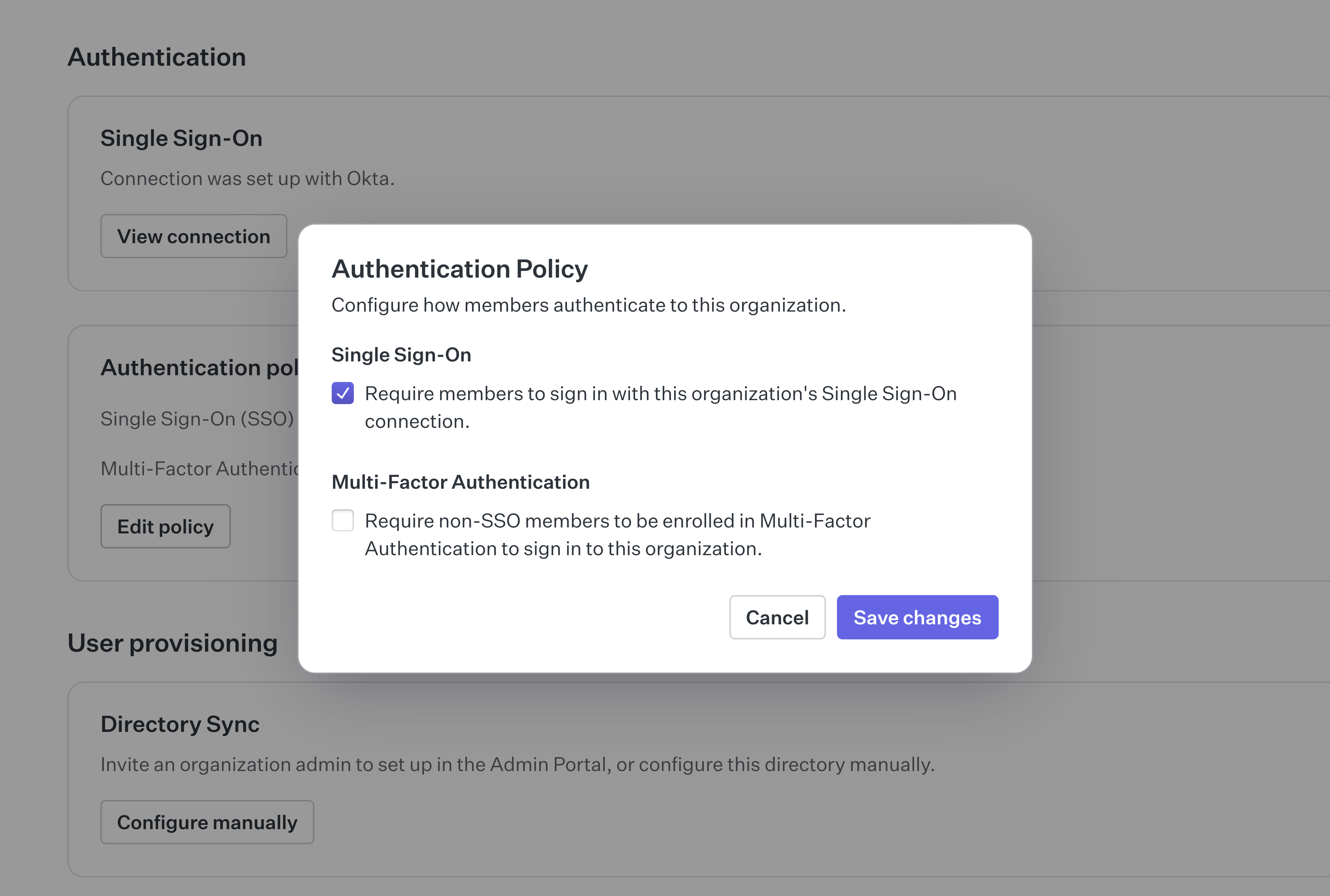[border=false]
|
|
76
|
+
|
|
77
|
+
After adding SSO enforcement to the policy, all users will be required to sign-in using SSO. This will apply to all users, including external contractors. For this to function with external contractors, they will need to be added to the organization's IdP.
|
|
78
|
+
|
|
79
|
+
For cases where external contractors can not be added to the organization's IdP, an MFA requirement can be set as an enforcement fallback. This is sometimes a reasonable compromise if many contractors rotate in out of the organization.
|
|
80
|
+
|
|
81
|
+
## Summary
|
|
82
|
+
|
|
83
|
+
The organization should now be set up and to both accept SSO connections and enforce their use for all users, including external contractors. In the contractor case they will require adding to the organizations IdP or otherwise fallback to using MFA.
|
|
84
|
+
|
|
85
|
+
This scenario did not cover the full range of access constraints that can be applied to an organization following domain verification, for more information on this topic see the Access Constraints section of the documentation.
|
|
@@ -0,0 +1,96 @@
|
|
|
1
|
+
---
|
|
2
|
+
title: Single Sign-On
|
|
3
|
+
description: >-
|
|
4
|
+
Facilitate greater security, easier account management, and accelerated
|
|
5
|
+
application onboarding and adoption.
|
|
6
|
+
showNextPage: true
|
|
7
|
+
originalPath: .tmp-workos-clone/packages/docs/content/user-management/sso.mdx
|
|
8
|
+
---
|
|
9
|
+
|
|
10
|
+
## Introduction
|
|
11
|
+
|
|
12
|
+
Single Sign-On is the most frequently asked for requirement by organizations looking to adopt new SaaS applications. SSO enables authentication via an organization’s [identity provider (IdP)](/glossary/idp).
|
|
13
|
+
|
|
14
|
+
This service is compatible with any IdP and supports both the [SAML](/glossary/saml) and [OIDC](/glossary/oidc) protocols. It’s modeled to meet the [OAuth 2.0](/glossary/oauth-2-0) framework specification, abstracting away the underlying authentication handshakes between different IdPs.
|
|
15
|
+
|
|
16
|
+
## Getting started
|
|
17
|
+
|
|
18
|
+
AuthKit greatly simplifies the process of integrating SSO into your application. AuthKit will make the necessary API calls automatically and handle the routing of SSO users when their account is associated with an existing SSO connection.
|
|
19
|
+
|
|
20
|
+
## (1) Enable SSO
|
|
21
|
+
|
|
22
|
+
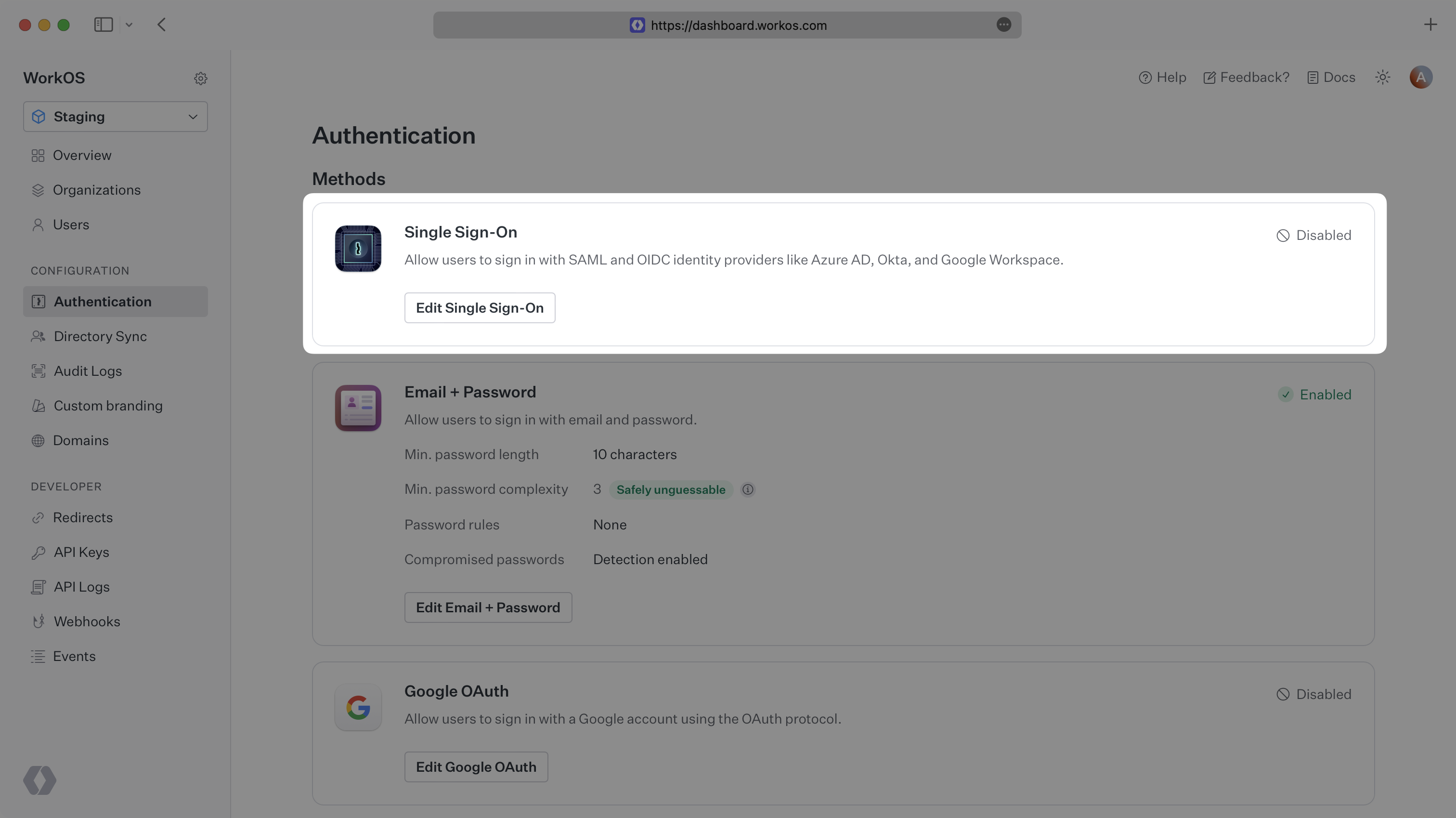
Navigate to the _Authentication_ settings section in the [WorkOS Dashboard](https://dashboard.workos.com/) and enable Single Sign-On.
|
|
23
|
+
|
|
24
|
+
|
|
25
|
+
|
|
26
|
+
AuthKit will now automatically detect when a user is attempting to sign in via SSO and redirect them to the appropriate IdP.
|
|
27
|
+
|
|
28
|
+
## (2) Test with the Test Identity Provider
|
|
29
|
+
|
|
30
|
+
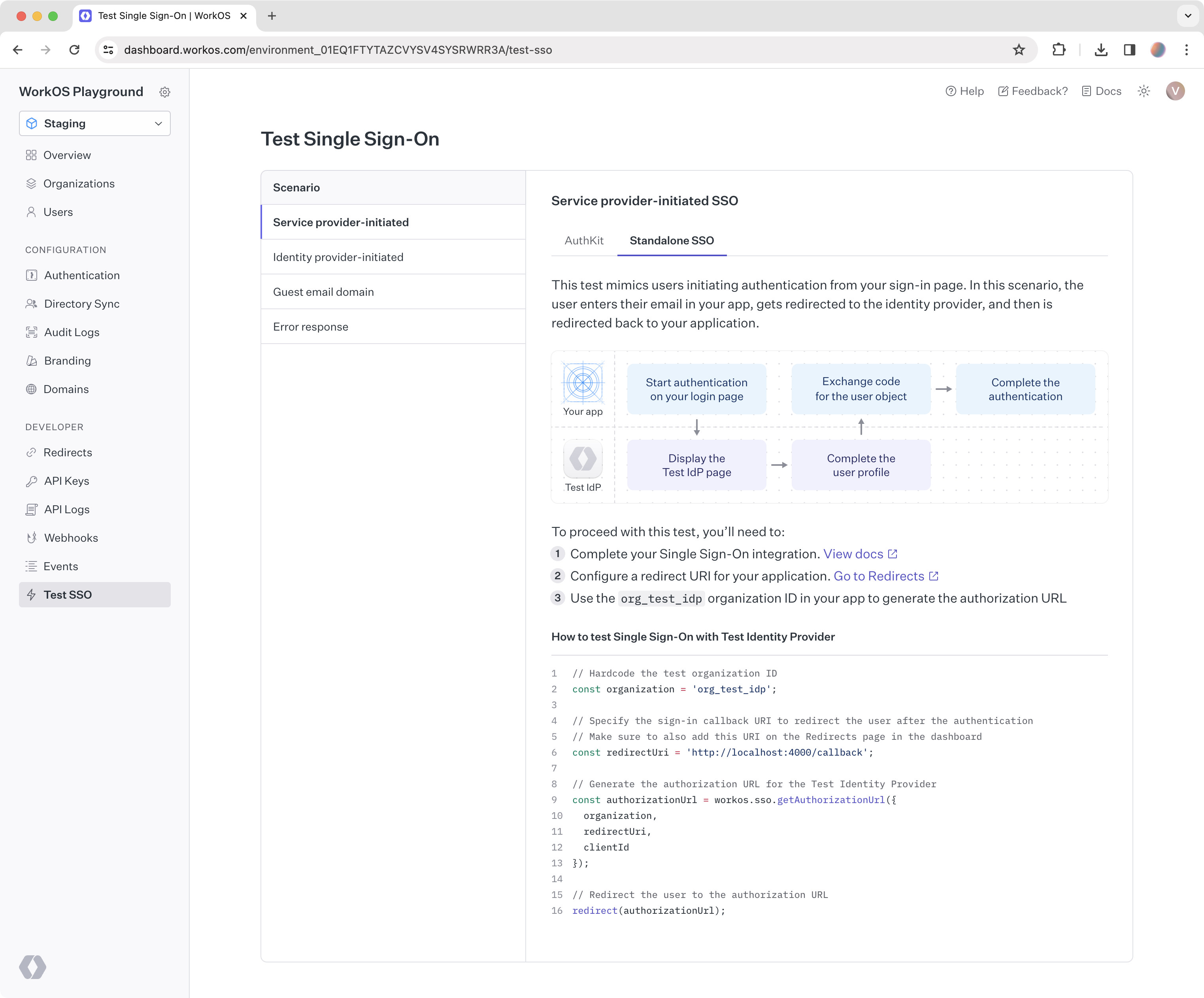
To confirm your Single Sign-On integration works correctly you can use the Test Identity Provider to simulate login flows end-to-end. Your staging environment includes a default Test Organization and active SSO connection configured with the Test Identity Provider.
|
|
31
|
+
|
|
32
|
+
|
|
33
|
+
|
|
34
|
+
### Getting started
|
|
35
|
+
|
|
36
|
+
Log into the [WorkOS Dashboard](https://dashboard.workos.com/) and navigate to the _Test SSO_ page to get started with the Test IdP. This page outlines a number of different SSO scenarios you can follow and provides all the necessary information to complete the tests.
|
|
37
|
+
|
|
38
|
+

|
|
39
|
+
|
|
40
|
+
### Service provider-initiated SSO
|
|
41
|
+
|
|
42
|
+
This case is likely the first [login flow](/sso/login-flows/sp-initiated-sso) you would test when implementing SSO in your app. The test simulates users initiating authentication from your sign-in page. In this scenario, the user enters their email in your app, gets redirected to the identity provider, and then is redirected back to your application.
|
|
43
|
+
|
|
44
|
+
### Identity provider-initiated SSO
|
|
45
|
+
|
|
46
|
+
This test simulates users initiating authentication from their identity provider. It is a common [login flow](/sso/login-flows/idp-initiated-sso) that developers forget to consider. In the scenario, users log in to the identity provider directly, select your application from their list of SSO-enabled apps, and are redirected to your application upon successful authentication.
|
|
47
|
+
|
|
48
|
+
### Guest email domain
|
|
49
|
+
|
|
50
|
+
This test simulates users authenticating with an email domain different from the verified domain of the test organization, `example.com`. A relevant scenario is authenticating freelance users, whose email domain is not owned by the company.
|
|
51
|
+
|
|
52
|
+
### Error response
|
|
53
|
+
|
|
54
|
+
This test simulates a generic [error response](/reference/sso/get-authorization-url/error-codes) from the user’s identity provider. In this scenario, SSO authentication has failed for the user. Below is an example of the error-related parameters passed to the [redirect URI](/sso/redirect-uris) in your application.
|
|
55
|
+
|
|
56
|
+
---
|
|
57
|
+
|
|
58
|
+
## (3) Test with other identity providers
|
|
59
|
+
|
|
60
|
+
Test Identity Provider saves time by providing an out of the box experience compared to the configuration process that someone using a real identity provider would have to go through to enable Single Sign-On for your app.
|
|
61
|
+
|
|
62
|
+
If your integration works with the Test Identity Provider, you can be sure it will work with other identity providers. However, it may be helpful to also learn about the setup process that your customers will go through on their side, which varies depending on a specific identity provider.
|
|
63
|
+
|
|
64
|
+
### Create an organization
|
|
65
|
+
|
|
66
|
+
To get started, you will need to [create an organization](https://dashboard.workos.com/organizations) in the WorkOS Dashboard. Organizations in WorkOS represent your customer, so by creating an organization, you can test your SSO connection the way your customers will experience it.
|
|
67
|
+
|
|
68
|
+

|
|
69
|
+
|
|
70
|
+
### Create a connection
|
|
71
|
+
|
|
72
|
+
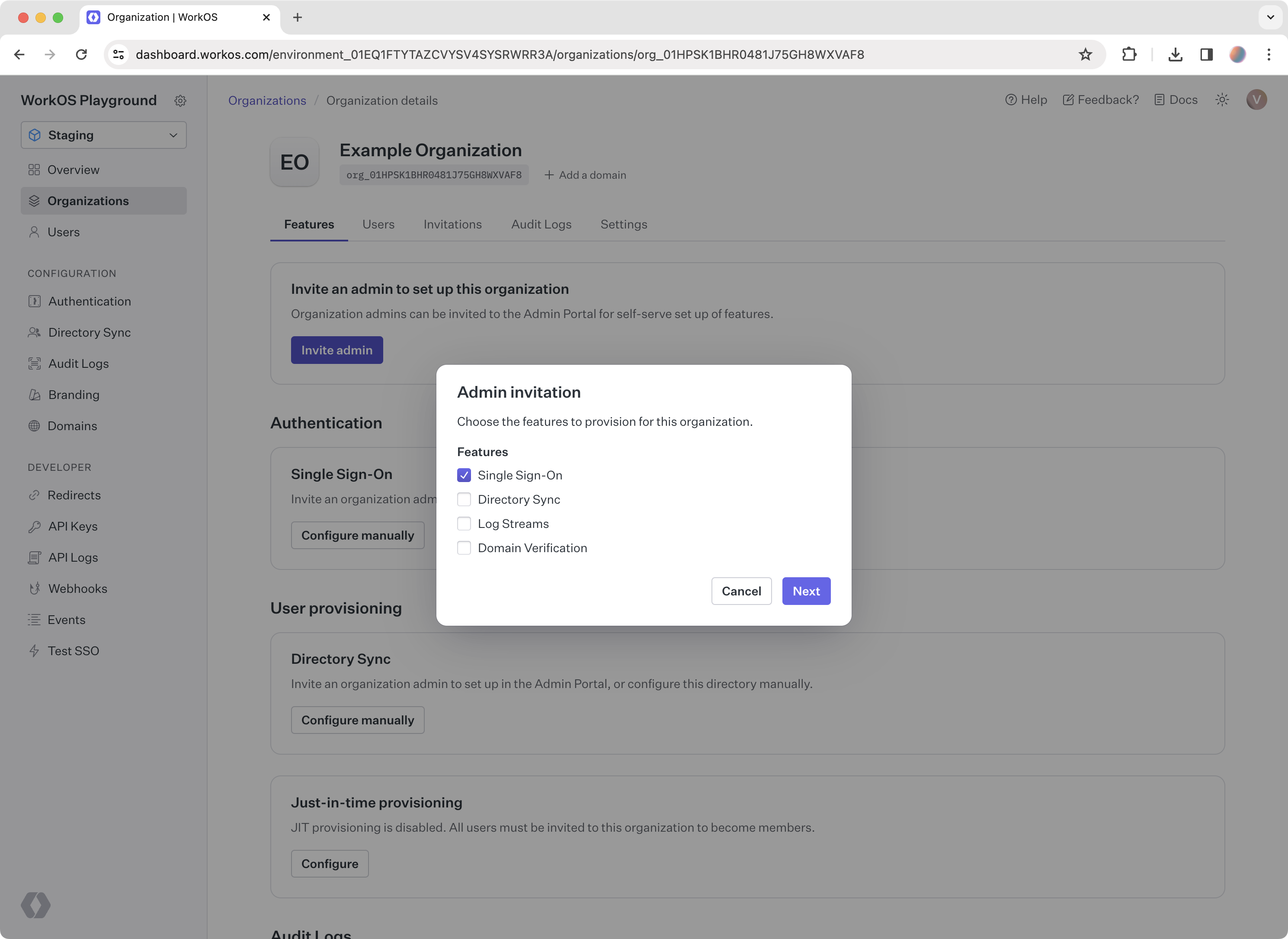
Go to the organization you created and click _Invite admin_. Select _Single Sign-On_ from the list of features. In the next step, enter an email address to send the setup link to, or click _Copy setup link_.
|
|
73
|
+
|
|
74
|
+
The setup link goes to Admin Portal, where your customers get the exact instructions for every step they need to take to enable Single Sign-On with your app.
|
|
75
|
+
|
|
76
|
+
> You can also integrate [Admin Portal](/admin-portal) directly into your app to enable self-serve setup of Single Sign-On and other enterprise features for your users.
|
|
77
|
+
|
|
78
|
+
|
|
79
|
+
|
|
80
|
+
### Follow the Admin Portal instructions
|
|
81
|
+
|
|
82
|
+
To complete the integration, you’ll have to also create an account with the identity provider you want to test with. After you have signed up with an identity provider of your choice, follow the corresponding Admin Portal instructions from the setup link. Once done, you can start testing your SSO integration with that identity provider.
|
|
83
|
+
|
|
84
|
+
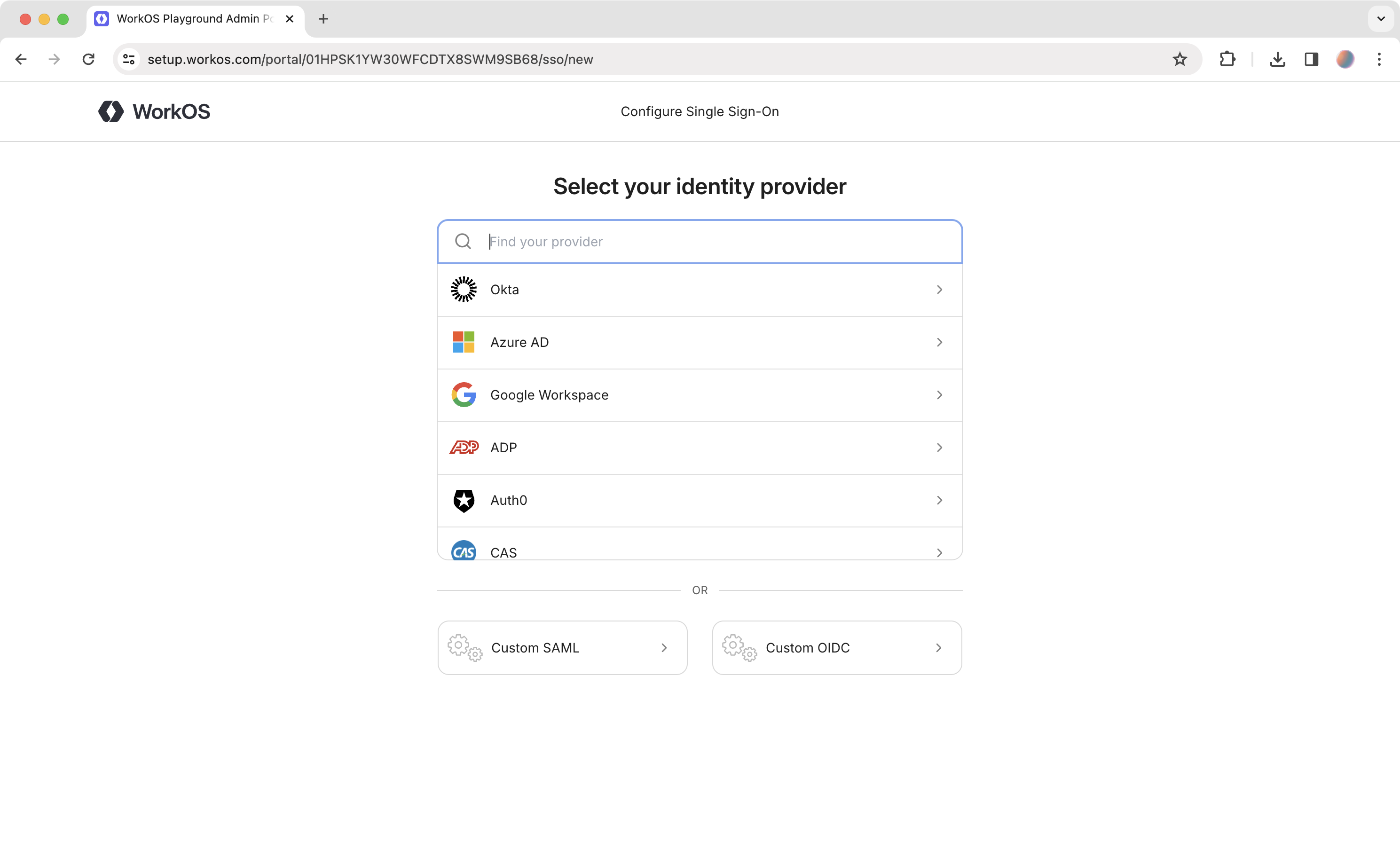
|
|
85
|
+
|
|
86
|
+
The setup instructions you’ve seen in the Admin Portal are also available directly in the docs if you want to create a connection manually:
|
|
87
|
+
|
|
88
|
+
<ProviderCards.SsoIntegration />
|
|
89
|
+
|
|
90
|
+
---
|
|
91
|
+
|
|
92
|
+
## Integrating via the API
|
|
93
|
+
|
|
94
|
+
If you’d prefer to build and manage your own authentication UI, you can do so via the User Management [Authentication API](/reference/user-management/authentication).
|
|
95
|
+
|
|
96
|
+
Examples of building custom UI are also [available on GitHub](https://github.com/workos/authkit).
|
|
@@ -0,0 +1,91 @@
|
|
|
1
|
+
---
|
|
2
|
+
title: Users and Organizations
|
|
3
|
+
description: Flexible application modeling with user and membership features.
|
|
4
|
+
showNextPage: true
|
|
5
|
+
originalPath: >-
|
|
6
|
+
.tmp-workos-clone/packages/docs/content/user-management/users-organizations.mdx
|
|
7
|
+
---
|
|
8
|
+
|
|
9
|
+
## Users
|
|
10
|
+
|
|
11
|
+
The [User object](/reference/user-management/user) represents an identity that has access or owns artifacts in your application. A User object may not uniquely identify an individual person, since a person may present themselves as having multiple identities in the same system.
|
|
12
|
+
|
|
13
|
+
What uniquely identifies a user is their **email address**, since having access to that email inbox ultimately gives access to all accounts based on that address.
|
|
14
|
+
|
|
15
|
+
### Authentication methods
|
|
16
|
+
|
|
17
|
+
There may be multiple authentication methods on a single user object, such as [Email + Password](/user-management/email-password) or [OAuth](/user-management/social-login). A user can sign in with any of the authentication methods associated with them, as long as you have enabled those authentication methods in the WorkOS Dashboard.
|
|
18
|
+
|
|
19
|
+
<UserManagementDiagrams.AuthenticationMethods />
|
|
20
|
+
|
|
21
|
+
### Identity linking
|
|
22
|
+
|
|
23
|
+
Because a user is uniquely identified by their email address, you won’t have users with duplicate email addresses. WorkOS handles [identity linking](/user-management/identity-linking) automatically.
|
|
24
|
+
|
|
25
|
+
### Email verification
|
|
26
|
+
|
|
27
|
+
All users will go through an initial [email verification process](/user-management/email-verification) by default.
|
|
28
|
+
|
|
29
|
+
This applies to all authentication methods, including OAuth and SSO. This unifying interface simplifies how your application considers the authenticity of your users.
|
|
30
|
+
|
|
31
|
+
### Domain verification
|
|
32
|
+
|
|
33
|
+
If a user’s email domain matches a verified organization domain, they will [automatically be considered verified](/user-management/domain-verification) and will not need to go through the email verification flow.
|
|
34
|
+
|
|
35
|
+
---
|
|
36
|
+
|
|
37
|
+
## Organizations
|
|
38
|
+
|
|
39
|
+
Organizations represent both a collection of users that your customer’s IT admin has control over and a workspace within which members collaborate. Organizations are a first-class concept in WorkOS and support a suite of features around organizational management. There is no limit to the number of organizations you can create in WorkOS.
|
|
40
|
+
|
|
41
|
+
### Organization memberships
|
|
42
|
+
|
|
43
|
+
An organization contains users as members. Organization membership allows you to model organizations as "workspaces" and user’s access to them with memberships.
|
|
44
|
+
|
|
45
|
+
WorkOS organization memberships are designed to be flexible, and support any B2B app model. For example:
|
|
46
|
+
|
|
47
|
+
<UserManagementDiagrams.UserToOrganizationRelationships />
|
|
48
|
+
|
|
49
|
+
- **Multiple Workspaces:** A self-serve productivity app, like Figma, where each user can be in any number of organizations, can create their own workspace and join any number of other workspaces.
|
|
50
|
+
- **Single Workspace:** An app that has no collaboration outside a customer’s company, like an employee survey tool, where each user is in exactly one organization.
|
|
51
|
+
|
|
52
|
+
While these are two distinct models, your choice may depend on your go-to-market strategy, which may change over time. **WorkOS User Management supports both**.
|
|
53
|
+
|
|
54
|
+
### Organization access
|
|
55
|
+
|
|
56
|
+
It’s common for users to create resources in B2B applications. You can use the organization as a container for these resources, so that access is dependent on a user’s access to the organization.
|
|
57
|
+
|
|
58
|
+
This means when a user leaves an organization and is no longer a member, the data remains with the organization and not the user. Organizations provide the level of data ownership that B2B applications structure around.
|
|
59
|
+
|
|
60
|
+
While organization membership conveys the most basic form of access, you can attach more granular role information per member within your own application’s database.
|
|
61
|
+
|
|
62
|
+
### Organization roles
|
|
63
|
+
|
|
64
|
+
In addition to the [environment-level roles](/user-management/roles-and-permissions/configure-roles-and-permissions), organizations can define their own custom roles, which are assignable only within the context of the organization. Refer to the [organization roles documentation](/user-management/roles-and-permissions/organization-roles) for more details.
|
|
65
|
+
|
|
66
|
+
### Membership management
|
|
67
|
+
|
|
68
|
+
If your application uses a soft-delete model, you can utilize the extended organization membership lifecycle. Organization memberships have three possible statuses:
|
|
69
|
+
|
|
70
|
+
- `pending`, when a user is invited to an organization
|
|
71
|
+
- `active`, when a user is added as an organization member or accepts an invitation
|
|
72
|
+
- `inactive`, when an organization membership is deactivated
|
|
73
|
+
|
|
74
|
+
For soft-delete use cases, we also provide deactivation and reactivation APIs:
|
|
75
|
+
|
|
76
|
+
- [Deactivating an organization membership](/reference/user-management/organization-membership/deactivate) sets its status to `inactive` and revokes all active [sessions](/user-management/sessions). Note `pending` memberships cannot be deactivated and should be deleted using the [deleting membership API](/reference/user-management/organization-membership/delete) instead.
|
|
77
|
+
- [Reactivating an organization membership](/reference/user-management/organization-membership/reactivate) sets its status to `active` and retains the role attached to the organization membership prior to deactivation. This role can be updated using the [update organization membership API](/reference/user-management/organization-membership/update). Note `pending` memberships cannot be reactivated. For this the user should go through the [invitation acceptance flow](/user-management/invitations) instead. If invitations are not needed, the organization membership can be [created as active directly](/reference/user-management/organization-membership/create).
|
|
78
|
+
|
|
79
|
+
If your application uses a hard-delete model, you may use organization memberships without deactivation/reactivation by [deleting memberships](/reference/user-management/organization-membership/delete) for users who should no longer have access to an organization.
|
|
80
|
+
|
|
81
|
+
### When to use deletion vs. deactivation
|
|
82
|
+
|
|
83
|
+
Hard deletion is preferred if the app has no need to "remember" the membership. For example, when members operate solely on customer data and have no data of their own. When a member of the organization is gone, there's no need to keep around their membership data. An app in this case may even want to entirely [delete the User](/reference/user-management/user/delete) once the membership is deleted.
|
|
84
|
+
|
|
85
|
+
Deactivation may be preferred in cases where a member retains some data after leaving the organization, for example: messages, documents, or other data which reference that member. It also allows for building a user interface to list former members, perhaps with the option to reactivate them.
|
|
86
|
+
|
|
87
|
+
### Automated memberships
|
|
88
|
+
|
|
89
|
+
Beyond manually adding or removing users to and from organizations as members, users can be automatically [Just-in-Time (JIT) provisioned](/user-management/jit-provisioning) into an organization if their email address matches one of the organization's [verified domains](/user-management/domain-verification). This allows customers to quickly onboard teammates.
|
|
90
|
+
|
|
91
|
+
Users can also [invite individuals to organizations](/user-management/invitations), regardless of their email domain. This is handy for contractors within a company, or a collection of people without a shared domain.
|
|
@@ -0,0 +1,190 @@
|
|
|
1
|
+
---
|
|
2
|
+
title: WorkOS Widgets
|
|
3
|
+
description: Learn how to integrate WorkOS Widgets in your app.
|
|
4
|
+
showNextPage: true
|
|
5
|
+
originalPath: .tmp-workos-clone/packages/docs/content/user-management/widgets.mdx
|
|
6
|
+
---
|
|
7
|
+
|
|
8
|
+
## Introduction
|
|
9
|
+
|
|
10
|
+
WorkOS Widgets are React components that provide complete functionality for common enterprise app workflows, for example a Users Management Widget that provides a UI for inviting, removing and editing users.
|
|
11
|
+
|
|
12
|
+
This guide will cover how to add a widget to your app, configure CORS, and supply an authorization token for the widget.
|
|
13
|
+
|
|
14
|
+
## Integrating
|
|
15
|
+
|
|
16
|
+
First, install the `@workos-inc/widgets` package from the npm registry, along with its peer dependencies:
|
|
17
|
+
|
|
18
|
+
```bash title="Install packages"
|
|
19
|
+
npm install @workos-inc/widgets @radix-ui/themes @tanstack/react-query
|
|
20
|
+
```
|
|
21
|
+
|
|
22
|
+
### CORS configuration
|
|
23
|
+
|
|
24
|
+
Because WorkOS widgets issue client-side requests to WorkOS, it is necessary to configure your site as an allowed web origin. Adding this in the [Authentication section of the dashboard](https://dashboard.workos.com/) will prevent CORS issues when using the widget.
|
|
25
|
+
|
|
26
|
+
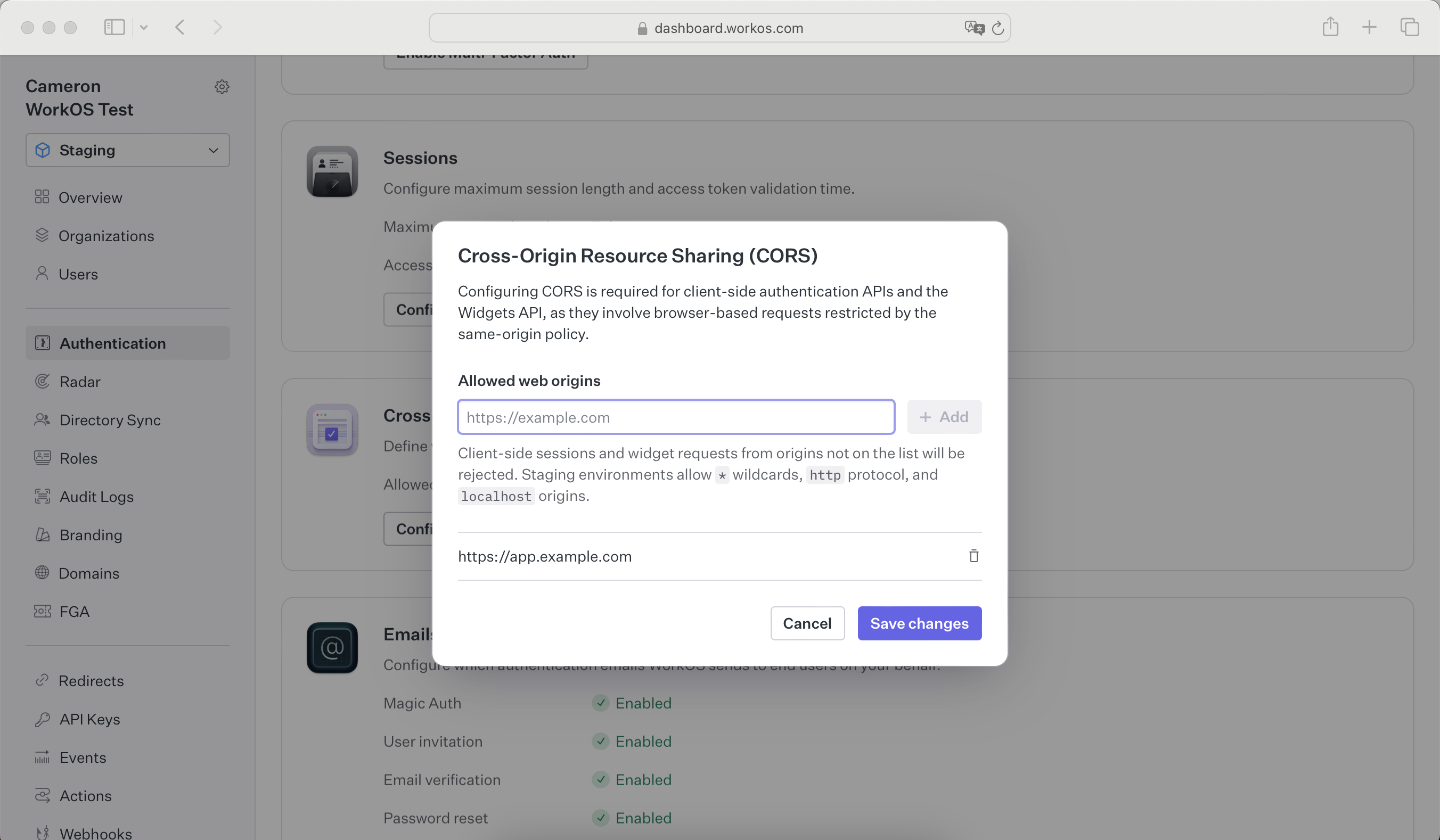
|
|
27
|
+
|
|
28
|
+
### Tokens
|
|
29
|
+
|
|
30
|
+
Widgets must be supplied with an authorization token. The token can be acquired in one of two ways:
|
|
31
|
+
|
|
32
|
+
- If you are using the `authkit-js` or `authkit-react` libraries, you can use the provided access token.
|
|
33
|
+
- If you use one of our backend SDKs, use the "get token" method in the SDK to request a token with the appropriate scope for the widget you want to use. Widget tokens expire after one hour.
|
|
34
|
+
|
|
35
|
+
<CodeBlock file="widgets-get-token" />
|
|
36
|
+
|
|
37
|
+
> New WorkOS accounts are created with an "Admin" role that has all Widget permissions assigned. Existing accounts will need to assign the proper permissions to a role. This can be done on the "Roles" page of the WorkOS Dashboard. See the [Roles and Permissions guide](/user-management/roles-and-permissions) for more information.
|
|
38
|
+
|
|
39
|
+
To successfully generate a token, the user must be assigned a role with the correct permissions for the widget.
|
|
40
|
+
|
|
41
|
+
## Styling
|
|
42
|
+
|
|
43
|
+
### Radix Themes
|
|
44
|
+
|
|
45
|
+
WorkOS Widgets are powered by Radix Themes, which are styled out-of-the-box when you import its CSS in your app. You'll also need to import an additional CSS file from the WorkOS Widgets package to get everything looking just right.
|
|
46
|
+
|
|
47
|
+
<CodeBlock language="js" file="widgets-radix-import" />
|
|
48
|
+
|
|
49
|
+
You can customize Widgets by passing a `theme` prop to `WorkOSWidgets`. This prop accepts an object with the same options as [Radix themes](https://www.radix-ui.com/themes/docs/components/theme#api-reference).
|
|
50
|
+
|
|
51
|
+
<CodeBlock
|
|
52
|
+
title="Theme customization"
|
|
53
|
+
file="theme-customization"
|
|
54
|
+
language="js"
|
|
55
|
+
/>
|
|
56
|
+
|
|
57
|
+
### CSS
|
|
58
|
+
|
|
59
|
+
If you choose not to use the theming capabilities in Radix Themes, you can style Widgets using CSS. We recommend starting with the `layout.css` stylesheet from Radix Themes, as well as the `base.css` stylesheet from WorkOS Widgets. These styles provide a base level of functional styling without opinionated design choices.
|
|
60
|
+
|
|
61
|
+
<CodeBlock language="js" file="widgets-css-imports" />
|
|
62
|
+
|
|
63
|
+
Individual elements in Radix themes are accessible via CSS class selectors prefixed with `woswidgets-`. For example, you can add your own button styles by selecting the `woswidgets-button` class.
|
|
64
|
+
|
|
65
|
+
<CodeBlock
|
|
66
|
+
title="CSS customization"
|
|
67
|
+
file="widgets-css-customization"
|
|
68
|
+
language="css"
|
|
69
|
+
/>
|
|
70
|
+
|
|
71
|
+
## User Management
|
|
72
|
+
|
|
73
|
+
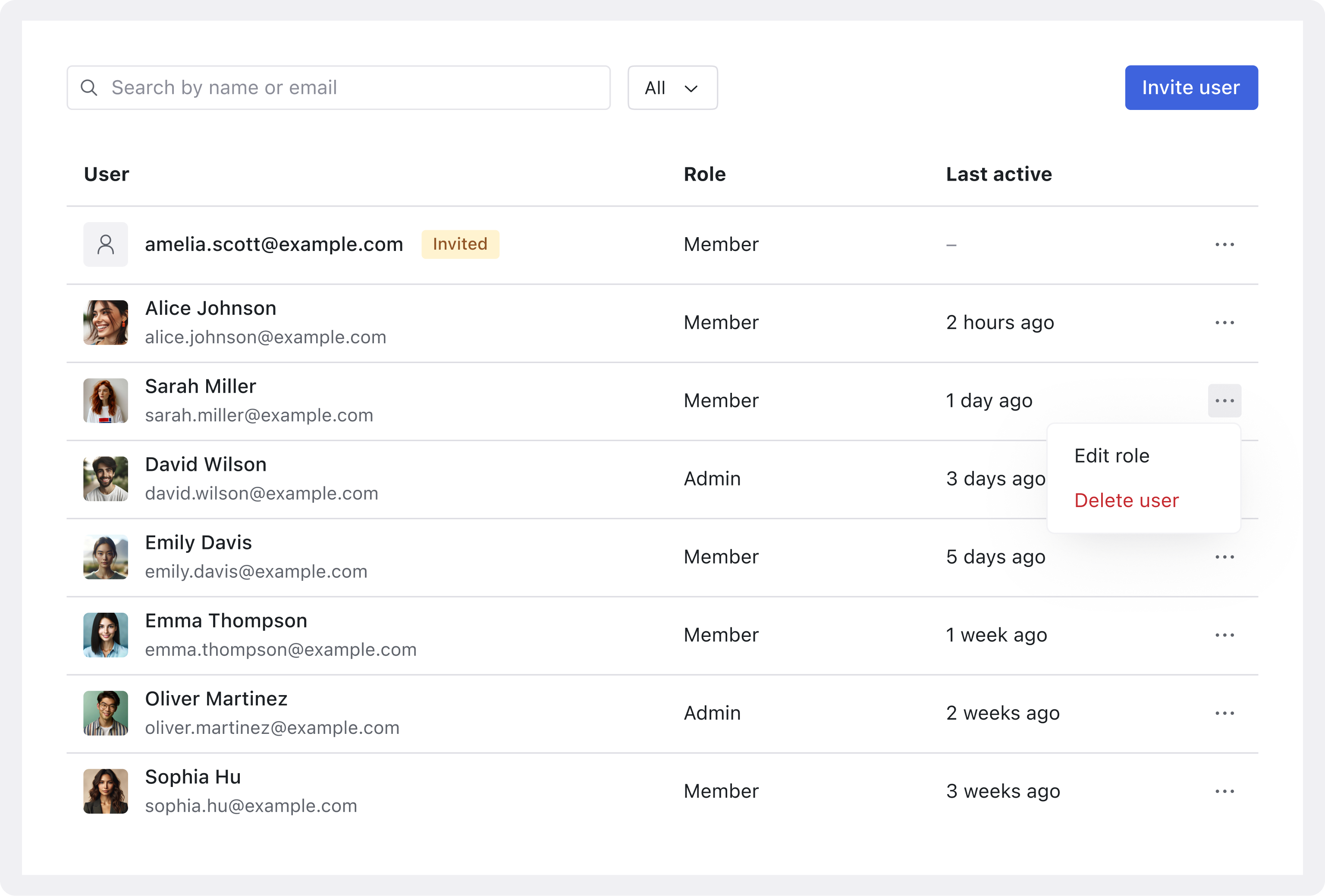
|
|
74
|
+
|
|
75
|
+
The `<UsersManagement />` widget allows an organization admin to manage the members in an org. Admins can invite new users, remove users, and change roles all within the widget.
|
|
76
|
+
|
|
77
|
+
In order to use the User Management widget, a user must have a role that has the `widgets:users-table:manage` permission.
|
|
78
|
+
|
|
79
|
+
<CodeBlock>
|
|
80
|
+
<CodeBlockTab
|
|
81
|
+
language="js"
|
|
82
|
+
file="widget-usersmanagement-token"
|
|
83
|
+
title="Widget Token"
|
|
84
|
+
/>
|
|
85
|
+
<CodeBlockTab
|
|
86
|
+
language="js"
|
|
87
|
+
file="widget-usersmanagement-authkit-react"
|
|
88
|
+
title="Access Token"
|
|
89
|
+
/>
|
|
90
|
+
</CodeBlock>
|
|
91
|
+
|
|
92
|
+
## Organization Switcher
|
|
93
|
+
|
|
94
|
+
The `<OrganizationSwitcher />` widget allows an organization admin to switch between organizations. There are no special permissions required to use this widget as users can switch between organizations they have access to. If an organization requires SSO or MFA, the user will be redirected to reauthorize with the new organization.
|
|
95
|
+
|
|
96
|
+
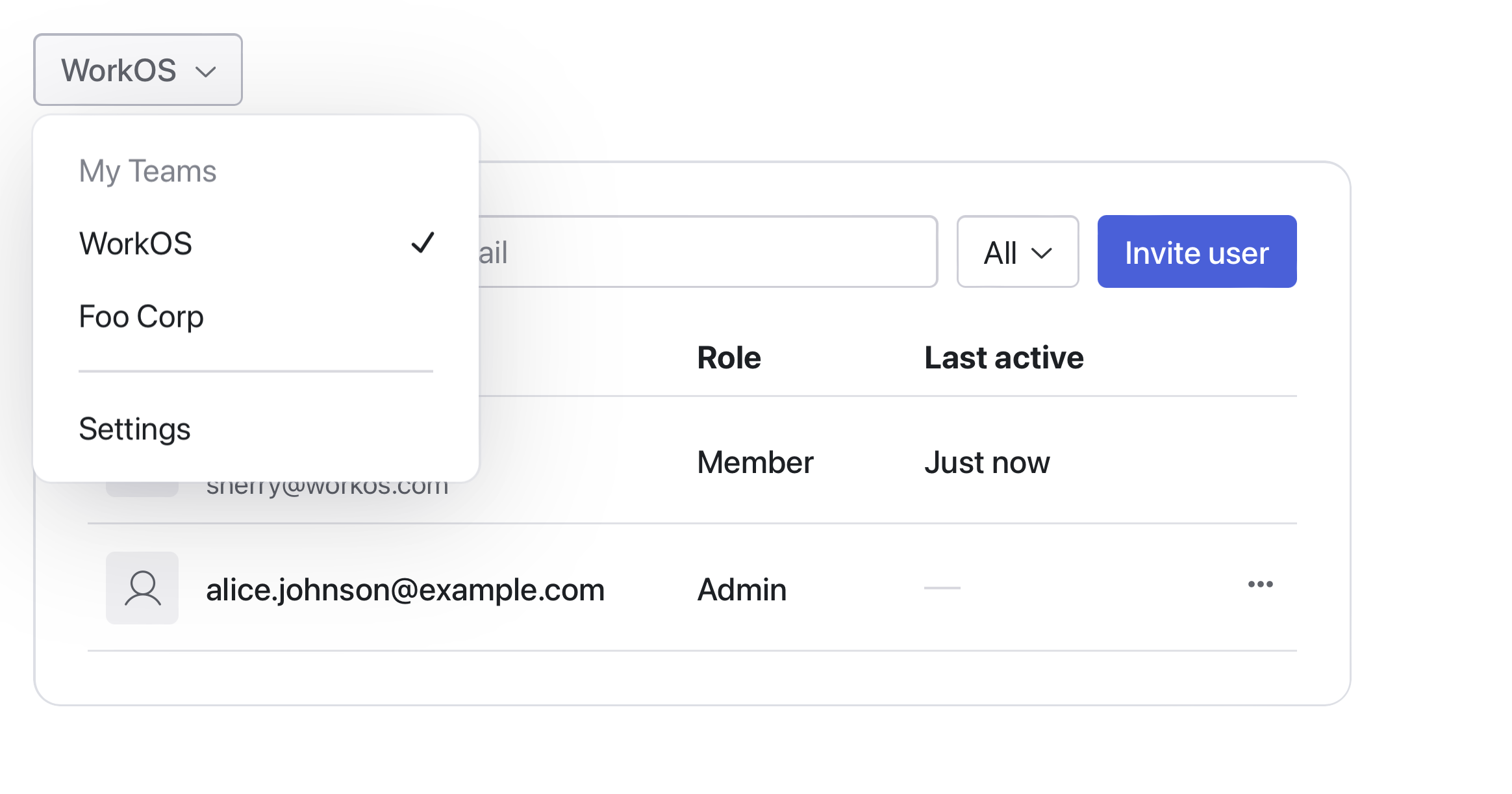
|
|
97
|
+
|
|
98
|
+
### Switching Organizations
|
|
99
|
+
|
|
100
|
+
There are multiple ways to integrate with the Organization Switcher widget depending on your library choice. If you are using either the `authkit-js` or `authkit-react` libraries, you can use the `useAuth` hook to get the current organization and pass it to the widget.
|
|
101
|
+
|
|
102
|
+
<CodeBlock>
|
|
103
|
+
<CodeBlockTab
|
|
104
|
+
language="js"
|
|
105
|
+
file="widget-organization-switcher-authkit-react"
|
|
106
|
+
title="React Library"
|
|
107
|
+
/>
|
|
108
|
+
</CodeBlock>
|
|
109
|
+
|
|
110
|
+
If you are using one of the backend SDKs, you can build the organization switcher action in the backend and pass it in as a prop to the widget to be called when the user attempts to switch organizations. See the [Switching Organizations](/user-management/sessions/integrating-sessions/switching-organizations) guide for more information to set up the backend actions. This can then be passed in as a prop to the widget.
|
|
111
|
+
|
|
112
|
+
<CodeBlock>
|
|
113
|
+
<CodeBlockTab
|
|
114
|
+
language="js"
|
|
115
|
+
file="widget-organization-switcher-backend"
|
|
116
|
+
title="Backend Handling"
|
|
117
|
+
/>
|
|
118
|
+
</CodeBlock>
|
|
119
|
+
|
|
120
|
+
### Creating Organizations
|
|
121
|
+
|
|
122
|
+
The widget accepts children components that can be used to either redirect the user to create an organization or to show a modal with a form to create an organization. You can use this to integrate with your existing organization creation flow that uses the WorkOS APIs to create organizations.
|
|
123
|
+
|
|
124
|
+
<CodeBlock>
|
|
125
|
+
<CodeBlockTab
|
|
126
|
+
language="js"
|
|
127
|
+
file="widget-organization-switcher-create-authkit-react"
|
|
128
|
+
title="Create Organization"
|
|
129
|
+
/>
|
|
130
|
+
</CodeBlock>
|
|
131
|
+
|
|
132
|
+
## User Profile
|
|
133
|
+
|
|
134
|
+
The `<UserProfile />` widget allows users to view and manage their personal information.
|
|
135
|
+
Users can see their profile details and edit their display name.
|
|
136
|
+
This widget provides a simple, user-friendly interface for basic profile management.
|
|
137
|
+
|
|
138
|
+
No special permissions are required to use this widget.
|
|
139
|
+
|
|
140
|
+
<CodeBlock>
|
|
141
|
+
<CodeBlockTab
|
|
142
|
+
language="js"
|
|
143
|
+
file="widget-userprofile-token"
|
|
144
|
+
title="Widget Token"
|
|
145
|
+
/>
|
|
146
|
+
<CodeBlockTab
|
|
147
|
+
language="js"
|
|
148
|
+
file="widget-userprofile-authkit-react"
|
|
149
|
+
title="Access Token"
|
|
150
|
+
/>
|
|
151
|
+
</CodeBlock>
|
|
152
|
+
|
|
153
|
+
## User Sessions
|
|
154
|
+
|
|
155
|
+
The `<UserSessions />` widget provides users with visibility into their active sessions across different devices and browsers. Users can view session details and sign out of individual sessions as needed. No special permissions are required to use this widget.
|
|
156
|
+
|
|
157
|
+
<CodeBlock>
|
|
158
|
+
<CodeBlockTab
|
|
159
|
+
language="js"
|
|
160
|
+
file="widget-usersessions-token"
|
|
161
|
+
title="Widget Token"
|
|
162
|
+
/>
|
|
163
|
+
<CodeBlockTab
|
|
164
|
+
language="js"
|
|
165
|
+
file="widget-usersessions-authkit-react"
|
|
166
|
+
title="Access Token"
|
|
167
|
+
/>
|
|
168
|
+
</CodeBlock>
|
|
169
|
+
|
|
170
|
+
## User Security
|
|
171
|
+
|
|
172
|
+
The `<UserSecurity />` widget enables users to control their security settings. With this widget, users can:
|
|
173
|
+
|
|
174
|
+
- Set or change their password
|
|
175
|
+
- Configure and reset Multi-Factor Authentication
|
|
176
|
+
|
|
177
|
+
No special permissions are required to use this widget.
|
|
178
|
+
|
|
179
|
+
<CodeBlock>
|
|
180
|
+
<CodeBlockTab
|
|
181
|
+
language="js"
|
|
182
|
+
file="widget-usersecurity-token"
|
|
183
|
+
title="Widget Token"
|
|
184
|
+
/>
|
|
185
|
+
<CodeBlockTab
|
|
186
|
+
language="js"
|
|
187
|
+
file="widget-usersecurity-authkit-react"
|
|
188
|
+
title="Access Token"
|
|
189
|
+
/>
|
|
190
|
+
</CodeBlock>
|
|
@@ -0,0 +1,14 @@
|
|
|
1
|
+
---
|
|
2
|
+
title: Vault
|
|
3
|
+
links:
|
|
4
|
+
- title: Getting Started
|
|
5
|
+
links:
|
|
6
|
+
- title: Overview
|
|
7
|
+
url: /vault
|
|
8
|
+
- title: Quick Start
|
|
9
|
+
url: /vault/quick-start
|
|
10
|
+
- title: Key Context
|
|
11
|
+
url: /vault/key-context
|
|
12
|
+
originalPath: .tmp-workos-clone/packages/docs/content/vault/_navigation.mdx
|
|
13
|
+
---
|
|
14
|
+
|