@workos/mcp-docs-server 0.1.0
This diff represents the content of publicly available package versions that have been released to one of the supported registries. The information contained in this diff is provided for informational purposes only and reflects changes between package versions as they appear in their respective public registries.
- package/.docs/organized/changelogs/workos-platform.json +277 -0
- package/.docs/organized/docs/admin-portal/_navigation.mdx +16 -0
- package/.docs/organized/docs/admin-portal/custom-branding.mdx +111 -0
- package/.docs/organized/docs/admin-portal/example-apps.mdx +46 -0
- package/.docs/organized/docs/admin-portal/index.mdx +240 -0
- package/.docs/organized/docs/audit-logs/_navigation.mdx +22 -0
- package/.docs/organized/docs/audit-logs/admin-portal.mdx +20 -0
- package/.docs/organized/docs/audit-logs/editing-events.mdx +27 -0
- package/.docs/organized/docs/audit-logs/exporting-events.mdx +29 -0
- package/.docs/organized/docs/audit-logs/index.mdx +110 -0
- package/.docs/organized/docs/audit-logs/log-streams.mdx +56 -0
- package/.docs/organized/docs/audit-logs/metadata-schema.mdx +21 -0
- package/.docs/organized/docs/custom-domains/_navigation.mdx +16 -0
- package/.docs/organized/docs/custom-domains/admin-portal.mdx +38 -0
- package/.docs/organized/docs/custom-domains/auth-api.mdx +59 -0
- package/.docs/organized/docs/custom-domains/authkit.mdx +36 -0
- package/.docs/organized/docs/custom-domains/email.mdx +41 -0
- package/.docs/organized/docs/custom-domains/index.mdx +19 -0
- package/.docs/organized/docs/dashboard.mdx +244 -0
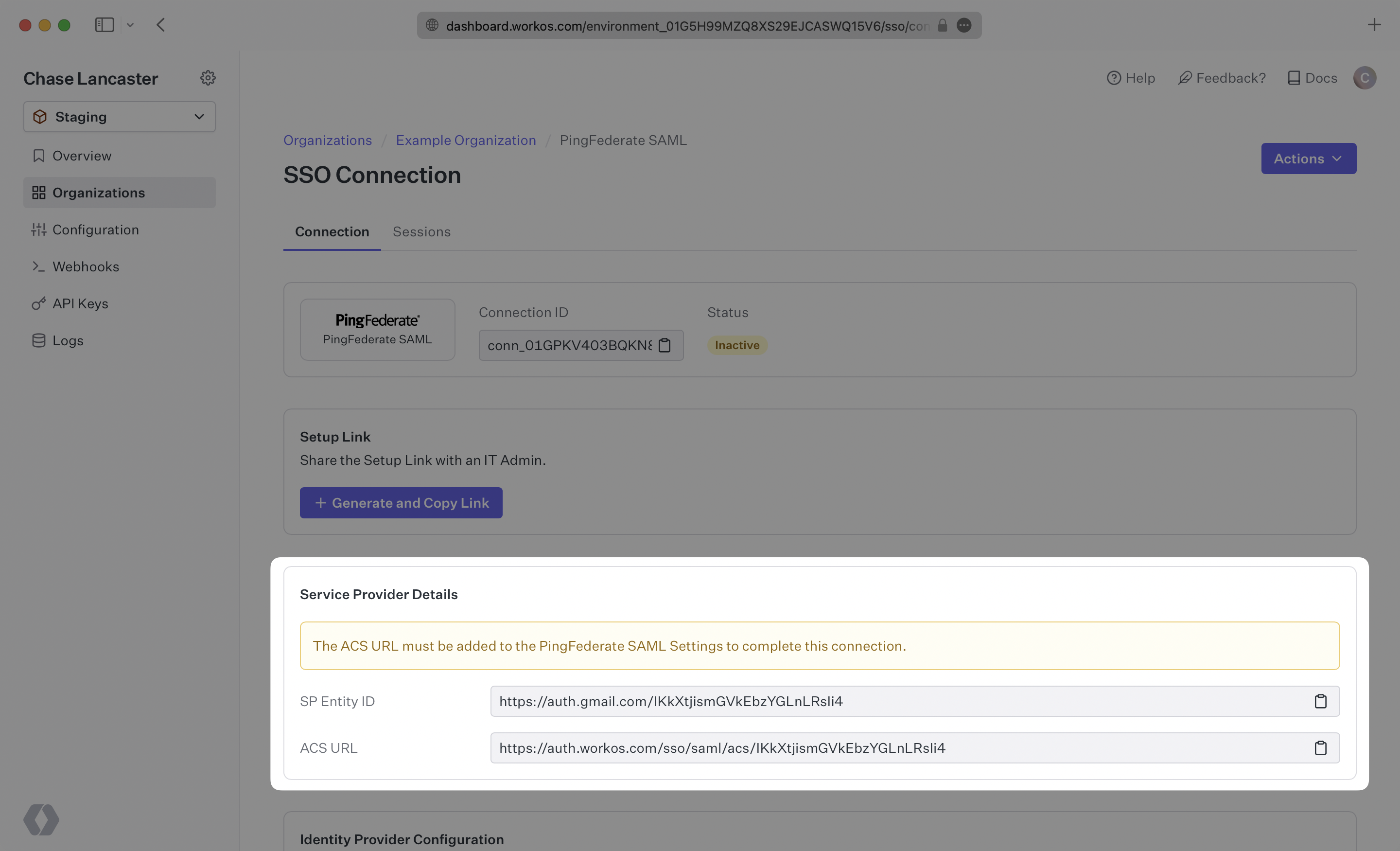
- package/.docs/organized/docs/demo/_navigation.mdx +26 -0
- package/.docs/organized/docs/demo/accordion.mdx +34 -0
- package/.docs/organized/docs/demo/checklist.mdx +33 -0
- package/.docs/organized/docs/demo/code-block.mdx +185 -0
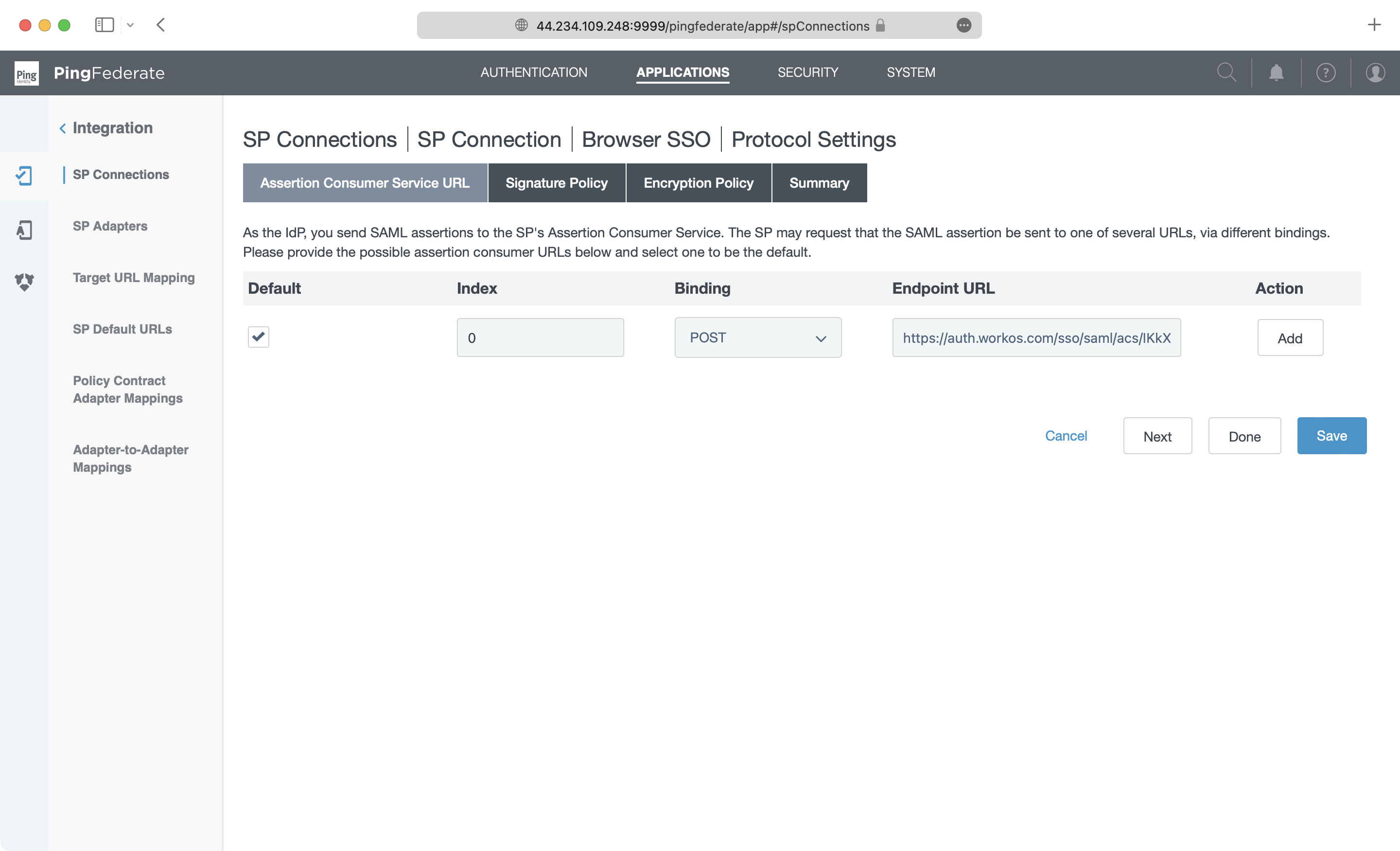
- package/.docs/organized/docs/demo/definition-list.mdx +35 -0
- package/.docs/organized/docs/demo/index.mdx +7 -0
- package/.docs/organized/docs/demo/punctuation.mdx +37 -0
- package/.docs/organized/docs/demo/replacements.mdx +26 -0
- package/.docs/organized/docs/demo/table.mdx +26 -0
- package/.docs/organized/docs/demo/tabs.mdx +17 -0
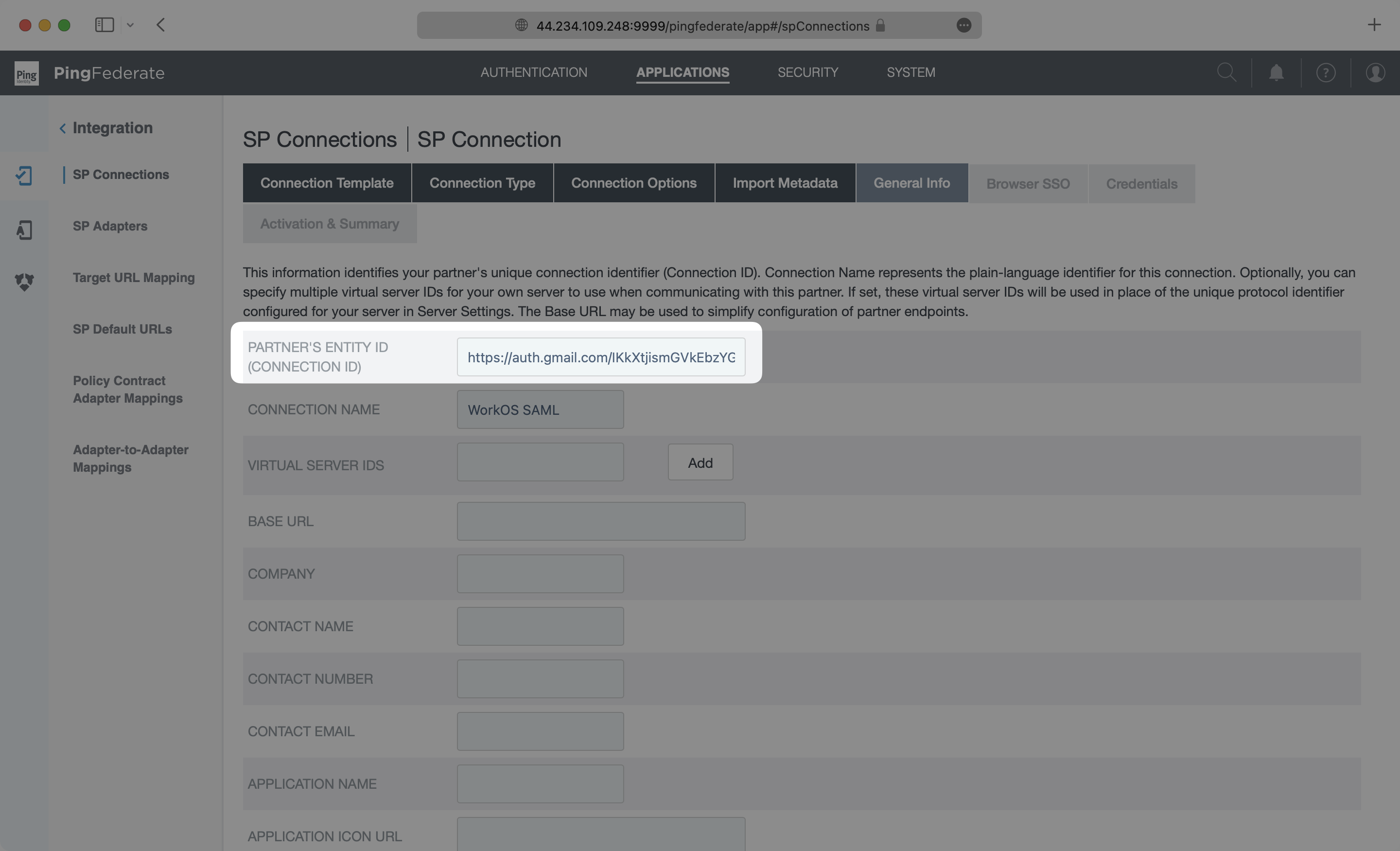
- package/.docs/organized/docs/directory-sync/_navigation.mdx +28 -0
- package/.docs/organized/docs/directory-sync/attributes.mdx +209 -0
- package/.docs/organized/docs/directory-sync/example-apps.mdx +46 -0
- package/.docs/organized/docs/directory-sync/handle-inactive-users.mdx +52 -0
- package/.docs/organized/docs/directory-sync/identity-provider-role-assignment.mdx +134 -0
- package/.docs/organized/docs/directory-sync/index.mdx +107 -0
- package/.docs/organized/docs/directory-sync/quick-start.mdx +129 -0
- package/.docs/organized/docs/directory-sync/understanding-events.mdx +209 -0
- package/.docs/organized/docs/domain-verification/_navigation.mdx +10 -0
- package/.docs/organized/docs/domain-verification/api.mdx +60 -0
- package/.docs/organized/docs/domain-verification/index.mdx +67 -0
- package/.docs/organized/docs/email.mdx +109 -0
- package/.docs/organized/docs/events/_navigation.mdx +22 -0
- package/.docs/organized/docs/events/data-syncing/data-reconciliation.mdx +56 -0
- package/.docs/organized/docs/events/data-syncing/events-api.mdx +114 -0
- package/.docs/organized/docs/events/data-syncing/index.mdx +66 -0
- package/.docs/organized/docs/events/data-syncing/webhooks.mdx +173 -0
- package/.docs/organized/docs/events/index.mdx +783 -0
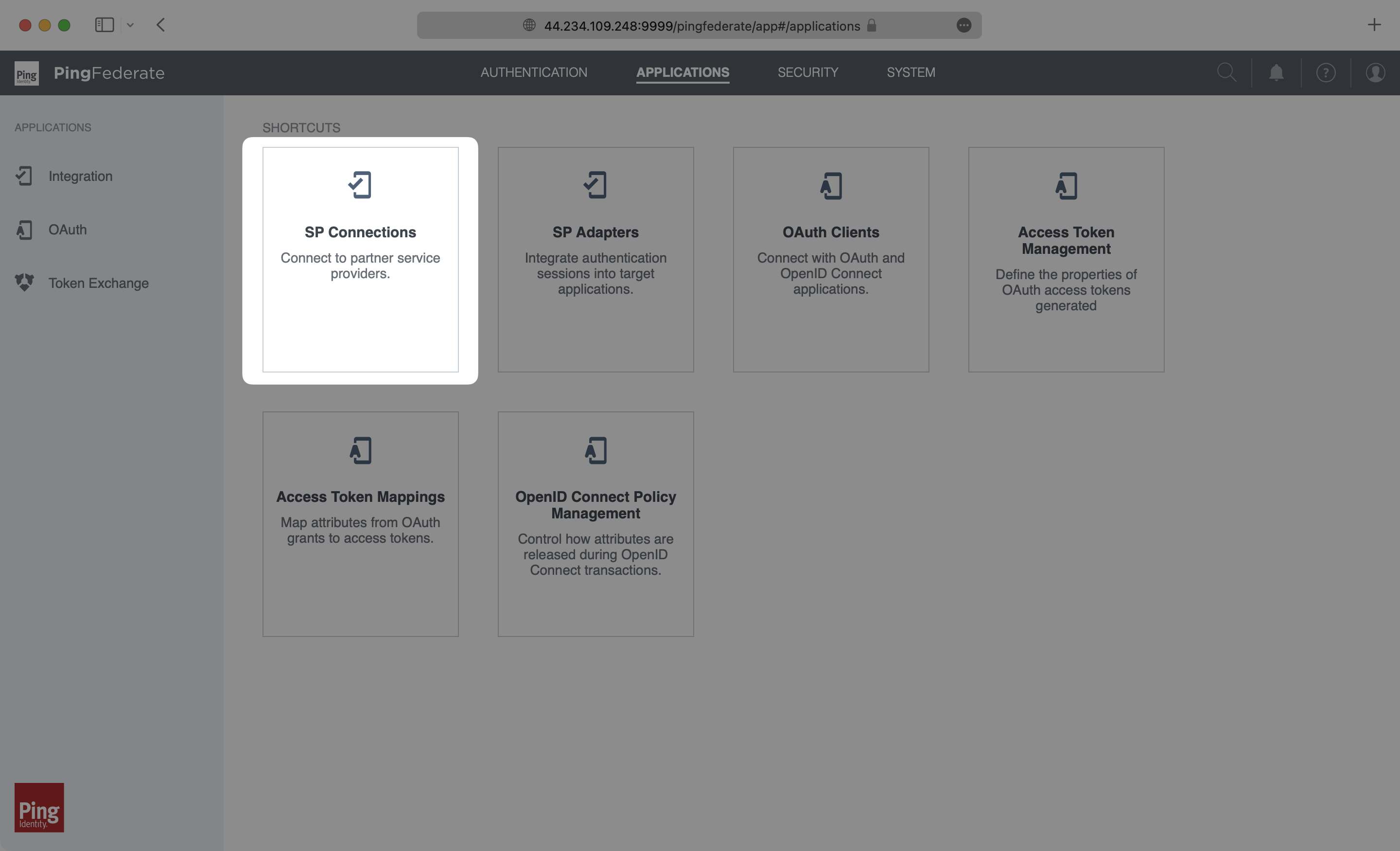
- package/.docs/organized/docs/events/observability/datadog.mdx +76 -0
- package/.docs/organized/docs/fga/_navigation.mdx +64 -0
- package/.docs/organized/docs/fga/identity-provider-sessions.mdx +68 -0
- package/.docs/organized/docs/fga/index.mdx +60 -0
- package/.docs/organized/docs/fga/local-development.mdx +155 -0
- package/.docs/organized/docs/fga/modeling/abac.mdx +107 -0
- package/.docs/organized/docs/fga/modeling/blocklist.mdx +84 -0
- package/.docs/organized/docs/fga/modeling/conditional-roles.mdx +99 -0
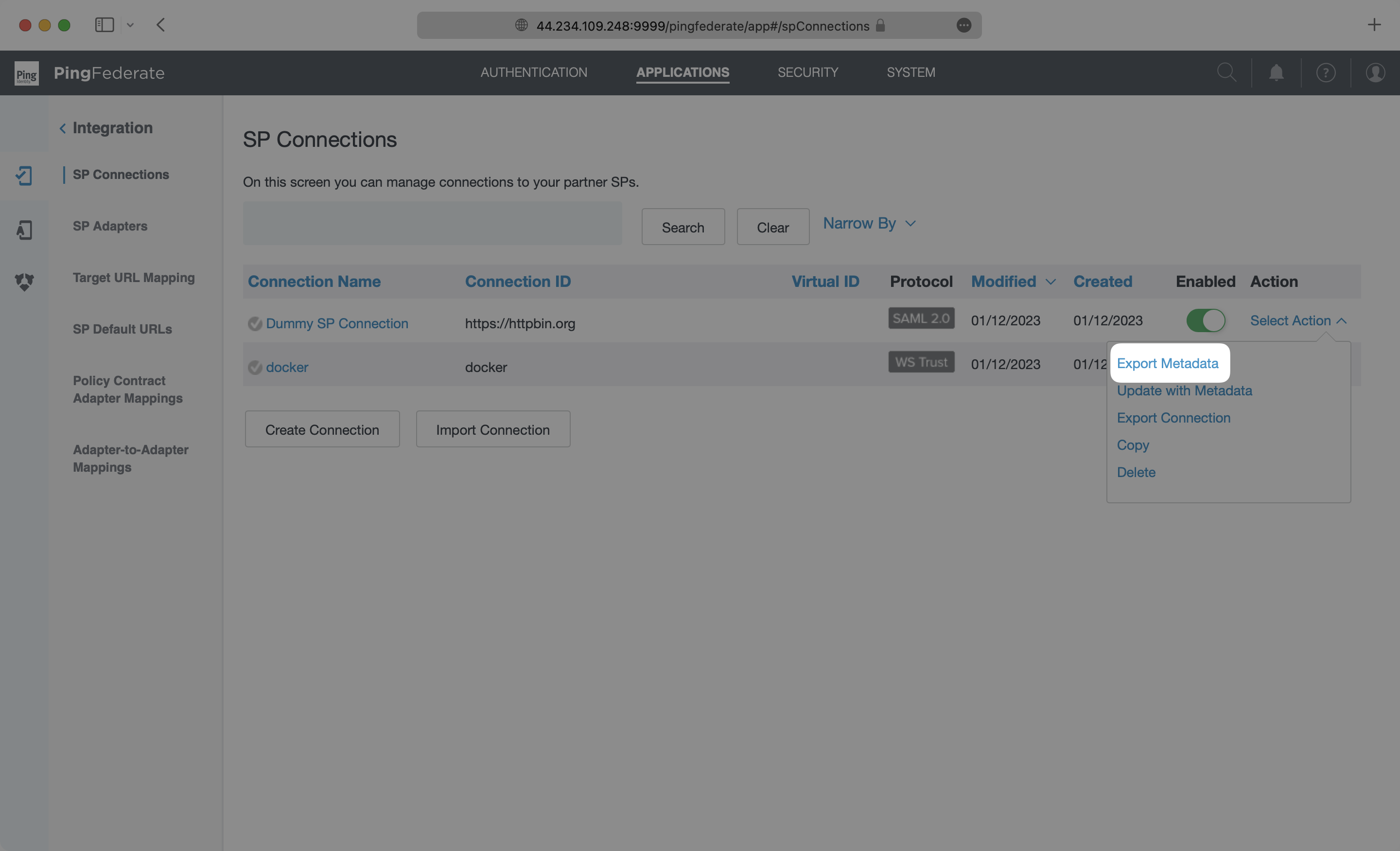
- package/.docs/organized/docs/fga/modeling/custom-roles.mdx +90 -0
- package/.docs/organized/docs/fga/modeling/entitlements.mdx +127 -0
- package/.docs/organized/docs/fga/modeling/managed-service-provider.mdx +131 -0
- package/.docs/organized/docs/fga/modeling/org-roles-and-permissions.mdx +95 -0
- package/.docs/organized/docs/fga/modeling/policy-context.mdx +231 -0
- package/.docs/organized/docs/fga/modeling/public-access.mdx +61 -0
- package/.docs/organized/docs/fga/modeling/shareable-content.mdx +106 -0
- package/.docs/organized/docs/fga/modeling/superusers.mdx +74 -0
- package/.docs/organized/docs/fga/modeling/user-groups.mdx +92 -0
- package/.docs/organized/docs/fga/operations-usage.mdx +104 -0
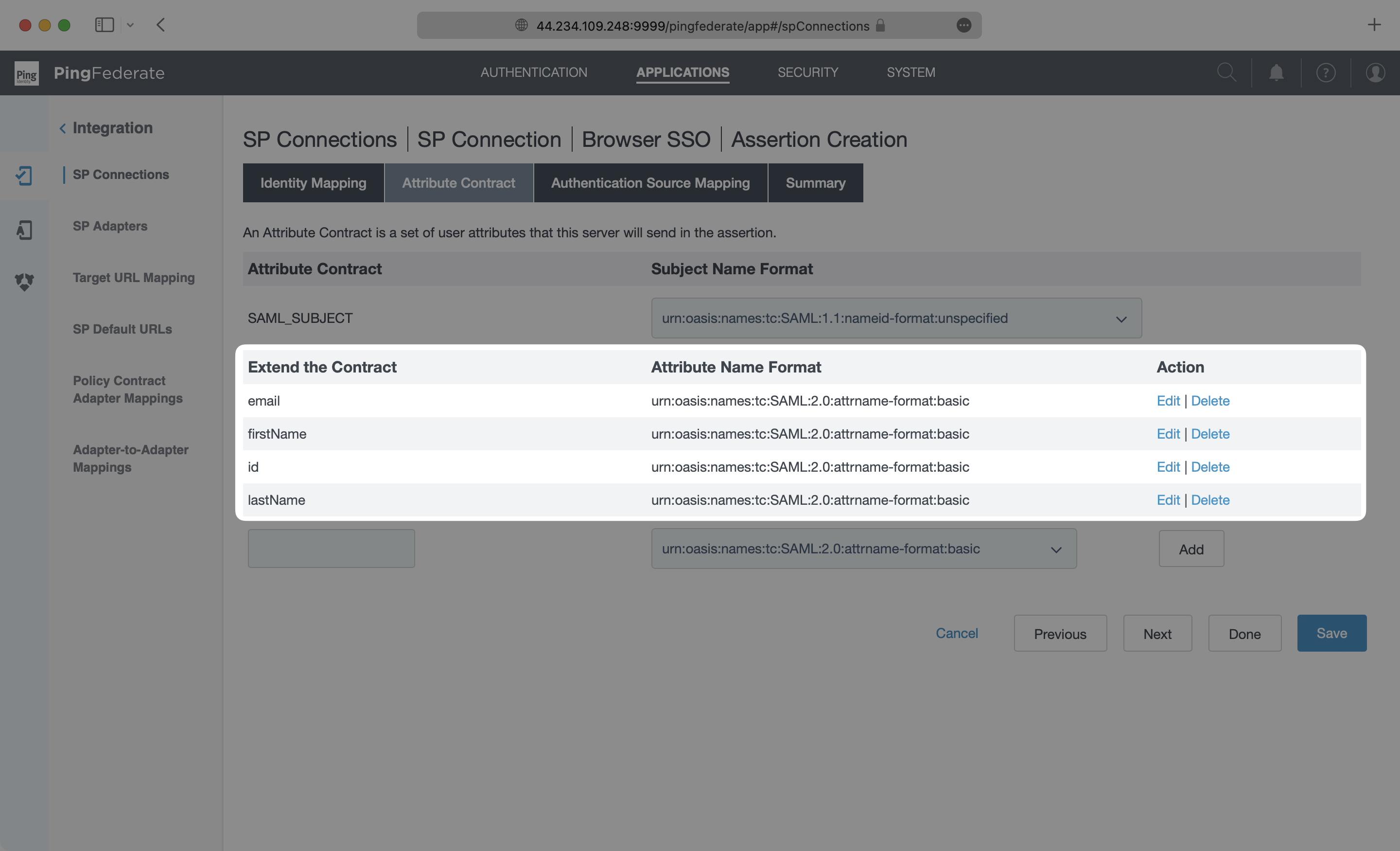
- package/.docs/organized/docs/fga/playground.mdx +12 -0
- package/.docs/organized/docs/fga/policies.mdx +462 -0
- package/.docs/organized/docs/fga/query-language.mdx +112 -0
- package/.docs/organized/docs/fga/quick-start.mdx +174 -0
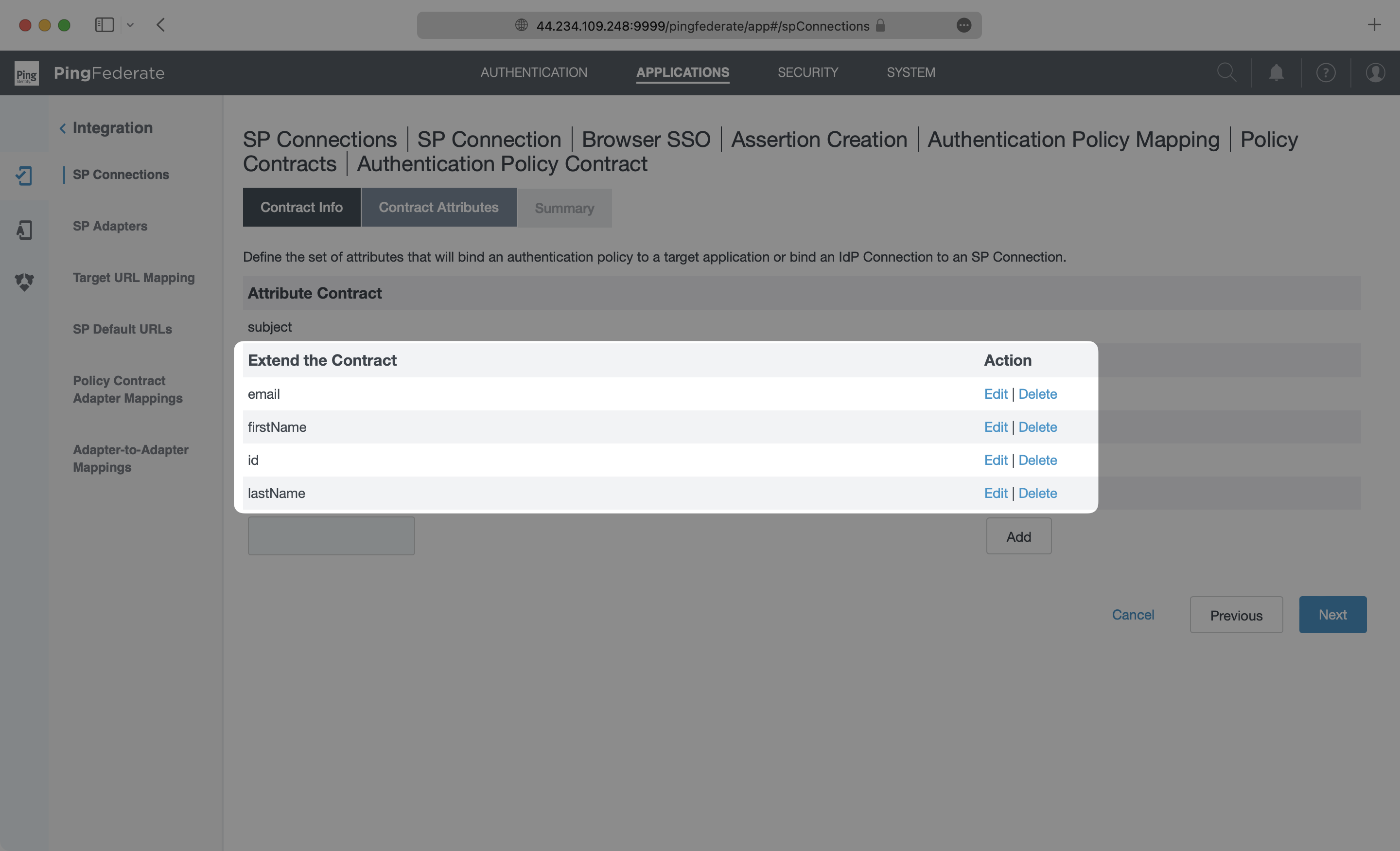
- package/.docs/organized/docs/fga/resources.mdx +92 -0
- package/.docs/organized/docs/fga/schema-management.mdx +224 -0
- package/.docs/organized/docs/fga/schema.mdx +388 -0
- package/.docs/organized/docs/fga/warrant-tokens.mdx +44 -0
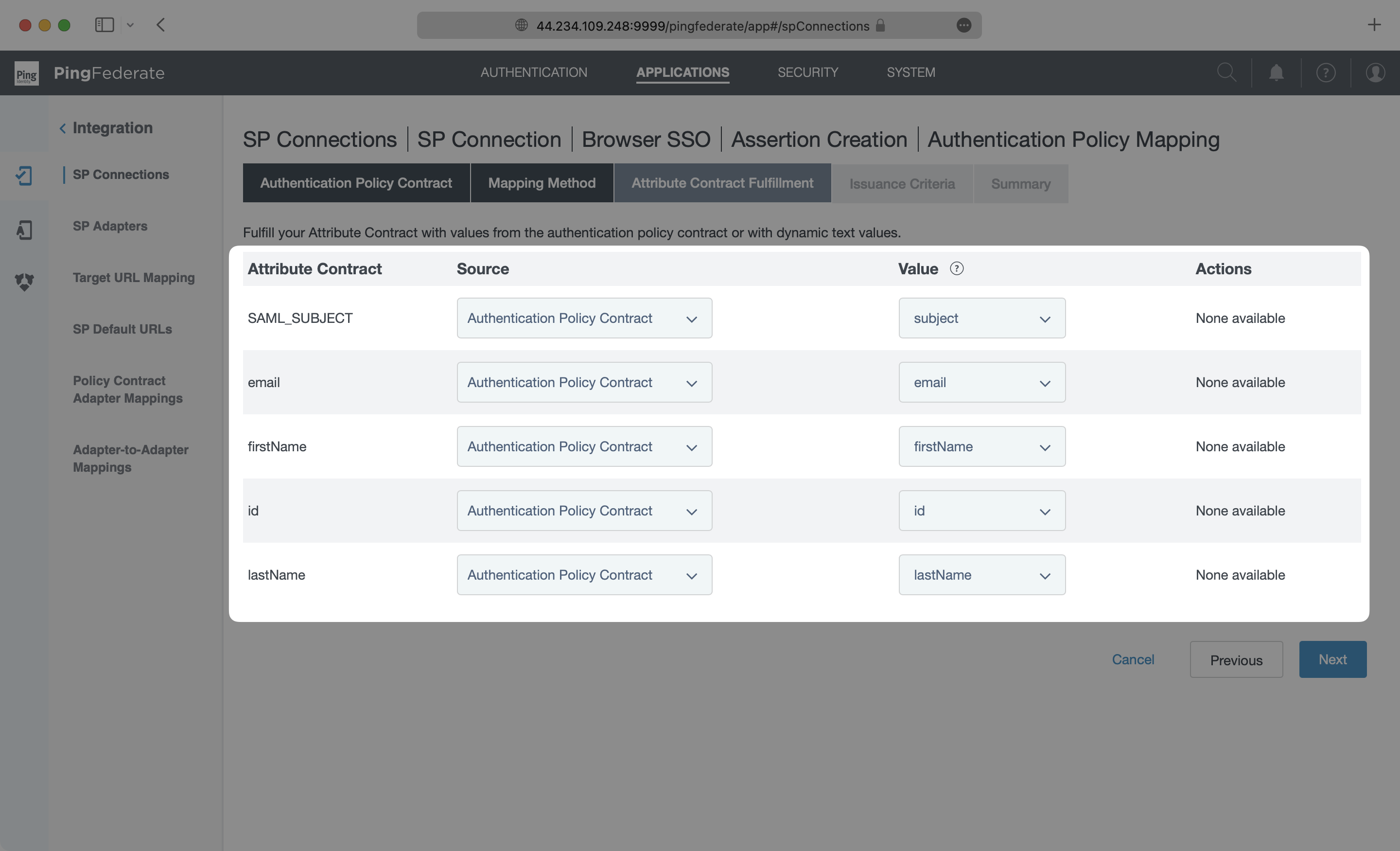
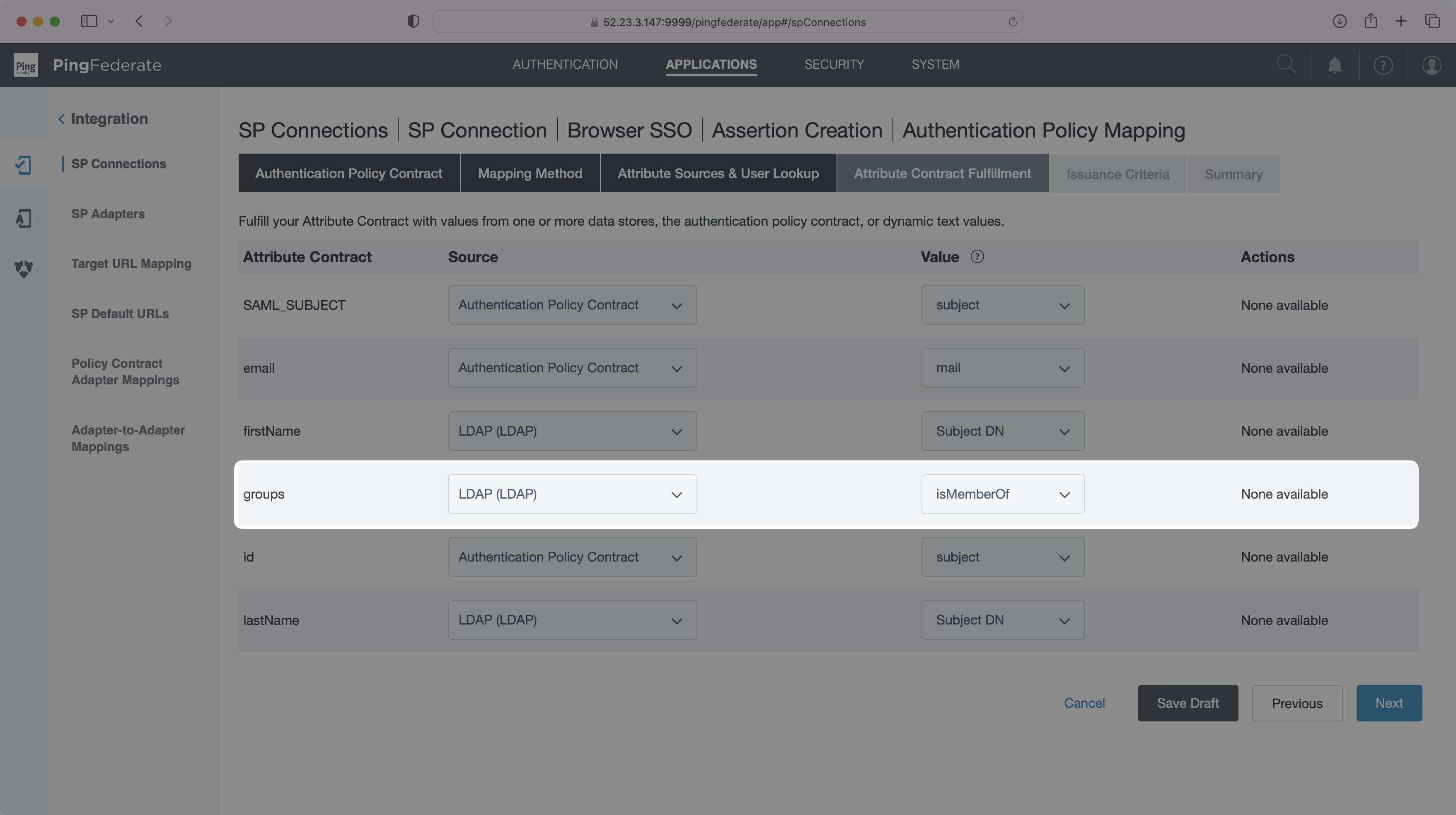
- package/.docs/organized/docs/fga/warrants.mdx +92 -0
- package/.docs/organized/docs/glossary.mdx +184 -0
- package/.docs/organized/docs/integrations/_navigation.mdx +6 -0
- package/.docs/organized/docs/integrations/access-people-hr.mdx +87 -0
- package/.docs/organized/docs/integrations/adp-oidc.mdx +103 -0
- package/.docs/organized/docs/integrations/apple.mdx +169 -0
- package/.docs/organized/docs/integrations/auth0-directory-sync.mdx +78 -0
- package/.docs/organized/docs/integrations/auth0-enterprise-connection.mdx +92 -0
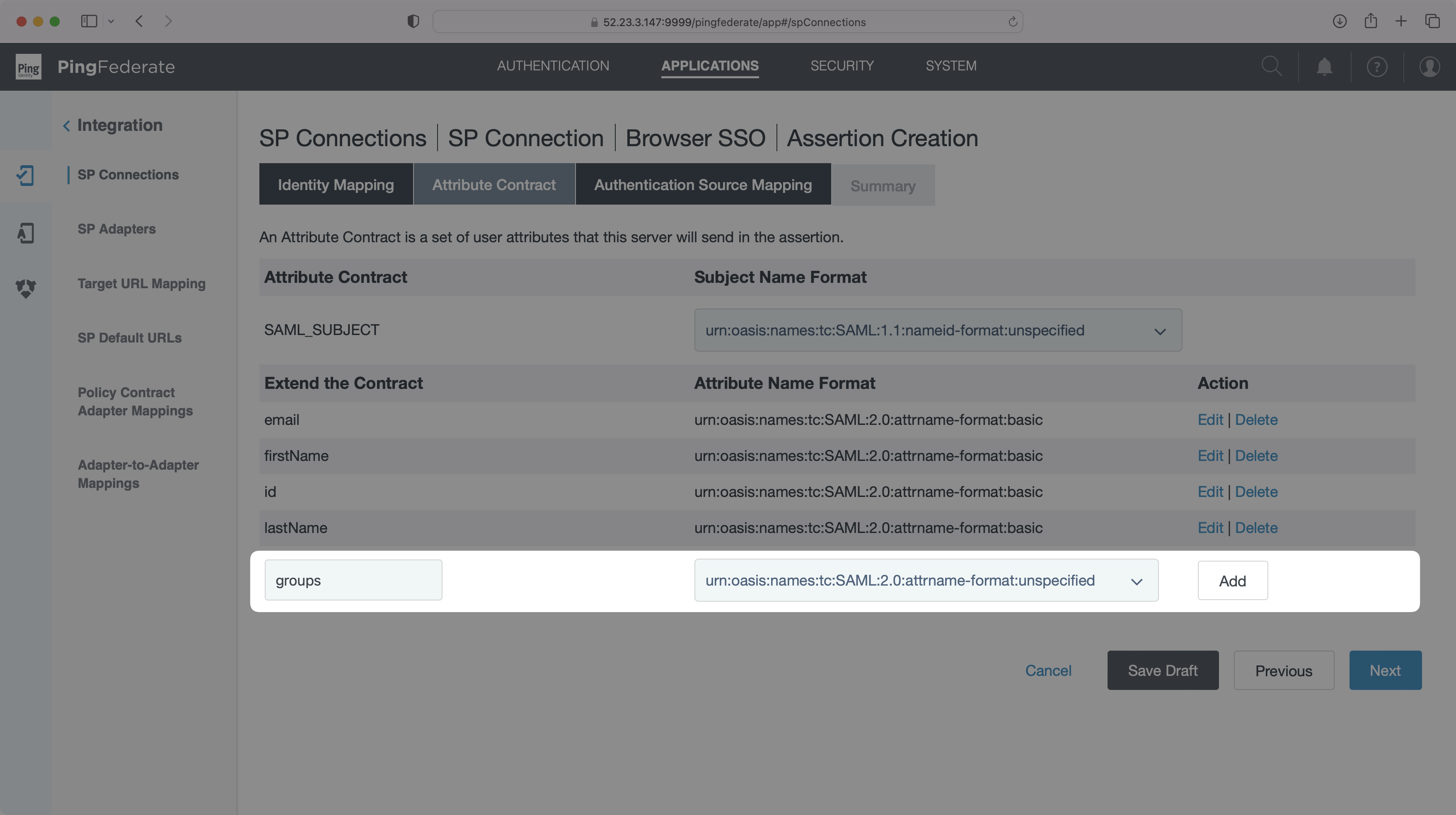
- package/.docs/organized/docs/integrations/auth0-saml.mdx +81 -0
- package/.docs/organized/docs/integrations/aws-cognito.mdx +81 -0
- package/.docs/organized/docs/integrations/bamboohr.mdx +90 -0
- package/.docs/organized/docs/integrations/breathe-hr.mdx +89 -0
- package/.docs/organized/docs/integrations/bubble.mdx +129 -0
- package/.docs/organized/docs/integrations/cas-saml.mdx +65 -0
- package/.docs/organized/docs/integrations/cezanne.mdx +74 -0
- package/.docs/organized/docs/integrations/classlink-saml.mdx +100 -0
- package/.docs/organized/docs/integrations/cloudflare-saml.mdx +164 -0
- package/.docs/organized/docs/integrations/cyberark-saml.mdx +138 -0
- package/.docs/organized/docs/integrations/cyberark-scim.mdx +100 -0
- package/.docs/organized/docs/integrations/duo-saml.mdx +127 -0
- package/.docs/organized/docs/integrations/entra-id-saml.mdx +156 -0
- package/.docs/organized/docs/integrations/entra-id-scim.mdx +218 -0
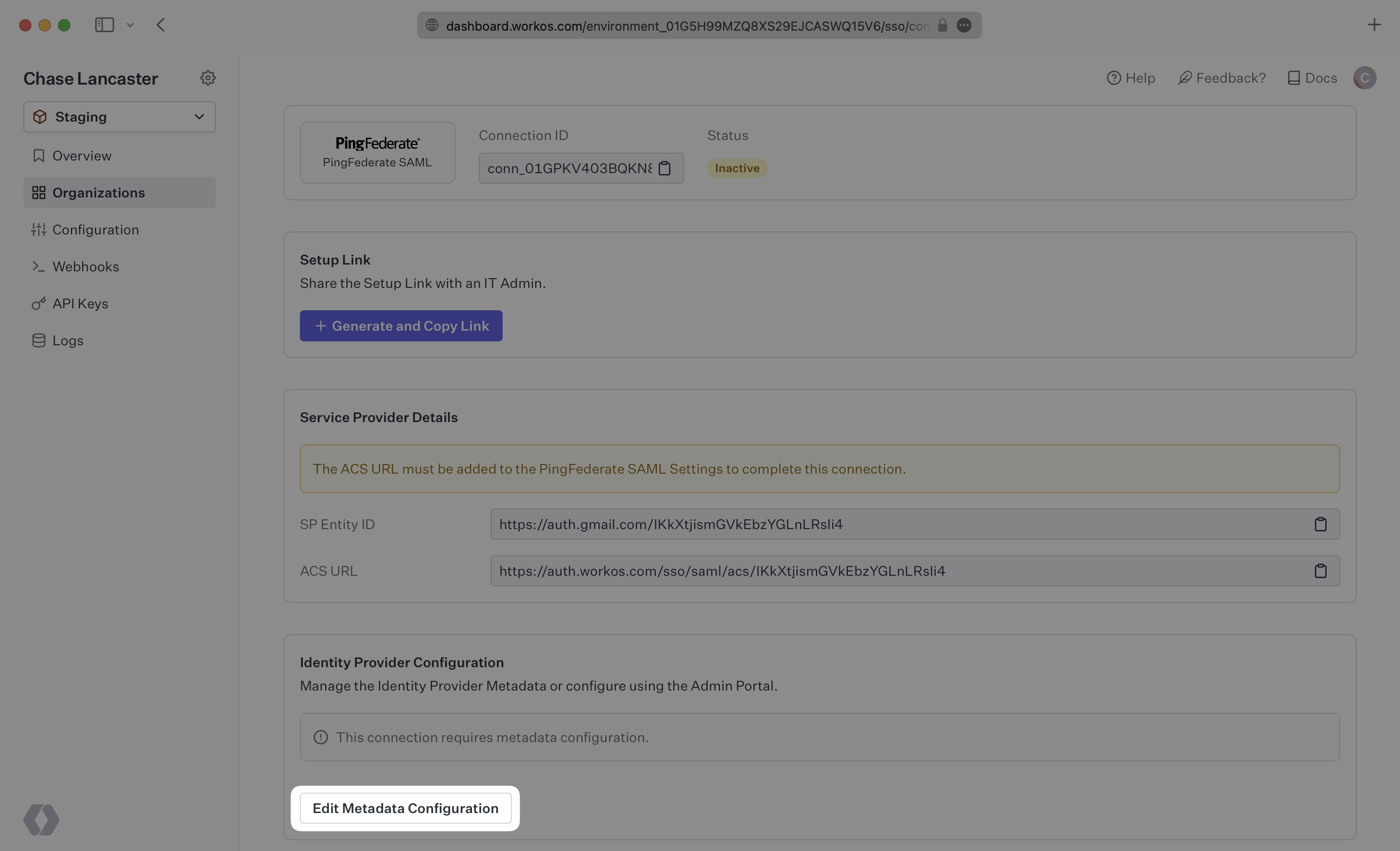
- package/.docs/organized/docs/integrations/firebase.mdx +98 -0
- package/.docs/organized/docs/integrations/fourth.mdx +66 -0
- package/.docs/organized/docs/integrations/github-oauth.mdx +85 -0
- package/.docs/organized/docs/integrations/gitlab-oauth.mdx +81 -0
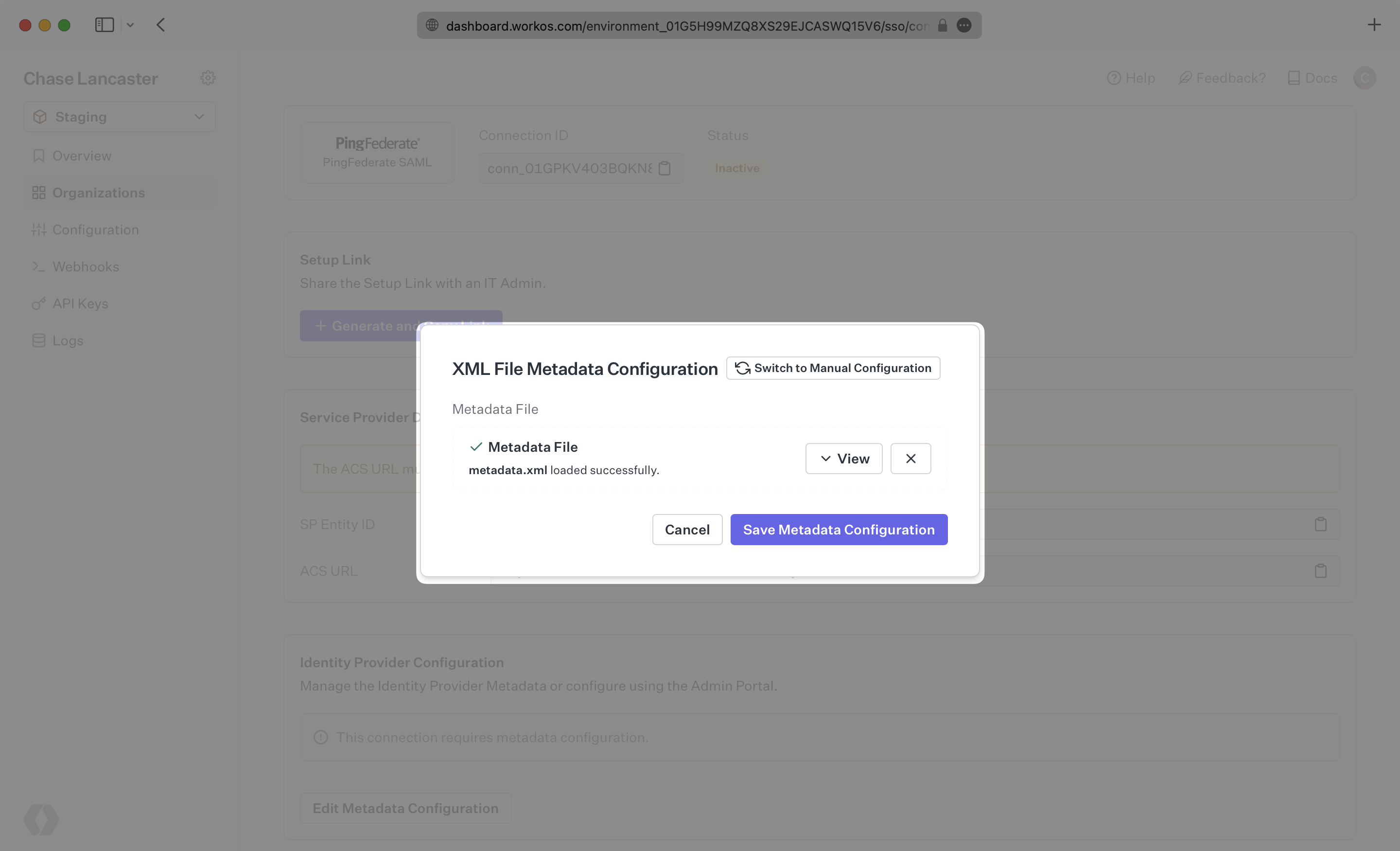
- package/.docs/organized/docs/integrations/google-directory-sync.mdx +86 -0
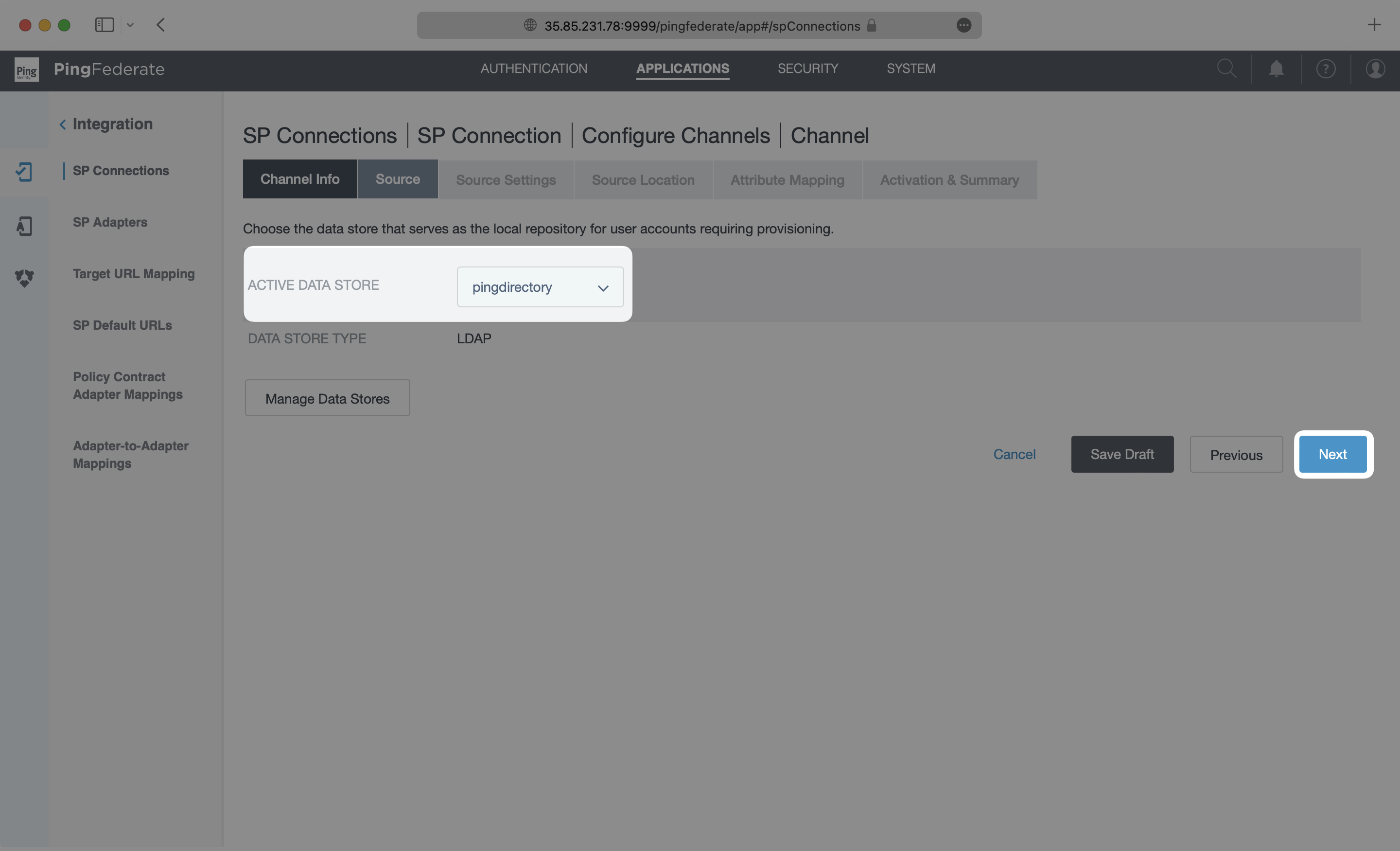
- package/.docs/organized/docs/integrations/google-oauth.mdx +173 -0
- package/.docs/organized/docs/integrations/google-saml.mdx +135 -0
- package/.docs/organized/docs/integrations/hibob.mdx +98 -0
- package/.docs/organized/docs/integrations/jumpcloud-saml.mdx +96 -0
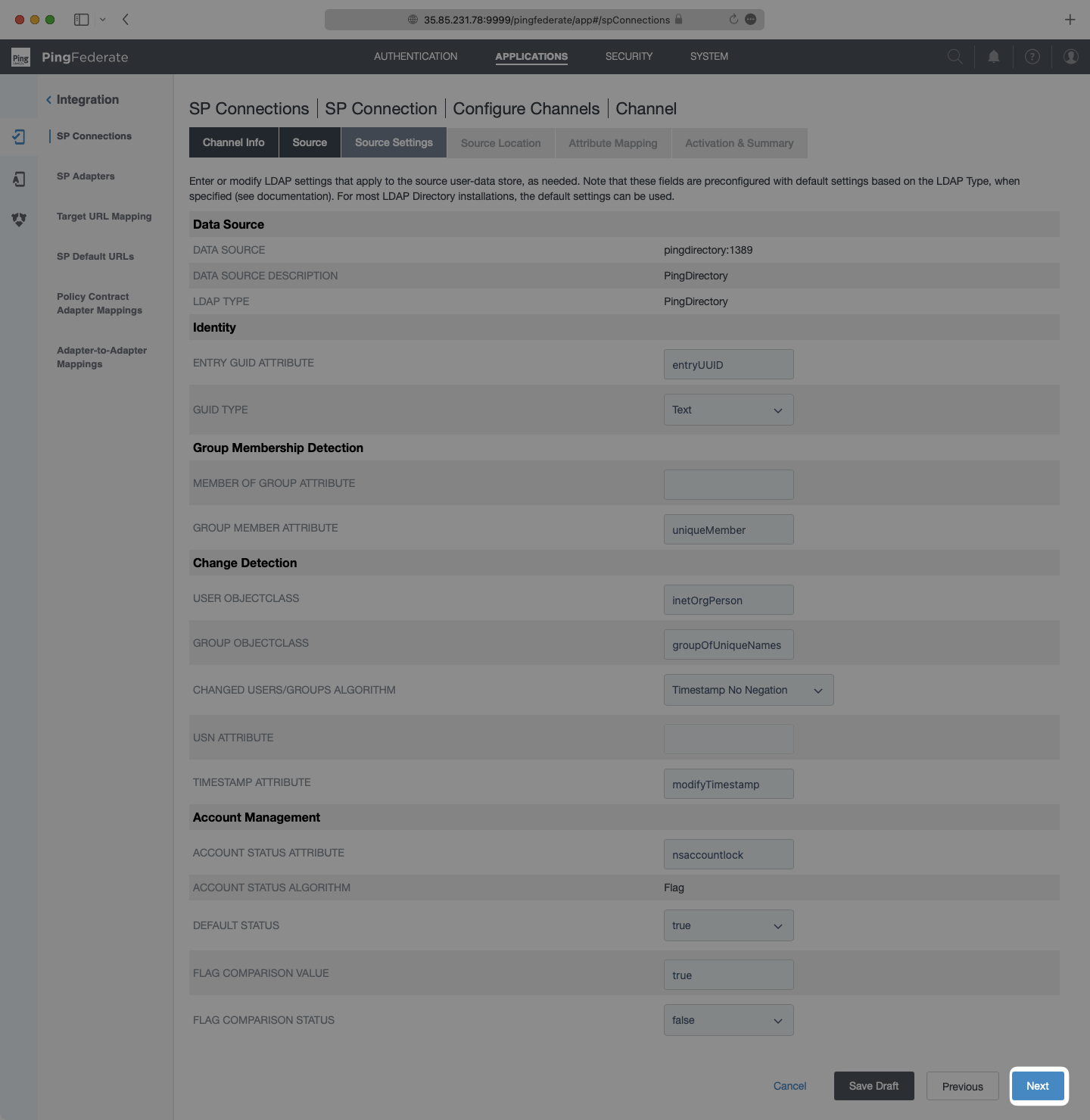
- package/.docs/organized/docs/integrations/jumpcloud-scim.mdx +106 -0
- package/.docs/organized/docs/integrations/keycloak-saml.mdx +128 -0
- package/.docs/organized/docs/integrations/lastpass-saml.mdx +134 -0
- package/.docs/organized/docs/integrations/linkedin-oauth.mdx +77 -0
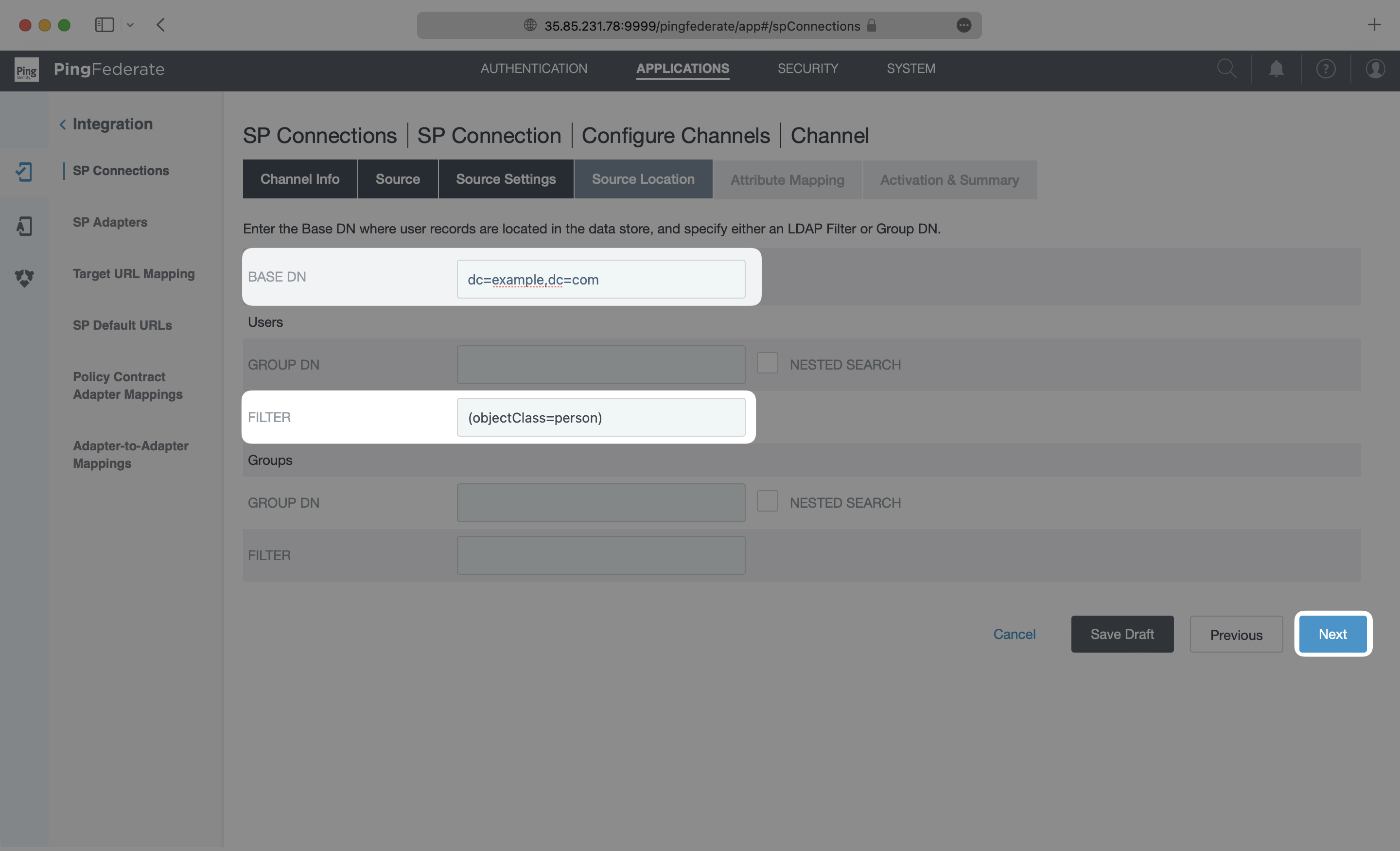
- package/.docs/organized/docs/integrations/login-gov-oidc.mdx +103 -0
- package/.docs/organized/docs/integrations/microsoft-ad-fs-saml.mdx +96 -0
- package/.docs/organized/docs/integrations/microsoft-oauth.mdx +101 -0
- package/.docs/organized/docs/integrations/miniorange-saml.mdx +124 -0
- package/.docs/organized/docs/integrations/net-iq-saml.mdx +75 -0
- package/.docs/organized/docs/integrations/next-auth.mdx +257 -0
- package/.docs/organized/docs/integrations/oidc.mdx +64 -0
- package/.docs/organized/docs/integrations/okta-saml.mdx +144 -0
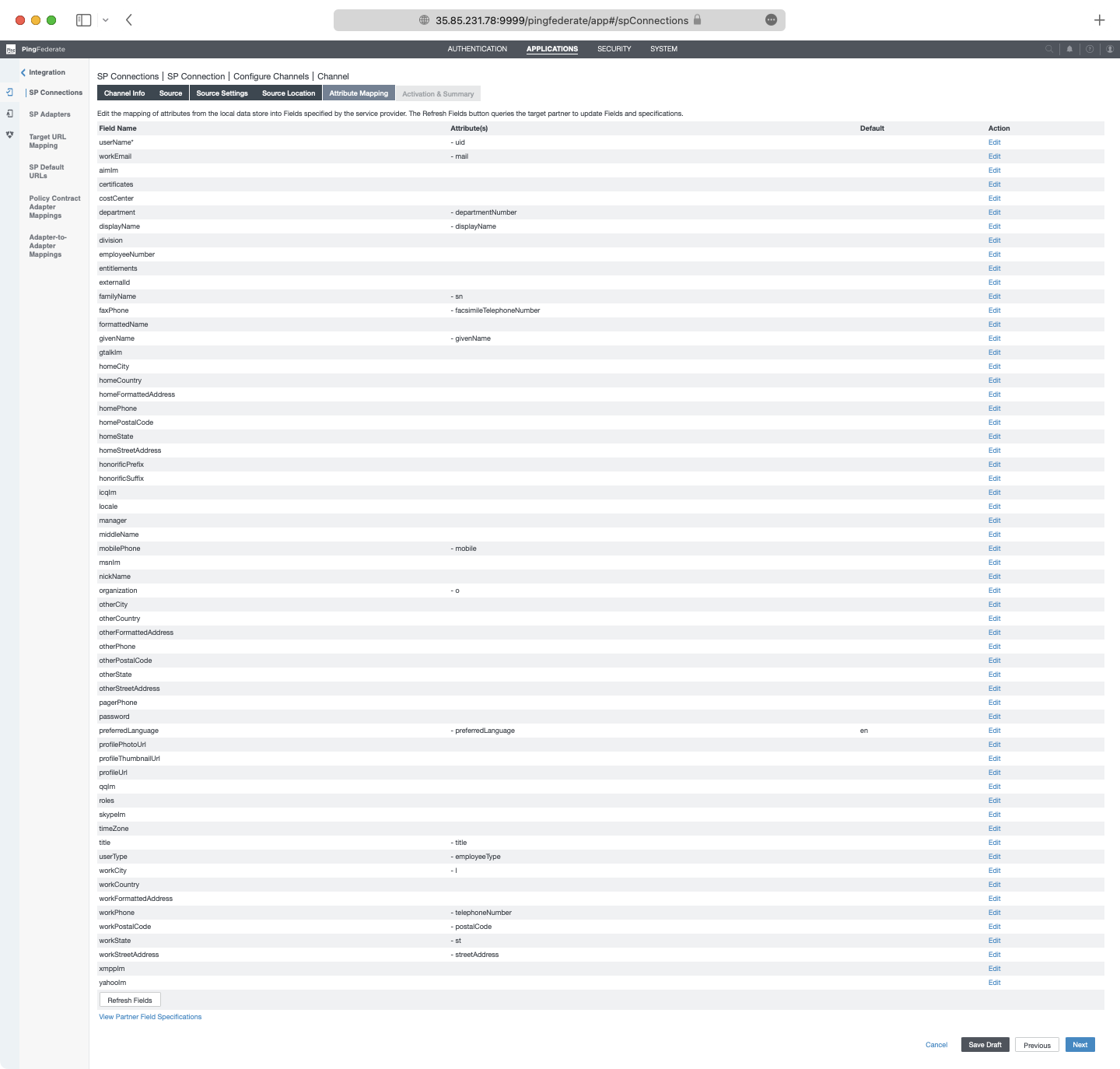
- package/.docs/organized/docs/integrations/okta-scim.mdx +210 -0
- package/.docs/organized/docs/integrations/onelogin-saml.mdx +131 -0
- package/.docs/organized/docs/integrations/onelogin-scim.mdx +150 -0
- package/.docs/organized/docs/integrations/oracle-saml.mdx +76 -0
- package/.docs/organized/docs/integrations/pingfederate-saml.mdx +103 -0
- package/.docs/organized/docs/integrations/pingfederate-scim.mdx +150 -0
- package/.docs/organized/docs/integrations/pingone-saml.mdx +86 -0
- package/.docs/organized/docs/integrations/react-native-expo.mdx +93 -0
- package/.docs/organized/docs/integrations/rippling-saml.mdx +174 -0
- package/.docs/organized/docs/integrations/rippling-scim.mdx +148 -0
- package/.docs/organized/docs/integrations/salesforce-saml.mdx +143 -0
- package/.docs/organized/docs/integrations/saml.mdx +64 -0
- package/.docs/organized/docs/integrations/scim.mdx +64 -0
- package/.docs/organized/docs/integrations/sftp.mdx +150 -0
- package/.docs/organized/docs/integrations/shibboleth-generic-saml.mdx +84 -0
- package/.docs/organized/docs/integrations/shibboleth-unsolicited-saml.mdx +84 -0
- package/.docs/organized/docs/integrations/simple-saml-php.mdx +78 -0
- package/.docs/organized/docs/integrations/slack-oauth.mdx +102 -0
- package/.docs/organized/docs/integrations/supabase.mdx +68 -0
- package/.docs/organized/docs/integrations/vmware-saml.mdx +100 -0
- package/.docs/organized/docs/integrations/workday.mdx +156 -0
- package/.docs/organized/docs/integrations/xero-oauth.mdx +83 -0
- package/.docs/organized/docs/magic-link/_navigation.mdx +16 -0
- package/.docs/organized/docs/magic-link/example-apps.mdx +46 -0
- package/.docs/organized/docs/magic-link/index.mdx +199 -0
- package/.docs/organized/docs/magic-link/launch-checklist.mdx +27 -0
- package/.docs/organized/docs/mfa/_navigation.mdx +18 -0
- package/.docs/organized/docs/mfa/example-apps.mdx +46 -0
- package/.docs/organized/docs/mfa/index.mdx +140 -0
- package/.docs/organized/docs/mfa/ux/enrollment.mdx +74 -0
- package/.docs/organized/docs/mfa/ux/sign-in.mdx +30 -0
- package/.docs/organized/docs/migrate/_navigation.mdx +6 -0
- package/.docs/organized/docs/migrate/auth0.mdx +98 -0
- package/.docs/organized/docs/migrate/aws-cognito.mdx +115 -0
- package/.docs/organized/docs/migrate/clerk.mdx +106 -0
- package/.docs/organized/docs/migrate/firebase.mdx +80 -0
- package/.docs/organized/docs/migrate/other-services.mdx +179 -0
- package/.docs/organized/docs/migrate/standalone-sso.mdx +105 -0
- package/.docs/organized/docs/on-prem-deployment.mdx +119 -0
- package/.docs/organized/docs/postman.mdx +90 -0
- package/.docs/organized/docs/reference/_navigation.mdx +527 -0
- package/.docs/organized/docs/reference/admin-portal/index.mdx +6 -0
- package/.docs/organized/docs/reference/admin-portal/portal-link/generate.mdx +268 -0
- package/.docs/organized/docs/reference/admin-portal/portal-link/index.mdx +15 -0
- package/.docs/organized/docs/reference/admin-portal/provider-icons/index.mdx +52 -0
- package/.docs/organized/docs/reference/api-keys.mdx +22 -0
- package/.docs/organized/docs/reference/audit-logs/audit-log-export.mdx +239 -0
- package/.docs/organized/docs/reference/audit-logs/audit-log-schema.mdx +69 -0
- package/.docs/organized/docs/reference/audit-logs/create-event.mdx +673 -0
- package/.docs/organized/docs/reference/audit-logs/create-export.mdx +308 -0
- package/.docs/organized/docs/reference/audit-logs/create-schema.mdx +95 -0
- package/.docs/organized/docs/reference/audit-logs/get-export.mdx +117 -0
- package/.docs/organized/docs/reference/audit-logs/get-retention.mdx +34 -0
- package/.docs/organized/docs/reference/audit-logs/index.mdx +6 -0
- package/.docs/organized/docs/reference/audit-logs/list-actions.mdx +40 -0
- package/.docs/organized/docs/reference/audit-logs/list-schemas.mdx +40 -0
- package/.docs/organized/docs/reference/audit-logs/set-retention.mdx +39 -0
- package/.docs/organized/docs/reference/client-libraries.mdx +19 -0
- package/.docs/organized/docs/reference/directory-sync/directory/delete.mdx +90 -0
- package/.docs/organized/docs/reference/directory-sync/directory/get.mdx +105 -0
- package/.docs/organized/docs/reference/directory-sync/directory/index.mdx +385 -0
- package/.docs/organized/docs/reference/directory-sync/directory/list.mdx +281 -0
- package/.docs/organized/docs/reference/directory-sync/directory-group/get.mdx +105 -0
- package/.docs/organized/docs/reference/directory-sync/directory-group/index.mdx +277 -0
- package/.docs/organized/docs/reference/directory-sync/directory-group/list.mdx +295 -0
- package/.docs/organized/docs/reference/directory-sync/directory-user/get.mdx +112 -0
- package/.docs/organized/docs/reference/directory-sync/directory-user/index.mdx +470 -0
- package/.docs/organized/docs/reference/directory-sync/directory-user/list.mdx +304 -0
- package/.docs/organized/docs/reference/directory-sync/index.mdx +10 -0
- package/.docs/organized/docs/reference/domain-verification/create.mdx +38 -0
- package/.docs/organized/docs/reference/domain-verification/get.mdx +32 -0
- package/.docs/organized/docs/reference/domain-verification/index.mdx +84 -0
- package/.docs/organized/docs/reference/domain-verification/verify.mdx +36 -0
- package/.docs/organized/docs/reference/errors.mdx +30 -0
- package/.docs/organized/docs/reference/events/index.mdx +9 -0
- package/.docs/organized/docs/reference/events/list.mdx +246 -0
- package/.docs/organized/docs/reference/fga/batch-check.mdx +277 -0
- package/.docs/organized/docs/reference/fga/check.mdx +563 -0
- package/.docs/organized/docs/reference/fga/index.mdx +6 -0
- package/.docs/organized/docs/reference/fga/policy/create.mdx +27 -0
- package/.docs/organized/docs/reference/fga/policy/delete.mdx +18 -0
- package/.docs/organized/docs/reference/fga/policy/get.mdx +23 -0
- package/.docs/organized/docs/reference/fga/policy/index.mdx +52 -0
- package/.docs/organized/docs/reference/fga/policy/list.mdx +41 -0
- package/.docs/organized/docs/reference/fga/policy/update.mdx +26 -0
- package/.docs/organized/docs/reference/fga/query.mdx +375 -0
- package/.docs/organized/docs/reference/fga/resource/batch-write.mdx +175 -0
- package/.docs/organized/docs/reference/fga/resource/create.mdx +130 -0
- package/.docs/organized/docs/reference/fga/resource/delete.mdx +86 -0
- package/.docs/organized/docs/reference/fga/resource/get.mdx +88 -0
- package/.docs/organized/docs/reference/fga/resource/index.mdx +98 -0
- package/.docs/organized/docs/reference/fga/resource/list.mdx +188 -0
- package/.docs/organized/docs/reference/fga/resource/update.mdx +115 -0
- package/.docs/organized/docs/reference/fga/resource-type/apply.mdx +35 -0
- package/.docs/organized/docs/reference/fga/resource-type/create.mdx +24 -0
- package/.docs/organized/docs/reference/fga/resource-type/delete.mdx +22 -0
- package/.docs/organized/docs/reference/fga/resource-type/get.mdx +23 -0
- package/.docs/organized/docs/reference/fga/resource-type/index.mdx +68 -0
- package/.docs/organized/docs/reference/fga/resource-type/list.mdx +36 -0
- package/.docs/organized/docs/reference/fga/resource-type/update.mdx +23 -0
- package/.docs/organized/docs/reference/fga/schema/apply.mdx +42 -0
- package/.docs/organized/docs/reference/fga/schema/get.mdx +24 -0
- package/.docs/organized/docs/reference/fga/schema/index.mdx +39 -0
- package/.docs/organized/docs/reference/fga/warrant/batch-write.mdx +226 -0
- package/.docs/organized/docs/reference/fga/warrant/create.mdx +215 -0
- package/.docs/organized/docs/reference/fga/warrant/delete.mdx +212 -0
- package/.docs/organized/docs/reference/fga/warrant/index.mdx +186 -0
- package/.docs/organized/docs/reference/fga/warrant/list.mdx +282 -0
- package/.docs/organized/docs/reference/idempotency.mdx +21 -0
- package/.docs/organized/docs/reference/index.mdx +194 -0
- package/.docs/organized/docs/reference/magic-link/index.mdx +8 -0
- package/.docs/organized/docs/reference/magic-link/passwordless-session/create.mdx +268 -0
- package/.docs/organized/docs/reference/magic-link/passwordless-session/index.mdx +203 -0
- package/.docs/organized/docs/reference/magic-link/passwordless-session/send-email.mdx +158 -0
- package/.docs/organized/docs/reference/mfa/authentication-challenge.mdx +217 -0
- package/.docs/organized/docs/reference/mfa/authentication-factor.mdx +381 -0
- package/.docs/organized/docs/reference/mfa/challenge-factor.mdx +170 -0
- package/.docs/organized/docs/reference/mfa/delete-factor.mdx +93 -0
- package/.docs/organized/docs/reference/mfa/enroll-factor.mdx +241 -0
- package/.docs/organized/docs/reference/mfa/get-factor.mdx +108 -0
- package/.docs/organized/docs/reference/mfa/index.mdx +8 -0
- package/.docs/organized/docs/reference/mfa/verify-challenge.mdx +228 -0
- package/.docs/organized/docs/reference/organization/create.mdx +216 -0
- package/.docs/organized/docs/reference/organization/delete.mdx +89 -0
- package/.docs/organized/docs/reference/organization/get-by-external-id.mdx +40 -0
- package/.docs/organized/docs/reference/organization/get.mdx +104 -0
- package/.docs/organized/docs/reference/organization/index.mdx +274 -0
- package/.docs/organized/docs/reference/organization/list.mdx +258 -0
- package/.docs/organized/docs/reference/organization/update.mdx +236 -0
- package/.docs/organized/docs/reference/organization-domain.mdx +189 -0
- package/.docs/organized/docs/reference/pagination.mdx +244 -0
- package/.docs/organized/docs/reference/radar/attempts/create.mdx +115 -0
- package/.docs/organized/docs/reference/radar/attempts/index.mdx +7 -0
- package/.docs/organized/docs/reference/radar/attempts/update.mdx +34 -0
- package/.docs/organized/docs/reference/radar/index.mdx +8 -0
- package/.docs/organized/docs/reference/radar/lists/delete.mdx +36 -0
- package/.docs/organized/docs/reference/radar/lists/index.mdx +7 -0
- package/.docs/organized/docs/reference/radar/lists/update.mdx +36 -0
- package/.docs/organized/docs/reference/rate-limits.mdx +50 -0
- package/.docs/organized/docs/reference/roles/index.mdx +268 -0
- package/.docs/organized/docs/reference/roles/list-for-organization.mdx +152 -0
- package/.docs/organized/docs/reference/sso/connection/delete.mdx +89 -0
- package/.docs/organized/docs/reference/sso/connection/get.mdx +104 -0
- package/.docs/organized/docs/reference/sso/connection/index.mdx +388 -0
- package/.docs/organized/docs/reference/sso/connection/list.mdx +320 -0
- package/.docs/organized/docs/reference/sso/get-authorization-url/error-codes.mdx +28 -0
- package/.docs/organized/docs/reference/sso/get-authorization-url/index.mdx +434 -0
- package/.docs/organized/docs/reference/sso/get-authorization-url/redirect-uri.mdx +21 -0
- package/.docs/organized/docs/reference/sso/index.mdx +8 -0
- package/.docs/organized/docs/reference/sso/logout/authorize.mdx +47 -0
- package/.docs/organized/docs/reference/sso/logout/index.mdx +14 -0
- package/.docs/organized/docs/reference/sso/logout/redirect.mdx +32 -0
- package/.docs/organized/docs/reference/sso/profile/get-profile-and-token.mdx +229 -0
- package/.docs/organized/docs/reference/sso/profile/get-user-profile.mdx +127 -0
- package/.docs/organized/docs/reference/sso/profile/index.mdx +364 -0
- package/.docs/organized/docs/reference/testing.mdx +8 -0
- package/.docs/organized/docs/reference/user-management/access-token/index.mdx +13 -0
- package/.docs/organized/docs/reference/user-management/authentication/code.mdx +448 -0
- package/.docs/organized/docs/reference/user-management/authentication/email-verification.mdx +359 -0
- package/.docs/organized/docs/reference/user-management/authentication/get-authorization-url/error-codes.mdx +25 -0
- package/.docs/organized/docs/reference/user-management/authentication/get-authorization-url/index.mdx +425 -0
- package/.docs/organized/docs/reference/user-management/authentication/get-authorization-url/pkce.mdx +9 -0
- package/.docs/organized/docs/reference/user-management/authentication/get-authorization-url/redirect-uri.mdx +23 -0
- package/.docs/organized/docs/reference/user-management/authentication/index.mdx +66 -0
- package/.docs/organized/docs/reference/user-management/authentication/magic-auth.mdx +353 -0
- package/.docs/organized/docs/reference/user-management/authentication/organization-selection.mdx +349 -0
- package/.docs/organized/docs/reference/user-management/authentication/password.mdx +350 -0
- package/.docs/organized/docs/reference/user-management/authentication/refresh-and-seal-session-data.mdx +57 -0
- package/.docs/organized/docs/reference/user-management/authentication/refresh-token.mdx +381 -0
- package/.docs/organized/docs/reference/user-management/authentication/session-cookie.mdx +79 -0
- package/.docs/organized/docs/reference/user-management/authentication/totp.mdx +369 -0
- package/.docs/organized/docs/reference/user-management/authentication-errors/email-verification-required-error.mdx +42 -0
- package/.docs/organized/docs/reference/user-management/authentication-errors/index.mdx +20 -0
- package/.docs/organized/docs/reference/user-management/authentication-errors/mfa-challenge-error.mdx +44 -0
- package/.docs/organized/docs/reference/user-management/authentication-errors/mfa-enrollment-error.mdx +37 -0
- package/.docs/organized/docs/reference/user-management/authentication-errors/organization-authentication-required-error.mdx +68 -0
- package/.docs/organized/docs/reference/user-management/authentication-errors/organization-selection-error.mdx +44 -0
- package/.docs/organized/docs/reference/user-management/authentication-errors/sso-required-error.mdx +51 -0
- package/.docs/organized/docs/reference/user-management/email-verification/get.mdx +88 -0
- package/.docs/organized/docs/reference/user-management/email-verification/index.mdx +227 -0
- package/.docs/organized/docs/reference/user-management/identity/index.mdx +74 -0
- package/.docs/organized/docs/reference/user-management/identity/list.mdx +52 -0
- package/.docs/organized/docs/reference/user-management/index.mdx +13 -0
- package/.docs/organized/docs/reference/user-management/invitation/accept.mdx +39 -0
- package/.docs/organized/docs/reference/user-management/invitation/find-by-token.mdx +87 -0
- package/.docs/organized/docs/reference/user-management/invitation/get.mdx +87 -0
- package/.docs/organized/docs/reference/user-management/invitation/index.mdx +374 -0
- package/.docs/organized/docs/reference/user-management/invitation/list.mdx +247 -0
- package/.docs/organized/docs/reference/user-management/invitation/revoke.mdx +90 -0
- package/.docs/organized/docs/reference/user-management/invitation/send.mdx +230 -0
- package/.docs/organized/docs/reference/user-management/logout/get-logout-url-from-session-cookie.mdx +52 -0
- package/.docs/organized/docs/reference/user-management/logout/get-logout-url.mdx +147 -0
- package/.docs/organized/docs/reference/user-management/logout/index.mdx +26 -0
- package/.docs/organized/docs/reference/user-management/magic-auth/create.mdx +148 -0
- package/.docs/organized/docs/reference/user-management/magic-auth/get.mdx +88 -0
- package/.docs/organized/docs/reference/user-management/magic-auth/index.mdx +225 -0
- package/.docs/organized/docs/reference/user-management/mfa/authentication-challenge.mdx +194 -0
- package/.docs/organized/docs/reference/user-management/mfa/authentication-factor.mdx +324 -0
- package/.docs/organized/docs/reference/user-management/mfa/enroll-auth-factor.mdx +296 -0
- package/.docs/organized/docs/reference/user-management/mfa/index.mdx +5 -0
- package/.docs/organized/docs/reference/user-management/mfa/list-auth-factors.mdx +194 -0
- package/.docs/organized/docs/reference/user-management/organization-membership/create.mdx +155 -0
- package/.docs/organized/docs/reference/user-management/organization-membership/deactivate.mdx +106 -0
- package/.docs/organized/docs/reference/user-management/organization-membership/delete.mdx +76 -0
- package/.docs/organized/docs/reference/user-management/organization-membership/get.mdx +95 -0
- package/.docs/organized/docs/reference/user-management/organization-membership/index.mdx +265 -0
- package/.docs/organized/docs/reference/user-management/organization-membership/list.mdx +291 -0
- package/.docs/organized/docs/reference/user-management/organization-membership/reactivate.mdx +106 -0
- package/.docs/organized/docs/reference/user-management/organization-membership/update.mdx +119 -0
- package/.docs/organized/docs/reference/user-management/password-reset/create.mdx +108 -0
- package/.docs/organized/docs/reference/user-management/password-reset/get.mdx +88 -0
- package/.docs/organized/docs/reference/user-management/password-reset/index.mdx +227 -0
- package/.docs/organized/docs/reference/user-management/password-reset/reset-password.mdx +144 -0
- package/.docs/organized/docs/reference/user-management/session-helpers/authenticate.mdx +176 -0
- package/.docs/organized/docs/reference/user-management/session-helpers/get-logout-url.mdx +42 -0
- package/.docs/organized/docs/reference/user-management/session-helpers/index.mdx +14 -0
- package/.docs/organized/docs/reference/user-management/session-helpers/load-sealed-session.mdx +105 -0
- package/.docs/organized/docs/reference/user-management/session-helpers/refresh.mdx +213 -0
- package/.docs/organized/docs/reference/user-management/session-tokens/access-token.mdx +90 -0
- package/.docs/organized/docs/reference/user-management/session-tokens/index.mdx +5 -0
- package/.docs/organized/docs/reference/user-management/session-tokens/jwks.mdx +110 -0
- package/.docs/organized/docs/reference/user-management/session-tokens/refresh-token.mdx +8 -0
- package/.docs/organized/docs/reference/user-management/user/create.mdx +327 -0
- package/.docs/organized/docs/reference/user-management/user/delete.mdx +76 -0
- package/.docs/organized/docs/reference/user-management/user/get-by-external-id.mdx +39 -0
- package/.docs/organized/docs/reference/user-management/user/get.mdx +103 -0
- package/.docs/organized/docs/reference/user-management/user/index.mdx +322 -0
- package/.docs/organized/docs/reference/user-management/user/list.mdx +260 -0
- package/.docs/organized/docs/reference/user-management/user/update.mdx +344 -0
- package/.docs/organized/docs/reference/vault/index.mdx +6 -0
- package/.docs/organized/docs/reference/vault/key/create-data-key.mdx +106 -0
- package/.docs/organized/docs/reference/vault/key/decrypt-data-key.mdx +84 -0
- package/.docs/organized/docs/reference/vault/key/decrypt-data.mdx +52 -0
- package/.docs/organized/docs/reference/vault/key/encrypt-data.mdx +58 -0
- package/.docs/organized/docs/reference/vault/key/index.mdx +25 -0
- package/.docs/organized/docs/reference/vault/object/create.mdx +62 -0
- package/.docs/organized/docs/reference/vault/object/delete.mdx +75 -0
- package/.docs/organized/docs/reference/vault/object/get.mdx +50 -0
- package/.docs/organized/docs/reference/vault/object/index.mdx +174 -0
- package/.docs/organized/docs/reference/vault/object/list.mdx +105 -0
- package/.docs/organized/docs/reference/vault/object/metadata.mdx +52 -0
- package/.docs/organized/docs/reference/vault/object/update.mdx +67 -0
- package/.docs/organized/docs/reference/vault/object/version.mdx +87 -0
- package/.docs/organized/docs/reference/vault/object/versions.mdx +83 -0
- package/.docs/organized/docs/reference/widgets/get-token.mdx +185 -0
- package/.docs/organized/docs/reference/widgets/index.mdx +6 -0
- package/.docs/organized/docs/reference/workos-connect/authorize/index.mdx +75 -0
- package/.docs/organized/docs/reference/workos-connect/index.mdx +33 -0
- package/.docs/organized/docs/reference/workos-connect/introspection/index.mdx +122 -0
- package/.docs/organized/docs/reference/workos-connect/metadata/index.mdx +25 -0
- package/.docs/organized/docs/reference/workos-connect/metadata/oauth-authorization-server/index.mdx +99 -0
- package/.docs/organized/docs/reference/workos-connect/metadata/openid-configuration/index.mdx +70 -0
- package/.docs/organized/docs/reference/workos-connect/token/authorization-code-grant/access-token.mdx +53 -0
- package/.docs/organized/docs/reference/workos-connect/token/authorization-code-grant/id-token.mdx +60 -0
- package/.docs/organized/docs/reference/workos-connect/token/authorization-code-grant/index.mdx +69 -0
- package/.docs/organized/docs/reference/workos-connect/token/client-credentials-grant/access-token.mdx +46 -0
- package/.docs/organized/docs/reference/workos-connect/token/client-credentials-grant/index.mdx +56 -0
- package/.docs/organized/docs/reference/workos-connect/token/index.mdx +39 -0
- package/.docs/organized/docs/reference/workos-connect/token/refresh-token-grant.mdx +69 -0
- package/.docs/organized/docs/reference/workos-connect/userinfo/index.mdx +46 -0
- package/.docs/organized/docs/sdks/dotnet.mdx +6 -0
- package/.docs/organized/docs/sdks/elixir.mdx +6 -0
- package/.docs/organized/docs/sdks/go.mdx +6 -0
- package/.docs/organized/docs/sdks/java.mdx +9 -0
- package/.docs/organized/docs/sdks/laravel.mdx +6 -0
- package/.docs/organized/docs/sdks/node.mdx +9 -0
- package/.docs/organized/docs/sdks/php.mdx +6 -0
- package/.docs/organized/docs/sdks/python.mdx +6 -0
- package/.docs/organized/docs/sdks/ruby.mdx +9 -0
- package/.docs/organized/docs/sso/_navigation.mdx +44 -0
- package/.docs/organized/docs/sso/_sequence-diagrams/saml-protocol-security-considerations.md +59 -0
- package/.docs/organized/docs/sso/attributes.mdx +110 -0
- package/.docs/organized/docs/sso/domains.mdx +111 -0
- package/.docs/organized/docs/sso/example-apps.mdx +46 -0
- package/.docs/organized/docs/sso/identity-provider-role-assignment.mdx +113 -0
- package/.docs/organized/docs/sso/index.mdx +295 -0
- package/.docs/organized/docs/sso/it-team-faq.mdx +35 -0
- package/.docs/organized/docs/sso/jit-provisioning.mdx +101 -0
- package/.docs/organized/docs/sso/launch-checklist.mdx +71 -0
- package/.docs/organized/docs/sso/login-flows.mdx +101 -0
- package/.docs/organized/docs/sso/redirect-uris.mdx +44 -0
- package/.docs/organized/docs/sso/saml-security.mdx +122 -0
- package/.docs/organized/docs/sso/signing-certificates.mdx +121 -0
- package/.docs/organized/docs/sso/single-logout.mdx +45 -0
- package/.docs/organized/docs/sso/test-sso.mdx +73 -0
- package/.docs/organized/docs/sso/ux/sign-in.mdx +44 -0
- package/.docs/organized/docs/user-management/_navigation.mdx +87 -0
- package/.docs/organized/docs/user-management/actions.mdx +169 -0
- package/.docs/organized/docs/user-management/authkit.mdx +69 -0
- package/.docs/organized/docs/user-management/branding.mdx +143 -0
- package/.docs/organized/docs/user-management/connect.mdx +110 -0
- package/.docs/organized/docs/user-management/custom-emails.mdx +164 -0
- package/.docs/organized/docs/user-management/directory-provisioning.mdx +78 -0
- package/.docs/organized/docs/user-management/domain-verification.mdx +28 -0
- package/.docs/organized/docs/user-management/email-password.mdx +42 -0
- package/.docs/organized/docs/user-management/email-verification.mdx +29 -0
- package/.docs/organized/docs/user-management/entitlements.mdx +46 -0
- package/.docs/organized/docs/user-management/example-apps.mdx +39 -0
- package/.docs/organized/docs/user-management/identity-linking.mdx +52 -0
- package/.docs/organized/docs/user-management/impersonation.mdx +82 -0
- package/.docs/organized/docs/user-management/index.mdx +525 -0
- package/.docs/organized/docs/user-management/invitations.mdx +60 -0
- package/.docs/organized/docs/user-management/invite-only-signup.mdx +72 -0
- package/.docs/organized/docs/user-management/jit-provisioning.mdx +36 -0
- package/.docs/organized/docs/user-management/jwt-templates.mdx +278 -0
- package/.docs/organized/docs/user-management/magic-auth.mdx +36 -0
- package/.docs/organized/docs/user-management/mcp.mdx +146 -0
- package/.docs/organized/docs/user-management/metadata.mdx +119 -0
- package/.docs/organized/docs/user-management/mfa.mdx +32 -0
- package/.docs/organized/docs/user-management/migrations.mdx +20 -0
- package/.docs/organized/docs/user-management/modeling-your-app.mdx +149 -0
- package/.docs/organized/docs/user-management/organization-policies.mdx +33 -0
- package/.docs/organized/docs/user-management/overview.mdx +46 -0
- package/.docs/organized/docs/user-management/passkeys.mdx +42 -0
- package/.docs/organized/docs/user-management/radar.mdx +127 -0
- package/.docs/organized/docs/user-management/roles-and-permissions.mdx +155 -0
- package/.docs/organized/docs/user-management/sessions.mdx +101 -0
- package/.docs/organized/docs/user-management/social-login.mdx +34 -0
- package/.docs/organized/docs/user-management/sso-with-contractors.mdx +85 -0
- package/.docs/organized/docs/user-management/sso.mdx +96 -0
- package/.docs/organized/docs/user-management/users-organizations.mdx +91 -0
- package/.docs/organized/docs/user-management/widgets.mdx +190 -0
- package/.docs/organized/docs/vault/_navigation.mdx +14 -0
- package/.docs/organized/docs/vault/index.mdx +38 -0
- package/.docs/organized/docs/vault/key-context.mdx +32 -0
- package/.docs/organized/docs/vault/quick-start.mdx +82 -0
- package/README.md +252 -0
- package/dist/chunk-64GKEK6G.js +48 -0
- package/dist/chunk-64GKEK6G.js.map +1 -0
- package/dist/get-tools.d.ts +23 -0
- package/dist/get-tools.js +8 -0
- package/dist/get-tools.js.map +1 -0
- package/dist/index.d.ts +1 -0
- package/dist/index.js +552 -0
- package/dist/index.js.map +1 -0
- package/dist/prepare.d.ts +2 -0
- package/dist/prepare.js +269 -0
- package/dist/prepare.js.map +1 -0
- package/package.json +49 -0
|
@@ -0,0 +1,103 @@
|
|
|
1
|
+
---
|
|
2
|
+
title: PingFederate SAML
|
|
3
|
+
description: "Learn how to configure a connection to\_PingFederate via SAML."
|
|
4
|
+
icon: ping-identity
|
|
5
|
+
breadcrumb:
|
|
6
|
+
title: Integrations
|
|
7
|
+
url: /integrations
|
|
8
|
+
originalPath: .tmp-workos-clone/packages/docs/content/integrations/pingfederate-saml.mdx
|
|
9
|
+
---
|
|
10
|
+
|
|
11
|
+
## Introduction
|
|
12
|
+
|
|
13
|
+
Each SSO Identity Provider requires specific information to create and configure a new [Connection](/glossary/connection). Often, the information required to create a Connection will differ by Identity Provider.
|
|
14
|
+
|
|
15
|
+
To create a PingFederate SAML Connection, you’ll need the Identity Provider metadata that is available from your PingFederate instance.
|
|
16
|
+
|
|
17
|
+
---
|
|
18
|
+
|
|
19
|
+
## What WorkOS provides
|
|
20
|
+
|
|
21
|
+
WorkOS provides the [ACS URL](/glossary/acs-url) and [SP Entity ID](/glossary/sp-entity-id). It’s readily available in your Connection Settings in the [WorkOS Dashboard](https://dashboard.workos.com/get-started).
|
|
22
|
+
|
|
23
|
+
|
|
24
|
+
|
|
25
|
+
The ACS URL is the location an Identity Provider redirects its authentication response to. In PingFederate’s case, the ACS URL needs to be set by the organization when configuring your application in their PingFederate instance.
|
|
26
|
+
|
|
27
|
+
Specifically, the ACS URL needs to be set as the “Endpoint URL” when defining the Protocol Settings in the SP Connection for WorkOS.
|
|
28
|
+
|
|
29
|
+
|
|
30
|
+
|
|
31
|
+
The SP Entity ID is a URI used to identify the issuer of a SAML request, response, or assertion. In this case, the entity ID is used to communicate to that WorkOS will be the party performing SAML requests to the organization's PingFederate instance.
|
|
32
|
+
|
|
33
|
+
Specifically, the SP Entity ID needs to be set as the “Partner’s Entity ID (Connection ID)” when defining the General Info Settings in the SP Connection for WorkOS.
|
|
34
|
+
|
|
35
|
+
|
|
36
|
+
|
|
37
|
+
---
|
|
38
|
+
|
|
39
|
+
## What you’ll need
|
|
40
|
+
|
|
41
|
+
In order to integrate you’ll need the PingFederate IdP metadata.
|
|
42
|
+
|
|
43
|
+
Normally, this information will come from the organization's IT Management team when they set up your application’s SAML 2.0 configuration in their PingFederate admin dashboard. However, that should not be the case during your setup. Here’s how to obtain them:
|
|
44
|
+
|
|
45
|
+
---
|
|
46
|
+
|
|
47
|
+
## (1) Log In and Select Your Application
|
|
48
|
+
|
|
49
|
+
Log in to your PingFederate instance, go to the admin dashboard, select “Applications” at the top, and select the “SP Connections” menu option.
|
|
50
|
+
|
|
51
|
+
|
|
52
|
+
|
|
53
|
+
---
|
|
54
|
+
|
|
55
|
+
## (2) Obtain Identity Provider Metadata
|
|
56
|
+
|
|
57
|
+
On the SP Connection list, find your WorkOS SAML 2.0 connection. Click on the “Select Action” menu and then select “Export Metadata” to download the IdP metadata.
|
|
58
|
+
|
|
59
|
+
|
|
60
|
+
|
|
61
|
+
Keep in mind where the file was saved, as we’ll be later uploading it to configure the Connection.
|
|
62
|
+
|
|
63
|
+
---
|
|
64
|
+
|
|
65
|
+
## (3) Configure Attribute Mapping
|
|
66
|
+
|
|
67
|
+
In the SP Connections dashboard, click into your desired connection. From there, click into the "Activation & Summary" tab, then click "Attribute Contract". You will need to add `id`, `email`, `firstName`, and `lastName` as attributes. Once configured, click "Next".
|
|
68
|
+
|
|
69
|
+
|
|
70
|
+
|
|
71
|
+
You will now need to configure an Authentication Policy Contract. To do so, click "Map New Authentication Policy", then click "Manage Policy Contracts" and "Create New Contract". Name your contract, then go to the next step and add the same four attributes we configured above. Continue through the steps, then click "Save".
|
|
72
|
+
|
|
73
|
+
|
|
74
|
+
|
|
75
|
+
On the "Authentication Policy Mapping" page, select the Authentication Policy Contract you just made and click "Next". In the "Attribute Contract Fulfillment" tab, How you map values to the attributes listed above may differ based on how your PingFederate instance is set up. Below is an example of mapped values from both an Authentication Policy Contract and an LDAP directory. From there, save your settings on the "Summary" tab to lock in the configuration.
|
|
76
|
+
|
|
77
|
+
|
|
78
|
+
|
|
79
|
+
### Role Assignment (optional)
|
|
80
|
+
|
|
81
|
+
With [identity provider role assignment](/sso/identity-provider-role-assignment), users can receive roles within your application based on their group memberships. To return this information in the attribute statement, follow the guidance below.
|
|
82
|
+
|
|
83
|
+
Navigate back to the "Attribute Contact" page and define a `groups` attribute.
|
|
84
|
+
|
|
85
|
+
|
|
86
|
+
|
|
87
|
+
Then, navigate to the "Attribute Contract Fulfillment" page and map the new `groups` attribute to the data in your provider that includes group memberships, such as the `isMemberOf` LDAP attribute in the example below.
|
|
88
|
+
|
|
89
|
+
|
|
90
|
+
|
|
91
|
+
> Finish role assignment set-up by navigating to the SSO connection page in the _Organization_ section of the [WorkOS Dashboard](https://dashboard.workos.com/). Create SSO groups by referencing the group IdP ID. Then, assign roles to these SSO groups so group members are automatically granted roles within your application.
|
|
92
|
+
|
|
93
|
+
---
|
|
94
|
+
|
|
95
|
+
## (4) Upload Metadata File
|
|
96
|
+
|
|
97
|
+
In the connection settings of the WorkOS Dashboard, click “Edit Metadata Configuration”.
|
|
98
|
+
|
|
99
|
+
|
|
100
|
+
|
|
101
|
+
In the modal, upload the PingFederate Metadata file and then select “Save Metadata Configuration”. Once the file is uploaded into WorkOS, your connection will then be linked and good to go!
|
|
102
|
+
|
|
103
|
+
|
|
@@ -0,0 +1,150 @@
|
|
|
1
|
+
---
|
|
2
|
+
title: PingFederate SCIM
|
|
3
|
+
description: "Learn about syncing your user list with\_PingFederate SCIM."
|
|
4
|
+
icon: ping-identity
|
|
5
|
+
breadcrumb:
|
|
6
|
+
title: Integrations
|
|
7
|
+
url: /integrations
|
|
8
|
+
originalPath: .tmp-workos-clone/packages/docs/content/integrations/pingfederate-scim.mdx
|
|
9
|
+
---
|
|
10
|
+
|
|
11
|
+
## Introduction
|
|
12
|
+
|
|
13
|
+
The PingFederate SCIM Connector can be used to enable a directory sync connection with WorkOS. Follow the steps below to set up this integration.
|
|
14
|
+
|
|
15
|
+
To synchronize an organization’s users and groups provisioned for your application, you’ll need two pieces of information:
|
|
16
|
+
|
|
17
|
+
- An [Endpoint](/glossary/endpoint) that PingFederate will make requests to
|
|
18
|
+
- A [Bearer Token](/glossary/bearer-token) for PingFederate to authenticate it’s endpoint requests
|
|
19
|
+
|
|
20
|
+
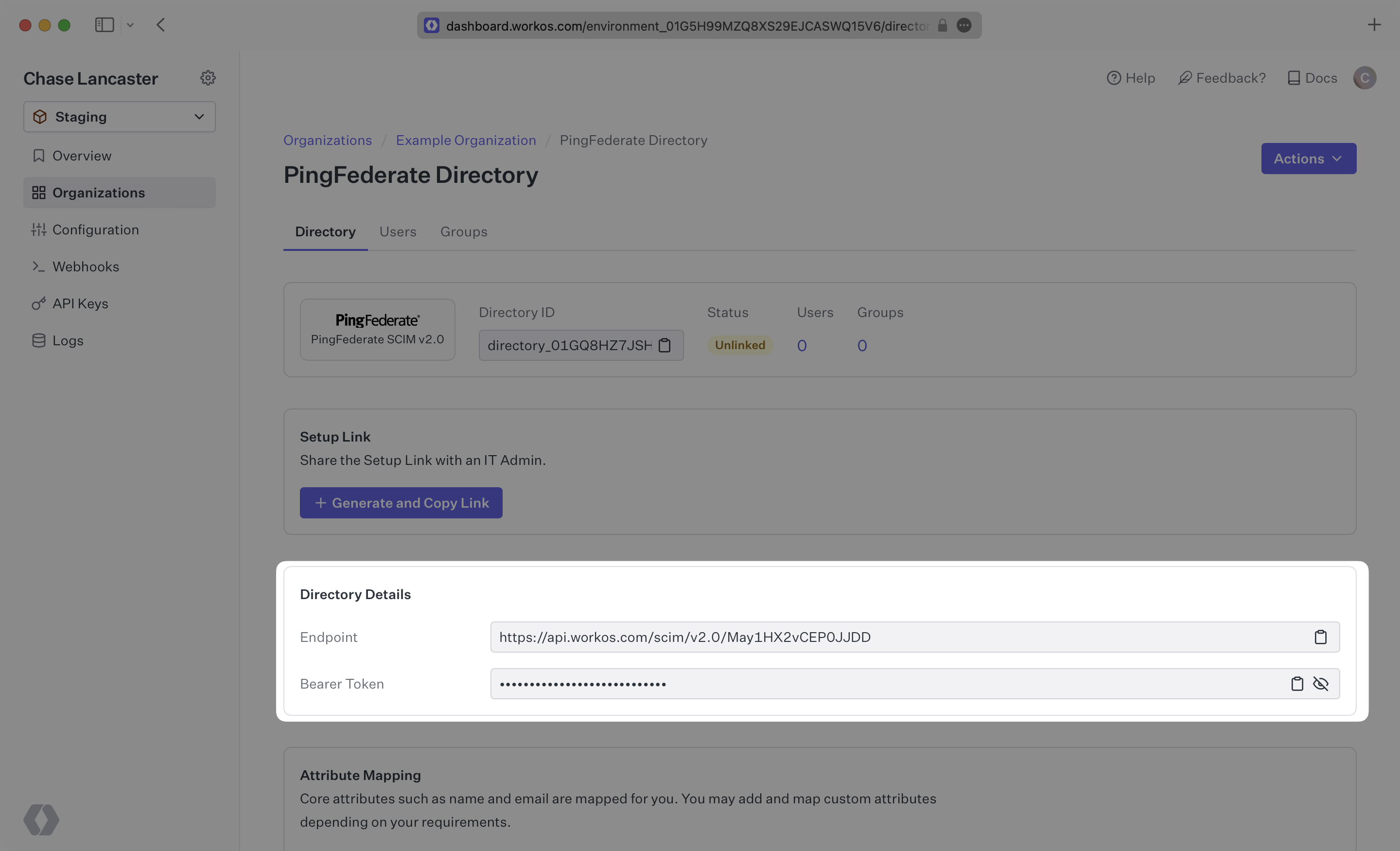
After completing step 1 below, both of these are available in your Endpoint’s Settings in the [WorkOS Dashboard](https://dashboard.workos.com/).
|
|
21
|
+
|
|
22
|
+
> The rest of the steps after the first will need to be carried out by the organization when configuring your application in their PingFederate instance.
|
|
23
|
+
|
|
24
|
+
---
|
|
25
|
+
|
|
26
|
+
## (1) Set up your directory in the WorkOS Dashboard
|
|
27
|
+
|
|
28
|
+
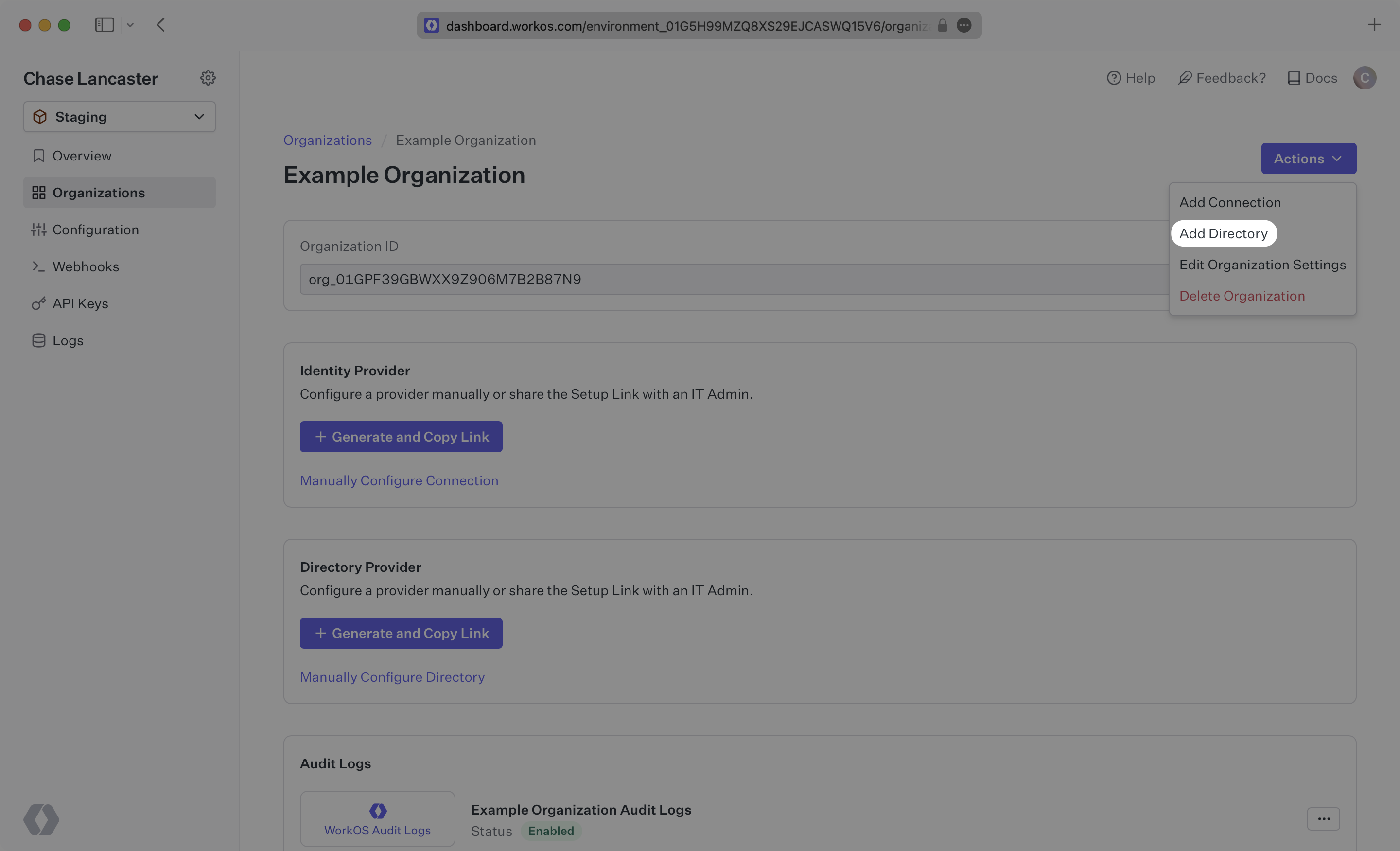
Login to your WorkOS Dashboard and select “Organizations” from the left hand navigation bar.
|
|
29
|
+
|
|
30
|
+
Select the organization you’ll be configuring a new Directory Sync with.
|
|
31
|
+
|
|
32
|
+
Click “Add Directory”.
|
|
33
|
+
|
|
34
|
+
|
|
35
|
+
|
|
36
|
+
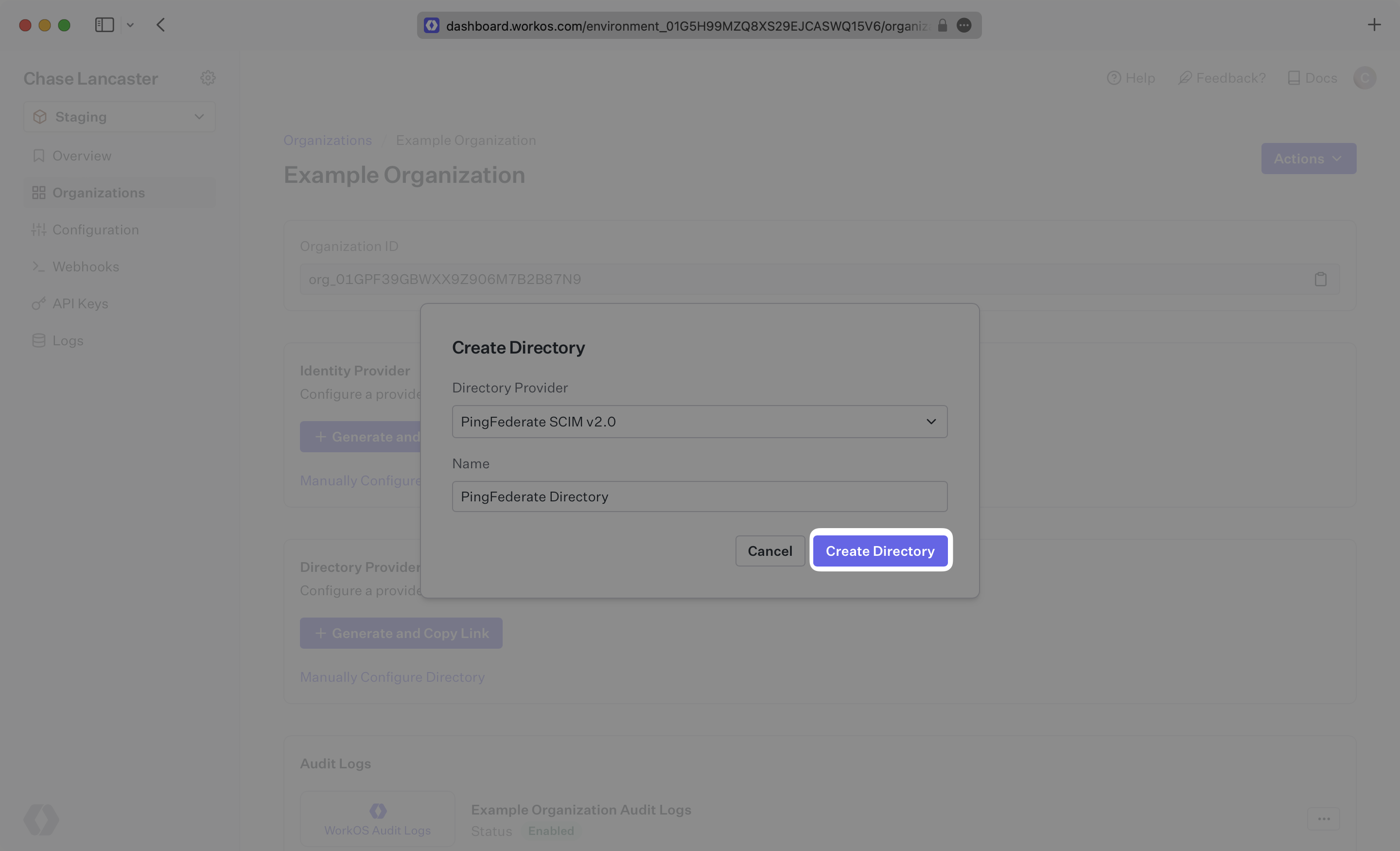
Select “PingFederate“ from the dropdown, and give the connection a descriptive name. Click “Create Directory”.
|
|
37
|
+
|
|
38
|
+
|
|
39
|
+
|
|
40
|
+
Save the Endpoint and Bearer Token, you’ll need those in the next section when you configure the SCIM Connector application in PingFederate.
|
|
41
|
+
|
|
42
|
+
|
|
43
|
+
|
|
44
|
+
> We have support for custom labeled URLs for Directory Sync endpoints. [Contact us](mailto:support@workos.com) for more info!
|
|
45
|
+
|
|
46
|
+
---
|
|
47
|
+
|
|
48
|
+
## (2) Install the SCIM Connector in PingFederate
|
|
49
|
+
|
|
50
|
+
This step will take place in PingFederate. First, download and install the SCIM Connector [following the setup guide from PingFederate](https://docs.pingidentity.com/bundle/pingfederate-scim-connector/page/ulk1563995050657.html).
|
|
51
|
+
|
|
52
|
+
Next, deploy the SCIM Connector files to your PingFederate directory following [the provider’s documentation](https://docs.pingidentity.com/bundle/pingfederate-scim-connector/page/dcn1563995073633.html).
|
|
53
|
+
|
|
54
|
+
Finally, enable provisioning in PingFederate using [the documentation from PingFederate](https://docs.pingidentity.com/r/en-us/pingfederate-112/help_spconnectionconfigtasklet_saasprovisioningstate).
|
|
55
|
+
|
|
56
|
+
Once that setup has been completed, continue on to step 3.
|
|
57
|
+
|
|
58
|
+
---
|
|
59
|
+
|
|
60
|
+
## (3) Select or create your PingFederate SCIM Connector Application
|
|
61
|
+
|
|
62
|
+
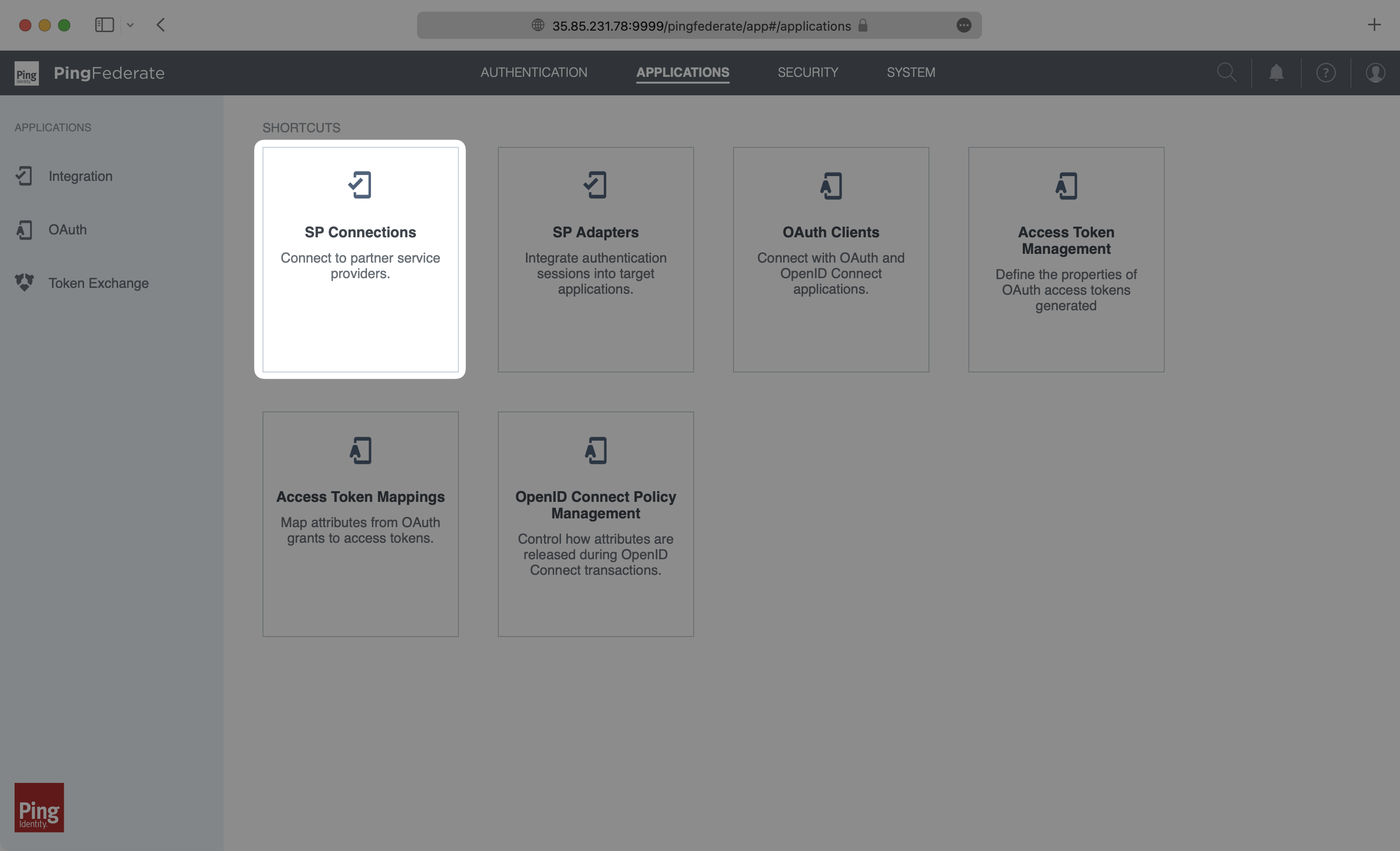
Log in as an admin to your PingFederate instance, and select “Applications” → “SP Connections”.
|
|
63
|
+
|
|
64
|
+
|
|
65
|
+
|
|
66
|
+
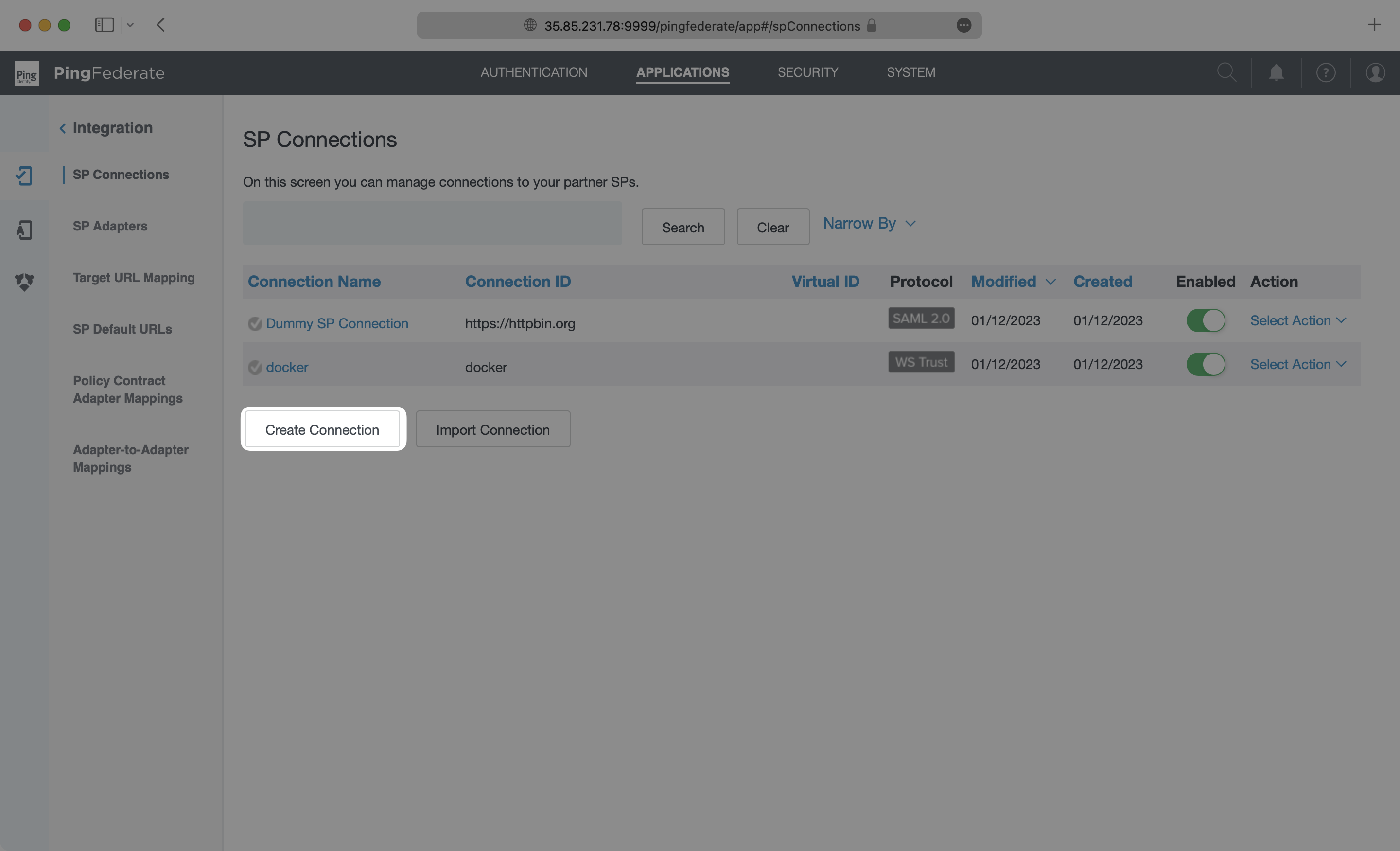
Select “Create Connection”.
|
|
67
|
+
|
|
68
|
+
|
|
69
|
+
|
|
70
|
+
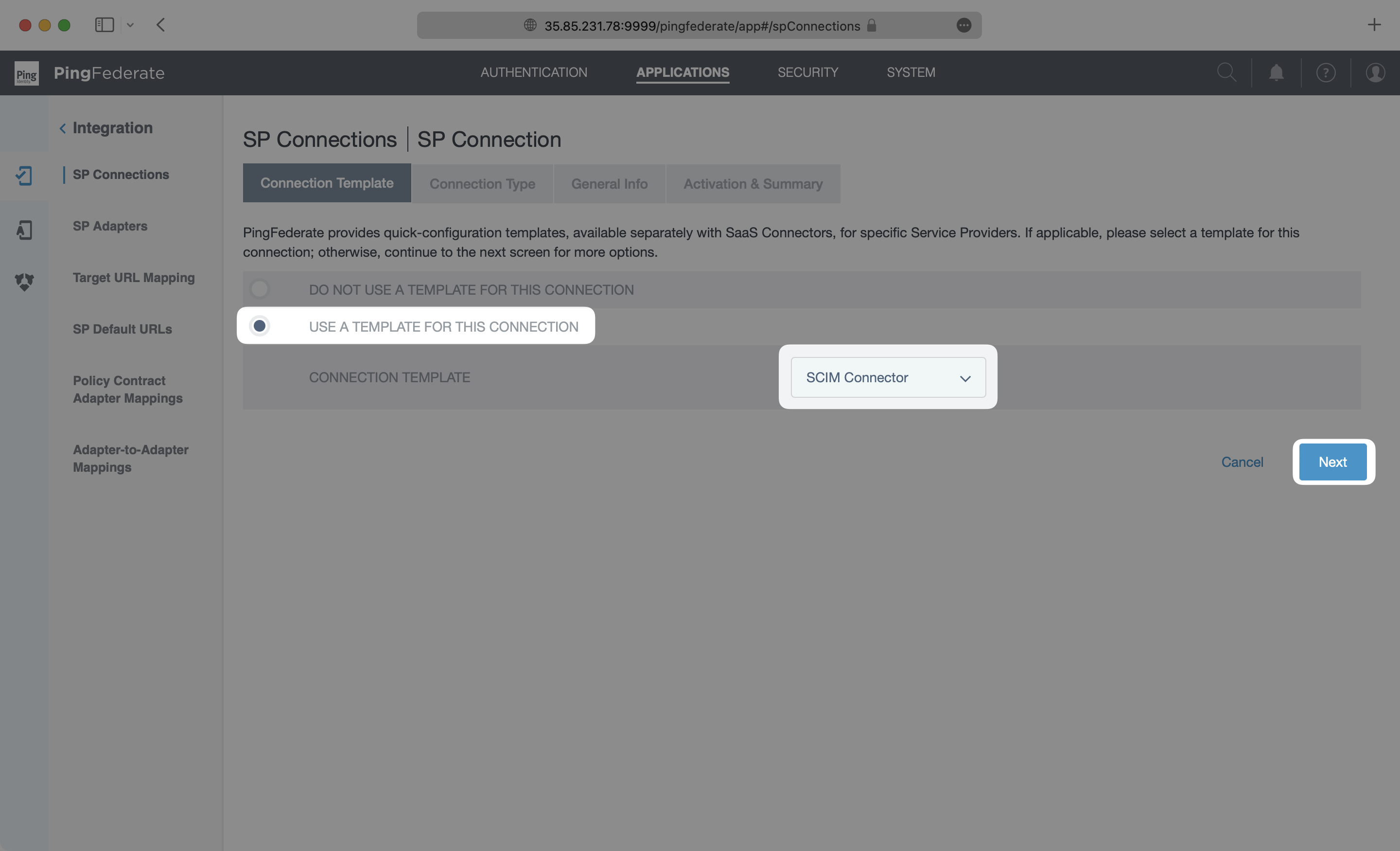
On the Connection Template page, select “Use a Template for this Connection” and then select “SCIM Connector” from the dropdown list. If you don’t see the SCIM Connector option, go back to the [Install SCIM Connector in PingFederate step](/integrations/pingfederate-scim/2-install-the-scim-connector-in-pingfederate). Click “Next”.
|
|
71
|
+
|
|
72
|
+
|
|
73
|
+
|
|
74
|
+
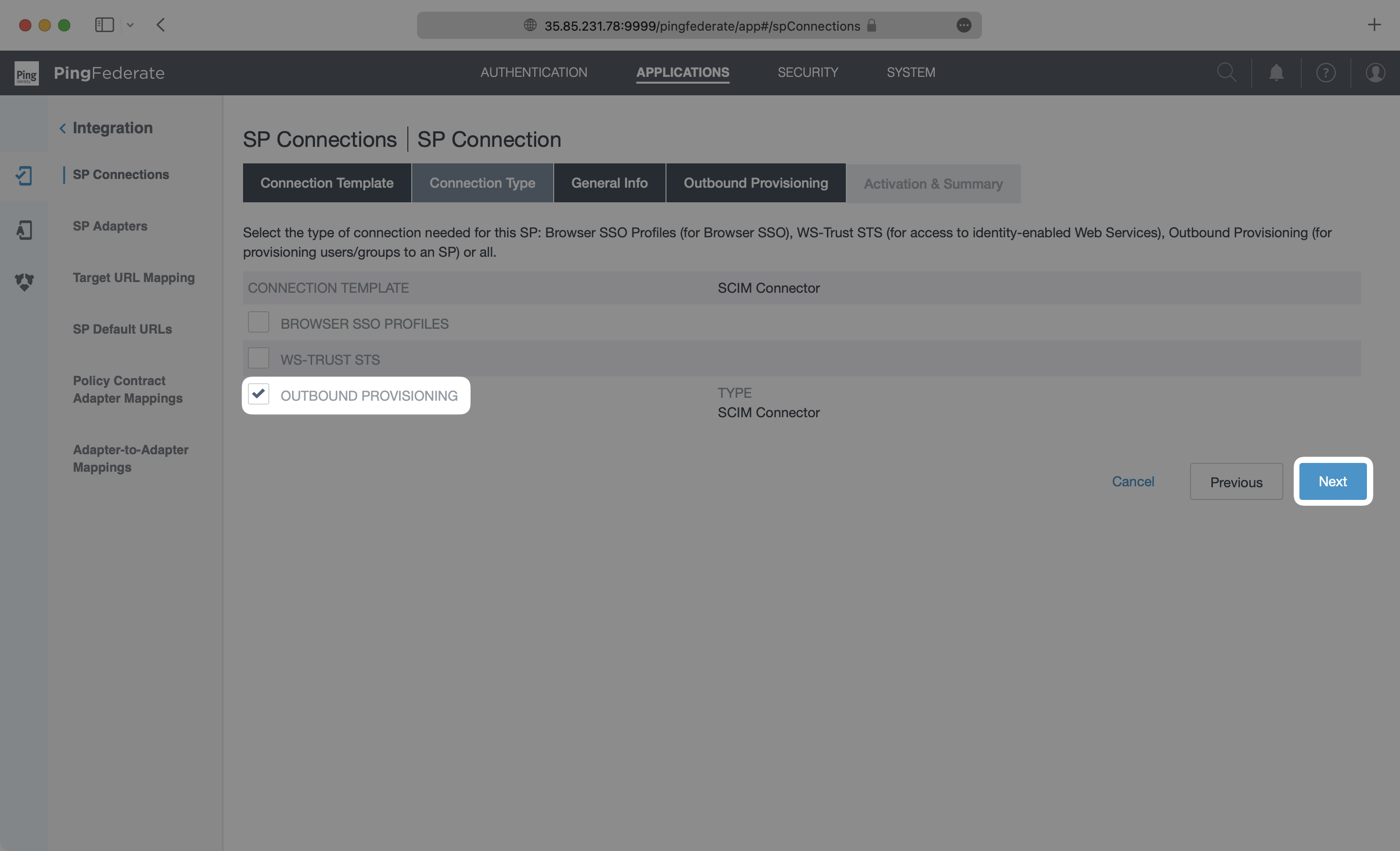
On the Connection Type page, make sure Outbound Provisioning is checked with the SCIM Connector Type. Click “Next”.
|
|
75
|
+
|
|
76
|
+
|
|
77
|
+
|
|
78
|
+
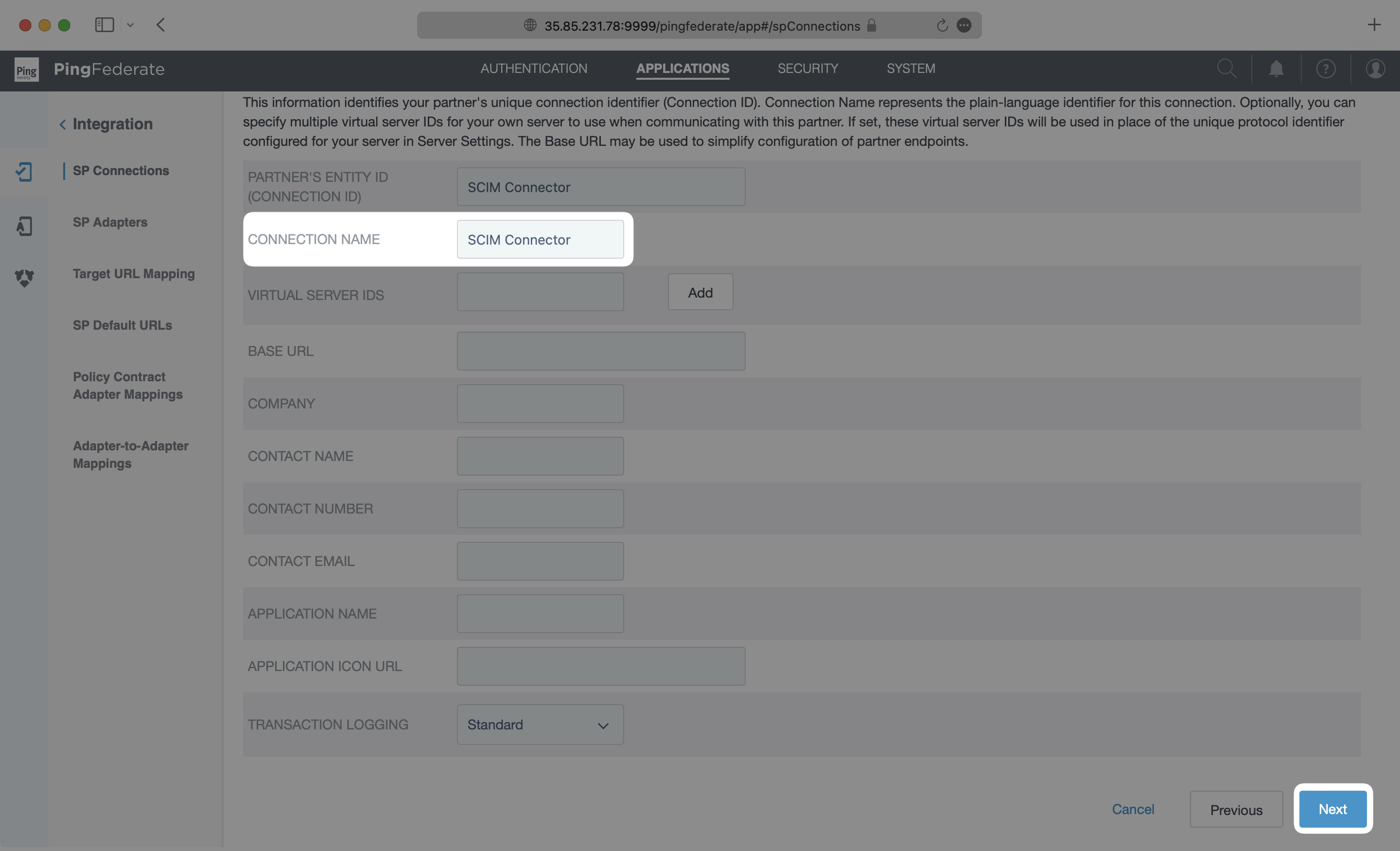
On the General Info page, give this connection a descriptive name, and click “Next”.
|
|
79
|
+
|
|
80
|
+
|
|
81
|
+
|
|
82
|
+
---
|
|
83
|
+
|
|
84
|
+
## (4) Configure Outbound Provisioning for your PingFederate application
|
|
85
|
+
|
|
86
|
+
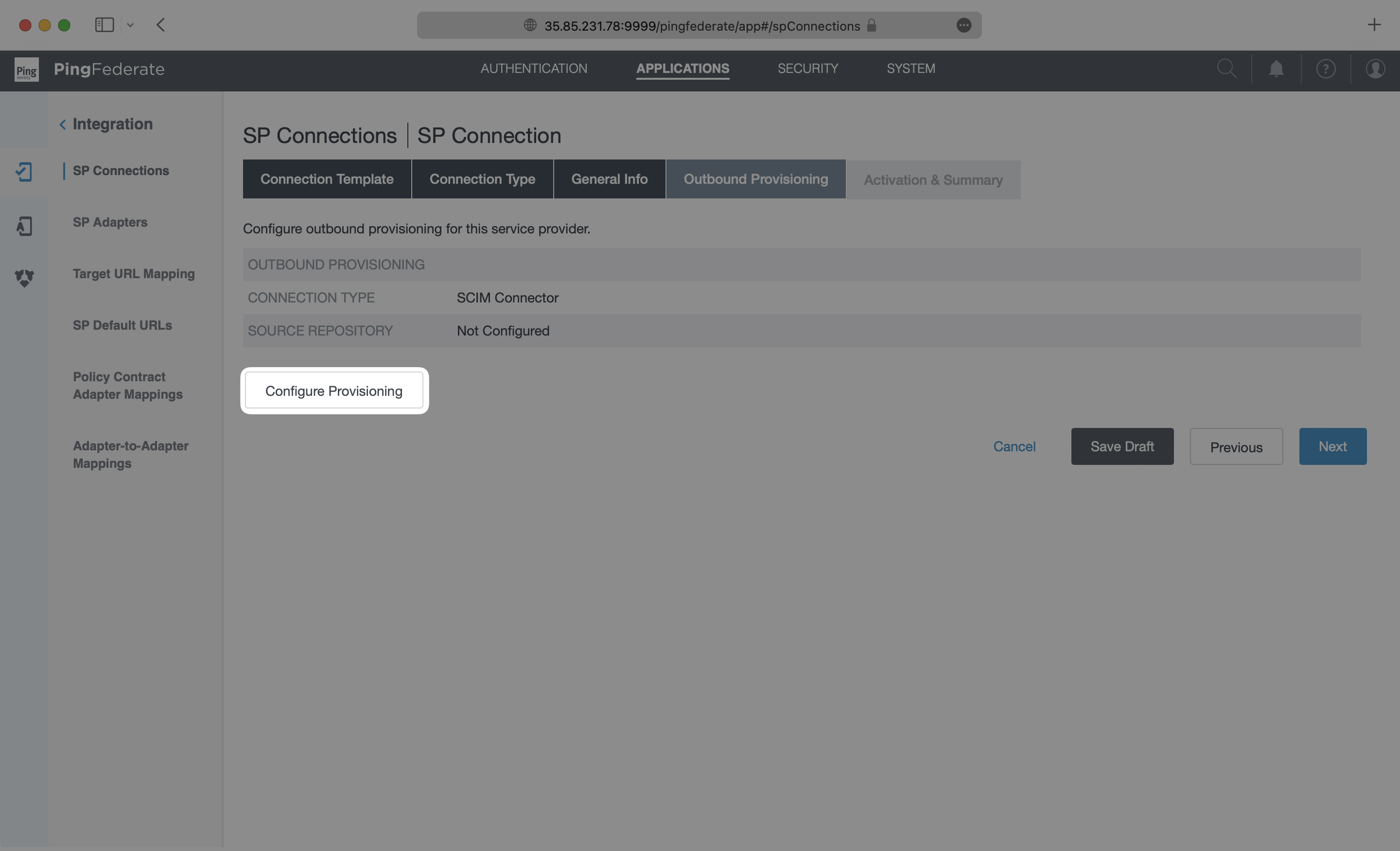
On the Outbound Provisioning page, select the “Configure Provisioning” button.
|
|
87
|
+
|
|
88
|
+
|
|
89
|
+
|
|
90
|
+
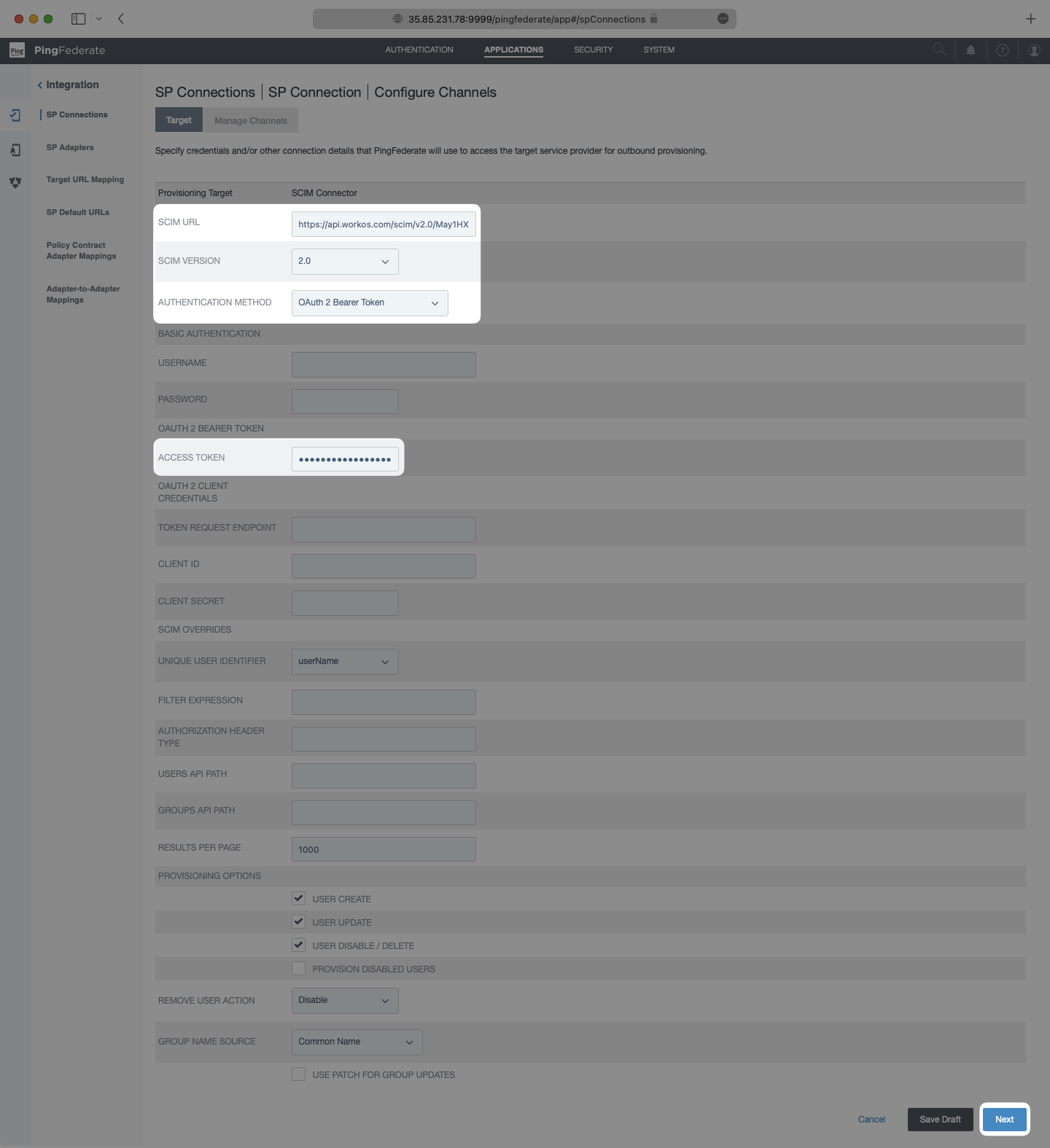
On the Target page, paste in the Endpoint from your WorkOS Directory Sync Connection in the SCIM URL field. Make sure SCIM Version is set as `2.0` and the Authentication Method is set as `OAuth 2 Bearer Token`. Paste in the Bearer Token from your WorkOS Directory Sync Connection in the Access Token field. Select “Next”.
|
|
91
|
+
|
|
92
|
+
|
|
93
|
+
|
|
94
|
+
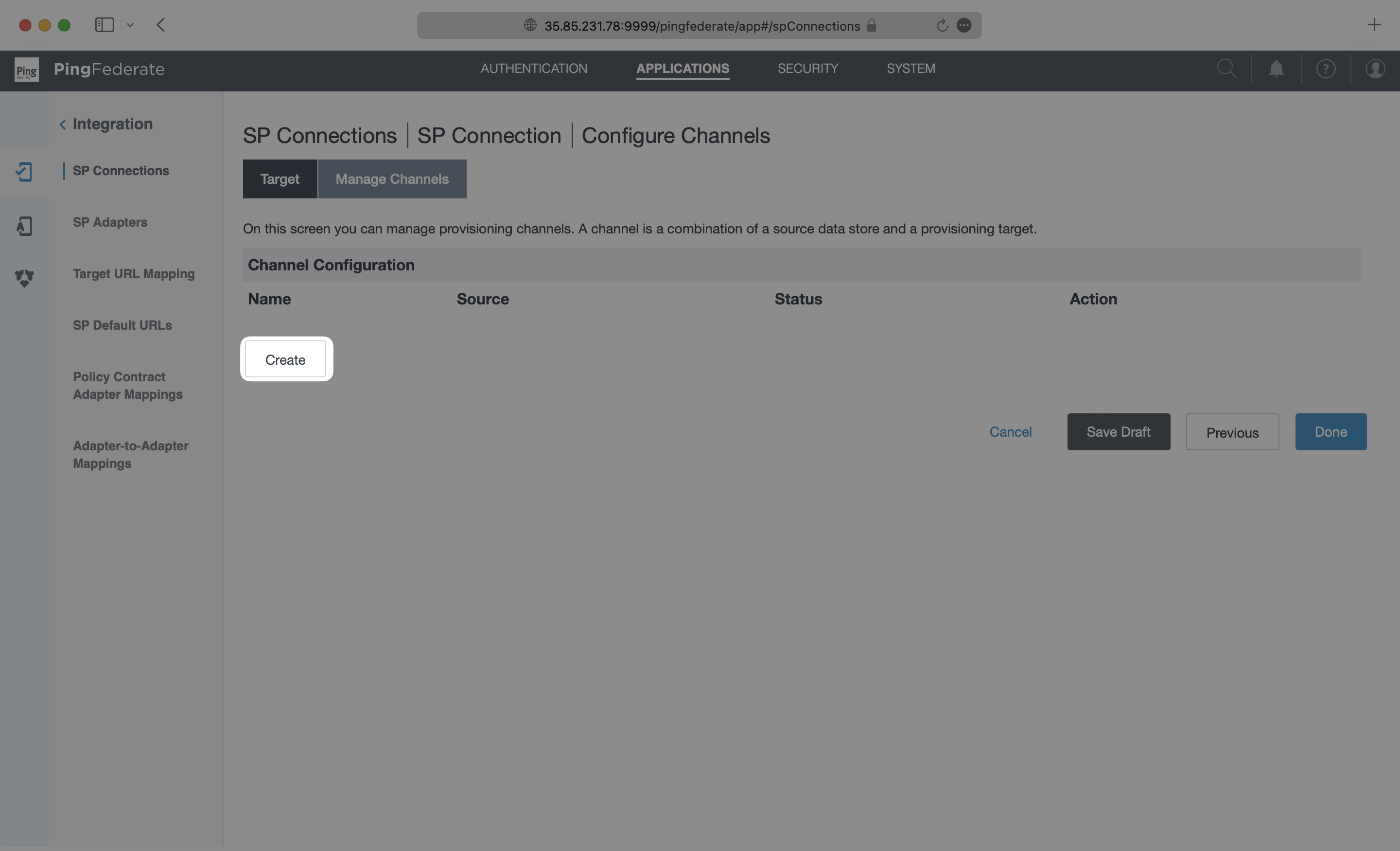
On the Manage Channels page, select “Create”.
|
|
95
|
+
|
|
96
|
+
|
|
97
|
+
|
|
98
|
+
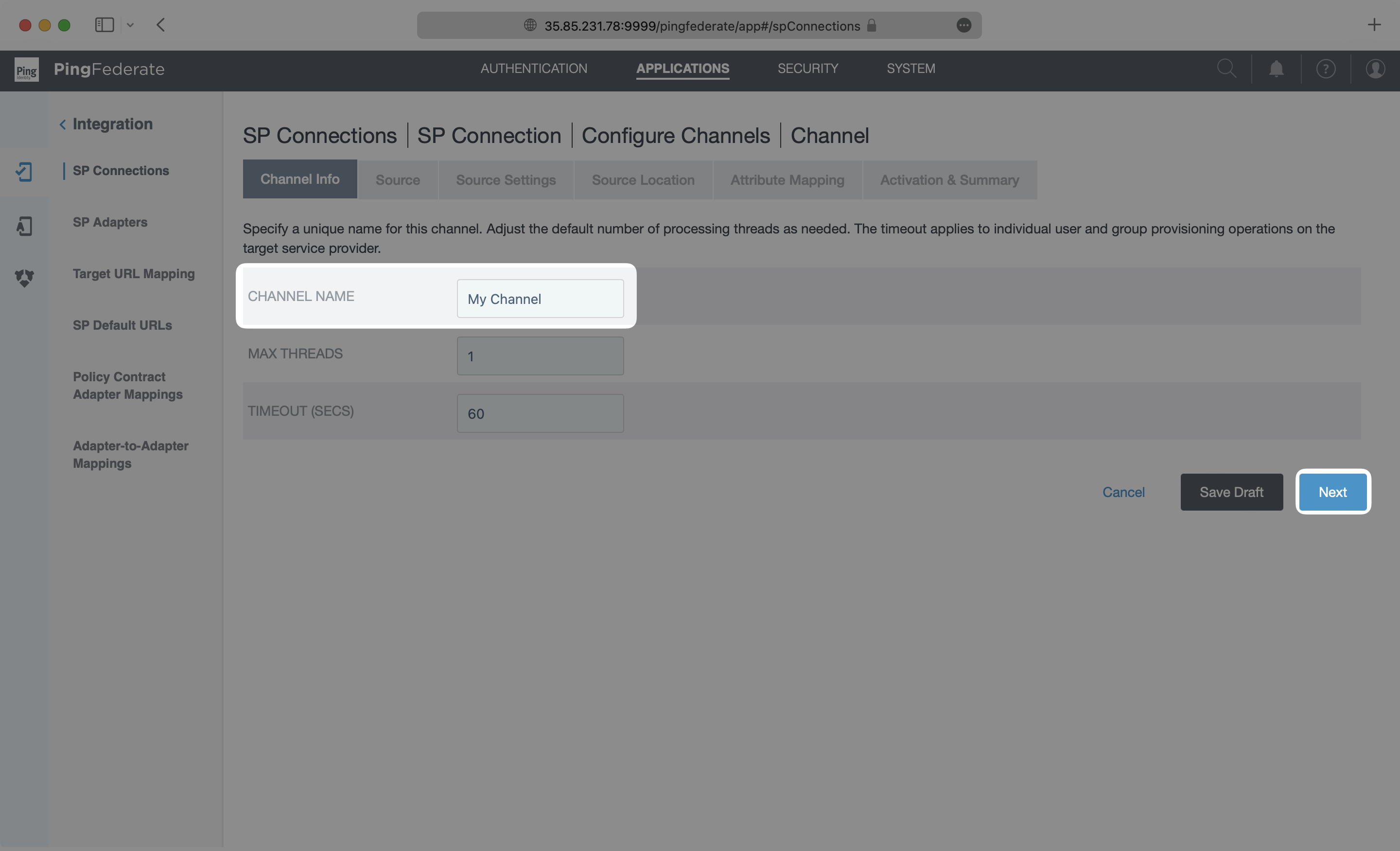
On the Channel Info page, add a descriptive name and click “Next”.
|
|
99
|
+
|
|
100
|
+
|
|
101
|
+
|
|
102
|
+
Select an “Active Data Store” from the dropdown menu. In this example, This example uses a PingDirectory LDAP instance, but this may be different depending on the type of data store used in each case. Please refer to the [PingFederate documentation](https://docs.pingidentity.com/bundle/pingfederate-103/page/vbe1564003005413.html) for specific settings on your type of data store. Click “Next”.
|
|
103
|
+
|
|
104
|
+
|
|
105
|
+
|
|
106
|
+
On the Source Settings page, make any modifications needed for your data store. In this example, the default values for the LDAP data store did not need to be modified, so the default settings were used. After configuring the source settings specific to your use case, click “Next” to go to the Source Location page.
|
|
107
|
+
|
|
108
|
+
|
|
109
|
+
|
|
110
|
+
On the Source Location page, input a Base DN and either a Group DB or Filter for the Users. This tells your application where to look for the users to sync from your active data store. The setup used in each case may be different depending on the type of data store being used and which users and groups are to be provisioned. Please reference [PingFederate documentation](https://docs.pingidentity.com/bundle/pingfederate-103/page/jqa1564003005539.html) for specific steps. When this is complete, click “Next”.
|
|
111
|
+
|
|
112
|
+
|
|
113
|
+
|
|
114
|
+
---
|
|
115
|
+
|
|
116
|
+
## (5) Configure attribute mapping in PingFederate
|
|
117
|
+
|
|
118
|
+
On the Attribute Mapping page, configure the mapping of attributes in the data store to the SCIM attributes. The exact configuration will depend on the specific setup in each unique situation. For this PingDirectory LDAP example, the default settings are used. When finished, Click “Next”.
|
|
119
|
+
|
|
120
|
+
|
|
121
|
+
|
|
122
|
+
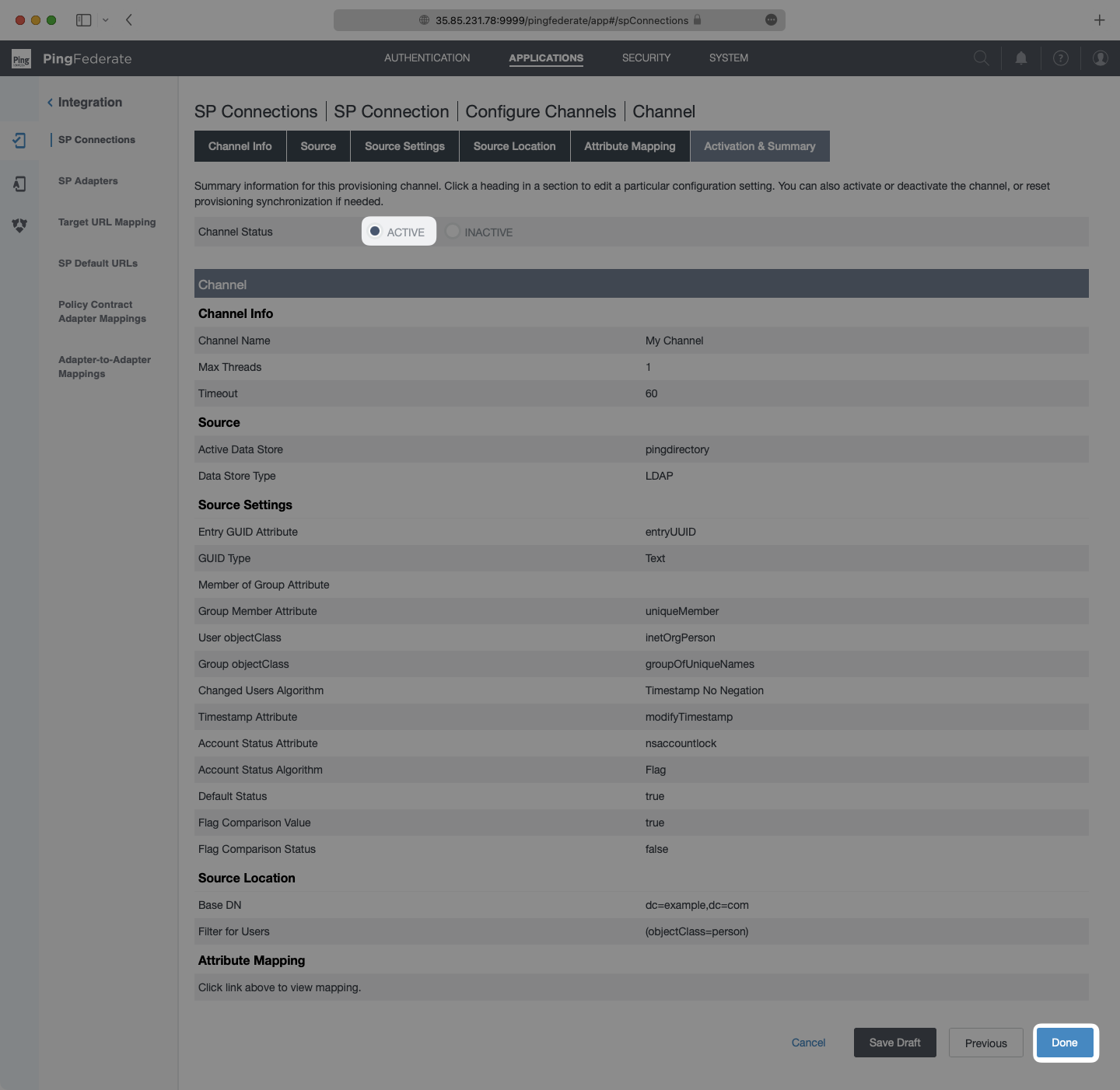
On the Activation & Summary page, check that the settings are complete, then toggle the “Channel Status” to “Active” and select “Done”.
|
|
123
|
+
|
|
124
|
+
|
|
125
|
+
|
|
126
|
+
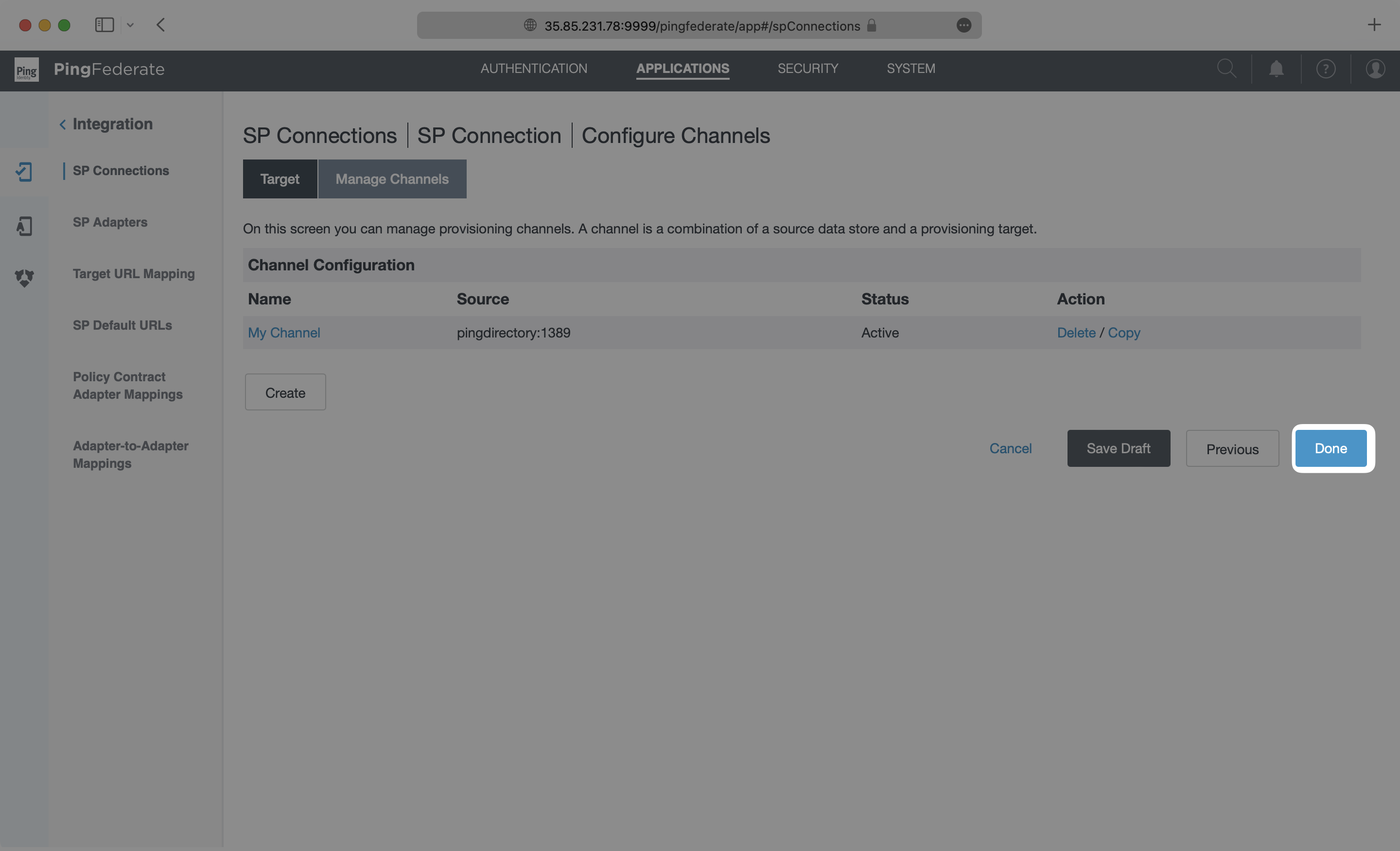
You are directed back to the Manage Channels page, where you can select “Done”.
|
|
127
|
+
|
|
128
|
+
|
|
129
|
+
|
|
130
|
+
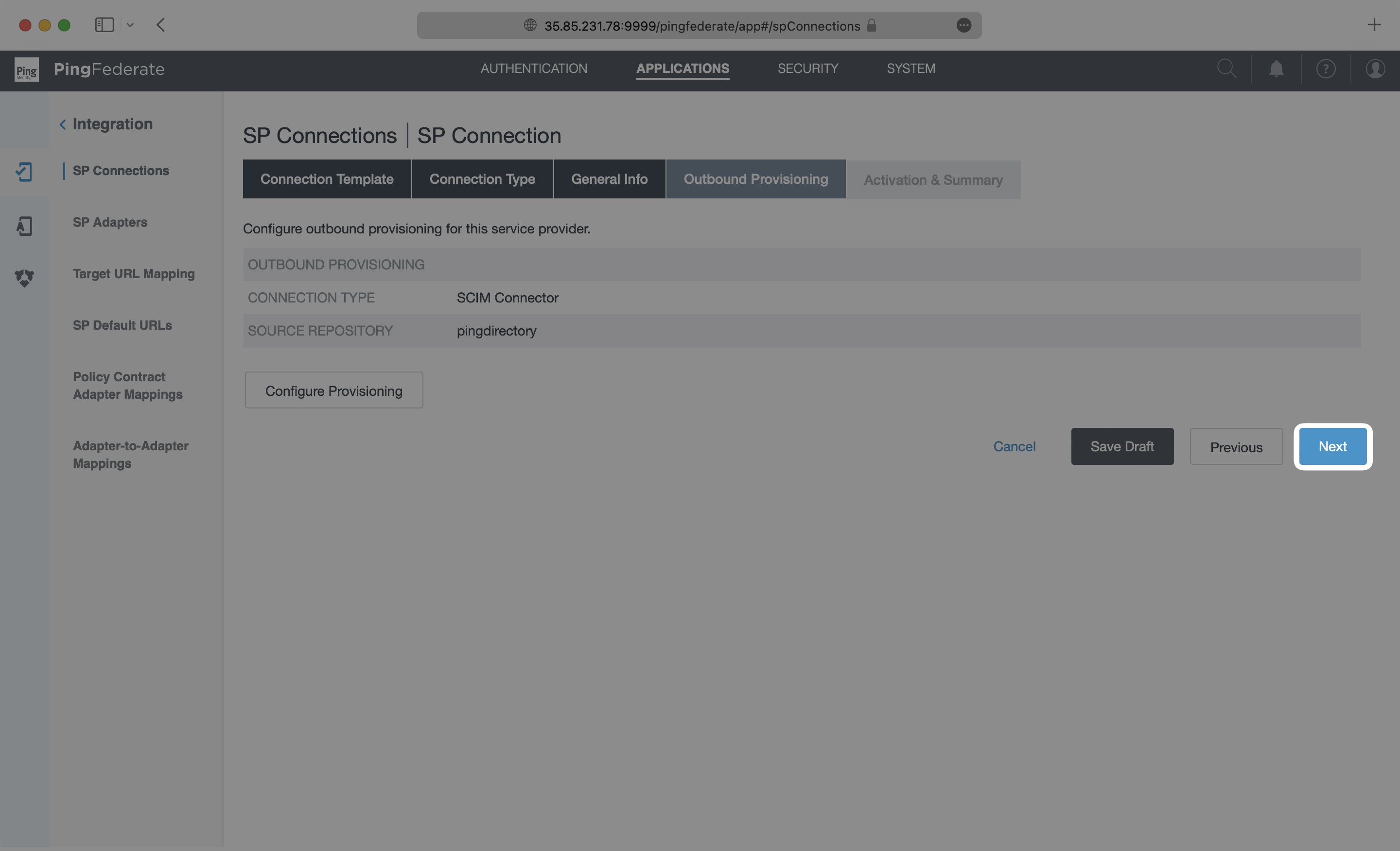
You’re then directed to the Outbound Provisioning page, where you can select “Next”.
|
|
131
|
+
|
|
132
|
+
|
|
133
|
+
|
|
134
|
+
---
|
|
135
|
+
|
|
136
|
+
## (6) Activate the SP Connection in PingFederate
|
|
137
|
+
|
|
138
|
+
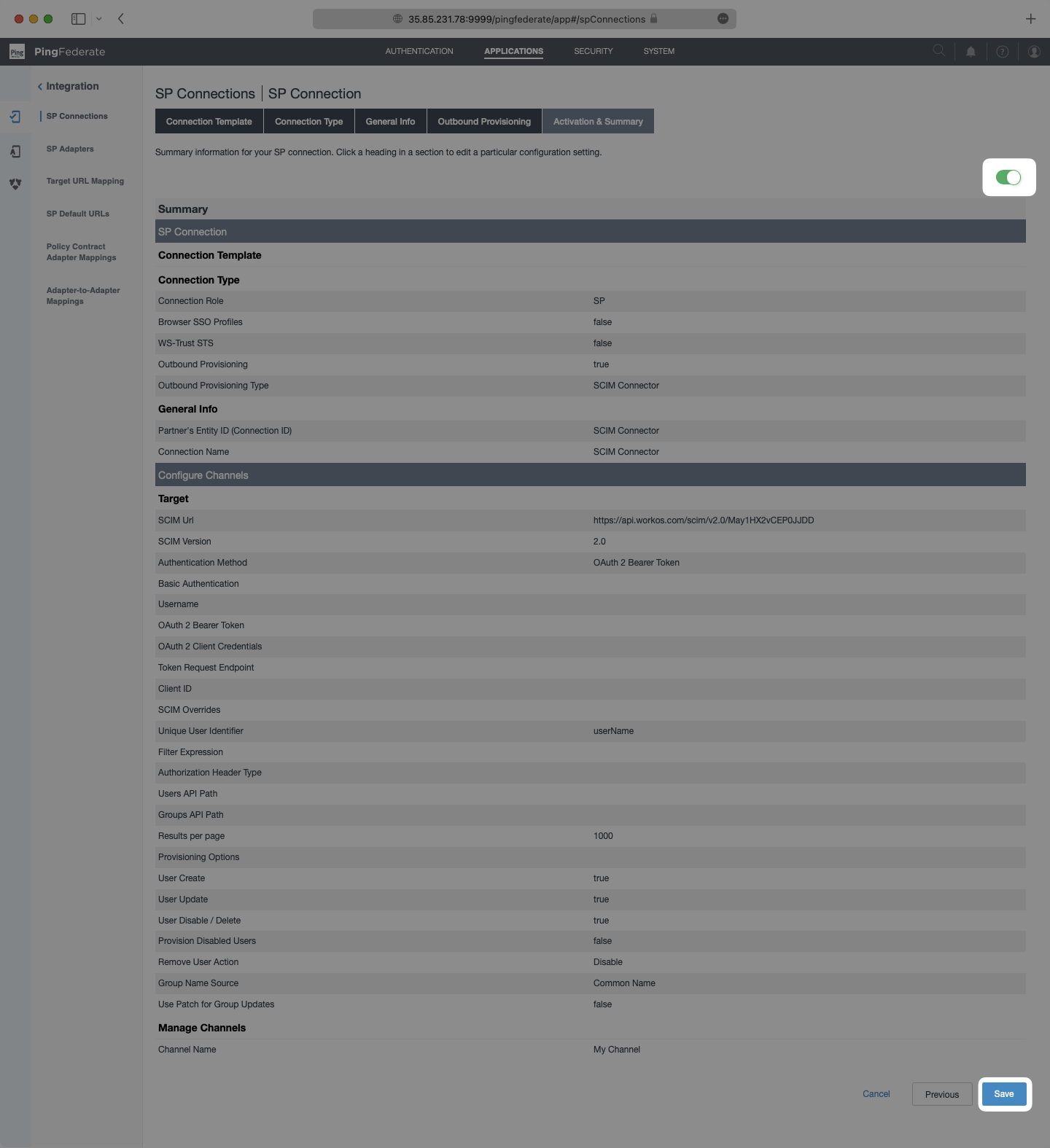
On the Activation & Summary page, turn on provisioning with the toggle at the top, and then select “Save”.
|
|
139
|
+
|
|
140
|
+
|
|
141
|
+
|
|
142
|
+
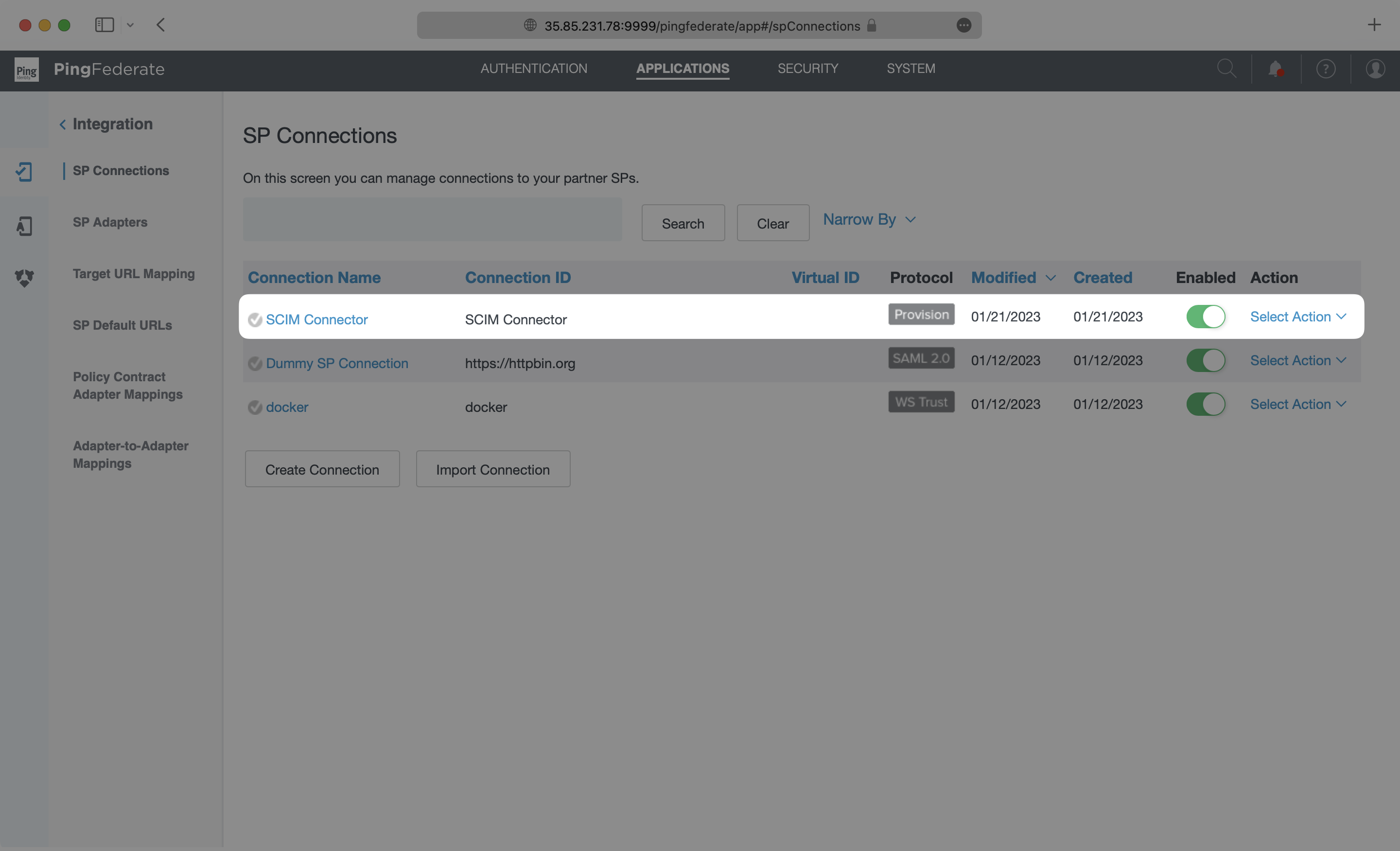
You’ll now see your SCIM application listed in the SP Connections page.
|
|
143
|
+
|
|
144
|
+
|
|
145
|
+
|
|
146
|
+
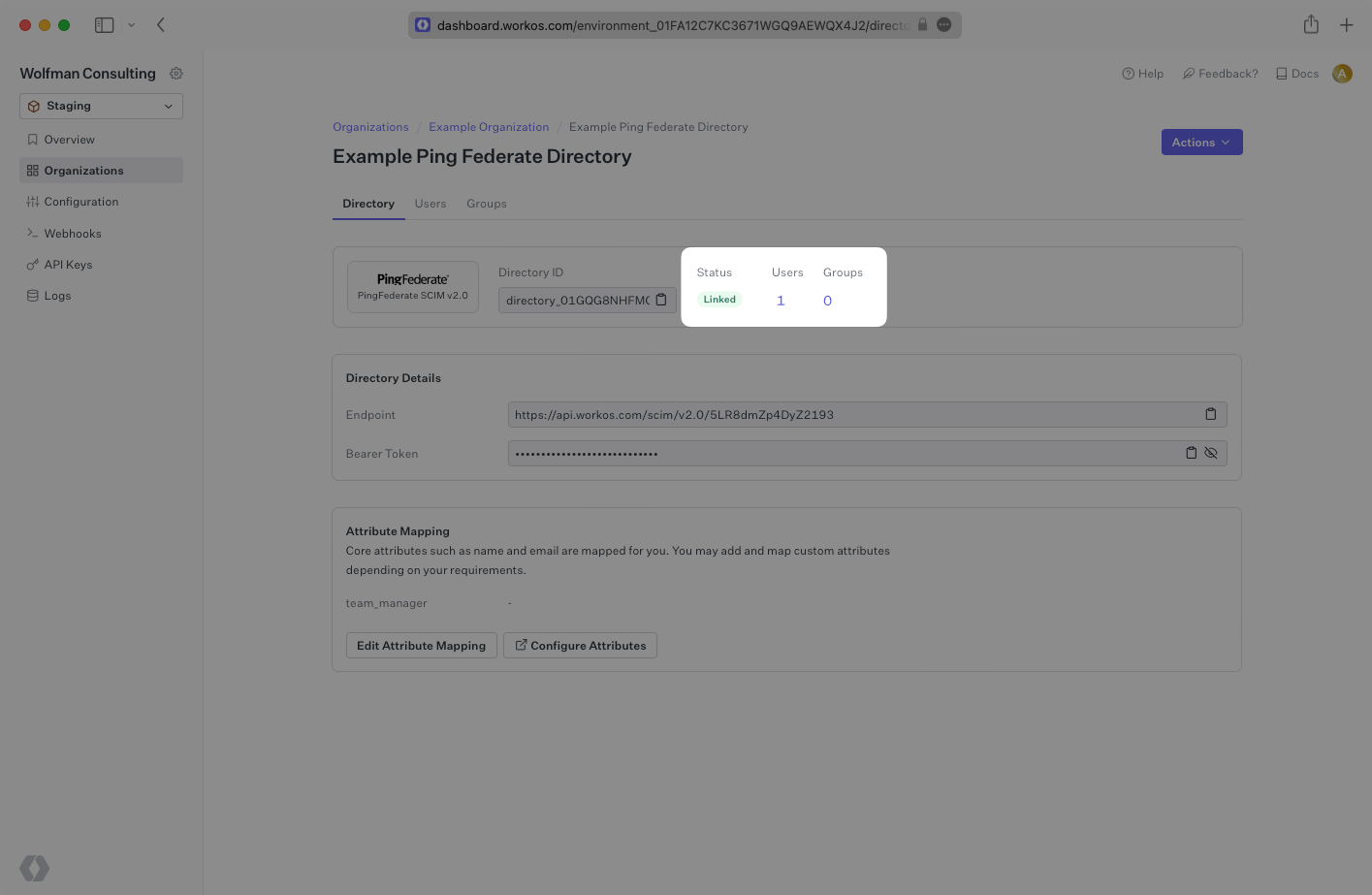
The provisioning will automatically begin when the connection is activated through outbound requests from Ping Federate. It may take a few minutes for this process to start. Once it is synced, you’ll see a Linked status in the Directory settings in the WorkOS Dashboard.
|
|
147
|
+
|
|
148
|
+
|
|
149
|
+
|
|
150
|
+
A detailed guide to integrate the WorkOS API with your application can be found [here](/directory-sync)
|
|
@@ -0,0 +1,86 @@
|
|
|
1
|
+
---
|
|
2
|
+
title: PingOne SAML
|
|
3
|
+
description: "Learn how to configure a connection to\_PingOne via SAML."
|
|
4
|
+
icon: ping-identity
|
|
5
|
+
breadcrumb:
|
|
6
|
+
title: Integrations
|
|
7
|
+
url: /integrations
|
|
8
|
+
originalPath: .tmp-workos-clone/packages/docs/content/integrations/pingone-saml.mdx
|
|
9
|
+
---
|
|
10
|
+
|
|
11
|
+
## Introduction
|
|
12
|
+
|
|
13
|
+
Each SSO Identity Provider requires specific information to create and configure a new [Connection](/glossary/connection). Often, the information required to create a Connection will differ by Identity Provider.
|
|
14
|
+
|
|
15
|
+
To create a PingOne SAML Connection, you’ll need two pieces of information: an [SP Metadata URL](/glossary/sp-metadata) from WorkOS, and an [IdP Metadata URL](/glossary/idp-metadata) from PingOne.
|
|
16
|
+
|
|
17
|
+
---
|
|
18
|
+
|
|
19
|
+
## What WorkOS provides
|
|
20
|
+
|
|
21
|
+
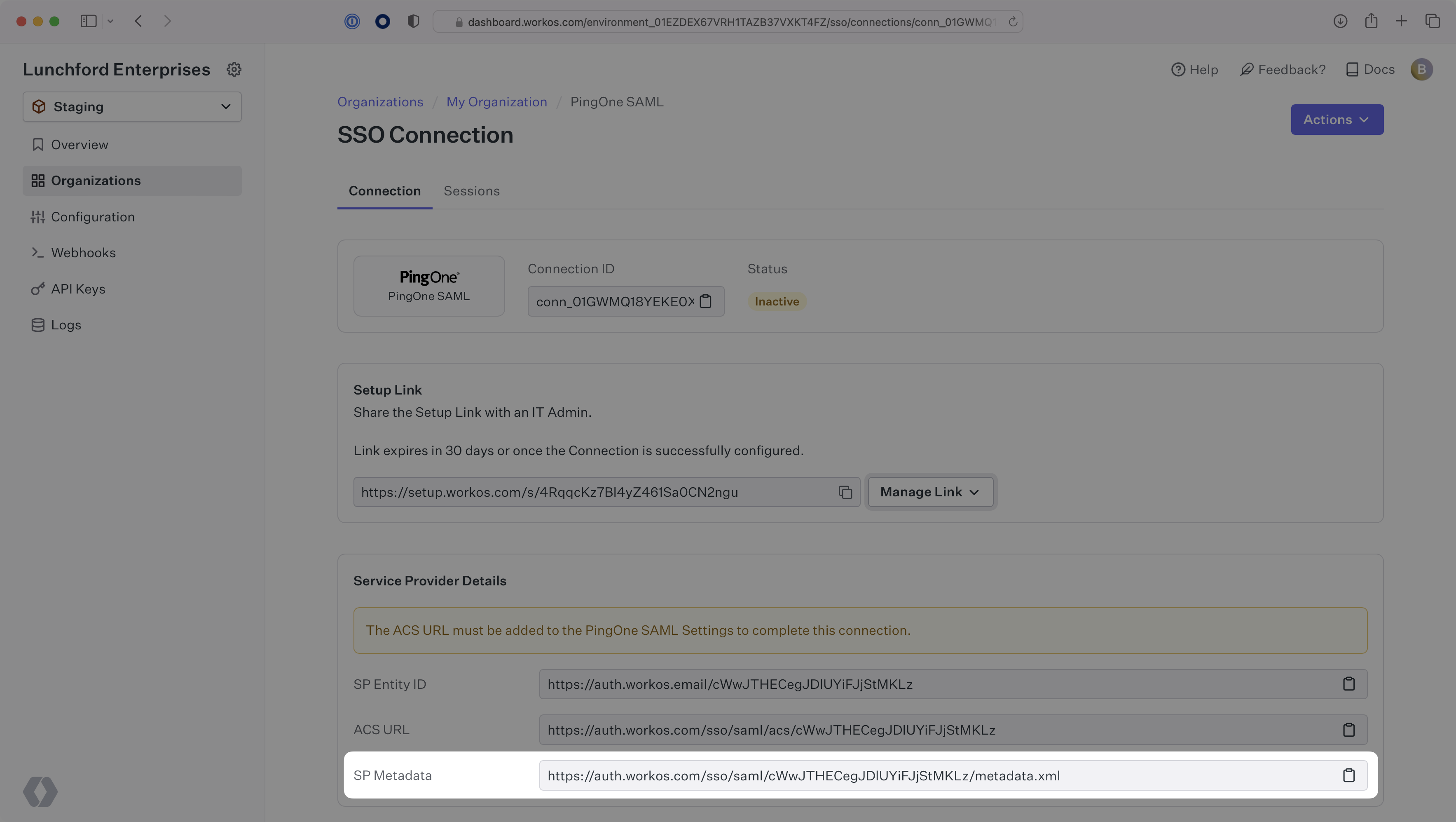
WorkOS provides the SP Metadata URL. It is readily available in your Connection settings in the [WorkOS Dashboard](https://dashboard.workos.com/).
|
|
22
|
+
|
|
23
|
+
|
|
24
|
+
|
|
25
|
+
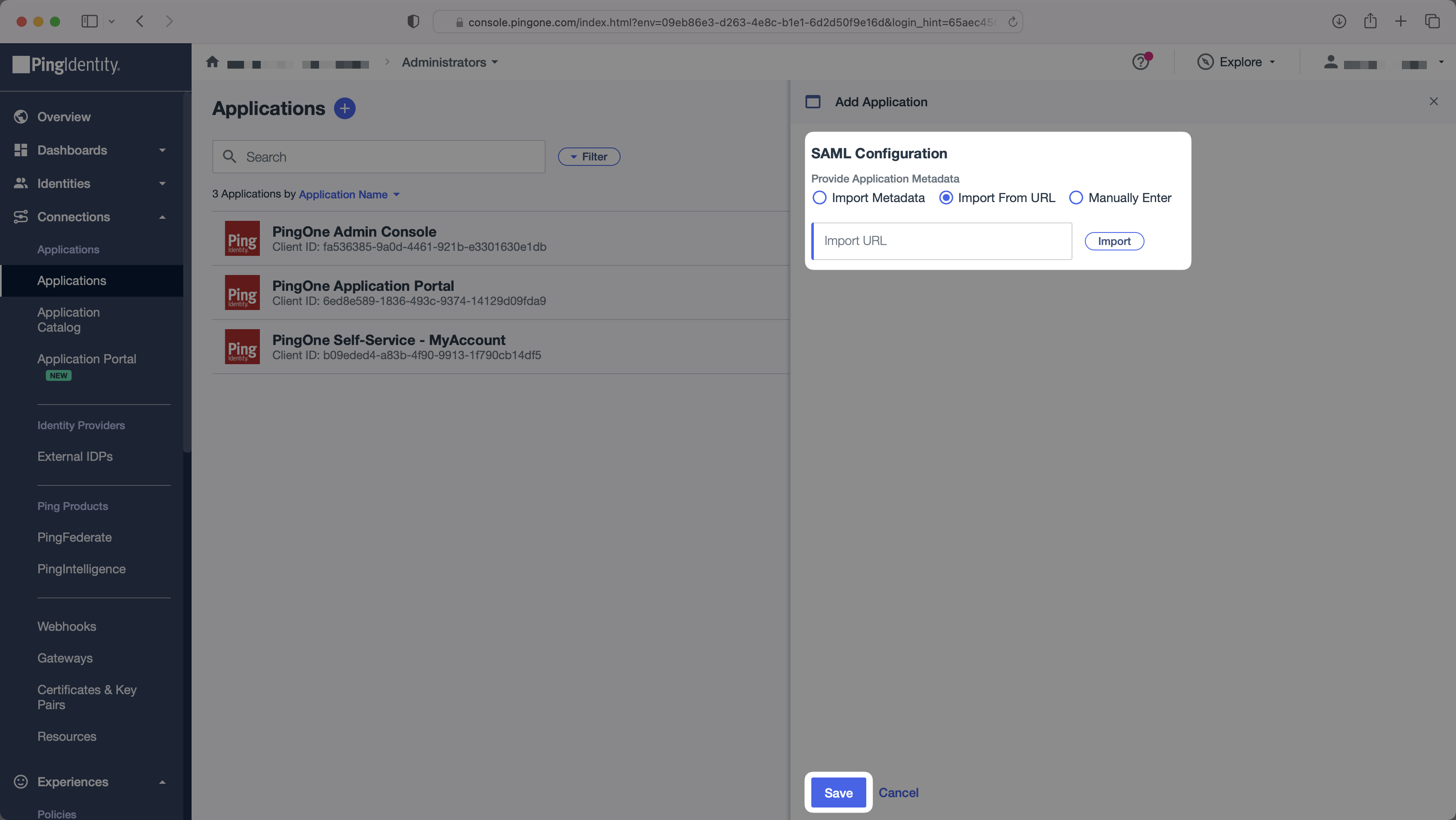
The SP Metadata link contains a metadata file the organization can use to set up the SAML integration. In PingOne’s case, the SP Metadata URL needs to be set by the organization when configuring your application in their PingOne instance.
|
|
26
|
+
|
|
27
|
+
Specifically, the SP Metadata URL will need to be set on the SAML Configuration page:
|
|
28
|
+
|
|
29
|
+
|
|
30
|
+
|
|
31
|
+
---
|
|
32
|
+
|
|
33
|
+
## What you’ll need
|
|
34
|
+
|
|
35
|
+
Next, provide the PingOne IdP Metadata URL.
|
|
36
|
+
|
|
37
|
+
Normally, this information will come from the organization's IT Management team when they set up your application’s SAML 2.0 configuration in their PingOne admin dashboard. However, should that not be the case during your setup, here’s how to obtain them:
|
|
38
|
+
|
|
39
|
+
---
|
|
40
|
+
|
|
41
|
+
## (1) Log In and Select Your Application
|
|
42
|
+
|
|
43
|
+
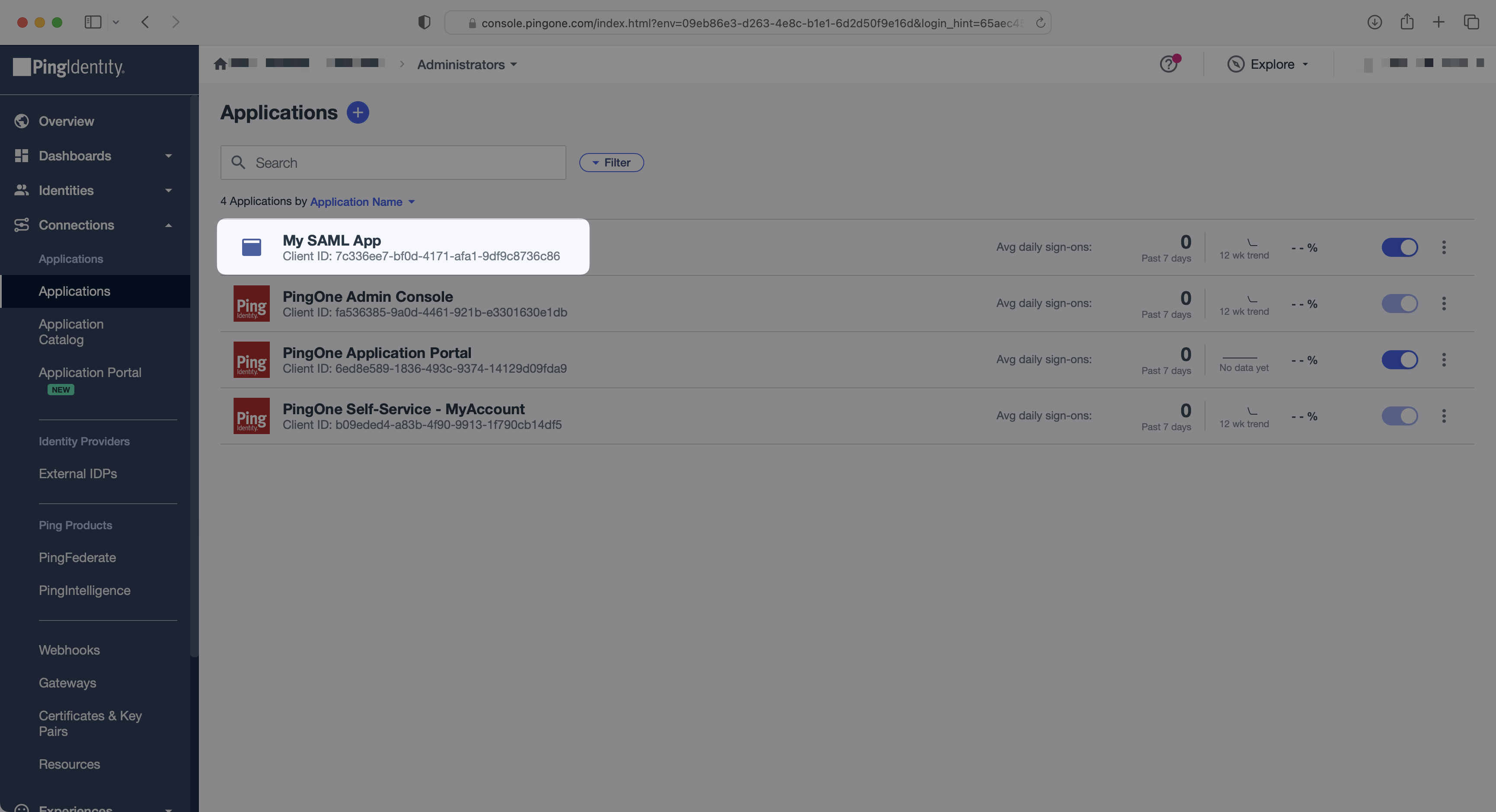
In the PingOne Admin Console, select "Applications" (under "Connections") in the side menu. Then, select your application.
|
|
44
|
+
|
|
45
|
+
|
|
46
|
+
|
|
47
|
+
---
|
|
48
|
+
|
|
49
|
+
## (2) Configure Attribute Mapping
|
|
50
|
+
|
|
51
|
+
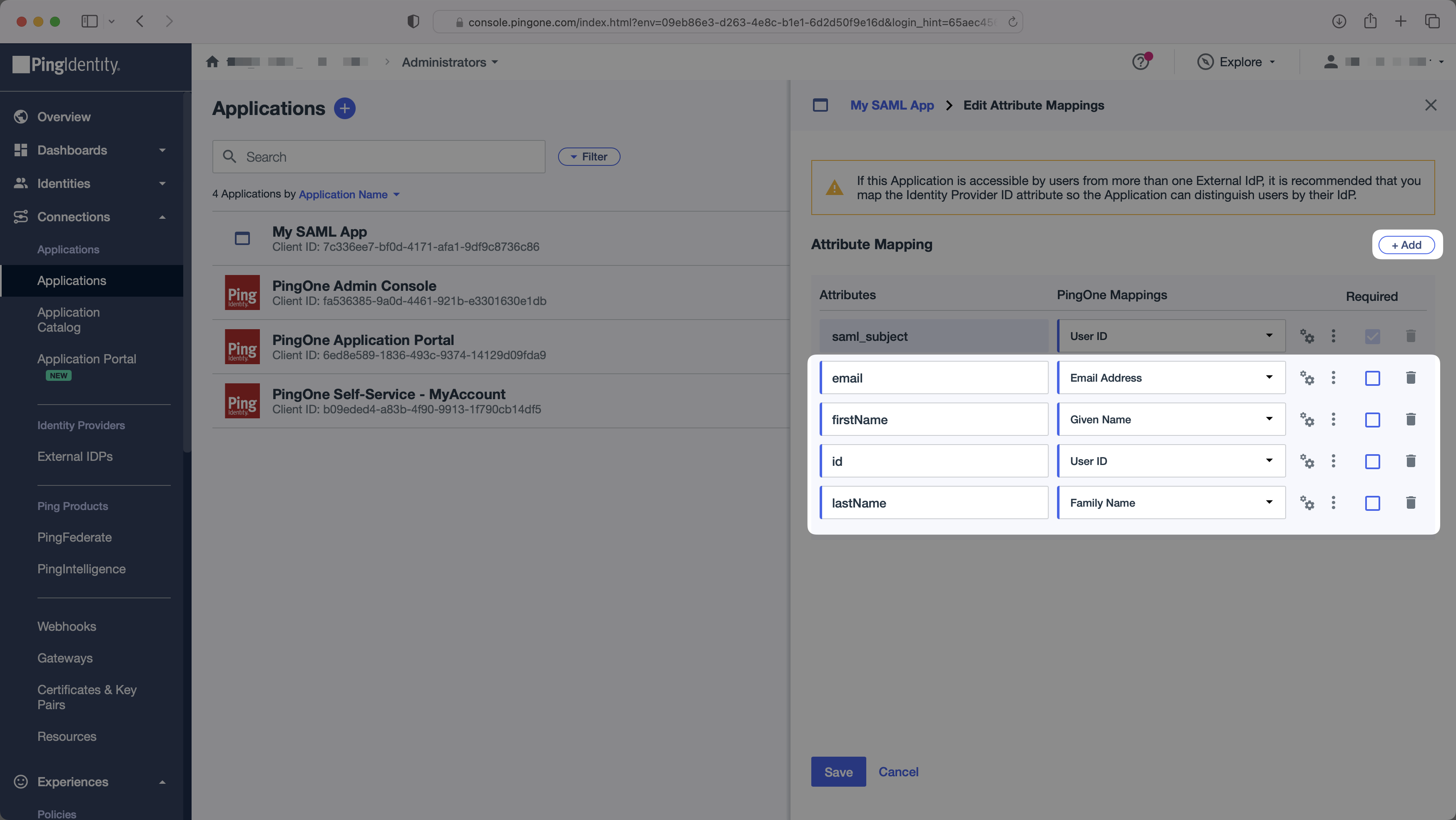
In the "Attribute Mapping" section of the PingOne SAML app, add the following field-value parameter pairs:
|
|
52
|
+
|
|
53
|
+
- `email` → `Email Address`
|
|
54
|
+
- `firstName` → `Given Name`
|
|
55
|
+
- `id` → `User ID`
|
|
56
|
+
- `lastName` → `Family Name`
|
|
57
|
+
|
|
58
|
+
|
|
59
|
+
|
|
60
|
+
### Role Assignment (optional)
|
|
61
|
+
|
|
62
|
+
With [identity provider role assignment](/sso/identity-provider-role-assignment), users can receive roles within your application based on their group memberships. To return this information in the attribute statement, follow the guidance below.
|
|
63
|
+
|
|
64
|
+
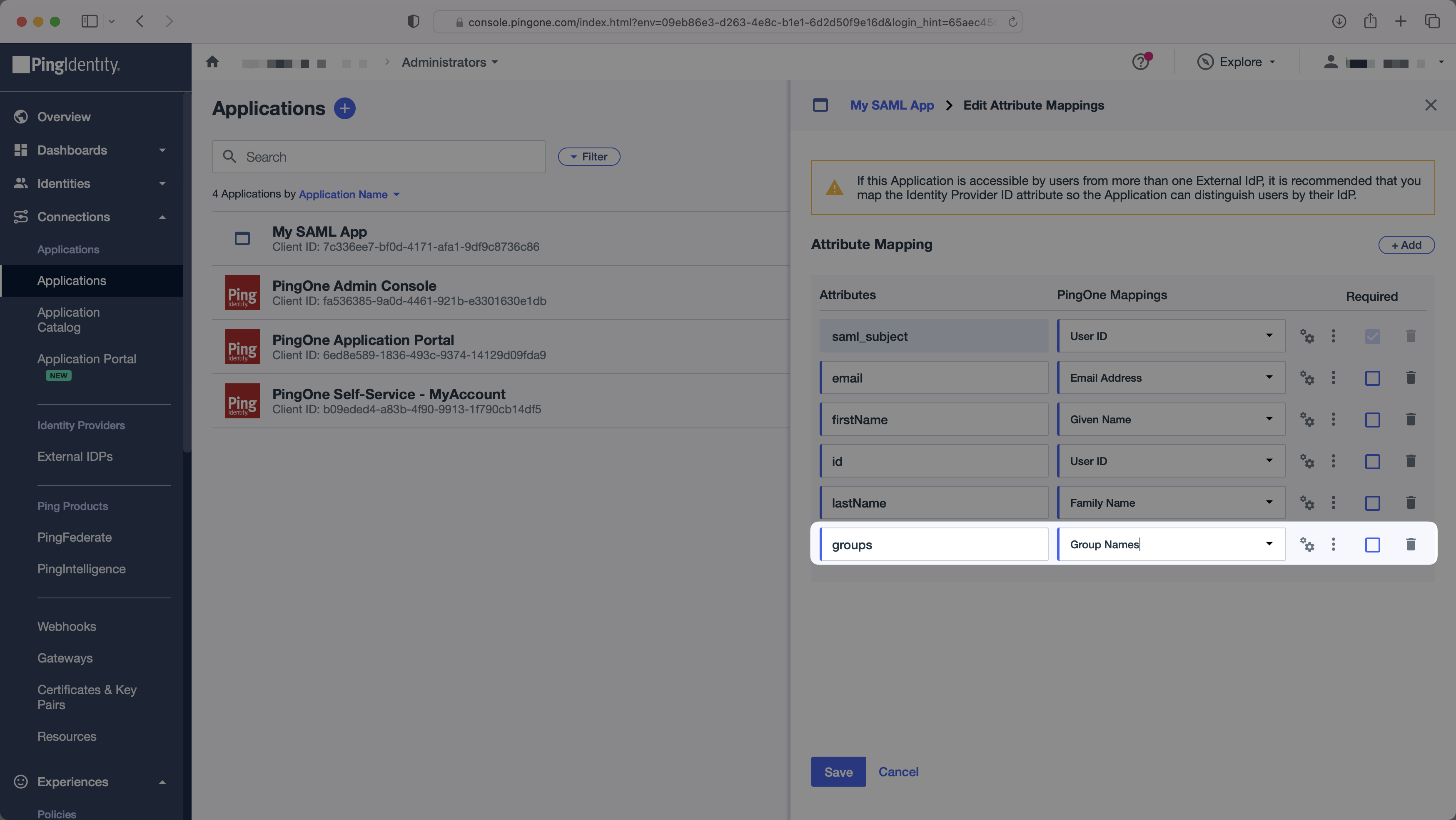
Select the `+ Add` button once. To return the names of all groups a user is a member of, add "groups" in the "Attributes" column mapped to the "Group Names" PingOne attribute. Click "Save".
|
|
65
|
+
|
|
66
|
+
## 
|
|
67
|
+
|
|
68
|
+
Add a new `groups` attribute mapped to the "Group Names" PingOne attribute.
|
|
69
|
+
|
|
70
|
+
> Finish role assignment set-up by navigating to the SSO connection page in the _Organization_ section of the [WorkOS Dashboard](https://dashboard.workos.com/). Create SSO groups by referencing the group IdP ID. Then, assign roles to these SSO groups so group members are automatically granted roles within your application.
|
|
71
|
+
|
|
72
|
+
---
|
|
73
|
+
|
|
74
|
+
## (3) Obtain Identity Provider Metadata
|
|
75
|
+
|
|
76
|
+
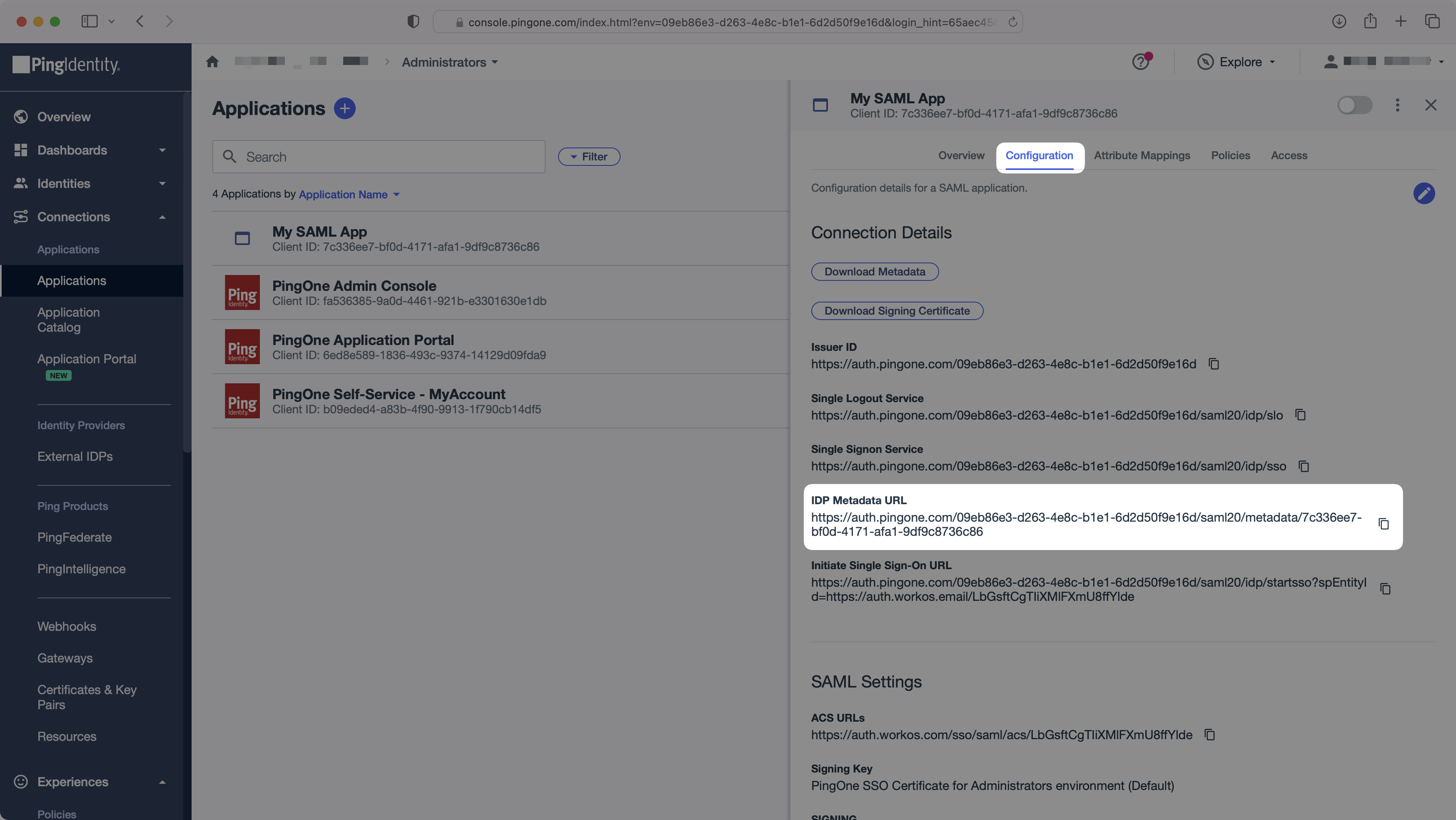
In the "Configuration" tab, copy the "IdP Metadata URL". You’ll need this in the next step. Enable the SAML app to allow users to authenticate.
|
|
77
|
+
|
|
78
|
+
|
|
79
|
+
|
|
80
|
+
---
|
|
81
|
+
|
|
82
|
+
## (4) Upload IdP Metadata URL
|
|
83
|
+
|
|
84
|
+
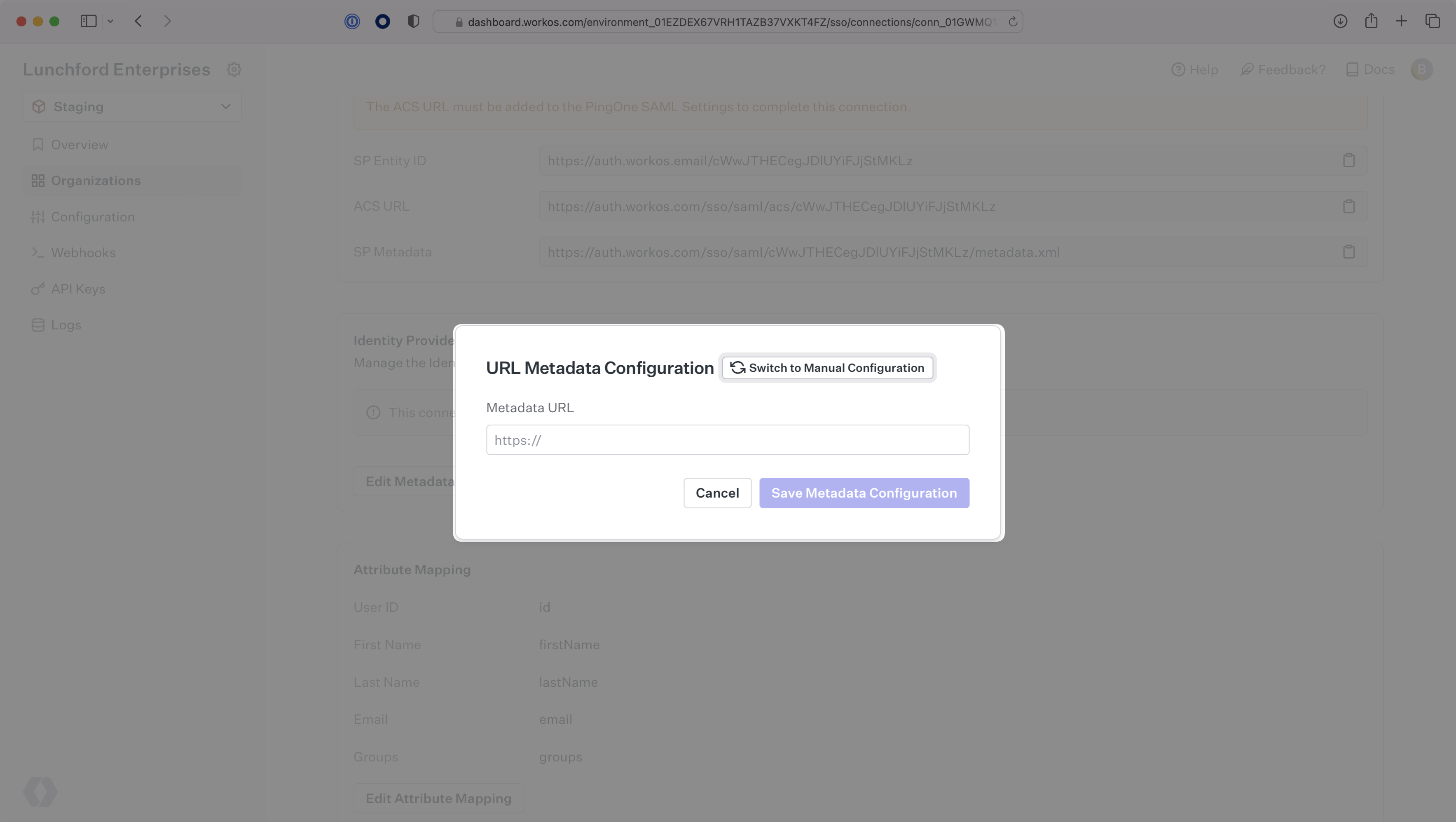
Finally, upload the IdP Metadata URL you saved earlier in your WorkOS Connection settings. Your Connection will then be linked and good to go!
|
|
85
|
+
|
|
86
|
+
|
|
@@ -0,0 +1,93 @@
|
|
|
1
|
+
---
|
|
2
|
+
title: React Native Expo
|
|
3
|
+
description: Learn how to integrate WorkOS SSO into a React Native Expo app.
|
|
4
|
+
icon: react-native-expo
|
|
5
|
+
breadcrumb:
|
|
6
|
+
title: Integrations
|
|
7
|
+
url: /integrations
|
|
8
|
+
originalPath: .tmp-workos-clone/packages/docs/content/integrations/react-native-expo.mdx
|
|
9
|
+
---
|
|
10
|
+
|
|
11
|
+
## Introduction
|
|
12
|
+
|
|
13
|
+
When it comes to combining the WorkOS SSO solution with mobile applications, our advice on the general flow tends to go like this:
|
|
14
|
+
|
|
15
|
+
1. Make an API call to generate an Authorization URL.
|
|
16
|
+
2. Send the end user to the generated URL within their mobile browser.
|
|
17
|
+
3. Deep-link the end user back into your native application upon successful authentication.
|
|
18
|
+
|
|
19
|
+
With Expo, you’re able to integrate the WorkOS API with the Expo AuthSession and WebBrowser libraries, which adds web browser based authentication to your app.
|
|
20
|
+
|
|
21
|
+
---
|
|
22
|
+
|
|
23
|
+
## (1) Add AuthSession Package
|
|
24
|
+
|
|
25
|
+
To get started, you’ll want to add the `AuthSession` package to your React Native Expo project using the following:
|
|
26
|
+
|
|
27
|
+
```bash title="Install Expo’s AuthSession Package"
|
|
28
|
+
expo install expo-auth-session expo-random
|
|
29
|
+
```
|
|
30
|
+
|
|
31
|
+
We'll be using the `AuthSession.makeRedirectUri()` method to generate a RedirectUri for us to use.
|
|
32
|
+
|
|
33
|
+
## (2) Add WebBrowser Package
|
|
34
|
+
|
|
35
|
+
You’ll also want to add the `WebBrowser` package to your React Native Expo project using the following:
|
|
36
|
+
|
|
37
|
+
```bash title="Install Expo’s WebBrowser Package"
|
|
38
|
+
expo install expo-web-browser
|
|
39
|
+
```
|
|
40
|
+
|
|
41
|
+
For our purposes, we’ll specifically be using the `WebBrowser.openAuthSessionAsync()` method, which you can read more about [here](https://docs.expo.dev/versions/latest/sdk/webbrowser/#webbrowseropenauthsessionasyncurl-redirecturl-options). We will be using two arguments:
|
|
42
|
+
|
|
43
|
+
- `url`: This will be the Authorization URL we generate using the WorkOS API
|
|
44
|
+
- `redirect`: This will be the link back into your native Expo application once authentication is complete
|
|
45
|
+
|
|
46
|
+
## (3) Get Authorization URL
|
|
47
|
+
|
|
48
|
+
The first step in the authentication process will be to Get the Authorization URL and use it as the `url` argument in the `openAuthSessionAsync()` method. In the code, it would look something like this:
|
|
49
|
+
|
|
50
|
+
```js title="Get Authorization URL Call"
|
|
51
|
+
// Generate the RedirectUri and save it to a redirect variable
|
|
52
|
+
// You will also need to add this redirect URI to the allow list in the WorkOS Dashboard
|
|
53
|
+
const redirect = AuthSession.makeRedirectUri().toString();
|
|
54
|
+
|
|
55
|
+
// Pull Connection ID from environment variables
|
|
56
|
+
const connection_id = process.env.WORKOS_CONNECTION_ID;
|
|
57
|
+
|
|
58
|
+
// Pull Client ID from evnironment variables
|
|
59
|
+
const client_id = process.env.WORKOS_CLIENT_ID;
|
|
60
|
+
|
|
61
|
+
// Format the URL for the Get Authorization URL call and pass in the Client ID, Redirect URI, and Connection ID
|
|
62
|
+
const url = `https://api.workos.com/sso/authorize?response_type=code&client_id=${client_id}&redirect_uri=${redirect}&state=&connection=${connection_id}`;
|
|
63
|
+
|
|
64
|
+
// Call openAuthSessionAsync with the url and redirect from above, and save the returned object to a variable
|
|
65
|
+
const result = await WebBrowser.openAuthSessionAsync(url, redirect);
|
|
66
|
+
|
|
67
|
+
// Pull the code returned in the result stored as a param in the url field. In this case, we are using a regular expression pattern to pull it from the url.
|
|
68
|
+
const codeRegex = /code=([^&]+)/;
|
|
69
|
+
const matches = result.url.match(codeRegex);
|
|
70
|
+
const code = matches ? matches[1] : null;
|
|
71
|
+
```
|
|
72
|
+
|
|
73
|
+
## (4) Exchange OAuth Code for User Profile and Token
|
|
74
|
+
|
|
75
|
+
Once the above is in place, you will ultimately have a code which you can then exchange in one more API call for the user profile of the authenticating user. You’ll be making a POST request to Get a Profile and Token with the token, as shown here using Axios:
|
|
76
|
+
|
|
77
|
+
```js title="Exchange OAuth Code for Profile and Token"
|
|
78
|
+
// Use the profile returned in response.data as you need!
|
|
79
|
+
axios({
|
|
80
|
+
method: 'post',
|
|
81
|
+
url: `https://api.workos.com/sso/token?client_id=${client_id}&client_secret=${apiKey}&grant_type=authorization_code&code=${code}`,
|
|
82
|
+
}).then((response) => {});
|
|
83
|
+
```
|
|
84
|
+
|
|
85
|
+
From the end user’s side, they will be sent to the native UI of their Identity Provider in their mobile browser. After they authenticate with their credentials, they will be dropped back into the native application, ready to go.
|
|
86
|
+
|
|
87
|
+
---
|
|
88
|
+
|
|
89
|
+
## Conclusion
|
|
90
|
+
|
|
91
|
+
That’s all there is to it! By combining WorkOS SSO with React Native Expo AuthSession, adding Single Sign-On to your Expo app is a total breeze with minimal code needed.
|
|
92
|
+
|
|
93
|
+
To test the React Native Expo flow for yourself, head over to the GitHub repository of our example React Native Expo application and give it a whirl for yourself!
|
|
@@ -0,0 +1,174 @@
|
|
|
1
|
+
---
|
|
2
|
+
title: Rippling SAML
|
|
3
|
+
description: "Learn how to configure a connection to\_Rippling via SAML."
|
|
4
|
+
icon: rippling
|
|
5
|
+
breadcrumb:
|
|
6
|
+
title: Integrations
|
|
7
|
+
url: /integrations
|
|
8
|
+
originalPath: .tmp-workos-clone/packages/docs/content/integrations/rippling-saml.mdx
|
|
9
|
+
---
|
|
10
|
+
|
|
11
|
+
## Introduction
|
|
12
|
+
|
|
13
|
+
Each SSO Identity Provider requires specific information to create and
|
|
14
|
+
configure a new [Connection](/glossary/connection). Often, the information required to create
|
|
15
|
+
a Connection will differ by Identity Provider.
|
|
16
|
+
|
|
17
|
+
To create a Rippling SAML Connection, you’ll need the Identity Provider metadata that is available from creating an app within the Rippling instance.
|
|
18
|
+
|
|
19
|
+
Start by logging in to your WorkOS dashboard and browse to the “Organizations” tab on the left hand navigation bar.
|
|
20
|
+
|
|
21
|
+
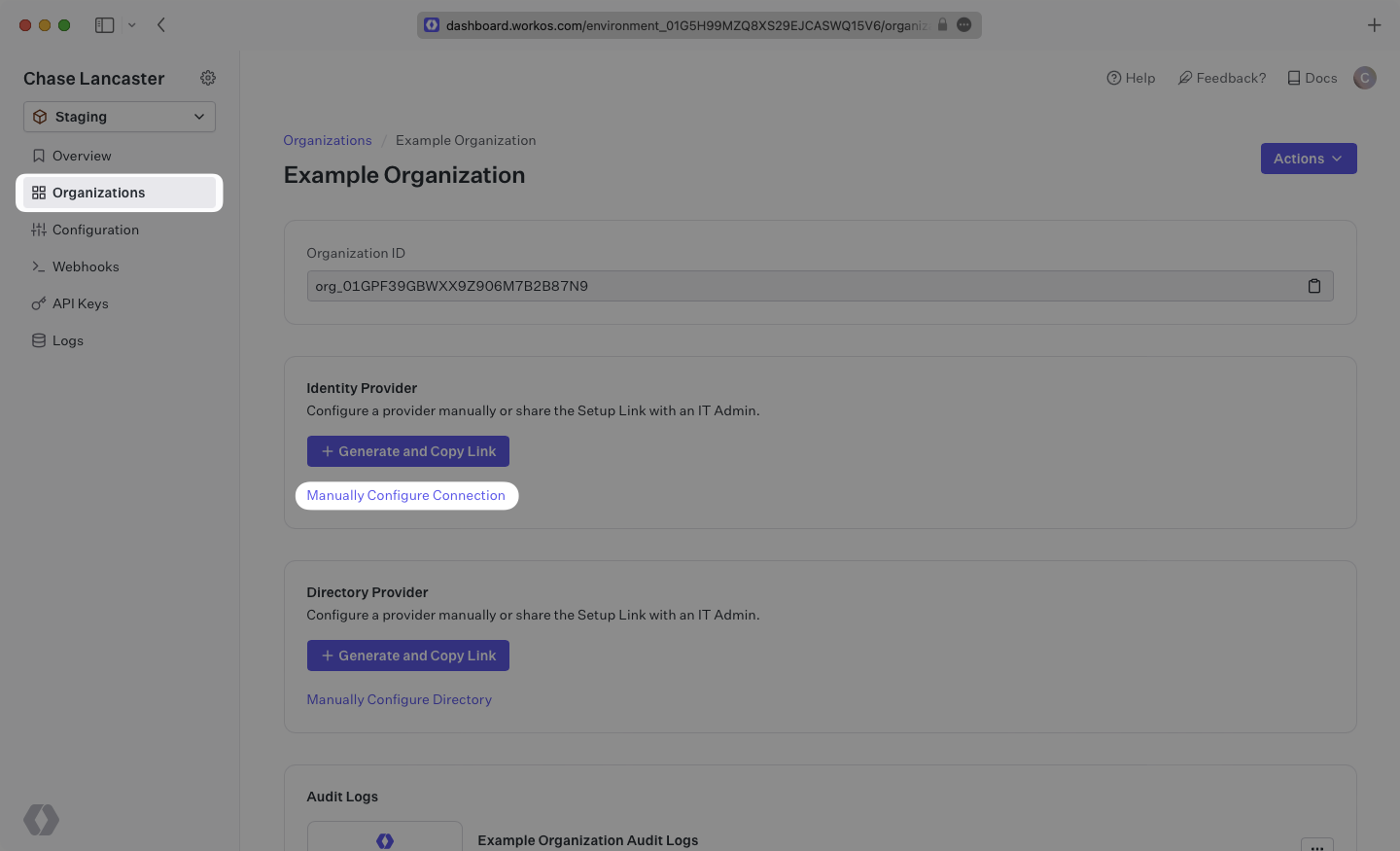
Select the organization you wish to configure a Rippling SAML Connection for, and select “Manually Configure Connection” under “Identity Provider”.
|
|
22
|
+
|
|
23
|
+
|
|
24
|
+
|
|
25
|
+
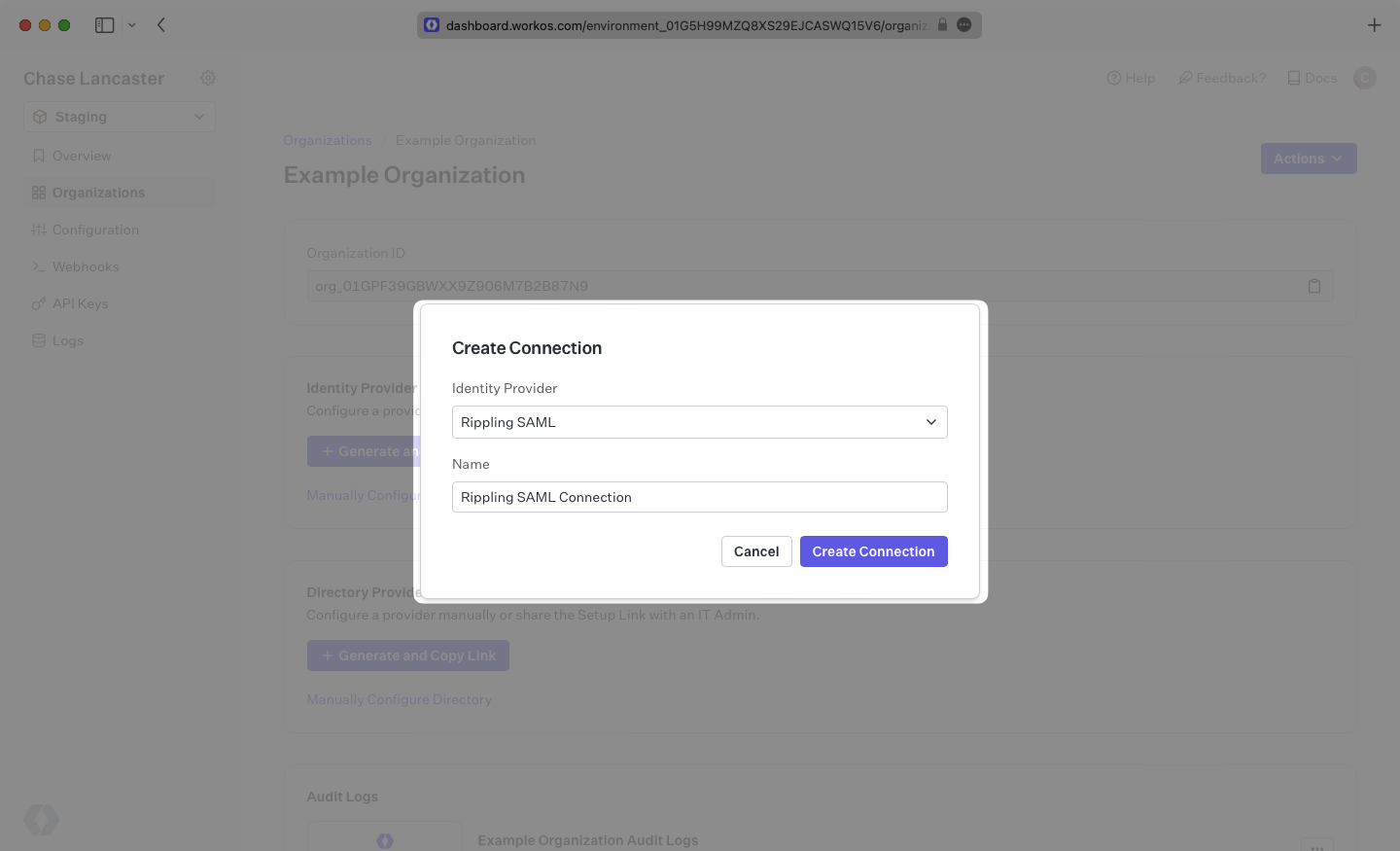
Select “Rippling SAML” from the Identity Provider dropdown, enter a descriptive name for the connection, and then select the “Create Connection” button.
|
|
26
|
+
|
|
27
|
+
|
|
28
|
+
|
|
29
|
+
---
|
|
30
|
+
|
|
31
|
+
## Introduction
|
|
32
|
+
|
|
33
|
+
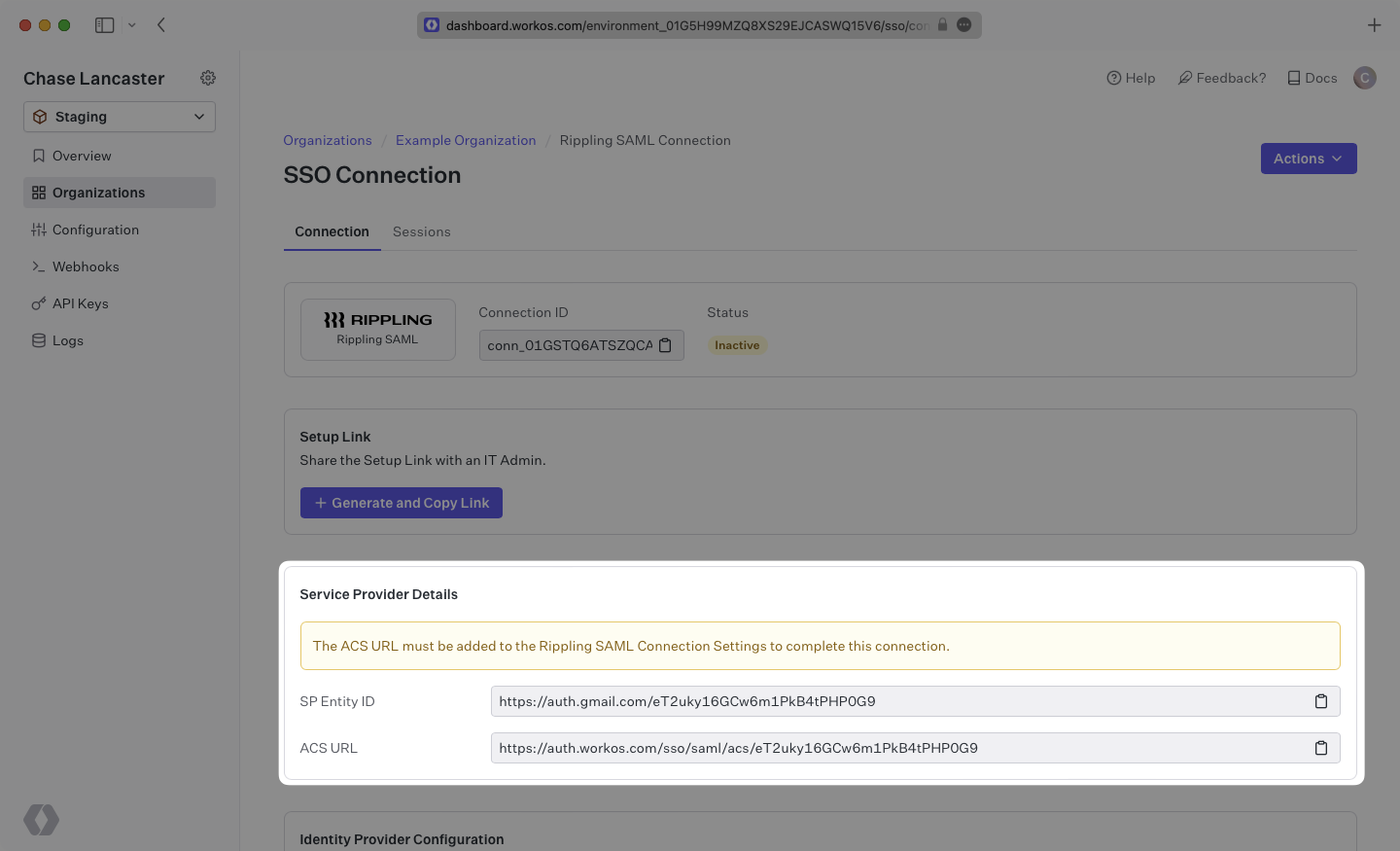
WorkOS provides the [ACS URL](/glossary/acs-url) and [SP Entity ID](/glossary/sp-entity-id). They’re readily available in your Connection Settings in the [WorkOS Dashboard](https://dashboard.workos.com/)
|
|
34
|
+
|
|
35
|
+
|
|
36
|
+
|
|
37
|
+
The ACS URL is the location an Identity Provider redirects its authentication response to.
|
|
38
|
+
|
|
39
|
+
The Entity ID is a URI used to identify the issuer of a SAML request, response, or assertion. In this case, the Entity ID is used to communicate that WorkOS will be the party performing SAML requests to the organization's Rippling instance.
|
|
40
|
+
|
|
41
|
+
---
|
|
42
|
+
|
|
43
|
+
## What you’ll need
|
|
44
|
+
|
|
45
|
+
In order to integrate you’ll need the Rippling IdP metadata.
|
|
46
|
+
|
|
47
|
+
Normally, this information will come from the organization's IT Management team when they set up your application’s Rippling configuration. But, should that not be the case during your setup, here’s how to obtain them.
|
|
48
|
+
|
|
49
|
+
---
|
|
50
|
+
|
|
51
|
+
## (1) Create A New SAML Application In Rippling
|
|
52
|
+
|
|
53
|
+
Log in to Rippling as an administrator and select “IT Management” then “Custom App” from the left-side navigation bar.
|
|
54
|
+
|
|
55
|
+
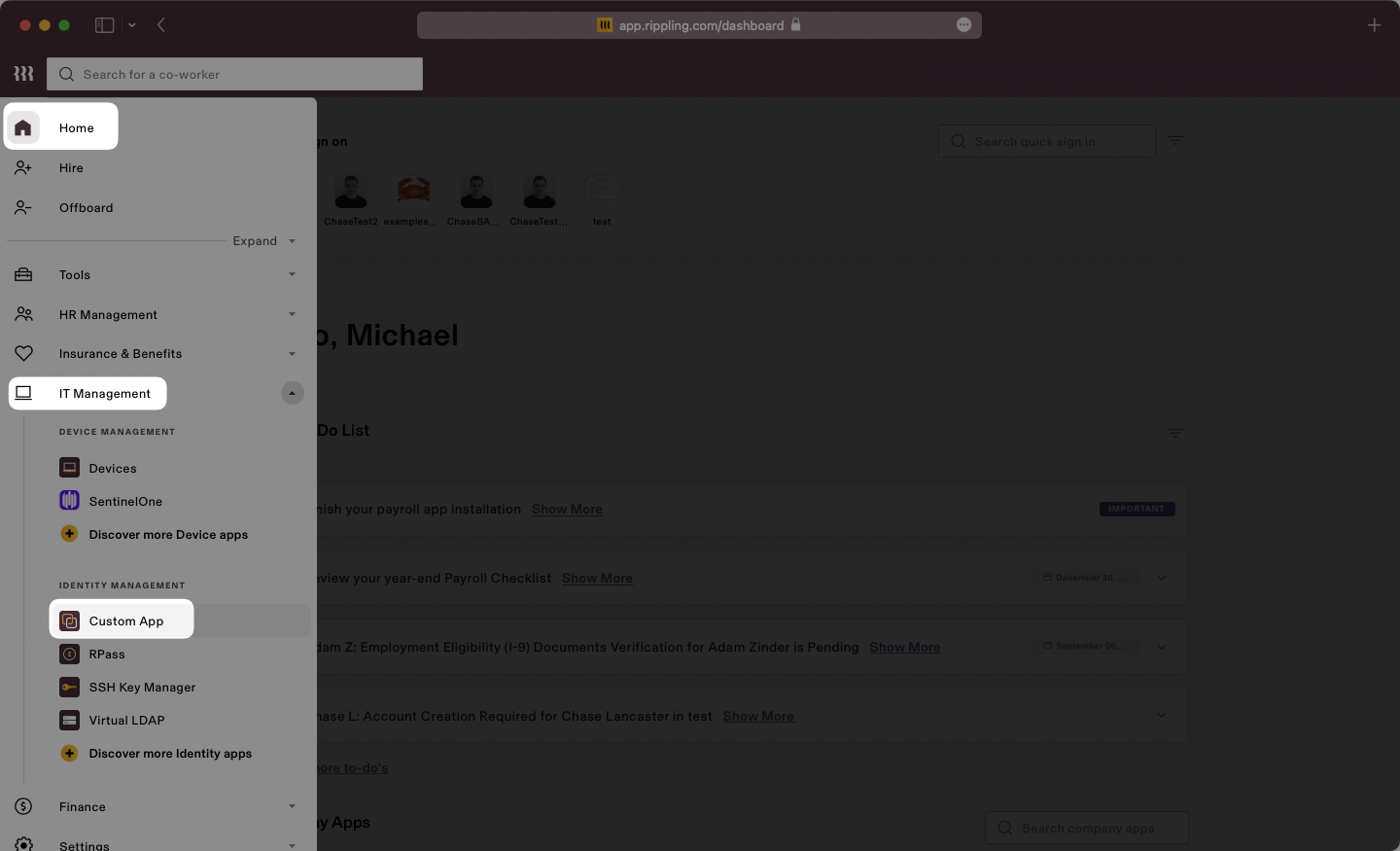
|
|
56
|
+
|
|
57
|
+
Select “Create New App” to begin creating a new SAML application.
|
|
58
|
+
|
|
59
|
+
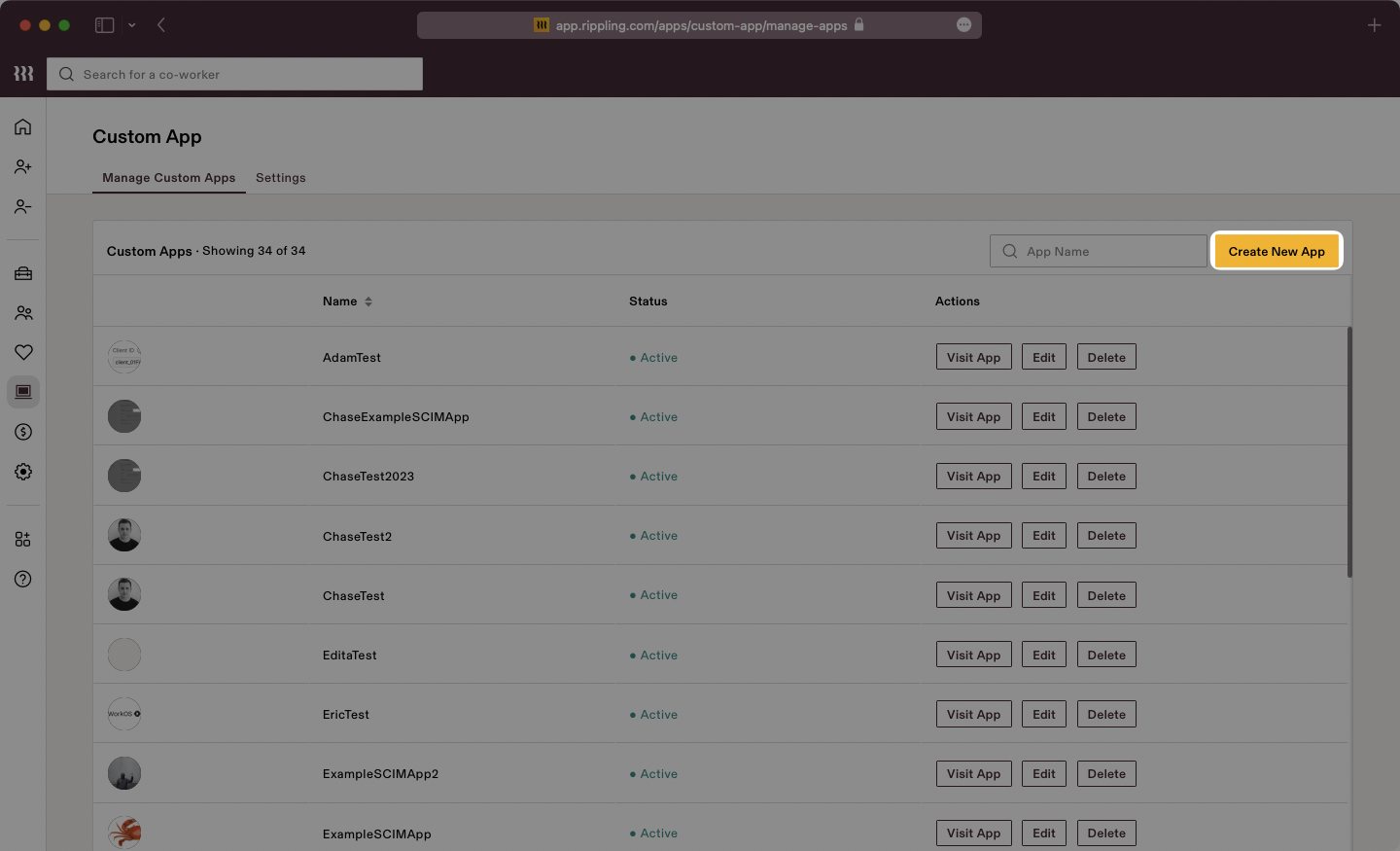
|
|
60
|
+
|
|
61
|
+
Give the app a descriptive name, select a category, and upload a logo file. Make sure to check the box for “Single Sign-On (SAML)”, then click “Continue”.
|
|
62
|
+
|
|
63
|
+
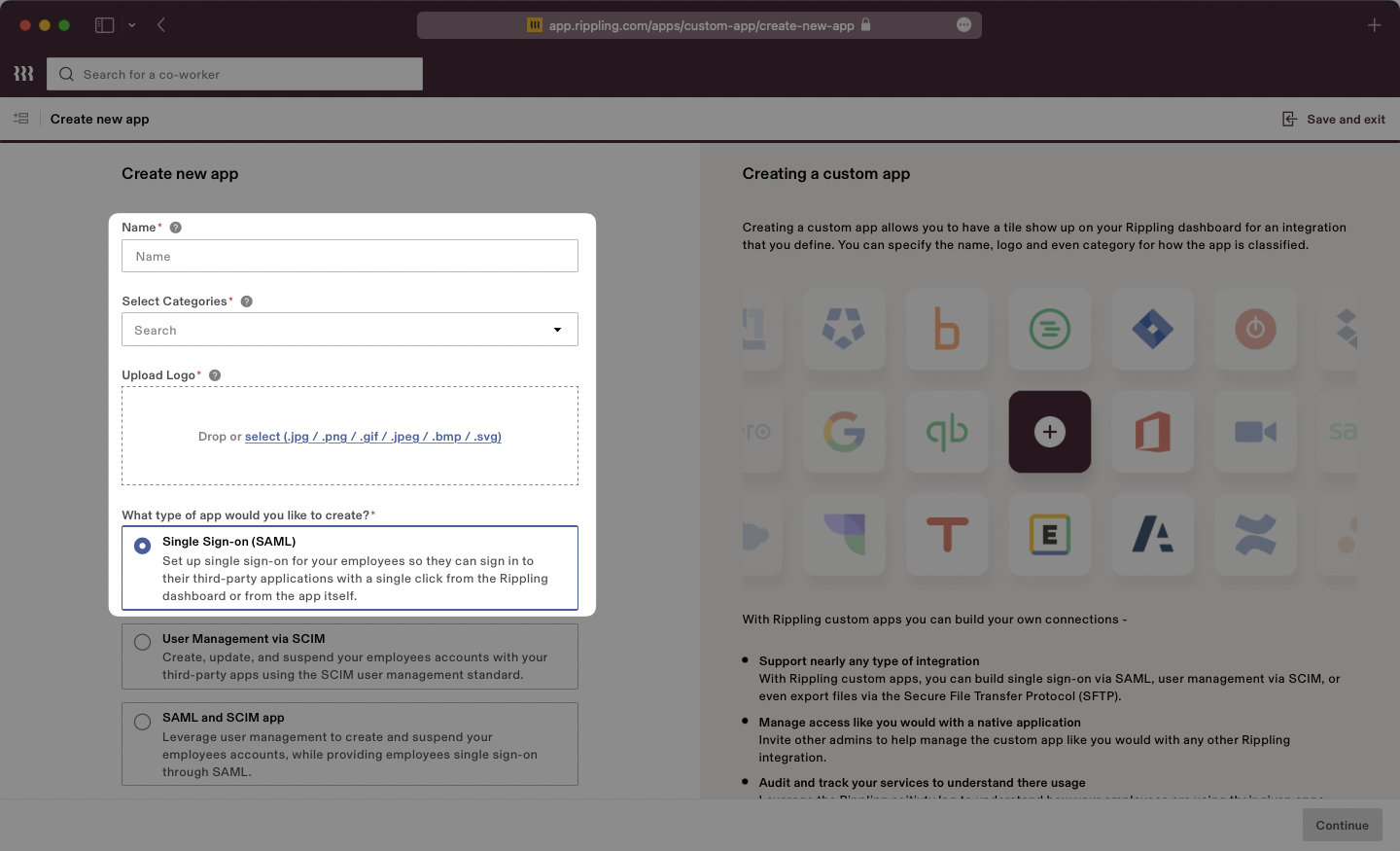
|
|
64
|
+
|
|
65
|
+
Select the option confirming that you are the Application Admin. Rippling will display a new page with “SSO Setup Instructions” we will use in the next step.
|
|
66
|
+
|
|
67
|
+
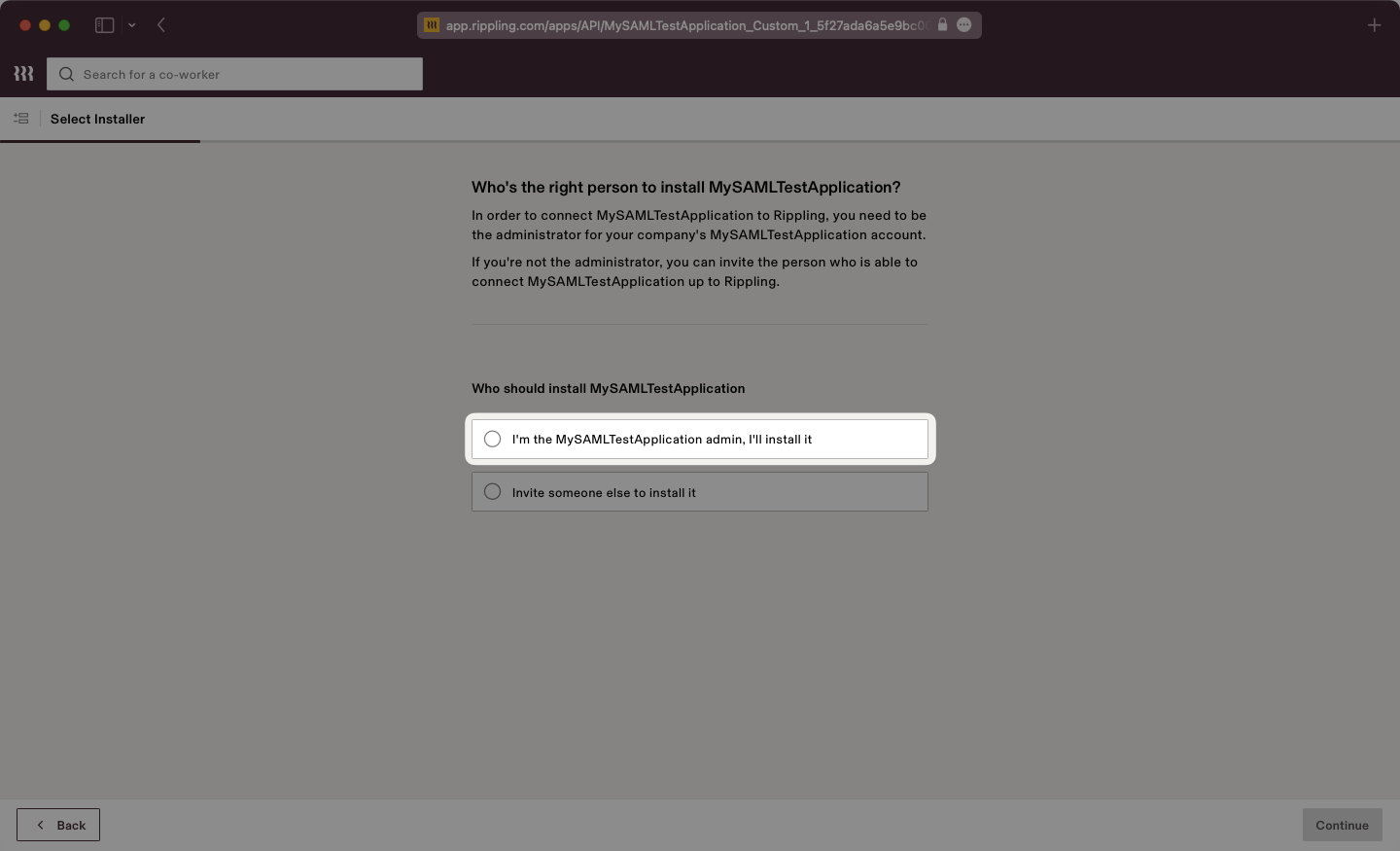
|
|
68
|
+
|
|
69
|
+
## (2) Download IdP Metadata From Rippling
|
|
70
|
+
|
|
71
|
+
Rippling will present the SSO Setup instructions which will include the [IdP Metadata](/glossary/idp-metadata) XML file. Click to download the file from Rippling.
|
|
72
|
+
|
|
73
|
+
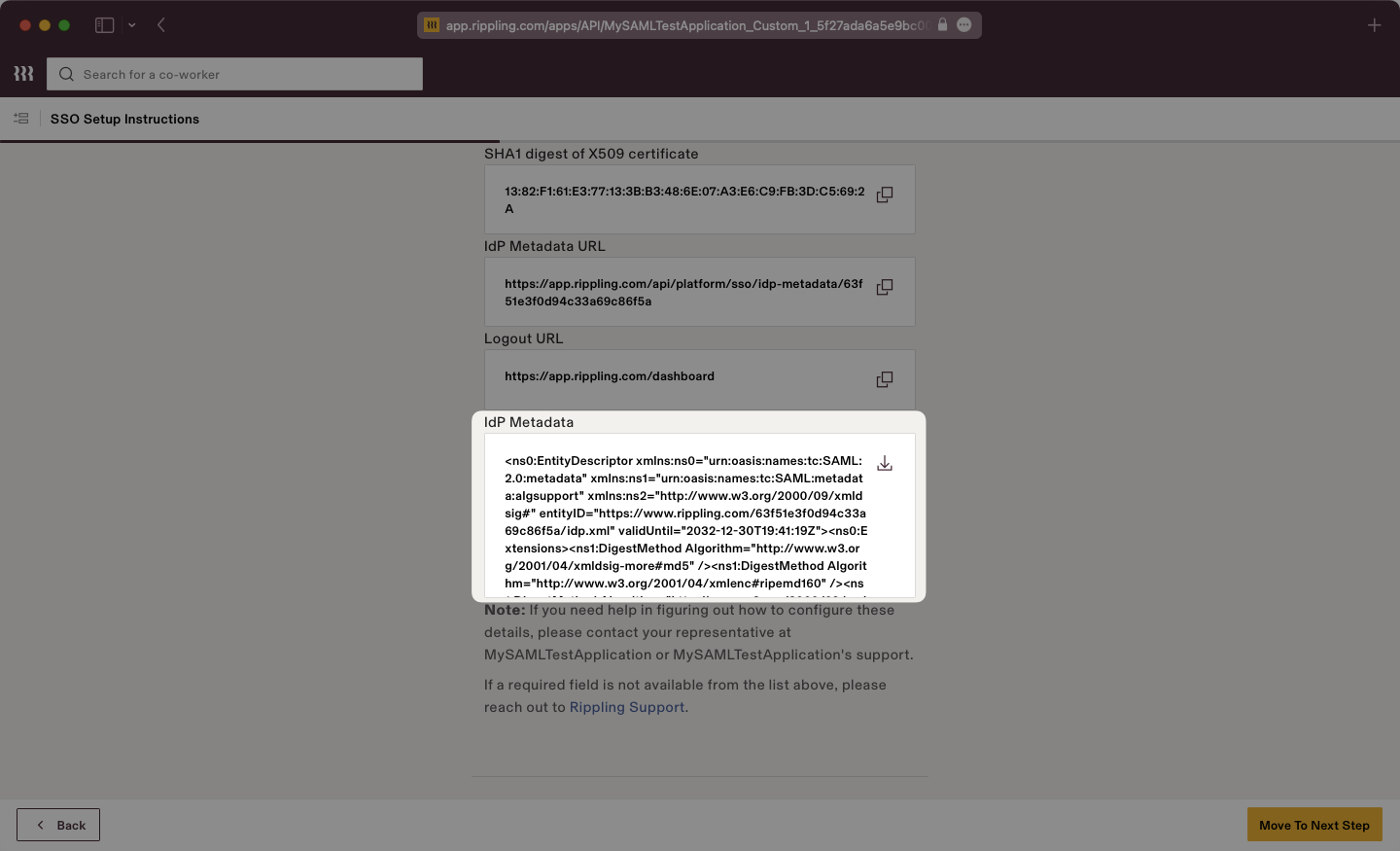
|
|
74
|
+
|
|
75
|
+
Save this file in a memorable place, as we will upload it to the WorkOS dashboard in a later step.
|
|
76
|
+
|
|
77
|
+
---
|
|
78
|
+
|
|
79
|
+
## (3) Enter Service Provider Details and Configure App Settings
|
|
80
|
+
|
|
81
|
+
Scrolling down on the SSO Setup Instructions, Rippling will request the ACS URL and Service Provider Entity ID.
|
|
82
|
+
|
|
83
|
+
Input the ACS URL and SP Entity ID from the WorkOS dashboard into the respective fields.
|
|
84
|
+
|
|
85
|
+
Once complete, click the “Move to Next Step Button”.
|
|
86
|
+
|
|
87
|
+
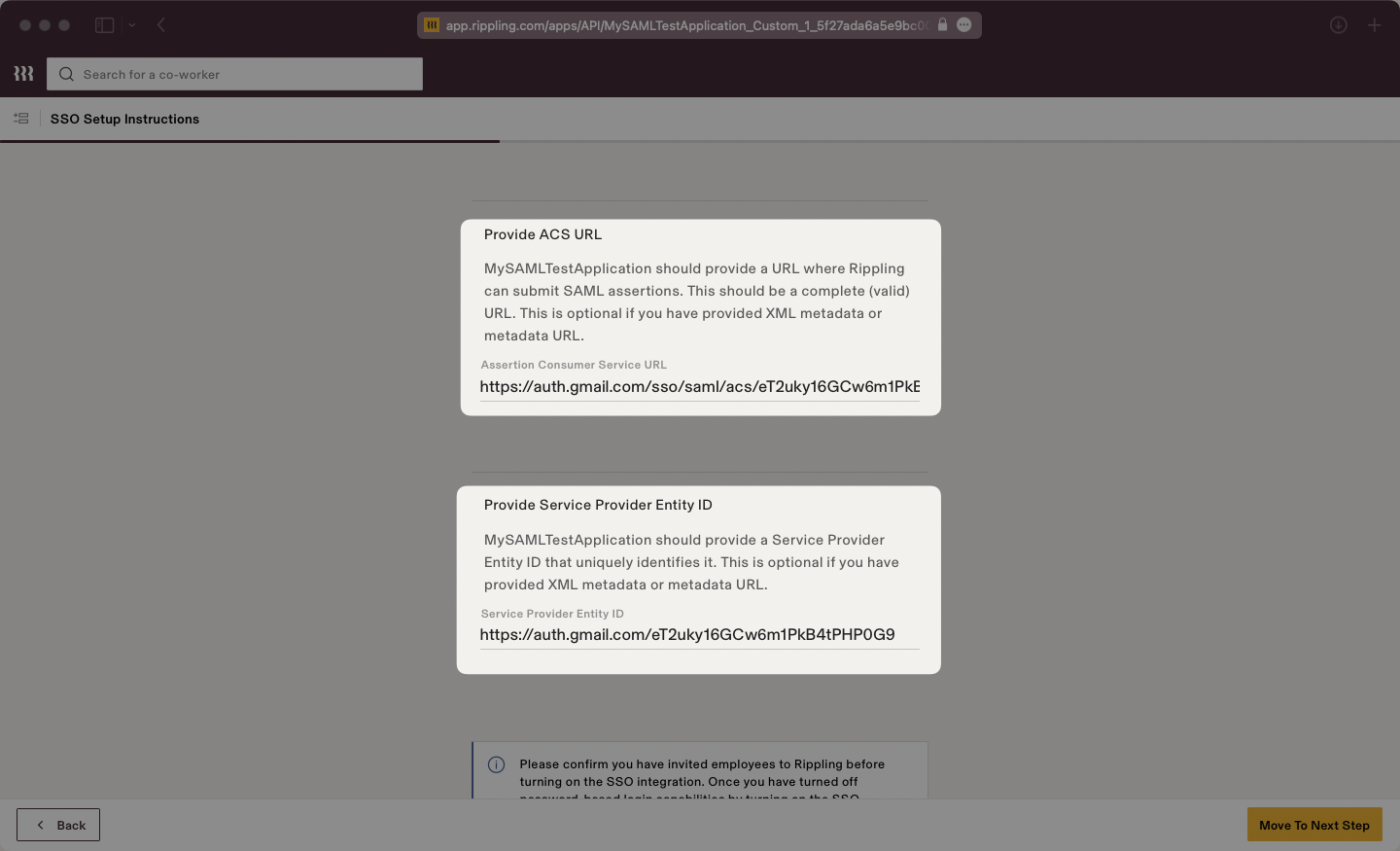
|
|
88
|
+
|
|
89
|
+
Select your desired Access Rules.
|
|
90
|
+
|
|
91
|
+
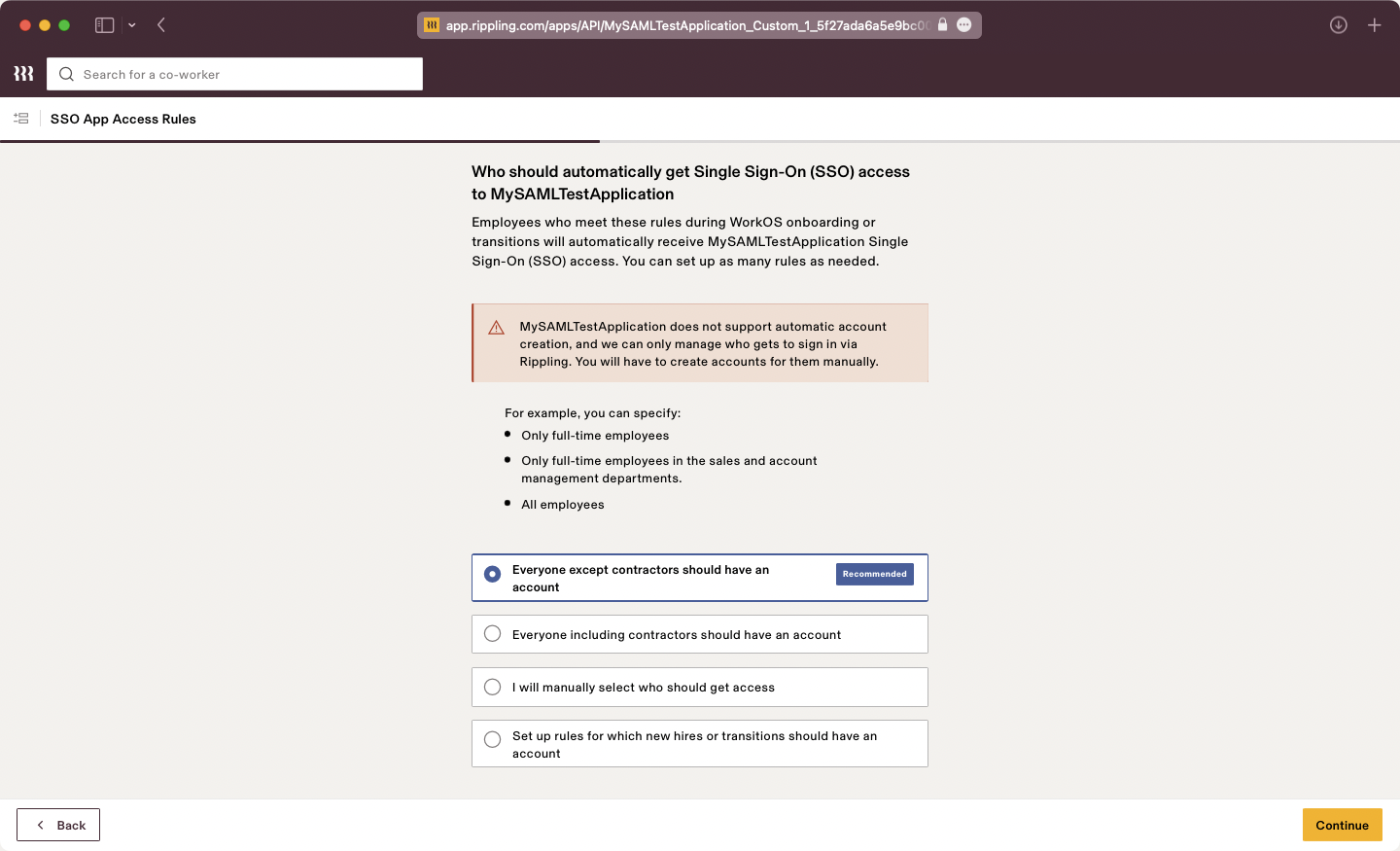
|
|
92
|
+
|
|
93
|
+
Select your desired Provision Time.
|
|
94
|
+
|
|
95
|
+
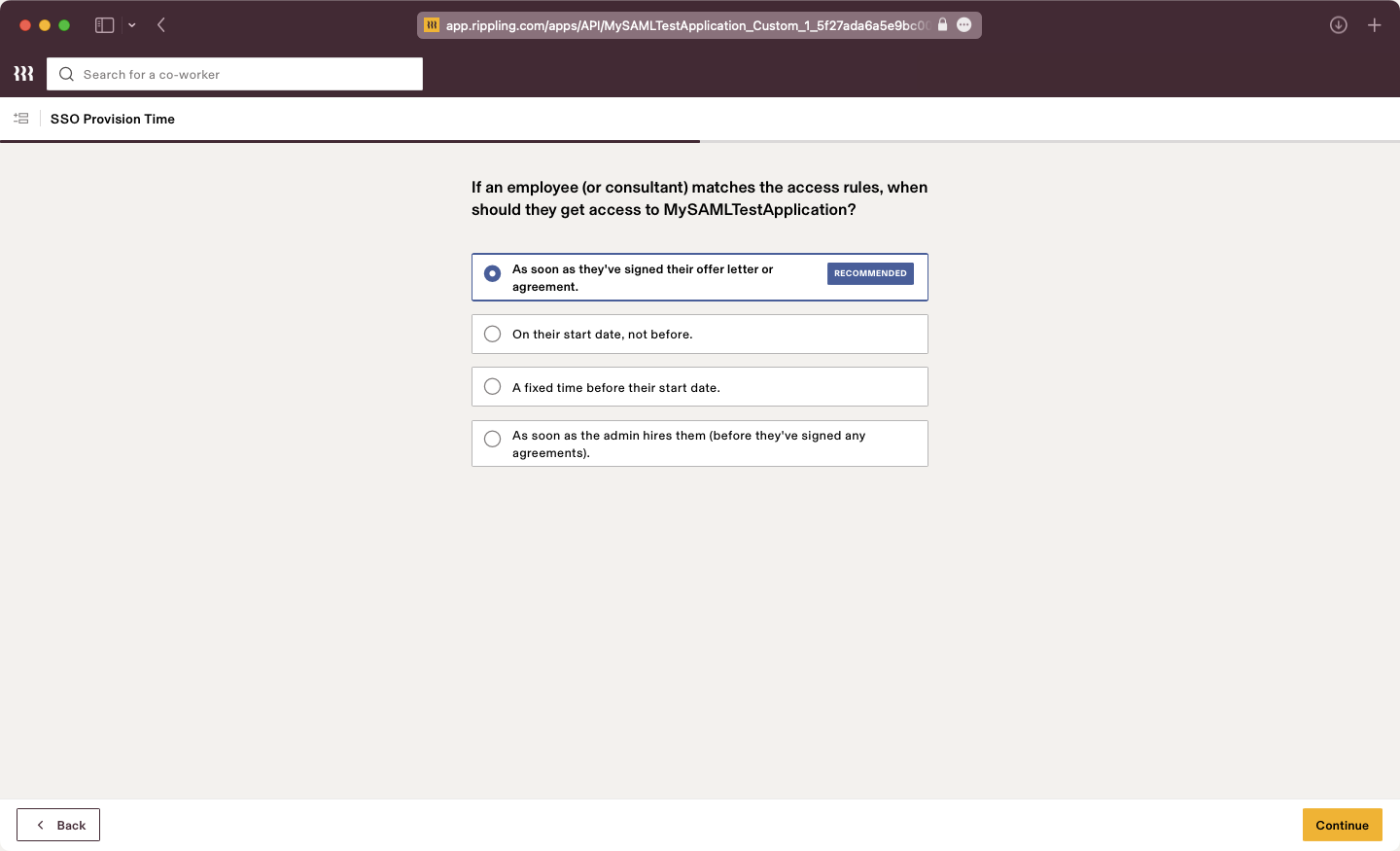
|
|
96
|
+
|
|
97
|
+
Configure SSO for Admins if necessary.
|
|
98
|
+
|
|
99
|
+
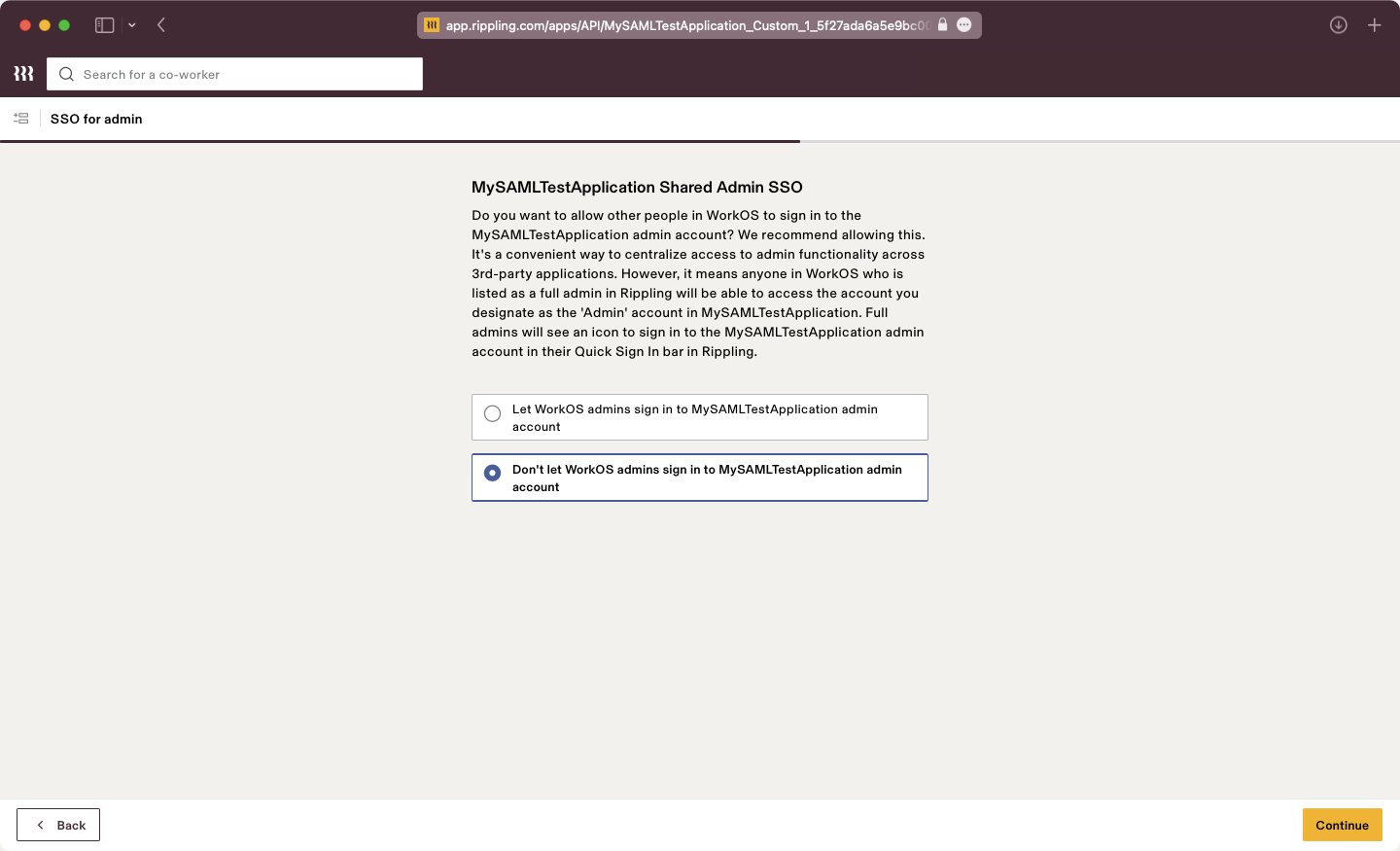
|
|
100
|
+
|
|
101
|
+
Configure Group Attributes if necessary.
|
|
102
|
+
|
|
103
|
+
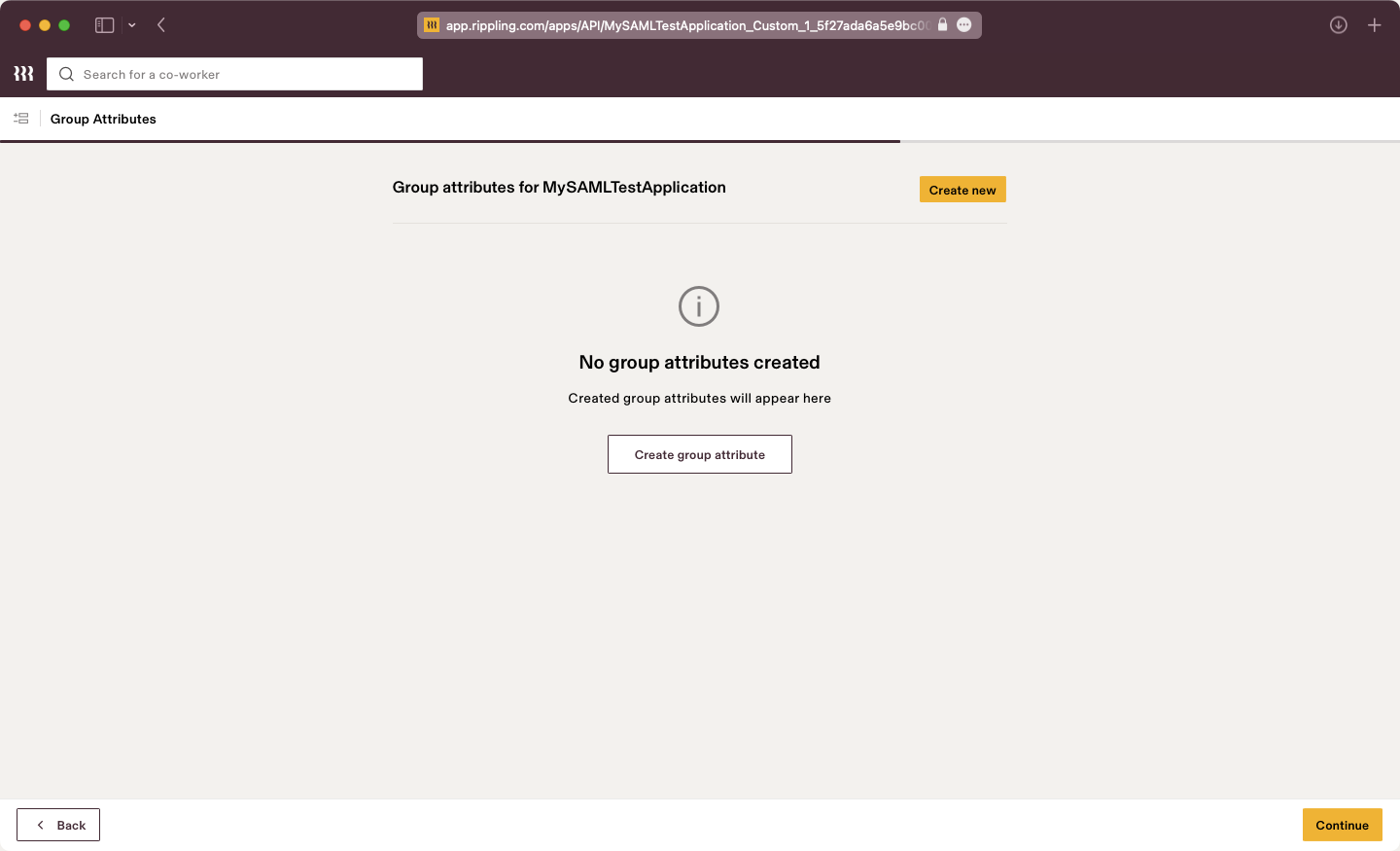
|
|
104
|
+
|
|
105
|
+
Verify your SSO integration if you want to test the connection.
|
|
106
|
+
|
|
107
|
+
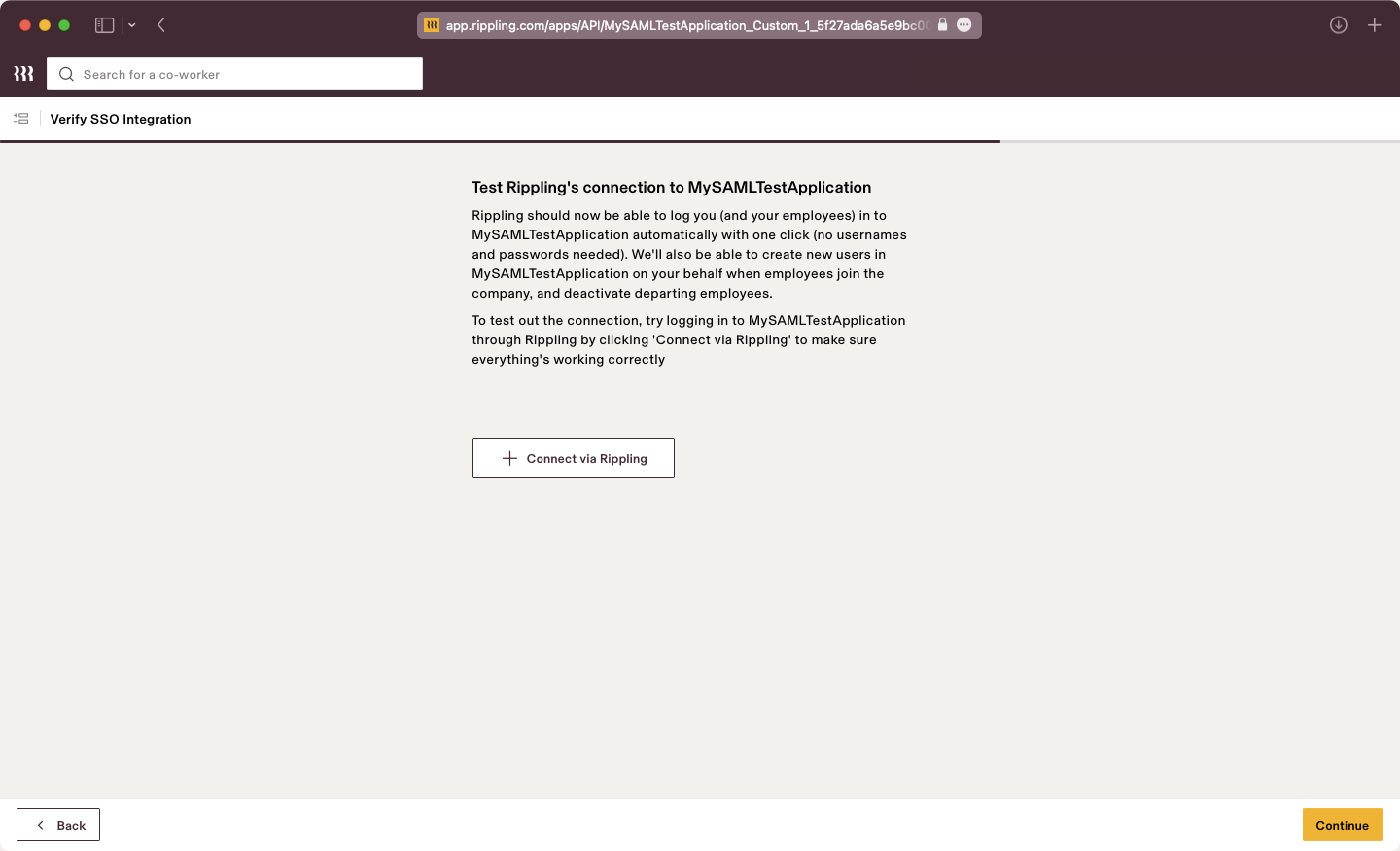
|
|
108
|
+
|
|
109
|
+
Click “Visit the app”. The application settings will be presented, here we will configure the SAML attribute mapping in the next step.
|
|
110
|
+
|
|
111
|
+
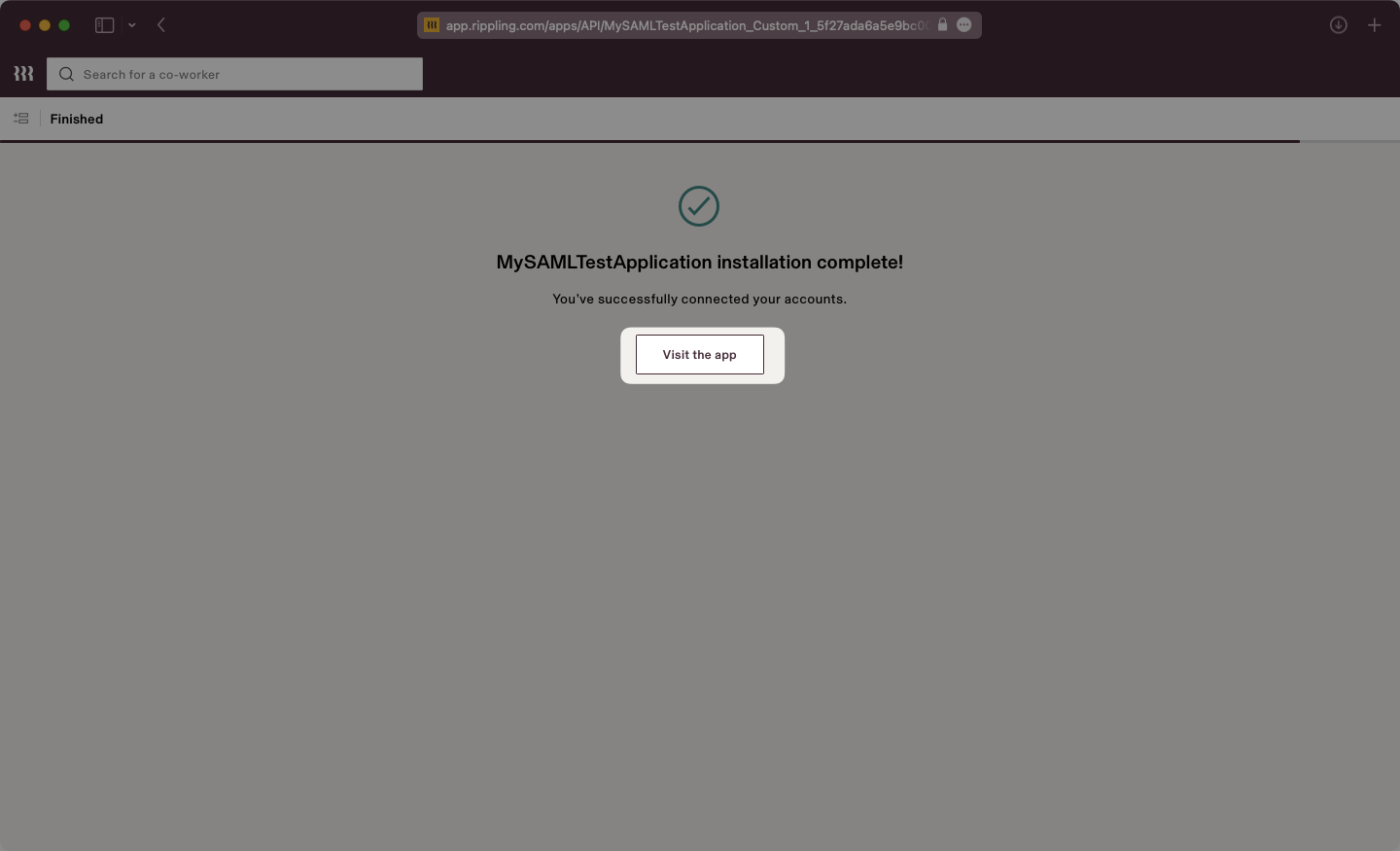
|
|
112
|
+
|
|
113
|
+
---
|
|
114
|
+
|
|
115
|
+
## (4) Configure Attribute Mapping
|
|
116
|
+
|
|
117
|
+
Select the “Settings” tab then on the left navigation select “SAML Attributes” and use the "Create new" button. Add attributes as "Global attributes".
|
|
118
|
+
|
|
119
|
+
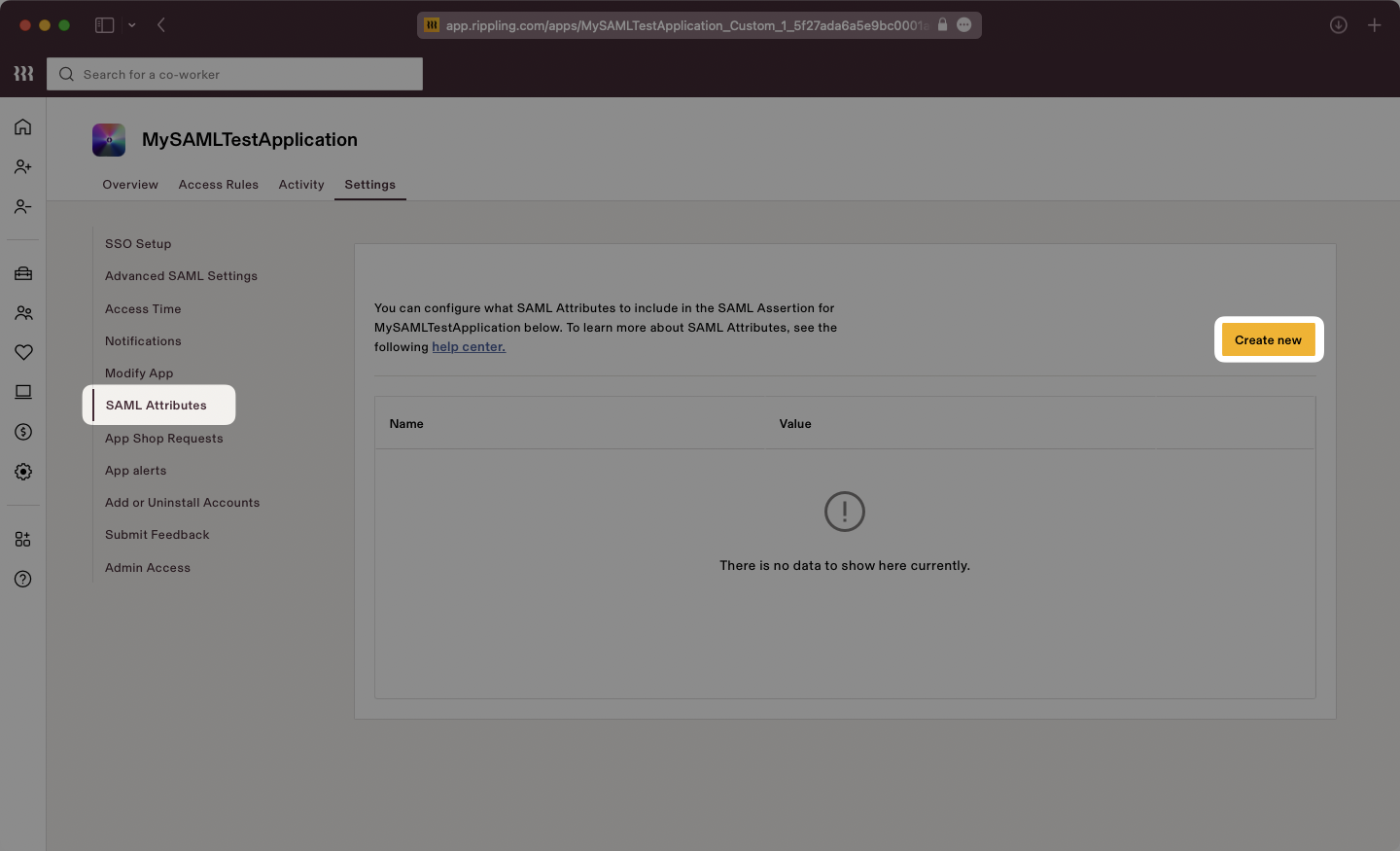
|
|
120
|
+
|
|
121
|
+
Input the attributes as follows:
|
|
122
|
+
|
|
123
|
+
- `id` → `User’s ID`
|
|
124
|
+
- `email` → `User’s email address`
|
|
125
|
+
- `firstName` → `User’s Legal first name`
|
|
126
|
+
- `lastName` → `User’s Legal last name`
|
|
127
|
+
|
|
128
|
+
Here is a screenshot showing the proper final configuration:
|
|
129
|
+
|
|
130
|
+
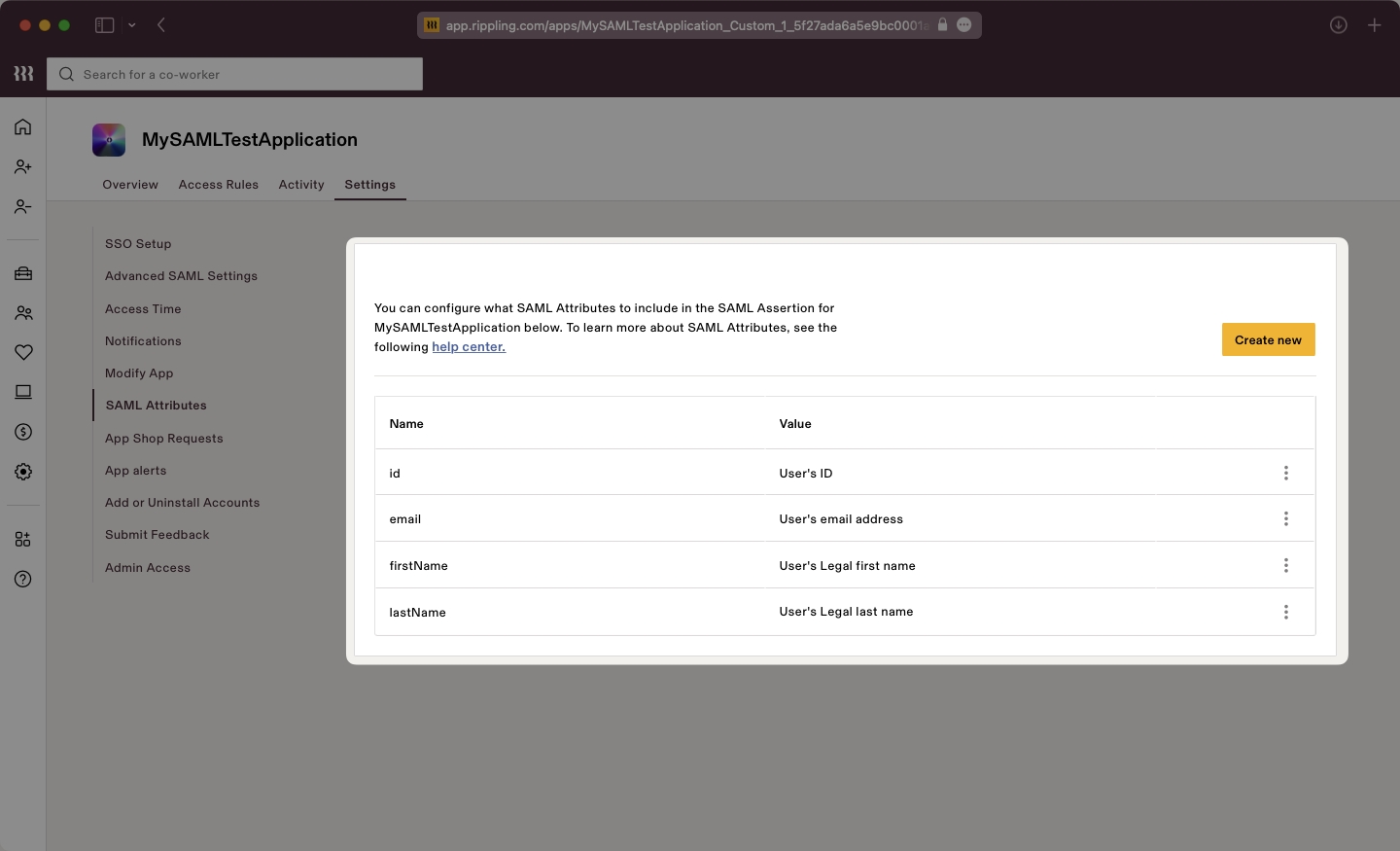
|
|
131
|
+
|
|
132
|
+
### Role Assignment (optional)
|
|
133
|
+
|
|
134
|
+
With [identity provider role assignment](/sso/identity-provider-role-assignment), users can receive roles within your application based on their group memberships. To return this information in the attribute statement, follow the guidance below.
|
|
135
|
+
|
|
136
|
+
Create a new SAML attribute and select the "Group attribute" type. Click "Continue".
|
|
137
|
+
|
|
138
|
+
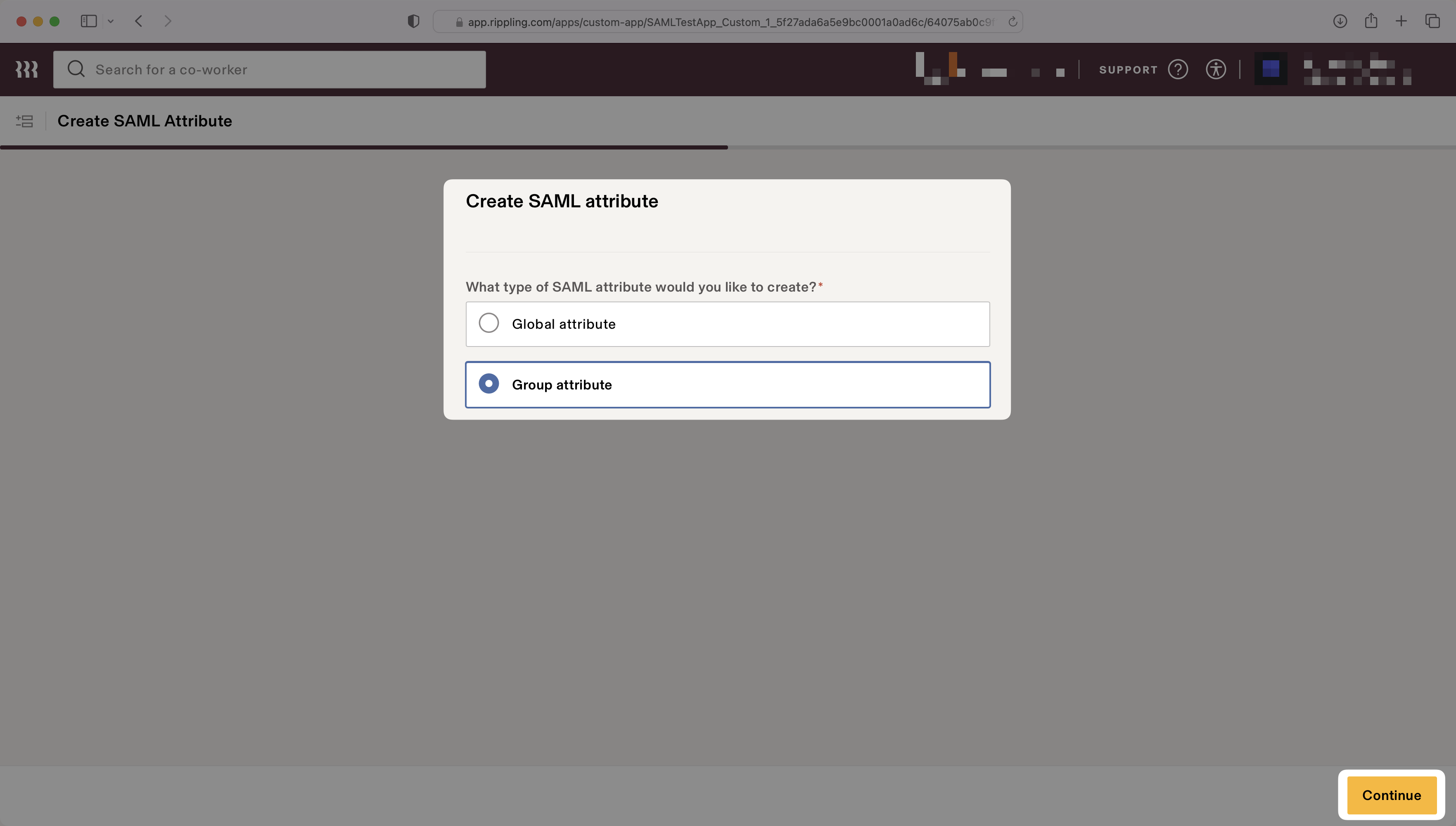
|
|
139
|
+
|
|
140
|
+
Enter `groups` for the "Group attribute name".
|
|
141
|
+
|
|
142
|
+
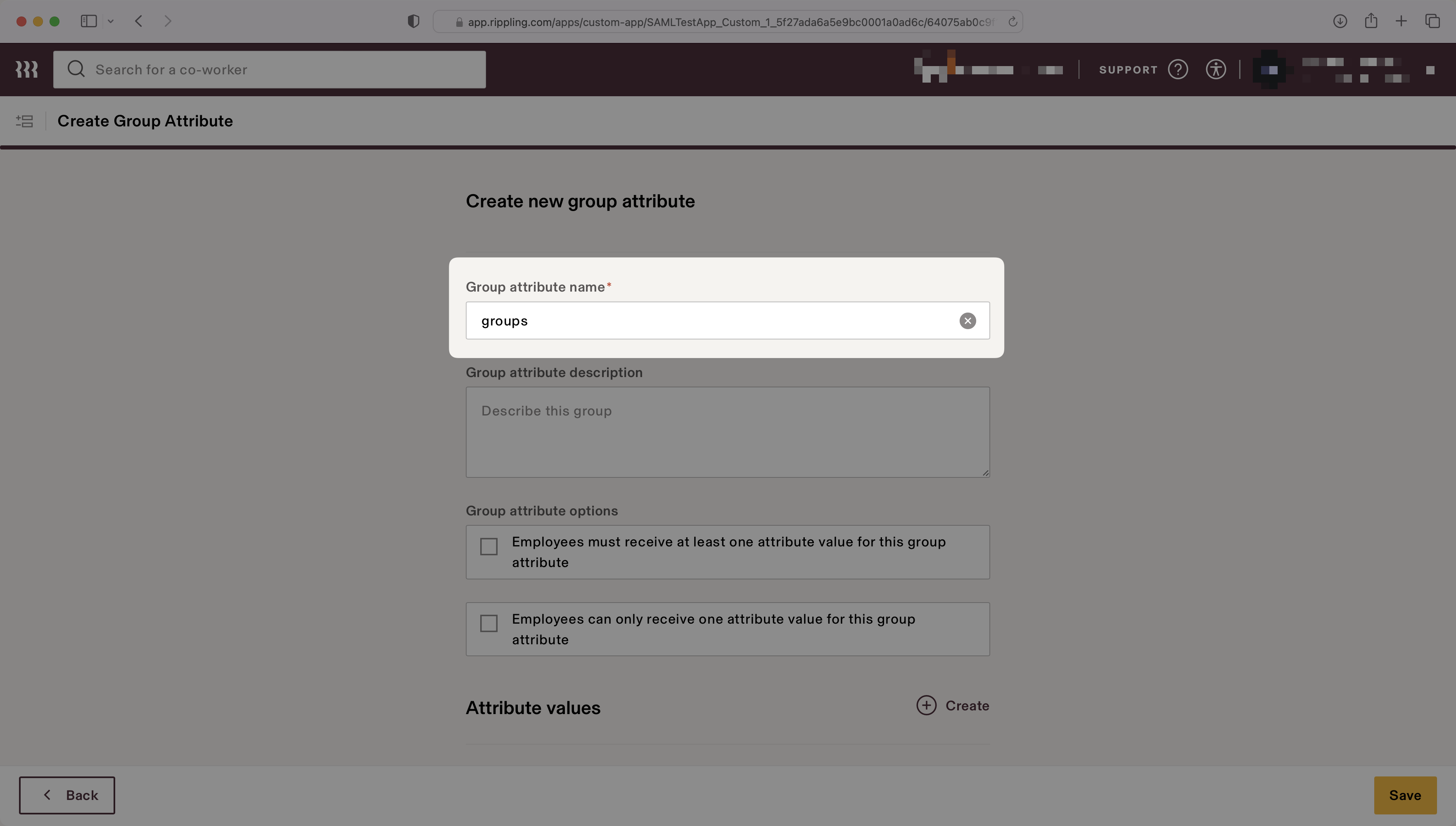
|
|
143
|
+
|
|
144
|
+
Select the attribute values to map to the group attribute. The example below shows two values, "Admins" and "Engineers", that map to the "All Admins" user group and the "Engineering Department" user group, respectively.
|
|
145
|
+
|
|
146
|
+
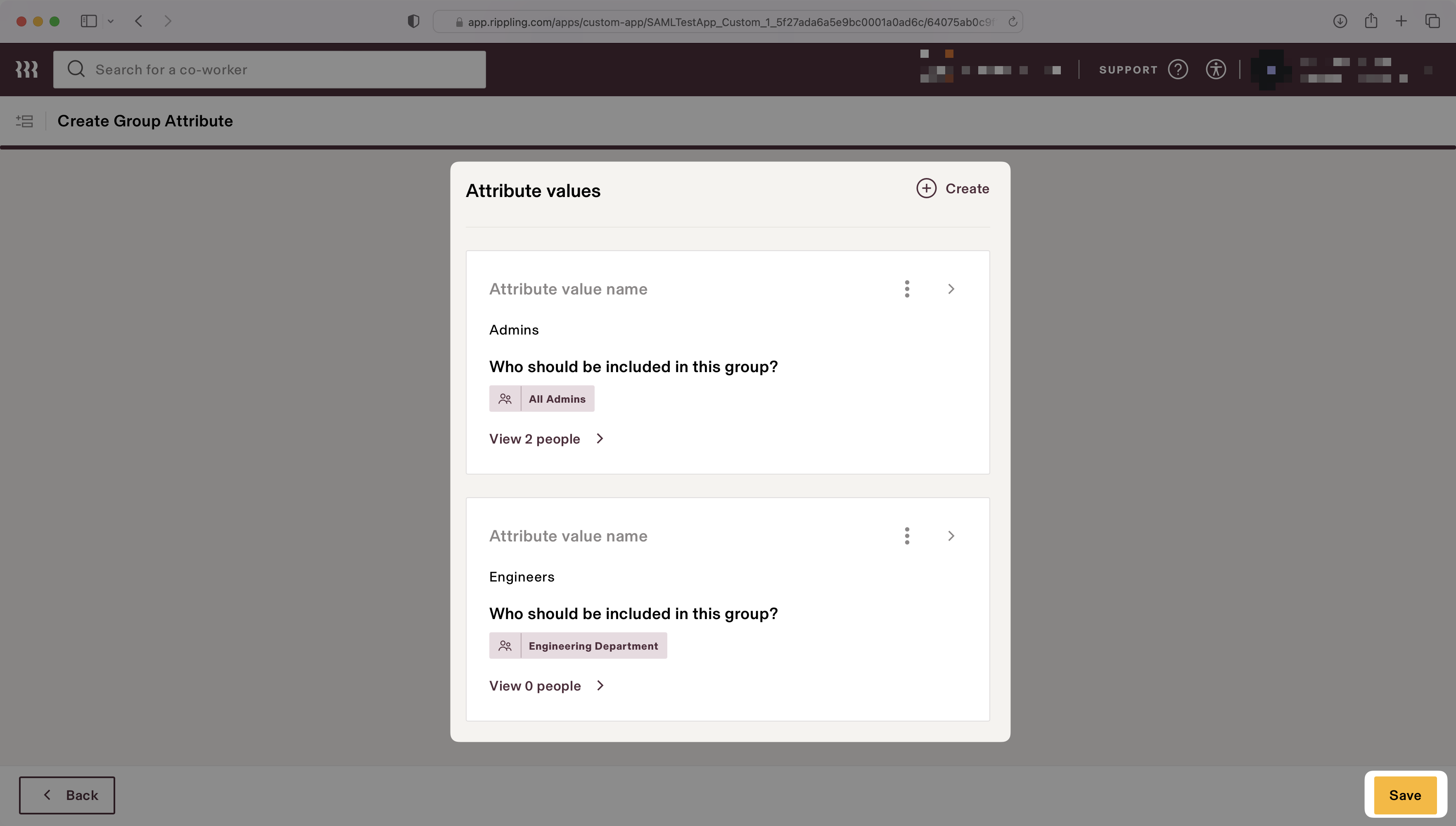
|
|
147
|
+
|
|
148
|
+
> Finish role assignment set-up by navigating to the SSO connection page in the _Organization_ section of the [WorkOS Dashboard](https://dashboard.workos.com/). Create SSO groups by referencing the group IdP ID. Then, assign roles to these SSO groups so group members are automatically granted roles within your application.
|
|
149
|
+
|
|
150
|
+
---
|
|
151
|
+
|
|
152
|
+
## (5) Disable the 'InResponseTo' Field
|
|
153
|
+
|
|
154
|
+
In the “Settings” tab, on the left navigation select “Advanced SAML Settings” and use the “Edit” button to set "Disable 'InResponseTo' field in assertions for IdP initiated SSO" to true by checking the box to enable the setting.
|
|
155
|
+
|
|
156
|
+
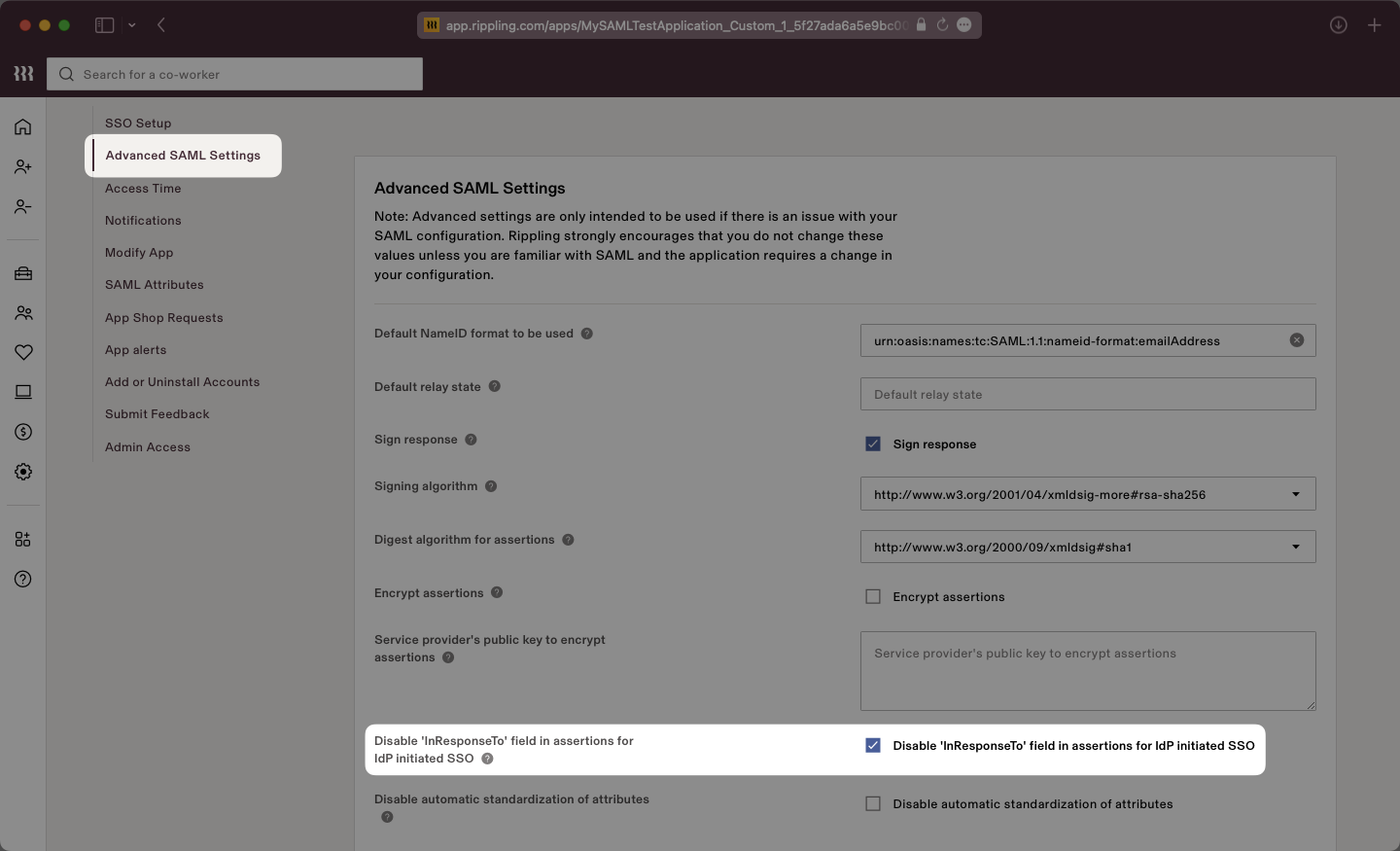
|
|
157
|
+
|
|
158
|
+
The 'InResponseTo' field is primarily used for IdP-initiated SSO and enabling this setting allows WorkOS to accept both SP and IdP initiated SSO from Rippling.
|
|
159
|
+
|
|
160
|
+
Click the “Save” button to save this setting. In the next step, we will complete the integration by uploading the Metadata XML file to the WorkOS Dashboard.
|
|
161
|
+
|
|
162
|
+
---
|
|
163
|
+
|
|
164
|
+
## (6) Update Metadata File
|
|
165
|
+
|
|
166
|
+
Return to the Rippling connection in the WorkOS dashboard and select “Edit Metadata Configuration”.
|
|
167
|
+
|
|
168
|
+
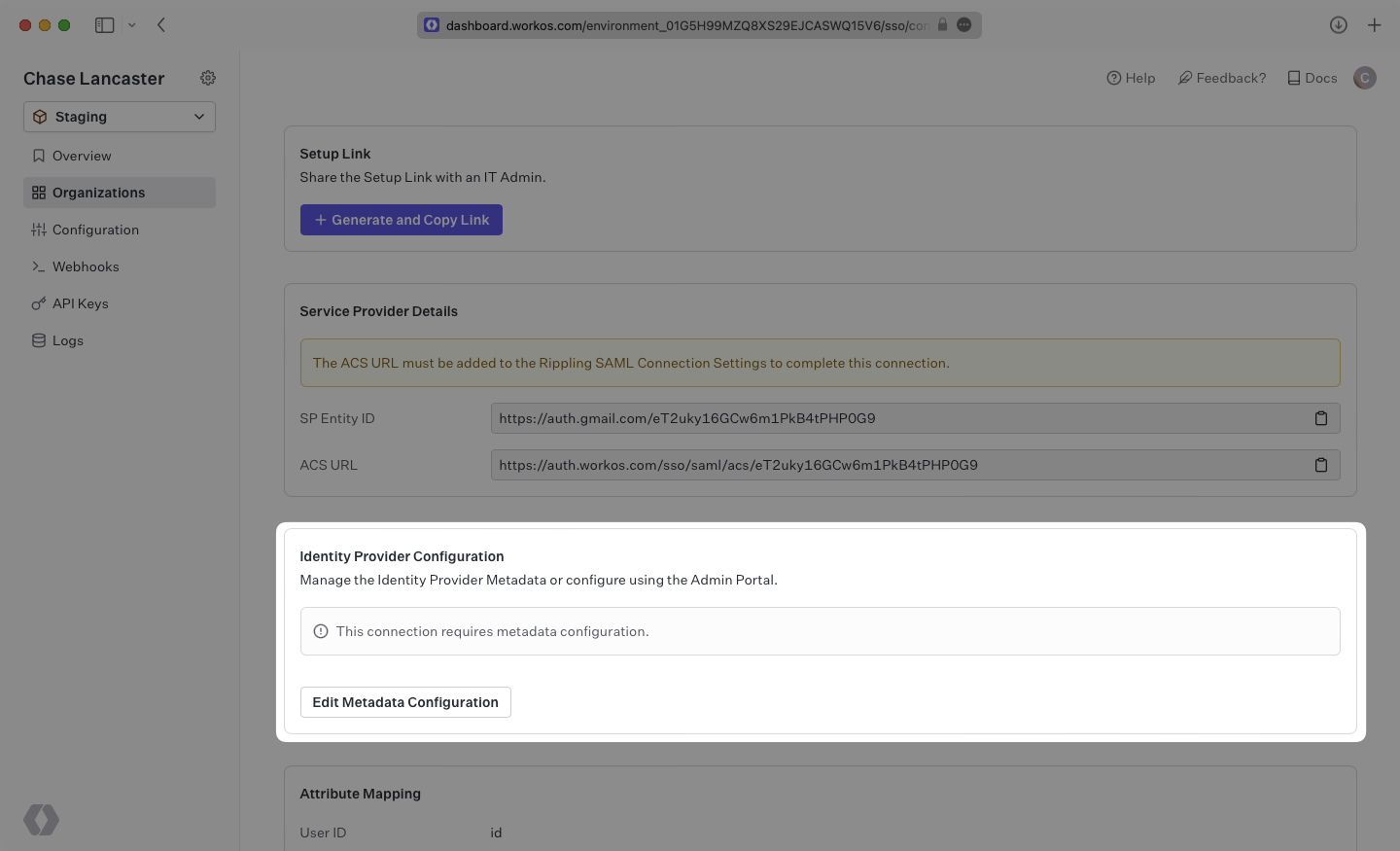
|
|
169
|
+
|
|
170
|
+
Upload the XML metadata file from Rippling into the “Metadata File” field and select “Save Metadata Configuration”.
|
|
171
|
+
|
|
172
|
+
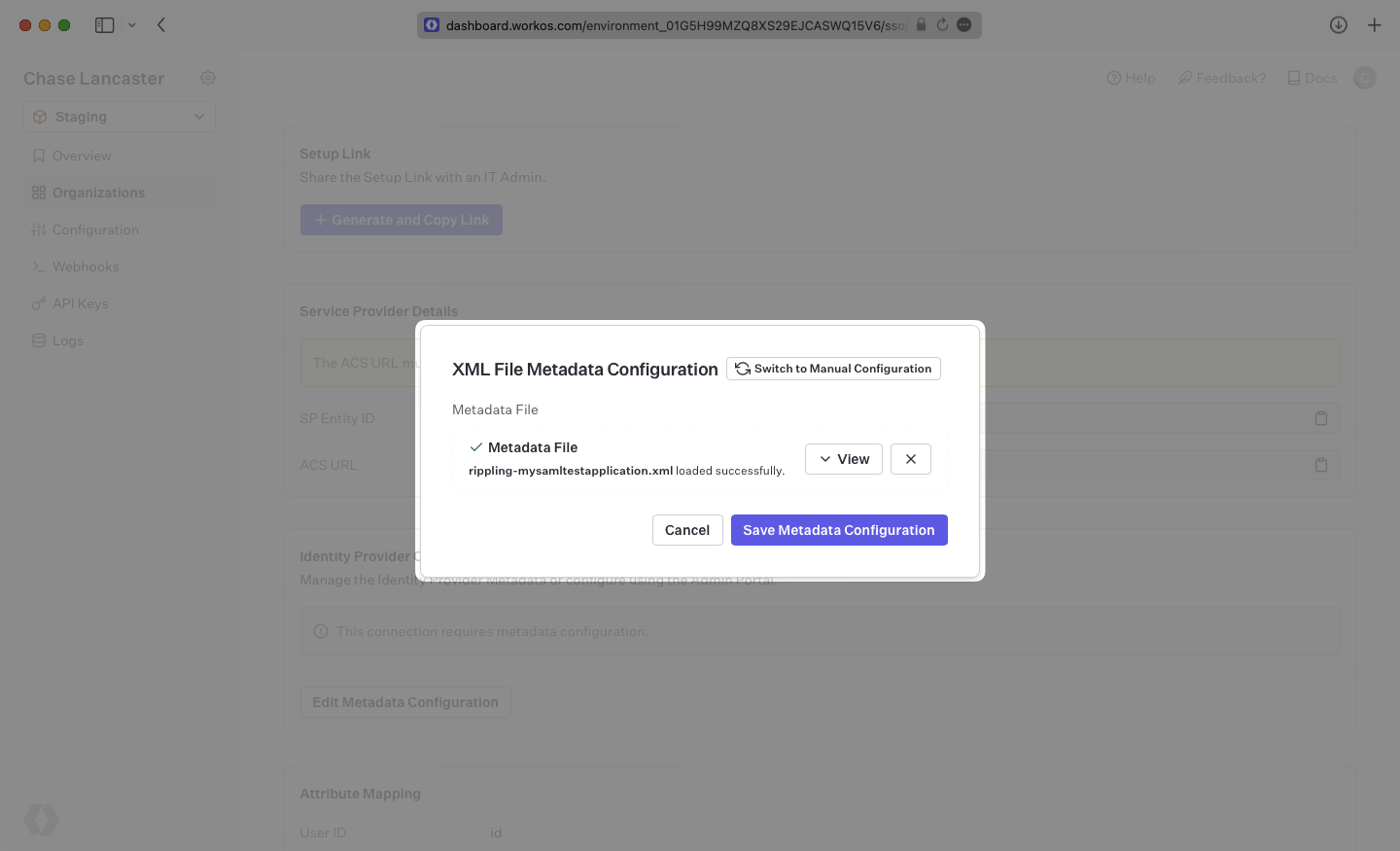
|
|
173
|
+
|
|
174
|
+
Your Connection will then be linked and good to go!
|