@workos/mcp-docs-server 0.1.0
This diff represents the content of publicly available package versions that have been released to one of the supported registries. The information contained in this diff is provided for informational purposes only and reflects changes between package versions as they appear in their respective public registries.
- package/.docs/organized/changelogs/workos-platform.json +277 -0
- package/.docs/organized/docs/admin-portal/_navigation.mdx +16 -0
- package/.docs/organized/docs/admin-portal/custom-branding.mdx +111 -0
- package/.docs/organized/docs/admin-portal/example-apps.mdx +46 -0
- package/.docs/organized/docs/admin-portal/index.mdx +240 -0
- package/.docs/organized/docs/audit-logs/_navigation.mdx +22 -0
- package/.docs/organized/docs/audit-logs/admin-portal.mdx +20 -0
- package/.docs/organized/docs/audit-logs/editing-events.mdx +27 -0
- package/.docs/organized/docs/audit-logs/exporting-events.mdx +29 -0
- package/.docs/organized/docs/audit-logs/index.mdx +110 -0
- package/.docs/organized/docs/audit-logs/log-streams.mdx +56 -0
- package/.docs/organized/docs/audit-logs/metadata-schema.mdx +21 -0
- package/.docs/organized/docs/custom-domains/_navigation.mdx +16 -0
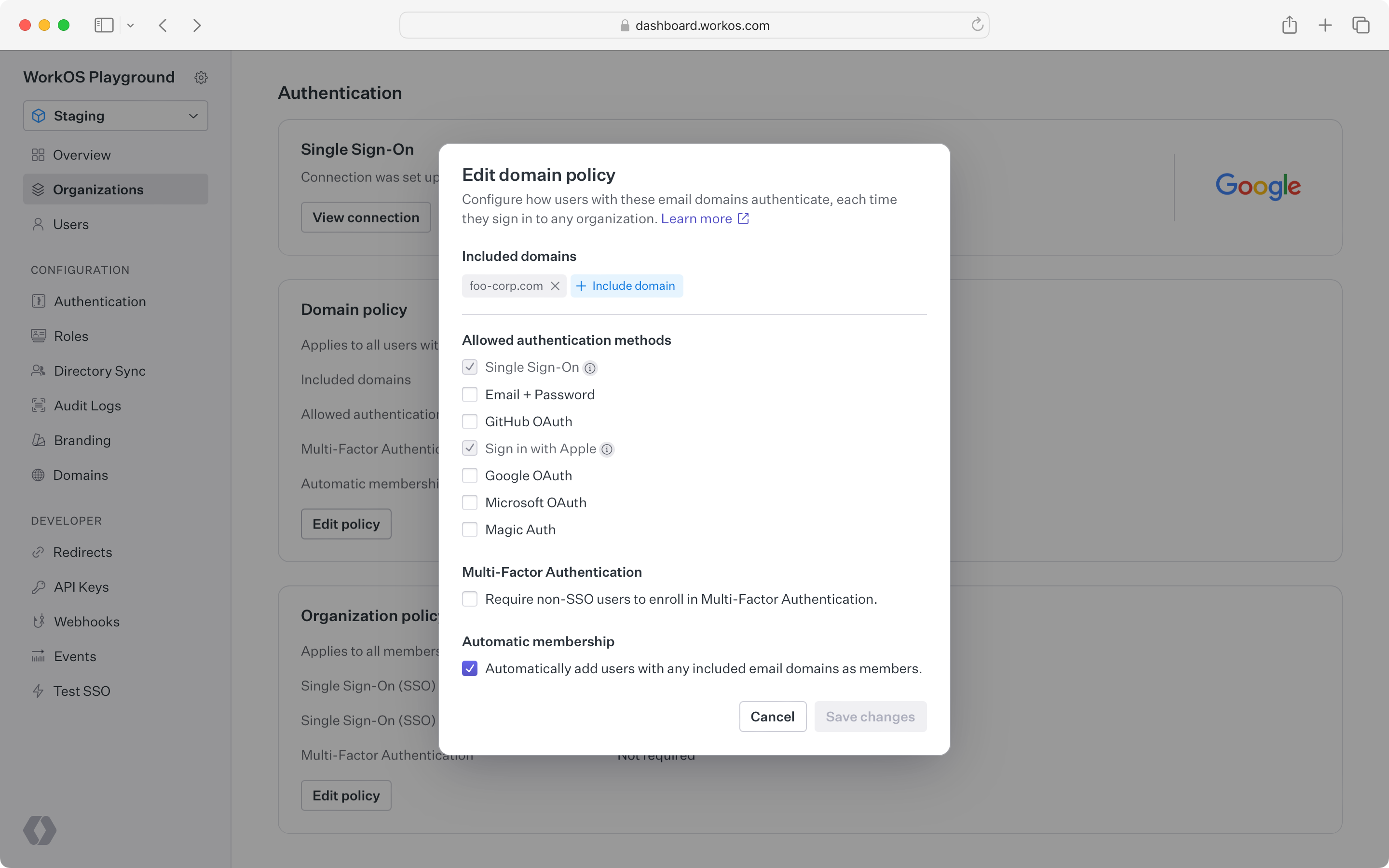
- package/.docs/organized/docs/custom-domains/admin-portal.mdx +38 -0
- package/.docs/organized/docs/custom-domains/auth-api.mdx +59 -0
- package/.docs/organized/docs/custom-domains/authkit.mdx +36 -0
- package/.docs/organized/docs/custom-domains/email.mdx +41 -0
- package/.docs/organized/docs/custom-domains/index.mdx +19 -0
- package/.docs/organized/docs/dashboard.mdx +244 -0
- package/.docs/organized/docs/demo/_navigation.mdx +26 -0
- package/.docs/organized/docs/demo/accordion.mdx +34 -0
- package/.docs/organized/docs/demo/checklist.mdx +33 -0
- package/.docs/organized/docs/demo/code-block.mdx +185 -0
- package/.docs/organized/docs/demo/definition-list.mdx +35 -0
- package/.docs/organized/docs/demo/index.mdx +7 -0
- package/.docs/organized/docs/demo/punctuation.mdx +37 -0
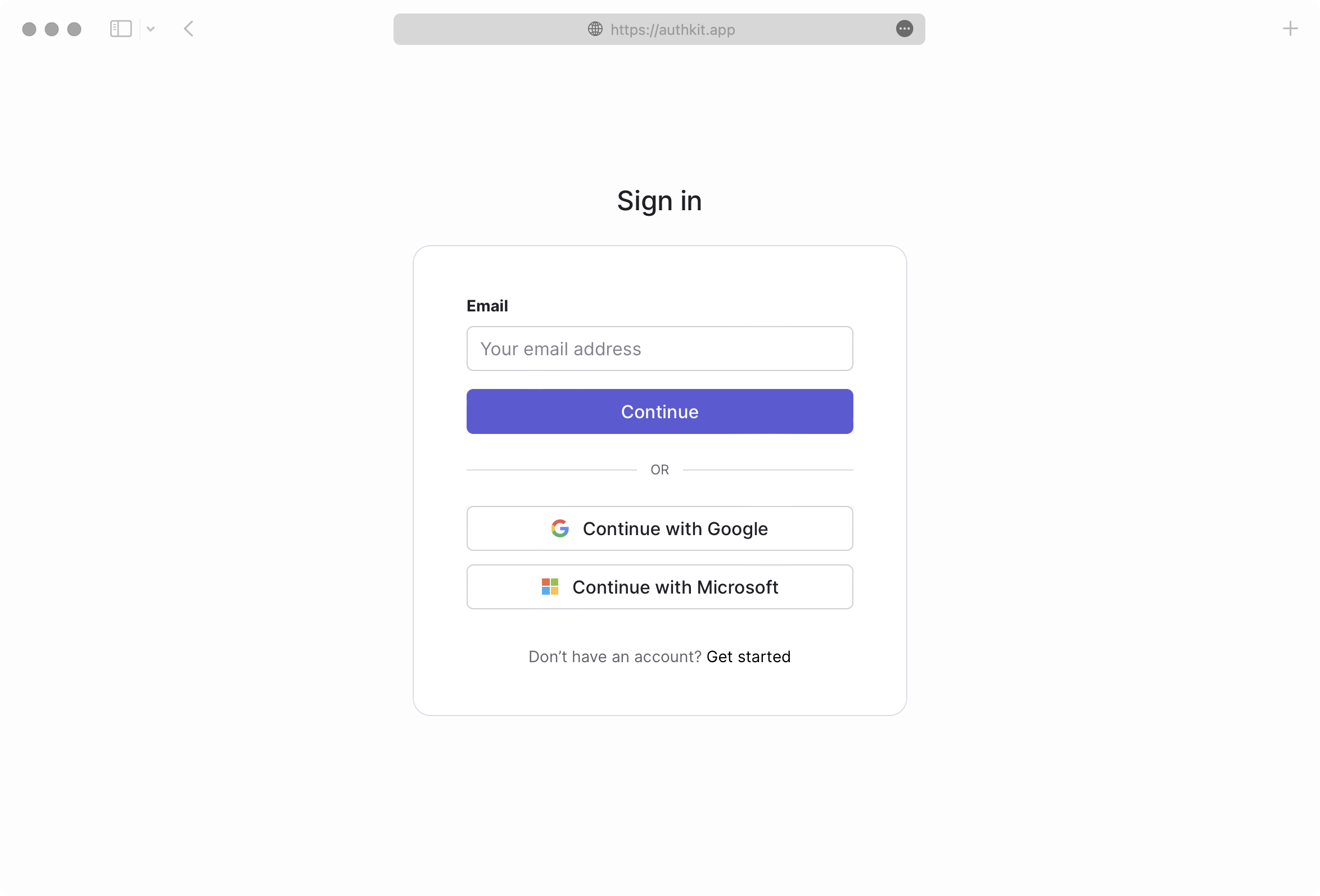
- package/.docs/organized/docs/demo/replacements.mdx +26 -0
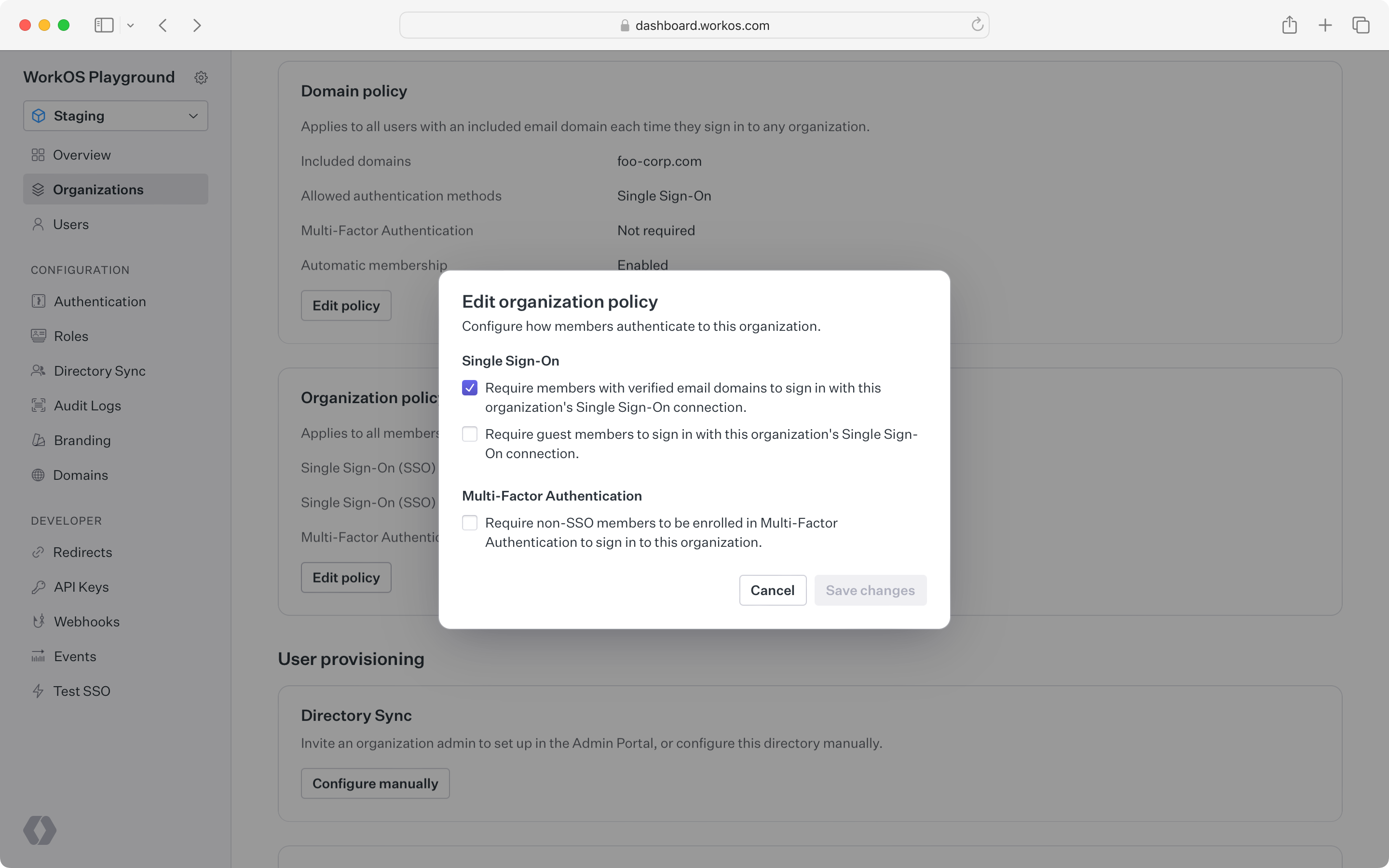
- package/.docs/organized/docs/demo/table.mdx +26 -0
- package/.docs/organized/docs/demo/tabs.mdx +17 -0
- package/.docs/organized/docs/directory-sync/_navigation.mdx +28 -0
- package/.docs/organized/docs/directory-sync/attributes.mdx +209 -0
- package/.docs/organized/docs/directory-sync/example-apps.mdx +46 -0
- package/.docs/organized/docs/directory-sync/handle-inactive-users.mdx +52 -0
- package/.docs/organized/docs/directory-sync/identity-provider-role-assignment.mdx +134 -0
- package/.docs/organized/docs/directory-sync/index.mdx +107 -0
- package/.docs/organized/docs/directory-sync/quick-start.mdx +129 -0
- package/.docs/organized/docs/directory-sync/understanding-events.mdx +209 -0
- package/.docs/organized/docs/domain-verification/_navigation.mdx +10 -0
- package/.docs/organized/docs/domain-verification/api.mdx +60 -0
- package/.docs/organized/docs/domain-verification/index.mdx +67 -0
- package/.docs/organized/docs/email.mdx +109 -0
- package/.docs/organized/docs/events/_navigation.mdx +22 -0
- package/.docs/organized/docs/events/data-syncing/data-reconciliation.mdx +56 -0
- package/.docs/organized/docs/events/data-syncing/events-api.mdx +114 -0
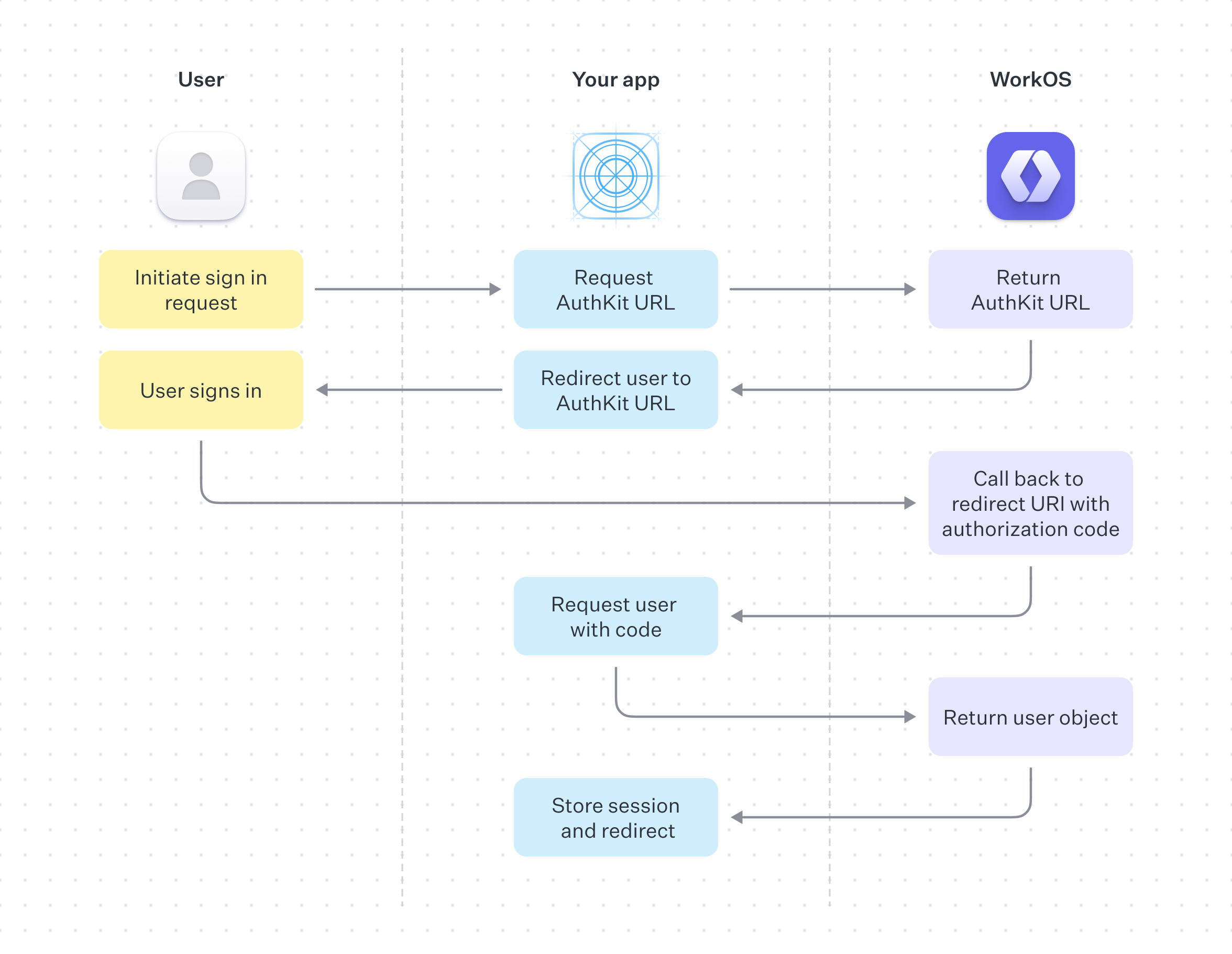
- package/.docs/organized/docs/events/data-syncing/index.mdx +66 -0
- package/.docs/organized/docs/events/data-syncing/webhooks.mdx +173 -0
- package/.docs/organized/docs/events/index.mdx +783 -0
- package/.docs/organized/docs/events/observability/datadog.mdx +76 -0
- package/.docs/organized/docs/fga/_navigation.mdx +64 -0
- package/.docs/organized/docs/fga/identity-provider-sessions.mdx +68 -0
- package/.docs/organized/docs/fga/index.mdx +60 -0
- package/.docs/organized/docs/fga/local-development.mdx +155 -0
- package/.docs/organized/docs/fga/modeling/abac.mdx +107 -0
- package/.docs/organized/docs/fga/modeling/blocklist.mdx +84 -0
- package/.docs/organized/docs/fga/modeling/conditional-roles.mdx +99 -0
- package/.docs/organized/docs/fga/modeling/custom-roles.mdx +90 -0
- package/.docs/organized/docs/fga/modeling/entitlements.mdx +127 -0
- package/.docs/organized/docs/fga/modeling/managed-service-provider.mdx +131 -0
- package/.docs/organized/docs/fga/modeling/org-roles-and-permissions.mdx +95 -0
- package/.docs/organized/docs/fga/modeling/policy-context.mdx +231 -0
- package/.docs/organized/docs/fga/modeling/public-access.mdx +61 -0
- package/.docs/organized/docs/fga/modeling/shareable-content.mdx +106 -0
- package/.docs/organized/docs/fga/modeling/superusers.mdx +74 -0
- package/.docs/organized/docs/fga/modeling/user-groups.mdx +92 -0
- package/.docs/organized/docs/fga/operations-usage.mdx +104 -0
- package/.docs/organized/docs/fga/playground.mdx +12 -0
- package/.docs/organized/docs/fga/policies.mdx +462 -0
- package/.docs/organized/docs/fga/query-language.mdx +112 -0
- package/.docs/organized/docs/fga/quick-start.mdx +174 -0
- package/.docs/organized/docs/fga/resources.mdx +92 -0
- package/.docs/organized/docs/fga/schema-management.mdx +224 -0
- package/.docs/organized/docs/fga/schema.mdx +388 -0
- package/.docs/organized/docs/fga/warrant-tokens.mdx +44 -0
- package/.docs/organized/docs/fga/warrants.mdx +92 -0
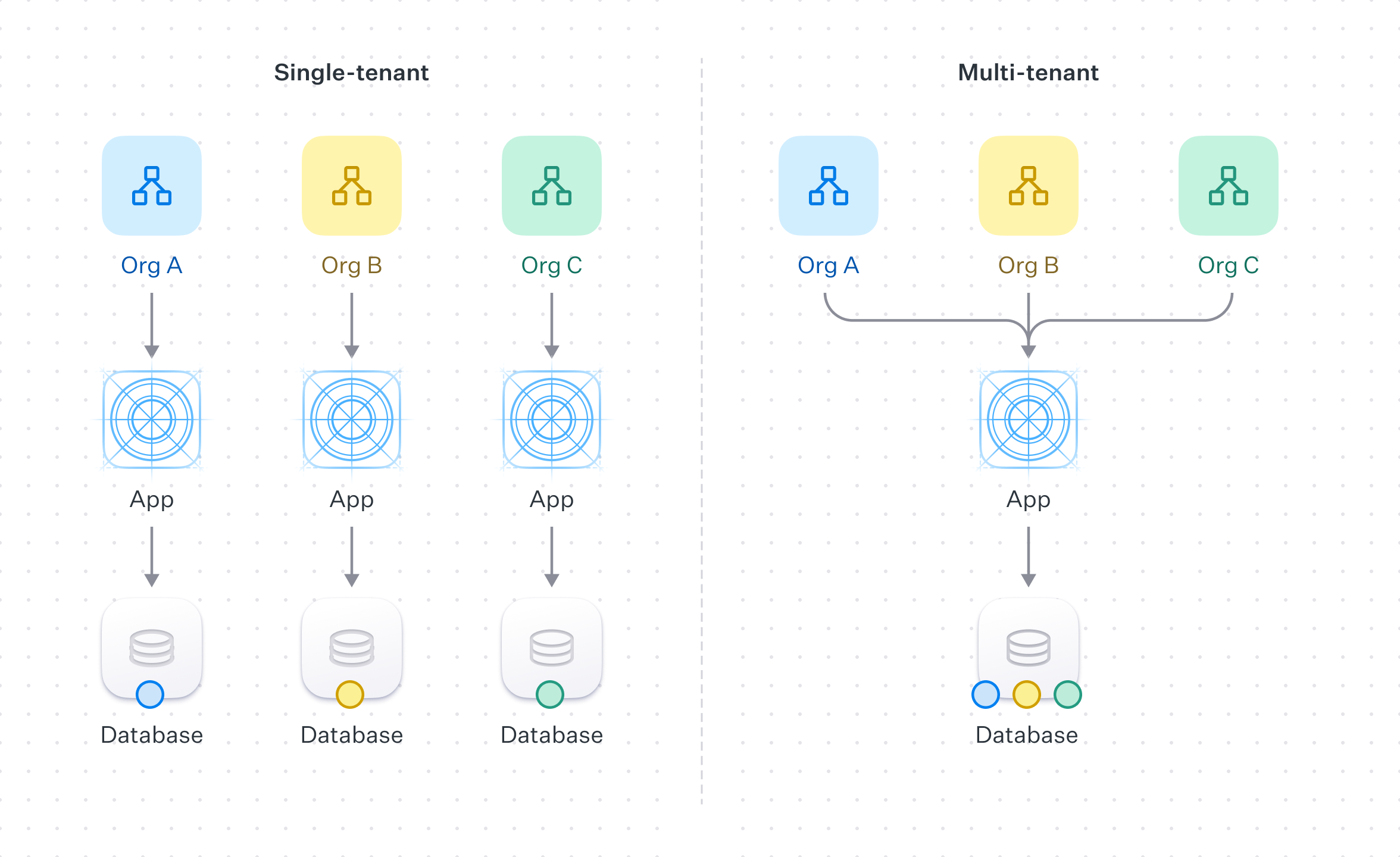
- package/.docs/organized/docs/glossary.mdx +184 -0
- package/.docs/organized/docs/integrations/_navigation.mdx +6 -0
- package/.docs/organized/docs/integrations/access-people-hr.mdx +87 -0
- package/.docs/organized/docs/integrations/adp-oidc.mdx +103 -0
- package/.docs/organized/docs/integrations/apple.mdx +169 -0
- package/.docs/organized/docs/integrations/auth0-directory-sync.mdx +78 -0
- package/.docs/organized/docs/integrations/auth0-enterprise-connection.mdx +92 -0
- package/.docs/organized/docs/integrations/auth0-saml.mdx +81 -0
- package/.docs/organized/docs/integrations/aws-cognito.mdx +81 -0
- package/.docs/organized/docs/integrations/bamboohr.mdx +90 -0
- package/.docs/organized/docs/integrations/breathe-hr.mdx +89 -0
- package/.docs/organized/docs/integrations/bubble.mdx +129 -0
- package/.docs/organized/docs/integrations/cas-saml.mdx +65 -0
- package/.docs/organized/docs/integrations/cezanne.mdx +74 -0
- package/.docs/organized/docs/integrations/classlink-saml.mdx +100 -0
- package/.docs/organized/docs/integrations/cloudflare-saml.mdx +164 -0
- package/.docs/organized/docs/integrations/cyberark-saml.mdx +138 -0
- package/.docs/organized/docs/integrations/cyberark-scim.mdx +100 -0
- package/.docs/organized/docs/integrations/duo-saml.mdx +127 -0
- package/.docs/organized/docs/integrations/entra-id-saml.mdx +156 -0
- package/.docs/organized/docs/integrations/entra-id-scim.mdx +218 -0
- package/.docs/organized/docs/integrations/firebase.mdx +98 -0
- package/.docs/organized/docs/integrations/fourth.mdx +66 -0
- package/.docs/organized/docs/integrations/github-oauth.mdx +85 -0
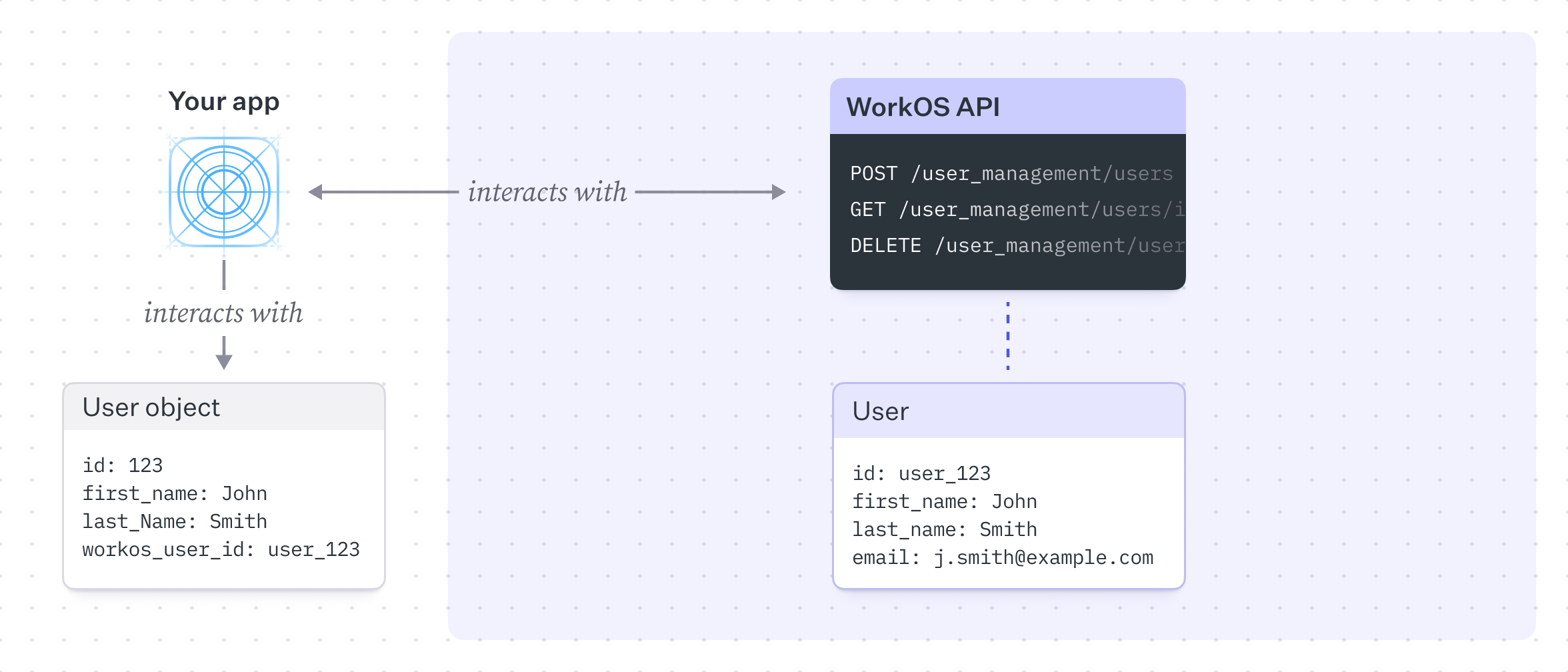
- package/.docs/organized/docs/integrations/gitlab-oauth.mdx +81 -0
- package/.docs/organized/docs/integrations/google-directory-sync.mdx +86 -0
- package/.docs/organized/docs/integrations/google-oauth.mdx +173 -0
- package/.docs/organized/docs/integrations/google-saml.mdx +135 -0
- package/.docs/organized/docs/integrations/hibob.mdx +98 -0
- package/.docs/organized/docs/integrations/jumpcloud-saml.mdx +96 -0
- package/.docs/organized/docs/integrations/jumpcloud-scim.mdx +106 -0
- package/.docs/organized/docs/integrations/keycloak-saml.mdx +128 -0
- package/.docs/organized/docs/integrations/lastpass-saml.mdx +134 -0
- package/.docs/organized/docs/integrations/linkedin-oauth.mdx +77 -0
- package/.docs/organized/docs/integrations/login-gov-oidc.mdx +103 -0
- package/.docs/organized/docs/integrations/microsoft-ad-fs-saml.mdx +96 -0
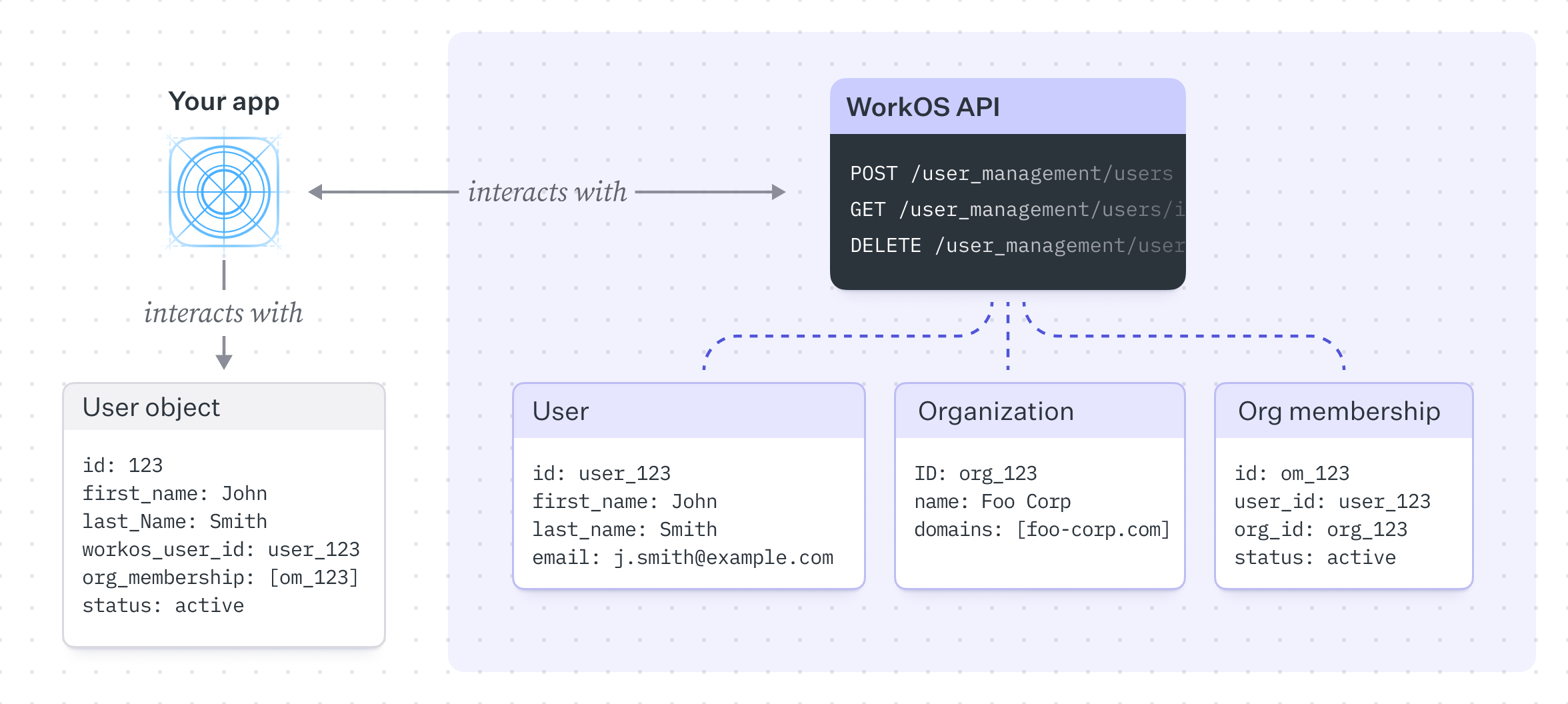
- package/.docs/organized/docs/integrations/microsoft-oauth.mdx +101 -0
- package/.docs/organized/docs/integrations/miniorange-saml.mdx +124 -0
- package/.docs/organized/docs/integrations/net-iq-saml.mdx +75 -0
- package/.docs/organized/docs/integrations/next-auth.mdx +257 -0
- package/.docs/organized/docs/integrations/oidc.mdx +64 -0
- package/.docs/organized/docs/integrations/okta-saml.mdx +144 -0
- package/.docs/organized/docs/integrations/okta-scim.mdx +210 -0
- package/.docs/organized/docs/integrations/onelogin-saml.mdx +131 -0
- package/.docs/organized/docs/integrations/onelogin-scim.mdx +150 -0
- package/.docs/organized/docs/integrations/oracle-saml.mdx +76 -0
- package/.docs/organized/docs/integrations/pingfederate-saml.mdx +103 -0
- package/.docs/organized/docs/integrations/pingfederate-scim.mdx +150 -0
- package/.docs/organized/docs/integrations/pingone-saml.mdx +86 -0
- package/.docs/organized/docs/integrations/react-native-expo.mdx +93 -0
- package/.docs/organized/docs/integrations/rippling-saml.mdx +174 -0
- package/.docs/organized/docs/integrations/rippling-scim.mdx +148 -0
- package/.docs/organized/docs/integrations/salesforce-saml.mdx +143 -0
- package/.docs/organized/docs/integrations/saml.mdx +64 -0
- package/.docs/organized/docs/integrations/scim.mdx +64 -0
- package/.docs/organized/docs/integrations/sftp.mdx +150 -0
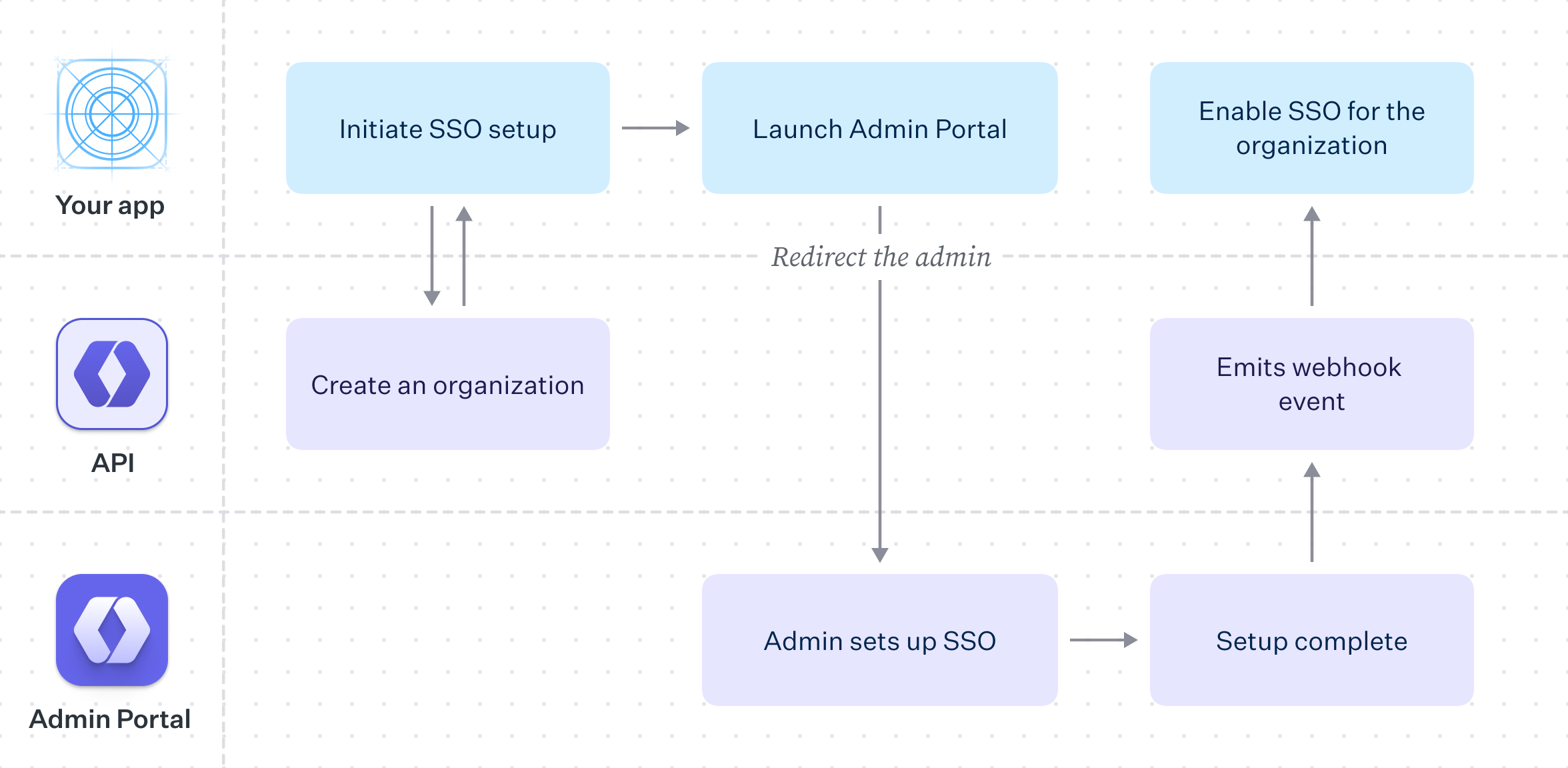
- package/.docs/organized/docs/integrations/shibboleth-generic-saml.mdx +84 -0
- package/.docs/organized/docs/integrations/shibboleth-unsolicited-saml.mdx +84 -0
- package/.docs/organized/docs/integrations/simple-saml-php.mdx +78 -0
- package/.docs/organized/docs/integrations/slack-oauth.mdx +102 -0
- package/.docs/organized/docs/integrations/supabase.mdx +68 -0
- package/.docs/organized/docs/integrations/vmware-saml.mdx +100 -0
- package/.docs/organized/docs/integrations/workday.mdx +156 -0
- package/.docs/organized/docs/integrations/xero-oauth.mdx +83 -0
- package/.docs/organized/docs/magic-link/_navigation.mdx +16 -0
- package/.docs/organized/docs/magic-link/example-apps.mdx +46 -0
- package/.docs/organized/docs/magic-link/index.mdx +199 -0
- package/.docs/organized/docs/magic-link/launch-checklist.mdx +27 -0
- package/.docs/organized/docs/mfa/_navigation.mdx +18 -0
- package/.docs/organized/docs/mfa/example-apps.mdx +46 -0
- package/.docs/organized/docs/mfa/index.mdx +140 -0
- package/.docs/organized/docs/mfa/ux/enrollment.mdx +74 -0
- package/.docs/organized/docs/mfa/ux/sign-in.mdx +30 -0
- package/.docs/organized/docs/migrate/_navigation.mdx +6 -0
- package/.docs/organized/docs/migrate/auth0.mdx +98 -0
- package/.docs/organized/docs/migrate/aws-cognito.mdx +115 -0
- package/.docs/organized/docs/migrate/clerk.mdx +106 -0
- package/.docs/organized/docs/migrate/firebase.mdx +80 -0
- package/.docs/organized/docs/migrate/other-services.mdx +179 -0
- package/.docs/organized/docs/migrate/standalone-sso.mdx +105 -0
- package/.docs/organized/docs/on-prem-deployment.mdx +119 -0
- package/.docs/organized/docs/postman.mdx +90 -0
- package/.docs/organized/docs/reference/_navigation.mdx +527 -0
- package/.docs/organized/docs/reference/admin-portal/index.mdx +6 -0
- package/.docs/organized/docs/reference/admin-portal/portal-link/generate.mdx +268 -0
- package/.docs/organized/docs/reference/admin-portal/portal-link/index.mdx +15 -0
- package/.docs/organized/docs/reference/admin-portal/provider-icons/index.mdx +52 -0
- package/.docs/organized/docs/reference/api-keys.mdx +22 -0
- package/.docs/organized/docs/reference/audit-logs/audit-log-export.mdx +239 -0
- package/.docs/organized/docs/reference/audit-logs/audit-log-schema.mdx +69 -0
- package/.docs/organized/docs/reference/audit-logs/create-event.mdx +673 -0
- package/.docs/organized/docs/reference/audit-logs/create-export.mdx +308 -0
- package/.docs/organized/docs/reference/audit-logs/create-schema.mdx +95 -0
- package/.docs/organized/docs/reference/audit-logs/get-export.mdx +117 -0
- package/.docs/organized/docs/reference/audit-logs/get-retention.mdx +34 -0
- package/.docs/organized/docs/reference/audit-logs/index.mdx +6 -0
- package/.docs/organized/docs/reference/audit-logs/list-actions.mdx +40 -0
- package/.docs/organized/docs/reference/audit-logs/list-schemas.mdx +40 -0
- package/.docs/organized/docs/reference/audit-logs/set-retention.mdx +39 -0
- package/.docs/organized/docs/reference/client-libraries.mdx +19 -0
- package/.docs/organized/docs/reference/directory-sync/directory/delete.mdx +90 -0
- package/.docs/organized/docs/reference/directory-sync/directory/get.mdx +105 -0
- package/.docs/organized/docs/reference/directory-sync/directory/index.mdx +385 -0
- package/.docs/organized/docs/reference/directory-sync/directory/list.mdx +281 -0
- package/.docs/organized/docs/reference/directory-sync/directory-group/get.mdx +105 -0
- package/.docs/organized/docs/reference/directory-sync/directory-group/index.mdx +277 -0
- package/.docs/organized/docs/reference/directory-sync/directory-group/list.mdx +295 -0
- package/.docs/organized/docs/reference/directory-sync/directory-user/get.mdx +112 -0
- package/.docs/organized/docs/reference/directory-sync/directory-user/index.mdx +470 -0
- package/.docs/organized/docs/reference/directory-sync/directory-user/list.mdx +304 -0
- package/.docs/organized/docs/reference/directory-sync/index.mdx +10 -0
- package/.docs/organized/docs/reference/domain-verification/create.mdx +38 -0
- package/.docs/organized/docs/reference/domain-verification/get.mdx +32 -0
- package/.docs/organized/docs/reference/domain-verification/index.mdx +84 -0
- package/.docs/organized/docs/reference/domain-verification/verify.mdx +36 -0
- package/.docs/organized/docs/reference/errors.mdx +30 -0
- package/.docs/organized/docs/reference/events/index.mdx +9 -0
- package/.docs/organized/docs/reference/events/list.mdx +246 -0
- package/.docs/organized/docs/reference/fga/batch-check.mdx +277 -0
- package/.docs/organized/docs/reference/fga/check.mdx +563 -0
- package/.docs/organized/docs/reference/fga/index.mdx +6 -0
- package/.docs/organized/docs/reference/fga/policy/create.mdx +27 -0
- package/.docs/organized/docs/reference/fga/policy/delete.mdx +18 -0
- package/.docs/organized/docs/reference/fga/policy/get.mdx +23 -0
- package/.docs/organized/docs/reference/fga/policy/index.mdx +52 -0
- package/.docs/organized/docs/reference/fga/policy/list.mdx +41 -0
- package/.docs/organized/docs/reference/fga/policy/update.mdx +26 -0
- package/.docs/organized/docs/reference/fga/query.mdx +375 -0
- package/.docs/organized/docs/reference/fga/resource/batch-write.mdx +175 -0
- package/.docs/organized/docs/reference/fga/resource/create.mdx +130 -0
- package/.docs/organized/docs/reference/fga/resource/delete.mdx +86 -0
- package/.docs/organized/docs/reference/fga/resource/get.mdx +88 -0
- package/.docs/organized/docs/reference/fga/resource/index.mdx +98 -0
- package/.docs/organized/docs/reference/fga/resource/list.mdx +188 -0
- package/.docs/organized/docs/reference/fga/resource/update.mdx +115 -0
- package/.docs/organized/docs/reference/fga/resource-type/apply.mdx +35 -0
- package/.docs/organized/docs/reference/fga/resource-type/create.mdx +24 -0
- package/.docs/organized/docs/reference/fga/resource-type/delete.mdx +22 -0
- package/.docs/organized/docs/reference/fga/resource-type/get.mdx +23 -0
- package/.docs/organized/docs/reference/fga/resource-type/index.mdx +68 -0
- package/.docs/organized/docs/reference/fga/resource-type/list.mdx +36 -0
- package/.docs/organized/docs/reference/fga/resource-type/update.mdx +23 -0
- package/.docs/organized/docs/reference/fga/schema/apply.mdx +42 -0
- package/.docs/organized/docs/reference/fga/schema/get.mdx +24 -0
- package/.docs/organized/docs/reference/fga/schema/index.mdx +39 -0
- package/.docs/organized/docs/reference/fga/warrant/batch-write.mdx +226 -0
- package/.docs/organized/docs/reference/fga/warrant/create.mdx +215 -0
- package/.docs/organized/docs/reference/fga/warrant/delete.mdx +212 -0
- package/.docs/organized/docs/reference/fga/warrant/index.mdx +186 -0
- package/.docs/organized/docs/reference/fga/warrant/list.mdx +282 -0
- package/.docs/organized/docs/reference/idempotency.mdx +21 -0
- package/.docs/organized/docs/reference/index.mdx +194 -0
- package/.docs/organized/docs/reference/magic-link/index.mdx +8 -0
- package/.docs/organized/docs/reference/magic-link/passwordless-session/create.mdx +268 -0
- package/.docs/organized/docs/reference/magic-link/passwordless-session/index.mdx +203 -0
- package/.docs/organized/docs/reference/magic-link/passwordless-session/send-email.mdx +158 -0
- package/.docs/organized/docs/reference/mfa/authentication-challenge.mdx +217 -0
- package/.docs/organized/docs/reference/mfa/authentication-factor.mdx +381 -0
- package/.docs/organized/docs/reference/mfa/challenge-factor.mdx +170 -0
- package/.docs/organized/docs/reference/mfa/delete-factor.mdx +93 -0
- package/.docs/organized/docs/reference/mfa/enroll-factor.mdx +241 -0
- package/.docs/organized/docs/reference/mfa/get-factor.mdx +108 -0
- package/.docs/organized/docs/reference/mfa/index.mdx +8 -0
- package/.docs/organized/docs/reference/mfa/verify-challenge.mdx +228 -0
- package/.docs/organized/docs/reference/organization/create.mdx +216 -0
- package/.docs/organized/docs/reference/organization/delete.mdx +89 -0
- package/.docs/organized/docs/reference/organization/get-by-external-id.mdx +40 -0
- package/.docs/organized/docs/reference/organization/get.mdx +104 -0
- package/.docs/organized/docs/reference/organization/index.mdx +274 -0
- package/.docs/organized/docs/reference/organization/list.mdx +258 -0
- package/.docs/organized/docs/reference/organization/update.mdx +236 -0
- package/.docs/organized/docs/reference/organization-domain.mdx +189 -0
- package/.docs/organized/docs/reference/pagination.mdx +244 -0
- package/.docs/organized/docs/reference/radar/attempts/create.mdx +115 -0
- package/.docs/organized/docs/reference/radar/attempts/index.mdx +7 -0
- package/.docs/organized/docs/reference/radar/attempts/update.mdx +34 -0
- package/.docs/organized/docs/reference/radar/index.mdx +8 -0
- package/.docs/organized/docs/reference/radar/lists/delete.mdx +36 -0
- package/.docs/organized/docs/reference/radar/lists/index.mdx +7 -0
- package/.docs/organized/docs/reference/radar/lists/update.mdx +36 -0
- package/.docs/organized/docs/reference/rate-limits.mdx +50 -0
- package/.docs/organized/docs/reference/roles/index.mdx +268 -0
- package/.docs/organized/docs/reference/roles/list-for-organization.mdx +152 -0
- package/.docs/organized/docs/reference/sso/connection/delete.mdx +89 -0
- package/.docs/organized/docs/reference/sso/connection/get.mdx +104 -0
- package/.docs/organized/docs/reference/sso/connection/index.mdx +388 -0
- package/.docs/organized/docs/reference/sso/connection/list.mdx +320 -0
- package/.docs/organized/docs/reference/sso/get-authorization-url/error-codes.mdx +28 -0
- package/.docs/organized/docs/reference/sso/get-authorization-url/index.mdx +434 -0
- package/.docs/organized/docs/reference/sso/get-authorization-url/redirect-uri.mdx +21 -0
- package/.docs/organized/docs/reference/sso/index.mdx +8 -0
- package/.docs/organized/docs/reference/sso/logout/authorize.mdx +47 -0
- package/.docs/organized/docs/reference/sso/logout/index.mdx +14 -0
- package/.docs/organized/docs/reference/sso/logout/redirect.mdx +32 -0
- package/.docs/organized/docs/reference/sso/profile/get-profile-and-token.mdx +229 -0
- package/.docs/organized/docs/reference/sso/profile/get-user-profile.mdx +127 -0
- package/.docs/organized/docs/reference/sso/profile/index.mdx +364 -0
- package/.docs/organized/docs/reference/testing.mdx +8 -0
- package/.docs/organized/docs/reference/user-management/access-token/index.mdx +13 -0
- package/.docs/organized/docs/reference/user-management/authentication/code.mdx +448 -0
- package/.docs/organized/docs/reference/user-management/authentication/email-verification.mdx +359 -0
- package/.docs/organized/docs/reference/user-management/authentication/get-authorization-url/error-codes.mdx +25 -0
- package/.docs/organized/docs/reference/user-management/authentication/get-authorization-url/index.mdx +425 -0
- package/.docs/organized/docs/reference/user-management/authentication/get-authorization-url/pkce.mdx +9 -0
- package/.docs/organized/docs/reference/user-management/authentication/get-authorization-url/redirect-uri.mdx +23 -0
- package/.docs/organized/docs/reference/user-management/authentication/index.mdx +66 -0
- package/.docs/organized/docs/reference/user-management/authentication/magic-auth.mdx +353 -0
- package/.docs/organized/docs/reference/user-management/authentication/organization-selection.mdx +349 -0
- package/.docs/organized/docs/reference/user-management/authentication/password.mdx +350 -0
- package/.docs/organized/docs/reference/user-management/authentication/refresh-and-seal-session-data.mdx +57 -0
- package/.docs/organized/docs/reference/user-management/authentication/refresh-token.mdx +381 -0
- package/.docs/organized/docs/reference/user-management/authentication/session-cookie.mdx +79 -0
- package/.docs/organized/docs/reference/user-management/authentication/totp.mdx +369 -0
- package/.docs/organized/docs/reference/user-management/authentication-errors/email-verification-required-error.mdx +42 -0
- package/.docs/organized/docs/reference/user-management/authentication-errors/index.mdx +20 -0
- package/.docs/organized/docs/reference/user-management/authentication-errors/mfa-challenge-error.mdx +44 -0
- package/.docs/organized/docs/reference/user-management/authentication-errors/mfa-enrollment-error.mdx +37 -0
- package/.docs/organized/docs/reference/user-management/authentication-errors/organization-authentication-required-error.mdx +68 -0
- package/.docs/organized/docs/reference/user-management/authentication-errors/organization-selection-error.mdx +44 -0
- package/.docs/organized/docs/reference/user-management/authentication-errors/sso-required-error.mdx +51 -0
- package/.docs/organized/docs/reference/user-management/email-verification/get.mdx +88 -0
- package/.docs/organized/docs/reference/user-management/email-verification/index.mdx +227 -0
- package/.docs/organized/docs/reference/user-management/identity/index.mdx +74 -0
- package/.docs/organized/docs/reference/user-management/identity/list.mdx +52 -0
- package/.docs/organized/docs/reference/user-management/index.mdx +13 -0
- package/.docs/organized/docs/reference/user-management/invitation/accept.mdx +39 -0
- package/.docs/organized/docs/reference/user-management/invitation/find-by-token.mdx +87 -0
- package/.docs/organized/docs/reference/user-management/invitation/get.mdx +87 -0
- package/.docs/organized/docs/reference/user-management/invitation/index.mdx +374 -0
- package/.docs/organized/docs/reference/user-management/invitation/list.mdx +247 -0
- package/.docs/organized/docs/reference/user-management/invitation/revoke.mdx +90 -0
- package/.docs/organized/docs/reference/user-management/invitation/send.mdx +230 -0
- package/.docs/organized/docs/reference/user-management/logout/get-logout-url-from-session-cookie.mdx +52 -0
- package/.docs/organized/docs/reference/user-management/logout/get-logout-url.mdx +147 -0
- package/.docs/organized/docs/reference/user-management/logout/index.mdx +26 -0
- package/.docs/organized/docs/reference/user-management/magic-auth/create.mdx +148 -0
- package/.docs/organized/docs/reference/user-management/magic-auth/get.mdx +88 -0
- package/.docs/organized/docs/reference/user-management/magic-auth/index.mdx +225 -0
- package/.docs/organized/docs/reference/user-management/mfa/authentication-challenge.mdx +194 -0
- package/.docs/organized/docs/reference/user-management/mfa/authentication-factor.mdx +324 -0
- package/.docs/organized/docs/reference/user-management/mfa/enroll-auth-factor.mdx +296 -0
- package/.docs/organized/docs/reference/user-management/mfa/index.mdx +5 -0
- package/.docs/organized/docs/reference/user-management/mfa/list-auth-factors.mdx +194 -0
- package/.docs/organized/docs/reference/user-management/organization-membership/create.mdx +155 -0
- package/.docs/organized/docs/reference/user-management/organization-membership/deactivate.mdx +106 -0
- package/.docs/organized/docs/reference/user-management/organization-membership/delete.mdx +76 -0
- package/.docs/organized/docs/reference/user-management/organization-membership/get.mdx +95 -0
- package/.docs/organized/docs/reference/user-management/organization-membership/index.mdx +265 -0
- package/.docs/organized/docs/reference/user-management/organization-membership/list.mdx +291 -0
- package/.docs/organized/docs/reference/user-management/organization-membership/reactivate.mdx +106 -0
- package/.docs/organized/docs/reference/user-management/organization-membership/update.mdx +119 -0
- package/.docs/organized/docs/reference/user-management/password-reset/create.mdx +108 -0
- package/.docs/organized/docs/reference/user-management/password-reset/get.mdx +88 -0
- package/.docs/organized/docs/reference/user-management/password-reset/index.mdx +227 -0
- package/.docs/organized/docs/reference/user-management/password-reset/reset-password.mdx +144 -0
- package/.docs/organized/docs/reference/user-management/session-helpers/authenticate.mdx +176 -0
- package/.docs/organized/docs/reference/user-management/session-helpers/get-logout-url.mdx +42 -0
- package/.docs/organized/docs/reference/user-management/session-helpers/index.mdx +14 -0
- package/.docs/organized/docs/reference/user-management/session-helpers/load-sealed-session.mdx +105 -0
- package/.docs/organized/docs/reference/user-management/session-helpers/refresh.mdx +213 -0
- package/.docs/organized/docs/reference/user-management/session-tokens/access-token.mdx +90 -0
- package/.docs/organized/docs/reference/user-management/session-tokens/index.mdx +5 -0
- package/.docs/organized/docs/reference/user-management/session-tokens/jwks.mdx +110 -0
- package/.docs/organized/docs/reference/user-management/session-tokens/refresh-token.mdx +8 -0
- package/.docs/organized/docs/reference/user-management/user/create.mdx +327 -0
- package/.docs/organized/docs/reference/user-management/user/delete.mdx +76 -0
- package/.docs/organized/docs/reference/user-management/user/get-by-external-id.mdx +39 -0
- package/.docs/organized/docs/reference/user-management/user/get.mdx +103 -0
- package/.docs/organized/docs/reference/user-management/user/index.mdx +322 -0
- package/.docs/organized/docs/reference/user-management/user/list.mdx +260 -0
- package/.docs/organized/docs/reference/user-management/user/update.mdx +344 -0
- package/.docs/organized/docs/reference/vault/index.mdx +6 -0
- package/.docs/organized/docs/reference/vault/key/create-data-key.mdx +106 -0
- package/.docs/organized/docs/reference/vault/key/decrypt-data-key.mdx +84 -0
- package/.docs/organized/docs/reference/vault/key/decrypt-data.mdx +52 -0
- package/.docs/organized/docs/reference/vault/key/encrypt-data.mdx +58 -0
- package/.docs/organized/docs/reference/vault/key/index.mdx +25 -0
- package/.docs/organized/docs/reference/vault/object/create.mdx +62 -0
- package/.docs/organized/docs/reference/vault/object/delete.mdx +75 -0
- package/.docs/organized/docs/reference/vault/object/get.mdx +50 -0
- package/.docs/organized/docs/reference/vault/object/index.mdx +174 -0
- package/.docs/organized/docs/reference/vault/object/list.mdx +105 -0
- package/.docs/organized/docs/reference/vault/object/metadata.mdx +52 -0
- package/.docs/organized/docs/reference/vault/object/update.mdx +67 -0
- package/.docs/organized/docs/reference/vault/object/version.mdx +87 -0
- package/.docs/organized/docs/reference/vault/object/versions.mdx +83 -0
- package/.docs/organized/docs/reference/widgets/get-token.mdx +185 -0
- package/.docs/organized/docs/reference/widgets/index.mdx +6 -0
- package/.docs/organized/docs/reference/workos-connect/authorize/index.mdx +75 -0
- package/.docs/organized/docs/reference/workos-connect/index.mdx +33 -0
- package/.docs/organized/docs/reference/workos-connect/introspection/index.mdx +122 -0
- package/.docs/organized/docs/reference/workos-connect/metadata/index.mdx +25 -0
- package/.docs/organized/docs/reference/workos-connect/metadata/oauth-authorization-server/index.mdx +99 -0
- package/.docs/organized/docs/reference/workos-connect/metadata/openid-configuration/index.mdx +70 -0
- package/.docs/organized/docs/reference/workos-connect/token/authorization-code-grant/access-token.mdx +53 -0
- package/.docs/organized/docs/reference/workos-connect/token/authorization-code-grant/id-token.mdx +60 -0
- package/.docs/organized/docs/reference/workos-connect/token/authorization-code-grant/index.mdx +69 -0
- package/.docs/organized/docs/reference/workos-connect/token/client-credentials-grant/access-token.mdx +46 -0
- package/.docs/organized/docs/reference/workos-connect/token/client-credentials-grant/index.mdx +56 -0
- package/.docs/organized/docs/reference/workos-connect/token/index.mdx +39 -0
- package/.docs/organized/docs/reference/workos-connect/token/refresh-token-grant.mdx +69 -0
- package/.docs/organized/docs/reference/workos-connect/userinfo/index.mdx +46 -0
- package/.docs/organized/docs/sdks/dotnet.mdx +6 -0
- package/.docs/organized/docs/sdks/elixir.mdx +6 -0
- package/.docs/organized/docs/sdks/go.mdx +6 -0
- package/.docs/organized/docs/sdks/java.mdx +9 -0
- package/.docs/organized/docs/sdks/laravel.mdx +6 -0
- package/.docs/organized/docs/sdks/node.mdx +9 -0
- package/.docs/organized/docs/sdks/php.mdx +6 -0
- package/.docs/organized/docs/sdks/python.mdx +6 -0
- package/.docs/organized/docs/sdks/ruby.mdx +9 -0
- package/.docs/organized/docs/sso/_navigation.mdx +44 -0
- package/.docs/organized/docs/sso/_sequence-diagrams/saml-protocol-security-considerations.md +59 -0
- package/.docs/organized/docs/sso/attributes.mdx +110 -0
- package/.docs/organized/docs/sso/domains.mdx +111 -0
- package/.docs/organized/docs/sso/example-apps.mdx +46 -0
- package/.docs/organized/docs/sso/identity-provider-role-assignment.mdx +113 -0
- package/.docs/organized/docs/sso/index.mdx +295 -0
- package/.docs/organized/docs/sso/it-team-faq.mdx +35 -0
- package/.docs/organized/docs/sso/jit-provisioning.mdx +101 -0
- package/.docs/organized/docs/sso/launch-checklist.mdx +71 -0
- package/.docs/organized/docs/sso/login-flows.mdx +101 -0
- package/.docs/organized/docs/sso/redirect-uris.mdx +44 -0
- package/.docs/organized/docs/sso/saml-security.mdx +122 -0
- package/.docs/organized/docs/sso/signing-certificates.mdx +121 -0
- package/.docs/organized/docs/sso/single-logout.mdx +45 -0
- package/.docs/organized/docs/sso/test-sso.mdx +73 -0
- package/.docs/organized/docs/sso/ux/sign-in.mdx +44 -0
- package/.docs/organized/docs/user-management/_navigation.mdx +87 -0
- package/.docs/organized/docs/user-management/actions.mdx +169 -0
- package/.docs/organized/docs/user-management/authkit.mdx +69 -0
- package/.docs/organized/docs/user-management/branding.mdx +143 -0
- package/.docs/organized/docs/user-management/connect.mdx +110 -0
- package/.docs/organized/docs/user-management/custom-emails.mdx +164 -0
- package/.docs/organized/docs/user-management/directory-provisioning.mdx +78 -0
- package/.docs/organized/docs/user-management/domain-verification.mdx +28 -0
- package/.docs/organized/docs/user-management/email-password.mdx +42 -0
- package/.docs/organized/docs/user-management/email-verification.mdx +29 -0
- package/.docs/organized/docs/user-management/entitlements.mdx +46 -0
- package/.docs/organized/docs/user-management/example-apps.mdx +39 -0
- package/.docs/organized/docs/user-management/identity-linking.mdx +52 -0
- package/.docs/organized/docs/user-management/impersonation.mdx +82 -0
- package/.docs/organized/docs/user-management/index.mdx +525 -0
- package/.docs/organized/docs/user-management/invitations.mdx +60 -0
- package/.docs/organized/docs/user-management/invite-only-signup.mdx +72 -0
- package/.docs/organized/docs/user-management/jit-provisioning.mdx +36 -0
- package/.docs/organized/docs/user-management/jwt-templates.mdx +278 -0
- package/.docs/organized/docs/user-management/magic-auth.mdx +36 -0
- package/.docs/organized/docs/user-management/mcp.mdx +146 -0
- package/.docs/organized/docs/user-management/metadata.mdx +119 -0
- package/.docs/organized/docs/user-management/mfa.mdx +32 -0
- package/.docs/organized/docs/user-management/migrations.mdx +20 -0
- package/.docs/organized/docs/user-management/modeling-your-app.mdx +149 -0
- package/.docs/organized/docs/user-management/organization-policies.mdx +33 -0
- package/.docs/organized/docs/user-management/overview.mdx +46 -0
- package/.docs/organized/docs/user-management/passkeys.mdx +42 -0
- package/.docs/organized/docs/user-management/radar.mdx +127 -0
- package/.docs/organized/docs/user-management/roles-and-permissions.mdx +155 -0
- package/.docs/organized/docs/user-management/sessions.mdx +101 -0
- package/.docs/organized/docs/user-management/social-login.mdx +34 -0
- package/.docs/organized/docs/user-management/sso-with-contractors.mdx +85 -0
- package/.docs/organized/docs/user-management/sso.mdx +96 -0
- package/.docs/organized/docs/user-management/users-organizations.mdx +91 -0
- package/.docs/organized/docs/user-management/widgets.mdx +190 -0
- package/.docs/organized/docs/vault/_navigation.mdx +14 -0
- package/.docs/organized/docs/vault/index.mdx +38 -0
- package/.docs/organized/docs/vault/key-context.mdx +32 -0
- package/.docs/organized/docs/vault/quick-start.mdx +82 -0
- package/README.md +252 -0
- package/dist/chunk-64GKEK6G.js +48 -0
- package/dist/chunk-64GKEK6G.js.map +1 -0
- package/dist/get-tools.d.ts +23 -0
- package/dist/get-tools.js +8 -0
- package/dist/get-tools.js.map +1 -0
- package/dist/index.d.ts +1 -0
- package/dist/index.js +552 -0
- package/dist/index.js.map +1 -0
- package/dist/prepare.d.ts +2 -0
- package/dist/prepare.js +269 -0
- package/dist/prepare.js.map +1 -0
- package/package.json +49 -0
|
@@ -0,0 +1,149 @@
|
|
|
1
|
+
---
|
|
2
|
+
title: Modeling Your App
|
|
3
|
+
description: Learn how to architect your WorkOS integration
|
|
4
|
+
showNextPage: true
|
|
5
|
+
originalPath: .tmp-workos-clone/packages/docs/content/user-management/modeling-your-app.mdx
|
|
6
|
+
---
|
|
7
|
+
|
|
8
|
+
## Introduction
|
|
9
|
+
|
|
10
|
+
WorkOS has a wide suite of products to solve your business needs. This guide explains some of the common choices when it comes to modeling your integration.
|
|
11
|
+
|
|
12
|
+
WorkOS is designed to support a wide array of use cases and architectural scenarios, from simple business-to-consumer (B2C) user authentication to complex business-to-business (B2B) architectures with multiple organizations and authentication policy enforcement.
|
|
13
|
+
|
|
14
|
+
Features are designed to grow with you, allowing you get started easily and expand your security options as you onboard larger and larger enterprise customers.
|
|
15
|
+
|
|
16
|
+
Whether you are looking to add the initial authentication piece to a new application, or exploring migration from an existing vendor, you may find yourself asking:
|
|
17
|
+
|
|
18
|
+
- Does WorkOS fit into my existing architecture?
|
|
19
|
+
- Can I start small and later adopt more features?
|
|
20
|
+
- I have very specific requirements, can I still use WorkOS?
|
|
21
|
+
|
|
22
|
+
In most cases the answer is yes, and the aim of this guide is to help you understand how. We’ll cover the terminology used in this space, describe some common B2C and B2B flows, and finally demonstrate some scenarios that explain how everything fits together.
|
|
23
|
+
|
|
24
|
+
## Understanding the authentication flow
|
|
25
|
+
|
|
26
|
+
Supporting Email + Password, Single Sign-On, OAuth, Magic Auth, and other authentication concerns on your own is a complex task. You'd need to understand the authentication process, as well as model your applications sign-in and signup user interfaces to account for and handle all possible routes, error states and edges cases.
|
|
27
|
+
|
|
28
|
+
There are three main ways to add WorkOS authentication to your application:
|
|
29
|
+
|
|
30
|
+
### AuthKit
|
|
31
|
+
|
|
32
|
+
A [hosted login solution](/user-management/authkit) that provides a customizable UI and supports a wide range of authentication methods.
|
|
33
|
+
|
|
34
|
+
### Custom AuthKit UI
|
|
35
|
+
|
|
36
|
+
If you prefer to craft your own UI in your own stack, AuthKit can be integrated with the [User Management API](/reference/user-management).
|
|
37
|
+
|
|
38
|
+
### Standalone Single Sign-On (SSO)
|
|
39
|
+
|
|
40
|
+
For applications that are only interested in [SSO capabilities](/reference/sso).
|
|
41
|
+
|
|
42
|
+
In the majority of cases we recommend using the hosted AuthKit solution.
|
|
43
|
+
|
|
44
|
+
[border=false]
|
|
45
|
+
|
|
46
|
+
On successful completion, AuthKit will return an authentication code to your application via your specified redirect URI, this is exchanged for the user object and used to create a session.
|
|
47
|
+
|
|
48
|
+
See the [Quick Start guide](/user-management) for more information on how to implement this.
|
|
49
|
+
|
|
50
|
+
## Authentication methods
|
|
51
|
+
|
|
52
|
+
Prior to building your integration, it is useful to think about which authentication methods are part of your requirements. Typical consumer authentication methods include the following:
|
|
53
|
+
|
|
54
|
+
### Email + Password
|
|
55
|
+
|
|
56
|
+
The most common method of authentication, users sign up or sign in to your app with email and password. This method is enabled by default.
|
|
57
|
+
|
|
58
|
+
### OAuth
|
|
59
|
+
|
|
60
|
+
OAuth, also known as Social Login, is when a user logs in with an account belonging to a different service. Examples include logging in with your Google, Microsoft or GitHub account instead of making a new account with your app. These authentication methods can be configured from the WorkOS dashboard.
|
|
61
|
+
|
|
62
|
+
### Magic Auth
|
|
63
|
+
|
|
64
|
+
Also known as Passwordless, Magic Auth authentication works by emailing the user a unique, one-time-use 6 digit code which they then use to authenticate.
|
|
65
|
+
|
|
66
|
+
A similar technique is Magic Link, where the user can log in by clicking a link emailed to them. This method has proven to be unreliable as IT teams often employ security measures that scan user emails and programmatically click any links found in the email, invalidating the Magic Links. As such, WorkOS has deprecated Magic Links in favour of Magic Auth.
|
|
67
|
+
|
|
68
|
+
### SSO
|
|
69
|
+
|
|
70
|
+
The favored authentication method by enterprise sized companies, SSO allows an organization's users to sign in with a single ID to related, yet independent software systems.
|
|
71
|
+
|
|
72
|
+
The WorkOS User Management APIs make the above easy to implement using your own UI, or you can use AuthKit for a fully hosted experience.
|
|
73
|
+
|
|
74
|
+
## Single-tenant and multi-tenant models
|
|
75
|
+
|
|
76
|
+
You might encounter the concepts of single-tenant and multi-tenant when discussing an application’s authentication model. Single-tenant and multi-tenant architectures offer different approaches to managing resources and data in software applications, especially in cloud services or Software as a Service (SaaS) environments.
|
|
77
|
+
|
|
78
|
+
[border=false]
|
|
79
|
+
|
|
80
|
+
### Single-tenant
|
|
81
|
+
|
|
82
|
+
In the context of authentication and authorization, single-tenant refers to a software architecture where a separate instance of the software is set up for each client on separate servers or virtual machines.
|
|
83
|
+
|
|
84
|
+
Each organization is paired with its own instance of both the application and the underlying database. This approach offers full data isolation between customers, but comes at the cost of being more resource-intensive and costly. Each client’s setup may require separate maintenance, updates, and support.
|
|
85
|
+
|
|
86
|
+
### Multi-tenant
|
|
87
|
+
|
|
88
|
+
Multi-tenant refers to a software architecture where a single instance of the software serves multiple customer organizations, known as tenants.
|
|
89
|
+
|
|
90
|
+
Each tenant's data is isolated and remains invisible to other tenants because the software is designed to securely handle this data across all tenants.
|
|
91
|
+
|
|
92
|
+
In the context of WorkOS, a multi-tenant application could be accomplished by the use of [Organizations](/reference/organization) and [Organization Memberships](/reference/user-management/organization-membership) to ensure that end-users only have access to the data they are authorized to.
|
|
93
|
+
|
|
94
|
+
By default WorkOS comes with two environments: staging and production. The former is for development and testing, the latter for live traffic. For single-tenant applications, new environments can be added to your WorkOS account to accommodate each of your users. For more information or to request new environments, please reach out to [support](mailto:support@workos.com).
|
|
95
|
+
|
|
96
|
+
## Simple B2C model
|
|
97
|
+
|
|
98
|
+
[border=false]
|
|
99
|
+
|
|
100
|
+
In a simple B2C model, all users belong to the application, users do not require assignment or management by an organization in order to perform actions or access resources. In this model your customer is also the end-user, they sign up or sign in to your app in order to use your services without being associated with an organization.
|
|
101
|
+
|
|
102
|
+
### User data in B2C models
|
|
103
|
+
|
|
104
|
+
It's common to have a single users table in your database linking to the WorkOS user (among other services), you may optionally decide to use WorkOS as the source of truth for other user information such as `firstName`, `lastName` or `email`, though this depends on your application requirements.
|
|
105
|
+
|
|
106
|
+
In this model, WorkOS's primary role is to authenticate users and store them in a simple, flat structure. This is the default model and is the simplest to implement, but as your needs grow you may find yourself needing to add additional functionality.
|
|
107
|
+
|
|
108
|
+
## B2B modeling
|
|
109
|
+
|
|
110
|
+
In contrast to the B2C example, a typical B2B model introduces the concept of Organizations.
|
|
111
|
+
|
|
112
|
+
Organizations relate a set of users and provide a structure to manage and enforce authentication methods and resource access. We can extend our previous diagram to introduce this concept.
|
|
113
|
+
|
|
114
|
+
[border=false]
|
|
115
|
+
|
|
116
|
+
In this model, we have a one-to-many relationship between users and organizations, a user can belong to many organizations and an organization can have many users, this relationship is expressed by our Organization Membership table. Unlike the B2C example, the customer here is a (usually enterprise) company that has its own users, typically employees or contractors.
|
|
117
|
+
|
|
118
|
+
While you can still use all the authentication methods outlined above with B2C models, the main difference between B2C and B2B is that the latter tends to prefer SSO as its authentication method of choice.
|
|
119
|
+
|
|
120
|
+
This model starts to become incredibly powerful as we can now capture more complex scenarios. For example, we could leverage features such as domain verification and domain policies to control authentication behavior and provision members automatically.
|
|
121
|
+
|
|
122
|
+
### Domain verification and domain policies
|
|
123
|
+
|
|
124
|
+
[Domain verification](/user-management/domain-verification) is the process of proving ownership of a specific domain, typically handled by a company’s IT department. Once a domain is verified, all existing and future users with email addresses matching the domain are, by default, managed by the organization's [domain policy](/user-management/organization-policies/domain-policy). This allows the organization to control authentication and membership behavior for these users, such as requiring these users to authenticate via SSO.
|
|
125
|
+
|
|
126
|
+
Users signing in with SSO with a verified email domain are automatically considered verified and do not need to complete the email verification process.
|
|
127
|
+
|
|
128
|
+
### Integrating SSO with the Admin Portal
|
|
129
|
+
|
|
130
|
+
When onboarding a new enterprise customer, they will likely ask to integrate their SSO connection provided by their own Identity Provider (IdP) with your application.
|
|
131
|
+
|
|
132
|
+
The Admin Portal provided by WorkOS makes this process easy to implement by providing a hosted UI that guides your user through SSO configuration.
|
|
133
|
+
|
|
134
|
+
[border=false]
|
|
135
|
+
|
|
136
|
+
With the Admin Portal, the process of configuring your customer’s SSO integration is reduced to creating an Organization in WorkOS, saving relevant data in your own database and then redirecting the user to the Admin Portal to guide them through the configuration flow.
|
|
137
|
+
|
|
138
|
+
### User data in B2B models
|
|
139
|
+
|
|
140
|
+
As with B2C models, user data on the WorkOS side can be used as the source of truth, but the far more common scenario is to store user information in your own database which links to the WorkOS user.
|
|
141
|
+
|
|
142
|
+
The WorkOS User Management and SSO products can be used independently, with the latter acting as authentication middleware which intentionally does not handle user database management for your application. If you’re unsure which is best for your business, it’s recommended to stick with User Management as it gives you the aforementioned flexibility to add and/or remove features as your needs grow.
|
|
143
|
+
|
|
144
|
+
## Example scenarios
|
|
145
|
+
|
|
146
|
+
As your application grows you may find yourself needing to add additional features to support customer needs. WorkOS User Management is designed with this is mind. As you move upmarket and take on larger and larger customers, you can easily adopt and extend your feature set within an established architecture. The following scenarios explain some common use cases with specific feature sets.
|
|
147
|
+
|
|
148
|
+
- [SSO with contractors](/user-management/sso-with-contractors) – Enforcing Organization SSO with external guest members.
|
|
149
|
+
- [Invite-only Signup](/user-management/invite-only-signup) – An invite only application that allows existing users to invite new members.
|
|
@@ -0,0 +1,33 @@
|
|
|
1
|
+
---
|
|
2
|
+
title: Organization Authentication Policies
|
|
3
|
+
description: Customize available authentication methods for each organization.
|
|
4
|
+
showNextPage: true
|
|
5
|
+
originalPath: >-
|
|
6
|
+
.tmp-workos-clone/packages/docs/content/user-management/organization-policies.mdx
|
|
7
|
+
---
|
|
8
|
+
|
|
9
|
+
## Introduction
|
|
10
|
+
|
|
11
|
+
Some organizations may prefer to limit their users to specific authentication methods to meet security requirements. These organization-level customizations can be configured on the organization page in the Dashboard.
|
|
12
|
+
|
|
13
|
+
## Domain policy
|
|
14
|
+
|
|
15
|
+
A domain policy allows an organization to control authentication and membership behavior of users whose email domain matches one of the organization’s [verified domains](/user-management/domain-verification). Domain policies are enforced for _all_ users with email domains included in the policy, regardless of their membership status within the organization or the organization selected during sign-in.
|
|
16
|
+
|
|
17
|
+
Additionally, users provisioned through a [directory](/user-management/directory-provisioning) with an email domain included in the organization's domain policy will be automatically added as active members of the organization without needing an invitation.
|
|
18
|
+
|
|
19
|
+
|
|
20
|
+
|
|
21
|
+
> Only one organization can include a specific domain in its domain policy per environment.
|
|
22
|
+
|
|
23
|
+
### Requiring SSO by default
|
|
24
|
+
|
|
25
|
+
When an SSO connection is first set up for an organization, all non-SSO authentication methods for the organization are automatically disabled. Typically, the IT admin who configures SSO intends for it to be the sole authentication method. Any additional methods can be enabled manually if the organization prefers.
|
|
26
|
+
|
|
27
|
+
## Organization policy
|
|
28
|
+
|
|
29
|
+
Unlike the domain policy, which is enforced regardless of the organization selected during sign-in, the organization policy is enforced when a member selects the specific organization during sign-in.
|
|
30
|
+
|
|
31
|
+
The organization policy can require authentication via its SSO connection or require MFA. This is particularly useful for guest members who do not have an organization email domain, or when the organization cannot include an email domain in its domain policy because the domain is managed by another organization.
|
|
32
|
+
|
|
33
|
+
|
|
@@ -0,0 +1,46 @@
|
|
|
1
|
+
---
|
|
2
|
+
title: User Management
|
|
3
|
+
description: >-
|
|
4
|
+
Easy to use authentication APIs designed to provide a flexible, secure, and
|
|
5
|
+
fast integration.
|
|
6
|
+
showNextPage: true
|
|
7
|
+
originalPath: .tmp-workos-clone/packages/docs/content/user-management/overview.mdx
|
|
8
|
+
---
|
|
9
|
+
|
|
10
|
+
## Introduction
|
|
11
|
+
|
|
12
|
+
WorkOS User Management is a set of user authentication and organization security features that securely power your application. Features are designed to be flexible, while offering a fast integration to handle all of the user management complexity that comes with advanced business and customer needs.
|
|
13
|
+
|
|
14
|
+
## Authentication
|
|
15
|
+
|
|
16
|
+
User Management supports many authentication methods out of the box. They are designed to grow with your app, from the simplest use case all the way to complex Enterprise [SSO](/user-management/sso) for your largest customers, these include:
|
|
17
|
+
|
|
18
|
+
- [Single Sign-On](/user-management/sso)
|
|
19
|
+
- [Email & Password](/user-management/email-password)
|
|
20
|
+
- [Social Login](/user-management/social-login)
|
|
21
|
+
- [Multi-Factor Auth](/user-management/mfa)
|
|
22
|
+
- [Magic Auth](/user-management/magic-auth)
|
|
23
|
+
|
|
24
|
+
These features are available via [AuthKit](/user-management), or through the public [API](/reference/user-management). AuthKit provides an easy to integrate, pre-built authentication flow, while integrating against the API allows you to implement your own UI and Sign In flow.
|
|
25
|
+
|
|
26
|
+
## Fast integration
|
|
27
|
+
|
|
28
|
+
The fastest way to integrate WorkOS User Management features is with [AuthKit](/user-management).
|
|
29
|
+
|
|
30
|
+
|
|
31
|
+
|
|
32
|
+
AuthKit abstracts away many of the UX and WorkOS API calling concerns automatically, allowing you to focus on building your application. See the [Quick Start](/user-management) guide for more information on how to get started.
|
|
33
|
+
|
|
34
|
+
## Security
|
|
35
|
+
|
|
36
|
+
Adopting User Management in your app provides a wealth of security benefits.
|
|
37
|
+
|
|
38
|
+
- Best-in-class [email verification](/user-management/email-verification), enabled by default.
|
|
39
|
+
- Safe [identity linking](/user-management/identity-linking) and merging of duplicate accounts. This protects against spoofing and reduces the user support burden.
|
|
40
|
+
- Identity Provider (IdP) differences are normalized, so that you get consistency across user profiles. This reduces the likelihood of security issues related to differing semantics across providers.
|
|
41
|
+
- Automatic bot detection and blocking, to protect against brute force attacks.
|
|
42
|
+
- [Multi-Factor Authentication (MFA)](/user-management/mfa) available per environment to further enhance your app’s security posture.
|
|
43
|
+
|
|
44
|
+
## Getting started
|
|
45
|
+
|
|
46
|
+
Start integrating User Management into your app today, check out the [Quick Start](/user-management) guide to get started with AuthKit or review the [API Reference](/reference/user-management) material.
|
|
@@ -0,0 +1,42 @@
|
|
|
1
|
+
---
|
|
2
|
+
title: Passkeys
|
|
3
|
+
description: Configuring passkey authentication and enrollment.
|
|
4
|
+
showNextPage: true
|
|
5
|
+
originalPath: .tmp-workos-clone/packages/docs/content/user-management/passkeys.mdx
|
|
6
|
+
---
|
|
7
|
+
|
|
8
|
+
## Introduction
|
|
9
|
+
|
|
10
|
+
Passkey authentication allows users to sign up and sign in to your application using public-key cryptography, which is more secure than a traditional password.
|
|
11
|
+
|
|
12
|
+
Passkeys are built on top of the [WebAuthn](https://developer.mozilla.org/en-US/docs/Web/API/Web_Authentication_API) standard that enable the user's device to securely store the passkey's private key, with access protected by biometrics, such as a fingerprint. When the user signs in, the private key is used to sign a payload that is verified with the matching public key.
|
|
13
|
+
|
|
14
|
+
You can read more about how WebAuthn and passkeys work at the [official FIDO alliance passkey website](https://passkeys.dev/), the consortium behind passkey web standards.
|
|
15
|
+
|
|
16
|
+
## Passkey configuration
|
|
17
|
+
|
|
18
|
+
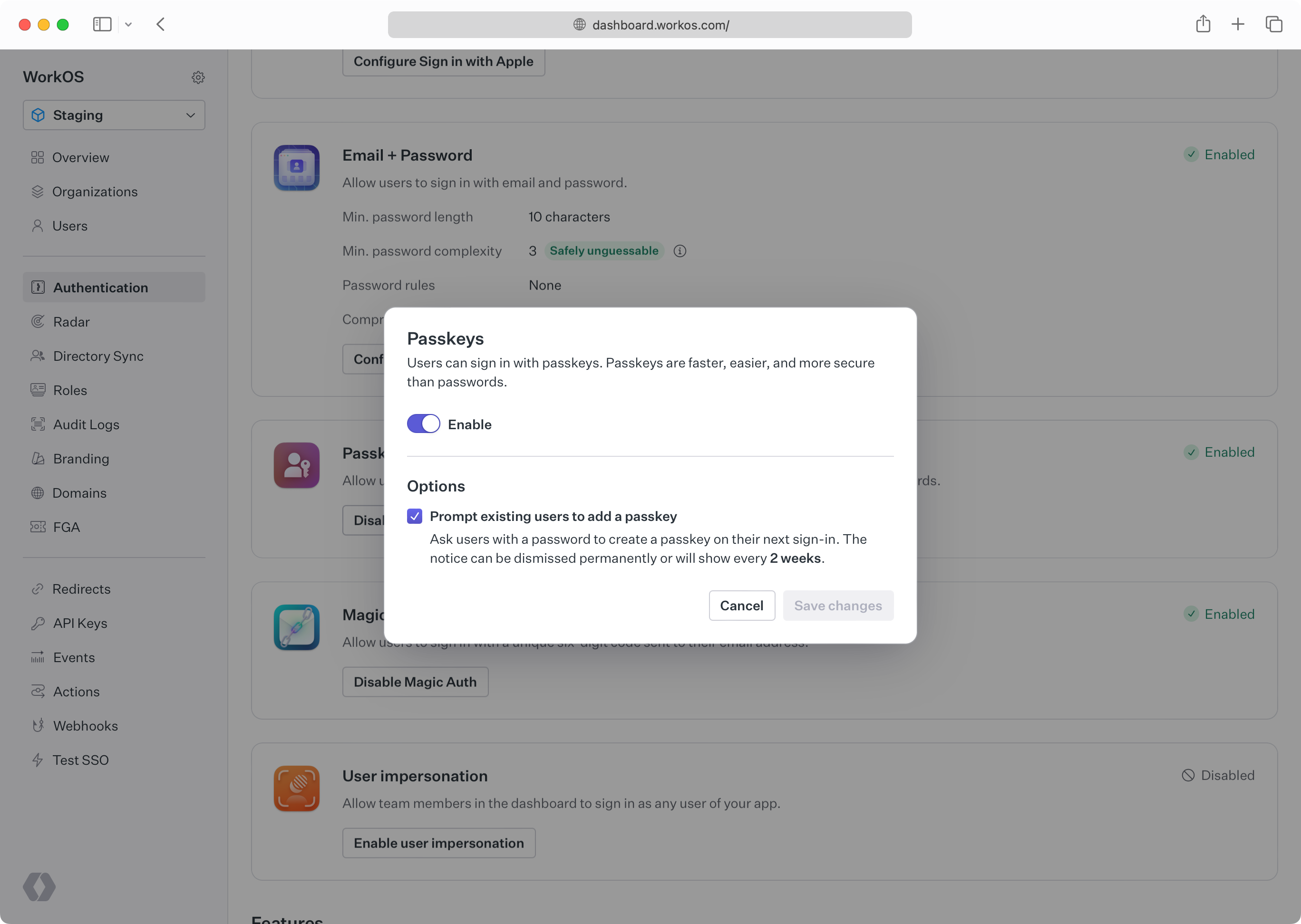
Passkeys can be enabled in the _Authentication_ section of the [WorkOS Dashboard](https://dashboard.workos.com).
|
|
19
|
+
|
|
20
|
+
|
|
21
|
+
|
|
22
|
+
> **Developers should configure an [AuthKit custom domain](/custom-domains/authkit) before enabling passkeys in production**. Passkeys are bound to the domain they were registered on. Adding the domain later would prevent the usage of passkeys that were registered on the old domain.
|
|
23
|
+
|
|
24
|
+
### Enabling progressive enrollment
|
|
25
|
+
|
|
26
|
+
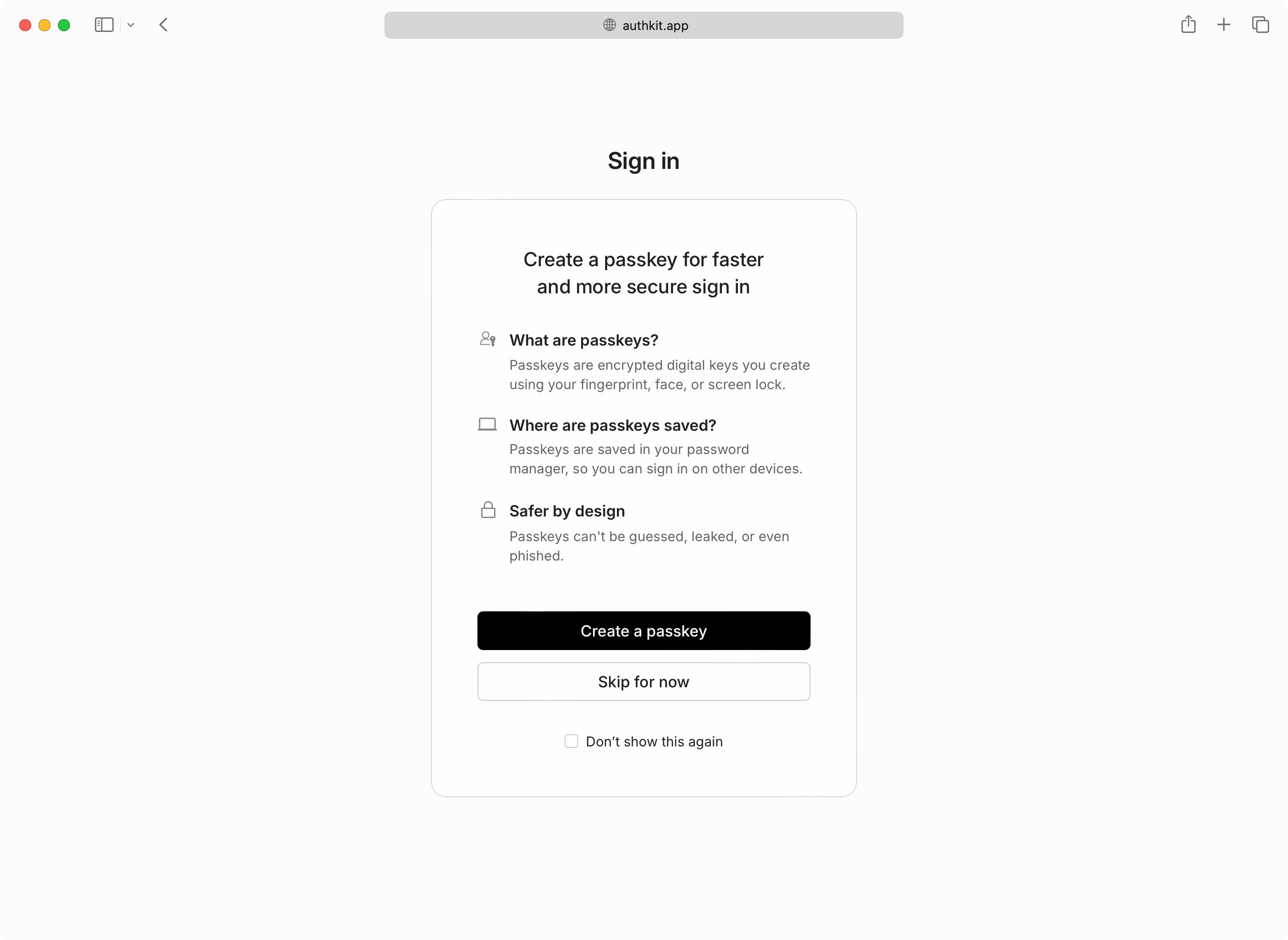
Optionally, your users who are still using password-based authentication can be prompted to create a passkey on their next sign-in. This flow, known as "progressive enrollment", is disabled by default but can be enabled alongside passkey authentication in the WorkOS Dashboard.
|
|
27
|
+
|
|
28
|
+
|
|
29
|
+
|
|
30
|
+
If users skip passkey enrollment they will be reminded every two weeks, and additionally have the option to never be prompted again if they prefer passwords.
|
|
31
|
+
|
|
32
|
+
### Multi-factor auth
|
|
33
|
+
|
|
34
|
+
If [MFA](/user-management/mfa) is also enabled and required, users who sign in with a passkey will not be prompted for a separate TOTP code. AuthKit treats passkeys as both a first and second factor by requiring user verification when a passkey is presented.
|
|
35
|
+
|
|
36
|
+
User verification in the context of a passkey means the passkey must be combined with another "authorization gesture", like the scanning of a fingerprint, or entering a separate PIN.
|
|
37
|
+
|
|
38
|
+
---
|
|
39
|
+
|
|
40
|
+
## Integrating via the API
|
|
41
|
+
|
|
42
|
+
Passkey authentication is currently only available in AuthKit. If you'd like to discuss an API-based integration, please reach out to [support](mailto:support@workos.com).
|
|
@@ -0,0 +1,127 @@
|
|
|
1
|
+
---
|
|
2
|
+
title: Radar
|
|
3
|
+
description: 'Protecting against bots, fraud and abuse.'
|
|
4
|
+
showNextPage: true
|
|
5
|
+
originalPath: .tmp-workos-clone/packages/docs/content/user-management/radar.mdx
|
|
6
|
+
---
|
|
7
|
+
|
|
8
|
+
## Introduction
|
|
9
|
+
|
|
10
|
+
Radar adds automated protections on top of AuthKit by collecting signals on the behavior of users as they sign in to your app.
|
|
11
|
+
These signals feed into an engine that identifies abusive or anomalous behavior.
|
|
12
|
+
When Radar detects a suspicious authentication attempt, it can block or challenge that attempt based on the settings you configure.
|
|
13
|
+
|
|
14
|
+
Radar leverages device fingerprinting to identify which client is being used to authenticate with AuthKit.
|
|
15
|
+
This enables Radar to differentiate between legitimate and malicious users, so that automated protections won't impact your app's availability during an attack.
|
|
16
|
+
It's also a signal for suspicious behavior, such as when a device is used for multiple accounts or multiple devices are using the same account.
|
|
17
|
+
|
|
18
|
+
## Getting Started
|
|
19
|
+
|
|
20
|
+
Radar is not enabled for all AuthKit instances by default.
|
|
21
|
+
If you would like to access this feature, please reach out to [our team](mailto:support@workos.com), or for current customers, drop a note in your shared Slack channel.
|
|
22
|
+
|
|
23
|
+
## Dashboard
|
|
24
|
+
|
|
25
|
+
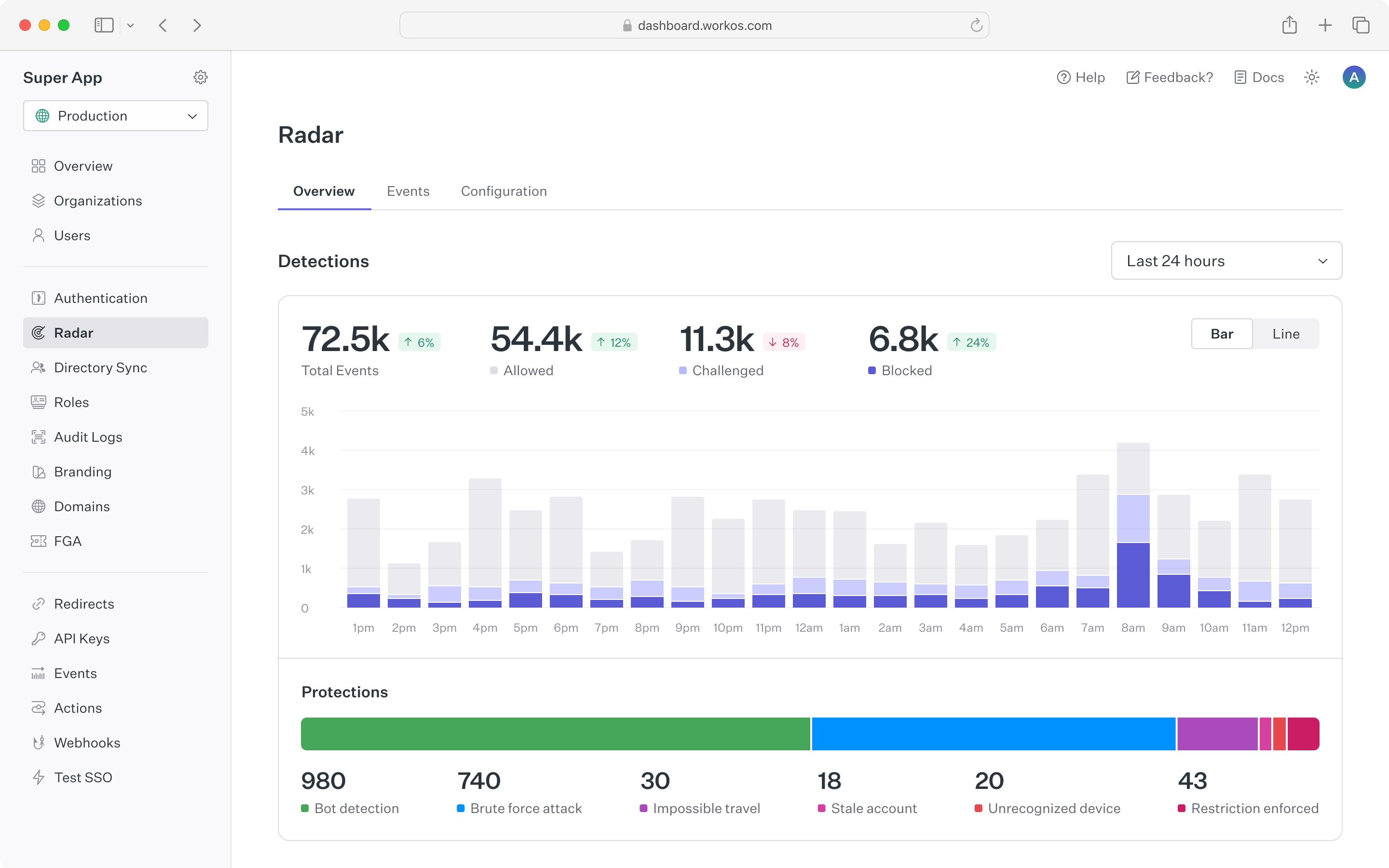
Radar's dashboard provides a summary of authentication activity in your app.
|
|
26
|
+
The top chart shows counts of suspicious events that Radar is detecting, along with automated actions that Radar took based on configuration.
|
|
27
|
+
The counts are updated in real time to make it easy to spot spikes in anomalous behavior.
|
|
28
|
+
To see historical trends, the time range for the chart can be toggled between 24 hours, 7 days and 30 days.
|
|
29
|
+
|
|
30
|
+
|
|
31
|
+
|
|
32
|
+
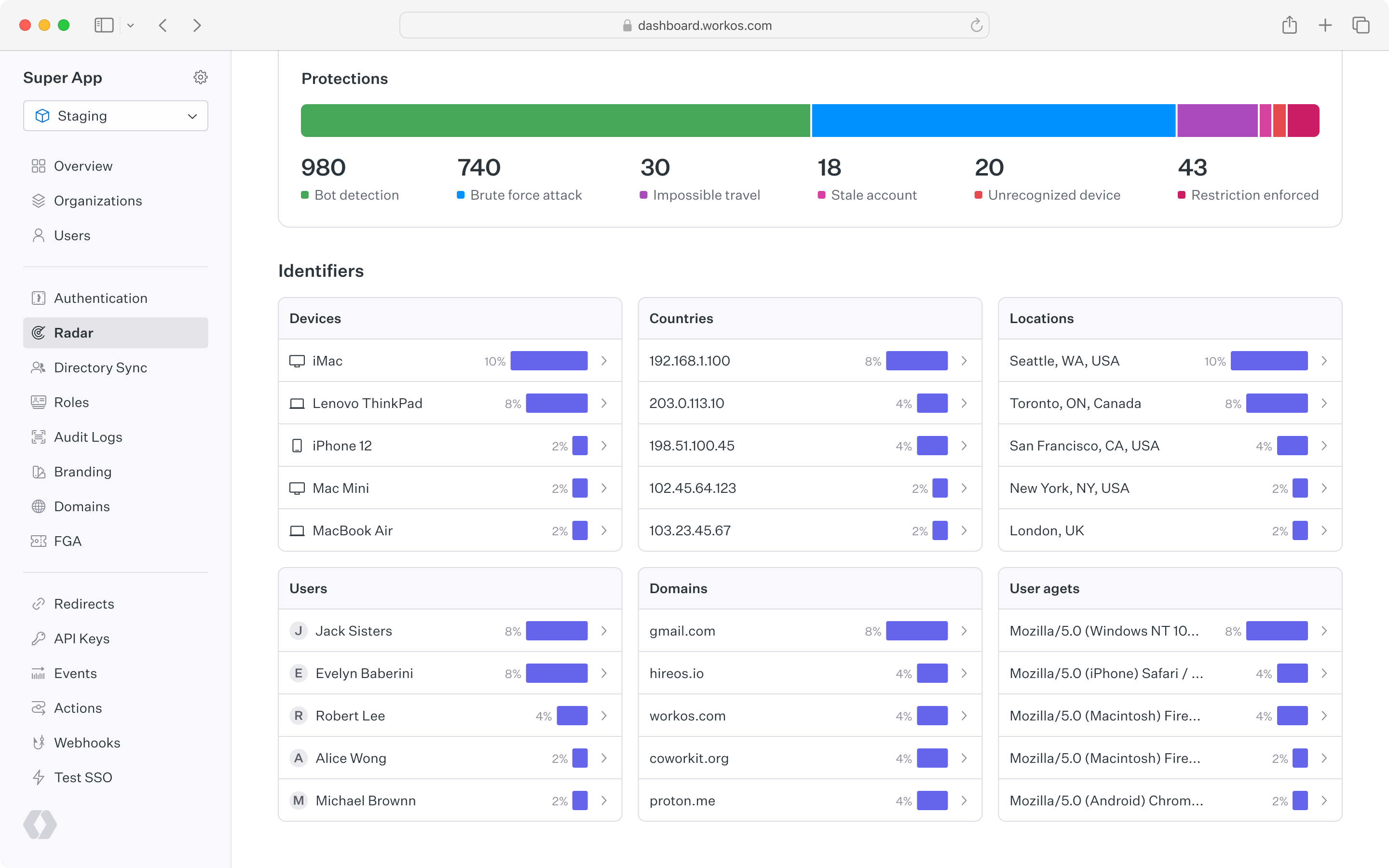
Below the top chart is a set of cards that show Radar detection activity for different user identifiers.
|
|
33
|
+
This is helpful to understand which types of devices, locations, users, etc. have been detected most often by Radar.
|
|
34
|
+
Each card is linked to the events page to drill into a list of individual event activity.
|
|
35
|
+
|
|
36
|
+
|
|
37
|
+
|
|
38
|
+
## Event list
|
|
39
|
+
|
|
40
|
+
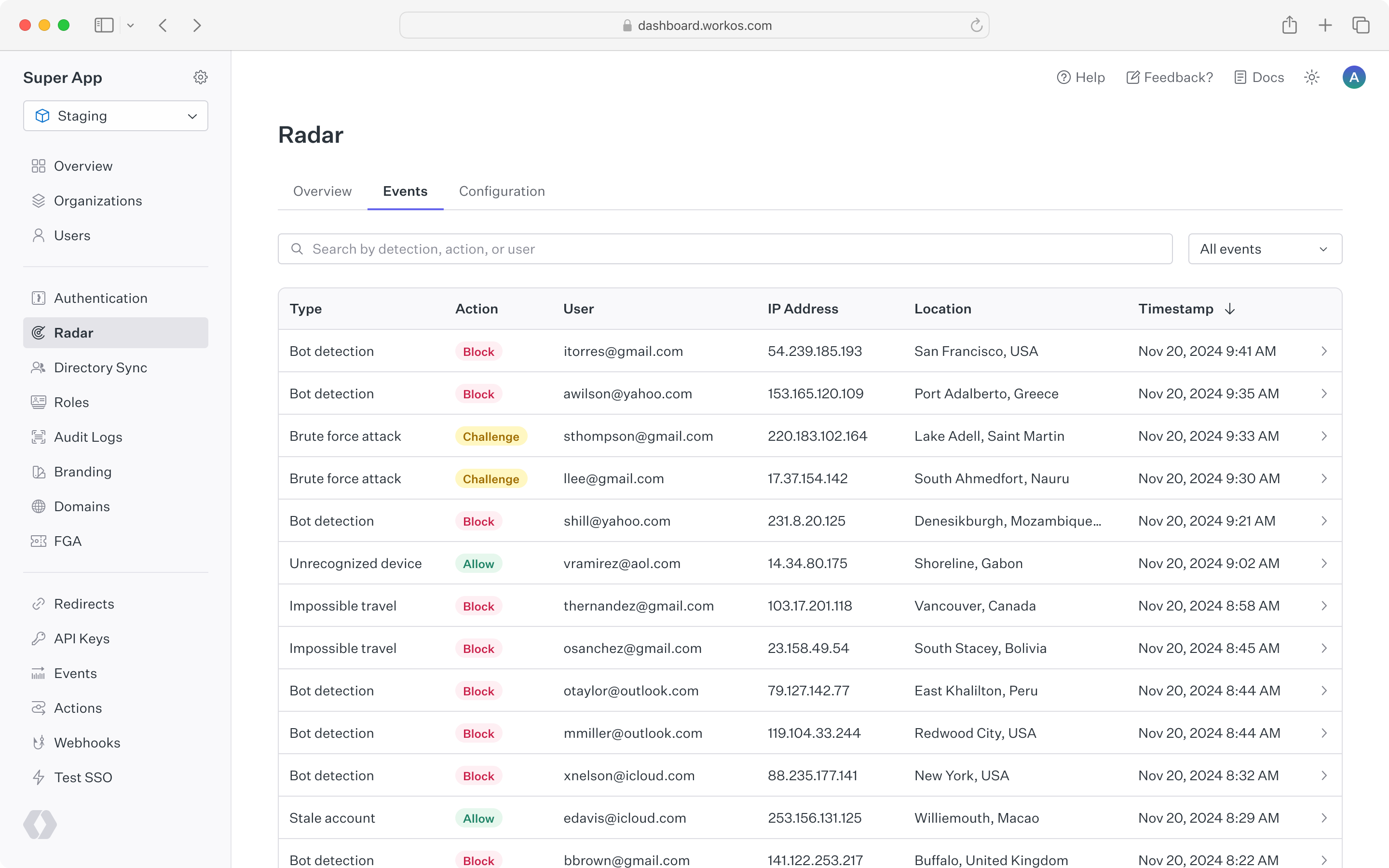
A complete list of Radar events appears under the "Events" tab.
|
|
41
|
+
This list can be filtered by detection type, action taken, or a specific user ID or email.
|
|
42
|
+
By clicking into a single event, you can view all of the metadata related to that action including device, location, user agent and IP address.
|
|
43
|
+
Reviewing events in Radar can help inform when custom restrictions may be useful, such as allowing a known legitimate user to bypass detections, or blocking an IP range that is abusing your sign-in.
|
|
44
|
+
|
|
45
|
+
|
|
46
|
+
|
|
47
|
+
## Configuration
|
|
48
|
+
|
|
49
|
+
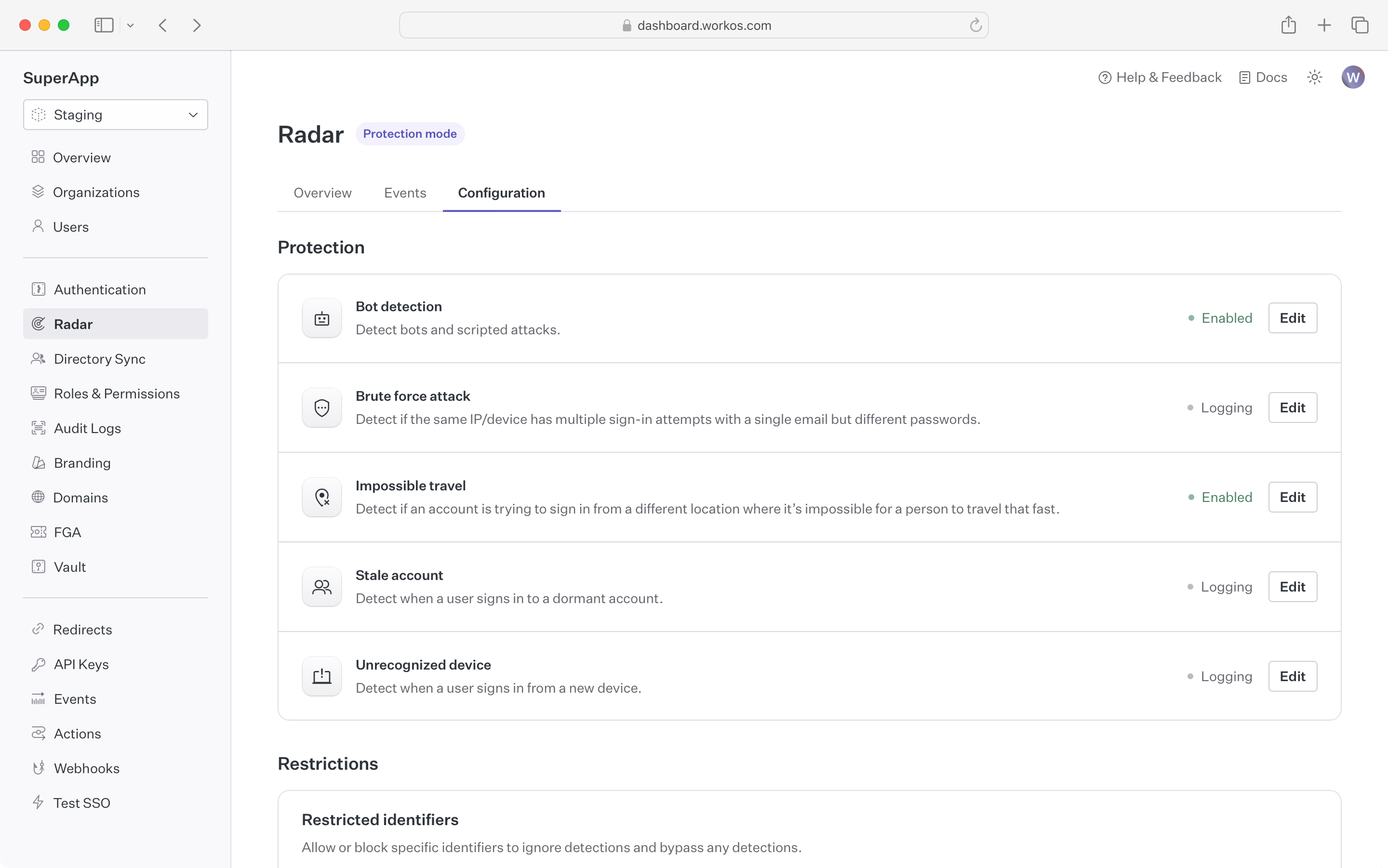
Radar gives you full control over the automated actions that are taken to suppress suspicious activity.
|
|
50
|
+
By enabling a detection, you can choose to block or challenge an authentication attempt that exhibits the detection's behavior.
|
|
51
|
+
|
|
52
|
+
**Blocking** an attempt will cause the authentication to fail, even if valid credentials are provided.
|
|
53
|
+
The user will see a message indicating their sign-in was not successful, and can reach out to an administrator for more detail.
|
|
54
|
+
|
|
55
|
+
**Challenging** an attempt will send the user an email with a one-time passcode (OTP).
|
|
56
|
+
The user is then prompted to enter that code to continue authentication.
|
|
57
|
+
Challenging suspicious authentication attempts with an OTP is effective in stopping bots that are capable of solving CAPTCHAs,
|
|
58
|
+
as well as malicious users who have stolen credentials but don't have access to the user's email account.
|
|
59
|
+
|
|
60
|
+
**Notifying** on an attempt will send an informational email to users and/or admins when Radar detects a suspicious behavior.
|
|
61
|
+
This is helpful to proactively make individuals aware that an attack might be taking place, or their account was compromised.
|
|
62
|
+
|
|
63
|
+
|
|
64
|
+
|
|
65
|
+
Out of the box, Radar ships with the following detections:
|
|
66
|
+
|
|
67
|
+
### Bot detection
|
|
68
|
+
|
|
69
|
+
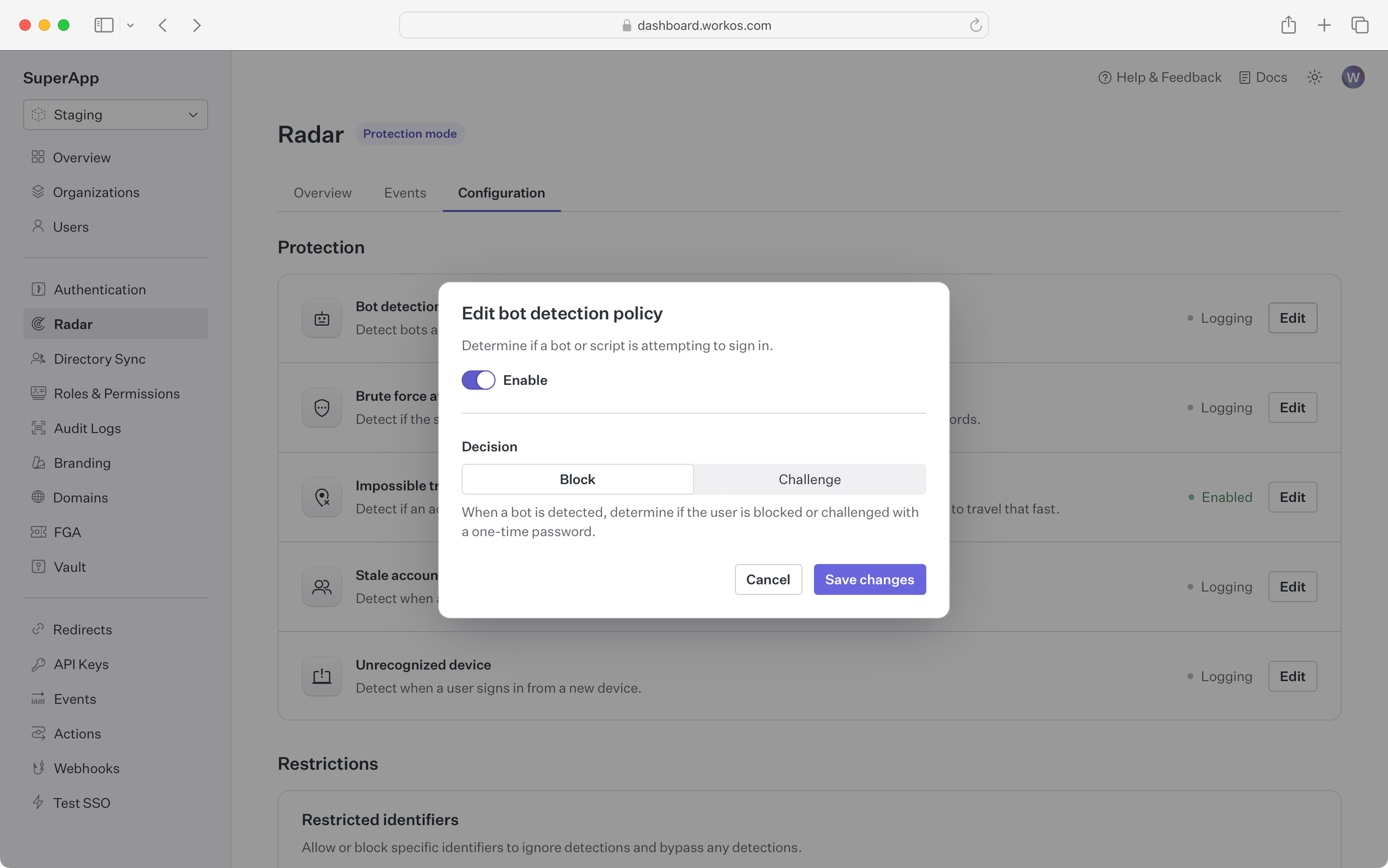
Block or challenge sign-in attempts that are initiated by a bot or program.
|
|
70
|
+
|
|
71
|
+
In addition to detecting that the client is a bot, Radar can differentiate between different types of bots
|
|
72
|
+
such as AI agents or search engine crawlers, giving developers the ability to control which kinds of bots are restricted.
|
|
73
|
+
|
|
74
|
+
|
|
75
|
+
|
|
76
|
+
### Brute force
|
|
77
|
+
|
|
78
|
+
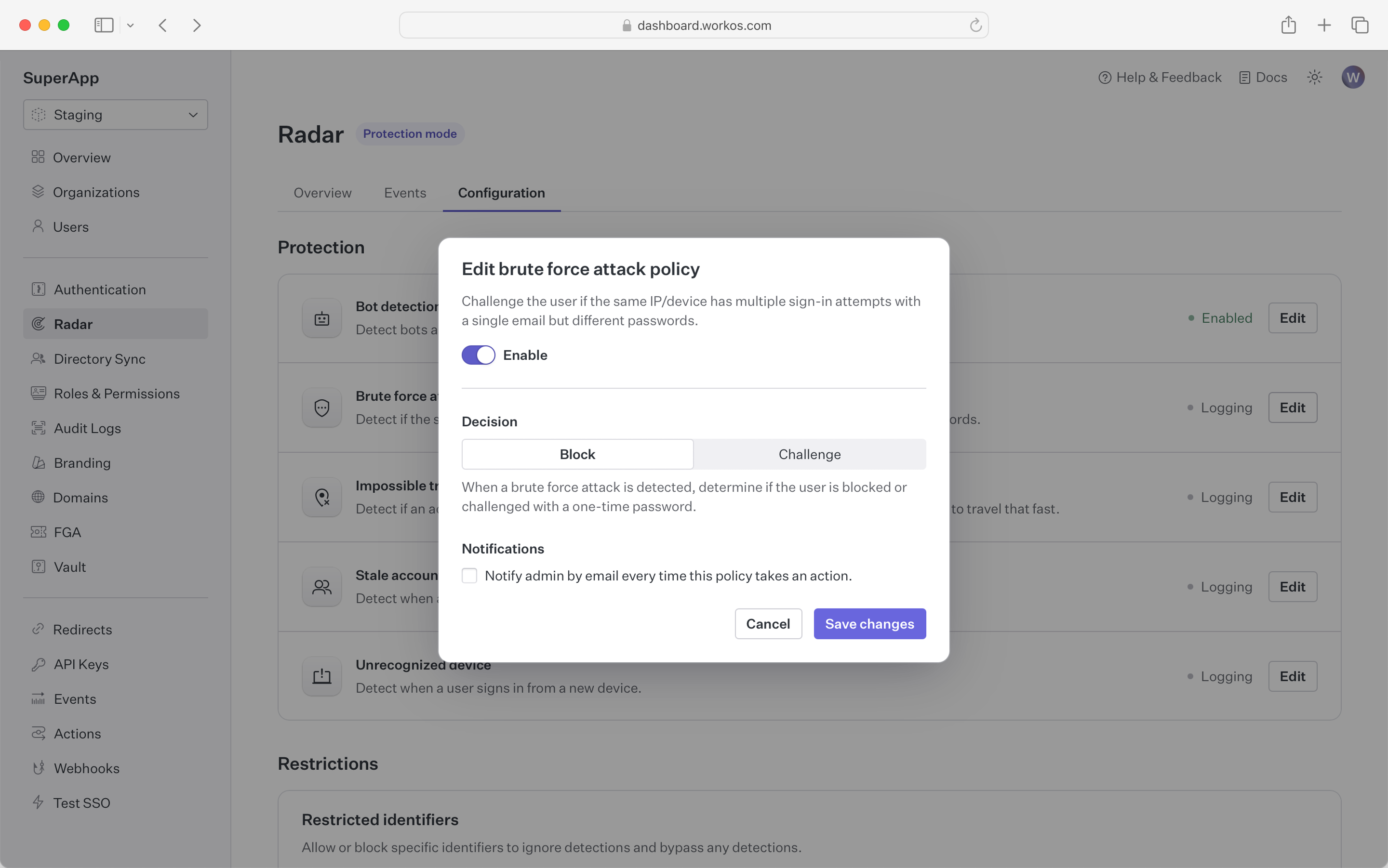
Block or challenge sign-in attempts that are part of an attempt to break into accounts using brute force.
|
|
79
|
+
|
|
80
|
+
These are attacks where a bad actor is trying many sign-ins over a short period of time.
|
|
81
|
+
Radar leverages the device fingerprint to identify and isolate bad actors from legitimate traffic, ensuring that your users
|
|
82
|
+
can use your app even when it’s under attack.
|
|
83
|
+
|
|
84
|
+
|
|
85
|
+
|
|
86
|
+
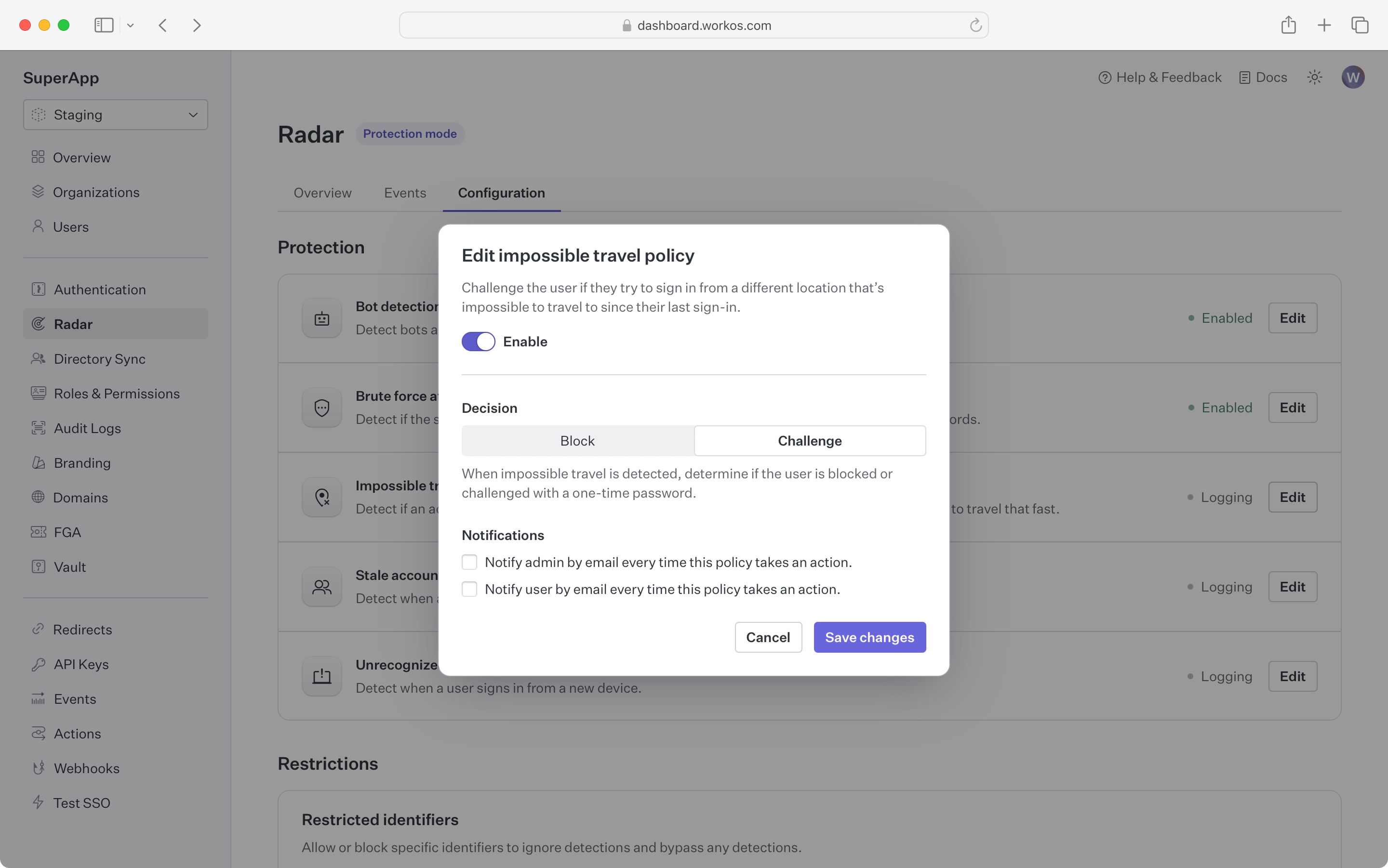
### Impossible travel
|
|
87
|
+
|
|
88
|
+
Block or challenge sign-in attempts that occur from different geolocations in short succession.
|
|
89
|
+
|
|
90
|
+
By tracking device geolocation, Radar can detect when subsequent authentication requests are spread around the globe.
|
|
91
|
+
Radar will detect if these attempts happen over a short period where it's not possible for the person to physically travel that distance
|
|
92
|
+
|
|
93
|
+
|
|
94
|
+
|
|
95
|
+
### Stale accounts
|
|
96
|
+
|
|
97
|
+
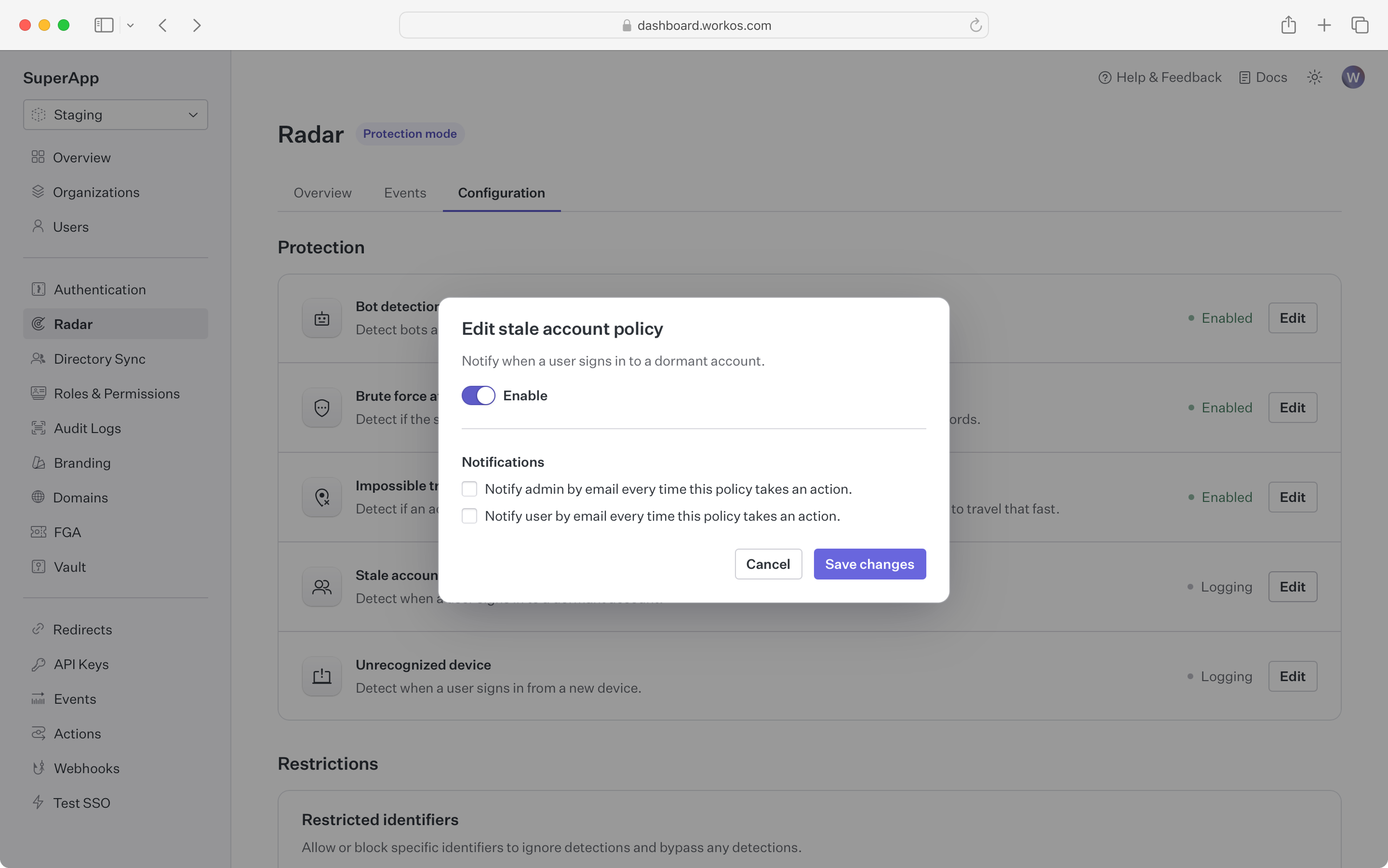
Get notified when an account that has been dormant without use becomes active
|
|
98
|
+
|
|
99
|
+
In contexts such as financial services, a dormant account becoming active might be an indication that the account
|
|
100
|
+
has been taken over from the user and is being used for fraud.
|
|
101
|
+
For these kinds of apps, Radar can notify the user and administrator if an account that hasn’t been used in a while has a sign-in attempt.
|
|
102
|
+
Accounts are considered stale if there have been no successful sign-in in the past 60 days.
|
|
103
|
+
|
|
104
|
+
|
|
105
|
+
|
|
106
|
+
### Unrecognized device
|
|
107
|
+
|
|
108
|
+
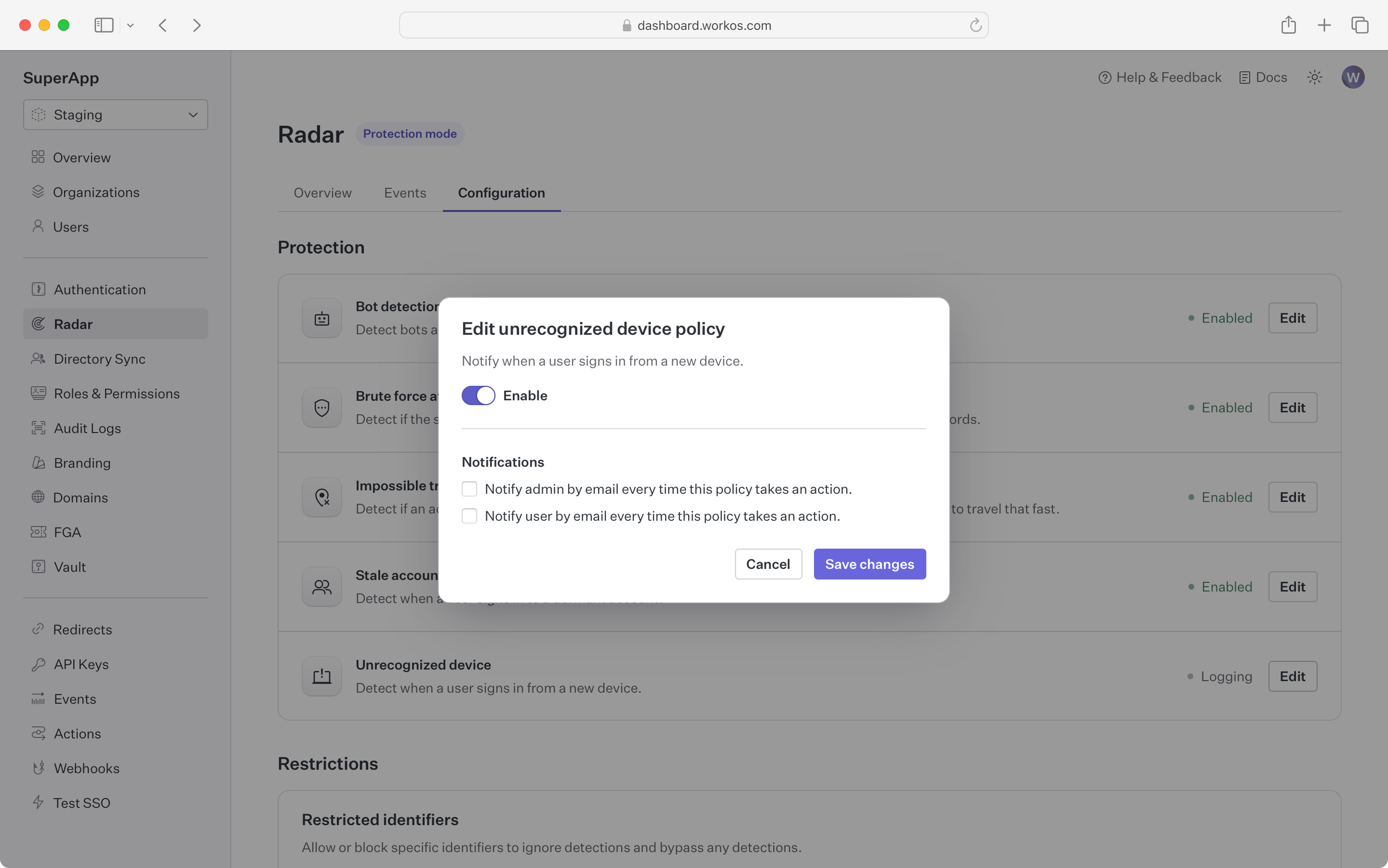
Get notified when a device that has never been used before signs in to an account
|
|
109
|
+
|
|
110
|
+
Using the device fingerprint, Radar checks if the device being used has been part of a successful sign-in before.
|
|
111
|
+
If it hasn’t, both the user and an administrator can be notified by email.
|
|
112
|
+
|
|
113
|
+
|
|
114
|
+
|
|
115
|
+
### Custom restrictions
|
|
116
|
+
|
|
117
|
+
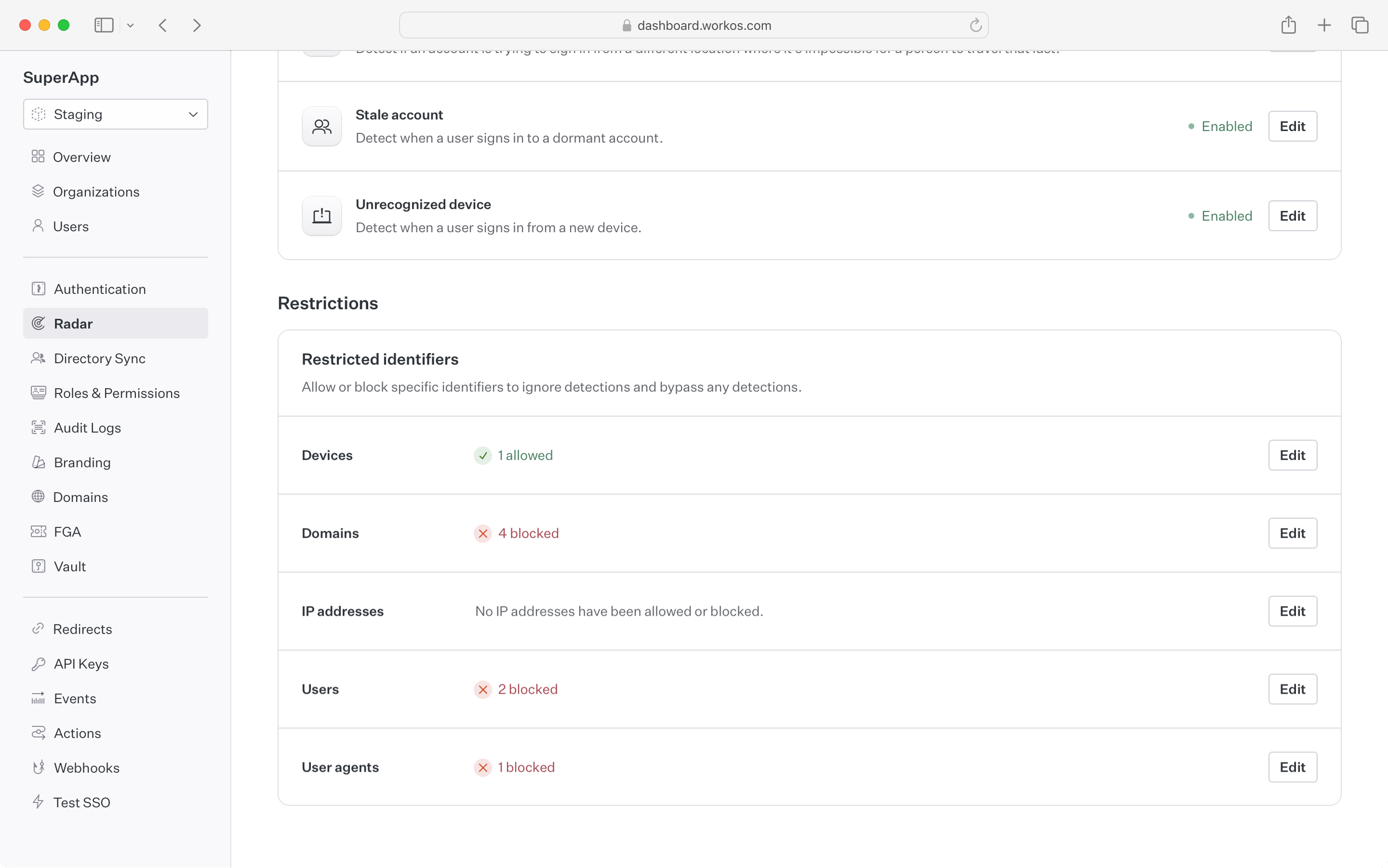
Specific user identifiers can be configured to always allow or deny an authentication attempt.
|
|
118
|
+
Examples of using a custom restrictions:
|
|
119
|
+
|
|
120
|
+
- Restricting sign-ins to a corporate IP range
|
|
121
|
+
- Allow a script with a specific user agent to bypass bot detection
|
|
122
|
+
- Banning specific devices (i.e. iPods) from using your app
|
|
123
|
+
- Allowing certain users to bypass detections that are false positives
|
|
124
|
+
|
|
125
|
+
> Note: the allow list takes preference -- if an user matches an identifier that is in the allow list, they will bypass all other Radar rules.
|
|
126
|
+
|
|
127
|
+
|
|
@@ -0,0 +1,155 @@
|
|
|
1
|
+
---
|
|
2
|
+
title: Roles and Permissions
|
|
3
|
+
description: Manage and assign roles and permissions to users.
|
|
4
|
+
showNextPage: true
|
|
5
|
+
originalPath: >-
|
|
6
|
+
.tmp-workos-clone/packages/docs/content/user-management/roles-and-permissions.mdx
|
|
7
|
+
---
|
|
8
|
+
|
|
9
|
+
## Introduction
|
|
10
|
+
|
|
11
|
+
A role represents a logical grouping of permissions, defining access control levels for users within your application. Roles are identified by unique, immutable slugs and are assigned to users through [organization memberships](/user-management/users-organizations/organizations).
|
|
12
|
+
|
|
13
|
+
Permissions grant users privileged access to resources and actions in your application and are referenced in your code by unique, immutable slugs. A permission can be assigned to any number of roles.
|
|
14
|
+
|
|
15
|
+
### Standalone roles
|
|
16
|
+
|
|
17
|
+
Roles alone can be sufficient when your application only requires very coarse-grained access control. This is suitable if users only need to be separated into broad categories and there is minimal overlap between roles. Simple roles can be easier to manage, but are less flexible for complex access control scenarios.
|
|
18
|
+
|
|
19
|
+
### Utilizing permissions with roles
|
|
20
|
+
|
|
21
|
+
Permissions allow for more detailed and flexible management of access. They are particularly useful when:
|
|
22
|
+
|
|
23
|
+
- You anticipate the need to frequently modify access rights or introduce new roles.
|
|
24
|
+
- There is significant overlap in access rights between different roles, but with some variations.
|
|
25
|
+
- You want to minimize code changes when modifying access rights. By abstracting access control checks to permissions, you can add or modify roles and their access rights without changing the application code.
|
|
26
|
+
|
|
27
|
+
## Configure roles and permissions
|
|
28
|
+
|
|
29
|
+
Roles and permissions are managed in their own section of the [WorkOS Dashboard](https://dashboard.workos.com/).
|
|
30
|
+
|
|
31
|
+
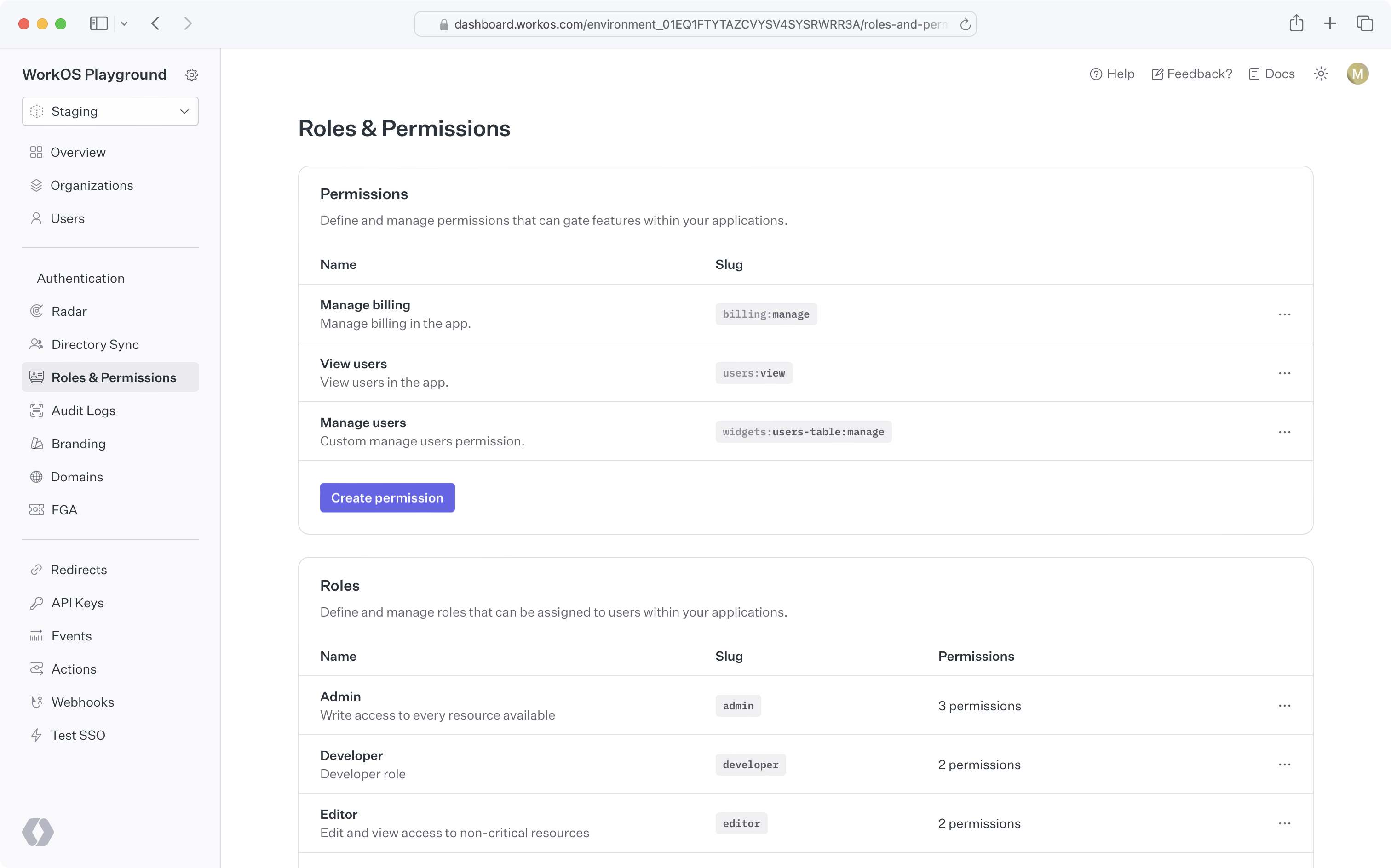
|
|
32
|
+
|
|
33
|
+
### Create permissions
|
|
34
|
+
|
|
35
|
+
When configuring permissions, we recommend:
|
|
36
|
+
|
|
37
|
+
- Defining a common naming scheme to use across all permissions for your application. Consider separating the resource and action with a delimiter, such as `users:view`. The following delimiters are permitted: `-.:_*`.
|
|
38
|
+
- Keep permission slugs clear and concise. When assigned to roles, these slugs will included as part of session cookies in the [session JWT claims](/user-management/sessions/integrating-sessions/access-token), which is limited to a maximum size of 4KB in many modern web browsers.
|
|
39
|
+
|
|
40
|
+
### Assign permissions to roles
|
|
41
|
+
|
|
42
|
+
Permissions can be assigned when creating a new role or when editing an existing role.
|
|
43
|
+
|
|
44
|
+
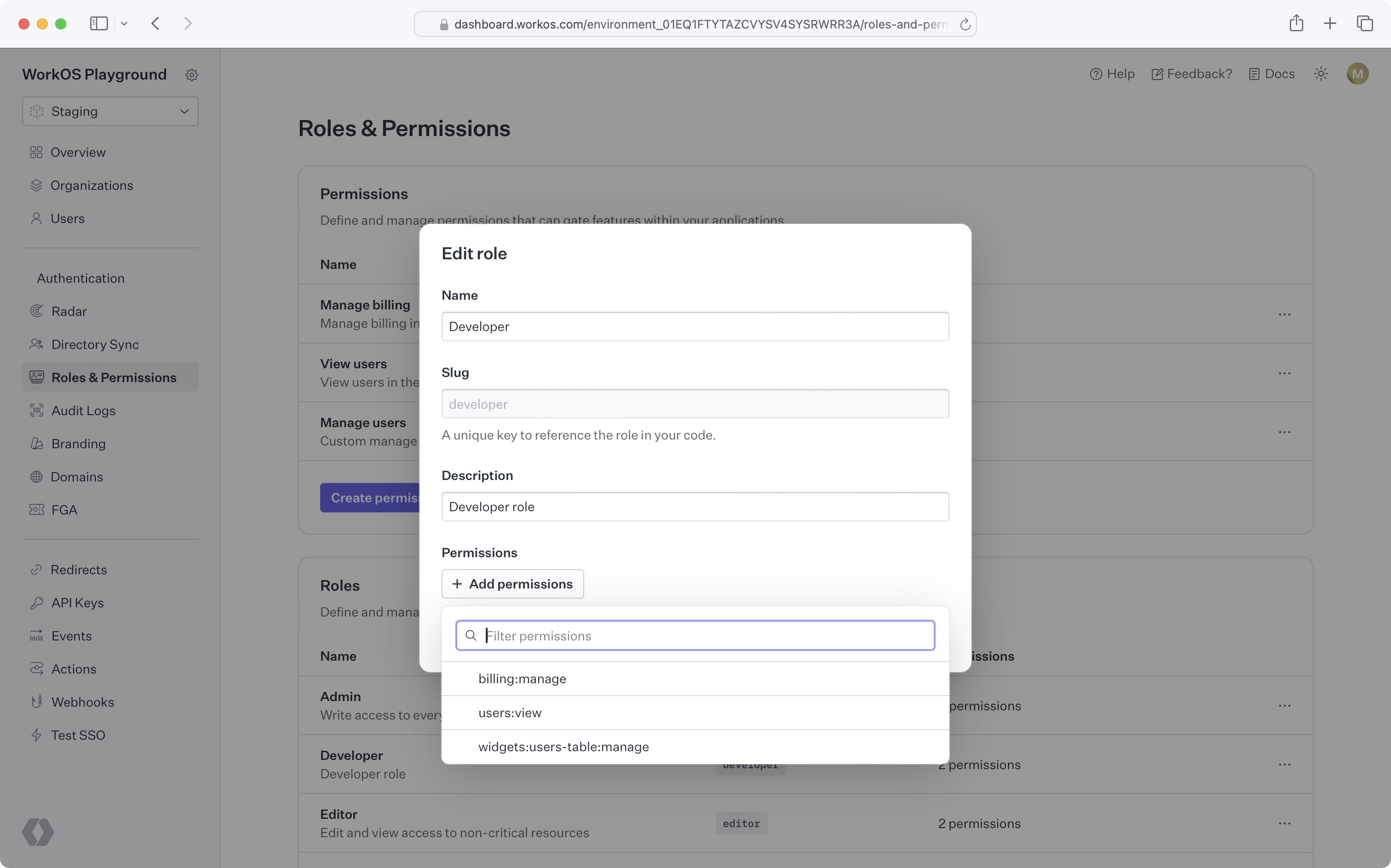
|
|
45
|
+
|
|
46
|
+
### Default role
|
|
47
|
+
|
|
48
|
+
Role configuration occurs at the environment level. Each environment is seeded with a default `member` role, which is automatically assigned to every organization member. This default role cannot be deleted, but any role can be set as the default.
|
|
49
|
+
|
|
50
|
+
If you need to set default roles or other role configurations at the organization level, refer to the [Organization roles](/user-management/roles-and-permissions/organization-roles) section.
|
|
51
|
+
|
|
52
|
+
### Assign roles
|
|
53
|
+
|
|
54
|
+
Organization memberships require a role. Every user with an organization membership is automatically assigned the default role when added to an organization. This role can be edited.
|
|
55
|
+
|
|
56
|
+
<DirectorySyncDiagram.Roles />
|
|
57
|
+
|
|
58
|
+
You can retrieve the role slug from the user's [organization membership object](/reference/user-management/organization-membership) to determine their access level and capabilities within your application.
|
|
59
|
+
|
|
60
|
+
### Delete roles
|
|
61
|
+
|
|
62
|
+
When roles are deleted, all organization memberships are reassigned to the default role. Role deletion happens asynchronously, so there may be a slight delay between deleting a role and updating all organization memberships.
|
|
63
|
+
|
|
64
|
+
> To migrate from one default role to another, set the new default role and delete the old one. All users will then be reassigned to the new default role.
|
|
65
|
+
|
|
66
|
+
### Priority order
|
|
67
|
+
|
|
68
|
+
If a user is provisioned from multiple sources with conflicting roles, the role with the highest priority will be assigned.
|
|
69
|
+
|
|
70
|
+
### Role Assignment in Admin Portal
|
|
71
|
+
|
|
72
|
+
Organization admins can assign roles to identity provider groups in the [Admin Portal](/admin-portal) during SSO or directory setup.
|
|
73
|
+
|
|
74
|
+
From the _Roles and Permissions_ section in the WorkOS Dashboard, role assignment is an environment-level setting. However, it can also be configured per organization via the _Roles_ tab on that organization's page. If enabled, all Admin Portal sessions for the relevant SSO connection or directory will support group role assignment.
|
|
75
|
+
|
|
76
|
+
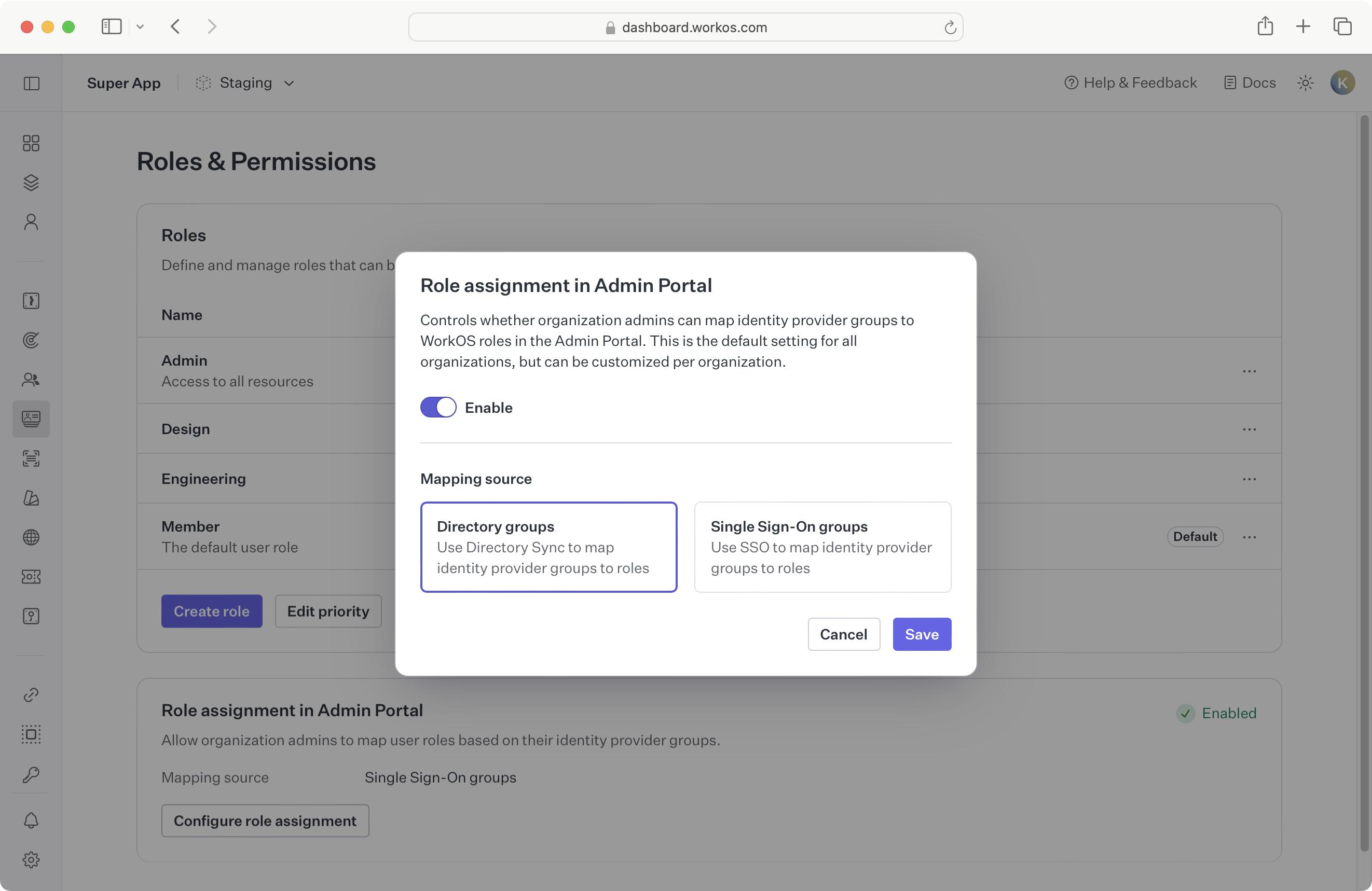
|
|
77
|
+
|
|
78
|
+
Whether to enable role assignment for SSO or directory groups depends on your application’s setup. When [provisioning users with Directory Sync](/user-management/directory-provisioning), we recommend enabling directory group role assignment due to [limitations of SSO role assignment](/sso/identity-provider-role-assignment/considerations/drawbacks).
|
|
79
|
+
|
|
80
|
+
If you’re not yet using directory provisioning, you can enable SSO group role assignment as the environment default.
|
|
81
|
+
|
|
82
|
+
Because this setting is configurable per organization, choose a sensible default based on your customers' typical setup:
|
|
83
|
+
|
|
84
|
+
- **A. All organizations use SSO:**
|
|
85
|
+
If no organizations are using Directory Sync, enable SSO group role assignment in Admin Portal at the environment level.
|
|
86
|
+
|
|
87
|
+
- **B. Some organizations use Directory Sync:**
|
|
88
|
+
Enable directory group role assignment in Admin Portal for those specific organizations.
|
|
89
|
+
|
|
90
|
+
- **C. Most organizations use Directory Sync:**
|
|
91
|
+
Enable directory group role assignment in Admin Portal at the environment level, and override the setting for organizations that only use SSO.
|
|
92
|
+
|
|
93
|
+
When switching from one role assignment source to another, refer to the [section below](/user-management/roles-and-permissions/role-assignment/migrating-role-assignment-source).
|
|
94
|
+
|
|
95
|
+
## Role-aware sessions
|
|
96
|
+
|
|
97
|
+
When a user signs into your app, a [user session](/user-management/sessions) is initiated. The authentication response includes an access token, a JSON Web Token (JWT), with the `role` claim indicating the user organization membership's role for that session.
|
|
98
|
+
|
|
99
|
+
## Role assignment
|
|
100
|
+
|
|
101
|
+
You can map identity provider groups to roles to automatically assign roles to users. AuthKit supports two methods for role assignment:
|
|
102
|
+
|
|
103
|
+
### SCIM
|
|
104
|
+
|
|
105
|
+
Roles can be assigned via SCIM through [directory group role assignment](/directory-sync/identity-provider-role-assignment/directory-group-role-assignment). Admins can map group memberships to roles in the Admin Portal during SCIM or Google Workspace directory setup. These mappings are used to assign roles to organization memberships via [Directory Provisioning](/user-management/directory-provisioning).
|
|
106
|
+
|
|
107
|
+
### SSO
|
|
108
|
+
|
|
109
|
+
Roles can also be assigned via [SSO group role assignment](/sso/identity-provider-role-assignment/sso-group-role-assignment). Groups returned in the SSO profile can be mapped to roles in the WorkOS Dashboard. If an AuthKit user authenticates via SSO and belongs to a mapped group, the corresponding role will be set on the [organization membership](/reference/user-management/organization-membership) and reflected in the [user’s session](/user-management/sessions/integrating-sessions/access-token).
|
|
110
|
+
|
|
111
|
+
> Ensure [SSO JIT provisioning](/user-management/jit-provisioning/sso-jit-provisioning) is enabled for each organization using SSO role assignment.
|
|
112
|
+
|
|
113
|
+
### Migrating role assignment source
|
|
114
|
+
|
|
115
|
+
It’s recommended to use only one role assignment source per organization. If your organization currently uses SSO group role assignment and you'd like to switch to [directory group role assignment](/directory-sync/identity-provider-role-assignment/directory-group-role-assignment), consider the following paths:
|
|
116
|
+
|
|
117
|
+
- **A. Directory is not yet configured:**
|
|
118
|
+
[Enable directory group role assignment](/user-management/roles-and-permissions/configure-roles-and-permissions/role-assignment-in-admin-portal) for this organization via the **Roles** tab under an organization in the WorkOS Dashboard. The organization admin will be prompted to set up directory group role assignments in the Admin Portal.
|
|
119
|
+
|
|
120
|
+
- **B. Directory is already configured:**
|
|
121
|
+
Manually assign roles to directory groups in the WorkOS Dashboard, or regenerate an Admin Portal link so the organization admin can set the role mappings there.
|
|
122
|
+
|
|
123
|
+
Directory group role assignments take precedence and will override any SSO group role assignments on the organization membership. Once directory group roles are properly set up and reflected, you can delete the SSO group mappings.
|
|
124
|
+
|
|
125
|
+
## Organization roles
|
|
126
|
+
|
|
127
|
+
Organization roles are custom roles scoped to a particular organization. They are managed via the "Roles" tab under an organization in the WorkOS Dashboard.
|
|
128
|
+
|
|
129
|
+
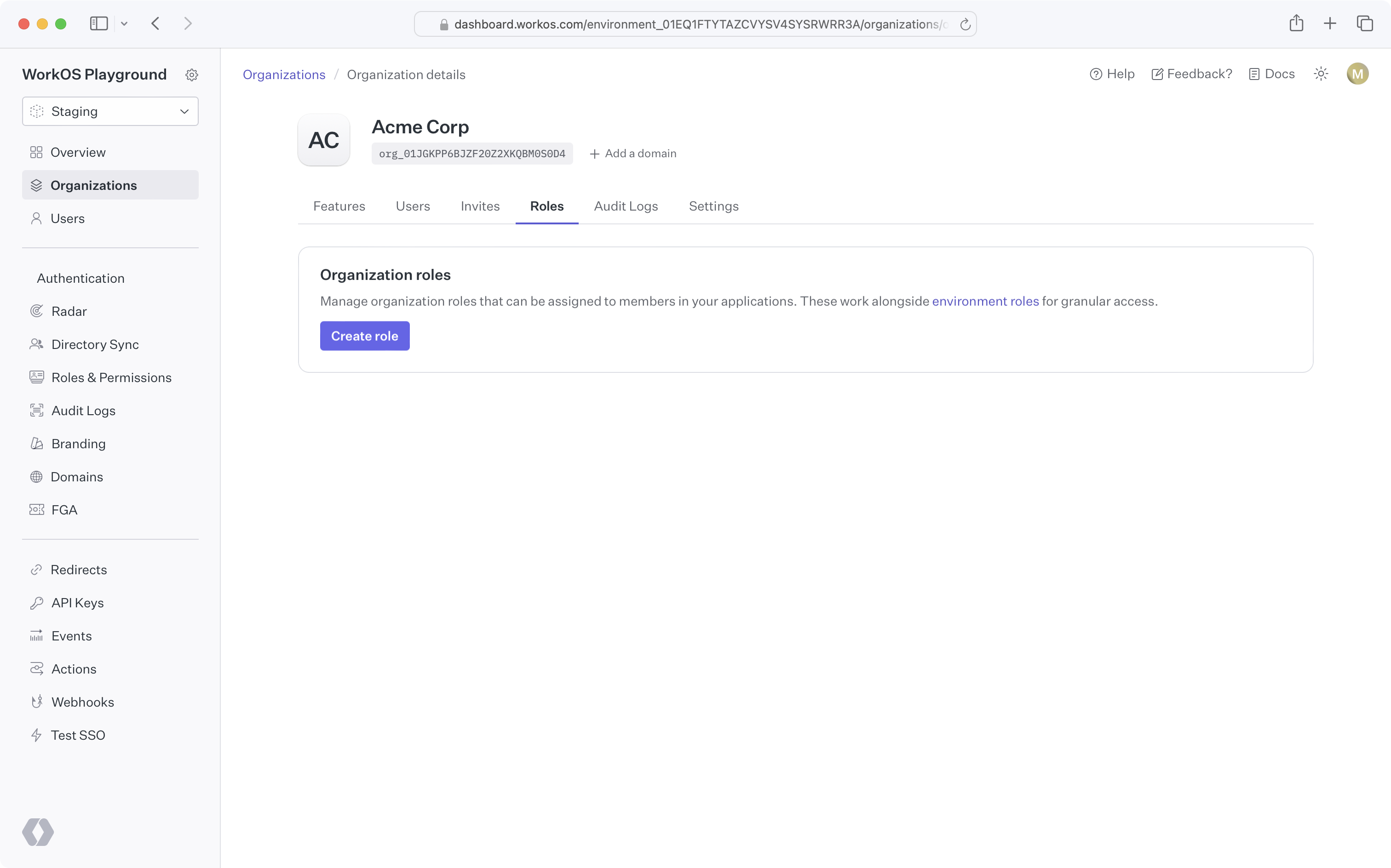
|
|
130
|
+
|
|
131
|
+
### Why might I use organization roles?
|
|
132
|
+
|
|
133
|
+
In some cases, an application's fixed set of roles may not meet the needs of certain organizations. For example, an organization may require a lesser privileged set of permissions for their members. Organization roles allow you to create custom roles, with the organization's desired set of permissions, without affecting access control for other organizations.
|
|
134
|
+
|
|
135
|
+
### Creating organization roles
|
|
136
|
+
|
|
137
|
+
By default, organizations have no custom organization roles and simply inherit the environment-level roles. You can create an organization role by clicking the "Create role" button on the organization's "Roles" tab. All organization role slugs are automatically prefixed with `org`.
|
|
138
|
+
|
|
139
|
+
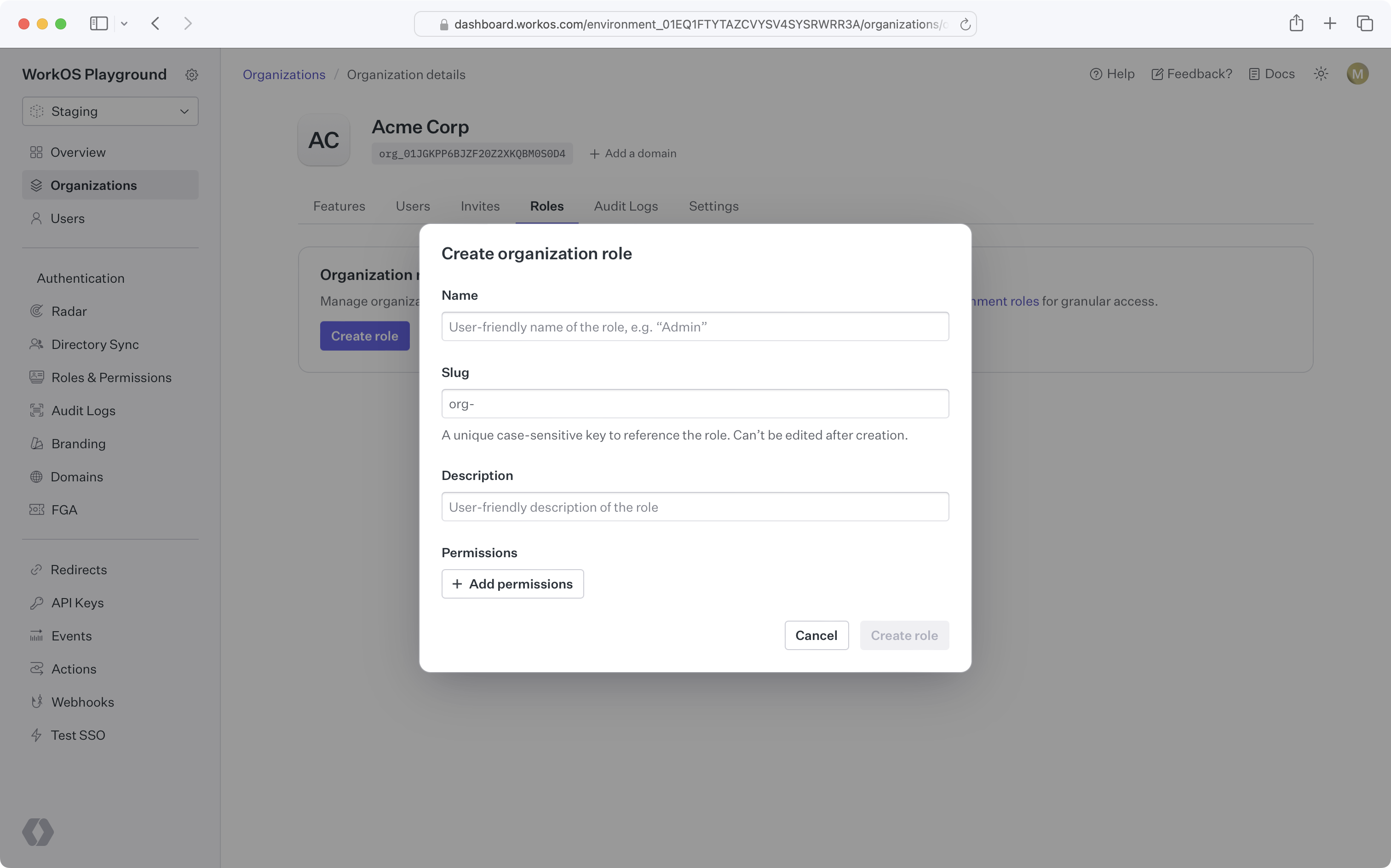
|
|
140
|
+
|
|
141
|
+
### Organization role configuration
|
|
142
|
+
|
|
143
|
+
Once you create the first role for an organization, that organization will have its own [default role](/user-management/roles-and-permissions/configure-roles-and-permissions/default-role) and [priority order](/user-management/roles-and-permissions/configure-roles-and-permissions/priority-order), independent from the environment.
|
|
144
|
+
|
|
145
|
+
New roles added to the environment will be available to the organization and placed at the bottom of the organization's role priority order.
|
|
146
|
+
|
|
147
|
+
### Using organization roles
|
|
148
|
+
|
|
149
|
+
Like environment-level roles, organization roles can be used in [role assignment](/user-management/roles-and-permissions/role-assignment), [sessions](/user-management/roles-and-permissions/role-aware-sessions), and the [organization membership API](/reference/user-management/organization-membership). No additional action is required to enable this behavior after creating organization roles.
|
|
150
|
+
|
|
151
|
+
### Deleting an environment role
|
|
152
|
+
|
|
153
|
+
When attempting to delete an environment role that's the default role for one or more organizations, you'll be prompted to select a new default role for all affected organizations. Organization members previously assigned the deleted role will be assigned the new organization default role.
|
|
154
|
+
|
|
155
|
+
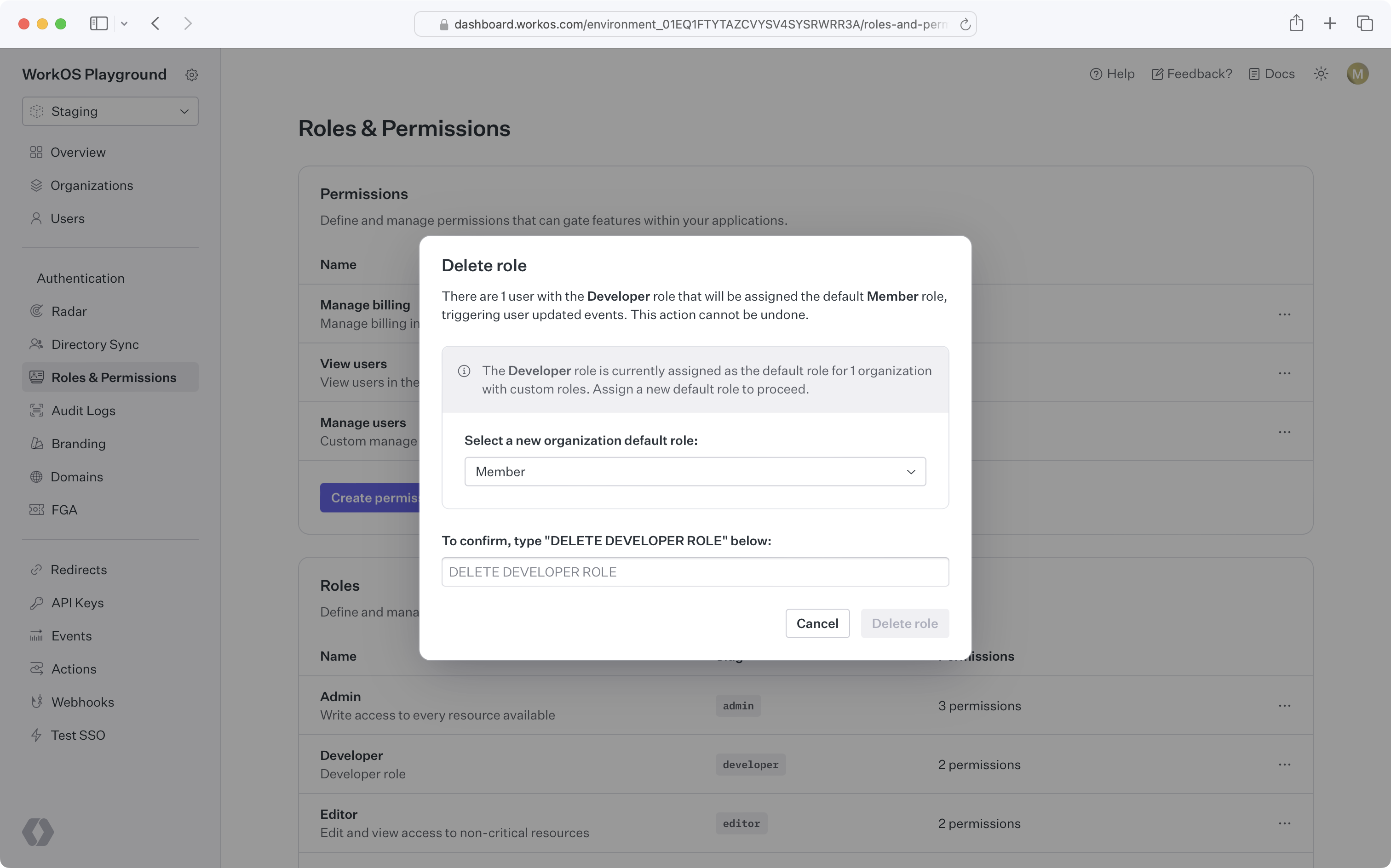
|