@workos/mcp-docs-server 0.1.0
This diff represents the content of publicly available package versions that have been released to one of the supported registries. The information contained in this diff is provided for informational purposes only and reflects changes between package versions as they appear in their respective public registries.
- package/.docs/organized/changelogs/workos-platform.json +277 -0
- package/.docs/organized/docs/admin-portal/_navigation.mdx +16 -0
- package/.docs/organized/docs/admin-portal/custom-branding.mdx +111 -0
- package/.docs/organized/docs/admin-portal/example-apps.mdx +46 -0
- package/.docs/organized/docs/admin-portal/index.mdx +240 -0
- package/.docs/organized/docs/audit-logs/_navigation.mdx +22 -0
- package/.docs/organized/docs/audit-logs/admin-portal.mdx +20 -0
- package/.docs/organized/docs/audit-logs/editing-events.mdx +27 -0
- package/.docs/organized/docs/audit-logs/exporting-events.mdx +29 -0
- package/.docs/organized/docs/audit-logs/index.mdx +110 -0
- package/.docs/organized/docs/audit-logs/log-streams.mdx +56 -0
- package/.docs/organized/docs/audit-logs/metadata-schema.mdx +21 -0
- package/.docs/organized/docs/custom-domains/_navigation.mdx +16 -0
- package/.docs/organized/docs/custom-domains/admin-portal.mdx +38 -0
- package/.docs/organized/docs/custom-domains/auth-api.mdx +59 -0
- package/.docs/organized/docs/custom-domains/authkit.mdx +36 -0
- package/.docs/organized/docs/custom-domains/email.mdx +41 -0
- package/.docs/organized/docs/custom-domains/index.mdx +19 -0
- package/.docs/organized/docs/dashboard.mdx +244 -0
- package/.docs/organized/docs/demo/_navigation.mdx +26 -0
- package/.docs/organized/docs/demo/accordion.mdx +34 -0
- package/.docs/organized/docs/demo/checklist.mdx +33 -0
- package/.docs/organized/docs/demo/code-block.mdx +185 -0
- package/.docs/organized/docs/demo/definition-list.mdx +35 -0
- package/.docs/organized/docs/demo/index.mdx +7 -0
- package/.docs/organized/docs/demo/punctuation.mdx +37 -0
- package/.docs/organized/docs/demo/replacements.mdx +26 -0
- package/.docs/organized/docs/demo/table.mdx +26 -0
- package/.docs/organized/docs/demo/tabs.mdx +17 -0
- package/.docs/organized/docs/directory-sync/_navigation.mdx +28 -0
- package/.docs/organized/docs/directory-sync/attributes.mdx +209 -0
- package/.docs/organized/docs/directory-sync/example-apps.mdx +46 -0
- package/.docs/organized/docs/directory-sync/handle-inactive-users.mdx +52 -0
- package/.docs/organized/docs/directory-sync/identity-provider-role-assignment.mdx +134 -0
- package/.docs/organized/docs/directory-sync/index.mdx +107 -0
- package/.docs/organized/docs/directory-sync/quick-start.mdx +129 -0
- package/.docs/organized/docs/directory-sync/understanding-events.mdx +209 -0
- package/.docs/organized/docs/domain-verification/_navigation.mdx +10 -0
- package/.docs/organized/docs/domain-verification/api.mdx +60 -0
- package/.docs/organized/docs/domain-verification/index.mdx +67 -0
- package/.docs/organized/docs/email.mdx +109 -0
- package/.docs/organized/docs/events/_navigation.mdx +22 -0
- package/.docs/organized/docs/events/data-syncing/data-reconciliation.mdx +56 -0
- package/.docs/organized/docs/events/data-syncing/events-api.mdx +114 -0
- package/.docs/organized/docs/events/data-syncing/index.mdx +66 -0
- package/.docs/organized/docs/events/data-syncing/webhooks.mdx +173 -0
- package/.docs/organized/docs/events/index.mdx +783 -0
- package/.docs/organized/docs/events/observability/datadog.mdx +76 -0
- package/.docs/organized/docs/fga/_navigation.mdx +64 -0
- package/.docs/organized/docs/fga/identity-provider-sessions.mdx +68 -0
- package/.docs/organized/docs/fga/index.mdx +60 -0
- package/.docs/organized/docs/fga/local-development.mdx +155 -0
- package/.docs/organized/docs/fga/modeling/abac.mdx +107 -0
- package/.docs/organized/docs/fga/modeling/blocklist.mdx +84 -0
- package/.docs/organized/docs/fga/modeling/conditional-roles.mdx +99 -0
- package/.docs/organized/docs/fga/modeling/custom-roles.mdx +90 -0
- package/.docs/organized/docs/fga/modeling/entitlements.mdx +127 -0
- package/.docs/organized/docs/fga/modeling/managed-service-provider.mdx +131 -0
- package/.docs/organized/docs/fga/modeling/org-roles-and-permissions.mdx +95 -0
- package/.docs/organized/docs/fga/modeling/policy-context.mdx +231 -0
- package/.docs/organized/docs/fga/modeling/public-access.mdx +61 -0
- package/.docs/organized/docs/fga/modeling/shareable-content.mdx +106 -0
- package/.docs/organized/docs/fga/modeling/superusers.mdx +74 -0
- package/.docs/organized/docs/fga/modeling/user-groups.mdx +92 -0
- package/.docs/organized/docs/fga/operations-usage.mdx +104 -0
- package/.docs/organized/docs/fga/playground.mdx +12 -0
- package/.docs/organized/docs/fga/policies.mdx +462 -0
- package/.docs/organized/docs/fga/query-language.mdx +112 -0
- package/.docs/organized/docs/fga/quick-start.mdx +174 -0
- package/.docs/organized/docs/fga/resources.mdx +92 -0
- package/.docs/organized/docs/fga/schema-management.mdx +224 -0
- package/.docs/organized/docs/fga/schema.mdx +388 -0
- package/.docs/organized/docs/fga/warrant-tokens.mdx +44 -0
- package/.docs/organized/docs/fga/warrants.mdx +92 -0
- package/.docs/organized/docs/glossary.mdx +184 -0
- package/.docs/organized/docs/integrations/_navigation.mdx +6 -0
- package/.docs/organized/docs/integrations/access-people-hr.mdx +87 -0
- package/.docs/organized/docs/integrations/adp-oidc.mdx +103 -0
- package/.docs/organized/docs/integrations/apple.mdx +169 -0
- package/.docs/organized/docs/integrations/auth0-directory-sync.mdx +78 -0
- package/.docs/organized/docs/integrations/auth0-enterprise-connection.mdx +92 -0
- package/.docs/organized/docs/integrations/auth0-saml.mdx +81 -0
- package/.docs/organized/docs/integrations/aws-cognito.mdx +81 -0
- package/.docs/organized/docs/integrations/bamboohr.mdx +90 -0
- package/.docs/organized/docs/integrations/breathe-hr.mdx +89 -0
- package/.docs/organized/docs/integrations/bubble.mdx +129 -0
- package/.docs/organized/docs/integrations/cas-saml.mdx +65 -0
- package/.docs/organized/docs/integrations/cezanne.mdx +74 -0
- package/.docs/organized/docs/integrations/classlink-saml.mdx +100 -0
- package/.docs/organized/docs/integrations/cloudflare-saml.mdx +164 -0
- package/.docs/organized/docs/integrations/cyberark-saml.mdx +138 -0
- package/.docs/organized/docs/integrations/cyberark-scim.mdx +100 -0
- package/.docs/organized/docs/integrations/duo-saml.mdx +127 -0
- package/.docs/organized/docs/integrations/entra-id-saml.mdx +156 -0
- package/.docs/organized/docs/integrations/entra-id-scim.mdx +218 -0
- package/.docs/organized/docs/integrations/firebase.mdx +98 -0
- package/.docs/organized/docs/integrations/fourth.mdx +66 -0
- package/.docs/organized/docs/integrations/github-oauth.mdx +85 -0
- package/.docs/organized/docs/integrations/gitlab-oauth.mdx +81 -0
- package/.docs/organized/docs/integrations/google-directory-sync.mdx +86 -0
- package/.docs/organized/docs/integrations/google-oauth.mdx +173 -0
- package/.docs/organized/docs/integrations/google-saml.mdx +135 -0
- package/.docs/organized/docs/integrations/hibob.mdx +98 -0
- package/.docs/organized/docs/integrations/jumpcloud-saml.mdx +96 -0
- package/.docs/organized/docs/integrations/jumpcloud-scim.mdx +106 -0
- package/.docs/organized/docs/integrations/keycloak-saml.mdx +128 -0
- package/.docs/organized/docs/integrations/lastpass-saml.mdx +134 -0
- package/.docs/organized/docs/integrations/linkedin-oauth.mdx +77 -0
- package/.docs/organized/docs/integrations/login-gov-oidc.mdx +103 -0
- package/.docs/organized/docs/integrations/microsoft-ad-fs-saml.mdx +96 -0
- package/.docs/organized/docs/integrations/microsoft-oauth.mdx +101 -0
- package/.docs/organized/docs/integrations/miniorange-saml.mdx +124 -0
- package/.docs/organized/docs/integrations/net-iq-saml.mdx +75 -0
- package/.docs/organized/docs/integrations/next-auth.mdx +257 -0
- package/.docs/organized/docs/integrations/oidc.mdx +64 -0
- package/.docs/organized/docs/integrations/okta-saml.mdx +144 -0
- package/.docs/organized/docs/integrations/okta-scim.mdx +210 -0
- package/.docs/organized/docs/integrations/onelogin-saml.mdx +131 -0
- package/.docs/organized/docs/integrations/onelogin-scim.mdx +150 -0
- package/.docs/organized/docs/integrations/oracle-saml.mdx +76 -0
- package/.docs/organized/docs/integrations/pingfederate-saml.mdx +103 -0
- package/.docs/organized/docs/integrations/pingfederate-scim.mdx +150 -0
- package/.docs/organized/docs/integrations/pingone-saml.mdx +86 -0
- package/.docs/organized/docs/integrations/react-native-expo.mdx +93 -0
- package/.docs/organized/docs/integrations/rippling-saml.mdx +174 -0
- package/.docs/organized/docs/integrations/rippling-scim.mdx +148 -0
- package/.docs/organized/docs/integrations/salesforce-saml.mdx +143 -0
- package/.docs/organized/docs/integrations/saml.mdx +64 -0
- package/.docs/organized/docs/integrations/scim.mdx +64 -0
- package/.docs/organized/docs/integrations/sftp.mdx +150 -0
- package/.docs/organized/docs/integrations/shibboleth-generic-saml.mdx +84 -0
- package/.docs/organized/docs/integrations/shibboleth-unsolicited-saml.mdx +84 -0
- package/.docs/organized/docs/integrations/simple-saml-php.mdx +78 -0
- package/.docs/organized/docs/integrations/slack-oauth.mdx +102 -0
- package/.docs/organized/docs/integrations/supabase.mdx +68 -0
- package/.docs/organized/docs/integrations/vmware-saml.mdx +100 -0
- package/.docs/organized/docs/integrations/workday.mdx +156 -0
- package/.docs/organized/docs/integrations/xero-oauth.mdx +83 -0
- package/.docs/organized/docs/magic-link/_navigation.mdx +16 -0
- package/.docs/organized/docs/magic-link/example-apps.mdx +46 -0
- package/.docs/organized/docs/magic-link/index.mdx +199 -0
- package/.docs/organized/docs/magic-link/launch-checklist.mdx +27 -0
- package/.docs/organized/docs/mfa/_navigation.mdx +18 -0
- package/.docs/organized/docs/mfa/example-apps.mdx +46 -0
- package/.docs/organized/docs/mfa/index.mdx +140 -0
- package/.docs/organized/docs/mfa/ux/enrollment.mdx +74 -0
- package/.docs/organized/docs/mfa/ux/sign-in.mdx +30 -0
- package/.docs/organized/docs/migrate/_navigation.mdx +6 -0
- package/.docs/organized/docs/migrate/auth0.mdx +98 -0
- package/.docs/organized/docs/migrate/aws-cognito.mdx +115 -0
- package/.docs/organized/docs/migrate/clerk.mdx +106 -0
- package/.docs/organized/docs/migrate/firebase.mdx +80 -0
- package/.docs/organized/docs/migrate/other-services.mdx +179 -0
- package/.docs/organized/docs/migrate/standalone-sso.mdx +105 -0
- package/.docs/organized/docs/on-prem-deployment.mdx +119 -0
- package/.docs/organized/docs/postman.mdx +90 -0
- package/.docs/organized/docs/reference/_navigation.mdx +527 -0
- package/.docs/organized/docs/reference/admin-portal/index.mdx +6 -0
- package/.docs/organized/docs/reference/admin-portal/portal-link/generate.mdx +268 -0
- package/.docs/organized/docs/reference/admin-portal/portal-link/index.mdx +15 -0
- package/.docs/organized/docs/reference/admin-portal/provider-icons/index.mdx +52 -0
- package/.docs/organized/docs/reference/api-keys.mdx +22 -0
- package/.docs/organized/docs/reference/audit-logs/audit-log-export.mdx +239 -0
- package/.docs/organized/docs/reference/audit-logs/audit-log-schema.mdx +69 -0
- package/.docs/organized/docs/reference/audit-logs/create-event.mdx +673 -0
- package/.docs/organized/docs/reference/audit-logs/create-export.mdx +308 -0
- package/.docs/organized/docs/reference/audit-logs/create-schema.mdx +95 -0
- package/.docs/organized/docs/reference/audit-logs/get-export.mdx +117 -0
- package/.docs/organized/docs/reference/audit-logs/get-retention.mdx +34 -0
- package/.docs/organized/docs/reference/audit-logs/index.mdx +6 -0
- package/.docs/organized/docs/reference/audit-logs/list-actions.mdx +40 -0
- package/.docs/organized/docs/reference/audit-logs/list-schemas.mdx +40 -0
- package/.docs/organized/docs/reference/audit-logs/set-retention.mdx +39 -0
- package/.docs/organized/docs/reference/client-libraries.mdx +19 -0
- package/.docs/organized/docs/reference/directory-sync/directory/delete.mdx +90 -0
- package/.docs/organized/docs/reference/directory-sync/directory/get.mdx +105 -0
- package/.docs/organized/docs/reference/directory-sync/directory/index.mdx +385 -0
- package/.docs/organized/docs/reference/directory-sync/directory/list.mdx +281 -0
- package/.docs/organized/docs/reference/directory-sync/directory-group/get.mdx +105 -0
- package/.docs/organized/docs/reference/directory-sync/directory-group/index.mdx +277 -0
- package/.docs/organized/docs/reference/directory-sync/directory-group/list.mdx +295 -0
- package/.docs/organized/docs/reference/directory-sync/directory-user/get.mdx +112 -0
- package/.docs/organized/docs/reference/directory-sync/directory-user/index.mdx +470 -0
- package/.docs/organized/docs/reference/directory-sync/directory-user/list.mdx +304 -0
- package/.docs/organized/docs/reference/directory-sync/index.mdx +10 -0
- package/.docs/organized/docs/reference/domain-verification/create.mdx +38 -0
- package/.docs/organized/docs/reference/domain-verification/get.mdx +32 -0
- package/.docs/organized/docs/reference/domain-verification/index.mdx +84 -0
- package/.docs/organized/docs/reference/domain-verification/verify.mdx +36 -0
- package/.docs/organized/docs/reference/errors.mdx +30 -0
- package/.docs/organized/docs/reference/events/index.mdx +9 -0
- package/.docs/organized/docs/reference/events/list.mdx +246 -0
- package/.docs/organized/docs/reference/fga/batch-check.mdx +277 -0
- package/.docs/organized/docs/reference/fga/check.mdx +563 -0
- package/.docs/organized/docs/reference/fga/index.mdx +6 -0
- package/.docs/organized/docs/reference/fga/policy/create.mdx +27 -0
- package/.docs/organized/docs/reference/fga/policy/delete.mdx +18 -0
- package/.docs/organized/docs/reference/fga/policy/get.mdx +23 -0
- package/.docs/organized/docs/reference/fga/policy/index.mdx +52 -0
- package/.docs/organized/docs/reference/fga/policy/list.mdx +41 -0
- package/.docs/organized/docs/reference/fga/policy/update.mdx +26 -0
- package/.docs/organized/docs/reference/fga/query.mdx +375 -0
- package/.docs/organized/docs/reference/fga/resource/batch-write.mdx +175 -0
- package/.docs/organized/docs/reference/fga/resource/create.mdx +130 -0
- package/.docs/organized/docs/reference/fga/resource/delete.mdx +86 -0
- package/.docs/organized/docs/reference/fga/resource/get.mdx +88 -0
- package/.docs/organized/docs/reference/fga/resource/index.mdx +98 -0
- package/.docs/organized/docs/reference/fga/resource/list.mdx +188 -0
- package/.docs/organized/docs/reference/fga/resource/update.mdx +115 -0
- package/.docs/organized/docs/reference/fga/resource-type/apply.mdx +35 -0
- package/.docs/organized/docs/reference/fga/resource-type/create.mdx +24 -0
- package/.docs/organized/docs/reference/fga/resource-type/delete.mdx +22 -0
- package/.docs/organized/docs/reference/fga/resource-type/get.mdx +23 -0
- package/.docs/organized/docs/reference/fga/resource-type/index.mdx +68 -0
- package/.docs/organized/docs/reference/fga/resource-type/list.mdx +36 -0
- package/.docs/organized/docs/reference/fga/resource-type/update.mdx +23 -0
- package/.docs/organized/docs/reference/fga/schema/apply.mdx +42 -0
- package/.docs/organized/docs/reference/fga/schema/get.mdx +24 -0
- package/.docs/organized/docs/reference/fga/schema/index.mdx +39 -0
- package/.docs/organized/docs/reference/fga/warrant/batch-write.mdx +226 -0
- package/.docs/organized/docs/reference/fga/warrant/create.mdx +215 -0
- package/.docs/organized/docs/reference/fga/warrant/delete.mdx +212 -0
- package/.docs/organized/docs/reference/fga/warrant/index.mdx +186 -0
- package/.docs/organized/docs/reference/fga/warrant/list.mdx +282 -0
- package/.docs/organized/docs/reference/idempotency.mdx +21 -0
- package/.docs/organized/docs/reference/index.mdx +194 -0
- package/.docs/organized/docs/reference/magic-link/index.mdx +8 -0
- package/.docs/organized/docs/reference/magic-link/passwordless-session/create.mdx +268 -0
- package/.docs/organized/docs/reference/magic-link/passwordless-session/index.mdx +203 -0
- package/.docs/organized/docs/reference/magic-link/passwordless-session/send-email.mdx +158 -0
- package/.docs/organized/docs/reference/mfa/authentication-challenge.mdx +217 -0
- package/.docs/organized/docs/reference/mfa/authentication-factor.mdx +381 -0
- package/.docs/organized/docs/reference/mfa/challenge-factor.mdx +170 -0
- package/.docs/organized/docs/reference/mfa/delete-factor.mdx +93 -0
- package/.docs/organized/docs/reference/mfa/enroll-factor.mdx +241 -0
- package/.docs/organized/docs/reference/mfa/get-factor.mdx +108 -0
- package/.docs/organized/docs/reference/mfa/index.mdx +8 -0
- package/.docs/organized/docs/reference/mfa/verify-challenge.mdx +228 -0
- package/.docs/organized/docs/reference/organization/create.mdx +216 -0
- package/.docs/organized/docs/reference/organization/delete.mdx +89 -0
- package/.docs/organized/docs/reference/organization/get-by-external-id.mdx +40 -0
- package/.docs/organized/docs/reference/organization/get.mdx +104 -0
- package/.docs/organized/docs/reference/organization/index.mdx +274 -0
- package/.docs/organized/docs/reference/organization/list.mdx +258 -0
- package/.docs/organized/docs/reference/organization/update.mdx +236 -0
- package/.docs/organized/docs/reference/organization-domain.mdx +189 -0
- package/.docs/organized/docs/reference/pagination.mdx +244 -0
- package/.docs/organized/docs/reference/radar/attempts/create.mdx +115 -0
- package/.docs/organized/docs/reference/radar/attempts/index.mdx +7 -0
- package/.docs/organized/docs/reference/radar/attempts/update.mdx +34 -0
- package/.docs/organized/docs/reference/radar/index.mdx +8 -0
- package/.docs/organized/docs/reference/radar/lists/delete.mdx +36 -0
- package/.docs/organized/docs/reference/radar/lists/index.mdx +7 -0
- package/.docs/organized/docs/reference/radar/lists/update.mdx +36 -0
- package/.docs/organized/docs/reference/rate-limits.mdx +50 -0
- package/.docs/organized/docs/reference/roles/index.mdx +268 -0
- package/.docs/organized/docs/reference/roles/list-for-organization.mdx +152 -0
- package/.docs/organized/docs/reference/sso/connection/delete.mdx +89 -0
- package/.docs/organized/docs/reference/sso/connection/get.mdx +104 -0
- package/.docs/organized/docs/reference/sso/connection/index.mdx +388 -0
- package/.docs/organized/docs/reference/sso/connection/list.mdx +320 -0
- package/.docs/organized/docs/reference/sso/get-authorization-url/error-codes.mdx +28 -0
- package/.docs/organized/docs/reference/sso/get-authorization-url/index.mdx +434 -0
- package/.docs/organized/docs/reference/sso/get-authorization-url/redirect-uri.mdx +21 -0
- package/.docs/organized/docs/reference/sso/index.mdx +8 -0
- package/.docs/organized/docs/reference/sso/logout/authorize.mdx +47 -0
- package/.docs/organized/docs/reference/sso/logout/index.mdx +14 -0
- package/.docs/organized/docs/reference/sso/logout/redirect.mdx +32 -0
- package/.docs/organized/docs/reference/sso/profile/get-profile-and-token.mdx +229 -0
- package/.docs/organized/docs/reference/sso/profile/get-user-profile.mdx +127 -0
- package/.docs/organized/docs/reference/sso/profile/index.mdx +364 -0
- package/.docs/organized/docs/reference/testing.mdx +8 -0
- package/.docs/organized/docs/reference/user-management/access-token/index.mdx +13 -0
- package/.docs/organized/docs/reference/user-management/authentication/code.mdx +448 -0
- package/.docs/organized/docs/reference/user-management/authentication/email-verification.mdx +359 -0
- package/.docs/organized/docs/reference/user-management/authentication/get-authorization-url/error-codes.mdx +25 -0
- package/.docs/organized/docs/reference/user-management/authentication/get-authorization-url/index.mdx +425 -0
- package/.docs/organized/docs/reference/user-management/authentication/get-authorization-url/pkce.mdx +9 -0
- package/.docs/organized/docs/reference/user-management/authentication/get-authorization-url/redirect-uri.mdx +23 -0
- package/.docs/organized/docs/reference/user-management/authentication/index.mdx +66 -0
- package/.docs/organized/docs/reference/user-management/authentication/magic-auth.mdx +353 -0
- package/.docs/organized/docs/reference/user-management/authentication/organization-selection.mdx +349 -0
- package/.docs/organized/docs/reference/user-management/authentication/password.mdx +350 -0
- package/.docs/organized/docs/reference/user-management/authentication/refresh-and-seal-session-data.mdx +57 -0
- package/.docs/organized/docs/reference/user-management/authentication/refresh-token.mdx +381 -0
- package/.docs/organized/docs/reference/user-management/authentication/session-cookie.mdx +79 -0
- package/.docs/organized/docs/reference/user-management/authentication/totp.mdx +369 -0
- package/.docs/organized/docs/reference/user-management/authentication-errors/email-verification-required-error.mdx +42 -0
- package/.docs/organized/docs/reference/user-management/authentication-errors/index.mdx +20 -0
- package/.docs/organized/docs/reference/user-management/authentication-errors/mfa-challenge-error.mdx +44 -0
- package/.docs/organized/docs/reference/user-management/authentication-errors/mfa-enrollment-error.mdx +37 -0
- package/.docs/organized/docs/reference/user-management/authentication-errors/organization-authentication-required-error.mdx +68 -0
- package/.docs/organized/docs/reference/user-management/authentication-errors/organization-selection-error.mdx +44 -0
- package/.docs/organized/docs/reference/user-management/authentication-errors/sso-required-error.mdx +51 -0
- package/.docs/organized/docs/reference/user-management/email-verification/get.mdx +88 -0
- package/.docs/organized/docs/reference/user-management/email-verification/index.mdx +227 -0
- package/.docs/organized/docs/reference/user-management/identity/index.mdx +74 -0
- package/.docs/organized/docs/reference/user-management/identity/list.mdx +52 -0
- package/.docs/organized/docs/reference/user-management/index.mdx +13 -0
- package/.docs/organized/docs/reference/user-management/invitation/accept.mdx +39 -0
- package/.docs/organized/docs/reference/user-management/invitation/find-by-token.mdx +87 -0
- package/.docs/organized/docs/reference/user-management/invitation/get.mdx +87 -0
- package/.docs/organized/docs/reference/user-management/invitation/index.mdx +374 -0
- package/.docs/organized/docs/reference/user-management/invitation/list.mdx +247 -0
- package/.docs/organized/docs/reference/user-management/invitation/revoke.mdx +90 -0
- package/.docs/organized/docs/reference/user-management/invitation/send.mdx +230 -0
- package/.docs/organized/docs/reference/user-management/logout/get-logout-url-from-session-cookie.mdx +52 -0
- package/.docs/organized/docs/reference/user-management/logout/get-logout-url.mdx +147 -0
- package/.docs/organized/docs/reference/user-management/logout/index.mdx +26 -0
- package/.docs/organized/docs/reference/user-management/magic-auth/create.mdx +148 -0
- package/.docs/organized/docs/reference/user-management/magic-auth/get.mdx +88 -0
- package/.docs/organized/docs/reference/user-management/magic-auth/index.mdx +225 -0
- package/.docs/organized/docs/reference/user-management/mfa/authentication-challenge.mdx +194 -0
- package/.docs/organized/docs/reference/user-management/mfa/authentication-factor.mdx +324 -0
- package/.docs/organized/docs/reference/user-management/mfa/enroll-auth-factor.mdx +296 -0
- package/.docs/organized/docs/reference/user-management/mfa/index.mdx +5 -0
- package/.docs/organized/docs/reference/user-management/mfa/list-auth-factors.mdx +194 -0
- package/.docs/organized/docs/reference/user-management/organization-membership/create.mdx +155 -0
- package/.docs/organized/docs/reference/user-management/organization-membership/deactivate.mdx +106 -0
- package/.docs/organized/docs/reference/user-management/organization-membership/delete.mdx +76 -0
- package/.docs/organized/docs/reference/user-management/organization-membership/get.mdx +95 -0
- package/.docs/organized/docs/reference/user-management/organization-membership/index.mdx +265 -0
- package/.docs/organized/docs/reference/user-management/organization-membership/list.mdx +291 -0
- package/.docs/organized/docs/reference/user-management/organization-membership/reactivate.mdx +106 -0
- package/.docs/organized/docs/reference/user-management/organization-membership/update.mdx +119 -0
- package/.docs/organized/docs/reference/user-management/password-reset/create.mdx +108 -0
- package/.docs/organized/docs/reference/user-management/password-reset/get.mdx +88 -0
- package/.docs/organized/docs/reference/user-management/password-reset/index.mdx +227 -0
- package/.docs/organized/docs/reference/user-management/password-reset/reset-password.mdx +144 -0
- package/.docs/organized/docs/reference/user-management/session-helpers/authenticate.mdx +176 -0
- package/.docs/organized/docs/reference/user-management/session-helpers/get-logout-url.mdx +42 -0
- package/.docs/organized/docs/reference/user-management/session-helpers/index.mdx +14 -0
- package/.docs/organized/docs/reference/user-management/session-helpers/load-sealed-session.mdx +105 -0
- package/.docs/organized/docs/reference/user-management/session-helpers/refresh.mdx +213 -0
- package/.docs/organized/docs/reference/user-management/session-tokens/access-token.mdx +90 -0
- package/.docs/organized/docs/reference/user-management/session-tokens/index.mdx +5 -0
- package/.docs/organized/docs/reference/user-management/session-tokens/jwks.mdx +110 -0
- package/.docs/organized/docs/reference/user-management/session-tokens/refresh-token.mdx +8 -0
- package/.docs/organized/docs/reference/user-management/user/create.mdx +327 -0
- package/.docs/organized/docs/reference/user-management/user/delete.mdx +76 -0
- package/.docs/organized/docs/reference/user-management/user/get-by-external-id.mdx +39 -0
- package/.docs/organized/docs/reference/user-management/user/get.mdx +103 -0
- package/.docs/organized/docs/reference/user-management/user/index.mdx +322 -0
- package/.docs/organized/docs/reference/user-management/user/list.mdx +260 -0
- package/.docs/organized/docs/reference/user-management/user/update.mdx +344 -0
- package/.docs/organized/docs/reference/vault/index.mdx +6 -0
- package/.docs/organized/docs/reference/vault/key/create-data-key.mdx +106 -0
- package/.docs/organized/docs/reference/vault/key/decrypt-data-key.mdx +84 -0
- package/.docs/organized/docs/reference/vault/key/decrypt-data.mdx +52 -0
- package/.docs/organized/docs/reference/vault/key/encrypt-data.mdx +58 -0
- package/.docs/organized/docs/reference/vault/key/index.mdx +25 -0
- package/.docs/organized/docs/reference/vault/object/create.mdx +62 -0
- package/.docs/organized/docs/reference/vault/object/delete.mdx +75 -0
- package/.docs/organized/docs/reference/vault/object/get.mdx +50 -0
- package/.docs/organized/docs/reference/vault/object/index.mdx +174 -0
- package/.docs/organized/docs/reference/vault/object/list.mdx +105 -0
- package/.docs/organized/docs/reference/vault/object/metadata.mdx +52 -0
- package/.docs/organized/docs/reference/vault/object/update.mdx +67 -0
- package/.docs/organized/docs/reference/vault/object/version.mdx +87 -0
- package/.docs/organized/docs/reference/vault/object/versions.mdx +83 -0
- package/.docs/organized/docs/reference/widgets/get-token.mdx +185 -0
- package/.docs/organized/docs/reference/widgets/index.mdx +6 -0
- package/.docs/organized/docs/reference/workos-connect/authorize/index.mdx +75 -0
- package/.docs/organized/docs/reference/workos-connect/index.mdx +33 -0
- package/.docs/organized/docs/reference/workos-connect/introspection/index.mdx +122 -0
- package/.docs/organized/docs/reference/workos-connect/metadata/index.mdx +25 -0
- package/.docs/organized/docs/reference/workos-connect/metadata/oauth-authorization-server/index.mdx +99 -0
- package/.docs/organized/docs/reference/workos-connect/metadata/openid-configuration/index.mdx +70 -0
- package/.docs/organized/docs/reference/workos-connect/token/authorization-code-grant/access-token.mdx +53 -0
- package/.docs/organized/docs/reference/workos-connect/token/authorization-code-grant/id-token.mdx +60 -0
- package/.docs/organized/docs/reference/workos-connect/token/authorization-code-grant/index.mdx +69 -0
- package/.docs/organized/docs/reference/workos-connect/token/client-credentials-grant/access-token.mdx +46 -0
- package/.docs/organized/docs/reference/workos-connect/token/client-credentials-grant/index.mdx +56 -0
- package/.docs/organized/docs/reference/workos-connect/token/index.mdx +39 -0
- package/.docs/organized/docs/reference/workos-connect/token/refresh-token-grant.mdx +69 -0
- package/.docs/organized/docs/reference/workos-connect/userinfo/index.mdx +46 -0
- package/.docs/organized/docs/sdks/dotnet.mdx +6 -0
- package/.docs/organized/docs/sdks/elixir.mdx +6 -0
- package/.docs/organized/docs/sdks/go.mdx +6 -0
- package/.docs/organized/docs/sdks/java.mdx +9 -0
- package/.docs/organized/docs/sdks/laravel.mdx +6 -0
- package/.docs/organized/docs/sdks/node.mdx +9 -0
- package/.docs/organized/docs/sdks/php.mdx +6 -0
- package/.docs/organized/docs/sdks/python.mdx +6 -0
- package/.docs/organized/docs/sdks/ruby.mdx +9 -0
- package/.docs/organized/docs/sso/_navigation.mdx +44 -0
- package/.docs/organized/docs/sso/_sequence-diagrams/saml-protocol-security-considerations.md +59 -0
- package/.docs/organized/docs/sso/attributes.mdx +110 -0
- package/.docs/organized/docs/sso/domains.mdx +111 -0
- package/.docs/organized/docs/sso/example-apps.mdx +46 -0
- package/.docs/organized/docs/sso/identity-provider-role-assignment.mdx +113 -0
- package/.docs/organized/docs/sso/index.mdx +295 -0
- package/.docs/organized/docs/sso/it-team-faq.mdx +35 -0
- package/.docs/organized/docs/sso/jit-provisioning.mdx +101 -0
- package/.docs/organized/docs/sso/launch-checklist.mdx +71 -0
- package/.docs/organized/docs/sso/login-flows.mdx +101 -0
- package/.docs/organized/docs/sso/redirect-uris.mdx +44 -0
- package/.docs/organized/docs/sso/saml-security.mdx +122 -0
- package/.docs/organized/docs/sso/signing-certificates.mdx +121 -0
- package/.docs/organized/docs/sso/single-logout.mdx +45 -0
- package/.docs/organized/docs/sso/test-sso.mdx +73 -0
- package/.docs/organized/docs/sso/ux/sign-in.mdx +44 -0
- package/.docs/organized/docs/user-management/_navigation.mdx +87 -0
- package/.docs/organized/docs/user-management/actions.mdx +169 -0
- package/.docs/organized/docs/user-management/authkit.mdx +69 -0
- package/.docs/organized/docs/user-management/branding.mdx +143 -0
- package/.docs/organized/docs/user-management/connect.mdx +110 -0
- package/.docs/organized/docs/user-management/custom-emails.mdx +164 -0
- package/.docs/organized/docs/user-management/directory-provisioning.mdx +78 -0
- package/.docs/organized/docs/user-management/domain-verification.mdx +28 -0
- package/.docs/organized/docs/user-management/email-password.mdx +42 -0
- package/.docs/organized/docs/user-management/email-verification.mdx +29 -0
- package/.docs/organized/docs/user-management/entitlements.mdx +46 -0
- package/.docs/organized/docs/user-management/example-apps.mdx +39 -0
- package/.docs/organized/docs/user-management/identity-linking.mdx +52 -0
- package/.docs/organized/docs/user-management/impersonation.mdx +82 -0
- package/.docs/organized/docs/user-management/index.mdx +525 -0
- package/.docs/organized/docs/user-management/invitations.mdx +60 -0
- package/.docs/organized/docs/user-management/invite-only-signup.mdx +72 -0
- package/.docs/organized/docs/user-management/jit-provisioning.mdx +36 -0
- package/.docs/organized/docs/user-management/jwt-templates.mdx +278 -0
- package/.docs/organized/docs/user-management/magic-auth.mdx +36 -0
- package/.docs/organized/docs/user-management/mcp.mdx +146 -0
- package/.docs/organized/docs/user-management/metadata.mdx +119 -0
- package/.docs/organized/docs/user-management/mfa.mdx +32 -0
- package/.docs/organized/docs/user-management/migrations.mdx +20 -0
- package/.docs/organized/docs/user-management/modeling-your-app.mdx +149 -0
- package/.docs/organized/docs/user-management/organization-policies.mdx +33 -0
- package/.docs/organized/docs/user-management/overview.mdx +46 -0
- package/.docs/organized/docs/user-management/passkeys.mdx +42 -0
- package/.docs/organized/docs/user-management/radar.mdx +127 -0
- package/.docs/organized/docs/user-management/roles-and-permissions.mdx +155 -0
- package/.docs/organized/docs/user-management/sessions.mdx +101 -0
- package/.docs/organized/docs/user-management/social-login.mdx +34 -0
- package/.docs/organized/docs/user-management/sso-with-contractors.mdx +85 -0
- package/.docs/organized/docs/user-management/sso.mdx +96 -0
- package/.docs/organized/docs/user-management/users-organizations.mdx +91 -0
- package/.docs/organized/docs/user-management/widgets.mdx +190 -0
- package/.docs/organized/docs/vault/_navigation.mdx +14 -0
- package/.docs/organized/docs/vault/index.mdx +38 -0
- package/.docs/organized/docs/vault/key-context.mdx +32 -0
- package/.docs/organized/docs/vault/quick-start.mdx +82 -0
- package/README.md +252 -0
- package/dist/chunk-64GKEK6G.js +48 -0
- package/dist/chunk-64GKEK6G.js.map +1 -0
- package/dist/get-tools.d.ts +23 -0
- package/dist/get-tools.js +8 -0
- package/dist/get-tools.js.map +1 -0
- package/dist/index.d.ts +1 -0
- package/dist/index.js +552 -0
- package/dist/index.js.map +1 -0
- package/dist/prepare.d.ts +2 -0
- package/dist/prepare.js +269 -0
- package/dist/prepare.js.map +1 -0
- package/package.json +49 -0
|
@@ -0,0 +1,66 @@
|
|
|
1
|
+
---
|
|
2
|
+
title: Fourth
|
|
3
|
+
description: "Learn about syncing your user list with\_Fourth."
|
|
4
|
+
icon: fourth
|
|
5
|
+
breadcrumb:
|
|
6
|
+
title: Integrations
|
|
7
|
+
url: /integrations
|
|
8
|
+
originalPath: .tmp-workos-clone/packages/docs/content/integrations/fourth.mdx
|
|
9
|
+
---
|
|
10
|
+
|
|
11
|
+
## Introduction
|
|
12
|
+
|
|
13
|
+
This guide outlines how to synchronize your application’s Fourth directories.
|
|
14
|
+
|
|
15
|
+
To synchronize an organization’s users and groups provisioned for your application, you’ll need the following information from the organization:
|
|
16
|
+
|
|
17
|
+
- Fourth Organization ID
|
|
18
|
+
- Fourth username and password
|
|
19
|
+
|
|
20
|
+
> Note: The Fourth integration isn't enabled by default in the WorkOS Dashboard or Admin Portal. Please reach out to [support@workos.com](mailto:support@workos.com) or via your team’s WorkOS Slack channel if you would like Fourth enabled.
|
|
21
|
+
|
|
22
|
+
---
|
|
23
|
+
|
|
24
|
+
## (1) Set up your directory sync integration
|
|
25
|
+
|
|
26
|
+
Sign in into your WorkOS Dashboard and select “Organizations” from the left hand navigation bar.
|
|
27
|
+
|
|
28
|
+
Select the organization you’ll be configuring a new Directory Sync connection with.
|
|
29
|
+
|
|
30
|
+
Click “Manually Configure Directory”.
|
|
31
|
+
|
|
32
|
+
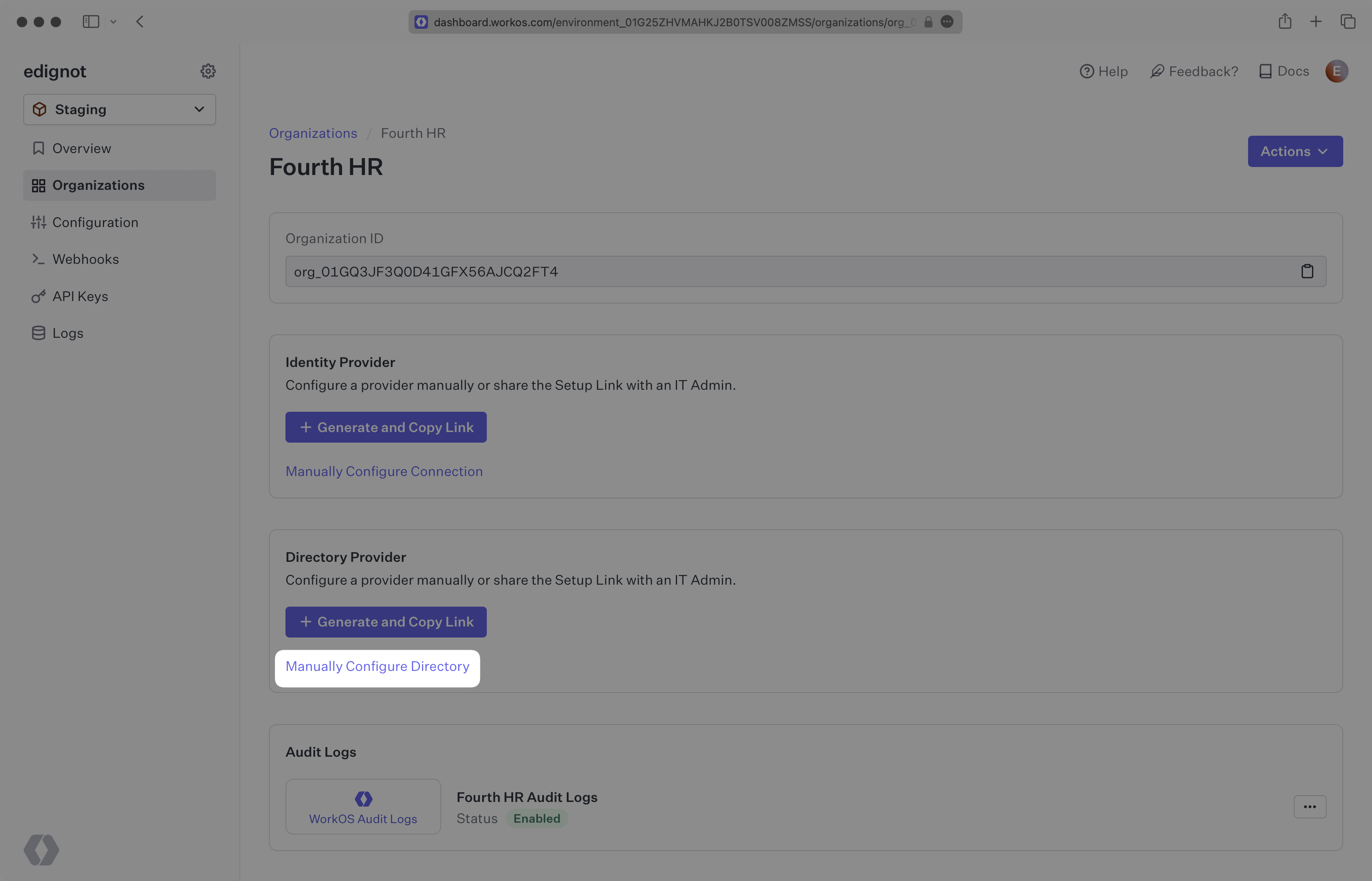
|
|
33
|
+
|
|
34
|
+
Input the Name, and select "Fourth” as the directory type. Click the “Create Directory” button.
|
|
35
|
+
|
|
36
|
+
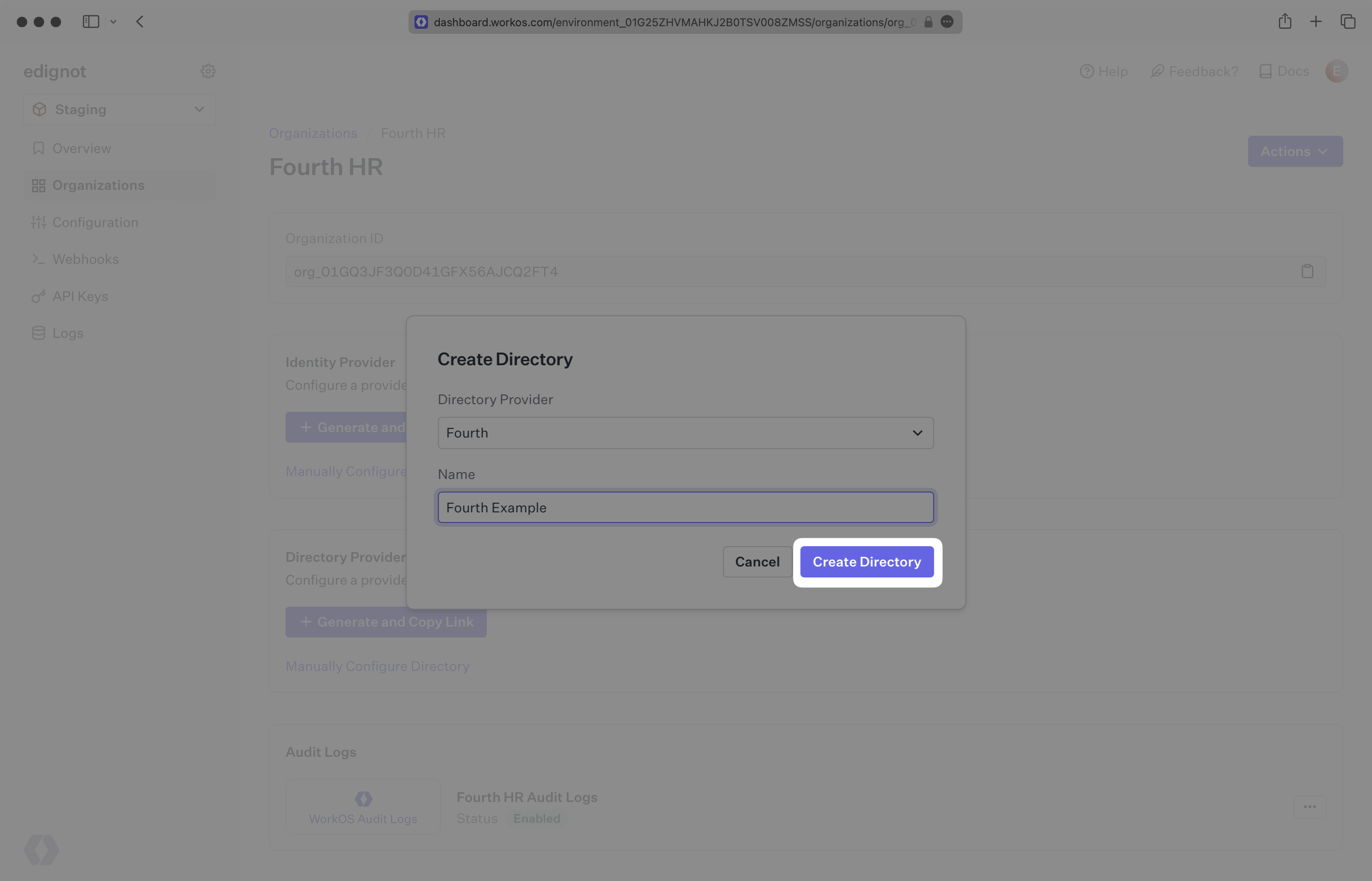
|
|
37
|
+
|
|
38
|
+
You will now see your Fourth directory sync has been created successfully with an input for the Organization ID, username, and password.
|
|
39
|
+
|
|
40
|
+
## (2) Obtain and update directory details
|
|
41
|
+
|
|
42
|
+
Retrieve the Fourth Organization ID from the organization's IT Admin, as well as the username and password that will be used for authentication.
|
|
43
|
+
|
|
44
|
+
Click “Update Directory” in the WorkOS Dashboard.
|
|
45
|
+
|
|
46
|
+
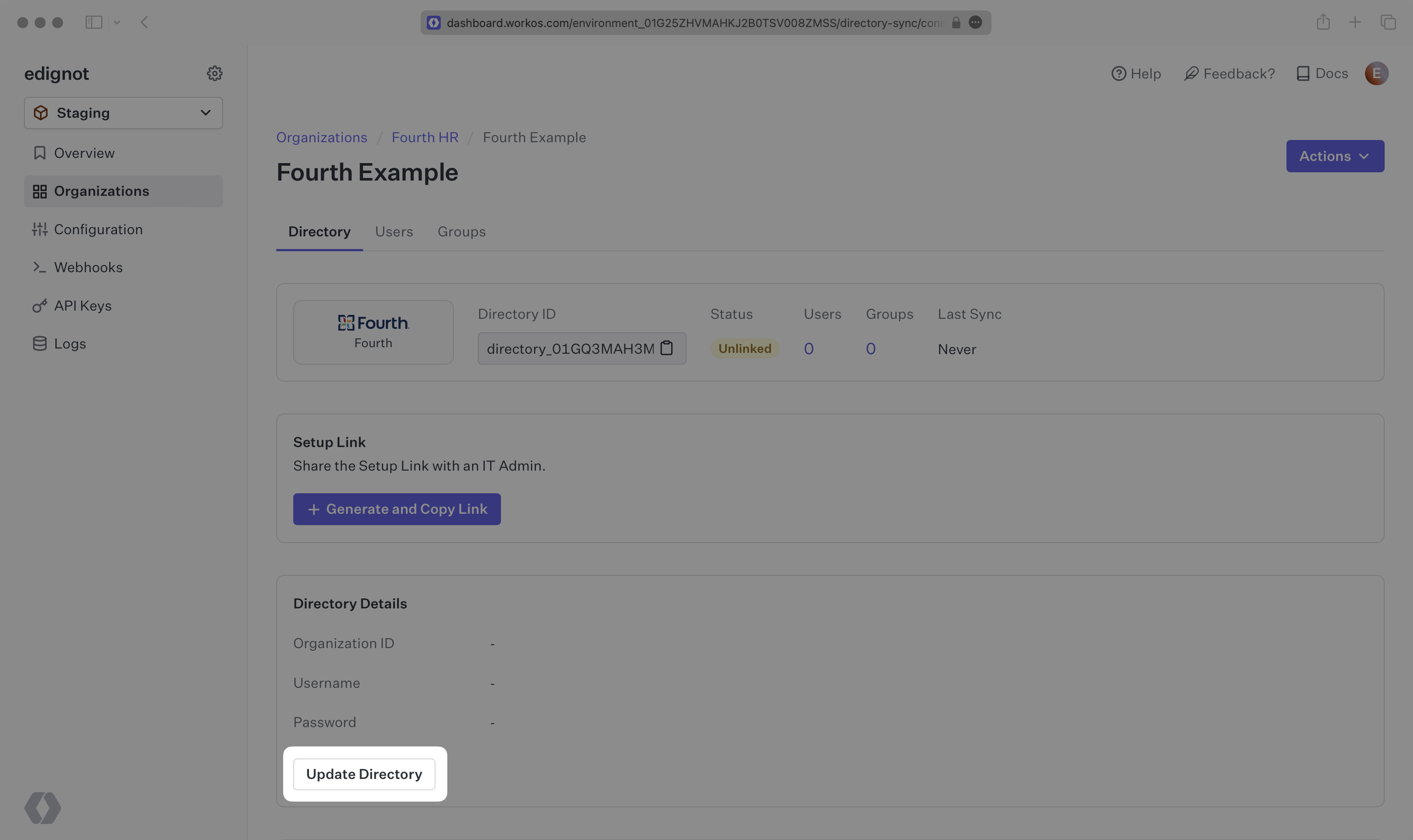
|
|
47
|
+
|
|
48
|
+
Enter the Organization ID, the username and the password.
|
|
49
|
+
|
|
50
|
+
---
|
|
51
|
+
|
|
52
|
+
## (3) View users and groups in your dashboard
|
|
53
|
+
|
|
54
|
+
When the connection is successfully made, you will see the green “Linked” icon appear. Now, whenever the organization assigns users or groups to your application, you’ll receive Dashboard updates based on changes in their directory.
|
|
55
|
+
|
|
56
|
+
Click on the “Users” tab in the Dashboard to view synced users.
|
|
57
|
+
|
|
58
|
+
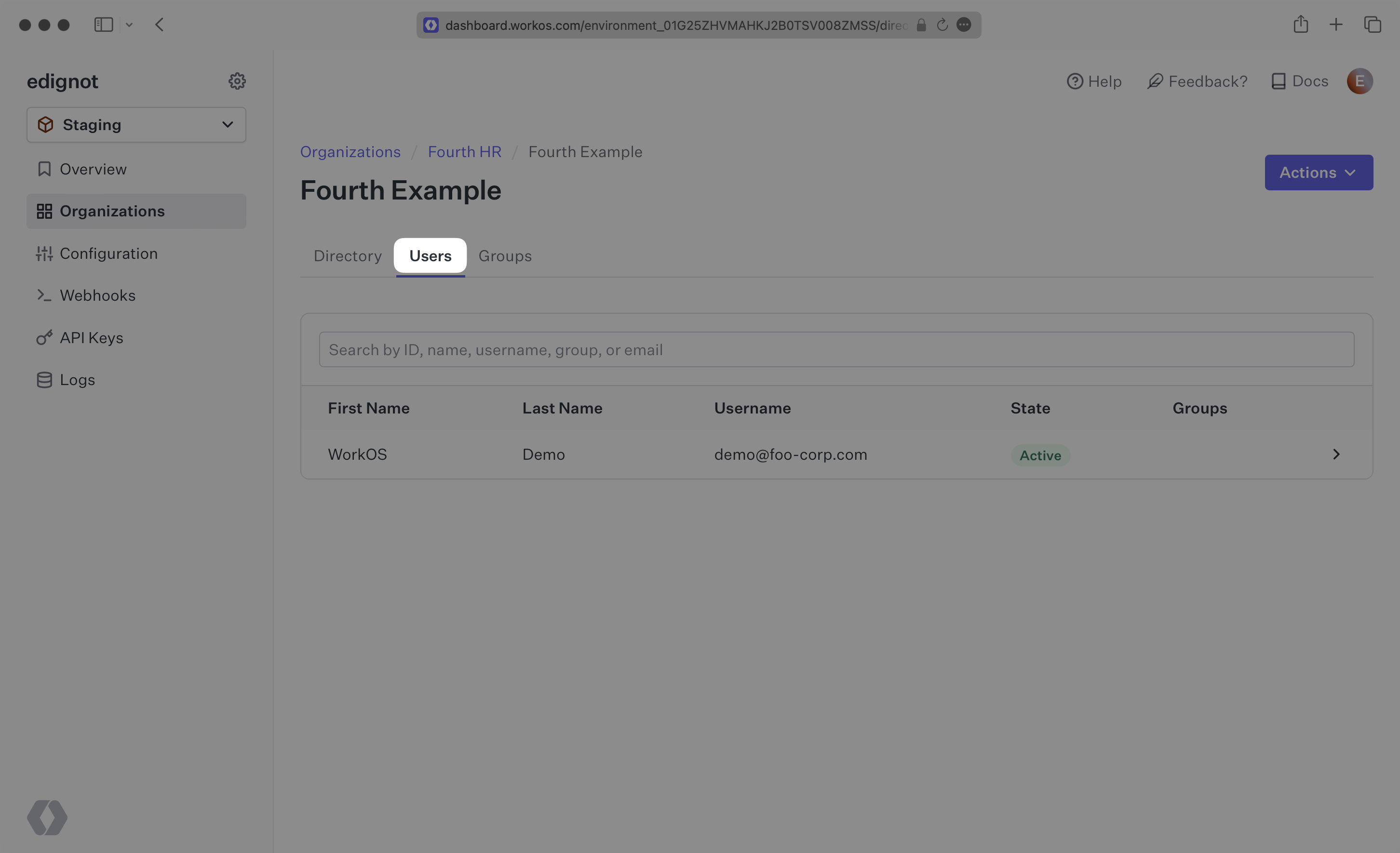
|
|
59
|
+
|
|
60
|
+
---
|
|
61
|
+
|
|
62
|
+
## Frequently asked questions
|
|
63
|
+
|
|
64
|
+
### How often do Fourth directories perform a sync?
|
|
65
|
+
|
|
66
|
+
Fourth directories poll every 30 minutes starting from the time of the initial sync.
|
|
@@ -0,0 +1,85 @@
|
|
|
1
|
+
---
|
|
2
|
+
title: GitHub OAuth
|
|
3
|
+
description: Learn how to set up OAuth with GitHub.
|
|
4
|
+
icon: github
|
|
5
|
+
breadcrumb:
|
|
6
|
+
title: Integrations
|
|
7
|
+
url: /integrations
|
|
8
|
+
originalPath: .tmp-workos-clone/packages/docs/content/integrations/github-oauth.mdx
|
|
9
|
+
---
|
|
10
|
+
|
|
11
|
+
## Introduction
|
|
12
|
+
|
|
13
|
+
To configure your global GitHub OAuth setup, you’ll need three pieces of information: a [Redirect URI](/glossary/redirect-uri), a GitHub Client ID, and a GitHub Client Secret.
|
|
14
|
+
|
|
15
|
+
---
|
|
16
|
+
|
|
17
|
+
## What WorkOS provides
|
|
18
|
+
|
|
19
|
+
WorkOS provides the Redirect URI, an allowlisted callback URL. It indicates the location to return an authorized user to after both an authorization code is granted, and the authentication process is complete.
|
|
20
|
+
|
|
21
|
+
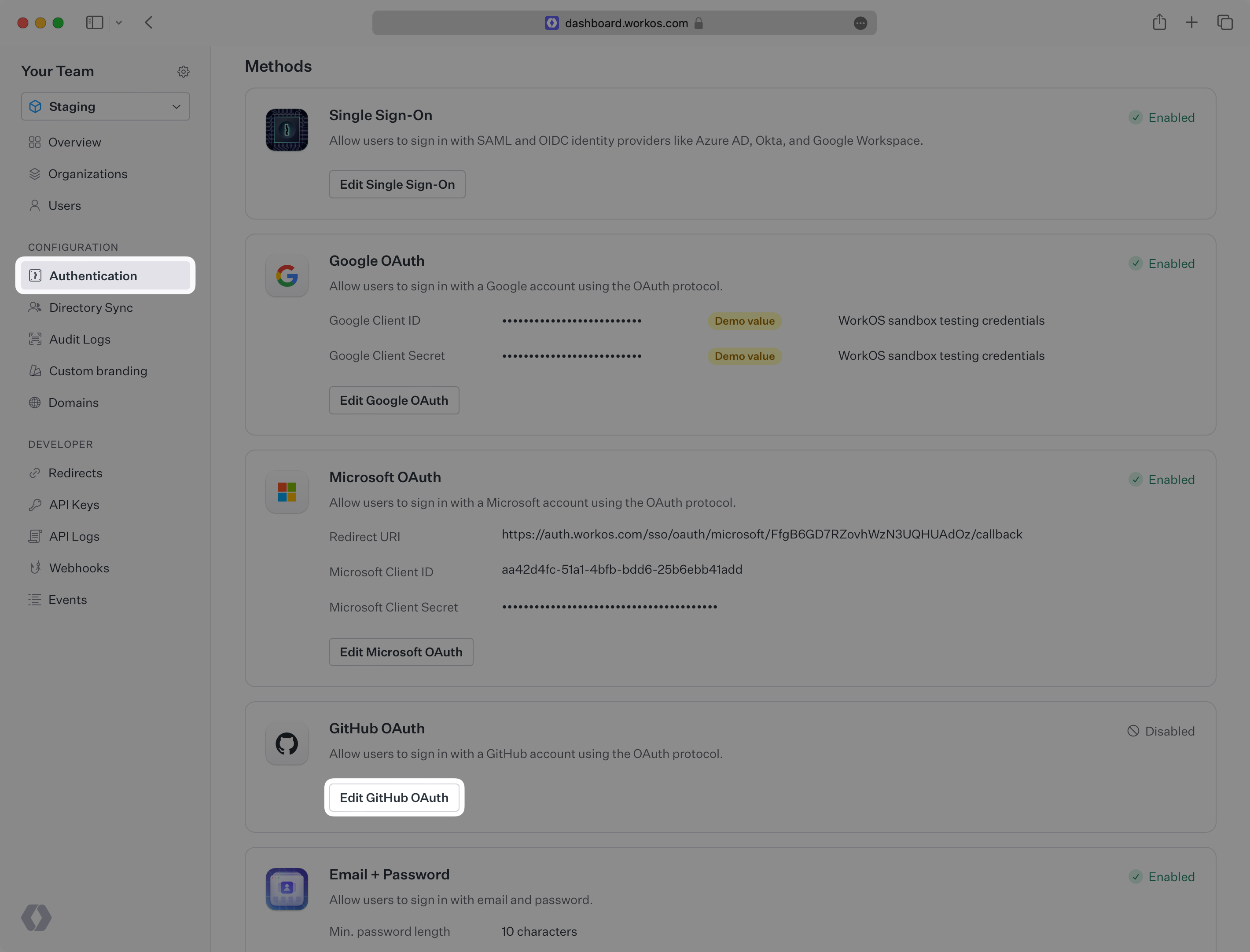
Open your [WorkOS Dashboard](https://dashboard.workos.com) and browse to the _Authentication_ section on the left hand navigation bar. Scroll down to the _GitHub OAuth_ section and click _Edit_.
|
|
22
|
+
|
|
23
|
+
|
|
24
|
+
|
|
25
|
+
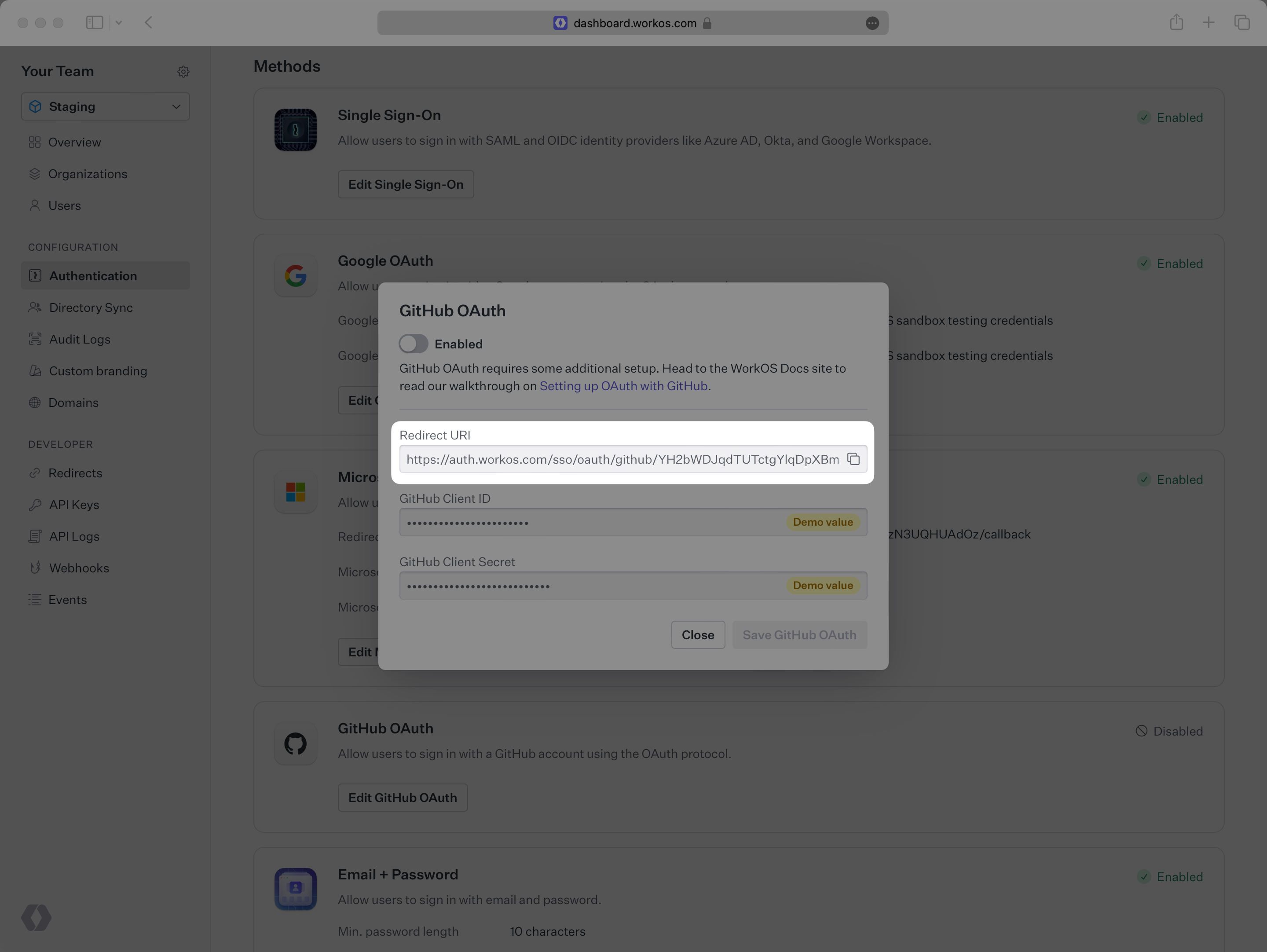
In the modal, you’ll see the Redirect URI as well as the fields you’ll populate later with information from GitHub. This URI will be used as part of the registration process later in the GitHub developer settings page.
|
|
26
|
+
|
|
27
|
+
|
|
28
|
+
|
|
29
|
+
---
|
|
30
|
+
|
|
31
|
+
## Testing with default credentials in the Staging environment
|
|
32
|
+
|
|
33
|
+
WorkOS provides a default GitHub Client ID/GitHub Client Secret combination, which allows you to quickly enable and test GitHub OAuth. WorkOS will automatically use the default credentials, until you add your own GitHub Client ID and GitHub Client Secret to the Configuration in the WorkOS Dashboard.
|
|
34
|
+
|
|
35
|
+
> The default credentials are only intended for testing and therefore only available in the Staging environment. For your production environment, please follow the steps below to create and specify your own GitHub Client ID and GitHub Client Secret.
|
|
36
|
+
|
|
37
|
+
Please note that when you are using WorkOS default credentials, GitHub's authentication flow will display WorkOS' name, logo, and other information to users. Once you register your own application and use its GitHub Client ID and GitHub Client Secret for the OAuth flow, you will have the opportunity to customize the app, including its name, logo, etc.
|
|
38
|
+
|
|
39
|
+
---
|
|
40
|
+
|
|
41
|
+
## What you’ll need
|
|
42
|
+
|
|
43
|
+
In order to integrate you’ll need the GitHub Client ID and the GitHub Client Secret.
|
|
44
|
+
|
|
45
|
+
These are a pair of credentials provided by GitHub that you’ll use to authenticate your application via the OAuth protocol. To obtain them:
|
|
46
|
+
|
|
47
|
+
---
|
|
48
|
+
|
|
49
|
+
### (1) Create the GitHub OAuth Application
|
|
50
|
+
|
|
51
|
+
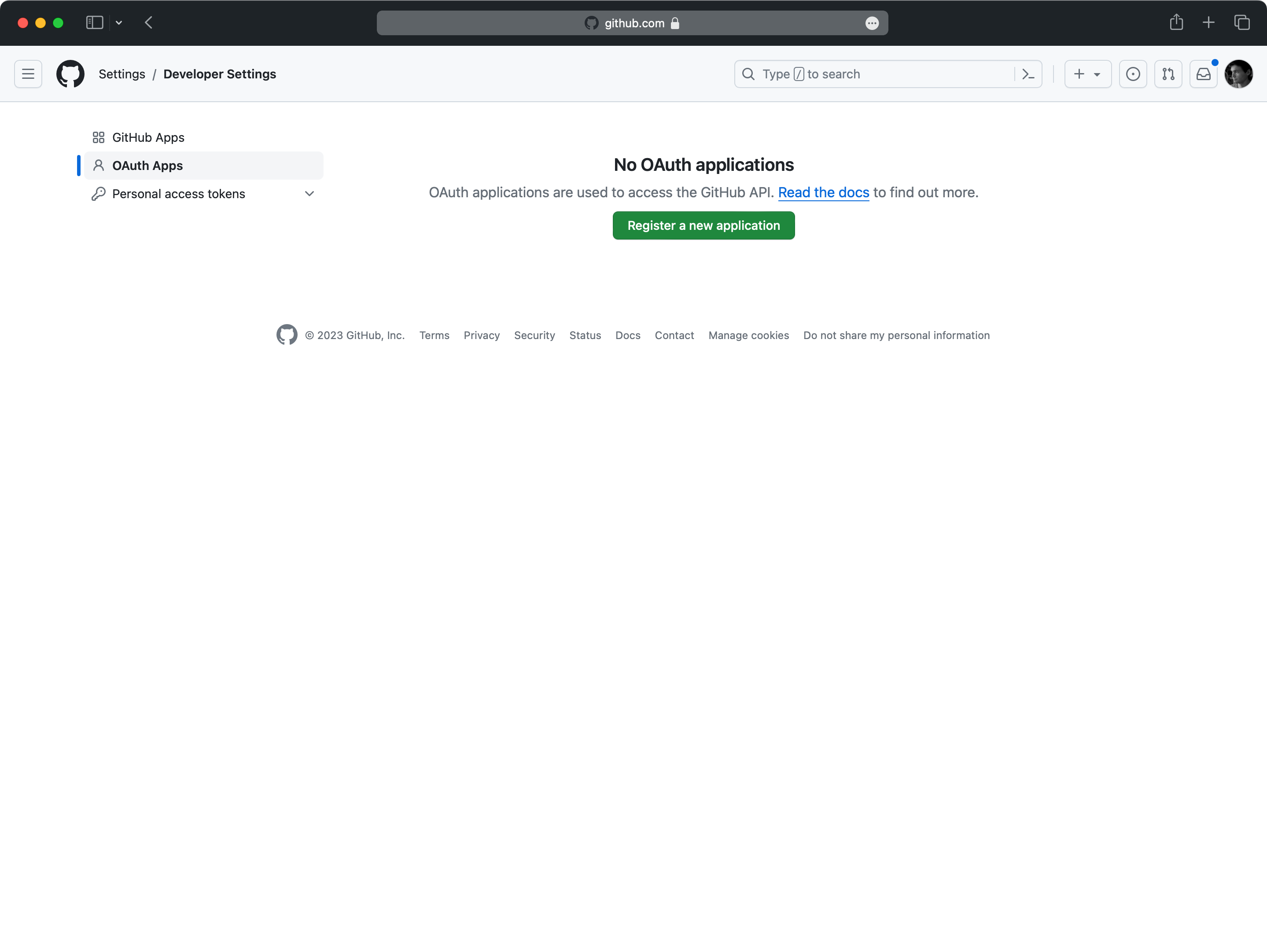
Log in to your GitHub account and go to the [_Developer Settings_](https://github.com/settings/developers) page in your GitHub settings dashboard and click on _Register a new application_.
|
|
52
|
+
|
|
53
|
+
> You can also register a new application under a GitHub Organization, which may be more appropriate if it is maintained by a team of developers. You can also [transfer ownership](https://docs.github.com/en/apps/oauth-apps/maintaining-oauth-apps/transferring-ownership-of-an-oauth-app) of your GitHub OAuth application to a GitHub organization later.
|
|
54
|
+
|
|
55
|
+
|
|
56
|
+
|
|
57
|
+
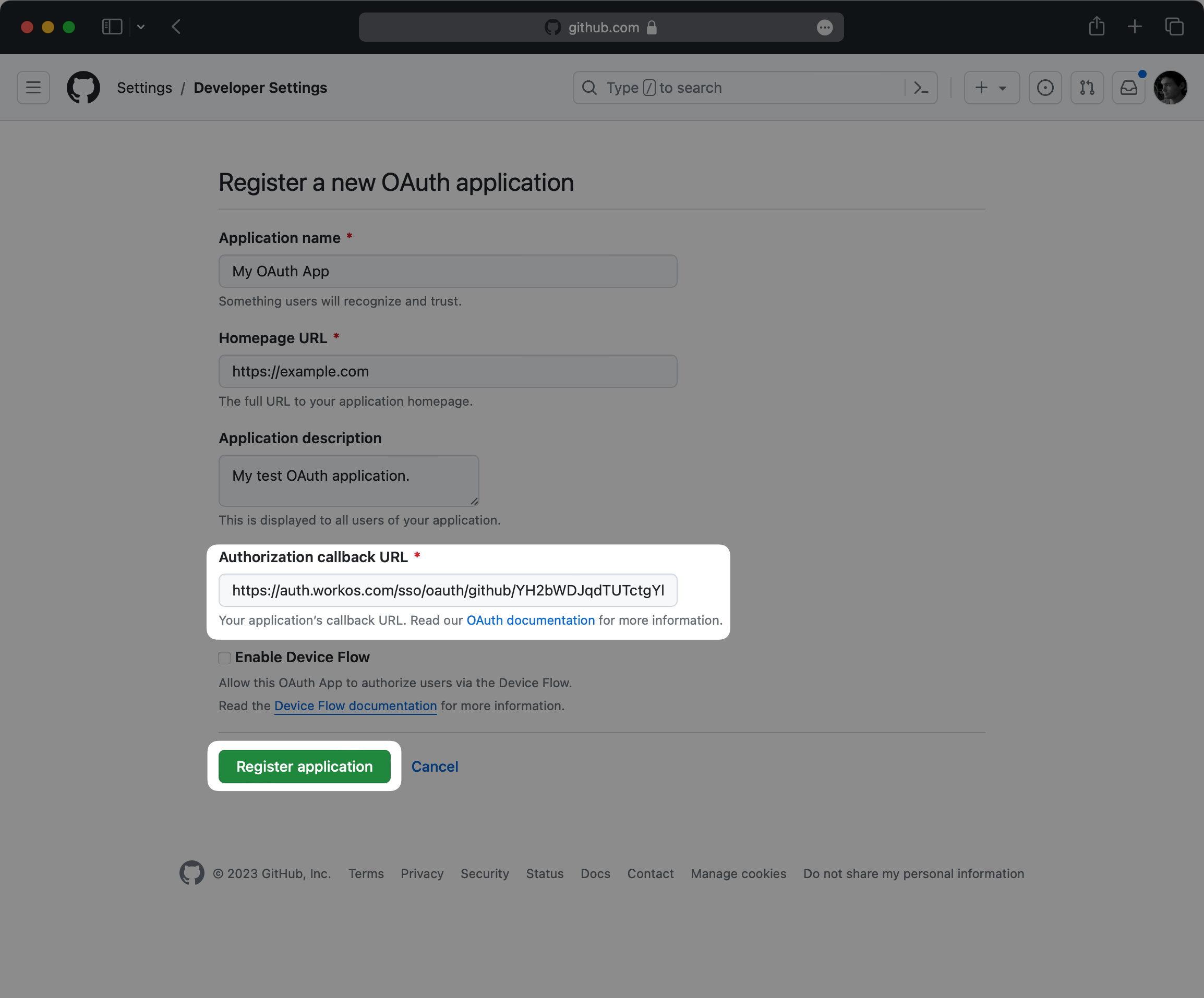
Start by filling out the form with relevant details about your application, like the application name and description.
|
|
58
|
+
|
|
59
|
+
For _Authorization callback URL_, use the Redirect URI in the GitHub OAuth configuration modal in the WorkOS Dashboard.
|
|
60
|
+
|
|
61
|
+
|
|
62
|
+
|
|
63
|
+
Finally, click on _Register application_.
|
|
64
|
+
|
|
65
|
+
### (2) Generate client credentials
|
|
66
|
+
|
|
67
|
+
On the next page, you will see the GitHub _Client ID_ for your new OAuth application.
|
|
68
|
+
|
|
69
|
+
Click on _Generate a new client secret_ to generate a new GitHub Client Secret. Note that this value is only temporarily available, so make sure to save it before proceeding.
|
|
70
|
+
|
|
71
|
+
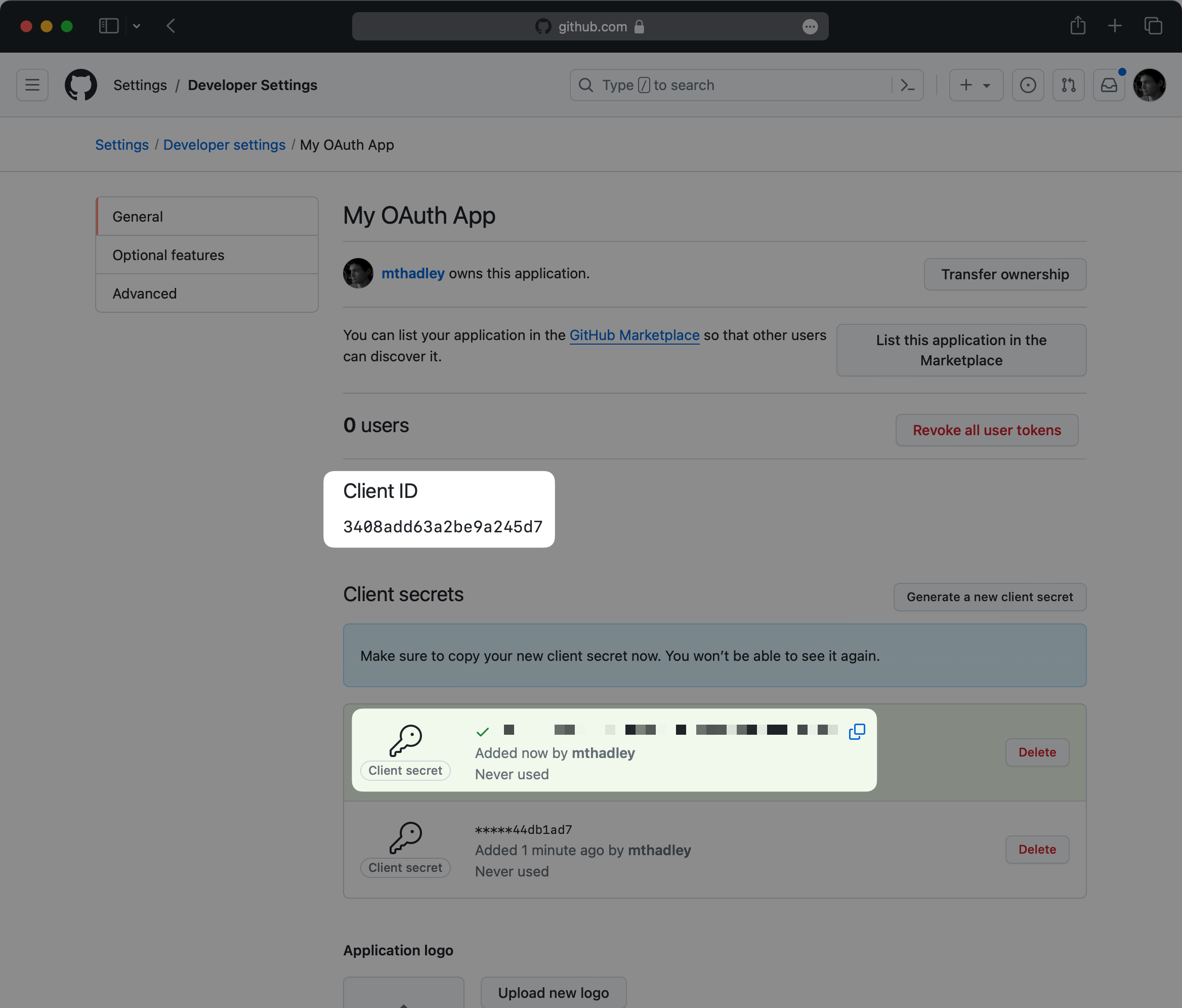
|
|
72
|
+
|
|
73
|
+
In the next step, you will provide both the GitHub Client ID and Client Secret to the WorkOS dashboard.
|
|
74
|
+
|
|
75
|
+
### (3) Provide client credentials to WorkOS
|
|
76
|
+
|
|
77
|
+
Go back to the _Authentication_ section in the WorkOS Dashboard, and click on _Edit_ under _GitHub OAuth_.
|
|
78
|
+
|
|
79
|
+
Toggle _Enabled_ on and provide the client credentials from GitHub that you generated in the previous step.
|
|
80
|
+
|
|
81
|
+
Finally, click _Save_.
|
|
82
|
+
|
|
83
|
+
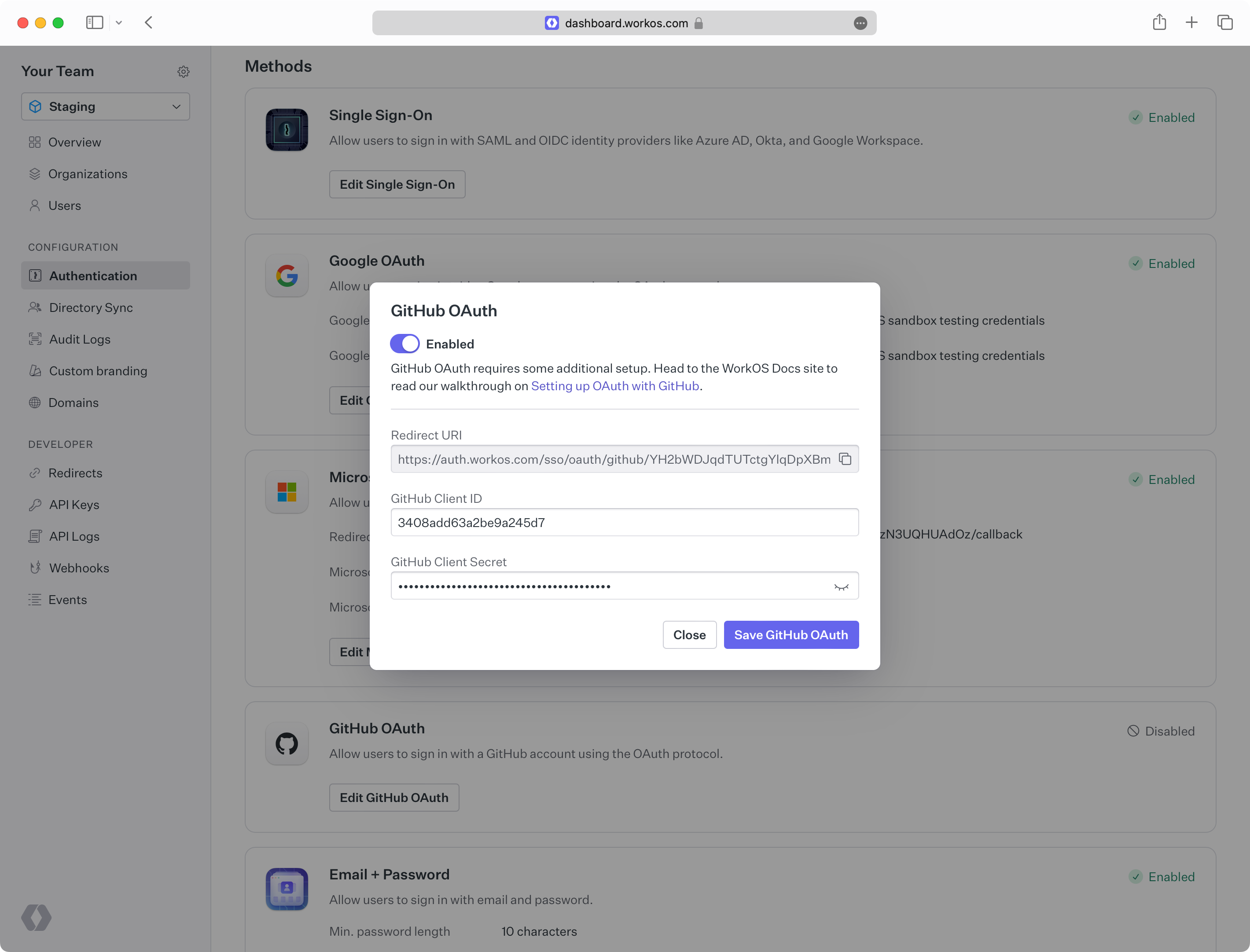
|
|
84
|
+
|
|
85
|
+
You are now ready to start authenticating with GitHub OAuth. Your users will see the option to sign-in with GitHub when visiting your [AuthKit](/user-management) domain. Or, you can initiate sign-in with GitHub through the [standalone SSO API](reference/sso/get-authorization-url) by passing `GitHubOAuth` as the `provider`.
|
|
@@ -0,0 +1,81 @@
|
|
|
1
|
+
---
|
|
2
|
+
title: GitLab OAuth
|
|
3
|
+
description: Learn how to set up OAuth with GitLab.
|
|
4
|
+
icon: gitlab
|
|
5
|
+
breadcrumb:
|
|
6
|
+
title: Integrations
|
|
7
|
+
url: /integrations
|
|
8
|
+
originalPath: .tmp-workos-clone/packages/docs/content/integrations/gitlab-oauth.mdx
|
|
9
|
+
---
|
|
10
|
+
|
|
11
|
+
## Introduction
|
|
12
|
+
|
|
13
|
+
To configure your global GitLab OAuth setup, you’ll need three pieces of information: a [Redirect URI](/glossary/redirect-uri), a GitLab Client ID, and a GitLab Client Secret.
|
|
14
|
+
|
|
15
|
+
---
|
|
16
|
+
|
|
17
|
+
## What WorkOS provides
|
|
18
|
+
|
|
19
|
+
WorkOS provides the Redirect URI, an allowlisted callback URL. It indicates the location to return an authorized user to after both an authorization code is granted, and the authentication process is complete.
|
|
20
|
+
|
|
21
|
+
Open your [WorkOS Dashboard](https://dashboard.workos.com) and browse to the _Authentication_ section on the left hand navigation bar. Scroll down to the _GitLab OAuth_ section and click _Enable_.
|
|
22
|
+
|
|
23
|
+
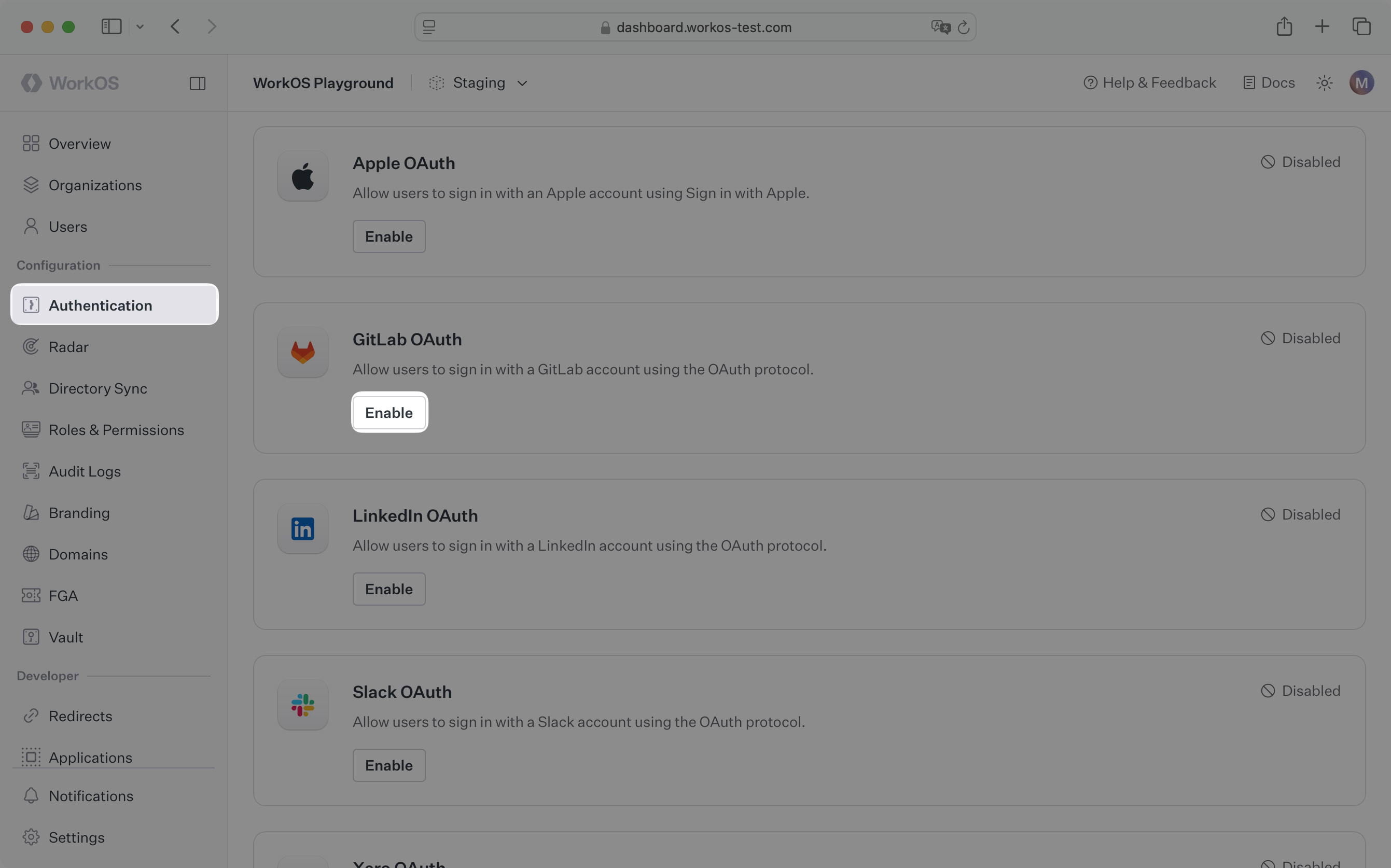
|
|
24
|
+
|
|
25
|
+
In the modal, you’ll see the Redirect URI as well as the fields you’ll populate later with information from GitLab. This URI will be used as part of the registration process later in the GitLab developer settings page.
|
|
26
|
+
|
|
27
|
+
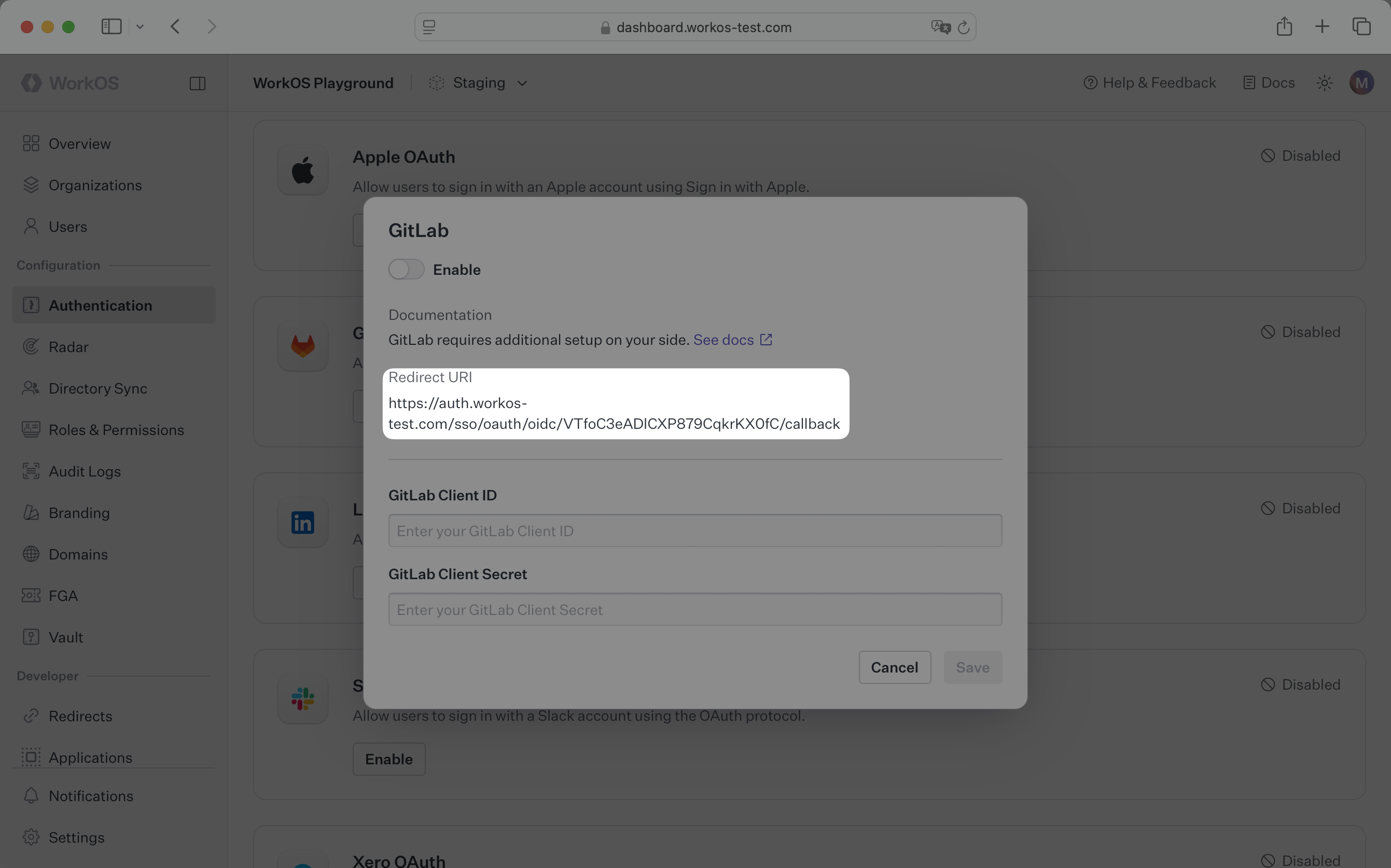
|
|
28
|
+
|
|
29
|
+
---
|
|
30
|
+
|
|
31
|
+
## What you’ll need
|
|
32
|
+
|
|
33
|
+
In order to integrate you’ll need the GitLab Client ID and the GitLab Client Secret.
|
|
34
|
+
|
|
35
|
+
These are a pair of credentials provided by GitLab that you’ll use to authenticate your application via the OAuth protocol. To obtain them:
|
|
36
|
+
|
|
37
|
+
---
|
|
38
|
+
|
|
39
|
+
### (1) Create the GitLab OAuth Application
|
|
40
|
+
|
|
41
|
+
Log in to your [GitLab account](https://gitlab.com) and create a new application.
|
|
42
|
+
|
|
43
|
+
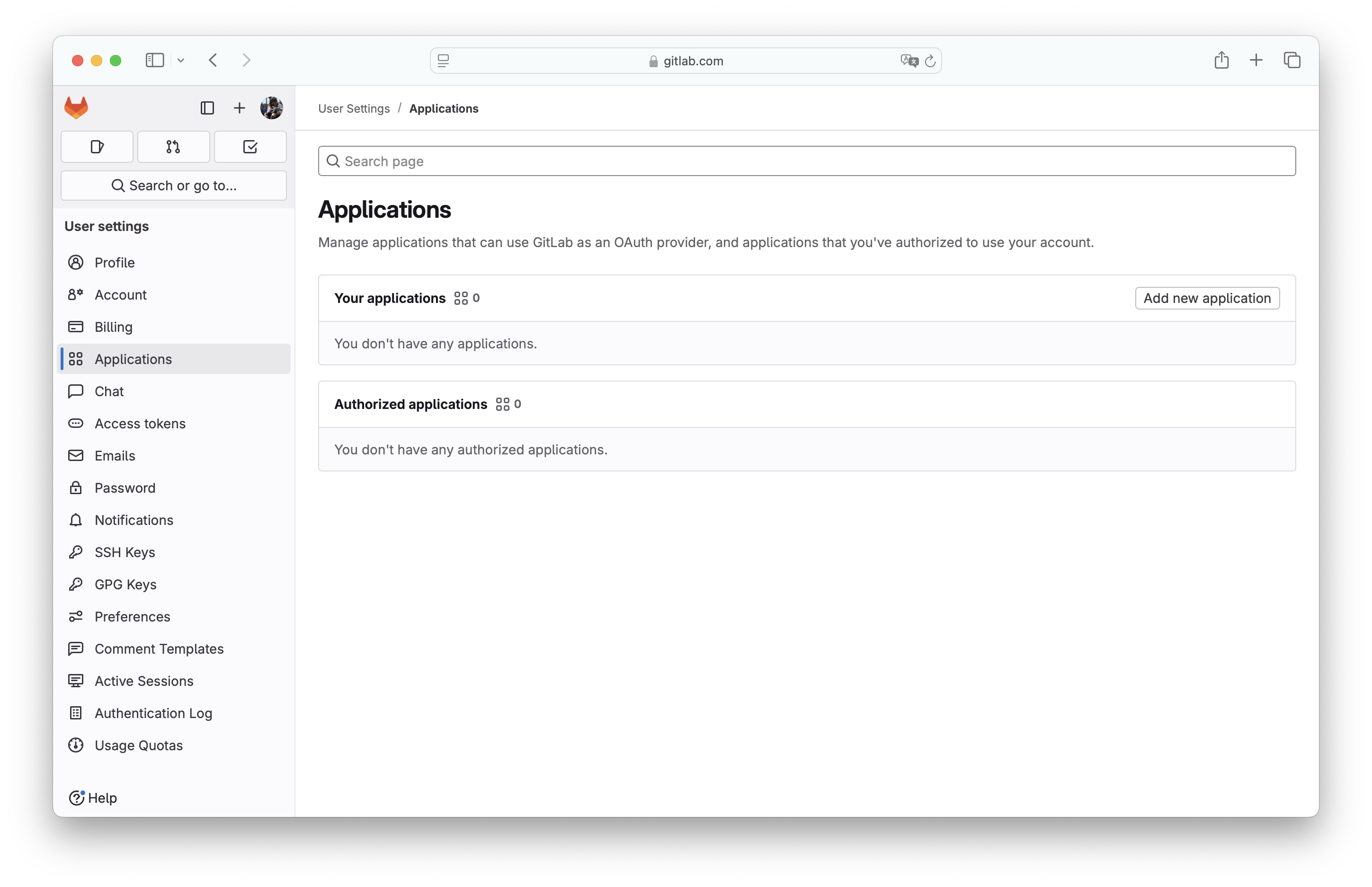
On the left sidebar, select your avatar. Select _Edit profile_.
|
|
44
|
+
|
|
45
|
+
On the left sidebar, select _Applications_. Select _Add new application_.
|
|
46
|
+
|
|
47
|
+
> You can also register a new application under a group, which may be more appropriate if it is maintained by a team of developers, or instance-wide if you have a dedicated GitLab instance. For more on this see the [GitLab docs](https://docs.gitlab.com/integration/oauth_provider/).
|
|
48
|
+
|
|
49
|
+
|
|
50
|
+
|
|
51
|
+
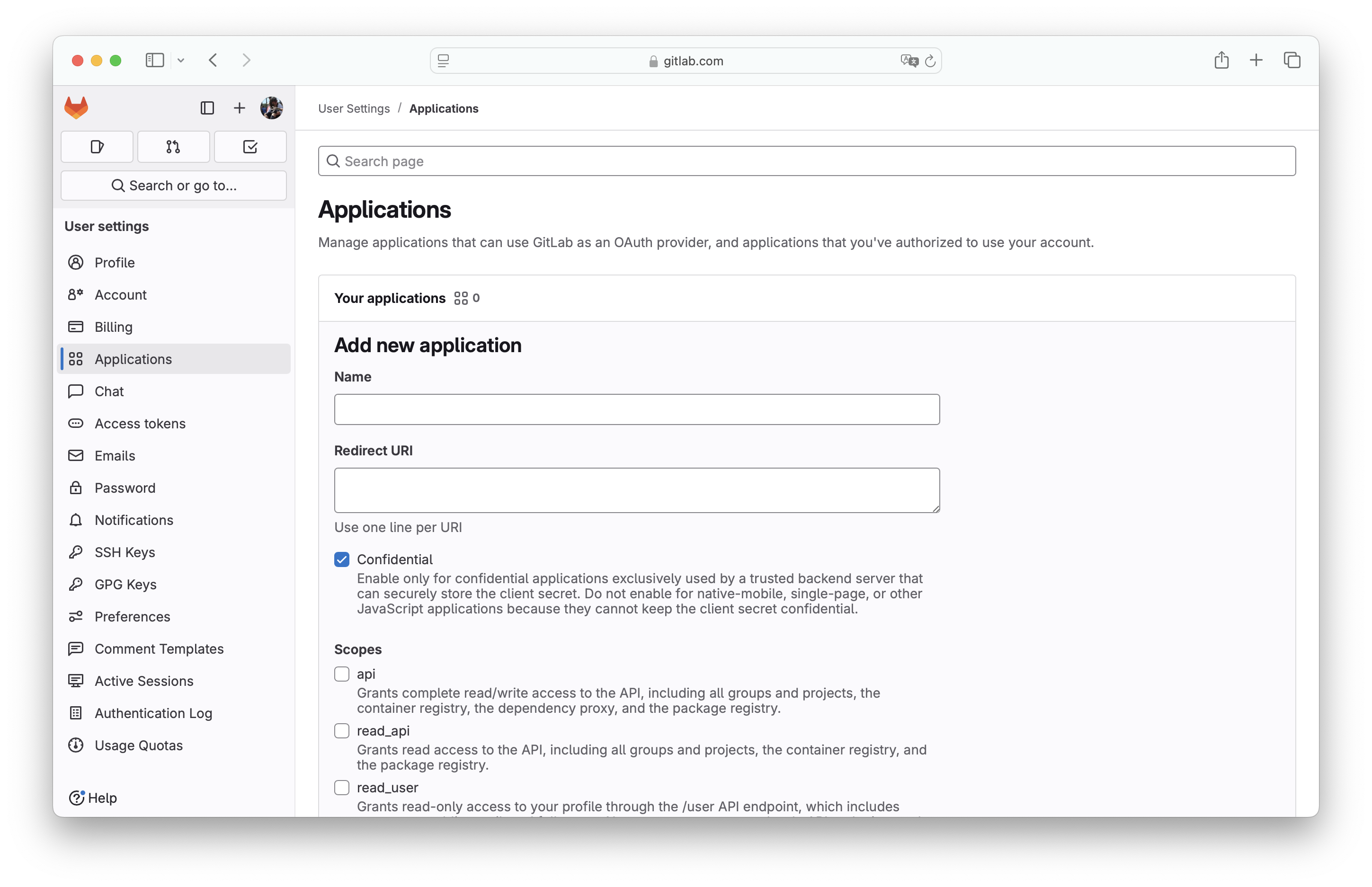
Fill out the form with relevant details about your application, like the application name.
|
|
52
|
+
|
|
53
|
+
For _Redirect URI_, use the Redirect URI from the GitLab OAuth configuration modal in the WorkOS Dashboard.
|
|
54
|
+
|
|
55
|
+
|
|
56
|
+
|
|
57
|
+
The _Confidential_ flag is enabled by default. It should be exclusively used by a trusted backend server that can securely store the client secret. For native-mobile, single-page, or other JavaScript applications, disable this flag.
|
|
58
|
+
|
|
59
|
+
Select the scopes for this app and click on _Save application_.
|
|
60
|
+
|
|
61
|
+
### (2) Generate client credentials
|
|
62
|
+
|
|
63
|
+
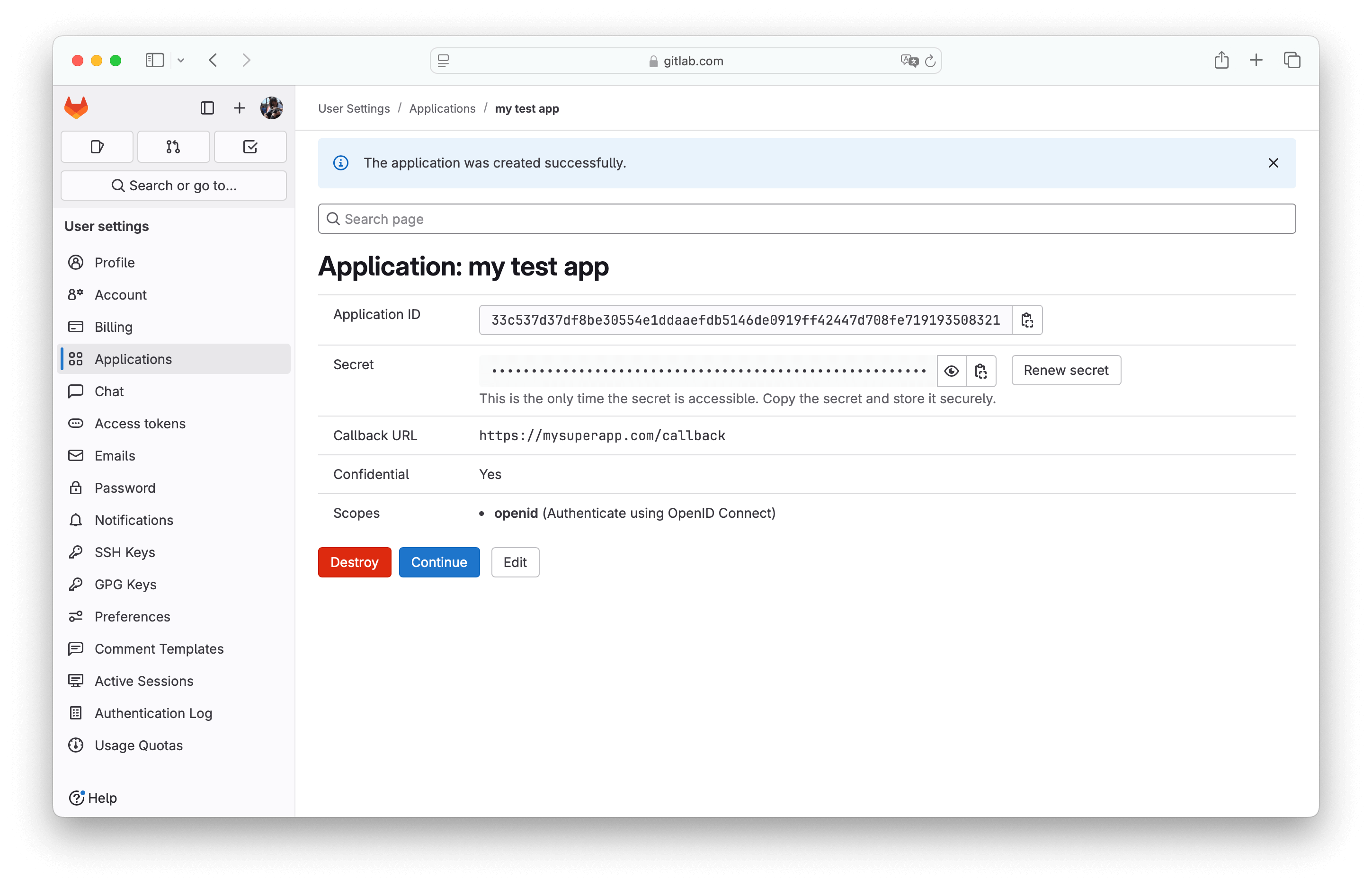
On the next page, you will see the GitLab _Application ID_ and _Secret_ for your new OAuth application.
|
|
64
|
+
|
|
65
|
+
|
|
66
|
+
|
|
67
|
+
Copy the _Application ID_ and _Secret_ and click _Continue_.
|
|
68
|
+
|
|
69
|
+
In the next step, you will provide both the GitLab Application ID and Secret to the WorkOS dashboard.
|
|
70
|
+
|
|
71
|
+
### (3) Provide client credentials to WorkOS
|
|
72
|
+
|
|
73
|
+
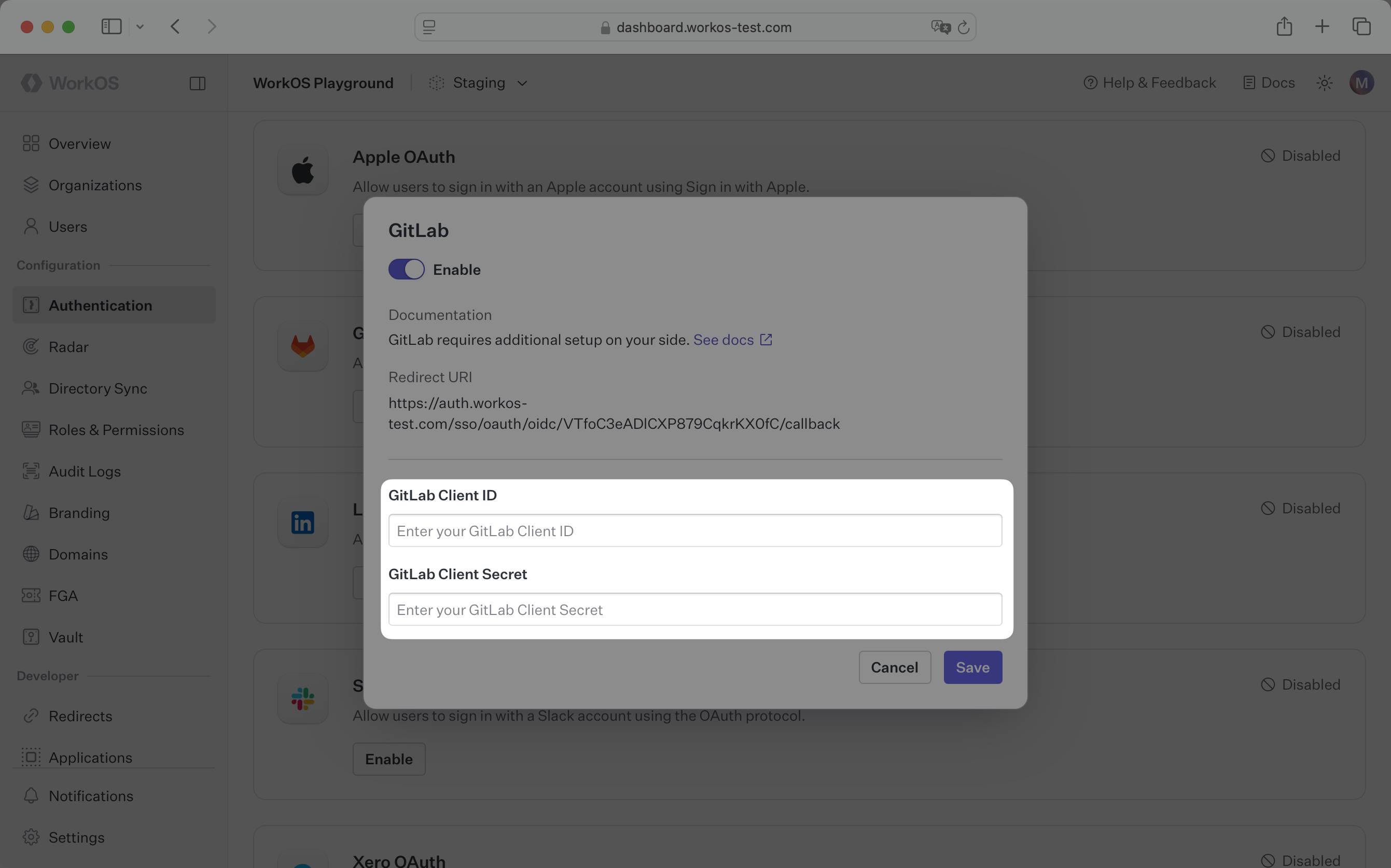
Go back to the _Authentication_ section in the WorkOS Dashboard, and click on _Edit_ under _GitLab OAuth_.
|
|
74
|
+
|
|
75
|
+
Toggle _Enabled_ on and provide the client credentials from GitLab that you generated in the previous step.
|
|
76
|
+
|
|
77
|
+
Finally, click _Save_.
|
|
78
|
+
|
|
79
|
+
|
|
80
|
+
|
|
81
|
+
You are now ready to start authenticating with GitLab OAuth. Your users will see the option to sign-in with GitLab when visiting your [AuthKit](/user-management) domain.
|
|
@@ -0,0 +1,86 @@
|
|
|
1
|
+
---
|
|
2
|
+
title: Google Directory Sync
|
|
3
|
+
description: "Learn about syncing your user list with\_Google\_Workspace."
|
|
4
|
+
icon: google
|
|
5
|
+
breadcrumb:
|
|
6
|
+
title: Integrations
|
|
7
|
+
url: /integrations
|
|
8
|
+
originalPath: .tmp-workos-clone/packages/docs/content/integrations/google-directory-sync.mdx
|
|
9
|
+
---
|
|
10
|
+
|
|
11
|
+
## Introduction
|
|
12
|
+
|
|
13
|
+
This guide outlines how to synchronize your application’s Google Workspace directories.
|
|
14
|
+
|
|
15
|
+
---
|
|
16
|
+
|
|
17
|
+
## (1) Select environment
|
|
18
|
+
|
|
19
|
+
Login to your WorkOS dashboard and ensure you have the desired environment selected.
|
|
20
|
+
|
|
21
|
+
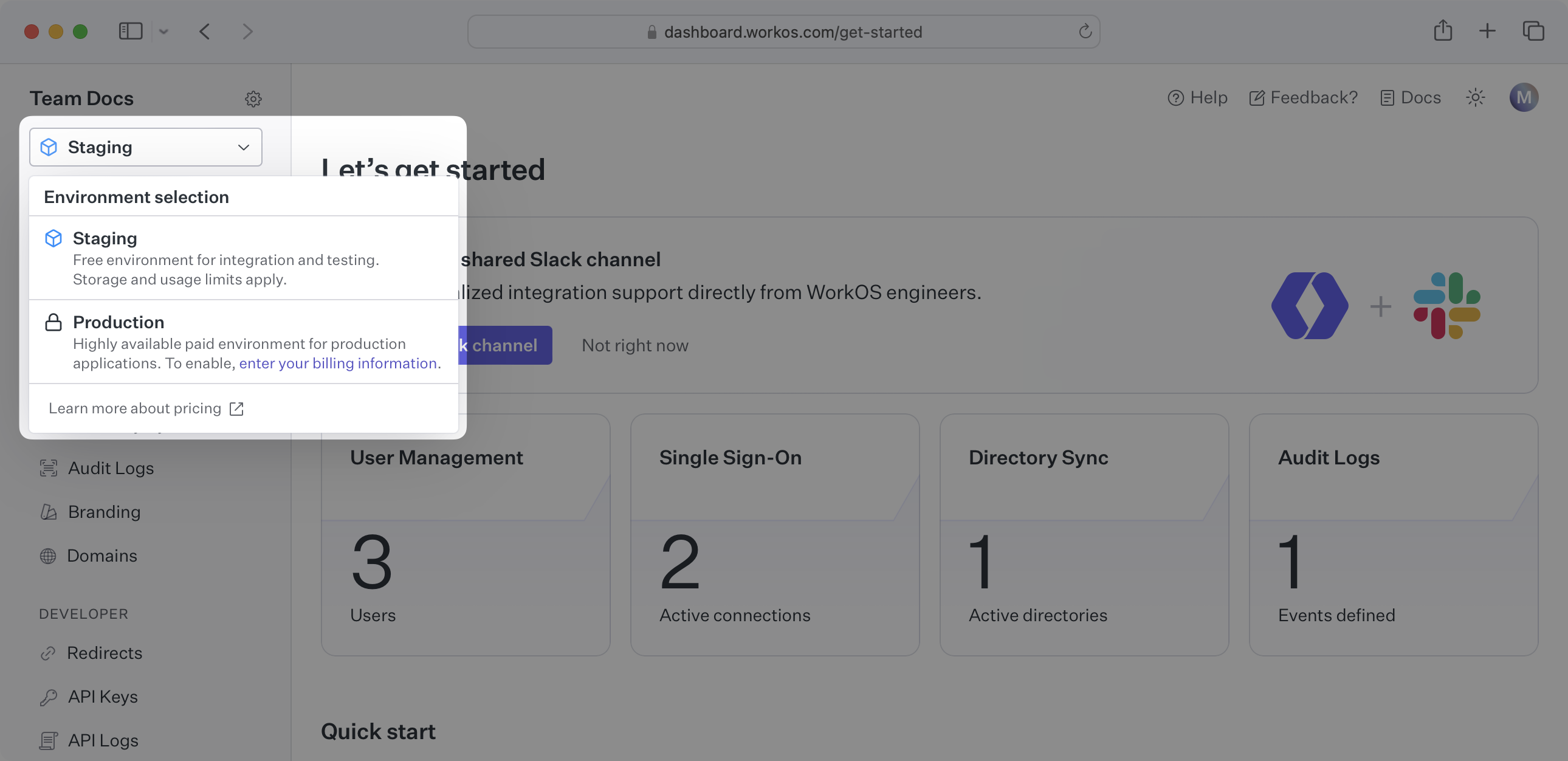
|
|
22
|
+
|
|
23
|
+
## (2) Send an admin invite link
|
|
24
|
+
|
|
25
|
+
Select “Organizations” in the navigation.
|
|
26
|
+
|
|
27
|
+
Select the organization that'd like to enable a Google Directory Sync connection.
|
|
28
|
+
|
|
29
|
+
On the Organization page, under “Invite an admin to set up this organization,” select “Invite Admin.”
|
|
30
|
+
|
|
31
|
+
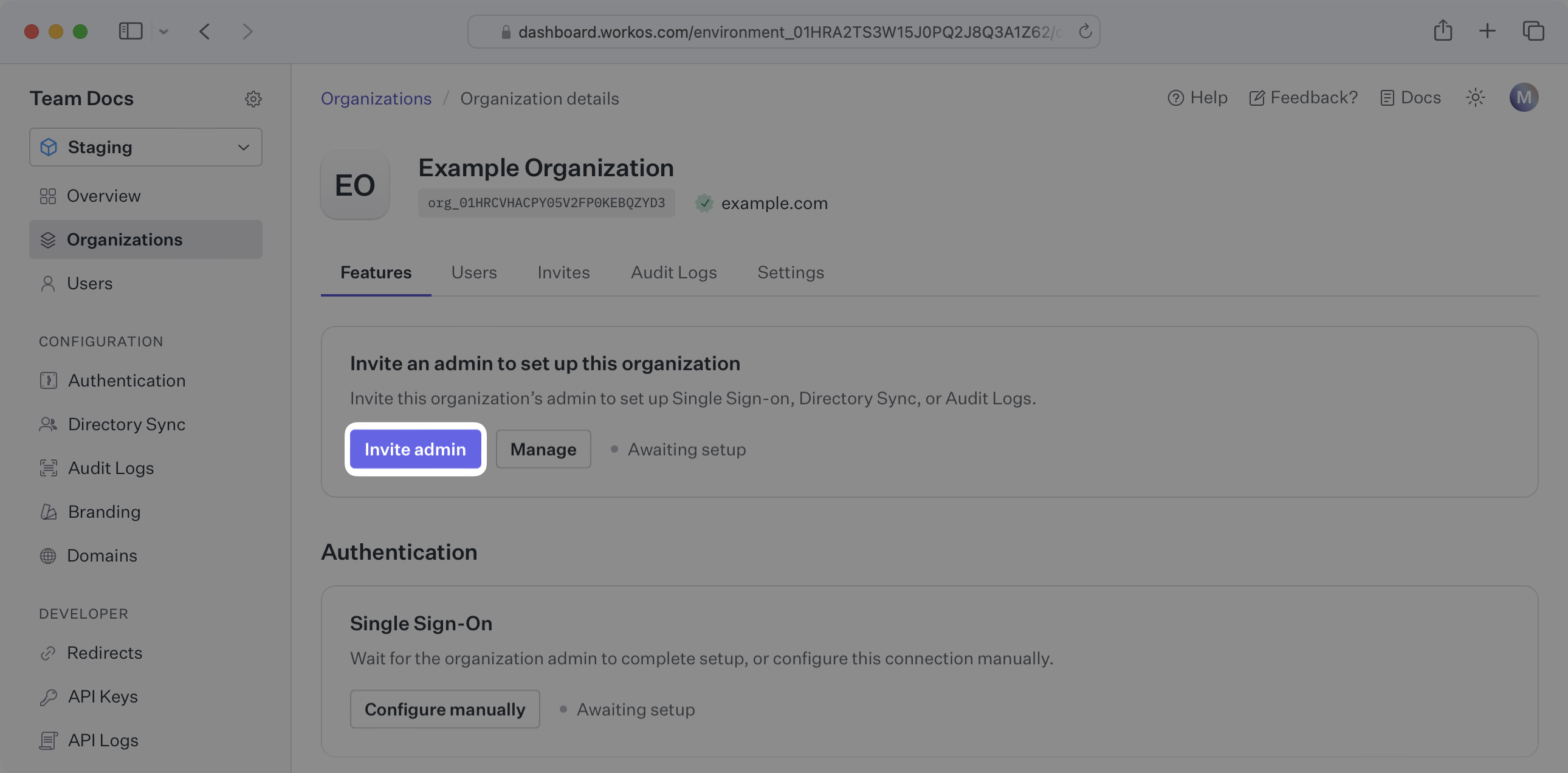
|
|
32
|
+
|
|
33
|
+
Select “Directory Sync” and any other features you'd like the organization to be able to onboard.
|
|
34
|
+
|
|
35
|
+
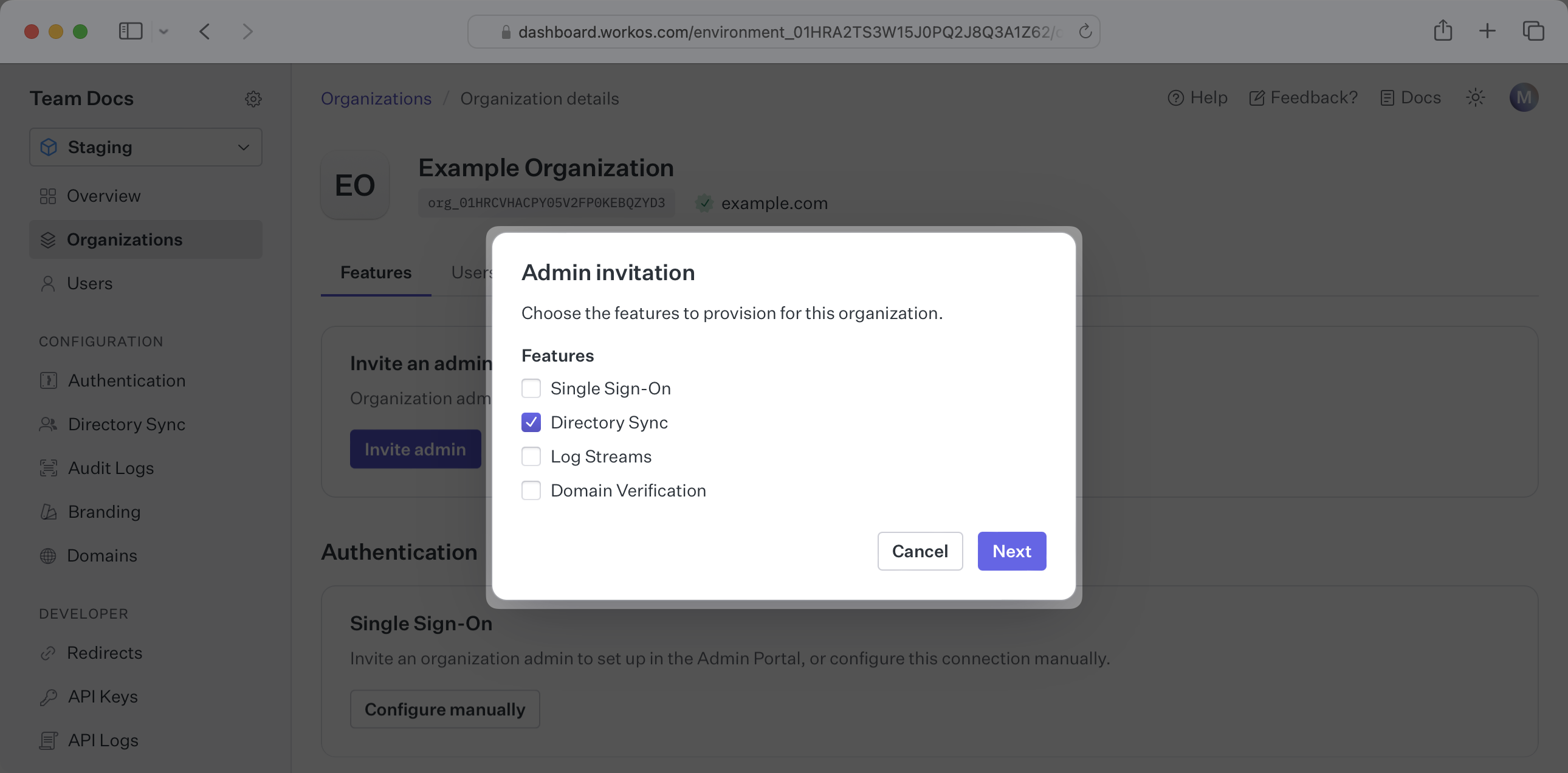
|
|
36
|
+
|
|
37
|
+
Enter the email address of the organization admin, or copy the setup link and send it to the organization admin.
|
|
38
|
+
|
|
39
|
+
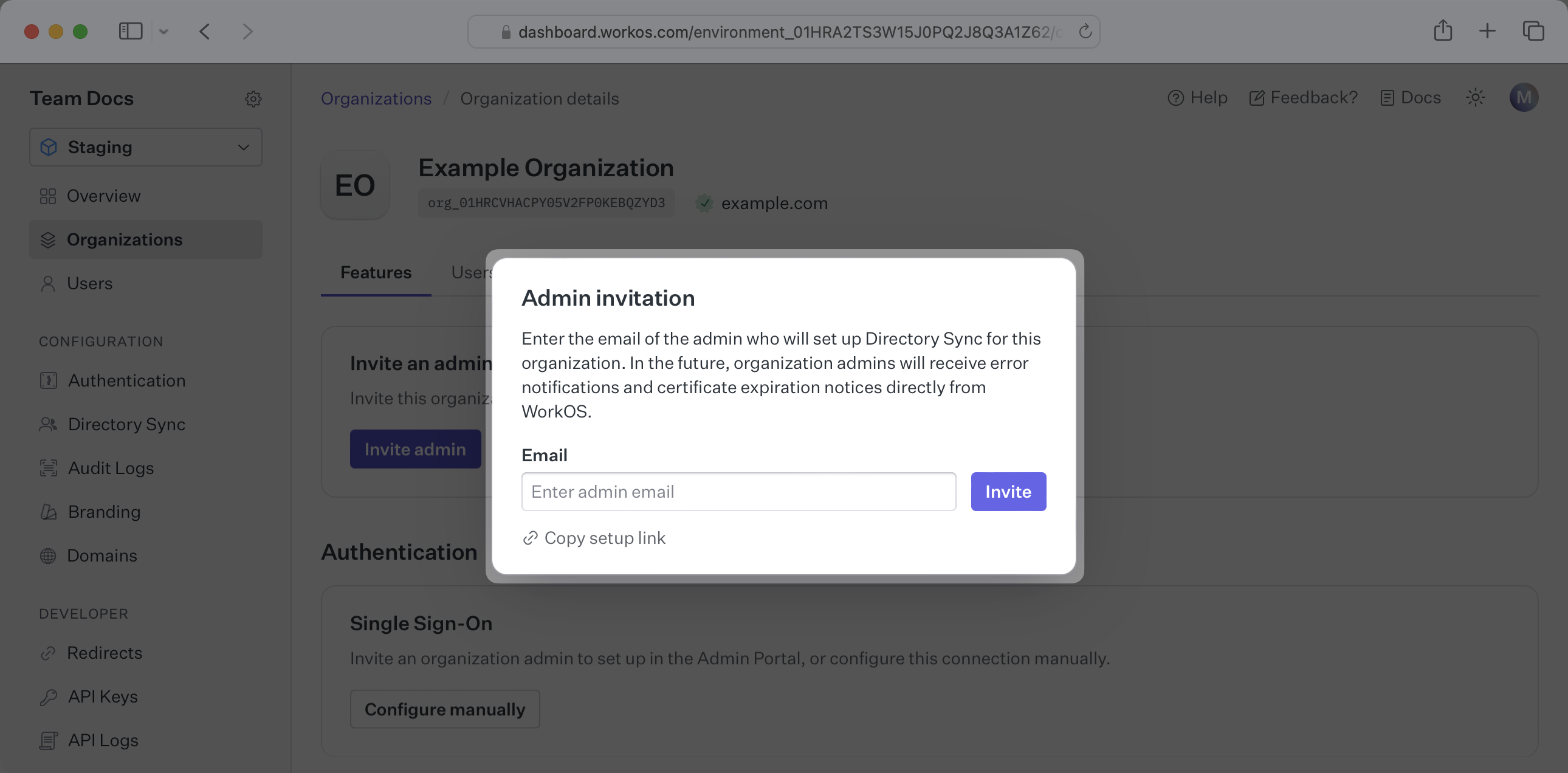
|
|
40
|
+
|
|
41
|
+
---
|
|
42
|
+
|
|
43
|
+
## (3) Authenticate with admin credentials
|
|
44
|
+
|
|
45
|
+
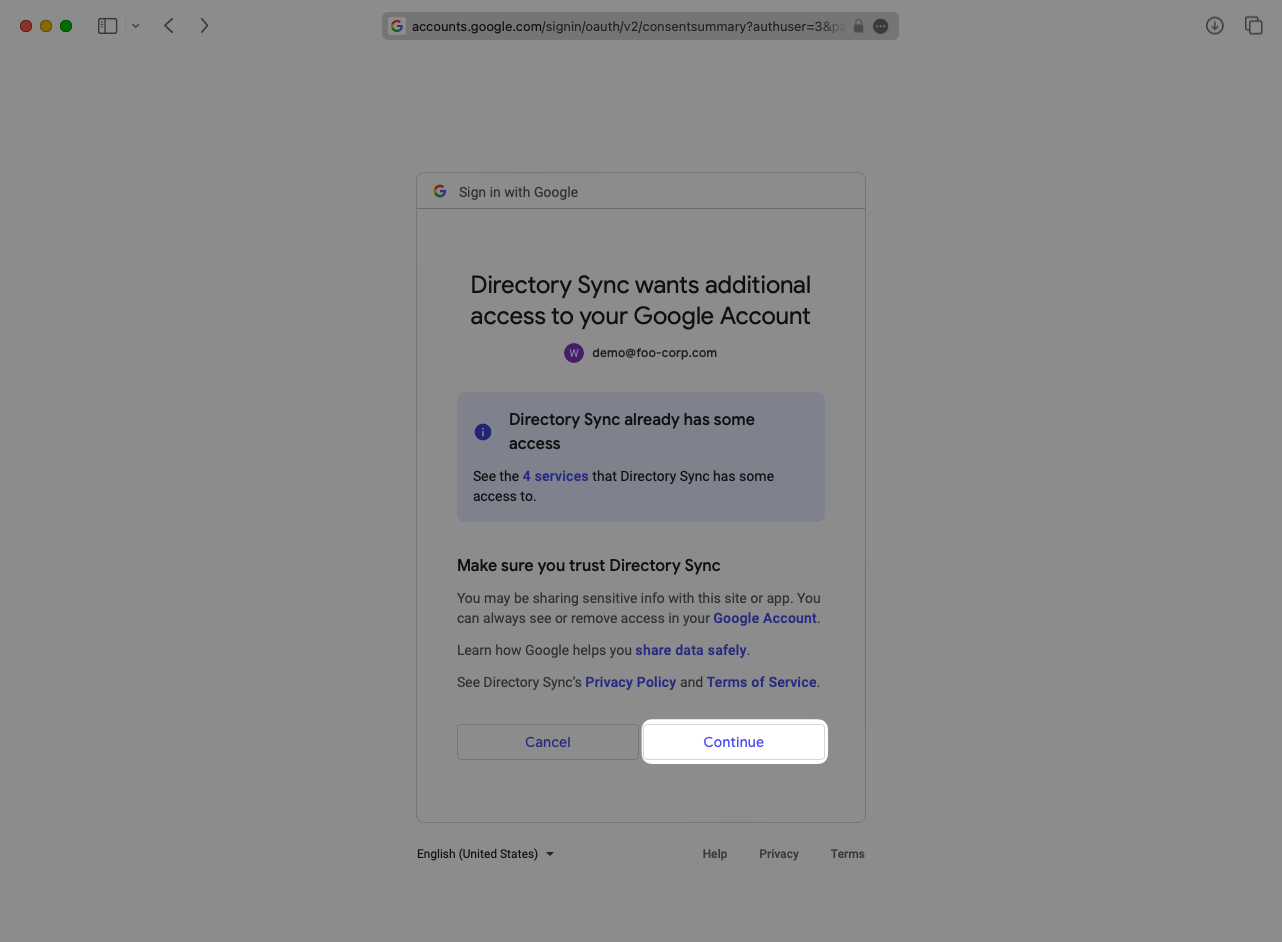
Have the organization choose Google as a provider and follow the Google prompts to authenticate with admin credentials.
|
|
46
|
+
|
|
47
|
+
|
|
48
|
+
|
|
49
|
+
---
|
|
50
|
+
|
|
51
|
+
## (4) Select which groups to sync to Your Application
|
|
52
|
+
|
|
53
|
+
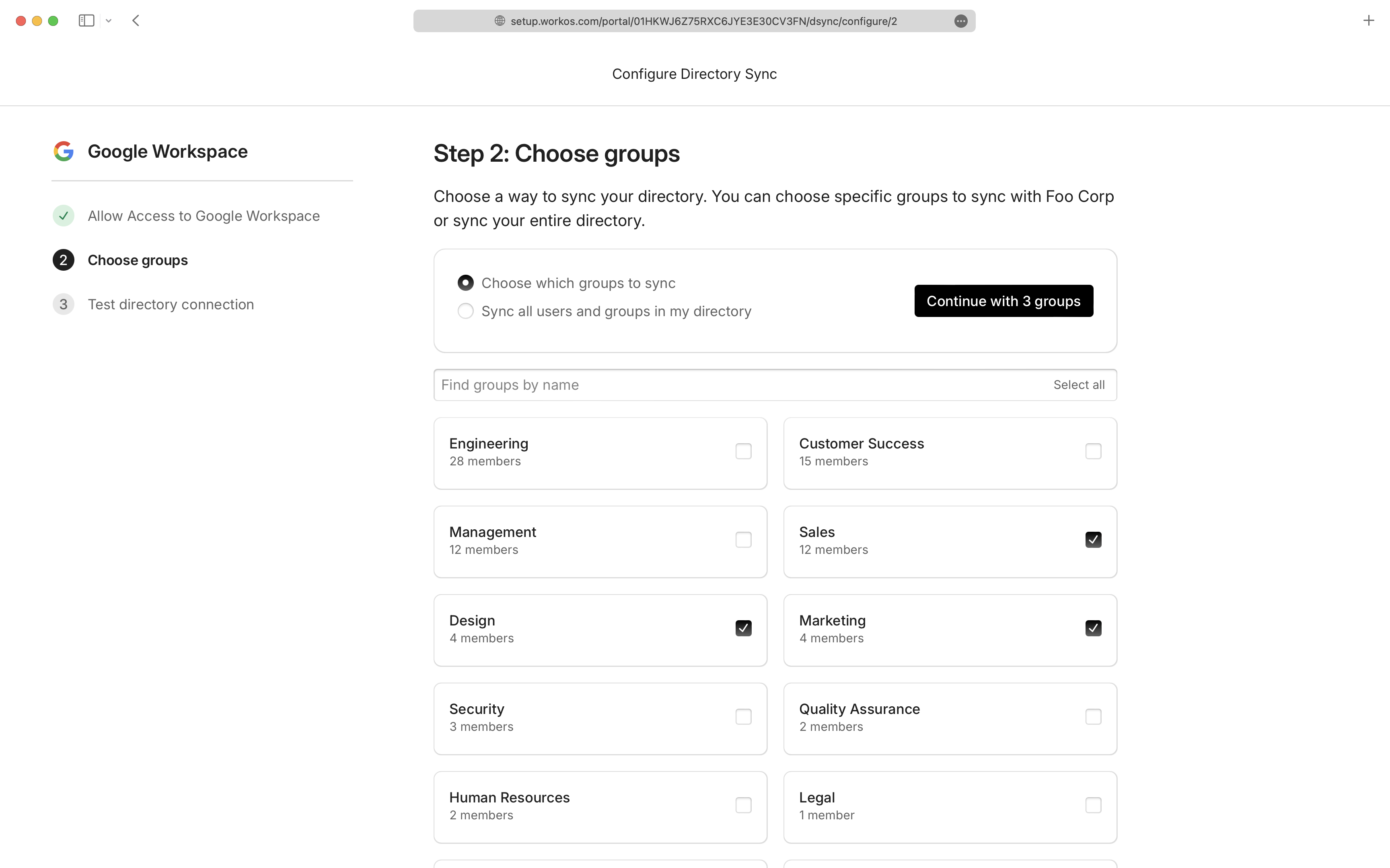
The organization admin can then select to filter which groups and memberships are synced to the directory. If groups are being filtered, then only users with a membership within one of the synced groups will be synced.
|
|
54
|
+
|
|
55
|
+
|
|
56
|
+
|
|
57
|
+
---
|
|
58
|
+
|
|
59
|
+
## (5) Sync users and groups to Your Application
|
|
60
|
+
|
|
61
|
+
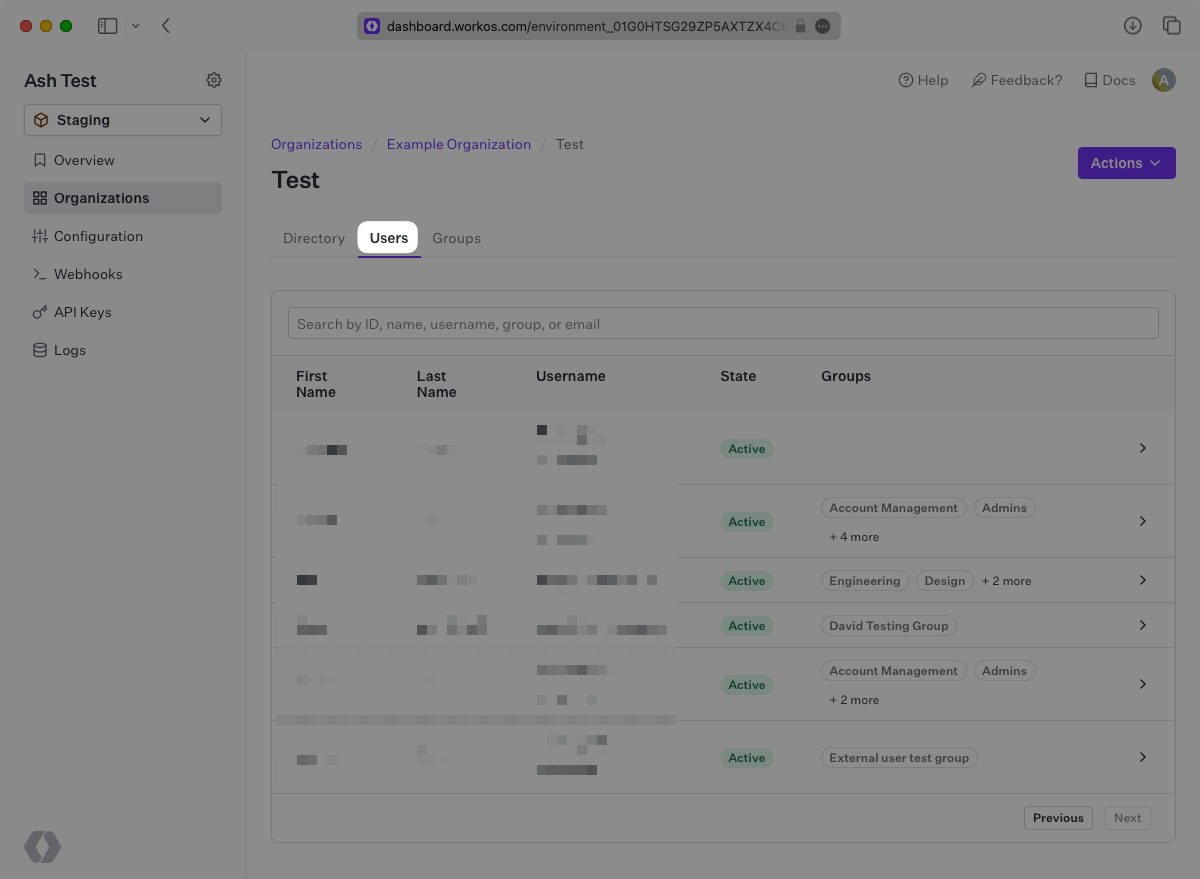
Changes will appear live in the Directory Sync portal under the "Users" tab:
|
|
62
|
+
|
|
63
|
+
|
|
64
|
+
|
|
65
|
+
A detailed guide to integrate the WorkOS API with your application can be found [here](/directory-sync)
|
|
66
|
+
|
|
67
|
+
## Frequently asked questions
|
|
68
|
+
|
|
69
|
+
### Can you selectively sync users and groups from Google Workspace?
|
|
70
|
+
|
|
71
|
+
Yes, you can select to sync certain groups during setup within the Admin Portal as seen in [Step 4](/integrations/google-directory-sync/4-select-which-groups-to-sync-to-your-application).
|
|
72
|
+
|
|
73
|
+
### When do users get removed from a directory?
|
|
74
|
+
|
|
75
|
+
There are 2 ways a user can be deleted from a Google Workspace directory.
|
|
76
|
+
|
|
77
|
+
1. The user is removed or archived on Google and no longer returned by their API.
|
|
78
|
+
2. When the directory is [filtering specific groups](/integrations/google-directory-sync/4-select-which-groups-to-sync-to-your-application), if a user is removed from all groups that are being filtered in, the user is removed from the directory as well.
|
|
79
|
+
|
|
80
|
+
### How often do Google Workspace directories perform a sync?
|
|
81
|
+
|
|
82
|
+
Google Workspace directories are synced approximately every 30 minutes starting from the time of the initial sync
|
|
83
|
+
|
|
84
|
+
### Does Google Directory Sync support nested groups?
|
|
85
|
+
|
|
86
|
+
Yes, nested groups (groups within groups) are supported in Google Directory Sync. This feature is currently available in a restricted preview. Contact [WorkOS support](mailto:support@workos.com) for additional details.
|
|
@@ -0,0 +1,173 @@
|
|
|
1
|
+
---
|
|
2
|
+
title: Google OAuth
|
|
3
|
+
description: "Learn how to set up OAuth with Google\_Workspace."
|
|
4
|
+
icon: google
|
|
5
|
+
breadcrumb:
|
|
6
|
+
title: Integrations
|
|
7
|
+
url: /integrations
|
|
8
|
+
originalPath: .tmp-workos-clone/packages/docs/content/integrations/google-oauth.mdx
|
|
9
|
+
---
|
|
10
|
+
|
|
11
|
+
## Introduction
|
|
12
|
+
|
|
13
|
+
To configure your global Google OAuth setup, you’ll need three pieces of information: a [Redirect URI](/glossary/redirect-uri), a Google Client ID, and a Google Client Secret.
|
|
14
|
+
|
|
15
|
+
---
|
|
16
|
+
|
|
17
|
+
## What WorkOS provides
|
|
18
|
+
|
|
19
|
+
WorkOS provides the Redirect URI, an allowlisted callback URL. It indicates the location to return an authorized user to after both an authorization code is granted, and the authentication process is complete.
|
|
20
|
+
|
|
21
|
+
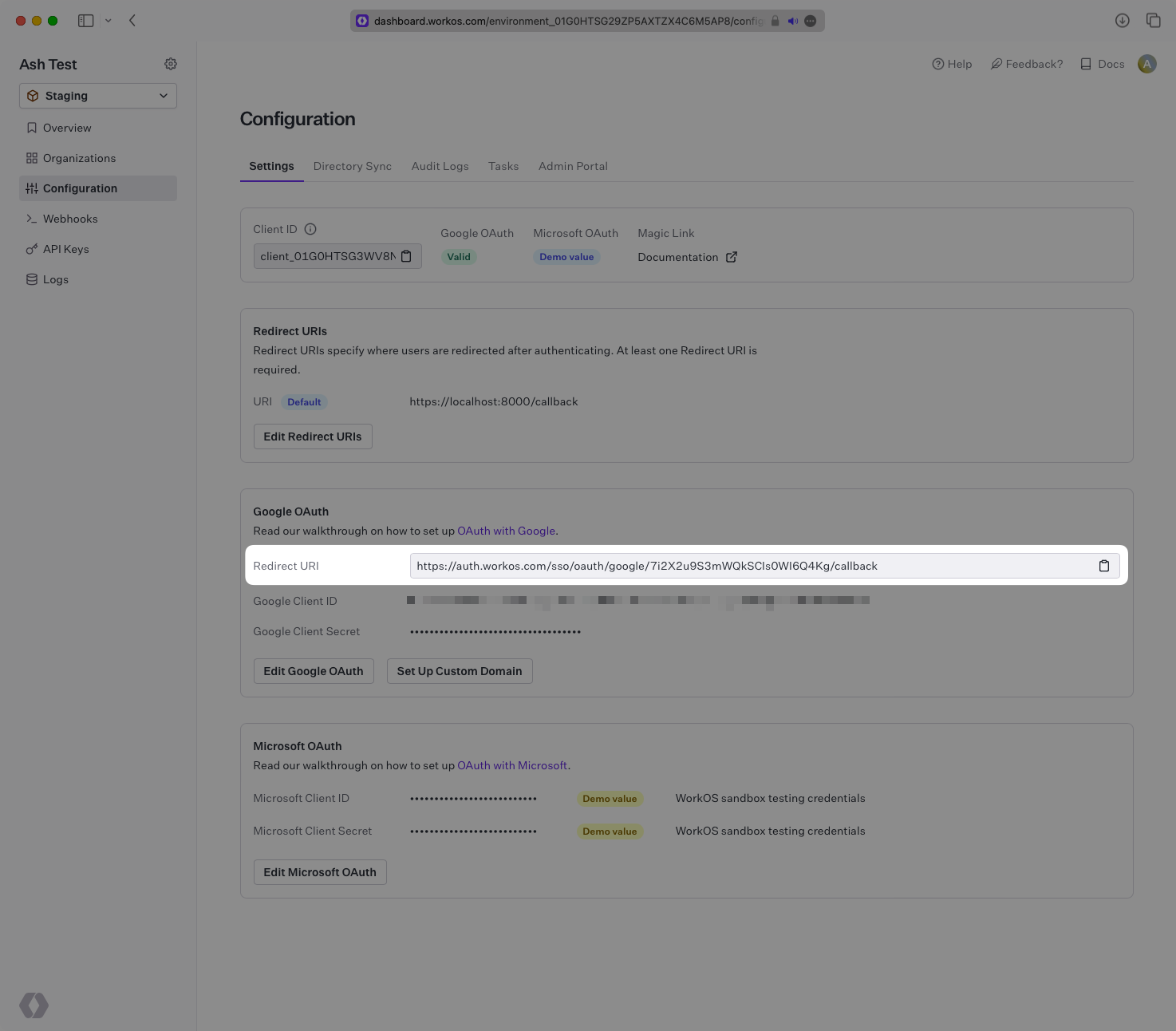
Open your [WorkOS Dashboard](https://dashboard.workos.com) and browse to the “Configuration” tab on the left hand nav bar. Scroll down to the “Google OAuth” section and you’ll see the Redirect URI as well as the fields you’ll populate later with information from Google.
|
|
22
|
+
|
|
23
|
+
|
|
24
|
+
|
|
25
|
+
---
|
|
26
|
+
|
|
27
|
+
## Testing with default credentials in the Staging environment
|
|
28
|
+
|
|
29
|
+
WorkOS provides a default Google Client ID/Google Client Secret combination, which allows you to quickly enable and test Google OAuth. Use the [WorkOS API to initiate SSO](/sso/1-add-sso-to-your-app/add-an-endpoint-to-initiate-sso), setting the `provider` parameter to `GoogleOAuth`, and WorkOS will automatically use the default credentials, until you add your own Google Client ID and Google Client Secret to the Configuration in the WorkOS Dashboard.
|
|
30
|
+
|
|
31
|
+
> The default credentials are only intended for testing and therefore only available in the Staging environment. For your production environment, please follow the steps below to create and specify your own Google Client ID and Google Client Secret.
|
|
32
|
+
|
|
33
|
+
Please note that when you are using WorkOS default credentials, Google's authentication flow will display WorkOS' name, logo, and other information to users. Once you register your own application and use its Google Client ID and Google Client Secret for the OAuth flow, you will have the opportunity to customize the app, including its name, logo, contact email, etc.
|
|
34
|
+
|
|
35
|
+
---
|
|
36
|
+
|
|
37
|
+
## What you’ll need
|
|
38
|
+
|
|
39
|
+
In order to integrate you’ll need the Google Client ID and the Google Client Secret.
|
|
40
|
+
|
|
41
|
+
These are a pair of credentials provided by Google that you’ll use to authenticate your application via Google’s OAuth protocol. To obtain them:
|
|
42
|
+
|
|
43
|
+
---
|
|
44
|
+
|
|
45
|
+
### (1) Log in
|
|
46
|
+
|
|
47
|
+
Log in to the [Google Cloud Platform Console Dashboard](https://console.cloud.google.com/). Select your application’s project from the project selection dropdown menu in the navigation bar.
|
|
48
|
+
|
|
49
|
+
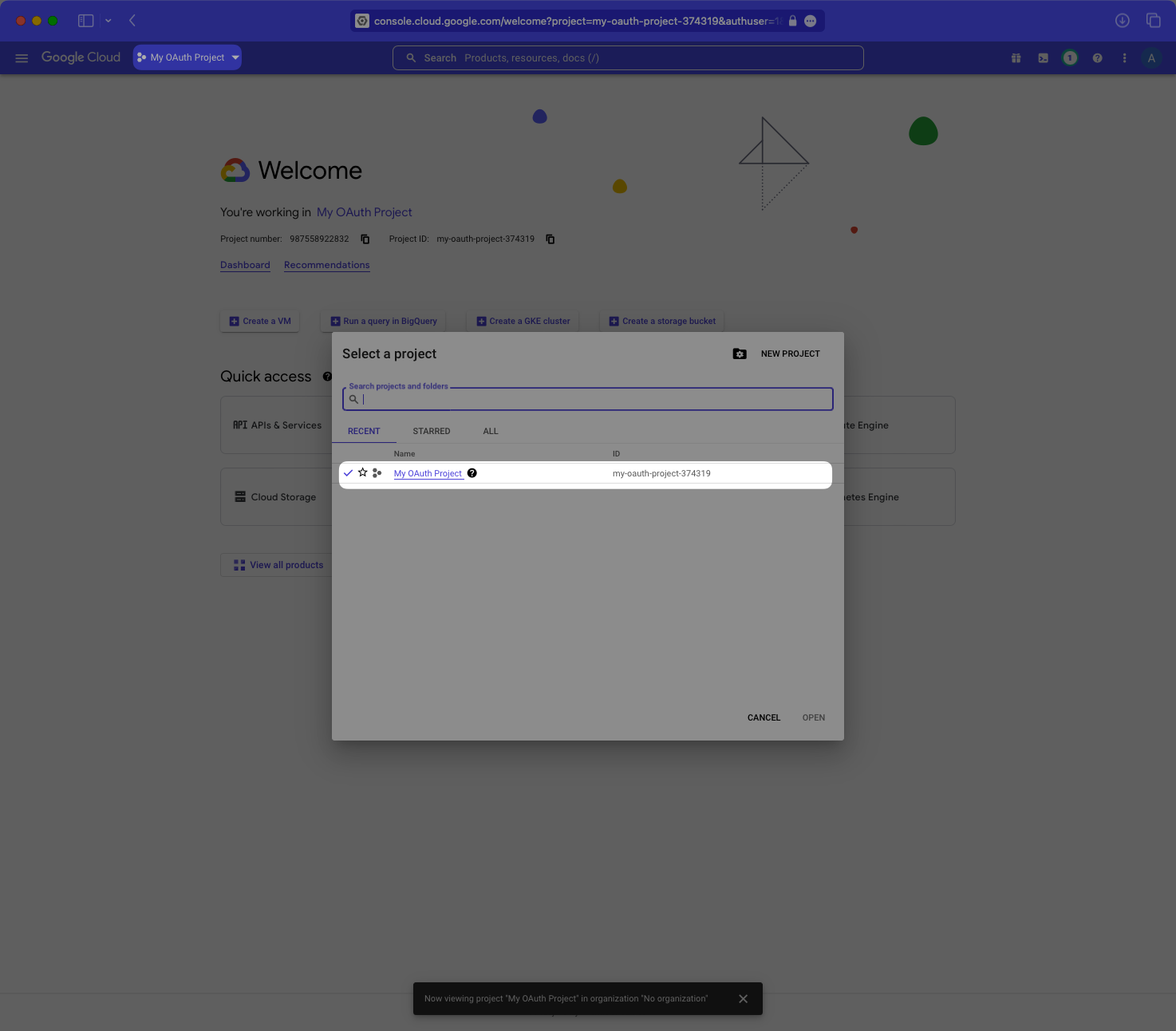
|
|
50
|
+
|
|
51
|
+
---
|
|
52
|
+
|
|
53
|
+
### (2) Select your application
|
|
54
|
+
|
|
55
|
+
Select “APIs & Services”, then “OAuth Consent Screen” in the left-hand navigation menu.
|
|
56
|
+
|
|
57
|
+
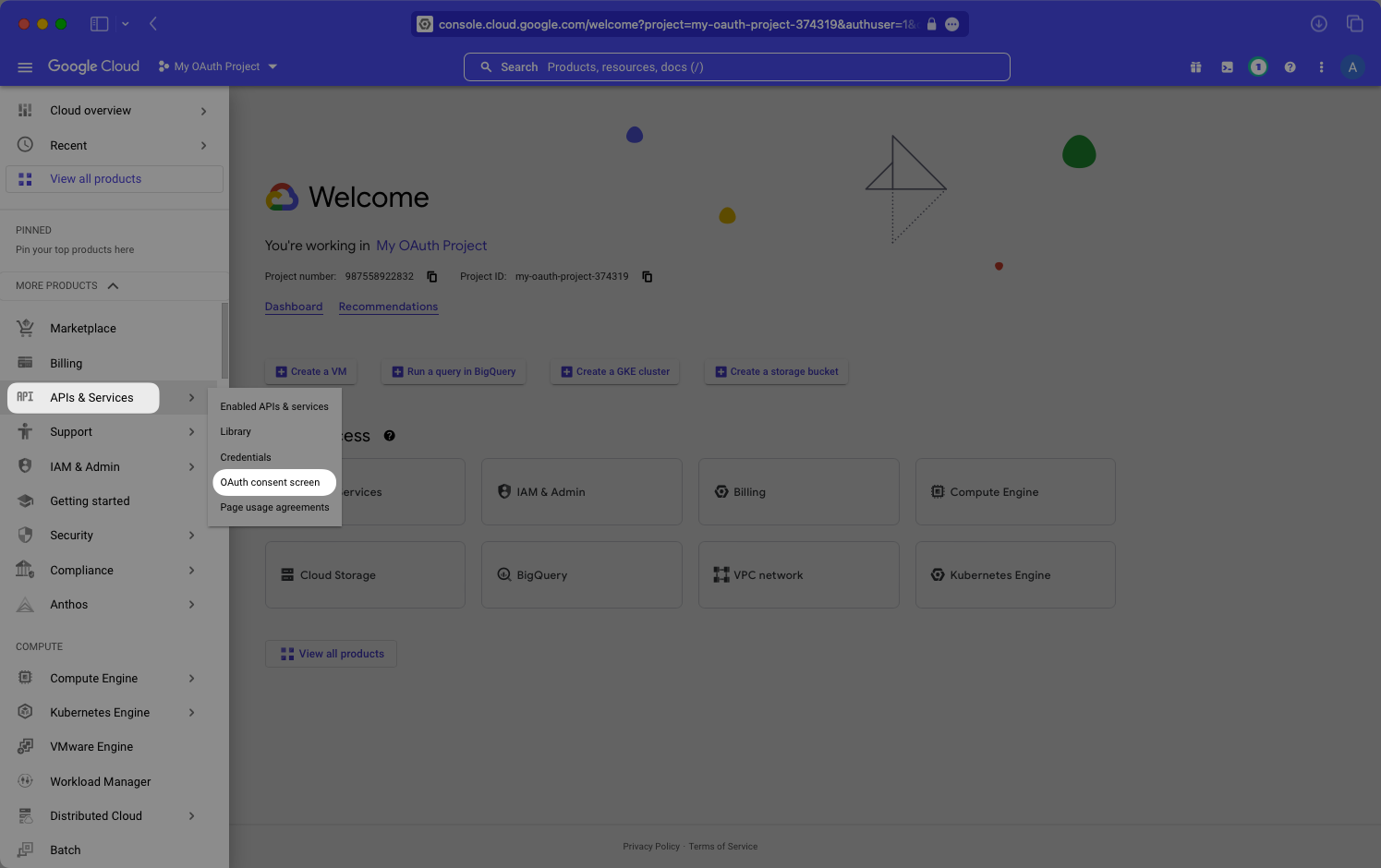
|
|
58
|
+
|
|
59
|
+
Select “Edit App”.
|
|
60
|
+
|
|
61
|
+
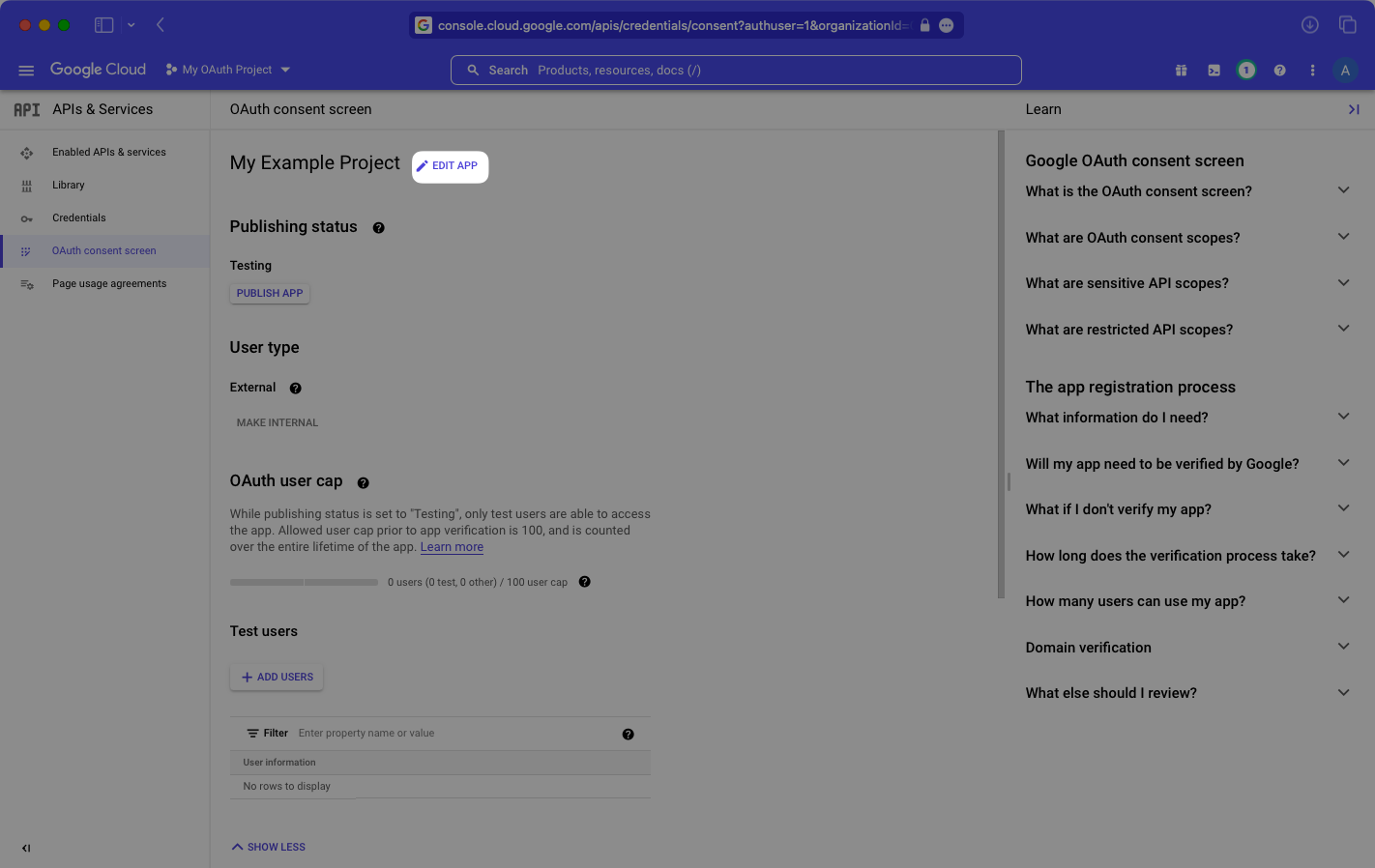
|
|
62
|
+
|
|
63
|
+
Add `workos.com` to your list of “Authorized domains”, and select “Save”.
|
|
64
|
+
|
|
65
|
+
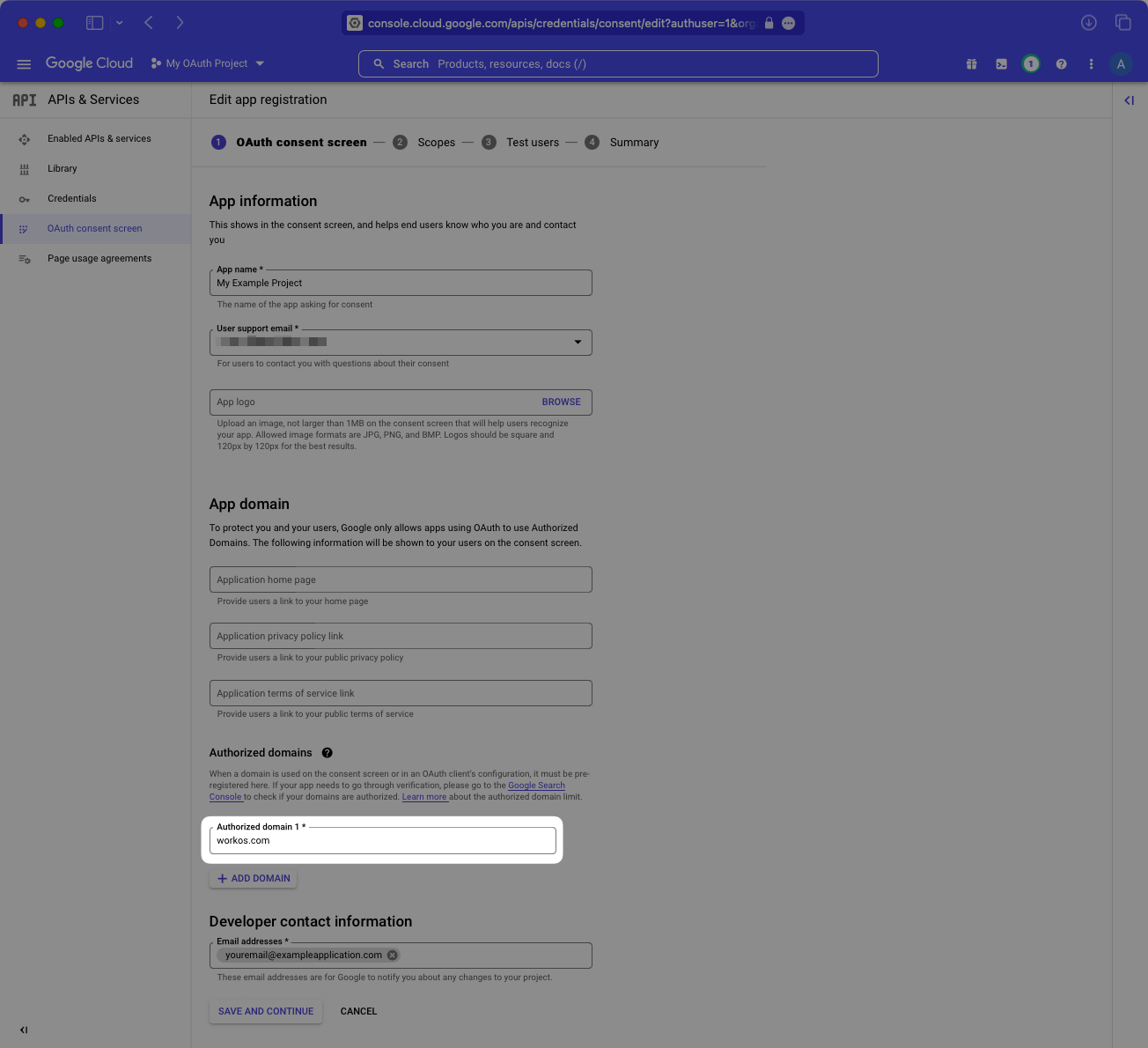
|
|
66
|
+
|
|
67
|
+
---
|
|
68
|
+
|
|
69
|
+
### (3) Enter Setup Instructions
|
|
70
|
+
|
|
71
|
+
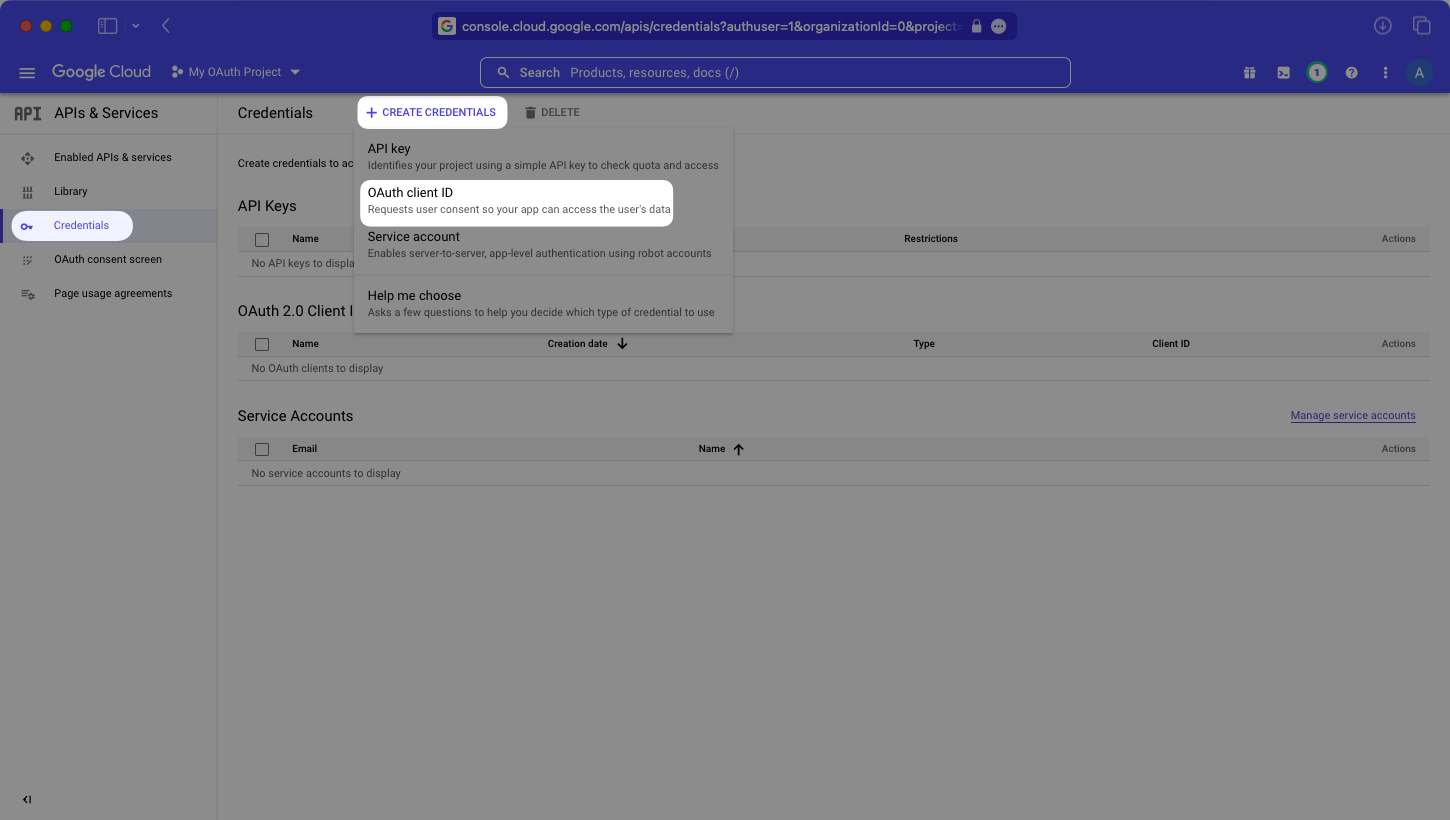
Select “Credentials” in the left-hand menu. Then select “OAuth client ID” from the “Create Credentials” dropdown menu.
|
|
72
|
+
|
|
73
|
+
|
|
74
|
+
|
|
75
|
+
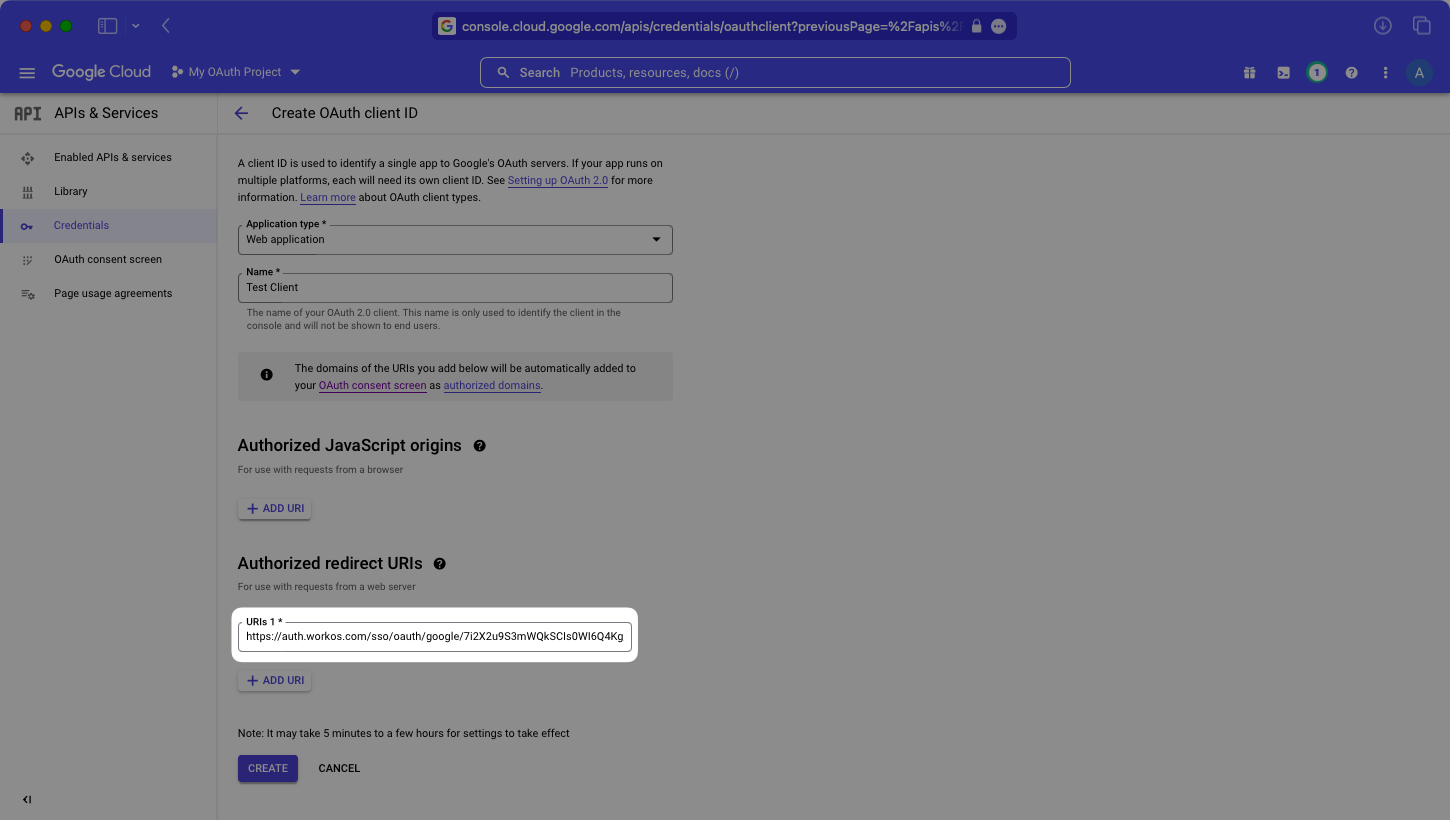
Then, give your OAuth client ID a name, and add the Redirect URI provided by WorkOS to the list of “Authorized redirect URIs”.
|
|
76
|
+
|
|
77
|
+
> As a best practice, your OAuth client ID’s name should be different from your application’s name. It will not be shown to end users.
|
|
78
|
+
|
|
79
|
+
|
|
80
|
+
|
|
81
|
+
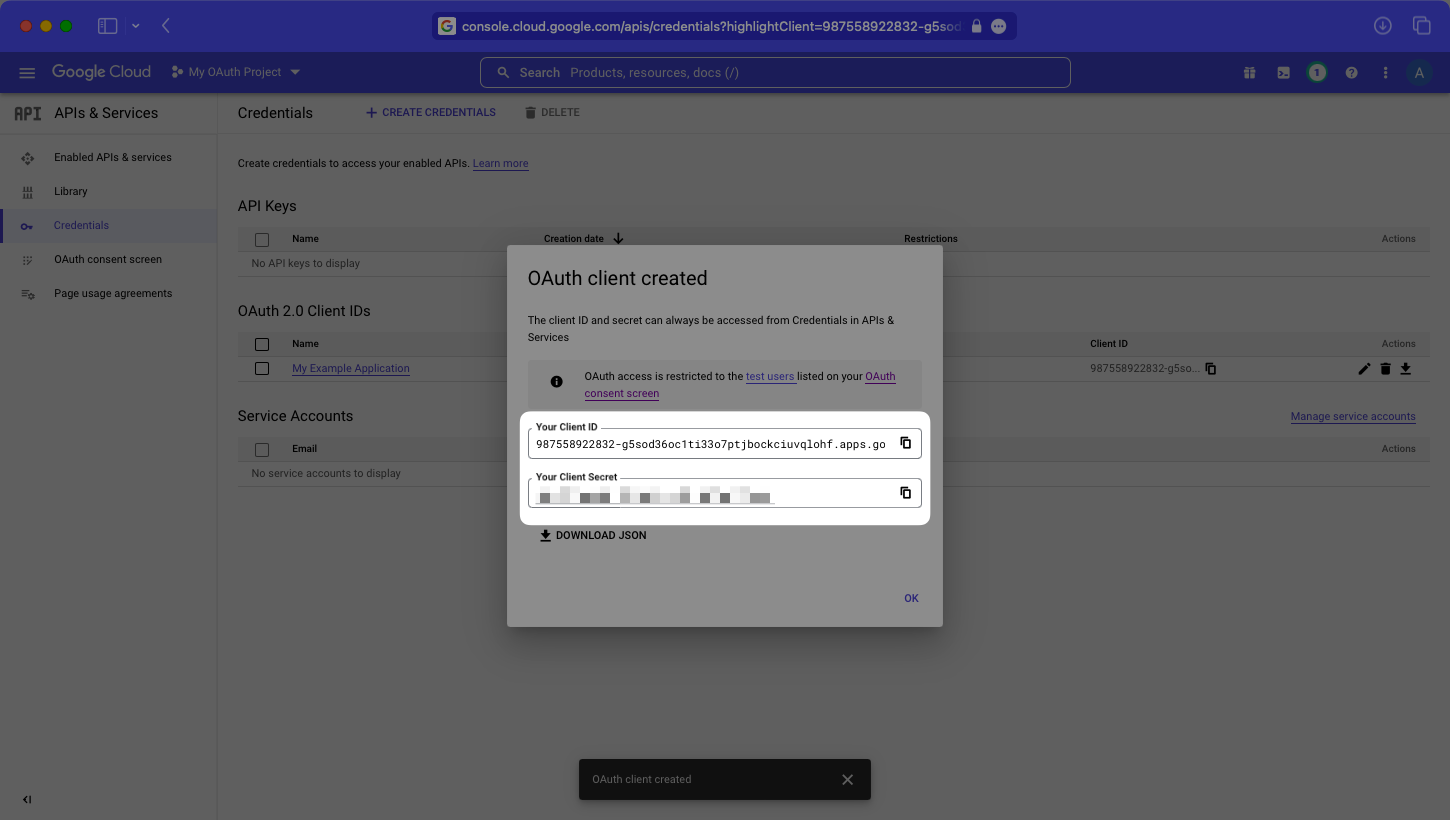
Click “Create” and you’ll be presented with your application’s Client ID and Client Secret.
|
|
82
|
+
|
|
83
|
+
|
|
84
|
+
|
|
85
|
+
---
|
|
86
|
+
|
|
87
|
+
### (4) Obtain Identity Provider Details
|
|
88
|
+
|
|
89
|
+
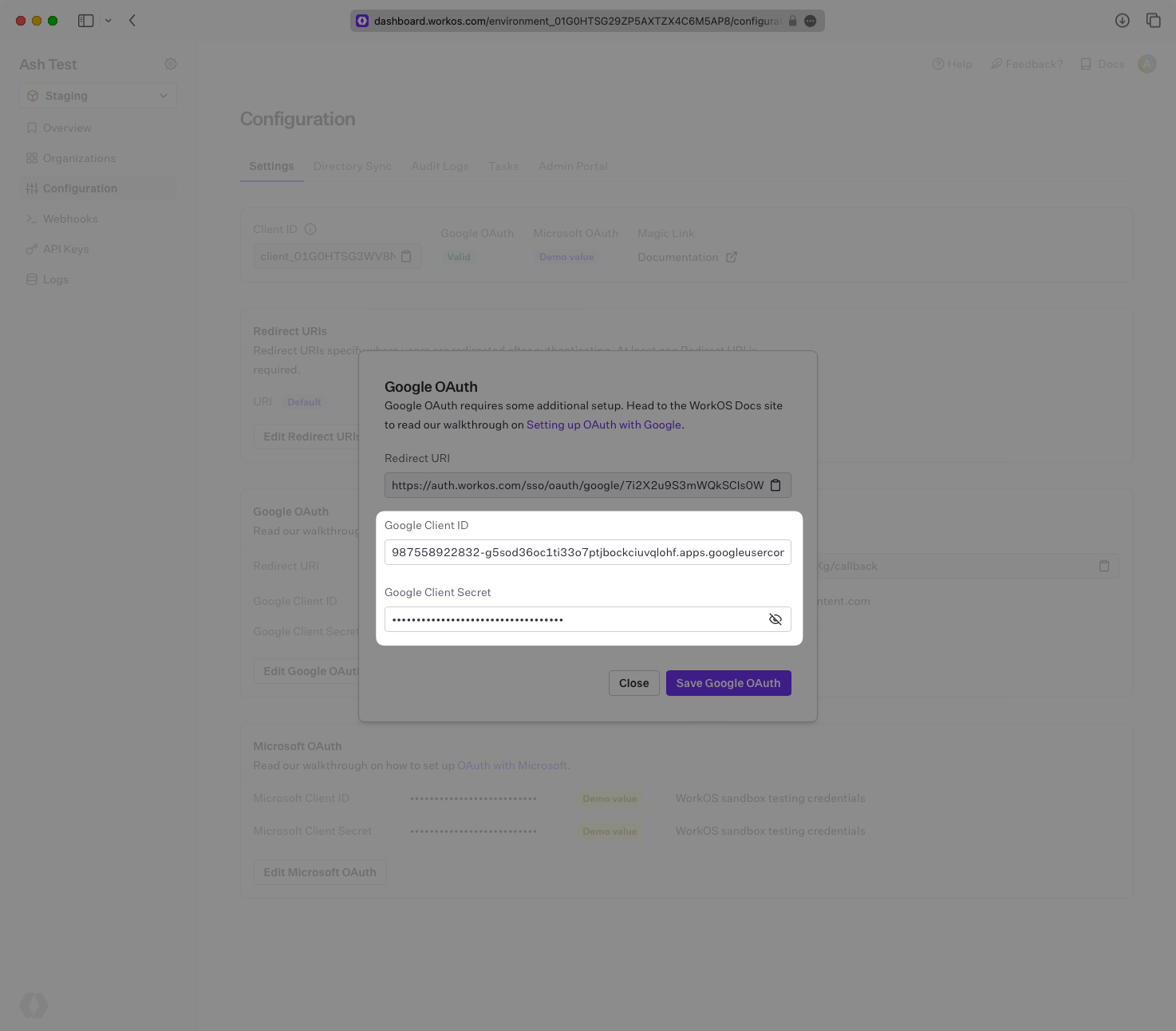
Add your Google Client ID and Google Client Secret to their respective fields in your Google Settings in the Configuration section of the WorkOS Dashboard.
|
|
90
|
+
|
|
91
|
+
|
|
92
|
+
|
|
93
|
+
Select “Save Google OAuth” and you’ll almost be ready to go.
|
|
94
|
+
|
|
95
|
+
---
|
|
96
|
+
|
|
97
|
+
### (5) Publish your Google OAuth application
|
|
98
|
+
|
|
99
|
+
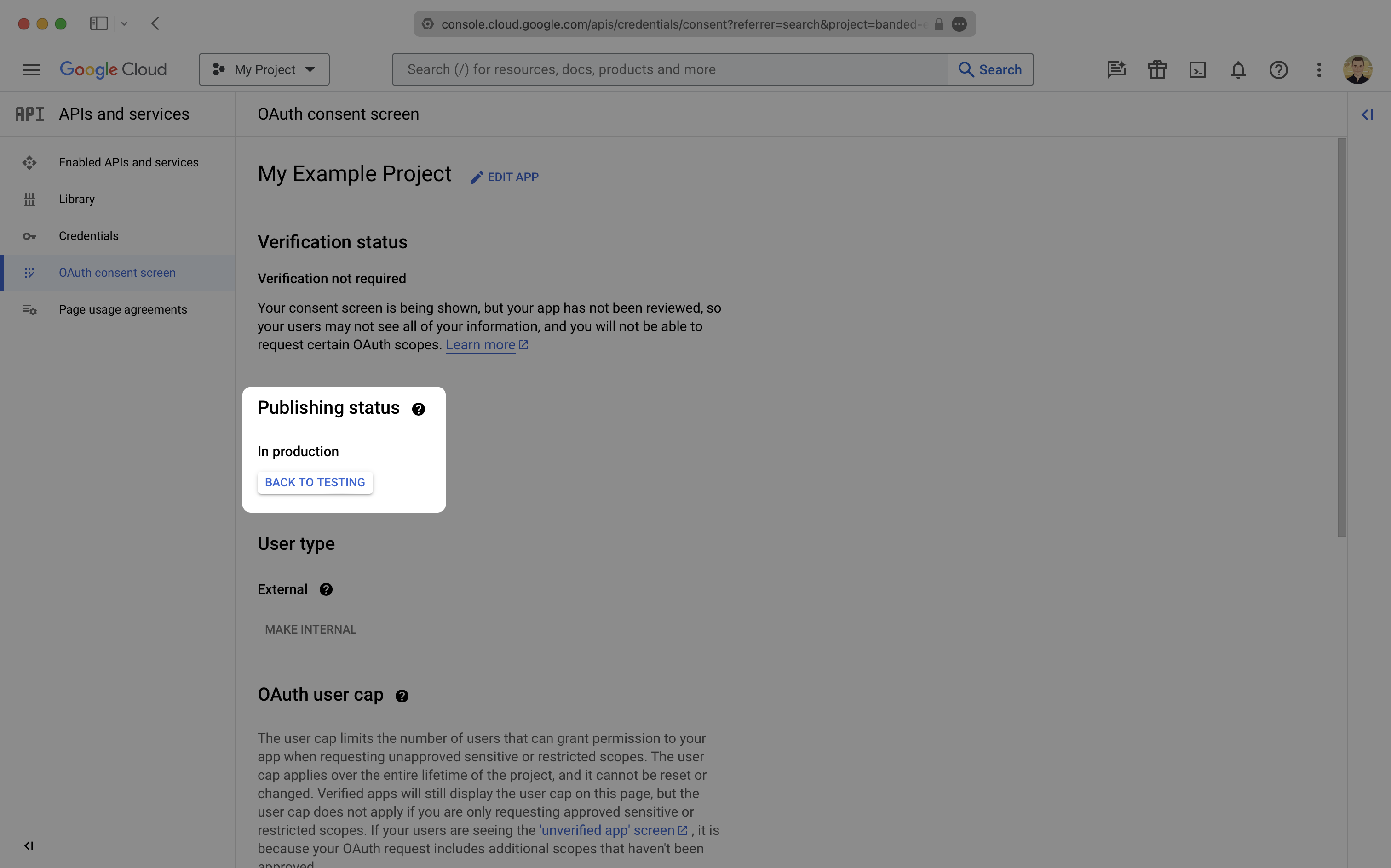
Back in the “OAuth consent screen”, be sure that your app is “In production”. If it is still in testing mode you’ll likely get an “Access Blocked” error when attempting to log into your app.
|
|
100
|
+
|
|
101
|
+
|
|
102
|
+
|
|
103
|
+
After that, you’re now able to authenticate users with Google OAuth. You will use the `provider` query parameter in the Get Authorization URL API endpoint to support global Google OAuth for any domain. The `provider` query parameter should be set to `GoogleOAuth`.
|
|
104
|
+
|
|
105
|
+
---
|
|
106
|
+
|
|
107
|
+
## Customize Google OAuth Domain
|
|
108
|
+
|
|
109
|
+
Optional process that requires access to your Google Cloud Console and your domain’s DNS settings.
|
|
110
|
+
|
|
111
|
+
After implementing the steps above, you’ll notice that the Google OAuth sign in form displays “Choose an account to continue to workos.com”. This is based on the Authorized Redirect URI in Google. To set this to a domain other than workos.com, Google will ask for proof of ownership of your domain. To help guide you through this process we have a self-service flow.
|
|
112
|
+
|
|
113
|
+
---
|
|
114
|
+
|
|
115
|
+
### (1) Add Your Custom Google OAuth Domain
|
|
116
|
+
|
|
117
|
+
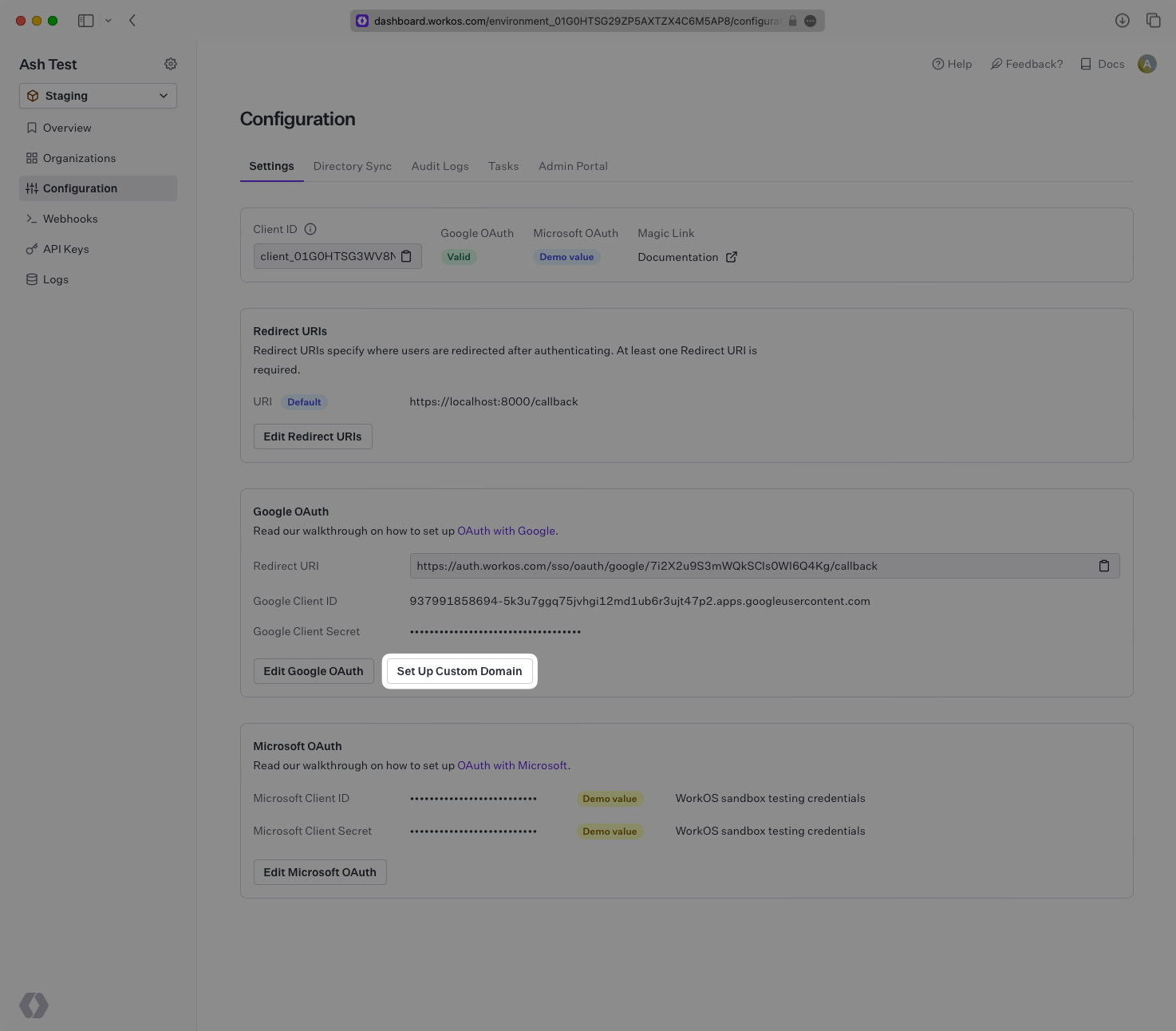
In the Configuration tab of the WorkOS Dashboard, find the Google OAuth section and click on “Setup Custom Domain”.
|
|
118
|
+
|
|
119
|
+
> Note: This button will only appear if your environment has a valid Google OAuth configuration and has not already setup a custom domain.
|
|
120
|
+
|
|
121
|
+
|
|
122
|
+
|
|
123
|
+
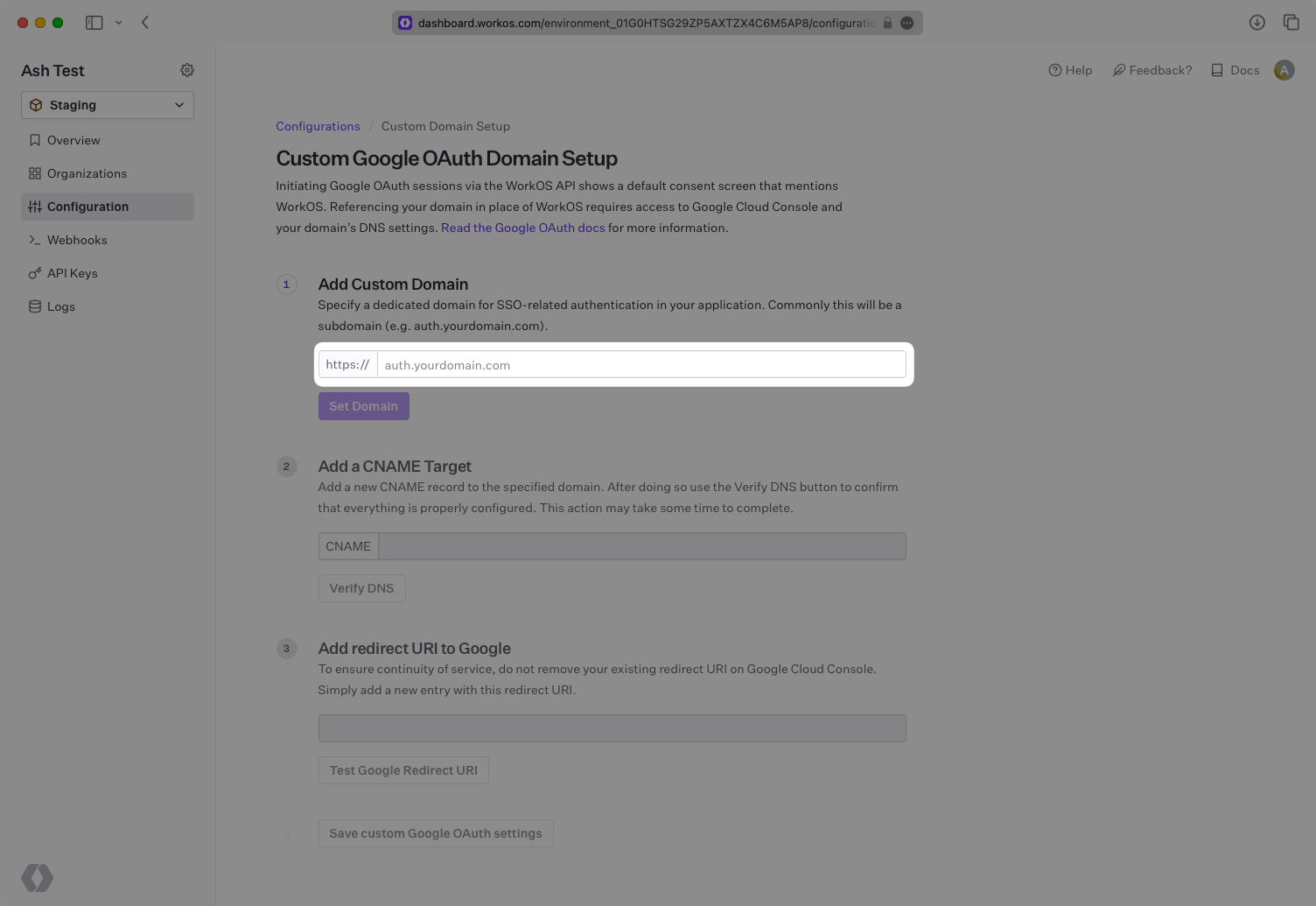
Under “Add Custom Domain”, input the domain that you wish to use in place of `auth.workos.com`. This is often a subdomain such as `auth.example.com`. Click on “Set Domain”.
|
|
124
|
+
|
|
125
|
+
|
|
126
|
+
|
|
127
|
+
---
|
|
128
|
+
|
|
129
|
+
### (2) Add CNAME Target
|
|
130
|
+
|
|
131
|
+
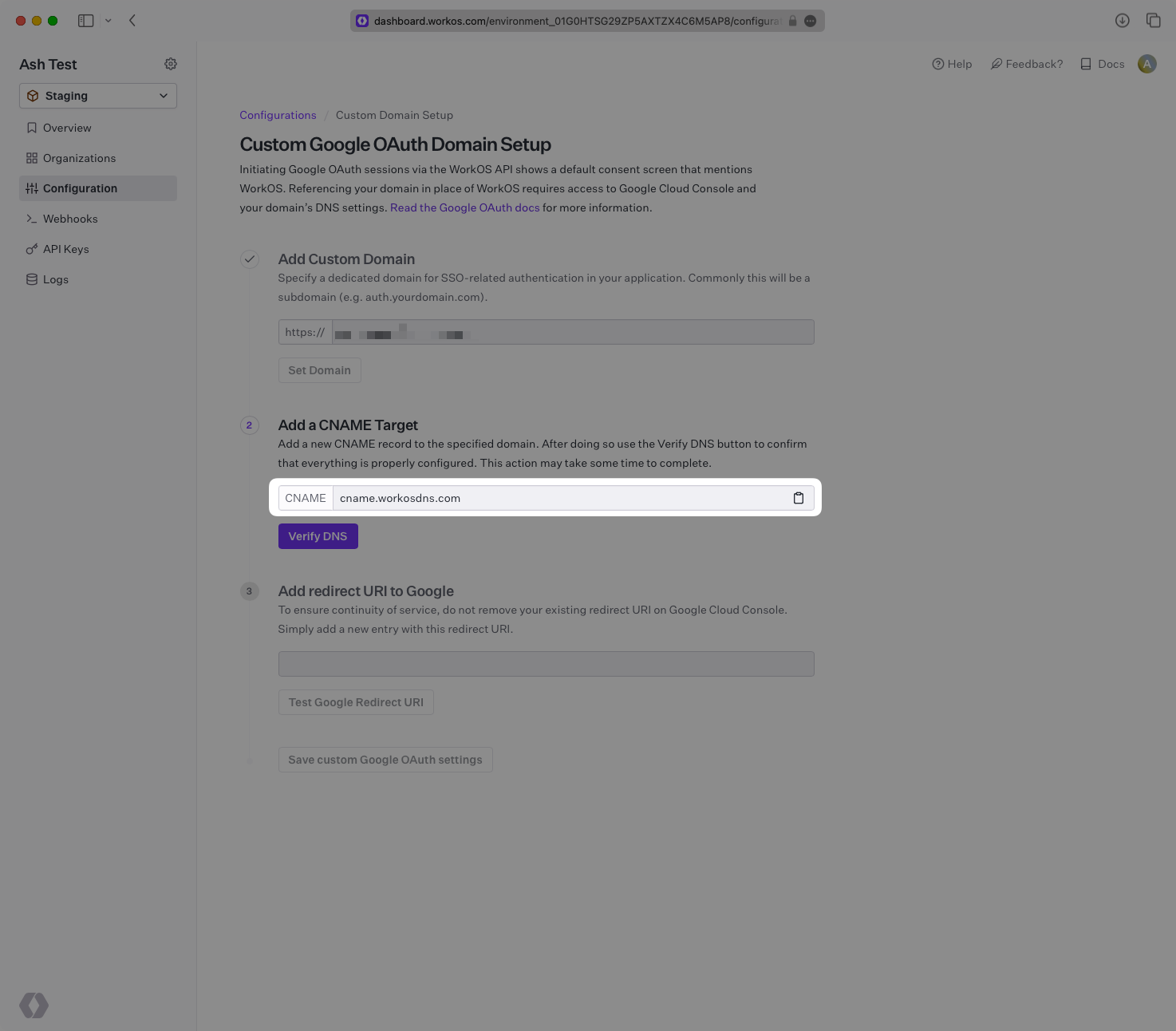
Add a new CNAME target inside your domain’s DNS settings. Set the host to match the domain you set in the previous step and set the value to `cname.workosdns.com`.
|
|
132
|
+
|
|
133
|
+
Once the above is complete, click on “Verify DNS”. This verification often takes less than a minute, but is dependent on how long your DNS record takes to propagate. The page will continue polling to check the status of your verification until it is successful.
|
|
134
|
+
|
|
135
|
+
|
|
136
|
+
|
|
137
|
+
---
|
|
138
|
+
|
|
139
|
+
### (3) Add New Redirect URI to Google
|
|
140
|
+
|
|
141
|
+
Once the DNS has been successfully verified, we will provide a URI starting with your subdomain in the “Add redirect URI to Google” section. Click on the clipboard icon to copy the URL.
|
|
142
|
+
|
|
143
|
+
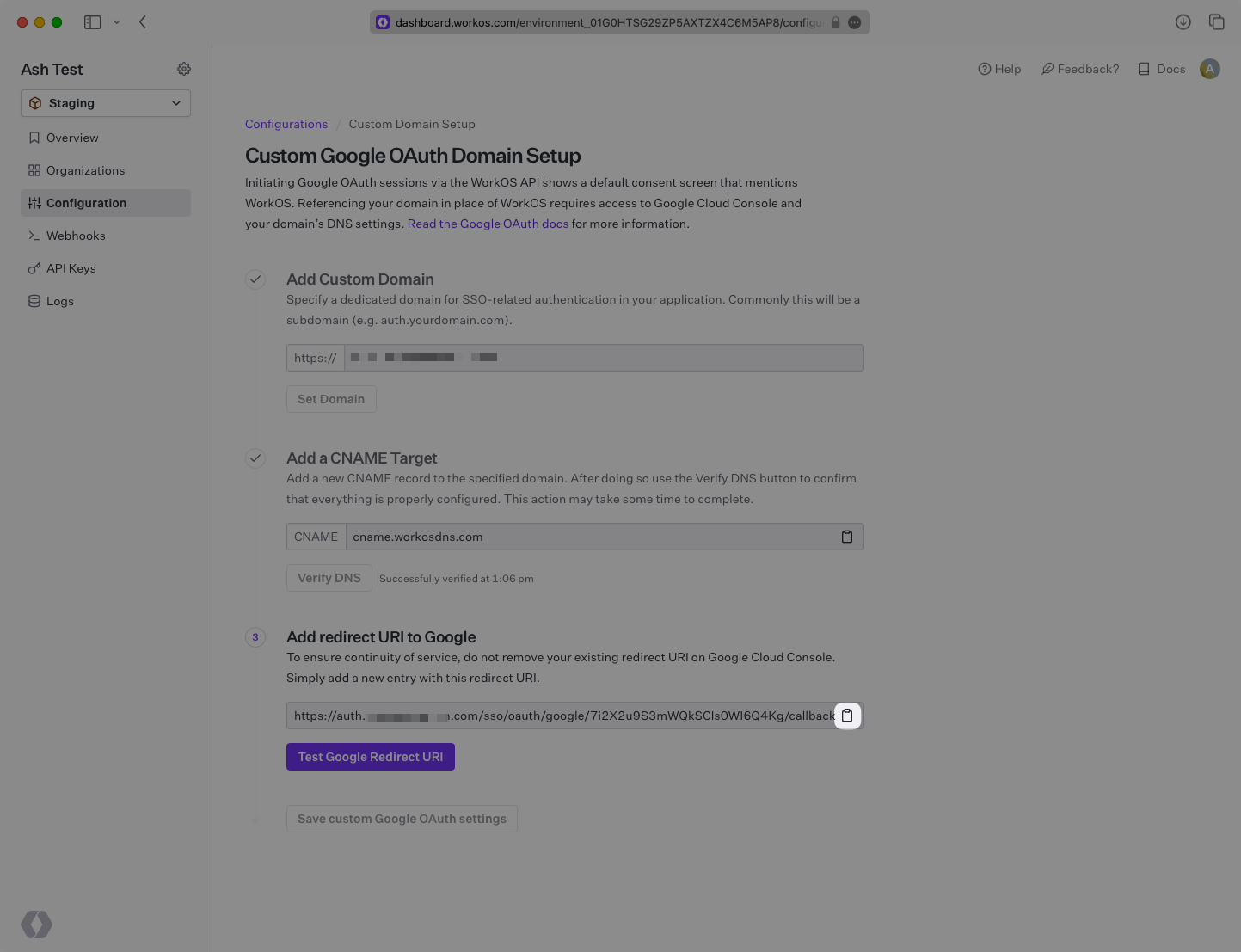
|
|
144
|
+
|
|
145
|
+
In your Google Cloud Platform dashboard under your project’s “APIs & Services” → “Credentials” section, add the URL copied above under “Authorized redirect URIs”. To ensure your Google OAuth integration continues to work without any gaps in service, leave your existing Redirect URI in place for now.
|
|
146
|
+
|
|
147
|
+
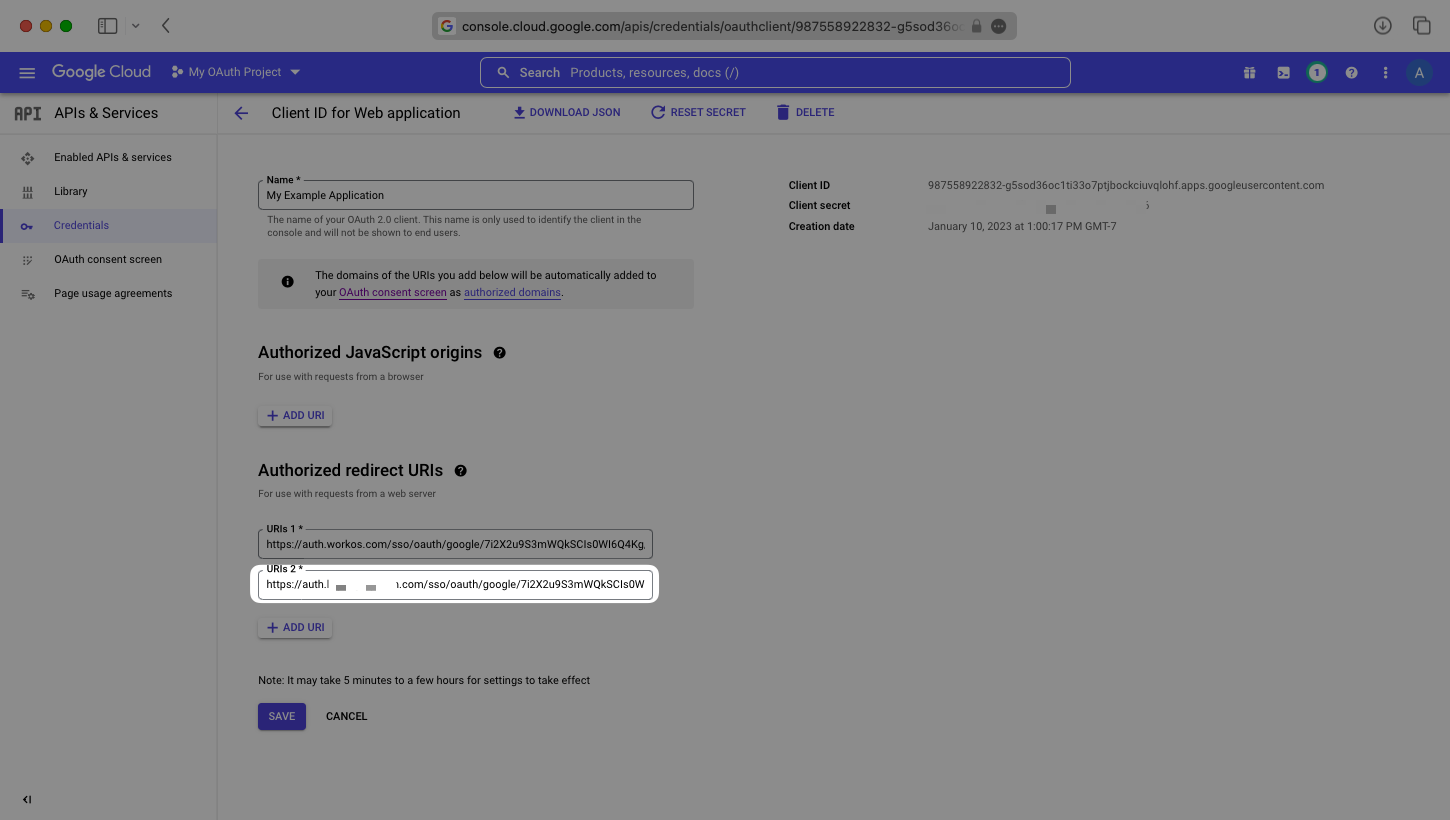
|
|
148
|
+
|
|
149
|
+
---
|
|
150
|
+
|
|
151
|
+
### (4) Test Google Redirect URI
|
|
152
|
+
|
|
153
|
+
Once the URL has been added and saved on the Google side, navigate back to the WorkOS Dashboard and click on “Test Google Redirect URI”.
|
|
154
|
+
|
|
155
|
+
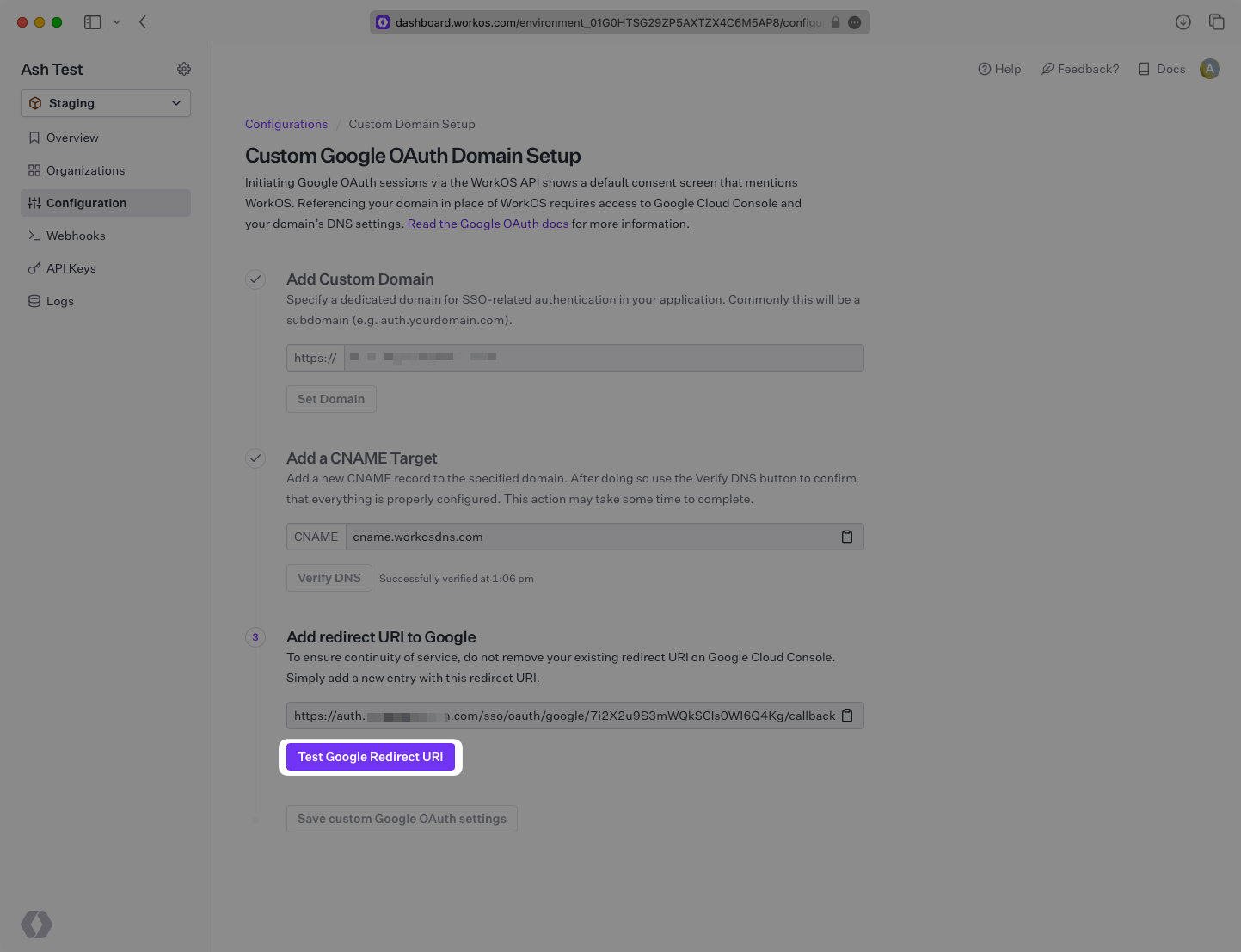
|
|
156
|
+
|
|
157
|
+
If the test is successful, you will see a “Successfully tested” message displayed. You will also now be able to click “Save custom Google OAuth settings” to save your new Google OAuth configuration.
|
|
158
|
+
|
|
159
|
+
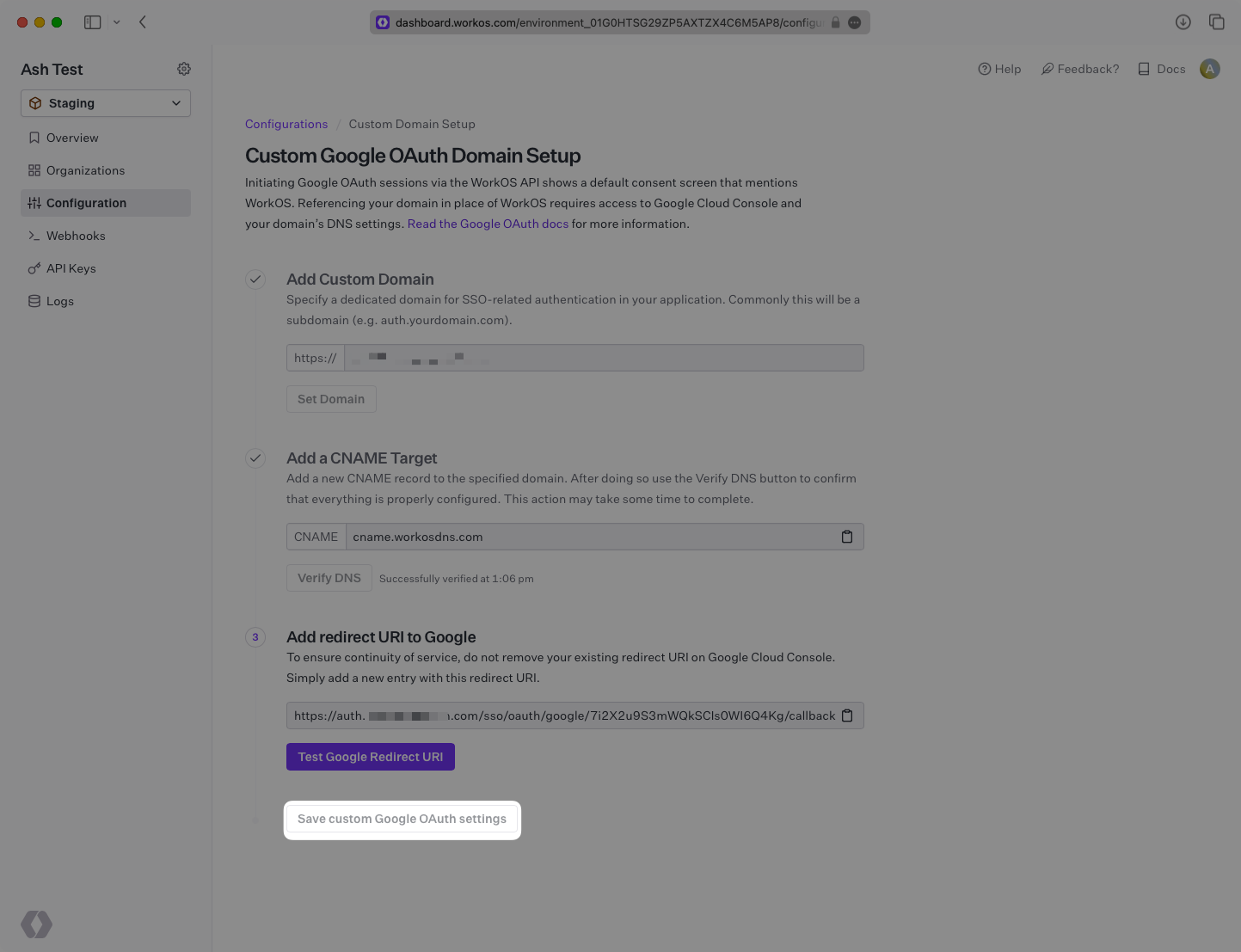
|
|
160
|
+
|
|
161
|
+
Once these updates have been saved, test out your Google OAuth sign in flow to ensure everything is working properly and your domain is displayed on the form. If everything is looking good, it is safe to remove the old `auth.workos.com` URL from your Google Authorized redirect URIs, and `workos.com` from your Google Authorized domains.
|
|
162
|
+
|
|
163
|
+
---
|
|
164
|
+
|
|
165
|
+
## Frequently asked questions
|
|
166
|
+
|
|
167
|
+
### How is the WorkOS Google OAuth integration different from implementing regular Google OAuth flow?
|
|
168
|
+
|
|
169
|
+
It’s the same Google OAuth flow as you could build yourself, but it’s encapsulated within WorkOS SSO. This means you don’t need to build it yourself. In addition to Google OAuth, you can use WorkOS SSO to support other identity providers, all with a single integration.
|
|
170
|
+
|
|
171
|
+
### What is the provider query parameter and how is it used in the Google OAuth integration?
|
|
172
|
+
|
|
173
|
+
You can use the `provider` query parameter in the [Get Authorization URL API endpoint](/reference/sso/get-authorization-url) to support global Google OAuth for any domain. The `provider` query parameter should be set to `GoogleOAuth`.
|
|
@@ -0,0 +1,135 @@
|
|
|
1
|
+
---
|
|
2
|
+
title: Google SAML
|
|
3
|
+
description: "Learn how to configure a connection to\_Google Workspace via SAML."
|
|
4
|
+
icon: google
|
|
5
|
+
breadcrumb:
|
|
6
|
+
title: Integrations
|
|
7
|
+
url: /integrations
|
|
8
|
+
originalPath: .tmp-workos-clone/packages/docs/content/integrations/google-saml.mdx
|
|
9
|
+
---
|
|
10
|
+
|
|
11
|
+
## Introduction
|
|
12
|
+
|
|
13
|
+
Each SSO Identity Provider requires specific information to create and configure a new [connection](/glossary/connection). Often, the information required to create a connection will differ by Identity Provider.
|
|
14
|
+
|
|
15
|
+
To create a Google SAML connection, you’ll need three pieces of information: an [ACS URL](/glossary/acs-url), a [SP Entity ID](/glossary/sp-entity-id), and an [IdP Metadata URL](/glossary/idp-metadata).
|
|
16
|
+
|
|
17
|
+
Start by logging into your [WorkOS Dashboard](https://dashboard.workos.com/) and selecting “Organizations” from the left hand navigation bar.
|
|
18
|
+
|
|
19
|
+
Click on the organization you’d like to configure a Google SAML connection for and select “Manually Configure Connection”.
|
|
20
|
+
|
|
21
|
+
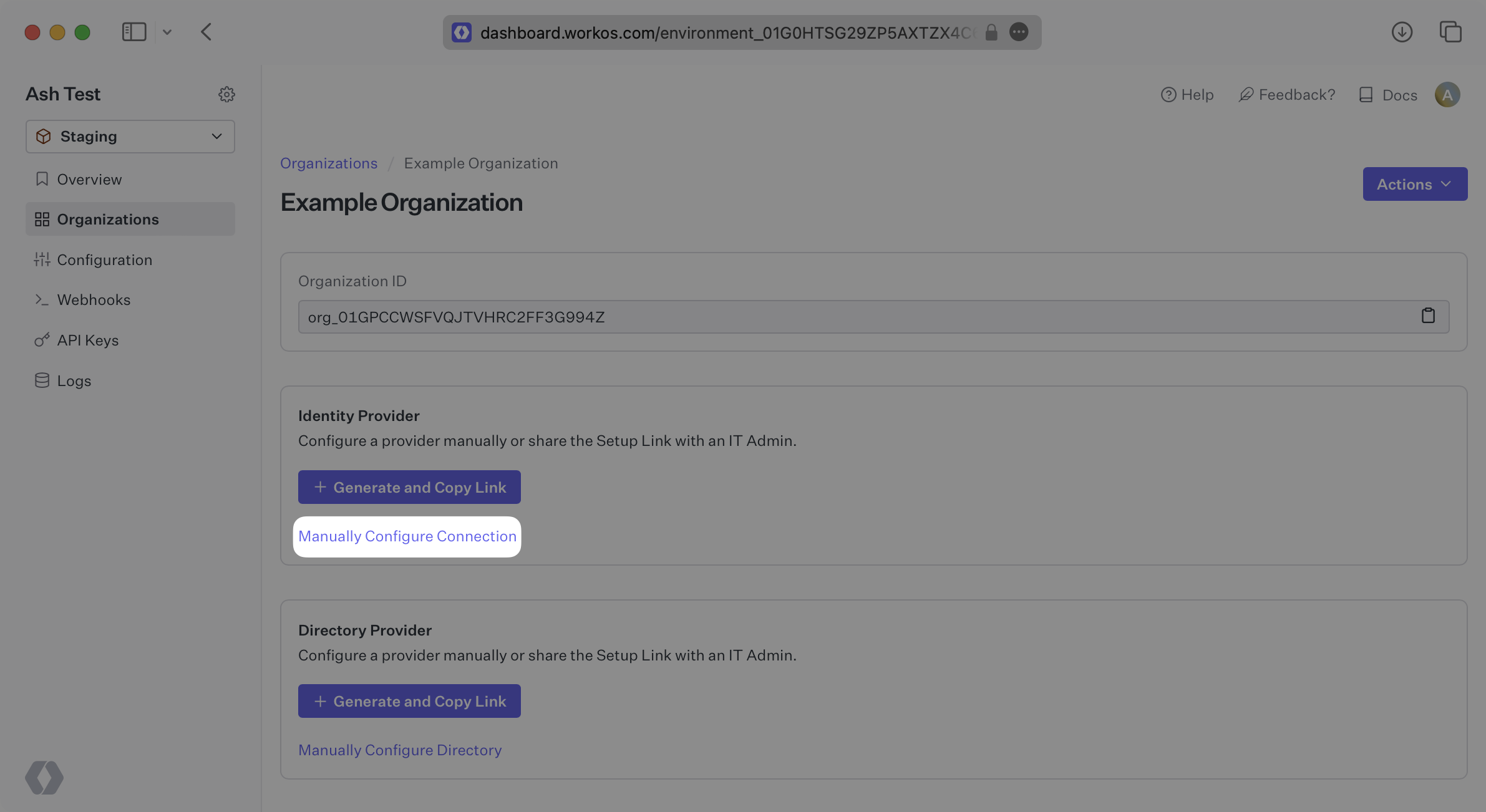
|
|
22
|
+
|
|
23
|
+
Select “Google SAML” from the Identity Provider dropdown, enter a descriptive name for the connection, and then select the “Create Connection” button.
|
|
24
|
+
|
|
25
|
+
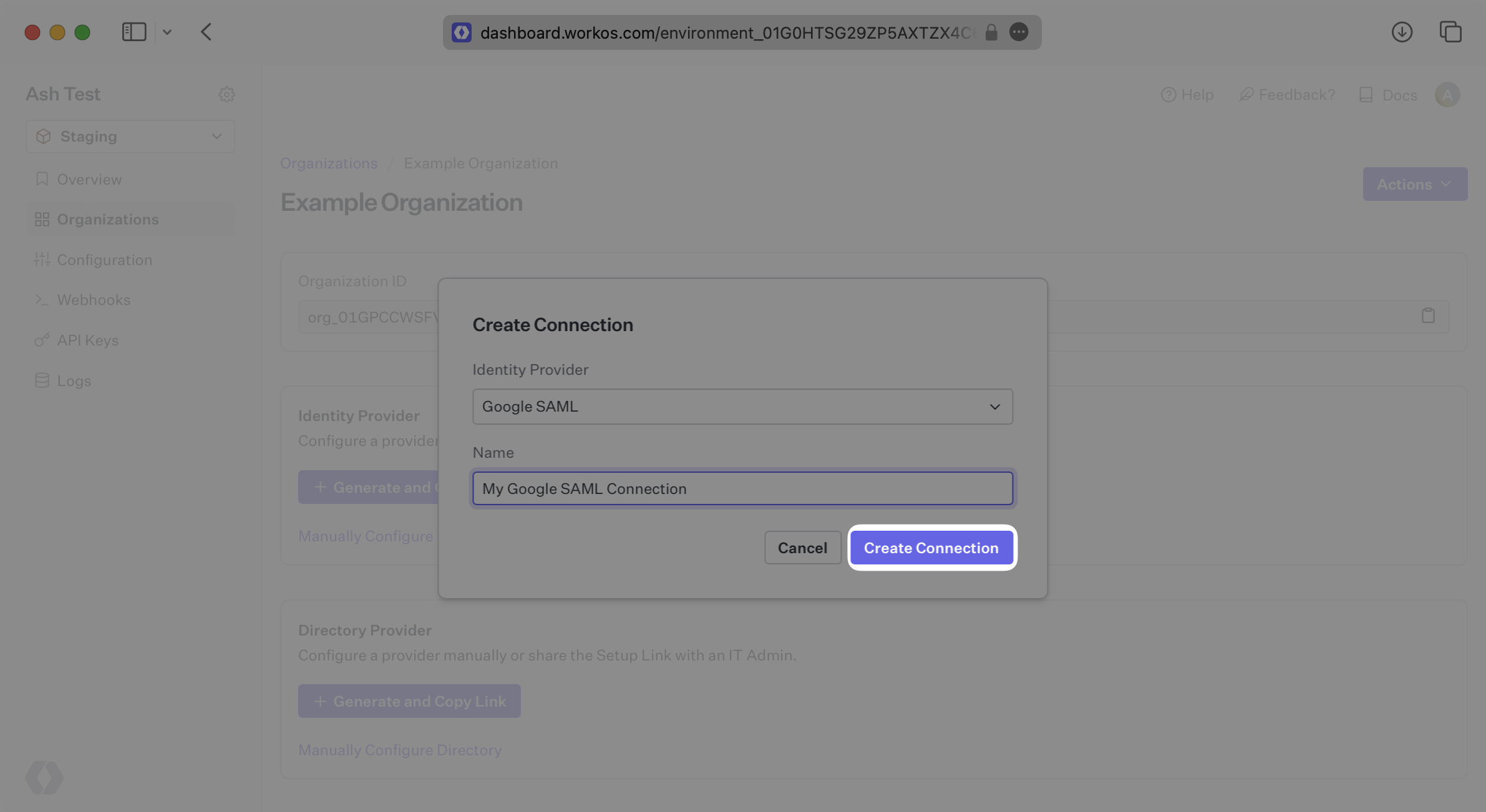
|
|
26
|
+
|
|
27
|
+
---
|
|
28
|
+
|
|
29
|
+
## What WorkOS provides
|
|
30
|
+
|
|
31
|
+
WorkOS provides the ACS URL and the SP Entity ID. It’s readily available in your Connection Settings in the [WorkOS Dashboard](https://dashboard.workos.com/).
|
|
32
|
+
|
|
33
|
+
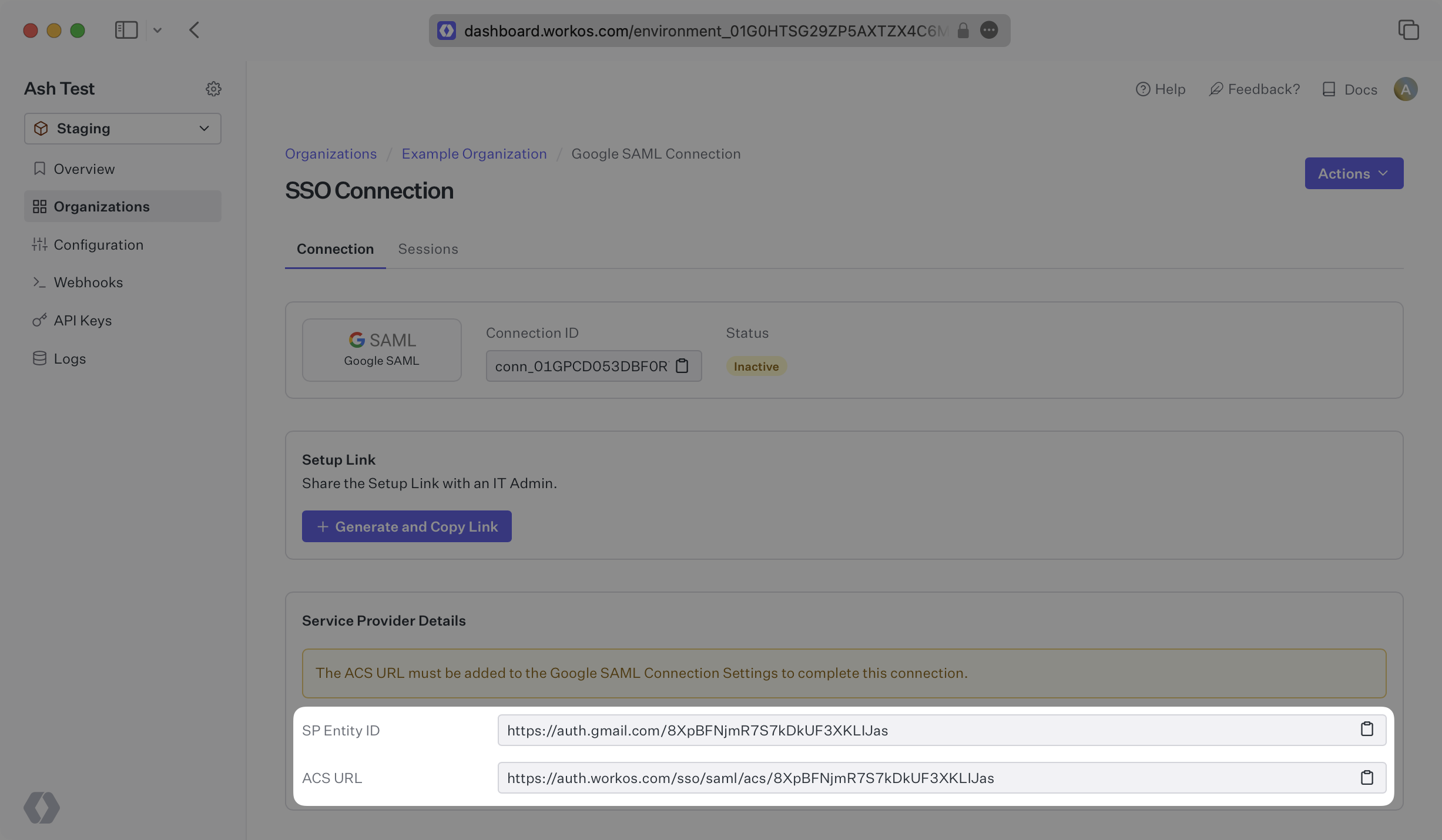
|
|
34
|
+
|
|
35
|
+
The ACS URL is the location an Identity Provider redirects its authentication response to. In Google’s case, it needs to be set by the organization when configuring your application in their Google admin dashboard.
|
|
36
|
+
|
|
37
|
+
The SP Entity ID is a URI used to identify the issuer of a SAML request, response, or assertion. In this case, the entity ID is used to communicate that WorkOS will be the party performing SAML requests to the organization's Google instance.
|
|
38
|
+
|
|
39
|
+
Specifically, the ACS URL will need to be set as the “ACS URL” and the SP Entity ID will need to be set as the “Entity ID” in the “Service Provider Details” step of the Google SAML setup.
|
|
40
|
+
|
|
41
|
+
---
|
|
42
|
+
|
|
43
|
+
## What you’ll need
|
|
44
|
+
|
|
45
|
+
In order to integrate you’ll need the metadata XML file from Google.
|
|
46
|
+
|
|
47
|
+
Normally, this information will come from the organization's IT Management team when they set up your application’s SAML 2.0 configuration in their Google admin dashboard. But, should that not be the case during your setup, here’s how to obtain it.
|
|
48
|
+
|
|
49
|
+
---
|
|
50
|
+
|
|
51
|
+
## (1) Log in
|
|
52
|
+
|
|
53
|
+
Log in to the Google Admin dashboard, select “Apps” from the sidebar menu, and then select “Web and Mobile Apps” from the following list. If your application is already created, select it from the list of applications and move to Step 7. If you haven’t created a SAML application, select “Add App” and then “Add custom SAML app”.
|
|
54
|
+
|
|
55
|
+
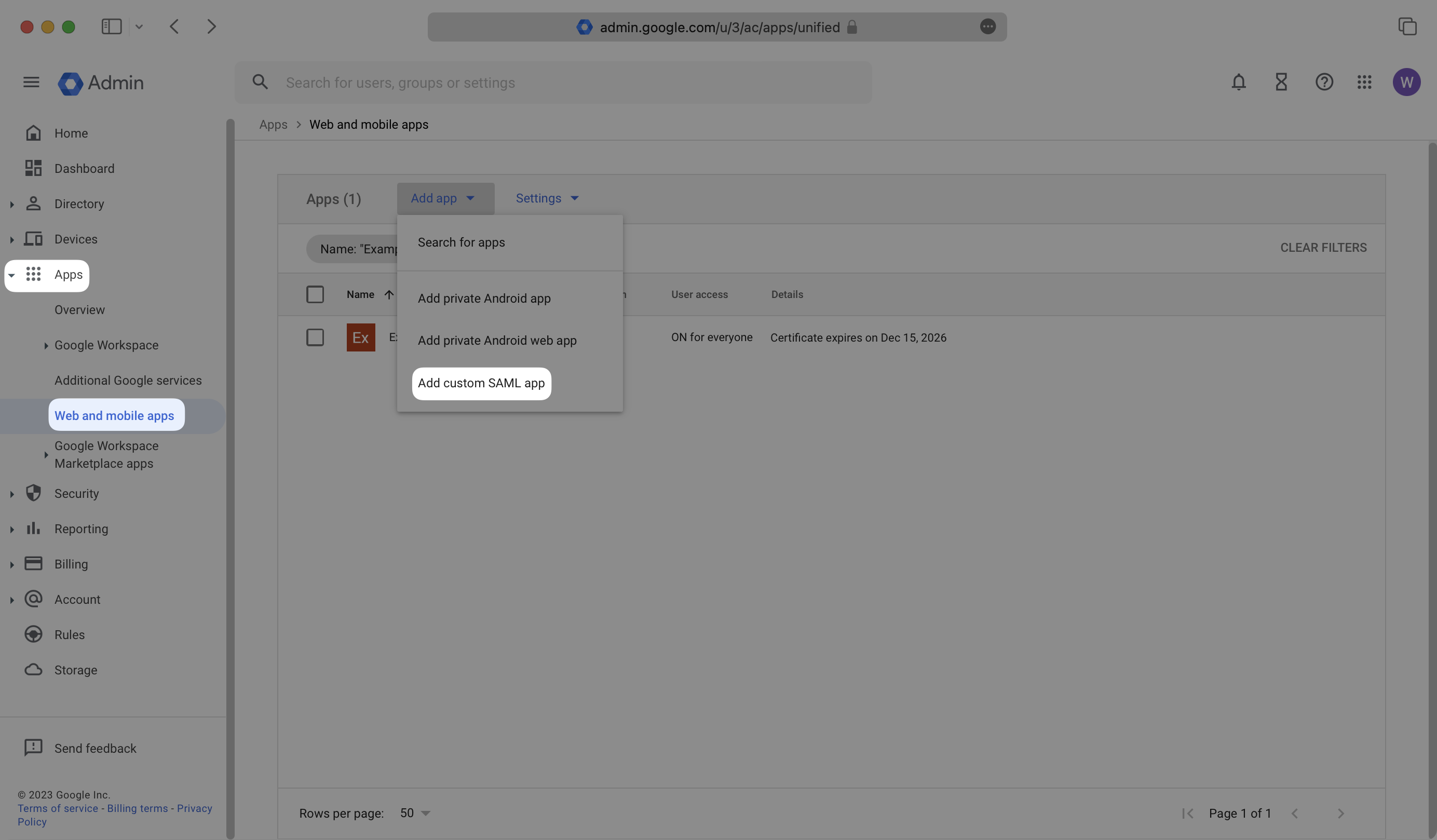
|
|
56
|
+
|
|
57
|
+
---
|
|
58
|
+
|
|
59
|
+
## (2) Enter Your App’s Information
|
|
60
|
+
|
|
61
|
+
Give the app a descriptive name and upload an icon, if applicable. Click “Continue”.
|
|
62
|
+
|
|
63
|
+
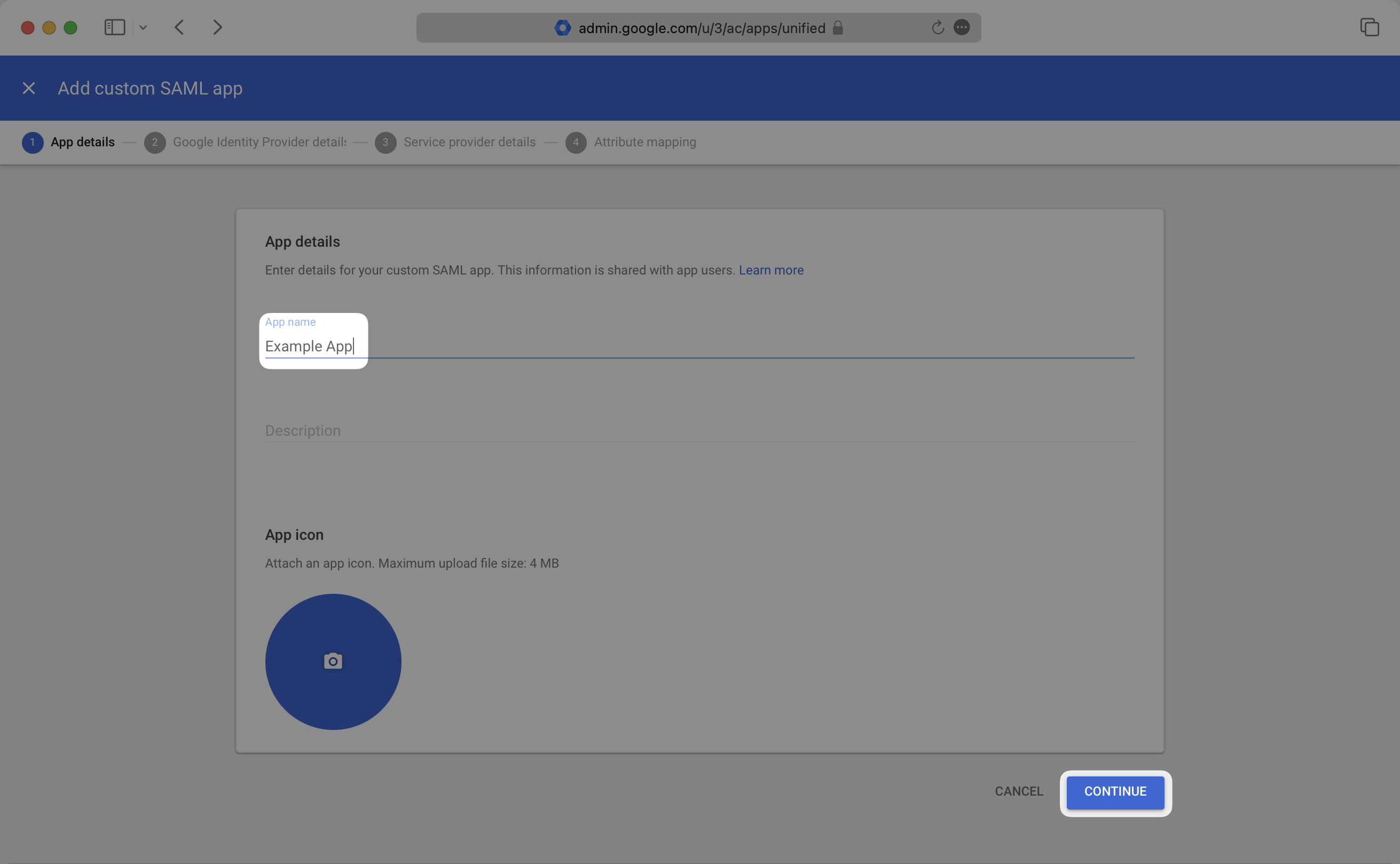
|
|
64
|
+
|
|
65
|
+
---
|
|
66
|
+
|
|
67
|
+
## (3) Obtain Identity Provider Details
|
|
68
|
+
|
|
69
|
+
Select the “Download Metadata” button to download the metadata file. Save this file, as you’ll upload it to the WorkOS Dashboard in Step 7. Click “Continue”.
|
|
70
|
+
|
|
71
|
+
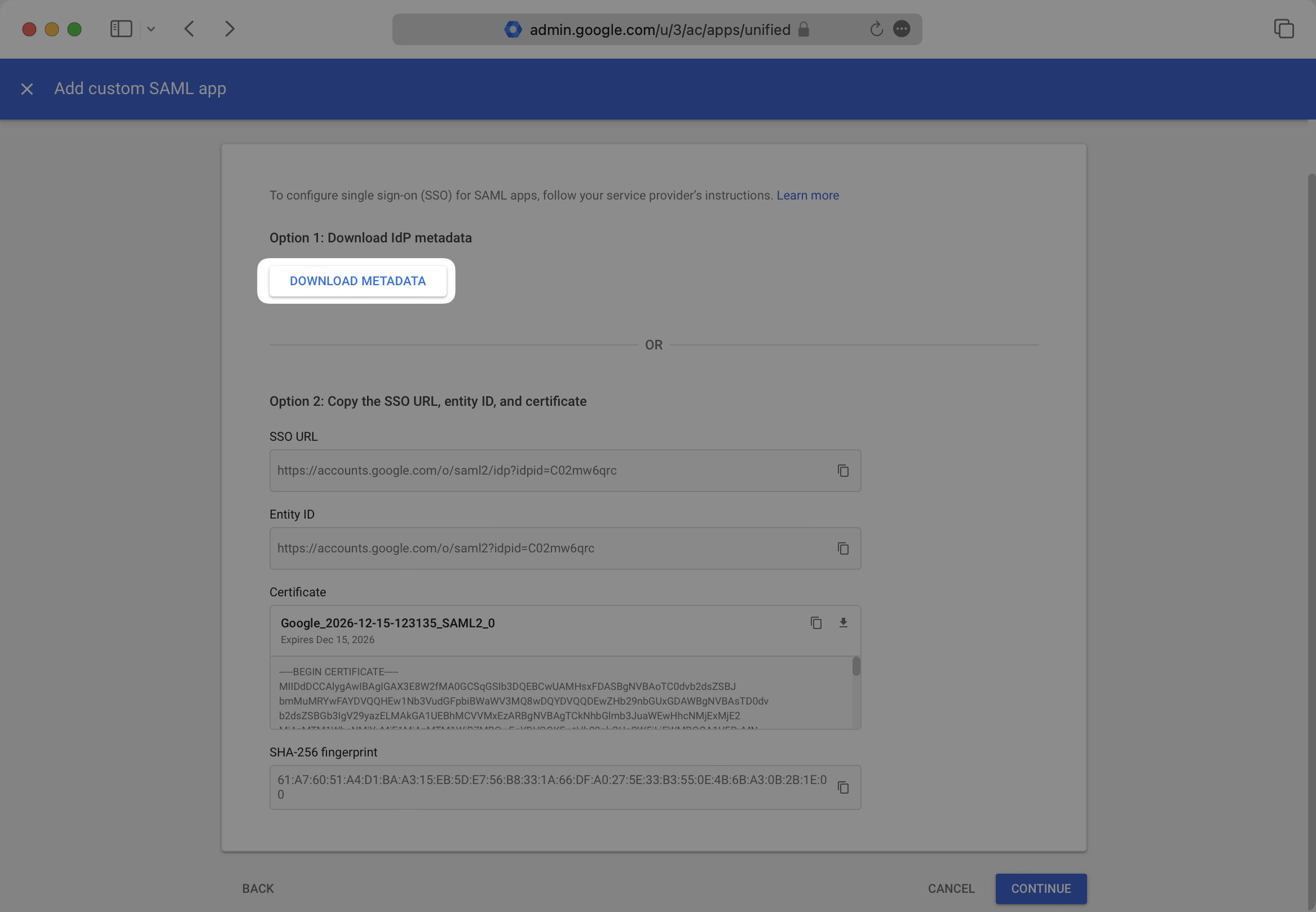
|
|
72
|
+
|
|
73
|
+
---
|
|
74
|
+
|
|
75
|
+
## (4) Enter Service Provider Details
|
|
76
|
+
|
|
77
|
+
Copy and the “ACS URL” from your WorkOS Dashboard and paste it into the “ACS URL” field, and copy the “SP Entity ID” from your WorkOS Dashboard and paste it into the “Entity ID” field in the Google SAML “Service provider details” modal. Select “Continue.”
|
|
78
|
+
|
|
79
|
+
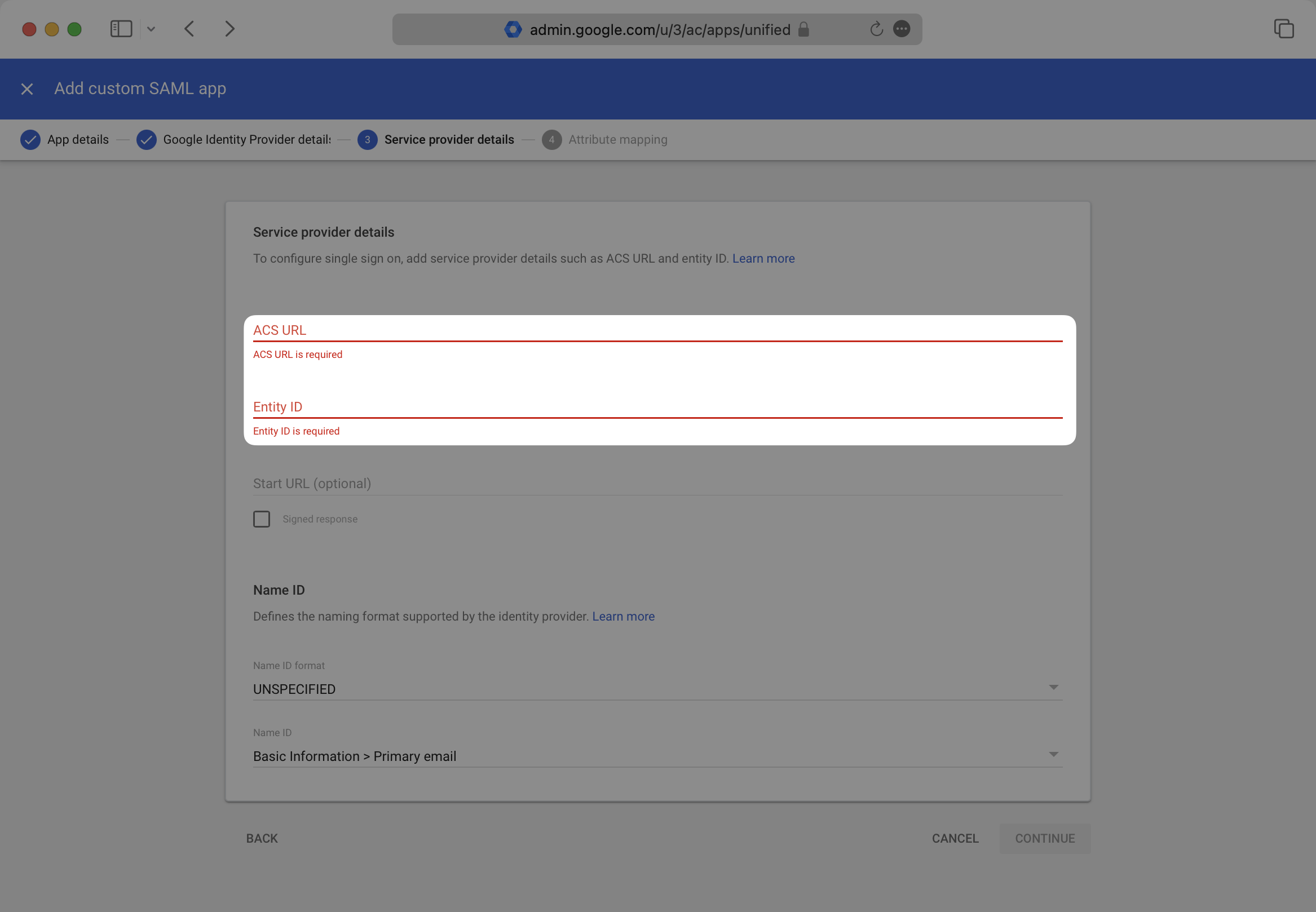
|
|
80
|
+
|
|
81
|
+
---
|
|
82
|
+
|
|
83
|
+
## (5) Configure Attribute Mapping
|
|
84
|
+
|
|
85
|
+
Provide the following Attribute Mappings and select “Finish”.
|
|
86
|
+
|
|
87
|
+
Google SAML does not provide the option to map a user’s id attribute claim.
|
|
88
|
+
|
|
89
|
+
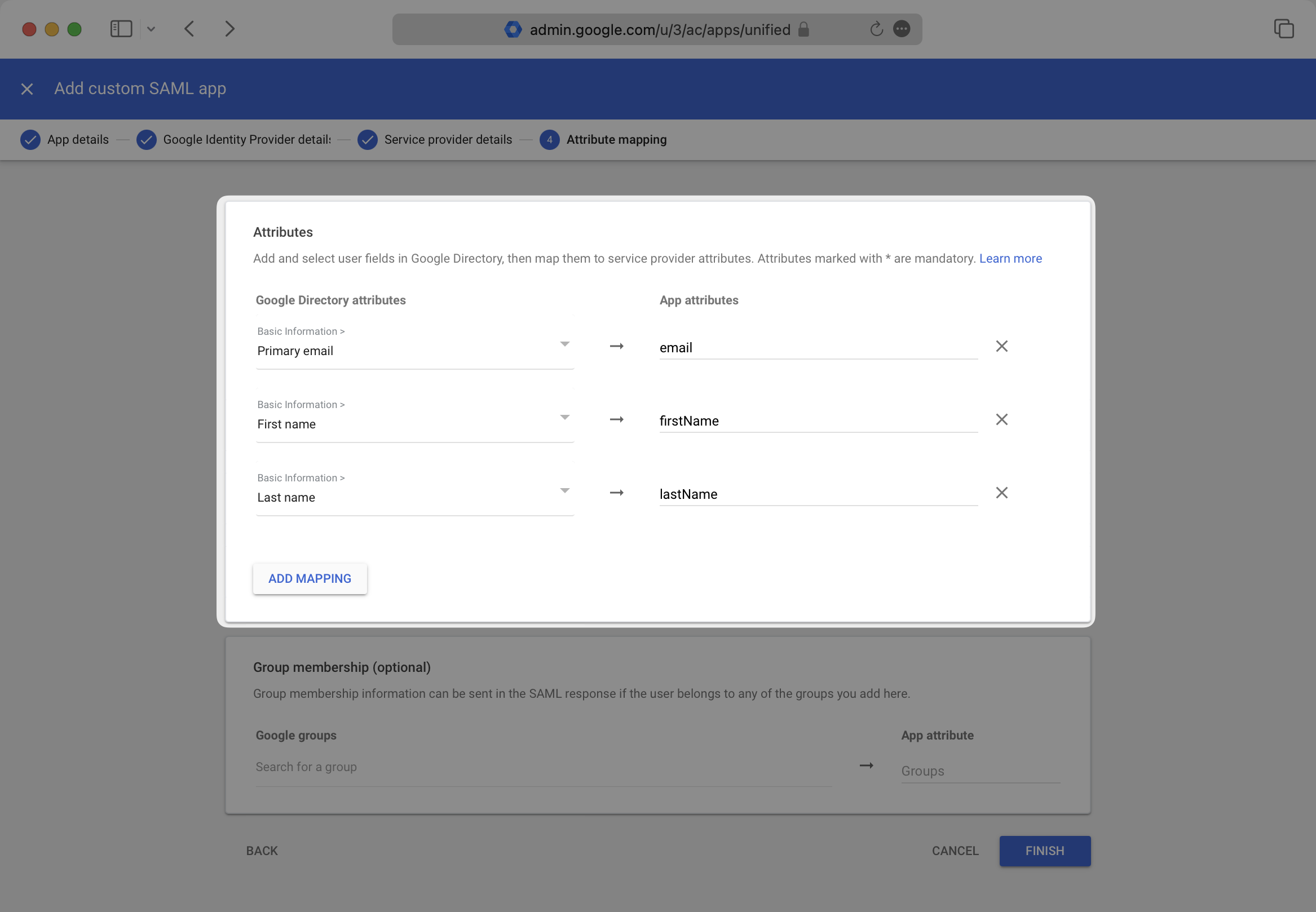
|
|
90
|
+
|
|
91
|
+
### Role Assignment (optional)
|
|
92
|
+
|
|
93
|
+
With [identity provider role assignment](/sso/identity-provider-role-assignment), users can receive roles within your application based on their group memberships. To return this information in the attribute statement, follow the guidance below.
|
|
94
|
+
|
|
95
|
+
Scroll down to the "Group membership" section. Add any groups you'd like to send under "Google groups", and set the "App attribute" to "groups". Then, select "Finish".
|
|
96
|
+
|
|
97
|
+
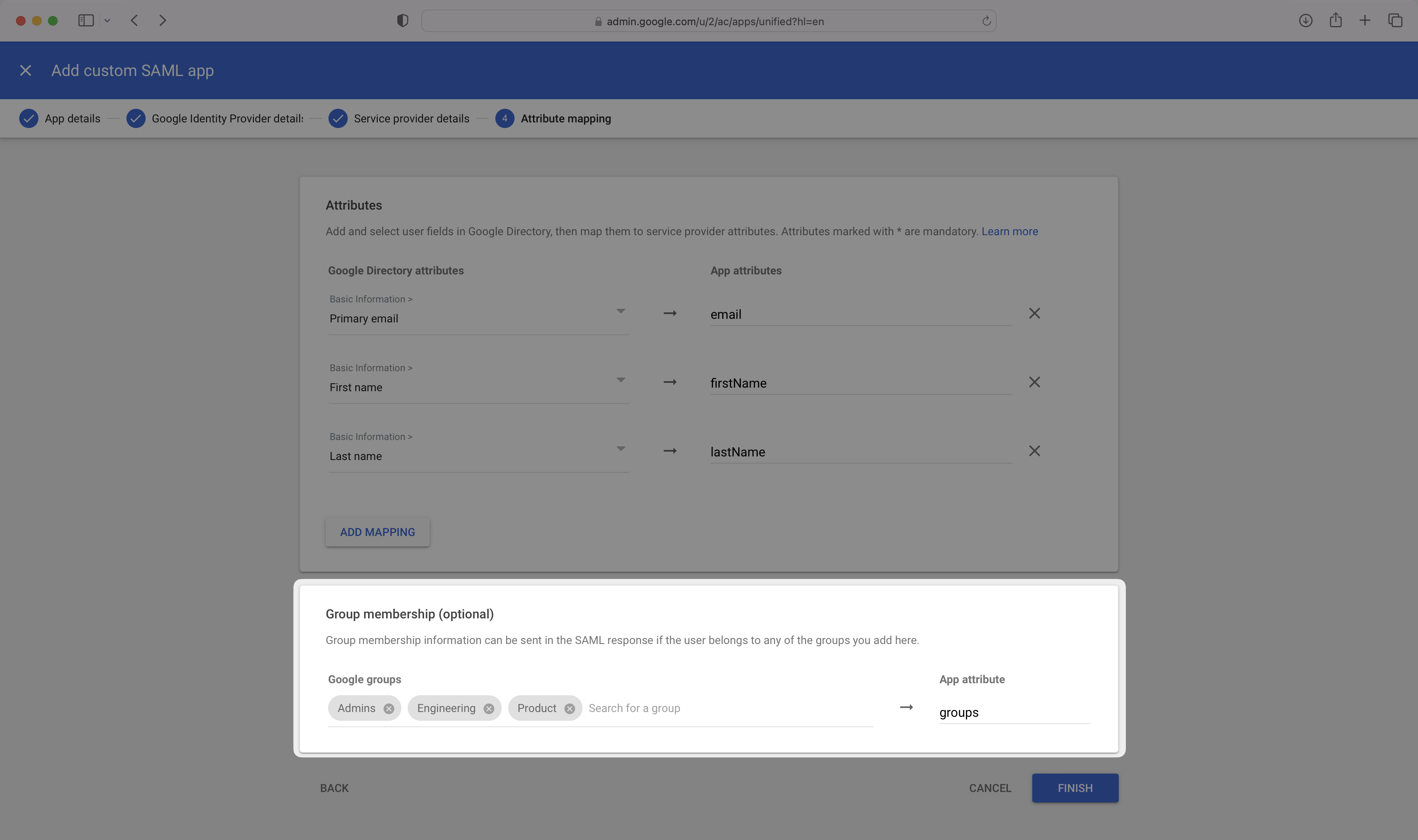
|
|
98
|
+
|
|
99
|
+
> Finish role assignment set-up by navigating to the SSO connection page in the _Organization_ section of the [WorkOS Dashboard](https://dashboard.workos.com/). Create SSO groups by referencing the group IdP ID. Then, assign roles to these SSO groups so group members are automatically granted roles within your application.
|
|
100
|
+
|
|
101
|
+
---
|
|
102
|
+
|
|
103
|
+
## (6) Configure User Access
|
|
104
|
+
|
|
105
|
+
In the created SAML app’s landing page, select the “User Access Section”.
|
|
106
|
+
|
|
107
|
+
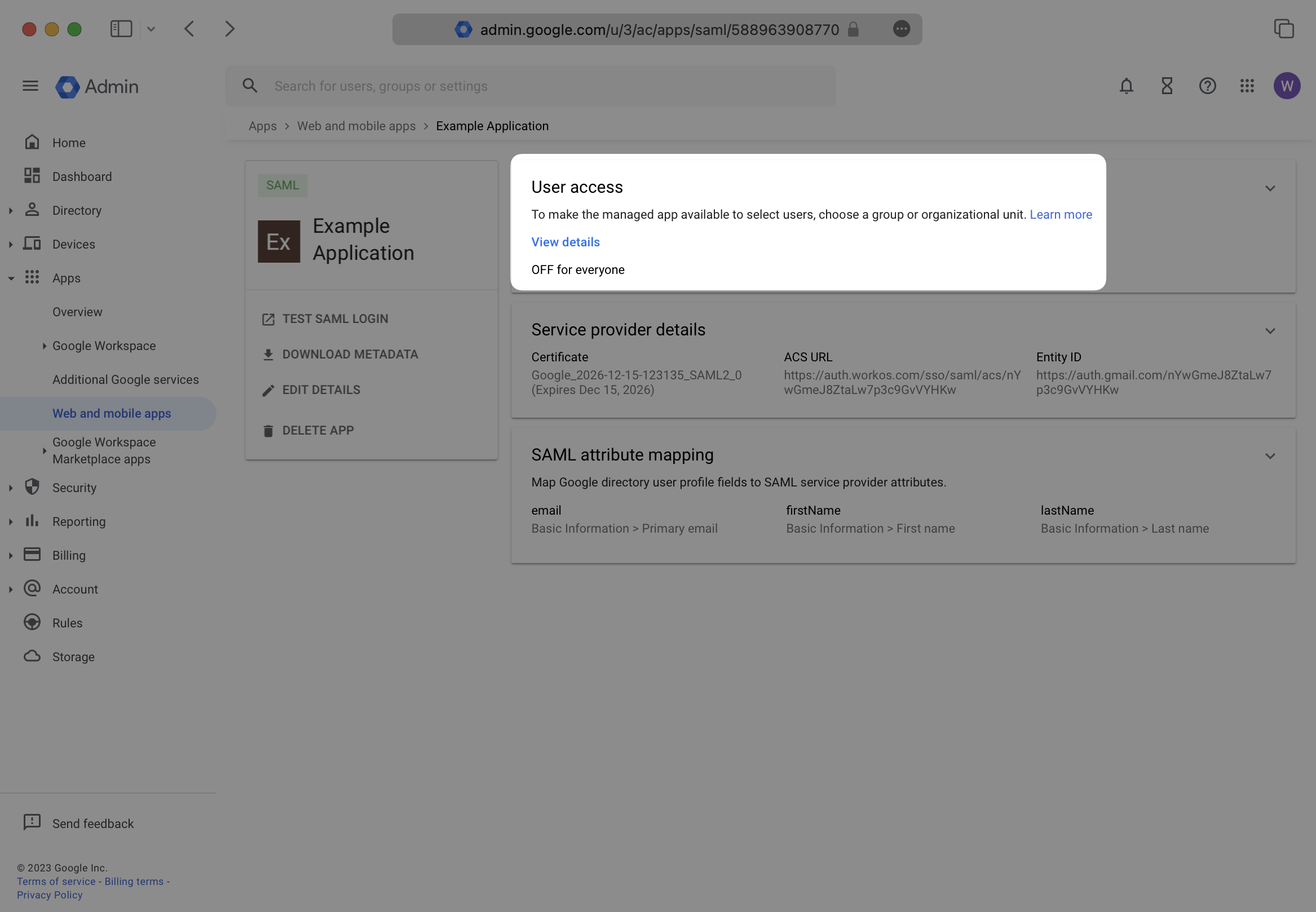
|
|
108
|
+
|
|
109
|
+
Turn this service ON for the correct organizational units in your Google Directory setup. Save any changes.
|
|
110
|
+
|
|
111
|
+
Google may take up to 24 hours to propagate these changes. The connection in WorkOS will be inactive until then.
|
|
112
|
+
|
|
113
|
+
---
|
|
114
|
+
|
|
115
|
+
## (7) Upload Metadata File
|
|
116
|
+
|
|
117
|
+
If you haven’t already downloaded the metadata file, select your SAML application, and click “Download Metadata”. In the modal, again click “Download Metadata”.
|
|
118
|
+
|
|
119
|
+
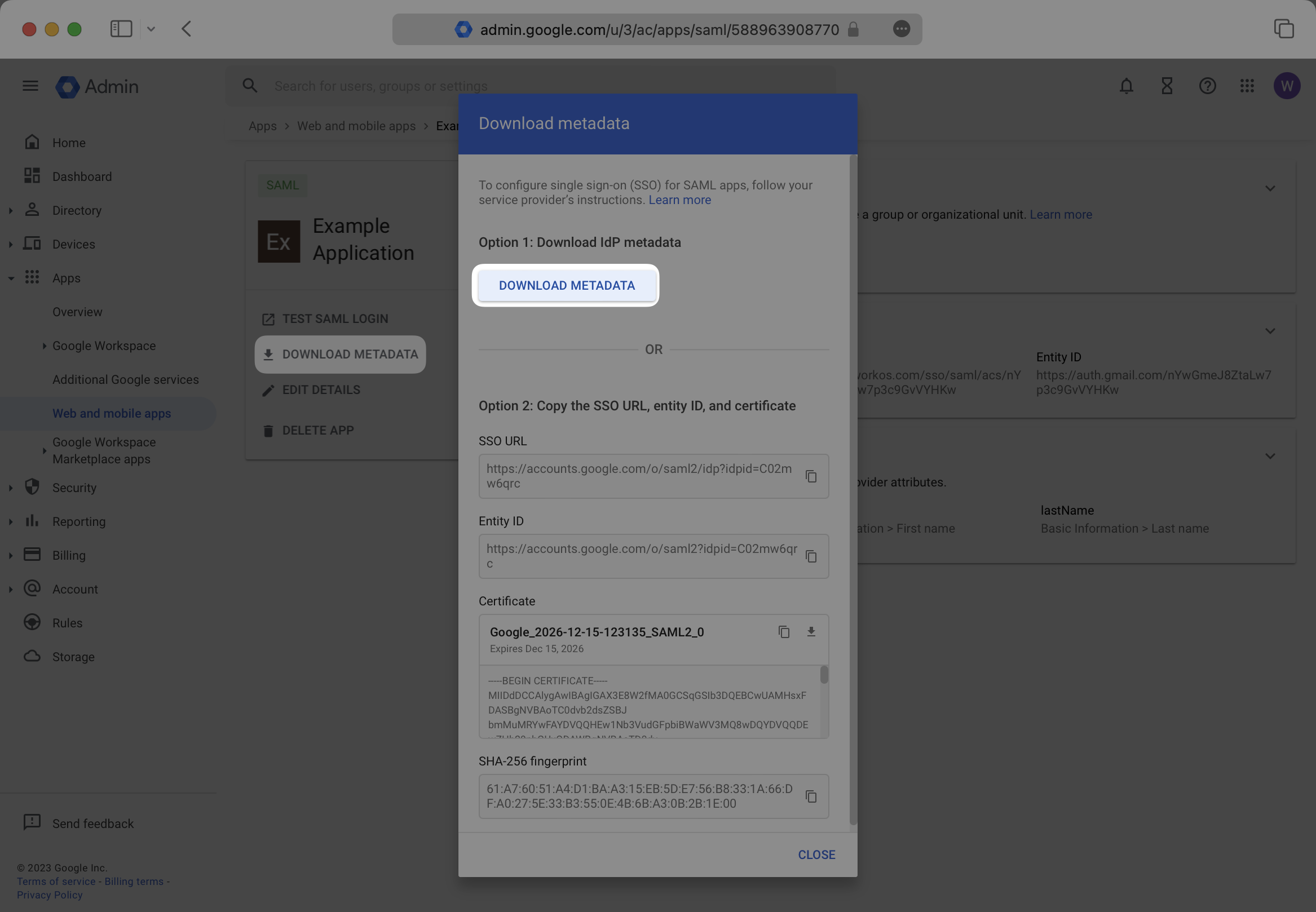
|
|
120
|
+
|
|
121
|
+
In the connection Settings of the WorkOS Dashboard, click “Edit Metadata Configuration”.
|
|
122
|
+
|
|
123
|
+
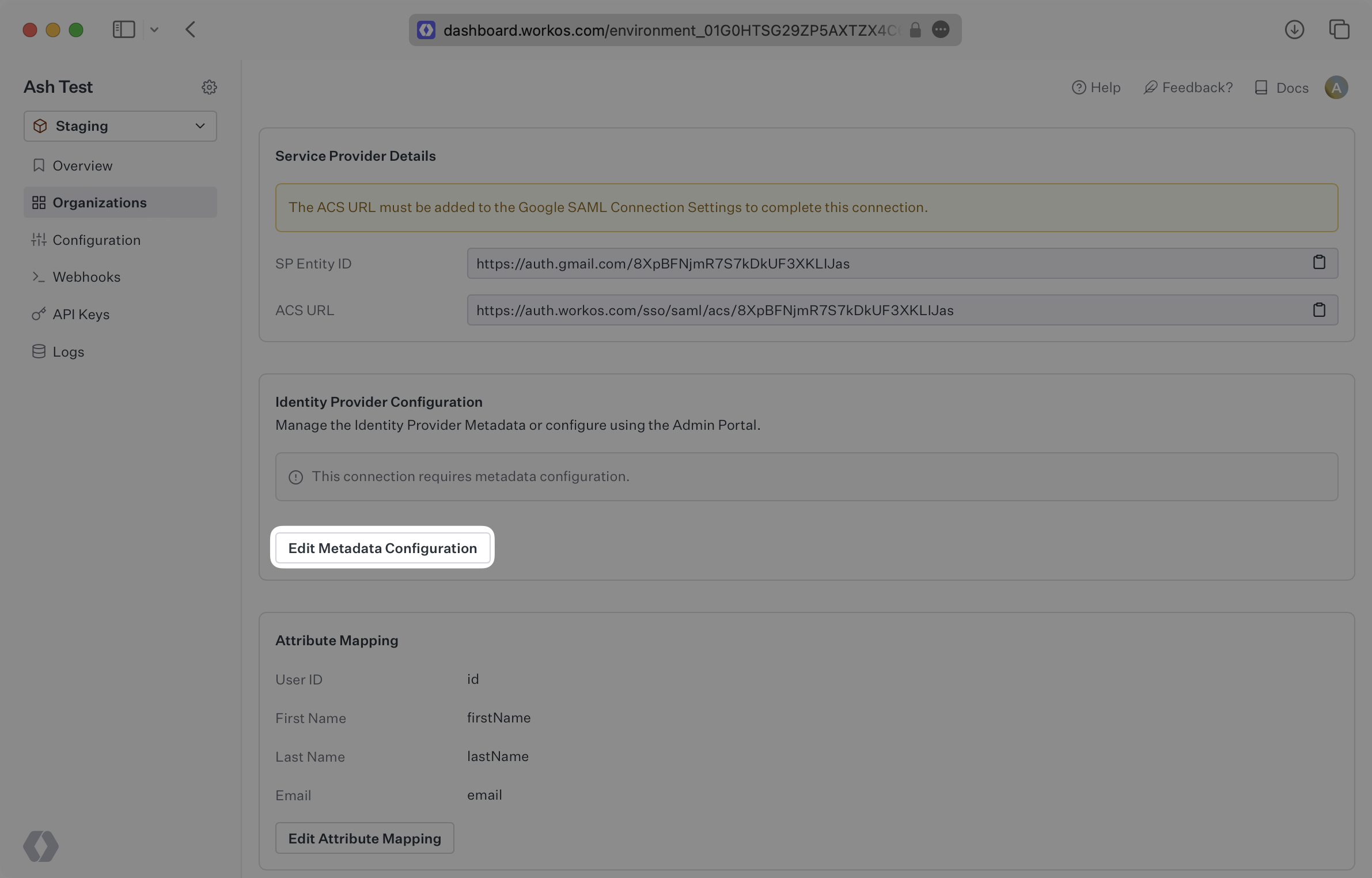
|
|
124
|
+
|
|
125
|
+
In the modal, upload the Google Metadata file and then select “Save Metadata Configuration”. Once the file is uploaded into WorkOS, your connection will then be linked and good to go!
|
|
126
|
+
|
|
127
|
+
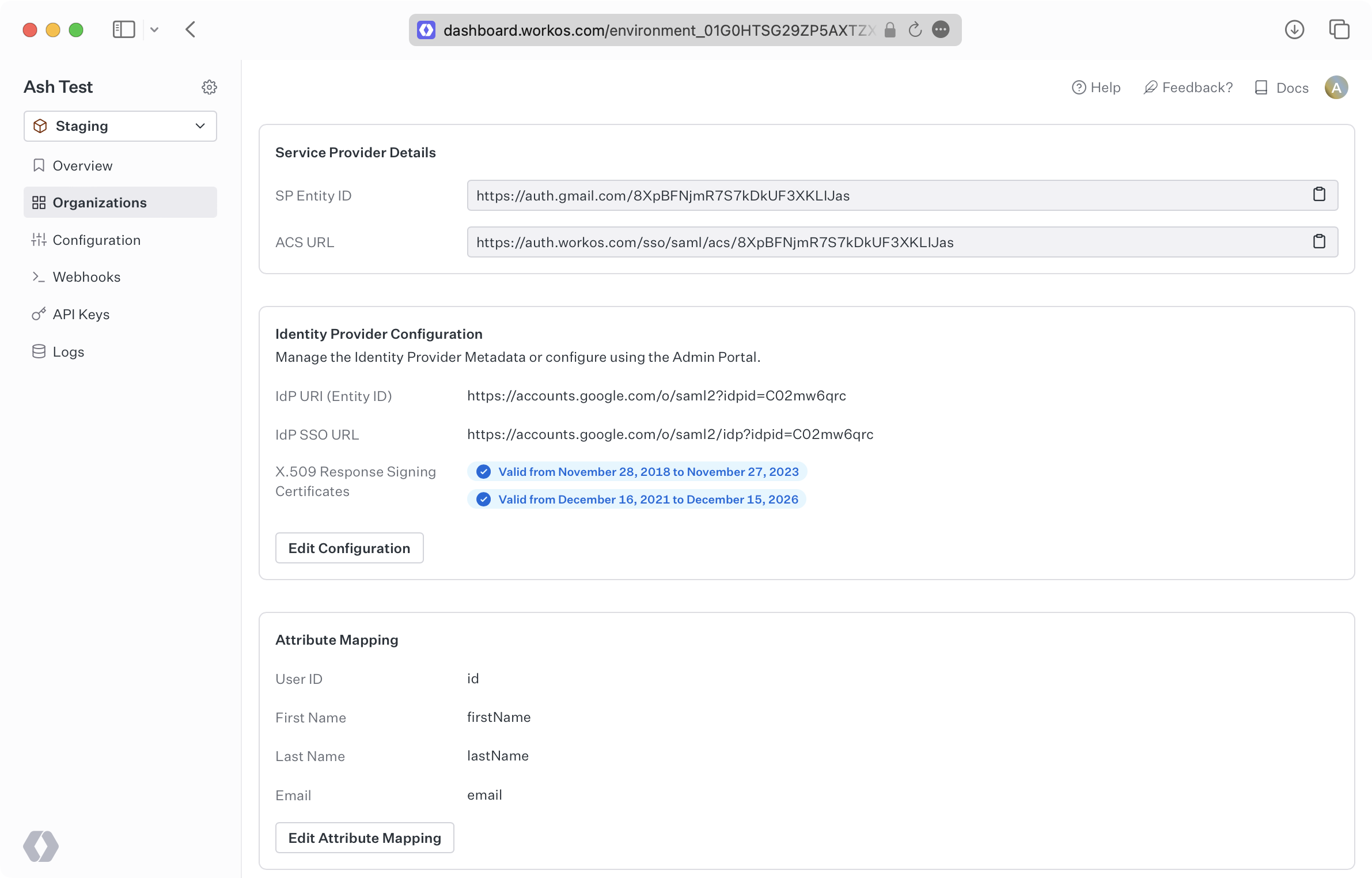
|
|
128
|
+
|
|
129
|
+
---
|
|
130
|
+
|
|
131
|
+
## Frequently asked questions
|
|
132
|
+
|
|
133
|
+
### Where is the Relay State in Google SAML?
|
|
134
|
+
|
|
135
|
+
Within the Google SAML setup, there will be a field called “Start URL” which is referred to as the Relay State.
|