@workos/mcp-docs-server 0.1.0
This diff represents the content of publicly available package versions that have been released to one of the supported registries. The information contained in this diff is provided for informational purposes only and reflects changes between package versions as they appear in their respective public registries.
- package/.docs/organized/changelogs/workos-platform.json +277 -0
- package/.docs/organized/docs/admin-portal/_navigation.mdx +16 -0
- package/.docs/organized/docs/admin-portal/custom-branding.mdx +111 -0
- package/.docs/organized/docs/admin-portal/example-apps.mdx +46 -0
- package/.docs/organized/docs/admin-portal/index.mdx +240 -0
- package/.docs/organized/docs/audit-logs/_navigation.mdx +22 -0
- package/.docs/organized/docs/audit-logs/admin-portal.mdx +20 -0
- package/.docs/organized/docs/audit-logs/editing-events.mdx +27 -0
- package/.docs/organized/docs/audit-logs/exporting-events.mdx +29 -0
- package/.docs/organized/docs/audit-logs/index.mdx +110 -0
- package/.docs/organized/docs/audit-logs/log-streams.mdx +56 -0
- package/.docs/organized/docs/audit-logs/metadata-schema.mdx +21 -0
- package/.docs/organized/docs/custom-domains/_navigation.mdx +16 -0
- package/.docs/organized/docs/custom-domains/admin-portal.mdx +38 -0
- package/.docs/organized/docs/custom-domains/auth-api.mdx +59 -0
- package/.docs/organized/docs/custom-domains/authkit.mdx +36 -0
- package/.docs/organized/docs/custom-domains/email.mdx +41 -0
- package/.docs/organized/docs/custom-domains/index.mdx +19 -0
- package/.docs/organized/docs/dashboard.mdx +244 -0
- package/.docs/organized/docs/demo/_navigation.mdx +26 -0
- package/.docs/organized/docs/demo/accordion.mdx +34 -0
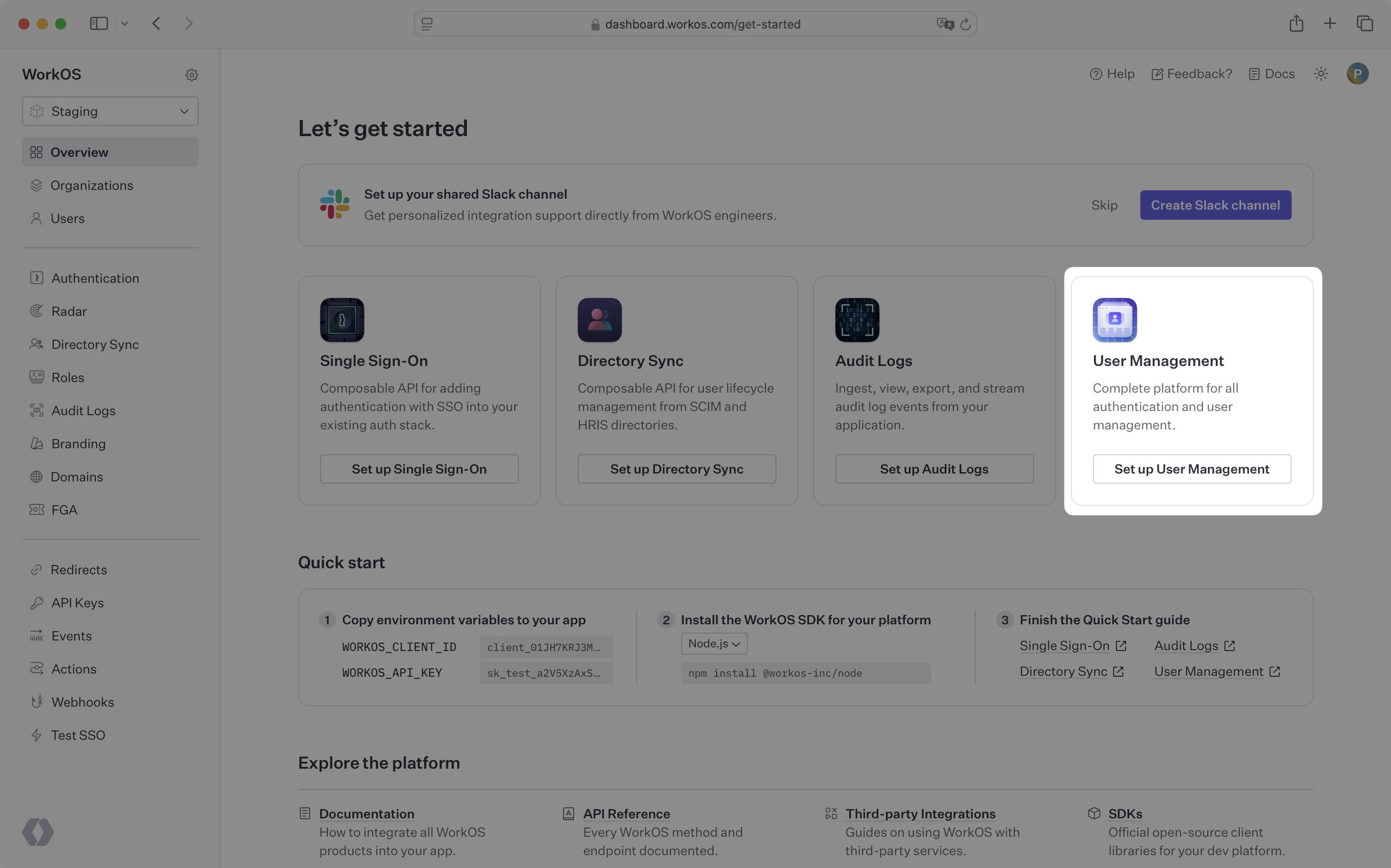
- package/.docs/organized/docs/demo/checklist.mdx +33 -0
- package/.docs/organized/docs/demo/code-block.mdx +185 -0
- package/.docs/organized/docs/demo/definition-list.mdx +35 -0
- package/.docs/organized/docs/demo/index.mdx +7 -0
- package/.docs/organized/docs/demo/punctuation.mdx +37 -0
- package/.docs/organized/docs/demo/replacements.mdx +26 -0
- package/.docs/organized/docs/demo/table.mdx +26 -0
- package/.docs/organized/docs/demo/tabs.mdx +17 -0
- package/.docs/organized/docs/directory-sync/_navigation.mdx +28 -0
- package/.docs/organized/docs/directory-sync/attributes.mdx +209 -0
- package/.docs/organized/docs/directory-sync/example-apps.mdx +46 -0
- package/.docs/organized/docs/directory-sync/handle-inactive-users.mdx +52 -0
- package/.docs/organized/docs/directory-sync/identity-provider-role-assignment.mdx +134 -0
- package/.docs/organized/docs/directory-sync/index.mdx +107 -0
- package/.docs/organized/docs/directory-sync/quick-start.mdx +129 -0
- package/.docs/organized/docs/directory-sync/understanding-events.mdx +209 -0
- package/.docs/organized/docs/domain-verification/_navigation.mdx +10 -0
- package/.docs/organized/docs/domain-verification/api.mdx +60 -0
- package/.docs/organized/docs/domain-verification/index.mdx +67 -0
- package/.docs/organized/docs/email.mdx +109 -0
- package/.docs/organized/docs/events/_navigation.mdx +22 -0
- package/.docs/organized/docs/events/data-syncing/data-reconciliation.mdx +56 -0
- package/.docs/organized/docs/events/data-syncing/events-api.mdx +114 -0
- package/.docs/organized/docs/events/data-syncing/index.mdx +66 -0
- package/.docs/organized/docs/events/data-syncing/webhooks.mdx +173 -0
- package/.docs/organized/docs/events/index.mdx +783 -0
- package/.docs/organized/docs/events/observability/datadog.mdx +76 -0
- package/.docs/organized/docs/fga/_navigation.mdx +64 -0
- package/.docs/organized/docs/fga/identity-provider-sessions.mdx +68 -0
- package/.docs/organized/docs/fga/index.mdx +60 -0
- package/.docs/organized/docs/fga/local-development.mdx +155 -0
- package/.docs/organized/docs/fga/modeling/abac.mdx +107 -0
- package/.docs/organized/docs/fga/modeling/blocklist.mdx +84 -0
- package/.docs/organized/docs/fga/modeling/conditional-roles.mdx +99 -0
- package/.docs/organized/docs/fga/modeling/custom-roles.mdx +90 -0
- package/.docs/organized/docs/fga/modeling/entitlements.mdx +127 -0
- package/.docs/organized/docs/fga/modeling/managed-service-provider.mdx +131 -0
- package/.docs/organized/docs/fga/modeling/org-roles-and-permissions.mdx +95 -0
- package/.docs/organized/docs/fga/modeling/policy-context.mdx +231 -0
- package/.docs/organized/docs/fga/modeling/public-access.mdx +61 -0
- package/.docs/organized/docs/fga/modeling/shareable-content.mdx +106 -0
- package/.docs/organized/docs/fga/modeling/superusers.mdx +74 -0
- package/.docs/organized/docs/fga/modeling/user-groups.mdx +92 -0
- package/.docs/organized/docs/fga/operations-usage.mdx +104 -0
- package/.docs/organized/docs/fga/playground.mdx +12 -0
- package/.docs/organized/docs/fga/policies.mdx +462 -0
- package/.docs/organized/docs/fga/query-language.mdx +112 -0
- package/.docs/organized/docs/fga/quick-start.mdx +174 -0
- package/.docs/organized/docs/fga/resources.mdx +92 -0
- package/.docs/organized/docs/fga/schema-management.mdx +224 -0
- package/.docs/organized/docs/fga/schema.mdx +388 -0
- package/.docs/organized/docs/fga/warrant-tokens.mdx +44 -0
- package/.docs/organized/docs/fga/warrants.mdx +92 -0
- package/.docs/organized/docs/glossary.mdx +184 -0
- package/.docs/organized/docs/integrations/_navigation.mdx +6 -0
- package/.docs/organized/docs/integrations/access-people-hr.mdx +87 -0
- package/.docs/organized/docs/integrations/adp-oidc.mdx +103 -0
- package/.docs/organized/docs/integrations/apple.mdx +169 -0
- package/.docs/organized/docs/integrations/auth0-directory-sync.mdx +78 -0
- package/.docs/organized/docs/integrations/auth0-enterprise-connection.mdx +92 -0
- package/.docs/organized/docs/integrations/auth0-saml.mdx +81 -0
- package/.docs/organized/docs/integrations/aws-cognito.mdx +81 -0
- package/.docs/organized/docs/integrations/bamboohr.mdx +90 -0
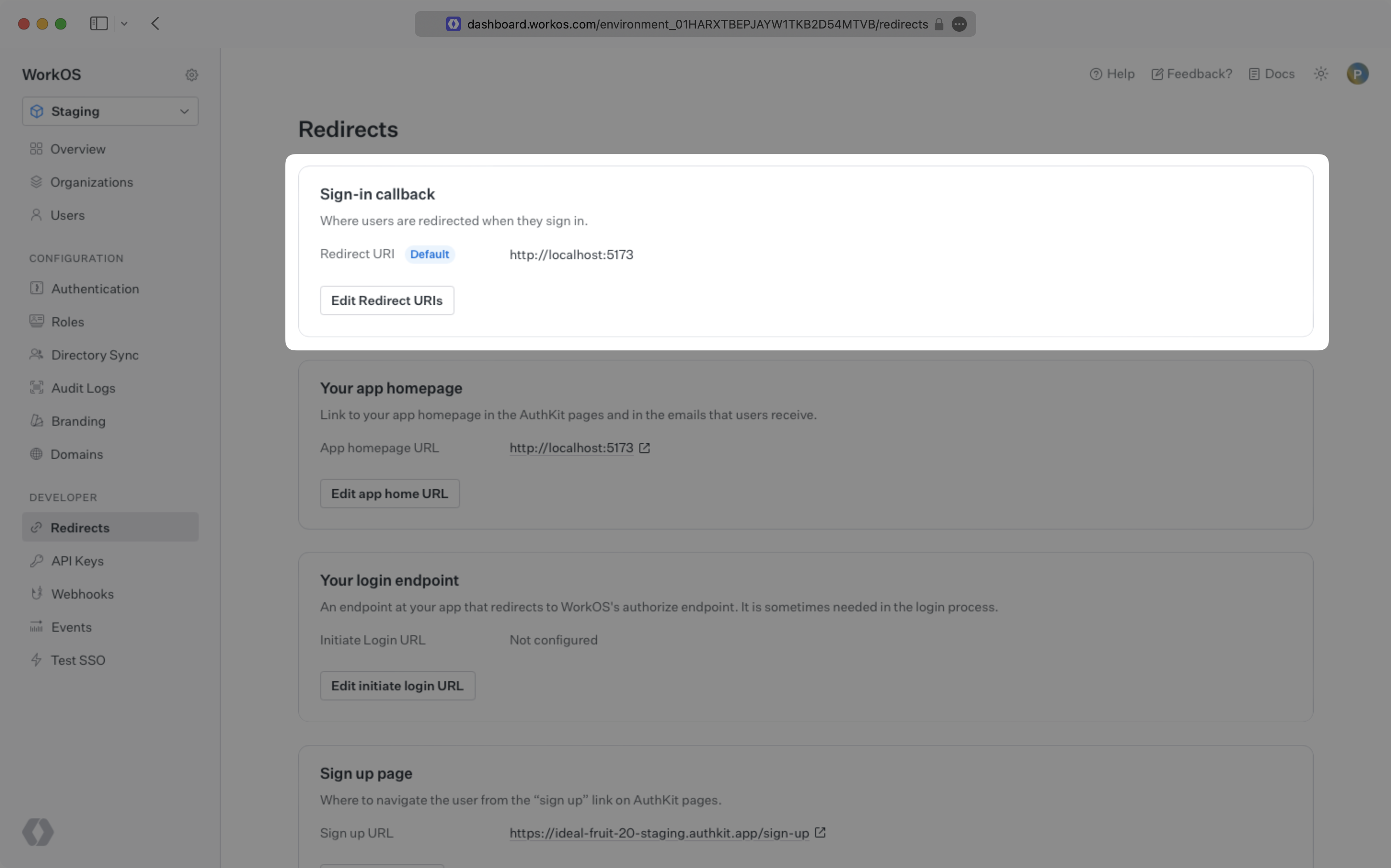
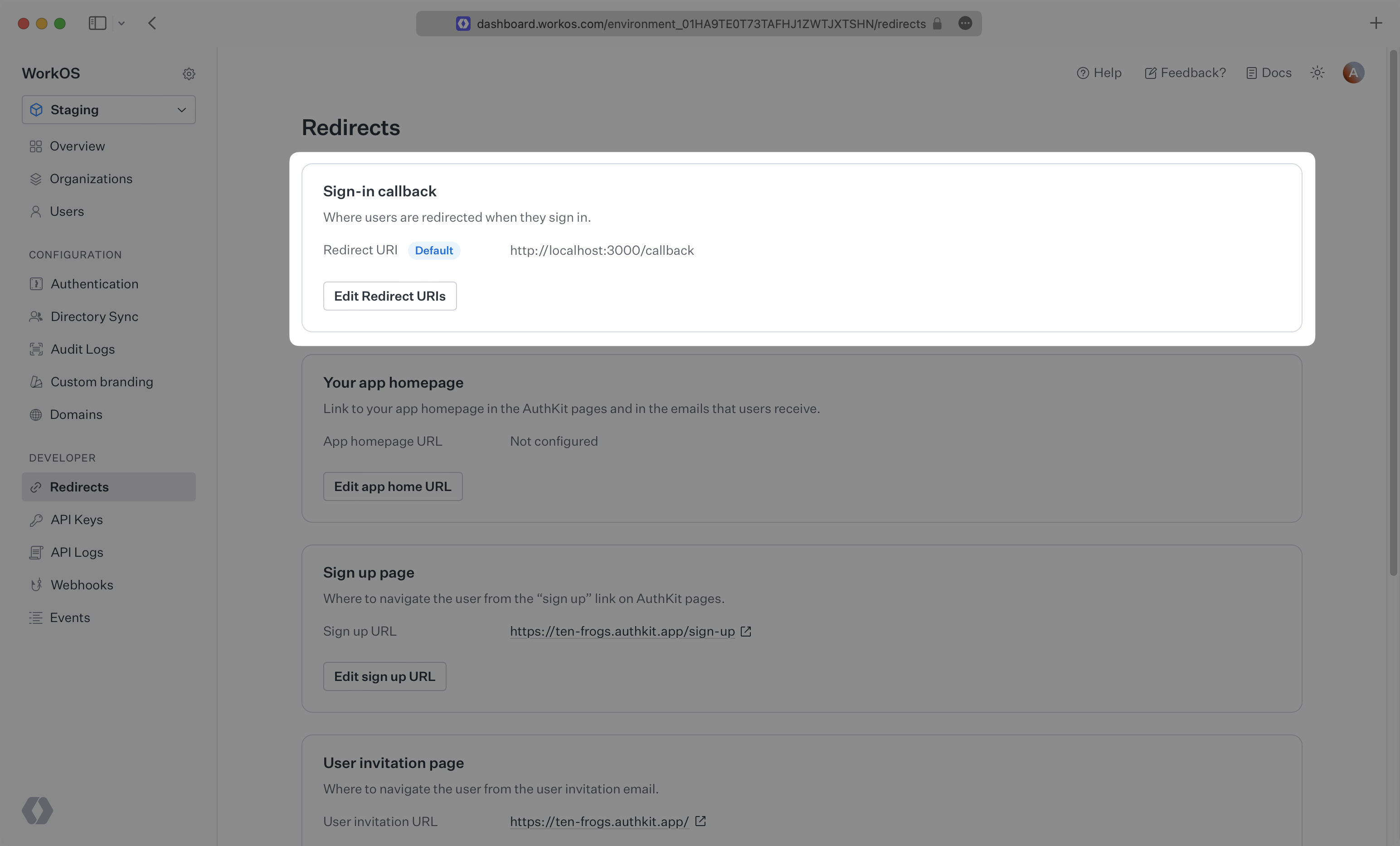
- package/.docs/organized/docs/integrations/breathe-hr.mdx +89 -0
- package/.docs/organized/docs/integrations/bubble.mdx +129 -0
- package/.docs/organized/docs/integrations/cas-saml.mdx +65 -0
- package/.docs/organized/docs/integrations/cezanne.mdx +74 -0
- package/.docs/organized/docs/integrations/classlink-saml.mdx +100 -0
- package/.docs/organized/docs/integrations/cloudflare-saml.mdx +164 -0
- package/.docs/organized/docs/integrations/cyberark-saml.mdx +138 -0
- package/.docs/organized/docs/integrations/cyberark-scim.mdx +100 -0
- package/.docs/organized/docs/integrations/duo-saml.mdx +127 -0
- package/.docs/organized/docs/integrations/entra-id-saml.mdx +156 -0
- package/.docs/organized/docs/integrations/entra-id-scim.mdx +218 -0
- package/.docs/organized/docs/integrations/firebase.mdx +98 -0
- package/.docs/organized/docs/integrations/fourth.mdx +66 -0
- package/.docs/organized/docs/integrations/github-oauth.mdx +85 -0
- package/.docs/organized/docs/integrations/gitlab-oauth.mdx +81 -0
- package/.docs/organized/docs/integrations/google-directory-sync.mdx +86 -0
- package/.docs/organized/docs/integrations/google-oauth.mdx +173 -0
- package/.docs/organized/docs/integrations/google-saml.mdx +135 -0
- package/.docs/organized/docs/integrations/hibob.mdx +98 -0
- package/.docs/organized/docs/integrations/jumpcloud-saml.mdx +96 -0
- package/.docs/organized/docs/integrations/jumpcloud-scim.mdx +106 -0
- package/.docs/organized/docs/integrations/keycloak-saml.mdx +128 -0
- package/.docs/organized/docs/integrations/lastpass-saml.mdx +134 -0
- package/.docs/organized/docs/integrations/linkedin-oauth.mdx +77 -0
- package/.docs/organized/docs/integrations/login-gov-oidc.mdx +103 -0
- package/.docs/organized/docs/integrations/microsoft-ad-fs-saml.mdx +96 -0
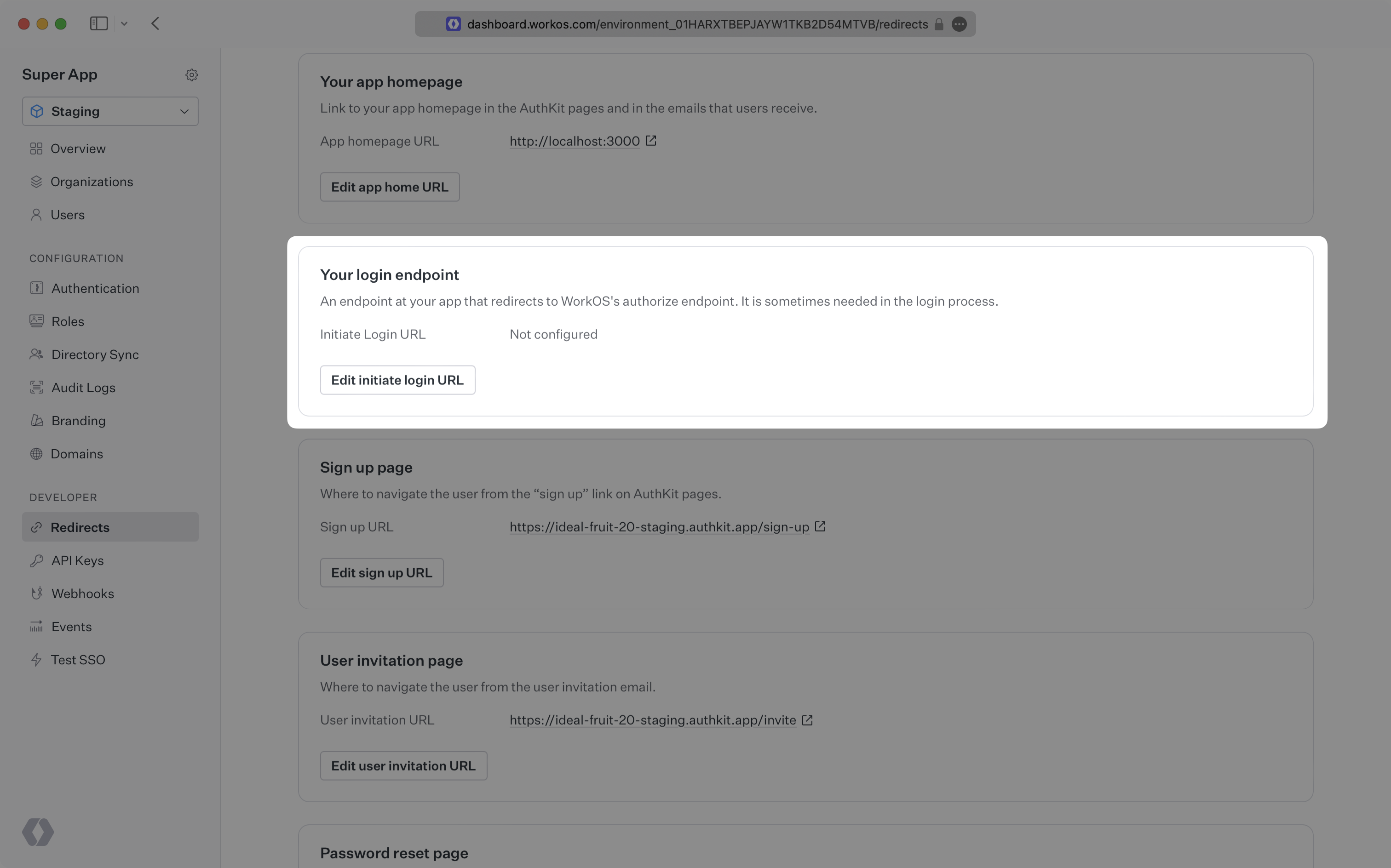
- package/.docs/organized/docs/integrations/microsoft-oauth.mdx +101 -0
- package/.docs/organized/docs/integrations/miniorange-saml.mdx +124 -0
- package/.docs/organized/docs/integrations/net-iq-saml.mdx +75 -0
- package/.docs/organized/docs/integrations/next-auth.mdx +257 -0
- package/.docs/organized/docs/integrations/oidc.mdx +64 -0
- package/.docs/organized/docs/integrations/okta-saml.mdx +144 -0
- package/.docs/organized/docs/integrations/okta-scim.mdx +210 -0
- package/.docs/organized/docs/integrations/onelogin-saml.mdx +131 -0
- package/.docs/organized/docs/integrations/onelogin-scim.mdx +150 -0
- package/.docs/organized/docs/integrations/oracle-saml.mdx +76 -0
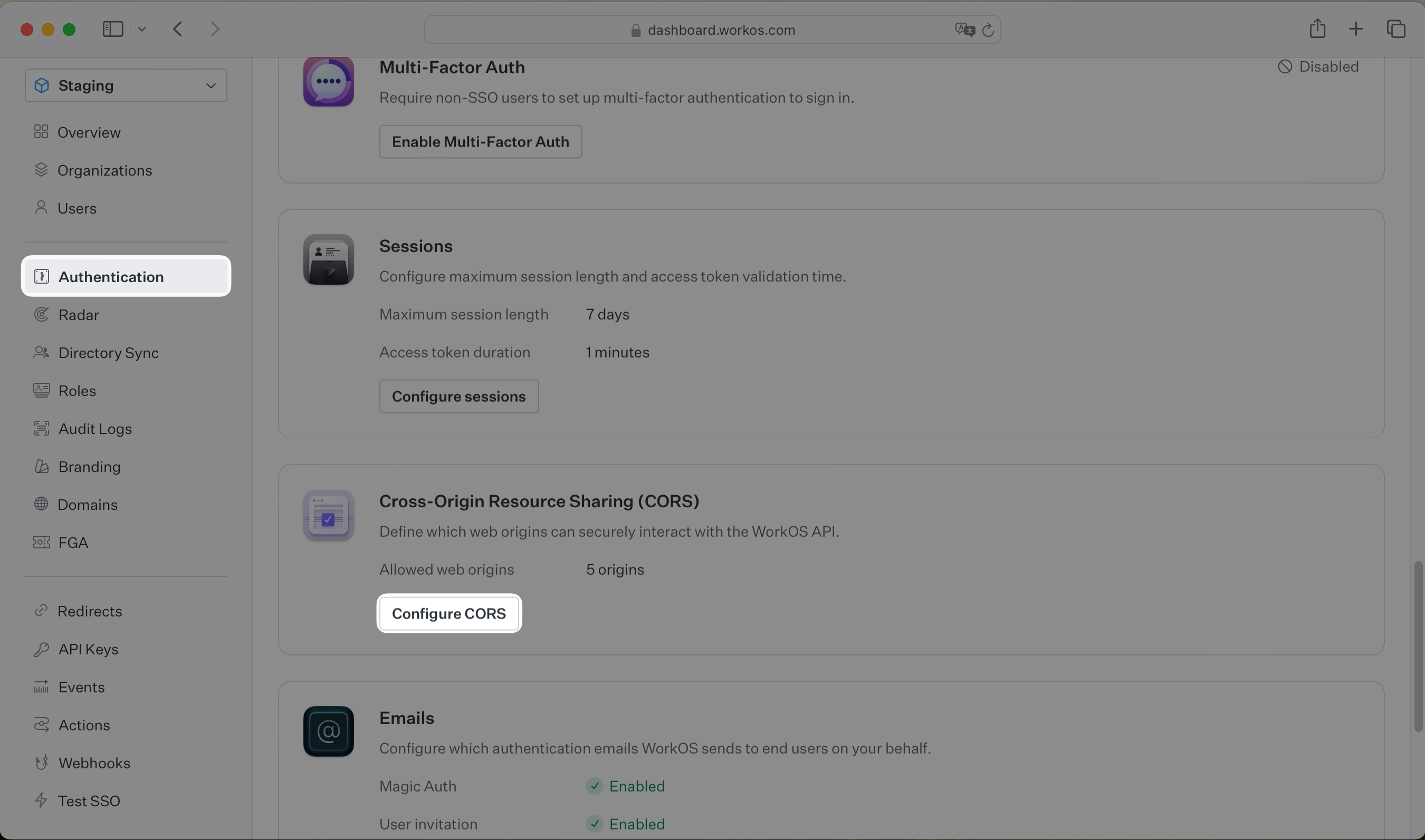
- package/.docs/organized/docs/integrations/pingfederate-saml.mdx +103 -0
- package/.docs/organized/docs/integrations/pingfederate-scim.mdx +150 -0
- package/.docs/organized/docs/integrations/pingone-saml.mdx +86 -0
- package/.docs/organized/docs/integrations/react-native-expo.mdx +93 -0
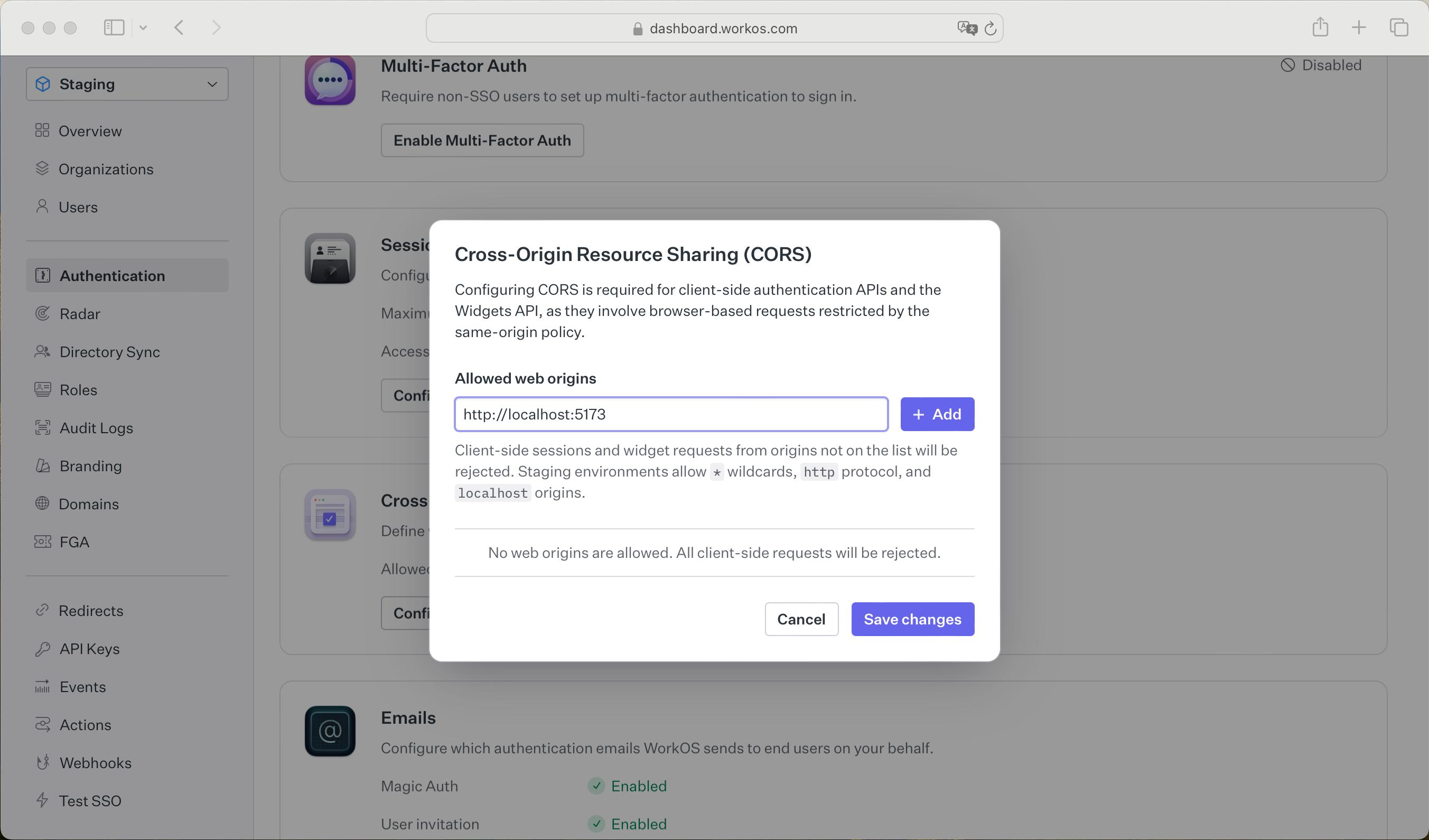
- package/.docs/organized/docs/integrations/rippling-saml.mdx +174 -0
- package/.docs/organized/docs/integrations/rippling-scim.mdx +148 -0
- package/.docs/organized/docs/integrations/salesforce-saml.mdx +143 -0
- package/.docs/organized/docs/integrations/saml.mdx +64 -0
- package/.docs/organized/docs/integrations/scim.mdx +64 -0
- package/.docs/organized/docs/integrations/sftp.mdx +150 -0
- package/.docs/organized/docs/integrations/shibboleth-generic-saml.mdx +84 -0
- package/.docs/organized/docs/integrations/shibboleth-unsolicited-saml.mdx +84 -0
- package/.docs/organized/docs/integrations/simple-saml-php.mdx +78 -0
- package/.docs/organized/docs/integrations/slack-oauth.mdx +102 -0
- package/.docs/organized/docs/integrations/supabase.mdx +68 -0
- package/.docs/organized/docs/integrations/vmware-saml.mdx +100 -0
- package/.docs/organized/docs/integrations/workday.mdx +156 -0
- package/.docs/organized/docs/integrations/xero-oauth.mdx +83 -0
- package/.docs/organized/docs/magic-link/_navigation.mdx +16 -0
- package/.docs/organized/docs/magic-link/example-apps.mdx +46 -0
- package/.docs/organized/docs/magic-link/index.mdx +199 -0
- package/.docs/organized/docs/magic-link/launch-checklist.mdx +27 -0
- package/.docs/organized/docs/mfa/_navigation.mdx +18 -0
- package/.docs/organized/docs/mfa/example-apps.mdx +46 -0
- package/.docs/organized/docs/mfa/index.mdx +140 -0
- package/.docs/organized/docs/mfa/ux/enrollment.mdx +74 -0
- package/.docs/organized/docs/mfa/ux/sign-in.mdx +30 -0
- package/.docs/organized/docs/migrate/_navigation.mdx +6 -0
- package/.docs/organized/docs/migrate/auth0.mdx +98 -0
- package/.docs/organized/docs/migrate/aws-cognito.mdx +115 -0
- package/.docs/organized/docs/migrate/clerk.mdx +106 -0
- package/.docs/organized/docs/migrate/firebase.mdx +80 -0
- package/.docs/organized/docs/migrate/other-services.mdx +179 -0
- package/.docs/organized/docs/migrate/standalone-sso.mdx +105 -0
- package/.docs/organized/docs/on-prem-deployment.mdx +119 -0
- package/.docs/organized/docs/postman.mdx +90 -0
- package/.docs/organized/docs/reference/_navigation.mdx +527 -0
- package/.docs/organized/docs/reference/admin-portal/index.mdx +6 -0
- package/.docs/organized/docs/reference/admin-portal/portal-link/generate.mdx +268 -0
- package/.docs/organized/docs/reference/admin-portal/portal-link/index.mdx +15 -0
- package/.docs/organized/docs/reference/admin-portal/provider-icons/index.mdx +52 -0
- package/.docs/organized/docs/reference/api-keys.mdx +22 -0
- package/.docs/organized/docs/reference/audit-logs/audit-log-export.mdx +239 -0
- package/.docs/organized/docs/reference/audit-logs/audit-log-schema.mdx +69 -0
- package/.docs/organized/docs/reference/audit-logs/create-event.mdx +673 -0
- package/.docs/organized/docs/reference/audit-logs/create-export.mdx +308 -0
- package/.docs/organized/docs/reference/audit-logs/create-schema.mdx +95 -0
- package/.docs/organized/docs/reference/audit-logs/get-export.mdx +117 -0
- package/.docs/organized/docs/reference/audit-logs/get-retention.mdx +34 -0
- package/.docs/organized/docs/reference/audit-logs/index.mdx +6 -0
- package/.docs/organized/docs/reference/audit-logs/list-actions.mdx +40 -0
- package/.docs/organized/docs/reference/audit-logs/list-schemas.mdx +40 -0
- package/.docs/organized/docs/reference/audit-logs/set-retention.mdx +39 -0
- package/.docs/organized/docs/reference/client-libraries.mdx +19 -0
- package/.docs/organized/docs/reference/directory-sync/directory/delete.mdx +90 -0
- package/.docs/organized/docs/reference/directory-sync/directory/get.mdx +105 -0
- package/.docs/organized/docs/reference/directory-sync/directory/index.mdx +385 -0
- package/.docs/organized/docs/reference/directory-sync/directory/list.mdx +281 -0
- package/.docs/organized/docs/reference/directory-sync/directory-group/get.mdx +105 -0
- package/.docs/organized/docs/reference/directory-sync/directory-group/index.mdx +277 -0
- package/.docs/organized/docs/reference/directory-sync/directory-group/list.mdx +295 -0
- package/.docs/organized/docs/reference/directory-sync/directory-user/get.mdx +112 -0
- package/.docs/organized/docs/reference/directory-sync/directory-user/index.mdx +470 -0
- package/.docs/organized/docs/reference/directory-sync/directory-user/list.mdx +304 -0
- package/.docs/organized/docs/reference/directory-sync/index.mdx +10 -0
- package/.docs/organized/docs/reference/domain-verification/create.mdx +38 -0
- package/.docs/organized/docs/reference/domain-verification/get.mdx +32 -0
- package/.docs/organized/docs/reference/domain-verification/index.mdx +84 -0
- package/.docs/organized/docs/reference/domain-verification/verify.mdx +36 -0
- package/.docs/organized/docs/reference/errors.mdx +30 -0
- package/.docs/organized/docs/reference/events/index.mdx +9 -0
- package/.docs/organized/docs/reference/events/list.mdx +246 -0
- package/.docs/organized/docs/reference/fga/batch-check.mdx +277 -0
- package/.docs/organized/docs/reference/fga/check.mdx +563 -0
- package/.docs/organized/docs/reference/fga/index.mdx +6 -0
- package/.docs/organized/docs/reference/fga/policy/create.mdx +27 -0
- package/.docs/organized/docs/reference/fga/policy/delete.mdx +18 -0
- package/.docs/organized/docs/reference/fga/policy/get.mdx +23 -0
- package/.docs/organized/docs/reference/fga/policy/index.mdx +52 -0
- package/.docs/organized/docs/reference/fga/policy/list.mdx +41 -0
- package/.docs/organized/docs/reference/fga/policy/update.mdx +26 -0
- package/.docs/organized/docs/reference/fga/query.mdx +375 -0
- package/.docs/organized/docs/reference/fga/resource/batch-write.mdx +175 -0
- package/.docs/organized/docs/reference/fga/resource/create.mdx +130 -0
- package/.docs/organized/docs/reference/fga/resource/delete.mdx +86 -0
- package/.docs/organized/docs/reference/fga/resource/get.mdx +88 -0
- package/.docs/organized/docs/reference/fga/resource/index.mdx +98 -0
- package/.docs/organized/docs/reference/fga/resource/list.mdx +188 -0
- package/.docs/organized/docs/reference/fga/resource/update.mdx +115 -0
- package/.docs/organized/docs/reference/fga/resource-type/apply.mdx +35 -0
- package/.docs/organized/docs/reference/fga/resource-type/create.mdx +24 -0
- package/.docs/organized/docs/reference/fga/resource-type/delete.mdx +22 -0
- package/.docs/organized/docs/reference/fga/resource-type/get.mdx +23 -0
- package/.docs/organized/docs/reference/fga/resource-type/index.mdx +68 -0
- package/.docs/organized/docs/reference/fga/resource-type/list.mdx +36 -0
- package/.docs/organized/docs/reference/fga/resource-type/update.mdx +23 -0
- package/.docs/organized/docs/reference/fga/schema/apply.mdx +42 -0
- package/.docs/organized/docs/reference/fga/schema/get.mdx +24 -0
- package/.docs/organized/docs/reference/fga/schema/index.mdx +39 -0
- package/.docs/organized/docs/reference/fga/warrant/batch-write.mdx +226 -0
- package/.docs/organized/docs/reference/fga/warrant/create.mdx +215 -0
- package/.docs/organized/docs/reference/fga/warrant/delete.mdx +212 -0
- package/.docs/organized/docs/reference/fga/warrant/index.mdx +186 -0
- package/.docs/organized/docs/reference/fga/warrant/list.mdx +282 -0
- package/.docs/organized/docs/reference/idempotency.mdx +21 -0
- package/.docs/organized/docs/reference/index.mdx +194 -0
- package/.docs/organized/docs/reference/magic-link/index.mdx +8 -0
- package/.docs/organized/docs/reference/magic-link/passwordless-session/create.mdx +268 -0
- package/.docs/organized/docs/reference/magic-link/passwordless-session/index.mdx +203 -0
- package/.docs/organized/docs/reference/magic-link/passwordless-session/send-email.mdx +158 -0
- package/.docs/organized/docs/reference/mfa/authentication-challenge.mdx +217 -0
- package/.docs/organized/docs/reference/mfa/authentication-factor.mdx +381 -0
- package/.docs/organized/docs/reference/mfa/challenge-factor.mdx +170 -0
- package/.docs/organized/docs/reference/mfa/delete-factor.mdx +93 -0
- package/.docs/organized/docs/reference/mfa/enroll-factor.mdx +241 -0
- package/.docs/organized/docs/reference/mfa/get-factor.mdx +108 -0
- package/.docs/organized/docs/reference/mfa/index.mdx +8 -0
- package/.docs/organized/docs/reference/mfa/verify-challenge.mdx +228 -0
- package/.docs/organized/docs/reference/organization/create.mdx +216 -0
- package/.docs/organized/docs/reference/organization/delete.mdx +89 -0
- package/.docs/organized/docs/reference/organization/get-by-external-id.mdx +40 -0
- package/.docs/organized/docs/reference/organization/get.mdx +104 -0
- package/.docs/organized/docs/reference/organization/index.mdx +274 -0
- package/.docs/organized/docs/reference/organization/list.mdx +258 -0
- package/.docs/organized/docs/reference/organization/update.mdx +236 -0
- package/.docs/organized/docs/reference/organization-domain.mdx +189 -0
- package/.docs/organized/docs/reference/pagination.mdx +244 -0
- package/.docs/organized/docs/reference/radar/attempts/create.mdx +115 -0
- package/.docs/organized/docs/reference/radar/attempts/index.mdx +7 -0
- package/.docs/organized/docs/reference/radar/attempts/update.mdx +34 -0
- package/.docs/organized/docs/reference/radar/index.mdx +8 -0
- package/.docs/organized/docs/reference/radar/lists/delete.mdx +36 -0
- package/.docs/organized/docs/reference/radar/lists/index.mdx +7 -0
- package/.docs/organized/docs/reference/radar/lists/update.mdx +36 -0
- package/.docs/organized/docs/reference/rate-limits.mdx +50 -0
- package/.docs/organized/docs/reference/roles/index.mdx +268 -0
- package/.docs/organized/docs/reference/roles/list-for-organization.mdx +152 -0
- package/.docs/organized/docs/reference/sso/connection/delete.mdx +89 -0
- package/.docs/organized/docs/reference/sso/connection/get.mdx +104 -0
- package/.docs/organized/docs/reference/sso/connection/index.mdx +388 -0
- package/.docs/organized/docs/reference/sso/connection/list.mdx +320 -0
- package/.docs/organized/docs/reference/sso/get-authorization-url/error-codes.mdx +28 -0
- package/.docs/organized/docs/reference/sso/get-authorization-url/index.mdx +434 -0
- package/.docs/organized/docs/reference/sso/get-authorization-url/redirect-uri.mdx +21 -0
- package/.docs/organized/docs/reference/sso/index.mdx +8 -0
- package/.docs/organized/docs/reference/sso/logout/authorize.mdx +47 -0
- package/.docs/organized/docs/reference/sso/logout/index.mdx +14 -0
- package/.docs/organized/docs/reference/sso/logout/redirect.mdx +32 -0
- package/.docs/organized/docs/reference/sso/profile/get-profile-and-token.mdx +229 -0
- package/.docs/organized/docs/reference/sso/profile/get-user-profile.mdx +127 -0
- package/.docs/organized/docs/reference/sso/profile/index.mdx +364 -0
- package/.docs/organized/docs/reference/testing.mdx +8 -0
- package/.docs/organized/docs/reference/user-management/access-token/index.mdx +13 -0
- package/.docs/organized/docs/reference/user-management/authentication/code.mdx +448 -0
- package/.docs/organized/docs/reference/user-management/authentication/email-verification.mdx +359 -0
- package/.docs/organized/docs/reference/user-management/authentication/get-authorization-url/error-codes.mdx +25 -0
- package/.docs/organized/docs/reference/user-management/authentication/get-authorization-url/index.mdx +425 -0
- package/.docs/organized/docs/reference/user-management/authentication/get-authorization-url/pkce.mdx +9 -0
- package/.docs/organized/docs/reference/user-management/authentication/get-authorization-url/redirect-uri.mdx +23 -0
- package/.docs/organized/docs/reference/user-management/authentication/index.mdx +66 -0
- package/.docs/organized/docs/reference/user-management/authentication/magic-auth.mdx +353 -0
- package/.docs/organized/docs/reference/user-management/authentication/organization-selection.mdx +349 -0
- package/.docs/organized/docs/reference/user-management/authentication/password.mdx +350 -0
- package/.docs/organized/docs/reference/user-management/authentication/refresh-and-seal-session-data.mdx +57 -0
- package/.docs/organized/docs/reference/user-management/authentication/refresh-token.mdx +381 -0
- package/.docs/organized/docs/reference/user-management/authentication/session-cookie.mdx +79 -0
- package/.docs/organized/docs/reference/user-management/authentication/totp.mdx +369 -0
- package/.docs/organized/docs/reference/user-management/authentication-errors/email-verification-required-error.mdx +42 -0
- package/.docs/organized/docs/reference/user-management/authentication-errors/index.mdx +20 -0
- package/.docs/organized/docs/reference/user-management/authentication-errors/mfa-challenge-error.mdx +44 -0
- package/.docs/organized/docs/reference/user-management/authentication-errors/mfa-enrollment-error.mdx +37 -0
- package/.docs/organized/docs/reference/user-management/authentication-errors/organization-authentication-required-error.mdx +68 -0
- package/.docs/organized/docs/reference/user-management/authentication-errors/organization-selection-error.mdx +44 -0
- package/.docs/organized/docs/reference/user-management/authentication-errors/sso-required-error.mdx +51 -0
- package/.docs/organized/docs/reference/user-management/email-verification/get.mdx +88 -0
- package/.docs/organized/docs/reference/user-management/email-verification/index.mdx +227 -0
- package/.docs/organized/docs/reference/user-management/identity/index.mdx +74 -0
- package/.docs/organized/docs/reference/user-management/identity/list.mdx +52 -0
- package/.docs/organized/docs/reference/user-management/index.mdx +13 -0
- package/.docs/organized/docs/reference/user-management/invitation/accept.mdx +39 -0
- package/.docs/organized/docs/reference/user-management/invitation/find-by-token.mdx +87 -0
- package/.docs/organized/docs/reference/user-management/invitation/get.mdx +87 -0
- package/.docs/organized/docs/reference/user-management/invitation/index.mdx +374 -0
- package/.docs/organized/docs/reference/user-management/invitation/list.mdx +247 -0
- package/.docs/organized/docs/reference/user-management/invitation/revoke.mdx +90 -0
- package/.docs/organized/docs/reference/user-management/invitation/send.mdx +230 -0
- package/.docs/organized/docs/reference/user-management/logout/get-logout-url-from-session-cookie.mdx +52 -0
- package/.docs/organized/docs/reference/user-management/logout/get-logout-url.mdx +147 -0
- package/.docs/organized/docs/reference/user-management/logout/index.mdx +26 -0
- package/.docs/organized/docs/reference/user-management/magic-auth/create.mdx +148 -0
- package/.docs/organized/docs/reference/user-management/magic-auth/get.mdx +88 -0
- package/.docs/organized/docs/reference/user-management/magic-auth/index.mdx +225 -0
- package/.docs/organized/docs/reference/user-management/mfa/authentication-challenge.mdx +194 -0
- package/.docs/organized/docs/reference/user-management/mfa/authentication-factor.mdx +324 -0
- package/.docs/organized/docs/reference/user-management/mfa/enroll-auth-factor.mdx +296 -0
- package/.docs/organized/docs/reference/user-management/mfa/index.mdx +5 -0
- package/.docs/organized/docs/reference/user-management/mfa/list-auth-factors.mdx +194 -0
- package/.docs/organized/docs/reference/user-management/organization-membership/create.mdx +155 -0
- package/.docs/organized/docs/reference/user-management/organization-membership/deactivate.mdx +106 -0
- package/.docs/organized/docs/reference/user-management/organization-membership/delete.mdx +76 -0
- package/.docs/organized/docs/reference/user-management/organization-membership/get.mdx +95 -0
- package/.docs/organized/docs/reference/user-management/organization-membership/index.mdx +265 -0
- package/.docs/organized/docs/reference/user-management/organization-membership/list.mdx +291 -0
- package/.docs/organized/docs/reference/user-management/organization-membership/reactivate.mdx +106 -0
- package/.docs/organized/docs/reference/user-management/organization-membership/update.mdx +119 -0
- package/.docs/organized/docs/reference/user-management/password-reset/create.mdx +108 -0
- package/.docs/organized/docs/reference/user-management/password-reset/get.mdx +88 -0
- package/.docs/organized/docs/reference/user-management/password-reset/index.mdx +227 -0
- package/.docs/organized/docs/reference/user-management/password-reset/reset-password.mdx +144 -0
- package/.docs/organized/docs/reference/user-management/session-helpers/authenticate.mdx +176 -0
- package/.docs/organized/docs/reference/user-management/session-helpers/get-logout-url.mdx +42 -0
- package/.docs/organized/docs/reference/user-management/session-helpers/index.mdx +14 -0
- package/.docs/organized/docs/reference/user-management/session-helpers/load-sealed-session.mdx +105 -0
- package/.docs/organized/docs/reference/user-management/session-helpers/refresh.mdx +213 -0
- package/.docs/organized/docs/reference/user-management/session-tokens/access-token.mdx +90 -0
- package/.docs/organized/docs/reference/user-management/session-tokens/index.mdx +5 -0
- package/.docs/organized/docs/reference/user-management/session-tokens/jwks.mdx +110 -0
- package/.docs/organized/docs/reference/user-management/session-tokens/refresh-token.mdx +8 -0
- package/.docs/organized/docs/reference/user-management/user/create.mdx +327 -0
- package/.docs/organized/docs/reference/user-management/user/delete.mdx +76 -0
- package/.docs/organized/docs/reference/user-management/user/get-by-external-id.mdx +39 -0
- package/.docs/organized/docs/reference/user-management/user/get.mdx +103 -0
- package/.docs/organized/docs/reference/user-management/user/index.mdx +322 -0
- package/.docs/organized/docs/reference/user-management/user/list.mdx +260 -0
- package/.docs/organized/docs/reference/user-management/user/update.mdx +344 -0
- package/.docs/organized/docs/reference/vault/index.mdx +6 -0
- package/.docs/organized/docs/reference/vault/key/create-data-key.mdx +106 -0
- package/.docs/organized/docs/reference/vault/key/decrypt-data-key.mdx +84 -0
- package/.docs/organized/docs/reference/vault/key/decrypt-data.mdx +52 -0
- package/.docs/organized/docs/reference/vault/key/encrypt-data.mdx +58 -0
- package/.docs/organized/docs/reference/vault/key/index.mdx +25 -0
- package/.docs/organized/docs/reference/vault/object/create.mdx +62 -0
- package/.docs/organized/docs/reference/vault/object/delete.mdx +75 -0
- package/.docs/organized/docs/reference/vault/object/get.mdx +50 -0
- package/.docs/organized/docs/reference/vault/object/index.mdx +174 -0
- package/.docs/organized/docs/reference/vault/object/list.mdx +105 -0
- package/.docs/organized/docs/reference/vault/object/metadata.mdx +52 -0
- package/.docs/organized/docs/reference/vault/object/update.mdx +67 -0
- package/.docs/organized/docs/reference/vault/object/version.mdx +87 -0
- package/.docs/organized/docs/reference/vault/object/versions.mdx +83 -0
- package/.docs/organized/docs/reference/widgets/get-token.mdx +185 -0
- package/.docs/organized/docs/reference/widgets/index.mdx +6 -0
- package/.docs/organized/docs/reference/workos-connect/authorize/index.mdx +75 -0
- package/.docs/organized/docs/reference/workos-connect/index.mdx +33 -0
- package/.docs/organized/docs/reference/workos-connect/introspection/index.mdx +122 -0
- package/.docs/organized/docs/reference/workos-connect/metadata/index.mdx +25 -0
- package/.docs/organized/docs/reference/workos-connect/metadata/oauth-authorization-server/index.mdx +99 -0
- package/.docs/organized/docs/reference/workos-connect/metadata/openid-configuration/index.mdx +70 -0
- package/.docs/organized/docs/reference/workos-connect/token/authorization-code-grant/access-token.mdx +53 -0
- package/.docs/organized/docs/reference/workos-connect/token/authorization-code-grant/id-token.mdx +60 -0
- package/.docs/organized/docs/reference/workos-connect/token/authorization-code-grant/index.mdx +69 -0
- package/.docs/organized/docs/reference/workos-connect/token/client-credentials-grant/access-token.mdx +46 -0
- package/.docs/organized/docs/reference/workos-connect/token/client-credentials-grant/index.mdx +56 -0
- package/.docs/organized/docs/reference/workos-connect/token/index.mdx +39 -0
- package/.docs/organized/docs/reference/workos-connect/token/refresh-token-grant.mdx +69 -0
- package/.docs/organized/docs/reference/workos-connect/userinfo/index.mdx +46 -0
- package/.docs/organized/docs/sdks/dotnet.mdx +6 -0
- package/.docs/organized/docs/sdks/elixir.mdx +6 -0
- package/.docs/organized/docs/sdks/go.mdx +6 -0
- package/.docs/organized/docs/sdks/java.mdx +9 -0
- package/.docs/organized/docs/sdks/laravel.mdx +6 -0
- package/.docs/organized/docs/sdks/node.mdx +9 -0
- package/.docs/organized/docs/sdks/php.mdx +6 -0
- package/.docs/organized/docs/sdks/python.mdx +6 -0
- package/.docs/organized/docs/sdks/ruby.mdx +9 -0
- package/.docs/organized/docs/sso/_navigation.mdx +44 -0
- package/.docs/organized/docs/sso/_sequence-diagrams/saml-protocol-security-considerations.md +59 -0
- package/.docs/organized/docs/sso/attributes.mdx +110 -0
- package/.docs/organized/docs/sso/domains.mdx +111 -0
- package/.docs/organized/docs/sso/example-apps.mdx +46 -0
- package/.docs/organized/docs/sso/identity-provider-role-assignment.mdx +113 -0
- package/.docs/organized/docs/sso/index.mdx +295 -0
- package/.docs/organized/docs/sso/it-team-faq.mdx +35 -0
- package/.docs/organized/docs/sso/jit-provisioning.mdx +101 -0
- package/.docs/organized/docs/sso/launch-checklist.mdx +71 -0
- package/.docs/organized/docs/sso/login-flows.mdx +101 -0
- package/.docs/organized/docs/sso/redirect-uris.mdx +44 -0
- package/.docs/organized/docs/sso/saml-security.mdx +122 -0
- package/.docs/organized/docs/sso/signing-certificates.mdx +121 -0
- package/.docs/organized/docs/sso/single-logout.mdx +45 -0
- package/.docs/organized/docs/sso/test-sso.mdx +73 -0
- package/.docs/organized/docs/sso/ux/sign-in.mdx +44 -0
- package/.docs/organized/docs/user-management/_navigation.mdx +87 -0
- package/.docs/organized/docs/user-management/actions.mdx +169 -0
- package/.docs/organized/docs/user-management/authkit.mdx +69 -0
- package/.docs/organized/docs/user-management/branding.mdx +143 -0
- package/.docs/organized/docs/user-management/connect.mdx +110 -0
- package/.docs/organized/docs/user-management/custom-emails.mdx +164 -0
- package/.docs/organized/docs/user-management/directory-provisioning.mdx +78 -0
- package/.docs/organized/docs/user-management/domain-verification.mdx +28 -0
- package/.docs/organized/docs/user-management/email-password.mdx +42 -0
- package/.docs/organized/docs/user-management/email-verification.mdx +29 -0
- package/.docs/organized/docs/user-management/entitlements.mdx +46 -0
- package/.docs/organized/docs/user-management/example-apps.mdx +39 -0
- package/.docs/organized/docs/user-management/identity-linking.mdx +52 -0
- package/.docs/organized/docs/user-management/impersonation.mdx +82 -0
- package/.docs/organized/docs/user-management/index.mdx +525 -0
- package/.docs/organized/docs/user-management/invitations.mdx +60 -0
- package/.docs/organized/docs/user-management/invite-only-signup.mdx +72 -0
- package/.docs/organized/docs/user-management/jit-provisioning.mdx +36 -0
- package/.docs/organized/docs/user-management/jwt-templates.mdx +278 -0
- package/.docs/organized/docs/user-management/magic-auth.mdx +36 -0
- package/.docs/organized/docs/user-management/mcp.mdx +146 -0
- package/.docs/organized/docs/user-management/metadata.mdx +119 -0
- package/.docs/organized/docs/user-management/mfa.mdx +32 -0
- package/.docs/organized/docs/user-management/migrations.mdx +20 -0
- package/.docs/organized/docs/user-management/modeling-your-app.mdx +149 -0
- package/.docs/organized/docs/user-management/organization-policies.mdx +33 -0
- package/.docs/organized/docs/user-management/overview.mdx +46 -0
- package/.docs/organized/docs/user-management/passkeys.mdx +42 -0
- package/.docs/organized/docs/user-management/radar.mdx +127 -0
- package/.docs/organized/docs/user-management/roles-and-permissions.mdx +155 -0
- package/.docs/organized/docs/user-management/sessions.mdx +101 -0
- package/.docs/organized/docs/user-management/social-login.mdx +34 -0
- package/.docs/organized/docs/user-management/sso-with-contractors.mdx +85 -0
- package/.docs/organized/docs/user-management/sso.mdx +96 -0
- package/.docs/organized/docs/user-management/users-organizations.mdx +91 -0
- package/.docs/organized/docs/user-management/widgets.mdx +190 -0
- package/.docs/organized/docs/vault/_navigation.mdx +14 -0
- package/.docs/organized/docs/vault/index.mdx +38 -0
- package/.docs/organized/docs/vault/key-context.mdx +32 -0
- package/.docs/organized/docs/vault/quick-start.mdx +82 -0
- package/README.md +252 -0
- package/dist/chunk-64GKEK6G.js +48 -0
- package/dist/chunk-64GKEK6G.js.map +1 -0
- package/dist/get-tools.d.ts +23 -0
- package/dist/get-tools.js +8 -0
- package/dist/get-tools.js.map +1 -0
- package/dist/index.d.ts +1 -0
- package/dist/index.js +552 -0
- package/dist/index.js.map +1 -0
- package/dist/prepare.d.ts +2 -0
- package/dist/prepare.js +269 -0
- package/dist/prepare.js.map +1 -0
- package/package.json +49 -0
|
@@ -0,0 +1,525 @@
|
|
|
1
|
+
---
|
|
2
|
+
title: User Management
|
|
3
|
+
description: >-
|
|
4
|
+
Easy to use authentication APIs designed to provide a flexible, secure, and
|
|
5
|
+
fast integration.
|
|
6
|
+
showNextPage: true
|
|
7
|
+
originalPath: .tmp-workos-clone/packages/docs/content/user-management/index.mdx
|
|
8
|
+
---
|
|
9
|
+
|
|
10
|
+
## Introduction {{ "visibility": "no-quick-nav" }}
|
|
11
|
+
|
|
12
|
+
Integrating User Management features into your app is quick and easy. In this guide, we’ll walk you through adding a hosted authentication flow to your application using [AuthKit](/user-management/authkit).
|
|
13
|
+
|
|
14
|
+
In addition to this guide, there are a variety of [example apps](/user-management/example-apps) available to help with your integration.
|
|
15
|
+
|
|
16
|
+
## Before getting started {{ "visibility": "no-quick-nav" }}
|
|
17
|
+
|
|
18
|
+
To get the most out of this guide, you’ll need:
|
|
19
|
+
|
|
20
|
+
- A [WorkOS account](https://dashboard.workos.com/)
|
|
21
|
+
- Your WorkOS [API Key](/glossary/api-key) and [Client ID](/glossary/client-id)
|
|
22
|
+
|
|
23
|
+
Additionally you'll need to activate User Management in your WorkOS Dashboard if you haven't already. In the _Overview_ section, click the _Set up User Management_ button and follow the instructions.
|
|
24
|
+
|
|
25
|
+
|
|
26
|
+
|
|
27
|
+
---
|
|
28
|
+
|
|
29
|
+
## (1) Configure your project
|
|
30
|
+
|
|
31
|
+
Let’s add the necessary dependencies and configuration in your WorkOS Dashboard.
|
|
32
|
+
|
|
33
|
+
<StackSelection />
|
|
34
|
+
|
|
35
|
+
### Install dependencies
|
|
36
|
+
|
|
37
|
+
- $ frontend="client-only"
|
|
38
|
+
|
|
39
|
+
For a client-only approach, use the `authkit-react` library to integrate AuthKit directly into your React application. Start by installing the library to your project via `npm`.
|
|
40
|
+
|
|
41
|
+
```bash title="Install React SDK"
|
|
42
|
+
npm install @workos-inc/authkit-react
|
|
43
|
+
```
|
|
44
|
+
|
|
45
|
+
- $ frontend="nextjs"
|
|
46
|
+
|
|
47
|
+
For a Next.js integration, use the `authkit-nextjs` library. Start by installing it in your Next.js project via `npm`.
|
|
48
|
+
|
|
49
|
+
```bash title="Install Next.js SDK"
|
|
50
|
+
npm install @workos-inc/authkit-nextjs
|
|
51
|
+
```
|
|
52
|
+
|
|
53
|
+
- $ frontend="remix"
|
|
54
|
+
|
|
55
|
+
To use AuthKit with a Remix application, use the `authkit-remix` library. Start by installing it in your Remix project via `npm`.
|
|
56
|
+
|
|
57
|
+
```bash title="Install Remix SDK"
|
|
58
|
+
npm install @workos-inc/authkit-remix
|
|
59
|
+
```
|
|
60
|
+
|
|
61
|
+
- $ backend="nodejs"
|
|
62
|
+
|
|
63
|
+
First, install the required Node SDK via `npm`.
|
|
64
|
+
|
|
65
|
+
```bash title="Install Node SDK"
|
|
66
|
+
npm install @workos-inc/node
|
|
67
|
+
```
|
|
68
|
+
|
|
69
|
+
- $ backend="ruby"
|
|
70
|
+
First, install the WorkOS gem.
|
|
71
|
+
|
|
72
|
+
```bash title="Install Ruby SDK"
|
|
73
|
+
gem install workos
|
|
74
|
+
```
|
|
75
|
+
|
|
76
|
+
- $ backend="python"
|
|
77
|
+
|
|
78
|
+
First, install the Python SDK.
|
|
79
|
+
|
|
80
|
+
```bash title="Install Python SDK"
|
|
81
|
+
pip install workos
|
|
82
|
+
```
|
|
83
|
+
|
|
84
|
+
### Configure a redirect URI
|
|
85
|
+
|
|
86
|
+
A redirect URI is a callback endpoint that WorkOS will redirect to after a user has authenticated. This endpoint will exchange the authorization code returned by WorkOS for an authenticated [User object](/reference/user-management/user). We’ll create this endpoint in the next step.
|
|
87
|
+
|
|
88
|
+
You can set a redirect URI in the _Redirects_ section of the [WorkOS Dashboard](https://dashboard.workos.com). While [wildcards](/sso/redirect-uris/wildcard-characters) in your URIs can be used in the staging environment, they and query parameters cannot be used in production.
|
|
89
|
+
|
|
90
|
+
- $ frontend="client-only"
|
|
91
|
+
|
|
92
|
+
|
|
93
|
+
|
|
94
|
+
> For the client-only integration, make sure to set the callback URI as the same route where you require auth.
|
|
95
|
+
|
|
96
|
+
- $ frontend="nextjs, remix, vanilla, react"
|
|
97
|
+
|
|
98
|
+
|
|
99
|
+
|
|
100
|
+
When users sign out of their application, they will be redirected to your app's [Logout redirect](/user-management/sessions/configuring-sessions/logout-redirect) location which is configured in the same dashboard area.
|
|
101
|
+
|
|
102
|
+
### Configure initiate login URL
|
|
103
|
+
|
|
104
|
+
- $ frontend="client-only"
|
|
105
|
+
|
|
106
|
+
All login requests must originate at your application for the [PKCE](/reference/user-management/authentication/get-authorization-url/pkce) code exchange to work properly. In some instances, requests may not begin at your app. For example, some users might bookmark the hosted login page or they might be led directly to the hosted login page when clicking on a password reset link in an email.
|
|
107
|
+
|
|
108
|
+
- $ frontend="nextjs, remix, vanilla, react"
|
|
109
|
+
|
|
110
|
+
Login requests should originate from your application. In some instances, requests may not begin at your app. For example, some users might bookmark the hosted login page or they might be led directly to the hosted login page when clicking on a password reset link in an email.
|
|
111
|
+
|
|
112
|
+
In these cases, AuthKit will detect when a login request did not originate at your application and redirect to your application’s login endpoint. This is an endpoint that you define at your application that redirects users to sign in using AuthKit. We’ll create this endpoint in the next step.
|
|
113
|
+
|
|
114
|
+
You can configure the initiate login URL from the _Redirects_ section of the WorkOS dashboard.
|
|
115
|
+
|
|
116
|
+
|
|
117
|
+
|
|
118
|
+
- $ frontend="client-only"
|
|
119
|
+
|
|
120
|
+
### Configure CORS
|
|
121
|
+
|
|
122
|
+
Since your user's browser will be making calls to the WorkOS API directly, it is necessary to add your domain to the allow list in your WorkOS Settings. This can be configured in the _Configure CORS_ dialog on the _Authentication_ page of the WorkOS dashboard.
|
|
123
|
+
|
|
124
|
+
|
|
125
|
+
|
|
126
|
+
While building your integration in the Staging environment you should add your local development URL here. In the example below we're adding `http://localhost:5173` to the list of allowed web origins.
|
|
127
|
+
|
|
128
|
+
|
|
129
|
+
|
|
130
|
+
- $ frontend="nextjs, remix"
|
|
131
|
+
|
|
132
|
+
### Set secrets
|
|
133
|
+
|
|
134
|
+
To make calls to WorkOS, provide the API key and the client ID. Store these values as managed secrets and pass them to the SDKs either as environment variables or directly in your app's configuration depending on your preferences.
|
|
135
|
+
|
|
136
|
+
- $ frontend="nextjs"
|
|
137
|
+
|
|
138
|
+
```plain title="Environment variables"
|
|
139
|
+
WORKOS_API_KEY='sk_example_123456789'
|
|
140
|
+
WORKOS_CLIENT_ID='client_123456789'
|
|
141
|
+
WORKOS_COOKIE_PASSWORD="<your password>" # generate a secure password here
|
|
142
|
+
|
|
143
|
+
# configured in the WorkOS dashboard
|
|
144
|
+
NEXT_PUBLIC_WORKOS_REDIRECT_URI="http://localhost:3000/callback"
|
|
145
|
+
```
|
|
146
|
+
|
|
147
|
+
The `NEXT_PUBLIC_WORKOS_REDIRECT_URI` uses the `NEXT_PUBLIC` prefix so the variable is accessible in edge functions and middleware configurations. This is useful for configuring operations like Vercel preview deployments.
|
|
148
|
+
|
|
149
|
+
- $ frontend="remix"
|
|
150
|
+
|
|
151
|
+
```plain title="Environment variables"
|
|
152
|
+
WORKOS_API_KEY='sk_example_123456789'
|
|
153
|
+
WORKOS_CLIENT_ID='client_123456789'
|
|
154
|
+
|
|
155
|
+
WORKOS_REDIRECT_URI="http://localhost:3000/callback" # configured in the WorkOS dashboard
|
|
156
|
+
WORKOS_COOKIE_PASSWORD="<your password>" # generate a secure password here
|
|
157
|
+
```
|
|
158
|
+
|
|
159
|
+
- $ frontend="nextjs, remix"
|
|
160
|
+
|
|
161
|
+
The SDK requires you to set a strong password to encrypt cookies. This password must be at least 32 characters long. You can generate a secure password by using the [1Password generator](https://1password.com/password-generator/) or the `openssl` library via the command line:
|
|
162
|
+
|
|
163
|
+
```bash title="Generate a strong password"
|
|
164
|
+
openssl rand -base64 32
|
|
165
|
+
```
|
|
166
|
+
|
|
167
|
+
- $ backend="nodejs, ruby, python"
|
|
168
|
+
|
|
169
|
+
### Set secrets
|
|
170
|
+
|
|
171
|
+
To make calls to WorkOS, provide the API key and the client ID. Store these values as managed secrets and pass them to the SDKs either as environment variables or directly in your app's configuration depending on your preferences.
|
|
172
|
+
|
|
173
|
+
```plain title="Environment variables"
|
|
174
|
+
WORKOS_API_KEY='sk_example_123456789'
|
|
175
|
+
WORKOS_CLIENT_ID='client_123456789'
|
|
176
|
+
```
|
|
177
|
+
|
|
178
|
+
> The code examples use your staging API keys when [signed in](https://dashboard.workos.com)
|
|
179
|
+
|
|
180
|
+
---
|
|
181
|
+
|
|
182
|
+
## (2) Add AuthKit to your app
|
|
183
|
+
|
|
184
|
+
Let’s integrate the hosted authentication flow into your app.
|
|
185
|
+
|
|
186
|
+
- $ frontend="client-only"
|
|
187
|
+
|
|
188
|
+
### Wrap your app with the AuthKit provider
|
|
189
|
+
|
|
190
|
+
The `AuthKitProvider` component will handle the redirect from Hosted AuthKit, refresh the session when needed and provide context for hooks used in the components of your app. Initialize it with your client ID, which you can find in the WorkOS dashboard. You should also specify your custom authentication API domain.
|
|
191
|
+
|
|
192
|
+
> If you have not set up a custom authentication domain in WorkOS, set `devMode={true}` on `<AuthKitProvider />`. This will keep the refresh token in local storage instead of a secure, HTTP-only cookie.
|
|
193
|
+
|
|
194
|
+
<CodeBlock file="client-only-provider" title="/app/root.tsx" />
|
|
195
|
+
|
|
196
|
+
> For security reasons, the client-only integration cannot be nested inside an `iframe`.
|
|
197
|
+
|
|
198
|
+
### Use the auth hook in your components
|
|
199
|
+
|
|
200
|
+
The `useAuth` hook will return user information and loading status. It also provides functions to retrieve the access token and sign in and sign out the user.
|
|
201
|
+
|
|
202
|
+
<CodeBlock file="authkit-react-example-full" title="/app.jsx" />
|
|
203
|
+
|
|
204
|
+
### Protect routes with custom hooks
|
|
205
|
+
|
|
206
|
+
If you have routes that you wish to only be accessible to logged in users, you can use a custom React hook.
|
|
207
|
+
|
|
208
|
+
<CodeBlock file="use-user-hook" title="/hooks/use-user.ts" />
|
|
209
|
+
|
|
210
|
+
Then use that hook to protect your mandatory sign in routes.
|
|
211
|
+
|
|
212
|
+
<CodeBlock file="client-only-protected-route" title="/app/protected.jsx" />
|
|
213
|
+
|
|
214
|
+
- $ frontend="nextjs"
|
|
215
|
+
|
|
216
|
+
### Provider
|
|
217
|
+
|
|
218
|
+
The `AuthKitProvider` component adds protections for auth edge cases and is required to wrap your app layout.
|
|
219
|
+
|
|
220
|
+
<CodeBlock file="authkit-nextjs-provider" title="/app/layout.tsx" />
|
|
221
|
+
|
|
222
|
+
### Middleware
|
|
223
|
+
|
|
224
|
+
[Next.js middleware](https://nextjs.org/docs/app/building-your-application/routing/middleware) is required to determine which routes require authentication.
|
|
225
|
+
|
|
226
|
+
#### Implementing the middleware
|
|
227
|
+
|
|
228
|
+
When implementing, you can opt to use either the complete `authkitMiddleware` solution or the composable `authkit` method. You'd use the former in cases where your middleware is only used for authentication. The latter is used for more complex apps where you want to have your middleware perform tasks in addition to auth.
|
|
229
|
+
|
|
230
|
+
- | Complete
|
|
231
|
+
|
|
232
|
+
The middleware can be implemented in the `middleware.ts` file. This is a full middleware solution that handles all the auth logic including session management and redirects for you.
|
|
233
|
+
|
|
234
|
+
With the complete middleware solution, you can choose between page based auth and middleware auth.
|
|
235
|
+
|
|
236
|
+
#### Page based auth
|
|
237
|
+
|
|
238
|
+
Protected routes are determined via the use of the `withAuth` method, specifically whether the `ensureSignedIn` option is used. Usage of `withAuth` is covered further down in the _Access authentication data_ section.
|
|
239
|
+
|
|
240
|
+
<CodeBlock file="authkit-nextjs-middleware" title="middleware.ts" />
|
|
241
|
+
|
|
242
|
+
#### Middleware auth
|
|
243
|
+
|
|
244
|
+
In this mode the middleware is used to protect all routes by default, redirecting users to AuthKit if no session is available. Exceptions can be configured via an allow list.
|
|
245
|
+
|
|
246
|
+
<CodeBlock
|
|
247
|
+
file="authkit-nextjs-middleware-auth-mode"
|
|
248
|
+
title="middleware.ts"
|
|
249
|
+
/>
|
|
250
|
+
|
|
251
|
+
In the above example, the home page `/` can be viewed by unauthenticated users. The `/account` page and its children can only be viewed by authenticated users.
|
|
252
|
+
|
|
253
|
+
- | Composable
|
|
254
|
+
|
|
255
|
+
The middleware can be implemented in the `middleware.ts` file. This is a composable middleware solution that handles the session management part for you but leaves the redirect and route protection logic to you.
|
|
256
|
+
|
|
257
|
+
<CodeBlock
|
|
258
|
+
file="authkit-nextjs-middleware-composable"
|
|
259
|
+
title="middleware.ts"
|
|
260
|
+
/>
|
|
261
|
+
|
|
262
|
+
### Callback route
|
|
263
|
+
|
|
264
|
+
When a user has authenticated via AuthKit, they will be redirected to your app's callback route. Make sure this route matches the `WORKOS_REDIRECT_URI` environment variable and the configured redirect URI in your WorkOS dashboard.
|
|
265
|
+
|
|
266
|
+
<CodeBlock file="callback-endpoint-nextjs" title="/app/callback/route.ts" />
|
|
267
|
+
|
|
268
|
+
### Initiate login route
|
|
269
|
+
|
|
270
|
+
We'll need an initiate login endpoint to direct users to sign in using AuthKit before redirecting them back to your application. We'll do this by generating an AuthKit authorization URL server side and redirecting the user to it.
|
|
271
|
+
|
|
272
|
+
<CodeBlock
|
|
273
|
+
file="initiate-login-endpoint-nextjs"
|
|
274
|
+
title="/app/login/route.ts"
|
|
275
|
+
/>
|
|
276
|
+
|
|
277
|
+
### Access authentication data
|
|
278
|
+
|
|
279
|
+
AuthKit can be used in both server and client components.
|
|
280
|
+
|
|
281
|
+
- | Server component
|
|
282
|
+
|
|
283
|
+
The `withAuth` method is used to retrieve the current logged in user and their details.
|
|
284
|
+
|
|
285
|
+
<CodeBlock
|
|
286
|
+
file="authkit-nextjs-server-component"
|
|
287
|
+
title="/app/home-page/page.jsx"
|
|
288
|
+
/>
|
|
289
|
+
|
|
290
|
+
- | Client component
|
|
291
|
+
|
|
292
|
+
The `useAuth` hook is used to retrieve the current logged in user and their details.
|
|
293
|
+
|
|
294
|
+
<CodeBlock
|
|
295
|
+
file="authkit-nextjs-client-component"
|
|
296
|
+
title="/app/home-page/page.jsx"
|
|
297
|
+
/>
|
|
298
|
+
|
|
299
|
+
### Protected routes
|
|
300
|
+
|
|
301
|
+
For routes where a signed in user is mandatory, you can use the `ensureSignedIn` option.
|
|
302
|
+
|
|
303
|
+
- | Server component
|
|
304
|
+
|
|
305
|
+
<CodeBlock
|
|
306
|
+
file="authkit-nextjs-server-component-protected-route"
|
|
307
|
+
title="/app/protected/page.tsx"
|
|
308
|
+
/>
|
|
309
|
+
|
|
310
|
+
- | Client component
|
|
311
|
+
|
|
312
|
+
<CodeBlock
|
|
313
|
+
file="authkit-nextjs-client-component-protected-route"
|
|
314
|
+
title="/app/protected/page.jsx"
|
|
315
|
+
/>
|
|
316
|
+
|
|
317
|
+
### Ending the session
|
|
318
|
+
|
|
319
|
+
Finally, ensure the user can end their session by redirecting them to the logout URL. After successfully signing out, the user will be redirected to your app's [Logout redirect](/user-management/sessions/configuring-sessions/logout-redirect) location, which is configured in the WorkOS dashboard.
|
|
320
|
+
|
|
321
|
+
<CodeBlock
|
|
322
|
+
file="get-authkit-url-nextjs-logout"
|
|
323
|
+
title="/app/home-page/page.jsx"
|
|
324
|
+
/>
|
|
325
|
+
|
|
326
|
+
- $ frontend="remix"
|
|
327
|
+
|
|
328
|
+
### Callback route
|
|
329
|
+
|
|
330
|
+
When a user has authenticated via AuthKit, they will be redirected to your app's callback route. In your Remix app, [create a new route](https://remix.run/docs/en/main/discussion/routes) and add the following:
|
|
331
|
+
|
|
332
|
+
<CodeBlock file="callback-endpoint-remix" title="/routes/callback.ts" />
|
|
333
|
+
|
|
334
|
+
### Initiate login route
|
|
335
|
+
|
|
336
|
+
We'll need an initiate login endpoint to direct users to sign in using AuthKit before redirecting them back to your application. We'll do this by generating an AuthKit authorization URL server side and redirecting the user to it.
|
|
337
|
+
|
|
338
|
+
<CodeBlock file="initiate-login-endpoint-remix" title="/routes/login.ts" />
|
|
339
|
+
|
|
340
|
+
### Access authentication data in your Remix application
|
|
341
|
+
|
|
342
|
+
We'll need to direct users to sign in (or sign up) using AuthKit before redirecting them back to your application. We'll do this by generating an AuthKit authorization URL server side and redirecting the user to it.
|
|
343
|
+
|
|
344
|
+
Use `authkitLoader` to configure AuthKit for your Remix application routes. You can choose to return custom data from your loader, like for instance the sign in and sign out URLs.
|
|
345
|
+
|
|
346
|
+
<CodeBlock file="authkit-remix-example-full" title="/app/routes/_index.jsx" />
|
|
347
|
+
|
|
348
|
+
### Protected routes
|
|
349
|
+
|
|
350
|
+
For routes where a signed in user is mandatory, you can use the `ensureSignedIn` option in your loader.
|
|
351
|
+
|
|
352
|
+
<CodeBlock
|
|
353
|
+
file="authkit-remix-example-protected-route"
|
|
354
|
+
title="/app/protected/route.tsx"
|
|
355
|
+
/>
|
|
356
|
+
|
|
357
|
+
### Ending the session
|
|
358
|
+
|
|
359
|
+
Finally, ensure the user can end their session by redirecting them to the logout URL. After successfully signing out, the user will be redirected to your app's [Logout redirect](/user-management/sessions/configuring-sessions/logout-redirect) location, which is configured in the WorkOS dashboard.
|
|
360
|
+
|
|
361
|
+
<CodeBlock
|
|
362
|
+
file="authkit-remix-example-logout"
|
|
363
|
+
title="/app/routes/_index.jsx"
|
|
364
|
+
/>
|
|
365
|
+
|
|
366
|
+
- $ frontend="vanilla, react"
|
|
367
|
+
|
|
368
|
+
### Set up the frontend
|
|
369
|
+
|
|
370
|
+
To demonstrate AuthKit, we only need a simple page with links to logging in and out.
|
|
371
|
+
|
|
372
|
+
- $ frontend="vanilla"
|
|
373
|
+
|
|
374
|
+
<CodeBlock file="frontend-vanilla" title="index.html" />
|
|
375
|
+
|
|
376
|
+
- $ frontend="react"
|
|
377
|
+
|
|
378
|
+
<CodeBlock file="frontend-react" title="App.js" />
|
|
379
|
+
|
|
380
|
+
- $ frontend="vanilla, react"
|
|
381
|
+
|
|
382
|
+
Clicking the "Sign in" and "Sign out" links should invoke actions on our server, which we'll set up next.
|
|
383
|
+
|
|
384
|
+
- $ backend="nodejs, ruby, php, go, python, java"
|
|
385
|
+
|
|
386
|
+
### Add an initiate login endpoint
|
|
387
|
+
|
|
388
|
+
We'll need an initiate login endpoint to direct users to sign in (or sign up) using AuthKit before redirecting them back to your application. This endpoint should generate an AuthKit authorization URL server side and redirect the user to it.
|
|
389
|
+
|
|
390
|
+
You can use the optional state parameter to encode arbitrary information to help restore application `state` between redirects.
|
|
391
|
+
|
|
392
|
+
- $ backend="nodejs"
|
|
393
|
+
|
|
394
|
+
For this guide we'll be using the `express` web server for Node. This guide won't cover how to set up an Express app, but you can find more information in the [Express documentation](https://expressjs.com/en/starter/installing.html).
|
|
395
|
+
|
|
396
|
+
<CodeBlock file="get-authkit-url-express" title="server.js" />
|
|
397
|
+
|
|
398
|
+
- $ backend="ruby"
|
|
399
|
+
|
|
400
|
+
For this guide we'll be using the `sinatra` web server for Ruby. This guide won't cover how to set up a Sinatra app, but you can find more information in the [Sinatra documentation](https://sinatrarb.com/intro.html).
|
|
401
|
+
|
|
402
|
+
<CodeBlock file="get-authkit-url-sinatra" title="server.rb" />
|
|
403
|
+
|
|
404
|
+
- $ backend="python"
|
|
405
|
+
|
|
406
|
+
For this guide we'll be using the `flask` web server for Python. This guide won't cover how to set up a Flask app, but you can find more information in the [Flask documentation](https://flask.palletsprojects.com/en/stable/).
|
|
407
|
+
|
|
408
|
+
<CodeBlock file="get-authkit-url-flask" title="server.py" />
|
|
409
|
+
|
|
410
|
+
- $ backend="nodejs, ruby, python"
|
|
411
|
+
|
|
412
|
+
> WorkOS will redirect to your [Redirect URI](/glossary/redirect-uri) if there is an issue generating an authorization URL. Read our [API Reference](/reference) for more details.
|
|
413
|
+
|
|
414
|
+
### Add a callback endpoint
|
|
415
|
+
|
|
416
|
+
Next, let’s add the callback endpoint (referenced in [Configure a redirect URI](/user-management/1-configure-your-project/configure-a-redirect-uri)) which will exchange the authorization code (valid for 10 minutes) for an authenticated User object.
|
|
417
|
+
|
|
418
|
+
- $ backend="nodejs"
|
|
419
|
+
|
|
420
|
+
<CodeBlock file="callback-endpoint-express" title="server.js" />
|
|
421
|
+
|
|
422
|
+
- $ backend="ruby"
|
|
423
|
+
|
|
424
|
+
<CodeBlock file="callback-endpoint-sinatra" title="server.rb" />
|
|
425
|
+
|
|
426
|
+
- $ backend="python"
|
|
427
|
+
|
|
428
|
+
<CodeBlock file="callback-endpoint-flask" title="server.py" />
|
|
429
|
+
|
|
430
|
+
- $ backend="nodejs, ruby, python"
|
|
431
|
+
|
|
432
|
+
## (3) Handle the user session
|
|
433
|
+
|
|
434
|
+
Session management helper methods are included in our SDKs to make integration easy. For security reasons, sessions are automatically "sealed", meaning they are encrypted with a strong password.
|
|
435
|
+
|
|
436
|
+
### Create a session password
|
|
437
|
+
|
|
438
|
+
The SDK requires you to set a strong password to encrypt cookies. This password must be 32 characters long. You can generate a secure password by using the [1Password generator](https://1password.com/password-generator/) or the `openssl` library via the command line:
|
|
439
|
+
|
|
440
|
+
```bash title="Generate a strong password"
|
|
441
|
+
openssl rand -base64 32
|
|
442
|
+
```
|
|
443
|
+
|
|
444
|
+
Then add it to the environment variables file.
|
|
445
|
+
|
|
446
|
+
```plain title=".env"
|
|
447
|
+
WORKOS_API_KEY='sk_example_123456789'
|
|
448
|
+
WORKOS_CLIENT_ID='client_123456789'
|
|
449
|
+
|
|
450
|
+
# +diff-start
|
|
451
|
+
WORKOS_COOKIE_PASSWORD='<your password>'
|
|
452
|
+
# +diff-end
|
|
453
|
+
```
|
|
454
|
+
|
|
455
|
+
### Save the encrypted session
|
|
456
|
+
|
|
457
|
+
Next, use the SDK to authenticate the user and return a password protected session. The refresh token is considered sensitive as it can be used to re-authenticate, hence why the session is encrypted before storing it in a session cookie.
|
|
458
|
+
|
|
459
|
+
- $ backend="nodejs"
|
|
460
|
+
|
|
461
|
+
<CodeBlock file="encrypt-session-express" title="server.js" />
|
|
462
|
+
|
|
463
|
+
### Protected routes
|
|
464
|
+
|
|
465
|
+
Then, use middleware to specify which routes should be protected. If the session has expired, use the SDK to attempt to generate a new one.
|
|
466
|
+
|
|
467
|
+
<CodeBlock file="auth-middleware-express" title="server.js" />
|
|
468
|
+
|
|
469
|
+
Add the middleware to the route that should only be accessible to logged in users.
|
|
470
|
+
|
|
471
|
+
<CodeBlock file="protect-route-express" title="server.js" />
|
|
472
|
+
|
|
473
|
+
### Ending the session
|
|
474
|
+
|
|
475
|
+
Finally, ensure the user can end their session by redirecting them to the logout URL. After successfully signing out, the user will be redirected to your app's [Logout redirect](/user-management/sessions/configuring-sessions/logout-redirect) location, which is configured in the WorkOS dashboard.
|
|
476
|
+
|
|
477
|
+
<CodeBlock file="log-out-express" title="server.js" />
|
|
478
|
+
|
|
479
|
+
- $ backend="ruby"
|
|
480
|
+
|
|
481
|
+
<CodeBlock file="encrypt-session-sinatra" title="server.rb" />
|
|
482
|
+
|
|
483
|
+
### Protected routes
|
|
484
|
+
|
|
485
|
+
Then, use a helper method to specify which routes should be protected. If the session has expired, use the SDK to attempt to generate a new one.
|
|
486
|
+
|
|
487
|
+
<CodeBlock file="auth-middleware-sinatra" title="server.rb" />
|
|
488
|
+
|
|
489
|
+
Call the helper method in the route that should only be accessible to logged in users.
|
|
490
|
+
|
|
491
|
+
<CodeBlock file="protect-route-sinatra" title="server.rb" />
|
|
492
|
+
|
|
493
|
+
### Ending the session
|
|
494
|
+
|
|
495
|
+
Finally, ensure the user can end their session by redirecting them to the logout URL. After successfully signing out, the user will be redirected to your app's [Logout redirect](/user-management/sessions/configuring-sessions/logout-redirect) location, which is configured in the WorkOS dashboard.
|
|
496
|
+
|
|
497
|
+
<CodeBlock file="log-out-sinatra" title="server.rb" />
|
|
498
|
+
|
|
499
|
+
- $ backend="python"
|
|
500
|
+
|
|
501
|
+
<CodeBlock file="encrypt-session-flask" title="server.py" />
|
|
502
|
+
|
|
503
|
+
### Protected routes
|
|
504
|
+
|
|
505
|
+
Then, use a decorator to specify which routes should be protected. If the session has expired, use the SDK to attempt to generate a new one.
|
|
506
|
+
|
|
507
|
+
<CodeBlock file="auth-middleware-flask" title="server.py" />
|
|
508
|
+
|
|
509
|
+
Use the decorator in the route that should only be accessible to logged in users.
|
|
510
|
+
|
|
511
|
+
<CodeBlock file="protect-route-flask.trunk-ignore" title="server.py" />
|
|
512
|
+
|
|
513
|
+
### Ending the session
|
|
514
|
+
|
|
515
|
+
Finally, ensure the user can end their session by redirecting them to the logout URL. After successfully signing out, the user will be redirected to your app's Logout redirect location, which is configured in the WorkOS dashboard.
|
|
516
|
+
|
|
517
|
+
<CodeBlock file="log-out-flask.trunk-ignore" title="server.py" />
|
|
518
|
+
|
|
519
|
+
> If you haven't configured a [Logout redirect](/user-management/sessions/configuring-sessions/logout-redirect) in the WorkOS dashboard, users will see an error when logging out.
|
|
520
|
+
|
|
521
|
+
### Validate the authentication flow
|
|
522
|
+
|
|
523
|
+
Navigate to the authentication endpoint we created and sign up for an account. You can then sign in with the newly created credentials and see the user listed in the _Users_ section of the [WorkOS Dashboard](https://dashboard.workos.com).
|
|
524
|
+
|
|
525
|
+
|
|
@@ -0,0 +1,60 @@
|
|
|
1
|
+
---
|
|
2
|
+
title: Invitations
|
|
3
|
+
description: Easily add users to your application or as members of an organization.
|
|
4
|
+
showNextPage: true
|
|
5
|
+
originalPath: .tmp-workos-clone/packages/docs/content/user-management/invitations.mdx
|
|
6
|
+
---
|
|
7
|
+
|
|
8
|
+
## Introduction
|
|
9
|
+
|
|
10
|
+
Invitations are a way of adding a specific user to your application or as a member of an organization. They provide a flow for end-users to engage in collaboration that takes into consideration security and user choice.
|
|
11
|
+
|
|
12
|
+
## Invitation flow
|
|
13
|
+
|
|
14
|
+
Each invitation is for a specific email address to a specific organization. Invitations are for both new users and existing users.
|
|
15
|
+
|
|
16
|
+
Each invitation is a two step process:
|
|
17
|
+
|
|
18
|
+
- The inviter expresses intent for someone to join an organization.
|
|
19
|
+
- The invitee chooses to join that organization.
|
|
20
|
+
|
|
21
|
+
### Inviting new users to an organization
|
|
22
|
+
|
|
23
|
+
If an invitation is created for an email address that does not yet exist, an email is sent to that user with a link to sign up for your application and join the organization.
|
|
24
|
+
|
|
25
|
+
As part of signing up, they automatically join the organization. If a user is invited to multiple organizations, they only join the organization for which they clicked the invitation email for, indicating intent to join that specific organization.
|
|
26
|
+
|
|
27
|
+
### Inviting existing users to an organization
|
|
28
|
+
|
|
29
|
+
If an invitation is for an existing user, clicking the link in the email and signing in adds the user as a member to the organization. If the user is already signed in, you can use the invitation code to validate that the signed-in user is eligible to use the invitation, by querying the [Invitation API](/reference/user-management/invitation).
|
|
30
|
+
|
|
31
|
+
This offers choice for the end-user so that they aren’t automatically added to organizations that may be attempting phishing attacks.
|
|
32
|
+
|
|
33
|
+
## Application-wide invitations
|
|
34
|
+
|
|
35
|
+
Invitations do not have to be specific to an organization. An invitation sent without specifying an organization is an invitation to join the application. This enables your existing users to help grow your application by inviting peers organically.
|
|
36
|
+
|
|
37
|
+
When signup is disabled, users cannot register for a new account through [AuthKit](/user-management) or the [API](/reference/user-management/invitation). When a valid invitation code is present in the sign-in flow, registration is opened up both in AuthKit and the API so that a new user may sign up. This lets you model your application as a closed-registration invitation-only system.
|
|
38
|
+
|
|
39
|
+
## Sending invitations
|
|
40
|
+
|
|
41
|
+
Invitations can be sent programmatically by your application with the [Invitation API](/reference/user-management/invitation), or viewed and manually created in the [WorkOS Dashboard](https://dashboard.workos.com/). By default, WorkOS sends these emails, but you can also [send the emails yourself](/user-management/custom-emails).
|
|
42
|
+
|
|
43
|
+
|
|
44
|
+
|
|
45
|
+
## Email address used to accept an invite
|
|
46
|
+
|
|
47
|
+
Often, a user might want to accept their invitation using an email address that’s different from the one that the invitation was sent to.
|
|
48
|
+
|
|
49
|
+
### Without organization membership
|
|
50
|
+
|
|
51
|
+
When an invitation doesn’t include an organization to join, a user can accept the invitation using any email address.
|
|
52
|
+
|
|
53
|
+
For example, an invitation sent to `user@example.com` can be used with `another-user@foo-corp.com` email address.
|
|
54
|
+
|
|
55
|
+
### With organization membership
|
|
56
|
+
|
|
57
|
+
For organization-specific invitations, there are different rules based on the email domain on the invitation.
|
|
58
|
+
|
|
59
|
+
- **Consumer email domains**, such as Gmail or Yahoo: the invited user must sign up using exactly the same email address to which the invitation was sent.
|
|
60
|
+
- **Corporate domains**: the user can sign up with any email address from the same domain as the email on the invitation. For example, an invitation sent to `user@foo-corp.com` can be accepted with `another-user@foo-corp.com`
|
|
@@ -0,0 +1,72 @@
|
|
|
1
|
+
---
|
|
2
|
+
title: Invite-only signup
|
|
3
|
+
description: Modeling an invite-only application without a public signup page.
|
|
4
|
+
showNextPage: false
|
|
5
|
+
originalPath: .tmp-workos-clone/packages/docs/content/user-management/invite-only-signup.mdx
|
|
6
|
+
---
|
|
7
|
+
|
|
8
|
+
## Introduction
|
|
9
|
+
|
|
10
|
+
In this scenario, we outline the considerations, concepts, and best practices for modeling a closed-registration application in which users may only be added to the application via an invitation.
|
|
11
|
+
|
|
12
|
+
## Goals & requirements
|
|
13
|
+
|
|
14
|
+
Imagine a company that wishes to model an invite only application that requries an exclusive invite to access. The product is yet to launch, and as the initial release approaches they plan to seed memberships from a small subset of organizations and later allow existing users to invite new members from a quota.
|
|
15
|
+
|
|
16
|
+
The requirements are as follows:
|
|
17
|
+
|
|
18
|
+
- Signup should be unavailable to the general public.
|
|
19
|
+
- An initial set of invites will be sent from a pre-existing mailing list.
|
|
20
|
+
- Later, members should be able to invite other members, but only to a given quota.
|
|
21
|
+
- Invites should be sent and accepted via email.
|
|
22
|
+
|
|
23
|
+
## Invite-only model
|
|
24
|
+
|
|
25
|
+
In order to implement a invite only structure, the application must account for the following:
|
|
26
|
+
|
|
27
|
+
- AuthKit must not expose sign up controls to the general public.
|
|
28
|
+
- Invites will be performed programmatically from a seed script.
|
|
29
|
+
- Members can invite other members via an invite UI within the application.
|
|
30
|
+
|
|
31
|
+
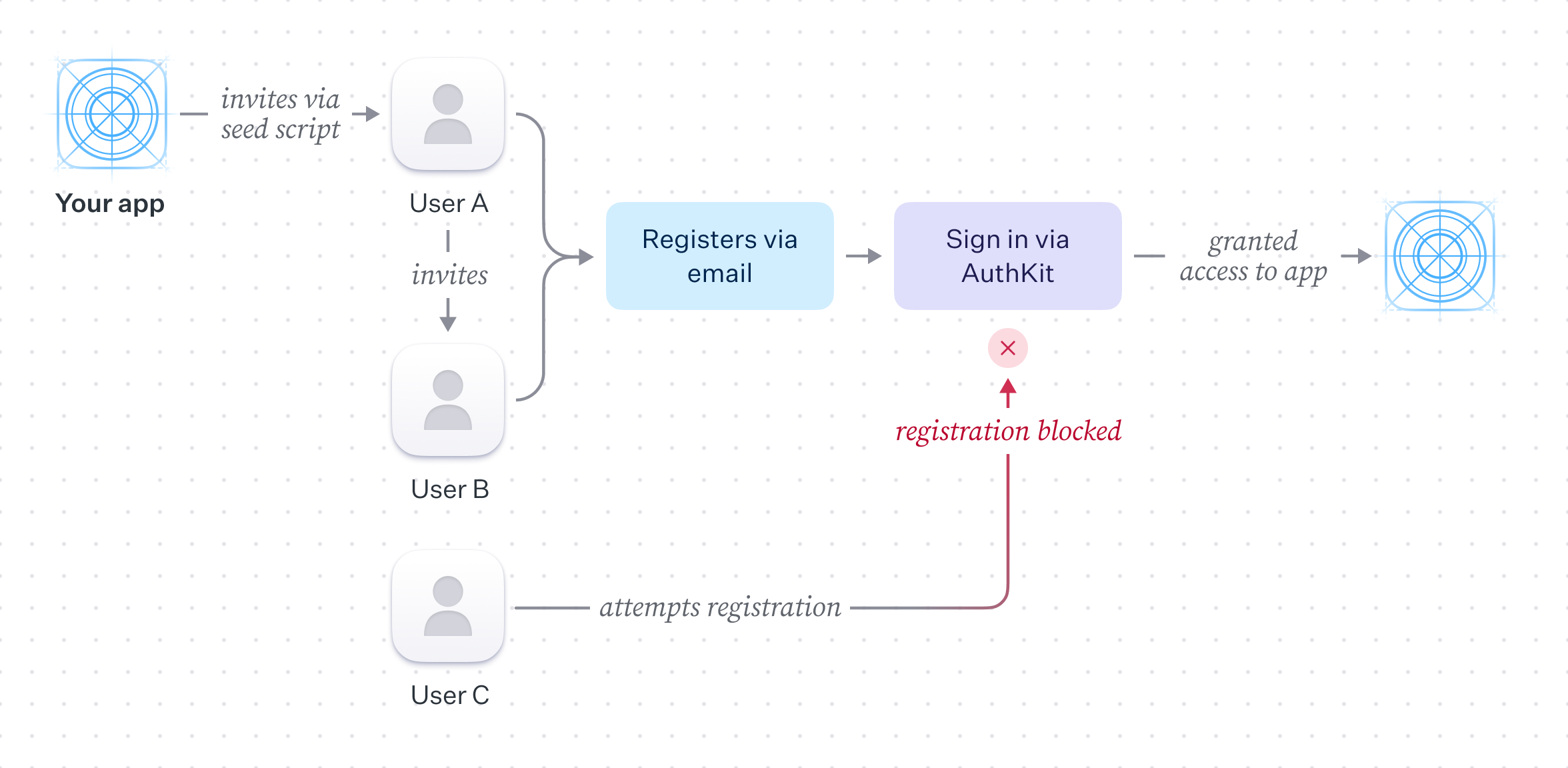[border=false]
|
|
32
|
+
|
|
33
|
+
## Disabling signup
|
|
34
|
+
|
|
35
|
+
AuthKit provides an out-of-the-box signup form which handles validation UX, makes the necessary WorkOS API calls and handles the end-to-end lifecycle of the invite flow (emailing of members, accepting of invites, assignment of members to organizations where appropriate).
|
|
36
|
+
|
|
37
|
+
In this scenario, the application should not expose the signup flow to the general public. It can be disabled per environment by toggling the "Sign up" setting in the authentication section of the WorkOS dashboard.
|
|
38
|
+
|
|
39
|
+
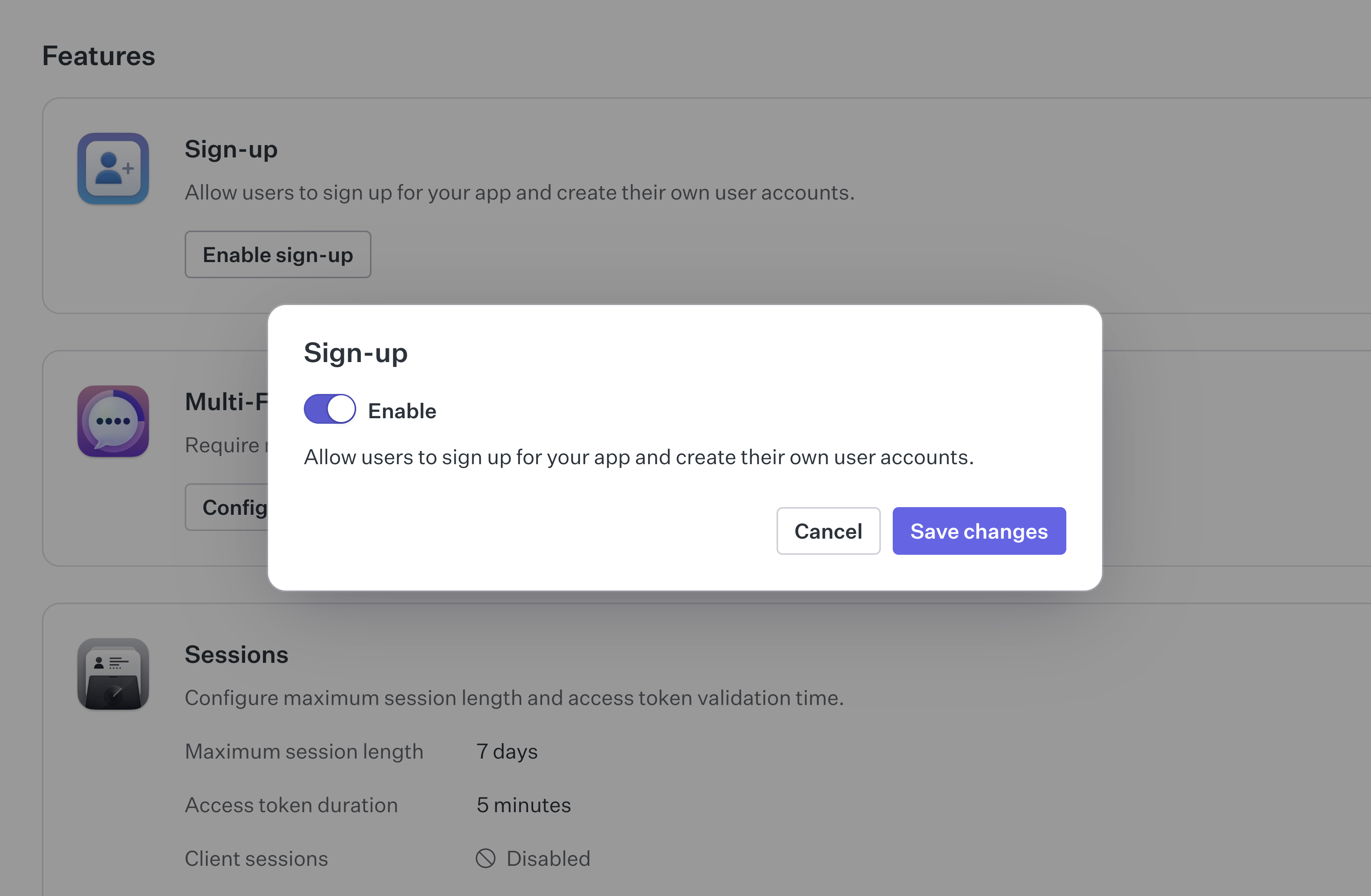[border=false]
|
|
40
|
+
|
|
41
|
+
## Inviting users
|
|
42
|
+
|
|
43
|
+
User invitations can be issued in one of two ways:
|
|
44
|
+
|
|
45
|
+
- Via the WorkOS dashboard.
|
|
46
|
+
- Programmatically via the WorkOS SDK.
|
|
47
|
+
|
|
48
|
+
The simplest way to get started is via the WorkOS dashboard. Invites can be created by navigating to "Invites" tab in the "Users" section of the dashboard.
|
|
49
|
+
|
|
50
|
+
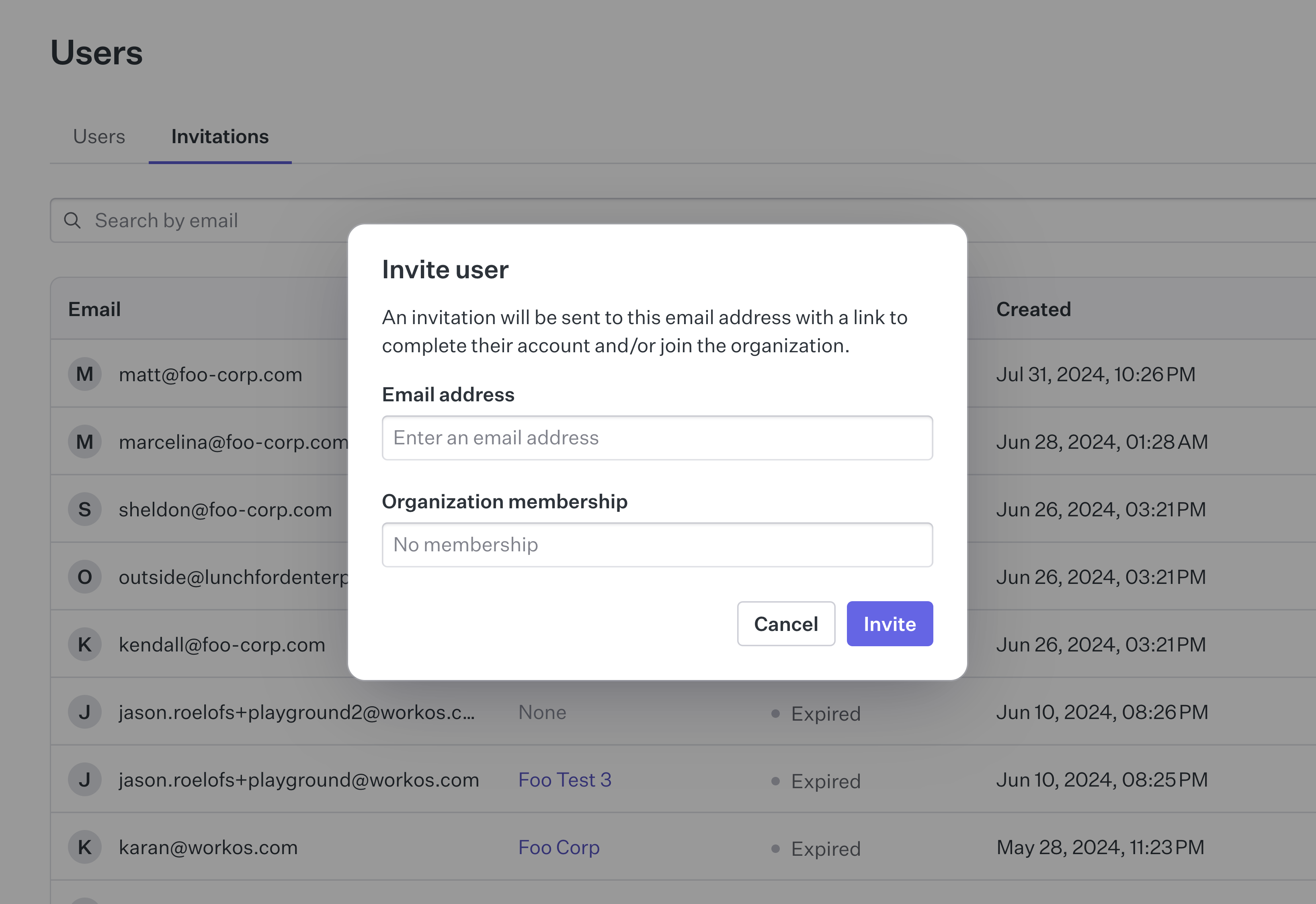[border=false]
|
|
51
|
+
|
|
52
|
+
This is helpful in the early stages of product development where there may be a small number of potential users and the product is not yet mature enough to warrant development time spent implementing custom invitation controls, or when dealing with support requests from users who are having difficulty.
|
|
53
|
+
|
|
54
|
+
## Programmatic invitations
|
|
55
|
+
|
|
56
|
+
Manually issuing invitations from the dashboard is not scalable nor always feasible when needing to issue a large number of invites, or if organic sign up growth is desired without a support team. In this case using the WorkOS API to perform and manage invitations is preferred.
|
|
57
|
+
|
|
58
|
+
### Seeding initial users from a script
|
|
59
|
+
|
|
60
|
+
Typically, an application will implement a "seed" script which will be run once to issue a set of invites to a pre-existing mailing list. This can be done by using the WorkOS API to create an invite for each email address in the list.
|
|
61
|
+
|
|
62
|
+
## Inviting users within the application
|
|
63
|
+
|
|
64
|
+
Custom invitation controls can be implemented within the application to allow members to invite other members. This generally requires adding a form to the UI to collect the email address of the user to invite alongside a button to trigger the API call. Additionally, a count of the number of invites a user has made might be stored and checked against a quota to ensure they don't exceed the number of invites they are allowed to send.
|
|
65
|
+
|
|
66
|
+
A call can then be made to [the WorkOS API](/reference/user-management/invitation/send) by supplying the target users email address as well as the ID of the originating organization. The invited user can then accept this invite via email and move through the steps to gain access to the application.
|
|
67
|
+
|
|
68
|
+
## Summary
|
|
69
|
+
|
|
70
|
+
This scenario covers some high-level considerations when thinking about closed-registration application. By using AuthKit, the WorkOS API, and the dashboard it's possible to limit signup and implement an invite flow within your application.
|
|
71
|
+
|
|
72
|
+
In cases where the signup restriction is temporary, signup in AuthKit can be easily re-enabled via a setting in the WorkOS dashboard.
|