@workos/mcp-docs-server 0.1.0
This diff represents the content of publicly available package versions that have been released to one of the supported registries. The information contained in this diff is provided for informational purposes only and reflects changes between package versions as they appear in their respective public registries.
- package/.docs/organized/changelogs/workos-platform.json +277 -0
- package/.docs/organized/docs/admin-portal/_navigation.mdx +16 -0
- package/.docs/organized/docs/admin-portal/custom-branding.mdx +111 -0
- package/.docs/organized/docs/admin-portal/example-apps.mdx +46 -0
- package/.docs/organized/docs/admin-portal/index.mdx +240 -0
- package/.docs/organized/docs/audit-logs/_navigation.mdx +22 -0
- package/.docs/organized/docs/audit-logs/admin-portal.mdx +20 -0
- package/.docs/organized/docs/audit-logs/editing-events.mdx +27 -0
- package/.docs/organized/docs/audit-logs/exporting-events.mdx +29 -0
- package/.docs/organized/docs/audit-logs/index.mdx +110 -0
- package/.docs/organized/docs/audit-logs/log-streams.mdx +56 -0
- package/.docs/organized/docs/audit-logs/metadata-schema.mdx +21 -0
- package/.docs/organized/docs/custom-domains/_navigation.mdx +16 -0
- package/.docs/organized/docs/custom-domains/admin-portal.mdx +38 -0
- package/.docs/organized/docs/custom-domains/auth-api.mdx +59 -0
- package/.docs/organized/docs/custom-domains/authkit.mdx +36 -0
- package/.docs/organized/docs/custom-domains/email.mdx +41 -0
- package/.docs/organized/docs/custom-domains/index.mdx +19 -0
- package/.docs/organized/docs/dashboard.mdx +244 -0
- package/.docs/organized/docs/demo/_navigation.mdx +26 -0
- package/.docs/organized/docs/demo/accordion.mdx +34 -0
- package/.docs/organized/docs/demo/checklist.mdx +33 -0
- package/.docs/organized/docs/demo/code-block.mdx +185 -0
- package/.docs/organized/docs/demo/definition-list.mdx +35 -0
- package/.docs/organized/docs/demo/index.mdx +7 -0
- package/.docs/organized/docs/demo/punctuation.mdx +37 -0
- package/.docs/organized/docs/demo/replacements.mdx +26 -0
- package/.docs/organized/docs/demo/table.mdx +26 -0
- package/.docs/organized/docs/demo/tabs.mdx +17 -0
- package/.docs/organized/docs/directory-sync/_navigation.mdx +28 -0
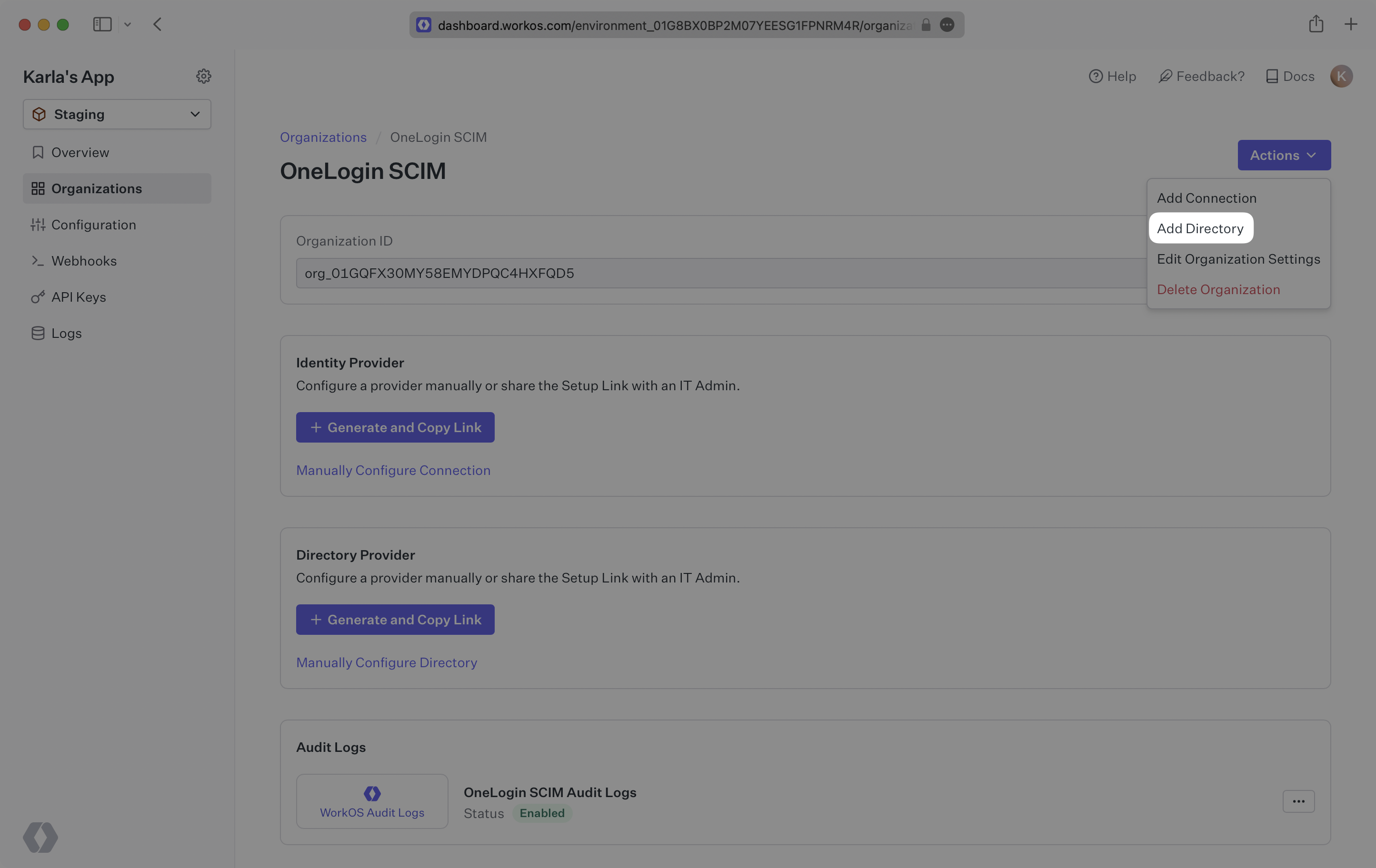
- package/.docs/organized/docs/directory-sync/attributes.mdx +209 -0
- package/.docs/organized/docs/directory-sync/example-apps.mdx +46 -0
- package/.docs/organized/docs/directory-sync/handle-inactive-users.mdx +52 -0
- package/.docs/organized/docs/directory-sync/identity-provider-role-assignment.mdx +134 -0
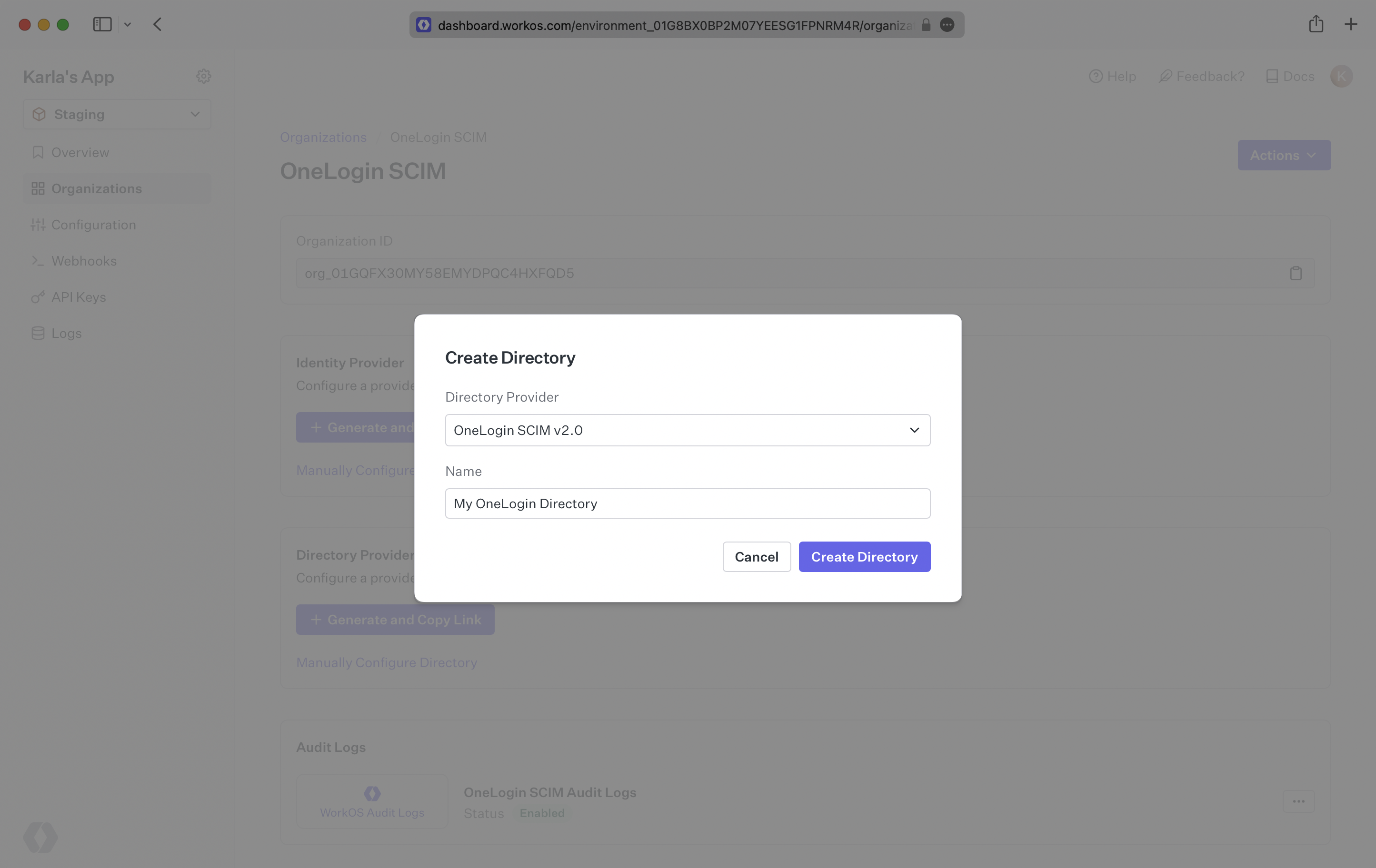
- package/.docs/organized/docs/directory-sync/index.mdx +107 -0
- package/.docs/organized/docs/directory-sync/quick-start.mdx +129 -0
- package/.docs/organized/docs/directory-sync/understanding-events.mdx +209 -0
- package/.docs/organized/docs/domain-verification/_navigation.mdx +10 -0
- package/.docs/organized/docs/domain-verification/api.mdx +60 -0
- package/.docs/organized/docs/domain-verification/index.mdx +67 -0
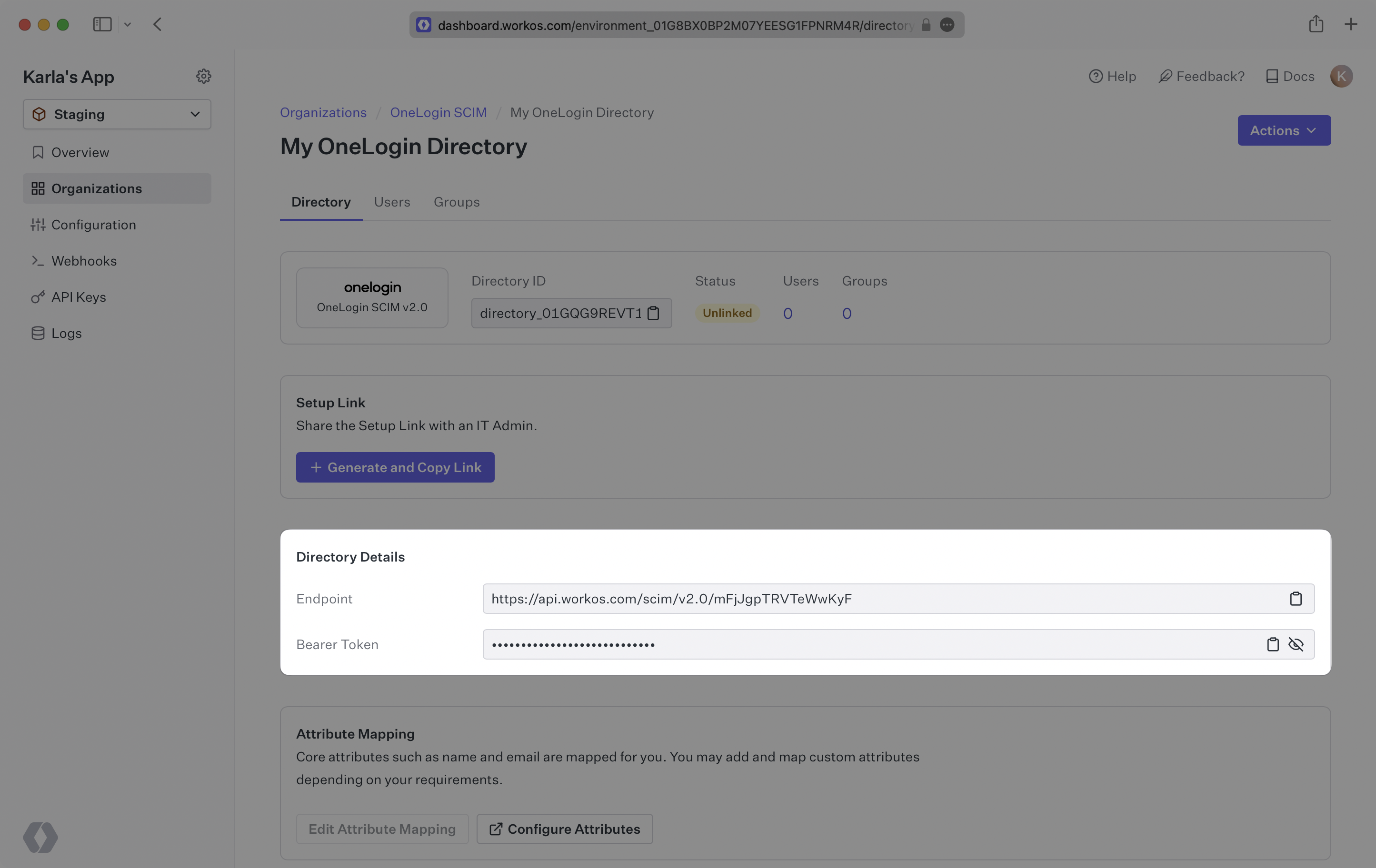
- package/.docs/organized/docs/email.mdx +109 -0
- package/.docs/organized/docs/events/_navigation.mdx +22 -0
- package/.docs/organized/docs/events/data-syncing/data-reconciliation.mdx +56 -0
- package/.docs/organized/docs/events/data-syncing/events-api.mdx +114 -0
- package/.docs/organized/docs/events/data-syncing/index.mdx +66 -0
- package/.docs/organized/docs/events/data-syncing/webhooks.mdx +173 -0
- package/.docs/organized/docs/events/index.mdx +783 -0
- package/.docs/organized/docs/events/observability/datadog.mdx +76 -0
- package/.docs/organized/docs/fga/_navigation.mdx +64 -0
- package/.docs/organized/docs/fga/identity-provider-sessions.mdx +68 -0
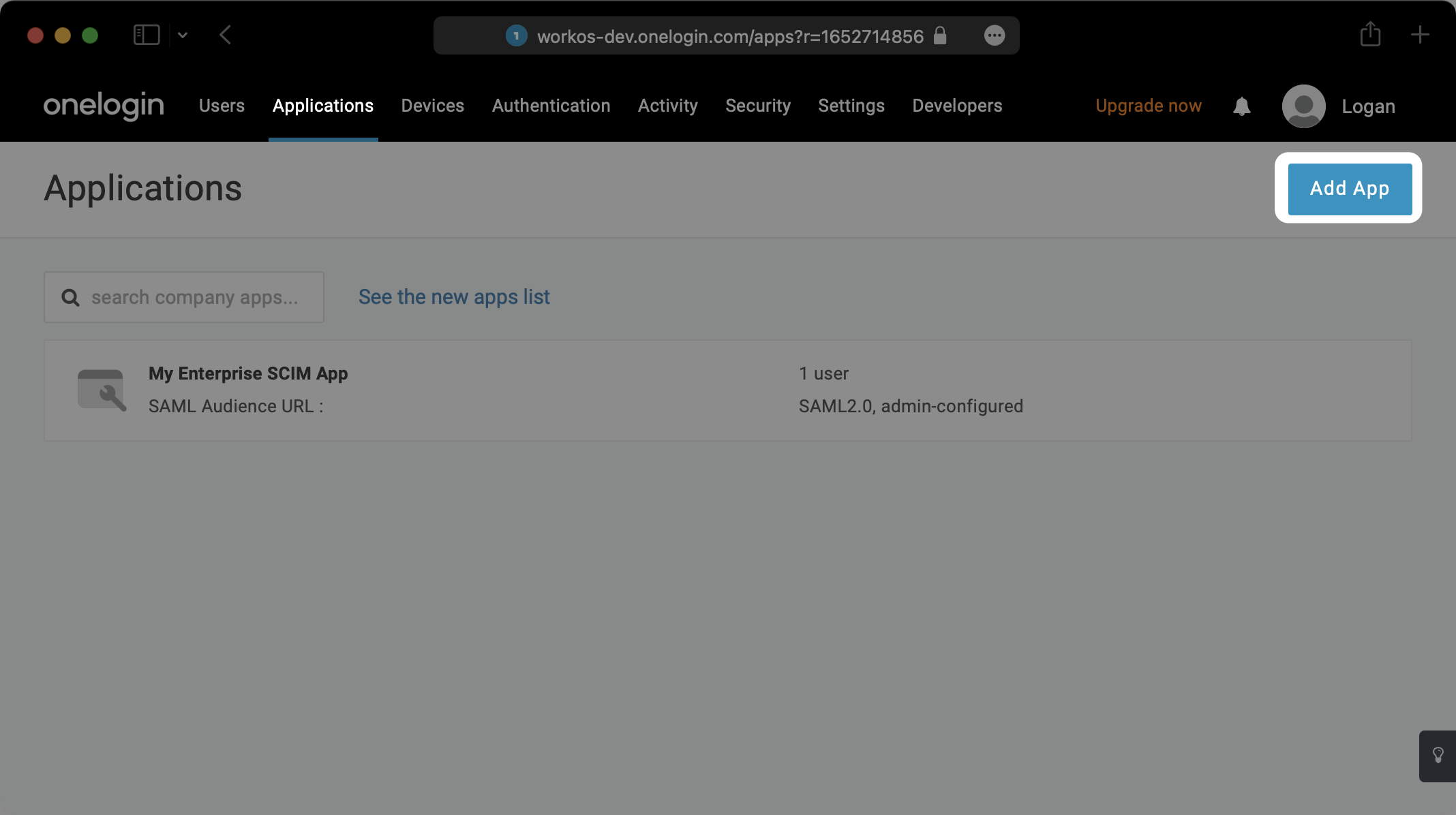
- package/.docs/organized/docs/fga/index.mdx +60 -0
- package/.docs/organized/docs/fga/local-development.mdx +155 -0
- package/.docs/organized/docs/fga/modeling/abac.mdx +107 -0
- package/.docs/organized/docs/fga/modeling/blocklist.mdx +84 -0
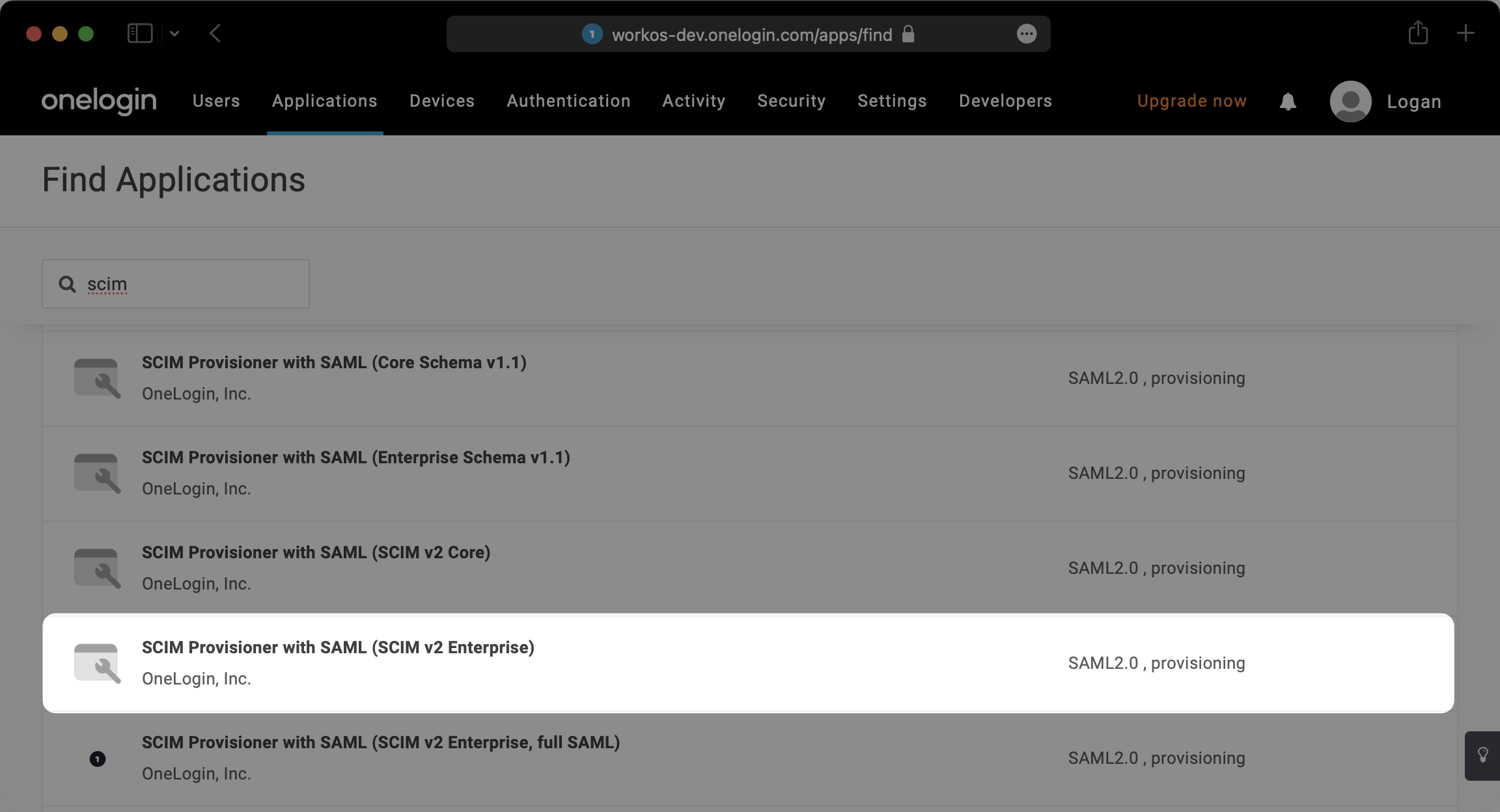
- package/.docs/organized/docs/fga/modeling/conditional-roles.mdx +99 -0
- package/.docs/organized/docs/fga/modeling/custom-roles.mdx +90 -0
- package/.docs/organized/docs/fga/modeling/entitlements.mdx +127 -0
- package/.docs/organized/docs/fga/modeling/managed-service-provider.mdx +131 -0
- package/.docs/organized/docs/fga/modeling/org-roles-and-permissions.mdx +95 -0
- package/.docs/organized/docs/fga/modeling/policy-context.mdx +231 -0
- package/.docs/organized/docs/fga/modeling/public-access.mdx +61 -0
- package/.docs/organized/docs/fga/modeling/shareable-content.mdx +106 -0
- package/.docs/organized/docs/fga/modeling/superusers.mdx +74 -0
- package/.docs/organized/docs/fga/modeling/user-groups.mdx +92 -0
- package/.docs/organized/docs/fga/operations-usage.mdx +104 -0
- package/.docs/organized/docs/fga/playground.mdx +12 -0
- package/.docs/organized/docs/fga/policies.mdx +462 -0
- package/.docs/organized/docs/fga/query-language.mdx +112 -0
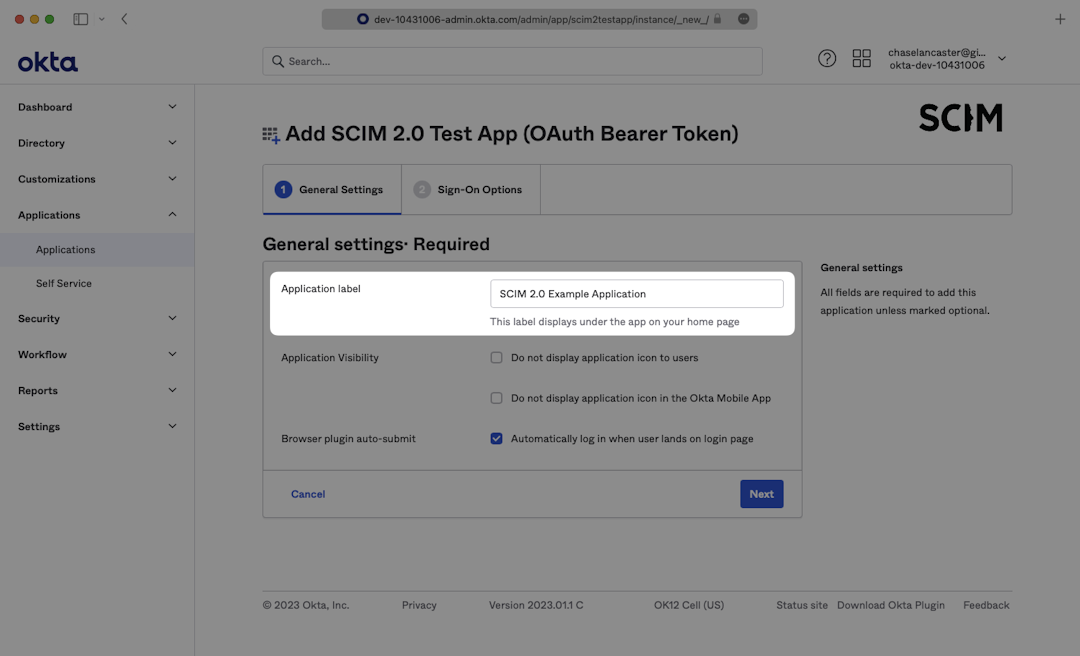
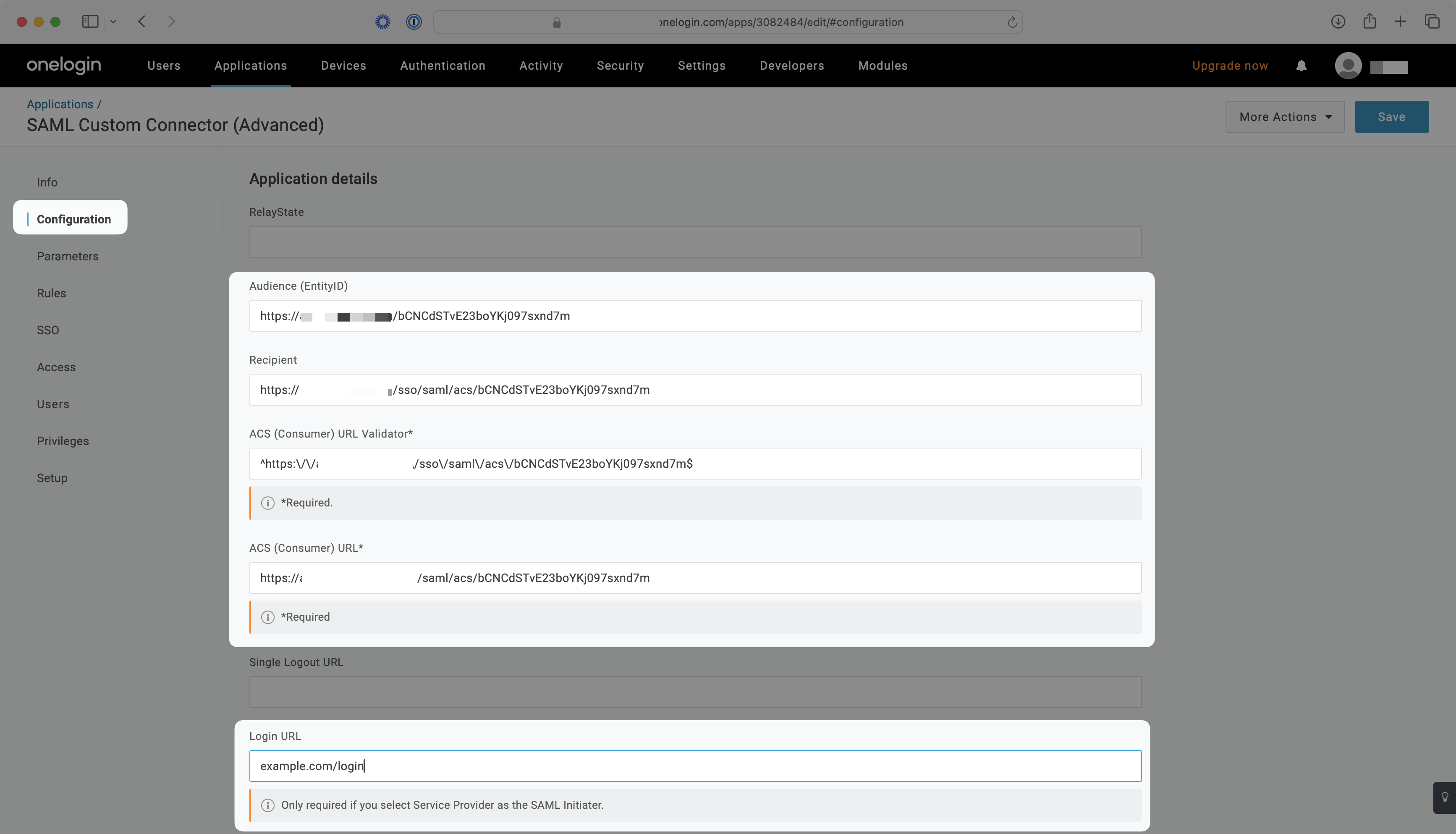
- package/.docs/organized/docs/fga/quick-start.mdx +174 -0
- package/.docs/organized/docs/fga/resources.mdx +92 -0
- package/.docs/organized/docs/fga/schema-management.mdx +224 -0
- package/.docs/organized/docs/fga/schema.mdx +388 -0
- package/.docs/organized/docs/fga/warrant-tokens.mdx +44 -0
- package/.docs/organized/docs/fga/warrants.mdx +92 -0
- package/.docs/organized/docs/glossary.mdx +184 -0
- package/.docs/organized/docs/integrations/_navigation.mdx +6 -0
- package/.docs/organized/docs/integrations/access-people-hr.mdx +87 -0
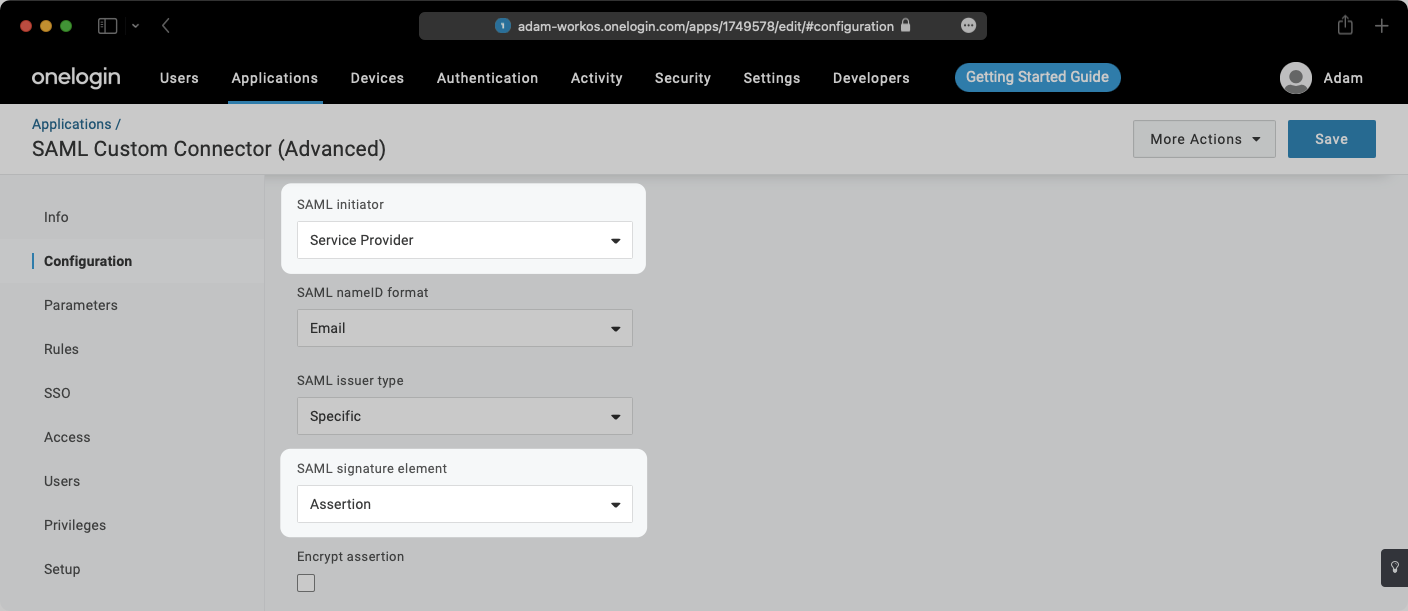
- package/.docs/organized/docs/integrations/adp-oidc.mdx +103 -0
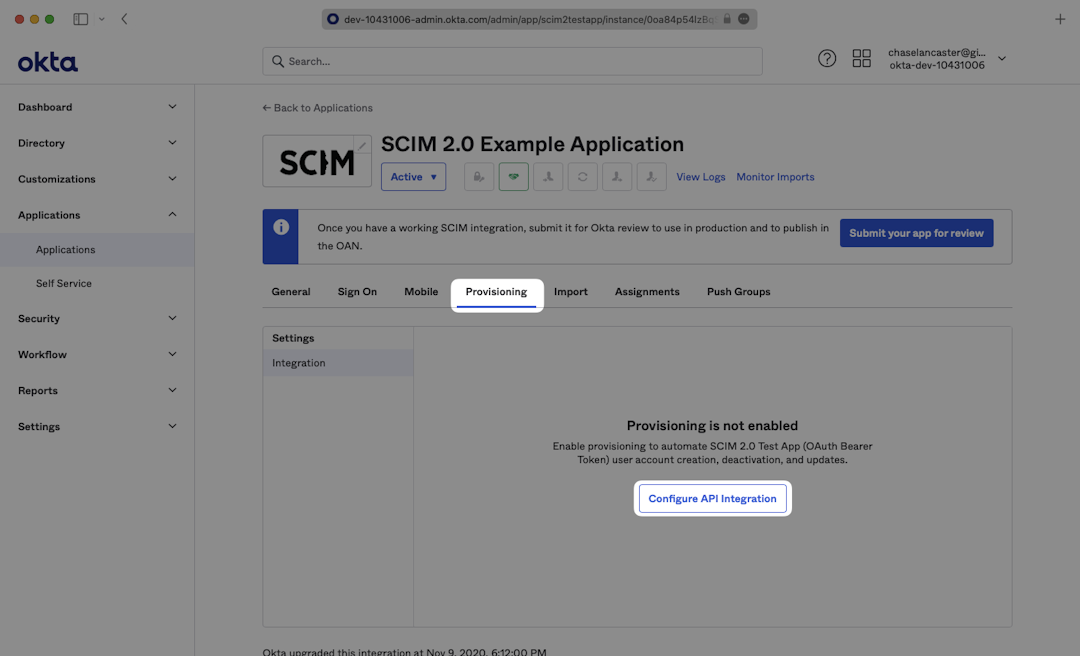
- package/.docs/organized/docs/integrations/apple.mdx +169 -0
- package/.docs/organized/docs/integrations/auth0-directory-sync.mdx +78 -0
- package/.docs/organized/docs/integrations/auth0-enterprise-connection.mdx +92 -0
- package/.docs/organized/docs/integrations/auth0-saml.mdx +81 -0
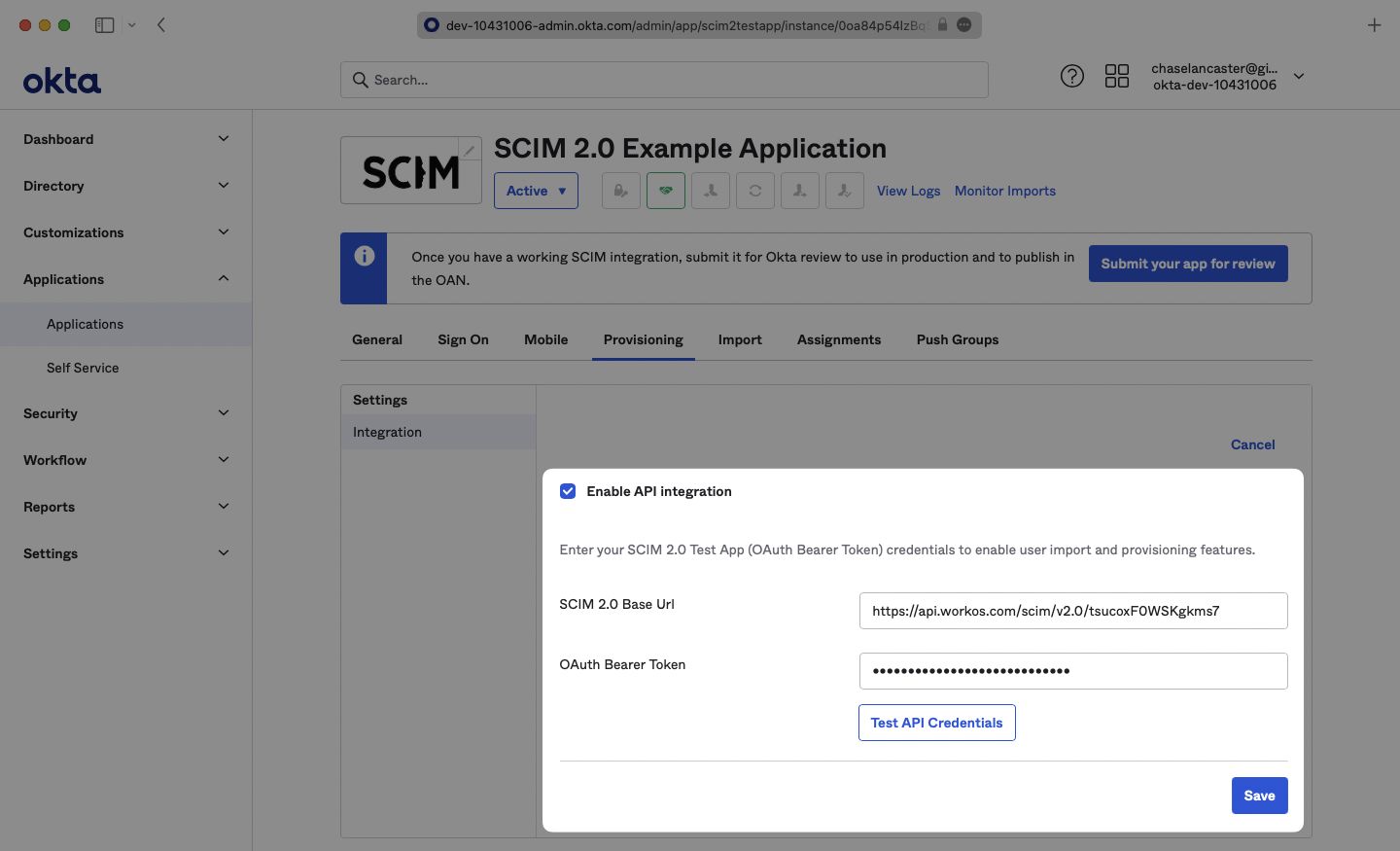
- package/.docs/organized/docs/integrations/aws-cognito.mdx +81 -0
- package/.docs/organized/docs/integrations/bamboohr.mdx +90 -0
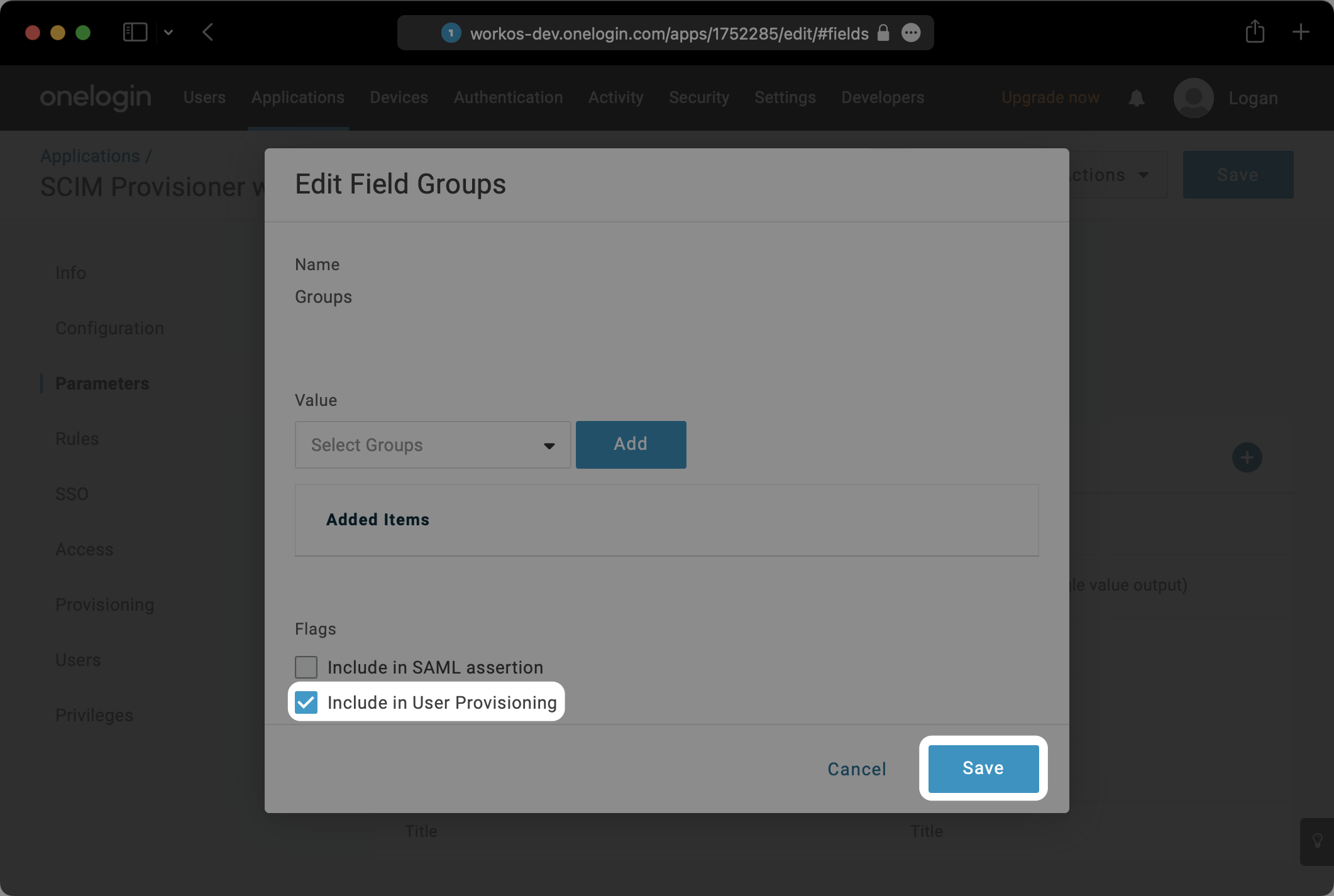
- package/.docs/organized/docs/integrations/breathe-hr.mdx +89 -0
- package/.docs/organized/docs/integrations/bubble.mdx +129 -0
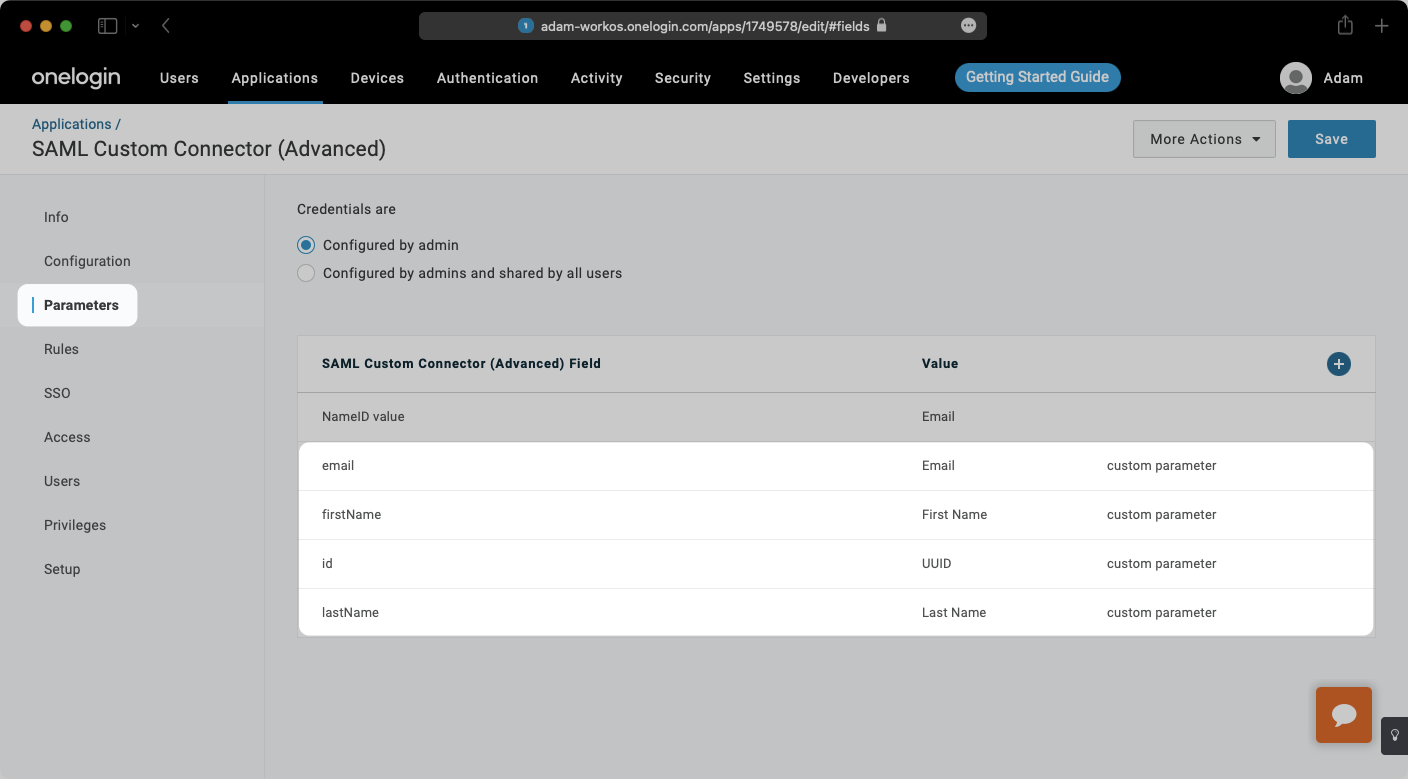
- package/.docs/organized/docs/integrations/cas-saml.mdx +65 -0
- package/.docs/organized/docs/integrations/cezanne.mdx +74 -0
- package/.docs/organized/docs/integrations/classlink-saml.mdx +100 -0
- package/.docs/organized/docs/integrations/cloudflare-saml.mdx +164 -0
- package/.docs/organized/docs/integrations/cyberark-saml.mdx +138 -0
- package/.docs/organized/docs/integrations/cyberark-scim.mdx +100 -0
- package/.docs/organized/docs/integrations/duo-saml.mdx +127 -0
- package/.docs/organized/docs/integrations/entra-id-saml.mdx +156 -0
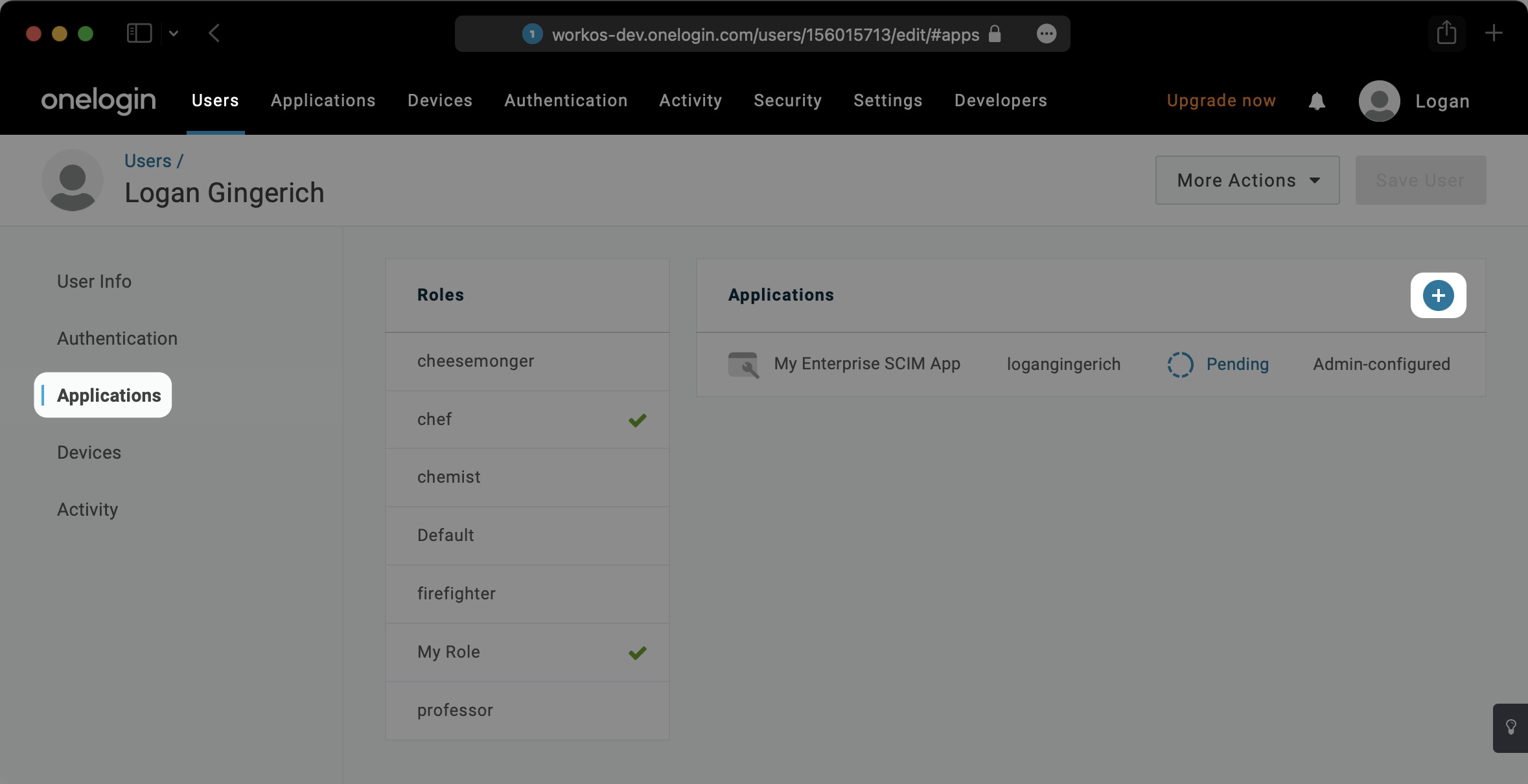
- package/.docs/organized/docs/integrations/entra-id-scim.mdx +218 -0
- package/.docs/organized/docs/integrations/firebase.mdx +98 -0
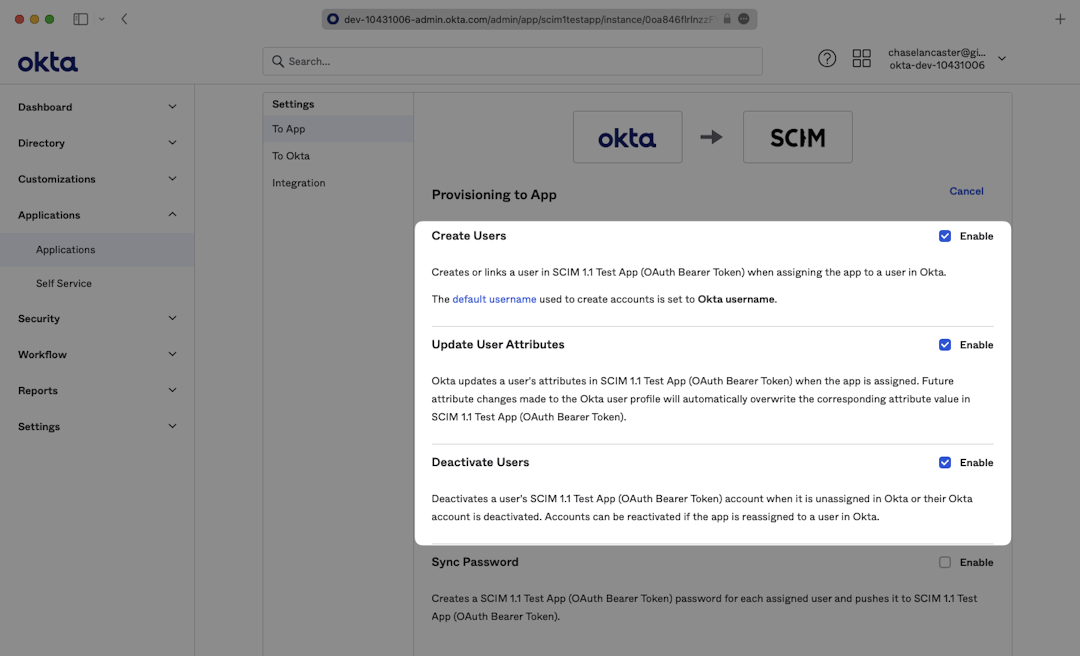
- package/.docs/organized/docs/integrations/fourth.mdx +66 -0
- package/.docs/organized/docs/integrations/github-oauth.mdx +85 -0
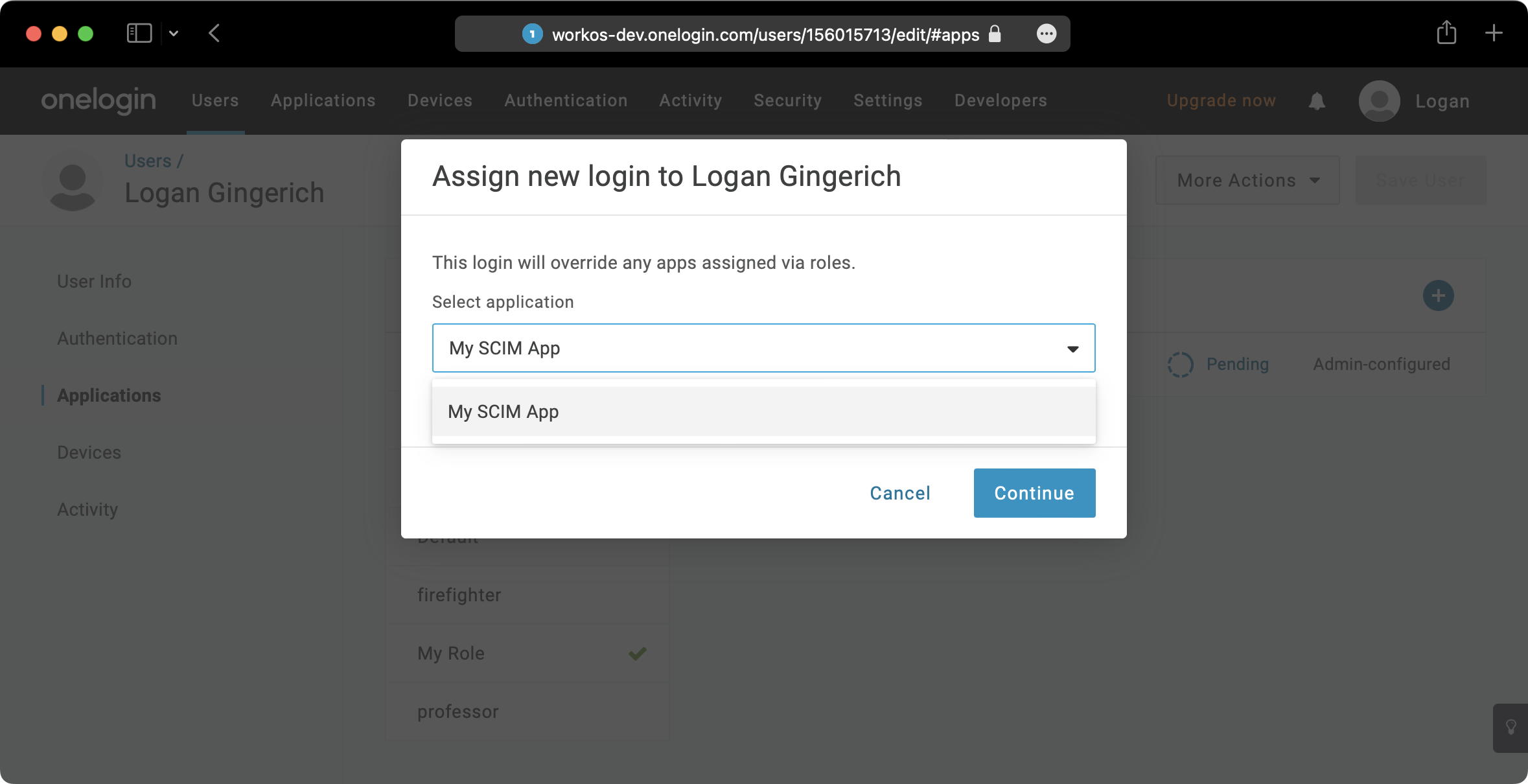
- package/.docs/organized/docs/integrations/gitlab-oauth.mdx +81 -0
- package/.docs/organized/docs/integrations/google-directory-sync.mdx +86 -0
- package/.docs/organized/docs/integrations/google-oauth.mdx +173 -0
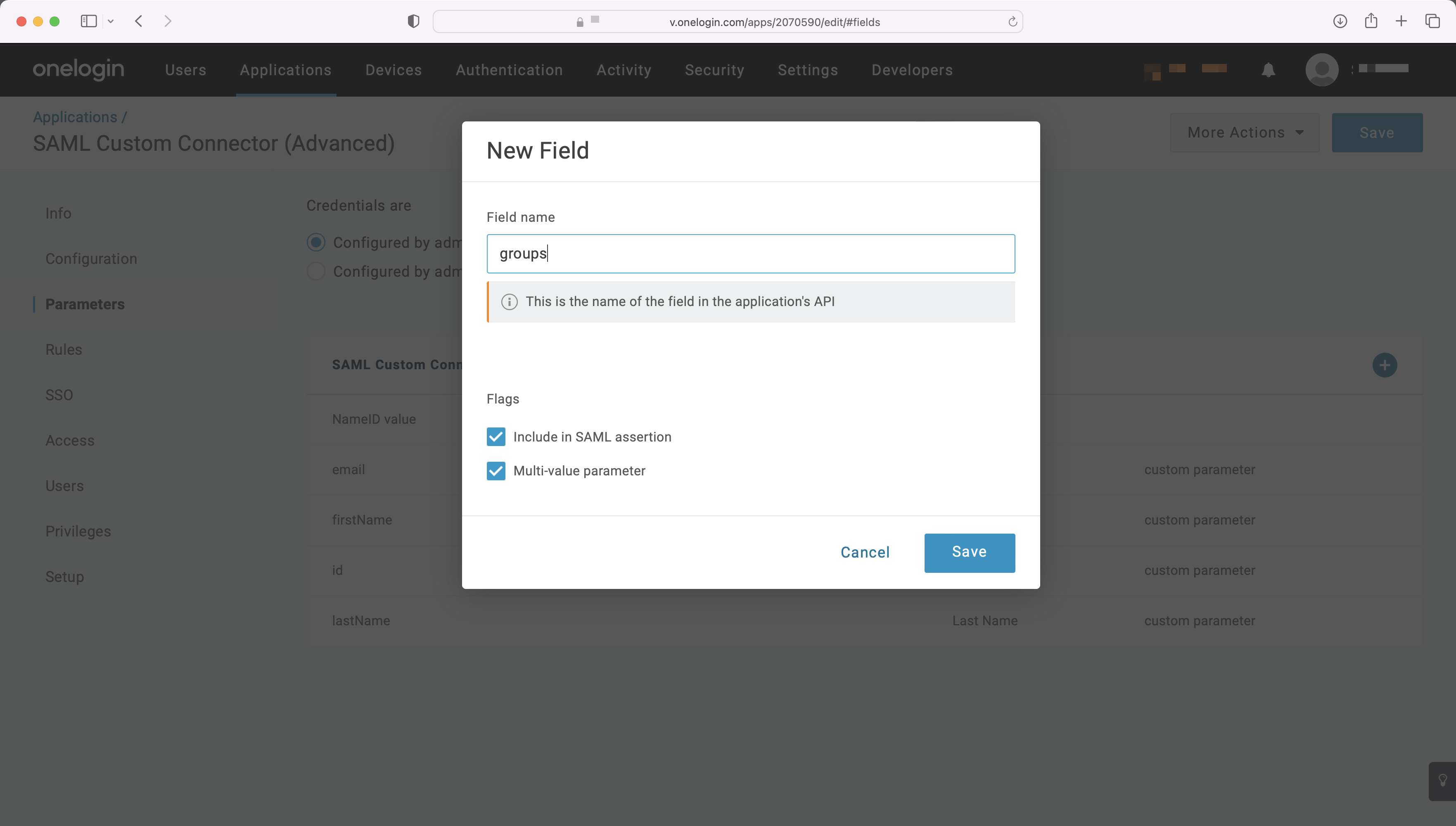
- package/.docs/organized/docs/integrations/google-saml.mdx +135 -0
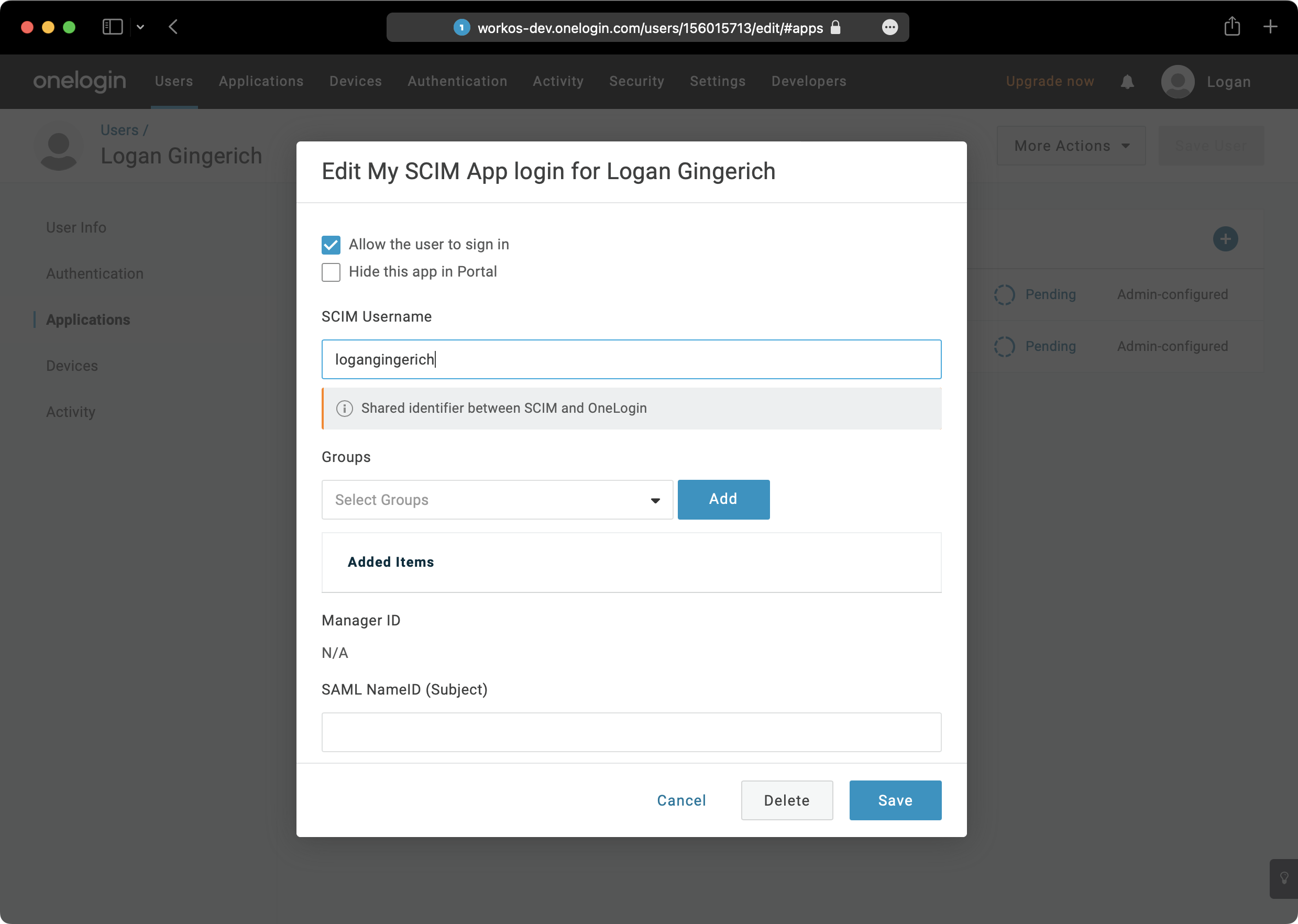
- package/.docs/organized/docs/integrations/hibob.mdx +98 -0
- package/.docs/organized/docs/integrations/jumpcloud-saml.mdx +96 -0
- package/.docs/organized/docs/integrations/jumpcloud-scim.mdx +106 -0
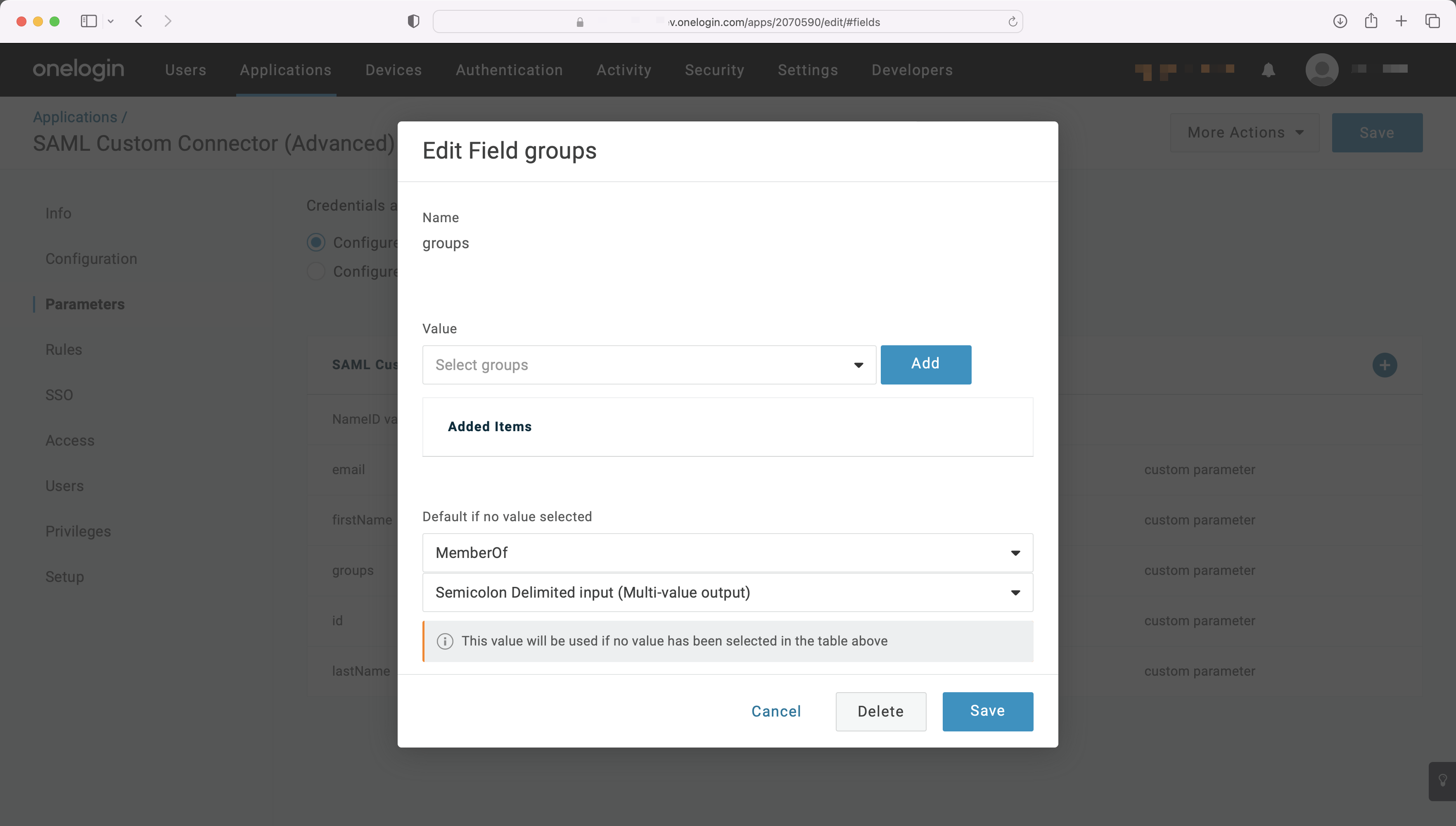
- package/.docs/organized/docs/integrations/keycloak-saml.mdx +128 -0
- package/.docs/organized/docs/integrations/lastpass-saml.mdx +134 -0
- package/.docs/organized/docs/integrations/linkedin-oauth.mdx +77 -0
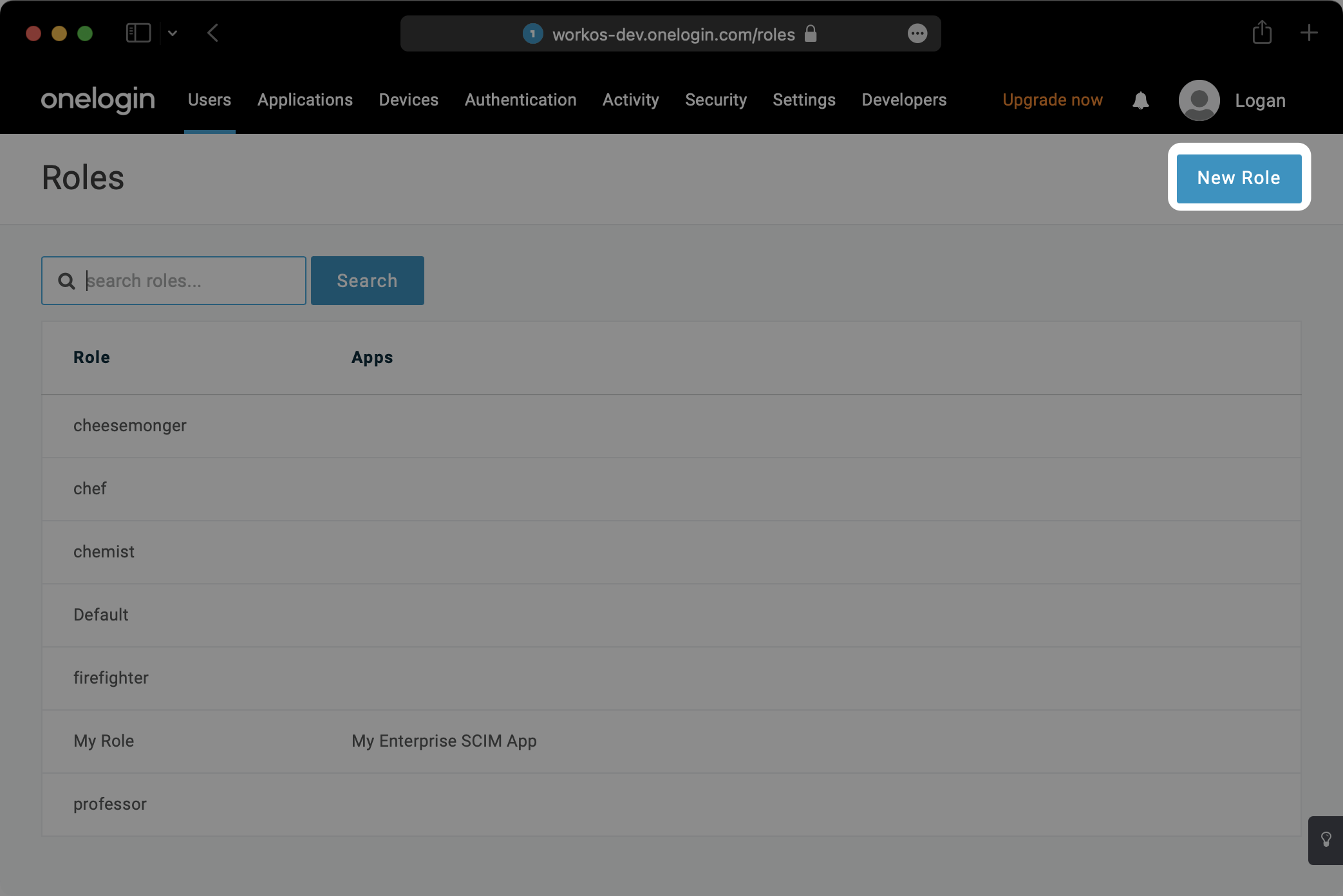
- package/.docs/organized/docs/integrations/login-gov-oidc.mdx +103 -0
- package/.docs/organized/docs/integrations/microsoft-ad-fs-saml.mdx +96 -0
- package/.docs/organized/docs/integrations/microsoft-oauth.mdx +101 -0
- package/.docs/organized/docs/integrations/miniorange-saml.mdx +124 -0
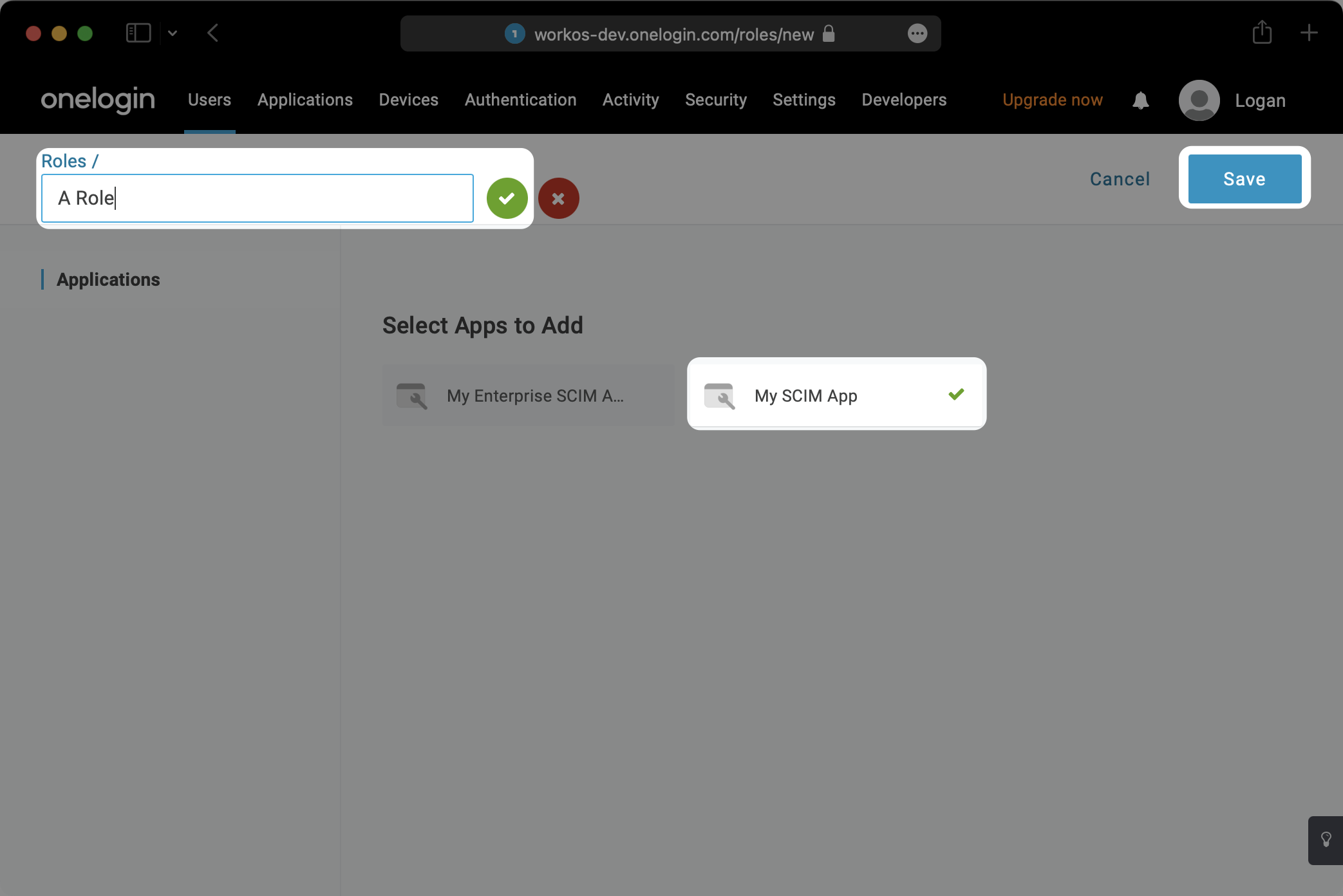
- package/.docs/organized/docs/integrations/net-iq-saml.mdx +75 -0
- package/.docs/organized/docs/integrations/next-auth.mdx +257 -0
- package/.docs/organized/docs/integrations/oidc.mdx +64 -0
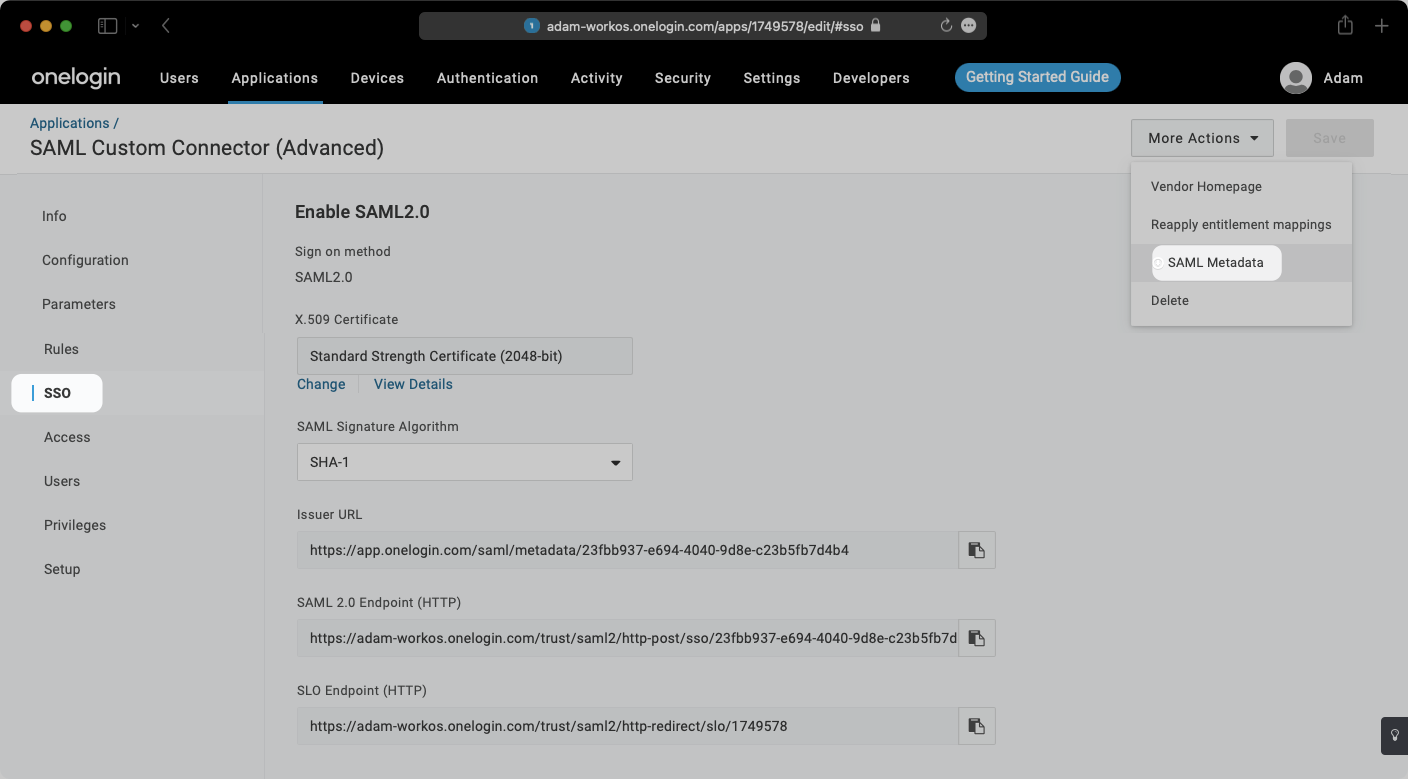
- package/.docs/organized/docs/integrations/okta-saml.mdx +144 -0
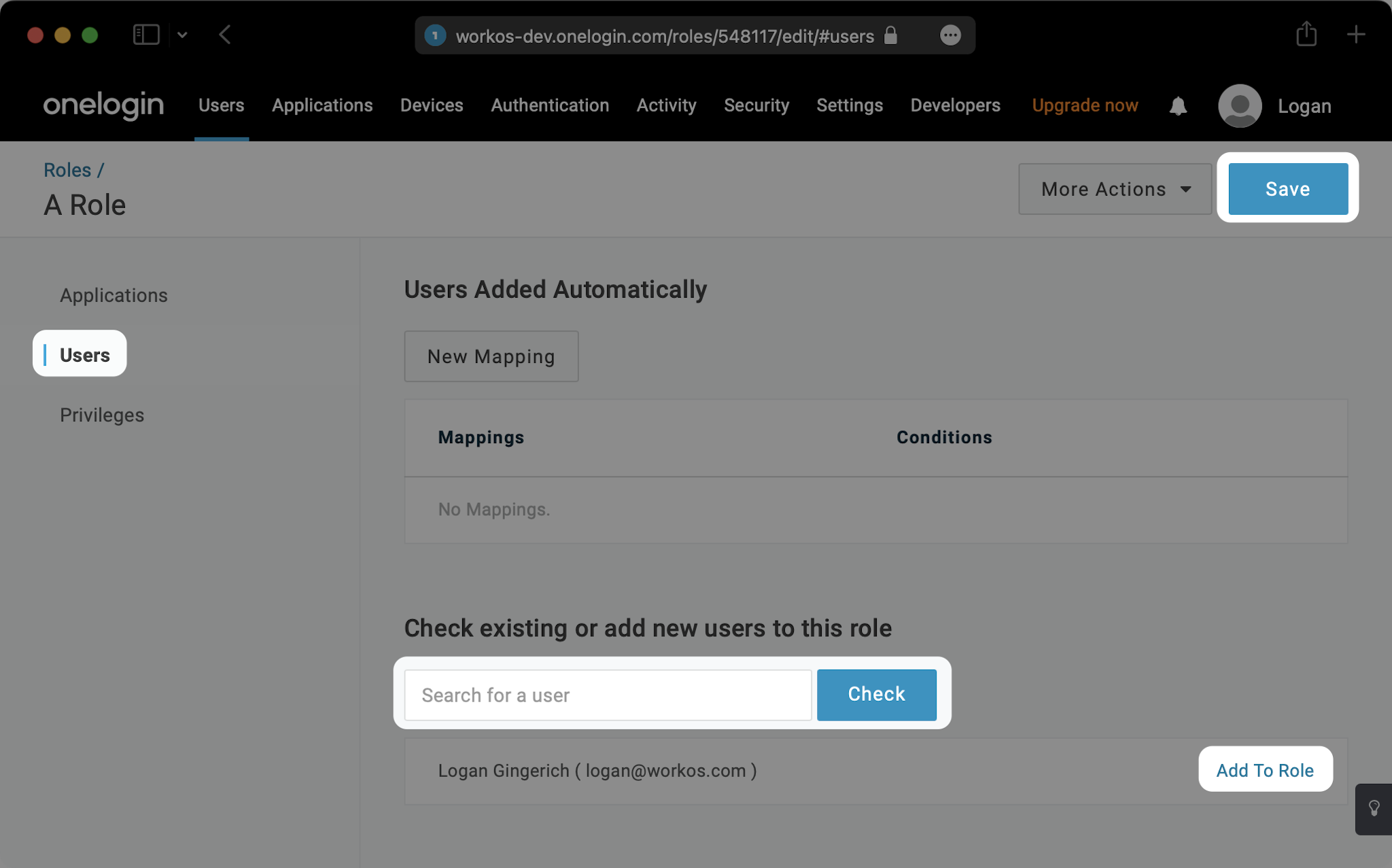
- package/.docs/organized/docs/integrations/okta-scim.mdx +210 -0
- package/.docs/organized/docs/integrations/onelogin-saml.mdx +131 -0
- package/.docs/organized/docs/integrations/onelogin-scim.mdx +150 -0
- package/.docs/organized/docs/integrations/oracle-saml.mdx +76 -0
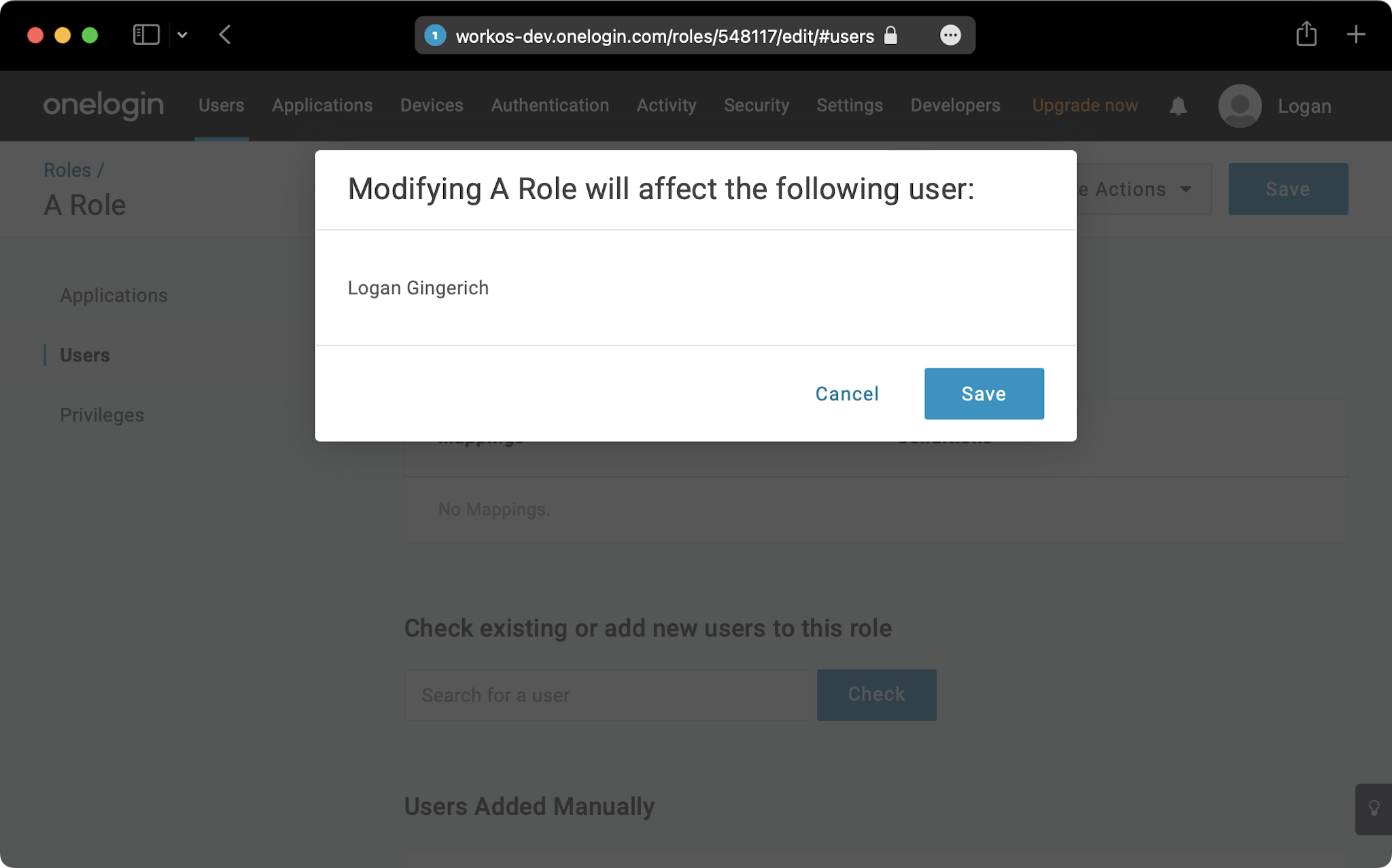
- package/.docs/organized/docs/integrations/pingfederate-saml.mdx +103 -0
- package/.docs/organized/docs/integrations/pingfederate-scim.mdx +150 -0
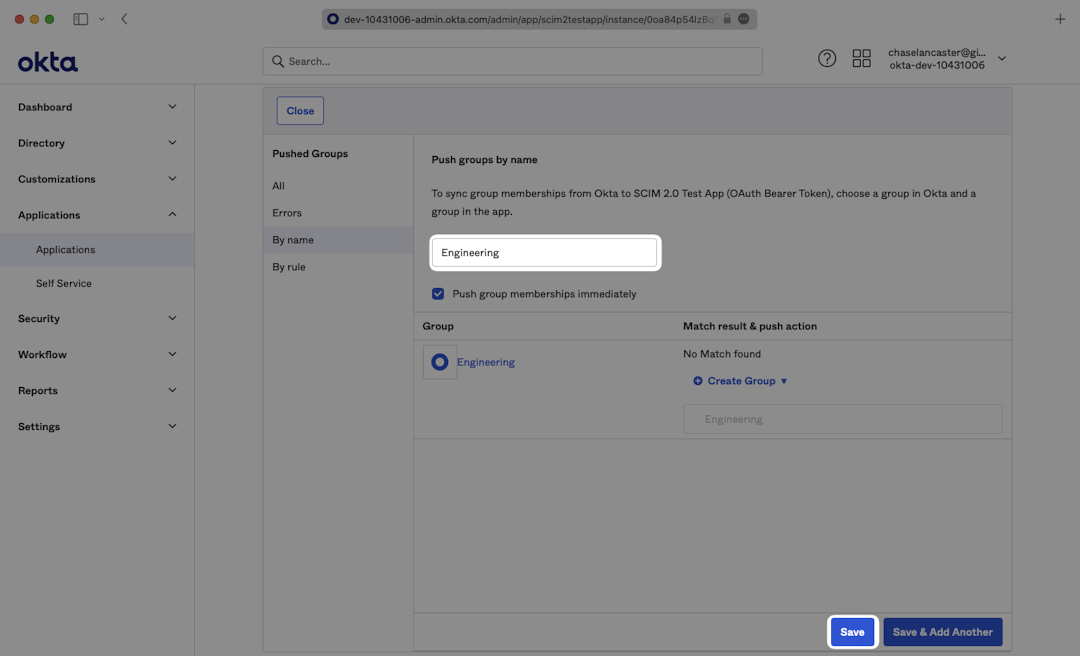
- package/.docs/organized/docs/integrations/pingone-saml.mdx +86 -0
- package/.docs/organized/docs/integrations/react-native-expo.mdx +93 -0
- package/.docs/organized/docs/integrations/rippling-saml.mdx +174 -0
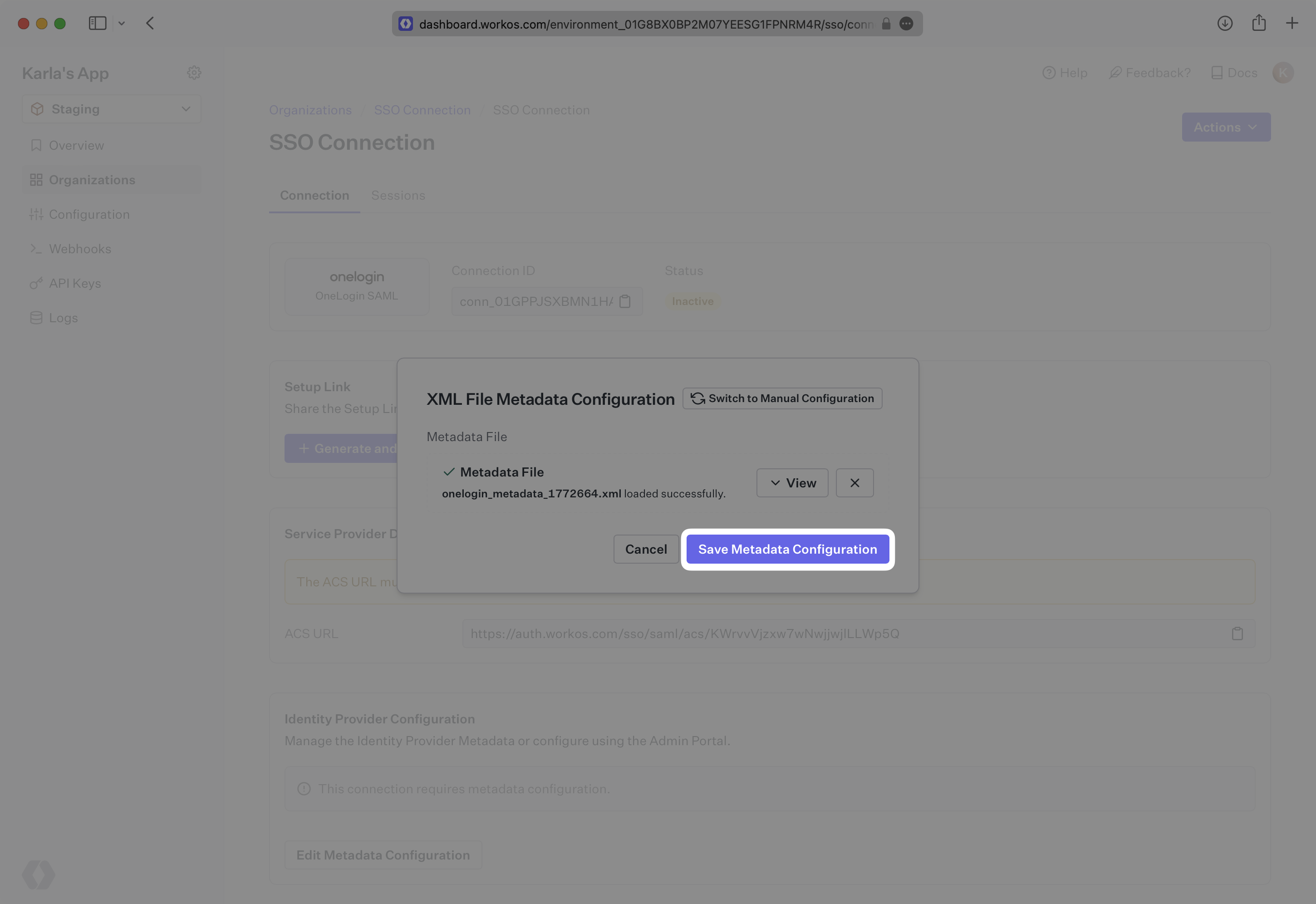
- package/.docs/organized/docs/integrations/rippling-scim.mdx +148 -0
- package/.docs/organized/docs/integrations/salesforce-saml.mdx +143 -0
- package/.docs/organized/docs/integrations/saml.mdx +64 -0
- package/.docs/organized/docs/integrations/scim.mdx +64 -0
- package/.docs/organized/docs/integrations/sftp.mdx +150 -0
- package/.docs/organized/docs/integrations/shibboleth-generic-saml.mdx +84 -0
- package/.docs/organized/docs/integrations/shibboleth-unsolicited-saml.mdx +84 -0
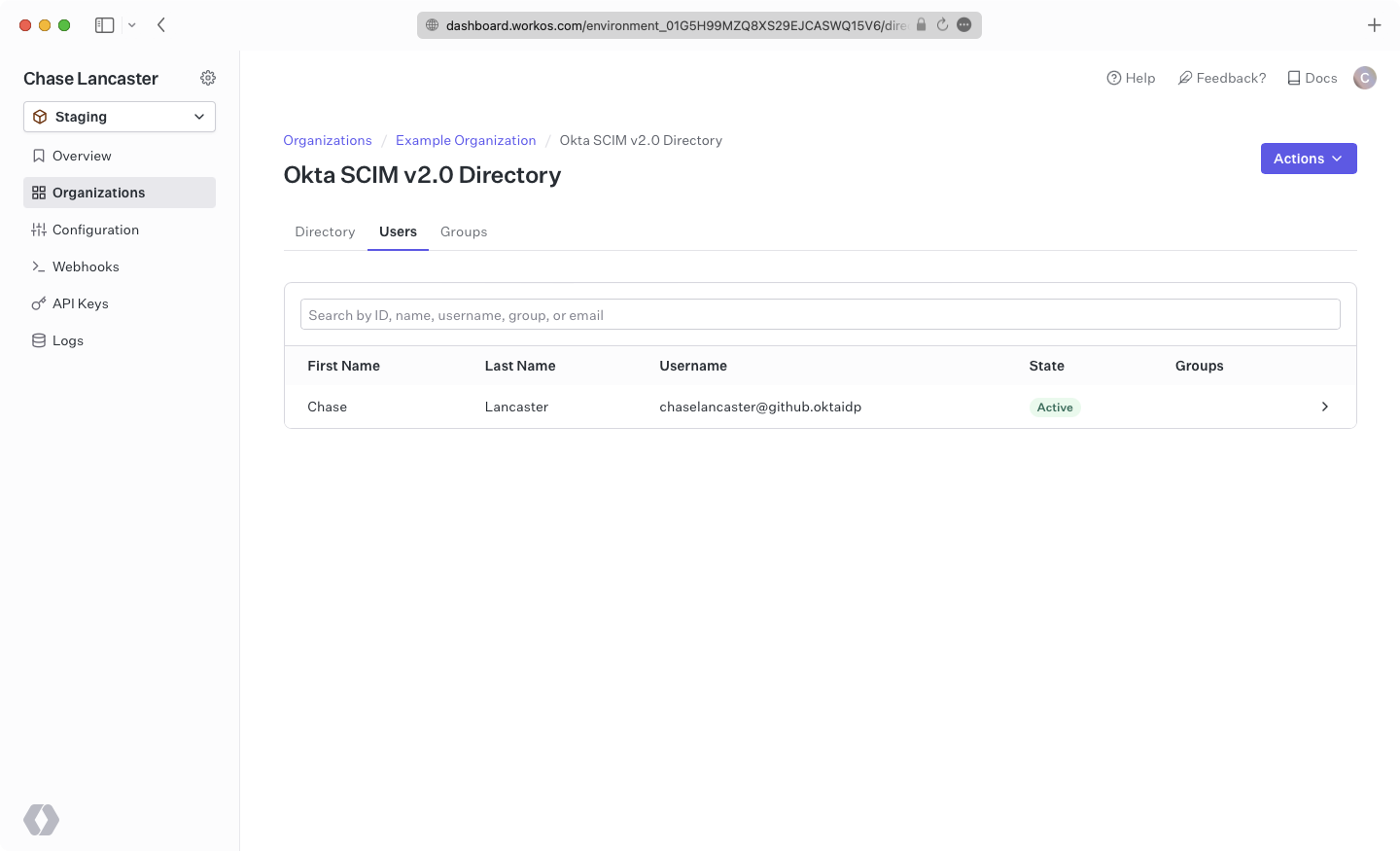
- package/.docs/organized/docs/integrations/simple-saml-php.mdx +78 -0
- package/.docs/organized/docs/integrations/slack-oauth.mdx +102 -0
- package/.docs/organized/docs/integrations/supabase.mdx +68 -0
- package/.docs/organized/docs/integrations/vmware-saml.mdx +100 -0
- package/.docs/organized/docs/integrations/workday.mdx +156 -0
- package/.docs/organized/docs/integrations/xero-oauth.mdx +83 -0
- package/.docs/organized/docs/magic-link/_navigation.mdx +16 -0
- package/.docs/organized/docs/magic-link/example-apps.mdx +46 -0
- package/.docs/organized/docs/magic-link/index.mdx +199 -0
- package/.docs/organized/docs/magic-link/launch-checklist.mdx +27 -0
- package/.docs/organized/docs/mfa/_navigation.mdx +18 -0
- package/.docs/organized/docs/mfa/example-apps.mdx +46 -0
- package/.docs/organized/docs/mfa/index.mdx +140 -0
- package/.docs/organized/docs/mfa/ux/enrollment.mdx +74 -0
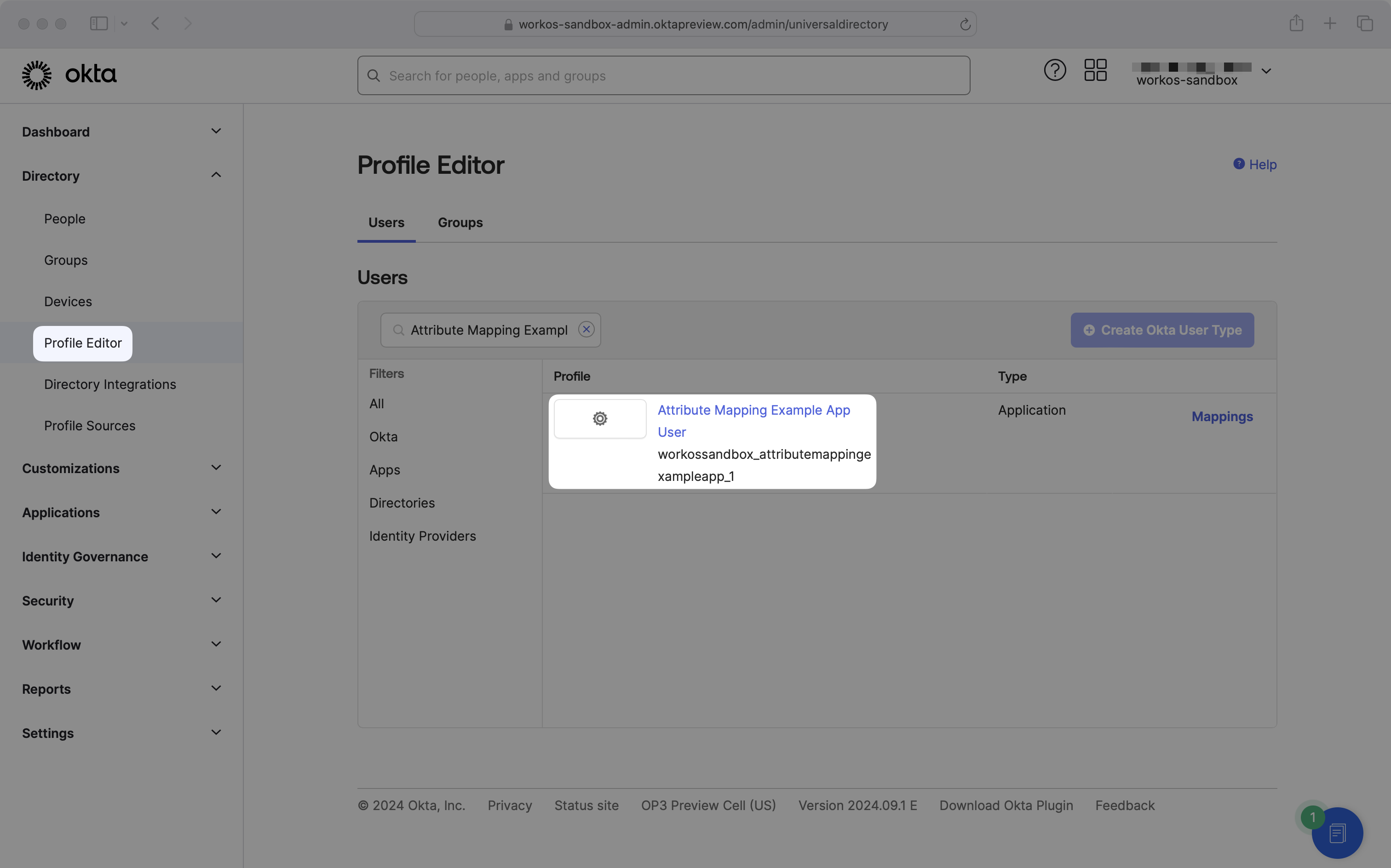
- package/.docs/organized/docs/mfa/ux/sign-in.mdx +30 -0
- package/.docs/organized/docs/migrate/_navigation.mdx +6 -0
- package/.docs/organized/docs/migrate/auth0.mdx +98 -0
- package/.docs/organized/docs/migrate/aws-cognito.mdx +115 -0
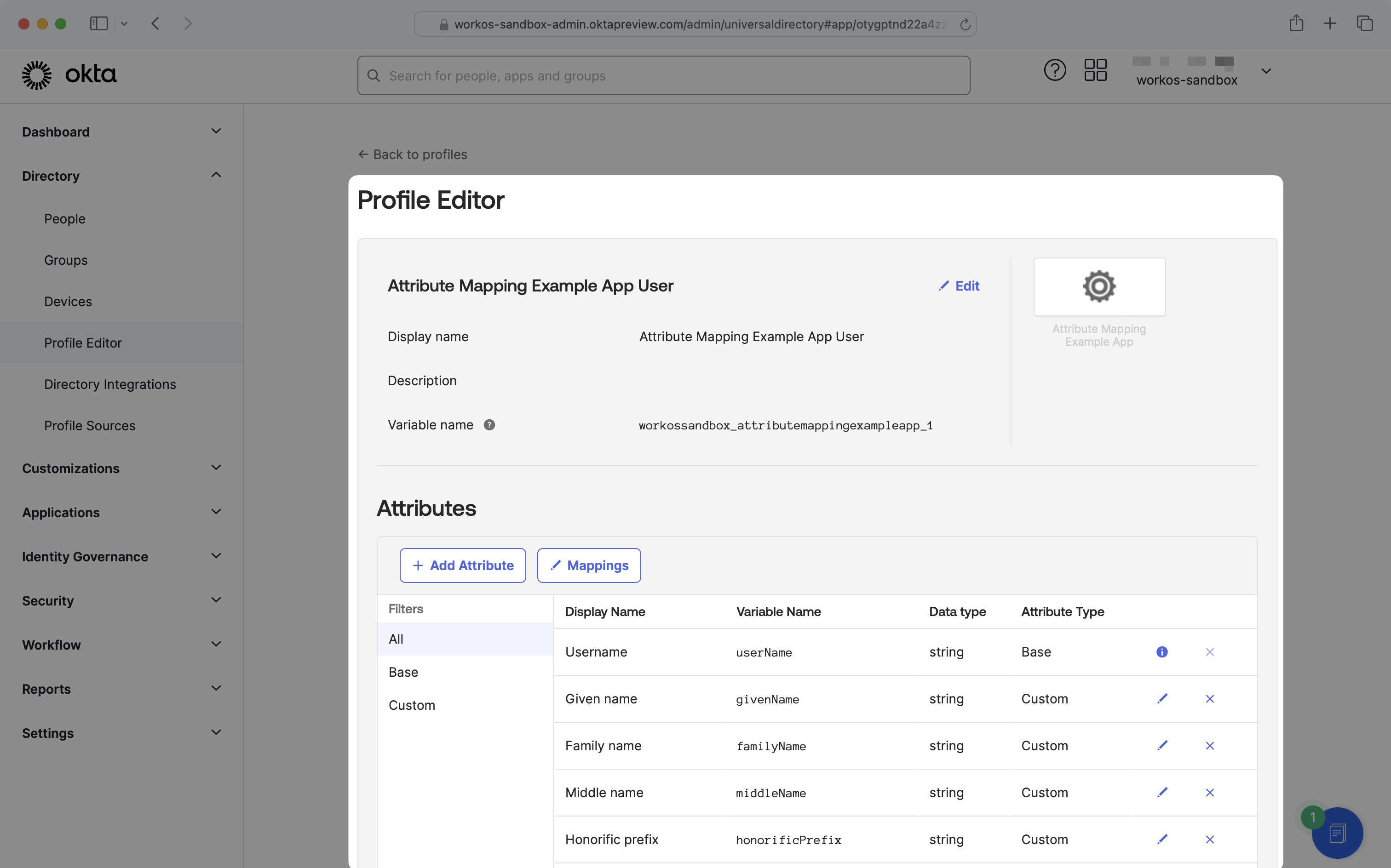
- package/.docs/organized/docs/migrate/clerk.mdx +106 -0
- package/.docs/organized/docs/migrate/firebase.mdx +80 -0
- package/.docs/organized/docs/migrate/other-services.mdx +179 -0
- package/.docs/organized/docs/migrate/standalone-sso.mdx +105 -0
- package/.docs/organized/docs/on-prem-deployment.mdx +119 -0
- package/.docs/organized/docs/postman.mdx +90 -0
- package/.docs/organized/docs/reference/_navigation.mdx +527 -0
- package/.docs/organized/docs/reference/admin-portal/index.mdx +6 -0
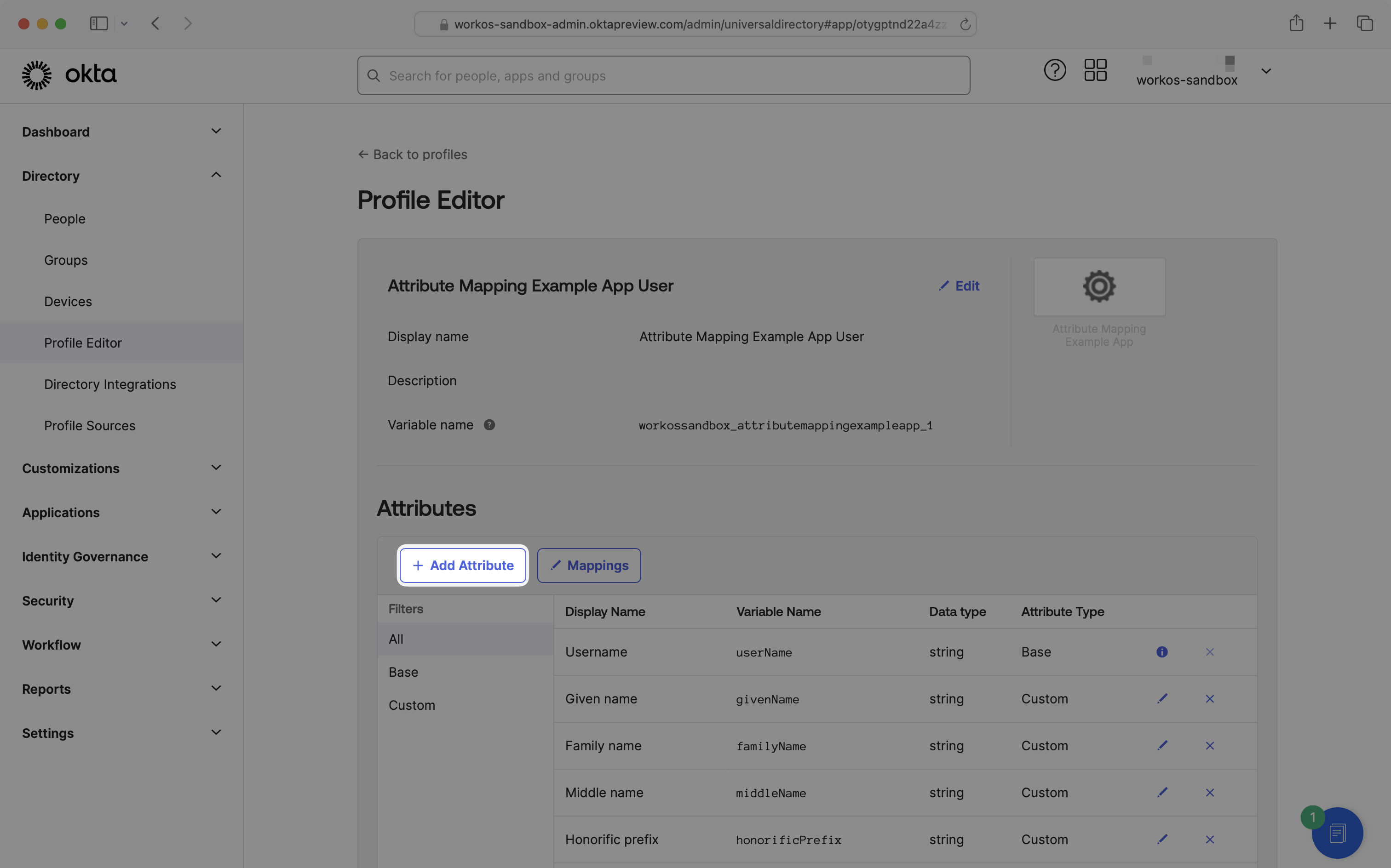
- package/.docs/organized/docs/reference/admin-portal/portal-link/generate.mdx +268 -0
- package/.docs/organized/docs/reference/admin-portal/portal-link/index.mdx +15 -0
- package/.docs/organized/docs/reference/admin-portal/provider-icons/index.mdx +52 -0
- package/.docs/organized/docs/reference/api-keys.mdx +22 -0
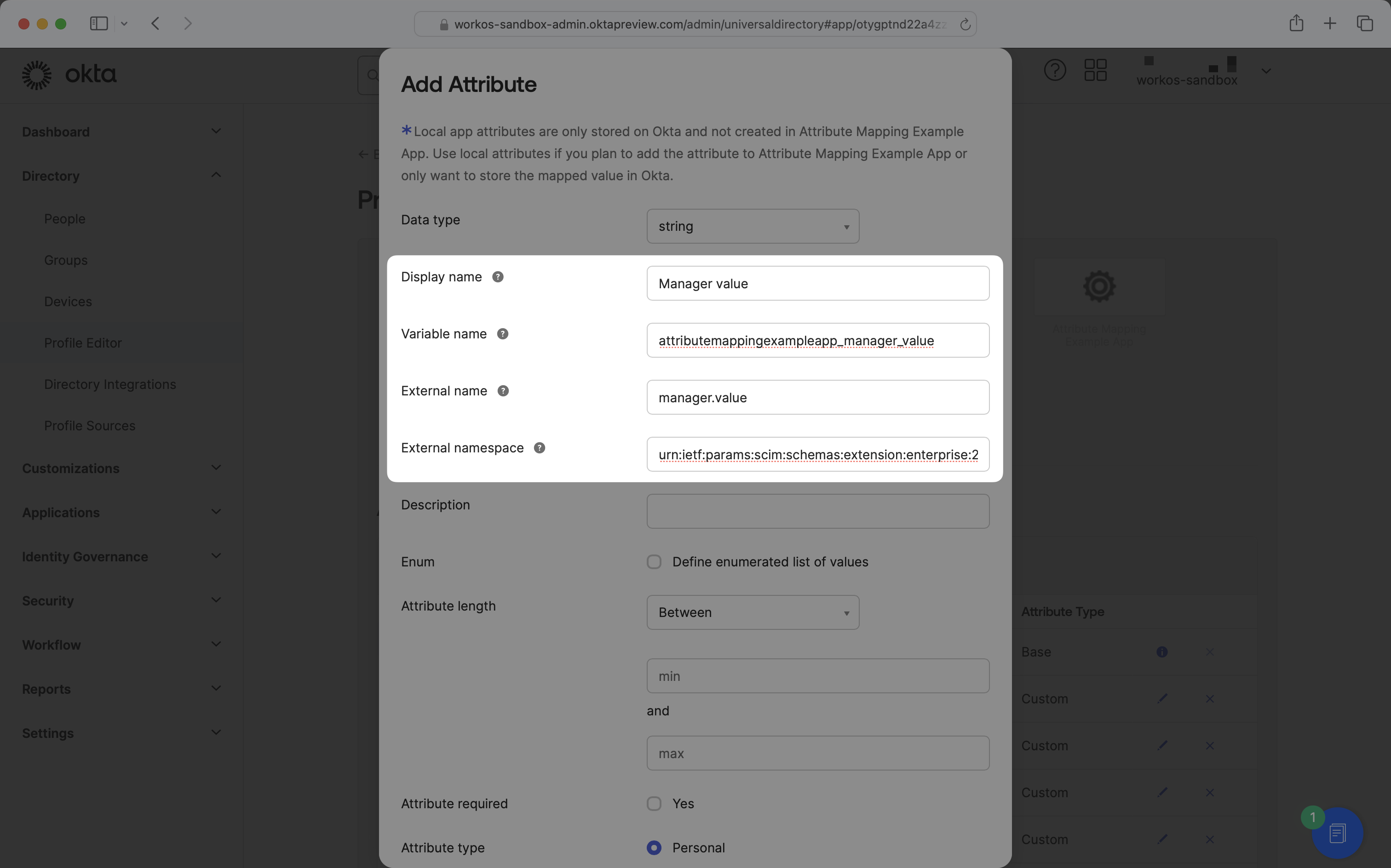
- package/.docs/organized/docs/reference/audit-logs/audit-log-export.mdx +239 -0
- package/.docs/organized/docs/reference/audit-logs/audit-log-schema.mdx +69 -0
- package/.docs/organized/docs/reference/audit-logs/create-event.mdx +673 -0
- package/.docs/organized/docs/reference/audit-logs/create-export.mdx +308 -0
- package/.docs/organized/docs/reference/audit-logs/create-schema.mdx +95 -0
- package/.docs/organized/docs/reference/audit-logs/get-export.mdx +117 -0
- package/.docs/organized/docs/reference/audit-logs/get-retention.mdx +34 -0
- package/.docs/organized/docs/reference/audit-logs/index.mdx +6 -0
- package/.docs/organized/docs/reference/audit-logs/list-actions.mdx +40 -0
- package/.docs/organized/docs/reference/audit-logs/list-schemas.mdx +40 -0
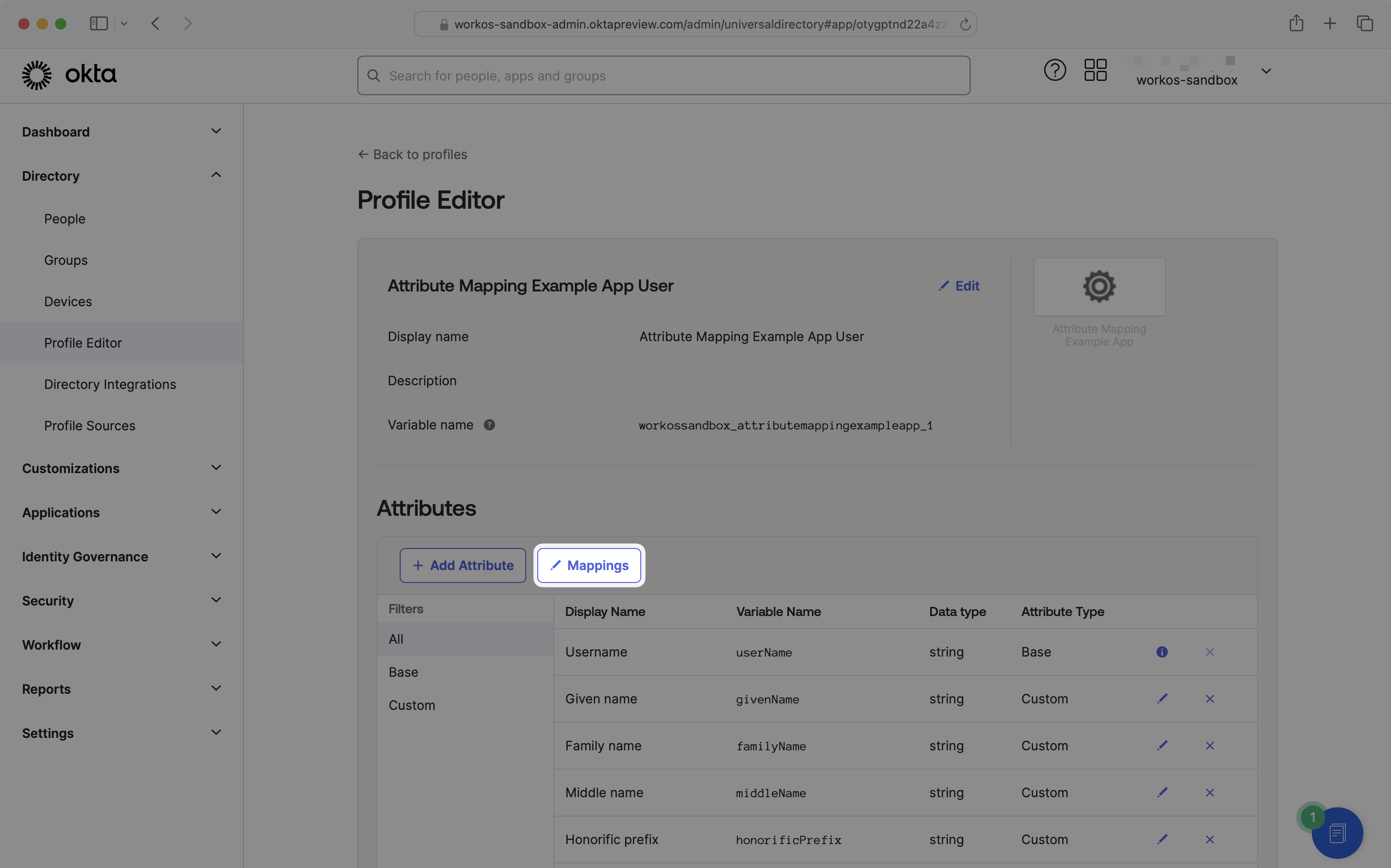
- package/.docs/organized/docs/reference/audit-logs/set-retention.mdx +39 -0
- package/.docs/organized/docs/reference/client-libraries.mdx +19 -0
- package/.docs/organized/docs/reference/directory-sync/directory/delete.mdx +90 -0
- package/.docs/organized/docs/reference/directory-sync/directory/get.mdx +105 -0
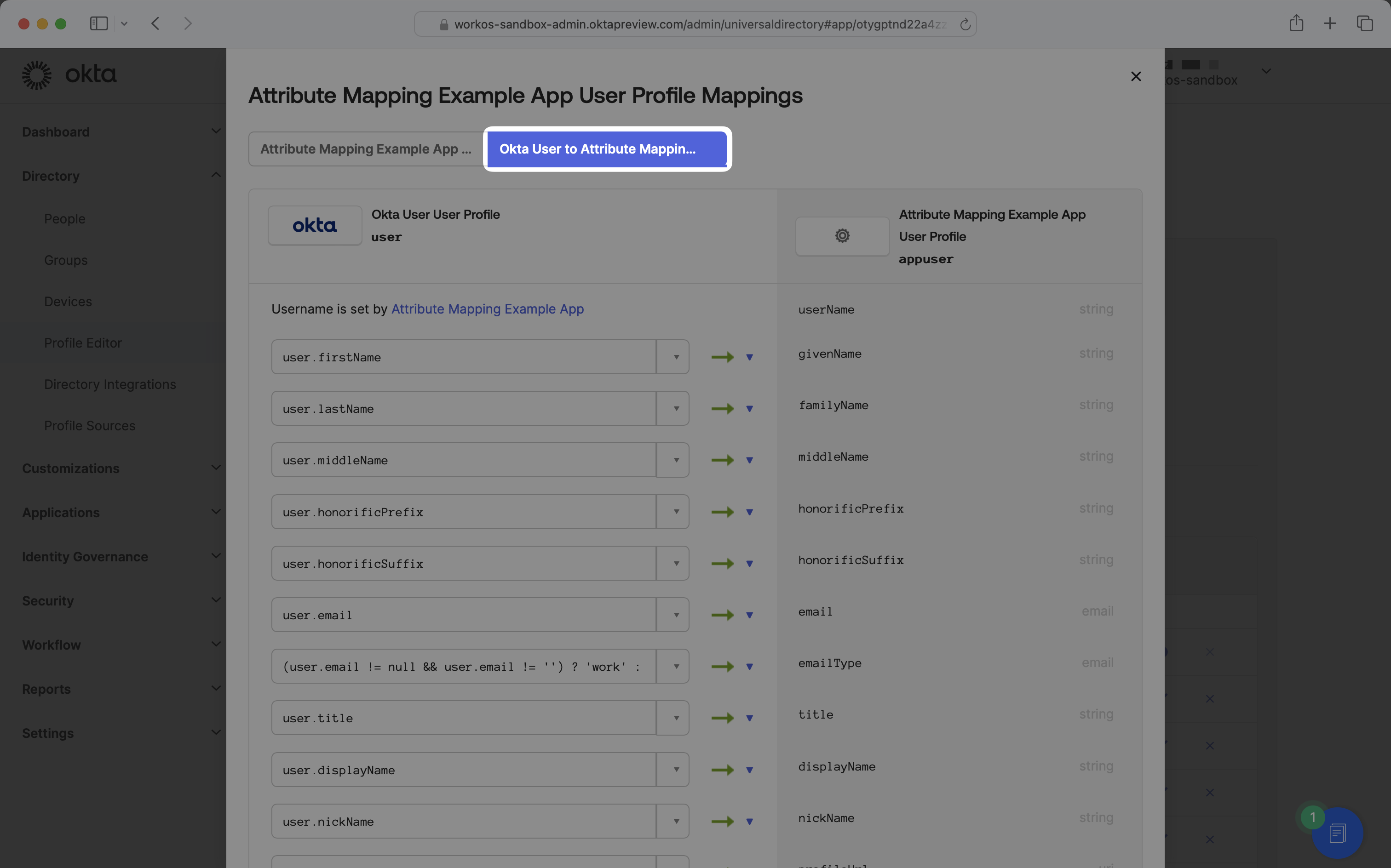
- package/.docs/organized/docs/reference/directory-sync/directory/index.mdx +385 -0
- package/.docs/organized/docs/reference/directory-sync/directory/list.mdx +281 -0
- package/.docs/organized/docs/reference/directory-sync/directory-group/get.mdx +105 -0
- package/.docs/organized/docs/reference/directory-sync/directory-group/index.mdx +277 -0
- package/.docs/organized/docs/reference/directory-sync/directory-group/list.mdx +295 -0
- package/.docs/organized/docs/reference/directory-sync/directory-user/get.mdx +112 -0
- package/.docs/organized/docs/reference/directory-sync/directory-user/index.mdx +470 -0
- package/.docs/organized/docs/reference/directory-sync/directory-user/list.mdx +304 -0
- package/.docs/organized/docs/reference/directory-sync/index.mdx +10 -0
- package/.docs/organized/docs/reference/domain-verification/create.mdx +38 -0
- package/.docs/organized/docs/reference/domain-verification/get.mdx +32 -0
- package/.docs/organized/docs/reference/domain-verification/index.mdx +84 -0
- package/.docs/organized/docs/reference/domain-verification/verify.mdx +36 -0
- package/.docs/organized/docs/reference/errors.mdx +30 -0
- package/.docs/organized/docs/reference/events/index.mdx +9 -0
- package/.docs/organized/docs/reference/events/list.mdx +246 -0
- package/.docs/organized/docs/reference/fga/batch-check.mdx +277 -0
- package/.docs/organized/docs/reference/fga/check.mdx +563 -0
- package/.docs/organized/docs/reference/fga/index.mdx +6 -0
- package/.docs/organized/docs/reference/fga/policy/create.mdx +27 -0
- package/.docs/organized/docs/reference/fga/policy/delete.mdx +18 -0
- package/.docs/organized/docs/reference/fga/policy/get.mdx +23 -0
- package/.docs/organized/docs/reference/fga/policy/index.mdx +52 -0
- package/.docs/organized/docs/reference/fga/policy/list.mdx +41 -0
- package/.docs/organized/docs/reference/fga/policy/update.mdx +26 -0
- package/.docs/organized/docs/reference/fga/query.mdx +375 -0
- package/.docs/organized/docs/reference/fga/resource/batch-write.mdx +175 -0
- package/.docs/organized/docs/reference/fga/resource/create.mdx +130 -0
- package/.docs/organized/docs/reference/fga/resource/delete.mdx +86 -0
- package/.docs/organized/docs/reference/fga/resource/get.mdx +88 -0
- package/.docs/organized/docs/reference/fga/resource/index.mdx +98 -0
- package/.docs/organized/docs/reference/fga/resource/list.mdx +188 -0
- package/.docs/organized/docs/reference/fga/resource/update.mdx +115 -0
- package/.docs/organized/docs/reference/fga/resource-type/apply.mdx +35 -0
- package/.docs/organized/docs/reference/fga/resource-type/create.mdx +24 -0
- package/.docs/organized/docs/reference/fga/resource-type/delete.mdx +22 -0
- package/.docs/organized/docs/reference/fga/resource-type/get.mdx +23 -0
- package/.docs/organized/docs/reference/fga/resource-type/index.mdx +68 -0
- package/.docs/organized/docs/reference/fga/resource-type/list.mdx +36 -0
- package/.docs/organized/docs/reference/fga/resource-type/update.mdx +23 -0
- package/.docs/organized/docs/reference/fga/schema/apply.mdx +42 -0
- package/.docs/organized/docs/reference/fga/schema/get.mdx +24 -0
- package/.docs/organized/docs/reference/fga/schema/index.mdx +39 -0
- package/.docs/organized/docs/reference/fga/warrant/batch-write.mdx +226 -0
- package/.docs/organized/docs/reference/fga/warrant/create.mdx +215 -0
- package/.docs/organized/docs/reference/fga/warrant/delete.mdx +212 -0
- package/.docs/organized/docs/reference/fga/warrant/index.mdx +186 -0
- package/.docs/organized/docs/reference/fga/warrant/list.mdx +282 -0
- package/.docs/organized/docs/reference/idempotency.mdx +21 -0
- package/.docs/organized/docs/reference/index.mdx +194 -0
- package/.docs/organized/docs/reference/magic-link/index.mdx +8 -0
- package/.docs/organized/docs/reference/magic-link/passwordless-session/create.mdx +268 -0
- package/.docs/organized/docs/reference/magic-link/passwordless-session/index.mdx +203 -0
- package/.docs/organized/docs/reference/magic-link/passwordless-session/send-email.mdx +158 -0
- package/.docs/organized/docs/reference/mfa/authentication-challenge.mdx +217 -0
- package/.docs/organized/docs/reference/mfa/authentication-factor.mdx +381 -0
- package/.docs/organized/docs/reference/mfa/challenge-factor.mdx +170 -0
- package/.docs/organized/docs/reference/mfa/delete-factor.mdx +93 -0
- package/.docs/organized/docs/reference/mfa/enroll-factor.mdx +241 -0
- package/.docs/organized/docs/reference/mfa/get-factor.mdx +108 -0
- package/.docs/organized/docs/reference/mfa/index.mdx +8 -0
- package/.docs/organized/docs/reference/mfa/verify-challenge.mdx +228 -0
- package/.docs/organized/docs/reference/organization/create.mdx +216 -0
- package/.docs/organized/docs/reference/organization/delete.mdx +89 -0
- package/.docs/organized/docs/reference/organization/get-by-external-id.mdx +40 -0
- package/.docs/organized/docs/reference/organization/get.mdx +104 -0
- package/.docs/organized/docs/reference/organization/index.mdx +274 -0
- package/.docs/organized/docs/reference/organization/list.mdx +258 -0
- package/.docs/organized/docs/reference/organization/update.mdx +236 -0
- package/.docs/organized/docs/reference/organization-domain.mdx +189 -0
- package/.docs/organized/docs/reference/pagination.mdx +244 -0
- package/.docs/organized/docs/reference/radar/attempts/create.mdx +115 -0
- package/.docs/organized/docs/reference/radar/attempts/index.mdx +7 -0
- package/.docs/organized/docs/reference/radar/attempts/update.mdx +34 -0
- package/.docs/organized/docs/reference/radar/index.mdx +8 -0
- package/.docs/organized/docs/reference/radar/lists/delete.mdx +36 -0
- package/.docs/organized/docs/reference/radar/lists/index.mdx +7 -0
- package/.docs/organized/docs/reference/radar/lists/update.mdx +36 -0
- package/.docs/organized/docs/reference/rate-limits.mdx +50 -0
- package/.docs/organized/docs/reference/roles/index.mdx +268 -0
- package/.docs/organized/docs/reference/roles/list-for-organization.mdx +152 -0
- package/.docs/organized/docs/reference/sso/connection/delete.mdx +89 -0
- package/.docs/organized/docs/reference/sso/connection/get.mdx +104 -0
- package/.docs/organized/docs/reference/sso/connection/index.mdx +388 -0
- package/.docs/organized/docs/reference/sso/connection/list.mdx +320 -0
- package/.docs/organized/docs/reference/sso/get-authorization-url/error-codes.mdx +28 -0
- package/.docs/organized/docs/reference/sso/get-authorization-url/index.mdx +434 -0
- package/.docs/organized/docs/reference/sso/get-authorization-url/redirect-uri.mdx +21 -0
- package/.docs/organized/docs/reference/sso/index.mdx +8 -0
- package/.docs/organized/docs/reference/sso/logout/authorize.mdx +47 -0
- package/.docs/organized/docs/reference/sso/logout/index.mdx +14 -0
- package/.docs/organized/docs/reference/sso/logout/redirect.mdx +32 -0
- package/.docs/organized/docs/reference/sso/profile/get-profile-and-token.mdx +229 -0
- package/.docs/organized/docs/reference/sso/profile/get-user-profile.mdx +127 -0
- package/.docs/organized/docs/reference/sso/profile/index.mdx +364 -0
- package/.docs/organized/docs/reference/testing.mdx +8 -0
- package/.docs/organized/docs/reference/user-management/access-token/index.mdx +13 -0
- package/.docs/organized/docs/reference/user-management/authentication/code.mdx +448 -0
- package/.docs/organized/docs/reference/user-management/authentication/email-verification.mdx +359 -0
- package/.docs/organized/docs/reference/user-management/authentication/get-authorization-url/error-codes.mdx +25 -0
- package/.docs/organized/docs/reference/user-management/authentication/get-authorization-url/index.mdx +425 -0
- package/.docs/organized/docs/reference/user-management/authentication/get-authorization-url/pkce.mdx +9 -0
- package/.docs/organized/docs/reference/user-management/authentication/get-authorization-url/redirect-uri.mdx +23 -0
- package/.docs/organized/docs/reference/user-management/authentication/index.mdx +66 -0
- package/.docs/organized/docs/reference/user-management/authentication/magic-auth.mdx +353 -0
- package/.docs/organized/docs/reference/user-management/authentication/organization-selection.mdx +349 -0
- package/.docs/organized/docs/reference/user-management/authentication/password.mdx +350 -0
- package/.docs/organized/docs/reference/user-management/authentication/refresh-and-seal-session-data.mdx +57 -0
- package/.docs/organized/docs/reference/user-management/authentication/refresh-token.mdx +381 -0
- package/.docs/organized/docs/reference/user-management/authentication/session-cookie.mdx +79 -0
- package/.docs/organized/docs/reference/user-management/authentication/totp.mdx +369 -0
- package/.docs/organized/docs/reference/user-management/authentication-errors/email-verification-required-error.mdx +42 -0
- package/.docs/organized/docs/reference/user-management/authentication-errors/index.mdx +20 -0
- package/.docs/organized/docs/reference/user-management/authentication-errors/mfa-challenge-error.mdx +44 -0
- package/.docs/organized/docs/reference/user-management/authentication-errors/mfa-enrollment-error.mdx +37 -0
- package/.docs/organized/docs/reference/user-management/authentication-errors/organization-authentication-required-error.mdx +68 -0
- package/.docs/organized/docs/reference/user-management/authentication-errors/organization-selection-error.mdx +44 -0
- package/.docs/organized/docs/reference/user-management/authentication-errors/sso-required-error.mdx +51 -0
- package/.docs/organized/docs/reference/user-management/email-verification/get.mdx +88 -0
- package/.docs/organized/docs/reference/user-management/email-verification/index.mdx +227 -0
- package/.docs/organized/docs/reference/user-management/identity/index.mdx +74 -0
- package/.docs/organized/docs/reference/user-management/identity/list.mdx +52 -0
- package/.docs/organized/docs/reference/user-management/index.mdx +13 -0
- package/.docs/organized/docs/reference/user-management/invitation/accept.mdx +39 -0
- package/.docs/organized/docs/reference/user-management/invitation/find-by-token.mdx +87 -0
- package/.docs/organized/docs/reference/user-management/invitation/get.mdx +87 -0
- package/.docs/organized/docs/reference/user-management/invitation/index.mdx +374 -0
- package/.docs/organized/docs/reference/user-management/invitation/list.mdx +247 -0
- package/.docs/organized/docs/reference/user-management/invitation/revoke.mdx +90 -0
- package/.docs/organized/docs/reference/user-management/invitation/send.mdx +230 -0
- package/.docs/organized/docs/reference/user-management/logout/get-logout-url-from-session-cookie.mdx +52 -0
- package/.docs/organized/docs/reference/user-management/logout/get-logout-url.mdx +147 -0
- package/.docs/organized/docs/reference/user-management/logout/index.mdx +26 -0
- package/.docs/organized/docs/reference/user-management/magic-auth/create.mdx +148 -0
- package/.docs/organized/docs/reference/user-management/magic-auth/get.mdx +88 -0
- package/.docs/organized/docs/reference/user-management/magic-auth/index.mdx +225 -0
- package/.docs/organized/docs/reference/user-management/mfa/authentication-challenge.mdx +194 -0
- package/.docs/organized/docs/reference/user-management/mfa/authentication-factor.mdx +324 -0
- package/.docs/organized/docs/reference/user-management/mfa/enroll-auth-factor.mdx +296 -0
- package/.docs/organized/docs/reference/user-management/mfa/index.mdx +5 -0
- package/.docs/organized/docs/reference/user-management/mfa/list-auth-factors.mdx +194 -0
- package/.docs/organized/docs/reference/user-management/organization-membership/create.mdx +155 -0
- package/.docs/organized/docs/reference/user-management/organization-membership/deactivate.mdx +106 -0
- package/.docs/organized/docs/reference/user-management/organization-membership/delete.mdx +76 -0
- package/.docs/organized/docs/reference/user-management/organization-membership/get.mdx +95 -0
- package/.docs/organized/docs/reference/user-management/organization-membership/index.mdx +265 -0
- package/.docs/organized/docs/reference/user-management/organization-membership/list.mdx +291 -0
- package/.docs/organized/docs/reference/user-management/organization-membership/reactivate.mdx +106 -0
- package/.docs/organized/docs/reference/user-management/organization-membership/update.mdx +119 -0
- package/.docs/organized/docs/reference/user-management/password-reset/create.mdx +108 -0
- package/.docs/organized/docs/reference/user-management/password-reset/get.mdx +88 -0
- package/.docs/organized/docs/reference/user-management/password-reset/index.mdx +227 -0
- package/.docs/organized/docs/reference/user-management/password-reset/reset-password.mdx +144 -0
- package/.docs/organized/docs/reference/user-management/session-helpers/authenticate.mdx +176 -0
- package/.docs/organized/docs/reference/user-management/session-helpers/get-logout-url.mdx +42 -0
- package/.docs/organized/docs/reference/user-management/session-helpers/index.mdx +14 -0
- package/.docs/organized/docs/reference/user-management/session-helpers/load-sealed-session.mdx +105 -0
- package/.docs/organized/docs/reference/user-management/session-helpers/refresh.mdx +213 -0
- package/.docs/organized/docs/reference/user-management/session-tokens/access-token.mdx +90 -0
- package/.docs/organized/docs/reference/user-management/session-tokens/index.mdx +5 -0
- package/.docs/organized/docs/reference/user-management/session-tokens/jwks.mdx +110 -0
- package/.docs/organized/docs/reference/user-management/session-tokens/refresh-token.mdx +8 -0
- package/.docs/organized/docs/reference/user-management/user/create.mdx +327 -0
- package/.docs/organized/docs/reference/user-management/user/delete.mdx +76 -0
- package/.docs/organized/docs/reference/user-management/user/get-by-external-id.mdx +39 -0
- package/.docs/organized/docs/reference/user-management/user/get.mdx +103 -0
- package/.docs/organized/docs/reference/user-management/user/index.mdx +322 -0
- package/.docs/organized/docs/reference/user-management/user/list.mdx +260 -0
- package/.docs/organized/docs/reference/user-management/user/update.mdx +344 -0
- package/.docs/organized/docs/reference/vault/index.mdx +6 -0
- package/.docs/organized/docs/reference/vault/key/create-data-key.mdx +106 -0
- package/.docs/organized/docs/reference/vault/key/decrypt-data-key.mdx +84 -0
- package/.docs/organized/docs/reference/vault/key/decrypt-data.mdx +52 -0
- package/.docs/organized/docs/reference/vault/key/encrypt-data.mdx +58 -0
- package/.docs/organized/docs/reference/vault/key/index.mdx +25 -0
- package/.docs/organized/docs/reference/vault/object/create.mdx +62 -0
- package/.docs/organized/docs/reference/vault/object/delete.mdx +75 -0
- package/.docs/organized/docs/reference/vault/object/get.mdx +50 -0
- package/.docs/organized/docs/reference/vault/object/index.mdx +174 -0
- package/.docs/organized/docs/reference/vault/object/list.mdx +105 -0
- package/.docs/organized/docs/reference/vault/object/metadata.mdx +52 -0
- package/.docs/organized/docs/reference/vault/object/update.mdx +67 -0
- package/.docs/organized/docs/reference/vault/object/version.mdx +87 -0
- package/.docs/organized/docs/reference/vault/object/versions.mdx +83 -0
- package/.docs/organized/docs/reference/widgets/get-token.mdx +185 -0
- package/.docs/organized/docs/reference/widgets/index.mdx +6 -0
- package/.docs/organized/docs/reference/workos-connect/authorize/index.mdx +75 -0
- package/.docs/organized/docs/reference/workos-connect/index.mdx +33 -0
- package/.docs/organized/docs/reference/workos-connect/introspection/index.mdx +122 -0
- package/.docs/organized/docs/reference/workos-connect/metadata/index.mdx +25 -0
- package/.docs/organized/docs/reference/workos-connect/metadata/oauth-authorization-server/index.mdx +99 -0
- package/.docs/organized/docs/reference/workos-connect/metadata/openid-configuration/index.mdx +70 -0
- package/.docs/organized/docs/reference/workos-connect/token/authorization-code-grant/access-token.mdx +53 -0
- package/.docs/organized/docs/reference/workos-connect/token/authorization-code-grant/id-token.mdx +60 -0
- package/.docs/organized/docs/reference/workos-connect/token/authorization-code-grant/index.mdx +69 -0
- package/.docs/organized/docs/reference/workos-connect/token/client-credentials-grant/access-token.mdx +46 -0
- package/.docs/organized/docs/reference/workos-connect/token/client-credentials-grant/index.mdx +56 -0
- package/.docs/organized/docs/reference/workos-connect/token/index.mdx +39 -0
- package/.docs/organized/docs/reference/workos-connect/token/refresh-token-grant.mdx +69 -0
- package/.docs/organized/docs/reference/workos-connect/userinfo/index.mdx +46 -0
- package/.docs/organized/docs/sdks/dotnet.mdx +6 -0
- package/.docs/organized/docs/sdks/elixir.mdx +6 -0
- package/.docs/organized/docs/sdks/go.mdx +6 -0
- package/.docs/organized/docs/sdks/java.mdx +9 -0
- package/.docs/organized/docs/sdks/laravel.mdx +6 -0
- package/.docs/organized/docs/sdks/node.mdx +9 -0
- package/.docs/organized/docs/sdks/php.mdx +6 -0
- package/.docs/organized/docs/sdks/python.mdx +6 -0
- package/.docs/organized/docs/sdks/ruby.mdx +9 -0
- package/.docs/organized/docs/sso/_navigation.mdx +44 -0
- package/.docs/organized/docs/sso/_sequence-diagrams/saml-protocol-security-considerations.md +59 -0
- package/.docs/organized/docs/sso/attributes.mdx +110 -0
- package/.docs/organized/docs/sso/domains.mdx +111 -0
- package/.docs/organized/docs/sso/example-apps.mdx +46 -0
- package/.docs/organized/docs/sso/identity-provider-role-assignment.mdx +113 -0
- package/.docs/organized/docs/sso/index.mdx +295 -0
- package/.docs/organized/docs/sso/it-team-faq.mdx +35 -0
- package/.docs/organized/docs/sso/jit-provisioning.mdx +101 -0
- package/.docs/organized/docs/sso/launch-checklist.mdx +71 -0
- package/.docs/organized/docs/sso/login-flows.mdx +101 -0
- package/.docs/organized/docs/sso/redirect-uris.mdx +44 -0
- package/.docs/organized/docs/sso/saml-security.mdx +122 -0
- package/.docs/organized/docs/sso/signing-certificates.mdx +121 -0
- package/.docs/organized/docs/sso/single-logout.mdx +45 -0
- package/.docs/organized/docs/sso/test-sso.mdx +73 -0
- package/.docs/organized/docs/sso/ux/sign-in.mdx +44 -0
- package/.docs/organized/docs/user-management/_navigation.mdx +87 -0
- package/.docs/organized/docs/user-management/actions.mdx +169 -0
- package/.docs/organized/docs/user-management/authkit.mdx +69 -0
- package/.docs/organized/docs/user-management/branding.mdx +143 -0
- package/.docs/organized/docs/user-management/connect.mdx +110 -0
- package/.docs/organized/docs/user-management/custom-emails.mdx +164 -0
- package/.docs/organized/docs/user-management/directory-provisioning.mdx +78 -0
- package/.docs/organized/docs/user-management/domain-verification.mdx +28 -0
- package/.docs/organized/docs/user-management/email-password.mdx +42 -0
- package/.docs/organized/docs/user-management/email-verification.mdx +29 -0
- package/.docs/organized/docs/user-management/entitlements.mdx +46 -0
- package/.docs/organized/docs/user-management/example-apps.mdx +39 -0
- package/.docs/organized/docs/user-management/identity-linking.mdx +52 -0
- package/.docs/organized/docs/user-management/impersonation.mdx +82 -0
- package/.docs/organized/docs/user-management/index.mdx +525 -0
- package/.docs/organized/docs/user-management/invitations.mdx +60 -0
- package/.docs/organized/docs/user-management/invite-only-signup.mdx +72 -0
- package/.docs/organized/docs/user-management/jit-provisioning.mdx +36 -0
- package/.docs/organized/docs/user-management/jwt-templates.mdx +278 -0
- package/.docs/organized/docs/user-management/magic-auth.mdx +36 -0
- package/.docs/organized/docs/user-management/mcp.mdx +146 -0
- package/.docs/organized/docs/user-management/metadata.mdx +119 -0
- package/.docs/organized/docs/user-management/mfa.mdx +32 -0
- package/.docs/organized/docs/user-management/migrations.mdx +20 -0
- package/.docs/organized/docs/user-management/modeling-your-app.mdx +149 -0
- package/.docs/organized/docs/user-management/organization-policies.mdx +33 -0
- package/.docs/organized/docs/user-management/overview.mdx +46 -0
- package/.docs/organized/docs/user-management/passkeys.mdx +42 -0
- package/.docs/organized/docs/user-management/radar.mdx +127 -0
- package/.docs/organized/docs/user-management/roles-and-permissions.mdx +155 -0
- package/.docs/organized/docs/user-management/sessions.mdx +101 -0
- package/.docs/organized/docs/user-management/social-login.mdx +34 -0
- package/.docs/organized/docs/user-management/sso-with-contractors.mdx +85 -0
- package/.docs/organized/docs/user-management/sso.mdx +96 -0
- package/.docs/organized/docs/user-management/users-organizations.mdx +91 -0
- package/.docs/organized/docs/user-management/widgets.mdx +190 -0
- package/.docs/organized/docs/vault/_navigation.mdx +14 -0
- package/.docs/organized/docs/vault/index.mdx +38 -0
- package/.docs/organized/docs/vault/key-context.mdx +32 -0
- package/.docs/organized/docs/vault/quick-start.mdx +82 -0
- package/README.md +252 -0
- package/dist/chunk-64GKEK6G.js +48 -0
- package/dist/chunk-64GKEK6G.js.map +1 -0
- package/dist/get-tools.d.ts +23 -0
- package/dist/get-tools.js +8 -0
- package/dist/get-tools.js.map +1 -0
- package/dist/index.d.ts +1 -0
- package/dist/index.js +552 -0
- package/dist/index.js.map +1 -0
- package/dist/prepare.d.ts +2 -0
- package/dist/prepare.js +269 -0
- package/dist/prepare.js.map +1 -0
- package/package.json +49 -0
|
@@ -0,0 +1,210 @@
|
|
|
1
|
+
---
|
|
2
|
+
title: Okta SCIM
|
|
3
|
+
description: "Learn about syncing your user list with\_Okta SCIM."
|
|
4
|
+
icon: okta
|
|
5
|
+
breadcrumb:
|
|
6
|
+
title: Integrations
|
|
7
|
+
url: /integrations
|
|
8
|
+
originalPath: .tmp-workos-clone/packages/docs/content/integrations/okta-scim.mdx
|
|
9
|
+
---
|
|
10
|
+
|
|
11
|
+
## Introduction
|
|
12
|
+
|
|
13
|
+
This guide outlines how to synchronize your application’s Okta directories using SCIM.
|
|
14
|
+
|
|
15
|
+
To synchronize an organization’s users and groups provisioned for your application, you’ll need to provide the organization with two pieces of information:
|
|
16
|
+
|
|
17
|
+
- An [Endpoint](/glossary/endpoint) that Okta will make requests to.
|
|
18
|
+
- A [Bearer Token](/glossary/bearer-token) for Okta to authenticate its endpoint requests.
|
|
19
|
+
|
|
20
|
+
After completing step 1 below, both of these are available in your Endpoint’s Settings in the [WorkOS Dashboard](https://dashboard.workos.com/).
|
|
21
|
+
|
|
22
|
+
> The rest of the steps below will need to be carried out by the organization when configuring your application in their Okta instance.
|
|
23
|
+
|
|
24
|
+
---
|
|
25
|
+
|
|
26
|
+
## (1) Set up your Directory Sync endpoint
|
|
27
|
+
|
|
28
|
+
Login to your WorkOS Dashboard and select “Organizations” from the left hand navigation bar.
|
|
29
|
+
|
|
30
|
+
Select the organization you’ll be configuring a new Directory Sync with.
|
|
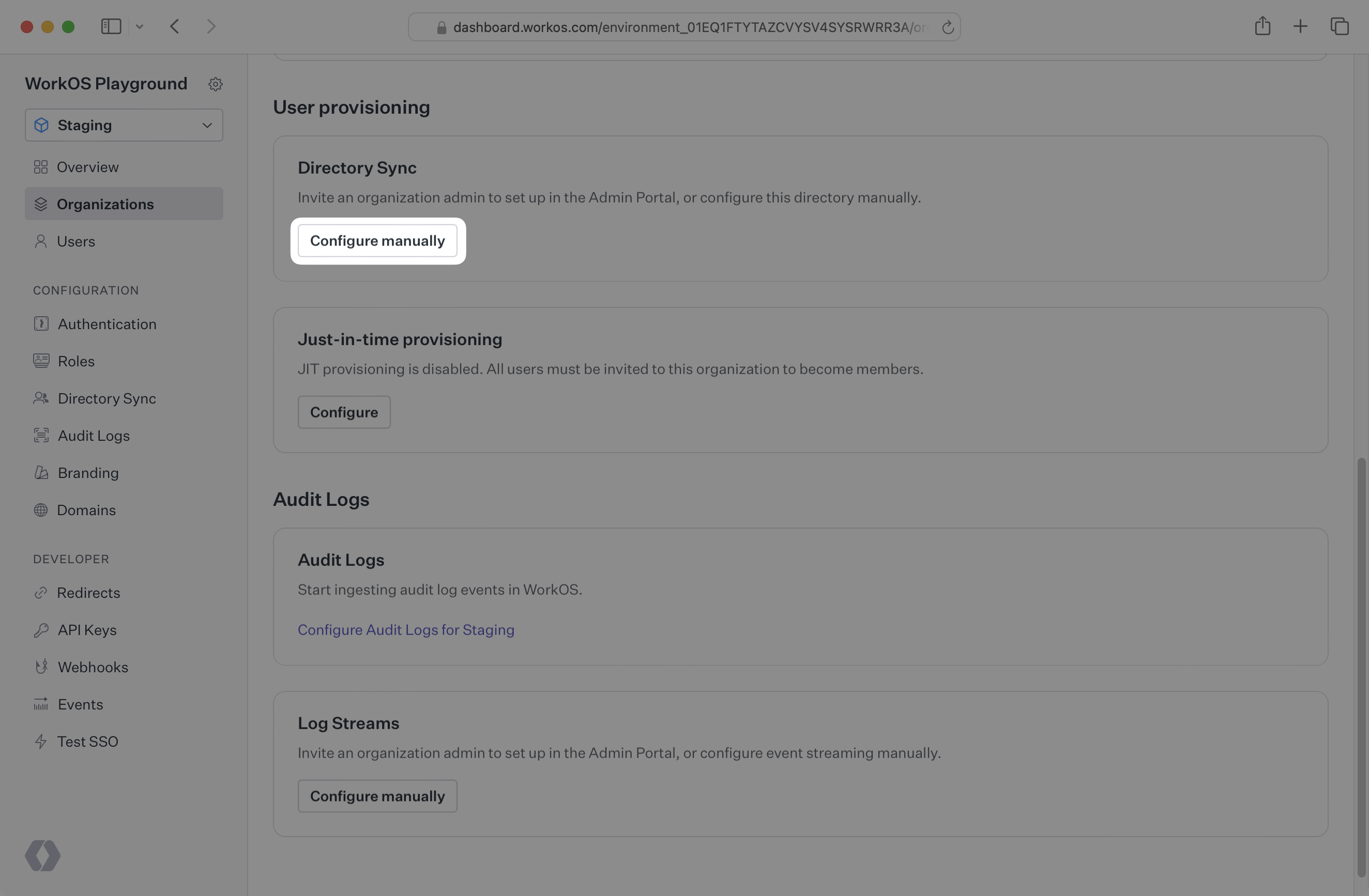
31
|
+
|
|
32
|
+
Scroll to the “User provisioning“ section. Then, click ”Configure manually“ within the ”Directory Sync” section.
|
|
33
|
+
|
|
34
|
+
|
|
35
|
+
|
|
36
|
+
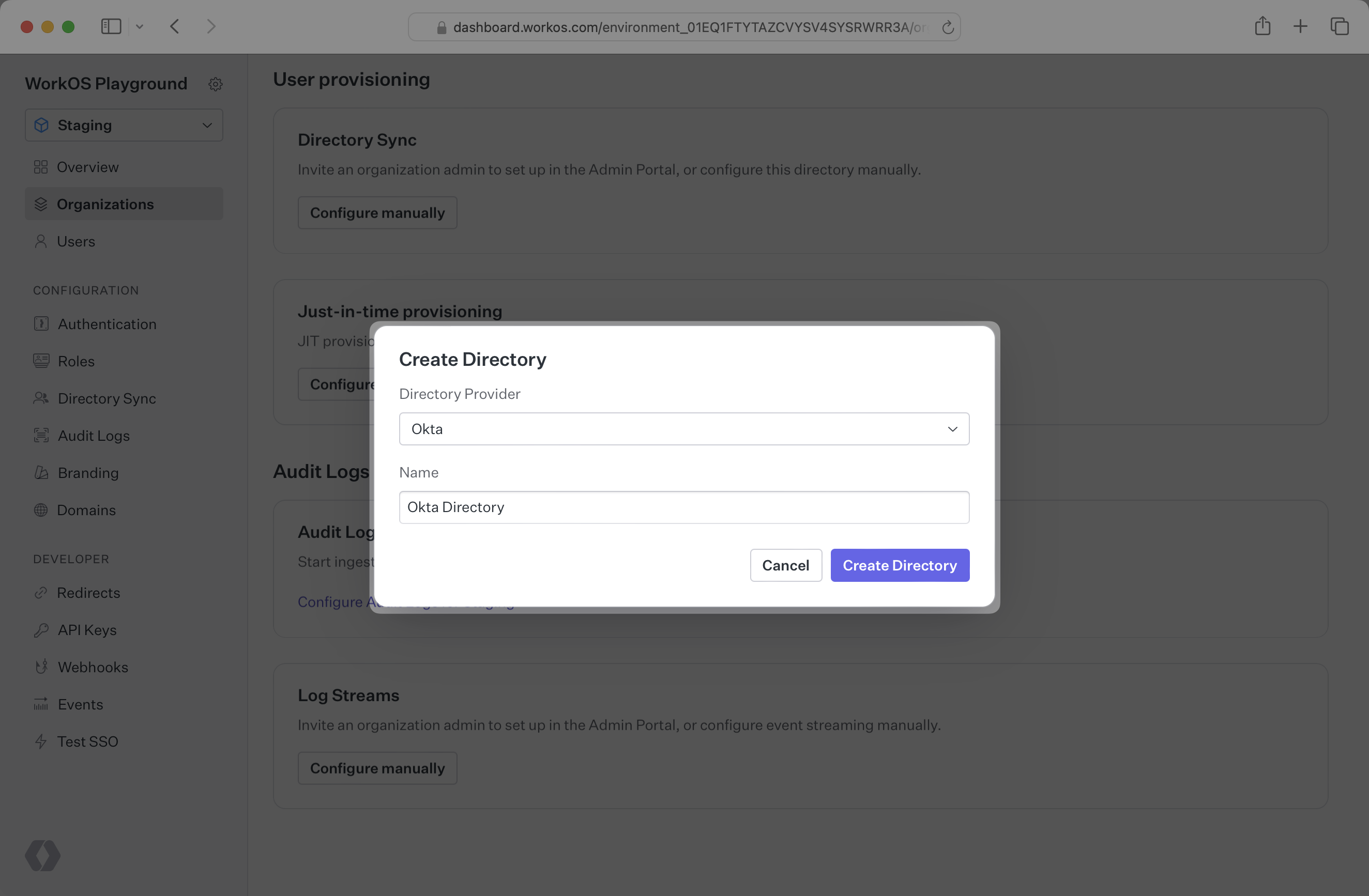
Select “Okta” from the Directory Provider dropdown and provide the Name for the Directory Sync connection. Then, click “Create Directory”.
|
|
37
|
+
|
|
38
|
+
|
|
39
|
+
|
|
40
|
+
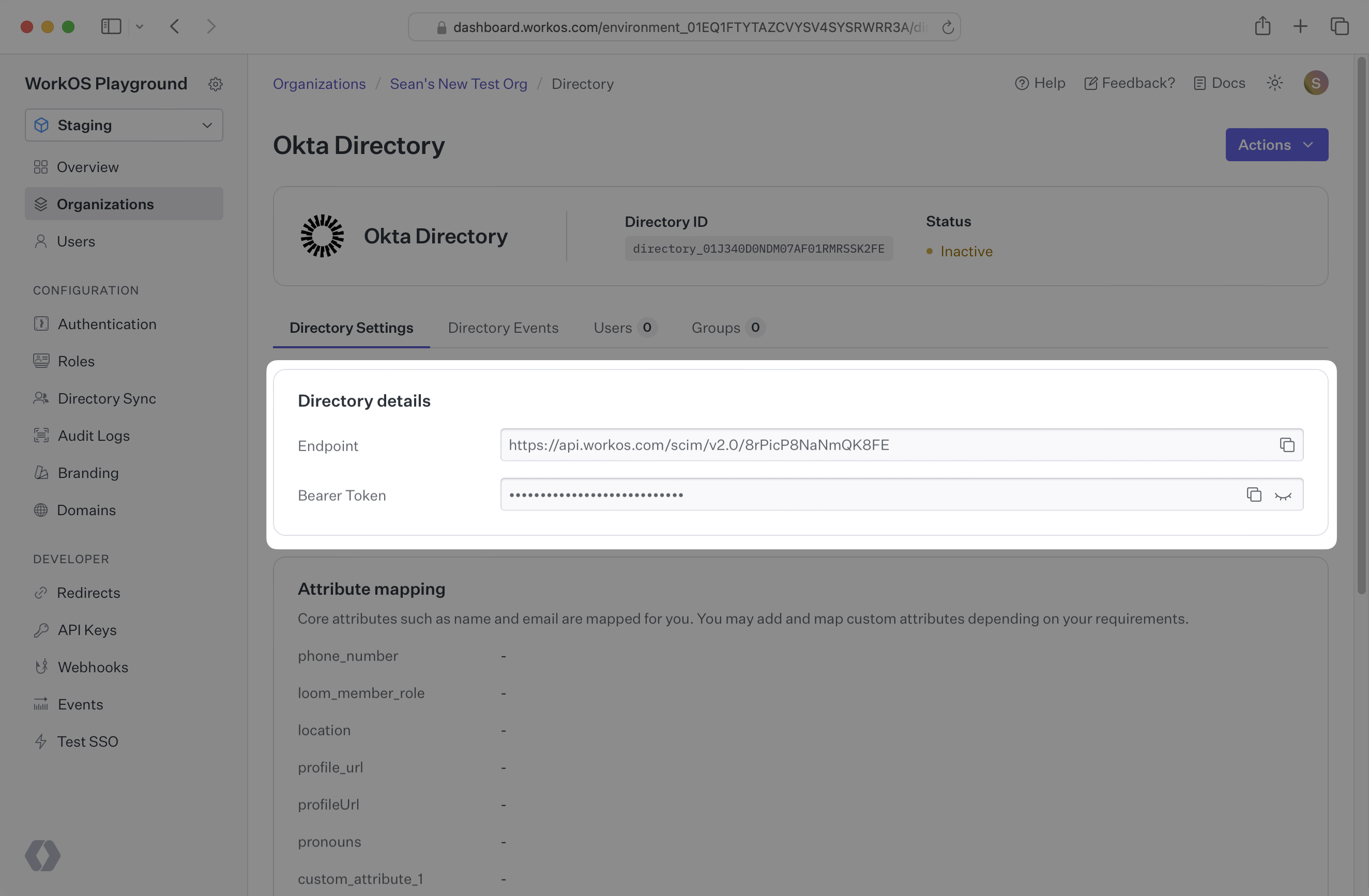
You’ll see WorkOS has created the Endpoint and Bearer Token which you will provide to Okta in the steps below.
|
|
41
|
+
|
|
42
|
+
|
|
43
|
+
|
|
44
|
+
> We have support for custom labeled URLs for Directory Sync endpoints. [Contact us](mailto:support@workos.com) for more info!
|
|
45
|
+
|
|
46
|
+
---
|
|
47
|
+
|
|
48
|
+
## (2) Select or create your Okta application
|
|
49
|
+
|
|
50
|
+
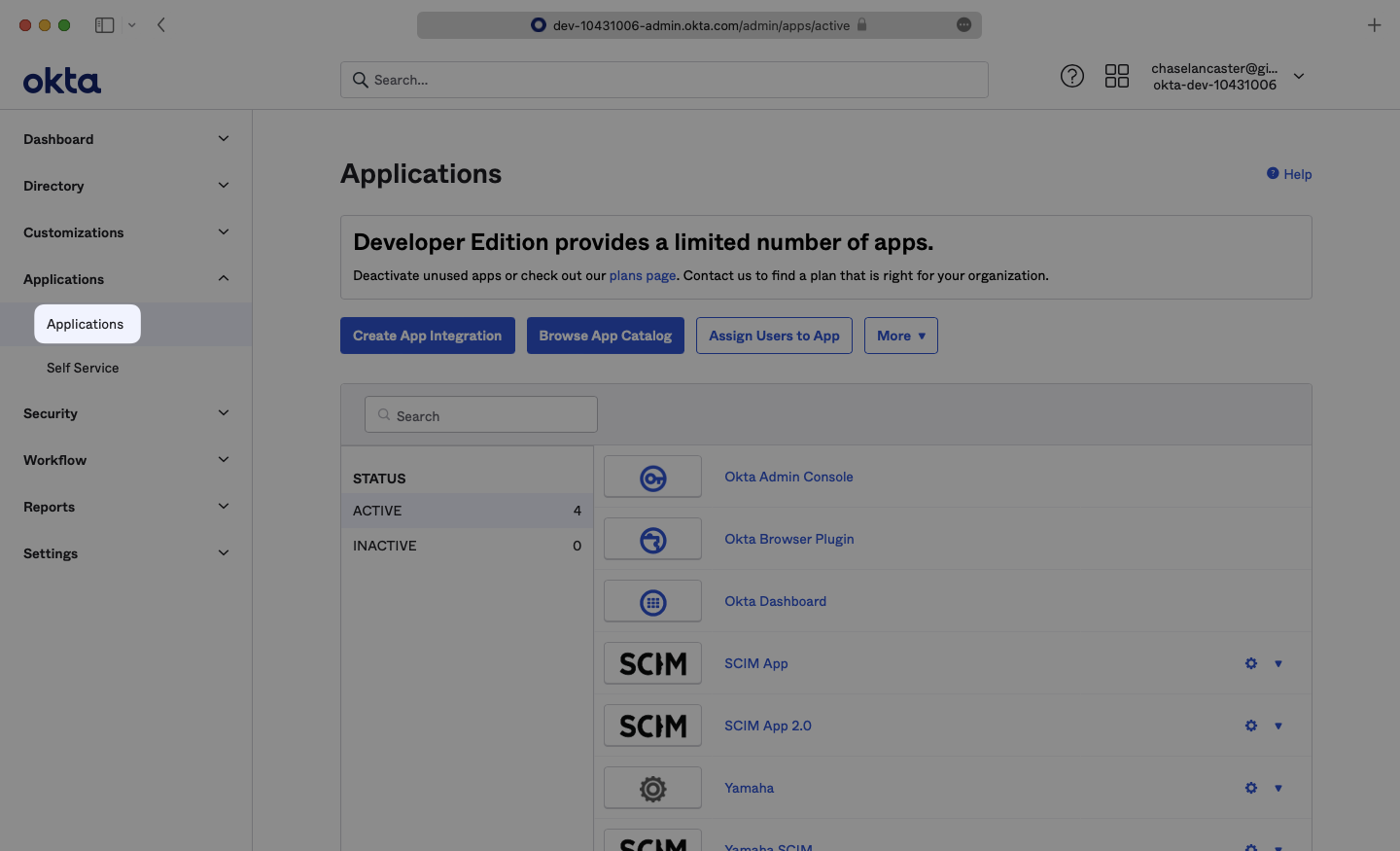
Log in to [Okta](https://login.okta.com/), go to the Okta admin dashboard and select “Applications” in the navigation bar.
|
|
51
|
+
|
|
52
|
+
|
|
53
|
+
|
|
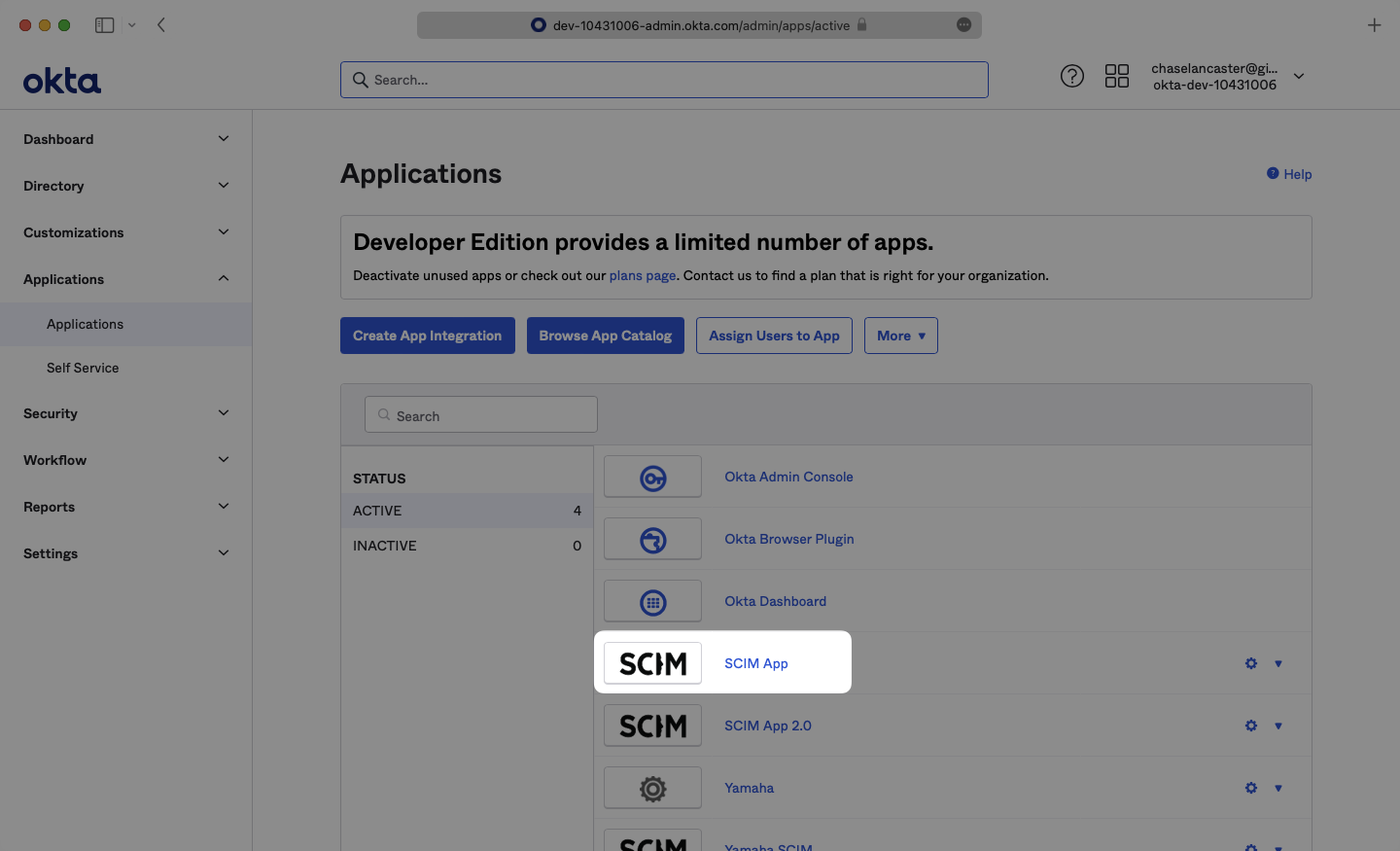
54
|
+
If your application is already created, select it from the list of applications and move to Step 3.
|
|
55
|
+
|
|
56
|
+
|
|
57
|
+
|
|
58
|
+
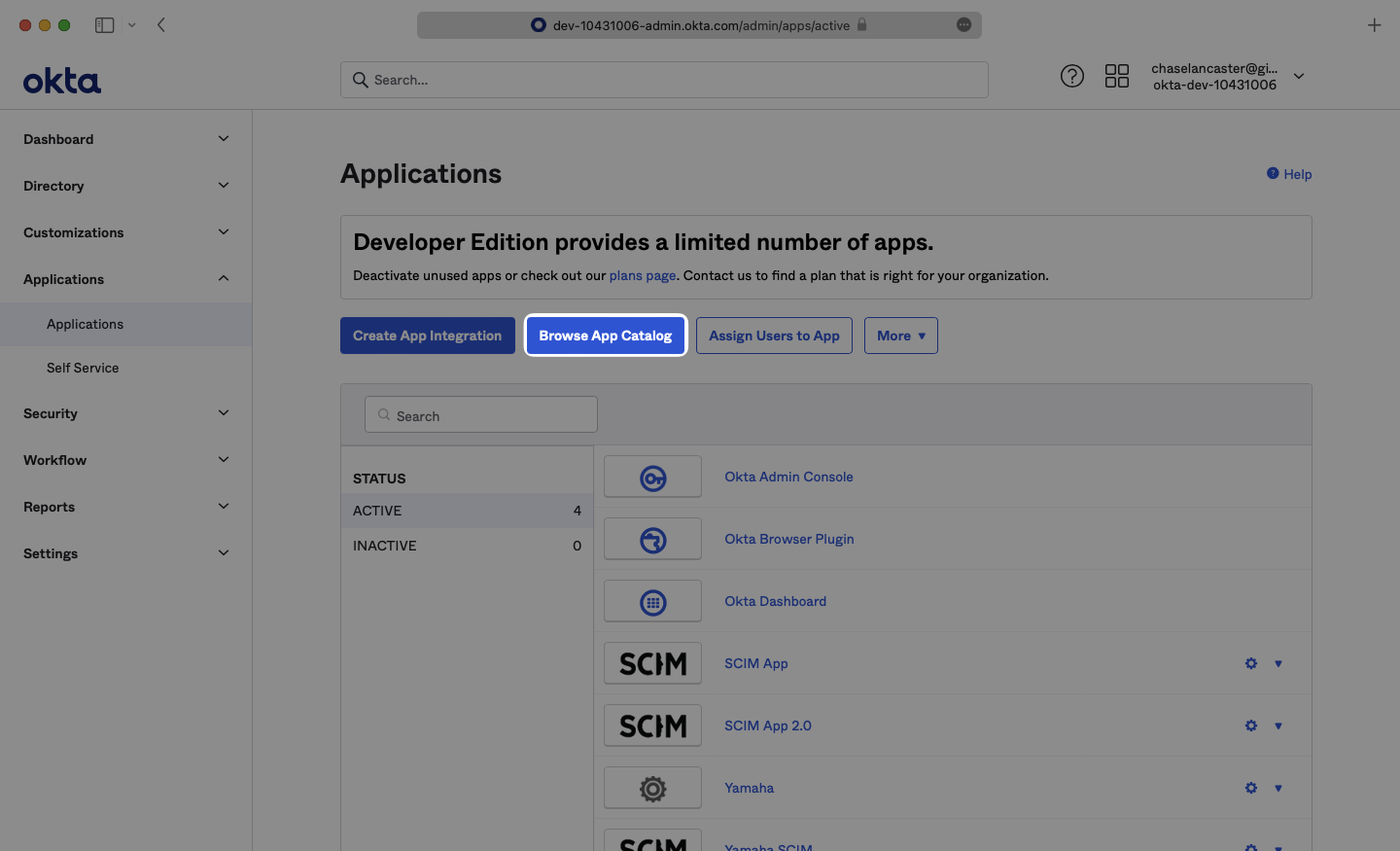
If you haven’t created a SCIM application in Okta, select “Browse App Catalog”.
|
|
59
|
+
|
|
60
|
+
|
|
61
|
+
|
|
62
|
+
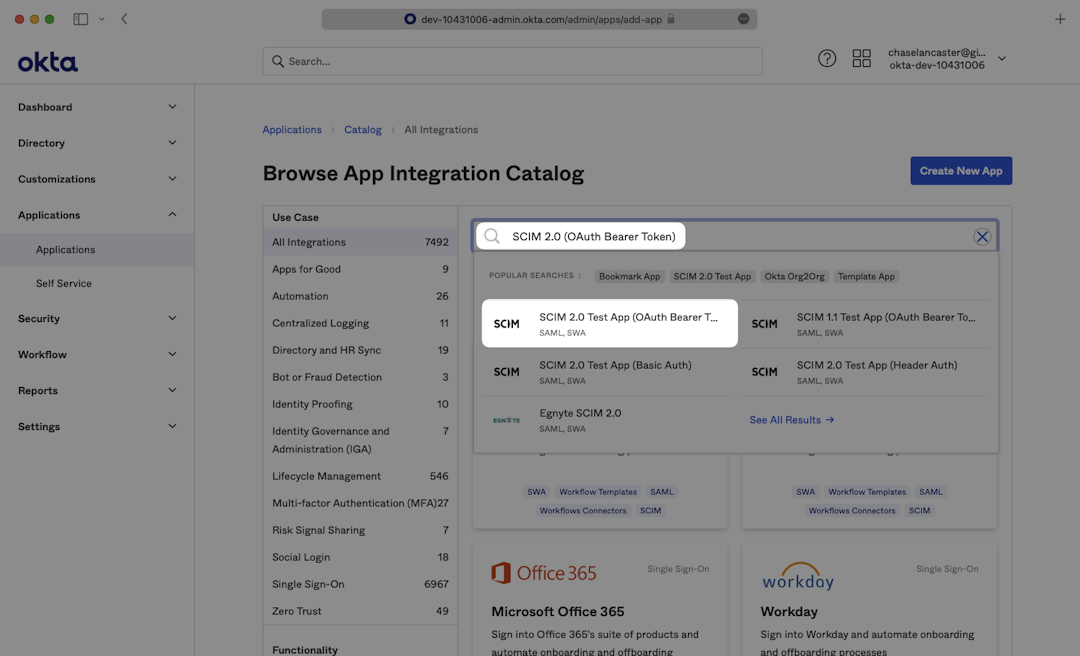
From your Okta Application dashboard, search for “SCIM 2.0 Test App (OAuth Bearer Token)” and select the corresponding result.
|
|
63
|
+
|
|
64
|
+
|
|
65
|
+
|
|
66
|
+
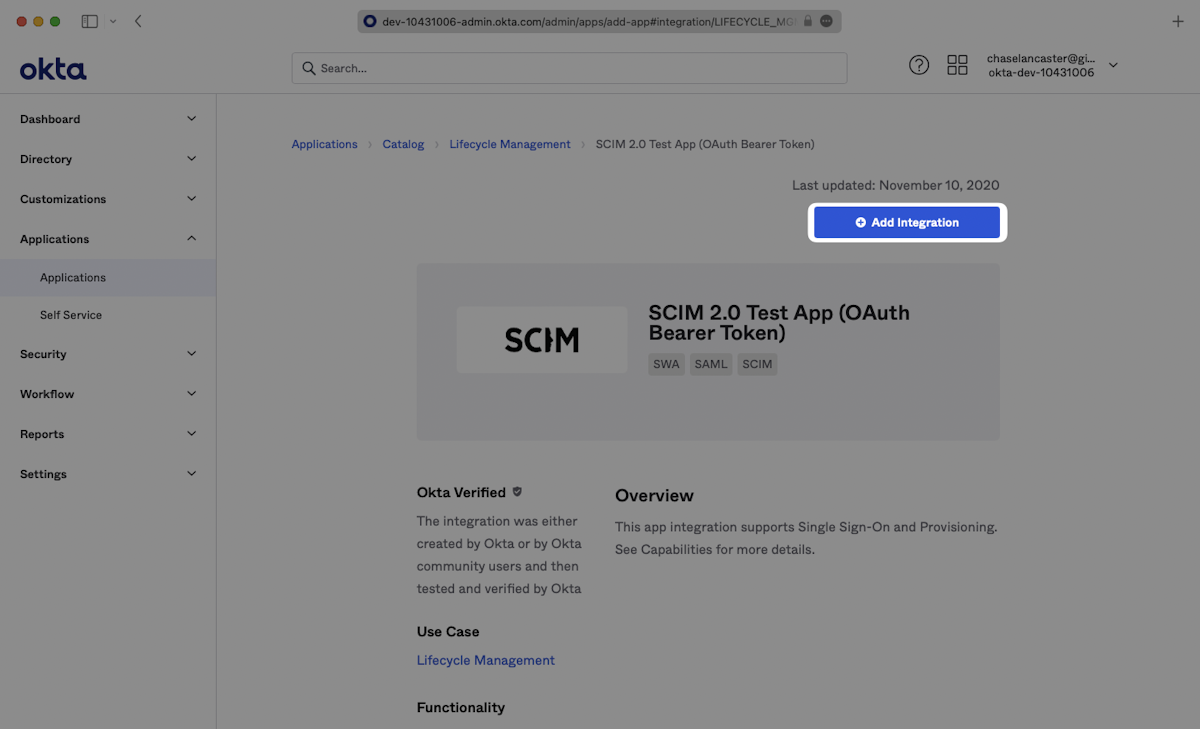
On the following page, click “Add Integration”.
|
|
67
|
+
|
|
68
|
+
|
|
69
|
+
|
|
70
|
+
Enter a descriptive App name, then click “Next”.
|
|
71
|
+
|
|
72
|
+
|
|
73
|
+
|
|
74
|
+
Many applications will work with the default configuration that is set on your new application. If you require any additional configuration for your directory such as configuring Attribute Statements, do so on the Sign-On Options page. Click “Done” to complete creating your application.
|
|
75
|
+
|
|
76
|
+
---
|
|
77
|
+
|
|
78
|
+
## (3) Configure your Okta provisioning API integration
|
|
79
|
+
|
|
80
|
+
In your application’s Enterprise Okta admin panel, click the “Provisioning” tab. Then, click “Configure API Integration”.
|
|
81
|
+
|
|
82
|
+
|
|
83
|
+
|
|
84
|
+
Check “Enable API Integration”. After that, copy and paste the Endpoint from your [WorkOS Dashboard](https://dashboard.workos.com/) in the SCIM 2.0 Base URL field.
|
|
85
|
+
|
|
86
|
+
Then, copy and paste the Bearer Token from your [WorkOS Dashboard](https://dashboard.workos.com/) into the OAuth Bearer Token field.
|
|
87
|
+
|
|
88
|
+
Click “Test API Credentials”, and then click “Save”.
|
|
89
|
+
|
|
90
|
+
|
|
91
|
+
|
|
92
|
+
The provisioning tab will now show a new suite of options which we’ll utilize in the next Guide Section to continue provisioning your application.
|
|
93
|
+
|
|
94
|
+
---
|
|
95
|
+
|
|
96
|
+
## (4) Select options to provision to your application
|
|
97
|
+
|
|
98
|
+
In the “To App” navigation section, check to enable:
|
|
99
|
+
|
|
100
|
+
- Create Users
|
|
101
|
+
- Update User Attributes
|
|
102
|
+
- Deactivate Users
|
|
103
|
+
|
|
104
|
+
Click “Save”.
|
|
105
|
+
|
|
106
|
+
|
|
107
|
+
|
|
108
|
+
---
|
|
109
|
+
|
|
110
|
+
## (5) Assign users and groups to your application
|
|
111
|
+
|
|
112
|
+
To assign users to the SAML Application, navigate to the “Assignments” tab, from the “Assign” dropdown, select “Assign to People”.
|
|
113
|
+
|
|
114
|
+
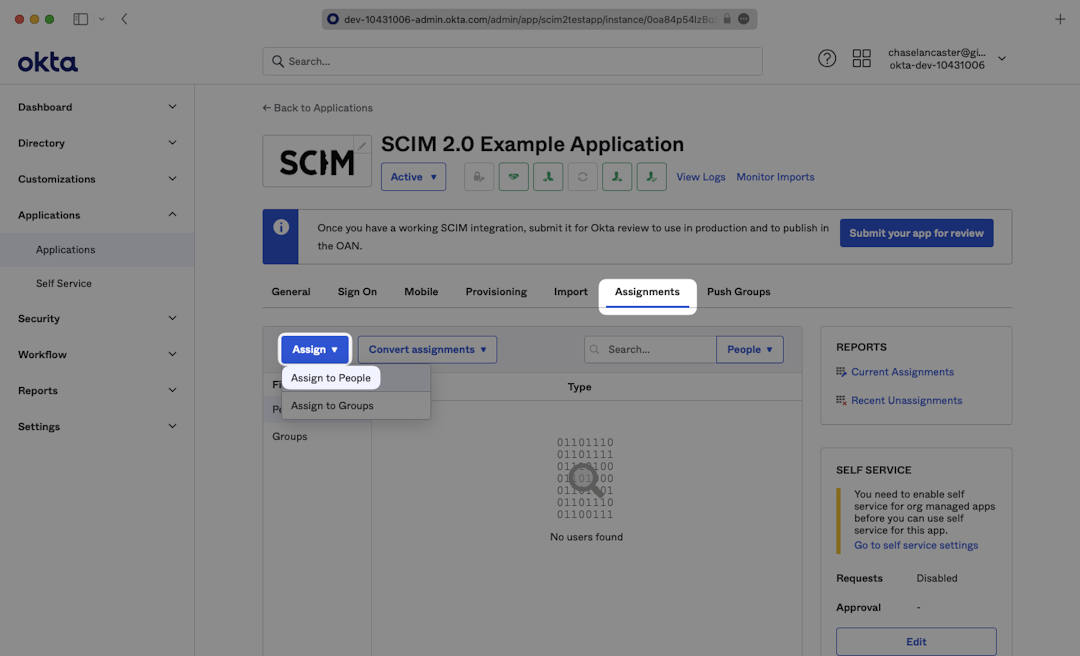
|
|
115
|
+
|
|
116
|
+
Select users you’d like to provision and select “Assign”.
|
|
117
|
+
|
|
118
|
+
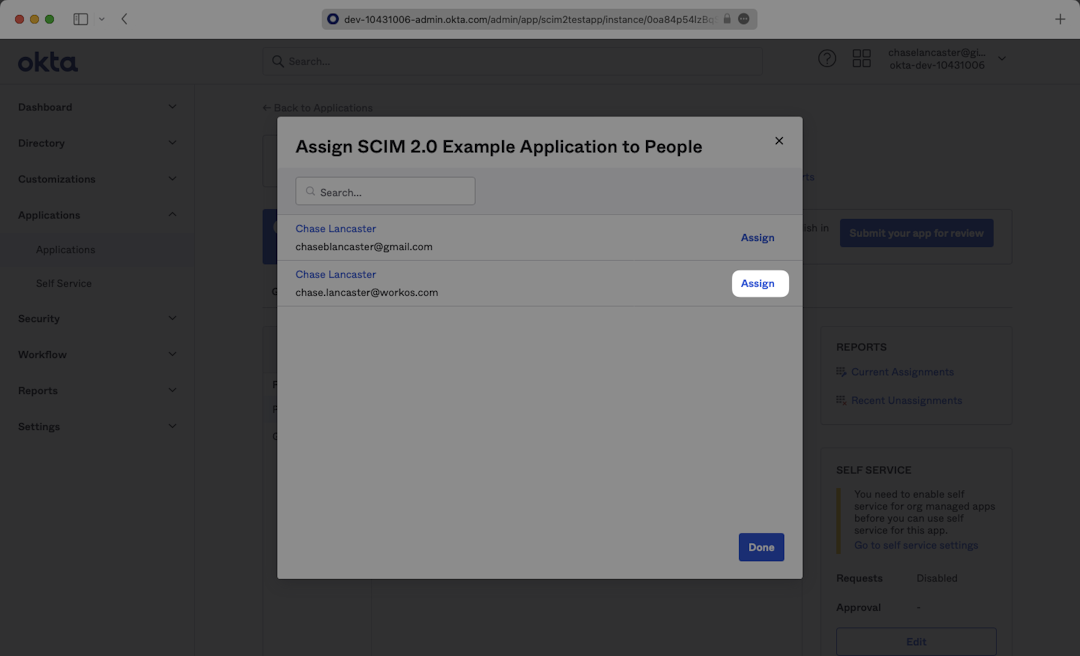
|
|
119
|
+
|
|
120
|
+
When you click “Assign” a lengthy form will open where you can populate all of the user’s metadata. Confirm the metadata fields, scroll down to the bottom, and press “Save and Go Back”. Repeat this for all users and select “Done”.
|
|
121
|
+
|
|
122
|
+
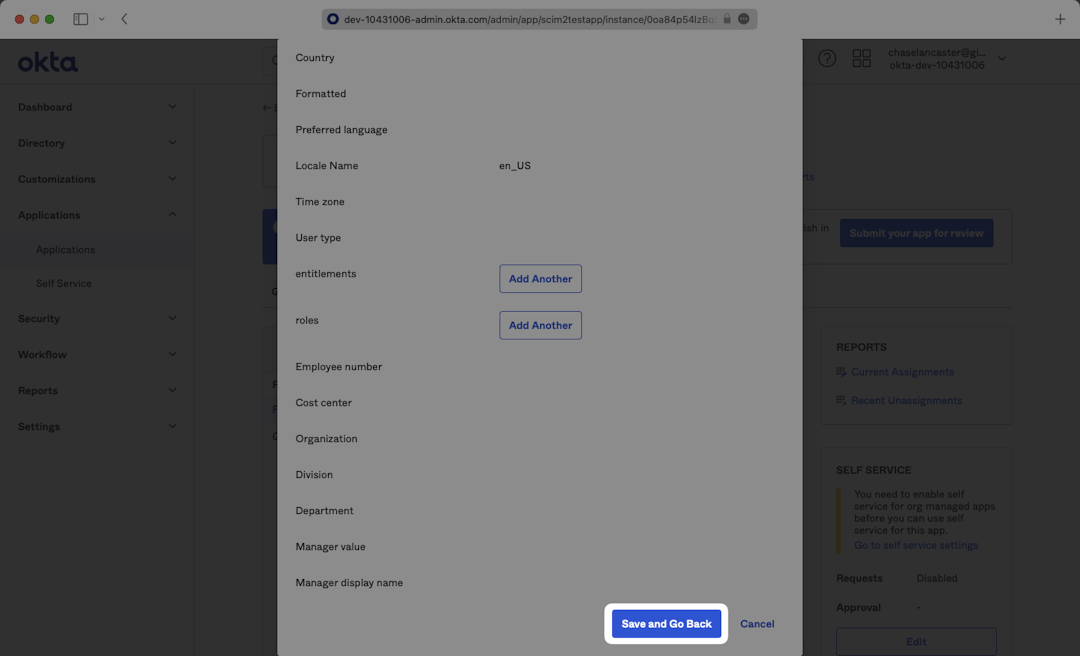
|
|
123
|
+
|
|
124
|
+
To push groups in order to sync group membership, navigate to the “Push Groups” tab, from the “Push Groups” dropdown, select: “Find groups by name”.
|
|
125
|
+
|
|
126
|
+
<OktaIntegrationCautionBlock />
|
|
127
|
+
|
|
128
|
+
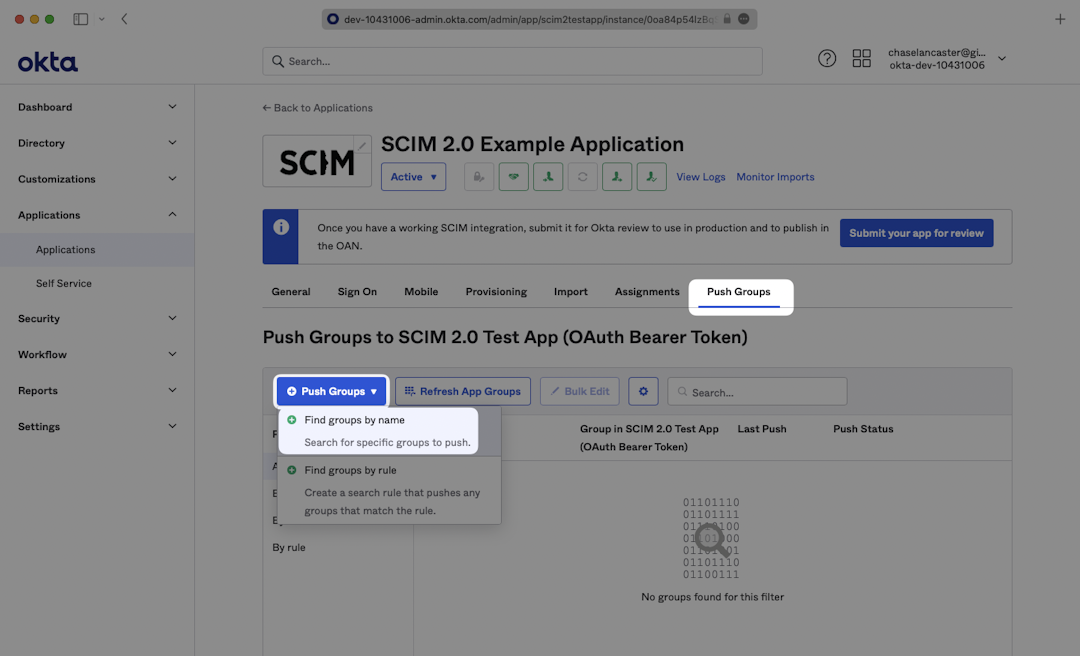
|
|
129
|
+
|
|
130
|
+
Search for the group you’d like to push and select it. Make sure the box is checked for “Push Immediately” and click “Save”.
|
|
131
|
+
|
|
132
|
+
|
|
133
|
+
|
|
134
|
+
In the WorkOS dashboard, you should now see the users and groups synced over.
|
|
135
|
+
|
|
136
|
+
|
|
137
|
+
|
|
138
|
+
A detailed guide to integrate the WorkOS API with your application can be found [here](/directory-sync)
|
|
139
|
+
|
|
140
|
+
---
|
|
141
|
+
|
|
142
|
+
## Configuring user attribute mappings
|
|
143
|
+
|
|
144
|
+
For any non-standard attributes used by the application, some configuration may be required in Okta. Below is a guide on configuring user attribute mappings, so they propagate via SCIM.
|
|
145
|
+
|
|
146
|
+
### (1) Viewing application attributes
|
|
147
|
+
|
|
148
|
+
From the Okta administrator portal, navigate to Directory → Profile Editor, and find the application for which you'd like to edit mappings.
|
|
149
|
+
|
|
150
|
+
|
|
151
|
+
|
|
152
|
+
Clicking into the application will bring you to a Profile Editor page:
|
|
153
|
+
|
|
154
|
+
|
|
155
|
+
|
|
156
|
+
You'll likely see several attributes listed, which are scoped to the application. If you see an attribute listed you're looking to map to an application, there's no need to create a new attribute and you can skip to [step 3](/integrations/okta-scim/configuring-user-attribute-mappings/3-mapping-an-attribute).
|
|
157
|
+
|
|
158
|
+
### (2) Adding an attribute
|
|
159
|
+
|
|
160
|
+
If a desired attribute is missing from your application, click the "Add Attribute" button to create a new attribute.
|
|
161
|
+
|
|
162
|
+
|
|
163
|
+
|
|
164
|
+
Enter a display name and variable name of your choosing, and ensure the external name matches the key required by the third-party application. For example, if the third-party application pulls the manager value from `manager.value`, the external name should be `manager.value`.
|
|
165
|
+
|
|
166
|
+
For attributes included as part of the SCIM enterprise extension, enter the external namespace as `urn:ietf:params:scim:schemas:extension:enterprise:2.0:User`.
|
|
167
|
+
|
|
168
|
+
|
|
169
|
+
|
|
170
|
+
Once you’ve entered the required information, click "Save".
|
|
171
|
+
|
|
172
|
+
### (3) Mapping an attribute
|
|
173
|
+
|
|
174
|
+
To map Okta user profile attributes to your application users, click on the “Mappings” button.
|
|
175
|
+
|
|
176
|
+
|
|
177
|
+
|
|
178
|
+
Mappings can be bidirectional, either from the application to the Okta user or from the Okta user to the application. This guide will focus on mapping from the Okta user to the application. Click the "Okta User to (name of application)" tab.
|
|
179
|
+
|
|
180
|
+
|
|
181
|
+
|
|
182
|
+
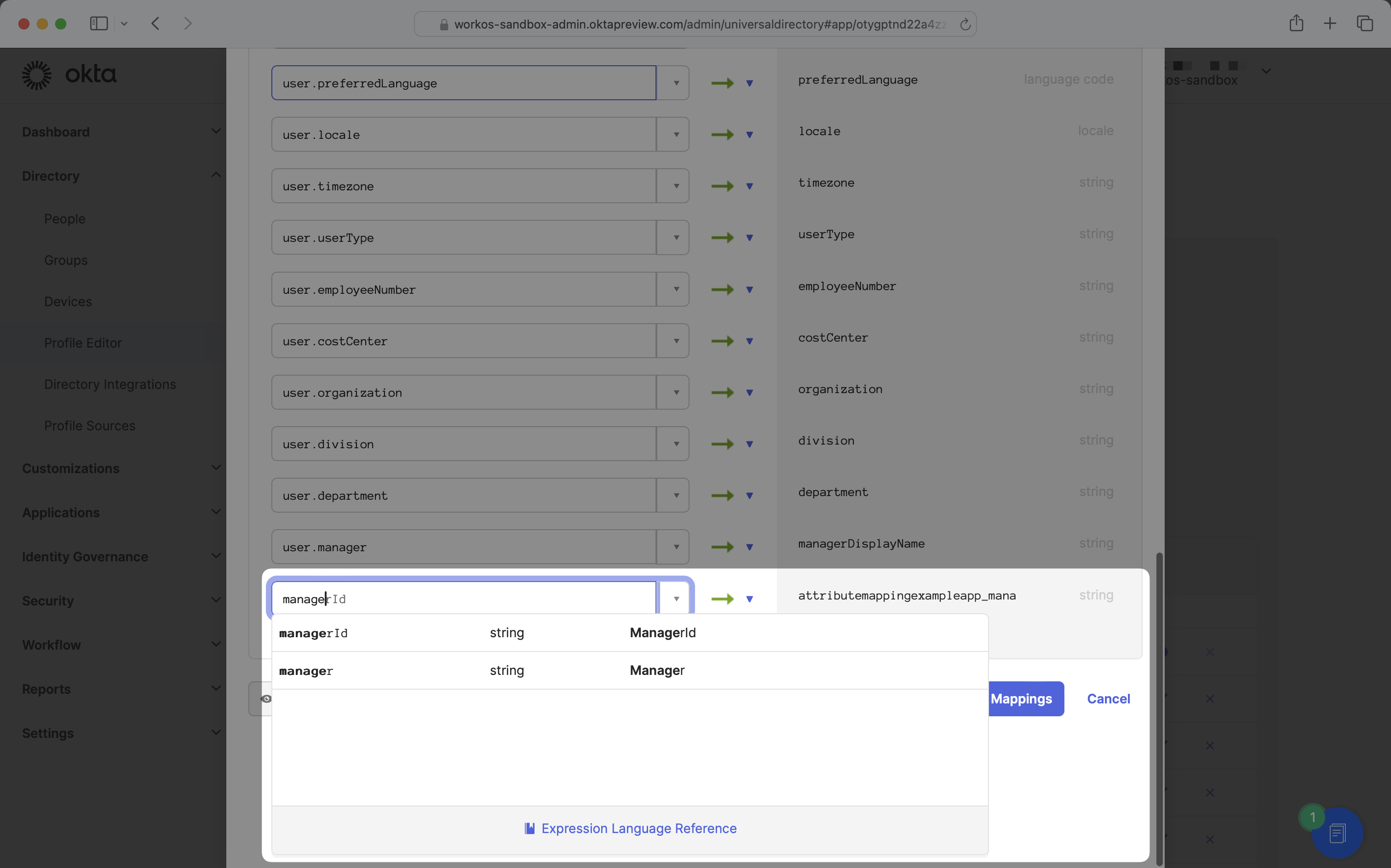
Find the name of the attribute you’d like to map in the right column. In the corresponding row's left column, enter the name of the Okta user profile attribute you’d like to map over. For example, if you’re looking to map manager email in the application, select `managerId` in the left column.
|
|
183
|
+
|
|
184
|
+
|
|
185
|
+
|
|
186
|
+
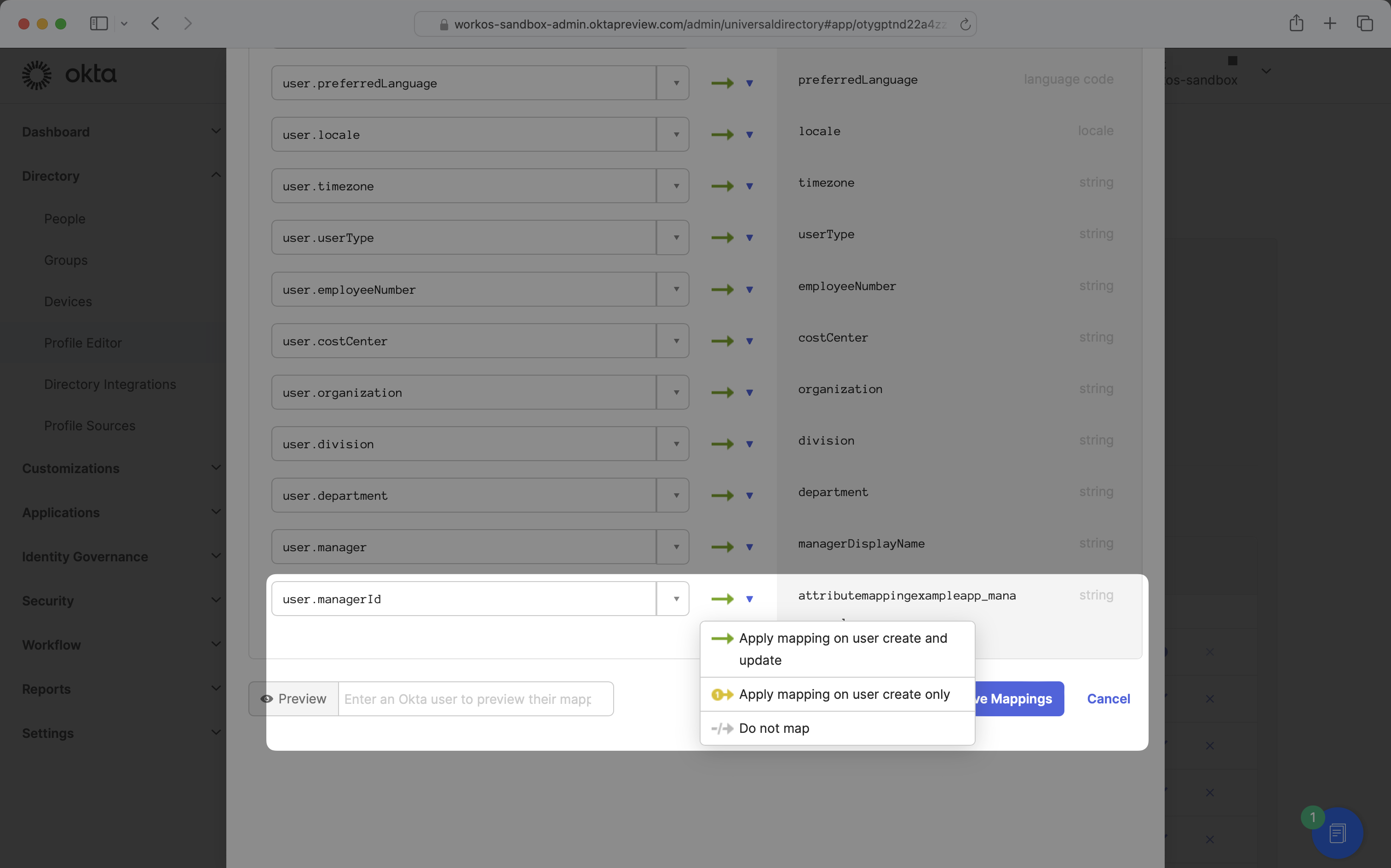
Ensure the apply mappings setting is set to "Apply mapping on user create and update".
|
|
187
|
+
|
|
188
|
+
|
|
189
|
+
|
|
190
|
+
Once your mappings are configured, click "Save Mappings" and "Apply updates now". These new attribute mappings will now propagate to the application.
|
|
191
|
+
|
|
192
|
+
## Frequently asked questions
|
|
193
|
+
|
|
194
|
+
### When a user is assigned to the SCIM app via a group, I don’t see a user removed webhook if the user is removed from the group – is this expected?
|
|
195
|
+
|
|
196
|
+
It is a known issue with Okta SCIM that if a user is assigned to a SCIM app via a group, you won’t see a `dsync.group.user_removed` event if the user is removed from the group. This is a limitation in Okta, where group memberships are not updated in this case. The user needs to be assigned directly to the SCIM app, and the group needs to be pushed in the SCIM app. If those two conditions are met, Okta will send the correct group membership updates.
|
|
197
|
+
|
|
198
|
+
### How often do the Okta SCIM 2.0 directories perform a sync?
|
|
199
|
+
|
|
200
|
+
The Okta SCIM 2.0 directory syncs events in real time.
|
|
201
|
+
|
|
202
|
+
### Why is a user suspended in Okta still active in WorkOS?
|
|
203
|
+
|
|
204
|
+
Suspending a User in Okta will only affect their login and will not alter their status in any connected applications.
|
|
205
|
+
|
|
206
|
+
Deactivating or Deleting a User in Okta will result in a `inactive` status in connected applications (i.e., WorkOS).
|
|
207
|
+
|
|
208
|
+
For more details, please refer to Okta's official documentation
|
|
209
|
+
[User Suspension](https://help.okta.com/en-us/content/topics/users-groups-profiles/usgp-suspend.htm)
|
|
210
|
+
[User Deactivation and Deletion](https://help.okta.com/en-us/content/topics/users-groups-profiles/usgp-deactivate-user-account.htm).
|
|
@@ -0,0 +1,131 @@
|
|
|
1
|
+
---
|
|
2
|
+
title: OneLogin SAML
|
|
3
|
+
description: "Learn how to configure a connection to\_OneLogin via SAML."
|
|
4
|
+
icon: onelogin
|
|
5
|
+
breadcrumb:
|
|
6
|
+
title: Integrations
|
|
7
|
+
url: /integrations
|
|
8
|
+
originalPath: .tmp-workos-clone/packages/docs/content/integrations/onelogin-saml.mdx
|
|
9
|
+
---
|
|
10
|
+
|
|
11
|
+
## Introduction
|
|
12
|
+
|
|
13
|
+
Each SSO Identity Provider requires specific information to create and configure a new [Connection](/glossary/connection). Often, the information required to create a Connection will differ by Identity Provider.
|
|
14
|
+
|
|
15
|
+
To create an OneLogin SAML Connection, you’ll need three pieces of information: an [ACS URL](/glossary/acs-url), an [SP Entity ID](/glossary/sp-entity-id), and the [OneLogin SAML Metadata file](/glossary/idp-metadata).
|
|
16
|
+
|
|
17
|
+
Start by logging into your [WorkOS Dashboard](https://dashboard.workos.com/) and selecting “Organizations” from the left hand navigation bar.
|
|
18
|
+
|
|
19
|
+
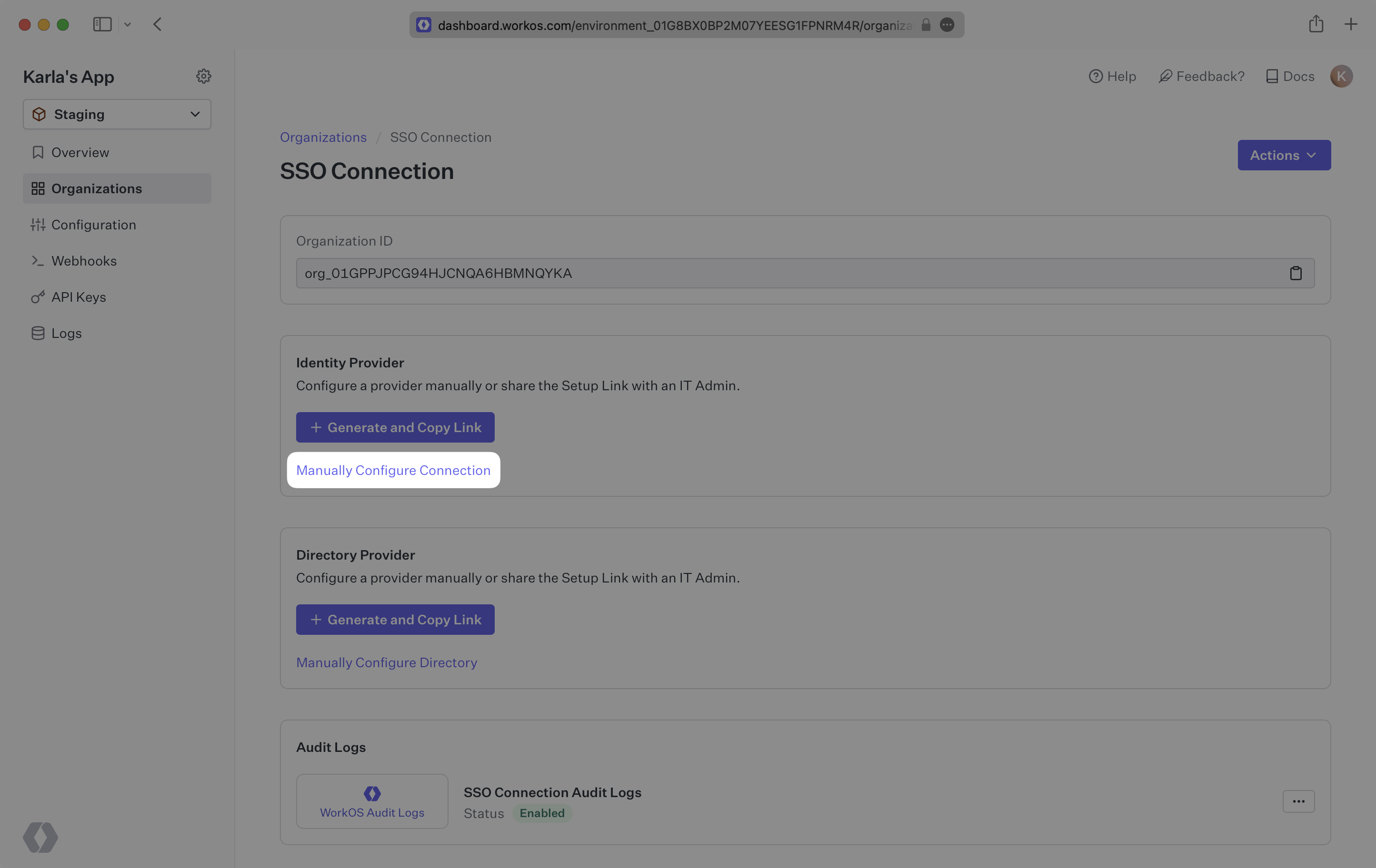
Click on the organization you’d like to configure a OneLogin SAML connection for and select “Manually Configure Connection”.
|
|
20
|
+
|
|
21
|
+
|
|
22
|
+
|
|
23
|
+
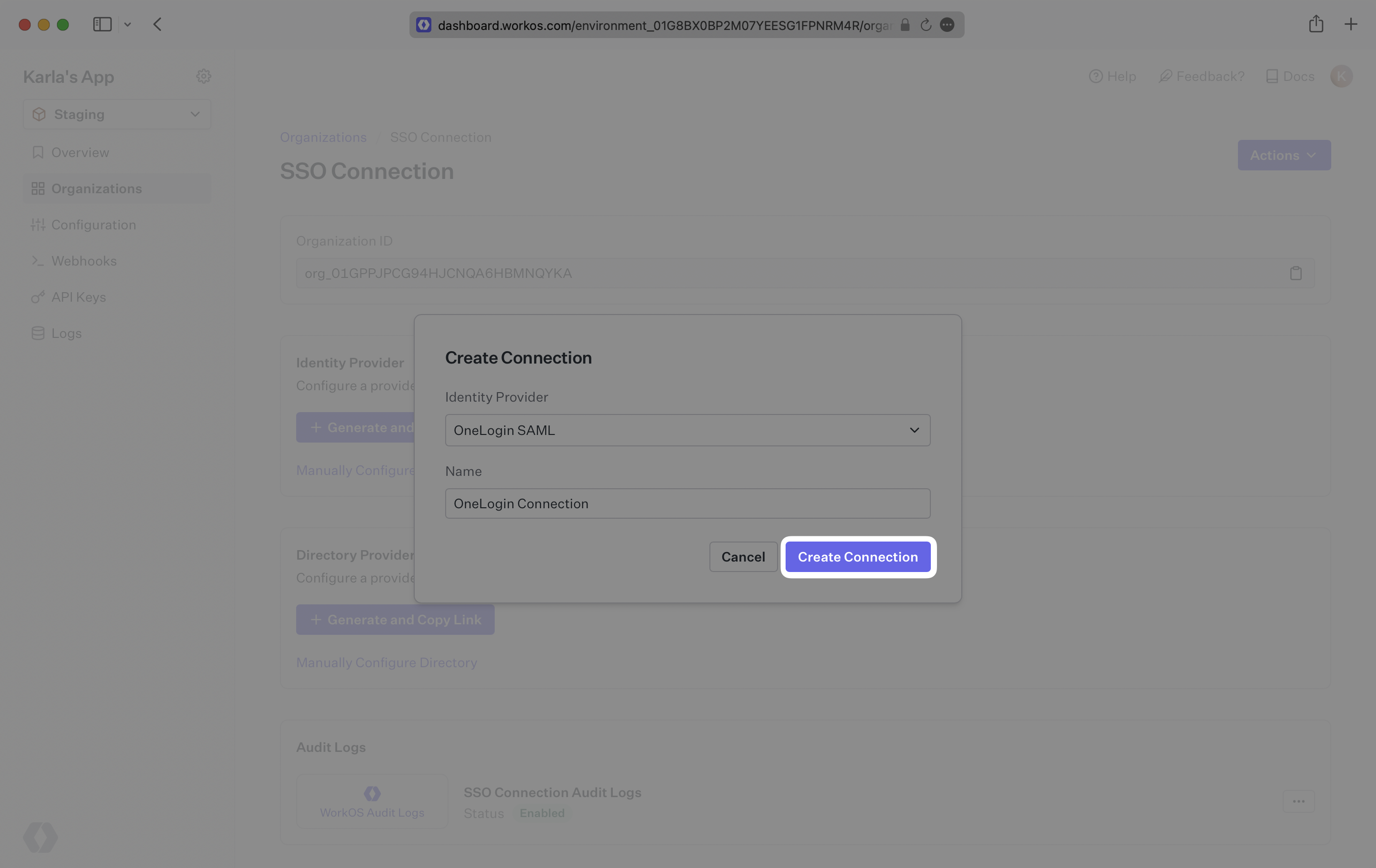
Select “OneLogin SAML” from the Identity Provider dropdown, enter a descriptive name for the connection, and then select the “Create Connection” button.
|
|
24
|
+
|
|
25
|
+
|
|
26
|
+
|
|
27
|
+
---
|
|
28
|
+
|
|
29
|
+
## What WorkOS provides
|
|
30
|
+
|
|
31
|
+
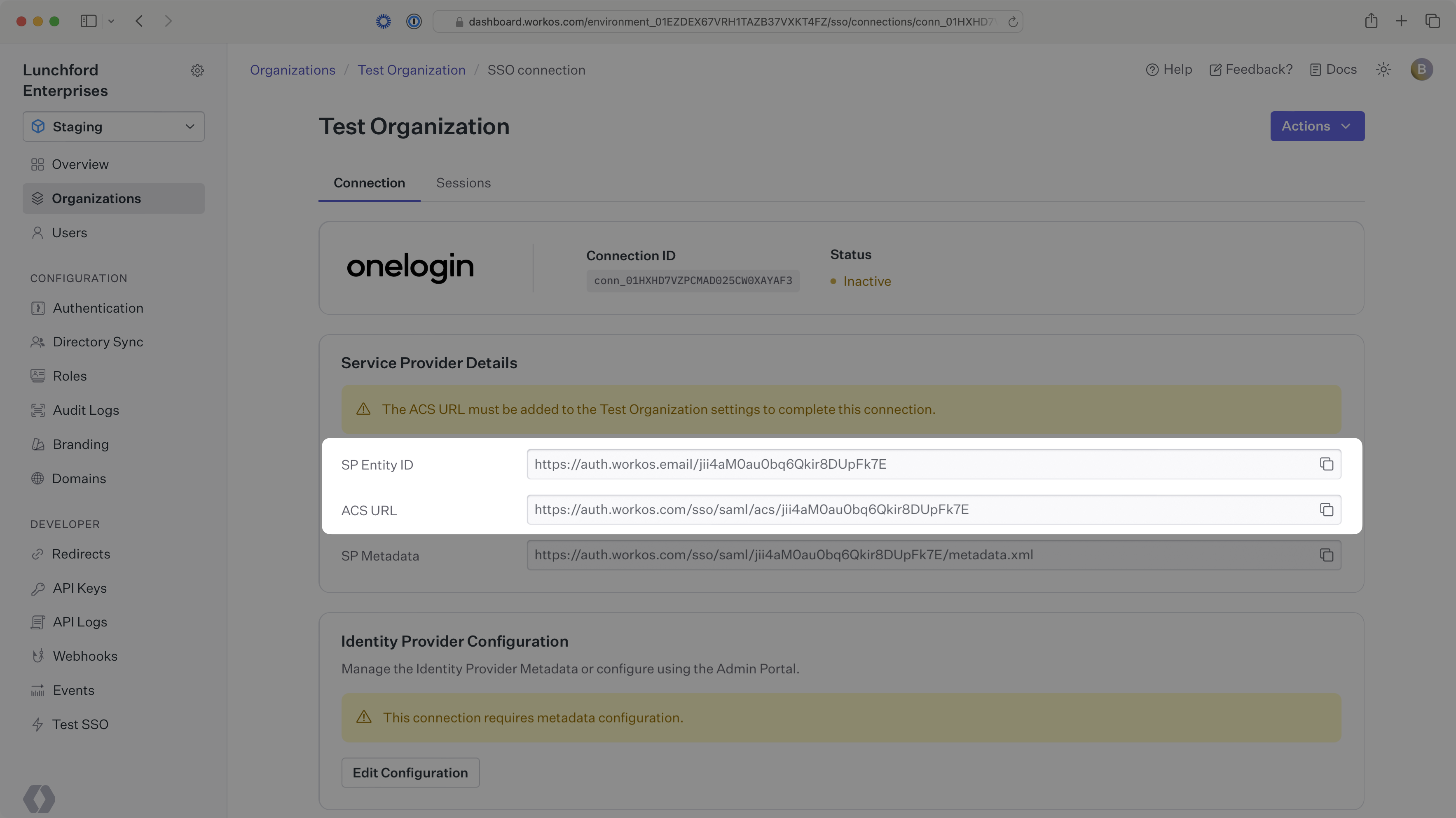
WorkOS provides the [ACS URL](/glossary/acs-url) and [SP Entity ID](/glossary/sp-entity-id). They are readily available in your Connection Settings in the [WorkOS Dashboard](https://dashboard.workos.com/).
|
|
32
|
+
|
|
33
|
+
The ACS URL is the location an Identity Provider redirects its authentication response to. In OneLogin’s case, it needs to be set by the organization when configuring your application in their OneLogin instance.
|
|
34
|
+
|
|
35
|
+
The SP Entity ID is a URI used to identify the issuer of a SAML request and the audience of a SAML response. In this case, the SP Entity ID is used to communicate that WorkOS will be the party performing SAML requests to the organization's OneLogin instance, and that WorkOS is the intended audience of the SAML responses from the OneLogin instance.
|
|
36
|
+
|
|
37
|
+
|
|
38
|
+
|
|
39
|
+
---
|
|
40
|
+
|
|
41
|
+
## What you’ll need
|
|
42
|
+
|
|
43
|
+
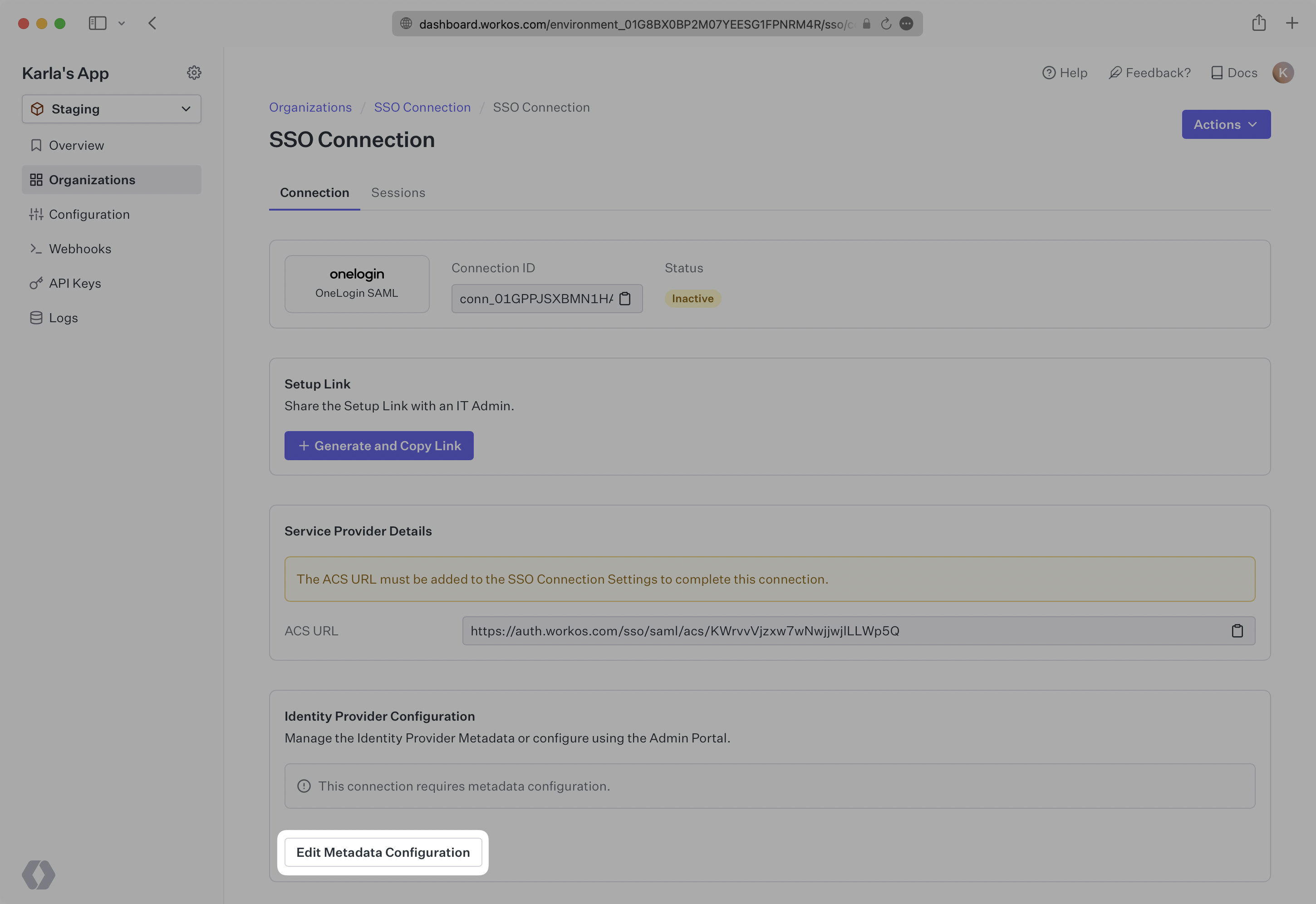
Next, provide the [OneLogin SAML Metadata file](/glossary/idp-metadata).
|
|
44
|
+
|
|
45
|
+
Normally, this will come from the organization's IT Management team when they set up your application’s SAML 2.0 configuration in their OneLogin admin dashboard. But, should that not be the case during your setup, the next steps will show you how to obtain it.
|
|
46
|
+
|
|
47
|
+
|
|
48
|
+
|
|
49
|
+
---
|
|
50
|
+
|
|
51
|
+
## (1) Log in
|
|
52
|
+
|
|
53
|
+
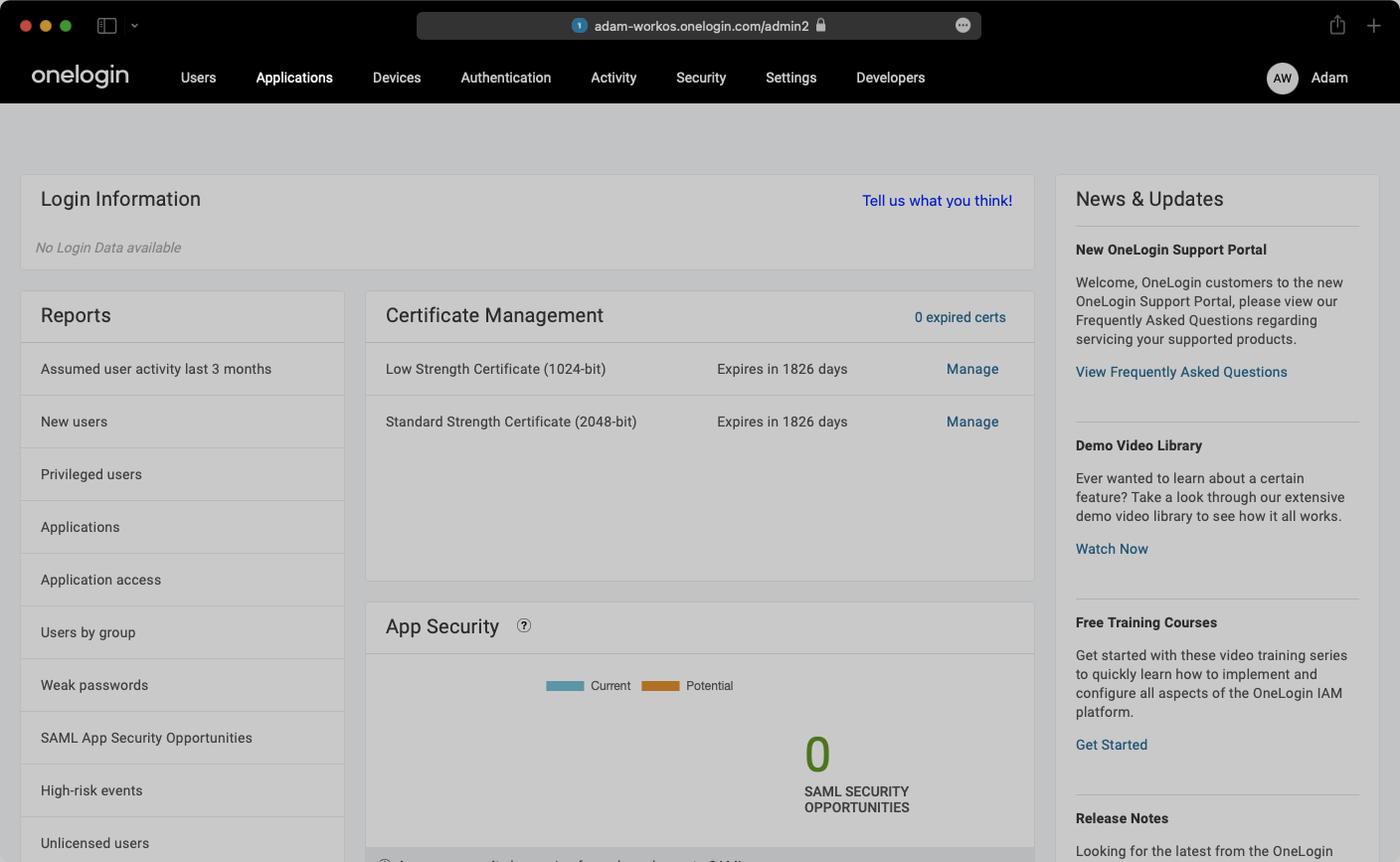
Log in to [OneLogin](https://app.onelogin.com/login), go to the admin dashboard, and select “Applications” in the navigation bar.
|
|
54
|
+
|
|
55
|
+
|
|
56
|
+
|
|
57
|
+
---
|
|
58
|
+
|
|
59
|
+
## (2) Select your application
|
|
60
|
+
|
|
61
|
+
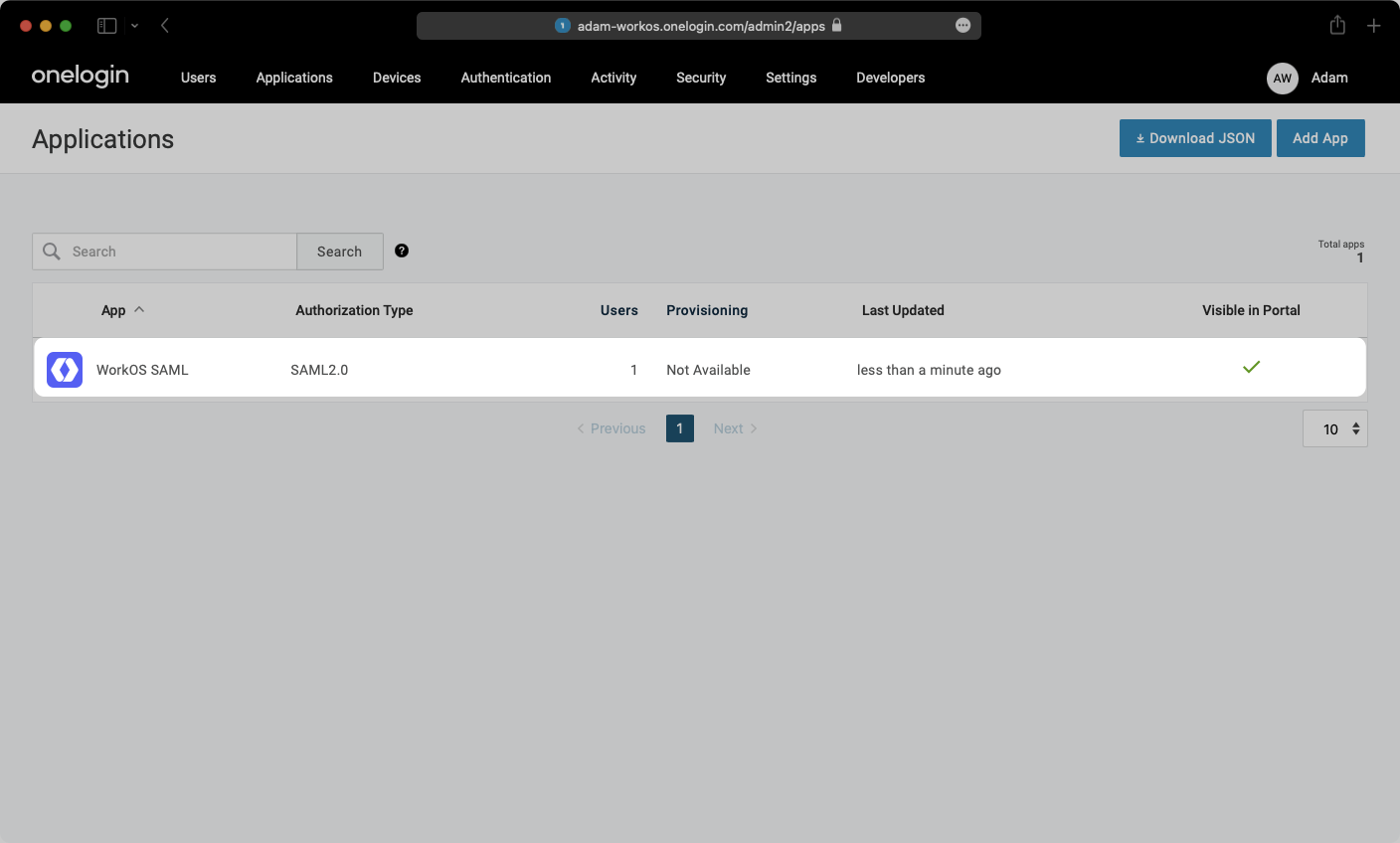
Select your application from the list of applications.
|
|
62
|
+
|
|
63
|
+
|
|
64
|
+
|
|
65
|
+
---
|
|
66
|
+
|
|
67
|
+
## (3) Configure application
|
|
68
|
+
|
|
69
|
+
Select “Configuration” from the left-hand navigation:
|
|
70
|
+
|
|
71
|
+
- Enter the SP Entity ID as the Audience (EntityID) e.g. `https://auth.workos.com/wz5SpShhRIcSEyMM`
|
|
72
|
+
- Enter the ACS URL as the Recipient e.g. `https://auth.workos.com/sso/saml/acs/wz5SpShhRIcSEyMM`
|
|
73
|
+
- Enter your ACS URL Validator e.g. `^https:\/\/auth\.workos\.com\/sso\/saml\/acs\/wz5SpShhRIcSEyMM$`
|
|
74
|
+
- Enter your ACS URL e.g. `https://auth.workos.com/sso/saml/acs/wz5SpShhRIcSEyMM`
|
|
75
|
+
- Enter your application’s login URL
|
|
76
|
+
|
|
77
|
+
|
|
78
|
+
|
|
79
|
+
- Select “Service Provider” from the “SAML Initiator” dropdown menu
|
|
80
|
+
- Select “Assertion” from the “SAML Signature Element” dropdown menu
|
|
81
|
+
|
|
82
|
+
|
|
83
|
+
|
|
84
|
+
---
|
|
85
|
+
|
|
86
|
+
## (4) Set up attribute mapping parameters
|
|
87
|
+
|
|
88
|
+
Select “Parameters” from the left-hand navigation and add the following field-value parameter pairs:
|
|
89
|
+
|
|
90
|
+
- `email` → `Email`
|
|
91
|
+
- `firstName` → `First Name`
|
|
92
|
+
- `id` → `UUID`
|
|
93
|
+
- `lastName` → `Last Name`
|
|
94
|
+
|
|
95
|
+
Check the “Include in SAML assertion” flag for each pair.
|
|
96
|
+
|
|
97
|
+
|
|
98
|
+
|
|
99
|
+
### Role Assignment (optional)
|
|
100
|
+
|
|
101
|
+
With [identity provider role assignment](/sso/identity-provider-role-assignment), users can receive roles within your application based on their group memberships. To return this information in the attribute statement, follow the guidance below.
|
|
102
|
+
|
|
103
|
+
Add a new parameter, and set the "Field name" to `groups`. Under "Flags", click the checkboxes for both "Include in SAML assertion" and "Multi-value parameter".
|
|
104
|
+
|
|
105
|
+
|
|
106
|
+
|
|
107
|
+
Map the `groups` field to the attribute in OneLogin containing a user’s group membership, such as "MemberOf", shown in the example below. For more information on sending group information, refer to the [OneLogin documentation](https://onelogin.service-now.com/support?id=kb_article&sys_id=6561990adb5374101c167e77f496191d).
|
|
108
|
+
|
|
109
|
+
|
|
110
|
+
|
|
111
|
+
> Finish role assignment set-up by navigating to the SSO connection page in the _Organization_ section of the [WorkOS Dashboard](https://dashboard.workos.com/). Create SSO groups by referencing the group IdP ID. Then, assign roles to these SSO groups so group members are automatically granted roles within your application.
|
|
112
|
+
|
|
113
|
+
---
|
|
114
|
+
|
|
115
|
+
## (5) Upload Metadata File
|
|
116
|
+
|
|
117
|
+
Select “SSO” from the left-hand navigation.
|
|
118
|
+
|
|
119
|
+
Select the “More Actions” dropdown and click on “SAML Metadata”. This will download an XML metadata file.
|
|
120
|
+
|
|
121
|
+
|
|
122
|
+
|
|
123
|
+
In the Connection Settings of the WorkOS Dashboard, click “Edit Metadata Configuration”.
|
|
124
|
+
|
|
125
|
+

|
|
126
|
+
|
|
127
|
+
In the modal that pops up, upload the OneLogin Metadata file and then select “Save Metadata Configuration”.
|
|
128
|
+
|
|
129
|
+
|
|
130
|
+
|
|
131
|
+
Once the file has uploaded, your Connection will then be linked and good to go!
|
|
@@ -0,0 +1,150 @@
|
|
|
1
|
+
---
|
|
2
|
+
title: OneLogin SCIM
|
|
3
|
+
description: "Learn about syncing your user list with\_OneLogin SCIM."
|
|
4
|
+
icon: onelogin
|
|
5
|
+
breadcrumb:
|
|
6
|
+
title: Integrations
|
|
7
|
+
url: /integrations
|
|
8
|
+
originalPath: .tmp-workos-clone/packages/docs/content/integrations/onelogin-scim.mdx
|
|
9
|
+
---
|
|
10
|
+
|
|
11
|
+
## Introduction
|
|
12
|
+
|
|
13
|
+
This guide outlines how to synchronize your application’s OneLogin directories using SCIM.
|
|
14
|
+
|
|
15
|
+
To synchronize an organization’s users and groups provisioned for your application, you’ll need to provide the organization with two pieces of information:
|
|
16
|
+
|
|
17
|
+
- An [Endpoint](/glossary/endpoint) that OneLogin will make requests to.
|
|
18
|
+
- A [Bearer Token](/glossary/bearer-token) for OneLogin to authenticate its endpoint requests.
|
|
19
|
+
|
|
20
|
+
Both of these are available in your Endpoint’s Settings in the [WorkOS Dashboard](https://dashboard.workos.com/).
|
|
21
|
+
|
|
22
|
+
> Steps 2, 3, and 4 below will need to be carried out by the organization when configuring your application in their OneLogin instance.
|
|
23
|
+
|
|
24
|
+
---
|
|
25
|
+
|
|
26
|
+
## (1) Set up your directory sync endpoint
|
|
27
|
+
|
|
28
|
+
Login to your WorkOS Dashboard and select “Organizations” from the left hand navigation bar.
|
|
29
|
+
|
|
30
|
+
Select the Organization you’ll be configuring a new Directory Sync for.
|
|
31
|
+
|
|
32
|
+
Click “Add Directory”.
|
|
33
|
+
|
|
34
|
+
|
|
35
|
+
|
|
36
|
+
Select “OneLogin” from the dropdown and enter the organization name.
|
|
37
|
+
|
|
38
|
+
Then, click “Create Directory.”
|
|
39
|
+
|
|
40
|
+
|
|
41
|
+
|
|
42
|
+
Your OneLogin directory sync has now been created successfully with an Endpoint and Bearer Token.
|
|
43
|
+
|
|
44
|
+
|
|
45
|
+
|
|
46
|
+
> We have support for custom labeled URLs for Directory Sync endpoints. [Contact us](mailto:support@workos.com) for more info!
|
|
47
|
+
|
|
48
|
+
---
|
|
49
|
+
|
|
50
|
+
## (2) Select or create your OneLogin application
|
|
51
|
+
|
|
52
|
+
Log in to the OneLogin admin dashboard, select the “Applications” tab at the top. If the application has already been created, select it and move to step 3. Otherwise, select “Add App”.
|
|
53
|
+
|
|
54
|
+
|
|
55
|
+
|
|
56
|
+
Search for “SCIM” in the text field and select the Application with type “SCIM Provisioner with SAML (SCIM V2 Enterprise)”.
|
|
57
|
+
|
|
58
|
+
|
|
59
|
+
|
|
60
|
+
Give your Application a descriptive Display Name and hit “Save”.
|
|
61
|
+
|
|
62
|
+
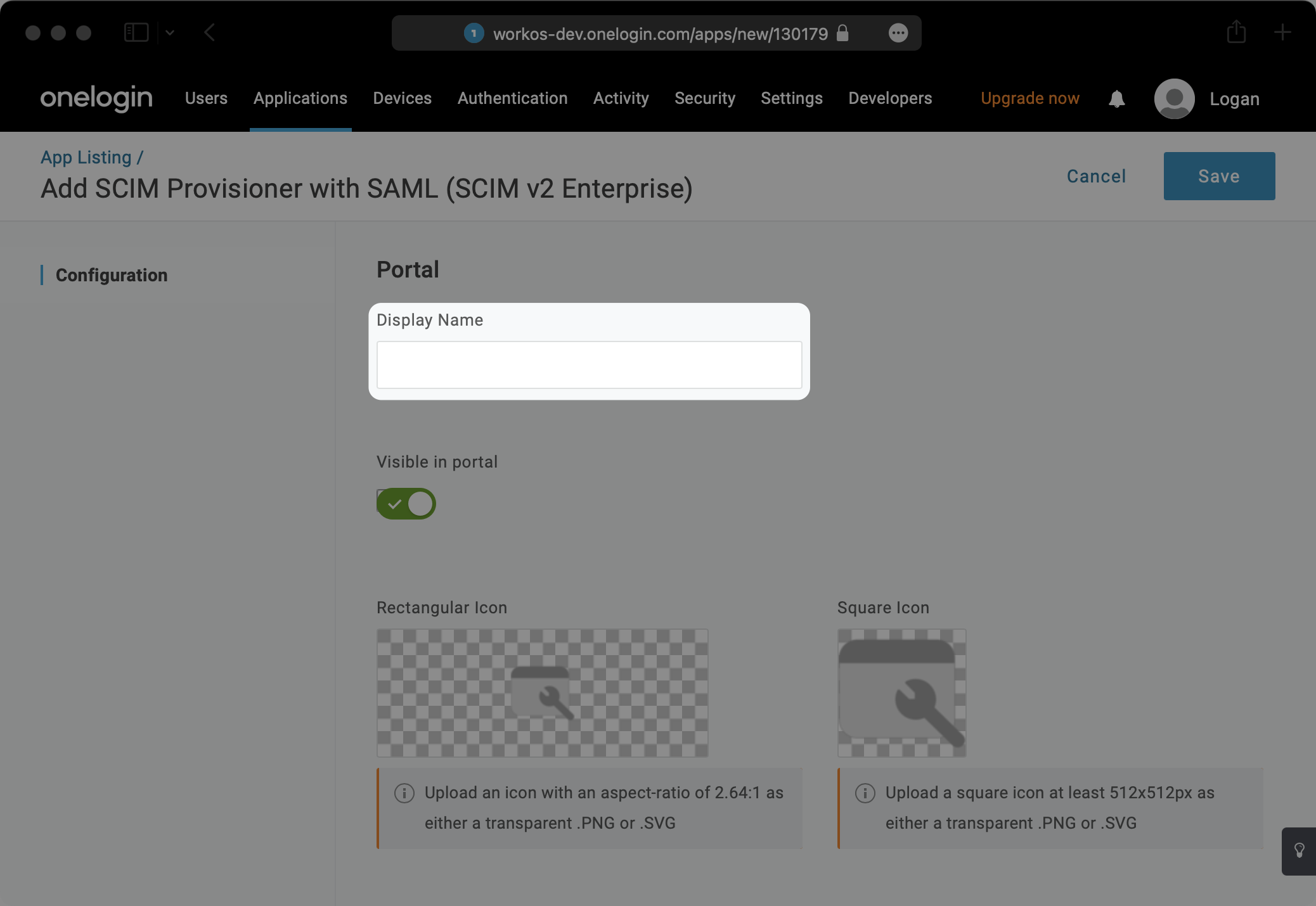
|
|
63
|
+
|
|
64
|
+
---
|
|
65
|
+
|
|
66
|
+
## (3) Configure your integration
|
|
67
|
+
|
|
68
|
+
Within the SCIM Application, select the “Configuration” tab on the left.
|
|
69
|
+
|
|
70
|
+
Copy and paste the Endpoint from your [WorkOS Dashboard](https://dashboard.workos.com/) into the “SCIM Base URL” field.
|
|
71
|
+
|
|
72
|
+
Then, copy and paste the Bearer Token from your [WorkOS Dashboard](https://dashboard.workos.com/) into the “SCIM Bearer Token” field.
|
|
73
|
+
|
|
74
|
+
Hit “Enable” under “API Status” and then hit “Save”.
|
|
75
|
+
|
|
76
|
+
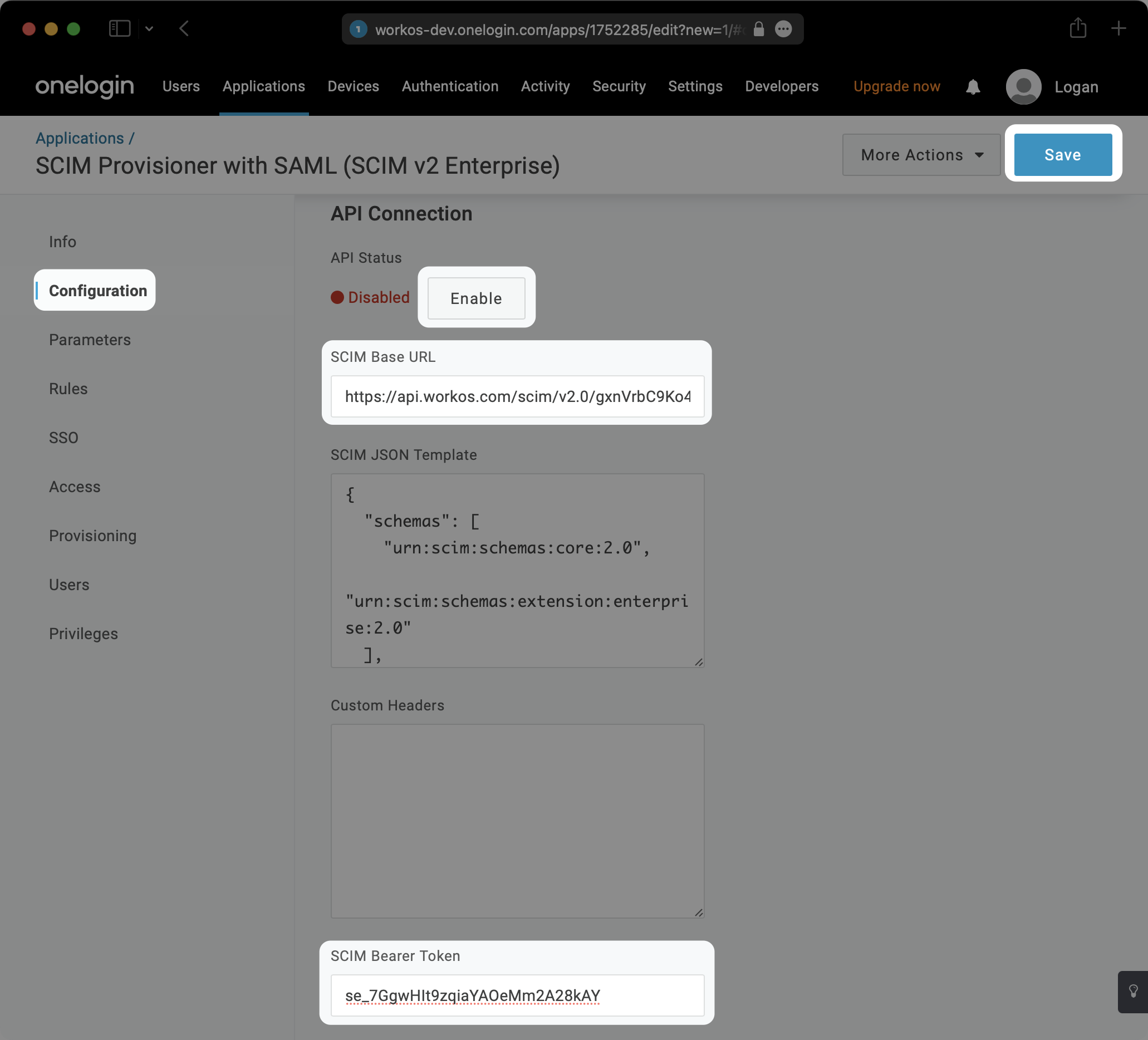
|
|
77
|
+
|
|
78
|
+
Select the “Provisioning” tab on the left. Check the “Enable provisioning” box and hit “Save”.
|
|
79
|
+
|
|
80
|
+
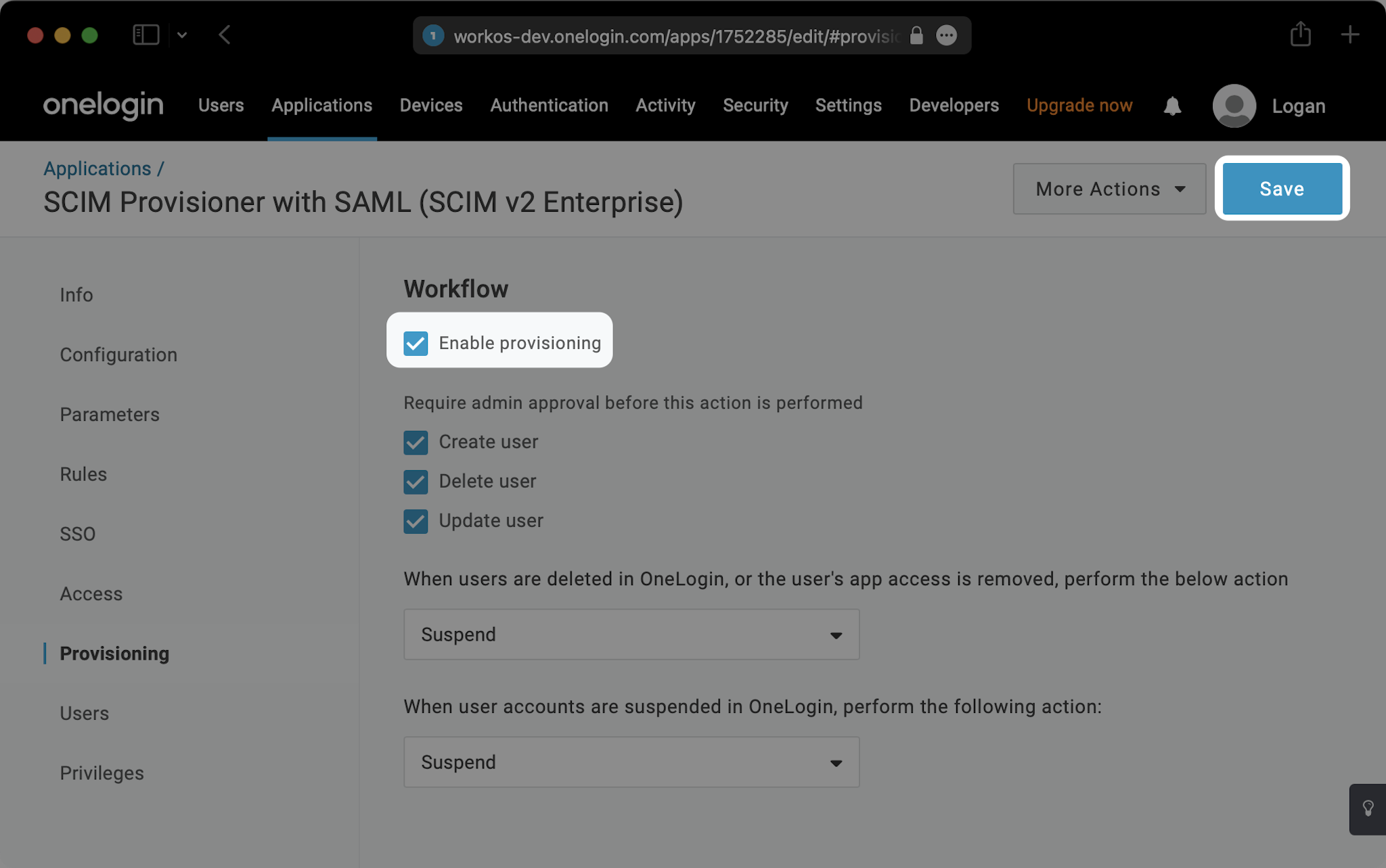
|
|
81
|
+
|
|
82
|
+
Select the “Parameters” tab on the left. Then select “Groups”.
|
|
83
|
+
|
|
84
|
+
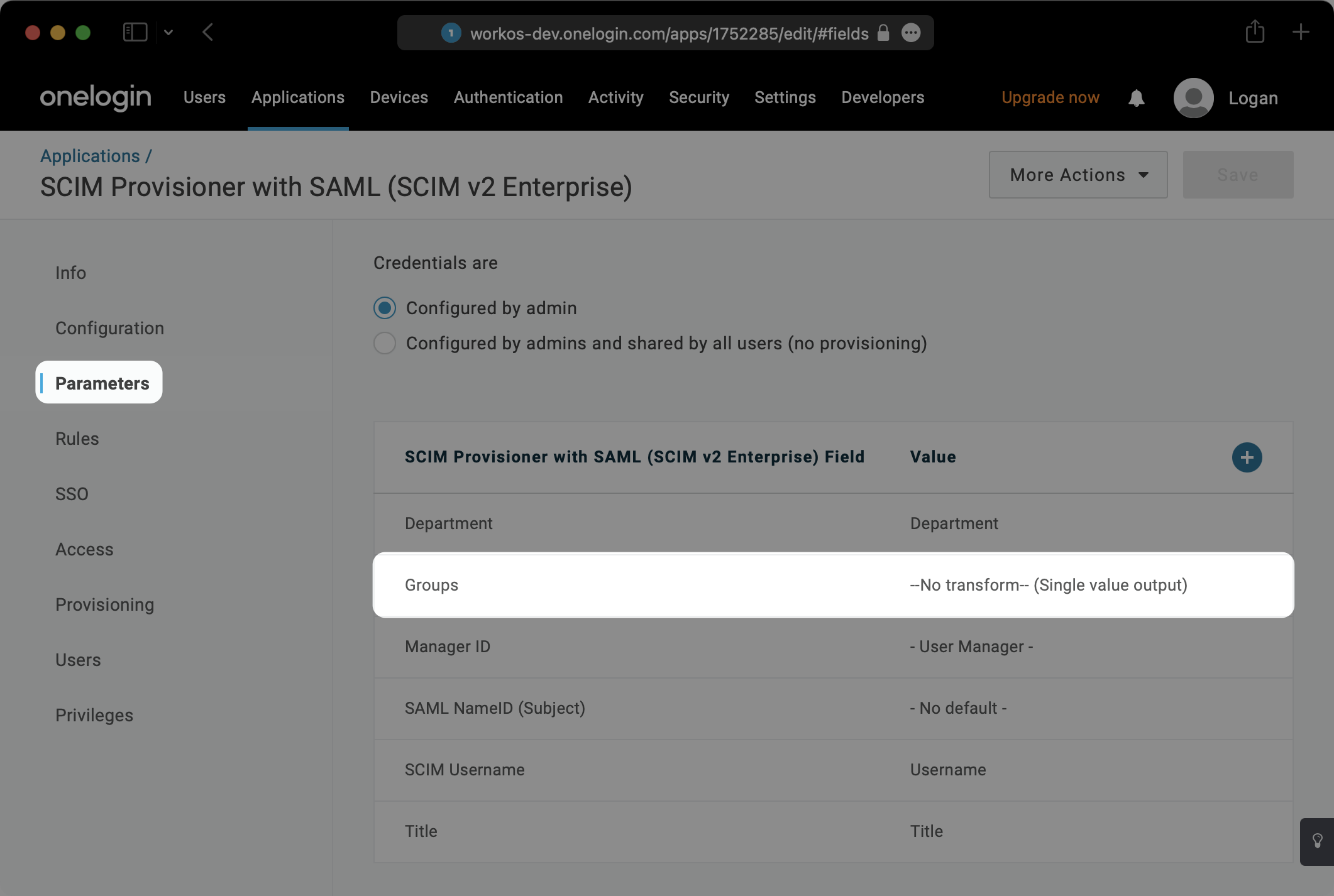
|
|
85
|
+
|
|
86
|
+
In the modal that pops up, check the box next to “Include in User Provisioning” and hit “Save”.
|
|
87
|
+
|
|
88
|
+
|
|
89
|
+
|
|
90
|
+
---
|
|
91
|
+
|
|
92
|
+
## (4) Assign users and groups to your application
|
|
93
|
+
|
|
94
|
+
In order for your users and groups to be synced, you will need to assign them to your OneLogin Application. Select “Users” from the top navigation menu.
|
|
95
|
+
|
|
96
|
+
Next, find a user you’d like to provision to the SCIM app. Within that user profile, select the “Applications” tab on the left. Then, click the “+” symbol.
|
|
97
|
+
|
|
98
|
+
|
|
99
|
+
|
|
100
|
+
Select the appropriate app and hit “Continue”.
|
|
101
|
+
|
|
102
|
+
|
|
103
|
+
|
|
104
|
+
Select “Save” in the next modal to confirm the change.
|
|
105
|
+
|
|
106
|
+
|
|
107
|
+
|
|
108
|
+
There are many ways to provision groups in OneLogin. Below is one method that we recommend, but other methods can be used.
|
|
109
|
+
|
|
110
|
+
In the top navigation, Select “Users” and then “Roles” from the dropdown. Select “New Role”.
|
|
111
|
+
|
|
112
|
+
|
|
113
|
+
|
|
114
|
+
Give the Role a name (this will be the name of the group), select the appropriate SCIM application, and hit “Save”.
|
|
115
|
+
|
|
116
|
+
|
|
117
|
+
|
|
118
|
+
Click the “Users” tab for the role. Search for any users you’d like to assign to that role and hit “Add To Role”. Then hit “Save”.
|
|
119
|
+
|
|
120
|
+
|
|
121
|
+
|
|
122
|
+
Click “Save” in the next modal to confirm.
|
|
123
|
+
|
|
124
|
+
|
|
125
|
+
|
|
126
|
+
Navigate back to your SCIM app and click on the “Rules” tab on the left. Then, hit “Add Rule”.
|
|
127
|
+
|
|
128
|
+
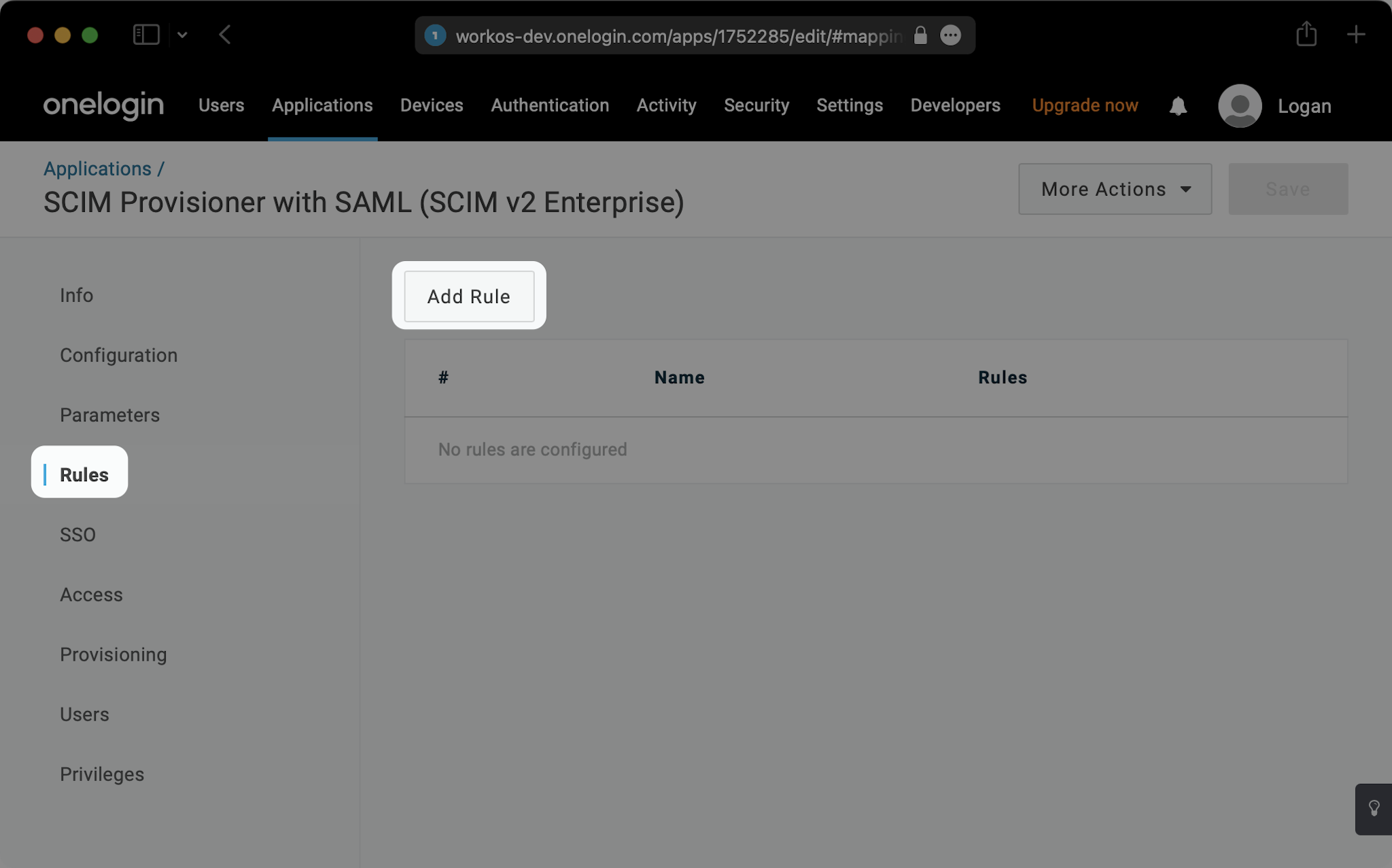
|
|
129
|
+
|
|
130
|
+
Give your Rule a name. Under “Actions”, select “Set Groups in your-app-name”. Then, set it to “For each role with value that matches your-role-name”. Hit “Save”.
|
|
131
|
+
|
|
132
|
+
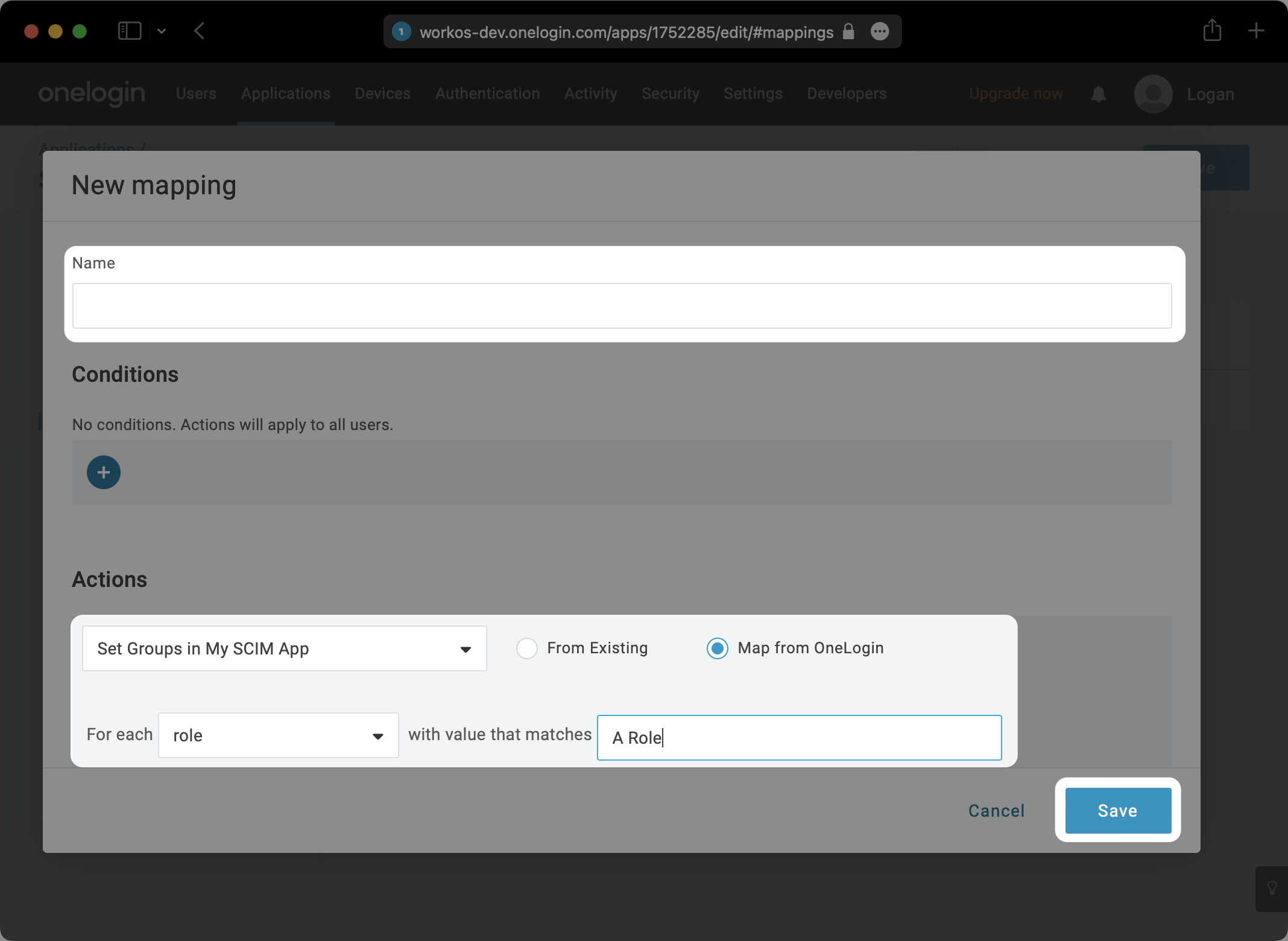
|
|
133
|
+
|
|
134
|
+
Within your SCIM app under the "Users" tab, you may then need to click on any “Pending” notifications to confirm the update for users.
|
|
135
|
+
|
|
136
|
+
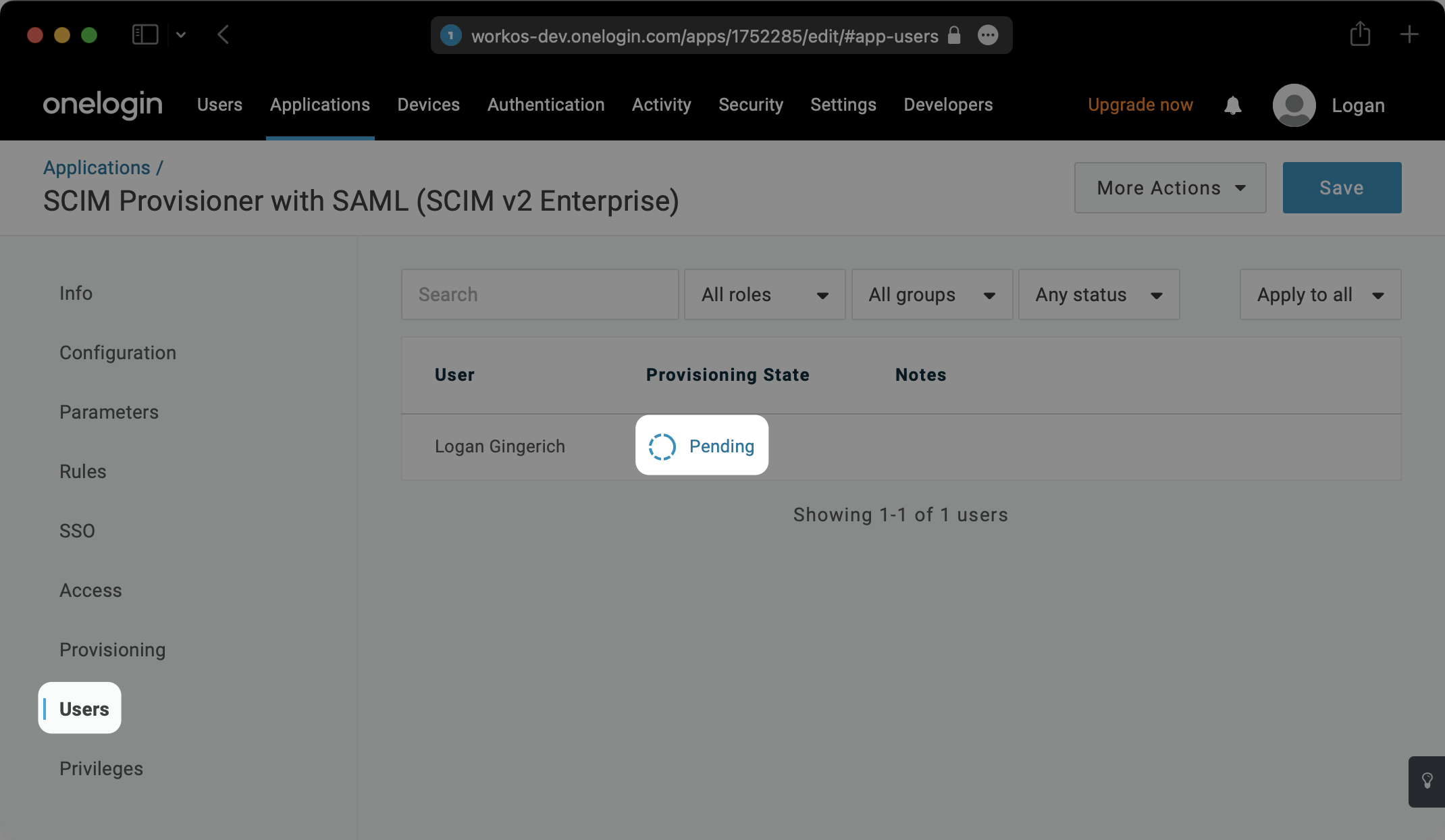
|
|
137
|
+
|
|
138
|
+
Begin provisioning users and groups and witness realtime changes in your [WorkOS Dashboard](https://dashboard.workos.com/).
|
|
139
|
+
|
|
140
|
+
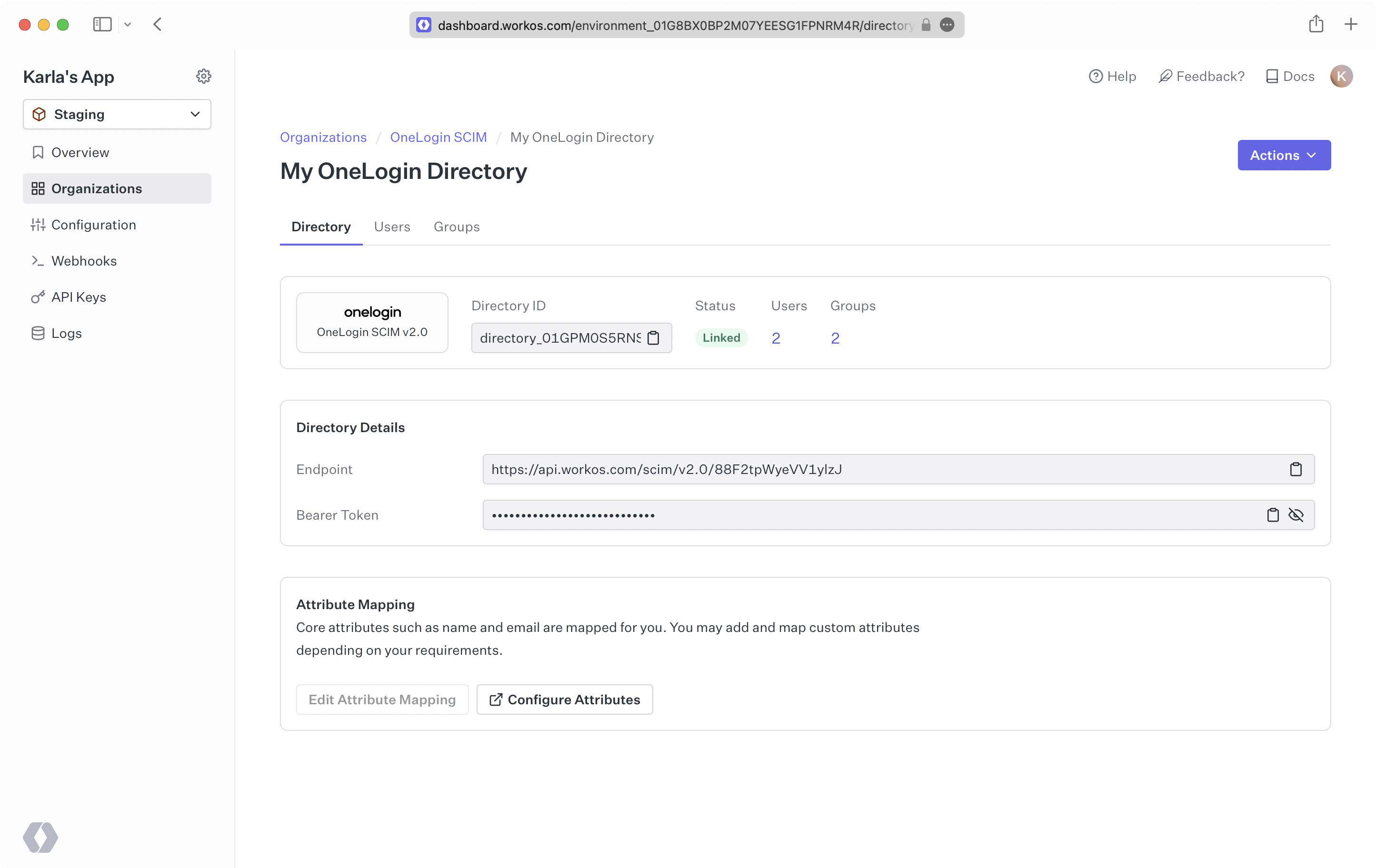
|
|
141
|
+
|
|
142
|
+
A detailed guide to integrate the WorkOS API with your application can be found [here](/directory-sync)
|
|
143
|
+
|
|
144
|
+
## Frequently asked questions
|
|
145
|
+
|
|
146
|
+
### When a group is removed, I don't see a `dsync.group.deleted` or `dsync.group.user_removed` events - is this expected?
|
|
147
|
+
|
|
148
|
+
It is a known issue with OneLogin SCIM that when a group is removed from the application, any user that is _only_ provisioned through that group will be "inactive" but otherwise no indication is received that the group has changed.
|
|
149
|
+
|
|
150
|
+
The users of the group must be cleaned up before the group itself is removed from the SCIM application.
|
|
@@ -0,0 +1,76 @@
|
|
|
1
|
+
---
|
|
2
|
+
title: Oracle SAML
|
|
3
|
+
description: "Learn how to configure a connection to\_Oracle via SAML."
|
|
4
|
+
icon: oracle
|
|
5
|
+
breadcrumb:
|
|
6
|
+
title: Integrations
|
|
7
|
+
url: /integrations
|
|
8
|
+
originalPath: .tmp-workos-clone/packages/docs/content/integrations/oracle-saml.mdx
|
|
9
|
+
---
|
|
10
|
+
|
|
11
|
+
## Introduction
|
|
12
|
+
|
|
13
|
+
Each SSO Identity Provider requires specific information to create and configure a new [connection](/glossary/connection). Often, the information required to create a connection will differ by Identity Provider.
|
|
14
|
+
|
|
15
|
+
To create an Oracle SAML connection, you’ll need the Identity Provider Metadata URL that is available from the organization's Oracle SAML instance.
|
|
16
|
+
|
|
17
|
+
---
|
|
18
|
+
|
|
19
|
+
## What WorkOS provides
|
|
20
|
+
|
|
21
|
+
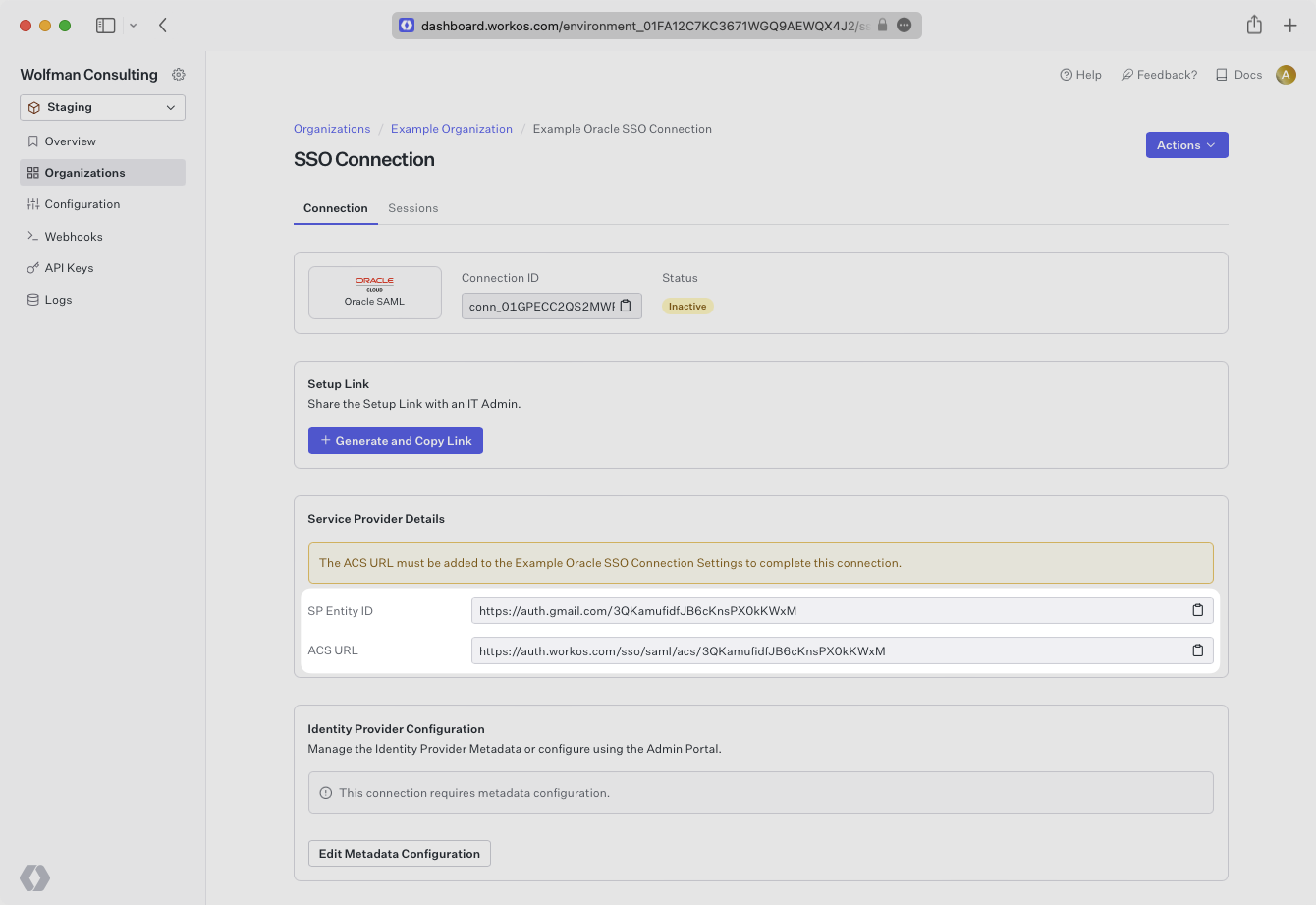
WorkOS provides the [ACS URL](/glossary/acs-url) and the [SP Entity ID](/glossary/sp-entity-id). They are readily available in your connection Settings in the [WorkOS Dashboard](https://dashboard.workos.com/).
|
|
22
|
+
|
|
23
|
+
|
|
24
|
+
|
|
25
|
+
The ACS URL is the location an Identity Provider redirects its authentication response to. The SP Entity ID is a URI used to identify the issuer of a SAML request, response, or assertion.
|
|
26
|
+
|
|
27
|
+
---
|
|
28
|
+
|
|
29
|
+
## What you’ll need
|
|
30
|
+
|
|
31
|
+
In order to integrate you’ll need the IdP Metadata URL.
|
|
32
|
+
|
|
33
|
+
Normally, this will come from the organization's IT management team when they set up your application’s SAML configuration in their Oracle instance. But, should that not be the case during your setup, here’s how to obtain it.
|
|
34
|
+
|
|
35
|
+
---
|
|
36
|
+
|
|
37
|
+
## (1) Configure SAML Application with Service Provider Details
|
|
38
|
+
|
|
39
|
+
Follow the [Oracle Cloud documentation](https://docs.oracle.com/en/cloud/paas/identity-cloud/uaids/add-saml-application.html) to create a new SAML application.
|
|
40
|
+
|
|
41
|
+
Copy and paste the ACS URL and SP Entity ID into the corresponding fields for Service Provider details and configuration.
|
|
42
|
+
|
|
43
|
+
In the Advanced Settings of the SSO Configuration page, ensure that you select Signed SSO for Assertion and Response, and Include Signing Certificate in Signature.
|
|
44
|
+
|
|
45
|
+
---
|
|
46
|
+
|
|
47
|
+
## (2) Configure SAML Attributes
|
|
48
|
+
|
|
49
|
+
Expand the Attribute Configuration section on the SSO Configuration page and add the following 4 required attributes: `firstName`, `lastName`, `email`, and `id`.
|
|
50
|
+
|
|
51
|
+
Ensure the following attribute mapping is set:
|
|
52
|
+
|
|
53
|
+
- A user’s first name → `firstName`
|
|
54
|
+
- A user’s last name → `lastName`
|
|
55
|
+
- A user’s email address → `email`
|
|
56
|
+
- A unique identifier representing a user → `id`
|
|
57
|
+
|
|
58
|
+
### Role Assignment (optional)
|
|
59
|
+
|
|
60
|
+
With [identity provider role assignment](/sso/identity-provider-role-assignment), users can receive roles within your application based on their group memberships. To return this information in the attribute statement, map the groups in your identity provider to a SAML attribute named `groups`.
|
|
61
|
+
|
|
62
|
+
> Finish role assignment set-up by navigating to the SSO connection page in the _Organization_ section of the [WorkOS Dashboard](https://dashboard.workos.com/). Create SSO groups by referencing the group IdP ID. Then, assign roles to these SSO groups so group members are automatically granted roles within your application.
|
|
63
|
+
|
|
64
|
+
---
|
|
65
|
+
|
|
66
|
+
## (3) Obtain Identity Provider Metadata
|
|
67
|
+
|
|
68
|
+
Obtain the IdP Metadata URL following the [instructions from Oracle](https://docs.oracle.com/en/cloud/paas/identity-cloud/uaids/access-saml-metadata.html).
|
|
69
|
+
|
|
70
|
+
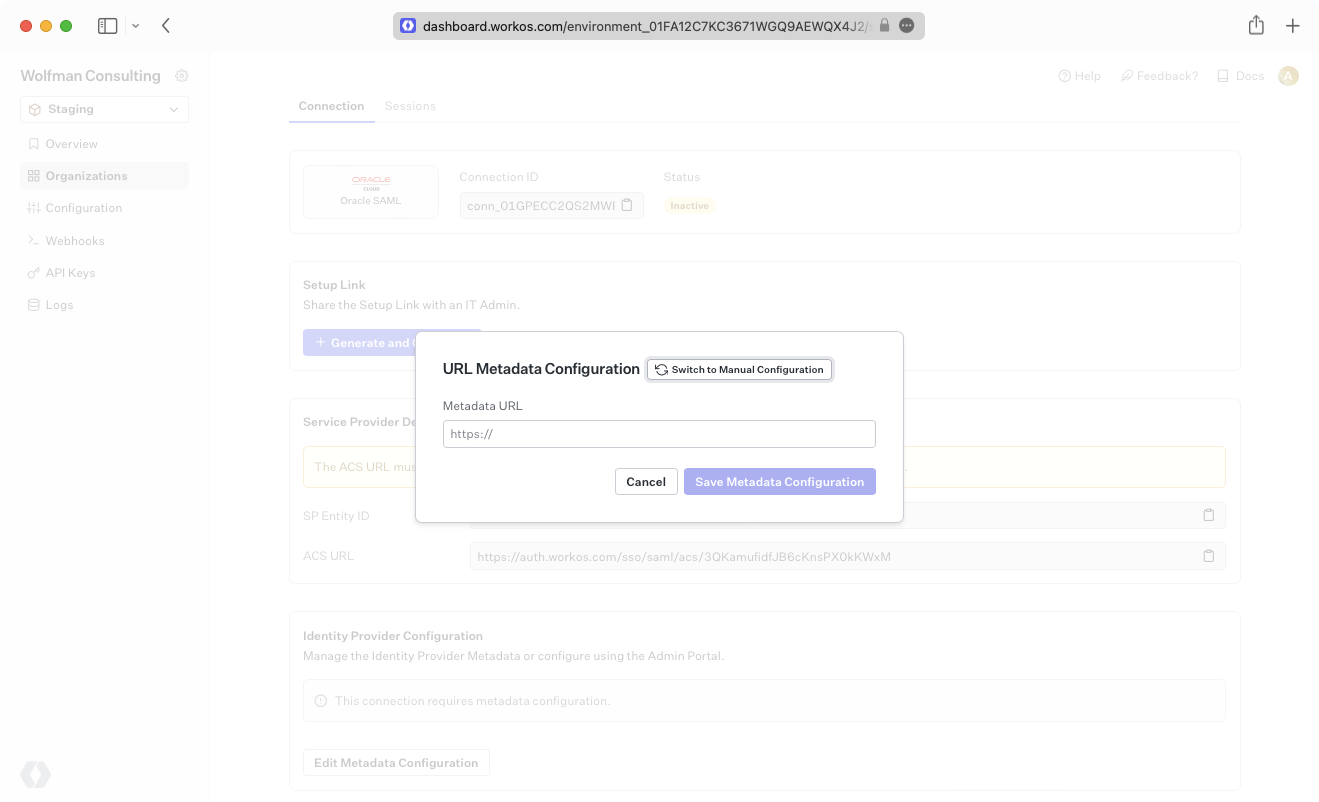
|
|
71
|
+
|
|
72
|
+
Alternatively, you can manually configure the connection by providing the IdP URI (Entity ID), [IdP SSO URL](/glossary/idp-sso-url) and X.509 Certificate.
|
|
73
|
+
|
|
74
|
+
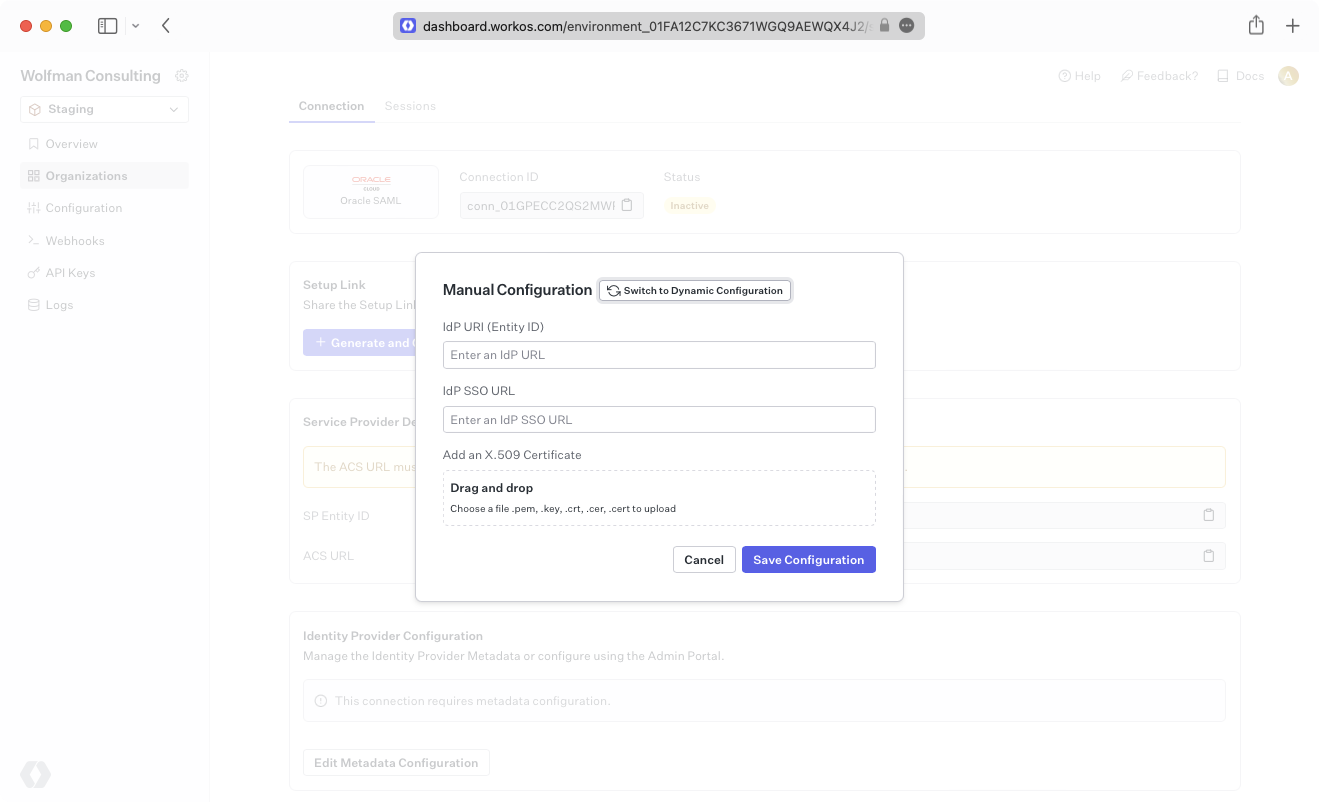
|
|
75
|
+
|
|
76
|
+
Your connection will then be Active and good to go!
|