@workos/mcp-docs-server 0.1.0
This diff represents the content of publicly available package versions that have been released to one of the supported registries. The information contained in this diff is provided for informational purposes only and reflects changes between package versions as they appear in their respective public registries.
- package/.docs/organized/changelogs/workos-platform.json +277 -0
- package/.docs/organized/docs/admin-portal/_navigation.mdx +16 -0
- package/.docs/organized/docs/admin-portal/custom-branding.mdx +111 -0
- package/.docs/organized/docs/admin-portal/example-apps.mdx +46 -0
- package/.docs/organized/docs/admin-portal/index.mdx +240 -0
- package/.docs/organized/docs/audit-logs/_navigation.mdx +22 -0
- package/.docs/organized/docs/audit-logs/admin-portal.mdx +20 -0
- package/.docs/organized/docs/audit-logs/editing-events.mdx +27 -0
- package/.docs/organized/docs/audit-logs/exporting-events.mdx +29 -0
- package/.docs/organized/docs/audit-logs/index.mdx +110 -0
- package/.docs/organized/docs/audit-logs/log-streams.mdx +56 -0
- package/.docs/organized/docs/audit-logs/metadata-schema.mdx +21 -0
- package/.docs/organized/docs/custom-domains/_navigation.mdx +16 -0
- package/.docs/organized/docs/custom-domains/admin-portal.mdx +38 -0
- package/.docs/organized/docs/custom-domains/auth-api.mdx +59 -0
- package/.docs/organized/docs/custom-domains/authkit.mdx +36 -0
- package/.docs/organized/docs/custom-domains/email.mdx +41 -0
- package/.docs/organized/docs/custom-domains/index.mdx +19 -0
- package/.docs/organized/docs/dashboard.mdx +244 -0
- package/.docs/organized/docs/demo/_navigation.mdx +26 -0
- package/.docs/organized/docs/demo/accordion.mdx +34 -0
- package/.docs/organized/docs/demo/checklist.mdx +33 -0
- package/.docs/organized/docs/demo/code-block.mdx +185 -0
- package/.docs/organized/docs/demo/definition-list.mdx +35 -0
- package/.docs/organized/docs/demo/index.mdx +7 -0
- package/.docs/organized/docs/demo/punctuation.mdx +37 -0
- package/.docs/organized/docs/demo/replacements.mdx +26 -0
- package/.docs/organized/docs/demo/table.mdx +26 -0
- package/.docs/organized/docs/demo/tabs.mdx +17 -0
- package/.docs/organized/docs/directory-sync/_navigation.mdx +28 -0
- package/.docs/organized/docs/directory-sync/attributes.mdx +209 -0
- package/.docs/organized/docs/directory-sync/example-apps.mdx +46 -0
- package/.docs/organized/docs/directory-sync/handle-inactive-users.mdx +52 -0
- package/.docs/organized/docs/directory-sync/identity-provider-role-assignment.mdx +134 -0
- package/.docs/organized/docs/directory-sync/index.mdx +107 -0
- package/.docs/organized/docs/directory-sync/quick-start.mdx +129 -0
- package/.docs/organized/docs/directory-sync/understanding-events.mdx +209 -0
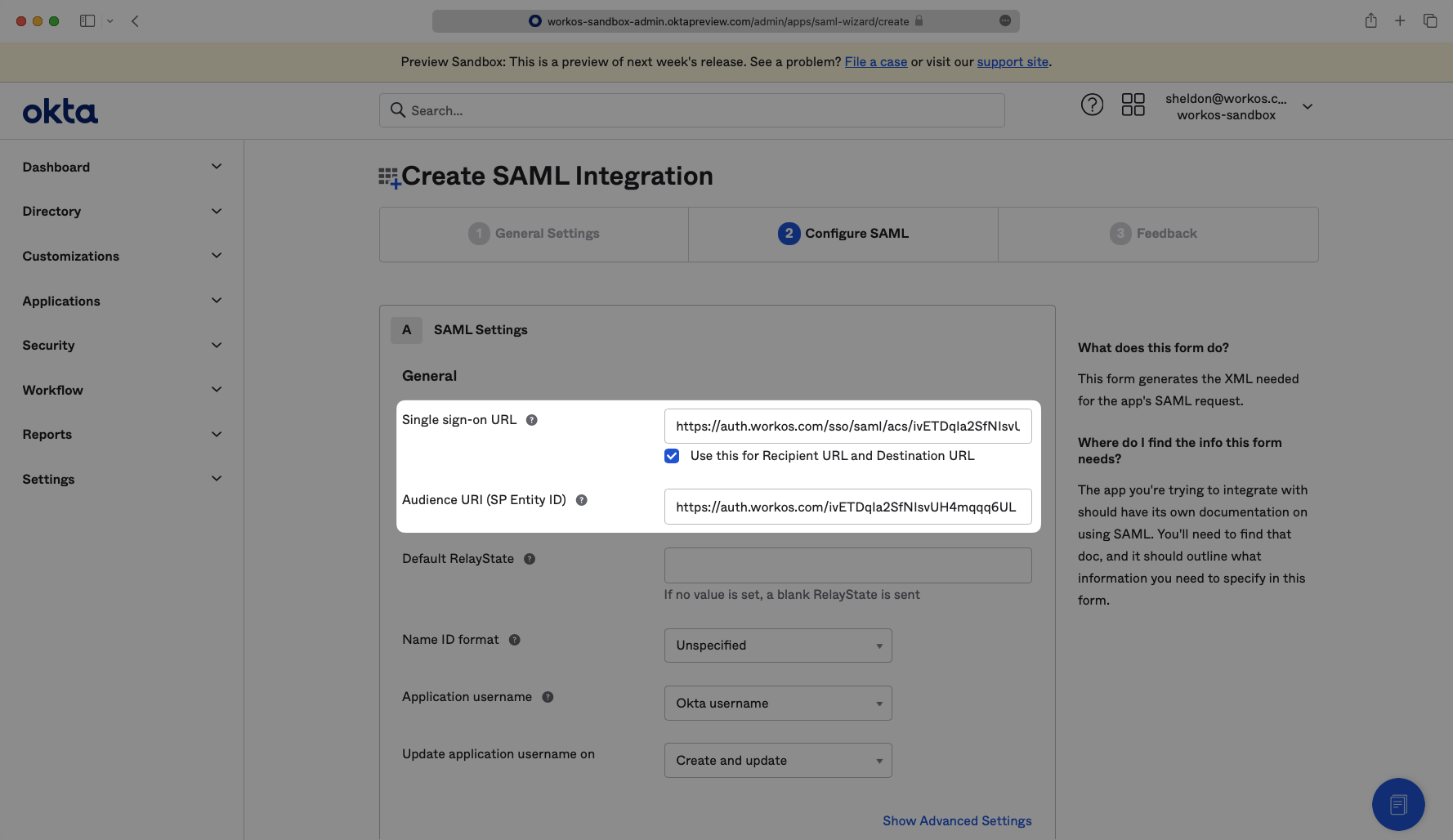
- package/.docs/organized/docs/domain-verification/_navigation.mdx +10 -0
- package/.docs/organized/docs/domain-verification/api.mdx +60 -0
- package/.docs/organized/docs/domain-verification/index.mdx +67 -0
- package/.docs/organized/docs/email.mdx +109 -0
- package/.docs/organized/docs/events/_navigation.mdx +22 -0
- package/.docs/organized/docs/events/data-syncing/data-reconciliation.mdx +56 -0
- package/.docs/organized/docs/events/data-syncing/events-api.mdx +114 -0
- package/.docs/organized/docs/events/data-syncing/index.mdx +66 -0
- package/.docs/organized/docs/events/data-syncing/webhooks.mdx +173 -0
- package/.docs/organized/docs/events/index.mdx +783 -0
- package/.docs/organized/docs/events/observability/datadog.mdx +76 -0
- package/.docs/organized/docs/fga/_navigation.mdx +64 -0
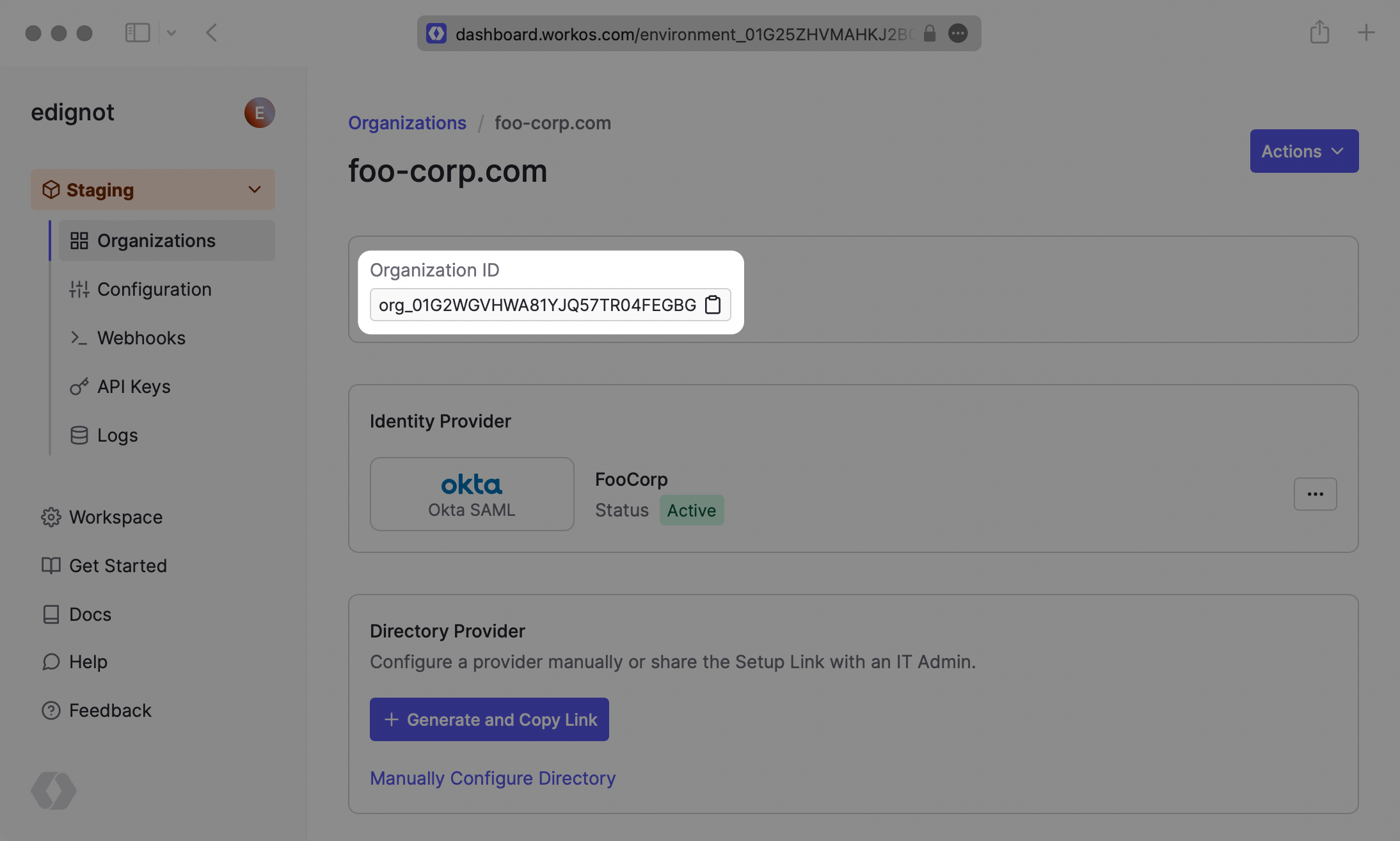
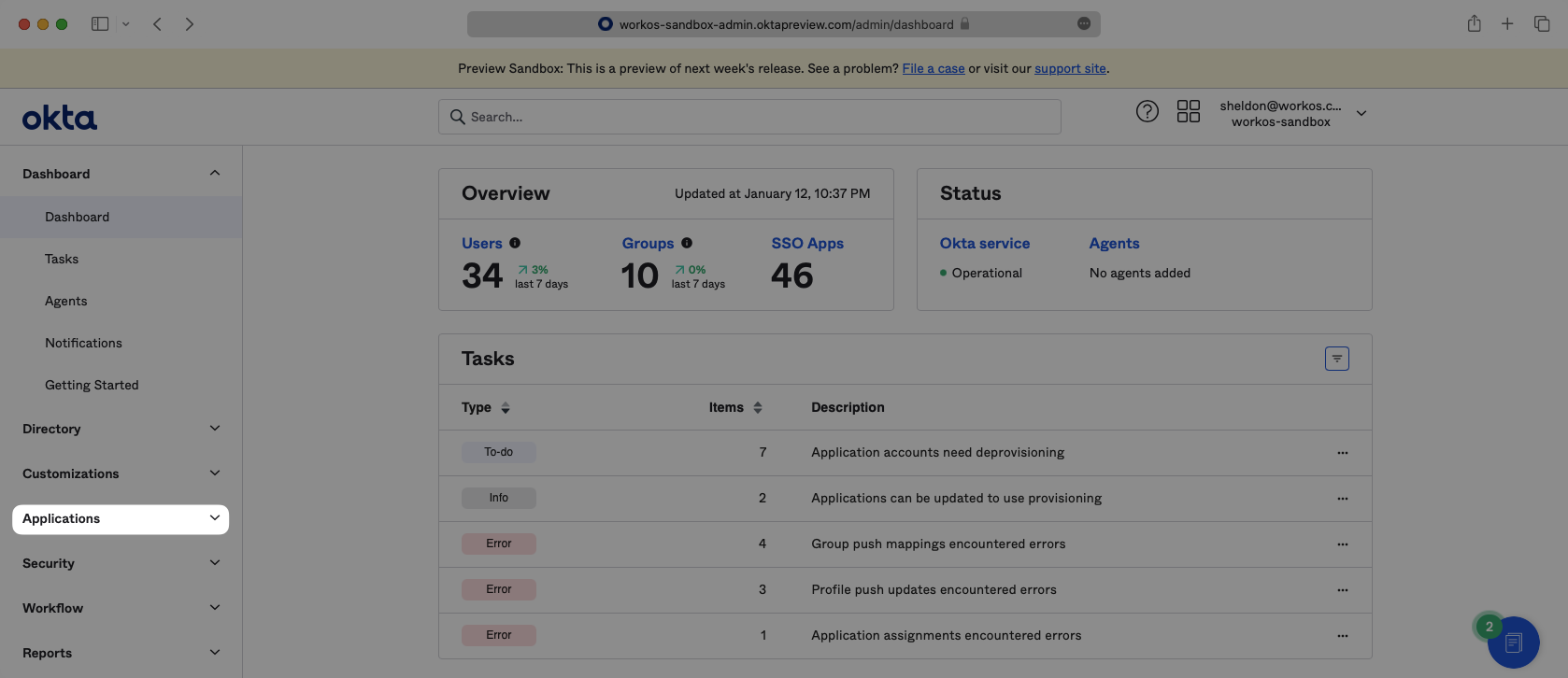
- package/.docs/organized/docs/fga/identity-provider-sessions.mdx +68 -0
- package/.docs/organized/docs/fga/index.mdx +60 -0
- package/.docs/organized/docs/fga/local-development.mdx +155 -0
- package/.docs/organized/docs/fga/modeling/abac.mdx +107 -0
- package/.docs/organized/docs/fga/modeling/blocklist.mdx +84 -0
- package/.docs/organized/docs/fga/modeling/conditional-roles.mdx +99 -0
- package/.docs/organized/docs/fga/modeling/custom-roles.mdx +90 -0
- package/.docs/organized/docs/fga/modeling/entitlements.mdx +127 -0
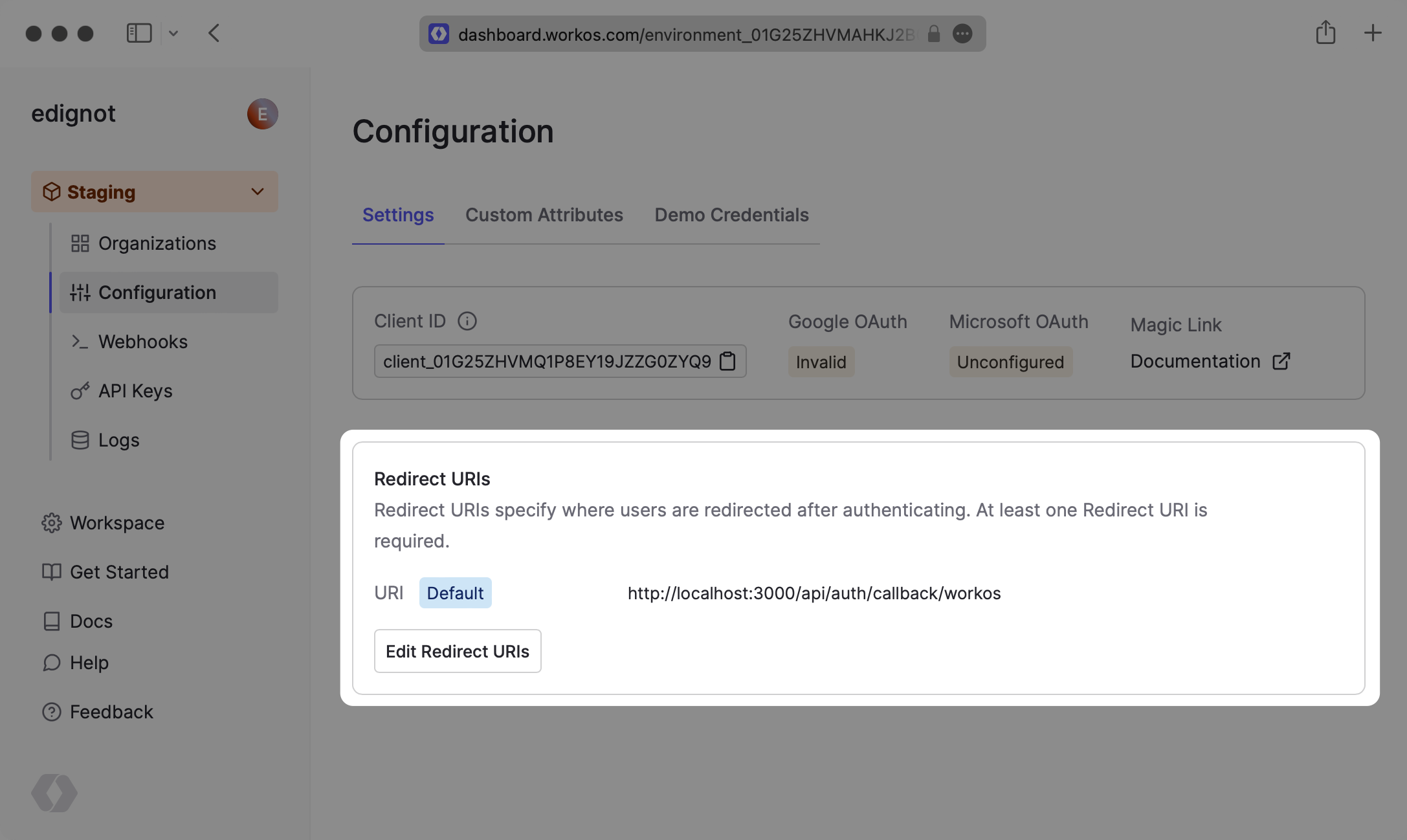
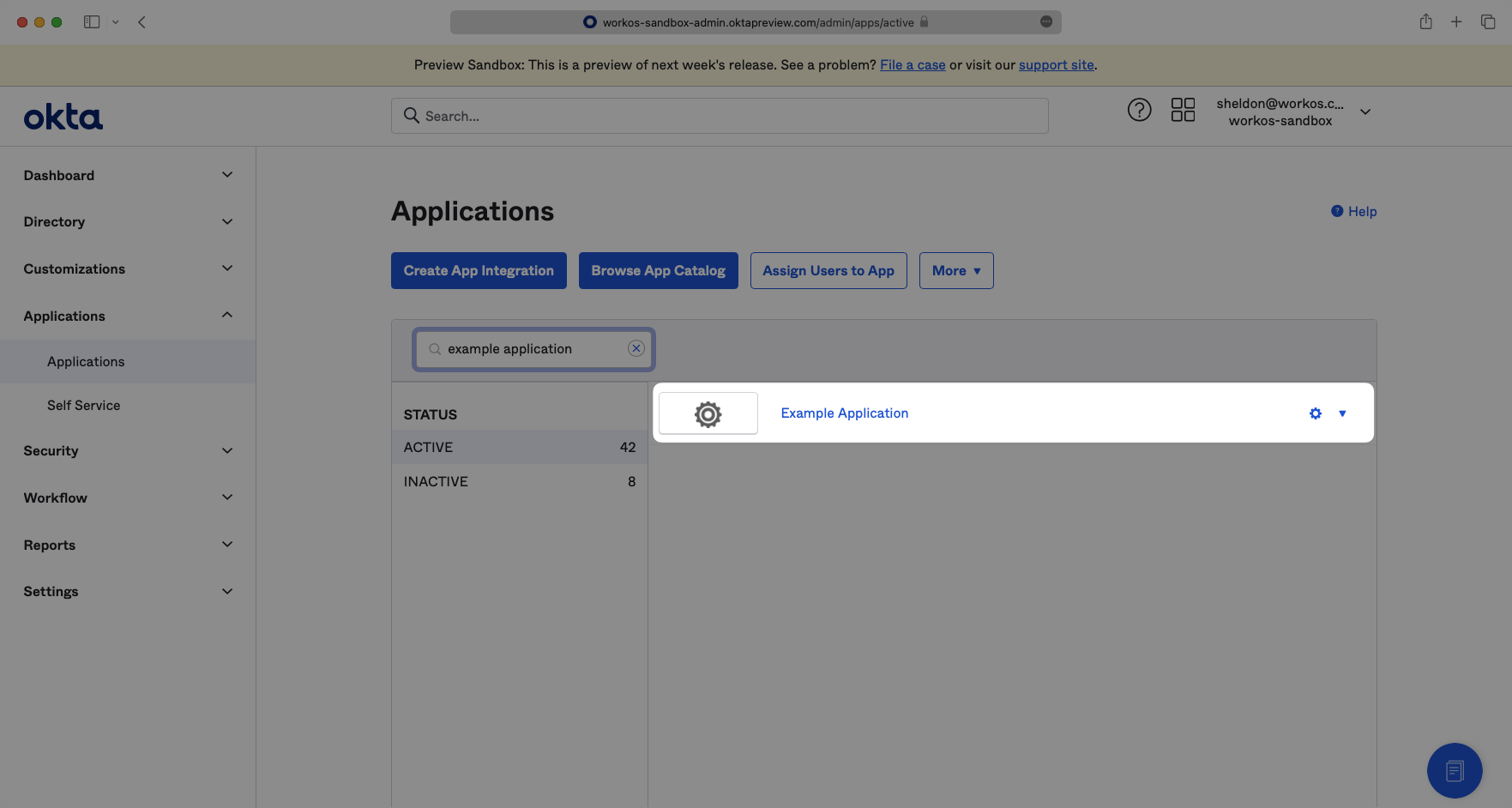
- package/.docs/organized/docs/fga/modeling/managed-service-provider.mdx +131 -0
- package/.docs/organized/docs/fga/modeling/org-roles-and-permissions.mdx +95 -0
- package/.docs/organized/docs/fga/modeling/policy-context.mdx +231 -0
- package/.docs/organized/docs/fga/modeling/public-access.mdx +61 -0
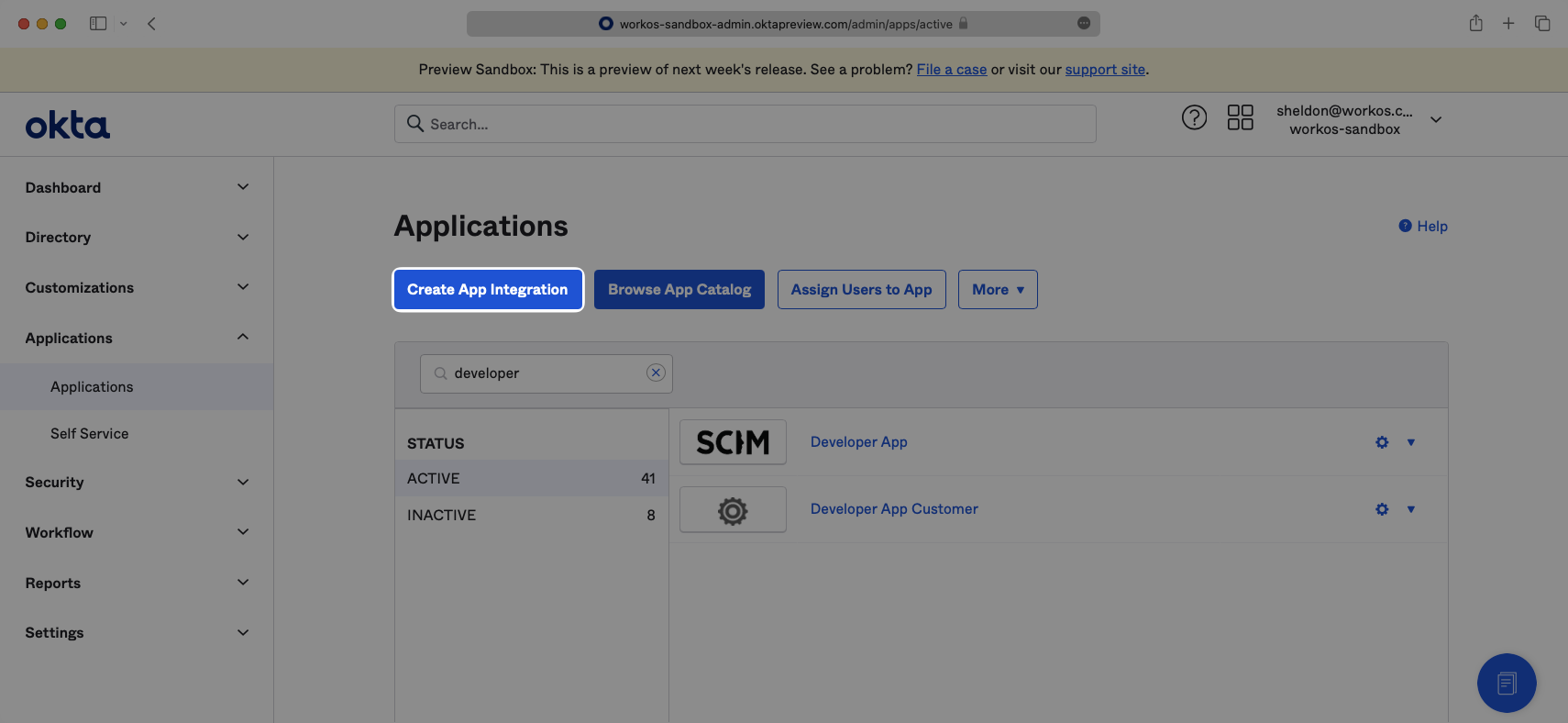
- package/.docs/organized/docs/fga/modeling/shareable-content.mdx +106 -0
- package/.docs/organized/docs/fga/modeling/superusers.mdx +74 -0
- package/.docs/organized/docs/fga/modeling/user-groups.mdx +92 -0
- package/.docs/organized/docs/fga/operations-usage.mdx +104 -0
- package/.docs/organized/docs/fga/playground.mdx +12 -0
- package/.docs/organized/docs/fga/policies.mdx +462 -0
- package/.docs/organized/docs/fga/query-language.mdx +112 -0
- package/.docs/organized/docs/fga/quick-start.mdx +174 -0
- package/.docs/organized/docs/fga/resources.mdx +92 -0
- package/.docs/organized/docs/fga/schema-management.mdx +224 -0
- package/.docs/organized/docs/fga/schema.mdx +388 -0
- package/.docs/organized/docs/fga/warrant-tokens.mdx +44 -0
- package/.docs/organized/docs/fga/warrants.mdx +92 -0
- package/.docs/organized/docs/glossary.mdx +184 -0
- package/.docs/organized/docs/integrations/_navigation.mdx +6 -0
- package/.docs/organized/docs/integrations/access-people-hr.mdx +87 -0
- package/.docs/organized/docs/integrations/adp-oidc.mdx +103 -0
- package/.docs/organized/docs/integrations/apple.mdx +169 -0
- package/.docs/organized/docs/integrations/auth0-directory-sync.mdx +78 -0
- package/.docs/organized/docs/integrations/auth0-enterprise-connection.mdx +92 -0
- package/.docs/organized/docs/integrations/auth0-saml.mdx +81 -0
- package/.docs/organized/docs/integrations/aws-cognito.mdx +81 -0
- package/.docs/organized/docs/integrations/bamboohr.mdx +90 -0
- package/.docs/organized/docs/integrations/breathe-hr.mdx +89 -0
- package/.docs/organized/docs/integrations/bubble.mdx +129 -0
- package/.docs/organized/docs/integrations/cas-saml.mdx +65 -0
- package/.docs/organized/docs/integrations/cezanne.mdx +74 -0
- package/.docs/organized/docs/integrations/classlink-saml.mdx +100 -0
- package/.docs/organized/docs/integrations/cloudflare-saml.mdx +164 -0
- package/.docs/organized/docs/integrations/cyberark-saml.mdx +138 -0
- package/.docs/organized/docs/integrations/cyberark-scim.mdx +100 -0
- package/.docs/organized/docs/integrations/duo-saml.mdx +127 -0
- package/.docs/organized/docs/integrations/entra-id-saml.mdx +156 -0
- package/.docs/organized/docs/integrations/entra-id-scim.mdx +218 -0
- package/.docs/organized/docs/integrations/firebase.mdx +98 -0
- package/.docs/organized/docs/integrations/fourth.mdx +66 -0
- package/.docs/organized/docs/integrations/github-oauth.mdx +85 -0
- package/.docs/organized/docs/integrations/gitlab-oauth.mdx +81 -0
- package/.docs/organized/docs/integrations/google-directory-sync.mdx +86 -0
- package/.docs/organized/docs/integrations/google-oauth.mdx +173 -0
- package/.docs/organized/docs/integrations/google-saml.mdx +135 -0
- package/.docs/organized/docs/integrations/hibob.mdx +98 -0
- package/.docs/organized/docs/integrations/jumpcloud-saml.mdx +96 -0
- package/.docs/organized/docs/integrations/jumpcloud-scim.mdx +106 -0
- package/.docs/organized/docs/integrations/keycloak-saml.mdx +128 -0
- package/.docs/organized/docs/integrations/lastpass-saml.mdx +134 -0
- package/.docs/organized/docs/integrations/linkedin-oauth.mdx +77 -0
- package/.docs/organized/docs/integrations/login-gov-oidc.mdx +103 -0
- package/.docs/organized/docs/integrations/microsoft-ad-fs-saml.mdx +96 -0
- package/.docs/organized/docs/integrations/microsoft-oauth.mdx +101 -0
- package/.docs/organized/docs/integrations/miniorange-saml.mdx +124 -0
- package/.docs/organized/docs/integrations/net-iq-saml.mdx +75 -0
- package/.docs/organized/docs/integrations/next-auth.mdx +257 -0
- package/.docs/organized/docs/integrations/oidc.mdx +64 -0
- package/.docs/organized/docs/integrations/okta-saml.mdx +144 -0
- package/.docs/organized/docs/integrations/okta-scim.mdx +210 -0
- package/.docs/organized/docs/integrations/onelogin-saml.mdx +131 -0
- package/.docs/organized/docs/integrations/onelogin-scim.mdx +150 -0
- package/.docs/organized/docs/integrations/oracle-saml.mdx +76 -0
- package/.docs/organized/docs/integrations/pingfederate-saml.mdx +103 -0
- package/.docs/organized/docs/integrations/pingfederate-scim.mdx +150 -0
- package/.docs/organized/docs/integrations/pingone-saml.mdx +86 -0
- package/.docs/organized/docs/integrations/react-native-expo.mdx +93 -0
- package/.docs/organized/docs/integrations/rippling-saml.mdx +174 -0
- package/.docs/organized/docs/integrations/rippling-scim.mdx +148 -0
- package/.docs/organized/docs/integrations/salesforce-saml.mdx +143 -0
- package/.docs/organized/docs/integrations/saml.mdx +64 -0
- package/.docs/organized/docs/integrations/scim.mdx +64 -0
- package/.docs/organized/docs/integrations/sftp.mdx +150 -0
- package/.docs/organized/docs/integrations/shibboleth-generic-saml.mdx +84 -0
- package/.docs/organized/docs/integrations/shibboleth-unsolicited-saml.mdx +84 -0
- package/.docs/organized/docs/integrations/simple-saml-php.mdx +78 -0
- package/.docs/organized/docs/integrations/slack-oauth.mdx +102 -0
- package/.docs/organized/docs/integrations/supabase.mdx +68 -0
- package/.docs/organized/docs/integrations/vmware-saml.mdx +100 -0
- package/.docs/organized/docs/integrations/workday.mdx +156 -0
- package/.docs/organized/docs/integrations/xero-oauth.mdx +83 -0
- package/.docs/organized/docs/magic-link/_navigation.mdx +16 -0
- package/.docs/organized/docs/magic-link/example-apps.mdx +46 -0
- package/.docs/organized/docs/magic-link/index.mdx +199 -0
- package/.docs/organized/docs/magic-link/launch-checklist.mdx +27 -0
- package/.docs/organized/docs/mfa/_navigation.mdx +18 -0
- package/.docs/organized/docs/mfa/example-apps.mdx +46 -0
- package/.docs/organized/docs/mfa/index.mdx +140 -0
- package/.docs/organized/docs/mfa/ux/enrollment.mdx +74 -0
- package/.docs/organized/docs/mfa/ux/sign-in.mdx +30 -0
- package/.docs/organized/docs/migrate/_navigation.mdx +6 -0
- package/.docs/organized/docs/migrate/auth0.mdx +98 -0
- package/.docs/organized/docs/migrate/aws-cognito.mdx +115 -0
- package/.docs/organized/docs/migrate/clerk.mdx +106 -0
- package/.docs/organized/docs/migrate/firebase.mdx +80 -0
- package/.docs/organized/docs/migrate/other-services.mdx +179 -0
- package/.docs/organized/docs/migrate/standalone-sso.mdx +105 -0
- package/.docs/organized/docs/on-prem-deployment.mdx +119 -0
- package/.docs/organized/docs/postman.mdx +90 -0
- package/.docs/organized/docs/reference/_navigation.mdx +527 -0
- package/.docs/organized/docs/reference/admin-portal/index.mdx +6 -0
- package/.docs/organized/docs/reference/admin-portal/portal-link/generate.mdx +268 -0
- package/.docs/organized/docs/reference/admin-portal/portal-link/index.mdx +15 -0
- package/.docs/organized/docs/reference/admin-portal/provider-icons/index.mdx +52 -0
- package/.docs/organized/docs/reference/api-keys.mdx +22 -0
- package/.docs/organized/docs/reference/audit-logs/audit-log-export.mdx +239 -0
- package/.docs/organized/docs/reference/audit-logs/audit-log-schema.mdx +69 -0
- package/.docs/organized/docs/reference/audit-logs/create-event.mdx +673 -0
- package/.docs/organized/docs/reference/audit-logs/create-export.mdx +308 -0
- package/.docs/organized/docs/reference/audit-logs/create-schema.mdx +95 -0
- package/.docs/organized/docs/reference/audit-logs/get-export.mdx +117 -0
- package/.docs/organized/docs/reference/audit-logs/get-retention.mdx +34 -0
- package/.docs/organized/docs/reference/audit-logs/index.mdx +6 -0
- package/.docs/organized/docs/reference/audit-logs/list-actions.mdx +40 -0
- package/.docs/organized/docs/reference/audit-logs/list-schemas.mdx +40 -0
- package/.docs/organized/docs/reference/audit-logs/set-retention.mdx +39 -0
- package/.docs/organized/docs/reference/client-libraries.mdx +19 -0
- package/.docs/organized/docs/reference/directory-sync/directory/delete.mdx +90 -0
- package/.docs/organized/docs/reference/directory-sync/directory/get.mdx +105 -0
- package/.docs/organized/docs/reference/directory-sync/directory/index.mdx +385 -0
- package/.docs/organized/docs/reference/directory-sync/directory/list.mdx +281 -0
- package/.docs/organized/docs/reference/directory-sync/directory-group/get.mdx +105 -0
- package/.docs/organized/docs/reference/directory-sync/directory-group/index.mdx +277 -0
- package/.docs/organized/docs/reference/directory-sync/directory-group/list.mdx +295 -0
- package/.docs/organized/docs/reference/directory-sync/directory-user/get.mdx +112 -0
- package/.docs/organized/docs/reference/directory-sync/directory-user/index.mdx +470 -0
- package/.docs/organized/docs/reference/directory-sync/directory-user/list.mdx +304 -0
- package/.docs/organized/docs/reference/directory-sync/index.mdx +10 -0
- package/.docs/organized/docs/reference/domain-verification/create.mdx +38 -0
- package/.docs/organized/docs/reference/domain-verification/get.mdx +32 -0
- package/.docs/organized/docs/reference/domain-verification/index.mdx +84 -0
- package/.docs/organized/docs/reference/domain-verification/verify.mdx +36 -0
- package/.docs/organized/docs/reference/errors.mdx +30 -0
- package/.docs/organized/docs/reference/events/index.mdx +9 -0
- package/.docs/organized/docs/reference/events/list.mdx +246 -0
- package/.docs/organized/docs/reference/fga/batch-check.mdx +277 -0
- package/.docs/organized/docs/reference/fga/check.mdx +563 -0
- package/.docs/organized/docs/reference/fga/index.mdx +6 -0
- package/.docs/organized/docs/reference/fga/policy/create.mdx +27 -0
- package/.docs/organized/docs/reference/fga/policy/delete.mdx +18 -0
- package/.docs/organized/docs/reference/fga/policy/get.mdx +23 -0
- package/.docs/organized/docs/reference/fga/policy/index.mdx +52 -0
- package/.docs/organized/docs/reference/fga/policy/list.mdx +41 -0
- package/.docs/organized/docs/reference/fga/policy/update.mdx +26 -0
- package/.docs/organized/docs/reference/fga/query.mdx +375 -0
- package/.docs/organized/docs/reference/fga/resource/batch-write.mdx +175 -0
- package/.docs/organized/docs/reference/fga/resource/create.mdx +130 -0
- package/.docs/organized/docs/reference/fga/resource/delete.mdx +86 -0
- package/.docs/organized/docs/reference/fga/resource/get.mdx +88 -0
- package/.docs/organized/docs/reference/fga/resource/index.mdx +98 -0
- package/.docs/organized/docs/reference/fga/resource/list.mdx +188 -0
- package/.docs/organized/docs/reference/fga/resource/update.mdx +115 -0
- package/.docs/organized/docs/reference/fga/resource-type/apply.mdx +35 -0
- package/.docs/organized/docs/reference/fga/resource-type/create.mdx +24 -0
- package/.docs/organized/docs/reference/fga/resource-type/delete.mdx +22 -0
- package/.docs/organized/docs/reference/fga/resource-type/get.mdx +23 -0
- package/.docs/organized/docs/reference/fga/resource-type/index.mdx +68 -0
- package/.docs/organized/docs/reference/fga/resource-type/list.mdx +36 -0
- package/.docs/organized/docs/reference/fga/resource-type/update.mdx +23 -0
- package/.docs/organized/docs/reference/fga/schema/apply.mdx +42 -0
- package/.docs/organized/docs/reference/fga/schema/get.mdx +24 -0
- package/.docs/organized/docs/reference/fga/schema/index.mdx +39 -0
- package/.docs/organized/docs/reference/fga/warrant/batch-write.mdx +226 -0
- package/.docs/organized/docs/reference/fga/warrant/create.mdx +215 -0
- package/.docs/organized/docs/reference/fga/warrant/delete.mdx +212 -0
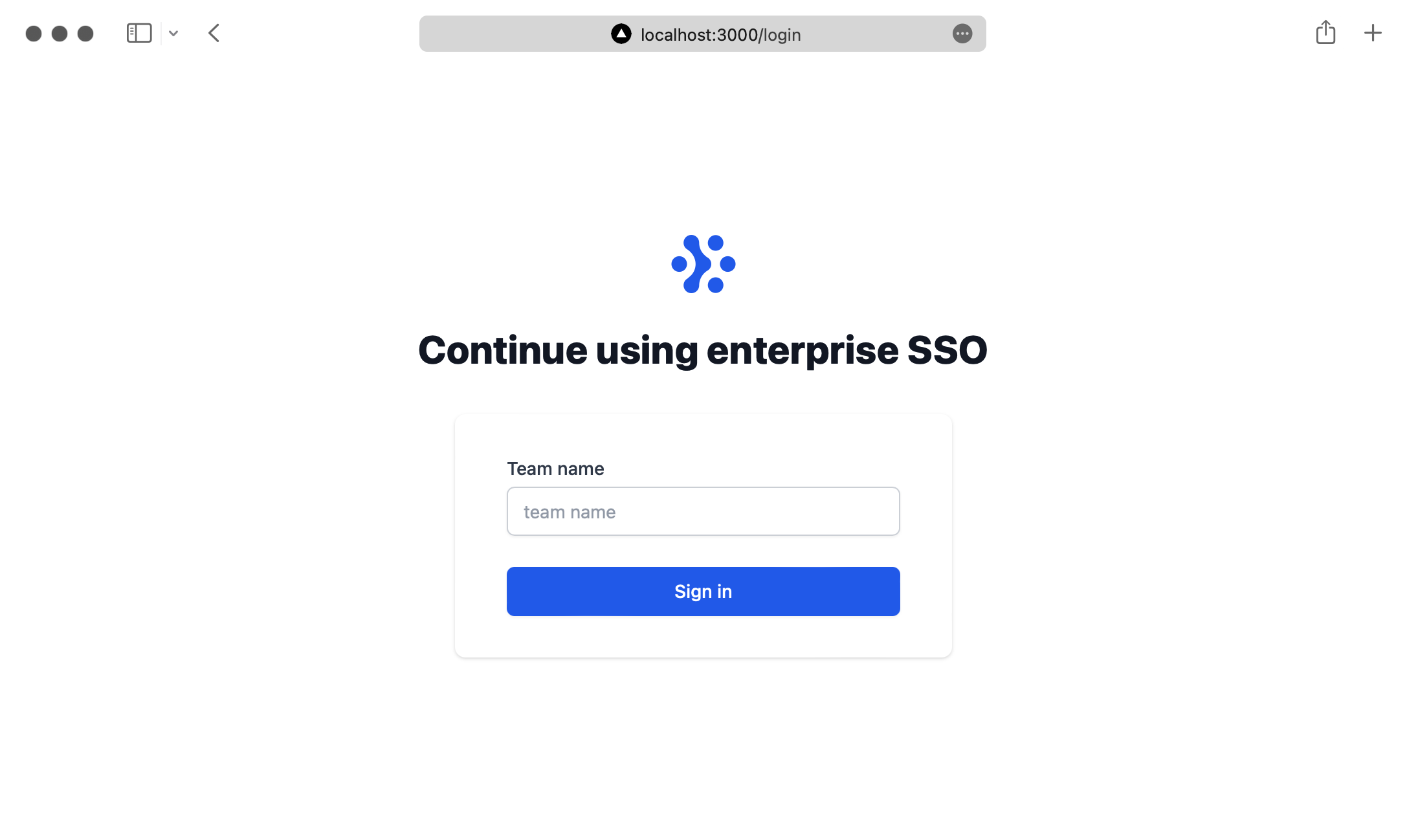
- package/.docs/organized/docs/reference/fga/warrant/index.mdx +186 -0
- package/.docs/organized/docs/reference/fga/warrant/list.mdx +282 -0
- package/.docs/organized/docs/reference/idempotency.mdx +21 -0
- package/.docs/organized/docs/reference/index.mdx +194 -0
- package/.docs/organized/docs/reference/magic-link/index.mdx +8 -0
- package/.docs/organized/docs/reference/magic-link/passwordless-session/create.mdx +268 -0
- package/.docs/organized/docs/reference/magic-link/passwordless-session/index.mdx +203 -0
- package/.docs/organized/docs/reference/magic-link/passwordless-session/send-email.mdx +158 -0
- package/.docs/organized/docs/reference/mfa/authentication-challenge.mdx +217 -0
- package/.docs/organized/docs/reference/mfa/authentication-factor.mdx +381 -0
- package/.docs/organized/docs/reference/mfa/challenge-factor.mdx +170 -0
- package/.docs/organized/docs/reference/mfa/delete-factor.mdx +93 -0
- package/.docs/organized/docs/reference/mfa/enroll-factor.mdx +241 -0
- package/.docs/organized/docs/reference/mfa/get-factor.mdx +108 -0
- package/.docs/organized/docs/reference/mfa/index.mdx +8 -0
- package/.docs/organized/docs/reference/mfa/verify-challenge.mdx +228 -0
- package/.docs/organized/docs/reference/organization/create.mdx +216 -0
- package/.docs/organized/docs/reference/organization/delete.mdx +89 -0
- package/.docs/organized/docs/reference/organization/get-by-external-id.mdx +40 -0
- package/.docs/organized/docs/reference/organization/get.mdx +104 -0
- package/.docs/organized/docs/reference/organization/index.mdx +274 -0
- package/.docs/organized/docs/reference/organization/list.mdx +258 -0
- package/.docs/organized/docs/reference/organization/update.mdx +236 -0
- package/.docs/organized/docs/reference/organization-domain.mdx +189 -0
- package/.docs/organized/docs/reference/pagination.mdx +244 -0
- package/.docs/organized/docs/reference/radar/attempts/create.mdx +115 -0
- package/.docs/organized/docs/reference/radar/attempts/index.mdx +7 -0
- package/.docs/organized/docs/reference/radar/attempts/update.mdx +34 -0
- package/.docs/organized/docs/reference/radar/index.mdx +8 -0
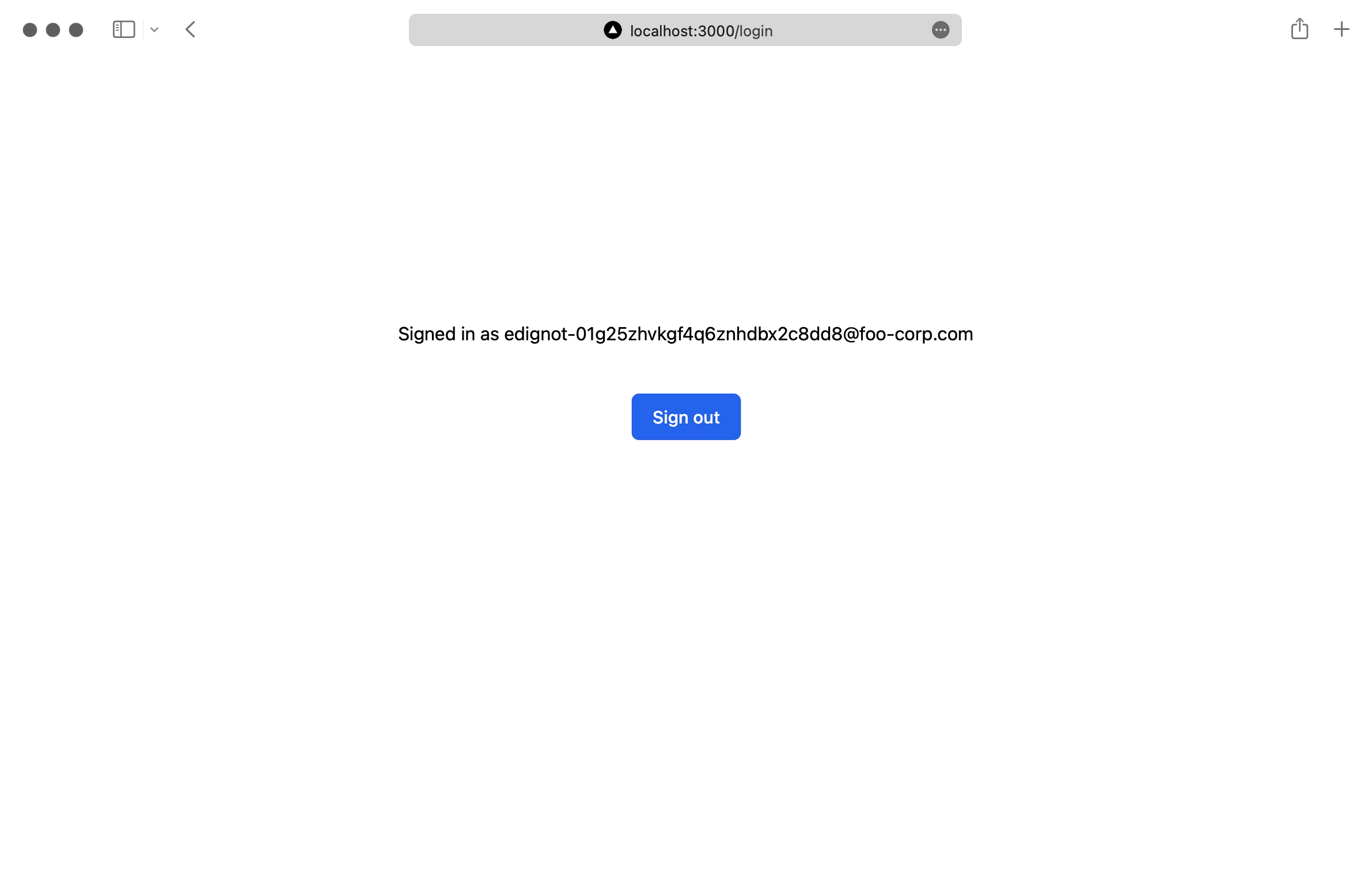
- package/.docs/organized/docs/reference/radar/lists/delete.mdx +36 -0
- package/.docs/organized/docs/reference/radar/lists/index.mdx +7 -0
- package/.docs/organized/docs/reference/radar/lists/update.mdx +36 -0
- package/.docs/organized/docs/reference/rate-limits.mdx +50 -0
- package/.docs/organized/docs/reference/roles/index.mdx +268 -0
- package/.docs/organized/docs/reference/roles/list-for-organization.mdx +152 -0
- package/.docs/organized/docs/reference/sso/connection/delete.mdx +89 -0
- package/.docs/organized/docs/reference/sso/connection/get.mdx +104 -0
- package/.docs/organized/docs/reference/sso/connection/index.mdx +388 -0
- package/.docs/organized/docs/reference/sso/connection/list.mdx +320 -0
- package/.docs/organized/docs/reference/sso/get-authorization-url/error-codes.mdx +28 -0
- package/.docs/organized/docs/reference/sso/get-authorization-url/index.mdx +434 -0
- package/.docs/organized/docs/reference/sso/get-authorization-url/redirect-uri.mdx +21 -0
- package/.docs/organized/docs/reference/sso/index.mdx +8 -0
- package/.docs/organized/docs/reference/sso/logout/authorize.mdx +47 -0
- package/.docs/organized/docs/reference/sso/logout/index.mdx +14 -0
- package/.docs/organized/docs/reference/sso/logout/redirect.mdx +32 -0
- package/.docs/organized/docs/reference/sso/profile/get-profile-and-token.mdx +229 -0
- package/.docs/organized/docs/reference/sso/profile/get-user-profile.mdx +127 -0
- package/.docs/organized/docs/reference/sso/profile/index.mdx +364 -0
- package/.docs/organized/docs/reference/testing.mdx +8 -0
- package/.docs/organized/docs/reference/user-management/access-token/index.mdx +13 -0
- package/.docs/organized/docs/reference/user-management/authentication/code.mdx +448 -0
- package/.docs/organized/docs/reference/user-management/authentication/email-verification.mdx +359 -0
- package/.docs/organized/docs/reference/user-management/authentication/get-authorization-url/error-codes.mdx +25 -0
- package/.docs/organized/docs/reference/user-management/authentication/get-authorization-url/index.mdx +425 -0
- package/.docs/organized/docs/reference/user-management/authentication/get-authorization-url/pkce.mdx +9 -0
- package/.docs/organized/docs/reference/user-management/authentication/get-authorization-url/redirect-uri.mdx +23 -0
- package/.docs/organized/docs/reference/user-management/authentication/index.mdx +66 -0
- package/.docs/organized/docs/reference/user-management/authentication/magic-auth.mdx +353 -0
- package/.docs/organized/docs/reference/user-management/authentication/organization-selection.mdx +349 -0
- package/.docs/organized/docs/reference/user-management/authentication/password.mdx +350 -0
- package/.docs/organized/docs/reference/user-management/authentication/refresh-and-seal-session-data.mdx +57 -0
- package/.docs/organized/docs/reference/user-management/authentication/refresh-token.mdx +381 -0
- package/.docs/organized/docs/reference/user-management/authentication/session-cookie.mdx +79 -0
- package/.docs/organized/docs/reference/user-management/authentication/totp.mdx +369 -0
- package/.docs/organized/docs/reference/user-management/authentication-errors/email-verification-required-error.mdx +42 -0
- package/.docs/organized/docs/reference/user-management/authentication-errors/index.mdx +20 -0
- package/.docs/organized/docs/reference/user-management/authentication-errors/mfa-challenge-error.mdx +44 -0
- package/.docs/organized/docs/reference/user-management/authentication-errors/mfa-enrollment-error.mdx +37 -0
- package/.docs/organized/docs/reference/user-management/authentication-errors/organization-authentication-required-error.mdx +68 -0
- package/.docs/organized/docs/reference/user-management/authentication-errors/organization-selection-error.mdx +44 -0
- package/.docs/organized/docs/reference/user-management/authentication-errors/sso-required-error.mdx +51 -0
- package/.docs/organized/docs/reference/user-management/email-verification/get.mdx +88 -0
- package/.docs/organized/docs/reference/user-management/email-verification/index.mdx +227 -0
- package/.docs/organized/docs/reference/user-management/identity/index.mdx +74 -0
- package/.docs/organized/docs/reference/user-management/identity/list.mdx +52 -0
- package/.docs/organized/docs/reference/user-management/index.mdx +13 -0
- package/.docs/organized/docs/reference/user-management/invitation/accept.mdx +39 -0
- package/.docs/organized/docs/reference/user-management/invitation/find-by-token.mdx +87 -0
- package/.docs/organized/docs/reference/user-management/invitation/get.mdx +87 -0
- package/.docs/organized/docs/reference/user-management/invitation/index.mdx +374 -0
- package/.docs/organized/docs/reference/user-management/invitation/list.mdx +247 -0
- package/.docs/organized/docs/reference/user-management/invitation/revoke.mdx +90 -0
- package/.docs/organized/docs/reference/user-management/invitation/send.mdx +230 -0
- package/.docs/organized/docs/reference/user-management/logout/get-logout-url-from-session-cookie.mdx +52 -0
- package/.docs/organized/docs/reference/user-management/logout/get-logout-url.mdx +147 -0
- package/.docs/organized/docs/reference/user-management/logout/index.mdx +26 -0
- package/.docs/organized/docs/reference/user-management/magic-auth/create.mdx +148 -0
- package/.docs/organized/docs/reference/user-management/magic-auth/get.mdx +88 -0
- package/.docs/organized/docs/reference/user-management/magic-auth/index.mdx +225 -0
- package/.docs/organized/docs/reference/user-management/mfa/authentication-challenge.mdx +194 -0
- package/.docs/organized/docs/reference/user-management/mfa/authentication-factor.mdx +324 -0
- package/.docs/organized/docs/reference/user-management/mfa/enroll-auth-factor.mdx +296 -0
- package/.docs/organized/docs/reference/user-management/mfa/index.mdx +5 -0
- package/.docs/organized/docs/reference/user-management/mfa/list-auth-factors.mdx +194 -0
- package/.docs/organized/docs/reference/user-management/organization-membership/create.mdx +155 -0
- package/.docs/organized/docs/reference/user-management/organization-membership/deactivate.mdx +106 -0
- package/.docs/organized/docs/reference/user-management/organization-membership/delete.mdx +76 -0
- package/.docs/organized/docs/reference/user-management/organization-membership/get.mdx +95 -0
- package/.docs/organized/docs/reference/user-management/organization-membership/index.mdx +265 -0
- package/.docs/organized/docs/reference/user-management/organization-membership/list.mdx +291 -0
- package/.docs/organized/docs/reference/user-management/organization-membership/reactivate.mdx +106 -0
- package/.docs/organized/docs/reference/user-management/organization-membership/update.mdx +119 -0
- package/.docs/organized/docs/reference/user-management/password-reset/create.mdx +108 -0
- package/.docs/organized/docs/reference/user-management/password-reset/get.mdx +88 -0
- package/.docs/organized/docs/reference/user-management/password-reset/index.mdx +227 -0
- package/.docs/organized/docs/reference/user-management/password-reset/reset-password.mdx +144 -0
- package/.docs/organized/docs/reference/user-management/session-helpers/authenticate.mdx +176 -0
- package/.docs/organized/docs/reference/user-management/session-helpers/get-logout-url.mdx +42 -0
- package/.docs/organized/docs/reference/user-management/session-helpers/index.mdx +14 -0
- package/.docs/organized/docs/reference/user-management/session-helpers/load-sealed-session.mdx +105 -0
- package/.docs/organized/docs/reference/user-management/session-helpers/refresh.mdx +213 -0
- package/.docs/organized/docs/reference/user-management/session-tokens/access-token.mdx +90 -0
- package/.docs/organized/docs/reference/user-management/session-tokens/index.mdx +5 -0
- package/.docs/organized/docs/reference/user-management/session-tokens/jwks.mdx +110 -0
- package/.docs/organized/docs/reference/user-management/session-tokens/refresh-token.mdx +8 -0
- package/.docs/organized/docs/reference/user-management/user/create.mdx +327 -0
- package/.docs/organized/docs/reference/user-management/user/delete.mdx +76 -0
- package/.docs/organized/docs/reference/user-management/user/get-by-external-id.mdx +39 -0
- package/.docs/organized/docs/reference/user-management/user/get.mdx +103 -0
- package/.docs/organized/docs/reference/user-management/user/index.mdx +322 -0
- package/.docs/organized/docs/reference/user-management/user/list.mdx +260 -0
- package/.docs/organized/docs/reference/user-management/user/update.mdx +344 -0
- package/.docs/organized/docs/reference/vault/index.mdx +6 -0
- package/.docs/organized/docs/reference/vault/key/create-data-key.mdx +106 -0
- package/.docs/organized/docs/reference/vault/key/decrypt-data-key.mdx +84 -0
- package/.docs/organized/docs/reference/vault/key/decrypt-data.mdx +52 -0
- package/.docs/organized/docs/reference/vault/key/encrypt-data.mdx +58 -0
- package/.docs/organized/docs/reference/vault/key/index.mdx +25 -0
- package/.docs/organized/docs/reference/vault/object/create.mdx +62 -0
- package/.docs/organized/docs/reference/vault/object/delete.mdx +75 -0
- package/.docs/organized/docs/reference/vault/object/get.mdx +50 -0
- package/.docs/organized/docs/reference/vault/object/index.mdx +174 -0
- package/.docs/organized/docs/reference/vault/object/list.mdx +105 -0
- package/.docs/organized/docs/reference/vault/object/metadata.mdx +52 -0
- package/.docs/organized/docs/reference/vault/object/update.mdx +67 -0
- package/.docs/organized/docs/reference/vault/object/version.mdx +87 -0
- package/.docs/organized/docs/reference/vault/object/versions.mdx +83 -0
- package/.docs/organized/docs/reference/widgets/get-token.mdx +185 -0
- package/.docs/organized/docs/reference/widgets/index.mdx +6 -0
- package/.docs/organized/docs/reference/workos-connect/authorize/index.mdx +75 -0
- package/.docs/organized/docs/reference/workos-connect/index.mdx +33 -0
- package/.docs/organized/docs/reference/workos-connect/introspection/index.mdx +122 -0
- package/.docs/organized/docs/reference/workos-connect/metadata/index.mdx +25 -0
- package/.docs/organized/docs/reference/workos-connect/metadata/oauth-authorization-server/index.mdx +99 -0
- package/.docs/organized/docs/reference/workos-connect/metadata/openid-configuration/index.mdx +70 -0
- package/.docs/organized/docs/reference/workos-connect/token/authorization-code-grant/access-token.mdx +53 -0
- package/.docs/organized/docs/reference/workos-connect/token/authorization-code-grant/id-token.mdx +60 -0
- package/.docs/organized/docs/reference/workos-connect/token/authorization-code-grant/index.mdx +69 -0
- package/.docs/organized/docs/reference/workos-connect/token/client-credentials-grant/access-token.mdx +46 -0
- package/.docs/organized/docs/reference/workos-connect/token/client-credentials-grant/index.mdx +56 -0
- package/.docs/organized/docs/reference/workos-connect/token/index.mdx +39 -0
- package/.docs/organized/docs/reference/workos-connect/token/refresh-token-grant.mdx +69 -0
- package/.docs/organized/docs/reference/workos-connect/userinfo/index.mdx +46 -0
- package/.docs/organized/docs/sdks/dotnet.mdx +6 -0
- package/.docs/organized/docs/sdks/elixir.mdx +6 -0
- package/.docs/organized/docs/sdks/go.mdx +6 -0
- package/.docs/organized/docs/sdks/java.mdx +9 -0
- package/.docs/organized/docs/sdks/laravel.mdx +6 -0
- package/.docs/organized/docs/sdks/node.mdx +9 -0
- package/.docs/organized/docs/sdks/php.mdx +6 -0
- package/.docs/organized/docs/sdks/python.mdx +6 -0
- package/.docs/organized/docs/sdks/ruby.mdx +9 -0
- package/.docs/organized/docs/sso/_navigation.mdx +44 -0
- package/.docs/organized/docs/sso/_sequence-diagrams/saml-protocol-security-considerations.md +59 -0
- package/.docs/organized/docs/sso/attributes.mdx +110 -0
- package/.docs/organized/docs/sso/domains.mdx +111 -0
- package/.docs/organized/docs/sso/example-apps.mdx +46 -0
- package/.docs/organized/docs/sso/identity-provider-role-assignment.mdx +113 -0
- package/.docs/organized/docs/sso/index.mdx +295 -0
- package/.docs/organized/docs/sso/it-team-faq.mdx +35 -0
- package/.docs/organized/docs/sso/jit-provisioning.mdx +101 -0
- package/.docs/organized/docs/sso/launch-checklist.mdx +71 -0
- package/.docs/organized/docs/sso/login-flows.mdx +101 -0
- package/.docs/organized/docs/sso/redirect-uris.mdx +44 -0
- package/.docs/organized/docs/sso/saml-security.mdx +122 -0
- package/.docs/organized/docs/sso/signing-certificates.mdx +121 -0
- package/.docs/organized/docs/sso/single-logout.mdx +45 -0
- package/.docs/organized/docs/sso/test-sso.mdx +73 -0
- package/.docs/organized/docs/sso/ux/sign-in.mdx +44 -0
- package/.docs/organized/docs/user-management/_navigation.mdx +87 -0
- package/.docs/organized/docs/user-management/actions.mdx +169 -0
- package/.docs/organized/docs/user-management/authkit.mdx +69 -0
- package/.docs/organized/docs/user-management/branding.mdx +143 -0
- package/.docs/organized/docs/user-management/connect.mdx +110 -0
- package/.docs/organized/docs/user-management/custom-emails.mdx +164 -0
- package/.docs/organized/docs/user-management/directory-provisioning.mdx +78 -0
- package/.docs/organized/docs/user-management/domain-verification.mdx +28 -0
- package/.docs/organized/docs/user-management/email-password.mdx +42 -0
- package/.docs/organized/docs/user-management/email-verification.mdx +29 -0
- package/.docs/organized/docs/user-management/entitlements.mdx +46 -0
- package/.docs/organized/docs/user-management/example-apps.mdx +39 -0
- package/.docs/organized/docs/user-management/identity-linking.mdx +52 -0
- package/.docs/organized/docs/user-management/impersonation.mdx +82 -0
- package/.docs/organized/docs/user-management/index.mdx +525 -0
- package/.docs/organized/docs/user-management/invitations.mdx +60 -0
- package/.docs/organized/docs/user-management/invite-only-signup.mdx +72 -0
- package/.docs/organized/docs/user-management/jit-provisioning.mdx +36 -0
- package/.docs/organized/docs/user-management/jwt-templates.mdx +278 -0
- package/.docs/organized/docs/user-management/magic-auth.mdx +36 -0
- package/.docs/organized/docs/user-management/mcp.mdx +146 -0
- package/.docs/organized/docs/user-management/metadata.mdx +119 -0
- package/.docs/organized/docs/user-management/mfa.mdx +32 -0
- package/.docs/organized/docs/user-management/migrations.mdx +20 -0
- package/.docs/organized/docs/user-management/modeling-your-app.mdx +149 -0
- package/.docs/organized/docs/user-management/organization-policies.mdx +33 -0
- package/.docs/organized/docs/user-management/overview.mdx +46 -0
- package/.docs/organized/docs/user-management/passkeys.mdx +42 -0
- package/.docs/organized/docs/user-management/radar.mdx +127 -0
- package/.docs/organized/docs/user-management/roles-and-permissions.mdx +155 -0
- package/.docs/organized/docs/user-management/sessions.mdx +101 -0
- package/.docs/organized/docs/user-management/social-login.mdx +34 -0
- package/.docs/organized/docs/user-management/sso-with-contractors.mdx +85 -0
- package/.docs/organized/docs/user-management/sso.mdx +96 -0
- package/.docs/organized/docs/user-management/users-organizations.mdx +91 -0
- package/.docs/organized/docs/user-management/widgets.mdx +190 -0
- package/.docs/organized/docs/vault/_navigation.mdx +14 -0
- package/.docs/organized/docs/vault/index.mdx +38 -0
- package/.docs/organized/docs/vault/key-context.mdx +32 -0
- package/.docs/organized/docs/vault/quick-start.mdx +82 -0
- package/README.md +252 -0
- package/dist/chunk-64GKEK6G.js +48 -0
- package/dist/chunk-64GKEK6G.js.map +1 -0
- package/dist/get-tools.d.ts +23 -0
- package/dist/get-tools.js +8 -0
- package/dist/get-tools.js.map +1 -0
- package/dist/index.d.ts +1 -0
- package/dist/index.js +552 -0
- package/dist/index.js.map +1 -0
- package/dist/prepare.d.ts +2 -0
- package/dist/prepare.js +269 -0
- package/dist/prepare.js.map +1 -0
- package/package.json +49 -0
|
@@ -0,0 +1,257 @@
|
|
|
1
|
+
---
|
|
2
|
+
title: NextAuth.js
|
|
3
|
+
description: "Create a Next.js application with WorkOS\_SSO and NextAuth.js."
|
|
4
|
+
icon: next-auth
|
|
5
|
+
breadcrumb:
|
|
6
|
+
title: Integrations
|
|
7
|
+
url: /integrations
|
|
8
|
+
originalPath: .tmp-workos-clone/packages/docs/content/integrations/next-auth.mdx
|
|
9
|
+
---
|
|
10
|
+
|
|
11
|
+
## Introduction
|
|
12
|
+
|
|
13
|
+
In this guide, you’ll learn how to use WorkOS to add Single Sign-On (SSO) to a Next.js app that uses [NextAuth.js](https://next-auth.js.org/) for handling authentication. You can check out the [complete source code](https://github.com/workos/workos-next-auth) of this guide on GitHub.
|
|
14
|
+
|
|
15
|
+
## Before getting started
|
|
16
|
+
|
|
17
|
+
To get the most out of this guide, you’ll need:
|
|
18
|
+
|
|
19
|
+
- A [WorkOS account](https://dashboard.workos.com/)
|
|
20
|
+
- An IdP (e.g. Okta) account
|
|
21
|
+
|
|
22
|
+
## (1) Install sample application
|
|
23
|
+
|
|
24
|
+
In your a terminal, browse to the directory of your choice and run the following command to clone the starter project:
|
|
25
|
+
|
|
26
|
+
```bash title="Clone the Sample App"
|
|
27
|
+
git clone -b start-branch https://github.com/workos-inc/workos-next-auth
|
|
28
|
+
```
|
|
29
|
+
|
|
30
|
+
And install the dependencies
|
|
31
|
+
|
|
32
|
+
```bash title="Install the Dependencies"
|
|
33
|
+
npm install
|
|
34
|
+
```
|
|
35
|
+
|
|
36
|
+
This is a basic Next.js app built using TypeScript and styled using TailwindCSS.
|
|
37
|
+
|
|
38
|
+
## (2) Configuring the environment variables
|
|
39
|
+
|
|
40
|
+
In the project’s root folder, rename the `.env.example` file to `.env`. You can find down below the values for the WorkOS client ID and API key.
|
|
41
|
+
|
|
42
|
+
```plain title=".env"
|
|
43
|
+
WORKOS_API_KEY='sk_example_123456789'
|
|
44
|
+
WORKOS_CLIENT_ID='client_123456789'
|
|
45
|
+
```
|
|
46
|
+
|
|
47
|
+
As a best practice, your WorkOS API key should be kept secret and set as an environment variable on process start. The SDK is able to read the key automatically if you store it in an environment variable named `WORKOS_API_KEY`; otherwise, you will need to set it manually. The [Client ID](/glossary/client-id) should also be set dynamically based on the release environment.
|
|
48
|
+
|
|
49
|
+
## (3) SSO Setup with WorkOS
|
|
50
|
+
|
|
51
|
+
The first step is to create an organization, which can be done using the dashboard or [via the API](/reference/organization/create). By default, WorkOS creates a demo organization called “foo-corp.com” which you can use for testing purposes.
|
|
52
|
+
|
|
53
|
+
Take note of the “Organization ID” which can be found in the organization’s detailed view. You’re going to need it to make SSO work.
|
|
54
|
+
|
|
55
|
+
|
|
56
|
+
|
|
57
|
+
## (4) Configure redirect URIs
|
|
58
|
+
|
|
59
|
+
In the “Configuration” tab in the dashboard, add `http://localhost:3000/api/auth/callback/workos` to the list of redirect URIs to test the SSO login flow locally. You’ll also need to add the domain of your application when deploying to production.
|
|
60
|
+
|
|
61
|
+
|
|
62
|
+
|
|
63
|
+
## (5) Create an API endpoint
|
|
64
|
+
|
|
65
|
+
The next step is to create a `pages/api/auth/[...nextauth].ts` file which will contain all of your NextAuth.js configurations:
|
|
66
|
+
|
|
67
|
+
```js title="pages/api/auth/[...nextAuth].ts"
|
|
68
|
+
import NextAuth from 'next-auth';
|
|
69
|
+
import WorkOSProvider from 'next-auth/providers/workos';
|
|
70
|
+
|
|
71
|
+
export default NextAuth({
|
|
72
|
+
providers: [
|
|
73
|
+
WorkOSProvider({
|
|
74
|
+
clientId: process.env.WORKOS_CLIENT_ID,
|
|
75
|
+
clientSecret: process.env.WORKOS_API_KEY,
|
|
76
|
+
client: {
|
|
77
|
+
token_endpoint_auth_method: 'client_secret_post',
|
|
78
|
+
},
|
|
79
|
+
}),
|
|
80
|
+
],
|
|
81
|
+
pages: {
|
|
82
|
+
signIn: '/login',
|
|
83
|
+
},
|
|
84
|
+
debug: true,
|
|
85
|
+
secret: process.env.SECRET,
|
|
86
|
+
});
|
|
87
|
+
```
|
|
88
|
+
|
|
89
|
+
You’re first configuring WorkOS by passing the necessary options to the `WorkOSProvider()` function. You’re then defining a custom login page using the pages option which will be located at `/login`.
|
|
90
|
+
|
|
91
|
+
You then need to wrap the global `App` component with `SessionProvider` from `NextAuth.js`. Add the following code to the `pages/_app.tsx` file:
|
|
92
|
+
|
|
93
|
+
```js title="pages/_app.tsx"
|
|
94
|
+
import '../styles/index.css';
|
|
95
|
+
import type { AppProps } from 'next/app';
|
|
96
|
+
import { SessionProvider } from 'next-auth/react';
|
|
97
|
+
|
|
98
|
+
export default function App({
|
|
99
|
+
Component,
|
|
100
|
+
pageProps: { session, ...pageProps },
|
|
101
|
+
}: AppProps) {
|
|
102
|
+
return (
|
|
103
|
+
<SessionProvider session={session}>
|
|
104
|
+
<Component {...pageProps} />
|
|
105
|
+
</SessionProvider>
|
|
106
|
+
);
|
|
107
|
+
}
|
|
108
|
+
```
|
|
109
|
+
|
|
110
|
+
## (6) Creating a custom login page
|
|
111
|
+
|
|
112
|
+
In this step, you’ll create a custom login page. To do that, create a new file located at `pages/login.tsx` and add the following code to it:
|
|
113
|
+
|
|
114
|
+
```js title="pages/login.tsx"
|
|
115
|
+
import React from 'react';
|
|
116
|
+
import { useForm } from 'react-hook-form';
|
|
117
|
+
import Head from 'next/head';
|
|
118
|
+
import { signIn, signOut, useSession } from 'next-auth/react';
|
|
119
|
+
|
|
120
|
+
const Login = () => {
|
|
121
|
+
const {
|
|
122
|
+
register,
|
|
123
|
+
handleSubmit,
|
|
124
|
+
formState: { errors },
|
|
125
|
+
} = useForm();
|
|
126
|
+
|
|
127
|
+
const { data: session } = useSession();
|
|
128
|
+
|
|
129
|
+
const onSubmit = async ({ team }) => {
|
|
130
|
+
// TODO: send a request to the get-organization endpoint and return the
|
|
131
|
+
// organizationId from your database
|
|
132
|
+
const organization = 'ORGANIZATION_ID';
|
|
133
|
+
signIn('workos', undefined, {
|
|
134
|
+
organization,
|
|
135
|
+
});
|
|
136
|
+
};
|
|
137
|
+
|
|
138
|
+
return (
|
|
139
|
+
<>
|
|
140
|
+
<Head>
|
|
141
|
+
<title>Next Enterprise | Login</title>
|
|
142
|
+
<meta name="description" content="Generated by create next app" />
|
|
143
|
+
<link rel="icon" href="/favicon.ico" />
|
|
144
|
+
</Head>
|
|
145
|
+
{session && (
|
|
146
|
+
<div className="py-32 flex flex-col items-center justify-center px-8">
|
|
147
|
+
<p>Signed in as {session.user.email}</p>
|
|
148
|
+
<br />
|
|
149
|
+
<button
|
|
150
|
+
onClick={() => signOut()}
|
|
151
|
+
className="max-w-sm flex justify-center py-2 px-4 border border-transparent rounded-md shadow-sm text-sm font-medium text-white bg-blue-600 hover:bg-blue-700 focus:outline-none focus:ring-2 focus:ring-offset-2 focus:ring-blue-500"
|
|
152
|
+
>
|
|
153
|
+
Sign out
|
|
154
|
+
</button>
|
|
155
|
+
</div>
|
|
156
|
+
)}
|
|
157
|
+
{!session && (
|
|
158
|
+
<div className="py-32 flex flex-col items-center justify-center px-8">
|
|
159
|
+
<div className="sm:mx-auto sm:w-full sm:max-w-md">
|
|
160
|
+
<svg
|
|
161
|
+
className="mx-auto h-12 w-auto"
|
|
162
|
+
xmlns="http://www.w3.org/2000/svg"
|
|
163
|
+
fill="none"
|
|
164
|
+
viewBox="0 0 35 32"
|
|
165
|
+
>
|
|
166
|
+
<path
|
|
167
|
+
fill="#2563eb"
|
|
168
|
+
d="M15.258 26.865a4.043 4.043 0 01-1.133 2.917A4.006 4.006 0 0111.253 31a3.992 3.992 0 01-2.872-1.218 4.028 4.028 0 01-1.133-2.917c.009-.698.2-1.382.557-1.981.356-.6.863-1.094 1.47-1.433-.024.109.09-.055 0 0l1.86-1.652a8.495 8.495 0 002.304-5.793c0-2.926-1.711-5.901-4.17-7.457.094.055-.036-.094 0 0A3.952 3.952 0 017.8 7.116a3.975 3.975 0 01-.557-1.98 4.042 4.042 0 011.133-2.918A4.006 4.006 0 0111.247 1a3.99 3.99 0 012.872 1.218 4.025 4.025 0 011.133 2.917 8.521 8.521 0 002.347 5.832l.817.8c.326.285.668.551 1.024.798.621.33 1.142.826 1.504 1.431a3.902 3.902 0 01-1.504 5.442c.033-.067-.063.036 0 0a8.968 8.968 0 00-3.024 3.183 9.016 9.016 0 00-1.158 4.244zM19.741 5.123c0 .796.235 1.575.676 2.237a4.01 4.01 0 001.798 1.482 3.99 3.99 0 004.366-.873 4.042 4.042 0 00.869-4.386 4.02 4.02 0 00-1.476-1.806 3.994 3.994 0 00-5.058.501 4.038 4.038 0 00-1.175 2.845zM23.748 22.84c-.792 0-1.567.236-2.226.678a4.021 4.021 0 00-1.476 1.806 4.042 4.042 0 00.869 4.387 3.99 3.99 0 004.366.873A4.01 4.01 0 0027.08 29.1a4.039 4.039 0 00-.5-5.082 4 4 0 00-2.832-1.18zM34 15.994c0-.796-.235-1.574-.675-2.236a4.01 4.01 0 00-1.798-1.483 3.99 3.99 0 00-4.367.873 4.042 4.042 0 00-.869 4.387 4.02 4.02 0 001.476 1.806 3.993 3.993 0 002.226.678 4.003 4.003 0 002.832-1.18A4.04 4.04 0 0034 15.993z M5.007 11.969c-.793 0-1.567.236-2.226.678a4.021 4.021 0 00-1.476 1.807 4.042 4.042 0 00.869 4.386 4.001 4.001 0 004.366.873 4.011 4.011 0 001.798-1.483 4.038 4.038 0 00-.5-5.08 4.004 4.004 0 00-2.831-1.181z"
|
|
169
|
+
/>
|
|
170
|
+
</svg>
|
|
171
|
+
<h2 className="mt-6 text-center text-3xl font-extrabold text-gray-900">
|
|
172
|
+
Continue using enterprise SSO
|
|
173
|
+
</h2>
|
|
174
|
+
</div>
|
|
175
|
+
|
|
176
|
+
<div className="mt-8 sm:mx-auto w-full max-w-sm">
|
|
177
|
+
<div className="bg-white py-8 px-4 shadow sm:rounded-lg sm:px-10">
|
|
178
|
+
<form className="space-y-6" onSubmit={handleSubmit(onSubmit)}>
|
|
179
|
+
<div>
|
|
180
|
+
<label
|
|
181
|
+
htmlFor="team"
|
|
182
|
+
className="block text-sm font-medium text-gray-700"
|
|
183
|
+
>
|
|
184
|
+
Team name
|
|
185
|
+
</label>
|
|
186
|
+
<div className="mt-1">
|
|
187
|
+
<input
|
|
188
|
+
{...register('team', { required: true })}
|
|
189
|
+
id="team"
|
|
190
|
+
name="team"
|
|
191
|
+
type="text"
|
|
192
|
+
placeholder="team name"
|
|
193
|
+
className="appearance-none block w-full px-3 py-2 border border-gray-300 rounded-md shadow-sm placeholder-gray-400 focus:outline-none focus:ring-blue-500 focus:border-blue-500 sm:text-sm"
|
|
194
|
+
/>
|
|
195
|
+
</div>
|
|
196
|
+
</div>
|
|
197
|
+
|
|
198
|
+
<div>
|
|
199
|
+
<button
|
|
200
|
+
type="submit"
|
|
201
|
+
className="w-full flex justify-center py-2 px-4 border border-transparent rounded-md shadow-sm text-sm font-medium text-white bg-blue-600 hover:bg-blue-700 focus:outline-none focus:ring-2 focus:ring-offset-2 focus:ring-blue-500"
|
|
202
|
+
>
|
|
203
|
+
Sign in
|
|
204
|
+
</button>
|
|
205
|
+
</div>
|
|
206
|
+
</form>
|
|
207
|
+
</div>
|
|
208
|
+
</div>
|
|
209
|
+
</div>
|
|
210
|
+
)}
|
|
211
|
+
</>
|
|
212
|
+
);
|
|
213
|
+
};
|
|
214
|
+
|
|
215
|
+
export default Login;
|
|
216
|
+
```
|
|
217
|
+
|
|
218
|
+
Next, start the development server by running the following command:
|
|
219
|
+
|
|
220
|
+
```bash title="Start Server"
|
|
221
|
+
npm run dev
|
|
222
|
+
```
|
|
223
|
+
|
|
224
|
+
The application will be running at `http://localhost:3000/login` and you’ll be able to see the following page:
|
|
225
|
+
|
|
226
|
+
|
|
227
|
+
|
|
228
|
+
## (7) Testing the Single Sign-On flow
|
|
229
|
+
|
|
230
|
+
You should persist The Organization ID in your application’s database and associate it with your enterprise customer. Then when a user tries to log in, you first check if they’re an enterprise customer and then use the `signIn()` function from NextAuth.js to start the login flow.
|
|
231
|
+
|
|
232
|
+
To test the login flow, hardcode the Organization ID in the form submission handler.
|
|
233
|
+
|
|
234
|
+
```js title="pages/login.tsx"
|
|
235
|
+
// code above unchanged
|
|
236
|
+
|
|
237
|
+
const onSubmit = async ({ team }) => {
|
|
238
|
+
// TODO: create an endpoint that returns the
|
|
239
|
+
// organizationId from your database
|
|
240
|
+
/* +diff-start */
|
|
241
|
+
const organization = 'ORGANIZATION_ID';
|
|
242
|
+
/* +diff-end */
|
|
243
|
+
signIn('workos', undefined, {
|
|
244
|
+
organization,
|
|
245
|
+
});
|
|
246
|
+
};
|
|
247
|
+
|
|
248
|
+
// code below unchanged
|
|
249
|
+
```
|
|
250
|
+
|
|
251
|
+
If you type anything in the login form and click submit, you’ll be redirected to Okta. You’ll then need to use your IdP login credentials.
|
|
252
|
+
|
|
253
|
+
After you complete the login process you’ll see the logged-in user’s email and a “Sign out” button
|
|
254
|
+
|
|
255
|
+
|
|
256
|
+
|
|
257
|
+
If you’re interested in setting up a different Identity Provider, check out the [full list of tutorials](/sso) for setting up an SSO connection.
|
|
@@ -0,0 +1,64 @@
|
|
|
1
|
+
---
|
|
2
|
+
title: OpenID Connect
|
|
3
|
+
description: Learn how to configure a new generic OIDC connection.
|
|
4
|
+
breadcrumb:
|
|
5
|
+
title: Integrations
|
|
6
|
+
url: /integrations
|
|
7
|
+
originalPath: .tmp-workos-clone/packages/docs/content/integrations/oidc.mdx
|
|
8
|
+
---
|
|
9
|
+
|
|
10
|
+
## Introduction
|
|
11
|
+
|
|
12
|
+
Each SSO Identity Provider requires specific information to create and configure a new [connection](/glossary/connection). Often, the information required to create a connection will differ by Identity Provider.
|
|
13
|
+
|
|
14
|
+
To create an OpenID Connect (OIDC) connection, you’ll need four pieces of information: a [Redirect URI](/glossary/redirect-uri), a [Client ID](/glossary/client-id), a [Client Secret](/glossary/client-secret), and a [Discovery Endpoint](/glossary/discovery-endpoint).
|
|
15
|
+
|
|
16
|
+
---
|
|
17
|
+
|
|
18
|
+
## What WorkOS provides
|
|
19
|
+
|
|
20
|
+
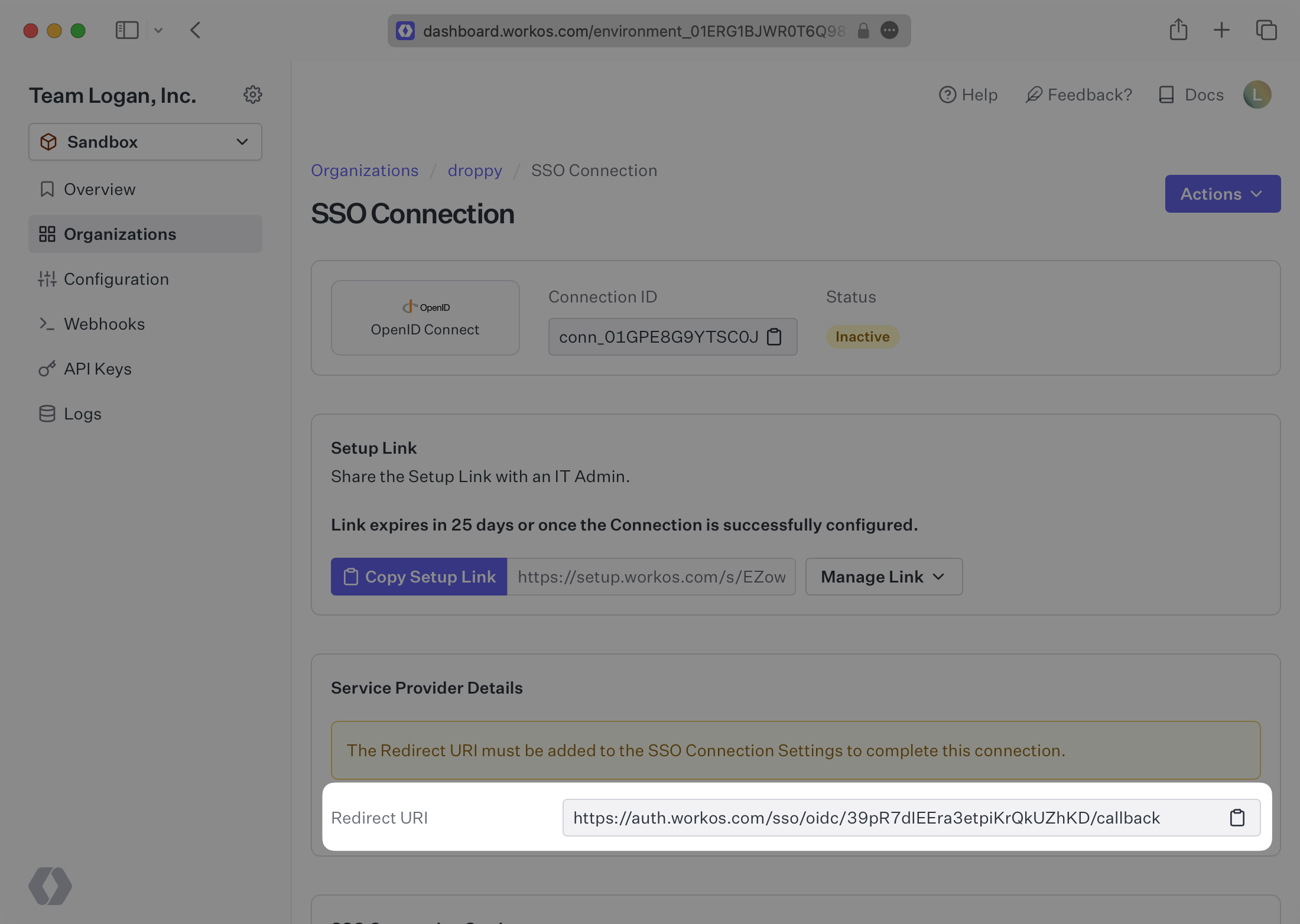
WorkOS provides the Redirect URI. It’s readily available in your connection Settings in the [WorkOS Dashboard](https://dashboard.workos.com/). The Redirect URI is the location an Identity Provider redirects its authentication response to.
|
|
21
|
+
|
|
22
|
+
|
|
23
|
+
|
|
24
|
+
---
|
|
25
|
+
|
|
26
|
+
## What you’ll need
|
|
27
|
+
|
|
28
|
+
In order to integrate you’ll need the Client ID, Client Secret, as well as the Discovery Endpoint.
|
|
29
|
+
|
|
30
|
+
Normally, this information will come from the organization's IT Management team when they set up your application’s OpenID Connect configuration in their Identity Provider admin dashboard. But, should that not be the case during your setup, here’s how to obtain them.
|
|
31
|
+
|
|
32
|
+
---
|
|
33
|
+
|
|
34
|
+
## (1) Create an Application with your IdP
|
|
35
|
+
|
|
36
|
+
For SSO to properly function with your Identity Provider, you’ll need to create and configure your OpenID Connect application to support the authorization code grant type and have the redirect URI from WorkOS listed as your login redirect URI.
|
|
37
|
+
|
|
38
|
+
---
|
|
39
|
+
|
|
40
|
+
## (2) Add claims to the ID token
|
|
41
|
+
|
|
42
|
+
Add the `sub`, `email`, `given_name`, and `family_name` claims to the user ID token in your OIDC provider settings. These claims map to the `idp_id`, `email`, `first_name`, and `last_name` attributes in the user profile returned by WorkOS. If the `given_name` claim is not available, the `name` claim will be mapped to the `first_name` attribute instead. For many providers, these claims are included by default, but for other providers you will need to add these claims.
|
|
43
|
+
|
|
44
|
+
### Role Assignment (optional)
|
|
45
|
+
|
|
46
|
+
With [identity provider role assignment](/sso/identity-provider-role-assignment), users can receive roles within your application based on their group memberships. To return this information in the attribute statement, add the `groups` claim to the user ID token in your OIDC provider settings. This claim should map to a user’s group membership.
|
|
47
|
+
|
|
48
|
+
> Finish role assignment set-up by navigating to the SSO connection page in the _Organization_ section of the [WorkOS Dashboard](https://dashboard.workos.com/). Create SSO groups by referencing the group IdP ID. Then, assign roles to these SSO groups so group members are automatically granted roles within your application.
|
|
49
|
+
|
|
50
|
+
---
|
|
51
|
+
|
|
52
|
+
## (3) Provide your Client Credentials
|
|
53
|
+
|
|
54
|
+
After creating an OpenID Connect application, a Client ID and Client Secret will be provisioned for you by your Identity Provider. Enter these in your Connection Settings in the [WorkOS Dashboard](https://dashboard.workos.com/).
|
|
55
|
+
|
|
56
|
+
---
|
|
57
|
+
|
|
58
|
+
## (4) Add Discovery Endpoint
|
|
59
|
+
|
|
60
|
+
Your Identity Provider’s Discovery Endpoint contains important configuration information. Enter this in your connection Settings in the [WorkOS Dashboard](https://dashboard.workos.com/). Your Connection will then be verified and good to go!
|
|
61
|
+
|
|
62
|
+
The OIDC discovery endpoint will always end with `/.well-known/openid-configuration` as described in the [OpenID Provider Configuration Request documentation](https://openid.net/specs/openid-connect-discovery-1_0.html#ProviderConfigurationRequest).
|
|
63
|
+
|
|
64
|
+
You can confirm that the discovery endpoint is correct by entering it in a browser window. If there is a JSON object with metadata about the connection returned, the endpoint is correct.
|
|
@@ -0,0 +1,144 @@
|
|
|
1
|
+
---
|
|
2
|
+
title: Okta SAML
|
|
3
|
+
description: "Learn how to configure a connection to\_Okta via SAML."
|
|
4
|
+
icon: okta
|
|
5
|
+
breadcrumb:
|
|
6
|
+
title: Integrations
|
|
7
|
+
url: /integrations
|
|
8
|
+
originalPath: .tmp-workos-clone/packages/docs/content/integrations/okta-saml.mdx
|
|
9
|
+
---
|
|
10
|
+
|
|
11
|
+
## Introduction
|
|
12
|
+
|
|
13
|
+
Each SSO Identity Provider requires specific information to create and configure a new [Connection](/glossary/connection). Often, the information required to create a Connection will differ by Identity Provider.
|
|
14
|
+
|
|
15
|
+
To create an Okta Connection, you’ll need three pieces of information: an [ACS URL](/glossary/acs-url), an [SP Entity ID](/glossary/sp-entity-id), and an [IdP Metadata URL](/glossary/idp-metadata).
|
|
16
|
+
|
|
17
|
+
Start by logging in to your WorkOS dashboard and browse to the “Organizations” tab on the left hand navigation bar.
|
|
18
|
+
|
|
19
|
+
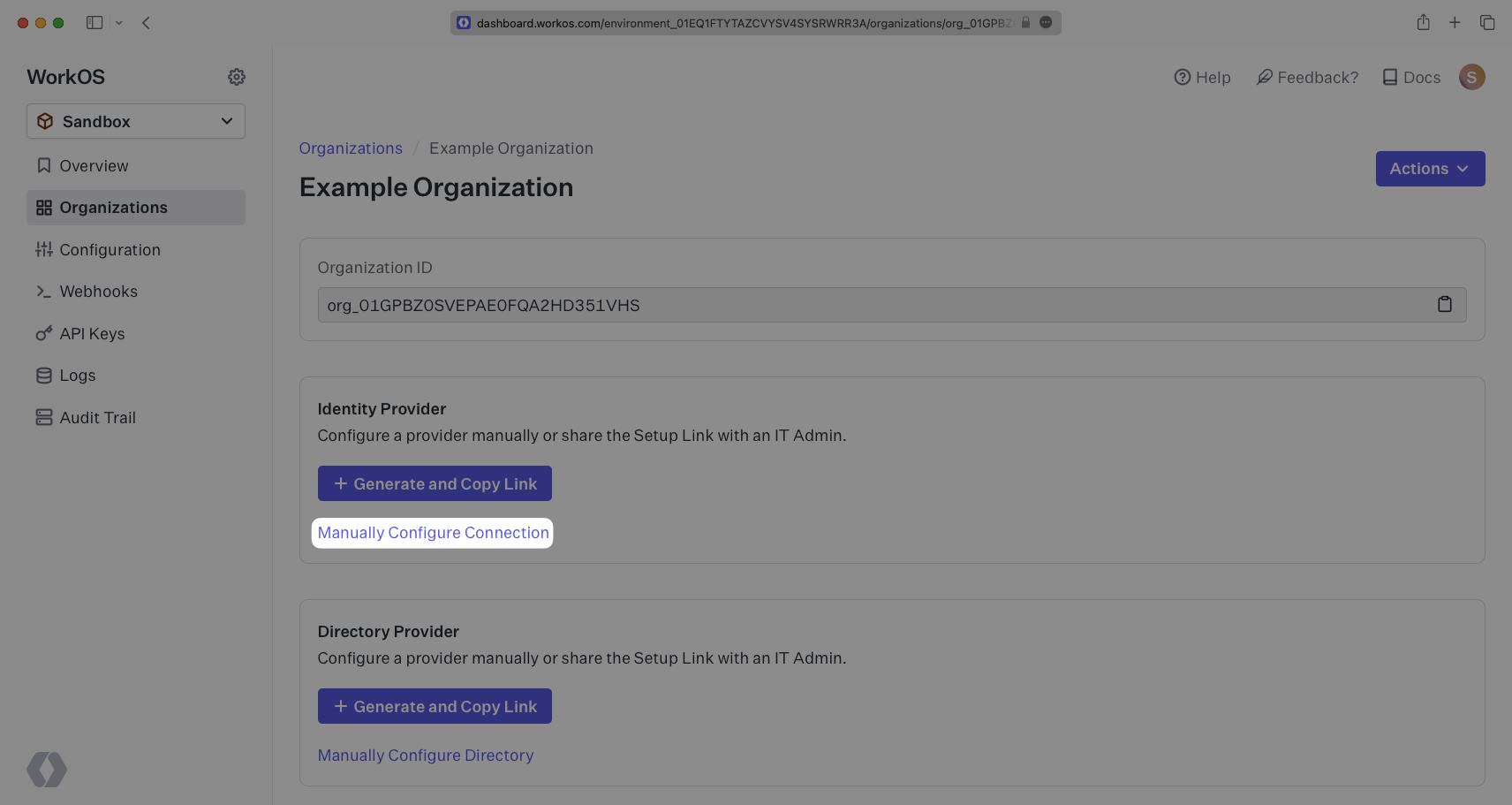
Select the organization you’d like to configure an Okta Connection for, and select “Manually Configure Connection” under “Identity Provider”.
|
|
20
|
+
|
|
21
|
+
|
|
22
|
+
|
|
23
|
+
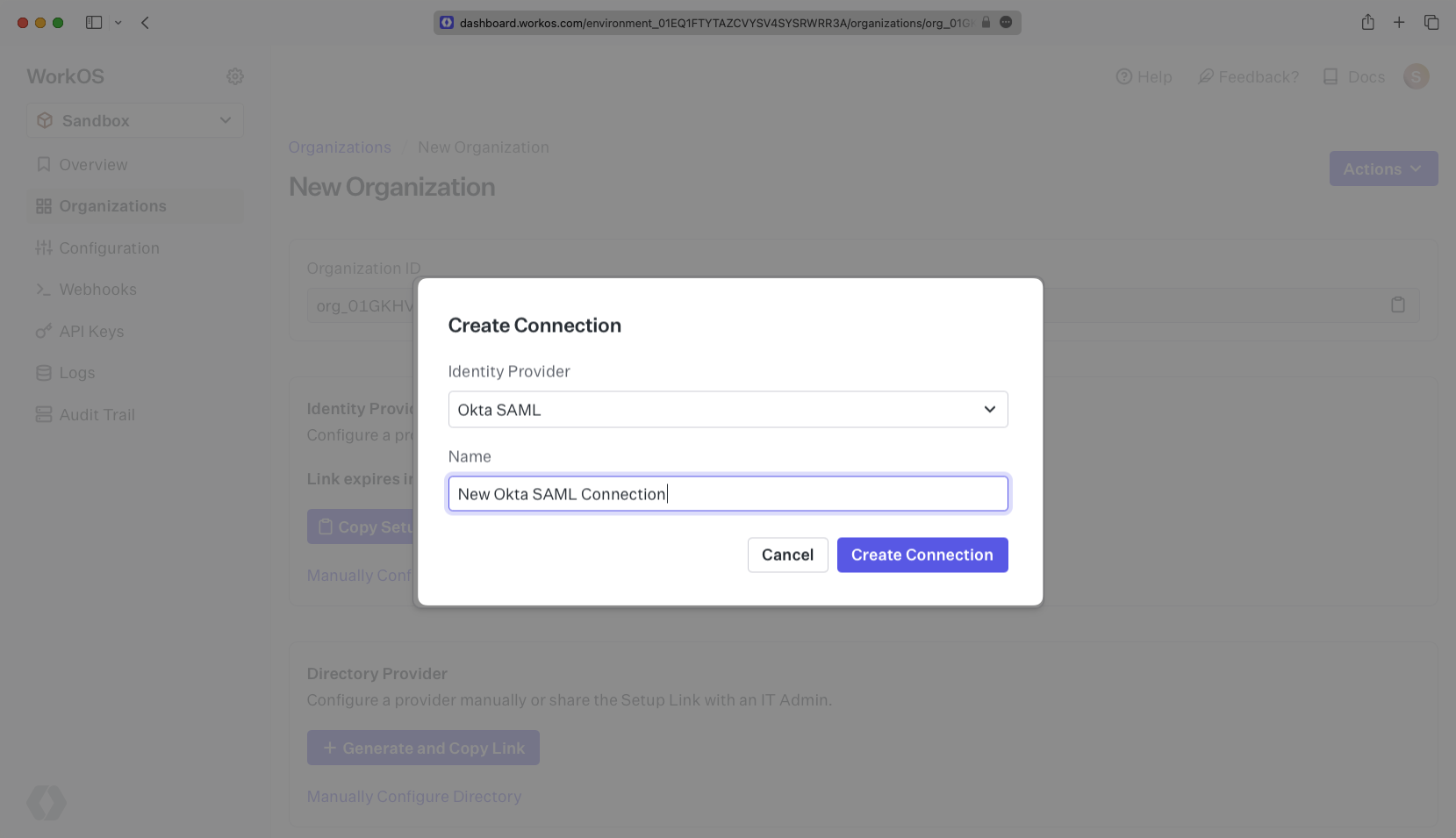
Select “Okta” from the Identity Provider dropdown, enter a descriptive name for the connection, and then select the “Create Connection” button.
|
|
24
|
+
|
|
25
|
+
|
|
26
|
+
|
|
27
|
+
---
|
|
28
|
+
|
|
29
|
+
## What WorkOS provides
|
|
30
|
+
|
|
31
|
+
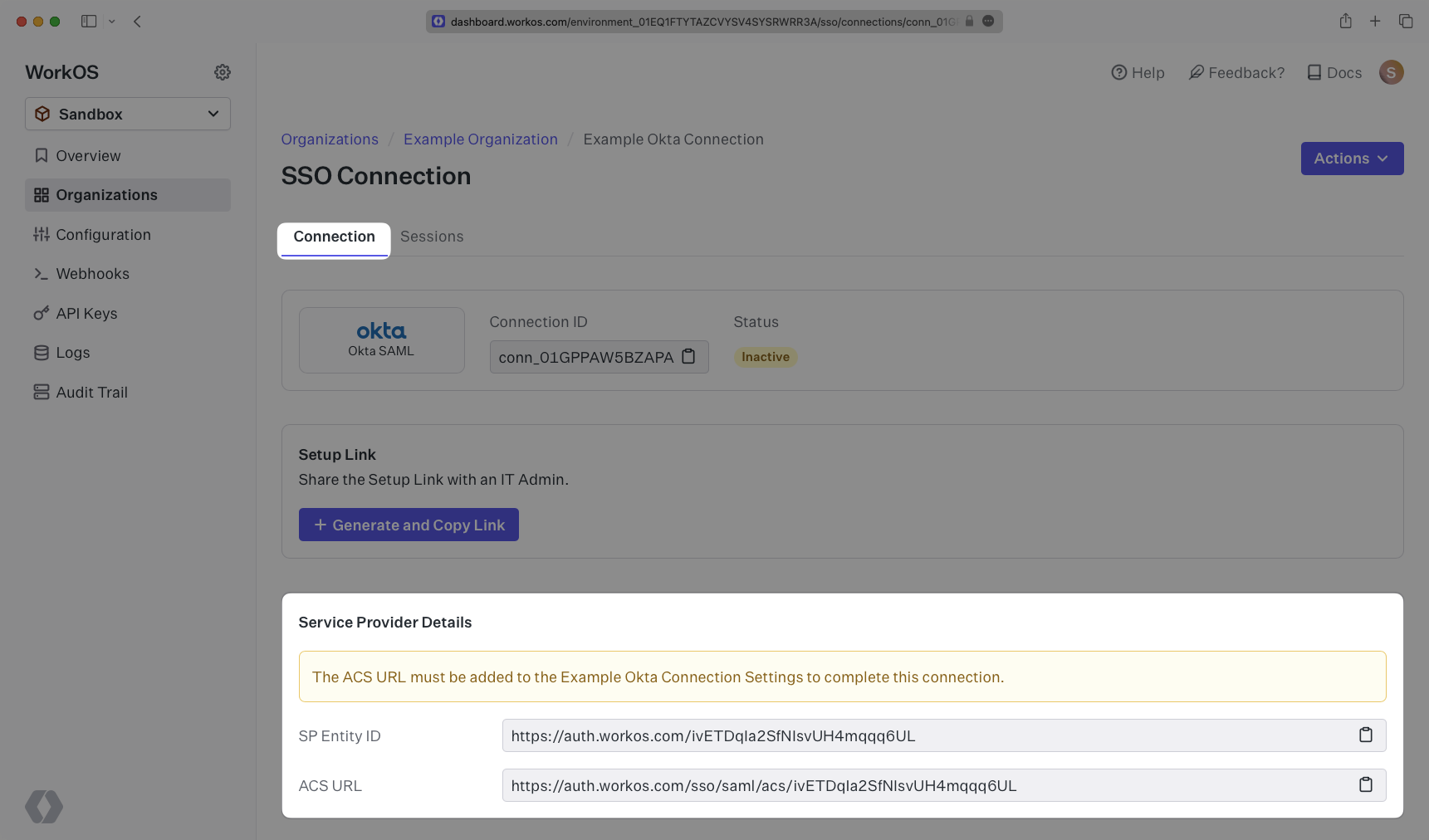
WorkOS provides the ACS URL and the SP Entity ID. It’s readily available in your Connection Settings in the [WorkOS Dashboard](https://dashboard.workos.com/get-started).
|
|
32
|
+
|
|
33
|
+
|
|
34
|
+
|
|
35
|
+
The ACS URL is the location an Identity Provider redirects its authentication response to. In Okta’s case, it needs to be set by the organization when configuring your application in their Okta instance.
|
|
36
|
+
|
|
37
|
+
The SP Entity ID is a URI used to identify the issuer of a SAML request, response, or assertion. In this case, the entity ID is used to communicate that WorkOS will be the party performing SAML requests to the organization's Okta instance.
|
|
38
|
+
|
|
39
|
+
Specifically, the ACS URL will need to be set as the “Single Sign-On URL” and the SP Entity ID will need to be set as the “Audience URI (SP Entity ID)” in the “Configure SAML” step of the Okta “Edit SAML Integration” wizard:
|
|
40
|
+
|
|
41
|
+
|
|
42
|
+
|
|
43
|
+
## What you’ll need
|
|
44
|
+
|
|
45
|
+
Next, provide the [IdP Metadata URL](/glossary/idp-metadata). Normally, this information will come from the organization's IT Management team when they set up your application’s SAML 2.0 configuration in their Okta admin dashboard. But, should that not be the case during your setup, the next steps will show you how to obtain it.
|
|
46
|
+
|
|
47
|
+
---
|
|
48
|
+
|
|
49
|
+
## (1) Log in
|
|
50
|
+
|
|
51
|
+
Log in to [Okta](https://login.okta.com), go to the admin dashboard, and select “Applications” in the navigation bar.
|
|
52
|
+
|
|
53
|
+
|
|
54
|
+
|
|
55
|
+
---
|
|
56
|
+
|
|
57
|
+
## (2) Select or create your application
|
|
58
|
+
|
|
59
|
+
If your application is already created, select it from the list of applications and move to Step 7.
|
|
60
|
+
|
|
61
|
+
|
|
62
|
+
|
|
63
|
+
If you haven’t created a SAML application in Okta, select “Create App Integration”.
|
|
64
|
+
|
|
65
|
+
|
|
66
|
+
|
|
67
|
+
---
|
|
68
|
+
|
|
69
|
+
## (3) Initial SAML Application Setup
|
|
70
|
+
|
|
71
|
+
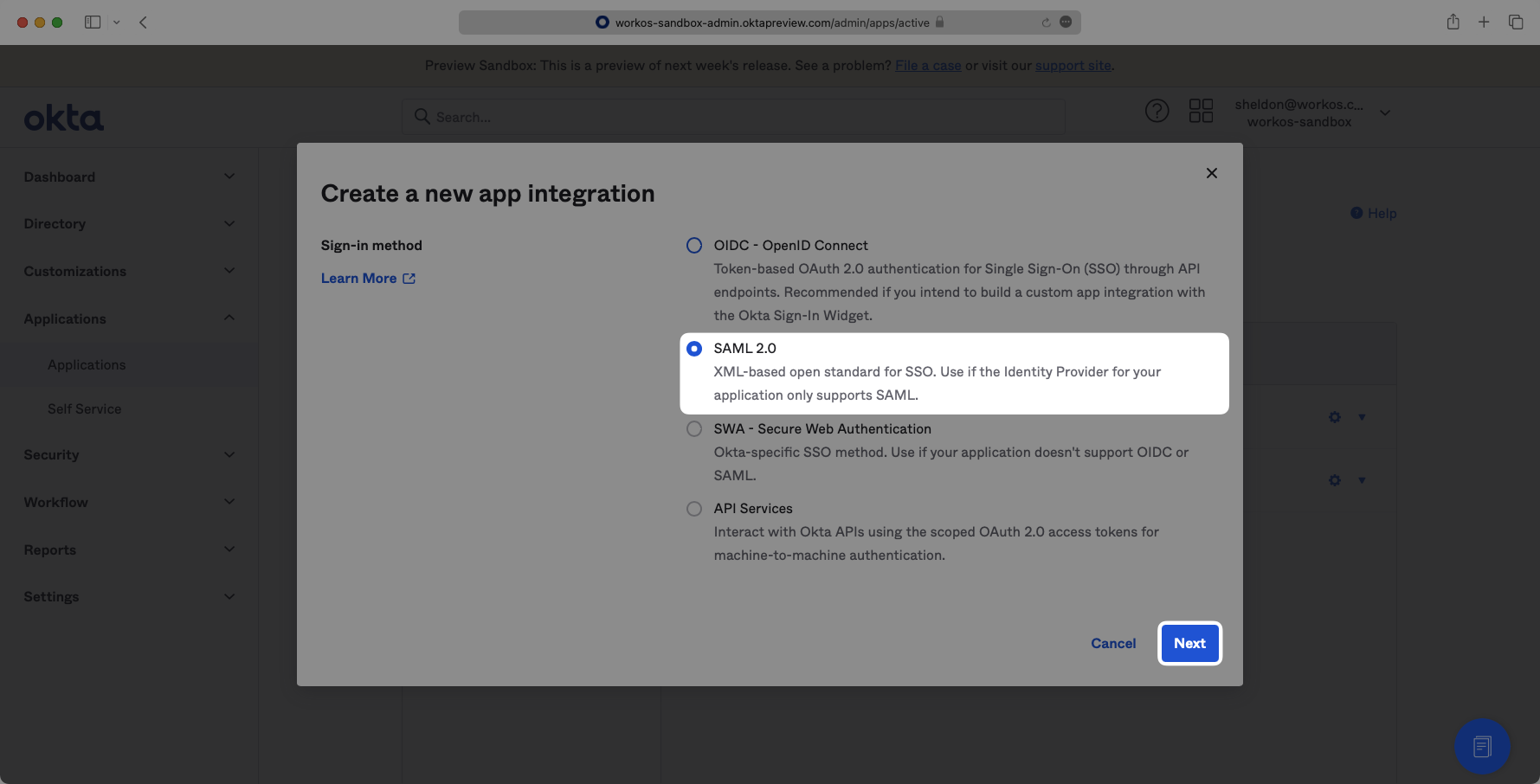
Select “Create New App”, then select “SAML 2.0” as a Sign on method, then click “Next”.
|
|
72
|
+
|
|
73
|
+
|
|
74
|
+
|
|
75
|
+
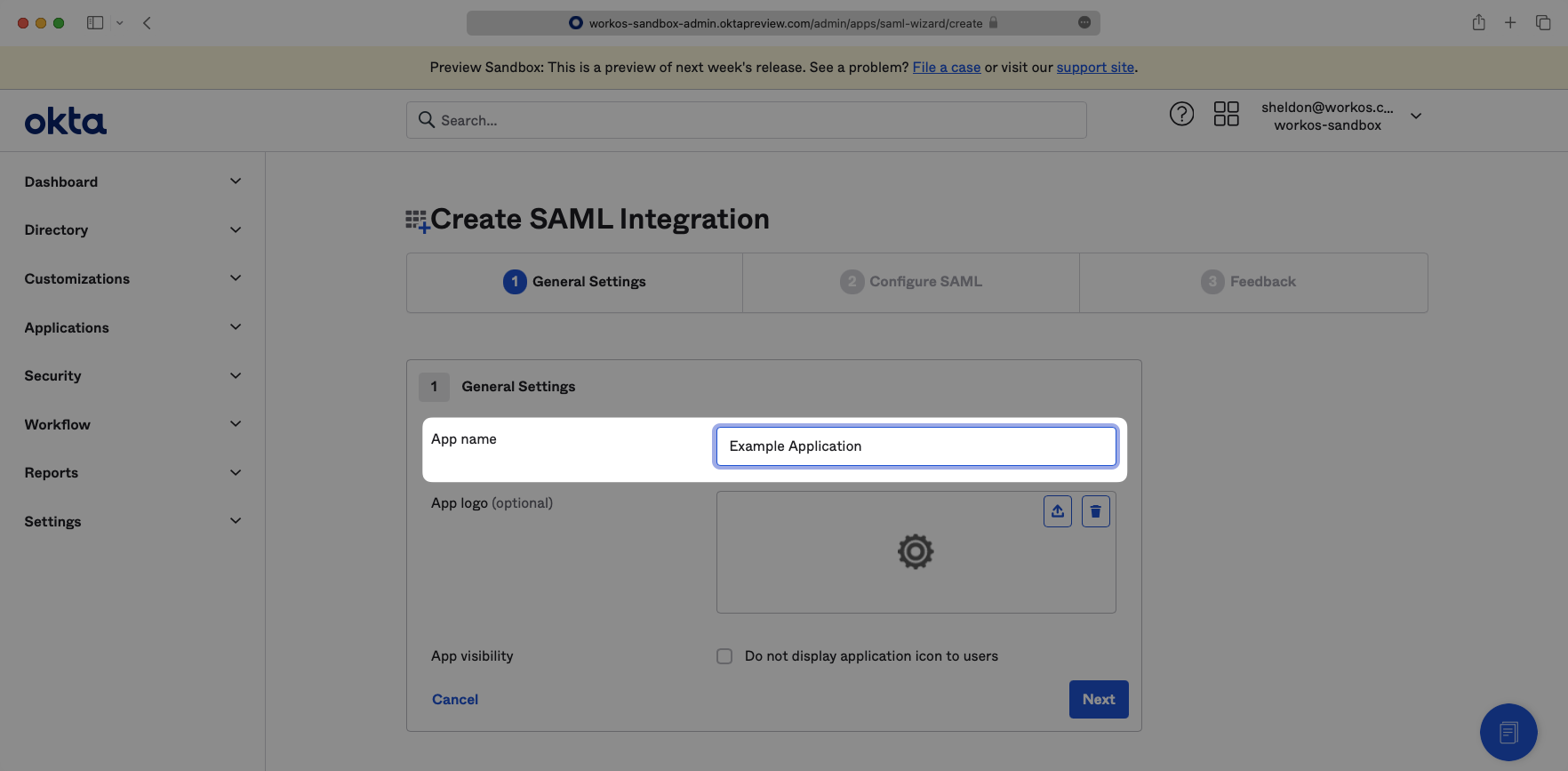
Enter a descriptive App name, then click “Next”.
|
|
76
|
+
|
|
77
|
+
|
|
78
|
+
|
|
79
|
+
---
|
|
80
|
+
|
|
81
|
+
## (4) Configure SAML Application
|
|
82
|
+
|
|
83
|
+
Input the ACS URL from your WorkOS Dashboard as the “Single Sign-On URL” and input the SP Entity ID from your WorkOS Dashboard as the “Audience URI (SP Entity ID)”.
|
|
84
|
+
|
|
85
|
+

|
|
86
|
+
|
|
87
|
+
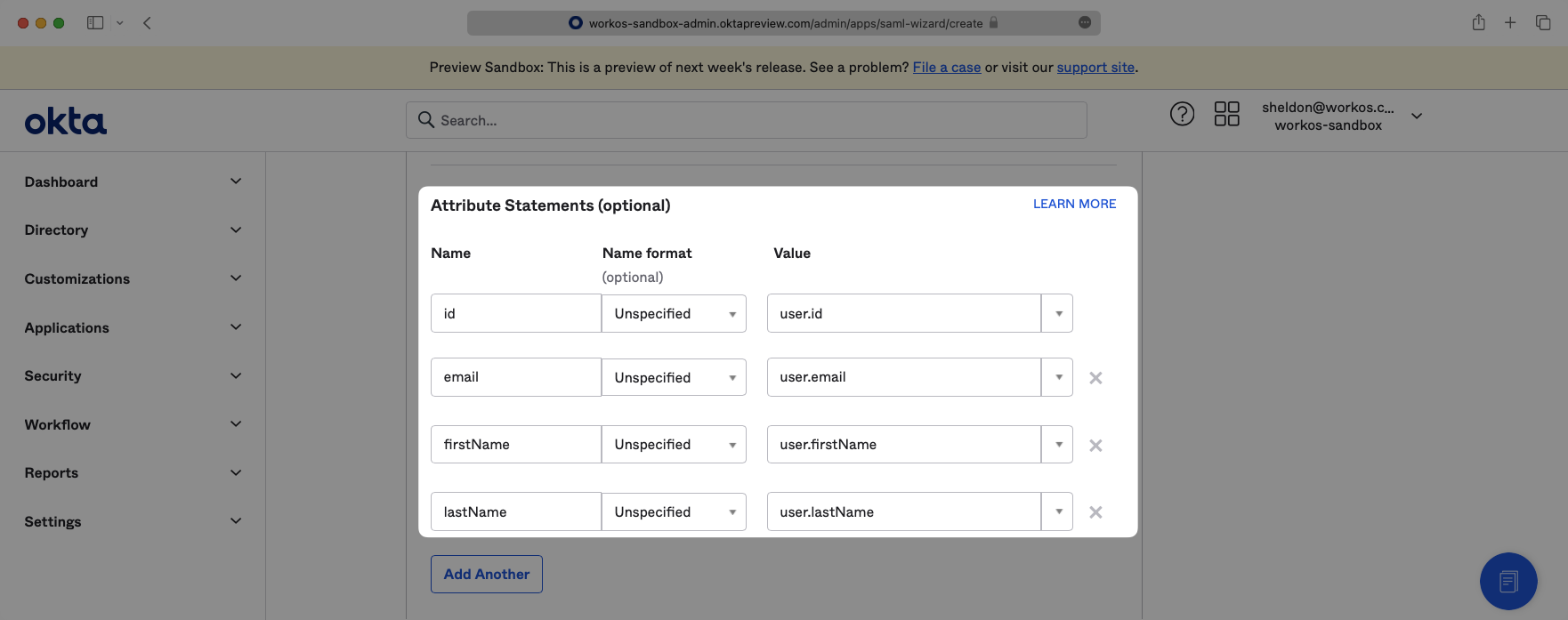
Scroll down to the “Attribute Statements” section and use the “Add Another” button to add the following key-value pairs.
|
|
88
|
+
|
|
89
|
+
- `id` → `user.id`
|
|
90
|
+
- `email` → `user.email`
|
|
91
|
+
- `firstName` → `user.firstName`
|
|
92
|
+
- `lastName` → `user.lastName`
|
|
93
|
+
|
|
94
|
+
|
|
95
|
+
|
|
96
|
+
### Role Assignment (optional)
|
|
97
|
+
|
|
98
|
+
With [identity provider role assignment](/sso/identity-provider-role-assignment), users can receive roles within your application based on their group memberships. To return this information in the attribute statement, follow the guidance below.
|
|
99
|
+
|
|
100
|
+
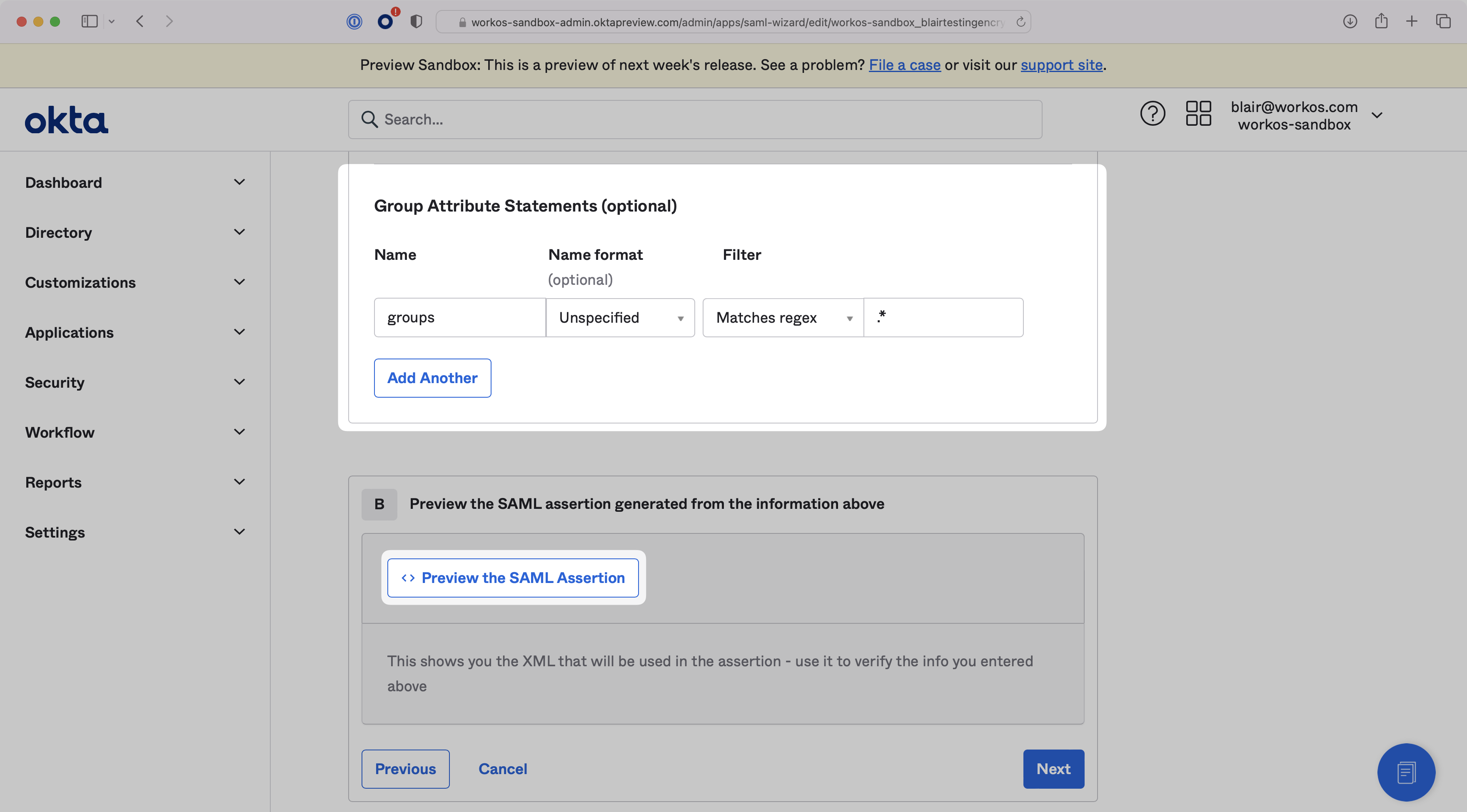
Scroll down to the Group Attribute Statements configuration. The Name should be set to `groups`, and you can define a filter to map the necessary Okta groups. To map all groups, filter by matching the regex `.*`, as shown in the screenshot below. You can preview the SAML Assertion to check that all attributes have been mapped correctly. Then, click “Next”.
|
|
101
|
+
|
|
102
|
+
|
|
103
|
+
|
|
104
|
+
> Finish role assignment set-up by navigating to the SSO connection page in the _Organization_ section of the [WorkOS Dashboard](https://dashboard.workos.com/). Create SSO groups by referencing the group IdP ID. Then, assign roles to these SSO groups so group members are automatically granted roles within your application.
|
|
105
|
+
|
|
106
|
+
---
|
|
107
|
+
|
|
108
|
+
## (5) Submit Application Feedback
|
|
109
|
+
|
|
110
|
+
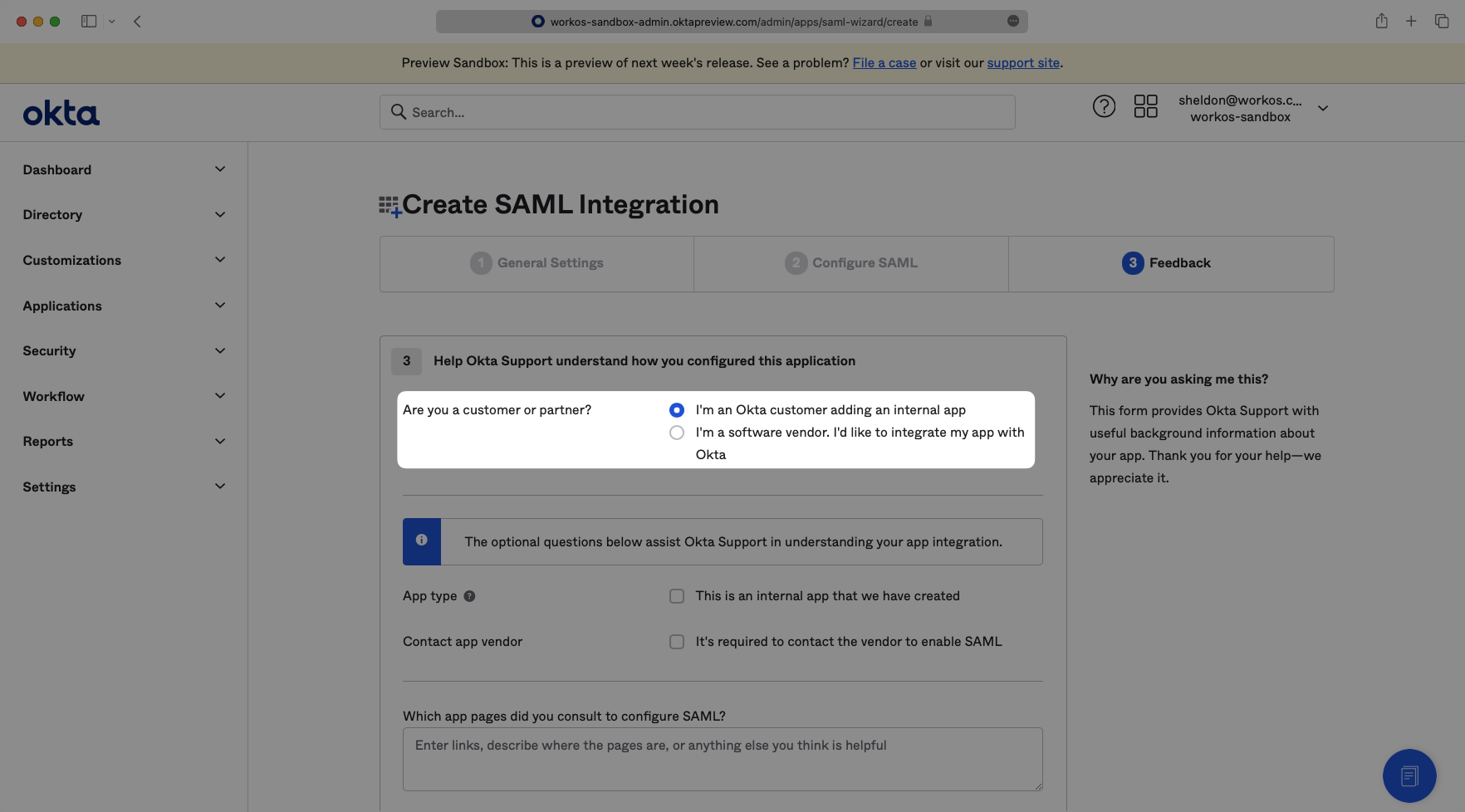
Select “I’m an Okta customer adding an internal app” from the options menu. Complete the form with any comments and select “Finish”.
|
|
111
|
+
|
|
112
|
+
|
|
113
|
+
|
|
114
|
+
---
|
|
115
|
+
|
|
116
|
+
## (6) Add Users to SAML Application
|
|
117
|
+
|
|
118
|
+
To give users permission to authenticate via this SAML app, you will need to assign individual users and/or groups of users to the Okta app.
|
|
119
|
+
|
|
120
|
+
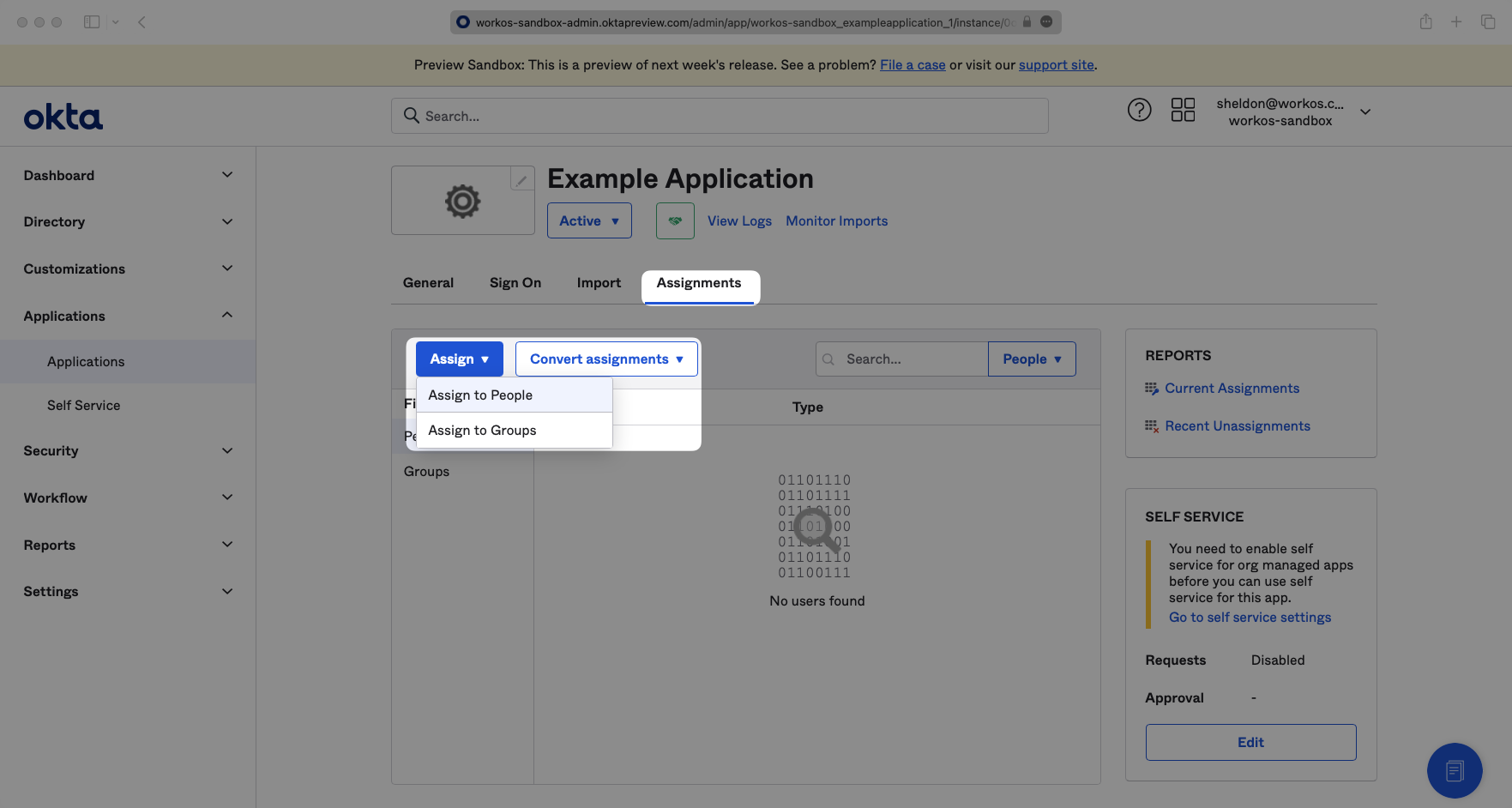
Click on the “Assignments” tab, and select either “Assign to People” or “Assign to Groups”.
|
|
121
|
+
|
|
122
|
+
|
|
123
|
+
|
|
124
|
+
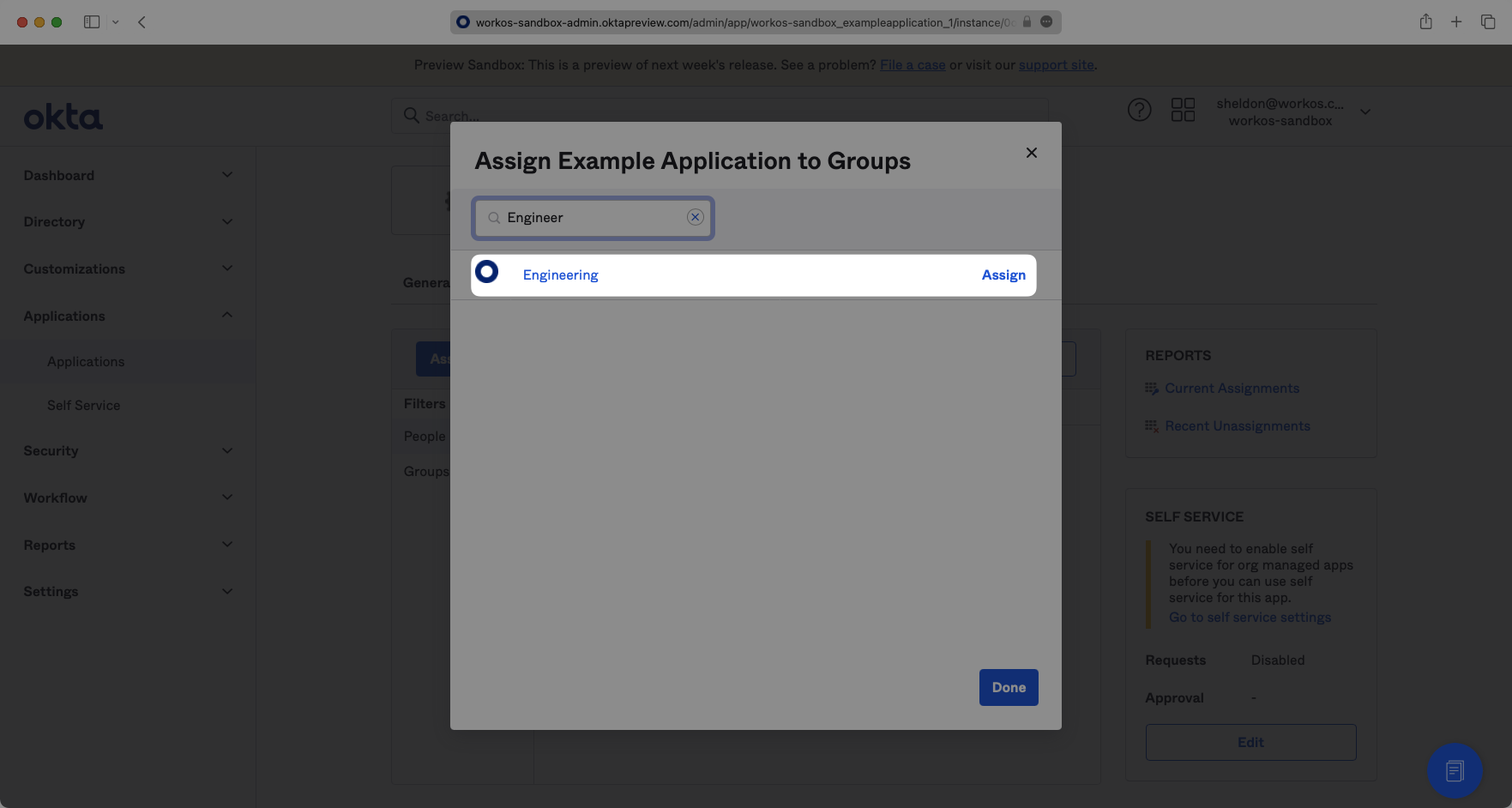
Find the individual user(s) and/or group(s) that you would like to assign to the app, and click “Assign” next to them. Click “Done” when you are finished.
|
|
125
|
+
|
|
126
|
+
|
|
127
|
+
|
|
128
|
+
---
|
|
129
|
+
|
|
130
|
+
## (7) Upload Metadata URL
|
|
131
|
+
|
|
132
|
+
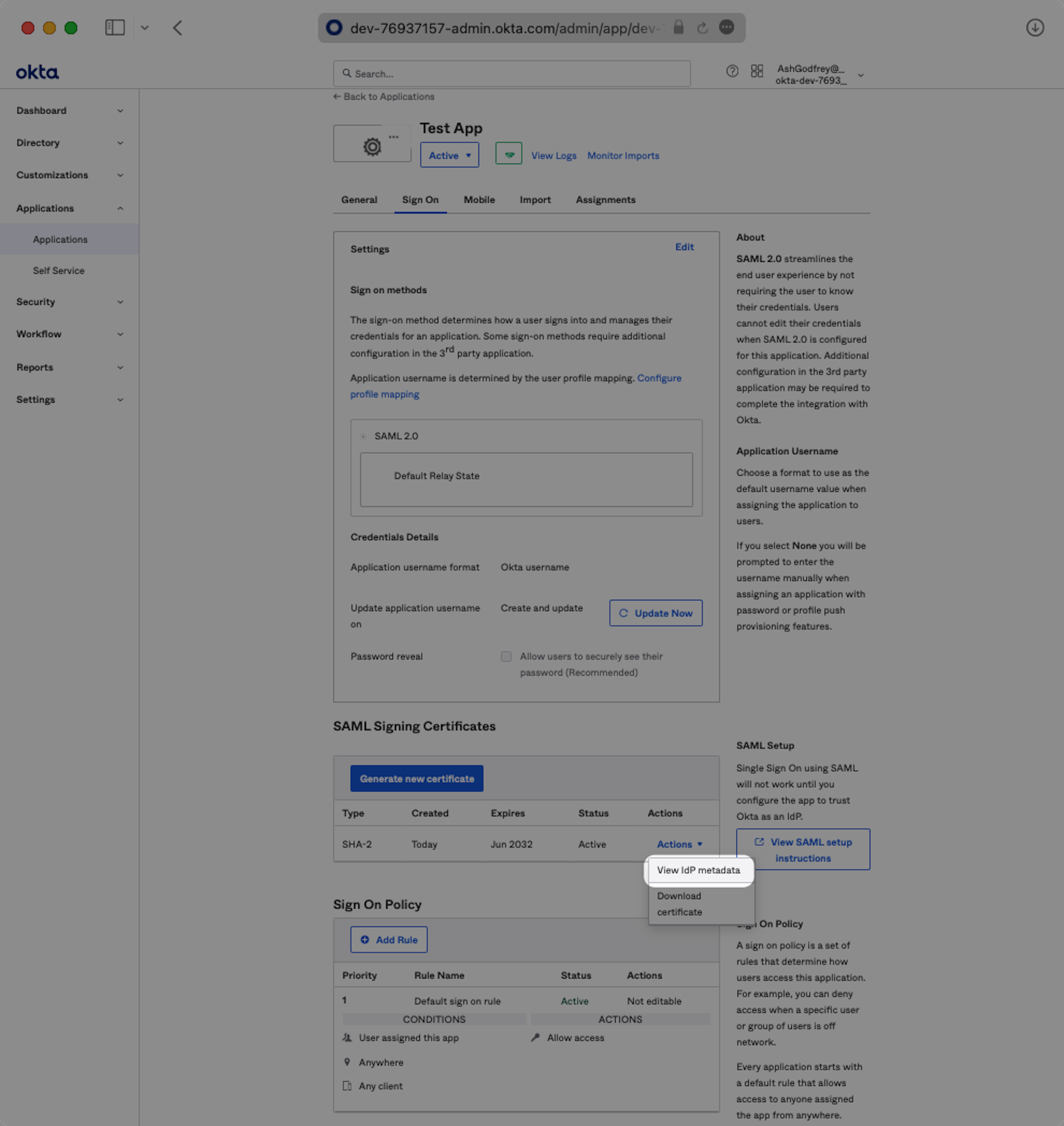
Click on the “Sign On” tab of the SAML app you just created.
|
|
133
|
+
|
|
134
|
+
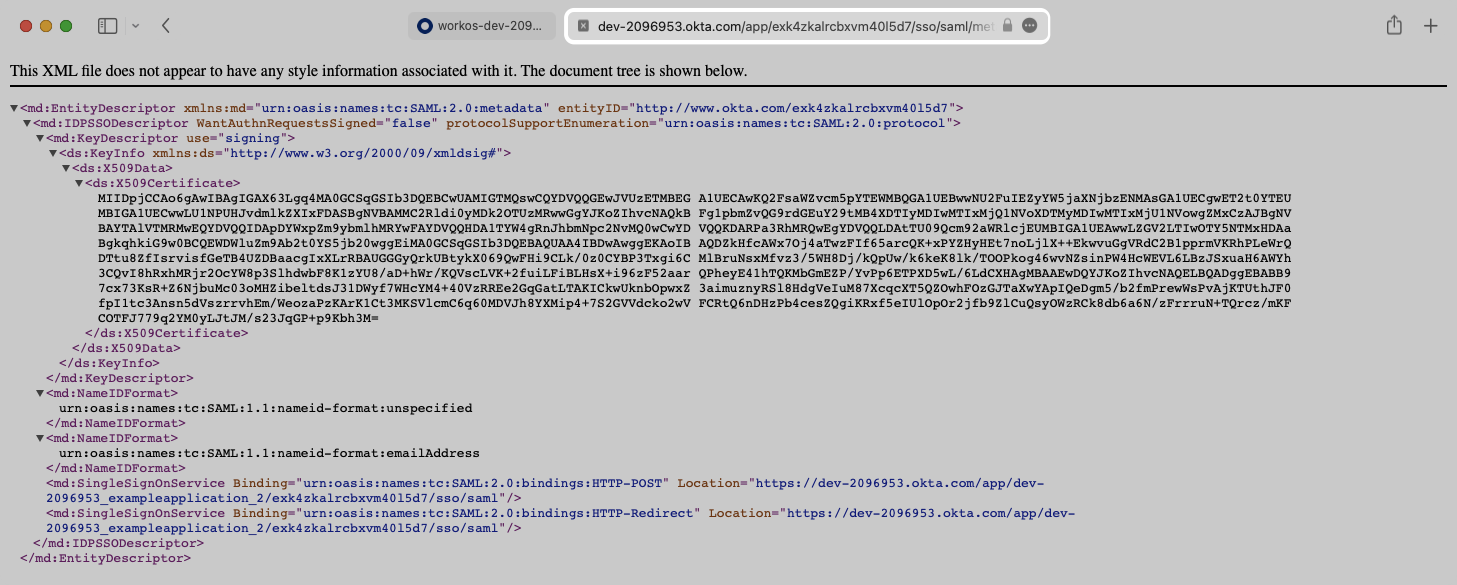
Click the “Actions” dropdown for the correct certificate and select “View IdP Metadata."
|
|
135
|
+
|
|
136
|
+
|
|
137
|
+
|
|
138
|
+
A separate tab will open. Copy the link in the browser.
|
|
139
|
+
|
|
140
|
+
|
|
141
|
+
|
|
142
|
+
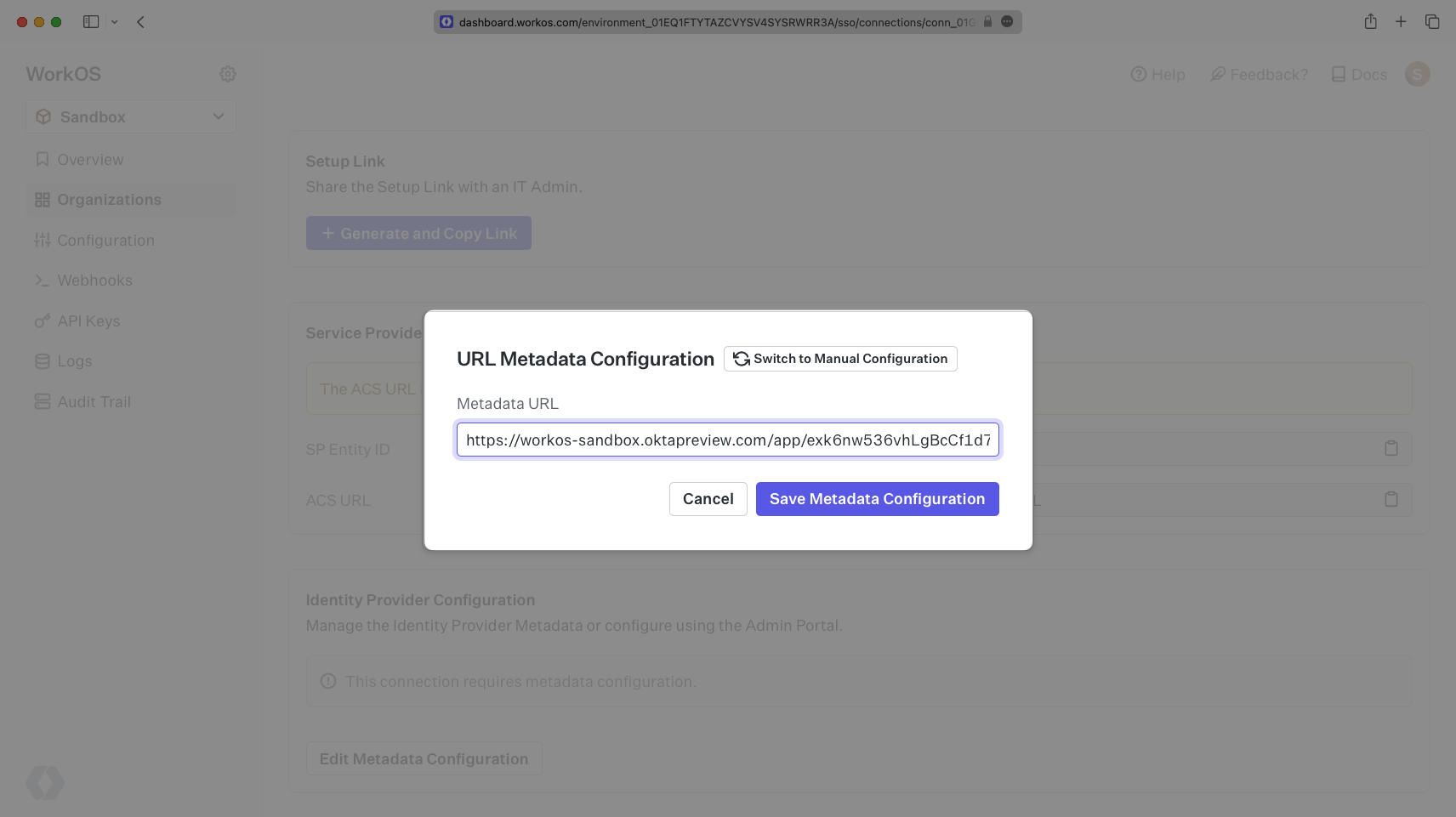
Back in the WorkOS Dashboard, click on “Edit Metadata Configuration” in the “Identity Provider Configuration” section of the Connection. Input the Metadata URL and click “Save Metadata Configuration”. Your Connection will then be linked and good to go!
|
|
143
|
+
|
|
144
|
+
|