@workos/mcp-docs-server 0.1.0
This diff represents the content of publicly available package versions that have been released to one of the supported registries. The information contained in this diff is provided for informational purposes only and reflects changes between package versions as they appear in their respective public registries.
- package/.docs/organized/changelogs/workos-platform.json +277 -0
- package/.docs/organized/docs/admin-portal/_navigation.mdx +16 -0
- package/.docs/organized/docs/admin-portal/custom-branding.mdx +111 -0
- package/.docs/organized/docs/admin-portal/example-apps.mdx +46 -0
- package/.docs/organized/docs/admin-portal/index.mdx +240 -0
- package/.docs/organized/docs/audit-logs/_navigation.mdx +22 -0
- package/.docs/organized/docs/audit-logs/admin-portal.mdx +20 -0
- package/.docs/organized/docs/audit-logs/editing-events.mdx +27 -0
- package/.docs/organized/docs/audit-logs/exporting-events.mdx +29 -0
- package/.docs/organized/docs/audit-logs/index.mdx +110 -0
- package/.docs/organized/docs/audit-logs/log-streams.mdx +56 -0
- package/.docs/organized/docs/audit-logs/metadata-schema.mdx +21 -0
- package/.docs/organized/docs/custom-domains/_navigation.mdx +16 -0
- package/.docs/organized/docs/custom-domains/admin-portal.mdx +38 -0
- package/.docs/organized/docs/custom-domains/auth-api.mdx +59 -0
- package/.docs/organized/docs/custom-domains/authkit.mdx +36 -0
- package/.docs/organized/docs/custom-domains/email.mdx +41 -0
- package/.docs/organized/docs/custom-domains/index.mdx +19 -0
- package/.docs/organized/docs/dashboard.mdx +244 -0
- package/.docs/organized/docs/demo/_navigation.mdx +26 -0
- package/.docs/organized/docs/demo/accordion.mdx +34 -0
- package/.docs/organized/docs/demo/checklist.mdx +33 -0
- package/.docs/organized/docs/demo/code-block.mdx +185 -0
- package/.docs/organized/docs/demo/definition-list.mdx +35 -0
- package/.docs/organized/docs/demo/index.mdx +7 -0
- package/.docs/organized/docs/demo/punctuation.mdx +37 -0
- package/.docs/organized/docs/demo/replacements.mdx +26 -0
- package/.docs/organized/docs/demo/table.mdx +26 -0
- package/.docs/organized/docs/demo/tabs.mdx +17 -0
- package/.docs/organized/docs/directory-sync/_navigation.mdx +28 -0
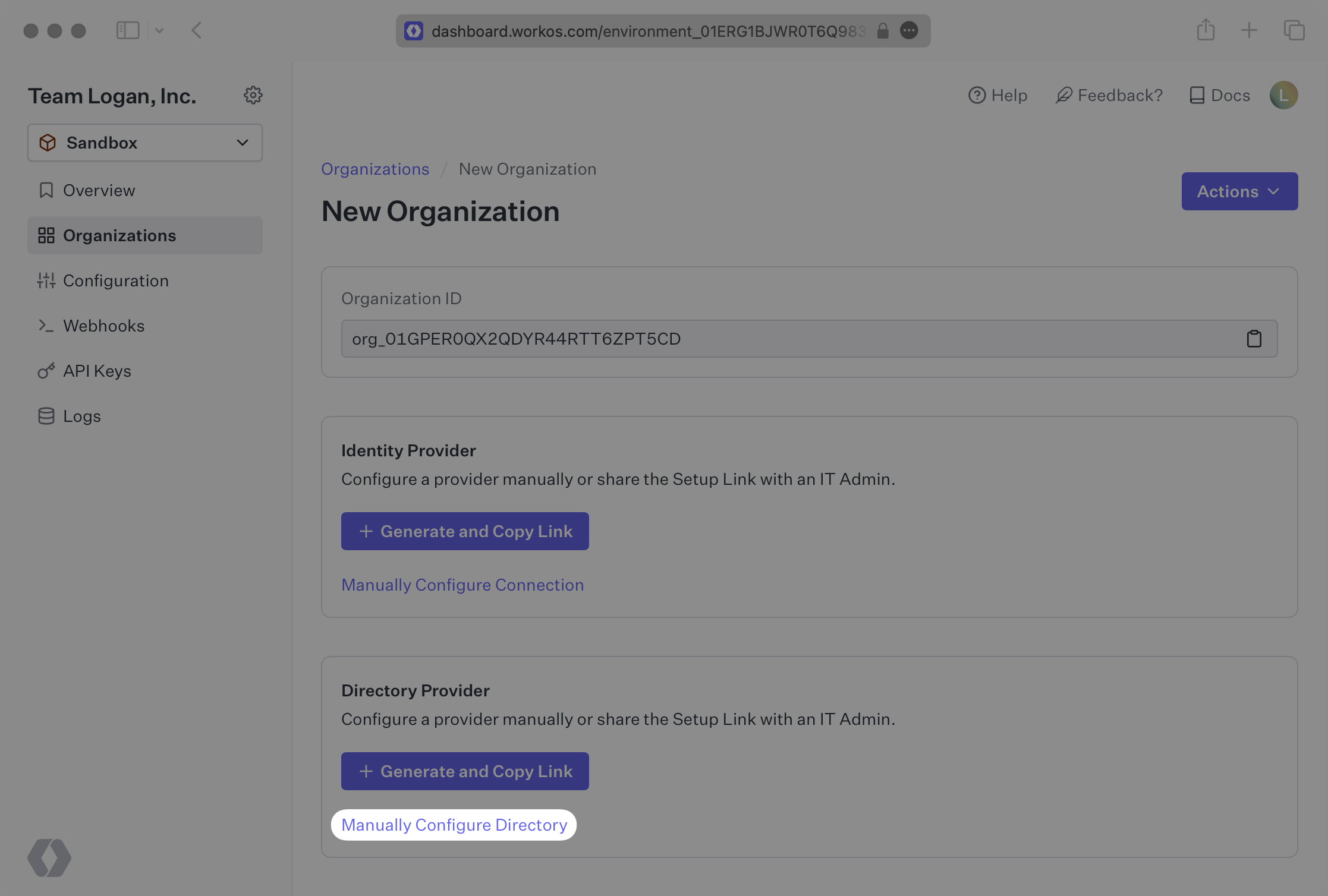
- package/.docs/organized/docs/directory-sync/attributes.mdx +209 -0
- package/.docs/organized/docs/directory-sync/example-apps.mdx +46 -0
- package/.docs/organized/docs/directory-sync/handle-inactive-users.mdx +52 -0
- package/.docs/organized/docs/directory-sync/identity-provider-role-assignment.mdx +134 -0
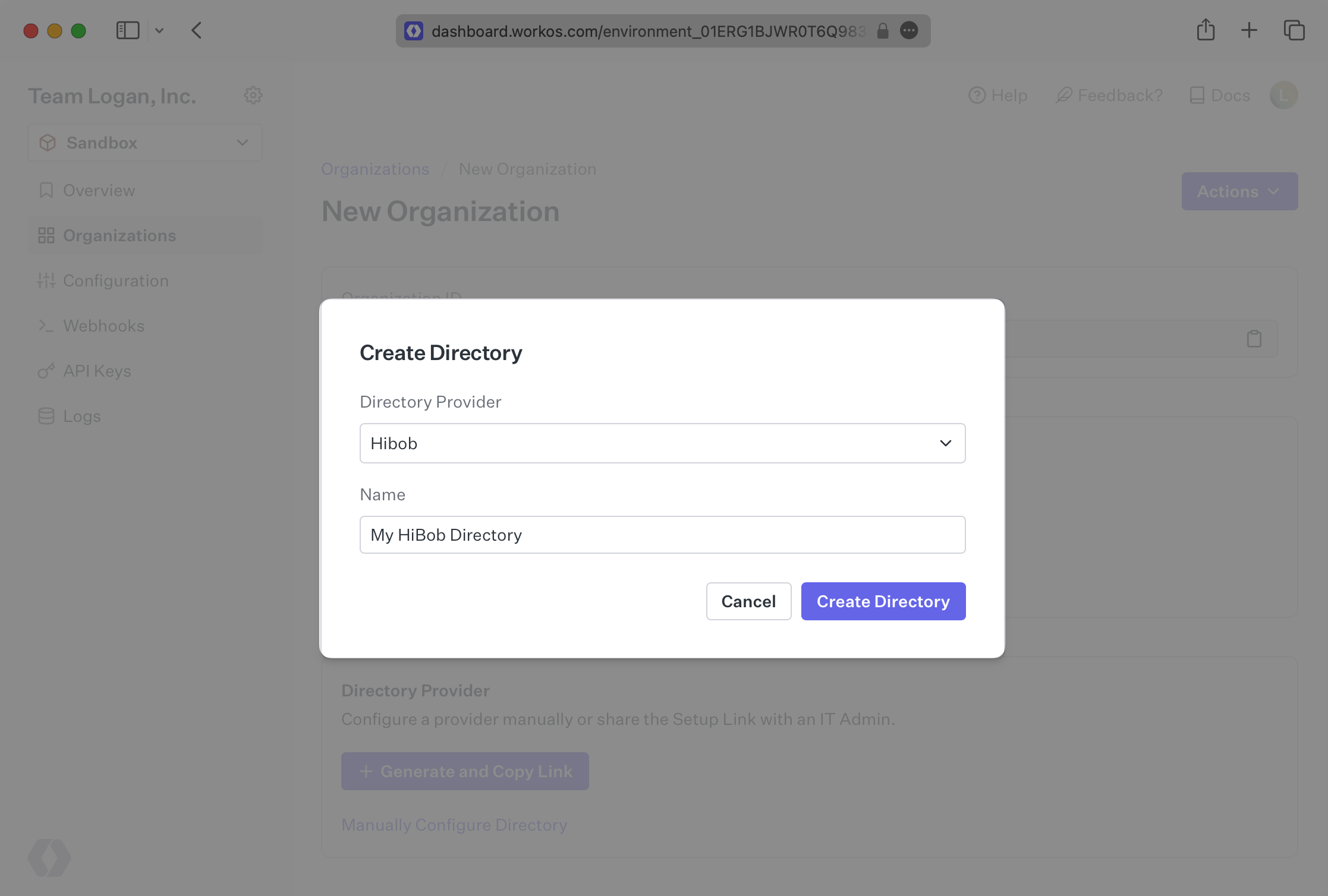
- package/.docs/organized/docs/directory-sync/index.mdx +107 -0
- package/.docs/organized/docs/directory-sync/quick-start.mdx +129 -0
- package/.docs/organized/docs/directory-sync/understanding-events.mdx +209 -0
- package/.docs/organized/docs/domain-verification/_navigation.mdx +10 -0
- package/.docs/organized/docs/domain-verification/api.mdx +60 -0
- package/.docs/organized/docs/domain-verification/index.mdx +67 -0
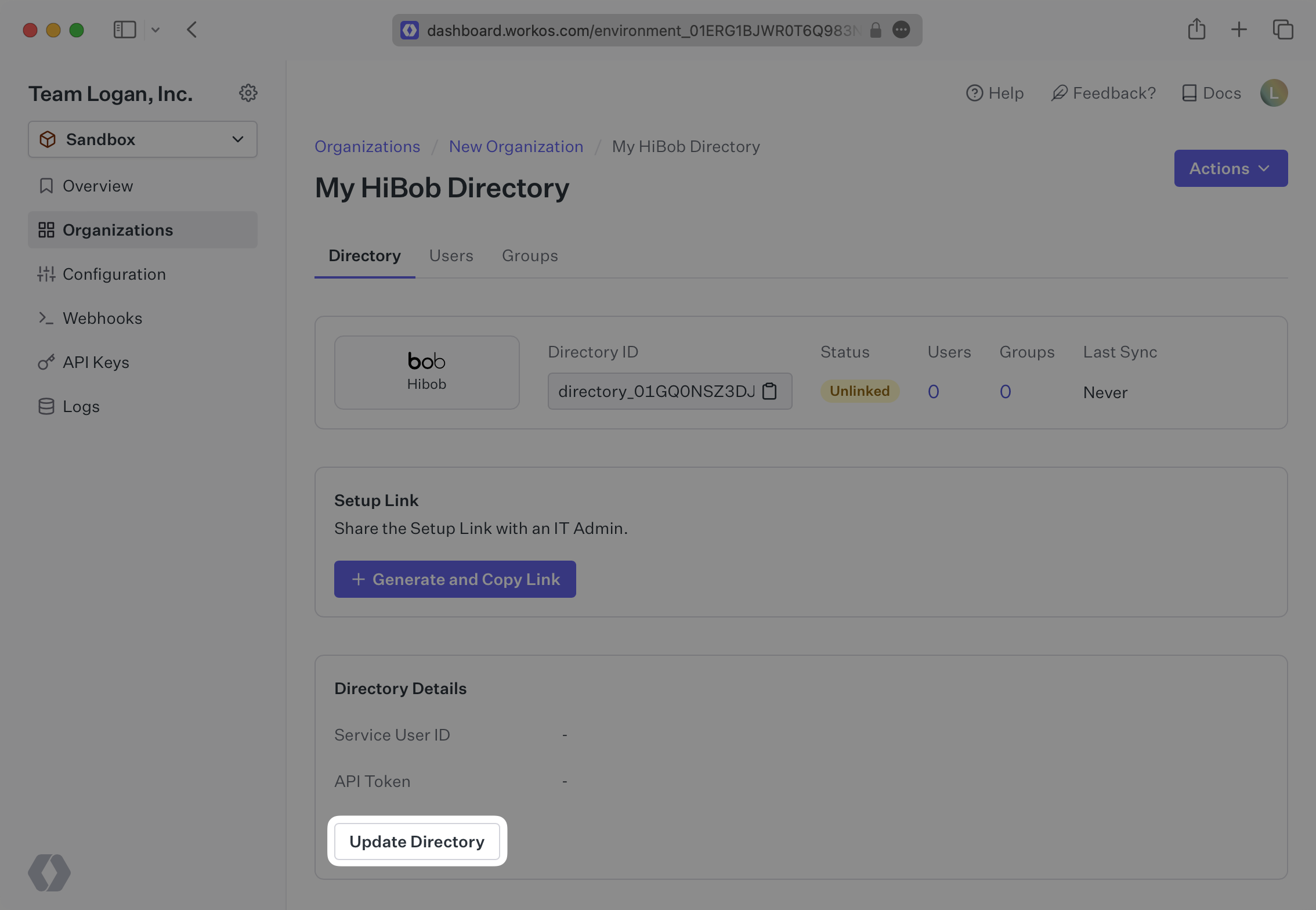
- package/.docs/organized/docs/email.mdx +109 -0
- package/.docs/organized/docs/events/_navigation.mdx +22 -0
- package/.docs/organized/docs/events/data-syncing/data-reconciliation.mdx +56 -0
- package/.docs/organized/docs/events/data-syncing/events-api.mdx +114 -0
- package/.docs/organized/docs/events/data-syncing/index.mdx +66 -0
- package/.docs/organized/docs/events/data-syncing/webhooks.mdx +173 -0
- package/.docs/organized/docs/events/index.mdx +783 -0
- package/.docs/organized/docs/events/observability/datadog.mdx +76 -0
- package/.docs/organized/docs/fga/_navigation.mdx +64 -0
- package/.docs/organized/docs/fga/identity-provider-sessions.mdx +68 -0
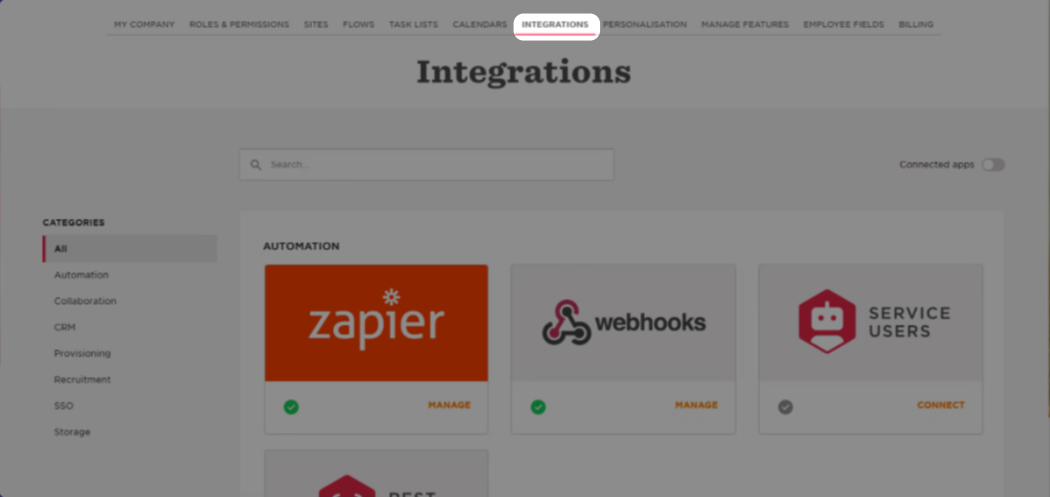
- package/.docs/organized/docs/fga/index.mdx +60 -0
- package/.docs/organized/docs/fga/local-development.mdx +155 -0
- package/.docs/organized/docs/fga/modeling/abac.mdx +107 -0
- package/.docs/organized/docs/fga/modeling/blocklist.mdx +84 -0
- package/.docs/organized/docs/fga/modeling/conditional-roles.mdx +99 -0
- package/.docs/organized/docs/fga/modeling/custom-roles.mdx +90 -0
- package/.docs/organized/docs/fga/modeling/entitlements.mdx +127 -0
- package/.docs/organized/docs/fga/modeling/managed-service-provider.mdx +131 -0
- package/.docs/organized/docs/fga/modeling/org-roles-and-permissions.mdx +95 -0
- package/.docs/organized/docs/fga/modeling/policy-context.mdx +231 -0
- package/.docs/organized/docs/fga/modeling/public-access.mdx +61 -0
- package/.docs/organized/docs/fga/modeling/shareable-content.mdx +106 -0
- package/.docs/organized/docs/fga/modeling/superusers.mdx +74 -0
- package/.docs/organized/docs/fga/modeling/user-groups.mdx +92 -0
- package/.docs/organized/docs/fga/operations-usage.mdx +104 -0
- package/.docs/organized/docs/fga/playground.mdx +12 -0
- package/.docs/organized/docs/fga/policies.mdx +462 -0
- package/.docs/organized/docs/fga/query-language.mdx +112 -0
- package/.docs/organized/docs/fga/quick-start.mdx +174 -0
- package/.docs/organized/docs/fga/resources.mdx +92 -0
- package/.docs/organized/docs/fga/schema-management.mdx +224 -0
- package/.docs/organized/docs/fga/schema.mdx +388 -0
- package/.docs/organized/docs/fga/warrant-tokens.mdx +44 -0
- package/.docs/organized/docs/fga/warrants.mdx +92 -0
- package/.docs/organized/docs/glossary.mdx +184 -0
- package/.docs/organized/docs/integrations/_navigation.mdx +6 -0
- package/.docs/organized/docs/integrations/access-people-hr.mdx +87 -0
- package/.docs/organized/docs/integrations/adp-oidc.mdx +103 -0
- package/.docs/organized/docs/integrations/apple.mdx +169 -0
- package/.docs/organized/docs/integrations/auth0-directory-sync.mdx +78 -0
- package/.docs/organized/docs/integrations/auth0-enterprise-connection.mdx +92 -0
- package/.docs/organized/docs/integrations/auth0-saml.mdx +81 -0
- package/.docs/organized/docs/integrations/aws-cognito.mdx +81 -0
- package/.docs/organized/docs/integrations/bamboohr.mdx +90 -0
- package/.docs/organized/docs/integrations/breathe-hr.mdx +89 -0
- package/.docs/organized/docs/integrations/bubble.mdx +129 -0
- package/.docs/organized/docs/integrations/cas-saml.mdx +65 -0
- package/.docs/organized/docs/integrations/cezanne.mdx +74 -0
- package/.docs/organized/docs/integrations/classlink-saml.mdx +100 -0
- package/.docs/organized/docs/integrations/cloudflare-saml.mdx +164 -0
- package/.docs/organized/docs/integrations/cyberark-saml.mdx +138 -0
- package/.docs/organized/docs/integrations/cyberark-scim.mdx +100 -0
- package/.docs/organized/docs/integrations/duo-saml.mdx +127 -0
- package/.docs/organized/docs/integrations/entra-id-saml.mdx +156 -0
- package/.docs/organized/docs/integrations/entra-id-scim.mdx +218 -0
- package/.docs/organized/docs/integrations/firebase.mdx +98 -0
- package/.docs/organized/docs/integrations/fourth.mdx +66 -0
- package/.docs/organized/docs/integrations/github-oauth.mdx +85 -0
- package/.docs/organized/docs/integrations/gitlab-oauth.mdx +81 -0
- package/.docs/organized/docs/integrations/google-directory-sync.mdx +86 -0
- package/.docs/organized/docs/integrations/google-oauth.mdx +173 -0
- package/.docs/organized/docs/integrations/google-saml.mdx +135 -0
- package/.docs/organized/docs/integrations/hibob.mdx +98 -0
- package/.docs/organized/docs/integrations/jumpcloud-saml.mdx +96 -0
- package/.docs/organized/docs/integrations/jumpcloud-scim.mdx +106 -0
- package/.docs/organized/docs/integrations/keycloak-saml.mdx +128 -0
- package/.docs/organized/docs/integrations/lastpass-saml.mdx +134 -0
- package/.docs/organized/docs/integrations/linkedin-oauth.mdx +77 -0
- package/.docs/organized/docs/integrations/login-gov-oidc.mdx +103 -0
- package/.docs/organized/docs/integrations/microsoft-ad-fs-saml.mdx +96 -0
- package/.docs/organized/docs/integrations/microsoft-oauth.mdx +101 -0
- package/.docs/organized/docs/integrations/miniorange-saml.mdx +124 -0
- package/.docs/organized/docs/integrations/net-iq-saml.mdx +75 -0
- package/.docs/organized/docs/integrations/next-auth.mdx +257 -0
- package/.docs/organized/docs/integrations/oidc.mdx +64 -0
- package/.docs/organized/docs/integrations/okta-saml.mdx +144 -0
- package/.docs/organized/docs/integrations/okta-scim.mdx +210 -0
- package/.docs/organized/docs/integrations/onelogin-saml.mdx +131 -0
- package/.docs/organized/docs/integrations/onelogin-scim.mdx +150 -0
- package/.docs/organized/docs/integrations/oracle-saml.mdx +76 -0
- package/.docs/organized/docs/integrations/pingfederate-saml.mdx +103 -0
- package/.docs/organized/docs/integrations/pingfederate-scim.mdx +150 -0
- package/.docs/organized/docs/integrations/pingone-saml.mdx +86 -0
- package/.docs/organized/docs/integrations/react-native-expo.mdx +93 -0
- package/.docs/organized/docs/integrations/rippling-saml.mdx +174 -0
- package/.docs/organized/docs/integrations/rippling-scim.mdx +148 -0
- package/.docs/organized/docs/integrations/salesforce-saml.mdx +143 -0
- package/.docs/organized/docs/integrations/saml.mdx +64 -0
- package/.docs/organized/docs/integrations/scim.mdx +64 -0
- package/.docs/organized/docs/integrations/sftp.mdx +150 -0
- package/.docs/organized/docs/integrations/shibboleth-generic-saml.mdx +84 -0
- package/.docs/organized/docs/integrations/shibboleth-unsolicited-saml.mdx +84 -0
- package/.docs/organized/docs/integrations/simple-saml-php.mdx +78 -0
- package/.docs/organized/docs/integrations/slack-oauth.mdx +102 -0
- package/.docs/organized/docs/integrations/supabase.mdx +68 -0
- package/.docs/organized/docs/integrations/vmware-saml.mdx +100 -0
- package/.docs/organized/docs/integrations/workday.mdx +156 -0
- package/.docs/organized/docs/integrations/xero-oauth.mdx +83 -0
- package/.docs/organized/docs/magic-link/_navigation.mdx +16 -0
- package/.docs/organized/docs/magic-link/example-apps.mdx +46 -0
- package/.docs/organized/docs/magic-link/index.mdx +199 -0
- package/.docs/organized/docs/magic-link/launch-checklist.mdx +27 -0
- package/.docs/organized/docs/mfa/_navigation.mdx +18 -0
- package/.docs/organized/docs/mfa/example-apps.mdx +46 -0
- package/.docs/organized/docs/mfa/index.mdx +140 -0
- package/.docs/organized/docs/mfa/ux/enrollment.mdx +74 -0
- package/.docs/organized/docs/mfa/ux/sign-in.mdx +30 -0
- package/.docs/organized/docs/migrate/_navigation.mdx +6 -0
- package/.docs/organized/docs/migrate/auth0.mdx +98 -0
- package/.docs/organized/docs/migrate/aws-cognito.mdx +115 -0
- package/.docs/organized/docs/migrate/clerk.mdx +106 -0
- package/.docs/organized/docs/migrate/firebase.mdx +80 -0
- package/.docs/organized/docs/migrate/other-services.mdx +179 -0
- package/.docs/organized/docs/migrate/standalone-sso.mdx +105 -0
- package/.docs/organized/docs/on-prem-deployment.mdx +119 -0
- package/.docs/organized/docs/postman.mdx +90 -0
- package/.docs/organized/docs/reference/_navigation.mdx +527 -0
- package/.docs/organized/docs/reference/admin-portal/index.mdx +6 -0
- package/.docs/organized/docs/reference/admin-portal/portal-link/generate.mdx +268 -0
- package/.docs/organized/docs/reference/admin-portal/portal-link/index.mdx +15 -0
- package/.docs/organized/docs/reference/admin-portal/provider-icons/index.mdx +52 -0
- package/.docs/organized/docs/reference/api-keys.mdx +22 -0
- package/.docs/organized/docs/reference/audit-logs/audit-log-export.mdx +239 -0
- package/.docs/organized/docs/reference/audit-logs/audit-log-schema.mdx +69 -0
- package/.docs/organized/docs/reference/audit-logs/create-event.mdx +673 -0
- package/.docs/organized/docs/reference/audit-logs/create-export.mdx +308 -0
- package/.docs/organized/docs/reference/audit-logs/create-schema.mdx +95 -0
- package/.docs/organized/docs/reference/audit-logs/get-export.mdx +117 -0
- package/.docs/organized/docs/reference/audit-logs/get-retention.mdx +34 -0
- package/.docs/organized/docs/reference/audit-logs/index.mdx +6 -0
- package/.docs/organized/docs/reference/audit-logs/list-actions.mdx +40 -0
- package/.docs/organized/docs/reference/audit-logs/list-schemas.mdx +40 -0
- package/.docs/organized/docs/reference/audit-logs/set-retention.mdx +39 -0
- package/.docs/organized/docs/reference/client-libraries.mdx +19 -0
- package/.docs/organized/docs/reference/directory-sync/directory/delete.mdx +90 -0
- package/.docs/organized/docs/reference/directory-sync/directory/get.mdx +105 -0
- package/.docs/organized/docs/reference/directory-sync/directory/index.mdx +385 -0
- package/.docs/organized/docs/reference/directory-sync/directory/list.mdx +281 -0
- package/.docs/organized/docs/reference/directory-sync/directory-group/get.mdx +105 -0
- package/.docs/organized/docs/reference/directory-sync/directory-group/index.mdx +277 -0
- package/.docs/organized/docs/reference/directory-sync/directory-group/list.mdx +295 -0
- package/.docs/organized/docs/reference/directory-sync/directory-user/get.mdx +112 -0
- package/.docs/organized/docs/reference/directory-sync/directory-user/index.mdx +470 -0
- package/.docs/organized/docs/reference/directory-sync/directory-user/list.mdx +304 -0
- package/.docs/organized/docs/reference/directory-sync/index.mdx +10 -0
- package/.docs/organized/docs/reference/domain-verification/create.mdx +38 -0
- package/.docs/organized/docs/reference/domain-verification/get.mdx +32 -0
- package/.docs/organized/docs/reference/domain-verification/index.mdx +84 -0
- package/.docs/organized/docs/reference/domain-verification/verify.mdx +36 -0
- package/.docs/organized/docs/reference/errors.mdx +30 -0
- package/.docs/organized/docs/reference/events/index.mdx +9 -0
- package/.docs/organized/docs/reference/events/list.mdx +246 -0
- package/.docs/organized/docs/reference/fga/batch-check.mdx +277 -0
- package/.docs/organized/docs/reference/fga/check.mdx +563 -0
- package/.docs/organized/docs/reference/fga/index.mdx +6 -0
- package/.docs/organized/docs/reference/fga/policy/create.mdx +27 -0
- package/.docs/organized/docs/reference/fga/policy/delete.mdx +18 -0
- package/.docs/organized/docs/reference/fga/policy/get.mdx +23 -0
- package/.docs/organized/docs/reference/fga/policy/index.mdx +52 -0
- package/.docs/organized/docs/reference/fga/policy/list.mdx +41 -0
- package/.docs/organized/docs/reference/fga/policy/update.mdx +26 -0
- package/.docs/organized/docs/reference/fga/query.mdx +375 -0
- package/.docs/organized/docs/reference/fga/resource/batch-write.mdx +175 -0
- package/.docs/organized/docs/reference/fga/resource/create.mdx +130 -0
- package/.docs/organized/docs/reference/fga/resource/delete.mdx +86 -0
- package/.docs/organized/docs/reference/fga/resource/get.mdx +88 -0
- package/.docs/organized/docs/reference/fga/resource/index.mdx +98 -0
- package/.docs/organized/docs/reference/fga/resource/list.mdx +188 -0
- package/.docs/organized/docs/reference/fga/resource/update.mdx +115 -0
- package/.docs/organized/docs/reference/fga/resource-type/apply.mdx +35 -0
- package/.docs/organized/docs/reference/fga/resource-type/create.mdx +24 -0
- package/.docs/organized/docs/reference/fga/resource-type/delete.mdx +22 -0
- package/.docs/organized/docs/reference/fga/resource-type/get.mdx +23 -0
- package/.docs/organized/docs/reference/fga/resource-type/index.mdx +68 -0
- package/.docs/organized/docs/reference/fga/resource-type/list.mdx +36 -0
- package/.docs/organized/docs/reference/fga/resource-type/update.mdx +23 -0
- package/.docs/organized/docs/reference/fga/schema/apply.mdx +42 -0
- package/.docs/organized/docs/reference/fga/schema/get.mdx +24 -0
- package/.docs/organized/docs/reference/fga/schema/index.mdx +39 -0
- package/.docs/organized/docs/reference/fga/warrant/batch-write.mdx +226 -0
- package/.docs/organized/docs/reference/fga/warrant/create.mdx +215 -0
- package/.docs/organized/docs/reference/fga/warrant/delete.mdx +212 -0
- package/.docs/organized/docs/reference/fga/warrant/index.mdx +186 -0
- package/.docs/organized/docs/reference/fga/warrant/list.mdx +282 -0
- package/.docs/organized/docs/reference/idempotency.mdx +21 -0
- package/.docs/organized/docs/reference/index.mdx +194 -0
- package/.docs/organized/docs/reference/magic-link/index.mdx +8 -0
- package/.docs/organized/docs/reference/magic-link/passwordless-session/create.mdx +268 -0
- package/.docs/organized/docs/reference/magic-link/passwordless-session/index.mdx +203 -0
- package/.docs/organized/docs/reference/magic-link/passwordless-session/send-email.mdx +158 -0
- package/.docs/organized/docs/reference/mfa/authentication-challenge.mdx +217 -0
- package/.docs/organized/docs/reference/mfa/authentication-factor.mdx +381 -0
- package/.docs/organized/docs/reference/mfa/challenge-factor.mdx +170 -0
- package/.docs/organized/docs/reference/mfa/delete-factor.mdx +93 -0
- package/.docs/organized/docs/reference/mfa/enroll-factor.mdx +241 -0
- package/.docs/organized/docs/reference/mfa/get-factor.mdx +108 -0
- package/.docs/organized/docs/reference/mfa/index.mdx +8 -0
- package/.docs/organized/docs/reference/mfa/verify-challenge.mdx +228 -0
- package/.docs/organized/docs/reference/organization/create.mdx +216 -0
- package/.docs/organized/docs/reference/organization/delete.mdx +89 -0
- package/.docs/organized/docs/reference/organization/get-by-external-id.mdx +40 -0
- package/.docs/organized/docs/reference/organization/get.mdx +104 -0
- package/.docs/organized/docs/reference/organization/index.mdx +274 -0
- package/.docs/organized/docs/reference/organization/list.mdx +258 -0
- package/.docs/organized/docs/reference/organization/update.mdx +236 -0
- package/.docs/organized/docs/reference/organization-domain.mdx +189 -0
- package/.docs/organized/docs/reference/pagination.mdx +244 -0
- package/.docs/organized/docs/reference/radar/attempts/create.mdx +115 -0
- package/.docs/organized/docs/reference/radar/attempts/index.mdx +7 -0
- package/.docs/organized/docs/reference/radar/attempts/update.mdx +34 -0
- package/.docs/organized/docs/reference/radar/index.mdx +8 -0
- package/.docs/organized/docs/reference/radar/lists/delete.mdx +36 -0
- package/.docs/organized/docs/reference/radar/lists/index.mdx +7 -0
- package/.docs/organized/docs/reference/radar/lists/update.mdx +36 -0
- package/.docs/organized/docs/reference/rate-limits.mdx +50 -0
- package/.docs/organized/docs/reference/roles/index.mdx +268 -0
- package/.docs/organized/docs/reference/roles/list-for-organization.mdx +152 -0
- package/.docs/organized/docs/reference/sso/connection/delete.mdx +89 -0
- package/.docs/organized/docs/reference/sso/connection/get.mdx +104 -0
- package/.docs/organized/docs/reference/sso/connection/index.mdx +388 -0
- package/.docs/organized/docs/reference/sso/connection/list.mdx +320 -0
- package/.docs/organized/docs/reference/sso/get-authorization-url/error-codes.mdx +28 -0
- package/.docs/organized/docs/reference/sso/get-authorization-url/index.mdx +434 -0
- package/.docs/organized/docs/reference/sso/get-authorization-url/redirect-uri.mdx +21 -0
- package/.docs/organized/docs/reference/sso/index.mdx +8 -0
- package/.docs/organized/docs/reference/sso/logout/authorize.mdx +47 -0
- package/.docs/organized/docs/reference/sso/logout/index.mdx +14 -0
- package/.docs/organized/docs/reference/sso/logout/redirect.mdx +32 -0
- package/.docs/organized/docs/reference/sso/profile/get-profile-and-token.mdx +229 -0
- package/.docs/organized/docs/reference/sso/profile/get-user-profile.mdx +127 -0
- package/.docs/organized/docs/reference/sso/profile/index.mdx +364 -0
- package/.docs/organized/docs/reference/testing.mdx +8 -0
- package/.docs/organized/docs/reference/user-management/access-token/index.mdx +13 -0
- package/.docs/organized/docs/reference/user-management/authentication/code.mdx +448 -0
- package/.docs/organized/docs/reference/user-management/authentication/email-verification.mdx +359 -0
- package/.docs/organized/docs/reference/user-management/authentication/get-authorization-url/error-codes.mdx +25 -0
- package/.docs/organized/docs/reference/user-management/authentication/get-authorization-url/index.mdx +425 -0
- package/.docs/organized/docs/reference/user-management/authentication/get-authorization-url/pkce.mdx +9 -0
- package/.docs/organized/docs/reference/user-management/authentication/get-authorization-url/redirect-uri.mdx +23 -0
- package/.docs/organized/docs/reference/user-management/authentication/index.mdx +66 -0
- package/.docs/organized/docs/reference/user-management/authentication/magic-auth.mdx +353 -0
- package/.docs/organized/docs/reference/user-management/authentication/organization-selection.mdx +349 -0
- package/.docs/organized/docs/reference/user-management/authentication/password.mdx +350 -0
- package/.docs/organized/docs/reference/user-management/authentication/refresh-and-seal-session-data.mdx +57 -0
- package/.docs/organized/docs/reference/user-management/authentication/refresh-token.mdx +381 -0
- package/.docs/organized/docs/reference/user-management/authentication/session-cookie.mdx +79 -0
- package/.docs/organized/docs/reference/user-management/authentication/totp.mdx +369 -0
- package/.docs/organized/docs/reference/user-management/authentication-errors/email-verification-required-error.mdx +42 -0
- package/.docs/organized/docs/reference/user-management/authentication-errors/index.mdx +20 -0
- package/.docs/organized/docs/reference/user-management/authentication-errors/mfa-challenge-error.mdx +44 -0
- package/.docs/organized/docs/reference/user-management/authentication-errors/mfa-enrollment-error.mdx +37 -0
- package/.docs/organized/docs/reference/user-management/authentication-errors/organization-authentication-required-error.mdx +68 -0
- package/.docs/organized/docs/reference/user-management/authentication-errors/organization-selection-error.mdx +44 -0
- package/.docs/organized/docs/reference/user-management/authentication-errors/sso-required-error.mdx +51 -0
- package/.docs/organized/docs/reference/user-management/email-verification/get.mdx +88 -0
- package/.docs/organized/docs/reference/user-management/email-verification/index.mdx +227 -0
- package/.docs/organized/docs/reference/user-management/identity/index.mdx +74 -0
- package/.docs/organized/docs/reference/user-management/identity/list.mdx +52 -0
- package/.docs/organized/docs/reference/user-management/index.mdx +13 -0
- package/.docs/organized/docs/reference/user-management/invitation/accept.mdx +39 -0
- package/.docs/organized/docs/reference/user-management/invitation/find-by-token.mdx +87 -0
- package/.docs/organized/docs/reference/user-management/invitation/get.mdx +87 -0
- package/.docs/organized/docs/reference/user-management/invitation/index.mdx +374 -0
- package/.docs/organized/docs/reference/user-management/invitation/list.mdx +247 -0
- package/.docs/organized/docs/reference/user-management/invitation/revoke.mdx +90 -0
- package/.docs/organized/docs/reference/user-management/invitation/send.mdx +230 -0
- package/.docs/organized/docs/reference/user-management/logout/get-logout-url-from-session-cookie.mdx +52 -0
- package/.docs/organized/docs/reference/user-management/logout/get-logout-url.mdx +147 -0
- package/.docs/organized/docs/reference/user-management/logout/index.mdx +26 -0
- package/.docs/organized/docs/reference/user-management/magic-auth/create.mdx +148 -0
- package/.docs/organized/docs/reference/user-management/magic-auth/get.mdx +88 -0
- package/.docs/organized/docs/reference/user-management/magic-auth/index.mdx +225 -0
- package/.docs/organized/docs/reference/user-management/mfa/authentication-challenge.mdx +194 -0
- package/.docs/organized/docs/reference/user-management/mfa/authentication-factor.mdx +324 -0
- package/.docs/organized/docs/reference/user-management/mfa/enroll-auth-factor.mdx +296 -0
- package/.docs/organized/docs/reference/user-management/mfa/index.mdx +5 -0
- package/.docs/organized/docs/reference/user-management/mfa/list-auth-factors.mdx +194 -0
- package/.docs/organized/docs/reference/user-management/organization-membership/create.mdx +155 -0
- package/.docs/organized/docs/reference/user-management/organization-membership/deactivate.mdx +106 -0
- package/.docs/organized/docs/reference/user-management/organization-membership/delete.mdx +76 -0
- package/.docs/organized/docs/reference/user-management/organization-membership/get.mdx +95 -0
- package/.docs/organized/docs/reference/user-management/organization-membership/index.mdx +265 -0
- package/.docs/organized/docs/reference/user-management/organization-membership/list.mdx +291 -0
- package/.docs/organized/docs/reference/user-management/organization-membership/reactivate.mdx +106 -0
- package/.docs/organized/docs/reference/user-management/organization-membership/update.mdx +119 -0
- package/.docs/organized/docs/reference/user-management/password-reset/create.mdx +108 -0
- package/.docs/organized/docs/reference/user-management/password-reset/get.mdx +88 -0
- package/.docs/organized/docs/reference/user-management/password-reset/index.mdx +227 -0
- package/.docs/organized/docs/reference/user-management/password-reset/reset-password.mdx +144 -0
- package/.docs/organized/docs/reference/user-management/session-helpers/authenticate.mdx +176 -0
- package/.docs/organized/docs/reference/user-management/session-helpers/get-logout-url.mdx +42 -0
- package/.docs/organized/docs/reference/user-management/session-helpers/index.mdx +14 -0
- package/.docs/organized/docs/reference/user-management/session-helpers/load-sealed-session.mdx +105 -0
- package/.docs/organized/docs/reference/user-management/session-helpers/refresh.mdx +213 -0
- package/.docs/organized/docs/reference/user-management/session-tokens/access-token.mdx +90 -0
- package/.docs/organized/docs/reference/user-management/session-tokens/index.mdx +5 -0
- package/.docs/organized/docs/reference/user-management/session-tokens/jwks.mdx +110 -0
- package/.docs/organized/docs/reference/user-management/session-tokens/refresh-token.mdx +8 -0
- package/.docs/organized/docs/reference/user-management/user/create.mdx +327 -0
- package/.docs/organized/docs/reference/user-management/user/delete.mdx +76 -0
- package/.docs/organized/docs/reference/user-management/user/get-by-external-id.mdx +39 -0
- package/.docs/organized/docs/reference/user-management/user/get.mdx +103 -0
- package/.docs/organized/docs/reference/user-management/user/index.mdx +322 -0
- package/.docs/organized/docs/reference/user-management/user/list.mdx +260 -0
- package/.docs/organized/docs/reference/user-management/user/update.mdx +344 -0
- package/.docs/organized/docs/reference/vault/index.mdx +6 -0
- package/.docs/organized/docs/reference/vault/key/create-data-key.mdx +106 -0
- package/.docs/organized/docs/reference/vault/key/decrypt-data-key.mdx +84 -0
- package/.docs/organized/docs/reference/vault/key/decrypt-data.mdx +52 -0
- package/.docs/organized/docs/reference/vault/key/encrypt-data.mdx +58 -0
- package/.docs/organized/docs/reference/vault/key/index.mdx +25 -0
- package/.docs/organized/docs/reference/vault/object/create.mdx +62 -0
- package/.docs/organized/docs/reference/vault/object/delete.mdx +75 -0
- package/.docs/organized/docs/reference/vault/object/get.mdx +50 -0
- package/.docs/organized/docs/reference/vault/object/index.mdx +174 -0
- package/.docs/organized/docs/reference/vault/object/list.mdx +105 -0
- package/.docs/organized/docs/reference/vault/object/metadata.mdx +52 -0
- package/.docs/organized/docs/reference/vault/object/update.mdx +67 -0
- package/.docs/organized/docs/reference/vault/object/version.mdx +87 -0
- package/.docs/organized/docs/reference/vault/object/versions.mdx +83 -0
- package/.docs/organized/docs/reference/widgets/get-token.mdx +185 -0
- package/.docs/organized/docs/reference/widgets/index.mdx +6 -0
- package/.docs/organized/docs/reference/workos-connect/authorize/index.mdx +75 -0
- package/.docs/organized/docs/reference/workos-connect/index.mdx +33 -0
- package/.docs/organized/docs/reference/workos-connect/introspection/index.mdx +122 -0
- package/.docs/organized/docs/reference/workos-connect/metadata/index.mdx +25 -0
- package/.docs/organized/docs/reference/workos-connect/metadata/oauth-authorization-server/index.mdx +99 -0
- package/.docs/organized/docs/reference/workos-connect/metadata/openid-configuration/index.mdx +70 -0
- package/.docs/organized/docs/reference/workos-connect/token/authorization-code-grant/access-token.mdx +53 -0
- package/.docs/organized/docs/reference/workos-connect/token/authorization-code-grant/id-token.mdx +60 -0
- package/.docs/organized/docs/reference/workos-connect/token/authorization-code-grant/index.mdx +69 -0
- package/.docs/organized/docs/reference/workos-connect/token/client-credentials-grant/access-token.mdx +46 -0
- package/.docs/organized/docs/reference/workos-connect/token/client-credentials-grant/index.mdx +56 -0
- package/.docs/organized/docs/reference/workos-connect/token/index.mdx +39 -0
- package/.docs/organized/docs/reference/workos-connect/token/refresh-token-grant.mdx +69 -0
- package/.docs/organized/docs/reference/workos-connect/userinfo/index.mdx +46 -0
- package/.docs/organized/docs/sdks/dotnet.mdx +6 -0
- package/.docs/organized/docs/sdks/elixir.mdx +6 -0
- package/.docs/organized/docs/sdks/go.mdx +6 -0
- package/.docs/organized/docs/sdks/java.mdx +9 -0
- package/.docs/organized/docs/sdks/laravel.mdx +6 -0
- package/.docs/organized/docs/sdks/node.mdx +9 -0
- package/.docs/organized/docs/sdks/php.mdx +6 -0
- package/.docs/organized/docs/sdks/python.mdx +6 -0
- package/.docs/organized/docs/sdks/ruby.mdx +9 -0
- package/.docs/organized/docs/sso/_navigation.mdx +44 -0
- package/.docs/organized/docs/sso/_sequence-diagrams/saml-protocol-security-considerations.md +59 -0
- package/.docs/organized/docs/sso/attributes.mdx +110 -0
- package/.docs/organized/docs/sso/domains.mdx +111 -0
- package/.docs/organized/docs/sso/example-apps.mdx +46 -0
- package/.docs/organized/docs/sso/identity-provider-role-assignment.mdx +113 -0
- package/.docs/organized/docs/sso/index.mdx +295 -0
- package/.docs/organized/docs/sso/it-team-faq.mdx +35 -0
- package/.docs/organized/docs/sso/jit-provisioning.mdx +101 -0
- package/.docs/organized/docs/sso/launch-checklist.mdx +71 -0
- package/.docs/organized/docs/sso/login-flows.mdx +101 -0
- package/.docs/organized/docs/sso/redirect-uris.mdx +44 -0
- package/.docs/organized/docs/sso/saml-security.mdx +122 -0
- package/.docs/organized/docs/sso/signing-certificates.mdx +121 -0
- package/.docs/organized/docs/sso/single-logout.mdx +45 -0
- package/.docs/organized/docs/sso/test-sso.mdx +73 -0
- package/.docs/organized/docs/sso/ux/sign-in.mdx +44 -0
- package/.docs/organized/docs/user-management/_navigation.mdx +87 -0
- package/.docs/organized/docs/user-management/actions.mdx +169 -0
- package/.docs/organized/docs/user-management/authkit.mdx +69 -0
- package/.docs/organized/docs/user-management/branding.mdx +143 -0
- package/.docs/organized/docs/user-management/connect.mdx +110 -0
- package/.docs/organized/docs/user-management/custom-emails.mdx +164 -0
- package/.docs/organized/docs/user-management/directory-provisioning.mdx +78 -0
- package/.docs/organized/docs/user-management/domain-verification.mdx +28 -0
- package/.docs/organized/docs/user-management/email-password.mdx +42 -0
- package/.docs/organized/docs/user-management/email-verification.mdx +29 -0
- package/.docs/organized/docs/user-management/entitlements.mdx +46 -0
- package/.docs/organized/docs/user-management/example-apps.mdx +39 -0
- package/.docs/organized/docs/user-management/identity-linking.mdx +52 -0
- package/.docs/organized/docs/user-management/impersonation.mdx +82 -0
- package/.docs/organized/docs/user-management/index.mdx +525 -0
- package/.docs/organized/docs/user-management/invitations.mdx +60 -0
- package/.docs/organized/docs/user-management/invite-only-signup.mdx +72 -0
- package/.docs/organized/docs/user-management/jit-provisioning.mdx +36 -0
- package/.docs/organized/docs/user-management/jwt-templates.mdx +278 -0
- package/.docs/organized/docs/user-management/magic-auth.mdx +36 -0
- package/.docs/organized/docs/user-management/mcp.mdx +146 -0
- package/.docs/organized/docs/user-management/metadata.mdx +119 -0
- package/.docs/organized/docs/user-management/mfa.mdx +32 -0
- package/.docs/organized/docs/user-management/migrations.mdx +20 -0
- package/.docs/organized/docs/user-management/modeling-your-app.mdx +149 -0
- package/.docs/organized/docs/user-management/organization-policies.mdx +33 -0
- package/.docs/organized/docs/user-management/overview.mdx +46 -0
- package/.docs/organized/docs/user-management/passkeys.mdx +42 -0
- package/.docs/organized/docs/user-management/radar.mdx +127 -0
- package/.docs/organized/docs/user-management/roles-and-permissions.mdx +155 -0
- package/.docs/organized/docs/user-management/sessions.mdx +101 -0
- package/.docs/organized/docs/user-management/social-login.mdx +34 -0
- package/.docs/organized/docs/user-management/sso-with-contractors.mdx +85 -0
- package/.docs/organized/docs/user-management/sso.mdx +96 -0
- package/.docs/organized/docs/user-management/users-organizations.mdx +91 -0
- package/.docs/organized/docs/user-management/widgets.mdx +190 -0
- package/.docs/organized/docs/vault/_navigation.mdx +14 -0
- package/.docs/organized/docs/vault/index.mdx +38 -0
- package/.docs/organized/docs/vault/key-context.mdx +32 -0
- package/.docs/organized/docs/vault/quick-start.mdx +82 -0
- package/README.md +252 -0
- package/dist/chunk-64GKEK6G.js +48 -0
- package/dist/chunk-64GKEK6G.js.map +1 -0
- package/dist/get-tools.d.ts +23 -0
- package/dist/get-tools.js +8 -0
- package/dist/get-tools.js.map +1 -0
- package/dist/index.d.ts +1 -0
- package/dist/index.js +552 -0
- package/dist/index.js.map +1 -0
- package/dist/prepare.d.ts +2 -0
- package/dist/prepare.js +269 -0
- package/dist/prepare.js.map +1 -0
- package/package.json +49 -0
|
@@ -0,0 +1,98 @@
|
|
|
1
|
+
---
|
|
2
|
+
title: HiBob
|
|
3
|
+
description: "Learn about syncing your user list with\_HiBob."
|
|
4
|
+
icon: hibob
|
|
5
|
+
breadcrumb:
|
|
6
|
+
title: Integrations
|
|
7
|
+
url: /integrations
|
|
8
|
+
originalPath: .tmp-workos-clone/packages/docs/content/integrations/hibob.mdx
|
|
9
|
+
---
|
|
10
|
+
|
|
11
|
+
## Introduction
|
|
12
|
+
|
|
13
|
+
This guide outlines how to synchronize your application’s HiBob directories.
|
|
14
|
+
|
|
15
|
+
To synchronize an organization’s users and groups provisioned for your application, you’ll need the enterprise IT Admin to provide you:
|
|
16
|
+
|
|
17
|
+
- A HiBob Service User ID.
|
|
18
|
+
- The HiBob Service User’s Token.
|
|
19
|
+
|
|
20
|
+
We will provide instructions below on the process in HiBob to create a Service User and collect those parameters.
|
|
21
|
+
|
|
22
|
+
> Note: The HiBob integration isn't enabled by default in the WorkOS Dashboard or Admin Portal. Please reach out to [support@workos.com](mailto:support@workos.com) or via your team’s WorkOS Slack channel if you would like HiBob enabled.
|
|
23
|
+
|
|
24
|
+
---
|
|
25
|
+
|
|
26
|
+
## (1) Set up your Directory
|
|
27
|
+
|
|
28
|
+
Login to your WorkOS dashboard and select “Organizations” from the left hand Navigation bar
|
|
29
|
+
|
|
30
|
+
Select the Organization you’d like to enable a HiBob Directory Sync connection for.
|
|
31
|
+
|
|
32
|
+
On the Organization’s page click “Manually Configure Directory”.
|
|
33
|
+
|
|
34
|
+
|
|
35
|
+
|
|
36
|
+
You’ll be prompted to select “HiBob” from the “Directory Type Dropdown”, as well as enter the name of the directory.
|
|
37
|
+
|
|
38
|
+
Then click “Create Directory”.
|
|
39
|
+
|
|
40
|
+
|
|
41
|
+
|
|
42
|
+
WorkOS will create a Directory Sync Connection where you will input a “Service User ID” and an “API Token”. The next step will walk you through how an organization IT Admin can generate and gather these details.
|
|
43
|
+
|
|
44
|
+
|
|
45
|
+
|
|
46
|
+
---
|
|
47
|
+
|
|
48
|
+
## (2) Create a Service User in HiBob
|
|
49
|
+
|
|
50
|
+
HiBob uses a system called Service Users to utilize API actions. These steps walkthrough creating a Service User and obtaining the credentials needed by WorkOS to link with HiBob successfully.
|
|
51
|
+
|
|
52
|
+
Login to HiBob and navigate to “Settings” and then selecting the “Integrations” tab.
|
|
53
|
+
|
|
54
|
+
There will be a tile called Service Users, click on that.
|
|
55
|
+
|
|
56
|
+
|
|
57
|
+
|
|
58
|
+
Press on the New Service user Button
|
|
59
|
+
|
|
60
|
+
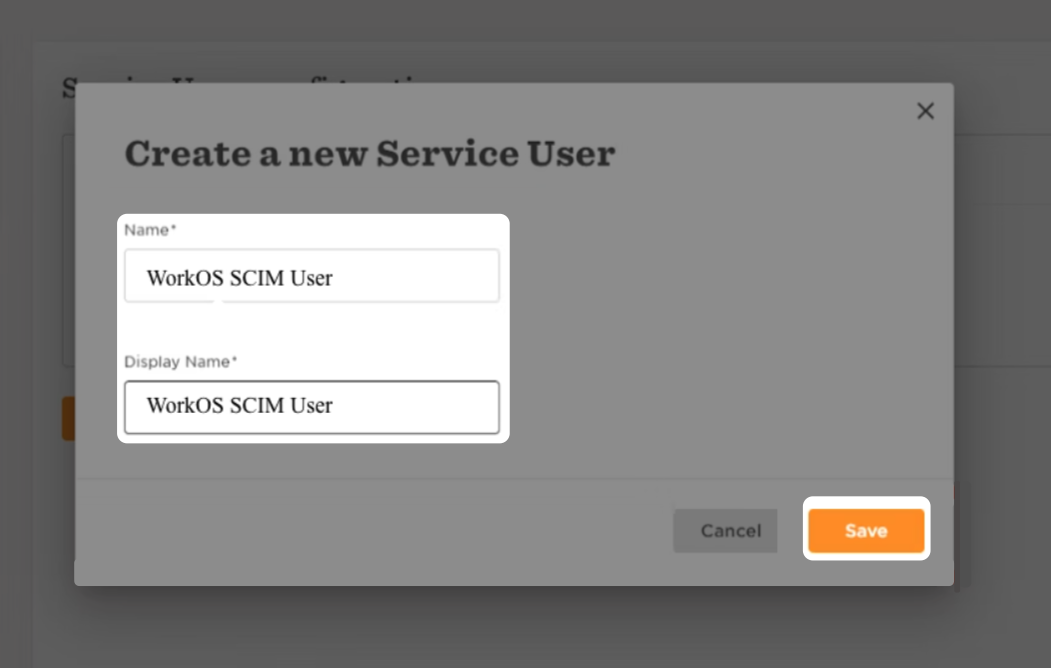
The user will be prompted to enter a name (and display name, these can be the same) for the new service user, we recommend something like “WorkOS SCIM User”.
|
|
61
|
+
|
|
62
|
+
|
|
63
|
+
|
|
64
|
+
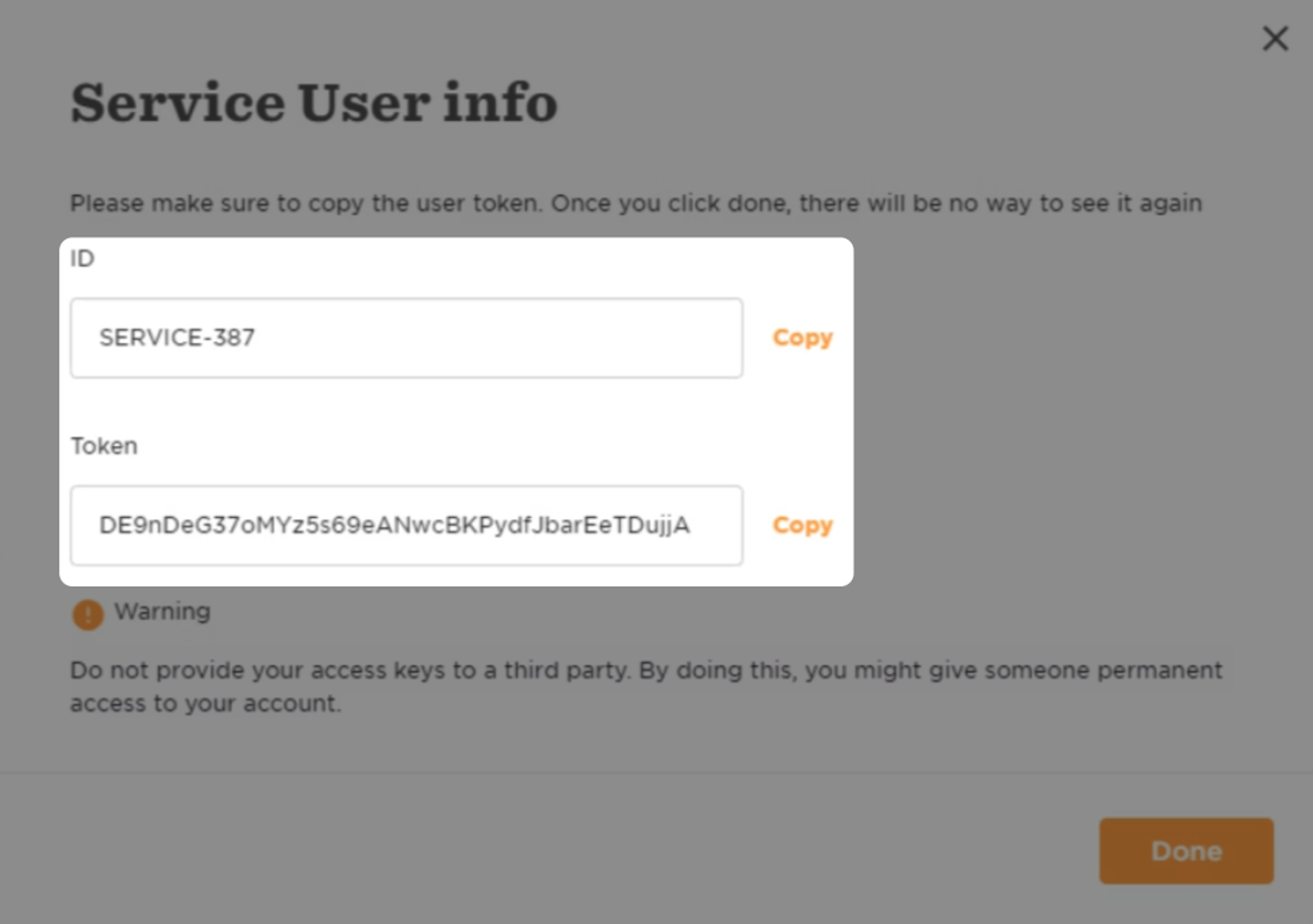
HiBob will then present you with an ID and a Token, which will be populated into WorkOS, so make sure to inform the customer to provide these.
|
|
65
|
+
|
|
66
|
+
|
|
67
|
+
|
|
68
|
+
The enterprise IT admin should make sure that the Service User has permissions to “View selected employees lifecycle sections”.
|
|
69
|
+
|
|
70
|
+
---
|
|
71
|
+
|
|
72
|
+
## (3) Input the HiBob Service User details in WorkOS
|
|
73
|
+
|
|
74
|
+
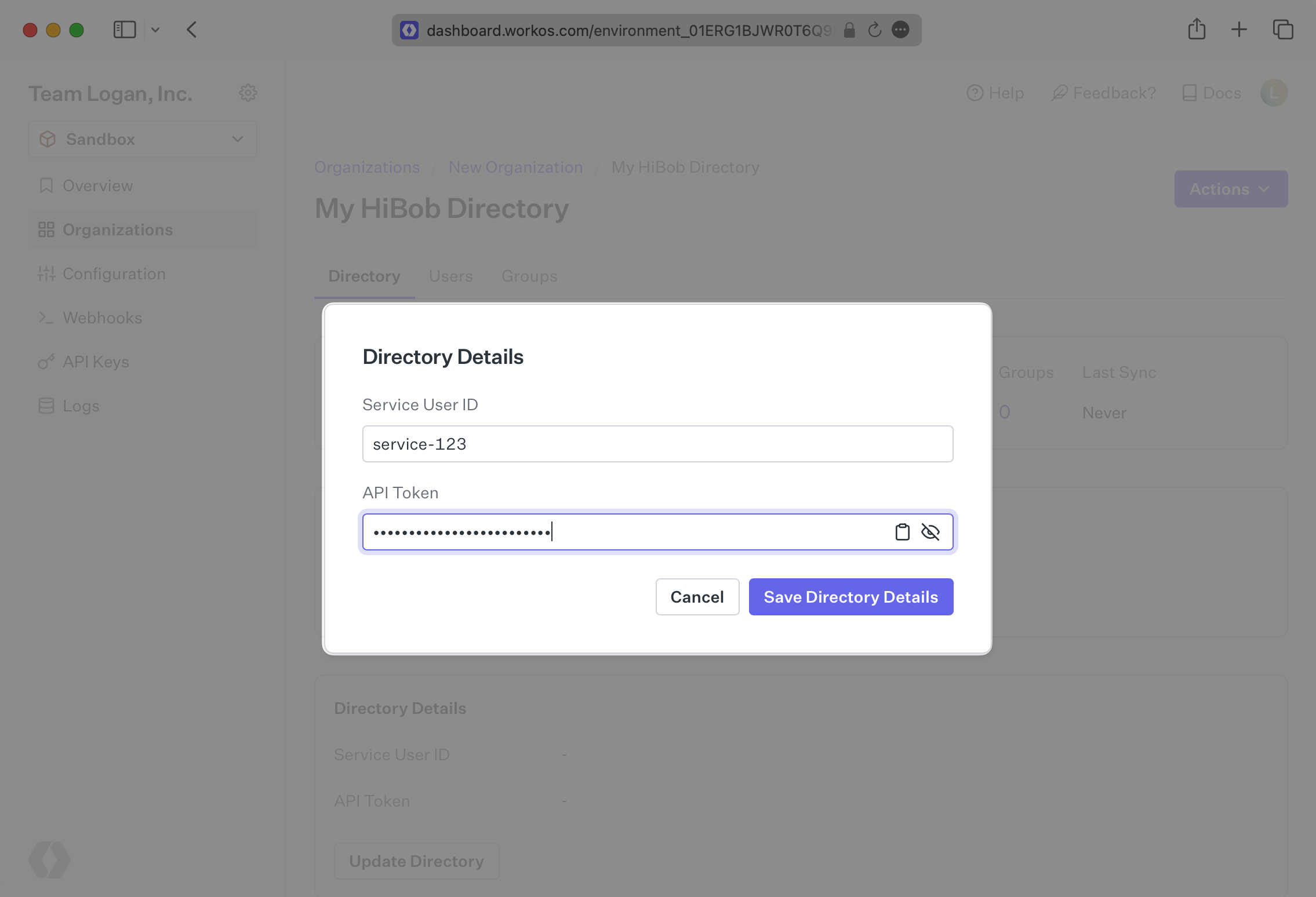
Back in the connection that was created in your WorkOS dashboard, enter these two fields and press “Save Directory Details.”
|
|
75
|
+
|
|
76
|
+
|
|
77
|
+
|
|
78
|
+
You should see the connection now displays “Linked” in green.
|
|
79
|
+
|
|
80
|
+
---
|
|
81
|
+
|
|
82
|
+
## (4) View users and groups in your dashboard
|
|
83
|
+
|
|
84
|
+
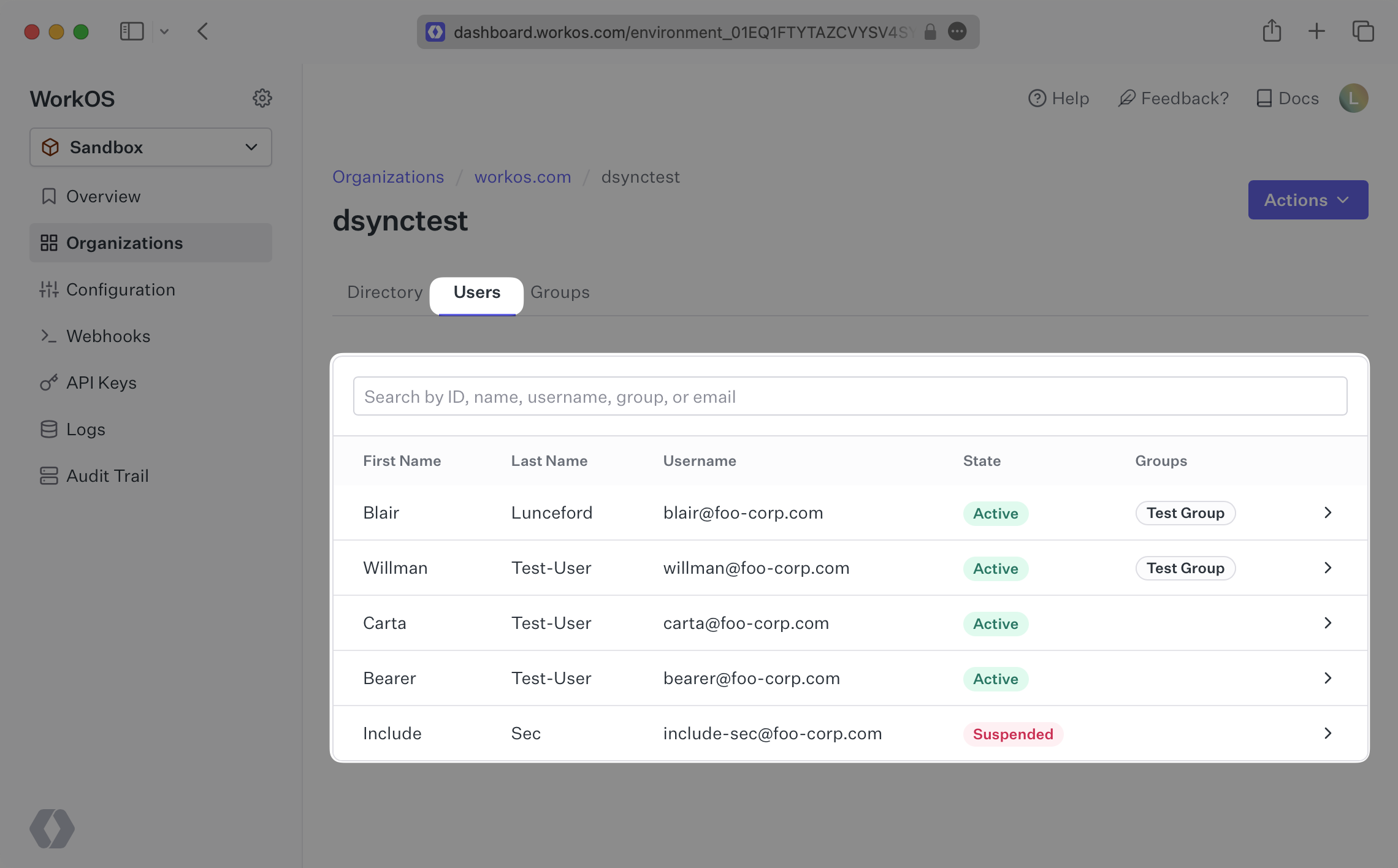
You will now see updates to the users in the directory under the “Users” tab in the HiBob Directory Sync page in WorkOS.
|
|
85
|
+
|
|
86
|
+
|
|
87
|
+
|
|
88
|
+
---
|
|
89
|
+
|
|
90
|
+
## Frequently asked questions
|
|
91
|
+
|
|
92
|
+
### What if the directory user profiles from HiBob aren't showing all of the expected user attributes, such as the user address?
|
|
93
|
+
|
|
94
|
+
If some user attributes are not being sent along in the profile, you’ll want to start by checking the permissions of the Service User you created in step 2. You can see more about accessing Service User permissions [here](https://apidocs.hibob.com/docs/api-service-users) and some relevant FAQs from HiBob [here](https://help.hibob.com/hc/en-us/articles/4409776408209#how-to-review-permission-group-changes-0-4).
|
|
95
|
+
|
|
96
|
+
### How often do HiBob directories perform a sync?
|
|
97
|
+
|
|
98
|
+
HiBob directories poll every 30 minutes starting from the time of the initial sync.
|
|
@@ -0,0 +1,96 @@
|
|
|
1
|
+
---
|
|
2
|
+
title: JumpCloud SAML
|
|
3
|
+
description: "Learn how to configure a connection to\_JumpCloud via SAML."
|
|
4
|
+
icon: jumpcloud
|
|
5
|
+
breadcrumb:
|
|
6
|
+
title: Integrations
|
|
7
|
+
url: /integrations
|
|
8
|
+
originalPath: .tmp-workos-clone/packages/docs/content/integrations/jumpcloud-saml.mdx
|
|
9
|
+
---
|
|
10
|
+
|
|
11
|
+
## Introduction
|
|
12
|
+
|
|
13
|
+
Each SSO Identity Provider requires specific information to create and configure a new [Connection](/glossary/connection). Often, the information required to create a Connection will differ by Identity Provider.
|
|
14
|
+
|
|
15
|
+
To create a JumpCloud SAML Connection, you’ll need to upload a JumpCloud Metadata file.
|
|
16
|
+
|
|
17
|
+
---
|
|
18
|
+
|
|
19
|
+
## What WorkOS provides
|
|
20
|
+
|
|
21
|
+
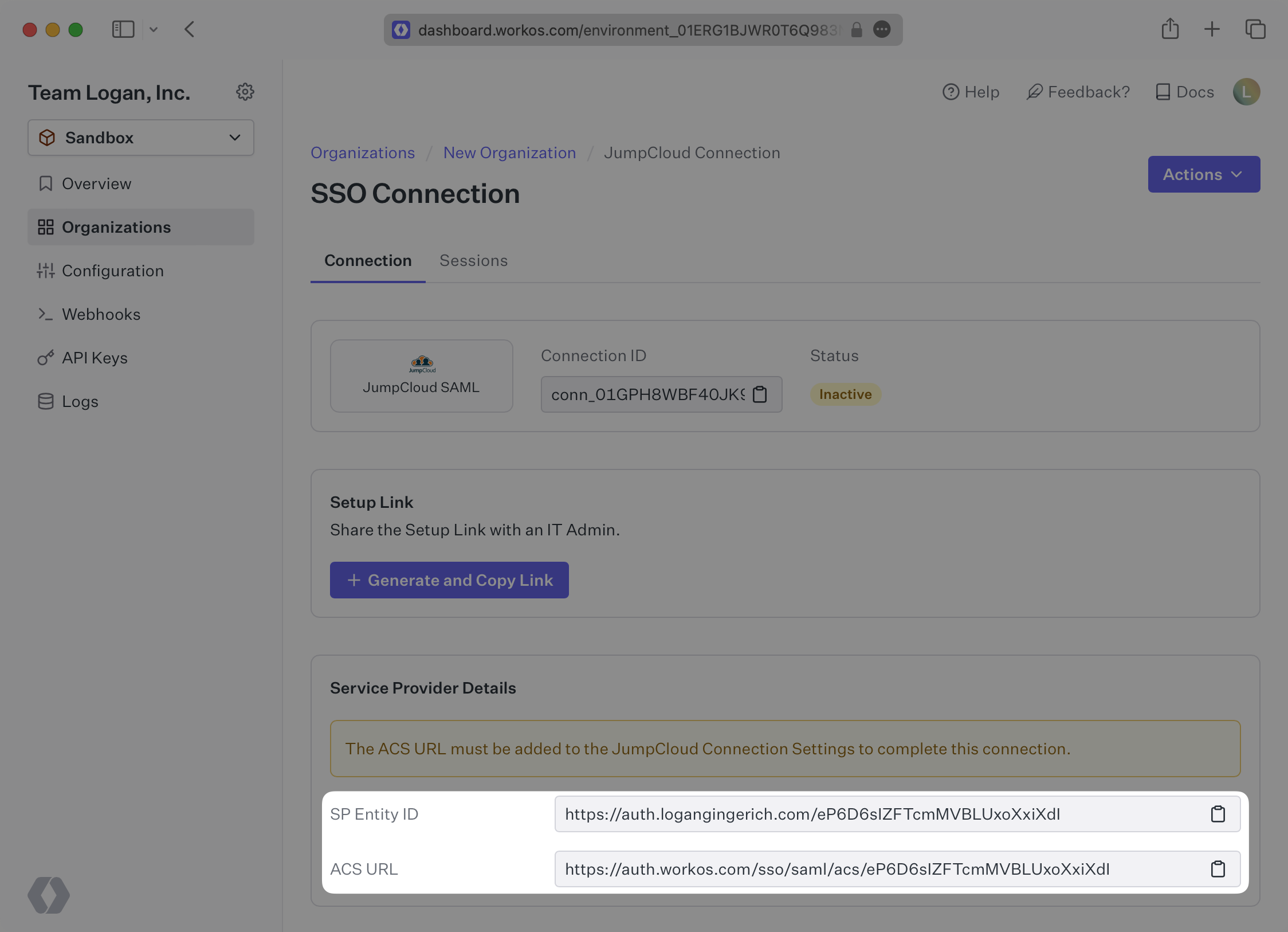
WorkOS provides the [ACS URL](/glossary/acs-url) and [SP Entity ID](/glossary/sp-entity-id). They’re readily available in your Connection Settings in the [WorkOS Dashboard](https://dashboard.workos.com/).
|
|
22
|
+
|
|
23
|
+
|
|
24
|
+
|
|
25
|
+
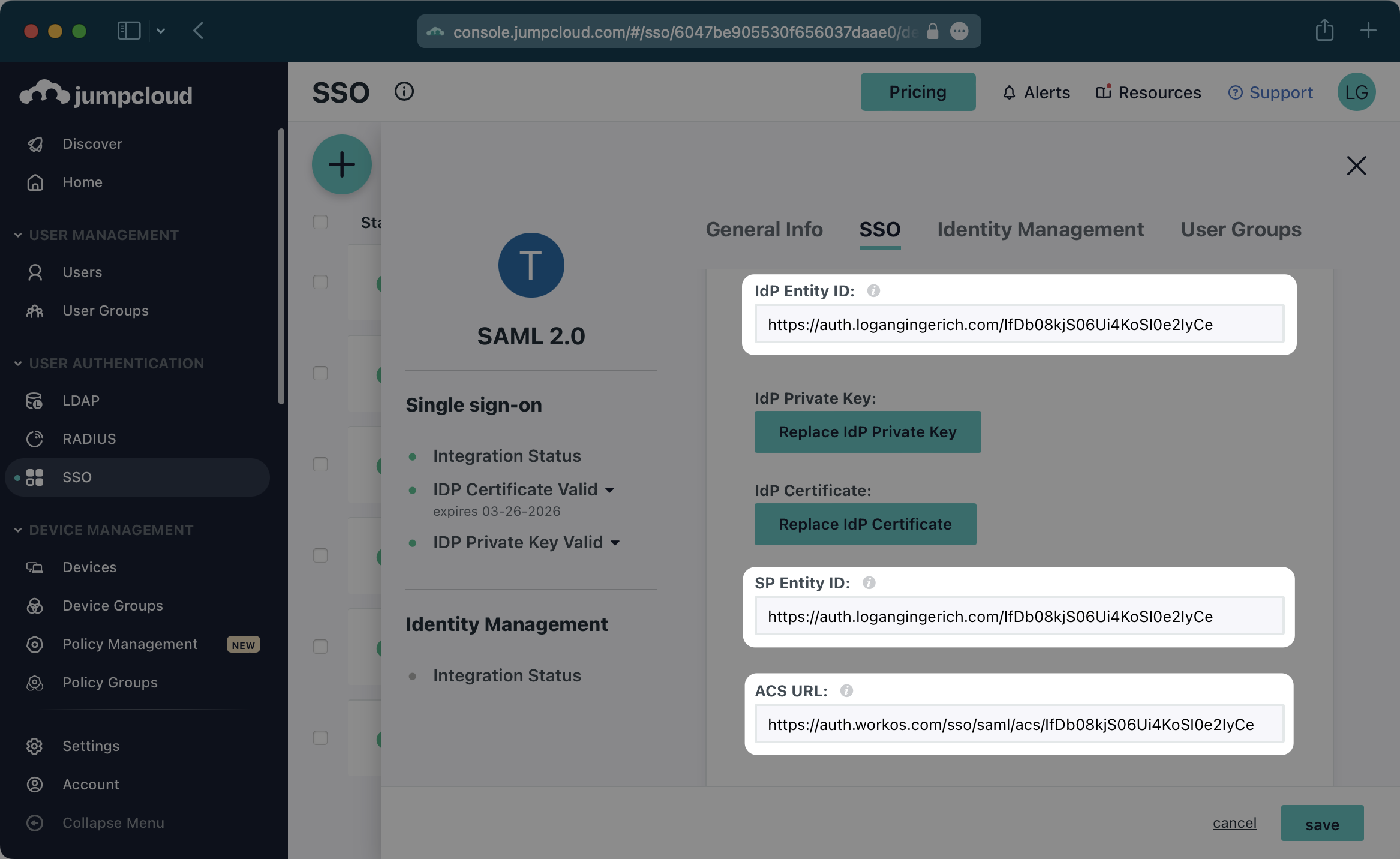
The ACS URL is the location an Identity Provider redirects its authentication response to. In JumpCloud’s case, the ACS URL and Entity ID need to be set by the organization when configuring your application in their JumpCloud instance.
|
|
26
|
+
|
|
27
|
+
Specifically, the ACS URL and Entity ID will need to be set in the “Single Sign-On Configuration” section of the SAML app. You will input the ACS URL for “ACS URL” and the Entity ID as both “IdP Entity ID” and “SP Entity ID”:
|
|
28
|
+
|
|
29
|
+
|
|
30
|
+
|
|
31
|
+
---
|
|
32
|
+
|
|
33
|
+
## What you’ll need
|
|
34
|
+
|
|
35
|
+
In order to integrate you’ll need the JumpCloud Metadata file. Here’s how to obtain it:
|
|
36
|
+
|
|
37
|
+
---
|
|
38
|
+
|
|
39
|
+
## (1) Log in
|
|
40
|
+
|
|
41
|
+
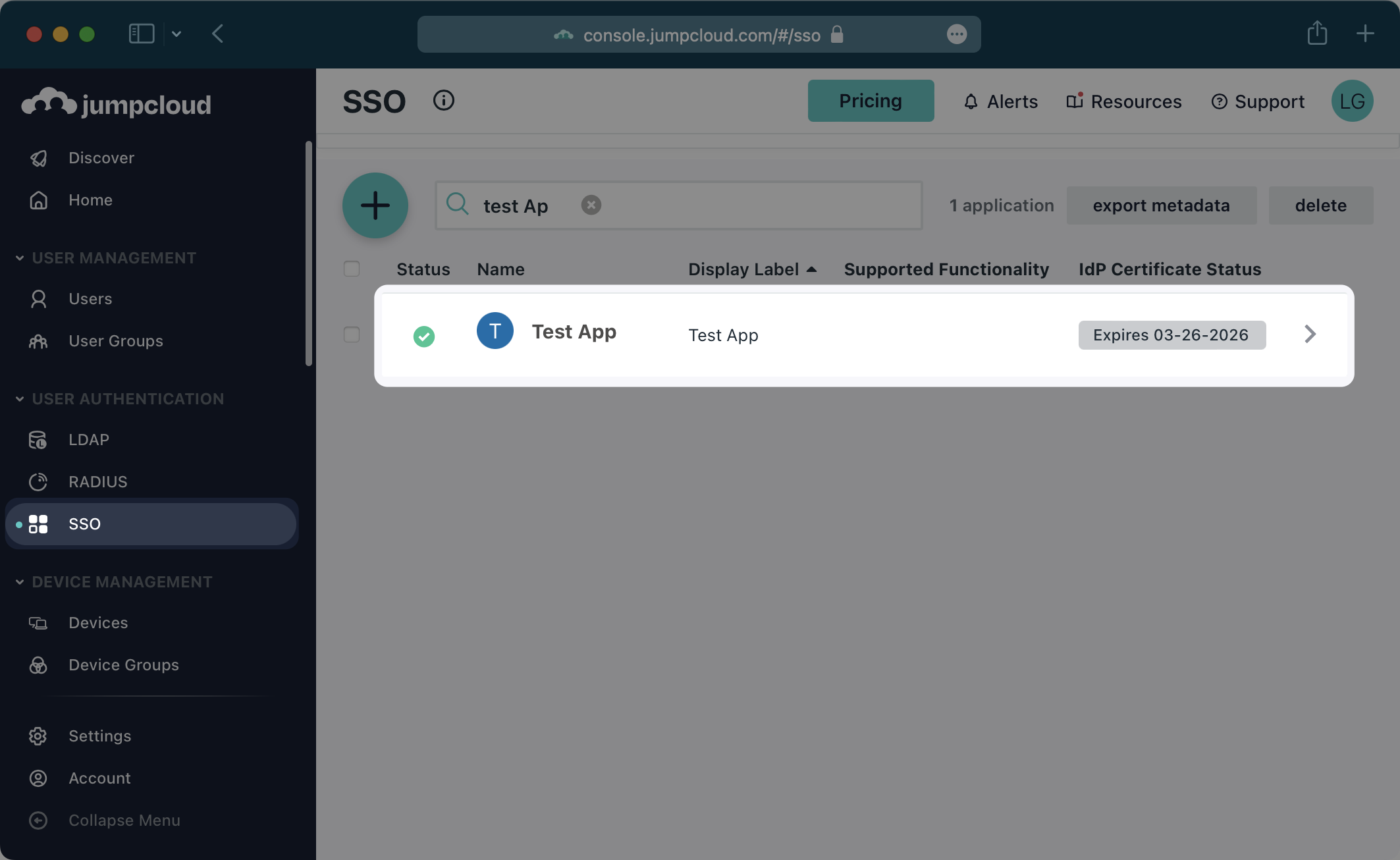
Log in to the JumpCloud admin dashboard, select “SSO” on the left and select your Application.
|
|
42
|
+
|
|
43
|
+
|
|
44
|
+
|
|
45
|
+
---
|
|
46
|
+
|
|
47
|
+
## (2) Configure Attribute Mapping
|
|
48
|
+
|
|
49
|
+
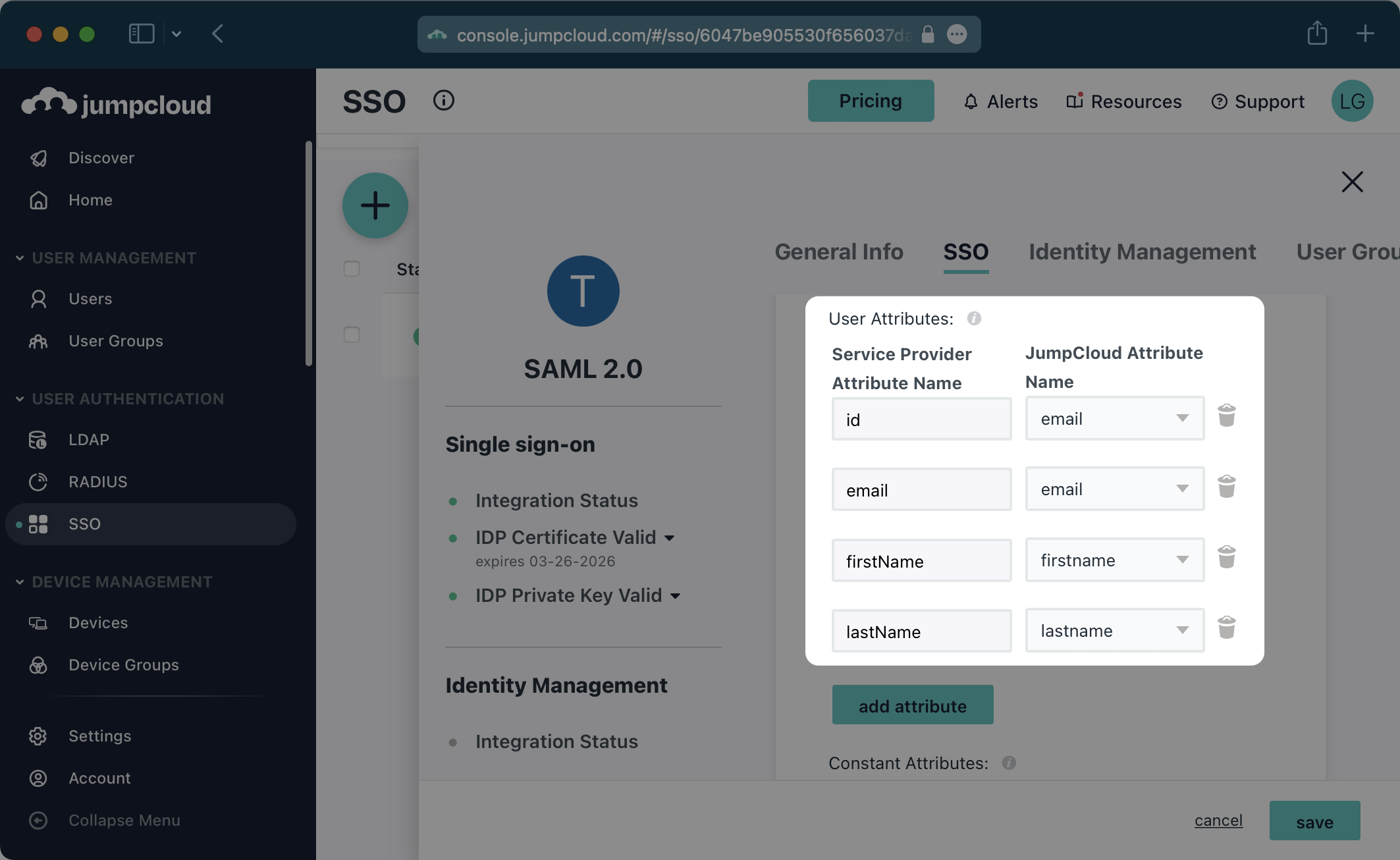
In the “User Attributes” section of the Single Sign-On Configuration page for the SAML app, add the following field-value parameter pairs:
|
|
50
|
+
|
|
51
|
+
- `id` → `email`
|
|
52
|
+
- `email` → `email`
|
|
53
|
+
- `firstName` → `firstname`
|
|
54
|
+
- `lastName` → `lastname`
|
|
55
|
+
|
|
56
|
+
|
|
57
|
+
|
|
58
|
+
### Role Assignment (optional)
|
|
59
|
+
|
|
60
|
+
With [identity provider role assignment](/sso/identity-provider-role-assignment), users can receive roles within your application based on their group memberships. To return this information in the attribute statement, follow the guidance below.
|
|
61
|
+
|
|
62
|
+
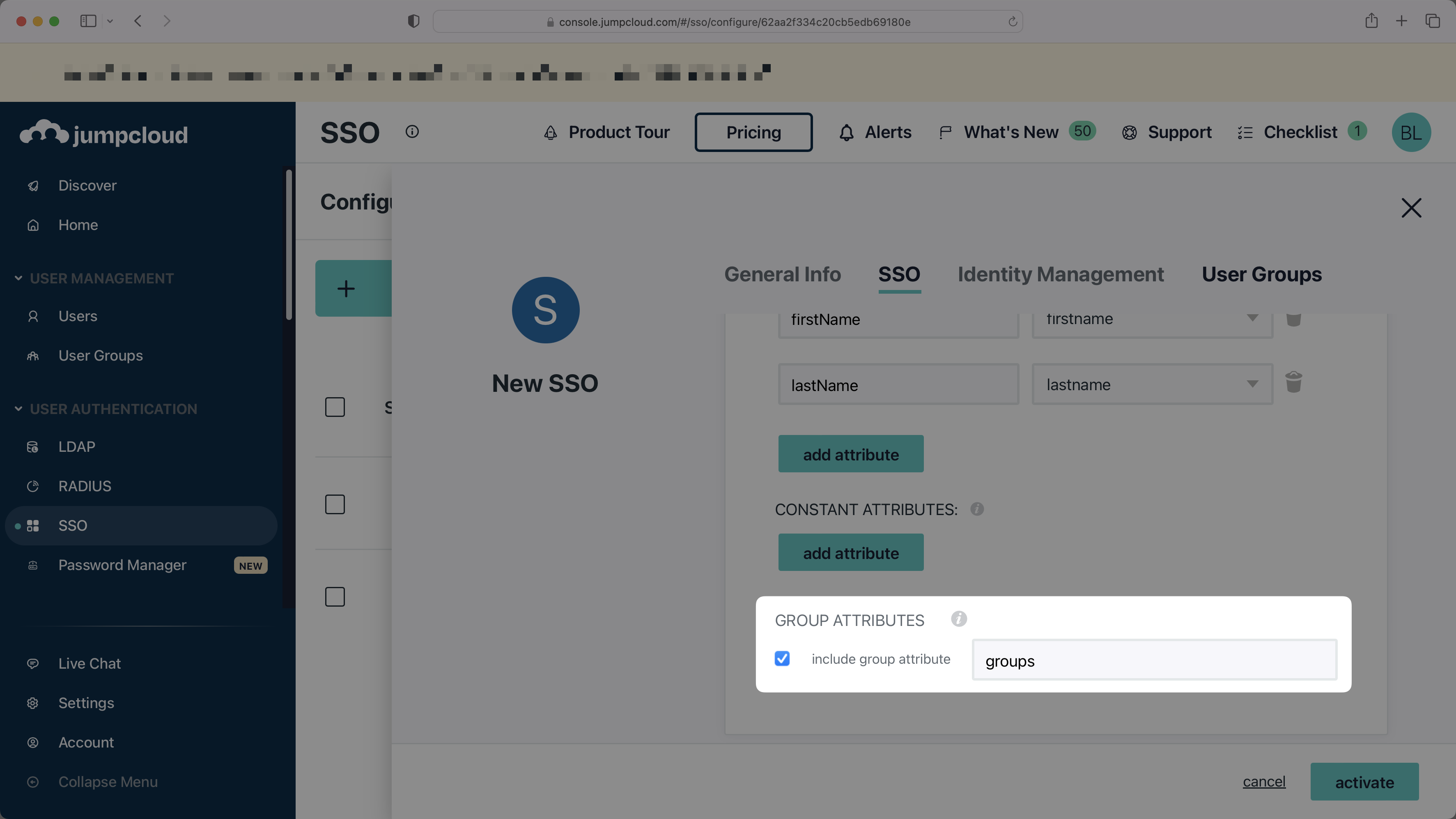
In the "Group Attributes" section, select the checkbox to "include group attribute", and then set the attribute name to `groups`.
|
|
63
|
+
|
|
64
|
+
|
|
65
|
+
|
|
66
|
+
> Finish role assignment set-up by navigating to the SSO connection page in the _Organization_ section of the [WorkOS Dashboard](https://dashboard.workos.com/). Create SSO groups by referencing the group IdP ID. Then, assign roles to these SSO groups so group members are automatically granted roles within your application.
|
|
67
|
+
|
|
68
|
+
### Check "Sign Assertion"
|
|
69
|
+
|
|
70
|
+
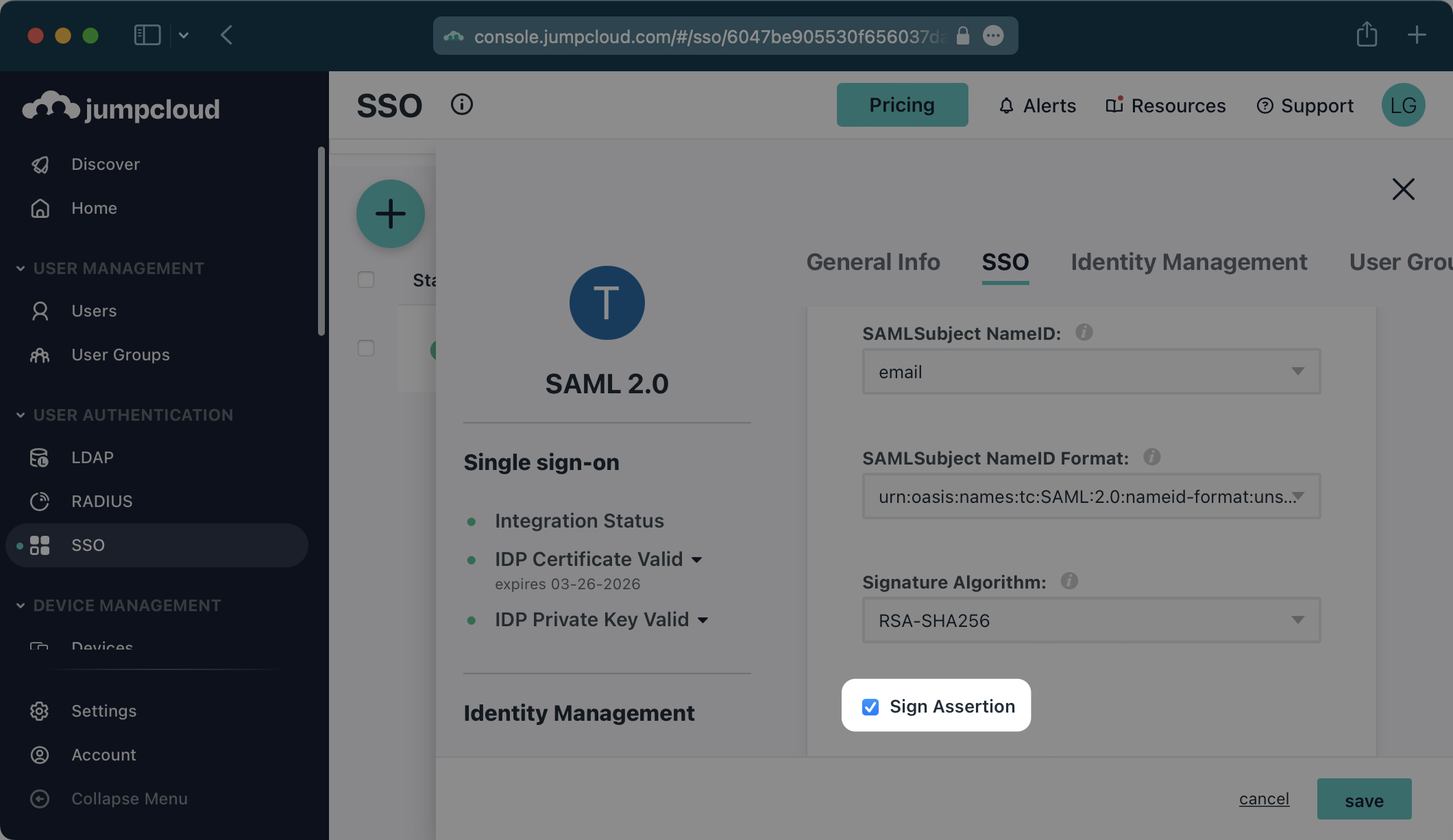
Be sure to check the “Sign Assertion” box shown below.
|
|
71
|
+
|
|
72
|
+
|
|
73
|
+
|
|
74
|
+
---
|
|
75
|
+
|
|
76
|
+
## (3) Upload Metadata File
|
|
77
|
+
|
|
78
|
+
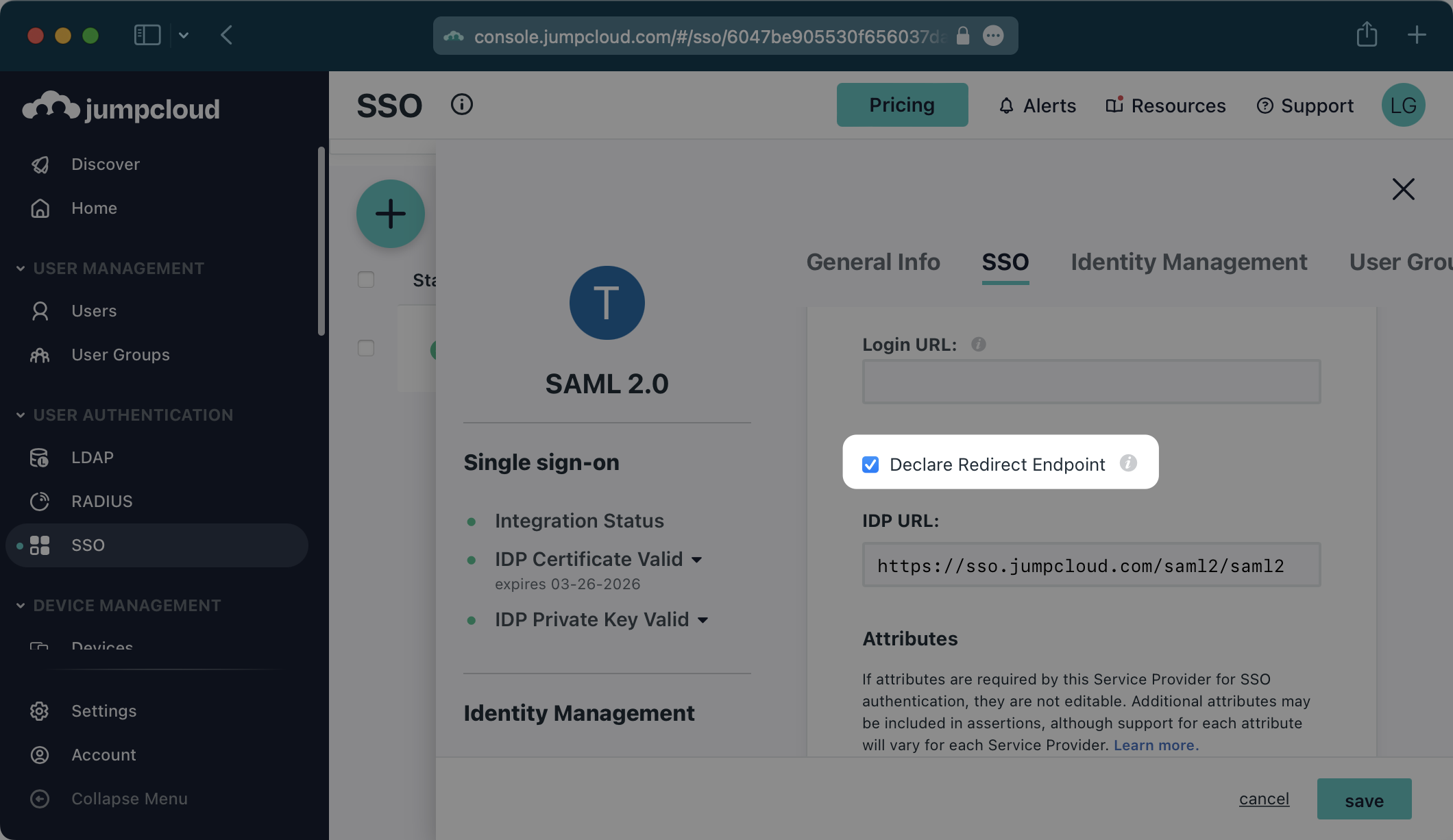
Be sure to check “Declare Redirect Endpoint”.
|
|
79
|
+
|
|
80
|
+
|
|
81
|
+
|
|
82
|
+
> NOTE: The "Declare Redirect Endpoint" setting needs to be enabled prior to exporting the IdP metadata below as this will alter the metadata.
|
|
83
|
+
|
|
84
|
+
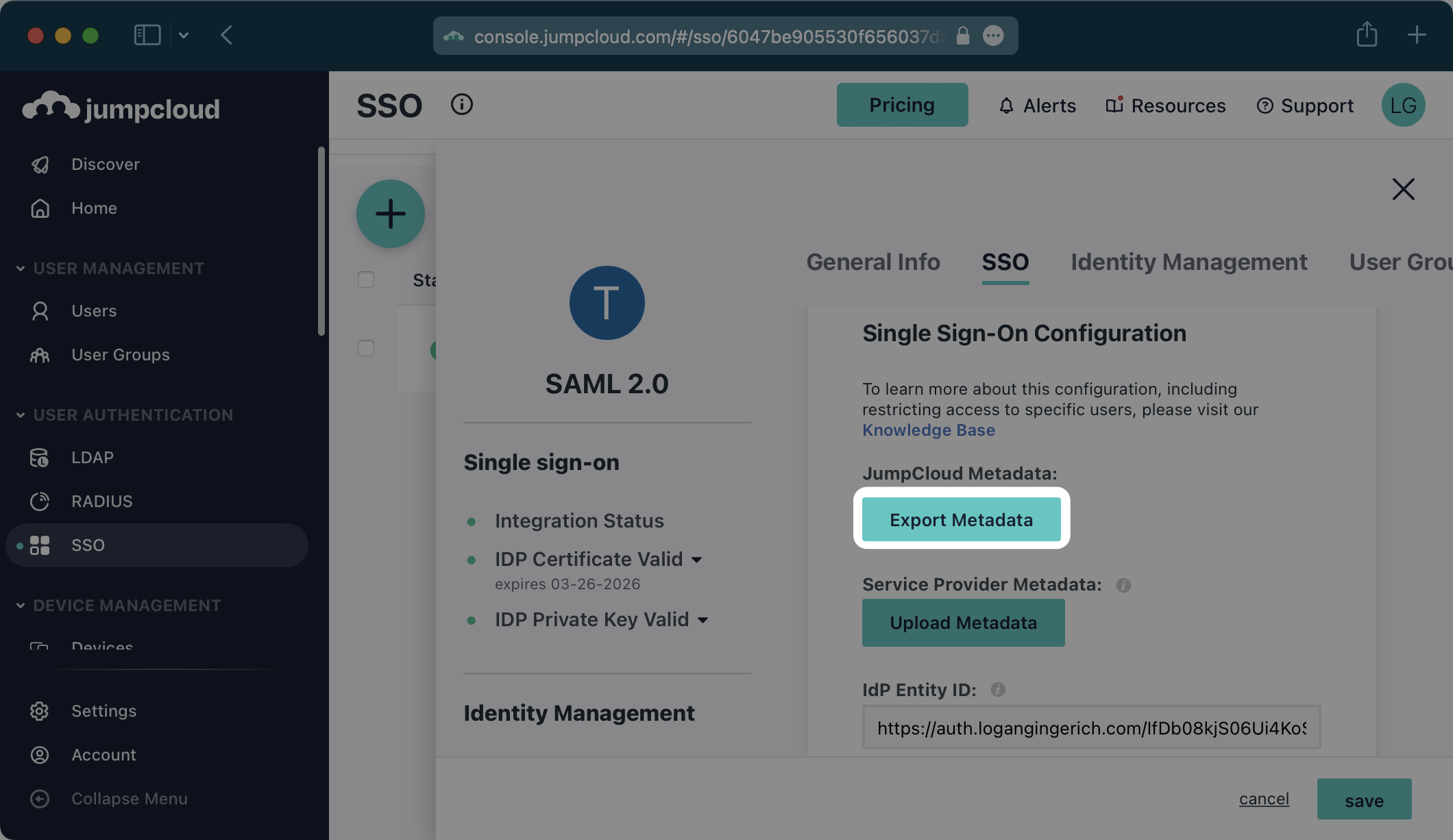
Click the “Export Metadata” button under “JumpCloud Metadata”. This will download an XML metadata file.
|
|
85
|
+
|
|
86
|
+
|
|
87
|
+
|
|
88
|
+
In the Connection Settings of the WorkOS Dashboard, click “Edit Metadata Configuration”.
|
|
89
|
+
|
|
90
|
+
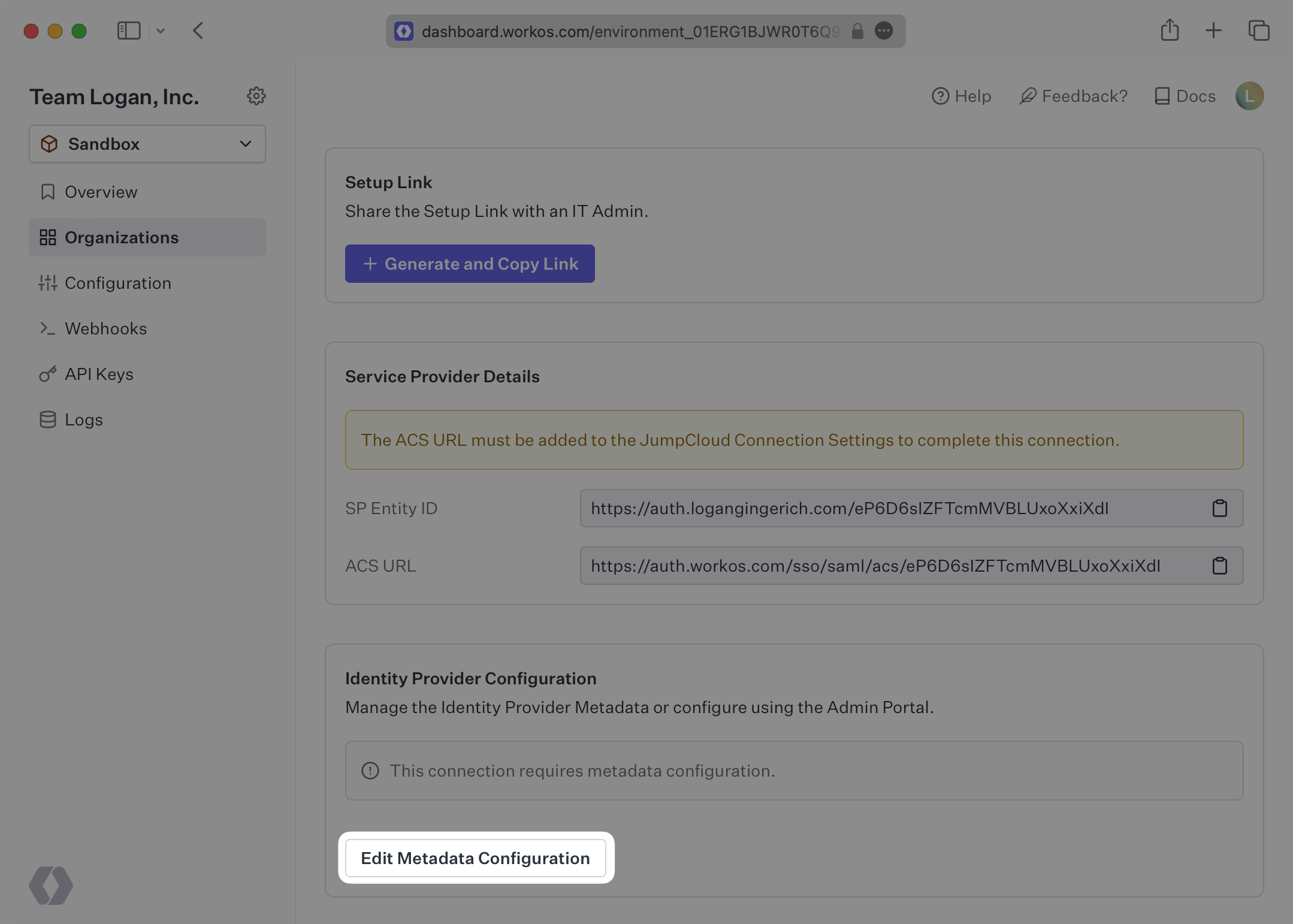
|
|
91
|
+
|
|
92
|
+
In the modal that pops up, upload the JumpCloud Metadata file and then select “Save Metadata Configuration”.
|
|
93
|
+
|
|
94
|
+
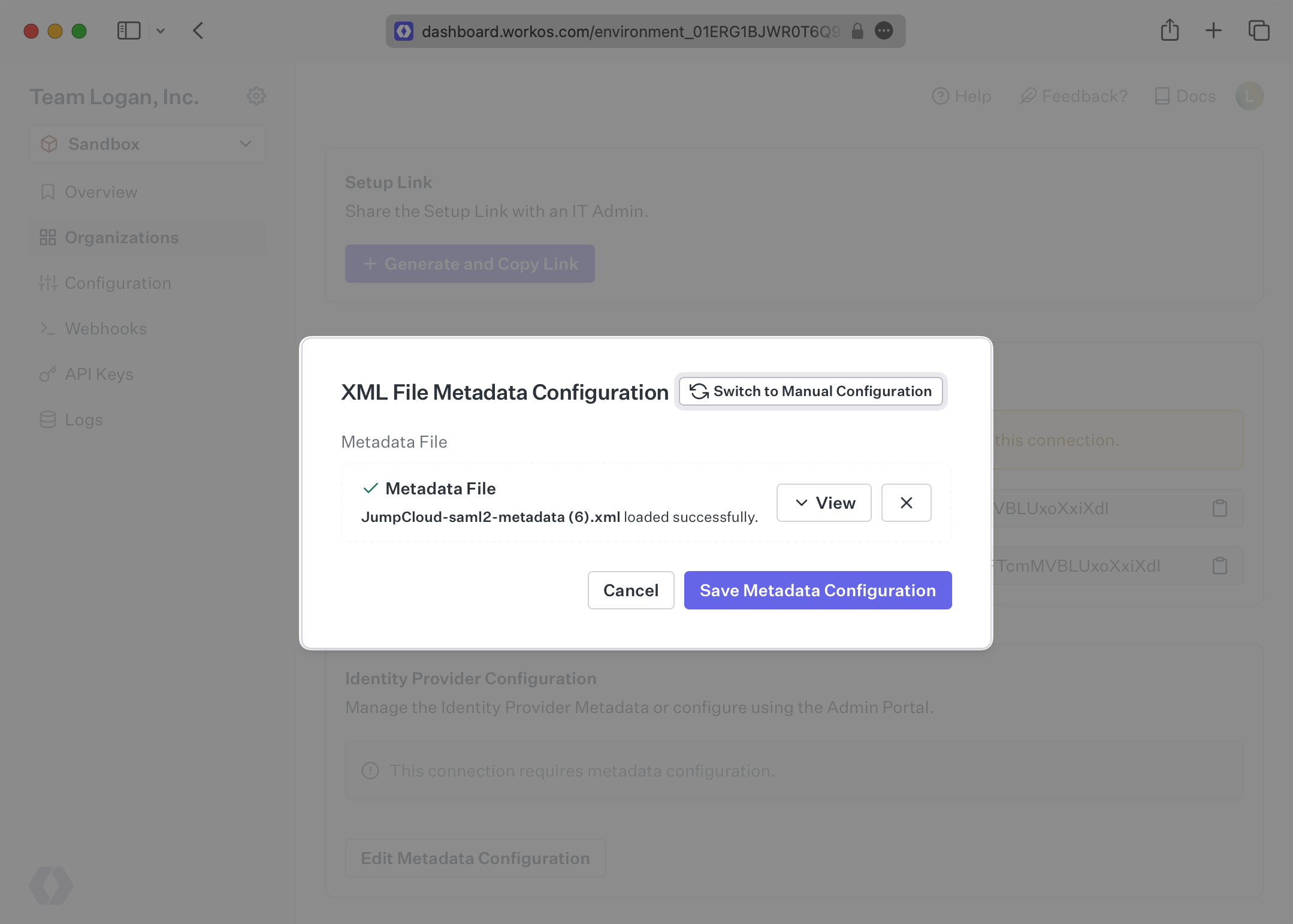
|
|
95
|
+
|
|
96
|
+
Once the file has uploaded, your Connection will then be linked and good to go!
|
|
@@ -0,0 +1,106 @@
|
|
|
1
|
+
---
|
|
2
|
+
title: JumpCloud SCIM
|
|
3
|
+
description: "Learn about syncing your user list with\_JumpCloud SCIM."
|
|
4
|
+
icon: jumpcloud
|
|
5
|
+
breadcrumb:
|
|
6
|
+
title: Integrations
|
|
7
|
+
url: /integrations
|
|
8
|
+
originalPath: .tmp-workos-clone/packages/docs/content/integrations/jumpcloud-scim.mdx
|
|
9
|
+
---
|
|
10
|
+
|
|
11
|
+
## Introduction
|
|
12
|
+
|
|
13
|
+
This guide outlines how to synchronize your application’s JumpCloud directories using SCIM.
|
|
14
|
+
|
|
15
|
+
To synchronize an organization’s users and groups provisioned for your application, you’ll need to provide the organization with two pieces of information:
|
|
16
|
+
|
|
17
|
+
- An [Endpoint](/glossary/endpoint) that JumpCloud will make requests to.
|
|
18
|
+
- A [Bearer Token](/glossary/bearer-token) for JumpCloud to authenticate its endpoint requests.
|
|
19
|
+
|
|
20
|
+
Both of these are available in your Endpoint’s Settings in the [WorkOS Dashboard](https://dashboard.workos.com/).
|
|
21
|
+
|
|
22
|
+
> Steps 2, 3, and 4 below will need to be carried out by the organization when configuring your application in their JumpCloud instance.
|
|
23
|
+
|
|
24
|
+
---
|
|
25
|
+
|
|
26
|
+
## (1) Set up your Directory Sync endpoint
|
|
27
|
+
|
|
28
|
+
Login to your WorkOS Dashboard and select “Organizations” from the left hand navigation bar.
|
|
29
|
+
|
|
30
|
+
Select the organization you’ll be configuring a new Directory Sync for.
|
|
31
|
+
|
|
32
|
+
Under “Actions” click “Add Directory”.
|
|
33
|
+
|
|
34
|
+
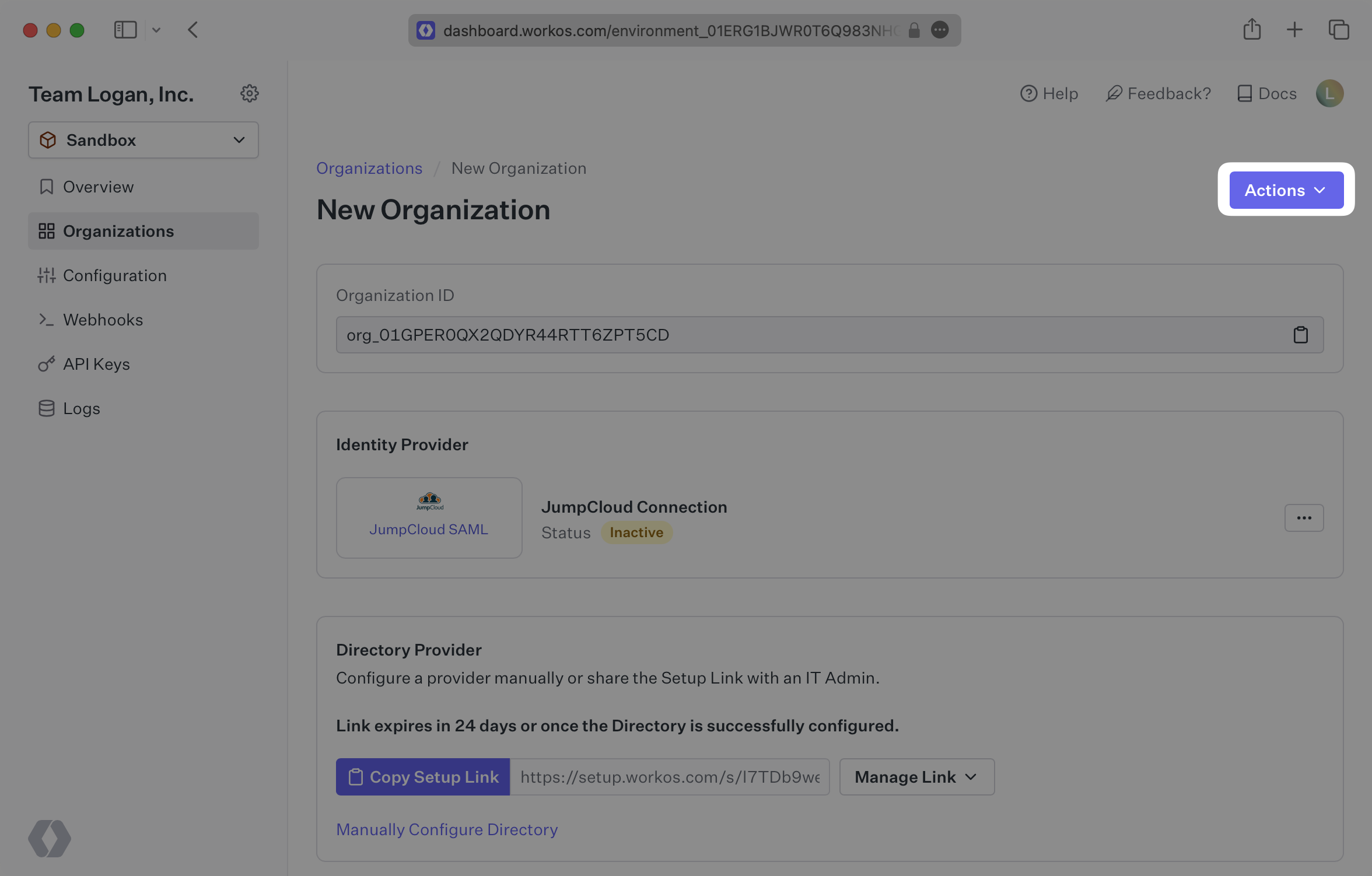
|
|
35
|
+
|
|
36
|
+
Select “JumpCloud” from the dropdown, and enter the organization name.
|
|
37
|
+
|
|
38
|
+
Then, click “Create Directory.”
|
|
39
|
+
|
|
40
|
+
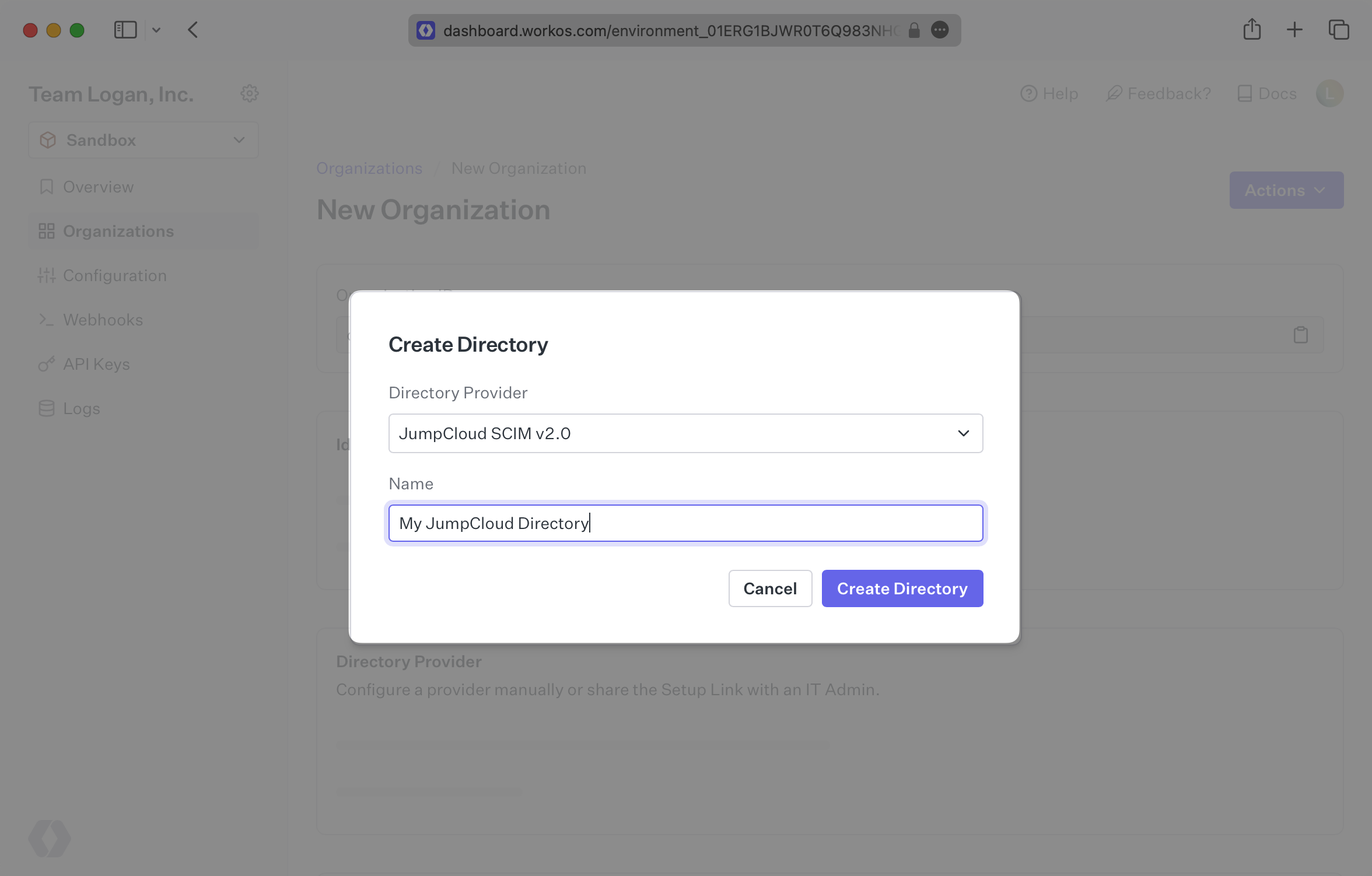
|
|
41
|
+
|
|
42
|
+
Your JumpCloud directory sync has now been created successfully with an Endpoint and Bearer Token.
|
|
43
|
+
|
|
44
|
+
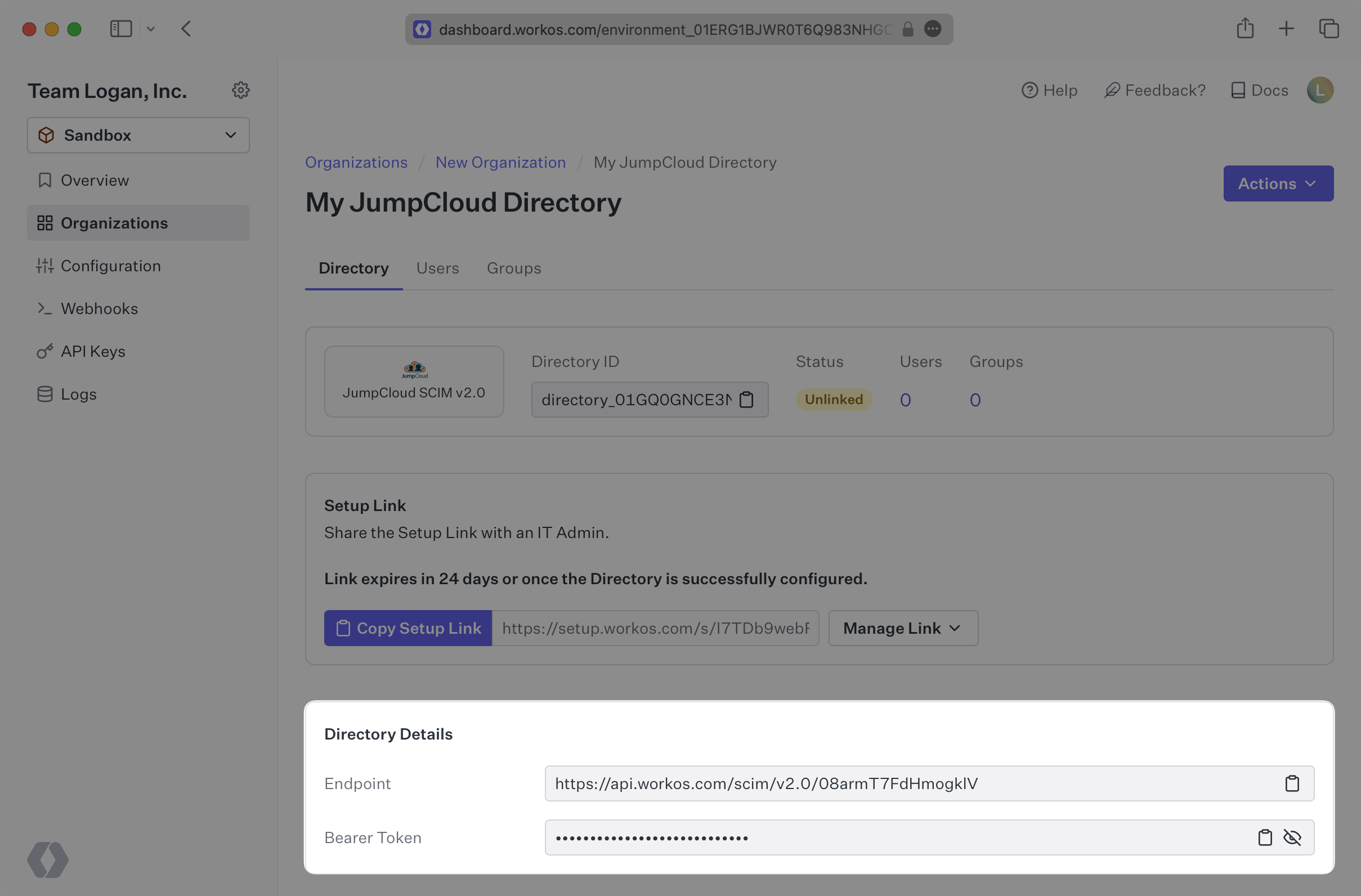
|
|
45
|
+
|
|
46
|
+
> We have support for custom labeled URLs for Directory Sync endpoints. [Contact us](mailto:support@workos.com) for more info!
|
|
47
|
+
|
|
48
|
+
---
|
|
49
|
+
|
|
50
|
+
## (2) Select or create your JumpCloud application
|
|
51
|
+
|
|
52
|
+
Log in to the JumpCloud admin dashboard, select “SSO” on the left and select your Application.
|
|
53
|
+
|
|
54
|
+
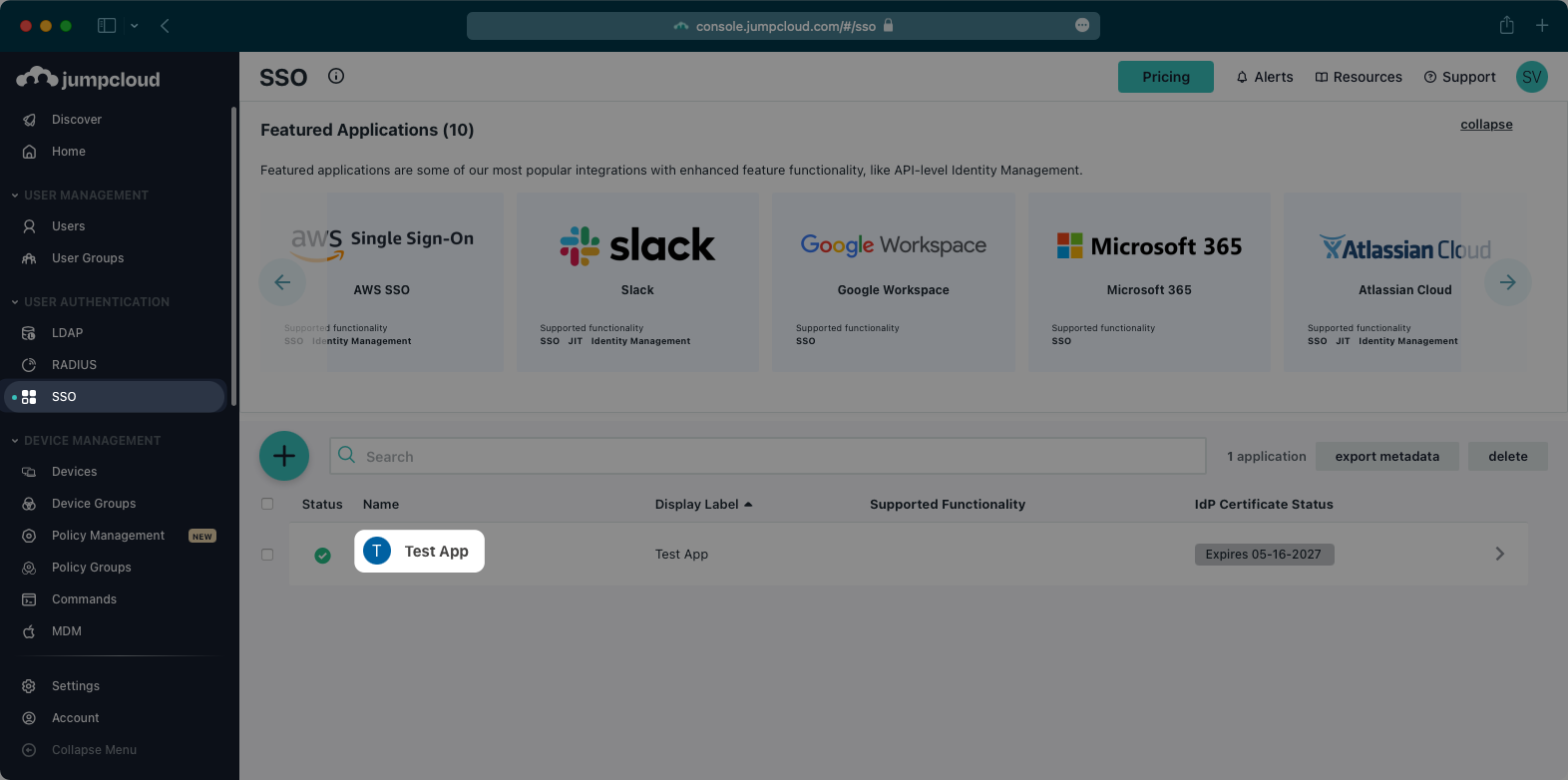
|
|
55
|
+
|
|
56
|
+
If you haven’t created an application, you’ll need to first create a custom SAML application in JumpCloud. JumpCloud only supports configuring SCIM provisioning in an existing SAML application. You can use our JumpCloud SAML documentation to configure your SAML application before moving on to SCIM provisioning.
|
|
57
|
+
|
|
58
|
+
---
|
|
59
|
+
|
|
60
|
+
## (3) Configure your integration
|
|
61
|
+
|
|
62
|
+
Select “Identity Management” from the top navigation menu.
|
|
63
|
+
|
|
64
|
+
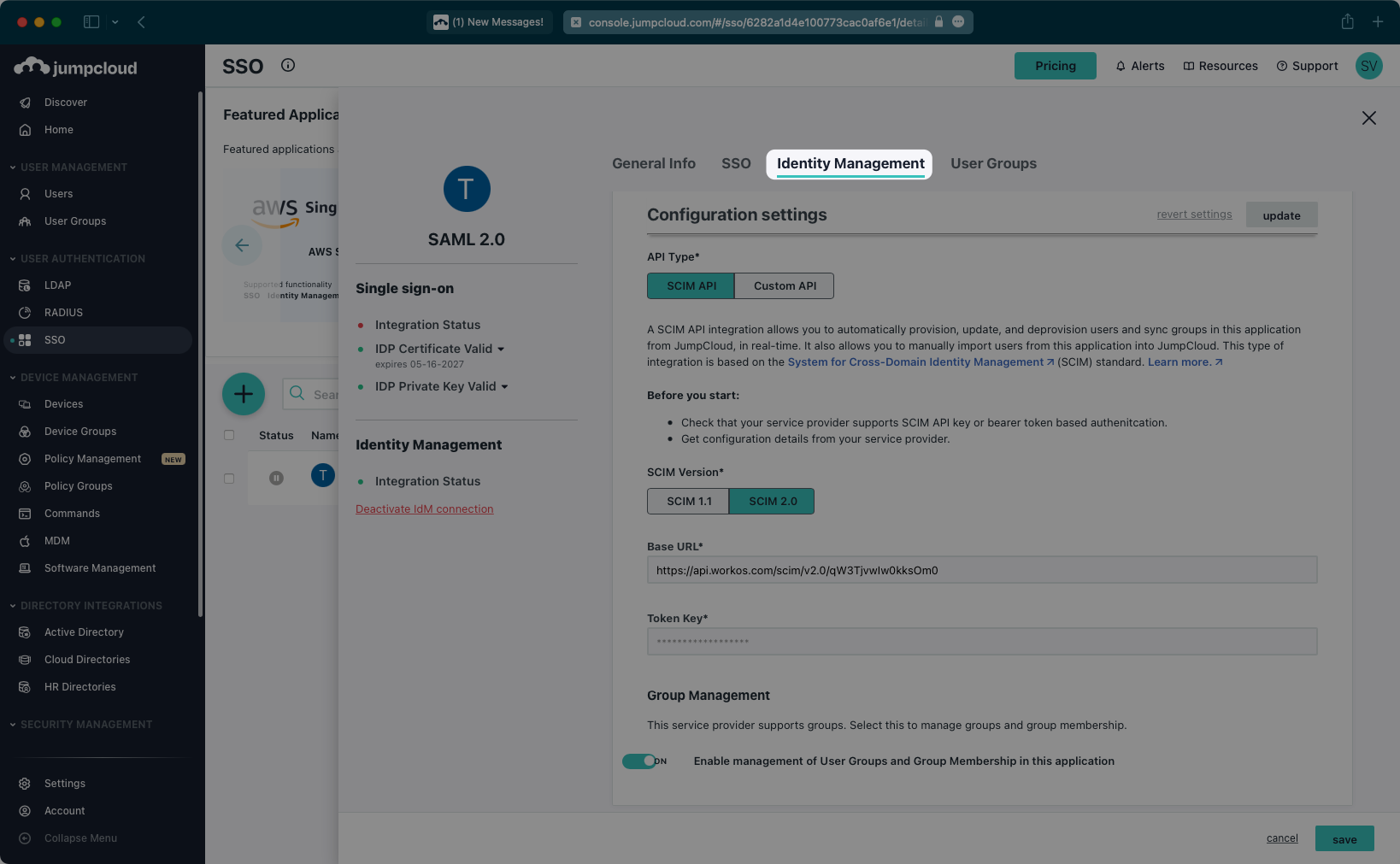
|
|
65
|
+
|
|
66
|
+
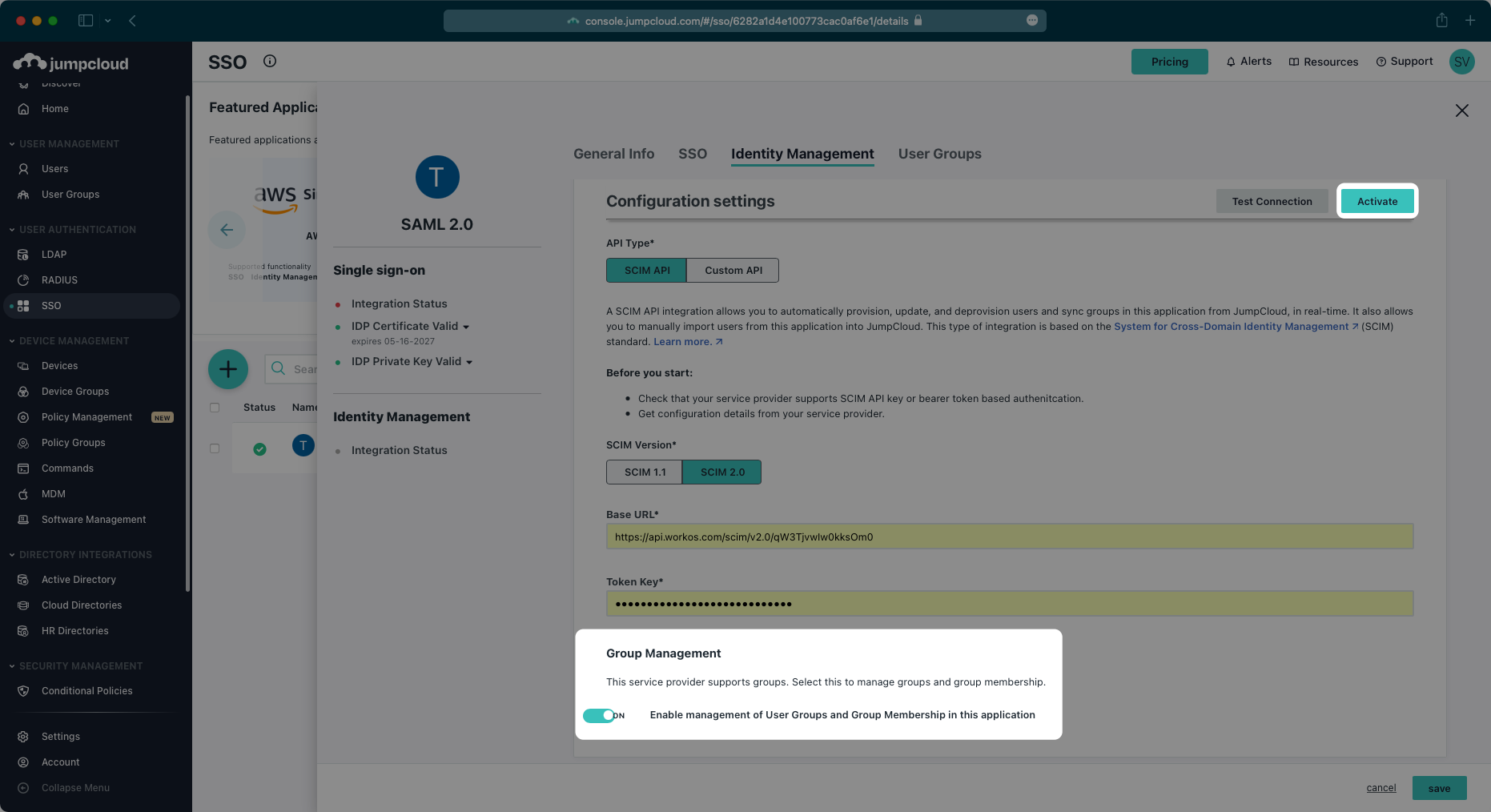
Scroll down to the “Configuration settings” section. Make sure SCIM 2.0 is selected as the SCIM version.
|
|
67
|
+
|
|
68
|
+
Copy and paste the Endpoint from your [WorkOS Dashboard](https://dashboard.workos.com/) in the “Base URL” field.
|
|
69
|
+
|
|
70
|
+
Then, copy and paste the Bearer Token from your [WorkOS Dashboard](https://dashboard.workos.com/) into the “Token Key” field.
|
|
71
|
+
|
|
72
|
+
Next, test the connection to confirm the configuration settings.
|
|
73
|
+
|
|
74
|
+
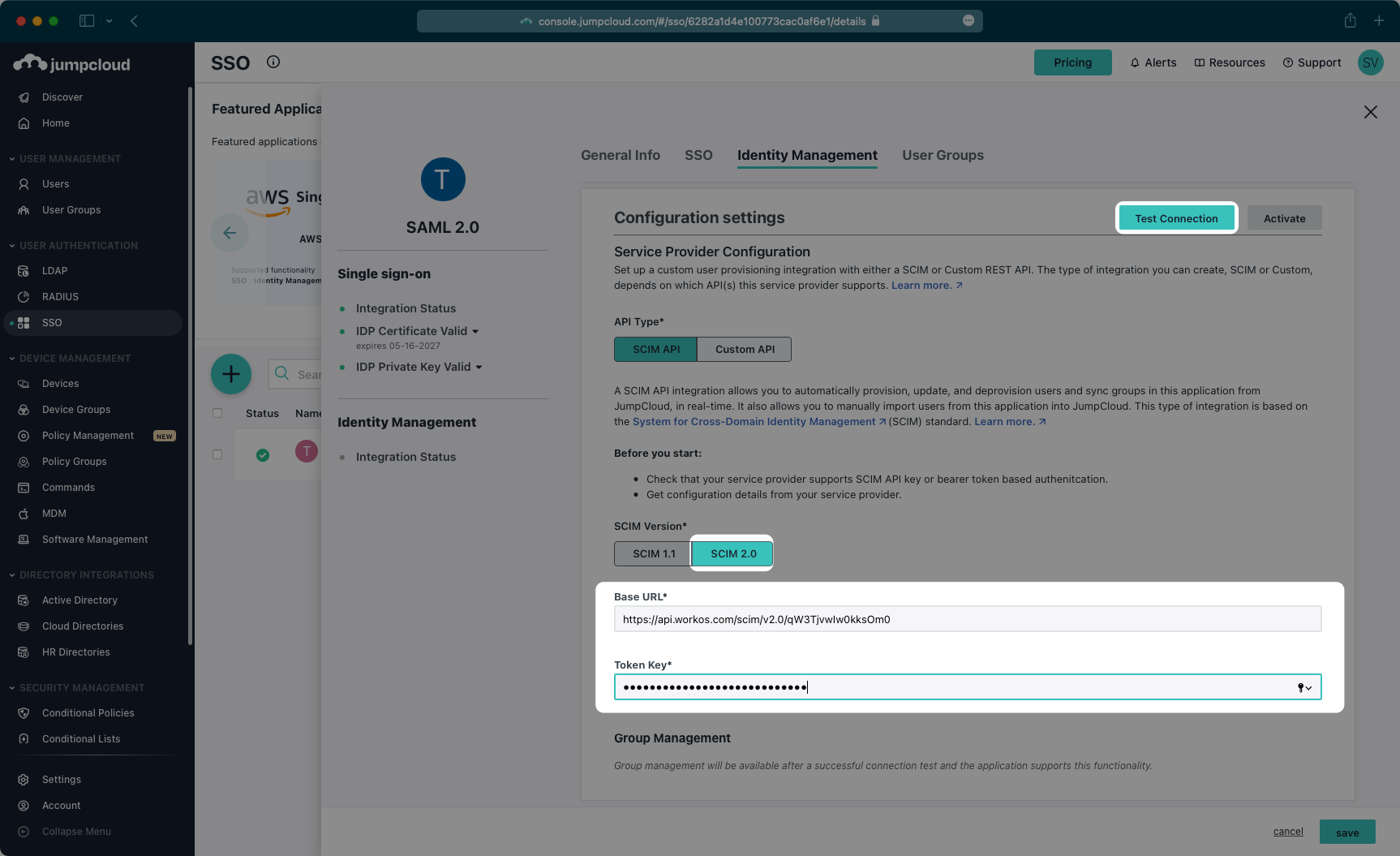
|
|
75
|
+
|
|
76
|
+
After you receive a success message for the configuration, make sure the Group Management toggle is “On”, and then activate the settings.
|
|
77
|
+
|
|
78
|
+
|
|
79
|
+
|
|
80
|
+
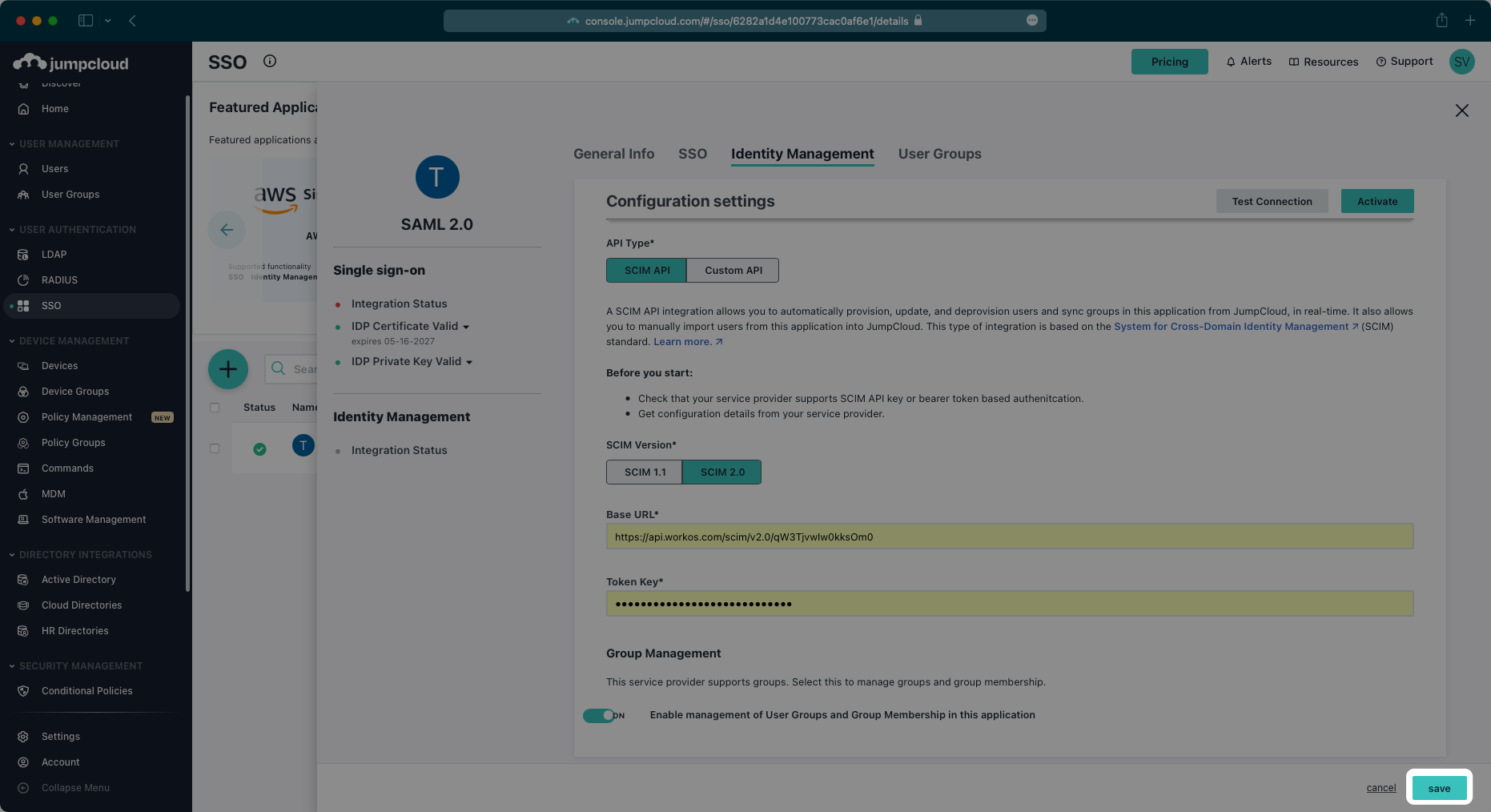
After the activation step is successful, save the configuration.
|
|
81
|
+
|
|
82
|
+
|
|
83
|
+
|
|
84
|
+
---
|
|
85
|
+
|
|
86
|
+
## (4) Assign users and groups to your application
|
|
87
|
+
|
|
88
|
+
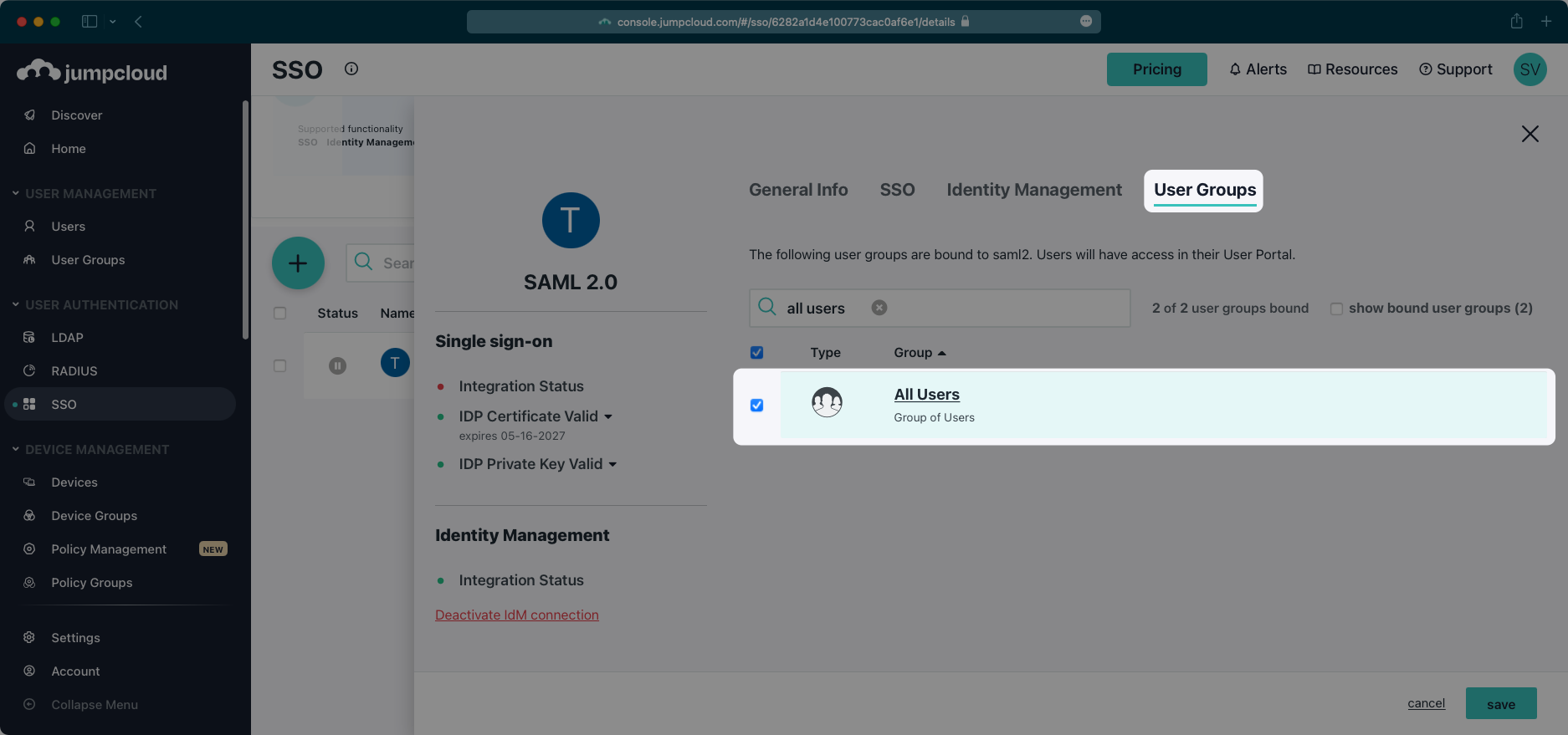
In order for your users and groups to be synced, you will need to assign them to your JumpCloud Application. Select “User Groups” from the top navigation menu.
|
|
89
|
+
|
|
90
|
+
Select the groups of users you would like to sync and save your changes.
|
|
91
|
+
|
|
92
|
+
|
|
93
|
+
|
|
94
|
+
Begin provisioning users and groups and witness realtime changes in your [WorkOS Dashboard](https://dashboard.workos.com/).
|
|
95
|
+
|
|
96
|
+
A detailed guide to integrate the WorkOS API with your application can be found [here](/directory-sync)
|
|
97
|
+
|
|
98
|
+
## Frequently asked questions
|
|
99
|
+
|
|
100
|
+
### When a group is disconnected from the SCIM application in JumpCloud, I still see users that are a part of that disconnected group in WorkOS and my application – is this expected?
|
|
101
|
+
|
|
102
|
+
Instead of individually assigning users to a SCIM application, JumpCloud SCIM requires that users are assigned to the application through group membership.
|
|
103
|
+
|
|
104
|
+
To reflect valid user membership in your application, users should be removed from a group while the group is connected to the SCIM application rather than removing them directly from the application.
|
|
105
|
+
|
|
106
|
+
To remove an entire group, the group can be deleted from the JumpCloud User Management area while it is connected to the SCIM application.
|
|
@@ -0,0 +1,128 @@
|
|
|
1
|
+
---
|
|
2
|
+
title: Keycloak
|
|
3
|
+
description: "Learn how to configure a connection to\_Keycloak via SAML."
|
|
4
|
+
icon: keycloak
|
|
5
|
+
breadcrumb:
|
|
6
|
+
title: Integrations
|
|
7
|
+
url: /integrations
|
|
8
|
+
originalPath: .tmp-workos-clone/packages/docs/content/integrations/keycloak-saml.mdx
|
|
9
|
+
---
|
|
10
|
+
|
|
11
|
+
## Introduction
|
|
12
|
+
|
|
13
|
+
Each SSO Identity Provider requires specific information to create and configure a new [Connection](/glossary/connection). And often, the information required to create a Connection will differ by Identity Provider.
|
|
14
|
+
|
|
15
|
+
To create an Keycloak SAML Connection, you’ll need three pieces of information: an [ACS URL](/glossary/acs-url), an Identity Provider Issuer (also known as an Entity ID), and a Metadata URL.
|
|
16
|
+
|
|
17
|
+
---
|
|
18
|
+
|
|
19
|
+
## What WorkOS provides
|
|
20
|
+
|
|
21
|
+
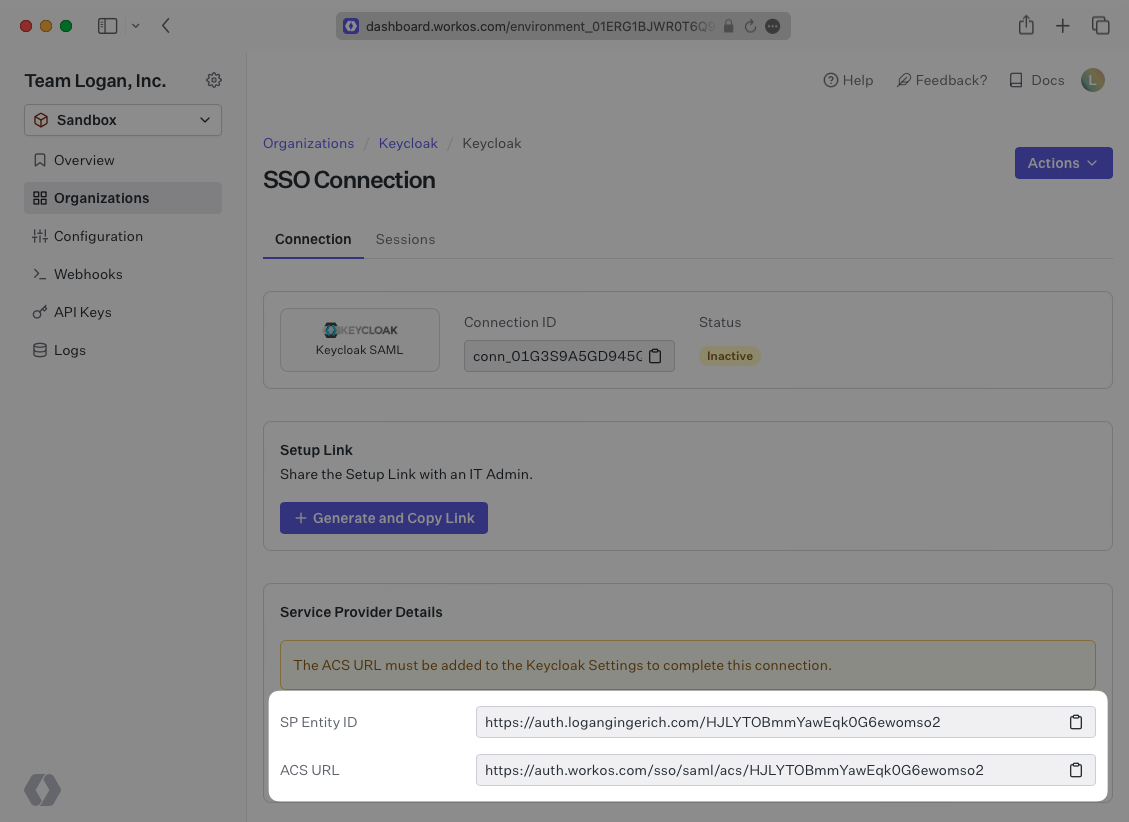
WorkOS provides the ACS URL and [IdP URI (Entity ID)](/glossary/idp-uri-entity-id). It’s readily available in your Connection Settings in the [WorkOS Dashboard](https://dashboard.workos.com/).
|
|
22
|
+
|
|
23
|
+
|
|
24
|
+
|
|
25
|
+
The ACS URL is the location an Identity Provider redirects its authentication response to. In Keycloak’s case, it needs to be set by the organization when configuring your application in their Keycloak instance.
|
|
26
|
+
|
|
27
|
+
Specifically, the ACS URL will need to be set as the “Valid Redirect URI” and "Master SAML Processing URL" in the SAML client setup in Keycloak.
|
|
28
|
+
|
|
29
|
+
The Entity ID is a URI used to identify the issuer of a SAML request, response, or assertion. In this case, the entity ID is used to communicate that WorkOS will be the party performing SAML requests to the organization's Keycloak instance.
|
|
30
|
+
|
|
31
|
+
Specifically, the Entity ID will need to be set as the “Client ID” when creating a SAML client in Keycloak.
|
|
32
|
+
|
|
33
|
+
---
|
|
34
|
+
|
|
35
|
+
## What you’ll need
|
|
36
|
+
|
|
37
|
+
In order to integrate you’ll need the Keycloak Metadata URL. Normally, the this will come from the organization's IT Management team when they set up your application’s SAML client in their Keycloak instance. But, should that not be the case during your setup, here’s how to obtain it.
|
|
38
|
+
|
|
39
|
+
---
|
|
40
|
+
|
|
41
|
+
## (1) Log in
|
|
42
|
+
|
|
43
|
+
Log in to your Keycloak Admin Console, and navigate to the Realm you want to set up the SAML client in. Select “Clients” from the side menu. If your client is already created, select it from the list of and move to Step 4. If you haven’t created a SAML client in Keycloak, select “Create client”.
|
|
44
|
+
|
|
45
|
+
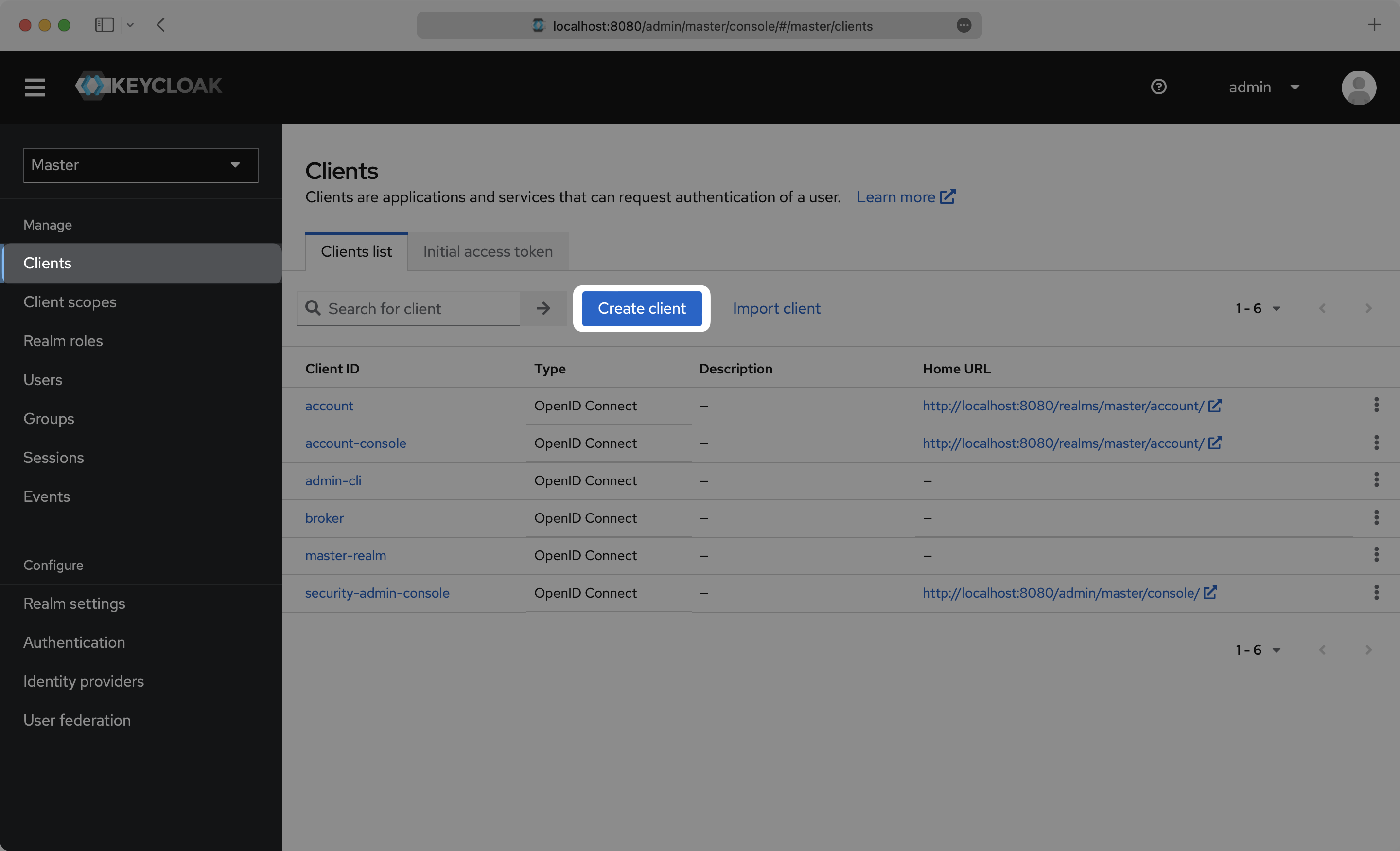
|
|
46
|
+
|
|
47
|
+
---
|
|
48
|
+
|
|
49
|
+
## (2) Initial SAML Application Setup
|
|
50
|
+
|
|
51
|
+
On the Create Client setup step, select `SAML` as the "Client type", input the IdP URI (Entity ID) from your WorkOS Dashboard as the “Client ID”, and set a name for your Client. Click "Save".
|
|
52
|
+
|
|
53
|
+
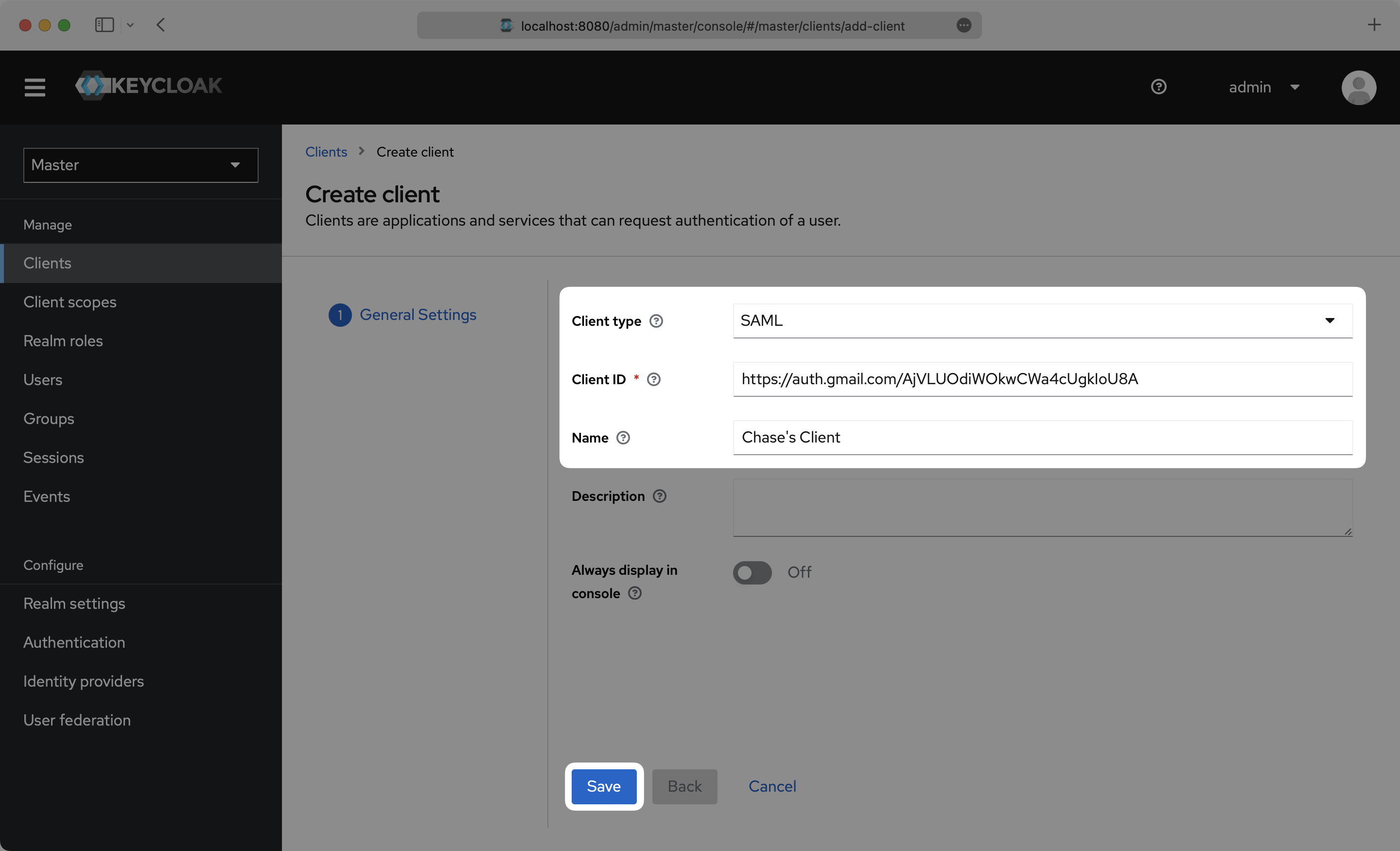
|
|
54
|
+
|
|
55
|
+
---
|
|
56
|
+
|
|
57
|
+
## (3) Configure SAML Application
|
|
58
|
+
|
|
59
|
+
On the Settings page, scroll down and input the ACS URL from your WorkOS Dashboard in the “Valid Redirect URIs” and "Master SAML Processing URL" boxes.
|
|
60
|
+
|
|
61
|
+
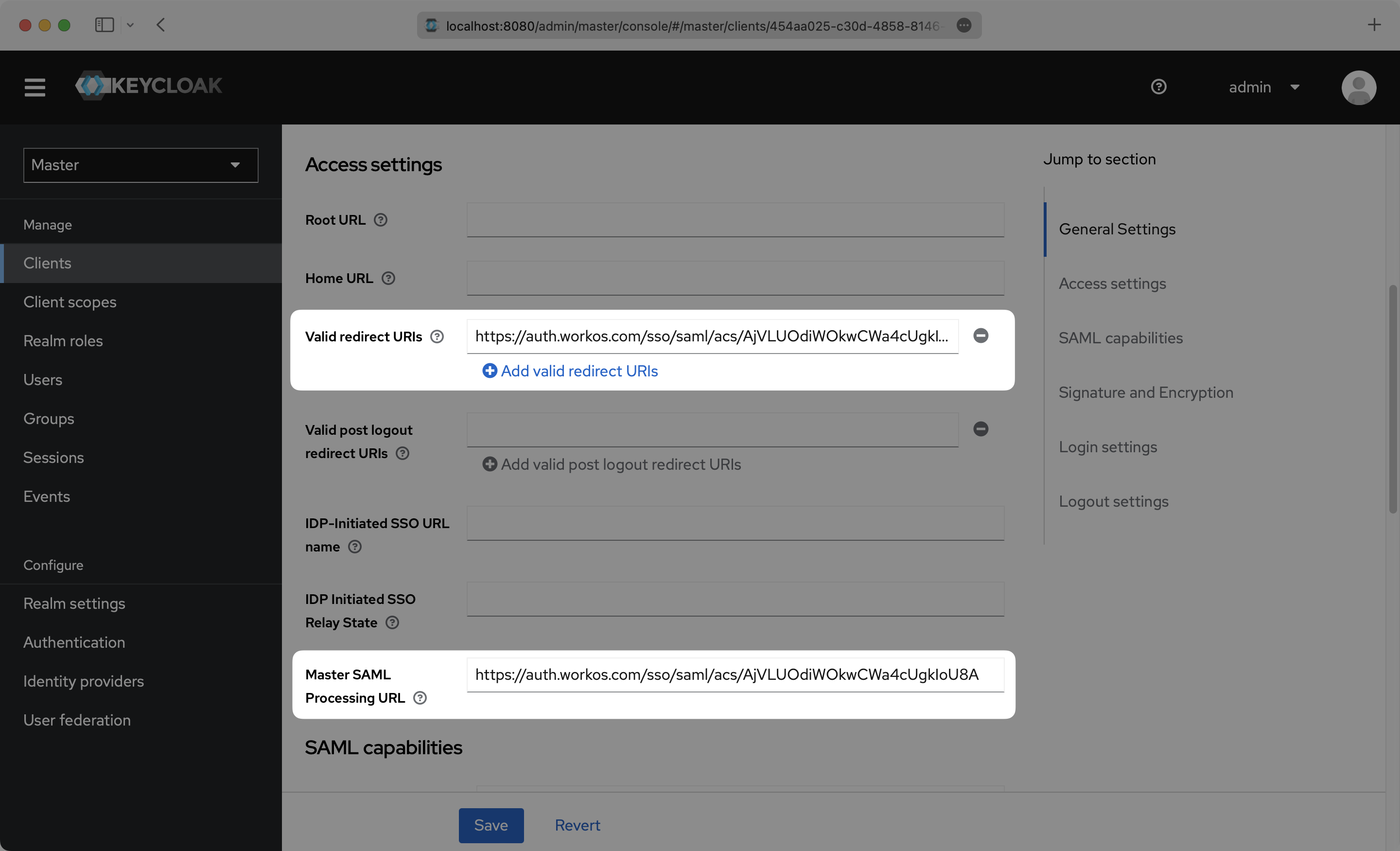
|
|
62
|
+
|
|
63
|
+
Scroll down further on the Settings page to "Signature and Encryption", and make sure that "Sign assertions" is toggled `On`. Click “Save”.
|
|
64
|
+
|
|
65
|
+
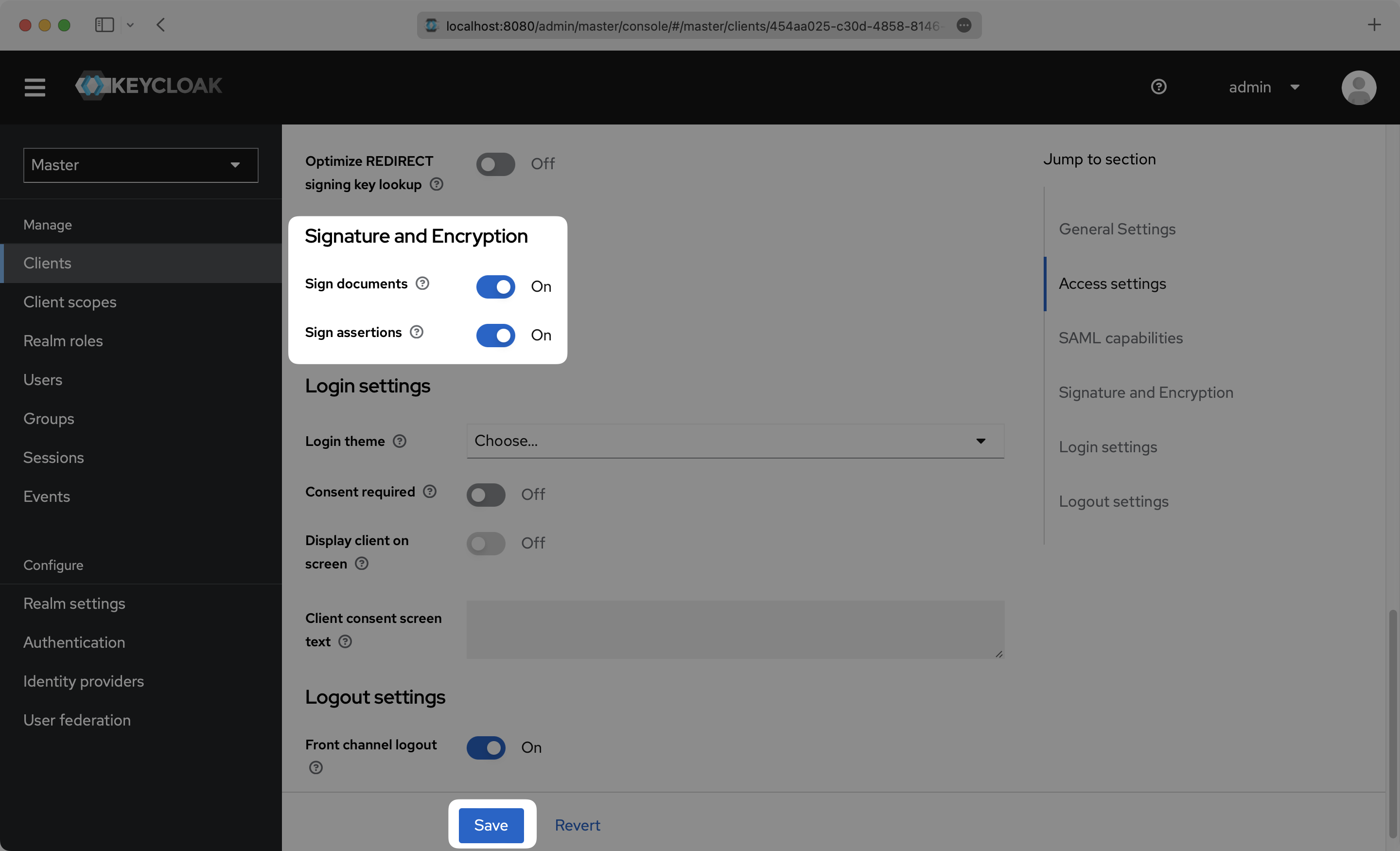
|
|
66
|
+
|
|
67
|
+
---
|
|
68
|
+
|
|
69
|
+
## (4) Configure User Attributes and Claims
|
|
70
|
+
|
|
71
|
+
Click the “Client scopes” top menu option and click into your Client.
|
|
72
|
+
|
|
73
|
+
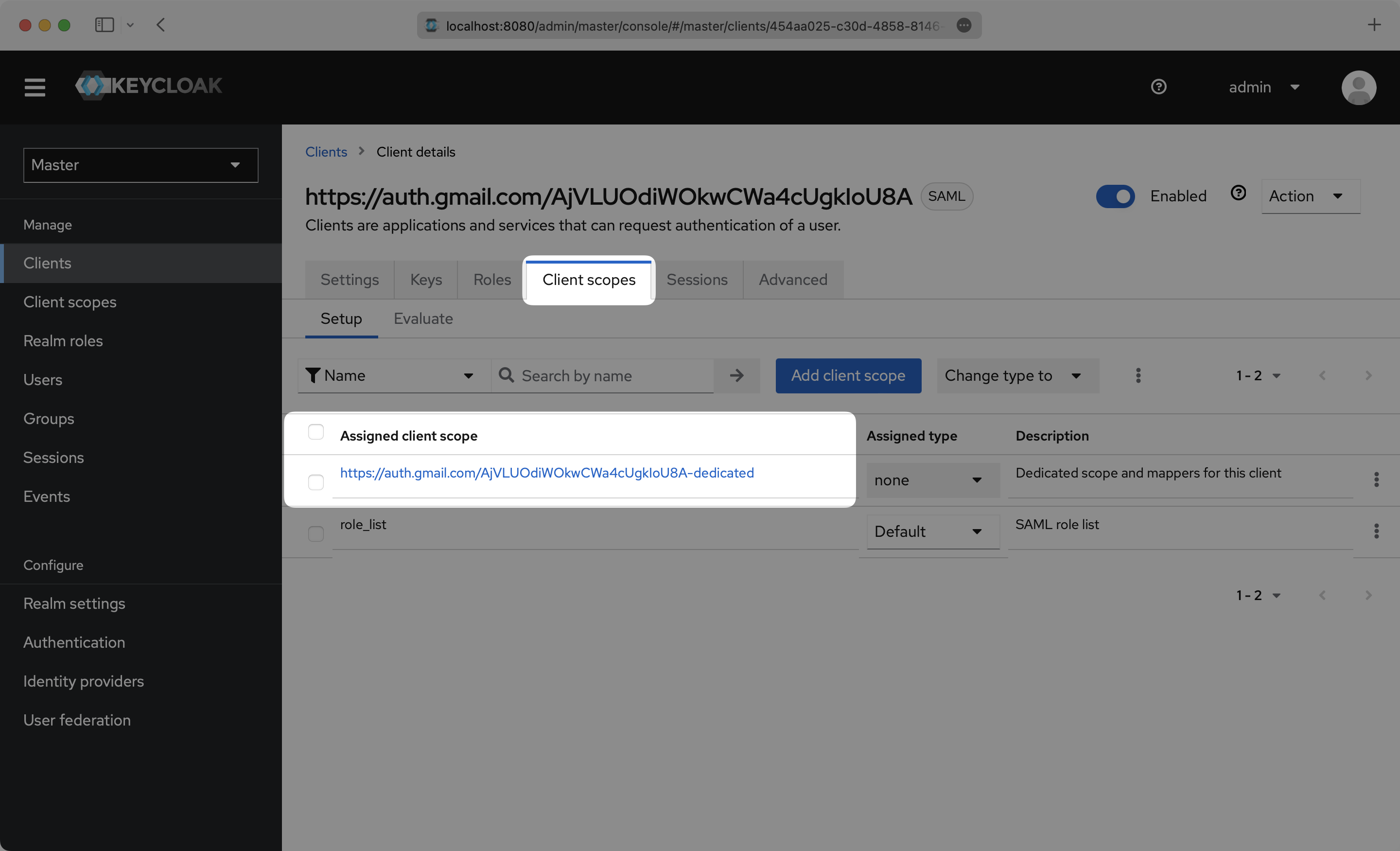
|
|
74
|
+
|
|
75
|
+
Click "Configure a new mapper".
|
|
76
|
+
|
|
77
|
+
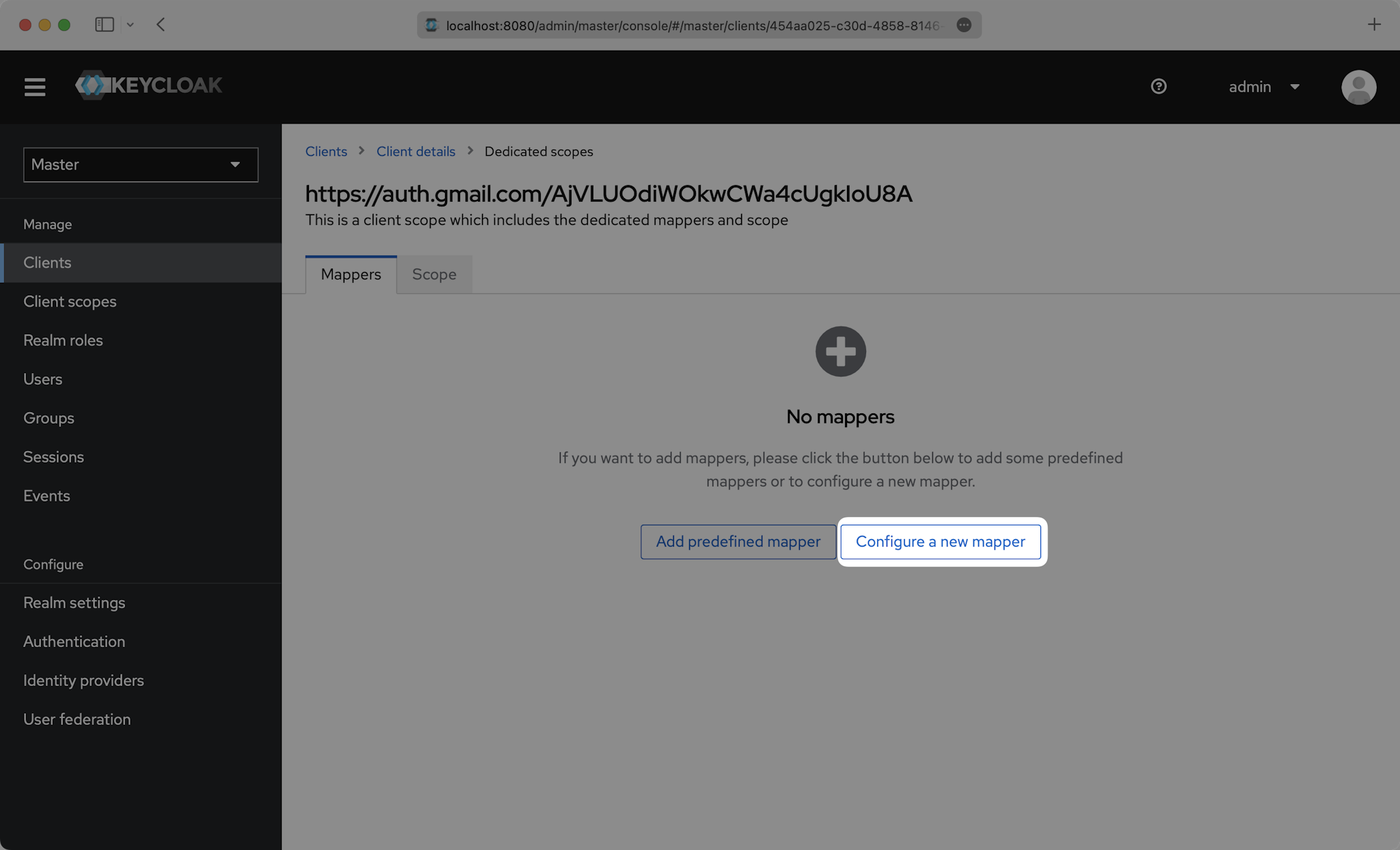
|
|
78
|
+
|
|
79
|
+
Then select "User Property".
|
|
80
|
+
|
|
81
|
+
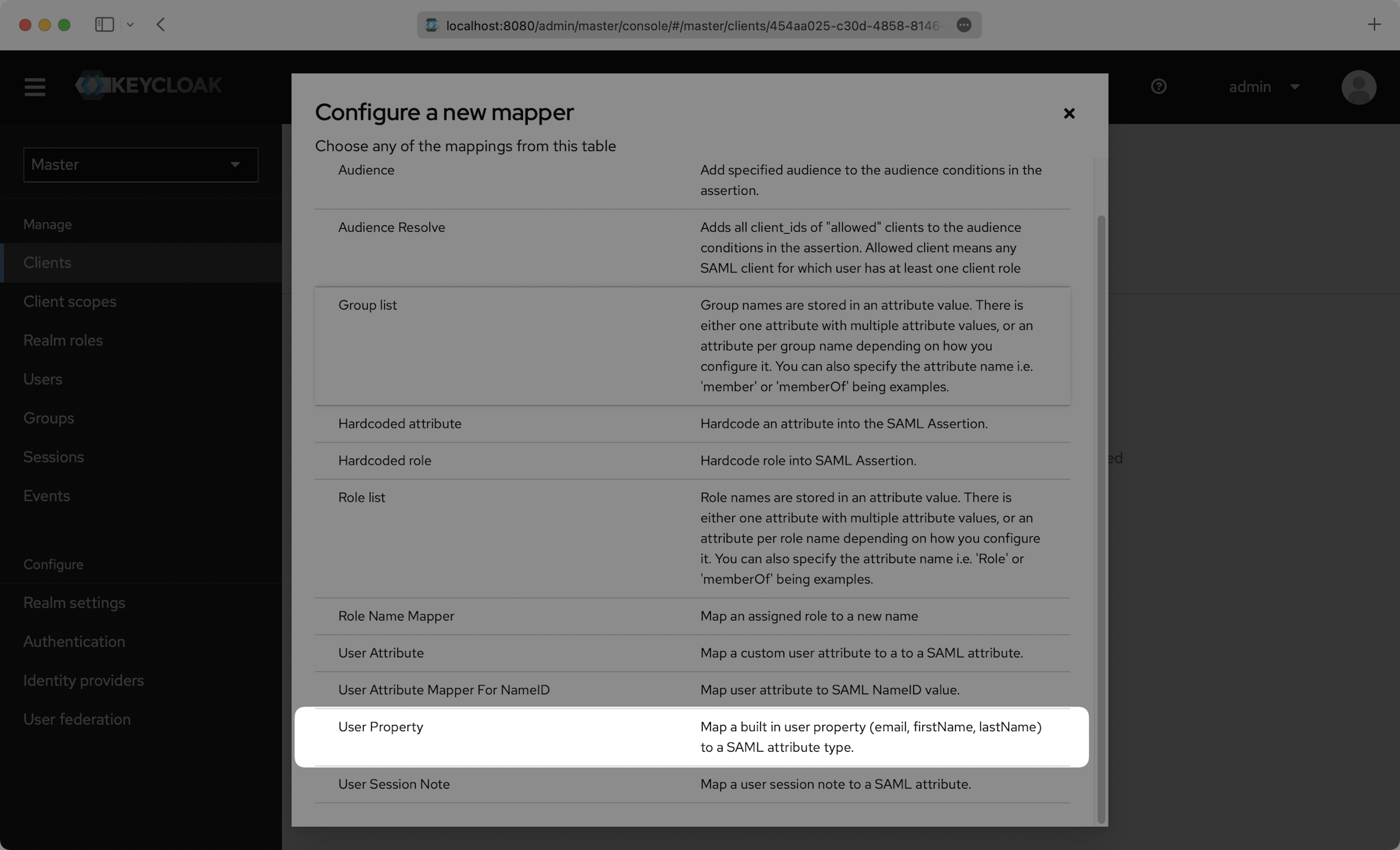
|
|
82
|
+
|
|
83
|
+
You’ll need to create a “User Property” mapper for the following four attributes:
|
|
84
|
+
|
|
85
|
+
- `id`
|
|
86
|
+
- `email`
|
|
87
|
+
- `firstName`
|
|
88
|
+
- `lastName`
|
|
89
|
+
|
|
90
|
+
This is an example of how to fill out the fields for `id`:
|
|
91
|
+
|
|
92
|
+
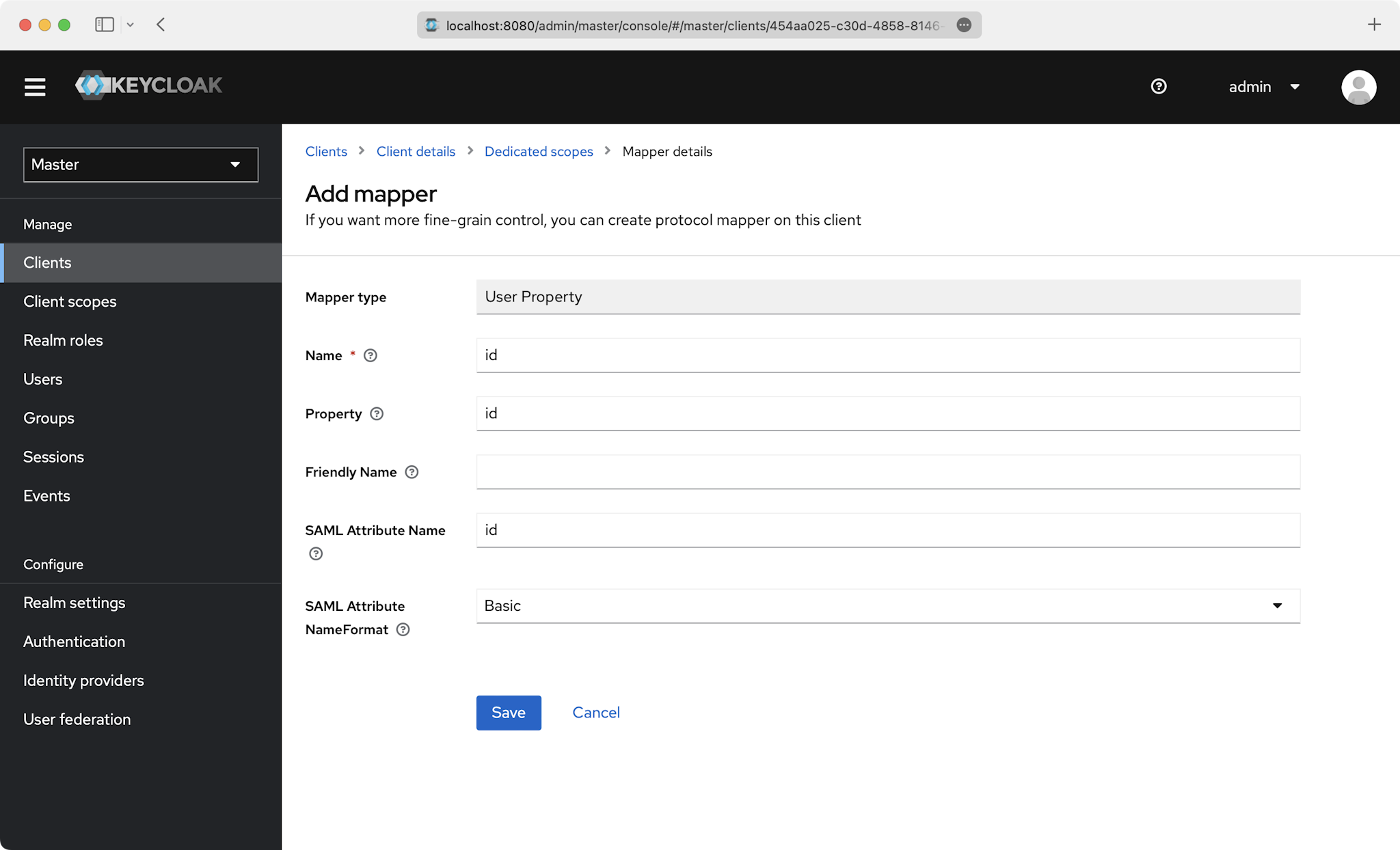
|
|
93
|
+
|
|
94
|
+
Also do this for the `email`, `firstName`, and `lastName` attributes:
|
|
95
|
+
|
|
96
|
+
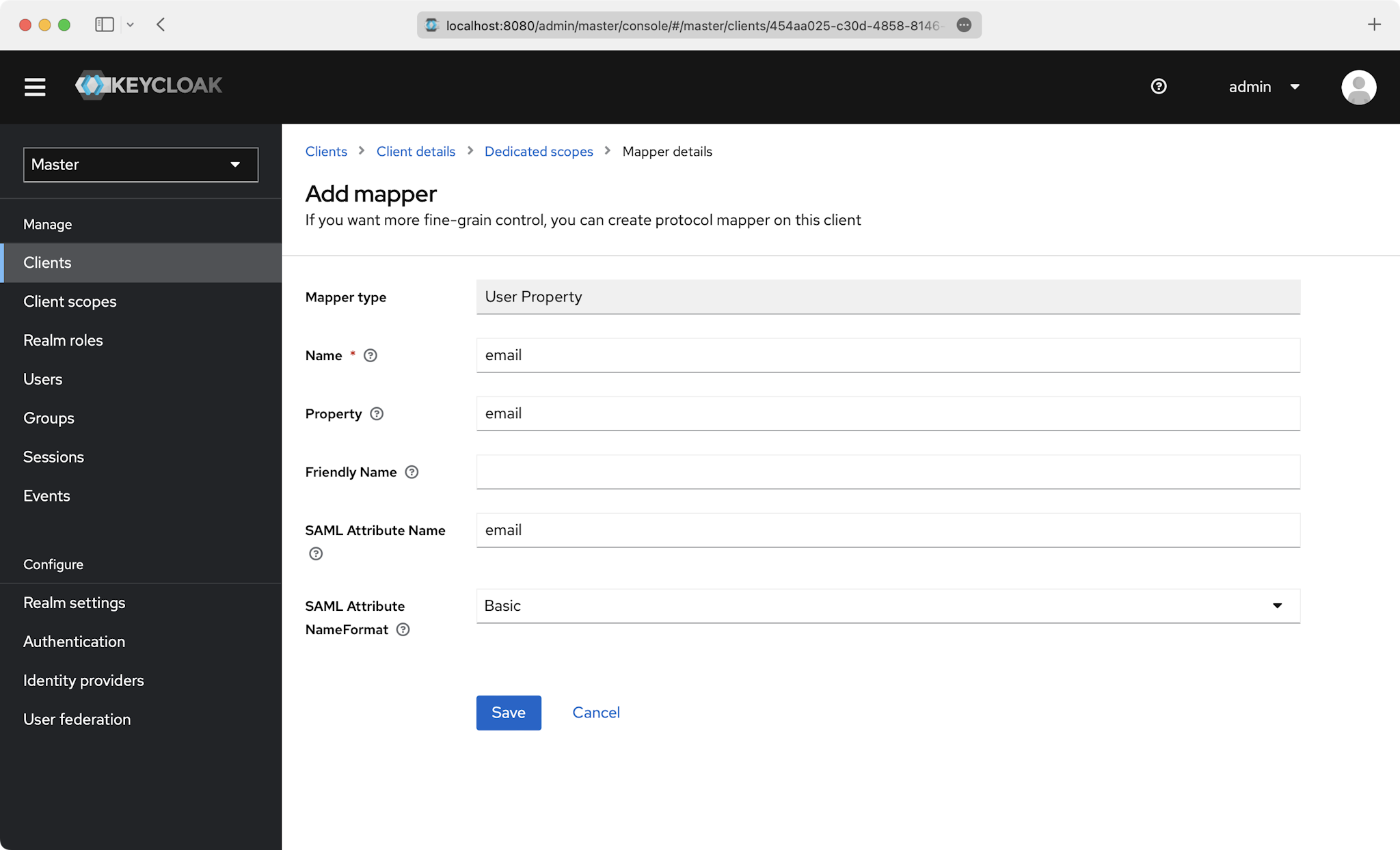
|
|
97
|
+
|
|
98
|
+
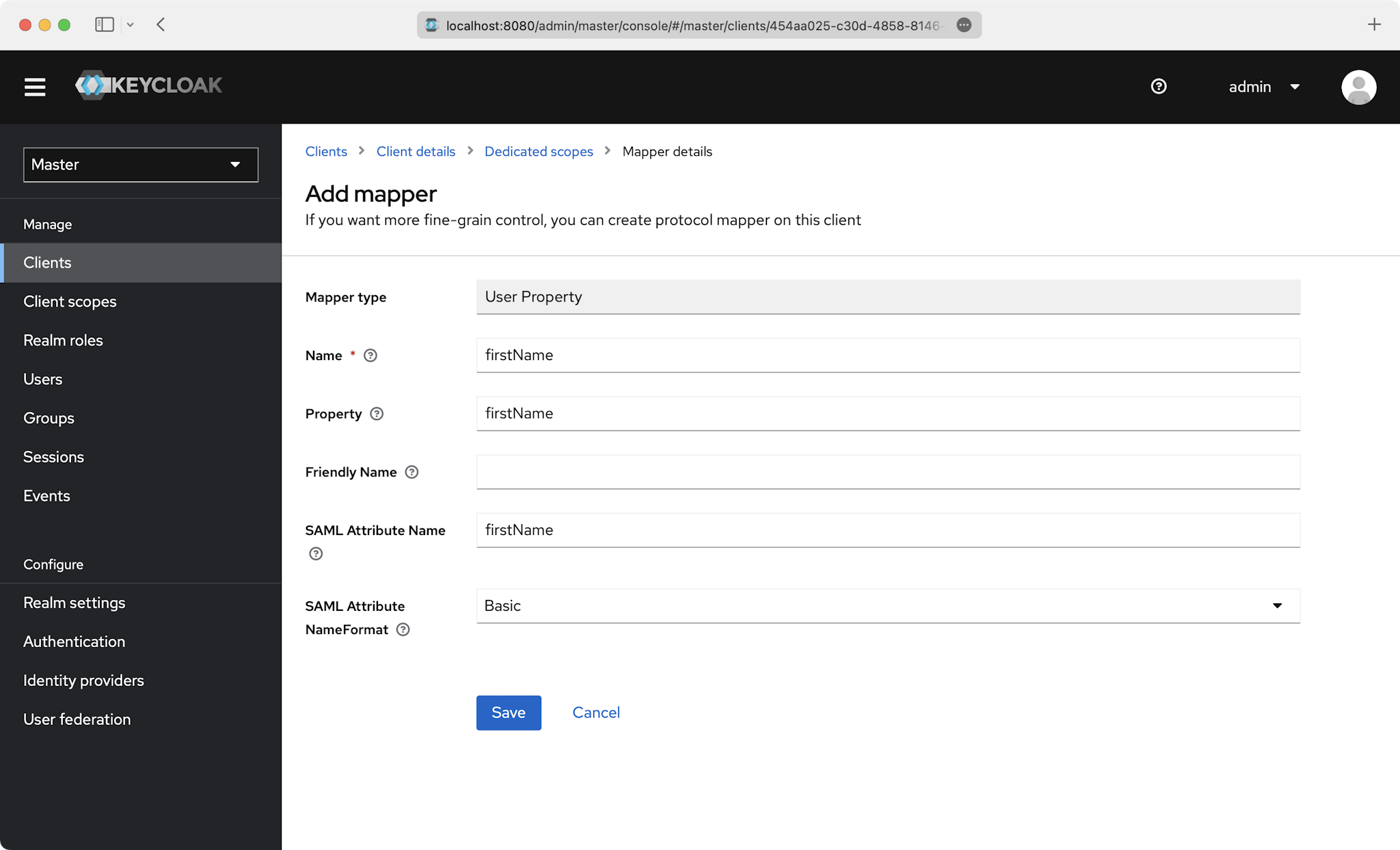
|
|
99
|
+
|
|
100
|
+
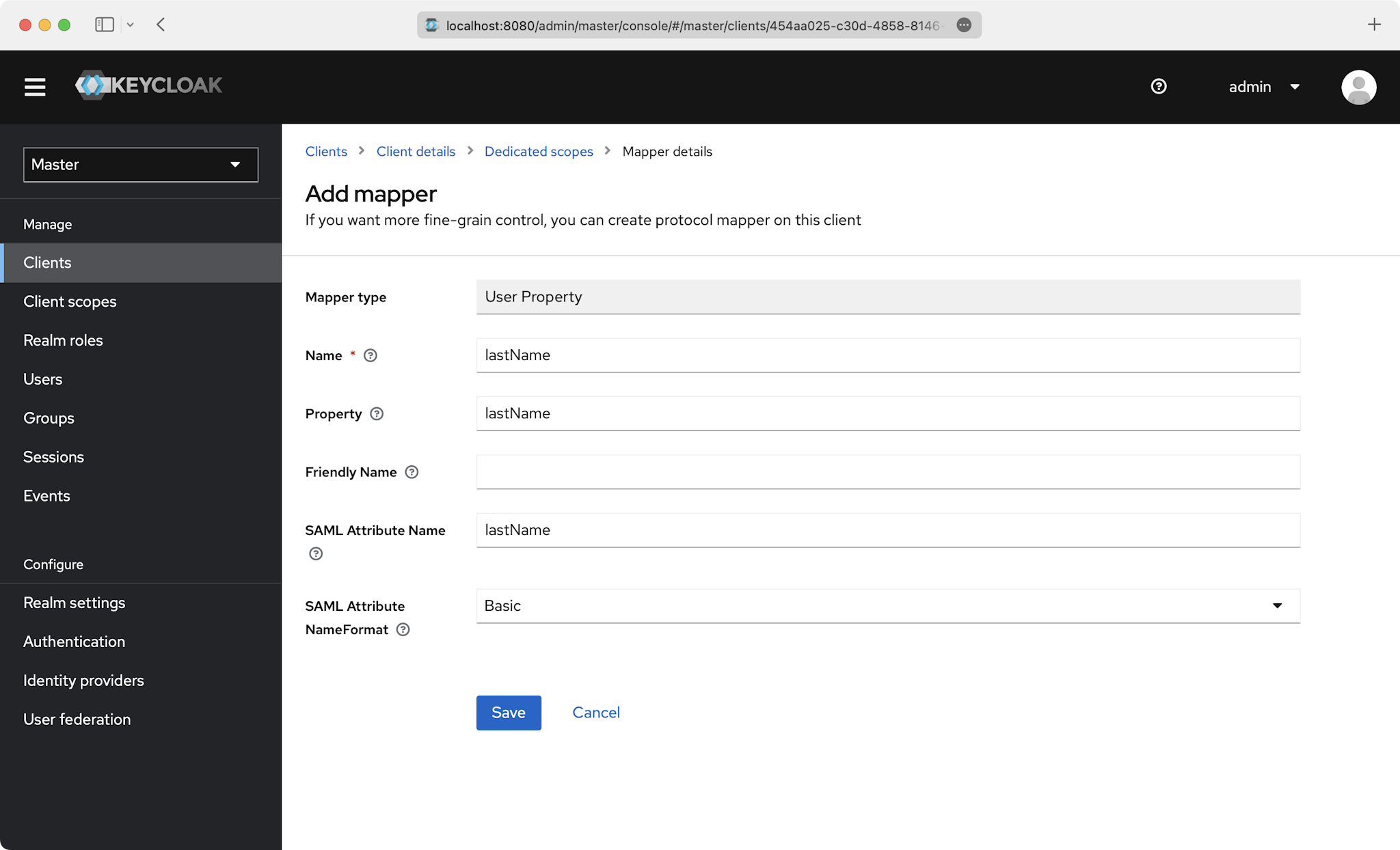
|
|
101
|
+
|
|
102
|
+
### Role Assignment (optional)
|
|
103
|
+
|
|
104
|
+
With [identity provider role assignment](/sso/identity-provider-role-assignment), users can receive roles within your application based on their group memberships. To return this information in the attribute statement, follow the guidance below.
|
|
105
|
+
|
|
106
|
+
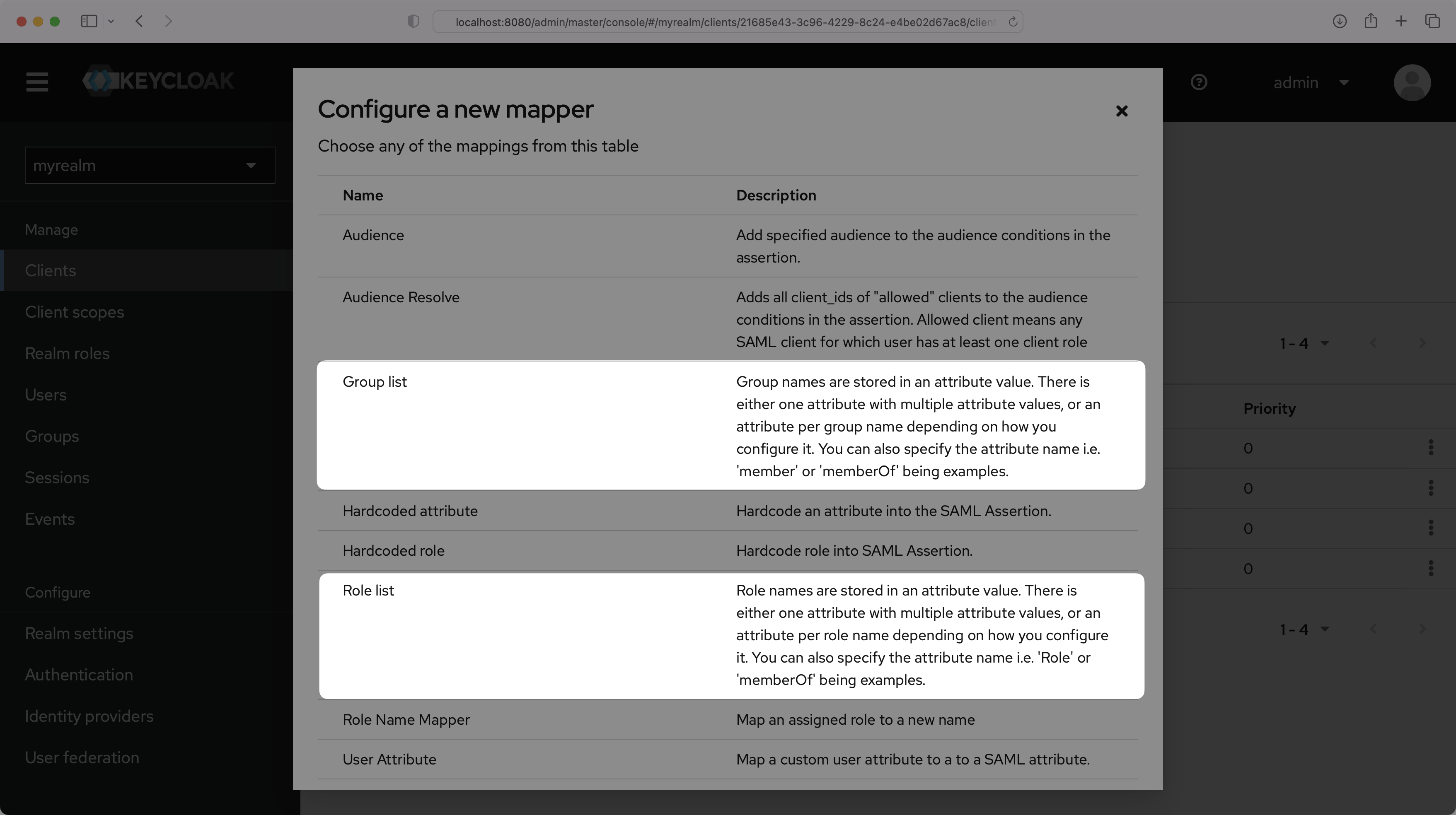
On the "Dedicated scopes" page, select "Add mapper" and then "By configuration".
|
|
107
|
+
|
|
108
|
+
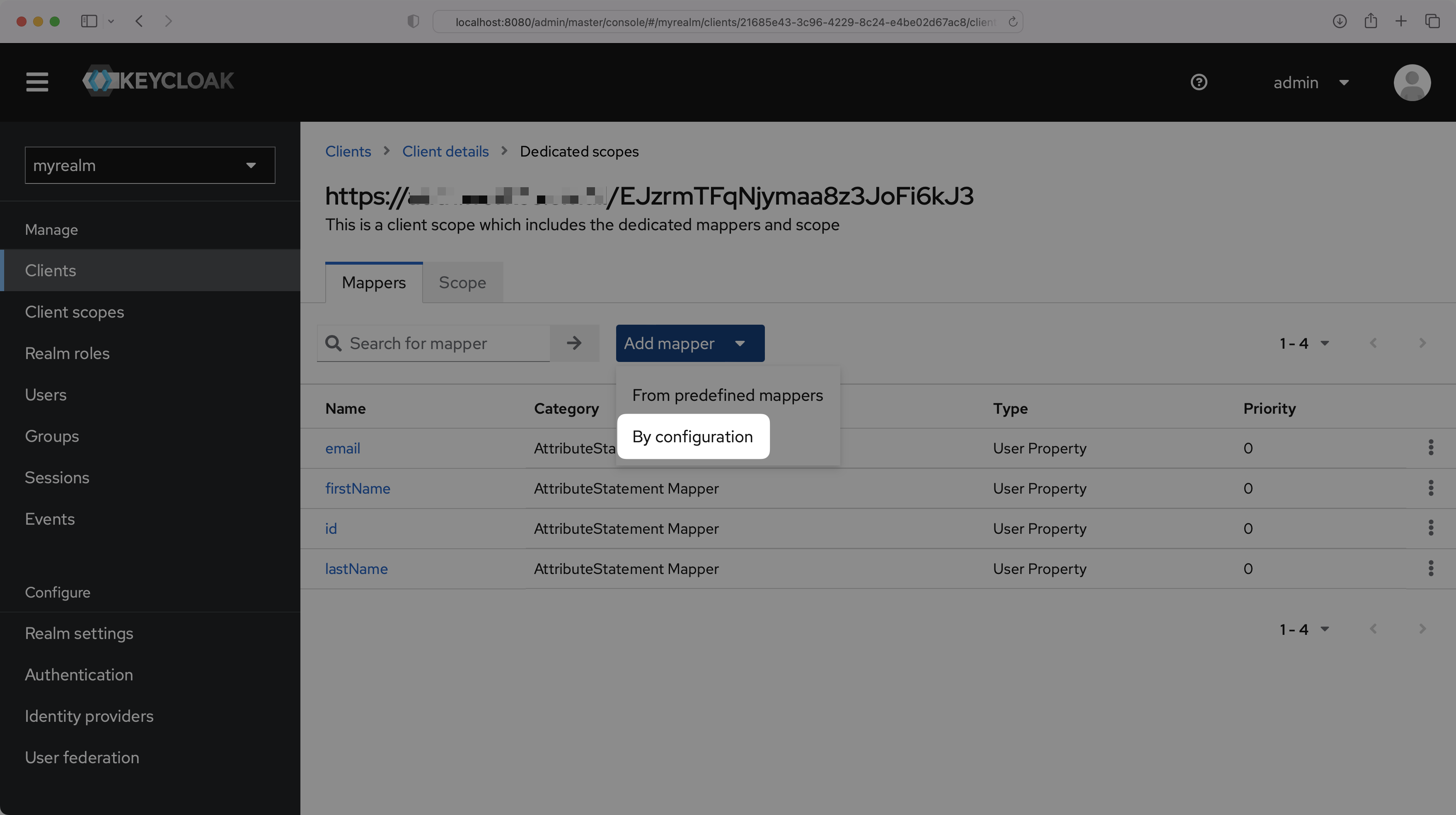
|
|
109
|
+
|
|
110
|
+
You can choose either "Group list" or "Role list", whichever option best fits your use case. The example below uses "Group list". For more information on sending group information, refer to the [Keycloak documentation](https://www.keycloak.org/docs/latest/server_admin/#assigning-permissions-using-roles-and-groups).
|
|
111
|
+
|
|
112
|
+
|
|
113
|
+
|
|
114
|
+
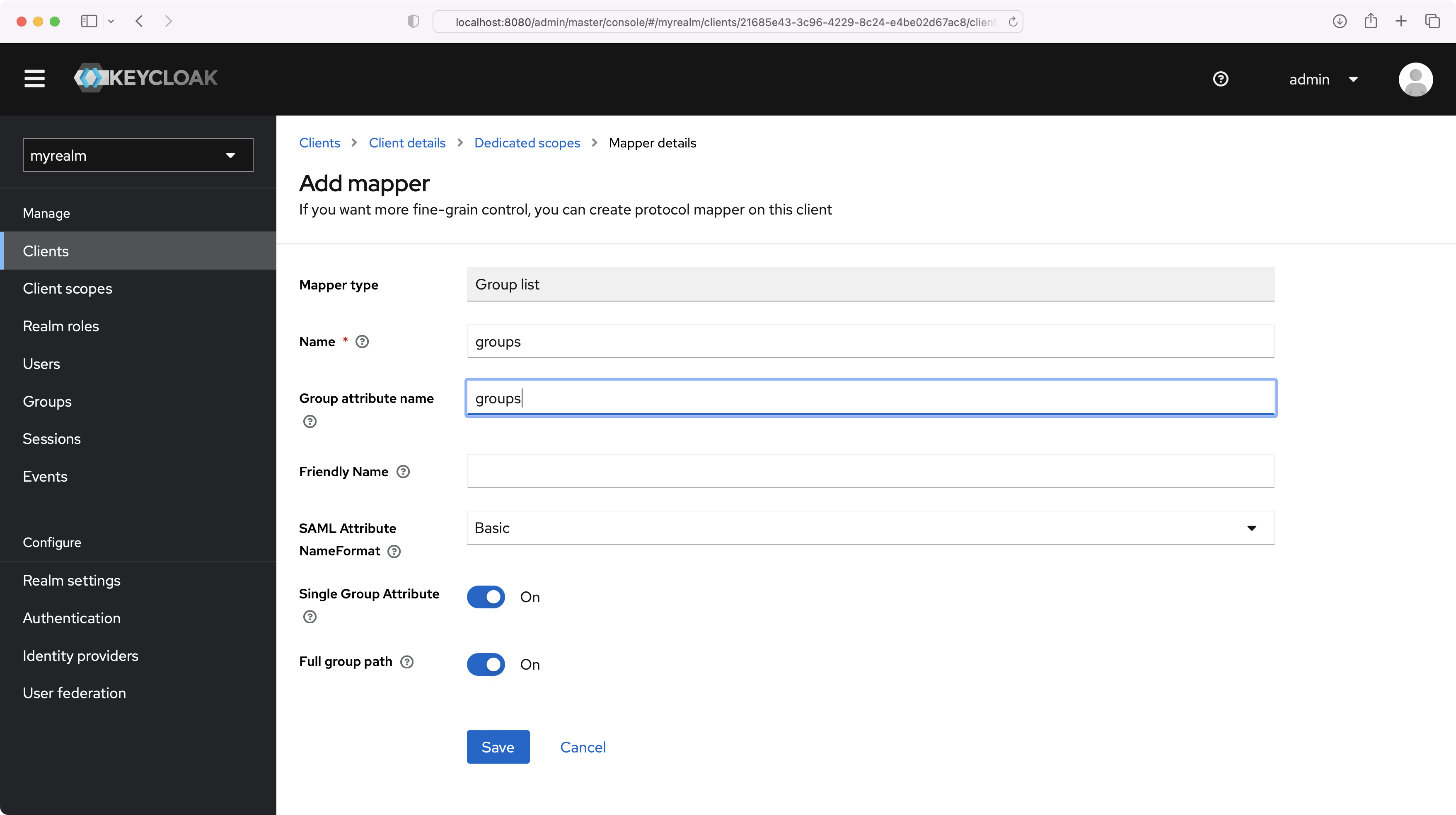
Set the Name and the Group attribute name to "groups", and make sure the Single Group Attribute toggle is On. Select "Save".
|
|
115
|
+
|
|
116
|
+
|
|
117
|
+
|
|
118
|
+
> Finish role assignment set-up by navigating to the SSO connection page in the _Organization_ section of the [WorkOS Dashboard](https://dashboard.workos.com/). Create SSO groups by referencing the group IdP ID. Then, assign roles to these SSO groups so group members are automatically granted roles within your application.
|
|
119
|
+
|
|
120
|
+
## (5) Obtain Identity Provider Details
|
|
121
|
+
|
|
122
|
+
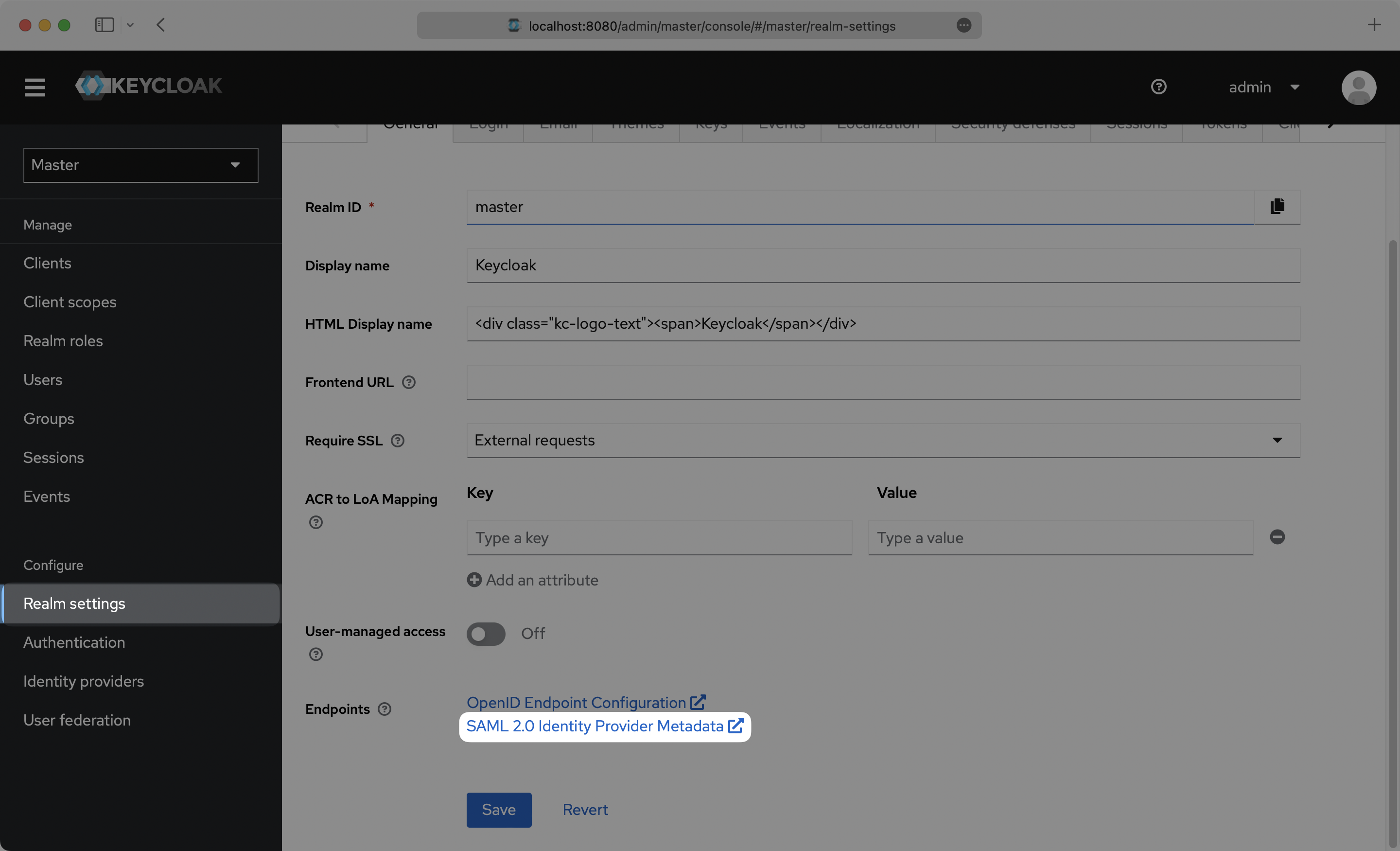
Select “Realm Settings” in the left sidebar navigation menu, and copy the “SAML 2.0 Identity Provider Metadata” link on the General page.
|
|
123
|
+
|
|
124
|
+
|
|
125
|
+
|
|
126
|
+
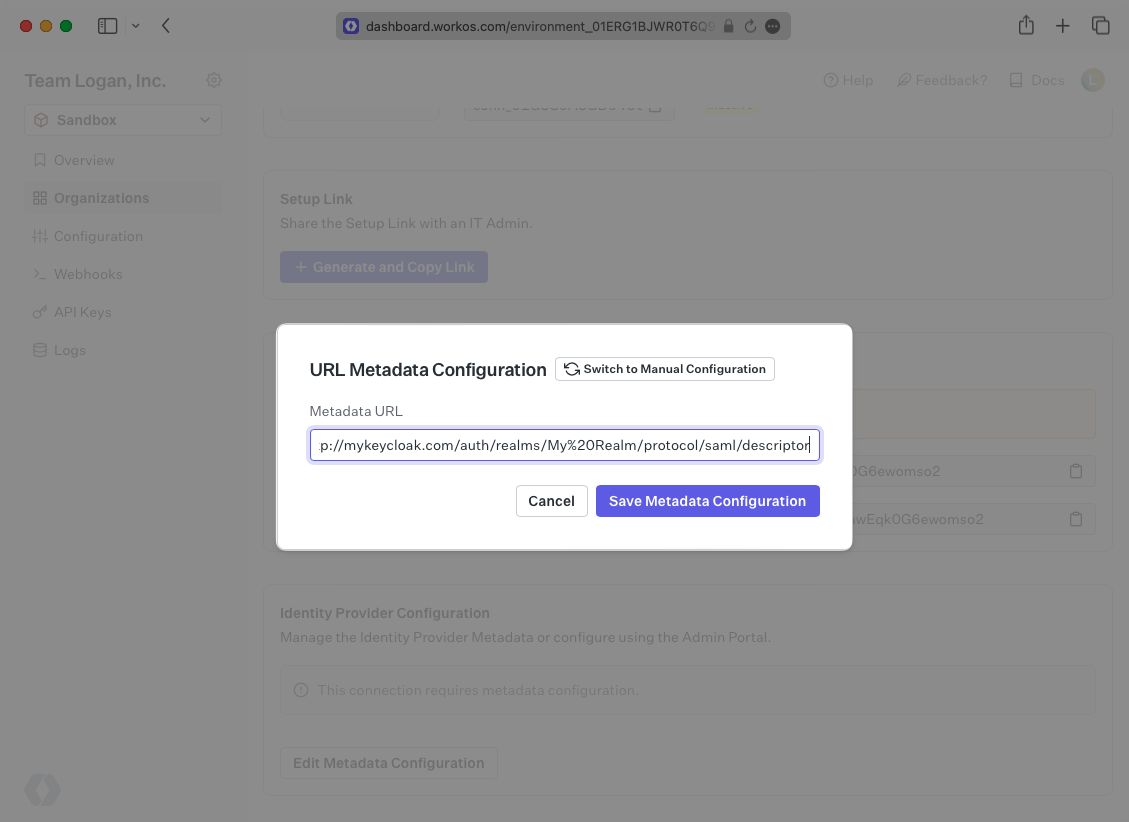
Next, within your connection settings, edit the Metadata Configuration and provide the Metadata URL you obtained from Keycloak. Your Connection will then be verified and good to go!
|
|
127
|
+
|
|
128
|
+
|
|
@@ -0,0 +1,134 @@
|
|
|
1
|
+
---
|
|
2
|
+
title: LastPass
|
|
3
|
+
description: "Learn how to configure a connection to\_LastPass via SAML."
|
|
4
|
+
icon: lastpass
|
|
5
|
+
breadcrumb:
|
|
6
|
+
title: Integrations
|
|
7
|
+
url: /integrations
|
|
8
|
+
originalPath: .tmp-workos-clone/packages/docs/content/integrations/lastpass-saml.mdx
|
|
9
|
+
---
|
|
10
|
+
|
|
11
|
+
## Introduction
|
|
12
|
+
|
|
13
|
+
Each SSO Identity Provider requires specific information to create and configure a new [Connection](/glossary/connection). Often, the information required to create a Connection will differ by Identity Provider.
|
|
14
|
+
|
|
15
|
+
To create a LastPass SAML Connection, you’ll need an IdP Metadata XML file.
|
|
16
|
+
|
|
17
|
+
Start by logging in to your WorkOS dashboard and browse to the “Organizations” tab on the left hand navigation bar.
|
|
18
|
+
|
|
19
|
+
Select the organization you’d like to configure a LastPass SAML Connection for, and select “Manually Configure Connection” under “Identity Provider”.
|
|
20
|
+
|
|
21
|
+
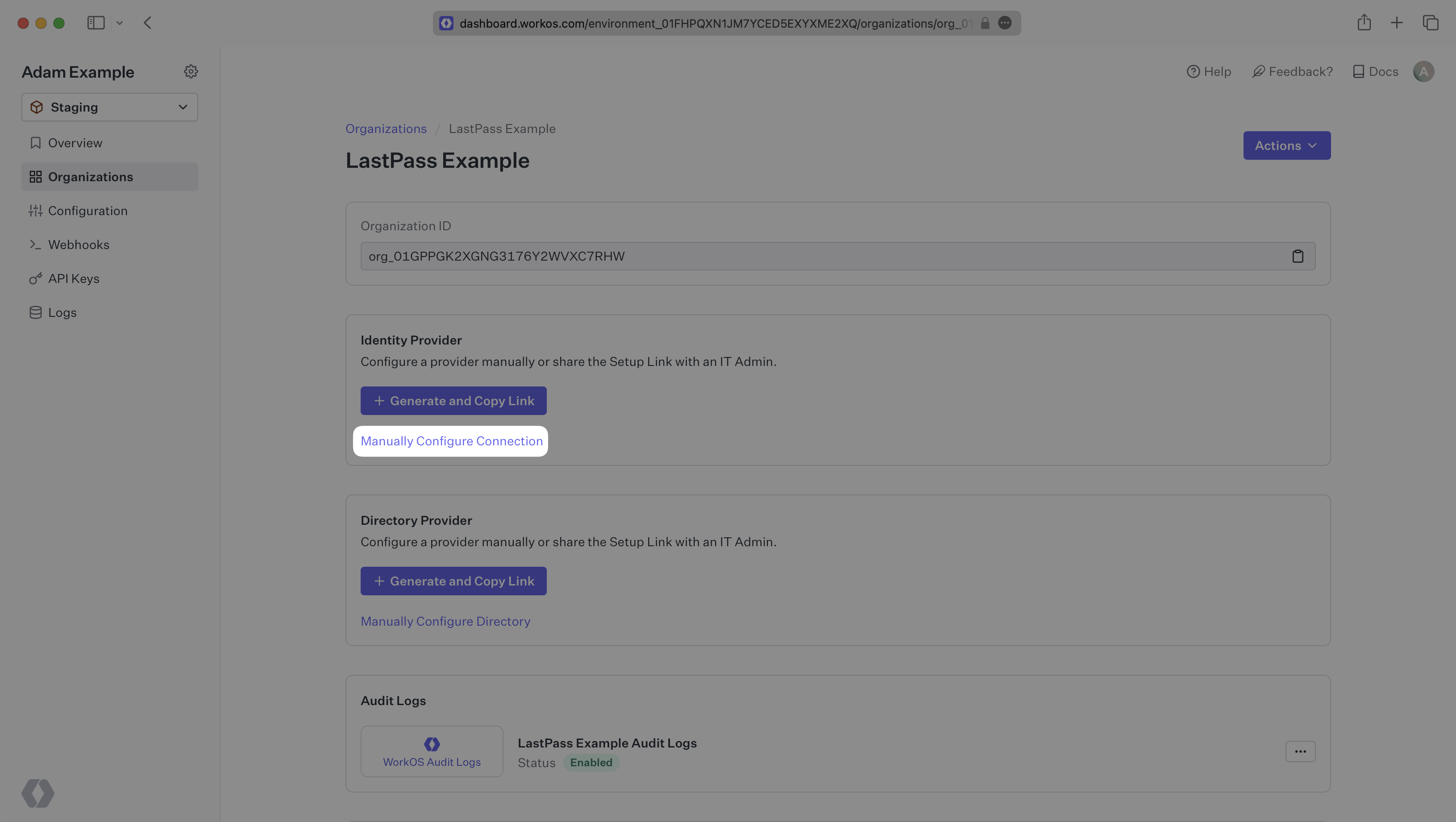
|
|
22
|
+
|
|
23
|
+
Select “LastPass SAML” from the Identity Provider dropdown, enter a descriptive name for the connection, and then select the “Create Connection” button.
|
|
24
|
+
|
|
25
|
+
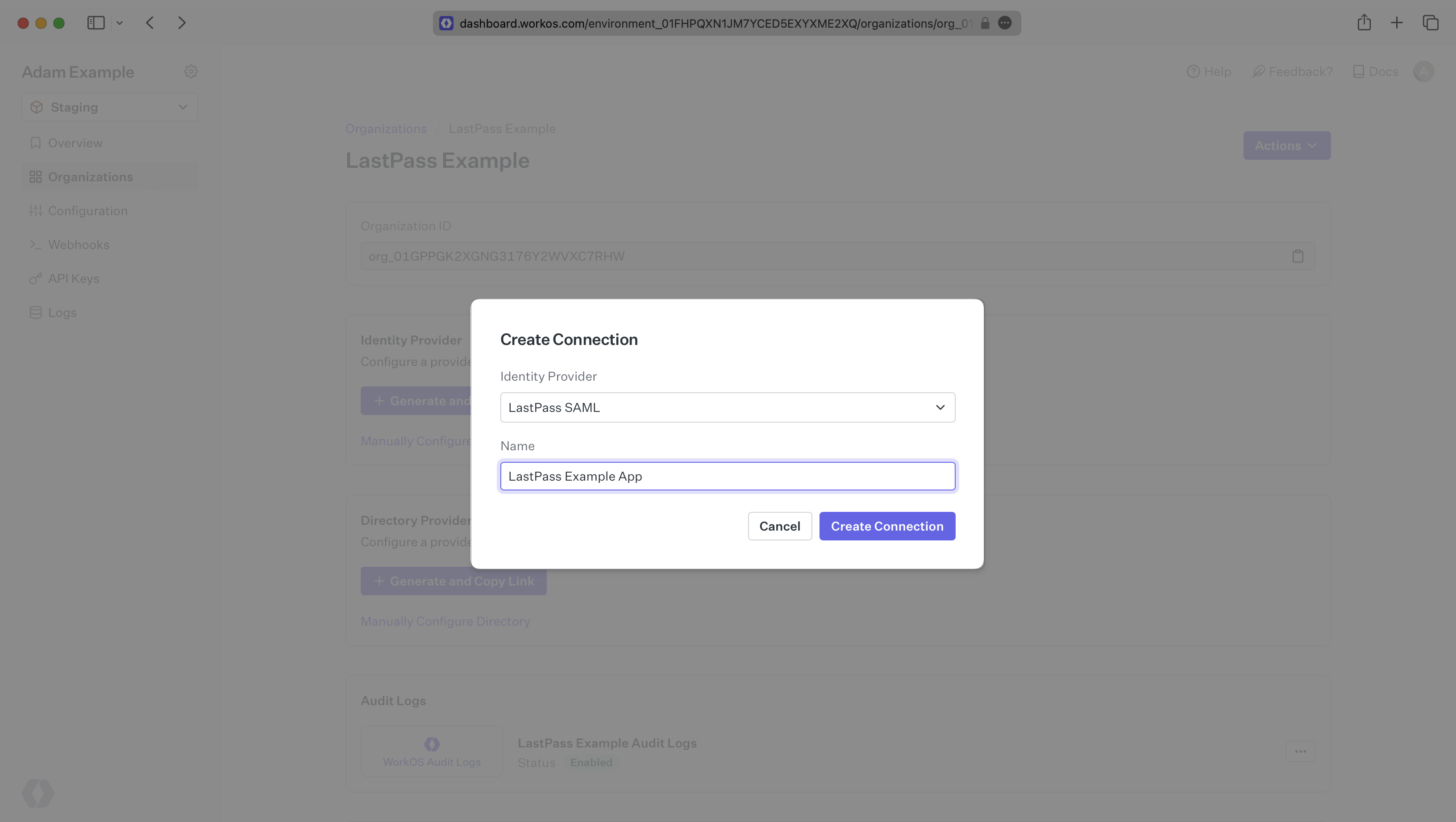
|
|
26
|
+
|
|
27
|
+
---
|
|
28
|
+
|
|
29
|
+
## What WorkOS provides
|
|
30
|
+
|
|
31
|
+
WorkOS provides the [ACS URL](/glossary/acs-url), [SP Entity ID](/glossary/sp-entity-id), and [SP Metadata URL](/glossary/sp-metadata). They’re readily available in your Connection Settings in the [WorkOS Dashboard](https://dashboard.workos.com/).
|
|
32
|
+
|
|
33
|
+
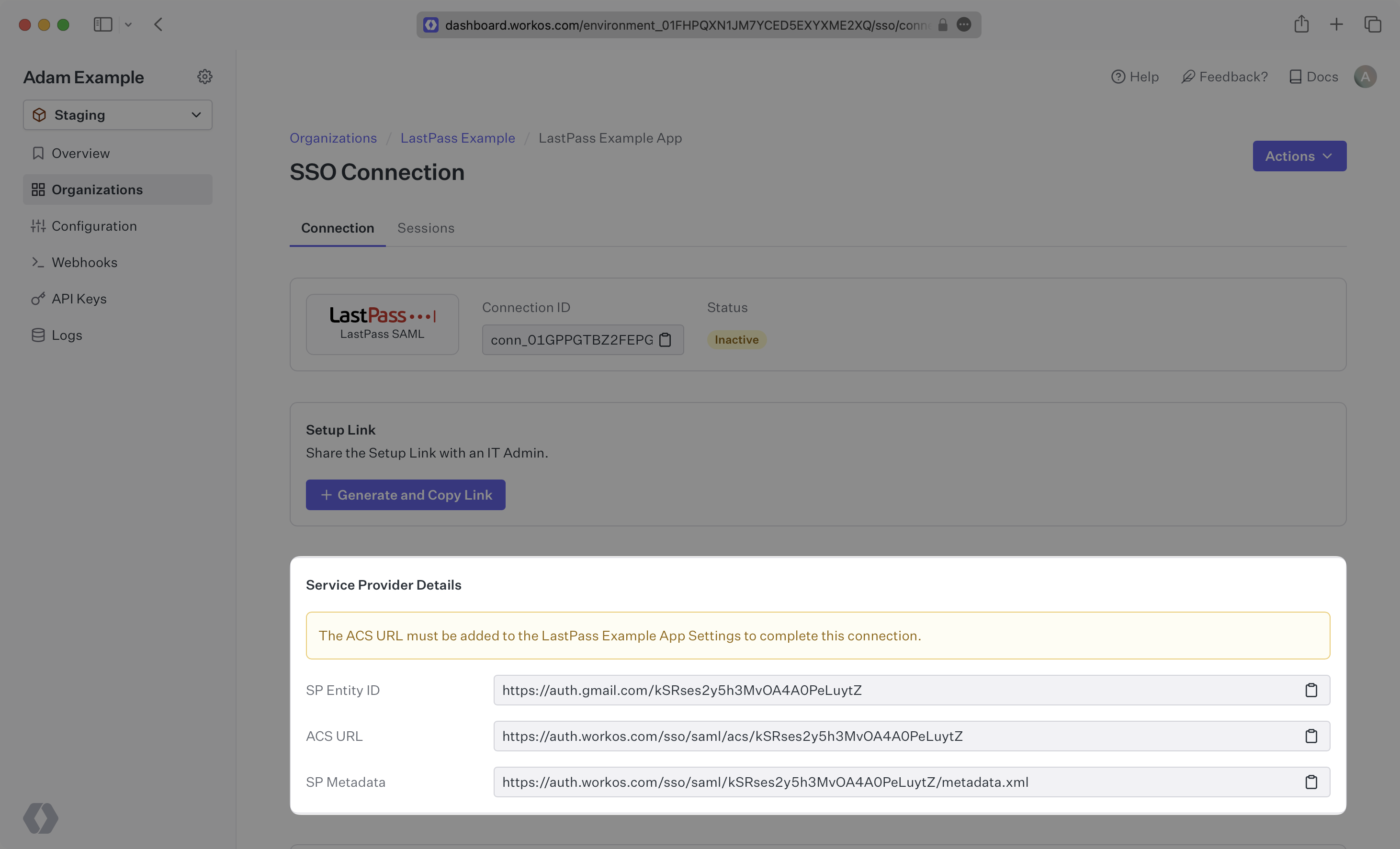
|
|
34
|
+
|
|
35
|
+
---
|
|
36
|
+
|
|
37
|
+
## What you’ll need
|
|
38
|
+
|
|
39
|
+
Next, provide the [IdP Metadata](/glossary/idp-metadata) file. Normally, this information will come from your enterprise customer’s IT Management team when they set up your application’s SAML 2.0 configuration in their LastPass admin console. But, should that not be the case during your setup, the next steps will show you how to obtain it.
|
|
40
|
+
|
|
41
|
+
---
|
|
42
|
+
|
|
43
|
+
## (1) Select or create your application
|
|
44
|
+
|
|
45
|
+
Log in to [LastPass](https://admin.lastpass.com/applications/saml), go to the admin console and select “Applications” on the top navigation. Then select “SSO apps” from the left side navigation. If your application is already created, select it from the list of applications and move to Step 2. Otherwise, select “Add app”.
|
|
46
|
+
|
|
47
|
+
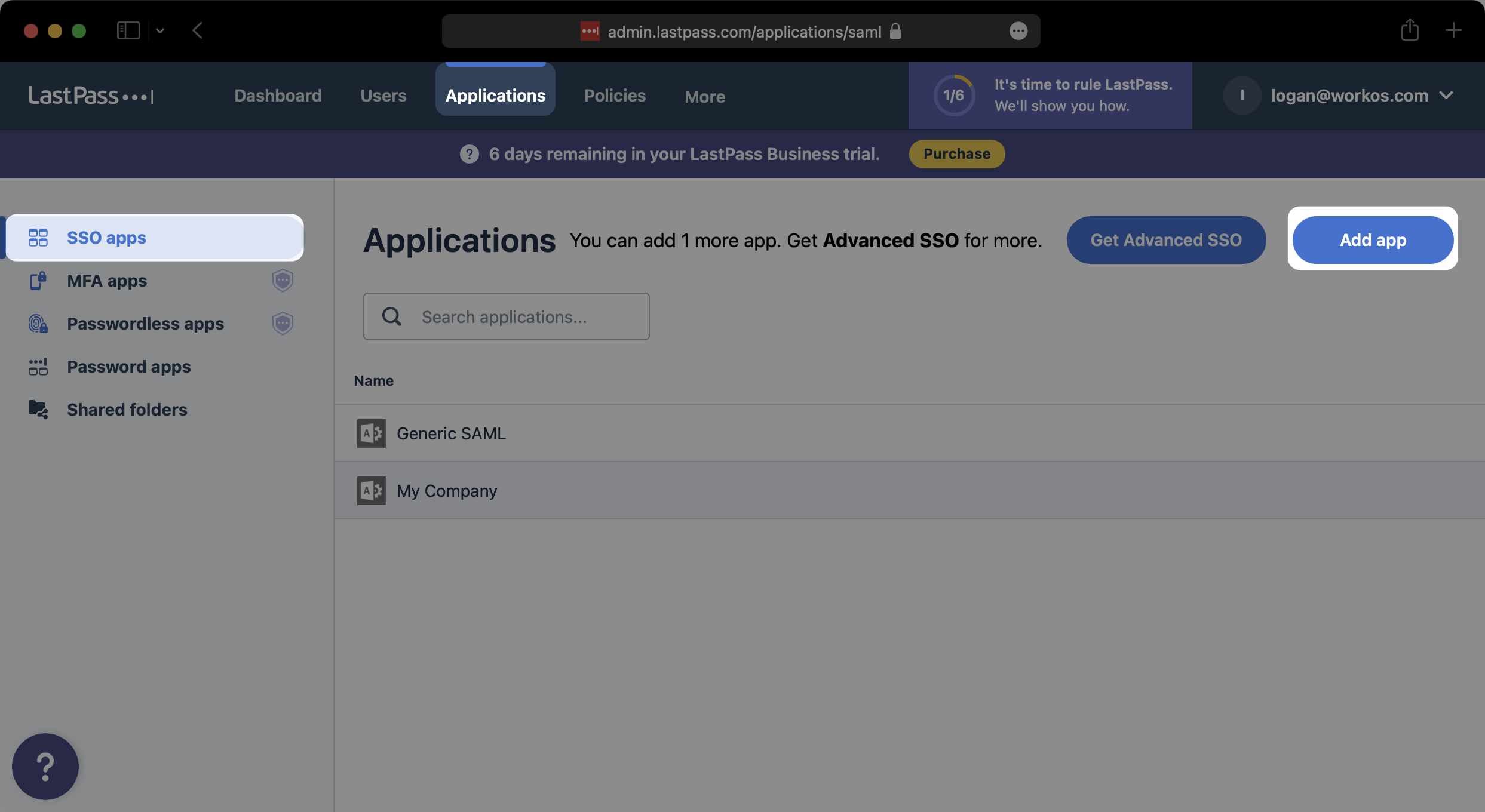
|
|
48
|
+
|
|
49
|
+
In the modal that pops up, click on “Add an unlisted app”.
|
|
50
|
+
|
|
51
|
+
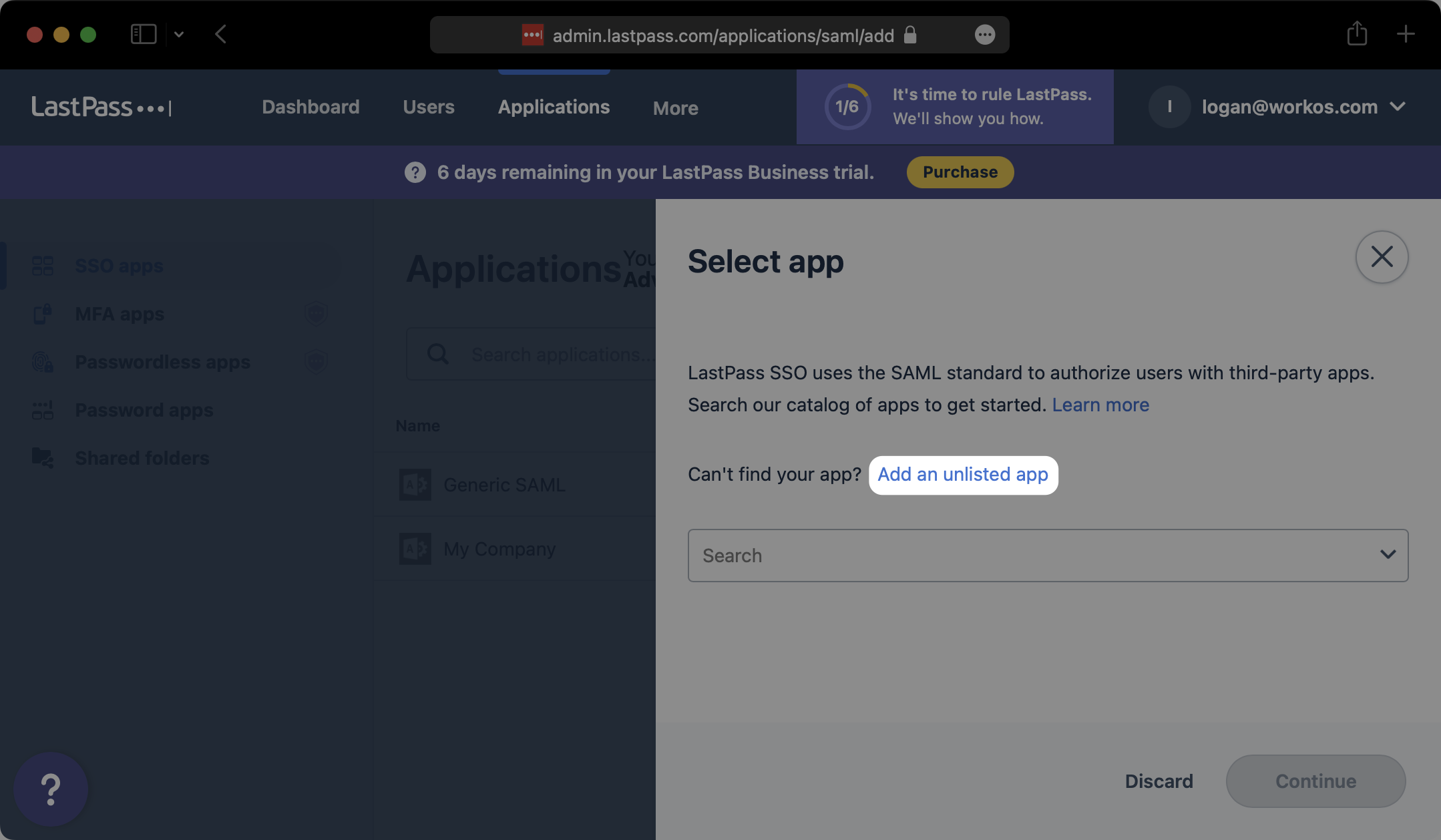
|
|
52
|
+
|
|
53
|
+
Give your SAML App a descriptive name and select “Continue”.
|
|
54
|
+
|
|
55
|
+
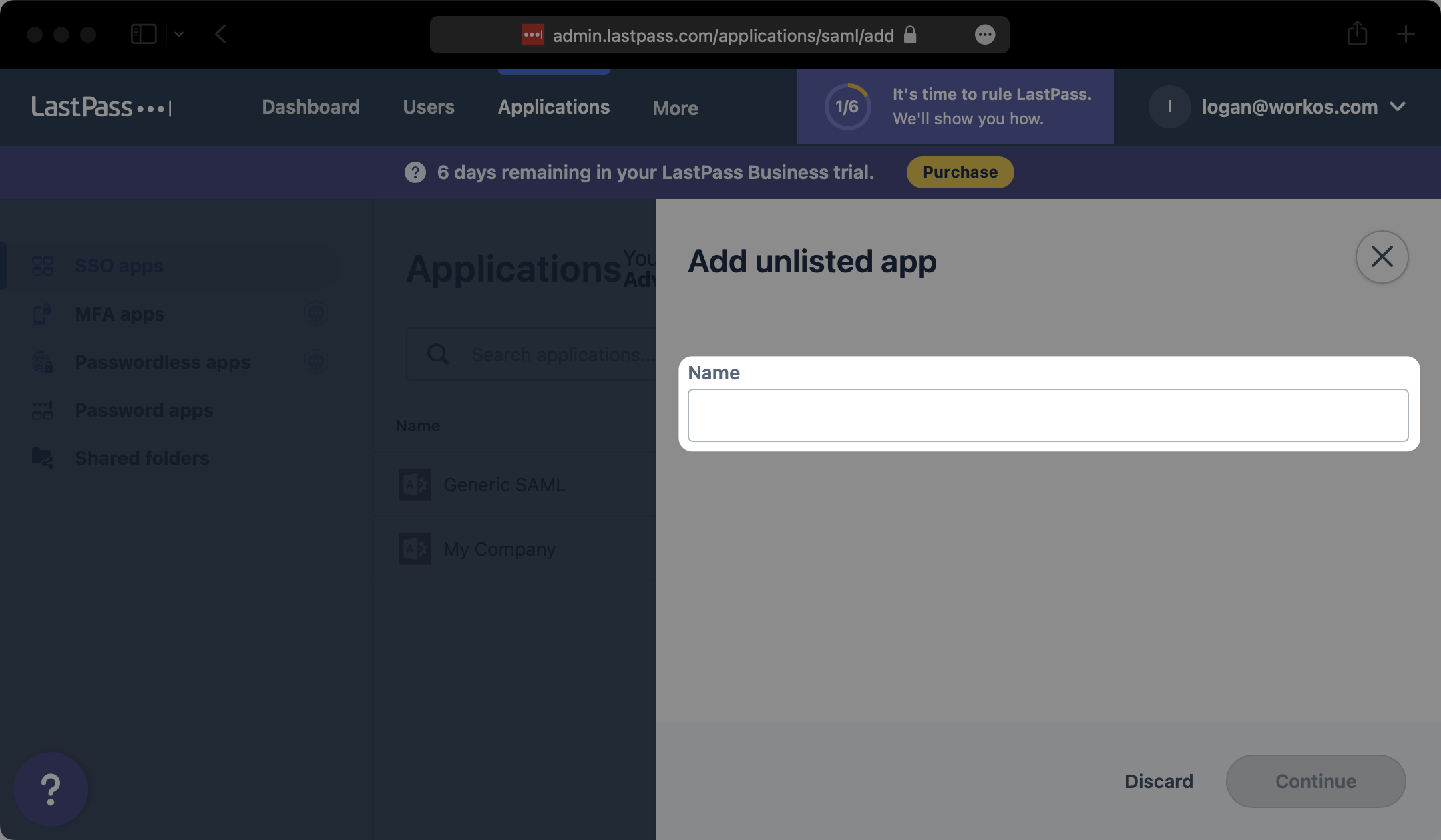
|
|
56
|
+
|
|
57
|
+
---
|
|
58
|
+
|
|
59
|
+
## (2) Initial SAML Application Setup
|
|
60
|
+
|
|
61
|
+
Under the “Set up LastPass” section of the “Configure app” modal, input the ACS URL from the WorkOS Dashboard Connection details under “ACS”. Then click on “Advanced Settings”.
|
|
62
|
+
|
|
63
|
+
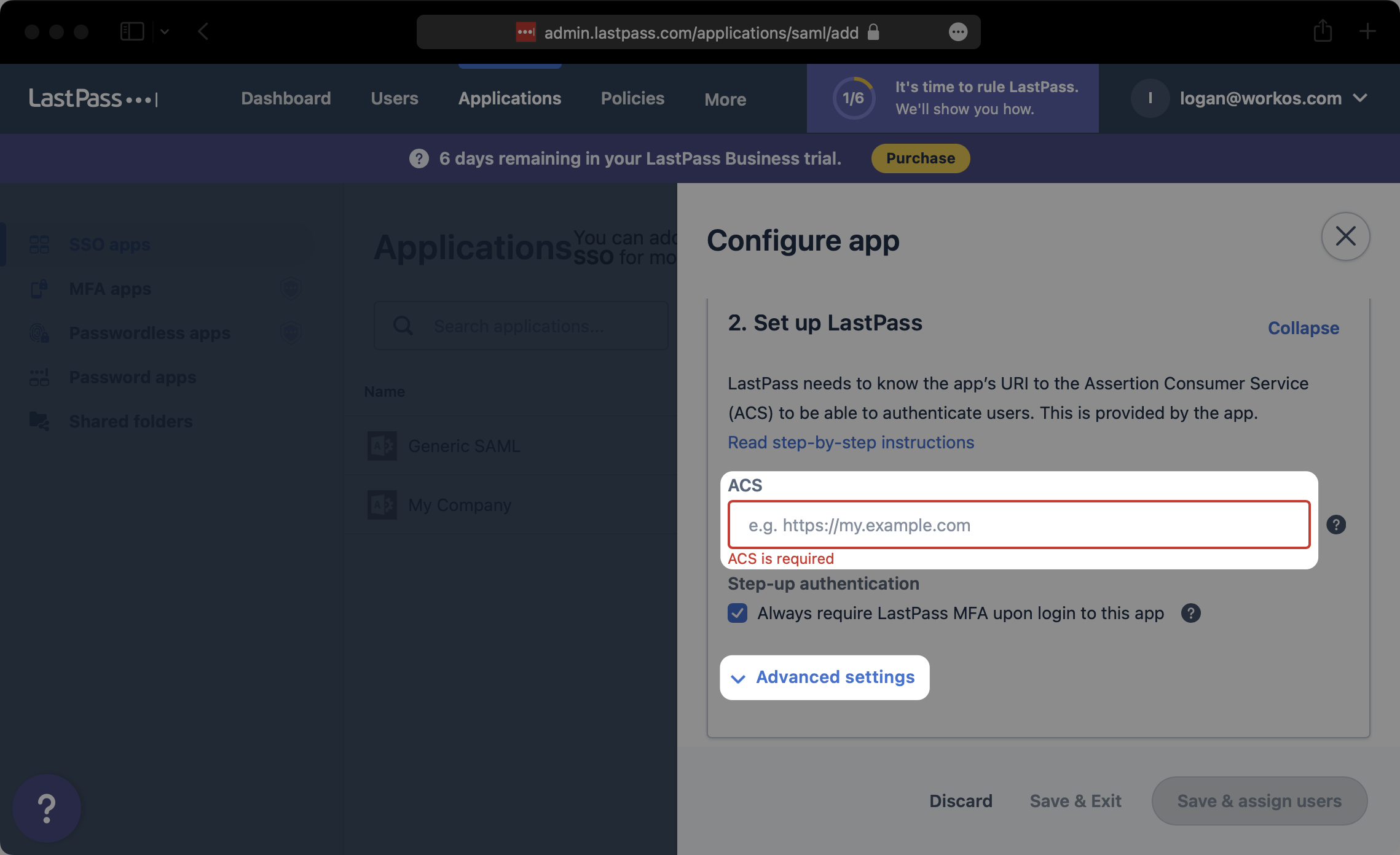
|
|
64
|
+
|
|
65
|
+
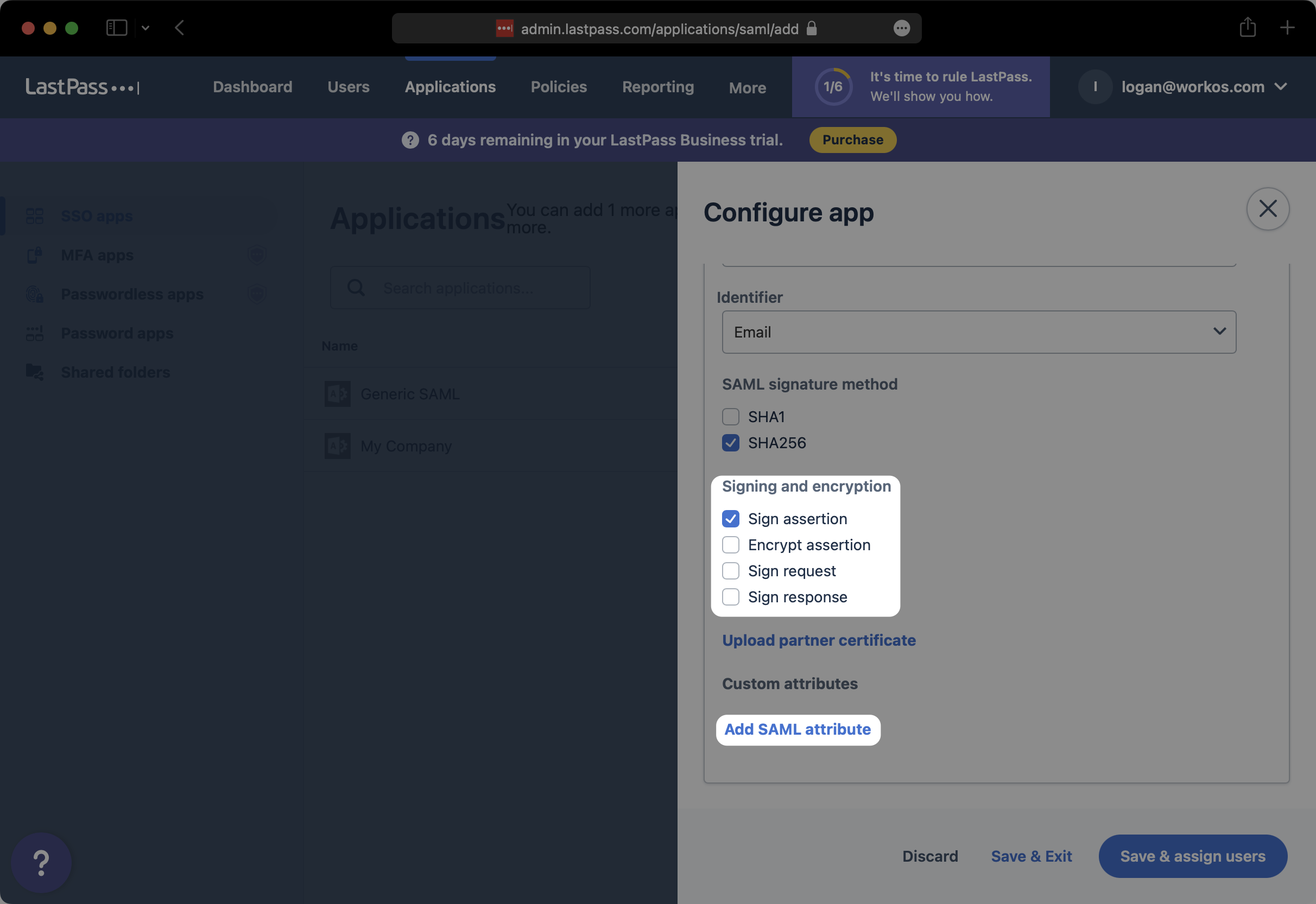
Under “Entity ID”, input the SP Entity ID from the WorkOS Dashboard Connection details. Next, under “SAML signature method”, select “SHA256”.
|
|
66
|
+
|
|
67
|
+
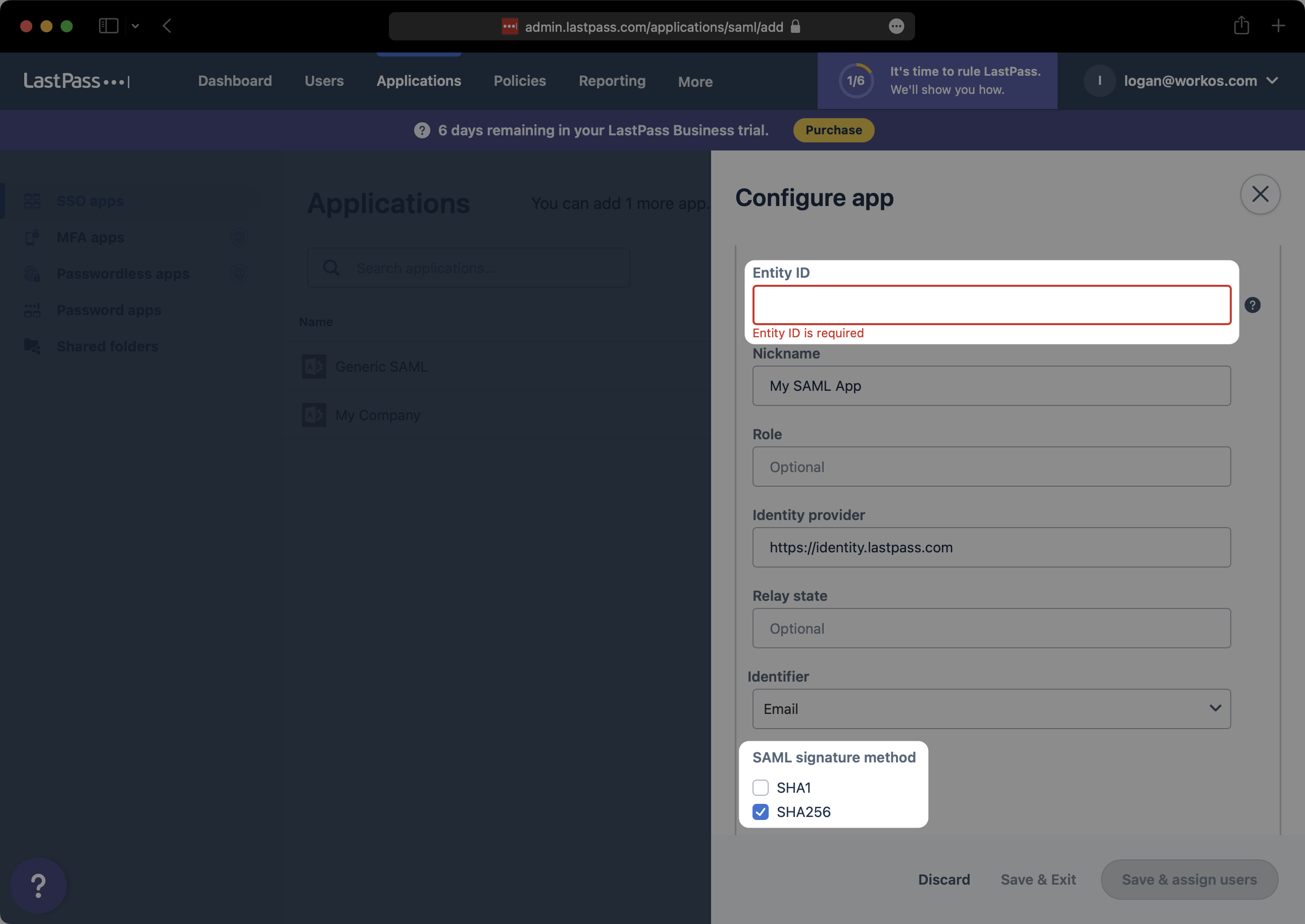
|
|
68
|
+
|
|
69
|
+
Under “Signing and encryption”, ensure that you have at least selected “Sign assertion”. Then, click on “Add SAML attribute”.
|
|
70
|
+
|
|
71
|
+
|
|
72
|
+
|
|
73
|
+
---
|
|
74
|
+
|
|
75
|
+
## (3) Configure SAML Application
|
|
76
|
+
|
|
77
|
+
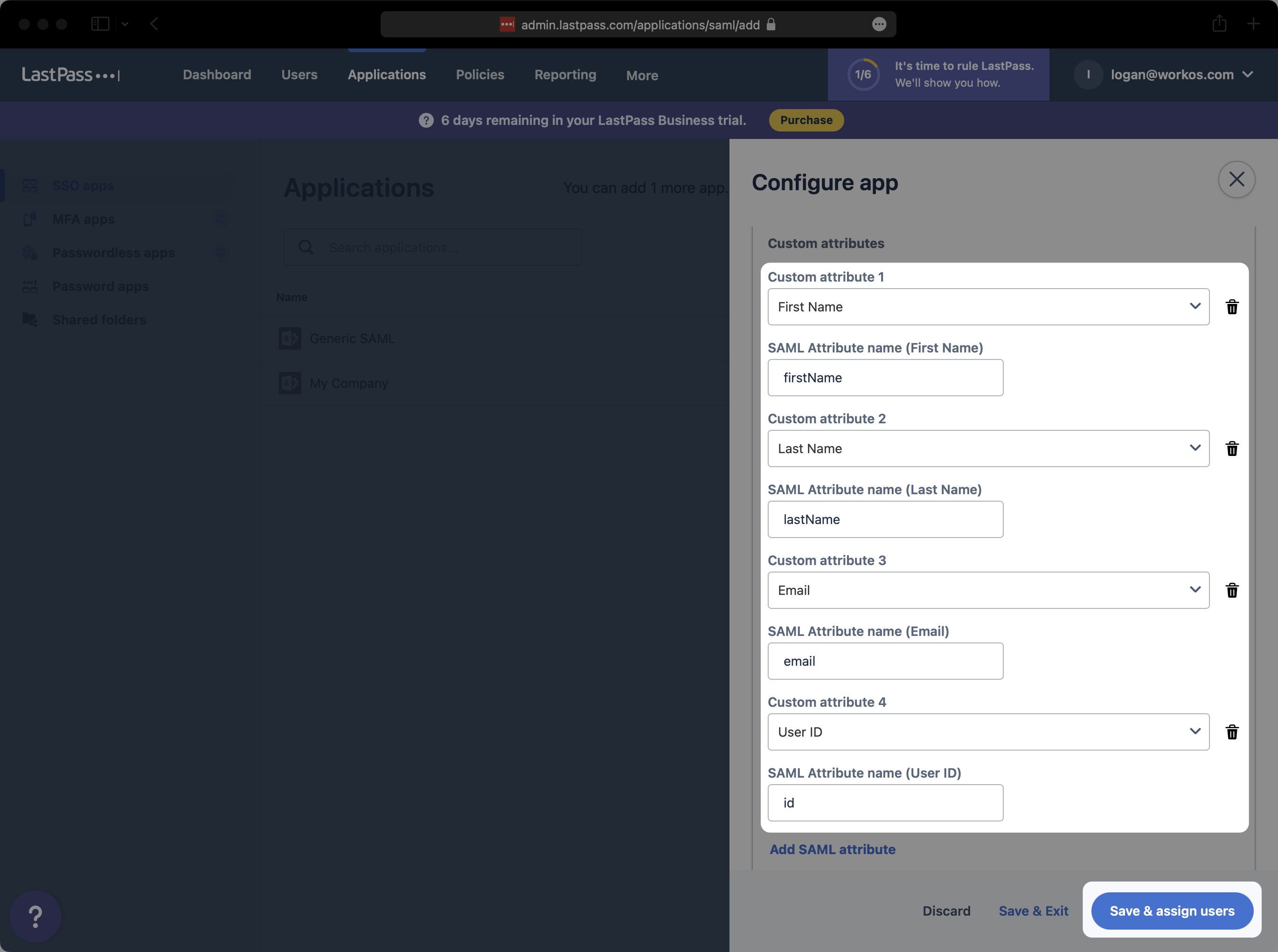
Map the following four attributes as shown below, and select “Save & assign users”.
|
|
78
|
+
|
|
79
|
+
- First Name → `firstName`
|
|
80
|
+
- Last Name → `lastName`
|
|
81
|
+
- Email → `email`
|
|
82
|
+
- User ID → `id`
|
|
83
|
+
|
|
84
|
+
|
|
85
|
+
|
|
86
|
+
### Role Assignment (optional)
|
|
87
|
+
|
|
88
|
+
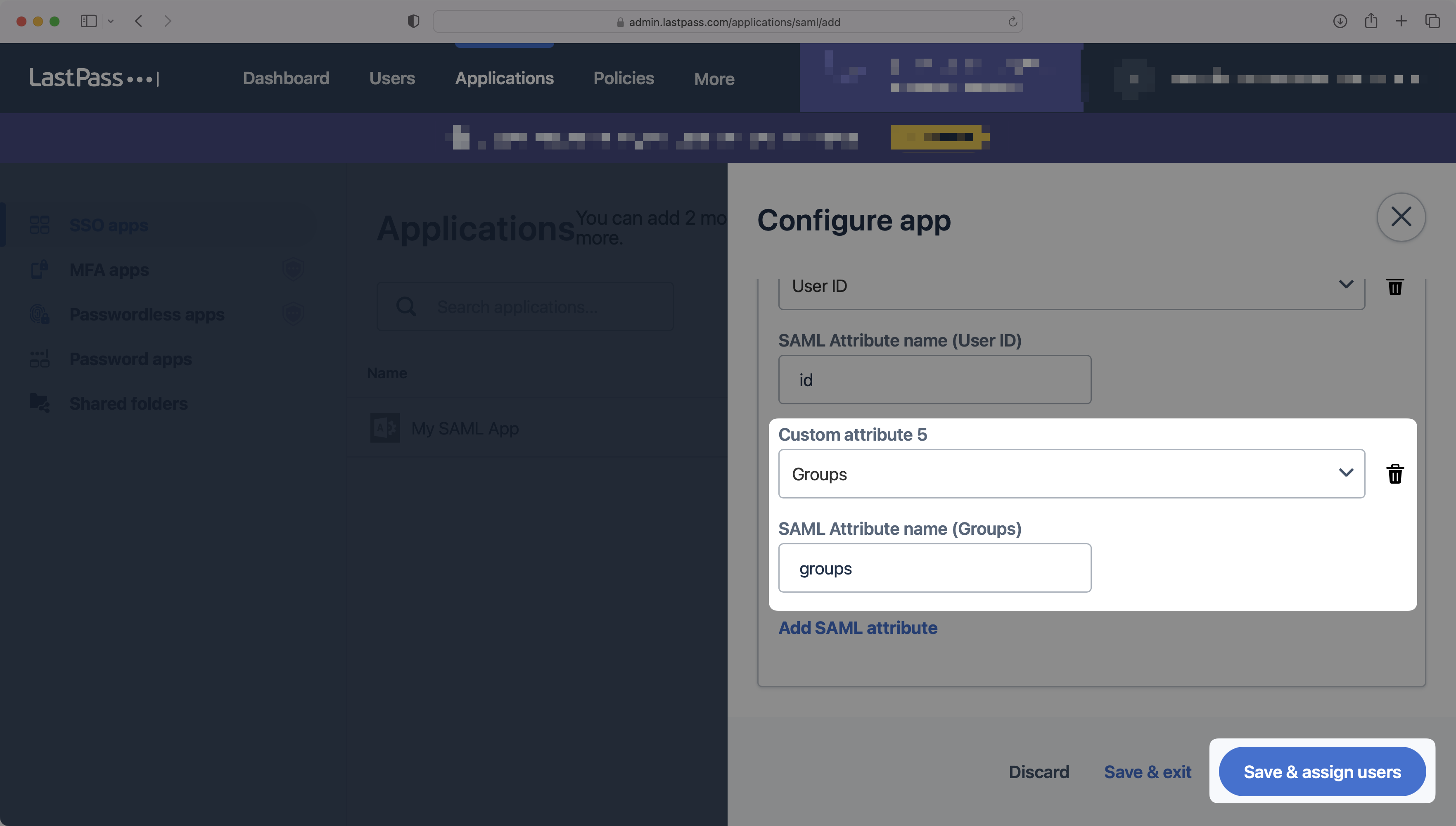
With [identity provider role assignment](/sso/identity-provider-role-assignment), users can receive roles within your application based on their group memberships. To return this information in the attribute statement, add a new SAML attribute for the "Groups" field and input `groups` as the attribute name, as shown below. Then, select "Save & assign users".
|
|
89
|
+
|
|
90
|
+
|
|
91
|
+
|
|
92
|
+
> Finish role assignment set-up by navigating to the SSO connection page in the _Organization_ section of the [WorkOS Dashboard](https://dashboard.workos.com/). Create SSO groups by referencing the group IdP ID. Then, assign roles to these SSO groups so group members are automatically granted roles within your application.
|
|
93
|
+
|
|
94
|
+
---
|
|
95
|
+
|
|
96
|
+
## (4) Add Users and Groups to SAML Application
|
|
97
|
+
|
|
98
|
+
On the “Users, groups & roles” page, click on “Assign users, groups & roles”.
|
|
99
|
+
|
|
100
|
+
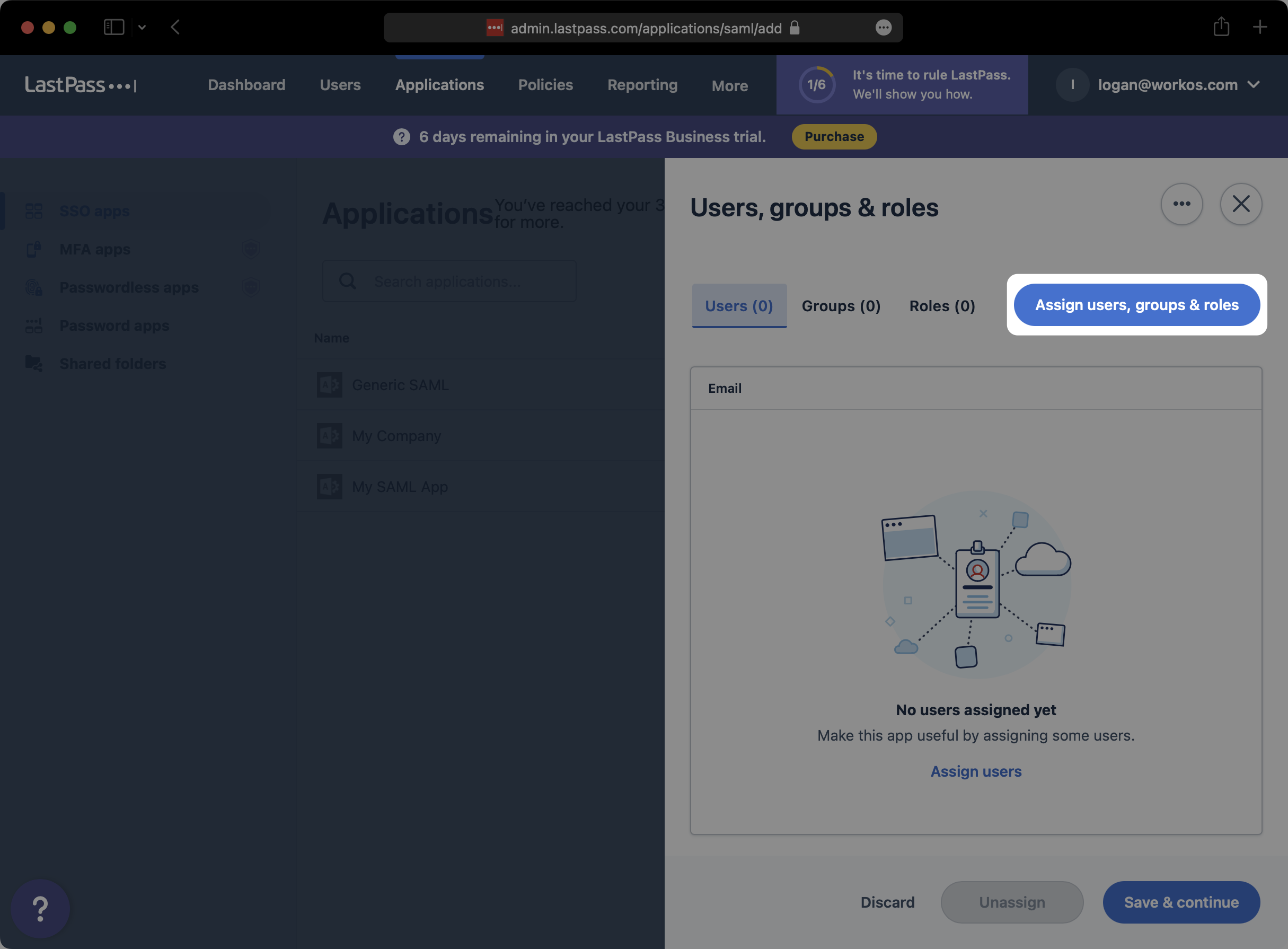
|
|
101
|
+
|
|
102
|
+
Search and select any users or groups that you would like to provision to this SAML app. Then, click “Assign”.
|
|
103
|
+
|
|
104
|
+
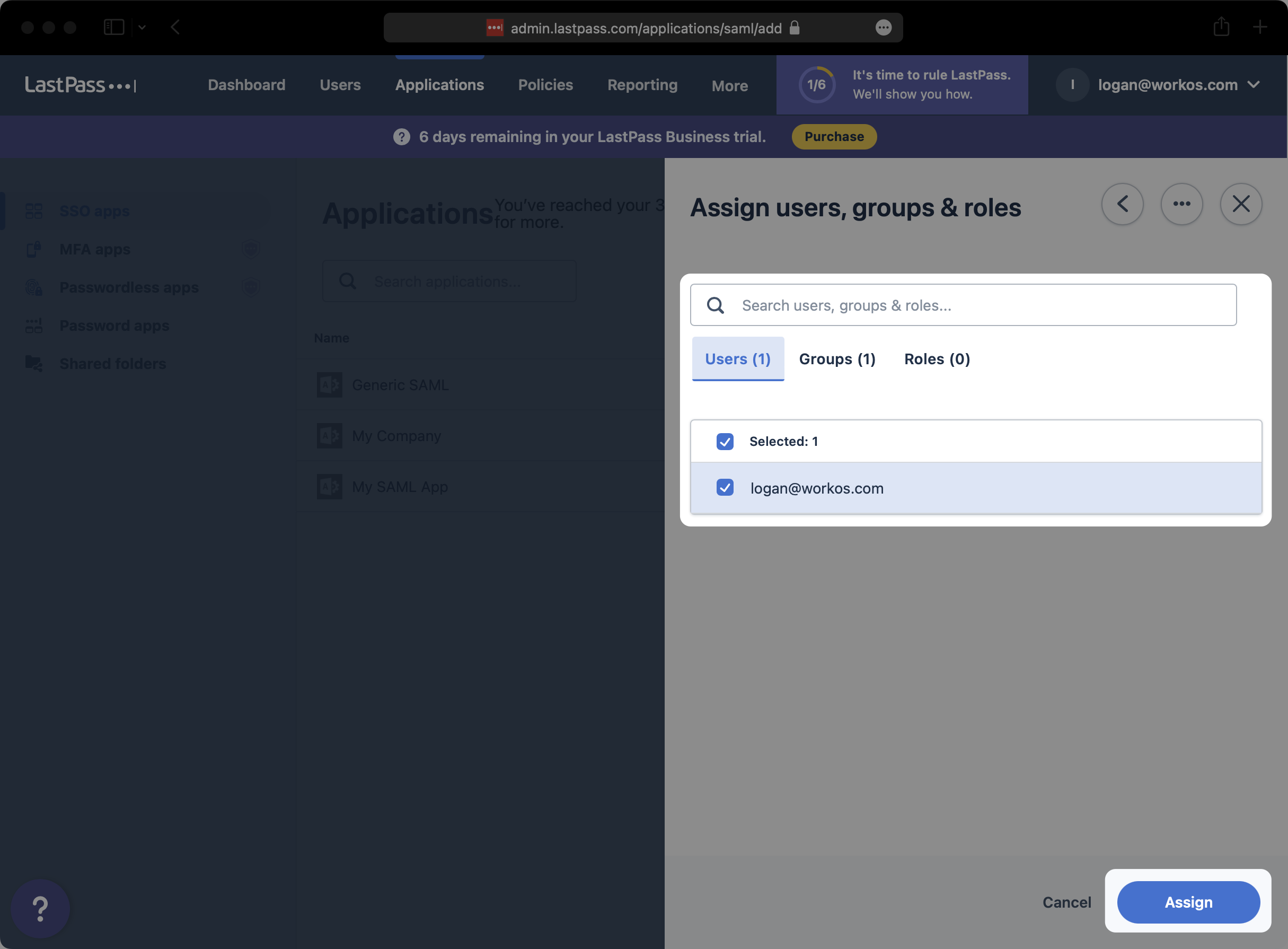
|
|
105
|
+
|
|
106
|
+
Click on “Save & continue”.
|
|
107
|
+
|
|
108
|
+
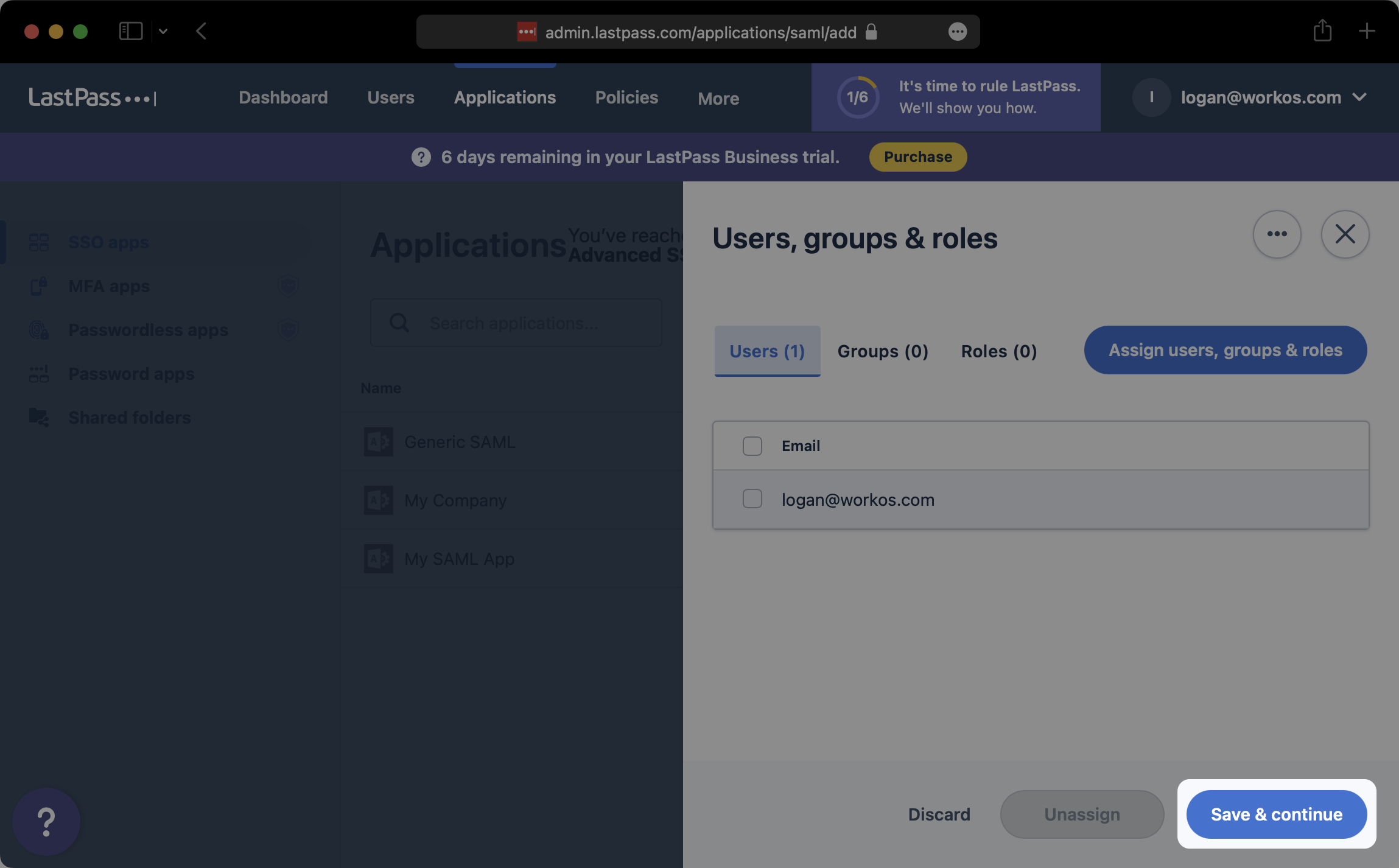
|
|
109
|
+
|
|
110
|
+
---
|
|
111
|
+
|
|
112
|
+
## (5) Upload Metadata file
|
|
113
|
+
|
|
114
|
+
Back on the “SSO apps” tab of the LastPass admin console, select the SAML app that you just created.
|
|
115
|
+
|
|
116
|
+
!A screenshot showing where how to select SAML App in LastPass.](https://images.workoscdn.com/images/99a9a771-02bc-4817-b576-414bafa2d6f2.png?auto=format&fit=clip&q=50)
|
|
117
|
+
|
|
118
|
+
On the “Configure app” modal, click on “Expand” to the right of “Set up app”.
|
|
119
|
+
|
|
120
|
+
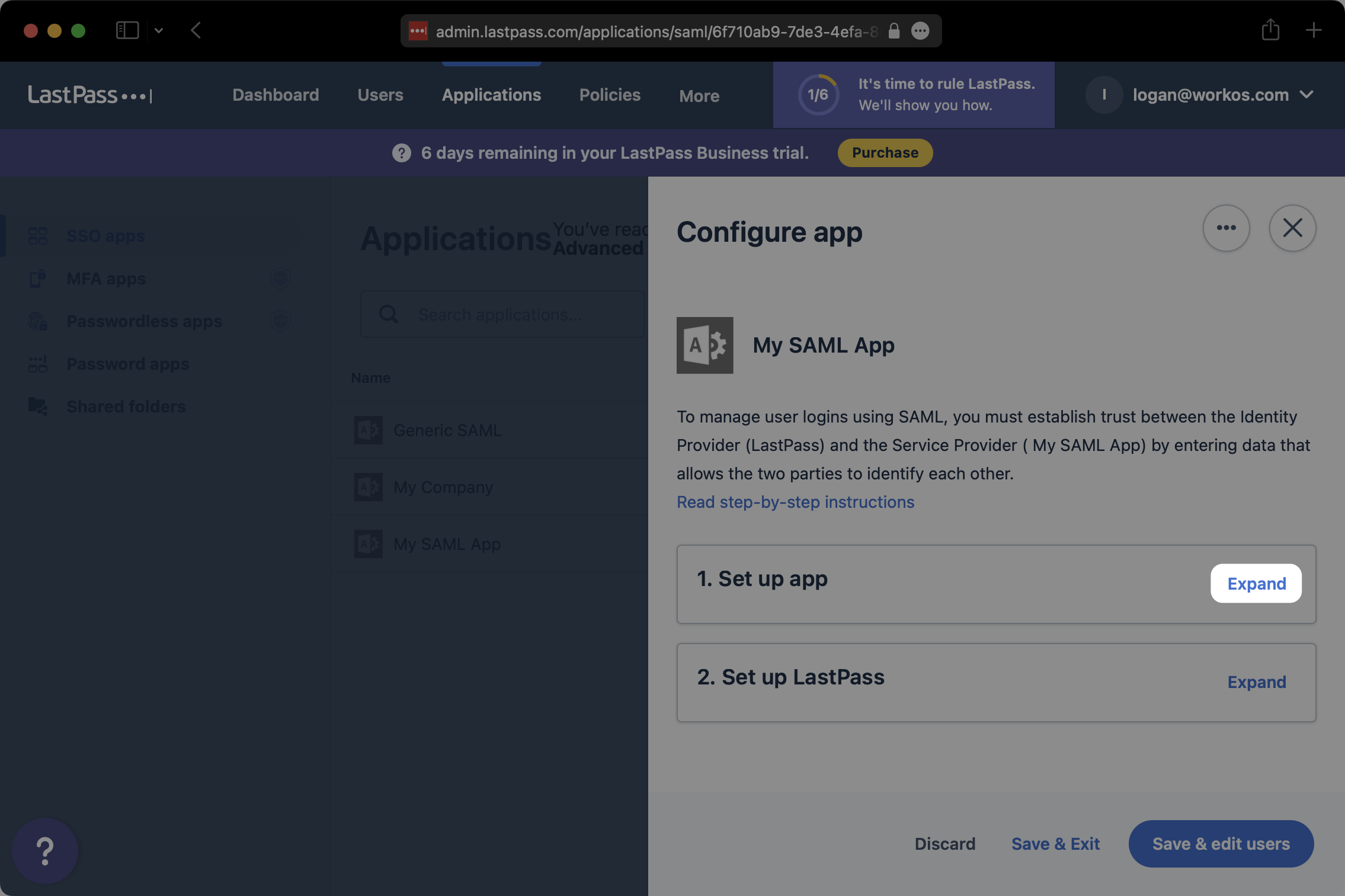
|
|
121
|
+
|
|
122
|
+
At the bottom of the “Set up app” section, click on “Download metadata (XML)”. Save the downloaded XML metadata somewhere accessible.
|
|
123
|
+
|
|
124
|
+
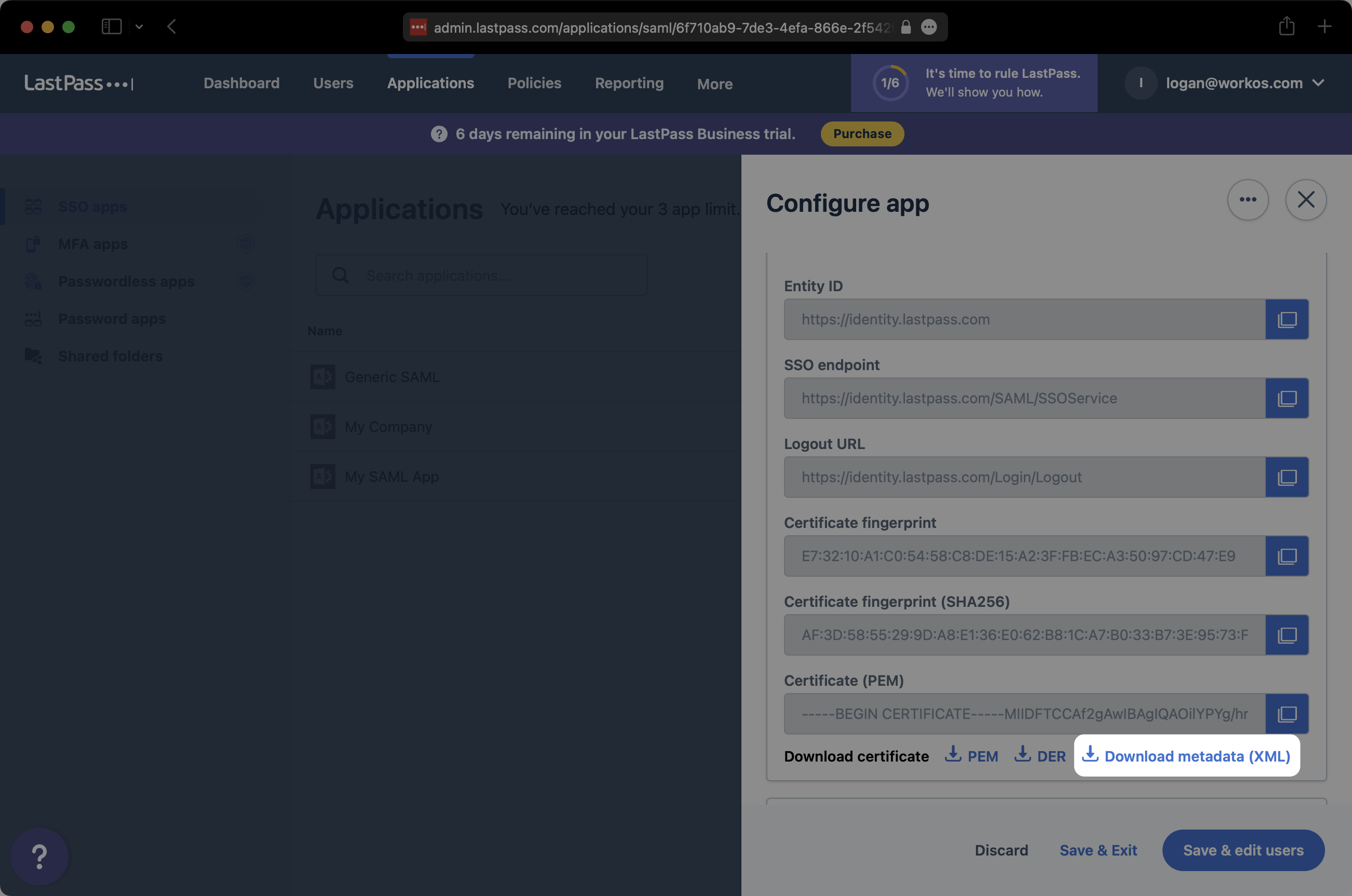
|
|
125
|
+
|
|
126
|
+
In the Connection settings in the WorkOS Dashboard, click “Edit Metadata Configuration”.
|
|
127
|
+
|
|
128
|
+
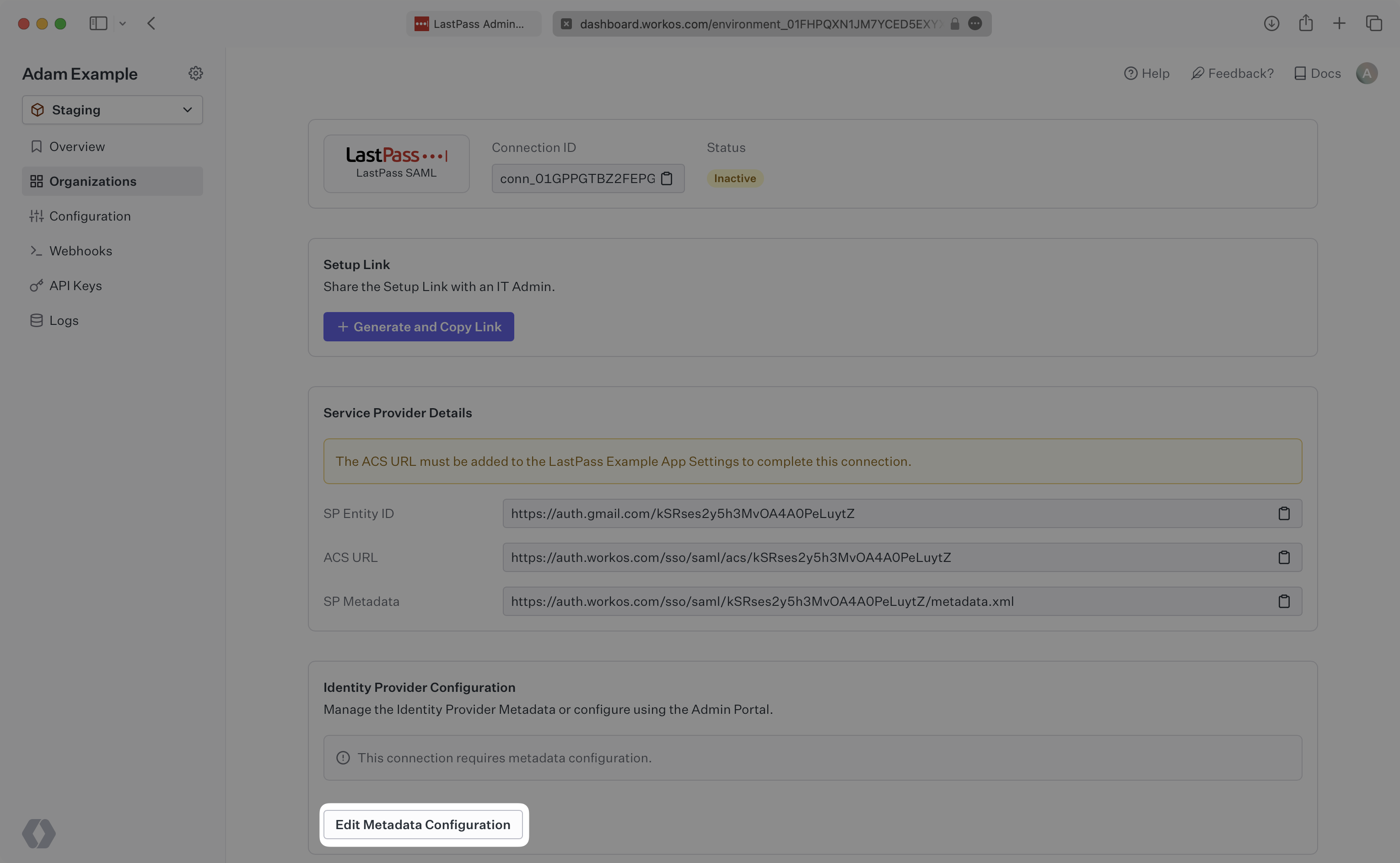
|
|
129
|
+
|
|
130
|
+
Upload the XML metadata file from LastPass into the “Metadata File” field and select “Save Metadata Configuration”.
|
|
131
|
+
|
|
132
|
+
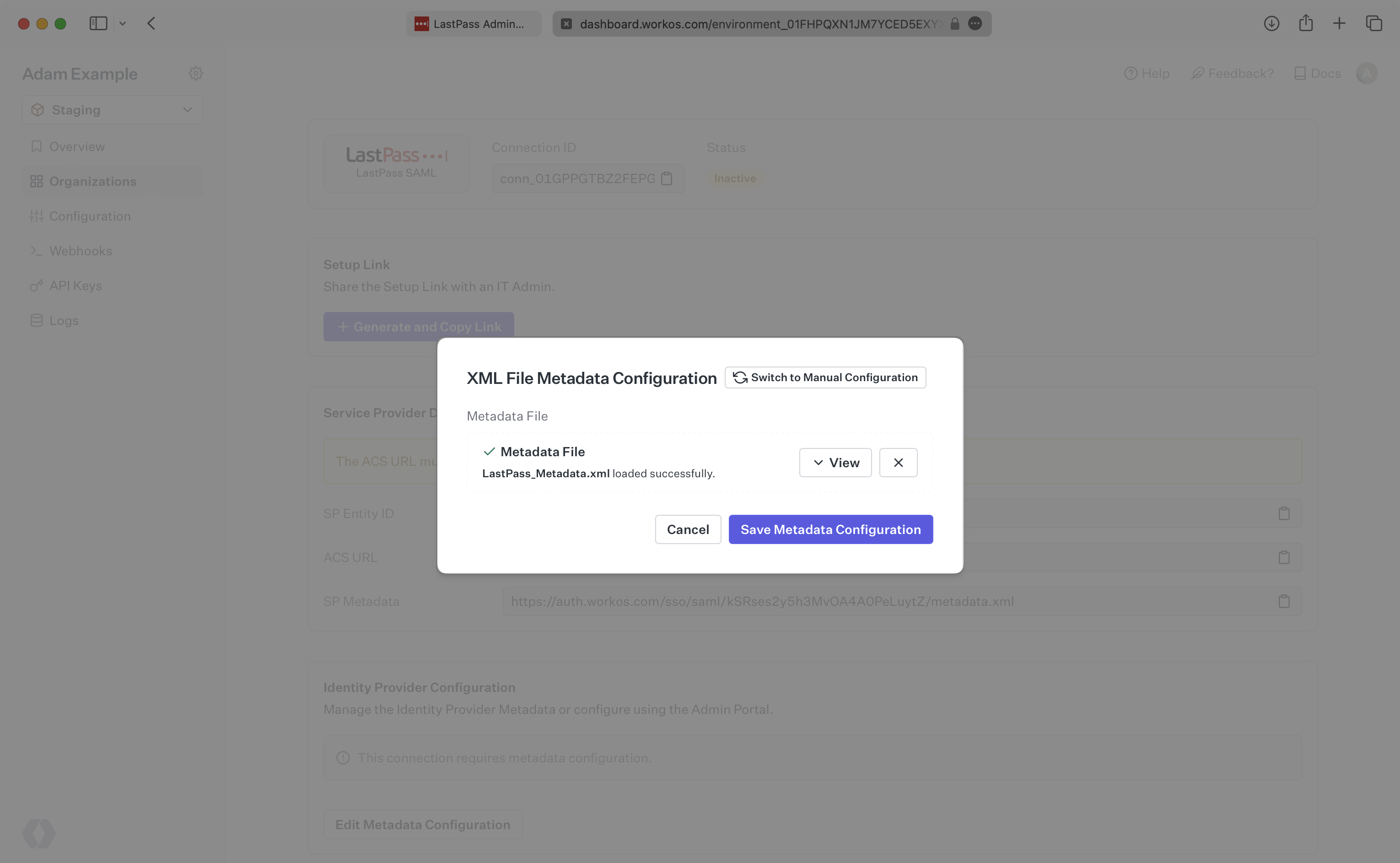
|
|
133
|
+
|
|
134
|
+
Your Connection will then be linked and good to go!
|
|
@@ -0,0 +1,77 @@
|
|
|
1
|
+
---
|
|
2
|
+
title: LinkedIn OAuth
|
|
3
|
+
description: Learn how to set up OAuth with LinkedIn.
|
|
4
|
+
icon: linkedin
|
|
5
|
+
breadcrumb:
|
|
6
|
+
title: Integrations
|
|
7
|
+
url: /integrations
|
|
8
|
+
originalPath: .tmp-workos-clone/packages/docs/content/integrations/linkedin-oauth.mdx
|
|
9
|
+
---
|
|
10
|
+
|
|
11
|
+
## Introduction
|
|
12
|
+
|
|
13
|
+
To configure your global LinkedIn OAuth setup, you’ll need three pieces of information: a [Redirect URI](/glossary/redirect-uri), a LinkedIn Client ID, and a LinkedIn Client Secret.
|
|
14
|
+
|
|
15
|
+
---
|
|
16
|
+
|
|
17
|
+
## What WorkOS provides
|
|
18
|
+
|
|
19
|
+
WorkOS provides the Redirect URI, an allowlisted callback URL. It indicates the location to return an authorized user to after both an authorization code is granted, and the authentication process is complete.
|
|
20
|
+
|
|
21
|
+
Open your [WorkOS Dashboard](https://dashboard.workos.com) and browse to the _Authentication_ section on the left hand navigation bar. Scroll down to the _LinkedIn OAuth_ section and click _Enable_.
|
|
22
|
+
|
|
23
|
+
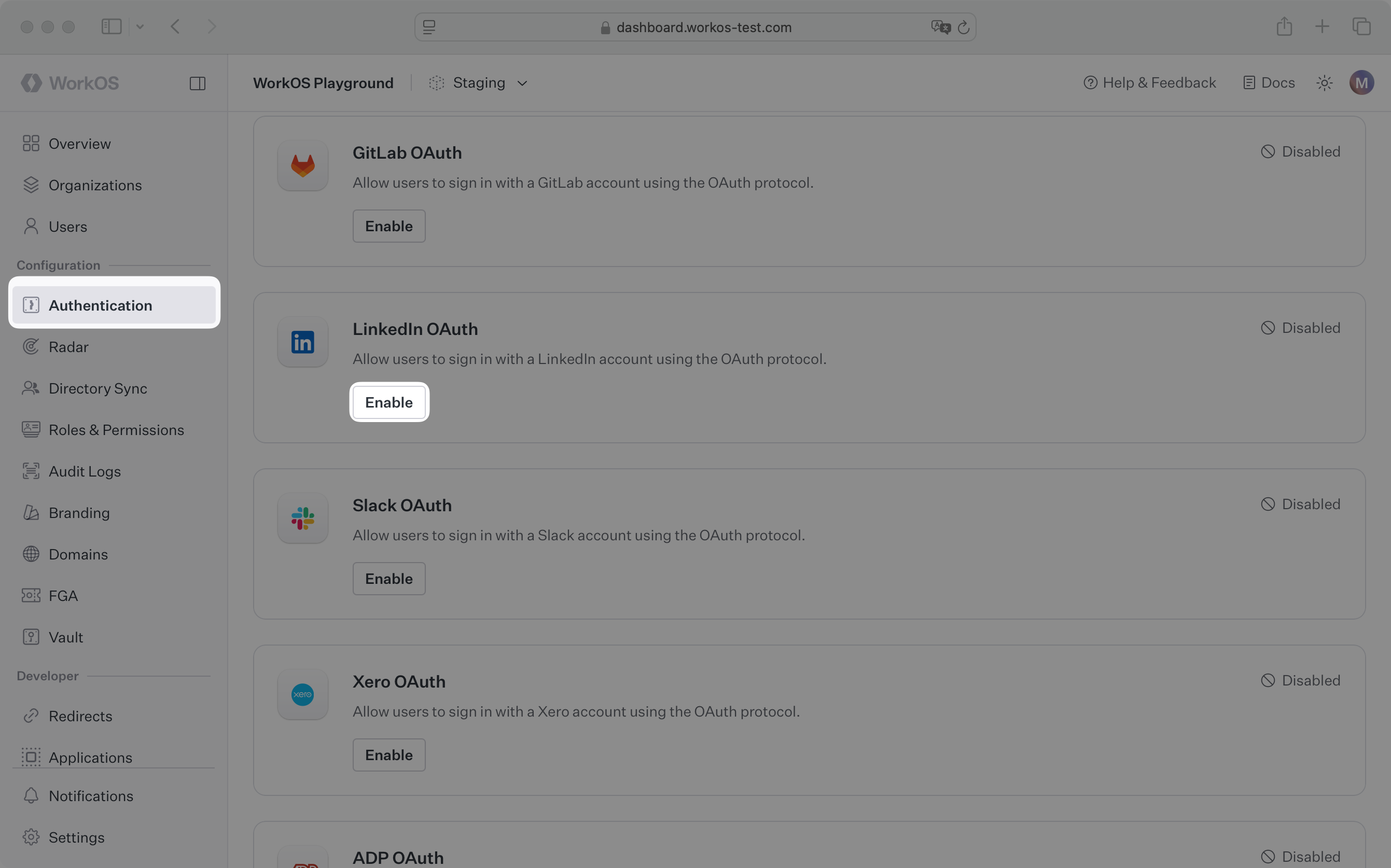
|
|
24
|
+
|
|
25
|
+
In the modal, you’ll see the Redirect URI as well as the fields you’ll populate later with information from LinkedIn. Copy this URI. We will use it as part of the registration process in the LinkedIn Developer Portal.
|
|
26
|
+
|
|
27
|
+
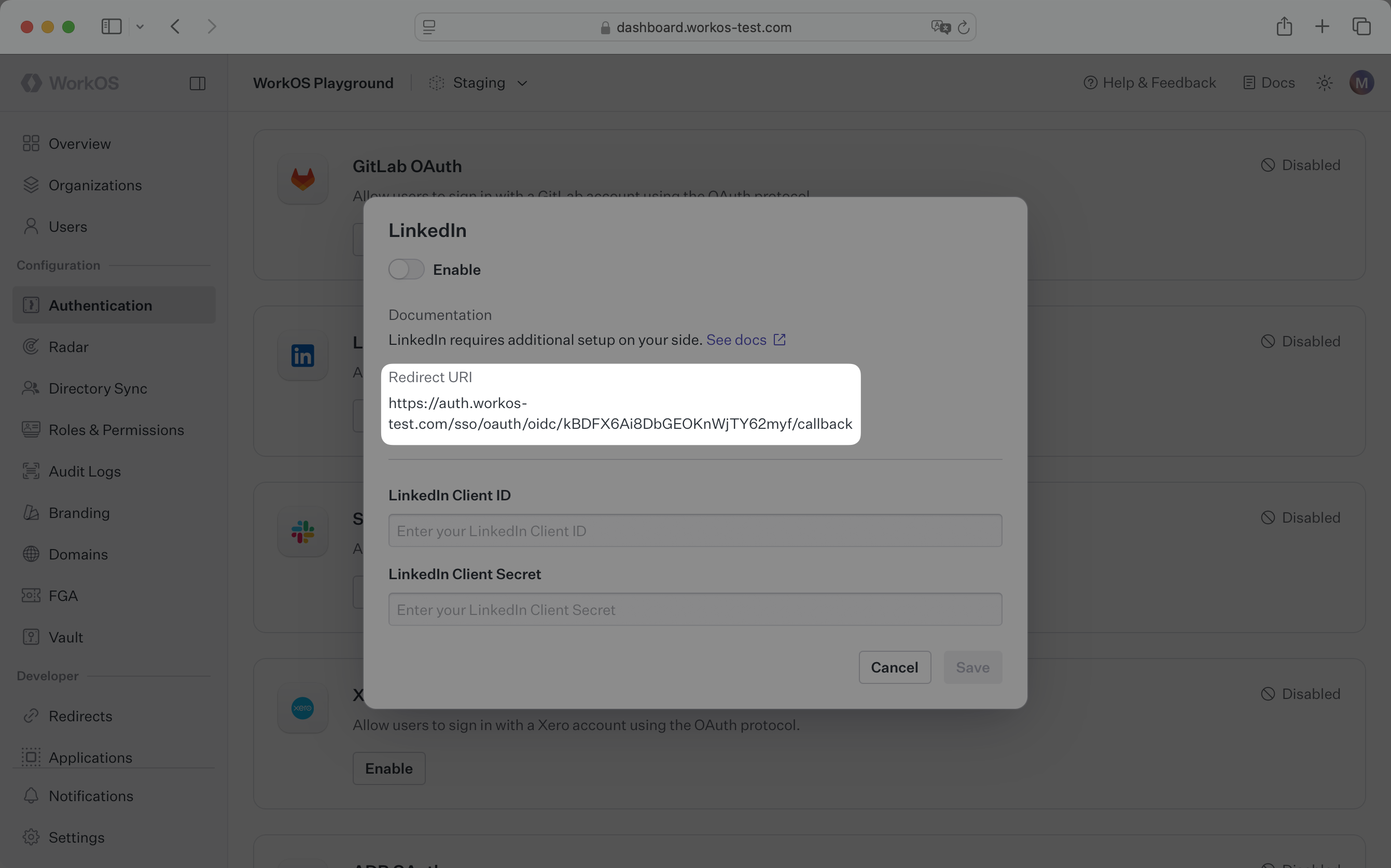
|
|
28
|
+
|
|
29
|
+
---
|
|
30
|
+
|
|
31
|
+
## What you’ll need
|
|
32
|
+
|
|
33
|
+
In order to integrate you’ll need the LinkedIn Client ID and the LinkedIn Client Secret.
|
|
34
|
+
|
|
35
|
+
These are a pair of credentials provided by LinkedIn that you’ll use to authenticate your application via the OAuth protocol. To obtain them:
|
|
36
|
+
|
|
37
|
+
---
|
|
38
|
+
|
|
39
|
+
### (1) Create the LinkedIn OAuth Application
|
|
40
|
+
|
|
41
|
+
Log in to your LinkedIn account, go to the [_Developer Portal_](https://developer.linkedin.com) page and click on _Create app_.
|
|
42
|
+
|
|
43
|
+
|
|
44
|
+
|
|
45
|
+
Start by filling out the form with the required details about your application, like the application name, LinkedIn page, and app logo.
|
|
46
|
+
|
|
47
|
+

|
|
48
|
+
|
|
49
|
+
Finally, click on _Create app_.
|
|
50
|
+
|
|
51
|
+
### (2) Configure redirect URL and get the client credentials
|
|
52
|
+
|
|
53
|
+
On the next page, click the _Auth_ tab. Copy the Client ID and Primary Client Secret. We will use them in the next step.
|
|
54
|
+
|
|
55
|
+
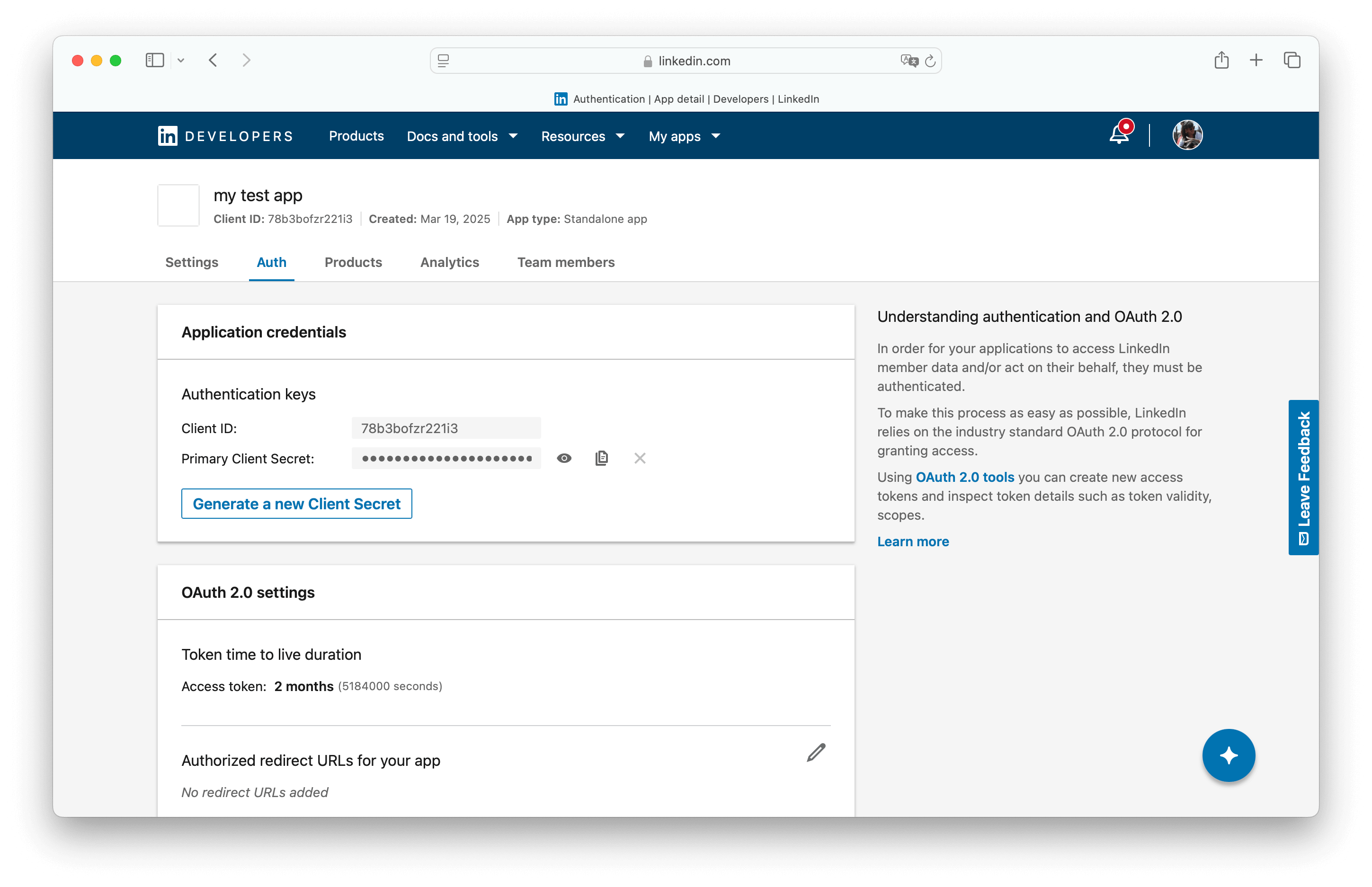
|
|
56
|
+
|
|
57
|
+
Click the pencil button at _OAuth 2.0 settings_ > _Authorized redirect URLs for your app_. Click _Add redirect URL_ and paste the WorkOS Redirect URI. Click _Update_.
|
|
58
|
+
|
|
59
|
+
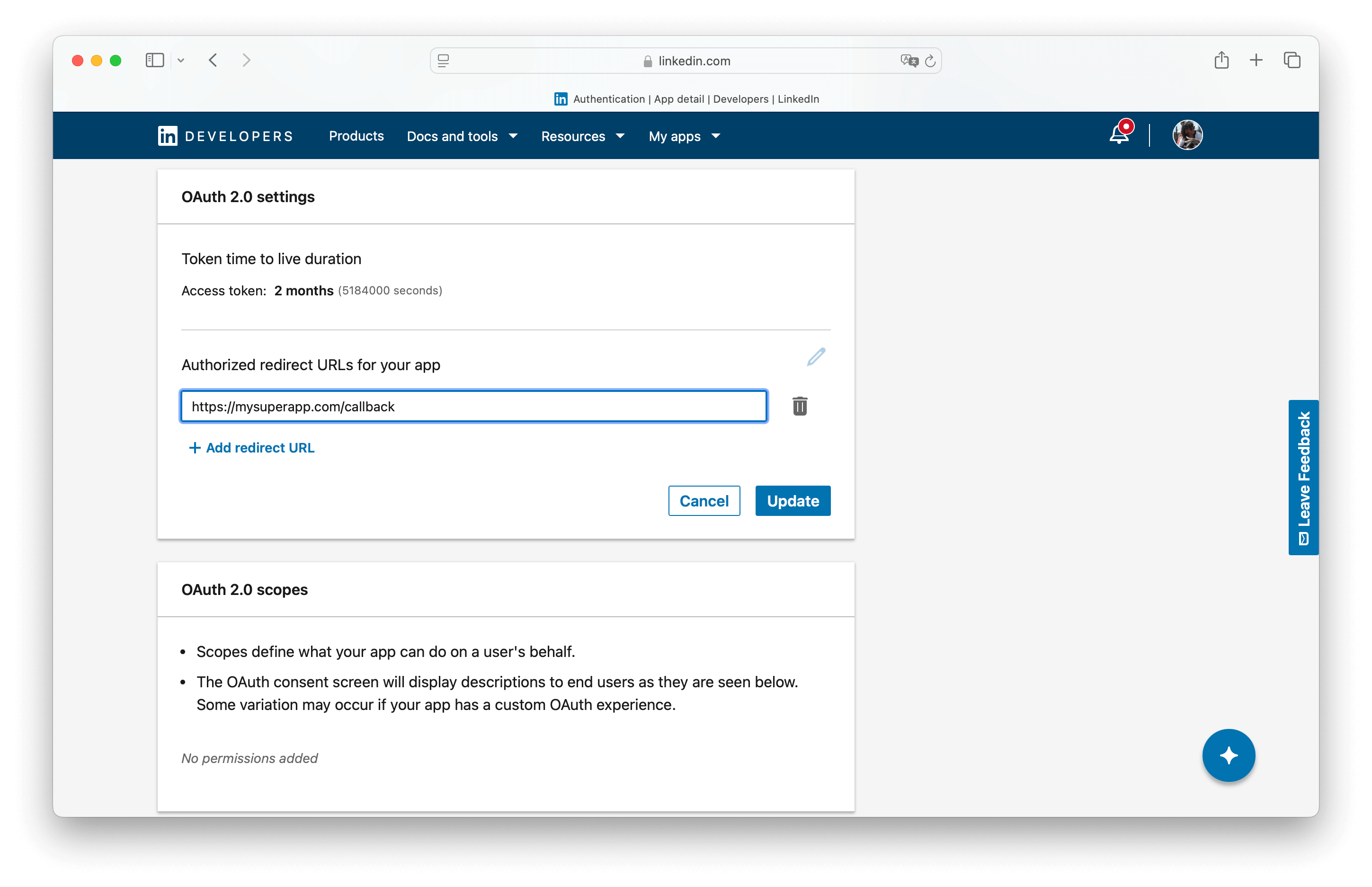
|
|
60
|
+
|
|
61
|
+
### (3) Add OIDC support in the Products tab
|
|
62
|
+
|
|
63
|
+
Click the products tab and add the Sign In with LinkedIn using OpenID Connect product.
|
|
64
|
+
|
|
65
|
+
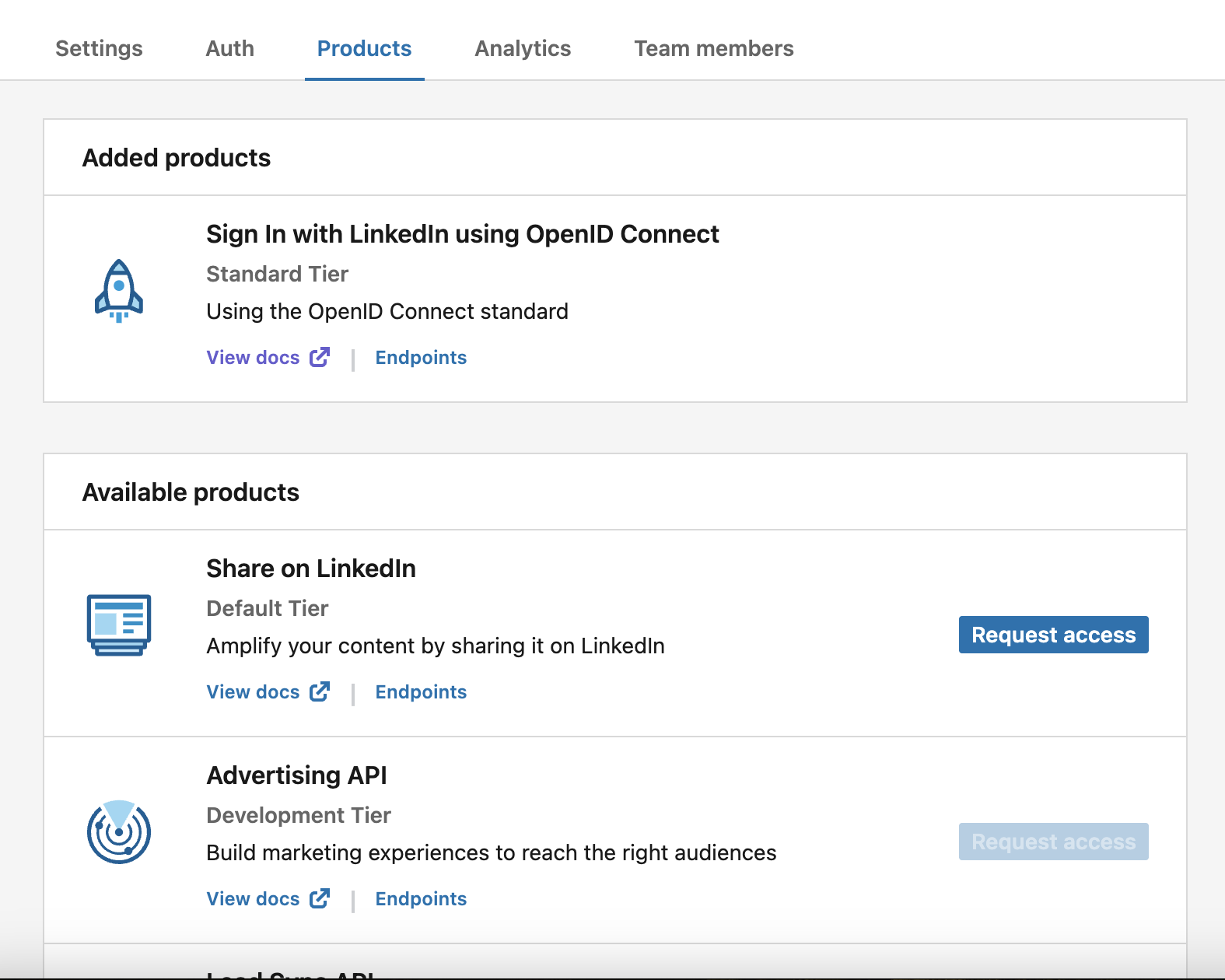
|
|
66
|
+
|
|
67
|
+
### (4) Provide client credentials to WorkOS
|
|
68
|
+
|
|
69
|
+
Go back to the _Authentication_ section in the WorkOS Dashboard, and click on _Edit_ under _LinkedIn OAuth_.
|
|
70
|
+
|
|
71
|
+
Toggle _Enabled_ on and provide the client credentials from LinkedIn that you generated in the previous step.
|
|
72
|
+
|
|
73
|
+
Finally, click _Save_.
|
|
74
|
+
|
|
75
|
+

|
|
76
|
+
|
|
77
|
+
You are now ready to start authenticating with LinkedIn OAuth. Your users will see the option to sign-in with LinkedIn when visiting your [AuthKit](/user-management) domain.
|