@workos/mcp-docs-server 0.1.0
This diff represents the content of publicly available package versions that have been released to one of the supported registries. The information contained in this diff is provided for informational purposes only and reflects changes between package versions as they appear in their respective public registries.
- package/.docs/organized/changelogs/workos-platform.json +277 -0
- package/.docs/organized/docs/admin-portal/_navigation.mdx +16 -0
- package/.docs/organized/docs/admin-portal/custom-branding.mdx +111 -0
- package/.docs/organized/docs/admin-portal/example-apps.mdx +46 -0
- package/.docs/organized/docs/admin-portal/index.mdx +240 -0
- package/.docs/organized/docs/audit-logs/_navigation.mdx +22 -0
- package/.docs/organized/docs/audit-logs/admin-portal.mdx +20 -0
- package/.docs/organized/docs/audit-logs/editing-events.mdx +27 -0
- package/.docs/organized/docs/audit-logs/exporting-events.mdx +29 -0
- package/.docs/organized/docs/audit-logs/index.mdx +110 -0
- package/.docs/organized/docs/audit-logs/log-streams.mdx +56 -0
- package/.docs/organized/docs/audit-logs/metadata-schema.mdx +21 -0
- package/.docs/organized/docs/custom-domains/_navigation.mdx +16 -0
- package/.docs/organized/docs/custom-domains/admin-portal.mdx +38 -0
- package/.docs/organized/docs/custom-domains/auth-api.mdx +59 -0
- package/.docs/organized/docs/custom-domains/authkit.mdx +36 -0
- package/.docs/organized/docs/custom-domains/email.mdx +41 -0
- package/.docs/organized/docs/custom-domains/index.mdx +19 -0
- package/.docs/organized/docs/dashboard.mdx +244 -0
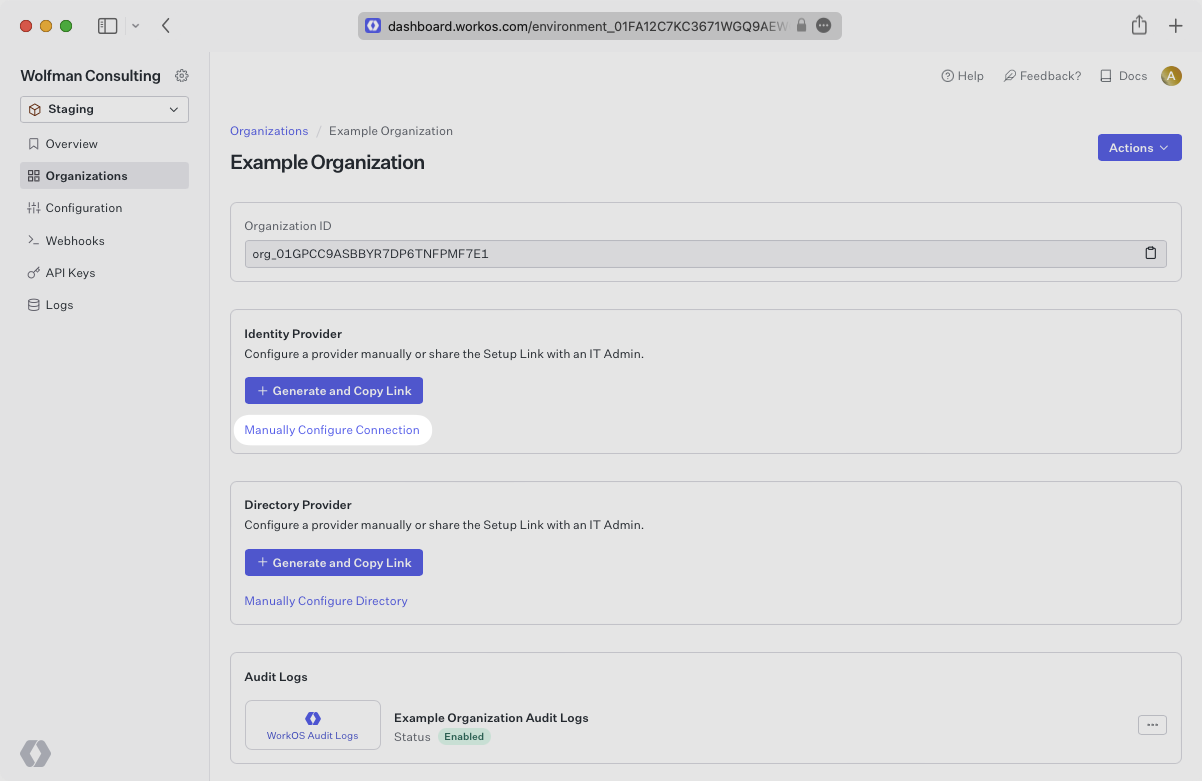
- package/.docs/organized/docs/demo/_navigation.mdx +26 -0
- package/.docs/organized/docs/demo/accordion.mdx +34 -0
- package/.docs/organized/docs/demo/checklist.mdx +33 -0
- package/.docs/organized/docs/demo/code-block.mdx +185 -0
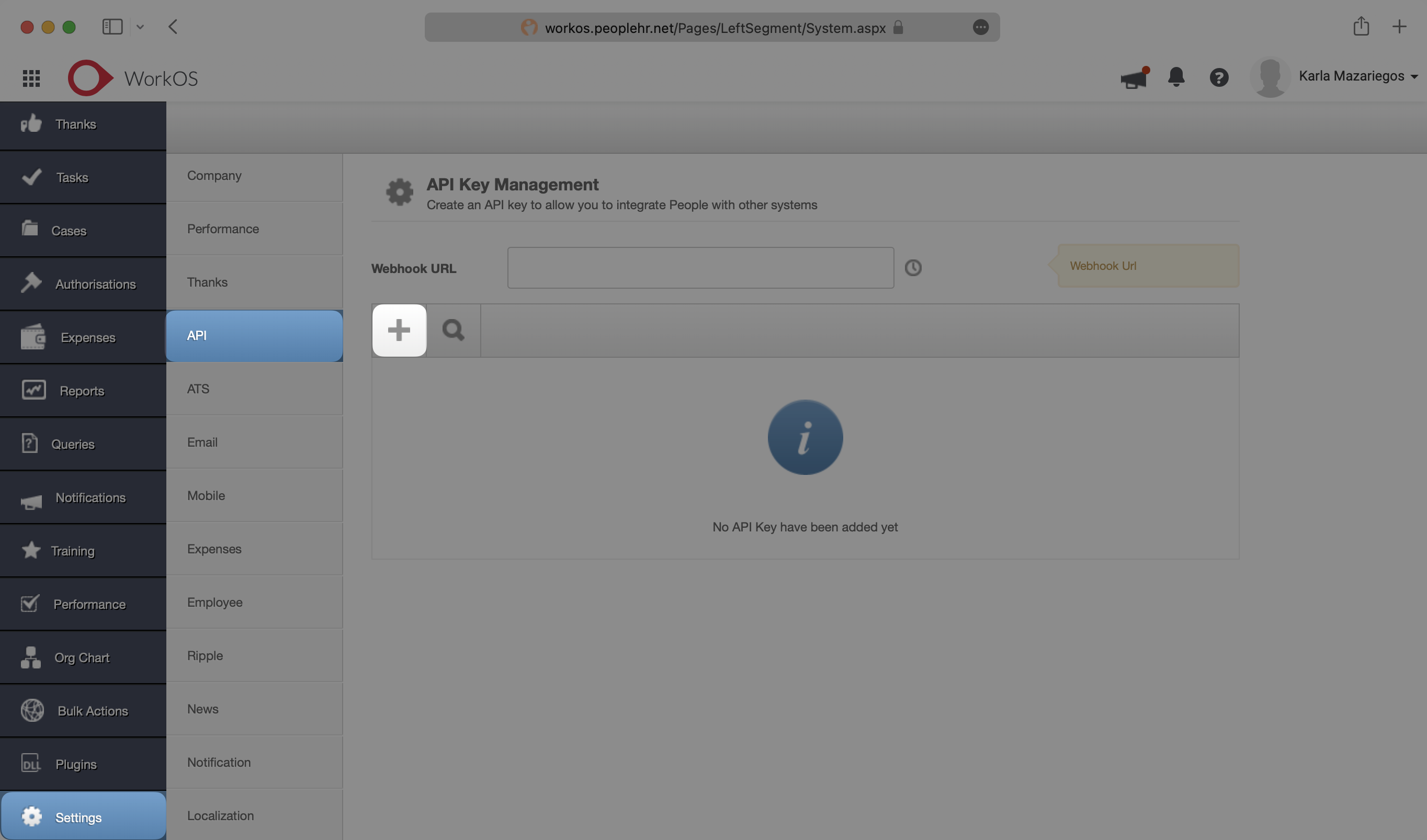
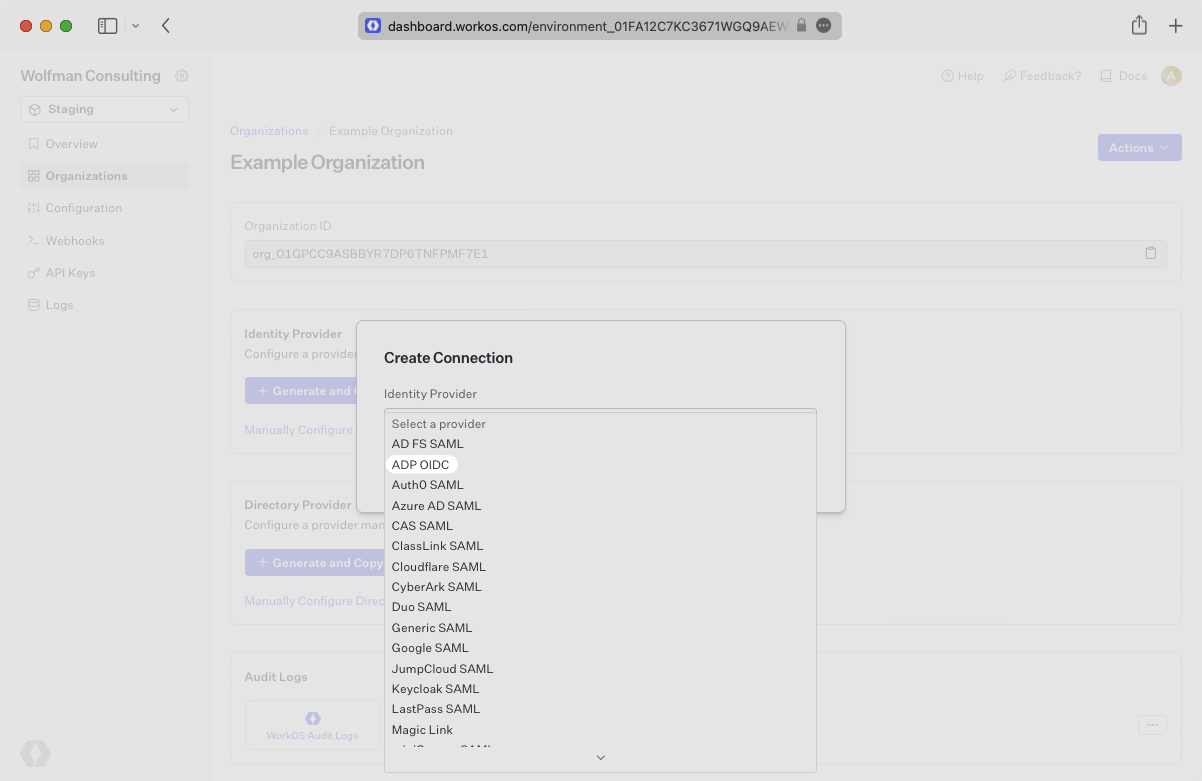
- package/.docs/organized/docs/demo/definition-list.mdx +35 -0
- package/.docs/organized/docs/demo/index.mdx +7 -0
- package/.docs/organized/docs/demo/punctuation.mdx +37 -0
- package/.docs/organized/docs/demo/replacements.mdx +26 -0
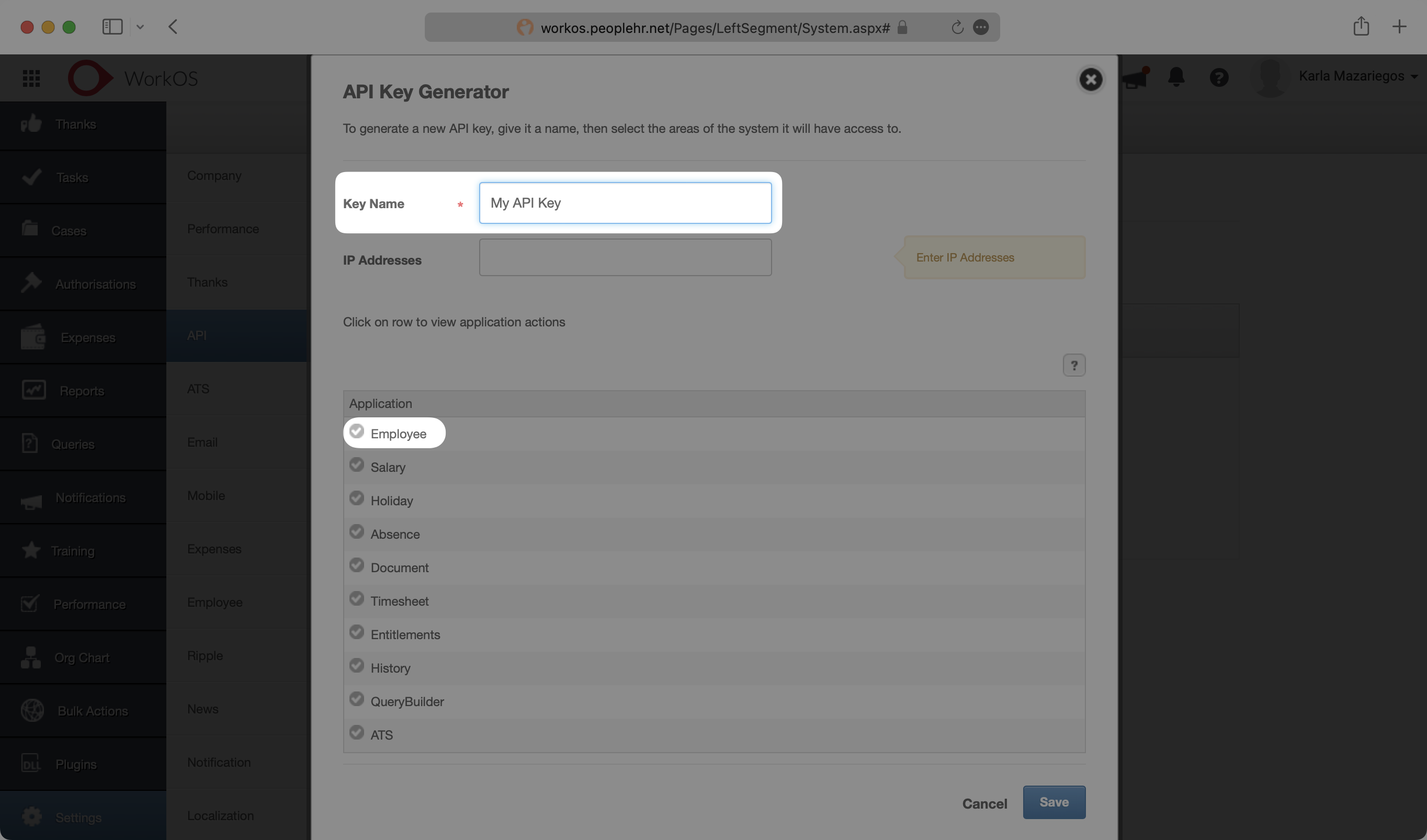
- package/.docs/organized/docs/demo/table.mdx +26 -0
- package/.docs/organized/docs/demo/tabs.mdx +17 -0
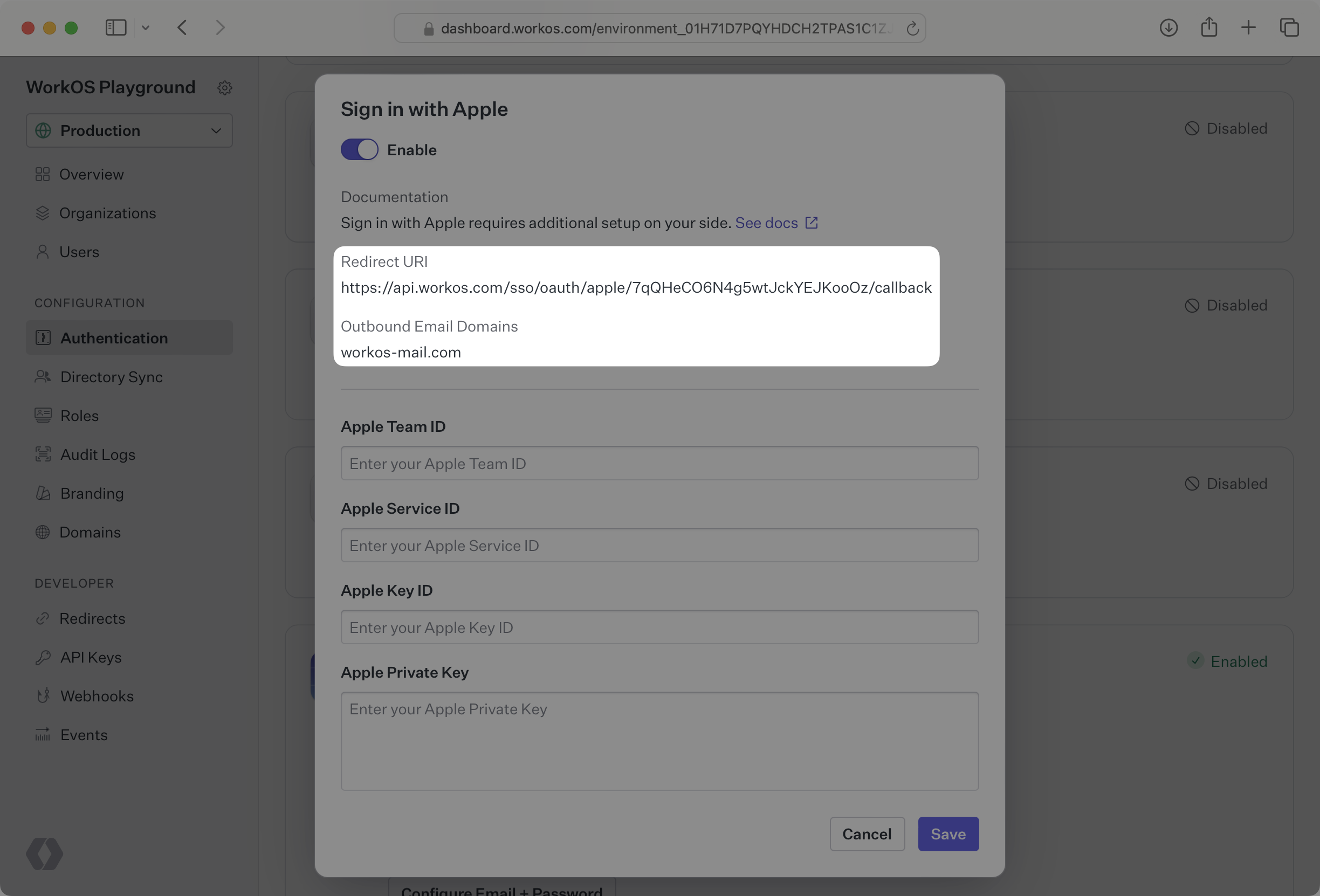
- package/.docs/organized/docs/directory-sync/_navigation.mdx +28 -0
- package/.docs/organized/docs/directory-sync/attributes.mdx +209 -0
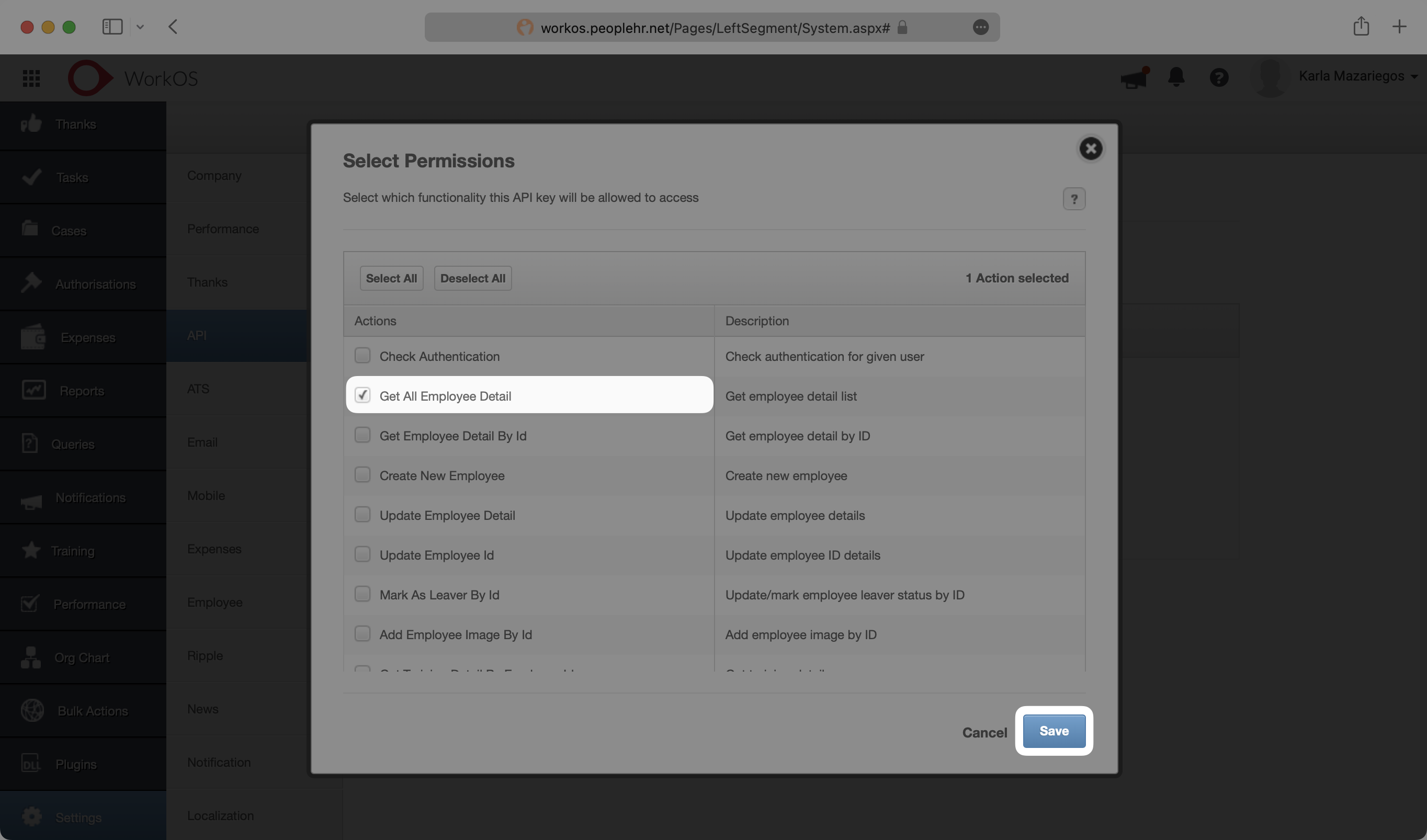
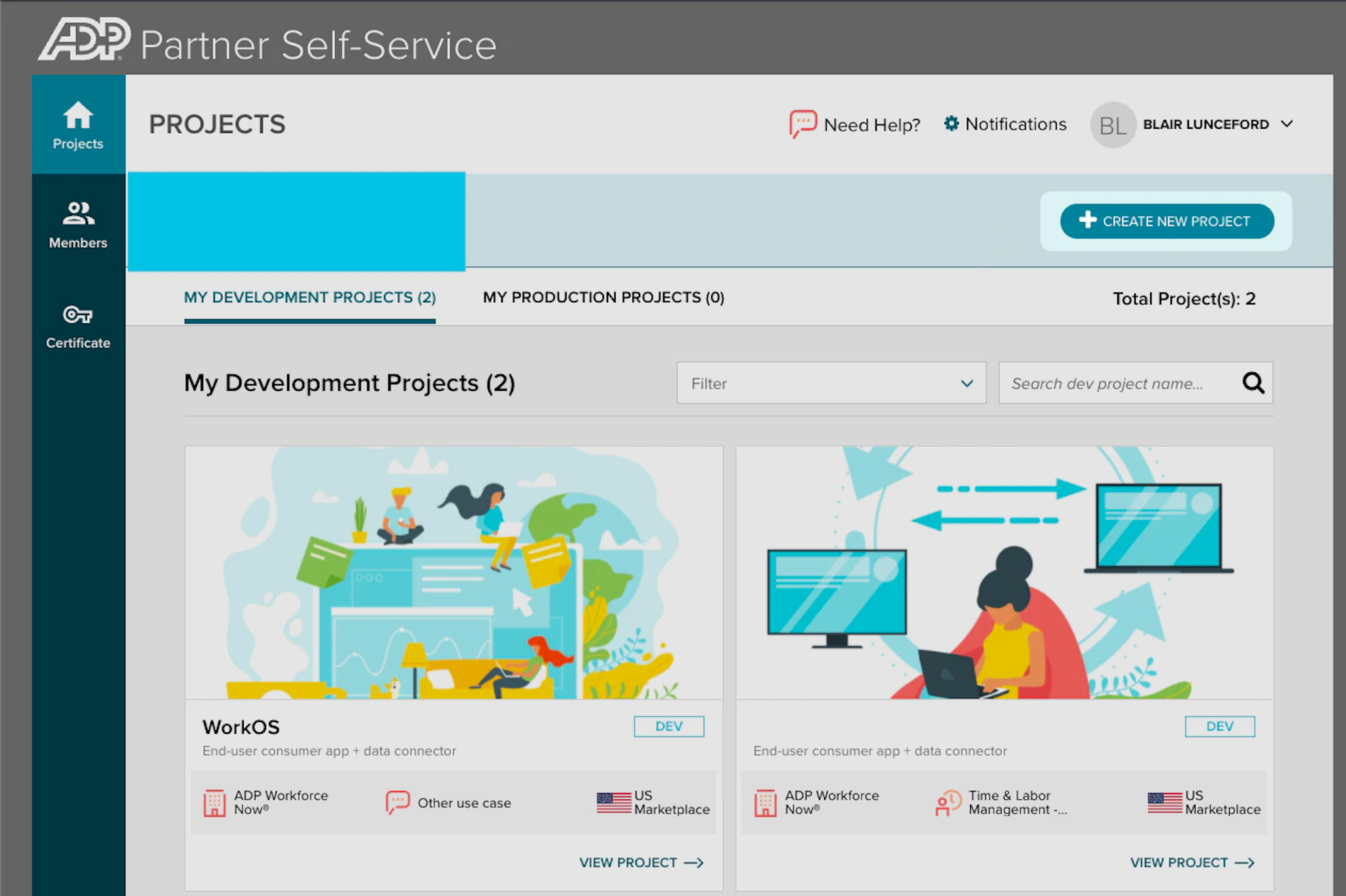
- package/.docs/organized/docs/directory-sync/example-apps.mdx +46 -0
- package/.docs/organized/docs/directory-sync/handle-inactive-users.mdx +52 -0
- package/.docs/organized/docs/directory-sync/identity-provider-role-assignment.mdx +134 -0
- package/.docs/organized/docs/directory-sync/index.mdx +107 -0
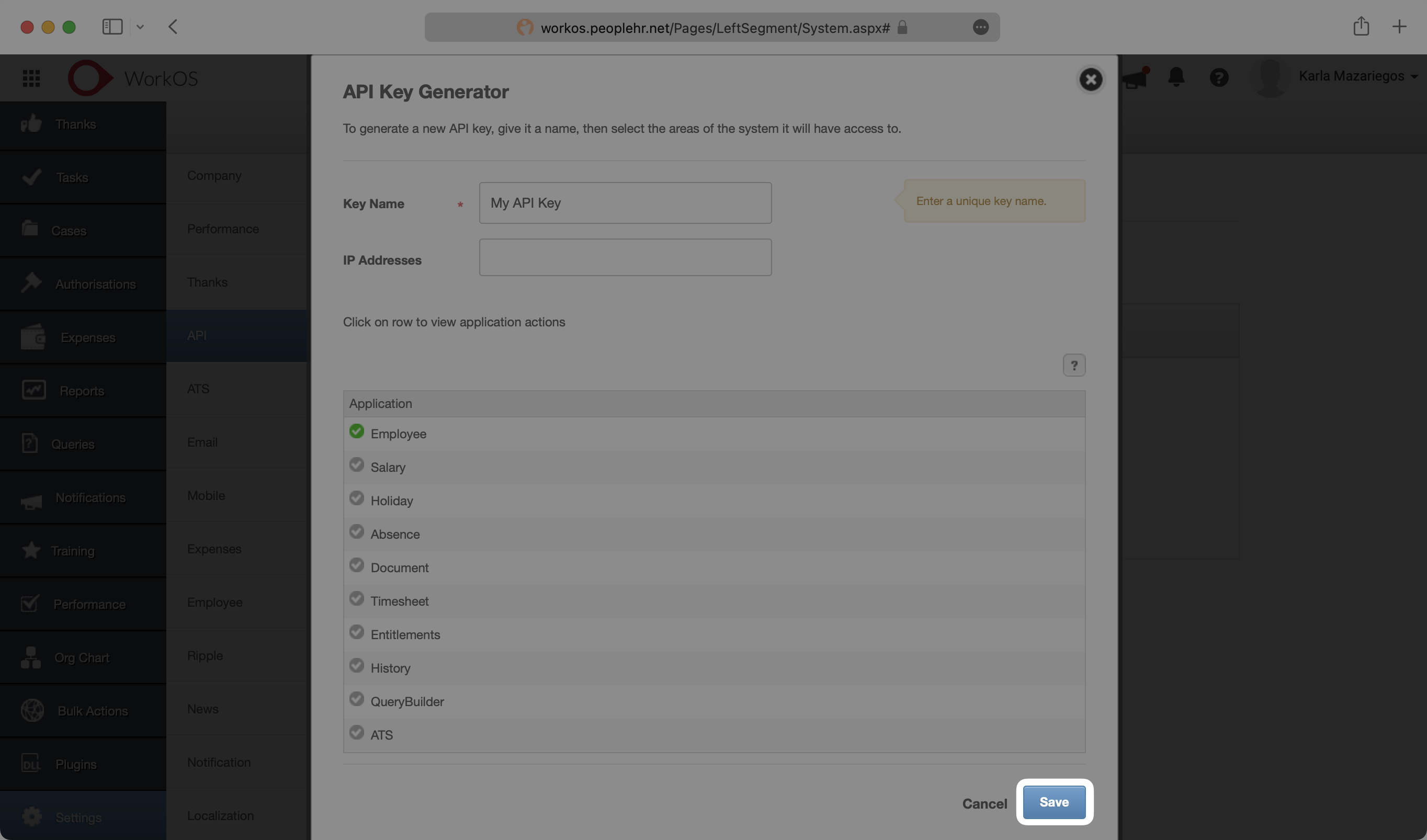
- package/.docs/organized/docs/directory-sync/quick-start.mdx +129 -0
- package/.docs/organized/docs/directory-sync/understanding-events.mdx +209 -0
- package/.docs/organized/docs/domain-verification/_navigation.mdx +10 -0
- package/.docs/organized/docs/domain-verification/api.mdx +60 -0
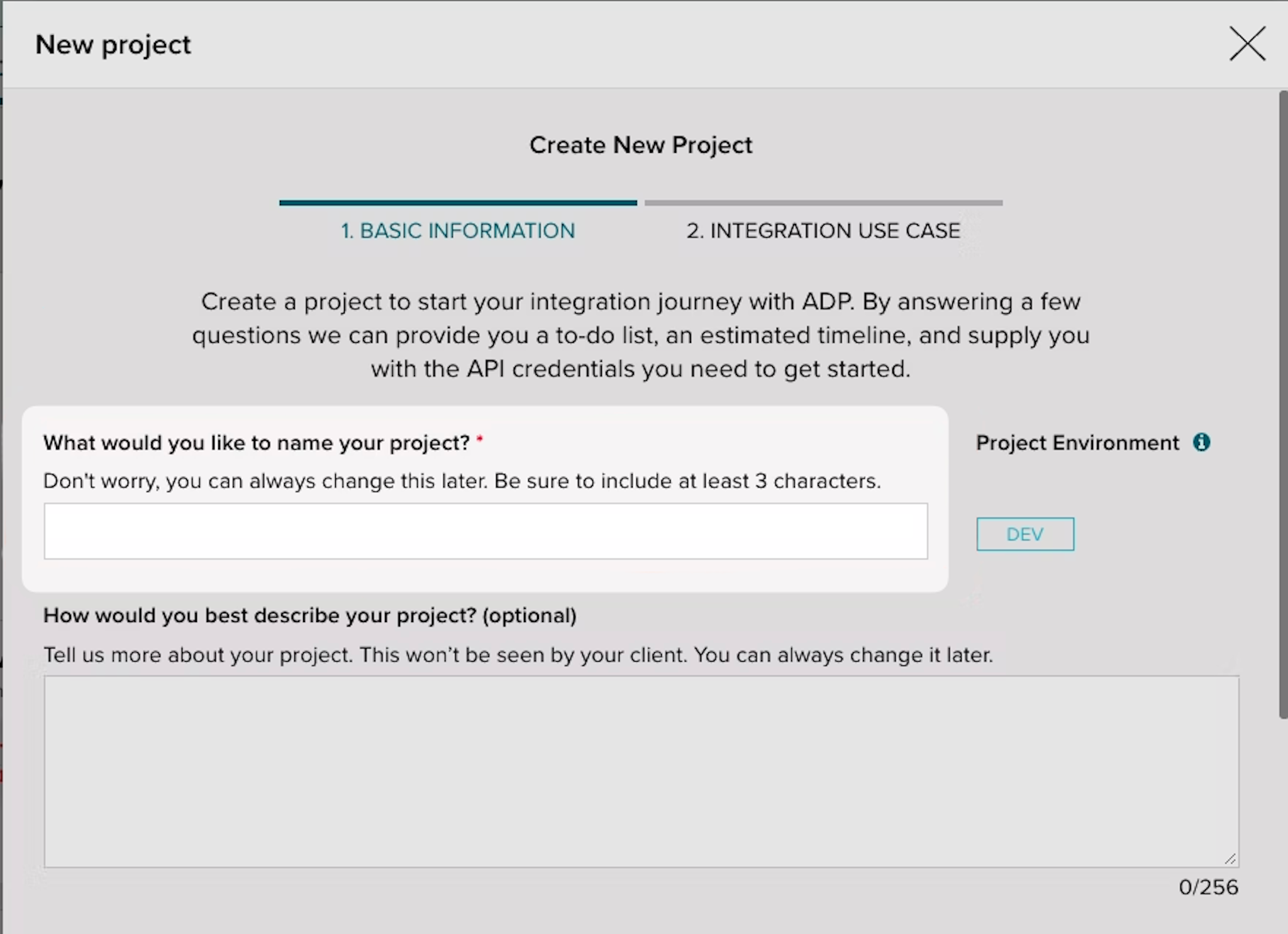
- package/.docs/organized/docs/domain-verification/index.mdx +67 -0
- package/.docs/organized/docs/email.mdx +109 -0
- package/.docs/organized/docs/events/_navigation.mdx +22 -0
- package/.docs/organized/docs/events/data-syncing/data-reconciliation.mdx +56 -0
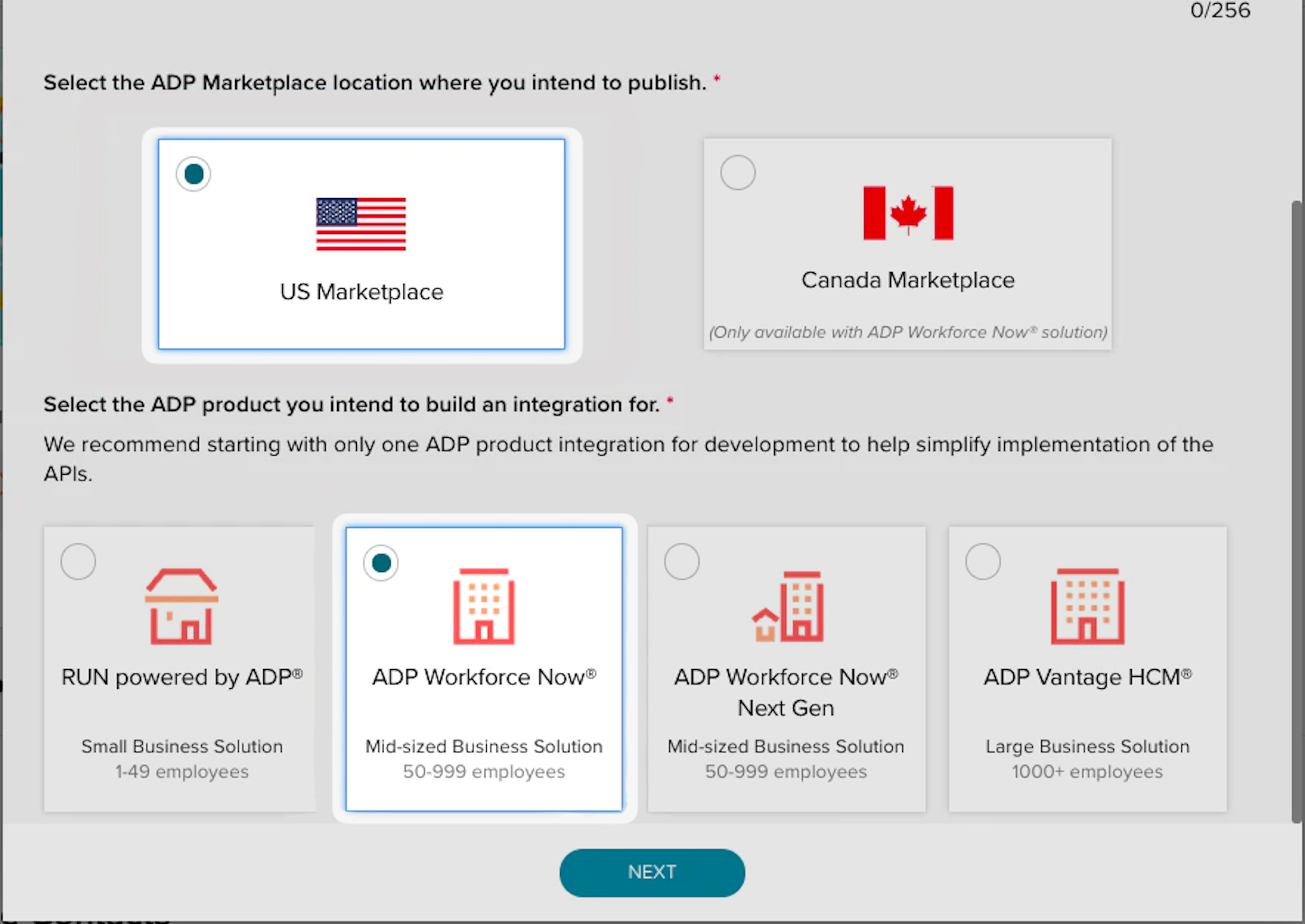
- package/.docs/organized/docs/events/data-syncing/events-api.mdx +114 -0
- package/.docs/organized/docs/events/data-syncing/index.mdx +66 -0
- package/.docs/organized/docs/events/data-syncing/webhooks.mdx +173 -0
- package/.docs/organized/docs/events/index.mdx +783 -0
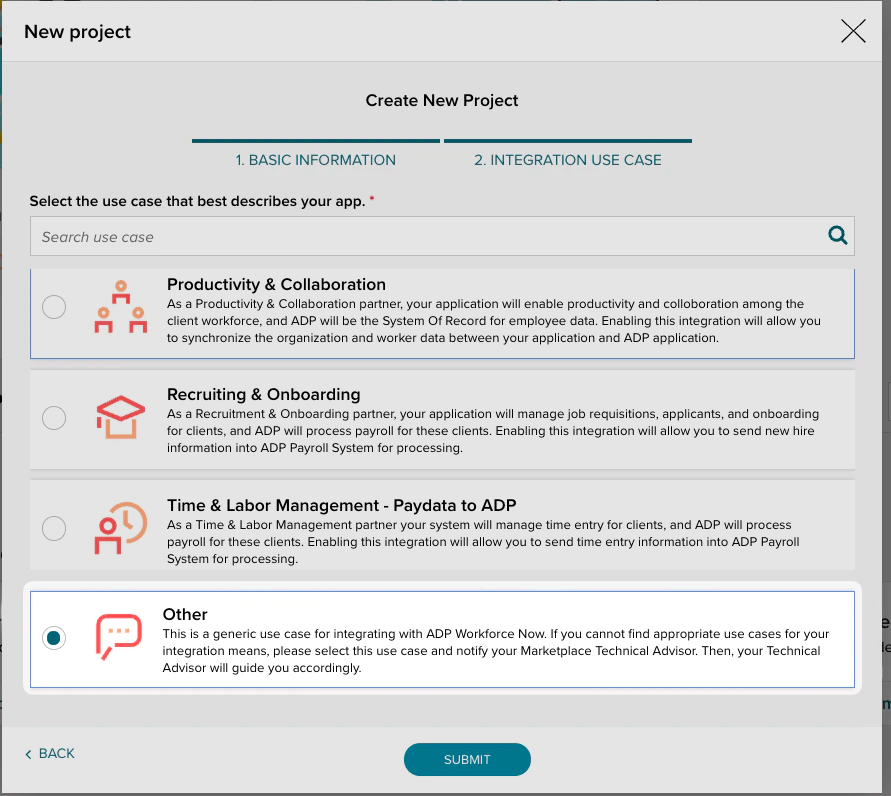
- package/.docs/organized/docs/events/observability/datadog.mdx +76 -0
- package/.docs/organized/docs/fga/_navigation.mdx +64 -0
- package/.docs/organized/docs/fga/identity-provider-sessions.mdx +68 -0
- package/.docs/organized/docs/fga/index.mdx +60 -0
- package/.docs/organized/docs/fga/local-development.mdx +155 -0
- package/.docs/organized/docs/fga/modeling/abac.mdx +107 -0
- package/.docs/organized/docs/fga/modeling/blocklist.mdx +84 -0
- package/.docs/organized/docs/fga/modeling/conditional-roles.mdx +99 -0
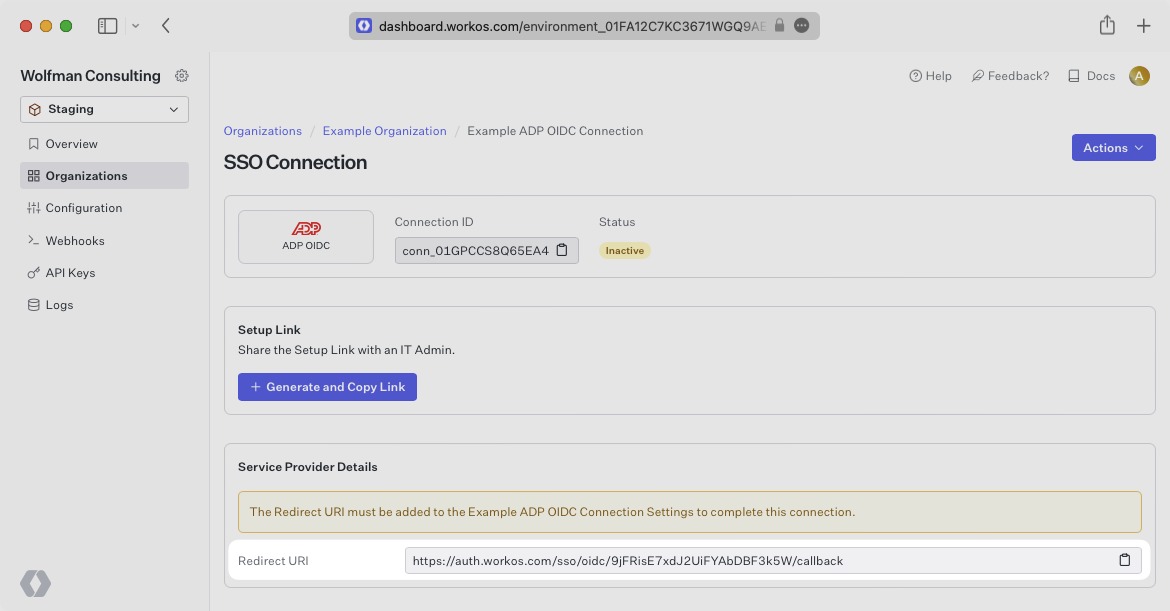
- package/.docs/organized/docs/fga/modeling/custom-roles.mdx +90 -0
- package/.docs/organized/docs/fga/modeling/entitlements.mdx +127 -0
- package/.docs/organized/docs/fga/modeling/managed-service-provider.mdx +131 -0
- package/.docs/organized/docs/fga/modeling/org-roles-and-permissions.mdx +95 -0
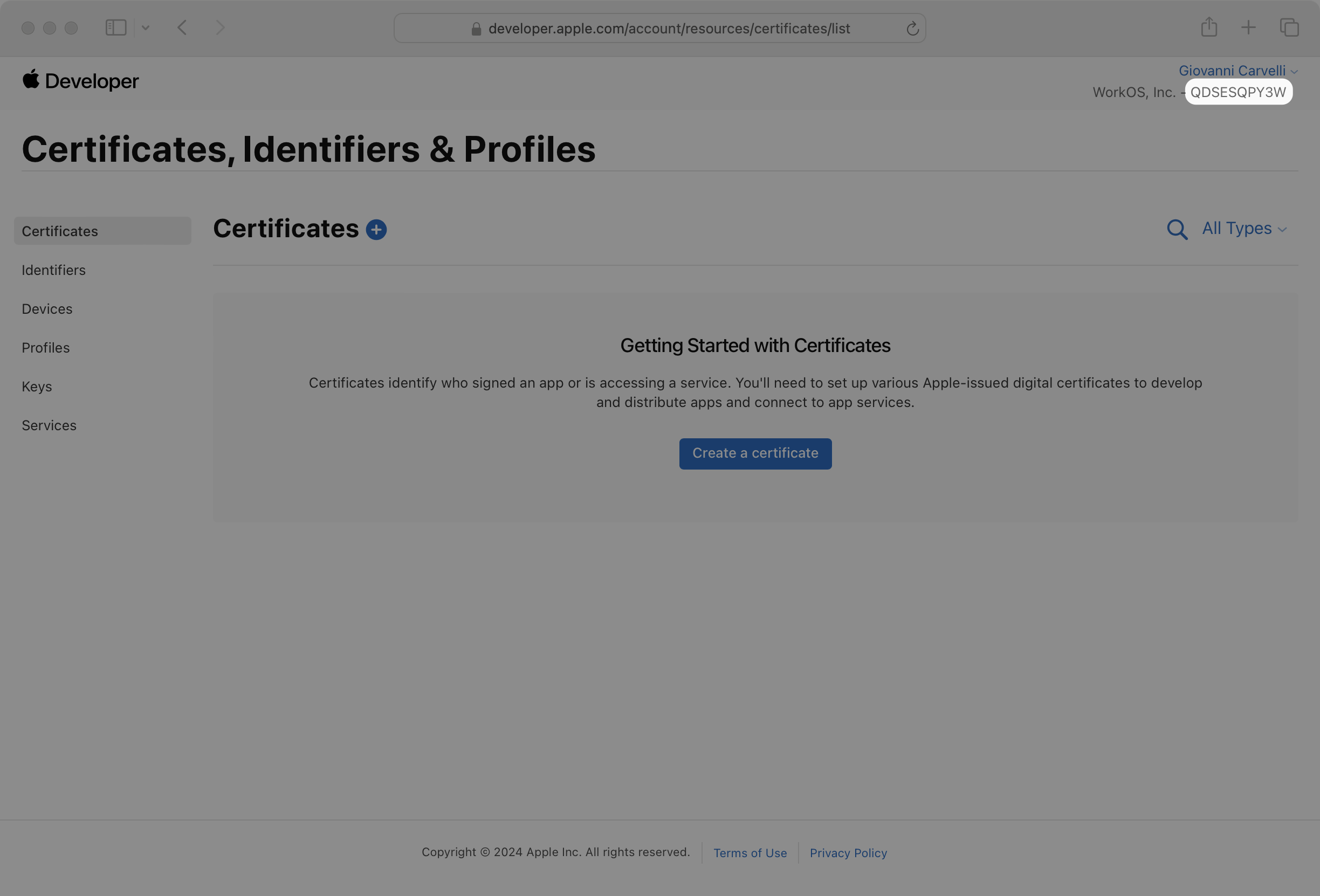
- package/.docs/organized/docs/fga/modeling/policy-context.mdx +231 -0
- package/.docs/organized/docs/fga/modeling/public-access.mdx +61 -0
- package/.docs/organized/docs/fga/modeling/shareable-content.mdx +106 -0
- package/.docs/organized/docs/fga/modeling/superusers.mdx +74 -0
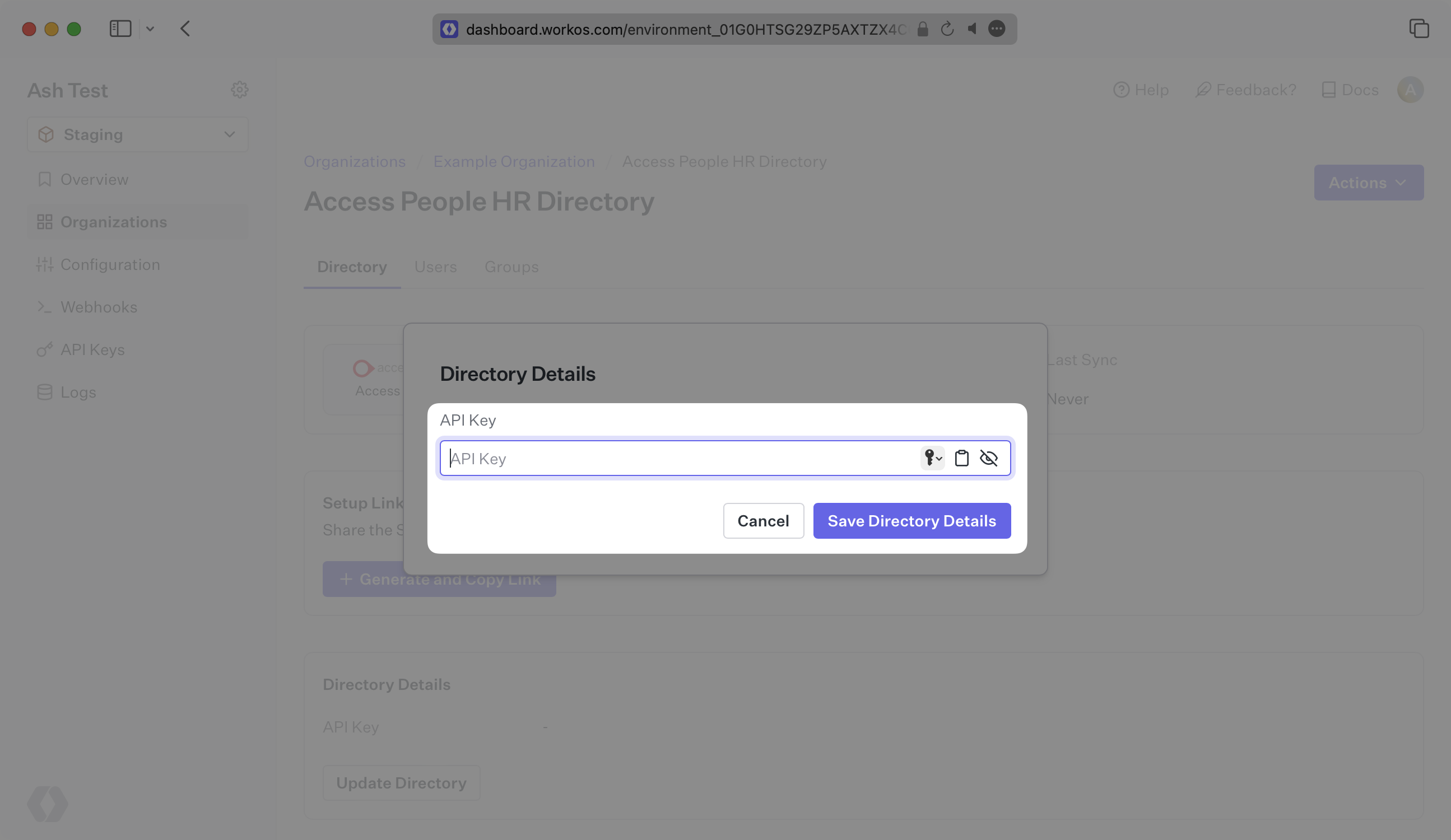
- package/.docs/organized/docs/fga/modeling/user-groups.mdx +92 -0
- package/.docs/organized/docs/fga/operations-usage.mdx +104 -0
- package/.docs/organized/docs/fga/playground.mdx +12 -0
- package/.docs/organized/docs/fga/policies.mdx +462 -0
- package/.docs/organized/docs/fga/query-language.mdx +112 -0
- package/.docs/organized/docs/fga/quick-start.mdx +174 -0
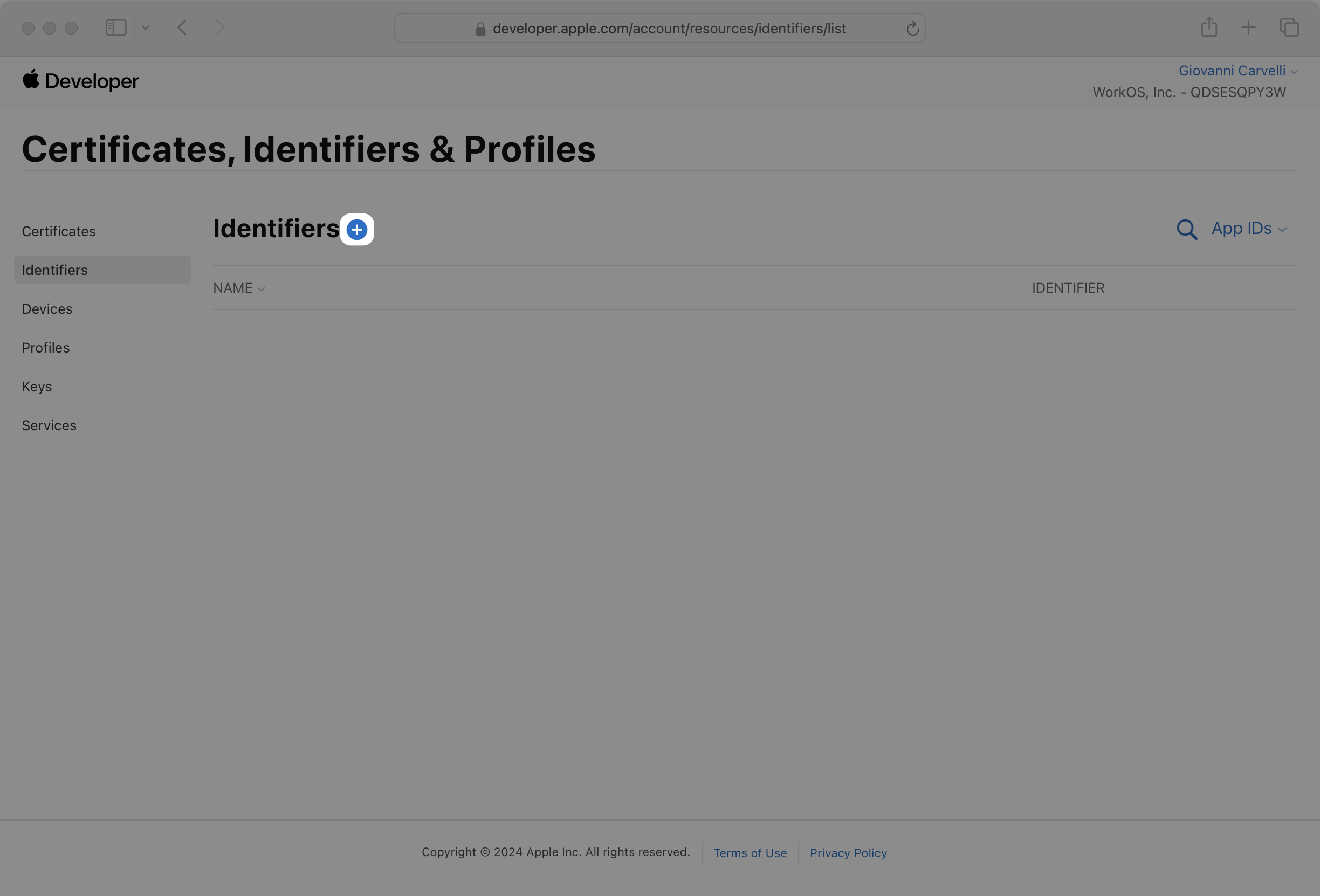
- package/.docs/organized/docs/fga/resources.mdx +92 -0
- package/.docs/organized/docs/fga/schema-management.mdx +224 -0
- package/.docs/organized/docs/fga/schema.mdx +388 -0
- package/.docs/organized/docs/fga/warrant-tokens.mdx +44 -0
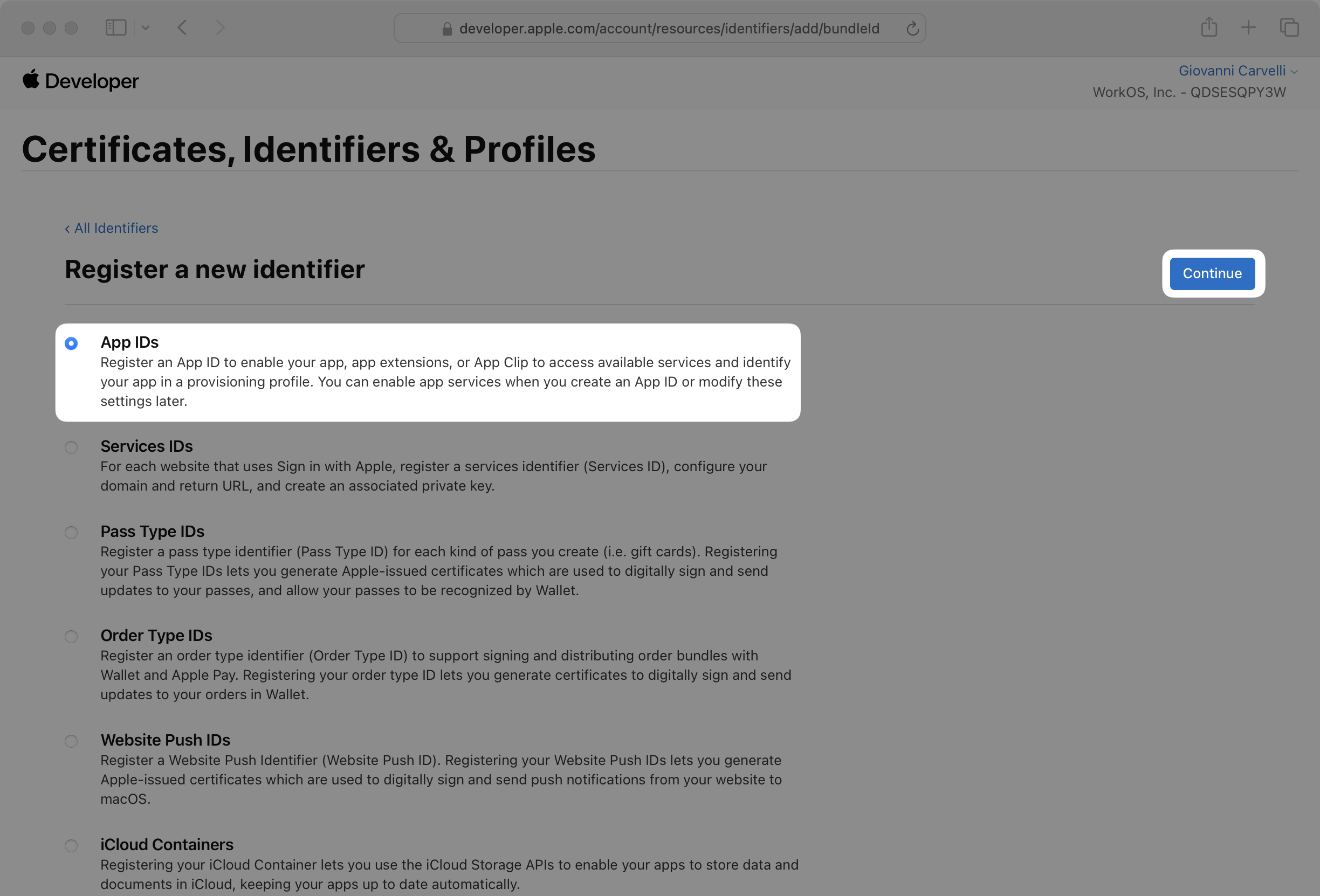
- package/.docs/organized/docs/fga/warrants.mdx +92 -0
- package/.docs/organized/docs/glossary.mdx +184 -0
- package/.docs/organized/docs/integrations/_navigation.mdx +6 -0
- package/.docs/organized/docs/integrations/access-people-hr.mdx +87 -0
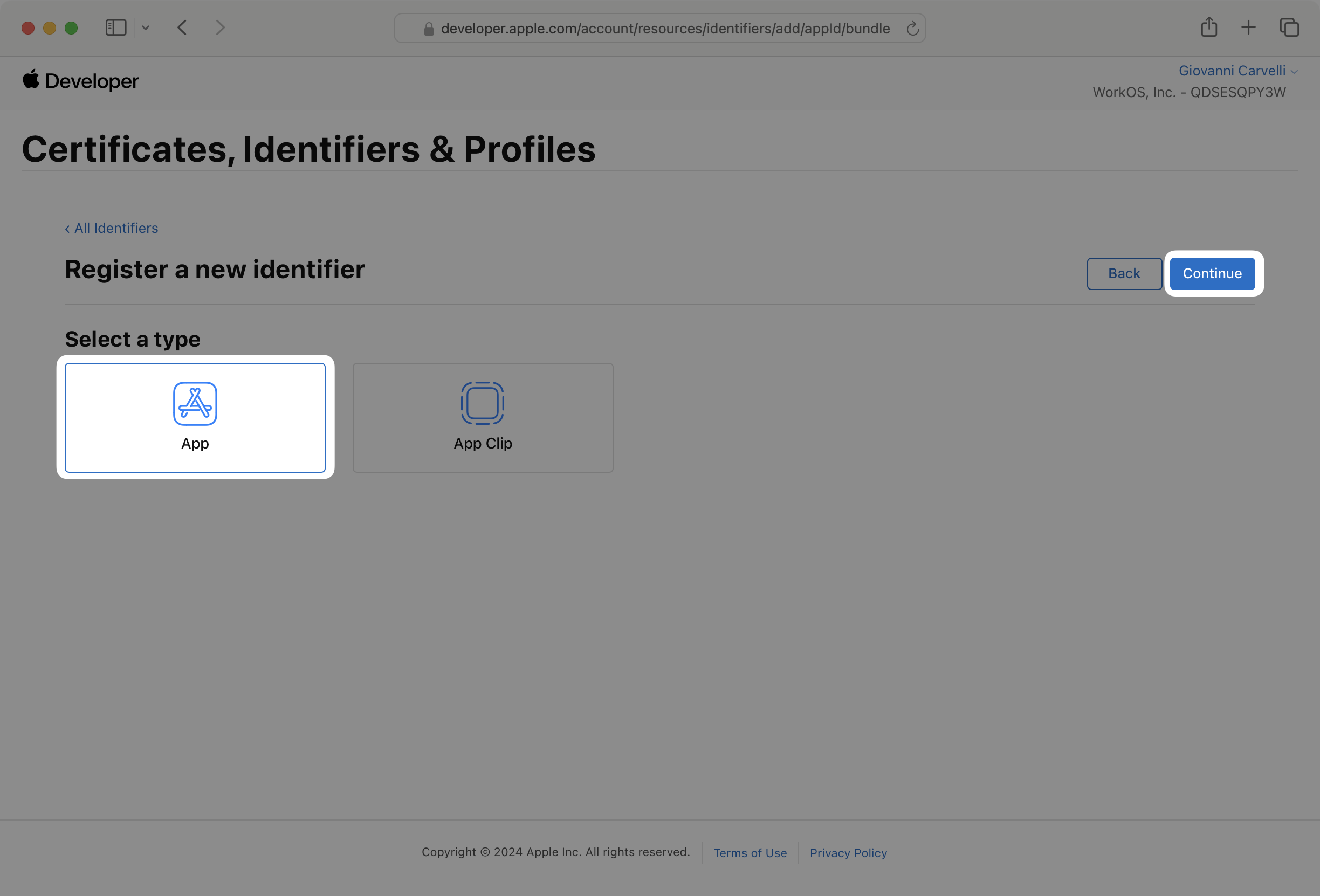
- package/.docs/organized/docs/integrations/adp-oidc.mdx +103 -0
- package/.docs/organized/docs/integrations/apple.mdx +169 -0
- package/.docs/organized/docs/integrations/auth0-directory-sync.mdx +78 -0
- package/.docs/organized/docs/integrations/auth0-enterprise-connection.mdx +92 -0
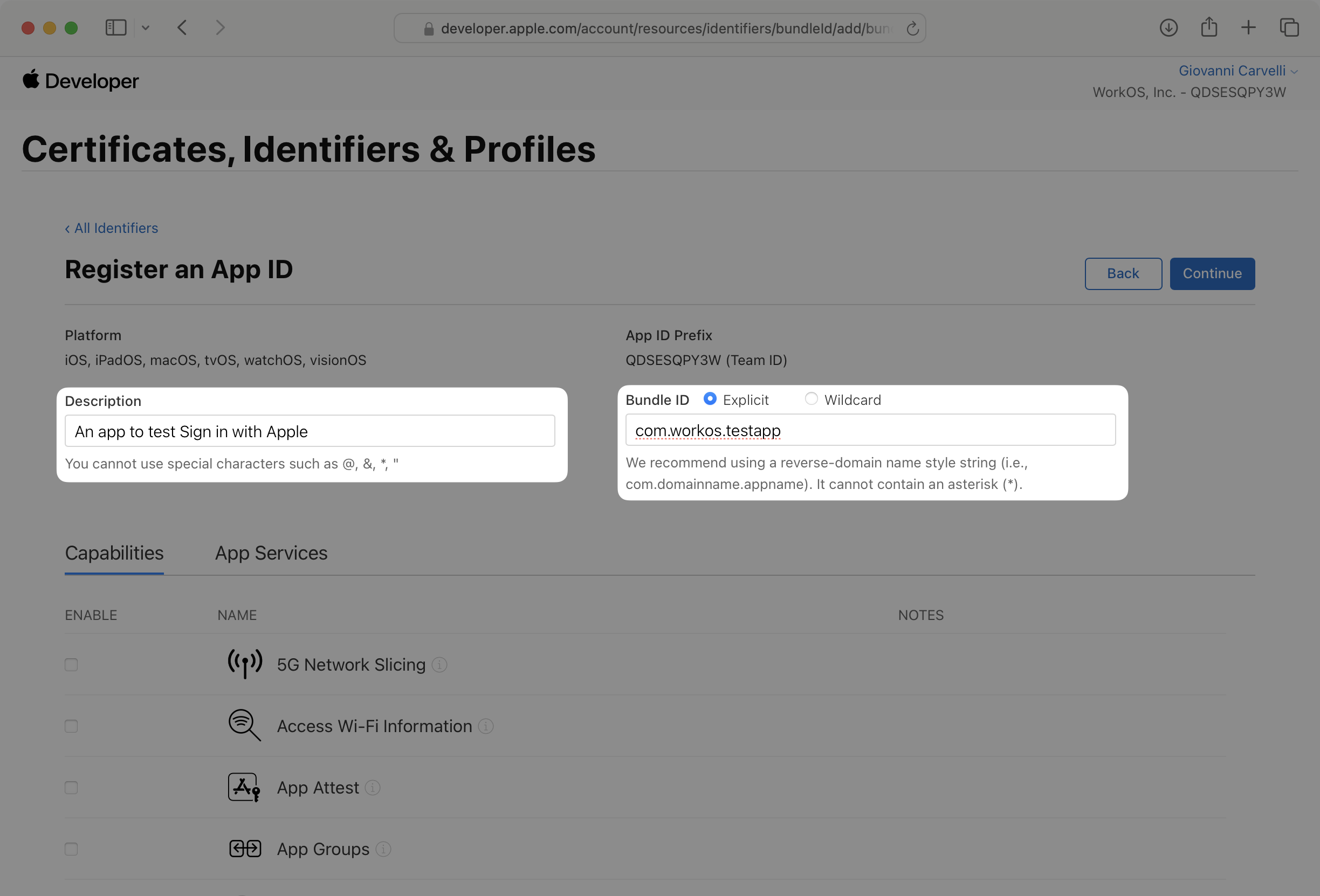
- package/.docs/organized/docs/integrations/auth0-saml.mdx +81 -0
- package/.docs/organized/docs/integrations/aws-cognito.mdx +81 -0
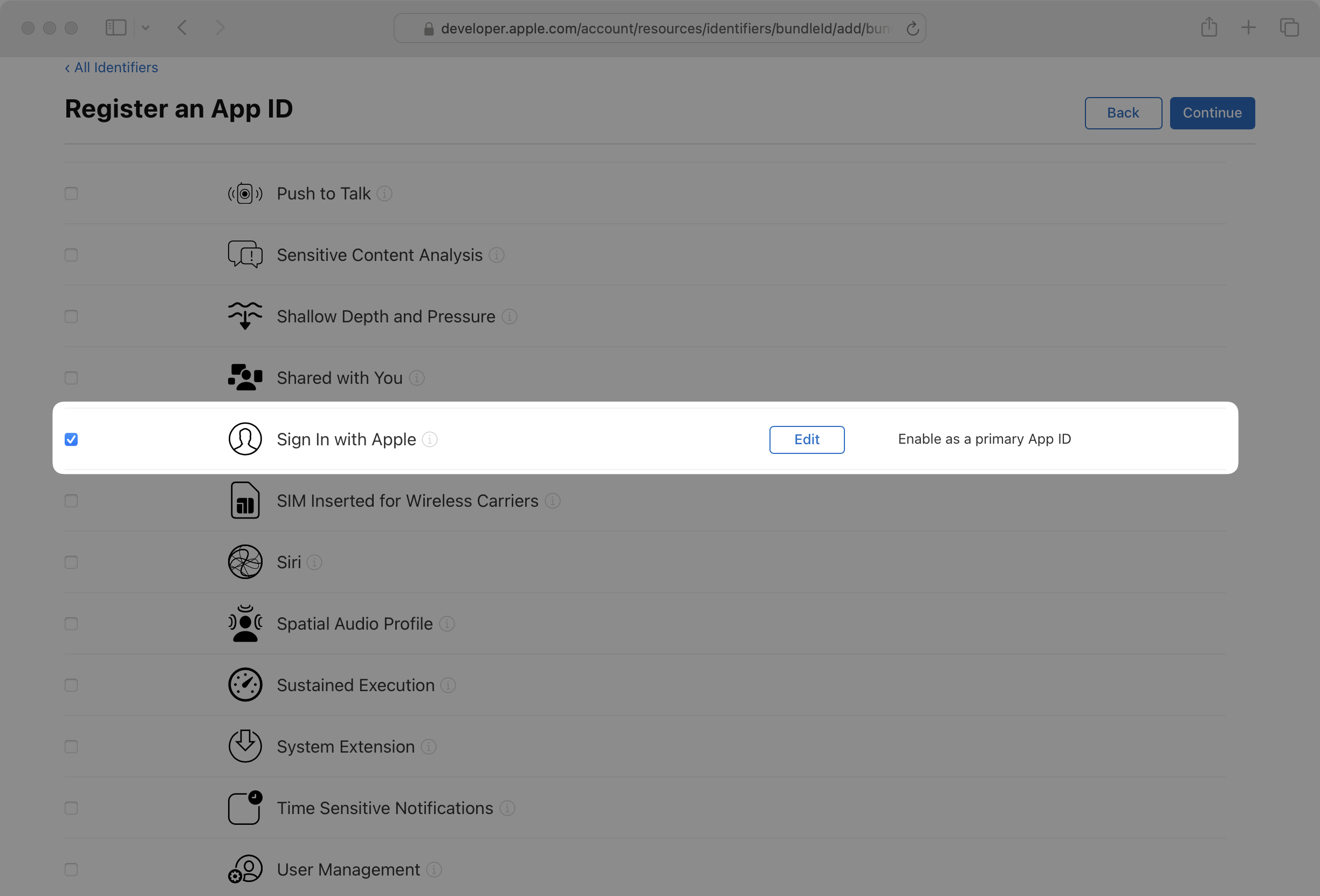
- package/.docs/organized/docs/integrations/bamboohr.mdx +90 -0
- package/.docs/organized/docs/integrations/breathe-hr.mdx +89 -0
- package/.docs/organized/docs/integrations/bubble.mdx +129 -0
- package/.docs/organized/docs/integrations/cas-saml.mdx +65 -0
- package/.docs/organized/docs/integrations/cezanne.mdx +74 -0
- package/.docs/organized/docs/integrations/classlink-saml.mdx +100 -0
- package/.docs/organized/docs/integrations/cloudflare-saml.mdx +164 -0
- package/.docs/organized/docs/integrations/cyberark-saml.mdx +138 -0
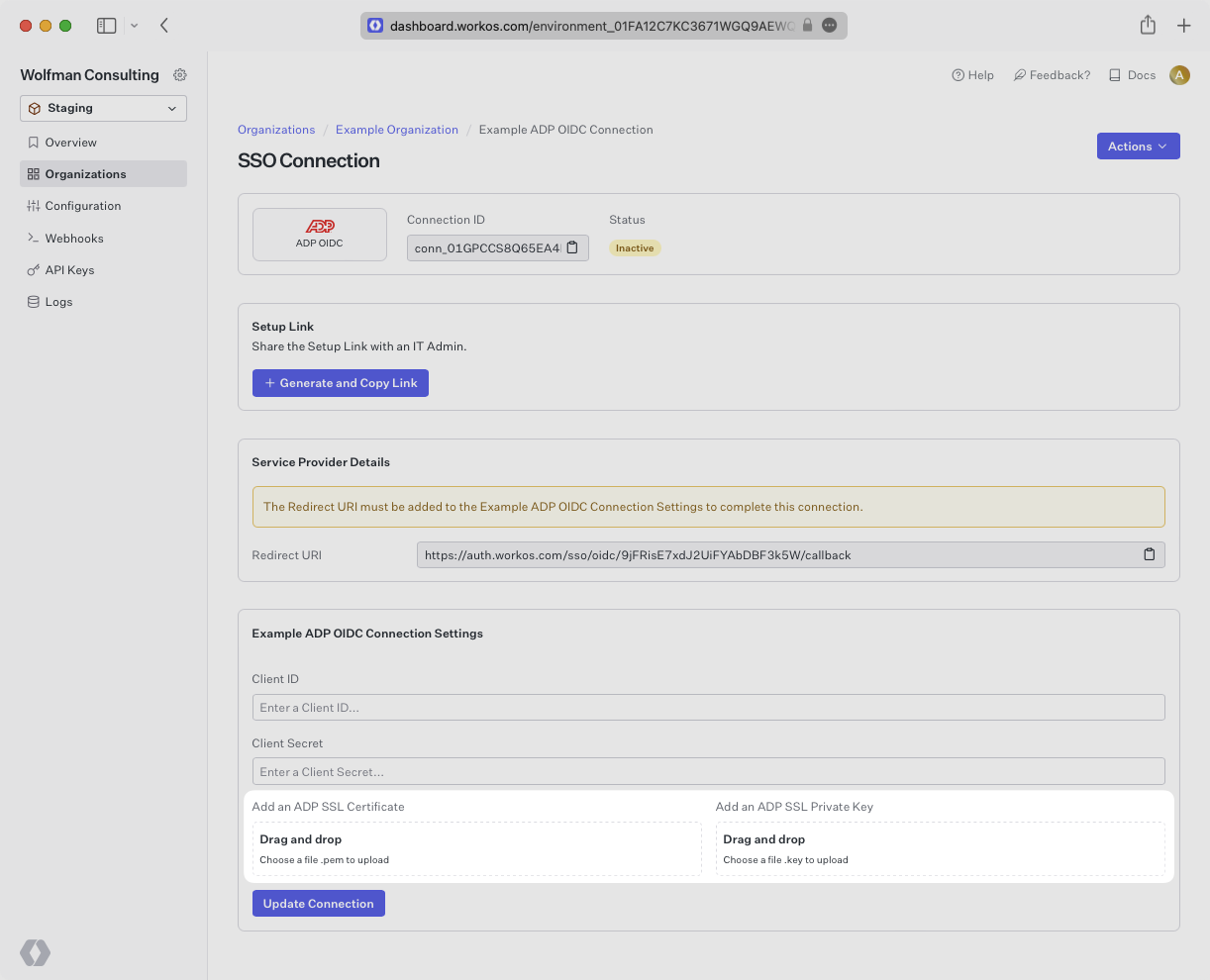
- package/.docs/organized/docs/integrations/cyberark-scim.mdx +100 -0
- package/.docs/organized/docs/integrations/duo-saml.mdx +127 -0
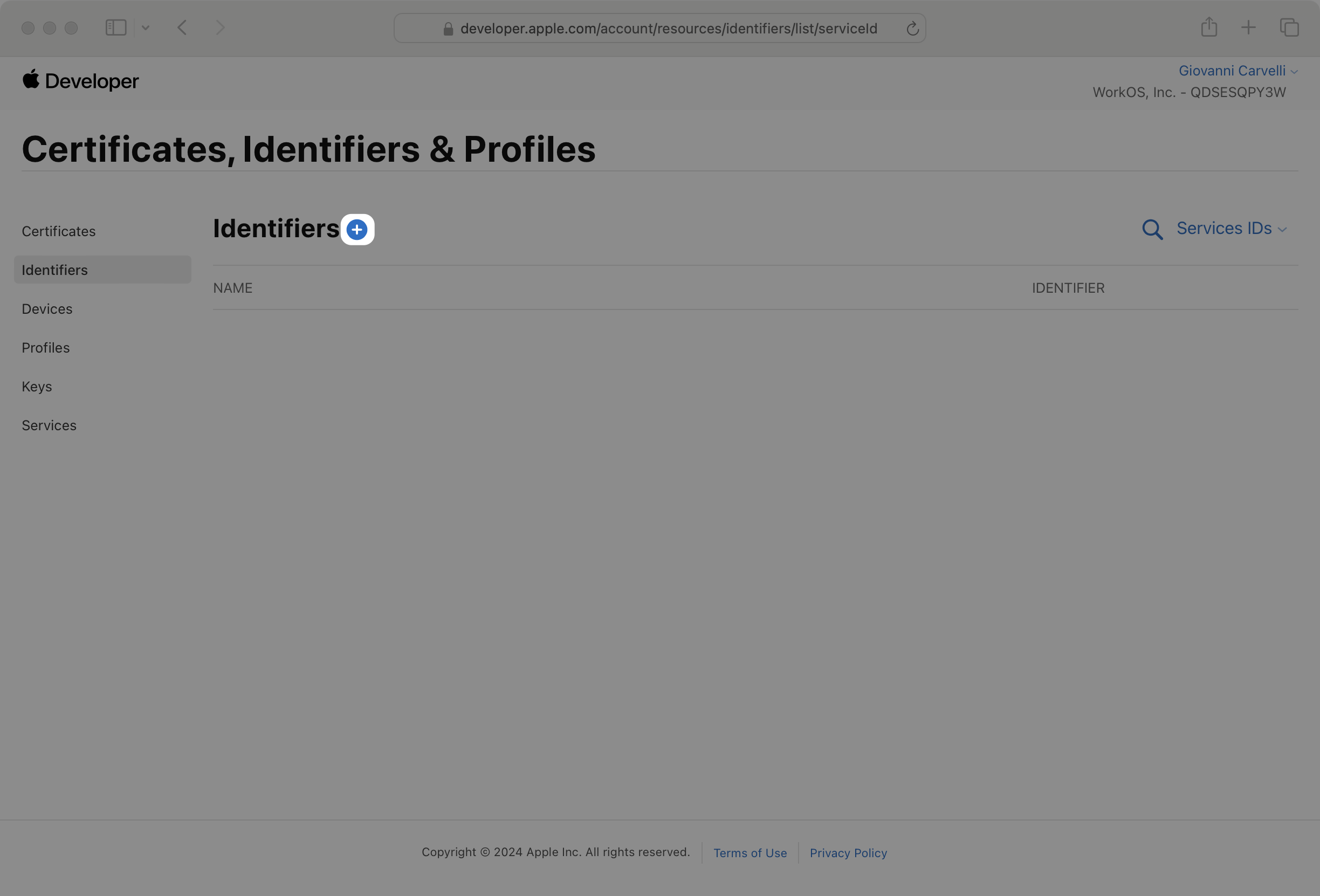
- package/.docs/organized/docs/integrations/entra-id-saml.mdx +156 -0
- package/.docs/organized/docs/integrations/entra-id-scim.mdx +218 -0
- package/.docs/organized/docs/integrations/firebase.mdx +98 -0
- package/.docs/organized/docs/integrations/fourth.mdx +66 -0
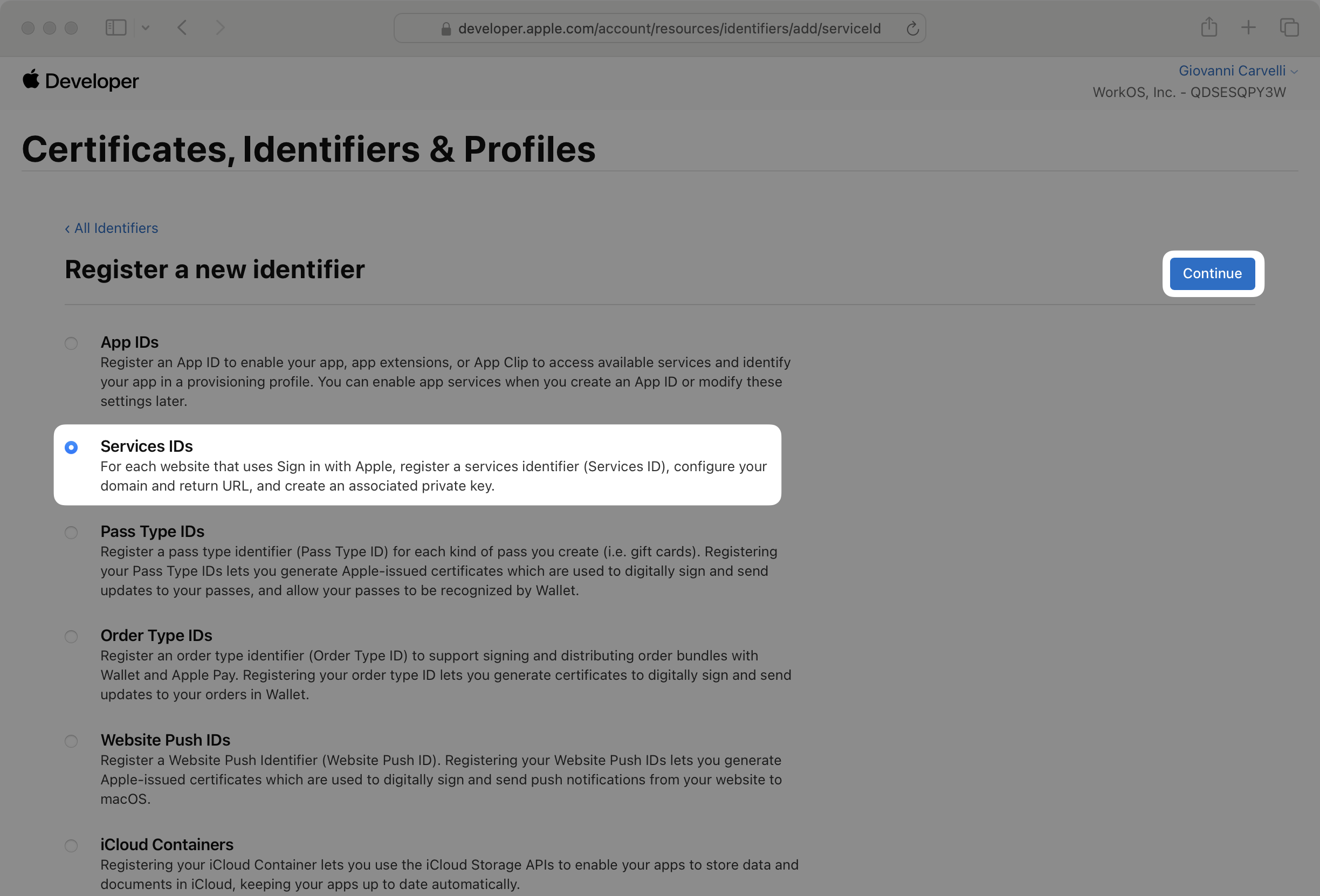
- package/.docs/organized/docs/integrations/github-oauth.mdx +85 -0
- package/.docs/organized/docs/integrations/gitlab-oauth.mdx +81 -0
- package/.docs/organized/docs/integrations/google-directory-sync.mdx +86 -0
- package/.docs/organized/docs/integrations/google-oauth.mdx +173 -0
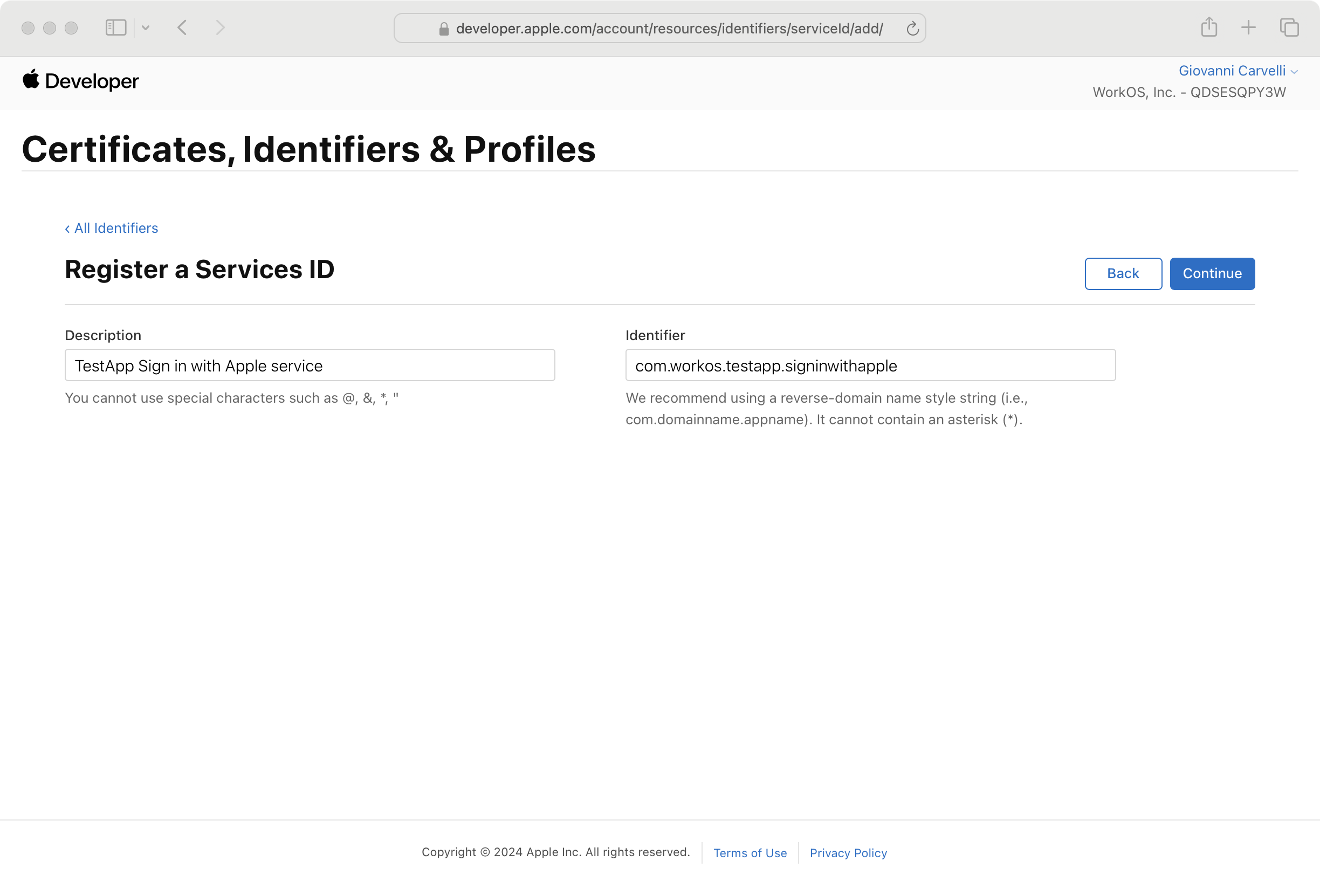
- package/.docs/organized/docs/integrations/google-saml.mdx +135 -0
- package/.docs/organized/docs/integrations/hibob.mdx +98 -0
- package/.docs/organized/docs/integrations/jumpcloud-saml.mdx +96 -0
- package/.docs/organized/docs/integrations/jumpcloud-scim.mdx +106 -0
- package/.docs/organized/docs/integrations/keycloak-saml.mdx +128 -0
- package/.docs/organized/docs/integrations/lastpass-saml.mdx +134 -0
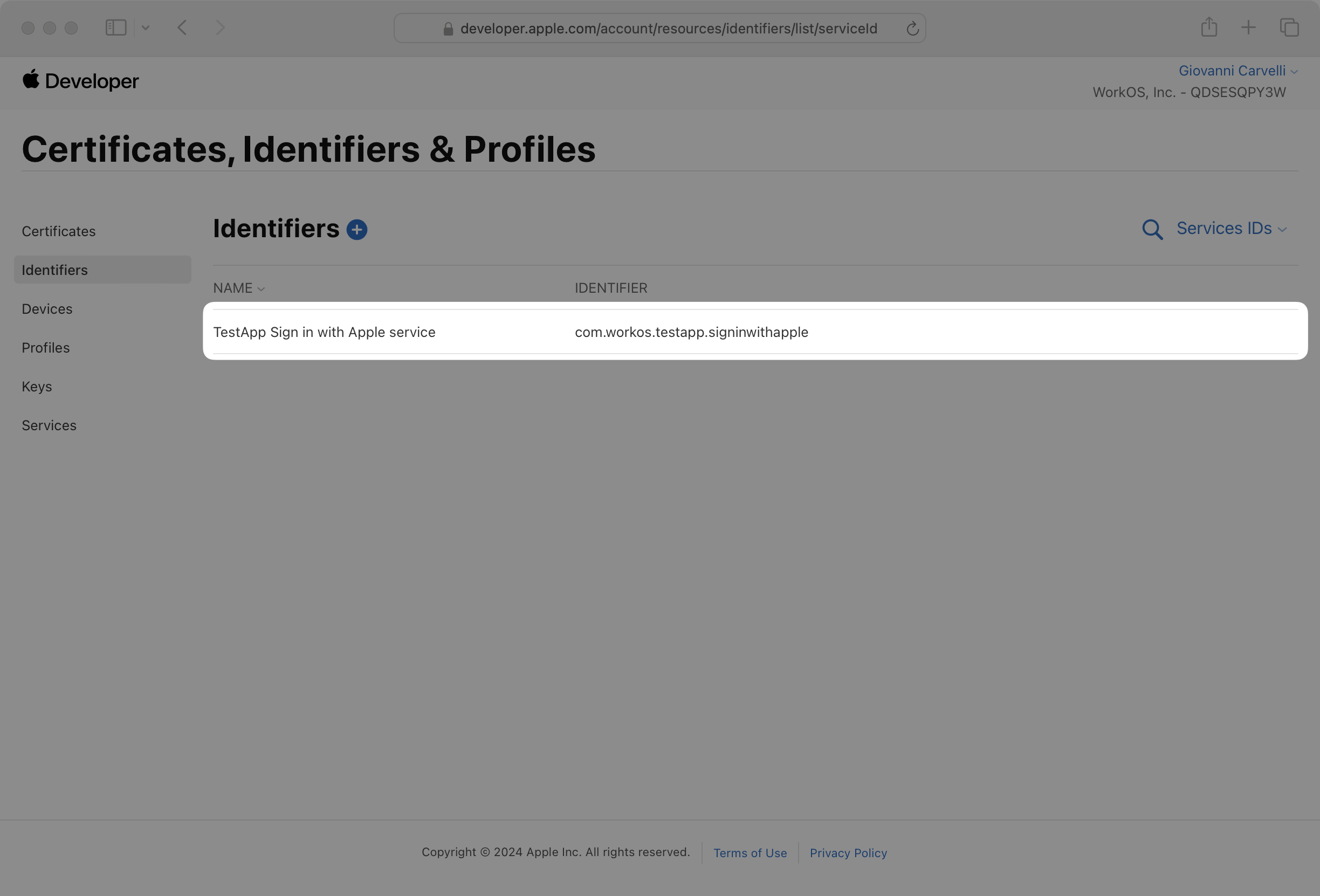
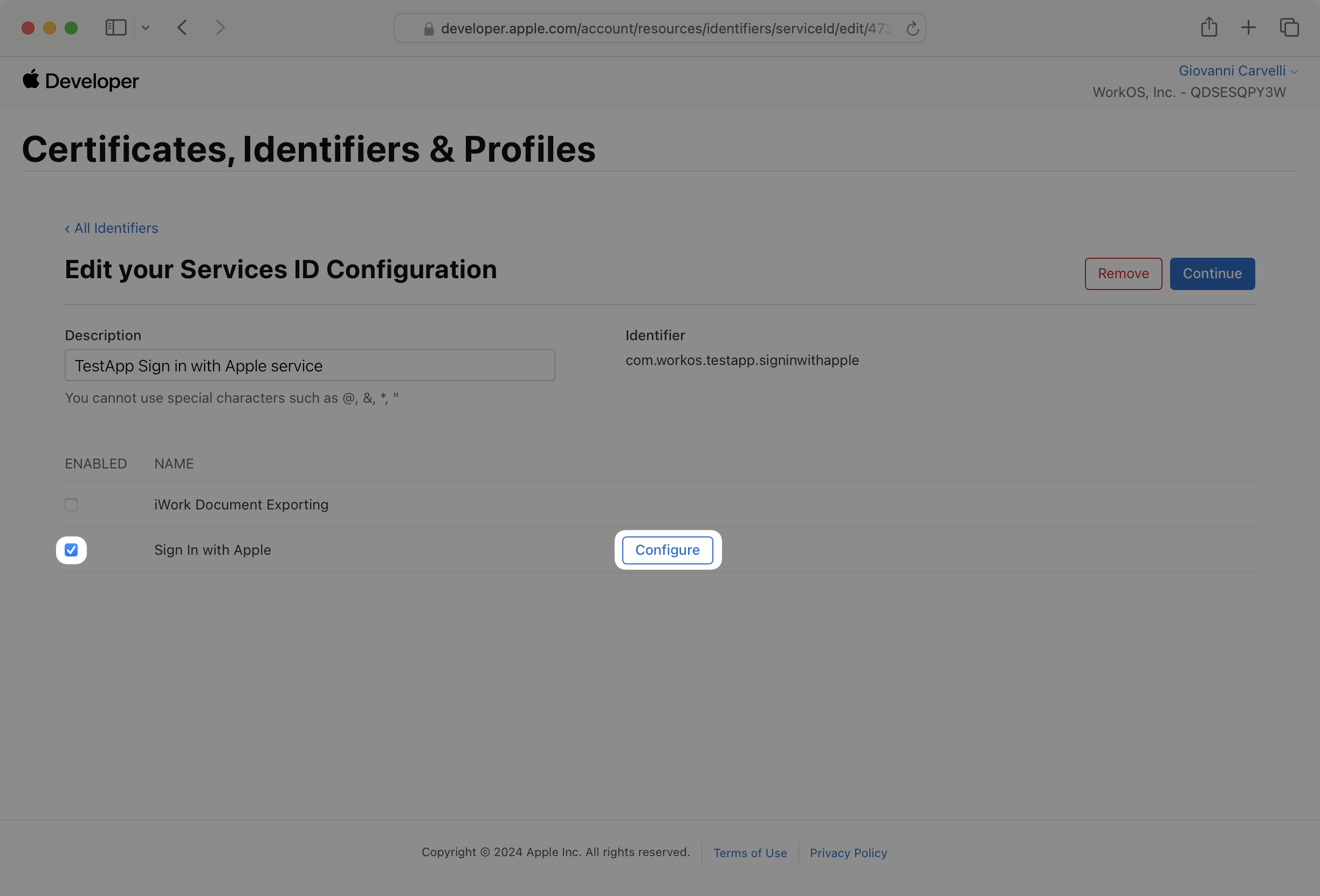
- package/.docs/organized/docs/integrations/linkedin-oauth.mdx +77 -0
- package/.docs/organized/docs/integrations/login-gov-oidc.mdx +103 -0
- package/.docs/organized/docs/integrations/microsoft-ad-fs-saml.mdx +96 -0
- package/.docs/organized/docs/integrations/microsoft-oauth.mdx +101 -0
- package/.docs/organized/docs/integrations/miniorange-saml.mdx +124 -0
- package/.docs/organized/docs/integrations/net-iq-saml.mdx +75 -0
- package/.docs/organized/docs/integrations/next-auth.mdx +257 -0
- package/.docs/organized/docs/integrations/oidc.mdx +64 -0
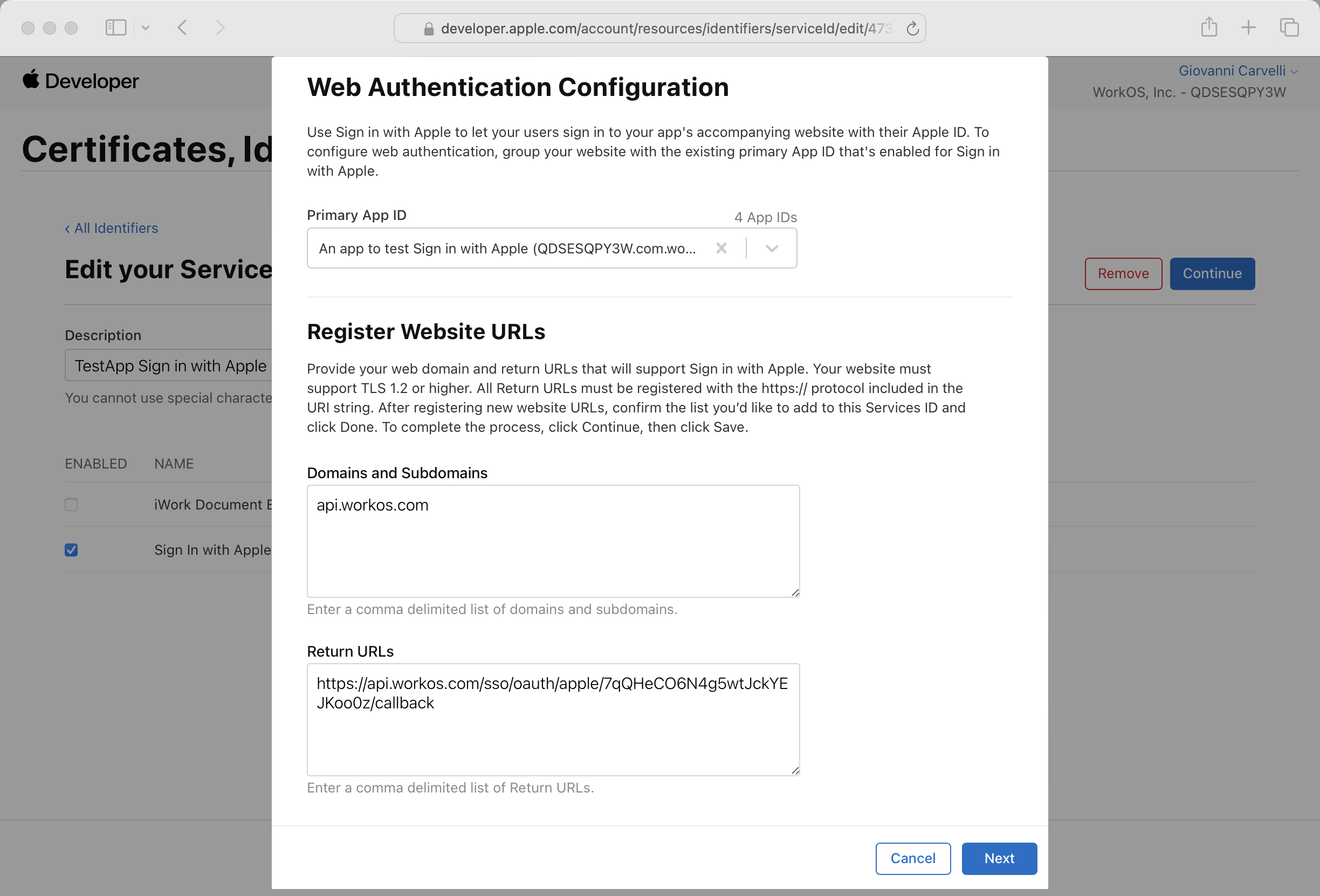
- package/.docs/organized/docs/integrations/okta-saml.mdx +144 -0
- package/.docs/organized/docs/integrations/okta-scim.mdx +210 -0
- package/.docs/organized/docs/integrations/onelogin-saml.mdx +131 -0
- package/.docs/organized/docs/integrations/onelogin-scim.mdx +150 -0
- package/.docs/organized/docs/integrations/oracle-saml.mdx +76 -0
- package/.docs/organized/docs/integrations/pingfederate-saml.mdx +103 -0
- package/.docs/organized/docs/integrations/pingfederate-scim.mdx +150 -0
- package/.docs/organized/docs/integrations/pingone-saml.mdx +86 -0
- package/.docs/organized/docs/integrations/react-native-expo.mdx +93 -0
- package/.docs/organized/docs/integrations/rippling-saml.mdx +174 -0
- package/.docs/organized/docs/integrations/rippling-scim.mdx +148 -0
- package/.docs/organized/docs/integrations/salesforce-saml.mdx +143 -0
- package/.docs/organized/docs/integrations/saml.mdx +64 -0
- package/.docs/organized/docs/integrations/scim.mdx +64 -0
- package/.docs/organized/docs/integrations/sftp.mdx +150 -0
- package/.docs/organized/docs/integrations/shibboleth-generic-saml.mdx +84 -0
- package/.docs/organized/docs/integrations/shibboleth-unsolicited-saml.mdx +84 -0
- package/.docs/organized/docs/integrations/simple-saml-php.mdx +78 -0
- package/.docs/organized/docs/integrations/slack-oauth.mdx +102 -0
- package/.docs/organized/docs/integrations/supabase.mdx +68 -0
- package/.docs/organized/docs/integrations/vmware-saml.mdx +100 -0
- package/.docs/organized/docs/integrations/workday.mdx +156 -0
- package/.docs/organized/docs/integrations/xero-oauth.mdx +83 -0
- package/.docs/organized/docs/magic-link/_navigation.mdx +16 -0
- package/.docs/organized/docs/magic-link/example-apps.mdx +46 -0
- package/.docs/organized/docs/magic-link/index.mdx +199 -0
- package/.docs/organized/docs/magic-link/launch-checklist.mdx +27 -0
- package/.docs/organized/docs/mfa/_navigation.mdx +18 -0
- package/.docs/organized/docs/mfa/example-apps.mdx +46 -0
- package/.docs/organized/docs/mfa/index.mdx +140 -0
- package/.docs/organized/docs/mfa/ux/enrollment.mdx +74 -0
- package/.docs/organized/docs/mfa/ux/sign-in.mdx +30 -0
- package/.docs/organized/docs/migrate/_navigation.mdx +6 -0
- package/.docs/organized/docs/migrate/auth0.mdx +98 -0
- package/.docs/organized/docs/migrate/aws-cognito.mdx +115 -0
- package/.docs/organized/docs/migrate/clerk.mdx +106 -0
- package/.docs/organized/docs/migrate/firebase.mdx +80 -0
- package/.docs/organized/docs/migrate/other-services.mdx +179 -0
- package/.docs/organized/docs/migrate/standalone-sso.mdx +105 -0
- package/.docs/organized/docs/on-prem-deployment.mdx +119 -0
- package/.docs/organized/docs/postman.mdx +90 -0
- package/.docs/organized/docs/reference/_navigation.mdx +527 -0
- package/.docs/organized/docs/reference/admin-portal/index.mdx +6 -0
- package/.docs/organized/docs/reference/admin-portal/portal-link/generate.mdx +268 -0
- package/.docs/organized/docs/reference/admin-portal/portal-link/index.mdx +15 -0
- package/.docs/organized/docs/reference/admin-portal/provider-icons/index.mdx +52 -0
- package/.docs/organized/docs/reference/api-keys.mdx +22 -0
- package/.docs/organized/docs/reference/audit-logs/audit-log-export.mdx +239 -0
- package/.docs/organized/docs/reference/audit-logs/audit-log-schema.mdx +69 -0
- package/.docs/organized/docs/reference/audit-logs/create-event.mdx +673 -0
- package/.docs/organized/docs/reference/audit-logs/create-export.mdx +308 -0
- package/.docs/organized/docs/reference/audit-logs/create-schema.mdx +95 -0
- package/.docs/organized/docs/reference/audit-logs/get-export.mdx +117 -0
- package/.docs/organized/docs/reference/audit-logs/get-retention.mdx +34 -0
- package/.docs/organized/docs/reference/audit-logs/index.mdx +6 -0
- package/.docs/organized/docs/reference/audit-logs/list-actions.mdx +40 -0
- package/.docs/organized/docs/reference/audit-logs/list-schemas.mdx +40 -0
- package/.docs/organized/docs/reference/audit-logs/set-retention.mdx +39 -0
- package/.docs/organized/docs/reference/client-libraries.mdx +19 -0
- package/.docs/organized/docs/reference/directory-sync/directory/delete.mdx +90 -0
- package/.docs/organized/docs/reference/directory-sync/directory/get.mdx +105 -0
- package/.docs/organized/docs/reference/directory-sync/directory/index.mdx +385 -0
- package/.docs/organized/docs/reference/directory-sync/directory/list.mdx +281 -0
- package/.docs/organized/docs/reference/directory-sync/directory-group/get.mdx +105 -0
- package/.docs/organized/docs/reference/directory-sync/directory-group/index.mdx +277 -0
- package/.docs/organized/docs/reference/directory-sync/directory-group/list.mdx +295 -0
- package/.docs/organized/docs/reference/directory-sync/directory-user/get.mdx +112 -0
- package/.docs/organized/docs/reference/directory-sync/directory-user/index.mdx +470 -0
- package/.docs/organized/docs/reference/directory-sync/directory-user/list.mdx +304 -0
- package/.docs/organized/docs/reference/directory-sync/index.mdx +10 -0
- package/.docs/organized/docs/reference/domain-verification/create.mdx +38 -0
- package/.docs/organized/docs/reference/domain-verification/get.mdx +32 -0
- package/.docs/organized/docs/reference/domain-verification/index.mdx +84 -0
- package/.docs/organized/docs/reference/domain-verification/verify.mdx +36 -0
- package/.docs/organized/docs/reference/errors.mdx +30 -0
- package/.docs/organized/docs/reference/events/index.mdx +9 -0
- package/.docs/organized/docs/reference/events/list.mdx +246 -0
- package/.docs/organized/docs/reference/fga/batch-check.mdx +277 -0
- package/.docs/organized/docs/reference/fga/check.mdx +563 -0
- package/.docs/organized/docs/reference/fga/index.mdx +6 -0
- package/.docs/organized/docs/reference/fga/policy/create.mdx +27 -0
- package/.docs/organized/docs/reference/fga/policy/delete.mdx +18 -0
- package/.docs/organized/docs/reference/fga/policy/get.mdx +23 -0
- package/.docs/organized/docs/reference/fga/policy/index.mdx +52 -0
- package/.docs/organized/docs/reference/fga/policy/list.mdx +41 -0
- package/.docs/organized/docs/reference/fga/policy/update.mdx +26 -0
- package/.docs/organized/docs/reference/fga/query.mdx +375 -0
- package/.docs/organized/docs/reference/fga/resource/batch-write.mdx +175 -0
- package/.docs/organized/docs/reference/fga/resource/create.mdx +130 -0
- package/.docs/organized/docs/reference/fga/resource/delete.mdx +86 -0
- package/.docs/organized/docs/reference/fga/resource/get.mdx +88 -0
- package/.docs/organized/docs/reference/fga/resource/index.mdx +98 -0
- package/.docs/organized/docs/reference/fga/resource/list.mdx +188 -0
- package/.docs/organized/docs/reference/fga/resource/update.mdx +115 -0
- package/.docs/organized/docs/reference/fga/resource-type/apply.mdx +35 -0
- package/.docs/organized/docs/reference/fga/resource-type/create.mdx +24 -0
- package/.docs/organized/docs/reference/fga/resource-type/delete.mdx +22 -0
- package/.docs/organized/docs/reference/fga/resource-type/get.mdx +23 -0
- package/.docs/organized/docs/reference/fga/resource-type/index.mdx +68 -0
- package/.docs/organized/docs/reference/fga/resource-type/list.mdx +36 -0
- package/.docs/organized/docs/reference/fga/resource-type/update.mdx +23 -0
- package/.docs/organized/docs/reference/fga/schema/apply.mdx +42 -0
- package/.docs/organized/docs/reference/fga/schema/get.mdx +24 -0
- package/.docs/organized/docs/reference/fga/schema/index.mdx +39 -0
- package/.docs/organized/docs/reference/fga/warrant/batch-write.mdx +226 -0
- package/.docs/organized/docs/reference/fga/warrant/create.mdx +215 -0
- package/.docs/organized/docs/reference/fga/warrant/delete.mdx +212 -0
- package/.docs/organized/docs/reference/fga/warrant/index.mdx +186 -0
- package/.docs/organized/docs/reference/fga/warrant/list.mdx +282 -0
- package/.docs/organized/docs/reference/idempotency.mdx +21 -0
- package/.docs/organized/docs/reference/index.mdx +194 -0
- package/.docs/organized/docs/reference/magic-link/index.mdx +8 -0
- package/.docs/organized/docs/reference/magic-link/passwordless-session/create.mdx +268 -0
- package/.docs/organized/docs/reference/magic-link/passwordless-session/index.mdx +203 -0
- package/.docs/organized/docs/reference/magic-link/passwordless-session/send-email.mdx +158 -0
- package/.docs/organized/docs/reference/mfa/authentication-challenge.mdx +217 -0
- package/.docs/organized/docs/reference/mfa/authentication-factor.mdx +381 -0
- package/.docs/organized/docs/reference/mfa/challenge-factor.mdx +170 -0
- package/.docs/organized/docs/reference/mfa/delete-factor.mdx +93 -0
- package/.docs/organized/docs/reference/mfa/enroll-factor.mdx +241 -0
- package/.docs/organized/docs/reference/mfa/get-factor.mdx +108 -0
- package/.docs/organized/docs/reference/mfa/index.mdx +8 -0
- package/.docs/organized/docs/reference/mfa/verify-challenge.mdx +228 -0
- package/.docs/organized/docs/reference/organization/create.mdx +216 -0
- package/.docs/organized/docs/reference/organization/delete.mdx +89 -0
- package/.docs/organized/docs/reference/organization/get-by-external-id.mdx +40 -0
- package/.docs/organized/docs/reference/organization/get.mdx +104 -0
- package/.docs/organized/docs/reference/organization/index.mdx +274 -0
- package/.docs/organized/docs/reference/organization/list.mdx +258 -0
- package/.docs/organized/docs/reference/organization/update.mdx +236 -0
- package/.docs/organized/docs/reference/organization-domain.mdx +189 -0
- package/.docs/organized/docs/reference/pagination.mdx +244 -0
- package/.docs/organized/docs/reference/radar/attempts/create.mdx +115 -0
- package/.docs/organized/docs/reference/radar/attempts/index.mdx +7 -0
- package/.docs/organized/docs/reference/radar/attempts/update.mdx +34 -0
- package/.docs/organized/docs/reference/radar/index.mdx +8 -0
- package/.docs/organized/docs/reference/radar/lists/delete.mdx +36 -0
- package/.docs/organized/docs/reference/radar/lists/index.mdx +7 -0
- package/.docs/organized/docs/reference/radar/lists/update.mdx +36 -0
- package/.docs/organized/docs/reference/rate-limits.mdx +50 -0
- package/.docs/organized/docs/reference/roles/index.mdx +268 -0
- package/.docs/organized/docs/reference/roles/list-for-organization.mdx +152 -0
- package/.docs/organized/docs/reference/sso/connection/delete.mdx +89 -0
- package/.docs/organized/docs/reference/sso/connection/get.mdx +104 -0
- package/.docs/organized/docs/reference/sso/connection/index.mdx +388 -0
- package/.docs/organized/docs/reference/sso/connection/list.mdx +320 -0
- package/.docs/organized/docs/reference/sso/get-authorization-url/error-codes.mdx +28 -0
- package/.docs/organized/docs/reference/sso/get-authorization-url/index.mdx +434 -0
- package/.docs/organized/docs/reference/sso/get-authorization-url/redirect-uri.mdx +21 -0
- package/.docs/organized/docs/reference/sso/index.mdx +8 -0
- package/.docs/organized/docs/reference/sso/logout/authorize.mdx +47 -0
- package/.docs/organized/docs/reference/sso/logout/index.mdx +14 -0
- package/.docs/organized/docs/reference/sso/logout/redirect.mdx +32 -0
- package/.docs/organized/docs/reference/sso/profile/get-profile-and-token.mdx +229 -0
- package/.docs/organized/docs/reference/sso/profile/get-user-profile.mdx +127 -0
- package/.docs/organized/docs/reference/sso/profile/index.mdx +364 -0
- package/.docs/organized/docs/reference/testing.mdx +8 -0
- package/.docs/organized/docs/reference/user-management/access-token/index.mdx +13 -0
- package/.docs/organized/docs/reference/user-management/authentication/code.mdx +448 -0
- package/.docs/organized/docs/reference/user-management/authentication/email-verification.mdx +359 -0
- package/.docs/organized/docs/reference/user-management/authentication/get-authorization-url/error-codes.mdx +25 -0
- package/.docs/organized/docs/reference/user-management/authentication/get-authorization-url/index.mdx +425 -0
- package/.docs/organized/docs/reference/user-management/authentication/get-authorization-url/pkce.mdx +9 -0
- package/.docs/organized/docs/reference/user-management/authentication/get-authorization-url/redirect-uri.mdx +23 -0
- package/.docs/organized/docs/reference/user-management/authentication/index.mdx +66 -0
- package/.docs/organized/docs/reference/user-management/authentication/magic-auth.mdx +353 -0
- package/.docs/organized/docs/reference/user-management/authentication/organization-selection.mdx +349 -0
- package/.docs/organized/docs/reference/user-management/authentication/password.mdx +350 -0
- package/.docs/organized/docs/reference/user-management/authentication/refresh-and-seal-session-data.mdx +57 -0
- package/.docs/organized/docs/reference/user-management/authentication/refresh-token.mdx +381 -0
- package/.docs/organized/docs/reference/user-management/authentication/session-cookie.mdx +79 -0
- package/.docs/organized/docs/reference/user-management/authentication/totp.mdx +369 -0
- package/.docs/organized/docs/reference/user-management/authentication-errors/email-verification-required-error.mdx +42 -0
- package/.docs/organized/docs/reference/user-management/authentication-errors/index.mdx +20 -0
- package/.docs/organized/docs/reference/user-management/authentication-errors/mfa-challenge-error.mdx +44 -0
- package/.docs/organized/docs/reference/user-management/authentication-errors/mfa-enrollment-error.mdx +37 -0
- package/.docs/organized/docs/reference/user-management/authentication-errors/organization-authentication-required-error.mdx +68 -0
- package/.docs/organized/docs/reference/user-management/authentication-errors/organization-selection-error.mdx +44 -0
- package/.docs/organized/docs/reference/user-management/authentication-errors/sso-required-error.mdx +51 -0
- package/.docs/organized/docs/reference/user-management/email-verification/get.mdx +88 -0
- package/.docs/organized/docs/reference/user-management/email-verification/index.mdx +227 -0
- package/.docs/organized/docs/reference/user-management/identity/index.mdx +74 -0
- package/.docs/organized/docs/reference/user-management/identity/list.mdx +52 -0
- package/.docs/organized/docs/reference/user-management/index.mdx +13 -0
- package/.docs/organized/docs/reference/user-management/invitation/accept.mdx +39 -0
- package/.docs/organized/docs/reference/user-management/invitation/find-by-token.mdx +87 -0
- package/.docs/organized/docs/reference/user-management/invitation/get.mdx +87 -0
- package/.docs/organized/docs/reference/user-management/invitation/index.mdx +374 -0
- package/.docs/organized/docs/reference/user-management/invitation/list.mdx +247 -0
- package/.docs/organized/docs/reference/user-management/invitation/revoke.mdx +90 -0
- package/.docs/organized/docs/reference/user-management/invitation/send.mdx +230 -0
- package/.docs/organized/docs/reference/user-management/logout/get-logout-url-from-session-cookie.mdx +52 -0
- package/.docs/organized/docs/reference/user-management/logout/get-logout-url.mdx +147 -0
- package/.docs/organized/docs/reference/user-management/logout/index.mdx +26 -0
- package/.docs/organized/docs/reference/user-management/magic-auth/create.mdx +148 -0
- package/.docs/organized/docs/reference/user-management/magic-auth/get.mdx +88 -0
- package/.docs/organized/docs/reference/user-management/magic-auth/index.mdx +225 -0
- package/.docs/organized/docs/reference/user-management/mfa/authentication-challenge.mdx +194 -0
- package/.docs/organized/docs/reference/user-management/mfa/authentication-factor.mdx +324 -0
- package/.docs/organized/docs/reference/user-management/mfa/enroll-auth-factor.mdx +296 -0
- package/.docs/organized/docs/reference/user-management/mfa/index.mdx +5 -0
- package/.docs/organized/docs/reference/user-management/mfa/list-auth-factors.mdx +194 -0
- package/.docs/organized/docs/reference/user-management/organization-membership/create.mdx +155 -0
- package/.docs/organized/docs/reference/user-management/organization-membership/deactivate.mdx +106 -0
- package/.docs/organized/docs/reference/user-management/organization-membership/delete.mdx +76 -0
- package/.docs/organized/docs/reference/user-management/organization-membership/get.mdx +95 -0
- package/.docs/organized/docs/reference/user-management/organization-membership/index.mdx +265 -0
- package/.docs/organized/docs/reference/user-management/organization-membership/list.mdx +291 -0
- package/.docs/organized/docs/reference/user-management/organization-membership/reactivate.mdx +106 -0
- package/.docs/organized/docs/reference/user-management/organization-membership/update.mdx +119 -0
- package/.docs/organized/docs/reference/user-management/password-reset/create.mdx +108 -0
- package/.docs/organized/docs/reference/user-management/password-reset/get.mdx +88 -0
- package/.docs/organized/docs/reference/user-management/password-reset/index.mdx +227 -0
- package/.docs/organized/docs/reference/user-management/password-reset/reset-password.mdx +144 -0
- package/.docs/organized/docs/reference/user-management/session-helpers/authenticate.mdx +176 -0
- package/.docs/organized/docs/reference/user-management/session-helpers/get-logout-url.mdx +42 -0
- package/.docs/organized/docs/reference/user-management/session-helpers/index.mdx +14 -0
- package/.docs/organized/docs/reference/user-management/session-helpers/load-sealed-session.mdx +105 -0
- package/.docs/organized/docs/reference/user-management/session-helpers/refresh.mdx +213 -0
- package/.docs/organized/docs/reference/user-management/session-tokens/access-token.mdx +90 -0
- package/.docs/organized/docs/reference/user-management/session-tokens/index.mdx +5 -0
- package/.docs/organized/docs/reference/user-management/session-tokens/jwks.mdx +110 -0
- package/.docs/organized/docs/reference/user-management/session-tokens/refresh-token.mdx +8 -0
- package/.docs/organized/docs/reference/user-management/user/create.mdx +327 -0
- package/.docs/organized/docs/reference/user-management/user/delete.mdx +76 -0
- package/.docs/organized/docs/reference/user-management/user/get-by-external-id.mdx +39 -0
- package/.docs/organized/docs/reference/user-management/user/get.mdx +103 -0
- package/.docs/organized/docs/reference/user-management/user/index.mdx +322 -0
- package/.docs/organized/docs/reference/user-management/user/list.mdx +260 -0
- package/.docs/organized/docs/reference/user-management/user/update.mdx +344 -0
- package/.docs/organized/docs/reference/vault/index.mdx +6 -0
- package/.docs/organized/docs/reference/vault/key/create-data-key.mdx +106 -0
- package/.docs/organized/docs/reference/vault/key/decrypt-data-key.mdx +84 -0
- package/.docs/organized/docs/reference/vault/key/decrypt-data.mdx +52 -0
- package/.docs/organized/docs/reference/vault/key/encrypt-data.mdx +58 -0
- package/.docs/organized/docs/reference/vault/key/index.mdx +25 -0
- package/.docs/organized/docs/reference/vault/object/create.mdx +62 -0
- package/.docs/organized/docs/reference/vault/object/delete.mdx +75 -0
- package/.docs/organized/docs/reference/vault/object/get.mdx +50 -0
- package/.docs/organized/docs/reference/vault/object/index.mdx +174 -0
- package/.docs/organized/docs/reference/vault/object/list.mdx +105 -0
- package/.docs/organized/docs/reference/vault/object/metadata.mdx +52 -0
- package/.docs/organized/docs/reference/vault/object/update.mdx +67 -0
- package/.docs/organized/docs/reference/vault/object/version.mdx +87 -0
- package/.docs/organized/docs/reference/vault/object/versions.mdx +83 -0
- package/.docs/organized/docs/reference/widgets/get-token.mdx +185 -0
- package/.docs/organized/docs/reference/widgets/index.mdx +6 -0
- package/.docs/organized/docs/reference/workos-connect/authorize/index.mdx +75 -0
- package/.docs/organized/docs/reference/workos-connect/index.mdx +33 -0
- package/.docs/organized/docs/reference/workos-connect/introspection/index.mdx +122 -0
- package/.docs/organized/docs/reference/workos-connect/metadata/index.mdx +25 -0
- package/.docs/organized/docs/reference/workos-connect/metadata/oauth-authorization-server/index.mdx +99 -0
- package/.docs/organized/docs/reference/workos-connect/metadata/openid-configuration/index.mdx +70 -0
- package/.docs/organized/docs/reference/workos-connect/token/authorization-code-grant/access-token.mdx +53 -0
- package/.docs/organized/docs/reference/workos-connect/token/authorization-code-grant/id-token.mdx +60 -0
- package/.docs/organized/docs/reference/workos-connect/token/authorization-code-grant/index.mdx +69 -0
- package/.docs/organized/docs/reference/workos-connect/token/client-credentials-grant/access-token.mdx +46 -0
- package/.docs/organized/docs/reference/workos-connect/token/client-credentials-grant/index.mdx +56 -0
- package/.docs/organized/docs/reference/workos-connect/token/index.mdx +39 -0
- package/.docs/organized/docs/reference/workos-connect/token/refresh-token-grant.mdx +69 -0
- package/.docs/organized/docs/reference/workos-connect/userinfo/index.mdx +46 -0
- package/.docs/organized/docs/sdks/dotnet.mdx +6 -0
- package/.docs/organized/docs/sdks/elixir.mdx +6 -0
- package/.docs/organized/docs/sdks/go.mdx +6 -0
- package/.docs/organized/docs/sdks/java.mdx +9 -0
- package/.docs/organized/docs/sdks/laravel.mdx +6 -0
- package/.docs/organized/docs/sdks/node.mdx +9 -0
- package/.docs/organized/docs/sdks/php.mdx +6 -0
- package/.docs/organized/docs/sdks/python.mdx +6 -0
- package/.docs/organized/docs/sdks/ruby.mdx +9 -0
- package/.docs/organized/docs/sso/_navigation.mdx +44 -0
- package/.docs/organized/docs/sso/_sequence-diagrams/saml-protocol-security-considerations.md +59 -0
- package/.docs/organized/docs/sso/attributes.mdx +110 -0
- package/.docs/organized/docs/sso/domains.mdx +111 -0
- package/.docs/organized/docs/sso/example-apps.mdx +46 -0
- package/.docs/organized/docs/sso/identity-provider-role-assignment.mdx +113 -0
- package/.docs/organized/docs/sso/index.mdx +295 -0
- package/.docs/organized/docs/sso/it-team-faq.mdx +35 -0
- package/.docs/organized/docs/sso/jit-provisioning.mdx +101 -0
- package/.docs/organized/docs/sso/launch-checklist.mdx +71 -0
- package/.docs/organized/docs/sso/login-flows.mdx +101 -0
- package/.docs/organized/docs/sso/redirect-uris.mdx +44 -0
- package/.docs/organized/docs/sso/saml-security.mdx +122 -0
- package/.docs/organized/docs/sso/signing-certificates.mdx +121 -0
- package/.docs/organized/docs/sso/single-logout.mdx +45 -0
- package/.docs/organized/docs/sso/test-sso.mdx +73 -0
- package/.docs/organized/docs/sso/ux/sign-in.mdx +44 -0
- package/.docs/organized/docs/user-management/_navigation.mdx +87 -0
- package/.docs/organized/docs/user-management/actions.mdx +169 -0
- package/.docs/organized/docs/user-management/authkit.mdx +69 -0
- package/.docs/organized/docs/user-management/branding.mdx +143 -0
- package/.docs/organized/docs/user-management/connect.mdx +110 -0
- package/.docs/organized/docs/user-management/custom-emails.mdx +164 -0
- package/.docs/organized/docs/user-management/directory-provisioning.mdx +78 -0
- package/.docs/organized/docs/user-management/domain-verification.mdx +28 -0
- package/.docs/organized/docs/user-management/email-password.mdx +42 -0
- package/.docs/organized/docs/user-management/email-verification.mdx +29 -0
- package/.docs/organized/docs/user-management/entitlements.mdx +46 -0
- package/.docs/organized/docs/user-management/example-apps.mdx +39 -0
- package/.docs/organized/docs/user-management/identity-linking.mdx +52 -0
- package/.docs/organized/docs/user-management/impersonation.mdx +82 -0
- package/.docs/organized/docs/user-management/index.mdx +525 -0
- package/.docs/organized/docs/user-management/invitations.mdx +60 -0
- package/.docs/organized/docs/user-management/invite-only-signup.mdx +72 -0
- package/.docs/organized/docs/user-management/jit-provisioning.mdx +36 -0
- package/.docs/organized/docs/user-management/jwt-templates.mdx +278 -0
- package/.docs/organized/docs/user-management/magic-auth.mdx +36 -0
- package/.docs/organized/docs/user-management/mcp.mdx +146 -0
- package/.docs/organized/docs/user-management/metadata.mdx +119 -0
- package/.docs/organized/docs/user-management/mfa.mdx +32 -0
- package/.docs/organized/docs/user-management/migrations.mdx +20 -0
- package/.docs/organized/docs/user-management/modeling-your-app.mdx +149 -0
- package/.docs/organized/docs/user-management/organization-policies.mdx +33 -0
- package/.docs/organized/docs/user-management/overview.mdx +46 -0
- package/.docs/organized/docs/user-management/passkeys.mdx +42 -0
- package/.docs/organized/docs/user-management/radar.mdx +127 -0
- package/.docs/organized/docs/user-management/roles-and-permissions.mdx +155 -0
- package/.docs/organized/docs/user-management/sessions.mdx +101 -0
- package/.docs/organized/docs/user-management/social-login.mdx +34 -0
- package/.docs/organized/docs/user-management/sso-with-contractors.mdx +85 -0
- package/.docs/organized/docs/user-management/sso.mdx +96 -0
- package/.docs/organized/docs/user-management/users-organizations.mdx +91 -0
- package/.docs/organized/docs/user-management/widgets.mdx +190 -0
- package/.docs/organized/docs/vault/_navigation.mdx +14 -0
- package/.docs/organized/docs/vault/index.mdx +38 -0
- package/.docs/organized/docs/vault/key-context.mdx +32 -0
- package/.docs/organized/docs/vault/quick-start.mdx +82 -0
- package/README.md +252 -0
- package/dist/chunk-64GKEK6G.js +48 -0
- package/dist/chunk-64GKEK6G.js.map +1 -0
- package/dist/get-tools.d.ts +23 -0
- package/dist/get-tools.js +8 -0
- package/dist/get-tools.js.map +1 -0
- package/dist/index.d.ts +1 -0
- package/dist/index.js +552 -0
- package/dist/index.js.map +1 -0
- package/dist/prepare.d.ts +2 -0
- package/dist/prepare.js +269 -0
- package/dist/prepare.js.map +1 -0
- package/package.json +49 -0
|
@@ -0,0 +1,184 @@
|
|
|
1
|
+
---
|
|
2
|
+
title: Glossary
|
|
3
|
+
description: "Terminology and concepts used in\_the\_WorkOS documentation."
|
|
4
|
+
breadcrumb:
|
|
5
|
+
title: Home
|
|
6
|
+
url: /
|
|
7
|
+
originalPath: .tmp-workos-clone/packages/docs/content/glossary.mdx
|
|
8
|
+
---
|
|
9
|
+
|
|
10
|
+
<GlossaryMarker>A</GlossaryMarker>
|
|
11
|
+
|
|
12
|
+
## Access Token
|
|
13
|
+
|
|
14
|
+
An access token represents the successful authorization of your application to access a user’s profile. During the Single Sign-On authorization flow, you’ll receive an access token and profile in exchange for your authorization code.
|
|
15
|
+
|
|
16
|
+
## ACS URL
|
|
17
|
+
|
|
18
|
+
An Assertion Consumer Service URL (ACS URL) is an endpoint where an identity provider posts SAML responses.
|
|
19
|
+
|
|
20
|
+
## API Key
|
|
21
|
+
|
|
22
|
+
A unique identifier used to authenticate your API requests.
|
|
23
|
+
|
|
24
|
+
## Attribute Mapping
|
|
25
|
+
|
|
26
|
+
Attribute mapping allows IT administrators to customize the user claims that are sent to your application. WorkOS normalizes these claims, so you can depend on a reliable, expected set of user profile information.
|
|
27
|
+
|
|
28
|
+
## Authorization Code
|
|
29
|
+
|
|
30
|
+
An authorization code is a temporary code that you will exchange for an access token. During the Single Sign-On authorization flow, you’ll exchange your authorization Code for an access token and profile.
|
|
31
|
+
|
|
32
|
+
## Authentication Challenge
|
|
33
|
+
|
|
34
|
+
An authentication challenge, also known as challenge-response authentication, is a set of protocols that helps validate actions and protect resources from unauthorized access.
|
|
35
|
+
|
|
36
|
+
## Authentication Factor
|
|
37
|
+
|
|
38
|
+
An authentication factor is a category of credential that is intended to verify, sometimes in combination with other factors, that an entity requesting access to some system is who, or what, they are declared to be.
|
|
39
|
+
|
|
40
|
+
## Authorization URL
|
|
41
|
+
|
|
42
|
+
An authorization URL is the location your user will be directed to for authentication.
|
|
43
|
+
|
|
44
|
+
<GlossaryMarker>B</GlossaryMarker>
|
|
45
|
+
|
|
46
|
+
## Bearer Token
|
|
47
|
+
|
|
48
|
+
A Bearer Token is an HTTP authentication scheme that uses a single security token to act as the authentication of an API request. The client must send this token in the Authorization header when making requests to protected resources.
|
|
49
|
+
|
|
50
|
+
In the context of a Directory Sync integration, a Bearer Token is generated by WorkOS for SCIM providers such as Okta to authenticate endpoint requests.
|
|
51
|
+
|
|
52
|
+
<GlossaryMarker>C</GlossaryMarker>
|
|
53
|
+
|
|
54
|
+
## Client ID
|
|
55
|
+
|
|
56
|
+
The client ID is a public identifier for your application that maps to a specific WorkOS environment.
|
|
57
|
+
|
|
58
|
+
## Client Secret
|
|
59
|
+
|
|
60
|
+
The client secret is a value only known to your application and an OAuth identity provider. Currently, client secrets are used in OpenID Connect and Google/Microsoft/GitHub OAuth connections.
|
|
61
|
+
|
|
62
|
+
## Connection
|
|
63
|
+
|
|
64
|
+
A connection is a way for a group of users (typically in a single organization) to sign in to your application.
|
|
65
|
+
|
|
66
|
+
A directory connection is a way to retrieve a complete list of users and groups from an organization.
|
|
67
|
+
|
|
68
|
+
<GlossaryMarker>D</GlossaryMarker>
|
|
69
|
+
|
|
70
|
+
## Discovery Endpoint
|
|
71
|
+
|
|
72
|
+
An OIDC discovery endpoint is a URL that provides metadata about an OIDC provider, including the issuer URL, supported authentication and token endpoints, supported scopes, public keys for signature verification, and other configuration information.
|
|
73
|
+
|
|
74
|
+
The discovery endpoint path is `/.well-known/openid-configuration` on a URL.
|
|
75
|
+
|
|
76
|
+
Clients can use this endpoint to dynamically discover and interact with an OIDC provider without requiring manual configuration.
|
|
77
|
+
|
|
78
|
+
## Directory Group
|
|
79
|
+
|
|
80
|
+
A directory group is a collection of users within an organization who have been provisioned with access to your application.
|
|
81
|
+
|
|
82
|
+
## Directory Provider
|
|
83
|
+
|
|
84
|
+
A directory provider is the source of truth for your enterprise client’s user and group lists.
|
|
85
|
+
|
|
86
|
+
## Directory User
|
|
87
|
+
|
|
88
|
+
A directory user is a person or entity within an organization who has been provisioned access to your application.
|
|
89
|
+
|
|
90
|
+
<GlossaryMarker>E</GlossaryMarker>
|
|
91
|
+
|
|
92
|
+
## Endpoint
|
|
93
|
+
|
|
94
|
+
An endpoint is a location where an API receives requests about a specific resource.
|
|
95
|
+
|
|
96
|
+
In the context of a Directory Sync integration, an endpoint is the standardized SCIM definition of two things: a `/Users` endpoint and a `/Groups` endpoint.
|
|
97
|
+
|
|
98
|
+
<GlossaryMarker>H</GlossaryMarker>
|
|
99
|
+
|
|
100
|
+
## HRIS
|
|
101
|
+
|
|
102
|
+
A Human Resources Information System (HRIS) is software designed to maintain, manage, and process detailed employee information and human resources-related policies.
|
|
103
|
+
|
|
104
|
+
<GlossaryMarker>I</GlossaryMarker>
|
|
105
|
+
|
|
106
|
+
## IdP
|
|
107
|
+
|
|
108
|
+
An Identity Provider (IdP) is the source of truth for your enterprise client’s user database and authentication. Sometimes referred when describing the IdP-initiated flow, which is an authentication flow that starts from an identity provider like Okta instead of your application.
|
|
109
|
+
|
|
110
|
+
## IdP URI (Entity ID)
|
|
111
|
+
|
|
112
|
+
An Identity Provider URI (Entity ID) is a globally unique name for an identity provider that performs SAML authentication assertions. Sometimes referred to as Identity Provider Issuer (Okta, Entra ID).
|
|
113
|
+
|
|
114
|
+
## IdP SSO URL
|
|
115
|
+
|
|
116
|
+
An Identity Provider SSO URL (IdP SSO) is the URL your application’s users will be redirected to for authentication with an identity provider. Sometimes referred to as Identity Provider SAML 2.0 Endpoint (OneLogin).
|
|
117
|
+
|
|
118
|
+
## IdP Metadata
|
|
119
|
+
|
|
120
|
+
An Identity Provider Metadata (IdP Metadata) is the URL or XML file containing all of the metadata relevant to a specific identity provider. It includes attributes used by a service provider to route SAML messages, which minimizes the possibility of a rogue identity provider orchestrating a man-in-the-middle attack.
|
|
121
|
+
|
|
122
|
+
<GlossaryMarker>J</GlossaryMarker>
|
|
123
|
+
|
|
124
|
+
## JIT User Provisioning
|
|
125
|
+
|
|
126
|
+
Just-in-time (JIT) user provisioning creates a user in an app when the user attempts to sign in for the first time. The account and respective role doesn’t exist until the user creates it – just-in-time.
|
|
127
|
+
|
|
128
|
+
## JWT
|
|
129
|
+
|
|
130
|
+
JSON Web Tokens are an open, industry standard method for representing claims securely between two parties.
|
|
131
|
+
|
|
132
|
+
<GlossaryMarker>O</GlossaryMarker>
|
|
133
|
+
|
|
134
|
+
## Logout URI
|
|
135
|
+
|
|
136
|
+
An allowlisted location a user will be redirected to after their session has been ended by the Logout API.
|
|
137
|
+
|
|
138
|
+
## OAuth 2.0
|
|
139
|
+
|
|
140
|
+
OAuth 2.0 is an open standard for authorization. WorkOS supports OAuth 2.0, and our Single Sign-On API is modeled after concepts found in OAuth.
|
|
141
|
+
|
|
142
|
+
## OIDC
|
|
143
|
+
|
|
144
|
+
OpenID Connect (OIDC) is an open standard and identity layer built on top of the OAuth 2.0 framework.
|
|
145
|
+
|
|
146
|
+
<GlossaryMarker>R</GlossaryMarker>
|
|
147
|
+
|
|
148
|
+
## Redirect URI
|
|
149
|
+
|
|
150
|
+
A redirect URI is a required, allowlisted callback URL. The redirect URI indicates the location to return an authorized user to after an authorization code is granted, and the authentication process is complete.
|
|
151
|
+
|
|
152
|
+
<GlossaryMarker>S</GlossaryMarker>
|
|
153
|
+
|
|
154
|
+
## SAML
|
|
155
|
+
|
|
156
|
+
Security Assertion Markup Language (SAML) is an open standard for authentication. Most of your enterprise clients will require SAML 2.0 authentication for their Single Sign-On.
|
|
157
|
+
|
|
158
|
+
## SCIM
|
|
159
|
+
|
|
160
|
+
System for Cross-domain Identity Management (SCIM) is an open standard for managing automated user and group provisioning. It’s a standard that many directory providers interface with.
|
|
161
|
+
|
|
162
|
+
## SP
|
|
163
|
+
|
|
164
|
+
Service Provider (SP) is SAML parlance for “your application”. Sometimes referred when describing the SP-initiated flow, which is an authentication flow that starts from your application instead of an identity provider like Okta.
|
|
165
|
+
|
|
166
|
+
## SP Entity ID
|
|
167
|
+
|
|
168
|
+
A Service Provider (SP) Entity ID is a globally unique name for a service provider that performs SAML authentication requests, and is the intended audience for SAML responses. It is sometimes referred to as the Audience value.
|
|
169
|
+
|
|
170
|
+
## SP Metadata
|
|
171
|
+
|
|
172
|
+
Service Provider Metadata (SP Metadata) is an XML file containing all of the metadata relevant to a specific service provider. Identity providers will use SP metadata files to make onboarding your application easier.
|
|
173
|
+
|
|
174
|
+
<GlossaryMarker>T</GlossaryMarker>
|
|
175
|
+
|
|
176
|
+
## TOTP
|
|
177
|
+
|
|
178
|
+
Time-based One-time Password (TOTP) is a temporary code, generated by an algorithm that uses the current time as a source of uniqueness.
|
|
179
|
+
|
|
180
|
+
<GlossaryMarker>X</GlossaryMarker>
|
|
181
|
+
|
|
182
|
+
## X.509 Certificate
|
|
183
|
+
|
|
184
|
+
An X.509 Certificate is a public key certificate used to authenticate SAML assertions. Sometimes referred to as Token Signature (AD FS).
|
|
@@ -0,0 +1,87 @@
|
|
|
1
|
+
---
|
|
2
|
+
title: Access People HR
|
|
3
|
+
description: "Learn about syncing your user list with\_Access People HR."
|
|
4
|
+
icon: access-people-hr
|
|
5
|
+
breadcrumb:
|
|
6
|
+
title: Integrations
|
|
7
|
+
url: /integrations
|
|
8
|
+
originalPath: .tmp-workos-clone/packages/docs/content/integrations/access-people-hr.mdx
|
|
9
|
+
---
|
|
10
|
+
|
|
11
|
+
## Introduction
|
|
12
|
+
|
|
13
|
+
This guide outlines how to synchronize your application’s Access People HR directories.
|
|
14
|
+
|
|
15
|
+
To synchronize an organization’s users and groups provisioned for your application, you’ll need the following information from the organization:
|
|
16
|
+
|
|
17
|
+
- Access People HR API key
|
|
18
|
+
|
|
19
|
+
> Note: The Access People HR integration isn't enabled by default in the WorkOS Dashboard or Admin Portal. Please reach out to [support@workos.com](mailto:support@workos.com) or via your team’s WorkOS Slack channel if you would like Access People HR enabled.
|
|
20
|
+
|
|
21
|
+
---
|
|
22
|
+
|
|
23
|
+
## (1) Create an API Key
|
|
24
|
+
|
|
25
|
+
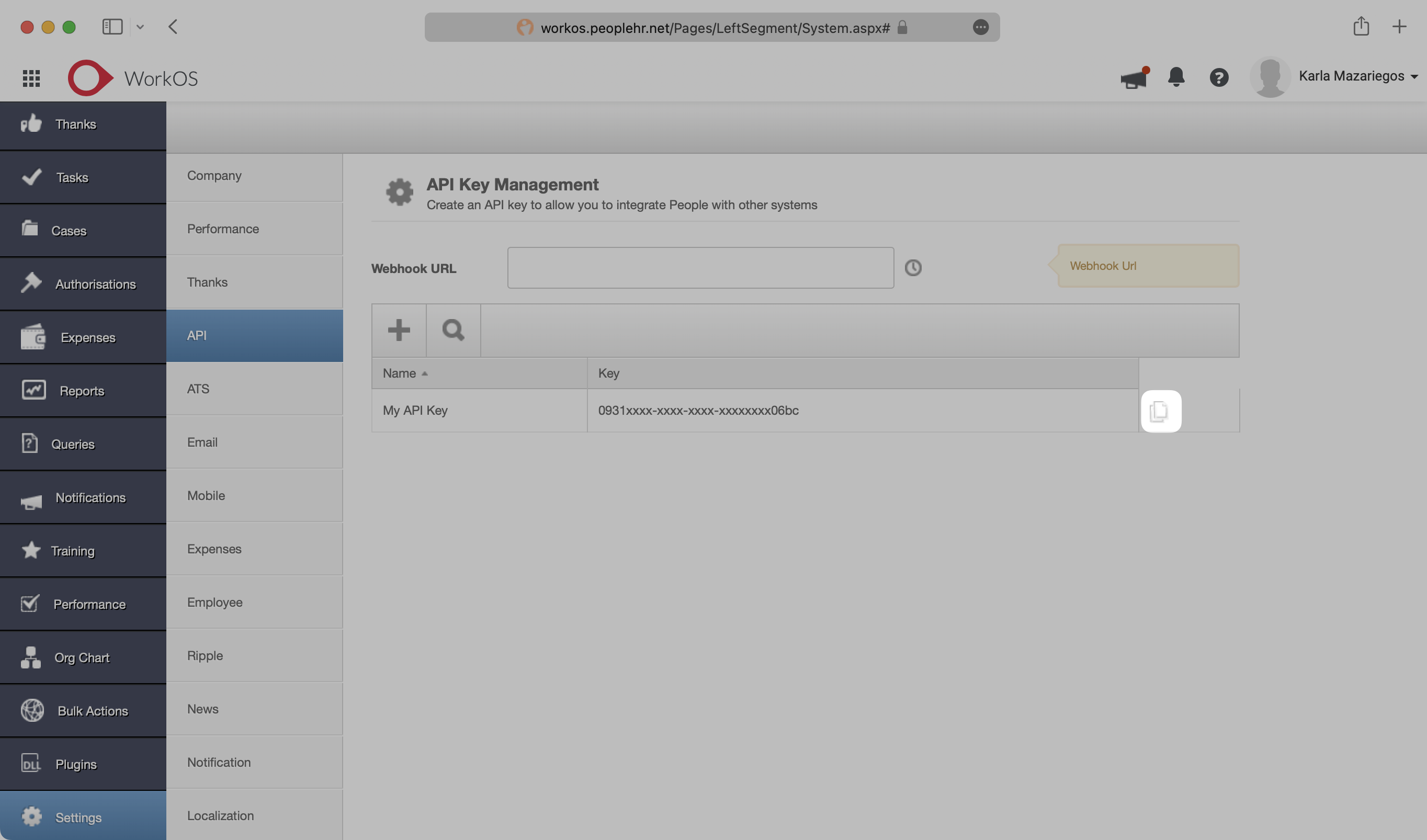
The organization will need to create an API key for you. First, they’ll need to log in to their Access People HR admin dashboard and select to the “Settings” page from the side bar menu. Then, select “API” from the Settings side bar menu. On the API Key Management page, select the plus sign to add a new API Key.
|
|
26
|
+
|
|
27
|
+
|
|
28
|
+
|
|
29
|
+
In the API Key Generator, give the API Key a descriptive name. Under “Application”, select “Employee”.
|
|
30
|
+
|
|
31
|
+
|
|
32
|
+
|
|
33
|
+
On the Select Permissions page, check only “Get All Employee Detail” and then select “Save”.
|
|
34
|
+
|
|
35
|
+
|
|
36
|
+
|
|
37
|
+
On the API Key Generator page, select “Save”.
|
|
38
|
+
|
|
39
|
+
|
|
40
|
+
|
|
41
|
+
Copy and save the API key – this will be used in Step 3.
|
|
42
|
+
|
|
43
|
+
|
|
44
|
+
|
|
45
|
+
---
|
|
46
|
+
|
|
47
|
+
## (2) Create your Directory Sync Connection
|
|
48
|
+
|
|
49
|
+
Login to your WorkOS dashboard and select “Organizations” from the left hand Navigation bar
|
|
50
|
+
|
|
51
|
+
Select the Organization you’d like to enable an Access People HR Directory Sync connection for.
|
|
52
|
+
|
|
53
|
+
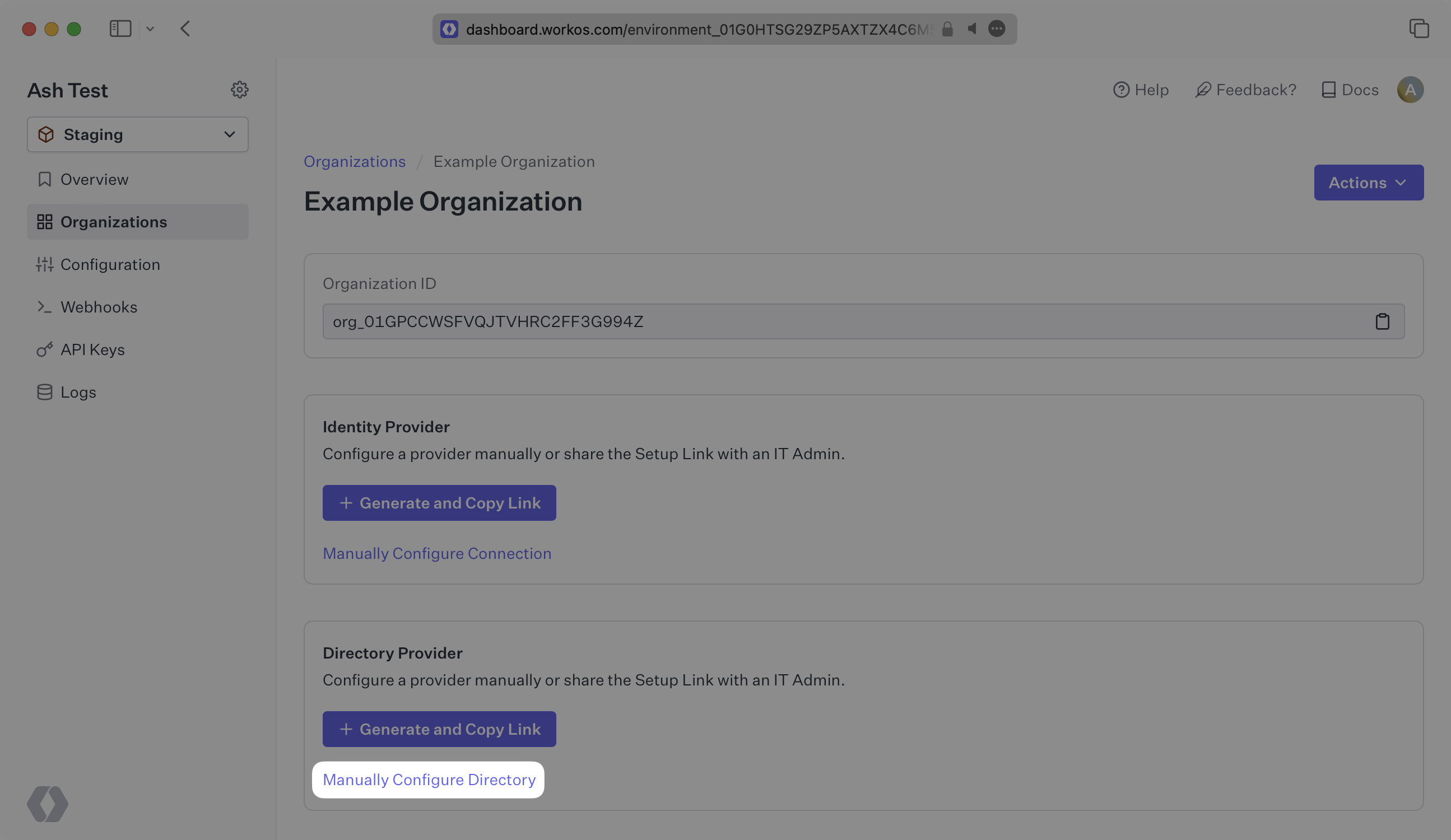
On the Organization’s page click “Manually Configure Directory”.
|
|
54
|
+
|
|
55
|
+
|
|
56
|
+
|
|
57
|
+
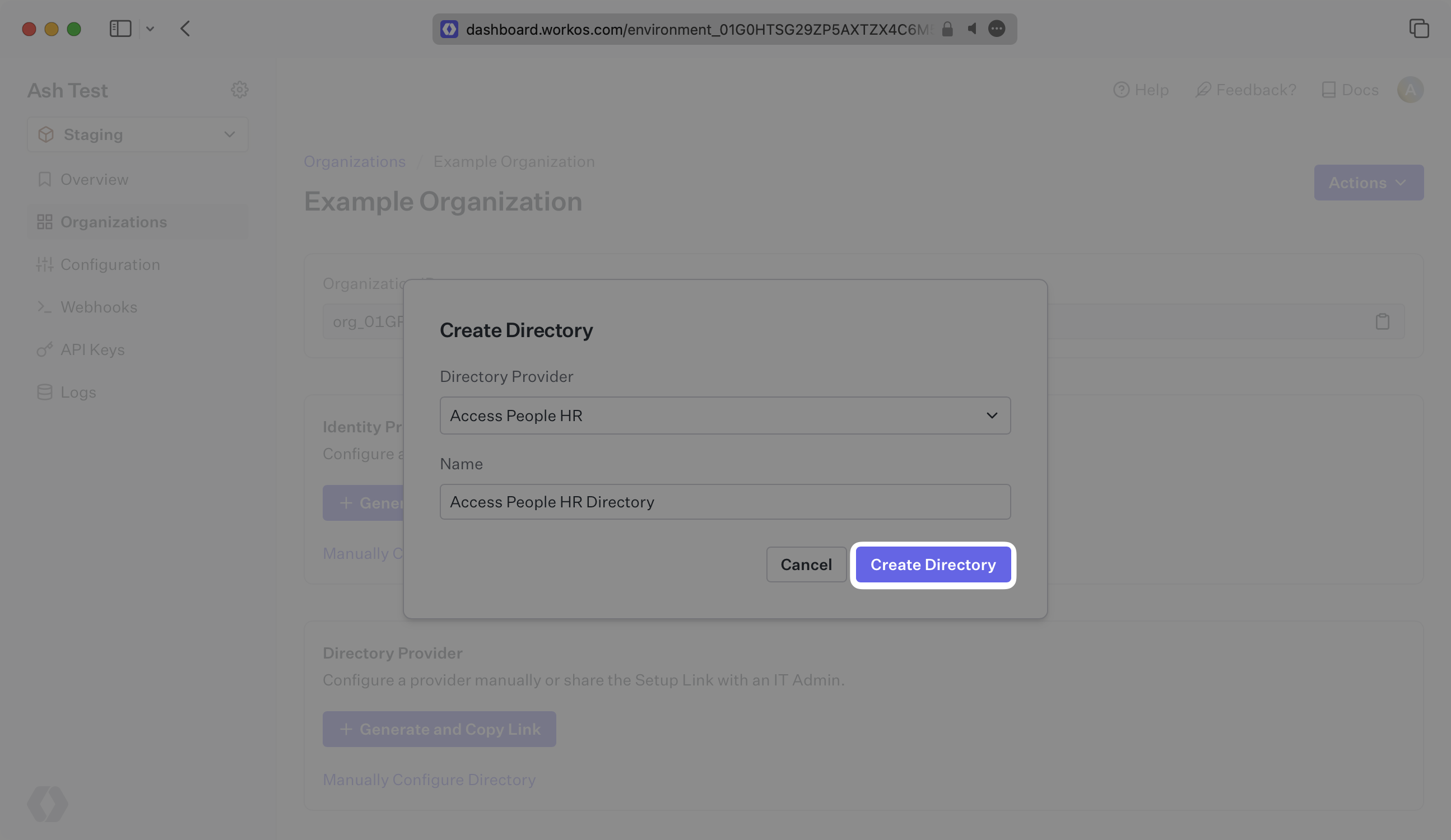
Select “Access People HR” as the Directory Provider, and then provide a descriptive name for the connection. Select “Create Directory”.
|
|
58
|
+
|
|
59
|
+
|
|
60
|
+
|
|
61
|
+
---
|
|
62
|
+
|
|
63
|
+
## (3) Setup your Directory Sync Connection
|
|
64
|
+
|
|
65
|
+
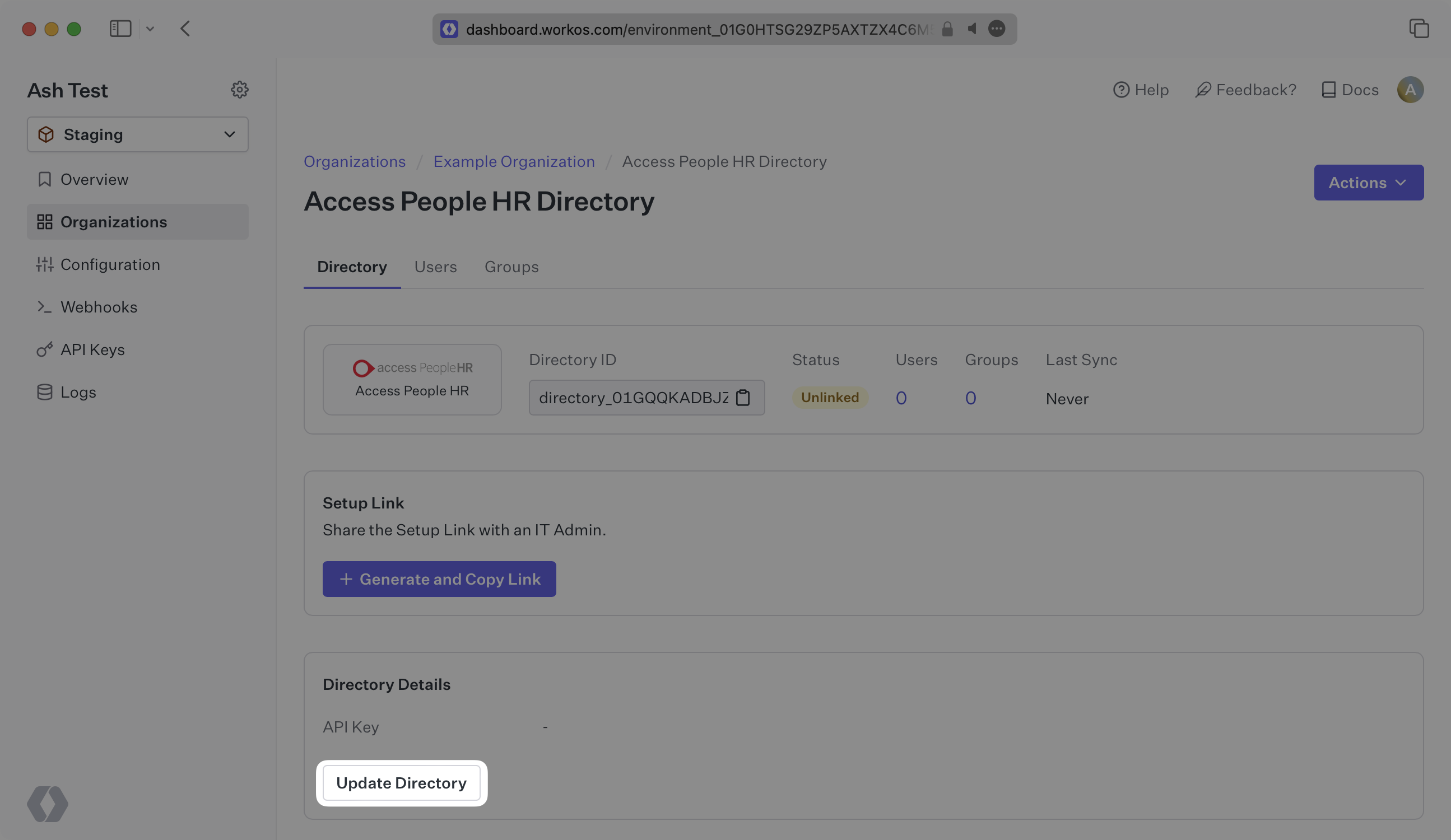
In the directory details section, select “Update Directory”.
|
|
66
|
+
|
|
67
|
+
|
|
68
|
+
|
|
69
|
+
Enter your API Key from Step 1, and select “Save Directory Details”.
|
|
70
|
+
|
|
71
|
+
|
|
72
|
+
|
|
73
|
+
---
|
|
74
|
+
|
|
75
|
+
## (4) Sync Users and Groups to Your Application
|
|
76
|
+
|
|
77
|
+
Now, you should see users and groups synced over from Access People HR.
|
|
78
|
+
|
|
79
|
+
Departments from Access People HR are synced as groups in WorkOS. All users are synced, but only those marked as “ACTIVE” or “LEAVER_MARKED” have a state of active.
|
|
80
|
+
|
|
81
|
+
---
|
|
82
|
+
|
|
83
|
+
## Frequently asked questions
|
|
84
|
+
|
|
85
|
+
### How often do Access People HR directories perform a sync?
|
|
86
|
+
|
|
87
|
+
Access People HR directories poll every 30 minutes starting from the time of the initial sync.
|
|
@@ -0,0 +1,103 @@
|
|
|
1
|
+
---
|
|
2
|
+
title: ADP OpenID Connect
|
|
3
|
+
description: "Learn how to configure a connection to\_ADP via\_OIDC."
|
|
4
|
+
icon: adp
|
|
5
|
+
breadcrumb:
|
|
6
|
+
title: Integrations
|
|
7
|
+
url: /integrations
|
|
8
|
+
originalPath: .tmp-workos-clone/packages/docs/content/integrations/adp-oidc.mdx
|
|
9
|
+
---
|
|
10
|
+
|
|
11
|
+
## Introduction
|
|
12
|
+
|
|
13
|
+
Each SSO Identity Provider requires specific information to create and configure a new [Connection](/glossary/connection). Often, the information required to create a connection will differ by Identity Provider.
|
|
14
|
+
|
|
15
|
+
ADP is unique in that it authenticates using the Open ID Connect (OIDC) protocol instead of [SAML](/glossary/saml). This means that instead of providing an [ACS URL](/glossary/acs-url) and [SP Entity ID](/glossary/sp-entity-id) into the IdP, The IdP will provide a client ID and secret. ADP also provides an SSL Certificate and Private RSA Key file to authenticate. These four pieces of information will all need to be uploaded into the WorkOS dashboard in the steps below.
|
|
16
|
+
|
|
17
|
+
---
|
|
18
|
+
|
|
19
|
+
## (1) Create a New ADP OIDC Connection in WorkOS
|
|
20
|
+
|
|
21
|
+
Navigate to the Organization in your WorkOS Dashboard under which you would like to set up this new SSO connection. Click on the "Manually Configure Connection" button.
|
|
22
|
+
|
|
23
|
+
|
|
24
|
+
|
|
25
|
+
Select ADP OIDC as the Identity Provider and select “Create Connection”.
|
|
26
|
+
|
|
27
|
+
|
|
28
|
+
|
|
29
|
+
---
|
|
30
|
+
|
|
31
|
+
## (2) Select or Create a Project in ADP
|
|
32
|
+
|
|
33
|
+
Login to the [ADP Partner Self Service Portal](https://adpapps.adp.com/self-service/projects).
|
|
34
|
+
|
|
35
|
+
From this page there are two environments to select from, Development and Production. Please use the environment that best suits your use-case for this SSO connection.
|
|
36
|
+
|
|
37
|
+
In the selected environment select “Create New Project”.
|
|
38
|
+
|
|
39
|
+
|
|
40
|
+
|
|
41
|
+
Give the project a meaningful name to designate the SSO connection, there is no need to add a description.
|
|
42
|
+
|
|
43
|
+
|
|
44
|
+
|
|
45
|
+
Make the selections “US Marketplace” and “ADP Workforce Now” respectively for the next selections and then click “Next”.
|
|
46
|
+
|
|
47
|
+
|
|
48
|
+
|
|
49
|
+
Finally, select “Other” for the use case that best describes your application and click “Submit”.
|
|
50
|
+
|
|
51
|
+
|
|
52
|
+
|
|
53
|
+
---
|
|
54
|
+
|
|
55
|
+
## (3) Upload the WorkOS Redirect URI in ADP
|
|
56
|
+
|
|
57
|
+
After configuring the ADP project, the next step is to provide ADP with the redirect URI generated by WorkOS.
|
|
58
|
+
|
|
59
|
+
|
|
60
|
+
|
|
61
|
+
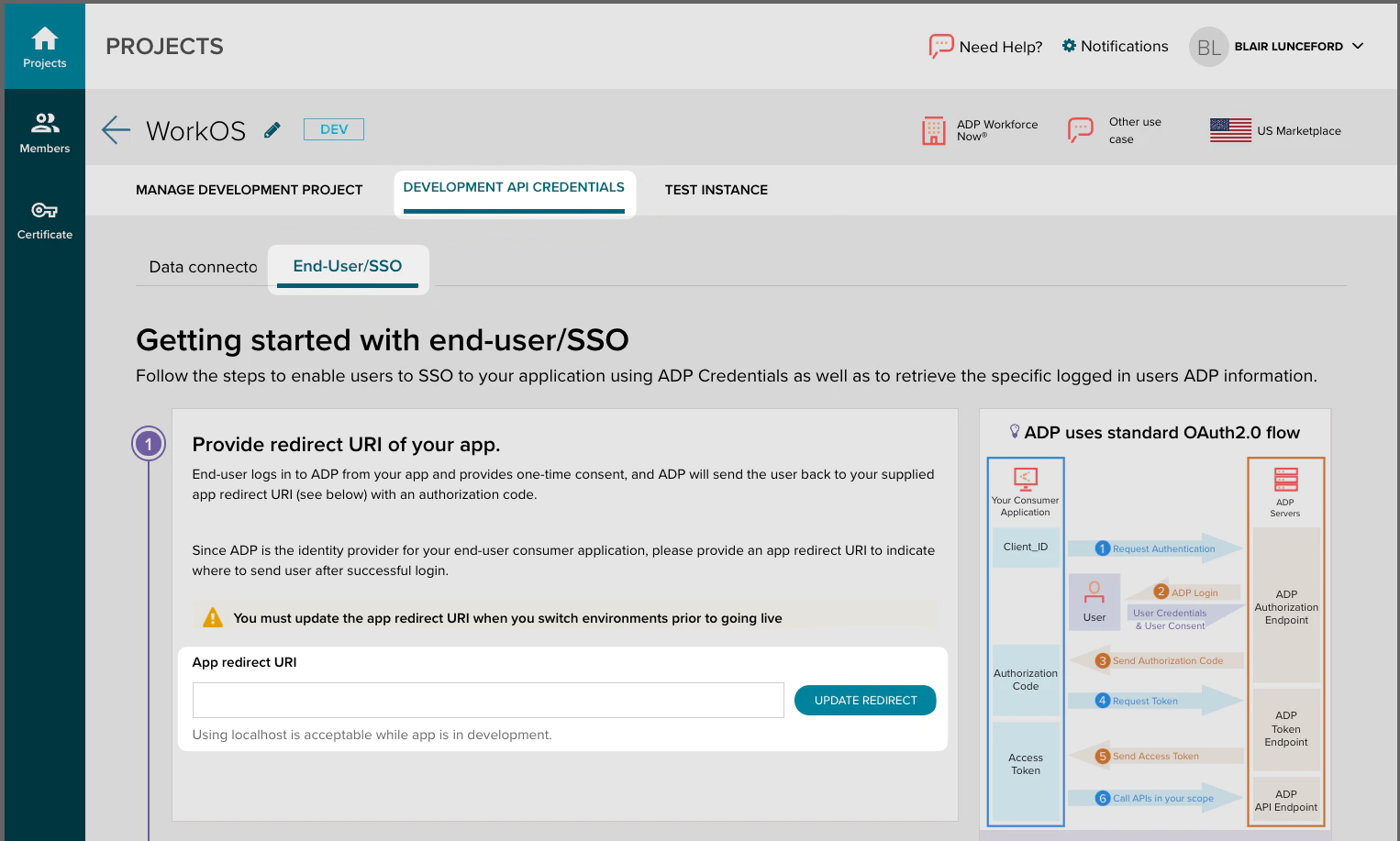
Now that a new project has been created browse to the “Development API Credentials” Tab within the project.
|
|
62
|
+
|
|
63
|
+
Click on the “End-User/SSO sub-tab” from this view.
|
|
64
|
+
|
|
65
|
+
Paste the [Redirect URI](/glossary/redirect-uri) into the App redirect URI field and click “Update Redirect”.
|
|
66
|
+
|
|
67
|
+
|
|
68
|
+
|
|
69
|
+
---
|
|
70
|
+
|
|
71
|
+
## (4) Enter ADP OIDC Client Settings in your WorkOS Dashboard
|
|
72
|
+
|
|
73
|
+
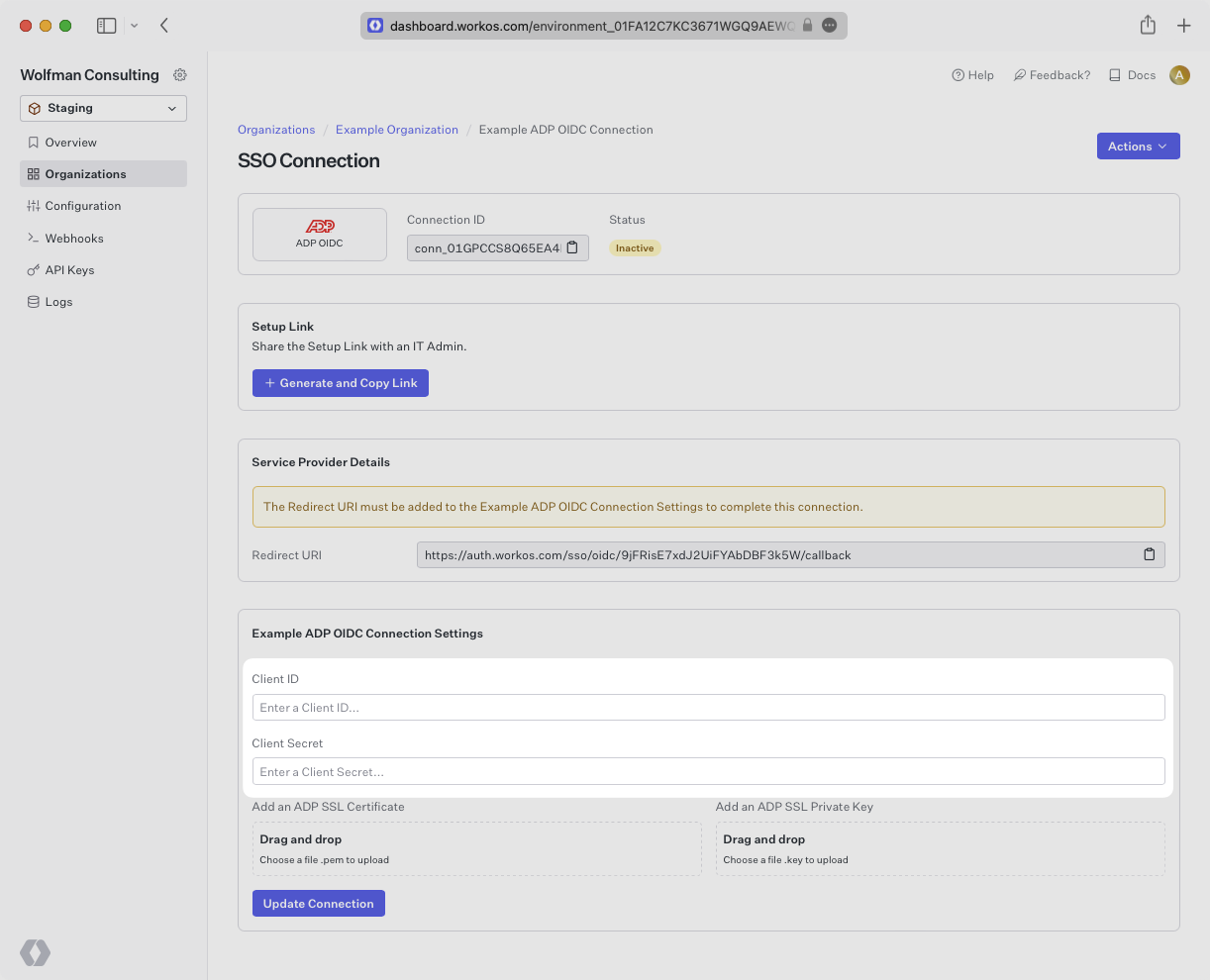
Now that the redirect URI has been provided, the next step is to gather the [Client ID](/glossary/client-id) and [Client Secret](/glossary/client-secret) from ADP and add it into the WorkOS Dashboard.
|
|
74
|
+
|
|
75
|
+
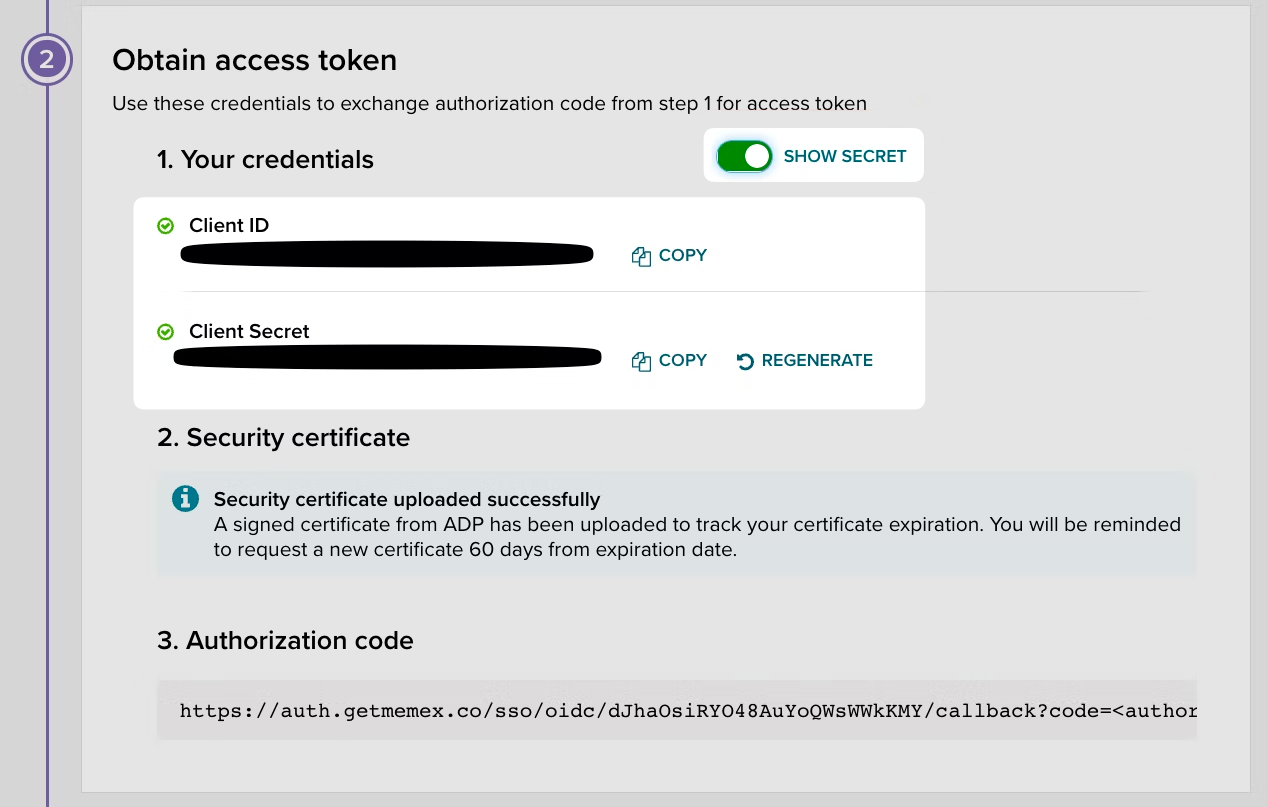
Under the same tab used in the previous step, you’ll provide the Client ID and Client Secret from ADP. Click to reveal the secret and copy and paste both the client ID and client secret into the WorkOS dashboard.
|
|
76
|
+
|
|
77
|
+
|
|
78
|
+
|
|
79
|
+
|
|
80
|
+
|
|
81
|
+
---
|
|
82
|
+
|
|
83
|
+
## (5) Upload the ADP SSL Cert and Private Key in your WorkOS Dashboard
|
|
84
|
+
|
|
85
|
+
Now that the Client ID and Secret have been provided, the next step is to gather the SSL Certificate and Private Key from ADP and add it into the WorkOS Dashboard.
|
|
86
|
+
|
|
87
|
+
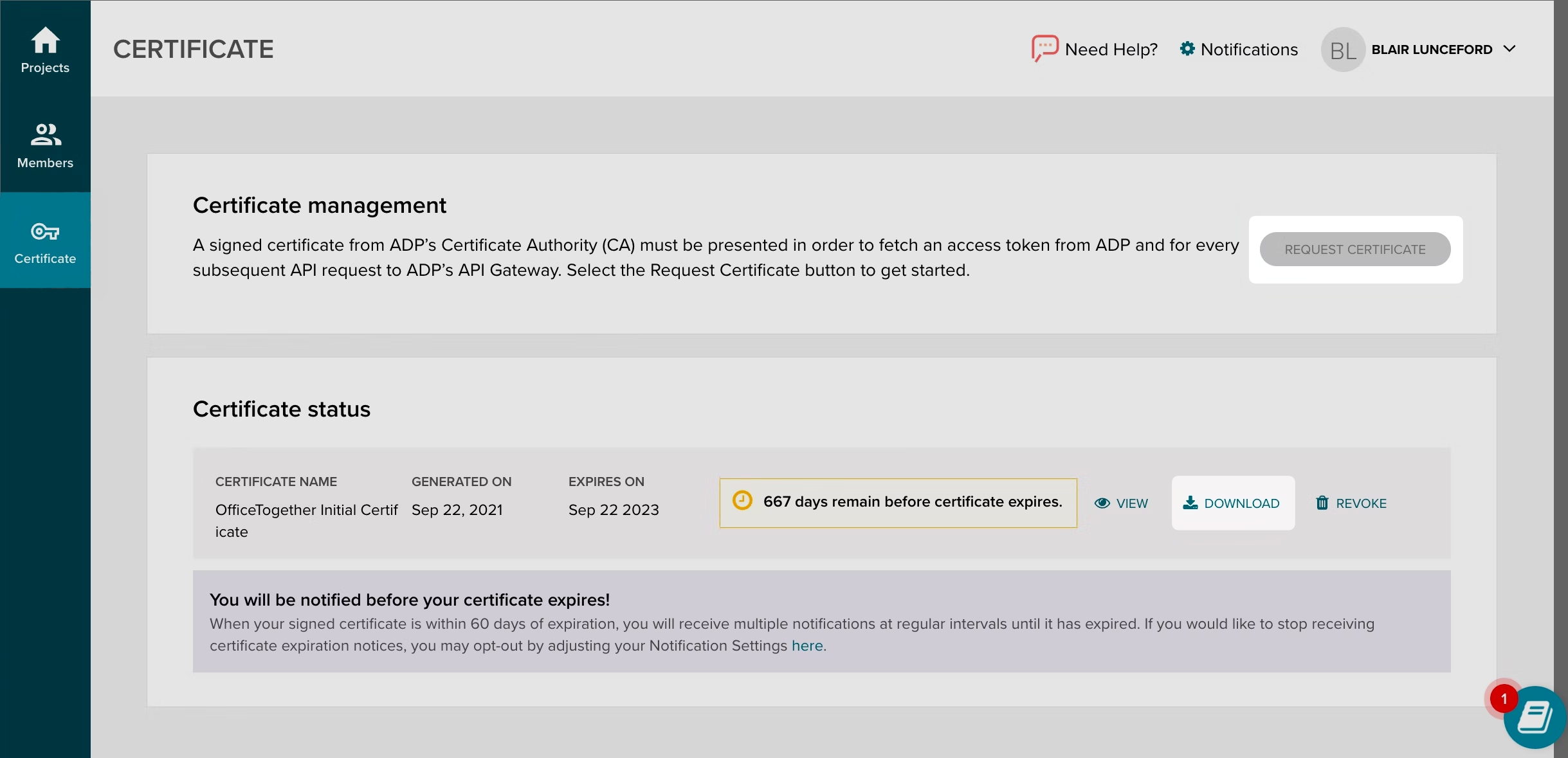
ADP uses a two fold certificate method with an SSL certificate and an SSL Private Key. The SSL Private Key is only displayed one time when the certificate is generated. If the certificate has already been generated, the IT Administrator who generated it should have also received the Private Key otherwise a new certificate and key can be generated by browsing to the certificates tab on the left hand navigation.
|
|
88
|
+
|
|
89
|
+
The SSL Certificate can be found in ADP by browsing to “Certificate” on the left hand nav bar. You can also create a new SSL Certificate and Private Key pair if necessary.
|
|
90
|
+
|
|
91
|
+
|
|
92
|
+
|
|
93
|
+
Upload the two files into your WorkOS dashboard in their respective portals on the connection page and click “Update Connection”.
|
|
94
|
+
|
|
95
|
+
|
|
96
|
+
|
|
97
|
+
---
|
|
98
|
+
|
|
99
|
+
## (6) Verify Connection Status in WorkOS
|
|
100
|
+
|
|
101
|
+
Navigate back to the connection in your WorkOS dashboard. After a minute or two you should see the connection become Active as indicated by the green badge next to the connection name.
|
|
102
|
+
|
|
103
|
+
All that’s left to do now is test out the connection. You can use your own application if it’s connected to WorkOS already, or feel free to use one of our example applications like this [Python Flask SSO app](https://github.com/workos/python-flask-example-applications/tree/main/python-flask-sso-example) to get up and running with a PoC quickly
|
|
@@ -0,0 +1,169 @@
|
|
|
1
|
+
---
|
|
2
|
+
title: Apple
|
|
3
|
+
description: Learn how to set up Sign in with Apple.
|
|
4
|
+
icon: apple
|
|
5
|
+
breadcrumb:
|
|
6
|
+
title: Integrations
|
|
7
|
+
url: /integrations
|
|
8
|
+
originalPath: .tmp-workos-clone/packages/docs/content/integrations/apple.mdx
|
|
9
|
+
---
|
|
10
|
+
|
|
11
|
+
## Introduction
|
|
12
|
+
|
|
13
|
+
To configure your global Apple integration you'll need two pieces of information from WorkOS: a [Redirect URI](/glossary/redirect-uri) and an outbound email domain for Apple's Private Relay email service.
|
|
14
|
+
|
|
15
|
+
You'll also need four pieces of information from an active Apple Developer Account: an Apple Team ID, Apple Service ID, Apple Private Key and Private Key ID.
|
|
16
|
+
|
|
17
|
+
---
|
|
18
|
+
|
|
19
|
+
## Testing with default credentials in the staging environment
|
|
20
|
+
|
|
21
|
+
WorkOS provides a default set of Apple credentials, which allow you to quickly enable and test Sign in with Apple. WorkOS will automatically use the default credentials until you add your own Apple Team ID, Apple Service ID, and Apple Private Key to the configuration in the [WorkOS dashboard](https://dashboard.workos.com).
|
|
22
|
+
|
|
23
|
+
> The default credentials are only intended for testing and therefore only available in the Staging environment. For your production environment, please follow the steps below to create and specify your own Apple Team ID, Apple Service ID, and Apple Private Key.
|
|
24
|
+
|
|
25
|
+
Please note that when you are using WorkOS default credentials, Apple's authentication flow will display the WorkOS name, logo, and other information to users. Once you register your own application and use its credentials for the authentication flow, you will have the opportunity to customize the app.
|
|
26
|
+
|
|
27
|
+
---
|
|
28
|
+
|
|
29
|
+
## What WorkOS provides
|
|
30
|
+
|
|
31
|
+
Navigate to the Authentication section of the [WorkOS dashboard](https://dashboard.workos.com/). Scroll down to the Apple OAuth section and find the following values in the configuration:
|
|
32
|
+
|
|
33
|
+
- Redirect URI
|
|
34
|
+
- outbound email domains
|
|
35
|
+
|
|
36
|
+
|
|
37
|
+
|
|
38
|
+
After the authentication process has completed and a authorization code is granted, the user will be sent to the Redirect URI.
|
|
39
|
+
|
|
40
|
+
Outbound email domains are registered with Apple's Private Relay email service. Apple requires outbound email domains and/or email addresses to be registered with Private Relay to deliver email to those users. For more information, see Apple's documentation on [Private Relay](https://developer.apple.com/documentation/sign_in_with_apple/sign_in_with_apple_js/communicating_using_the_private_email_relay_service).
|
|
41
|
+
|
|
42
|
+
These values will be used later in the guide.
|
|
43
|
+
|
|
44
|
+
---
|
|
45
|
+
|
|
46
|
+
## What you’ll need
|
|
47
|
+
|
|
48
|
+
In order to integrate you'll need an active Apple Developer account. From that Apple Developer account you'll need:
|
|
49
|
+
|
|
50
|
+
- A Team ID
|
|
51
|
+
- A Service ID
|
|
52
|
+
- A private key ID
|
|
53
|
+
- The private key contents
|
|
54
|
+
|
|
55
|
+
Follow these steps to retrieve these values and configure your integration with Apple.
|
|
56
|
+
|
|
57
|
+
---
|
|
58
|
+
|
|
59
|
+
### (1) Retrieve the Apple Team ID
|
|
60
|
+
|
|
61
|
+
Sign in to the [certificates, identifiers, and profiles](https://developer.apple.com/account/resources/certificates/list) section of your Apple Developer account. The landing page will have your name, company name, and your Team ID. Note the Team ID value for later.
|
|
62
|
+
|
|
63
|
+
|
|
64
|
+
|
|
65
|
+
> The Team ID is sensitive and will only be used by the server to communicate with Apple. It should not be shared with the client.
|
|
66
|
+
|
|
67
|
+
### (2) Register an App ID
|
|
68
|
+
|
|
69
|
+
> Skip this step if you already have an App ID.
|
|
70
|
+
|
|
71
|
+
Click on _Identifiers_ on the sidebar, then click on the + button to create a new identifier.
|
|
72
|
+
|
|
73
|
+
|
|
74
|
+
|
|
75
|
+
On the next page, select _App IDs_ and click _Continue_.
|
|
76
|
+
|
|
77
|
+
|
|
78
|
+
|
|
79
|
+
Next, select _App_ and click _Continue_.
|
|
80
|
+
|
|
81
|
+
|
|
82
|
+
|
|
83
|
+
On the next page, fill in a description and a bundle ID. The bundle ID should be unique and in reverse domain notation, e.g., `com.example.myapp`.
|
|
84
|
+
|
|
85
|
+
Also, check the _Sign in with Apple_ box in the Capabilities section. There is no need to update anything in the _Edit_ modal.
|
|
86
|
+
|
|
87
|
+
|
|
88
|
+
|
|
89
|
+
|
|
90
|
+
|
|
91
|
+
Then click _Continue_. Review your selections and click _Register_.
|
|
92
|
+
|
|
93
|
+
### (3) Register a Service ID
|
|
94
|
+
|
|
95
|
+
Next we need to create a linked Service ID. Click on _Identifiers_ on the sidebar, then click on the + button.
|
|
96
|
+
|
|
97
|
+
|
|
98
|
+
|
|
99
|
+
On the next page, select _Services IDs_ and click _Continue_.
|
|
100
|
+
|
|
101
|
+
|
|
102
|
+
|
|
103
|
+
Enter a description and a Service ID. The Service ID should be unique and in reverse domain notation, e.g. `com.example.myapp`.
|
|
104
|
+
|
|
105
|
+
|
|
106
|
+
|
|
107
|
+
Click _Continue_. Note the Service ID for later and click _Register_ to create the service.
|
|
108
|
+
|
|
109
|
+
Now we will configure our new service for Sign in with Apple. First select the new service from the list of Service IDs.
|
|
110
|
+
|
|
111
|
+
|
|
112
|
+
|
|
113
|
+
Check the _Sign in with Apple_ box and click _Configure_.
|
|
114
|
+
|
|
115
|
+
|
|
116
|
+
|
|
117
|
+
Ensure the App ID we created earlier is selected in the dropdown. Then enter `api.workos.com` in the _Domains and Subdomains_ field and paste the Return URI from the WorkOS dashboard in the _Return URLs_ field.
|
|
118
|
+
|
|
119
|
+
|
|
120
|
+
|
|
121
|
+
Click _Done_ and then _Continue_. Review your changes and click _Save_.
|
|
122
|
+
|
|
123
|
+
### (4) Register a private key
|
|
124
|
+
|
|
125
|
+
Click on _Keys_ on the sidebar, then click on the + button to create a new key.
|
|
126
|
+
|
|
127
|
+
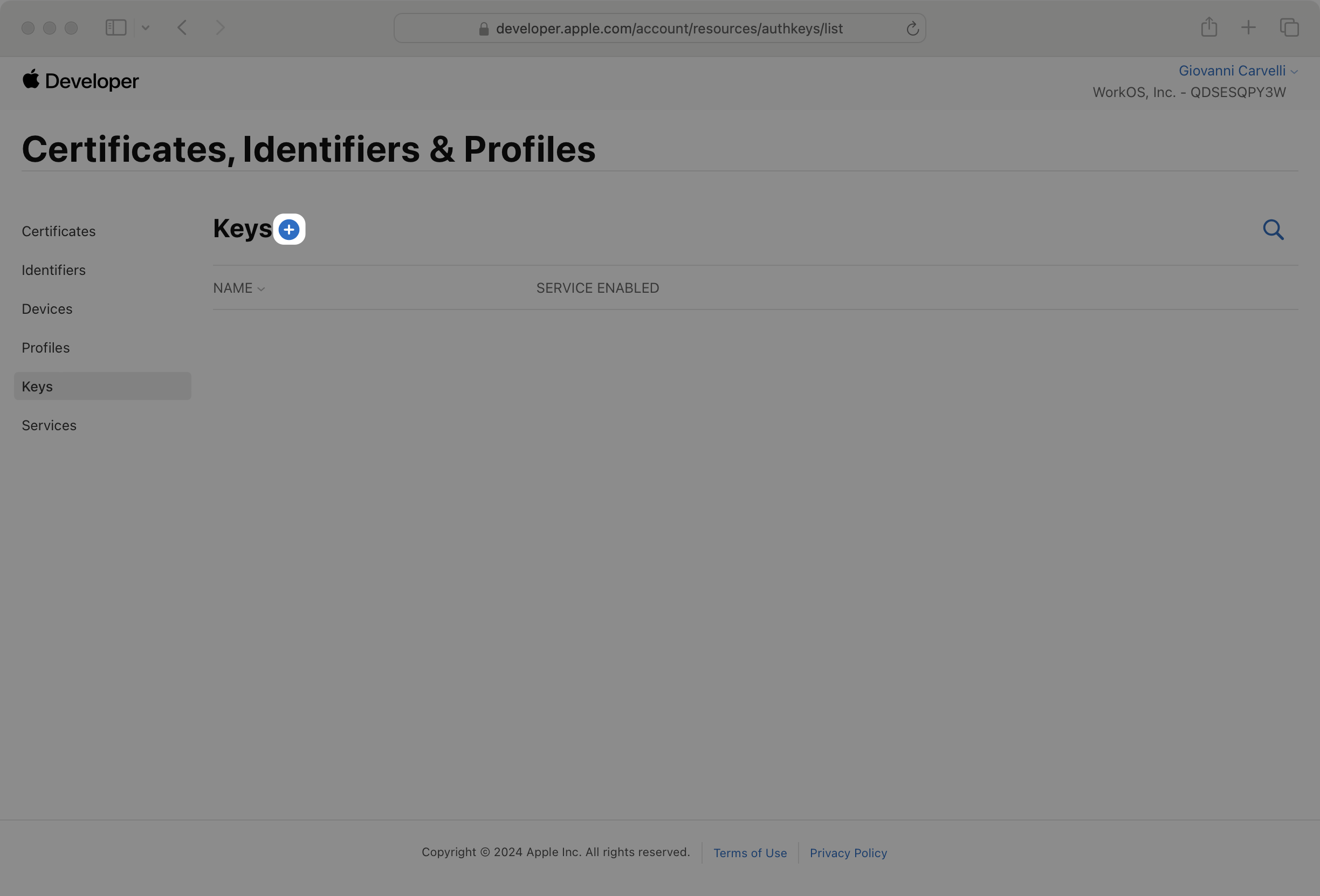
|
|
128
|
+
|
|
129
|
+
On the next page, enter a human-readable _Key Name_. Then check the _Sign in with Apple_ box and click _Configure_.
|
|
130
|
+
|
|
131
|
+
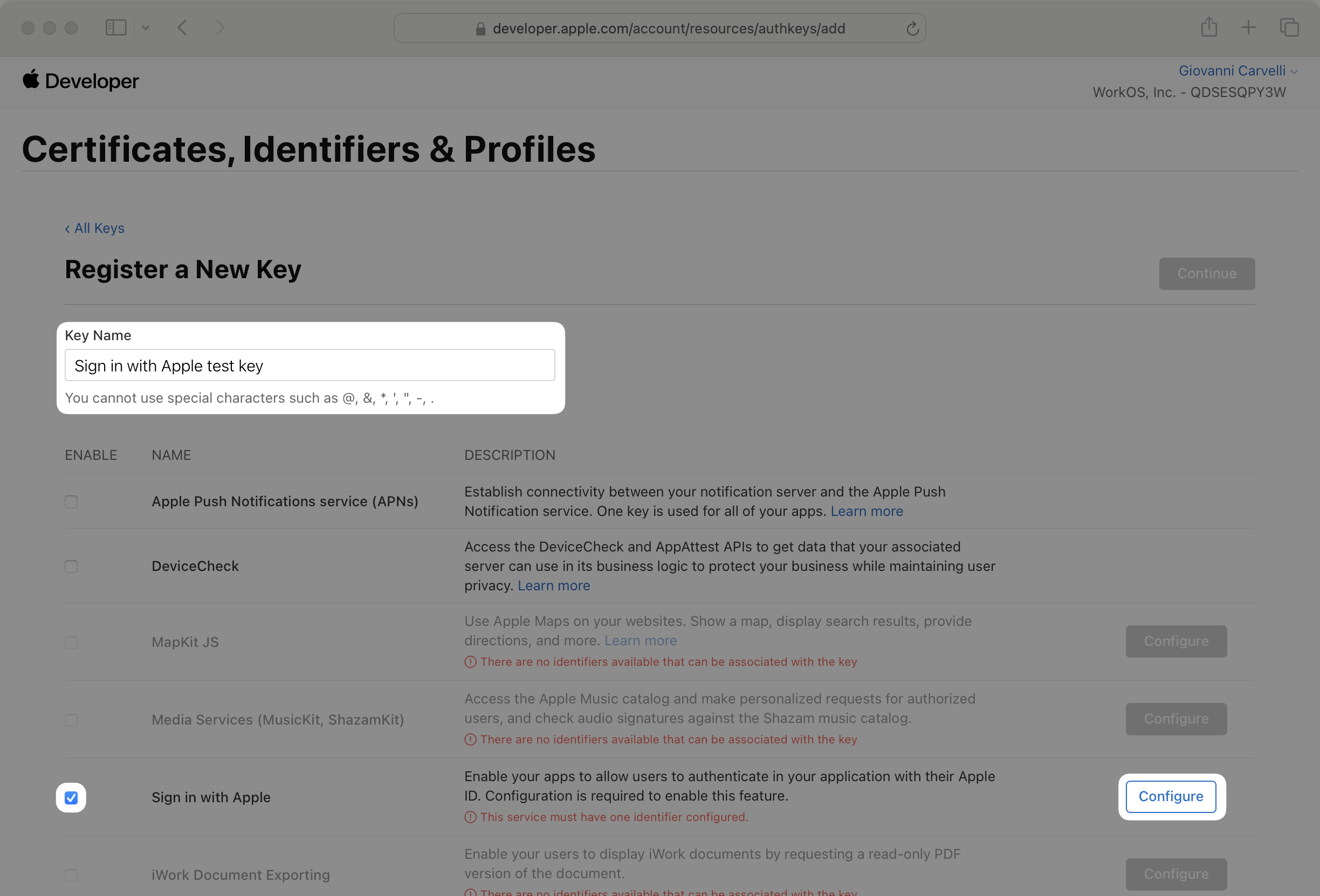
|
|
132
|
+
|
|
133
|
+
In the _Configure_ dialog, select the App ID we created earlier and click _Save_.
|
|
134
|
+
|
|
135
|
+
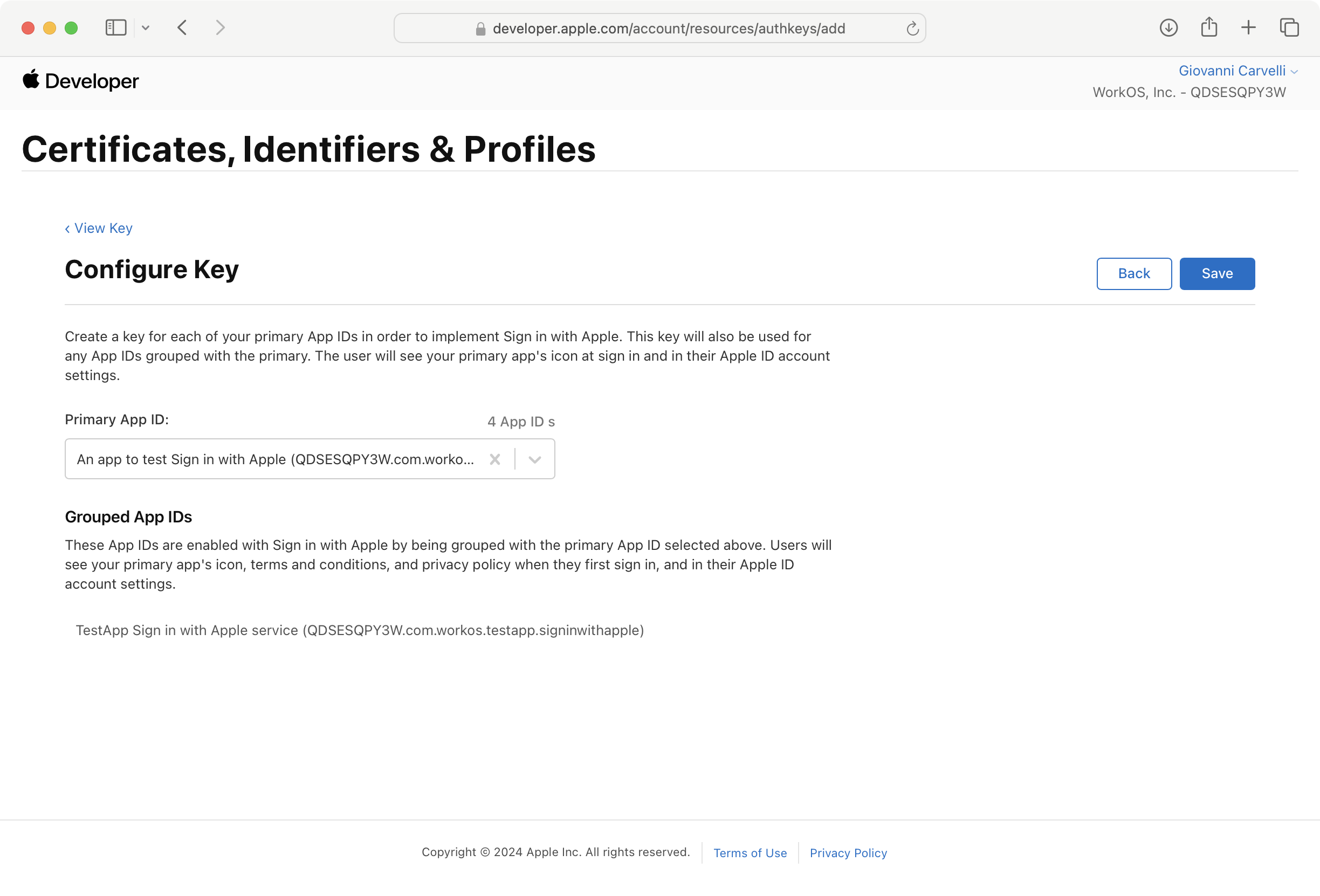
|
|
136
|
+
|
|
137
|
+
Click _Continue_. Review your changes and click _Register_ to create your key.
|
|
138
|
+
|
|
139
|
+
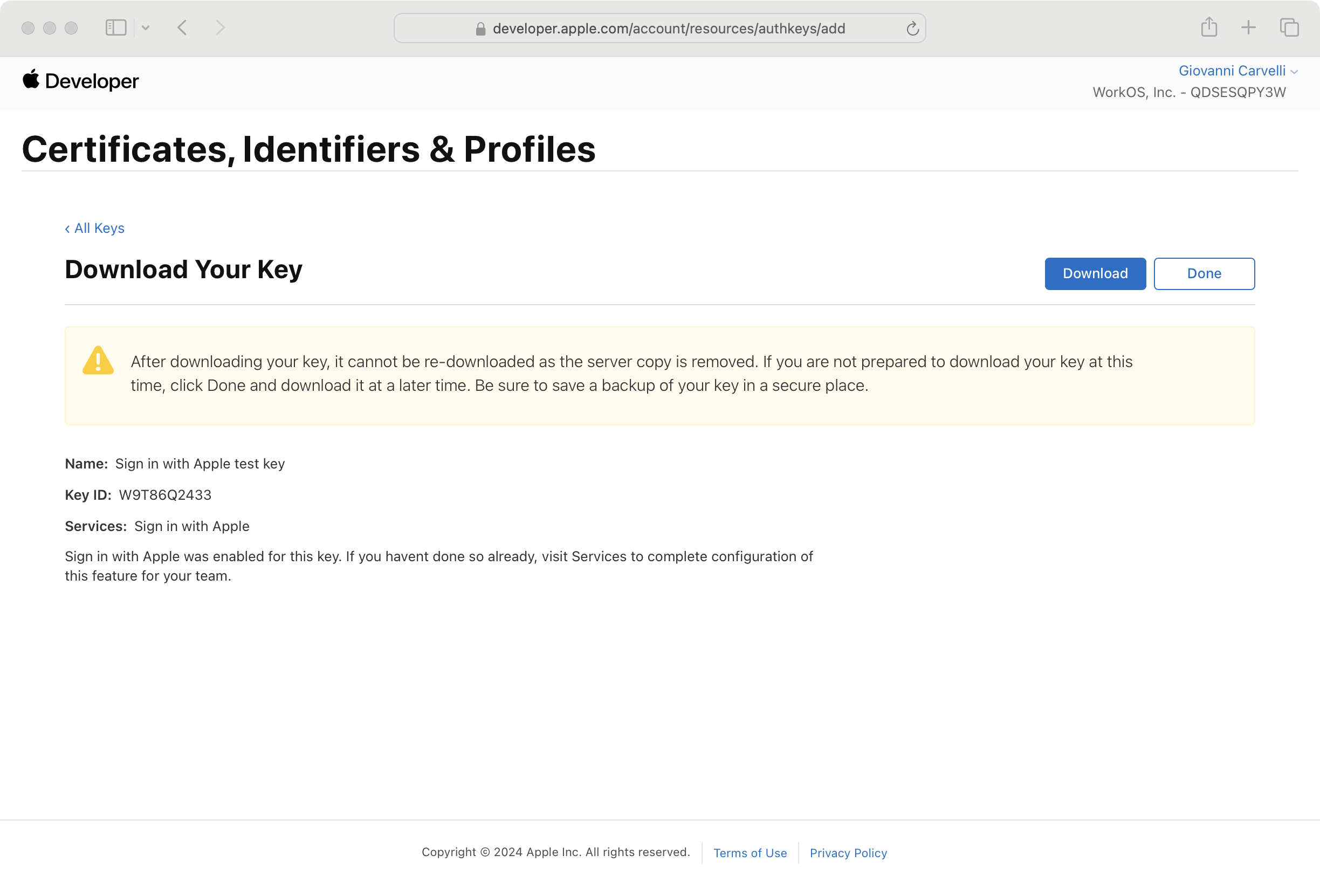
|
|
140
|
+
|
|
141
|
+
Make sure to download your new private key. Also note the Key ID for later.
|
|
142
|
+
|
|
143
|
+
### (5) Provide credentials to WorkOS
|
|
144
|
+
|
|
145
|
+
Navigate back to the _Authentication_ section in the [WorkOS dashboard](https://dashboard.workos.com), and click on _Edit_ under _Sign in with Apple_.
|
|
146
|
+
|
|
147
|
+
Toggle _Enabled_ on and provide the credentials from Apple that you generated in the previous steps.
|
|
148
|
+
|
|
149
|
+
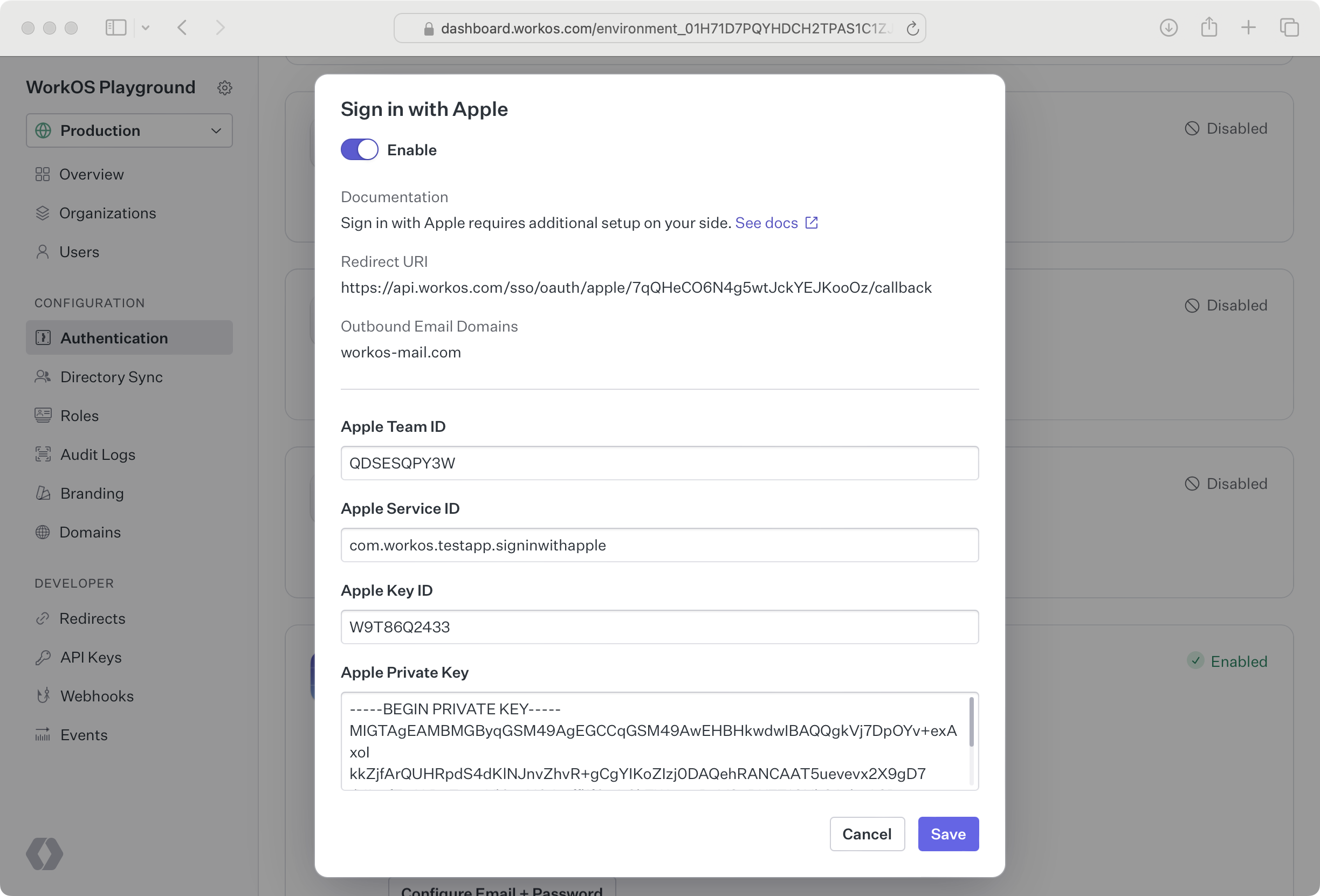
|
|
150
|
+
|
|
151
|
+
### (6) Set up Private Email Relay
|
|
152
|
+
|
|
153
|
+
Sign in with Apple users can opt to hide their email address when signing in. In order for emails to be sent to those users, we need to configure Private Email Relay.
|
|
154
|
+
|
|
155
|
+
On the _Sign in with Apple_ modal, copy the list of outbound email domains.
|
|
156
|
+
|
|
157
|
+
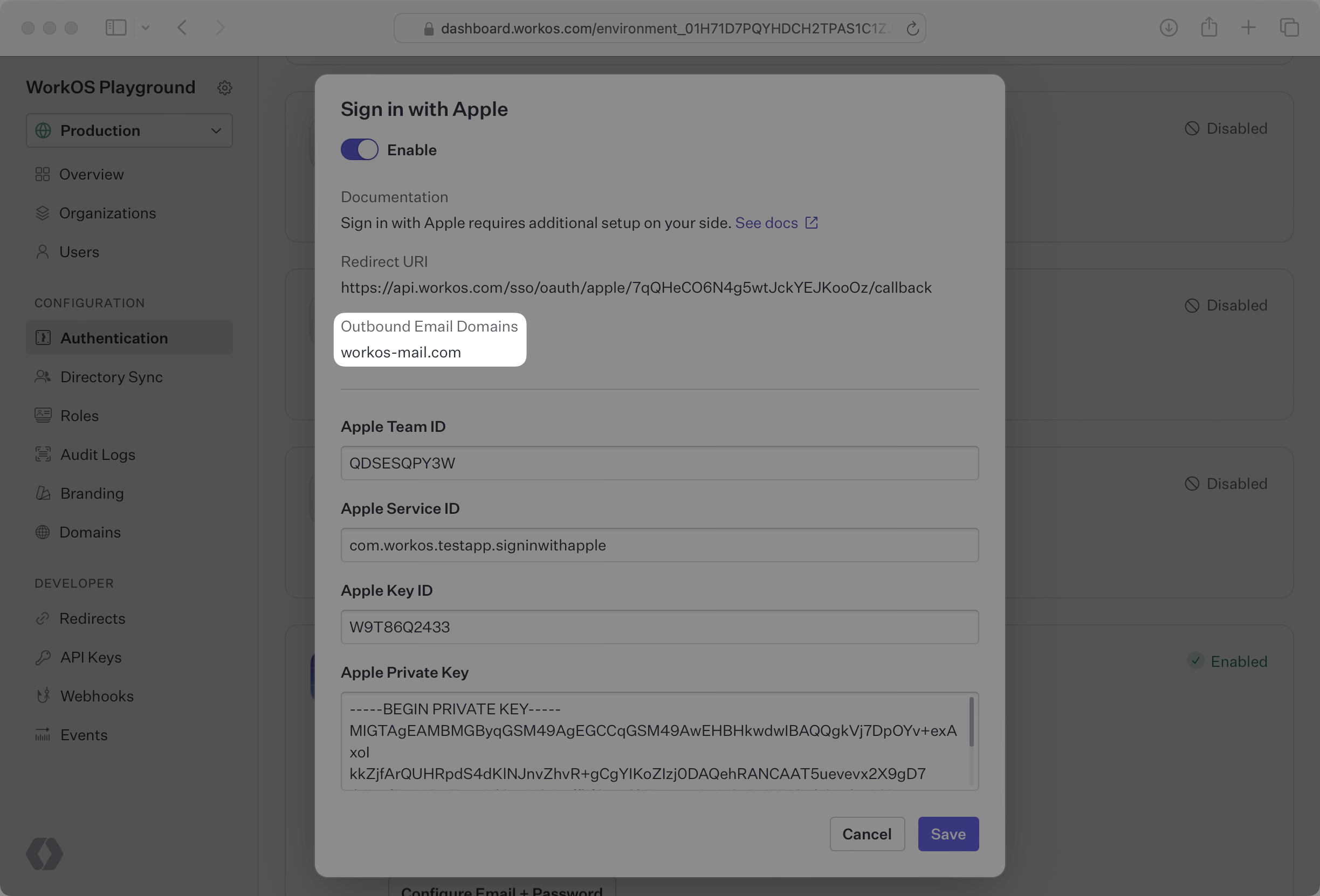
|
|
158
|
+
|
|
159
|
+
Then open your Apple Developer account and click on _Services_ on the sidebar. Then click on _Configure_ under _Sign in with Apple for Email Communication_.
|
|
160
|
+
|
|
161
|
+
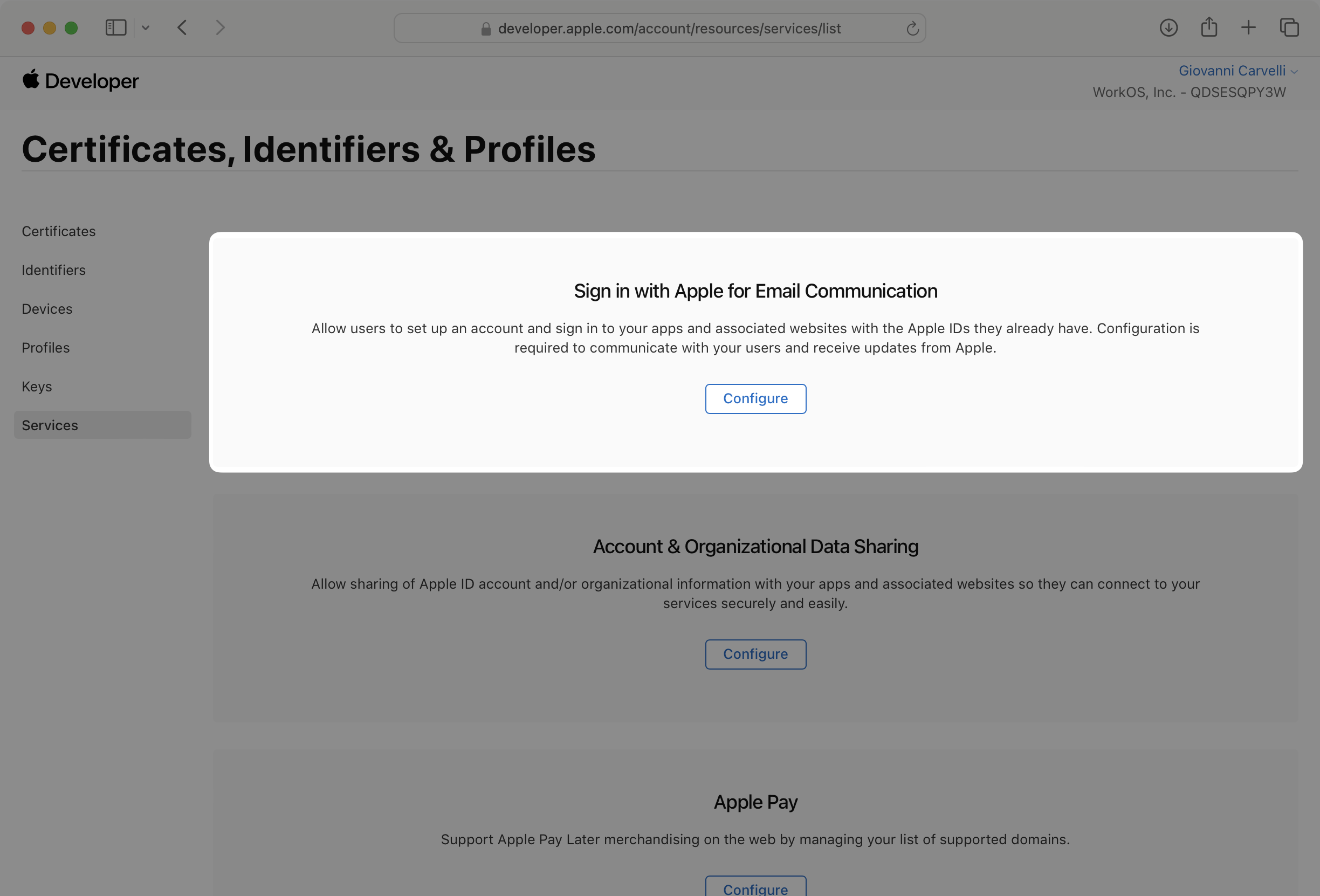
|
|
162
|
+
|
|
163
|
+
Click the + button next to _Email Sources_ and enter the outbound email domains from the WorkOS dashboard in the _Domains and Subdomains_ text box. Then click _Next_ and _Register_.
|
|
164
|
+
|
|
165
|
+
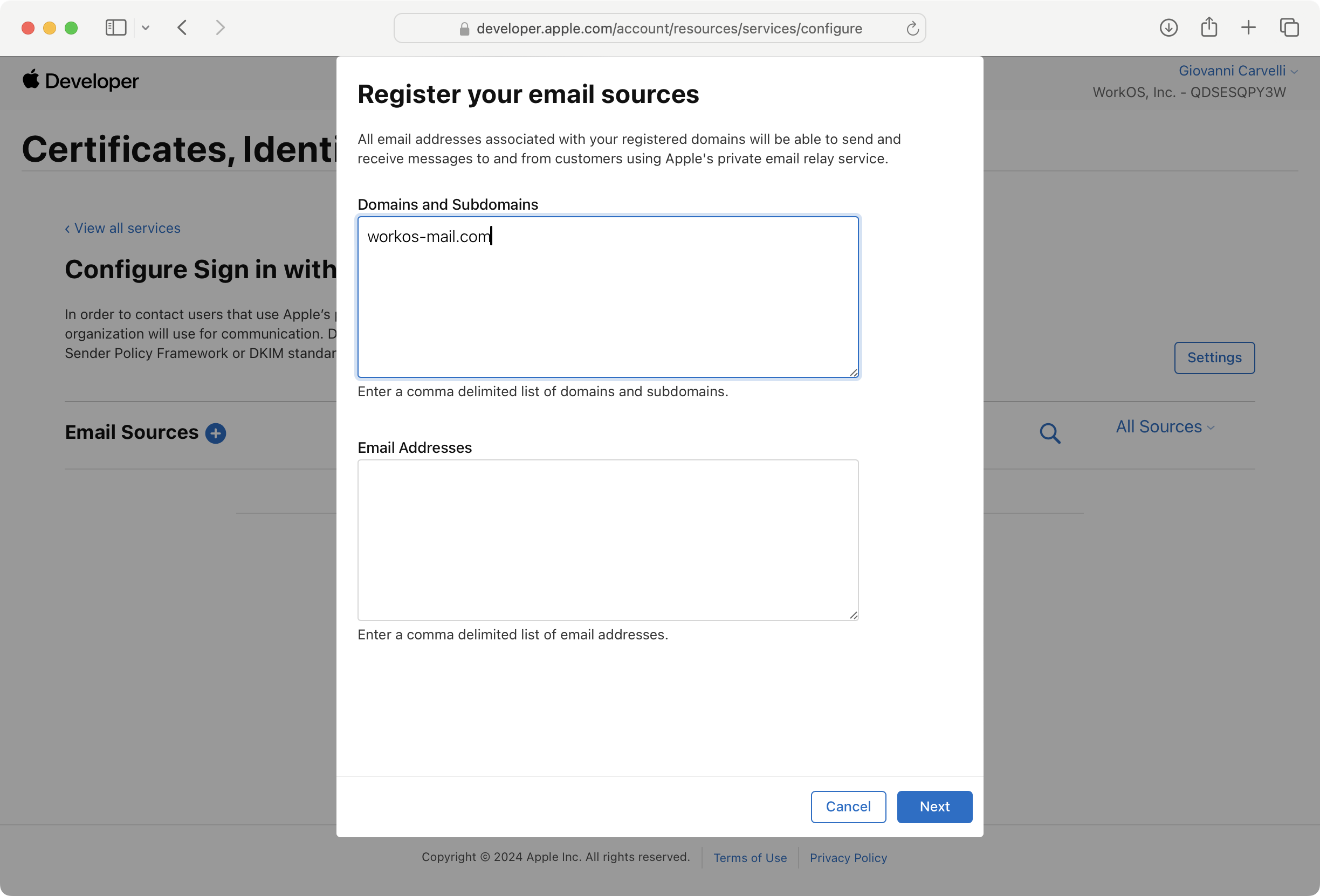
|
|
166
|
+
|
|
167
|
+
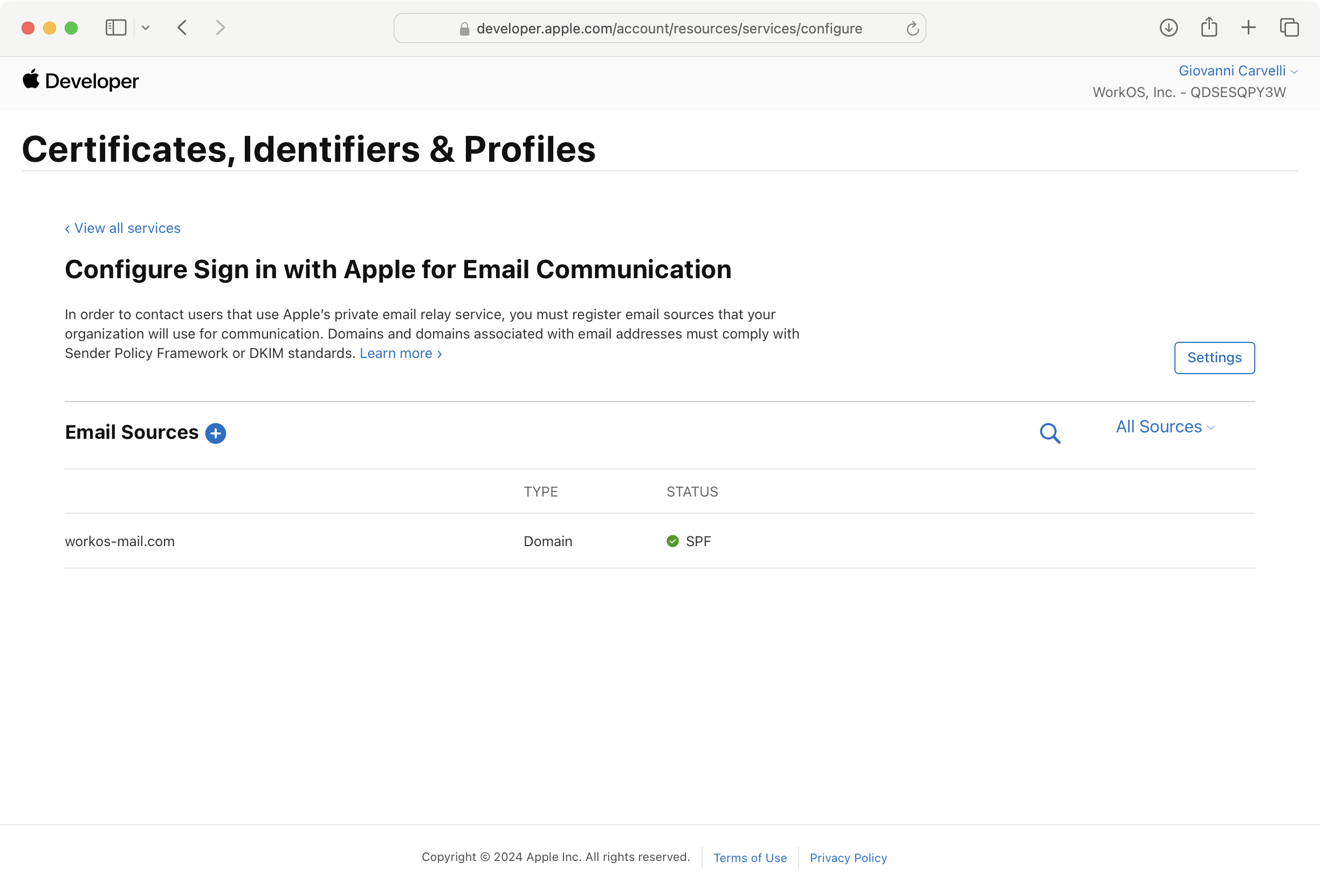
|
|
168
|
+
|
|
169
|
+
You are now ready to start authenticating with Sign in with Apple. Your users will see the option to Sign in with Apple when visiting your [AuthKit](/user-management) domain. Alternatively if you're using the [standalone SSO API](reference/sso/get-authorization-url), you can initiate Sign in with Apple by passing `AppleOAuth` as the `provider`.
|
|
@@ -0,0 +1,78 @@
|
|
|
1
|
+
---
|
|
2
|
+
title: Auth0 Directory Sync
|
|
3
|
+
description: Learn how to use Directory Sync with your Auth0 applications.
|
|
4
|
+
icon: auth0
|
|
5
|
+
breadcrumb:
|
|
6
|
+
title: Integrations
|
|
7
|
+
url: /integrations
|
|
8
|
+
originalPath: .tmp-workos-clone/packages/docs/content/integrations/auth0-directory-sync.mdx
|
|
9
|
+
---
|
|
10
|
+
|
|
11
|
+
## Introduction
|
|
12
|
+
|
|
13
|
+
This guide will walk you through the steps to enable WorkOS Directory Sync for your Auth0 applications. If you are new to automated user provisioning and deprovisioning, the [Directory Sync](/directory-sync) introduction is a good place to learn the basics.
|
|
14
|
+
|
|
15
|
+
> The Auth0 Directory Sync integration is in feature preview. Reach out to [WorkOS support](mailto:support@workos.com?subject=Auth0%20Directory%20Sync%20Integration) if you want early access.
|
|
16
|
+
|
|
17
|
+
## (1) Configure Auth0 API access
|
|
18
|
+
|
|
19
|
+
WorkOS uses Auth0 credentials you provide to automatically create and manage an Auth0 database connection. The first step is to authorize an application in Auth0 to access the Management API.
|
|
20
|
+
|
|
21
|
+
In the Auth0 dashboard, navigate to **Applications** → **APIs** → **Auth0 Management API**:
|
|
22
|
+
|
|
23
|
+
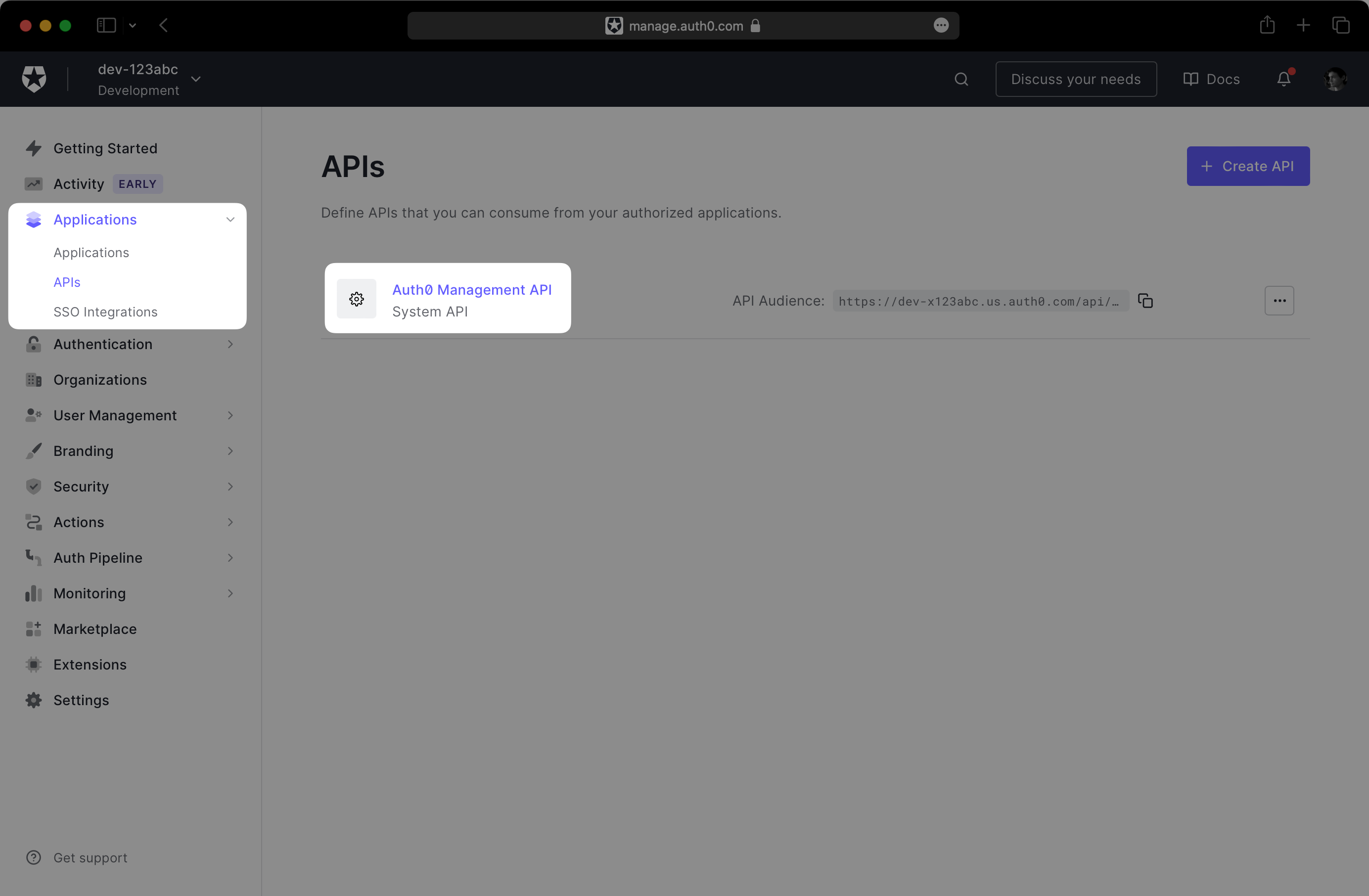
|
|
24
|
+
|
|
25
|
+
Click on the **Machine To Machine Applications** tab and expand the section for your Auth0 application. Then, toggle the **Authorized** switch to enable the API.
|
|
26
|
+
|
|
27
|
+
Under **Permissions**, ensure the following scopes are granted to the application:
|
|
28
|
+
|
|
29
|
+
- `create:connections`
|
|
30
|
+
- `create:users`
|
|
31
|
+
- `read:connections`
|
|
32
|
+
- `read:users`
|
|
33
|
+
- `update:connections`
|
|
34
|
+
- `update:users`
|
|
35
|
+
|
|
36
|
+
Your permissions configuration should match the following screenshot:
|
|
37
|
+
|
|
38
|
+
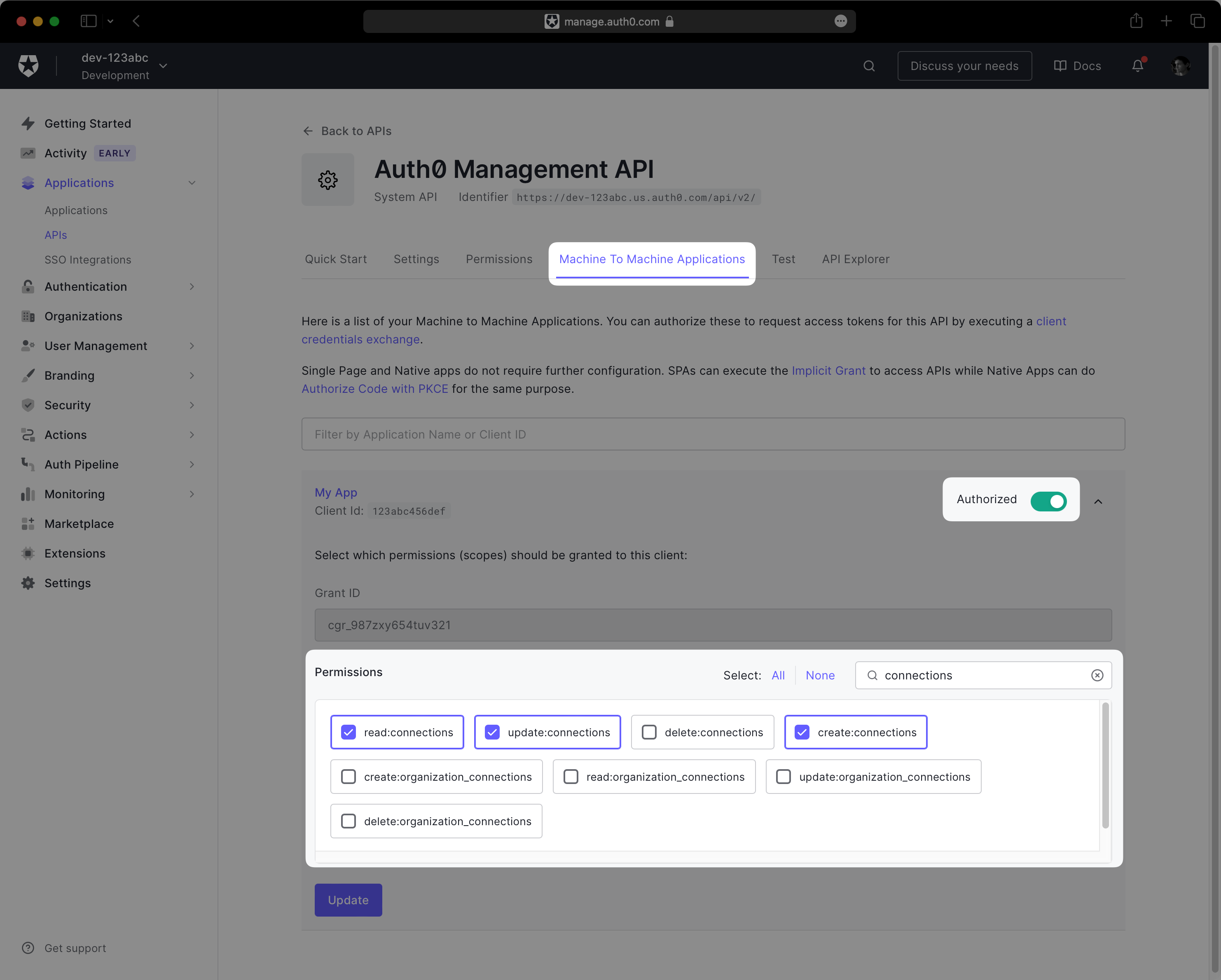
|
|
39
|
+
|
|
40
|
+
Next, navigate to **Applications** → **_Your App_** → **Settings**. You should see three fields under **Basic Information**: “Domain”, “Client ID”, and “Client Secret”.
|
|
41
|
+
|
|
42
|
+
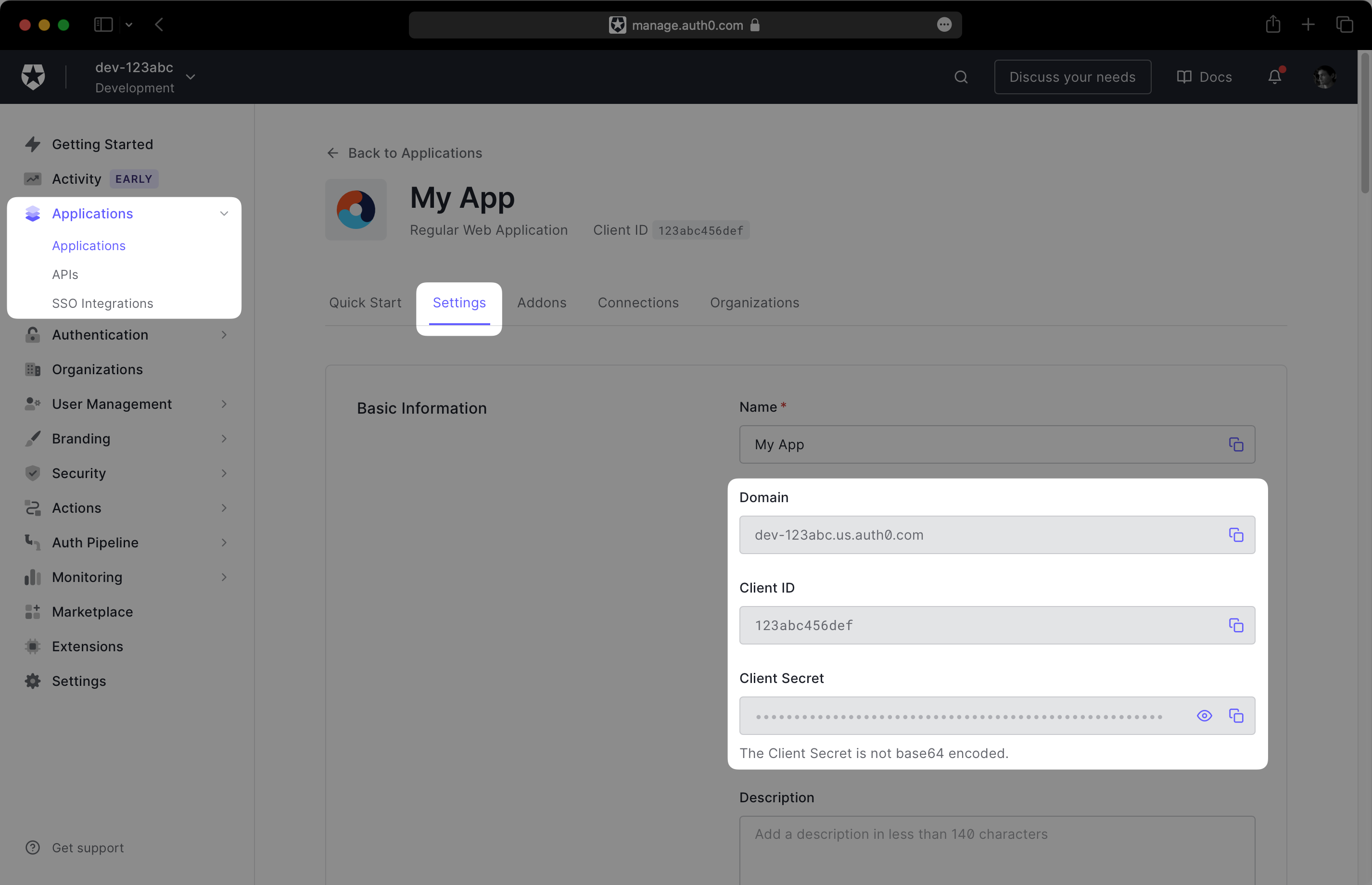
|
|
43
|
+
|
|
44
|
+
Record this information in a safe place, as you will provide it to the WorkOS dashboard in the next step.
|
|
45
|
+
|
|
46
|
+
---
|
|
47
|
+
|
|
48
|
+
## (2) Connect WorkOS to Auth0
|
|
49
|
+
|
|
50
|
+
In the WorkOS dashboard, navigate to **Configuration** → **Settings** and scroll to the **Auth0 Credentials** section. Click **Set Auth0 Credentials**:
|
|
51
|
+
|
|
52
|
+
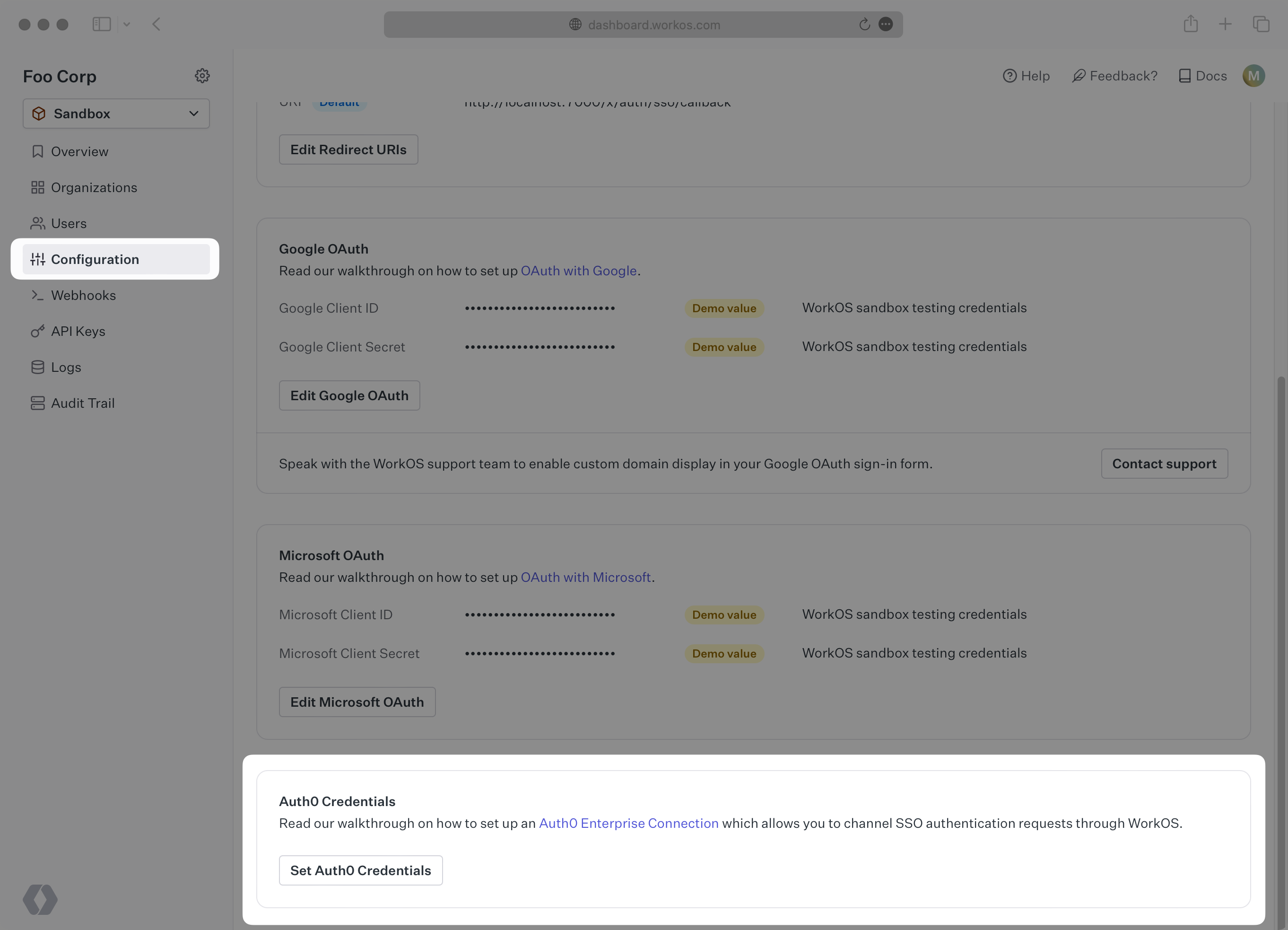
|
|
53
|
+
|
|
54
|
+
In the modal, enter the credentials you obtained in the previous step: “API Domain”, “Client ID”, and “Client Secret”.
|
|
55
|
+
|
|
56
|
+
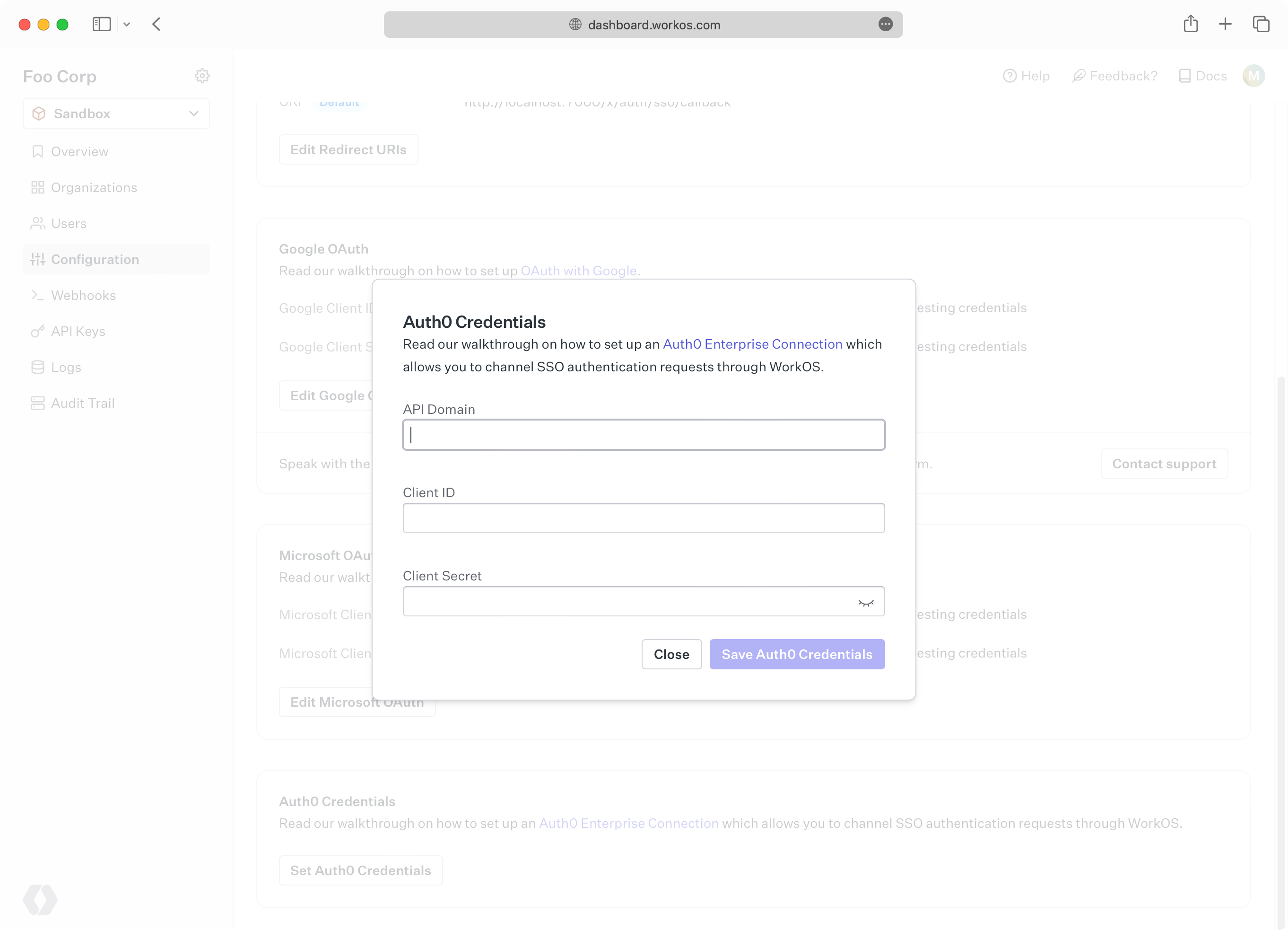
|
|
57
|
+
|
|
58
|
+
Click **Save**. In the final step, you will head back to the Auth0 dashboard one last time to complete the configuration.
|
|
59
|
+
|
|
60
|
+
---
|
|
61
|
+
|
|
62
|
+
## (3) Enable the database connection
|
|
63
|
+
|
|
64
|
+
After saving your credentials, WorkOS will create a database connection in your Auth0 environment. This connection will contain the users from directories in your WorkOS organizations. The next step is to enable the connection for your Auth0 application.
|
|
65
|
+
|
|
66
|
+
In the Auth0 dashboard, navigate to **Applications** → **_Your App_** → **Connections**. You should see a connection with a `workos-dsync-` prefix in its name. Enable it for your application.
|
|
67
|
+
|
|
68
|
+
|
|
69
|
+
|
|
70
|
+
---
|
|
71
|
+
|
|
72
|
+
## Summary
|
|
73
|
+
|
|
74
|
+
Your WorkOS directories will now be synchronized with your new Auth0 database connection! You are ready to use WorkOS features like [Admin Portal](/admin-portal), allowing IT admins to configure their directory provider for your application directly.
|
|
75
|
+
|
|
76
|
+
New users provisioned into Auth0 are given a randomly generated password. They will need to reset their password before they can sign in. You can also use [WorkOS directory sync webhooks](/events/data-syncing/webhooks) to be notified when new users are provisioned, allowing you to tailor the onboarding experience for these new users, like sending a welcome email.
|
|
77
|
+
|
|
78
|
+
Deprovisioned users will be deleted from the Auth0 database connection. If you need to perform additional cleanup in your application, you can receive WorkOS directory sync webhooks for delete events as well.
|