@workos/mcp-docs-server 0.1.0
This diff represents the content of publicly available package versions that have been released to one of the supported registries. The information contained in this diff is provided for informational purposes only and reflects changes between package versions as they appear in their respective public registries.
- package/.docs/organized/changelogs/workos-platform.json +277 -0
- package/.docs/organized/docs/admin-portal/_navigation.mdx +16 -0
- package/.docs/organized/docs/admin-portal/custom-branding.mdx +111 -0
- package/.docs/organized/docs/admin-portal/example-apps.mdx +46 -0
- package/.docs/organized/docs/admin-portal/index.mdx +240 -0
- package/.docs/organized/docs/audit-logs/_navigation.mdx +22 -0
- package/.docs/organized/docs/audit-logs/admin-portal.mdx +20 -0
- package/.docs/organized/docs/audit-logs/editing-events.mdx +27 -0
- package/.docs/organized/docs/audit-logs/exporting-events.mdx +29 -0
- package/.docs/organized/docs/audit-logs/index.mdx +110 -0
- package/.docs/organized/docs/audit-logs/log-streams.mdx +56 -0
- package/.docs/organized/docs/audit-logs/metadata-schema.mdx +21 -0
- package/.docs/organized/docs/custom-domains/_navigation.mdx +16 -0
- package/.docs/organized/docs/custom-domains/admin-portal.mdx +38 -0
- package/.docs/organized/docs/custom-domains/auth-api.mdx +59 -0
- package/.docs/organized/docs/custom-domains/authkit.mdx +36 -0
- package/.docs/organized/docs/custom-domains/email.mdx +41 -0
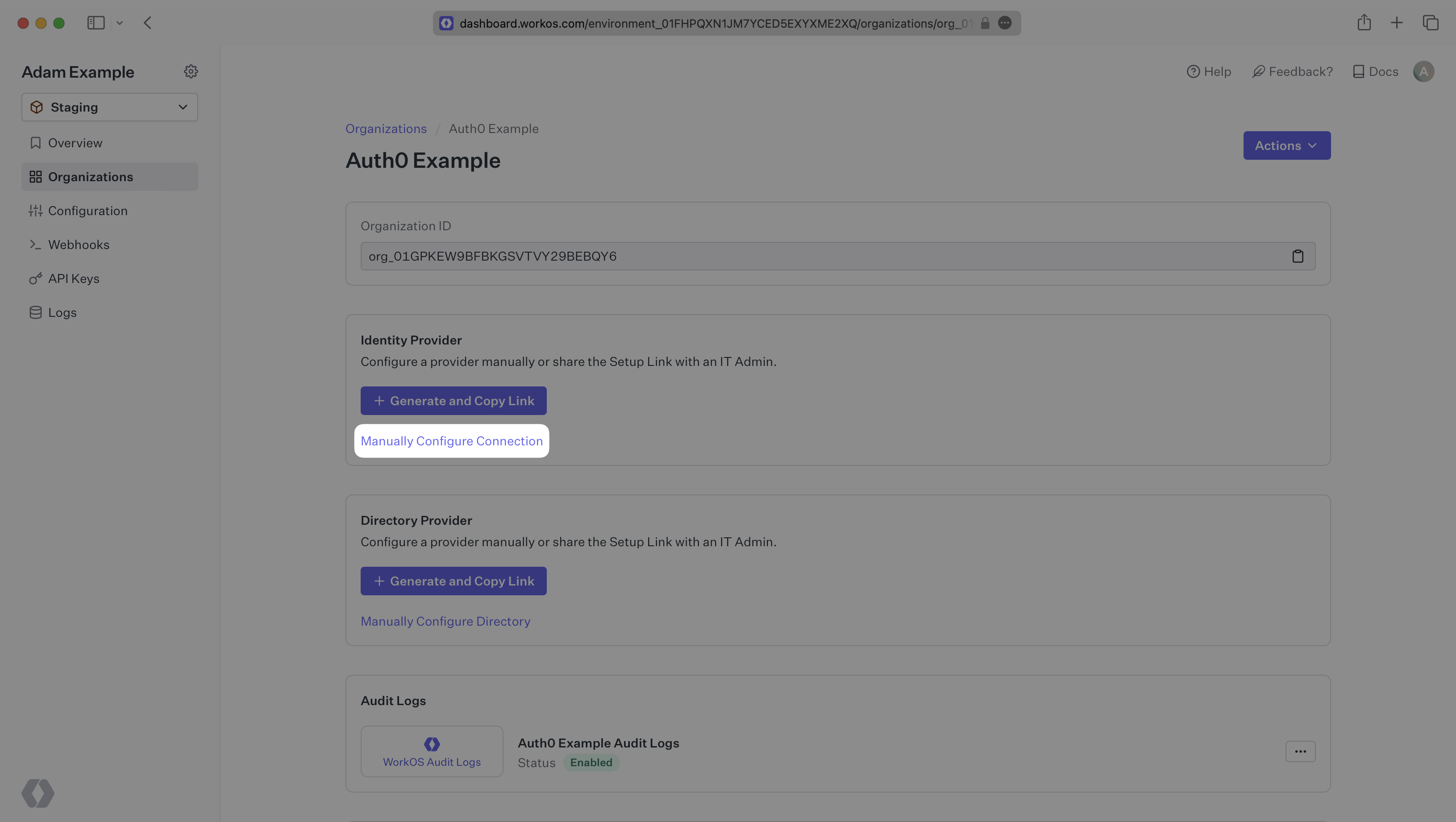
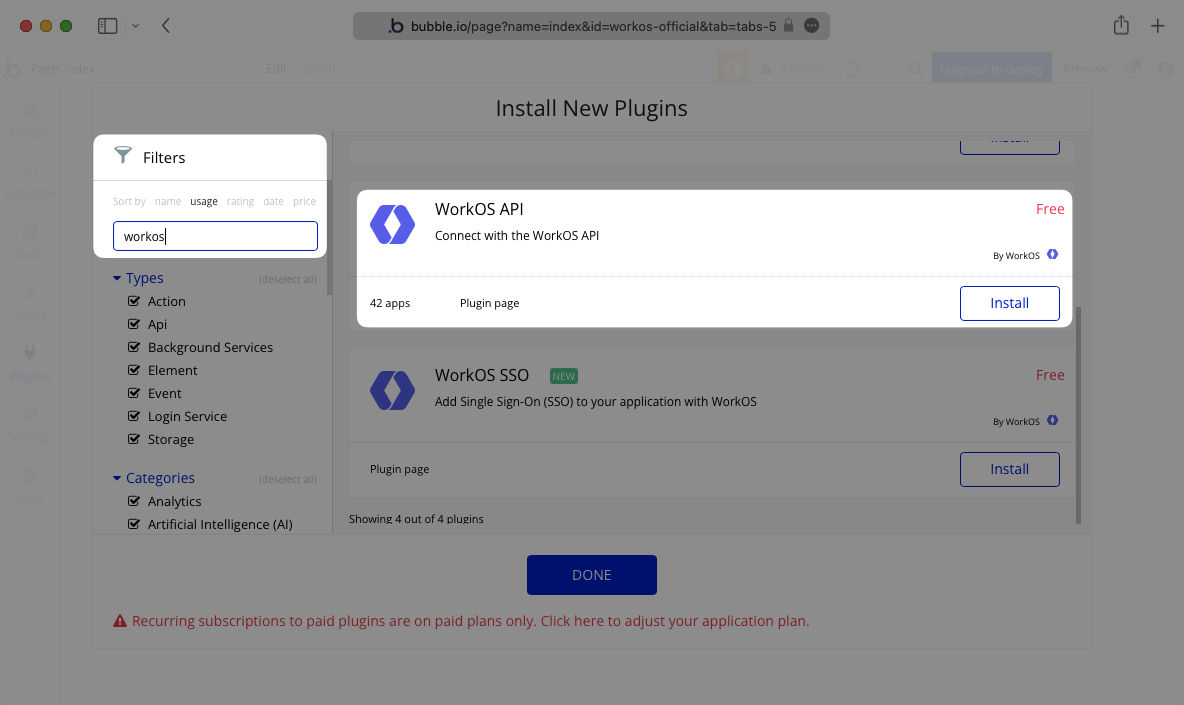
- package/.docs/organized/docs/custom-domains/index.mdx +19 -0
- package/.docs/organized/docs/dashboard.mdx +244 -0
- package/.docs/organized/docs/demo/_navigation.mdx +26 -0
- package/.docs/organized/docs/demo/accordion.mdx +34 -0
- package/.docs/organized/docs/demo/checklist.mdx +33 -0
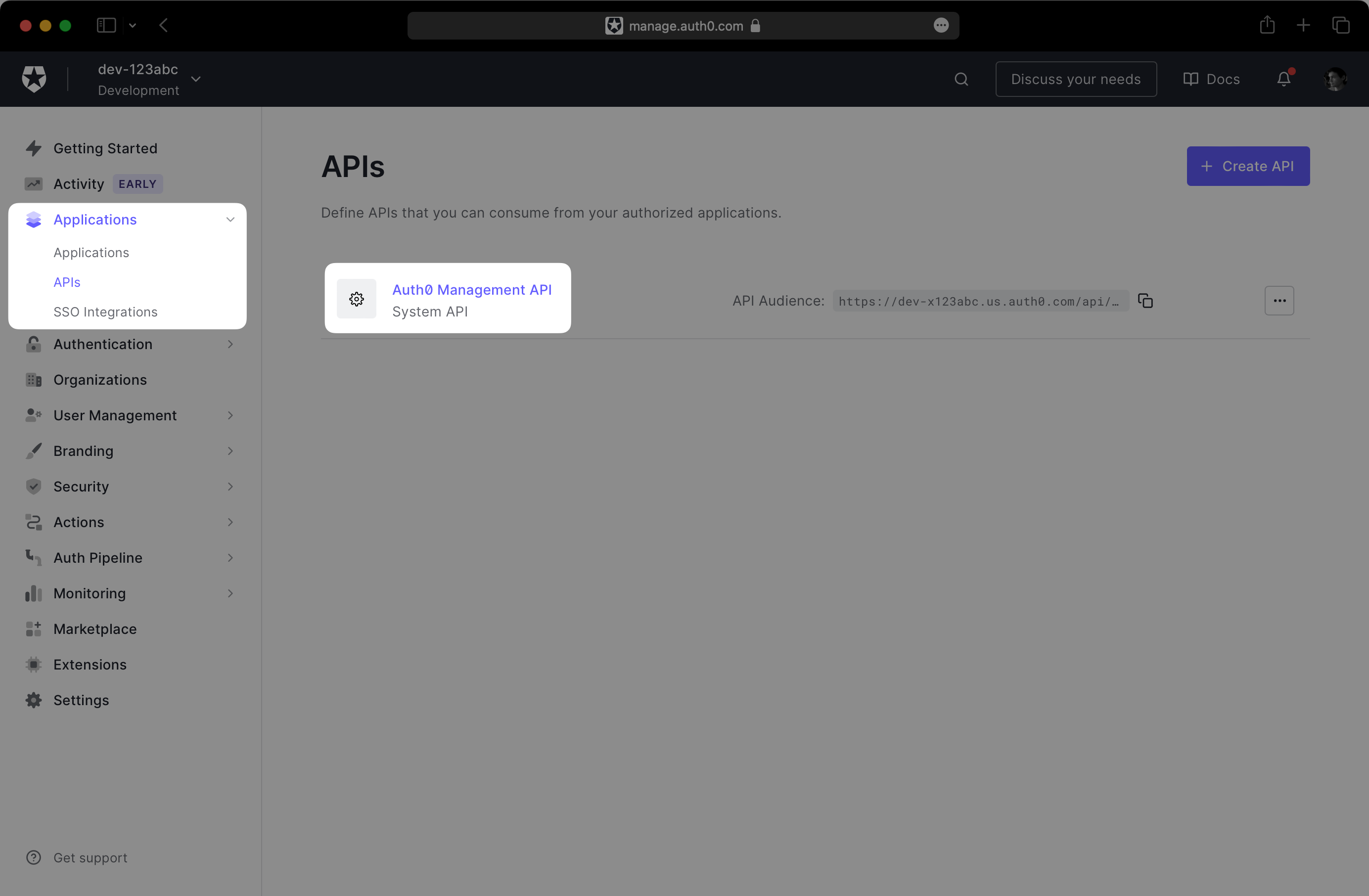
- package/.docs/organized/docs/demo/code-block.mdx +185 -0
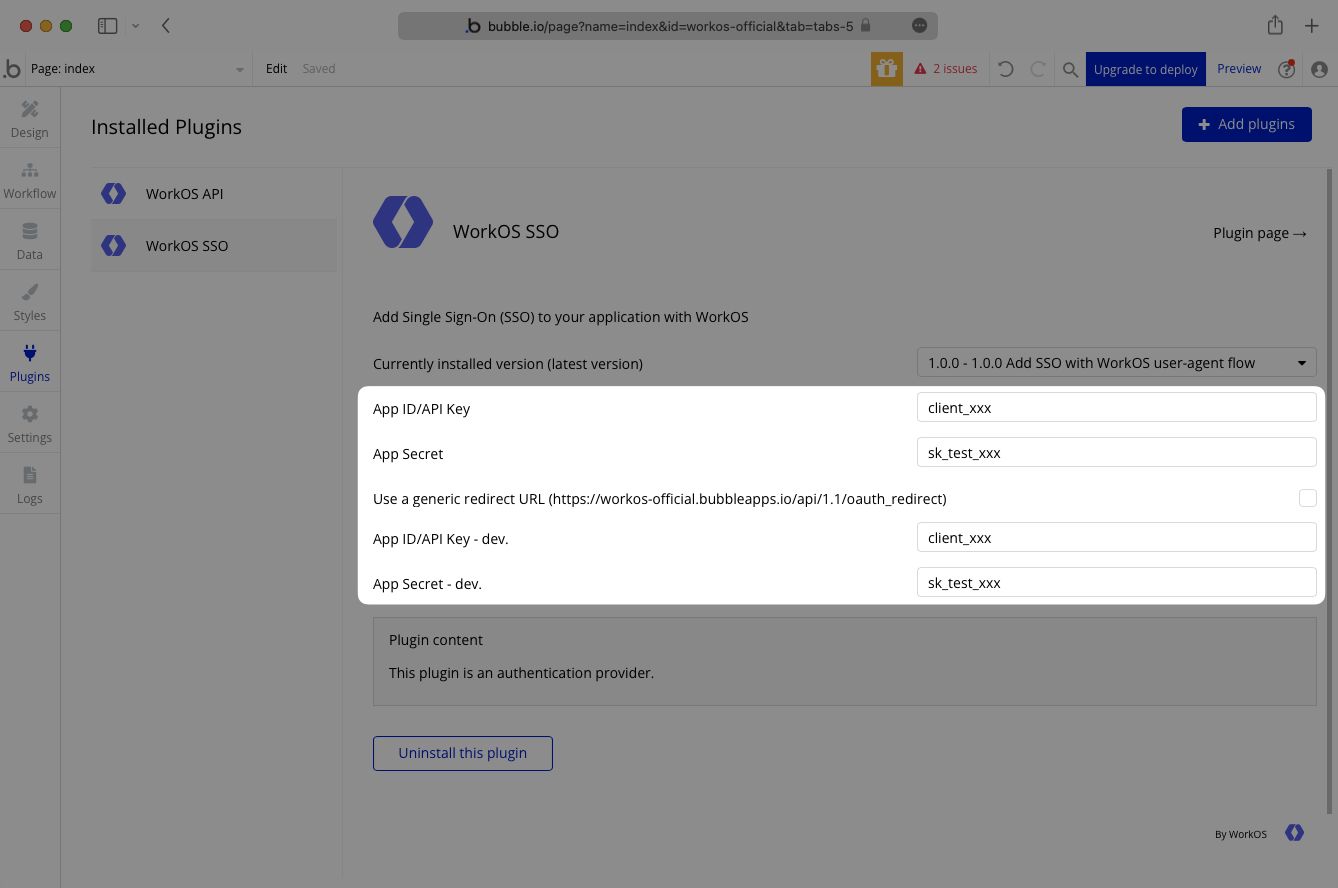
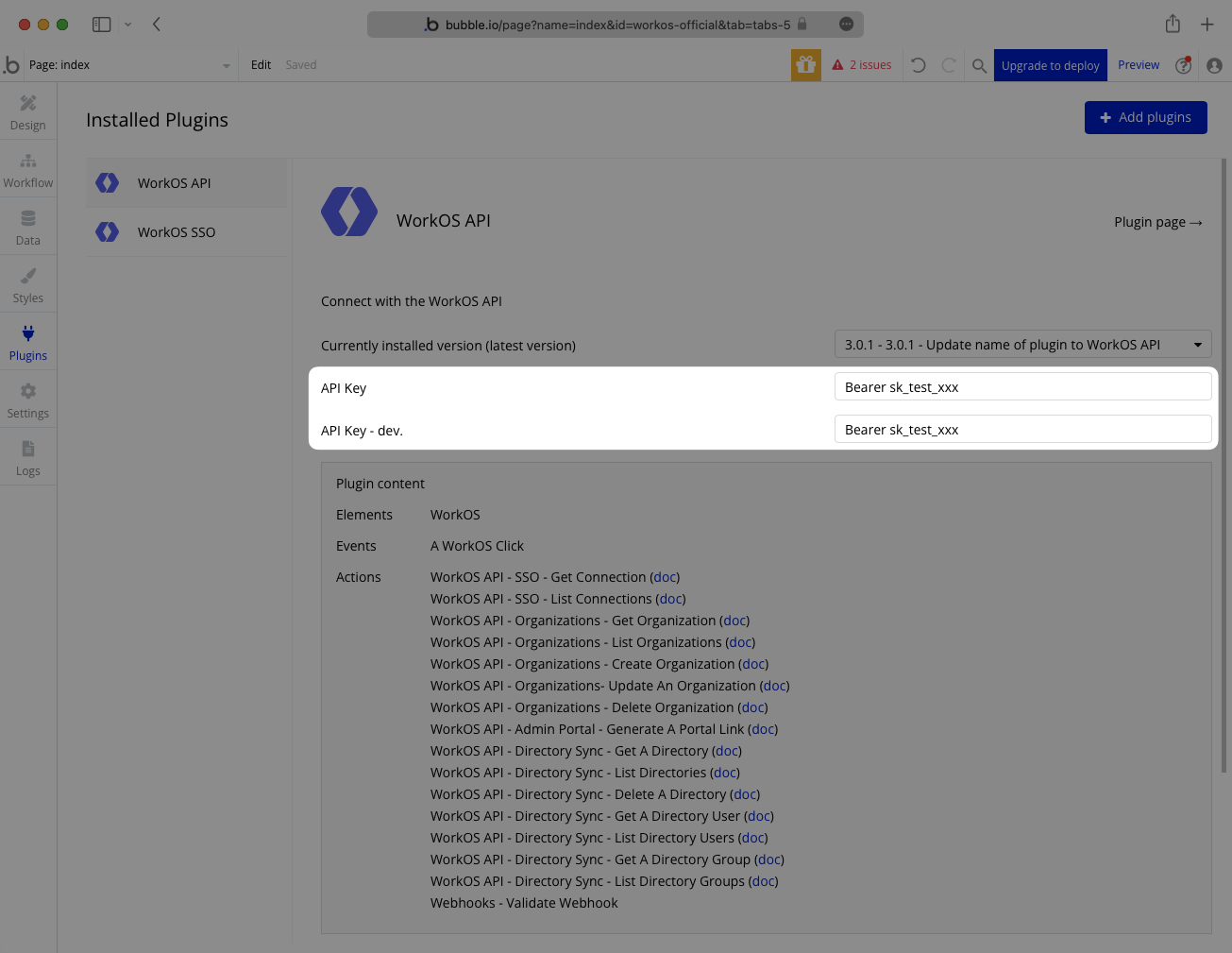
- package/.docs/organized/docs/demo/definition-list.mdx +35 -0
- package/.docs/organized/docs/demo/index.mdx +7 -0
- package/.docs/organized/docs/demo/punctuation.mdx +37 -0
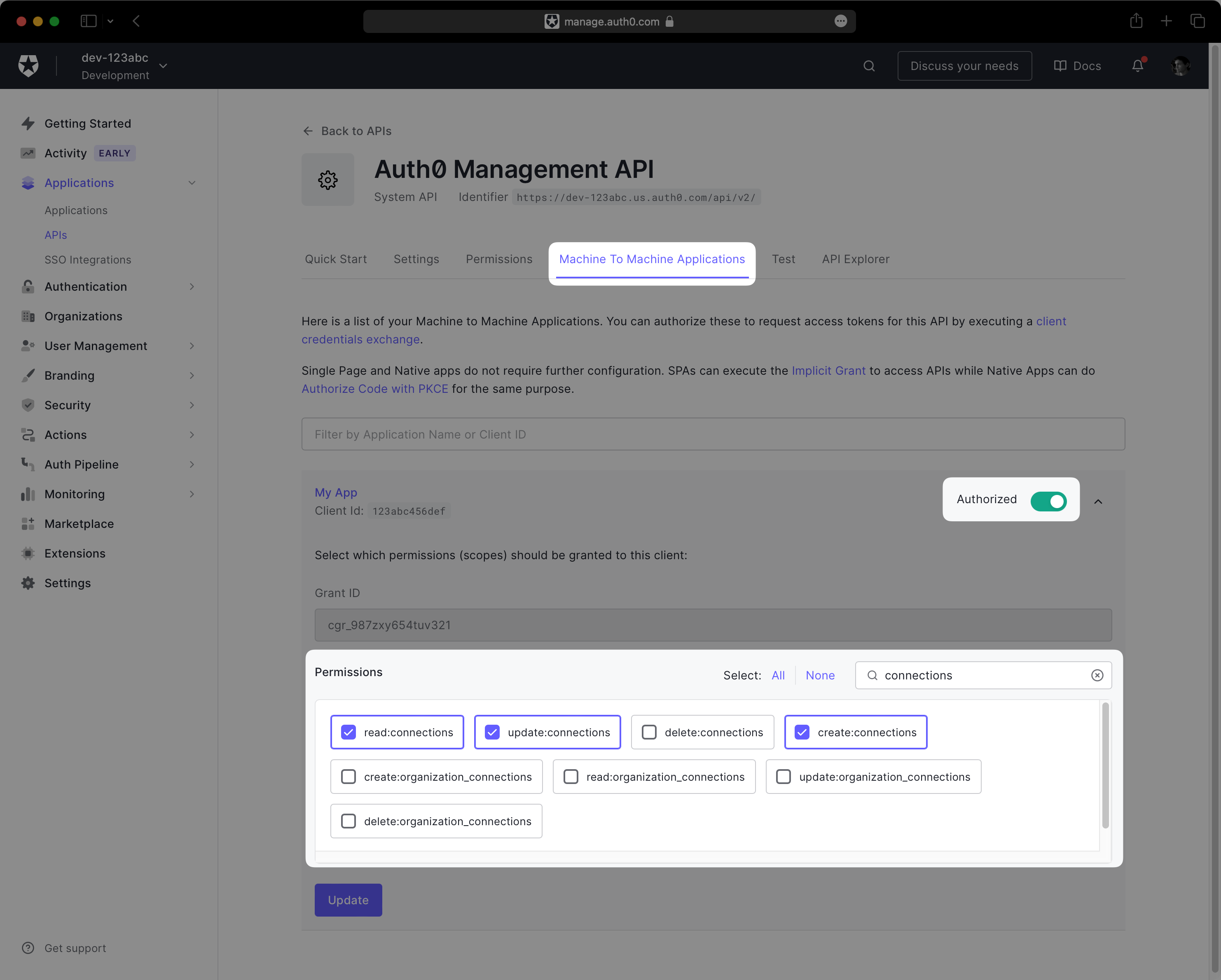
- package/.docs/organized/docs/demo/replacements.mdx +26 -0
- package/.docs/organized/docs/demo/table.mdx +26 -0
- package/.docs/organized/docs/demo/tabs.mdx +17 -0
- package/.docs/organized/docs/directory-sync/_navigation.mdx +28 -0
- package/.docs/organized/docs/directory-sync/attributes.mdx +209 -0
- package/.docs/organized/docs/directory-sync/example-apps.mdx +46 -0
- package/.docs/organized/docs/directory-sync/handle-inactive-users.mdx +52 -0
- package/.docs/organized/docs/directory-sync/identity-provider-role-assignment.mdx +134 -0
- package/.docs/organized/docs/directory-sync/index.mdx +107 -0
- package/.docs/organized/docs/directory-sync/quick-start.mdx +129 -0
- package/.docs/organized/docs/directory-sync/understanding-events.mdx +209 -0
- package/.docs/organized/docs/domain-verification/_navigation.mdx +10 -0
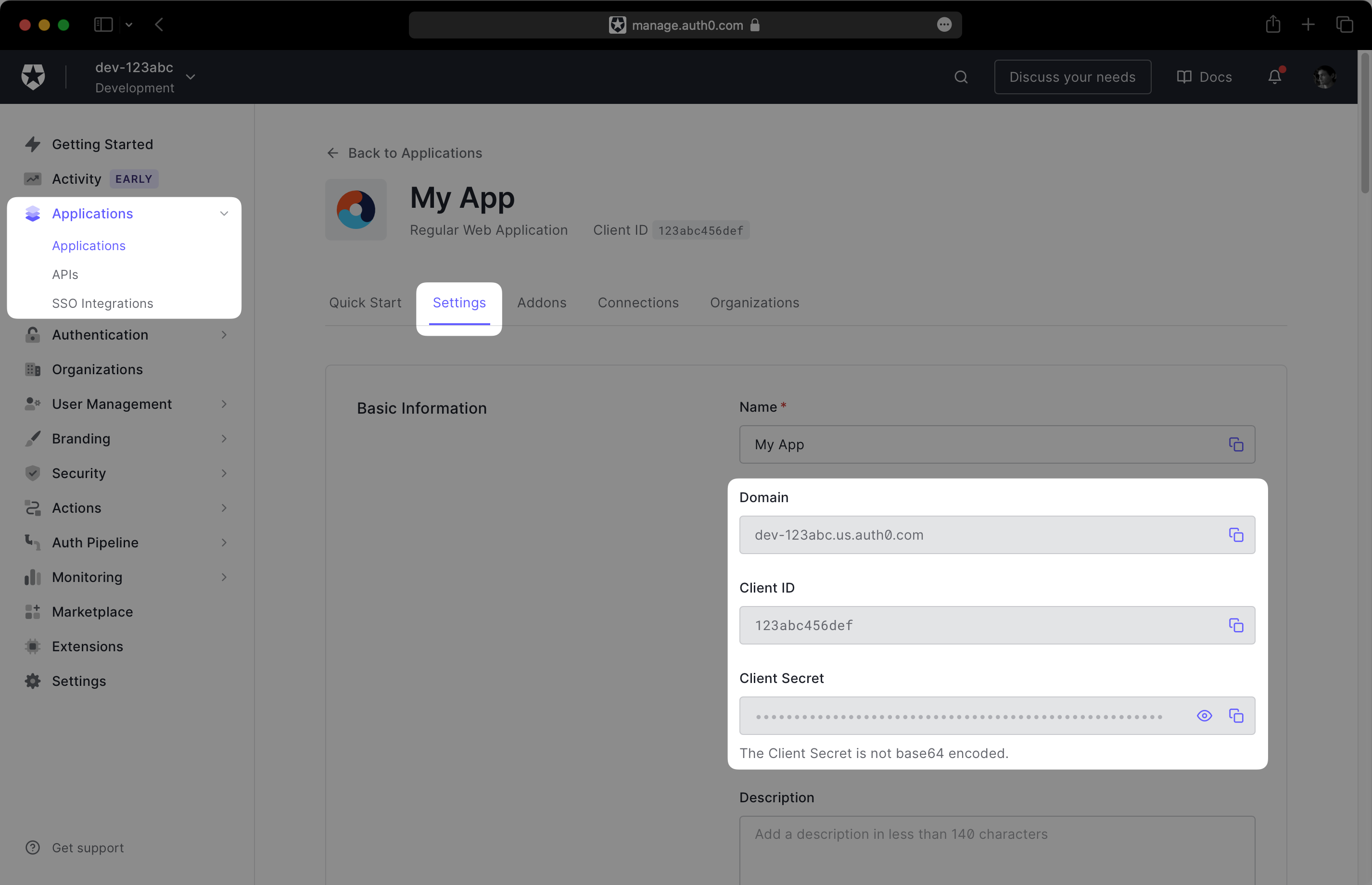
- package/.docs/organized/docs/domain-verification/api.mdx +60 -0
- package/.docs/organized/docs/domain-verification/index.mdx +67 -0
- package/.docs/organized/docs/email.mdx +109 -0
- package/.docs/organized/docs/events/_navigation.mdx +22 -0
- package/.docs/organized/docs/events/data-syncing/data-reconciliation.mdx +56 -0
- package/.docs/organized/docs/events/data-syncing/events-api.mdx +114 -0
- package/.docs/organized/docs/events/data-syncing/index.mdx +66 -0
- package/.docs/organized/docs/events/data-syncing/webhooks.mdx +173 -0
- package/.docs/organized/docs/events/index.mdx +783 -0
- package/.docs/organized/docs/events/observability/datadog.mdx +76 -0
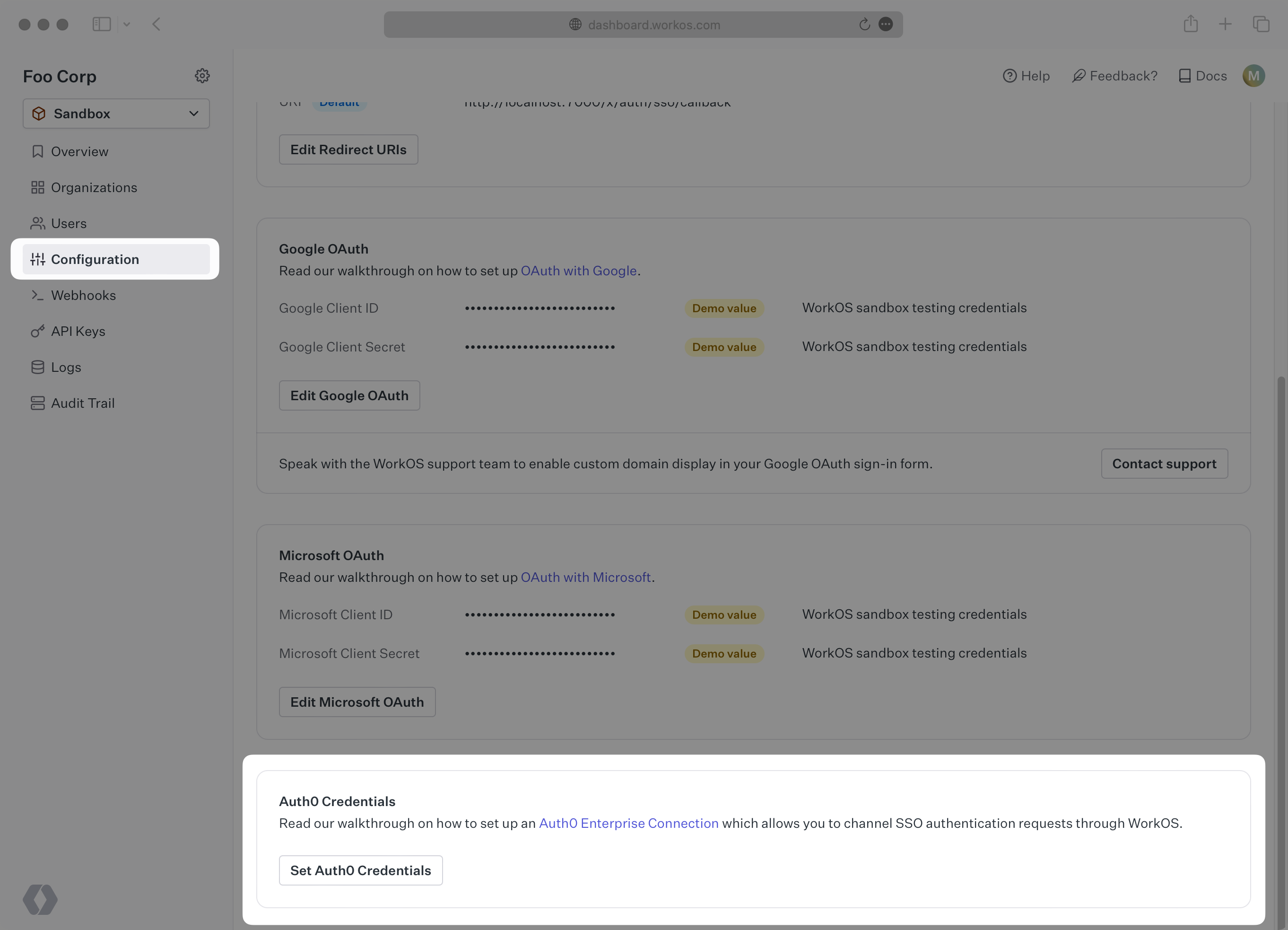
- package/.docs/organized/docs/fga/_navigation.mdx +64 -0
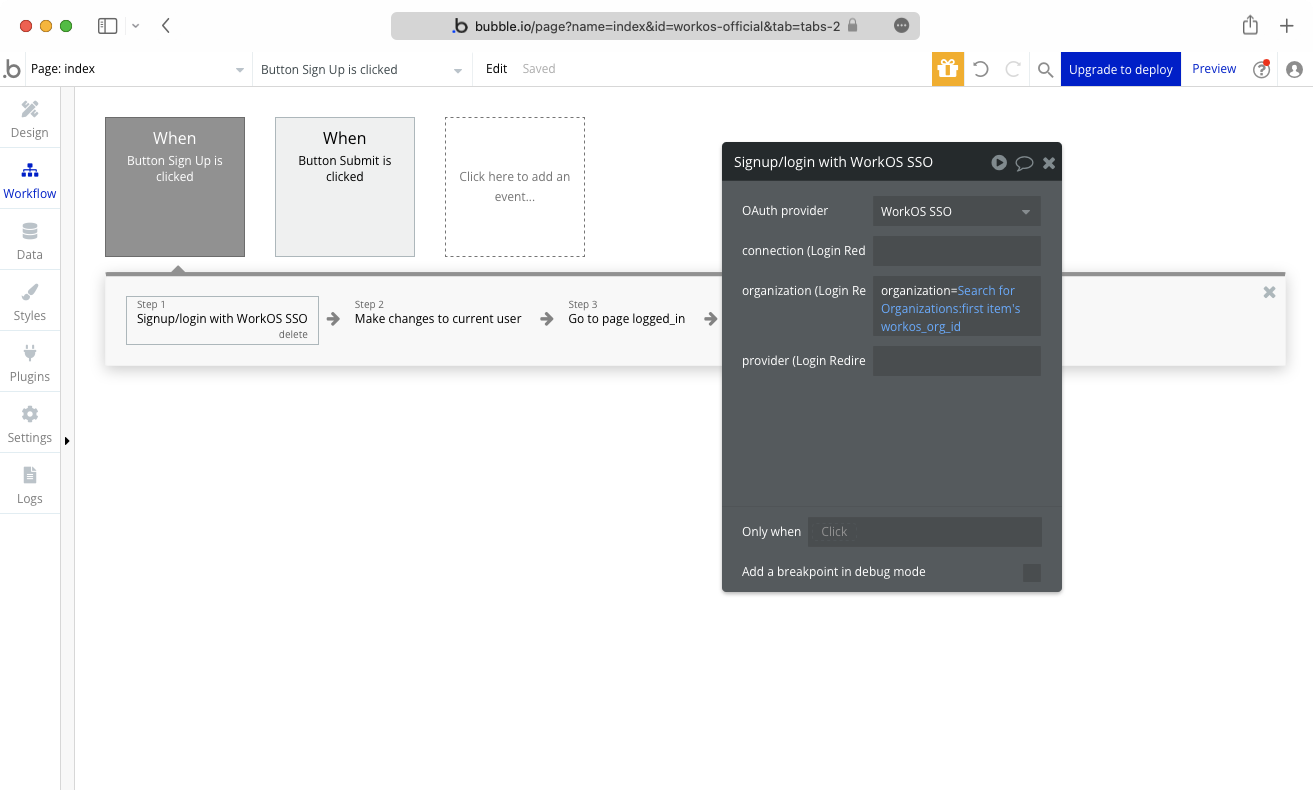
- package/.docs/organized/docs/fga/identity-provider-sessions.mdx +68 -0
- package/.docs/organized/docs/fga/index.mdx +60 -0
- package/.docs/organized/docs/fga/local-development.mdx +155 -0
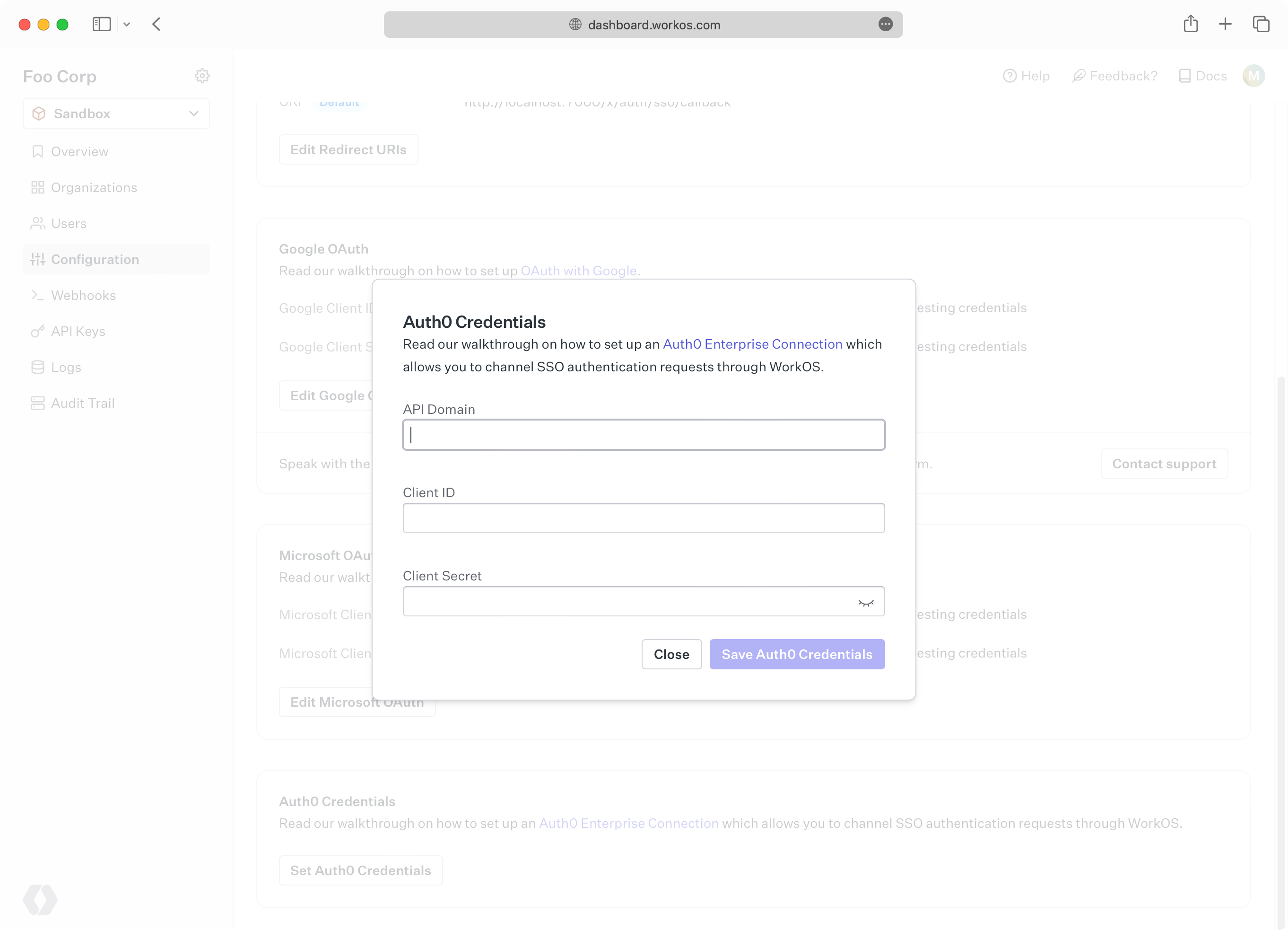
- package/.docs/organized/docs/fga/modeling/abac.mdx +107 -0
- package/.docs/organized/docs/fga/modeling/blocklist.mdx +84 -0
- package/.docs/organized/docs/fga/modeling/conditional-roles.mdx +99 -0
- package/.docs/organized/docs/fga/modeling/custom-roles.mdx +90 -0
- package/.docs/organized/docs/fga/modeling/entitlements.mdx +127 -0
- package/.docs/organized/docs/fga/modeling/managed-service-provider.mdx +131 -0
- package/.docs/organized/docs/fga/modeling/org-roles-and-permissions.mdx +95 -0
- package/.docs/organized/docs/fga/modeling/policy-context.mdx +231 -0
- package/.docs/organized/docs/fga/modeling/public-access.mdx +61 -0
- package/.docs/organized/docs/fga/modeling/shareable-content.mdx +106 -0
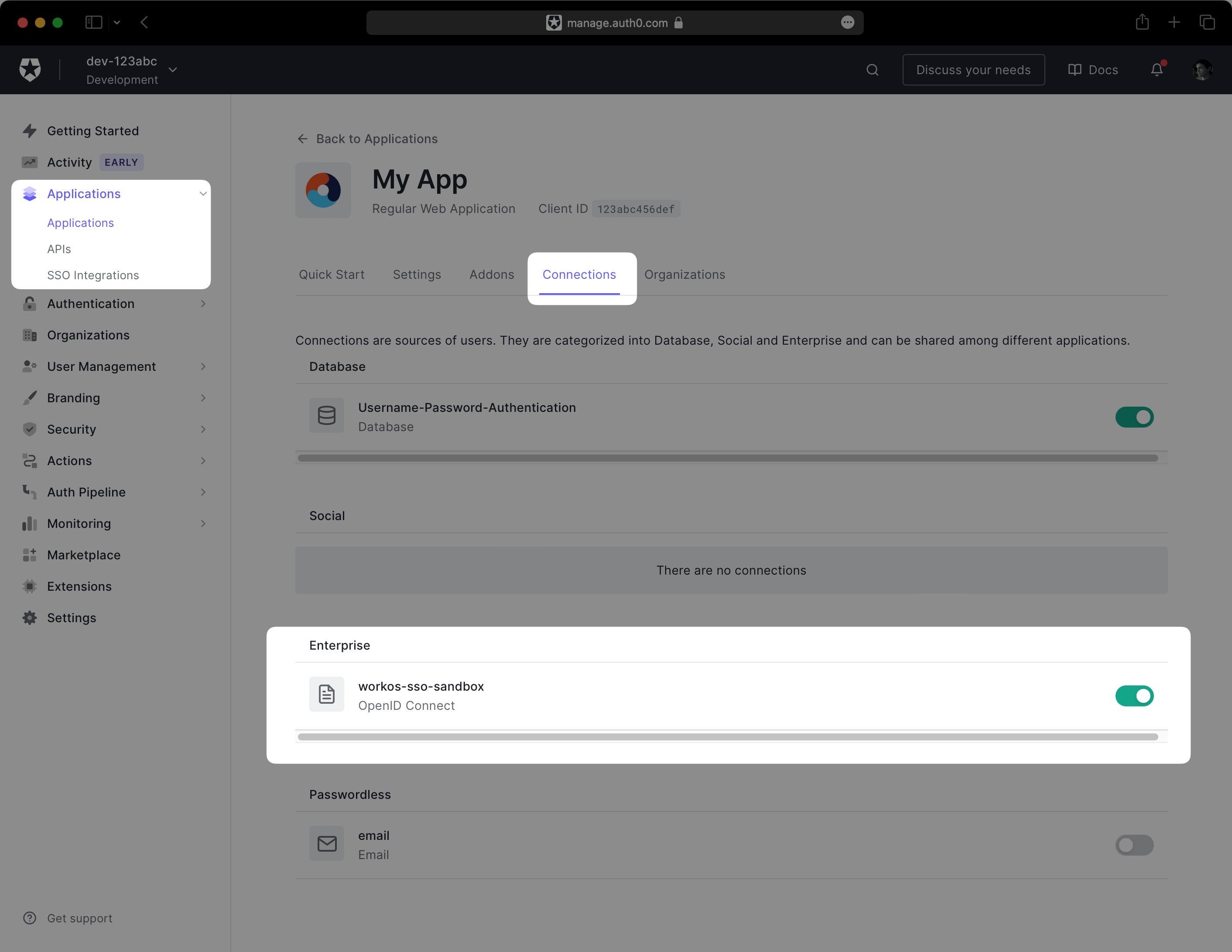
- package/.docs/organized/docs/fga/modeling/superusers.mdx +74 -0
- package/.docs/organized/docs/fga/modeling/user-groups.mdx +92 -0
- package/.docs/organized/docs/fga/operations-usage.mdx +104 -0
- package/.docs/organized/docs/fga/playground.mdx +12 -0
- package/.docs/organized/docs/fga/policies.mdx +462 -0
- package/.docs/organized/docs/fga/query-language.mdx +112 -0
- package/.docs/organized/docs/fga/quick-start.mdx +174 -0
- package/.docs/organized/docs/fga/resources.mdx +92 -0
- package/.docs/organized/docs/fga/schema-management.mdx +224 -0
- package/.docs/organized/docs/fga/schema.mdx +388 -0
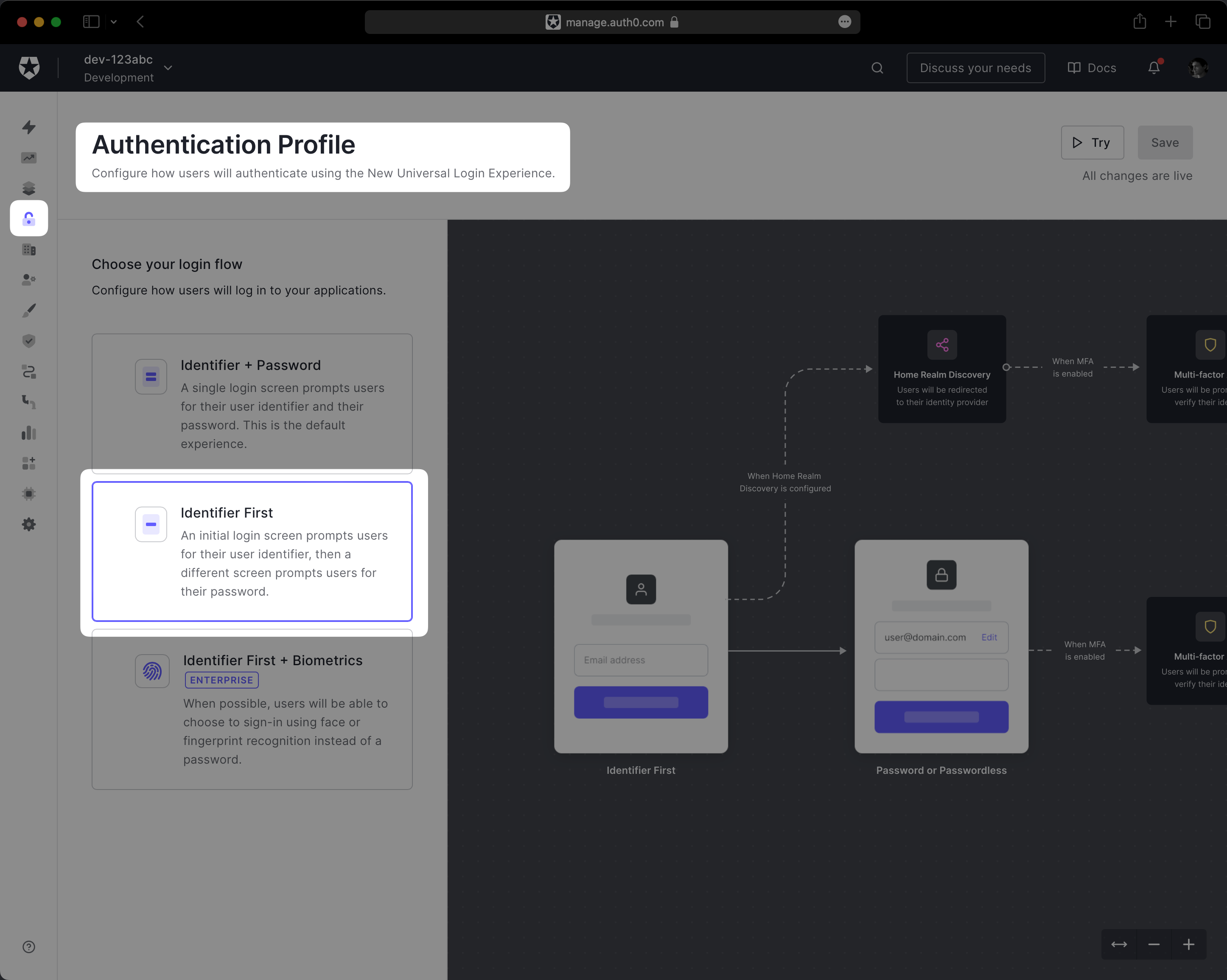
- package/.docs/organized/docs/fga/warrant-tokens.mdx +44 -0
- package/.docs/organized/docs/fga/warrants.mdx +92 -0
- package/.docs/organized/docs/glossary.mdx +184 -0
- package/.docs/organized/docs/integrations/_navigation.mdx +6 -0
- package/.docs/organized/docs/integrations/access-people-hr.mdx +87 -0
- package/.docs/organized/docs/integrations/adp-oidc.mdx +103 -0
- package/.docs/organized/docs/integrations/apple.mdx +169 -0
- package/.docs/organized/docs/integrations/auth0-directory-sync.mdx +78 -0
- package/.docs/organized/docs/integrations/auth0-enterprise-connection.mdx +92 -0
- package/.docs/organized/docs/integrations/auth0-saml.mdx +81 -0
- package/.docs/organized/docs/integrations/aws-cognito.mdx +81 -0
- package/.docs/organized/docs/integrations/bamboohr.mdx +90 -0
- package/.docs/organized/docs/integrations/breathe-hr.mdx +89 -0
- package/.docs/organized/docs/integrations/bubble.mdx +129 -0
- package/.docs/organized/docs/integrations/cas-saml.mdx +65 -0
- package/.docs/organized/docs/integrations/cezanne.mdx +74 -0
- package/.docs/organized/docs/integrations/classlink-saml.mdx +100 -0
- package/.docs/organized/docs/integrations/cloudflare-saml.mdx +164 -0
- package/.docs/organized/docs/integrations/cyberark-saml.mdx +138 -0
- package/.docs/organized/docs/integrations/cyberark-scim.mdx +100 -0
- package/.docs/organized/docs/integrations/duo-saml.mdx +127 -0
- package/.docs/organized/docs/integrations/entra-id-saml.mdx +156 -0
- package/.docs/organized/docs/integrations/entra-id-scim.mdx +218 -0
- package/.docs/organized/docs/integrations/firebase.mdx +98 -0
- package/.docs/organized/docs/integrations/fourth.mdx +66 -0
- package/.docs/organized/docs/integrations/github-oauth.mdx +85 -0
- package/.docs/organized/docs/integrations/gitlab-oauth.mdx +81 -0
- package/.docs/organized/docs/integrations/google-directory-sync.mdx +86 -0
- package/.docs/organized/docs/integrations/google-oauth.mdx +173 -0
- package/.docs/organized/docs/integrations/google-saml.mdx +135 -0
- package/.docs/organized/docs/integrations/hibob.mdx +98 -0
- package/.docs/organized/docs/integrations/jumpcloud-saml.mdx +96 -0
- package/.docs/organized/docs/integrations/jumpcloud-scim.mdx +106 -0
- package/.docs/organized/docs/integrations/keycloak-saml.mdx +128 -0
- package/.docs/organized/docs/integrations/lastpass-saml.mdx +134 -0
- package/.docs/organized/docs/integrations/linkedin-oauth.mdx +77 -0
- package/.docs/organized/docs/integrations/login-gov-oidc.mdx +103 -0
- package/.docs/organized/docs/integrations/microsoft-ad-fs-saml.mdx +96 -0
- package/.docs/organized/docs/integrations/microsoft-oauth.mdx +101 -0
- package/.docs/organized/docs/integrations/miniorange-saml.mdx +124 -0
- package/.docs/organized/docs/integrations/net-iq-saml.mdx +75 -0
- package/.docs/organized/docs/integrations/next-auth.mdx +257 -0
- package/.docs/organized/docs/integrations/oidc.mdx +64 -0
- package/.docs/organized/docs/integrations/okta-saml.mdx +144 -0
- package/.docs/organized/docs/integrations/okta-scim.mdx +210 -0
- package/.docs/organized/docs/integrations/onelogin-saml.mdx +131 -0
- package/.docs/organized/docs/integrations/onelogin-scim.mdx +150 -0
- package/.docs/organized/docs/integrations/oracle-saml.mdx +76 -0
- package/.docs/organized/docs/integrations/pingfederate-saml.mdx +103 -0
- package/.docs/organized/docs/integrations/pingfederate-scim.mdx +150 -0
- package/.docs/organized/docs/integrations/pingone-saml.mdx +86 -0
- package/.docs/organized/docs/integrations/react-native-expo.mdx +93 -0
- package/.docs/organized/docs/integrations/rippling-saml.mdx +174 -0
- package/.docs/organized/docs/integrations/rippling-scim.mdx +148 -0
- package/.docs/organized/docs/integrations/salesforce-saml.mdx +143 -0
- package/.docs/organized/docs/integrations/saml.mdx +64 -0
- package/.docs/organized/docs/integrations/scim.mdx +64 -0
- package/.docs/organized/docs/integrations/sftp.mdx +150 -0
- package/.docs/organized/docs/integrations/shibboleth-generic-saml.mdx +84 -0
- package/.docs/organized/docs/integrations/shibboleth-unsolicited-saml.mdx +84 -0
- package/.docs/organized/docs/integrations/simple-saml-php.mdx +78 -0
- package/.docs/organized/docs/integrations/slack-oauth.mdx +102 -0
- package/.docs/organized/docs/integrations/supabase.mdx +68 -0
- package/.docs/organized/docs/integrations/vmware-saml.mdx +100 -0
- package/.docs/organized/docs/integrations/workday.mdx +156 -0
- package/.docs/organized/docs/integrations/xero-oauth.mdx +83 -0
- package/.docs/organized/docs/magic-link/_navigation.mdx +16 -0
- package/.docs/organized/docs/magic-link/example-apps.mdx +46 -0
- package/.docs/organized/docs/magic-link/index.mdx +199 -0
- package/.docs/organized/docs/magic-link/launch-checklist.mdx +27 -0
- package/.docs/organized/docs/mfa/_navigation.mdx +18 -0
- package/.docs/organized/docs/mfa/example-apps.mdx +46 -0
- package/.docs/organized/docs/mfa/index.mdx +140 -0
- package/.docs/organized/docs/mfa/ux/enrollment.mdx +74 -0
- package/.docs/organized/docs/mfa/ux/sign-in.mdx +30 -0
- package/.docs/organized/docs/migrate/_navigation.mdx +6 -0
- package/.docs/organized/docs/migrate/auth0.mdx +98 -0
- package/.docs/organized/docs/migrate/aws-cognito.mdx +115 -0
- package/.docs/organized/docs/migrate/clerk.mdx +106 -0
- package/.docs/organized/docs/migrate/firebase.mdx +80 -0
- package/.docs/organized/docs/migrate/other-services.mdx +179 -0
- package/.docs/organized/docs/migrate/standalone-sso.mdx +105 -0
- package/.docs/organized/docs/on-prem-deployment.mdx +119 -0
- package/.docs/organized/docs/postman.mdx +90 -0
- package/.docs/organized/docs/reference/_navigation.mdx +527 -0
- package/.docs/organized/docs/reference/admin-portal/index.mdx +6 -0
- package/.docs/organized/docs/reference/admin-portal/portal-link/generate.mdx +268 -0
- package/.docs/organized/docs/reference/admin-portal/portal-link/index.mdx +15 -0
- package/.docs/organized/docs/reference/admin-portal/provider-icons/index.mdx +52 -0
- package/.docs/organized/docs/reference/api-keys.mdx +22 -0
- package/.docs/organized/docs/reference/audit-logs/audit-log-export.mdx +239 -0
- package/.docs/organized/docs/reference/audit-logs/audit-log-schema.mdx +69 -0
- package/.docs/organized/docs/reference/audit-logs/create-event.mdx +673 -0
- package/.docs/organized/docs/reference/audit-logs/create-export.mdx +308 -0
- package/.docs/organized/docs/reference/audit-logs/create-schema.mdx +95 -0
- package/.docs/organized/docs/reference/audit-logs/get-export.mdx +117 -0
- package/.docs/organized/docs/reference/audit-logs/get-retention.mdx +34 -0
- package/.docs/organized/docs/reference/audit-logs/index.mdx +6 -0
- package/.docs/organized/docs/reference/audit-logs/list-actions.mdx +40 -0
- package/.docs/organized/docs/reference/audit-logs/list-schemas.mdx +40 -0
- package/.docs/organized/docs/reference/audit-logs/set-retention.mdx +39 -0
- package/.docs/organized/docs/reference/client-libraries.mdx +19 -0
- package/.docs/organized/docs/reference/directory-sync/directory/delete.mdx +90 -0
- package/.docs/organized/docs/reference/directory-sync/directory/get.mdx +105 -0
- package/.docs/organized/docs/reference/directory-sync/directory/index.mdx +385 -0
- package/.docs/organized/docs/reference/directory-sync/directory/list.mdx +281 -0
- package/.docs/organized/docs/reference/directory-sync/directory-group/get.mdx +105 -0
- package/.docs/organized/docs/reference/directory-sync/directory-group/index.mdx +277 -0
- package/.docs/organized/docs/reference/directory-sync/directory-group/list.mdx +295 -0
- package/.docs/organized/docs/reference/directory-sync/directory-user/get.mdx +112 -0
- package/.docs/organized/docs/reference/directory-sync/directory-user/index.mdx +470 -0
- package/.docs/organized/docs/reference/directory-sync/directory-user/list.mdx +304 -0
- package/.docs/organized/docs/reference/directory-sync/index.mdx +10 -0
- package/.docs/organized/docs/reference/domain-verification/create.mdx +38 -0
- package/.docs/organized/docs/reference/domain-verification/get.mdx +32 -0
- package/.docs/organized/docs/reference/domain-verification/index.mdx +84 -0
- package/.docs/organized/docs/reference/domain-verification/verify.mdx +36 -0
- package/.docs/organized/docs/reference/errors.mdx +30 -0
- package/.docs/organized/docs/reference/events/index.mdx +9 -0
- package/.docs/organized/docs/reference/events/list.mdx +246 -0
- package/.docs/organized/docs/reference/fga/batch-check.mdx +277 -0
- package/.docs/organized/docs/reference/fga/check.mdx +563 -0
- package/.docs/organized/docs/reference/fga/index.mdx +6 -0
- package/.docs/organized/docs/reference/fga/policy/create.mdx +27 -0
- package/.docs/organized/docs/reference/fga/policy/delete.mdx +18 -0
- package/.docs/organized/docs/reference/fga/policy/get.mdx +23 -0
- package/.docs/organized/docs/reference/fga/policy/index.mdx +52 -0
- package/.docs/organized/docs/reference/fga/policy/list.mdx +41 -0
- package/.docs/organized/docs/reference/fga/policy/update.mdx +26 -0
- package/.docs/organized/docs/reference/fga/query.mdx +375 -0
- package/.docs/organized/docs/reference/fga/resource/batch-write.mdx +175 -0
- package/.docs/organized/docs/reference/fga/resource/create.mdx +130 -0
- package/.docs/organized/docs/reference/fga/resource/delete.mdx +86 -0
- package/.docs/organized/docs/reference/fga/resource/get.mdx +88 -0
- package/.docs/organized/docs/reference/fga/resource/index.mdx +98 -0
- package/.docs/organized/docs/reference/fga/resource/list.mdx +188 -0
- package/.docs/organized/docs/reference/fga/resource/update.mdx +115 -0
- package/.docs/organized/docs/reference/fga/resource-type/apply.mdx +35 -0
- package/.docs/organized/docs/reference/fga/resource-type/create.mdx +24 -0
- package/.docs/organized/docs/reference/fga/resource-type/delete.mdx +22 -0
- package/.docs/organized/docs/reference/fga/resource-type/get.mdx +23 -0
- package/.docs/organized/docs/reference/fga/resource-type/index.mdx +68 -0
- package/.docs/organized/docs/reference/fga/resource-type/list.mdx +36 -0
- package/.docs/organized/docs/reference/fga/resource-type/update.mdx +23 -0
- package/.docs/organized/docs/reference/fga/schema/apply.mdx +42 -0
- package/.docs/organized/docs/reference/fga/schema/get.mdx +24 -0
- package/.docs/organized/docs/reference/fga/schema/index.mdx +39 -0
- package/.docs/organized/docs/reference/fga/warrant/batch-write.mdx +226 -0
- package/.docs/organized/docs/reference/fga/warrant/create.mdx +215 -0
- package/.docs/organized/docs/reference/fga/warrant/delete.mdx +212 -0
- package/.docs/organized/docs/reference/fga/warrant/index.mdx +186 -0
- package/.docs/organized/docs/reference/fga/warrant/list.mdx +282 -0
- package/.docs/organized/docs/reference/idempotency.mdx +21 -0
- package/.docs/organized/docs/reference/index.mdx +194 -0
- package/.docs/organized/docs/reference/magic-link/index.mdx +8 -0
- package/.docs/organized/docs/reference/magic-link/passwordless-session/create.mdx +268 -0
- package/.docs/organized/docs/reference/magic-link/passwordless-session/index.mdx +203 -0
- package/.docs/organized/docs/reference/magic-link/passwordless-session/send-email.mdx +158 -0
- package/.docs/organized/docs/reference/mfa/authentication-challenge.mdx +217 -0
- package/.docs/organized/docs/reference/mfa/authentication-factor.mdx +381 -0
- package/.docs/organized/docs/reference/mfa/challenge-factor.mdx +170 -0
- package/.docs/organized/docs/reference/mfa/delete-factor.mdx +93 -0
- package/.docs/organized/docs/reference/mfa/enroll-factor.mdx +241 -0
- package/.docs/organized/docs/reference/mfa/get-factor.mdx +108 -0
- package/.docs/organized/docs/reference/mfa/index.mdx +8 -0
- package/.docs/organized/docs/reference/mfa/verify-challenge.mdx +228 -0
- package/.docs/organized/docs/reference/organization/create.mdx +216 -0
- package/.docs/organized/docs/reference/organization/delete.mdx +89 -0
- package/.docs/organized/docs/reference/organization/get-by-external-id.mdx +40 -0
- package/.docs/organized/docs/reference/organization/get.mdx +104 -0
- package/.docs/organized/docs/reference/organization/index.mdx +274 -0
- package/.docs/organized/docs/reference/organization/list.mdx +258 -0
- package/.docs/organized/docs/reference/organization/update.mdx +236 -0
- package/.docs/organized/docs/reference/organization-domain.mdx +189 -0
- package/.docs/organized/docs/reference/pagination.mdx +244 -0
- package/.docs/organized/docs/reference/radar/attempts/create.mdx +115 -0
- package/.docs/organized/docs/reference/radar/attempts/index.mdx +7 -0
- package/.docs/organized/docs/reference/radar/attempts/update.mdx +34 -0
- package/.docs/organized/docs/reference/radar/index.mdx +8 -0
- package/.docs/organized/docs/reference/radar/lists/delete.mdx +36 -0
- package/.docs/organized/docs/reference/radar/lists/index.mdx +7 -0
- package/.docs/organized/docs/reference/radar/lists/update.mdx +36 -0
- package/.docs/organized/docs/reference/rate-limits.mdx +50 -0
- package/.docs/organized/docs/reference/roles/index.mdx +268 -0
- package/.docs/organized/docs/reference/roles/list-for-organization.mdx +152 -0
- package/.docs/organized/docs/reference/sso/connection/delete.mdx +89 -0
- package/.docs/organized/docs/reference/sso/connection/get.mdx +104 -0
- package/.docs/organized/docs/reference/sso/connection/index.mdx +388 -0
- package/.docs/organized/docs/reference/sso/connection/list.mdx +320 -0
- package/.docs/organized/docs/reference/sso/get-authorization-url/error-codes.mdx +28 -0
- package/.docs/organized/docs/reference/sso/get-authorization-url/index.mdx +434 -0
- package/.docs/organized/docs/reference/sso/get-authorization-url/redirect-uri.mdx +21 -0
- package/.docs/organized/docs/reference/sso/index.mdx +8 -0
- package/.docs/organized/docs/reference/sso/logout/authorize.mdx +47 -0
- package/.docs/organized/docs/reference/sso/logout/index.mdx +14 -0
- package/.docs/organized/docs/reference/sso/logout/redirect.mdx +32 -0
- package/.docs/organized/docs/reference/sso/profile/get-profile-and-token.mdx +229 -0
- package/.docs/organized/docs/reference/sso/profile/get-user-profile.mdx +127 -0
- package/.docs/organized/docs/reference/sso/profile/index.mdx +364 -0
- package/.docs/organized/docs/reference/testing.mdx +8 -0
- package/.docs/organized/docs/reference/user-management/access-token/index.mdx +13 -0
- package/.docs/organized/docs/reference/user-management/authentication/code.mdx +448 -0
- package/.docs/organized/docs/reference/user-management/authentication/email-verification.mdx +359 -0
- package/.docs/organized/docs/reference/user-management/authentication/get-authorization-url/error-codes.mdx +25 -0
- package/.docs/organized/docs/reference/user-management/authentication/get-authorization-url/index.mdx +425 -0
- package/.docs/organized/docs/reference/user-management/authentication/get-authorization-url/pkce.mdx +9 -0
- package/.docs/organized/docs/reference/user-management/authentication/get-authorization-url/redirect-uri.mdx +23 -0
- package/.docs/organized/docs/reference/user-management/authentication/index.mdx +66 -0
- package/.docs/organized/docs/reference/user-management/authentication/magic-auth.mdx +353 -0
- package/.docs/organized/docs/reference/user-management/authentication/organization-selection.mdx +349 -0
- package/.docs/organized/docs/reference/user-management/authentication/password.mdx +350 -0
- package/.docs/organized/docs/reference/user-management/authentication/refresh-and-seal-session-data.mdx +57 -0
- package/.docs/organized/docs/reference/user-management/authentication/refresh-token.mdx +381 -0
- package/.docs/organized/docs/reference/user-management/authentication/session-cookie.mdx +79 -0
- package/.docs/organized/docs/reference/user-management/authentication/totp.mdx +369 -0
- package/.docs/organized/docs/reference/user-management/authentication-errors/email-verification-required-error.mdx +42 -0
- package/.docs/organized/docs/reference/user-management/authentication-errors/index.mdx +20 -0
- package/.docs/organized/docs/reference/user-management/authentication-errors/mfa-challenge-error.mdx +44 -0
- package/.docs/organized/docs/reference/user-management/authentication-errors/mfa-enrollment-error.mdx +37 -0
- package/.docs/organized/docs/reference/user-management/authentication-errors/organization-authentication-required-error.mdx +68 -0
- package/.docs/organized/docs/reference/user-management/authentication-errors/organization-selection-error.mdx +44 -0
- package/.docs/organized/docs/reference/user-management/authentication-errors/sso-required-error.mdx +51 -0
- package/.docs/organized/docs/reference/user-management/email-verification/get.mdx +88 -0
- package/.docs/organized/docs/reference/user-management/email-verification/index.mdx +227 -0
- package/.docs/organized/docs/reference/user-management/identity/index.mdx +74 -0
- package/.docs/organized/docs/reference/user-management/identity/list.mdx +52 -0
- package/.docs/organized/docs/reference/user-management/index.mdx +13 -0
- package/.docs/organized/docs/reference/user-management/invitation/accept.mdx +39 -0
- package/.docs/organized/docs/reference/user-management/invitation/find-by-token.mdx +87 -0
- package/.docs/organized/docs/reference/user-management/invitation/get.mdx +87 -0
- package/.docs/organized/docs/reference/user-management/invitation/index.mdx +374 -0
- package/.docs/organized/docs/reference/user-management/invitation/list.mdx +247 -0
- package/.docs/organized/docs/reference/user-management/invitation/revoke.mdx +90 -0
- package/.docs/organized/docs/reference/user-management/invitation/send.mdx +230 -0
- package/.docs/organized/docs/reference/user-management/logout/get-logout-url-from-session-cookie.mdx +52 -0
- package/.docs/organized/docs/reference/user-management/logout/get-logout-url.mdx +147 -0
- package/.docs/organized/docs/reference/user-management/logout/index.mdx +26 -0
- package/.docs/organized/docs/reference/user-management/magic-auth/create.mdx +148 -0
- package/.docs/organized/docs/reference/user-management/magic-auth/get.mdx +88 -0
- package/.docs/organized/docs/reference/user-management/magic-auth/index.mdx +225 -0
- package/.docs/organized/docs/reference/user-management/mfa/authentication-challenge.mdx +194 -0
- package/.docs/organized/docs/reference/user-management/mfa/authentication-factor.mdx +324 -0
- package/.docs/organized/docs/reference/user-management/mfa/enroll-auth-factor.mdx +296 -0
- package/.docs/organized/docs/reference/user-management/mfa/index.mdx +5 -0
- package/.docs/organized/docs/reference/user-management/mfa/list-auth-factors.mdx +194 -0
- package/.docs/organized/docs/reference/user-management/organization-membership/create.mdx +155 -0
- package/.docs/organized/docs/reference/user-management/organization-membership/deactivate.mdx +106 -0
- package/.docs/organized/docs/reference/user-management/organization-membership/delete.mdx +76 -0
- package/.docs/organized/docs/reference/user-management/organization-membership/get.mdx +95 -0
- package/.docs/organized/docs/reference/user-management/organization-membership/index.mdx +265 -0
- package/.docs/organized/docs/reference/user-management/organization-membership/list.mdx +291 -0
- package/.docs/organized/docs/reference/user-management/organization-membership/reactivate.mdx +106 -0
- package/.docs/organized/docs/reference/user-management/organization-membership/update.mdx +119 -0
- package/.docs/organized/docs/reference/user-management/password-reset/create.mdx +108 -0
- package/.docs/organized/docs/reference/user-management/password-reset/get.mdx +88 -0
- package/.docs/organized/docs/reference/user-management/password-reset/index.mdx +227 -0
- package/.docs/organized/docs/reference/user-management/password-reset/reset-password.mdx +144 -0
- package/.docs/organized/docs/reference/user-management/session-helpers/authenticate.mdx +176 -0
- package/.docs/organized/docs/reference/user-management/session-helpers/get-logout-url.mdx +42 -0
- package/.docs/organized/docs/reference/user-management/session-helpers/index.mdx +14 -0
- package/.docs/organized/docs/reference/user-management/session-helpers/load-sealed-session.mdx +105 -0
- package/.docs/organized/docs/reference/user-management/session-helpers/refresh.mdx +213 -0
- package/.docs/organized/docs/reference/user-management/session-tokens/access-token.mdx +90 -0
- package/.docs/organized/docs/reference/user-management/session-tokens/index.mdx +5 -0
- package/.docs/organized/docs/reference/user-management/session-tokens/jwks.mdx +110 -0
- package/.docs/organized/docs/reference/user-management/session-tokens/refresh-token.mdx +8 -0
- package/.docs/organized/docs/reference/user-management/user/create.mdx +327 -0
- package/.docs/organized/docs/reference/user-management/user/delete.mdx +76 -0
- package/.docs/organized/docs/reference/user-management/user/get-by-external-id.mdx +39 -0
- package/.docs/organized/docs/reference/user-management/user/get.mdx +103 -0
- package/.docs/organized/docs/reference/user-management/user/index.mdx +322 -0
- package/.docs/organized/docs/reference/user-management/user/list.mdx +260 -0
- package/.docs/organized/docs/reference/user-management/user/update.mdx +344 -0
- package/.docs/organized/docs/reference/vault/index.mdx +6 -0
- package/.docs/organized/docs/reference/vault/key/create-data-key.mdx +106 -0
- package/.docs/organized/docs/reference/vault/key/decrypt-data-key.mdx +84 -0
- package/.docs/organized/docs/reference/vault/key/decrypt-data.mdx +52 -0
- package/.docs/organized/docs/reference/vault/key/encrypt-data.mdx +58 -0
- package/.docs/organized/docs/reference/vault/key/index.mdx +25 -0
- package/.docs/organized/docs/reference/vault/object/create.mdx +62 -0
- package/.docs/organized/docs/reference/vault/object/delete.mdx +75 -0
- package/.docs/organized/docs/reference/vault/object/get.mdx +50 -0
- package/.docs/organized/docs/reference/vault/object/index.mdx +174 -0
- package/.docs/organized/docs/reference/vault/object/list.mdx +105 -0
- package/.docs/organized/docs/reference/vault/object/metadata.mdx +52 -0
- package/.docs/organized/docs/reference/vault/object/update.mdx +67 -0
- package/.docs/organized/docs/reference/vault/object/version.mdx +87 -0
- package/.docs/organized/docs/reference/vault/object/versions.mdx +83 -0
- package/.docs/organized/docs/reference/widgets/get-token.mdx +185 -0
- package/.docs/organized/docs/reference/widgets/index.mdx +6 -0
- package/.docs/organized/docs/reference/workos-connect/authorize/index.mdx +75 -0
- package/.docs/organized/docs/reference/workos-connect/index.mdx +33 -0
- package/.docs/organized/docs/reference/workos-connect/introspection/index.mdx +122 -0
- package/.docs/organized/docs/reference/workos-connect/metadata/index.mdx +25 -0
- package/.docs/organized/docs/reference/workos-connect/metadata/oauth-authorization-server/index.mdx +99 -0
- package/.docs/organized/docs/reference/workos-connect/metadata/openid-configuration/index.mdx +70 -0
- package/.docs/organized/docs/reference/workos-connect/token/authorization-code-grant/access-token.mdx +53 -0
- package/.docs/organized/docs/reference/workos-connect/token/authorization-code-grant/id-token.mdx +60 -0
- package/.docs/organized/docs/reference/workos-connect/token/authorization-code-grant/index.mdx +69 -0
- package/.docs/organized/docs/reference/workos-connect/token/client-credentials-grant/access-token.mdx +46 -0
- package/.docs/organized/docs/reference/workos-connect/token/client-credentials-grant/index.mdx +56 -0
- package/.docs/organized/docs/reference/workos-connect/token/index.mdx +39 -0
- package/.docs/organized/docs/reference/workos-connect/token/refresh-token-grant.mdx +69 -0
- package/.docs/organized/docs/reference/workos-connect/userinfo/index.mdx +46 -0
- package/.docs/organized/docs/sdks/dotnet.mdx +6 -0
- package/.docs/organized/docs/sdks/elixir.mdx +6 -0
- package/.docs/organized/docs/sdks/go.mdx +6 -0
- package/.docs/organized/docs/sdks/java.mdx +9 -0
- package/.docs/organized/docs/sdks/laravel.mdx +6 -0
- package/.docs/organized/docs/sdks/node.mdx +9 -0
- package/.docs/organized/docs/sdks/php.mdx +6 -0
- package/.docs/organized/docs/sdks/python.mdx +6 -0
- package/.docs/organized/docs/sdks/ruby.mdx +9 -0
- package/.docs/organized/docs/sso/_navigation.mdx +44 -0
- package/.docs/organized/docs/sso/_sequence-diagrams/saml-protocol-security-considerations.md +59 -0
- package/.docs/organized/docs/sso/attributes.mdx +110 -0
- package/.docs/organized/docs/sso/domains.mdx +111 -0
- package/.docs/organized/docs/sso/example-apps.mdx +46 -0
- package/.docs/organized/docs/sso/identity-provider-role-assignment.mdx +113 -0
- package/.docs/organized/docs/sso/index.mdx +295 -0
- package/.docs/organized/docs/sso/it-team-faq.mdx +35 -0
- package/.docs/organized/docs/sso/jit-provisioning.mdx +101 -0
- package/.docs/organized/docs/sso/launch-checklist.mdx +71 -0
- package/.docs/organized/docs/sso/login-flows.mdx +101 -0
- package/.docs/organized/docs/sso/redirect-uris.mdx +44 -0
- package/.docs/organized/docs/sso/saml-security.mdx +122 -0
- package/.docs/organized/docs/sso/signing-certificates.mdx +121 -0
- package/.docs/organized/docs/sso/single-logout.mdx +45 -0
- package/.docs/organized/docs/sso/test-sso.mdx +73 -0
- package/.docs/organized/docs/sso/ux/sign-in.mdx +44 -0
- package/.docs/organized/docs/user-management/_navigation.mdx +87 -0
- package/.docs/organized/docs/user-management/actions.mdx +169 -0
- package/.docs/organized/docs/user-management/authkit.mdx +69 -0
- package/.docs/organized/docs/user-management/branding.mdx +143 -0
- package/.docs/organized/docs/user-management/connect.mdx +110 -0
- package/.docs/organized/docs/user-management/custom-emails.mdx +164 -0
- package/.docs/organized/docs/user-management/directory-provisioning.mdx +78 -0
- package/.docs/organized/docs/user-management/domain-verification.mdx +28 -0
- package/.docs/organized/docs/user-management/email-password.mdx +42 -0
- package/.docs/organized/docs/user-management/email-verification.mdx +29 -0
- package/.docs/organized/docs/user-management/entitlements.mdx +46 -0
- package/.docs/organized/docs/user-management/example-apps.mdx +39 -0
- package/.docs/organized/docs/user-management/identity-linking.mdx +52 -0
- package/.docs/organized/docs/user-management/impersonation.mdx +82 -0
- package/.docs/organized/docs/user-management/index.mdx +525 -0
- package/.docs/organized/docs/user-management/invitations.mdx +60 -0
- package/.docs/organized/docs/user-management/invite-only-signup.mdx +72 -0
- package/.docs/organized/docs/user-management/jit-provisioning.mdx +36 -0
- package/.docs/organized/docs/user-management/jwt-templates.mdx +278 -0
- package/.docs/organized/docs/user-management/magic-auth.mdx +36 -0
- package/.docs/organized/docs/user-management/mcp.mdx +146 -0
- package/.docs/organized/docs/user-management/metadata.mdx +119 -0
- package/.docs/organized/docs/user-management/mfa.mdx +32 -0
- package/.docs/organized/docs/user-management/migrations.mdx +20 -0
- package/.docs/organized/docs/user-management/modeling-your-app.mdx +149 -0
- package/.docs/organized/docs/user-management/organization-policies.mdx +33 -0
- package/.docs/organized/docs/user-management/overview.mdx +46 -0
- package/.docs/organized/docs/user-management/passkeys.mdx +42 -0
- package/.docs/organized/docs/user-management/radar.mdx +127 -0
- package/.docs/organized/docs/user-management/roles-and-permissions.mdx +155 -0
- package/.docs/organized/docs/user-management/sessions.mdx +101 -0
- package/.docs/organized/docs/user-management/social-login.mdx +34 -0
- package/.docs/organized/docs/user-management/sso-with-contractors.mdx +85 -0
- package/.docs/organized/docs/user-management/sso.mdx +96 -0
- package/.docs/organized/docs/user-management/users-organizations.mdx +91 -0
- package/.docs/organized/docs/user-management/widgets.mdx +190 -0
- package/.docs/organized/docs/vault/_navigation.mdx +14 -0
- package/.docs/organized/docs/vault/index.mdx +38 -0
- package/.docs/organized/docs/vault/key-context.mdx +32 -0
- package/.docs/organized/docs/vault/quick-start.mdx +82 -0
- package/README.md +252 -0
- package/dist/chunk-64GKEK6G.js +48 -0
- package/dist/chunk-64GKEK6G.js.map +1 -0
- package/dist/get-tools.d.ts +23 -0
- package/dist/get-tools.js +8 -0
- package/dist/get-tools.js.map +1 -0
- package/dist/index.d.ts +1 -0
- package/dist/index.js +552 -0
- package/dist/index.js.map +1 -0
- package/dist/prepare.d.ts +2 -0
- package/dist/prepare.js +269 -0
- package/dist/prepare.js.map +1 -0
- package/package.json +49 -0
|
@@ -0,0 +1,92 @@
|
|
|
1
|
+
---
|
|
2
|
+
title: Auth0 Enterprise Connection
|
|
3
|
+
description: Learn how to use WorkOS with your existing Auth0 applications.
|
|
4
|
+
icon: auth0
|
|
5
|
+
breadcrumb:
|
|
6
|
+
title: Integrations
|
|
7
|
+
url: /integrations
|
|
8
|
+
originalPath: >-
|
|
9
|
+
.tmp-workos-clone/packages/docs/content/integrations/auth0-enterprise-connection.mdx
|
|
10
|
+
---
|
|
11
|
+
|
|
12
|
+
## Introduction
|
|
13
|
+
|
|
14
|
+
This guide outlines the steps to make WorkOS SSO connections available to Auth0 applications without requiring changes to your existing Auth0 application code.
|
|
15
|
+
|
|
16
|
+
> The Auth0 Enterprise Connection integration is in feature preview. Reach out to [WorkOS support](mailto:support@workos.com?subject=WorkOS%20Support) if you want early access.
|
|
17
|
+
|
|
18
|
+
---
|
|
19
|
+
|
|
20
|
+
## (1) Configure Auth0 API Access
|
|
21
|
+
|
|
22
|
+
WorkOS uses Auth0 credentials you provide to manage the Auth0 Enterprise Connection automatically. The first step is authorizing an application in Auth0 to access the Management API.
|
|
23
|
+
|
|
24
|
+
In the Auth0 dashboard, navigate to **Applications** → **APIs** → **Auth0 Management API**:
|
|
25
|
+
|
|
26
|
+
|
|
27
|
+
|
|
28
|
+
Click on the **Machine To Machine Applications** tab and expand the section for your Auth0 application. Then, toggle the **Authorized** switch to enable the API.
|
|
29
|
+
|
|
30
|
+
Under **Permissions**, ensure the following scopes are granted to the application:
|
|
31
|
+
|
|
32
|
+
- `create:connections`
|
|
33
|
+
- `read:connections`
|
|
34
|
+
- `update:connections`
|
|
35
|
+
|
|
36
|
+
Your permissions configuration should match the following screenshot:
|
|
37
|
+
|
|
38
|
+
|
|
39
|
+
|
|
40
|
+
Next, navigate to **Applications** → **_Your App_** → **Settings**. You should see three fields under **Basic Information**: "Domain", "Client ID", and "Client Secret".
|
|
41
|
+
|
|
42
|
+
|
|
43
|
+
|
|
44
|
+
Record this information in a safe place, as you will provide it to the WorkOS dashboard in the next step.
|
|
45
|
+
|
|
46
|
+
---
|
|
47
|
+
|
|
48
|
+
## (2) Connect WorkOS to Auth0
|
|
49
|
+
|
|
50
|
+
In the WorkOS dashboard, navigate to **Configuration** → **Settings** and scroll to the **Auth0 Credentials** section. Click **Set Auth0 Credentials**:
|
|
51
|
+
|
|
52
|
+
|
|
53
|
+
|
|
54
|
+
In the modal, enter the credentials you obtained in the previous step: "API Domain", "Client ID", and "Client Secret".
|
|
55
|
+
|
|
56
|
+
|
|
57
|
+
|
|
58
|
+
Click **Save**. In the final step, you will head back to the Auth0 dashboard one last time to complete the configuration.
|
|
59
|
+
|
|
60
|
+
---
|
|
61
|
+
|
|
62
|
+
## (3) Enable the Enterprise Connection
|
|
63
|
+
|
|
64
|
+
After saving your credentials, WorkOS will create an Enterprise Connection in your Auth0 environment. This connection is the entry point into WorkOS SSO from Auth0. The next step is to enable the connection for your Auth0 application.
|
|
65
|
+
|
|
66
|
+
In the Auth0 dashboard, navigate to **Applications** → **_Your App_** → **Connections**. You should see a connection with a `workos-sso-` prefix in its name. Enable it for your application.
|
|
67
|
+
|
|
68
|
+
|
|
69
|
+
|
|
70
|
+
---
|
|
71
|
+
|
|
72
|
+
## (4) Enable "Identifier First" Login Flow
|
|
73
|
+
|
|
74
|
+
In the Auth0 dashboard, navigate to **Authentication** → **Authentication Profile**. You should see three options for configuring login flow. Select **Identifier First**.
|
|
75
|
+
|
|
76
|
+
|
|
77
|
+
|
|
78
|
+
This configures the Auth0 Universal Login page to begin by prompting the user for their email address. This is necessary as it allows Auth0 to select the WorkOS SSO Enterprise Connection if the user’s email domain matches one of your WorkOS organizations. Non-enterprise users will still be prompted for their password.
|
|
79
|
+
|
|
80
|
+
> [IdP-initiated SSO](/sso/login-flows/idp-initiated-sso) is currently not supported when using the Auth0 Enterprise Connection integration.
|
|
81
|
+
|
|
82
|
+
---
|
|
83
|
+
|
|
84
|
+
## Summary
|
|
85
|
+
|
|
86
|
+
Your WorkOS SSO connections are now available to your Auth0 application! You are ready to use WorkOS features like [Admin Portal](admin-portal), allowing IT admins to configure their SSO setup for your application directly.
|
|
87
|
+
|
|
88
|
+
As you create [organizations](/reference/organization), WorkOS will keep the Auth0 Enterprise Connection's [Home Realm Discovery](https://auth0.com/docs/authenticate/login/auth0-universal-login/identifier-first#define-home-realm-discovery-identity-providers) list updated with the organization's domains – ensuring correct routing of enterprise users to WorkOS for authentication.
|
|
89
|
+
|
|
90
|
+
When users enter their email address into the Auth0 Universal Login, which matches a domain associated with a WorkOS organization, Auth0 redirects users to their WorkOS-enabled IdP sign-in page for their organization. Once the authentication process is complete with the IdP, WorkOS redirects to your Auth0 app callback URL.
|
|
91
|
+
|
|
92
|
+
> Since email domains are used to route users to the correct IdP when using Auth0, WorkOS will enforce that [organization domains](/reference/organization-domain) are unique, and therefore a domain cannot be assigned to more than one organization.
|
|
@@ -0,0 +1,81 @@
|
|
|
1
|
+
---
|
|
2
|
+
title: Auth0
|
|
3
|
+
description: "Learn how to configure a connection to\_Auth0 via SAML."
|
|
4
|
+
icon: auth0
|
|
5
|
+
breadcrumb:
|
|
6
|
+
title: Integrations
|
|
7
|
+
url: /integrations
|
|
8
|
+
originalPath: .tmp-workos-clone/packages/docs/content/integrations/auth0-saml.mdx
|
|
9
|
+
---
|
|
10
|
+
|
|
11
|
+
## Introduction
|
|
12
|
+
|
|
13
|
+
Each SSO Identity Provider requires specific information to create and configure a new [Connection](/glossary/connection). Often, the information required to create a Connection will differ by Identity Provider.
|
|
14
|
+
|
|
15
|
+
To create a Auth0 SAML Connection, you’ll need the Identity Provider metadata that is available from the organization's Auth0 instance.
|
|
16
|
+
|
|
17
|
+
Start by logging in to your WorkOS dashboard and browse to the “Organizations” tab on the left hand navigation bar.
|
|
18
|
+
|
|
19
|
+
Select the organization you’d like to configure an Auth0 SAML Connection for, and select “Manually Configure Connection” under “Identity Provider”.
|
|
20
|
+
|
|
21
|
+
|
|
22
|
+
|
|
23
|
+
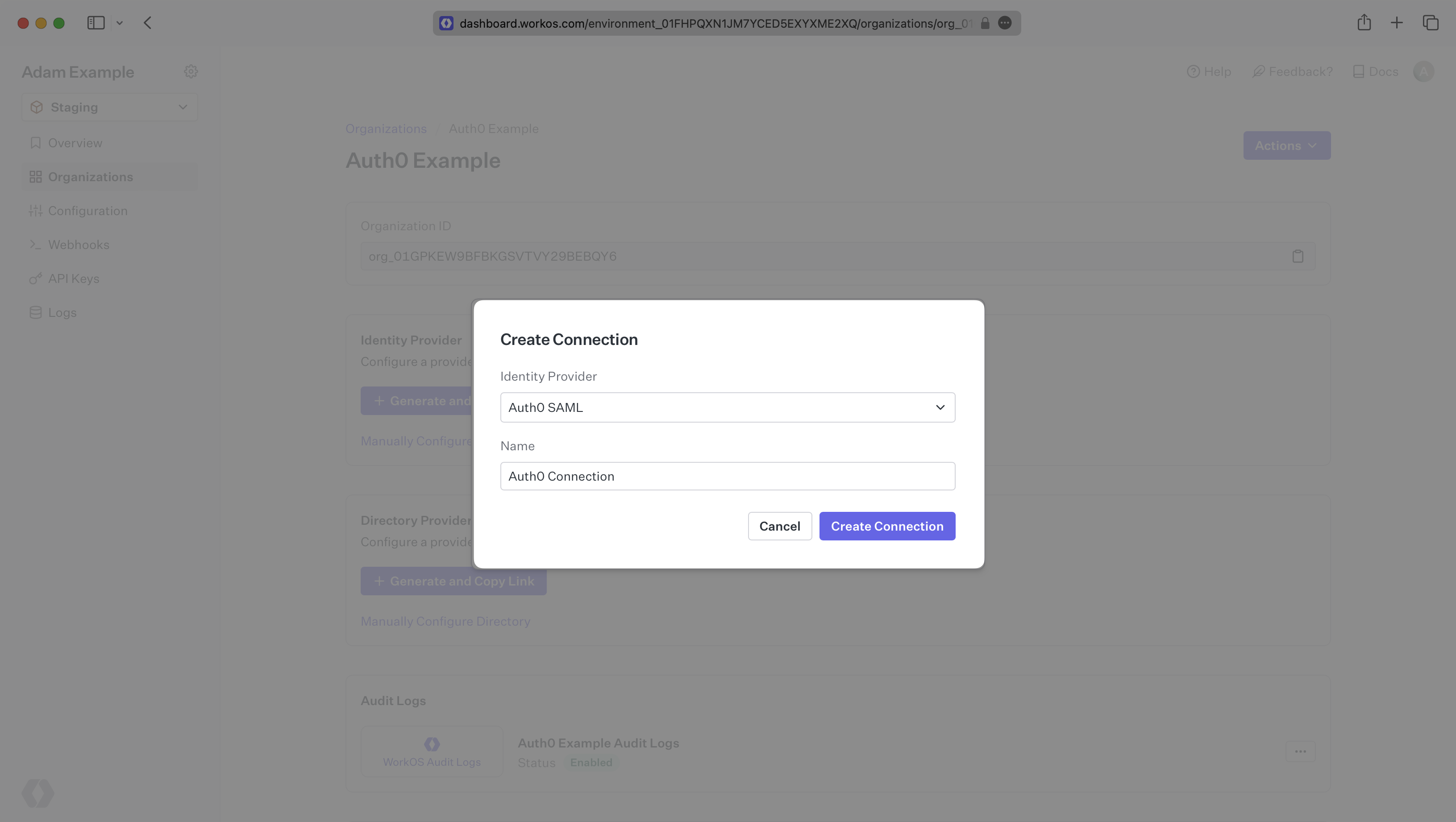
Select "Auth0 SAML” from the Identity Provider dropdown, enter a descriptive name for the connection, and then select the “Create Connection” button.
|
|
24
|
+
|
|
25
|
+
|
|
26
|
+
|
|
27
|
+
---
|
|
28
|
+
|
|
29
|
+
## What WorkOS Provides
|
|
30
|
+
|
|
31
|
+
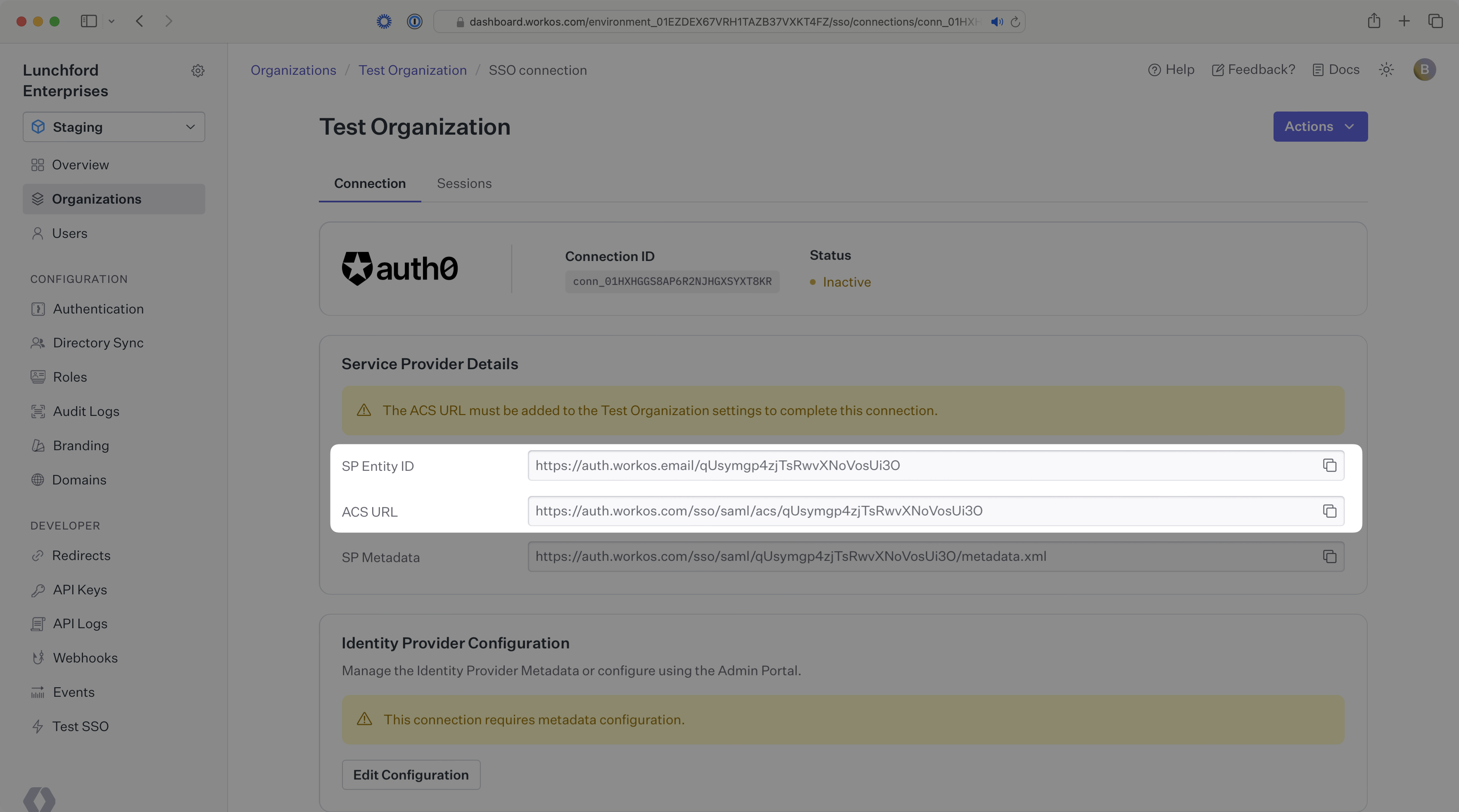
WorkOS provides the [ACS URL](/glossary/acs-url) and [SP Entity ID](/glossary/sp-entity-id), which are readily available in your Connection Settings in the [WorkOS Dashboard](https://dashboard.workos.com/).
|
|
32
|
+
|
|
33
|
+
|
|
34
|
+
|
|
35
|
+
The ACS URL is the location an Identity Provider redirects its authentication response to. In Auth0’s case, the ACS URL needs to be set by the organization when configuring your application in their Auth0 instance.
|
|
36
|
+
|
|
37
|
+
The SP Entity ID is a URI used to identify the issuer of a SAML request and the audience of a SAML response. In this case, the SP Entity ID is used to communicate that WorkOS will be the party performing SAML requests to the organization's Auth0 instance, and that WorkOS is the intended audience of the SAML responses from the Auth0 instance.
|
|
38
|
+
|
|
39
|
+
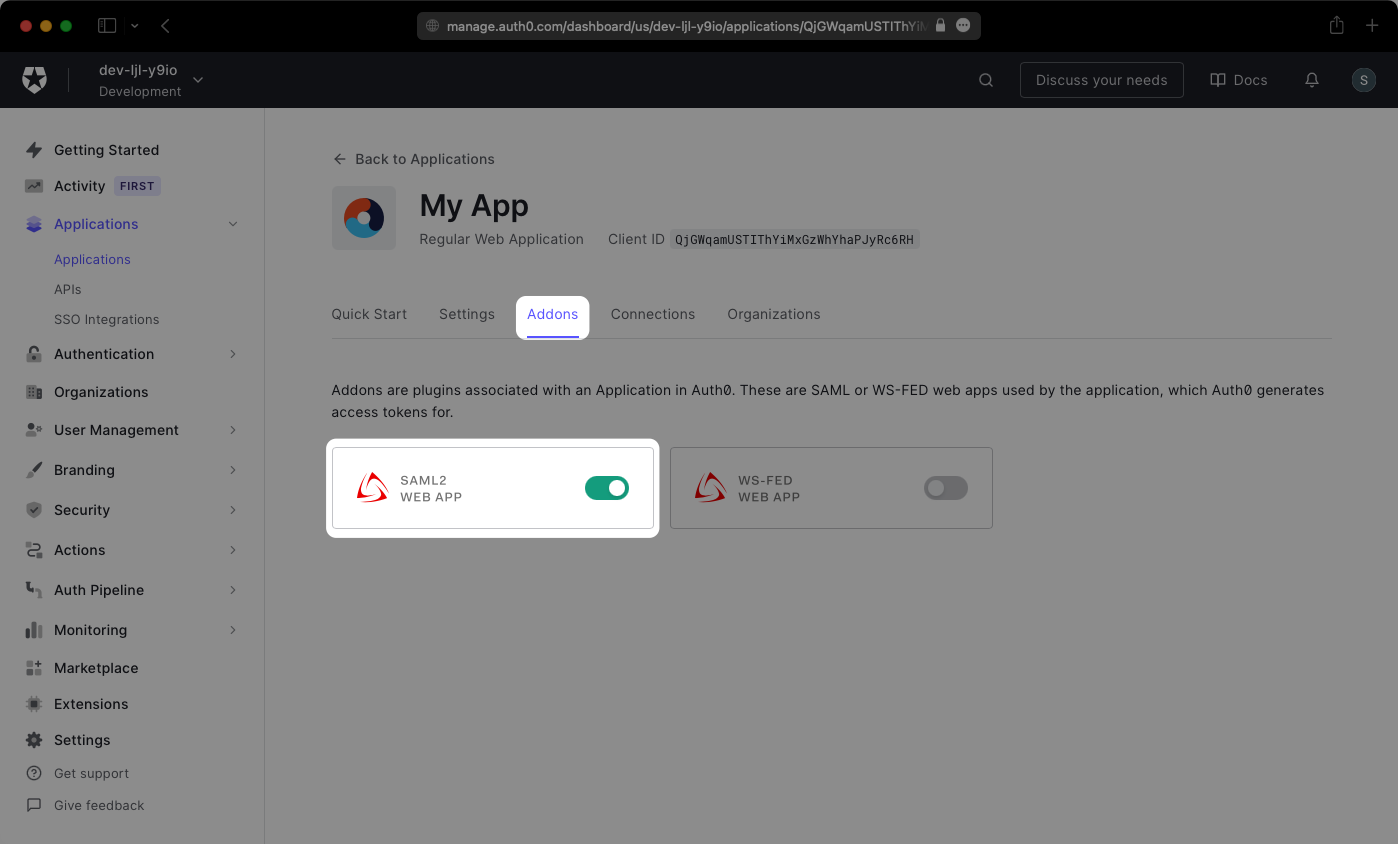
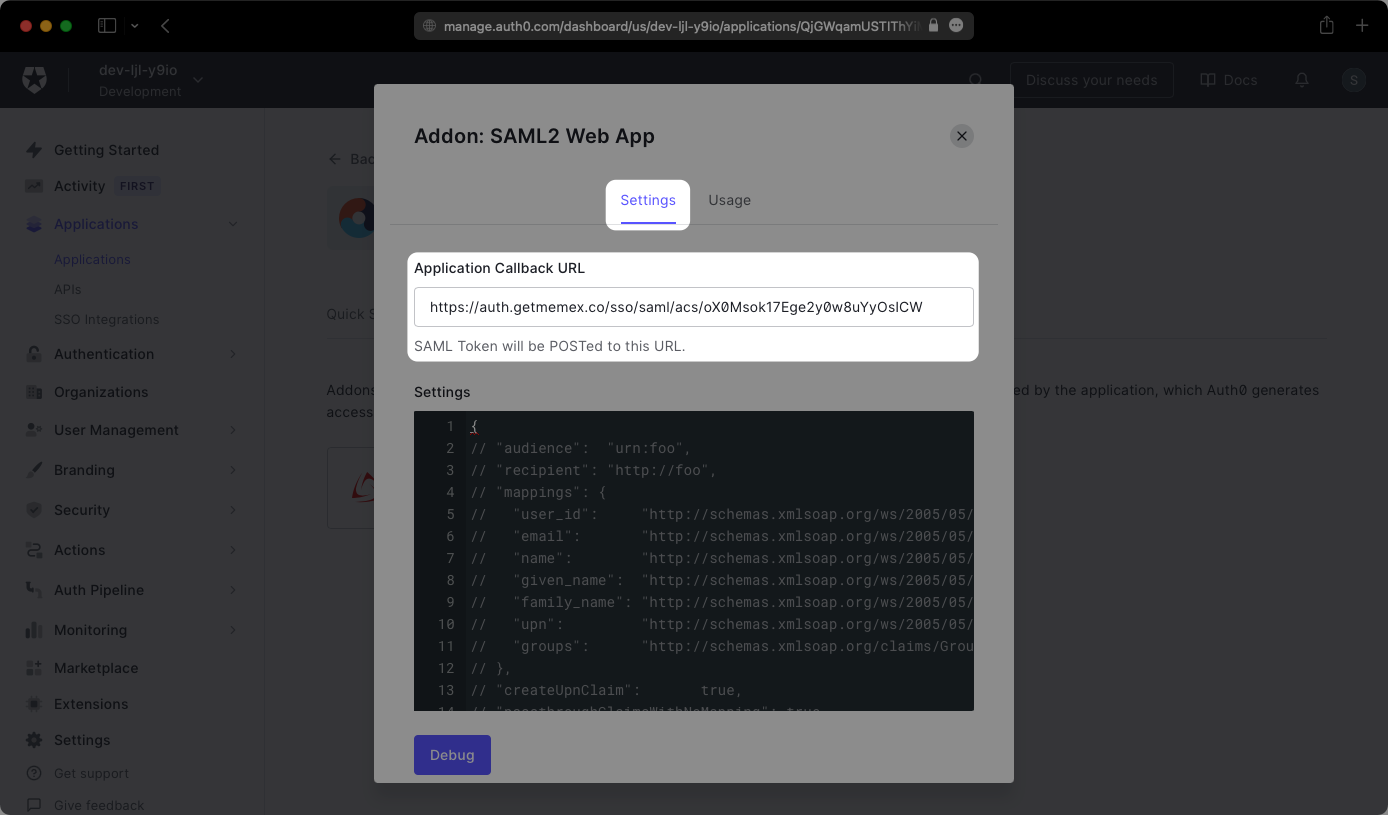
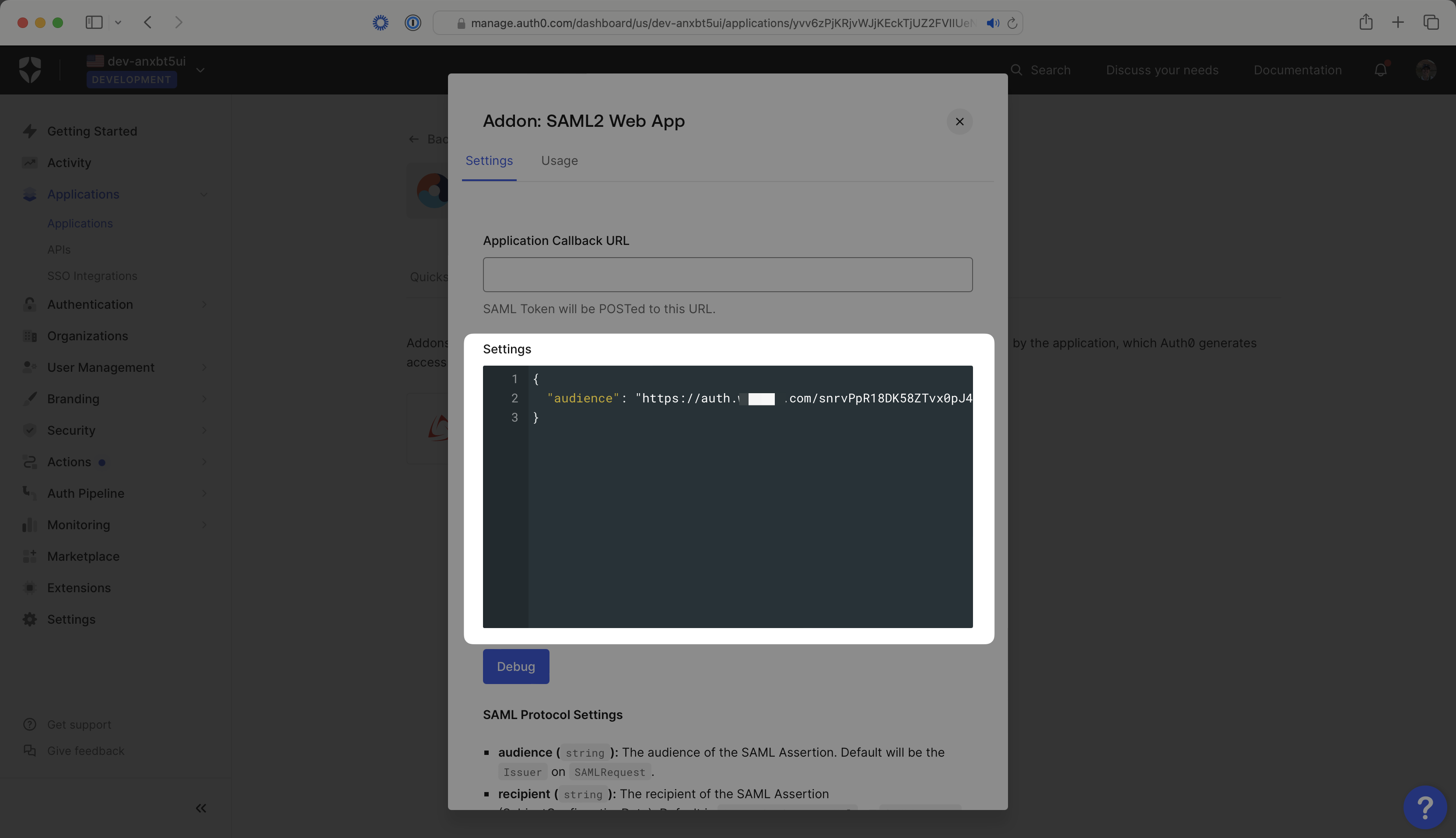
Specifically, the ACS URL will need to be set as the “Application Callback URL” on the SAML2 Web App Settings page found under the “Addons” tab in an Auth0 application. You will need to toggle on the SAML2 Web App for the settings modal to appear where you can add the ACS URL under the Application Callback URL input.
|
|
40
|
+
|
|
41
|
+
|
|
42
|
+
|
|
43
|
+
|
|
44
|
+
|
|
45
|
+
The SP Entity ID will need to be set as the "audience" value in the Settings JSON object on the SAML2 Web App Settings page.
|
|
46
|
+
|
|
47
|
+
After the Application Callback URL and Audience have been added, scroll to the bottom and click "Enable".
|
|
48
|
+
|
|
49
|
+
|
|
50
|
+
|
|
51
|
+
---
|
|
52
|
+
|
|
53
|
+
## What you’ll need
|
|
54
|
+
|
|
55
|
+
In order to integrate you’ll need the Auth0 IdP Metadata URL.
|
|
56
|
+
|
|
57
|
+
Normally, this information will come from the organization's IT Management team when they set up your application’s SAML 2.0 configuration in their Auth0 admin dashboard. Here’s how to obtain them:
|
|
58
|
+
|
|
59
|
+
---
|
|
60
|
+
|
|
61
|
+
## (1) Log In and Select Your Application
|
|
62
|
+
|
|
63
|
+
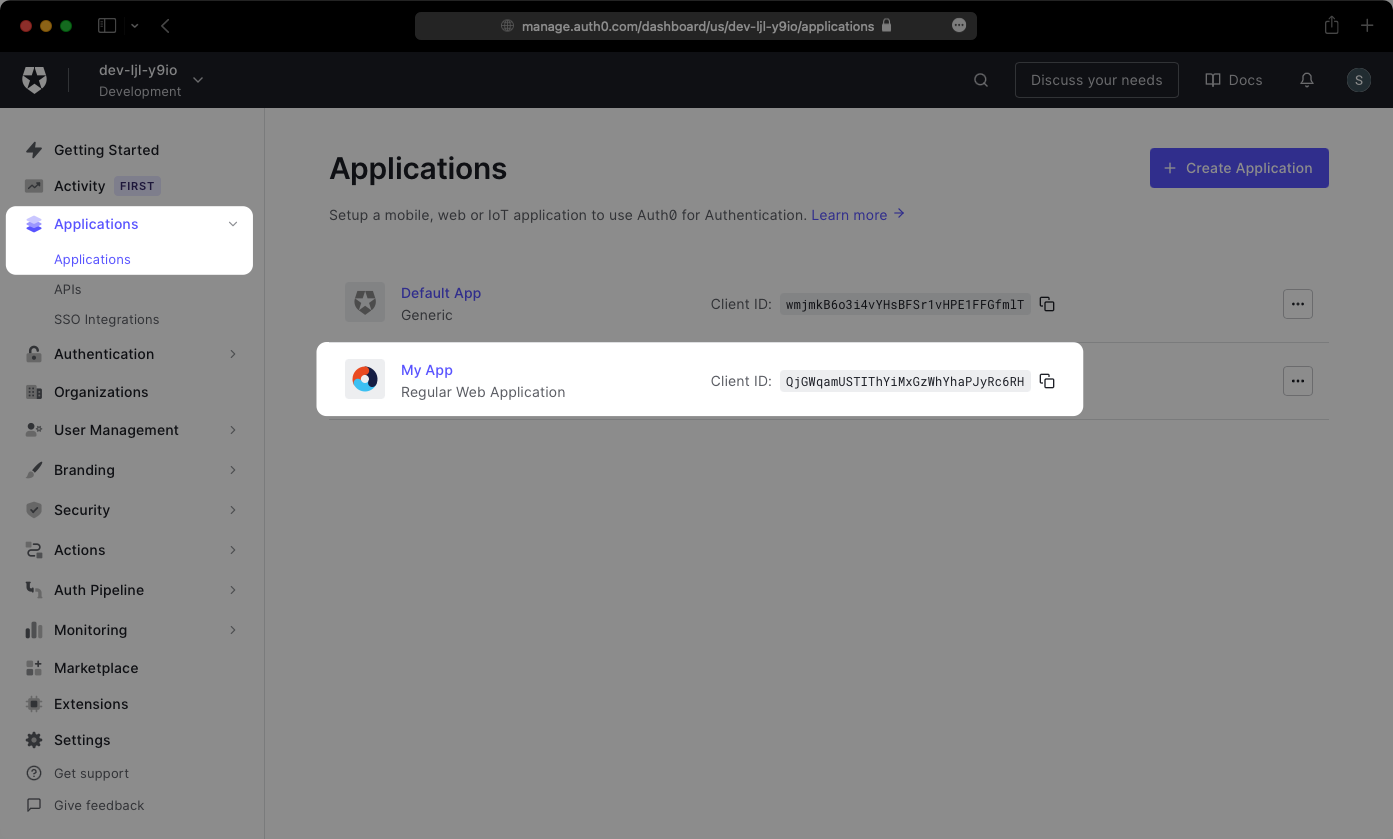
Log in to [Auth0](https://auth0.com/auth/login), go to the admin dashboard, select “Applications” in the sidebar, and then select the “Applications” menu option. Next, select your application from the list of applications.
|
|
64
|
+
|
|
65
|
+
|
|
66
|
+
|
|
67
|
+
---
|
|
68
|
+
|
|
69
|
+
## (2) Obtain Identity Provider Metadata
|
|
70
|
+
|
|
71
|
+
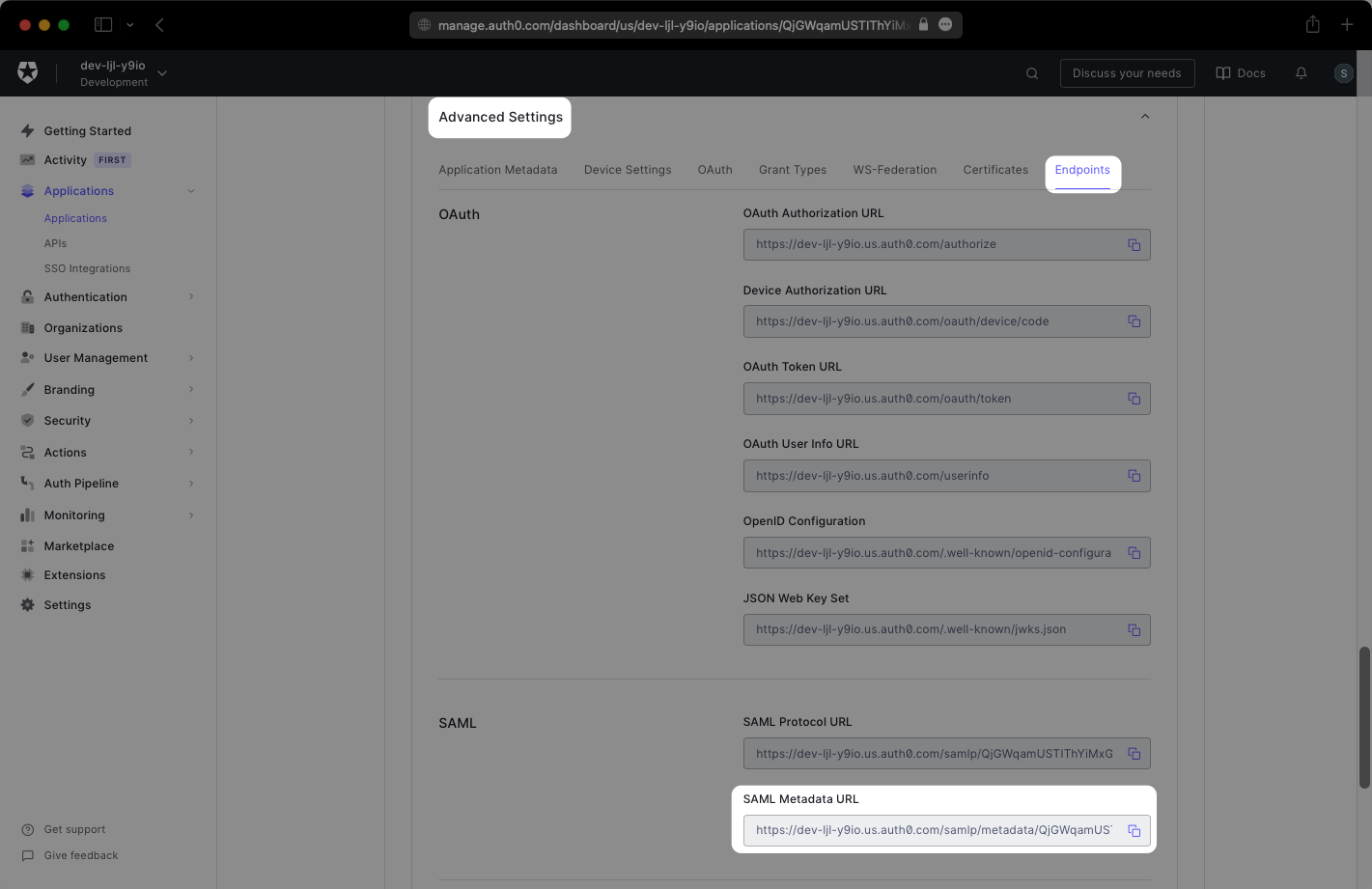
On the application’s Settings page, scroll down to the bottom and expand the “Advanced Settings” section. Select the “Endpoints” tab and copy the SAML Metadata URL. You’ll need this in the next step.
|
|
72
|
+
|
|
73
|
+
|
|
74
|
+
|
|
75
|
+
---
|
|
76
|
+
|
|
77
|
+
## (3) Upload Metadata URL
|
|
78
|
+
|
|
79
|
+
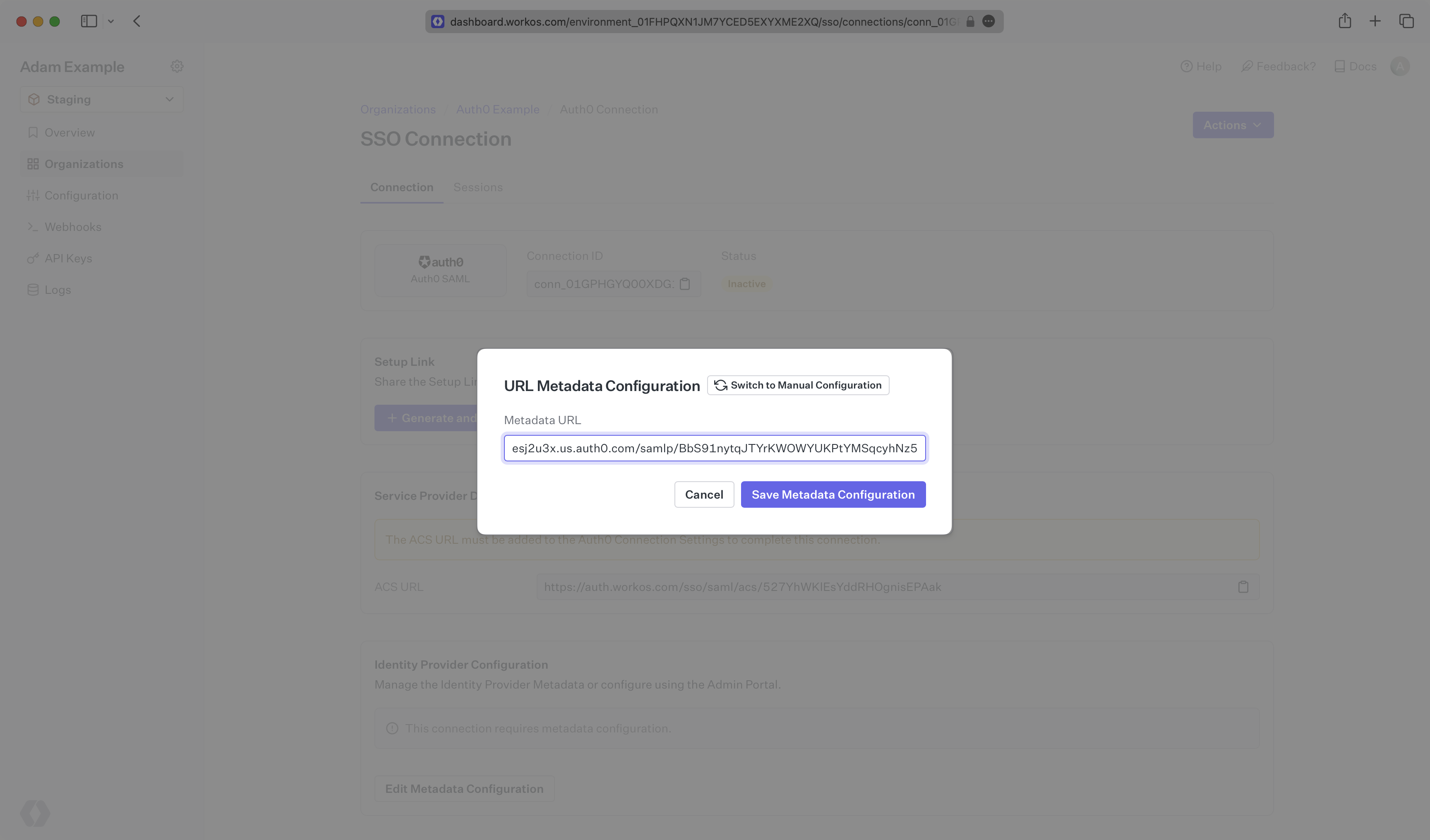
Finally, upload the SAML Metadata URL you saved earlier in your WorkOS Connection settings. Your Connection will then be linked and good to go!
|
|
80
|
+
|
|
81
|
+
|
|
@@ -0,0 +1,81 @@
|
|
|
1
|
+
---
|
|
2
|
+
title: AWS Cognito
|
|
3
|
+
description: Learn how to use WorkOS with your existing AWS Cognito applications.
|
|
4
|
+
icon: aws
|
|
5
|
+
breadcrumb:
|
|
6
|
+
title: Integrations
|
|
7
|
+
url: /integrations
|
|
8
|
+
originalPath: .tmp-workos-clone/packages/docs/content/integrations/aws-cognito.mdx
|
|
9
|
+
---
|
|
10
|
+
|
|
11
|
+
## Introduction
|
|
12
|
+
|
|
13
|
+
This guide outlines the steps to make WorkOS SSO Connections available to AWS Cognito applications without requiring changes to your existing application code.
|
|
14
|
+
|
|
15
|
+
The integration works by configuring WorkOS connections as third-party [Identity Providers](https://docs.aws.amazon.com/cognito/latest/developerguide/cognito-user-pools-identity-federation.html) inside a Cognito User Pool which enables users to sign in to a Cognito application leveraging all SSO integrations supported by WorkOS.
|
|
16
|
+
|
|
17
|
+
> The AWS Cognito integration is in feature preview. Reach out to [WorkOS support](mailto:support@workos.com?subject=AWS%20Cognito%20Integration) if you want early access.
|
|
18
|
+
|
|
19
|
+
---
|
|
20
|
+
|
|
21
|
+
## (1) Configure AWS IAM role
|
|
22
|
+
|
|
23
|
+
WorkOS manages the configuration of the Cognito Identity Providers by leveraging AWS role delegation. You will need to create an IAM role in your AWS account that grants permissions to the WorkOS AWS account. This is can be easily accomplished through the AWS Console.
|
|
24
|
+
|
|
25
|
+
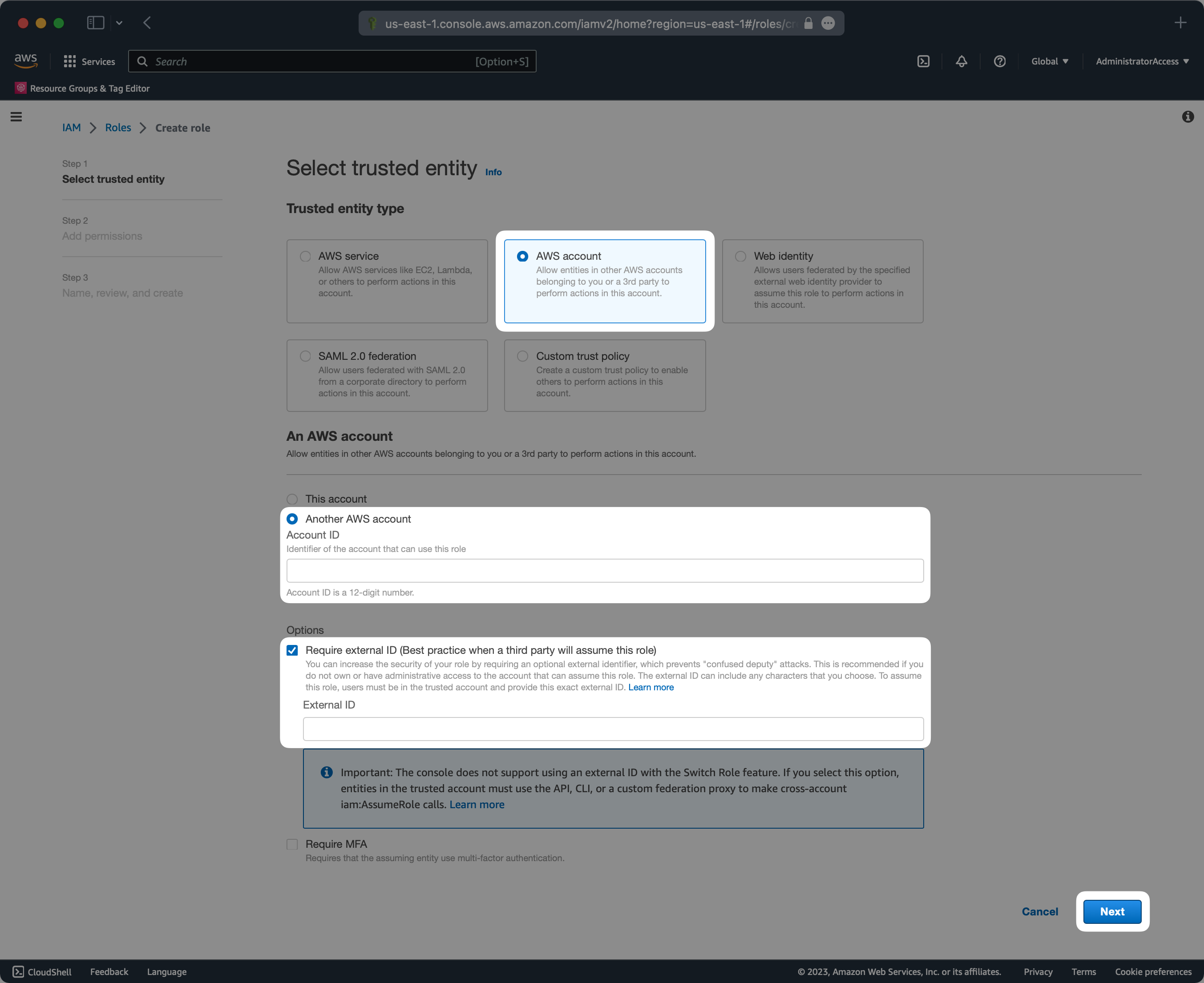
|
|
26
|
+
|
|
27
|
+
The external ID will be provided by the WorkOS support team upon request. The AWS account ID should be `611361754156` which is the ID of a dedicated WorkOS AWS account used for Cognito integrations.
|
|
28
|
+
|
|
29
|
+
You will need to attach the following policy to the role so that the Identity Providers can be managed when the role is assumed by WorkOS.
|
|
30
|
+
|
|
31
|
+
```json language="json" title="IAM Policy"
|
|
32
|
+
{
|
|
33
|
+
"Version": "2012-10-17",
|
|
34
|
+
"Statement": [
|
|
35
|
+
{
|
|
36
|
+
"Sid": "VisualEditor",
|
|
37
|
+
"Effect": "Allow",
|
|
38
|
+
"Action": ["cognito-idp:*"],
|
|
39
|
+
"Resource": "*"
|
|
40
|
+
}
|
|
41
|
+
]
|
|
42
|
+
}
|
|
43
|
+
```
|
|
44
|
+
|
|
45
|
+
Complete the creation of the role and take note of the name you provide as it will be used in the following step.
|
|
46
|
+
|
|
47
|
+
## (2) Provide AWS details to WorkOS
|
|
48
|
+
|
|
49
|
+
Once the role has been configured you will need to provide the following details from your AWS account to the WorkOS support team.
|
|
50
|
+
|
|
51
|
+
- Account ID
|
|
52
|
+
- Role name
|
|
53
|
+
- User pool ID
|
|
54
|
+
|
|
55
|
+
Once the WorkOS support team has configured your AWS details, you should see Identity Providers configured in the specified User Pool for every connection configured in WorkOS. Newly added WorkOS connections will automatically be created in the specified User Pool.
|
|
56
|
+
|
|
57
|
+
## (3) Enable Identity Providers for App Client
|
|
58
|
+
|
|
59
|
+
Now that the Identity Providers have been configured, they will need to be enabled for the App Client you wish to use the WorkOS Connections with.
|
|
60
|
+
|
|
61
|
+
From the user pool navigate to **App integration** → **_Your App Client_** → **Edit hosted UI settings** and select the newly created Identity Providers.
|
|
62
|
+
|
|
63
|
+
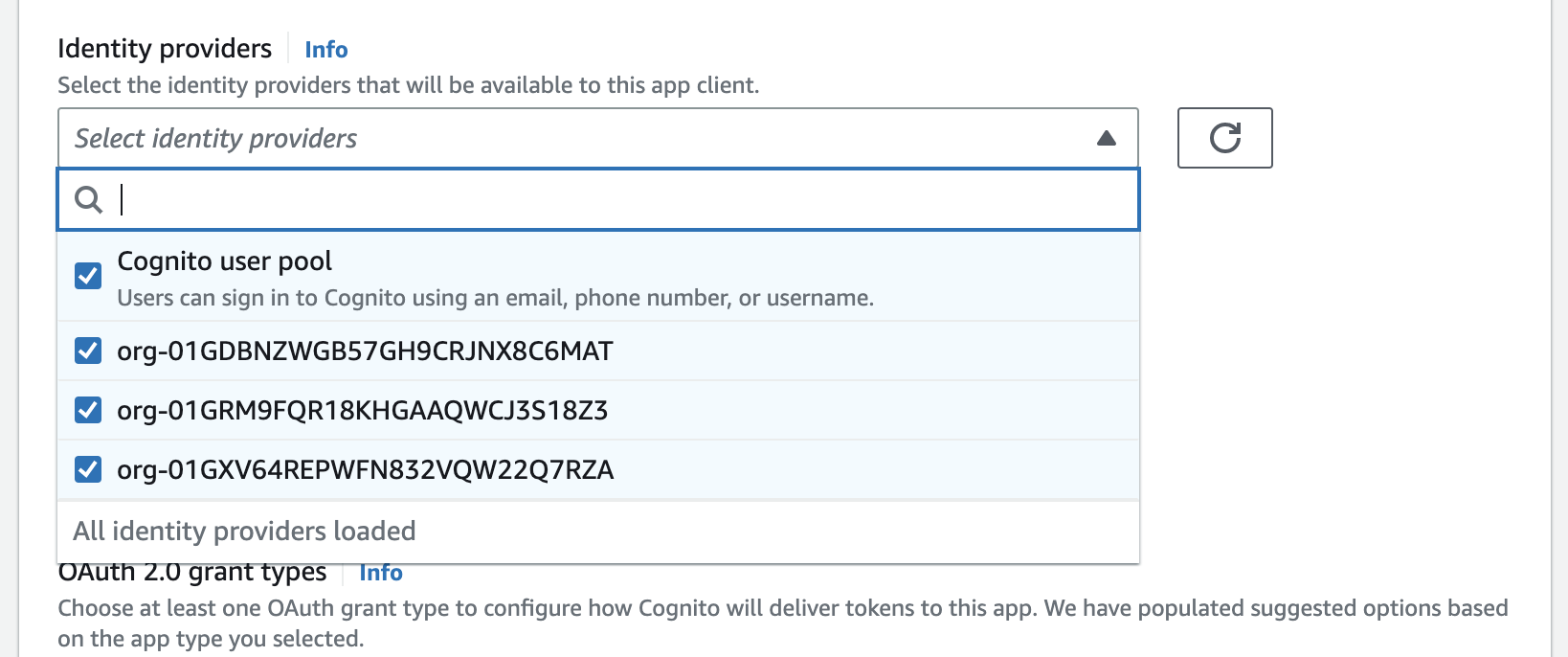
|
|
64
|
+
|
|
65
|
+
> If you do not complete this step you will receive a **Login option is not available** error from Cognito upon sign in.
|
|
66
|
+
|
|
67
|
+
## (4) Configure redirect URI
|
|
68
|
+
|
|
69
|
+
Locate the domain of the Cognito User Pool and configure the following redirect URI in the WorkOS Dashboard under **Configuration** → **Settings** → **Redirect URIs**.
|
|
70
|
+
|
|
71
|
+
```plain title="Cognito callback URI"
|
|
72
|
+
https://<cognito-user-pool-domain>/oauth2/idpresponse
|
|
73
|
+
```
|
|
74
|
+
|
|
75
|
+
## (5) Sign in with WorkOS connection
|
|
76
|
+
|
|
77
|
+
Once an Identity Provider has been created in the Cognito User Pool, you may initiate authentication by passing the `idp_identifier` query parameter to the [OAuth2 Authorize endpoint](https://docs.aws.amazon.com/cognito/latest/developerguide/authorization-endpoint.html) provided by Cognito using the details from the App Client that was previously configured with the Identity Providers.
|
|
78
|
+
|
|
79
|
+
You may pass either a WorkOS [Organization](/reference/organization) or [Connection](/reference/sso/connection) ID as the `idp_identifier`. Passing this query parameter will result in Cognito bypassing it’s standard sign-in page and immediately redirecting the user to the appropriate sign-in page of the upstream identity provider configured in the WorkOS Connection.
|
|
80
|
+
|
|
81
|
+
Once the user is authenticated they will be redirected to your Cognito App Client redirect URL with the Cognito `code` query parameter.
|
|
@@ -0,0 +1,90 @@
|
|
|
1
|
+
---
|
|
2
|
+
title: BambooHR
|
|
3
|
+
description: "Learn about syncing your user list with\_BambooHR."
|
|
4
|
+
icon: bamboohr
|
|
5
|
+
breadcrumb:
|
|
6
|
+
title: Integrations
|
|
7
|
+
url: /integrations
|
|
8
|
+
originalPath: .tmp-workos-clone/packages/docs/content/integrations/bamboohr.mdx
|
|
9
|
+
---
|
|
10
|
+
|
|
11
|
+
## Introduction
|
|
12
|
+
|
|
13
|
+
This guide outlines how to synchronize your application’s BambooHR directories.
|
|
14
|
+
|
|
15
|
+
To synchronize an organization’s users and groups provisioned for your application, you’ll need the following information from the organization:
|
|
16
|
+
|
|
17
|
+
- The BambooHR subdomain.
|
|
18
|
+
- A BambooHR API key to authenticate requests.
|
|
19
|
+
|
|
20
|
+
> Note: The BambooHR integration isn't enabled by default in the WorkOS Dashboard or Admin Portal. Please reach out to [support@workos.com](mailto:support@workos.com) or via your team’s WorkOS Slack channel if you would like BambooHR enabled.
|
|
21
|
+
|
|
22
|
+
---
|
|
23
|
+
|
|
24
|
+
## (1) Create your Directory Sync Connection
|
|
25
|
+
|
|
26
|
+
Login to your WorkOS Dashboard and select “Organizations” from the left hand navigation bar.
|
|
27
|
+
|
|
28
|
+
Select the organization you’ll be configuring a new Directory Sync Connection with.
|
|
29
|
+
|
|
30
|
+
Click “Manually Configure Connection”.
|
|
31
|
+
|
|
32
|
+
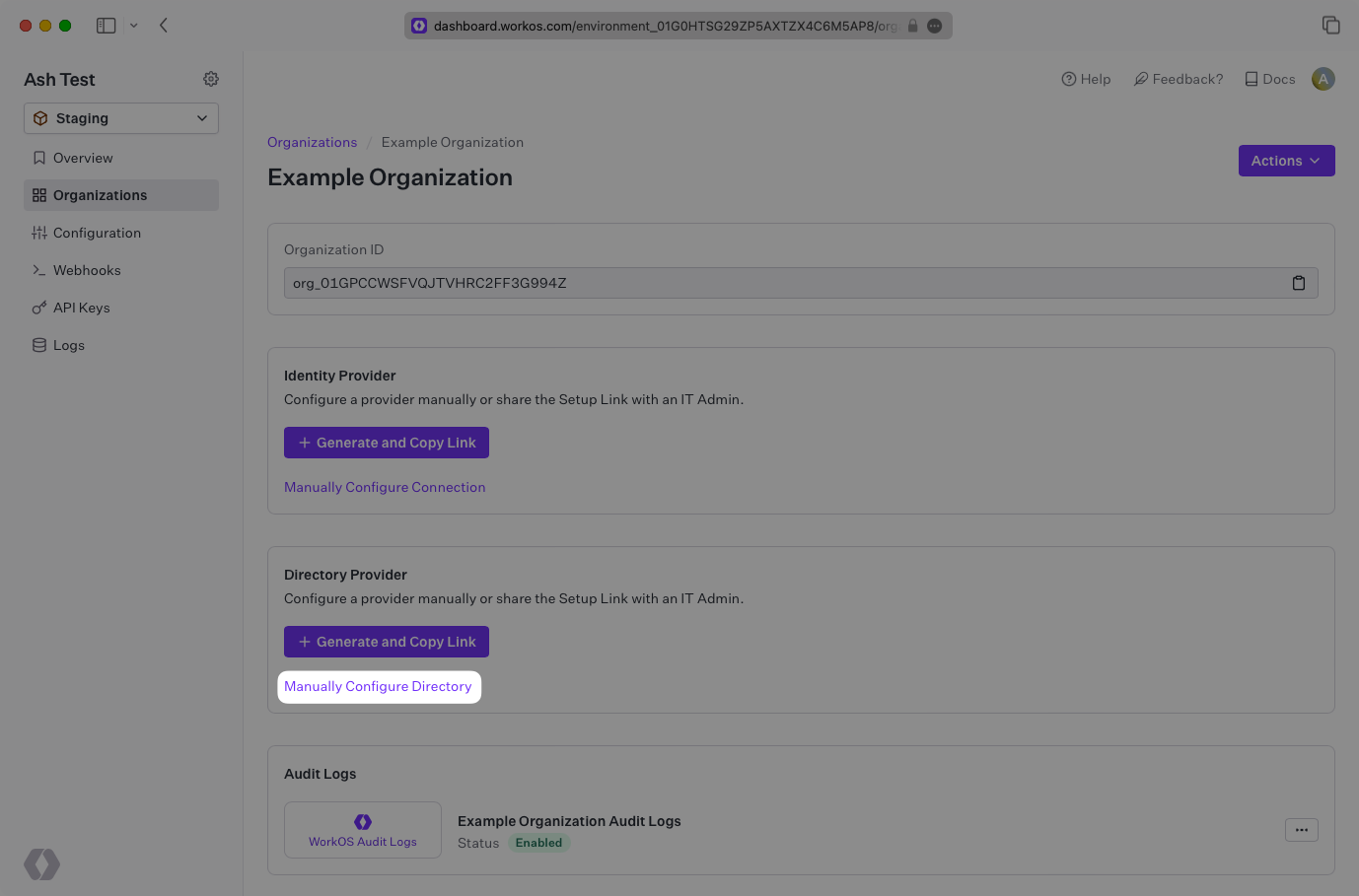
|
|
33
|
+
|
|
34
|
+
Input the Name, and select “BambooHR” as the directory type.
|
|
35
|
+
|
|
36
|
+
Click the “Create Directory” button.
|
|
37
|
+
|
|
38
|
+
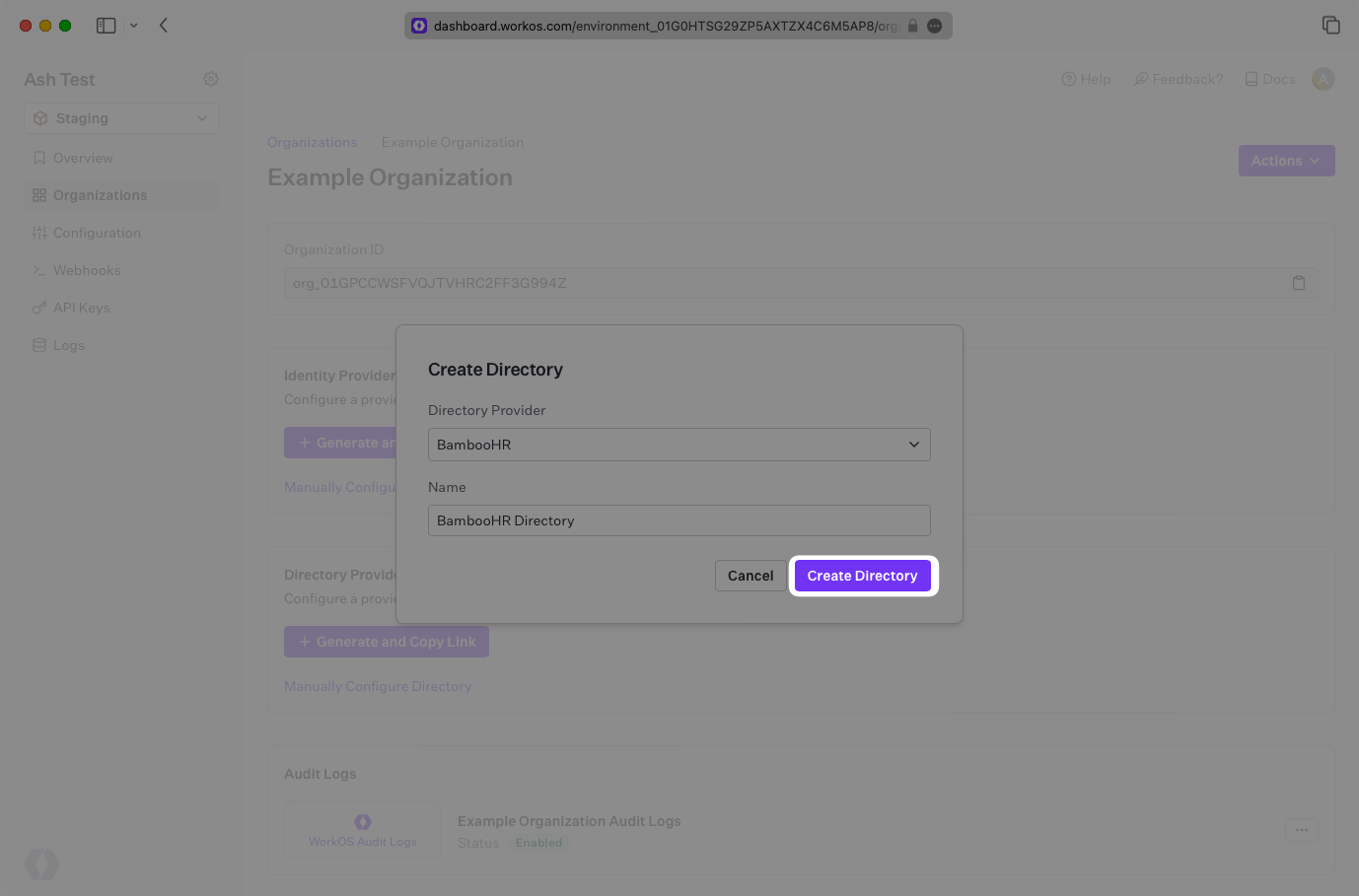
|
|
39
|
+
|
|
40
|
+
You will now see your BambooHR directory sync has created successfully with an [Endpoint](/glossary/endpoint), as well as fields to input your subdomain and API Key from BambooHR.
|
|
41
|
+
|
|
42
|
+
---
|
|
43
|
+
|
|
44
|
+
## (2) Retrieve the details from an organization IT Admin
|
|
45
|
+
|
|
46
|
+
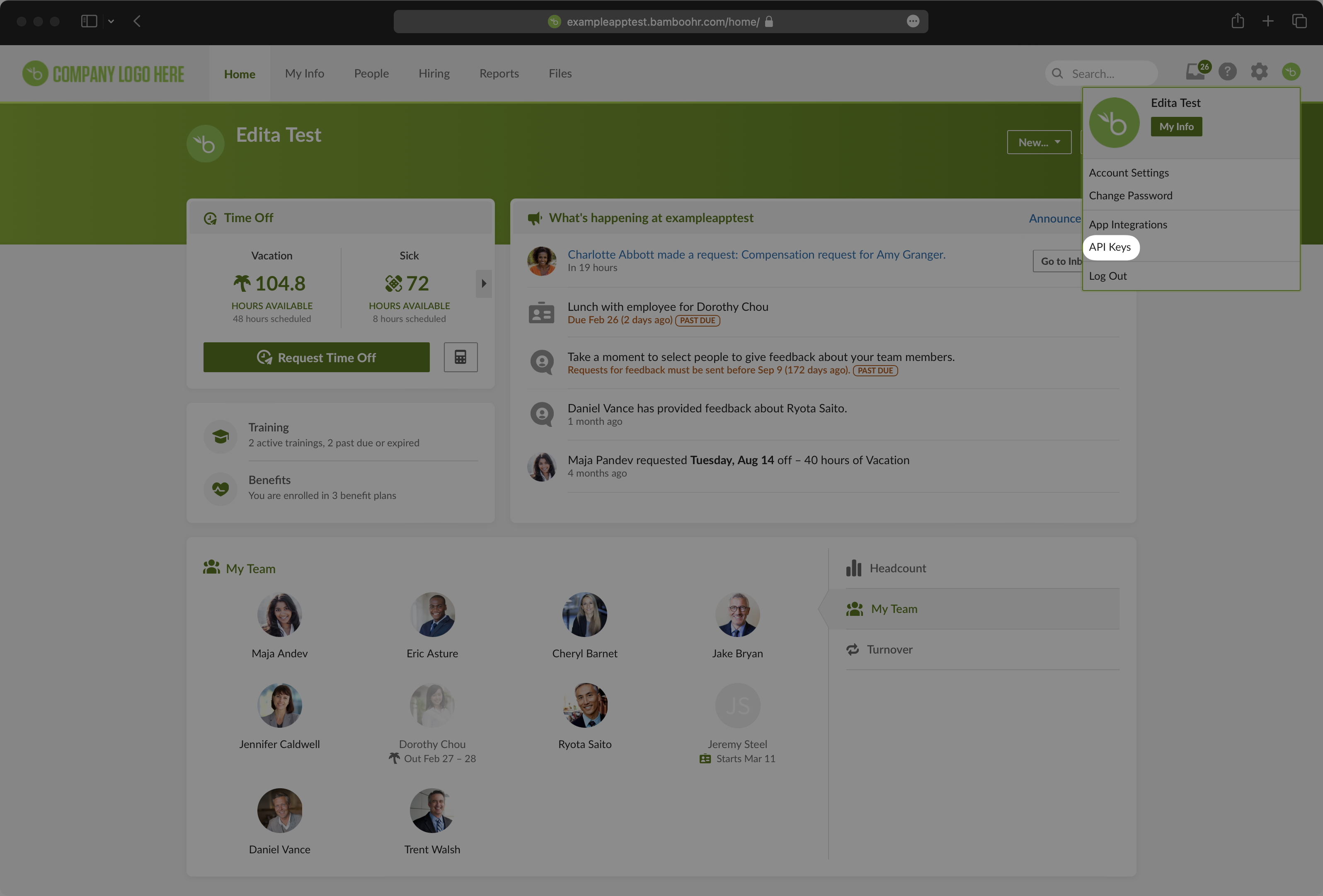
To generate an API key, an IT Admin should log into BambooHR and click their name in the upper right-hand corner of the BambooHR console. Select "API Keys" from the list.
|
|
47
|
+
|
|
48
|
+
|
|
49
|
+
|
|
50
|
+
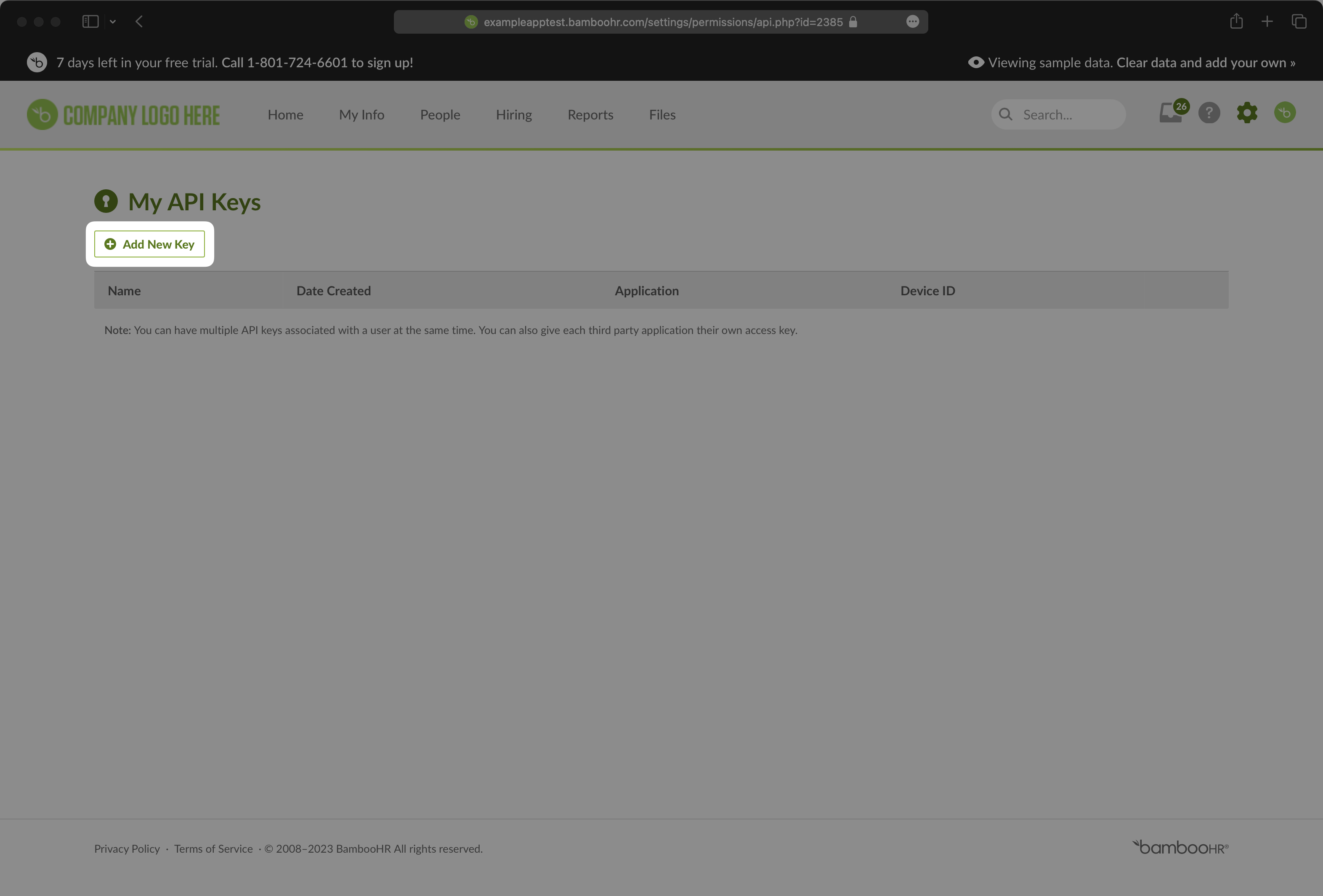
Next, the IT Admin should click “Add New Key”.
|
|
51
|
+
|
|
52
|
+
|
|
53
|
+
|
|
54
|
+
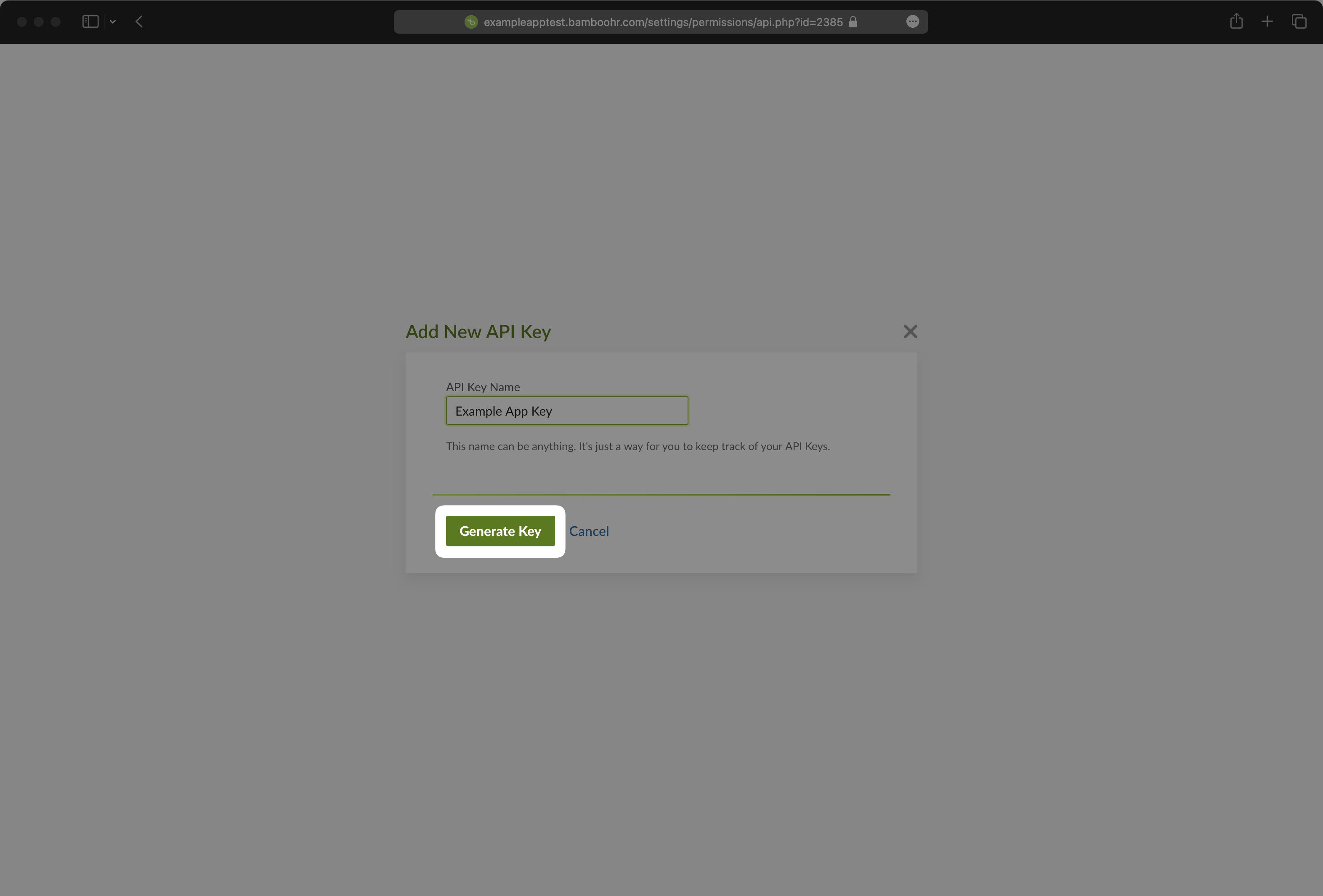
Give your key a descriptive name and select "Generate Key."
|
|
55
|
+
|
|
56
|
+
|
|
57
|
+
|
|
58
|
+
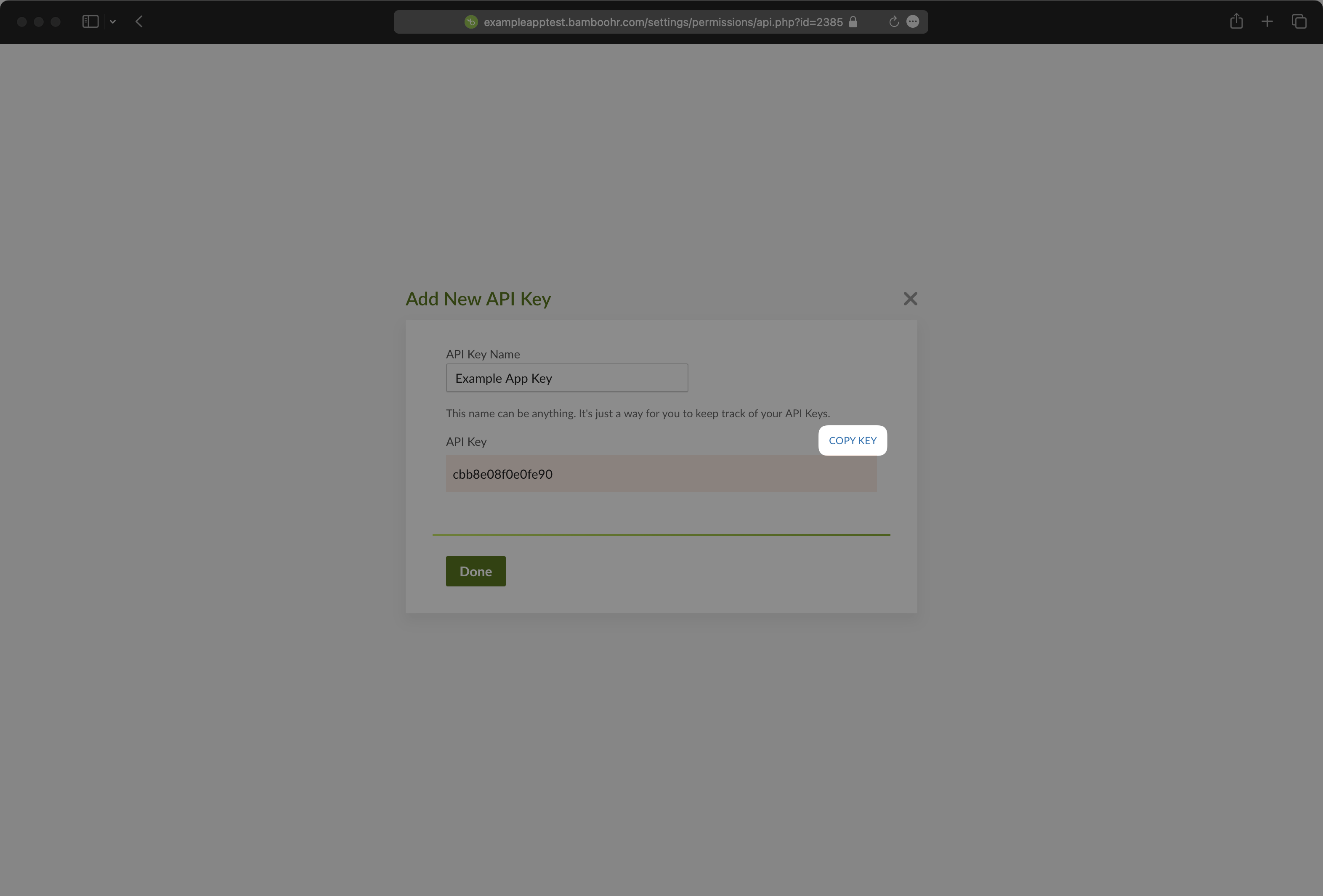
Select "Copy Key" and save this API key, which you’ll upload in the next step.
|
|
59
|
+
|
|
60
|
+
|
|
61
|
+
|
|
62
|
+
---
|
|
63
|
+
|
|
64
|
+
## (3) Set up your Directory Sync Connection
|
|
65
|
+
|
|
66
|
+
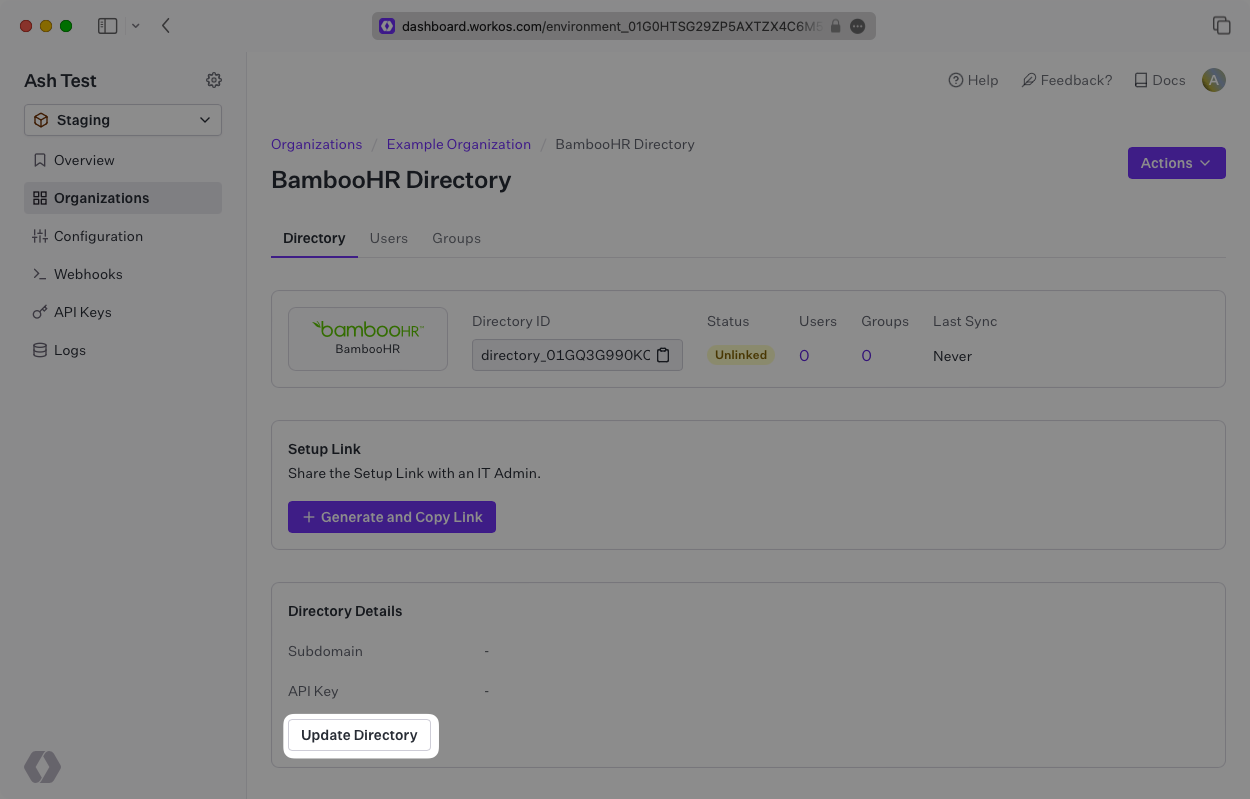
Click “Update Directory”.
|
|
67
|
+
|
|
68
|
+
There are two fields to enter, one is the API key you created in step 2.
|
|
69
|
+
|
|
70
|
+
The other is “Subdomain” which is the subdomain name of the Company’s BambooHR instance.
|
|
71
|
+
|
|
72
|
+
|
|
73
|
+
|
|
74
|
+
---
|
|
75
|
+
|
|
76
|
+
## (4) Sync Users and Groups to Your Application
|
|
77
|
+
|
|
78
|
+
When the connection is successfully made, you will see the green “Linked” icon appear. Now, whenever your customer assigns users or groups to your application, you’ll receive Dashboard updates based on changes in their directory.
|
|
79
|
+
|
|
80
|
+
A detailed guide to integrate the WorkOS API with your application can be found [here](/directory-sync)
|
|
81
|
+
|
|
82
|
+
## Frequently Asked Questions
|
|
83
|
+
|
|
84
|
+
### How do I add BambooHR's custom fields?
|
|
85
|
+
|
|
86
|
+
For BambooHR's custom fields, please contact [support@workos.com](mailto:support@workos.com) with your directory ID and a list of the custom fields you would like to be added.
|
|
87
|
+
|
|
88
|
+
### How often do BambooHR directories perform a sync?
|
|
89
|
+
|
|
90
|
+
BambooHR directories poll every 30 minutes starting from the time of the initial sync.
|
|
@@ -0,0 +1,89 @@
|
|
|
1
|
+
---
|
|
2
|
+
title: Breathe HR
|
|
3
|
+
description: "Learn about syncing your user list with\_Breathe HR."
|
|
4
|
+
icon: breathe-hr
|
|
5
|
+
breadcrumb:
|
|
6
|
+
title: Integrations
|
|
7
|
+
url: /integrations
|
|
8
|
+
originalPath: .tmp-workos-clone/packages/docs/content/integrations/breathe-hr.mdx
|
|
9
|
+
---
|
|
10
|
+
|
|
11
|
+
## Introduction
|
|
12
|
+
|
|
13
|
+
This guide outlines how to synchronize your application’s Breathe HR directories.
|
|
14
|
+
|
|
15
|
+
To synchronize an organization’s users and groups provisioned for your application, you’ll need the following information from the organization:
|
|
16
|
+
|
|
17
|
+
- Breathe HR API key
|
|
18
|
+
|
|
19
|
+
> Note: The Breathe HR integration isn't enabled by default in the WorkOS Dashboard or Admin Portal. Please reach out to [support@workos.com](mailto:support@workos.com) or via your team’s WorkOS Slack channel if you would like Breathe HR enabled.
|
|
20
|
+
|
|
21
|
+
---
|
|
22
|
+
|
|
23
|
+
## (1) Create an API Key
|
|
24
|
+
|
|
25
|
+
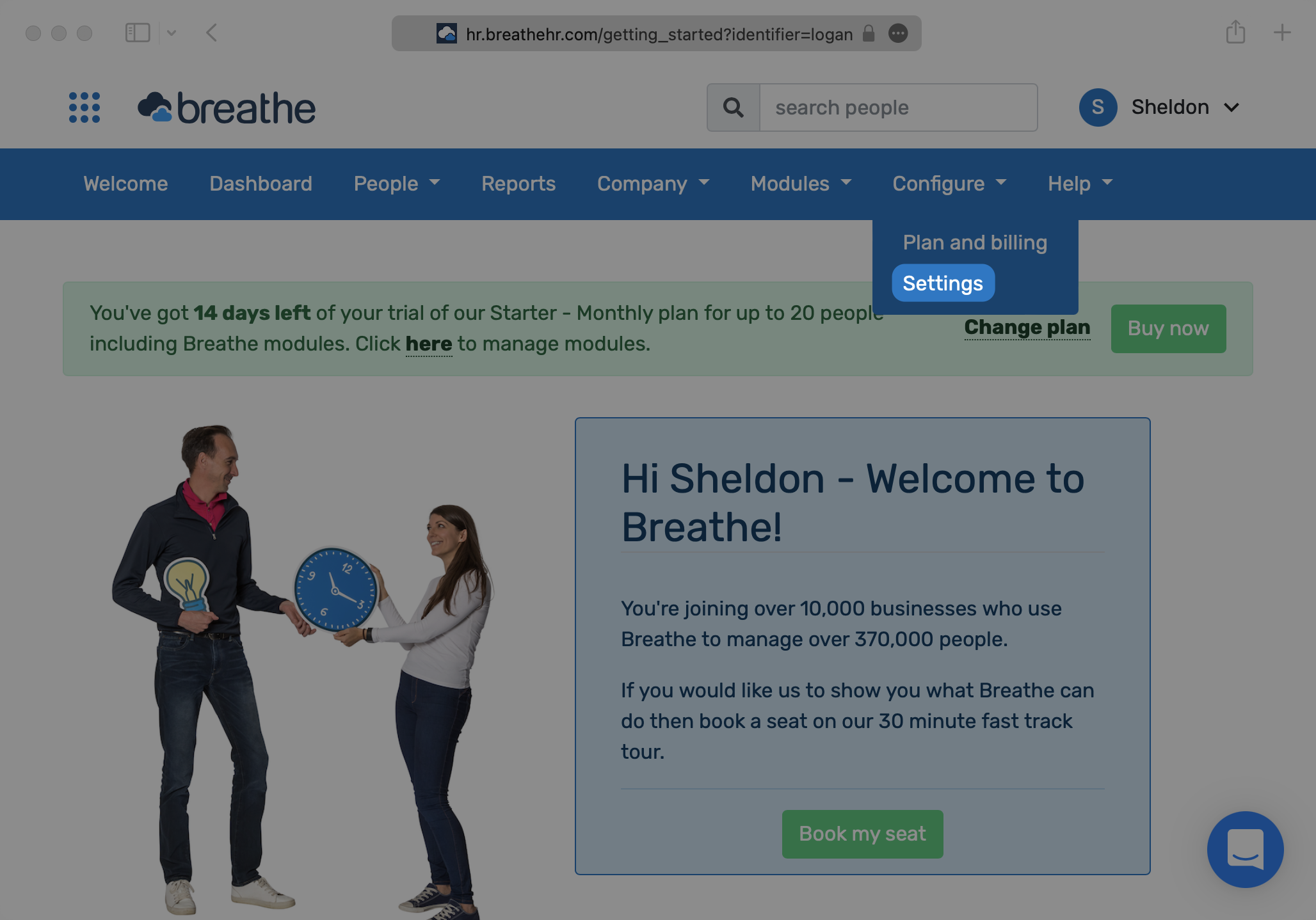
The organization will need to create an API key for you. An API key can be generated from the Admin Settings menu.
|
|
26
|
+
|
|
27
|
+
|
|
28
|
+
|
|
29
|
+
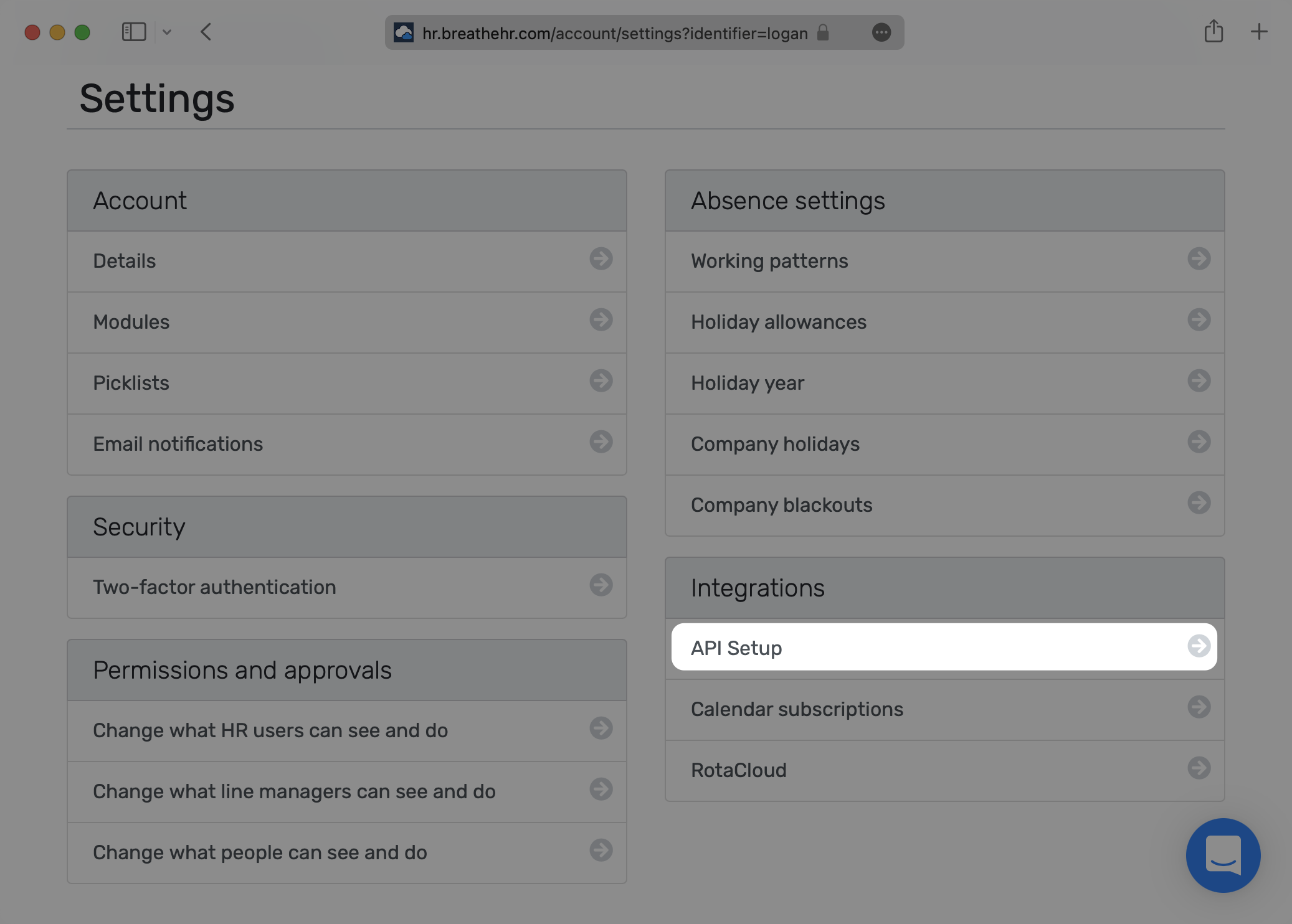
Under "Integrations", select "API Setup".
|
|
30
|
+
|
|
31
|
+
|
|
32
|
+
|
|
33
|
+
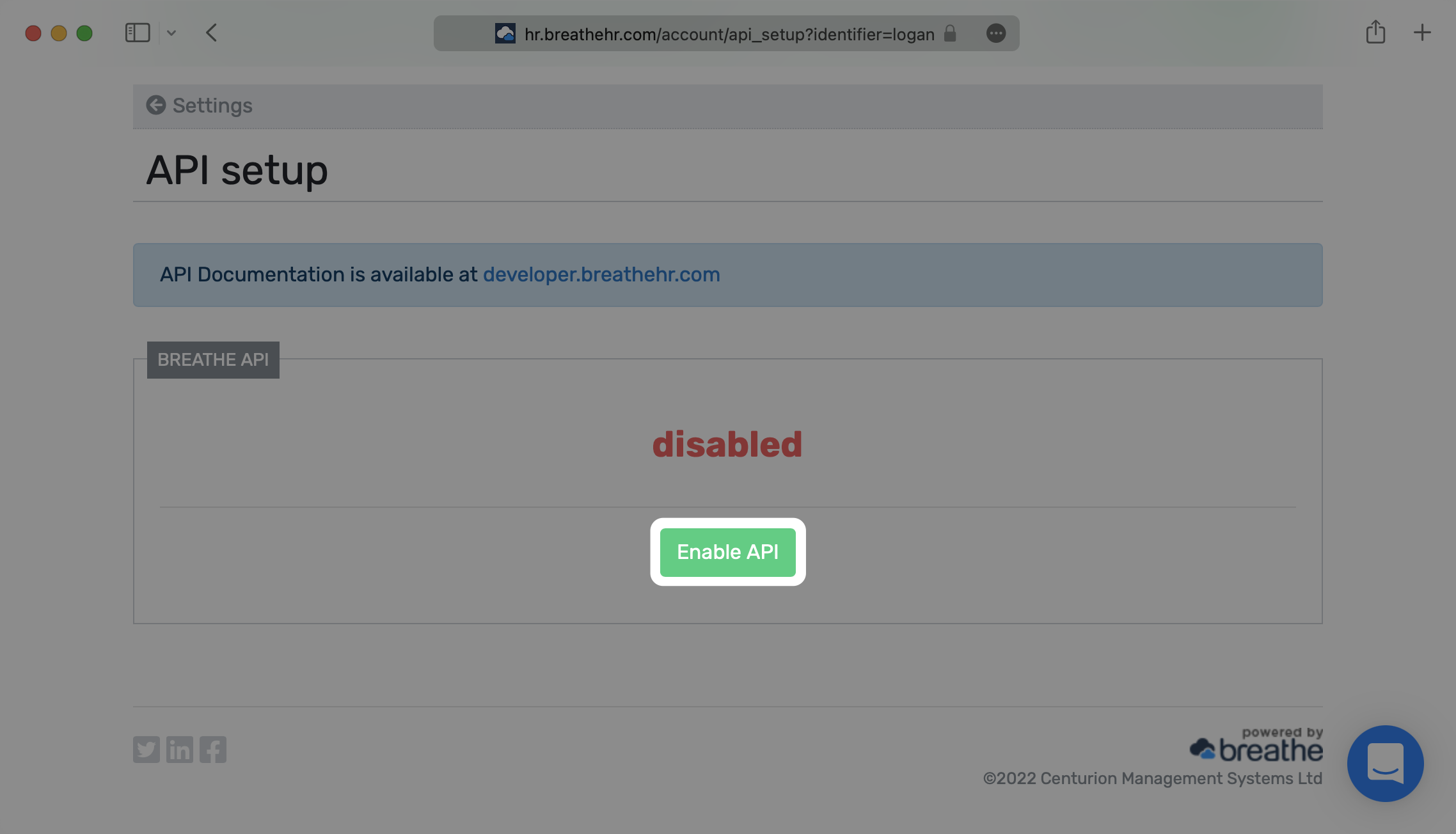
Next, select "Enable API".
|
|
34
|
+
|
|
35
|
+
|
|
36
|
+
|
|
37
|
+
Verify that you’d like to enable the API to access user information.
|
|
38
|
+
|
|
39
|
+
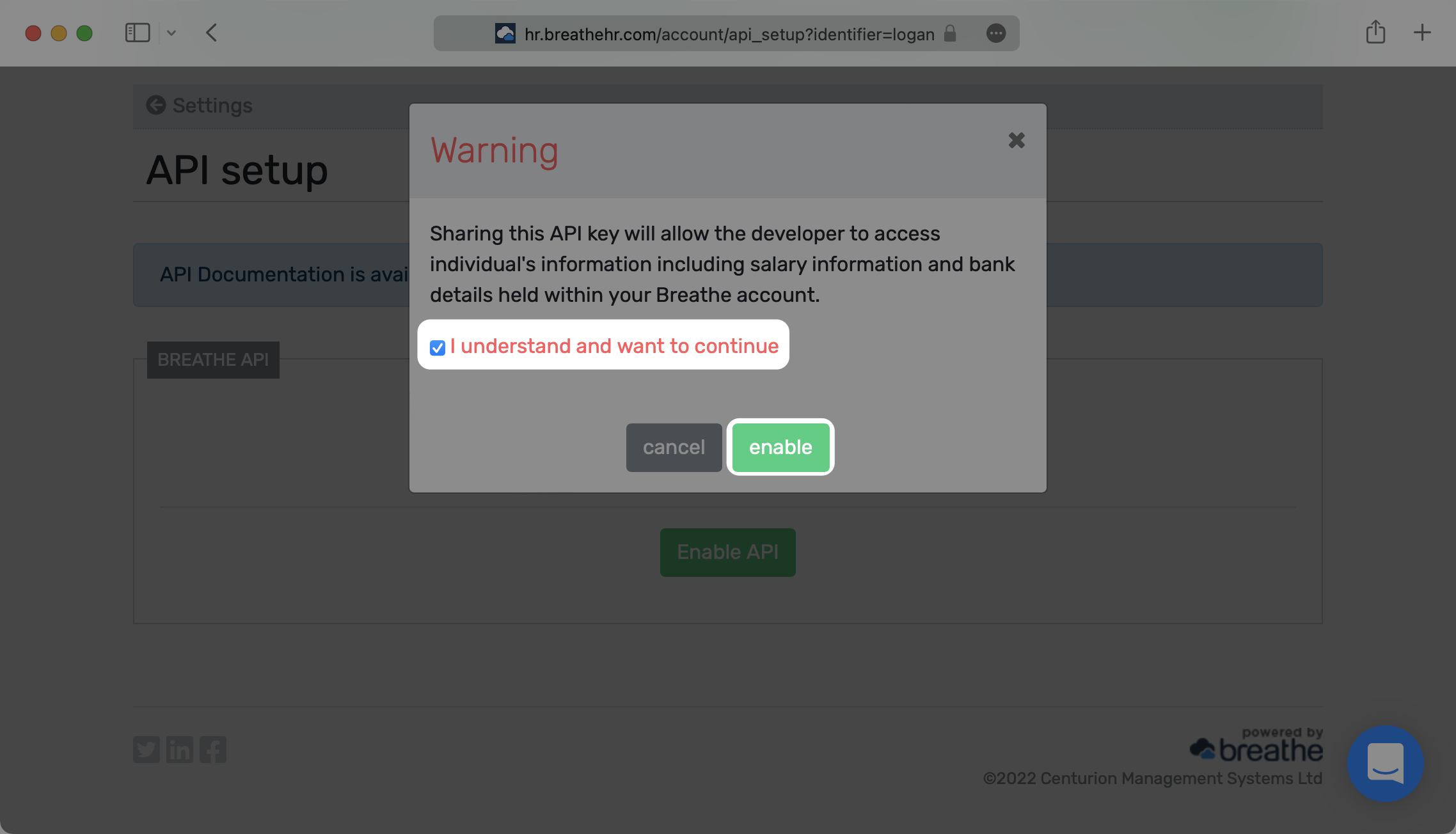
|
|
40
|
+
|
|
41
|
+
Save the production API key – this will be used in the next step.
|
|
42
|
+
|
|
43
|
+
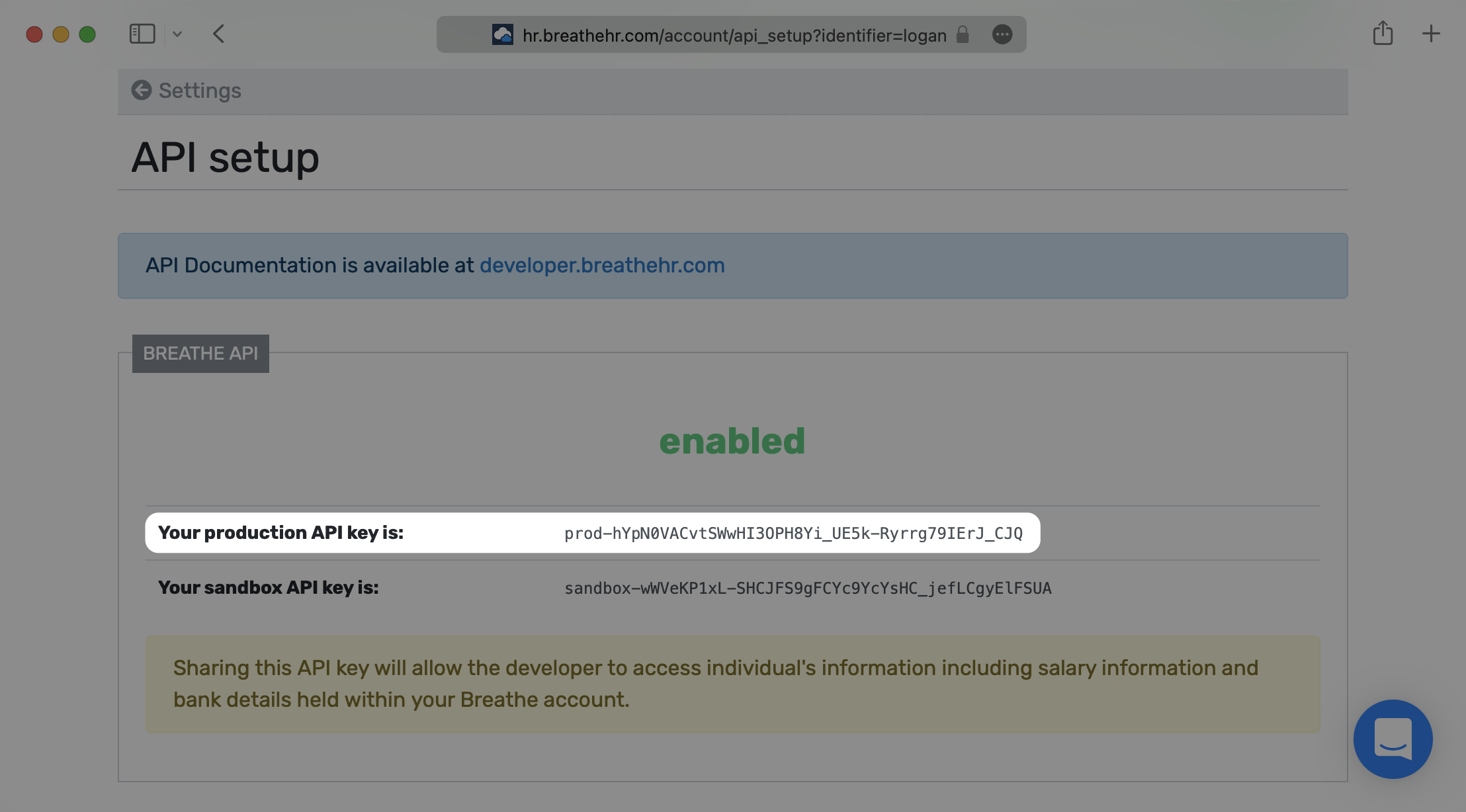
|
|
44
|
+
|
|
45
|
+
---
|
|
46
|
+
|
|
47
|
+
## (2) Create your Directory Sync Connection
|
|
48
|
+
|
|
49
|
+
Login to your WorkOS dashboard and select “Organizations” from the left hand Navigation bar
|
|
50
|
+
|
|
51
|
+
Select the Organization you’d like to enable a Breathe HR Directory Sync connection for.
|
|
52
|
+
|
|
53
|
+
On the Organization’s page click “Add Directory”.
|
|
54
|
+
|
|
55
|
+
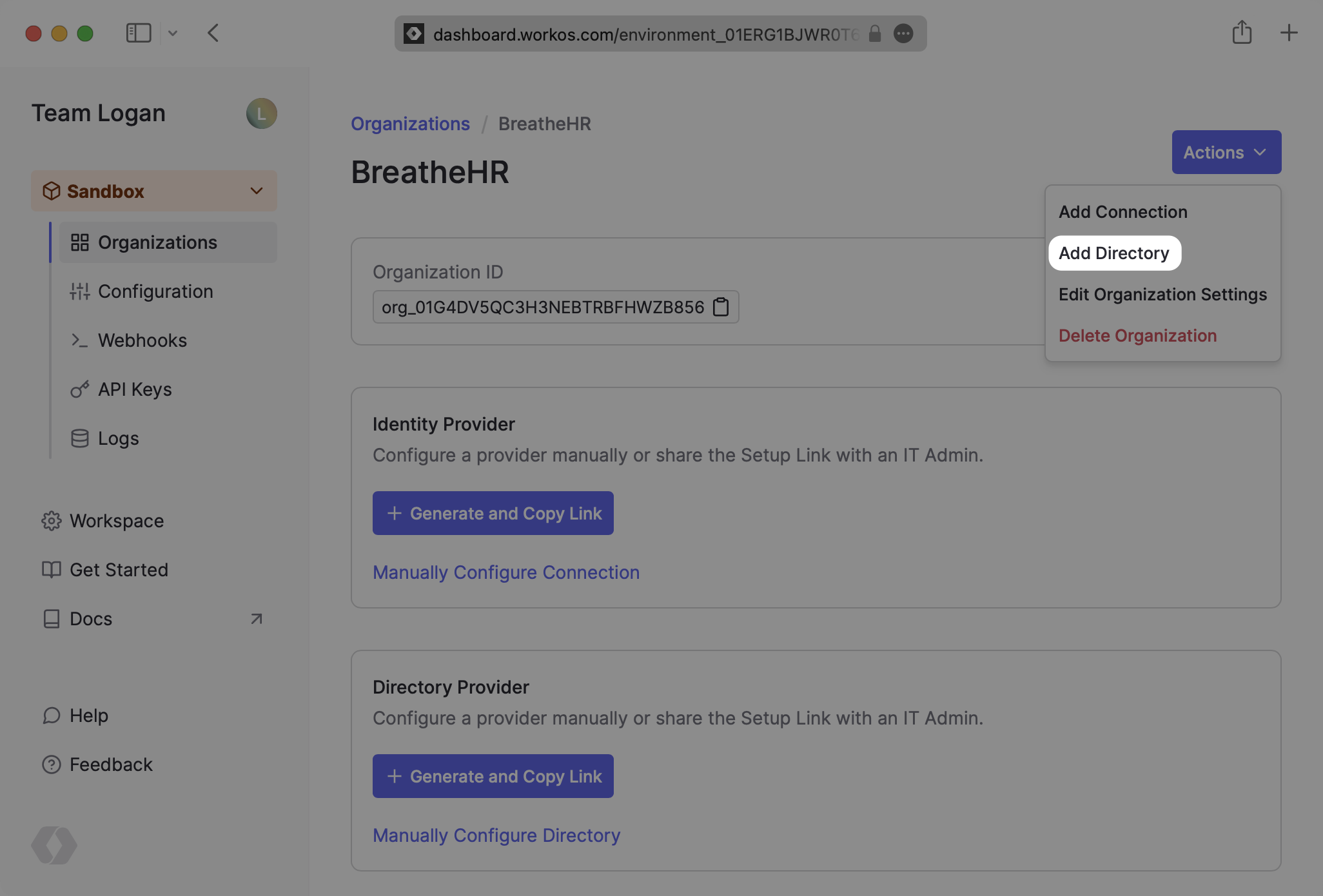
|
|
56
|
+
|
|
57
|
+
Select “Breathe HR” as the Directory Provider, and then provide a descriptive name for the connection. Select “Create Directory”.
|
|
58
|
+
|
|
59
|
+
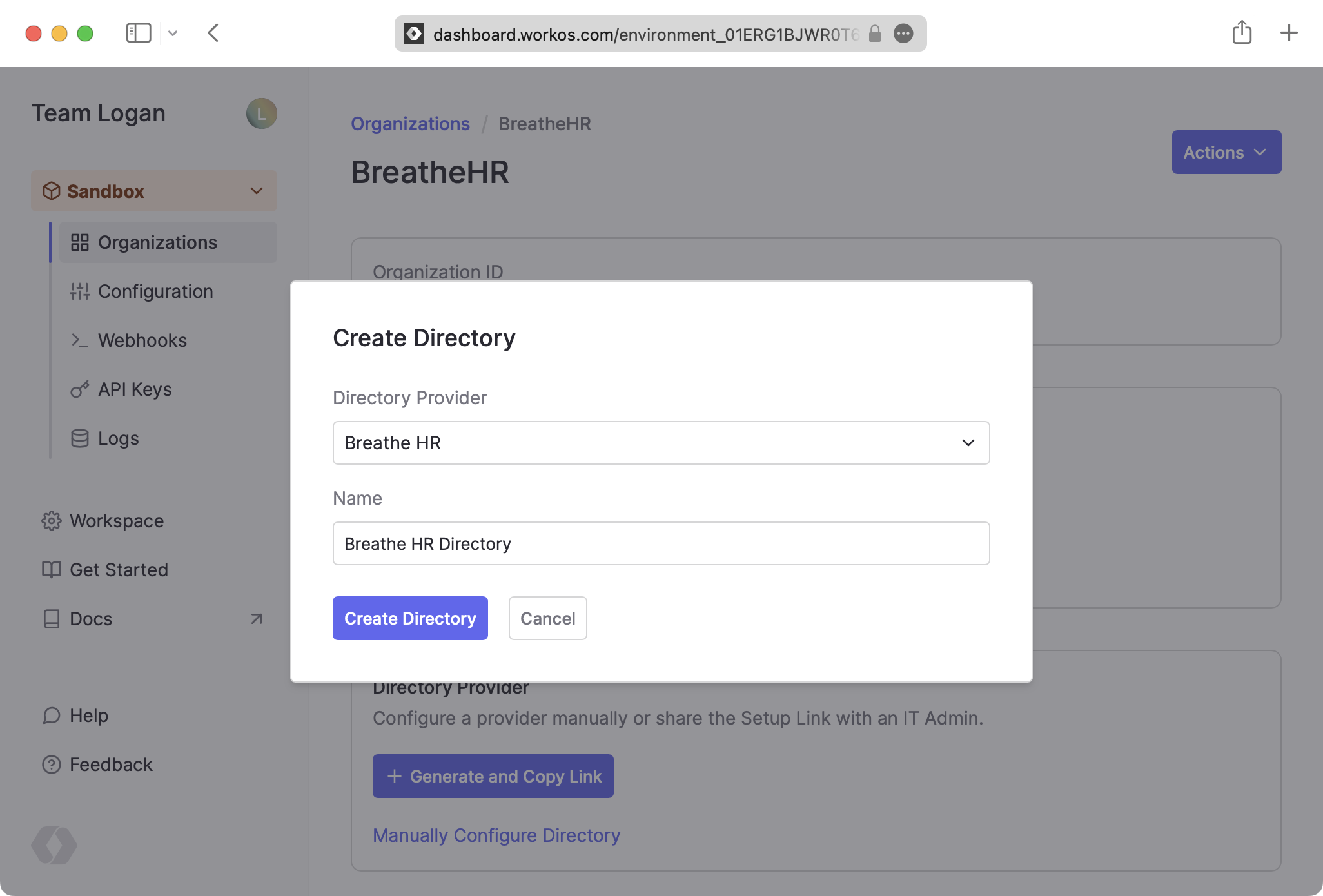
|
|
60
|
+
|
|
61
|
+
---
|
|
62
|
+
|
|
63
|
+
## (3) Set up your Directory Sync Connection
|
|
64
|
+
|
|
65
|
+
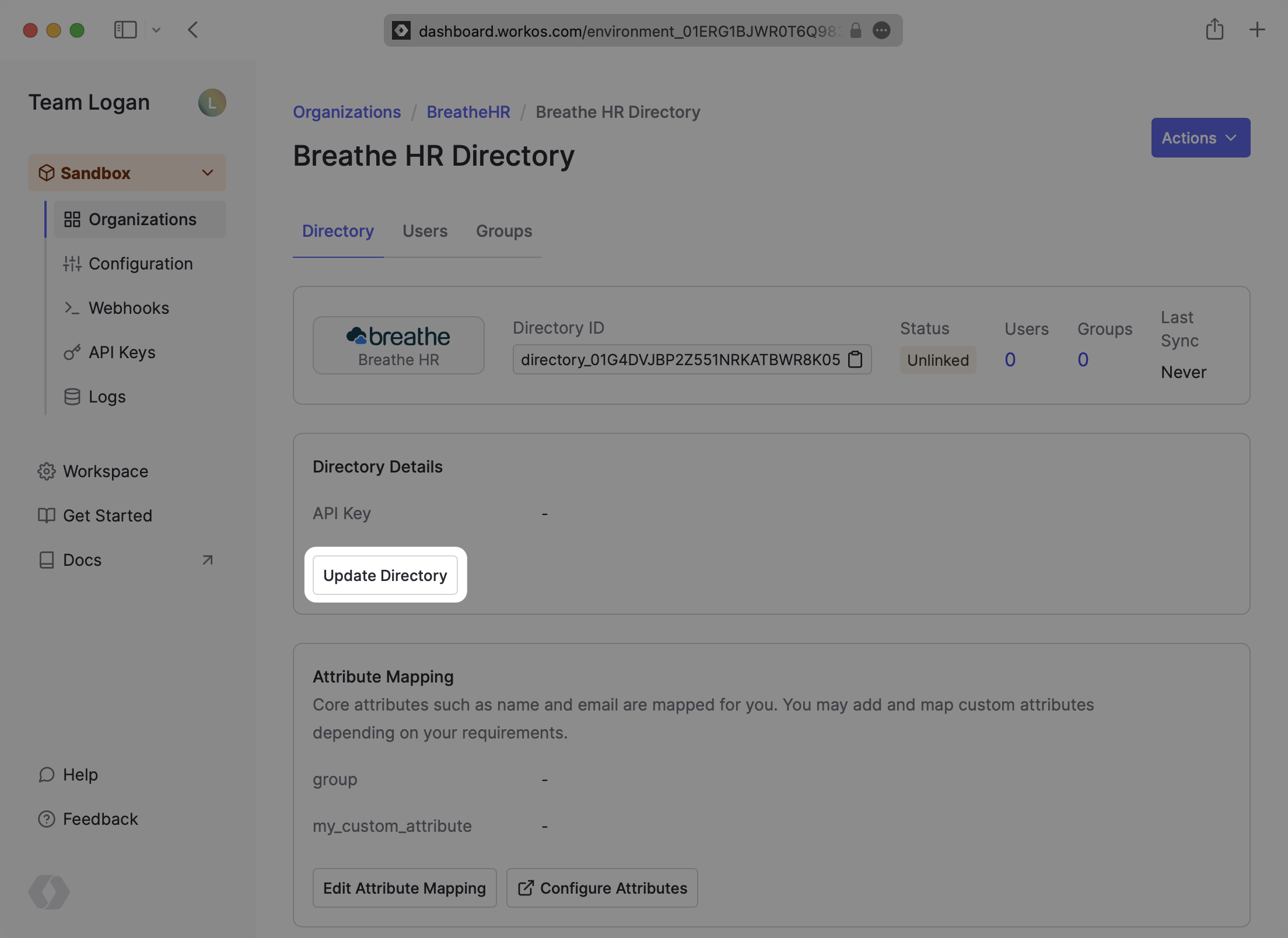
Click “Update Directory” on the Directory details page.
|
|
66
|
+
|
|
67
|
+
|
|
68
|
+
|
|
69
|
+
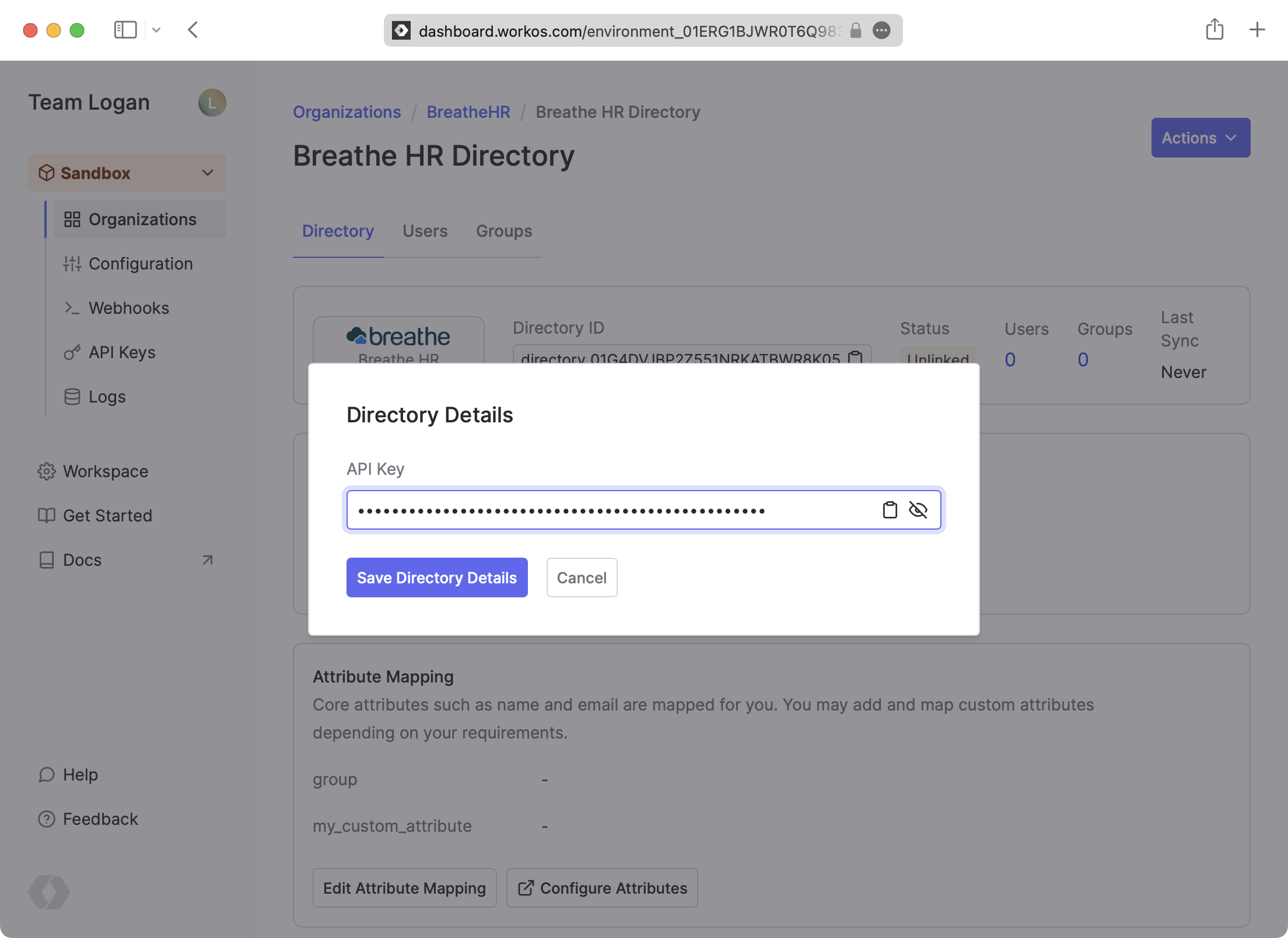
Input the Breathe HR API key and click “Save Directory Details”.
|
|
70
|
+
|
|
71
|
+
|
|
72
|
+
|
|
73
|
+
---
|
|
74
|
+
|
|
75
|
+
## (4) Sync Users and Groups to Your Application
|
|
76
|
+
|
|
77
|
+
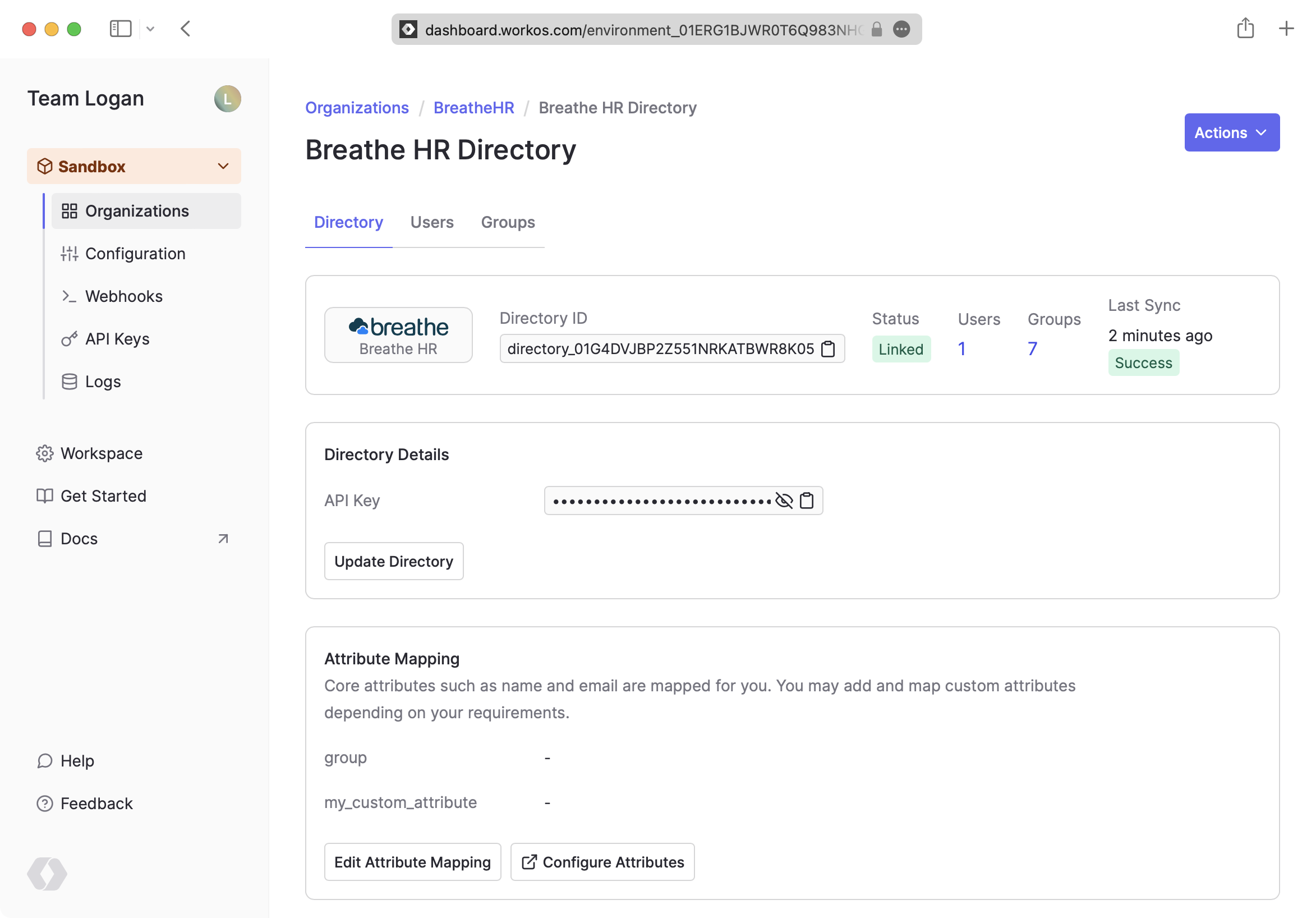
Now, you should see users and groups synced over from Breathe HR.
|
|
78
|
+
|
|
79
|
+
Departments from Breathe HR are synced as groups in WorkOS. All users are synced, but only those marked as “Current employee” or "Pending leaver" are active.
|
|
80
|
+
|
|
81
|
+
|
|
82
|
+
|
|
83
|
+
A detailed guide to integrate the WorkOS API with your application can be found [here](/directory-sync)
|
|
84
|
+
|
|
85
|
+
## Frequently asked questions
|
|
86
|
+
|
|
87
|
+
### How often do Breathe HR directories perform a sync?
|
|
88
|
+
|
|
89
|
+
Breathe HR directories poll every 30 minutes starting from the time of the initial sync.
|
|
@@ -0,0 +1,129 @@
|
|
|
1
|
+
---
|
|
2
|
+
title: Bubble Plugin
|
|
3
|
+
description: Add WorkOS features to your Bubble application.
|
|
4
|
+
icon: bubble
|
|
5
|
+
breadcrumb:
|
|
6
|
+
title: Integrations
|
|
7
|
+
url: /integrations
|
|
8
|
+
originalPath: .tmp-workos-clone/packages/docs/content/integrations/bubble.mdx
|
|
9
|
+
---
|
|
10
|
+
|
|
11
|
+
## Introduction
|
|
12
|
+
|
|
13
|
+
The [Bubble plugin for WorkOS](https://bubble.io/plugin/workos-sso-1666727595127x530956156372516860) allows you to easily integrate [WorkOS API](/reference) endpoints in your application's workflows. This plugin includes actions for SSO, Directory Sync, Admin Portal, and webhook validation.
|
|
14
|
+
|
|
15
|
+
---
|
|
16
|
+
|
|
17
|
+
## Install the WorkOS SSO and API Plugins
|
|
18
|
+
|
|
19
|
+
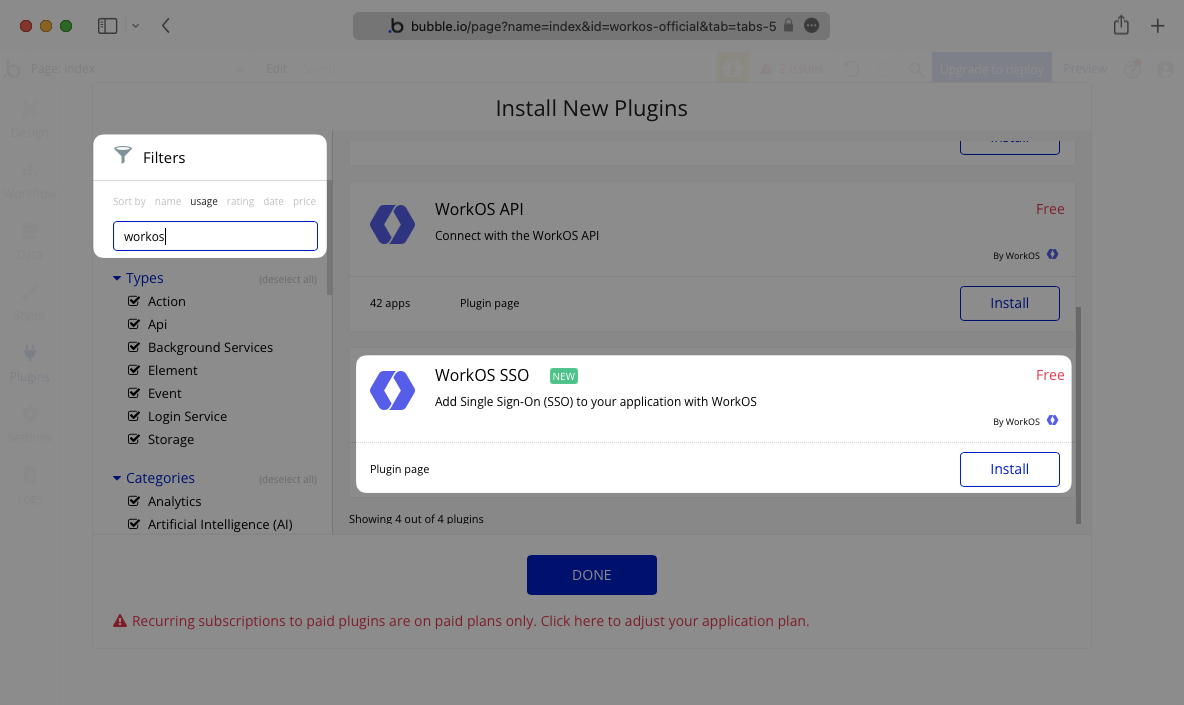
In the **Plugins** tab of your app editor in Bubble, click **Add Plugins**, then search for WorkOS. Install the plugins for both WorkOS SSO and WorkOS API and then click **Done**.
|
|
20
|
+
|
|
21
|
+
|
|
22
|
+
|
|
23
|
+
|
|
24
|
+
|
|
25
|
+
The next step is to enter your secret keys/parameters on the **Plugins** settings page as seen below. The API key can be found in your WorkOS dashboard under **API Keys**.
|
|
26
|
+
|
|
27
|
+
> In the WorkOS SSO plugin the API Key value can be entered directly.
|
|
28
|
+
|
|
29
|
+
|
|
30
|
+
|
|
31
|
+
> In the WorkOS API plugin the API Key value needs to be preceded by **Bearer**.
|
|
32
|
+
|
|
33
|
+
|
|
34
|
+
|
|
35
|
+
Now you’re set up to use the plugin directly in your workflows.
|
|
36
|
+
|
|
37
|
+
---
|
|
38
|
+
|
|
39
|
+
## Single Sign-On
|
|
40
|
+
|
|
41
|
+
Whether you are implementing a Single Sign-On authorization flow for your application using a no-code platform or building your app from the ground up, the steps that you need to take on a high level are the same. You can find more information in our [SSO Quickstart Guide](/sso).
|
|
42
|
+
|
|
43
|
+
### Use SSO in a Workflow
|
|
44
|
+
|
|
45
|
+
To configure SSO, you will need:
|
|
46
|
+
|
|
47
|
+
- An active SSO connection, which can be configured manually or by using the [Admin Portal](/admin-portal).
|
|
48
|
+
- A [connection](/reference/sso/connection) ID or [organization](/reference/organization) ID associated with the user logging in. If WorkOS does not handle user management on your application’s behalf, it is necessary to keep track of the association between your users and their WorkOS connection or organization IDs in your database.
|
|
49
|
+
- [Redirect URI](glossary/redirect-uri), which is the URL to redirect the user to when they are authorized. This is provided by Bubble in the **Plugins** tab.
|
|
50
|
+
|
|
51
|
+
Navigate to the **Workflow** page in your application and add a new event. Select the action that will trigger the workflow to start. In this case, the workflow is triggered when the submit button is clicked.
|
|
52
|
+
|
|
53
|
+
Under the **Account** menu option, select **Signup/login with a social network**, then select **WorkOS SSO** from the **OAuth provider** dropdown menu. Enter either the connection ID, organization ID, or provider.
|
|
54
|
+
|
|
55
|
+
> Select whether you will use connection, organization, or provider (OAuth connections only), and delete the other defaults. The value should be entered in the `organization=<organization_id>` format.
|
|
56
|
+
|
|
57
|
+
|
|
58
|
+
|
|
59
|
+
When a user launches this workflow, they will be prompted to log in through the associated WorkOS SSO connection.
|
|
60
|
+
|
|
61
|
+
Upon a successful login, if the user does not exist in the application database, a new user will be created and logged in as the current user. If the user already exists, that user will be logged in as the current user.
|
|
62
|
+
|
|
63
|
+
---
|
|
64
|
+
|
|
65
|
+
## Directory Sync
|
|
66
|
+
|
|
67
|
+
To start using [Directory Sync](/directory-sync), you will need to configure a new directory connection between your customer’s directory provider and WorkOS. This can be completed manually or by using the [Admin Portal](/admin-portal).
|
|
68
|
+
|
|
69
|
+
Once a directory connection is activated in WorkOS, you can configure webhooks to send events to your Bubble application using the WorkOS plugin through a backend workflow.
|
|
70
|
+
|
|
71
|
+
### Enable backend workflows
|
|
72
|
+
|
|
73
|
+
To enable backend workflows, navigate to the **Settings** page of your Bubble app under the **API** tab, and select **Enable Workflow API and backend workflows**. You are now able to configure backend workflows in the **Workflow** section.
|
|
74
|
+
|
|
75
|
+
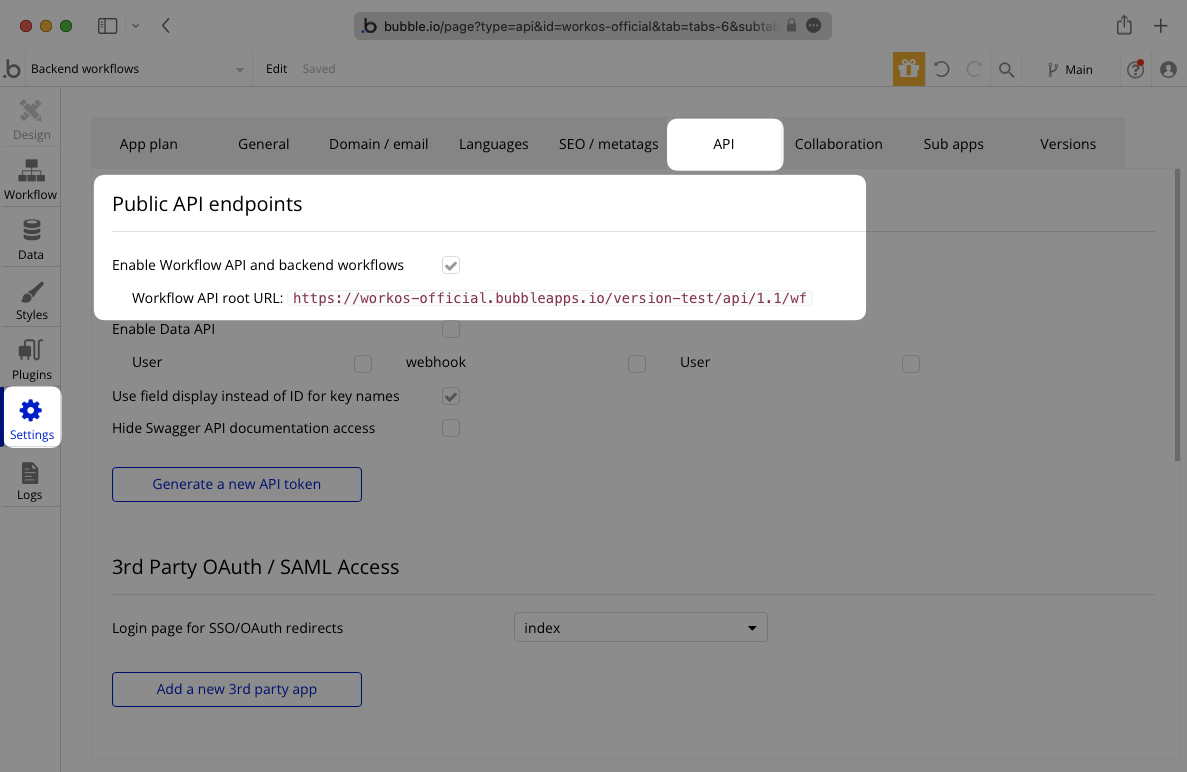
|
|
76
|
+
|
|
77
|
+
### Create a new workflow to receive webhooks
|
|
78
|
+
|
|
79
|
+
To create a new workflow that subscribes to WorkOS webhooks, navigate to the **Workflows** section of your app in Bubble and select **backend workflows** from the page selection dropdown.
|
|
80
|
+
|
|
81
|
+
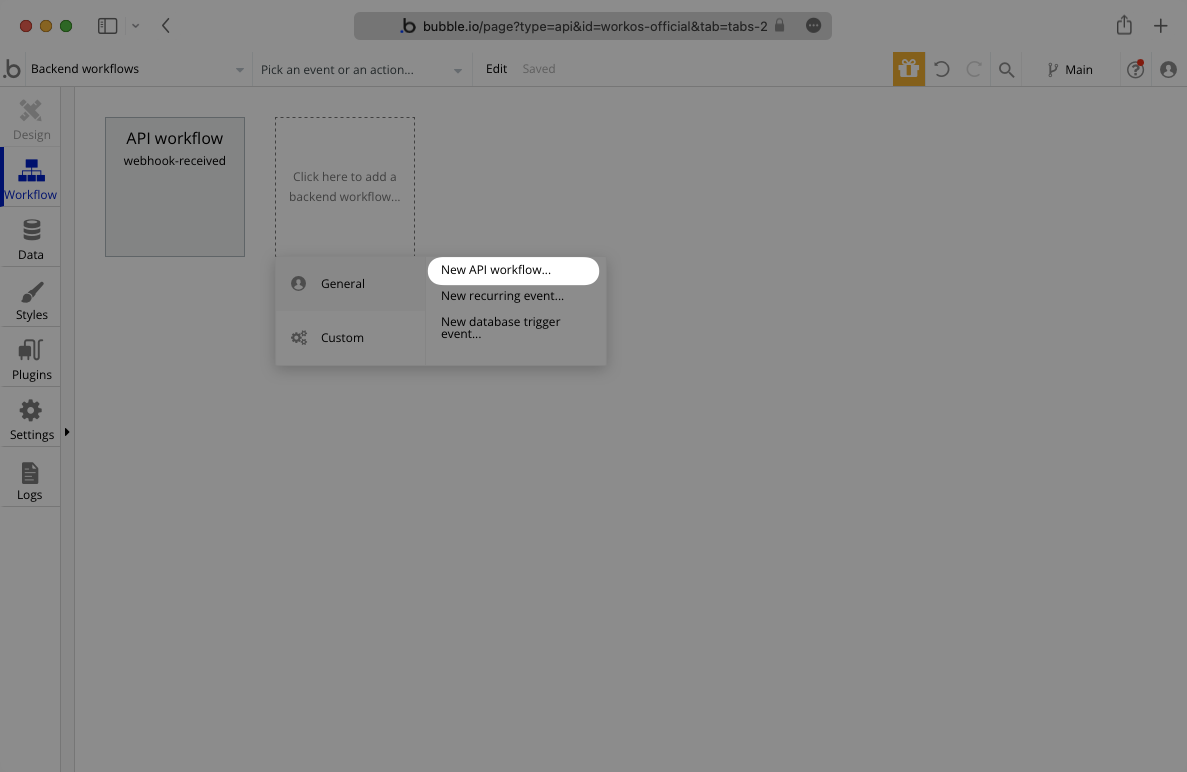
|
|
82
|
+
|
|
83
|
+
Create a new API Workflow. In the **detected data option** ensure that **include headers** is selected before clicking **Detect data**.
|
|
84
|
+
|
|
85
|
+
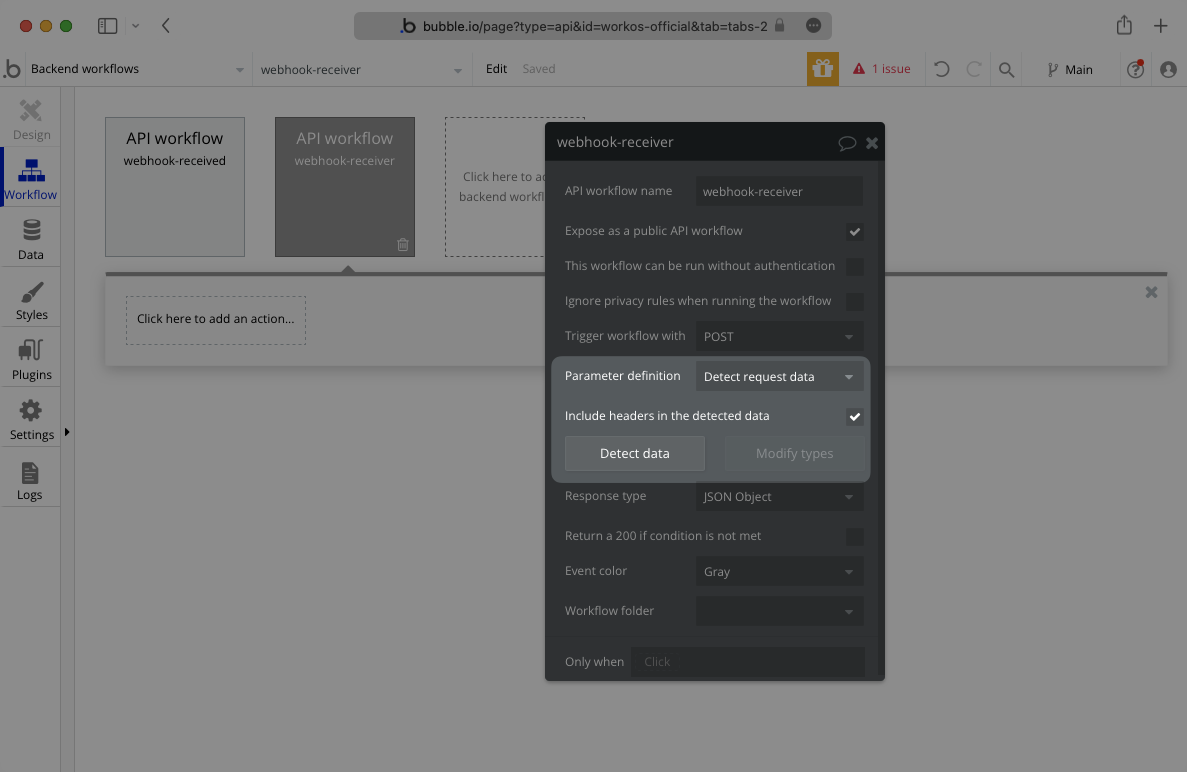
|
|
86
|
+
|
|
87
|
+
A pop-up window will show a test URL to validate the webhook body.
|
|
88
|
+
|
|
89
|
+
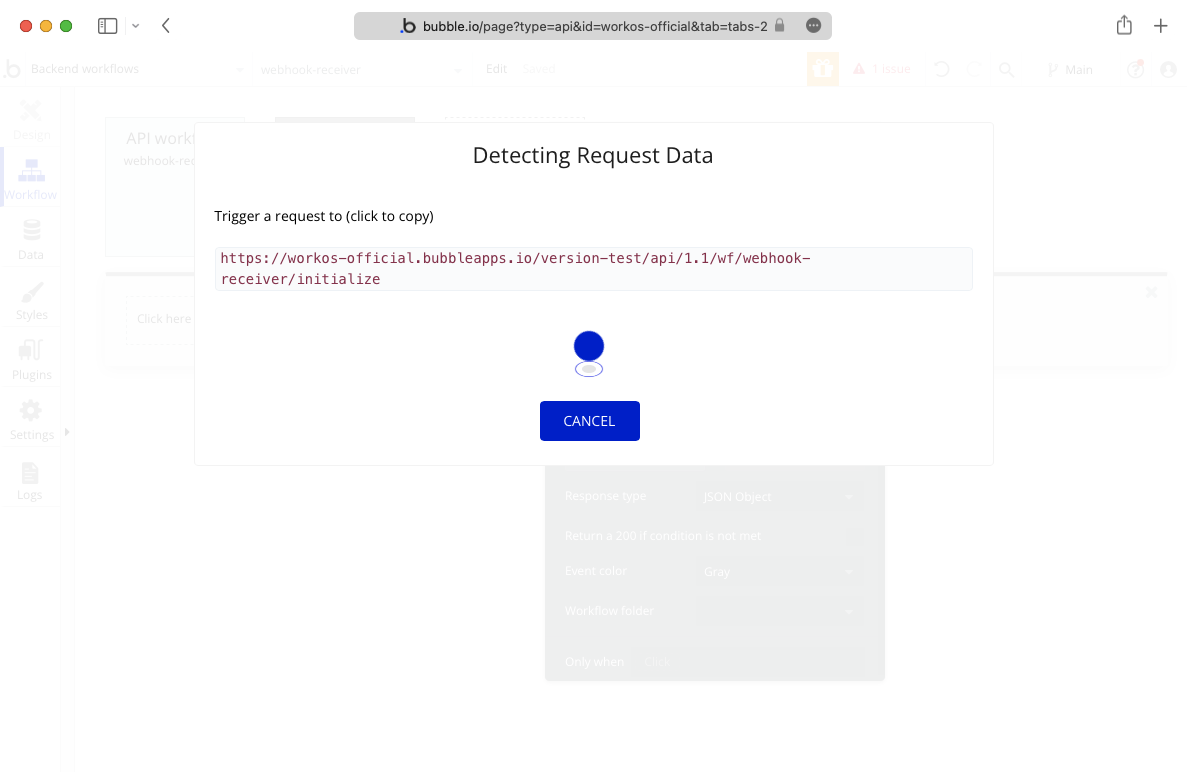
|
|
90
|
+
|
|
91
|
+
Navigate to the **Webhooks** tab in your WorkOS dashboard and enter this test URL as your webhook endpoint.
|
|
92
|
+
|
|
93
|
+
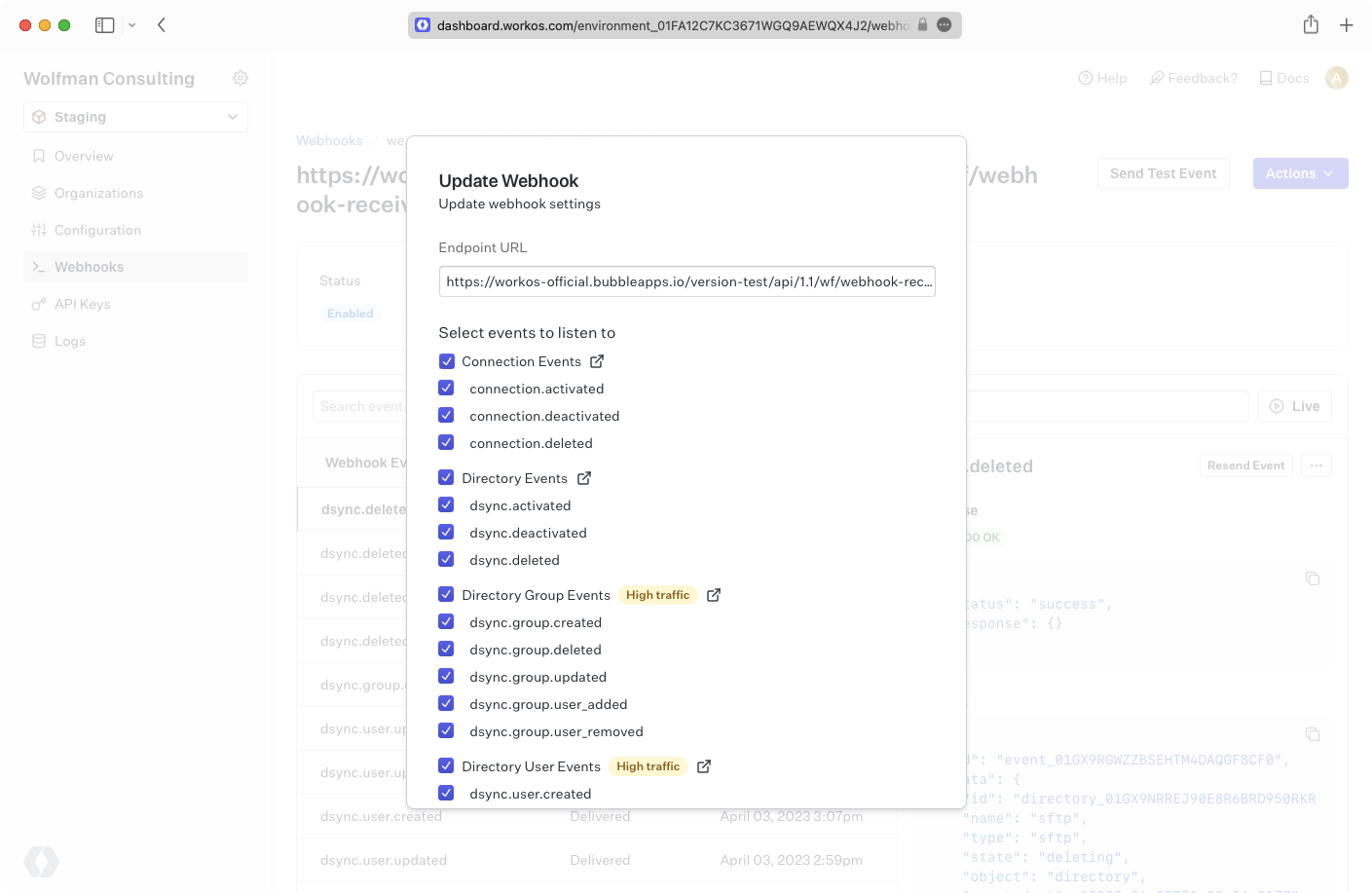
|
|
94
|
+
|
|
95
|
+
Then, click the **Send Test Event** button to send a test event.
|
|
96
|
+
|
|
97
|
+
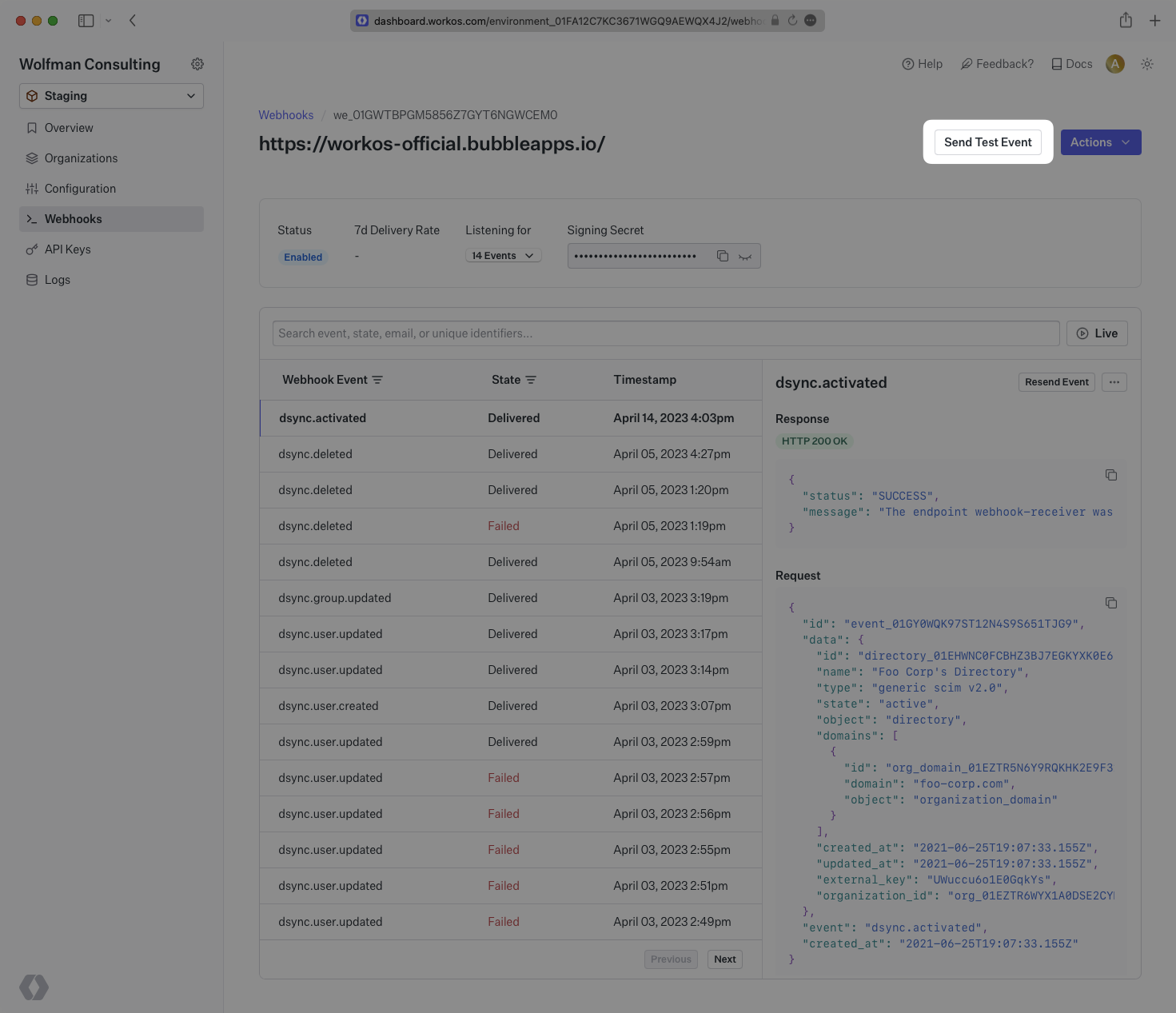
|
|
98
|
+
|
|
99
|
+
Bubble will recognize the event and validate the endpoint. Click save to complete the subscription to WorkOS webhook events for this workflow.
|
|
100
|
+
|
|
101
|
+
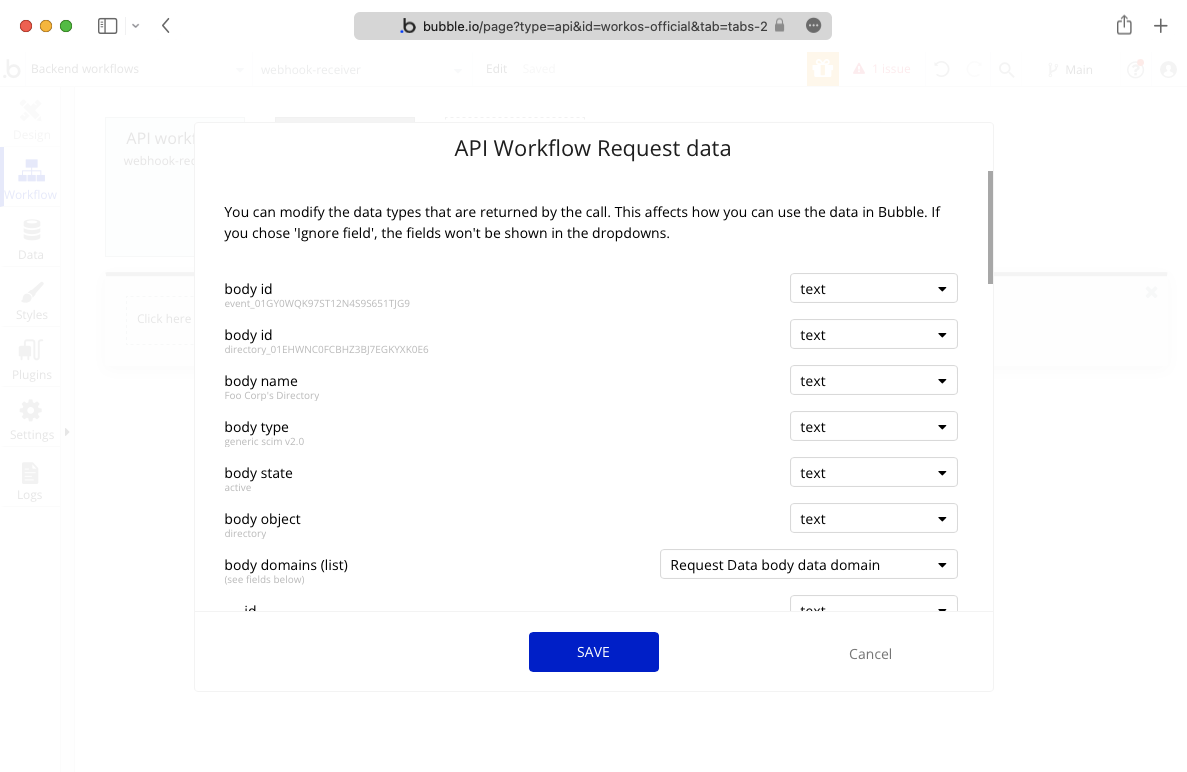
|
|
102
|
+
|
|
103
|
+
### Implement the webhook validation action
|
|
104
|
+
|
|
105
|
+
After the new workflow is set up to listen for new events, it is recommended that you use the webhook validation action to verify that the webhooks being received are from WorkOS.
|
|
106
|
+
|
|
107
|
+
This action verifies the request is valid by using the webhook body, signature, and secret that you provide from your WorkOS dashboard. To properly define the webhook parameter, you should use the raw body text of the request data. Similarly, the `webhook_signature` should be defined using the `workos-signature` in the request data headers.
|
|
108
|
+
|
|
109
|
+
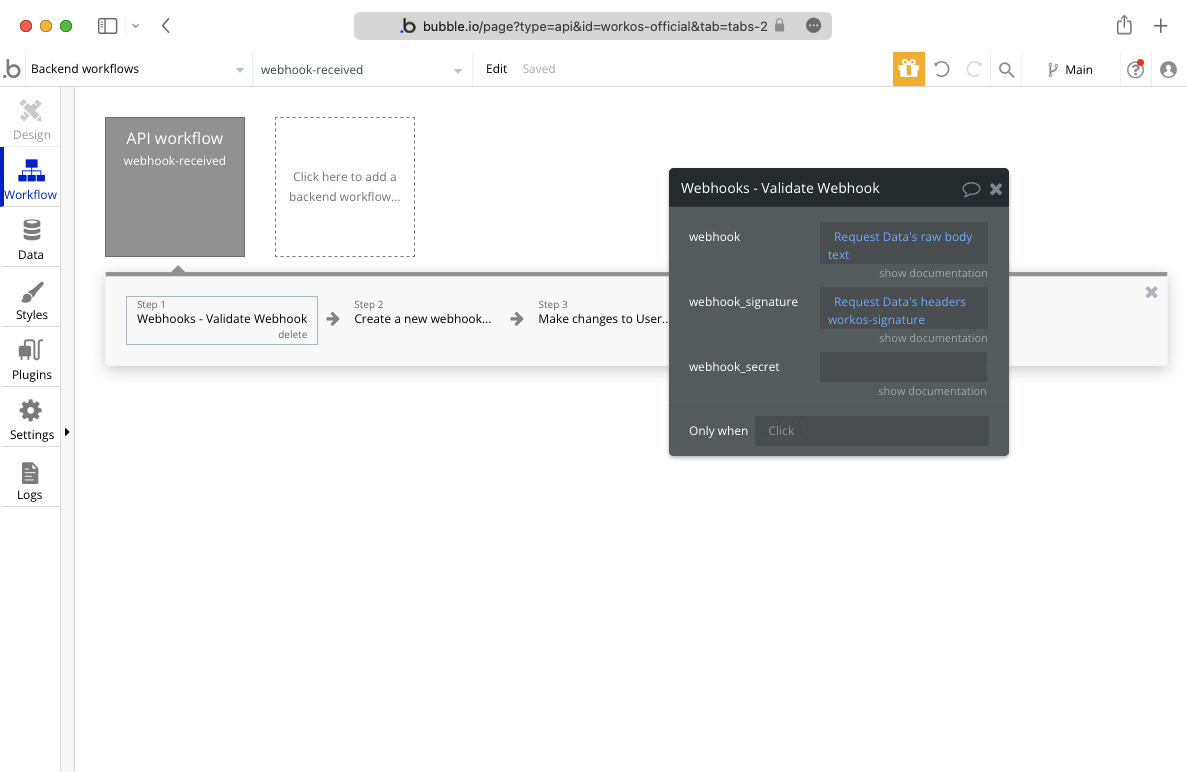
|
|
110
|
+
|
|
111
|
+
After the event is validated, you can use the data from the body to log the webhook and make changes to users.
|
|
112
|
+
|
|
113
|
+
### Reconcile the users
|
|
114
|
+
|
|
115
|
+
The plugin also includes endpoints, documented under the directory sync section of the [API Reference](/reference), that can be used to reconcile users.
|
|
116
|
+
|
|
117
|
+
Periodically calling the [List Directory Users](/reference/directory-sync/directory-user/list) endpoint and verifying that the returned date matches what you have stored in your user table helps ensure your application has up-to-date information about your users, so you can use it with confidence.
|
|
118
|
+
|
|
119
|
+
---
|
|
120
|
+
|
|
121
|
+
## Admin Portal
|
|
122
|
+
|
|
123
|
+
The [Admin Portal](/admin-portal) provides an out-of-the-box UI for organization admins to configure SSO and Directory Sync connections.
|
|
124
|
+
|
|
125
|
+
The WorkOS API plugin provides an API call that launches the Admin Portal if you would like to display it on the settings page of your application. You can also copy and paste these links directly from the WorkOS dashboard in the connection settings.
|
|
126
|
+
|
|
127
|
+
Upon completing the setup flow with the Admin Portal, the organization admin will be able to test the new connection and validate that it has been configured correctly.
|
|
128
|
+
|
|
129
|
+
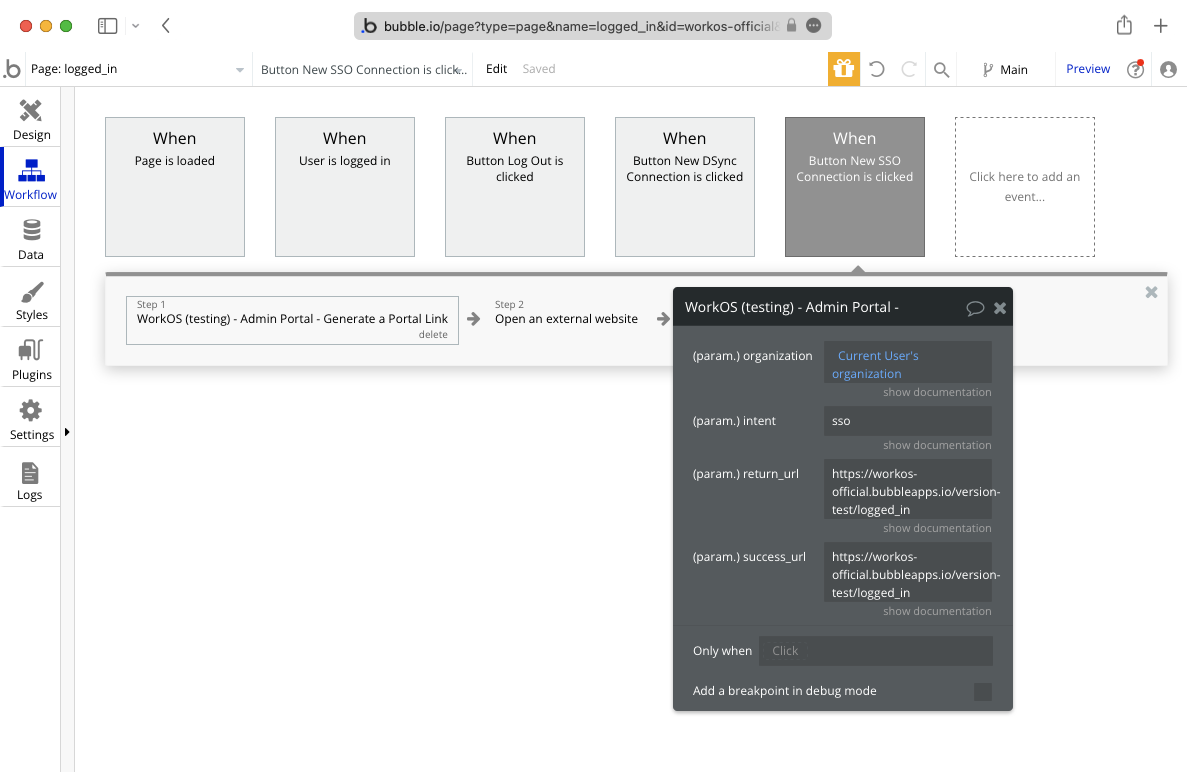
|
|
@@ -0,0 +1,65 @@
|
|
|
1
|
+
---
|
|
2
|
+
title: CAS SAML
|
|
3
|
+
description: "Learn how to configure a connection to\_CAS via SAML."
|
|
4
|
+
icon: cas
|
|
5
|
+
breadcrumb:
|
|
6
|
+
title: Integrations
|
|
7
|
+
url: /integrations
|
|
8
|
+
originalPath: .tmp-workos-clone/packages/docs/content/integrations/cas-saml.mdx
|
|
9
|
+
---
|
|
10
|
+
|
|
11
|
+
## Introduction
|
|
12
|
+
|
|
13
|
+
Each SSO Identity Provider requires specific information to create and configure a new [Connection](/glossary/connection). Often, the information required to create a Connection will differ by Identity Provider.
|
|
14
|
+
|
|
15
|
+
To create a CAS SAML Connection, you’ll need the Identity Provider Metadata URL that is available from your customer’s CAS SAML instance.
|
|
16
|
+
|
|
17
|
+
---
|
|
18
|
+
|
|
19
|
+
## What WorkOS provides
|
|
20
|
+
|
|
21
|
+
WorkOS provides the [ACS URL](/glossary/acs-url), the [SP Metadata](/glossary/sp-metadata) link and the [SP Entity ID](/glossary/sp-entity-id). They are readily available in your Connection Settings in the [WorkOS Dashboard](https://dashboard.workos.com/).
|
|
22
|
+
|
|
23
|
+
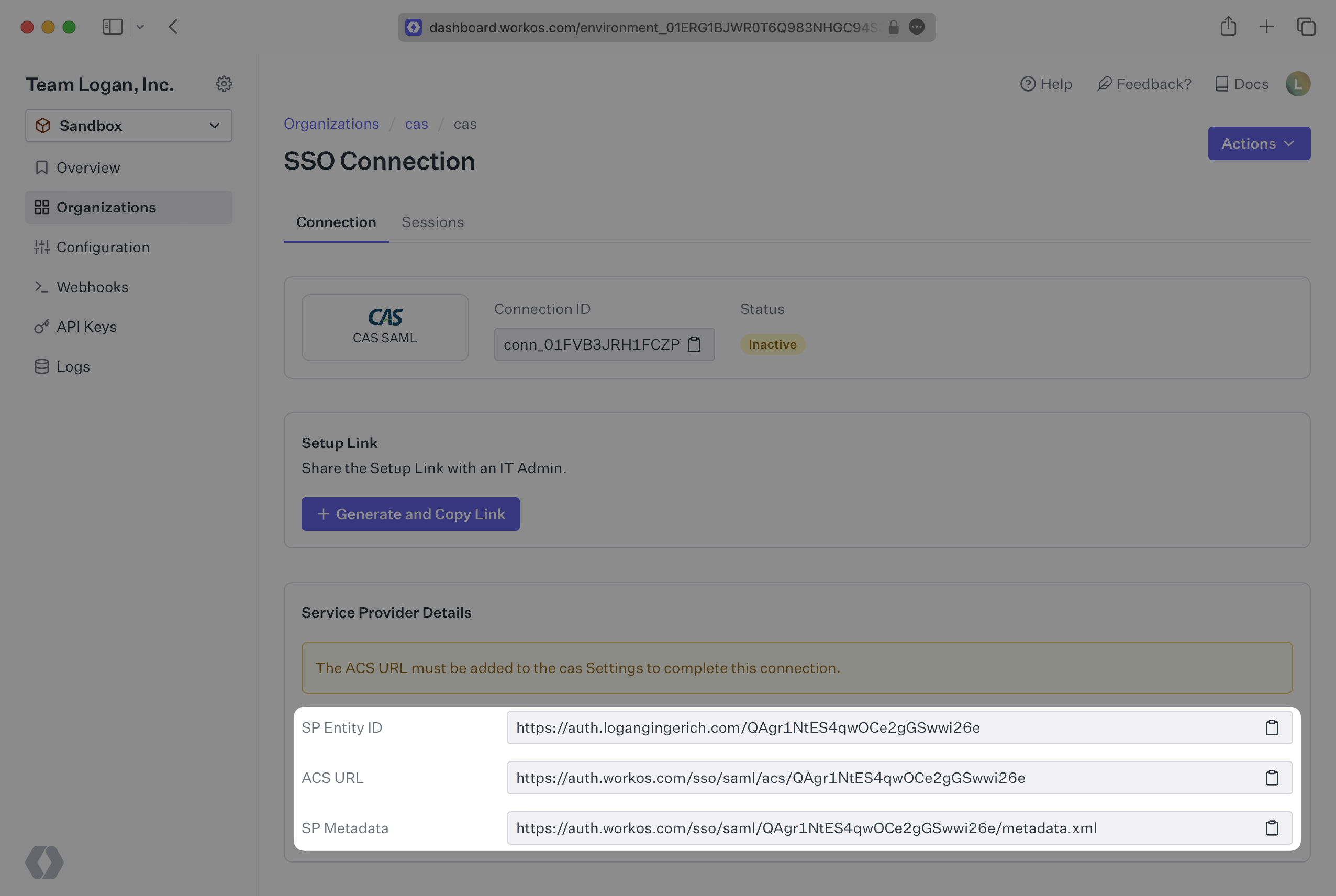
|
|
24
|
+
|
|
25
|
+
The ACS URL is the location an Identity Provider redirects its authentication response to. The SP Metadata link contains a metadata file that the organization can use to set up the SAML integration. The SP Entity ID is a URI used to identify the issuer of a SAML request, response, or assertion.
|
|
26
|
+
|
|
27
|
+
---
|
|
28
|
+
|
|
29
|
+
## What you’ll need
|
|
30
|
+
|
|
31
|
+
In order to integrate you’ll need the [IdP Metadata URL](/glossary/idp-metadata).
|
|
32
|
+
|
|
33
|
+
Normally, this will come from the organization’s IT Management team when they set up your application’s SAML 2.0 configuration in their CAS instance. But, should that not be the case during your setup, here’s how to obtain it.
|
|
34
|
+
|
|
35
|
+
---
|
|
36
|
+
|
|
37
|
+
## (1) Enter Service Provider Details
|
|
38
|
+
|
|
39
|
+
Copy and paste the “ACS URL” and “SP Entity ID” into the corresponding fields for Service Provider details and configuration. For some setups, you can use the metadata found at the SP Metadata link to configure the SAML connection.
|
|
40
|
+
|
|
41
|
+
---
|
|
42
|
+
|
|
43
|
+
## (2) Obtain Identity Provider Metadata
|
|
44
|
+
|
|
45
|
+
Copy the IdP Metadata URL from your CAS SAML settings and upload it to your WorkOS Connection settings. Your Connection will then be linked and good to go!
|
|
46
|
+
|
|
47
|
+
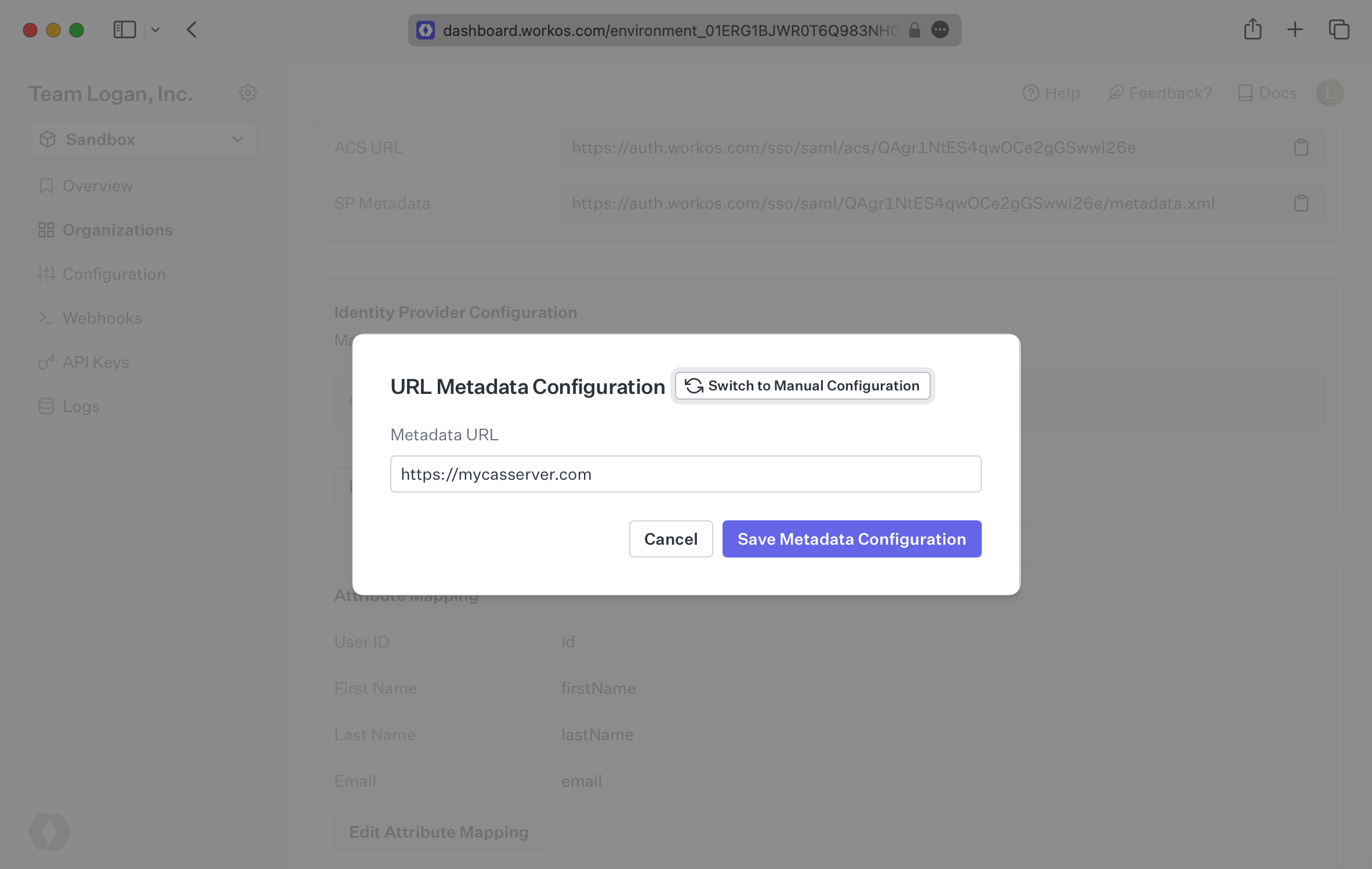
|
|
48
|
+
|
|
49
|
+
Alternatively, you can manually configure the connection by providing the IdP URI (Entity ID), [IdP SSO URL](/glossary/idp-sso-url) and X.509 Certificate.
|
|
50
|
+
|
|
51
|
+
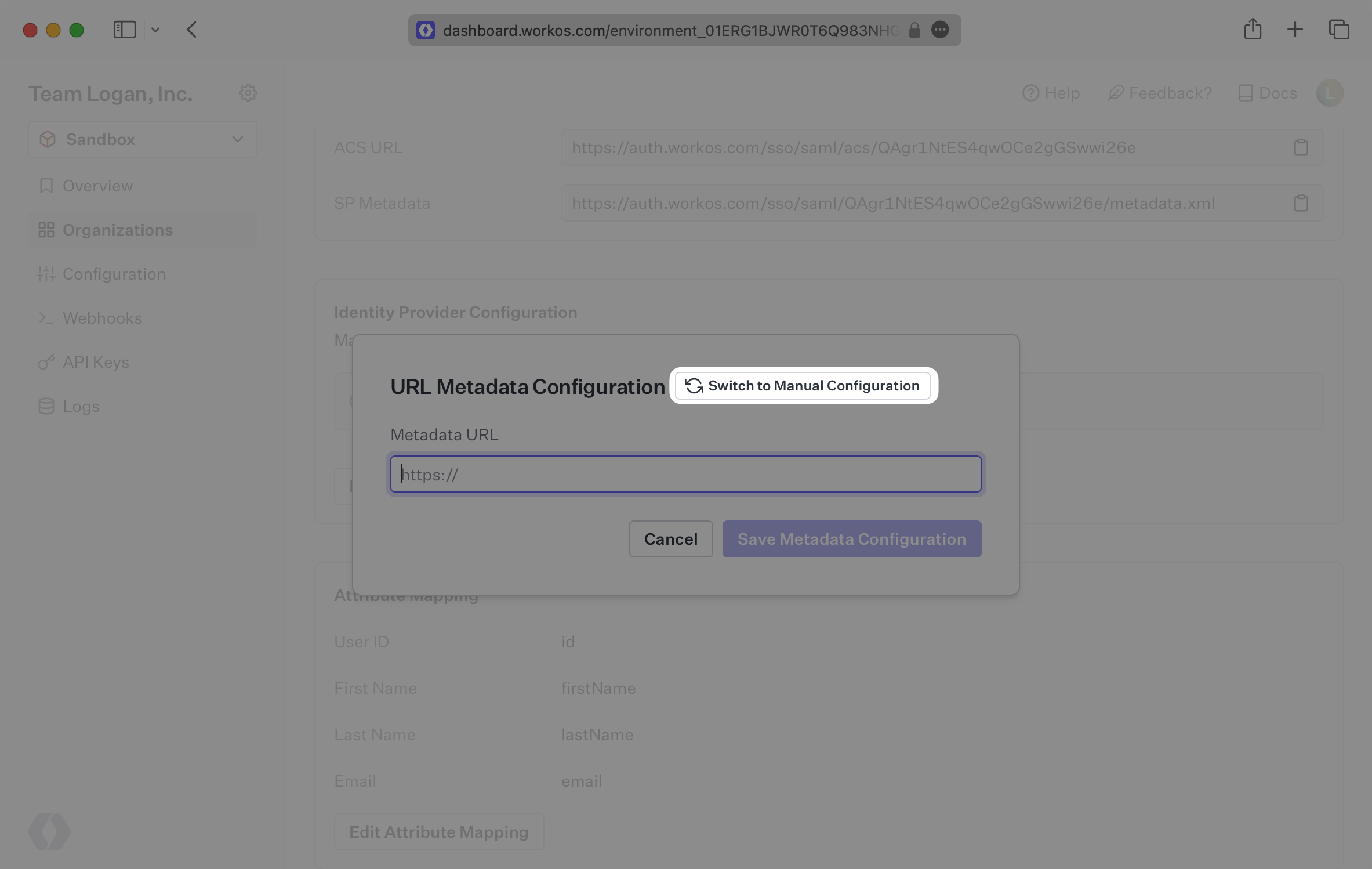
|
|
52
|
+
|
|
53
|
+
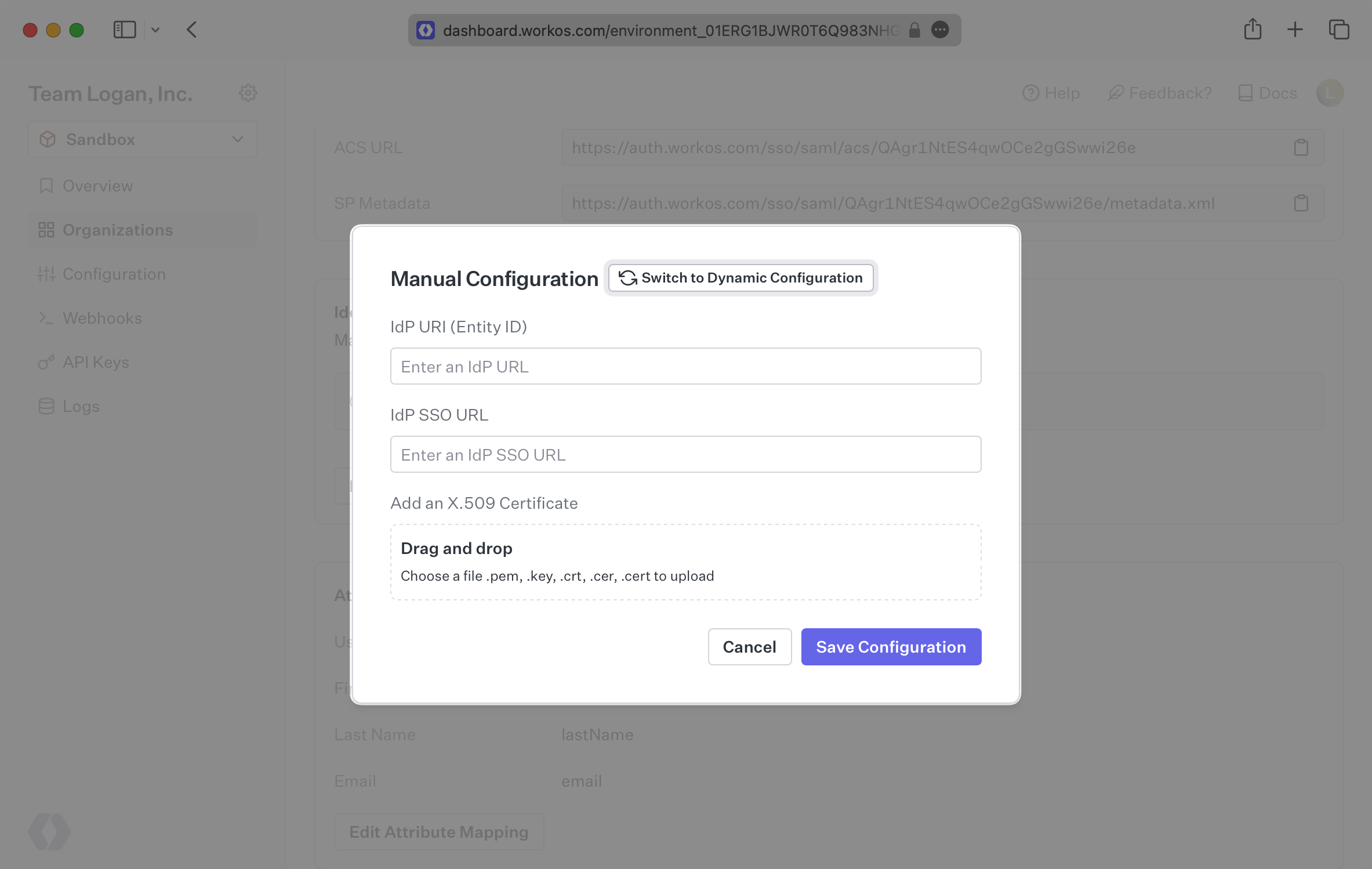
|
|
54
|
+
|
|
55
|
+
---
|
|
56
|
+
|
|
57
|
+
## (3) Configure Attribute Mapping
|
|
58
|
+
|
|
59
|
+
At minimum, the Attribute Statement in the SAML Response should include `id`, `email`, `firstName`, and `lastName` attributes.
|
|
60
|
+
|
|
61
|
+
### Role Assignment (optional)
|
|
62
|
+
|
|
63
|
+
With [identity provider role assignment](/sso/identity-provider-role-assignment), users can receive roles within your application based on their group memberships. To return this information in the attribute statement, map the groups in your identity provider to a SAML attribute named `groups`.
|
|
64
|
+
|
|
65
|
+
Once your SAML app is configured to return groups, navigate to the SSO connection page in the _Organization_ section of the [WorkOS Dashboard](https://dashboard.workos.com/). Create SSO groups by referencing the group IdP ID. Then, assign roles to these SSO groups so group members are automatically granted roles within your application.
|