@workos/mcp-docs-server 0.1.0
This diff represents the content of publicly available package versions that have been released to one of the supported registries. The information contained in this diff is provided for informational purposes only and reflects changes between package versions as they appear in their respective public registries.
- package/.docs/organized/changelogs/workos-platform.json +277 -0
- package/.docs/organized/docs/admin-portal/_navigation.mdx +16 -0
- package/.docs/organized/docs/admin-portal/custom-branding.mdx +111 -0
- package/.docs/organized/docs/admin-portal/example-apps.mdx +46 -0
- package/.docs/organized/docs/admin-portal/index.mdx +240 -0
- package/.docs/organized/docs/audit-logs/_navigation.mdx +22 -0
- package/.docs/organized/docs/audit-logs/admin-portal.mdx +20 -0
- package/.docs/organized/docs/audit-logs/editing-events.mdx +27 -0
- package/.docs/organized/docs/audit-logs/exporting-events.mdx +29 -0
- package/.docs/organized/docs/audit-logs/index.mdx +110 -0
- package/.docs/organized/docs/audit-logs/log-streams.mdx +56 -0
- package/.docs/organized/docs/audit-logs/metadata-schema.mdx +21 -0
- package/.docs/organized/docs/custom-domains/_navigation.mdx +16 -0
- package/.docs/organized/docs/custom-domains/admin-portal.mdx +38 -0
- package/.docs/organized/docs/custom-domains/auth-api.mdx +59 -0
- package/.docs/organized/docs/custom-domains/authkit.mdx +36 -0
- package/.docs/organized/docs/custom-domains/email.mdx +41 -0
- package/.docs/organized/docs/custom-domains/index.mdx +19 -0
- package/.docs/organized/docs/dashboard.mdx +244 -0
- package/.docs/organized/docs/demo/_navigation.mdx +26 -0
- package/.docs/organized/docs/demo/accordion.mdx +34 -0
- package/.docs/organized/docs/demo/checklist.mdx +33 -0
- package/.docs/organized/docs/demo/code-block.mdx +185 -0
- package/.docs/organized/docs/demo/definition-list.mdx +35 -0
- package/.docs/organized/docs/demo/index.mdx +7 -0
- package/.docs/organized/docs/demo/punctuation.mdx +37 -0
- package/.docs/organized/docs/demo/replacements.mdx +26 -0
- package/.docs/organized/docs/demo/table.mdx +26 -0
- package/.docs/organized/docs/demo/tabs.mdx +17 -0
- package/.docs/organized/docs/directory-sync/_navigation.mdx +28 -0
- package/.docs/organized/docs/directory-sync/attributes.mdx +209 -0
- package/.docs/organized/docs/directory-sync/example-apps.mdx +46 -0
- package/.docs/organized/docs/directory-sync/handle-inactive-users.mdx +52 -0
- package/.docs/organized/docs/directory-sync/identity-provider-role-assignment.mdx +134 -0
- package/.docs/organized/docs/directory-sync/index.mdx +107 -0
- package/.docs/organized/docs/directory-sync/quick-start.mdx +129 -0
- package/.docs/organized/docs/directory-sync/understanding-events.mdx +209 -0
- package/.docs/organized/docs/domain-verification/_navigation.mdx +10 -0
- package/.docs/organized/docs/domain-verification/api.mdx +60 -0
- package/.docs/organized/docs/domain-verification/index.mdx +67 -0
- package/.docs/organized/docs/email.mdx +109 -0
- package/.docs/organized/docs/events/_navigation.mdx +22 -0
- package/.docs/organized/docs/events/data-syncing/data-reconciliation.mdx +56 -0
- package/.docs/organized/docs/events/data-syncing/events-api.mdx +114 -0
- package/.docs/organized/docs/events/data-syncing/index.mdx +66 -0
- package/.docs/organized/docs/events/data-syncing/webhooks.mdx +173 -0
- package/.docs/organized/docs/events/index.mdx +783 -0
- package/.docs/organized/docs/events/observability/datadog.mdx +76 -0
- package/.docs/organized/docs/fga/_navigation.mdx +64 -0
- package/.docs/organized/docs/fga/identity-provider-sessions.mdx +68 -0
- package/.docs/organized/docs/fga/index.mdx +60 -0
- package/.docs/organized/docs/fga/local-development.mdx +155 -0
- package/.docs/organized/docs/fga/modeling/abac.mdx +107 -0
- package/.docs/organized/docs/fga/modeling/blocklist.mdx +84 -0
- package/.docs/organized/docs/fga/modeling/conditional-roles.mdx +99 -0
- package/.docs/organized/docs/fga/modeling/custom-roles.mdx +90 -0
- package/.docs/organized/docs/fga/modeling/entitlements.mdx +127 -0
- package/.docs/organized/docs/fga/modeling/managed-service-provider.mdx +131 -0
- package/.docs/organized/docs/fga/modeling/org-roles-and-permissions.mdx +95 -0
- package/.docs/organized/docs/fga/modeling/policy-context.mdx +231 -0
- package/.docs/organized/docs/fga/modeling/public-access.mdx +61 -0
- package/.docs/organized/docs/fga/modeling/shareable-content.mdx +106 -0
- package/.docs/organized/docs/fga/modeling/superusers.mdx +74 -0
- package/.docs/organized/docs/fga/modeling/user-groups.mdx +92 -0
- package/.docs/organized/docs/fga/operations-usage.mdx +104 -0
- package/.docs/organized/docs/fga/playground.mdx +12 -0
- package/.docs/organized/docs/fga/policies.mdx +462 -0
- package/.docs/organized/docs/fga/query-language.mdx +112 -0
- package/.docs/organized/docs/fga/quick-start.mdx +174 -0
- package/.docs/organized/docs/fga/resources.mdx +92 -0
- package/.docs/organized/docs/fga/schema-management.mdx +224 -0
- package/.docs/organized/docs/fga/schema.mdx +388 -0
- package/.docs/organized/docs/fga/warrant-tokens.mdx +44 -0
- package/.docs/organized/docs/fga/warrants.mdx +92 -0
- package/.docs/organized/docs/glossary.mdx +184 -0
- package/.docs/organized/docs/integrations/_navigation.mdx +6 -0
- package/.docs/organized/docs/integrations/access-people-hr.mdx +87 -0
- package/.docs/organized/docs/integrations/adp-oidc.mdx +103 -0
- package/.docs/organized/docs/integrations/apple.mdx +169 -0
- package/.docs/organized/docs/integrations/auth0-directory-sync.mdx +78 -0
- package/.docs/organized/docs/integrations/auth0-enterprise-connection.mdx +92 -0
- package/.docs/organized/docs/integrations/auth0-saml.mdx +81 -0
- package/.docs/organized/docs/integrations/aws-cognito.mdx +81 -0
- package/.docs/organized/docs/integrations/bamboohr.mdx +90 -0
- package/.docs/organized/docs/integrations/breathe-hr.mdx +89 -0
- package/.docs/organized/docs/integrations/bubble.mdx +129 -0
- package/.docs/organized/docs/integrations/cas-saml.mdx +65 -0
- package/.docs/organized/docs/integrations/cezanne.mdx +74 -0
- package/.docs/organized/docs/integrations/classlink-saml.mdx +100 -0
- package/.docs/organized/docs/integrations/cloudflare-saml.mdx +164 -0
- package/.docs/organized/docs/integrations/cyberark-saml.mdx +138 -0
- package/.docs/organized/docs/integrations/cyberark-scim.mdx +100 -0
- package/.docs/organized/docs/integrations/duo-saml.mdx +127 -0
- package/.docs/organized/docs/integrations/entra-id-saml.mdx +156 -0
- package/.docs/organized/docs/integrations/entra-id-scim.mdx +218 -0
- package/.docs/organized/docs/integrations/firebase.mdx +98 -0
- package/.docs/organized/docs/integrations/fourth.mdx +66 -0
- package/.docs/organized/docs/integrations/github-oauth.mdx +85 -0
- package/.docs/organized/docs/integrations/gitlab-oauth.mdx +81 -0
- package/.docs/organized/docs/integrations/google-directory-sync.mdx +86 -0
- package/.docs/organized/docs/integrations/google-oauth.mdx +173 -0
- package/.docs/organized/docs/integrations/google-saml.mdx +135 -0
- package/.docs/organized/docs/integrations/hibob.mdx +98 -0
- package/.docs/organized/docs/integrations/jumpcloud-saml.mdx +96 -0
- package/.docs/organized/docs/integrations/jumpcloud-scim.mdx +106 -0
- package/.docs/organized/docs/integrations/keycloak-saml.mdx +128 -0
- package/.docs/organized/docs/integrations/lastpass-saml.mdx +134 -0
- package/.docs/organized/docs/integrations/linkedin-oauth.mdx +77 -0
- package/.docs/organized/docs/integrations/login-gov-oidc.mdx +103 -0
- package/.docs/organized/docs/integrations/microsoft-ad-fs-saml.mdx +96 -0
- package/.docs/organized/docs/integrations/microsoft-oauth.mdx +101 -0
- package/.docs/organized/docs/integrations/miniorange-saml.mdx +124 -0
- package/.docs/organized/docs/integrations/net-iq-saml.mdx +75 -0
- package/.docs/organized/docs/integrations/next-auth.mdx +257 -0
- package/.docs/organized/docs/integrations/oidc.mdx +64 -0
- package/.docs/organized/docs/integrations/okta-saml.mdx +144 -0
- package/.docs/organized/docs/integrations/okta-scim.mdx +210 -0
- package/.docs/organized/docs/integrations/onelogin-saml.mdx +131 -0
- package/.docs/organized/docs/integrations/onelogin-scim.mdx +150 -0
- package/.docs/organized/docs/integrations/oracle-saml.mdx +76 -0
- package/.docs/organized/docs/integrations/pingfederate-saml.mdx +103 -0
- package/.docs/organized/docs/integrations/pingfederate-scim.mdx +150 -0
- package/.docs/organized/docs/integrations/pingone-saml.mdx +86 -0
- package/.docs/organized/docs/integrations/react-native-expo.mdx +93 -0
- package/.docs/organized/docs/integrations/rippling-saml.mdx +174 -0
- package/.docs/organized/docs/integrations/rippling-scim.mdx +148 -0
- package/.docs/organized/docs/integrations/salesforce-saml.mdx +143 -0
- package/.docs/organized/docs/integrations/saml.mdx +64 -0
- package/.docs/organized/docs/integrations/scim.mdx +64 -0
- package/.docs/organized/docs/integrations/sftp.mdx +150 -0
- package/.docs/organized/docs/integrations/shibboleth-generic-saml.mdx +84 -0
- package/.docs/organized/docs/integrations/shibboleth-unsolicited-saml.mdx +84 -0
- package/.docs/organized/docs/integrations/simple-saml-php.mdx +78 -0
- package/.docs/organized/docs/integrations/slack-oauth.mdx +102 -0
- package/.docs/organized/docs/integrations/supabase.mdx +68 -0
- package/.docs/organized/docs/integrations/vmware-saml.mdx +100 -0
- package/.docs/organized/docs/integrations/workday.mdx +156 -0
- package/.docs/organized/docs/integrations/xero-oauth.mdx +83 -0
- package/.docs/organized/docs/magic-link/_navigation.mdx +16 -0
- package/.docs/organized/docs/magic-link/example-apps.mdx +46 -0
- package/.docs/organized/docs/magic-link/index.mdx +199 -0
- package/.docs/organized/docs/magic-link/launch-checklist.mdx +27 -0
- package/.docs/organized/docs/mfa/_navigation.mdx +18 -0
- package/.docs/organized/docs/mfa/example-apps.mdx +46 -0
- package/.docs/organized/docs/mfa/index.mdx +140 -0
- package/.docs/organized/docs/mfa/ux/enrollment.mdx +74 -0
- package/.docs/organized/docs/mfa/ux/sign-in.mdx +30 -0
- package/.docs/organized/docs/migrate/_navigation.mdx +6 -0
- package/.docs/organized/docs/migrate/auth0.mdx +98 -0
- package/.docs/organized/docs/migrate/aws-cognito.mdx +115 -0
- package/.docs/organized/docs/migrate/clerk.mdx +106 -0
- package/.docs/organized/docs/migrate/firebase.mdx +80 -0
- package/.docs/organized/docs/migrate/other-services.mdx +179 -0
- package/.docs/organized/docs/migrate/standalone-sso.mdx +105 -0
- package/.docs/organized/docs/on-prem-deployment.mdx +119 -0
- package/.docs/organized/docs/postman.mdx +90 -0
- package/.docs/organized/docs/reference/_navigation.mdx +527 -0
- package/.docs/organized/docs/reference/admin-portal/index.mdx +6 -0
- package/.docs/organized/docs/reference/admin-portal/portal-link/generate.mdx +268 -0
- package/.docs/organized/docs/reference/admin-portal/portal-link/index.mdx +15 -0
- package/.docs/organized/docs/reference/admin-portal/provider-icons/index.mdx +52 -0
- package/.docs/organized/docs/reference/api-keys.mdx +22 -0
- package/.docs/organized/docs/reference/audit-logs/audit-log-export.mdx +239 -0
- package/.docs/organized/docs/reference/audit-logs/audit-log-schema.mdx +69 -0
- package/.docs/organized/docs/reference/audit-logs/create-event.mdx +673 -0
- package/.docs/organized/docs/reference/audit-logs/create-export.mdx +308 -0
- package/.docs/organized/docs/reference/audit-logs/create-schema.mdx +95 -0
- package/.docs/organized/docs/reference/audit-logs/get-export.mdx +117 -0
- package/.docs/organized/docs/reference/audit-logs/get-retention.mdx +34 -0
- package/.docs/organized/docs/reference/audit-logs/index.mdx +6 -0
- package/.docs/organized/docs/reference/audit-logs/list-actions.mdx +40 -0
- package/.docs/organized/docs/reference/audit-logs/list-schemas.mdx +40 -0
- package/.docs/organized/docs/reference/audit-logs/set-retention.mdx +39 -0
- package/.docs/organized/docs/reference/client-libraries.mdx +19 -0
- package/.docs/organized/docs/reference/directory-sync/directory/delete.mdx +90 -0
- package/.docs/organized/docs/reference/directory-sync/directory/get.mdx +105 -0
- package/.docs/organized/docs/reference/directory-sync/directory/index.mdx +385 -0
- package/.docs/organized/docs/reference/directory-sync/directory/list.mdx +281 -0
- package/.docs/organized/docs/reference/directory-sync/directory-group/get.mdx +105 -0
- package/.docs/organized/docs/reference/directory-sync/directory-group/index.mdx +277 -0
- package/.docs/organized/docs/reference/directory-sync/directory-group/list.mdx +295 -0
- package/.docs/organized/docs/reference/directory-sync/directory-user/get.mdx +112 -0
- package/.docs/organized/docs/reference/directory-sync/directory-user/index.mdx +470 -0
- package/.docs/organized/docs/reference/directory-sync/directory-user/list.mdx +304 -0
- package/.docs/organized/docs/reference/directory-sync/index.mdx +10 -0
- package/.docs/organized/docs/reference/domain-verification/create.mdx +38 -0
- package/.docs/organized/docs/reference/domain-verification/get.mdx +32 -0
- package/.docs/organized/docs/reference/domain-verification/index.mdx +84 -0
- package/.docs/organized/docs/reference/domain-verification/verify.mdx +36 -0
- package/.docs/organized/docs/reference/errors.mdx +30 -0
- package/.docs/organized/docs/reference/events/index.mdx +9 -0
- package/.docs/organized/docs/reference/events/list.mdx +246 -0
- package/.docs/organized/docs/reference/fga/batch-check.mdx +277 -0
- package/.docs/organized/docs/reference/fga/check.mdx +563 -0
- package/.docs/organized/docs/reference/fga/index.mdx +6 -0
- package/.docs/organized/docs/reference/fga/policy/create.mdx +27 -0
- package/.docs/organized/docs/reference/fga/policy/delete.mdx +18 -0
- package/.docs/organized/docs/reference/fga/policy/get.mdx +23 -0
- package/.docs/organized/docs/reference/fga/policy/index.mdx +52 -0
- package/.docs/organized/docs/reference/fga/policy/list.mdx +41 -0
- package/.docs/organized/docs/reference/fga/policy/update.mdx +26 -0
- package/.docs/organized/docs/reference/fga/query.mdx +375 -0
- package/.docs/organized/docs/reference/fga/resource/batch-write.mdx +175 -0
- package/.docs/organized/docs/reference/fga/resource/create.mdx +130 -0
- package/.docs/organized/docs/reference/fga/resource/delete.mdx +86 -0
- package/.docs/organized/docs/reference/fga/resource/get.mdx +88 -0
- package/.docs/organized/docs/reference/fga/resource/index.mdx +98 -0
- package/.docs/organized/docs/reference/fga/resource/list.mdx +188 -0
- package/.docs/organized/docs/reference/fga/resource/update.mdx +115 -0
- package/.docs/organized/docs/reference/fga/resource-type/apply.mdx +35 -0
- package/.docs/organized/docs/reference/fga/resource-type/create.mdx +24 -0
- package/.docs/organized/docs/reference/fga/resource-type/delete.mdx +22 -0
- package/.docs/organized/docs/reference/fga/resource-type/get.mdx +23 -0
- package/.docs/organized/docs/reference/fga/resource-type/index.mdx +68 -0
- package/.docs/organized/docs/reference/fga/resource-type/list.mdx +36 -0
- package/.docs/organized/docs/reference/fga/resource-type/update.mdx +23 -0
- package/.docs/organized/docs/reference/fga/schema/apply.mdx +42 -0
- package/.docs/organized/docs/reference/fga/schema/get.mdx +24 -0
- package/.docs/organized/docs/reference/fga/schema/index.mdx +39 -0
- package/.docs/organized/docs/reference/fga/warrant/batch-write.mdx +226 -0
- package/.docs/organized/docs/reference/fga/warrant/create.mdx +215 -0
- package/.docs/organized/docs/reference/fga/warrant/delete.mdx +212 -0
- package/.docs/organized/docs/reference/fga/warrant/index.mdx +186 -0
- package/.docs/organized/docs/reference/fga/warrant/list.mdx +282 -0
- package/.docs/organized/docs/reference/idempotency.mdx +21 -0
- package/.docs/organized/docs/reference/index.mdx +194 -0
- package/.docs/organized/docs/reference/magic-link/index.mdx +8 -0
- package/.docs/organized/docs/reference/magic-link/passwordless-session/create.mdx +268 -0
- package/.docs/organized/docs/reference/magic-link/passwordless-session/index.mdx +203 -0
- package/.docs/organized/docs/reference/magic-link/passwordless-session/send-email.mdx +158 -0
- package/.docs/organized/docs/reference/mfa/authentication-challenge.mdx +217 -0
- package/.docs/organized/docs/reference/mfa/authentication-factor.mdx +381 -0
- package/.docs/organized/docs/reference/mfa/challenge-factor.mdx +170 -0
- package/.docs/organized/docs/reference/mfa/delete-factor.mdx +93 -0
- package/.docs/organized/docs/reference/mfa/enroll-factor.mdx +241 -0
- package/.docs/organized/docs/reference/mfa/get-factor.mdx +108 -0
- package/.docs/organized/docs/reference/mfa/index.mdx +8 -0
- package/.docs/organized/docs/reference/mfa/verify-challenge.mdx +228 -0
- package/.docs/organized/docs/reference/organization/create.mdx +216 -0
- package/.docs/organized/docs/reference/organization/delete.mdx +89 -0
- package/.docs/organized/docs/reference/organization/get-by-external-id.mdx +40 -0
- package/.docs/organized/docs/reference/organization/get.mdx +104 -0
- package/.docs/organized/docs/reference/organization/index.mdx +274 -0
- package/.docs/organized/docs/reference/organization/list.mdx +258 -0
- package/.docs/organized/docs/reference/organization/update.mdx +236 -0
- package/.docs/organized/docs/reference/organization-domain.mdx +189 -0
- package/.docs/organized/docs/reference/pagination.mdx +244 -0
- package/.docs/organized/docs/reference/radar/attempts/create.mdx +115 -0
- package/.docs/organized/docs/reference/radar/attempts/index.mdx +7 -0
- package/.docs/organized/docs/reference/radar/attempts/update.mdx +34 -0
- package/.docs/organized/docs/reference/radar/index.mdx +8 -0
- package/.docs/organized/docs/reference/radar/lists/delete.mdx +36 -0
- package/.docs/organized/docs/reference/radar/lists/index.mdx +7 -0
- package/.docs/organized/docs/reference/radar/lists/update.mdx +36 -0
- package/.docs/organized/docs/reference/rate-limits.mdx +50 -0
- package/.docs/organized/docs/reference/roles/index.mdx +268 -0
- package/.docs/organized/docs/reference/roles/list-for-organization.mdx +152 -0
- package/.docs/organized/docs/reference/sso/connection/delete.mdx +89 -0
- package/.docs/organized/docs/reference/sso/connection/get.mdx +104 -0
- package/.docs/organized/docs/reference/sso/connection/index.mdx +388 -0
- package/.docs/organized/docs/reference/sso/connection/list.mdx +320 -0
- package/.docs/organized/docs/reference/sso/get-authorization-url/error-codes.mdx +28 -0
- package/.docs/organized/docs/reference/sso/get-authorization-url/index.mdx +434 -0
- package/.docs/organized/docs/reference/sso/get-authorization-url/redirect-uri.mdx +21 -0
- package/.docs/organized/docs/reference/sso/index.mdx +8 -0
- package/.docs/organized/docs/reference/sso/logout/authorize.mdx +47 -0
- package/.docs/organized/docs/reference/sso/logout/index.mdx +14 -0
- package/.docs/organized/docs/reference/sso/logout/redirect.mdx +32 -0
- package/.docs/organized/docs/reference/sso/profile/get-profile-and-token.mdx +229 -0
- package/.docs/organized/docs/reference/sso/profile/get-user-profile.mdx +127 -0
- package/.docs/organized/docs/reference/sso/profile/index.mdx +364 -0
- package/.docs/organized/docs/reference/testing.mdx +8 -0
- package/.docs/organized/docs/reference/user-management/access-token/index.mdx +13 -0
- package/.docs/organized/docs/reference/user-management/authentication/code.mdx +448 -0
- package/.docs/organized/docs/reference/user-management/authentication/email-verification.mdx +359 -0
- package/.docs/organized/docs/reference/user-management/authentication/get-authorization-url/error-codes.mdx +25 -0
- package/.docs/organized/docs/reference/user-management/authentication/get-authorization-url/index.mdx +425 -0
- package/.docs/organized/docs/reference/user-management/authentication/get-authorization-url/pkce.mdx +9 -0
- package/.docs/organized/docs/reference/user-management/authentication/get-authorization-url/redirect-uri.mdx +23 -0
- package/.docs/organized/docs/reference/user-management/authentication/index.mdx +66 -0
- package/.docs/organized/docs/reference/user-management/authentication/magic-auth.mdx +353 -0
- package/.docs/organized/docs/reference/user-management/authentication/organization-selection.mdx +349 -0
- package/.docs/organized/docs/reference/user-management/authentication/password.mdx +350 -0
- package/.docs/organized/docs/reference/user-management/authentication/refresh-and-seal-session-data.mdx +57 -0
- package/.docs/organized/docs/reference/user-management/authentication/refresh-token.mdx +381 -0
- package/.docs/organized/docs/reference/user-management/authentication/session-cookie.mdx +79 -0
- package/.docs/organized/docs/reference/user-management/authentication/totp.mdx +369 -0
- package/.docs/organized/docs/reference/user-management/authentication-errors/email-verification-required-error.mdx +42 -0
- package/.docs/organized/docs/reference/user-management/authentication-errors/index.mdx +20 -0
- package/.docs/organized/docs/reference/user-management/authentication-errors/mfa-challenge-error.mdx +44 -0
- package/.docs/organized/docs/reference/user-management/authentication-errors/mfa-enrollment-error.mdx +37 -0
- package/.docs/organized/docs/reference/user-management/authentication-errors/organization-authentication-required-error.mdx +68 -0
- package/.docs/organized/docs/reference/user-management/authentication-errors/organization-selection-error.mdx +44 -0
- package/.docs/organized/docs/reference/user-management/authentication-errors/sso-required-error.mdx +51 -0
- package/.docs/organized/docs/reference/user-management/email-verification/get.mdx +88 -0
- package/.docs/organized/docs/reference/user-management/email-verification/index.mdx +227 -0
- package/.docs/organized/docs/reference/user-management/identity/index.mdx +74 -0
- package/.docs/organized/docs/reference/user-management/identity/list.mdx +52 -0
- package/.docs/organized/docs/reference/user-management/index.mdx +13 -0
- package/.docs/organized/docs/reference/user-management/invitation/accept.mdx +39 -0
- package/.docs/organized/docs/reference/user-management/invitation/find-by-token.mdx +87 -0
- package/.docs/organized/docs/reference/user-management/invitation/get.mdx +87 -0
- package/.docs/organized/docs/reference/user-management/invitation/index.mdx +374 -0
- package/.docs/organized/docs/reference/user-management/invitation/list.mdx +247 -0
- package/.docs/organized/docs/reference/user-management/invitation/revoke.mdx +90 -0
- package/.docs/organized/docs/reference/user-management/invitation/send.mdx +230 -0
- package/.docs/organized/docs/reference/user-management/logout/get-logout-url-from-session-cookie.mdx +52 -0
- package/.docs/organized/docs/reference/user-management/logout/get-logout-url.mdx +147 -0
- package/.docs/organized/docs/reference/user-management/logout/index.mdx +26 -0
- package/.docs/organized/docs/reference/user-management/magic-auth/create.mdx +148 -0
- package/.docs/organized/docs/reference/user-management/magic-auth/get.mdx +88 -0
- package/.docs/organized/docs/reference/user-management/magic-auth/index.mdx +225 -0
- package/.docs/organized/docs/reference/user-management/mfa/authentication-challenge.mdx +194 -0
- package/.docs/organized/docs/reference/user-management/mfa/authentication-factor.mdx +324 -0
- package/.docs/organized/docs/reference/user-management/mfa/enroll-auth-factor.mdx +296 -0
- package/.docs/organized/docs/reference/user-management/mfa/index.mdx +5 -0
- package/.docs/organized/docs/reference/user-management/mfa/list-auth-factors.mdx +194 -0
- package/.docs/organized/docs/reference/user-management/organization-membership/create.mdx +155 -0
- package/.docs/organized/docs/reference/user-management/organization-membership/deactivate.mdx +106 -0
- package/.docs/organized/docs/reference/user-management/organization-membership/delete.mdx +76 -0
- package/.docs/organized/docs/reference/user-management/organization-membership/get.mdx +95 -0
- package/.docs/organized/docs/reference/user-management/organization-membership/index.mdx +265 -0
- package/.docs/organized/docs/reference/user-management/organization-membership/list.mdx +291 -0
- package/.docs/organized/docs/reference/user-management/organization-membership/reactivate.mdx +106 -0
- package/.docs/organized/docs/reference/user-management/organization-membership/update.mdx +119 -0
- package/.docs/organized/docs/reference/user-management/password-reset/create.mdx +108 -0
- package/.docs/organized/docs/reference/user-management/password-reset/get.mdx +88 -0
- package/.docs/organized/docs/reference/user-management/password-reset/index.mdx +227 -0
- package/.docs/organized/docs/reference/user-management/password-reset/reset-password.mdx +144 -0
- package/.docs/organized/docs/reference/user-management/session-helpers/authenticate.mdx +176 -0
- package/.docs/organized/docs/reference/user-management/session-helpers/get-logout-url.mdx +42 -0
- package/.docs/organized/docs/reference/user-management/session-helpers/index.mdx +14 -0
- package/.docs/organized/docs/reference/user-management/session-helpers/load-sealed-session.mdx +105 -0
- package/.docs/organized/docs/reference/user-management/session-helpers/refresh.mdx +213 -0
- package/.docs/organized/docs/reference/user-management/session-tokens/access-token.mdx +90 -0
- package/.docs/organized/docs/reference/user-management/session-tokens/index.mdx +5 -0
- package/.docs/organized/docs/reference/user-management/session-tokens/jwks.mdx +110 -0
- package/.docs/organized/docs/reference/user-management/session-tokens/refresh-token.mdx +8 -0
- package/.docs/organized/docs/reference/user-management/user/create.mdx +327 -0
- package/.docs/organized/docs/reference/user-management/user/delete.mdx +76 -0
- package/.docs/organized/docs/reference/user-management/user/get-by-external-id.mdx +39 -0
- package/.docs/organized/docs/reference/user-management/user/get.mdx +103 -0
- package/.docs/organized/docs/reference/user-management/user/index.mdx +322 -0
- package/.docs/organized/docs/reference/user-management/user/list.mdx +260 -0
- package/.docs/organized/docs/reference/user-management/user/update.mdx +344 -0
- package/.docs/organized/docs/reference/vault/index.mdx +6 -0
- package/.docs/organized/docs/reference/vault/key/create-data-key.mdx +106 -0
- package/.docs/organized/docs/reference/vault/key/decrypt-data-key.mdx +84 -0
- package/.docs/organized/docs/reference/vault/key/decrypt-data.mdx +52 -0
- package/.docs/organized/docs/reference/vault/key/encrypt-data.mdx +58 -0
- package/.docs/organized/docs/reference/vault/key/index.mdx +25 -0
- package/.docs/organized/docs/reference/vault/object/create.mdx +62 -0
- package/.docs/organized/docs/reference/vault/object/delete.mdx +75 -0
- package/.docs/organized/docs/reference/vault/object/get.mdx +50 -0
- package/.docs/organized/docs/reference/vault/object/index.mdx +174 -0
- package/.docs/organized/docs/reference/vault/object/list.mdx +105 -0
- package/.docs/organized/docs/reference/vault/object/metadata.mdx +52 -0
- package/.docs/organized/docs/reference/vault/object/update.mdx +67 -0
- package/.docs/organized/docs/reference/vault/object/version.mdx +87 -0
- package/.docs/organized/docs/reference/vault/object/versions.mdx +83 -0
- package/.docs/organized/docs/reference/widgets/get-token.mdx +185 -0
- package/.docs/organized/docs/reference/widgets/index.mdx +6 -0
- package/.docs/organized/docs/reference/workos-connect/authorize/index.mdx +75 -0
- package/.docs/organized/docs/reference/workos-connect/index.mdx +33 -0
- package/.docs/organized/docs/reference/workos-connect/introspection/index.mdx +122 -0
- package/.docs/organized/docs/reference/workos-connect/metadata/index.mdx +25 -0
- package/.docs/organized/docs/reference/workos-connect/metadata/oauth-authorization-server/index.mdx +99 -0
- package/.docs/organized/docs/reference/workos-connect/metadata/openid-configuration/index.mdx +70 -0
- package/.docs/organized/docs/reference/workos-connect/token/authorization-code-grant/access-token.mdx +53 -0
- package/.docs/organized/docs/reference/workos-connect/token/authorization-code-grant/id-token.mdx +60 -0
- package/.docs/organized/docs/reference/workos-connect/token/authorization-code-grant/index.mdx +69 -0
- package/.docs/organized/docs/reference/workos-connect/token/client-credentials-grant/access-token.mdx +46 -0
- package/.docs/organized/docs/reference/workos-connect/token/client-credentials-grant/index.mdx +56 -0
- package/.docs/organized/docs/reference/workos-connect/token/index.mdx +39 -0
- package/.docs/organized/docs/reference/workos-connect/token/refresh-token-grant.mdx +69 -0
- package/.docs/organized/docs/reference/workos-connect/userinfo/index.mdx +46 -0
- package/.docs/organized/docs/sdks/dotnet.mdx +6 -0
- package/.docs/organized/docs/sdks/elixir.mdx +6 -0
- package/.docs/organized/docs/sdks/go.mdx +6 -0
- package/.docs/organized/docs/sdks/java.mdx +9 -0
- package/.docs/organized/docs/sdks/laravel.mdx +6 -0
- package/.docs/organized/docs/sdks/node.mdx +9 -0
- package/.docs/organized/docs/sdks/php.mdx +6 -0
- package/.docs/organized/docs/sdks/python.mdx +6 -0
- package/.docs/organized/docs/sdks/ruby.mdx +9 -0
- package/.docs/organized/docs/sso/_navigation.mdx +44 -0
- package/.docs/organized/docs/sso/_sequence-diagrams/saml-protocol-security-considerations.md +59 -0
- package/.docs/organized/docs/sso/attributes.mdx +110 -0
- package/.docs/organized/docs/sso/domains.mdx +111 -0
- package/.docs/organized/docs/sso/example-apps.mdx +46 -0
- package/.docs/organized/docs/sso/identity-provider-role-assignment.mdx +113 -0
- package/.docs/organized/docs/sso/index.mdx +295 -0
- package/.docs/organized/docs/sso/it-team-faq.mdx +35 -0
- package/.docs/organized/docs/sso/jit-provisioning.mdx +101 -0
- package/.docs/organized/docs/sso/launch-checklist.mdx +71 -0
- package/.docs/organized/docs/sso/login-flows.mdx +101 -0
- package/.docs/organized/docs/sso/redirect-uris.mdx +44 -0
- package/.docs/organized/docs/sso/saml-security.mdx +122 -0
- package/.docs/organized/docs/sso/signing-certificates.mdx +121 -0
- package/.docs/organized/docs/sso/single-logout.mdx +45 -0
- package/.docs/organized/docs/sso/test-sso.mdx +73 -0
- package/.docs/organized/docs/sso/ux/sign-in.mdx +44 -0
- package/.docs/organized/docs/user-management/_navigation.mdx +87 -0
- package/.docs/organized/docs/user-management/actions.mdx +169 -0
- package/.docs/organized/docs/user-management/authkit.mdx +69 -0
- package/.docs/organized/docs/user-management/branding.mdx +143 -0
- package/.docs/organized/docs/user-management/connect.mdx +110 -0
- package/.docs/organized/docs/user-management/custom-emails.mdx +164 -0
- package/.docs/organized/docs/user-management/directory-provisioning.mdx +78 -0
- package/.docs/organized/docs/user-management/domain-verification.mdx +28 -0
- package/.docs/organized/docs/user-management/email-password.mdx +42 -0
- package/.docs/organized/docs/user-management/email-verification.mdx +29 -0
- package/.docs/organized/docs/user-management/entitlements.mdx +46 -0
- package/.docs/organized/docs/user-management/example-apps.mdx +39 -0
- package/.docs/organized/docs/user-management/identity-linking.mdx +52 -0
- package/.docs/organized/docs/user-management/impersonation.mdx +82 -0
- package/.docs/organized/docs/user-management/index.mdx +525 -0
- package/.docs/organized/docs/user-management/invitations.mdx +60 -0
- package/.docs/organized/docs/user-management/invite-only-signup.mdx +72 -0
- package/.docs/organized/docs/user-management/jit-provisioning.mdx +36 -0
- package/.docs/organized/docs/user-management/jwt-templates.mdx +278 -0
- package/.docs/organized/docs/user-management/magic-auth.mdx +36 -0
- package/.docs/organized/docs/user-management/mcp.mdx +146 -0
- package/.docs/organized/docs/user-management/metadata.mdx +119 -0
- package/.docs/organized/docs/user-management/mfa.mdx +32 -0
- package/.docs/organized/docs/user-management/migrations.mdx +20 -0
- package/.docs/organized/docs/user-management/modeling-your-app.mdx +149 -0
- package/.docs/organized/docs/user-management/organization-policies.mdx +33 -0
- package/.docs/organized/docs/user-management/overview.mdx +46 -0
- package/.docs/organized/docs/user-management/passkeys.mdx +42 -0
- package/.docs/organized/docs/user-management/radar.mdx +127 -0
- package/.docs/organized/docs/user-management/roles-and-permissions.mdx +155 -0
- package/.docs/organized/docs/user-management/sessions.mdx +101 -0
- package/.docs/organized/docs/user-management/social-login.mdx +34 -0
- package/.docs/organized/docs/user-management/sso-with-contractors.mdx +85 -0
- package/.docs/organized/docs/user-management/sso.mdx +96 -0
- package/.docs/organized/docs/user-management/users-organizations.mdx +91 -0
- package/.docs/organized/docs/user-management/widgets.mdx +190 -0
- package/.docs/organized/docs/vault/_navigation.mdx +14 -0
- package/.docs/organized/docs/vault/index.mdx +38 -0
- package/.docs/organized/docs/vault/key-context.mdx +32 -0
- package/.docs/organized/docs/vault/quick-start.mdx +82 -0
- package/README.md +252 -0
- package/dist/chunk-64GKEK6G.js +48 -0
- package/dist/chunk-64GKEK6G.js.map +1 -0
- package/dist/get-tools.d.ts +23 -0
- package/dist/get-tools.js +8 -0
- package/dist/get-tools.js.map +1 -0
- package/dist/index.d.ts +1 -0
- package/dist/index.js +552 -0
- package/dist/index.js.map +1 -0
- package/dist/prepare.d.ts +2 -0
- package/dist/prepare.js +269 -0
- package/dist/prepare.js.map +1 -0
- package/package.json +49 -0
|
@@ -0,0 +1,30 @@
|
|
|
1
|
+
---
|
|
2
|
+
title: Sign-In UX
|
|
3
|
+
description: User experience considerations for MFA sign-in.
|
|
4
|
+
showNextPage: true
|
|
5
|
+
originalPath: .tmp-workos-clone/packages/docs/content/mfa/ux/sign-in.mdx
|
|
6
|
+
---
|
|
7
|
+
|
|
8
|
+
## Introduction
|
|
9
|
+
|
|
10
|
+
Once a user has setup two-factor authentication, their sign-in process will be different from the standard sign-in flow. This guide will walk you through the adjustments you need to make to support this in your application.
|
|
11
|
+
|
|
12
|
+
## Prompt user to verify the extra factor
|
|
13
|
+
|
|
14
|
+
At the very least, assuming the user has enrolled in one method (e.g. SMS/Text message) you should present the user with a new screen for the extra verification step after they have entered their username and password.
|
|
15
|
+
|
|
16
|
+
<MfaSignInDemoSingleMethod />
|
|
17
|
+
|
|
18
|
+
## When the user has enrolled in multiple methods
|
|
19
|
+
|
|
20
|
+
If the user has enrolled in multiple methods, consider including both methods in the verification step after they have entered their username and password. Following what we discussed in the [enrollment guide](mfa/ux/enrollment/let-users-choose-their-primary-method), consider presenting the user with their primary method first as well as letting them switch.
|
|
21
|
+
|
|
22
|
+
<MfaSignInDemoMultipleMethods />
|
|
23
|
+
|
|
24
|
+
---
|
|
25
|
+
|
|
26
|
+
## Full interactive UI example
|
|
27
|
+
|
|
28
|
+
The following interactive example shows a full UI for signing-in using MFA encompassing all the considerations mentioned above.
|
|
29
|
+
|
|
30
|
+
<MfaSignInDemoFull />
|
|
@@ -0,0 +1,98 @@
|
|
|
1
|
+
---
|
|
2
|
+
title: Migrate from Auth0
|
|
3
|
+
description: Learn how to migrate users and organizations from Auth0.
|
|
4
|
+
icon: auth0
|
|
5
|
+
breadcrumb:
|
|
6
|
+
title: Migrations
|
|
7
|
+
url: /migrate
|
|
8
|
+
originalPath: .tmp-workos-clone/packages/docs/content/migrate/auth0.mdx
|
|
9
|
+
---
|
|
10
|
+
|
|
11
|
+
## Introduction
|
|
12
|
+
|
|
13
|
+
The WorkOS User Management API allows you to migrate your existing user data from a variety of existing sources. In this guide, we will walk through the steps to export, and then import your users from Auth0.
|
|
14
|
+
|
|
15
|
+
## (1) Exporting Auth0 user data
|
|
16
|
+
|
|
17
|
+
Auth0 allows their customers to export user data using several tools, which are outlined in [Auth0’s export documentation](https://auth0.com/docs/troubleshoot/customer-support/manage-subscriptions/export-data). A combination of exports may be necessary to retrieve all of the desired user information, including passwords.
|
|
18
|
+
|
|
19
|
+
The first tool is [Auth0’s “Bulk User Export” jobs](https://auth0.com/docs/manage-users/user-migration/bulk-user-exports). These export jobs can be created programmatically using the [Auth0 Management API](https://auth0.com/docs/api/management/v2/jobs/post-users-exports), or through the official [Auth0 "User Import / Export Extension"](https://auth0.com/docs/customize/extensions/user-import-export-extension).
|
|
20
|
+
|
|
21
|
+
In both cases, an Auth0 customer can request which fields they’d like exported for each user, with the final output of the process being a newline-delimited JSON
|
|
22
|
+
file.
|
|
23
|
+
|
|
24
|
+
### Exporting passwords
|
|
25
|
+
|
|
26
|
+
If your Auth0 users currently sign-in using password-based authentication, and you’d like to import those passwords into WorkOS, then you will need to [contact Auth0 support](https://auth0.com/docs/troubleshoot/customer-support).
|
|
27
|
+
|
|
28
|
+
After opening a ticket with Auth0, it can take up to a week or more for your request to be processed. At the end you’ll be given another newline-delimited JSON file, containing a subset of user data such as ID, but more importantly the password hash.
|
|
29
|
+
|
|
30
|
+
> Auth0 does not make the plaintext passwords available for export.
|
|
31
|
+
|
|
32
|
+
---
|
|
33
|
+
|
|
34
|
+
## (2) Importing Users into WorkOS
|
|
35
|
+
|
|
36
|
+
Once you’ve obtained the necessary export files, you have two options for importing your user data into WorkOS.
|
|
37
|
+
|
|
38
|
+
### (A) Using the WorkOS import tool
|
|
39
|
+
|
|
40
|
+
WorkOS has a public [GitHub repository](https://github.com/workos/migrate-auth0-users) containing code that can be run to import users into WorkOS using the data retrieved in the previous step.
|
|
41
|
+
|
|
42
|
+
If you’d rather write your own code, the same process can be completed using the public WorkOS APIs, as described below.
|
|
43
|
+
|
|
44
|
+
### (B) Using WorkOS APIs
|
|
45
|
+
|
|
46
|
+
With the data from Auth0’s “Bulk User Export” job, you can use the WorkOS [Create User API](/reference/user-management/user/create) to import each of the users. Using the default fields from the [Auth0 export](https://auth0.com/docs/customize/extensions/user-import-export-extension#export-users), use the following mapping from Auth0 to parameters in your WorkOS Create User API calls:
|
|
47
|
+
|
|
48
|
+
| Auth0 | | WorkOS API |
|
|
49
|
+
| -------------- | --- | ---------------- |
|
|
50
|
+
| Email | → | `email` |
|
|
51
|
+
| Email Verified | → | `email_verified` |
|
|
52
|
+
| Given Name | → | `first_name` |
|
|
53
|
+
| Family Name | → | `last_name` |
|
|
54
|
+
|
|
55
|
+
### Importing passwords
|
|
56
|
+
|
|
57
|
+
If you also exported passwords from Auth0, you can import them during the [user creation](/reference/user-management/user/create) process, or later using the WorkOS [Update User API](/reference/user-management/user/update).
|
|
58
|
+
|
|
59
|
+
Auth0 uses the `bcrypt` password hashing algorithm, which is supported by WorkOS. Make sure to pass the following parameters to the WorkOS API:
|
|
60
|
+
|
|
61
|
+
- The `password_hash_type` set to `'bcrypt'`
|
|
62
|
+
- The `password_hash` set to the `passwordHash` field from your Auth0 export
|
|
63
|
+
|
|
64
|
+
### Migrating social auth users
|
|
65
|
+
|
|
66
|
+
If you have users who previously signed in through Auth0 using social auth providers, such as [Google](/integrations/google-oauth) or [Microsoft](/integrations/google-oauth), those users can continue to sign in with those providers after you’ve migrated to WorkOS.
|
|
67
|
+
|
|
68
|
+
Check out our [integrations](/integrations) page for guidance on configuring the relevant provider’s client credentials in WorkOS.
|
|
69
|
+
|
|
70
|
+
After your provider is configured in WorkOS, users can sign in with their provider credentials and will be automatically linked to a WorkOS user. WorkOS uses the **email address** from the social auth provider to determine this match.
|
|
71
|
+
|
|
72
|
+
> Some users may need to verify their email address through WorkOS if email verification is enabled in your WorkOS environment’s authentication settings.
|
|
73
|
+
|
|
74
|
+
Email verification behavior varies depending on whether the provider is known to verify email addresses. For example, users signing in using Google OAuth and a `gmail.com` email domain will not need to perform the extra verification step.
|
|
75
|
+
|
|
76
|
+
---
|
|
77
|
+
|
|
78
|
+
## Organizations
|
|
79
|
+
|
|
80
|
+
Auth0 has a concept of [“Organizations”](https://auth0.com/docs/manage-users/organizations) which are analogous to [WorkOS Organizations](/reference/organization), in that both represent a B2B customer.
|
|
81
|
+
|
|
82
|
+
### Creating Organizations
|
|
83
|
+
|
|
84
|
+
If you’d like to export your Auth0 organizations, you can use the [Auth0 Management API](https://auth0.com/docs/api/management/v2/organizations/get-organizations) to programmatically paginate through each Organization. You can then call the WorkOS [Create Organization API](/reference/organization/create) to create matching Organizations in WorkOS.
|
|
85
|
+
|
|
86
|
+
### Adding user memberships
|
|
87
|
+
|
|
88
|
+
You can export Auth0 organization memberships using Auth0’s “Bulk User Export” as described in the [Exporting Auth0 user data](/migrate/auth0/1-exporting-auth0-user-data) step, and then use the WorkOS [Organization Membership API](/reference/user-management/organization-membership/create) to add each user to their respective organization.
|
|
89
|
+
|
|
90
|
+
## Multi-Factor Auth
|
|
91
|
+
|
|
92
|
+
There are some differences between the Multi-Factor Auth (MFA) strategies offered by Auth0 and WorkOS.
|
|
93
|
+
|
|
94
|
+
Auth0 supports SMS-based second factors, however WorkOS does not due to known security issues with SMS. Users who have SMS-based second factors will need to switch to using email-based Magic Auth, or re-enroll in MFA using a TOTP-based authenticator instead.
|
|
95
|
+
|
|
96
|
+
## Wrapping-up
|
|
97
|
+
|
|
98
|
+
With your users now imported, you can now start using WorkOS to manage your Auth0 users. If you haven’t, take a look at our [Quick Start guide](/user-management) to learn how to integrate WorkOS User Management into your application.
|
|
@@ -0,0 +1,115 @@
|
|
|
1
|
+
---
|
|
2
|
+
title: Migrate from AWS Cognito
|
|
3
|
+
description: "Learn how to migrate users to\_WorkOS from AWS Cognito."
|
|
4
|
+
icon: aws
|
|
5
|
+
breadcrumb:
|
|
6
|
+
title: Migrations
|
|
7
|
+
url: /migrate
|
|
8
|
+
originalPath: .tmp-workos-clone/packages/docs/content/migrate/aws-cognito.mdx
|
|
9
|
+
---
|
|
10
|
+
|
|
11
|
+
## Introduction
|
|
12
|
+
|
|
13
|
+
The WorkOS User Management API allows you to migrate your existing user data from a variety of existing sources. In this guide, we’ll walk through the steps to export, and then import your users from AWS Cognito.
|
|
14
|
+
|
|
15
|
+
> AWS Cognito does not offer exports of user password hashes or MFA keys. This means that your imported users will need to reset their passwords and reconfigure any required MFA.
|
|
16
|
+
|
|
17
|
+
## (1) Exporting Cognito user data
|
|
18
|
+
|
|
19
|
+
User data in an AWS Cognito User Pool can be exported using the AWS CLI’s [list-users command](https://docs.aws.amazon.com/cli/latest/reference/cognito-idp/list-users.html).
|
|
20
|
+
|
|
21
|
+
To retrieve the first page of results, use the command:
|
|
22
|
+
|
|
23
|
+
```bash title="List users using the Cognito CLI"
|
|
24
|
+
aws cognito-idp list-users --user-pool-id <your-user-pool> --region <region>
|
|
25
|
+
```
|
|
26
|
+
|
|
27
|
+
Add the `--pagination-token <next-token>` argument to paginate subsequent requests:
|
|
28
|
+
|
|
29
|
+
```bash title="export-aws-cognito-users.sh"
|
|
30
|
+
#!/bin/bash
|
|
31
|
+
user_pool_id="<your-user-pool-id>"
|
|
32
|
+
region="<your-region>"
|
|
33
|
+
output_dir="cognito_exports"
|
|
34
|
+
file_index=1
|
|
35
|
+
|
|
36
|
+
mkdir -p "$output_dir"
|
|
37
|
+
|
|
38
|
+
export_users() {
|
|
39
|
+
aws cognito-idp list-users --user-pool-id "$user_pool_id" --region "$region" $1 | \
|
|
40
|
+
jq '.' > "$output_dir/users_$2.json"
|
|
41
|
+
}
|
|
42
|
+
|
|
43
|
+
next_token=""
|
|
44
|
+
while true; do
|
|
45
|
+
next_token=$(export_users "${next_token:+--pagination-token $next_token}" "$file_index" | jq -r '.PaginationToken // empty')
|
|
46
|
+
[ -z "$next_token" ] && break
|
|
47
|
+
((file_index++))
|
|
48
|
+
done
|
|
49
|
+
echo "Export complete."
|
|
50
|
+
```
|
|
51
|
+
|
|
52
|
+
## (2) Importing users into WorkOS
|
|
53
|
+
|
|
54
|
+
After obtaining your user data from Cognito, it’s time to import them into WorkOS, mapping attributes from the AWS Cognito User format to WorkOS API parameters.
|
|
55
|
+
|
|
56
|
+
```json title="Example AWS Cognito list-users response object"
|
|
57
|
+
{
|
|
58
|
+
"Users": [
|
|
59
|
+
{
|
|
60
|
+
"Username": "22704aa3-fc10-479a-97eb-2af5806bd327",
|
|
61
|
+
"Enabled": true,
|
|
62
|
+
"UserStatus": "FORCE_CHANGE_PASSWORD",
|
|
63
|
+
"UserCreateDate": 1548089817.683,
|
|
64
|
+
"UserLastModifiedDate": 1548089817.683,
|
|
65
|
+
"Attributes": [
|
|
66
|
+
{
|
|
67
|
+
"Name": "sub",
|
|
68
|
+
"Value": "22704aa3-fc10-479a-97eb-2af5806bd327"
|
|
69
|
+
},
|
|
70
|
+
{
|
|
71
|
+
"Name": "family_name",
|
|
72
|
+
"Value": "Mouse"
|
|
73
|
+
},
|
|
74
|
+
{
|
|
75
|
+
"Name": "given_name",
|
|
76
|
+
"Value": "Mickey"
|
|
77
|
+
},
|
|
78
|
+
{
|
|
79
|
+
"Name": "email_verified",
|
|
80
|
+
"Value": "true"
|
|
81
|
+
},
|
|
82
|
+
{
|
|
83
|
+
"Name": "email",
|
|
84
|
+
"Value": "mary@example.com"
|
|
85
|
+
}
|
|
86
|
+
]
|
|
87
|
+
}
|
|
88
|
+
]
|
|
89
|
+
}
|
|
90
|
+
```
|
|
91
|
+
|
|
92
|
+
Using the WorkOS [Create User API](/reference/user-management/user/create), you can create a corresponding record in WorkOS for each exported user. Use the following mapping from the AWS Cognito object to parameters in your WorkOS Create User API calls:
|
|
93
|
+
|
|
94
|
+
| AWS Cognito | | WorkOS API |
|
|
95
|
+
| --------------- | --- | ---------------- |
|
|
96
|
+
| `email` | → | `email` |
|
|
97
|
+
| `emailVerified` | → | `email_verified` |
|
|
98
|
+
| `given_name` | → | `first_name` |
|
|
99
|
+
| `family_name` | → | `last_name` |
|
|
100
|
+
|
|
101
|
+
> Migrated users **must reset their passwords** before they can sign in.
|
|
102
|
+
|
|
103
|
+
### Triggering password resets
|
|
104
|
+
|
|
105
|
+
It’s important to have a strategy for triggering password resets after importing your users into WorkOS. You may want to ask users to reset their password the next time they attempt to sign in, or proactively send them password reset emails.
|
|
106
|
+
|
|
107
|
+
In either case, you can trigger the password reset flow by using the WorkOS [Send Password Reset Email API](/reference/user-management/password-reset/create).
|
|
108
|
+
|
|
109
|
+
## Other authentication methods
|
|
110
|
+
|
|
111
|
+
In addition to migrating username and password users to WorkOS, you can migrate users who authenticate using third-party identity providers, such as Google, without re-obtaining access.
|
|
112
|
+
|
|
113
|
+
Ensure you use the same credentials (i.e. Client ID and Client Secret) in WorkOS as those used for your connection in AWS Cognito.
|
|
114
|
+
|
|
115
|
+
For OAuth providers, you will need to add WorkOS as an additional Redirect URI. See the [Google OAuth integration guide](/integrations/google-oauth/customize-google-oauth-domain/3-add-new-redirect-uri-to-google) as an example of what this process looks like.
|
|
@@ -0,0 +1,106 @@
|
|
|
1
|
+
---
|
|
2
|
+
title: Migrate from Clerk
|
|
3
|
+
description: Learn how to migrate users and organizations from Clerk.
|
|
4
|
+
icon: clerk
|
|
5
|
+
breadcrumb:
|
|
6
|
+
title: Migrations
|
|
7
|
+
url: /migrate
|
|
8
|
+
originalPath: .tmp-workos-clone/packages/docs/content/migrate/clerk.mdx
|
|
9
|
+
---
|
|
10
|
+
|
|
11
|
+
## Introduction
|
|
12
|
+
|
|
13
|
+
The WorkOS User Management API allows you to migrate your existing user data from a variety of existing sources. In this guide, we will walk through the steps to export, and then import your users from Clerk.
|
|
14
|
+
|
|
15
|
+
---
|
|
16
|
+
|
|
17
|
+
## (1) Export Clerk user data
|
|
18
|
+
|
|
19
|
+
Clerk allows for exporting user data [directly from their API](https://clerk.com/docs/deployments/exporting-users) using their Backend SDK.
|
|
20
|
+
|
|
21
|
+
### Export passwords
|
|
22
|
+
|
|
23
|
+
If your Clerk users currently sign in using password-based authentication, and you'd like to import those passwords into WorkOS, then you'll need to [contact Clerk support](https://clerk.com/support).
|
|
24
|
+
|
|
25
|
+
After opening a ticket with Clerk, it can take up to a week or more for your request to be processed. At the end you’ll be given a JSON file that includes user data and hashed passwords.
|
|
26
|
+
|
|
27
|
+
> Clerk does not make the plaintext passwords available for export.
|
|
28
|
+
|
|
29
|
+
---
|
|
30
|
+
|
|
31
|
+
## (2) Import users into WorkOS
|
|
32
|
+
|
|
33
|
+
Once you’ve obtained the necessary export files, you have two options for importing your user data into WorkOS.
|
|
34
|
+
|
|
35
|
+
### (A) Using the WorkOS import tool
|
|
36
|
+
|
|
37
|
+
WorkOS has a public [GitHub repository](https://github.com/workos/migrate-clerk-users) containing code that can be run to import users into WorkOS using the data retrieved from Clerk support in the previous step.
|
|
38
|
+
|
|
39
|
+
If you’d rather write your own code, or if you chose to not export data via Clerk support, the same process can be completed using the public WorkOS APIs, as described below.
|
|
40
|
+
|
|
41
|
+
### (B) Using WorkOS APIs
|
|
42
|
+
|
|
43
|
+
Using the data either from the Clerk API or from a JSON file received from their support team, you can use the WorkOS API to [create users](/reference/user-management/user/create) during the import. Keep in mind that user creation is rate-limited. You can view the docs on the [rate limits](/reference/rate-limits) for more information.
|
|
44
|
+
|
|
45
|
+
Using the default fields from the [Clerk export](https://clerk.com/docs/deployments/exporting-users), use the following mapping from Clerk to parameters in your WorkOS Create User API calls:
|
|
46
|
+
|
|
47
|
+
| Clerk | | WorkOS API |
|
|
48
|
+
| ----------------- | --- | ------------ |
|
|
49
|
+
| `email_addresses` | → | `email` |
|
|
50
|
+
| `first_name` | → | `first_name` |
|
|
51
|
+
| `last_name` | → | `last_name` |
|
|
52
|
+
|
|
53
|
+
### Handle users with multiple email addresses
|
|
54
|
+
|
|
55
|
+
In the case of a user with multiple email addresses, Clerk separates them with a pipe symbol:
|
|
56
|
+
|
|
57
|
+
```json
|
|
58
|
+
"email_addresses": "john@example.com|john.doe@example.com",
|
|
59
|
+
```
|
|
60
|
+
|
|
61
|
+
Unfortunately there's no way to know which email is the primary one from the export alone. Clerk does expose this information by retrieving the [User object from their API](https://clerk.com/docs/references/javascript/user/user#properties).
|
|
62
|
+
|
|
63
|
+
### Import passwords
|
|
64
|
+
|
|
65
|
+
If you also exported passwords from Clerk, you can import them during the [user creation](/reference/user-management/user/create) process, or later using the WorkOS [Update User API](/reference/user-management/user/update).
|
|
66
|
+
|
|
67
|
+
Clerk uses the `bcrypt` password hashing algorithm, which is supported by WorkOS. Make sure to pass the following parameters to the WorkOS API:
|
|
68
|
+
|
|
69
|
+
- The `password_hash_type` set to `'bcrypt'`
|
|
70
|
+
- The `password_hash` set to the `password_digest` field from your Clerk export
|
|
71
|
+
|
|
72
|
+
### Migrate social auth users
|
|
73
|
+
|
|
74
|
+
If you have users who previously signed in through Clerk using social auth providers, such as [Google](/integrations/google-oauth) or [Microsoft](/integrations/google-oauth), those users can continue to sign in with those providers after you’ve migrated to WorkOS.
|
|
75
|
+
|
|
76
|
+
Check out our [integrations](/integrations) page for guidance on configuring the relevant provider’s client credentials in WorkOS.
|
|
77
|
+
|
|
78
|
+
After your provider is configured in WorkOS, users can sign in with their provider credentials and will be automatically linked to a WorkOS user. WorkOS uses the **email address** from the social auth provider to determine this match.
|
|
79
|
+
|
|
80
|
+
---
|
|
81
|
+
|
|
82
|
+
### (3) Create organizations
|
|
83
|
+
|
|
84
|
+
Clerk’s [organizations](https://clerk.com/docs/organizations/overview) are analogous to WorkOS [organizations](/reference/organization) – both represent a B2B customer.
|
|
85
|
+
|
|
86
|
+
### Creating Organizations
|
|
87
|
+
|
|
88
|
+
If you’d like to export your Clerk organizations, you can use the [Clerk Backend SDK](https://clerk.com/docs/references/backend/organization/get-organization-list) to programmatically paginate through each organization. You can then use the WorkOS API to [create matching organizations](/reference/organization/create).
|
|
89
|
+
|
|
90
|
+
### Adding user memberships
|
|
91
|
+
|
|
92
|
+
You can export Clerk organization memberships using Clerk’s [Backend SDK](https://clerk.com/docs/references/backend/organization/get-organization-membership-list), and then use the WorkOS [Organization Membership API](/reference/user-management/organization-membership/create) to add each user to their respective organization.
|
|
93
|
+
|
|
94
|
+
---
|
|
95
|
+
|
|
96
|
+
### (4) Multi-Factor Auth
|
|
97
|
+
|
|
98
|
+
There are some differences between the MFA strategies offered by Clerk and WorkOS.
|
|
99
|
+
|
|
100
|
+
Clerk supports SMS-based second factors, however WorkOS does not due to known security issues with SMS. Users who have SMS-based second factors will need to switch to using email-based Magic Auth, or re-enroll in MFA using a TOTP-based authenticator instead. See the [MFA guide](/user-management/mfa) for more information on enrolling users.
|
|
101
|
+
|
|
102
|
+
---
|
|
103
|
+
|
|
104
|
+
## Next steps
|
|
105
|
+
|
|
106
|
+
After the import, you can now start using WorkOS to manage your users. If you haven’t, take a look at the [Quick Start guide](/user-management) to learn how to integrate WorkOS User Management into your application.
|
|
@@ -0,0 +1,80 @@
|
|
|
1
|
+
---
|
|
2
|
+
title: Migrate from Firebase
|
|
3
|
+
description: Learn how to migrate users to WorkOS from Firebase.
|
|
4
|
+
icon: firebase
|
|
5
|
+
breadcrumb:
|
|
6
|
+
title: Migrations
|
|
7
|
+
url: /migrate
|
|
8
|
+
originalPath: .tmp-workos-clone/packages/docs/content/migrate/firebase.mdx
|
|
9
|
+
---
|
|
10
|
+
|
|
11
|
+
## Introduction
|
|
12
|
+
|
|
13
|
+
The WorkOS User Management API allows you to migrate your existing user data from a variety of existing sources. In this guide, we’ll walk through the steps to export your users from Firebase, and then import them into WorkOS.
|
|
14
|
+
|
|
15
|
+
## (1) Exporting Firebase user data
|
|
16
|
+
|
|
17
|
+
Firebase customers can export their user data using either the [Firebase CLI](https://firebase.google.com/docs/cli/auth#auth-export) or the [Firebase API](https://firebase.google.com/docs/reference). In this guide we’ll be using the Firebase CLI, use the following command to retrieve a dump of all users in JSON or CSV format.
|
|
18
|
+
|
|
19
|
+
```bash title="Exporting users with the Firebase CLI"
|
|
20
|
+
firebase auth:export --project=<your_firebase_project_id> --format=json users.json
|
|
21
|
+
```
|
|
22
|
+
|
|
23
|
+
## (2) Importing users into WorkOS
|
|
24
|
+
|
|
25
|
+
After obtaining your user data from Firebase, it’s time to import it into WorkOS, mapping attributes from the [Firebase User format](https://firebase.google.com/docs/cli/auth#JSON) to WorkOS API parameters.
|
|
26
|
+
|
|
27
|
+
Using the WorkOS [Create User API](/reference/user-management/user/create), you can create a corresponding record in WorkOS for each exported user. Use the following mapping from the Firebase format to parameters in your WorkOS Create User API calls:
|
|
28
|
+
|
|
29
|
+
| Firebase | | WorkOS API |
|
|
30
|
+
| --------------- | --- | ---------------- |
|
|
31
|
+
| `email` | → | `email` |
|
|
32
|
+
| `emailVerified` | → | `email_verified` |
|
|
33
|
+
| `displayName` | → | `first_name` |
|
|
34
|
+
| `displayName` | → | `last_name` |
|
|
35
|
+
|
|
36
|
+
### Importing passwords
|
|
37
|
+
|
|
38
|
+
If your users sign in to your Firebase application using passwords, you can choose to also import those password hashes. Firebase uses a [forked version of `scrypt`](https://firebaseopensource.com/projects/firebase/scrypt/) which can be directly imported during the [user creation](/reference/user-management/user/create) process into WorkOS, or later using the [Update User API](/reference/user-management/user/update).
|
|
39
|
+
|
|
40
|
+
First, retrieve your Firebase project's password hash parameters from the Firebase console following the [export documentation](https://firebase.google.com/docs/cli/auth#password_hash_parameters). These parameters are the `base64_signer_key`, `base64_salt_separator`, `rounds`, and `mem_cost`.
|
|
41
|
+
|
|
42
|
+
Next, retrieve the password salts and hashes for each of your individual Firebase users by running the [Firebase CLI `auth:export` command](https://firebase.google.com/docs/cli/auth#auth-export). Your Firebase users that have a password set will have a `passwordHash` and `salt` field present which will be imported into WorkOS.
|
|
43
|
+
|
|
44
|
+
Finally, you will need to format these parameters into a [PHC-compatible](https://github.com/P-H-C/phc-string-format/blob/5f1e4ec633845d43776849f503f8ce8314b5290c/phc-sf-spec.md) password hash following this Firebase to PHC hash parameter mapping:
|
|
45
|
+
|
|
46
|
+
| Firebase value | | PHC hash parameter |
|
|
47
|
+
| ----------------------- | --- | ------------------ |
|
|
48
|
+
| `base64_signer_key` | → | `sk` |
|
|
49
|
+
| `base64_salt_separator` | → | `ss` |
|
|
50
|
+
| `rounds` | → | `r` |
|
|
51
|
+
| `mem_cost` | → | `m` |
|
|
52
|
+
|
|
53
|
+
The hash, salt, along with `sk` and `ss` parameters, should be [B64 encoded](https://github.com/P-H-C/phc-string-format/blob/5f1e4ec633845d43776849f503f8ce8314b5290c/phc-sf-spec.md#b64), which means trimming the `=` characters that represent base64 padding. Using a PHC-formatting library, like [`@phc/format`](https://www.npmjs.com/package/@phc/format) for Node, should handle this for you.
|
|
54
|
+
|
|
55
|
+
<CodeBlock
|
|
56
|
+
title="Import Firebase password hash"
|
|
57
|
+
file="import-firebase-password-hash"
|
|
58
|
+
/>
|
|
59
|
+
|
|
60
|
+
## Other authentication methods
|
|
61
|
+
|
|
62
|
+
Firebase authentication methods vary depending on your specific usage, and corresponding connections can be easily configured in WorkOS. This allows users to continue signing in with the same authentication methods, matching the previous sign in experience.
|
|
63
|
+
|
|
64
|
+
### Social Auth Providers
|
|
65
|
+
|
|
66
|
+
If your users “Sign in with Google” or similar, you can configure WorkOS to continue using those sign in methods. Migrating these connections involves providing the same client credentials (i.e. Client ID and Client Secret) to WorkOS as configured in Firebase.
|
|
67
|
+
|
|
68
|
+
For more details on supported connections, see the provider-specific integration guides, such as for [Microsoft](/integrations/microsoft-oauth) and [Google](/integrations/google-oauth).
|
|
69
|
+
|
|
70
|
+
Reach out to [support@workos.com](mailto:support@workos.com) if there are additional Social Auth providers you would like to see supported.
|
|
71
|
+
|
|
72
|
+
### Email Link
|
|
73
|
+
|
|
74
|
+
If your users sign in using [Email Link](https://firebase.google.com/docs/auth/web/email-link-auth), sometimes called “passwordless”, you can achieve the same experience by adding WorkOS [Magic Auth](/reference/user-management/magic-auth) to your application.
|
|
75
|
+
|
|
76
|
+
### OIDC and SAML
|
|
77
|
+
|
|
78
|
+
Enterprise authentication often uses standard protocols such as [OpenID Connect (OIDC)](https://firebase.google.com/docs/auth/web/openid-connect) or [SAML](https://firebase.google.com/docs/auth/web/saml) between your service and identity provider.
|
|
79
|
+
|
|
80
|
+
The same identity providers can be configured in WorkOS, preserving the sign in process familiar to your users. For specific instructions, see the guides on setting up [OIDC](/integrations/oidc) and [SAML](/integrations/saml) connections with WorkOS.
|
|
@@ -0,0 +1,179 @@
|
|
|
1
|
+
---
|
|
2
|
+
title: Migrate from other services
|
|
3
|
+
description: Learn how to export and import users from your own data store.
|
|
4
|
+
breadcrumb:
|
|
5
|
+
title: Migrations
|
|
6
|
+
url: /migrate
|
|
7
|
+
originalPath: .tmp-workos-clone/packages/docs/content/migrate/other-services.mdx
|
|
8
|
+
---
|
|
9
|
+
|
|
10
|
+
## Introduction
|
|
11
|
+
|
|
12
|
+
The WorkOS User Management API allows you to migrate your existing user data from a variety of sources. In this guide, we’ll walk through the steps to export, and then import users from your own data store.
|
|
13
|
+
|
|
14
|
+
## (1) Exporting data
|
|
15
|
+
|
|
16
|
+
While moving authentication related metadata to WorkOS, most applications will continue to store certain user information in their data store. This common subset of data will usually be the following:
|
|
17
|
+
|
|
18
|
+
| Field | Description | Status |
|
|
19
|
+
| ------------------- | ------------------------------------------------------------------------------------------------------------------------------ | -------- |
|
|
20
|
+
| Email | The user’s email address. Used for various authentication and verification purposes. | Required |
|
|
21
|
+
| First Name | The user’s first, or given name. | Optional |
|
|
22
|
+
| Last Name | The user’s last, or family name. | Optional |
|
|
23
|
+
| Verification Status | The user’s email verification status if they have gone through a verification flow. Assumed as “not verified” unless supplied. | Optional |
|
|
24
|
+
| Password | The user’s password hash, if they use password-based authentication. | Optional |
|
|
25
|
+
|
|
26
|
+
While preparing the migration, you’ll want to ensure this information is programmatically available for use in the import step, this can mean:
|
|
27
|
+
|
|
28
|
+
- Exporting the relevant data to a file such as JSON or CSV.
|
|
29
|
+
- Allowing the data to be queried from the data store directly.
|
|
30
|
+
|
|
31
|
+
After the data is accessible, we can configure the import.
|
|
32
|
+
|
|
33
|
+
---
|
|
34
|
+
|
|
35
|
+
## (2) Importing Users into WorkOS
|
|
36
|
+
|
|
37
|
+
Now that the User data is available, we can import it into WorkOS.
|
|
38
|
+
|
|
39
|
+
### Creating users
|
|
40
|
+
|
|
41
|
+
For each of your users, you can call the WorkOS [Create User API](/reference/user-management/user/create). This will create a matching [User object](/reference/user-management/user) within WorkOS.
|
|
42
|
+
|
|
43
|
+
A successful response will include a new WorkOS user ID, most apps will want to persist this WorkOS user ID alongside the application-local user object.
|
|
44
|
+
|
|
45
|
+
```json
|
|
46
|
+
{
|
|
47
|
+
"object": "user",
|
|
48
|
+
/* highlight-start */
|
|
49
|
+
"id": "user_01E4ZCR3C56J083X43JQXF3JK5",
|
|
50
|
+
/* highlight-end */
|
|
51
|
+
"email": "marcelina.davis@gmail.com",
|
|
52
|
+
"firstName": "Marcelina",
|
|
53
|
+
"lastName": "Davis",
|
|
54
|
+
"emailVerified": true,
|
|
55
|
+
"createdAt": "2021-06-25T19:07:33.155Z",
|
|
56
|
+
"updatedAt": "2021-06-25T19:07:33.155Z"
|
|
57
|
+
}
|
|
58
|
+
```
|
|
59
|
+
|
|
60
|
+
> **Email addresses are unique** to each WorkOS environment. If you have a subset of users already in WorkOS, you may need to handle constraint violation errors.
|
|
61
|
+
|
|
62
|
+
There are now several options on how to proceed, depending on your application’s needs:
|
|
63
|
+
|
|
64
|
+
### Importing passwords
|
|
65
|
+
|
|
66
|
+
If your users currently use password-based authentication, you can import existing password hashes during the [users creation](/reference/user-management/user/create) process, or later using the WorkOS [Update User API](/reference/user-management/user/update).
|
|
67
|
+
|
|
68
|
+
WorkOS currently supports the following password hashing algorithms:
|
|
69
|
+
|
|
70
|
+
- `bcrypt`
|
|
71
|
+
- `scrypt`
|
|
72
|
+
- `firebase-scrypt`
|
|
73
|
+
- `ssha`
|
|
74
|
+
- `pbkdf2`
|
|
75
|
+
|
|
76
|
+
For `scrypt` and `pbkdf2` passwords, use the PHC string format.
|
|
77
|
+
The hash and salt should be B64 encoded: trim the `=` characters that represent Base64 padding. Using a PHC-formatting library, like
|
|
78
|
+
Node's [`@phc/format`](https://www.npmjs.com/package/@phc/format), should handle this for you.
|
|
79
|
+
|
|
80
|
+
The following table shows how to map the `scrypt` and `pbkdf2` parameters to the PHC parameters.
|
|
81
|
+
|
|
82
|
+
#### scrypt
|
|
83
|
+
|
|
84
|
+
| `Scrypt` value | | PHC hash parameter |
|
|
85
|
+
| ----------------- | --- | ------------------ |
|
|
86
|
+
| `key length` | → | `kl` |
|
|
87
|
+
| `cost` | → | `n` |
|
|
88
|
+
| `rounds` | → | `r` |
|
|
89
|
+
| `parallelization` | → | `p` |
|
|
90
|
+
|
|
91
|
+
A valid `scrypt` PHC formatted string looks like this:
|
|
92
|
+
|
|
93
|
+
```txt
|
|
94
|
+
$scrypt$v=1$n=16384,r=8,p=1,kl=64$Swhqd4iUYTtWfbCYIPeuMw$q7pfdBQMJujd5FX/qX+ozM2O6aNqP+mo1ZnHGH15XM2vlhroQfPA037UpbdfpH4H66OrSPjsUhfkAMuNoBiQvw
|
|
95
|
+
```
|
|
96
|
+
|
|
97
|
+
#### pbkdf2
|
|
98
|
+
|
|
99
|
+
| `pbkdf2` value | | PHC hash parameter |
|
|
100
|
+
| -------------- | --- | ------------------ |
|
|
101
|
+
| `digest` | → | `d` |
|
|
102
|
+
| `iterations` | → | `i` |
|
|
103
|
+
|
|
104
|
+
For `pbkdf2` allowed values for digest are `sha256` or `sha512`. The value for iterations is dependent on digest. For `sha256` there is a minimum of 600,000 iterations and a max of 1,000,000. For `sha512` there is a minimum of 210,000 and a max of 1,000,000.
|
|
105
|
+
|
|
106
|
+
A valid `pbkdf2` PHC formatted string looks like this:
|
|
107
|
+
|
|
108
|
+
```txt
|
|
109
|
+
$pbkdf2$i=600000,d=sha256$T2ptRFh6MXhDQVh2SWZuUGdpQXBUTg$xXiyTisD7390NijyCv5ICMhFW4eDuMlzypRoLGLyIvA
|
|
110
|
+
```
|
|
111
|
+
|
|
112
|
+
For `firebase-scrypt` passwords, refer to the [Firebase Migration guide](/migrate/firebase) for an example of how to format the `password_hash`.
|
|
113
|
+
|
|
114
|
+
For `ssha` passwords, use the following algorithm:
|
|
115
|
+
|
|
116
|
+
1. Generate a `salt`: random bytes
|
|
117
|
+
2. Hash the user’s password and the `salt` using the SHA1 algorithm
|
|
118
|
+
3. Base64 encode the hash followed by the salt
|
|
119
|
+
4. Prepend the string with `{SSHA}`
|
|
120
|
+
|
|
121
|
+
A high-level representation is: `{SSHA}base64(sha1(password + salt) + salt)`.
|
|
122
|
+
|
|
123
|
+
Once imported, users can continue to sign-in with their existing password, **without** having to go through a password reset flow.
|
|
124
|
+
|
|
125
|
+
### Triggering password resets
|
|
126
|
+
|
|
127
|
+
If you are unable to export passwords from your existing data store, whether for security reasons or other limitations, you can programmatically trigger a password reset flow using the WorkOS [Password Reset API](/reference/user-management/password-reset).
|
|
128
|
+
|
|
129
|
+
This process can be initiated at any time, and doesn’t need to happen during the user import process.
|
|
130
|
+
|
|
131
|
+
Some applications may want to remove password-based authentication when switching to WorkOS, in favor of another method like Magic Auth. If this is the case for your application, you can skip dealing with passwords entirely.
|
|
132
|
+
|
|
133
|
+
### Migrating social auth users
|
|
134
|
+
|
|
135
|
+
If you have users who previously signed in using social auth providers, such as [Google](/integrations/google-oauth) or [Microsoft](/integrations/google-oauth), those users can continue to sign in with those providers after you’ve migrated to WorkOS.
|
|
136
|
+
|
|
137
|
+
Check out our [integrations](/integrations) page for guidance on configuring the relevant provider’s client credentials in WorkOS.
|
|
138
|
+
|
|
139
|
+
After your provider is configured in WorkOS, users can sign in with their provider credentials and will be automatically linked to a WorkOS user. WorkOS uses the **email address** from the social auth provider to determine this match.
|
|
140
|
+
|
|
141
|
+
> Some users may need to verify their email address through WorkOS if email verification is enabled in your WorkOS environment’s authentication settings.
|
|
142
|
+
|
|
143
|
+
Email verification behavior varies depending on whether the provider is known to verify email addresses. For example, users signing in using Google OAuth and a `gmail.com` email domain will not need to perform the extra verification step.
|
|
144
|
+
|
|
145
|
+
---
|
|
146
|
+
|
|
147
|
+
## (3) Handling interim new users
|
|
148
|
+
|
|
149
|
+
Many applications allow users to sign up at any time. If your app offers this feature, then you should consider the timing of your migration. If any users sign up after you’ve completed importing users into WorkOS, but before you’ve switched to WorkOS for authentication, then those users will have been omitted from the migration process.
|
|
150
|
+
|
|
151
|
+
There are two main strategies to handle this:
|
|
152
|
+
|
|
153
|
+
### (A) Disable signups during migration
|
|
154
|
+
|
|
155
|
+
The simplest solution is to schedule an appropriate time for the migration and disable signup while in progress. This may be done using temporary code added to your application and controlled by a feature flagging system.
|
|
156
|
+
|
|
157
|
+
After the migration is complete, your application should be updated to perform authentication using WorkOS, and the signup flag block disabled. This helps to ensure the export/import process captures all active users.
|
|
158
|
+
|
|
159
|
+
### (B) Use a dual-write strategy
|
|
160
|
+
|
|
161
|
+
For applications that want to avoid disabling signups, a “dual-write” strategy can be used.
|
|
162
|
+
|
|
163
|
+
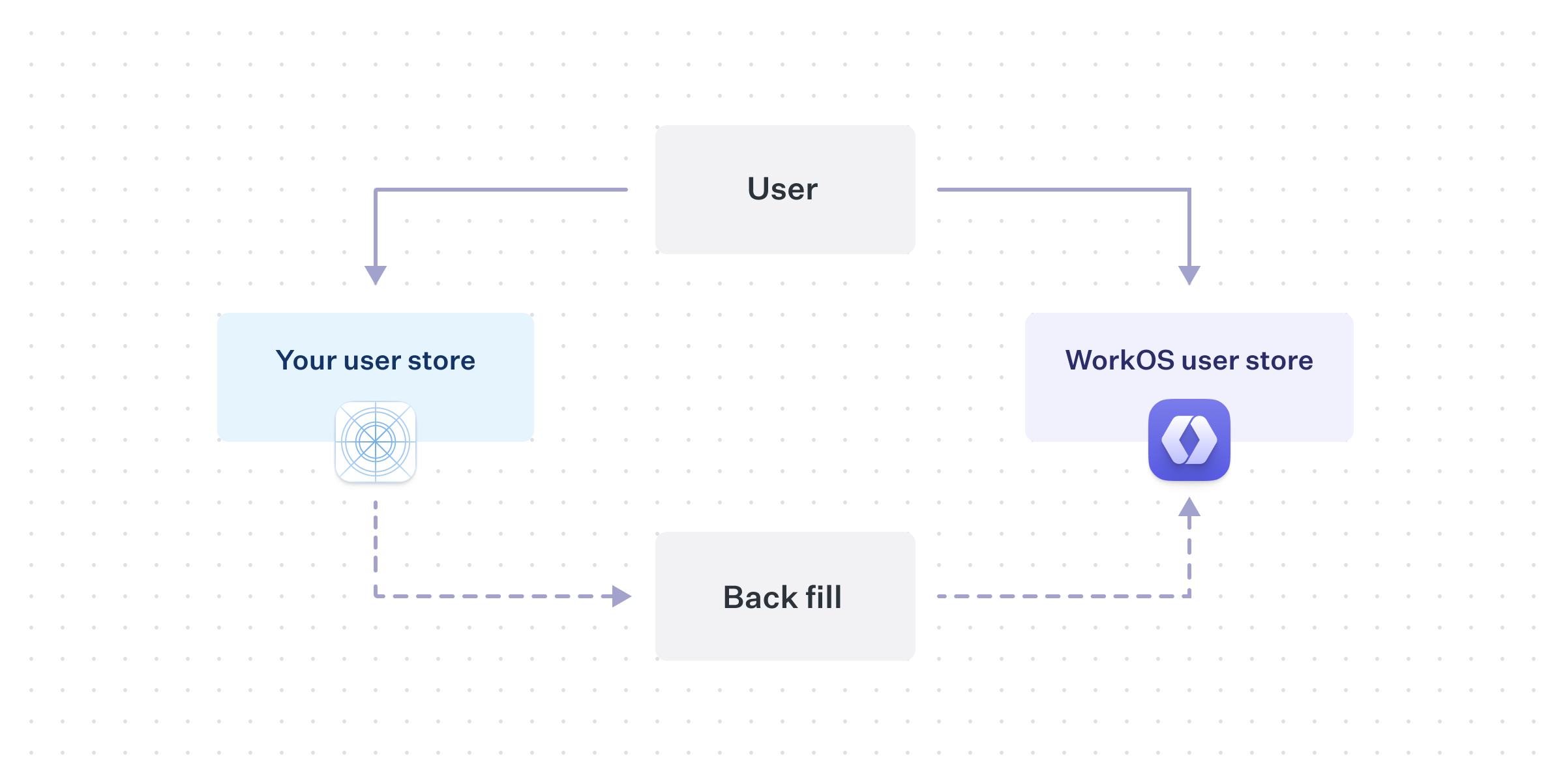[border=false]
|
|
164
|
+
|
|
165
|
+
When a new user signs-up, in addition to creating a user record in the existing user store, the application should also create a matching record in WorkOS using the [Create User API](/reference/user-management/user/create). As time passes, WorkOS will stay consistent with future new users, but a migration will still need to be performed for the historical set of users.
|
|
166
|
+
|
|
167
|
+
You will need to perform the same export and import process into WorkOS, but keeping in mind that some users will already exist in WorkOS as a result from the “dual-write”.
|
|
168
|
+
|
|
169
|
+
While this minimizes forms of downtime for your application, there are other complications. For example, if a user updates their email or authentication method, you will need to perform the same update in WorkOS, at least until the migration process is complete.
|
|
170
|
+
|
|
171
|
+
### Which to choose?
|
|
172
|
+
|
|
173
|
+
Your timeline for completing the migration, along with your user’s tolerances for disruption, will affect which strategy makes more sense for your application.
|
|
174
|
+
|
|
175
|
+
Disabling signups, or even sign-in entirely, and doing a “big-bang” migration by moving all users at the same time, could be reasonable for a smaller application. However, larger applications that are on the critical path for their customers may need a more careful path in order to provide consistent access.
|
|
176
|
+
|
|
177
|
+
## Wrapping-up
|
|
178
|
+
|
|
179
|
+
User management migration complexity can vary, so it is important to consider how existing application constraints will transfer to WorkOS. If you have any questions, reach out to [support@workos.com](mailto:support@workos.com) or via your team’s WorkOS Slack channel for more help planning your migration.
|