@workos/mcp-docs-server 0.1.0
This diff represents the content of publicly available package versions that have been released to one of the supported registries. The information contained in this diff is provided for informational purposes only and reflects changes between package versions as they appear in their respective public registries.
- package/.docs/organized/changelogs/workos-platform.json +277 -0
- package/.docs/organized/docs/admin-portal/_navigation.mdx +16 -0
- package/.docs/organized/docs/admin-portal/custom-branding.mdx +111 -0
- package/.docs/organized/docs/admin-portal/example-apps.mdx +46 -0
- package/.docs/organized/docs/admin-portal/index.mdx +240 -0
- package/.docs/organized/docs/audit-logs/_navigation.mdx +22 -0
- package/.docs/organized/docs/audit-logs/admin-portal.mdx +20 -0
- package/.docs/organized/docs/audit-logs/editing-events.mdx +27 -0
- package/.docs/organized/docs/audit-logs/exporting-events.mdx +29 -0
- package/.docs/organized/docs/audit-logs/index.mdx +110 -0
- package/.docs/organized/docs/audit-logs/log-streams.mdx +56 -0
- package/.docs/organized/docs/audit-logs/metadata-schema.mdx +21 -0
- package/.docs/organized/docs/custom-domains/_navigation.mdx +16 -0
- package/.docs/organized/docs/custom-domains/admin-portal.mdx +38 -0
- package/.docs/organized/docs/custom-domains/auth-api.mdx +59 -0
- package/.docs/organized/docs/custom-domains/authkit.mdx +36 -0
- package/.docs/organized/docs/custom-domains/email.mdx +41 -0
- package/.docs/organized/docs/custom-domains/index.mdx +19 -0
- package/.docs/organized/docs/dashboard.mdx +244 -0
- package/.docs/organized/docs/demo/_navigation.mdx +26 -0
- package/.docs/organized/docs/demo/accordion.mdx +34 -0
- package/.docs/organized/docs/demo/checklist.mdx +33 -0
- package/.docs/organized/docs/demo/code-block.mdx +185 -0
- package/.docs/organized/docs/demo/definition-list.mdx +35 -0
- package/.docs/organized/docs/demo/index.mdx +7 -0
- package/.docs/organized/docs/demo/punctuation.mdx +37 -0
- package/.docs/organized/docs/demo/replacements.mdx +26 -0
- package/.docs/organized/docs/demo/table.mdx +26 -0
- package/.docs/organized/docs/demo/tabs.mdx +17 -0
- package/.docs/organized/docs/directory-sync/_navigation.mdx +28 -0
- package/.docs/organized/docs/directory-sync/attributes.mdx +209 -0
- package/.docs/organized/docs/directory-sync/example-apps.mdx +46 -0
- package/.docs/organized/docs/directory-sync/handle-inactive-users.mdx +52 -0
- package/.docs/organized/docs/directory-sync/identity-provider-role-assignment.mdx +134 -0
- package/.docs/organized/docs/directory-sync/index.mdx +107 -0
- package/.docs/organized/docs/directory-sync/quick-start.mdx +129 -0
- package/.docs/organized/docs/directory-sync/understanding-events.mdx +209 -0
- package/.docs/organized/docs/domain-verification/_navigation.mdx +10 -0
- package/.docs/organized/docs/domain-verification/api.mdx +60 -0
- package/.docs/organized/docs/domain-verification/index.mdx +67 -0
- package/.docs/organized/docs/email.mdx +109 -0
- package/.docs/organized/docs/events/_navigation.mdx +22 -0
- package/.docs/organized/docs/events/data-syncing/data-reconciliation.mdx +56 -0
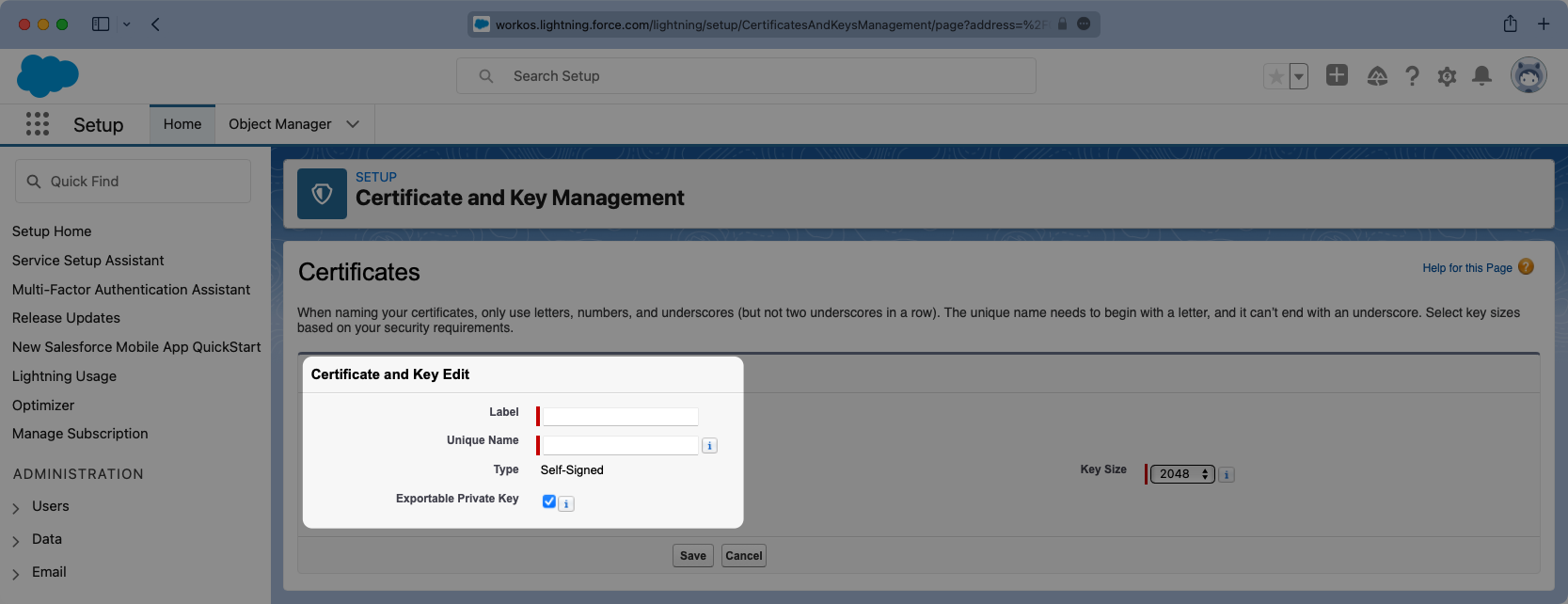
- package/.docs/organized/docs/events/data-syncing/events-api.mdx +114 -0
- package/.docs/organized/docs/events/data-syncing/index.mdx +66 -0
- package/.docs/organized/docs/events/data-syncing/webhooks.mdx +173 -0
- package/.docs/organized/docs/events/index.mdx +783 -0
- package/.docs/organized/docs/events/observability/datadog.mdx +76 -0
- package/.docs/organized/docs/fga/_navigation.mdx +64 -0
- package/.docs/organized/docs/fga/identity-provider-sessions.mdx +68 -0
- package/.docs/organized/docs/fga/index.mdx +60 -0
- package/.docs/organized/docs/fga/local-development.mdx +155 -0
- package/.docs/organized/docs/fga/modeling/abac.mdx +107 -0
- package/.docs/organized/docs/fga/modeling/blocklist.mdx +84 -0
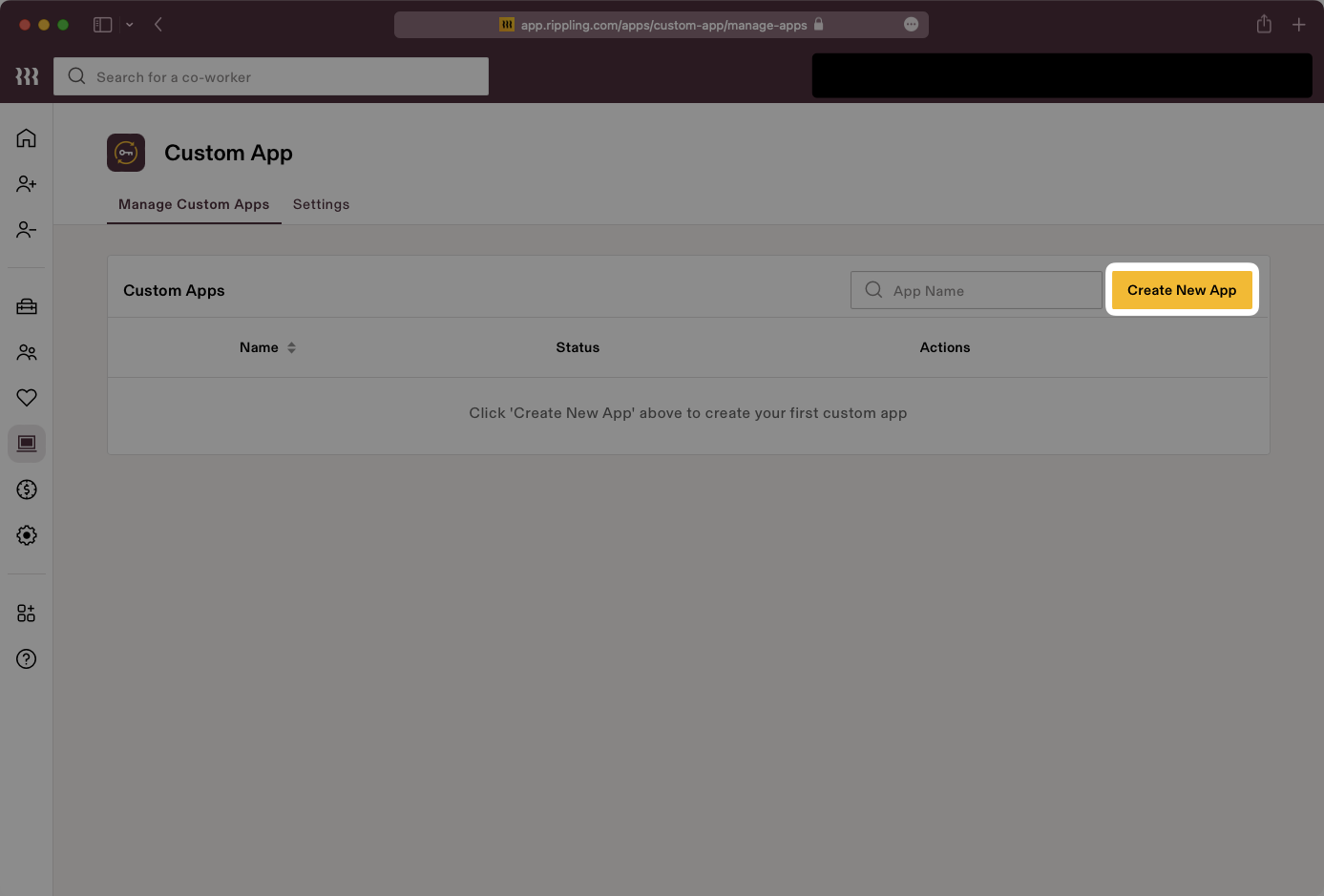
- package/.docs/organized/docs/fga/modeling/conditional-roles.mdx +99 -0
- package/.docs/organized/docs/fga/modeling/custom-roles.mdx +90 -0
- package/.docs/organized/docs/fga/modeling/entitlements.mdx +127 -0
- package/.docs/organized/docs/fga/modeling/managed-service-provider.mdx +131 -0
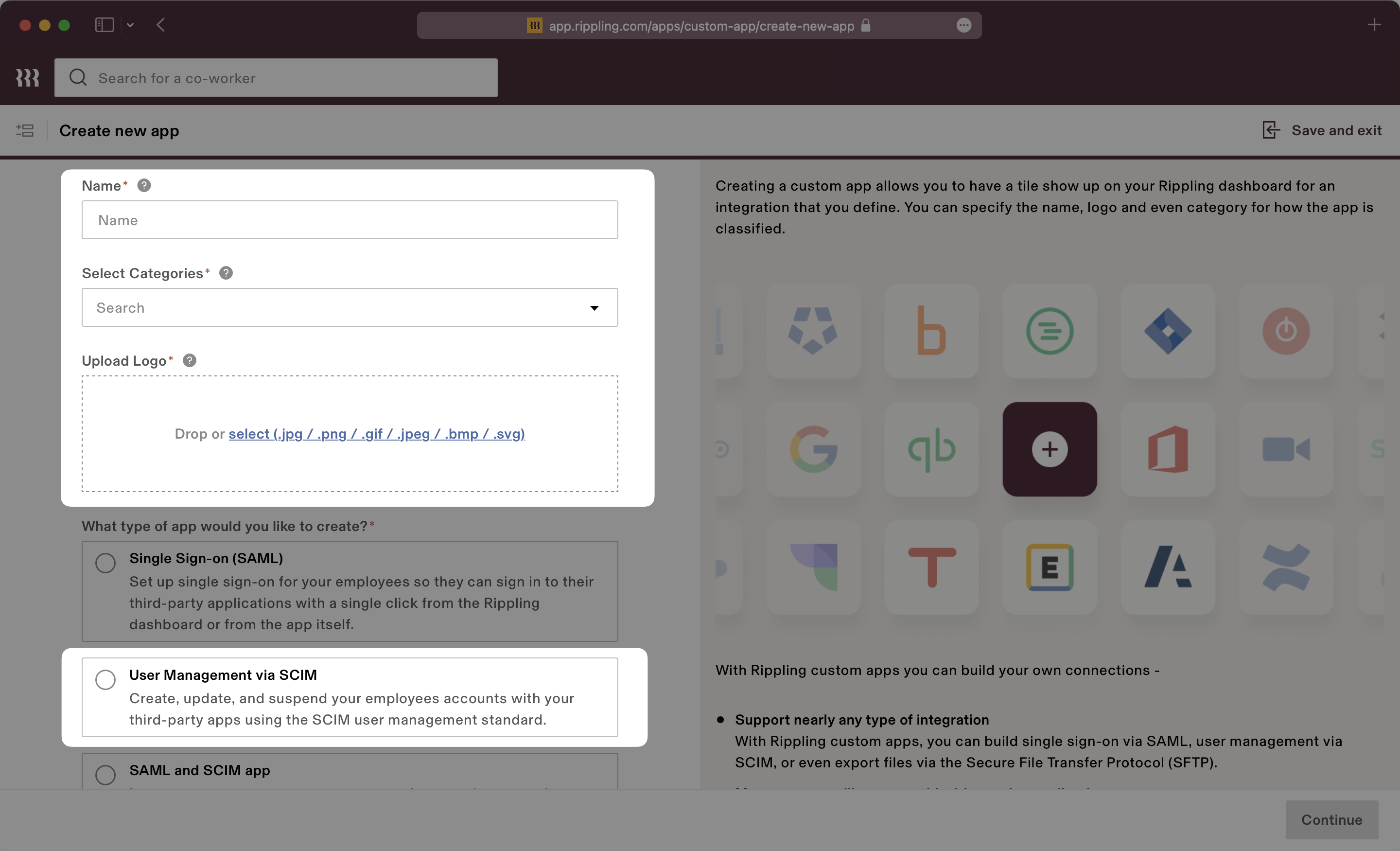
- package/.docs/organized/docs/fga/modeling/org-roles-and-permissions.mdx +95 -0
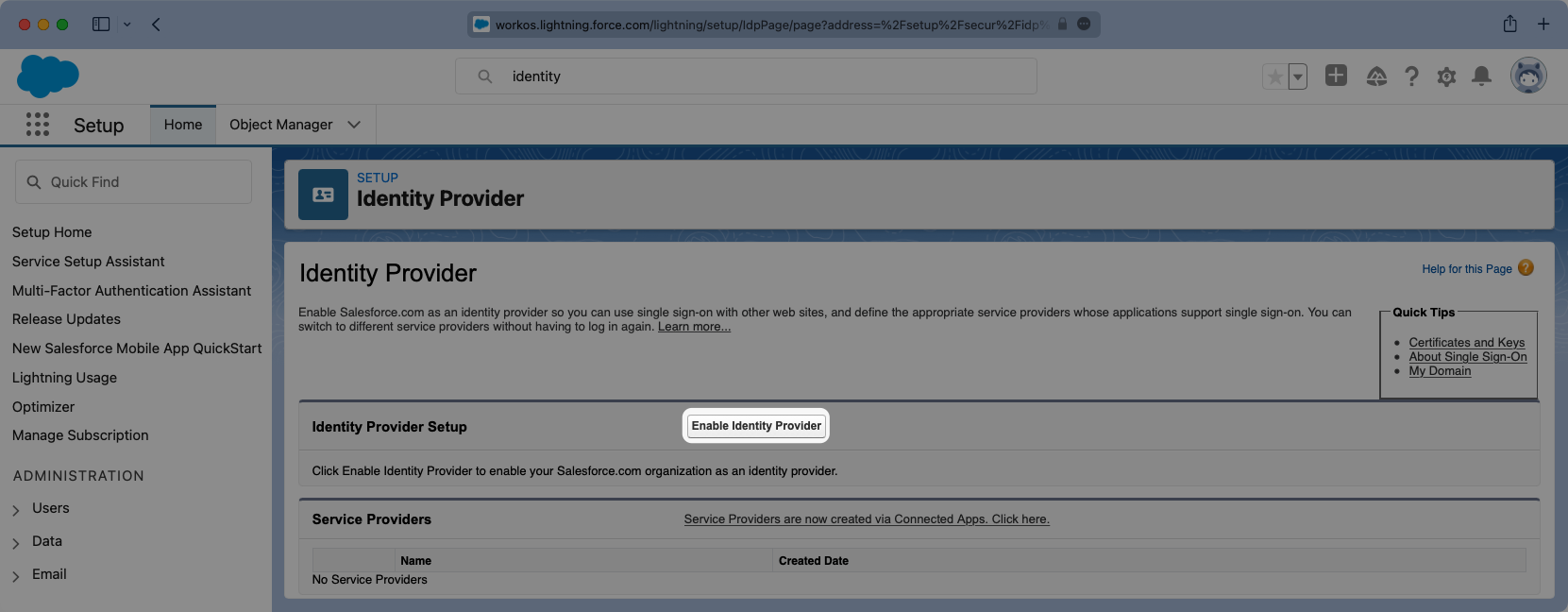
- package/.docs/organized/docs/fga/modeling/policy-context.mdx +231 -0
- package/.docs/organized/docs/fga/modeling/public-access.mdx +61 -0
- package/.docs/organized/docs/fga/modeling/shareable-content.mdx +106 -0
- package/.docs/organized/docs/fga/modeling/superusers.mdx +74 -0
- package/.docs/organized/docs/fga/modeling/user-groups.mdx +92 -0
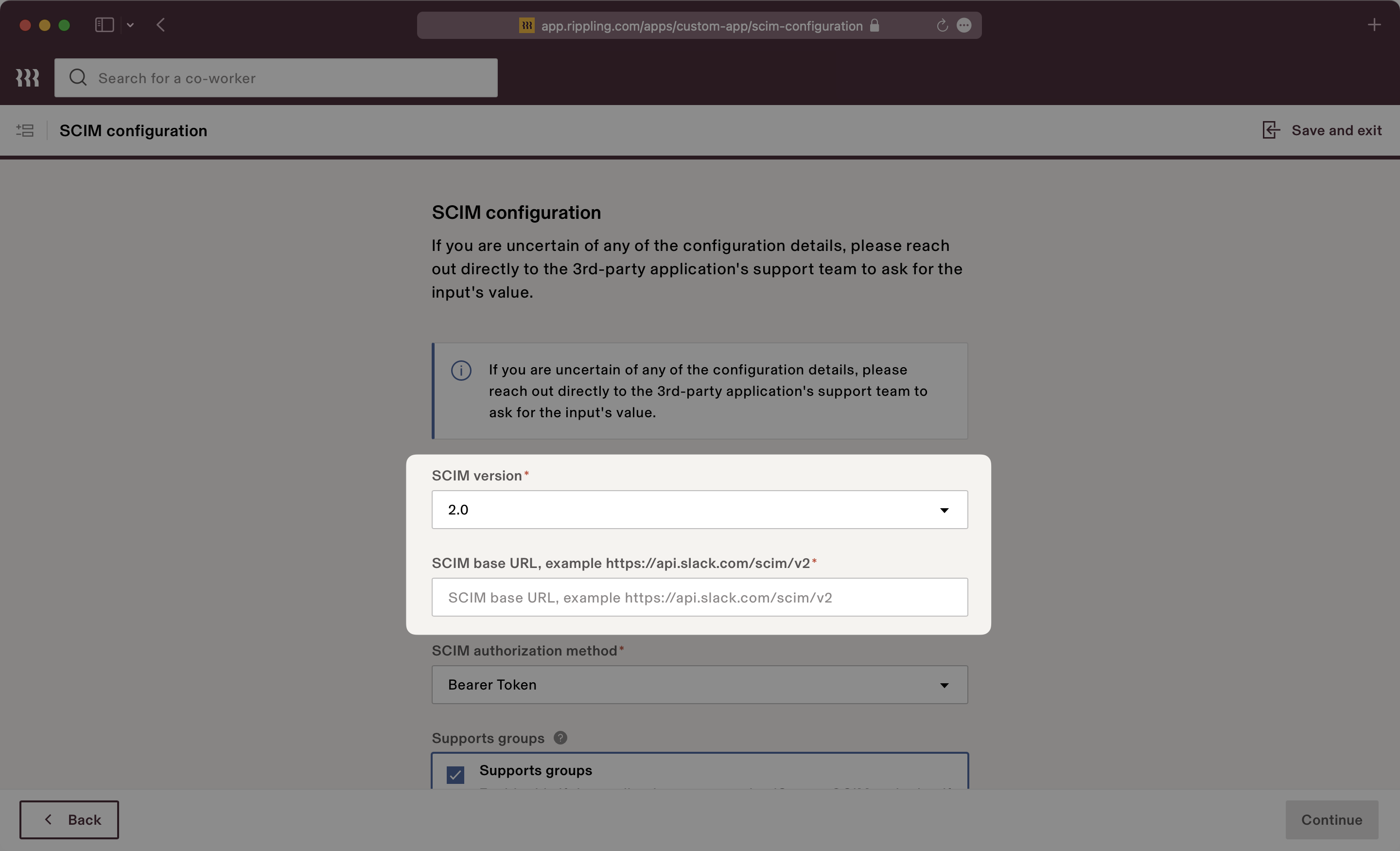
- package/.docs/organized/docs/fga/operations-usage.mdx +104 -0
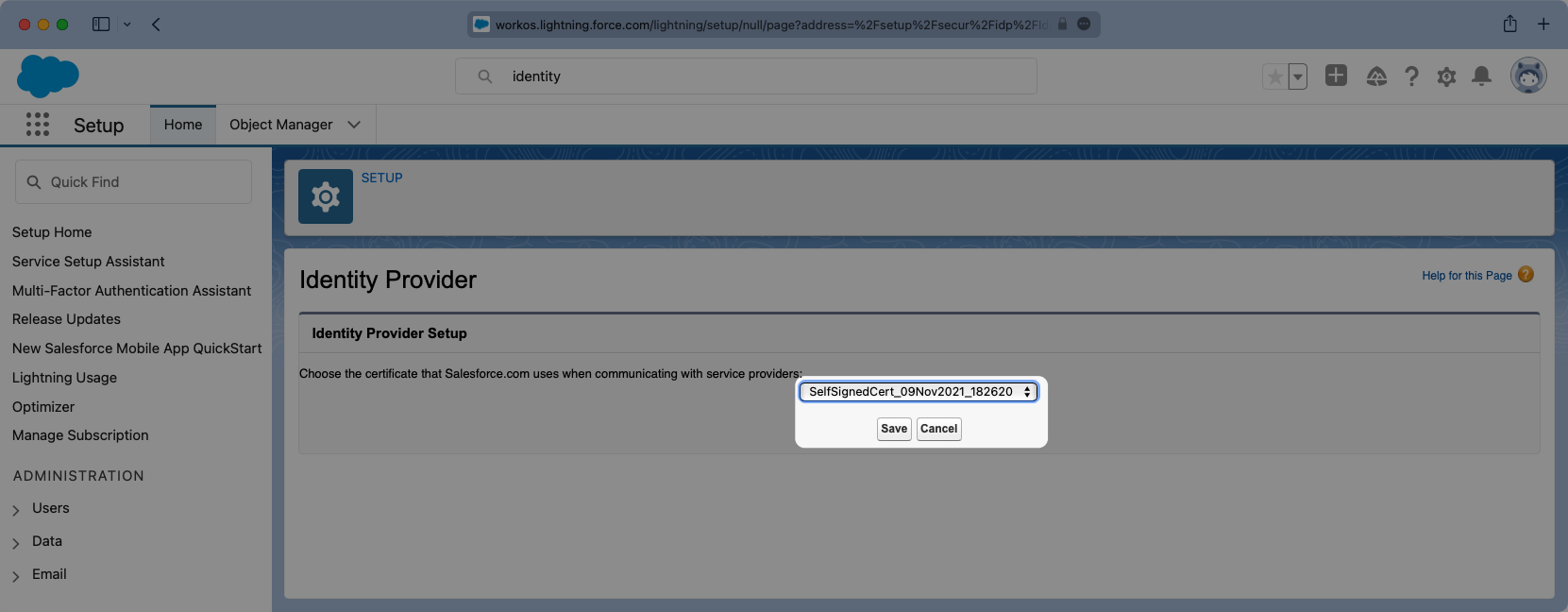
- package/.docs/organized/docs/fga/playground.mdx +12 -0
- package/.docs/organized/docs/fga/policies.mdx +462 -0
- package/.docs/organized/docs/fga/query-language.mdx +112 -0
- package/.docs/organized/docs/fga/quick-start.mdx +174 -0
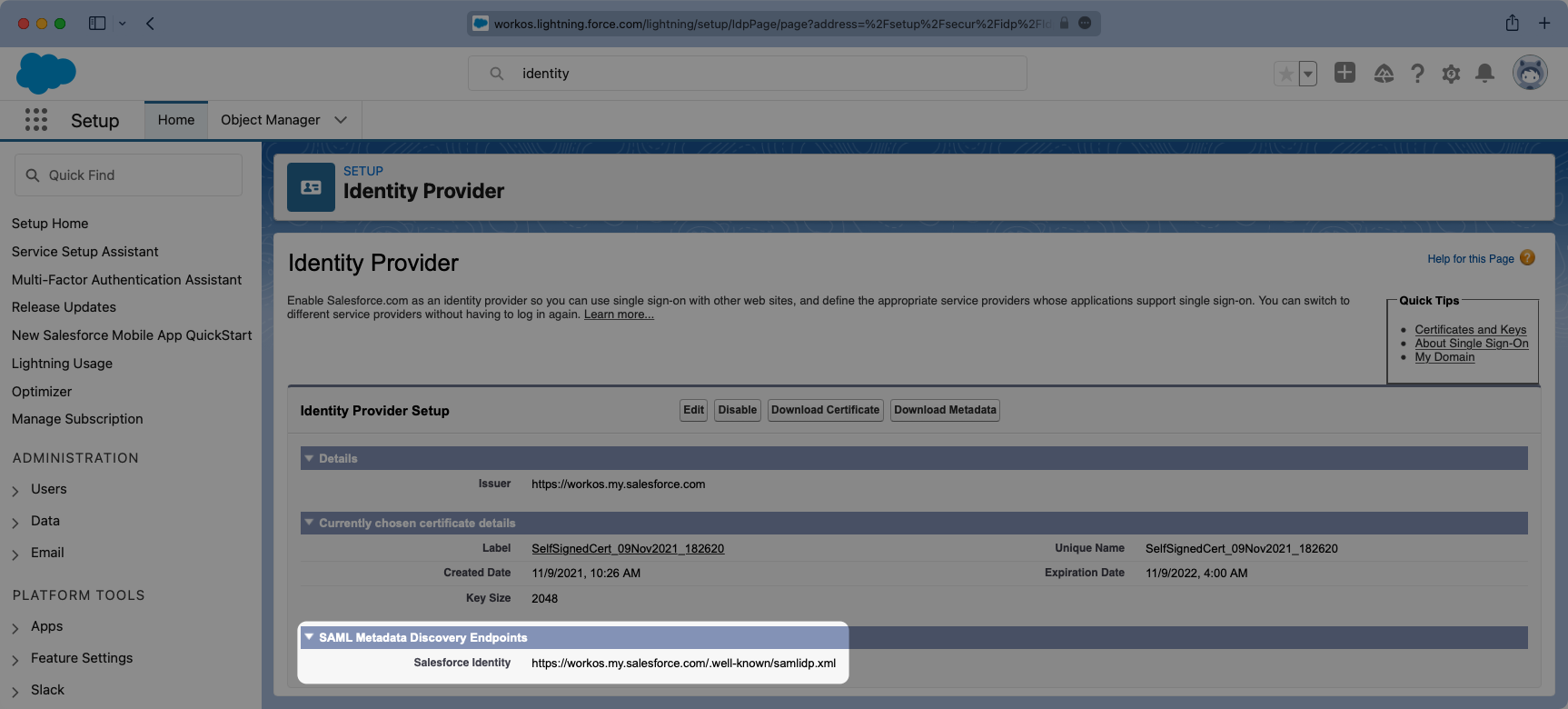
- package/.docs/organized/docs/fga/resources.mdx +92 -0
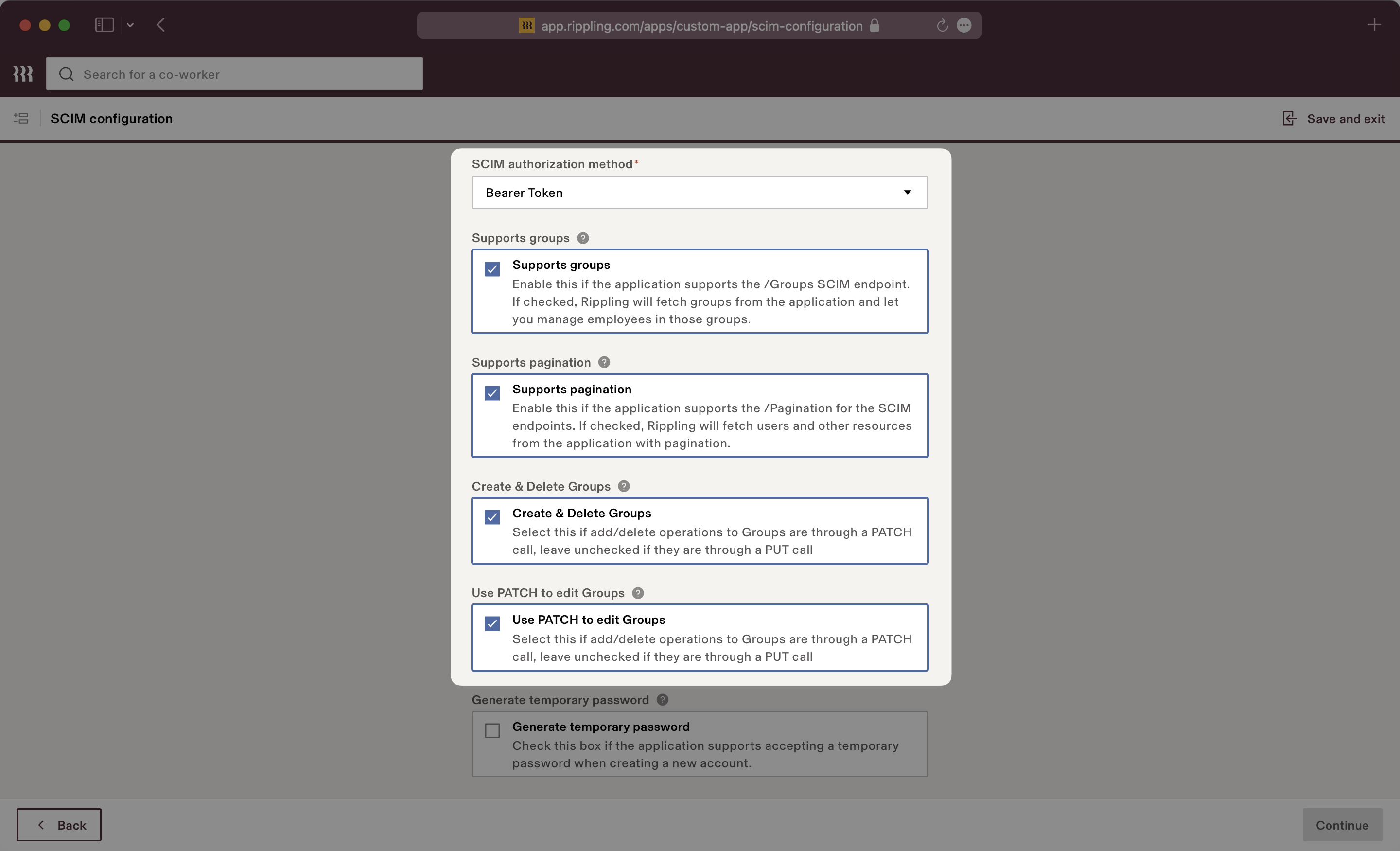
- package/.docs/organized/docs/fga/schema-management.mdx +224 -0
- package/.docs/organized/docs/fga/schema.mdx +388 -0
- package/.docs/organized/docs/fga/warrant-tokens.mdx +44 -0
- package/.docs/organized/docs/fga/warrants.mdx +92 -0
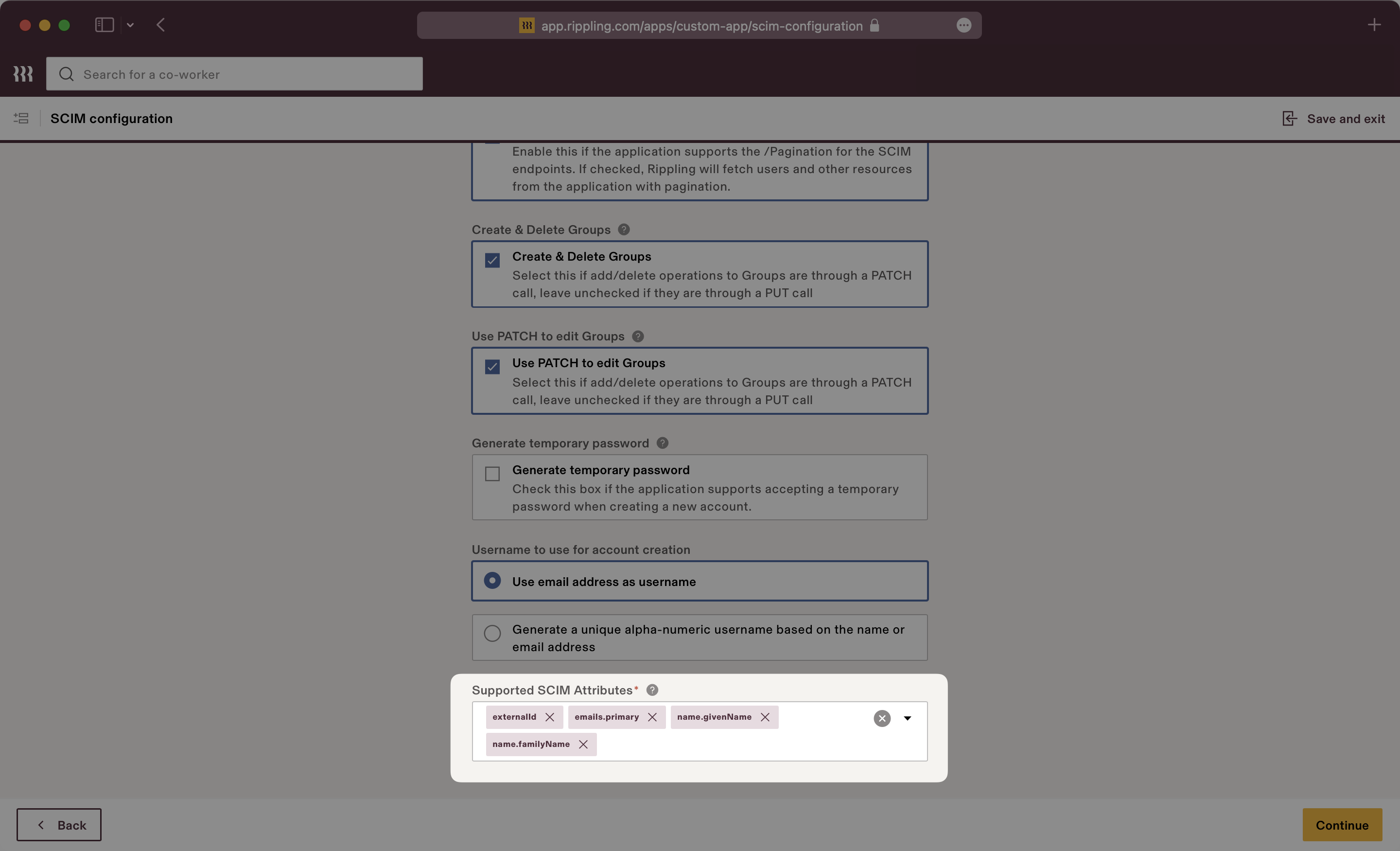
- package/.docs/organized/docs/glossary.mdx +184 -0
- package/.docs/organized/docs/integrations/_navigation.mdx +6 -0
- package/.docs/organized/docs/integrations/access-people-hr.mdx +87 -0
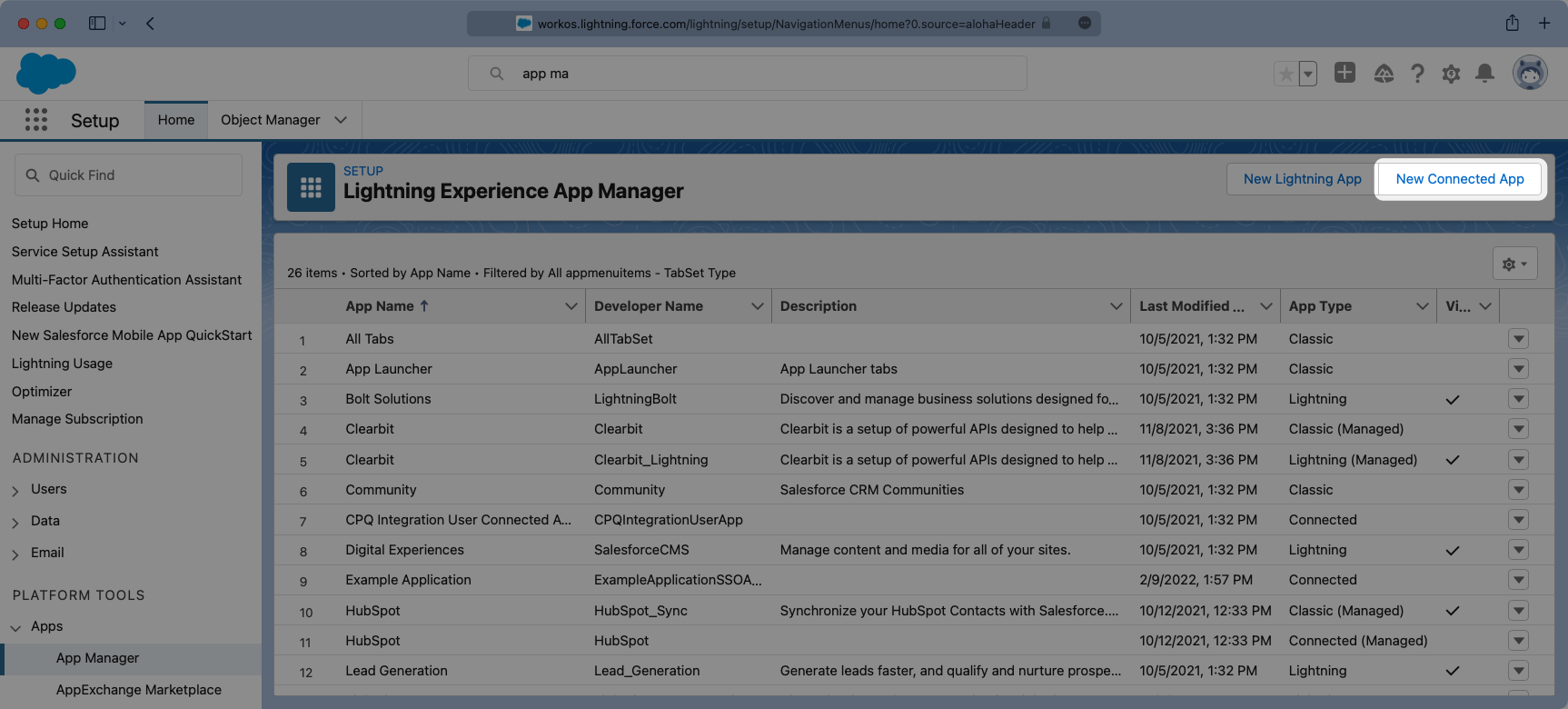
- package/.docs/organized/docs/integrations/adp-oidc.mdx +103 -0
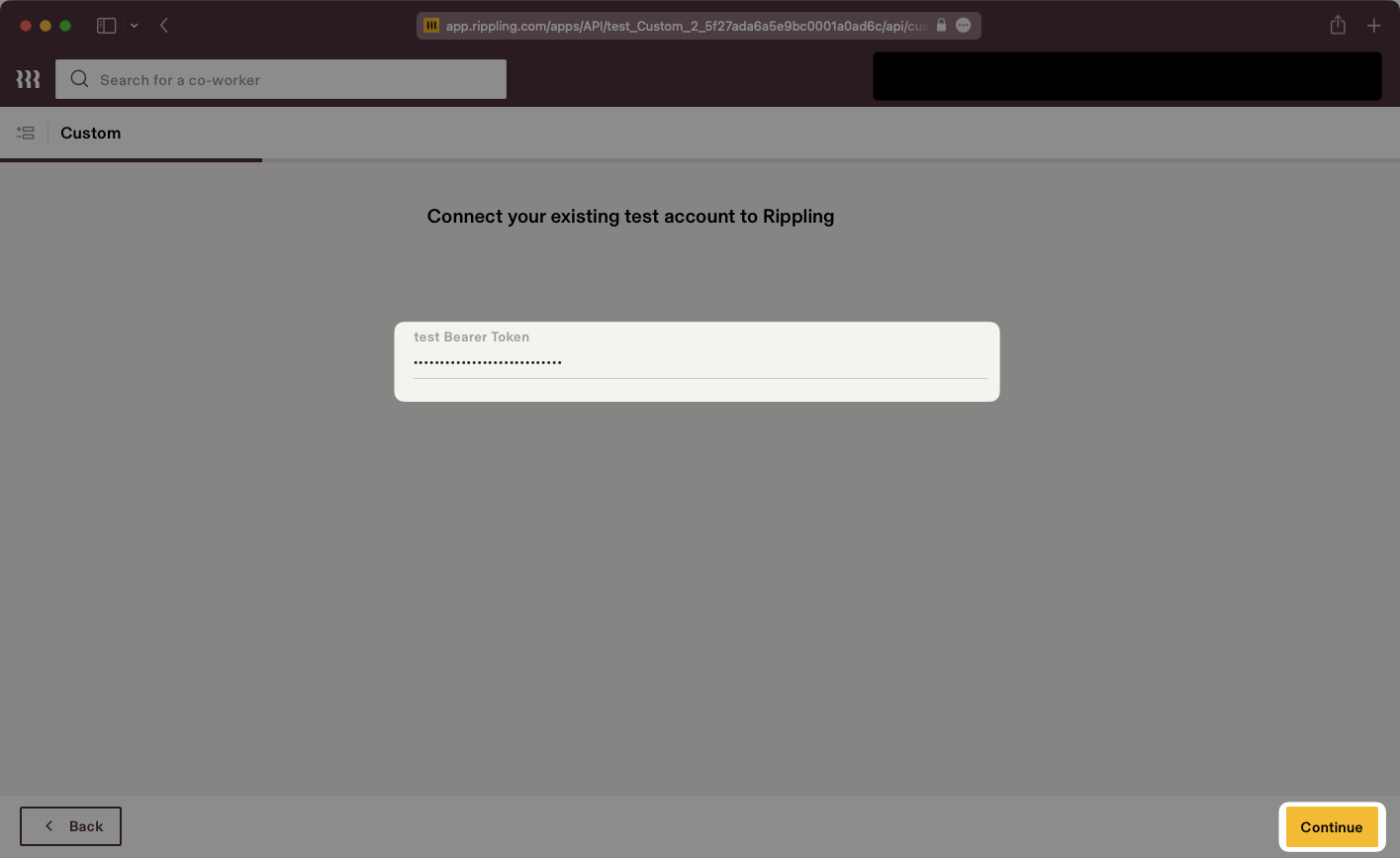
- package/.docs/organized/docs/integrations/apple.mdx +169 -0
- package/.docs/organized/docs/integrations/auth0-directory-sync.mdx +78 -0
- package/.docs/organized/docs/integrations/auth0-enterprise-connection.mdx +92 -0
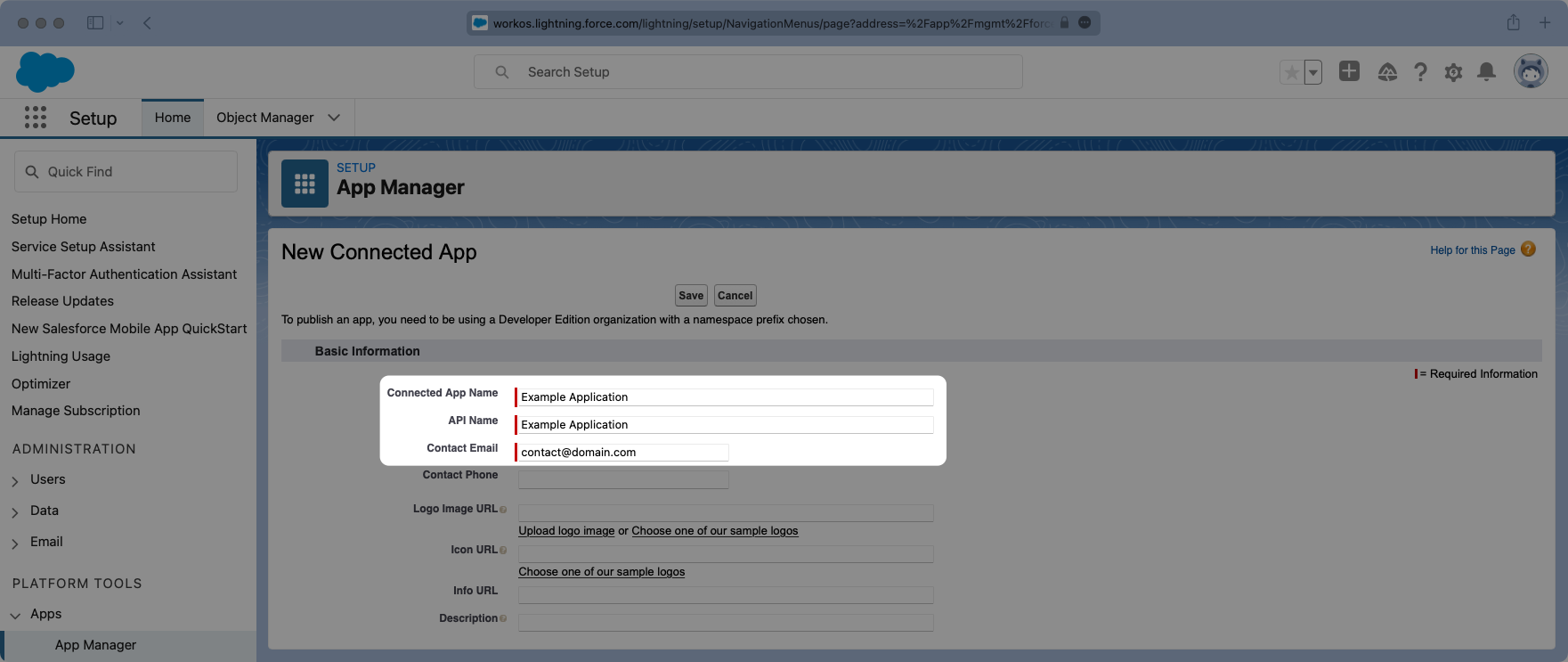
- package/.docs/organized/docs/integrations/auth0-saml.mdx +81 -0
- package/.docs/organized/docs/integrations/aws-cognito.mdx +81 -0
- package/.docs/organized/docs/integrations/bamboohr.mdx +90 -0
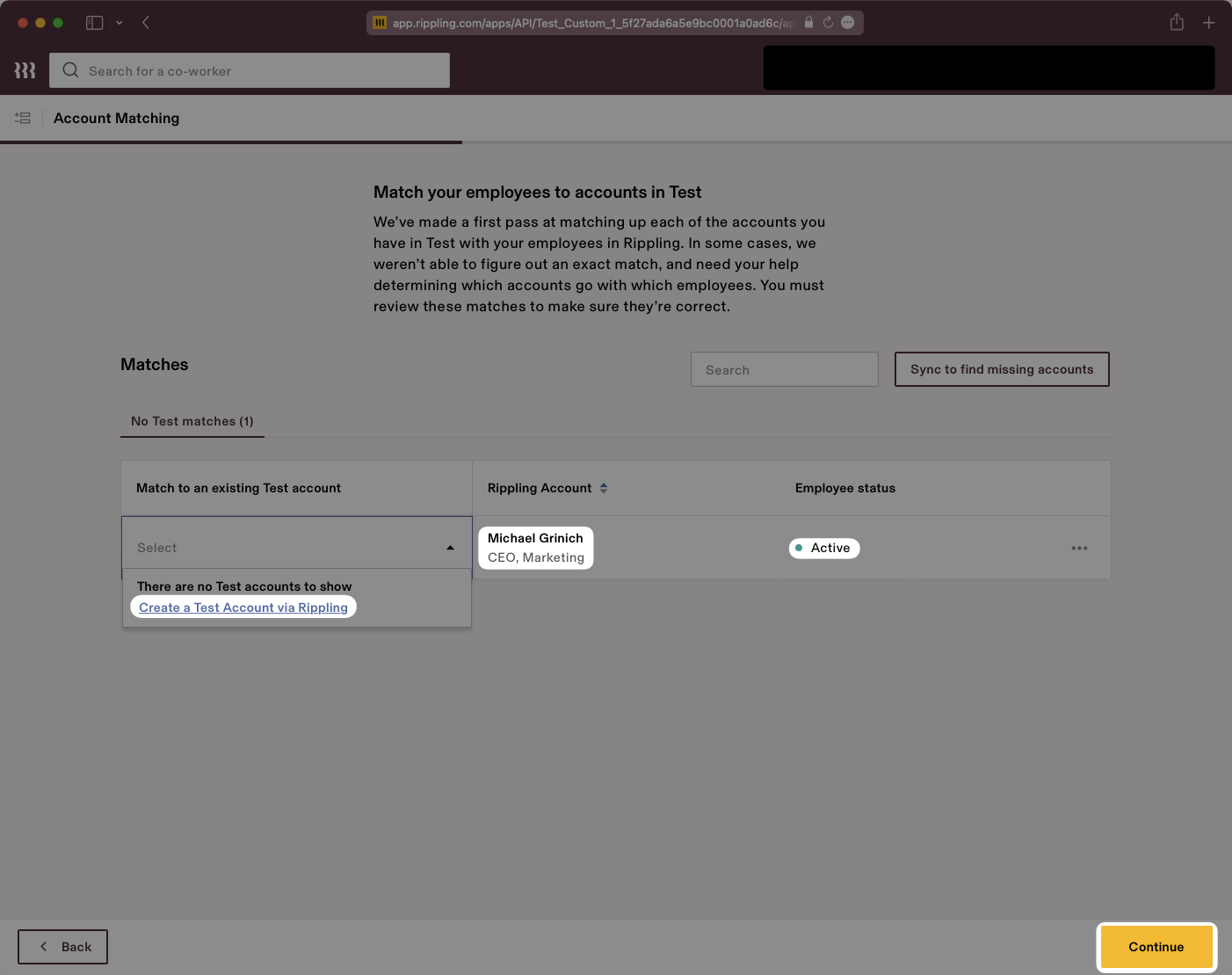
- package/.docs/organized/docs/integrations/breathe-hr.mdx +89 -0
- package/.docs/organized/docs/integrations/bubble.mdx +129 -0
- package/.docs/organized/docs/integrations/cas-saml.mdx +65 -0
- package/.docs/organized/docs/integrations/cezanne.mdx +74 -0
- package/.docs/organized/docs/integrations/classlink-saml.mdx +100 -0
- package/.docs/organized/docs/integrations/cloudflare-saml.mdx +164 -0
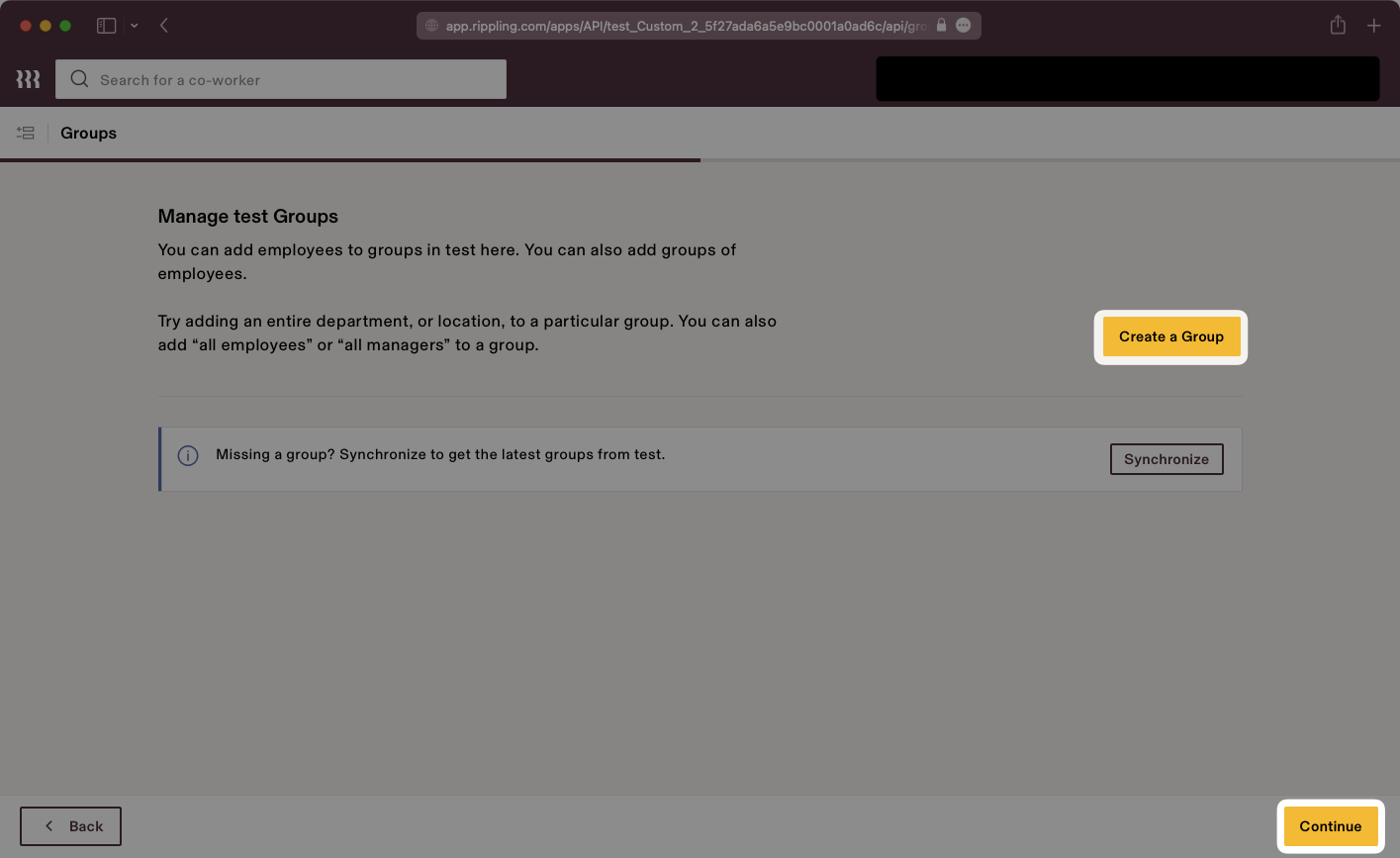
- package/.docs/organized/docs/integrations/cyberark-saml.mdx +138 -0
- package/.docs/organized/docs/integrations/cyberark-scim.mdx +100 -0
- package/.docs/organized/docs/integrations/duo-saml.mdx +127 -0
- package/.docs/organized/docs/integrations/entra-id-saml.mdx +156 -0
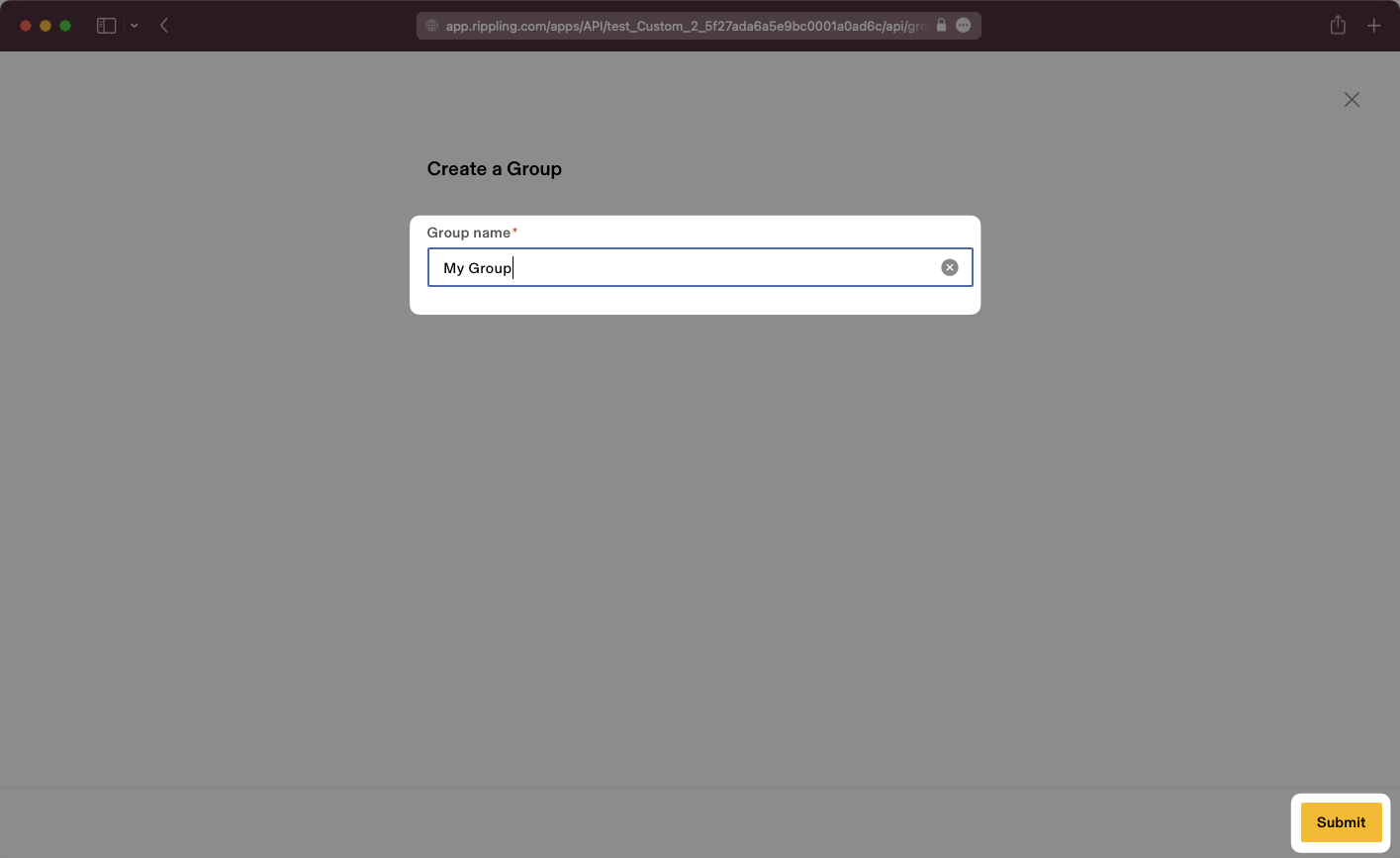
- package/.docs/organized/docs/integrations/entra-id-scim.mdx +218 -0
- package/.docs/organized/docs/integrations/firebase.mdx +98 -0
- package/.docs/organized/docs/integrations/fourth.mdx +66 -0
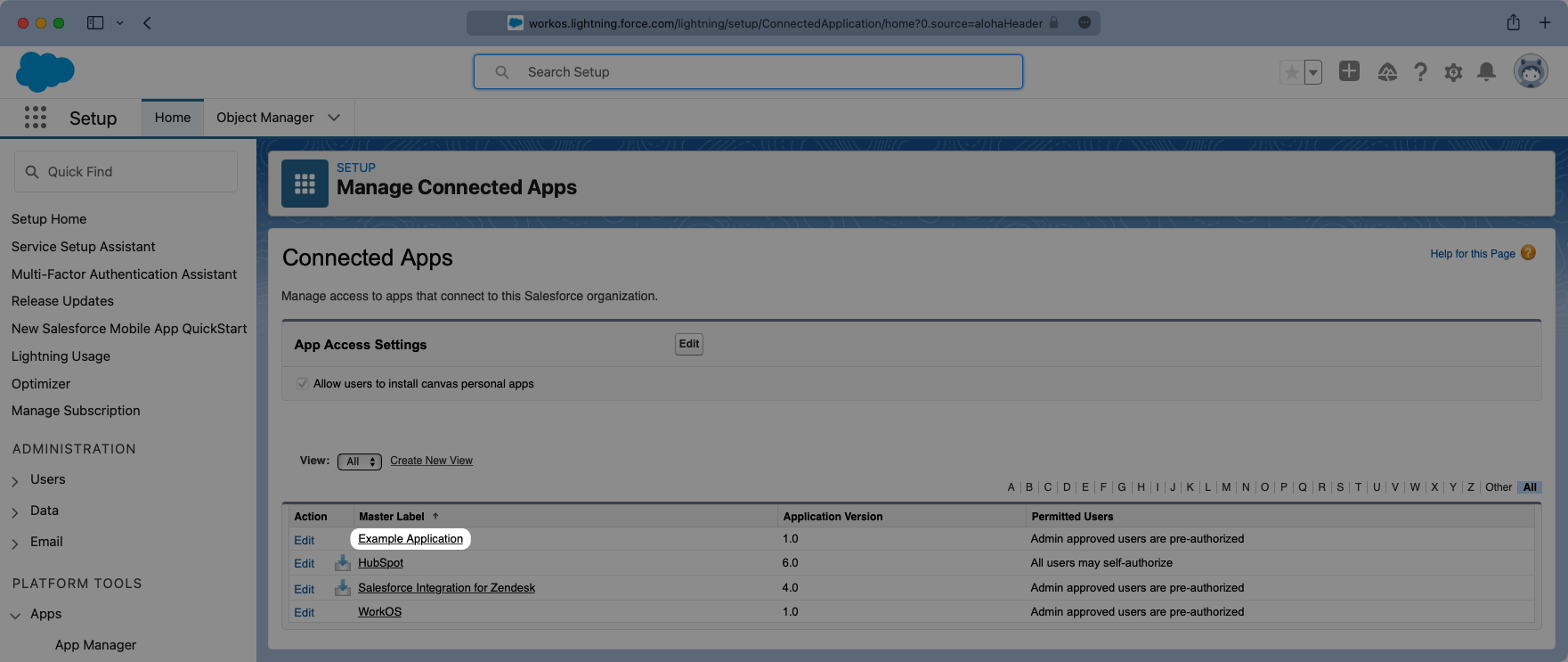
- package/.docs/organized/docs/integrations/github-oauth.mdx +85 -0
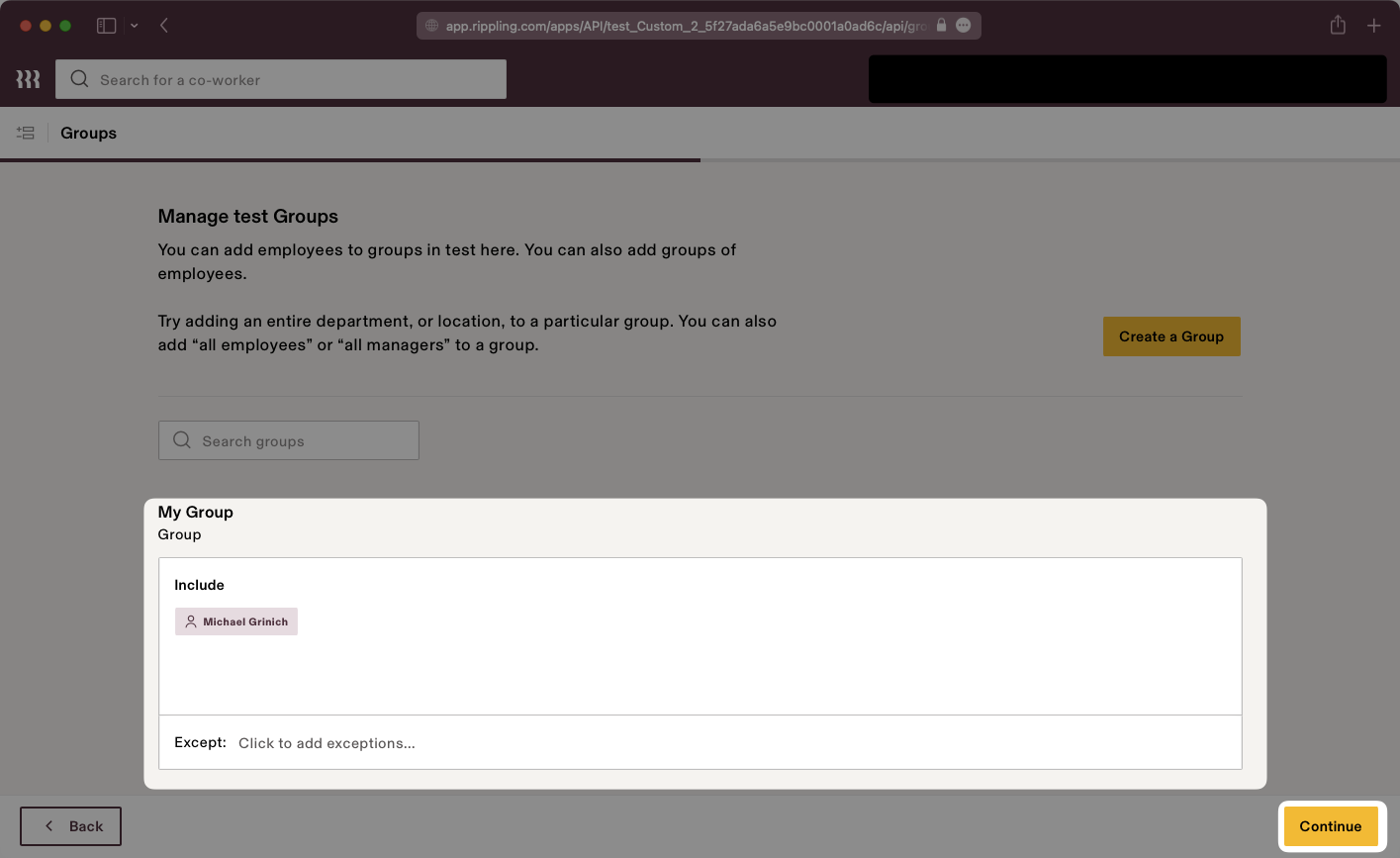
- package/.docs/organized/docs/integrations/gitlab-oauth.mdx +81 -0
- package/.docs/organized/docs/integrations/google-directory-sync.mdx +86 -0
- package/.docs/organized/docs/integrations/google-oauth.mdx +173 -0
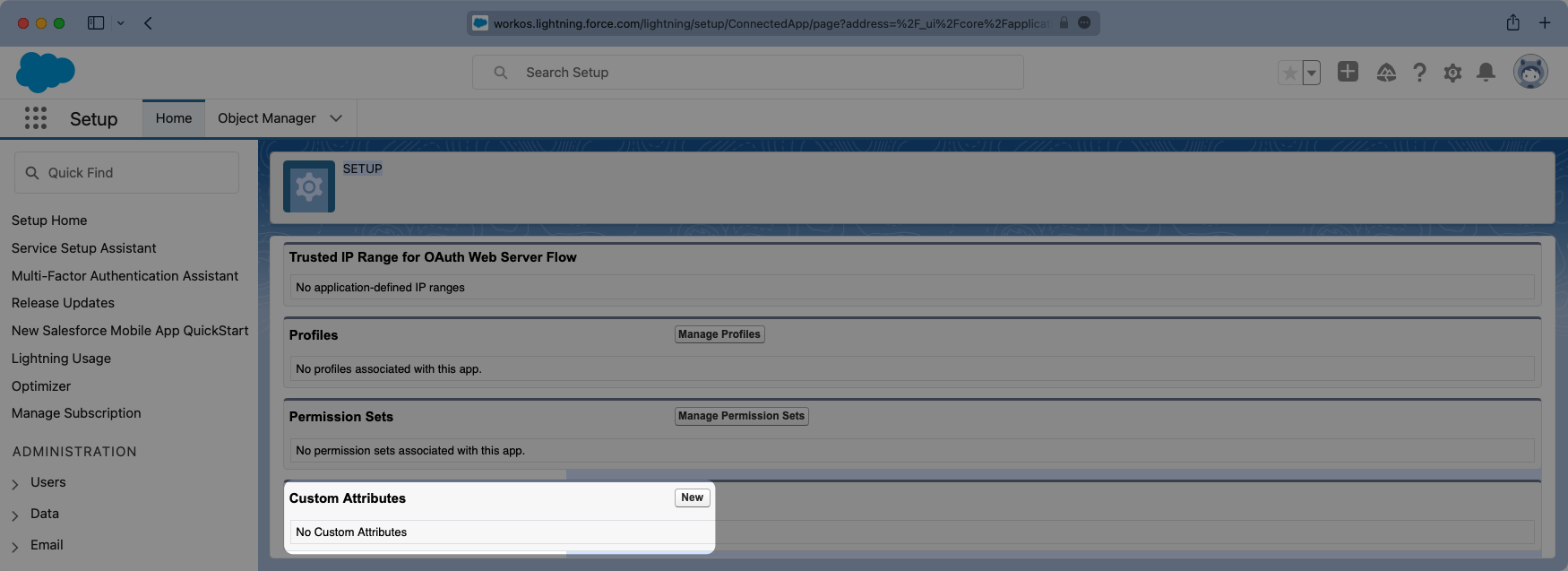
- package/.docs/organized/docs/integrations/google-saml.mdx +135 -0
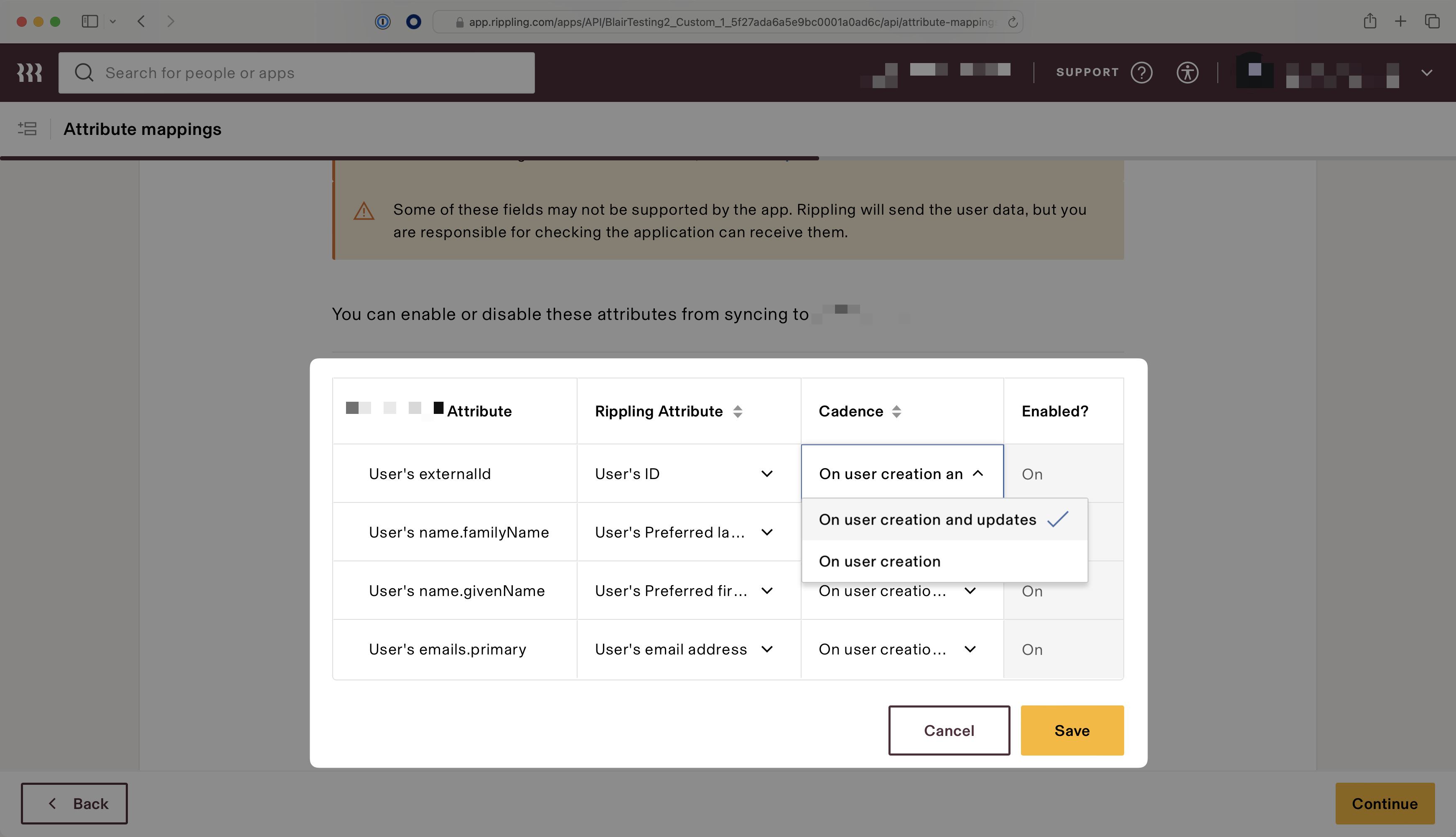
- package/.docs/organized/docs/integrations/hibob.mdx +98 -0
- package/.docs/organized/docs/integrations/jumpcloud-saml.mdx +96 -0
- package/.docs/organized/docs/integrations/jumpcloud-scim.mdx +106 -0
- package/.docs/organized/docs/integrations/keycloak-saml.mdx +128 -0
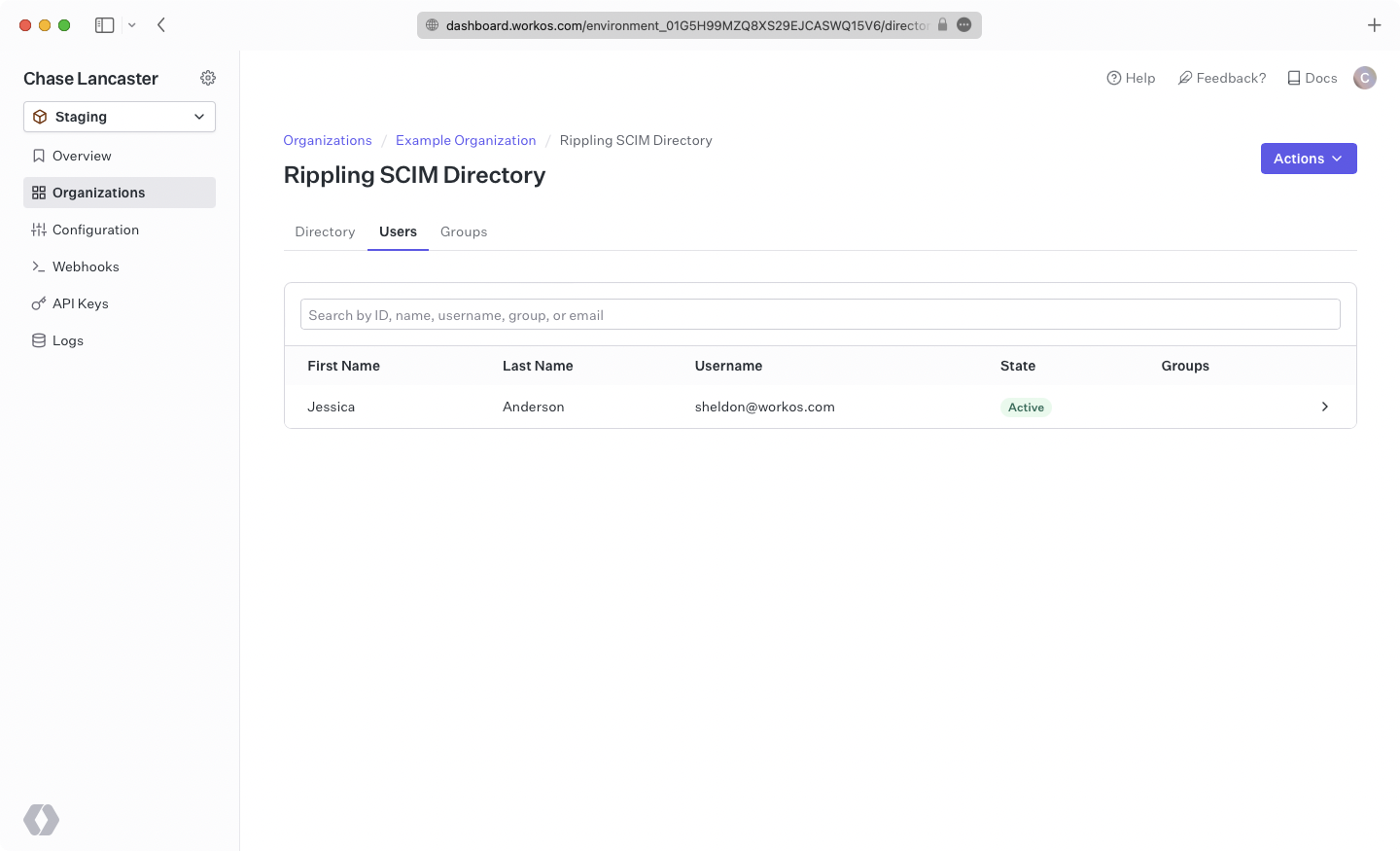
- package/.docs/organized/docs/integrations/lastpass-saml.mdx +134 -0
- package/.docs/organized/docs/integrations/linkedin-oauth.mdx +77 -0
- package/.docs/organized/docs/integrations/login-gov-oidc.mdx +103 -0
- package/.docs/organized/docs/integrations/microsoft-ad-fs-saml.mdx +96 -0
- package/.docs/organized/docs/integrations/microsoft-oauth.mdx +101 -0
- package/.docs/organized/docs/integrations/miniorange-saml.mdx +124 -0
- package/.docs/organized/docs/integrations/net-iq-saml.mdx +75 -0
- package/.docs/organized/docs/integrations/next-auth.mdx +257 -0
- package/.docs/organized/docs/integrations/oidc.mdx +64 -0
- package/.docs/organized/docs/integrations/okta-saml.mdx +144 -0
- package/.docs/organized/docs/integrations/okta-scim.mdx +210 -0
- package/.docs/organized/docs/integrations/onelogin-saml.mdx +131 -0
- package/.docs/organized/docs/integrations/onelogin-scim.mdx +150 -0
- package/.docs/organized/docs/integrations/oracle-saml.mdx +76 -0
- package/.docs/organized/docs/integrations/pingfederate-saml.mdx +103 -0
- package/.docs/organized/docs/integrations/pingfederate-scim.mdx +150 -0
- package/.docs/organized/docs/integrations/pingone-saml.mdx +86 -0
- package/.docs/organized/docs/integrations/react-native-expo.mdx +93 -0
- package/.docs/organized/docs/integrations/rippling-saml.mdx +174 -0
- package/.docs/organized/docs/integrations/rippling-scim.mdx +148 -0
- package/.docs/organized/docs/integrations/salesforce-saml.mdx +143 -0
- package/.docs/organized/docs/integrations/saml.mdx +64 -0
- package/.docs/organized/docs/integrations/scim.mdx +64 -0
- package/.docs/organized/docs/integrations/sftp.mdx +150 -0
- package/.docs/organized/docs/integrations/shibboleth-generic-saml.mdx +84 -0
- package/.docs/organized/docs/integrations/shibboleth-unsolicited-saml.mdx +84 -0
- package/.docs/organized/docs/integrations/simple-saml-php.mdx +78 -0
- package/.docs/organized/docs/integrations/slack-oauth.mdx +102 -0
- package/.docs/organized/docs/integrations/supabase.mdx +68 -0
- package/.docs/organized/docs/integrations/vmware-saml.mdx +100 -0
- package/.docs/organized/docs/integrations/workday.mdx +156 -0
- package/.docs/organized/docs/integrations/xero-oauth.mdx +83 -0
- package/.docs/organized/docs/magic-link/_navigation.mdx +16 -0
- package/.docs/organized/docs/magic-link/example-apps.mdx +46 -0
- package/.docs/organized/docs/magic-link/index.mdx +199 -0
- package/.docs/organized/docs/magic-link/launch-checklist.mdx +27 -0
- package/.docs/organized/docs/mfa/_navigation.mdx +18 -0
- package/.docs/organized/docs/mfa/example-apps.mdx +46 -0
- package/.docs/organized/docs/mfa/index.mdx +140 -0
- package/.docs/organized/docs/mfa/ux/enrollment.mdx +74 -0
- package/.docs/organized/docs/mfa/ux/sign-in.mdx +30 -0
- package/.docs/organized/docs/migrate/_navigation.mdx +6 -0
- package/.docs/organized/docs/migrate/auth0.mdx +98 -0
- package/.docs/organized/docs/migrate/aws-cognito.mdx +115 -0
- package/.docs/organized/docs/migrate/clerk.mdx +106 -0
- package/.docs/organized/docs/migrate/firebase.mdx +80 -0
- package/.docs/organized/docs/migrate/other-services.mdx +179 -0
- package/.docs/organized/docs/migrate/standalone-sso.mdx +105 -0
- package/.docs/organized/docs/on-prem-deployment.mdx +119 -0
- package/.docs/organized/docs/postman.mdx +90 -0
- package/.docs/organized/docs/reference/_navigation.mdx +527 -0
- package/.docs/organized/docs/reference/admin-portal/index.mdx +6 -0
- package/.docs/organized/docs/reference/admin-portal/portal-link/generate.mdx +268 -0
- package/.docs/organized/docs/reference/admin-portal/portal-link/index.mdx +15 -0
- package/.docs/organized/docs/reference/admin-portal/provider-icons/index.mdx +52 -0
- package/.docs/organized/docs/reference/api-keys.mdx +22 -0
- package/.docs/organized/docs/reference/audit-logs/audit-log-export.mdx +239 -0
- package/.docs/organized/docs/reference/audit-logs/audit-log-schema.mdx +69 -0
- package/.docs/organized/docs/reference/audit-logs/create-event.mdx +673 -0
- package/.docs/organized/docs/reference/audit-logs/create-export.mdx +308 -0
- package/.docs/organized/docs/reference/audit-logs/create-schema.mdx +95 -0
- package/.docs/organized/docs/reference/audit-logs/get-export.mdx +117 -0
- package/.docs/organized/docs/reference/audit-logs/get-retention.mdx +34 -0
- package/.docs/organized/docs/reference/audit-logs/index.mdx +6 -0
- package/.docs/organized/docs/reference/audit-logs/list-actions.mdx +40 -0
- package/.docs/organized/docs/reference/audit-logs/list-schemas.mdx +40 -0
- package/.docs/organized/docs/reference/audit-logs/set-retention.mdx +39 -0
- package/.docs/organized/docs/reference/client-libraries.mdx +19 -0
- package/.docs/organized/docs/reference/directory-sync/directory/delete.mdx +90 -0
- package/.docs/organized/docs/reference/directory-sync/directory/get.mdx +105 -0
- package/.docs/organized/docs/reference/directory-sync/directory/index.mdx +385 -0
- package/.docs/organized/docs/reference/directory-sync/directory/list.mdx +281 -0
- package/.docs/organized/docs/reference/directory-sync/directory-group/get.mdx +105 -0
- package/.docs/organized/docs/reference/directory-sync/directory-group/index.mdx +277 -0
- package/.docs/organized/docs/reference/directory-sync/directory-group/list.mdx +295 -0
- package/.docs/organized/docs/reference/directory-sync/directory-user/get.mdx +112 -0
- package/.docs/organized/docs/reference/directory-sync/directory-user/index.mdx +470 -0
- package/.docs/organized/docs/reference/directory-sync/directory-user/list.mdx +304 -0
- package/.docs/organized/docs/reference/directory-sync/index.mdx +10 -0
- package/.docs/organized/docs/reference/domain-verification/create.mdx +38 -0
- package/.docs/organized/docs/reference/domain-verification/get.mdx +32 -0
- package/.docs/organized/docs/reference/domain-verification/index.mdx +84 -0
- package/.docs/organized/docs/reference/domain-verification/verify.mdx +36 -0
- package/.docs/organized/docs/reference/errors.mdx +30 -0
- package/.docs/organized/docs/reference/events/index.mdx +9 -0
- package/.docs/organized/docs/reference/events/list.mdx +246 -0
- package/.docs/organized/docs/reference/fga/batch-check.mdx +277 -0
- package/.docs/organized/docs/reference/fga/check.mdx +563 -0
- package/.docs/organized/docs/reference/fga/index.mdx +6 -0
- package/.docs/organized/docs/reference/fga/policy/create.mdx +27 -0
- package/.docs/organized/docs/reference/fga/policy/delete.mdx +18 -0
- package/.docs/organized/docs/reference/fga/policy/get.mdx +23 -0
- package/.docs/organized/docs/reference/fga/policy/index.mdx +52 -0
- package/.docs/organized/docs/reference/fga/policy/list.mdx +41 -0
- package/.docs/organized/docs/reference/fga/policy/update.mdx +26 -0
- package/.docs/organized/docs/reference/fga/query.mdx +375 -0
- package/.docs/organized/docs/reference/fga/resource/batch-write.mdx +175 -0
- package/.docs/organized/docs/reference/fga/resource/create.mdx +130 -0
- package/.docs/organized/docs/reference/fga/resource/delete.mdx +86 -0
- package/.docs/organized/docs/reference/fga/resource/get.mdx +88 -0
- package/.docs/organized/docs/reference/fga/resource/index.mdx +98 -0
- package/.docs/organized/docs/reference/fga/resource/list.mdx +188 -0
- package/.docs/organized/docs/reference/fga/resource/update.mdx +115 -0
- package/.docs/organized/docs/reference/fga/resource-type/apply.mdx +35 -0
- package/.docs/organized/docs/reference/fga/resource-type/create.mdx +24 -0
- package/.docs/organized/docs/reference/fga/resource-type/delete.mdx +22 -0
- package/.docs/organized/docs/reference/fga/resource-type/get.mdx +23 -0
- package/.docs/organized/docs/reference/fga/resource-type/index.mdx +68 -0
- package/.docs/organized/docs/reference/fga/resource-type/list.mdx +36 -0
- package/.docs/organized/docs/reference/fga/resource-type/update.mdx +23 -0
- package/.docs/organized/docs/reference/fga/schema/apply.mdx +42 -0
- package/.docs/organized/docs/reference/fga/schema/get.mdx +24 -0
- package/.docs/organized/docs/reference/fga/schema/index.mdx +39 -0
- package/.docs/organized/docs/reference/fga/warrant/batch-write.mdx +226 -0
- package/.docs/organized/docs/reference/fga/warrant/create.mdx +215 -0
- package/.docs/organized/docs/reference/fga/warrant/delete.mdx +212 -0
- package/.docs/organized/docs/reference/fga/warrant/index.mdx +186 -0
- package/.docs/organized/docs/reference/fga/warrant/list.mdx +282 -0
- package/.docs/organized/docs/reference/idempotency.mdx +21 -0
- package/.docs/organized/docs/reference/index.mdx +194 -0
- package/.docs/organized/docs/reference/magic-link/index.mdx +8 -0
- package/.docs/organized/docs/reference/magic-link/passwordless-session/create.mdx +268 -0
- package/.docs/organized/docs/reference/magic-link/passwordless-session/index.mdx +203 -0
- package/.docs/organized/docs/reference/magic-link/passwordless-session/send-email.mdx +158 -0
- package/.docs/organized/docs/reference/mfa/authentication-challenge.mdx +217 -0
- package/.docs/organized/docs/reference/mfa/authentication-factor.mdx +381 -0
- package/.docs/organized/docs/reference/mfa/challenge-factor.mdx +170 -0
- package/.docs/organized/docs/reference/mfa/delete-factor.mdx +93 -0
- package/.docs/organized/docs/reference/mfa/enroll-factor.mdx +241 -0
- package/.docs/organized/docs/reference/mfa/get-factor.mdx +108 -0
- package/.docs/organized/docs/reference/mfa/index.mdx +8 -0
- package/.docs/organized/docs/reference/mfa/verify-challenge.mdx +228 -0
- package/.docs/organized/docs/reference/organization/create.mdx +216 -0
- package/.docs/organized/docs/reference/organization/delete.mdx +89 -0
- package/.docs/organized/docs/reference/organization/get-by-external-id.mdx +40 -0
- package/.docs/organized/docs/reference/organization/get.mdx +104 -0
- package/.docs/organized/docs/reference/organization/index.mdx +274 -0
- package/.docs/organized/docs/reference/organization/list.mdx +258 -0
- package/.docs/organized/docs/reference/organization/update.mdx +236 -0
- package/.docs/organized/docs/reference/organization-domain.mdx +189 -0
- package/.docs/organized/docs/reference/pagination.mdx +244 -0
- package/.docs/organized/docs/reference/radar/attempts/create.mdx +115 -0
- package/.docs/organized/docs/reference/radar/attempts/index.mdx +7 -0
- package/.docs/organized/docs/reference/radar/attempts/update.mdx +34 -0
- package/.docs/organized/docs/reference/radar/index.mdx +8 -0
- package/.docs/organized/docs/reference/radar/lists/delete.mdx +36 -0
- package/.docs/organized/docs/reference/radar/lists/index.mdx +7 -0
- package/.docs/organized/docs/reference/radar/lists/update.mdx +36 -0
- package/.docs/organized/docs/reference/rate-limits.mdx +50 -0
- package/.docs/organized/docs/reference/roles/index.mdx +268 -0
- package/.docs/organized/docs/reference/roles/list-for-organization.mdx +152 -0
- package/.docs/organized/docs/reference/sso/connection/delete.mdx +89 -0
- package/.docs/organized/docs/reference/sso/connection/get.mdx +104 -0
- package/.docs/organized/docs/reference/sso/connection/index.mdx +388 -0
- package/.docs/organized/docs/reference/sso/connection/list.mdx +320 -0
- package/.docs/organized/docs/reference/sso/get-authorization-url/error-codes.mdx +28 -0
- package/.docs/organized/docs/reference/sso/get-authorization-url/index.mdx +434 -0
- package/.docs/organized/docs/reference/sso/get-authorization-url/redirect-uri.mdx +21 -0
- package/.docs/organized/docs/reference/sso/index.mdx +8 -0
- package/.docs/organized/docs/reference/sso/logout/authorize.mdx +47 -0
- package/.docs/organized/docs/reference/sso/logout/index.mdx +14 -0
- package/.docs/organized/docs/reference/sso/logout/redirect.mdx +32 -0
- package/.docs/organized/docs/reference/sso/profile/get-profile-and-token.mdx +229 -0
- package/.docs/organized/docs/reference/sso/profile/get-user-profile.mdx +127 -0
- package/.docs/organized/docs/reference/sso/profile/index.mdx +364 -0
- package/.docs/organized/docs/reference/testing.mdx +8 -0
- package/.docs/organized/docs/reference/user-management/access-token/index.mdx +13 -0
- package/.docs/organized/docs/reference/user-management/authentication/code.mdx +448 -0
- package/.docs/organized/docs/reference/user-management/authentication/email-verification.mdx +359 -0
- package/.docs/organized/docs/reference/user-management/authentication/get-authorization-url/error-codes.mdx +25 -0
- package/.docs/organized/docs/reference/user-management/authentication/get-authorization-url/index.mdx +425 -0
- package/.docs/organized/docs/reference/user-management/authentication/get-authorization-url/pkce.mdx +9 -0
- package/.docs/organized/docs/reference/user-management/authentication/get-authorization-url/redirect-uri.mdx +23 -0
- package/.docs/organized/docs/reference/user-management/authentication/index.mdx +66 -0
- package/.docs/organized/docs/reference/user-management/authentication/magic-auth.mdx +353 -0
- package/.docs/organized/docs/reference/user-management/authentication/organization-selection.mdx +349 -0
- package/.docs/organized/docs/reference/user-management/authentication/password.mdx +350 -0
- package/.docs/organized/docs/reference/user-management/authentication/refresh-and-seal-session-data.mdx +57 -0
- package/.docs/organized/docs/reference/user-management/authentication/refresh-token.mdx +381 -0
- package/.docs/organized/docs/reference/user-management/authentication/session-cookie.mdx +79 -0
- package/.docs/organized/docs/reference/user-management/authentication/totp.mdx +369 -0
- package/.docs/organized/docs/reference/user-management/authentication-errors/email-verification-required-error.mdx +42 -0
- package/.docs/organized/docs/reference/user-management/authentication-errors/index.mdx +20 -0
- package/.docs/organized/docs/reference/user-management/authentication-errors/mfa-challenge-error.mdx +44 -0
- package/.docs/organized/docs/reference/user-management/authentication-errors/mfa-enrollment-error.mdx +37 -0
- package/.docs/organized/docs/reference/user-management/authentication-errors/organization-authentication-required-error.mdx +68 -0
- package/.docs/organized/docs/reference/user-management/authentication-errors/organization-selection-error.mdx +44 -0
- package/.docs/organized/docs/reference/user-management/authentication-errors/sso-required-error.mdx +51 -0
- package/.docs/organized/docs/reference/user-management/email-verification/get.mdx +88 -0
- package/.docs/organized/docs/reference/user-management/email-verification/index.mdx +227 -0
- package/.docs/organized/docs/reference/user-management/identity/index.mdx +74 -0
- package/.docs/organized/docs/reference/user-management/identity/list.mdx +52 -0
- package/.docs/organized/docs/reference/user-management/index.mdx +13 -0
- package/.docs/organized/docs/reference/user-management/invitation/accept.mdx +39 -0
- package/.docs/organized/docs/reference/user-management/invitation/find-by-token.mdx +87 -0
- package/.docs/organized/docs/reference/user-management/invitation/get.mdx +87 -0
- package/.docs/organized/docs/reference/user-management/invitation/index.mdx +374 -0
- package/.docs/organized/docs/reference/user-management/invitation/list.mdx +247 -0
- package/.docs/organized/docs/reference/user-management/invitation/revoke.mdx +90 -0
- package/.docs/organized/docs/reference/user-management/invitation/send.mdx +230 -0
- package/.docs/organized/docs/reference/user-management/logout/get-logout-url-from-session-cookie.mdx +52 -0
- package/.docs/organized/docs/reference/user-management/logout/get-logout-url.mdx +147 -0
- package/.docs/organized/docs/reference/user-management/logout/index.mdx +26 -0
- package/.docs/organized/docs/reference/user-management/magic-auth/create.mdx +148 -0
- package/.docs/organized/docs/reference/user-management/magic-auth/get.mdx +88 -0
- package/.docs/organized/docs/reference/user-management/magic-auth/index.mdx +225 -0
- package/.docs/organized/docs/reference/user-management/mfa/authentication-challenge.mdx +194 -0
- package/.docs/organized/docs/reference/user-management/mfa/authentication-factor.mdx +324 -0
- package/.docs/organized/docs/reference/user-management/mfa/enroll-auth-factor.mdx +296 -0
- package/.docs/organized/docs/reference/user-management/mfa/index.mdx +5 -0
- package/.docs/organized/docs/reference/user-management/mfa/list-auth-factors.mdx +194 -0
- package/.docs/organized/docs/reference/user-management/organization-membership/create.mdx +155 -0
- package/.docs/organized/docs/reference/user-management/organization-membership/deactivate.mdx +106 -0
- package/.docs/organized/docs/reference/user-management/organization-membership/delete.mdx +76 -0
- package/.docs/organized/docs/reference/user-management/organization-membership/get.mdx +95 -0
- package/.docs/organized/docs/reference/user-management/organization-membership/index.mdx +265 -0
- package/.docs/organized/docs/reference/user-management/organization-membership/list.mdx +291 -0
- package/.docs/organized/docs/reference/user-management/organization-membership/reactivate.mdx +106 -0
- package/.docs/organized/docs/reference/user-management/organization-membership/update.mdx +119 -0
- package/.docs/organized/docs/reference/user-management/password-reset/create.mdx +108 -0
- package/.docs/organized/docs/reference/user-management/password-reset/get.mdx +88 -0
- package/.docs/organized/docs/reference/user-management/password-reset/index.mdx +227 -0
- package/.docs/organized/docs/reference/user-management/password-reset/reset-password.mdx +144 -0
- package/.docs/organized/docs/reference/user-management/session-helpers/authenticate.mdx +176 -0
- package/.docs/organized/docs/reference/user-management/session-helpers/get-logout-url.mdx +42 -0
- package/.docs/organized/docs/reference/user-management/session-helpers/index.mdx +14 -0
- package/.docs/organized/docs/reference/user-management/session-helpers/load-sealed-session.mdx +105 -0
- package/.docs/organized/docs/reference/user-management/session-helpers/refresh.mdx +213 -0
- package/.docs/organized/docs/reference/user-management/session-tokens/access-token.mdx +90 -0
- package/.docs/organized/docs/reference/user-management/session-tokens/index.mdx +5 -0
- package/.docs/organized/docs/reference/user-management/session-tokens/jwks.mdx +110 -0
- package/.docs/organized/docs/reference/user-management/session-tokens/refresh-token.mdx +8 -0
- package/.docs/organized/docs/reference/user-management/user/create.mdx +327 -0
- package/.docs/organized/docs/reference/user-management/user/delete.mdx +76 -0
- package/.docs/organized/docs/reference/user-management/user/get-by-external-id.mdx +39 -0
- package/.docs/organized/docs/reference/user-management/user/get.mdx +103 -0
- package/.docs/organized/docs/reference/user-management/user/index.mdx +322 -0
- package/.docs/organized/docs/reference/user-management/user/list.mdx +260 -0
- package/.docs/organized/docs/reference/user-management/user/update.mdx +344 -0
- package/.docs/organized/docs/reference/vault/index.mdx +6 -0
- package/.docs/organized/docs/reference/vault/key/create-data-key.mdx +106 -0
- package/.docs/organized/docs/reference/vault/key/decrypt-data-key.mdx +84 -0
- package/.docs/organized/docs/reference/vault/key/decrypt-data.mdx +52 -0
- package/.docs/organized/docs/reference/vault/key/encrypt-data.mdx +58 -0
- package/.docs/organized/docs/reference/vault/key/index.mdx +25 -0
- package/.docs/organized/docs/reference/vault/object/create.mdx +62 -0
- package/.docs/organized/docs/reference/vault/object/delete.mdx +75 -0
- package/.docs/organized/docs/reference/vault/object/get.mdx +50 -0
- package/.docs/organized/docs/reference/vault/object/index.mdx +174 -0
- package/.docs/organized/docs/reference/vault/object/list.mdx +105 -0
- package/.docs/organized/docs/reference/vault/object/metadata.mdx +52 -0
- package/.docs/organized/docs/reference/vault/object/update.mdx +67 -0
- package/.docs/organized/docs/reference/vault/object/version.mdx +87 -0
- package/.docs/organized/docs/reference/vault/object/versions.mdx +83 -0
- package/.docs/organized/docs/reference/widgets/get-token.mdx +185 -0
- package/.docs/organized/docs/reference/widgets/index.mdx +6 -0
- package/.docs/organized/docs/reference/workos-connect/authorize/index.mdx +75 -0
- package/.docs/organized/docs/reference/workos-connect/index.mdx +33 -0
- package/.docs/organized/docs/reference/workos-connect/introspection/index.mdx +122 -0
- package/.docs/organized/docs/reference/workos-connect/metadata/index.mdx +25 -0
- package/.docs/organized/docs/reference/workos-connect/metadata/oauth-authorization-server/index.mdx +99 -0
- package/.docs/organized/docs/reference/workos-connect/metadata/openid-configuration/index.mdx +70 -0
- package/.docs/organized/docs/reference/workos-connect/token/authorization-code-grant/access-token.mdx +53 -0
- package/.docs/organized/docs/reference/workos-connect/token/authorization-code-grant/id-token.mdx +60 -0
- package/.docs/organized/docs/reference/workos-connect/token/authorization-code-grant/index.mdx +69 -0
- package/.docs/organized/docs/reference/workos-connect/token/client-credentials-grant/access-token.mdx +46 -0
- package/.docs/organized/docs/reference/workos-connect/token/client-credentials-grant/index.mdx +56 -0
- package/.docs/organized/docs/reference/workos-connect/token/index.mdx +39 -0
- package/.docs/organized/docs/reference/workos-connect/token/refresh-token-grant.mdx +69 -0
- package/.docs/organized/docs/reference/workos-connect/userinfo/index.mdx +46 -0
- package/.docs/organized/docs/sdks/dotnet.mdx +6 -0
- package/.docs/organized/docs/sdks/elixir.mdx +6 -0
- package/.docs/organized/docs/sdks/go.mdx +6 -0
- package/.docs/organized/docs/sdks/java.mdx +9 -0
- package/.docs/organized/docs/sdks/laravel.mdx +6 -0
- package/.docs/organized/docs/sdks/node.mdx +9 -0
- package/.docs/organized/docs/sdks/php.mdx +6 -0
- package/.docs/organized/docs/sdks/python.mdx +6 -0
- package/.docs/organized/docs/sdks/ruby.mdx +9 -0
- package/.docs/organized/docs/sso/_navigation.mdx +44 -0
- package/.docs/organized/docs/sso/_sequence-diagrams/saml-protocol-security-considerations.md +59 -0
- package/.docs/organized/docs/sso/attributes.mdx +110 -0
- package/.docs/organized/docs/sso/domains.mdx +111 -0
- package/.docs/organized/docs/sso/example-apps.mdx +46 -0
- package/.docs/organized/docs/sso/identity-provider-role-assignment.mdx +113 -0
- package/.docs/organized/docs/sso/index.mdx +295 -0
- package/.docs/organized/docs/sso/it-team-faq.mdx +35 -0
- package/.docs/organized/docs/sso/jit-provisioning.mdx +101 -0
- package/.docs/organized/docs/sso/launch-checklist.mdx +71 -0
- package/.docs/organized/docs/sso/login-flows.mdx +101 -0
- package/.docs/organized/docs/sso/redirect-uris.mdx +44 -0
- package/.docs/organized/docs/sso/saml-security.mdx +122 -0
- package/.docs/organized/docs/sso/signing-certificates.mdx +121 -0
- package/.docs/organized/docs/sso/single-logout.mdx +45 -0
- package/.docs/organized/docs/sso/test-sso.mdx +73 -0
- package/.docs/organized/docs/sso/ux/sign-in.mdx +44 -0
- package/.docs/organized/docs/user-management/_navigation.mdx +87 -0
- package/.docs/organized/docs/user-management/actions.mdx +169 -0
- package/.docs/organized/docs/user-management/authkit.mdx +69 -0
- package/.docs/organized/docs/user-management/branding.mdx +143 -0
- package/.docs/organized/docs/user-management/connect.mdx +110 -0
- package/.docs/organized/docs/user-management/custom-emails.mdx +164 -0
- package/.docs/organized/docs/user-management/directory-provisioning.mdx +78 -0
- package/.docs/organized/docs/user-management/domain-verification.mdx +28 -0
- package/.docs/organized/docs/user-management/email-password.mdx +42 -0
- package/.docs/organized/docs/user-management/email-verification.mdx +29 -0
- package/.docs/organized/docs/user-management/entitlements.mdx +46 -0
- package/.docs/organized/docs/user-management/example-apps.mdx +39 -0
- package/.docs/organized/docs/user-management/identity-linking.mdx +52 -0
- package/.docs/organized/docs/user-management/impersonation.mdx +82 -0
- package/.docs/organized/docs/user-management/index.mdx +525 -0
- package/.docs/organized/docs/user-management/invitations.mdx +60 -0
- package/.docs/organized/docs/user-management/invite-only-signup.mdx +72 -0
- package/.docs/organized/docs/user-management/jit-provisioning.mdx +36 -0
- package/.docs/organized/docs/user-management/jwt-templates.mdx +278 -0
- package/.docs/organized/docs/user-management/magic-auth.mdx +36 -0
- package/.docs/organized/docs/user-management/mcp.mdx +146 -0
- package/.docs/organized/docs/user-management/metadata.mdx +119 -0
- package/.docs/organized/docs/user-management/mfa.mdx +32 -0
- package/.docs/organized/docs/user-management/migrations.mdx +20 -0
- package/.docs/organized/docs/user-management/modeling-your-app.mdx +149 -0
- package/.docs/organized/docs/user-management/organization-policies.mdx +33 -0
- package/.docs/organized/docs/user-management/overview.mdx +46 -0
- package/.docs/organized/docs/user-management/passkeys.mdx +42 -0
- package/.docs/organized/docs/user-management/radar.mdx +127 -0
- package/.docs/organized/docs/user-management/roles-and-permissions.mdx +155 -0
- package/.docs/organized/docs/user-management/sessions.mdx +101 -0
- package/.docs/organized/docs/user-management/social-login.mdx +34 -0
- package/.docs/organized/docs/user-management/sso-with-contractors.mdx +85 -0
- package/.docs/organized/docs/user-management/sso.mdx +96 -0
- package/.docs/organized/docs/user-management/users-organizations.mdx +91 -0
- package/.docs/organized/docs/user-management/widgets.mdx +190 -0
- package/.docs/organized/docs/vault/_navigation.mdx +14 -0
- package/.docs/organized/docs/vault/index.mdx +38 -0
- package/.docs/organized/docs/vault/key-context.mdx +32 -0
- package/.docs/organized/docs/vault/quick-start.mdx +82 -0
- package/README.md +252 -0
- package/dist/chunk-64GKEK6G.js +48 -0
- package/dist/chunk-64GKEK6G.js.map +1 -0
- package/dist/get-tools.d.ts +23 -0
- package/dist/get-tools.js +8 -0
- package/dist/get-tools.js.map +1 -0
- package/dist/index.d.ts +1 -0
- package/dist/index.js +552 -0
- package/dist/index.js.map +1 -0
- package/dist/prepare.d.ts +2 -0
- package/dist/prepare.js +269 -0
- package/dist/prepare.js.map +1 -0
- package/package.json +49 -0
|
@@ -0,0 +1,148 @@
|
|
|
1
|
+
---
|
|
2
|
+
title: Rippling SCIM
|
|
3
|
+
description: "Learn about syncing your user list with\_Rippling SCIM v2.0."
|
|
4
|
+
icon: rippling
|
|
5
|
+
breadcrumb:
|
|
6
|
+
title: Integrations
|
|
7
|
+
url: /integrations
|
|
8
|
+
originalPath: .tmp-workos-clone/packages/docs/content/integrations/rippling-scim.mdx
|
|
9
|
+
---
|
|
10
|
+
|
|
11
|
+
## Introduction
|
|
12
|
+
|
|
13
|
+
This guide outlines how to synchronize your application’s Rippling directories using SCIM.
|
|
14
|
+
|
|
15
|
+
To synchronize an organization’s users and groups provisioned for your application, you’ll need to provide the organization with two pieces of information:
|
|
16
|
+
|
|
17
|
+
- An [Endpoint](/glossary/endpoint) that Rippling will make requests to.
|
|
18
|
+
- A [Bearer Token](/glossary/bearer-token) for Rippling to authenticate its endpoint requests.
|
|
19
|
+
|
|
20
|
+
Both of these are available in your Endpoint’s Settings in the [WorkOS Dashboard](https://dashboard.workos.com).
|
|
21
|
+
|
|
22
|
+
> Steps 2, 3, and 4 below will need to be carried out by the organization when configuring your application in their Rippling instance.
|
|
23
|
+
|
|
24
|
+
---
|
|
25
|
+
|
|
26
|
+
## (1) Set up your Directory Sync endpoint
|
|
27
|
+
|
|
28
|
+
Login to your WorkOS Dashboard and select “Organizations” from the left hand navigation bar.
|
|
29
|
+
|
|
30
|
+
Select the organization you’ll be configuring a new Directory Sync for.
|
|
31
|
+
|
|
32
|
+
Under “Actions” click “Add Directory”.
|
|
33
|
+
|
|
34
|
+
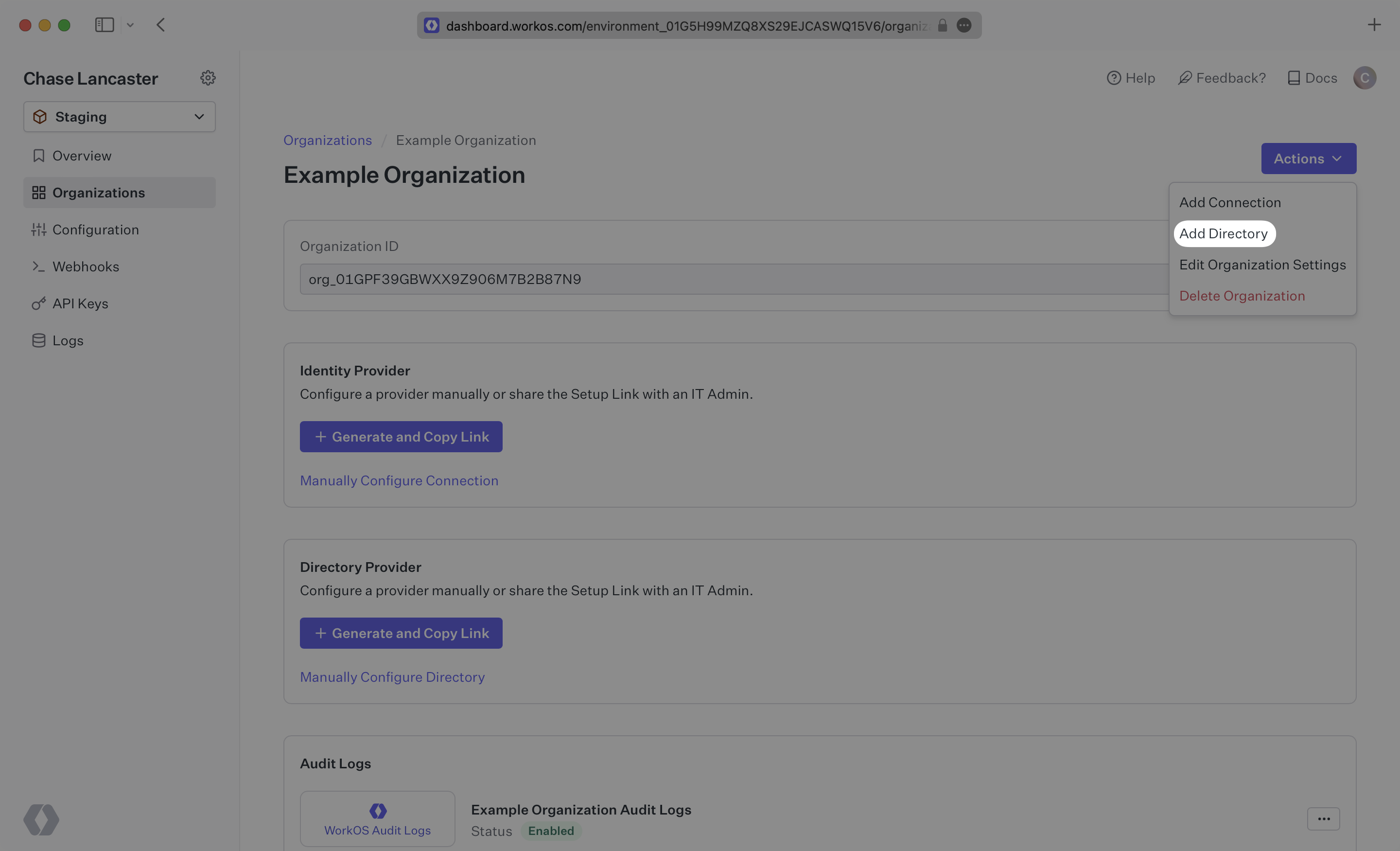
|
|
35
|
+
|
|
36
|
+
Select “Rippling” from the dropdown, and enter the organization name.
|
|
37
|
+
|
|
38
|
+
Then, click “Create Directory.”
|
|
39
|
+
|
|
40
|
+
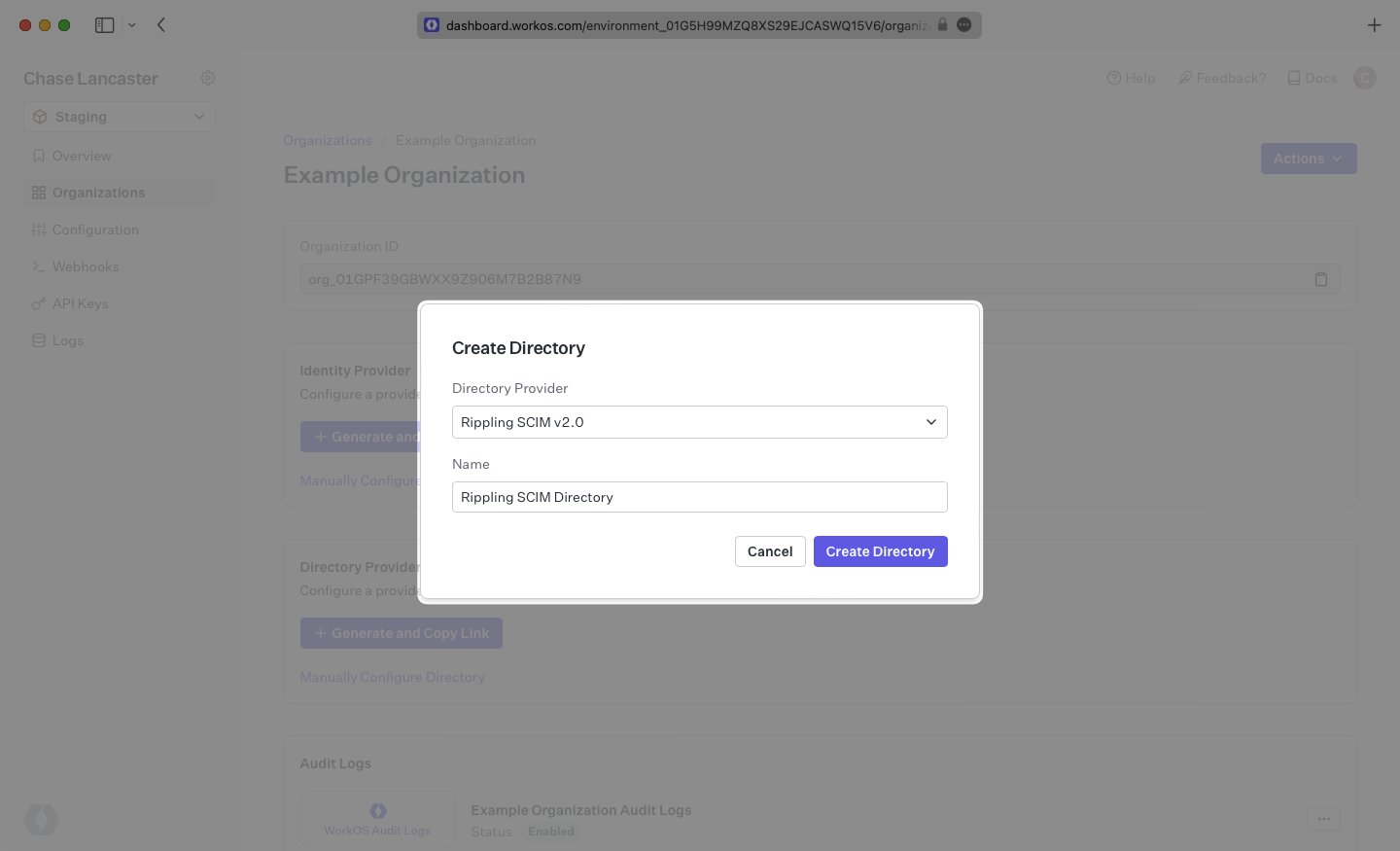
|
|
41
|
+
|
|
42
|
+
Your Rippling directory sync has now been created successfully with an Endpoint and Bearer Token.
|
|
43
|
+
|
|
44
|
+
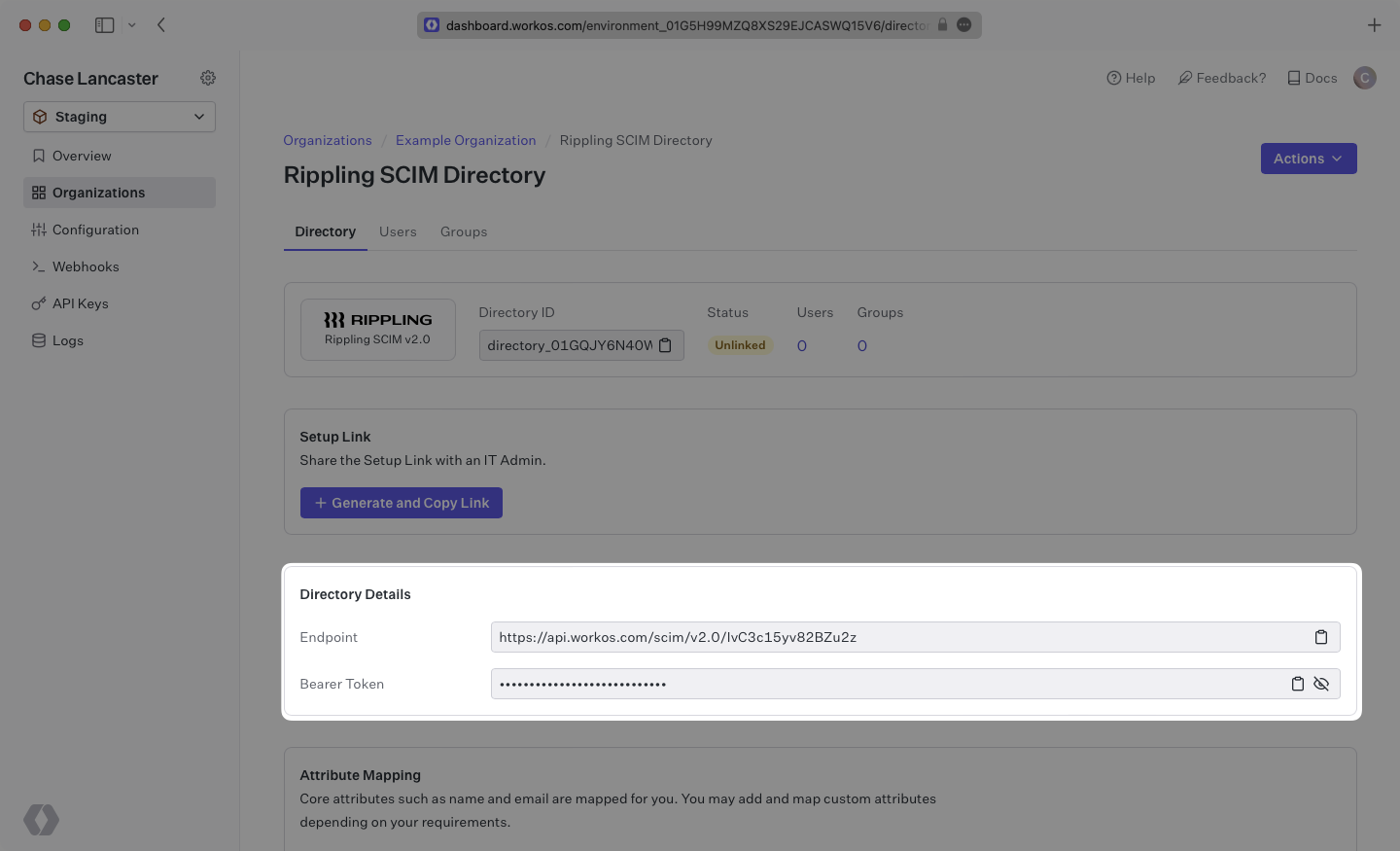
|
|
45
|
+
|
|
46
|
+
> We have support for custom URLs for Directory Sync endpoints. [Contact us](mailto:support@workos.com) for more info!
|
|
47
|
+
|
|
48
|
+
---
|
|
49
|
+
|
|
50
|
+
## (2) Create your Rippling application
|
|
51
|
+
|
|
52
|
+
Log in to the Rippling admin dashboard and select the “Custom App” option in the menu under the “Identity Management” category.
|
|
53
|
+
|
|
54
|
+
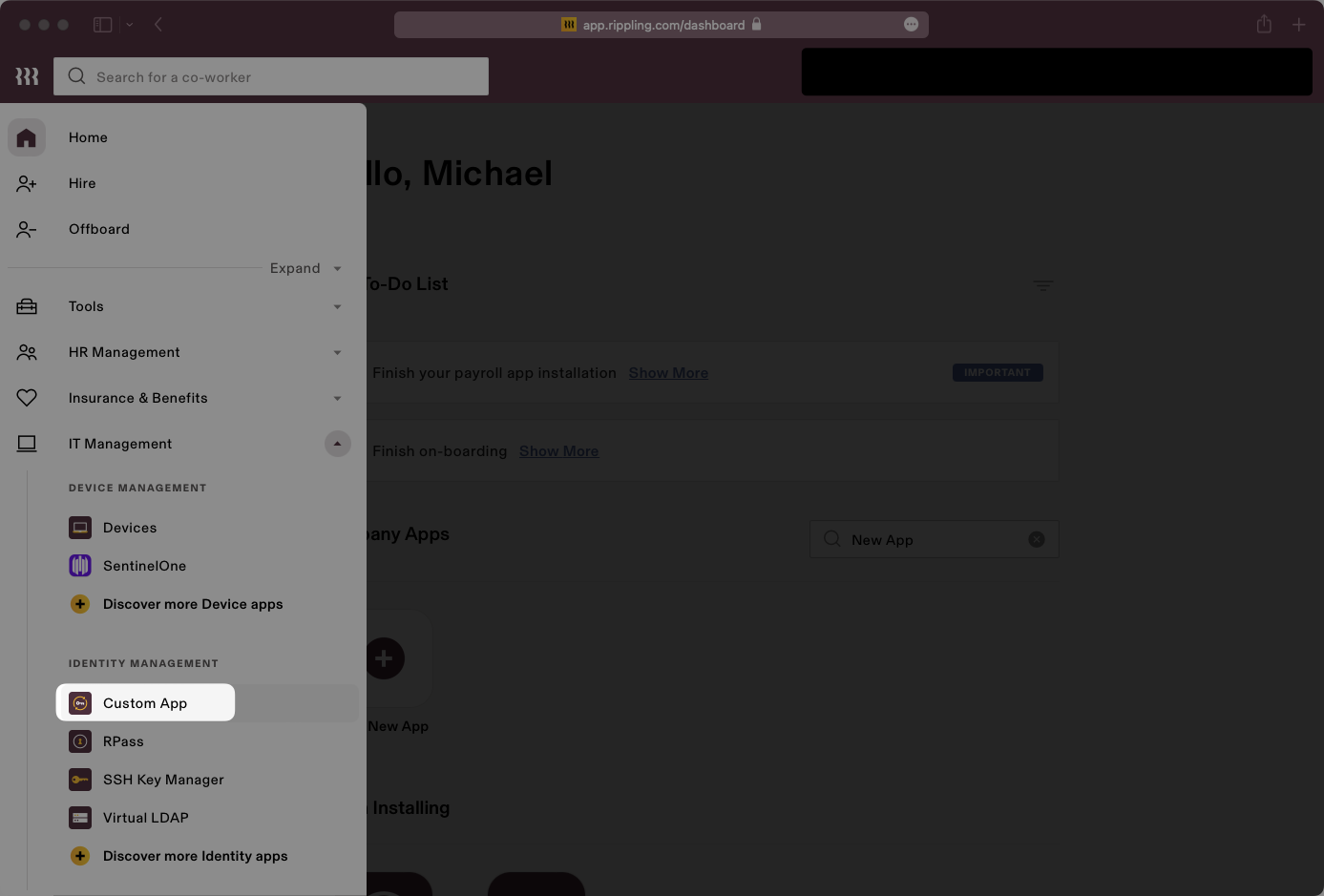
|
|
55
|
+
|
|
56
|
+
Select “Create New App” in the Custom App page.
|
|
57
|
+
|
|
58
|
+
|
|
59
|
+
|
|
60
|
+
Fill out the application’s name, select categories, upload an image for the logo, and check the “User Management via SCIM” box. Click “Continue” and the next page will populate more option fields regarding SCIM setup.
|
|
61
|
+
|
|
62
|
+
|
|
63
|
+
|
|
64
|
+
## (3) Configure your integration
|
|
65
|
+
|
|
66
|
+
Set the SCIM version to 2.0.
|
|
67
|
+
|
|
68
|
+
Fill in the endpoint into the “SCIM Base URL” field.
|
|
69
|
+
|
|
70
|
+
|
|
71
|
+
|
|
72
|
+
Set the SCIM authorization method to “Bearer Token” in the "SCIM Authorization Method" dropdown list. Check off features for groups, pagination, delete groups and PATCH groups.
|
|
73
|
+
|
|
74
|
+
|
|
75
|
+
|
|
76
|
+
Add SCIM attributes `externalId`, `emails.primary`, `name.givenName`, `name.familyName` to the "Supported SCIM Attributes" input box. If you have additional custom attributes, add the appropriate corresponding Rippling values of the custom attributes. Click “Continue” to move to the next step.
|
|
77
|
+
|
|
78
|
+
|
|
79
|
+
|
|
80
|
+
Rippling will then prompt you to install the app. Click "Install now" and proceed through the next step. Then, copy and paste the Bearer Token into the “Bearer Token” field and click “Continue”.
|
|
81
|
+
|
|
82
|
+
|
|
83
|
+
|
|
84
|
+
## (4) Assign users and groups to your application
|
|
85
|
+
|
|
86
|
+
After entering the Bearer Token, the following two pages “App Access Rules” and “Provision Time”, can be filled out by your own preference. You should then arrive at the “Account Matching” page.
|
|
87
|
+
|
|
88
|
+
In order for your users and groups to be synced, you will need to assign them to your Rippling Application. Match the Rippling users to the account, or create a new application account for the user(s).
|
|
89
|
+
|
|
90
|
+
|
|
91
|
+
|
|
92
|
+
Create groups for the application as needed.
|
|
93
|
+
|
|
94
|
+
|
|
95
|
+
|
|
96
|
+
Name the group.
|
|
97
|
+
|
|
98
|
+
|
|
99
|
+
|
|
100
|
+
Assign Rippling users/groups to the newly created application group.
|
|
101
|
+
|
|
102
|
+
|
|
103
|
+
|
|
104
|
+
Make sure all attributes previously added are enabled, and that their cadence is set to “On user creation and updates”. Then, click “Save” and “Continue” to finish setup.
|
|
105
|
+
|
|
106
|
+
|
|
107
|
+
|
|
108
|
+
In your WorkOS dashboard, you should now see the users and groups synced over.
|
|
109
|
+
|
|
110
|
+
|
|
111
|
+
|
|
112
|
+
A detailed guide to integrate the WorkOS API with your application can be found [here](/directory-sync)
|
|
113
|
+
|
|
114
|
+
## Frequently asked questions
|
|
115
|
+
|
|
116
|
+
### Can I add additional custom fields to this SCIM integration?
|
|
117
|
+
|
|
118
|
+
Yes, however Rippling allows only a limited set of custom fields in SCIM applications.
|
|
119
|
+
|
|
120
|
+
- #### Available custom fields
|
|
121
|
+
- `addresses.home.country`
|
|
122
|
+
- `addresses.home.formatted`
|
|
123
|
+
- `addresses.home.locality`
|
|
124
|
+
- `addresses.home.postalCode`
|
|
125
|
+
- `addresses.home.region`
|
|
126
|
+
- `addresses.home.streetAddress`
|
|
127
|
+
- `addresses.work.country`
|
|
128
|
+
- `addresses.work.formatted`
|
|
129
|
+
- `addresses.work.locality`
|
|
130
|
+
- `addresses.work.postalCode`
|
|
131
|
+
- `addresses.work.region`
|
|
132
|
+
- `addresses.work.streetAddress`
|
|
133
|
+
- `department`
|
|
134
|
+
- `displayName`
|
|
135
|
+
- `emails.primary`
|
|
136
|
+
- `employeeNumber`
|
|
137
|
+
- `externalId`
|
|
138
|
+
- `manager.displayName`
|
|
139
|
+
- `manager.email`
|
|
140
|
+
- `manager.managerId`
|
|
141
|
+
- `name.familyName`
|
|
142
|
+
- `name.formatted`
|
|
143
|
+
- `name.givenName`
|
|
144
|
+
- `phoneNumbers.mobile`
|
|
145
|
+
- `phoneNumbers.work`
|
|
146
|
+
- `photos.photo`
|
|
147
|
+
- `title`
|
|
148
|
+
- `userType`
|
|
@@ -0,0 +1,143 @@
|
|
|
1
|
+
---
|
|
2
|
+
title: Salesforce
|
|
3
|
+
description: "Learn how to configure a connection to\_Salesforce via SAML."
|
|
4
|
+
icon: salesforce
|
|
5
|
+
breadcrumb:
|
|
6
|
+
title: Integrations
|
|
7
|
+
url: /integrations
|
|
8
|
+
originalPath: .tmp-workos-clone/packages/docs/content/integrations/salesforce-saml.mdx
|
|
9
|
+
---
|
|
10
|
+
|
|
11
|
+
## Introduction
|
|
12
|
+
|
|
13
|
+
Each SSO Identity Provider requires specific information to create and configure a new [connection](/glossary/connection). And often, the information required to create a connection will differ by Identity Provider.
|
|
14
|
+
|
|
15
|
+
To create an Salesforce SAML connection, you’ll need three pieces of information: an [ACS URL](/glossary/acs-url), an [SP Entity ID](/glossary/sp-entity-id), and a [Metadata URL](/glossary/idp-metadata).
|
|
16
|
+
|
|
17
|
+
---
|
|
18
|
+
|
|
19
|
+
## What WorkOS provides
|
|
20
|
+
|
|
21
|
+
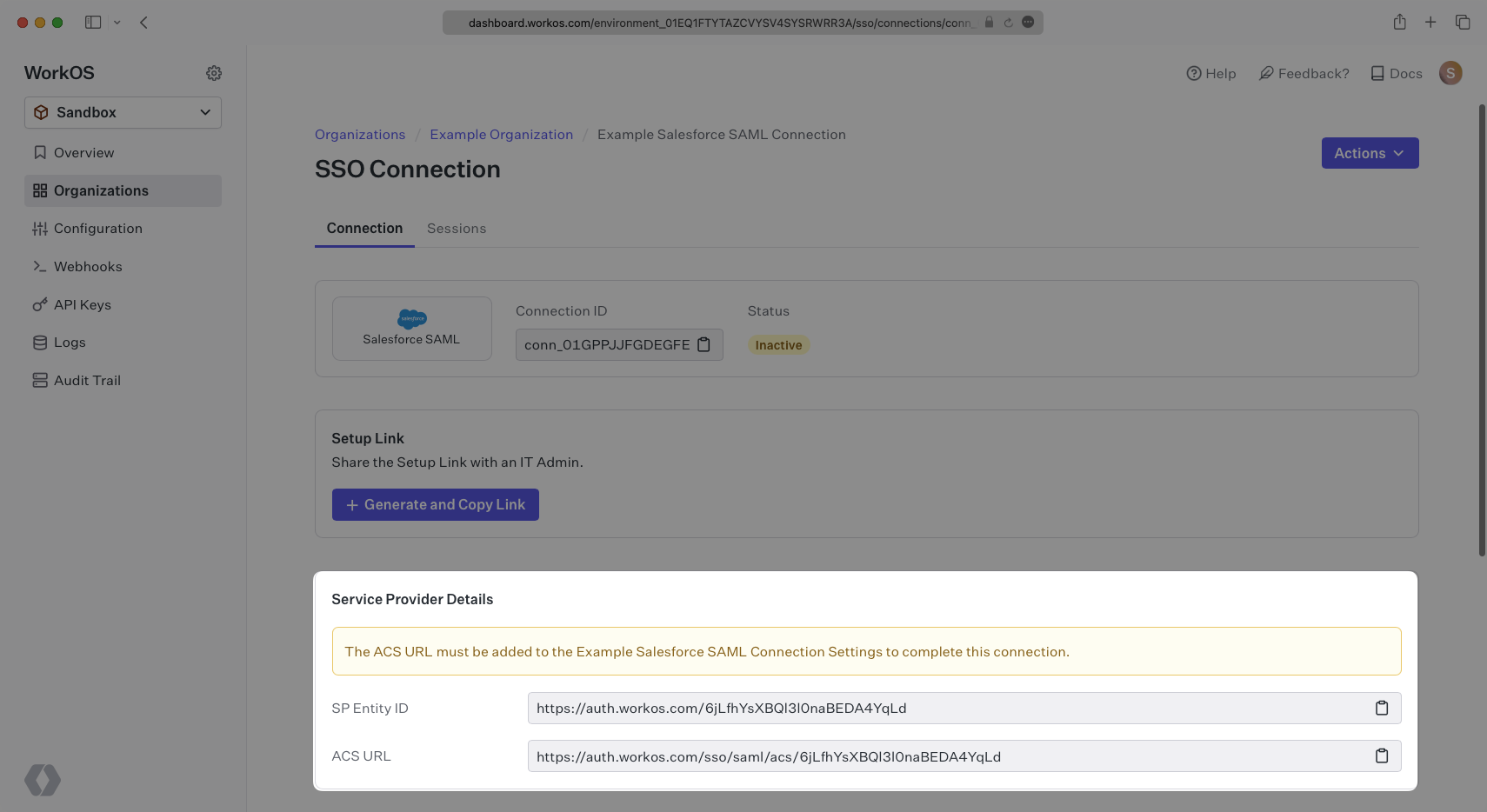
WorkOS provides the ACS URL and SP Entity ID. It’s readily available in your Connection Settings in the [WorkOS dashboard](https://dashboard.workos.com/).
|
|
22
|
+
|
|
23
|
+
|
|
24
|
+
|
|
25
|
+
The ACS URL is the location an Identity Provider redirects its authentication response to. In Salesforce’s case, it needs to be set by the organization when configuring Salesforce as an Identity Provider.
|
|
26
|
+
|
|
27
|
+
The Entity ID is a URI used to identify the issuer of a SAML request, response, or assertion. In this case, the entity ID is used to communicate that WorkOS will be the party performing SAML requests to the organization's Salesforce instance.
|
|
28
|
+
|
|
29
|
+
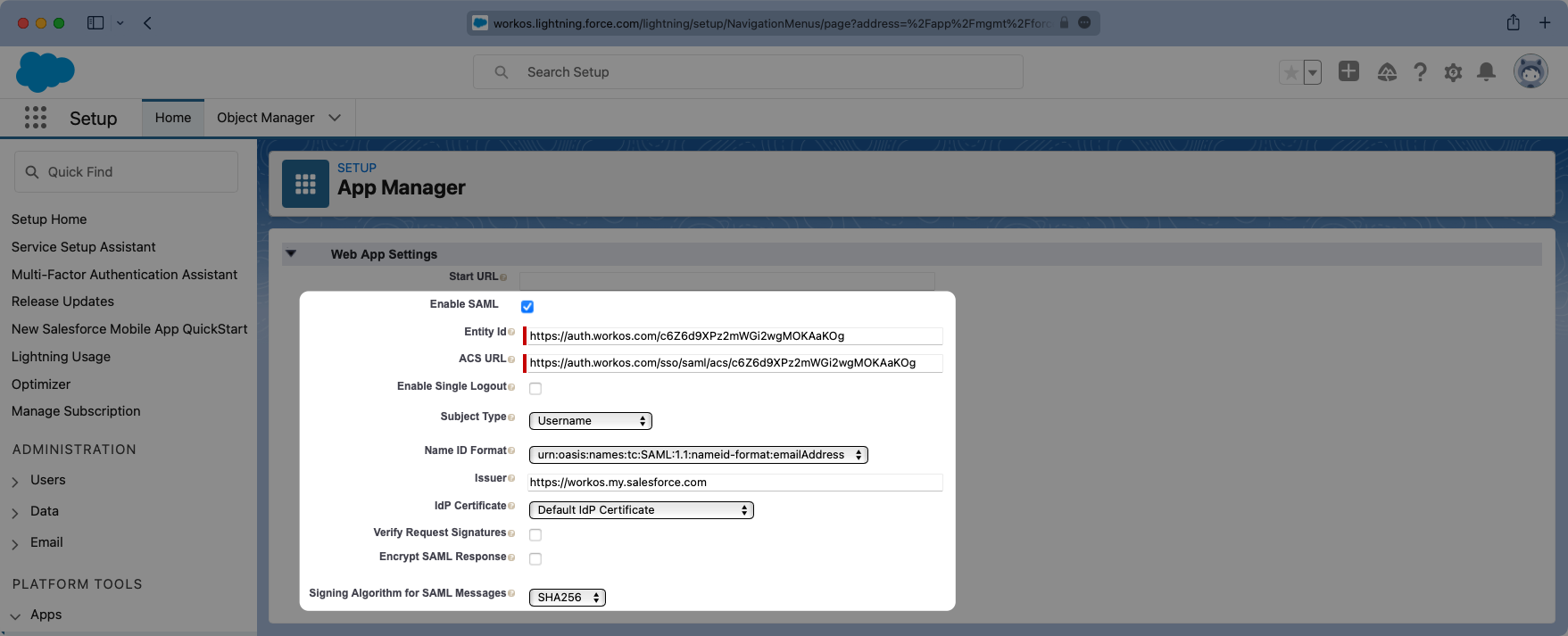
Specifically, the ACS URL and SP Entity ID will need to be set in the Connected Apps setup in Salesforce.
|
|
30
|
+
|
|
31
|
+
|
|
32
|
+
|
|
33
|
+
---
|
|
34
|
+
|
|
35
|
+
## What you’ll need
|
|
36
|
+
|
|
37
|
+
In order to integrate you’ll need the Salesforce Metadata URL. Normally, the this will come from the organization's IT Management team when they set up your application’s SAML client in their Salesforce instance. But, should that not be the case during your setup, here’s how to obtain it.
|
|
38
|
+
|
|
39
|
+
---
|
|
40
|
+
|
|
41
|
+
## (1) Generate Certificate
|
|
42
|
+
|
|
43
|
+
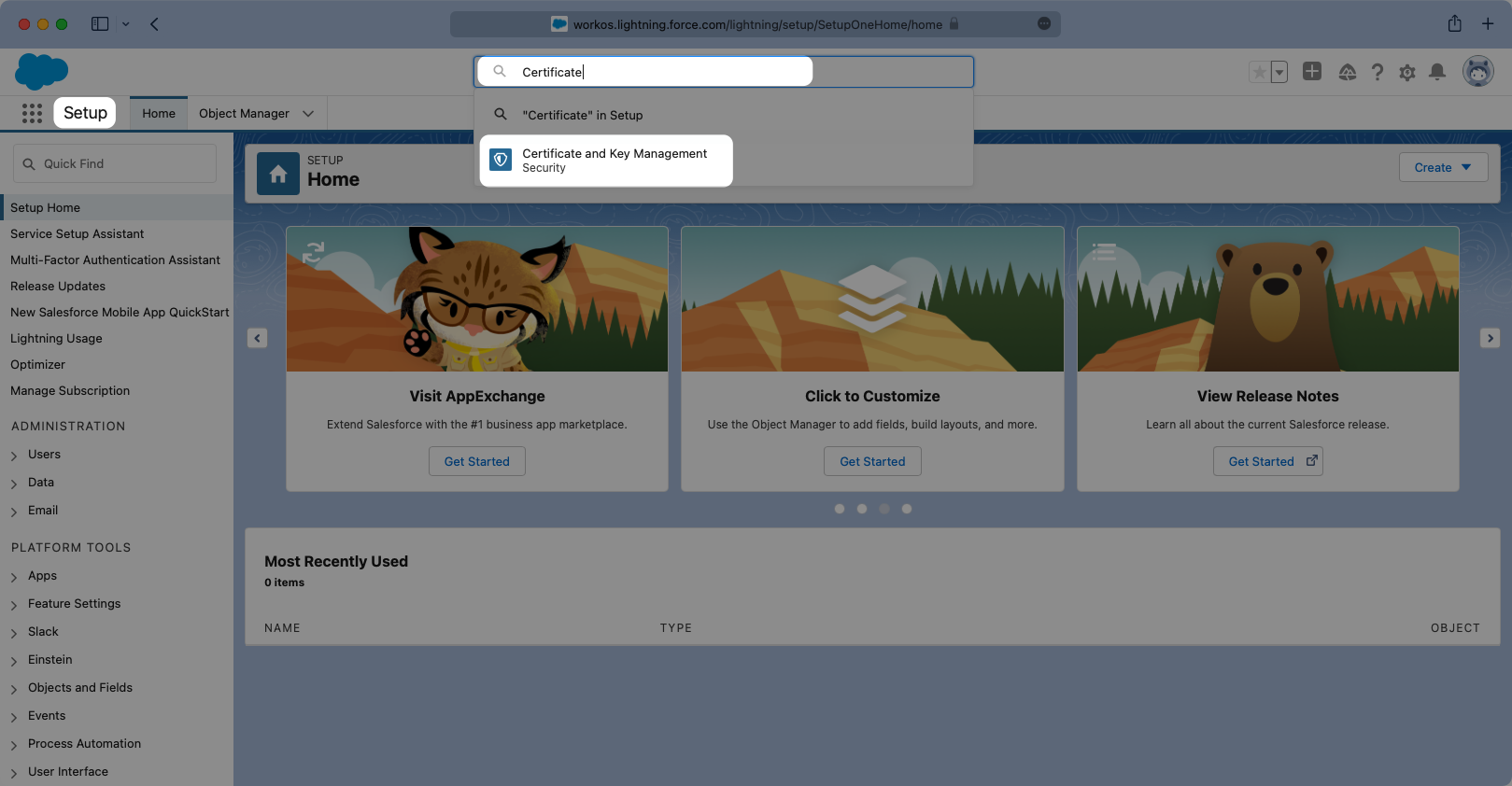
Log in to your Salesforce Account, click the Settings cog icon on the top right, and select “Setup”.
|
|
44
|
+
|
|
45
|
+
Once in setup mode you can use the search bar to easily navigate around between settings pages. The first page to navigate to is the “Certificate and Key Management” page.
|
|
46
|
+
|
|
47
|
+
|
|
48
|
+
|
|
49
|
+
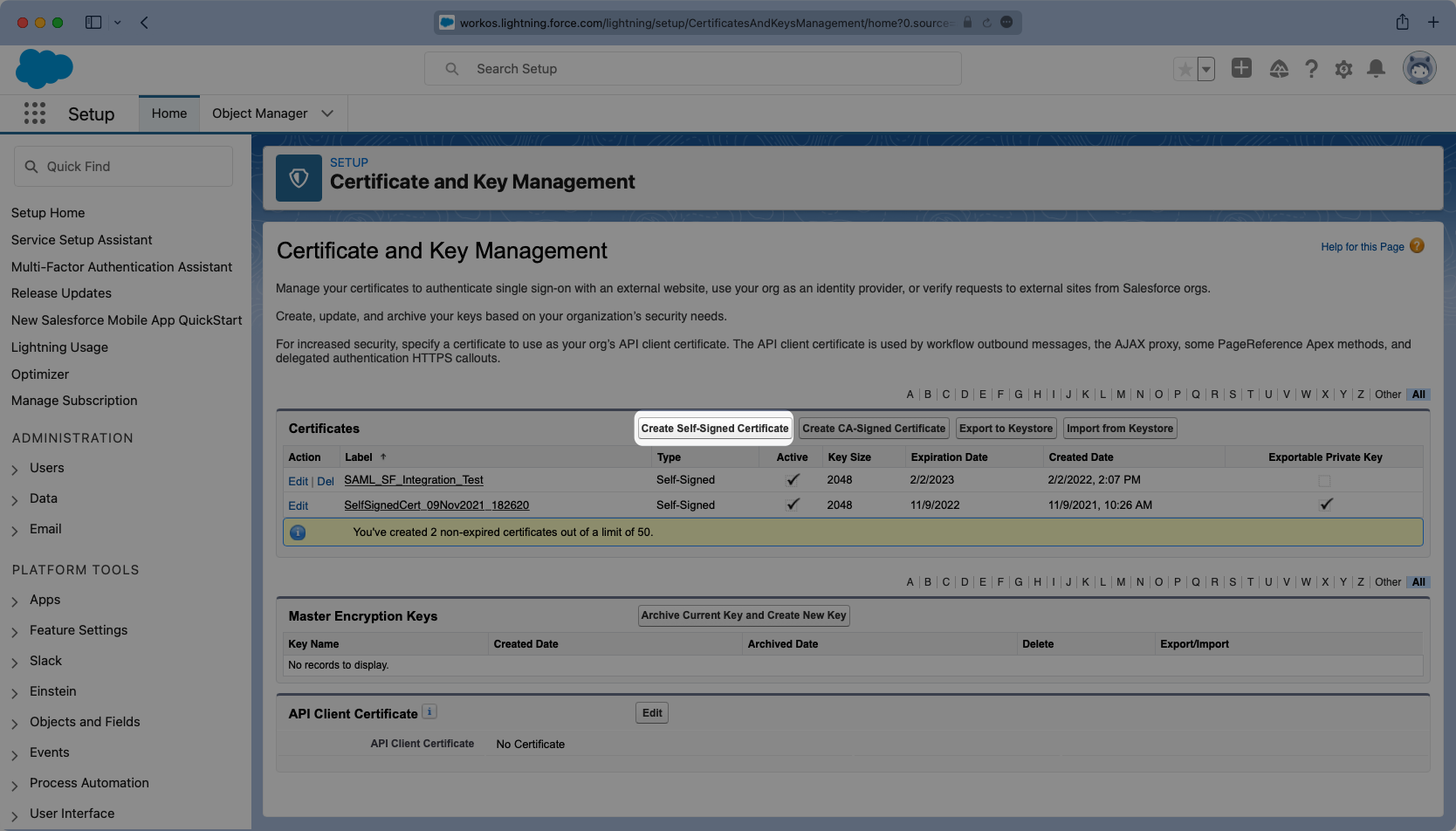
Once in setup mode you can use the search bar to easily navigate around between settings pages. The first page to navigate to is the “Certificate and Key Management” page. If a key does not exist that you would like to use, click “Create Self-Signed Certificate” to generate a new one.
|
|
50
|
+
|
|
51
|
+
|
|
52
|
+
|
|
53
|
+
Give the Certificate a meaningful label and unique name and select the Key Size you’d like to use. It’s not necessary to have an Exportable Private Key, but if you are using a key-certificate store you can choose this option.
|
|
54
|
+
|
|
55
|
+
|
|
56
|
+
|
|
57
|
+
---
|
|
58
|
+
|
|
59
|
+
## (2) Enable Salesforce as an IdP
|
|
60
|
+
|
|
61
|
+
From the setup search bar browse to the “Identity Provider” portal in Salesforce.
|
|
62
|
+
|
|
63
|
+
If it has not already been done, select “Enable Identity Provider”.
|
|
64
|
+
|
|
65
|
+
|
|
66
|
+
|
|
67
|
+
You will need to select the correct certificate from the previous step.
|
|
68
|
+
|
|
69
|
+
|
|
70
|
+
|
|
71
|
+
Additionally this page will display the Metadata URL. You will need to copy this URL and in a later step it will be uploaded into WorkOS.
|
|
72
|
+
|
|
73
|
+
|
|
74
|
+
|
|
75
|
+
---
|
|
76
|
+
|
|
77
|
+
## (3) Configure SAML Application
|
|
78
|
+
|
|
79
|
+
Next from the setup search bar browse to the “App Manager” portal. Once here you will want to select the option for “New Connected App”.
|
|
80
|
+
|
|
81
|
+
|
|
82
|
+
|
|
83
|
+
Give the App and API a meaningful name and set a contact email that corresponds to who you’d reach out to for support should there be an issue. You can always opt to use `support@workos.com`.
|
|
84
|
+
|
|
85
|
+
|
|
86
|
+
|
|
87
|
+
Scroll down further to the “Web App Settings” and check the box for “Enable SAML”. Enter the Entity ID and ACS URL into their respective places within the Settings.
|
|
88
|
+
|
|
89
|
+
The “Subject Type” should be set to “User ID” and the “Name ID Format” should be set to `urn:oasis:names:tv:SAML:1.1:nameid-format:emailAddress`. The “Issuer” should populate correctly with your Salesforce subdomain. For the IdP Certificate, select the certificate that matches the one previously used when enabling the Identity Provider, and for the “Signing Algorithm for SAML Messages” choose “SHA256”.
|
|
90
|
+
|
|
91
|
+

|
|
92
|
+
|
|
93
|
+
Save the configurations and you should now see the new Connected App listed under “App Manager”.
|
|
94
|
+
|
|
95
|
+
---
|
|
96
|
+
|
|
97
|
+
## (4) Configure User Attributes and Claims
|
|
98
|
+
|
|
99
|
+
In the Setup search bar browse to the “Manage Connected Apps” portal. Click on your application and this will open the view where you can configure the attribute mapping, and later on the user profile access permissions.
|
|
100
|
+
|
|
101
|
+
|
|
102
|
+
|
|
103
|
+
Viewing the app, scroll down to the “Custom Attributes” section and select “New”.
|
|
104
|
+
|
|
105
|
+
|
|
106
|
+
|
|
107
|
+
Salesforce automatically includes email as an Attribute so we will need to add three fields:
|
|
108
|
+
|
|
109
|
+
- `id`
|
|
110
|
+
- `firstName`
|
|
111
|
+
- `lastName`
|
|
112
|
+
|
|
113
|
+
Configure the fields so the mapping matches the following:
|
|
114
|
+
|
|
115
|
+
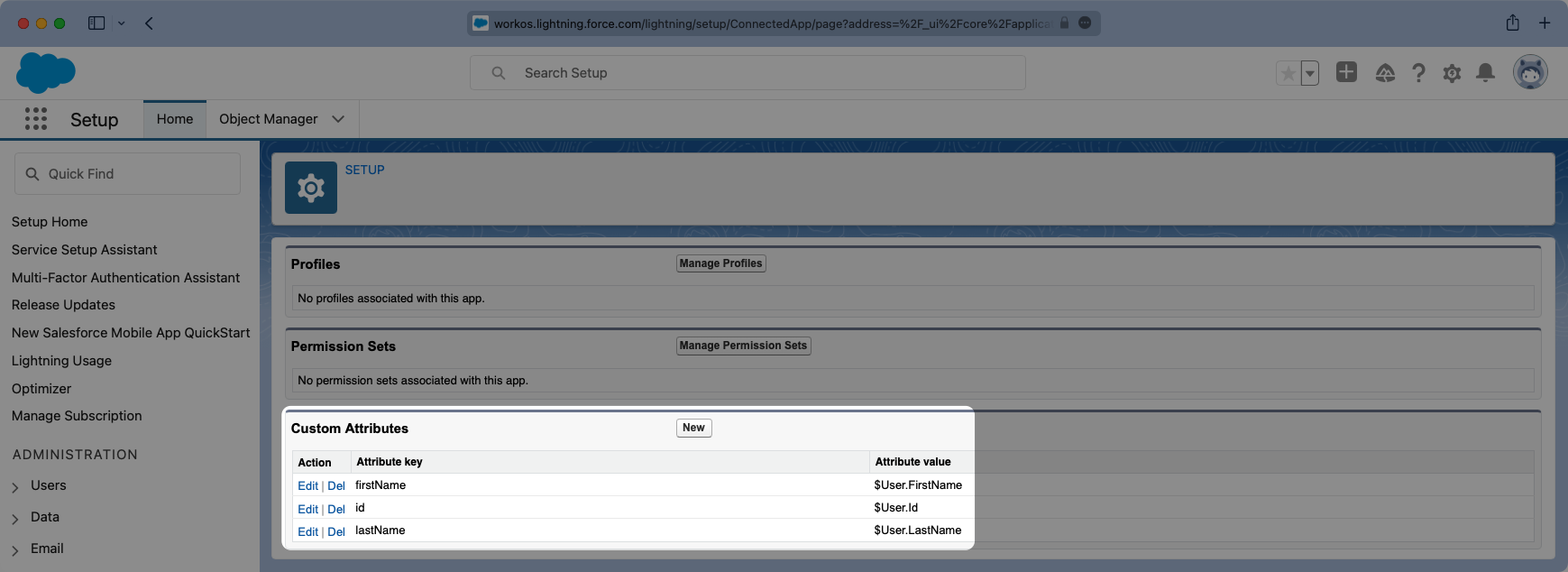
|
|
116
|
+
|
|
117
|
+
### Role Assignment (optional)
|
|
118
|
+
|
|
119
|
+
With [identity provider role assignment](/sso/identity-provider-role-assignment), users can receive roles within your application based on their group memberships. To return this information in the attribute statement, create a new custom attribute with a key of `groups`. Map this attribute to a value that contains a user’s group membership or role information, such as `$UserRole.Name` in the example below.
|
|
120
|
+
|
|
121
|
+
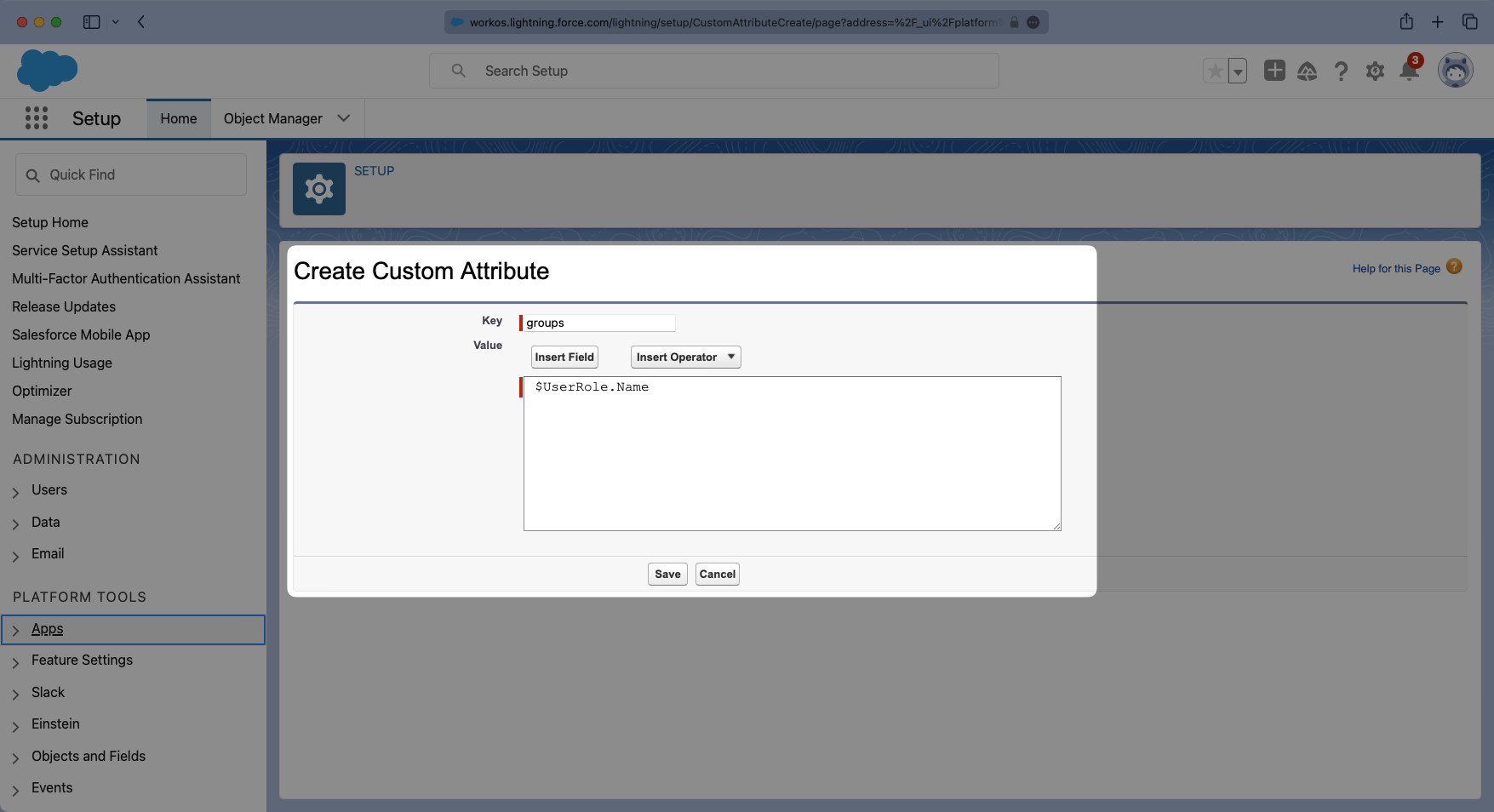
|
|
122
|
+
|
|
123
|
+
> Finish role assignment set-up by navigating to the SSO connection page in the _Organization_ section of the [WorkOS Dashboard](https://dashboard.workos.com/). Create SSO groups by referencing the group IdP ID. Then, assign roles to these SSO groups so group members are automatically granted roles within your application.
|
|
124
|
+
|
|
125
|
+
---
|
|
126
|
+
|
|
127
|
+
## (5) Manage Profiles With Application Access
|
|
128
|
+
|
|
129
|
+
Similarly, viewing the app, there is a “Manage Profiles” section for granting access to control who can log into the application. Select “Manage Profiles” and grant access to the appropriate profiles that should have access to the application in the "Application Profile Assignment" wizard. Select "Save" when complete.
|
|
130
|
+
|
|
131
|
+
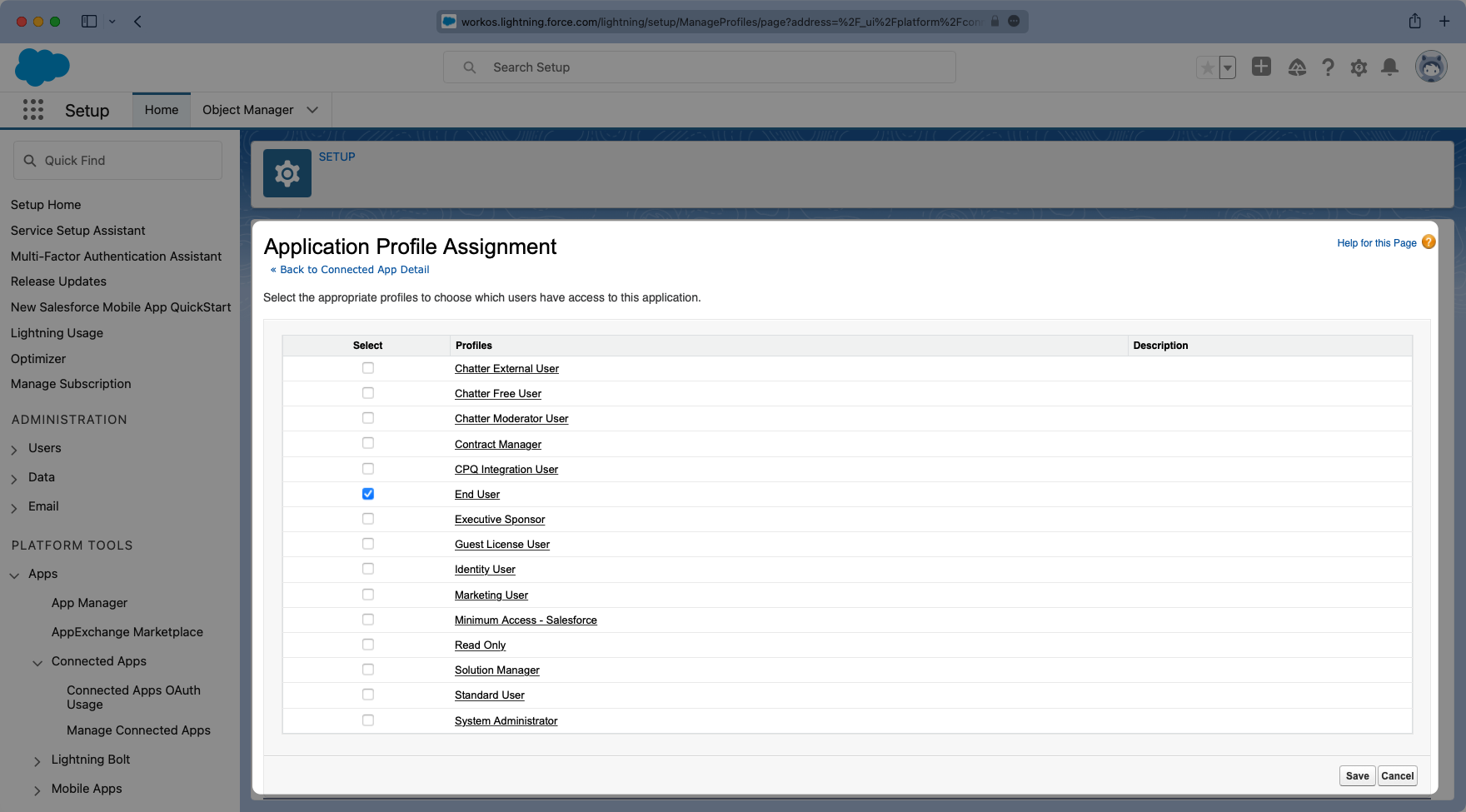
|
|
132
|
+
|
|
133
|
+
Here is an example of a successfully configured “Connected Application” allowing access to anyone with an “End User” Profile.
|
|
134
|
+
|
|
135
|
+
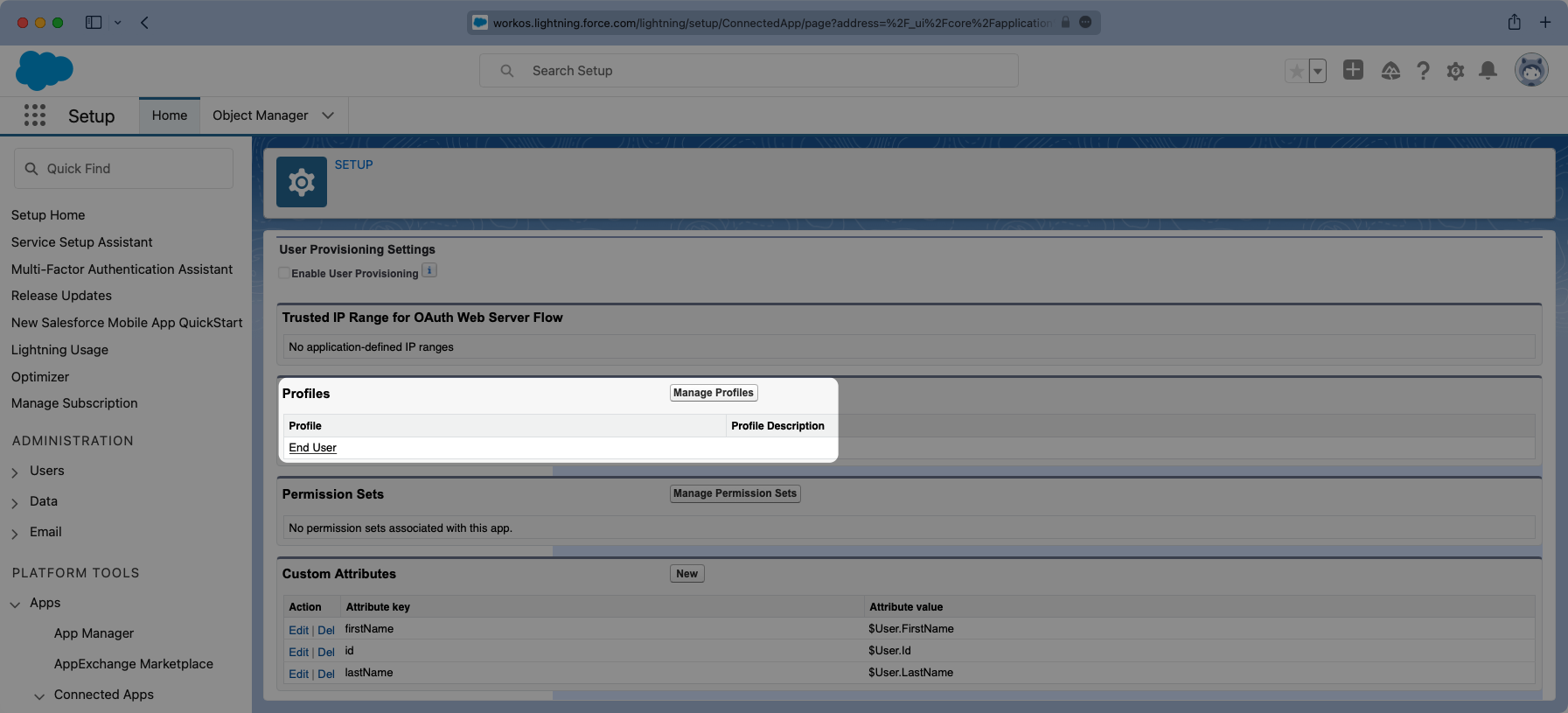
|
|
136
|
+
|
|
137
|
+
---
|
|
138
|
+
|
|
139
|
+
## (6) Obtain Identity Provider Details
|
|
140
|
+
|
|
141
|
+
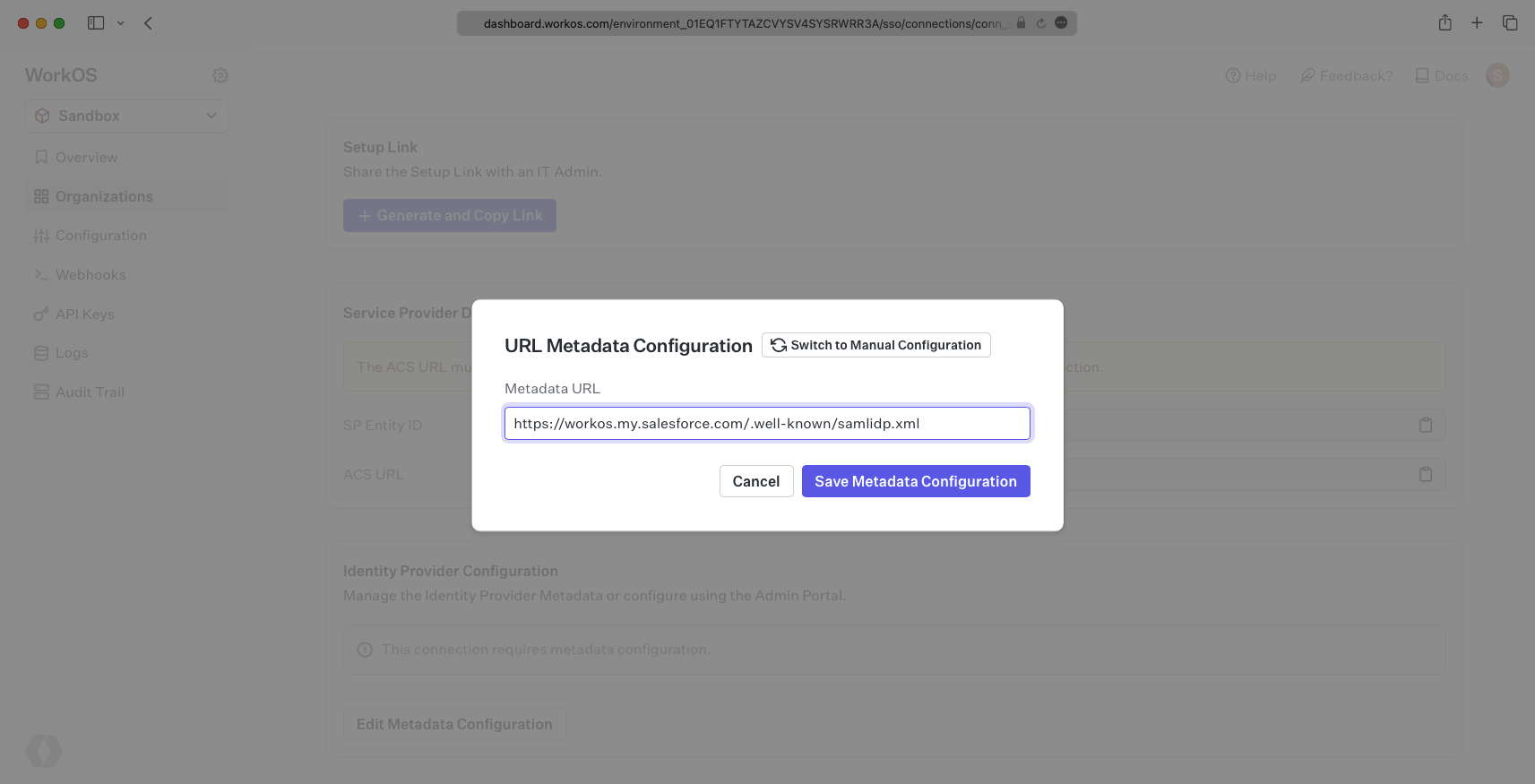
Finally, return to the WorkOS dashboard. Within your connection settings, select "Edit Metadata Configuration" under "Identity Provider Configuration" and provide the Metadata URL you obtained from Salesforce. Your connection will then be verified and good to go!
|
|
142
|
+
|
|
143
|
+
|
|
@@ -0,0 +1,64 @@
|
|
|
1
|
+
---
|
|
2
|
+
title: SAML
|
|
3
|
+
description: Learn how to configure a new custom SAML connection.
|
|
4
|
+
breadcrumb:
|
|
5
|
+
title: Integrations
|
|
6
|
+
url: /integrations
|
|
7
|
+
originalPath: .tmp-workos-clone/packages/docs/content/integrations/saml.mdx
|
|
8
|
+
---
|
|
9
|
+
|
|
10
|
+
## Introduction
|
|
11
|
+
|
|
12
|
+
Each SSO Identity Provider requires specific information to create and configure a new [Connection](/glossary/connection). Often, the information required to create a Connection will differ by Identity Provider.
|
|
13
|
+
|
|
14
|
+
To create a custom SAML Connection, you’ll need the Identity Provider Metadata URL that is available from the organization's SAML instance.
|
|
15
|
+
|
|
16
|
+
---
|
|
17
|
+
|
|
18
|
+
## What WorkOS provides
|
|
19
|
+
|
|
20
|
+
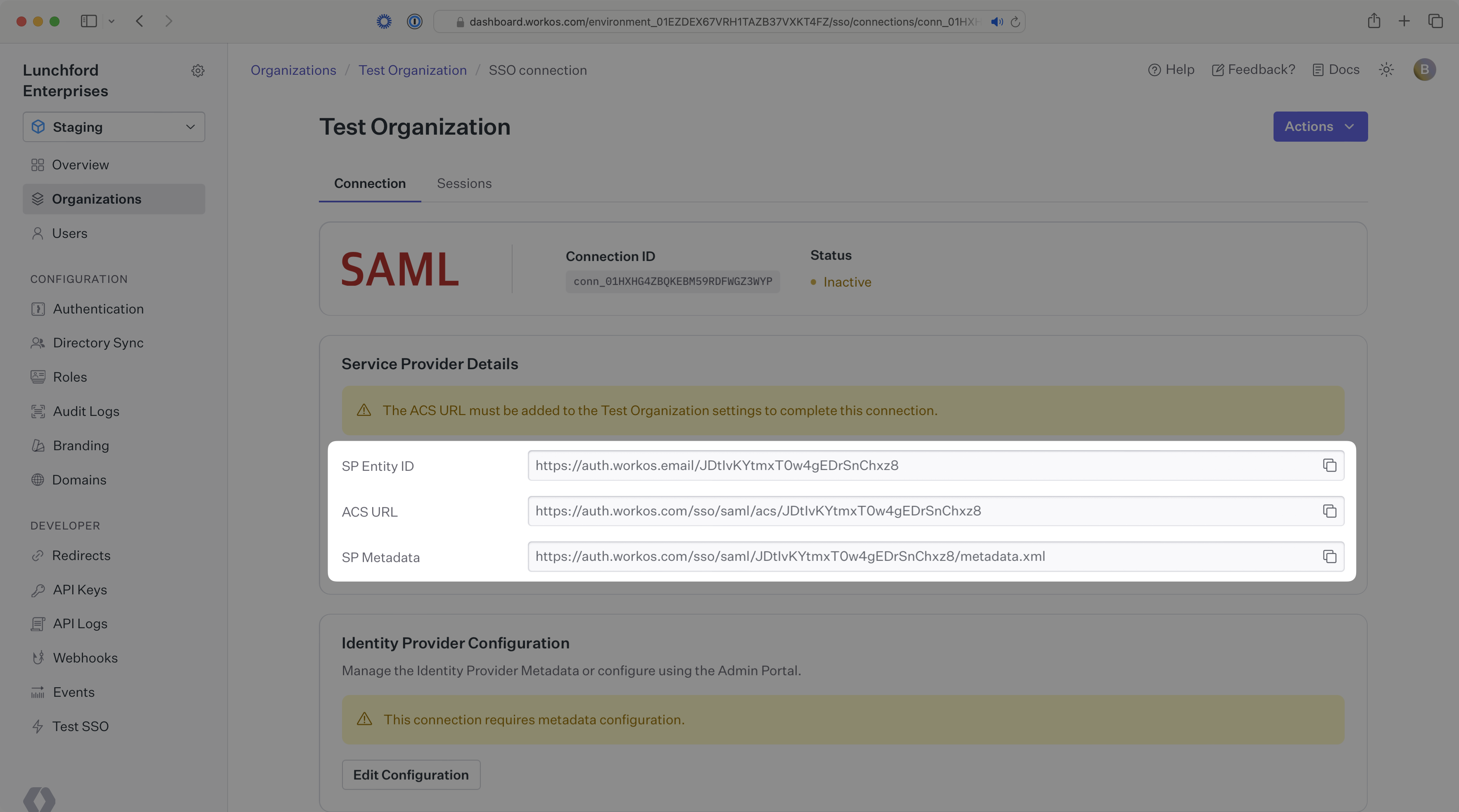
WorkOS provides the [ACS URL](/glossary/acs-url), the [SP Entity ID](/glossary/sp-entity-id), and the [SP Metadata](/glossary/sp-metadata) link. They are readily available in your Connection Settings in the [WorkOS Dashboard](https://dashboard.workos.com/).
|
|
21
|
+
|
|
22
|
+
|
|
23
|
+
|
|
24
|
+
The ACS URL is the location an Identity Provider redirects its authentication response to. The SP Entity ID is a URI used to identify the issuer of a SAML request and the audience of a SAML response. The SP Metadata link contains a metadata file that the organization can use to set up the SAML integration.
|
|
25
|
+
|
|
26
|
+
---
|
|
27
|
+
|
|
28
|
+
## What you’ll need
|
|
29
|
+
|
|
30
|
+
In order to integrate you’ll need the IdP Metadata URL.
|
|
31
|
+
|
|
32
|
+
Normally, this information will come from the organization's IT Management team when they set up your application’s SAML 2.0 configuration in their Identity Provider admin dashboard. But, should that not be the case during your setup, here’s how to obtain them.
|
|
33
|
+
|
|
34
|
+
---
|
|
35
|
+
|
|
36
|
+
## (1) Enter Service Provider Details
|
|
37
|
+
|
|
38
|
+
Copy and Paste the “ACS URL” and “SP Entity ID” into the corresponding fields for Service Provider details and configuration. For some SAML setups, you can use the metadata found at the SP Metadata link to configure the SAML connection.
|
|
39
|
+
|
|
40
|
+
---
|
|
41
|
+
|
|
42
|
+
## (2) Obtain Identity Provider Metadata
|
|
43
|
+
|
|
44
|
+
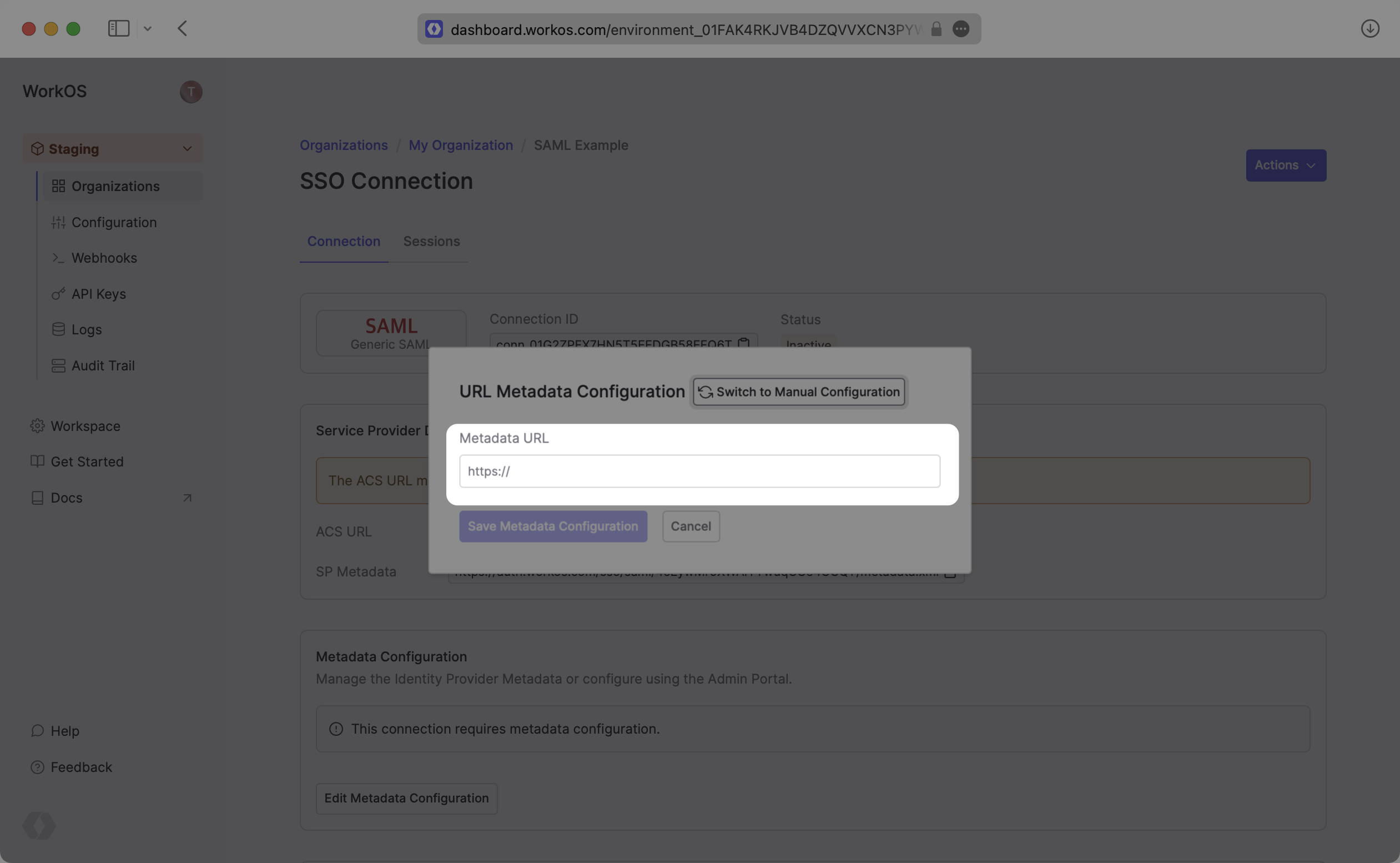
Copy the IdP Metadata URL from your SAML settings and upload it to your WorkOS Connection settings. Your Connection will then be linked and good to go!
|
|
45
|
+
|
|
46
|
+
|
|
47
|
+
|
|
48
|
+
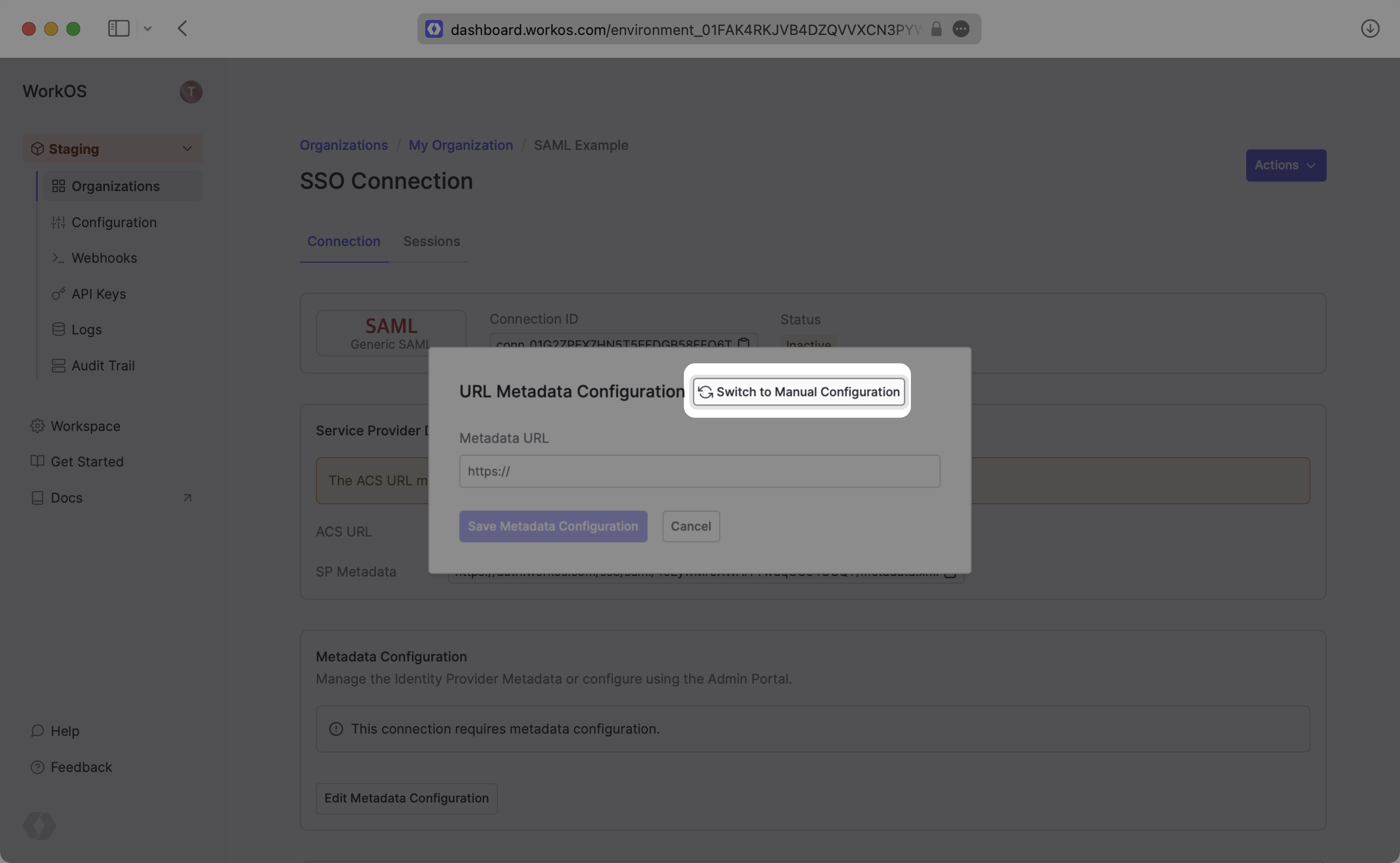
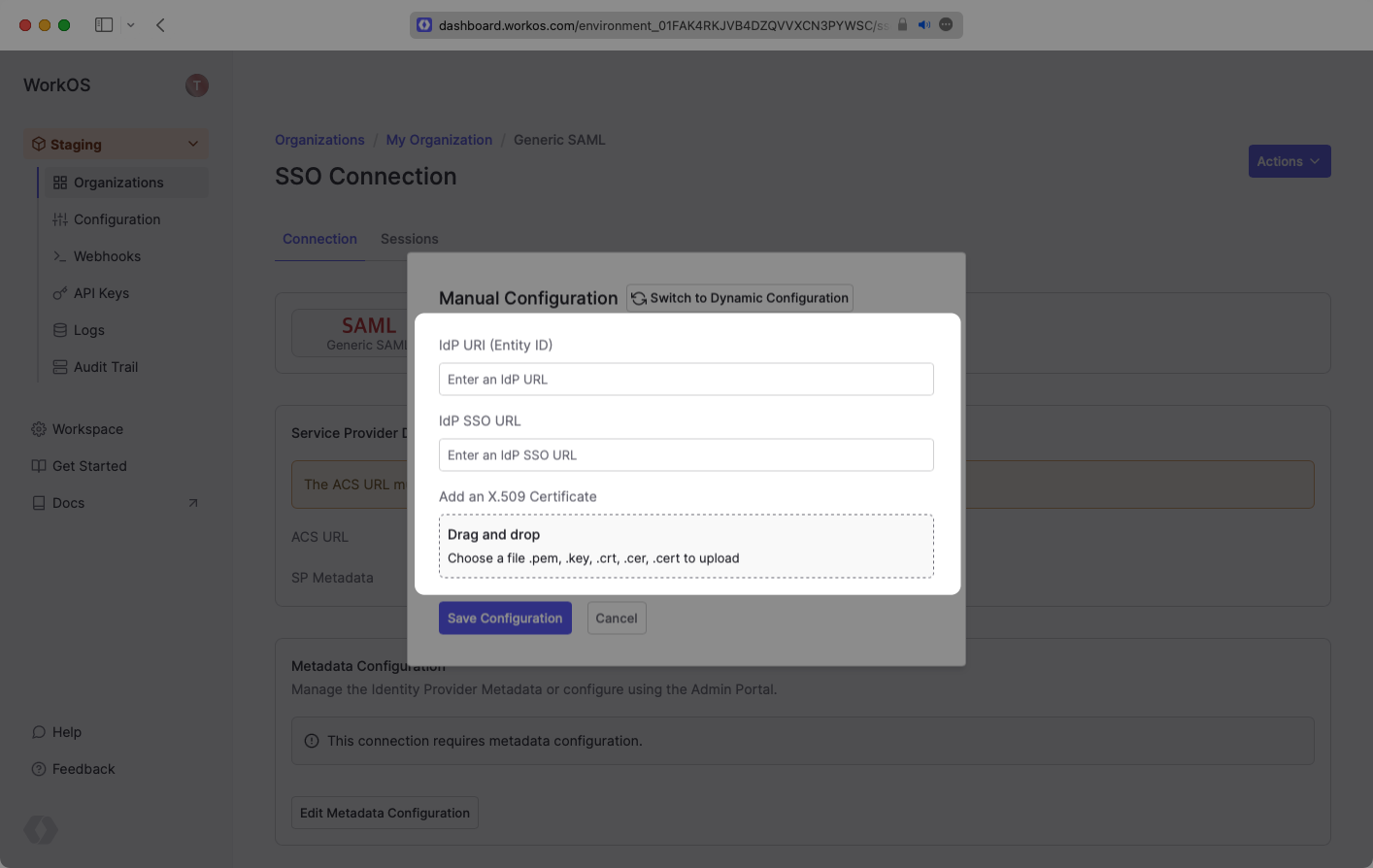
Some SAML providers might not be able to provide the IdP Metadata URL. In these cases, you’ll want to manually configure the connection.
|
|
49
|
+
|
|
50
|
+
|
|
51
|
+
|
|
52
|
+
|
|
53
|
+
|
|
54
|
+
---
|
|
55
|
+
|
|
56
|
+
## (3) Configure Attribute Mapping
|
|
57
|
+
|
|
58
|
+
At a minimum, the Attribute Statement in the SAML Response should include `id`, `email`, `firstName`, and `lastName` attributes.
|
|
59
|
+
|
|
60
|
+
### Role Assignment (optional)
|
|
61
|
+
|
|
62
|
+
With [identity provider role assignment](/sso/identity-provider-role-assignment), users can receive roles within your application based on their group memberships. To return this information in the attribute statement, map the groups in your identity provider to a SAML attribute named `groups`.
|
|
63
|
+
|
|
64
|
+
Once your SAML app is configured to return groups, navigate to the SSO connection page in the _Organization_ section of the [WorkOS Dashboard](https://dashboard.workos.com/). Create SSO groups by referencing the group IdP ID. Then, assign roles to these SSO groups so group members are automatically granted roles within your application.
|
|
@@ -0,0 +1,64 @@
|
|
|
1
|
+
---
|
|
2
|
+
title: SCIM
|
|
3
|
+
description: "Learn about syncing your user list with\_a\_custom SCIM provider."
|
|
4
|
+
breadcrumb:
|
|
5
|
+
title: Integrations
|
|
6
|
+
url: /integrations
|
|
7
|
+
originalPath: .tmp-workos-clone/packages/docs/content/integrations/scim.mdx
|
|
8
|
+
---
|
|
9
|
+
|
|
10
|
+
## Introduction
|
|
11
|
+
|
|
12
|
+
This guide outlines how to synchronize your application’s user and group directories using SCIM v2.0.
|
|
13
|
+
|
|
14
|
+
To synchronize an organization’s users and groups provisioned for your application, you’ll need to provide the organization with two pieces of information:
|
|
15
|
+
|
|
16
|
+
- An [Endpoint](/glossary/endpoint) that the SCIM server will make requests to.
|
|
17
|
+
- A [Bearer Token](/glossary/bearer-token) to authenticate its endpoint requests.
|
|
18
|
+
|
|
19
|
+
Both of these are available in your Endpoint’s Settings in the [WorkOS Dashboard](https://dashboard.workos.com/).
|
|
20
|
+
|
|
21
|
+
---
|
|
22
|
+
|
|
23
|
+
## (1) Set up your directory sync endpoint
|
|
24
|
+
|
|
25
|
+
Login to your WorkOS dashboard and select “Organizations” from the left hand Navigation bar.
|
|
26
|
+
|
|
27
|
+
Select the Organization you’d like to enable a SCIM Directory Sync connection for.
|
|
28
|
+
|
|
29
|
+
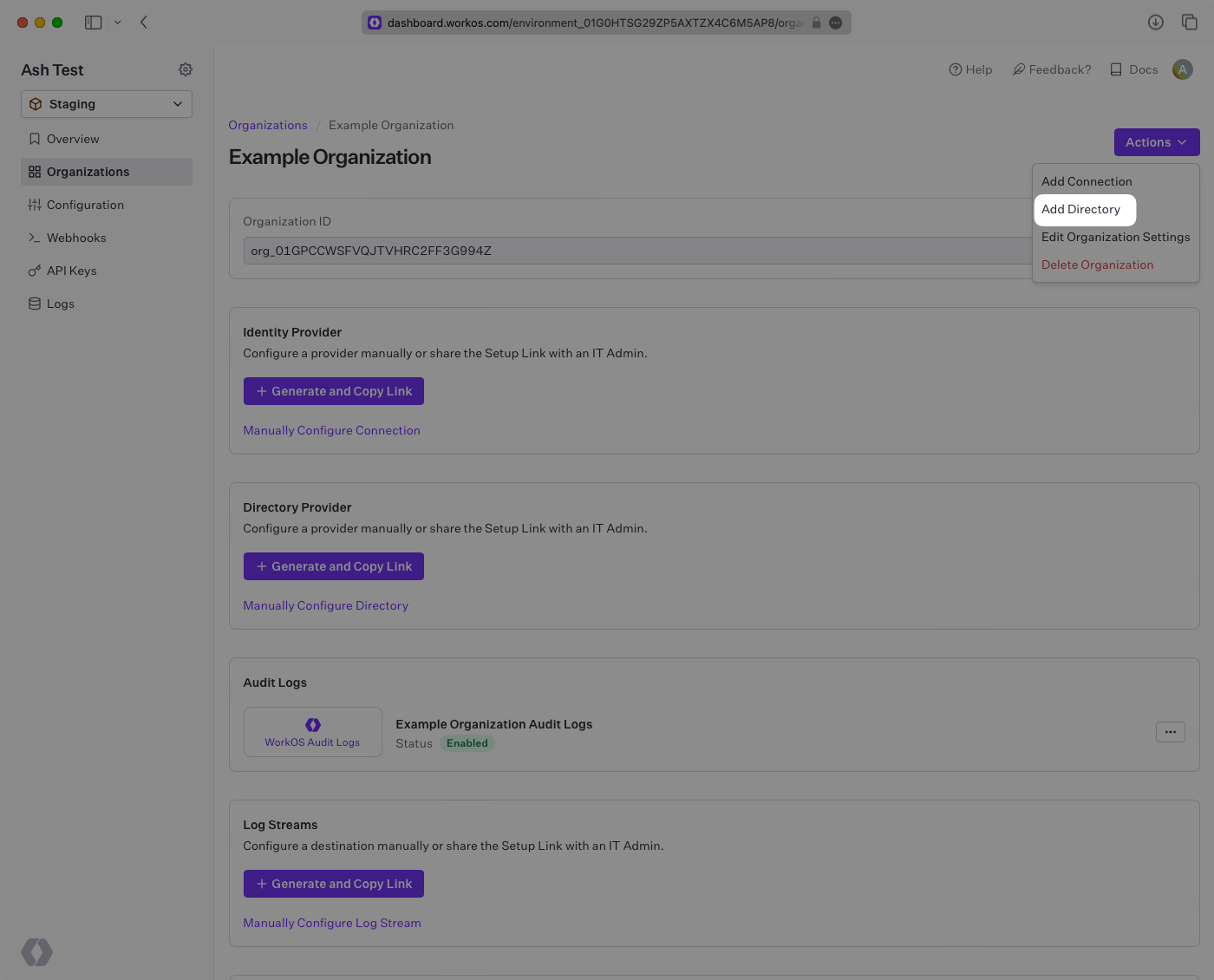
On the Organization’s page go to "Actions" and then click “Add Directory”.
|
|
30
|
+
|
|
31
|
+
|
|
32
|
+
|
|
33
|
+
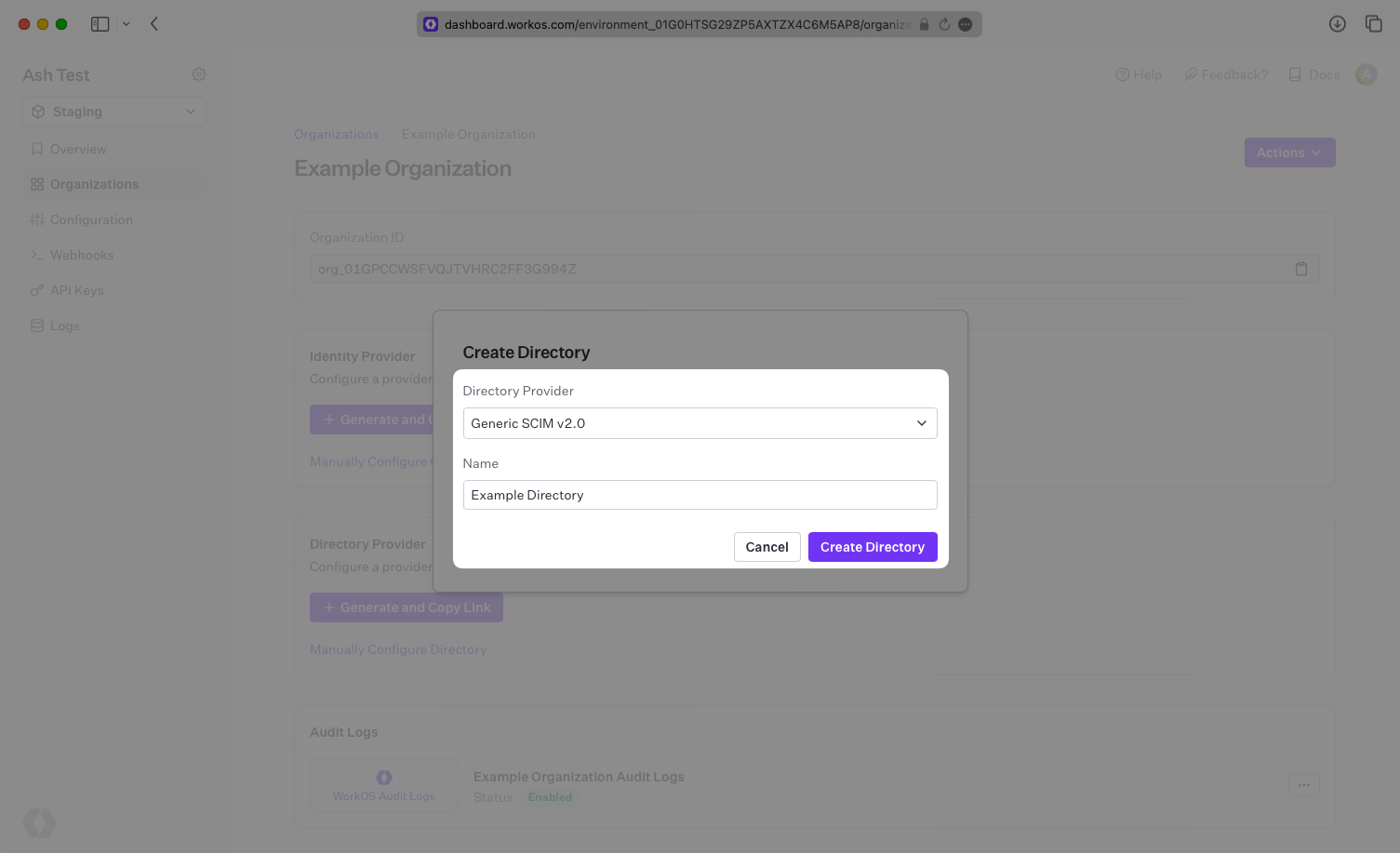
Select “Custom SCIM v2.0” as the directory type, and then input the Company Name.
|
|
34
|
+
|
|
35
|
+
Click the “Create Directory” button.
|
|
36
|
+
|
|
37
|
+
|
|
38
|
+
|
|
39
|
+
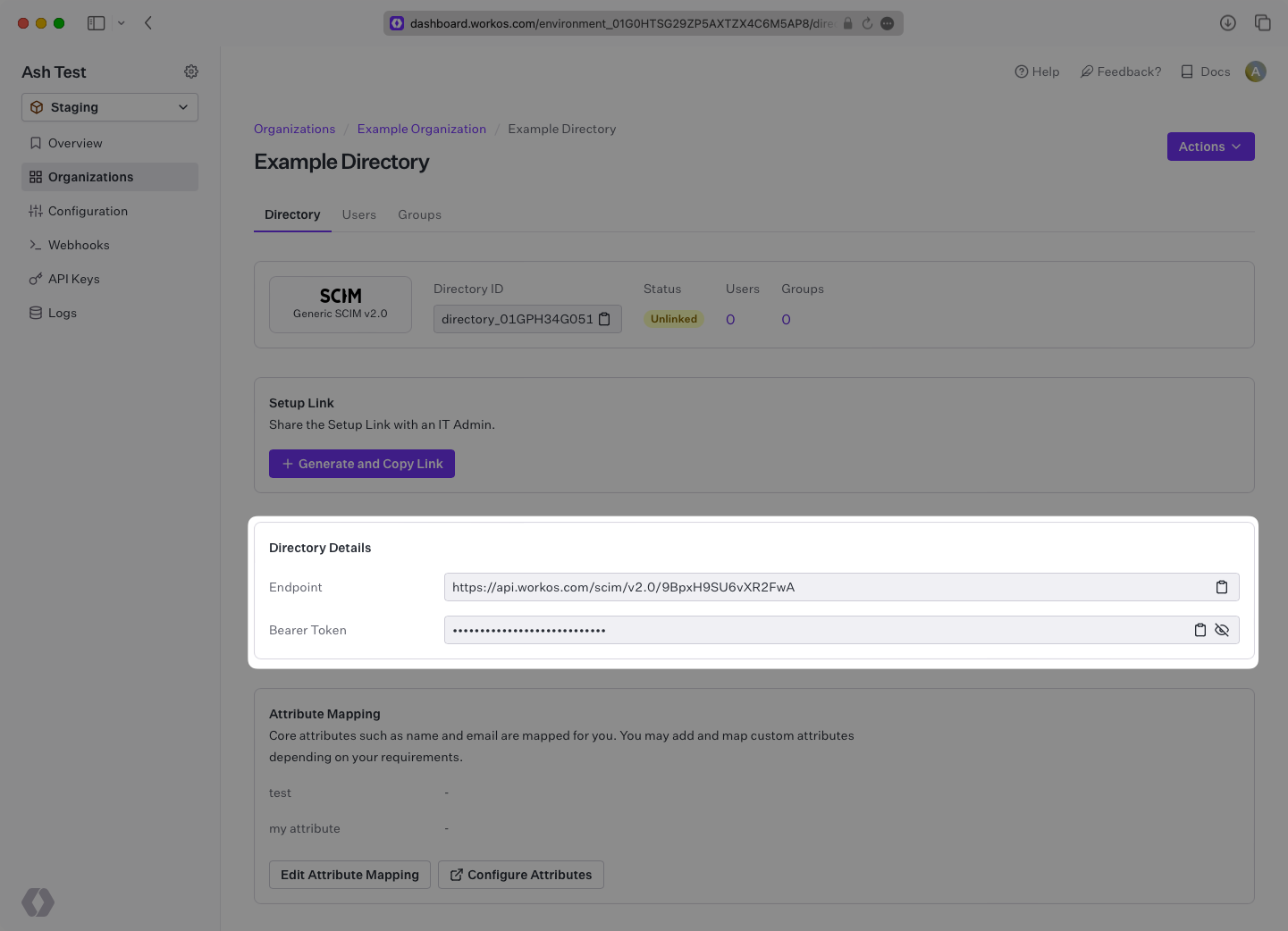
The Directory Sync Connection will now display the Endpoint for the SCIM server to send requests to, and the Bearer Token.
|
|
40
|
+
|
|
41
|
+
|
|
42
|
+
|
|
43
|
+
> We have support for custom labeled URLs for Directory Sync endpoints. [Contact us](mailto:support@workos.com) for more info!
|
|
44
|
+
|
|
45
|
+
---
|
|
46
|
+
|
|
47
|
+
## (2) Configure the SCIM server integration
|
|
48
|
+
|
|
49
|
+
WorkOS provides you with all of the relevant information for an organization to plug and play SCIM functionality for your application.
|
|
50
|
+
|
|
51
|
+
Provide the organization with:
|
|
52
|
+
|
|
53
|
+
- The Endpoint from your [WorkOS Dashboard](https://dashboard.workos.com/), and
|
|
54
|
+
- The Bearer Token from your [WorkOS Dashboard](https://dashboard.workos.com/).
|
|
55
|
+
|
|
56
|
+
Once the organization has used these values to configure your application within their SCIM server, then your application is ready to synchronize users and groups.
|
|
57
|
+
|
|
58
|
+
---
|
|
59
|
+
|
|
60
|
+
## (3) Assign users and groups to your application
|
|
61
|
+
|
|
62
|
+
Now, whenever the organization assigns users or groups to your application, you’ll receive realtime Dashboard updates based on changes in their directory.
|
|
63
|
+
|
|
64
|
+
A detailed guide to integrate the WorkOS API with your application can be found [here](/directory-sync)
|
|
@@ -0,0 +1,150 @@
|
|
|
1
|
+
---
|
|
2
|
+
title: SFTP
|
|
3
|
+
description: "Learn about syncing your user list using an\_SFTP\_connection."
|
|
4
|
+
breadcrumb:
|
|
5
|
+
title: Integrations
|
|
6
|
+
url: /integrations
|
|
7
|
+
originalPath: .tmp-workos-clone/packages/docs/content/integrations/sftp.mdx
|
|
8
|
+
---
|
|
9
|
+
|
|
10
|
+
## Introduction
|
|
11
|
+
|
|
12
|
+
An SFTP integration allows an organization to synchronize user and group information by uploading CSV files using SFTP.
|
|
13
|
+
WorkOS maintains a receiving SFTP server that can be connected to from the organization's HRIS provider/SFTP client.
|
|
14
|
+
|
|
15
|
+
If the organization's HRIS has a built-in SFTP client, SFTP will allow them to automatically sync their data and ensure your data is always up to date.
|
|
16
|
+
An SFTP integration allows for provider-agnostic ingestion of employee data into your product ecosystem.
|
|
17
|
+
|
|
18
|
+
Once the integration is set up, WorkOS automatically creates and hosts an SFTP folder for the organization's HRIS provider to upload files at a regular cadence.
|
|
19
|
+
|
|
20
|
+
An SFTP integration has the following advantages:
|
|
21
|
+
|
|
22
|
+
- Works with any system that has the ability to export CSVs
|
|
23
|
+
- Has an easy integration path for an organization comfortable working with CSVs and SFTP
|
|
24
|
+
- Allows a custom cadence of updates for your customer
|
|
25
|
+
|
|
26
|
+
Your app interfaces with an SFTP directory the same as with other directories; receiving [events](/events) when the directory is created or updated:
|
|
27
|
+
|
|
28
|
+
<DirectorySyncDiagram.SftpDirectoryActivated />
|
|
29
|
+
|
|
30
|
+
> Note: The SFTP integration isn't enabled by default in the WorkOS Dashboard or Admin Portal. Please reach out to [support@workos.com](mailto:support@workos.com) or via your team’s WorkOS Slack channel if you would like SFTP enabled.
|
|
31
|
+
|
|
32
|
+
---
|
|
33
|
+
|
|
34
|
+
## What WorkOS provides
|
|
35
|
+
|
|
36
|
+
WorkOS provides an SFTP server URL and username specific to the directory. Once set up, the URL and username will be available under directory settings in the [WorkOS Dashboard](https://dashboard.workos.com/).
|
|
37
|
+
|
|
38
|
+
The SFTP URL is the location of the SFTP server to upload user and group information. Authentication uses a username and a key pair.
|
|
39
|
+
|
|
40
|
+
---
|
|
41
|
+
|
|
42
|
+
## What you will need
|
|
43
|
+
|
|
44
|
+
You will need to provide a public key for authentication. Normally this will come from a key pair provided your customer’s IT team and may be created by their HRIS. Maximum key length is 2048 bytes and supported keys are: `ED25519`, `RSA`, and `ECDSA`.
|
|
45
|
+
|
|
46
|
+
Your customer will need to export the users and groups as CSV files with the structure below.
|
|
47
|
+
|
|
48
|
+
### `users.csv`
|
|
49
|
+
|
|
50
|
+
This file is required.
|
|
51
|
+
|
|
52
|
+
<DirectorySyncCsvSchemaTable.Users />
|
|
53
|
+
|
|
54
|
+
### `user_groups.csv`
|
|
55
|
+
|
|
56
|
+
This file is required.
|
|
57
|
+
|
|
58
|
+
<DirectorySyncCsvSchemaTable.UserGroups />
|
|
59
|
+
|
|
60
|
+
### `groups.csv`
|
|
61
|
+
|
|
62
|
+
This file is _not_ required. Additional metadata may be also included in this file.
|
|
63
|
+
|
|
64
|
+
<DirectorySyncCsvSchemaTable.Groups />
|
|
65
|
+
|
|
66
|
+
---
|
|
67
|
+
|
|
68
|
+
## (1) Set up your directory sync endpoint
|
|
69
|
+
|
|
70
|
+
Login to your WorkOS Dashboard and select “Organizations” from the left hand navigation bar. Select the organization you’ll be configuring a new Directory Sync connection with.
|
|
71
|
+
|
|
72
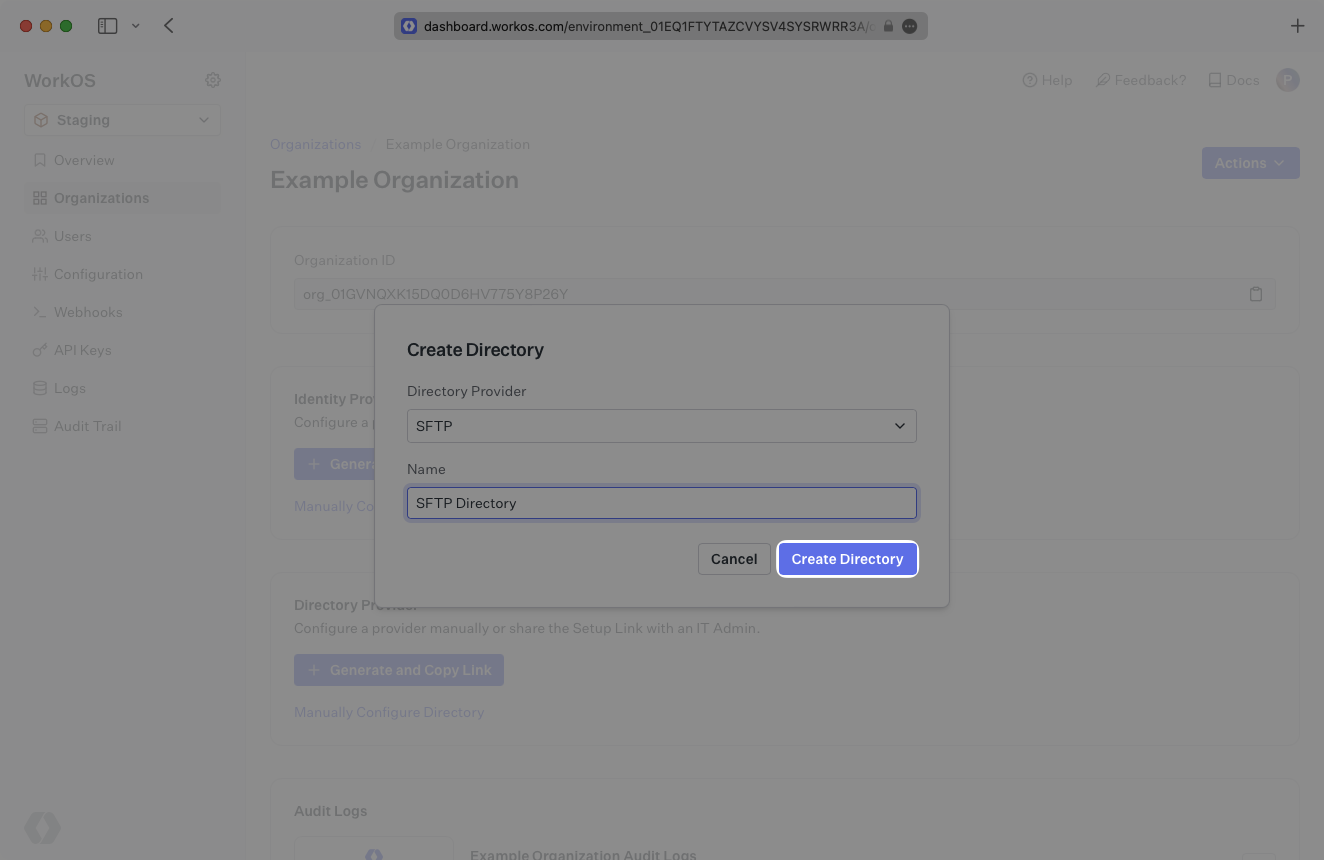
|
+
Click “Add Directory”. Select “SFTP” as the directory type, and then enter a name for this directory.
|
|
73
|
+
|
|
74
|
+
Click “Create Directory”.
|
|
75
|
+
|
|
76
|
+
|
|
77
|
+
|
|
78
|
+
## (2) Enter the customer’s public key
|
|
79
|
+
|
|
80
|
+
Retrieve the public key that will be used for SFTP from the organization’s admin.
|
|
81
|
+
|
|
82
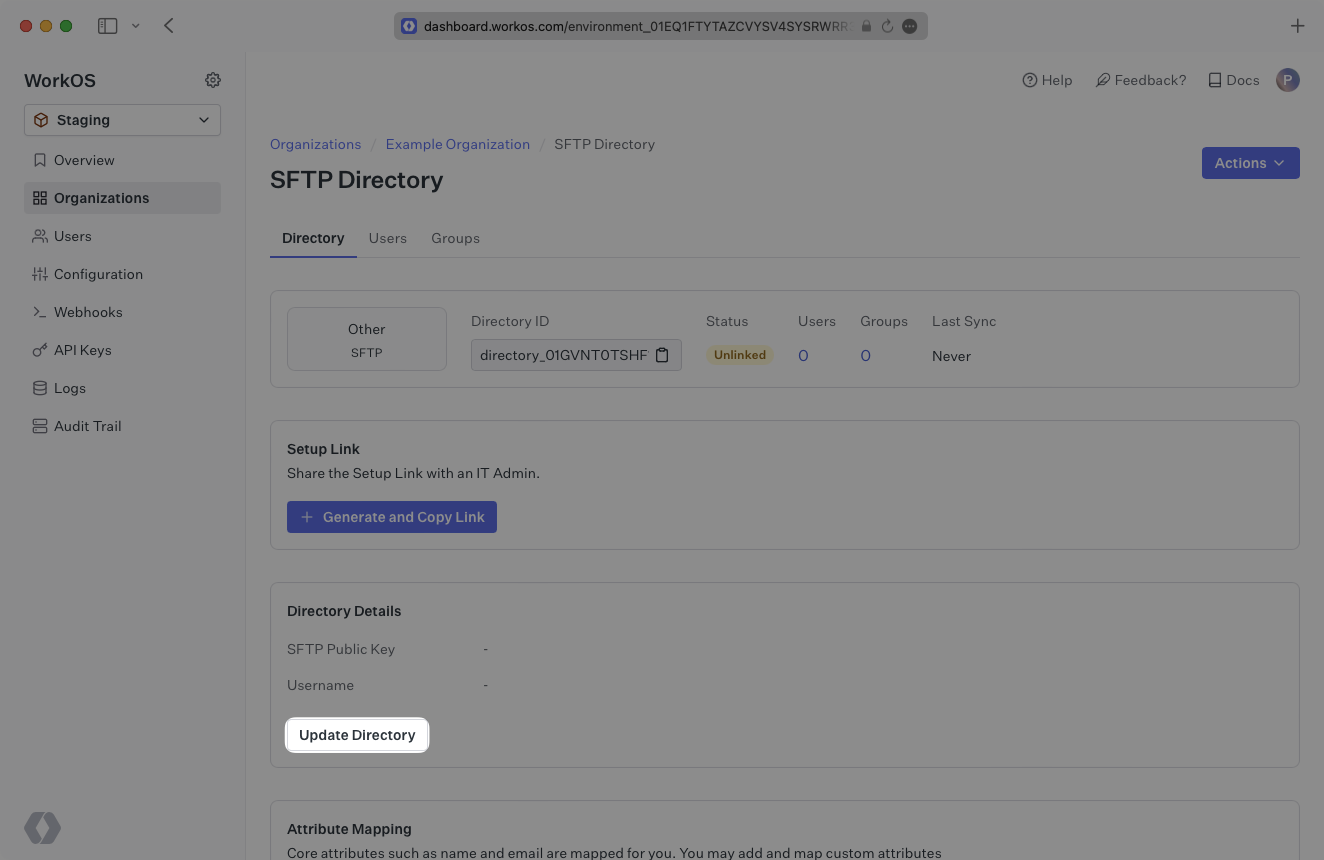
|
+
Click “Update Directory” in the WorkOS Dashboard.
|
|
83
|
+
|
|
84
|
+
|
|
85
|
+
|
|
86
|
+
Enter the customer’s public key in the input field.
|
|
87
|
+
|
|
88
|
+
The SSH public key format should include the key type (e.g. `ssh-rsa`, `ssh-ed25519`), base64 encoded body, and an optional comment, with spaces between each element. For example, `ssh-rsa AAAABB1 keycomment`.
|
|
89
|
+
|
|
90
|
+
RSA, ECDSA, and ED25519 keys are accepted.
|
|
91
|
+
|
|
92
|
+
- For RSA keys, the key type is `ssh-rsa`.
|
|
93
|
+
- For ED25519 keys, the key type is `ssh-ed25519`.
|
|
94
|
+
- For ECDSA keys, the key type is either `ecdsa-sha2-nistp256`, `ecdsa-sha2-nistp384`, or `ecdsa-sha2-nistp521`, depending on the size of the key generated.
|
|
95
|
+
|
|
96
|
+
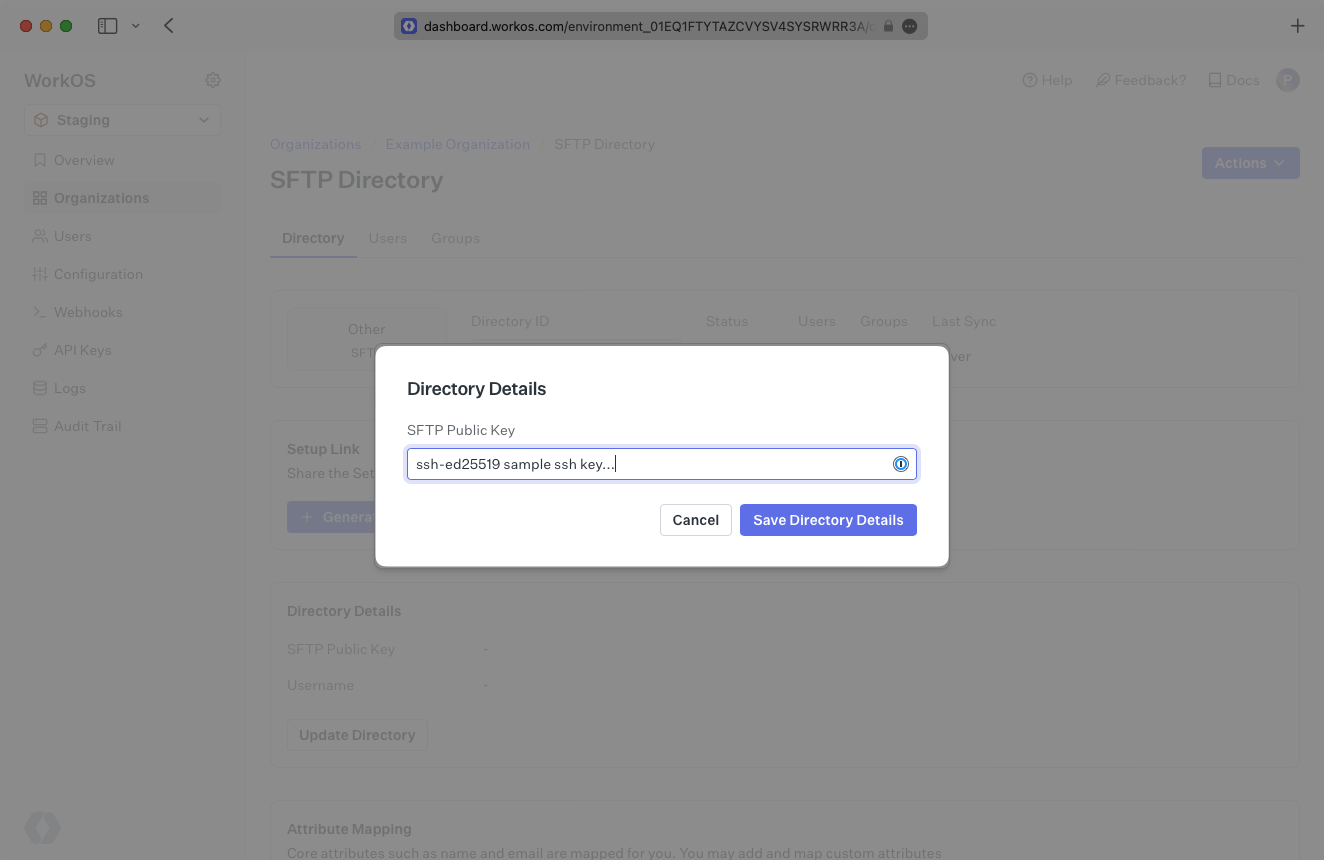
|
|
97
|
+
|
|
98
|
+
## (3) Share SFTP details with your customer
|
|
99
|
+
|
|
100
|
+
After adding the public key, WorkOS generates a username. You will see the green “Linked” icon appear.
|
|
101
|
+
|
|
102
|
+
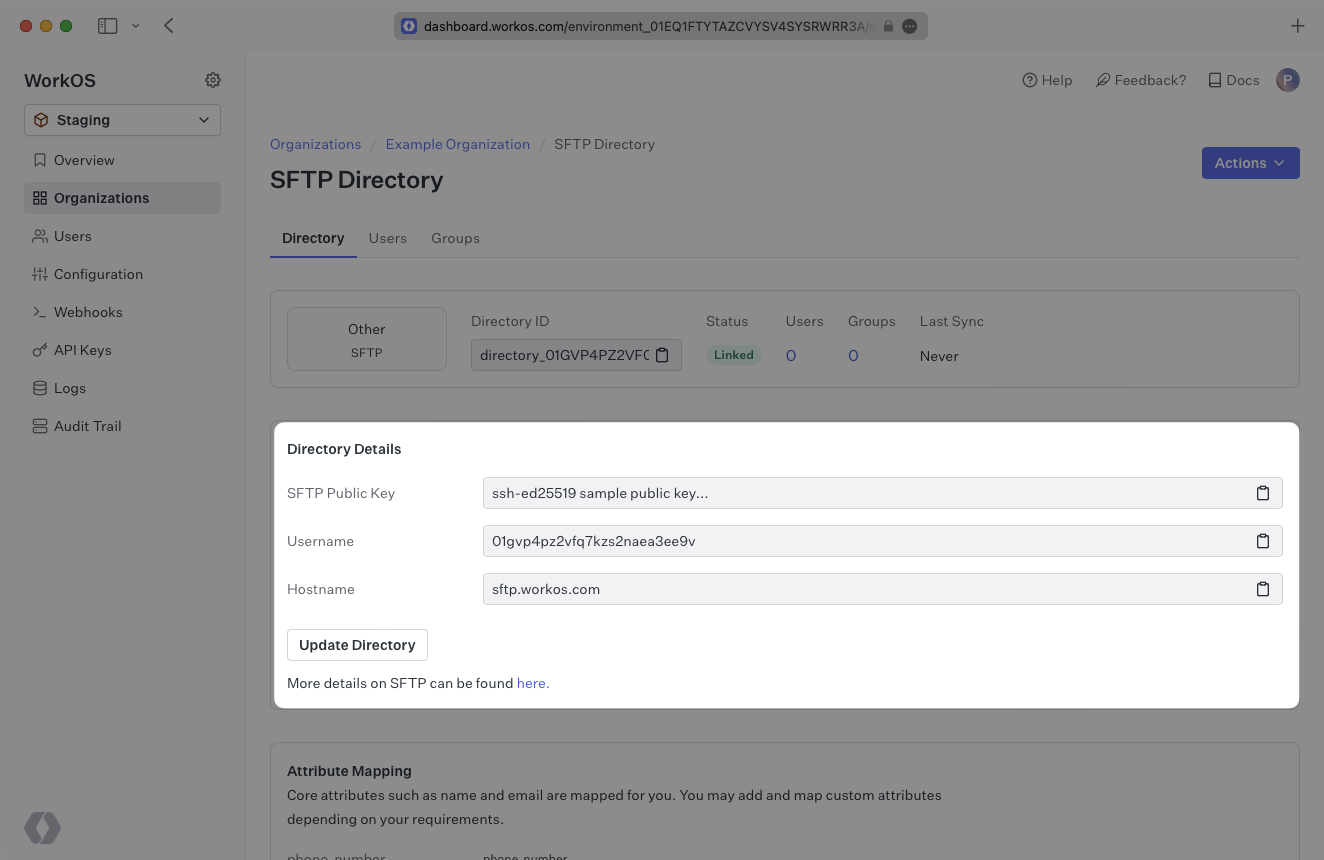
|
|
103
|
+
|
|
104
|
+
Share the username with the organization admin and ask them to upload the CSV files using their private key to `sftp.workos.com`.
|
|
105
|
+
|
|
106
|
+
## (4) Confirm users and groups are synced
|
|
107
|
+
|
|
108
|
+
Now, whenever your customer assigns users or groups to your application, you’ll receive updates based on the changes in their directory.
|
|
109
|
+
|
|
110
|
+
Click on the “Users” tab in the dashboard to view synced users.
|
|
111
|
+
|
|
112
|
+
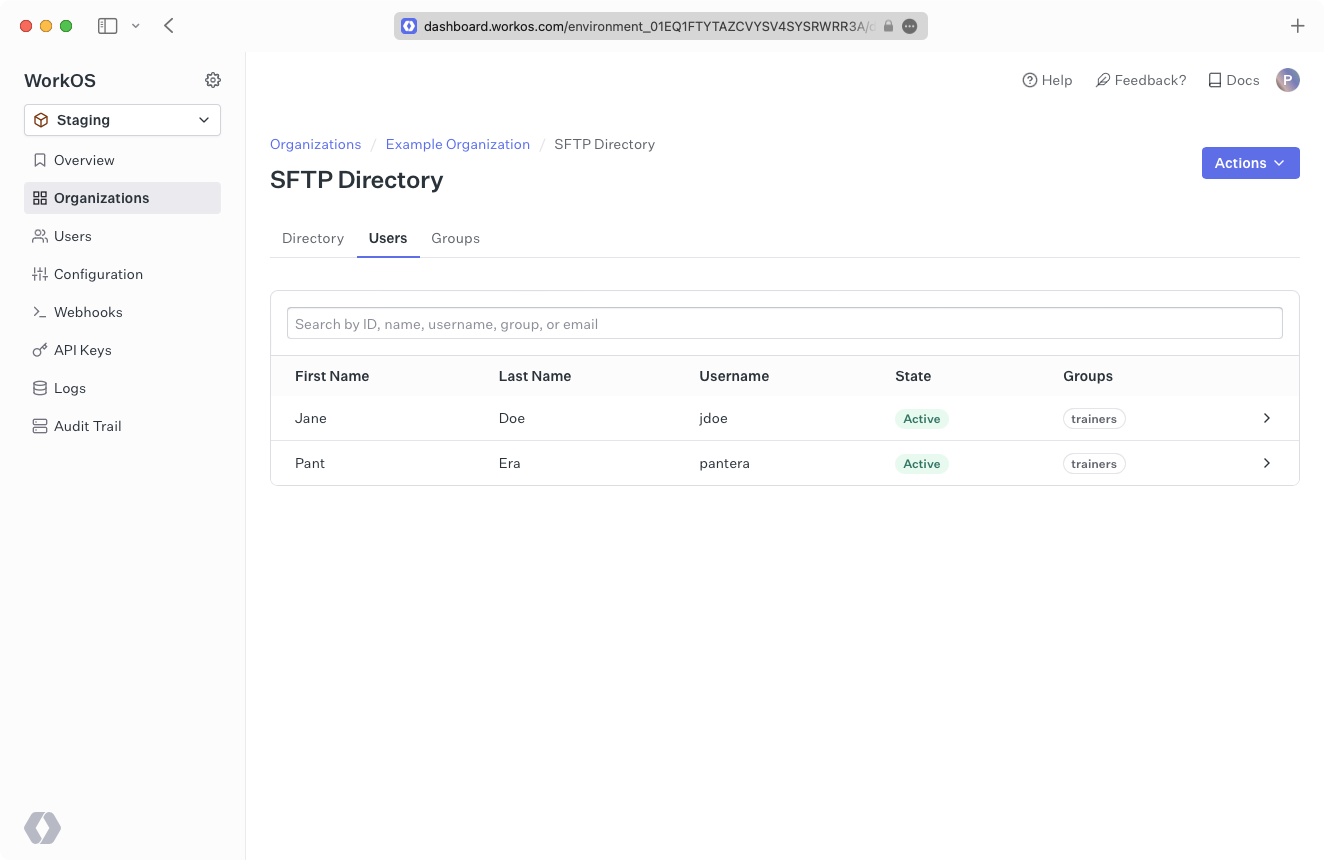
|
|
113
|
+
|
|
114
|
+
A detailed guide to integrate the WorkOS API with your application can be found [here](/directory-sync)
|
|
115
|
+
|
|
116
|
+
## SFTP Security
|
|
117
|
+
|
|
118
|
+
### How is my organization’s data protected in transit?
|
|
119
|
+
|
|
120
|
+
SFTP (Secure File Transfer Protocol) uses SSH (Secure Shell protocol) to symmetrically encrypt traffic after an asymmetric key negotiation for authentication.
|
|
121
|
+
|
|
122
|
+
Our solution leverages The [AWS Transfer Family](https://docs.aws.amazon.com/transfer/latest/userguide/how-aws-transfer-works.html) so that we can support a common, secure protocol (SSH) with modern, isolated data storage (AWS S3).
|
|
123
|
+
|
|
124
|
+
We leverage the default security policy ([security-policy-transfer-2020-06](https://docs.aws.amazon.com/transfer/latest/userguide/security-policies.html#security-policy-transfer-2020-06)) for the choice of SSH cipher-suites, which determines the strength of cryptographic protection for data in transit.
|
|
125
|
+
|
|
126
|
+
### How is my organization’s data protected at rest?
|
|
127
|
+
|
|
128
|
+
As the data is stored in an AWS S3 bucket the default (since January 2023) is that it is encrypted at rest ([SSE-S3](https://docs.aws.amazon.com/AmazonS3/latest/userguide/bucket-encryption.html)).
|
|
129
|
+
The symmetric encryption used is AES-256, more information is available in [the FAQ](https://docs.aws.amazon.com/AmazonS3/latest/userguide/default-encryption-faq.html).
|
|
130
|
+
|
|
131
|
+
### How does WorkOS isolate one of my organization’s data from the other?
|
|
132
|
+
|
|
133
|
+
Each of the organizations you’re onboarding will [create an SSH key pair](/integrations/sftp/what-you-will-need), this consists of a public key, and a private key. They will retain the private key, ensuring that only they can authenticate. The public key uploaded to WorkOS will be used to authenticate the organization's connection via SFTP.
|
|
134
|
+
|
|
135
|
+
Each of your organizations is mapped to a distinct S3 bucket based on an internal (cryptographically random) identifier for the SSH key pair.
|
|
136
|
+
|
|
137
|
+
### When does WorkOS dispose of the data and how is this done?
|
|
138
|
+
|
|
139
|
+
In either of the following events your organization’s data, and the S3 bucket will be deleted:
|
|
140
|
+
|
|
141
|
+
1. You off-board the organization from your product/service.
|
|
142
|
+
2. You no longer use the WorkOS Directory Sync service.
|
|
143
|
+
|
|
144
|
+
---
|
|
145
|
+
|
|
146
|
+
## Frequently asked questions
|
|
147
|
+
|
|
148
|
+
### How often do SFTP directories perform a sync?
|
|
149
|
+
|
|
150
|
+
SFTP directories will sync automatically whenever file changes are detected and every 30 minutes following the initial synchronization.
|
|
@@ -0,0 +1,84 @@
|
|
|
1
|
+
---
|
|
2
|
+
title: Shibboleth Generic SAML
|
|
3
|
+
description: Learn how to configure a Shibboleth Generic connection via SAML.
|
|
4
|
+
icon: shibboleth
|
|
5
|
+
breadcrumb:
|
|
6
|
+
title: Integrations
|
|
7
|
+
url: /integrations
|
|
8
|
+
originalPath: >-
|
|
9
|
+
.tmp-workos-clone/packages/docs/content/integrations/shibboleth-generic-saml.mdx
|
|
10
|
+
---
|
|
11
|
+
|
|
12
|
+
## Introduction
|
|
13
|
+
|
|
14
|
+
These instructions are for connecting to Shibboleth using the [generic SAML 2.0 configuration](https://shibboleth.atlassian.net/wiki/spaces/IDP4/pages/1265631694/SAML2SSOConfiguration). If the organization requires the [UnsolicitedSSOConfiguration](https://shibboleth.atlassian.net/wiki/spaces/IDP4/pages/1265631696/UnsolicitedSSOConfiguration) instead, please use the [Shibboleth Unsolicited SAML provider documentation](/integrations/shibboleth-unsolicited-saml).
|
|
15
|
+
|
|
16
|
+
Each SSO Identity Provider requires specific information to create and configure a new [connection](/glossary/connection). Often, the information required to create a connection will differ by Identity Provider.
|
|
17
|
+
|
|
18
|
+
To create a Shibboleth Generic SAML connection, you’ll need the Identity Provider metadata that is available from the organization's Shibboleth instance.
|
|
19
|
+
|
|
20
|
+
Start by logging in to your WorkOS dashboard and browse to the “Organizations” tab on the left hand navigation bar.
|
|
21
|
+
|
|
22
|
+
Select the organization you wish to configure a Shibboleth Generic SAML connection for, and select “Manually Configure Connection” under “Identity Provider”.
|
|
23
|
+
|
|
24
|
+
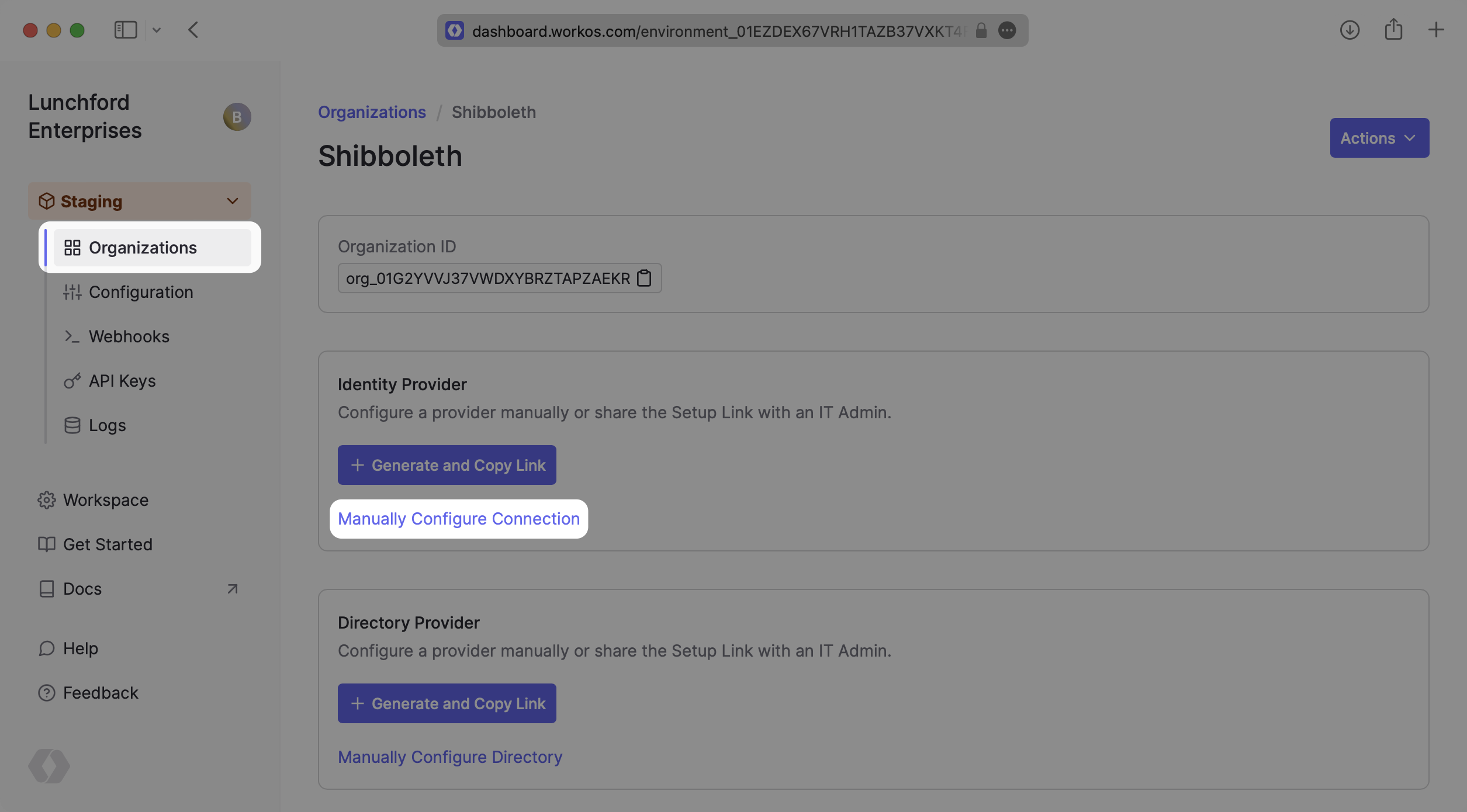
|
|
25
|
+
|
|
26
|
+
Select “Shibboleth Generic SAML” from the Identity Provider dropdown, enter a descriptive name for the connection, and then select the “Create Connection” button.
|
|
27
|
+
|
|
28
|
+
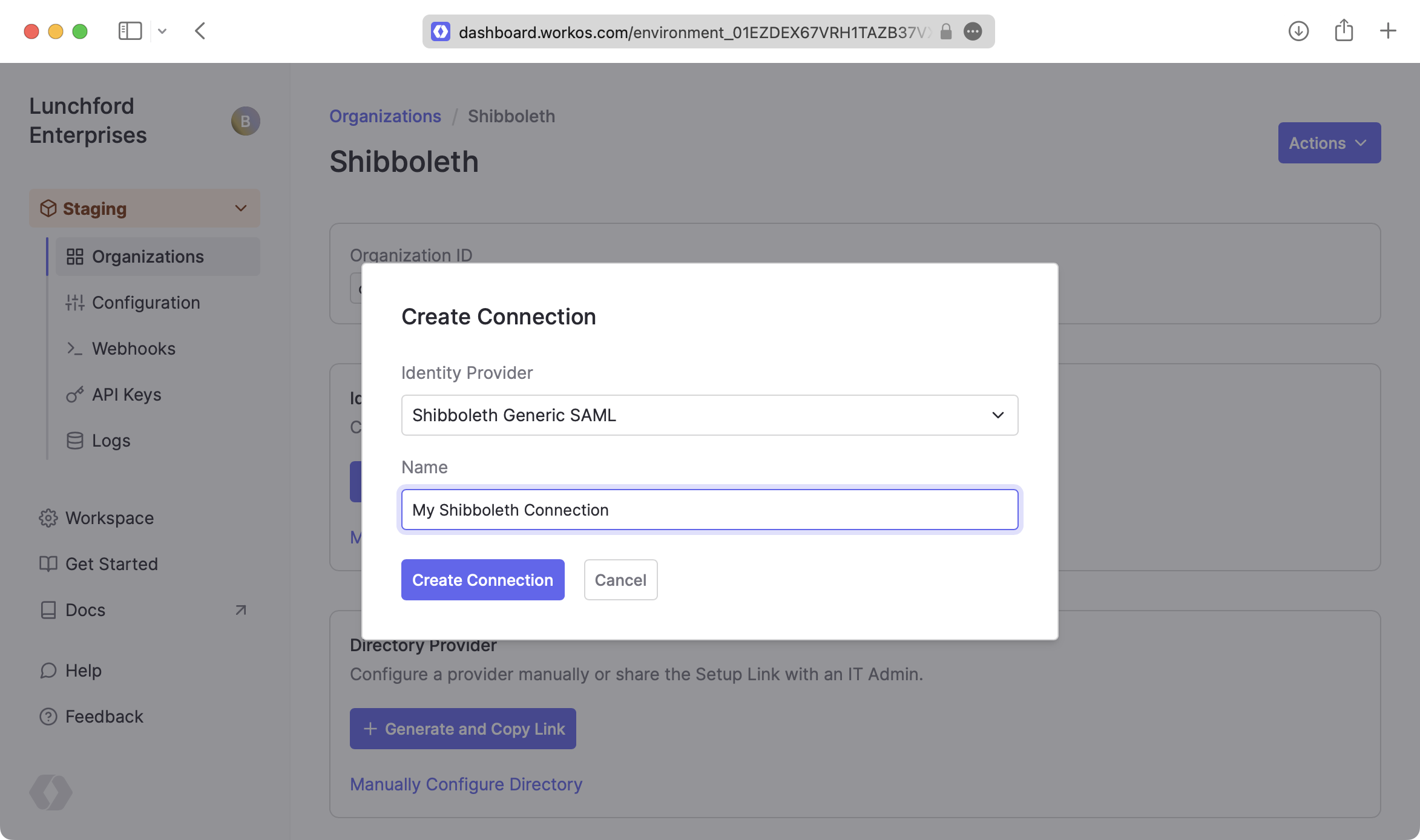
|
|
29
|
+
|
|
30
|
+
---
|
|
31
|
+
|
|
32
|
+
## What WorkOS provides
|
|
33
|
+
|
|
34
|
+
Once you’ve created your connection, WorkOS provides the [ACS URL](/glossary/acs-url), [SP Metadata](/glossary/sp-metadata) link, and [SP Entity ID](/glossary/sp-entity-id). It’s readily available in your connection settings in the [WorkOS Dashboard](https://dashboard.workos.com/).
|
|
35
|
+
|
|
36
|
+
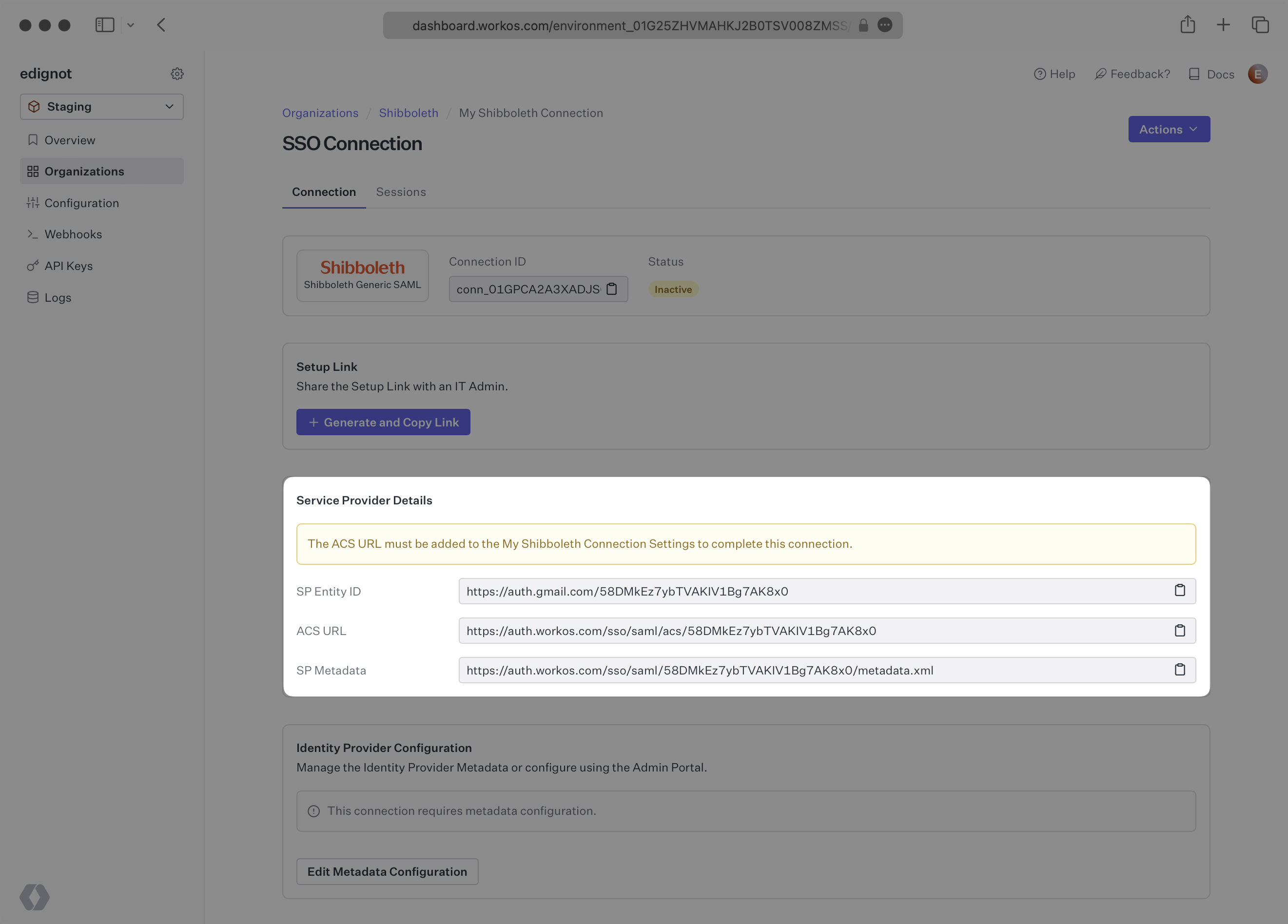
|
|
37
|
+
|
|
38
|
+
The ACS URL is the location an Identity Provider redirects its authentication response to. The SP Metadata link contains a metadata file that the organization can use to set up the Shibboleth Generic SAML integration.
|
|
39
|
+
|
|
40
|
+
The SP Entity ID is a URI used to identify the issuer of a SAML request and the audience of a SAML response. In this case, the SP Entity ID is used to communicate that WorkOS will be the party performing SAML requests to the organization's Shibboleth instance, and that WorkOS is the intended audience of the SAML responses from the Shibboleth instance.
|
|
41
|
+
|
|
42
|
+
---
|
|
43
|
+
|
|
44
|
+
## What you’ll need
|
|
45
|
+
|
|
46
|
+
In order to integrate you’ll need the Shibboleth IdP metadata.
|
|
47
|
+
|
|
48
|
+
Normally, this information will come from the organization's IT Management team when they set up your application’s Shibboleth configuration. But, should that not be the case during your setup, here’s how to obtain them.
|
|
49
|
+
|
|
50
|
+
---
|
|
51
|
+
|
|
52
|
+
## (1) Enter Service Provider Details
|
|
53
|
+
|
|
54
|
+
Copy and Paste the “ACS URL” and “SP Entity ID” into the corresponding fields for Service Provider details and configuration. For some Shibboleth setups, you can use the metadata found at the SP Metadata link to configure the Shibboleth connection.
|
|
55
|
+
|
|
56
|
+
---
|
|
57
|
+
|
|
58
|
+
## (2) Obtain Identity Provider Metadata
|
|
59
|
+
|
|
60
|
+
Download the IdP metadata from the Shibboleth instance. Refer to the [Shibboleth documentation](https://shibboleth.atlassian.net/wiki/spaces/CONCEPT/pages/928645275/MetadataForIdP) for more information on this metadata file. Keep in mind where the file was saved, as we’ll be uploading it later to configure the Connection.
|
|
61
|
+
|
|
62
|
+
---
|
|
63
|
+
|
|
64
|
+
## (3) Configure Attribute Mapping
|
|
65
|
+
|
|
66
|
+
At a minimum, the Attribute Statement in the SAML Response should include `id`, `email`, `firstName`, and `lastName` attributes. Refer to the [Shibboleth documentation](https://shibboleth.atlassian.net/wiki/spaces/CONCEPT/pages/928645122/SAMLAttributeNaming) for more information on adding and mapping attributes.
|
|
67
|
+
|
|
68
|
+
### Role Assignment (optional)
|
|
69
|
+
|
|
70
|
+
With [identity provider role assignment](/sso/identity-provider-role-assignment), users can receive roles within your application based on their group memberships. To return this information in the attribute statement, map the groups in your identity provider to a SAML attribute named `groups`.
|
|
71
|
+
|
|
72
|
+
Once your SAML app is configured to return groups, navigate to the SSO connection page in the _Organization_ section of the [WorkOS Dashboard](https://dashboard.workos.com/). Create SSO groups by referencing the group IdP ID. Then, assign roles to these SSO groups so group members are automatically granted roles within your application.
|
|
73
|
+
|
|
74
|
+
---
|
|
75
|
+
|
|
76
|
+
## (4) Upload Metadata File
|
|
77
|
+
|
|
78
|
+
In the connection settings in the WorkOS Dashboard, click “Edit Metadata Configuration”.
|
|
79
|
+
|
|
80
|
+
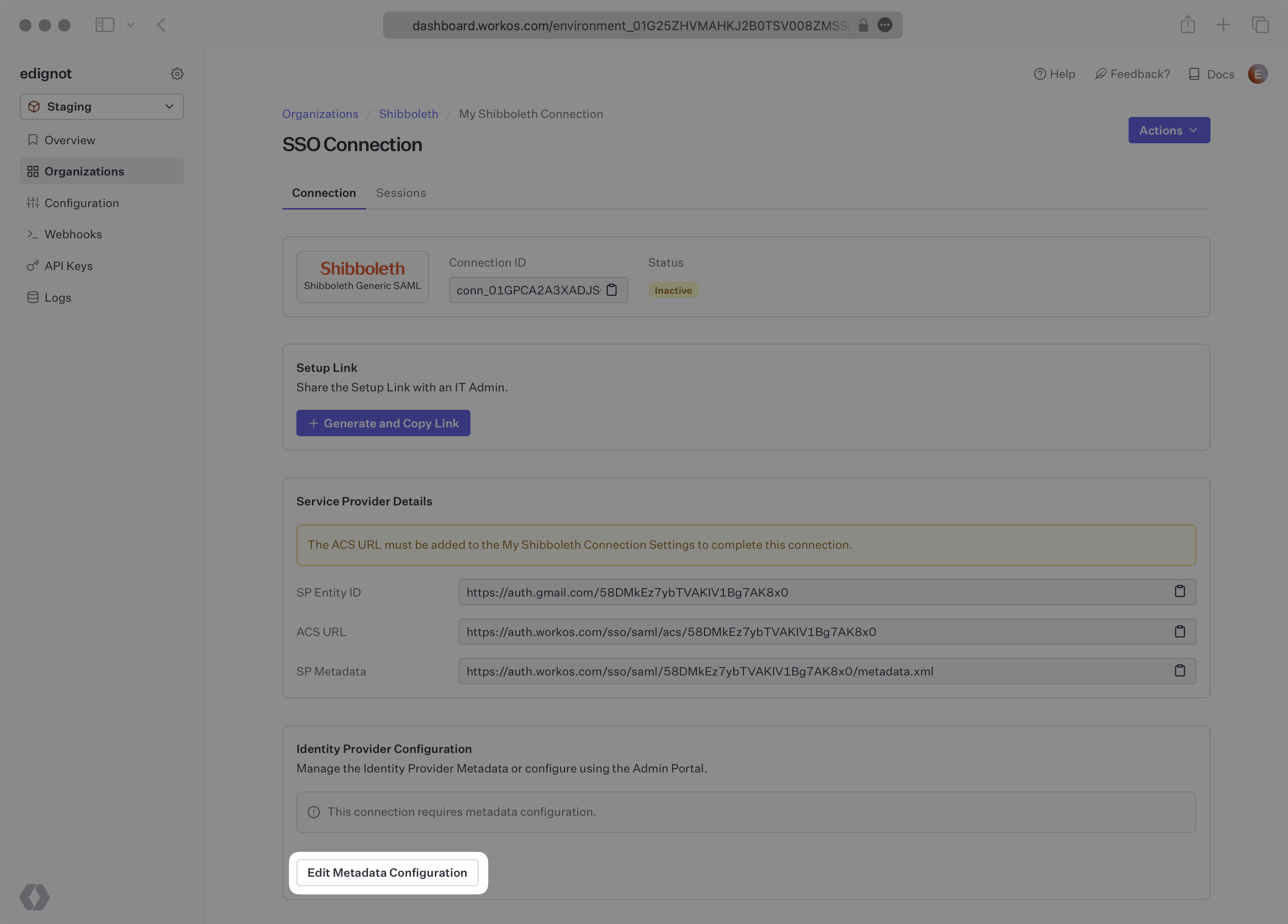
|
|
81
|
+
|
|
82
|
+
Upload the XML metadata file from Shibboleth into the “Metadata File” field and select “Save Metadata Configuration”. Your connection will then be linked and good to go!
|
|
83
|
+
|
|
84
|
+
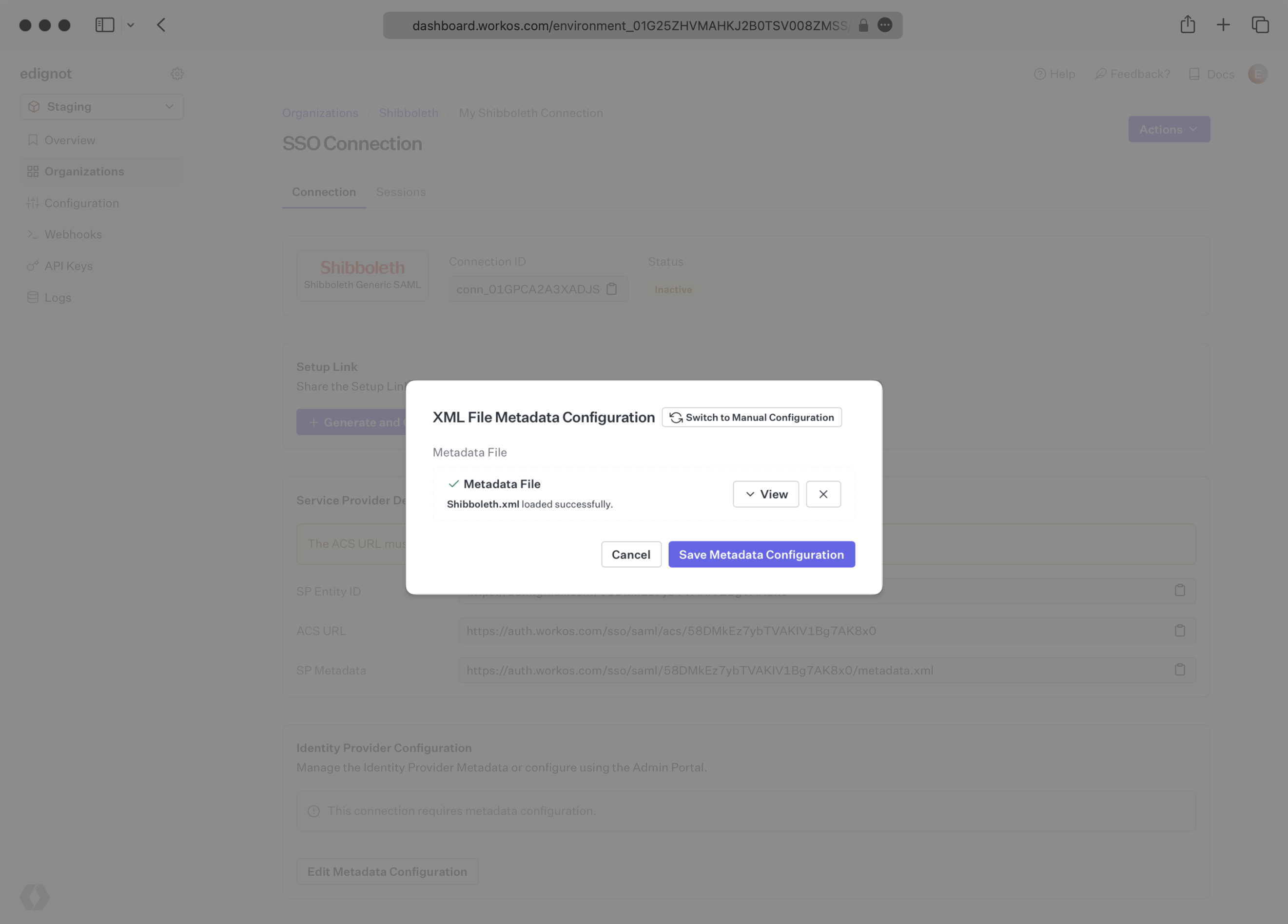
|