@workos/mcp-docs-server 0.1.0
This diff represents the content of publicly available package versions that have been released to one of the supported registries. The information contained in this diff is provided for informational purposes only and reflects changes between package versions as they appear in their respective public registries.
- package/.docs/organized/changelogs/workos-platform.json +277 -0
- package/.docs/organized/docs/admin-portal/_navigation.mdx +16 -0
- package/.docs/organized/docs/admin-portal/custom-branding.mdx +111 -0
- package/.docs/organized/docs/admin-portal/example-apps.mdx +46 -0
- package/.docs/organized/docs/admin-portal/index.mdx +240 -0
- package/.docs/organized/docs/audit-logs/_navigation.mdx +22 -0
- package/.docs/organized/docs/audit-logs/admin-portal.mdx +20 -0
- package/.docs/organized/docs/audit-logs/editing-events.mdx +27 -0
- package/.docs/organized/docs/audit-logs/exporting-events.mdx +29 -0
- package/.docs/organized/docs/audit-logs/index.mdx +110 -0
- package/.docs/organized/docs/audit-logs/log-streams.mdx +56 -0
- package/.docs/organized/docs/audit-logs/metadata-schema.mdx +21 -0
- package/.docs/organized/docs/custom-domains/_navigation.mdx +16 -0
- package/.docs/organized/docs/custom-domains/admin-portal.mdx +38 -0
- package/.docs/organized/docs/custom-domains/auth-api.mdx +59 -0
- package/.docs/organized/docs/custom-domains/authkit.mdx +36 -0
- package/.docs/organized/docs/custom-domains/email.mdx +41 -0
- package/.docs/organized/docs/custom-domains/index.mdx +19 -0
- package/.docs/organized/docs/dashboard.mdx +244 -0
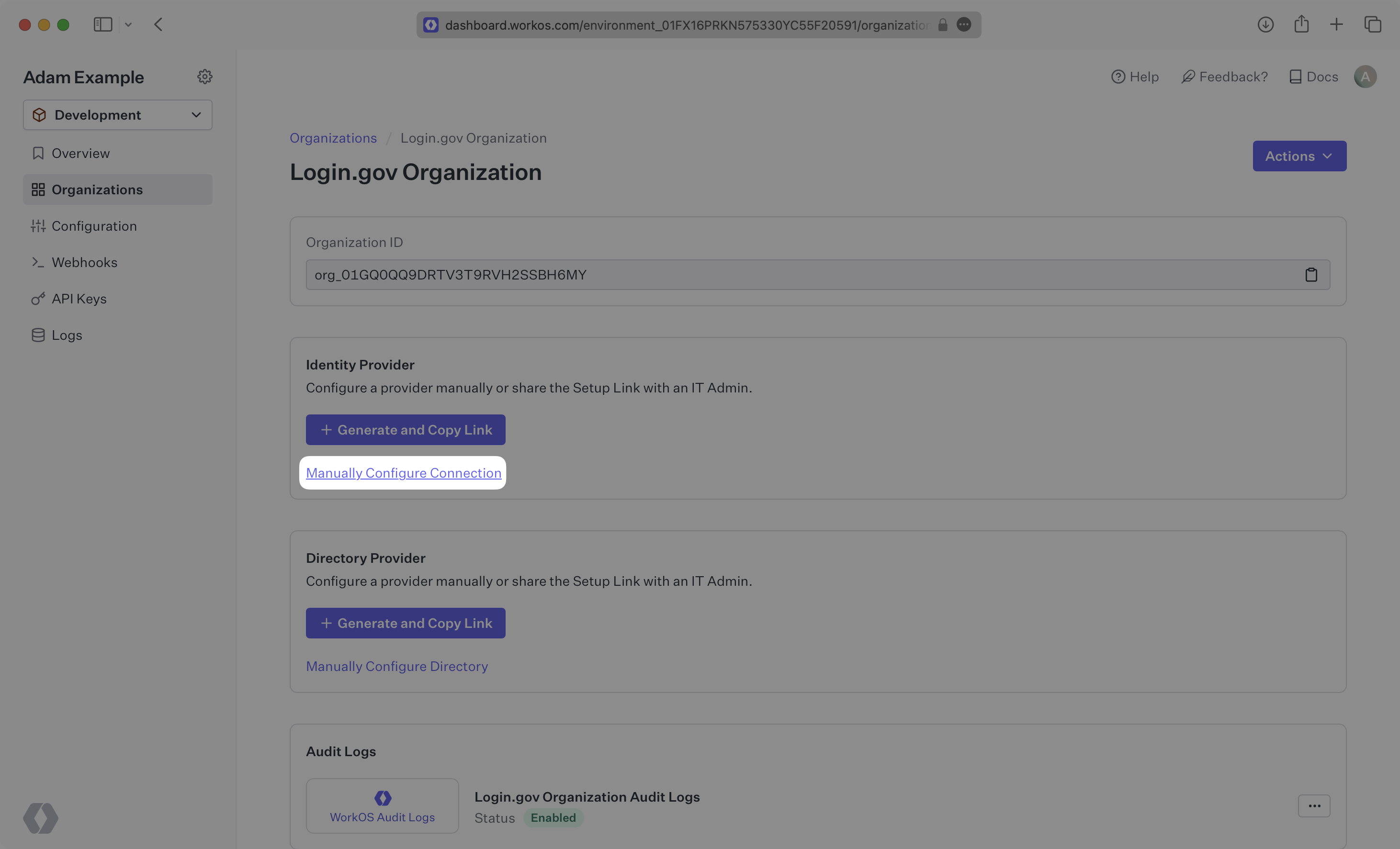
- package/.docs/organized/docs/demo/_navigation.mdx +26 -0
- package/.docs/organized/docs/demo/accordion.mdx +34 -0
- package/.docs/organized/docs/demo/checklist.mdx +33 -0
- package/.docs/organized/docs/demo/code-block.mdx +185 -0
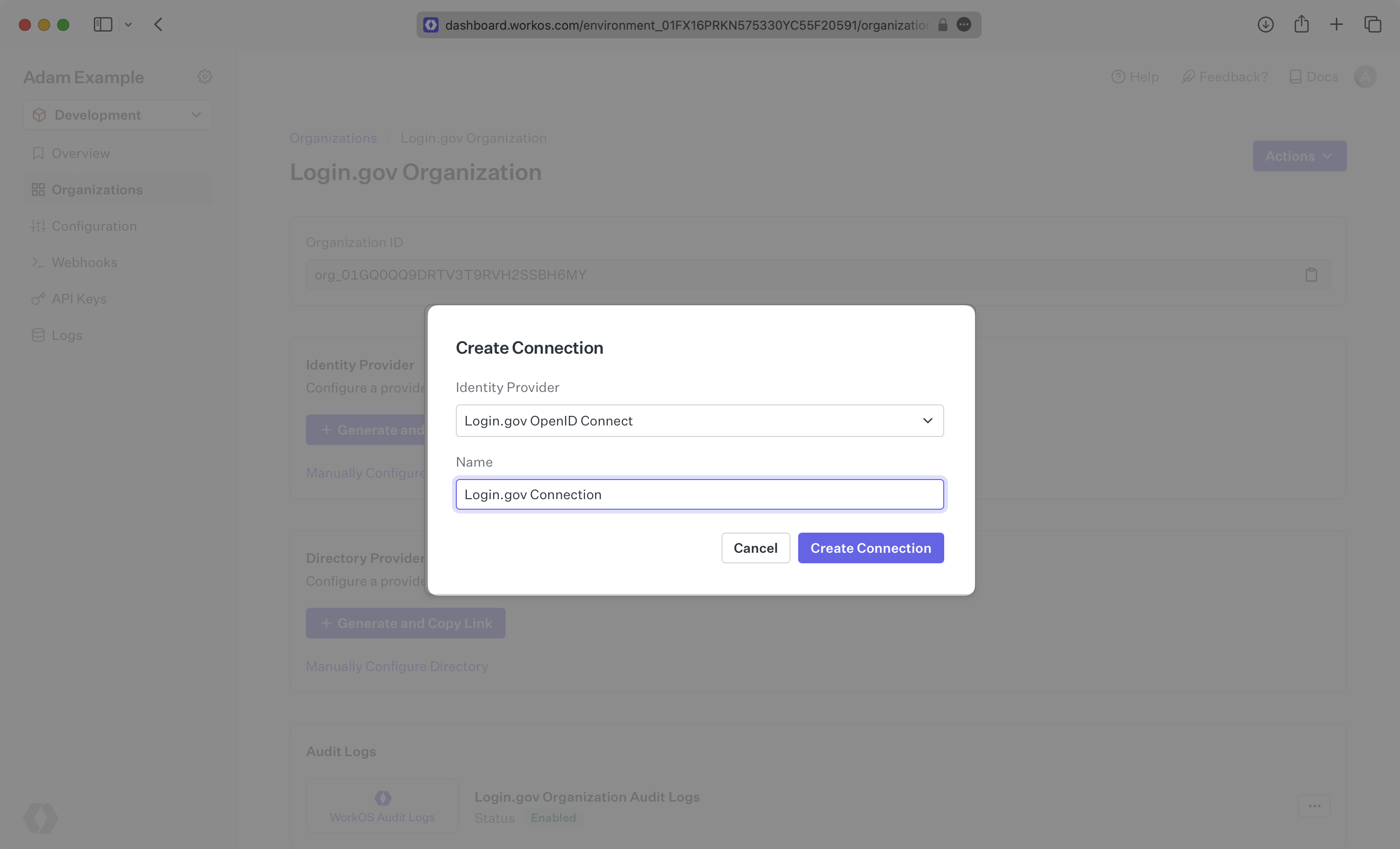
- package/.docs/organized/docs/demo/definition-list.mdx +35 -0
- package/.docs/organized/docs/demo/index.mdx +7 -0
- package/.docs/organized/docs/demo/punctuation.mdx +37 -0
- package/.docs/organized/docs/demo/replacements.mdx +26 -0
- package/.docs/organized/docs/demo/table.mdx +26 -0
- package/.docs/organized/docs/demo/tabs.mdx +17 -0
- package/.docs/organized/docs/directory-sync/_navigation.mdx +28 -0
- package/.docs/organized/docs/directory-sync/attributes.mdx +209 -0
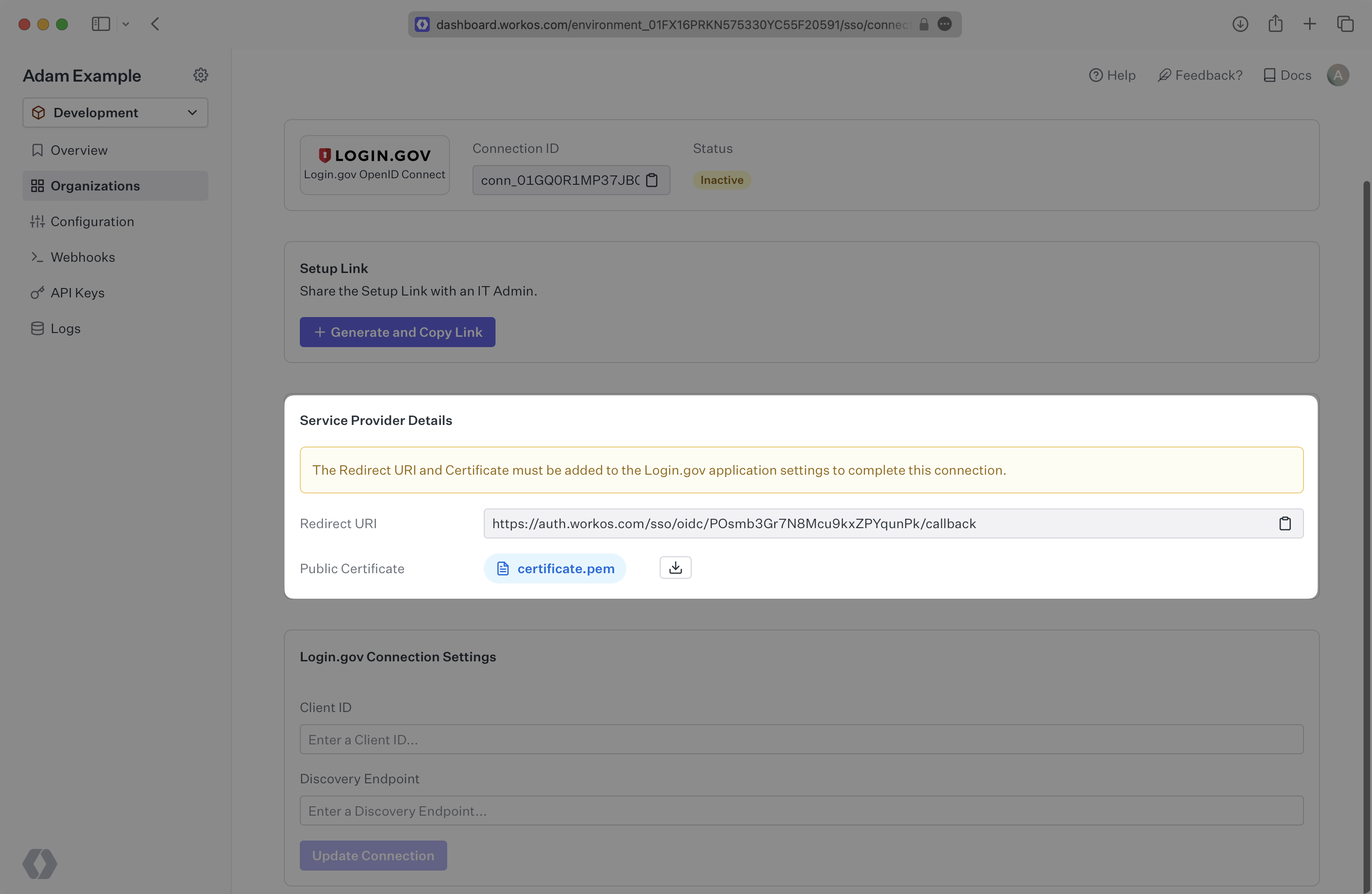
- package/.docs/organized/docs/directory-sync/example-apps.mdx +46 -0
- package/.docs/organized/docs/directory-sync/handle-inactive-users.mdx +52 -0
- package/.docs/organized/docs/directory-sync/identity-provider-role-assignment.mdx +134 -0
- package/.docs/organized/docs/directory-sync/index.mdx +107 -0
- package/.docs/organized/docs/directory-sync/quick-start.mdx +129 -0
- package/.docs/organized/docs/directory-sync/understanding-events.mdx +209 -0
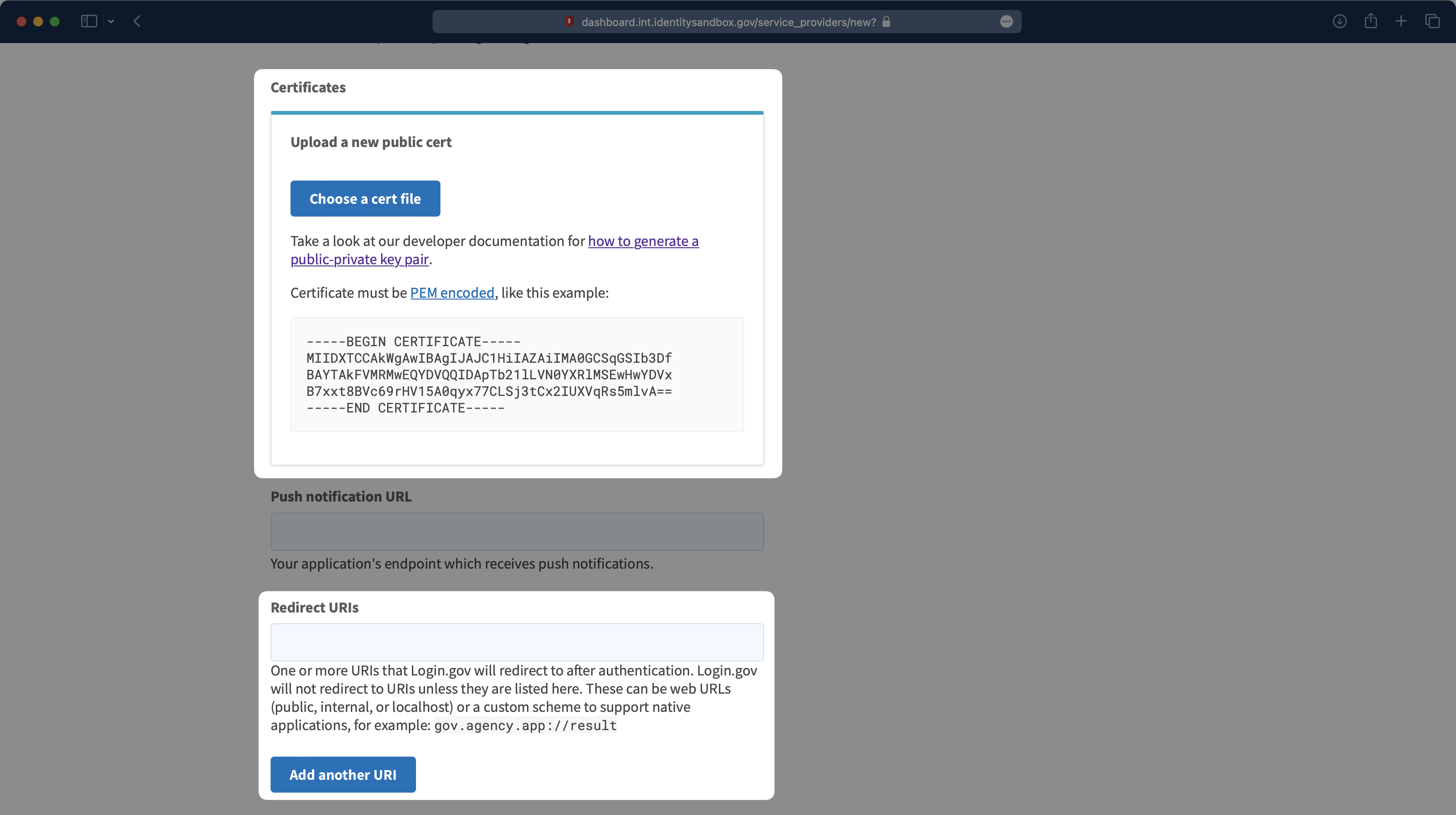
- package/.docs/organized/docs/domain-verification/_navigation.mdx +10 -0
- package/.docs/organized/docs/domain-verification/api.mdx +60 -0
- package/.docs/organized/docs/domain-verification/index.mdx +67 -0
- package/.docs/organized/docs/email.mdx +109 -0
- package/.docs/organized/docs/events/_navigation.mdx +22 -0
- package/.docs/organized/docs/events/data-syncing/data-reconciliation.mdx +56 -0
- package/.docs/organized/docs/events/data-syncing/events-api.mdx +114 -0
- package/.docs/organized/docs/events/data-syncing/index.mdx +66 -0
- package/.docs/organized/docs/events/data-syncing/webhooks.mdx +173 -0
- package/.docs/organized/docs/events/index.mdx +783 -0
- package/.docs/organized/docs/events/observability/datadog.mdx +76 -0
- package/.docs/organized/docs/fga/_navigation.mdx +64 -0
- package/.docs/organized/docs/fga/identity-provider-sessions.mdx +68 -0
- package/.docs/organized/docs/fga/index.mdx +60 -0
- package/.docs/organized/docs/fga/local-development.mdx +155 -0
- package/.docs/organized/docs/fga/modeling/abac.mdx +107 -0
- package/.docs/organized/docs/fga/modeling/blocklist.mdx +84 -0
- package/.docs/organized/docs/fga/modeling/conditional-roles.mdx +99 -0
- package/.docs/organized/docs/fga/modeling/custom-roles.mdx +90 -0
- package/.docs/organized/docs/fga/modeling/entitlements.mdx +127 -0
- package/.docs/organized/docs/fga/modeling/managed-service-provider.mdx +131 -0
- package/.docs/organized/docs/fga/modeling/org-roles-and-permissions.mdx +95 -0
- package/.docs/organized/docs/fga/modeling/policy-context.mdx +231 -0
- package/.docs/organized/docs/fga/modeling/public-access.mdx +61 -0
- package/.docs/organized/docs/fga/modeling/shareable-content.mdx +106 -0
- package/.docs/organized/docs/fga/modeling/superusers.mdx +74 -0
- package/.docs/organized/docs/fga/modeling/user-groups.mdx +92 -0
- package/.docs/organized/docs/fga/operations-usage.mdx +104 -0
- package/.docs/organized/docs/fga/playground.mdx +12 -0
- package/.docs/organized/docs/fga/policies.mdx +462 -0
- package/.docs/organized/docs/fga/query-language.mdx +112 -0
- package/.docs/organized/docs/fga/quick-start.mdx +174 -0
- package/.docs/organized/docs/fga/resources.mdx +92 -0
- package/.docs/organized/docs/fga/schema-management.mdx +224 -0
- package/.docs/organized/docs/fga/schema.mdx +388 -0
- package/.docs/organized/docs/fga/warrant-tokens.mdx +44 -0
- package/.docs/organized/docs/fga/warrants.mdx +92 -0
- package/.docs/organized/docs/glossary.mdx +184 -0
- package/.docs/organized/docs/integrations/_navigation.mdx +6 -0
- package/.docs/organized/docs/integrations/access-people-hr.mdx +87 -0
- package/.docs/organized/docs/integrations/adp-oidc.mdx +103 -0
- package/.docs/organized/docs/integrations/apple.mdx +169 -0
- package/.docs/organized/docs/integrations/auth0-directory-sync.mdx +78 -0
- package/.docs/organized/docs/integrations/auth0-enterprise-connection.mdx +92 -0
- package/.docs/organized/docs/integrations/auth0-saml.mdx +81 -0
- package/.docs/organized/docs/integrations/aws-cognito.mdx +81 -0
- package/.docs/organized/docs/integrations/bamboohr.mdx +90 -0
- package/.docs/organized/docs/integrations/breathe-hr.mdx +89 -0
- package/.docs/organized/docs/integrations/bubble.mdx +129 -0
- package/.docs/organized/docs/integrations/cas-saml.mdx +65 -0
- package/.docs/organized/docs/integrations/cezanne.mdx +74 -0
- package/.docs/organized/docs/integrations/classlink-saml.mdx +100 -0
- package/.docs/organized/docs/integrations/cloudflare-saml.mdx +164 -0
- package/.docs/organized/docs/integrations/cyberark-saml.mdx +138 -0
- package/.docs/organized/docs/integrations/cyberark-scim.mdx +100 -0
- package/.docs/organized/docs/integrations/duo-saml.mdx +127 -0
- package/.docs/organized/docs/integrations/entra-id-saml.mdx +156 -0
- package/.docs/organized/docs/integrations/entra-id-scim.mdx +218 -0
- package/.docs/organized/docs/integrations/firebase.mdx +98 -0
- package/.docs/organized/docs/integrations/fourth.mdx +66 -0
- package/.docs/organized/docs/integrations/github-oauth.mdx +85 -0
- package/.docs/organized/docs/integrations/gitlab-oauth.mdx +81 -0
- package/.docs/organized/docs/integrations/google-directory-sync.mdx +86 -0
- package/.docs/organized/docs/integrations/google-oauth.mdx +173 -0
- package/.docs/organized/docs/integrations/google-saml.mdx +135 -0
- package/.docs/organized/docs/integrations/hibob.mdx +98 -0
- package/.docs/organized/docs/integrations/jumpcloud-saml.mdx +96 -0
- package/.docs/organized/docs/integrations/jumpcloud-scim.mdx +106 -0
- package/.docs/organized/docs/integrations/keycloak-saml.mdx +128 -0
- package/.docs/organized/docs/integrations/lastpass-saml.mdx +134 -0
- package/.docs/organized/docs/integrations/linkedin-oauth.mdx +77 -0
- package/.docs/organized/docs/integrations/login-gov-oidc.mdx +103 -0
- package/.docs/organized/docs/integrations/microsoft-ad-fs-saml.mdx +96 -0
- package/.docs/organized/docs/integrations/microsoft-oauth.mdx +101 -0
- package/.docs/organized/docs/integrations/miniorange-saml.mdx +124 -0
- package/.docs/organized/docs/integrations/net-iq-saml.mdx +75 -0
- package/.docs/organized/docs/integrations/next-auth.mdx +257 -0
- package/.docs/organized/docs/integrations/oidc.mdx +64 -0
- package/.docs/organized/docs/integrations/okta-saml.mdx +144 -0
- package/.docs/organized/docs/integrations/okta-scim.mdx +210 -0
- package/.docs/organized/docs/integrations/onelogin-saml.mdx +131 -0
- package/.docs/organized/docs/integrations/onelogin-scim.mdx +150 -0
- package/.docs/organized/docs/integrations/oracle-saml.mdx +76 -0
- package/.docs/organized/docs/integrations/pingfederate-saml.mdx +103 -0
- package/.docs/organized/docs/integrations/pingfederate-scim.mdx +150 -0
- package/.docs/organized/docs/integrations/pingone-saml.mdx +86 -0
- package/.docs/organized/docs/integrations/react-native-expo.mdx +93 -0
- package/.docs/organized/docs/integrations/rippling-saml.mdx +174 -0
- package/.docs/organized/docs/integrations/rippling-scim.mdx +148 -0
- package/.docs/organized/docs/integrations/salesforce-saml.mdx +143 -0
- package/.docs/organized/docs/integrations/saml.mdx +64 -0
- package/.docs/organized/docs/integrations/scim.mdx +64 -0
- package/.docs/organized/docs/integrations/sftp.mdx +150 -0
- package/.docs/organized/docs/integrations/shibboleth-generic-saml.mdx +84 -0
- package/.docs/organized/docs/integrations/shibboleth-unsolicited-saml.mdx +84 -0
- package/.docs/organized/docs/integrations/simple-saml-php.mdx +78 -0
- package/.docs/organized/docs/integrations/slack-oauth.mdx +102 -0
- package/.docs/organized/docs/integrations/supabase.mdx +68 -0
- package/.docs/organized/docs/integrations/vmware-saml.mdx +100 -0
- package/.docs/organized/docs/integrations/workday.mdx +156 -0
- package/.docs/organized/docs/integrations/xero-oauth.mdx +83 -0
- package/.docs/organized/docs/magic-link/_navigation.mdx +16 -0
- package/.docs/organized/docs/magic-link/example-apps.mdx +46 -0
- package/.docs/organized/docs/magic-link/index.mdx +199 -0
- package/.docs/organized/docs/magic-link/launch-checklist.mdx +27 -0
- package/.docs/organized/docs/mfa/_navigation.mdx +18 -0
- package/.docs/organized/docs/mfa/example-apps.mdx +46 -0
- package/.docs/organized/docs/mfa/index.mdx +140 -0
- package/.docs/organized/docs/mfa/ux/enrollment.mdx +74 -0
- package/.docs/organized/docs/mfa/ux/sign-in.mdx +30 -0
- package/.docs/organized/docs/migrate/_navigation.mdx +6 -0
- package/.docs/organized/docs/migrate/auth0.mdx +98 -0
- package/.docs/organized/docs/migrate/aws-cognito.mdx +115 -0
- package/.docs/organized/docs/migrate/clerk.mdx +106 -0
- package/.docs/organized/docs/migrate/firebase.mdx +80 -0
- package/.docs/organized/docs/migrate/other-services.mdx +179 -0
- package/.docs/organized/docs/migrate/standalone-sso.mdx +105 -0
- package/.docs/organized/docs/on-prem-deployment.mdx +119 -0
- package/.docs/organized/docs/postman.mdx +90 -0
- package/.docs/organized/docs/reference/_navigation.mdx +527 -0
- package/.docs/organized/docs/reference/admin-portal/index.mdx +6 -0
- package/.docs/organized/docs/reference/admin-portal/portal-link/generate.mdx +268 -0
- package/.docs/organized/docs/reference/admin-portal/portal-link/index.mdx +15 -0
- package/.docs/organized/docs/reference/admin-portal/provider-icons/index.mdx +52 -0
- package/.docs/organized/docs/reference/api-keys.mdx +22 -0
- package/.docs/organized/docs/reference/audit-logs/audit-log-export.mdx +239 -0
- package/.docs/organized/docs/reference/audit-logs/audit-log-schema.mdx +69 -0
- package/.docs/organized/docs/reference/audit-logs/create-event.mdx +673 -0
- package/.docs/organized/docs/reference/audit-logs/create-export.mdx +308 -0
- package/.docs/organized/docs/reference/audit-logs/create-schema.mdx +95 -0
- package/.docs/organized/docs/reference/audit-logs/get-export.mdx +117 -0
- package/.docs/organized/docs/reference/audit-logs/get-retention.mdx +34 -0
- package/.docs/organized/docs/reference/audit-logs/index.mdx +6 -0
- package/.docs/organized/docs/reference/audit-logs/list-actions.mdx +40 -0
- package/.docs/organized/docs/reference/audit-logs/list-schemas.mdx +40 -0
- package/.docs/organized/docs/reference/audit-logs/set-retention.mdx +39 -0
- package/.docs/organized/docs/reference/client-libraries.mdx +19 -0
- package/.docs/organized/docs/reference/directory-sync/directory/delete.mdx +90 -0
- package/.docs/organized/docs/reference/directory-sync/directory/get.mdx +105 -0
- package/.docs/organized/docs/reference/directory-sync/directory/index.mdx +385 -0
- package/.docs/organized/docs/reference/directory-sync/directory/list.mdx +281 -0
- package/.docs/organized/docs/reference/directory-sync/directory-group/get.mdx +105 -0
- package/.docs/organized/docs/reference/directory-sync/directory-group/index.mdx +277 -0
- package/.docs/organized/docs/reference/directory-sync/directory-group/list.mdx +295 -0
- package/.docs/organized/docs/reference/directory-sync/directory-user/get.mdx +112 -0
- package/.docs/organized/docs/reference/directory-sync/directory-user/index.mdx +470 -0
- package/.docs/organized/docs/reference/directory-sync/directory-user/list.mdx +304 -0
- package/.docs/organized/docs/reference/directory-sync/index.mdx +10 -0
- package/.docs/organized/docs/reference/domain-verification/create.mdx +38 -0
- package/.docs/organized/docs/reference/domain-verification/get.mdx +32 -0
- package/.docs/organized/docs/reference/domain-verification/index.mdx +84 -0
- package/.docs/organized/docs/reference/domain-verification/verify.mdx +36 -0
- package/.docs/organized/docs/reference/errors.mdx +30 -0
- package/.docs/organized/docs/reference/events/index.mdx +9 -0
- package/.docs/organized/docs/reference/events/list.mdx +246 -0
- package/.docs/organized/docs/reference/fga/batch-check.mdx +277 -0
- package/.docs/organized/docs/reference/fga/check.mdx +563 -0
- package/.docs/organized/docs/reference/fga/index.mdx +6 -0
- package/.docs/organized/docs/reference/fga/policy/create.mdx +27 -0
- package/.docs/organized/docs/reference/fga/policy/delete.mdx +18 -0
- package/.docs/organized/docs/reference/fga/policy/get.mdx +23 -0
- package/.docs/organized/docs/reference/fga/policy/index.mdx +52 -0
- package/.docs/organized/docs/reference/fga/policy/list.mdx +41 -0
- package/.docs/organized/docs/reference/fga/policy/update.mdx +26 -0
- package/.docs/organized/docs/reference/fga/query.mdx +375 -0
- package/.docs/organized/docs/reference/fga/resource/batch-write.mdx +175 -0
- package/.docs/organized/docs/reference/fga/resource/create.mdx +130 -0
- package/.docs/organized/docs/reference/fga/resource/delete.mdx +86 -0
- package/.docs/organized/docs/reference/fga/resource/get.mdx +88 -0
- package/.docs/organized/docs/reference/fga/resource/index.mdx +98 -0
- package/.docs/organized/docs/reference/fga/resource/list.mdx +188 -0
- package/.docs/organized/docs/reference/fga/resource/update.mdx +115 -0
- package/.docs/organized/docs/reference/fga/resource-type/apply.mdx +35 -0
- package/.docs/organized/docs/reference/fga/resource-type/create.mdx +24 -0
- package/.docs/organized/docs/reference/fga/resource-type/delete.mdx +22 -0
- package/.docs/organized/docs/reference/fga/resource-type/get.mdx +23 -0
- package/.docs/organized/docs/reference/fga/resource-type/index.mdx +68 -0
- package/.docs/organized/docs/reference/fga/resource-type/list.mdx +36 -0
- package/.docs/organized/docs/reference/fga/resource-type/update.mdx +23 -0
- package/.docs/organized/docs/reference/fga/schema/apply.mdx +42 -0
- package/.docs/organized/docs/reference/fga/schema/get.mdx +24 -0
- package/.docs/organized/docs/reference/fga/schema/index.mdx +39 -0
- package/.docs/organized/docs/reference/fga/warrant/batch-write.mdx +226 -0
- package/.docs/organized/docs/reference/fga/warrant/create.mdx +215 -0
- package/.docs/organized/docs/reference/fga/warrant/delete.mdx +212 -0
- package/.docs/organized/docs/reference/fga/warrant/index.mdx +186 -0
- package/.docs/organized/docs/reference/fga/warrant/list.mdx +282 -0
- package/.docs/organized/docs/reference/idempotency.mdx +21 -0
- package/.docs/organized/docs/reference/index.mdx +194 -0
- package/.docs/organized/docs/reference/magic-link/index.mdx +8 -0
- package/.docs/organized/docs/reference/magic-link/passwordless-session/create.mdx +268 -0
- package/.docs/organized/docs/reference/magic-link/passwordless-session/index.mdx +203 -0
- package/.docs/organized/docs/reference/magic-link/passwordless-session/send-email.mdx +158 -0
- package/.docs/organized/docs/reference/mfa/authentication-challenge.mdx +217 -0
- package/.docs/organized/docs/reference/mfa/authentication-factor.mdx +381 -0
- package/.docs/organized/docs/reference/mfa/challenge-factor.mdx +170 -0
- package/.docs/organized/docs/reference/mfa/delete-factor.mdx +93 -0
- package/.docs/organized/docs/reference/mfa/enroll-factor.mdx +241 -0
- package/.docs/organized/docs/reference/mfa/get-factor.mdx +108 -0
- package/.docs/organized/docs/reference/mfa/index.mdx +8 -0
- package/.docs/organized/docs/reference/mfa/verify-challenge.mdx +228 -0
- package/.docs/organized/docs/reference/organization/create.mdx +216 -0
- package/.docs/organized/docs/reference/organization/delete.mdx +89 -0
- package/.docs/organized/docs/reference/organization/get-by-external-id.mdx +40 -0
- package/.docs/organized/docs/reference/organization/get.mdx +104 -0
- package/.docs/organized/docs/reference/organization/index.mdx +274 -0
- package/.docs/organized/docs/reference/organization/list.mdx +258 -0
- package/.docs/organized/docs/reference/organization/update.mdx +236 -0
- package/.docs/organized/docs/reference/organization-domain.mdx +189 -0
- package/.docs/organized/docs/reference/pagination.mdx +244 -0
- package/.docs/organized/docs/reference/radar/attempts/create.mdx +115 -0
- package/.docs/organized/docs/reference/radar/attempts/index.mdx +7 -0
- package/.docs/organized/docs/reference/radar/attempts/update.mdx +34 -0
- package/.docs/organized/docs/reference/radar/index.mdx +8 -0
- package/.docs/organized/docs/reference/radar/lists/delete.mdx +36 -0
- package/.docs/organized/docs/reference/radar/lists/index.mdx +7 -0
- package/.docs/organized/docs/reference/radar/lists/update.mdx +36 -0
- package/.docs/organized/docs/reference/rate-limits.mdx +50 -0
- package/.docs/organized/docs/reference/roles/index.mdx +268 -0
- package/.docs/organized/docs/reference/roles/list-for-organization.mdx +152 -0
- package/.docs/organized/docs/reference/sso/connection/delete.mdx +89 -0
- package/.docs/organized/docs/reference/sso/connection/get.mdx +104 -0
- package/.docs/organized/docs/reference/sso/connection/index.mdx +388 -0
- package/.docs/organized/docs/reference/sso/connection/list.mdx +320 -0
- package/.docs/organized/docs/reference/sso/get-authorization-url/error-codes.mdx +28 -0
- package/.docs/organized/docs/reference/sso/get-authorization-url/index.mdx +434 -0
- package/.docs/organized/docs/reference/sso/get-authorization-url/redirect-uri.mdx +21 -0
- package/.docs/organized/docs/reference/sso/index.mdx +8 -0
- package/.docs/organized/docs/reference/sso/logout/authorize.mdx +47 -0
- package/.docs/organized/docs/reference/sso/logout/index.mdx +14 -0
- package/.docs/organized/docs/reference/sso/logout/redirect.mdx +32 -0
- package/.docs/organized/docs/reference/sso/profile/get-profile-and-token.mdx +229 -0
- package/.docs/organized/docs/reference/sso/profile/get-user-profile.mdx +127 -0
- package/.docs/organized/docs/reference/sso/profile/index.mdx +364 -0
- package/.docs/organized/docs/reference/testing.mdx +8 -0
- package/.docs/organized/docs/reference/user-management/access-token/index.mdx +13 -0
- package/.docs/organized/docs/reference/user-management/authentication/code.mdx +448 -0
- package/.docs/organized/docs/reference/user-management/authentication/email-verification.mdx +359 -0
- package/.docs/organized/docs/reference/user-management/authentication/get-authorization-url/error-codes.mdx +25 -0
- package/.docs/organized/docs/reference/user-management/authentication/get-authorization-url/index.mdx +425 -0
- package/.docs/organized/docs/reference/user-management/authentication/get-authorization-url/pkce.mdx +9 -0
- package/.docs/organized/docs/reference/user-management/authentication/get-authorization-url/redirect-uri.mdx +23 -0
- package/.docs/organized/docs/reference/user-management/authentication/index.mdx +66 -0
- package/.docs/organized/docs/reference/user-management/authentication/magic-auth.mdx +353 -0
- package/.docs/organized/docs/reference/user-management/authentication/organization-selection.mdx +349 -0
- package/.docs/organized/docs/reference/user-management/authentication/password.mdx +350 -0
- package/.docs/organized/docs/reference/user-management/authentication/refresh-and-seal-session-data.mdx +57 -0
- package/.docs/organized/docs/reference/user-management/authentication/refresh-token.mdx +381 -0
- package/.docs/organized/docs/reference/user-management/authentication/session-cookie.mdx +79 -0
- package/.docs/organized/docs/reference/user-management/authentication/totp.mdx +369 -0
- package/.docs/organized/docs/reference/user-management/authentication-errors/email-verification-required-error.mdx +42 -0
- package/.docs/organized/docs/reference/user-management/authentication-errors/index.mdx +20 -0
- package/.docs/organized/docs/reference/user-management/authentication-errors/mfa-challenge-error.mdx +44 -0
- package/.docs/organized/docs/reference/user-management/authentication-errors/mfa-enrollment-error.mdx +37 -0
- package/.docs/organized/docs/reference/user-management/authentication-errors/organization-authentication-required-error.mdx +68 -0
- package/.docs/organized/docs/reference/user-management/authentication-errors/organization-selection-error.mdx +44 -0
- package/.docs/organized/docs/reference/user-management/authentication-errors/sso-required-error.mdx +51 -0
- package/.docs/organized/docs/reference/user-management/email-verification/get.mdx +88 -0
- package/.docs/organized/docs/reference/user-management/email-verification/index.mdx +227 -0
- package/.docs/organized/docs/reference/user-management/identity/index.mdx +74 -0
- package/.docs/organized/docs/reference/user-management/identity/list.mdx +52 -0
- package/.docs/organized/docs/reference/user-management/index.mdx +13 -0
- package/.docs/organized/docs/reference/user-management/invitation/accept.mdx +39 -0
- package/.docs/organized/docs/reference/user-management/invitation/find-by-token.mdx +87 -0
- package/.docs/organized/docs/reference/user-management/invitation/get.mdx +87 -0
- package/.docs/organized/docs/reference/user-management/invitation/index.mdx +374 -0
- package/.docs/organized/docs/reference/user-management/invitation/list.mdx +247 -0
- package/.docs/organized/docs/reference/user-management/invitation/revoke.mdx +90 -0
- package/.docs/organized/docs/reference/user-management/invitation/send.mdx +230 -0
- package/.docs/organized/docs/reference/user-management/logout/get-logout-url-from-session-cookie.mdx +52 -0
- package/.docs/organized/docs/reference/user-management/logout/get-logout-url.mdx +147 -0
- package/.docs/organized/docs/reference/user-management/logout/index.mdx +26 -0
- package/.docs/organized/docs/reference/user-management/magic-auth/create.mdx +148 -0
- package/.docs/organized/docs/reference/user-management/magic-auth/get.mdx +88 -0
- package/.docs/organized/docs/reference/user-management/magic-auth/index.mdx +225 -0
- package/.docs/organized/docs/reference/user-management/mfa/authentication-challenge.mdx +194 -0
- package/.docs/organized/docs/reference/user-management/mfa/authentication-factor.mdx +324 -0
- package/.docs/organized/docs/reference/user-management/mfa/enroll-auth-factor.mdx +296 -0
- package/.docs/organized/docs/reference/user-management/mfa/index.mdx +5 -0
- package/.docs/organized/docs/reference/user-management/mfa/list-auth-factors.mdx +194 -0
- package/.docs/organized/docs/reference/user-management/organization-membership/create.mdx +155 -0
- package/.docs/organized/docs/reference/user-management/organization-membership/deactivate.mdx +106 -0
- package/.docs/organized/docs/reference/user-management/organization-membership/delete.mdx +76 -0
- package/.docs/organized/docs/reference/user-management/organization-membership/get.mdx +95 -0
- package/.docs/organized/docs/reference/user-management/organization-membership/index.mdx +265 -0
- package/.docs/organized/docs/reference/user-management/organization-membership/list.mdx +291 -0
- package/.docs/organized/docs/reference/user-management/organization-membership/reactivate.mdx +106 -0
- package/.docs/organized/docs/reference/user-management/organization-membership/update.mdx +119 -0
- package/.docs/organized/docs/reference/user-management/password-reset/create.mdx +108 -0
- package/.docs/organized/docs/reference/user-management/password-reset/get.mdx +88 -0
- package/.docs/organized/docs/reference/user-management/password-reset/index.mdx +227 -0
- package/.docs/organized/docs/reference/user-management/password-reset/reset-password.mdx +144 -0
- package/.docs/organized/docs/reference/user-management/session-helpers/authenticate.mdx +176 -0
- package/.docs/organized/docs/reference/user-management/session-helpers/get-logout-url.mdx +42 -0
- package/.docs/organized/docs/reference/user-management/session-helpers/index.mdx +14 -0
- package/.docs/organized/docs/reference/user-management/session-helpers/load-sealed-session.mdx +105 -0
- package/.docs/organized/docs/reference/user-management/session-helpers/refresh.mdx +213 -0
- package/.docs/organized/docs/reference/user-management/session-tokens/access-token.mdx +90 -0
- package/.docs/organized/docs/reference/user-management/session-tokens/index.mdx +5 -0
- package/.docs/organized/docs/reference/user-management/session-tokens/jwks.mdx +110 -0
- package/.docs/organized/docs/reference/user-management/session-tokens/refresh-token.mdx +8 -0
- package/.docs/organized/docs/reference/user-management/user/create.mdx +327 -0
- package/.docs/organized/docs/reference/user-management/user/delete.mdx +76 -0
- package/.docs/organized/docs/reference/user-management/user/get-by-external-id.mdx +39 -0
- package/.docs/organized/docs/reference/user-management/user/get.mdx +103 -0
- package/.docs/organized/docs/reference/user-management/user/index.mdx +322 -0
- package/.docs/organized/docs/reference/user-management/user/list.mdx +260 -0
- package/.docs/organized/docs/reference/user-management/user/update.mdx +344 -0
- package/.docs/organized/docs/reference/vault/index.mdx +6 -0
- package/.docs/organized/docs/reference/vault/key/create-data-key.mdx +106 -0
- package/.docs/organized/docs/reference/vault/key/decrypt-data-key.mdx +84 -0
- package/.docs/organized/docs/reference/vault/key/decrypt-data.mdx +52 -0
- package/.docs/organized/docs/reference/vault/key/encrypt-data.mdx +58 -0
- package/.docs/organized/docs/reference/vault/key/index.mdx +25 -0
- package/.docs/organized/docs/reference/vault/object/create.mdx +62 -0
- package/.docs/organized/docs/reference/vault/object/delete.mdx +75 -0
- package/.docs/organized/docs/reference/vault/object/get.mdx +50 -0
- package/.docs/organized/docs/reference/vault/object/index.mdx +174 -0
- package/.docs/organized/docs/reference/vault/object/list.mdx +105 -0
- package/.docs/organized/docs/reference/vault/object/metadata.mdx +52 -0
- package/.docs/organized/docs/reference/vault/object/update.mdx +67 -0
- package/.docs/organized/docs/reference/vault/object/version.mdx +87 -0
- package/.docs/organized/docs/reference/vault/object/versions.mdx +83 -0
- package/.docs/organized/docs/reference/widgets/get-token.mdx +185 -0
- package/.docs/organized/docs/reference/widgets/index.mdx +6 -0
- package/.docs/organized/docs/reference/workos-connect/authorize/index.mdx +75 -0
- package/.docs/organized/docs/reference/workos-connect/index.mdx +33 -0
- package/.docs/organized/docs/reference/workos-connect/introspection/index.mdx +122 -0
- package/.docs/organized/docs/reference/workos-connect/metadata/index.mdx +25 -0
- package/.docs/organized/docs/reference/workos-connect/metadata/oauth-authorization-server/index.mdx +99 -0
- package/.docs/organized/docs/reference/workos-connect/metadata/openid-configuration/index.mdx +70 -0
- package/.docs/organized/docs/reference/workos-connect/token/authorization-code-grant/access-token.mdx +53 -0
- package/.docs/organized/docs/reference/workos-connect/token/authorization-code-grant/id-token.mdx +60 -0
- package/.docs/organized/docs/reference/workos-connect/token/authorization-code-grant/index.mdx +69 -0
- package/.docs/organized/docs/reference/workos-connect/token/client-credentials-grant/access-token.mdx +46 -0
- package/.docs/organized/docs/reference/workos-connect/token/client-credentials-grant/index.mdx +56 -0
- package/.docs/organized/docs/reference/workos-connect/token/index.mdx +39 -0
- package/.docs/organized/docs/reference/workos-connect/token/refresh-token-grant.mdx +69 -0
- package/.docs/organized/docs/reference/workos-connect/userinfo/index.mdx +46 -0
- package/.docs/organized/docs/sdks/dotnet.mdx +6 -0
- package/.docs/organized/docs/sdks/elixir.mdx +6 -0
- package/.docs/organized/docs/sdks/go.mdx +6 -0
- package/.docs/organized/docs/sdks/java.mdx +9 -0
- package/.docs/organized/docs/sdks/laravel.mdx +6 -0
- package/.docs/organized/docs/sdks/node.mdx +9 -0
- package/.docs/organized/docs/sdks/php.mdx +6 -0
- package/.docs/organized/docs/sdks/python.mdx +6 -0
- package/.docs/organized/docs/sdks/ruby.mdx +9 -0
- package/.docs/organized/docs/sso/_navigation.mdx +44 -0
- package/.docs/organized/docs/sso/_sequence-diagrams/saml-protocol-security-considerations.md +59 -0
- package/.docs/organized/docs/sso/attributes.mdx +110 -0
- package/.docs/organized/docs/sso/domains.mdx +111 -0
- package/.docs/organized/docs/sso/example-apps.mdx +46 -0
- package/.docs/organized/docs/sso/identity-provider-role-assignment.mdx +113 -0
- package/.docs/organized/docs/sso/index.mdx +295 -0
- package/.docs/organized/docs/sso/it-team-faq.mdx +35 -0
- package/.docs/organized/docs/sso/jit-provisioning.mdx +101 -0
- package/.docs/organized/docs/sso/launch-checklist.mdx +71 -0
- package/.docs/organized/docs/sso/login-flows.mdx +101 -0
- package/.docs/organized/docs/sso/redirect-uris.mdx +44 -0
- package/.docs/organized/docs/sso/saml-security.mdx +122 -0
- package/.docs/organized/docs/sso/signing-certificates.mdx +121 -0
- package/.docs/organized/docs/sso/single-logout.mdx +45 -0
- package/.docs/organized/docs/sso/test-sso.mdx +73 -0
- package/.docs/organized/docs/sso/ux/sign-in.mdx +44 -0
- package/.docs/organized/docs/user-management/_navigation.mdx +87 -0
- package/.docs/organized/docs/user-management/actions.mdx +169 -0
- package/.docs/organized/docs/user-management/authkit.mdx +69 -0
- package/.docs/organized/docs/user-management/branding.mdx +143 -0
- package/.docs/organized/docs/user-management/connect.mdx +110 -0
- package/.docs/organized/docs/user-management/custom-emails.mdx +164 -0
- package/.docs/organized/docs/user-management/directory-provisioning.mdx +78 -0
- package/.docs/organized/docs/user-management/domain-verification.mdx +28 -0
- package/.docs/organized/docs/user-management/email-password.mdx +42 -0
- package/.docs/organized/docs/user-management/email-verification.mdx +29 -0
- package/.docs/organized/docs/user-management/entitlements.mdx +46 -0
- package/.docs/organized/docs/user-management/example-apps.mdx +39 -0
- package/.docs/organized/docs/user-management/identity-linking.mdx +52 -0
- package/.docs/organized/docs/user-management/impersonation.mdx +82 -0
- package/.docs/organized/docs/user-management/index.mdx +525 -0
- package/.docs/organized/docs/user-management/invitations.mdx +60 -0
- package/.docs/organized/docs/user-management/invite-only-signup.mdx +72 -0
- package/.docs/organized/docs/user-management/jit-provisioning.mdx +36 -0
- package/.docs/organized/docs/user-management/jwt-templates.mdx +278 -0
- package/.docs/organized/docs/user-management/magic-auth.mdx +36 -0
- package/.docs/organized/docs/user-management/mcp.mdx +146 -0
- package/.docs/organized/docs/user-management/metadata.mdx +119 -0
- package/.docs/organized/docs/user-management/mfa.mdx +32 -0
- package/.docs/organized/docs/user-management/migrations.mdx +20 -0
- package/.docs/organized/docs/user-management/modeling-your-app.mdx +149 -0
- package/.docs/organized/docs/user-management/organization-policies.mdx +33 -0
- package/.docs/organized/docs/user-management/overview.mdx +46 -0
- package/.docs/organized/docs/user-management/passkeys.mdx +42 -0
- package/.docs/organized/docs/user-management/radar.mdx +127 -0
- package/.docs/organized/docs/user-management/roles-and-permissions.mdx +155 -0
- package/.docs/organized/docs/user-management/sessions.mdx +101 -0
- package/.docs/organized/docs/user-management/social-login.mdx +34 -0
- package/.docs/organized/docs/user-management/sso-with-contractors.mdx +85 -0
- package/.docs/organized/docs/user-management/sso.mdx +96 -0
- package/.docs/organized/docs/user-management/users-organizations.mdx +91 -0
- package/.docs/organized/docs/user-management/widgets.mdx +190 -0
- package/.docs/organized/docs/vault/_navigation.mdx +14 -0
- package/.docs/organized/docs/vault/index.mdx +38 -0
- package/.docs/organized/docs/vault/key-context.mdx +32 -0
- package/.docs/organized/docs/vault/quick-start.mdx +82 -0
- package/README.md +252 -0
- package/dist/chunk-64GKEK6G.js +48 -0
- package/dist/chunk-64GKEK6G.js.map +1 -0
- package/dist/get-tools.d.ts +23 -0
- package/dist/get-tools.js +8 -0
- package/dist/get-tools.js.map +1 -0
- package/dist/index.d.ts +1 -0
- package/dist/index.js +552 -0
- package/dist/index.js.map +1 -0
- package/dist/prepare.d.ts +2 -0
- package/dist/prepare.js +269 -0
- package/dist/prepare.js.map +1 -0
- package/package.json +49 -0
|
@@ -0,0 +1,103 @@
|
|
|
1
|
+
---
|
|
2
|
+
title: Login.gov OpenID Connect
|
|
3
|
+
description: Learn how to configure a connection to Login.gov via OIDC.
|
|
4
|
+
icon: login-gov
|
|
5
|
+
breadcrumb:
|
|
6
|
+
title: Integrations
|
|
7
|
+
url: /integrations
|
|
8
|
+
originalPath: .tmp-workos-clone/packages/docs/content/integrations/login-gov-oidc.mdx
|
|
9
|
+
---
|
|
10
|
+
|
|
11
|
+
## Introduction
|
|
12
|
+
|
|
13
|
+
Each SSO Identity Provider requires specific information to create and configure a new [Connection](/glossary/connection). Often, the information required to create a Connection will differ by Identity Provider.
|
|
14
|
+
|
|
15
|
+
> Note: [Login.gov](http://login.gov/) is used for government agencies. You will need to go through Login.gov to obtain a test account and get your application cleared for production. Please reference [Login.gov’s developer documentation](https://developers.login.gov/testing/) for more information.
|
|
16
|
+
|
|
17
|
+
To create a Login.gov OpenID Connect (OIDC) Connection, you’ll need four pieces of information: a [Redirect URI](/glossary/redirect-uri), a Public Certificate, a [Client ID](/glossary/client-id), and a Discovery Endpoint.
|
|
18
|
+
|
|
19
|
+
Start by logging in to your WorkOS dashboard and browse to the “Organizations” tab on the left-hand navigation bar.
|
|
20
|
+
|
|
21
|
+
Select the organization you’d like to configure a Login.gov OIDC Connection for, and select “Manually Configure Connection” under “Identity Provider”.
|
|
22
|
+
|
|
23
|
+
|
|
24
|
+
|
|
25
|
+
Select “Login.gov OpenID Connect” from the Identity Provider dropdown, enter a descriptive name for the connection, and then select the “Create Connection” button.
|
|
26
|
+
|
|
27
|
+
|
|
28
|
+
|
|
29
|
+
---
|
|
30
|
+
|
|
31
|
+
## What WorkOS provides
|
|
32
|
+
|
|
33
|
+
WorkOS provides the Redirect URI and the Public Certificate. They are readily available in your Connection Settings in the [WorkOS Dashboard](https://dashboard.workos.com/get-started).
|
|
34
|
+
|
|
35
|
+
|
|
36
|
+
|
|
37
|
+
The Redirect URI is the location Login.gov redirects its authentication and token responses to, and the Public Certificate is used by Login.gov to verify the signed request from WorkOS.
|
|
38
|
+
|
|
39
|
+
Specifically, the Redirect URI will need to be set as one of the “Redirect URIs” and the Public Certificate will need to be set as one of the “Public Certificates” in the Login.gov application settings:
|
|
40
|
+
|
|
41
|
+
|
|
42
|
+
|
|
43
|
+
## What you’ll need
|
|
44
|
+
|
|
45
|
+
In order to integrate you’ll need the [Client ID](/glossary/client-id) and the Discovery Endpoint.
|
|
46
|
+
|
|
47
|
+
Normally, this information will come from the organization's IT Management team when they set up your application’s Login.gov OpenID Connect configuration in their Identity Provider admin dashboard. But, should that not be the case during your setup, here’s how to obtain them.
|
|
48
|
+
|
|
49
|
+
---
|
|
50
|
+
|
|
51
|
+
## (1) Access the Login.gov Developer Sandbox
|
|
52
|
+
|
|
53
|
+
Login to your [Login.gov sandbox dashboard](https://dashboard.int.identitysandbox.gov), and select “Apps” from the top menu.
|
|
54
|
+
|
|
55
|
+
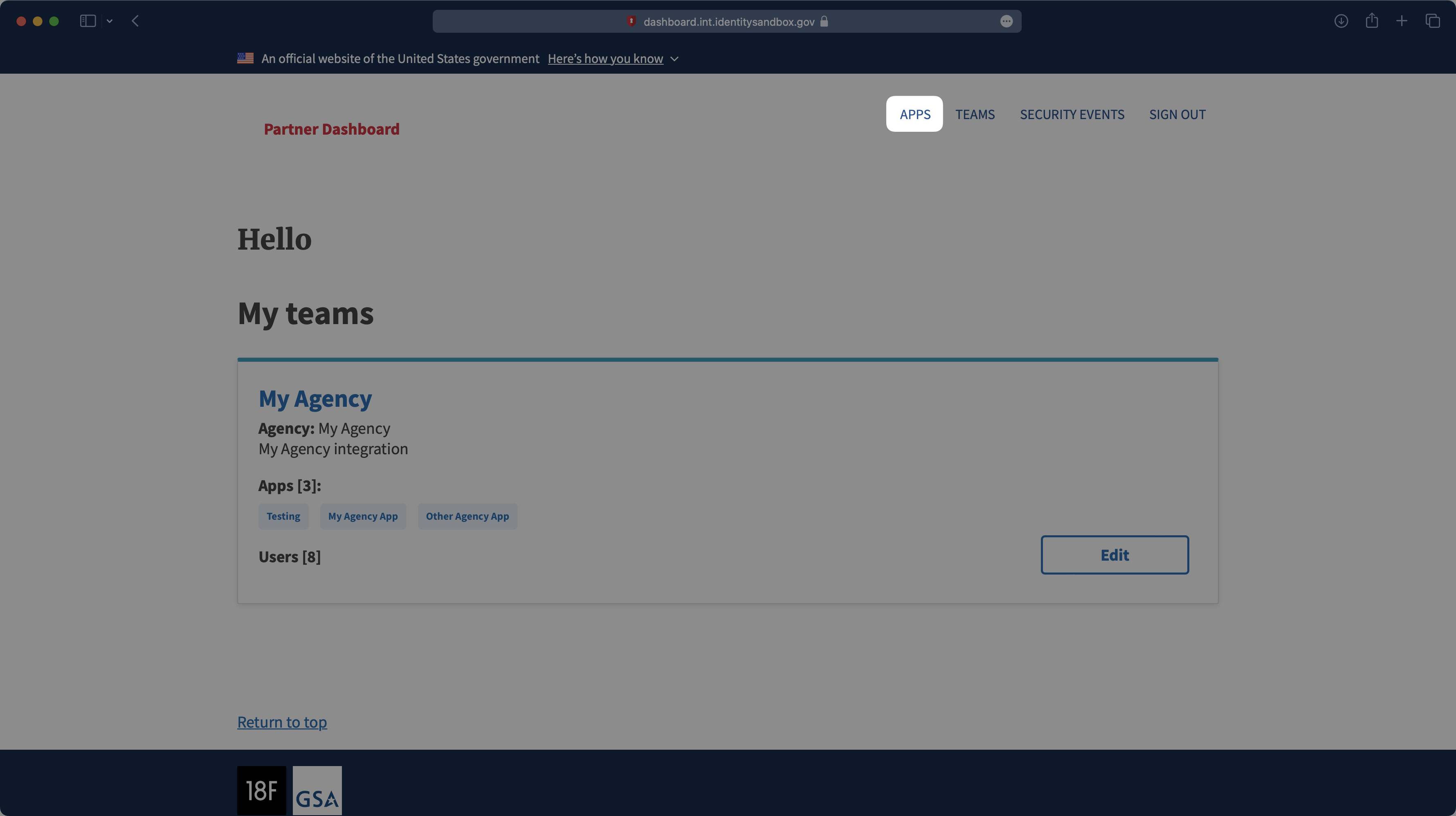
|
|
56
|
+
|
|
57
|
+
> Note: Login.gov is used exclusively by government agencies. If you don’t have dashboard access for your Sandbox account, please reach out to the government agency you’re working with to get access to their sandbox dashboard. Please reference [Login.gov’s developer documentation](https://developers.login.gov/testing/) for more information.
|
|
58
|
+
|
|
59
|
+
---
|
|
60
|
+
|
|
61
|
+
## (2) Select or create your application
|
|
62
|
+
|
|
63
|
+
If your application is already created, select it from the list of applications and move to Step 4. If you haven’t created an application, select “Create a new test app.”
|
|
64
|
+
|
|
65
|
+
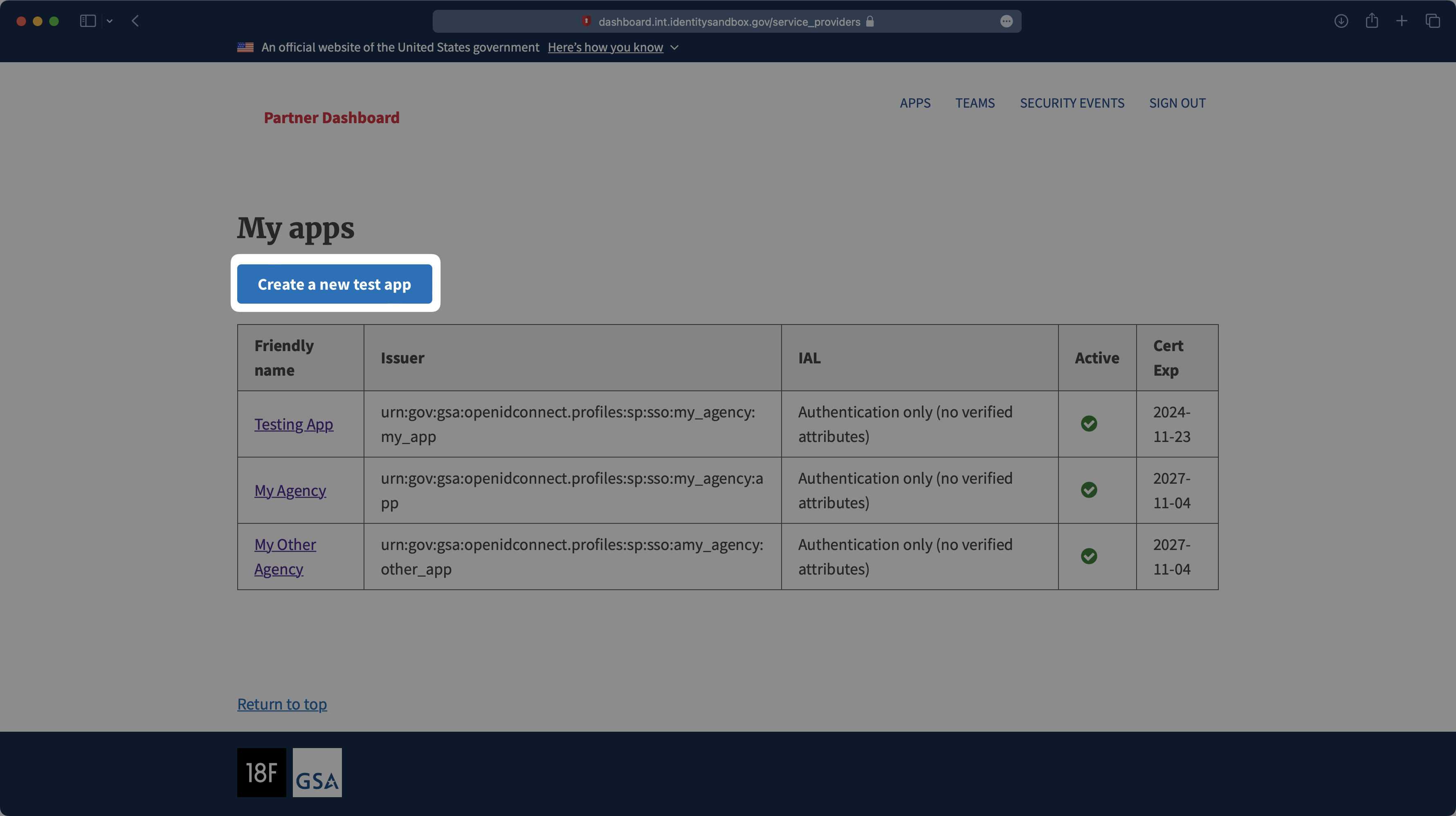
|
|
66
|
+
|
|
67
|
+
---
|
|
68
|
+
|
|
69
|
+
## (3) Application Setup
|
|
70
|
+
|
|
71
|
+
On the New test app page, select “Yes” under the Production configuration setting. Then, add an App name, Friendly name, and Description for the app. Next, assign an agency team to this client.
|
|
72
|
+
|
|
73
|
+
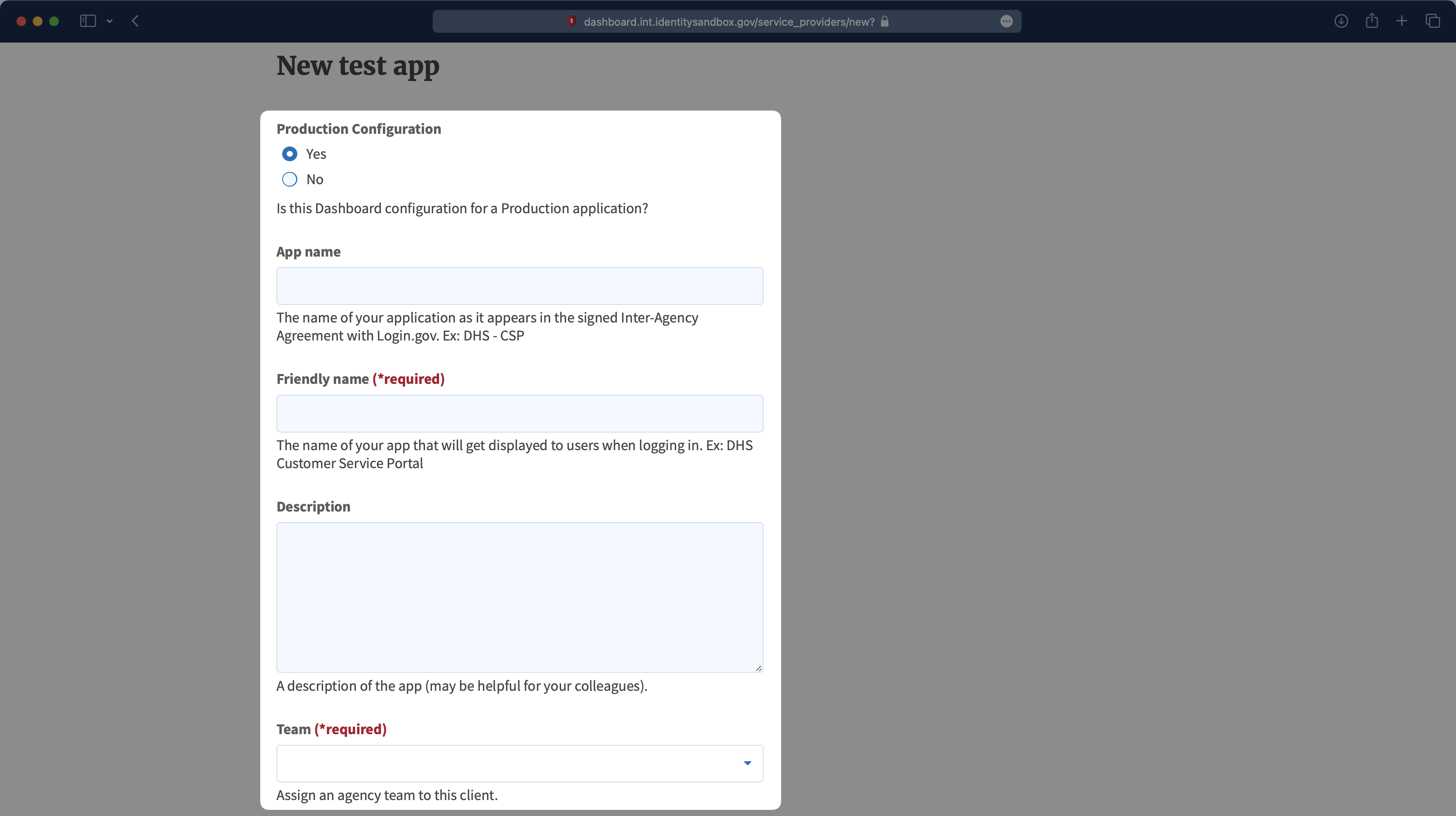
|
|
74
|
+
|
|
75
|
+
Select "OpenID Connect Private Key JWT" as the Authentication protocol. Select the appropriate Level of Service, Default Authentication Assurance Level (AAL), and Attribute bundle for your application.
|
|
76
|
+
|
|
77
|
+
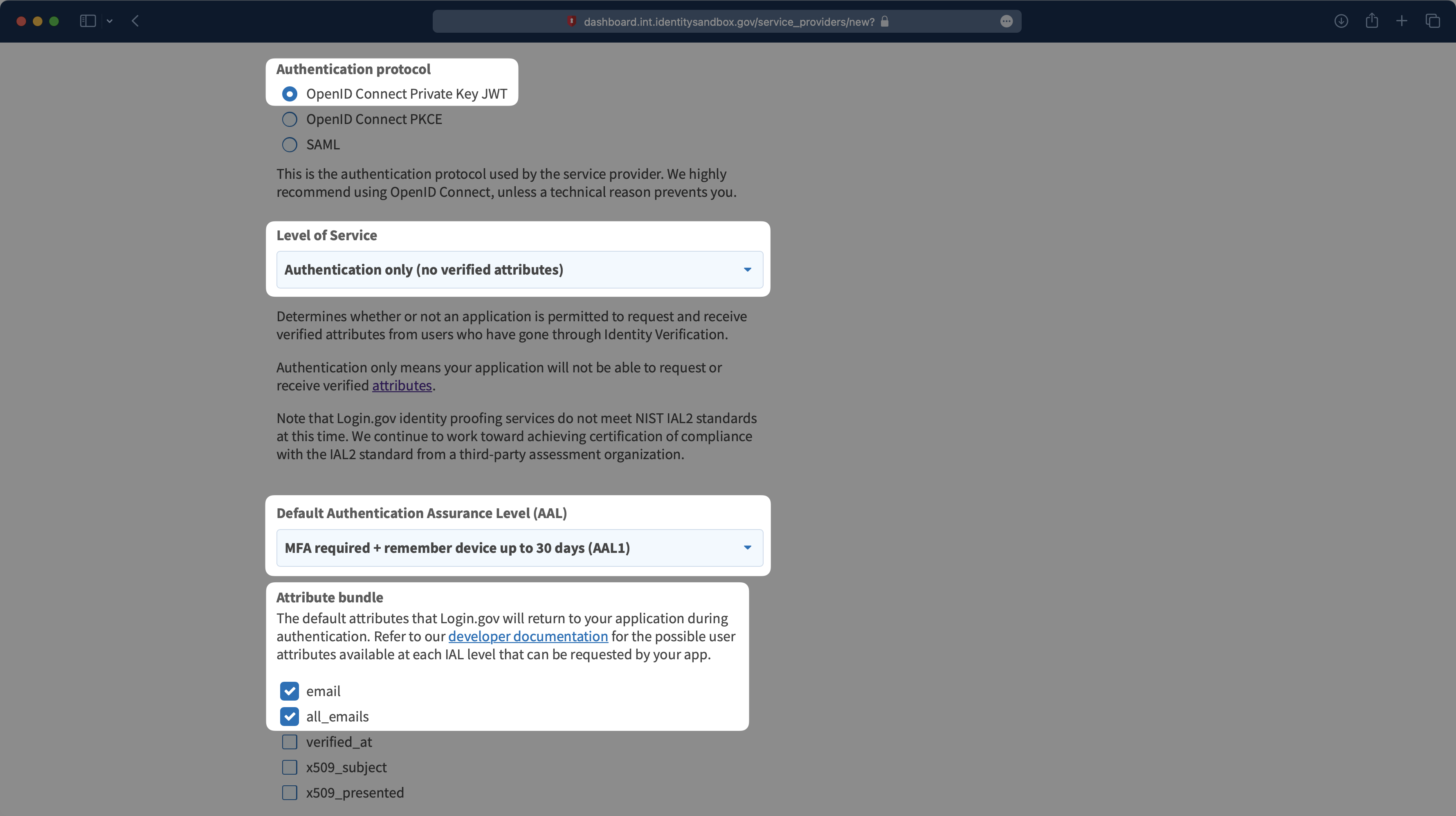
|
|
78
|
+
|
|
79
|
+
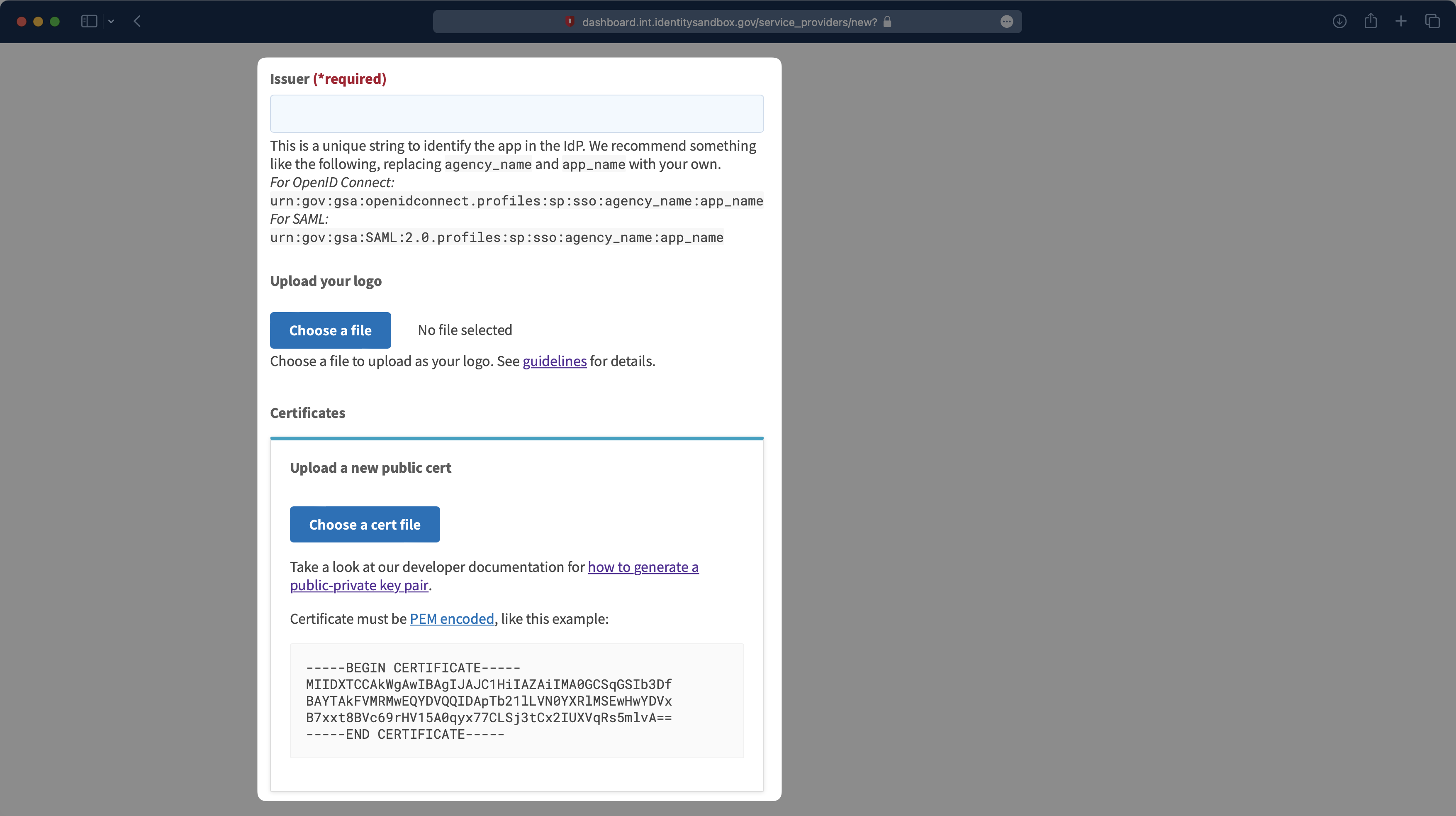
Next, you’ll need to define an Issuer - something like `urn:gov:gsa:openidconnect.profiles:sp:sso:agency_name:app_name` - replacing your agency and app name. Then, upload a logo and the public certificate file you downloaded from the WorkOS dashboard.
|
|
80
|
+
|
|
81
|
+
|
|
82
|
+
|
|
83
|
+
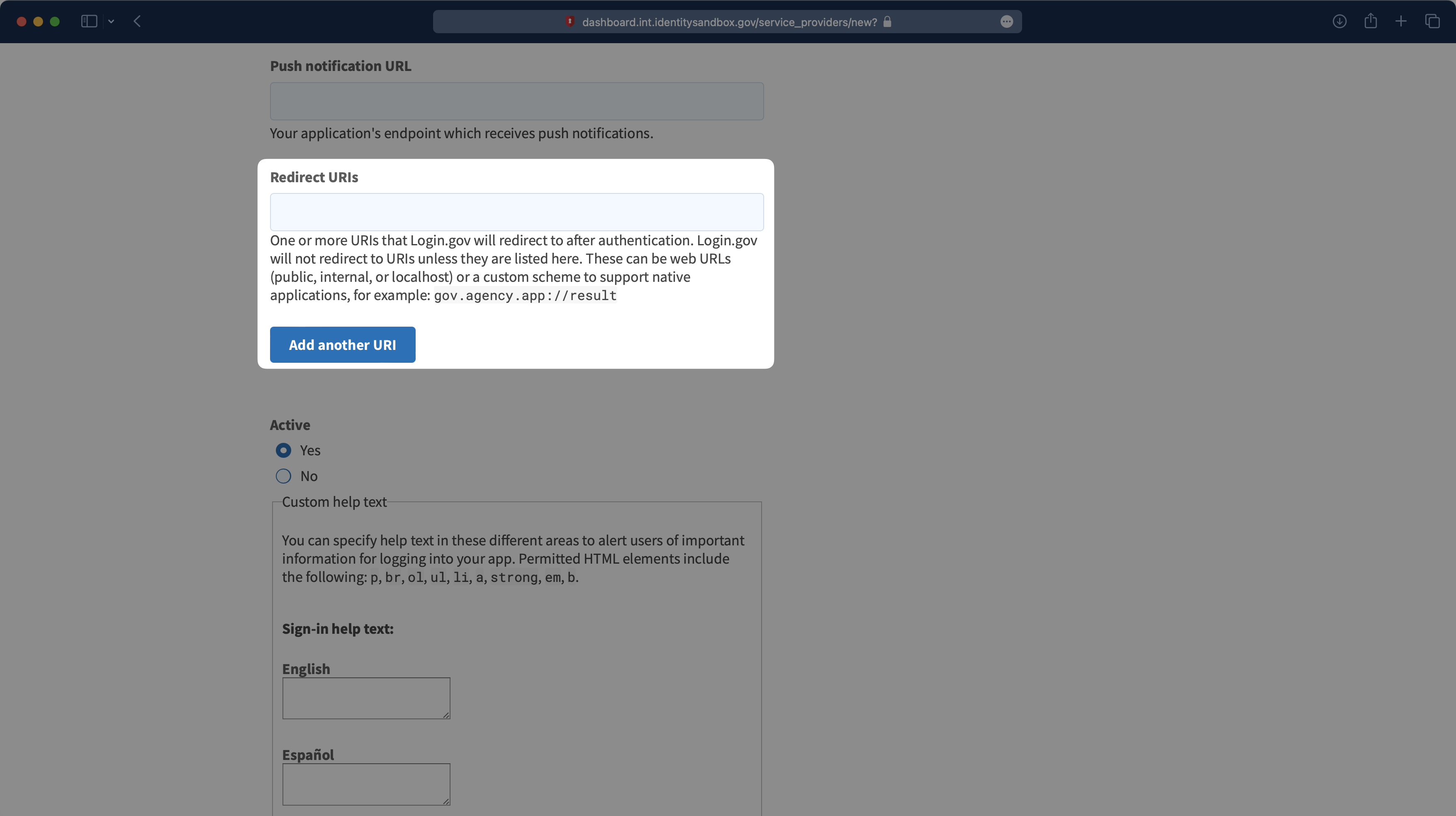
Finally, you’ll need to add the Redirect URIs. The first one you’ll need to add is the Redirect URI you copied from the WorkOS Dashboard. You’ll also need to add the [Redirect URI for your application](/sso/redirect-uris). There is a Content Security Policy (CSP) check from Login.gov, so all URIs that could potentially be redirected to the authentication flow should be listed here.
|
|
84
|
+
|
|
85
|
+
|
|
86
|
+
|
|
87
|
+
Scroll down to the bottom of the page and select “Create test app” to finish the setup.
|
|
88
|
+
|
|
89
|
+
---
|
|
90
|
+
|
|
91
|
+
## (4) Provide the Client ID and Discovery Endpoint
|
|
92
|
+
|
|
93
|
+
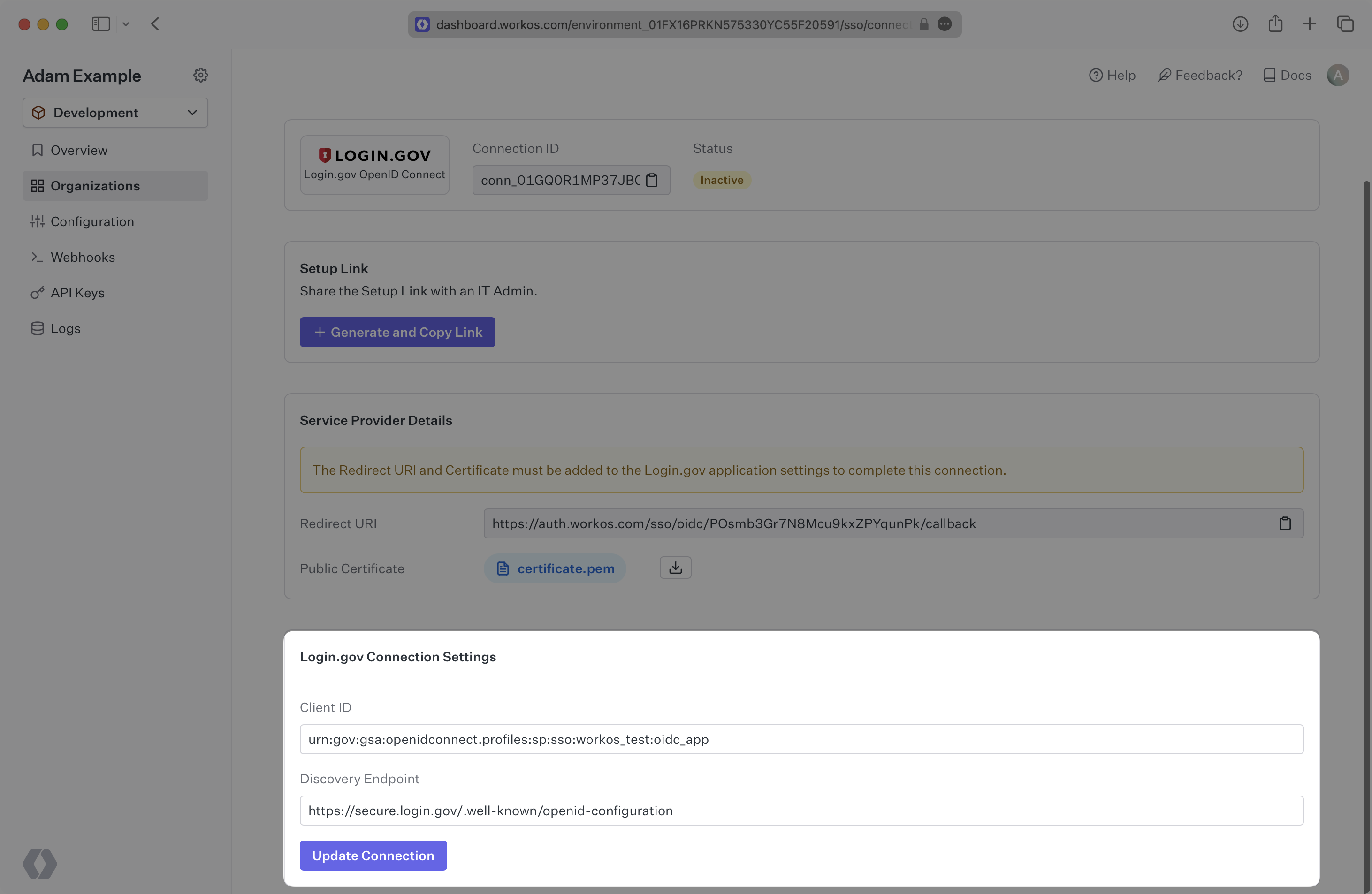
Enter the Issuer you created in the previous step as the Client ID in the WorkOS Dashboard. Additionally, add the discovery endpoint, which for production accounts in Login.gov is: `https://secure.login.gov/.well-known/openid-configuration`.
|
|
94
|
+
|
|
95
|
+
Click “Update connection".
|
|
96
|
+
|
|
97
|
+
|
|
98
|
+
|
|
99
|
+
---
|
|
100
|
+
|
|
101
|
+
## (5) Request Production Deployment
|
|
102
|
+
|
|
103
|
+
Please follow the [Login.gov docs to request a production deployment](https://developers.login.gov/production/) and finish your Login.gov application.
|
|
@@ -0,0 +1,96 @@
|
|
|
1
|
+
---
|
|
2
|
+
title: Microsoft AD FS SAML
|
|
3
|
+
description: "Configure a connection to\_Microsoft Active Directory Federation Services."
|
|
4
|
+
icon: microsoft
|
|
5
|
+
breadcrumb:
|
|
6
|
+
title: Integrations
|
|
7
|
+
url: /integrations
|
|
8
|
+
originalPath: .tmp-workos-clone/packages/docs/content/integrations/microsoft-ad-fs-saml.mdx
|
|
9
|
+
---
|
|
10
|
+
|
|
11
|
+
## Introduction
|
|
12
|
+
|
|
13
|
+
Each SSO Identity Provider requires specific information to create and configure a new [Connection](/glossary/connection). Often, the information required to create a Connection will differ by Identity Provider.
|
|
14
|
+
|
|
15
|
+
To create an AD FS SAML Connection, you’ll need two pieces of information: an [SP Metadata](/glossary/sp-metadata) file and an IdP Metadata URL.
|
|
16
|
+
|
|
17
|
+
---
|
|
18
|
+
|
|
19
|
+
## (1) Configure a Relying Party Trust
|
|
20
|
+
|
|
21
|
+
Open the AD FS Management console.
|
|
22
|
+
|
|
23
|
+

|
|
24
|
+
|
|
25
|
+
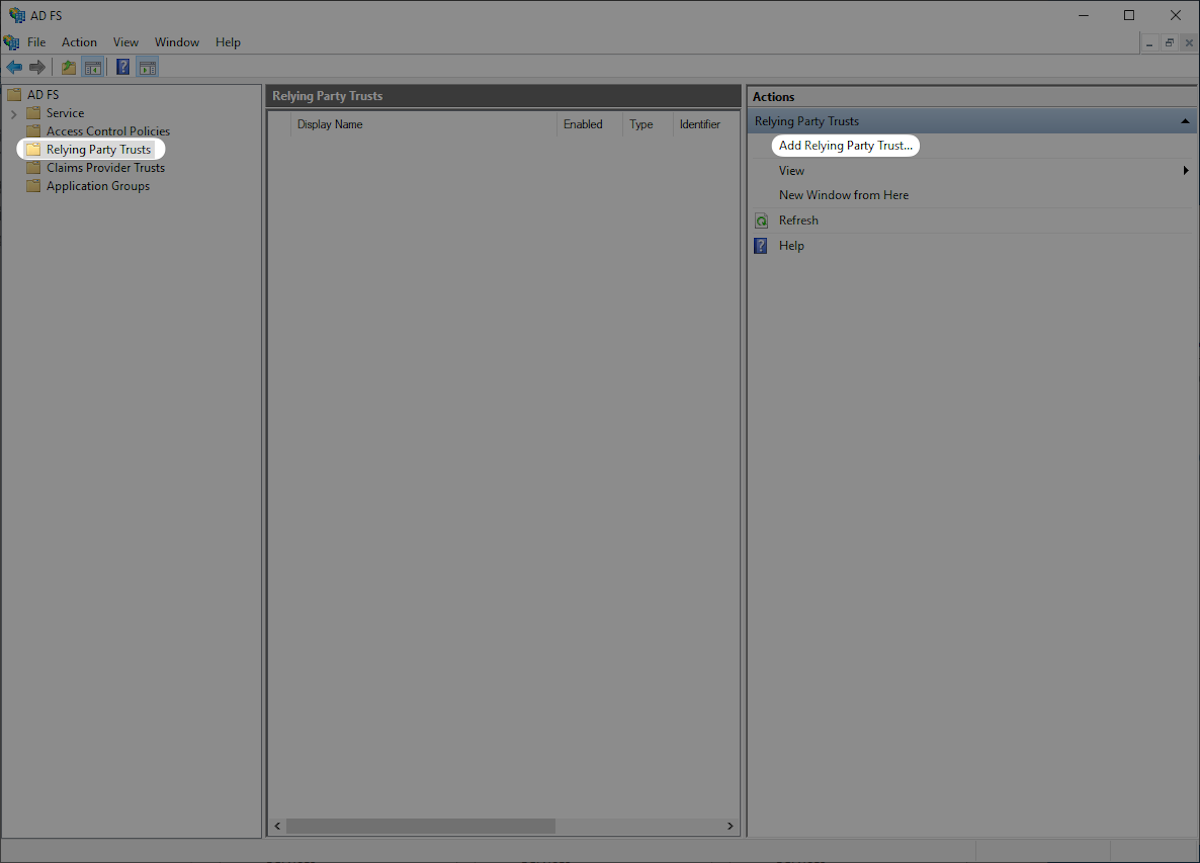
Click “Relying Party Trusts” on the left sidebar. Click “Add Relying Party Trust...” on the right sidebar to open the “AD FS Relying Party Trust Wizard”.
|
|
26
|
+
|
|
27
|
+
|
|
28
|
+
|
|
29
|
+
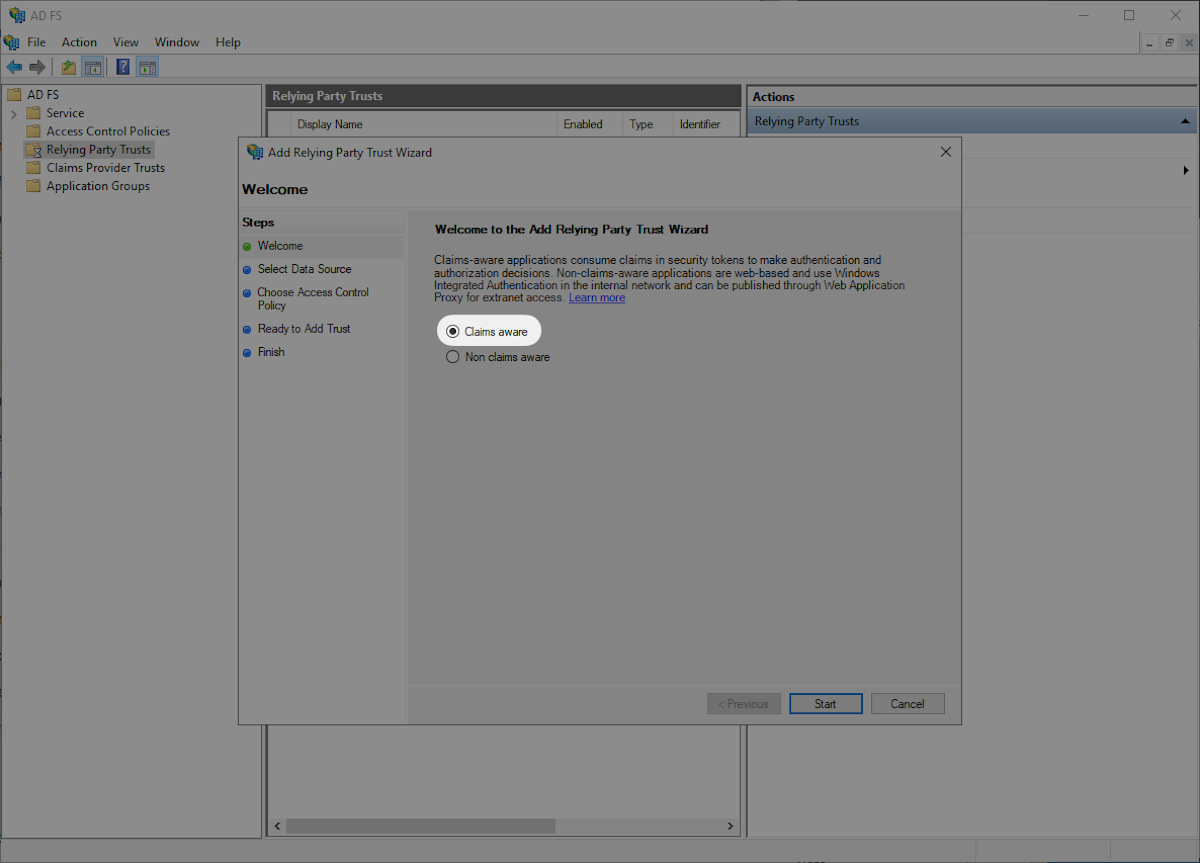
Select “Claims aware” and then “Start”.
|
|
30
|
+
|
|
31
|
+
|
|
32
|
+
|
|
33
|
+
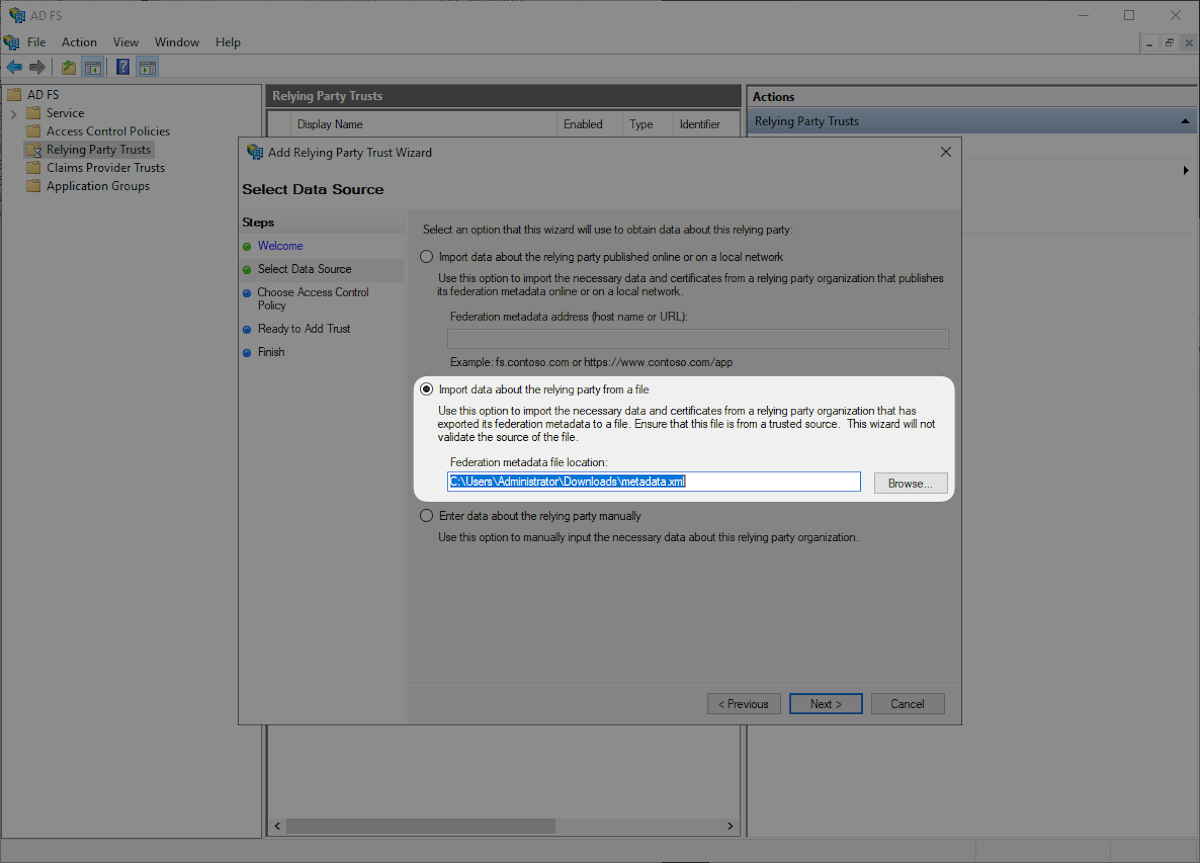
Download the provided Metadata file from WorkOS by heading to the SP Metadata link in the Dashboard. Select “Import data about the relying party from a file” then select the SP Metadata file you downloaded, and click “Next”.
|
|
34
|
+
|
|
35
|
+
|
|
36
|
+
|
|
37
|
+
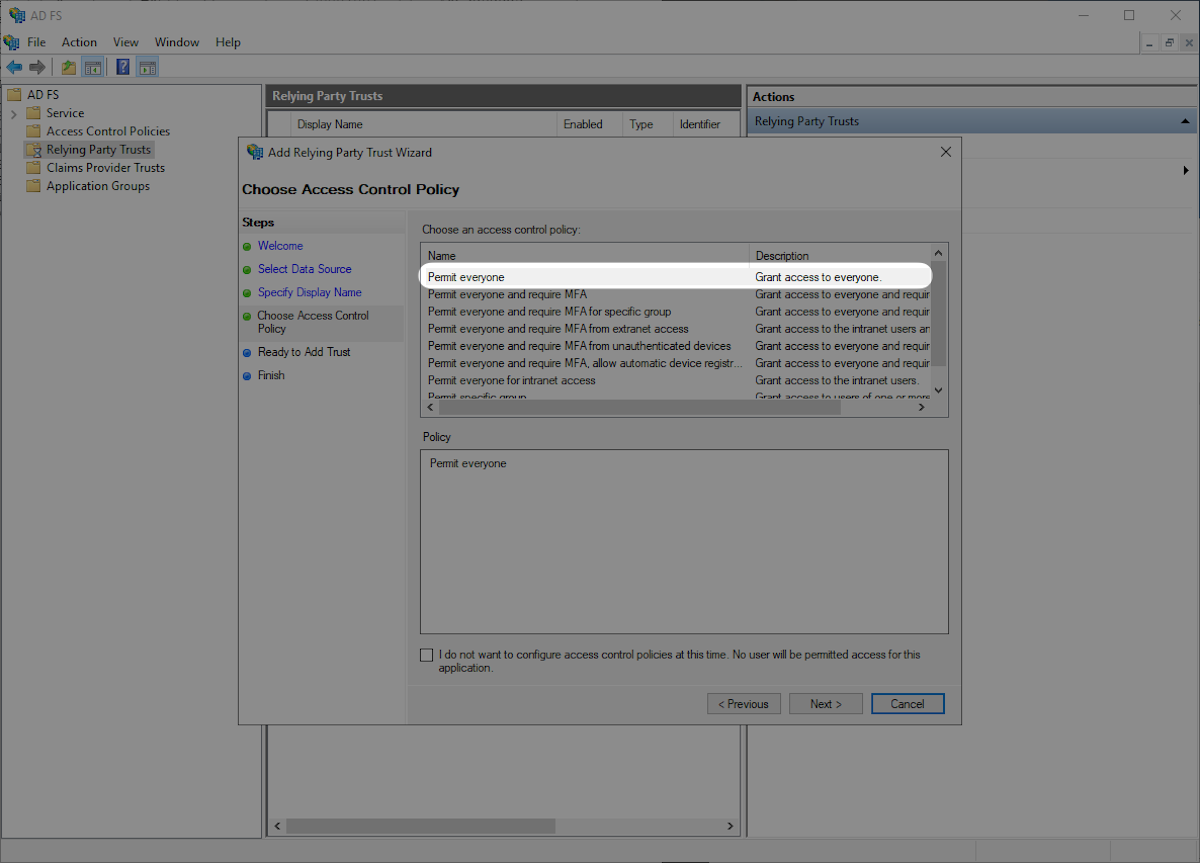
Select “Permit everyone” and then “Next”.
|
|
38
|
+
|
|
39
|
+
|
|
40
|
+
|
|
41
|
+
---
|
|
42
|
+
|
|
43
|
+
## (2) Choose Access Policy
|
|
44
|
+
|
|
45
|
+
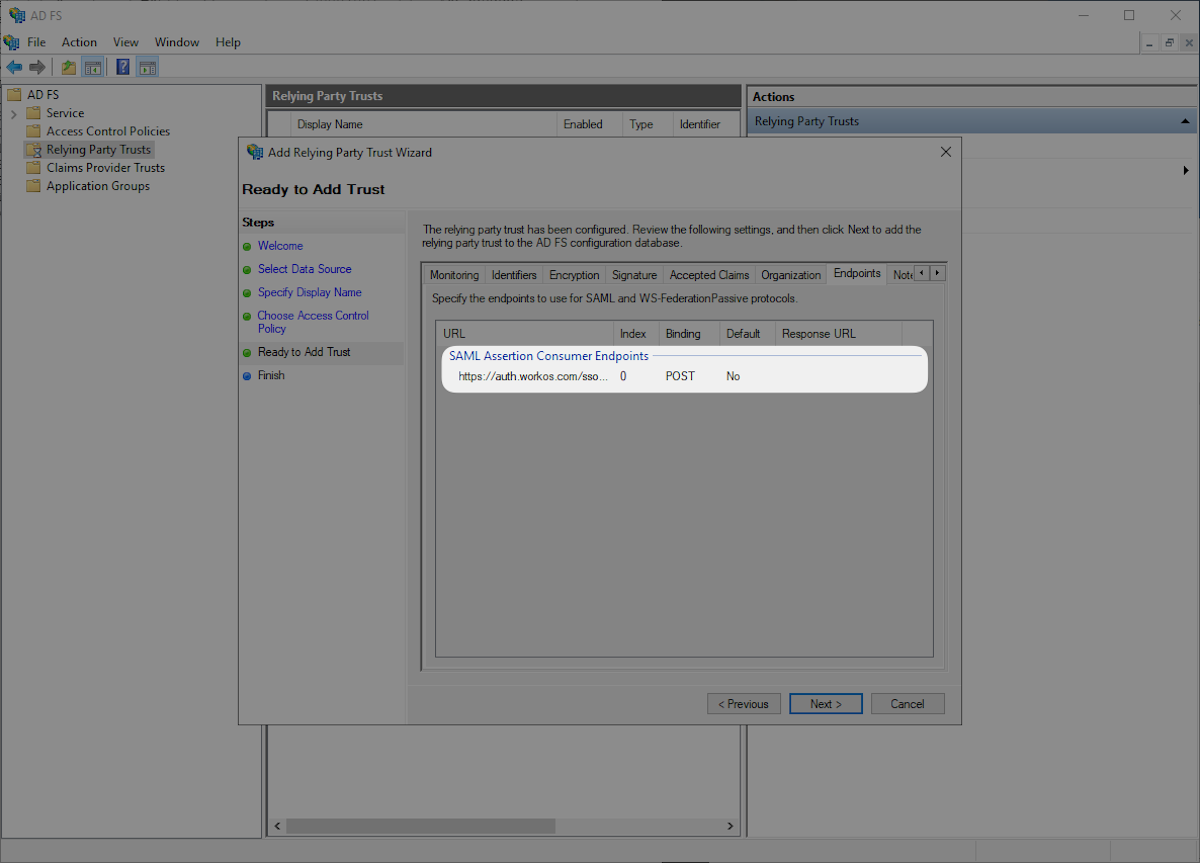
Click the “Endpoints” tab and confirm that the “SAML Assertion Consumer Endpoints” matches the SAML Assertion Consumer Endpoint `https://auth.workos.com/sso/saml/acs/:id` and click “Next”.
|
|
46
|
+
|
|
47
|
+
|
|
48
|
+
|
|
49
|
+
Select “Configure claims issuance policy for this application” and “Close”.
|
|
50
|
+
|
|
51
|
+

|
|
52
|
+
|
|
53
|
+
---
|
|
54
|
+
|
|
55
|
+
## (3) Configure Claims Issuance Policy
|
|
56
|
+
|
|
57
|
+
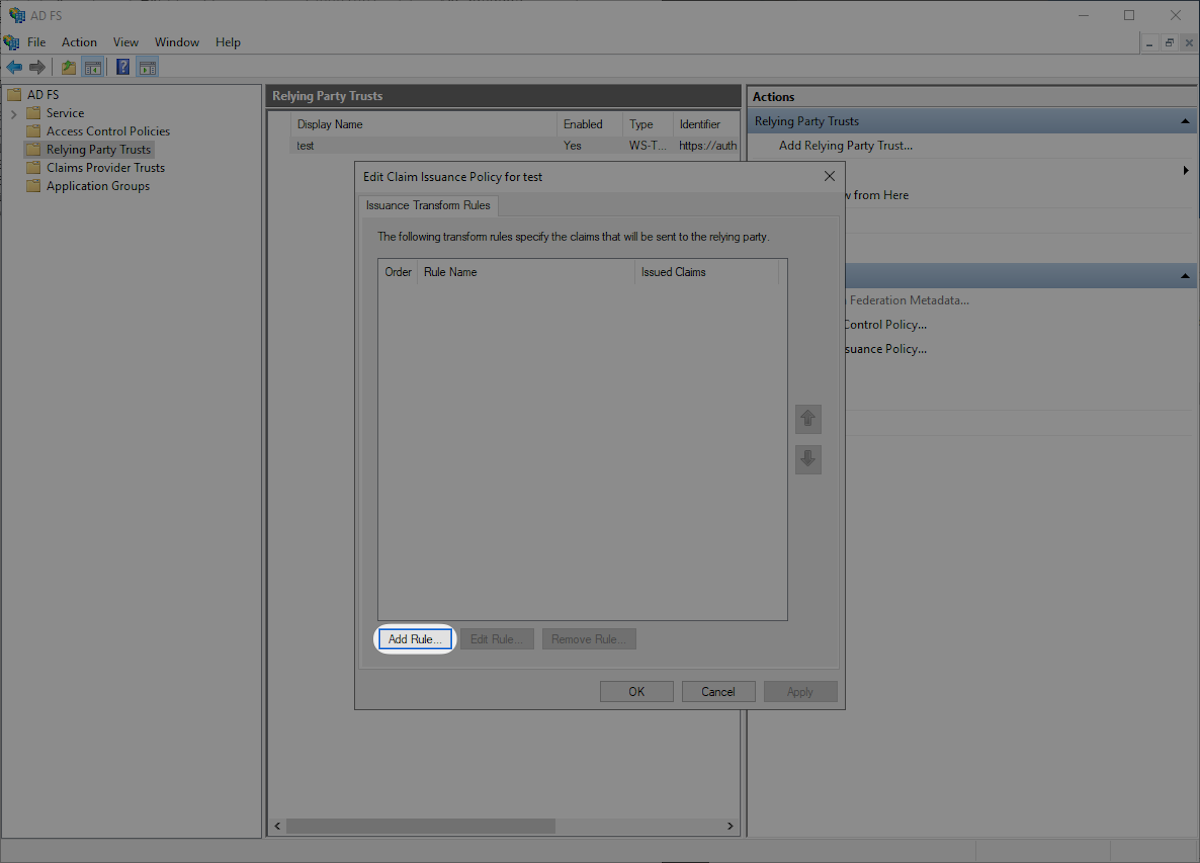
Click “Add Rule” in the “Edit Claims Issuance Policy” window.
|
|
58
|
+
|
|
59
|
+
|
|
60
|
+
|
|
61
|
+
Select “Send LDAP Attributes as Claims” and then “Next”.
|
|
62
|
+
|
|
63
|
+

|
|
64
|
+
|
|
65
|
+
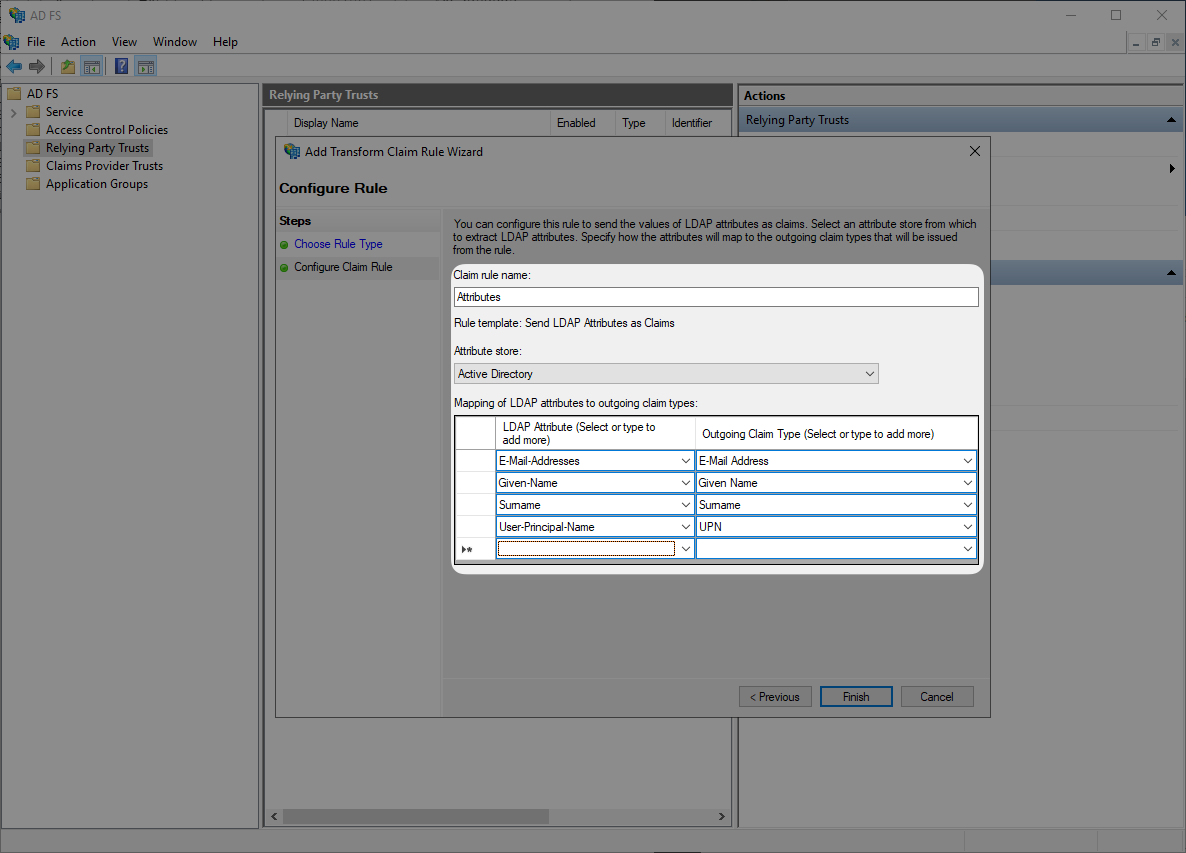
Submit “Attributes” as “Claim rule name”, then select “Active Directory” as “Attribute Store”, and configure the following attribute mappings. Then click “OK”.
|
|
66
|
+
|
|
67
|
+
- `E-Mail-Addresses` → `E-Mail Address`
|
|
68
|
+
- `Given-Name` → `Given Name`
|
|
69
|
+
- `Surname` → `Surname`
|
|
70
|
+
- `User-Principal-Name` → `UPN`
|
|
71
|
+
|
|
72
|
+
|
|
73
|
+
|
|
74
|
+
### Role Assignment (optional)
|
|
75
|
+
|
|
76
|
+
With [identity provider role assignment](/sso/identity-provider-role-assignment), users can receive roles within your application based on their group memberships. To return this information in the attribute statement, follow the guidance below.
|
|
77
|
+
|
|
78
|
+
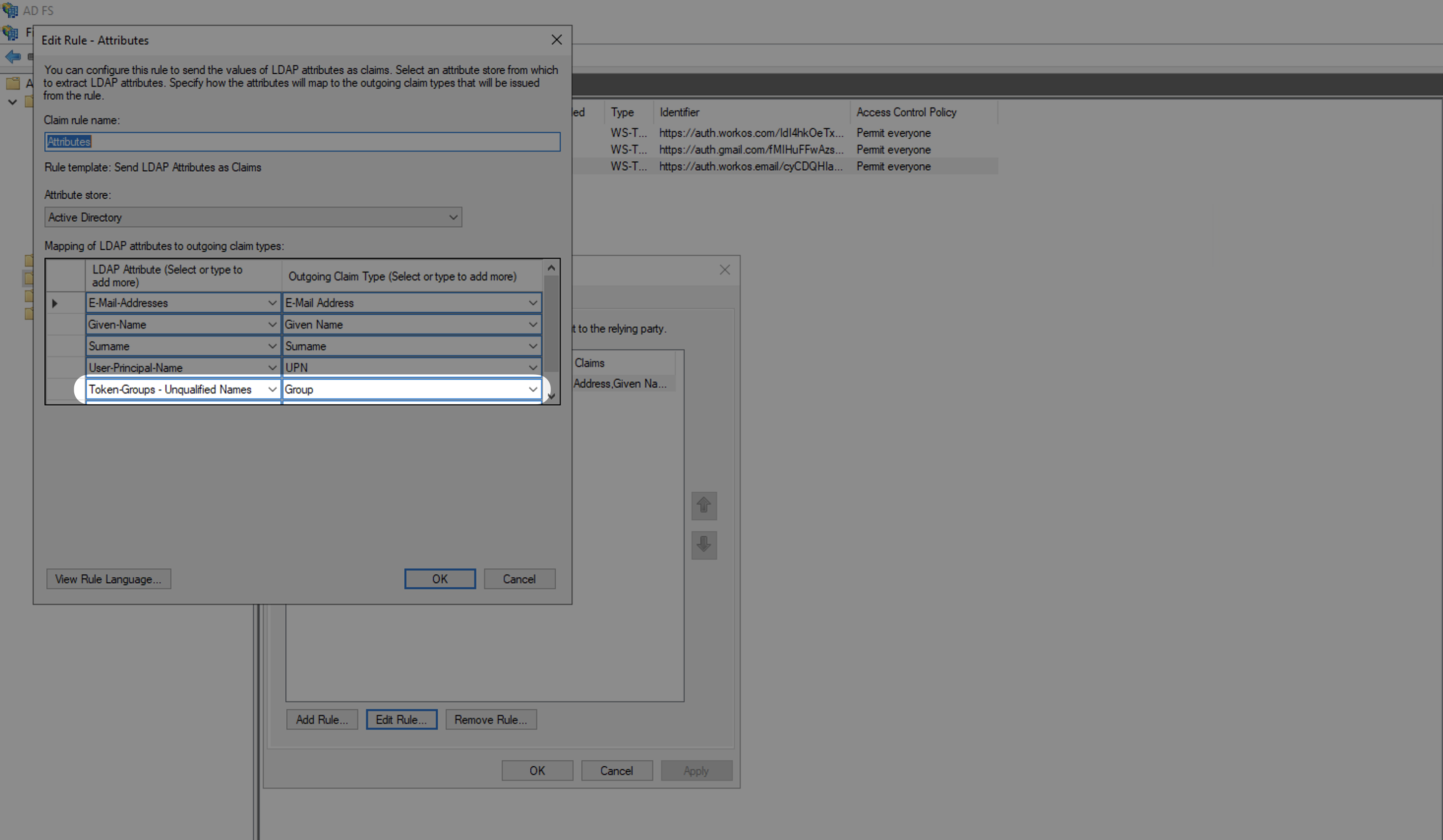
Select "Group" as the "Outgoing Claim Type" and map an LDAP Attribute to send groups. For example, to send all groups, map the "Token-Groups - Unqualified Names" attribute.
|
|
79
|
+
|
|
80
|
+
|
|
81
|
+
|
|
82
|
+
> Finish role assignment set-up by navigating to the SSO connection page in the _Organization_ section of the [WorkOS Dashboard](https://dashboard.workos.com/). Create SSO groups by referencing the group IdP ID. Then, assign roles to these SSO groups so group members are automatically granted roles within your application.
|
|
83
|
+
|
|
84
|
+
---
|
|
85
|
+
|
|
86
|
+
## (4) Upload Metadata URL
|
|
87
|
+
|
|
88
|
+
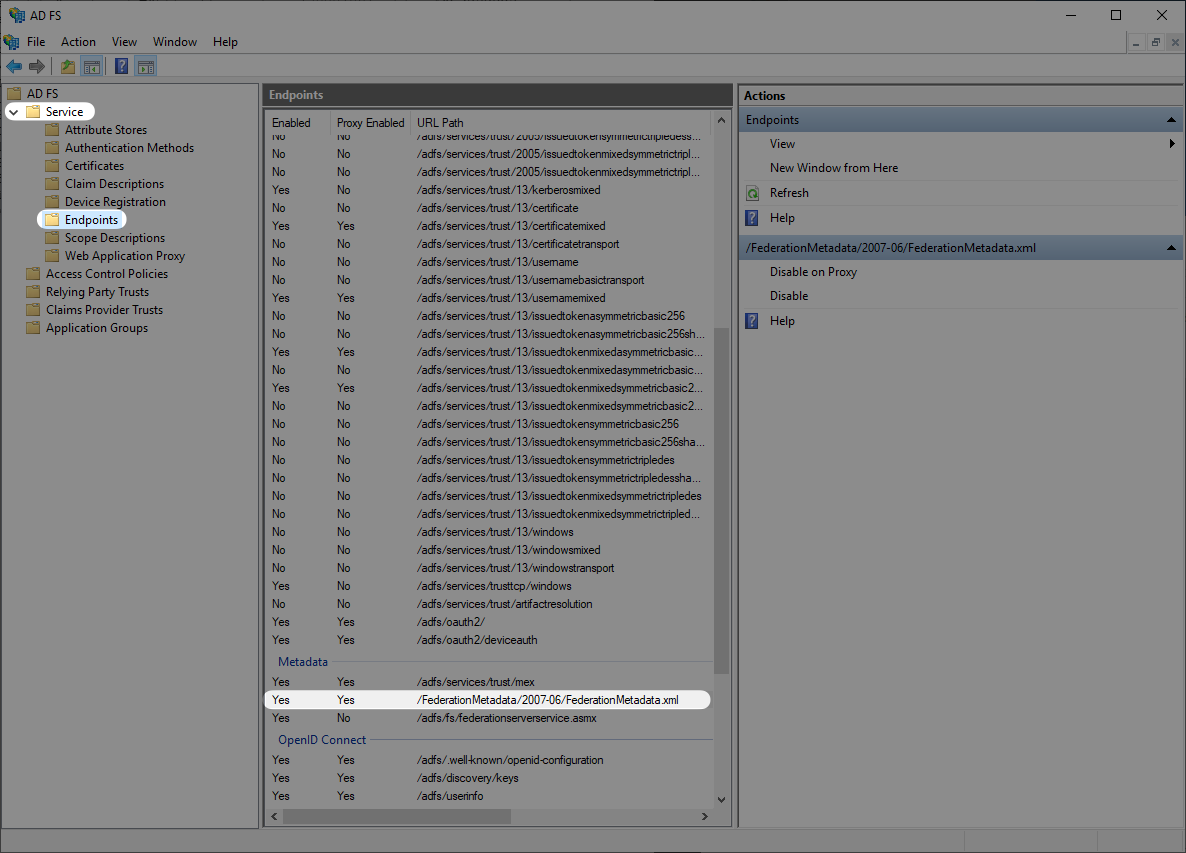
Next you will want to obtain the Metadata URL from your AD FS server. AD FS publishes its metadata to a standard URL by default: `https://SERVER/federationmetadata/2007-06/federationmetadata.xml` where “SERVER” is your federation service FQDN. You can also find your ADFS Federation Metadata URL through the AD FS Management in “AD FS → Service → Endpoints” and navigate to the Metadata section.
|
|
89
|
+
|
|
90
|
+
|
|
91
|
+
|
|
92
|
+
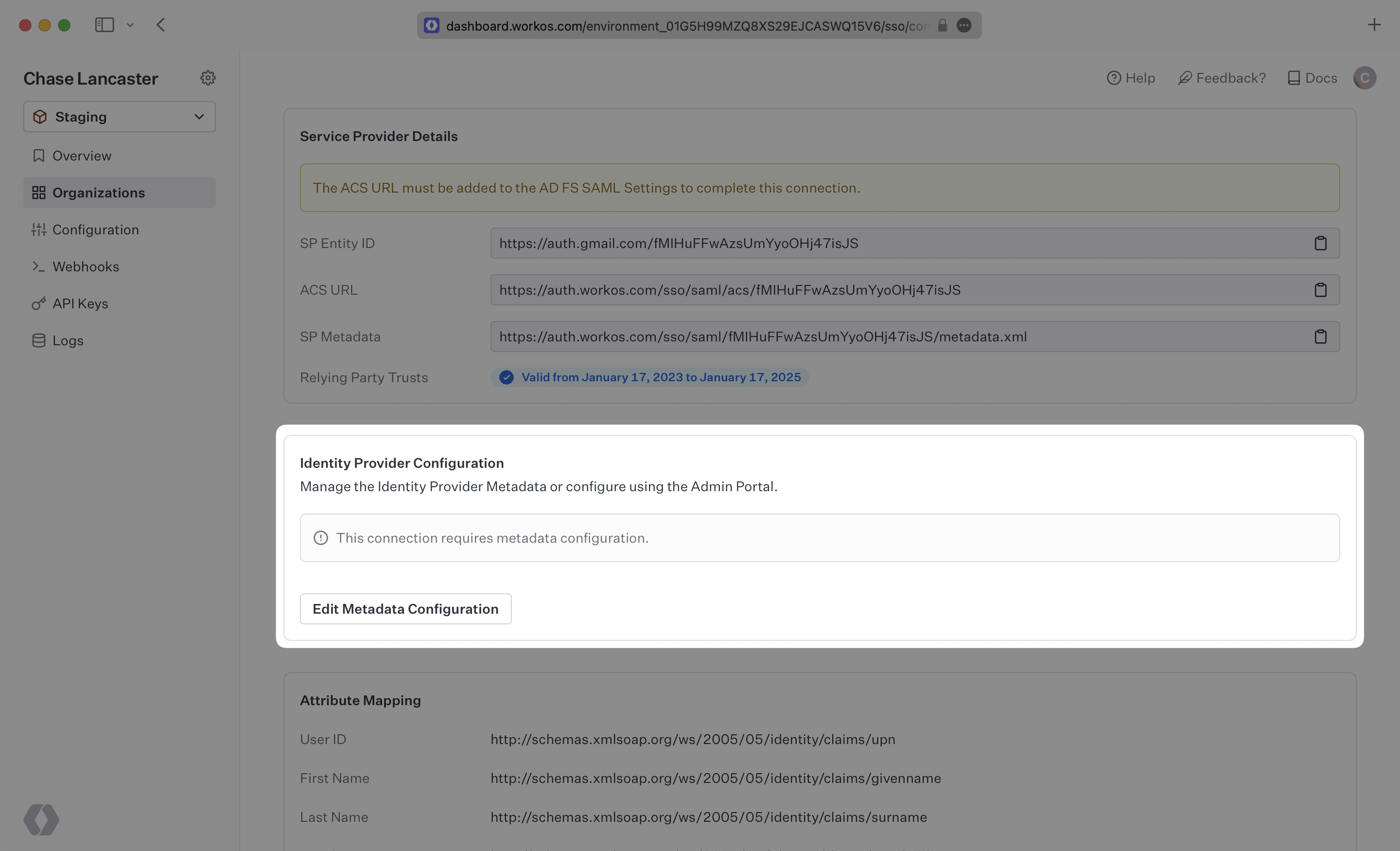
Once you have obtained the Metadata URL you will then navigate to the connection settings in WorkOS, click “Edit Metadata configuration”, and upload the Metadata URL.
|
|
93
|
+
|
|
94
|
+
|
|
95
|
+
|
|
96
|
+
Once uploaded the connection will be verified and linked!
|
|
@@ -0,0 +1,101 @@
|
|
|
1
|
+
---
|
|
2
|
+
title: Microsoft OAuth
|
|
3
|
+
description: Learn how to set up OAuth with Microsoft.
|
|
4
|
+
icon: microsoft
|
|
5
|
+
breadcrumb:
|
|
6
|
+
title: Integrations
|
|
7
|
+
url: /integrations
|
|
8
|
+
originalPath: .tmp-workos-clone/packages/docs/content/integrations/microsoft-oauth.mdx
|
|
9
|
+
---
|
|
10
|
+
|
|
11
|
+
## Introduction
|
|
12
|
+
|
|
13
|
+
To configure your global Microsoft OAuth setup, you’ll need three pieces of information: a [Redirect URI](/glossary/redirect-uri), a Microsoft Client ID, and a Microsoft Client Secret.
|
|
14
|
+
|
|
15
|
+
---
|
|
16
|
+
|
|
17
|
+
## What WorkOS provides
|
|
18
|
+
|
|
19
|
+
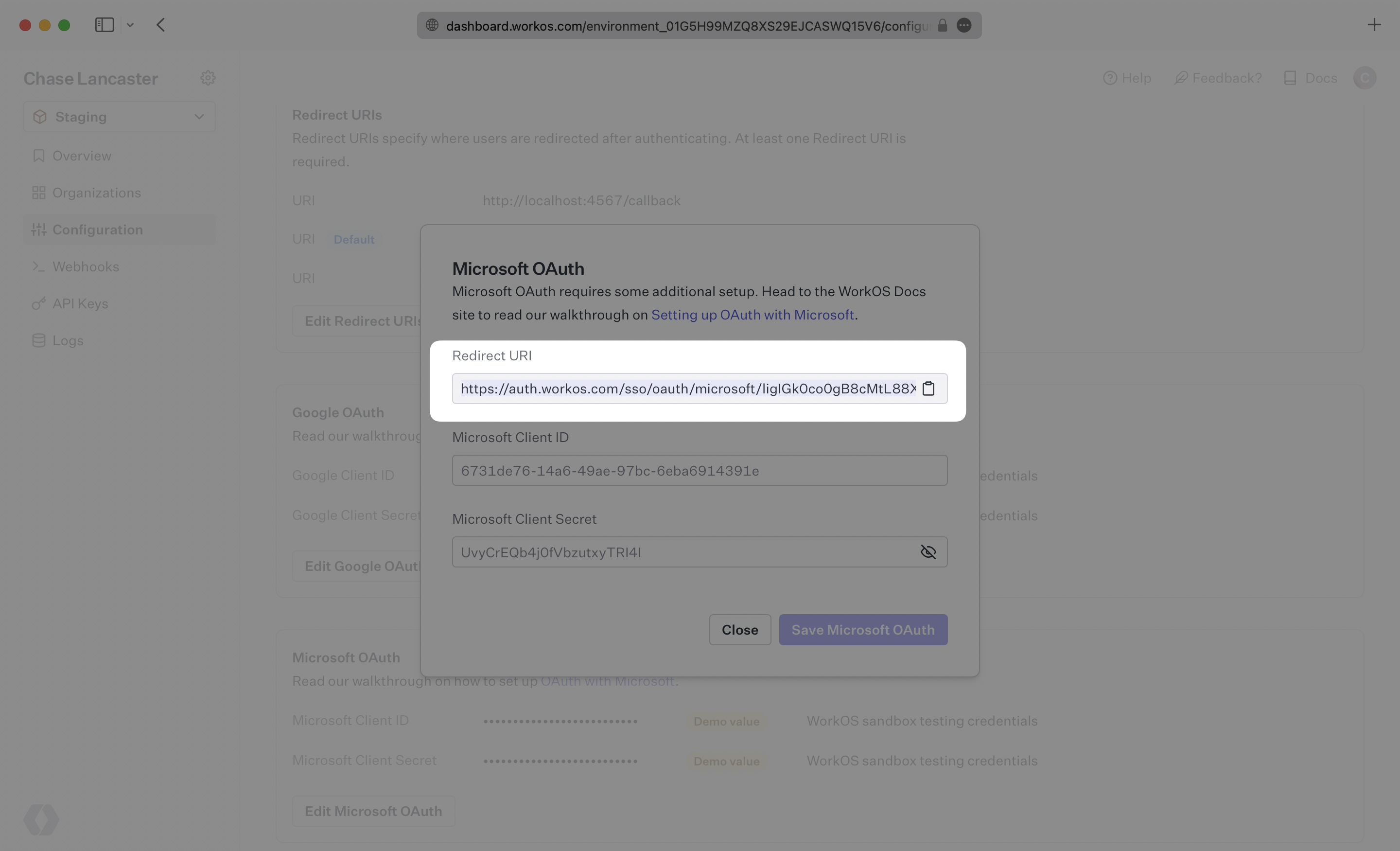
WorkOS provides the Redirect URI, an allowlisted callback URL. It indicates the location to return an authorized user to after both an authorization code is granted, and the authentication process is complete.
|
|
20
|
+
|
|
21
|
+
Open your [WorkOS Dashboard](https://dashboard.workos.com), and browse to the “Configuration” tab on the left hand nav bar. Scroll down to the “Microsoft OAuth” section, click "Edit Microsoft OAuth", and you’ll see the Redirect URI as well as the fields you’ll populate later with information from Microsoft. If you are in the Staging environment, you’ll see demo values for the Client ID and Client Secret.
|
|
22
|
+
|
|
23
|
+
|
|
24
|
+
|
|
25
|
+
---
|
|
26
|
+
|
|
27
|
+
## Testing with default credentials in the Staging environment
|
|
28
|
+
|
|
29
|
+
WorkOS provides a default Microsoft Client ID/Microsoft Client Secret combination, which allows you to quickly enable and test Microsoft OAuth. Use the [WorkOS API to initiate SSO](/sso/1-add-sso-to-your-app/add-an-endpoint-to-initiate-sso), setting the `provider` parameter to `MicrosoftOAuth`, and WorkOS will automatically use the default credentials, until you add your own Microsoft Client ID and Microsoft Client Secret to the Configuration in the WorkOS Dashboard.
|
|
30
|
+
|
|
31
|
+
> The default credentials are only intended for testing and therefore only available in the Staging environment. For your production environment, please follow the steps below to create and specify your own Microsoft Client ID and Microsoft Client Secret.
|
|
32
|
+
|
|
33
|
+
Please note that when you are using WorkOS default credentials, Microsoft's authentication flow will display WorkOS' name, logo, and other information to users. Once you register your own application and use its Microsoft Client ID and Microsoft Client Secret for the OAuth flow, you will have the opportunity to customize the app, including its name, logo, contact email, etc.
|
|
34
|
+
|
|
35
|
+
---
|
|
36
|
+
|
|
37
|
+
## What you’ll need
|
|
38
|
+
|
|
39
|
+
If you haven’t already, be sure to [register an application with Microsoft](https://learn.microsoft.com/en-us/entra/identity-platform/quickstart-register-app) following their documentation.
|
|
40
|
+
|
|
41
|
+
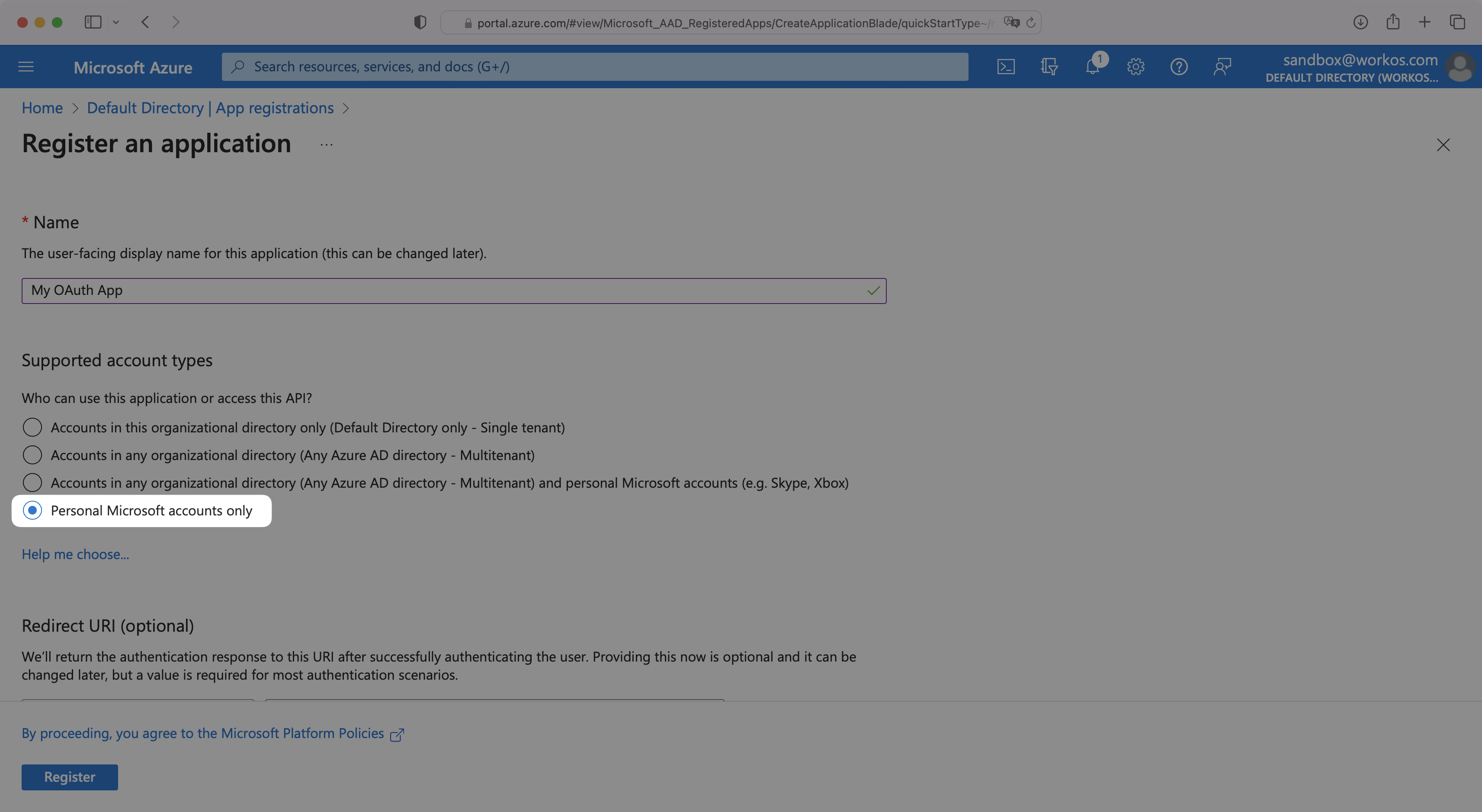
> IMPORTANT: When registering your app, select “Personal Microsoft accounts only” for “Supported Account Types”.
|
|
42
|
+
|
|
43
|
+
|
|
44
|
+
|
|
45
|
+
Then, you’ll provide the Microsoft Client ID and the Microsoft Client Secret to the WorkOS Dashboard Configuration. These are a pair of credentials provided by Microsoft that you’ll use to authenticate your application via Microsoft’s OAuth protocol. To obtain them:
|
|
46
|
+
|
|
47
|
+
---
|
|
48
|
+
|
|
49
|
+
## (1) Log In and Select Your Application
|
|
50
|
+
|
|
51
|
+
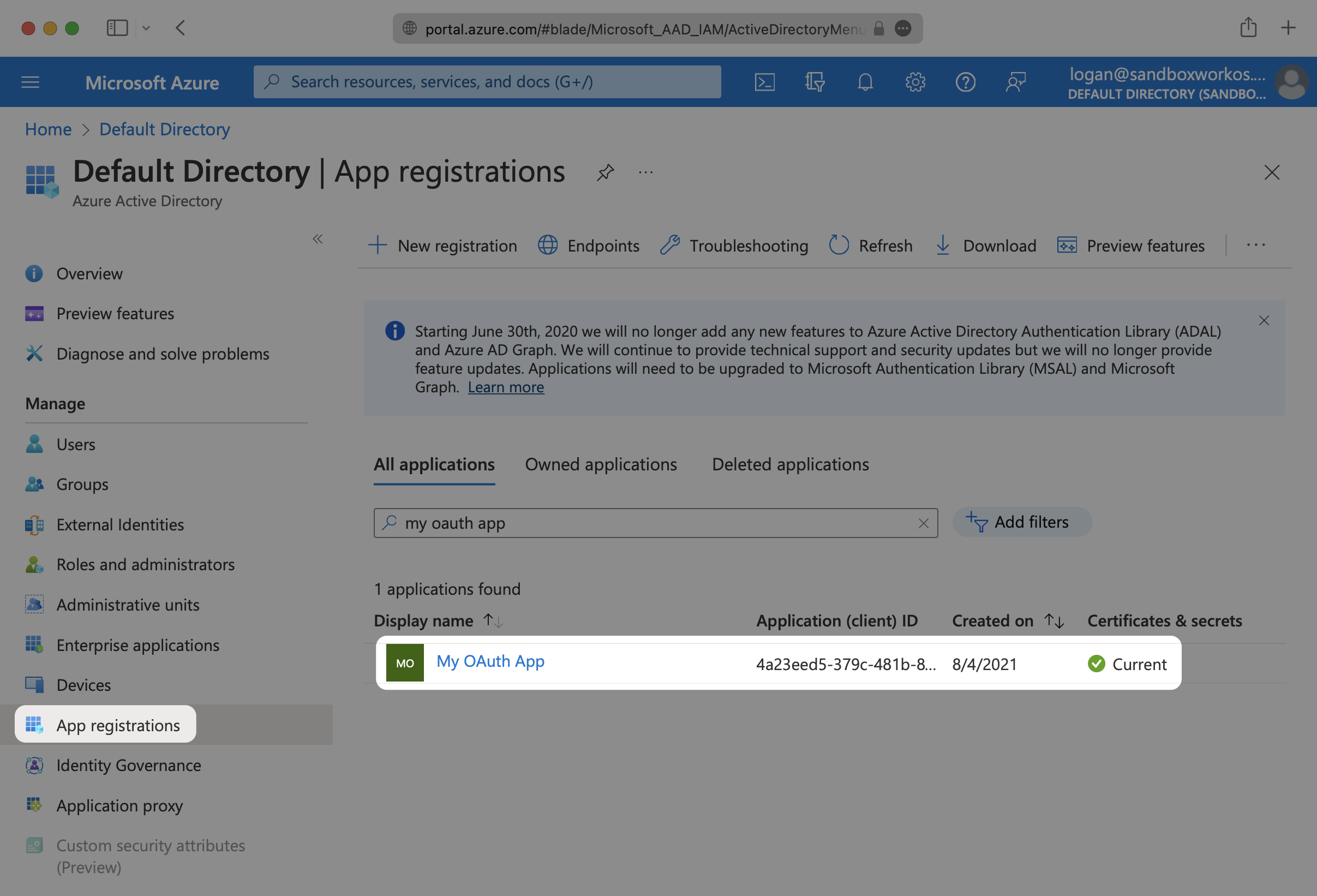
Log in to the [Microsoft Azure Portal](https://portal.azure.com/). Select “Microsoft Entra ID” from the left hand navigation. Then select “App registrations” and select your relevant application.
|
|
52
|
+
|
|
53
|
+
|
|
54
|
+
|
|
55
|
+
---
|
|
56
|
+
|
|
57
|
+
## (2) Enter WorkOS Redirect URI
|
|
58
|
+
|
|
59
|
+
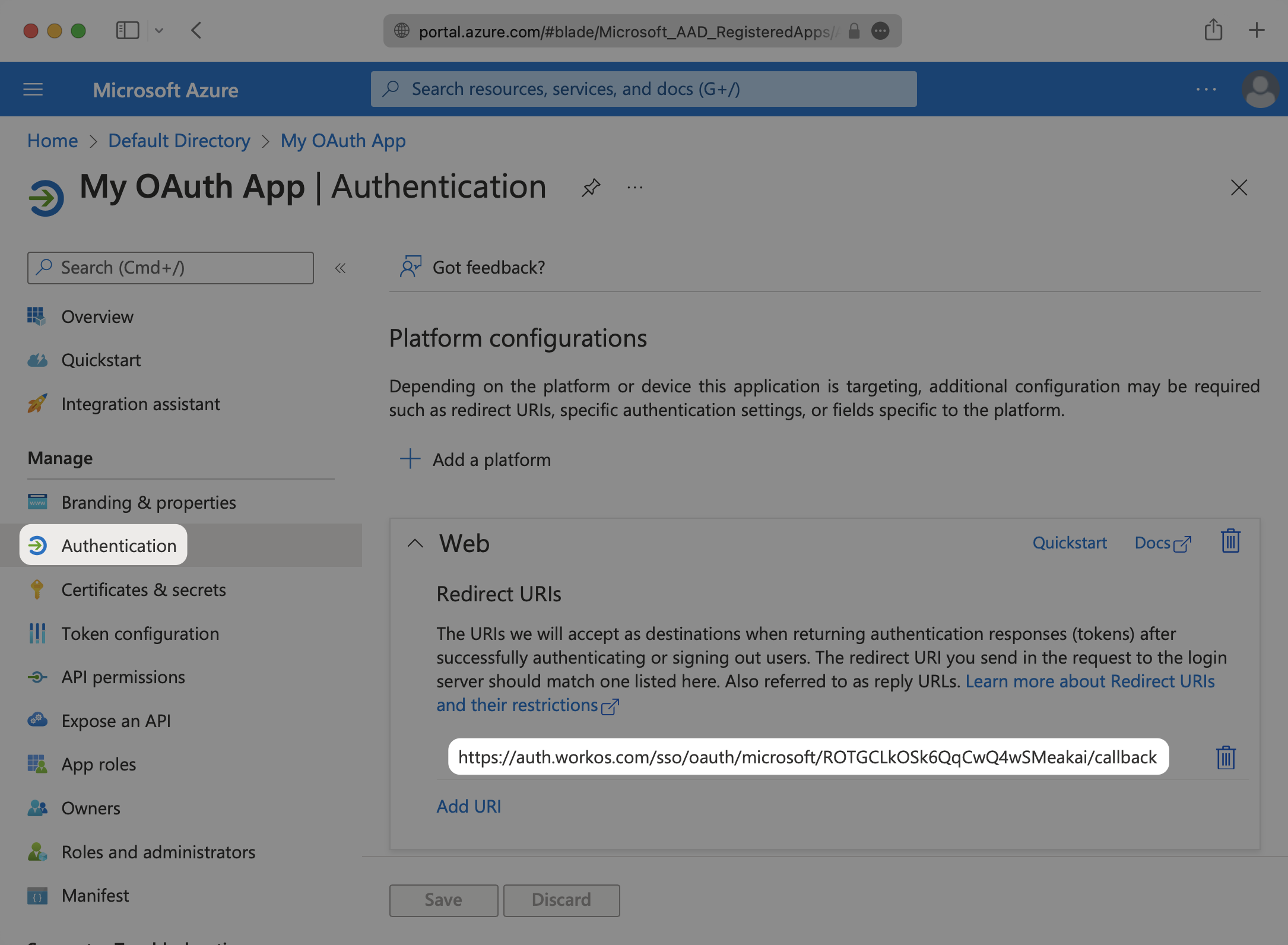
Select the “Authentication” option for the application. In the “Redirect URIs” section, add the Redirect URI provided for you in the Microsoft OAuth section of the WorkOS Dashboard Configuration.
|
|
60
|
+
|
|
61
|
+
|
|
62
|
+
|
|
63
|
+
---
|
|
64
|
+
|
|
65
|
+
## (3) Add Claims
|
|
66
|
+
|
|
67
|
+
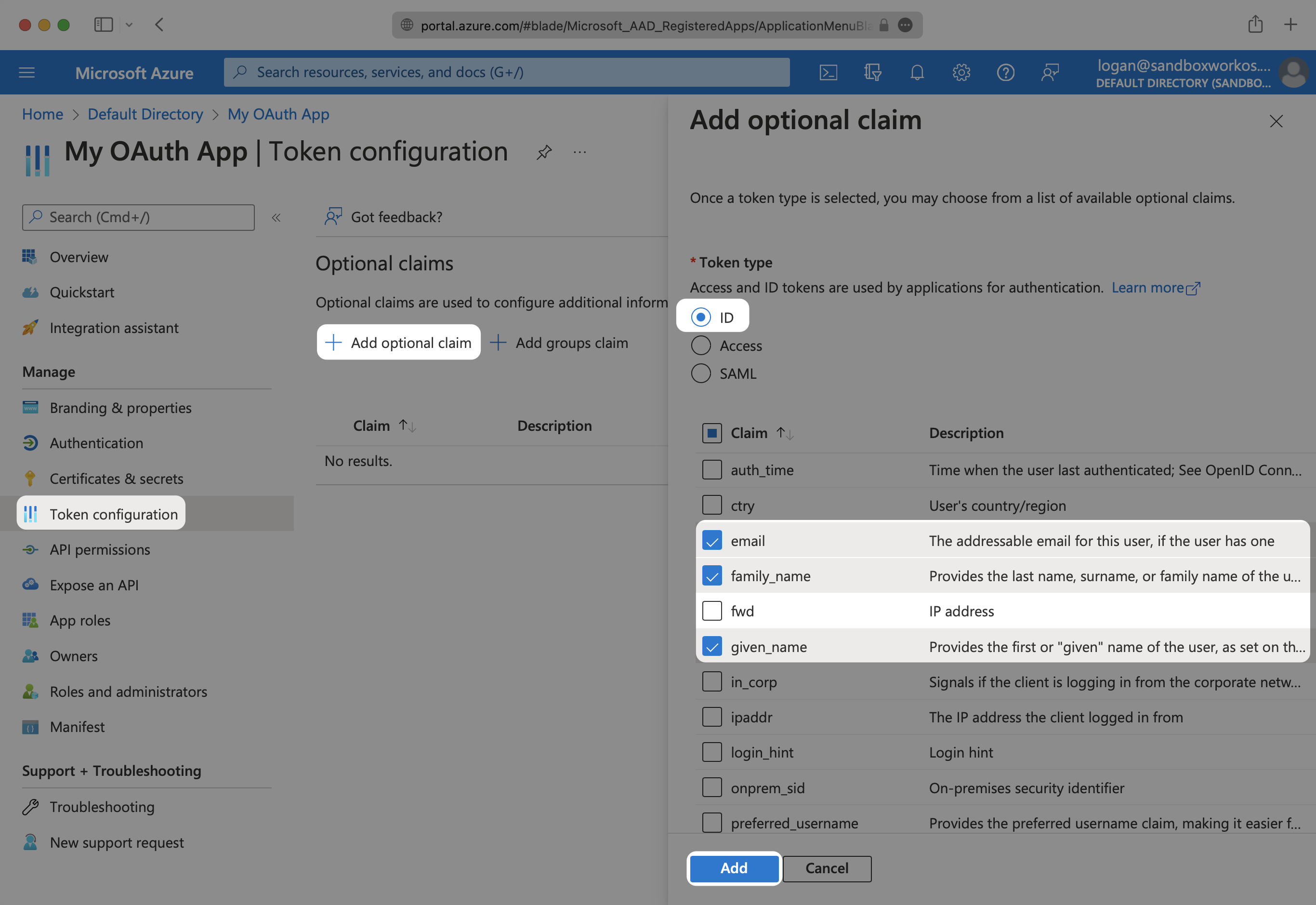
Under “Token configuration”, select “Add optional claim”. Select `email`, `family_name` and `given_name`.
|
|
68
|
+
|
|
69
|
+
In order for the email claim to come through, the “Email” field for the user in Azure needs to be populated.
|
|
70
|
+
|
|
71
|
+
|
|
72
|
+
|
|
73
|
+
---
|
|
74
|
+
|
|
75
|
+
## (4) Obtain Identity Provider Details
|
|
76
|
+
|
|
77
|
+
You’ll need to add your Microsoft Client ID and Microsoft Client Secret to their respective fields in your Microsoft OAuth settings.
|
|
78
|
+
|
|
79
|
+
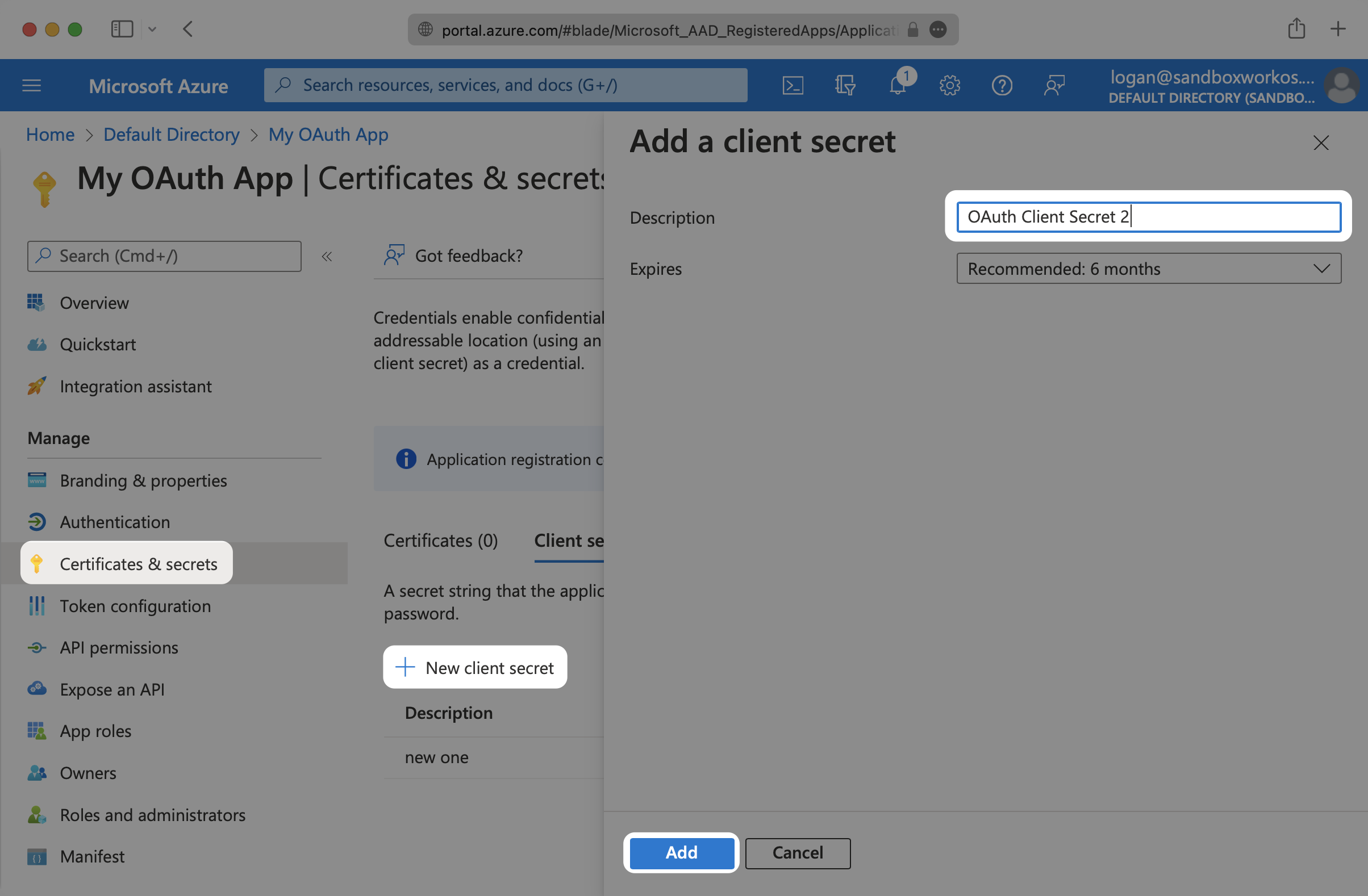
To get your Microsoft Client Secret, navigate to “Certificates & secrets” and click on “New client secret”. Give your client secret a Description and select “Add”.
|
|
80
|
+
|
|
81
|
+
Microsoft’s client secrets have an expiration date, with the highest value being 24 months. You will need to track these and rotate them before the expiration time.
|
|
82
|
+
|
|
83
|
+
|
|
84
|
+
|
|
85
|
+
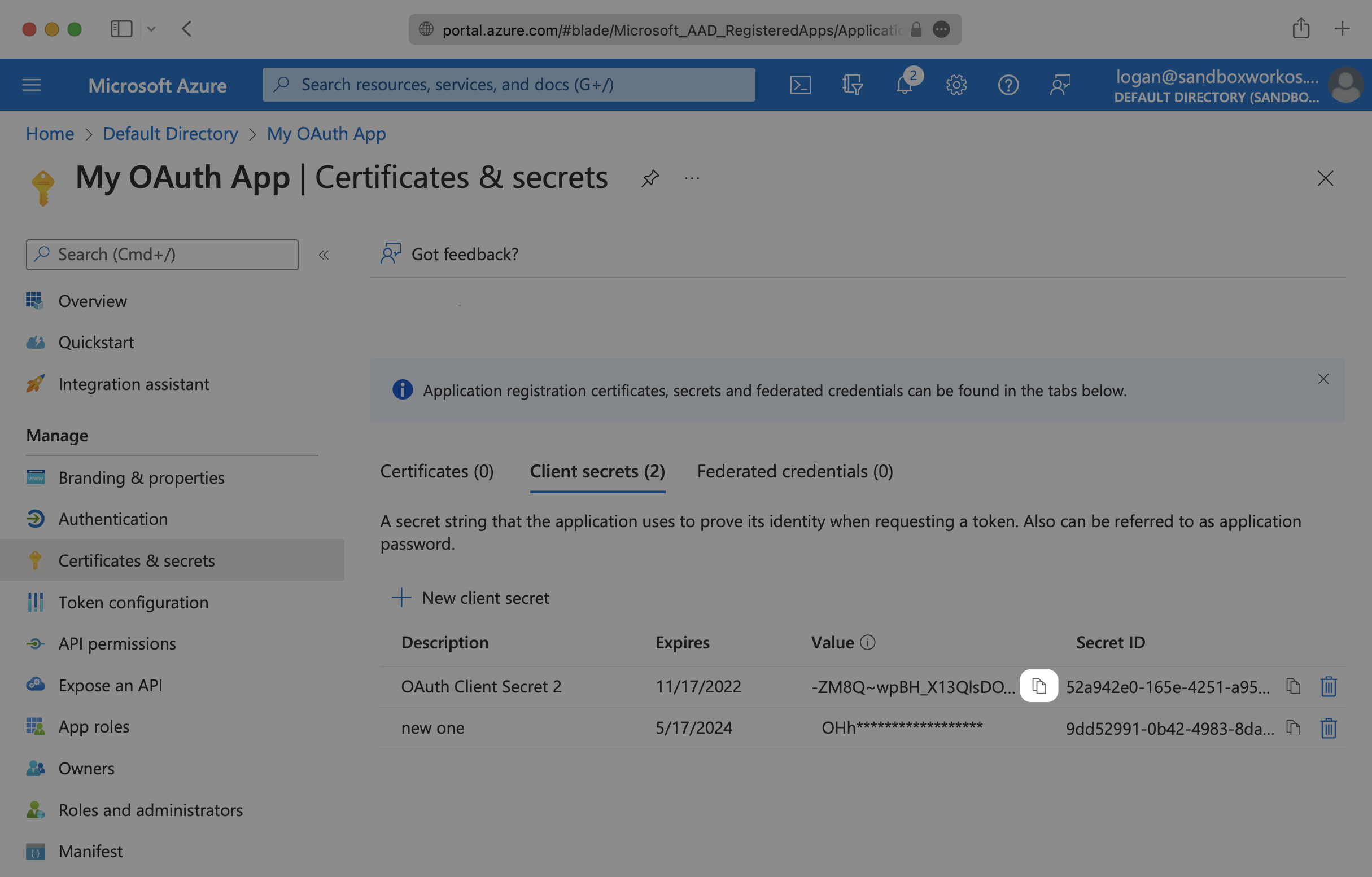
Copy your new client secret to the clipboard in order to add it to the WorkOS Dashboard.
|
|
86
|
+
|
|
87
|
+
|
|
88
|
+
|
|
89
|
+
To obtain the Microsoft Client ID, navigate to the “Overview” tab of your application and copy the “Application (client) ID”.
|
|
90
|
+
|
|
91
|
+
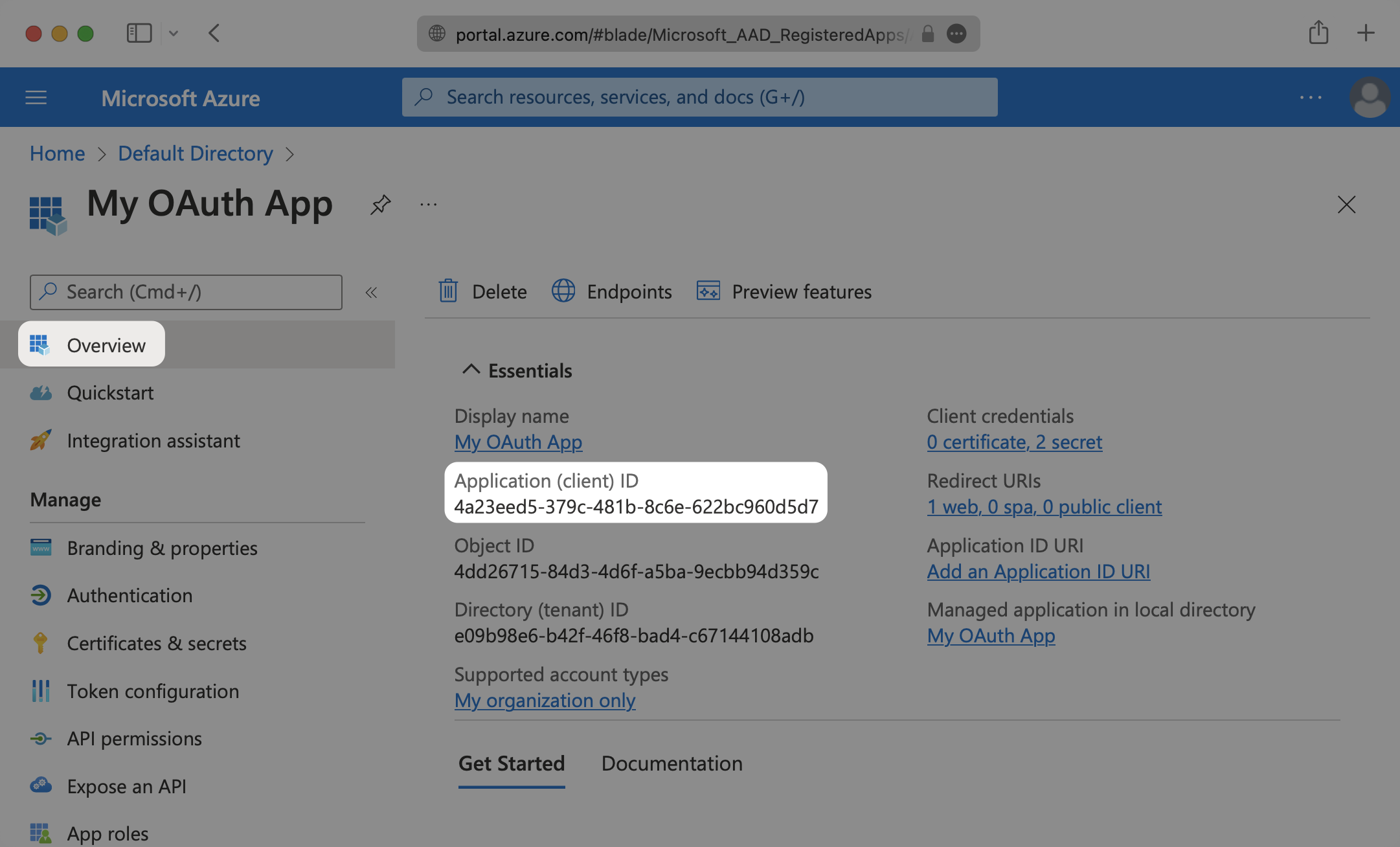
|
|
92
|
+
|
|
93
|
+
In the Microsoft OAuth section of your WorkOS Dashboard Configuration, click “Edit Microsoft OAuth”.
|
|
94
|
+
|
|
95
|
+
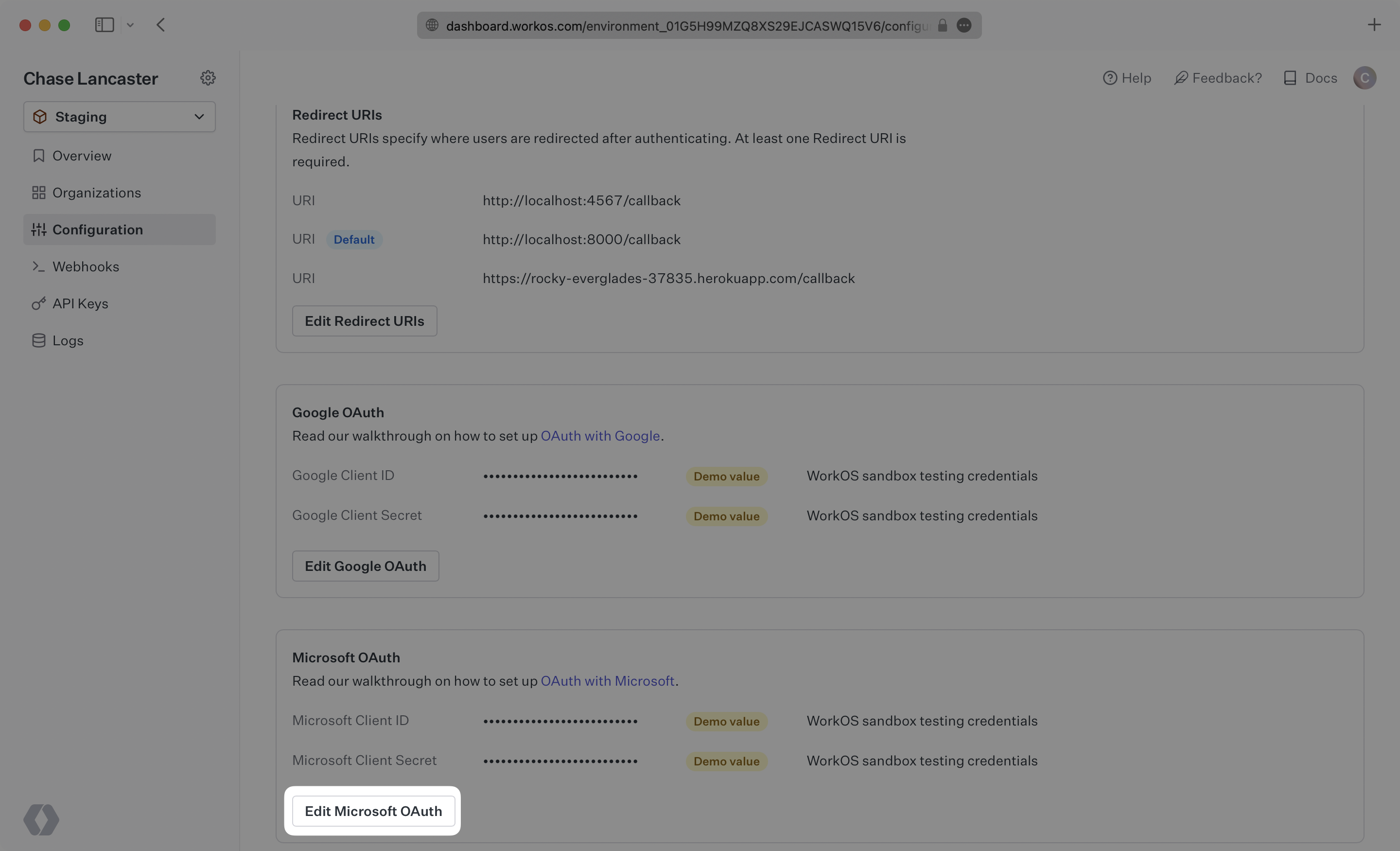
|
|
96
|
+
|
|
97
|
+
Add the Microsoft Client ID and Microsoft Client Secret and click “Save Microsoft OAuth”.
|
|
98
|
+
|
|
99
|
+
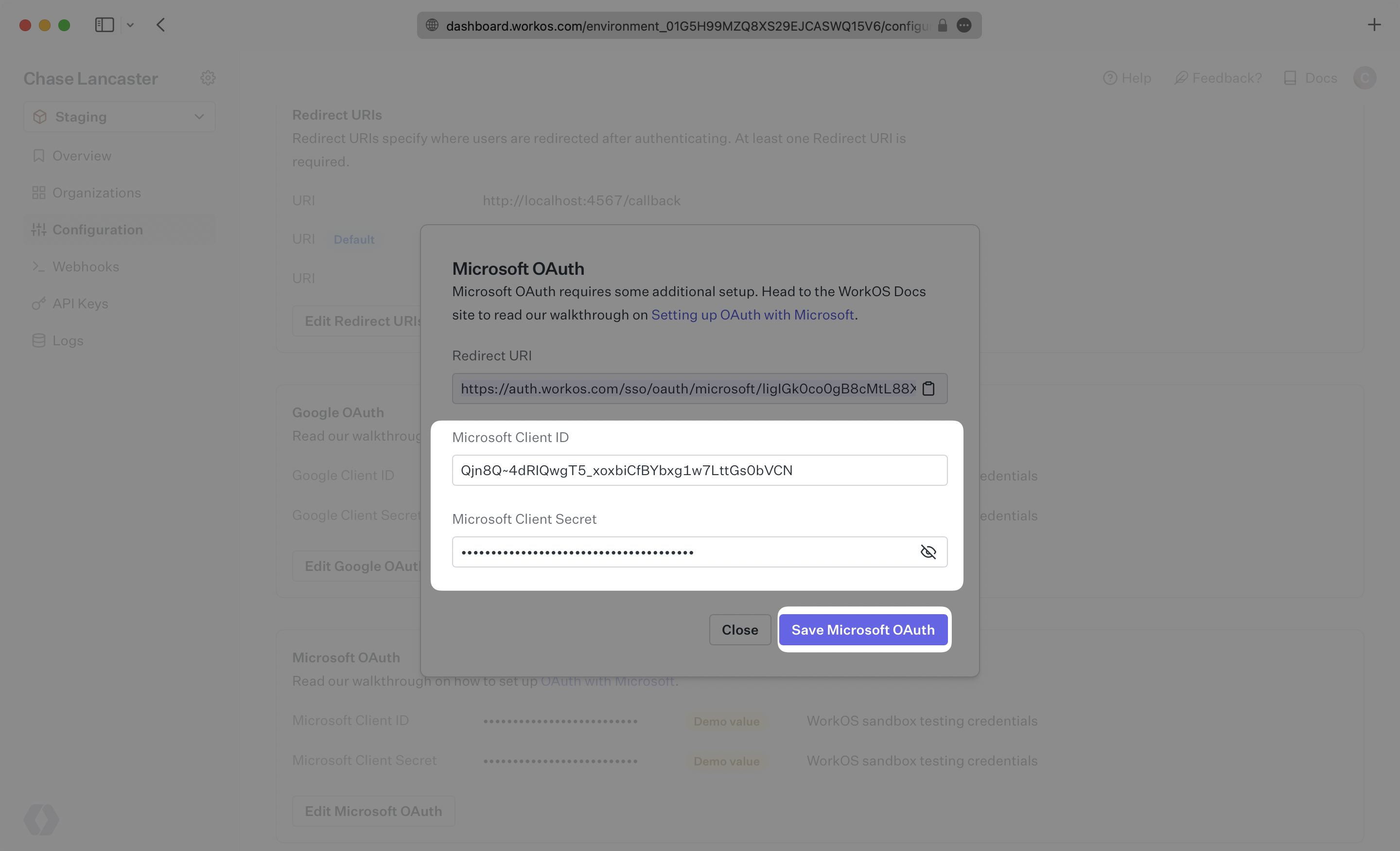
|
|
100
|
+
|
|
101
|
+
After that, you’re now able to authenticate users with Microsoft OAuth. Provide the `provider` parameter when authenticating Microsoft OAuth users, because Microsoft OAuth does not take a user’s domain into account when logging in with a “Sign in with Microsoft” button. You will use the `provider` query parameter in the Get Authorization URL API endpoint to support global Microsoft OAuth for any domain. The `provider` query parameter should be set to `MicrosoftOAuth`.
|
|
@@ -0,0 +1,124 @@
|
|
|
1
|
+
---
|
|
2
|
+
title: miniOrange
|
|
3
|
+
description: "Learn how to configure a connection to\_miniOrange via SAML."
|
|
4
|
+
icon: miniorange
|
|
5
|
+
breadcrumb:
|
|
6
|
+
title: Integrations
|
|
7
|
+
url: /integrations
|
|
8
|
+
originalPath: .tmp-workos-clone/packages/docs/content/integrations/miniorange-saml.mdx
|
|
9
|
+
---
|
|
10
|
+
|
|
11
|
+
## Introduction
|
|
12
|
+
|
|
13
|
+
Each SSO Identity Provider requires specific information to create and configure a new [Connection](/glossary/connection). Often, the information required to create a Connection will differ by Identity Provider.
|
|
14
|
+
|
|
15
|
+
To create a miniOrange SAML Connection, you’ll need an IdP Metadata URL.
|
|
16
|
+
|
|
17
|
+
Start by logging in to your WorkOS dashboard and browse to the “Organizations” tab on the left hand navigation bar.
|
|
18
|
+
|
|
19
|
+
Select the organization you’d like to configure a miniOrange SAML Connection for, and select “Manually Configure Connection” under “Identity Provider”.
|
|
20
|
+
|
|
21
|
+
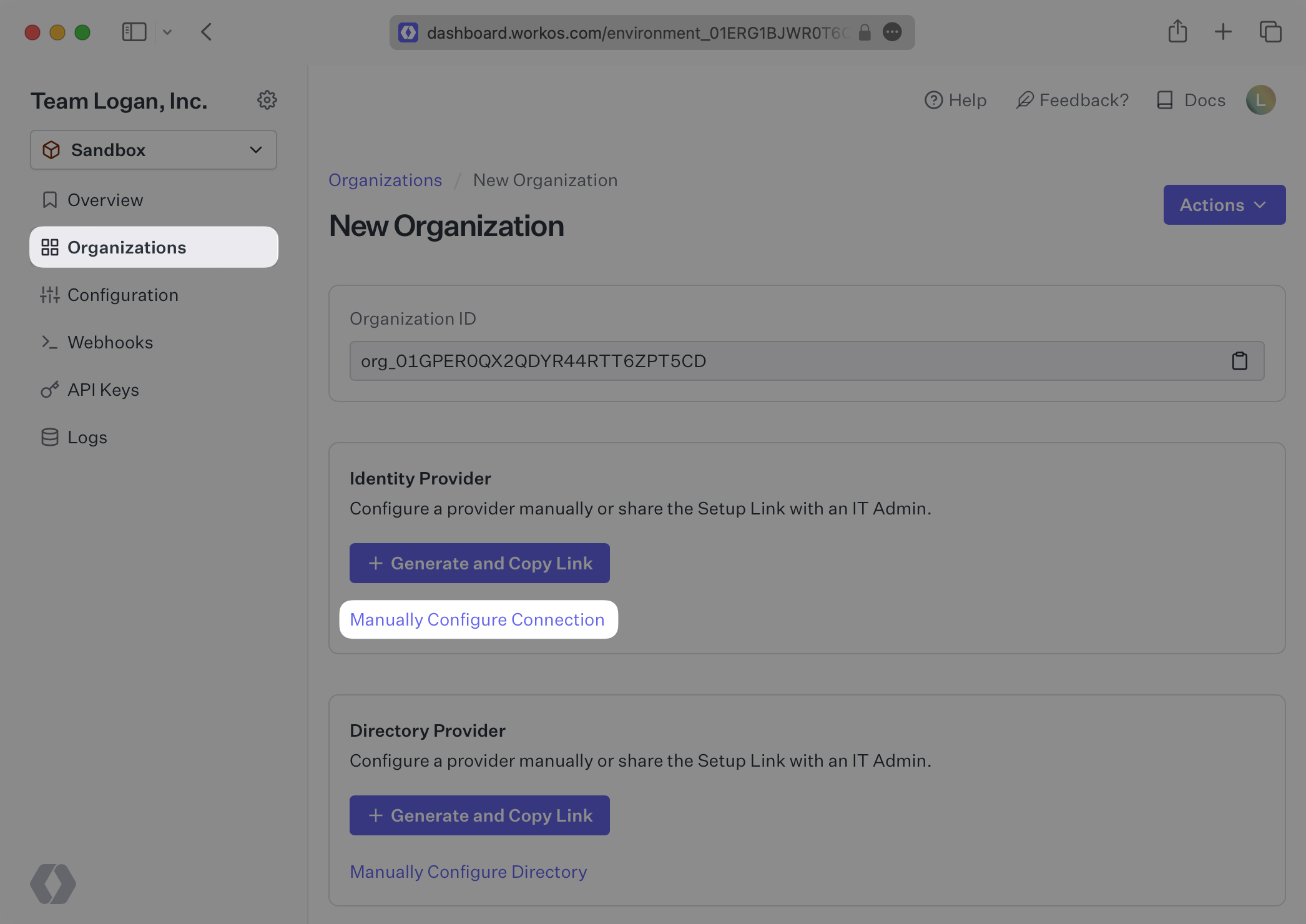
|
|
22
|
+
|
|
23
|
+
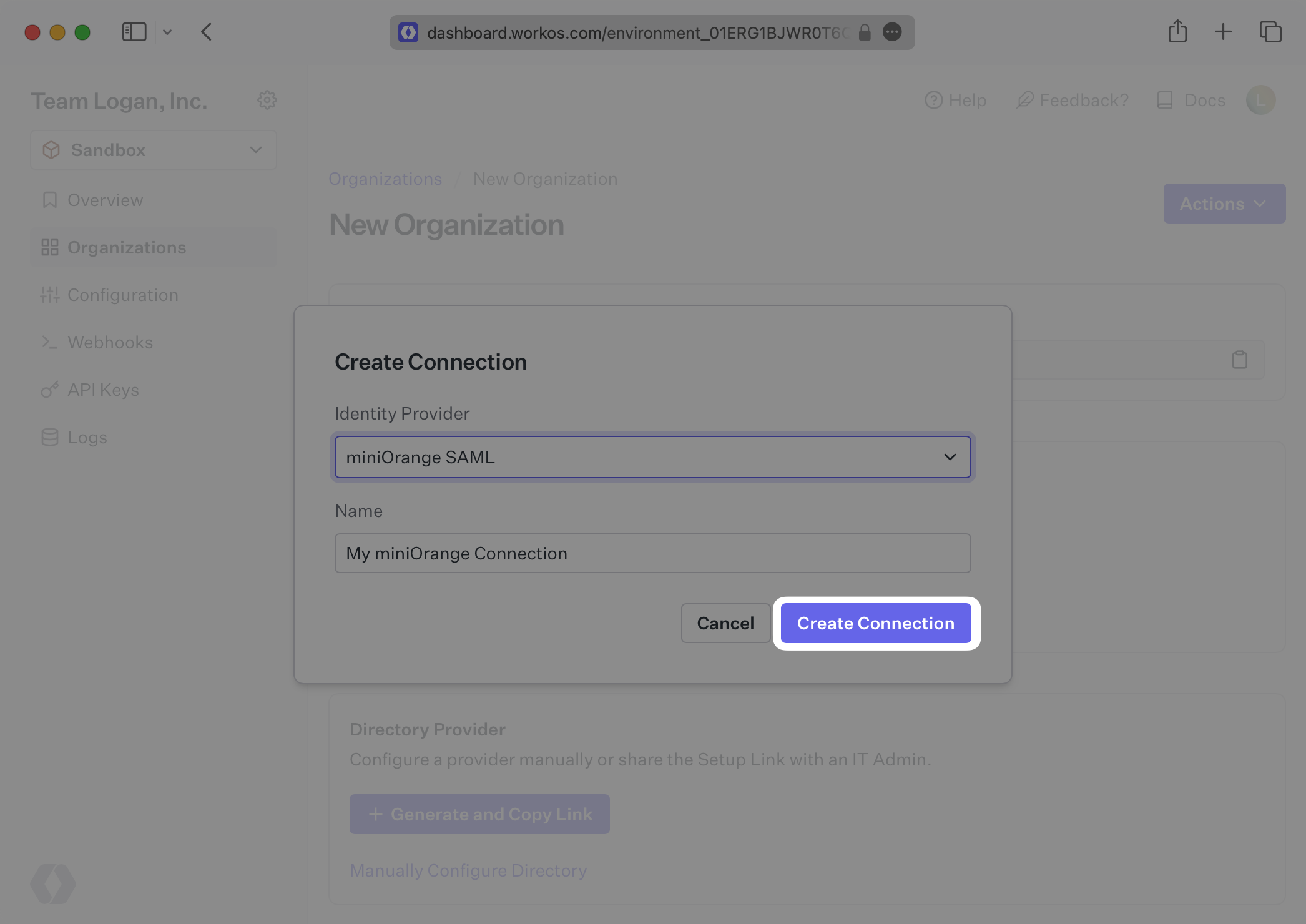
Select “miniOrange SAML” from the Identity Provider dropdown, enter a descriptive name for the connection, and then select the “Create Connection” button.
|
|
24
|
+
|
|
25
|
+
|
|
26
|
+
|
|
27
|
+
---
|
|
28
|
+
|
|
29
|
+
## What WorkOS provides
|
|
30
|
+
|
|
31
|
+
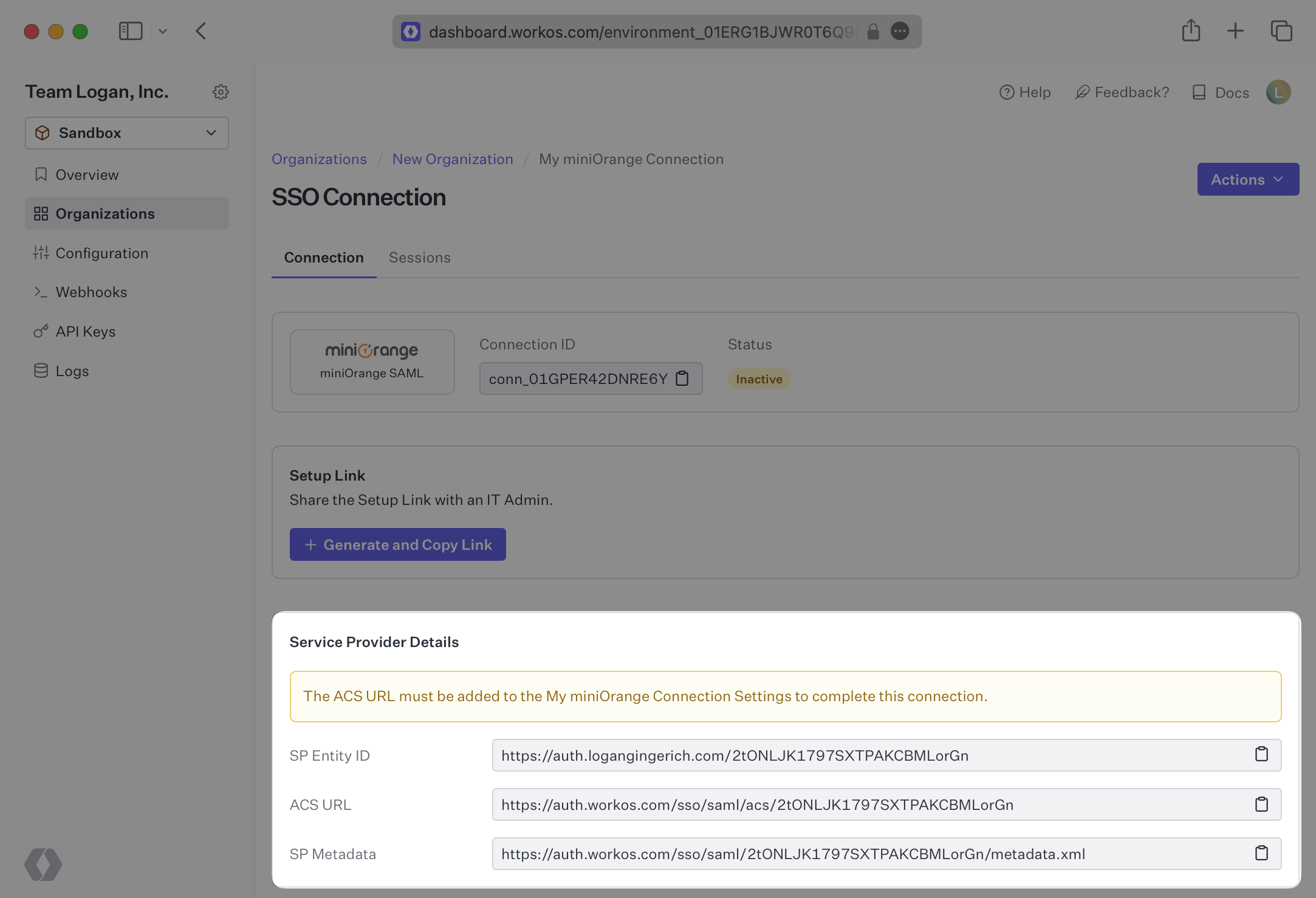
WorkOS provides the [ACS URL](/glossary/acs-url), [SP Entity ID](/glossary/sp-entity-id) and [SP Metadata URL](/glossary/sp-metadata). They’re readily available in your Connection Settings in the [WorkOS Dashboard](https://dashboard.workos.com/). For this configuration, you should only need to use the SP Metadata URL, but other fields are provided should you choose to do a more manual configuration.
|
|
32
|
+
|
|
33
|
+
|
|
34
|
+
|
|
35
|
+
---
|
|
36
|
+
|
|
37
|
+
## What you’ll need
|
|
38
|
+
|
|
39
|
+
Next, provide the IdP Metadata URL. Normally, this information will come from the organization's IT Management team when they set up your application’s SAML 2.0 configuration in their miniOrange admin dashboard. But, should that not be the case during your setup, the next steps will show you how to obtain it.
|
|
40
|
+
|
|
41
|
+
---
|
|
42
|
+
|
|
43
|
+
## (1) Select or create your application
|
|
44
|
+
|
|
45
|
+
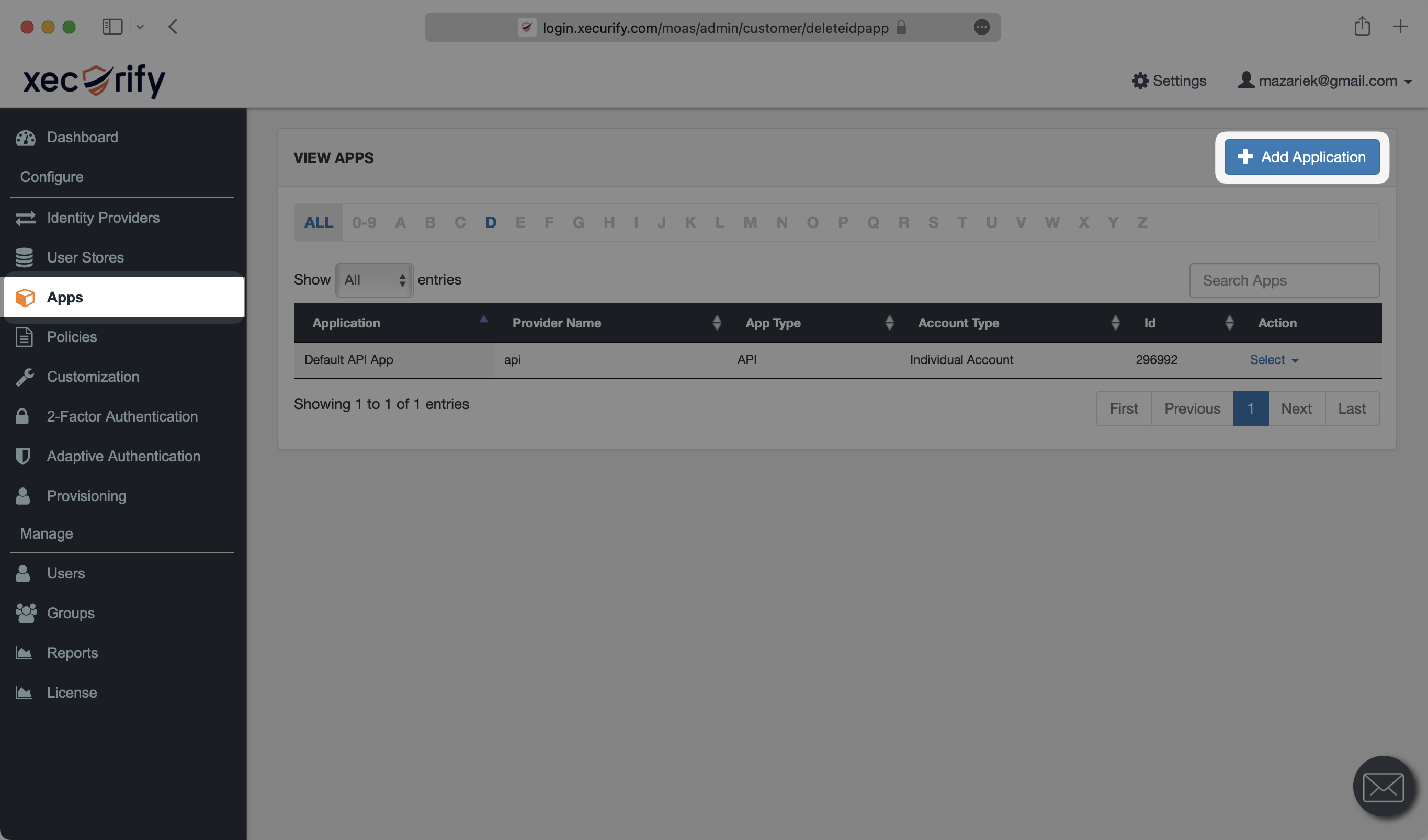
Log in to [miniOrange](https://login.xecurify.com/moas/login), go to the admin dashboard and select “Apps” on the left side navigation. If your application is already created, select it from the list of applications and move to Step 2. Otherwise, select “Add Application”.
|
|
46
|
+
|
|
47
|
+
|
|
48
|
+
|
|
49
|
+
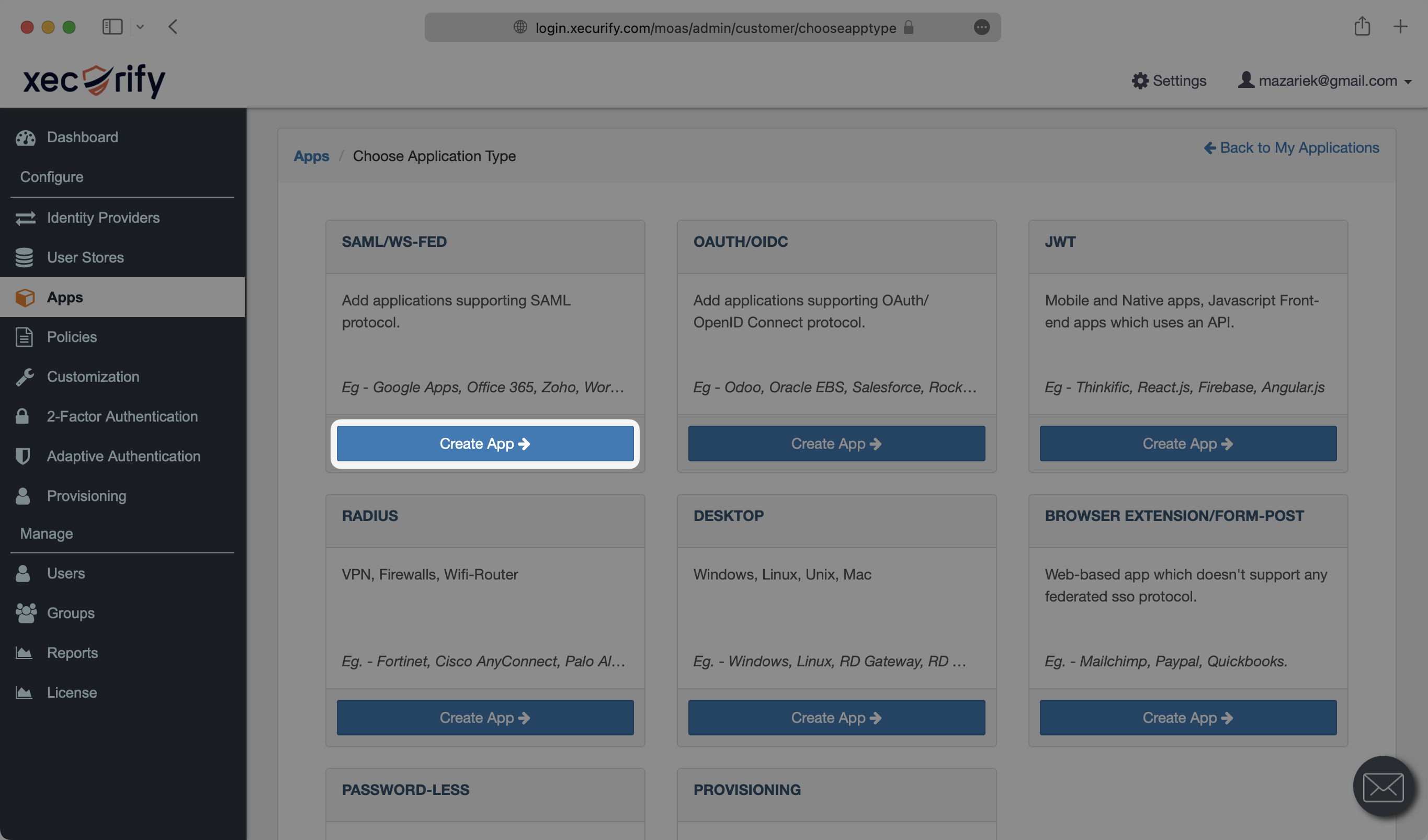
Under “SAML/WS-FED”, select “Create App”.
|
|
50
|
+
|
|
51
|
+
|
|
52
|
+
|
|
53
|
+
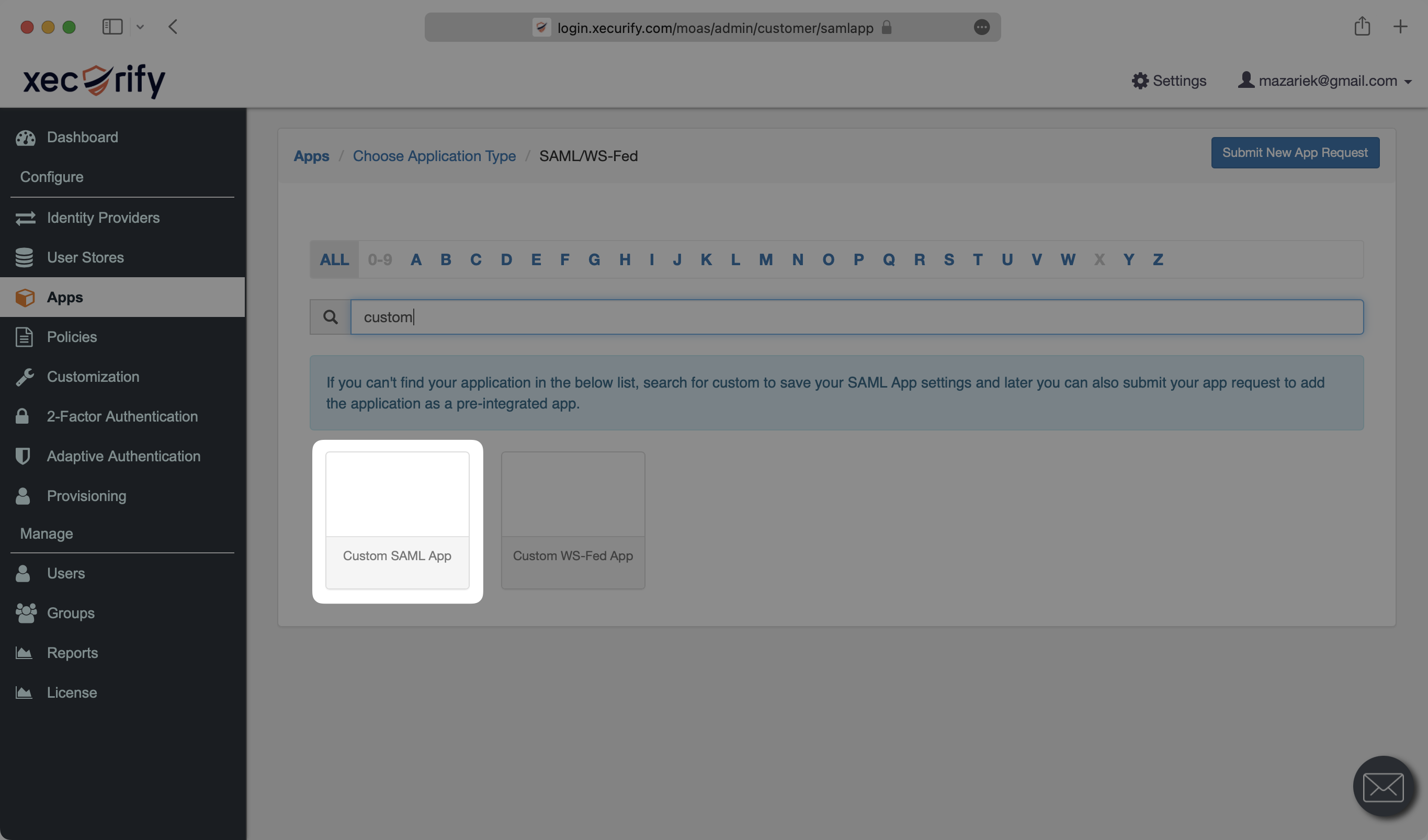
Search for “custom” in the search box and select “Custom SAML App”.
|
|
54
|
+
|
|
55
|
+
|
|
56
|
+
|
|
57
|
+
---
|
|
58
|
+
|
|
59
|
+
## (2) Initial SAML Application Setup
|
|
60
|
+
|
|
61
|
+
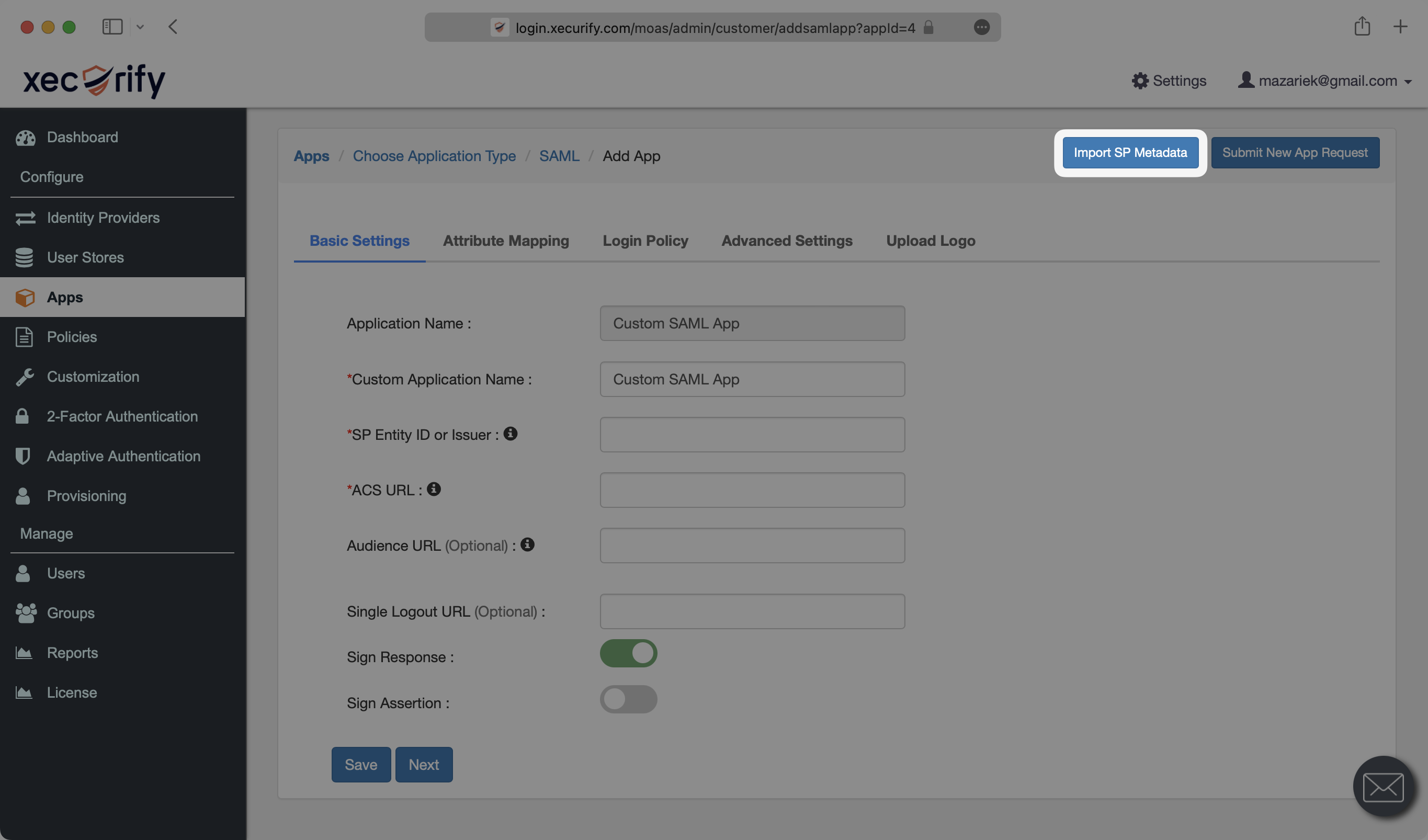
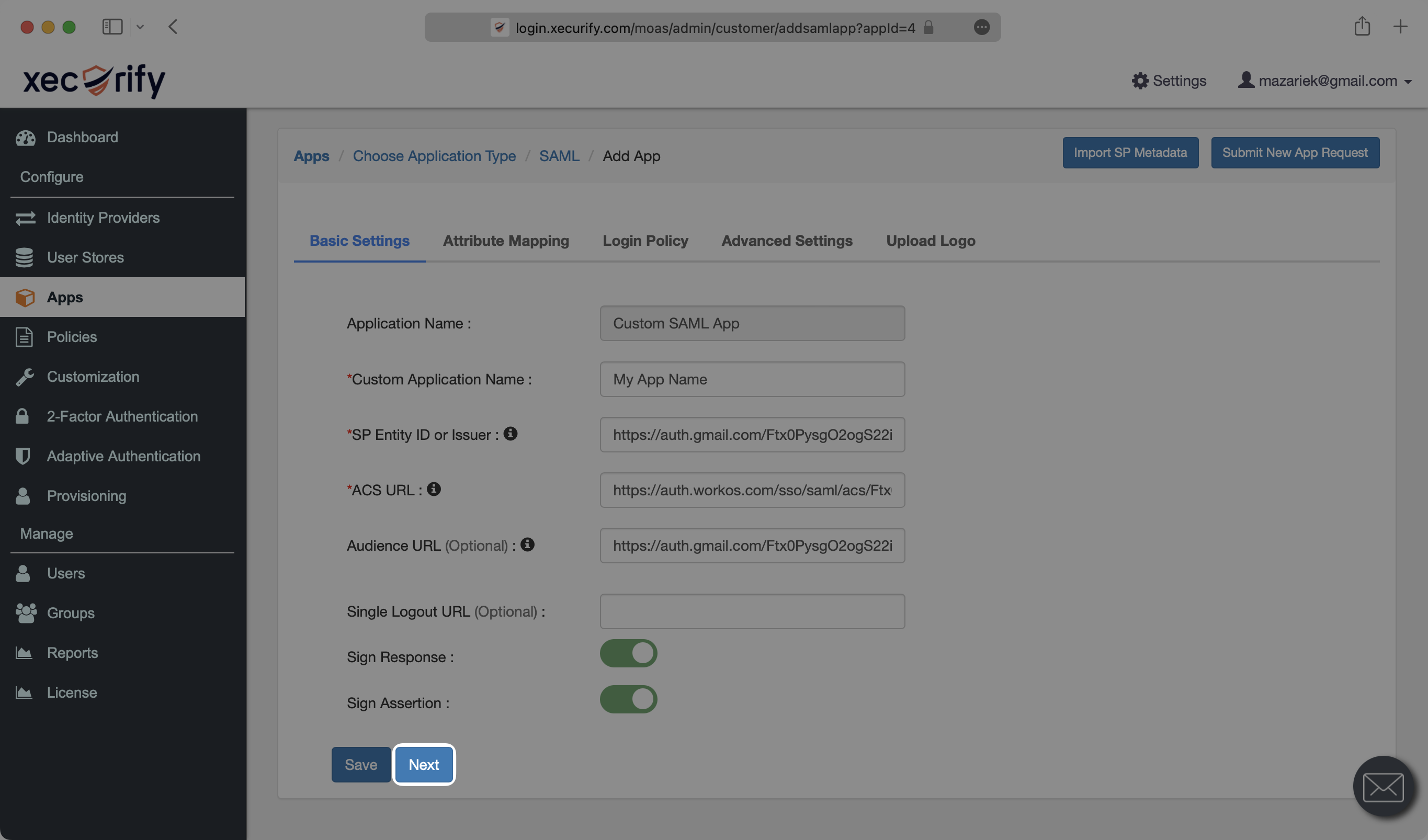
Under the “Basic Settings” tab of the SAML app, select “Import SP Metadata”.
|
|
62
|
+
|
|
63
|
+
|
|
64
|
+
|
|
65
|
+
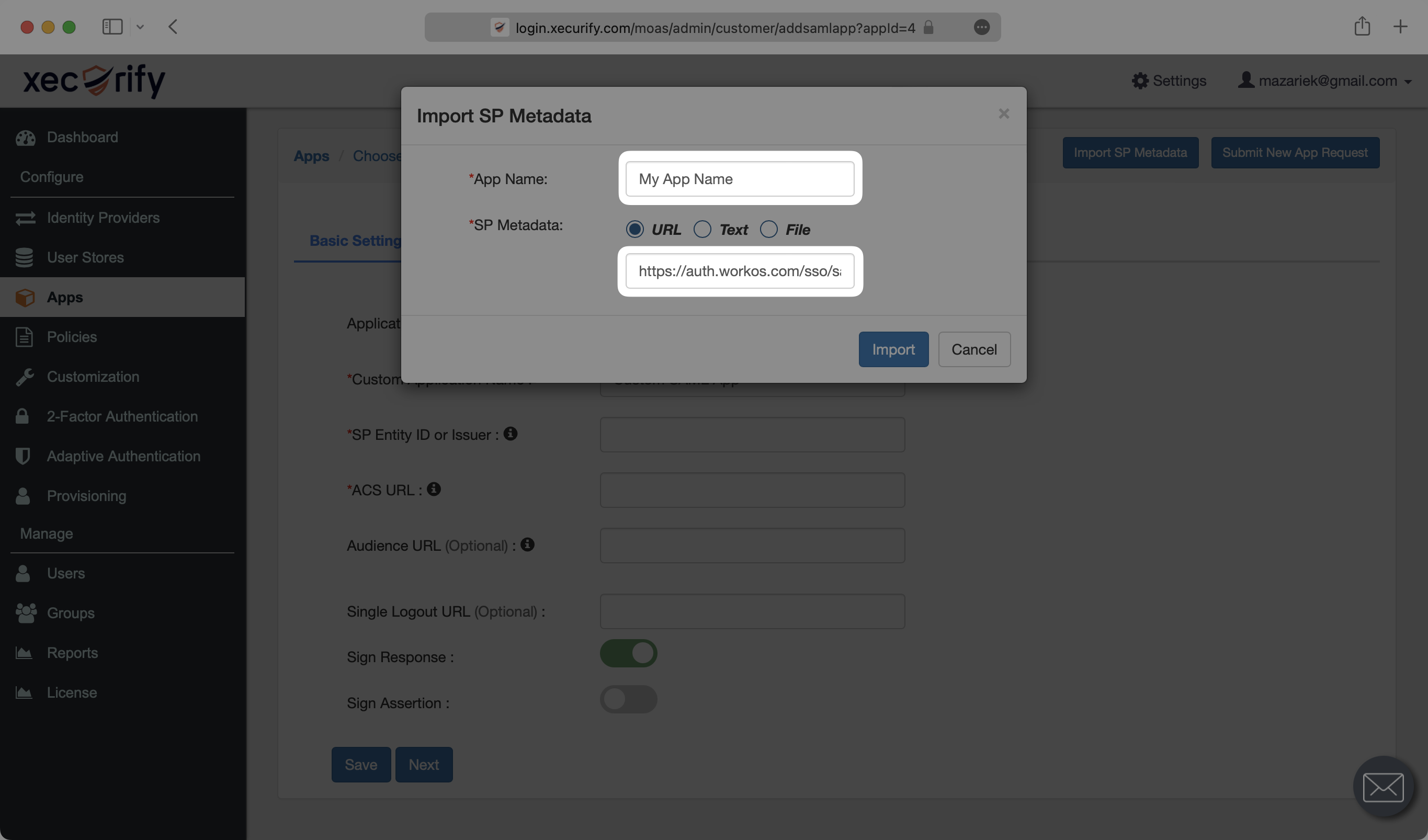
Give the SAML app a descriptive name under “App Name”. Under “SP Metadata”, select “URL” and input the SP Metadata URL from your SSO Connection settings in the WorkOS Dashboard. Then, hit “Import”.
|
|
66
|
+
|
|
67
|
+
|
|
68
|
+
|
|
69
|
+
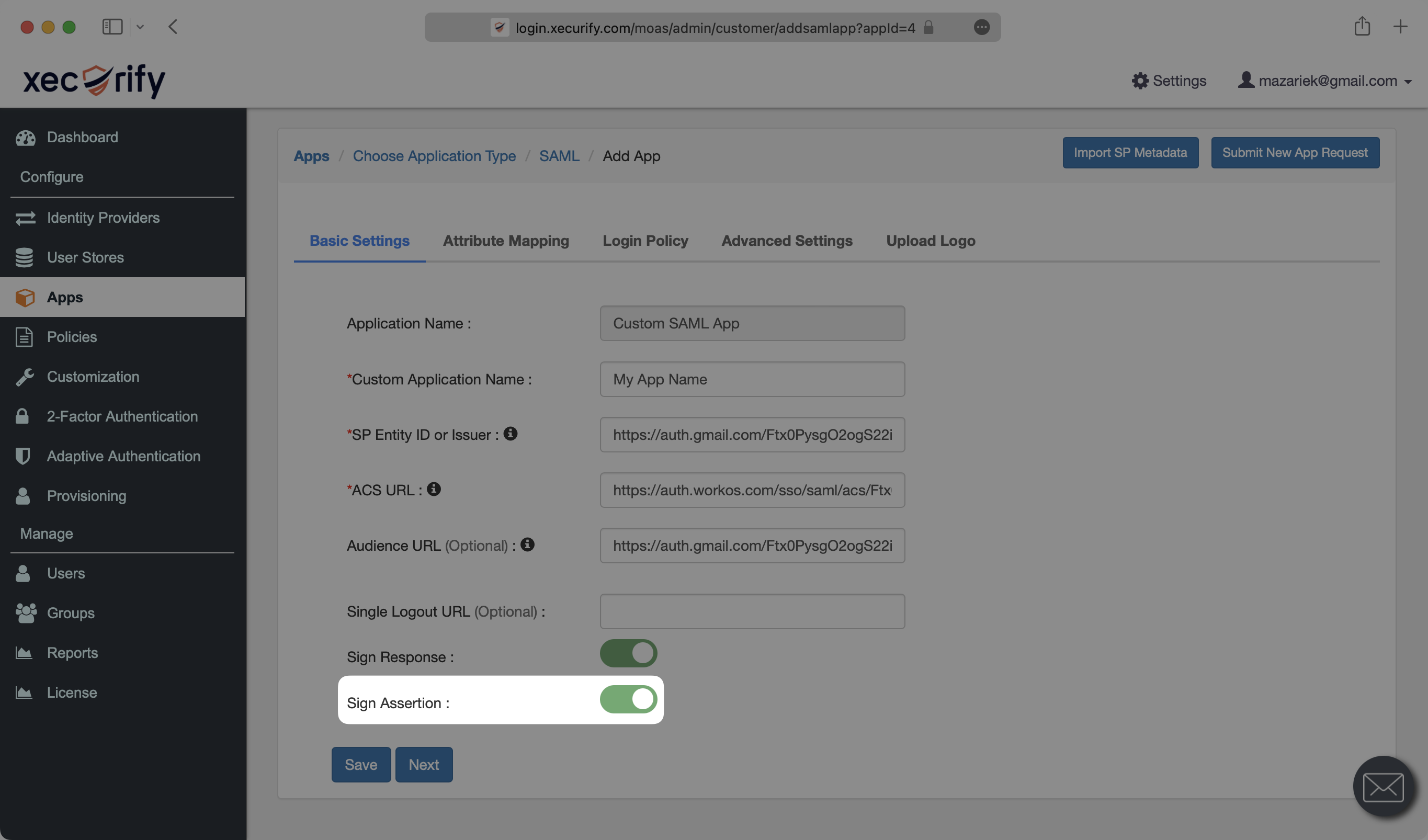
Make sure that you have the “Sign Assertion” field toggled on.
|
|
70
|
+
|
|
71
|
+
|
|
72
|
+
|
|
73
|
+
Select “Next”.
|
|
74
|
+
|
|
75
|
+
|
|
76
|
+
|
|
77
|
+
---
|
|
78
|
+
|
|
79
|
+
## (3) Configure SAML Application
|
|
80
|
+
|
|
81
|
+
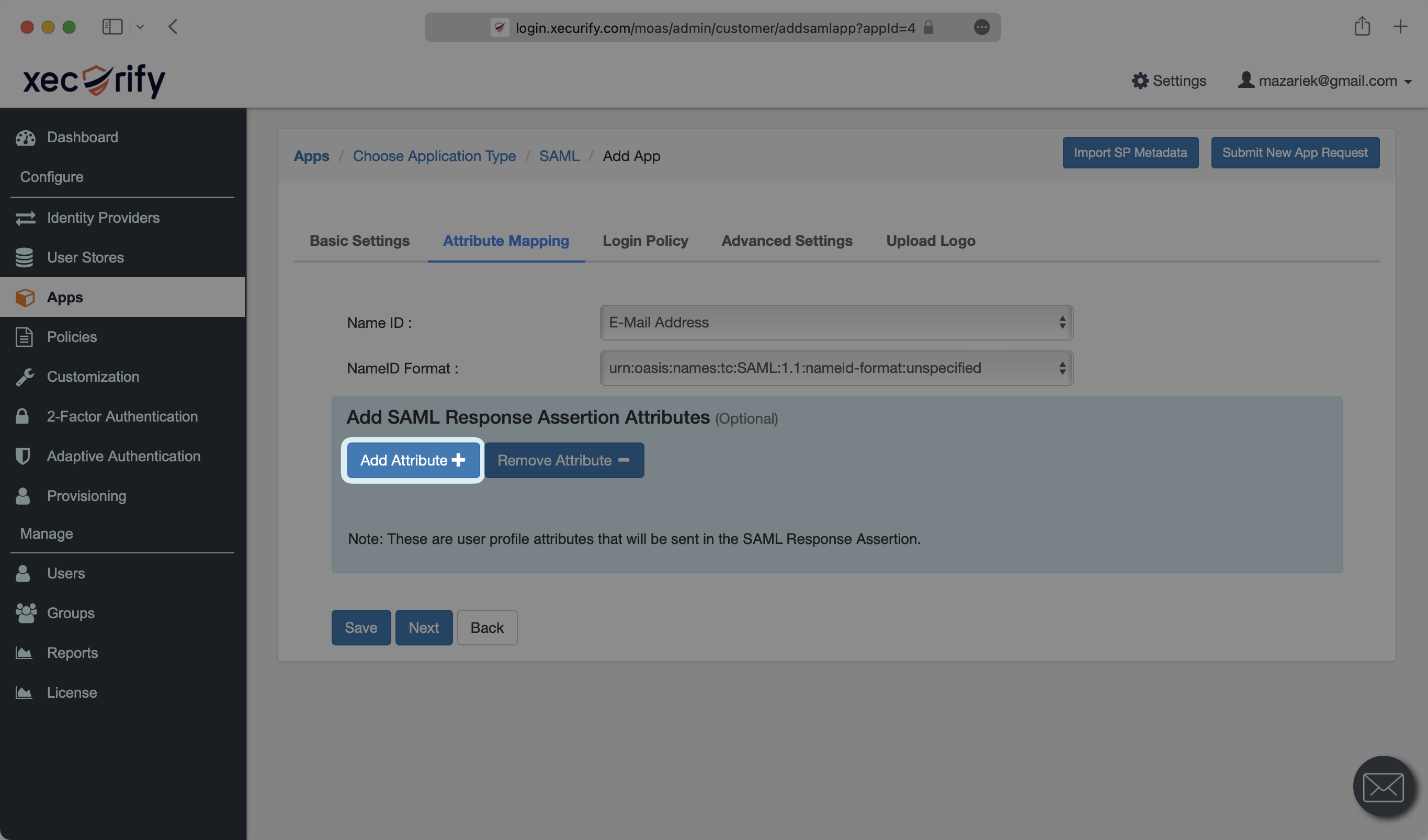
Under the “Attribute Mapping” section of the SAML app, select “Add Attribute”.
|
|
82
|
+
|
|
83
|
+
|
|
84
|
+
|
|
85
|
+
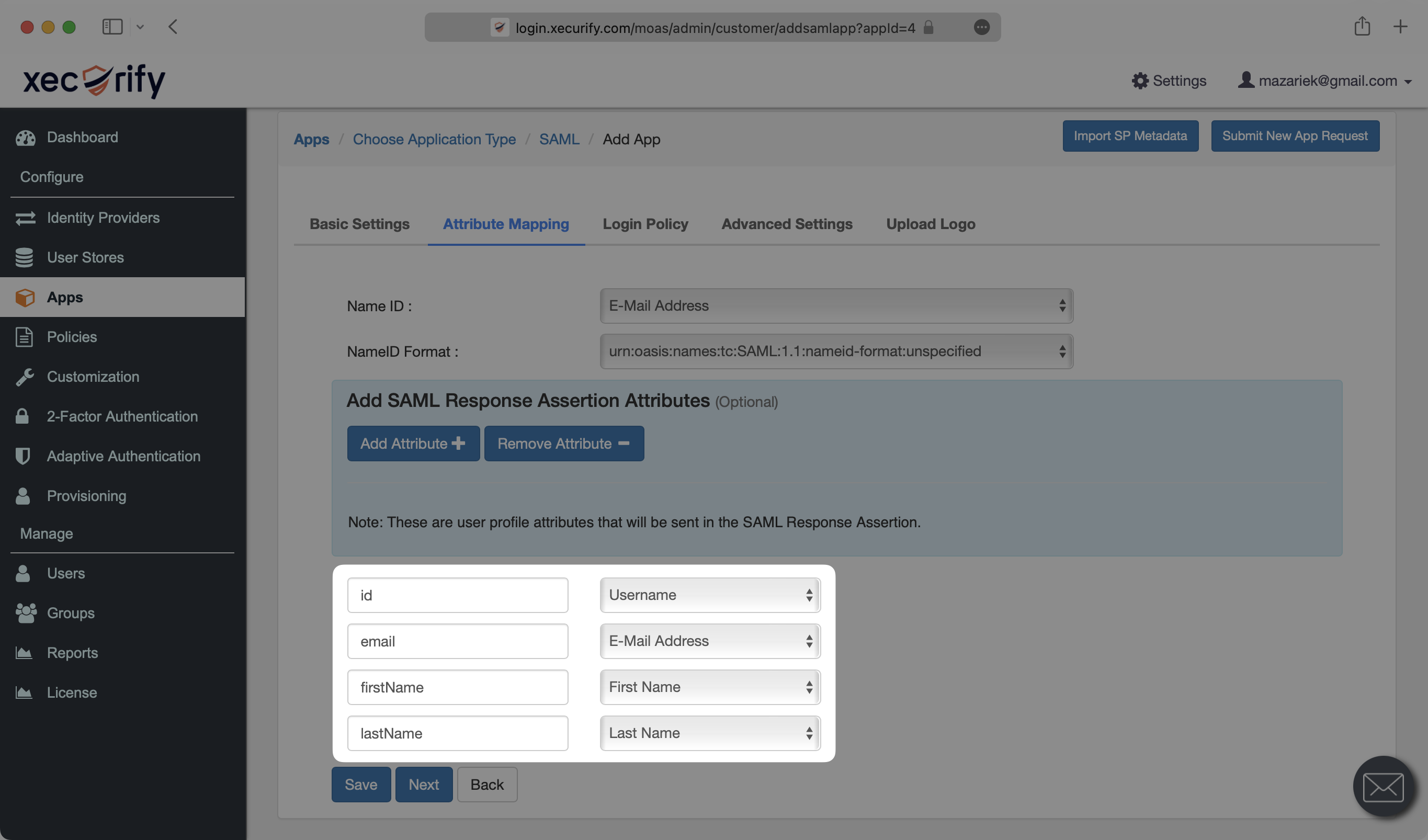
Map the following four attributes as shown below, and the select “Save”.
|
|
86
|
+
|
|
87
|
+
- `id` → `Username`
|
|
88
|
+
- `email` → `E-Mail Address`
|
|
89
|
+
- `firstName` → `First Name`
|
|
90
|
+
- `lastName` → `Last Name`
|
|
91
|
+
|
|
92
|
+
|
|
93
|
+
|
|
94
|
+
### Role Assignment (optional)
|
|
95
|
+
|
|
96
|
+
With [identity provider role assignment](/sso/identity-provider-role-assignment), users can receive roles within your application based on their group memberships. To return this information in the attribute statement, follow the guidance below.
|
|
97
|
+
|
|
98
|
+
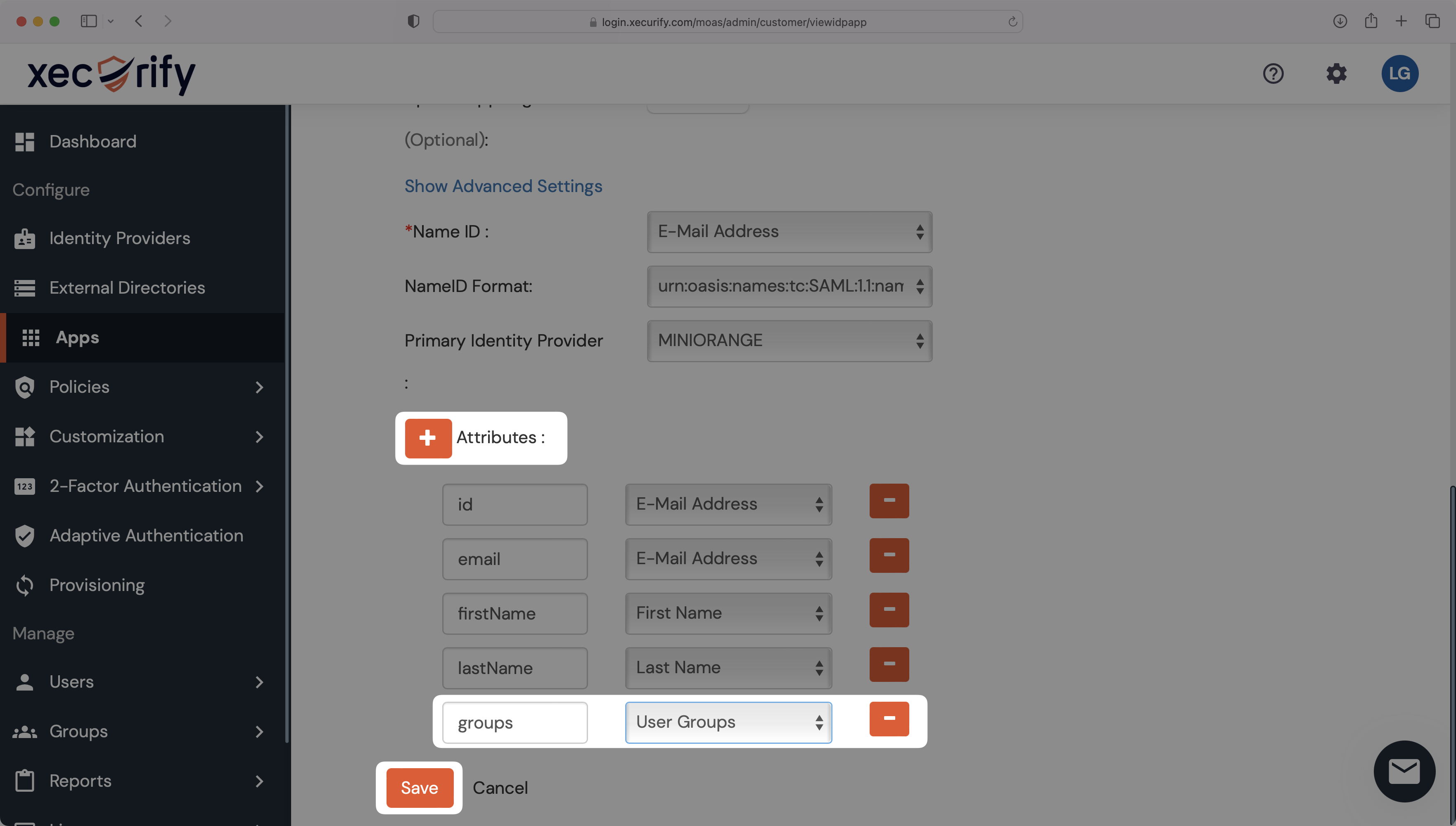
On your SAML app's Settings page, scroll down to "Attributes" and add a new attribute. Set the attribute's name to `groups` and map it to the "User Groups" field. Click "Save".
|
|
99
|
+
|
|
100
|
+
|
|
101
|
+
|
|
102
|
+
> Finish role assignment set-up by navigating to the SSO connection page in the _Organization_ section of the [WorkOS Dashboard](https://dashboard.workos.com/). Create SSO groups by referencing the group IdP ID. Then, assign roles to these SSO groups so group members are automatically granted roles within your application.
|
|
103
|
+
|
|
104
|
+
---
|
|
105
|
+
|
|
106
|
+
## (4) Upload Metadata URL
|
|
107
|
+
|
|
108
|
+
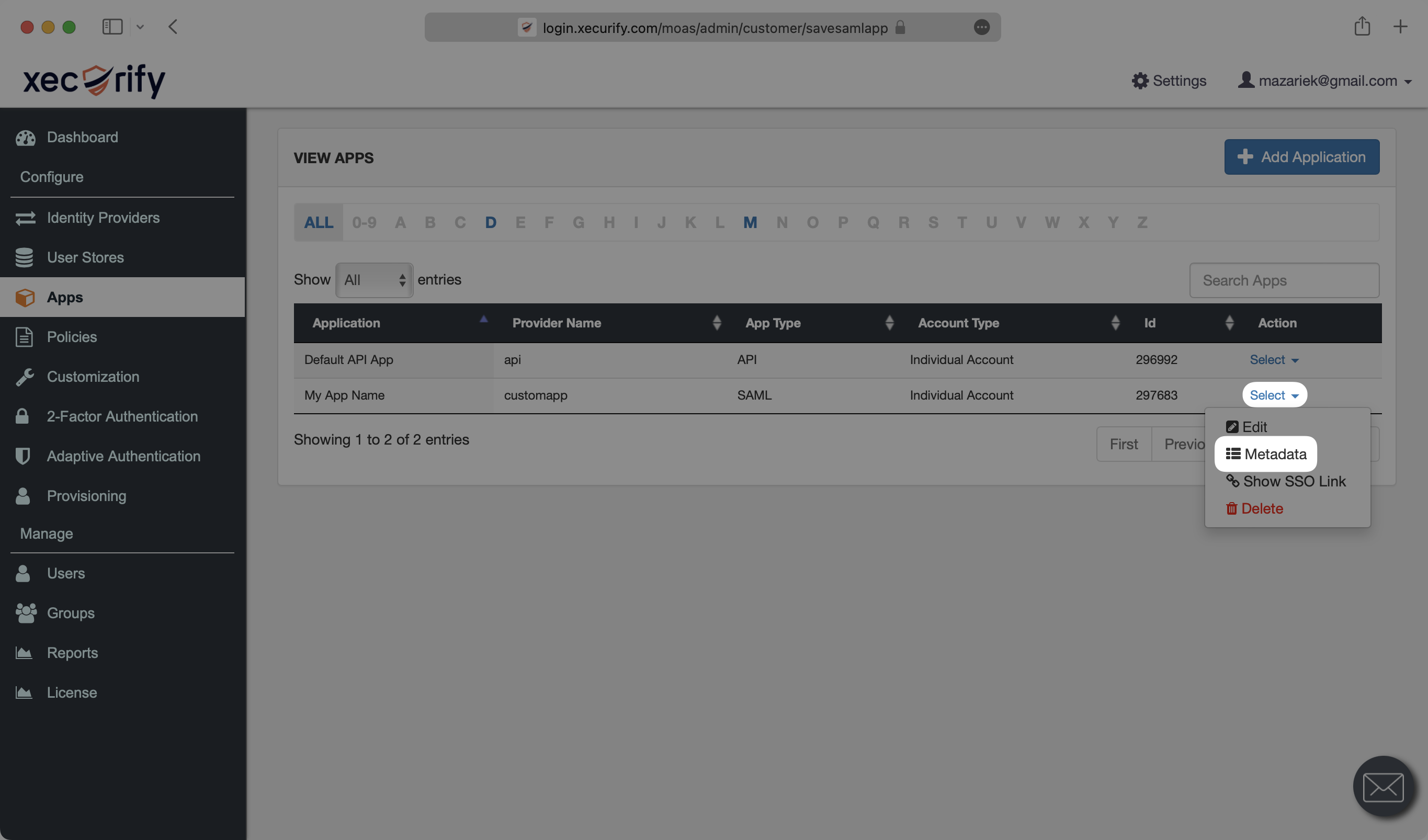
Back on the “Apps” tab of the miniOrange Dashboard, click “Select” next to the app you’ve created. From the dropdown, select “Metadata”.
|
|
109
|
+
|
|
110
|
+
|
|
111
|
+
|
|
112
|
+
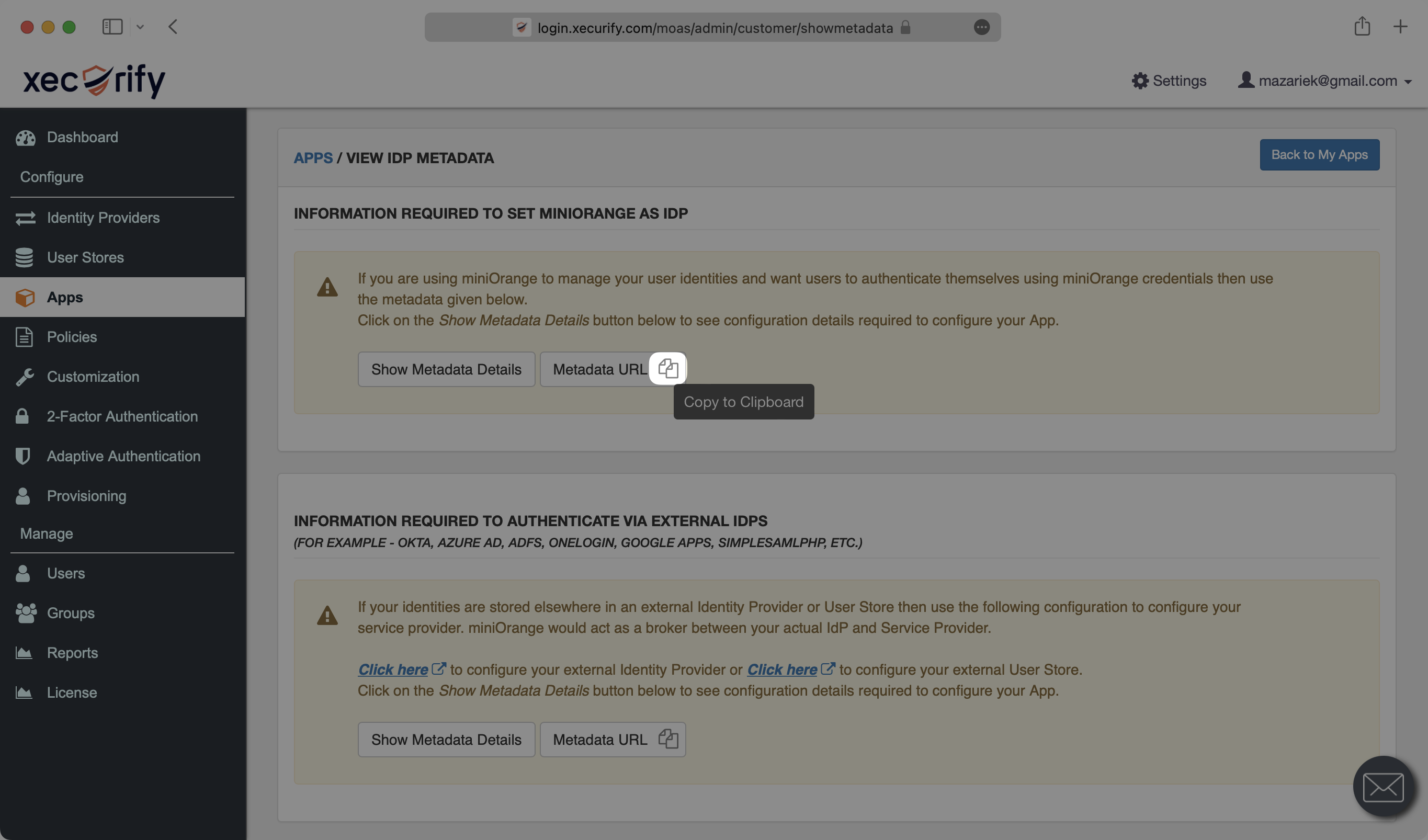
Under the “Information required to set miniOrange as IdP” section, click the icon next to “Metadata URL” to copy it to your clipboard.
|
|
113
|
+
|
|
114
|
+
|
|
115
|
+
|
|
116
|
+
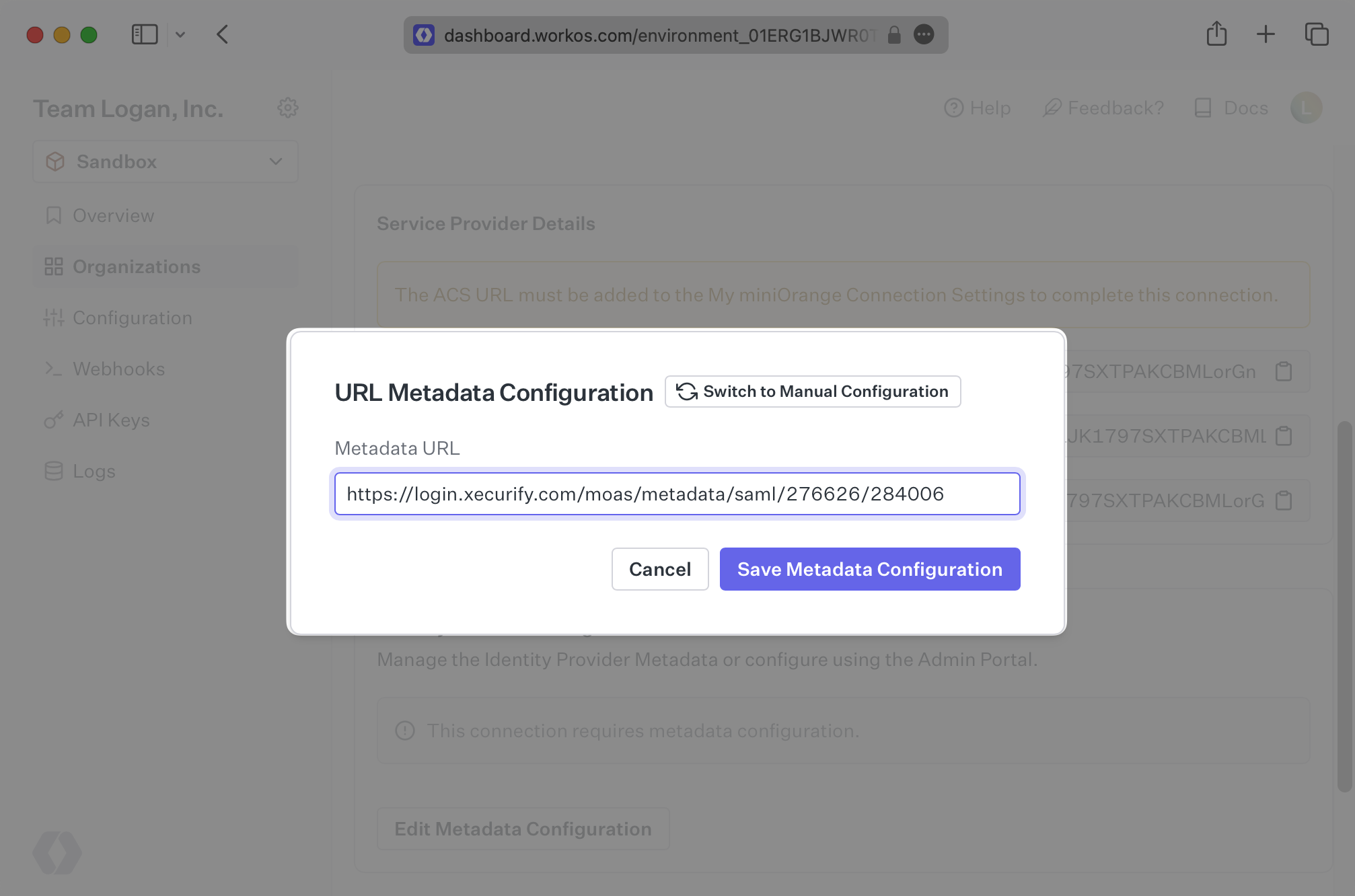
In the Connection settings in the WorkOS Dashboard, click “Edit Metadata Configuration”.
|
|
117
|
+
|
|
118
|
+

|
|
119
|
+
|
|
120
|
+
Paste the Metadata URL from miniOrange into the “Metadata URL” field and select “Save Metadata Configuration”.
|
|
121
|
+
|
|
122
|
+
|
|
123
|
+
|
|
124
|
+
Your Connection will then be linked and good to go!
|
|
@@ -0,0 +1,75 @@
|
|
|
1
|
+
---
|
|
2
|
+
title: NetIQ
|
|
3
|
+
description: "Learn how to configure a connection to\_NetIQ via SAML."
|
|
4
|
+
icon: net-iq
|
|
5
|
+
breadcrumb:
|
|
6
|
+
title: Integrations
|
|
7
|
+
url: /integrations
|
|
8
|
+
originalPath: .tmp-workos-clone/packages/docs/content/integrations/net-iq-saml.mdx
|
|
9
|
+
---
|
|
10
|
+
|
|
11
|
+
## Introduction
|
|
12
|
+
|
|
13
|
+
Each SSO Identity Provider requires specific information to create and configure a new [Connection](/glossary/connection). Often, the information required to create a Connection will differ by Identity Provider.
|
|
14
|
+
|
|
15
|
+
To create a NetIQ SAML Connection, you’ll need the Identity Provider metadata that is available from the organization's NetIQ instance.
|
|
16
|
+
|
|
17
|
+
Start by logging in to your WorkOS dashboard and browse to the “Organizations” tab on the left hand navigation bar.
|
|
18
|
+
|
|
19
|
+
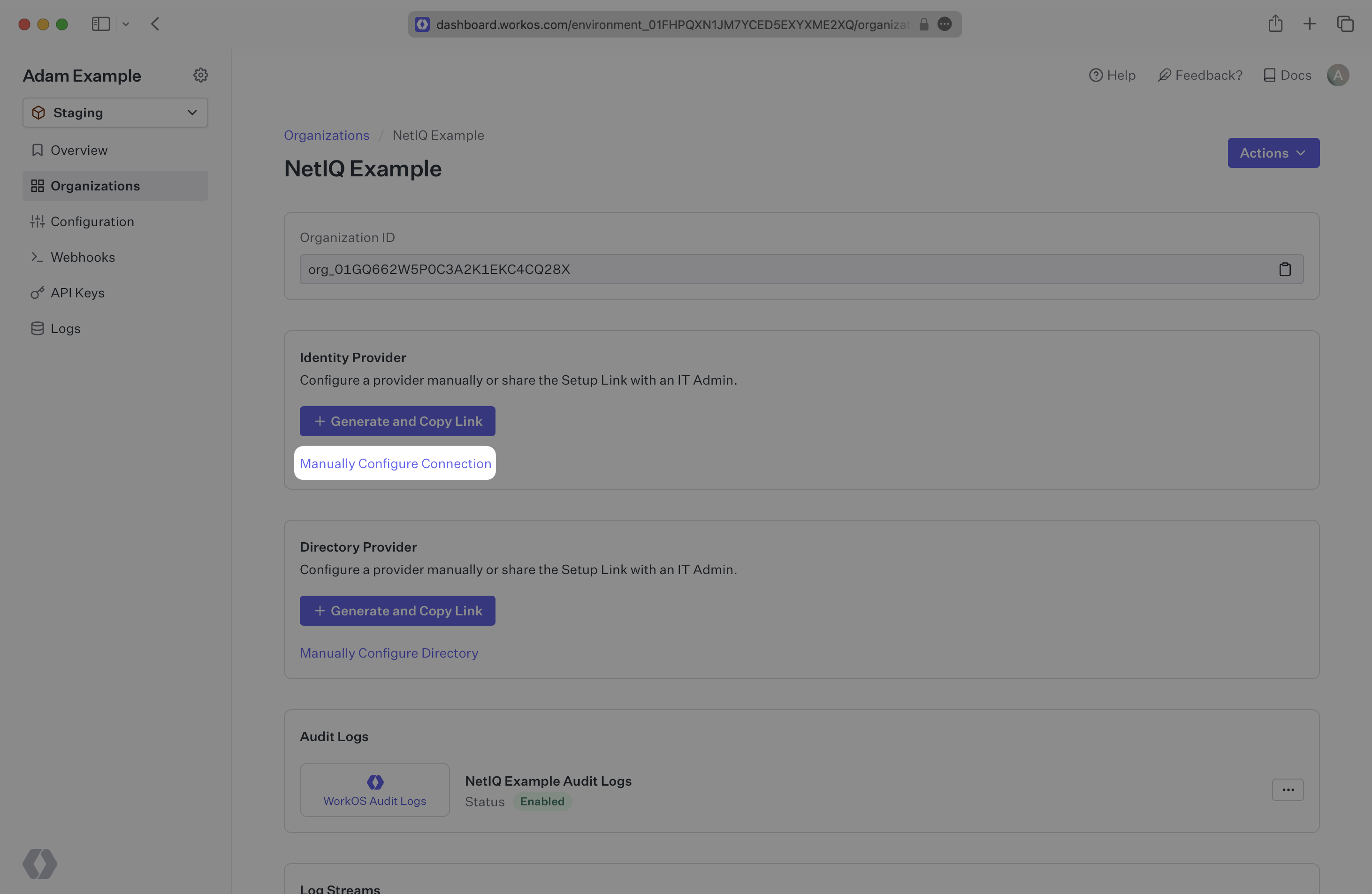
Select the organization you’d like to configure an NetIQ SAML Connection for, and select “Manually Configure Connection” under “Identity Provider”.
|
|
20
|
+
|
|
21
|
+
|
|
22
|
+
|
|
23
|
+
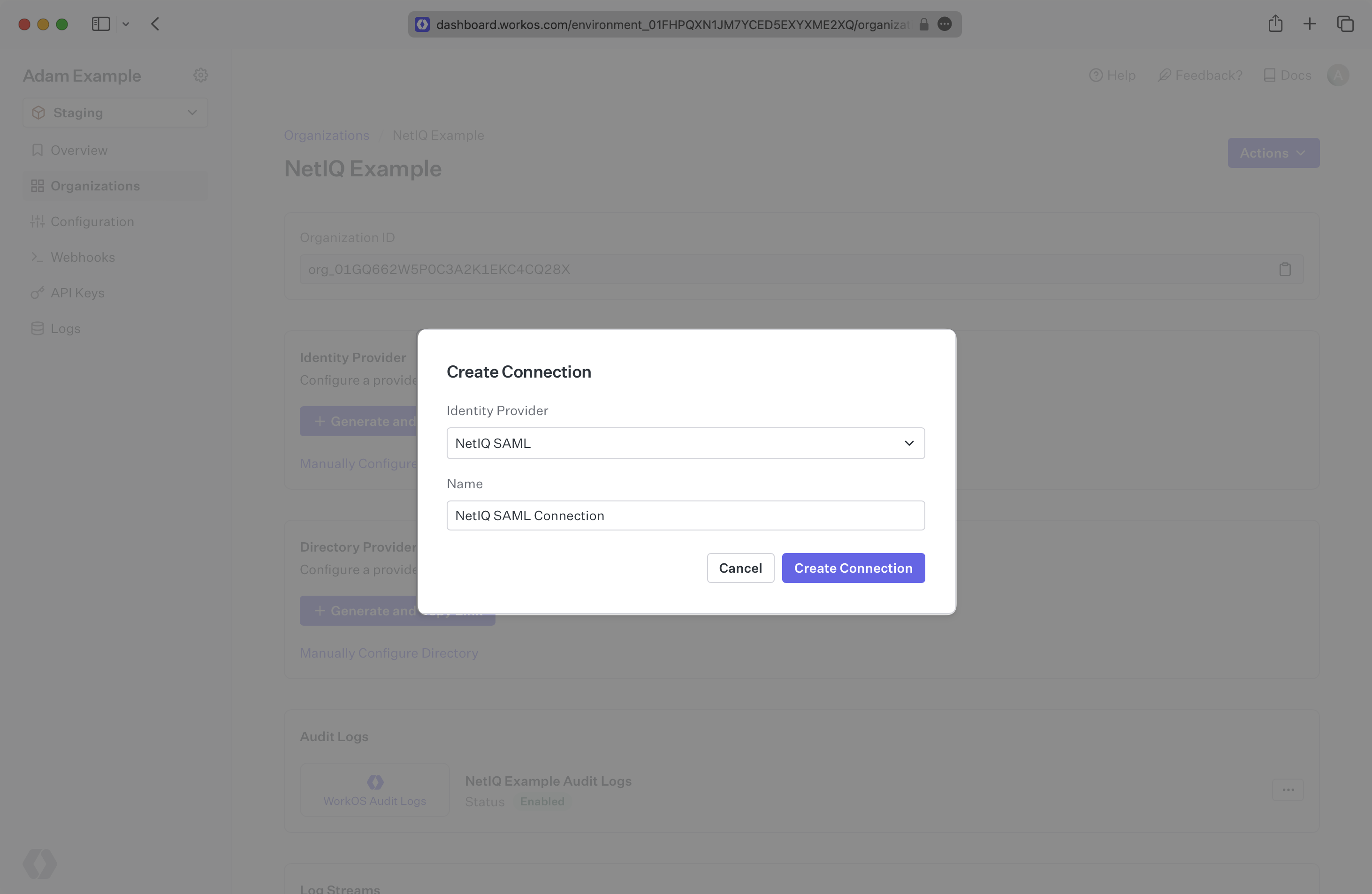
Select "NetIQ SAML” from the Identity Provider dropdown, enter a descriptive name for the connection, and then select the “Create Connection” button.
|
|
24
|
+
|
|
25
|
+
|
|
26
|
+
|
|
27
|
+
---
|
|
28
|
+
|
|
29
|
+
## What WorkOS provides
|
|
30
|
+
|
|
31
|
+
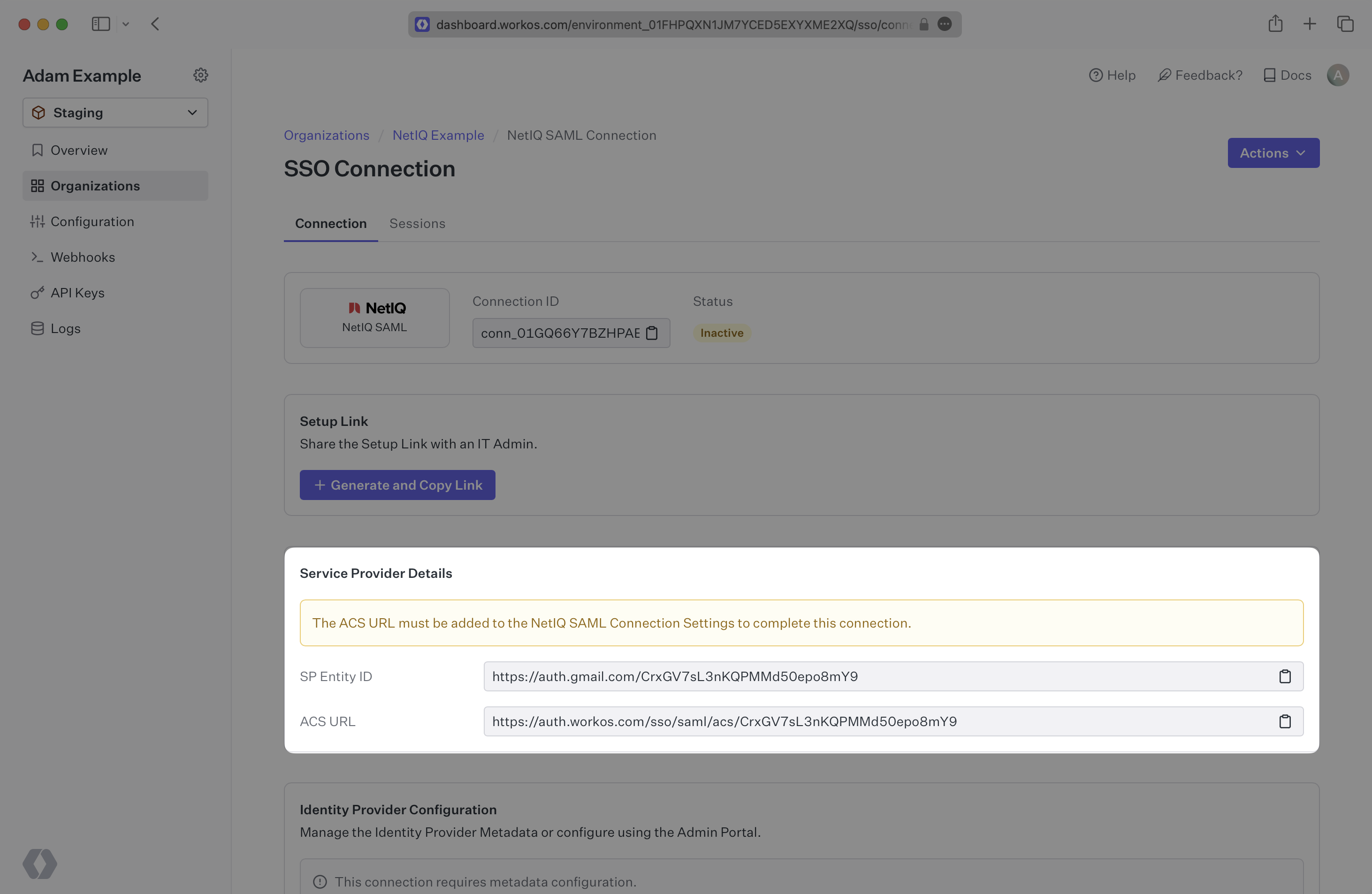
WorkOS provides the [ACS URL](/glossary/acs-url), the [SP Metadata](/glossary/sp-metadata) link and the [SP Entity ID](/glossary/sp-entity-id). They are readily available in your Connection Settings in the [WorkOS Dashboard](https://dashboard.workos.com/).
|
|
32
|
+
|
|
33
|
+
|
|
34
|
+
|
|
35
|
+
The ACS URL is the location an Identity Provider redirects its authentication response to. The SP Metadata link contains a metadata file that the organization can use to set up the SAML integration. The SP Entity ID is a URI used to identify the issuer of a SAML request, response, or assertion.
|
|
36
|
+
|
|
37
|
+
---
|
|
38
|
+
|
|
39
|
+
## What you’ll need
|
|
40
|
+
|
|
41
|
+
In order to integrate you’ll need the [IdP Metadata URL](/glossary/idp-metadata).
|
|
42
|
+
|
|
43
|
+
Normally, this will come from the organization's IT Management team when they set up your application’s SAML 2.0 configuration in their NetIQ instance. But, should that not be the case during your setup, here’s how to obtain it.
|
|
44
|
+
|
|
45
|
+
---
|
|
46
|
+
|
|
47
|
+
## (1) Enter Service Provider Details
|
|
48
|
+
|
|
49
|
+
Copy and paste the “ACS URL” and “SP Entity ID” into the corresponding fields for Service Provider details and configuration. For some setups, you can use the metadata found at the SP Metadata link to configure the SAML connection.
|
|
50
|
+
|
|
51
|
+
---
|
|
52
|
+
|
|
53
|
+
## (2) Obtain Identity Provider Metadata
|
|
54
|
+
|
|
55
|
+
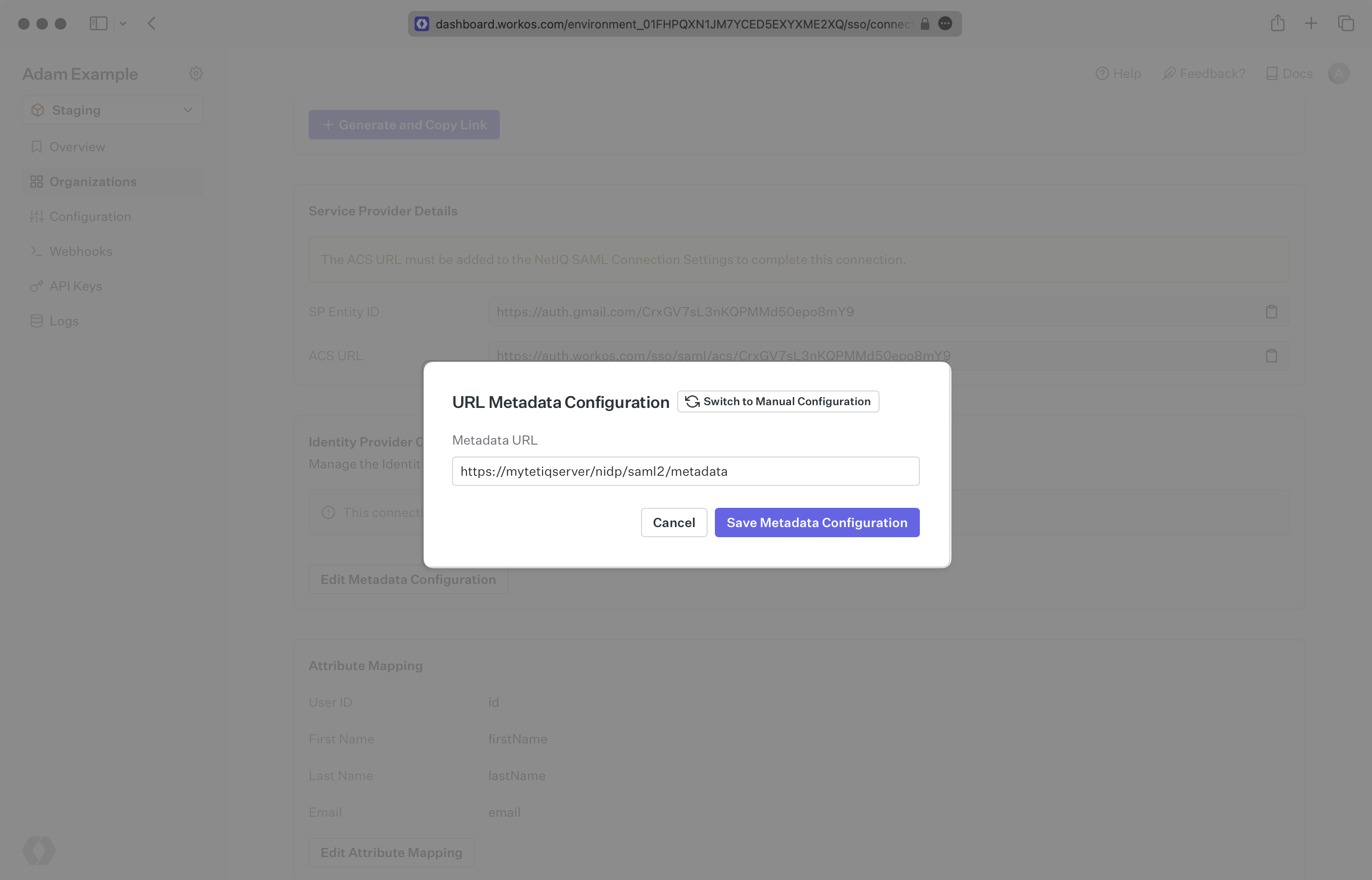
Copy the IdP Metadata URL from your NetIQ SAML settings and upload it to your WorkOS Connection settings. Your Connection will then be linked and good to go!
|
|
56
|
+
|
|
57
|
+
|
|
58
|
+
|
|
59
|
+
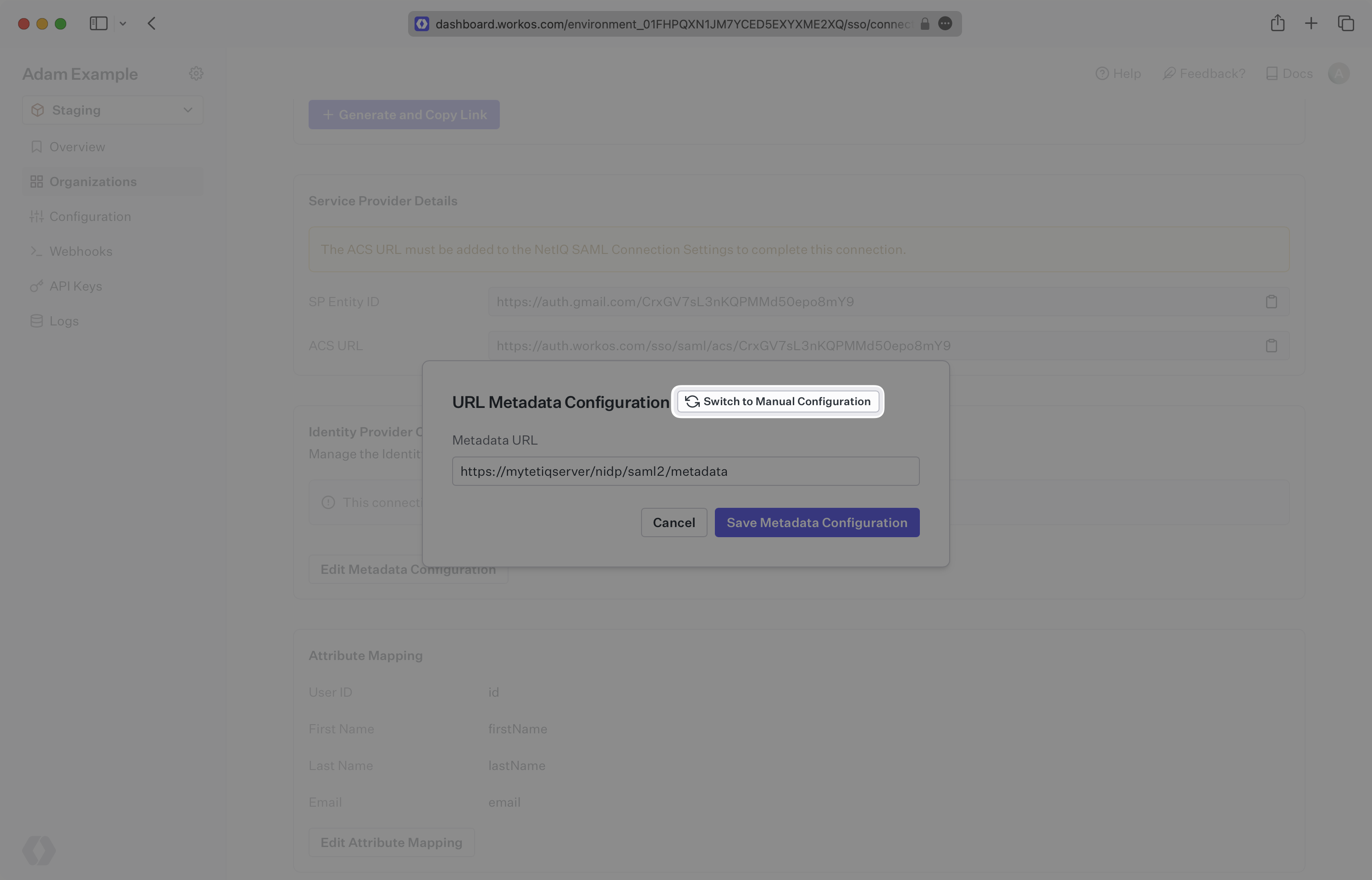
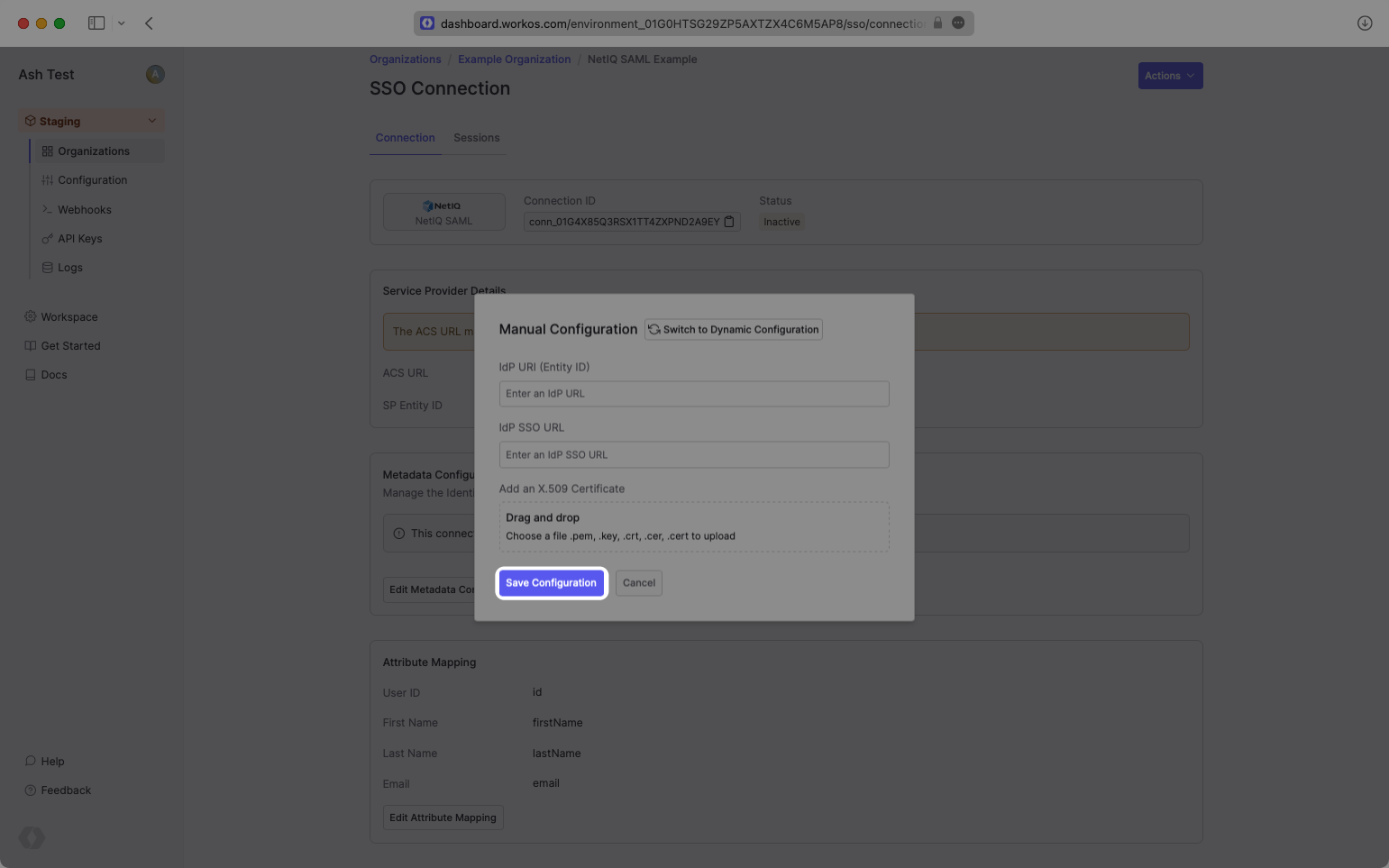
Alternatively, you can manually configure the connection by providing the IdP URI (Entity ID), [IdP SSO URL](/glossary/idp-sso-url) and X.509 Certificate.
|
|
60
|
+
|
|
61
|
+
|
|
62
|
+
|
|
63
|
+
|
|
64
|
+
|
|
65
|
+
---
|
|
66
|
+
|
|
67
|
+
## (3) Configure Attribute Mapping
|
|
68
|
+
|
|
69
|
+
At minimum, the Attribute Statement in the SAML Response should include `id`, `email`, `firstName`, and `lastName` attributes.
|
|
70
|
+
|
|
71
|
+
### Role Assignment (optional)
|
|
72
|
+
|
|
73
|
+
With [identity provider role assignment](/sso/identity-provider-role-assignment), users can receive roles within your application based on their group memberships. To return this information in the attribute statement, map the groups in your identity provider to a SAML attribute named `groups` to return this information in the attribute statement.
|
|
74
|
+
|
|
75
|
+
Once your SAML app is configured to return groups, navigate to the SSO connection page in the _Organization_ section of the [WorkOS Dashboard](https://dashboard.workos.com/). Create SSO groups by referencing the group IdP ID. Then, assign roles to these SSO groups so group members are automatically granted roles within your application.
|