@dropins/mcp 0.1.0
This diff represents the content of publicly available package versions that have been released to one of the supported registries. The information contained in this diff is provided for informational purposes only and reflects changes between package versions as they appear in their respective public registries.
- package/LICENSE.md +127 -0
- package/README.md +314 -0
- package/dist/common/project-reader.d.ts +55 -0
- package/dist/common/project-reader.js +173 -0
- package/dist/common/registry-loader.d.ts +101 -0
- package/dist/common/registry-loader.js +386 -0
- package/dist/common/response-handling.d.ts +12 -0
- package/dist/common/response-handling.js +21 -0
- package/dist/common/sanitize.d.ts +8 -0
- package/dist/common/sanitize.js +45 -0
- package/dist/common/synonyms.d.ts +9 -0
- package/dist/common/synonyms.js +127 -0
- package/dist/common/telemetry.d.ts +14 -0
- package/dist/common/telemetry.js +54 -0
- package/dist/common/types.d.ts +308 -0
- package/dist/common/types.js +1 -0
- package/dist/common/version.d.ts +2 -0
- package/dist/common/version.js +14 -0
- package/dist/index.d.ts +2 -0
- package/dist/index.js +136 -0
- package/dist/operations/analyze-project.d.ts +13 -0
- package/dist/operations/analyze-project.js +125 -0
- package/dist/operations/check-block-health.d.ts +19 -0
- package/dist/operations/check-block-health.js +1149 -0
- package/dist/operations/check-config.d.ts +13 -0
- package/dist/operations/check-config.js +228 -0
- package/dist/operations/explain-event-flow.d.ts +16 -0
- package/dist/operations/explain-event-flow.js +218 -0
- package/dist/operations/get-upgrade-diff.d.ts +13 -0
- package/dist/operations/get-upgrade-diff.js +144 -0
- package/dist/operations/list-api-functions.d.ts +13 -0
- package/dist/operations/list-api-functions.js +53 -0
- package/dist/operations/list-containers.d.ts +13 -0
- package/dist/operations/list-containers.js +44 -0
- package/dist/operations/list-design-tokens.d.ts +13 -0
- package/dist/operations/list-design-tokens.js +47 -0
- package/dist/operations/list-events.d.ts +16 -0
- package/dist/operations/list-events.js +39 -0
- package/dist/operations/list-graphql-queries.d.ts +19 -0
- package/dist/operations/list-graphql-queries.js +84 -0
- package/dist/operations/list-i18n-keys.d.ts +19 -0
- package/dist/operations/list-i18n-keys.js +105 -0
- package/dist/operations/list-models.d.ts +16 -0
- package/dist/operations/list-models.js +80 -0
- package/dist/operations/list-slots.d.ts +16 -0
- package/dist/operations/list-slots.js +81 -0
- package/dist/operations/scaffold-block.d.ts +31 -0
- package/dist/operations/scaffold-block.js +331 -0
- package/dist/operations/scaffold-extension.d.ts +28 -0
- package/dist/operations/scaffold-extension.js +346 -0
- package/dist/operations/scaffold-slot.d.ts +22 -0
- package/dist/operations/scaffold-slot.js +189 -0
- package/dist/operations/search-commerce-docs.d.ts +16 -0
- package/dist/operations/search-commerce-docs.js +101 -0
- package/dist/operations/search-docs.d.ts +23 -0
- package/dist/operations/search-docs.js +298 -0
- package/dist/operations/suggest-event-handler.d.ts +16 -0
- package/dist/operations/suggest-event-handler.js +175 -0
- package/dist/operations/suggest-slot-implementation.d.ts +19 -0
- package/dist/operations/suggest-slot-implementation.js +183 -0
- package/dist/registry/api-functions.json +3045 -0
- package/dist/registry/block-patterns.json +78 -0
- package/dist/registry/containers.json +2003 -0
- package/dist/registry/design-tokens.json +577 -0
- package/dist/registry/docs/boilerplate.json +55 -0
- package/dist/registry/docs/dropins-all.json +97 -0
- package/dist/registry/docs/dropins-b2b.json +607 -0
- package/dist/registry/docs/dropins-cart.json +163 -0
- package/dist/registry/docs/dropins-checkout.json +193 -0
- package/dist/registry/docs/dropins-order.json +139 -0
- package/dist/registry/docs/dropins-payment-services.json +73 -0
- package/dist/registry/docs/dropins-personalization.json +67 -0
- package/dist/registry/docs/dropins-product-details.json +139 -0
- package/dist/registry/docs/dropins-product-discovery.json +85 -0
- package/dist/registry/docs/dropins-recommendations.json +67 -0
- package/dist/registry/docs/dropins-user-account.json +121 -0
- package/dist/registry/docs/dropins-user-auth.json +103 -0
- package/dist/registry/docs/dropins-wishlist.json +85 -0
- package/dist/registry/docs/get-started.json +85 -0
- package/dist/registry/docs/how-tos.json +19 -0
- package/dist/registry/docs/index.json +139 -0
- package/dist/registry/docs/licensing.json +19 -0
- package/dist/registry/docs/merchants.json +523 -0
- package/dist/registry/docs/resources.json +13 -0
- package/dist/registry/docs/sdk.json +139 -0
- package/dist/registry/docs/setup.json +145 -0
- package/dist/registry/docs/troubleshooting.json +19 -0
- package/dist/registry/events.json +2200 -0
- package/dist/registry/examples/index.json +19 -0
- package/dist/registry/examples/storefront-checkout.json +377 -0
- package/dist/registry/examples/storefront-quote-management.json +49 -0
- package/dist/registry/extensions.json +272 -0
- package/dist/registry/graphql.json +3469 -0
- package/dist/registry/i18n.json +1873 -0
- package/dist/registry/models.json +1001 -0
- package/dist/registry/sdk.json +2357 -0
- package/dist/registry/slots.json +2270 -0
- package/dist/registry/tools-components.json +595 -0
- package/dist/resources/guides.d.ts +7 -0
- package/dist/resources/guides.js +625 -0
- package/dist/resources/handlers.d.ts +31 -0
- package/dist/resources/handlers.js +322 -0
- package/package.json +47 -0
|
@@ -0,0 +1,19 @@
|
|
|
1
|
+
{
|
|
2
|
+
"section": "troubleshooting",
|
|
3
|
+
"label": "Troubleshooting",
|
|
4
|
+
"pageCount": 2,
|
|
5
|
+
"pages": [
|
|
6
|
+
{
|
|
7
|
+
"path": "troubleshooting/faq",
|
|
8
|
+
"title": "Frequently Asked Questions (FAQ)",
|
|
9
|
+
"description": "Find answers to common questions about Edge Delivery Services for Adobe Commerce storefronts.",
|
|
10
|
+
"content": "## Where can I find technical documentation?\n\n- .\n- .\n- .\n- .\n- .\n- .\n\n## What should I do if my Catalog Service/Live Search data is missing or corrupted?\n\nSubmit a request to Adobe Commerce Support to clear your data space. This deletes all data within Catalog Service/Live Search for a specific environment ID. Be careful not to clear any data space required for production.\n\nAfter Adobe Commerce Support clears your data space, you can re-synchronize it using the following commands:\n\n```bash\nbin/magento saas:resync --feed scopesCustomerGroup --cleanup-feed\nbin/magento saas:resync --feed scopesWebsite --cleanup-feed\nbin/magento saas:resync --feed productattributes --cleanup-feed\nbin/magento saas:resync --feed variants --cleanup-feed\nbin/magento saas:resync --feed products --cleanup-feed\nbin/magento saas:resync --feed productoverrides --cleanup-feed\nbin/magento saas:resync --feed prices --cleanup-feed\nbin/magento saas:resync --feed categories --cleanup-feed\nbin/magento saas:resync --feed categoryPermissions --cleanup-feed\n```\n\nSee the for more information.\n\n## How can I improve the performance of my catalog pages?\n\nFor storefront-wide guidance see [Performance best practices](https://experienceleague.adobe.com/developer/commerce/storefront/get-started/performance/).\n\n### Images\n\n- Product images should be delivered in the appropriate size and should not be delivered larger than their rendered size. Use Fastly Image Optimizer where possible to deliver images in modern `.webp` format.\n- Use `loading=\"eager\"` on largest contentful paint (LCP) relevant images and `loading=\"lazy\"` on images with lower priority. Be aware that these attributes are a hint only for the browser.\n\n### API\n\n- Blocks that load data from APIs must have proper sizing in their loading state to prevent layout shift when they start to render content.\n- API endpoints should be proxied through a content delivery network (CDN) to prevent overhead of cross-origin resource sharing (CORS) (`OPTIONS` calls) and TLS handshakes.\n- Start GraphQL queries early (for example, in eager phase).\n\n### Preloading\n\n- Frequently used `commerce.js` and `configs.js` files can be loaded early by adding them to the `head.html` file.\n- Remove waterfall loading of files. If you know in advance which files are required, load them early or combine them to load fewer files.\n- You can preload resources/queries in the eager phase of the `scripts.js` file if they are very heavy. You can use global promises or a link tag with preload attribute in the head to prevent downloading the same resource multiple times.\n\n### Loading order\n\n- Everything that is not relevant for LCP can be loaded progressively (dynamic imports) or delayed (`delayed.js`).\n- LCP relevant blocks (for example, product details, product list page) must be loaded in the eager phase. This means that they need to be the first block on the page and added to the `LCP_BLOCKS` array.\n- Only load elements that are required. Elements that are not immediately required should be separated and loaded when needed.\n - **Example 1:** Logic for newsletter sign-up can be loaded when the user clicks on the subscribe button.\n - **Example 2:** Minicart block is loaded on every page but only loads lightweight code to display button and a number. The full minicart block is loaded only upon a click of the button.\n\n### Libraries\n\nUse Preact/HTM or other libraries only when necessary.\n\n### Third-party integrations\n\n- Prefer APIs over embedding third-party scripts.\n- If you must embed third-party scripts, try using placeholders to prevent cumulative layout shift (CLS). Load them delayed or when they appear in the viewport (`IntersectionObserver`).\n- Be careful with how you add fonts to the project. Ideally, you should avoid using fonts hosted by third parties.\n\n## How do I deploy custom VCLs to Fastly?\n\nSee in the Commerce on Cloud Infrastructure Guide.\n\n## What should I do if my email template links are broken after migrating to Edge Delivery Services or Helix?\n\nBy default, Adobe Commerce (such as \"Forgot Password\" and \"Create Password\") use camelCase in their route URLs (for example, `/customer/account/forgotPassword`). However, Helix 5 and Edge Delivery Services only support lowercase routes (for example, `/customer/account/forgotpassword`). This incompatibility means that links in default email templates will not work correctly on Commerce storefronts powered by Edge Delivery Services.\n\n\nTo fix this issue, you can templates to use the following workaround:\n\n\n### Create a custom email template for the \"Forgot Password\" and \"Create Password\" pages\n\n\n1. Log in to the Commerce Admin.\n1. On the Admin sidebar, go to **Marketing** > _Communications_ > **Email Templates**.\n1. Click **Add New Template**.\n1. In the **Load default template** section, click the **Template** selector and choose `Magento_Customer > Forgot Password`.\n1. Click **Load Template**.\n\n The HTML code and variables from the template appear in the form.\n\n1. Enter the **Template Name**. For example, \"Forgot Password - Edge Delivery Services\".\n1. In the **Template Content** field, change any camelCase or capitalized route URLs to all lowercase. See the following screenshot for an example.\n\n 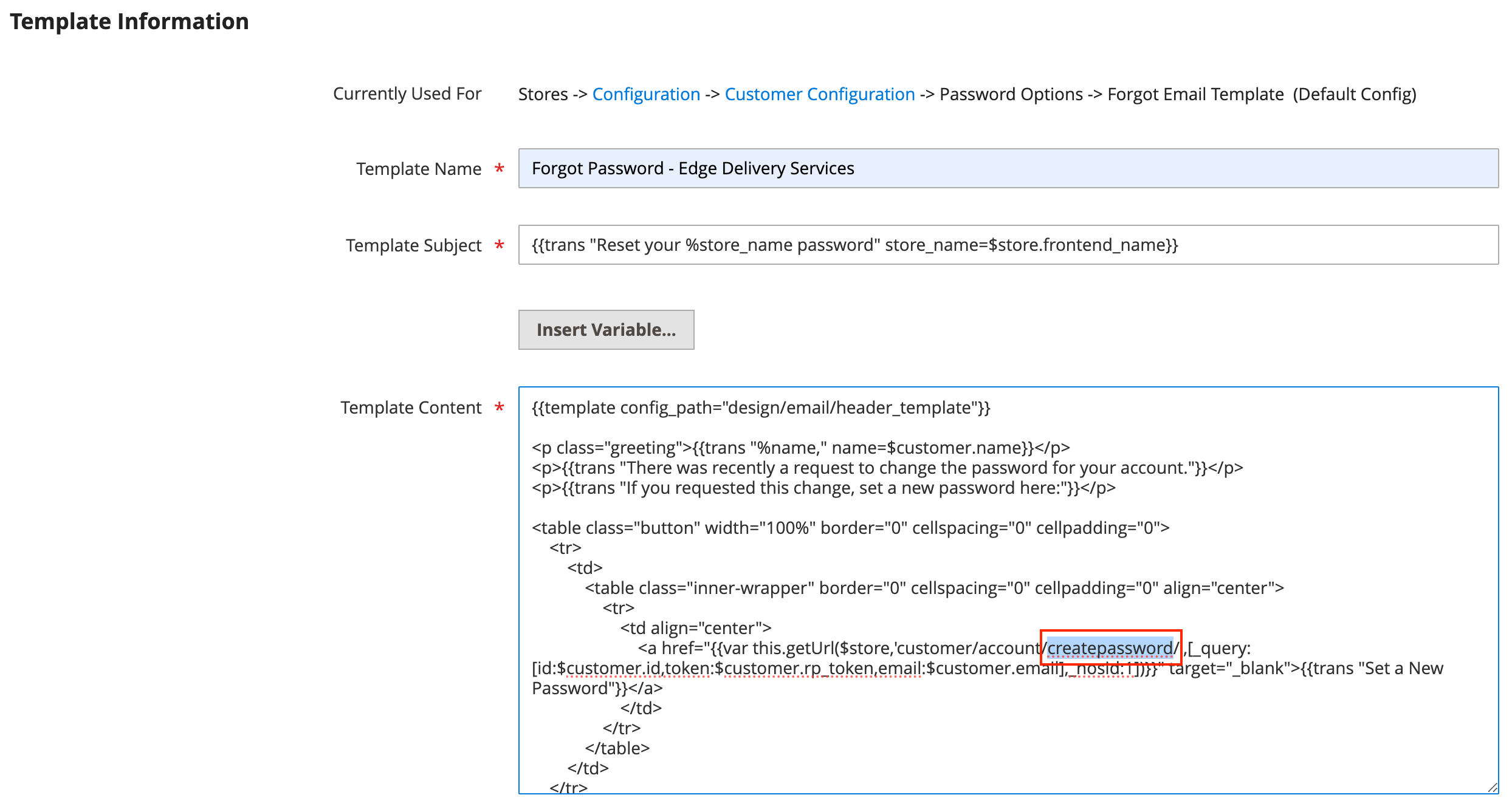\n\n1. Click **Save Template**.\n\n\n### Update the configuration\n\n\n1. On the Admin sidebar, go to **Stores** > _Settings_ > **Configuration**.\n1. Click **Customers** > **Customer Configuration**.\n1. Expand the **Password Options** section.\n1. Set **Forgot Email Template** to the custom template that you created in Step 1. See the following screenshot for an example.\n\n 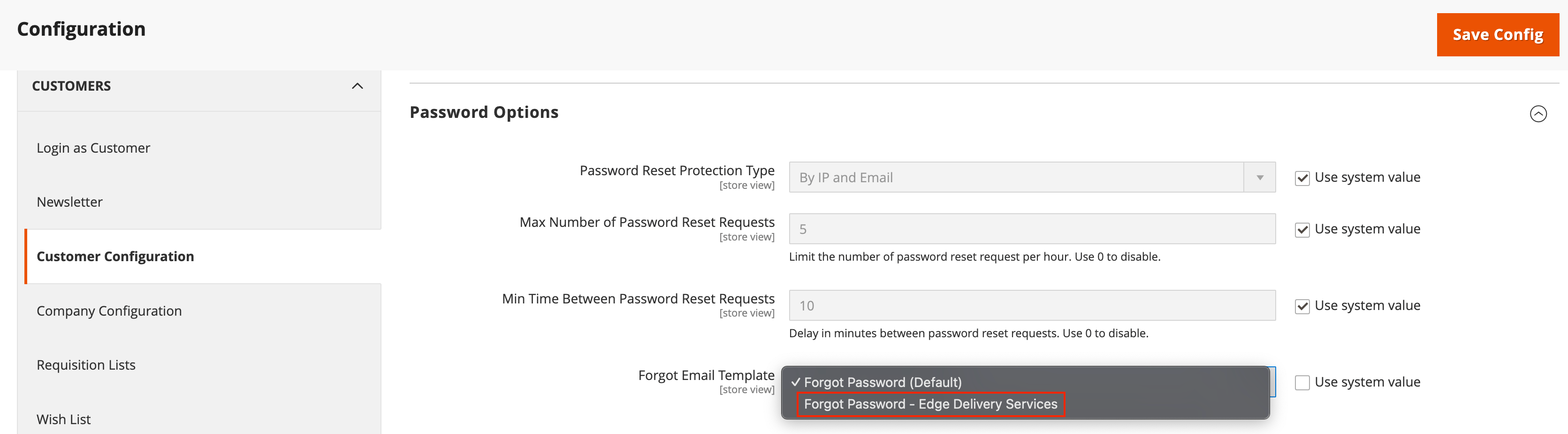\n\n1. Click **Save Config**.\n\n\n## How do I work with storefront configuration locally or on branches?\n\nYour site will resolve configuration from the following sources, in order of precedence:\n\n1. `config.json` file in your repository\n2. Public config from the Configuration Service\n\nSee the [Local Development](https://experienceleague.adobe.com/developer/commerce/storefront/setup/configuration/commerce-configuration/#local-development) section in the Storefront Configuration guide for detailed information on:\n- Working with `config.json` locally.\n- Testing configuration changes.\n- Managing branch-based configuration.\n- Common development scenarios.\n\n## Why don't I see my configuration changes in the browser?\n\nThe [storefront configuration](https://experienceleague.adobe.com/developer/commerce/storefront/setup/configuration/commerce-configuration/#configuration-caching) is cached by the Edge CDN with a `max-age=7200` (2 hours) cache control header.\n\nWhen the storefront configuration is loaded in the browser, it is stored in . This means that the configuration persists until the browser session is cleared, or the page is refreshed after the expiration of the CDN cache. You can verify the current configuration by accessing `<site.com>/config.json` directly in your browser. This will show you the current configuration being served by the CDN.\n\n**For developers:** If your configuration changes are not reflected in the browser, check for CDN cache expiration by accessing `<site.com>/config.json` directly in your browser. If the updated configuration is available on the CDN, manually clear the session storage:\n1. Open the browser developer tools.\n1. Select the **Application** tab, then select **Storage**.\n1. Clear the session storage for your domain.\n1. Refresh the page.\n\n**For end users:** Clear the browser session by closing and reopening the browser, or clear the browsing data to see configuration changes.\n\n## My page isn't showing up\n\nIf a route returns an error or empty response, verify that Edge Delivery Services can successfully retrieve the corresponding document from the content pipeline.\n\n\n1. Open your browser's developer tools and go to the **Network** tab.\n1. Reload the page, then click the main document request (usually the first HTML request).\nIn the request details, open **Headers** and look for the `x-error` field. The value can help identify missing content or other issues.\n\n\nIf the `x-error` header shows a failure when loading an `.md` file from content-bus (for example, a `404` error under `/products/...`), it means the page is not available in the Edge Delivery content system. This usually happens because the document is missing, not published, the path is incorrect, or the content has not been synced yet.\n\n\n\n**What to do:** Add or publish the document in your content system (for example, da.live). If needed, you can also use an overlay so EDS can serve HTML for that route. For more details, see .\n\n## My product pages return 404\n\nProduct detail pages (PDPs) may return a 404 when the requested URL cannot be resolved to a document in the Edge Delivery content pipeline. In most cases, this indicates that no corresponding content resource exists or is accessible for that path. Verify the following:\n\n**Overlay / BYOM not set up:** If your project depends on prerendering or BYOM (bring your own markup) to serve PDPs, make sure it is fully configured. See [AEM Commerce prerender](https://experienceleague.adobe.com/developer/commerce/storefront/setup/configuration/aem-prerender/).\n- **Folder mapping (deprecated) and uppercase SKUs:** Folder mapping is deprecated and is no longer the recommended approach. In addition, `fstab.yaml` is only read once during initial site creation — changes to it after the AEM Code Sync bot provisions your site have no effect. If you need to add or update folder mappings, use the Config Service API instead:\n\n ```http\n GET https://admin.hlx.page/config//sites//folders.json\n {/* Modify the JSON object and POST it back to the same endpoint */}\n POST https://admin.hlx.page/config//sites//folders.json\n ```\n\n Use GET to read the current mapping, edit the JSON object, then POST it back to the same URL.\n\n See the and the for details.\n\n If you are still using folder mapping, note that URLs must be lowercase. If your SKUs contain uppercase letters, you need to provide metadata (for example, using bulk metadata) so the correct content is matched to each URL. See:\n\n - \n - [SEO metadata](https://experienceleague.adobe.com/developer/commerce/storefront/setup/seo/metadata/#generate-metadata)\n\n\n\n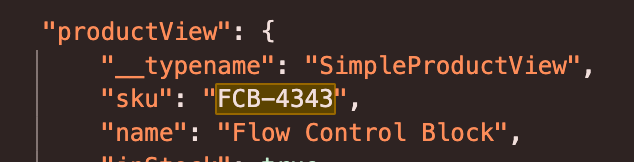\n\n## I can't preview, publish, or make content changes\n\nThis is often a permissions issue. You are either missing or have insufficient site permissions on AEM Live. For site permissions, open **User Admin** on ."
|
|
11
|
+
},
|
|
12
|
+
{
|
|
13
|
+
"path": "troubleshooting/pagespeed-issues",
|
|
14
|
+
"title": "PageSpeed Insights issues",
|
|
15
|
+
"description": "Common issues for PageSpeed Insights errors and how to resolve them.",
|
|
16
|
+
"content": "This page describes common PageSpeed Insights issues and how to resolve them.\n\n## Status code 404\n\n<Diagram caption=\"PageSpeed 404 error\">\n 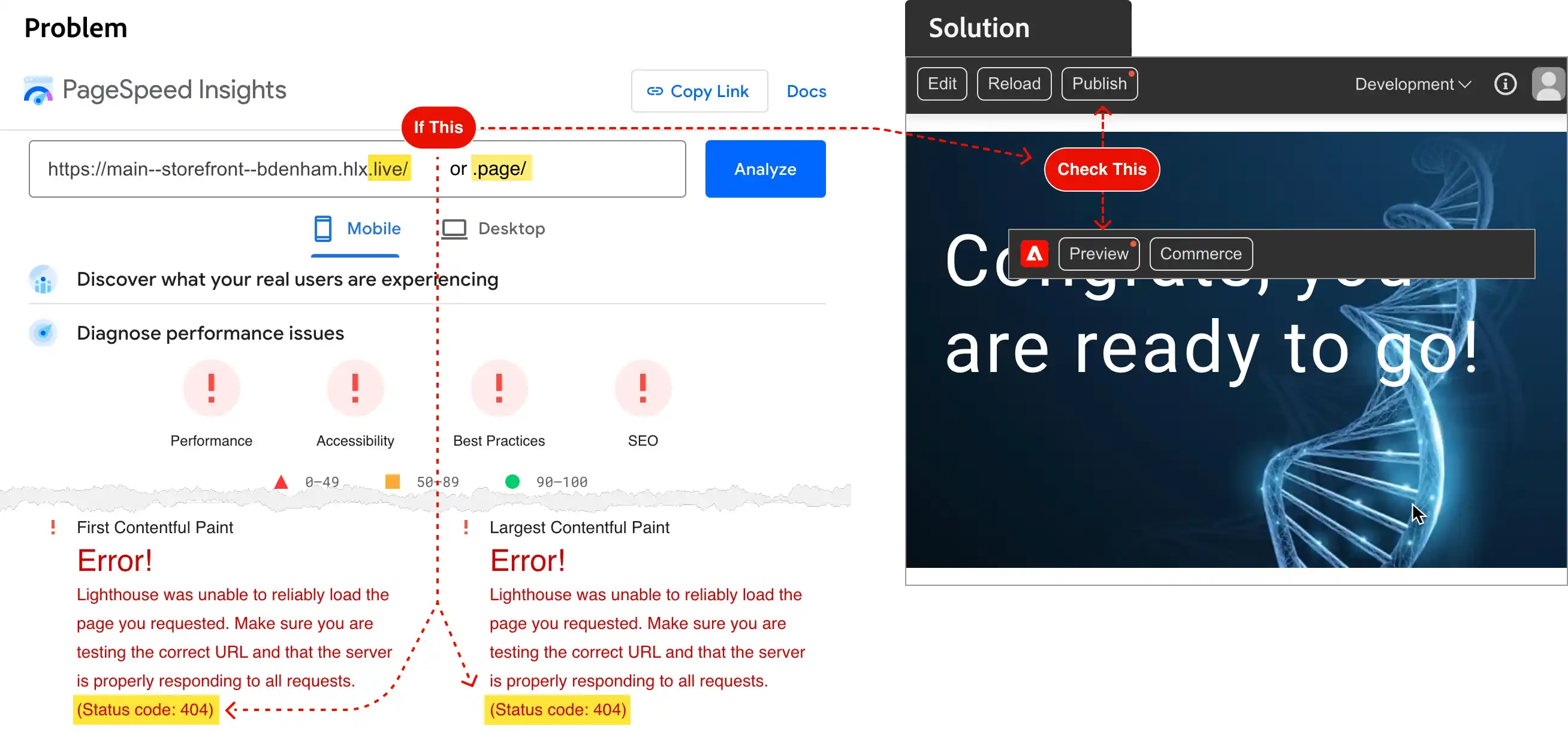\n</Diagram>\n\n### If you see this\n\nYou see many red exclamation points and a status code of 404 for your preview (`.page`) or production (`.live`) storefront URLs.\n\n### Why this happens\n\nRed dots indicate that the page has not been published or previewed since last edited. The 404 error only happens if you've never published or previewed the page you enter into the PageSpeed Insights text field (which includes your `index` page when you only enter your site's URL). Because you never published the page (using Sidekick), Edge Delivery has not yet added the page to the preview or production CDNs, where PageSpeed Insights (and everyone else on the internet) looks for it. The result is a 404 error.\n\n### What to do\n\n\n1. **Publish** or **Preview** the page using the Sidekick buttons.\n1. Clear your browser cache.\n1. Wait a minute or two for the page to be added to the preview CDN (**Preview** button) or production CDN (**Publish** button)."
|
|
17
|
+
}
|
|
18
|
+
]
|
|
19
|
+
}
|