@dropins/mcp 0.1.0
This diff represents the content of publicly available package versions that have been released to one of the supported registries. The information contained in this diff is provided for informational purposes only and reflects changes between package versions as they appear in their respective public registries.
- package/LICENSE.md +127 -0
- package/README.md +314 -0
- package/dist/common/project-reader.d.ts +55 -0
- package/dist/common/project-reader.js +173 -0
- package/dist/common/registry-loader.d.ts +101 -0
- package/dist/common/registry-loader.js +386 -0
- package/dist/common/response-handling.d.ts +12 -0
- package/dist/common/response-handling.js +21 -0
- package/dist/common/sanitize.d.ts +8 -0
- package/dist/common/sanitize.js +45 -0
- package/dist/common/synonyms.d.ts +9 -0
- package/dist/common/synonyms.js +127 -0
- package/dist/common/telemetry.d.ts +14 -0
- package/dist/common/telemetry.js +54 -0
- package/dist/common/types.d.ts +308 -0
- package/dist/common/types.js +1 -0
- package/dist/common/version.d.ts +2 -0
- package/dist/common/version.js +14 -0
- package/dist/index.d.ts +2 -0
- package/dist/index.js +136 -0
- package/dist/operations/analyze-project.d.ts +13 -0
- package/dist/operations/analyze-project.js +125 -0
- package/dist/operations/check-block-health.d.ts +19 -0
- package/dist/operations/check-block-health.js +1149 -0
- package/dist/operations/check-config.d.ts +13 -0
- package/dist/operations/check-config.js +228 -0
- package/dist/operations/explain-event-flow.d.ts +16 -0
- package/dist/operations/explain-event-flow.js +218 -0
- package/dist/operations/get-upgrade-diff.d.ts +13 -0
- package/dist/operations/get-upgrade-diff.js +144 -0
- package/dist/operations/list-api-functions.d.ts +13 -0
- package/dist/operations/list-api-functions.js +53 -0
- package/dist/operations/list-containers.d.ts +13 -0
- package/dist/operations/list-containers.js +44 -0
- package/dist/operations/list-design-tokens.d.ts +13 -0
- package/dist/operations/list-design-tokens.js +47 -0
- package/dist/operations/list-events.d.ts +16 -0
- package/dist/operations/list-events.js +39 -0
- package/dist/operations/list-graphql-queries.d.ts +19 -0
- package/dist/operations/list-graphql-queries.js +84 -0
- package/dist/operations/list-i18n-keys.d.ts +19 -0
- package/dist/operations/list-i18n-keys.js +105 -0
- package/dist/operations/list-models.d.ts +16 -0
- package/dist/operations/list-models.js +80 -0
- package/dist/operations/list-slots.d.ts +16 -0
- package/dist/operations/list-slots.js +81 -0
- package/dist/operations/scaffold-block.d.ts +31 -0
- package/dist/operations/scaffold-block.js +331 -0
- package/dist/operations/scaffold-extension.d.ts +28 -0
- package/dist/operations/scaffold-extension.js +346 -0
- package/dist/operations/scaffold-slot.d.ts +22 -0
- package/dist/operations/scaffold-slot.js +189 -0
- package/dist/operations/search-commerce-docs.d.ts +16 -0
- package/dist/operations/search-commerce-docs.js +101 -0
- package/dist/operations/search-docs.d.ts +23 -0
- package/dist/operations/search-docs.js +298 -0
- package/dist/operations/suggest-event-handler.d.ts +16 -0
- package/dist/operations/suggest-event-handler.js +175 -0
- package/dist/operations/suggest-slot-implementation.d.ts +19 -0
- package/dist/operations/suggest-slot-implementation.js +183 -0
- package/dist/registry/api-functions.json +3045 -0
- package/dist/registry/block-patterns.json +78 -0
- package/dist/registry/containers.json +2003 -0
- package/dist/registry/design-tokens.json +577 -0
- package/dist/registry/docs/boilerplate.json +55 -0
- package/dist/registry/docs/dropins-all.json +97 -0
- package/dist/registry/docs/dropins-b2b.json +607 -0
- package/dist/registry/docs/dropins-cart.json +163 -0
- package/dist/registry/docs/dropins-checkout.json +193 -0
- package/dist/registry/docs/dropins-order.json +139 -0
- package/dist/registry/docs/dropins-payment-services.json +73 -0
- package/dist/registry/docs/dropins-personalization.json +67 -0
- package/dist/registry/docs/dropins-product-details.json +139 -0
- package/dist/registry/docs/dropins-product-discovery.json +85 -0
- package/dist/registry/docs/dropins-recommendations.json +67 -0
- package/dist/registry/docs/dropins-user-account.json +121 -0
- package/dist/registry/docs/dropins-user-auth.json +103 -0
- package/dist/registry/docs/dropins-wishlist.json +85 -0
- package/dist/registry/docs/get-started.json +85 -0
- package/dist/registry/docs/how-tos.json +19 -0
- package/dist/registry/docs/index.json +139 -0
- package/dist/registry/docs/licensing.json +19 -0
- package/dist/registry/docs/merchants.json +523 -0
- package/dist/registry/docs/resources.json +13 -0
- package/dist/registry/docs/sdk.json +139 -0
- package/dist/registry/docs/setup.json +145 -0
- package/dist/registry/docs/troubleshooting.json +19 -0
- package/dist/registry/events.json +2200 -0
- package/dist/registry/examples/index.json +19 -0
- package/dist/registry/examples/storefront-checkout.json +377 -0
- package/dist/registry/examples/storefront-quote-management.json +49 -0
- package/dist/registry/extensions.json +272 -0
- package/dist/registry/graphql.json +3469 -0
- package/dist/registry/i18n.json +1873 -0
- package/dist/registry/models.json +1001 -0
- package/dist/registry/sdk.json +2357 -0
- package/dist/registry/slots.json +2270 -0
- package/dist/registry/tools-components.json +595 -0
- package/dist/resources/guides.d.ts +7 -0
- package/dist/resources/guides.js +625 -0
- package/dist/resources/handlers.d.ts +31 -0
- package/dist/resources/handlers.js +322 -0
- package/package.json +47 -0
|
@@ -0,0 +1,139 @@
|
|
|
1
|
+
{
|
|
2
|
+
"section": "dropins/order",
|
|
3
|
+
"label": "Order Drop-in",
|
|
4
|
+
"pageCount": 22,
|
|
5
|
+
"pages": [
|
|
6
|
+
{
|
|
7
|
+
"path": "dropins/order",
|
|
8
|
+
"title": "Order overview",
|
|
9
|
+
"description": "Learn about the features and functions of the order drop-in component.",
|
|
10
|
+
"content": "The order drop-in component provides a comprehensive set of tools and containers designed to manage and display order-related data across various pages and scenarios. It simplifies the implementation of order management functionality and supports seamless integration with both customer accounts and guest user workflows.\n\n## Architecture\n\nThe order drop-in component consists of multiple containers that display order details on different pages, such as:\n\n- Order data containers display order details within the customer account, guest user areas, and on the order confirmation page.\n- Returned merchandise authorization (RMA) containers guide users through the return process and display a list of created return requests.\n- The `OrderSearch` container enables guest users to locate their orders using a combination of email, ZIP code, and order number. This ensures easy access to order details even for users without an account. (Logged-in customers can also use this form.)\n\nThe component's initialization process helps manage data retrieval and event emission, ensuring that containers receive the necessary data without individual fetching.\n\nThis modular architecture allows for efficient, reusable, and highly customizable implementations of order and return workflows, making it ideal for both standard and advanced e-commerce use cases. In addition, the implementation of order and return details pages includes elements such as headers, which are implemented at the boilerplate level rather than provided directly by the drop-in containers. These elements, including `commerce-order-header` and `commerce-return-header` blocks, are covered as part of the overall framework for order and return details layouts, but are distinct from the drop-in container set.\n\nThe following diagrams provide a visual composition of the order details and return details pages:\n\n<Diagram caption=\"Order details containers\">\n 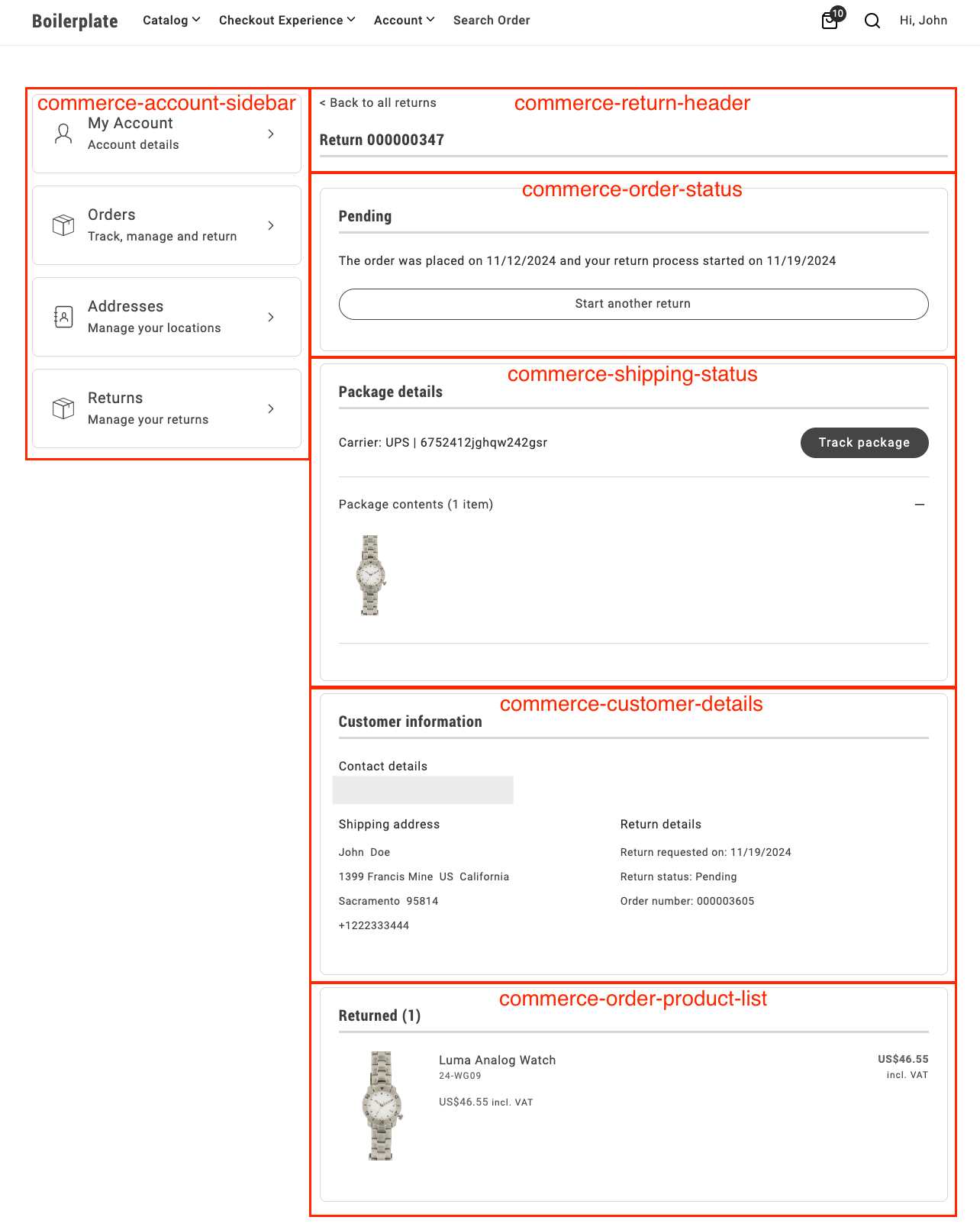\n</Diagram>\n\n<Diagram caption=\"Return details containers\">\n 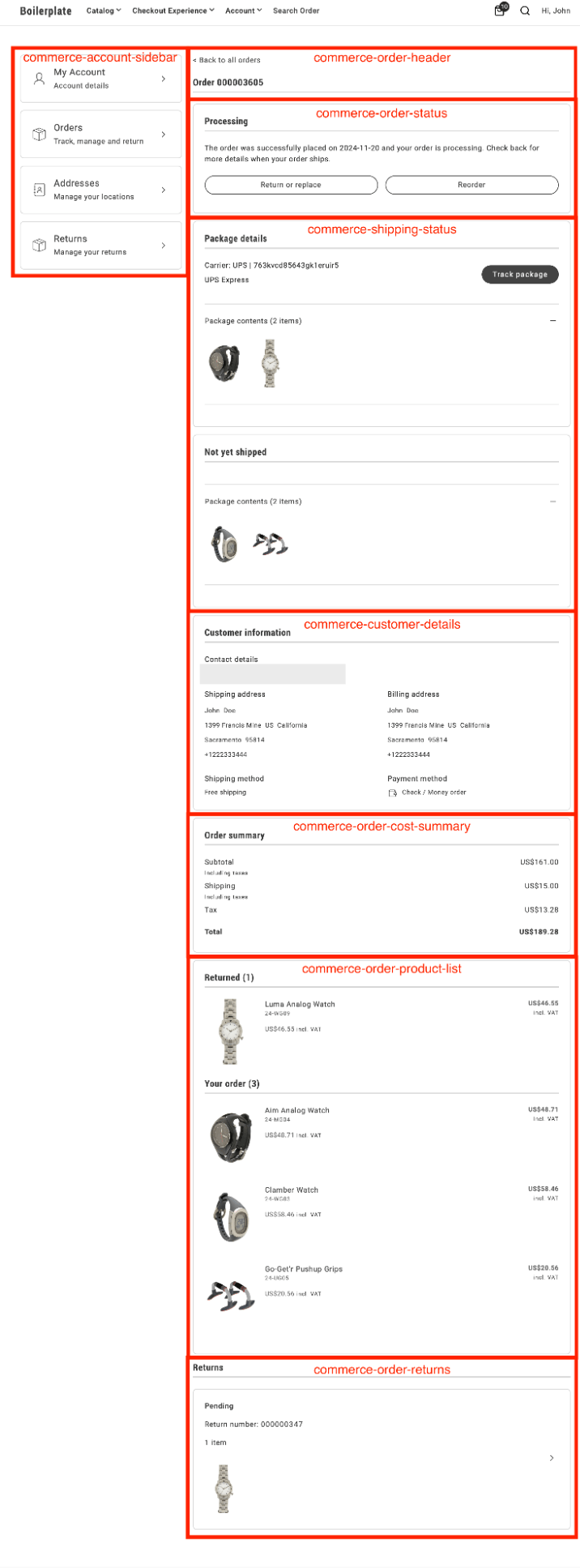\n</Diagram>\n\n## Supported Commerce features\n\nThe following table provides an overview of the Adobe Commerce guest user features that the order component supports:\n\n| Feature | Status |\n| ---------------------------------------------------------------- | ------------------------------------------ |\n| Cancel order (with email confirmation) | |\n| Create a return | |\n| Filter orders by time of purchase | |\n| Reorder | |\n| Search orders | |\n| View list of orders on the account | |\n| View order status | |\n| View return status | |"
|
|
11
|
+
},
|
|
12
|
+
{
|
|
13
|
+
"path": "dropins/order/containers",
|
|
14
|
+
"title": "Order Containers",
|
|
15
|
+
"description": "Overview of containers available in the Order drop-in.",
|
|
16
|
+
"content": "The **Order** drop-in provides pre-built container components for integrating into your storefront.\n\n\n## What are Containers?\n\nContainers are pre-built UI components that combine functionality, state management, and presentation. They provide a complete solution for specific features and can be customized through props, slots, and CSS.\n\n## Available Containers\n\n\n| Container | Description |\n| --------- | ----------- |\n| [CreateReturn](https://experienceleague.adobe.com/developer/commerce/storefront/dropins/order/containers/create-return/) | Learn about the `CreateReturn` container. |\n| [CustomerDetails](https://experienceleague.adobe.com/developer/commerce/storefront/dropins/order/containers/customer-details/) | Learn about the `CustomerDetails` container. |\n| [OrderCancelForm](https://experienceleague.adobe.com/developer/commerce/storefront/dropins/order/containers/order-cancel-form/) | Learn about the `OrderCancelForm` container. |\n| [OrderComments](https://experienceleague.adobe.com/developer/commerce/storefront/dropins/order/containers/order-comments/) | Learn about the `OrderComments` container. |\n| [OrderCostSummary](https://experienceleague.adobe.com/developer/commerce/storefront/dropins/order/containers/order-cost-summary/) | Learn about the `OrderCostSummary` container. |\n| [OrderHeader](https://experienceleague.adobe.com/developer/commerce/storefront/dropins/order/containers/order-header/) | *Enrichment needed - add description to `_dropin-enrichments/order/containers.json`* |\n| [OrderProductList](https://experienceleague.adobe.com/developer/commerce/storefront/dropins/order/containers/order-product-list/) | Learn about the `OrderProductList` container. |\n| [OrderReturns](https://experienceleague.adobe.com/developer/commerce/storefront/dropins/order/containers/order-returns/) | Learn about the `OrderReturns` container. |\n| [OrderSearch](https://experienceleague.adobe.com/developer/commerce/storefront/dropins/order/containers/order-search/) | Learn about the `OrderSearch` container. |\n| [OrderStatus](https://experienceleague.adobe.com/developer/commerce/storefront/dropins/order/containers/order-status/) | *Enrichment needed - add description to `_dropin-enrichments/order/containers.json`* |\n| [ReturnsList](https://experienceleague.adobe.com/developer/commerce/storefront/dropins/order/containers/returns-list/) | Learn about the `ReturnsList` container. |\n| [ShippingStatus](https://experienceleague.adobe.com/developer/commerce/storefront/dropins/order/containers/shipping-status/) | Learn about the `ShippingStatus` container. |\n\n\n> **Tip**\n>\nEach container is designed to work independently but can be composed together to create comprehensive user experiences."
|
|
17
|
+
},
|
|
18
|
+
{
|
|
19
|
+
"path": "dropins/order/containers/create-return",
|
|
20
|
+
"title": "CreateReturn container",
|
|
21
|
+
"description": "Guide shoppers through item selection, return reasons, and confirmation screens when they file a return request with configurable attributes.",
|
|
22
|
+
"content": "The `CreateReturn` container manages the creation of return requests. It supports custom return attributes and configurable validation through the Adobe Commerce Admin. This container consists of three sequential screens that guide users through the item return process:\n\n1. **Select Items.** The first screen displays a list of items eligible for return. The user can select items by checking the boxes next to them and specifying the quantity of each item they wish to return. Once the selection is complete, the user can click the **Continue** button to proceed to the next step.\n\n <Diagram caption=\"CreateReturn container\">\n 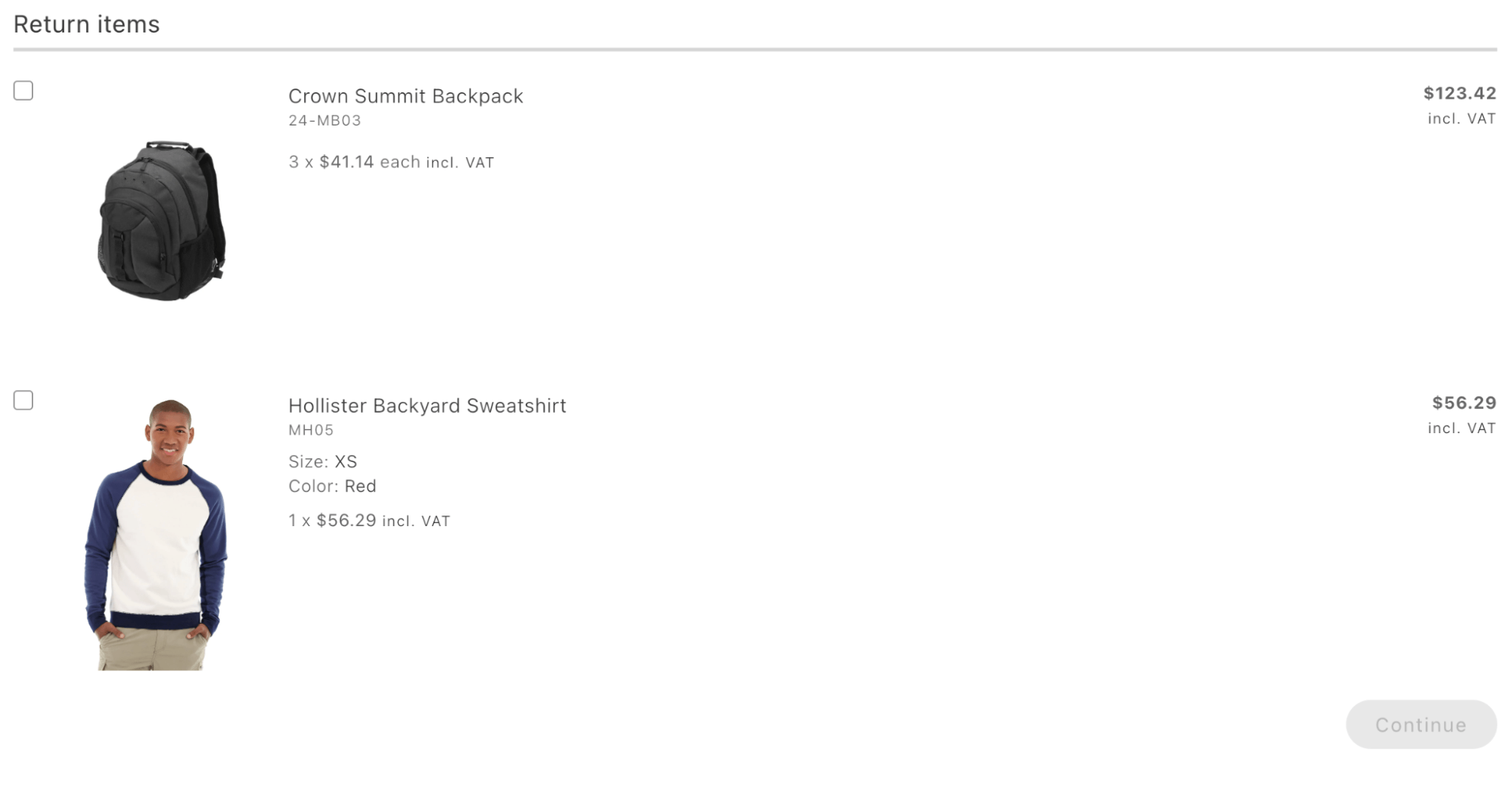\n </Diagram>\n\n1. **Return Reasons.** The second screen shows the selected items. Below each item, an additional form is displayed that allows the customer to specify the reason for the return. This step helps gather information on why each item is being returned, which can be valuable for analytics and improving customer experience.\n\n <Diagram caption=\"CreateReturn container — Return reasons\">\n 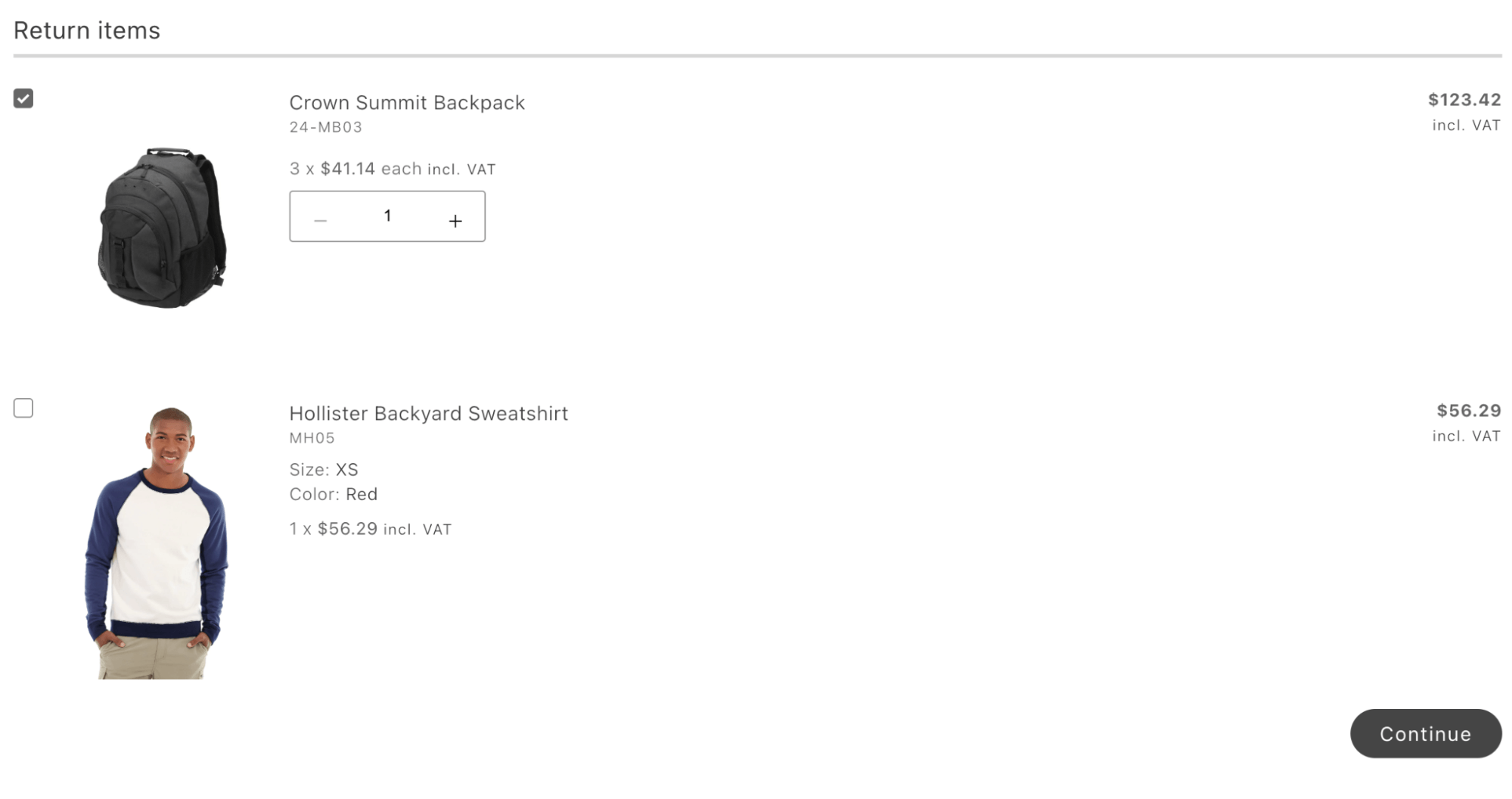\n </Diagram>\n\n1. **Success Screen.** The final screen displays a success message confirming the return process. It also includes a customizable button that allows redirection to any specified page on the website.\n\n <Diagram caption=\"CreateReturn container — Success\">\n 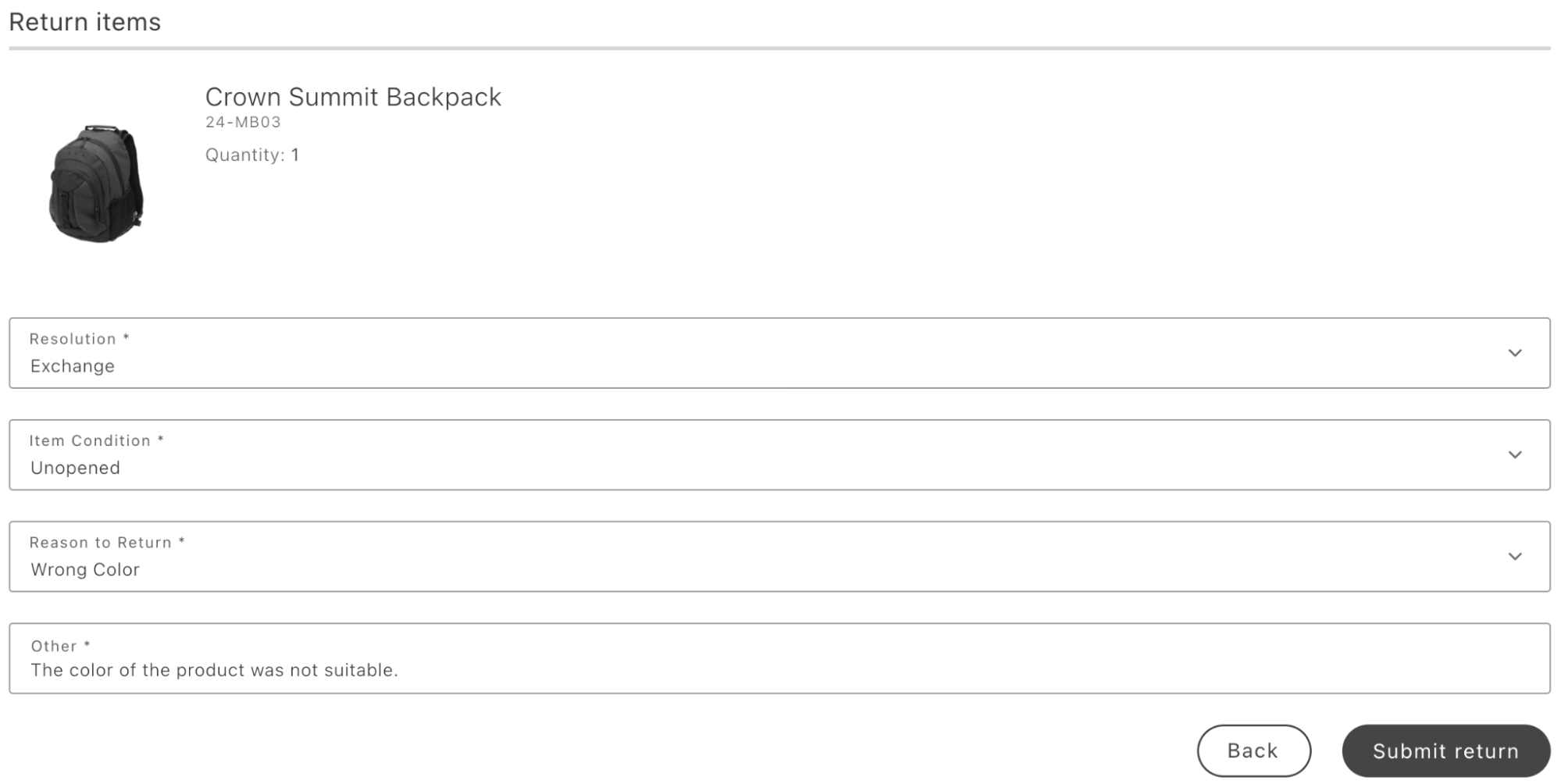\n </Diagram>\n\n## Prerequisites\n\n- . The **Stores** > Configuration > **Sales** > **Sales** > **RMA Settings** in the Adobe Commerce Admin.\n\n- If you need to add custom return attributes, add them at **Stores** > **Attributes** > **Returns**. You can optionally use the Input Validation field to define custom validation rules.\n\n## Configurations\n\nThe `CreateReturn` container provides the following configuration options:\n\n\n## Example\n\nThe following example demonstrates how to render the `CreateReturn` container:\n\n```javascript\nexport default async function decorate(block) {\n await orderRenderer.render(CreateReturn, {\n routeReturnSuccess: (orderData) =>\n checkIsAuthenticated()\n ? `$?orderRef=$`\n : `$?orderRef=$`,\n })(block);\n}\n```"
|
|
23
|
+
},
|
|
24
|
+
{
|
|
25
|
+
"path": "dropins/order/containers/customer-details",
|
|
26
|
+
"title": "CustomerDetails container",
|
|
27
|
+
"description": "Group contact, shipping, billing, shipping method, payment method, and optional return metadata into one structured read-only panel.",
|
|
28
|
+
"content": "The `CustomerDetails` container organizes customer and order information into the following sections:\n\n- Contact details\n- Shipping address\n- Billing address\n- Shipping method\n- Payment method\n- Return details:\n\nThe return details section is available exclusively on return pages. It provides information about the return.\n\n<Diagram caption=\"CustomerDetails container\">\n 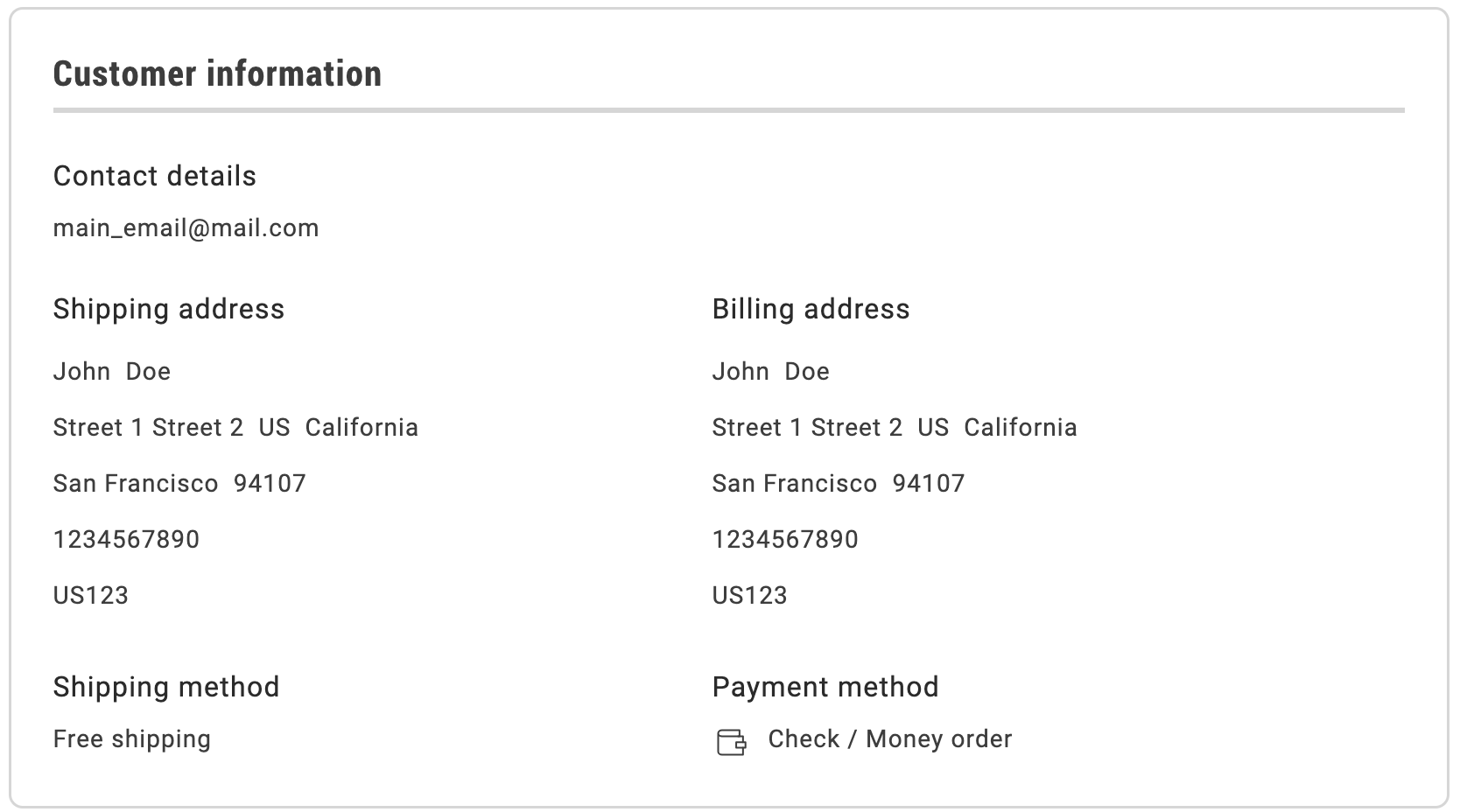\n</Diagram>\n\n## Configurations\n\nThe `CustomerDetails` container provides the following configuration options:\n\n\n## Example\n\nThe following example demonstrates how to integrate the `CustomerDetails` container:\n\n```javascript\nexport default async function decorate(block) {\n await orderRenderer.render(CustomerDetails, {})(block);\n}\n```"
|
|
29
|
+
},
|
|
30
|
+
{
|
|
31
|
+
"path": "dropins/order/containers/order-cancel-form",
|
|
32
|
+
"title": "OrderCancelForm container",
|
|
33
|
+
"description": "Collect cancellation reasons and submit the cancel request with form options aligned to your Adobe Commerce Admin cancel workflow and customer messaging on the storefront.",
|
|
34
|
+
"content": "The `OrderCancelForm` container provides a cancellation form that allows users to select reasons for canceling an order and perform the cancellation operation.\n\n<Diagram caption=\" OrderCancelForm container\">\n 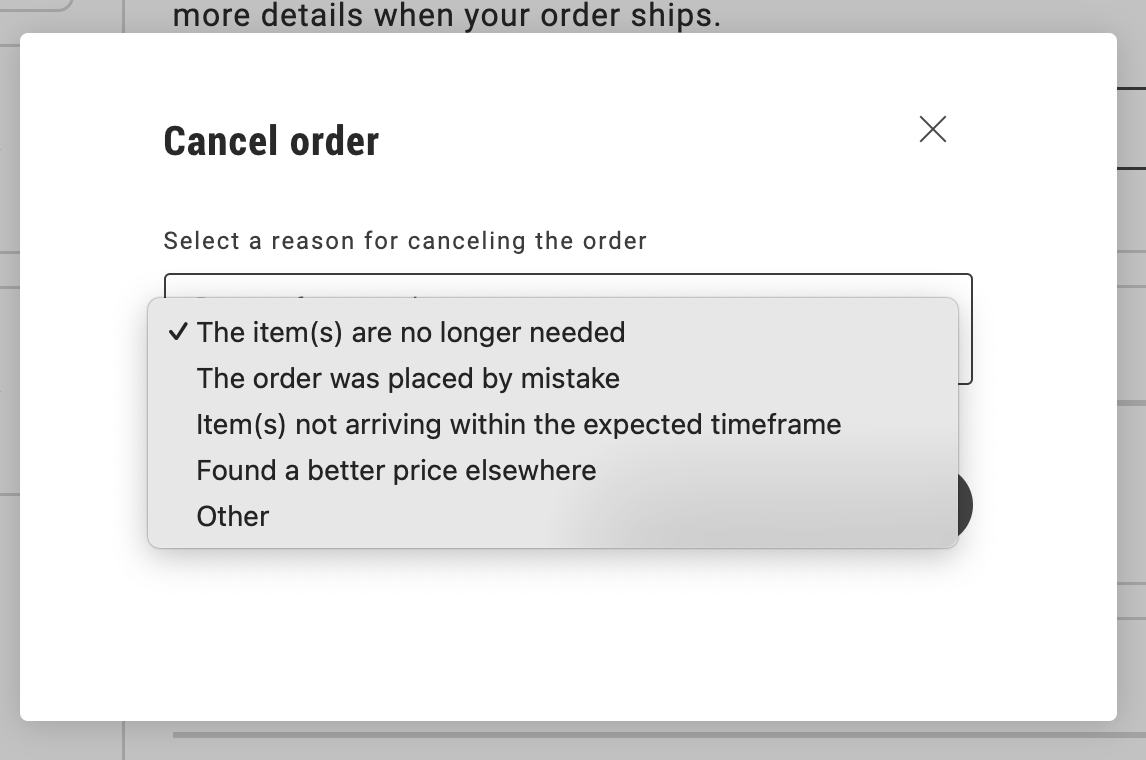\n</Diagram>\n\n## Configurations\n\nThe `OrderCancelForm container provides the following configuration options:\n\n\n## Example\n\nThe `OrderCancelForm` container is not directly integrated within the boilerplate, but it is delivered as part of the `OrderStatus` container. However, the `OrderCancelForm` container can also be used independently to create custom implementations.\n\nHere’s an integration example from the drop-in component development environment:\n\n```javascript\nprovider.render(OrderCancelForm, {\n orderRef: \"\",\n pickerProps: {} <PickerProps>,\n submitButtonProps: {} <ButtonProps>,\n cancelReasons: [] <PickerOption[]>,\n})(containerWrapper);\n```"
|
|
35
|
+
},
|
|
36
|
+
{
|
|
37
|
+
"path": "dropins/order/containers/order-comments",
|
|
38
|
+
"title": "OrderComments container",
|
|
39
|
+
"description": "Learn about the OrderComments container.",
|
|
40
|
+
"content": "The `OrderComments` container displays order-level comments on the Order Details page. It renders a read-only list of comments associated with the order, each showing a timestamp and message.\n\n- **Comment list**: Displays all comments from the `CustomerOrder.comments` GraphQL field in a chronological list, with each entry showing a formatted date and time alongside the comment message.\n- **Empty state**: When there are no comments for the order, the container displays an empty state message (\"No order comments.\").\n- **Loading state**: While order data is being fetched, the container displays a skeleton loader.\n\nThe container listens to the `order/data` event to receive order data. When order data becomes available, it extracts the `comments` array and renders the comment list.\n\n## Configurations\n\nThe `OrderComments` container provides the following configuration options:\n\n\n## Example\n\nThe following example demonstrates how to render the `OrderComments` container:\n\n```javascript\n\n\nexport default async function decorate(block) {\n await orderRenderer.render(OrderComments, {})(block);\n}\n```"
|
|
41
|
+
},
|
|
42
|
+
{
|
|
43
|
+
"path": "dropins/order/containers/order-cost-summary",
|
|
44
|
+
"title": "OrderCostSummary container",
|
|
45
|
+
"description": "List subtotal, shipping, discounts, coupons, tax, and total while hiding empty lines so order and return pages stay easy to scan.",
|
|
46
|
+
"content": "The `OrderCostSummary` container displays detailed order costs on the Order Details and Return Details pages. It includes the following sections:\n\n- **Subtotal**: Displays the total cost of all items in the order before applying discounts, taxes, or additional charges.\n- **Shipping**: Displays the shipping cost, which depends on the shipping method, location, and weight of the order.\n- **Discount**: Displays any applicable discounts, such as promotional or volume-based offers, subtracted from the subtotal.\n- **Coupon**: Displays the value of any applied coupons and their impact on the final cost.\n- **Tax**: Displays the tax amount added to the order, calculated based on jurisdiction and item type.\n- **Total**: Displays the final payable amount, including all adjustments such as discounts, shipping, and taxes.\n\nIf a value is not provided for any section (such as no discount or coupons are applied), the corresponding line is hidden. This ensures the container only displays relevant information.\n\nThe settings for displaying tax amounts can be configured at **Stores** > Configuration > **Sales** > **Tax** > **Order, Invoices, Credit Memos Display Settings**.\n\n<Diagram caption=\"OrderCostSummary container\">\n 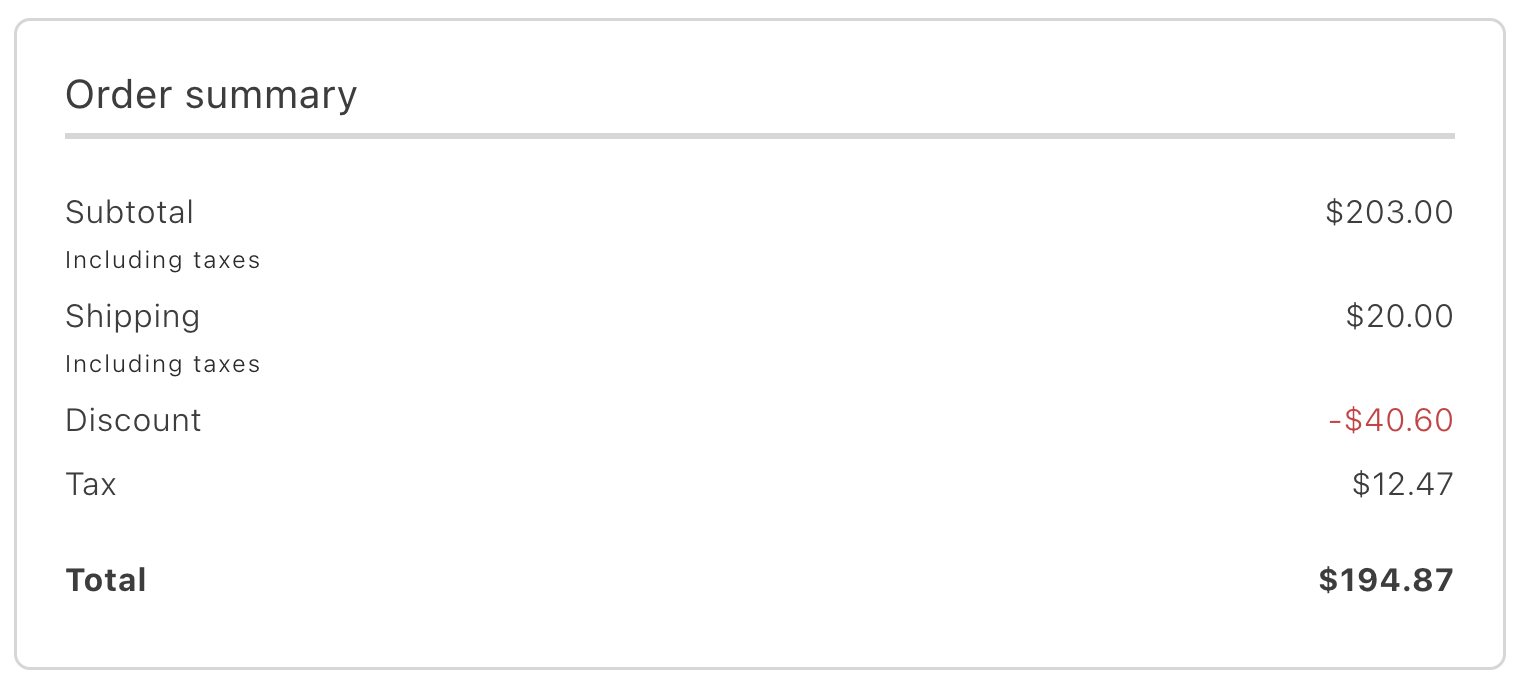\n</Diagram>\n\n## Configurations\n\nThe `OrderCostSummary` container provides the following configuration options:\n\n\n## Example\n\nThe following example demonstrates how to render the `OrderCostSummary` container:\n\n```javascript\nexport default async function decorate(block) {\n await orderRenderer.render(OrderCostSummary, {})(block);\n}\n```"
|
|
47
|
+
},
|
|
48
|
+
{
|
|
49
|
+
"path": "dropins/order/containers/order-header",
|
|
50
|
+
"title": "OrderHeader Container",
|
|
51
|
+
"description": "Learn about the OrderHeader container in the Order drop-in.",
|
|
52
|
+
"content": "## Configuration\n\nThe `OrderHeader` container provides the following configuration options:\n\n\n| Parameter | Type | Req? | Description |\n|---|---|---|---|\n| `handleEmailAvailability` | `function` | No | Callback to check whether a given email is available (not yet registered). Used to conditionally offer sign-up during guest order lookup. |\n| `handleSignUpClick` | `function` | No | Callback invoked when the sign-up action is triggered from the order header. |\n| `orderData` | `OrderDataModel` | No | A structured object containing order data used to pre-populate the header. |\n\n\n## Slots\n\nThis container does not expose any customizable slots.\n\n## Usage\n\nThe following example demonstrates how to use the `OrderHeader` container:\n\n```js\n\n\nawait provider.render(OrderHeader, {\n handleEmailAvailability: handleEmailAvailability,\n handleSignUpClick: handleSignUpClick,\n orderData: orderData,\n})(block);\n```"
|
|
53
|
+
},
|
|
54
|
+
{
|
|
55
|
+
"path": "dropins/order/containers/order-product-list",
|
|
56
|
+
"title": "OrderProductList container",
|
|
57
|
+
"description": "Render ordered products or return lines as cards with price, discount, tax, and attribute details pulled from the order payload.",
|
|
58
|
+
"content": "The `OrderProductList` container displays a list of products associated with a specific order or return. Each item in the list is represented by a product card containing details such as the price, applied discounts, tax information, final amount, and product attributes.\n\nThe settings for displaying tax amounts can be configured at **Stores** > Configuration > **Sales** > **Tax** > **Order, Invoices, Credit Memos Display Settings**.\n\n<Diagram caption=\"OrderProductList container\">\n 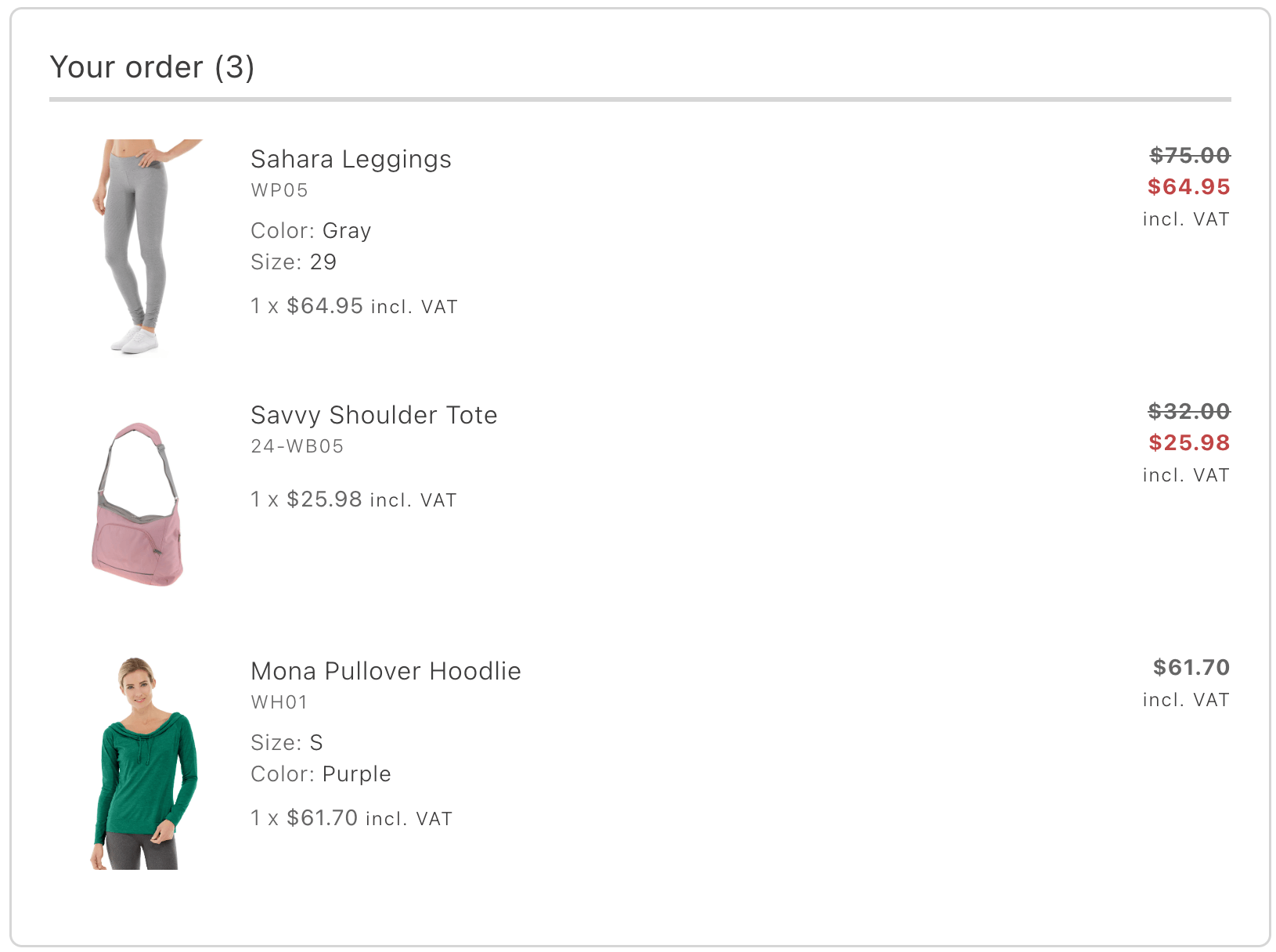\n</Diagram>\n\n## Configurations\n\nThe `OrderProductList` container provides the following configuration options:\n\n\n## Example\n\nThe following example demonstrates how to render the `OrderProductList` container:\n\n```javascript\nexport default async function decorate(block) {\n await orderRenderer.render(OrderProductList, {\n routeProductDetails: (product) => `/products/$/$`,\n })(block);\n}\n```"
|
|
59
|
+
},
|
|
60
|
+
{
|
|
61
|
+
"path": "dropins/order/containers/order-returns",
|
|
62
|
+
"title": "OrderReturns container",
|
|
63
|
+
"description": "Show each return tied to an order with status context and suppress the block when no returns exist to avoid empty placeholders.",
|
|
64
|
+
"content": "The `OrderReturns` container displays the list of returns associated with a specific order. Each return is presented with relevant details, such as return status and associated items. If no returns have been created for the order, the container is not rendered, ensuring that the interface remains clean and free of unnecessary placeholders.\n\n<Diagram caption=\"OrderReturns container\">\n 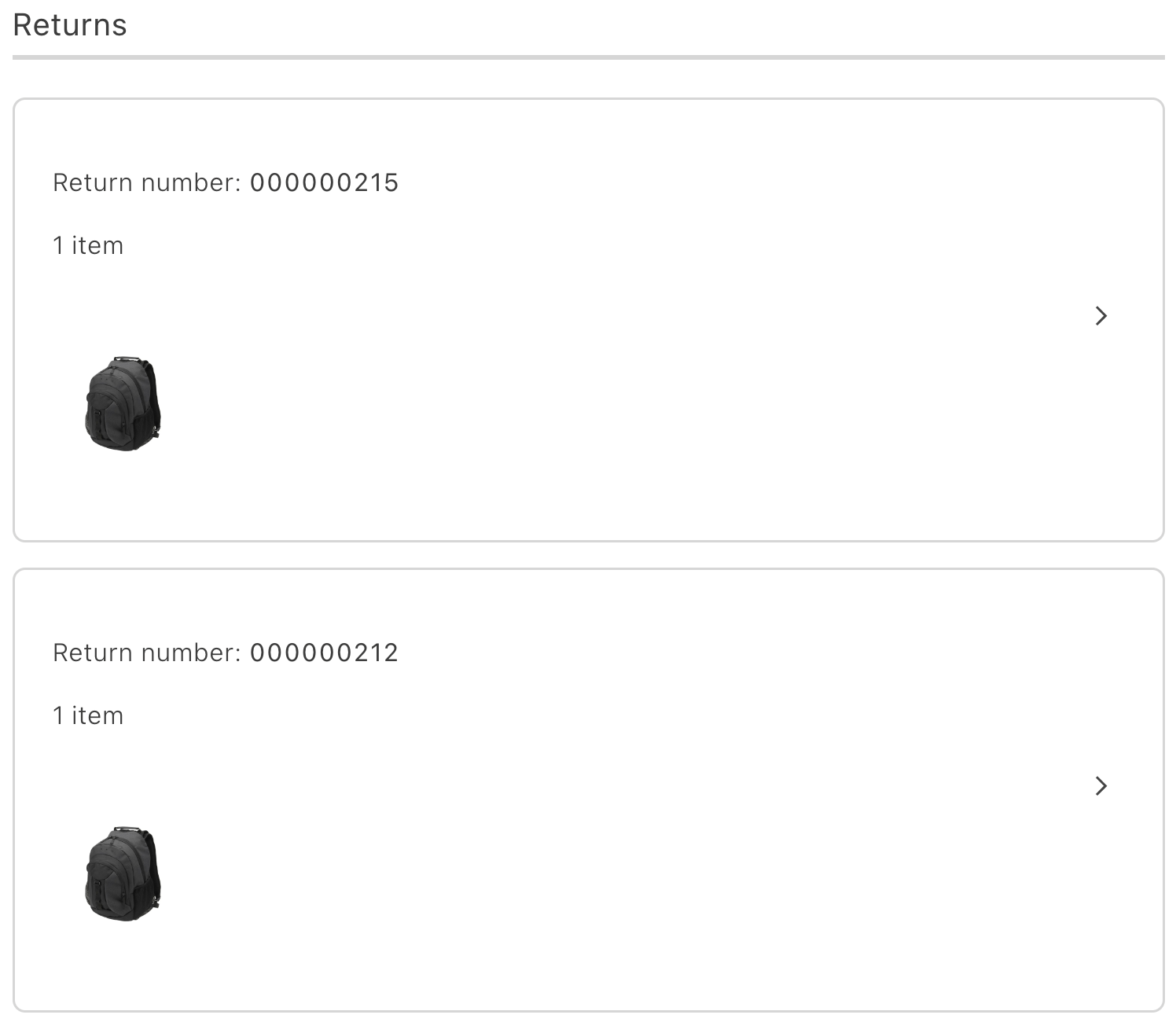\n</Diagram>\n\n## Configurations\n\nThe `OrderReturns` container provides the following configuration options:\n\n\n## Example\n\nThe following example demonstrates how to render the `OrderReturns` container:\n\n```javascript\nexport default async function decorate(block) {\n const isAuthenticated = checkIsAuthenticated();\n const returnDetailsPath = isAuthenticated\n ? CUSTOMER_RETURN_DETAILS_PATH\n : RETURN_DETAILS_PATH;\n\n await orderRenderer.render(OrderReturns, {\n routeTracking: ({ carrier, number }) => {\n if (carrier?.toLowerCase() === 'ups') {\n return `$?tracknum=$`;\n }\n return '';\n },\n routeReturnDetails: ({ orderNumber, returnNumber, token }) => {\n const { searchParams } = new URL(window.location.href);\n const orderRefFromUrl = searchParams.get('orderRef');\n const newOrderRef = isAuthenticated ? orderNumber : token;\n\n const encodedOrderRef = encodeURIComponent(orderRefFromUrl || newOrderRef);\n\n return `$?orderRef=$&returnRef=$`;\n },\n routeProductDetails: (productData) => (productData ? `/products/$/$` : '#'),\n })(block);\n}\n```"
|
|
65
|
+
},
|
|
66
|
+
{
|
|
67
|
+
"path": "dropins/order/containers/order-search",
|
|
68
|
+
"title": "OrderSearch container",
|
|
69
|
+
"description": "Let guests and signed-in customers search orders by email, last name, and order number before you open the detailed order view.",
|
|
70
|
+
"content": "The `OrderSearch` container enables order searches using email, last name, and order number. It is available to both guest and registered users for quick access to order details.\n\n<Diagram caption=\"OrderSearch container\">\n 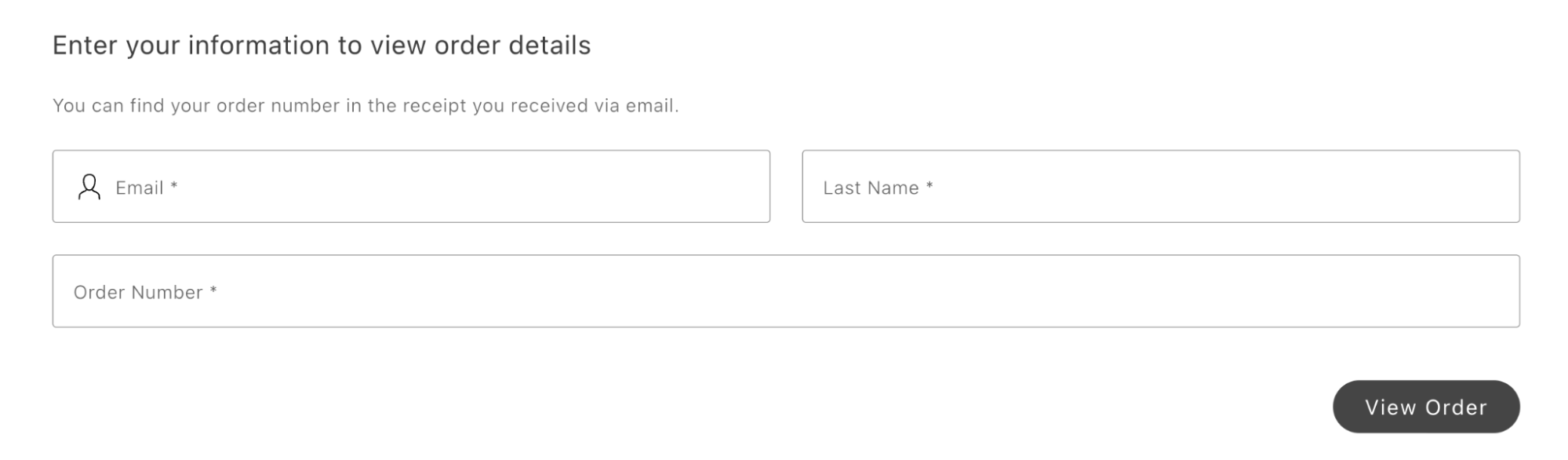\n</Diagram>\n\n## Configurations\n\nThe `OrderSearch` container provides the following configuration options:\n\n\n## Example\n\nThe following example demonstrates how to render the `OrderSearch` container:\n\n```javascript\nconst renderSignIn = async (element, email, orderNumber) => authRenderer.render(SignIn, {\n initialEmailValue: email,\n renderSignUpLink: false,\n labels: {\n formTitleText: email\n ? 'Enter your password to view order details'\n : 'Sign in to view order details',\n primaryButtonText: 'View order',\n },\n routeForgotPassword: () => 'reset-password.html',\n routeRedirectOnSignIn: () => `$?orderRef=$`,\n})(element);\n\nexport default async function decorate(block) {\n block.innerHTML = '';\n\n events.on('order/data', async (order) => {\n if (!order) return;\n\n block.innerHTML = '';\n\n await orderRenderer.render(OrderSearch, {\n isAuth: checkIsAuthenticated(),\n renderSignIn: async ({ render, formValues }) => {\n if (render) {\n renderSignIn(\n block,\n formValues?.email ?? '',\n formValues?.number ?? '',\n );\n\n return false;\n }\n return true;\n },\n routeCustomerOrder: () => CUSTOMER_ORDER_DETAILS_PATH,\n routeGuestOrder: () => ORDER_DETAILS_PATH,\n onError: async (errorInformation) => {\n console.info('errorInformation', errorInformation);\n },\n })(block);\n });\n\n await orderRenderer.render(OrderSearch, {\n isAuth: checkIsAuthenticated(),\n renderSignIn: async ({ render, formValues }) => {\n if (render) {\n renderSignIn(block, formValues?.email ?? '', formValues?.number ?? '');\n\n return false;\n }\n\n return true;\n },\n routeCustomerOrder: () => CUSTOMER_ORDER_DETAILS_PATH,\n routeGuestOrder: () => ORDER_DETAILS_PATH,\n onError: async (errorInformation) => {\n console.info('errorInformation', errorInformation);\n },\n })(block);\n}\n```"
|
|
71
|
+
},
|
|
72
|
+
{
|
|
73
|
+
"path": "dropins/order/containers/order-status",
|
|
74
|
+
"title": "OrderStatus Container",
|
|
75
|
+
"description": "Learn about the OrderStatus container in the Order drop-in.",
|
|
76
|
+
"content": "## Configuration\n\nThe `OrderStatus` container provides the following configuration options:\n\n\n| Parameter | Type | Req? | Description |\n|---|---|---|---|\n| `className` | `string` | No | Additional CSS classes to apply to the container |\n| `orderData` | `OrderDataModel` | No | A structured object containing order data. Used as an initial value or fallback if data is not fetched from the backend. |\n| `statusTitle` | `string` | No | Custom title text to display above the order status indicator. |\n| `status` | `StatusEnumProps` | No | The current order status value used to display the status indicator. |\n| `routeCreateReturn` | `function` | No | Function that returns the URL for the create return page. |\n| `routeOnSuccess` | `function` | No | Function that returns the URL to redirect to after a successful action. |\n| `onError` | `function` | No | Callback function triggered when error |\n\n\n## Slots\n\nThis container exposes the following slots for customization:\n\n\n| Slot | Type | Required | Description |\n|------|------|----------|-------------|\n| `OrderActions` | `SlotProps` | Yes | |\n\n\n## Usage\n\nThe following example demonstrates how to use the `OrderStatus` container:\n\n```js\n\n\nawait provider.render(OrderStatus, {\n className: \"Example Name\",\n orderData: orderData,\n statusTitle: \"Example Title\",\n slots: {\n // Add custom slot implementations here\n }\n})(block);\n```"
|
|
77
|
+
},
|
|
78
|
+
{
|
|
79
|
+
"path": "dropins/order/containers/returns-list",
|
|
80
|
+
"title": "ReturnsList container",
|
|
81
|
+
"description": "Display every return request for the shopper in a dashboard that mirrors OrderReturns cards for consistent tracking and deep links.",
|
|
82
|
+
"content": "The `ReturnsList` container displays a complete list of all created returns available to the user. Each return card follows the same structure as the `OrderReturns` container, allowing consistent presentation of return details. It provides an overview of all return requests, enabling users to manage and track their status in one place.\n\n\n<Diagram caption=\"ReturnsList container\">\n 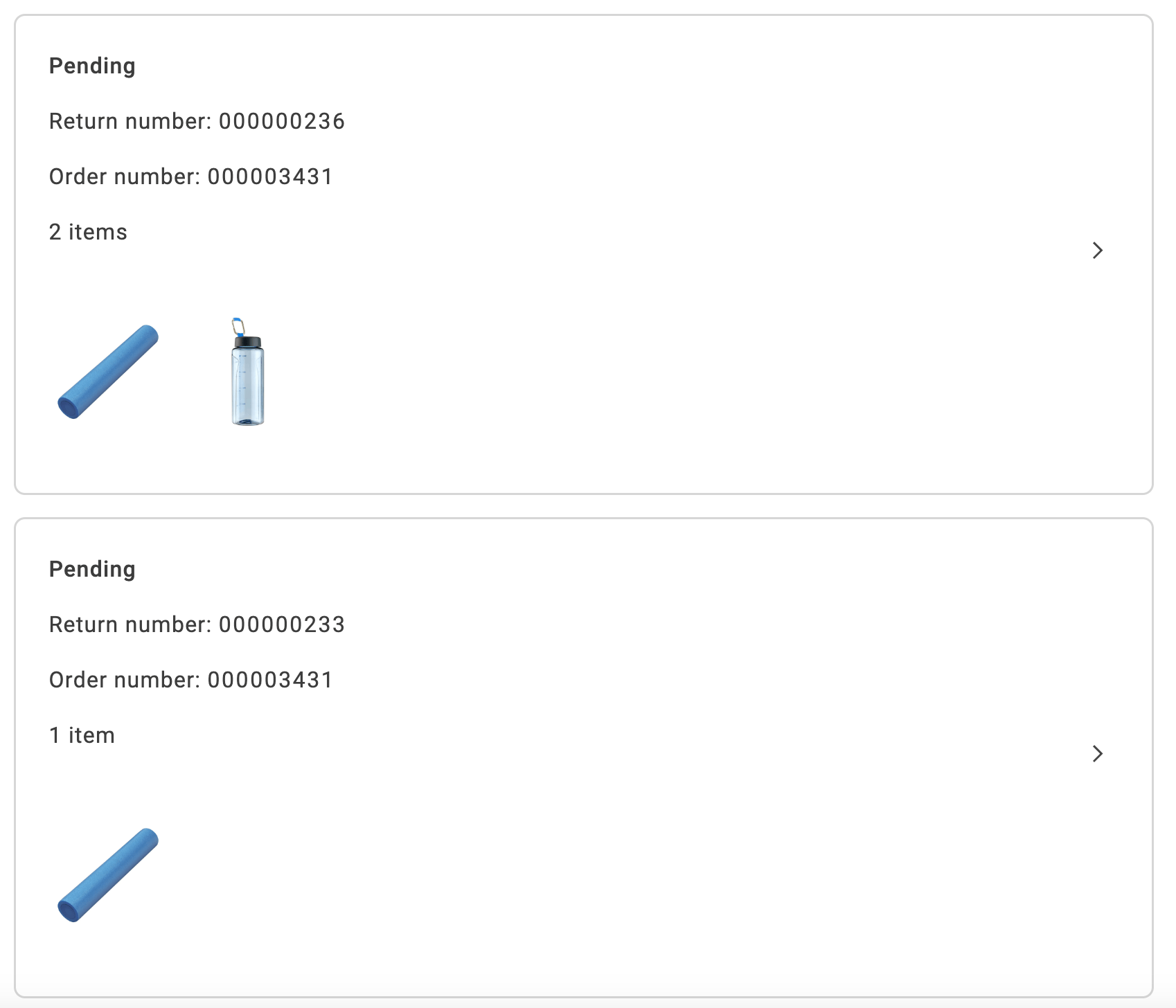\n</Diagram>\n\n## Configurations\n\nThe `ReturnsList` container provides the following configuration options:\n\n\n## Example\n\nThe following example demonstrates how to render the `ReturnsList` container:\n\n```javascript\nexport default async function decorate(block) {\n const {\n 'minified-view': minifiedViewConfig = 'false',\n } = readBlockConfig(block);\n\n if (!checkIsAuthenticated()) {\n window.location.href = CUSTOMER_LOGIN_PATH;\n } else {\n await orderRenderer.render(ReturnsList, {\n minifiedView: minifiedViewConfig === 'true',\n routeTracking: ({ carrier, number }) => {\n if (carrier?.toLowerCase() === 'ups') {\n return `$?tracknum=$`;\n }\n return '';\n },\n routeReturnDetails: ({ orderNumber, returnNumber }) => `$?orderRef=$&returnRef=$`,\n routeOrderDetails: ({ orderNumber }) => `$?orderRef=$`,\n routeReturnsList: () => CUSTOMER_RETURNS_PATH,\n routeProductDetails: (productData) => (productData ? `/products/$/$` : '#'),\n })(block);\n }\n}\n```"
|
|
83
|
+
},
|
|
84
|
+
{
|
|
85
|
+
"path": "dropins/order/containers/shipping-status",
|
|
86
|
+
"title": "ShippingStatus container",
|
|
87
|
+
"description": "Show carrier, tracking numbers, shipped line items, and still-unshipped products with one block per shipment on the order page.",
|
|
88
|
+
"content": "The `ShippingStatus` container displays information about shipments, including product images, the delivery service used, and tracking numbers. A separate block is rendered for each shipment created for the order. It also lists products that have not yet been shipped, providing a clear overview of the shipping status for all items.\n\n<Diagram caption=\"ShippingStatus container\">\n 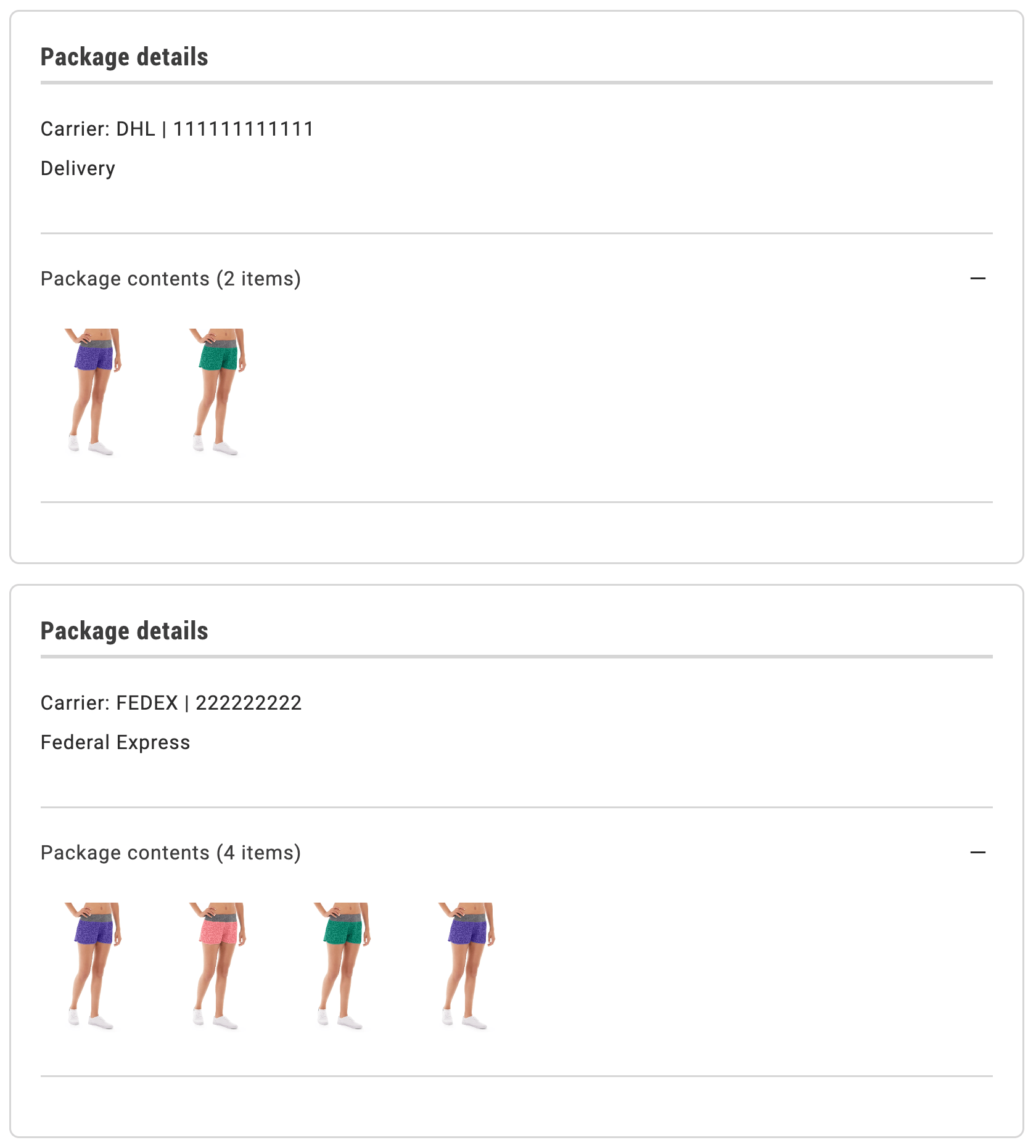\n</Diagram>\n\n## Configurations\n\nThe `ShippingStatus` container provides the following configuration options:\n\n\n## Example\n\nThe following example demonstrates how to render the `ShippingStatus` container:\n\n```javascript\nexport default async function decorate(block) {\n await orderRenderer.render(ShippingStatus, {\n routeTracking: ({ carrier, number }) => {\n if (carrier?.toLowerCase() === 'ups') {\n return `$?tracknum=$`;\n }\n return '';\n },\n routeProductDetails: (data) => {\n if (data?.orderItem) {\n return `/products/${data?.orderItem?.productUrlKey}/${data?.orderItem?.product?.sku}`;\n }\n if (data?.product) {\n return `/products/${data?.product?.urlKey}/${data?.product?.sku}`;\n }\n return '#';\n },\n })(block);\n}\n```"
|
|
89
|
+
},
|
|
90
|
+
{
|
|
91
|
+
"path": "dropins/order/dictionary",
|
|
92
|
+
"title": "Order Dictionary",
|
|
93
|
+
"description": "Customize user-facing text and labels in the Order drop-in for localization and branding.",
|
|
94
|
+
"content": "The **Order dictionary** contains all user-facing text, labels, and messages displayed by this drop-in. Customize the dictionary to:\n\n- **Localize** the drop-in for different languages and regions\n- **Customize** labels and messages to match your brand voice\n- **Override** default text without modifying source code for the drop-in\n\nDictionaries use the **i18n (internationalization)** pattern, where each text string is identified by a unique key path.\n\n\n## How to customize\n\nOverride dictionary values during drop-in initialization. The drop-in deep-merges your custom values with the defaults.\n\n```javascript\n\nawait initialize({\n langDefinitions: {\n en_US: {\n \"Order\": {\n \"CreateReturn\": {\n \"headerText\": \"Your custom message here\",\n \"downloadableCount\": \"Custom value\"\n }\n }\n }\n }\n});\n```\n\nYou only need to include the keys you want to change. For multi-language support and advanced patterns, see the [Dictionary customization guide](https://experienceleague.adobe.com/developer/commerce/storefront/dropins/all/dictionaries/).\n\n## Default keys and values\n\nBelow are the default English (`en_US`) strings provided by the **Order** drop-in:\n\n```json title=\"en_US.json\"\n{\n \"Order\": {\n \"CreateReturn\": {\n \"headerText\": \"Return items\",\n \"downloadableCount\": \"Files\",\n \"returnedItems\": \"Returned items:\",\n \"configurationsList\": {\n \"quantity\": \"Quantity\"\n },\n \"stockStatus\": {\n \"inStock\": \"In stock\",\n \"outOfStock\": \"Out of stock\"\n },\n \"giftCard\": {\n \"sender\": \"Sender\",\n \"recipient\": \"Recipient\",\n \"message\": \"Note\"\n },\n \"success\": {\n \"title\": \"Return submitted\",\n \"message\": \"Your return request has been successfully submitted.\"\n },\n \"buttons\": {\n \"nextStep\": \"Continue\",\n \"backStep\": \"Back\",\n \"submit\": \"Submit return\",\n \"backStore\": \"Back to order\"\n }\n },\n \"OrderComments\": {\n \"emptyState\": \"No order comments.\",\n \"title\": \"Order comments\"\n },\n \"OrderCostSummary\": {\n \"headerText\": \"Order summary\",\n \"headerReturnText\": \"Return summary\",\n \"totalFree\": \"Free\",\n \"subtotal\": {\n \"title\": \"Subtotal\"\n },\n \"shipping\": {\n \"title\": \"Shipping\",\n \"freeShipping\": \"Free shipping\"\n },\n \"appliedGiftCards\": {\n \"label\": {\n \"singular\": \"Gift card\",\n \"plural\": \"Gift cards\"\n }\n },\n \"giftOptionsTax\": {\n \"printedCard\": {\n \"title\": \"Printer card\",\n \"inclTax\": \"Including taxes\",\n \"exclTax\": \"Excluding taxes\"\n },\n \"itemGiftWrapping\": {\n \"title\": \"Item gift wrapping\",\n \"inclTax\": \"Including taxes\",\n \"exclTax\": \"Excluding taxes\"\n },\n \"orderGiftWrapping\": {\n \"title\": \"Order gift wrapping\",\n \"inclTax\": \"Including taxes\",\n \"exclTax\": \"Excluding taxes\"\n }\n },\n \"tax\": {\n \"accordionTitle\": \"Taxes\",\n \"accordionTotalTax\": \"Tax Total\",\n \"totalExcludingTaxes\": \"Total excluding taxes\",\n \"title\": \"Tax\",\n \"incl\": \"Including taxes\",\n \"excl\": \"Excluding taxes\"\n },\n \"discount\": {\n \"title\": \"Discount\",\n \"subtitle\": \"discounted\"\n },\n \"total\": {\n \"title\": \"Total\"\n }\n },\n \"Returns\": {\n \"minifiedView\": {\n \"returnsList\": {\n \"viewAllOrdersButton\": \"View all returns\",\n \"ariaLabelLink\": \"Redirect to full order information\",\n \"emptyOrdersListMessage\": \"No returns\",\n \"minifiedViewTitle\": \"Recent returns\",\n \"orderNumber\": \"Order number:\",\n \"returnNumber\": \"Return number:\",\n \"carrier\": \"Carrier:\",\n \"itemText\": {\n \"none\": \"\",\n \"one\": \"item\",\n \"many\": \"items\"\n },\n \"returnStatus\": {\n \"pending\": \"Pending\",\n \"authorized\": \"Authorized\",\n \"partiallyAuthorized\": \"Partially authorized\",\n \"received\": \"Received\",\n \"partiallyReceived\": \"Partially received\",\n \"approved\": \"Approved\",\n \"partiallyApproved\": \"Partially approved\",\n \"rejected\": \"Rejected\",\n \"partiallyRejected\": \"Partially rejected\",\n \"denied\": \"Denied\",\n \"processedAndClosed\": \"Processed and closed\",\n \"closed\": \"Closed\"\n }\n }\n },\n \"fullSizeView\": {\n \"returnsList\": {\n \"viewAllOrdersButton\": \"View all orders\",\n \"ariaLabelLink\": \"Redirect to full order information\",\n \"emptyOrdersListMessage\": \"No returns\",\n \"minifiedViewTitle\": \"Returns\",\n \"orderNumber\": \"Order number:\",\n \"returnNumber\": \"Return number:\",\n \"carrier\": \"Carrier:\",\n \"itemText\": {\n \"none\": \"\",\n \"one\": \"item\",\n \"many\": \"items\"\n },\n \"returnStatus\": {\n \"pending\": \"Pending\",\n \"authorized\": \"Authorized\",\n \"partiallyAuthorized\": \"Partially authorized\",\n \"received\": \"Received\",\n \"partiallyReceived\": \"Partially received\",\n \"approved\": \"Approved\",\n \"partiallyApproved\": \"Partially approved\",\n \"rejected\": \"Rejected\",\n \"partiallyRejected\": \"Partially rejected\",\n \"denied\": \"Denied\",\n \"processedAndClosed\": \"Processed and closed\",\n \"closed\": \"Closed\"\n }\n }\n }\n },\n \"OrderProductListContent\": {\n \"cancelledTitle\": \"Cancelled\",\n \"allOrdersTitle\": \"Your order\",\n \"returnedTitle\": \"Returned\",\n \"refundedTitle\": \"Your refunded\",\n \"downloadableCount\": \"Files\",\n \"stockStatus\": {\n \"inStock\": \"In stock\",\n \"outOfStock\": \"Out of stock\"\n },\n \"GiftCard\": {\n \"sender\": \"Sender\",\n \"recipient\": \"Recipient\",\n \"message\": \"Note\"\n }\n },\n \"OrderSearchForm\": {\n \"title\": \"Enter your information to view order details\",\n \"description\": \"You can find your order number in the receipt you received via email.\",\n \"button\": \"View Order\",\n \"email\": \"Email\",\n \"lastname\": \"Last Name\",\n \"orderNumber\": \"Order Number\"\n },\n \"Form\": {\n \"notifications\": {\n \"requiredFieldError\": \"This is a required field.\"\n }\n },\n \"ShippingStatusCard\": {\n \"orderNumber\": \"Order number:\",\n \"returnNumber\": \"Return number:\",\n \"itemText\": {\n \"none\": \"\",\n \"one\": \"Package contents ({} item)\",\n \"many\": \"Package contents ({} items)\"\n },\n \"trackButton\": \"Track package\",\n \"carrier\": \"Carrier:\",\n \"prepositionOf\": \"of\",\n \"returnOrderCardTitle\": \"Package details\",\n \"shippingCardTitle\": \"Package details\",\n \"shippingInfoTitle\": \"Shipping information\",\n \"notYetShippedTitle\": \"Not yet shipped\",\n \"notYetShippedImagesTitle\": {\n \"singular\": \"Package contents ({} item)\",\n \"plural\": \"Package contents ({} items)\"\n }\n },\n \"OrderStatusContent\": {\n \"noInfoTitle\": \"Check back later for more details.\",\n \"returnMessage\": \"The order was placed on and your return process started on \",\n \"returnStatus\": {\n \"pending\": \"Pending\",\n \"authorized\": \"Authorized\",\n \"partiallyAuthorized\": \"Partially authorized\",\n \"received\": \"Received\",\n \"partiallyReceived\": \"Partially received\",\n \"approved\": \"Approved\",\n \"partiallyApproved\": \"Partially approved\",\n \"rejected\": \"Rejected\",\n \"partiallyRejected\": \"Partially rejected\",\n \"denied\": \"Denied\",\n \"processedAndClosed\": \"Processed and closed\",\n \"closed\": \"Closed\"\n },\n \"actions\": {\n \"cancel\": \"Cancel order\",\n \"confirmGuestReturn\": \"Return request confirmed\",\n \"confirmGuestReturnMessage\": \"Your return request has been successfully confirmed.\",\n \"createReturn\": \"Return or replace\",\n \"createAnotherReturn\": \"Start another return\",\n \"reorder\": \"Reorder\"\n },\n \"orderPlaceholder\": {\n \"title\": \"\",\n \"message\": \"Your order has been in its current status since .\",\n \"messageWithoutDate\": \"Your order has been in its current status for some time.\"\n },\n \"orderPending\": {\n \"title\": \"Pending\",\n \"message\": \"The order was successfully placed on and your order is processing. Check back for more details when your order ships.\",\n \"messageWithoutDate\": \"Your order is processing. Check back for more details when your order ships.\"\n },\n \"orderProcessing\": {\n \"title\": \"Processing\",\n \"message\": \"The order was successfully placed on and your order is processing. Check back for more details when your order ships.\",\n \"messageWithoutDate\": \"Your order is processing. Check back for more details when your order ships.\"\n },\n \"orderOnHold\": {\n \"title\": \"On hold\",\n \"message\": \"We’ve run into an issue while processing your order on . Please check back later or contact us at support@adobe.com for more information.\",\n \"messageWithoutDate\": \"We’ve run into an issue while processing your order. Please check back later or contact us at support@adobe.com for more information.\"\n },\n \"orderReceived\": {\n \"title\": \"Order received\",\n \"message\": \"The order was successfully placed on and your order is processing. Check back for more details when your order ships.\",\n \"messageWithoutDate\": \"Your order is processing. Check back for more details when your order ships.\"\n },\n \"orderComplete\": {\n \"title\": \"Complete\",\n \"message\": \"Your order is complete. Need help with your order? Contact us at support@adobe.com\"\n },\n \"orderCanceled\": {\n \"title\": \"Canceled\",\n \"message\": \"This order was cancelled by you. You should see a refund to your original payment method with 5-7 business days.\",\n \"messageWithoutDate\": \"This order was cancelled by you. You should see a refund to your original payment method with 5-7 business days.\"\n },\n \"orderSuspectedFraud\": {\n \"title\": \"Suspected fraud\",\n \"message\": \"We’ve run into an issue while processing your order on . Please check back later or contact us at support@adobe.com for more information.\",\n \"messageWithoutDate\": \"We’ve run into an issue while processing your order. Please check back later or contact us at support@adobe.com for more information.\"\n },\n \"orderPaymentReview\": {\n \"title\": \"Payment Review\",\n \"message\": \"The order was successfully placed on and your order is processing. Check back for more details when your order ships.\",\n \"messageWithoutDate\": \"Your order is processing. Check back for more details when your order ships.\"\n },\n \"guestOrderCancellationRequested\": {\n \"title\": \"Cancellation requested\",\n \"message\": \"The cancellation has been requested on . Check your email for further instructions.\",\n \"messageWithoutDate\": \"The cancellation has been requested. Check your email for further instructions.\"\n },\n \"orderPendingPayment\": {\n \"title\": \"Pending Payment\",\n \"message\": \"The order was successfully placed on , but it is awaiting payment. Please complete the payment so we can start processing your order.\",\n \"messageWithoutDate\": \"Your order is awaiting payment. Please complete the payment so we can start processing your order.\"\n },\n \"orderRejected\": {\n \"title\": \"Rejected\",\n \"message\": \"Your order was rejected on . Please contact us for more information.\",\n \"messageWithoutDate\": \"Your order was rejected. Please contact us for more information.\"\n },\n \"orderAuthorized\": {\n \"title\": \"Authorized\",\n \"message\": \"Your order was successfully authorized on . We will begin processing your order shortly.\",\n \"messageWithoutDate\": \"Your order was successfully authorized. We will begin processing your order shortly.\"\n },\n \"orderPaypalCanceledReversal\": {\n \"title\": \"PayPal Canceled Reversal\",\n \"message\": \"The PayPal transaction reversal was canceled on . Please check your order details for more information.\",\n \"messageWithoutDate\": \"The PayPal transaction reversal was canceled. Please check your order details for more information.\"\n },\n \"orderPendingPaypal\": {\n \"title\": \"Pending PayPal\",\n \"message\": \"Your order is awaiting PayPal payment confirmation since . Please check your PayPal account for the payment status.\",\n \"messageWithoutDate\": \"Your order is awaiting PayPal payment confirmation. Please check your PayPal account for the payment status.\"\n },\n \"orderPaypalReversed\": {\n \"title\": \"PayPal Reversed\",\n \"message\": \"The PayPal payment was reversed on . Please contact us for further details.\",\n \"messageWithoutDate\": \"The PayPal payment was reversed. Please contact us for further details.\"\n },\n \"orderClosed\": {\n \"title\": \"Closed\",\n \"message\": \"The order placed on has been closed. For any further assistance, please contact support.\",\n \"messageWithoutDate\": \"Your order has been closed. For any further assistance, please contact support.\"\n }\n },\n \"CustomerDetails\": {\n \"headerText\": \"Customer information\",\n \"freeShipping\": \"Free shipping\",\n \"orderReturnLabels\": {\n \"createdReturnAt\": \"Return requested on: \",\n \"returnStatusLabel\": \"Return status: \",\n \"orderNumberLabel\": \"Order number: \"\n },\n \"returnStatus\": {\n \"pending\": \"Pending\",\n \"authorized\": \"Authorized\",\n \"partiallyAuthorized\": \"Partially authorized\",\n \"received\": \"Received\",\n \"partiallyReceived\": \"Partially received\",\n \"approved\": \"Approved\",\n \"partiallyApproved\": \"Partially approved\",\n \"rejected\": \"Rejected\",\n \"partiallyRejected\": \"Partially rejected\",\n \"denied\": \"Denied\",\n \"processedAndClosed\": \"Processed and closed\",\n \"closed\": \"Closed\"\n },\n \"email\": {\n \"title\": \"Contact details\"\n },\n \"shippingAddress\": {\n \"title\": \"Shipping address\"\n },\n \"shippingMethods\": {\n \"title\": \"Shipping method\"\n },\n \"billingAddress\": {\n \"title\": \"Billing address\"\n },\n \"paymentMethods\": {\n \"title\": \"Payment method\"\n },\n \"returnInformation\": {\n \"title\": \"Return details\"\n }\n },\n \"Errors\": {\n \"invalidOrder\": \"Invalid order. Please try again.\",\n \"invalidSearch\": \"No order found with these order details.\"\n },\n \"OrderCancel\": {\n \"buttonText\": \"Cancel Order\"\n },\n \"OrderCancelForm\": {\n \"title\": \"Cancel order\",\n \"description\": \"Select a reason for canceling the order\",\n \"label\": \"Reason for cancel\",\n \"button\": \"Submit Cancellation\",\n \"errorHeading\": \"Error\",\n \"errorDescription\": \"There was an error processing your order cancellation.\"\n },\n \"OrderHeader\": {\n \"title\": \"{}, thank you for your order!\",\n \"defaultTitle\": \"Thank you for your order!\",\n \"order\": \"ORDER #{}\",\n \"CreateAccount\": {\n \"message\": \"Save your information for faster checkout next time.\",\n \"button\": \"Create an account\"\n }\n }\n }\n}\n```"
|
|
95
|
+
},
|
|
96
|
+
{
|
|
97
|
+
"path": "dropins/order/events",
|
|
98
|
+
"title": "Order Data & Events",
|
|
99
|
+
"description": "Learn about the events used by the Order and the data available within the events.",
|
|
100
|
+
"content": "The **Order** drop-in uses the [event bus](https://experienceleague.adobe.com/developer/commerce/storefront/sdk/reference/events) to emit and listen to events for communication between drop-ins and external integrations.\n\n\n## Events reference\n\n{/* EVENTS_TABLE_START */}\n\n\n| Event | Direction | Description |\n|-------|-----------|-------------|\n| [cart/reset](#cartreset-emits) | Emits | Emitted when the component state is reset. |\n| [order/placed](#orderplaced-emits) | Emits | Emitted when an order is placed. |\n| [companyContext/changed](#companycontextchanged-listens) | Listens | Fired by Company Context (`companyContext`) when a change occurs. |\n| [order/data](#orderdata-emits-and-listens) | Emits and listens | Triggered when data is available or changes. |\n| [order/error](#ordererror-emits-and-listens) | Emits and listens | Triggered when an error occurs. |\n\n\n{/* EVENTS_TABLE_END */}\n\n## Event details\n\nThe following sections provide detailed information about each event, including its direction, event payload, and usage examples.\n\n\n### `cart/reset` (emits)\n\nEmitted when the component state is reset.\n\n#### Event payload\n\n\n#### Example\n\n```js\n\nevents.on('cart/reset', (payload) => {\n console.log('cart/reset event received:', payload);\n // Add your custom logic here\n});\n```\n\n\n### `companyContext/changed` (listens)\n\nFired by Company Context (`companyContext`) when a change occurs.\n\n#### Event payload\n\n```typescript\nstring | null | undefined\n```\n\n\n#### Example\n\n```js\n\nevents.on('companyContext/changed', (payload) => {\n console.log('companyContext/changed event received:', payload);\n // Add your custom logic here\n});\n```\n\n\n### `order/data` (emits and listens)\n\nEmitted when order data is loaded or updated. This includes order details, items, shipping information, and payment status.\n\n#### Event payload\n\n```typescript\nOrderDataModel\n```\n\nSee [`OrderDataModel`](#orderdatamodel) for full type definition.\n\n\n#### Example\n\n```js\n\nevents.on('order/data', (payload) => {\n console.log('order/data event received:', payload);\n // Add your custom logic here\n});\n```\n\n\n### `order/error` (emits and listens)\n\nEmitted when an error occurs during order operations such as fetching order details, reordering items, or processing returns.\n\n#### Event payload\n\n```typescript\n{ source: string; type: string; error: Error | string }\n```\n\n\n#### Example\n\n```js\n\nevents.on('order/error', (payload) => {\n console.log('order/error event received:', payload);\n // Add your custom logic here\n});\n```\n\n\n### `order/placed` (emits)\n\nEmitted when an order is placed.\n\n#### Event payload\n\n```typescript\nOrderDataModel\n```\n\nSee [`OrderDataModel`](#orderdatamodel) for full type definition.\n\n\n#### Example\n\n```js\n\nevents.on('order/placed', (payload) => {\n console.log('order/placed event received:', payload);\n // Add your custom logic here\n});\n```\n\n\n## Data Models\n\nThe following data models are used in event payloads for this drop-in.\n\n### OrderDataModel\n\nUsed in: [`order/data`](#orderdata-emits-and-listens), [`order/placed`](#orderplaced-emits).\n\n```ts\ntype OrderDataModel = {\n giftReceiptIncluded: boolean;\n printedCardIncluded: boolean;\n giftWrappingOrder: {\n price: MoneyProps;\n uid: string;\n };\n placeholderImage?: string;\n returnNumber?: string;\n id: string;\n orderStatusChangeDate?: string;\n number: string;\n email: string;\n token?: string;\n status: string;\n isVirtual: boolean;\n totalQuantity: number;\n shippingMethod?: string;\n carrier?: string;\n orderDate: string;\n returns: OrdersReturnPropsModel[];\n discounts: { amount: MoneyProps; label: string }[];\n coupons: {\n code: string;\n }[];\n payments: {\n code: string;\n name: string;\n }[];\n shipping?: { code: string; amount: number; currency: string };\n shipments: ShipmentsModel[];\n items: OrderItemModel[];\n totalGiftCard: MoneyProps;\n grandTotal: MoneyProps;\n grandTotalExclTax: MoneyProps;\n totalShipping?: MoneyProps;\n subtotalExclTax: MoneyProps;\n subtotalInclTax: MoneyProps;\n totalTax: MoneyProps;\n shippingAddress: OrderAddressModel;\n totalGiftOptions: {\n giftWrappingForItems: MoneyProps;\n giftWrappingForItemsInclTax: MoneyProps;\n giftWrappingForOrder: MoneyProps;\n giftWrappingForOrderInclTax: MoneyProps;\n printedCard: MoneyProps;\n printedCardInclTax: MoneyProps;\n };\n billingAddress: OrderAddressModel;\n availableActions: AvailableActionsProps[];\n taxes: { amount: MoneyProps; rate: number; title: string }[];\n appliedGiftCards: {\n code: string;\n appliedBalance: MoneyProps;\n }[];\n};\n```\n\n### OrderItemProductModel\n\n```ts\ntype OrderItemProductModel = {\n onlyXLeftInStock?: number;\n priceRange?: {\n maximumPrice?: {\n regularPrice?: MoneyProps;\n };\n };\n uid: string;\n __typename: string;\n stockStatus?: string;\n canonicalUrl?: string;\n urlKey?: string;\n id: string;\n image?: string;\n imageAlt?: string;\n name: string;\n productType: string;\n sku: string;\n thumbnail: {\n url: string;\n label: string;\n };\n giftWrappingAvailable?: boolean;\n};\n```\n\n### OrderItemModel\n\n```ts\ntype OrderItemModel = {\n giftMessage: {\n senderName: string;\n recipientName: string;\n message: string;\n };\n giftWrappingPrice: MoneyProps;\n productGiftWrapping: {\n uid: string;\n design: string;\n selected: boolean;\n image: {\n url: string;\n label: string;\n };\n price: MoneyProps;\n }[];\n taxCalculations: {\n includeAndExcludeTax: {\n originalPrice: MoneyProps;\n baseOriginalPrice: MoneyProps;\n baseDiscountedPrice: MoneyProps;\n baseExcludingTax: MoneyProps;\n };\n excludeTax: {\n originalPrice: MoneyProps;\n baseOriginalPrice: MoneyProps;\n baseDiscountedPrice: MoneyProps;\n baseExcludingTax: MoneyProps;\n };\n includeTax: {\n singleItemPrice: MoneyProps;\n baseOriginalPrice: MoneyProps;\n baseDiscountedPrice: MoneyProps;\n };\n };\n productSalePrice: MoneyProps;\n status?: string;\n currentReturnOrderQuantity?: number;\n eligibleForReturn: boolean;\n productSku?: string;\n type?: string;\n discounted?: boolean;\n id: string;\n productName?: string;\n productUrlKey?: string;\n regularPrice?: MoneyProps;\n price: MoneyProps;\n product?: OrderItemProductModel;\n selectedOptions?: Array<{\n label: string;\n value: any;\n }>;\n thumbnail?: {\n label: string;\n url: string;\n };\n downloadableLinks: {\n count: number;\n result: string;\n } | null;\n prices: {\n priceIncludingTax: MoneyProps;\n originalPrice: MoneyProps;\n originalPriceIncludingTax: MoneyProps;\n price: MoneyProps;\n discounts: {\n label: string;\n amount: { value: number };\n }[];\n };\n itemPrices: {\n priceIncludingTax: MoneyProps;\n originalPrice: MoneyProps;\n originalPriceIncludingTax: MoneyProps;\n price: MoneyProps;\n discounts: {\n label: string;\n amount: { value: number };\n }[];\n };\n bundleOptions: Record<string, string> | null;\n totalInclTax: MoneyProps;\n priceInclTax: MoneyProps;\n total: MoneyProps;\n configurableOptions: Record<string, string | number | boolean> | undefined;\n giftCard?: {\n senderName: string;\n senderEmail: string;\n recipientEmail: string;\n recipientName: string;\n message: string;\n };\n quantityCanceled: number;\n quantityInvoiced: number;\n quantityOrdered: number;\n quantityRefunded: number;\n quantityReturned: number;\n quantityShipped: number;\n requestQuantity?: number;\n totalQuantity: number;\n returnableQuantity?: number;\n quantityReturnRequested: number;\n};\n```"
|
|
101
|
+
},
|
|
102
|
+
{
|
|
103
|
+
"path": "dropins/order/functions",
|
|
104
|
+
"title": "Order Functions",
|
|
105
|
+
"description": "API functions provided by the Order drop-in for programmatic control and customization.",
|
|
106
|
+
"content": "The Order drop-in provides API functions that enable you to programmatically control behavior, fetch data, and integrate with Adobe Commerce backend services.\n\n\n| Function | Description |\n| --- | --- |\n| [`cancelOrder`](#cancelorder) | Calls the `cancelOrder` mutation. |\n| [`confirmCancelOrder`](#confirmcancelorder) | Confirms the cancellation of an order using the provided order ID and confirmation key. |\n| [`confirmGuestReturn`](#confirmguestreturn) | Confirms a return request for a guest order using an order ID and confirmation key. |\n| [`getAttributesForm`](#getattributesform) | Calls the `attributesForm` query. |\n| [`getAttributesList`](#getattributeslist) | Is a wrapper for the `attributesList` query. |\n| [`getCustomer`](#getcustomer) | Is a wrapper for the customer query. |\n| [`getCustomerOrdersReturn`](#getcustomerordersreturn) | Returns details about the returns a customer has requested. |\n| [`getGuestOrder`](#getguestorder) | Is a wrapper for the `guestOrder` query. |\n| [`getOrderDetailsById`](#getorderdetailsbyid) | Fetches detailed order data by order ID from the Commerce backend. |\n| [`getStoreConfig`](#getstoreconfig) | Returns information about the storefront configuration. |\n| [`guestOrderByToken`](#guestorderbytoken) | Retrieves a guest order using a token generated by Adobe Commerce. |\n| [`placeNegotiableQuoteOrder`](#placenegotiablequoteorder) | Places an order for a negotiable quote. |\n| [`placeOrder`](#placeorder) | API function for the drop-in. |\n| [`reorderItems`](#reorderitems) | Allows a logged-in customer to add all the products from a previous order into their cart. |\n| [`requestGuestOrderCancel`](#requestguestordercancel) | Is similar to the `cancelOrder` function, but it is used for guest orders. |\n| [`requestGuestReturn`](#requestguestreturn) | Initiates a return request for a guest order. |\n| [`requestReturn`](#requestreturn) | Takes the `RequestReturnProps` form as an argument and initiates the process of returning items from an order. |\n| [`setPaymentMethodAndPlaceOrder`](#setpaymentmethodandplaceorder) | Sets the payment method on a cart and immediately places the order. |\n\n\n## cancelOrder\n\nThe `cancelOrder` function calls the mutation. You must pass an order ID and reason.\n\n```ts\nconst cancelOrder = async (\n orderId: string,\n reason: string,\n onSuccess: Function,\n onError: Function\n): Promise<void | null | undefined>\n```\n\n\n| Parameter | Type | Req? | Description |\n|---|---|---|---|\n| `orderId` | `string` | Yes | The ID of the order to cancel. |\n| `reason` | `string` | Yes | The reason for canceling the order. |\n| `onSuccess` | `Function` | Yes | The callback function to execute when the order is successfully canceled. |\n| `onError` | `Function` | Yes | The callback function to execute when an error occurs. |\n\n\n### Events\n\nDoes not emit any drop-in events.\n\n### Returns\n\nReturns `void | null | undefined`.\n\n## confirmCancelOrder\n\nThe `confirmCancelOrder` function confirms the cancellation of an order using the provided order ID and confirmation key. The function calls the mutation.\n\n```ts\nconst confirmCancelOrder = async (\n orderId: string,\n confirmationKey: string\n): Promise<any>\n```\n\n\n| Parameter | Type | Req? | Description |\n|---|---|---|---|\n| `orderId` | `string` | Yes | The ID of the order to cancel. |\n| `confirmationKey` | `string` | Yes | A key generated when a guest requests to cancel an order. |\n\n\n### Events\n\nEmits the [`order/data`](https://experienceleague.adobe.com/developer/commerce/storefront/dropins/order/events/#orderdata-emits-and-listens) event with the updated order information after confirming the cancellation.\n\n### Returns\n\nReturns `void`.\n\n## confirmGuestReturn\n\nThe `confirmGuestReturn` function confirms a return request for a guest order using an order ID and confirmation key. The function calls the mutation.\n\n```ts\nconst confirmGuestReturn = async (\n orderId: string,\n confirmationKey: string\n): Promise<OrderDataModel | null>\n```\n\n\n| Parameter | Type | Req? | Description |\n|---|---|---|---|\n| `orderId` | `string` | Yes | The ID of the order for which the return is being confirmed. |\n| `confirmationKey` | `string` | Yes | The confirmation key sent to the guest's email address to authorize the return. |\n\n\n### Events\n\nEmits the [`order/data`](https://experienceleague.adobe.com/developer/commerce/storefront/dropins/order/events/#orderdata-emits-and-listens) event.\n\n### Returns\n\nReturns [`OrderDataModel`](#orderdatamodel) or `null`.\n\n## getAttributesForm\n\nThe `getAttributesForm` function calls the query.\n\n```ts\nconst getAttributesForm = async (\n formCode: string\n): Promise<AttributesFormModel[]>\n```\n\n\n| Parameter | Type | Req? | Description |\n|---|---|---|---|\n| `formCode` | `string` | Yes | One of \"customer_account_create\", \"customer_account_edit\", \"customer_address_create\", \"customer_address_edit\". |\n\n\n### Events\n\nDoes not emit any drop-in events.\n\n### Returns\n\nReturns `AttributesFormModel[]`.\n\n## getAttributesList\n\nThe `getAttributesList` function is a wrapper for the query. You must pass an attribute code to retrieve the list. The system default values are `CUSTOMER`, `CUSTOMER_ADDRESS`, `CATALOG_PRODUCT` and `RMA_ITEM`.\n\n```ts\nconst getAttributesList = async (\n entityType: string\n): Promise<AttributesFormModel[] | []>\n```\n\n\n| Parameter | Type | Req? | Description |\n|---|---|---|---|\n| `entityType` | `string` | Yes | The entity type for which to retrieve the list of attributes. |\n\n\n### Events\n\nDoes not emit any drop-in events.\n\n### Returns\n\nReturns `AttributesFormModel[] | []`.\n\n## getCustomer\n\nThe `getCustomer` function is a wrapper for the query. You must pass a customer ID to retrieve the customer data.\n\n```ts\nconst getCustomer = async (): Promise<CustomerDataModelShort>\n```\n\n### Events\n\nDoes not emit any drop-in events.\n\n### Returns\n\nReturns [`CustomerDataModelShort`](#customerdatamodelshort).\n\n## getCustomerOrdersReturn\n\nThe `getCustomerOrdersReturn` function returns details about the returns a customer has requested. It is a wrapper for the query.\n\n```ts\nconst getCustomerOrdersReturn = async (\n pageSize = 10,\n currentPage = 1\n): Promise<CustomerOrdersReturnModel | null>\n```\n\n\n| Parameter | Type | Req? | Description |\n|---|---|---|---|\n| `pageSize` | `number` | No | The number of orders to return at a time. |\n| `currentPage` | `number` | No | See function signature above |\n\n\n### Events\n\nDoes not emit any drop-in events.\n\n### Returns\n\nReturns [`CustomerOrdersReturnModel`](#customerordersreturnmodel) or `null`.\n\n## getGuestOrder\n\nThe `getGuestOrder` function is a wrapper for the query.\n\n```ts\nconst getGuestOrder = async (\n form: { number: string; email: string; lastname: string; }\n): Promise<OrderDataModel | null>\n```\n\n\n| Parameter | Type | Req? | Description |\n|---|---|---|---|\n| `number` | `string` | Yes | The order number. |\n| `email` | `string` | Yes | The email address associated with the order. |\n| `lastname` | `string` | Yes | The last name associated with the order. |\n\n\n### Events\n\nDoes not emit any drop-in events.\n\n### Returns\n\nReturns [`OrderDataModel`](#orderdatamodel) or `null`.\n\n## getStoreConfig\n\nThe `getStoreConfig` function returns information about the storefront configuration. It is a wrapper for the query.\n\n```ts\nconst getStoreConfig = async (): Promise<StoreConfigModel | null>\n```\n\n### Events\n\nDoes not emit any drop-in events.\n\n### Returns\n\nReturns [`StoreConfigModel`](#storeconfigmodel) or `null`.\n\n## guestOrderByToken\n\nThe `guestOrderByToken` function retrieves a guest order using a token generated by Adobe Commerce. It is a wrapper for the `guestOrderByToken` query. The function calls the query.\n\n```ts\nconst guestOrderByToken = async (\n token?: string,\n returnRef?: string\n): Promise<OrderDataModel | null>\n```\n\n\n| Parameter | Type | Req? | Description |\n|---|---|---|---|\n| `token` | `string` | No | A token for the order assigned by Adobe Commerce. |\n| `returnRef` | `string` | No | The reference to return. |\n\n\n### Events\n\nDoes not emit any drop-in events.\n\n### Returns\n\nReturns [`OrderDataModel`](#orderdatamodel) or `null`.\n\n## placeNegotiableQuoteOrder\n\nThe `placeNegotiableQuoteOrder` function places an order for a negotiable quote. It is a wrapper for the `placeNegotiableQuoteOrder` mutation. The function calls the mutation.\n\n```ts\nconst placeNegotiableQuoteOrder = async (\n quoteUid: string\n): Promise<OrderDataModel | null | undefined>\n```\n\n\n| Parameter | Type | Req? | Description |\n|---|---|---|---|\n| `quoteUid` | `string` | Yes | The unique identifier (UID) of the negotiable quote to place as an order. |\n\n\n### Events\n\nEmits the [`order/placed`](https://experienceleague.adobe.com/developer/commerce/storefront/dropins/order/events/#orderplaced-emits) event.\n\n### Returns\n\nReturns `OrderDataModel | null | undefined`. See [`OrderDataModel`](#orderdatamodel).\n\n## placeOrder\n\n```ts\nconst placeOrder = async (\n cartId: string\n): Promise<OrderDataModel | null | undefined>\n```\n\n\n| Parameter | Type | Req? | Description |\n|---|---|---|---|\n| `cartId` | `string` | Yes | The unique identifier for the shopping cart. This ID is used to track and persist cart data across sessions. |\n\n\n### Events\n\nEmits the following events: [`cart/reset`](https://experienceleague.adobe.com/developer/commerce/storefront/dropins/order/events/#cartreset-emits), [`order/placed`](https://experienceleague.adobe.com/developer/commerce/storefront/dropins/order/events/#orderplaced-emits).\n\n### Returns\n\nReturns `OrderDataModel | null | undefined`. See [`OrderDataModel`](#orderdatamodel).\n\n## reorderItems\n\nThe `reorderItems` function allows a logged-in customer to add all the products from a previous order into their cart. It is a wrapper for the mutation.\n\n```ts\nconst reorderItems = async (\n orderNumber: string\n): Promise<ReorderItemsProps>\n```\n\n\n| Parameter | Type | Req? | Description |\n|---|---|---|---|\n| `orderNumber` | `string` | Yes | The order number to reorder. |\n\n\n### Events\n\nDoes not emit any drop-in events.\n\n### Returns\n\nReturns [`ReorderItemsProps`](#reorderitemsprops).\n\n## requestGuestOrderCancel\n\nThe `requestGuestOrderCancel` function is similar to the `cancelOrder` function, but it is used for guest orders.\nThe token is a unique value generated using guest's email, order number and postcode The function calls the mutation.\n\n```ts\nconst requestGuestOrderCancel = async (\n token: string,\n reason: string,\n onSuccess: Function,\n onError: Function\n): Promise<void>\n```\n\n\n| Parameter | Type | Req? | Description |\n|---|---|---|---|\n| `token` | `string` | Yes | The token for the order assigned by Adobe Commerce. |\n| `reason` | `string` | Yes | The reason for canceling the order. |\n| `onSuccess` | `Function` | Yes | The callback function to execute when the order is successfully canceled. |\n| `onError` | `Function` | Yes | The callback function to execute when an error occurs. |\n\n\n### Events\n\nDoes not emit any drop-in events.\n\n### Returns\n\nReturns `void`.\n\n## requestGuestReturn\n\nThe `requestGuestReturn` function initiates a return request for a guest order. The function calls the mutation.\n\n```ts\nconst requestGuestReturn = async (\n form: RequestGuestReturnProps\n): Promise<{\n uid: string;\n number: string;\n status: string;\n createdAt: string;\n}>\n```\n\n\n| Parameter | Type | Req? | Description |\n|---|---|---|---|\n| `form` | `RequestGuestReturnProps` | Yes | The form data for the guest return request, including order details and items to return. |\n\n\n### Events\n\nDoes not emit any drop-in events.\n\n### Returns\n\n```ts\nPromise<{\n uid: string;\n number: string;\n status: string;\n createdAt: string;\n}>\n```\n\n## requestReturn\n\nThe `requestReturn` function takes the `RequestReturnProps` form as an argument and initiates the process of returning items from an order. It is a wrapper for the mutation.\n\n```ts\nconst requestReturn = async (\n form: RequestReturnProps\n): Promise<RequestReturnModel | {}>\n```\n\n\n| Parameter | Type | Req? | Description |\n|---|---|---|---|\n| `form` | `RequestReturnProps` | Yes | The form data for the return request. |\n\n\n### Events\n\nDoes not emit any drop-in events.\n\n### Returns\n\nReturns `RequestReturnModel | {}`. See [`RequestReturnModel`](#requestreturnmodel).\n\n## setPaymentMethodAndPlaceOrder\n\nThe `setPaymentMethodAndPlaceOrder` function sets the payment method on a cart and immediately places the order. The function calls the mutation.\n\n```ts\nconst setPaymentMethodAndPlaceOrder = async (\n cartId: string,\n paymentMethod: any\n): Promise<OrderDataModel | null | undefined>\n```\n\n\n| Parameter | Type | Req? | Description |\n|---|---|---|---|\n| `cartId` | `string` | Yes | The ID of the cart to place as an order. |\n| `paymentMethod` | `any` | Yes | The payment method information to apply to the cart before placing the order. |\n\n\n### Events\n\nEmits the following events: [`cart/reset`](https://experienceleague.adobe.com/developer/commerce/storefront/dropins/order/events/#cartreset-emits), [`order/placed`](https://experienceleague.adobe.com/developer/commerce/storefront/dropins/order/events/#orderplaced-emits).\n\n### Returns\n\nReturns `OrderDataModel | null | undefined`. See [`OrderDataModel`](#orderdatamodel).\n\n## getOrderDetailsById\n\nThe `getOrderDetailsById` function fetches detailed order data by order number from the Adobe Commerce backend. It supports optional return details and is used internally by the order initialization helpers.\n\n```ts\nconst getOrderDetailsById = async <T extends QueryType>({\n orderId,\n returnRef,\n queryType,\n returnsPageSize,\n}: GetOrderDetailsByIdProps): Promise<TransformedData<T>>\n```\n\n\n| Parameter | Type | Req? | Description |\n|---|---|---|---|\n| `orderId` | `string` | No | The order number to fetch. |\n| `returnRef` | `string` | No | An optional return reference used to filter return details. |\n| `queryType` | `QueryType` | Yes | The type of data to query. Use `'orderData'` for standard order details. |\n| `returnsPageSize` | `number` | No | Number of return records to fetch. Defaults to `50`. |\n\n\n### Events\n\nDoes not emit any drop-in events.\n\n### Returns\n\nReturns [`OrderDataModel`](#orderdatamodel) or `null`.\n\n## Data Models\n\nThe following data models are used by functions in this drop-in.\n\n### CustomerDataModelShort\n\nThe `CustomerDataModelShort` object is returned by the following functions: [`getCustomer`](#getcustomer).\n\n```ts\ninterface CustomerDataModelShort {\n firstname: string;\n lastname: string;\n email: string;\n}\n```\n\n### CustomerOrdersReturnModel\n\nThe `CustomerOrdersReturnModel` object is returned by the following functions: [`getCustomerOrdersReturn`](#getcustomerordersreturn).\n\n```ts\ninterface CustomerOrdersReturnModel {\n ordersReturn: OrdersReturnPropsModel[];\n pageInfo?: PageInfoProps;\n}\n```\n\n### OrderDataModel\n\nThe `OrderDataModel` object is returned by the following functions: [`confirmGuestReturn`](#confirmguestreturn), [`getGuestOrder`](#getguestorder), [`guestOrderByToken`](#guestorderbytoken), [`placeNegotiableQuoteOrder`](#placenegotiablequoteorder), [`placeOrder`](#placeorder), [`setPaymentMethodAndPlaceOrder`](#setpaymentmethodandplaceorder).\n\n```ts\ntype OrderDataModel = {\n giftReceiptIncluded: boolean;\n printedCardIncluded: boolean;\n giftWrappingOrder: {\n price: MoneyProps;\n uid: string;\n };\n placeholderImage?: string;\n returnNumber?: string;\n id: string;\n orderStatusChangeDate?: string;\n number: string;\n email: string;\n token?: string;\n status: string;\n isVirtual: boolean;\n totalQuantity: number;\n shippingMethod?: string;\n carrier?: string;\n orderDate: string;\n returns: OrdersReturnPropsModel[];\n discounts: { amount: MoneyProps; label: string }[];\n coupons: {\n code: string;\n }[];\n payments: {\n code: string;\n name: string;\n }[];\n shipping?: { code: string; amount: number; currency: string };\n shipments: ShipmentsModel[];\n items: OrderItemModel[];\n totalGiftCard: MoneyProps;\n grandTotal: MoneyProps;\n grandTotalExclTax: MoneyProps;\n totalShipping?: MoneyProps;\n subtotalExclTax: MoneyProps;\n subtotalInclTax: MoneyProps;\n totalTax: MoneyProps;\n shippingAddress: OrderAddressModel;\n totalGiftOptions: {\n giftWrappingForItems: MoneyProps;\n giftWrappingForItemsInclTax: MoneyProps;\n giftWrappingForOrder: MoneyProps;\n giftWrappingForOrderInclTax: MoneyProps;\n printedCard: MoneyProps;\n printedCardInclTax: MoneyProps;\n };\n billingAddress: OrderAddressModel;\n availableActions: AvailableActionsProps[];\n taxes: { amount: MoneyProps; rate: number; title: string }[];\n appliedGiftCards: {\n code: string;\n appliedBalance: MoneyProps;\n }[];\n};\n```\n\n### OrderItemProductModel\n\n```ts\ntype OrderItemProductModel = {\n onlyXLeftInStock?: number;\n priceRange?: {\n maximumPrice?: {\n regularPrice?: MoneyProps;\n };\n };\n uid: string;\n __typename: string;\n stockStatus?: string;\n canonicalUrl?: string;\n urlKey?: string;\n id: string;\n image?: string;\n imageAlt?: string;\n name: string;\n productType: string;\n sku: string;\n thumbnail: {\n url: string;\n label: string;\n };\n giftWrappingAvailable?: boolean;\n};\n```\n\n### OrderItemModel\n\n```ts\ntype OrderItemModel = {\n giftMessage: {\n senderName: string;\n recipientName: string;\n message: string;\n };\n giftWrappingPrice: MoneyProps;\n productGiftWrapping: {\n uid: string;\n design: string;\n selected: boolean;\n image: {\n url: string;\n label: string;\n };\n price: MoneyProps;\n }[];\n taxCalculations: {\n includeAndExcludeTax: {\n originalPrice: MoneyProps;\n baseOriginalPrice: MoneyProps;\n baseDiscountedPrice: MoneyProps;\n baseExcludingTax: MoneyProps;\n };\n excludeTax: {\n originalPrice: MoneyProps;\n baseOriginalPrice: MoneyProps;\n baseDiscountedPrice: MoneyProps;\n baseExcludingTax: MoneyProps;\n };\n includeTax: {\n singleItemPrice: MoneyProps;\n baseOriginalPrice: MoneyProps;\n baseDiscountedPrice: MoneyProps;\n };\n };\n productSalePrice: MoneyProps;\n status?: string;\n currentReturnOrderQuantity?: number;\n eligibleForReturn: boolean;\n productSku?: string;\n type?: string;\n discounted?: boolean;\n id: string;\n productName?: string;\n productUrlKey?: string;\n regularPrice?: MoneyProps;\n price: MoneyProps;\n product?: OrderItemProductModel;\n selectedOptions?: Array<{\n label: string;\n value: any;\n }>;\n thumbnail?: {\n label: string;\n url: string;\n };\n downloadableLinks: {\n count: number;\n result: string;\n } | null;\n prices: {\n priceIncludingTax: MoneyProps;\n originalPrice: MoneyProps;\n originalPriceIncludingTax: MoneyProps;\n price: MoneyProps;\n discounts: {\n label: string;\n amount: { value: number };\n }[];\n };\n itemPrices: {\n priceIncludingTax: MoneyProps;\n originalPrice: MoneyProps;\n originalPriceIncludingTax: MoneyProps;\n price: MoneyProps;\n discounts: {\n label: string;\n amount: { value: number };\n }[];\n };\n bundleOptions: Record<string, string> | null;\n totalInclTax: MoneyProps;\n priceInclTax: MoneyProps;\n total: MoneyProps;\n configurableOptions: Record<string, string | number | boolean> | undefined;\n giftCard?: {\n senderName: string;\n senderEmail: string;\n recipientEmail: string;\n recipientName: string;\n message: string;\n };\n quantityCanceled: number;\n quantityInvoiced: number;\n quantityOrdered: number;\n quantityRefunded: number;\n quantityReturned: number;\n quantityShipped: number;\n requestQuantity?: number;\n totalQuantity: number;\n returnableQuantity?: number;\n quantityReturnRequested: number;\n};\n```\n\n### ReorderItemsProps\n\nThe `ReorderItemsProps` object is returned by the following functions: [`reorderItems`](#reorderitems).\n\n```ts\ninterface ReorderItemsProps {\n success: boolean;\n userInputErrors: UserInputErrorProps[];\n}\n```\n\n### RequestReturnModel\n\nThe `RequestReturnModel` object is returned by the following functions: [`requestReturn`](#requestreturn).\n\n```ts\ninterface RequestReturnModel {\n uid: string;\n number: string;\n status: string;\n createdAt: string;\n}\n```\n\n### StoreConfigModel\n\nThe `StoreConfigModel` object is returned by the following functions: [`getStoreConfig`](#getstoreconfig).\n\n```ts\ninterface StoreConfigModel {\n baseMediaUrl: string;\n orderCancellationEnabled: boolean;\n orderCancellationReasons: OrderCancellationReason[];\n shoppingOrderDisplayPrice: OrderDisplayPriceProps;\n shoppingOrdersDisplayShipping: OrderDisplayPriceProps;\n shoppingOrdersDisplaySubtotal: OrderDisplayPriceProps;\n shoppingOrdersDisplayFullSummary: boolean;\n shoppingOrdersDisplayGrandTotal: boolean;\n shoppingOrdersDisplayZeroTax: boolean;\n salesPrintedCard: number;\n salesGiftWrapping: number;\n}\n```\n\n\n{/* This documentation is auto-generated from the drop-in source repository: REPO_URL */}"
|
|
107
|
+
},
|
|
108
|
+
{
|
|
109
|
+
"path": "dropins/order/initialization",
|
|
110
|
+
"title": "Order initialization",
|
|
111
|
+
"description": "Configure the Order drop-in with language definitions, custom data models, and drop-in-specific options.",
|
|
112
|
+
"content": "The **Order initializer** configures how order data is managed and displayed, including order history, status tracking, and order details. Use initialization to customize order data structures and integrate order management features.\n\n\n## Configuration options\n\nThe following table describes the configuration options available for the **Order** initializer:\n\n\n| Parameter | Type | Req? | Description |\n|---|---|---|---|\n| `langDefinitions` | [`LangDefinitions`](#langdefinitions) | No | Language definitions for internationalization (i18n). Override dictionary keys for localization or branding. |\n| `models` | [`Record<string, any>`](#models) | No | Custom data models for type transformations. Extend or modify default models with custom fields and transformers. |\n| `orderRef` | `string` | No | Pre-loads a specific order by its reference ID or order number. Useful for direct access to order details from email links or confirmation pages. |\n| `returnRef` | `string` | No | Pre-loads a specific return request by its reference ID. Enables direct navigation to return request details and status tracking. |\n| `orderData` | [`OrderDataModel`](#orderdatamodel) \\| null | No | Injects initial order data on page load. Useful for server-side rendering or hydrating order details without an additional \\`GraphQL\\` request. |\n| `routeOrdersList` | `() => string` | No | |\n\n\n## Default configuration\n\nThe initializer runs with these defaults when no configuration is provided:\n\n```javascript title=\"scripts/initializers/order.js\"\n\n\n// All configuration options are optional\nawait initializers.mountImmediately(initialize, {\n langDefinitions: {}, // Uses built-in English strings\n models: {}, // Uses default data models\n // Drop-in-specific defaults:\n // orderRef: undefined // See configuration options below\n // returnRef: undefined // See configuration options below\n // orderData: undefined // See configuration options below\n // routeOrdersList: undefined // See configuration options below\n});\n```\n\n## Language definitions\n\nOverride dictionary keys for localization or branding. The `langDefinitions` object maps locale keys to custom strings that override default text for the drop-in.\n\n```javascript title=\"scripts/initializers/order.js\"\n\n\nconst customStrings = {\n 'AddToCart': 'Add to Bag',\n 'Checkout': 'Complete Purchase',\n 'Price': 'Cost',\n};\n\nconst langDefinitions = {\n default: customStrings,\n};\n\nawait initializers.mountImmediately(initialize, { langDefinitions });\n```\n\n> **Tip**\n>\nFor complete dictionary customization including all available keys and multi-language support, see the [Order Dictionary](https://experienceleague.adobe.com/developer/commerce/storefront/dropins/order/dictionary/) page.\n\n\n## Customizing data models\n\nExtend or transform data models by providing custom transformer functions. Use the `models` option to add custom fields or modify existing data structures returned from the backend.\n\n### Available models\n\nThe following models can be customized through the `models` configuration option:\n\n\n| Model | Description |\n|---|---|\n| [`OrderDataModel`](#orderdatamodel) | Transforms order data from `GraphQL` including order details, items, shipping, billing, payment, and tracking information. Use this to add custom fields specific to your order management workflow. |\n| [`CustomerOrdersReturnModel`](#customerordersreturnmodel) | Transforms `CustomerOrdersReturnModel` data from `GraphQL`. |\n| [`RequestReturnModel`](#requestreturnmodel) | Transforms `RequestReturnModel` data from `GraphQL`. |\n\n\nThe following example shows how to customize the `OrderDataModel` model for the **Order** drop-in:\n\n```javascript title=\"scripts/initializers/order.js\"\n\n\nconst models = {\n OrderDataModel: {\n transformer: (data) => ({\n // Add custom fields from backend data\n customField: data?.custom_field,\n promotionBadge: data?.promotion?.label,\n // Transform existing fields\n displayPrice: data?.price?.value ? `$` : 'N/A',\n }),\n },\n};\n\nawait initializers.mountImmediately(initialize, { models });\n```\n\n## Drop-in configuration\n\nThe **Order initializer** configures how order data is managed and displayed, including order history, status tracking, and order details. Use initialization to customize order data structures and integrate order management features.\n\n```javascript title=\"scripts/initializers/order.js\"\n\n\nawait initializers.mountImmediately(initialize, {\n langDefinitions: {},\n models: {},\n orderRef: 'abc123',\n returnRef: 'abc123',\n orderData: {},\n routeOrdersList: 'value',\n});\n```\n\n> **Note**\n>\nRefer to the [Configuration options](#configuration-options) table for detailed descriptions of each option.\n\n\n## Configuration types\n\nThe following TypeScript definitions show the structure of each configuration object:\n\n### langDefinitions\n\nMaps locale identifiers to dictionaries of key-value pairs. The `default` locale is used as the fallback when no specific locale matches. Each dictionary key corresponds to a text string used in the drop-in UI.\n\n```typescript\nlangDefinitions?: {\n [locale: string]: {\n [key: string]: string;\n };\n};\n```\n\n### models\n\nMaps model names to transformer functions. Each transformer receives data from GraphQL and returns a modified or extended version. Use the `Model<T>` type from `@dropins/tools` to create type-safe transformers.\n\n```typescript\nmodels?: {\n [modelName: string]: Model<any>;\n};\n```\n\n\n## Model definitions\n\nThe following TypeScript definitions show the structure of each customizable model:\n\n### OrderDataModel\n\n```typescript\nexport type OrderDataModel = {\n giftReceiptIncluded: boolean;\n printedCardIncluded: boolean;\n giftWrappingOrder: {\n price: MoneyProps;\n uid: string;\n };\n placeholderImage?: string;\n returnNumber?: string;\n id: string;\n orderStatusChangeDate?: string;\n number: string;\n email: string;\n token?: string;\n status: string;\n isVirtual: boolean;\n totalQuantity: number;\n shippingMethod?: string;\n carrier?: string;\n orderDate: string;\n returns: OrdersReturnPropsModel[];\n discounts: { amount: MoneyProps; label: string }[];\n coupons: {\n code: string;\n }[];\n payments: {\n code: string;\n name: string;\n }[];\n shipping?: { code: string; amount: number; currency: string };\n shipments: ShipmentsModel[];\n items: OrderItemModel[];\n totalGiftCard: MoneyProps;\n grandTotal: MoneyProps;\n grandTotalExclTax: MoneyProps;\n totalShipping?: MoneyProps;\n subtotalExclTax: MoneyProps;\n subtotalInclTax: MoneyProps;\n totalTax: MoneyProps;\n shippingAddress: OrderAddressModel;\n totalGiftOptions: {\n giftWrappingForItems: MoneyProps;\n giftWrappingForItemsInclTax: MoneyProps;\n giftWrappingForOrder: MoneyProps;\n giftWrappingForOrderInclTax: MoneyProps;\n printedCard: MoneyProps;\n printedCardInclTax: MoneyProps;\n };\n billingAddress: OrderAddressModel;\n availableActions: AvailableActionsProps[];\n taxes: { amount: MoneyProps; rate: number; title: string }[];\n appliedGiftCards: {\n code: string;\n appliedBalance: MoneyProps;\n }[];\n};\n```\n\n### OrderItemProductModel\n\n```typescript\nexport type OrderItemProductModel = {\n onlyXLeftInStock?: number;\n priceRange?: {\n maximumPrice?: {\n regularPrice?: MoneyProps;\n };\n };\n uid: string;\n __typename: string;\n stockStatus?: string;\n canonicalUrl?: string;\n urlKey?: string;\n id: string;\n image?: string;\n imageAlt?: string;\n name: string;\n productType: string;\n sku: string;\n thumbnail: {\n url: string;\n label: string;\n };\n giftWrappingAvailable?: boolean;\n};\n```\n\n### OrderItemModel\n\n```typescript\nexport type OrderItemModel = {\n giftMessage: {\n senderName: string;\n recipientName: string;\n message: string;\n };\n giftWrappingPrice: MoneyProps;\n productGiftWrapping: {\n uid: string;\n design: string;\n selected: boolean;\n image: {\n url: string;\n label: string;\n };\n price: MoneyProps;\n }[];\n taxCalculations: {\n includeAndExcludeTax: {\n originalPrice: MoneyProps;\n baseOriginalPrice: MoneyProps;\n baseDiscountedPrice: MoneyProps;\n baseExcludingTax: MoneyProps;\n };\n excludeTax: {\n originalPrice: MoneyProps;\n baseOriginalPrice: MoneyProps;\n baseDiscountedPrice: MoneyProps;\n baseExcludingTax: MoneyProps;\n };\n includeTax: {\n singleItemPrice: MoneyProps;\n baseOriginalPrice: MoneyProps;\n baseDiscountedPrice: MoneyProps;\n };\n };\n productSalePrice: MoneyProps;\n status?: string;\n currentReturnOrderQuantity?: number;\n eligibleForReturn: boolean;\n productSku?: string;\n type?: string;\n discounted?: boolean;\n id: string;\n productName?: string;\n productUrlKey?: string;\n regularPrice?: MoneyProps;\n price: MoneyProps;\n product?: OrderItemProductModel;\n selectedOptions?: Array<{\n label: string;\n value: any;\n }>;\n thumbnail?: {\n label: string;\n url: string;\n };\n downloadableLinks: {\n count: number;\n result: string;\n } | null;\n prices: {\n priceIncludingTax: MoneyProps;\n originalPrice: MoneyProps;\n originalPriceIncludingTax: MoneyProps;\n price: MoneyProps;\n discounts: {\n label: string;\n amount: { value: number };\n }[];\n };\n itemPrices: {\n priceIncludingTax: MoneyProps;\n originalPrice: MoneyProps;\n originalPriceIncludingTax: MoneyProps;\n price: MoneyProps;\n discounts: {\n label: string;\n amount: { value: number };\n }[];\n };\n bundleOptions: Record<string, string> | null;\n totalInclTax: MoneyProps;\n priceInclTax: MoneyProps;\n total: MoneyProps;\n configurableOptions: Record<string, string | number | boolean> | undefined;\n giftCard?: {\n senderName: string;\n senderEmail: string;\n recipientEmail: string;\n recipientName: string;\n message: string;\n };\n quantityCanceled: number;\n quantityInvoiced: number;\n quantityOrdered: number;\n quantityRefunded: number;\n quantityReturned: number;\n quantityShipped: number;\n requestQuantity?: number;\n totalQuantity: number;\n returnableQuantity?: number;\n quantityReturnRequested: number;\n};\n```\n\n### CustomerOrdersReturnModel\n\n```typescript\nexport interface CustomerOrdersReturnModel {\n ordersReturn: OrdersReturnPropsModel[];\n pageInfo?: PageInfoProps;\n}\n```\n\n### RequestReturnModel\n\n```typescript\nexport interface RequestReturnModel {\n uid: string;\n number: string;\n status: string;\n createdAt: string;\n}\n```"
|
|
113
|
+
},
|
|
114
|
+
{
|
|
115
|
+
"path": "dropins/order/quick-start",
|
|
116
|
+
"title": "Order Quick Start",
|
|
117
|
+
"description": "Quick reference and getting started guide for the Order drop-in.",
|
|
118
|
+
"content": "The Order drop-in provides a complete order management experience for customers. It includes containers for viewing order details, tracking shipments, managing returns, and searching order history.\n\n\n## Quick example\n\nThe Order drop-in is included in the . This example shows the basic pattern:\n\n```js\n// 1. Import initializer (handles all setup)\n\n// 2. Import the container you need\n\n// 3. Import the provider\n\n// 4. Render in your block\nexport default async function decorate(block) {\n await provider.render(CreateReturn, {\n // Configuration options - see Containers page\n })(block);\n}\n```\n\n**New to drop-ins?** See the [Using drop-ins](https://experienceleague.adobe.com/developer/commerce/storefront/dropins/all/quick-start/) guide for complete step-by-step instructions.\n\n\n## Quick reference\n\n**Import paths:**\n- Initializer: `import '../../scripts/initializers/order.js'`\n- Containers: `import ContainerName from '@dropins/storefront-order/containers/ContainerName.js'`\n- Provider: `import { render } from '@dropins/storefront-order/render.js'`\n\n**Package:** `@dropins/storefront-order`\n\n**Version:** 3.2.0 (verify compatibility with your Commerce instance)\n\n**Example container:** `CreateReturn`\n\n## Learn more\n\n- [Containers](https://experienceleague.adobe.com/developer/commerce/storefront/dropins/order/containers/) - Available UI components and configuration options\n- [Initialization](https://experienceleague.adobe.com/developer/commerce/storefront/dropins/order/initialization/) - Customize initializer settings and data models\n- [Functions](https://experienceleague.adobe.com/developer/commerce/storefront/dropins/order/functions/) - Control drop-in behavior programmatically\n- [Events](https://experienceleague.adobe.com/developer/commerce/storefront/dropins/order/events/) - Listen to and respond to drop-in state changes\n- [Slots](https://experienceleague.adobe.com/developer/commerce/storefront/dropins/order/slots/) - Extend containers with custom content"
|
|
119
|
+
},
|
|
120
|
+
{
|
|
121
|
+
"path": "dropins/order/slots",
|
|
122
|
+
"title": "Order Slots",
|
|
123
|
+
"description": "Customize UI sections in the Order drop-in using slots.",
|
|
124
|
+
"content": "The Order drop-in exposes slots for customizing specific UI sections. Use slots to replace or extend container components. For default properties available to all slots, see [Extending drop-in components](https://experienceleague.adobe.com/developer/commerce/storefront/dropins/all/extending/).\n\n\n| Container | Slots |\n|-----------|-------|\n| [`CreateReturn`](#createreturn-slots) | `Footer`, `ReturnOrderItem`, `ReturnFormActions`, `ReturnReasonFormImage`, `CartSummaryItemImage` |\n| [`CustomerDetails`](#customerdetails-slots) | `OrderReturnInformation`, `PaymentMethodIcon` |\n| [`OrderProductList`](#orderproductlist-slots) | `Footer`, `CartSummaryItemImage` |\n| [`OrderReturns`](#orderreturns-slots) | `ReturnItemsDetails`, `DetailsActionParams`, `ReturnListImage` |\n| [`OrderStatus`](#orderstatus-slots) | `OrderActions` |\n| [`ReturnsList`](#returnslist-slots) | `ReturnItemsDetails`, `DetailsActionParams`, `ReturnListImage` |\n| [`ShippingStatus`](#shippingstatus-slots) | `DeliveryTimeLine`, `DeliveryTrackActions`, `ReturnItemsDetails`, `ShippingStatusCardImage`, `NotYetShippedProductImage`, `ShippingStatusReturnCardImage` |\n\n\n> **Slot usage best practice**\n>\nDo not use context methods inside other context methods (for example, `appendChild()` inside `onChange()`). See [Slots best practices](https://experienceleague.adobe.com/developer/commerce/storefront/dropins/all/slots/#best-practice-for-dynamic-slot-content) for details and examples.\n\n\n## CreateReturn slots\n\nThe slots for the `CreateReturn` container allow you to customize its appearance and behavior.\n\n```typescript\ninterface CreateReturnProps {\n slots?: {\n Footer: SlotProps;\n ReturnOrderItem: SlotProps;\n ReturnFormActions: SlotProps<{\n handleChangeStep: (value: StepsTypes) => void;\n }>;\n ReturnReasonFormImage?: SlotProps<{\n data: OrderItemModel;\n defaultImageProps: ImageProps;\n }>;\n CartSummaryItemImage?: SlotProps<{\n data: OrderItemModel;\n defaultImageProps: ImageProps;\n }>;\n };\n}\n```\n\n### Footer slot\n\nThe Footer slot allows you to customize the footer section of the `CreateReturn` container.\n\n#### Example\n\n```js\n\n\nawait provider.render(CreateReturn, {\n slots: {\n Footer: (ctx) => {\n // Your custom implementation\n const element = document.createElement('div');\n element.innerText = 'Custom Footer';\n ctx.appendChild(element);\n }\n }\n})(block);\n```\n\n### ReturnOrderItem slot\n\nThe `ReturnOrderItem` slot allows you to customize the return order item section of the `CreateReturn` container.\n\n#### Example\n\n```js\n\n\nawait provider.render(CreateReturn, {\n slots: {\n ReturnOrderItem: (ctx) => {\n // Your custom implementation\n const element = document.createElement('div');\n element.innerText = 'Custom ReturnOrderItem';\n ctx.appendChild(element);\n }\n }\n})(block);\n```\n\n### ReturnReasonFormImage slot\n\nThe `ReturnReasonFormImage` slot allows you to customize the return reason form image section of the `CreateReturn` container.\n\n#### Example\n\n```js\n\n\nawait provider.render(CreateReturn, {\n slots: {\n ReturnReasonFormImage: (ctx) => {\n // Your custom implementation\n const element = document.createElement('div');\n element.innerText = 'Custom ReturnReasonFormImage';\n ctx.appendChild(element);\n }\n }\n})(block);\n```\n\n### CartSummaryItemImage slot\n\nThe `CartSummaryItemImage` slot allows you to customize the cart summary item image section of the `CreateReturn` container.\n\n#### Example\n\n```js\n\n\nawait provider.render(CreateReturn, {\n slots: {\n CartSummaryItemImage: (ctx) => {\n // Your custom implementation\n const element = document.createElement('div');\n element.innerText = 'Custom CartSummaryItemImage';\n ctx.appendChild(element);\n }\n }\n})(block);\n```\n\n## CustomerDetails slots\n\nThe slots for the `CustomerDetails` container allow you to customize its appearance and behavior.\n\n```typescript\ninterface CustomerDetailsProps {\n slots?: {\n OrderReturnInformation: SlotProps<OrdersReturnPropsModel | undefined>;\n PaymentMethodIcon: SlotProps<Record<string, string>>;\n };\n}\n```\n\n### OrderReturnInformation slot\n\nThe `OrderReturnInformation` slot allows you to customize the order return information section of the `CustomerDetails` container.\n\n#### Example\n\n```js\n\n\nawait provider.render(CustomerDetails, {\n slots: {\n OrderReturnInformation: (ctx) => {\n // Your custom implementation\n const element = document.createElement('div');\n element.innerText = 'Custom OrderReturnInformation';\n ctx.appendChild(element);\n }\n }\n})(block);\n```\n\n## OrderProductList slots\n\nThe slots for the `OrderProductList` container allow you to customize its appearance and behavior.\n\n```typescript\ninterface OrderProductListProps {\n slots?: {\n Footer: SlotProps;\n CartSummaryItemImage?: SlotProps<{\n data: OrderItemModel;\n defaultImageProps: ImageProps;\n }>;\n };\n}\n```\n\n### Footer slot\n\nThe Footer slot allows you to customize the footer section of the `OrderProductList` container.\n\n#### Example\n\n```js\n\n\nawait provider.render(OrderProductList, {\n slots: {\n Footer: (ctx) => {\n // Your custom implementation\n const element = document.createElement('div');\n element.innerText = 'Custom Footer';\n ctx.appendChild(element);\n }\n }\n})(block);\n```\n\n### CartSummaryItemImage slot\n\nThe `CartSummaryItemImage` slot allows you to customize the cart summary item image section of the `OrderProductList` container.\n\n#### Example\n\n```js\n\n\nawait provider.render(OrderProductList, {\n slots: {\n CartSummaryItemImage: (ctx) => {\n // Your custom implementation\n const element = document.createElement('div');\n element.innerText = 'Custom CartSummaryItemImage';\n ctx.appendChild(element);\n }\n }\n})(block);\n```\n\n## OrderReturns slots\n\nThe slots for the `OrderReturns` container allow you to customize its appearance and behavior.\n\n```typescript\ninterface OrderReturnsProps {\n slots?: {\n ReturnItemsDetails?: SlotProps<{\n items: OrdersReturnItemsPropsModel[];\n }>;\n DetailsActionParams?: SlotProps<{\n returnOrderItem: OrdersReturnPropsModel;\n }>;\n ReturnListImage?: SlotProps<{\n data: OrdersReturnItemsPropsModel;\n defaultImageProps: ImageProps;\n }>;\n };\n}\n```\n\n### ReturnItemsDetails slot\n\nThe `ReturnItemsDetails` slot allows you to customize the return items details section of the `OrderReturns` container.\n\n#### Example\n\n```js\n\n\nawait provider.render(OrderReturns, {\n slots: {\n ReturnItemsDetails: (ctx) => {\n // Your custom implementation\n const element = document.createElement('div');\n element.innerText = 'Custom ReturnItemsDetails';\n ctx.appendChild(element);\n }\n }\n})(block);\n```\n\n### DetailsActionParams slot\n\nThe `DetailsActionParams` slot allows you to customize the return action parameters section of the `OrderReturns` container.\n\n#### Example\n\n```js\n\n\nawait provider.render(OrderReturns, {\n slots: {\n DetailsActionParams: (ctx) => {\n // Your custom implementation\n const element = document.createElement('div');\n element.innerText = 'Custom DetailsActionParams';\n ctx.appendChild(element);\n }\n }\n})(block);\n```\n\n### ReturnListImage slot\n\nThe `ReturnListImage` slot allows you to customize the return list image section of the `OrderReturns` container.\n\n#### Example\n\n```js\n\n\nawait provider.render(OrderReturns, {\n slots: {\n ReturnListImage: (ctx) => {\n // Your custom implementation\n const element = document.createElement('div');\n element.innerText = 'Custom ReturnListImage';\n ctx.appendChild(element);\n }\n }\n})(block);\n```\n\n## OrderStatus slots\n\nThe slots for the `OrderStatus` container allow you to customize its appearance and behavior.\n\n```typescript\ninterface OrderStatusProps {\n slots?: {\n OrderActions: SlotProps<DefaultSlotContext>;\n };\n}\n```\n\n### OrderActions slot\n\nThe `OrderActions` slot allows you to customize the order actions section of the `OrderStatus` container.\n\n#### Example\n\n```js\n\n\nawait provider.render(OrderStatus, {\n slots: {\n OrderActions: (ctx) => {\n // Your custom implementation\n const element = document.createElement('div');\n element.innerText = 'Custom OrderActions';\n ctx.appendChild(element);\n }\n }\n})(block);\n```\n\n## ReturnsList slots\n\nThe slots for the `ReturnsList` container allow you to customize its appearance and behavior.\n\n```typescript\ninterface ReturnsListProps {\n slots?: {\n ReturnItemsDetails?: SlotProps<{\n items: OrdersReturnItemsPropsModel[];\n }>;\n DetailsActionParams?: SlotProps<{\n returnOrderItem: OrdersReturnPropsModel;\n }>;\n ReturnListImage?: SlotProps<{\n data: OrdersReturnItemsPropsModel;\n defaultImageProps: ImageProps;\n }>;\n };\n}\n```\n\n### ReturnItemsDetails slot\n\nThe `ReturnItemsDetails` slot allows you to customize the return items details section of the `ReturnsList` container.\n\n#### Example\n\n```js\n\n\nawait provider.render(ReturnsList, {\n slots: {\n ReturnItemsDetails: (ctx) => {\n // Your custom implementation\n const element = document.createElement('div');\n element.innerText = 'Custom ReturnItemsDetails';\n ctx.appendChild(element);\n }\n }\n})(block);\n```\n\n### DetailsActionParams slot\n\nThe `DetailsActionParams` slot allows you to customize the details action params section of the `ReturnsList` container.\n\n#### Example\n\n```js\n\n\nawait provider.render(ReturnsList, {\n slots: {\n DetailsActionParams: (ctx) => {\n // Your custom implementation\n const element = document.createElement('div');\n element.innerText = 'Custom DetailsActionParams';\n ctx.appendChild(element);\n }\n }\n})(block);\n```\n\n### ReturnListImage slot\n\nThe `ReturnListImage` slot allows you to customize the return list image section of the `ReturnsList` container.\n\n#### Example\n\n```js\n\n\nawait provider.render(ReturnsList, {\n slots: {\n ReturnListImage: (ctx) => {\n // Your custom implementation\n const element = document.createElement('div');\n element.innerText = 'Custom ReturnListImage';\n ctx.appendChild(element);\n }\n }\n})(block);\n```\n\n## ShippingStatus slots\n\nThe slots for the `ShippingStatus` container allow you to customize its appearance and behavior.\n\n```typescript\ninterface ShippingStatusProps {\n slots?: {\n DeliveryTimeLine?: SlotProps;\n DeliveryTrackActions?: SlotProps;\n ReturnItemsDetails?: SlotProps;\n ShippingStatusCardImage?: SlotProps<{\n data: ShipmentItemsModel;\n defaultImageProps: ImageProps;\n }>;\n NotYetShippedProductImage?: SlotProps<{\n data: OrderItemModel;\n defaultImageProps: ImageProps;\n }>;\n ShippingStatusReturnCardImage?: SlotProps<{\n data: OrdersReturnItemsPropsModel;\n defaultImageProps: ImageProps;\n }>;\n };\n}\n```\n\n### DeliveryTimeLine slot\n\nThe `DeliveryTimeLine` slot allows you to customize the delivery time line section of the `ShippingStatus` container.\n\n#### Example\n\n```js\n\n\nawait provider.render(ShippingStatus, {\n slots: {\n DeliveryTimeLine: (ctx) => {\n // Your custom implementation\n const element = document.createElement('div');\n element.innerText = 'Custom DeliveryTimeLine';\n ctx.appendChild(element);\n }\n }\n})(block);\n```\n\n### DeliveryTrackActions slot\n\nThe `DeliveryTrackActions` slot allows you to customize the delivery track actions section of the `ShippingStatus` container.\n\n#### Example\n\n```js\n\n\nawait provider.render(ShippingStatus, {\n slots: {\n DeliveryTrackActions: (ctx) => {\n // Your custom implementation\n const element = document.createElement('div');\n element.innerText = 'Custom DeliveryTrackActions';\n ctx.appendChild(element);\n }\n }\n})(block);\n```\n\n### ReturnItemsDetails slot\n\nThe `ReturnItemsDetails` slot allows you to customize the return items details section of the `ShippingStatus` container.\n\n#### Example\n\n```js\n\n\nawait provider.render(ShippingStatus, {\n slots: {\n ReturnItemsDetails: (ctx) => {\n // Your custom implementation\n const element = document.createElement('div');\n element.innerText = 'Custom ReturnItemsDetails';\n ctx.appendChild(element);\n }\n }\n})(block);\n```\n\n### ShippingStatusCardImage slot\n\nThe `ShippingStatusCardImage` slot allows you to customize the shipping status card image section of the `ShippingStatus` container.\n\n#### Example\n\n```js\n\n\nawait provider.render(ShippingStatus, {\n slots: {\n ShippingStatusCardImage: (ctx) => {\n // Your custom implementation\n const element = document.createElement('div');\n element.innerText = 'Custom ShippingStatusCardImage';\n ctx.appendChild(element);\n }\n }\n})(block);\n```\n\n### NotYetShippedProductImage slot\n\nThe `NotYetShippedProductImage` slot allows you to customize the not yet shipped product image section of the `ShippingStatus` container.\n\n#### Example\n\n```js\n\n\nawait provider.render(ShippingStatus, {\n slots: {\n NotYetShippedProductImage: (ctx) => {\n // Your custom implementation\n const element = document.createElement('div');\n element.innerText = 'Custom NotYetShippedProductImage';\n ctx.appendChild(element);\n }\n }\n})(block);\n```\n\n### ShippingStatusReturnCardImage slot\n\nThe `ShippingStatusReturnCardImage` slot allows you to customize the shipping status return card image section of the `ShippingStatus` container.\n\n#### Example\n\n```js\n\n\nawait provider.render(ShippingStatus, {\n slots: {\n ShippingStatusReturnCardImage: (ctx) => {\n // Your custom implementation\n const element = document.createElement('div');\n element.innerText = 'Custom ShippingStatusReturnCardImage';\n ctx.appendChild(element);\n }\n }\n})(block);\n```"
|
|
125
|
+
},
|
|
126
|
+
{
|
|
127
|
+
"path": "dropins/order/styles",
|
|
128
|
+
"title": "Order styles",
|
|
129
|
+
"description": "CSS classes and customization examples for the Order drop-in.",
|
|
130
|
+
"content": "Customize the Order drop-in using CSS classes and design tokens. This page covers the Order-specific container classes and customization examples. For comprehensive information about design tokens, responsive breakpoints, and styling best practices, see [Styling Drop-In Components](https://experienceleague.adobe.com/developer/commerce/storefront/dropins/all/styling/).\n\n\n## Customization example\n\nAdd this to the CSS file of the specific where you're using the Order drop-in.\n\nFor a complete list of available design tokens (colors, spacing, typography, and more), see the [Design tokens reference](https://experienceleague.adobe.com/developer/commerce/storefront/dropins/all/styling/#design-tokens-reference).\n\n```css title=\"styles/styles.css\" del={2-3} ins={4-5}\n.order-order-actions__wrapper {\n gap: 0 var(--spacing-small);\n margin-bottom: var(--spacing-small);\n gap: 0 var(--spacing-medium);\n margin-bottom: var(--spacing-medium);\n}\n```\n\n## Container classes\n\nThe Order drop-in uses BEM-style class naming. Use the browser DevTools to inspect elements and find specific class names.\n\n```css\n/* CustomerDetailsContent */\n.dropin-card__content {}\n.order-customer-details-content {}\n.order-customer-details-content__container {}\n.order-customer-details-content__container--no-margin {}\n.order-customer-details-content__container-billing_address {}\n.order-customer-details-content__container-billing_address--fullwidth {}\n.order-customer-details-content__container-description {}\n.order-customer-details-content__container-email {}\n.order-customer-details-content__container-payment_methods {}\n.order-customer-details-content__container-payment_methods--fullwidth {}\n.order-customer-details-content__container-payment_methods--icon {}\n.order-customer-details-content__container-return-information {}\n.order-customer-details-content__container-shipping_address {}\n.order-customer-details-content__container-shipping_methods {}\n.order-customer-details-content__container-title {}\n\n/* EmptyList */\n.dropin-card {}\n.dropin-card__content {}\n.order-empty-list {}\n.order-empty-list--empty-box {}\n.order-empty-list--minified {}\n\n/* OrderActions */\n.order-order-actions__wrapper {}\n.order-order-actions__wrapper--empty {}\n\n/* OrderCancel */\n.dropin-modal__body--medium {}\n.dropin-modal__header {}\n.dropin-modal__header-close-button {}\n.dropin-modal__header-title {}\n.order-order-cancel__button-container {}\n.order-order-cancel__modal {}\n.order-order-cancel__text {}\n.order-order-cancel__title {}\n\n/* OrderComments */\n.order-order-comments-container {}\n.order-order-comments-card .dropin-card__content {}\n.order-order-comments-card__container {}\n.order-order-comments {}\n.order-order-comments--empty {}\n.order-order-comments__empty-state {}\n.order-order-comments__item {}\n.order-order-comments__header {}\n.order-order-comments__date {}\n.order-order-comments__text {}\n\n/* OrderCostSummaryContent */\n.dropin-accordion-section {}\n.dropin-accordion-section__content-container {}\n.dropin-card__content {}\n.dropin-price {}\n.order-cost-summary-content {}\n.order-cost-summary-content__accordion {}\n.order-cost-summary-content__accordion-row {}\n.order-cost-summary-content__accordion-total {}\n.order-cost-summary-content__description {}\n.order-cost-summary-content__description--discount {}\n.order-cost-summary-content__description--gift-wrapping {}\n.order-cost-summary-content__description--header {}\n.order-cost-summary-content__description--printed-card {}\n.order-cost-summary-content__description--shipping {}\n.order-cost-summary-content__description--subheader {}\n.order-cost-summary-content__description--subtotal {}\n.order-cost-summary-content__description--total {}\n.order-cost-summary-content__description--total-free {}\n\n/* OrderHeader */\n.order-header {}\n.order-header-create-account {}\n.order-header-create-account__button {}\n.order-header-create-account__message {}\n.order-header__icon {}\n.order-header__order {}\n.order-header__title {}\n.success-icon {}\n\n/* OrderLoaders */\n.order-order-loaders--card-loader {}\n\n/* OrderProductListContent */\n.cart-summary-item__title--strikethrough {}\n.dropin-card__content {}\n.dropin-cart-item__alert {}\n.order-confirmation-cart-summary-item {}\n.order-order-product-list-content {}\n.order-order-product-list-content__items {}\n\n/* OrderSearchForm */\n.dropin-card__content {}\n.order-order-search-form {}\n.order-order-search-form__button-container {}\n.order-order-search-form__title {}\n.order-order-search-form__wrapper {}\n.order-order-search-form__wrapper__item--email {}\n.order-order-search-form__wrapper__item--lastname {}\n.order-order-search-form__wrapper__item--number {}\n\n/* OrderStatusContent */\n.dropin-card__content {}\n.order-order-status-content {}\n.order-order-status-content__wrapper {}\n.order-order-status-content__wrapper-description {}\n.order-order-status-content__wrapper-description--actions-slot {}\n\n/* ReturnOrderMessage */\n.order-return-order-message {}\n.order-return-order-message__subtitle {}\n.order-return-order-message__title {}\n\n/* ReturnOrderProductList */\n.cart-summary-item__title--strikethrough {}\n.dropin-cart-item__alert {}\n.dropin-cart-item__footer {}\n.dropin-incrementer {}\n.dropin-incrementer--medium {}\n.dropin-incrementer__button-container {}\n.order-create-return {}\n.order-create-return_notification {}\n.order-return-order-product-list {}\n.order-return-order-product-list__item {}\n.order-return-order-product-list__item--blur {}\n\n/* ReturnReasonForm */\n.dropin-cart-item {}\n.dropin-field {}\n.order-return-reason-form {}\n.order-return-reason-form__actions {}\n\n/* ReturnsListContent */\n.dropin-accordion-section__content-container {}\n.dropin-card__content {}\n.dropin-content-grid {}\n.dropin-content-grid__content {}\n.dropin-divider {}\n.dropin-divider--secondary {}\n.order-returns-list-content {}\n.order-returns-list-content__actions {}\n.order-returns-list-content__card {}\n.order-returns-list-content__card-wrapper {}\n.order-returns-list-content__cards-grid {}\n.order-returns-list-content__cards-list {}\n.order-returns-list-content__descriptions {}\n.order-returns-list-content__images {}\n.order-returns-list-content__images-3 {}\n.order-returns-list-content__return-status {}\n.order-returns__header--full-size {}\n.order-returns__header--minified {}\n\n/* ShippingStatusCard */\n.dropin-accordion-section__content-container {}\n.dropin-card__content {}\n.dropin-content-grid {}\n.dropin-content-grid__content {}\n.dropin-divider {}\n.dropin-divider--secondary {}\n.order-shipping-status-card {}\n.order-shipping-status-card--count-stepper {}\n.order-shipping-status-card--return-order {}\n.order-shipping-status-card__header {}\n.order-shipping-status-card__header--content {}\n.order-shipping-status-card__images {}\n\n/* OrderCancelForm */\n.order-order-cancel-reasons-form__button-container {}\n.order-order-cancel-reasons-form__text {}\n```"
|
|
131
|
+
},
|
|
132
|
+
{
|
|
133
|
+
"path": "dropins/order/tutorials/order-cancellation",
|
|
134
|
+
"title": "Order Cancellation",
|
|
135
|
+
"description": "Learn how to implement an order cancellation workflow for shoppers with the order drop-in component.",
|
|
136
|
+
"content": "The order drop-in component enables both logged-in users and guest users to cancel an order.\n\n## Big picture\n\nThe order cancellation workflow is as follows:\n\n\n1. The shopper selects an order to cancel. Guest users must use the order search form to locate the order. Logged-in customers can select an order from their order history or use the search form.\n\n1. The shopper submits the cancellation form after selecting a cancellation reason.\n\n1. If the shopper is a logged-in customer, the order is `Canceled` immediately. Otherwise, the order status remains `Pending` until the guest clicks a link in a confirmation email.\n\n\n## Prerequisites\n\nAdobe Commerce must be configured to allow order cancellations. In the Admin, go to **Stores** > Configuration > **Sales** > **Sales** > **Order Cancellation** and set the following options:\n\n\n<Diagram caption=\"Order cancellation configuration options\">\n 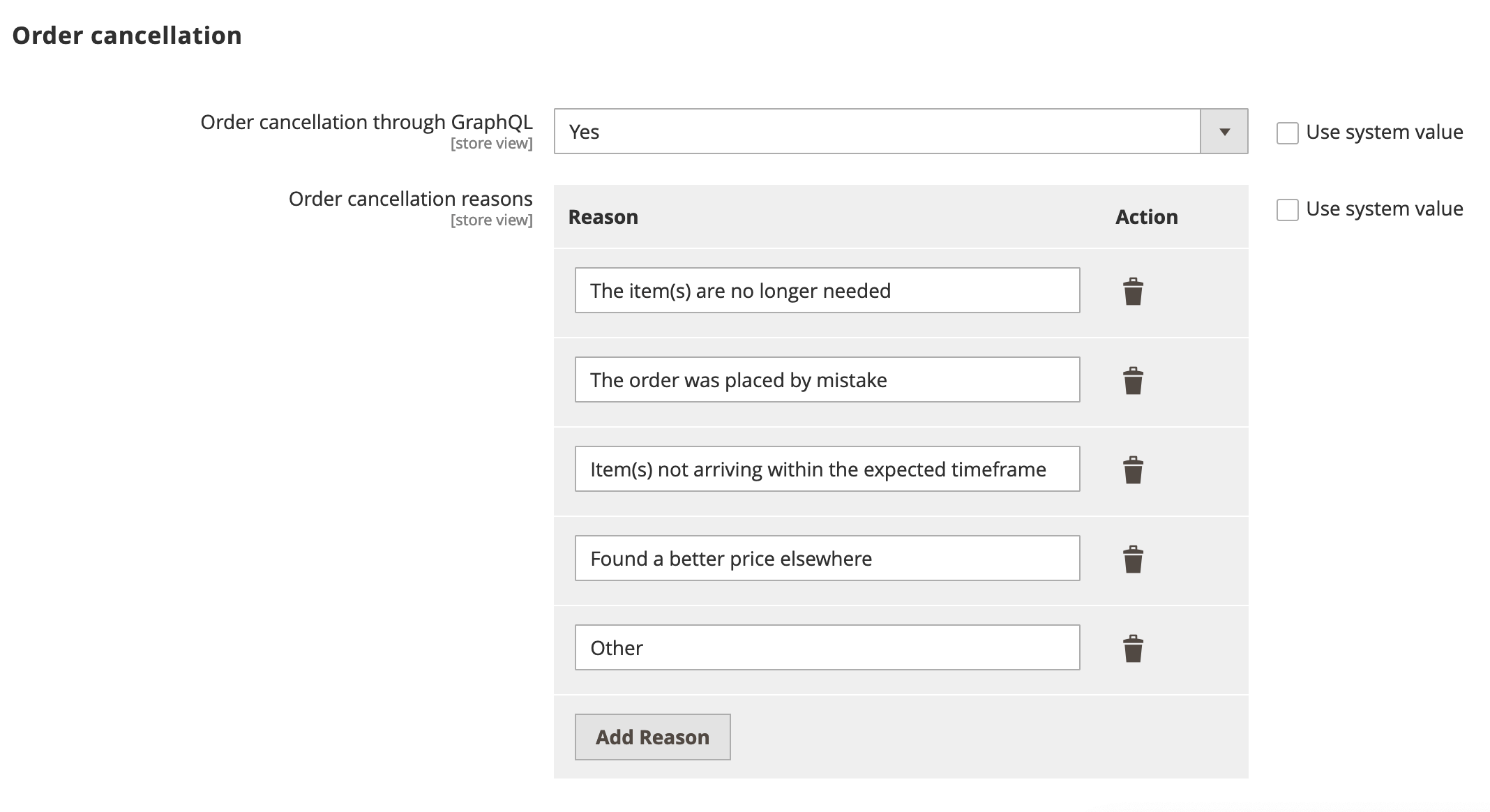\n</Diagram>\n\n## Step-by-step\n\nThe following steps describe how to implement the order cancellation workflow for both logged in customers and guests.\n\n\n### Display the order history (logged-in customers only)\n\nThe workflow for logged-in customers is straightforward. An order can be canceled only if it has a status of `Received`, `Pending`, or `Processing`.\n\n<Aside>\n The logged-in customer can also use the order search form to locate the order. See [Search for the order](#search-for-the-order) for this use case.\n\n\nThe customer selects an active order from their order history to cancel.\n\n<Diagram caption=\"Order history\">\n 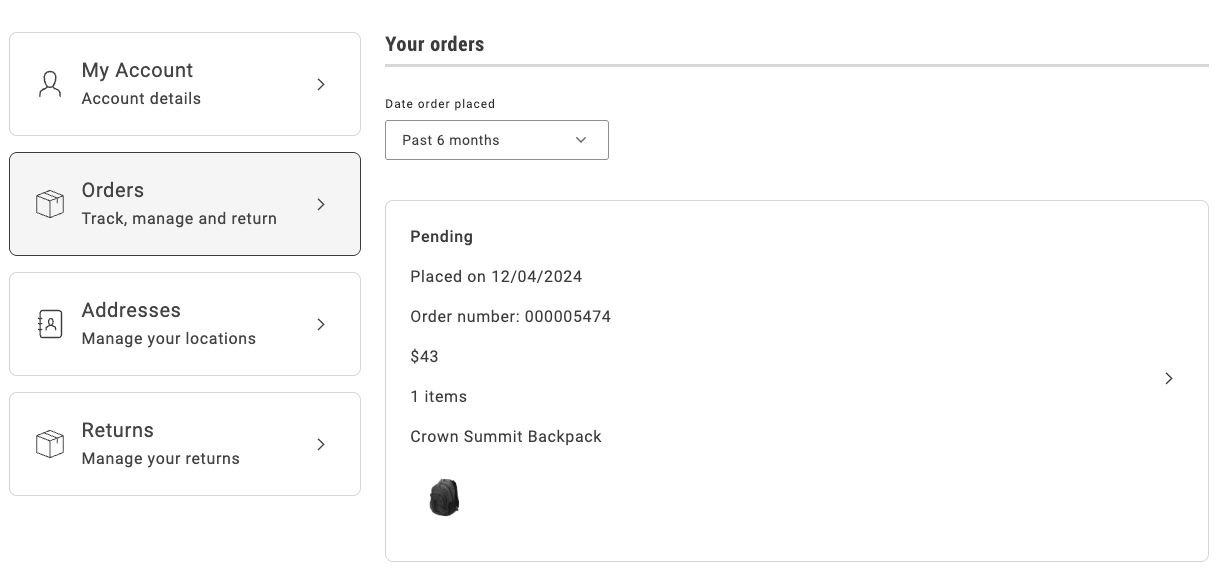\n</Diagram>\n\nThe order history page uses the `OrderProductListContent` component to render the list of orders that the customer previously placed. It iterates over the list of orders and uses the `CartSummaryItem` component to render each order item. The order item is an instance of the `OrderItemModel`, which contains all the necessary properties of an order item.\n\nThe following example shows an implementation of the `OrderProductListContent` component:\n\n```jsx\n...\n<ul className=\"order-order-product-list-content__items\">\n {item.list?.map((product: OrderItemModel) => (\n <li\n data-testid=\"order-product-list-content-item\"\n key=\n >\n \n </li>\n ))}\n</ul>\n...\n```\n\n\n### Search for the order\n\nA guest user does not have access to the order history page. Therefore, the only way to access an order is by using the Order Search form. The search order form retrieves the order that matches the specified email address, last name, and order name, as shown below:\n\n<Diagram caption=\"Order cancellation form\">\n 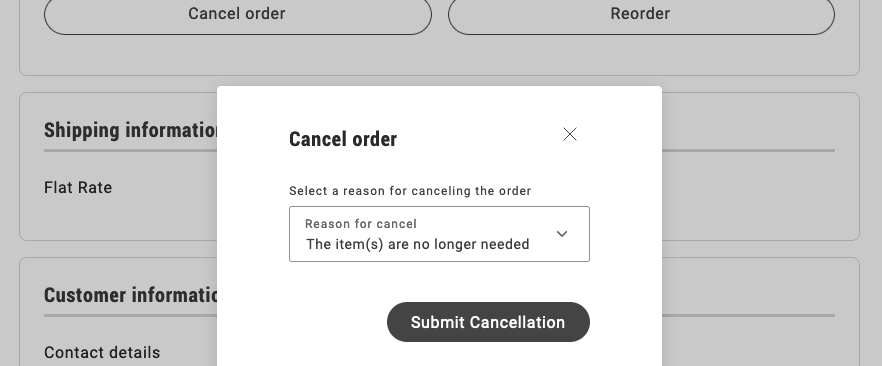\n</Diagram>\n\nThe `OrderSearchForm` component is responsible for rendering the form to search for an order.\nIt receives the following parameters:\n\n\nSee the following code for an example of the implementation:\n\n```jsx\n...\n{inLineAlert.text ? (\n }\n />\n) : null}\n\n<Form\n className={'order-order-search-form__wrapper'}\n name=\"orderSearchForm\"\n loading=\n fieldsConfig=\n onSubmit=\n>\n \n <Button\n className={'order-order-search-form__button'}\n size={'medium'}\n variant={'primary'}\n key={'logIn'}\n type={'submit'}\n disabled=\n >\n \n </Button>\n \n</Form>\n...\n```\n\n\n### Render and submit the cancellation form\n\nThe cancellation form allows the customer to select a cancellation reason and submit the form.\n\n<Diagram caption=\"Order cancellation form\">\n \n</Diagram>\n\nThe `OrderCancel` component renders the `OrderCancelForm` container inside a modal.\nThis modal receives two parameters:\n\n\nFor example:\n\n```jsx\n...\n<Modal\n centered=\n size=\"medium\"\n onClose=\n className={'order-order-cancel__modal'}\n title={\n <h2 className={'order-order-cancel__title'}>\n \n </h2>\n }\n data-testid=\"order-cancellation-reasons-modal\"\n>\n\n</Modal>\n...\n```\n\nThe `OrderCancelForm` component is responsible for:\n\n- Rendering the form with multiple cancellation reasons and a submission button.\n- Handling the form submission.\n- Showing the appropriate error messages if a failure occurs after submitting the form.\n\n```jsx\n...\n{isErrorVisible && (\n \n)}\n\n \n\n\n <Button\n variant=\"primary\"\n data-testid=\"order-cancel-submit-button\"\n {...submitButtonProps}\n >\n \n </Button>\n\n...\n```\n\n\n### Display the confirmation notice\n\nWhen a logged-in customer submits the cancellation form, Commerce immediately sets the status of the order to `Canceled` and the drop-in displays a confirmation notice.\n\n<Diagram caption=\"Confirmation for logged-in users.\">\n 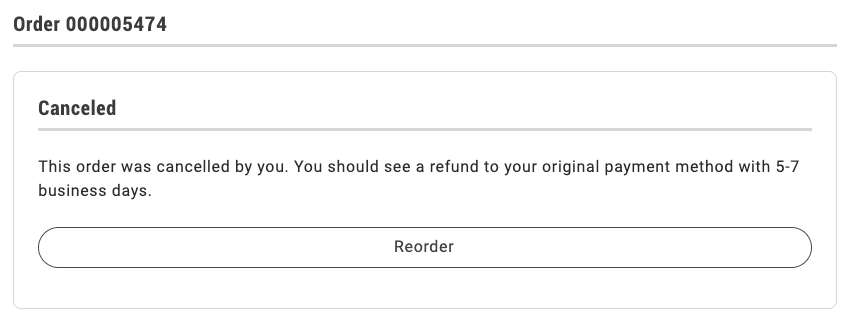\n</Diagram>\n\nIf the shopper is a guest user, the drop-in displays the following dialog:\n\n<Diagram caption=\"Guest user is notified that cancellation has been requested.\">\n 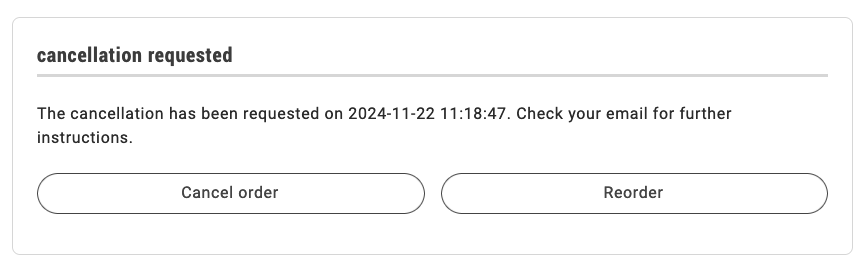\n</Diagram>\n\nThe order status remains `Pending` until the shopper clicks the link in an email similar to the following to confirm the cancellation.\n\n> **Confirm Your Main Website Store Order Cancellation**\n>\nIt seems that you'd like to cancel your order #000000001. If this is correct, please _click here_ to confirm your cancellation request.\n\nIf you have questions about your order, you can email us at _support@example.com_.\n\n\nOnce clicked, the order becomes `Canceled` and the order status page is updated accordingly.\n\nThe order status page uses the `OrderStatusContent` component to render the order with all its properties and the available actions.\n\nSee the following code for an example of the `OrderStatusContent` implementation below:\n\n```jsx\n...\n\n \n \n \n <p>{isReturnPage ? returnMessage : orderMessage}\n \n \n \n\n...\n```\n\nAfter performing any action, the order status page is re-rendered, so that it reflects the new status and the available actions. The appropriate message is shown to the user, depending on the action performed."
|
|
137
|
+
}
|
|
138
|
+
]
|
|
139
|
+
}
|
|
@@ -0,0 +1,73 @@
|
|
|
1
|
+
{
|
|
2
|
+
"section": "dropins/payment-services",
|
|
3
|
+
"label": "Payment Services Drop-in",
|
|
4
|
+
"pageCount": 11,
|
|
5
|
+
"pages": [
|
|
6
|
+
{
|
|
7
|
+
"path": "dropins/payment-services",
|
|
8
|
+
"title": "Payment Services overview",
|
|
9
|
+
"description": "Learn about the features of the Payment Services drop-in component.",
|
|
10
|
+
"content": "The Payment Services drop-in component renders the credit card form and the Apple Pay button.\n\n## Supported payment methods\n\nThe following table provides an overview of the payment methods that the Payment Services drop-in supports. The \"Payment method code\" column lists the `PaymentMethodCode` enum value for each method:\n\n| Payment method | Payment method code | Status |\n|-------------------|---------------------|--------------------------------------------|\n| Apple Pay | `APPLE_PAY` | |\n| Credit/debit card | `CREDIT_CARD` | |\n| Google Pay | `GOOGLE_PAY` | |\n| PayPal Fastlane | `FASTLANE` | |\n| PayPal buttons | `SMART_BUTTONS` | |\n\nUse the `PaymentMethodCode` enum from the API import:\n\n```ts\n\n```\n\n## Available containers\n\nThe Payment Services drop-in component provides two containers:\n\n- **Apple Pay container:** The `ApplePay` container renders an Apple Pay button that shoppers on Apple devices can use to place an order.\n\n- **Credit card container:** The `CreditCard` container renders a form where shoppers enter their card details to place an order with a credit or debit card.\n\n## Additional resources\n\n- \n- \n- \n\nFor more information, refer to the specific service documentation linked above."
|
|
11
|
+
},
|
|
12
|
+
{
|
|
13
|
+
"path": "dropins/payment-services/containers",
|
|
14
|
+
"title": "Payment Services Containers",
|
|
15
|
+
"description": "Overview of containers available in the Payment Services drop-in.",
|
|
16
|
+
"content": "The **Payment Services** drop-in provides pre-built container components for integrating into your storefront.\n\n\n## What are Containers?\n\nContainers are pre-built UI components that combine functionality, state management, and presentation. They provide a complete solution for specific features and can be customized through props, slots, and CSS.\n\n## Available Containers\n\n\n| Container | Description |\n| --------- | ----------- |\n| [ApplePay](https://experienceleague.adobe.com/developer/commerce/storefront/dropins/payment-services/containers/apple-pay/) | The `ApplePay` container renders a checkout button that enables macOS and iOS users to pay using Apple Pay. |\n| [CreditCard](https://experienceleague.adobe.com/developer/commerce/storefront/dropins/payment-services/containers/credit-card/) | The `CreditCard` container renders a form for shoppers to enter credit card details during checkout. |\n\n\n> **Tip**\n>\nEach container is designed to work independently but can be composed together to create comprehensive user experiences."
|
|
17
|
+
},
|
|
18
|
+
{
|
|
19
|
+
"path": "dropins/payment-services/containers/apple-pay",
|
|
20
|
+
"title": "ApplePay Container",
|
|
21
|
+
"description": "Learn about the ApplePay container in the Payment Services drop-in.",
|
|
22
|
+
"content": "The `ApplePay` container renders a checkout button that enables macOS and iOS users to pay using .\n\n\n## Configuration\n\nThe `ApplePay` container provides the following configuration options:\n\n\n| Option | Type | Req? | Description |\n|--------|------|------|-------------|\n| `location` | string | Yes | Location where Apple Pay is rendered. Must be either `CHECKOUT` or `PRODUCT_DETAIL`. |\n| `getCartId` | function | Maybe | Required if `createCart` is not provided. Returns a promise that resolves to the shopper's cart ID. |\n| `createCart` | object | Maybe | Required if `getCartId` is not provided. Provides cart items when `getCartId` is not used. Must be an object with a `getCartItems` function that returns at least one cart item. Each item must include at least a `sku` (string) and `quantity` (number). See \"Cart item object\" for details. |\n| `onButtonClick` | function | No | Called when the shopper clicks the Apple Pay button. Receives a `showPaymentSheet` function, which must be called synchronously to start the Apple Pay session and display the payment sheet. If the `onButtonClick` callback is not provided, clicking the Apple Pay button will automatically trigger the payment sheet. |\n| `onSuccess` | function | No | Called when the payment completes successfully. Receives `{ cartId: string }`. If the function returns a promise, it is awaited before marking the payment as successful in the Apple Pay sheet. If the promise rejects, the payment is marked as failed and the error is passed to `onError` (if provided). |\n| `onError` | function | No | Called when the payment flow fails or is aborted. Receives `{ name: string, message: string }`, containing localized, user-facing error details. These values can be translated using `PaymentServices.ApplePay.errors` [language definitions](https://experienceleague.adobe.com/developer/commerce/storefront/dropins/payment-services/dictionary/). |\n| `hidden` | boolean | No | Whether the button is hidden. Set to `true` to hide the Apple Pay button. Default: `false`. |\n| `disabled` | boolean | No | Whether the button is disabled. Set to `true` to disable the Apple Pay button. Default: `false`. |\n\n\n### Cart item object\n\nThe cart items that `getCartItems` returns should be objects with the following properties:\n\n\n| Property | Type | Req? | Description |\n|----------|------|------|-------------|\n| `sku` | string | Yes | The product SKU. |\n| `quantity` | number | Yes | The quantity of the product. |\n| `parentSku` | string | No | The parent product SKU. |\n| `selectedOptions` | `(string \\| number)[]` | No | Selected product options. |\n| `enteredOptions` | `{ uid: string \\| number; value: string }[]` | No | Entered product options. |\n\n\n## Slots\n\nThis container does not expose any customizable slots.\n\n## Usage\n\n### Checkout page example\n\nThe following example demonstrates how to use the `ApplePay` container on the checkout page.\n\n```js\n\n\nconst cart = events.lastPayload('checkout/initialized');\n\nif (cart) {\n const $content = document.createElement('div');\n PaymentServices.render(ApplePay, {\n location: PaymentLocation.CHECKOUT,\n getCartId: async () => cart.id,\n onSuccess: () => orderApi.placeOrder(cart.id),\n onError: (error) => { console.error(error) },\n })($content);\n}\n```\n\n### Product details page example\n\nThe following example demonstrates how to use the `ApplePay` container on a product details page.\n\n```js\n\n\nconst product = events.lastPayload('pdp/values');\n\nif (product) {\n const $content = document.createElement('div');\n PaymentServices.render(ApplePay, {\n location: PaymentLocation.PRODUCT_DETAIL,\n createCart: {\n getCartItems: () => [{\n sku: product.sku,\n quantity: 1,\n }],\n },\n onSuccess: () => orderApi.placeOrder(cartId),\n onError: (error) => { console.error(error) },\n })($content);\n}\n```"
|
|
23
|
+
},
|
|
24
|
+
{
|
|
25
|
+
"path": "dropins/payment-services/containers/credit-card",
|
|
26
|
+
"title": "CreditCard Container",
|
|
27
|
+
"description": "Learn about the CreditCard container in the Payment Services drop-in.",
|
|
28
|
+
"content": "The `CreditCard` container renders a form for entering credit card details during checkout.\n\n\n## Configuration\n\nThe `CreditCard` container provides the following configuration options:\n\n\n| Option | Type | Req? | Description |\n|--------|------|------|-------------|\n| `getCartId` | function | Yes | Returns a promise that resolves to the shopper’s cart ID. |\n| `creditCardFormRef` | object | Yes | Reference to the credit card form. Initially, `{ current: null }` should be passed. After rendering, the container sets `current` to the `validate: () => boolean` and `submit: () => Promise<void>` object, which parent containers can use to programmatically validate and submit the form. Any error during the payment flow propagates to `onError` and causes the promise returned by `submit()` to be rejected.|\n| `onSuccess` | function | No | Called when the payment completes successfully. Receives `{ cartId: string }`. |\n| `onError` | function | No | Called when the payment flow fails or is aborted. Receives `{ name: string, message: string }`, containing localized, user-facing error details. These values can be translated using `PaymentServices.CreditCard.errors` [language definitions](https://experienceleague.adobe.com/developer/commerce/storefront/dropins/payment-services/dictionary/). |\n\n\n## Slots\n\nThis container exposes no customizable slots.\n\n## Usage\n\nThe following example demonstrates how to render and submit a credit card form:\n\n```js\n\n\nconst $content = document.createElement('div');\nconst creditCardFormRef = { current: null };\nconst placeOrderButton = document.getElementById('place-order');\n\nPaymentServices.render(CreditCard, {\n getCartId: async () => 'ozGi7uLI74etDYyMijoI2cla5CmGIBch',\n creditCardFormRef: creditCardFormRef,\n})($content);\n\nplaceOrderButton.onclick = () => {\n if (creditCardFormRef.current) {\n if (creditCardFormRef.current.validate()) {\n const future = creditCardFormRef.current.submit()\n future.catch(console.error)\n }\n }\n}\n```"
|
|
29
|
+
},
|
|
30
|
+
{
|
|
31
|
+
"path": "dropins/payment-services/dictionary",
|
|
32
|
+
"title": "Payment Services Dictionary",
|
|
33
|
+
"description": "Customize user-facing text and labels in the Payment Services drop-in for localization and branding.",
|
|
34
|
+
"content": "The **Payment Services dictionary** contains all user-facing text, labels, and messages displayed by this drop-in. Customize the dictionary to:\n\n- **Localize** the drop-in for different languages and regions\n- **Customize** labels and messages to match your brand voice\n- **Override** default text without modifying source code for the drop-in\n\nDictionaries use the **i18n (internationalization)** pattern, where each text string is identified by a unique key path.\n\n\n## How to customize\n\nOverride dictionary values during drop-in initialization. The drop-in deep-merges your custom values with the defaults.\n\n```javascript\n\nawait initialize({\n langDefinitions: {\n en_US: {\n \"PaymentServices\": {\n \"ApplePay\": {\n \"errors\": {\n \"default\": {\n \"name\": \"Custom value\",\n \"message\": \"Your custom message here\"\n }\n }\n }\n }\n }\n }\n});\n```\n\nYou only need to include the keys you want to change. For multi-language support and advanced patterns, see the [Dictionary customization guide](https://experienceleague.adobe.com/developer/commerce/storefront/dropins/all/dictionaries/).\n\n## Default keys and values\n\nBelow are the default English (`en_US`) strings provided by the **Payment Services** drop-in:\n\n```json title=\"en_US.json\"\n{\n \"PaymentServices\": {\n \"ApplePay\": {\n \"errors\": {\n \"default\": {\n \"name\": \"Apple Pay error\",\n \"message\": \"An unexpected error occurred. Please try again or contact support.\"\n }\n }\n },\n \"CreditCard\": {\n \"errors\": {\n \"default\": {\n \"name\": \"Credit Card error\",\n \"message\": \"An unexpected error occurred. Please try again or contact support.\"\n }\n },\n \"formFields\": {\n \"cvv\": {\n \"invalidError\": \"Enter valid cvv.\",\n \"label\": \"\",\n \"missingError\": \"This field is required.\",\n \"placeholder\": \"CVV*\"\n },\n \"expirationDate\": {\n \"invalidError\": \"Enter valid expiration date.\",\n \"label\": \"\",\n \"missingError\": \"This field is required.\",\n \"placeholder\": \"MM/YY*\"\n },\n \"number\": {\n \"invalidError\": \"Enter valid card number.\",\n \"label\": \"\",\n \"missingError\": \"This field is required.\",\n \"placeholder\": \"Card Number*\"\n }\n }\n },\n \"messages\": {\n \"methodNotAvailable\": \"Payment method not available. Please contact support.\",\n \"methodNotLoaded\": \"Failed to load payment method. Please try again later.\",\n \"methodLoading\": \"Loading payment method...\"\n }\n }\n}\n```"
|
|
35
|
+
},
|
|
36
|
+
{
|
|
37
|
+
"path": "dropins/payment-services/events",
|
|
38
|
+
"title": "Payment Services Data & Events",
|
|
39
|
+
"description": "Learn about the events used by the Payment Services and the data available within the events.",
|
|
40
|
+
"content": "The Payment Services drop-in uses the [event bus](https://experienceleague.adobe.com/developer/commerce/storefront/sdk/reference/events) to emit and listen for events, enabling communication between drop-ins and external integrations.\n\n\n## Events reference\n\n\n| Event | Direction | Description |\n|---------------|-----------|------------------------------------------------------------|\n| authenticated | Listens | Used to determine whether the shopper is a guest customer. |"
|
|
41
|
+
},
|
|
42
|
+
{
|
|
43
|
+
"path": "dropins/payment-services/functions",
|
|
44
|
+
"title": "Payment Services Functions",
|
|
45
|
+
"description": "API functions provided by the Payment Services drop-in for programmatic control and customization.",
|
|
46
|
+
"content": "{/*\n ⚠️ TEMPLATE USAGE GUIDE ⚠️\n \n This template is used by scripts/@generate-function-docs.js to generate API function documentation.\n \n Placeholders used in this template:\n - DROPIN_NAME → Display name (e.g., \"Cart\", \"Checkout\")\n - DROPIN_DISPLAY_NAME → Display name for use in text (e.g., \"Cart\", \"Checkout\")\n - DROPIN_VERSION → Version number (e.g., \"1.5.1\")\n - FUNCTIONS_TABLE → Table listing all functions with brief descriptions\n - FUNCTIONS_CONTENT → All function documentation (generated from source .mdx files)\n \n The script handles:\n - Reading function .mdx files from src/api directories in source repositories\n - Cleaning Storybook imports and metadata\n - Combining all functions into a single documentation page\n \n The template and script must be kept in sync.\n \n HEADING HIERARCHY:\n H1: \"DROPIN_NAME functions\" (from title)\n H2: Individual function names\n H3: Examples, Events, Returns (subsection headings)\n Content flow: [Signature code block] → [Parameters table] → Examples → Events → Returns\n*/}\n\n\nThe Payment Services drop-in currently has no functions defined.\n\n\n{/* AUTO-GENERATED CONTENT - Do not edit below this line */}\n\n\n{/* This documentation is auto-generated from the drop-in source repository: git@github.com:adobe-commerce/storefront-payment-services */}"
|
|
47
|
+
},
|
|
48
|
+
{
|
|
49
|
+
"path": "dropins/payment-services/initialization",
|
|
50
|
+
"title": "Payment Services initialization",
|
|
51
|
+
"description": "Configure the Payment Services drop-in with language definitions, custom data models, and drop-in-specific options.",
|
|
52
|
+
"content": "The Payment Services initializer provides configuration options for the backend endpoint and language definitions.\n\n\n## Configuration options\n\nThe following table describes the configuration options available for the **Payment Services** initializer:\n\n\n| Option | Type | Req? | Description |\n|--------------------|----------|------|--------------------------------------------------------------------------------------------------------------------------------------------------------------------------------------------------------------------------------------------------------------------------------------------------------------------------------------------------------------------------------------------------------------------------------------|\n| `apiUrl` | string | Yes | Adobe Commerce GraphQL endpoint URL (for example, `https://example.com/graphql`). |\n| `getCustomerToken` | function | Yes | Provides authorization for GraphQL requests made on behalf of the shopper. For token-based auth, it must return a customer token (string) or `null` for guests. For session-based auth, it must be set to `null`. |\n| `storeViewCode` | string | No | Adobe Commerce store view code used for GraphQL requests. If not set, the `Store` HTTP header is not included. |\n| `langDefinitions` | object | No | Language definitions used for internationalization (i18n). |\n\n\n## Default configuration\n\nThe initializer runs with these defaults when no configuration is provided:\n\n```javascript title=\"scripts/initializers/payment-services.js\"\n\n\n// All configuration options are optional\nawait initializers.mountImmediately(initialize, {\n langDefinitions: {}, // Uses built-in English strings\n // Drop-in-specific defaults:\n // apiUrl: undefined // See configuration options above\n // getCustomerToken: undefined // See configuration options above\n // storeViewCode: undefined // See configuration options above\n});\n```\n\n## Language definitions\n\nOverride dictionary keys for localization or branding. The `langDefinitions` object maps locale keys to custom strings that override default text for the drop-in.\n\n```javascript title=\"scripts/initializers/payment-services.js\"\n\n\nconst customStrings = {\n \"CreditCard\": {\n \"formFields\": {\n \"cvv\": { \"placeholder\": \"CVV*\" },\n \"expirationDate\": { \"placeholder\": \"MM/YY*\" },\n \"number\": { \"placeholder\": \"Card number*\" }\n }\n },\n};\n\nconst langDefinitions = {\n default: customStrings,\n};\n\nawait initializers.mountImmediately(initialize, { langDefinitions });\n```\n\n> **Tip**\n>\nFor complete dictionary customization including all available keys and multi-language support, see the [Payment Services Dictionary](https://experienceleague.adobe.com/developer/commerce/storefront/dropins/payment-services/dictionary/) page.\n\n\n## Customizing data models\n\nNo customizable models are available for this drop-in.\n\n## Drop-in configuration\n\nThe **Payment Services initializer** provides options to configure the backend endpoint and language definitions.\n\n```javascript title=\"scripts/initializers/payment-services.js\"\n\n\nconst initializeDropin = async () => {\n const labels = await fetchPlaceholders('placeholders/payment-services.json');\n const langDefinitions = {\n default: {\n ...labels,\n },\n };\n\n const coreEndpoint = await getConfigValue('commerce-core-endpoint');\n const getUserTokenCookie = () => getCookie('auth_dropin_user_token');\n\n return initializers.mountImmediately(initialize, {\n apiUrl: coreEndpoint,\n getCustomerToken: getUserTokenCookie,\n langDefinitions,\n });\n};\n\nawait initializeDropin();\n```\n\n> **Note**\n>\n Refer to the [Configuration options](#configuration-options) table for detailed descriptions of each option.\n\n\n### Initialization is asynchronous\n\nThe Payment Services drop-in initializer is fully asynchronous. Even if mounted immediately, it initializes in the background and emits initialization updates via custom events.\n\n### Payment method availability\n\nDuring asynchronous initialization, the Payment Services drop-in emits a series of events to indicate readiness across different locations. Each event includes a payload of `{ availablePaymentMethods: string[] }`, listing the available payment method codes.\n\nThe following table contains the available event names and their descriptions:\n\n\n| Event name | Description |\n|-----------------------------------------------|------------------------------------------------------------------------------------------------------------------------------------------------------------|\n| `payment-services/initialized/checkout` | Indicates the drop-in is initialized for the `CHECKOUT` location. The `event.availablePaymentMethods` property lists the payment methods available on the checkout page. |\n| `payment-services/initialized/product-detail` | Indicates the drop-in is initialized for the `PRODUCT_DETAIL` location. The `event.availablePaymentMethods` property lists the payment methods available on the product detail page. |\n\n\nThe following example demonstrates how to implement payment method availability event handlers for the checkout page.\n\n```javascript\n\n\nevents.on('payment-services/initialized/checkout', ({ availablePaymentMethods }) => {\n if (availablePaymentMethods.contains(PaymentMethodCode.APPLE_PAY)) {\n console.log(\"Apple Pay available for checkout page.\");\n }\n if (availablePaymentMethods.contains(PaymentMethodCode.CREDIT_CARD)) {\n console.log(\"Credit Card available for checkout page.\");\n }\n});\n```"
|
|
53
|
+
},
|
|
54
|
+
{
|
|
55
|
+
"path": "dropins/payment-services/installation",
|
|
56
|
+
"title": "Payment Services installation",
|
|
57
|
+
"description": "Learn how to install the Payment Services drop-in component on your site.",
|
|
58
|
+
"content": "This guide explains how to install and configure the Payment Services drop-in component in your storefront.\n\n## Onboard to Payment Services\n\nBefore you can use the Payment Services component in your storefront, you must to Payment Services in the Adobe Commerce Admin.\n\n> **Payment Services extension**\n>\n The Payment Services drop-in requires the Payment Services extension version or higher. \n\n\n## Register your storefront domain with Apple\nThe following steps explain how to register your storefront domain with Apple, which is required to use Apple Pay.\n\n\n \n ### Download the file \n Download the Apple Pay domain verification file.\n .\n \n\n \n ### Serve as binary content \nAdd the file to the following path in your storefront repository. Note the added `.bin` extension, which is currently the only way available in EDS to serve binary content.\n ```txt showLineNumbers=false\n /.well-known/apple-developer-merchantid-domain-association.bin\n ```\n \n\n \n ### Set up URL redirect \nAdd a to make the domain verification file accessible at `https://your-sandbox-domain.com/.well-known/apple-developer-merchantid-domain-association`.\n\n | Source | Destination |\n |-----------------------------------------------------------|----------------------------------------------------------------|\n | .well-known/apple-developer-merchantid-domain-association | /.well-known/apple-developer-merchantid-domain-association.bin |\n\n > **Sandbox only**\n>\n Serving the file via a redirect works for sandbox domain registration, but not for production. In production, the file [must be served directly](#set-up-production-url-rewrite), without a redirect.\n \n \n\n \n ### Register sandbox domain\nContact your sales representative to register the sandbox domain with Apple.\n \n\n \n ### Set up production URL rewrite \nSet up a at the CDN level to make the domain verification file directly accessible at https://your-production-domain.com/.well-known/apple-developer-merchantid-domain-association, without redirects.\n \n\n \n ### Register production domain\nContact your sales representative to register the production domain with Apple."
|
|
59
|
+
},
|
|
60
|
+
{
|
|
61
|
+
"path": "dropins/payment-services/slots",
|
|
62
|
+
"title": "Payment Services Slots",
|
|
63
|
+
"description": "Customize UI sections in the Payment Services drop-in using slots.",
|
|
64
|
+
"content": "The Payment Services drop-in does not expose any slots for customization.\n\n## Why no slots?\n\nThis drop-in wraps the Adobe Payment Services SDK (`@adobe-commerce/payment-services-sdk`), which renders secure payment forms directly into specified DOM elements. The SDK controls all UI rendering to maintain PCI (Payment Card Industry) compliance and security standards. You customize the payment forms through SDK configuration options (field placeholders, card type settings, callback handlers) passed to `sdk.Payment.CreditCard.render()`, not through the slot-based pattern other drop-ins use."
|
|
65
|
+
},
|
|
66
|
+
{
|
|
67
|
+
"path": "dropins/payment-services/styles",
|
|
68
|
+
"title": "Payment Services styles",
|
|
69
|
+
"description": "CSS classes and customization examples for the Payment Services drop-in.",
|
|
70
|
+
"content": "Customize the Payment Services drop-in using CSS classes and design tokens. This page covers the Payment Services-specific container classes and customization examples. For comprehensive information about design tokens, responsive breakpoints, and styling best practices, see [Styling Drop-In Components](https://experienceleague.adobe.com/developer/commerce/storefront/dropins/all/styling/).\n\n\n## Customization example\n\nAdd this to the CSS file of the specific where you're using the Payment Services drop-in.\n\nFor a complete list of available design tokens (colors, spacing, typography, and more), see the [Design tokens reference](https://experienceleague.adobe.com/developer/commerce/storefront/dropins/all/styling/#design-tokens-reference).\n\n```css title=\"styles/styles.css\" del={2-2} ins={3-3}\n.credit-card-error {\n padding: var(--spacing-small);\n padding: var(--spacing-medium);\n}\n```\n\n## Container classes\n\nThe Payment Services drop-in uses BEM-style class naming. Use the browser DevTools to inspect elements and find specific class names.\n\n```css\n/* CheckoutPaymentMethods */\n.payment-services-checkout-payment-methods {}\n\n/* CreditCardForm */\n.credit-card-error {}\n.credit-card-error__icon {}\n\n/* CreditCardForm */\n.credit-card-field {}\n.credit-card-field__container {}\n.credit-card-field__container--error {}\n.credit-card-field__error {}\n.credit-card-field__label {}\n\n/* CreditCardForm */\n.hidden {}\n.payment-services-credit-card-form {}\n.payment-services-credit-card-form__card-number {}\n.payment-services-credit-card-form__eligible-cards {}\n.payment-services-credit-card-form__eligible-cards-icon {}\n.payment-services-credit-card-form__eligible-cards-selected {}\n.payment-services-credit-card-form__eligible-cards-unselected {}\n.payment-services-credit-card-form__loading {}\n```"
|
|
71
|
+
}
|
|
72
|
+
]
|
|
73
|
+
}
|