@dropins/mcp 0.1.0
This diff represents the content of publicly available package versions that have been released to one of the supported registries. The information contained in this diff is provided for informational purposes only and reflects changes between package versions as they appear in their respective public registries.
- package/LICENSE.md +127 -0
- package/README.md +314 -0
- package/dist/common/project-reader.d.ts +55 -0
- package/dist/common/project-reader.js +173 -0
- package/dist/common/registry-loader.d.ts +101 -0
- package/dist/common/registry-loader.js +386 -0
- package/dist/common/response-handling.d.ts +12 -0
- package/dist/common/response-handling.js +21 -0
- package/dist/common/sanitize.d.ts +8 -0
- package/dist/common/sanitize.js +45 -0
- package/dist/common/synonyms.d.ts +9 -0
- package/dist/common/synonyms.js +127 -0
- package/dist/common/telemetry.d.ts +14 -0
- package/dist/common/telemetry.js +54 -0
- package/dist/common/types.d.ts +308 -0
- package/dist/common/types.js +1 -0
- package/dist/common/version.d.ts +2 -0
- package/dist/common/version.js +14 -0
- package/dist/index.d.ts +2 -0
- package/dist/index.js +136 -0
- package/dist/operations/analyze-project.d.ts +13 -0
- package/dist/operations/analyze-project.js +125 -0
- package/dist/operations/check-block-health.d.ts +19 -0
- package/dist/operations/check-block-health.js +1149 -0
- package/dist/operations/check-config.d.ts +13 -0
- package/dist/operations/check-config.js +228 -0
- package/dist/operations/explain-event-flow.d.ts +16 -0
- package/dist/operations/explain-event-flow.js +218 -0
- package/dist/operations/get-upgrade-diff.d.ts +13 -0
- package/dist/operations/get-upgrade-diff.js +144 -0
- package/dist/operations/list-api-functions.d.ts +13 -0
- package/dist/operations/list-api-functions.js +53 -0
- package/dist/operations/list-containers.d.ts +13 -0
- package/dist/operations/list-containers.js +44 -0
- package/dist/operations/list-design-tokens.d.ts +13 -0
- package/dist/operations/list-design-tokens.js +47 -0
- package/dist/operations/list-events.d.ts +16 -0
- package/dist/operations/list-events.js +39 -0
- package/dist/operations/list-graphql-queries.d.ts +19 -0
- package/dist/operations/list-graphql-queries.js +84 -0
- package/dist/operations/list-i18n-keys.d.ts +19 -0
- package/dist/operations/list-i18n-keys.js +105 -0
- package/dist/operations/list-models.d.ts +16 -0
- package/dist/operations/list-models.js +80 -0
- package/dist/operations/list-slots.d.ts +16 -0
- package/dist/operations/list-slots.js +81 -0
- package/dist/operations/scaffold-block.d.ts +31 -0
- package/dist/operations/scaffold-block.js +331 -0
- package/dist/operations/scaffold-extension.d.ts +28 -0
- package/dist/operations/scaffold-extension.js +346 -0
- package/dist/operations/scaffold-slot.d.ts +22 -0
- package/dist/operations/scaffold-slot.js +189 -0
- package/dist/operations/search-commerce-docs.d.ts +16 -0
- package/dist/operations/search-commerce-docs.js +101 -0
- package/dist/operations/search-docs.d.ts +23 -0
- package/dist/operations/search-docs.js +298 -0
- package/dist/operations/suggest-event-handler.d.ts +16 -0
- package/dist/operations/suggest-event-handler.js +175 -0
- package/dist/operations/suggest-slot-implementation.d.ts +19 -0
- package/dist/operations/suggest-slot-implementation.js +183 -0
- package/dist/registry/api-functions.json +3045 -0
- package/dist/registry/block-patterns.json +78 -0
- package/dist/registry/containers.json +2003 -0
- package/dist/registry/design-tokens.json +577 -0
- package/dist/registry/docs/boilerplate.json +55 -0
- package/dist/registry/docs/dropins-all.json +97 -0
- package/dist/registry/docs/dropins-b2b.json +607 -0
- package/dist/registry/docs/dropins-cart.json +163 -0
- package/dist/registry/docs/dropins-checkout.json +193 -0
- package/dist/registry/docs/dropins-order.json +139 -0
- package/dist/registry/docs/dropins-payment-services.json +73 -0
- package/dist/registry/docs/dropins-personalization.json +67 -0
- package/dist/registry/docs/dropins-product-details.json +139 -0
- package/dist/registry/docs/dropins-product-discovery.json +85 -0
- package/dist/registry/docs/dropins-recommendations.json +67 -0
- package/dist/registry/docs/dropins-user-account.json +121 -0
- package/dist/registry/docs/dropins-user-auth.json +103 -0
- package/dist/registry/docs/dropins-wishlist.json +85 -0
- package/dist/registry/docs/get-started.json +85 -0
- package/dist/registry/docs/how-tos.json +19 -0
- package/dist/registry/docs/index.json +139 -0
- package/dist/registry/docs/licensing.json +19 -0
- package/dist/registry/docs/merchants.json +523 -0
- package/dist/registry/docs/resources.json +13 -0
- package/dist/registry/docs/sdk.json +139 -0
- package/dist/registry/docs/setup.json +145 -0
- package/dist/registry/docs/troubleshooting.json +19 -0
- package/dist/registry/events.json +2200 -0
- package/dist/registry/examples/index.json +19 -0
- package/dist/registry/examples/storefront-checkout.json +377 -0
- package/dist/registry/examples/storefront-quote-management.json +49 -0
- package/dist/registry/extensions.json +272 -0
- package/dist/registry/graphql.json +3469 -0
- package/dist/registry/i18n.json +1873 -0
- package/dist/registry/models.json +1001 -0
- package/dist/registry/sdk.json +2357 -0
- package/dist/registry/slots.json +2270 -0
- package/dist/registry/tools-components.json +595 -0
- package/dist/resources/guides.d.ts +7 -0
- package/dist/resources/guides.js +625 -0
- package/dist/resources/handlers.d.ts +31 -0
- package/dist/resources/handlers.js +322 -0
- package/package.json +47 -0
|
@@ -0,0 +1,121 @@
|
|
|
1
|
+
{
|
|
2
|
+
"section": "dropins/user-account",
|
|
3
|
+
"label": "User Account Drop-in",
|
|
4
|
+
"pageCount": 19,
|
|
5
|
+
"pages": [
|
|
6
|
+
{
|
|
7
|
+
"path": "dropins/user-account",
|
|
8
|
+
"title": "User account overview",
|
|
9
|
+
"description": "Learn about the user account drop-in component and supported account management features.",
|
|
10
|
+
"content": "The user account drop-in component provides account management features in your storefront.\n\n## Supported Commerce features\n\nThe following table provides an overview of the Adobe Commerce features that the user account drop-in component supports:\n\n| Feature | Status |\n|----------------------------------------|--------------------------------------------|\n| Add/remove new address | |\n| Change email | |\n| Change password | |\n| Login as customer | |\n| Manage products in wishlist | |\n| Move products from wishlist to cart | |\n| Update address | |\n| View addresses saved during checkout | |\n| View stored payment methods and remove them after confirmation | |"
|
|
11
|
+
},
|
|
12
|
+
{
|
|
13
|
+
"path": "dropins/user-account/containers",
|
|
14
|
+
"title": "User Account Containers",
|
|
15
|
+
"description": "Overview of containers available in the User Account drop-in.",
|
|
16
|
+
"content": "The **User Account** drop-in provides pre-built container components for integrating into your storefront.\n\n\n## What are Containers?\n\nContainers are pre-built UI components that combine functionality, state management, and presentation. They provide a complete solution for specific features and can be customized through props, slots, and CSS.\n\n## Available Containers\n\n\n| Container | Description |\n| --------- | ----------- |\n| [AddressForm](https://experienceleague.adobe.com/developer/commerce/storefront/dropins/user-account/containers/address-form/) | Learn about the `AddressForm` container. |\n| [AddressValidation](https://experienceleague.adobe.com/developer/commerce/storefront/dropins/user-account/containers/address-validation/) | Configure the `AddressValidation` container to present suggested and original addresses for shopper confirmation. |\n| [Addresses](https://experienceleague.adobe.com/developer/commerce/storefront/dropins/user-account/containers/addresses/) | Learn about the Addresses container. |\n| [CustomerInformation](https://experienceleague.adobe.com/developer/commerce/storefront/dropins/user-account/containers/customer-information/) | Learn about the `CustomerInformation` container. |\n| [OrdersList](https://experienceleague.adobe.com/developer/commerce/storefront/dropins/user-account/containers/orders-list/) | Learn about the `OrdersList` container. |\n| [PaymentMethods](https://experienceleague.adobe.com/developer/commerce/storefront/dropins/user-account/containers/payment-methods/) | List stored payment methods in My Account; shoppers confirm removal in a dialog before the vault token is deleted. |\n\n\n> **Tip**\n>\nEach container is designed to work independently but can be composed together to create comprehensive user experiences."
|
|
17
|
+
},
|
|
18
|
+
{
|
|
19
|
+
"path": "dropins/user-account/containers/address-form",
|
|
20
|
+
"title": "AddressForm container",
|
|
21
|
+
"description": "Build reusable address create and edit forms with attribute ordering, validation, and labels synced to your Adobe Commerce address configuration.",
|
|
22
|
+
"content": "The `AddressForm` container creates and edits customer addresses. Merchants build a custom user experience around address management with a pre-built form that minimizes development effort. The form integrates with the Adobe Commerce backend, providing flexible configuration of address attributes, validation, labels, and attribute sorting.\n\nThe container also uses this container.\n\nThe following image shows a sample AddressForm container:\n\n<Diagram caption=\"AddressForm container\">\n 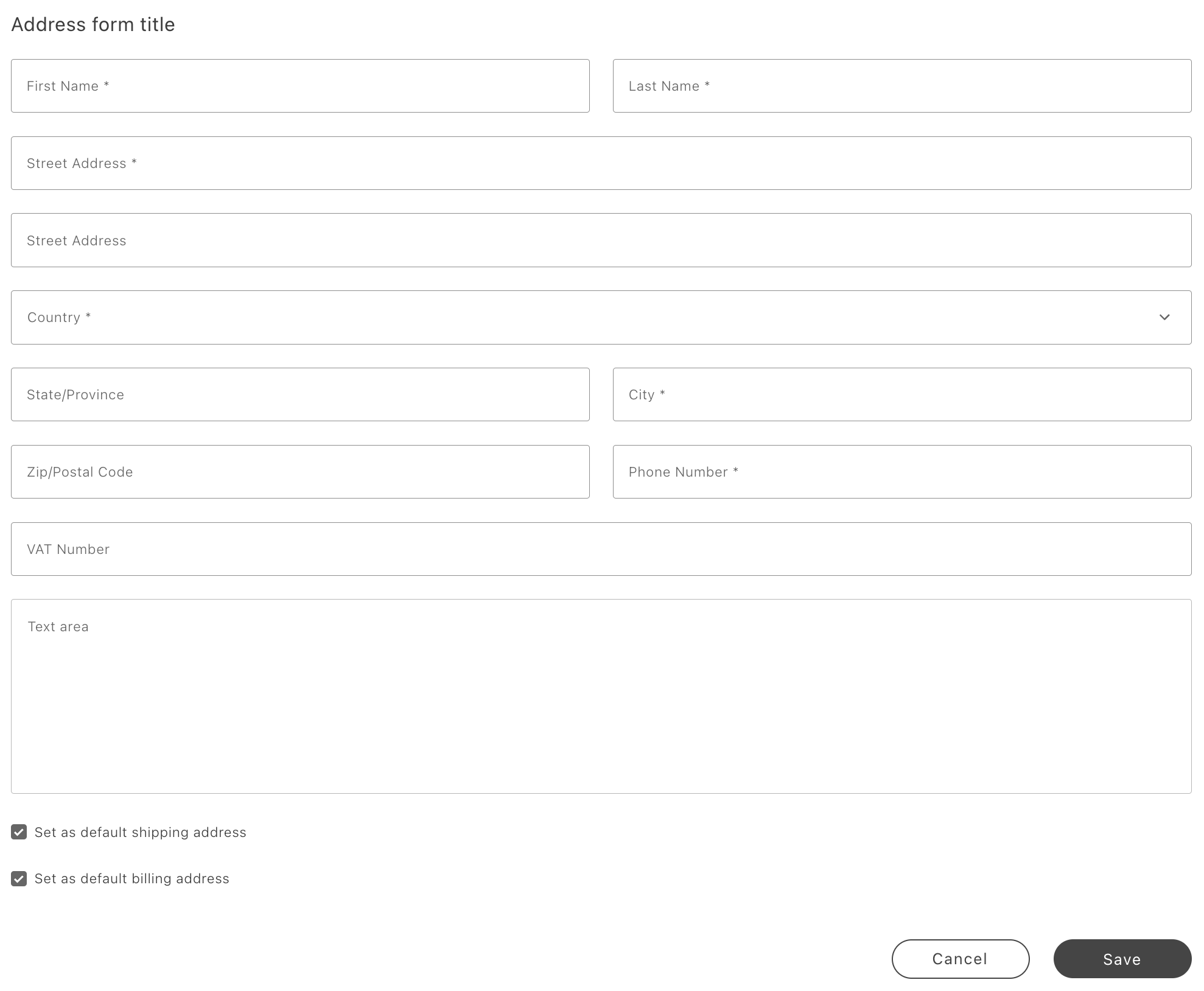\n</Diagram>\n\n> **Tip**\n>\nCustom address attributes and attribute validation are supported. See in the _Customer Management Guide_ for more information.\n\n\n## Configurations\n\nThe `AddressForm` container provides the following configuration options:\n\n\n## Examples\n\nHTMLInputElement usage sample:\n\n```javascript\nconst formRef = { current: null };\n\nprovider.render(AddressForm, {\n forwardFormRef: formRef,\n})(containerWrapper);\n\nconst isFormValid = formRef.current.handleValidationSubmit();\nconst formData = inputRef.current.formData;\n\nreturn { \n handleValidationSubmit,\n formData: normalizeGetAddressData(modifyFormRef, true),\n isDataValid, \n }; \n```\n\n`isDataValid` is a boolean value that indicates whether the form has been validated without an explicit submit action.\n\ninputsDefaultValueSet sample payload:\n\n```javascript\ninputsDefaultValueSet: {\n city: 'City',\n company: '',\n countryCode: 'AR',\n region: {\n regionCode: 'AR-H',\n regionId: 1579,\n },\n telephone: '123456789',\n vatId: '999',\n postcode: '12345',\n street: 'Street One',\n streetMultiline_2: 'Street Two',\n}\n```\n\n## Example\n\nThe following example renders the `AddressForm` container with custom configurations:\n\n```js\nprovider.render(AddressForm, {\n addressesFormTitle: 'Address form title',\n addressId: '',\n isOpen: true,\n shippingCheckBoxValue: true,\n billingCheckBoxValue: true,\n showShippingCheckBox: true,\n showBillingCheckBox: true,\n onChange: (values, inputValue) => {\n console.log('allValues', values);\n console.log('inputValue', inputValue);\n },\n onSuccess: () => {\n console.log('onSuccess');\n },\n onError: () => {\n console.log('onError');\n },\n})(containerWrapper);\n```"
|
|
23
|
+
},
|
|
24
|
+
{
|
|
25
|
+
"path": "dropins/user-account/containers/address-validation",
|
|
26
|
+
"title": "AddressValidation container",
|
|
27
|
+
"description": "Configure the AddressValidation container to present suggested vs. original shipping addresses and act on the shopper's choice.",
|
|
28
|
+
"content": "The `AddressValidation` container displays a suggested shipping address (from a third-party verification service) alongside the entered address, allowing shoppers to choose between them.\n\nTypically invoked from a modal during address creation after calling your address verification service.\n\n## AddressValidation configurations\n\nThe `AddressValidation` container provides the following configuration options:\n\n<OptionsTable\n compact\n options={[\n ['Option', 'Type', 'Req?', 'Description'],\n ['originalAddress', 'CustomerAddressesModel | null', 'Yes', 'Original address set by the user.'],\n ['suggestedAddress', 'Partial<CustomerAddressesModel> | null', 'Yes', 'Address suggestion to present to the user.'],\n ['selectedAddress', \"'suggested' | 'original' | null\", 'No', 'Controls which address is pre-selected when the container renders. Defaults to null (no pre-selection).'],\n ['handleSelectedAddress', 'function', 'No', 'Async callback fired when the shopper selects an address. Receives the selection and the chosen address.'],\n ]}\n/>\n\n### AddressValidationProps interface\n\nThe `AddressValidation` container receives an object that implements the following interface:\n\n```ts\ninterface AddressValidationProps {\n selectedAddress?: 'suggested' | 'original' | null;\n suggestedAddress: Partial<CustomerAddressesModel> | null;\n originalAddress: CustomerAddressesModel | null;\n handleSelectedAddress?: (payload: {\n selection: 'suggested' | 'original';\n address: CustomerAddressesModel | null | undefined;\n }) => void;\n}\n```\n\n## CustomerAddressesModel type\n\nThe `CustomerAddressesModel` type has this shape:\n\n```ts\ninterface CustomerAddressesModel {\n city?: string;\n countryCode?: string;\n region?: { region: string; regionCode: string; regionId: string | number };\n postcode?: string;\n street?: string;\n}\n```\n\n> **Normalization**\n>\nTransform your address verification service output to `CustomerAddressesModel` format (with fields like `street`, `city`, `region`, `countryCode`, `postcode`) before passing it to the container. Missing properties default to the original address values.\n\n\n## Example\n\nFor a complete walkthrough, see the [Validate address](https://experienceleague.adobe.com/developer/commerce/storefront/dropins/user-account/tutorials/validate-address/) tutorial."
|
|
29
|
+
},
|
|
30
|
+
{
|
|
31
|
+
"path": "dropins/user-account/containers/addresses",
|
|
32
|
+
"title": "Addresses container",
|
|
33
|
+
"description": "Manage saved customer addresses with create, edit, and delete flows backed by AddressForm and configurable custom attributes from Admin.",
|
|
34
|
+
"content": "The `Addresses` container is a standalone component that creates, edits, and deletes customer addresses. It supports custom address attributes and configurable validation through the Adobe Commerce Admin.\n\nThe `Addresses` container relies on the container for address creation and editing. It inherits all behaviors from the `AddressForm` container.\n\n## Container views\nThe Addresses container can be implemented in several views.\n\n### Full-size view\n\nThe full-size view is used when the `Addresses` component functions as a standalone page. This view displays all addresses, enables pagination (based on backend configurations), and provides full functionality for creating, editing, and deleting addresses. A **Create Address** button can be displayed below the list. Clicking the button opens the address creation form, which is configurable from the Commerce Admin.\n\nThe following images illustrate the full-size view of the Addresses container with no addresses, all addresses, and an address being edited.\n\n<Diagram caption=\"Full size implementation of the Addresses container with no addresses\">\n 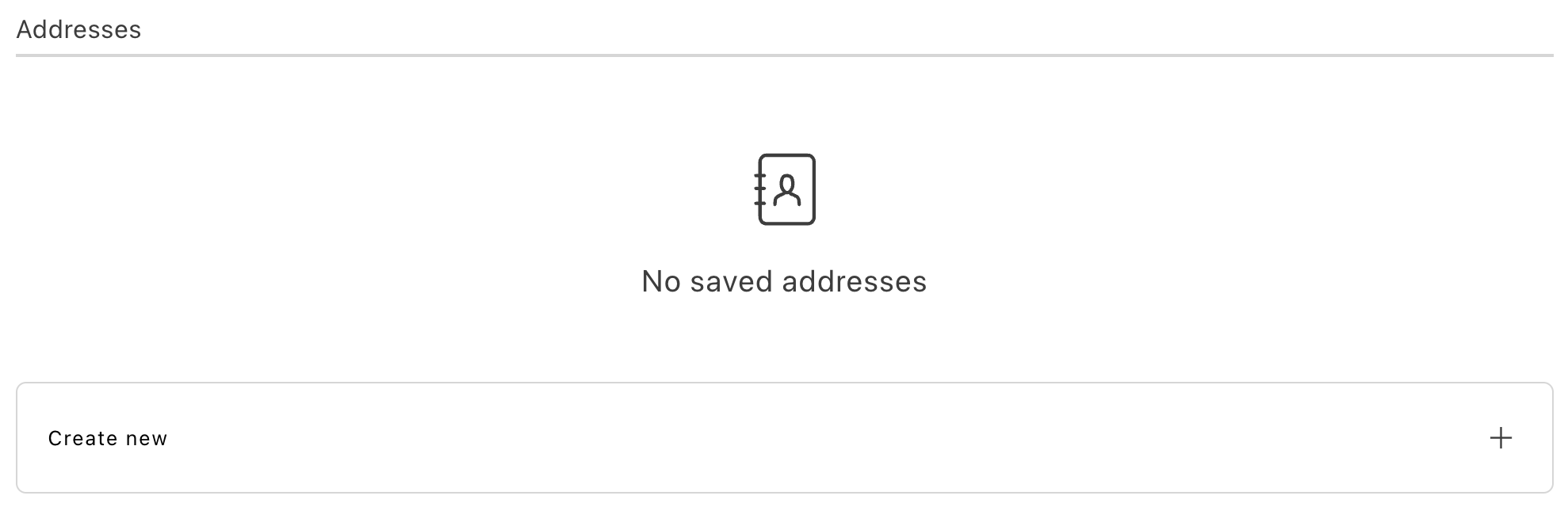\n</Diagram>\n\n<Diagram caption=\"Full size implementation of the Addresses container with multiple addresses\">\n 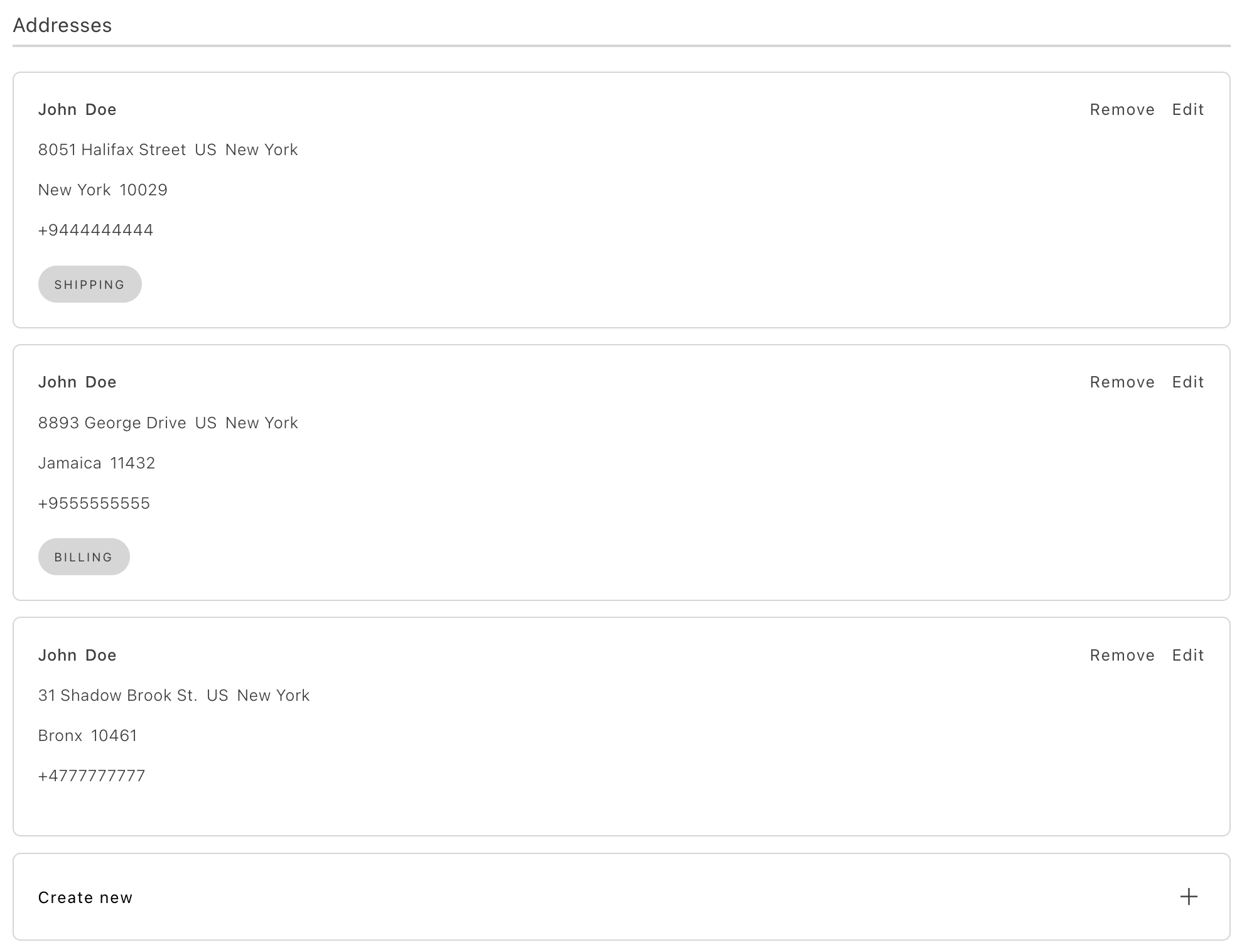\n</Diagram>\n\n<Diagram caption=\"Full size implementation of the Addresses container being edited\">\n 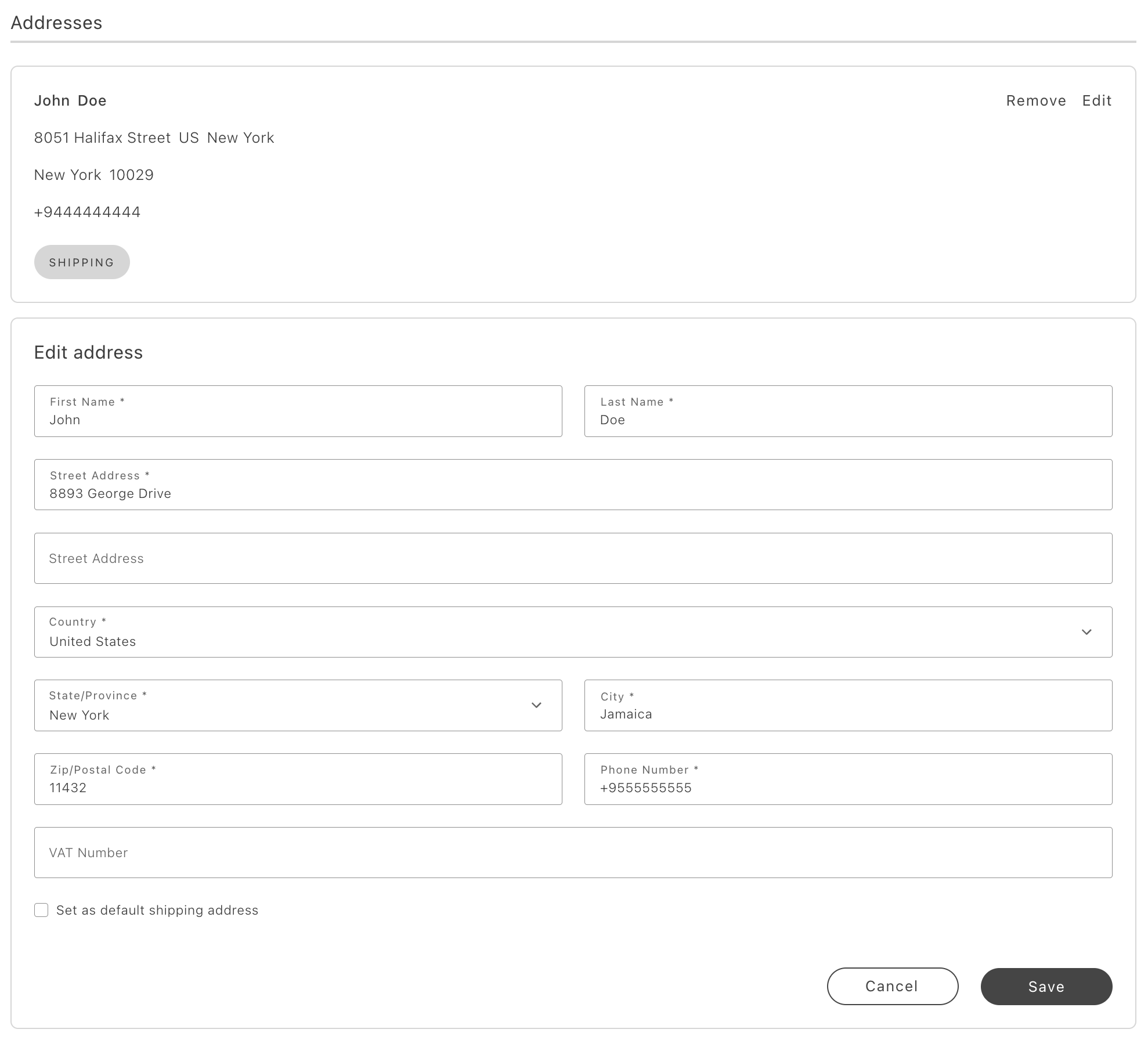\n</Diagram>\n\n### Minified view\n\nUse the minified view when the container is part of a page with other components, such as a user account dashboard. In this view, editing and deletion functionality is disabled, and the **Create New Address** button is replaced with a **View All Addresses** button. Only the default shipping and billing addresses are visible.\n\nThe following images illustrate the minified view of the Addresses container with no addresses, and with multiple addresses (but only one is displayed).\n\n<Diagram caption=\"Empty minified Addresses container\">\n 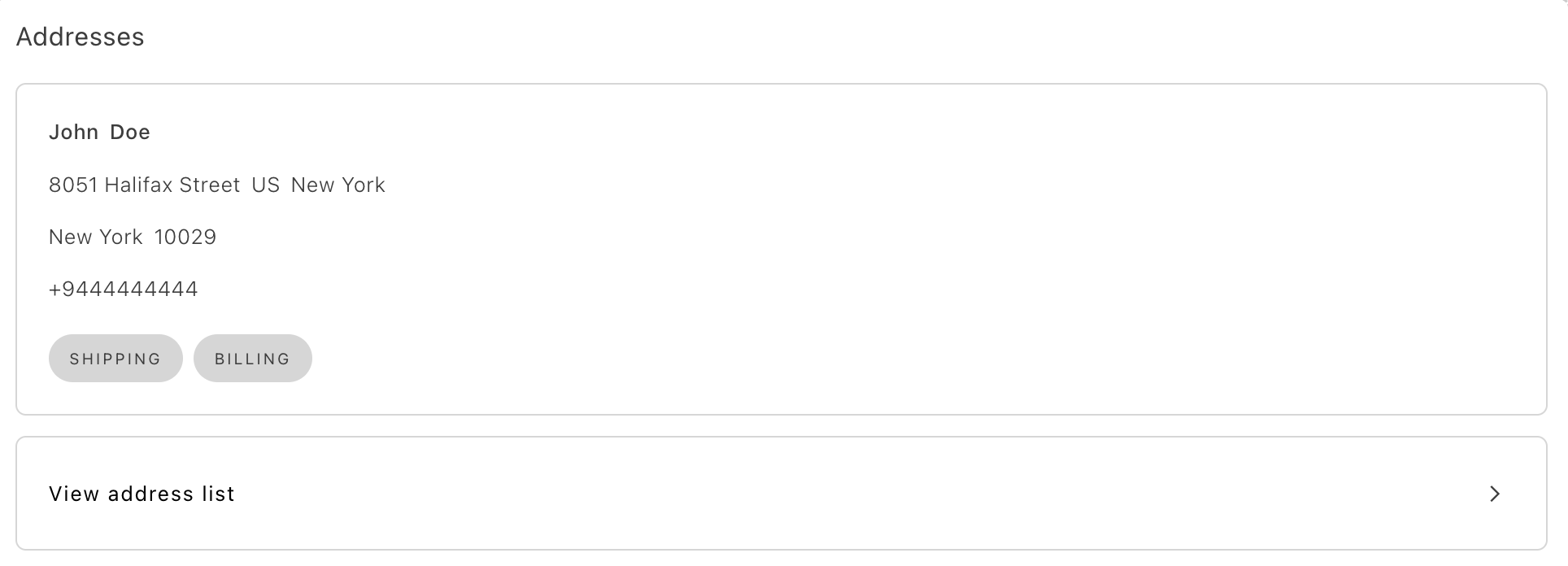\n</Diagram>\n\n<Diagram caption=\"Minified Addresses container with multiple addresses\">\n \n</Diagram>\n\n### Selectable view\n\nThe selectable view is intended for scenarios that require address selection, such as during checkout. This view includes styling adjustments and represents each address card as a selectable radio button, facilitating address selection.\n\nThe following images illustrate the selectable view of the Addresses container. In the first image an address has been selected. In the second, an address can be created.\n\n<Diagram caption=\"Selectable Addresses container with selection\">\n 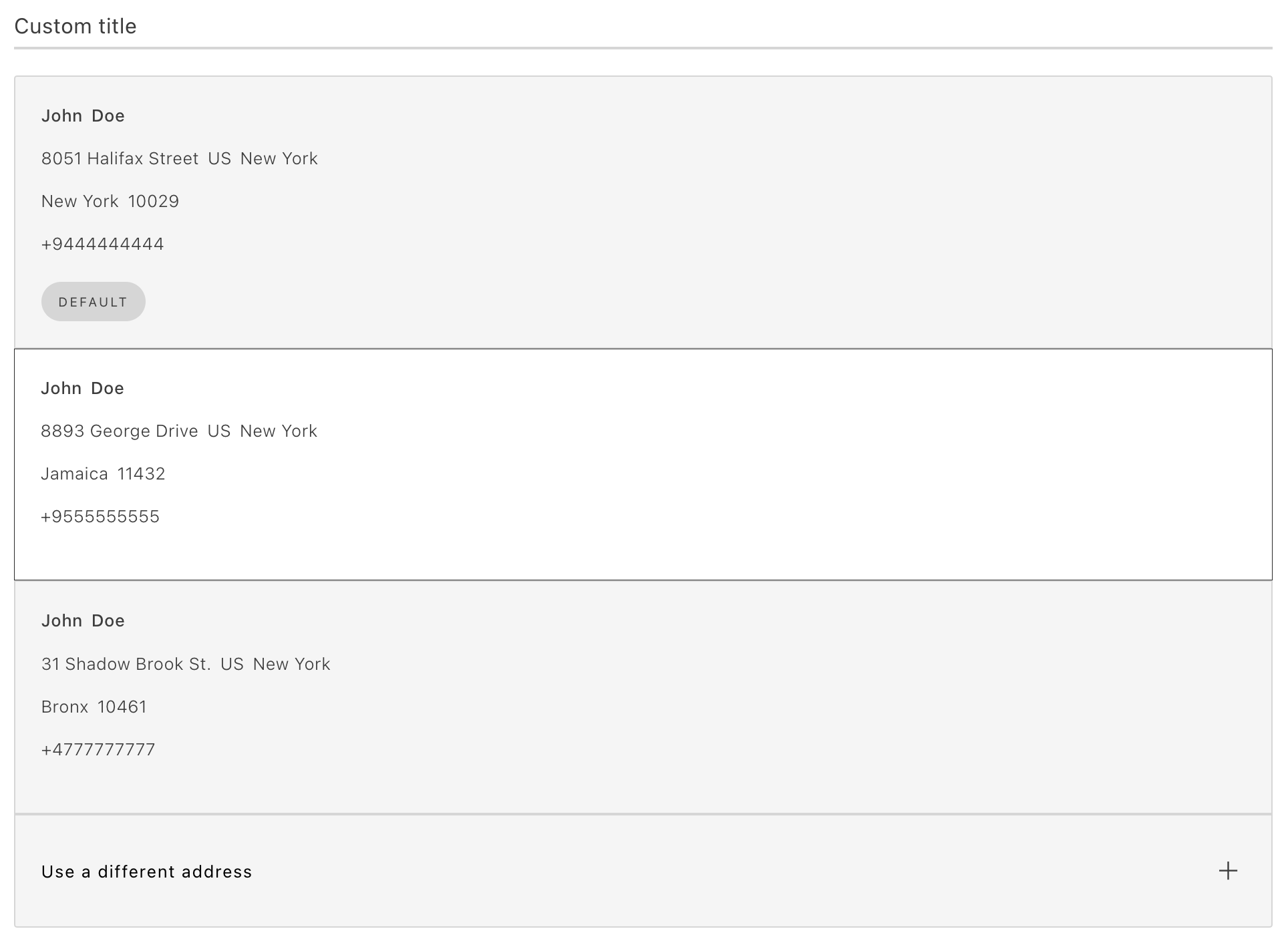\n</Diagram>\n\n<Diagram caption=\"Create an address in a selectable Addresses container\">\n 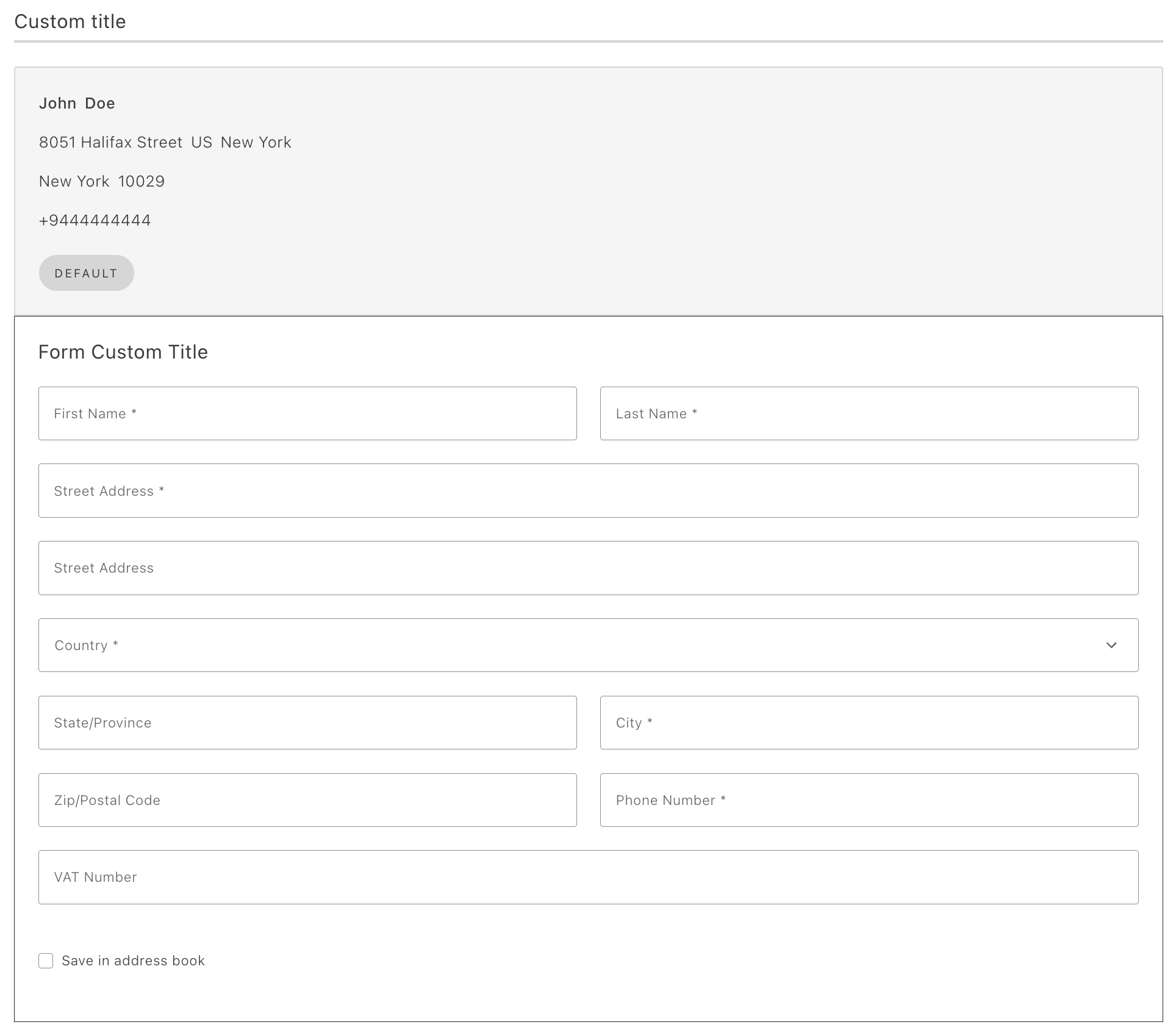\n</Diagram>\n\n> **Tip**\n>\nCustom address attributes and attribute validation are supported. See in the _Customer Management Guide_ for more information.\n\n\n## Configurations\n\nThe Addresses container provides the following configuration options:\n\n\n## Example\n\nThe following example demonstrates how to use the Addresses container:\n\n```javascript\nexport default async function decorate(block) {\n const {\n 'minified-view': minifiedViewConfig = 'false',\n } = readBlockConfig(block);\n\n if (!checkIsAuthenticated()) {\n window.location.href = CUSTOMER_LOGIN_PATH;\n } else {\n await accountRenderer.render(Addresses, {\n minifiedView: minifiedViewConfig === 'true',\n withActionsInMinifiedView: false,\n withActionsInFullSizeView: true,\n routeAddressesPage: () => CUSTOMER_ADDRESS_PATH,\n })(block);\n }\n}\n\n\n```"
|
|
35
|
+
},
|
|
36
|
+
{
|
|
37
|
+
"path": "dropins/user-account/containers/customer-information",
|
|
38
|
+
"title": "CustomerInformation container",
|
|
39
|
+
"description": "Let shoppers view and edit profile name, contact fields, email, and password from the default or edit modes in the account area.",
|
|
40
|
+
"content": "The `CustomerInformation` container is a standalone component that provides customers with access to their personal information. It allows users to view and edit their profile details, including their name, contact information, password, and email address.\n\nThe following images show the default view, edit view, edit view with password input, and change password view of the CustomerInformation container:\n\n<Diagram caption=\"Default view\">\n 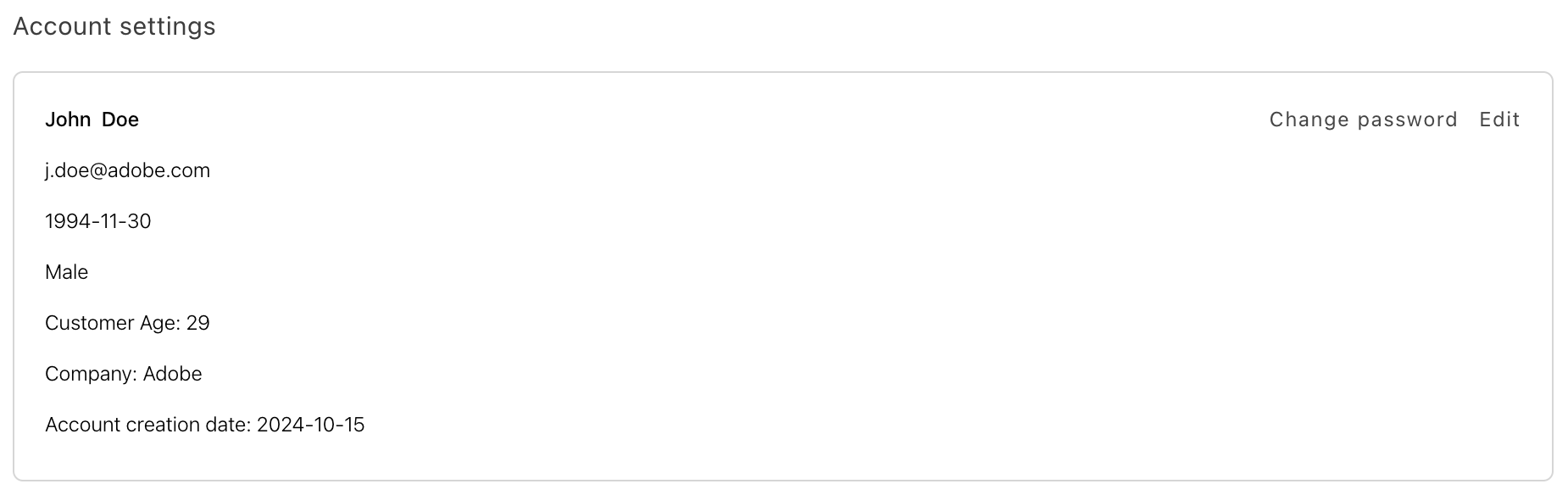\n</Diagram>\n\n<Diagram caption=\"Edit view\">\n 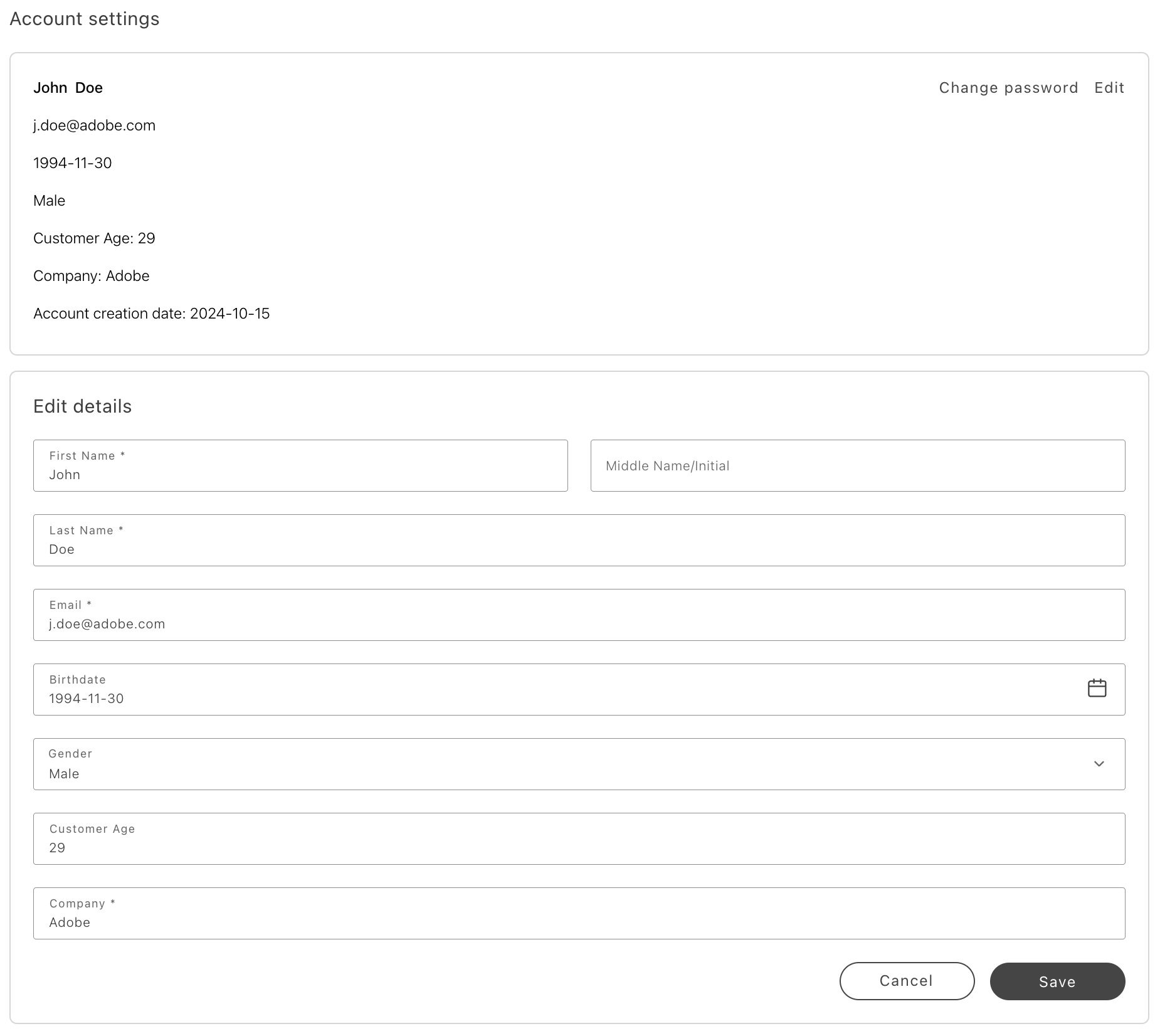\n</Diagram>\n\n<Diagram caption=\"Edit view with password input\">\n 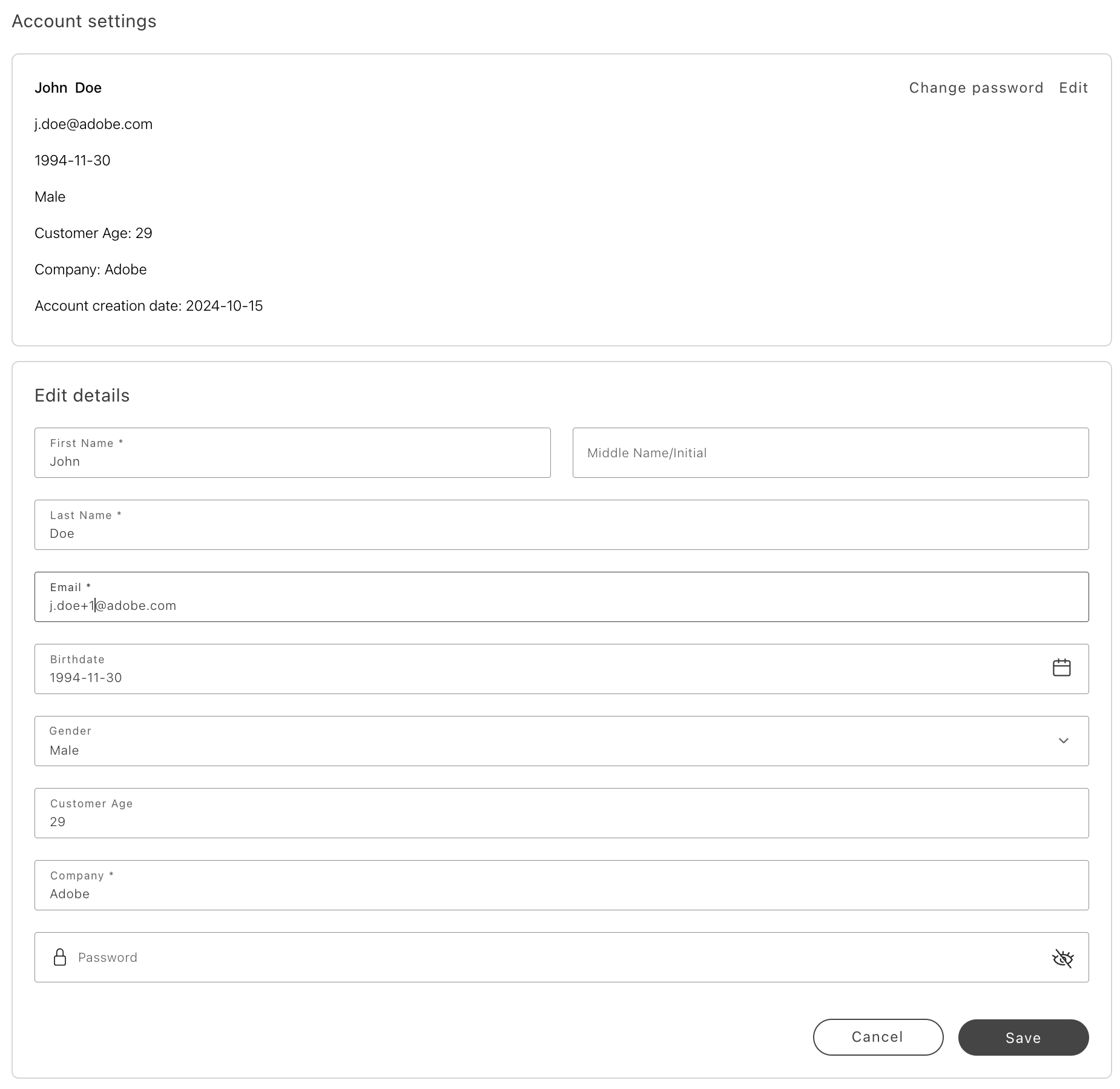\n</Diagram>\n\n<Diagram caption=\"Change password view\">\n 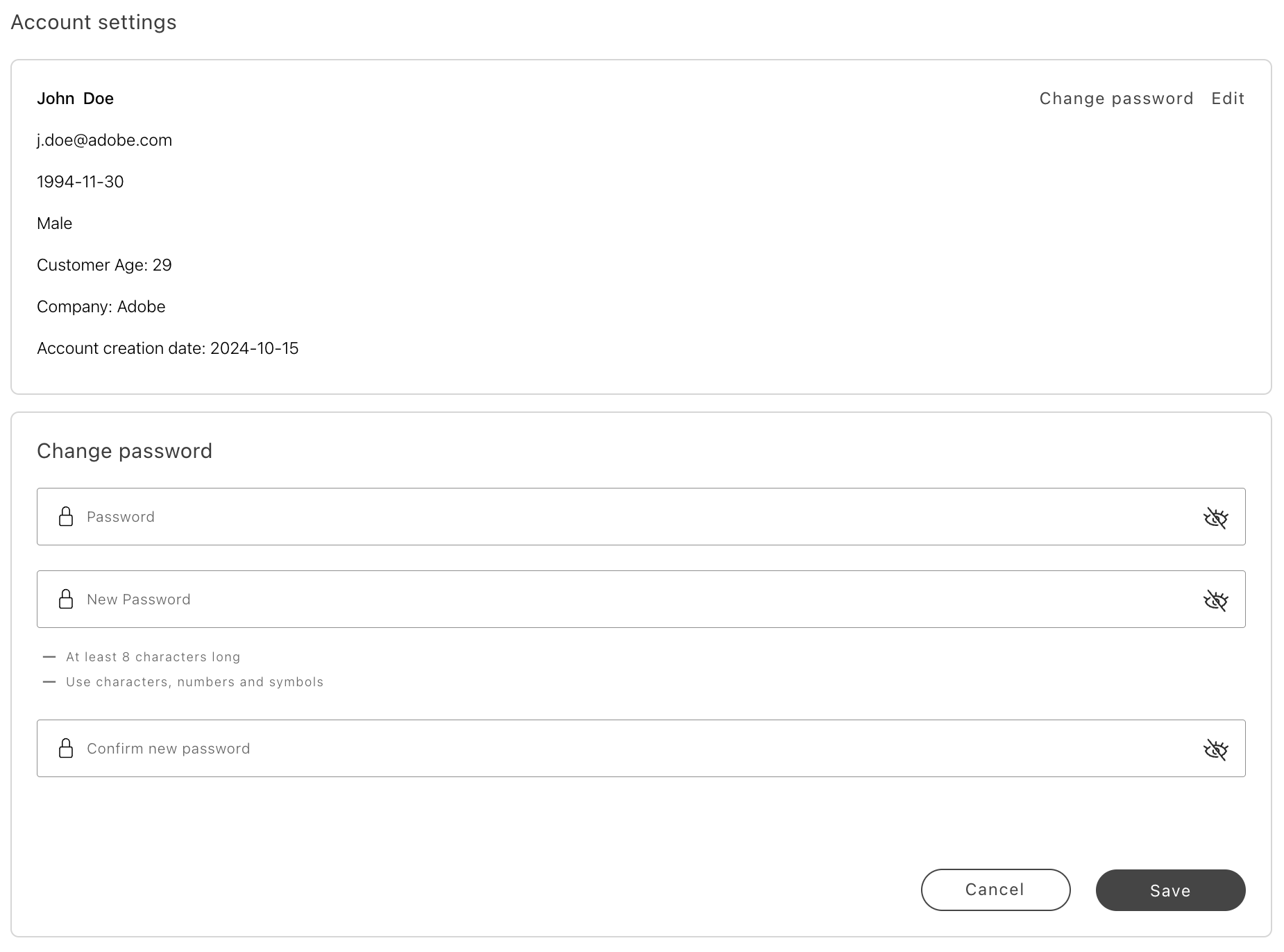\n</Diagram>\n\n> **Tip**\n>\nCustom customer attributes and attribute validation are supported. See in the _Customer Management Guide_ for more information.\n\n\n## Configurations\n\nThe CustomerInformation container provides the following configuration options:\n\n\n## Example\n\nThe following example demonstrates how to use the CustomerInformation container:\n\n```javascript\nexport default async function decorate(block) {\n if (!checkIsAuthenticated()) {\n window.location.href = CUSTOMER_LOGIN_PATH;\n } else {\n await accountRenderer.render(CustomerInformation, {})(block);\n }\n}\n```"
|
|
41
|
+
},
|
|
42
|
+
{
|
|
43
|
+
"path": "dropins/user-account/containers/orders-list",
|
|
44
|
+
"title": "OrdersList container",
|
|
45
|
+
"description": "Show paginated order history with filters in the full view or a compact minified list for account dashboards and side panels.",
|
|
46
|
+
"content": "The `OrdersList` container is a standalone component designed to provide access to a customer's order history and detailed order information. It can be rendered in a full-size or minified view.\n\nUse the full-size view when the `OrdersList` component functions as a standalone page. This view displays the complete list of orders, includes a filter for filtering by the date placed. It also features pagination, which is visible if the number of orders exceeds one page.\n\n<Diagram caption=\"Full-size view with no order list items\">\n 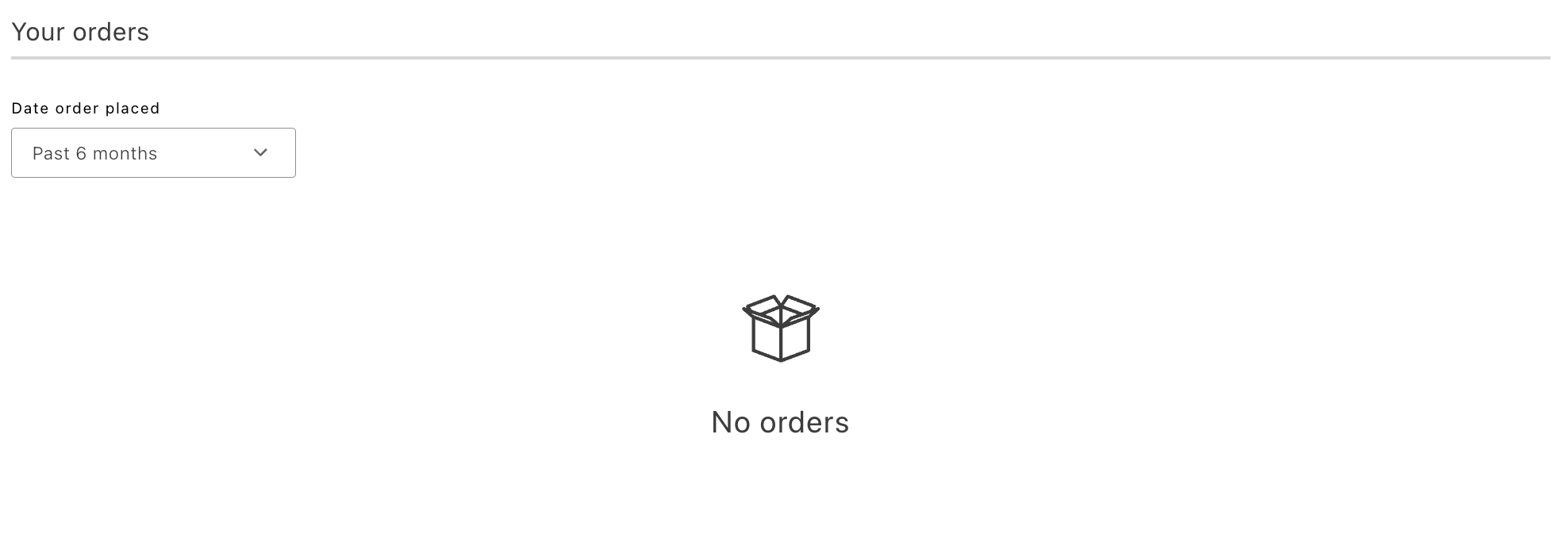\n</Diagram>\n\n<Diagram caption=\"Full-size view with multiple items\">\n \n</Diagram>\n\nThe minified view can be usef when the container is part of a page alongside other components, such as a user account dashboard. In this view, only a few of the most recent orders are displayed (the number is configurable). A **View all orders** button is rendered at the bottom, which navigates the customer to the full order history page.\n\n<Diagram caption=\"Minified view with no items\">\n 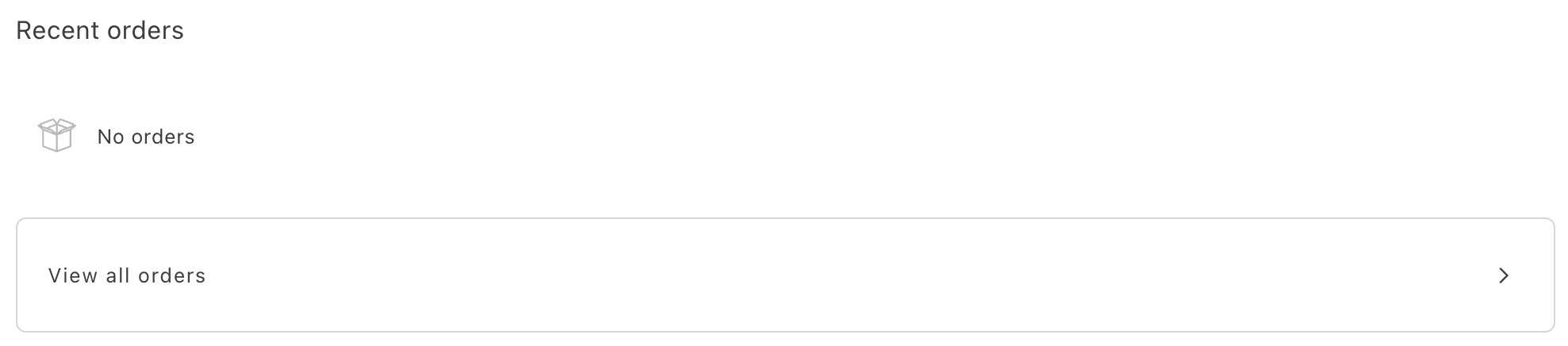\n</Diagram>\n\n<Diagram caption=\"Minified view with multiple items\">\n 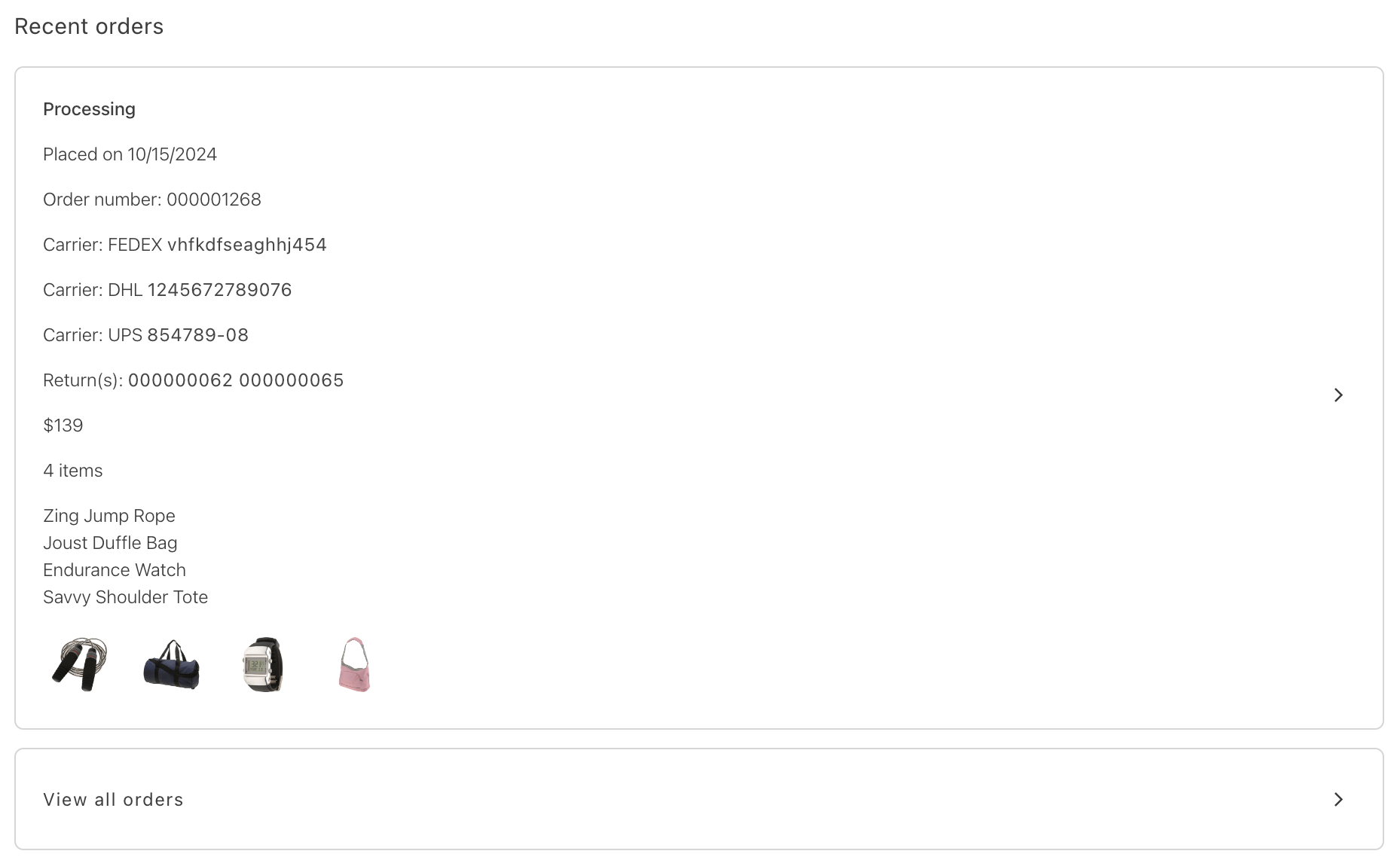\n</Diagram>\n\n## OrdersList configurations\n\nThe OrdersList container provides the following configuration options:\n\n\n## Example\n\nThe following example demonstrates how to use the OrdersList container:\n\n```javascript\nexport default async function decorate(block) {\n const { 'minified-view': minifiedViewConfig = 'false' } = readBlockConfig(block);\n\n if (!checkIsAuthenticated()) {\n window.location.href = CUSTOMER_LOGIN_PATH;\n } else {\n await accountRenderer.render(OrdersList, {\n minifiedView: minifiedViewConfig === 'true',\n routeOrdersList: () => CUSTOMER_ORDERS_PATH,\n routeOrderDetails: (orderNumber) => `$?orderRef=$`,\n routeReturnDetails: ({ orderNumber, returnNumber }) => `$?orderRef=$&returnRef=$`,\n routeOrderProduct: (productData) => (productData ? `/products/$/$` : '#'),\n })(block);\n }\n}\n```"
|
|
47
|
+
},
|
|
48
|
+
{
|
|
49
|
+
"path": "dropins/user-account/containers/payment-methods",
|
|
50
|
+
"title": "PaymentMethods container",
|
|
51
|
+
"description": "Learn about the PaymentMethods container for saved payment methods in My Account.",
|
|
52
|
+
"content": "The `PaymentMethods` container displays saved payment methods for the signed-in customer (for example, cards saved during checkout). Vaulting means Adobe Commerce stores a token—not the full card number—so the shopper can reuse the method later. You can render it as a full section or a compact layout alongside other account widgets. The list uses the same card styling as checkout via the `PaymentCard` component.\n\n## Data loading\n\nThe container uses the `usePaymentMethods` hook in the `@dropins/storefront-account` package, which chooses a data source as follows:\n\n1. Event bus (eager) — The hook subscribes to the `account/customerPaymentTokens` via `events.on` with `eager: true`, so any existing payload is applied immediately. If a payload is already present, the display list is sourced from the event bus, and no GraphQL request runs on mount. This path is for injection only and does not define removal behavior.\n2. **GraphQL** — If no data is received from the event bus, the hook calls `getCustomerPaymentTokens`.\n\nThe **Remove** button always calls the GraphQL `deletePaymentToken` mutation with the token’s `public_hash` (never the event bus), then updates the list on success—regardless of whether the rows were initially sourced from the bus or from `getCustomerPaymentTokens`.\n\nIn the default `PaymentMethods` container, the shopper must confirm in the removal modal before the hook executes the delete (or performs a local-only update if the list was sourced from the event bus).\n\nChanging `filterPaymentMethodCodes` after the initial load triggers a refetch only when the data source is GraphQL (not when the data comes from the event bus).\n\nFor the **`account/customerPaymentTokens`** payload type in TypeScript, see [TypeScript declaration](https://experienceleague.adobe.com/developer/commerce/storefront/dropins/user-account/events/#typescript-declaration) on the Events page.\n\n> **Injecting tokens from another drop-in**\n>\nEmit the `account/customerPaymentTokens` event with an array of display rows (matching the `StoredPaymentMethodDisplay` model) when token data is already available on the client—for example, after checkout or Payment Services initialization. Emit a `null` payload to represent an explicit empty list if your integration follows the same convention as the cart `cart/data` event. This event only populates the list. The **Remove** button in the UI still calls `deletePaymentToken` via GraphQL. Re-emit an updated array after removal if other listeners need to stay in sync with the latest vault state.\n\n\n## Layout\n\n### Full layout\n\nUse the default layout on a dedicated Payments or account settings page. Include a section header (unless disabled), a list of cards with remove actions, and a full empty state when no saved methods exist.\n\n<Diagram caption=\"Full layout with multiple saved cards\">\n 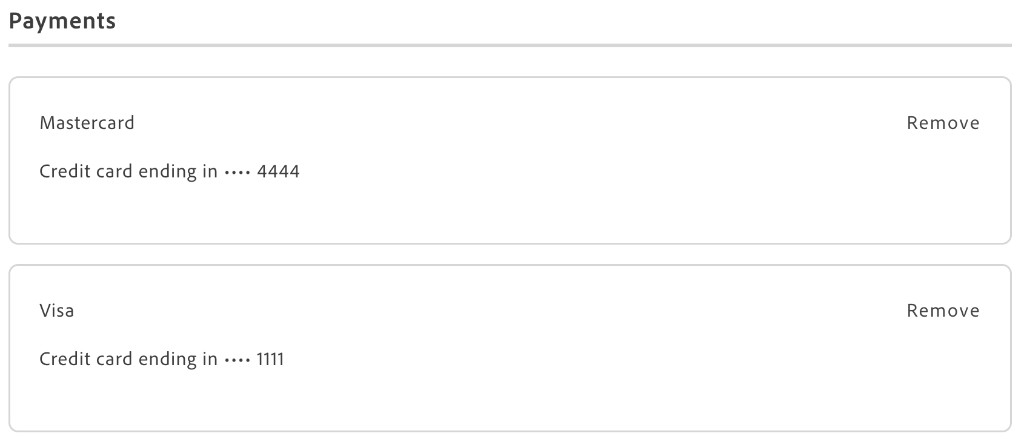\n</Diagram>\n\n### Minified layout\n\nSet `minifiedView` when placing the container alongside other dashboard widgets. In this mode, both the empty state and each card use a single-row layout (brand, masked number, optional expired tag, and the **Remove** button).\n\n<Diagram caption=\"Minified layout with multiple saved cards\">\n 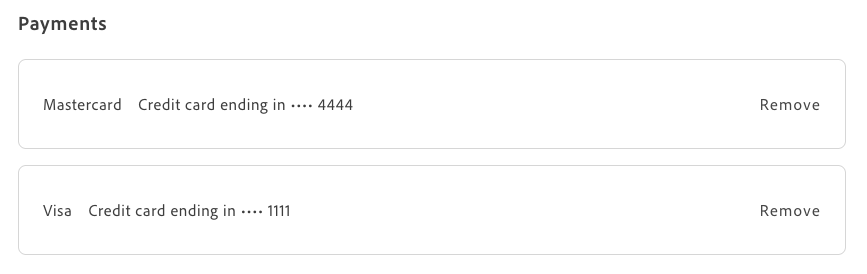\n</Diagram>\n\n## Remove confirmation\n\nThis section describes what the shopper sees when removing a stored payment method (for example, a card saved at checkout) and what happens on the server afterward, so you can test the flow or explain it to authors.\n\n1. The shopper selects **Remove** on a row. \n2. A remove confirmation dialog opens. When displayed, the dialog may include a small `PaymentCard` preview showing the card brand, last digits, and expired status.\n\nThe shopper then chooses one option:\n\n- **Cancel** closes the dialog. Nothing is deleted on the server.\n- The **Remove** button applies the deletion. If the list was loaded via GraphQL, the UI calls `deletePaymentToken`. If the list came only from the event bus, it removes the item in memory (see [Data loading](#data-loading)).\n\nWhen **Remove** succeeds, the row disappears from the list and the dialog closes.\n### Full layout\n\n<Diagram caption=\"Remove payment confirmation modal (full Payments page)\">\n 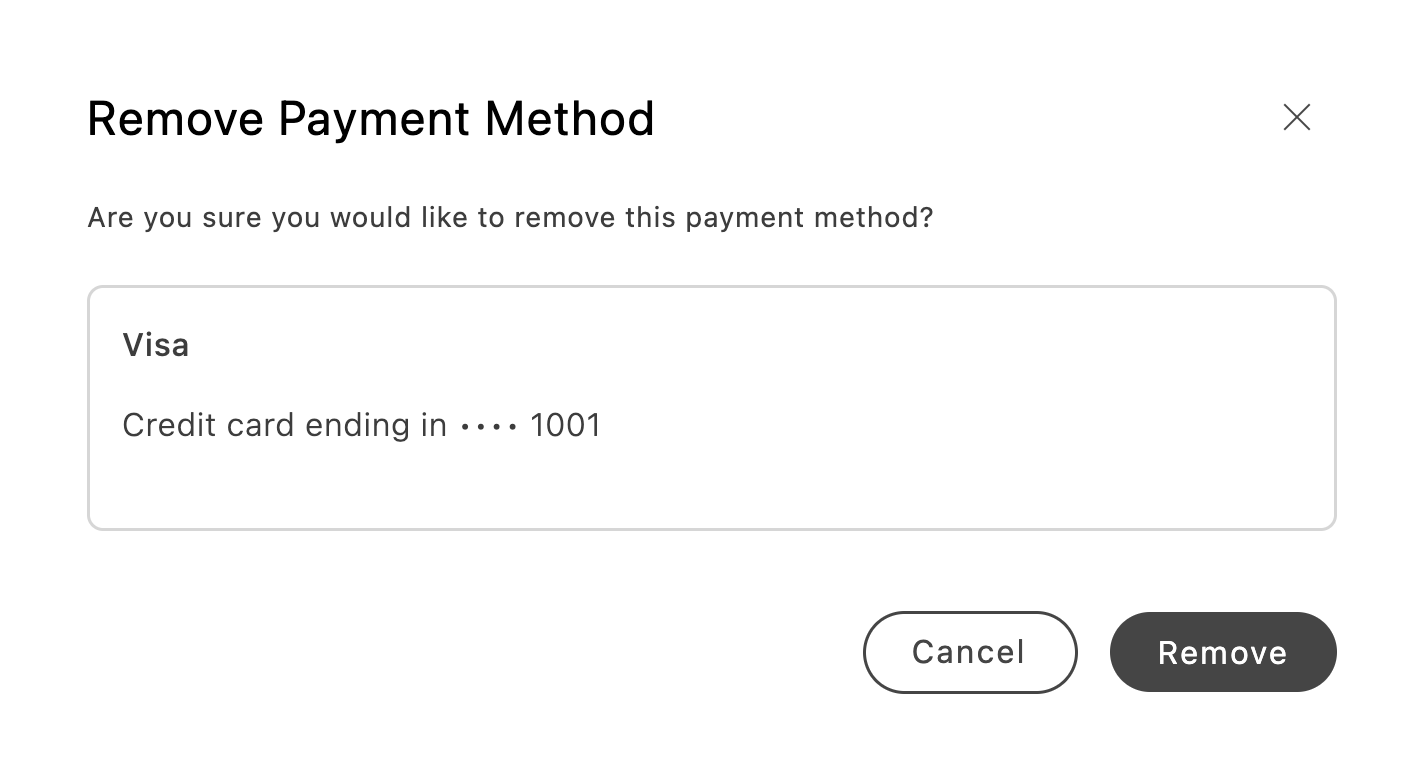\n</Diagram>\n\n### Minified layout\n\n<Diagram caption=\"Remove payment confirmation modal (minified dashboard)\">\n 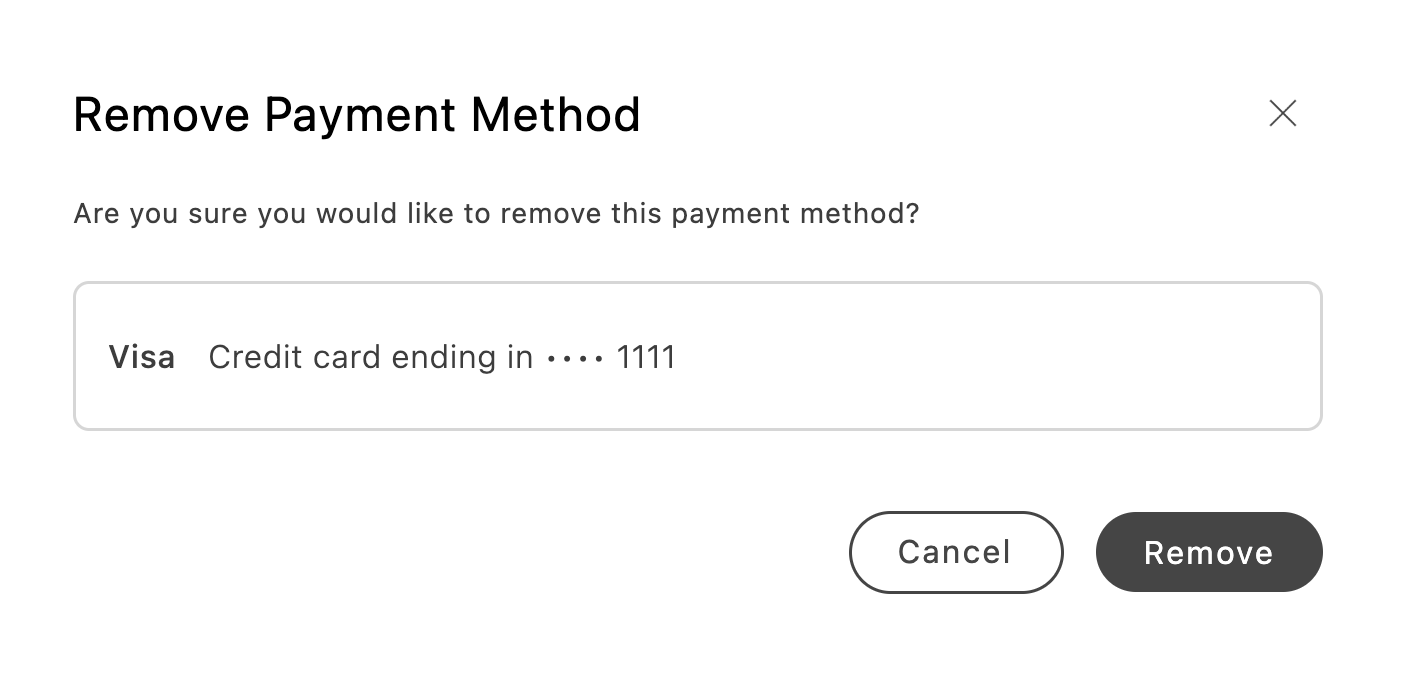\n</Diagram>\n\nWhile a removal request is running, the dialog shows **loading** on the confirm control. **Remove** is disabled on every row until the request finishes. \n\nYou can change the dialog labels and body text with dictionary keys under **`Account.Payments.removePaymentModal`** (see [Stored payment methods (Payments)](https://experienceleague.adobe.com/developer/commerce/storefront/dropins/user-account/dictionary/#stored-payment-methods-payments)).\n\n## Configurations\n\nThe `PaymentMethods` container accepts standard HTML `div` attributes plus the following options:\n\n\n## Example\n\nThe following example shows the usual boilerplate pattern: initializer, container import, and `render` from the account drop-in.\n\n```javascript\n\n\nexport default async function decorate(block) {\n if (!checkIsAuthenticated()) {\n window.location.href = CUSTOMER_LOGIN_PATH;\n return;\n }\n\n await accountRenderer.render(PaymentMethods, {\n minifiedView: false,\n withHeader: true,\n // Optional: limit to specific gateway codes\n // filterPaymentMethodCodes: ['payment_services'],\n })(block);\n}\n```\n\nFor programmatic access to the same data and removal behavior outside this container, see [User Account functions](https://experienceleague.adobe.com/developer/commerce/storefront/dropins/user-account/functions/) for `getCustomerPaymentTokens` and `deletePaymentToken`, and [Events](https://experienceleague.adobe.com/developer/commerce/storefront/dropins/user-account/events/) for `account/customerPaymentTokens`."
|
|
53
|
+
},
|
|
54
|
+
{
|
|
55
|
+
"path": "dropins/user-account/dictionary",
|
|
56
|
+
"title": "User Account Dictionary",
|
|
57
|
+
"description": "Customize user-facing text and labels in the User Account drop-in for localization and branding.",
|
|
58
|
+
"content": "The **User Account dictionary** contains all user-facing text, labels, and messages displayed by this drop-in. Customize the dictionary to:\n\n- **Localize** the drop-in for different languages and regions\n- **Customize** labels and messages to match your brand voice\n- **Override** default text without modifying source code for the drop-in\n\nDictionaries use the **i18n (internationalization)** pattern, where each text string is identified by a unique key path.\n\n\n## How to customize\n\nOverride dictionary values during drop-in initialization. The drop-in deep-merges your custom values with the defaults.\n\n```javascript\n\nawait initialize({\n langDefinitions: {\n en_US: {\n \"Account\": {\n \"minifiedView\": {\n \"CustomerInformation\": {\n \"containerTitle\": \"My Custom Title\",\n \"genderMale\": \"Custom value\"\n }\n }\n }\n }\n }\n});\n```\n\nYou only need to include the keys you want to change. For multi-language support and advanced patterns, see the [Dictionary customization guide](https://experienceleague.adobe.com/developer/commerce/storefront/dropins/all/dictionaries/).\n\n## Customizing form field labels and placeholders\n\nAddress form fields support custom labels and placeholders through the dictionary. Multiline fields like street addresses benefit from clear guidance for each line.\n\nThe pattern for customizing form fields:\n\n```\nAccount.AddressForm.fields..label\nAccount.AddressForm.fields..placeholder\n```\n\nWhere `` is the field's code (for example, `street`, `street_multiline_2`, `city`, `postcode`).\n\n### Example: Customizing street address fields\n\n```javascript\n\nawait initialize({\n langDefinitions: {\n en_US: {\n \"Account\": {\n \"AddressForm\": {\n \"fields\": {\n \"street\": {\n \"label\": \"Street Address\",\n \"placeholder\": \"Enter your street name\"\n },\n \"street_multiline_2\": {\n \"label\": \"Additional Street Information\",\n \"placeholder\": \"Apartment, suite, floor, building\"\n }\n }\n }\n }\n }\n }\n});\n```\n\n> **Tip**\n>\nFor multiline fields like street address, each line has its own field code. The first line uses the base field code (for example, `street`), and subsequent lines append `_multiline_N` where _N_ is the line number (for example, `street_multiline_2` for the second line).\n\n\n## Stored payment methods (Payments)\n\nThe PaymentMethods container and PaymentCard component use keys under Account.Payments for the section title, error messages, and per-card labels. When no saved methods exist, the empty state uses `EmptyList.Payments` in both `Account.minifiedView` and `Account.fullSizeView`, with the same default message in each view.\n\n| Key path | Description |\n| -------- | ----------- |\n| `Account.Payments.containerTitle` | Section header for the stored payment methods list. |\n| `Account.Payments.loadError` | Heading shown when the list fails to load from GraphQL. |\n| `Account.Payments.removeError` | Heading shown when removing a token fails. |\n| `Account.Payments.paymentCard.actionRemove` | Label for the remove control on a card row. |\n| `Account.Payments.paymentCard.cardEndingIn` | Prefix before the masked card number (for example, “Credit card ending in”). |\n| `Account.Payments.paymentCard.expiredLabel` | Text for the expired badge when applicable. |\n| `Account.Payments.removePaymentModal.title` | Confirmation modal title when removing a stored payment method. |\n| `Account.Payments.removePaymentModal.description` | Body text asking the shopper to confirm removal. |\n| `Account.Payments.removePaymentModal.actionCancel` | Label for the control that closes the modal without deleting. |\n| `Account.Payments.removePaymentModal.actionConfirm` | Label for the control that confirms removal and runs the delete. |\n| `Account.minifiedView.EmptyList.Payments.message` | Empty state copy in minified (dashboard) layouts. |\n| `Account.fullSizeView.EmptyList.Payments.message` | Empty state copy on full-page account views. |\n\n## Default keys and values\n\nBelow are the default English (`en_US`) strings provided by the **User Account** drop-in:\n\n```json title=\"en_US.json\"\n{\n \"Account\": {\n \"minifiedView\": {\n \"CustomerInformation\": {\n \"containerTitle\": \"Account settings\",\n \"genderMale\": \"Male\",\n \"genderFemale\": \"Female\",\n \"changePassword\": {\n \"passwordValidationMessage\": {\n \"chartTwoSymbols\": \"Use characters and numbers or symbols\",\n \"chartThreeSymbols\": \"Use characters, numbers and symbols\",\n \"chartFourSymbols\": \"Use uppercase characters, lowercase characters, numbers and symbols\",\n \"messageLengthPassword\": \"At least characters long\",\n \"passwordMismatch\": \"Passwords do not match. Please make sure both password fields are identical\",\n \"incorrectCurrentPassword\": \"The current password you entered is incorrect. Please check and try again.\",\n \"passwordUpdateMessage\": \"Your password has been updated\"\n },\n \"containerTitle\": \"Change password\",\n \"currentPassword\": {\n \"placeholder\": \"Password\",\n \"floatingLabel\": \"Password\"\n },\n \"newPassword\": {\n \"placeholder\": \"New Password\",\n \"floatingLabel\": \"New Password\"\n },\n \"confirmPassword\": {\n \"placeholder\": \"Confirm new password\",\n \"floatingLabel\": \"Confirm new password\"\n },\n \"buttonSecondary\": \"Cancel\",\n \"buttonPrimary\": \"Save\"\n },\n \"customerInformationCard\": {\n \"buttonSecondary\": \"Change password\",\n \"buttonPrimary\": \"Edit\",\n \"accountCreation\": \"Account creation date\"\n },\n \"editCustomerInformation\": {\n \"containerTitle\": \"Edit details\",\n \"buttonSecondary\": \"Cancel\",\n \"buttonPrimary\": \"Save\",\n \"accountSuccess\": \"Your account information has been updated.\",\n \"accountError\": \"Your account information has not been updated.\",\n \"passwordField\": {\n \"placeholder\": \"Password\",\n \"floatingLabel\": \"Password\"\n }\n }\n },\n \"Addresses\": {\n \"containerTitle\": \"Addresses\",\n \"editAddressFormTitle\": \"Edit address\",\n \"differentAddressFormTitle\": \"Deliver to new address\",\n \"viewAllAddressesButton\": \"View address list\",\n \"differentAddressButton\": \"Use a different address\",\n \"ariaLabelAddressPicker\": \"form\",\n \"addressCard\": {\n \"actionRemove\": \"Remove\",\n \"actionEdit\": \"Edit\",\n \"cardLabelShipping\": \"Shipping\",\n \"cardLabelBilling\": \"Billing\",\n \"defaultLabelText\": \"DEFAULT\",\n \"ariaLabel\": {\n \"editButton\": {\n \"default\": \"Edit address\",\n \"shipping\": \"Edit default shipping address\",\n \"billing\": \"Edit default billing address\",\n \"shippingAndBilling\": \"Edit address set as default for both shipping and billing\"\n },\n \"removeButton\": {\n \"default\": \"Remove address\",\n \"shipping\": \"Remove default shipping address\",\n \"billing\": \"Remove default billing address\",\n \"shippingAndBilling\": \"Remove address set as default for both shipping and billing\"\n }\n }\n },\n \"removeAddressModal\": {\n \"title\": \"Remove address\",\n \"description\": \"Are you sure you would like to remove this address?\",\n \"actionCancel\": \"Cancel\",\n \"actionConfirm\": \"Remove\"\n }\n },\n \"OrdersList\": {\n \"containerTitle\": \"Recent orders\",\n \"viewAllOrdersButton\": \"View all orders\",\n \"ariaLabelLink\": \"Redirect to full order information\",\n \"dateOrderPlaced\": \"Date order placed\",\n \"OrdersListCard\": {\n \"orderNumber\": \"Order number:\",\n \"itemsAmount\": \"items\",\n \"carrier\": \"Carrier:\",\n \"returns\": \"Return(s):\",\n \"orderDate\": \"Placed on\"\n },\n \"OrdersListSelectDate\": {\n \"pastSixMonths\": \"Past 6 months\",\n \"currentYear\": \"Current year\",\n \"viewAll\": \"View all\"\n }\n },\n \"EmptyList\": {\n \"Addresses\": {\n \"message\": \"No saved addresses\"\n },\n \"OrdersList\": {\n \"message\": \"No orders\"\n },\n \"Payments\": {\n \"message\": \"No saved payments\"\n }\n }\n },\n \"fullSizeView\": {\n \"Addresses\": {\n \"containerTitle\": \"Addresses\",\n \"editAddressFormTitle\": \"Edit address\",\n \"differentAddressFormTitle\": \"Deliver to new address\",\n \"newAddressFormTitle\": \"Add address\",\n \"addNewAddressButton\": \"Create new\",\n \"differentAddressButton\": \"Use a different address\",\n \"ariaLabelAddressPicker\": \"form\",\n \"addressCard\": {\n \"actionRemove\": \"Remove\",\n \"actionEdit\": \"Edit\",\n \"cardLabelShipping\": \"Shipping\",\n \"cardLabelBilling\": \"Billing\",\n \"defaultLabelText\": \"DEFAULT\",\n \"ariaLabel\": {\n \"editButton\": {\n \"default\": \"Edit address\",\n \"shipping\": \"Edit default shipping address\",\n \"billing\": \"Edit default billing address\",\n \"shippingAndBilling\": \"Edit address set as default for both shipping and billing\"\n },\n \"removeButton\": {\n \"default\": \"Remove address\",\n \"shipping\": \"Remove default shipping address\",\n \"billing\": \"Remove default billing address\",\n \"shippingAndBilling\": \"Remove address set as default for both shipping and billing\"\n }\n }\n },\n \"removeAddressModal\": {\n \"title\": \"Remove address\",\n \"description\": \"Are you sure you would like to remove this address?\",\n \"actionCancel\": \"Cancel\",\n \"actionConfirm\": \"Remove\"\n }\n },\n \"OrdersList\": {\n \"containerTitle\": \"Your orders\",\n \"ariaLabelLink\": \"Redirect to full order information\",\n \"dateOrderPlaced\": \"Date order placed\",\n \"OrdersListCard\": {\n \"orderNumber\": \"Order number:\",\n \"itemsAmount\": \"items\",\n \"carrier\": \"Carrier:\",\n \"returns\": \"Return(s):\",\n \"orderDate\": \"Placed on\"\n },\n \"OrdersListSelectDate\": {\n \"pastSixMonths\": \"Past 6 months\",\n \"currentYear\": \"Current year\",\n \"viewAll\": \"View all\"\n }\n },\n \"EmptyList\": {\n \"Addresses\": {\n \"message\": \"No saved addresses\"\n },\n \"OrdersList\": {\n \"message\": \"No orders\"\n },\n \"Payments\": {\n \"message\": \"No saved payments\"\n }\n }\n },\n \"AddressForm\": {\n \"formText\": {\n \"secondaryButton\": \"Cancel\",\n \"primaryButton\": \"Save\",\n \"defaultShippingLabel\": \"Set as default shipping address\",\n \"defaultBillingLabel\": \"Set as default billing address\",\n \"saveAddressBook\": \"Save in address book\"\n },\n \"fields\": {\n \"street\": {\n \"label\": \"Street Address\",\n \"placeholder\": \"Enter your street address\"\n },\n \"street_multiline_2\": {\n \"label\": \"Additional Street Information\",\n \"placeholder\": \"Apartment, suite, floor, building\"\n }\n }\n },\n \"FormText\": {\n \"requiredFieldError\": \"This is a required field.\",\n \"numericError\": \"Only numeric values are allowed.\",\n \"alphaNumWithSpacesError\": \"Only alphanumeric characters and spaces are allowed.\",\n \"alphaNumericError\": \"Only alphanumeric characters are allowed.\",\n \"alphaError\": \"Only alphabetic characters are allowed.\",\n \"emailError\": \"Please enter a valid email address.\",\n \"dateError\": \"Please enter a valid date.\",\n \"dateLengthError\": \"Date must be between and .\",\n \"urlError\": \"Please enter a valid URL, e.g., http://www.adobe.com.\",\n \"lengthTextError\": \"Text length must be between and characters.\"\n },\n \"AddressValidation\": {\n \"title\": \"Verify your address\",\n \"subtitle\": \"To ensure accurate delivery, we suggest the changes highlighted below. Please choose which address you would like to use. If neither option is correct, edit your address.\",\n \"suggestedAddress\": \"Suggested Address\",\n \"originalAddress\": \"Original Address\"\n },\n \"Payments\": {\n \"containerTitle\": \"Payments\",\n \"loadError\": \"We couldn’t load your saved payment methods. Try again later.\",\n \"removeError\": \"We couldn’t remove this payment method. Try again.\",\n \"paymentCard\": {\n \"actionRemove\": \"Remove\",\n \"cardEndingIn\": \"Credit card ending in\",\n \"expiredLabel\": \"Expired\"\n },\n \"removePaymentModal\": {\n \"title\": \"Remove Payment Method\",\n \"description\": \"Are you sure you would like to remove this payment method?\",\n \"actionCancel\": \"Cancel\",\n \"actionConfirm\": \"Remove\"\n }\n }\n }\n}\n```"
|
|
59
|
+
},
|
|
60
|
+
{
|
|
61
|
+
"path": "dropins/user-account/events",
|
|
62
|
+
"title": "User Account Data & Events",
|
|
63
|
+
"description": "Learn about the events used by the User Account drop-in and the data available within those events.",
|
|
64
|
+
"content": "The **User Account** drop-in uses the [event bus](https://experienceleague.adobe.com/developer/commerce/storefront/sdk/reference/events) to emit and listen to events for communication between drop-ins and external integrations.\n\n\n## Events reference\n\n{/* EVENTS_TABLE_START */}\n\n\n| Event | Direction | Description |\n|-------|-----------|-------------|\n| [`error`](#error-emits) | Emits | Emitted when a network request fails (excluding aborted requests). |\n| [account/customerPaymentTokens](#accountcustomerpaymenttokens-listens) | Listens | Optional **display list** of stored payment tokens for the PaymentMethods UI (injection only); consumed eagerly when present. Does not participate in removal. |\n| [companyContext/changed](#companycontextchanged-listens) | Listens | Fired by Company Context (`companyContext`) when a change occurs. |\n\n\n{/* EVENTS_TABLE_END */}\n\n## Event details\n\nThe following sections provide detailed information about each event, including its direction, event payload, and usage examples.\n\n### `error` (emits)\n\nEmitted when any GraphQL or network request made by the drop-in fails. Aborted requests (`AbortError`) are excluded — they are re-thrown but do not trigger this event. The event fires on the shared event bus before the error is re-thrown, so listeners receive it even when the calling code also handles the rejection.\n\nEvery API function in the drop-in (`getCustomer`, `updateCustomer`, `getOrderHistoryList`, `createCustomerAddress`, `deletePaymentToken`, `getCustomerPaymentTokens`, and others) is wired to emit this event on failure.\n\n> **Note**\n>\nThis event uses the bare channel name `error` (not `account/error`). The `source` field in the payload is set to `'auth'`.\n\n\n#### Event payload\n\n\n| Field | Type | Description |\n|-------|------|-------------|\n| `source` | `string` | Always `'auth'`. |\n| `type` | `string` | Always `'network'`. |\n| `error` | `Error` | The original caught `Error` object. |\n\n\n#### Example\n\n```js\n\nevents.on('error', (payload) => {\n if (payload.source === 'auth' && payload.type === 'network') {\n console.error('User Account network error:', payload.error.message);\n }\n});\n```\n\n### `account/customerPaymentTokens` (listens)\n\nThe PaymentMethods container and `usePaymentMethods` hook subscribe to this event. If a payload is already available on the event bus, the hook uses it instead of calling the GraphQL `getCustomerPaymentTokens` query. This allows you to inject a list into the UI from another drop-in (for example, Payment Services) or from tests.\n\nSubscribe with an eager listener so any payload emitted before subscription is still received and applied (following the same pattern as cart data events).\n\n#### Event payload\n\n| Shape | Description |\n| ----- | ----------- |\n| Array of token rows | Each item matches the `StoredPaymentMethodDisplay` shape: `publicHash`, `cardBrand`, `lastFourDigits`, optional `expired`, optional `variant`. |\n| `null` | Explicit empty list (same convention as cart `cart/data`). |\n\n#### Removal (not on the event bus)\n\nRemoving a stored method is **not** handled through this event. When a shopper selects Remove in the PaymentMethods UI, they first confirm in a removal modal. The drop-in then calls the GraphQL `deletePaymentToken` mutation and updates the in-memory list—regardless of whether the rows were initially sourced from the event or from `getCustomerPaymentTokens`. The event bus is not used for deletion. If another part of the page needs to stay in sync after removal, you can optionally emit an updated `account/customerPaymentTokens` payload.\n\n#### TypeScript declaration\n\nThe User Account drop-in still extends `@adobe-commerce/event-bus` with this channel, making emit and `on` type-safe for list injection. This payload type is not used for deletion—there is no “delete via the bus” event. Removal is handled exclusively through `deletePaymentToken`.\n\n```ts title='src/types/events.d.ts (User Account drop-in)'\n\ndeclare module '@adobe-commerce/event-bus' {\n interface Events {\n /** PaymentMethods list injection only; `null` means an empty list (same idea as cart `cart/data`). Not used for removal—use GraphQL `deletePaymentToken`. */\n 'account/customerPaymentTokens': StoredPaymentMethodDisplay[] | null;\n }\n}\n```\n\nThis declaration is only for typing list injection; it does not introduce a bus-based delete API. Use the same `StoredPaymentMethodDisplay` shape as the return items from [`getCustomerPaymentTokens`](https://experienceleague.adobe.com/developer/commerce/storefront/dropins/user-account/functions/#getcustomerpaymenttokens). JavaScript storefronts can ignore the `.d.ts file` as runtime behavior remains the same.\n\n#### Example\n\n```js\n\nevents.on(\n 'account/customerPaymentTokens',\n (payload) => {\n console.log('Stored payment tokens:', payload);\n },\n { eager: true }\n);\n```\n\n### `companyContext/changed` (listens)\n\nFired by Company Context (`companyContext`) when a change occurs.\n\n#### Event payload\n\n\n#### Example\n\n```js\n\nevents.on('companyContext/changed', (payload) => {\n console.log('companyContext/changed event received:', payload);\n // Add your custom logic here\n});\n```"
|
|
65
|
+
},
|
|
66
|
+
{
|
|
67
|
+
"path": "dropins/user-account/functions",
|
|
68
|
+
"title": "User Account Functions",
|
|
69
|
+
"description": "API functions provided by the User Account drop-in for programmatic control and customization.",
|
|
70
|
+
"content": "The User Account drop-in provides API functions that enable you to programmatically control behavior, fetch data, and integrate with Adobe Commerce backend services.\n\n\n| Function | Description |\n| --- | --- |\n| [`createCustomerAddress`](#createcustomeraddress) | Creates an address for an existing customer using the `CustomerAddressesModel` object as an argument. |\n| [`getAttributesForm`](#getattributesform) | Calls the `attributesForm` query to retrieve EAV attributes associated with customer and customer address frontend forms. |\n| [`getCountries`](#getcountries) | Calls the countries query to retrieve a list of countries. |\n| [`getCustomer`](#getcustomer) | Retrieves the customer information for the logged-in customer. |\n| [`getCustomerAddress`](#getcustomeraddress) | Returns an array of addresses associated with the current customer. |\n| [`getCustomerPaymentTokens`](#getcustomerpaymenttokens) | Retrieves stored payment tokens for the logged-in customer via the `customerPaymentTokens query`. |\n| [`deletePaymentToken`](#deletepaymenttoken) | Removes a stored payment token using the `deletePaymentToken mutation`. |\n| [`getOrderHistoryList`](#getorderhistorylist) | Retrieves a list of customer orders asynchronously using the customer query. |\n| [`getRegions`](#getregions) | Calls the country query to retrieve a list of states or provinces for a specific country. |\n| [`getStoreConfig`](#getstoreconfig) | Calls the `storeConfig` query to retrieve details about password requirements. |\n| [`removeCustomerAddress`](#removecustomeraddress) | Removes an address associated with the current customer. |\n| [`updateCustomer`](#updatecustomer) | Updates the logged-in customer. |\n| [`updateCustomerAddress`](#updatecustomeraddress) | Updates an address associated with the current customer. |\n| [`updateCustomerEmail`](#updatecustomeremail) | Updates the email address of the logged-in customer. |\n| [`updateCustomerPassword`](#updatecustomerpassword) | Updates the password of the logged-in customer. |\n\n\n## createCustomerAddress\n\nThe `createCustomerAddress` function creates an address for an existing customer using the `CustomerAddressesModel` object as an argument. The function calls the mutation.\n\n```ts\nconst createCustomerAddress = async (\n address: CustomerAddressesModel\n): Promise<string>\n```\n\n\n| Parameter | Type | Req? | Description |\n|---|---|---|---|\n| `address` | `CustomerAddressesModel` | Yes | The new address details including street, city, region, country, postal code, and optional fields like company name and phone number. |\n\n\n### Events\n\nDoes not emit any drop-in events.\n\n### Returns\n\nReturns `string`.\n\n## getAttributesForm\n\nThe `getAttributesForm` function calls the query to retrieve EAV attributes associated with customer and customer address frontend forms. The `formCode` parameter must be one of the following values: `customer_account_create`, `customer_account_edit`, `customer_address_create`, or `customer_address_edit`.\n\n```ts\nconst getAttributesForm = async (\n formCode: string\n): Promise<AttributesFormModel[]>\n```\n\n\n| Parameter | Type | Req? | Description |\n|---|---|---|---|\n| `formCode` | `string` | Yes | One of \"customer_account_create\", \"customer_account_edit\", \"customer_address_create\", \"customer_address_edit\". |\n\n\n### Events\n\nDoes not emit any drop-in events.\n\n### Returns\n\nReturns `AttributesFormModel[]`.\n\n## getCountries\n\nThe `getCountries` function calls the query to retrieve a list of countries.\n\n```ts\nconst getCountries = async (): Promise<{\n availableCountries: Country[] | [];\n countriesWithRequiredRegion: string[];\n optionalZipCountries: string[];\n}>\n```\n\n### Events\n\nDoes not emit any drop-in events.\n\n### Returns\n\n```ts\nPromise<{\n availableCountries: Country[] | [];\n countriesWithRequiredRegion: string[];\n optionalZipCountries: string[];\n}>\n```\n\nSee [`Country`](#country).\n\n## getCustomer\n\nThe `getCustomer` function retrieves the customer information for the logged-in customer. The function calls the query.\n\n```ts\nconst getCustomer = async (): Promise<CustomerDataModelShort>\n```\n\n### Events\n\nDoes not emit any drop-in events.\n\n### Returns\n\nReturns [`CustomerDataModelShort`](#customerdatamodelshort).\n\n## getCustomerAddress\n\nThe `getCustomerAddress` function returns an array of addresses associated with the current customer. The function calls the query.\n\n```ts\nconst getCustomerAddress = async (): Promise<\n CustomerAddressesModel[]\n>\n```\n\n### Events\n\nDoes not emit any drop-in events.\n\n### Returns\n\n```ts\nPromise<\n CustomerAddressesModel[]\n>\n```\n\nSee [`CustomerAddressesModel`](#customeraddressesmodel).\n\n## getCustomerPaymentTokens\n\nThe `getCustomerPaymentTokens` function retrieves saved payment methods (vault tokens) for the logged-in customer. It calls the query via the drop-in GraphQL client (GET, no cache), then transforms the results into display rows for the `PaymentMethods` container.\n\n```ts\nconst getCustomerPaymentTokens = async (\n filterPaymentMethodCodes?: string[]\n): Promise<StoredPaymentMethodDisplay[]>\n```\n\n\n| Parameter | Type | Req? | Description |\n| --- | --- | --- | --- |\n| `filterPaymentMethodCodes` | `string[]` | No | When set, only tokens whose `payment_method_code` equals or starts with one of these strings are returned. |\n\n\n### Events\n\nDoes not emit any drop-in events. To populate the `PaymentMethods` list from client-side data without calling this query, emit `account/customerPaymentTokens` on the event bus (see [Events](https://experienceleague.adobe.com/developer/commerce/storefront/dropins/user-account/events/#accountcustomerpaymenttokens-listens)). This event is for display data only. Token removal still uses `deletePaymentToken`, not the bus.\n\n### Returns\n\nReturns [`StoredPaymentMethodDisplay[]`](#storedpaymentmethoddisplay).\n\n## deletePaymentToken\n\nThe `deletePaymentToken` function removes a stored payment token for the logged-in customer. It calls the mutation with the token `public_hash`.\n\nThe built-in [PaymentMethods](https://experienceleague.adobe.com/developer/commerce/storefront/dropins/user-account/containers/payment-methods/) container calls this **only after** the shopper confirms removal in the confirmation dialog. If you call `deletePaymentToken` from your own code, the mutation runs immediately and there is no confirmation UI unless you implement it.\n\n```ts\nconst deletePaymentToken = async (publicHash: string): Promise<boolean>\n```\n\n\n| Parameter | Type | Req? | Description |\n| --- | --- | --- | --- |\n| `publicHash` | `string` | Yes | Public hash of the token to remove (from `getCustomerPaymentTokens` or the **account/customerPaymentTokens** payload). |\n\n\n### Events\n\nDoes not emit any drop-in events.\n\n### Returns\n\nReturns `true` when the mutation reports success, otherwise `false`.\n\n## getOrderHistoryList\n\nThe `getOrderHistoryList` function is an asynchronous function that retrieves a list of customer orders using the query. It optionally takes parameters for pagination and filtering.\n\n```ts\nconst getOrderHistoryList = async (\n pageSize: number,\n selectOrdersDate: string,\n currentPage: number\n): Promise<OrderHistoryModel | null>\n```\n\n\n| Parameter | Type | Req? | Description |\n|---|---|---|---|\n| `pageSize` | `number` | Yes | The maximum number of results to return at once. The default value is 20. |\n| `selectOrdersDate` | `string` | Yes | Represents a date filter for the orders. |\n| `currentPage` | `number` | Yes | The current page of the order history list. The default value is 1. |\n\n\n### Events\n\nDoes not emit any drop-in events.\n\n### Returns\n\nReturns [`OrderHistoryModel`](#orderhistorymodel) or `null`.\n\n## getRegions\n\nThe `getRegions` function calls the query to retrieve a list of states or provinces for a specific country.\n\n```ts\nconst getRegions = async (\n countryCode: string\n): Promise<RegionTransform[] | []>\n```\n\n\n| Parameter | Type | Req? | Description |\n|---|---|---|---|\n| `countryCode` | `string` | Yes | A two-letter ISO country code. |\n\n\n### Events\n\nDoes not emit any drop-in events.\n\n### Returns\n\nReturns `RegionTransform[] | []`. See [`RegionTransform`](#regiontransform).\n\n## getStoreConfig\n\nThe `getStoreConfig` function calls the query to retrieve details about password requirements.\n\n```ts\nconst getStoreConfig = async (): Promise<StoreConfigModel>\n```\n\n### Events\n\nDoes not emit any drop-in events.\n\n### Returns\n\nReturns [`StoreConfigModel`](#storeconfigmodel).\n\n## removeCustomerAddress\n\nThe `removeCustomerAddress` function removes an address associated with the current customer. The function calls the mutation.\n\n```ts\nconst removeCustomerAddress = async (\n addressId: number\n): Promise<boolean>\n```\n\n\n| Parameter | Type | Req? | Description |\n|---|---|---|---|\n| `addressId` | `number` | Yes | An internal ID for the address. |\n\n\n### Events\n\nDoes not emit any drop-in events.\n\n### Returns\n\nReturns `boolean`.\n\n## updateCustomer\n\nThe `updateCustomer` function updates the logged-in customer. The function calls the mutation.\n\nThe `form` object keys are converted to snake_case using the `convertKeysCase` utility with specific mappings for `firstName`, `lastName`, `middleName`, and `custom_attributesV2`.\n\n```ts\nconst updateCustomer = async (\n form: Record<string,\n string>\n): Promise<string>\n```\n\n\n| Parameter | Type | Req? | Description |\n|---|---|---|---|\n| `form` | `Record<string, string>` | Yes | The customer attributes to update, such as firstName, lastName, email, date of birth, and custom attributes. |\n\n\n### Events\n\nDoes not emit any drop-in events.\n\n### Returns\n\nReturns `string`.\n\n## updateCustomerAddress\n\nThe `updateCustomerAddress` function updates an address associated with the current customer. The function calls the mutation.\n\nThe `forms` object includes an `addressId` (the ID of the address to update) and other address details as defined in `CustomerAddressesModel`.\n\n```ts\nconst updateCustomerAddress = async (\n forms: ExtendedAddressFormProps\n): Promise<string>\n```\n\n\n| Parameter | Type | Req? | Description |\n|---|---|---|---|\n| `forms` | `ExtendedAddressFormProps` | Yes | The addressId and address attributes to update, such as street, city, region, country, and postal code. |\n\n\n### Events\n\nDoes not emit any drop-in events.\n\n### Returns\n\nReturns `string`.\n\n## updateCustomerEmail\n\nThe `updateCustomerEmail` function updates the email address of the logged-in customer. The function calls the mutation.\n\n```ts\nconst updateCustomerEmail = async (\n { email, password, }: { email: string; password: string; }\n): Promise<string>\n```\n\n\n| Parameter | Type | Req? | Description |\n|---|---|---|---|\n| `email` | `string` | Yes | The new email address. |\n| `password` | `string` | Yes | The customer's current password (used to verify the change). |\n\n\n### Events\n\nDoes not emit any drop-in events.\n\n### Returns\n\nReturns `string`.\n\n## updateCustomerPassword\n\nThe `updateCustomerPassword` function updates the password of the logged-in customer. The function calls the mutation.\n\n```ts\nconst updateCustomerPassword = async (\n { currentPassword, newPassword, }: ChangeCustomerPasswordProps\n): Promise<string>\n```\n\n\n| Parameter | Type | Req? | Description |\n|---|---|---|---|\n| `currentPassword` | `string` | Yes | The customer's current password. |\n| `newPassword` | `string` | Yes | The new password. |\n\n\n### Events\n\nDoes not emit any drop-in events.\n\n### Returns\n\nReturns `string`.\n\n## Data Models\n\nThe following data models are used by functions in this drop-in.\n\n### Country\n\nThe `Country` object is returned by the following functions: [`getCountries`](#getcountries).\n\n```ts\ntype Country = {\n value: string;\n text: string;\n availableRegions?: {\n id: number;\n code: string;\n name: string;\n }[];\n};\n```\n\n### CustomerAddressesModel\n\nThe `CustomerAddressesModel` object is returned by the following functions: [`getCustomerAddress`](#getcustomeraddress).\n\n```ts\ninterface CustomerAddressesModel {\n firstName?: string;\n lastName?: string;\n city?: string;\n company?: string;\n countryCode?: string;\n region?: { region: string; regionCode: string; regionId: string | number };\n telephone?: string;\n id?: string;\n vatId?: string;\n postcode?: string;\n street?: string;\n streetMultiline_2?: string;\n defaultShipping?: boolean;\n defaultBilling?: boolean;\n uid?: string;\n}\n```\n\n### CustomerDataModelShort\n\nThe `CustomerDataModelShort` object is returned by the following functions: [`getCustomer`](#getcustomer).\n\n```ts\ninterface CustomerDataModelShort {\n firstName: string;\n lastName: string;\n middleName: string;\n dateOfBirth: string;\n prefix: string;\n gender: 1 | 2 | string;\n suffix: string;\n email: string;\n createdAt: string;\n [key: string]: string | boolean | number;\n}\n```\n\n### OrderHistoryModel\n\nThe `OrderHistoryModel` object is returned by the following functions: [`getOrderHistoryList`](#getorderhistorylist).\n\n```ts\ninterface OrderHistoryModel {\n items: OrderDetails[];\n pageInfo: PaginationInfo;\n totalCount: number;\n dateOfFirstOrder: string;\n}\n```\n\n### RegionTransform\n\nThe `RegionTransform` object is returned by the following functions: [`getRegions`](#getregions).\n\n```ts\ninterface RegionTransform {\n text: string;\n value: string;\n id?: string | number;\n}\n```\n\n### StoreConfigModel\n\nThe `StoreConfigModel` object is returned by the following functions: [`getStoreConfig`](#getstoreconfig).\n\n```ts\ninterface StoreConfigModel {\n baseMediaUrl: string;\n minLength: number;\n requiredCharacterClasses: number;\n storeCode: string;\n}\n```\n\n### StoredPaymentMethodDisplay\n\nThe StoredPaymentMethodDisplay object is returned as list items by [`getCustomerPaymentTokens`](#getcustomerpaymenttokens). The same shape is also used as the typed payload for the `account/customerPaymentTokens` event when injecting a list via the event bus (see [Events](https://experienceleague.adobe.com/developer/commerce/storefront/dropins/user-account/events/#typescript-declaration)). It aligns with the `PaymentMethods` / `PaymentCard` view model and includes `publicHash` for keys and for use with `deletePaymentToken`.\n\n```ts\ntype StoredPaymentMethodDisplay = {\n publicHash: string;\n cardBrand: string;\n lastFourDigits: string;\n expired?: boolean;\n variant?: 'secondary' | 'primary';\n};\n```\n\n\n{/* This documentation is auto-generated from the drop-in source repository: REPO_URL */}"
|
|
71
|
+
},
|
|
72
|
+
{
|
|
73
|
+
"path": "dropins/user-account/initialization",
|
|
74
|
+
"title": "User Account initialization",
|
|
75
|
+
"description": "Configure the User Account drop-in with language definitions, custom data models, and drop-in-specific options.",
|
|
76
|
+
"content": "The **User Account initializer** configures user account management features including profile editing, address management, and account settings. Use initialization to customize account data models and user interface behaviors.\n\n\n## Configuration options\n\nThe following table describes the configuration options available for the **User Account** initializer:\n\n\n| Parameter | Type | Req? | Description |\n|---|---|---|---|\n| `langDefinitions` | [`LangDefinitions`](#langdefinitions) | No | Language definitions for internationalization (i18n). Override dictionary keys for localization or branding. |\n| `models` | [`Record<string, any>`](#models) | No | Custom data models for type transformations. Extend or modify default models with custom fields and transformers. |\n| `authHeaderConfig` | [`authHeaderConfig`](#authheaderconfig) | No | Configures authentication header format for API requests including custom header names and token prefix format (e.g., 'Bearer', 'Token'). |\n\n\n## Default configuration\n\nThe initializer runs with these defaults when no configuration is provided:\n\n```javascript title=\"scripts/initializers/user-account.js\"\n\n\n// All configuration options are optional\nawait initializers.mountImmediately(initialize, {\n langDefinitions: {}, // Uses built-in English strings\n models: {}, // Uses default data models\n // Drop-in-specific defaults:\n // authHeaderConfig: undefined // See configuration options below\n});\n```\n\n## Language definitions\n\nOverride dictionary keys for localization or branding. The `langDefinitions` object maps locale keys to custom strings that override default text for the drop-in.\n\n```javascript title=\"scripts/initializers/user-account.js\"\n\n\nconst customStrings = {\n 'AddToCart': 'Add to Bag',\n 'Checkout': 'Complete Purchase',\n 'Price': 'Cost',\n};\n\nconst langDefinitions = {\n default: customStrings,\n};\n\nawait initializers.mountImmediately(initialize, { langDefinitions });\n```\n\n> **Tip**\n>\nFor complete dictionary customization including all available keys and multi-language support, see the [User Account Dictionary](https://experienceleague.adobe.com/developer/commerce/storefront/dropins/user-account/dictionary/) page.\n\n\n## Customizing data models\n\nExtend or transform data models by providing custom transformer functions. Use the `models` option to add custom fields or modify existing data structures returned from the backend.\n\n### Available models\n\nThe following models can be customized through the `models` configuration option:\n\n\n| Model | Description |\n|---|---|\n| [`OrderHistoryModel`](#orderhistorymodel) | Transforms `OrderHistoryModel` data from `GraphQL`. |\n| [`CustomerDataModelShort`](#customerdatamodelshort) | Transforms `CustomerDataModelShort` data from `GraphQL`. |\n\n\nThe following example shows how to customize the `OrderHistoryModel` model for the **User Account** drop-in:\n\n```javascript title=\"scripts/initializers/user-account.js\"\n\n\nconst models = {\n OrderHistoryModel: {\n transformer: (data) => ({\n // Add custom fields from backend data\n customField: data?.custom_field,\n promotionBadge: data?.promotion?.label,\n // Transform existing fields\n displayPrice: data?.price?.value ? `$` : 'N/A',\n }),\n },\n};\n\nawait initializers.mountImmediately(initialize, { models });\n```\n\n## Drop-in configuration\n\nThe **User Account initializer** configures user account management features including profile editing, address management, and account settings. Use initialization to customize account data models and user interface behaviors.\n\n```javascript title=\"scripts/initializers/user-account.js\"\n\n\nawait initializers.mountImmediately(initialize, {\n langDefinitions: {},\n authHeaderConfig: {},\n models: {},\n});\n```\n\n> **Note**\n>\nRefer to the [Configuration options](#configuration-options) table for detailed descriptions of each option.\n\n\n## Configuration types\n\nThe following TypeScript definitions show the structure of each configuration object:\n\n### authHeaderConfig\n\nConfigures authentication header format for API requests including custom header names and token prefix format (e.g., 'Bearer', 'Token').\n\n```typescript\nauthHeaderConfig?: {\n header?: string;\n tokenPrefix?: string;\n }\n```\n\n### langDefinitions\n\nMaps locale identifiers to dictionaries of key-value pairs. The `default` locale is used as the fallback when no specific locale matches. Each dictionary key corresponds to a text string used in the drop-in UI.\n\n```typescript\nlangDefinitions?: {\n [locale: string]: {\n [key: string]: string;\n };\n};\n```\n\n### models\n\nMaps model names to transformer functions. Each transformer receives data from GraphQL and returns a modified or extended version. Use the `Model<T>` type from `@dropins/tools` to create type-safe transformers.\n\n```typescript\nmodels?: {\n [modelName: string]: Model<any>;\n};\n```\n\n\n## Model definitions\n\nThe following TypeScript definitions show the structure of each customizable model:\n\n### OrderHistoryModel\n\n```typescript\nexport interface OrderHistoryModel {\n items: OrderDetails[];\n pageInfo: PaginationInfo;\n totalCount: number;\n dateOfFirstOrder: string;\n}\n```\n\n### CustomerDataModelShort\n\n```typescript\nexport interface CustomerDataModelShort {\n firstName: string;\n lastName: string;\n middleName: string;\n dateOfBirth: string;\n prefix: string;\n gender: 1 | 2 | string;\n suffix: string;\n email: string;\n createdAt: string;\n [key: string]: string | boolean | number;\n}\n```"
|
|
77
|
+
},
|
|
78
|
+
{
|
|
79
|
+
"path": "dropins/user-account/quick-start",
|
|
80
|
+
"title": "User Account Quick Start",
|
|
81
|
+
"description": "Quick reference and getting started guide for the User Account drop-in.",
|
|
82
|
+
"content": "The User Account drop-in provides a complete customer account management experience with containers for viewing orders, managing addresses and stored payment methods, updating personal information, and changing passwords.\n\n\n## Quick example\n\nThe User Account drop-in is included in the . This example shows the basic pattern:\n\n```js\n// 1. Import initializer (handles all setup)\n\n// 2. Import the container you need\n\n// 3. Import the provider\n\n// 4. Render in your block\nexport default async function decorate(block) {\n await provider.render(AddressForm, {\n // Configuration options - see Containers page\n })(block);\n}\n```\n\n**New to drop-ins?** See the [Using drop-ins](https://experienceleague.adobe.com/developer/commerce/storefront/dropins/all/quick-start/) guide for complete step-by-step instructions.\n\n\n## Quick reference\n\n**Import paths:**\n- Initializer: `import '../../scripts/initializers/account.js'`\n- Containers: `import ContainerName from '@dropins/storefront-account/containers/ContainerName.js'`\n- Provider: `import { render } from '@dropins/storefront-account/render.js'`\n\n**Package:** `@dropins/storefront-account`\n\n**Version:** 3.2.0 (verify compatibility with your Commerce instance)\n\n**Example container:** `AddressForm`\n\n## Learn more\n\n- [Containers](https://experienceleague.adobe.com/developer/commerce/storefront/dropins/user-account/containers/) - Available UI components and configuration options\n- [Initialization](https://experienceleague.adobe.com/developer/commerce/storefront/dropins/user-account/initialization/) - Customize initializer settings and data models\n- [Functions](https://experienceleague.adobe.com/developer/commerce/storefront/dropins/user-account/functions/) - Control drop-in behavior programmatically\n- [Events](https://experienceleague.adobe.com/developer/commerce/storefront/dropins/user-account/events/) - Listen to and respond to drop-in state changes\n- [Slots](https://experienceleague.adobe.com/developer/commerce/storefront/dropins/user-account/slots/) - Extend containers with custom content"
|
|
83
|
+
},
|
|
84
|
+
{
|
|
85
|
+
"path": "dropins/user-account/sidebar",
|
|
86
|
+
"title": "User account sidebar",
|
|
87
|
+
"description": "Learn about the slots provided in the user account drop-in component.",
|
|
88
|
+
"content": "The user account sidebar is not part of the account component, but it is implemented as a block within the boilerplate (`commerce-account-sidebar`). Its primary function is to render a configurable sidebar menu for the user account, managed through Document Authoring.\n\n<Diagram caption=\"User account sidebar\">\n 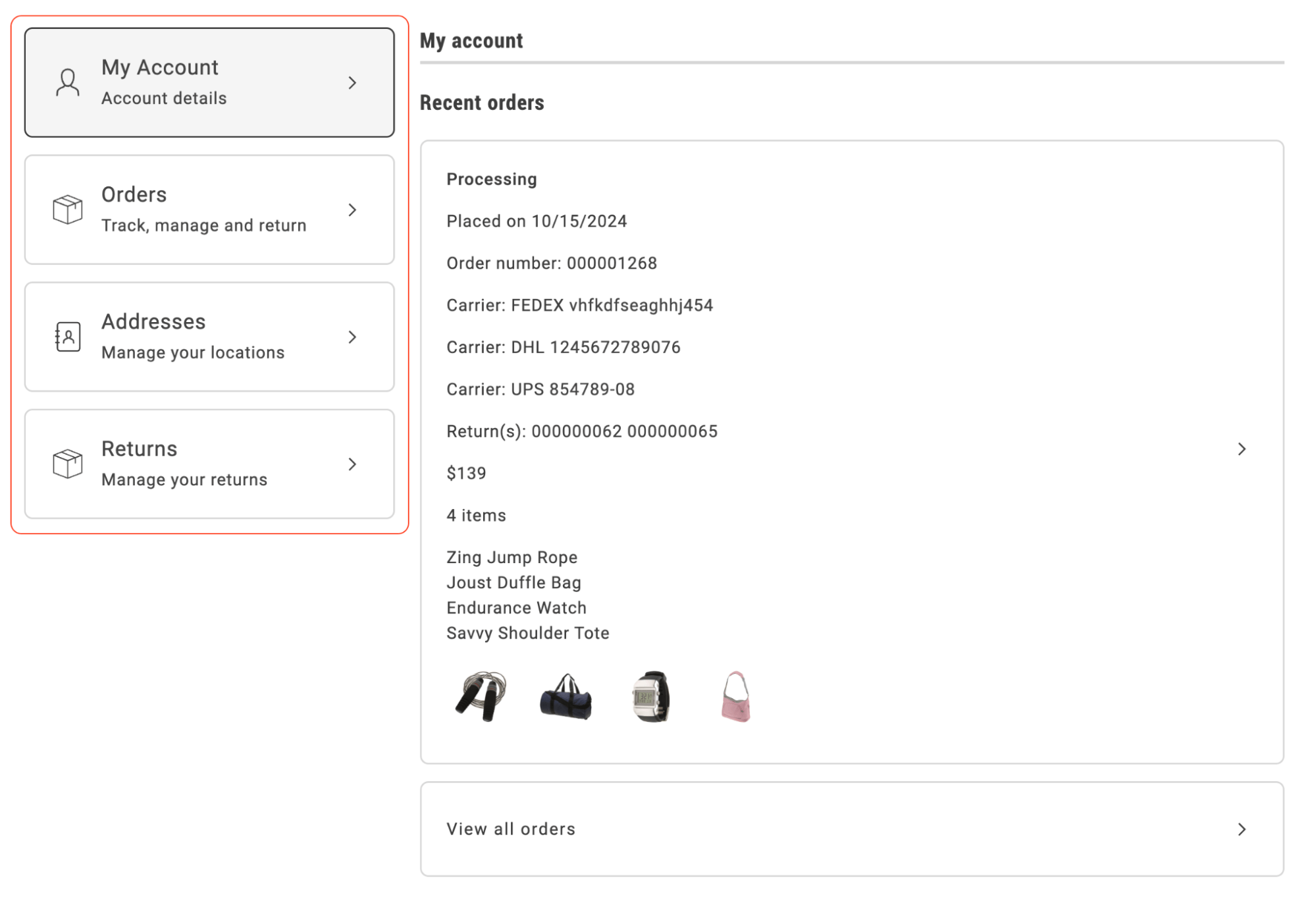\n</Diagram>\n\n## Configurations\n\nThe `commerce-account-sidebar` block can be integrated into various pages via Document Authoring, as demonstrated in the screenshot below.\n\n<Diagram caption=\"Configuration parameters\">\n 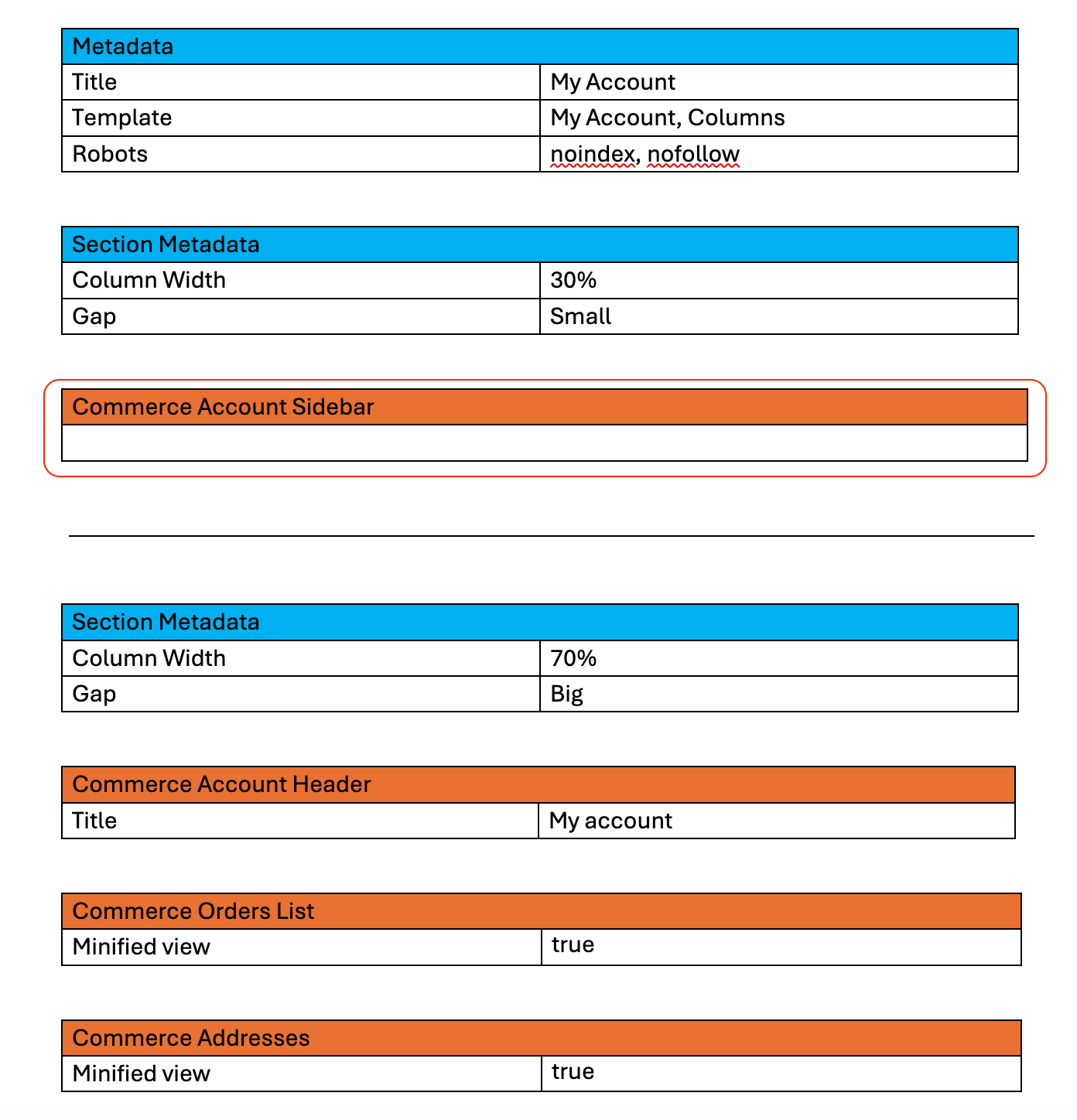\n</Diagram>\n\nThe content of the `commerce-account-sidebar` block is fully manageable through Document Authoring, specifically within the `/customer/sidebar-fragment` document. This structure allows for easy customization and updates, as shown in the following example:\n\n<Diagram caption=\"Configuration structure\">\n 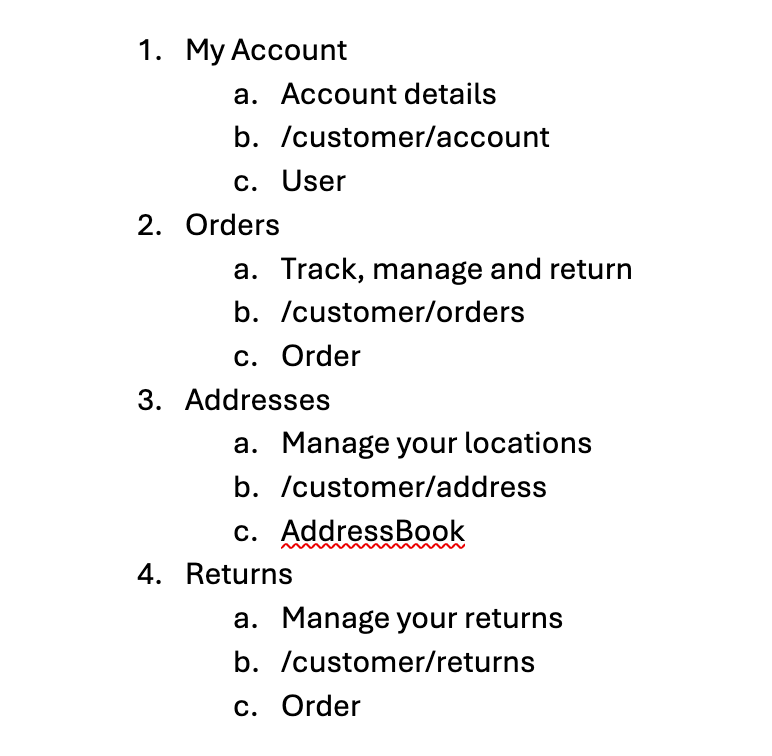\n</Diagram>\n\nThe configuration structure includes:\n\n* **Menu item name**\n * **Second line** (optional descriptive text)\n * **Link** (URL for navigation)\n * **SDK icon name** (icon representation for each menu item)"
|
|
89
|
+
},
|
|
90
|
+
{
|
|
91
|
+
"path": "dropins/user-account/slots",
|
|
92
|
+
"title": "User Account Slots",
|
|
93
|
+
"description": "Customize UI sections in the User Account drop-in using slots.",
|
|
94
|
+
"content": "The User Account drop-in exposes slots for customizing specific UI sections. Use slots to replace or extend container components. For default properties available to all slots, see [Extending drop-in components](https://experienceleague.adobe.com/developer/commerce/storefront/dropins/all/extending/).\n\n\n| Container | Slots |\n|-----------|-------|\n| [`AddressForm`](#addressform-slots) | `AddressFormActions`, `AddressFormInputs` |\n| [`Addresses`](#addresses-slots) | None |\n| [`CustomerInformation`](#customerinformation-slots) | `CustomerData` |\n| [`OrdersList`](#orderslist-slots) | `OrdersListAction`, `OrdersListCard`, `OrderItemImage` |\n| [`PaymentMethods`](#paymentmethods-slots) | None |\n\n\n## AddressForm slots\n\nThe slots for the `AddressForm` container allow you to customize its appearance and behavior.\n\n```typescript\ninterface AddressFormProps {\n slots?: {\n AddressFormActions?: SlotProps<AddressFormActionsContext>;\n AddressFormInputs?: SlotProps<AddressFormInputsContext>;\n };\n}\n```\n\n### AddressFormActions slot\n\nThe `AddressFormActions` slot allows you to customize the address form actions section of the `AddressForm` container.\n\n#### Example\n\n```js\n\n\nawait provider.render(AddressForm, {\n slots: {\n AddressFormActions: (ctx) => {\n // Your custom implementation\n const element = document.createElement('div');\n element.innerText = 'Custom AddressFormActions';\n ctx.appendChild(element);\n }\n }\n})(block);\n```\n\n### AddressFormInputs slot\n\nThe `AddressFormInputs` slot allows you to customize the address form inputs section of the `AddressForm` container.\n\n#### Example\n\n```js\n\n\nawait provider.render(AddressForm, {\n slots: {\n AddressFormInputs: (ctx) => {\n // Your custom implementation\n const element = document.createElement('div');\n element.innerText = 'Custom AddressFormInputs';\n ctx.appendChild(element);\n }\n }\n})(block);\n```\n\n## Addresses slots\n\nThe slots for the Addresses container allow you to customize its appearance and behavior.\n\n```typescript\ninterface AddressesProps {\n slots?: {\n [key: string]: SlotProps;\n };\n}\n```\n\n## CustomerInformation slots\n\nThe slots for the `CustomerInformation` container allow you to customize its appearance and behavior.\n\n```typescript\ninterface CustomerInformationProps {\n slots?: {\n CustomerData?: SlotProps<CustomerDataContext>;\n };\n}\n```\n\n### CustomerData slot\n\nThe `CustomerData` slot allows you to customize the customer data section of the `CustomerInformation` container.\n\n#### Example\n\n```js\n\n\nawait provider.render(CustomerInformation, {\n slots: {\n CustomerData: (ctx) => {\n // Your custom implementation\n const element = document.createElement('div');\n element.innerText = 'Custom CustomerData';\n ctx.appendChild(element);\n }\n }\n})(block);\n```\n\n## PaymentMethods slots\n\nThe **PaymentMethods** container does not provide slots. Customize the layout and copy through [dictionary](https://experienceleague.adobe.com/developer/commerce/storefront/dropins/user-account/dictionary/) keys, [container props](https://experienceleague.adobe.com/developer/commerce/storefront/dropins/user-account/containers/payment-methods/#configurations), and [styles](https://experienceleague.adobe.com/developer/commerce/storefront/dropins/user-account/styles/#container-classes).\n\n## OrdersList slots\n\nThe slots for the `OrdersList` container allow you to customize its appearance and behavior.\n\n```typescript\ninterface OrdersListProps {\n slots?: {\n OrdersListAction?: SlotProps<OrdersListActionContext>;\n OrdersListCard?: SlotProps<OrdersListCardContext>;\n OrderItemImage?: SlotProps<{\n data: OrderItem;\n defaultImageProps: ImageProps;\n }>;\n };\n}\n```\n\n### OrdersListAction slot\n\nThe `OrdersListAction` slot allows you to customize the orders list action section of the `OrdersList` container.\n\n#### Example\n\n```js\n\n\nawait provider.render(OrdersList, {\n slots: {\n OrdersListAction: (ctx) => {\n // Your custom implementation\n const element = document.createElement('div');\n element.innerText = 'Custom OrdersListAction';\n ctx.appendChild(element);\n }\n }\n})(block);\n```\n\n### OrdersListCard slot\n\nThe `OrdersListCard` slot allows you to customize the orders list card section of the `OrdersList` container.\n\n#### Example\n\n```js\n\n\nawait provider.render(OrdersList, {\n slots: {\n OrdersListCard: (ctx) => {\n // Your custom implementation\n const element = document.createElement('div');\n element.innerText = 'Custom OrdersListCard';\n ctx.appendChild(element);\n }\n }\n})(block);\n```\n\n### OrderItemImage slot\n\nThe `OrderItemImage` slot allows you to customize the order item image section of the `OrdersList` container.\n\n#### Example\n\n```js\n\n\nawait provider.render(OrdersList, {\n slots: {\n OrderItemImage: (ctx) => {\n // Your custom implementation\n const element = document.createElement('div');\n element.innerText = 'Custom OrderItemImage';\n ctx.appendChild(element);\n }\n }\n})(block);\n```"
|
|
95
|
+
},
|
|
96
|
+
{
|
|
97
|
+
"path": "dropins/user-account/styles",
|
|
98
|
+
"title": "User Account styles",
|
|
99
|
+
"description": "CSS classes and customization examples for the User Account drop-in.",
|
|
100
|
+
"content": "Customize the User Account drop-in using CSS classes and design tokens. This page covers the User Account-specific container classes and customization examples. For comprehensive information about design tokens, responsive breakpoints, and styling best practices, see [Styling Drop-In Components](https://experienceleague.adobe.com/developer/commerce/storefront/dropins/all/styling/).\n\n\n## Customization example\n\nAdd this to the CSS file of the specific where you're using the User Account drop-in.\n\nFor a complete list of available design tokens (colors, spacing, typography, and more), see the [Design tokens reference](https://experienceleague.adobe.com/developer/commerce/storefront/dropins/all/styling/#design-tokens-reference).\n\n```css title=\"styles/styles.css\" del={2-3} ins={4-5}\n.account-actions-address {\n padding: var(--spacing-xsmall) var(--spacing-medium);\n border: var(--shape-border-width-2) solid var(--color-neutral-400);\n padding: var(--spacing-small) var(--spacing-medium);\n border: var(--shape-border-width-2) solid var(--color-brand-400);\n}\n```\n\n## Container classes\n\nThe User Account drop-in uses BEM-style class naming. Use the browser DevTools to inspect elements and find specific class names.\n\n```css\n/* AccountLoaders */\n.account-account-loaders--card-loader {}\n.account-account-loaders--picker-loader {}\n\n/* AddressActions */\n.account-actions-address {}\n.account-actions-address--selectable {}\n.account-actions-address__title {}\n\n/* AddressCard */\n.account-address-card {}\n.account-address-card__action {}\n.account-address-card__action--editbutton {}\n.account-address-card__description {}\n.account-address-card__labels {}\n.dropin-card__content {}\n\n/* AddressFormWrapper */\n.account-address-form-wrapper {}\n.account-address-form-wrapper__buttons {}\n.account-address-form-wrapper__buttons--empty {}\n.account-address-form-wrapper__notification {}\n.account-address-form-wrapper__title {}\n\n/* AddressModal */\n.account-address-card {}\n.account-address-modal {}\n.account-address-modal--overlay {}\n.account-address-modal__buttons {}\n.account-address-modal__spinner {}\n.dropin-card__content {}\n.dropin-modal {}\n.dropin-modal__body--full {}\n.dropin-modal__body--medium {}\n.dropin-modal__content {}\n.dropin-modal__header-title {}\n.dropin-modal__header-title-content {}\n\n/* AddressValidation */\n.account-address-validation {}\n.account-address-validation__option {}\n.account-address-validation__option-title {}\n.account-address-validation__options {}\n.account-address-validation__options--busy {}\n.account-address-validation__subtitle {}\n.account-address-validation__title {}\n\n/* AddressesWrapper */\n.account-actions-address {}\n.account-actions-address--address {}\n.account-address-card {}\n.account-addresses-form__footer__wrapper {}\n.account-addresses-header {}\n.account-addresses-wrapper {}\n.account-addresses-wrapper--select-view {}\n.account-addresses-wrapper__label {}\n\n/* ChangePassword */\n.account-change-password {}\n.account-change-password__actions {}\n.account-change-password__fields {}\n.account-change-password__fields-item {}\n.account-change-password__notification {}\n.account-change-password__title {}\n.dropin-card__content {}\n\n/* CustomerInformationCard */\n.account-customer-information-card {}\n.account-customer-information-card-short {}\n.account-customer-information-card__actions {}\n.account-customer-information-card__content {}\n.account-customer-information-card__wrapper {}\n.customer-information__title {}\n.dropin-card__content {}\n\n/* EditCustomerInformation */\n.account-edit-customer-information {}\n.account-edit-customer-information-form__field {}\n.account-edit-customer-information__actions {}\n.account-edit-customer-information__notification {}\n.account-edit-customer-information__password {}\n.account-edit-customer-information__title {}\n.dropin-card__content {}\n\n/* EmptyList */\n.account-empty-list {}\n.account-empty-list--minified {}\n.dropin-card {}\n.dropin-card__content {}\n\n/* Form */\n.account-form {}\n.dropin-field {}\n\n/* OrdersListAction */\n.account-orders-list-action {}\n.account-orders-list-action--minifiedView {}\n.account-orders-list-action__card-wrapper {}\n.dropin-card__content {}\n\n/* OrdersListCard */\n.account-orders-list-card {}\n.account-orders-list-card--full {}\n.account-orders-list-card__actions {}\n.account-orders-list-card__content {}\n.account-orders-list-card__content--product-name {}\n.account-orders-list-card__content--quantity {}\n.account-orders-list-card__content--return_number {}\n.account-orders-list-card__content--track_number {}\n.account-orders-list-card__images {}\n.account-orders-list-card__images-3 {}\n.dropin-card__content {}\n.dropin-content-grid__content {}\n\n/* OrdersListWrapper */\n.account-orders-list {}\n.account-orders-list-header {}\n.account-orders-list__date-select {}\n.dropin-picker {}\n\n/* PaymentMethods (container root + wrapper) */\n.account-payment-methods-root {}\n.account-payment-methods {}\n.account-payment-methods__list {}\n.account-payment-methods__empty {}\n.account-payment-methods__alert {}\n\n/* PaymentModal (remove payment confirmation) */\n.account-payment-modal {}\n.account-payment-modal--overlay {}\n.account-payment-modal__spinner {}\n.account-payment-modal__buttons {}\n.dropin-modal:has(.account-payment-modal--overlay) {}\n\n/* PaymentCard */\n.account-payment-card {}\n.account-payment-card--minified {}\n.account-payment-card__action {}\n.account-payment-card__description {}\n.account-payment-card__card-brand {}\n.account-payment-card__card-number {}\n.account-payment-card__labels {}\n.dropin-card__content {}\n```"
|
|
101
|
+
},
|
|
102
|
+
{
|
|
103
|
+
"path": "dropins/user-account/tutorials/customize-layout",
|
|
104
|
+
"title": "Customize the layout of the AddressForm",
|
|
105
|
+
"description": "Learn how to implement and customize the user account drop-in component.",
|
|
106
|
+
"content": "The AddressForm container provides a highly configurable and customizable layout for seamless integration. The sorting of address attributes is managed through the Adobe Commerce Admin settings, giving flexibility in how data fields are displayed.\n\nThe visual layout of the form, including input widths (such as 50% or 100% to position multiple inputs on the same line), is controlled by CSS. This enables integrators to tailor the form's appearance by applying custom CSS rules.\n\nBy default, the first name and last name fields in the address form are set to 50% width. The display is controlled through CSS, as the form is implemented using a grid layout:\n\n<Diagram caption=\"Default AddressForm container\">\n 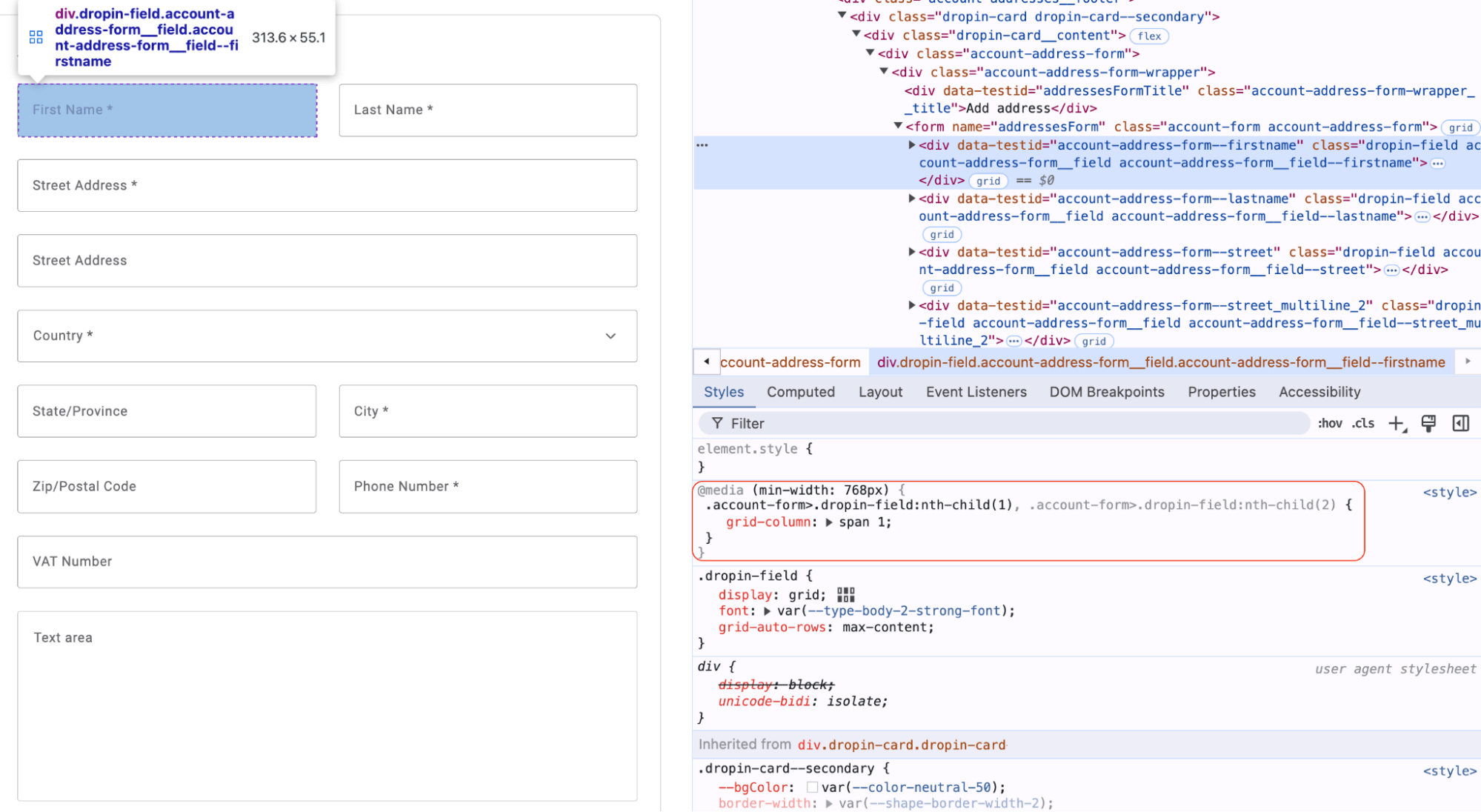\n</Diagram>\n\nTo modify the layout and render these fields as full-width, create custom CSS rules at the boilerplate level and use them to override default container CSS:\n\n<Diagram caption=\"One column AddressForm container\">\n 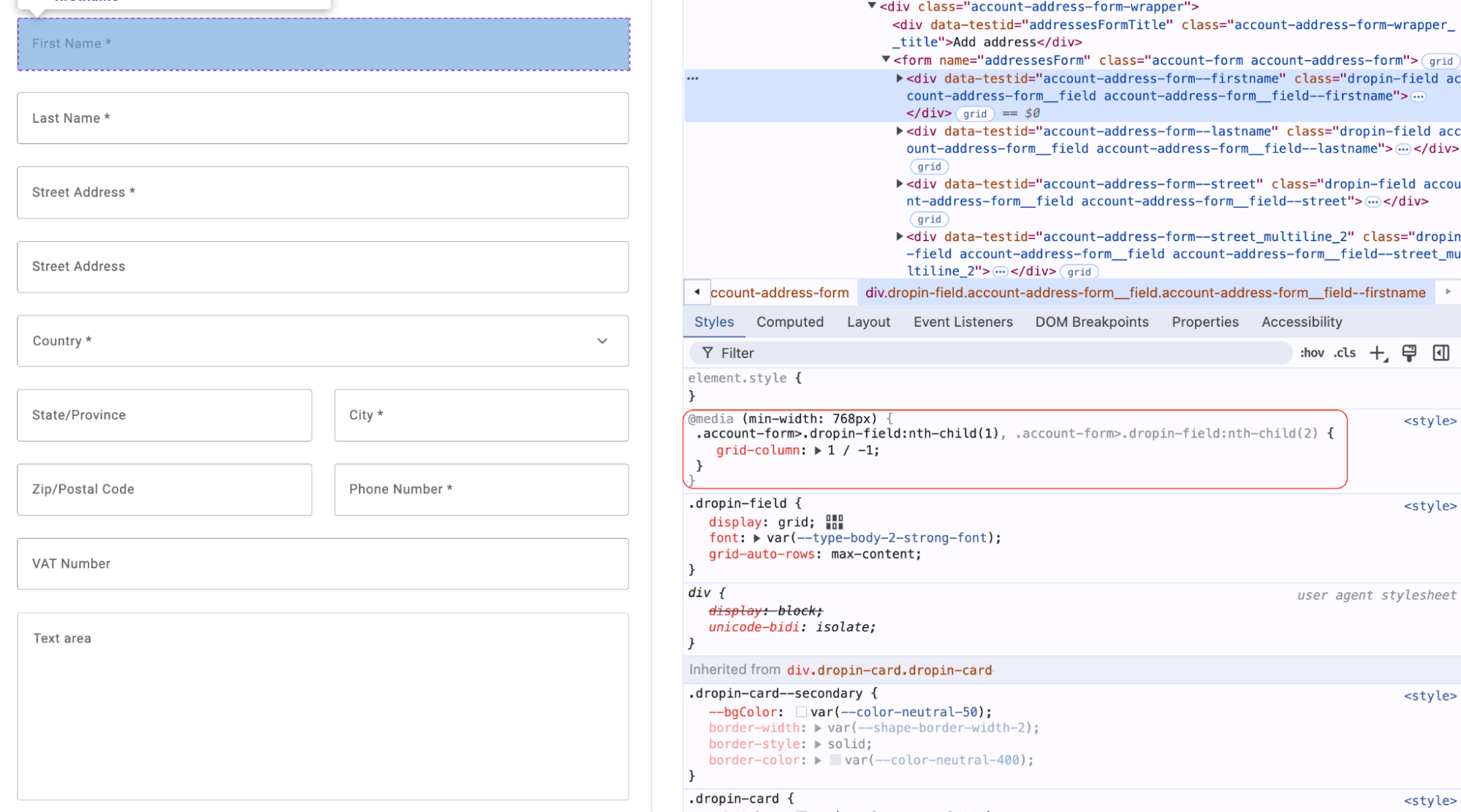\n</Diagram>\n\nUsing this approach, you can easily customize the address form layout during the integration process, such as implementing a three-column layout to display three fields in a row. These adjustments require only basic CSS knowledge for effective customization.\n\nThis approach is fully applicable to address forms in all views of the Addresses container, as it utilizes the AddressForm container internally.\n\n### Layout Customization Example\n\nThe following examples show how to adjust the block CSS in a boilerplate environment to customize the address form layout.\n\nIn the default layout, some fields are half width, while others take up the whole width.\n\n<Diagram caption=\"Default layout of the AddressForm container\">\n 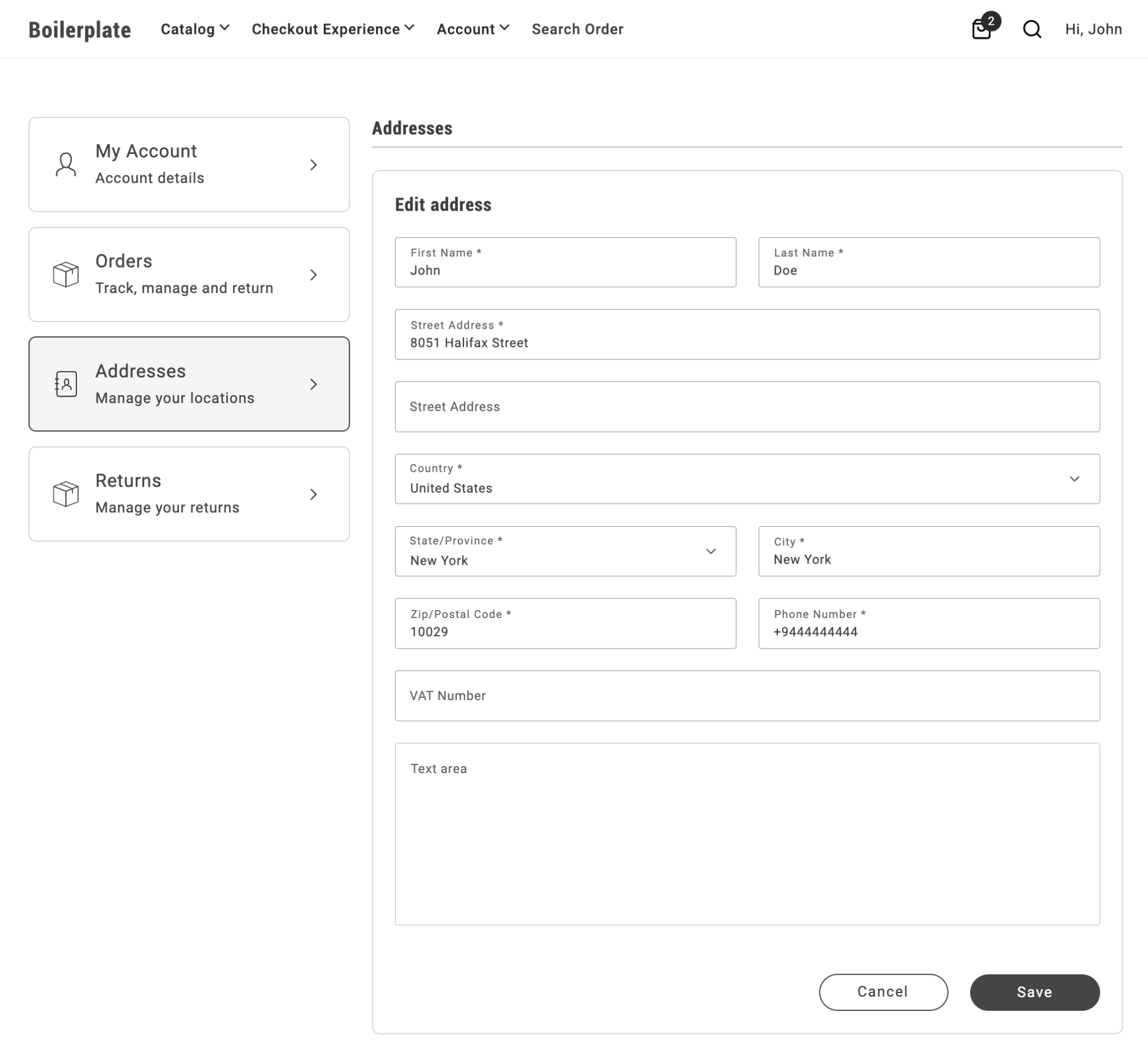\n</Diagram>\n\nTo set all fields to half width, add the following CSS rule to the `storefront-addresses` block:\n\n```css\n.commerce-addresses .account-address-form {\n grid-template-columns: repeat(2,1fr);\n}\n```\n\n<Diagram caption=\"Two column layout of the AddressForm container\">\n 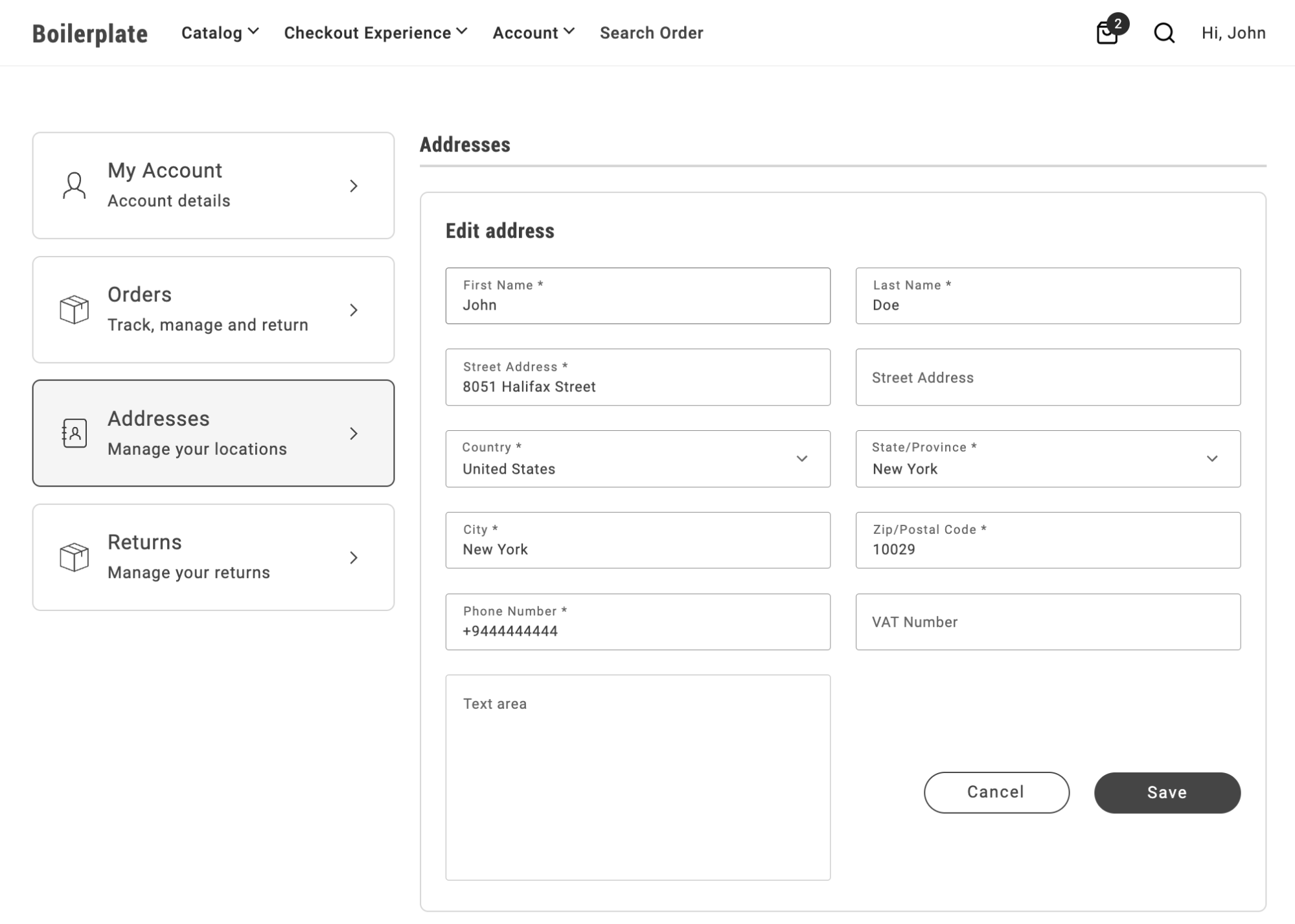\n</Diagram>\n\nTo set the text area and button group to 100% width while keeping the other fields at half width:\n\n```css\n.commerce-addresses .account-address-form div.account-address-form__field--test_text_area,\n.commerce-addresses .account-address-form div.account-address-form-wrapper__buttons {\n grid-column: span 2;\n}\n```\nNotice that the CSS selector includes the modifier `--test_text_area`, allowing you to target a specific field by attribute code.\n\n<Diagram caption=\"Two column layout with full width text area\">\n 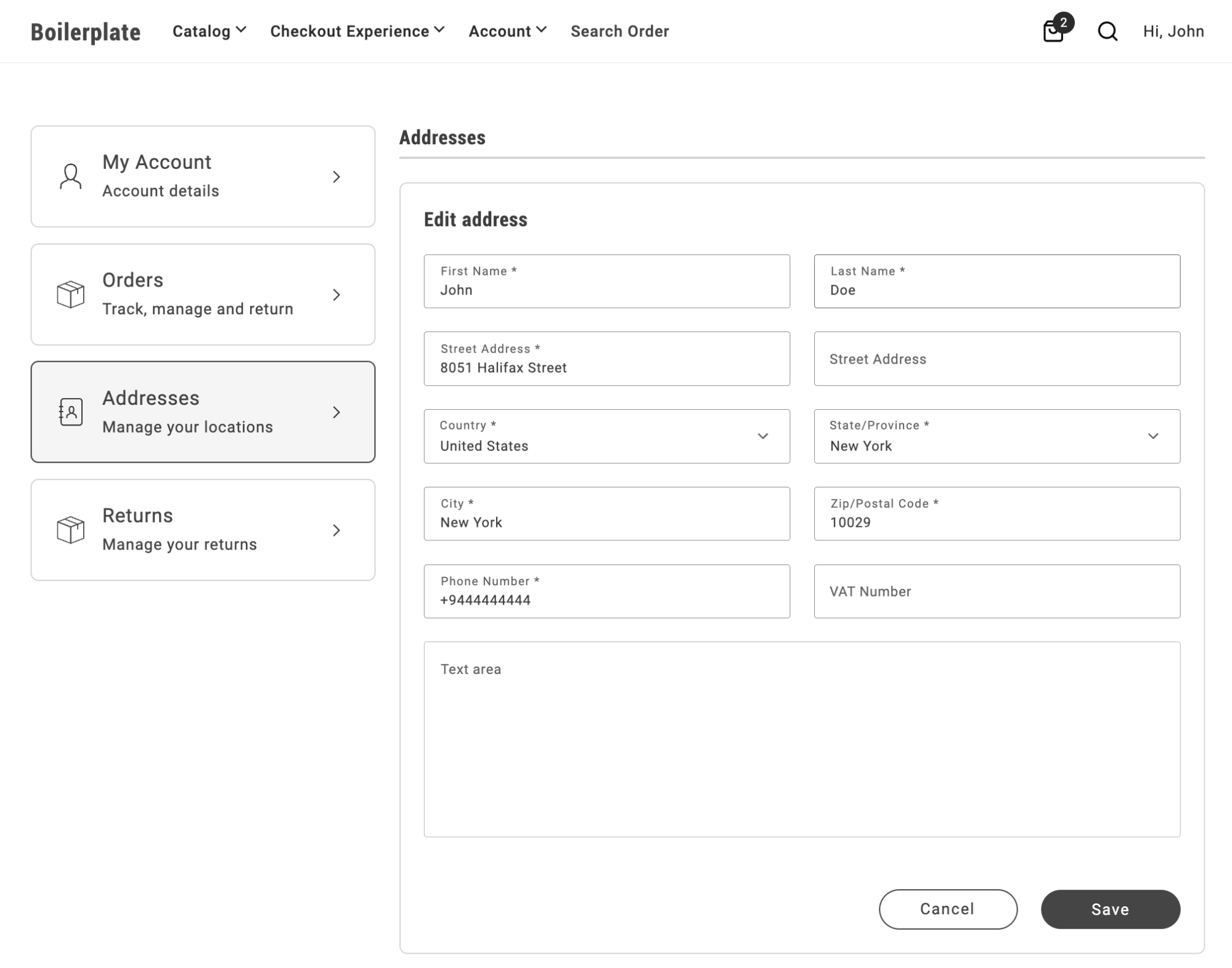\n</Diagram>\n\nTo create a three-column layout with a full-size text area and button area, set the grid template columns to `repeat(2,1fr)`:\n\n```css\n.commerce-addresses .account-address-form {\n grid-template-columns: repeat(2,1fr);\n}\n\n.commerce-addresses .account-address-form div.dropin-field {\n grid-column: span 1;\n}\n\n.commerce-addresses .account-address-form div.account-address-form__field--test_text_area,\n.commerce-addresses .account-address-form div.account-address-form-wrapper__buttons {\n grid-column: span 3;\n}\n```\n\n<Diagram caption=\"Three column layout with full width text area\">\n 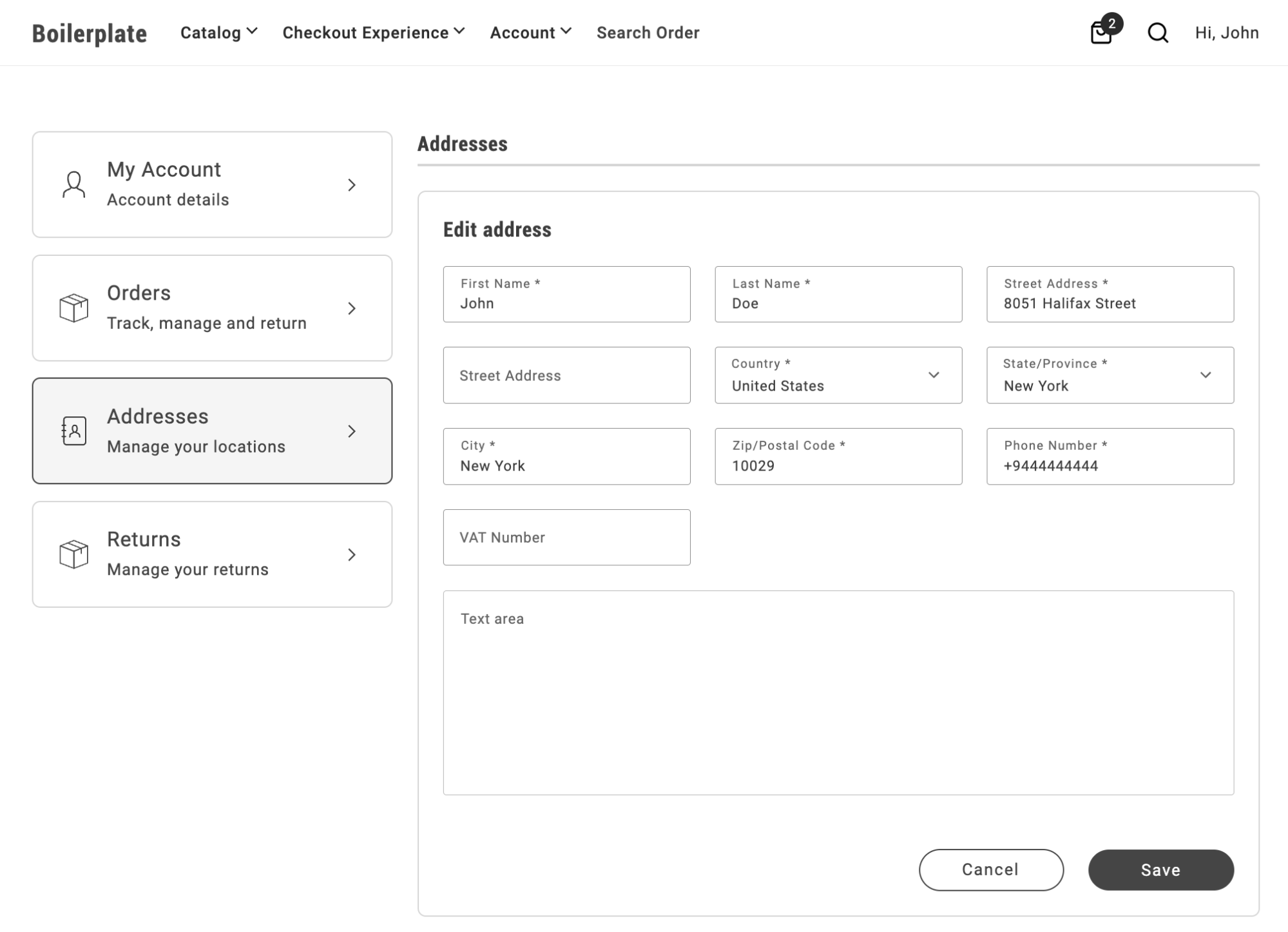\n</Diagram>"
|
|
107
|
+
},
|
|
108
|
+
{
|
|
109
|
+
"path": "dropins/user-account/tutorials/payment-services-my-account",
|
|
110
|
+
"title": "Payment Services stored methods in My Account",
|
|
111
|
+
"description": "Surface Adobe Payment Services vaulted cards on My Account by adding a block that renders the User Account PaymentMethods container.",
|
|
112
|
+
"content": "Shoppers who save a card with Payment Services during checkout can see and remove those vaulted methods on a **My Account** page. Removal uses a confirmation step before the token is deleted—see [Remove confirmation](https://experienceleague.adobe.com/developer/commerce/storefront/dropins/user-account/containers/payment-methods/#remove-confirmation). The Commerce boilerplate does **not** include a payment-methods block out of the box. This tutorial shows how to add one yourself (for example a `commerce-payment-methods` block) that renders the User Account [PaymentMethods](https://experienceleague.adobe.com/developer/commerce/storefront/dropins/user-account/containers/payment-methods/) container. That container loads tokens with the same GraphQL `customerPaymentTokens` query used for vault data elsewhere. What was vaulted through Payment Services appears here when the shopper is signed in.\n\nThis page is Payment Services–specific: it assumes vaulting is enabled for your Payment Services integration and focuses on wiring the account experience with a small custom block.\n\n## Prerequisites\n\n- **Payment Services** is and the meets version requirements for your storefront.\n- **Save / vault** is available for your payment flow (see Adobe’s for how tokens are created at checkout).\n- Checkout (or another flow) already initializes Payment Services where shoppers vault cards. For example, the boilerplate loads .\n- Account pages run the **account** initializer so GraphQL calls use the customer token. Import (or your equivalent) before rendering the container.\n\n## Add a payment methods block\n\nCreate a block. The naming is up to you, but `commerce-payment-methods` is a clear convention. This block should:\n\n1. Redirect **guests** to login (same pattern as other account blocks).\n2. Initialize the **User Account** drop-in via `account.js`.\n3. Render **PaymentMethods** with optional **with header** and **minified view** from the block configuration.\n\nExample `decorate` implementation:\n\n```javascript\n\n\nimport {\n CUSTOMER_LOGIN_PATH,\n checkIsAuthenticated,\n rootLink,\n} from '../../scripts/commerce.js';\n\n\nexport default async function decorate(block) {\n const {\n 'minified-view': minifiedViewConfig = 'false',\n 'with-header': withHeaderConfig = 'true',\n } = readBlockConfig(block);\n\n if (!checkIsAuthenticated()) {\n window.location.href = rootLink(CUSTOMER_LOGIN_PATH);\n } else {\n await accountRenderer.render(PaymentMethods, {\n withHeader: withHeaderConfig === 'true',\n minifiedView: minifiedViewConfig === 'true',\n })(block);\n }\n}\n```\n\nPlace the block on the account page (or desired section) where the list should appear. Use the same section metadata, block registration, and readBlockConfig patterns as other commerce blocks (for example, customer info or orders).\n\n## Block configuration (authoring)\n\nExpose authoring keys in `decorate` that map to `readBlockConfig`. For example:\n\n- `with-header` — Controls whether a section title and divider are shown for the payments area (full account pages often omit this).\n- **`minified-view`** — Enables a compact layout with condensed rows and a simplified empty state, ideal for dashboards alongside other widgets.\n\nAdd a `_your-block-name.json` (and optional README) next to the block source so authors get defaults and labels consistent with the rest of your project.\n\n## Limit the list to Payment Services tokens (optional)\n\nVault tokens include a `payment_method_code`. Payment Services methods typically use codes that start with `payment_services` (for example, hosted-field variants). The PaymentMethods container accepts `filterPaymentMethodCodes`: an array of strings. A token is shown if its code equals or starts with any entry.\n\nThe example decorate above doesn’t include this prop. To display only Payment Services–vaulted methods (and hide saved methods from other gateways), add it to the render call. For example:\n\n```javascript\nawait accountRenderer.render(PaymentMethods, {\n withHeader: withHeaderConfig === 'true',\n minifiedView: minifiedViewConfig === 'true',\n filterPaymentMethodCodes: ['payment_services'],\n})(block);\n```\n\nAdjust the prefix list if your Admin or integration uses a different payment method code pattern.\n\n## How data reaches the UI\n\n- By default, the container calls `getCustomerPaymentTokens`, which executes the `customerPaymentTokens` query and transforms the returned vault details (JSON) into rows for the PaymentCard component. The details include Payment Services fields like brand and last four digits.\n- If another part of the page already has token rows on the client, you can emit **`account/customerPaymentTokens`** on the event bus so the container **shows that list** without an extra **`getCustomerPaymentTokens`** round trip (see [Events](https://experienceleague.adobe.com/developer/commerce/storefront/dropins/user-account/events/#accountcustomerpaymenttokens-listens) and [TypeScript declaration](https://experienceleague.adobe.com/developer/commerce/storefront/dropins/user-account/events/#typescript-declaration)). That is optional injection only; **Remove** still calls **`deletePaymentToken`** on the GraphQL API, not the bus. Payment Services + GraphQL alone is the usual path for My Account.\n\n## Related documentation\n\n- [PaymentMethods container](https://experienceleague.adobe.com/developer/commerce/storefront/dropins/user-account/containers/payment-methods/) — props, GraphQL vs bus, and errors.\n- [User Account functions](https://experienceleague.adobe.com/developer/commerce/storefront/dropins/user-account/functions/) — **`getCustomerPaymentTokens`**, **`deletePaymentToken`**.\n- [Payment Services installation](https://experienceleague.adobe.com/developer/commerce/storefront/dropins/payment-services/installation/) and [initialization](https://experienceleague.adobe.com/developer/commerce/storefront/dropins/payment-services/initialization/).\n- Checkout: [Add payment method](https://experienceleague.adobe.com/developer/commerce/storefront/dropins/checkout/tutorials/add-payment-method/) when customizing how cards are vaulted at purchase time.\n\n> **PCI and SDK UI**\n>\nPayment card entry at checkout remains within the Payment Services drop-in/SDK to maintain PCI compliance. My Account only lists and removes existing saved tokens—it does not replace the hosted card form used during checkout."
|
|
113
|
+
},
|
|
114
|
+
{
|
|
115
|
+
"path": "dropins/user-account/tutorials/validate-address",
|
|
116
|
+
"title": "Validate address in My Account",
|
|
117
|
+
"description": "Let shoppers confirm a suggested vs. original address when saving addresses in the Addresses container.",
|
|
118
|
+
"content": "Use the `AddressValidation` container to present both the original and suggested addresses from your verification service, letting shoppers choose before saving. This tutorial shows how to integrate the container in the `commerce-addresses` block.\n\n<Diagram caption=\"AddressValidation displayed in a modal\">\n 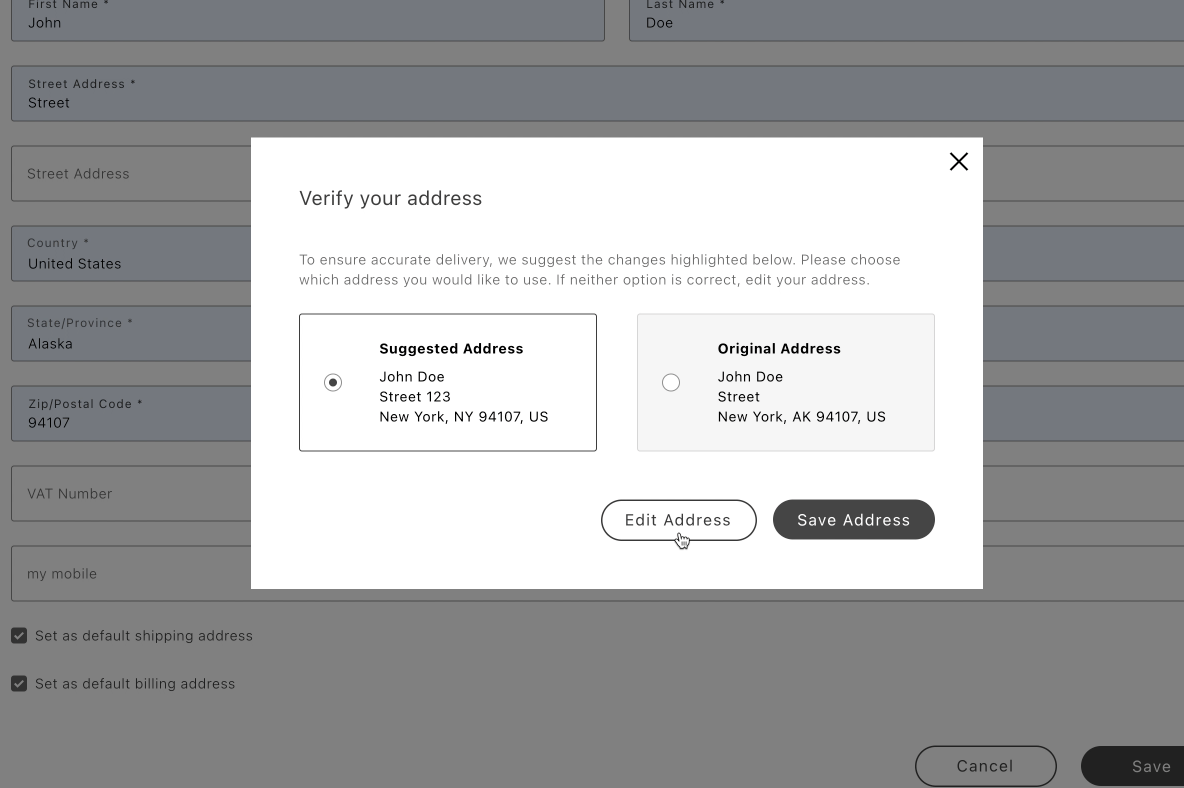\n</Diagram>\n\n## Overview\n\nAt a high level:\n\n- Call your address verification service on form submit.\n- If it returns a suggestion, open a modal and render `AddressValidation`.\n- If the shopper selects the suggestion, populate the form with the suggested data and re-submit; otherwise, retain the original form values.\n\n\n## Integration in commerce-addresses block\n\nUpdate your `blocks/commerce-addresses/commerce-addresses.js` to:\n\n- Import `AddressValidation`\n- Pass `forwardFormRef`, `onAddressData`, and `onSubmit` to `Addresses`\n- When a suggestion exists, show a modal with `AddressValidation` and two actions: Edit Address and Save Address\n\n```javascript\n// blocks/commerce-addresses/commerce-addresses.js\n\n\nimport {\n CUSTOMER_ADDRESS_PATH,\n CUSTOMER_LOGIN_PATH,\n checkIsAuthenticated,\n rootLink,\n} from '../../scripts/commerce.js';\n\nconst validateAddress = async (address) => {\n // Call your service with the form data\n // const result = await fetch(...)\n // return result.suggestedAddress || null\n\n // Example mocked suggestion\n return {\n city: 'Bainbridge Island',\n countryCode: 'US',\n postcode: '98110-2450',\n region: { regionCode: 'WA', regionId: 1 },\n street: ['123 Winslow Way E'],\n telephone: '555-123-4567',\n };\n};\n\nconst finalizeSubmission = (setContainerProps, formRef, updates = {}) => {\n setContainerProps({ onSubmit: null, ...updates });\n setTimeout(() => formRef.current?.requestSubmit(), 1);\n};\n\nconst renderAddressValidation = async ({\n originalAddress,\n suggestedAddress,\n onEdit,\n onSave,\n}) => {\n const container = document.createElement('div');\n const addressValidation = document.createElement('div');\n const actionsContainer = document.createElement('div');\n const editAddressButton = document.createElement('div');\n const saveAddressButton = document.createElement('div');\n actionsContainer.appendChild(editAddressButton);\n actionsContainer.appendChild(saveAddressButton);\n container.appendChild(addressValidation);\n container.appendChild(actionsContainer);\n actionsContainer.classList.add('actions-container');\n\n await showModal(container);\n\n let selectedAddress, currentSelection;\n provider.render(AddressValidation, {\n selectedAddress: 'suggested',\n originalAddress,\n suggestedAddress,\n handleSelectedAddress: async ({ address, selection }) => {\n selectedAddress = address;\n currentSelection = selection;\n },\n })(addressValidation);\n\n UI.render(Button, {\n children: 'Edit Address',\n size: 'medium',\n variant: 'secondary',\n onClick: () => {\n if (currentSelection === 'suggested') {\n onEdit(selectedAddress);\n }\n removeModal();\n },\n })(editAddressButton);\n\n UI.render(Button, {\n children: 'Save Address',\n size: 'medium',\n variant: 'primary',\n onClick: () => {\n const updates = {};\n if (currentSelection === 'suggested') {\n updates.inputsDefaultValueSet = selectedAddress;\n }\n removeModal();\n onSave(updates);\n },\n })(saveAddressButton);\n};\n\nexport default async function decorate(block) {\n const { 'minified-view': minifiedViewConfig = 'false' } = readBlockConfig(block);\n\n if (!checkIsAuthenticated()) {\n window.location.href = rootLink(CUSTOMER_LOGIN_PATH);\n return;\n }\n\n let originalAddress;\n const formRef = { current: null };\n\n const addressesContainer = await accountRenderer.render(Addresses, {\n minifiedView: minifiedViewConfig === 'true',\n withActionsInMinifiedView: false,\n withActionsInFullSizeView: true,\n routeAddressesPage: () => rootLink(CUSTOMER_ADDRESS_PATH),\n forwardFormRef: formRef,\n onAddressData: (values) => {\n originalAddress = values?.data;\n },\n onSubmit: async (event, formValid) => {\n if (!formValid) return;\n\n const setContainerProps = (updates) => {\n addressesContainer.setProps((prev) => ({ ...prev, ...updates }));\n };\n\n const suggestedAddress = await validateAddress(originalAddress);\n if (!suggestedAddress) {\n finalizeSubmission(setContainerProps, formRef);\n return;\n }\n\n await renderAddressValidation({\n originalAddress,\n suggestedAddress,\n onEdit: (selectedAddress) => {\n setContainerProps({ inputsDefaultValueSet: selectedAddress });\n },\n onSave: (updates) => {\n finalizeSubmission(setContainerProps, formRef, updates);\n },\n });\n },\n })(block);\n}\n```\n\n```javascript\n// modal-utils.js\n\nlet modal;\n\nexport const showModal = async (content) => {\n modal = await createModal([content]);\n modal.showModal();\n};\n\nexport const removeModal = () => {\n if (!modal) return;\n modal.removeModal();\n modal = null;\n};\n```\n\n### Optional styles\n\n```css\n/* Minimal layout for the modal */\n.modal-content {\n padding: 32px;\n}\n\n.actions-container {\n display: flex;\n gap: 16px;\n margin-top: 48px;\n justify-content: flex-end;\n}\n```\n\n## Next steps\n\n- See the [`AddressValidation` container](https://experienceleague.adobe.com/developer/commerce/storefront/dropins/user-account/containers/address-validation/) container for props and behaviors.\n- Ensure your suggestion matches the `CustomerAddressInput` shape expected by the Addresses container."
|
|
119
|
+
}
|
|
120
|
+
]
|
|
121
|
+
}
|