@dropins/mcp 0.1.0
This diff represents the content of publicly available package versions that have been released to one of the supported registries. The information contained in this diff is provided for informational purposes only and reflects changes between package versions as they appear in their respective public registries.
- package/LICENSE.md +127 -0
- package/README.md +314 -0
- package/dist/common/project-reader.d.ts +55 -0
- package/dist/common/project-reader.js +173 -0
- package/dist/common/registry-loader.d.ts +101 -0
- package/dist/common/registry-loader.js +386 -0
- package/dist/common/response-handling.d.ts +12 -0
- package/dist/common/response-handling.js +21 -0
- package/dist/common/sanitize.d.ts +8 -0
- package/dist/common/sanitize.js +45 -0
- package/dist/common/synonyms.d.ts +9 -0
- package/dist/common/synonyms.js +127 -0
- package/dist/common/telemetry.d.ts +14 -0
- package/dist/common/telemetry.js +54 -0
- package/dist/common/types.d.ts +308 -0
- package/dist/common/types.js +1 -0
- package/dist/common/version.d.ts +2 -0
- package/dist/common/version.js +14 -0
- package/dist/index.d.ts +2 -0
- package/dist/index.js +136 -0
- package/dist/operations/analyze-project.d.ts +13 -0
- package/dist/operations/analyze-project.js +125 -0
- package/dist/operations/check-block-health.d.ts +19 -0
- package/dist/operations/check-block-health.js +1149 -0
- package/dist/operations/check-config.d.ts +13 -0
- package/dist/operations/check-config.js +228 -0
- package/dist/operations/explain-event-flow.d.ts +16 -0
- package/dist/operations/explain-event-flow.js +218 -0
- package/dist/operations/get-upgrade-diff.d.ts +13 -0
- package/dist/operations/get-upgrade-diff.js +144 -0
- package/dist/operations/list-api-functions.d.ts +13 -0
- package/dist/operations/list-api-functions.js +53 -0
- package/dist/operations/list-containers.d.ts +13 -0
- package/dist/operations/list-containers.js +44 -0
- package/dist/operations/list-design-tokens.d.ts +13 -0
- package/dist/operations/list-design-tokens.js +47 -0
- package/dist/operations/list-events.d.ts +16 -0
- package/dist/operations/list-events.js +39 -0
- package/dist/operations/list-graphql-queries.d.ts +19 -0
- package/dist/operations/list-graphql-queries.js +84 -0
- package/dist/operations/list-i18n-keys.d.ts +19 -0
- package/dist/operations/list-i18n-keys.js +105 -0
- package/dist/operations/list-models.d.ts +16 -0
- package/dist/operations/list-models.js +80 -0
- package/dist/operations/list-slots.d.ts +16 -0
- package/dist/operations/list-slots.js +81 -0
- package/dist/operations/scaffold-block.d.ts +31 -0
- package/dist/operations/scaffold-block.js +331 -0
- package/dist/operations/scaffold-extension.d.ts +28 -0
- package/dist/operations/scaffold-extension.js +346 -0
- package/dist/operations/scaffold-slot.d.ts +22 -0
- package/dist/operations/scaffold-slot.js +189 -0
- package/dist/operations/search-commerce-docs.d.ts +16 -0
- package/dist/operations/search-commerce-docs.js +101 -0
- package/dist/operations/search-docs.d.ts +23 -0
- package/dist/operations/search-docs.js +298 -0
- package/dist/operations/suggest-event-handler.d.ts +16 -0
- package/dist/operations/suggest-event-handler.js +175 -0
- package/dist/operations/suggest-slot-implementation.d.ts +19 -0
- package/dist/operations/suggest-slot-implementation.js +183 -0
- package/dist/registry/api-functions.json +3045 -0
- package/dist/registry/block-patterns.json +78 -0
- package/dist/registry/containers.json +2003 -0
- package/dist/registry/design-tokens.json +577 -0
- package/dist/registry/docs/boilerplate.json +55 -0
- package/dist/registry/docs/dropins-all.json +97 -0
- package/dist/registry/docs/dropins-b2b.json +607 -0
- package/dist/registry/docs/dropins-cart.json +163 -0
- package/dist/registry/docs/dropins-checkout.json +193 -0
- package/dist/registry/docs/dropins-order.json +139 -0
- package/dist/registry/docs/dropins-payment-services.json +73 -0
- package/dist/registry/docs/dropins-personalization.json +67 -0
- package/dist/registry/docs/dropins-product-details.json +139 -0
- package/dist/registry/docs/dropins-product-discovery.json +85 -0
- package/dist/registry/docs/dropins-recommendations.json +67 -0
- package/dist/registry/docs/dropins-user-account.json +121 -0
- package/dist/registry/docs/dropins-user-auth.json +103 -0
- package/dist/registry/docs/dropins-wishlist.json +85 -0
- package/dist/registry/docs/get-started.json +85 -0
- package/dist/registry/docs/how-tos.json +19 -0
- package/dist/registry/docs/index.json +139 -0
- package/dist/registry/docs/licensing.json +19 -0
- package/dist/registry/docs/merchants.json +523 -0
- package/dist/registry/docs/resources.json +13 -0
- package/dist/registry/docs/sdk.json +139 -0
- package/dist/registry/docs/setup.json +145 -0
- package/dist/registry/docs/troubleshooting.json +19 -0
- package/dist/registry/events.json +2200 -0
- package/dist/registry/examples/index.json +19 -0
- package/dist/registry/examples/storefront-checkout.json +377 -0
- package/dist/registry/examples/storefront-quote-management.json +49 -0
- package/dist/registry/extensions.json +272 -0
- package/dist/registry/graphql.json +3469 -0
- package/dist/registry/i18n.json +1873 -0
- package/dist/registry/models.json +1001 -0
- package/dist/registry/sdk.json +2357 -0
- package/dist/registry/slots.json +2270 -0
- package/dist/registry/tools-components.json +595 -0
- package/dist/resources/guides.d.ts +7 -0
- package/dist/resources/guides.js +625 -0
- package/dist/resources/handlers.d.ts +31 -0
- package/dist/resources/handlers.js +322 -0
- package/package.json +47 -0
|
@@ -0,0 +1,607 @@
|
|
|
1
|
+
{
|
|
2
|
+
"section": "dropins-b2b",
|
|
3
|
+
"label": "B2B Drop-ins",
|
|
4
|
+
"pageCount": 100,
|
|
5
|
+
"pages": [
|
|
6
|
+
{
|
|
7
|
+
"path": "dropins-b2b",
|
|
8
|
+
"title": "B2B drop-ins overview",
|
|
9
|
+
"description": "Explore Adobe Commerce B2B drop-in components for building enterprise storefronts with company management, purchasing workflows, and quote functionality.",
|
|
10
|
+
"content": "B2B drop-ins are pre-built, customizable UI components that provide complete B2B commerce functionality for your storefront. Each drop-in handles a specific aspect of the business-to-business shopping experience, from company management to purchase order workflows.\n\n## Available B2B drop-ins\n\n\n| Drop-in | Description |\n| ------- | ----------- |\n| [Company Management](https://experienceleague.adobe.com/developer/commerce/storefront/dropins-b2b/company-management/) | Enables company profile management and role-based permissions for Adobe Commerce storefronts. |\n| [Company Switcher](https://experienceleague.adobe.com/developer/commerce/storefront/dropins-b2b/company-switcher/) | Provides a UI component for users to switch between multiple companies they are associated with. |\n| [Purchase Order](https://experienceleague.adobe.com/developer/commerce/storefront/dropins-b2b/purchase-order/) | Manages purchase order workflows, approval rules, and purchase order history for B2B transactions. |\n| [Quote Management](https://experienceleague.adobe.com/developer/commerce/storefront/dropins-b2b/quote-management/) | Enables negotiable quotes for B2B customers with quote request, negotiation, and approval workflows. |\n| [Quick Order](https://experienceleague.adobe.com/developer/commerce/storefront/dropins-b2b/quick-order/) | Bulk ordering by SKU, search, and CSV upload; Quick Order page and Grid Ordering for configurable products on PDP. |\n| [Requisition List](https://experienceleague.adobe.com/developer/commerce/storefront/dropins-b2b/requisition-list/) | Provides tools for creating and managing requisition lists for repeat purchases and bulk ordering. |"
|
|
11
|
+
},
|
|
12
|
+
{
|
|
13
|
+
"path": "dropins-b2b/company-management",
|
|
14
|
+
"title": "Company Management overview",
|
|
15
|
+
"description": "Learn about the features and functions of the Company Management drop-in component.",
|
|
16
|
+
"content": "The Company Management drop-in enables company profile management and role-based permissions for Adobe Commerce storefronts. It also supports legal address management and company contact information.\n\n## Supported Commerce features\n\nThe following table provides an overview of the Adobe Commerce features that the Company Management drop-in supports:\n\n| Feature | Status |\n| ------- | ------ |\n| Company profile management | |\n| Role-based permissions | |\n| Legal address management | |\n| Company contact information | |\n| Payment methods configuration | |\n| Shipping methods configuration | |\n| Multi-language support | |\n| Custom regions for international addresses | |\n| Email validation | |\n| GraphQL API integration | |\n| Company hierarchy management | |\n| Advanced user role management | |"
|
|
17
|
+
},
|
|
18
|
+
{
|
|
19
|
+
"path": "dropins-b2b/company-management/containers",
|
|
20
|
+
"title": "Company Management Containers",
|
|
21
|
+
"description": "Overview of containers available in the Company Management drop-in.",
|
|
22
|
+
"content": "The **Company Management** drop-in provides pre-built container components for integrating into your storefront.\n\n\n## What are Containers?\n\nContainers are pre-built UI components that combine functionality, state management, and presentation. They provide a complete solution for specific features and can be customized through props, slots, and CSS.\n\n## Available Containers\n\n\n| Container | Description |\n| --------- | ----------- |\n| [AcceptInvitation](https://experienceleague.adobe.com/developer/commerce/storefront/dropins-b2b/company-management/containers/accept-invitation/) | Processes company invitation acceptance from email links and displays the result to the user. |\n| [CompanyCredit](https://experienceleague.adobe.com/developer/commerce/storefront/dropins-b2b/company-management/containers/company-credit/) | Displays company credit information including credit limit, outstanding balance, and available credit for B2B customers. |\n| [CompanyProfile](https://experienceleague.adobe.com/developer/commerce/storefront/dropins-b2b/company-management/containers/company-profile/) | Manages company profile information including legal name, VAT/Tax ID, contact details, and `p`ayment/shippin`g` configurations. |\n| [CompanyRegistration](https://experienceleague.adobe.com/developer/commerce/storefront/dropins-b2b/company-management/containers/company-registration/) | Provides a company registration form for new B2B customers to create a company account. |\n| [CompanyStructure](https://experienceleague.adobe.com/developer/commerce/storefront/dropins-b2b/company-management/containers/company-structure/) | Displays and manages the company organizational hierarchy with teams and user assignments. |\n| [CompanyUsers](https://experienceleague.adobe.com/developer/commerce/storefront/dropins-b2b/company-management/containers/company-users/) | Manages company users including adding, editing, removing users, and controlling user status (Active/Inactive). |\n| [CustomerCompanyInfo](https://experienceleague.adobe.com/developer/commerce/storefront/dropins-b2b/company-management/containers/customer-company-info/) | Displays basic company information for the currently authenticated customer. |\n| [RolesAndPermissions](https://experienceleague.adobe.com/developer/commerce/storefront/dropins-b2b/company-management/containers/roles-and-permissions/) | Manages company roles and permission assignments for role-based access control. |\n\n\n> **Tip**\n>\nEach container is designed to work independently but can be composed together to create comprehensive user experiences."
|
|
23
|
+
},
|
|
24
|
+
{
|
|
25
|
+
"path": "dropins-b2b/company-management/containers/accept-invitation",
|
|
26
|
+
"title": "AcceptInvitation Container",
|
|
27
|
+
"description": "Learn about the AcceptInvitation container in the Company Management drop-in.",
|
|
28
|
+
"content": "Processes company invitation acceptance from email links and displays the result to the user.\n\n\n## Configuration\n\nThe `AcceptInvitation` container provides the following configuration options:\n\n\n| Parameter | Type | Req? | Description |\n|---|---|---|---|\n| `routeMyAccount` | `function` | No | Returns the URL for the customer account page. Used for the 'Go to My Account' button after successful invitation acceptance. |\n| `routeLogin` | `function` | No | Returns the URL for the login page. Used when the user is not authenticated and needs to sign in. |\n| `isAuthenticated` | `boolean` | No | Indicates the current authentication status. When true, the container renders the acceptance flow; when false, it prompts the user to log in first. |\n| `labels` | `object` | No | Optional labels for overriding the default text. Supports keys: `title`, `loadingText`, `successTitle`, `successMessage`, `errorTitle`, `myAccountButton`, `loginButton`. |\n\n\n## Slots\n\nThis container does not expose any customizable slots.\n\n## Usage\n\nThe following example demonstrates how to use the `AcceptInvitation` container:\n\n```js\n\n\nawait provider.render(AcceptInvitation, {\n routeMyAccount: () => `/customer/account`,\n routeLogin: () => `/customer/login`,\n isAuthenticated\n})(block);\n```"
|
|
29
|
+
},
|
|
30
|
+
{
|
|
31
|
+
"path": "dropins-b2b/company-management/containers/company-credit",
|
|
32
|
+
"title": "CompanyCredit Container",
|
|
33
|
+
"description": "Learn about the CompanyCredit container in the Company Management drop-in.",
|
|
34
|
+
"content": "Displays company credit information including credit limit, outstanding balance, and available credit for B2B customers.\n\n\n## Configuration\n\nThe `CompanyCredit` container provides the following configuration options:\n\n\n| Parameter | Type | Req? | Description |\n|---|---|---|---|\n| `creditHistoryParams` | `GetCompanyCreditHistoryParams` | No | Provides optional parameters for filtering and paginating credit history data. Use to control date ranges, page size, or apply custom filters when displaying company credit transactions. |\n| `showCreditHistory` | `boolean` | No | Controls whether to display the credit history section. Set to false to hide historical transactions and show only current credit information, useful for simplified views or when history is displayed elsewhere. |\n| `initialData` | `object` | No | Preloaded data for the model before backend data is fetched. Use for testing, SSR, or improving initial load. |\n\n\n## Slots\n\nThis container does not expose any customizable slots.\n\n## Usage\n\nThe following example demonstrates how to use the `CompanyCredit` container:\n\n```js\n\n\nawait provider.render(CompanyCredit, {\n showCreditHistory: shouldShowHistory,\n creditHistoryParams: shouldShowHistory ? { pageSize: 10, currentPage: 1, } : undefined\n})(block);\n```"
|
|
35
|
+
},
|
|
36
|
+
{
|
|
37
|
+
"path": "dropins-b2b/company-management/containers/company-profile",
|
|
38
|
+
"title": "CompanyProfile Container",
|
|
39
|
+
"description": "Learn about the CompanyProfile container in the Company Management drop-in.",
|
|
40
|
+
"content": "Manages company profile information including legal name, VAT/Tax ID, contact details, and `payment/shipping` configurations.\n\n\n## Configuration\n\nThe `CompanyProfile` container provides the following configuration options:\n\n\n| Parameter | Type | Req? | Description |\n|---|---|---|---|\n| `className` | `string` | No | Adds custom CSS classes to the container element. Use to override default styles, integrate with existing design systems, or apply conditional styling based on application state. |\n| `initialData` | `object` | No | Preloaded data for the model before backend data is fetched. Use for testing, SSR, or improving initial load. |\n\n\n## Slots\n\nThis container exposes the following slots for customization:\n\n\n| Slot | Type | Required | Description |\n|------|------|----------|-------------|\n| `CompanyData` | `SlotProps` | No | Customize company profile information display. |\n\n\n## Usage\n\nThe following example demonstrates how to use the `CompanyProfile` container:\n\n```js\n\n\nawait provider.render(CompanyProfile, {\n className: \"Example Name\",\n initialData: {},\n slots: {\n // Add custom slot implementations here\n }\n})(block);\n```"
|
|
41
|
+
},
|
|
42
|
+
{
|
|
43
|
+
"path": "dropins-b2b/company-management/containers/company-registration",
|
|
44
|
+
"title": "CompanyRegistration Container",
|
|
45
|
+
"description": "Learn about the CompanyRegistration container in the Company Management drop-in.",
|
|
46
|
+
"content": "Provides a company registration form for new B2B customers to create a company account.\n\n\n## Configuration\n\nThe `CompanyRegistration` container provides the following configuration options:\n\n\n| Parameter | Type | Req? | Description |\n|---|---|---|---|\n| `isAuthenticated` | `boolean` | No | Indicates authentication status. Use to conditionally show registration or redirect to account. |\n| `onRedirectLogin` | `function` | No | Callback to redirect to login. Use for custom login routing. |\n| `onRedirectAccount` | `function` | No | Callback to redirect to account after registration. Use for custom navigation. |\n| `onSuccess` | `function` | No | Callback function triggered on successful completion. Use to implement custom success handling, navigation, or notifications. |\n| `onError` | `function` | No | Callback function triggered when an error occurs. Use to implement custom error handling, logging, or user notifications. |\n| `className` | `string` | No | Adds custom CSS classes to the container element. Use to override default styles, integrate with existing design systems, or apply conditional styling based on application state. |\n| `initialData` | `object` | No | Preloaded data for the model before backend data is fetched. Use for testing, SSR, or improving initial load. |\n\n\n## Slots\n\nThis container does not expose any customizable slots.\n\n## Usage\n\nThe following example demonstrates how to use the `CompanyRegistration` container:\n\n```js\n\n\nawait provider.render(CompanyRegistration, {\n isAuthenticated: true,\n onRedirectLogin: (redirectLogin) => console.log('RedirectLogin', redirectLogin),\n onRedirectAccount: (redirectAccount) => console.log('RedirectAccount', redirectAccount),\n})(block);\n```"
|
|
47
|
+
},
|
|
48
|
+
{
|
|
49
|
+
"path": "dropins-b2b/company-management/containers/company-structure",
|
|
50
|
+
"title": "CompanyStructure Container",
|
|
51
|
+
"description": "Learn about the CompanyStructure container in the Company Management drop-in.",
|
|
52
|
+
"content": "Displays and manages the company organizational hierarchy with teams and user assignments.\n\n\n## Configuration\n\nThe `CompanyStructure` container provides the following configuration options:\n\n\n| Parameter | Type | Req? | Description |\n|---|---|---|---|\n| `className` | `string` | No | Adds custom CSS classes to the container element. Use to override default styles, integrate with existing design systems, or apply conditional styling based on application state. |\n| `withHeader` | `boolean` | No | Controls whether to render the container header section. Set to false when embedding the container within a layout that already provides its own header to avoid duplicate navigation elements. |\n| `isAuthenticated` | `boolean` | No | Indicates authentication status. Use to conditionally render content or trigger login. |\n| `onRedirectLogin` | `function` | No | Callback to redirect to login. Use for custom login routing. |\n| `onRedirectAccount` | `function` | No | Callback to redirect to account. Use for custom navigation. |\n| `initialData` | `object` | No | Preloaded data for the model before backend data is fetched. Use for testing, SSR, or improving initial load. |\n\n\n## Slots\n\nThis container exposes the following slots for customization:\n\n\n| Slot | Type | Required | Description |\n|------|------|----------|-------------|\n| `StructureData` | `SlotProps` | No | Customize company structure hierarchy display. |\n\n\n## Usage\n\nThe following example demonstrates how to use the `CompanyStructure` container:\n\n```js\n\n\nawait provider.render(CompanyStructure, {\n className: \"Example Name\",\n withHeader: true,\n isAuthenticated: true,\n slots: {\n // Add custom slot implementations here\n }\n})(block);\n```"
|
|
53
|
+
},
|
|
54
|
+
{
|
|
55
|
+
"path": "dropins-b2b/company-management/containers/company-users",
|
|
56
|
+
"title": "CompanyUsers Container",
|
|
57
|
+
"description": "Learn about the CompanyUsers container in the Company Management drop-in.",
|
|
58
|
+
"content": "Manages company users including adding, editing, removing users, and controlling user status (Active/Inactive).\n\n\n## Configuration\n\nThe `CompanyUsers` container provides the following configuration options:\n\n\n| Parameter | Type | Req? | Description |\n|---|---|---|---|\n| No configurations | - | - | - |\n\n\n## Slots\n\nThis container does not expose any customizable slots.\n\n## Usage\n\nThe following example demonstrates how to use the `CompanyUsers` container:\n\n```js\n\n\nawait provider.render(CompanyUsers, {})(block);\n```"
|
|
59
|
+
},
|
|
60
|
+
{
|
|
61
|
+
"path": "dropins-b2b/company-management/containers/customer-company-info",
|
|
62
|
+
"title": "CustomerCompanyInfo Container",
|
|
63
|
+
"description": "Learn about the CustomerCompanyInfo container in the Company Management drop-in.",
|
|
64
|
+
"content": "Displays basic company information for the currently authenticated customer.\n\n\n## Configuration\n\nThe `CustomerCompanyInfo` container provides the following configuration options:\n\n\n| Parameter | Type | Req? | Description |\n|---|---|---|---|\n| `className` | `string` | No | Adds custom CSS classes to the container element. Use to override default styles, integrate with existing design systems, or apply conditional styling based on application state. |\n| `initialData` | `object` | No | Preloaded data for the model before backend data is fetched. Use for testing, SSR, or improving initial load. |\n\n\n## Slots\n\nThis container does not expose any customizable slots.\n\n## Usage\n\nThe following example demonstrates how to use the `CustomerCompanyInfo` container:\n\n```js\n\n\nawait provider.render(CustomerCompanyInfo, {\n className: \"Example Name\",\n initialData: {},\n})(block);\n```"
|
|
65
|
+
},
|
|
66
|
+
{
|
|
67
|
+
"path": "dropins-b2b/company-management/containers/roles-and-permissions",
|
|
68
|
+
"title": "RolesAndPermissions Container",
|
|
69
|
+
"description": "Learn about the RolesAndPermissions container in the Company Management drop-in.",
|
|
70
|
+
"content": "Manages company roles and permission assignments for role-based access control.\n\n\n## Configuration\n\nThe `RolesAndPermissions` container provides the following configuration options:\n\n\n| Parameter | Type | Req? | Description |\n|---|---|---|---|\n| `className` | `string` | No | Adds custom CSS classes to the container element. Use to override default styles, integrate with existing design systems, or apply conditional styling based on application state. |\n| `withHeader` | `boolean` | No | Controls whether to render the container header section. Set to false when embedding the container within a layout that already provides its own header to avoid duplicate navigation elements. |\n| `initialData` | `object` | No | Preloaded data for the model before backend data is fetched. Use for testing, SSR, or improving initial load. |\n\n\n## Slots\n\nThis container does not expose any customizable slots.\n\n## Usage\n\nThe following example demonstrates how to use the `RolesAndPermissions` container:\n\n```js\n\n\nawait provider.render(RolesAndPermissions, {\n className: \"Example Name\",\n withHeader: true,\n initialData: {},\n})(block);\n```"
|
|
71
|
+
},
|
|
72
|
+
{
|
|
73
|
+
"path": "dropins-b2b/company-management/dictionary",
|
|
74
|
+
"title": "Company Management Dictionary",
|
|
75
|
+
"description": "Customize user-facing text and labels in the Company Management drop-in for localization and branding.",
|
|
76
|
+
"content": "The **Company Management dictionary** contains all user-facing text, labels, and messages displayed by this drop-in. Customize the dictionary to:\n\n- **Localize** the drop-in for different languages and regions\n- **Customize** labels and messages to match your brand voice\n- **Override** default text without modifying source code for the drop-in\n\nDictionaries use the **i18n (internationalization)** pattern, where each text string is identified by a unique key path.\n\n\n## How to customize\n\nOverride dictionary values during drop-in initialization. The drop-in deep-merges your custom values with the defaults.\n\n```javascript\n\nawait initialize({\n langDefinitions: {\n en_US: {\n \"Company\": {\n \"shared\": {\n \"fields\": {\n \"companyName\": \"Custom value\",\n \"companyEmail\": \"Custom value\"\n }\n }\n }\n }\n }\n});\n```\n\nYou only need to include the keys you want to change. For multi-language support and advanced patterns, see the [Dictionary customization guide](https://experienceleague.adobe.com/developer/commerce/storefront/dropins/all/dictionaries/).\n\n## Default keys and values\n\nBelow are the default English (`en_US`) strings provided by the **Company Management** drop-in:\n\n```json title=\"en_US.json\"\n{\n \"Company\": {\n \"shared\": {\n \"fields\": {\n \"companyName\": \"Company Name\",\n \"companyEmail\": \"Company Email\",\n \"email\": \"Email\",\n \"legalName\": \"Legal Name\",\n \"vatTaxId\": \"VAT/Tax ID\",\n \"resellerId\": \"Reseller ID\",\n \"accountInformation\": \"Account Information\",\n \"legalAddress\": \"Legal Address\",\n \"streetAddress\": \"Street Address\",\n \"city\": \"City\",\n \"country\": \"Country\",\n \"stateProvince\": \"State/Province\",\n \"zipPostalCode\": \"ZIP/Postal Code\",\n \"phoneNumber\": \"Phone Number\",\n \"status\": \"Status\",\n \"region\": \"Region\",\n \"postalCode\": \"Postal Code\",\n \"jobTitle\": \"Job Title\",\n \"workPhoneNumber\": \"Work Phone Number\",\n \"userRole\": \"User Role\",\n \"title\": \"New Company\",\n \"companyInformation\": \"Company Information\",\n \"street\": \"Street Address\",\n \"streetLine2\": \"Street Address Line 2\",\n \"postcode\": \"ZIP/Postal Code\",\n \"telephone\": \"Phone Number\",\n \"companyAdmin\": \"Company Administrator\",\n \"adminJobTitle\": \"Job Title\",\n \"adminWorkTelephone\": \"Work Phone Number\",\n \"adminEmail\": \"Email\",\n \"adminFirstname\": \"First Name\",\n \"adminLastname\": \"Last Name\",\n \"adminGender\": \"Gender\",\n \"address\": \"Address\",\n \"submit\": \"Register Company\",\n \"submitting\": \"Registering...\",\n \"required\": \"Required\",\n \"createCompanyError\": \"Failed to create company. Please try again.\",\n \"unexpectedError\": \"An unexpected error occurred. Please try again.\"\n },\n \"buttons\": {\n \"edit\": \"Edit\",\n \"cancel\": \"Cancel\",\n \"save\": \"Save Changes\",\n \"saving\": \"Saving...\",\n \"close\": \"Close\",\n \"confirm\": \"Confirm\"\n },\n \"validation\": {\n \"required\": \"This field is required\",\n \"invalidEmail\": \"Please enter a valid email address\",\n \"companyNameRequired\": \"Company name is required\",\n \"emailRequired\": \"Email is required\",\n \"emailNotAvailable\": \"This email is already used by another company\",\n \"phoneInvalid\": \"Please enter a valid phone number\",\n \"postalCodeInvalid\": \"Please enter a valid postal code\",\n \"companyNameLengthError\": \"Company name must not exceed 40 characters\",\n \"legalNameLengthError\": \"Legal name must not exceed 80 characters\",\n \"vatTaxIdLengthError\": \"VAT/Tax ID must not exceed 40 characters\",\n \"resellerIdLengthError\": \"Reseller ID must not exceed 40 characters\",\n \"roleNameRequired\": \"This is a required field.\",\n \"roleNameExists\": \"User role with this name already exists. Enter a different name to save this role.\"\n },\n \"messages\": {\n \"loading\": \"Loading...\",\n \"noData\": \"No data available\",\n \"error\": \"An error occurred\",\n \"success\": \"Operation completed successfully\"\n },\n \"loading\": \"Loading...\",\n \"ariaLabels\": {\n \"editButton\": \"Edit company profile\",\n \"cancelButton\": \"Cancel editing\",\n \"saveButton\": \"Save company profile changes\",\n \"closeButton\": \"Close dialog\"\n }\n },\n \"CompanyProfile\": {\n \"containerTitle\": \"Company Profile\",\n \"editCompanyProfile\": {\n \"containerTitle\": \"Edit Company Profile\",\n \"companySuccess\": \"Company profile updated successfully\",\n \"companyError\": \"Failed to update company profile\",\n \"buttonSecondary\": \"Cancel\",\n \"buttonPrimary\": \"Save Changes\"\n },\n \"companyProfileCard\": {\n \"noDataMessage\": \"Company profile not available. Please contact your administrator.\",\n \"contacts\": \"Contacts\",\n \"companyAdministrator\": \"Company Administrator\",\n \"salesRepresentative\": \"Sales Representative\",\n \"paymentInformation\": \"Payment Information\",\n \"availablePaymentMethods\": \"Available Payment Methods\",\n \"shippingInformation\": \"Shipping Information\",\n \"availableShippingMethods\": \"Available Shipping Methods\",\n \"noPaymentMethods\": \"This company has no payment methods. Please contact store administrator.\",\n \"noShippingMethods\": \"This company has no shipping methods. Please contact store administrator.\",\n \"companyDetails\": \"Company Details\",\n \"addressInformation\": \"Address Information\"\n },\n \"messages\": {\n \"loadError\": \"Failed to load company profile\",\n \"updateError\": \"Failed to update company profile\",\n \"loadingProfile\": \"Loading company profile...\",\n \"savingProfile\": \"Saving company profile...\",\n \"noDataToUpdate\": \"No data to update\"\n }\n },\n \"CompanyStructure\": {\n \"containerTitle\": \"Company Structure\",\n \"shared\": {\n \"buttons\": {\n \"addUser\": \"Add User\",\n \"addTeam\": \"Add Team\",\n \"editSelected\": \"Edit\",\n \"remove\": \"Remove\",\n \"ok\": \"OK\",\n \"cancel\": \"Cancel\",\n \"close\": \"Close\",\n \"save\": \"Save\",\n \"deleting\": \"Deleting…\",\n \"removing\": \"Removing…\",\n \"expandAll\": \"Expand All\",\n \"collapseAll\": \"Collapse All\"\n },\n \"titles\": {\n \"addUser\": \"Add User\",\n \"editUser\": \"Edit User\",\n \"addTeam\": \"Add Team\",\n \"editTeam\": \"Edit Team\"\n },\n \"fields\": {\n \"jobTitle\": \"Job Title\",\n \"userRole\": \"User Role\",\n \"firstName\": \"First Name\",\n \"lastName\": \"Last Name\",\n \"email\": \"Email\",\n \"workPhoneNumber\": \"Work Phone Number\",\n \"status\": \"Status\",\n \"teamTitle\": \"Team Title\",\n \"description\": \"Description\"\n },\n \"options\": {\n \"selectRole\": \"Select role…\",\n \"active\": \"Active\",\n \"inactive\": \"Inactive\",\n \"companyAdministrator\": \"Company Administrator\",\n \"delete\": \"Delete\",\n \"expand\": \"Expand\",\n \"collapse\": \"Collapse\"\n },\n \"ariaLabels\": {\n \"addUser\": \"Add user\",\n \"addTeam\": \"Add team\",\n \"editSelected\": \"Edit selected\",\n \"removeSelected\": \"Remove selected\",\n \"showDescription\": \"Show description\",\n \"companyStructureActions\": \"Company structure actions\",\n \"expandAllNodes\": \"Expand all nodes\",\n \"collapseAllNodes\": \"Collapse all nodes\"\n },\n \"messages\": {\n \"processing\": \"Processing…\",\n \"teamDescription\": \"Team description\"\n },\n \"validation\": {\n \"firstNameRequired\": \"First name is required\",\n \"lastNameRequired\": \"Last name is required\",\n \"emailRequired\": \"Email is required\",\n \"emailInvalid\": \"Enter a valid email\",\n \"jobTitleRequired\": \"Job title is required\",\n \"workPhoneRequired\": \"Work phone number is required\",\n \"selectRole\": \"Select a role\",\n \"teamTitleRequired\": \"Team title is required\",\n \"firstNameMaxLength\": \"First name must not exceed 255 characters\",\n \"lastNameMaxLength\": \"Last name must not exceed 255 characters\",\n \"emailMaxLength\": \"Email must not exceed 254 characters\",\n \"jobTitleMaxLength\": \"Job title must not exceed 255 characters\",\n \"telephoneMaxLength\": \"Phone number must not exceed 20 characters\",\n \"teamNameMaxLength\": \"Team title must not exceed 39 characters\",\n \"teamDescriptionMaxLength\": \"Team description must not exceed 1000 characters\",\n \"firstNameInvalidChars\": \"First name contains invalid characters. Only letters, numbers, spaces, and ,-._'`& are allowed\",\n \"lastNameInvalidChars\": \"Last name contains invalid characters. Only letters, numbers, spaces, and ,-._'`& are allowed\",\n \"telephoneInvalidChars\": \"Phone number contains invalid characters. Only 0-9, +, -, (, ), and spaces are allowed\"\n }\n },\n \"messages\": {\n \"loadError\": \"Failed to load company structure\",\n \"updateError\": \"Failed to update company structure\",\n \"noStructureData\": \"No structure data.\",\n \"cannotDeleteUser\": \"Cannot Delete User\",\n \"cannotDeleteTeam\": \"Cannot Delete This Team\",\n \"removeUserConfirm\": \"Remove this user from Company structure?\",\n \"deleteTeamConfirm\": \"Delete this team?\",\n \"removeItemsConfirm\": \"Remove item(s)?\",\n \"removeUserMessage\": \"Removing a user changes the account status to Inactive. The user's content is still available to the Company administrator, but the user cannot log in.\",\n \"cannotDeleteUserMessage\": \"This user has active users or teams assigned to it and cannot be deleted. Please unassign the users or teams first.\",\n \"cannotDeleteTeamMessage\": \"This team has active users or teams assigned to it and cannot be deleted. Please unassign the users or teams first.\",\n \"removeItemsMessage\": \"This action will remove the selected items from the company structure.\",\n \"deleteTeamMessage\": \"This action cannot be undone. Are you sure you want to delete this team?\",\n \"failedToMoveItem\": \"Failed to move item\",\n \"createUserError\": \"Failed to create user. You may not have permission to perform this action.\",\n \"createTeamError\": \"Failed to create team. You may not have permission to perform this action.\",\n \"saveUserError\": \"An error occurred while saving the user.\",\n \"saveTeamError\": \"An error occurred while saving the team.\",\n \"createUserSuccess\": \"The customer was successfully created.\",\n \"updateUserSuccess\": \"The customer was successfully updated.\",\n \"createTeamSuccess\": \"The team was successfully created.\",\n \"updateTeamSuccess\": \"The team was successfully updated.\",\n \"removeUserSuccess\": \"User was successfully removed from company structure.\",\n \"deleteTeamSuccess\": \"Team was successfully deleted.\",\n \"removeMultipleSuccess\": \" item(s) were successfully removed.\",\n \"moveUserSuccess\": \"User was successfully moved.\",\n \"moveTeamSuccess\": \"Team was successfully moved.\",\n \"loadRolesError\": \"Failed to load roles\",\n \"fetchPermissionsError\": \"Failed to fetch permissions\"\n }\n },\n \"CompanyUsers\": {\n \"filters\": {\n \"showAll\": \"Show All Users\",\n \"showActive\": \"Show Active Users\",\n \"showInactive\": \"Show Inactive Users\"\n },\n \"columns\": {\n \"id\": \"ID\",\n \"name\": \"Name\",\n \"email\": \"Email\",\n \"role\": \"Role\",\n \"team\": \"Team\",\n \"status\": \"Status\",\n \"actions\": \"Actions\"\n },\n \"status\": {\n \"active\": \"Active\",\n \"inactive\": \"Inactive\"\n },\n \"emptyTeam\": \"-\",\n \"pagination\": {\n \"itemsRange\": \"Items - of \",\n \"itemsPerPage\": \"Items per page:\",\n \"show\": \"Show\",\n \"perPage\": \"per page\",\n \"previous\": \"Previous\",\n \"next\": \"Next\",\n \"pageInfo\": \"Page of \"\n },\n \"emptyActions\": \"\",\n \"noUsersFound\": \"No users found.\",\n \"actions\": {\n \"manage\": \"Manage\",\n \"edit\": \"Edit\",\n \"addNewUser\": \"Add New User\"\n },\n \"ariaLabels\": {\n \"loadingUsers\": \"Loading company users\",\n \"usersTable\": \"Company users table\",\n \"filterOptions\": \"User filter options\",\n \"paginationNav\": \"Pagination navigation\",\n \"pageNavigation\": \"Page navigation\",\n \"pageSizeSelector\": \"Items per page selector\",\n \"previousPageFull\": \"Go to previous page, current page \",\n \"nextPageFull\": \"Go to next page, current page \",\n \"currentPage\": \"Current page of \",\n \"showingUsers\": \"Showing users\",\n \"dataLoaded\": \"Loaded users\",\n \"dataError\": \"Failed to load users.\",\n \"manageUser\": \"Manage user \",\n \"editUser\": \"Edit user \"\n },\n \"managementModal\": {\n \"title\": \"Manage user\",\n \"setActiveText\": \"Reactivate the user's account by selecting \\\"Set as Active\\\".\",\n \"setInactiveText\": \"Temporarily lock the user's account by selecting \\\"Set as Inactive\\\".\",\n \"deleteText\": \"Permanently delete the user's account and all associated content by selecting \\\"Delete\\\". This action cannot be reverted.\",\n \"setActiveButton\": \"Set as Active\",\n \"setInactiveButton\": \"Set as Inactive\",\n \"settingActiveButton\": \"Setting Active...\",\n \"settingInactiveButton\": \"Setting Inactive...\",\n \"deleteButton\": \"Delete\",\n \"deletingButton\": \"Deleting...\",\n \"cancelButton\": \"Cancel\",\n \"setActiveErrorGeneric\": \"An unexpected error occurred while setting user as active.\",\n \"setActiveErrorSpecific\": \"Failed to set user as active.\",\n \"setInactiveErrorGeneric\": \"An unexpected error occurred while setting user as inactive.\",\n \"setInactiveErrorSpecific\": \"Failed to set user as inactive.\",\n \"deleteErrorGeneric\": \"An unexpected error occurred.\",\n \"deleteErrorSpecific\": \"Failed to delete user.\",\n \"setActiveSuccess\": \"User was successfully activated.\",\n \"setInactiveSuccess\": \"User was successfully deactivated.\",\n \"deleteSuccess\": \"User was successfully deleted.\",\n \"ariaLabels\": {\n \"closeModal\": \"Close modal\",\n \"modalDescription\": \"User management options including setting as inactive or deleting the user account\"\n }\n }\n },\n \"CompanyRegistration\": {\n \"success\": {\n \"pendingApproval\": \"Thank you! We're reviewing your request and will contact you soon.\",\n \"companyDetails\": \"Company Information\"\n }\n },\n \"CustomerCompanyInfo\": {\n \"individualUserMessage\": \"You don't have a company account yet.\",\n \"createAccountCta\": \"Create a Company Account\"\n },\n \"CompanyCredit\": {\n \"title\": \"Company Credit\",\n \"creditAvailable\": \"Available Credit\",\n \"creditLimit\": \"Credit Limit\",\n \"outstandingBalance\": \"Outstanding Balance\",\n \"messages\": {\n \"loadError\": \"Failed to load company credit\"\n },\n \"emptyState\": {\n \"title\": \"No Credit Information\",\n \"message\": \"There is no credit information to display.\"\n }\n },\n \"CompanyCreditHistory\": {\n \"title\": \"Credit History\",\n \"columns\": {\n \"date\": \"Date\",\n \"operation\": \"Operation\",\n \"amount\": \"Amount\",\n \"outstandingBalance\": \"Outstanding Balance\",\n \"availableCredit\": \"Available Credit\",\n \"creditLimit\": \"Credit Limit\",\n \"customReference\": \"Custom Reference #\",\n \"updatedBy\": \"Updated By\"\n },\n \"pagination\": {\n \"itemsRange\": \"Items - of \",\n \"show\": \"Show\"\n },\n \"emptyState\": {\n \"title\": \"No Credit History\",\n \"message\": \"There is no credit history to display.\"\n },\n \"ariaLabels\": {\n \"dataLoaded\": \"Loaded credit history entries\",\n \"dataError\": \"Failed to load credit history entries. Please try again.\",\n \"historyTable\": \"Credit history table\",\n \"paginationNav\": \"Pagination navigation\",\n \"pageSizeSelector\": \"Items per page selector\",\n \"showingHistory\": \"Showing credit history entries\"\n }\n },\n \"EditRoleAndPermission\": {\n \"createTitle\": \"Add New Role\",\n \"editTitle\": \"Edit Role\",\n \"roleInformation\": \"Role Information\",\n \"roleName\": \"Role Name\",\n \"rolePermissions\": \"Role Permissions\",\n \"permissionsDescription\": \"Granting permissions does not affect which features are available for your company account. The merchant must enable features to make them available for your account.\",\n \"expandAll\": \"Expand All\",\n \"collapseAll\": \"Collapse All\",\n \"saveRole\": \"Save Role\"\n },\n \"FormText\": {\n \"requiredFieldError\": \"This is a required field.\",\n \"numericError\": \"Only numeric values are allowed.\",\n \"alphaNumWithSpacesError\": \"Only alphanumeric characters and spaces are allowed.\",\n \"alphaNumericError\": \"Only alphanumeric characters are allowed.\",\n \"alphaError\": \"Only alphabetic characters are allowed.\",\n \"emailError\": \"Please enter a valid email address.\",\n \"phoneError\": \"Please enter a valid phone number.\",\n \"postalCodeError\": \"Please enter a valid postal code.\",\n \"lengthTextError\": \"Text length must be between and characters.\",\n \"urlError\": \"Please enter a valid URL\",\n \"nameError\": \"Please enter a valid name\",\n \"selectCountry\": \"Please select a country\",\n \"selectRegion\": \"Please select a region, state or province\",\n \"selectCountryFirst\": \"Please select a country first\",\n \"companyNameLengthError\": \"Company name must be between and characters.\",\n \"loading\": \"Loading...\",\n \"submitting\": \"Registering your company...\"\n },\n \"AcceptInvitation\": {\n \"title\": \"Accept Company Invitation\",\n \"loadingText\": \"Processing your invitation...\",\n \"successMessage\": \"You have successfully accepted the invitation to the company.\",\n \"myAccountButton\": \"My Account\",\n \"loginButton\": \"Go to Login\",\n \"invalidLinkError\": \"Invalid invitation link. Please check the URL and try again.\",\n \"companyDisabledError\": \"Company functionality is not enabled. Please contact the store administrator.\",\n \"expiredLinkError\": \"This invitation link has expired or is no longer valid.\",\n \"genericError\": \"An error occurred while processing your invitation. Please try again.\"\n },\n \"RolesAndPermissions\": {\n \"containerTitle\": \"Company Roles & Permissions\",\n \"noAccess\": {\n \"title\": \"Access Restricted\",\n \"message\": \"You do not have permission to view roles and permissions. Please contact your company administrator.\"\n },\n \"error\": {\n \"title\": \"Error Loading Roles\",\n \"message\": \"An error occurred while loading roles and permissions. Please try again.\"\n },\n \"deleteModal\": {\n \"title\": \"Delete This Role?\",\n \"message\": \"This action cannot be undone. Are you sure you want to delete this role?\",\n \"confirm\": \"Delete\",\n \"cancel\": \"Cancel\"\n },\n \"cannotDeleteModal\": {\n \"title\": \"Cannot Delete Role\",\n \"message\": \"This role cannot be deleted because users are assigned to it. Reassign the users to another role to continue.\",\n \"ok\": \"OK\"\n },\n \"alerts\": {\n \"createSuccess\": \"Role \\\"\\\" created successfully!\",\n \"createError\": \"Failed to create role. Please try again.\",\n \"createErrorPermissions\": \"Failed to create role. Please check your permissions and try again.\",\n \"updateSuccess\": \"Role \\\"\\\" updated successfully!\",\n \"updateError\": \"Failed to update role. Please try again.\",\n \"updateErrorPermissions\": \"Failed to update role. Please check your permissions and try again.\",\n \"deleteError\": \"Failed to delete role. Please try again.\"\n }\n },\n \"RoleAndPermissionTable\": {\n \"addNewRole\": \"Add New Role\",\n \"columnId\": \"ID\",\n \"columnRole\": \"Role\",\n \"columnUsers\": \"Users\",\n \"columnActions\": \"Actions\",\n \"editButton\": \"Edit\",\n \"duplicateButton\": \"Duplicate\",\n \"deleteButton\": \"Delete\",\n \"viewOnlyLabel\": \"View Only\",\n \"systemRoleLabel\": \"System Role\",\n \"itemCount\": \"Item(s)\",\n \"itemsRange\": \"Items - of \",\n \"show\": \"Show\",\n \"perPage\": \"per page\",\n \"deleteRole\": {\n \"success\": \"You have deleted role \\\"\\\".\"\n }\n },\n \"Table\": {\n \"sortedAscending\": \"Sorted ascending by \",\n \"sortedDescending\": \"Sorted descending by \",\n \"sortBy\": \"Sort by \"\n }\n }\n}\n```"
|
|
77
|
+
},
|
|
78
|
+
{
|
|
79
|
+
"path": "dropins-b2b/company-management/events",
|
|
80
|
+
"title": "Company Management Events and Data",
|
|
81
|
+
"description": "Learn about the events used by the Company Management drop-in and the data available within those events.",
|
|
82
|
+
"content": "The **Company Management** drop-in uses the [event bus](https://experienceleague.adobe.com/developer/commerce/storefront/sdk/reference/events) to emit and listen to events for communication between drop-ins and external integrations.\n\n\n## Events reference\n\n{/* EVENTS_TABLE_START */}\n\n\n| Event | Direction | Description |\n|-------|-----------|-------------|\n| [company/updated](#companyupdated-emits) | Emits | Emitted when the component state is updated. |\n| [companyStructure/updated](#companystructureupdated-emits) | Emits | Emitted when the component state is updated. |\n| [error](#error-emits) | Emits | Emitted when a network error occurs during any API call. |\n| [companyContext/changed](#companycontextchanged-listens) | Listens | Fired by Company Context (`companyContext`) when a change occurs. |\n\n\n{/* EVENTS_TABLE_END */}\n\n## Event details\n\nThe following sections provide detailed information about each event, including its direction, event payload, and usage examples.\n\n### `company/updated` (emits)\n\nEmitted when company information is updated. This event fires after successful company profile updates, legal address changes, contact information modifications, or sales representative information updates.\n\n#### Event payload\n\n```typescript\n{\n data?: {\n id?: string;\n companyName?: string;\n email?: string;\n telephone?: string;\n };\n message?: string;\n error?: Error;\n}\n```\n\n#### When triggered\n\n- After successful company profile update\n- After updating company legal address\n- After updating company contact information\n- After updating sales representative information\n\n#### Example 1: Basic company update handler\n\n```js\n\n// Listen for company updates\nevents.on('company/updated', (payload) => {\n console.log('Company updated:', payload.data);\n \n // Update UI or trigger other actions\n refreshCompanyDisplay();\n});\n```\n\n#### Example 2: Update with notification and error handling\n\n```js\n\n\nasync function updateCompanyProfile(updates) {\n try {\n // Show loading state\n showLoadingIndicator('Updating company profile...');\n \n // Update the company\n await updateCompany(updates);\n \n // Listen for successful update\n events.once('company/updated', (payload) => {\n hideLoadingIndicator();\n showSuccessNotification('Company profile updated successfully');\n \n // Update the displayed company information\n document.querySelector('.company-name').textContent = payload.data.companyName;\n document.querySelector('.company-email').textContent = payload.data.email;\n \n // Track the update in analytics\n trackEvent('company_profile_updated', {\n companyId: payload.data.id,\n fieldsUpdated: Object.keys(updates)\n });\n });\n \n } catch (error) {\n hideLoadingIndicator();\n showErrorNotification('Failed to update company profile: ' + error.message);\n console.error('Company update error:', error);\n }\n}\n\n// Usage\nupdateCompanyProfile({\n companyName: 'Acme Corporation',\n email: 'info@acme.com',\n telephone: '+1-555-0123'\n});\n```\n\n#### Example 3: Real-time multi-component sync\n\n```js\n\n// Central company data manager\nclass CompanyDataManager {\n constructor() {\n this.subscribers = [];\n \n // Listen for company updates\n events.on('company/updated', this.handleCompanyUpdate.bind(this));\n }\n \n handleCompanyUpdate(payload) {\n const companyData = payload.data;\n \n // Update all subscribed components\n this.subscribers.forEach(callback => {\n try {\n callback(companyData);\n } catch (error) {\n console.error('Error updating subscriber:', error);\n }\n });\n \n // Update local storage for offline support\n localStorage.setItem('companyData', JSON.stringify(companyData));\n \n // Sync with external CRM\n this.syncWithCRM(companyData);\n }\n \n subscribe(callback) {\n this.subscribers.push(callback);\n }\n \n async syncWithCRM(companyData) {\n try {\n await fetch('/api/crm/update-company', {\n method: 'POST',\n headers: { 'Content-Type': 'application/json' },\n body: JSON.stringify(companyData)\n });\n } catch (error) {\n console.error('CRM sync failed:', error);\n }\n }\n}\n\n// Initialize manager\nconst companyManager = new CompanyDataManager();\n\n// Subscribe components\ncompanyManager.subscribe((data) => {\n // Update header component\n document.querySelector('.header-company-name').textContent = data.companyName;\n});\n\ncompanyManager.subscribe((data) => {\n // Update sidebar widget\n updateCompanySidebarWidget(data);\n});\n```\n\n#### Usage scenarios\n\n- Refresh company profile display after edits.\n- Trigger analytics tracking for profile changes.\n- Update related UI components (headers, sidebars, widgets).\n- Sync company data with external systems (CRM, ERP).\n- Show success notifications to users.\n- Update cached data and local storage.\n- Refresh company-dependent permissions.\n- Update breadcrumbs and navigation with company name.\n\n---\n\n### `error` (emits)\n\nEmitted when a network error occurs during any Company Management API call. Does not fire for intentional user cancellations (`AbortError`).\n\n#### Event payload\n\n```typescript\n{\n source: 'company';\n type: 'network';\n error: Error;\n}\n```\n\n#### When triggered\n\n- When any API mutation or query fails due to a network error.\n- Does **not** fire when the request is deliberately aborted.\n\n#### Example\n\n```js\n\nevents.on('error', ({ source, type, error }) => {\n if (source === 'company') {\n console.error('Company Management network error:', error.message);\n }\n});\n```\n\n---\n\n### `companyContext/changed` (listens)\n\nFired by Company Context (`companyContext`) when a change occurs.\n\n#### Event payload\n\n```typescript\nstring | null | undefined\n```\n\n#### Example\n\n```js\n\nevents.on('companyContext/changed', (payload) => {\n console.log('companyContext/changed event received:', payload);\n // Add your custom logic here\n});\n```\n\n### `companyStructure/updated` (emits)\n\nEmitted when the company organizational structure changes. This event fires after creating or updating teams, deleting teams, creating or updating users, moving users between teams, or changing team hierarchy.\n\n#### Event payload\n\n```typescript\n{\n message?: string;\n action?: 'move' | 'remove' | 'add';\n nodeId?: string;\n newParentId?: string;\n nodeIds?: string[];\n nodes?: unknown[];\n error?: unknown;\n}\n```\n\n#### When triggered\n\n- After creating a new team\n- After updating team information\n- After deleting a team\n- After creating a new user\n- After updating user details\n- After moving users between teams\n- After changing team hierarchy\n\n#### Example 1: Interactive structure tree with live updates\n\n```js\n\n\nclass CompanyStructureTree {\n constructor(containerElement) {\n this.container = containerElement;\n this.structureData = null;\n \n // Listen for structure updates\n events.on('companyStructure/updated', this.handleUpdate.bind(this));\n \n // Initial load\n this.loadStructure();\n }\n \n async loadStructure() {\n try {\n this.showLoading();\n this.structureData = await getCompanyStructure();\n this.render();\n } catch (error) {\n this.showError('Failed to load company structure');\n console.error(error);\n }\n }\n \n async handleUpdate(payload) {\n console.log('Structure updated:', payload.data);\n \n // Highlight the updated section\n const updatedNodeId = payload.data.updatedNodeId;\n if (updatedNodeId) {\n this.highlightNode(updatedNodeId);\n }\n \n // Reload the full structure\n await this.loadStructure();\n \n // Show success message\n this.showNotification('Organization structure updated', 'success');\n \n // Refresh permissions for all users in the tree\n await this.refreshPermissions();\n }\n \n highlightNode(nodeId) {\n const nodeElement = this.container.querySelector(`[data-node-id=\"$\"]`);\n if (nodeElement) {\n nodeElement.classList.add('highlight-update');\n setTimeout(() => nodeElement.classList.remove('highlight-update'), 2000);\n }\n }\n \n render() {\n // Render the structure tree\n this.container.innerHTML = this.buildTreeHTML(this.structureData);\n this.attachEventListeners();\n }\n \n buildTreeHTML(structure) {\n // Build hierarchical HTML for the structure\n return `...`;\n }\n \n async refreshPermissions() {\n // Refresh permissions after structure change\n events.emit('permissions/refresh-needed');\n }\n \n showLoading() {\n this.container.innerHTML = 'Loading structure...';\n }\n \n showError(message) {\n this.container.innerHTML = `$`;\n }\n \n showNotification(message, type) {\n // Show toast notification\n const notification = document.createElement('div');\n notification.className = `notification notification-$`;\n notification.textContent = message;\n document.body.appendChild(notification);\n setTimeout(() => notification.remove(), 3000);\n }\n \n attachEventListeners() {\n // Add drag-and-drop, expand/collapse, etc.\n }\n}\n\n// Initialize the tree\nconst tree = new CompanyStructureTree(document.querySelector('#company-structure'));\n```\n\n#### Example 2: Team-based notification system\n\n```js\n\n// Track structure changes and notify affected users\nevents.on('companyStructure/updated', async (payload) => {\n const { data } = payload;\n \n // Determine what changed\n const changeType = determineChangeType(data);\n \n switch (changeType) {\n case 'team-created':\n notifyTeamCreation(data.newTeam);\n break;\n case 'team-deleted':\n notifyTeamDeletion(data.deletedTeam);\n break;\n case 'user-moved':\n notifyUserReassignment(data.user, data.oldTeam, data.newTeam);\n break;\n case 'hierarchy-changed':\n notifyHierarchyChange(data.affectedTeams);\n break;\n }\n \n // Update all team-based UI components\n updateTeamSelectors();\n updateUserFilters();\n refreshTeamDashboards();\n \n // Log for audit trail\n logStructureChange({\n timestamp: new Date(),\n changeType,\n userId: getCurrentUserId(),\n details: data\n });\n});\n\nfunction determineChangeType(data) {\n // Logic to determine what type of change occurred\n if (data.newTeam) return 'team-created';\n if (data.deletedTeam) return 'team-deleted';\n if (data.userMoved) return 'user-moved';\n return 'hierarchy-changed';\n}\n\nasync function notifyUserReassignment(user, oldTeam, newTeam) {\n const message = `$ has been moved from $ to $`;\n \n // Notify team managers\n await sendNotification([oldTeam.managerId, newTeam.managerId], message);\n \n // Notify the user\n await sendNotification([user.id], `You have been assigned to $`);\n \n // Update UI\n showToast(message, 'info');\n}\n\nfunction logStructureChange(logEntry) {\n // Send to audit log\n fetch('/api/audit/log', {\n method: 'POST',\n headers: { 'Content-Type': 'application/json' },\n body: JSON.stringify(logEntry)\n });\n}\n```\n\n#### Usage scenarios\n\n- Refresh the company structure tree display in real-time.\n- Update user access controls based on new hierarchy.\n- Trigger notifications to affected team members.\n- Log organizational changes for audit and compliance.\n- Update cached structure data and local storage.\n- Refresh team-based dropdowns and filters.\n- Update permission matrices after reassignments.\n- Highlight changes in the structure visualization.\n- Trigger workflow updates (approval chains, and so on).\n- Sync organizational structure with external HR systems.\n\n---\n\n## Listening to events\n\nAll Company Management events are emitted through the centralized event bus. Subscribe to events using the `events.on()` method:\n\n```js\n\n// Single event listener\nevents.on('company/updated', (payload) => {\n // Handle company update\n});\n\n// Multiple event listeners\nevents.on('company/updated', handleCompanyUpdate);\nevents.on('companyStructure/updated', handleStructureUpdate);\n\n// Remove listeners when no longer needed\nevents.off('company/updated', handleCompanyUpdate);\n```\n\n> **Tip**\n>\nEvent listeners remain active until explicitly removed with `events.off()`. Clean up listeners when components unmount to prevent memory leaks.\n\n\n## Related documentation\n\n- [Functions](https://experienceleague.adobe.com/developer/commerce/storefront/dropins-b2b/company-management/functions/) - API functions that emit these events\n- [Containers](https://experienceleague.adobe.com/developer/commerce/storefront/dropins-b2b/company-management/containers/) - UI components that respond to events\n- [Event bus documentation](https://experienceleague.adobe.com/developer/commerce/storefront/dropins/all/events/) - Learn more about the event system\n\n{/* This documentation is manually curated based on: https://github.com/adobe-commerce/storefront-company-management */}"
|
|
83
|
+
},
|
|
84
|
+
{
|
|
85
|
+
"path": "dropins-b2b/company-management/functions",
|
|
86
|
+
"title": "Company Management Functions",
|
|
87
|
+
"description": "API functions provided by the Company Management drop-in for programmatic control and customization.",
|
|
88
|
+
"content": "The Company Management drop-in provides **26 API functions** for managing company structures, users, roles, permissions, and credit, enabling complete B2B company administration workflows.\n\n\n| Function | Description |\n| --- | --- |\n| [`acceptCompanyInvitation`](#acceptcompanyinvitation) | Accepts a company invitation using the invitation code and user details from an email link. |\n| [`allowCompanyRegistration`](#allowcompanyregistration) | Returns whether the backend allows company self-registration per store configuration. |\n| [`buildPermissionTree`](#buildpermissiontree) | Filters a complete ACL resource tree down to only the resources matching the provided permission IDs. |\n| [`checkCompanyCreditEnabled`](#checkcompanycreditenabled) | Checks whether the Company Credit functionality (\"Payment on Account\") is enabled for the logged-in customer's company. |\n| [`companyEnabled`](#companyenabled) | Returns whether the Company feature is enabled in store configuration. |\n| [`createCompany`](#createcompany) | Registers a new B2B company with complete business information including company details, legal address, and administrator account. |\n| [`createCompanyRole`](#createcompanyrole) | Creates a new company role with specified permissions and assigns it to users. |\n| [`createCompanyTeam`](#createcompanyteam) | Creates a new company team under an optional target structure node. |\n| [`createCompanyUser`](#createcompanyuser) | Creates a new company user and optionally places them under a target structure node. |\n| [`deleteCompanyRole`](#deletecompanyrole) | Deletes a company role by ID and unassigns users from the deleted role. |\n| [`deleteCompanyTeam`](#deletecompanyteam) | Deletes a company team by entity ID. |\n| [`deleteCompanyUser`](#deletecompanyuser) | Unassigns the user from the company (the user is not removed from the Company Structure tree). |\n| [`fetchUserPermissions`](#fetchuserpermissions) | Retrieves the current user's role permissions and returns both the flattened permission IDs and the raw role response. |\n| [`flattenPermissionIds`](#flattenpermissionids) | Flattens a nested ACL resource tree into a flat array of permission ID strings. |\n| [`getCompany`](#getcompany) | Retrieves complete information about the current company including name, structure, settings, and metadata. |\n| [`getCompanyAclResources`](#getcompanyaclresources) | Retrieves the available ACL (Access Control List) resources for company role permissions. |\n| [`getCompanyCredit`](#getcompanycredit) | Retrieves the company's credit information including available credit, credit limit, outstanding balance, and currency. |\n| [`getCompanyCreditHistory`](#getcompanycredithistory) | Retrieves the company's credit transaction history with pagination support. |\n| [`getCompanyRole`](#getcompanyrole) | Retrieves details for a single company role including permissions and assigned users. |\n| [`getCompanyRoles`](#getcompanyroles) | Retrieves all company roles with their permissions and user assignments. |\n| [`getCompanyStructure`](#getcompanystructure) | Retrieves the hierarchical organization structure of the company including all teams, divisions, and reporting relationships. |\n| [`getCompanyTeam`](#getcompanyteam) | Fetches details for a single company team by entity ID. |\n| [`getCompanyUser`](#getcompanyuser) | Fetches details for a single company user by entity ID. |\n| [`getCompanyUsers`](#getcompanyusers) | Fetches the list of company users with their roles and team information, supporting pagination and status filtering. |\n| [`getCountries`](#getcountries) | Retrieves available countries and regions for address forms. |\n| [`getCustomerCompany`](#getcustomercompany) | Fetches simplified customer company information for display on the customer account information page. |\n| [`getStoreConfig`](#getstoreconfig) | Retrieves store configuration settings relevant to company management. |\n| `initialize` | Initializes the Company drop-in with optional language definitions and data model metadata. |\n| [`isCompanyAdmin`](#iscompanyadmin) | Checks if the current authenticated customer is a company administrator in any company. |\n| [`isCompanyRoleNameAvailable`](#iscompanyrolenameavailable) | Checks if a role name is available for use in the company. |\n| [`isCompanyUser`](#iscompanyuser) | Checks if the current authenticated customer belongs to any company. |\n| [`isCompanyUserEmailAvailable`](#iscompanyuseremailavailable) | Checks if an email address is available for a new company user. |\n| [`updateCompany`](#updatecompany) | Updates company profile information with permission-aware field filtering based on user's edit permissions. |\n| [`updateCompanyRole`](#updatecompanyrole) | Updates an existing company role's name, permissions, or assigned users. |\n| [`updateCompanyStructure`](#updatecompanystructure) | Moves a structure node under a new parent in the company structure tree. |\n| [`updateCompanyTeam`](#updatecompanyteam) | Updates a company team's name and/or description. |\n| [`updateCompanyUser`](#updatecompanyuser) | Updates company user fields such as name, email, telephone, role, and status. |\n| [`updateCompanyUserStatus`](#updatecompanyuserstatus) | Updates a company user's status between Active and Inactive with automatic base64 encoding. |\n| [`validateCompanyEmail`](#validatecompanyemail) | Validates if a company email is available. |\n\n\n## acceptCompanyInvitation\n\nAccepts a company invitation using the invitation code and user details from an email link.\n\n```ts\nconst acceptCompanyInvitation = async (\n input: AcceptCompanyInvitationInput\n): Promise<any>\n```\n\n\n| Parameter | Type | Req? | Description |\n|---|---|---|---|\n| `input` | `AcceptCompanyInvitationInput` | Yes | Input parameters for the operation. |\n\n\n### Events\n\nDoes not emit any drop-in events.\n\n### Returns\n\nReturns `void`.\n\n## allowCompanyRegistration\n\nReturns whether the backend allows company self-registration per store configuration.\n\n```ts\nconst allowCompanyRegistration = async (): Promise<boolean>\n```\n\n### Events\n\nDoes not emit any drop-in events.\n\n### Returns\n\nReturns `boolean`.\n\n## checkCompanyCreditEnabled\n\nChecks whether the Company Credit functionality (\"Payment on Account\") is enabled for the logged-in customer's company.\n\n```ts\nconst checkCompanyCreditEnabled = async (): Promise<CheckCompanyCreditEnabledResponse>\n```\n\n### Events\n\nDoes not emit any drop-in events.\n\n### Returns\n\nReturns [`CheckCompanyCreditEnabledResponse`](#checkcompanycreditenabledresponse).\n\n## companyEnabled\n\nReturns whether the Company feature is enabled in store configuration.\n\n```ts\nconst companyEnabled = async (): Promise<boolean>\n```\n\n### Events\n\nDoes not emit any drop-in events.\n\n### Returns\n\nReturns `boolean`.\n\n## createCompany\n\nRegisters a new B2B company with complete business information.\n\nThis function handles the entire company registration workflow including:\n- Company details validation (name, email, legal name, tax IDs)\n- Legal address validation with `country/region` support\n- Company administrator account creation\n- Email uniqueness validation\n\n```ts\nconst createCompany = async (\n formData: any\n): Promise<{ success: boolean; company?: CompanyRegistrationModel; errors?: string[] }>\n```\n\n\n| Parameter | Type | Req? | Description |\n|---|---|---|---|\n| `formData` | `any` | Yes | Company registration form data containing company info, legal address, and admin details. Includes: `company_name`, `company_email`, `legal_name`, `vat_tax_id`, `reseller_id`, `legal_address` (with street, city, region, postcode, country_id, telephone), and `company_admin` (with email, firstname, lastname, job_title, telephone, gender, custom_attributes). |\n\n\n### Events\n\nDoes not emit any drop-in events.\n\n### Returns\n\n```ts\n{ success: boolean; company?: CompanyRegistrationModel; errors?: string[] }\n```\n\nSee [`CompanyRegistrationModel`](#companyregistrationmodel).\n\n## createCompanyRole\n\nCreates a new company role with specified name and permissions.\n\nThe role name must be unique within the company. Use `isCompanyRoleNameAvailable` to validate name uniqueness before calling this function.\n\n**Permissions Required:**\n- `Magento_Company::roles_edit` - User must have role management permission\n\n```ts\nconst createCompanyRole = async (\n input: CompanyRoleCreateInputModel\n): Promise<CompanyRoleModel>\n```\n\n\n| Parameter | Type | Req? | Description |\n|---|---|---|---|\n| `input` | `CompanyRoleCreateInputModel` | Yes | Role creation data including name and permission IDs. |\n\n\n### Events\n\nDoes not emit any drop-in events.\n\n### Returns\n\nReturns [`CompanyRoleModel`](#companyrolemodel).\n\n## createCompanyTeam\n\nCreates a new company team under an optional target structure node.\n\n```ts\nconst createCompanyTeam = async (\n input: CreateCompanyTeamInput\n): Promise<any>\n```\n\n\n| Parameter | Type | Req? | Description |\n|---|---|---|---|\n| `input` | `CreateCompanyTeamInput` | Yes | Input parameters for the operation. |\n\n\n### Events\n\nDoes not emit any drop-in events.\n\n### Returns\n\nReturns `void`.\n\n## createCompanyUser\n\nCreates a new company user and optionally places them under a target structure node.\n\n```ts\nconst createCompanyUser = async (\n input: CreateCompanyUserInput\n): Promise<any>\n```\n\n\n| Parameter | Type | Req? | Description |\n|---|---|---|---|\n| `input` | `CreateCompanyUserInput` | Yes | Input parameters for the operation. |\n\n\n### Events\n\nDoes not emit any drop-in events.\n\n### Returns\n\nReturns `void`.\n\n## deleteCompanyRole\n\nPermanently deletes a company role.\n\n> **Caution**\n>\n\nRestrictions:\n\n- Cannot delete roles with assigned users. You must reassign users first\n- Cannot delete default system roles, such as \"Default User\"\n- This operation cannot be undone\n- Role configuration and permission settings are permanently lost\n\n\n**Permissions Required:**\n- `Magento_Company::roles_edit` - User must have role management permission\n\n```ts\nconst deleteCompanyRole = async (\n variables: DeleteCompanyRoleVariables\n): Promise<boolean>\n```\n\n\n| Parameter | Type | Req? | Description |\n|---|---|---|---|\n| `variables` | `DeleteCompanyRoleVariables` | Yes | Delete operation parameters containing the role ID. |\n\n\n### Events\n\nDoes not emit any drop-in events.\n\n### Returns\n\nReturns `boolean`.\n\n## deleteCompanyTeam\n\nDeletes a company team by entity ID.\n\n```ts\nconst deleteCompanyTeam = async (\n id: string\n): Promise<any>\n```\n\n\n| Parameter | Type | Req? | Description |\n|---|---|---|---|\n| `id` | `string` | Yes | The unique identifier for the company team (structure node) to delete. This removes the team and may reassign team members depending on your company's configuration. |\n\n\n### Events\n\nDoes not emit any drop-in events.\n\n### Returns\n\nReturns `void`.\n\n## deleteCompanyUser\n\n> **Caution**\n>\nThis function **unassigns the user from the company** and should **NOT** be used for removing users from the Company Structure tree.\n\n\n```ts\nconst deleteCompanyUser = async (\n params: DeleteCompanyUserParams\n): Promise<DeleteCompanyUserResponse>\n```\n\n\n| Parameter | Type | Req? | Description |\n|---|---|---|---|\n| `params` | `DeleteCompanyUserParams` | Yes | An object of type `DeleteCompanyUserParams` containing the user ID to delete and any additional parameters required for user deletion. |\n\n\n### Events\n\nDoes not emit any drop-in events.\n\n### Returns\n\nReturns [`DeleteCompanyUserResponse`](#deletecompanyuserresponse).\n\n## fetchUserPermissions\n\nRetrieves the current user's role permissions and returns both the flattened permission IDs and the raw role response. This function is used internally by other API functions to determine what data the user can access.\n\n```ts\nconst fetchUserPermissions = async (): Promise<any>\n```\n\n### Events\n\nDoes not emit any drop-in events.\n\n### Returns\n\nReturns `void`.\n\n## getCompany\n\nRetrieves complete information about the current company including name, structure, settings, and metadata. Returns the full company profile for the authenticated user's company context.\n\n```ts\nconst getCompany = async (): Promise<any>\n```\n\n### Events\n\nDoes not emit any drop-in events.\n\n### Returns\n\nReturns `void`.\n\n## getCompanyAclResources\n\nRetrieves the available ACL (Access Control List) resources for company role permissions.\n\n```ts\nconst getCompanyAclResources = async (): Promise<CompanyAclResourceModel[]>\n```\n\n### Events\n\nDoes not emit any drop-in events.\n\n### Returns\n\nReturns an array of [`CompanyAclResourceModel`](#companyaclresourcemodel) objects.\n\n## getCompanyCredit\n\nRetrieves the company's credit information including available credit, credit limit, outstanding balance, and currency. This is used to display company credit status and validate purchase limits.\n\n```ts\nconst getCompanyCredit = async (): Promise<CompanyCreditInfo | null>\n```\n\n### Events\n\nDoes not emit any drop-in events.\n\n### Returns\n\nReturns [`CompanyCreditInfo`](#companycreditinfo) or `null`.\n\n## getCompanyCreditHistory\n\nRetrieves the company's credit transaction history with pagination support.\n\n```ts\nconst getCompanyCreditHistory = async (\n params: GetCompanyCreditHistoryParams = {}\n): Promise<CompanyCreditHistory | null>\n```\n\n\n| Parameter | Type | Req? | Description |\n|---|---|---|---|\n| `params` | `GetCompanyCreditHistoryParams` | No | An optional object of type `GetCompanyCreditHistoryParams` containing pagination parameters (currentPage, pageSize) and optional filters. Omit to retrieve history with default pagination. |\n\n\n### Events\n\nDoes not emit any drop-in events.\n\n### Returns\n\nReturns [`CompanyCreditHistory`](#companycredithistory) or `null`.\n\n## getCompanyRole\n\nRetrieves complete details for a specific company role by ID.\n\nReturns role name, assigned user count, and the complete permission tree structure with this role's granted permissions. Used when editing an existing role or viewing role details.\n\n**Permissions Required:**\n- `Magento_Company::roles_view` (minimum) - To view role details\n- `Magento_Company::roles_edit` - To modify the role (additional permission)\n\n```ts\nconst getCompanyRole = async (\n variables: GetCompanyRoleVariables\n): Promise<CompanyRoleModel>\n```\n\n\n| Parameter | Type | Req? | Description |\n|---|---|---|---|\n| `variables` | `GetCompanyRoleVariables` | Yes | Query parameters containing the role ID. |\n\n\n### Events\n\nDoes not emit any drop-in events.\n\n### Returns\n\nReturns [`CompanyRoleModel`](#companyrolemodel).\n\n## getCompanyRoles\n\nRetrieves a paginated list of all company roles with basic information.\n\nReturns roles with their names, assigned user counts, and IDs. Supports server-side pagination and filtering by role name.\n\n**Permissions Required:**\n- `Magento_Company::roles_view` - User must have permission to view company roles\n\n```ts\nconst getCompanyRoles = async (\n variables: GetCompanyRolesVariables = {}\n): Promise<CompanyRolesResponseModel>\n```\n\n\n| Parameter | Type | Req? | Description |\n|---|---|---|---|\n| `variables` | `GetCompanyRolesVariables` | No | Optional query parameters for pagination and filtering. |\n\n\n### Events\n\nDoes not emit any drop-in events.\n\n### Returns\n\nReturns [`CompanyRolesResponseModel`](#companyrolesresponsemodel).\n\n## getCompanyStructure\n\nRetrieves the hierarchical organization structure of the company including all teams, divisions, and reporting relationships. Returns the complete company tree structure.\n\n```ts\nconst getCompanyStructure = async (): Promise<any>\n```\n\n### Events\n\nDoes not emit any drop-in events.\n\n### Returns\n\nReturns `void`.\n\n## getCompanyTeam\n\nFetches details for a single company team by entity ID.\n\n```ts\nconst getCompanyTeam = async (\n id: string\n): Promise<any>\n```\n\n\n| Parameter | Type | Req? | Description |\n|---|---|---|---|\n| `id` | `string` | Yes | The unique identifier for the company team to retrieve. Returns detailed information about the team including its name, members, and position in the company hierarchy. |\n\n\n### Events\n\nDoes not emit any drop-in events.\n\n### Returns\n\nReturns `void`.\n\n## getCompanyUser\n\nFetches details for a single company user by entity ID.\n\n```ts\nconst getCompanyUser = async (\n id: string\n): Promise<any>\n```\n\n\n| Parameter | Type | Req? | Description |\n|---|---|---|---|\n| `id` | `string` | Yes | The unique identifier for the company user to retrieve. Returns complete user profile including role, team assignment, and permissions. |\n\n\n### Events\n\nDoes not emit any drop-in events.\n\n### Returns\n\nReturns `void`.\n\n## getCompanyUsers\n\nFetches the list of company users with their roles and team information, supporting pagination and status filtering.\n\n```ts\nconst getCompanyUsers = async (\n params: CompanyUsersParams = {}\n): Promise<CompanyUsersResponse>\n```\n\n\n| Parameter | Type | Req? | Description |\n|---|---|---|---|\n| `params` | `CompanyUsersParams` | No | An optional object of type `CompanyUsersParams` containing pagination and filter criteria (currentPage, pageSize, filter). Omit to retrieve all users with default pagination. |\n\n\n### Events\n\nDoes not emit any drop-in events.\n\n### Returns\n\nReturns [`CompanyUsersResponse`](#companyusersresponse).\n\n## getCountries\n\nRetrieves available countries and regions for address forms.\n\n```ts\nconst getCountries = async (): Promise<{\n availableCountries: Country[] | [];\n countriesWithRequiredRegion: string[];\n optionalZipCountries: string[];\n}>\n```\n\n### Events\n\nDoes not emit any drop-in events.\n\n### Returns\n\n```ts\nPromise<{\n availableCountries: Country[] | [];\n countriesWithRequiredRegion: string[];\n optionalZipCountries: string[];\n}>\n```\n\nSee [`Country`](#country).\n\n## getCustomerCompany\n\nFetches simplified customer company information for display on the customer account information page. This is a lightweight API that only returns essential company details without requiring full company management permissions.\n\n```ts\nconst getCustomerCompany = async (): Promise<any>\n```\n\n### Events\n\nDoes not emit any drop-in events.\n\n### Returns\n\nReturns `void`.\n\n## getStoreConfig\n\nRetrieves store configuration settings relevant to company management.\n\n```ts\nconst getStoreConfig = async (): Promise<StoreConfigModel>\n```\n\n### Events\n\nDoes not emit any drop-in events.\n\n### Returns\n\nReturns [`StoreConfigModel`](#storeconfigmodel).\n\n## isCompanyAdmin\n\nChecks if the current authenticated customer is a company administrator in any company.\n\n```ts\nconst isCompanyAdmin = async (): Promise<boolean>\n```\n\n### Events\n\nDoes not emit any drop-in events.\n\n### Returns\n\nReturns `boolean`.\n\n## isCompanyRoleNameAvailable\n\nValidates whether a role name is available for use (not already taken).\n\nUsed for real-time validation during role creation and editing to prevent duplicate role names within a company. Role names are case-sensitive.\n\n> **Note**\n>\nRole names must be unique within a company. Different companies can have roles with the same name.\n\n\n```ts\nconst isCompanyRoleNameAvailable = async (\n variables: IsCompanyRoleNameAvailableVariables\n): Promise<boolean>\n```\n\n\n| Parameter | Type | Req? | Description |\n|---|---|---|---|\n| `variables` | `IsCompanyRoleNameAvailableVariables` | Yes | Validation parameters containing the role name to check. |\n\n\n### Events\n\nDoes not emit any drop-in events.\n\n### Returns\n\nReturns `boolean`.\n\n## isCompanyUser\n\nChecks if the current authenticated customer belongs to any company.\n\n```ts\nconst isCompanyUser = async (): Promise<boolean>\n```\n\n### Events\n\nDoes not emit any drop-in events.\n\n### Returns\n\nReturns `boolean`.\n\n## isCompanyUserEmailAvailable\n\nChecks if an email address is available for a new company user.\n\n```ts\nconst isCompanyUserEmailAvailable = async (\n email: string\n): Promise<any>\n```\n\n\n| Parameter | Type | Req? | Description |\n|---|---|---|---|\n| `email` | `string` | Yes | The email address. |\n\n\n### Events\n\nDoes not emit any drop-in events.\n\n### Returns\n\nReturns `void`.\n\n## updateCompany\n\nUpdates company profile information with permission-aware field filtering.\n\nThis function dynamically builds the `GraphQL` mutation based on user permissions:\n- Only requests fields the user can view in the response\n- Only sends fields the user can edit in the mutation\n\n**Permissions Required:**\n- `Magento_Company::edit_account` - To update name, email, legal name, VAT/Tax ID, Reseller ID\n- `Magento_Company::edit_address` - To update legal address fields\n\n> **Tip**\n>\nThe drop-in UI gates which fields are editable. If neither permission is granted, the submit button is disabled and this function should not be called.\n\n\n```ts\nconst updateCompany = async (\n input: UpdateCompanyDto\n): Promise<CompanyModel>\n```\n\n\n| Parameter | Type | Req? | Description |\n|---|---|---|---|\n| `input` | `UpdateCompanyDto` | Yes | Partial company data to update (only changed fields). Can include: `name`, `email`, `legalName`, `vatTaxId`, `resellerId`, and `legalAddress` (with street, city, region, countryCode, postcode, telephone). |\n\n\n### Events\n\nDoes not emit any drop-in events.\n\n### Returns\n\nReturns `CompanyModel`.\n\n## updateCompanyRole\n\nUpdates an existing company role's name `and/or` permissions.\n\nThe role name must be unique within the company (excluding the current role). Use `isCompanyRoleNameAvailable` to validate name uniqueness if changing the name.\n\n**Permissions Required:**\n- `Magento_Company::roles_edit` - User must have role management permission\n\n```ts\nconst updateCompanyRole = async (\n input: CompanyRoleUpdateInputModel\n): Promise<CompanyRoleModel>\n```\n\n\n| Parameter | Type | Req? | Description |\n|---|---|---|---|\n| `input` | `CompanyRoleUpdateInputModel` | Yes | Role update data including ID, new name, and/or new permission IDs. |\n\n\n### Events\n\nDoes not emit any drop-in events.\n\n### Returns\n\nReturns [`CompanyRoleModel`](#companyrolemodel).\n\n## updateCompanyStructure\n\nMoves a structure node under a new parent in the company structure tree.\n\n```ts\nconst updateCompanyStructure = async (\n input: UpdateCompanyStructureInput\n): Promise<any>\n```\n\n\n| Parameter | Type | Req? | Description |\n|---|---|---|---|\n| `input` | `UpdateCompanyStructureInput` | Yes | Input parameters for the operation. |\n\n\n### Events\n\nDoes not emit any drop-in events.\n\n### Returns\n\nReturns `void`.\n\n## updateCompanyTeam\n\nUpdates a company team's name and description.\n\n```ts\nconst updateCompanyTeam = async (\n input: UpdateCompanyTeamInput\n): Promise<any>\n```\n\n\n| Parameter | Type | Req? | Description |\n|---|---|---|---|\n| `input` | `UpdateCompanyTeamInput` | Yes | Input parameters for the operation. |\n\n\n### Events\n\nDoes not emit any drop-in events.\n\n### Returns\n\nReturns `void`.\n\n## updateCompanyUser\n\nUpdates company user fields such as name, email, telephone, role, and status.\n\n```ts\nconst updateCompanyUser = async (\n input: UpdateCompanyUserInput\n): Promise<any>\n```\n\n\n| Parameter | Type | Req? | Description |\n|---|---|---|---|\n| `input` | `UpdateCompanyUserInput` | Yes | Input parameters for the operation. |\n\n\n### Events\n\nDoes not emit any drop-in events.\n\n### Returns\n\nReturns `void`.\n\n## updateCompanyUserStatus\n\nUpdates a company user's status between Active and Inactive with automatic base64 encoding.\n\n```ts\nconst updateCompanyUserStatus = async (\n params: UpdateCompanyUserStatusParams\n): Promise<UpdateCompanyUserStatusResponse>\n```\n\n\n| Parameter | Type | Req? | Description |\n|---|---|---|---|\n| `params` | `UpdateCompanyUserStatusParams` | Yes | An object of type `UpdateCompanyUserStatusParams` containing the user ID and the new status value (active, inactive). Used to enable or disable user access to company resources. |\n\n\n### Events\n\nDoes not emit any drop-in events.\n\n### Returns\n\nReturns [`UpdateCompanyUserStatusResponse`](#updatecompanyuserstatusresponse).\n\n## validateCompanyEmail\n\nValidates if a company email is available.\n\n```ts\nconst validateCompanyEmail = async (\n email: string\n): Promise<ValidateCompanyEmailResponse>\n```\n\n\n| Parameter | Type | Req? | Description |\n|---|---|---|---|\n| `email` | `string` | Yes | The email address. |\n\n\n### Events\n\nDoes not emit any drop-in events.\n\n### Returns\n\nReturns [`ValidateCompanyEmailResponse`](#validatecompanyemailresponse).\n\n## Utility Functions\n\nThe following utility functions are exported from the public API and support working with company ACL (Access Control List) data.\n\n## buildPermissionTree\n\nThe `buildPermissionTree` function filters a complete ACL resource tree down to only the nodes that match a given set of permission IDs. Nodes without matching descendants are excluded. Used when displaying or saving role permissions.\n\n```ts\nconst buildPermissionTree = (\n allResources: CompanyAclResourceModel[],\n selectedIds: string[]\n): CompanyAclResourceModel[]\n```\n\n\n| Parameter | Type | Req? | Description |\n|---|---|---|---|\n| `allResources` | `CompanyAclResourceModel[]` | Yes | The full, unfiltered tree of ACL resources as returned by `getCompanyAclResources`. |\n| `selectedIds` | `string[]` | Yes | An array of permission ID strings to keep. Nodes whose ID is in this array, or that have a descendant in this array, are included in the result. |\n\n\n### Events\n\nDoes not emit any drop-in events.\n\n### Returns\n\nReturns a filtered `CompanyAclResourceModel[]` containing only nodes that match the provided permission IDs (or have matching descendants).\n\n## flattenPermissionIds\n\nThe `flattenPermissionIds` function traverses a nested ACL resource tree and returns a flat array of all permission ID strings. Useful for initializing checkboxes, validating permission sets, or building the `selectedIds` input for `buildPermissionTree`.\n\n```ts\nconst flattenPermissionIds = (\n resources: CompanyAclResourceModel[]\n): string[]\n```\n\n\n| Parameter | Type | Req? | Description |\n|---|---|---|---|\n| `resources` | `CompanyAclResourceModel[]` | Yes | The nested ACL resource tree to flatten. |\n\n\n### Events\n\nDoes not emit any drop-in events.\n\n### Returns\n\nReturns a `string[]` containing every permission ID found in the tree (including nested children).\n\n## Data Models\n\nThe following data models are used by functions in this drop-in.\n\n### CheckCompanyCreditEnabledResponse\n\nThe `CheckCompanyCreditEnabledResponse` object is returned by the following functions: [`checkCompanyCreditEnabled`](#checkcompanycreditenabled).\n\n```ts\ninterface CheckCompanyCreditEnabledResponse {\n creditEnabled: boolean;\n error?: string;\n}\n```\n\n### CompanyAclResourceModel\n\nThe `CompanyAclResourceModel` object is returned by the following functions: [`getCompanyAclResources`](#getcompanyaclresources).\n\n```ts\ninterface CompanyAclResourceModel {\n id: string;\n text: string;\n sortOrder: number;\n children?: CompanyAclResourceModel[];\n}\n```\n\n### CompanyCreditHistory\n\nThe `CompanyCreditHistory` object is returned by the following functions: [`getCompanyCreditHistory`](#getcompanycredithistory).\n\n```ts\ninterface CompanyCreditHistory {\n items: CompanyCreditHistoryItem[];\n pageInfo: CompanyCreditHistoryPageInfo;\n totalCount: number;\n}\n```\n\n### CompanyCreditInfo\n\nThe `CompanyCreditInfo` object is returned by the following functions: [`getCompanyCredit`](#getcompanycredit).\n\n```ts\ninterface CompanyCreditInfo {\n credit: {\n available_credit: {\n currency: string;\n value: number;\n };\n credit_limit: {\n currency: string;\n value: number;\n };\n outstanding_balance: {\n currency: string;\n value: number;\n };\n\n };\n}\n```\n\n### CompanyRegistrationModel\n\nThe `CompanyRegistrationModel` object is returned by the following functions: [`createCompany`](#createcompany).\n\n```ts\ninterface CompanyRegistrationModel {\n id: string;\n name: string;\n email: string;\n legalName?: string;\n vatTaxId?: string;\n resellerId?: string;\n legalAddress: {\n street: string[];\n city: string;\n region: {\n regionCode: string;\n region?: string;\n regionId?: number;\n };\n postcode: string;\n countryCode: string;\n telephone?: string;\n };\n companyAdmin: {\n id: string;\n firstname: string;\n lastname: string;\n email: string;\n jobTitle?: string;\n telephone?: string;\n };\n}\n```\n\n### CompanyRoleModel\n\nThe `CompanyRoleModel` object is returned by the following functions: [`createCompanyRole`](#createcompanyrole), [`getCompanyRole`](#getcompanyrole), [`updateCompanyRole`](#updatecompanyrole).\n\n```ts\ninterface CompanyRoleModel {\n id: string;\n name: string;\n usersCount: number;\n permissions: CompanyAclResourceModel[];\n}\n```\n\n### CompanyRolesResponseModel\n\nThe `CompanyRolesResponseModel` object is returned by the following functions: [`getCompanyRoles`](#getcompanyroles).\n\n```ts\ninterface CompanyRolesResponseModel {\n items: CompanyRoleModel[];\n totalCount: number;\n pageInfo: PageInfoModel;\n}\n```\n\n### CompanyUsersResponse\n\nThe `CompanyUsersResponse` object is returned by the following functions: [`getCompanyUsers`](#getcompanyusers).\n\n```ts\ninterface CompanyUsersResponse {\n users: CompanyUser[];\n pageInfo: CompanyUsersPageInfo;\n totalCount?: number;\n}\n```\n\n### Country\n\nThe `Country` object is returned by the following functions: [`getCountries`](#getcountries).\n\n```ts\ntype Country = {\n value: string;\n text: string;\n availableRegions?: {\n id: number;\n code: string;\n name: string;\n }[];\n};\n```\n\n### DeleteCompanyUserResponse\n\nThe `DeleteCompanyUserResponse` object is returned by the following functions: [`deleteCompanyUser`](#deletecompanyuser).\n\n```ts\ninterface DeleteCompanyUserResponse {\n success: boolean;\n}\n```\n\n### StoreConfigModel\n\nThe `StoreConfigModel` object is returned by the following functions: [`getStoreConfig`](#getstoreconfig).\n\n```ts\ninterface StoreConfigModel {\n defaultCountry: string;\n storeCode: string;\n}\n```\n\n### UpdateCompanyUserStatusResponse\n\nThe `UpdateCompanyUserStatusResponse` object is returned by the following functions: [`updateCompanyUserStatus`](#updatecompanyuserstatus).\n\n```ts\ninterface UpdateCompanyUserStatusResponse {\n success: boolean;\n user?: {\n id: string;\n status: CompanyUserStatus;\n };\n}\n```\n\n### ValidateCompanyEmailResponse\n\nThe `ValidateCompanyEmailResponse` object is returned by the following functions: [`validateCompanyEmail`](#validatecompanyemail).\n\n```ts\ninterface ValidateCompanyEmailResponse {\n isValid: boolean;\n error?: string;\n}\n```\n\n{/* This documentation is auto-generated from the drop-in source repository: REPO_URL */}"
|
|
89
|
+
},
|
|
90
|
+
{
|
|
91
|
+
"path": "dropins-b2b/company-management/initialization",
|
|
92
|
+
"title": "Company Management initialization",
|
|
93
|
+
"description": "Configure the Company Management drop-in with language definitions, custom data models, and drop-in-specific options.",
|
|
94
|
+
"content": "The **Company Management initializer** configures the drop-in for managing company accounts, organizational structures, user roles, and permissions. Use initialization to customize how company data is displayed and enable internationalization for multi-language B2B storefronts.\n\n\n## Basic initialization\n\nInitialize the drop-in with default settings:\n\n```javascript title=\"scripts/initializers/company-management.js\"\n\n\nawait initializers.mountImmediately(initialize, {});\n```\n\n> **Standard options**\n>\nYou can customize text and labels using the standard `langDefinitions` option. See other drop-in initialization pages for examples."
|
|
95
|
+
},
|
|
96
|
+
{
|
|
97
|
+
"path": "dropins-b2b/company-management/quick-start",
|
|
98
|
+
"title": "Company Management Quick Start",
|
|
99
|
+
"description": "Quick reference and getting started guide for the Company Management drop-in.",
|
|
100
|
+
"content": "Get started with the Company Management drop-in to enable self-service company administration in your B2B storefront.\n\n\n## Quick example\n\nThe Company Management drop-in is included in the . This example shows the basic pattern:\n\n```js\n// 1. Import initializer (handles all setup)\n\n// 2. Import the container you need\n\n// 3. Import the provider\n\n// 4. Render in your block\nexport default async function decorate(block) {\n await provider.render(AcceptInvitation, {\n // Configuration options - see Containers page\n })(block);\n}\n```\n\n**New to drop-ins?** See the [Using drop-ins](https://experienceleague.adobe.com/developer/commerce/storefront/dropins/all/quick-start/) guide for complete step-by-step instructions.\n\n## Quick reference\n\n**Import paths:**\n- Initializer: `import '../../scripts/initializers/company-management.js'`\n- Containers: `import ContainerName from '@dropins/storefront-company-management/containers/ContainerName.js'`\n- Provider: `import { render } from '@dropins/storefront-company-management/render.js'`\n\n**Package:** `@dropins/storefront-company-management`\n\n**Version:** 1.2.0 (verify compatibility with your Commerce instance)\n\n**Example container:** `AcceptInvitation`\n\n## Learn more\n\n- [Containers](https://experienceleague.adobe.com/developer/commerce/storefront/dropins-b2b/company-management/containers/) - Available UI components and configuration options\n- [Initialization](https://experienceleague.adobe.com/developer/commerce/storefront/dropins-b2b/company-management/initialization/) - Customize initializer settings and data models\n- [Functions](https://experienceleague.adobe.com/developer/commerce/storefront/dropins-b2b/company-management/functions/) - Control drop-in behavior programmatically\n- [Events](https://experienceleague.adobe.com/developer/commerce/storefront/dropins-b2b/company-management/events/) - Listen to and respond to drop-in state changes\n- [Slots](https://experienceleague.adobe.com/developer/commerce/storefront/dropins-b2b/company-management/slots/) - Extend containers with custom content"
|
|
101
|
+
},
|
|
102
|
+
{
|
|
103
|
+
"path": "dropins-b2b/company-management/slots",
|
|
104
|
+
"title": "Company Management Slots",
|
|
105
|
+
"description": "Customize UI sections in the Company Management drop-in using slots.",
|
|
106
|
+
"content": "The Company Management drop-in exposes slots for customizing specific UI sections. Use slots to replace or extend container components. For default properties available to all slots, see [Extending drop-in components](https://experienceleague.adobe.com/developer/commerce/storefront/dropins/all/extending/).\n\n\n| Container | Slots |\n|-----------|-------|\n| [`CompanyProfile`](#companyprofile-slots) | `CompanyData` |\n| [`CompanyStructure`](#companystructure-slots) | `StructureData` |\n\n\n## CompanyProfile slots\n\nThe slots for the `CompanyProfile` container allow you to customize its appearance and behavior.\n\n```typescript\ninterface CompanyProfileProps {\n slots?: {\n CompanyData?: SlotProps<CompanyDataContext & { Default?: any }>;\n };\n}\n```\n\n### CompanyData slot\n\nThe `CompanyData` slot allows you to customize the company data section of the `CompanyProfile` container.\n\n#### Example\n\n```js\n\n\nawait provider.render(CompanyProfile, {\n slots: {\n CompanyData: (ctx) => {\n // Your custom implementation\n const element = document.createElement('div');\n element.innerText = 'Custom CompanyData';\n ctx.appendChild(element);\n }\n }\n})(block);\n```\n\n## CompanyStructure slots\n\nThe slots for the `CompanyStructure` container allow you to customize its appearance and behavior.\n\n```typescript\ninterface CompanyStructureProps {\n slots?: {\n StructureData?: SlotProps<CompanyStructureDataContext & { Default?: any }>;\n };\n}\n```\n\n### StructureData slot\n\nThe `StructureData` slot allows you to customize the structure data section of the `CompanyStructure` container.\n\n#### Example\n\n```js\n\n\nawait provider.render(CompanyStructure, {\n slots: {\n StructureData: (ctx) => {\n // Your custom implementation\n const element = document.createElement('div');\n element.innerText = 'Custom StructureData';\n ctx.appendChild(element);\n }\n }\n})(block);\n```"
|
|
107
|
+
},
|
|
108
|
+
{
|
|
109
|
+
"path": "dropins-b2b/company-management/styles",
|
|
110
|
+
"title": "Company Management styles",
|
|
111
|
+
"description": "CSS classes and customization examples for the Company Management drop-in.",
|
|
112
|
+
"content": "Customize the Company Management drop-in using CSS classes and design tokens. This page covers the Company Management-specific container classes and customization examples. For comprehensive information about design tokens, responsive breakpoints, and styling best practices, see [Styling Drop-In Components](https://experienceleague.adobe.com/developer/commerce/storefront/dropins/all/styling/).\n\n\n## Customization example\n\nAdd this to the CSS file of the specific where you're using the Company Management drop-in.\n\nFor a complete list of available design tokens (colors, spacing, typography, and more), see the [Design tokens reference](https://experienceleague.adobe.com/developer/commerce/storefront/dropins/all/styling/#design-tokens-reference).\n\n```css title=\"styles/styles.css\" del={2-2} ins={3-3}\n.company-registration-success {\n max-width: 600px;\n max-width: 900px;\n}\n```\n\n## Container classes\n\nThe Company Management drop-in uses BEM-style class naming. Use the browser DevTools to inspect elements and find specific class names.\n\n```css\n/* AcceptInvitationForm */\n.company-accept-invitation-loading {}\n.company-accept-invitation-wrapper {}\n.company-accept-invitation-wrapper__buttons {}\n.company-accept-invitation-wrapper__submit {}\n\n/* CompanyCreditDisplay */\n.company-management-company-credit-display {}\n.company-management-company-credit-empty {}\n.company-management-company-credit-grid {}\n.company-management-company-credit-negative {}\n\n/* CompanyCreditHistoryDisplay */\n.company-management-company-credit-history-display {}\n.company-management-company-credit-history-table {}\n.company-management-credit-history-empty {}\n.company-management-credit-history-price {}\n.dropin-picker__button {}\n.dropin-picker__option {}\n.item-count {}\n.page-size-loading {}\n.page-size-picker {}\n.pagination-controls {}\n.pagination-label {}\n.sr-only {}\n.table-footer {}\n.table-footer-center {}\n.table-footer-left {}\n.table-footer-right {}\n\n/* CompanyLoaders */\n.company-company-loaders--card-loader {}\n.company-company-loaders--picker-loader {}\n.company-credit-skeleton-loader {}\n\n/* CompanyProfileCard */\n.account-company-profile-card {}\n.account-company-profile-card-short {}\n.account-company-profile-card__actions {}\n.account-company-profile-card__content {}\n.account-company-profile-card__no-data {}\n.account-company-profile-card__wrapper {}\n.company-contact {}\n.company-contacts {}\n.company-legal-address {}\n.company-payment-methods {}\n.company-profile__title {}\n.dropin-card__content {}\n\n/* CompanyRegistrationForm */\n.company-form-section {}\n.company-form-section__title {}\n.company-form-wrapper {}\n.company-form-wrapper__buttons {}\n.company-form-wrapper__errors {}\n.company-form-wrapper__notification {}\n.company-form-wrapper__submit {}\n.error-message {}\n\n/* Form */\n.company-form {}\n.company-form--submitting {}\n.company-form-container {}\n.company-form-loader {}\n.company-form-loader__text {}\n.company-form__submitting-overlay {}\n.company-form__submitting-text {}\n.company-registration-form__inputs {}\n.company-registration-form__section {}\n\n/* CompanyRegistrationSuccess */\n.company-registration-success {}\n.company-registration-success__details {}\n.company-registration-success__details-title {}\n.company-registration-success__grid {}\n.company-registration-success__header {}\n.company-registration-success__item {}\n.company-registration-success__label {}\n.company-registration-success__pending {}\n.company-registration-success__section-header {}\n.company-registration-success__subtitle {}\n.company-registration-success__title {}\n.company-registration-success__value {}\n\n/* CompanyStructureCard */\n.acm-structure-chevron {}\n.acm-structure-count {}\n.acm-structure-description {}\n.acm-structure-description-button {}\n.acm-structure-expander {}\n.acm-structure-expander--placeholder {}\n.acm-structure-expander-button {}\n.acm-structure-expander-wrapper {}\n.acm-structure-handle {}\n.acm-structure-icon {}\n.acm-structure-info {}\n.acm-structure-label {}\n.acm-structure-message-card {}\n.acm-structure-modal {}\n.acm-structure-modal-actions {}\n.acm-structure-modal-content {}\n.acm-structure-modal-title {}\n.acm-structure-modal__actions {}\n.acm-structure-modal__backdrop {}\n.acm-structure-modal__body {}\n.acm-structure-modal__title {}\n.acm-structure-panel {}\n.acm-structure-panel__title {}\n.acm-structure-row {}\n.acm-structure-toolbar {}\n.acm-structure-toolbar-card {}\n.acm-structure-toolbar-card--spaced {}\n.acm-structure-tree-card {}\n.acm-structure-tree-content {}\n.acm-structure-tree-overlay {}\n.acm-structure-working {}\n.acm-tree {}\n.acm-tree-root {}\n.acm-tree__group {}\n.acm-tree__item {}\n.css {}\n.is-expanded {}\n.is-root {}\n.is-team {}\n.is-user {}\n.is-working {}\n.req {}\n.secondary {}\n.svg {}\n\n/* CompanyStructureEmpty */\n.company-management-company-structure-card {}\n.company-management-company-structure-card__alert {}\n.company-management-company-structure-card__cta {}\n.dropin-button {}\n\n/* CompanyTeamForm */\n.company-team-form__card {}\n.company-team-form__content {}\n.company-team-form__overlay {}\n.dropin-field {}\n.dropin-field__label {}\n.is-working {}\n\n/* CompanyUserForm */\n.company-user-form__card {}\n.company-user-form__content {}\n.company-user-form__overlay {}\n.dropin-field {}\n.dropin-field__label {}\n.is-working {}\n\n/* CompanyUsersManagementModal */\n.company-management-company-users-management-modal {}\n.company-management-company-users-management-modal-overlay {}\n.company-management-company-users-management-modal__actions {}\n.company-management-company-users-management-modal__alert {}\n.company-management-company-users-management-modal__button-cancel {}\n.company-management-company-users-management-modal__button-delete {}\n.company-management-company-users-management-modal__button-primary {}\n.company-management-company-users-management-modal__close {}\n.company-management-company-users-management-modal__content {}\n.company-management-company-users-management-modal__header {}\n.company-management-company-users-management-modal__text {}\n.company-management-company-users-management-modal__title {}\n\n/* CustomerCompanyInfoCard */\n.customer-company-info-card {}\n.customer-company-info-card__content {}\n.dropin-card__content {}\n\n/* DeleteRoleModal */\n.delete-role-modal {}\n.delete-role-modal__actions {}\n.delete-role-modal__cancel-btn {}\n.delete-role-modal__confirm-btn {}\n.delete-role-modal__content {}\n.delete-role-modal__ok-btn {}\n\n/* EditCompanyProfile */\n.account-edit-company-profile {}\n.account-edit-company-profile-form {}\n.account-edit-company-profile-form__field {}\n.account-edit-company-profile-form__section {}\n.account-edit-company-profile-form__section-title {}\n.account-edit-company-profile__actions {}\n.account-edit-company-profile__loading-overlay {}\n.account-edit-company-profile__loading-text {}\n.account-edit-company-profile__notification {}\n.account-edit-company-profile__title {}\n.dropin-card__content {}\n\n/* EditRoleAndPermission */\n.acm-tree__group {}\n.acm-tree__item {}\n.dropin-field__label {}\n.edit-role-and-permission {}\n.edit-role-and-permission-form {}\n.edit-role-and-permission__actions {}\n.edit-role-and-permission__loading-overlay {}\n.edit-role-and-permission__loading-text {}\n.edit-role-and-permission__notification {}\n.edit-role-and-permission__permissions-description {}\n.edit-role-and-permission__section {}\n.edit-role-and-permission__section-title {}\n.edit-role-and-permission__title {}\n.edit-role-and-permission__tree-container {}\n.edit-role-and-permission__tree-controls {}\n.edit-role-and-permission__tree-expander {}\n.edit-role-and-permission__tree-label {}\n.edit-role-and-permission__tree-loading {}\n.edit-role-and-permission__tree-node {}\n.edit-role-and-permission__tree-spacer {}\n.edit-role-and-permission__validation-spinner {}\n\n/* RoleAndPermissionTable */\n.add-role-section {}\n.company-management-role-and-permission-table {}\n.dropin-header-container__divider {}\n.dropin-picker__button {}\n.dropin-picker__option {}\n.dropin-table__body__cell {}\n.dropin-table__body__row {}\n.dropin-table__header {}\n.dropin-table__header__cell {}\n.dropin-table__header__row {}\n.dropin-table__table {}\n.item-count {}\n.no-actions {}\n.page-actions {}\n.page-content {}\n.page-footer {}\n.page-header {}\n.page-size-loading {}\n.page-size-picker {}\n.pagination-controls {}\n.pagination-label {}\n.pagination-section {}\n.role-action-button {}\n.role-action-wrapper {}\n.role-actions {}\n.role-actions-container {}\n.roles-actions {}\n.roles-and-permissions-card {}\n.roles-and-permissions-page {}\n.roles-table-container {}\n.table-footer {}\n.table-footer-center {}\n.table-footer-left {}\n.table-footer-right {}\n\n/* Tree */\n.acm-structure-label {}\n.acm-structure-row {}\n.acm-tree {}\n.acm-tree-root {}\n.acm-tree__group {}\n.acm-tree__item {}\n.acm-tree__label {}\n.acm-tree__row {}\n\n/* CompanyStructure */\n.account-company-structure {}\n.company-structure__title {}\n\n/* CompanyUsers */\n.addUserButtonContainer {}\n.companyUsersTable {}\n.companyUsersTable__empty {}\n.edit-user-button {}\n.filterButtons {}\n.loadingContainer {}\n.manage-user-button {}\n.pageSizeSelector {}\n.paginationButtons {}\n.paginationContainer {}\n.sr-only {}\n.user-actions {}\n```\n\nFor the source CSS files, see the ."
|
|
113
|
+
},
|
|
114
|
+
{
|
|
115
|
+
"path": "dropins-b2b/company-switcher",
|
|
116
|
+
"title": "Company Switcher overview",
|
|
117
|
+
"description": "Learn about the features and functions of the Company Switcher drop-in component.",
|
|
118
|
+
"content": "The Company Switcher drop-in enables multi-company user access and company context switching for Adobe Commerce storefronts. It also supports company context retrieval and automatic GraphQL header management.\n\n## Supported Commerce features\n\nThe following table provides an overview of the Adobe Commerce features that the Company Switcher drop-in supports:\n\n| Feature | Status |\n| ------- | ------ |\n| Multi-company user access | |\n| Company context switching | |\n| Company context retrieval | |\n| Automatic GraphQL header management | |\n| Customer group header management | |\n| Real-time context change events | |\n| Data isolation across companies | |\n| Permission-based access control | |\n| Session persistence | |\n| GraphQL API integration | |"
|
|
119
|
+
},
|
|
120
|
+
{
|
|
121
|
+
"path": "dropins-b2b/company-switcher/containers",
|
|
122
|
+
"title": "Company Switcher Containers",
|
|
123
|
+
"description": "Overview of containers available in the Company Switcher drop-in.",
|
|
124
|
+
"content": "The **Company Switcher** drop-in provides pre-built container components for integrating into your storefront.\n\n\n## What are Containers?\n\nContainers are pre-built UI components that combine functionality, state management, and presentation. They provide a complete solution for specific features and can be customized through props, slots, and CSS.\n\n## Available Containers\n\n\n| Container | Description |\n| --------- | ----------- |\n| [CompanySwitcher](https://experienceleague.adobe.com/developer/commerce/storefront/dropins-b2b/company-switcher/containers/company-switcher/) | Allows users to switch between multiple companies they have access to using a dropdown selector. |\n\n\n> **Tip**\n>\nEach container is designed to work independently but can be composed together to create comprehensive user experiences."
|
|
125
|
+
},
|
|
126
|
+
{
|
|
127
|
+
"path": "dropins-b2b/company-switcher/containers/company-switcher",
|
|
128
|
+
"title": "CompanySwitcher Container",
|
|
129
|
+
"description": "Learn about the CompanySwitcher container in the Company Switcher drop-in.",
|
|
130
|
+
"content": "Allows users to switch between multiple companies they have access to using a dropdown selector.\n\n\n## Configuration\n\nThe `CompanySwitcher` container provides the following configuration options:\n\n\n| Parameter | Type | Req? | Description |\n|---|---|---|---|\n| `ariaLabel` | `string` | No | Sets a custom aria-label for the company picker dropdown. Use to improve accessibility by providing descriptive text for screen readers, especially when the picker is embedded in contexts where the default label may not be clear. |\n| `onCompanyChange` | `function` | No | Callback when the user selects a different company. Use to refresh page data, update application state, or trigger navigation when the company context changes. |\n| `initialData` | `object` | No | Preloaded data for the model before backend data is fetched. Use for testing, SSR, or improving initial load. |\n\n\n## Slots\n\nThis container does not expose any customizable slots.\n\n## Usage\n\nThe following example demonstrates how to use the `CompanySwitcher` container:\n\n```js\n\n\nawait provider.render(CompanySwitcher, {\n onCompanyChange: () => { const redirect = Object.entries(redirections).find(([pattern]) => { const [pathname, search] = pattern.split('?'); return window.location.pathname.includes(pathname) && (!search || window.location.search.includes(search)); }); if (redirect) { const [, redirectUrl] = redirect; window.location.href = redirectUrl; } else { window.location.reload(); } }\n})(block);\n```"
|
|
131
|
+
},
|
|
132
|
+
{
|
|
133
|
+
"path": "dropins-b2b/company-switcher/dictionary",
|
|
134
|
+
"title": "Company Switcher Dictionary",
|
|
135
|
+
"description": "Customize user-facing text and labels in the Company Switcher drop-in for localization and branding.",
|
|
136
|
+
"content": "The **Company Switcher dictionary** contains all user-facing text, labels, and messages displayed by this drop-in. Customize the dictionary to:\n\n- **Localize** the drop-in for different languages and regions\n- **Customize** labels and messages to match your brand voice\n- **Override** default text without modifying source code for the drop-in\n\nDictionaries use the **i18n (internationalization)** pattern, where each text string is identified by a unique key path.\n\n\n## How to customize\n\nOverride dictionary values during drop-in initialization. The drop-in deep-merges your custom values with the defaults.\n\n```javascript\n\nawait initialize({\n langDefinitions: {\n en_US: {\n \"Company Switcher\": {\n \"Component\": {\n \"heading\": \"My Custom Heading\",\n \"buttonText\": \"Click Me\"\n }\n }\n }\n }\n});\n```\n\nYou only need to include the keys you want to change. For multi-language support and advanced patterns, see the [Dictionary customization guide](https://experienceleague.adobe.com/developer/commerce/storefront/dropins/all/dictionaries/).\n\n## Default keys and values\n\nBelow are the default English (`en_US`) strings provided by the **Company Switcher** drop-in:\n\n```json title=\"en_US.json\"\n{\n \"\": {}\n}\n```"
|
|
137
|
+
},
|
|
138
|
+
{
|
|
139
|
+
"path": "dropins-b2b/company-switcher/events",
|
|
140
|
+
"title": "Company Switcher Events and Data",
|
|
141
|
+
"description": "Learn about the events used by the Company Switcher drop-in and the data available within those events.",
|
|
142
|
+
"content": "The **Company Switcher** drop-in uses the [event bus](https://experienceleague.adobe.com/developer/commerce/storefront/sdk/reference/events) to emit and listen to events for communication between drop-ins and external integrations.\n\n\n## Events reference\n\n{/* EVENTS_TABLE_START */}\n\n\n| Event | Direction | Description |\n|-------|-----------|-------------|\n| [checkout/initialized](#checkoutinitialized-listens) | Listens | Fired by Checkout (`checkout`) when the component completes initialization. |\n| [checkout/updated](#checkoutupdated-listens) | Listens | Fired by Checkout (`checkout`) when the component state is updated. |\n| [company/updated](#companyupdated-listens) | Listens | Fired by Company (`company`) when the component state is updated. |\n| [companyContext/changed](#companycontextchanged-emits-and-listens) | Emits and listens | Emitted when a change occurs. |\n\n\n{/* EVENTS_TABLE_END */}\n\n## Event details\n\nThe following sections provide detailed information about each event, including its direction, event payload, and usage examples.\n\n### `checkout/initialized` (listens)\n\nFired by Checkout (`checkout`) when the component completes initialization.\n\n#### Event payload\n\n#### Example\n\n```js\n\nevents.on('checkout/initialized', (payload) => {\n console.log('checkout/initialized event received:', payload);\n // Add your custom logic here\n});\n```\n\n### `checkout/updated` (listens)\n\nFired by Checkout (`checkout`) when the component state is updated.\n\n#### Event payload\n\n#### Example\n\n```js\n\nevents.on('checkout/updated', (payload) => {\n console.log('checkout/updated event received:', payload);\n // Add your custom logic here\n});\n```\n\n### `company/updated` (listens)\n\nFired by Company (`company`) when the component state is updated.\n\n#### Event payload\n\n```typescript\n{\n company: {\n id: string;\n name: string;\n email: string;\n legalAddress: {\n street: string[];\n city: string;\n region: {\n region: string;\n regionCode: string;\n regionId: number;\n}\n countryCode: string;\n postcode: string;\n telephone: string;\n}\n companyAdmin: {\n id: string;\n firstname: string;\n lastname: string;\n email: string;\n}\n salesRepresentative: {\n firstname: string;\n lastname: string;\n email: string;\n}\n availablePaymentMethods: Array<{\n code: string;\n title: string;\n }>;\n availableShippingMethods: Array<{\n code: string;\n title: string;\n }>;\n canEditAccount: boolean;\n canEditAddress: boolean;\n permissionsFlags: {\n canViewAccount: boolean;\n canEditAccount: boolean;\n canViewAddress: boolean;\n canEditAddress: boolean;\n canViewContacts: boolean;\n canViewPaymentInformation: boolean;\n canViewShippingInformation: boolean;\n}\n customerRole: {\n id: string;\n name: string;\n permissions: any[];\n}\n customerStatus: string;\n}\n}\n```\n\n#### Example\n\n```js\n\nevents.on('company/updated', (payload) => {\n console.log('company/updated event received:', payload);\n // Add your custom logic here\n});\n```\n\n### `companyContext/changed` (emits and listens)\n\nEmitted when a change occurs.\n\n#### Event payload\n\n```typescript\nstring | null\n```\n\n#### Example\n\n```js\n\nevents.on('companyContext/changed', (payload) => {\n console.log('companyContext/changed event received:', payload);\n // Add your custom logic here\n});\n```"
|
|
143
|
+
},
|
|
144
|
+
{
|
|
145
|
+
"path": "dropins-b2b/company-switcher/functions",
|
|
146
|
+
"title": "Company Switcher Functions",
|
|
147
|
+
"description": "API functions provided by the Company Switcher drop-in for programmatic control and customization.",
|
|
148
|
+
"content": "The Company Switcher drop-in provides API functions for managing company context and headers in multi-company B2B scenarios.\n\n\n| Function | Description |\n| --- | --- |\n| [`getCompanyHeaderManager`](#getcompanyheadermanager) | Returns the singleton `CompanyHeaderManager` instance that manages company-specific headers for all configured `GraphQL` modules. |\n| [`getCustomerCompanyInfo`](#getcustomercompanyinfo) | Retrieves the customer's current company context information including the active company ID, company name, and list of available companies for the user. |\n| [`getGroupHeaderManager`](#getgroupheadermanager) | Returns the singleton `GroupHeaderManager` instance that manages customer group headers for all configured `GraphQL` modules. |\n| [`updateCustomerGroup`](#updatecustomergroup) | Updates the customer group context for the current shopper. |\n\n\n## getCompanyHeaderManager\n\nReturns the singleton CompanyHeaderManager instance that manages company-specific headers for all configured GraphQL modules. Use the returned manager to set, remove, or check company headers.\n\n```typescript\nfunction getCompanyHeaderManager(): any\n```\n\n> **Caution**\n>\nAfter calling `manager.setCompanyHeaders()`, all subsequent GraphQL requests will operate in the context of the specified company. Ensure you refresh all company-dependent data after switching companies.\n\n\n> **Note**\n>\nPassing `null` to `setCompanyHeaders()` removes the company context headers from all GraphQL requests. This is useful when logging out or switching to a non-company user context.\n\n\n> **Tip**\n>\nThe `CompanyHeaderManager` is a singleton. Calling `getCompanyHeaderManager()` multiple times returns the same instance, ensuring consistent header management across your application.\n\n\n### Usage scenarios\n\n- Switch between companies for multi-company users.\n- Set company context after user selection.\n- Initialize company context on page load.\n- Change active company from a dropdown selector.\n- Restore company context from session storage.\n- Remove company context by passing `null`.\n- Check the current company header state.\n- Configure custom header keys dynamically.\n\n### Events\n\nThe manager's `setCompanyHeaders()` method emits the [`companyContext/changed`](https://experienceleague.adobe.com/developer/commerce/storefront/dropins-b2b/company-switcher/events/#companycontextchanged-emits-and-listens) event after successfully setting or removing the company headers.\n\n### Returns\n\nReturns a `CompanyHeaderManager` instance with the following methods:\n\n```typescript\n{\n setCompanyHeaders(companyId: string | null): void;\n removeCompanyHeaders(): void;\n isCompanyHeaderSet(): boolean;\n setHeaderKey(headerKey: string): void;\n setFetchGraphQlModules(modules: FetchGraphQL[]): void;\n}\n```\n\n### Example\n\n```js\n\n\n// Get the manager instance\nconst manager = getCompanyHeaderManager();\n\n// Switch to a specific company\nmanager.setCompanyHeaders('company-123');\n\n// Remove company headers (switch to no-company context)\nmanager.setCompanyHeaders(null);\n\n// Check if headers are set\nif (manager.isCompanyHeaderSet()) {\n console.log('Company context is active');\n}\n\n// Listen for context changes\nevents.on('companyContext/changed', (companyId) => {\n if (companyId) {\n console.log('Switched to company:', companyId);\n } else {\n console.log('Company context removed');\n }\n \n // Refresh all company-dependent data\n refreshCompanyData();\n});\n```\n\n## getCustomerCompanyInfo\n\nRetrieves the customer's current company context information including the active company ID, company name, and list of available companies for the user.\n\n```typescript\nfunction getCustomerCompanyInfo(): Promise<CustomerCompanyInfo>\n```\n\n### Usage scenarios\n\n- Determine which company is currently active.\n- Load company-specific data on page load.\n- Check if user has company access.\n- Display current company information.\n- Conditional rendering based on company context.\n- Populate company dropdown selector with available companies.\n\n### Events\n\nDoes not emit any drop-in events.\n\n### Returns\n\nReturns a Promise that resolves to a `CustomerCompanyInfo` object containing:\n\n```typescript\n{\n currentCompany: {\n companyId: string;\n companyName: string;\n };\n customerCompanies: Array<{\n value: string; // Company ID\n text: string; // Company name\n }>;\n}\n```\n\n### Example\n\n```js\n\n// Get current company context\nconst info = await getCustomerCompanyInfo();\nconsole.log('Active company:', info.currentCompany.companyName);\nconsole.log('Company ID:', info.currentCompany.companyId);\nconsole.log('Available companies:', info.customerCompanies.length);\n\n// Use context to load company-specific data\nif (info.currentCompany.companyId) {\n loadCompanyData(info.currentCompany.companyId);\n}\n```\n\n## getGroupHeaderManager\n\nReturns the singleton GroupHeaderManager instance that manages customer group headers for all configured GraphQL modules. Use the returned manager to set, remove, or check group headers for proper pricing and catalog visibility.\n\n```typescript\nfunction getGroupHeaderManager(): any\n```\n\n> **Note**\n>\nCustomer group changes typically happen automatically based on the company context. You usually only need to call `manager.setGroupHeaders()` directly in advanced scenarios like admin impersonation or testing.\n\n\n> **Tip**\n>\nThe `GroupHeaderManager` is a singleton. Calling `getGroupHeaderManager()` multiple times returns the same instance, ensuring consistent header management across your application.\n\n\n### Usage scenarios\n\n- Set the customer group context for proper pricing.\n- Apply group-specific catalog rules.\n- Initialize the group context on login.\n- Switch groups for testing or admin purposes.\n- Coordinate with company context changes.\n- Check current group header state.\n- Configure custom header keys dynamically.\n\n### Events\n\nDoes not emit any drop-in events.\n\n### Returns\n\nReturns a `GroupHeaderManager` instance with the following methods:\n\n```typescript\n{\n setGroupHeaders(groupId: string | null): void;\n removeGroupHeaders(): void;\n isGroupHeaderSet(): boolean;\n setHeaderKey(headerKey: string): void;\n setFetchGraphQlModules(modules: FetchGraphQL[]): void;\n}\n```\n\n### Example\n\n```js\n\n// Get the manager instance\nconst manager = getGroupHeaderManager();\n\n// Set customer group for pricing\nmanager.setGroupHeaders('wholesale-group-id');\n\n// Subsequent requests will use this group context\n// Prices and catalog visibility will reflect group settings\nawait loadProducts(); // Products will show group-specific prices\n\n// Remove group headers\nmanager.setGroupHeaders(null);\n\n// Check if headers are set\nif (manager.isGroupHeaderSet()) {\n console.log('Group context is active');\n}\n```\n\n## updateCustomerGroup\n\nThe `updateCustomerGroup` function updates the customer group context for the current shopper (for example, after company or role changes).\n\n```ts\nconst updateCustomerGroup = async (): Promise<string | null>\n```\n\n### Events\n\nDoes not emit any drop-in events.\n\n### Returns\n\nReturns `string | null`.\n\n## Data models\n\nThe following data models are used by functions in this drop-in.\n\n### CustomerCompanyInfo\n\nThe `CustomerCompanyInfo` object is returned by the following functions: [`getCustomerCompanyInfo`](#getcustomercompanyinfo).\n\n```ts\ninterface CustomerCompanyInfo {\n currentCompany: Company;\n customerCompanies: CompanyOption[];\n customerGroupId: string;\n}\n```\n\n\n## Integration with company context\n\nThe Company Switcher functions work together to manage the complete company and group context:\n\n```js\nimport { \n getCustomerCompanyInfo,\n getCompanyHeaderManager,\n getGroupHeaderManager\n} from '@dropins/storefront-company-switcher/api.js';\n\n// Get manager instances\nconst companyManager = getCompanyHeaderManager();\nconst groupManager = getGroupHeaderManager();\n\n// Complete company switch workflow\nasync function switchCompany(companyId, groupId) {\n // 1. Set the company headers\n companyManager.setCompanyHeaders(companyId);\n \n // 2. Set the group headers\n if (groupId) {\n groupManager.setGroupHeaders(groupId);\n }\n \n // 3. Verify the context\n const info = await getCustomerCompanyInfo();\n console.log('Switched to:', info.currentCompany.companyName);\n \n // 4. Refresh all company-dependent data\n await Promise.all([\n refreshPurchaseOrders(),\n refreshQuotes(),\n refreshRequisitionLists(),\n refreshCompanyUsers()\n ]);\n}\n```\n\n{/* This documentation is auto-generated from the drop-in source repository: REPO_URL */}"
|
|
149
|
+
},
|
|
150
|
+
{
|
|
151
|
+
"path": "dropins-b2b/company-switcher/initialization",
|
|
152
|
+
"title": "Company Switcher initialization",
|
|
153
|
+
"description": "Configure the Company Switcher drop-in with language definitions, custom data models, and drop-in-specific options.",
|
|
154
|
+
"content": "The **Company Switcher initializer** configures the drop-in for managing multi-company contexts in B2B storefronts. Use initialization to customize company context management, header injection, session persistence, and GraphQL module integration.\n\n\n## Configuration options\n\nThe following table describes the configuration options available for the **Company Switcher** initializer:\n\n\n| Parameter | Type | Req? | Description |\n|---|---|---|---|\n| `langDefinitions` | [`LangDefinitions`](#langdefinitions) | No | Language definitions for internationalization (i18n). Override dictionary keys for localization or branding. |\n| `companyHeader` | `string` | No | HTTP header name for company identification. Defaults to `X-Adobe-Company`. |\n| `customerGroupHeader` | `string` | No | HTTP header name for customer group identification. Defaults to `Magento-Customer-Group`. |\n| `companySessionStorageKey` | `string` | No | Session storage key for persisting company context. Defaults to `DROPIN__COMPANYSWITCHER__COMPANY__CONTEXT`. |\n| `groupSessionStorageKey` | `string` | No | Session storage key for persisting group context. Defaults to `DROPIN__COMPANYSWITCHER__GROUP__CONTEXT`. |\n| `fetchGraphQlModules` | `FetchGraphQL[]` | No | `GraphQL` modules that will have company headers applied. Defaults to `\\[\\]`. |\n| `groupGraphQlModules` | `FetchGraphQL[]` | No | `GraphQL` modules that will have group headers applied. Defaults to `\\[\\]`. |\n\n\n## Default configuration\n\nThe initializer runs with these defaults when no configuration is provided:\n\n```javascript title=\"scripts/initializers/company-switcher.js\"\n\n\n// All configuration options are optional\nawait initializers.mountImmediately(initialize, {\n langDefinitions: {}, // Uses built-in English strings\n models: {}, // Uses default data models\n // Drop-in-specific defaults:\n // companyHeader: undefined // See configuration options below\n // customerGroupHeader: undefined // See configuration options below\n // companySessionStorageKey: undefined // See configuration options below\n // groupSessionStorageKey: undefined // See configuration options below\n // fetchGraphQlModules: undefined // See configuration options below\n // groupGraphQlModules: undefined // See configuration options below\n});\n```\n\n## Language definitions\n\nOverride dictionary keys for localization or branding. The `langDefinitions` object maps locale keys to custom strings that override default text for the drop-in.\n\n```javascript title=\"scripts/initializers/company-switcher.js\"\n\n\nconst customStrings = {\n 'AddToCart': 'Add to Bag',\n 'Checkout': 'Complete Purchase',\n 'Price': 'Cost',\n};\n\nconst langDefinitions = {\n default: customStrings,\n};\n\nawait initializers.mountImmediately(initialize, { langDefinitions });\n```\n\n> **Tip**\n>\nFor complete dictionary customization including all available keys and multi-language support, see the [Company Switcher Dictionary](https://experienceleague.adobe.com/developer/commerce/storefront/dropins-b2b/company-switcher/dictionary/) page.\n\n\n## Customizing data models\n\nExtend or transform data models by providing custom transformer functions. Use the `models` option to add custom fields or modify existing data structures returned from the backend.\n\n### Available models\n\nThe following models can be customized through the `models` configuration option:\n\n> **Note**\n>\nNo customizable models are available for this drop-in.\n\n\nThe following example shows how to customize the `CustomModel` model for the **Company Switcher** drop-in:\n\n```javascript title=\"scripts/initializers/company-switcher.js\"\n\n\nconst models = {\n CustomModel: {\n transformer: (data) => ({\n // Add custom fields from backend data\n customField: data?.custom_field,\n promotionBadge: data?.promotion?.label,\n // Transform existing fields\n displayPrice: data?.price?.value ? `$` : 'N/A',\n }),\n },\n};\n\nawait initializers.mountImmediately(initialize, { models });\n```\n\n## Drop-in configuration\n\nThe **Company Switcher initializer** configures the drop-in for managing multi-company contexts in B2B storefronts. Use initialization to customize company context management, header injection, session persistence, and GraphQL module integration.\n\n```javascript title=\"scripts/initializers/company-switcher.js\"\n\n\nawait initializers.mountImmediately(initialize, {\n langDefinitions: {},\n companyHeader: 'X-Custom-Header',\n customerGroupHeader: 'X-Custom-Header',\n companySessionStorageKey: 'customKey',\n groupSessionStorageKey: 'customKey',\n fetchGraphQlModules: [],\n groupGraphQlModules: [],\n});\n```\n\n> **Note**\n>\nRefer to the [Configuration options](#configuration-options) table for detailed descriptions of each option.\n\n\n## Configuration types\n\nThe following TypeScript definitions show the structure of each configuration object:\n\n### langDefinitions\n\nMaps locale identifiers to dictionaries of key-value pairs. The `default` locale is used as the fallback when no specific locale matches. Each dictionary key corresponds to a text string used in the drop-in UI.\n\n```typescript\nlangDefinitions?: {\n [locale: string]: {\n [key: string]: string;\n };\n};\n```"
|
|
155
|
+
},
|
|
156
|
+
{
|
|
157
|
+
"path": "dropins-b2b/company-switcher/quick-start",
|
|
158
|
+
"title": "Company Switcher Quick Start",
|
|
159
|
+
"description": "Quick reference and getting started guide for the Company Switcher drop-in.",
|
|
160
|
+
"content": "Get started with the Company Switcher drop-in to enable multi-company context switching for B2B users.\n\n\n## Quick example\n\nThe Company Switcher drop-in is included in the . This example shows the basic pattern:\n\n```js\n// 1. Import initializer (handles all setup)\n\n// 2. Import the container you need\n\n// 3. Import the provider\n\n// 4. Render in your block\nexport default async function decorate(block) {\n await provider.render(CompanySwitcher, {\n // Configuration options - see Containers page\n })(block);\n}\n```\n\n**New to drop-ins?** See the [Using drop-ins](https://experienceleague.adobe.com/developer/commerce/storefront/dropins/all/quick-start/) guide for complete step-by-step instructions.\n\n## Quick reference\n\n**Import paths:**\n- Initializer: `import '../../scripts/initializers/company-switcher.js'`\n- Containers: `import ContainerName from '@dropins/storefront-company-switcher/containers/ContainerName.js'`\n- Provider: `import { render } from '@dropins/storefront-company-switcher/render.js'`\n\n**Package:** `@dropins/storefront-company-switcher`\n\n**Version:** 1.1.1 (verify compatibility with your Commerce instance)\n\n**Example container:** `CompanySwitcher`\n\n## Learn more\n\n- [Containers](https://experienceleague.adobe.com/developer/commerce/storefront/dropins-b2b/company-switcher/containers/) - Available UI components and configuration options\n- [Initialization](https://experienceleague.adobe.com/developer/commerce/storefront/dropins-b2b/company-switcher/initialization/) - Customize initializer settings and data models\n- [Functions](https://experienceleague.adobe.com/developer/commerce/storefront/dropins-b2b/company-switcher/functions/) - Control drop-in behavior programmatically\n- [Events](https://experienceleague.adobe.com/developer/commerce/storefront/dropins-b2b/company-switcher/events/) - Listen to and respond to drop-in state changes\n- [Slots](https://experienceleague.adobe.com/developer/commerce/storefront/dropins-b2b/company-switcher/slots/) - Extend containers with custom content"
|
|
161
|
+
},
|
|
162
|
+
{
|
|
163
|
+
"path": "dropins-b2b/company-switcher/slots",
|
|
164
|
+
"title": "Company Switcher Slots",
|
|
165
|
+
"description": "Customize UI sections in the Company Switcher drop-in using slots.",
|
|
166
|
+
"content": "The Company Switcher drop-in does not expose any slots for customization.\n\n## Why no slots?\n\nThis drop-in provides functionality through API methods and configuration options rather than UI customization points. Slots may be added in future versions as the feature set for the drop-in expands."
|
|
167
|
+
},
|
|
168
|
+
{
|
|
169
|
+
"path": "dropins-b2b/company-switcher/styles",
|
|
170
|
+
"title": "Company Switcher styles",
|
|
171
|
+
"description": "CSS classes and customization examples for the Company Switcher drop-in.",
|
|
172
|
+
"content": "Customize the Company Switcher drop-in using CSS classes and design tokens. This page covers the Company Switcher-specific container classes and customization examples. For comprehensive information about design tokens, responsive breakpoints, and styling best practices, see [Styling Drop-In Components](https://experienceleague.adobe.com/developer/commerce/storefront/dropins/all/styling/).\n\n\n## Customization example\n\nAdd this to the CSS file of the specific where you're using the Company Switcher drop-in.\n\nFor a complete list of available design tokens (colors, spacing, typography, and more), see the [Design tokens reference](https://experienceleague.adobe.com/developer/commerce/storefront/dropins/all/styling/#design-tokens-reference).\n\n```css title=\"styles/styles.css\"\n/* Target Company Switcher containers */\n.company-switcher-container {\n /* Use the browser DevTools to find the specific classes you need */\n}\n```\n\n## Container classes\n\nThe Company Switcher drop-in uses BEM-style class naming. Use the browser DevTools to inspect elements and find specific class names."
|
|
173
|
+
},
|
|
174
|
+
{
|
|
175
|
+
"path": "dropins-b2b/purchase-order",
|
|
176
|
+
"title": "Purchase Order overview",
|
|
177
|
+
"description": "Learn about the features and functions of the Purchase Order drop-in component.",
|
|
178
|
+
"content": "The Purchase Order drop-in enables purchase order creation and purchase order approval rules for Adobe Commerce storefronts. It also supports approval workflows, comments, and history.\n\n## Supported Commerce features\n\nThe following table provides an overview of the Adobe Commerce features that the Purchase Order drop-in supports:\n\n| Feature | Status |\n| ------- | ------ |\n| Purchase order creation | |\n| Purchase order approval rules | |\n| Purchase order approval workflows | |\n| Purchase order comments and history | |\n| Purchase order list views | |\n| Purchase order details view | |\n| Conditional checkout logic | |\n| Company and subordinate views | |\n| Bulk approve/reject actions | |\n| Convert purchase order to order | |\n| ACL permission-based access control | |\n| GraphQL API integration | |\n\n## Key events\n\nThe Purchase Order drop-in exposes the following key events through the boilerplate:\n\n### purchase-order/data\n\nEmitted by the purchase order initializer.\n\nRequires passing a `poRef` (Purchase Order UID) to the initializer.\nThe event contains the full purchase order payload used by the purchase order details container.\nAfter loading and transforming the purchase order data, it also emits an `order/data` event, which is required to initialize the following Order drop-in containers (used on the purchase order details page):\n - **CustomerDetails**\n - **OrderCostSummary**\n - **OrderProductList**\n\n### purchase-order/refresh\n\nShould be emitted when all purchase order containers need to refresh their data (for example, when the company context changes).\n\n\n## Section topics\n\nThe topics in this section will help you understand how to customize and use the Purchase Order drop-in effectively within your storefront.\n\n### Quick Start\n\nProvides quick reference information and a getting started guide for the Purchase Order drop-in. This topic covers package details, import paths, and basic usage examples to help you integrate Purchase Order functionality into your site.\n\n### Initialization\n\nExplains how to initialize the Purchase Order drop-in with configuration options including language definitions for internationalization, custom data models for type transformations, and the `poRef` parameter for loading specific purchase order details. The initializer emits key events (`purchase-order/data` and `order/data`) that are used by containers to display purchase order information.\n\n### Containers\n\nDescribes the 12 UI containers including: approval rule management (`ApprovalRuleDetails`, `ApprovalRuleForm`, `ApprovalRulesList`), purchase order lists (`CompanyPurchaseOrders`, `CustomerPurchaseOrders`, `RequireApprovalPurchaseOrders`), and purchase order details components (`PurchaseOrderStatus`, `PurchaseOrderApprovalFlow`, `PurchaseOrderCommentForm`, `PurchaseOrderCommentsList`, `PurchaseOrderHistoryLog`, `PurchaseOrderConfirmation`). Each container is optimized for specific user roles and workflows based on ACL permissions.\n\n### Functions\n\nDocuments the 17 API functions for managing purchase orders including creating and placing purchase orders, managing approval rules (create, update, delete, retrieve), performing purchase order actions (approve, reject, cancel, validate), adding comments, converting purchase orders to orders, and retrieving purchase order data with filtering and pagination support.\n\n### Events\n\nExplains the events emitted during the purchase order lifecycle: `purchase-order/data` (emitted by the initializer with the full purchase order payload), `purchase-order/refresh` (triggers a data refresh across all containers), and `purchase-order/placed` (emitted when a new purchase order is created from a cart). The `purchase-order/data` event also triggers an `order/data` event to initialize Order drop-in containers on the details page.\n\n### Slots\n\nDescribes the customization slots available for extending UI functionality, including the `PurchaseOrderActions` slot in the `PurchaseOrderStatus` container for customizing action buttons (approve, reject, cancel, place order) or adding additional custom actions with business logic.\n\n### Dictionary\n\nExplains the 251 internationalization keys for translating purchase order UI text including approval rule labels, purchase order status messages, form field labels, action button text, validation errors, and empty state messages. Supports full localization for multi-language B2B storefronts.\n\n### Styles\n\nDescribes how to customize the appearance of purchase order containers including approval rule forms and lists, purchase order tables, status badges, action buttons, comment forms, history logs, and approval flow displays using CSS variables and design tokens. Covers styling for all 12 container components with detailed CSS class references."
|
|
179
|
+
},
|
|
180
|
+
{
|
|
181
|
+
"path": "dropins-b2b/purchase-order/containers",
|
|
182
|
+
"title": "Purchase Order Containers",
|
|
183
|
+
"description": "Overview of containers available in the Purchase Order drop-in.",
|
|
184
|
+
"content": "The **Purchase Order** drop-in provides pre-built container components for integrating into your storefront.\n\n\n## What are Containers?\n\nContainers are pre-built UI components that combine functionality, state management, and presentation. They provide a complete solution for specific features and can be customized through props, slots, and CSS.\n\n## Available Containers\n\n\n| Container | Description |\n| --------- | ----------- |\n| [ApprovalRuleDetails](https://experienceleague.adobe.com/developer/commerce/storefront/dropins-b2b/purchase-order/containers/approval-rule-details/) | Displays detailed information for a specific purchase order approval rule including conditions and approvers. |\n| [ApprovalRuleForm](https://experienceleague.adobe.com/developer/commerce/storefront/dropins-b2b/purchase-order/containers/approval-rule-form/) | Provides a form for creating or editing purchase order approval rules with validation and submission handling. |\n| [ApprovalRulesList](https://experienceleague.adobe.com/developer/commerce/storefront/dropins-b2b/purchase-order/containers/approval-rules-list/) | Displays a list of purchase order approval rules with options to create, edit, and view rule details. |\n| [CompanyPurchaseOrders](https://experienceleague.adobe.com/developer/commerce/storefront/dropins-b2b/purchase-order/containers/company-purchase-orders/) | Displays all purchase orders for the entire company with filtering, sorting, and pagination capabilities. |\n| [CustomerPurchaseOrders](https://experienceleague.adobe.com/developer/commerce/storefront/dropins-b2b/purchase-order/containers/customer-purchase-orders/) | Displays purchase orders created by the currently authenticated customer with management controls. |\n| [PurchaseOrderApprovalFlow](https://experienceleague.adobe.com/developer/commerce/storefront/dropins-b2b/purchase-order/containers/purchase-order-approval-flow/) | Manages the approval workflow for a purchase order including approval actions and status updates. |\n| [PurchaseOrderCommentForm](https://experienceleague.adobe.com/developer/commerce/storefront/dropins-b2b/purchase-order/containers/purchase-order-comment-form/) | Provides a form for adding comments to a purchase order with validation and submission handling. |\n| [PurchaseOrderCommentsList](https://experienceleague.adobe.com/developer/commerce/storefront/dropins-b2b/purchase-order/containers/purchase-order-comments-list/) | Displays the list of comments associated with a purchase order in chronological order. |\n| [PurchaseOrderConfirmation](https://experienceleague.adobe.com/developer/commerce/storefront/dropins-b2b/purchase-order/containers/purchase-order-confirmation/) | Displays confirmation details after a purchase order is successfully created or approved. |\n| [PurchaseOrderHistoryLog](https://experienceleague.adobe.com/developer/commerce/storefront/dropins-b2b/purchase-order/containers/purchase-order-history-log/) | Displays the chronological history of actions and status changes for a purchase order. |\n| [PurchaseOrderStatus](https://experienceleague.adobe.com/developer/commerce/storefront/dropins-b2b/purchase-order/containers/purchase-order-status/) | Displays the current status and detailed information for a specific purchase order. |\n| [RequireApprovalPurchaseOrders](https://experienceleague.adobe.com/developer/commerce/storefront/dropins-b2b/purchase-order/containers/require-approval-purchase-orders/) | Displays purchase orders that require approval from the currently authenticated user. |\n\n\n> **Tip**\n>\nEach container is designed to work independently but can be composed together to create comprehensive user experiences."
|
|
185
|
+
},
|
|
186
|
+
{
|
|
187
|
+
"path": "dropins-b2b/purchase-order/containers/approval-rule-details",
|
|
188
|
+
"title": "ApprovalRuleDetails Container",
|
|
189
|
+
"description": "Learn about the ApprovalRuleDetails container in the Purchase Order drop-in.",
|
|
190
|
+
"content": "Displays detailed information for a specific purchase order approval rule including conditions and approvers.\n\n\n## Configuration\n\nThe `ApprovalRuleDetails` container provides the following configuration options:\n\n\n| Parameter | Type | Req? | Description |\n|---|---|---|---|\n| `withHeader` | `boolean` | No | When true, displays the header section. Set to false when embedding the container within a layout that provides its own header. |\n| `withWrapper` | `boolean` | No | When true, wraps the container in a styled wrapper. Set to false for custom styling or when the container is embedded within another styled component. |\n| `className` | `string` | No | Additional CSS classes to apply to the container for custom styling. |\n| `approvalRuleID` | `string` | No | The unique identifier for the approval rule to display or manage. Required to fetch the correct data from the backend. |\n| `routeApprovalRulesList` | `function` | Yes | Function to generate the URL for navigating to the approval rules list. Use this to implement custom routing logic or add query parameters. |\n\n\n## Slots\n\nThis container does not expose any customizable slots.\n\n## Usage\n\nThe following example demonstrates how to use the `ApprovalRuleDetails` container:\n\n```js\n\n\nawait provider.render(ApprovalRuleDetails, {\n routeApprovalRulesList: routeApprovalRulesList,\n withHeader: true,\n withWrapper: true,\n})(block);\n```"
|
|
191
|
+
},
|
|
192
|
+
{
|
|
193
|
+
"path": "dropins-b2b/purchase-order/containers/approval-rule-form",
|
|
194
|
+
"title": "ApprovalRuleForm Container",
|
|
195
|
+
"description": "Learn about the ApprovalRuleForm container in the Purchase Order drop-in.",
|
|
196
|
+
"content": "Provides a form for creating or editing purchase order approval rules with validation and submission handling.\n\n\n## Configuration\n\nThe `ApprovalRuleForm` container provides the following configuration options:\n\n\n| Parameter | Type | Req? | Description |\n|---|---|---|---|\n| `withHeader` | `boolean` | No | When true, displays the header section. Set to false when embedding the container within a layout that provides its own header. |\n| `withWrapper` | `boolean` | No | When true, wraps the container in a styled wrapper. Set to false for custom styling or when the container is embedded within another styled component. |\n| `className` | `string` | No | Additional CSS classes to apply to the container for custom styling. |\n| `approvalRuleID` | `string` | No | The unique identifier for the approval rule to display or manage. Required to fetch the correct data from the backend. |\n| `routeApprovalRulesList` | `function` | Yes | Function to generate the URL for navigating to the approval rules list. Use this to implement custom routing logic or add query parameters. |\n| `onSubmit` | `function` | No | Callback triggered when form is submitted. Use for custom success handling or navigation. |\n| `onChange` | `function` | No | Callback triggered when form values change. Use for real-time validation or tracking. |\n\n\n## Slots\n\nThis container does not expose any customizable slots.\n\n## Usage\n\nThe following example demonstrates how to use the `ApprovalRuleForm` container:\n\n```js\n\n\nawait provider.render(ApprovalRuleForm, {\n routeApprovalRulesList: routeApprovalRulesList,\n withHeader: true,\n withWrapper: true,\n})(block);\n```"
|
|
197
|
+
},
|
|
198
|
+
{
|
|
199
|
+
"path": "dropins-b2b/purchase-order/containers/approval-rules-list",
|
|
200
|
+
"title": "ApprovalRulesList Container",
|
|
201
|
+
"description": "Learn about the ApprovalRulesList container in the Purchase Order drop-in.",
|
|
202
|
+
"content": "Displays a list of purchase order approval rules with options to create, edit, and view rule details.\n\n\n## Configuration\n\nThe `ApprovalRulesList` container provides the following configuration options:\n\n\n| Parameter | Type | Req? | Description |\n|---|---|---|---|\n| `initialPageSize` | `PageSizeListProps[]` | No | The initial number of items to display per page in the approval rules table. Use this to control default pagination based on screen size or user preferences. |\n| `routeCreateApprovalRule` | `function` | No | Function to generate the URL for creating a new approval rule. Use this to implement custom routing or add context parameters for rule creation. |\n| `routeEditApprovalRule` | `function` | No | Function to generate the URL for editing an approval rule. Receives the rule ID. Use this to implement custom routing or add context parameters. |\n| `routeApprovalRuleDetails` | `function` | No | Function to generate the URL for viewing approval rule details. Receives the rule ID. Use this to implement custom routing or add context parameters. |\n| `setColumns` | `function` | No | Function to customize the table columns displayed. Receives default columns and returns modified columns. Use this to show/hide columns, reorder them, or add custom column definitions based on user roles or preferences. |\n| `setRowsData` | `function` | No | Function to transform or filter the row data before display. Receives default rows and returns modified rows. Use this to add custom data processing, formatting, or filtering logic. |\n| `className` | `string` | No | Additional CSS classes to apply to the container for custom styling. |\n| `withHeader` | `boolean` | No | When true, displays the header section. Set to false when embedding the container within a layout that provides its own header. |\n| `withWrapper` | `boolean` | No | When true, wraps the container in a styled wrapper. Set to false for custom styling or when the container is embedded within another styled component. |\n| `skeletonRowCount` | `number` | No | Number of skeleton rows to display while loading data. Use this to provide visual feedback during data fetching and improve perceived performance. |\n\n\n## Slots\n\nThis container does not expose any customizable slots.\n\n## Usage\n\nThe following example demonstrates how to use the `ApprovalRulesList` container:\n\n```js\n\n\nawait provider.render(ApprovalRulesList, {\n initialPageSize: [],\n routeCreateApprovalRule: routeCreateApprovalRule,\n routeEditApprovalRule: routeEditApprovalRule,\n})(block);\n```"
|
|
203
|
+
},
|
|
204
|
+
{
|
|
205
|
+
"path": "dropins-b2b/purchase-order/containers/company-purchase-orders",
|
|
206
|
+
"title": "CompanyPurchaseOrders Container",
|
|
207
|
+
"description": "Learn about the CompanyPurchaseOrders container in the Purchase Order drop-in.",
|
|
208
|
+
"content": "Displays all purchase orders for the entire company with filtering, sorting, and pagination capabilities.\n\n\n## Configuration\n\nThe `CompanyPurchaseOrders` container provides the following configuration options:\n\n\n| Parameter | Type | Req? | Description |\n|---|---|---|---|\n| `initialPageSize` | `PageSizeListProps[]` | Yes | The initial number of items to display per page in the approval rules table. Use this to control default pagination based on screen size or user preferences. |\n| `routePurchaseOrderDetails` | `function` | No | Function to generate the URL for navigating to the purchase order details. Use this to implement custom routing logic or add query parameters. |\n| `setColumns` | `function` | No | Function to customize the table columns displayed. Receives default columns and returns modified columns. Use this to show/hide columns, reorder them, or add custom column definitions based on user roles or preferences. |\n| `setRowsData` | `function` | No | Function to transform or filter the row data before display. Receives default rows and returns modified rows. Use this to add custom data processing, formatting, or filtering logic. |\n| `className` | `string` | No | Additional CSS classes to apply to the container for custom styling. |\n| `withHeader` | `boolean` | No | When true, displays the header section. Set to false when embedding the container within a layout that provides its own header. |\n| `withWrapper` | `boolean` | No | When true, wraps the container in a styled wrapper. Set to false for custom styling or when the container is embedded within another styled component. |\n| `skeletonRowCount` | `number` | No | Number of skeleton rows to display while loading data. Use this to provide visual feedback during data fetching and improve perceived performance. |\n\n\n## Slots\n\nThis container does not expose any customizable slots.\n\n## Usage\n\nThe following example demonstrates how to use the `CompanyPurchaseOrders` container:\n\n```js\n\n\nawait provider.render(CompanyPurchaseOrders, {\n initialPageSize: [],\n routePurchaseOrderDetails: routePurchaseOrderDetails,\n setColumns: setColumns,\n})(block);\n```"
|
|
209
|
+
},
|
|
210
|
+
{
|
|
211
|
+
"path": "dropins-b2b/purchase-order/containers/customer-purchase-orders",
|
|
212
|
+
"title": "CustomerPurchaseOrders Container",
|
|
213
|
+
"description": "Learn about the CustomerPurchaseOrders container in the Purchase Order drop-in.",
|
|
214
|
+
"content": "Displays purchase orders created by the currently authenticated customer with management controls.\n\n\n## Configuration\n\nThe `CustomerPurchaseOrders` container provides the following configuration options:\n\n\n| Parameter | Type | Req? | Description |\n|---|---|---|---|\n| `initialPageSize` | `PageSizeListProps[]` | Yes | The initial number of items to display per page in the approval rules table. Use this to control default pagination based on screen size or user preferences. |\n| `routePurchaseOrderDetails` | `function` | No | Function to generate the URL for navigating to the purchase order details. Use this to implement custom routing logic or add query parameters. |\n| `setColumns` | `function` | No | Function to customize the table columns displayed. Receives default columns and returns modified columns. Use this to show/hide columns, reorder them, or add custom column definitions based on user roles or preferences. |\n| `setRowsData` | `function` | No | Function to transform or filter the row data before display. Receives default rows and returns modified rows. Use this to add custom data processing, formatting, or filtering logic. |\n| `className` | `string` | No | Additional CSS classes to apply to the container for custom styling. |\n| `withHeader` | `boolean` | No | When true, displays the header section. Set to false when embedding the container within a layout that provides its own header. |\n| `withWrapper` | `boolean` | No | When true, wraps the container in a styled wrapper. Set to false for custom styling or when the container is embedded within another styled component. |\n| `skeletonRowCount` | `number` | No | Number of skeleton rows to display while loading data. Use this to provide visual feedback during data fetching and improve perceived performance. |\n\n\n## Slots\n\nThis container does not expose any customizable slots.\n\n## Usage\n\nThe following example demonstrates how to use the `CustomerPurchaseOrders` container:\n\n```js\n\n\nawait provider.render(CustomerPurchaseOrders, {\n initialPageSize: [],\n routePurchaseOrderDetails: routePurchaseOrderDetails,\n setColumns: setColumns,\n})(block);\n```"
|
|
215
|
+
},
|
|
216
|
+
{
|
|
217
|
+
"path": "dropins-b2b/purchase-order/containers/purchase-order-approval-flow",
|
|
218
|
+
"title": "PurchaseOrderApprovalFlow Container",
|
|
219
|
+
"description": "Learn about the PurchaseOrderApprovalFlow container in the Purchase Order drop-in.",
|
|
220
|
+
"content": "Manages the approval workflow for a purchase order including approval actions and status updates.\n\n\n## Configuration\n\nThe `PurchaseOrderApprovalFlow` container provides the following configuration options:\n\n\n| Parameter | Type | Req? | Description |\n|---|---|---|---|\n| `className` | `string` | No | Additional CSS classes to apply to the container for custom styling. |\n| `withHeader` | `boolean` | No | When true, displays the header section. Set to false when embedding the container within a layout that provides its own header. |\n| `withWrapper` | `boolean` | No | When true, wraps the container in a styled wrapper. Set to false for custom styling or when the container is embedded within another styled component. |\n\n\n## Slots\n\nThis container does not expose any customizable slots.\n\n## Usage\n\nThe following example demonstrates how to use the `PurchaseOrderApprovalFlow` container:\n\n```js\n\n\nawait provider.render(PurchaseOrderApprovalFlow, {\n className: \"Example Name\",\n withHeader: true,\n withWrapper: true,\n})(block);\n```"
|
|
221
|
+
},
|
|
222
|
+
{
|
|
223
|
+
"path": "dropins-b2b/purchase-order/containers/purchase-order-comment-form",
|
|
224
|
+
"title": "PurchaseOrderCommentForm Container",
|
|
225
|
+
"description": "Learn about the PurchaseOrderCommentForm container in the Purchase Order drop-in.",
|
|
226
|
+
"content": "Provides a form for adding comments to a purchase order with validation and submission handling.\n\n\n## Configuration\n\nThe `PurchaseOrderCommentForm` container provides the following configuration options:\n\n\n| Parameter | Type | Req? | Description |\n|---|---|---|---|\n| `withHeader` | `boolean` | No | When true, displays the header section. Set to false when embedding the container within a layout that provides its own header. |\n| `withWrapper` | `boolean` | No | When true, wraps the container in a styled wrapper. Set to false for custom styling or when the container is embedded within another styled component. |\n| `className` | `string` | No | Additional CSS classes to apply to the container for custom styling. |\n\n\n## Slots\n\nThis container does not expose any customizable slots.\n\n## Usage\n\nThe following example demonstrates how to use the `PurchaseOrderCommentForm` container:\n\n```js\n\n\nawait provider.render(PurchaseOrderCommentForm, {\n withHeader: true,\n withWrapper: true,\n className: \"Example Name\",\n})(block);\n```"
|
|
227
|
+
},
|
|
228
|
+
{
|
|
229
|
+
"path": "dropins-b2b/purchase-order/containers/purchase-order-comments-list",
|
|
230
|
+
"title": "PurchaseOrderCommentsList Container",
|
|
231
|
+
"description": "Learn about the PurchaseOrderCommentsList container in the Purchase Order drop-in.",
|
|
232
|
+
"content": "Displays the list of comments associated with a purchase order in chronological order.\n\n\n## Configuration\n\nThe `PurchaseOrderCommentsList` container provides the following configuration options:\n\n\n| Parameter | Type | Req? | Description |\n|---|---|---|---|\n| `withHeader` | `boolean` | No | When true, displays the header section. Set to false when embedding the container within a layout that provides its own header. |\n| `withWrapper` | `boolean` | No | When true, wraps the container in a styled wrapper. Set to false for custom styling or when the container is embedded within another styled component. |\n| `visibleRecordsLimit` | `number` | No | Maximum number of comments to display initially. Additional comments can be revealed with a 'Show More' action. Use this to prevent overwhelming users with long comment threads. |\n| `className` | `string` | No | Additional CSS classes to apply to the container for custom styling. |\n\n\n## Slots\n\nThis container does not expose any customizable slots.\n\n## Usage\n\nThe following example demonstrates how to use the `PurchaseOrderCommentsList` container:\n\n```js\n\n\nawait provider.render(PurchaseOrderCommentsList, {\n withHeader: true,\n withWrapper: true,\n visibleRecordsLimit: 0,\n})(block);\n```"
|
|
233
|
+
},
|
|
234
|
+
{
|
|
235
|
+
"path": "dropins-b2b/purchase-order/containers/purchase-order-confirmation",
|
|
236
|
+
"title": "PurchaseOrderConfirmation Container",
|
|
237
|
+
"description": "Learn about the PurchaseOrderConfirmation container in the Purchase Order drop-in.",
|
|
238
|
+
"content": "Displays confirmation details after a purchase order is successfully created or approved.\n\n\n## Configuration\n\nThe `PurchaseOrderConfirmation` container provides the following configuration options:\n\n\n| Parameter | Type | Req? | Description |\n|---|---|---|---|\n| `purchaseOrderNumber` | `string \\| number` | Yes | |\n| `routePurchaseOrderDetails` | `function` | Yes | Function to generate the URL for navigating to the purchase order details. Use this to implement custom routing logic or add query parameters. |\n\n\n## Slots\n\nThis container does not expose any customizable slots.\n\n## Usage\n\nThe following example demonstrates how to use the `PurchaseOrderConfirmation` container:\n\n```js\n\n\nawait provider.render(PurchaseOrderConfirmation, {\n purchaseOrderNumber: \"example\",\n routePurchaseOrderDetails: routePurchaseOrderDetails,\n})(block);\n```"
|
|
239
|
+
},
|
|
240
|
+
{
|
|
241
|
+
"path": "dropins-b2b/purchase-order/containers/purchase-order-history-log",
|
|
242
|
+
"title": "PurchaseOrderHistoryLog Container",
|
|
243
|
+
"description": "Learn about the PurchaseOrderHistoryLog container in the Purchase Order drop-in.",
|
|
244
|
+
"content": "Displays the chronological history of actions and status changes for a purchase order.\n\n\n## Configuration\n\nThe `PurchaseOrderHistoryLog` container provides the following configuration options:\n\n\n| Parameter | Type | Req? | Description |\n|---|---|---|---|\n| `visibleRecordsLimit` | `number` | No | Maximum number of history entries to display initially. Additional entries can be revealed with a 'Show More' action. Use this to prevent overwhelming users with long audit trails. |\n| `withHeader` | `boolean` | No | When true, displays the header section. Set to false when embedding the container within a layout that provides its own header. |\n| `withWrapper` | `boolean` | No | When true, wraps the container in a styled wrapper. Set to false for custom styling or when the container is embedded within another styled component. |\n| `className` | `string` | No | Additional CSS classes to apply to the container for custom styling. |\n\n\n## Slots\n\nThis container does not expose any customizable slots.\n\n## Usage\n\nThe following example demonstrates how to use the `PurchaseOrderHistoryLog` container:\n\n```js\n\n\nawait provider.render(PurchaseOrderHistoryLog, {\n visibleRecordsLimit: 0,\n withHeader: true,\n withWrapper: true,\n})(block);\n```"
|
|
245
|
+
},
|
|
246
|
+
{
|
|
247
|
+
"path": "dropins-b2b/purchase-order/containers/purchase-order-status",
|
|
248
|
+
"title": "PurchaseOrderStatus Container",
|
|
249
|
+
"description": "Learn about the PurchaseOrderStatus container in the Purchase Order drop-in.",
|
|
250
|
+
"content": "Displays the current status and detailed information for a specific purchase order.\n\n\n## Configuration\n\nThe `PurchaseOrderStatus` container provides the following configuration options:\n\n\n| Parameter | Type | Req? | Description |\n|---|---|---|---|\n| `className` | `string` | No | Additional CSS classes to apply to the container for custom styling. |\n| `withHeader` | `boolean` | No | When true, displays the header section. Set to false when embedding the container within a layout that provides its own header. |\n| `withWrapper` | `boolean` | No | When true, wraps the container in a styled wrapper. Set to false for custom styling or when the container is embedded within another styled component. |\n\n\n## Slots\n\nThis container exposes the following slots for customization:\n\n\n| Slot | Type | Required | Description |\n|------|------|----------|-------------|\n| `PurchaseOrderActions` | `SlotProps` | Yes | Customize action buttons for purchase order operations (approve, reject, cancel, place order). |\n\n\n## Usage\n\nThe following example demonstrates how to use the `PurchaseOrderStatus` container:\n\n```js\n\n\nawait provider.render(PurchaseOrderStatus, {\n className: \"Example Name\",\n withHeader: true,\n withWrapper: true,\n slots: {\n // Add custom slot implementations here\n }\n})(block);\n```"
|
|
251
|
+
},
|
|
252
|
+
{
|
|
253
|
+
"path": "dropins-b2b/purchase-order/containers/require-approval-purchase-orders",
|
|
254
|
+
"title": "RequireApprovalPurchaseOrders Container",
|
|
255
|
+
"description": "Learn about the RequireApprovalPurchaseOrders container in the Purchase Order drop-in.",
|
|
256
|
+
"content": "Displays purchase orders that require approval from the currently authenticated user.\n\n\n## Configuration\n\nThe `RequireApprovalPurchaseOrders` container provides the following configuration options:\n\n\n| Parameter | Type | Req? | Description |\n|---|---|---|---|\n| `initialPageSize` | `PageSizeListProps[]` | Yes | The initial number of items to display per page in the approval rules table. Use this to control default pagination based on screen size or user preferences. |\n| `routePurchaseOrderDetails` | `function` | No | Function to generate the URL for navigating to the purchase order details. Use this to implement custom routing logic or add query parameters. |\n| `setColumns` | `function` | No | Function to customize the table columns displayed. Receives default columns and returns modified columns. Use this to show/hide columns, reorder them, or add custom column definitions based on user roles or preferences. |\n| `setRowsData` | `function` | No | Function to transform or filter the row data before display. Receives default rows and returns modified rows. Use this to add custom data processing, formatting, or filtering logic. |\n| `className` | `string` | No | Additional CSS classes to apply to the container for custom styling. |\n| `withHeader` | `boolean` | No | When true, displays the header section. Set to false when embedding the container within a layout that provides its own header. |\n| `withWrapper` | `boolean` | No | When true, wraps the container in a styled wrapper. Set to false for custom styling or when the container is embedded within another styled component. |\n| `skeletonRowCount` | `number` | No | Number of skeleton rows to display while loading data. Use this to provide visual feedback during data fetching and improve perceived performance. |\n\n\n## Slots\n\nThis container does not expose any customizable slots.\n\n## Usage\n\nThe following example demonstrates how to use the `RequireApprovalPurchaseOrders` container:\n\n```js\n\n\nawait provider.render(RequireApprovalPurchaseOrders, {\n initialPageSize: [],\n routePurchaseOrderDetails: routePurchaseOrderDetails,\n setColumns: setColumns,\n})(block);\n```"
|
|
257
|
+
},
|
|
258
|
+
{
|
|
259
|
+
"path": "dropins-b2b/purchase-order/dictionary",
|
|
260
|
+
"title": "Purchase Order Dictionary",
|
|
261
|
+
"description": "Customize user-facing text and labels in the Purchase Order drop-in for localization and branding.",
|
|
262
|
+
"content": "The **Purchase Order dictionary** contains all user-facing text, labels, and messages displayed by this drop-in. Customize the dictionary to:\n\n- **Localize** the drop-in for different languages and regions\n- **Customize** labels and messages to match your brand voice\n- **Override** default text without modifying source code for the drop-in\n\nDictionaries use the **i18n (internationalization)** pattern, where each text string is identified by a unique key path.\n\n\n## How to customize\n\nOverride dictionary values during drop-in initialization. The drop-in deep-merges your custom values with the defaults.\n\n```javascript\n\nawait initialize({\n langDefinitions: {\n en_US: {\n \"PurchaseOrders\": {\n \"customerPurchaseOrders\": {\n \"containerTitle\": \"My Custom Title\",\n \"noPurchaseOrders\": \"No items found\"\n }\n }\n }\n }\n});\n```\n\nYou only need to include the keys you want to change. For multi-language support and advanced patterns, see the [Dictionary customization guide](https://experienceleague.adobe.com/developer/commerce/storefront/dropins/all/dictionaries/).\n\n## Default keys and values\n\nBelow are the default English (`en_US`) strings provided by the **Purchase Order** drop-in:\n\n```json title=\"en_US.json\"\n{\n \"PurchaseOrders\": {\n \"customerPurchaseOrders\": {\n \"containerTitle\": \"My purchase orders\",\n \"noPurchaseOrders\": \"No purchase orders found.\"\n },\n \"companyPurchaseOrders\": {\n \"containerTitle\": \"Company purchase orders\",\n \"noPurchaseOrders\": \"No company purchase orders found.\"\n },\n \"requireApprovalPurchaseOrders\": {\n \"containerTitle\": \"Requires my approval\",\n \"noPurchaseOrders\": \"No purchase orders requiring my approval found.\"\n },\n \"approvalRulesList\": {\n \"containerTitle\": \"Approval rules\",\n \"emptyTitle\": \"No approval rules found\",\n \"ariaLabel\": {\n \"editRule\": \"Edit approval rule {}\",\n \"deleteRule\": \"Delete approval rule {}\",\n \"viewRule\": \"View approval rule {}\"\n },\n \"buttons\": {\n \"newRule\": \"Add New Rule\"\n }\n },\n \"alertMessages\": {\n \"header\": {\n \"approve\": \"Approve Purchase Orders\",\n \"reject\": \"Reject Purchase Orders\",\n \"error\": \"Error\"\n },\n \"description\": {\n \"approve\": \"The selected purchase orders were approved successfully.\",\n \"reject\": \"The selected purchase orders were rejected successfully.\",\n \"error\": \"An error occurred while processing your request.\"\n }\n },\n \"purchaseOrdersTable\": {\n \"noPurchaseOrders\": {\n \"default\": \"No purchase orders found.\"\n },\n \"pagination\": {\n \"status\": \"Items {}-{} of {}\",\n \"pageSizeLabel\": {\n \"start\": \"Show\"\n }\n },\n \"loading\": \"Loading purchase orders...\",\n \"actionView\": \"View\",\n \"actionEdit\": \"Edit\",\n \"actionDelete\": \"Delete\",\n \"rulesStatus\": {\n \"enabled\": \"Enabled\",\n \"disabled\": \"Disabled\"\n },\n \"ruleTypes\": {\n \"grand_total\": \"Grand Total\",\n \"number_of_skus\": \"Number of SKUs\",\n \"any_item\": \"Any Item\",\n \"all_items\": \"All Items\"\n },\n \"buttons\": {\n \"expandedHidden\": \"Hide\",\n \"expandedShow\": \"Show\"\n },\n \"appliesToAll\": \"All\",\n \"statusOrder\": {\n \"order_placed\": \"Order placed\",\n \"order_failed\": \"Order failed\",\n \"pending\": \"Pending\",\n \"approved\": \"Approved\",\n \"rejected\": \"Rejected\",\n \"canceled\": \"Canceled\",\n \"order_in_progress\": \"Order in progress\",\n \"approval_required\": \"Approval required\",\n \"approved_pending_payment\": \"Approved pending Payment\"\n },\n \"expandedRowLabels\": {\n \"orderNumber\": \"Order Number:\",\n \"createdDate\": \"Created Date:\",\n \"updatedDate\": \"Updated Date:\",\n \"total\": \"Total:\",\n \"ruleType\": \"Rule Type:\",\n \"appliesTo\": \"Applies To:\",\n \"approver\": \"Approver:\"\n },\n \"tableColumns\": {\n \"poNumber\": \"PO #\",\n \"orderNumber\": \"Order #\",\n \"createdDate\": \"Created\",\n \"updatedDate\": \"Updated\",\n \"createdBy\": \"Created By\",\n \"status\": \"Status\",\n \"total\": \"Total\",\n \"action\": \"Action\",\n \"ruleName\": \"Rule Name\",\n \"selectAllAriaLabel\": \"Select all not approved purchase orders\"\n }\n },\n \"purchaseOrderConfirmation\": {\n \"title\": \"Your Purchase Order has been submitted for approval.\",\n \"messagePrefix\": \"Your Purchase Order request number is\",\n \"messageSuffix\": \"A copy of this Purchase Order will be emailed to you shortly.\"\n },\n \"purchaseOrderStatus\": {\n \"headerText\": \"Status\",\n \"emptyText\": \"No actions available for this purchase order.\",\n \"status\": {\n \"pending\": {\n \"title\": \"Pending approval\",\n \"message\": \"Purchase order is awaiting approval.\"\n },\n \"approval_required\": {\n \"title\": \"Approval required\",\n \"message\": \"Purchase order requires approval before it can be processed.\"\n },\n \"approved\": {\n \"title\": \"Order approved\",\n \"message\": \"Purchase order has been approved.\"\n },\n \"order_in_progress\": {\n \"title\": \"Processing in progress\",\n \"message\": \"Purchase order is currently being processed.\"\n },\n \"order_placed\": {\n \"title\": \"Order placed\",\n \"message\": \"Order has been placed successfully.\"\n },\n \"order_failed\": {\n \"title\": \"Order failed\",\n \"message\": \"Order placing has failed.\"\n },\n \"rejected\": {\n \"title\": \"Order rejected\",\n \"message\": \"Purchase order has been rejected.\"\n },\n \"canceled\": {\n \"title\": \"Order canceled\",\n \"message\": \"Purchase order has been canceled.\"\n },\n \"approved_pending_payment\": {\n \"title\": \"Order approved - pending payment\",\n \"message\": \"Purchase order has been approved and is awaiting payment.\"\n }\n },\n \"alertMessages\": {\n \"success\": {\n \"approval\": \"The purchase order was approved successfully.\",\n \"reject\": \"The purchase order was rejected successfully.\",\n \"cancel\": \"The purchase order was canceled successfully.\",\n \"placeOrder\": \"The sales order was placed successfully.\"\n },\n \"errors\": {\n \"approval\": \"An error occurred while approving the purchase order. Please try again.\",\n \"reject\": \"An error occurred while rejecting the purchase order. Please try again.\",\n \"cancel\": \"An error occurred while canceling the purchase order. Please try again.\",\n \"placeOrder\": \"An error occurred while placing the sales order. Please try again.\"\n }\n },\n \"buttons\": {\n \"approve\": \"Approve\",\n \"reject\": \"Reject\",\n \"cancel\": \"Cancel\",\n \"placeOrder\": \"Place Order\"\n }\n },\n \"approvalRuleForm\": {\n \"headerText\": \"Purchase order approval rule\",\n \"titleAppliesTo\": \"Applies To\",\n \"titleRuleType\": \"Rule Type\",\n \"titleRequiresApprovalRole\": \"Requires Approval From\",\n \"fields\": {\n \"enabled\": \"Rule Enabled\",\n \"disabled\": \"Rule Disabled\",\n \"inputRuleName\": {\n \"floatingLabel\": \"Rule Name\",\n \"placeholder\": \"Rule Name\"\n },\n \"textAreaDescription\": {\n \"label\": \"Rule Description\"\n },\n \"appliesTo\": {\n \"allUsers\": \"All Users\",\n \"specificRoles\": \"Specific Roles\"\n },\n \"ruleTypeOptions\": {\n \"grandTotal\": \"Grand Total\",\n \"shippingInclTax\": \"Shipping Cost\",\n \"numberOfSkus\": \"Number of SKUs\"\n },\n \"conditionOperators\": {\n \"moreThan\": \"is more than\",\n \"lessThan\": \"is less than\",\n \"moreThanOrEqualTo\": \"is more than or equal to\",\n \"lessThanOrEqualTo\": \"is less than or equal to\"\n },\n \"inputQuantity\": {\n \"floatingLabel\": \"Enter Amount\",\n \"placeholder\": \"Enter Amount\"\n },\n \"inputAmount\": {\n \"floatingLabel\": \"Enter Amount\",\n \"placeholder\": \"Enter Amount\"\n },\n \"buttons\": {\n \"cancel\": \"Cancel\",\n \"save\": \"Save\"\n }\n },\n \"errorsMessages\": {\n \"required\": \"This field is required.\",\n \"quantity\": \"Quantity must be greater than 0.\",\n \"amount\": \"Amount must be greater than 0.\",\n \"approvers\": \"Please select at least one approver.\"\n }\n },\n \"approvalRuleDetails\": {\n \"containerTitle\": \"Approval rule details\",\n \"buttons\": {\n \"back\": \"Back to Rules List\"\n },\n \"fields\": {\n \"ruleName\": \"Rule Name:\",\n \"status\": \"Status:\",\n \"description\": \"Description:\",\n \"appliesTo\": \"Applies To:\",\n \"requiresApprovalFrom\": \"Requires Approval From:\",\n \"ruleType\": \"Rule Type:\",\n \"amount\": {\n \"label\": \" amount \"\n },\n \"statusView\": {\n \"enabled\": \"Enabled\",\n \"disabled\": \"Disabled\"\n },\n \"condition\": {\n \"attribute\": {\n \"grand_total\": \"Grand Total\",\n \"shipping_incl_tax\": \"Shipping Cost\",\n \"number_of_skus\": \"Number of SKUs\"\n },\n \"operator\": {\n \"more_than\": \"Is more than\",\n \"less_than\": \"Is less than\",\n \"more_than_or_equal_to\": \"Is more than or equal to\",\n \"less_than_or_equal_to\": \"Is less than or equal to\"\n }\n }\n }\n },\n \"historyLog\": {\n \"headerText\": \"Purchase order history log\",\n \"statusTitle\": \"Status Changes\",\n \"emptyText\": \"No history log available.\",\n \"status\": {\n \"cancel\": \"Cancelled on {}\",\n \"reject\": \"Rejected on {}\",\n \"place_order_fail\": \"Failed to place order on {}\",\n \"apply_rules\": \"Rule applied on {}\",\n \"place_order\": \"Order placed on {}\",\n \"auto_approve\": \"Auto approved on {}\",\n \"approve\": \"Approved on {}\",\n \"submit\": \"Submitted for approval on {}\"\n },\n \"buttons\": {\n \"viewMore\": \"View More\",\n \"viewLess\": \"View Less\"\n },\n \"ariaLabel\": {\n \"showMore\": \"Show more history items\",\n \"showLess\": \"Show fewer history items\"\n }\n },\n \"comments\": {\n \"view\": {\n \"headerText\": \"Purchase order comments\",\n \"emptyText\": \"No comments available.\",\n \"buttons\": {\n \"viewMore\": \"View More\",\n \"viewLess\": \"View Less\"\n },\n \"ariaLabel\": {\n \"showMore\": \"Show more comments\",\n \"showLess\": \"Show fewer comments\"\n }\n },\n \"add\": {\n \"headerText\": \"Add purchase order comment\",\n \"placeholder\": \"Add your comment\",\n \"submit\": \"Add Comment\",\n \"errorMessage\": \"Something went wrong while adding your comment. Please try again.\"\n }\n },\n \"approvalFlow\": {\n \"headerText\": \"Purchase order approval flow\",\n \"emptyText\": \"No approval flow is available for this purchase order.\",\n \"ariaLabels\": {\n \"icons\": {\n \"approved\": \"Status approved\",\n \"rejected\": \"Status rejected\",\n \"pending\": \"Status pending approval\"\n }\n }\n }\n }\n}\n```"
|
|
263
|
+
},
|
|
264
|
+
{
|
|
265
|
+
"path": "dropins-b2b/purchase-order/events",
|
|
266
|
+
"title": "Purchase Order Data & Events",
|
|
267
|
+
"description": "Learn about the events used by the Purchase Order drop-in and the data available within those events.",
|
|
268
|
+
"content": "The **Purchase Order** drop-in uses the [event bus](https://experienceleague.adobe.com/developer/commerce/storefront/sdk/reference/events) to emit and listen to events for communication between drop-ins and external integrations.\n\n\n## Events reference\n\n{/* EVENTS_TABLE_START */}\n\n\n| Event | Direction | Description |\n|-------|-----------|-------------|\n| [order/data](#orderdata-emits) | Emits | Emitted when data is available or changes. |\n| [purchase-order/error](#purchase-ordererror-emits) | Emits | Emitted when an error occurs. |\n| [purchase-order/placed](#purchase-orderplaced-emits) | Emits | Emitted when an order is placed. |\n| [auth/permissions](#authpermissions-listens) | Listens | Fired by Auth (`auth`) when permissions are updated. |\n| [purchase-order/data](#purchase-orderdata-emits-and-listens) | Emits and listens | Emitted when data is available or changes. |\n| [purchase-order/refresh](#purchase-orderrefresh-emits-and-listens) | Emits and listens | Emitted and consumed for internal and external communication. |\n\n\n{/* EVENTS_TABLE_END */}\n\n## Event details\n\nThe following sections provide detailed information about each event, including its direction, event payload, and usage examples.\n\n### `auth/permissions` (listens)\n\nFired by Auth (`auth`) when permissions are updated.\n\n#### Event payload\n\n```typescript\n{\n admin?: boolean;\n [key: string]: boolean | undefined;\n}\n```\n\n#### Example\n\n```js\n\nevents.on('auth/permissions', (payload) => {\n console.log('auth/permissions event received:', payload);\n // Add your custom logic here\n});\n```\n\n### `order/data` (emits)\n\nEmitted when data is available or changes.\n\n#### Event payload\n\n```typescript\nPurchaseOrderModel['quote']\n```\n\nSee [`PurchaseOrderModel`](#purchaseordermodel) for full type definition.\n\n#### When triggered\n\n- When the Purchase Order Details page loads with a poRef parameter\n- After purchase-order/refresh event (emitted together with purchase-order/data)\n\n#### Example: Display purchase order details\n\n```js\n\nevents.on('order/data', (payload) => {\n console.log('Purchase order data for Order containers:', payload.data);\n \n // Initialize Order Drop-In containers with PO data\n displayPurchaseOrderDetailsInOrderContainers(payload.data);\n \n // Extract purchase order information\n const { number, status, items } = payload.data;\n});\n```\n\n#### Usage scenarios\n\n- Initialize Order Drop-In containers with purchase order data.\n- Display purchase order details on the PO Details page.\n- Sync PO data after refresh events.\n- Update UI when PO data loads.\n\n---\n\n### `purchase-order/data` (emits and listens)\n\nTriggered when data is available or changes.\n\n#### Event payload\n\n```typescript\nPurchaseOrderModel\n```\n\nSee [`PurchaseOrderModel`](#purchaseordermodel) for full type definition.\n\n#### When triggered\n\n- After loading a purchase order\n- After approving a purchase order\n- After rejecting a purchase order\n- After canceling a purchase order\n- After adding comments to a purchase order\n- After updating purchase order status\n\n#### Example: Example\n\n```js\n\nevents.on('purchase-order/data', (payload) => {\n const po = payload.data;\n console.log('Purchase order updated:', po.number, po.status);\n \n // Update the UI to reflect current status\n updatePurchaseOrderStatus(po.status);\n \n // Show approval flow if needed\n if (po.requiresApproval) {\n displayApprovalFlow(po.approvalFlow);\n }\n});\n```\n\n#### Usage scenarios\n\n- Refresh the purchase order details view.\n- Update purchase order lists.\n- Display the approval flow progress.\n- Show status-specific actions.\n- Update cached purchase order data.\n\n---\n\n### `purchase-order/error` (emits)\n\nEmitted when an error occurs.\n\n#### Event payload\n\n#### Example\n\n```js\n\nevents.on('purchase-order/error', (payload) => {\n console.log('purchase-order/error event received:', payload);\n // Add your custom logic here\n});\n```\n\n### `purchase-order/placed` (emits)\n\nEmitted when a purchase order is placed (submitted).\n\n#### Event payload\n\n```typescript\nPurchaseOrderModel\n```\n\nSee [`PurchaseOrderModel`](#purchaseordermodel) for full type definition.\n\n#### When triggered\n\n- After successfully calling `placePurchaseOrder()`\n- After converting a cart to a purchase order\n\n#### Example 1: Basic purchase order placement\n\n```js\n\nevents.on('purchase-order/placed', (payload) => {\n const { number: purchaseOrderNumber, status } = payload.data;\n const requiresApproval = status !== \"APPROVED\";\n \n console.log(`Purchase order $ placed with status: $`);\n \n // Show appropriate confirmation message\n if (requiresApproval) {\n showMessage('Purchase order submitted for approval');\n redirectToApprovalStatus(purchaseOrderNumber);\n } else {\n showMessage('Purchase order placed successfully');\n redirectToOrderConfirmation(purchaseOrderNumber);\n }\n \n // Track analytics\n trackPurchaseOrderPlacement(purchaseOrderNumber, requiresApproval);\n});\n```\n\n#### Example 2: Complete checkout workflow with notifications\n\n```js\n\n\nasync function completePurchaseOrderCheckout(cartId) {\n try {\n // Show checkout processing\n showCheckoutModal('Processing your purchase order...');\n \n // Place the purchase order\n await placePurchaseOrder(cartId);\n \n // Listen for successful placement\n events.once('purchase-order/placed', async (payload) => {\n const { number: purchaseOrderNumber, status } = payload.data;\n const requiresApproval = status !== \"APPROVED\";\n \n // Close processing modal\n hideCheckoutModal();\n \n // Clear cart UI\n clearCartDisplay();\n \n // Show success modal with details\n if (requiresApproval) {\n showSuccessModal({\n title: 'Purchase Order Submitted',\n message: `Your purchase order #$ has been submitted for approval.`,\n details: [\n `Status: Pending Approval`,\n `You will be notified when it's reviewed.`,\n `Track your order in the Purchase Orders section.`\n ],\n primaryAction: {\n label: 'View Purchase Order',\n onClick: () => window.location.href = `/purchase-orders/$`\n },\n secondaryAction: {\n label: 'Continue Shopping',\n onClick: () => window.location.href = '/products'\n }\n });\n \n // Send notification email\n await sendNotification({\n type: 'purchase-order-submitted',\n purchaseOrderNumber,\n approvers: payload.data.approvers\n });\n \n } else {\n showSuccessModal({\n title: 'Order Placed Successfully',\n message: `Your purchase order #$ has been placed.`,\n details: [\n `Status: $`,\n `You will receive a confirmation email shortly.`\n ],\n primaryAction: {\n label: 'View Order',\n onClick: () => window.location.href = `/orders/$`\n }\n });\n }\n \n // Track conversion\n trackConversion({\n type: 'purchase-order',\n orderNumber: purchaseOrderNumber,\n requiresApproval,\n value: payload.data.total,\n currency: payload.data.currency\n });\n \n // Update user's PO history count\n incrementPurchaseOrderCount();\n });\n \n } catch (error) {\n hideCheckoutModal();\n showErrorModal({\n title: 'Failed to Place Purchase Order',\n message: error.message || 'An error occurred while processing your order.',\n action: {\n label: 'Try Again',\n onClick: () => completePurchaseOrderCheckout(cartId)\n }\n });\n console.error('Purchase order placement error:', error);\n }\n}\n```\n\n#### Example 3: Multi-approval workflow dashboard\n\n```js\n\n// Dashboard for tracking all purchase orders\nclass PurchaseOrderDashboard {\n constructor() {\n this.pendingOrders = [];\n this.completedOrders = [];\n \n // Listen for new purchase orders\n events.on('purchase-order/placed', this.handleNewOrder.bind(this));\n events.on('purchase-order/data', this.handleOrderUpdate.bind(this));\n \n this.init();\n }\n \n async init() {\n await this.loadExistingOrders();\n this.render();\n }\n \n handleNewOrder(payload) {\n const { number: purchaseOrderNumber, status } = payload.data;\n const requiresApproval = status !== \"APPROVED\";\n \n const order = {\n number: purchaseOrderNumber,\n status: status,\n requiresApproval,\n placedAt: new Date(),\n ...payload.data\n };\n \n if (requiresApproval) {\n this.pendingOrders.unshift(order);\n \n // Show real-time notification\n this.showNotificationBanner({\n type: 'info',\n message: `New PO #$ awaiting approval`,\n action: () => this.viewOrder(purchaseOrderNumber)\n });\n \n // Play notification sound\n this.playNotificationSound();\n \n // Update pending count badge\n this.updatePendingBadge(this.pendingOrders.length);\n \n } else {\n this.completedOrders.unshift(order);\n }\n \n // Refresh dashboard display\n this.render();\n }\n \n handleOrderUpdate(payload) {\n const updatedOrder = payload.data;\n \n // Remove from pending if approved/rejected\n if (['approved', 'rejected', 'canceled'].includes(updatedOrder.status)) {\n this.pendingOrders = this.pendingOrders.filter(\n o => o.number !== updatedOrder.number\n );\n this.completedOrders.unshift(updatedOrder);\n this.updatePendingBadge(this.pendingOrders.length);\n }\n \n this.render();\n }\n \n render() {\n document.querySelector('#pending-orders').innerHTML = \n this.renderOrderList(this.pendingOrders, 'pending');\n document.querySelector('#completed-orders').innerHTML = \n this.renderOrderList(this.completedOrders, 'completed');\n }\n \n renderOrderList(orders, type) {\n if (orders.length === 0) {\n return `No $ purchase orders`;\n }\n \n return orders.map(order => `\n \n \n #$\n $\n \n \n <span>Total: $\n <span>Date: ${formatDate(order.placedAt)}\n \n \n `).join('');\n }\n \n showNotificationBanner(options) {\n // Show slide-in notification\n const banner = document.createElement('div');\n banner.className = `notification-banner notification-$`;\n banner.innerHTML = `\n <span>$\n <button onclick=\"this.parentElement.remove()\">×</button>\n `;\n if (options.action) {\n banner.onclick = options.action;\n }\n document.body.appendChild(banner);\n setTimeout(() => banner.remove(), 5000);\n }\n \n playNotificationSound() {\n const audio = new Audio('/sounds/notification.mp3');\n audio.play().catch(() => {});\n }\n \n updatePendingBadge(count) {\n const badge = document.querySelector('.pending-count-badge');\n if (badge) {\n badge.textContent = count;\n badge.style.display = count > 0 ? 'block' : 'none';\n }\n }\n \n viewOrder(orderNumber) {\n window.location.href = `/purchase-orders/$`;\n }\n \n async loadExistingOrders() {\n // Load existing orders from API\n const { pendingOrders, completedOrders } = await fetchPurchaseOrders();\n this.pendingOrders = pendingOrders;\n this.completedOrders = completedOrders;\n }\n}\n\n// Initialize dashboard\nconst dashboard = new PurchaseOrderDashboard();\n```\n\n#### Usage scenarios\n\n- Display success confirmation with order details.\n- Redirect to the success page (approval or direct order).\n- Clear shopping cart after successful placement.\n- Send email notifications to approvers.\n- Track analytics and conversion events.\n- Update purchase order history and counts.\n- Show real-time notifications for new orders.\n- Update dashboard widgets and badges.\n- Trigger approval workflow notifications.\n- Log purchase order creation for audit.\n- Update budget tracking systems.\n- Sync with ERP/accounting systems.\n\n---\n\n### `purchase-order/refresh` (emits and listens)\n\nEmitted and consumed for internal and external communication.\n\n#### Event payload\n\n```typescript\nBoolean\n```\n\n#### When triggered\n\n- After approval rule changes\n- After permission updates\n- On user request (manual refresh)\n- After significant state changes\n\n#### Example: Example\n\n```js\n\n// Emit refresh event\nevents.emit('purchase-order/refresh', {\n purchaseOrderId: 'PO123456'\n});\n\n// Listen for refresh requests\nevents.on('purchase-order/refresh', async (payload) => {\n if (payload.data.purchaseOrderId) {\n // Refresh specific purchase order\n await refreshPurchaseOrder(payload.data.purchaseOrderId);\n } else {\n // Refresh all purchase orders\n await refreshAllPurchaseOrders();\n }\n});\n```\n\n#### Usage scenarios\n\n- Force reload after external updates.\n- Implement pull-to-refresh functionality.\n- Sync data after background changes.\n- Refresh after approval rule modifications.\n\n---\n\n## Listening to events\n\nAll Purchase Order events are emitted through the centralized event bus. Subscribe to events using the `events.on()` method:\n\n```js\n\n// Listen to purchase order lifecycle events\nevents.on('purchase-order/placed', handlePurchaseOrderPlaced);\nevents.on('purchase-order/data', handlePurchaseOrderData);\nevents.on('purchase-order/refresh', handleRefreshRequest);\n\n// Remove listeners when done\nevents.off('purchase-order/placed', handlePurchaseOrderPlaced);\n```\n\n> **Tip**\n>\nEvent listeners remain active until explicitly removed with `events.off()`. Clean up listeners when components unmount to prevent memory leaks.\n\n\n> **Note**\n>\nPurchase order events integrate with the standard Order drop-in events. A purchase order that completes the approval process will emit both `purchase-order/data` and `order/data` events.\n\n\n## Related documentation\n\n- [Functions](https://experienceleague.adobe.com/developer/commerce/storefront/dropins-b2b/purchase-order/functions/) - API functions that emit these events\n- [Containers](https://experienceleague.adobe.com/developer/commerce/storefront/dropins-b2b/purchase-order/containers/) - UI components that respond to events\n- [Event bus documentation](https://experienceleague.adobe.com/developer/commerce/storefront/dropins/all/events/) - Learn more about the event system\n\n{/* This documentation is manually curated based on: https://github.com/adobe-commerce/storefront-purchase-order */}\n\n## Data Models\n\nThe following data models are used in event payloads for this drop-in.\n\n### PurchaseOrderModel\n\nUsed in: [`order/data`](#orderdata-emits), [`purchase-order/data`](#purchase-orderdata-emits-and-listens), [`purchase-order/placed`](#purchase-orderplaced-emits).\n\n```ts\ninterface PurchaseOrderModel {\n typename: string;\n uid: string;\n number: string;\n status: string;\n availableActions: string[];\n approvalFlow:\n | {\n ruleName: string;\n events: Array<{\n message: string;\n name: string;\n role: string;\n status: string;\n updatedAt: string;\n }>;\n }[]\n | [];\n comments?: Array<{\n uid: string;\n createdAt: string;\n author: {\n firstname: string;\n lastname: string;\n email: string;\n };\n text: string;\n }>;\n createdAt: string;\n updatedAt: string;\n createdBy: {\n firstname: string;\n lastname: string;\n email: string;\n };\n historyLog?: Array<{\n activity: string;\n createdAt: string;\n message: string;\n uid: string;\n }>;\n quote: QuoteProps | null;\n order: {\n orderNumber: string;\n id: string;\n };\n}\n```"
|
|
269
|
+
},
|
|
270
|
+
{
|
|
271
|
+
"path": "dropins-b2b/purchase-order/functions",
|
|
272
|
+
"title": "Purchase Order Functions",
|
|
273
|
+
"description": "API functions provided by the Purchase Order drop-in for programmatic control and customization.",
|
|
274
|
+
"content": "The Purchase Order drop-in provides functions for managing the complete purchase order workflow, including adding items to cart, approving, rejecting, canceling, and tracking purchase order status.\n\n\n| Function | Description |\n| --- | --- |\n| [`addPurchaseOrderComment`](#addpurchaseordercomment) | Adds a comment to a purchase order. |\n| [`addPurchaseOrderItemsToCart`](#addpurchaseorderitemstocart) | Adds purchase order items to a cart. |\n| [`approvePurchaseOrders`](#approvepurchaseorders) | Approves one or more purchase orders. |\n| [`cancelPurchaseOrders`](#cancelpurchaseorders) | Cancels one or more purchase orders. |\n| [`createPurchaseOrderApprovalRule`](#createpurchaseorderapprovalrule) | Creates a new purchase order approval rule. |\n| [`currencyInfo`](#currencyinfo) | Fetches currency information including the base currency code and available currency codes from the GraphQL API. |\n| [`deletePurchaseOrderApprovalRule`](#deletepurchaseorderapprovalrule) | Deletes one or more purchase order approval rules. |\n| [`getPurchaseOrder`](#getpurchaseorder) | Gets a single purchase order by UID. |\n| [`getPurchaseOrderApprovalRule`](#getpurchaseorderapprovalrule) | Retrieves a specific purchase order approval rule by its unique identifier. |\n| [`getPurchaseOrderApprovalRuleMetadata`](#getpurchaseorderapprovalrulemetadata) | Gets the current user's purchase order approval rule metadata. |\n| [`getPurchaseOrderApprovalRules`](#getpurchaseorderapprovalrules) | Gets the current user's purchase order approval rules with pagination support. |\n| [`getPurchaseOrders`](#getpurchaseorders) | Gets a list of purchase orders with optional filtering and pagination. |\n| [`placeOrderForPurchaseOrder`](#placeorderforpurchaseorder) | Places an order from an approved purchase order. |\n| [`placePurchaseOrder`](#placepurchaseorder) | Places a purchase order from a cart. |\n| [`rejectPurchaseOrders`](#rejectpurchaseorders) | Rejects one or more purchase orders. |\n| [`updatePurchaseOrderApprovalRule`](#updatepurchaseorderapprovalrule) | Updates an existing purchase order approval rule. |\n| [`validatePurchaseOrders`](#validatepurchaseorders) | Validates one or more purchase orders. |\n\n\n## addPurchaseOrderComment\n\nAdds a comment to a purchase order.\n\n```ts\nconst addPurchaseOrderComment = async (\n uid: string,\n comment: string\n): Promise<PurchaseOrderCommentModel>\n```\n\n\n| Parameter | Type | Req? | Description |\n|---|---|---|---|\n| `uid` | `string` | Yes | The unique identifier for the purchase order to which the comment will be added. |\n| `comment` | `string` | Yes | The text content of the comment to add to the purchase order. Use this to provide context, approval notes, or communication between team members reviewing the purchase order. |\n\n\n### Events\n\nDoes not emit any drop-in events.\n\n### Returns\n\nReturns [`PurchaseOrderCommentModel`](#purchaseordercommentmodel).\n\n## addPurchaseOrderItemsToCart\n\nAdds purchase order items to a cart.\n\n```ts\nconst addPurchaseOrderItemsToCart = async (\n purchaseOrderUid: string,\n cartId: string,\n replaceExistingCartItems: boolean = false\n): Promise<CartModel>\n```\n\n\n| Parameter | Type | Req? | Description |\n|---|---|---|---|\n| `purchaseOrderUid` | `string` | Yes | The unique identifier for the purchase order containing the items to add to the cart. |\n| `cartId` | `string` | Yes | The unique identifier for the shopping cart. This ID is used to track and persist cart data across sessions. |\n| `replaceExistingCartItems` | `boolean` | No | A boolean flag controlling cart merge behavior. When `true`, replaces all existing cart items with the purchase order items. When `false` (default), appends the purchase order items to existing cart contents. |\n\n\n### Events\n\nDoes not emit any drop-in events.\n\n### Returns\n\nReturns [`CartModel`](#cartmodel).\n\n## approvePurchaseOrders\n\nApproves one or more purchase orders.\n\n```ts\nconst approvePurchaseOrders = async (\n uids: string | string[]\n): Promise<{\n errors: { message: string; type: string }[];\n purchaseOrders: PurchaseOrderModel[];\n}>\n```\n\n\n| Parameter | Type | Req? | Description |\n|---|---|---|---|\n| `uids` | `string \\| string[]` | Yes | One or more purchase order unique identifiers to approve. Can be a single UID string or an array of UIDs for batch approval operations. |\n\n\n### Events\n\nDoes not emit any drop-in events.\n\n### Returns\n\n```ts\nPromise<{\n errors: { message: string; type: string }[];\n purchaseOrders: PurchaseOrderModel[];\n}>\n```\n\nSee [`PurchaseOrderModel`](#purchaseordermodel).\n\n## cancelPurchaseOrders\n\nCancels one or more purchase orders.\n\n```ts\nconst cancelPurchaseOrders = async (\n uids: string | string[]\n): Promise<{\n errors: { message: string; type: string }[];\n purchaseOrders: PurchaseOrderModel[];\n}>\n```\n\n\n| Parameter | Type | Req? | Description |\n|---|---|---|---|\n| `uids` | `string \\| string[]` | Yes | One or more purchase order unique identifiers to cancel. Can be a single UID string or an array of UIDs for batch cancellation operations. |\n\n\n### Events\n\nDoes not emit any drop-in events.\n\n### Returns\n\n```ts\nPromise<{\n errors: { message: string; type: string }[];\n purchaseOrders: PurchaseOrderModel[];\n}>\n```\n\nSee [`PurchaseOrderModel`](#purchaseordermodel).\n\n## createPurchaseOrderApprovalRule\n\nCreates a new purchase order approval rule.\n\n```ts\nconst createPurchaseOrderApprovalRule = async (\n input: any\n): Promise<PurchaseOrderApprovalRuleModel>\n```\n\n\n| Parameter | Type | Req? | Description |\n|---|---|---|---|\n| `input` | `any` | Yes | Input parameters for the operation. |\n\n\n### Events\n\nDoes not emit any drop-in events.\n\n### Returns\n\nReturns [`PurchaseOrderApprovalRuleModel`](#purchaseorderapprovalrulemodel).\n\n## currencyInfo\n\nThe `currencyInfo` function fetches currency information, including the base currency code and available currency codes, from the `GraphQL` API.\n\n```ts\nconst currencyInfo = async (): Promise<{\n baseCurrencyCode: string;\n availableCurrencyCodes: { text: string; value: string }[];\n}>\n```\n\n### Events\n\nDoes not emit any drop-in events.\n\n### Returns\n\n```ts\nPromise<{\n baseCurrencyCode: string;\n availableCurrencyCodes: { text: string; value: string }[];\n}>\n```\n\n## deletePurchaseOrderApprovalRule\n\nDeletes one or more purchase order approval rules.\n\n```ts\nconst deletePurchaseOrderApprovalRule = async (\n uids: string | string[]\n): Promise<{\n deletePurchaseOrderApprovalRule: {\n errors: { message?: string; type?: string }[];\n };\n}>\n```\n\n\n| Parameter | Type | Req? | Description |\n|---|---|---|---|\n| `uids` | `string \\| string[]` | Yes | One or more approval rule unique identifiers to delete. Can be a single UID string or an array of UIDs for batch deletion. This permanently removes the approval rules from the purchase order workflow. |\n\n\n### Events\n\nDoes not emit any drop-in events.\n\n### Returns\n\n```ts\nPromise<{\n deletePurchaseOrderApprovalRule: {\n errors: { message?: string; type?: string }[];\n };\n}>\n```\n\n## getPurchaseOrder\n\nGets a single purchase order by UID.\n\n```ts\nconst getPurchaseOrder = async (\n uid: string\n): Promise<{\n purchaseOrder: PurchaseOrderModel;\n}>\n```\n\n\n| Parameter | Type | Req? | Description |\n|---|---|---|---|\n| `uid` | `string` | Yes | The unique identifier for the purchase order to retrieve. Returns complete purchase order details including items, status, history, comments, and approval information. |\n\n\n### Events\n\nDoes not emit any drop-in events.\n\n### Returns\n\n```ts\nPromise<{\n purchaseOrder: PurchaseOrderModel;\n}>\n```\n\nSee [`PurchaseOrderModel`](#purchaseordermodel).\n\n## getPurchaseOrderApprovalRule\n\nRetrieves a specific purchase order approval rule by its unique identifier. This function fetches detailed information about an approval rule including its configuration, applicable roles, approval conditions, and approvers.\n\n```ts\nconst getPurchaseOrderApprovalRule = async (\n id: string\n): Promise<PurchaseOrderApprovalRuleModel>\n```\n\n\n| Parameter | Type | Req? | Description |\n|---|---|---|---|\n| `id` | `string` | Yes | See function signature above |\n\n\n### Events\n\nDoes not emit any drop-in events.\n\n### Returns\n\nReturns [`PurchaseOrderApprovalRuleModel`](#purchaseorderapprovalrulemodel).\n\n## getPurchaseOrderApprovalRuleMetadata\n\nGets the current user's purchase order approval rule metadata.\n\n```ts\nconst getPurchaseOrderApprovalRuleMetadata = async (): Promise<PurchaseOrderApprovalRuleMetadataModel>\n```\n\n### Events\n\nDoes not emit any drop-in events.\n\n### Returns\n\nReturns [`PurchaseOrderApprovalRuleMetadataModel`](#purchaseorderapprovalrulemetadatamodel).\n\n## getPurchaseOrderApprovalRules\n\nGets the current user's purchase order approval rules with pagination support.\n\n```ts\nconst getPurchaseOrderApprovalRules = async (\n currentPage: number = DEFAULT_PAGE_INFO.currentPage,\n pageSize: number = DEFAULT_PAGE_INFO.pageSize\n): Promise<{\n totalCount: number;\n pageInfo: {\n currentPage: number;\n pageSize: number;\n totalPages: number;\n };\n items: PurchaseOrderApprovalRuleModel[];\n}>\n```\n\n\n| Parameter | Type | Req? | Description |\n|---|---|---|---|\n| `currentPage` | `number` | No | The page number for pagination (1-indexed). Used to navigate through multiple pages of approval rules. |\n| `pageSize` | `number` | No | The number of approval rules to return per page. Controls how many rules appear on each page of results. |\n\n\n### Events\n\nDoes not emit any drop-in events.\n\n### Returns\n\n```ts\nPromise<{\n totalCount: number;\n pageInfo: {\n currentPage: number;\n pageSize: number;\n totalPages: number;\n };\n items: PurchaseOrderApprovalRuleModel[];\n}>\n```\n\nSee [`PurchaseOrderApprovalRuleModel`](#purchaseorderapprovalrulemodel).\n\n## getPurchaseOrders\n\nGets a list of purchase orders with optional filtering and pagination.\n\n```ts\nconst getPurchaseOrders = async (\n filter?: any,\n pageSize: number = 20,\n currentPage: number = 1\n): Promise<{\n totalCount: number;\n pageInfo: {\n currentPage: number;\n pageSize: number;\n totalPages: number;\n };\n purchaseOrderItems: PurchaseOrderModel[];\n}>\n```\n\n\n| Parameter | Type | Req? | Description |\n|---|---|---|---|\n| `filter` | `any` | No | See function signature above |\n| `pageSize` | `number` | No | The number of purchase orders to return per page. Controls how many orders appear on each page of results. |\n| `currentPage` | `number` | No | The page number for pagination (1-indexed). Used to navigate through multiple pages of purchase orders. |\n\n\n### Events\n\nDoes not emit any drop-in events.\n\n### Returns\n\n```ts\nPromise<{\n totalCount: number;\n pageInfo: {\n currentPage: number;\n pageSize: number;\n totalPages: number;\n };\n purchaseOrderItems: PurchaseOrderModel[];\n}>\n```\n\nSee [`PurchaseOrderModel`](#purchaseordermodel).\n\n## placeOrderForPurchaseOrder\n\nPlaces an order from an approved purchase order.\n\n```ts\nconst placeOrderForPurchaseOrder = async (\n purchaseOrderUid: string\n): Promise<CustomerOrderModel>\n```\n\n\n| Parameter | Type | Req? | Description |\n|---|---|---|---|\n| `purchaseOrderUid` | `string` | Yes | See function signature above |\n\n\n### Events\n\nDoes not emit any drop-in events.\n\n### Returns\n\nReturns [`CustomerOrderModel`](#customerordermodel).\n\n## placePurchaseOrder\n\nPlaces a purchase order from a cart.\n\n```ts\nconst placePurchaseOrder = async (\n cartId: string\n): Promise<{ purchaseOrder: PurchaseOrderModel }>\n```\n\n\n| Parameter | Type | Req? | Description |\n|---|---|---|---|\n| `cartId` | `string` | Yes | The unique identifier for the shopping cart. This ID is used to track and persist cart data across sessions. |\n\n\n### Events\n\nEmits the [`purchase-order/placed`](https://experienceleague.adobe.com/developer/commerce/storefront/dropins-b2b/purchase-order/events/#purchase-orderplaced-emits) event.\n\n### Returns\n\nReturns `{ purchaseOrder: PurchaseOrderModel }`. See [`PurchaseOrderModel`](#purchaseordermodel).\n\n## rejectPurchaseOrders\n\nRejects one or more purchase orders.\n\n```ts\nconst rejectPurchaseOrders = async (\n uids: string | string[]\n): Promise<{\n errors: { message: string; type: string }[];\n purchaseOrders: PurchaseOrderModel[];\n}>\n```\n\n\n| Parameter | Type | Req? | Description |\n|---|---|---|---|\n| `uids` | `string \\| string[]` | Yes | One or more purchase order unique identifiers to reject. Can be a single UID string or an array of UIDs for batch rejection operations. |\n\n\n### Events\n\nDoes not emit any drop-in events.\n\n### Returns\n\n```ts\nPromise<{\n errors: { message: string; type: string }[];\n purchaseOrders: PurchaseOrderModel[];\n}>\n```\n\nSee [`PurchaseOrderModel`](#purchaseordermodel).\n\n## updatePurchaseOrderApprovalRule\n\nUpdates an existing purchase order approval rule.\n\n```ts\nconst updatePurchaseOrderApprovalRule = async (\n input: any\n): Promise<PurchaseOrderApprovalRuleModel>\n```\n\n\n| Parameter | Type | Req? | Description |\n|---|---|---|---|\n| `input` | `any` | Yes | Input parameters for the operation. |\n\n\n### Events\n\nDoes not emit any drop-in events.\n\n### Returns\n\nReturns [`PurchaseOrderApprovalRuleModel`](#purchaseorderapprovalrulemodel).\n\n## validatePurchaseOrders\n\nValidates one or more purchase orders.\n\n```ts\nconst validatePurchaseOrders = async (\n uids: string | string[]\n): Promise<{\n errors: { message: string; type: string }[];\n purchaseOrders: PurchaseOrderModel[];\n}>\n```\n\n\n| Parameter | Type | Req? | Description |\n|---|---|---|---|\n| `uids` | `string \\| string[]` | Yes | One or more purchase order unique identifiers to validate. Checks whether the purchase orders exist, are in a valid state, and can be processed for the requested operation. |\n\n\n### Events\n\nDoes not emit any drop-in events.\n\n### Returns\n\n```ts\nPromise<{\n errors: { message: string; type: string }[];\n purchaseOrders: PurchaseOrderModel[];\n}>\n```\n\nSee [`PurchaseOrderModel`](#purchaseordermodel).\n\n## Data Models\n\nThe following data models are used by functions in this drop-in.\n\n### CartModel\n\nThe `CartModel` object is returned by the following functions: [`addPurchaseOrderItemsToCart`](#addpurchaseorderitemstocart).\n\n```ts\ninterface CartModel {\n cart: {\n id: string;\n items: {\n uid: string;\n quantity: number;\n product: {\n uid: string;\n name: string;\n sku: string;\n };\n }[];\n pagination?: {\n currentPage: number;\n pageSize: number;\n totalPages: number;\n totalCount: number;\n };\n };\n userErrors: Array<{\n message: string;\n }>;\n}\n```\n\n### CustomerOrderModel\n\nThe `CustomerOrderModel` object is returned by the following functions: [`placeOrderForPurchaseOrder`](#placeorderforpurchaseorder).\n\n```ts\ninterface CustomerOrderModel {\n appliedCoupons: Coupon[];\n appliedGiftCards: GiftCard[];\n availableActions: string[];\n billingAddress: CustomerAddress;\n carrier: string;\n comments: string[];\n creditMemos: any[];\n customerInfo: CustomerInfo;\n email: string;\n giftMessage: string;\n giftReceiptIncluded: boolean;\n giftWrapping: any;\n id: string;\n invoices: any[];\n isVirtual: boolean;\n items: OrderItem[];\n itemsEligibleForReturn: any[];\n number: string;\n orderDate: string;\n orderStatusChangeDate: string;\n paymentMethods: PaymentMethod[];\n printedCardIncluded: boolean;\n returns: any;\n shipments: Shipment[];\n shippingAddress: CustomerAddress;\n shippingMethod: string;\n status: string;\n token: string;\n total: OrderTotal;\n}\n```\n\n### PurchaseOrderApprovalRuleMetadataModel\n\nThe `PurchaseOrderApprovalRuleMetadataModel` object is returned by the following functions: [`getPurchaseOrderApprovalRuleMetadata`](#getpurchaseorderapprovalrulemetadata).\n\n```ts\ninterface PurchaseOrderApprovalRuleMetadataModel {\n availableAppliesTo: CompanyRole[];\n availableRequiresApprovalFrom: CompanyRole[];\n}\n```\n\n### PurchaseOrderApprovalRuleModel\n\nThe `PurchaseOrderApprovalRuleModel` object is returned by the following functions: [`createPurchaseOrderApprovalRule`](#createpurchaseorderapprovalrule), [`getPurchaseOrderApprovalRule`](#getpurchaseorderapprovalrule), [`getPurchaseOrderApprovalRules`](#getpurchaseorderapprovalrules), [`updatePurchaseOrderApprovalRule`](#updatepurchaseorderapprovalrule).\n\n```ts\ninterface PurchaseOrderApprovalRuleModel {\n createdAt: string;\n createdBy: string;\n description: string;\n updatedAt: string;\n name: string;\n status: string;\n uid: string;\n appliesToRoles: {\n id: string;\n name: string;\n usersCount: number;\n permissions: Array<{\n id: string;\n sortOrder: number;\n text: string;\n }>;\n }[];\n condition: {\n attribute: string;\n operator: string;\n quantity: number;\n amount: {\n currency: string;\n value: number;\n };\n };\n approverRoles: {\n id: string;\n name: string;\n usersCount: number;\n permissions: Array<{\n id: string;\n sortOrder: number;\n text: string;\n }>;\n }[];\n}\n```\n\n### PurchaseOrderCommentModel\n\nThe `PurchaseOrderCommentModel` object is returned by the following functions: [`addPurchaseOrderComment`](#addpurchaseordercomment).\n\n```ts\ninterface PurchaseOrderCommentModel {\n createdAt: string;\n text: string;\n uid: string;\n author: {\n allowRemoteShoppingAssistance: boolean;\n confirmationStatus: string;\n createdAt: string;\n dateOfBirth: string;\n email: string;\n firstname: string;\n gender: number;\n jobTitle: string;\n lastname: string;\n middlename: string;\n prefix: string;\n status: string;\n structureId: string;\n suffix: string;\n telephone: string;\n };\n}\n```\n\n### PurchaseOrderModel\n\nThe `PurchaseOrderModel` object is returned by the following functions: [`approvePurchaseOrders`](#approvepurchaseorders), [`cancelPurchaseOrders`](#cancelpurchaseorders), [`getPurchaseOrder`](#getpurchaseorder), [`getPurchaseOrders`](#getpurchaseorders), [`placePurchaseOrder`](#placepurchaseorder), [`rejectPurchaseOrders`](#rejectpurchaseorders), [`validatePurchaseOrders`](#validatepurchaseorders).\n\n```ts\ninterface PurchaseOrderModel {\n typename: string;\n uid: string;\n number: string;\n status: string;\n availableActions: string[];\n approvalFlow:\n | {\n ruleName: string;\n events: Array<{\n message: string;\n name: string;\n role: string;\n status: string;\n updatedAt: string;\n }>;\n }[]\n | [];\n comments?: Array<{\n uid: string;\n createdAt: string;\n author: {\n firstname: string;\n lastname: string;\n email: string;\n };\n text: string;\n }>;\n createdAt: string;\n updatedAt: string;\n createdBy: {\n firstname: string;\n lastname: string;\n email: string;\n };\n historyLog?: Array<{\n activity: string;\n createdAt: string;\n message: string;\n uid: string;\n }>;\n quote: QuoteProps | null;\n order: {\n orderNumber: string;\n id: string;\n };\n}\n```\n\n{/* This documentation is auto-generated from the drop-in source repository: REPO_URL */}"
|
|
275
|
+
},
|
|
276
|
+
{
|
|
277
|
+
"path": "dropins-b2b/purchase-order/initialization",
|
|
278
|
+
"title": "Purchase Order initialization",
|
|
279
|
+
"description": "Configure the Purchase Order drop-in with language definitions, custom data models, and drop-in-specific options.",
|
|
280
|
+
"content": "The **Purchase Order initializer** configures the drop-in for managing purchase order workflows, approval rules, and order tracking. Use initialization to set the purchase order reference, customize data models, and enable internationalization for multi-language B2B storefronts.\n\n\n## Configuration options\n\nThe following table describes the configuration options available for the **Purchase Order** initializer:\n\n\n| Parameter | Type | Req? | Description |\n|---|---|---|---|\n| `langDefinitions` | [`LangDefinitions`](#langdefinitions) | No | Language definitions for internationalization (i18n). Override dictionary keys for localization or branding. |\n| `poRef` | `string` | No | Purchase order reference identifier used to load and display a specific purchase order. Pass this to initialize the drop-in with purchase order details on page load. |\n\n\n## Default configuration\n\nThe initializer runs with these defaults when no configuration is provided:\n\n```javascript title=\"scripts/initializers/purchase-order.js\"\n\n\n// All configuration options are optional\nawait initializers.mountImmediately(initialize, {\n langDefinitions: {}, // Uses built-in English strings\n models: {}, // Uses default data models\n // Drop-in-specific defaults:\n // poRef: undefined // See configuration options below\n});\n```\n\n## Language definitions\n\nOverride dictionary keys for localization or branding. The `langDefinitions` object maps locale keys to custom strings that override default text for the drop-in.\n\n```javascript title=\"scripts/initializers/purchase-order.js\"\n\n\nconst customStrings = {\n 'AddToCart': 'Add to Bag',\n 'Checkout': 'Complete Purchase',\n 'Price': 'Cost',\n};\n\nconst langDefinitions = {\n default: customStrings,\n};\n\nawait initializers.mountImmediately(initialize, { langDefinitions });\n```\n\n> **Tip**\n>\nFor complete dictionary customization including all available keys and multi-language support, see the [Purchase Order Dictionary](https://experienceleague.adobe.com/developer/commerce/storefront/dropins-b2b/purchase-order/dictionary/) page.\n\n\n## Customizing data models\n\nExtend or transform data models by providing custom transformer functions. Use the `models` option to add custom fields or modify existing data structures returned from the backend.\n\n### Available models\n\nThe following models can be customized through the `models` configuration option:\n\n\n| Model | Description |\n|---|---|\n| [`PurchaseOrderModel`](#purchaseordermodel) | Transforms purchase order data from `GraphQL` including order details, approval status, items, totals, and history. Use this to add custom fields or modify existing purchase order data structures. |\n\n\nThe following example shows how to customize the `PurchaseOrderModel` model for the **Purchase Order** drop-in:\n\n```javascript title=\"scripts/initializers/purchase-order.js\"\n\n\nconst models = {\n PurchaseOrderModel: {\n transformer: (data) => ({\n // Add approval status badge text\n approvalStatusDisplay: data?.status === 'PENDING' ? 'Awaiting Approval' : \n data?.status === 'APPROVED' ? 'Approved - Ready to Order' : \n data?.status,\n // Add formatted approval flow summary\n approvalSummary: data?.approvalFlow?.map(rule => \n `$: ${rule.events?.length || 0} events`\n ).join(', '),\n // Add created by full name\n createdByName: data?.createdBy ? \n `$ $` : null,\n }),\n },\n};\n\nawait initializers.mountImmediately(initialize, { models });\n```\n\n## Drop-in configuration\n\nThe **Purchase Order initializer** configures the drop-in for managing purchase order workflows, approval rules, and order tracking. Use initialization to set the purchase order reference, customize data models, and enable internationalization for multi-language B2B storefronts.\n\n```javascript title=\"scripts/initializers/purchase-order.js\"\n\n\nawait initializers.mountImmediately(initialize, {\n langDefinitions: {},\n poRef: 'abc123',\n});\n```\n\n> **Note**\n>\nRefer to the [Configuration options](#configuration-options) table for detailed descriptions of each option.\n\n\n## Configuration types\n\nThe following TypeScript definitions show the structure of each configuration object:\n\n### langDefinitions\n\nMaps locale identifiers to dictionaries of key-value pairs. The `default` locale is used as the fallback when no specific locale matches. Each dictionary key corresponds to a text string used in the drop-in UI.\n\n```typescript\nlangDefinitions?: {\n [locale: string]: {\n [key: string]: string;\n };\n};\n```\n\n## Model definitions\n\nThe following TypeScript definitions show the structure of each customizable model:\n\n### PurchaseOrderModel\n\n```typescript\ninterface PurchaseOrderModel {\n typename: string;\n uid: string;\n number: string;\n status: string;\n availableActions: string[];\n approvalFlow:\n | {\n ruleName: string;\n events: Array<{\n message: string;\n name: string;\n role: string;\n status: string;\n updatedAt: string;\n }>;\n }[]\n | [];\n comments?: Array<{\n uid: string;\n createdAt: string;\n author: {\n firstname: string;\n lastname: string;\n email: string;\n };\n text: string;\n }>;\n createdAt: string;\n updatedAt: string;\n createdBy: {\n firstname: string;\n lastname: string;\n email: string;\n };\n historyLog?: Array<{\n activity: string;\n createdAt: string;\n message: string;\n uid: string;\n }>;\n quote: QuoteProps | null;\n order: {\n orderNumber: string;\n id: string;\n };\n}\n```"
|
|
281
|
+
},
|
|
282
|
+
{
|
|
283
|
+
"path": "dropins-b2b/purchase-order/quick-start",
|
|
284
|
+
"title": "Purchase Order Quick Start",
|
|
285
|
+
"description": "Quick reference and getting started guide for the Purchase Order drop-in.",
|
|
286
|
+
"content": "Get started with the Purchase Order drop-in to enable purchase order approval workflows in your B2B storefront.\n\n\n## Quick example\n\nThe Purchase Order drop-in is included in the . This example shows the basic pattern:\n\n```js\n// 1. Import initializer (handles all setup)\n\n// 2. Import the container you need\n\n// 3. Import the provider\n\n// 4. Render in your block\nexport default async function decorate(block) {\n await provider.render(ApprovalRuleDetails, {\n // Configuration options - see Containers page\n })(block);\n}\n```\n\n**New to drop-ins?** See the [Using drop-ins](https://experienceleague.adobe.com/developer/commerce/storefront/dropins/all/quick-start/) guide for complete step-by-step instructions.\n\n## Quick reference\n\n**Import paths:**\n- Initializer: `import '../../scripts/initializers/purchase-order.js'`\n- Containers: `import ContainerName from '@dropins/storefront-purchase-order/containers/ContainerName.js'`\n- Provider: `import { render } from '@dropins/storefront-purchase-order/render.js'`\n\n**Package:** `@dropins/storefront-purchase-order`\n\n**Version:** 1.1.1 (verify compatibility with your Commerce instance)\n\n**Example container:** `ApprovalRuleDetails`\n\n## Learn more\n\n- [Containers](https://experienceleague.adobe.com/developer/commerce/storefront/dropins-b2b/purchase-order/containers/) - Available UI components and configuration options\n- [Initialization](https://experienceleague.adobe.com/developer/commerce/storefront/dropins-b2b/purchase-order/initialization/) - Customize initializer settings and data models\n- [Functions](https://experienceleague.adobe.com/developer/commerce/storefront/dropins-b2b/purchase-order/functions/) - Control drop-in behavior programmatically\n- [Events](https://experienceleague.adobe.com/developer/commerce/storefront/dropins-b2b/purchase-order/events/) - Listen to and respond to drop-in state changes\n- [Slots](https://experienceleague.adobe.com/developer/commerce/storefront/dropins-b2b/purchase-order/slots/) - Extend containers with custom content"
|
|
287
|
+
},
|
|
288
|
+
{
|
|
289
|
+
"path": "dropins-b2b/purchase-order/slots",
|
|
290
|
+
"title": "Purchase Order Slots",
|
|
291
|
+
"description": "Customize UI sections in the Purchase Order drop-in using slots.",
|
|
292
|
+
"content": "The Purchase Order drop-in exposes slots for customizing specific UI sections. Use slots to replace or extend container components. For default properties available to all slots, see [Extending drop-in components](https://experienceleague.adobe.com/developer/commerce/storefront/dropins/all/extending/).\n\n\n| Container | Slots |\n|-----------|-------|\n| [`PurchaseOrderStatus`](#purchaseorderstatus-slots) | `PurchaseOrderActions` |\n\n\n## PurchaseOrderStatus slots\n\nThe slots for the `PurchaseOrderStatus` container allow you to customize its appearance and behavior.\n\n```typescript\ninterface PurchaseOrderStatusProps {\n slots?: {\n PurchaseOrderActions: SlotProps<PurchaseOrderStatusSlotContext>;\n };\n}\n```\n\n### PurchaseOrderActions slot\n\nCustomizes the action buttons displayed in the `PurchaseOrderStatus` container. Use this slot to override default action buttons (Approve, Reject, Cancel, Place Order) or add custom actions with custom business logic.\n\n#### Context properties\n\nThe slot receives the following context properties:\n\n- **`loading`** - Loading flag indicating whether purchase order data is being initialized.\n- **`availableActions`** - List of available purchase order actions returned by the backend. Actions are filtered based on the current purchase order status and user permissions.\n- **`handleApprove`** - Callback function to approve the purchase order. Triggers the approve purchase order GraphQL mutation.\n- **`handleReject`** - Callback function to reject the purchase order. Triggers the reject purchase order GraphQL mutation.\n- **`handleCancel`** - Callback function to cancel the purchase order. Triggers the cancel purchase order GraphQL mutation.\n- **`handlePlaceOrder`** - Callback function to place an order for the purchase order. Triggers the place order GraphQL mutation.\n\n#### Usage scenarios\n\n- Override default action buttons with custom styling or layout\n- Add additional custom actions beyond the standard approve/reject/cancel/place order\n- Conditionally render actions based on custom business rules\n- Integrate third-party approval workflows or external systems\n\n#### Example\n\n```js\n\n\nawait provider.render(PurchaseOrderStatus, {\n slots: {\n PurchaseOrderActions: (ctx) => {\n // Your custom implementation\n const element = document.createElement('div');\n element.innerText = 'Custom PurchaseOrderActions';\n ctx.appendChild(element);\n }\n }\n})(block);\n```"
|
|
293
|
+
},
|
|
294
|
+
{
|
|
295
|
+
"path": "dropins-b2b/purchase-order/styles",
|
|
296
|
+
"title": "Purchase Order styles",
|
|
297
|
+
"description": "CSS classes and customization examples for the Purchase Order drop-in.",
|
|
298
|
+
"content": "Customize the Purchase Order drop-in using CSS classes and design tokens. This page covers the Purchase Order-specific container classes and customization examples. For comprehensive information about design tokens, responsive breakpoints, and styling best practices, see [Styling Drop-In Components](https://experienceleague.adobe.com/developer/commerce/storefront/dropins/all/styling/).\n\n\n## Customization example\n\nAdd this to the CSS file of the specific where you're using the Purchase Order drop-in.\n\nFor a complete list of available design tokens (colors, spacing, typography, and more), see the [Design tokens reference](https://experienceleague.adobe.com/developer/commerce/storefront/dropins/all/styling/#design-tokens-reference).\n\n```css title=\"styles/styles.css\" del={2-2} ins={3-3}\n.purchase-orders-confirmation-content__title {\n color: var(--color-neutral-800);\n color: var(--color-brand-800);\n}\n```\n\n## Container classes\n\nThe Purchase Order drop-in uses BEM-style class naming. Use the browser DevTools to inspect elements and find specific class names.\n\n```css\n/* ApprovalRuleDetailsContent */\n.approval-rule-details__button {}\n.b2b-purchase-order-approval-rule-details-content {}\n.b2b-purchase-order-approval-rule-details-content__item {}\n.b2b-purchase-order-approval-rule-details-content__label {}\n.b2b-purchase-order-approval-rule-details-content__value {}\n\n/* ApprovalRuleForm */\n.approval-rule-form-loader__buttons {}\n.approval-rule-form-loader__section {}\n.b2b-purchase-order-approval-rule-form {}\n.b2b-purchase-order-approval-rule-form__applies-to {}\n.b2b-purchase-order-approval-rule-form__approval-role {}\n.b2b-purchase-order-approval-rule-form__buttons {}\n.b2b-purchase-order-approval-rule-form__rule-condition {}\n.b2b-purchase-order-approval-rule-form__rule-condition-container {}\n.b2b-purchase-order-approval-rule-form__rule-condition-container--error {}\n.b2b-purchase-order-approval-rule-form__rule-type {}\n.dropin-checkbox {}\n.dropin-in-line-alert {}\n.dropin-multi-select {}\n.dropin-skeleton {}\n.error-message {}\n\n/* FormLoader */\n.approval-rule-form-loader__buttons {}\n.approval-rule-form-loader__section {}\n.b2b-purchase-order-form-loader {}\n.dropin-skeleton {}\n\n/* PurchaseOrderApprovalFlowContent */\n.b2b-purchase-order-approval-flow-content__description {}\n.b2b-purchase-order-approval-flow-content__divider {}\n.b2b-purchase-order-approval-flow-content__icon--approved {}\n.b2b-purchase-order-approval-flow-content__icon--pending {}\n.b2b-purchase-order-approval-flow-content__icon--rejected {}\n.b2b-purchase-order-approval-flow-content__item {}\n.b2b-purchase-order-approval-flow-content__list {}\n.b2b-purchase-order-approval-flow-content__title {}\n\n/* PurchaseOrderCommentFormContent */\n.b2b-purchase-order-comment-form-content {}\n.dropin-textarea {}\n.dropin-textarea__label--floating {}\n\n/* PurchaseOrderCommentsListContent */\n.b2b-purchase-order-comment-list-content__actions {}\n.b2b-purchase-order-comment-list-content__description {}\n.b2b-purchase-order-comment-list-content__divider {}\n.b2b-purchase-order-comment-list-content__item {}\n.b2b-purchase-order-comment-list-content__list {}\n.b2b-purchase-order-comment-list-content__title {}\n\n/* PurchaseOrderConfirmationContent */\n.purchase-orders-confirmation-content__link {}\n.purchase-orders-confirmation-content__message {}\n.purchase-orders-confirmation-content__title {}\n\n/* PurchaseOrderHistoryLogContent */\n.b2b-purchase-order-history-log-content__actions {}\n.b2b-purchase-order-history-log-content__description {}\n.b2b-purchase-order-history-log-content__divider {}\n.b2b-purchase-order-history-log-content__item {}\n.b2b-purchase-order-history-log-content__list {}\n.b2b-purchase-order-history-log-content__title {}\n\n/* PurchaseOrderStatusContent */\n.b2b-purchase-order-status-content__actions {}\n.b2b-purchase-order-status-content__message {}\n.dropin-in-line-alert__description {}\n.purchase-order-status {}\n\n/* PurchaseOrdersHeader */\n.dropin-divider {}\n.purchase-orders-header {}\n.purchase-orders-header--with-divider {}\n\n/* PurchaseOrdersTable */\n.b2b-purchase-order-purchase-orders-table {}\n.b2b-purchase-order-purchase-orders-table--empty-state {}\n.b2b-purchase-order-purchase-orders-table__row-details {}\n.b2b-purchase-order-purchase-orders-table__row-details-action-inner-wrapper {}\n.b2b-purchase-order-purchase-orders-table__row-details-content {}\n.b2b-purchase-order-purchase-orders-table__status {}\n.b2b-purchase-order-purchase-orders-table__status--negative {}\n.b2b-purchase-order-purchase-orders-table__status--positive {}\n.b2b-purchase-order-purchase-orders-table__status--waiting {}\n.dropin-action-button {}\n.dropin-card__content {}\n.dropin-table__body {}\n.dropin-table__body__cell {}\n.dropin-table__header__row {}\n.purchase-orders-table__empty-state {}\n.purchase-orders-table__header {}\n.purchase-orders-table__item--skeleton {}\n.purchase-orders-table__pagination {}\n.purchase-orders-table__pagination--loading {}\n.purchase-orders-table__pagination-counter {}\n.purchase-orders-table__pagination-page-size {}\n.purchase-orders-table__pagination-wrapper {}\n\n/* PurchaseOrdersTableActions */\n.b2b-purchase-order-purchase-orders-table-actions {}\n.b2b-purchase-order-purchase-orders-table-actions__buttons {}\n```\n\nFor the source CSS files, see the ."
|
|
299
|
+
},
|
|
300
|
+
{
|
|
301
|
+
"path": "dropins-b2b/quick-order",
|
|
302
|
+
"title": "Quick Order overview",
|
|
303
|
+
"description": "Learn about the features and functions of the Quick Order B2B drop-in component.",
|
|
304
|
+
"content": "The **Quick Order** B2B drop-in introduces two purchasing workflows for Adobe Storefront, designed for B2B buyers who need to place orders quickly and efficiently.\n\nThe drop-in delivers two core features:\n\n1. **Quick Order** — A fast product ordering interface that provides functional parity with the Adobe Commerce Quick Order experience. Customers add products to an order list using SKU search, CSV upload, or multiple SKU input.\n2. **Grid Ordering** — A new B2B ordering experience exclusive to Adobe Storefront. Buyers add multiple configurable product variants to the cart from a single grid interface.\n\nThe drop-in consists of four containers: **QuickOrderCsvUpload**, **QuickOrderItems**, and **QuickOrderMultipleSku** for the Quick Order page, and **QuickOrderVariantsGrid** for Grid Ordering on the PDP. The Quick Order workflow suits buyers who need to add known products quickly without navigating catalog pages.\n\nContainers communicate via the [event bus](https://experienceleague.adobe.com/developer/commerce/storefront/sdk/reference/events), ensuring loose coupling and flexible extensibility. Any container can be replaced with a custom implementation that follows the defined event contracts. By default, Quick Order does not enforce additional permissions or access restrictions beyond your storefront's existing authentication.\n\nThe Quick Order page is implemented in the . Grid Ordering is integrated into the .\n\n<Diagram caption=\"Quick Order page layout with product list, SKU entry, and CSV upload\">\n 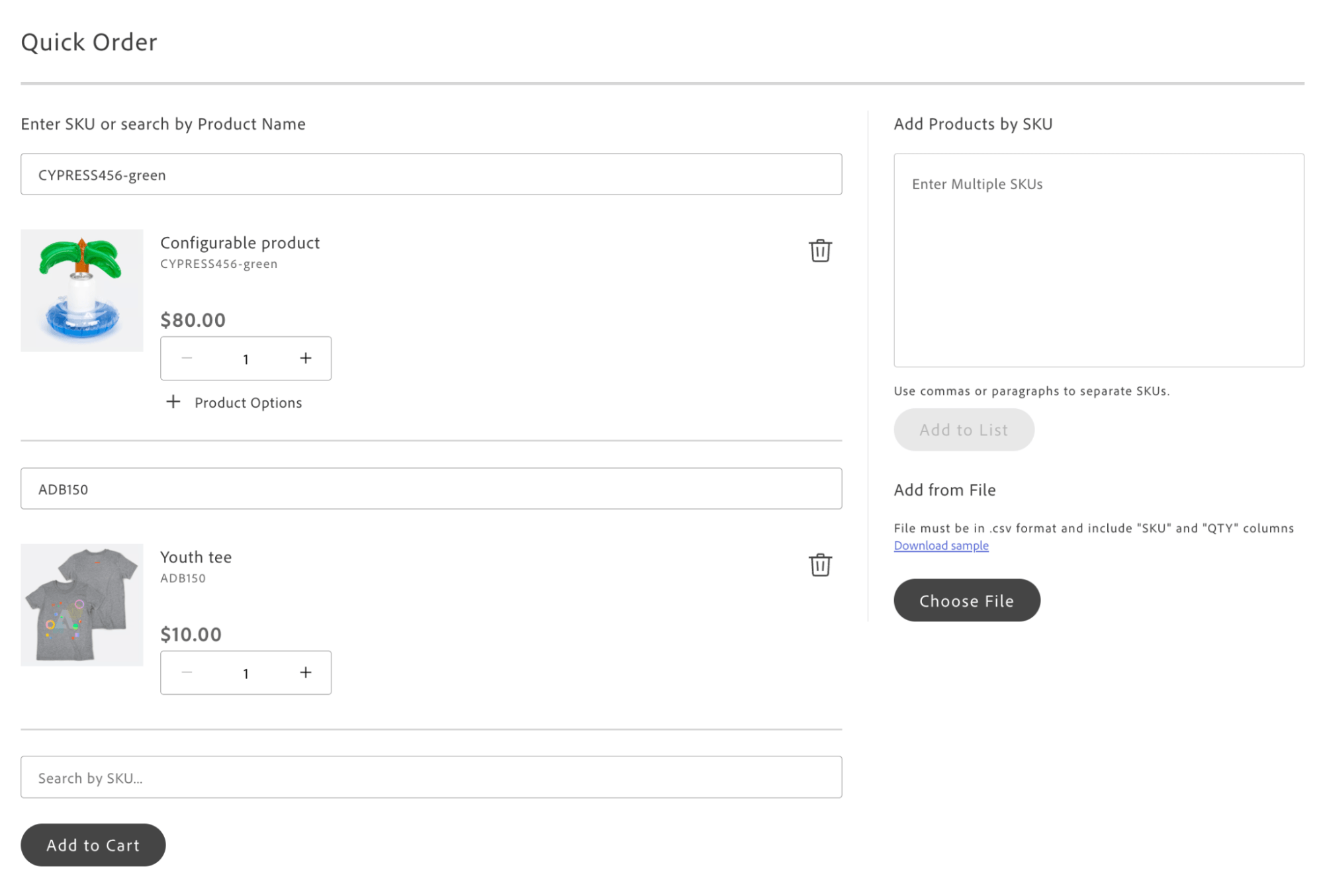\n</Diagram>\n\n## Supported Commerce features\n\nThe following table provides an overview of the Adobe Commerce features that the Quick Order drop-in supports:\n\n\n| Feature | Status |\n| ------- | ------ |\n| Quick Order page (bulk add by SKU/search) | |\n| Multiple SKU text entry | |\n| CSV file upload (SKU, QTY) | |\n| Product search by SKU and name | |\n| Configurable product options in Quick Order | |\n| Bulk add to cart with validation | |\n| Grid Ordering on PDP (configurable variants) | |\n| Quick Order feature toggle (`quickOrderActive`) | |\n| Event-driven container coordination | |\n| Internationalization (i18n) support | |\n| Integration with Cart and PDP drop-ins | |\n\n\n## Section topics\n\n- **[Quick Start](https://experienceleague.adobe.com/developer/commerce/storefront/dropins-b2b/quick-order/quick-start/)** — Package details, import paths, and block example. New to drop-ins? See [Using drop-ins](https://experienceleague.adobe.com/developer/commerce/storefront/dropins/all/quick-start/).\n- **[Initialization](https://experienceleague.adobe.com/developer/commerce/storefront/dropins-b2b/quick-order/initialization/)** — Configure the initializer with language definitions and store config (`quickOrderActive`).\n- **[Containers](https://experienceleague.adobe.com/developer/commerce/storefront/dropins-b2b/quick-order/containers/)** — **QuickOrderCsvUpload**, **QuickOrderItems**, **QuickOrderMultipleSku** (Quick Order page); **QuickOrderVariantsGrid** (Grid Ordering on PDP). Covers container configuration and how the containers work together.\n- **[Functions](https://experienceleague.adobe.com/developer/commerce/storefront/dropins-b2b/quick-order/functions/)** — API functions (for example, `getStoreConfig`) for store configuration.\n- **[Events](https://experienceleague.adobe.com/developer/commerce/storefront/dropins-b2b/quick-order/events/)** — Event bus usage: `quick-order/add-items`, `quick-order/loading`, `quick-order/add-to-cart`, `quick-order/add-to-cart-error`, `cart/product/added`. See [Event bus reference](https://experienceleague.adobe.com/developer/commerce/storefront/sdk/reference/events).\n- **[Slots](https://experienceleague.adobe.com/developer/commerce/storefront/dropins-b2b/quick-order/slots/)** — Customize `ProductPrice`, `ProductOptions`, `AddAllToCartButton`, and search slots. See [Extending drop-ins](https://experienceleague.adobe.com/developer/commerce/storefront/dropins/all/extending/).\n- **[Dictionary](https://experienceleague.adobe.com/developer/commerce/storefront/dropins-b2b/quick-order/dictionary/)** — i18n keys for labels and messages. See [Dictionary customization](https://experienceleague.adobe.com/developer/commerce/storefront/dropins/all/dictionaries/).\n- **[Styles](https://experienceleague.adobe.com/developer/commerce/storefront/dropins-b2b/quick-order/styles/)** — CSS classes for the block and containers. See [Styling](https://experienceleague.adobe.com/developer/commerce/storefront/dropins/all/styling/)."
|
|
305
|
+
},
|
|
306
|
+
{
|
|
307
|
+
"path": "dropins-b2b/quick-order/containers",
|
|
308
|
+
"title": "Quick Order Containers",
|
|
309
|
+
"description": "Overview of containers available in the Quick Order B2B drop-in.",
|
|
310
|
+
"content": "The Quick Order B2B drop-in provides four container components: three for the Quick Order page (bulk ordering by SKU, search, or CSV) and one for Grid Ordering on the product detail page (PDP).\n\n## What are Containers?\n\nContainers are pre-built UI components that combine functionality, state management, and presentation. They communicate exclusively via the event bus (for example, `quick-order/add-items`, `quick-order/loading`). SKUs added in `QuickOrderCsvUpload`, `QuickOrderMultipleSku`, or via the search within `QuickOrderItems` appear in the `QuickOrderItems` list.\n\nBecause communication is event-driven, each container remains independent. Any container can be replaced with a custom implementation that follows the defined event contracts and payload structure. All Quick Order containers support extensibility through [Slots](https://experienceleague.adobe.com/developer/commerce/storefront/dropins-b2b/quick-order/slots/).\n\n## Available Containers\n\n\n| Container | Description |\n| --------- | ----------- |\n| [QuickOrderCsvUpload](https://experienceleague.adobe.com/developer/commerce/storefront/dropins-b2b/quick-order/containers/quick-order-csv-upload/) | CSV file upload with required \"SKU\" and \"QTY\" columns (max 200 rows). Validates file, parses data, and emits `quick-order/add-items`. Provides sample CSV download. |\n| [QuickOrderItems](https://experienceleague.adobe.com/developer/commerce/storefront/dropins-b2b/quick-order/containers/quick-order-items/) | Product list with search, quantity editing, product options for configurables, validation, and \"Add All to Cart\". Listens to `quick-order/add-items` and coordinates with the other two containers. |\n| [QuickOrderMultipleSku](https://experienceleague.adobe.com/developer/commerce/storefront/dropins-b2b/quick-order/containers/quick-order-multiple-sku/) | Text area for entering multiple SKUs (comma, space, or newline separated). Parses and deduplicates SKUs, then emits `quick-order/add-items` to add them to the list. |\n| [QuickOrderVariantsGrid](https://experienceleague.adobe.com/developer/commerce/storefront/dropins-b2b/quick-order/containers/quick-order-variants-grid/) | Grid interface on the product detail page for configurable products. Displays variants with quantity inputs and bulk add-to-cart. Used when Grid Ordering is enabled. |\n\n\n## Quick Order\n\nThe Quick Order page combines [QuickOrderCsvUpload](https://experienceleague.adobe.com/developer/commerce/storefront/dropins-b2b/quick-order/containers/quick-order-csv-upload/), [QuickOrderItems](https://experienceleague.adobe.com/developer/commerce/storefront/dropins-b2b/quick-order/containers/quick-order-items/), and [QuickOrderMultipleSku](https://experienceleague.adobe.com/developer/commerce/storefront/dropins-b2b/quick-order/containers/quick-order-multiple-sku/) for bulk ordering by SKU, search, or CSV upload. Render all three containers together so they communicate via the event bus.\n\n## Grid Ordering (PDP)\n\nThe Grid Ordering feature introduces a new B2B purchasing experience designed specifically for configurable products. Buyers view all product variants within a single grid interface and specify quantities for multiple variants at once before adding them to the cart. This feature is exclusive to Adobe Storefront and provides an efficient workflow for purchasing multiple variant combinations without navigating through individual product pages.\n\nThe `QuickOrderVariantsGrid` container runs on the Product Details Page (PDP) when Grid Ordering is enabled for configurable products, and the Product Details block integrates it. See the [QuickOrderVariantsGrid container](https://experienceleague.adobe.com/developer/commerce/storefront/dropins-b2b/quick-order/containers/quick-order-variants-grid/) for configuration and the [Product Details drop-in](https://experienceleague.adobe.com/developer/commerce/storefront/dropins/product-details/) for block setup."
|
|
311
|
+
},
|
|
312
|
+
{
|
|
313
|
+
"path": "dropins-b2b/quick-order/containers/quick-order-csv-upload",
|
|
314
|
+
"title": "QuickOrderCsvUpload Container",
|
|
315
|
+
"description": "Learn about the QuickOrderCsvUpload container in the Quick Order B2B drop-in.",
|
|
316
|
+
"content": "The **QuickOrderCsvUpload** container provides CSV file upload for bulk quick order in the drop-in. It is useful for repeat orders or bulk purchases where manual SKU entry would be inefficient. The file must include `SKU` and `QTY` columns (max 200 rows).\n\nThe container manages the full workflow: file selection, validation, and error handling. It verifies the uploaded file structure, validates required fields, and provides clear feedback when issues are detected. On success, it parses the content and emits `quick-order/add-items`. **QuickOrderItems** fetches product data and updates the list. When Quick Order is disabled, the container displays an overlay indicating that functionality is unavailable.\n\n<Diagram caption=\"QuickOrderCsvUpload container with file upload and sample CSV download\">\n \n</Diagram>\n\n## Configuration\n\n\n| Parameter | Type | Req? | Description |\n|---|---|---|---|\n| `className` | `string` | No | CSS class applied to the container root (for example, `quick-order-csv-upload`). |\n| `routeSampleCSV` | `() => string` | No | Returns the URL or path for the sample CSV download (for example, `/path/to/sample.csv`). If not provided, the container generates a default sample CSV (`SKU,QTY` followed by `SKU123,1`, `SKU456,2`, `SKU789,3`) and triggers a browser download. |\n| `onFileUpload` | `(values: SubmitSkuValue) => void` | No | Optional callback when a valid file is parsed; otherwise the container emits `quick-order/add-items`. |\n\n\n## CSV requirements\n\n- **Format:** CSV with header row.\n- **Required columns:** \"SKU\" and \"QTY\".\n- **Max rows:** 200 (excluding header).\n- **QTY:** Must be a positive integer per row.\n- **SKU:** Required for each row; invalid or empty rows produce validation errors.\n\n## Validation errors\n\nThe container displays specific messages for: invalid file type, empty file, missing or extra columns, max rows exceeded, invalid quantity, SKU required, no valid data rows, and parse/read failures. See [Quick Order Dictionary](https://experienceleague.adobe.com/developer/commerce/storefront/dropins-b2b/quick-order/dictionary/) for `CsvFileInput.uploadCSVErrors` keys and [Dictionary customization](https://experienceleague.adobe.com/developer/commerce/storefront/dropins/all/dictionaries/).\n\n## Behavior\n\n1. User selects a CSV file.\n2. Container validates format and content.\n3. On success: emits `quick-order/add-items` with parsed `SubmitSkuValue` (or calls `onFileUpload` if provided).\n4. QuickOrderItems receives the event and fetches product data, updating the list.\n5. User can download a sample CSV via \"Download sample\". When `routeSampleCSV` is provided, the container uses that URL; otherwise it generates a default sample and triggers a browser download.\n\n## Usage\n\nBasic integration with a custom CSS class:\n\n```js\n\n\nquickOrderProvider.render(QuickOrderCsvUpload, {\n className: 'quick-order-csv-upload',\n})(quickOrderCsvUploadContainer);\n```\n\nWith `onFileUpload` callback (custom processing before adding to Quick Order):\n\n```js\nquickOrderProvider.render(QuickOrderCsvUpload, {\n className: 'quick-order-csv-upload',\n onFileUpload: (parsedData) => {\n console.log('CSV file uploaded:', parsedData);\n // Custom processing before adding to Quick Order\n // If you omit this, the container emits quick-order/add-items automatically\n },\n})(quickOrderCsvUploadContainer);\n```\n\nWith custom sample CSV URL:\n\n```js\nquickOrderProvider.render(QuickOrderCsvUpload, {\n className: 'quick-order-csv-upload',\n routeSampleCSV: () => '/quick-order/sample-csv',\n})(quickOrderCsvUploadContainer);\n```\n\n## Events\n\n- **Emits:** `quick-order/add-items` (with parsed SKU/quantity array from valid CSV), `quick-order/loading` (during validation/processing).\n\n## Admin panel\n\nNo container-specific settings. Enable Quick Order in Adobe Commerce: **Stores** > **Settings** > **Configuration** > **General** > **B2B Features** > **Enable Quick Order**."
|
|
317
|
+
},
|
|
318
|
+
{
|
|
319
|
+
"path": "dropins-b2b/quick-order/containers/quick-order-items",
|
|
320
|
+
"title": "QuickOrderItems Container",
|
|
321
|
+
"description": "Learn about the QuickOrderItems container in the Quick Order B2B drop-in.",
|
|
322
|
+
"content": "The **QuickOrderItems** container is the central component for managing and reviewing products in the drop-in workflow. It displays items added via CSV upload, multiple SKU entry, and product search. Each item shows name, SKU, price, and quantity. Users can update quantities, remove items, and configure options for configurable products. An integrated search input allows adding products through autocomplete without leaving the page.\n\nThe container surfaces validation issues through contextual notifications and highlights problematic items with clickable SKU references that scroll to the relevant product. It handles full-success and partial-success add-to-cart scenarios, informing users which products were added and which require attention. Loading states are managed at global and item levels. When Quick Order is disabled, the container displays an overlay while preserving the underlying content.\n\n<Diagram caption=\"QuickOrderItems container with product list and search\">\n \n</Diagram>\n\n## Configuration\n\n\n| Parameter | Type | Req? | Description |\n|---|---|---|---|\n| `className` | `string` | No | CSS class applied to the container root. |\n| `getProductsData` | `(items: OrderItemInput[]) => Promise<OrderItem[]>` | Yes | Fetches product data for the given SKUs/items. `OrderItemInput`: `{ sku: string; variantSku?: string; quantity?: number; replaceItemSku?: string }`. Typically from PDP drop-in `getProductsData`. Required for resolving products when items are added. |\n| `productsSearch` | `(params: { phrase: string; filter: Array<{ attribute: string; in: string[] }> }) => Promise<{ items: OrderItem[] }>` | No | Search API for product search by SKU or name. Typically from Product Discovery drop-in `search`. If not provided, search functionality is disabled in the UI. |\n| `searchFilter` | `Array<{ attribute: string; eq?: string; in?: string[] }>` | No | Filters applied to product search. Default: `[{ attribute: 'visibility', in: ['Search', 'Catalog, Search'] }]`. The Commerce boilerplate uses both `eq` (for categoryPath) and `in` (for visibility); the drop-in type definition may list only `in`. |\n| `handleAddToCart` | `(items: any[], clearItems: () => void) => void \\| string \\| Promise<void \\| string>` | No | Custom handler when \"Add All to Cart\" is clicked. Receives the cart items array and a `clearItems` function to reset the list after successful addition. If omitted, the drop-in emits `quick-order/add-to-cart`. Return an error message string to show a notification and emit `quick-order/add-to-cart-error`. Invoke `clearItems()` after successful addition to reset the Quick Order list. |\n| `slots` | `object` | No | Slots for ProductPrice, ProductOptions, AddAllToCartButton, QuickOrderItemSearch, QuickOrderSearchAutocompleteItem. See [Slots](https://experienceleague.adobe.com/developer/commerce/storefront/dropins-b2b/quick-order/slots/). |\n\n\n> **Note**\n>\nThe TypeScript type for `searchFilter` in the drop-in may show only `{ attribute: string; in: string[] }`. The Commerce boilerplate passes both `eq` and `in`. Use the shape that your search API expects.\n\n\n> **Note**\n>\nThe `ProductOptions` slot is required to support configurable products. Without it, validation will show \"Configuration required\" for configurable items. Use the PDP drop-in `ProductOptions` container as the baseline implementation.\n\n\n## Slots\n\nThis container exposes slots for price display, product options (configurables), the add-to-cart button, and search UI. See [Quick Order Slots](https://experienceleague.adobe.com/developer/commerce/storefront/dropins-b2b/quick-order/slots/#quickorderitems-slots) and [Extending drop-ins](https://experienceleague.adobe.com/developer/commerce/storefront/dropins/all/extending/).\n\n## Usage\n\nThis container requires `getProductsData` and `productsSearch` (typically from the PDP and Product Discovery drop-ins). If `handleAddToCart` is omitted, the container emits `quick-order/add-to-cart` for external handlers.\n\nExample with PDP and Cart integration:\n\n```js\n\n\nquickOrderProvider.render(QuickOrderItems, {\n getProductsData: pdpApi.getProductsData,\n productsSearch: searchApi.search,\n searchFilter: [\n { attribute: 'categoryPath', eq: '' },\n { attribute: 'visibility', in: ['Search', 'Catalog, Search'] },\n ],\n className: 'quick-order-items',\n handleAddToCart: async (values) => {\n if (!values.length) return;\n try {\n await cartApi.addProductsToCart(values);\n window.location.href = rootLink('/cart');\n } catch (error) {\n return error.message || 'Failed to add products to cart.';\n }\n },\n slots: {\n ProductPrice: (ctx) => {\n const priceContainer = document.createElement('div');\n priceContainer.className = 'product-price-slot';\n pdpProvider.render(ProductPrice, { scope: ctx.scope, initialData: ctx.item })(priceContainer);\n ctx.replaceWith(priceContainer);\n },\n ProductOptions: (ctx) => {\n const optionsContainer = document.createElement('div');\n optionsContainer.className = 'product-options-slot';\n pdpProvider.render(ProductOptions, { scope: ctx.scope })(optionsContainer);\n ctx.replaceWith(optionsContainer);\n },\n },\n})(quickOrderItemsContainer);\n```\n\n## Events\n\n- **Listens:** `quick-order/add-items` (adds/merges items and fetches product data), `quick-order/loading` (updates loading state), `cart/product/added` (from Cart drop-in; shows success notification).\n- **Emits:** `quick-order/add-items` (from integrated search when user adds via autocomplete), `quick-order/loading`, `quick-order/add-to-cart` (when no custom handler), `quick-order/add-to-cart-error`.\n\n## Notifications\n\nThe container shows notifications for: validation errors (missing options, not found, out of stock), backend add-to-cart errors, partial success (number of items added and number of failed SKUs), and full success (item count).\n\n## Admin panel\n\nNo container-specific settings. Enable Quick Order in Adobe Commerce: **Stores** > **Settings** > **Configuration** > **General** > **B2B Features** > **Enable Quick Order**."
|
|
323
|
+
},
|
|
324
|
+
{
|
|
325
|
+
"path": "dropins-b2b/quick-order/containers/quick-order-multiple-sku",
|
|
326
|
+
"title": "QuickOrderMultipleSku Container",
|
|
327
|
+
"description": "Learn about the QuickOrderMultipleSku container in the Quick Order B2B drop-in.",
|
|
328
|
+
"content": "The **QuickOrderMultipleSku** container provides a text area for entering multiple SKUs in the drop-in. Users can paste or type SKU lists in space-separated, comma-separated, or line-separated format—convenient for B2B buyers who have SKUs from catalogs, previous orders, spreadsheets, or external procurement systems.\n\nThe container parses the input, removes duplicates, and aggregates quantities when the same SKU appears multiple times. Input processing is debounced (300ms) for good performance with large SKU lists. After entry, users click \"Add to List\" to add SKUs to the Quick Order list. When Quick Order is disabled, the container displays an overlay indicating that functionality is unavailable.\n\n<Diagram caption=\"QuickOrderMultipleSku container with SKU text area\">\n \n</Diagram>\n\n## Configuration\n\n\n| Parameter | Type | Req? | Description |\n|---|---|---|---|\n| `className` | `string` | No | CSS class applied to the container root (for example, `quick-order-multiple-sku`). |\n| `onChange` | `(payload: SubmitSkuValue) => void` | No | Callback invoked when the SKU list in the textarea changes (debounced 300ms). Receives parsed and deduplicated SKUs with quantities: `Array<{ sku: string; quantity: number }>`. Use for analytics, validation, or mirroring to external state. |\n| `slots` | `object` | No | Slot for `AddToListButton`. Context: `{ handleAddToList: (values?: SubmitSkuValue) => void; loading: boolean; textAreaValue: string }`. Use this to replace the default \"Add to List\" button with custom UI. If not customized, the default button emits `quick-order/add-items` with parsed SKUs when clicked. |\n\n\n## Behavior\n\n1. User enters SKUs in the text area (comma, space, or newline separated).\n2. User clicks \"Add to List\".\n3. Container parses input, deduplicates SKUs and sums quantities for duplicates.\n4. Container emits `quick-order/add-items` with payload `SubmitSkuValue` (array of `{ sku, quantity }`).\n5. QuickOrderItems receives the event, fetches product data via `getProductsData`, and updates the list.\n6. Text area can be cleared on successful submission (implementation-dependent).\n\n## Usage\n\nBasic integration:\n\n```js\n\n\nquickOrderProvider.render(QuickOrderMultipleSku, {\n className: 'quick-order-multiple-sku',\n})(quickOrderMultipleSkuContainer);\n```\n\nWith `onChange` callback:\n\n```js\nquickOrderProvider.render(QuickOrderMultipleSku, {\n className: 'quick-order-multiple-sku',\n onChange: (payload) => {\n console.log('Parsed TextArea content', payload);\n // Output: [{ sku: 'SKU123', quantity: 2 }, { sku: 'SKU456', quantity: 1 }]\n },\n})(quickOrderMultipleSkuContainer);\n```\n\nWith custom `AddToListButton` slot:\n\n```js\nquickOrderProvider.render(QuickOrderMultipleSku, {\n className: 'quick-order-multiple-sku',\n slots: {\n AddToListButton: (ctx) => {\n const { handleAddToList, loading, textAreaValue } = ctx;\n const button = document.createElement('button');\n button.className = 'add-to-list-button';\n button.textContent = 'Custom add to list';\n button.addEventListener('click', () => handleAddToList(textAreaValue));\n ctx.replaceWith(button);\n },\n },\n})(quickOrderMultipleSkuContainer);\n```\n\n## Events\n\n- **Emits:** `quick-order/add-items` (with parsed SKU/quantity array), `quick-order/loading` (during processing).\n\n## Admin panel\n\nNo container-specific settings. Enable Quick Order in Adobe Commerce: **Stores** > **Settings** > **Configuration** > **General** > **B2B Features** > **Enable Quick Order**.\n\n## Dictionary\n\nLabels such as \"Add Products by SKU\", \"Use commas or paragraphs to separate SKUs.\", \"Enter SKUs here...\", and \"Add to List\" come from the Quick Order dictionary. See [Quick Order Dictionary](https://experienceleague.adobe.com/developer/commerce/storefront/dropins-b2b/quick-order/dictionary/) and [Dictionary customization](https://experienceleague.adobe.com/developer/commerce/storefront/dropins/all/dictionaries/)."
|
|
329
|
+
},
|
|
330
|
+
{
|
|
331
|
+
"path": "dropins-b2b/quick-order/containers/quick-order-variants-grid",
|
|
332
|
+
"title": "QuickOrderVariantsGrid Container",
|
|
333
|
+
"description": "Learn about the QuickOrderVariantsGrid container for Grid Ordering on the product detail page.",
|
|
334
|
+
"content": "The **QuickOrderVariantsGrid** container provides a grid-based interface for ordering product variants. It is designed for configurable products on the product detail page (PDP) where B2B customers need to select quantities across multiple variants (sizes, colors, and other attributes) within a single view.\n\nThe grid displays all available variants in a structured table with attributes, pricing, and availability. Users enter quantities for multiple variants, review subtotals, and add them to the cart in bulk. The container integrates with the Product Details block when Grid Ordering is enabled.\n\n> **Note**\n>\nThe component returns null (unmounts) when variants are empty and loading is complete. It listens for `quick-order/grid-ordering-variants` and `quick-order/grid-ordering-reset-selected-variants`; it emits `quick-order/grid-ordering-selected-variants`. See [Grid Ordering events](https://experienceleague.adobe.com/developer/commerce/storefront/dropins-b2b/quick-order/events/#grid-ordering-events).\n\n\n<Diagram caption=\"QuickOrderVariantsGrid container on product detail page\">\n 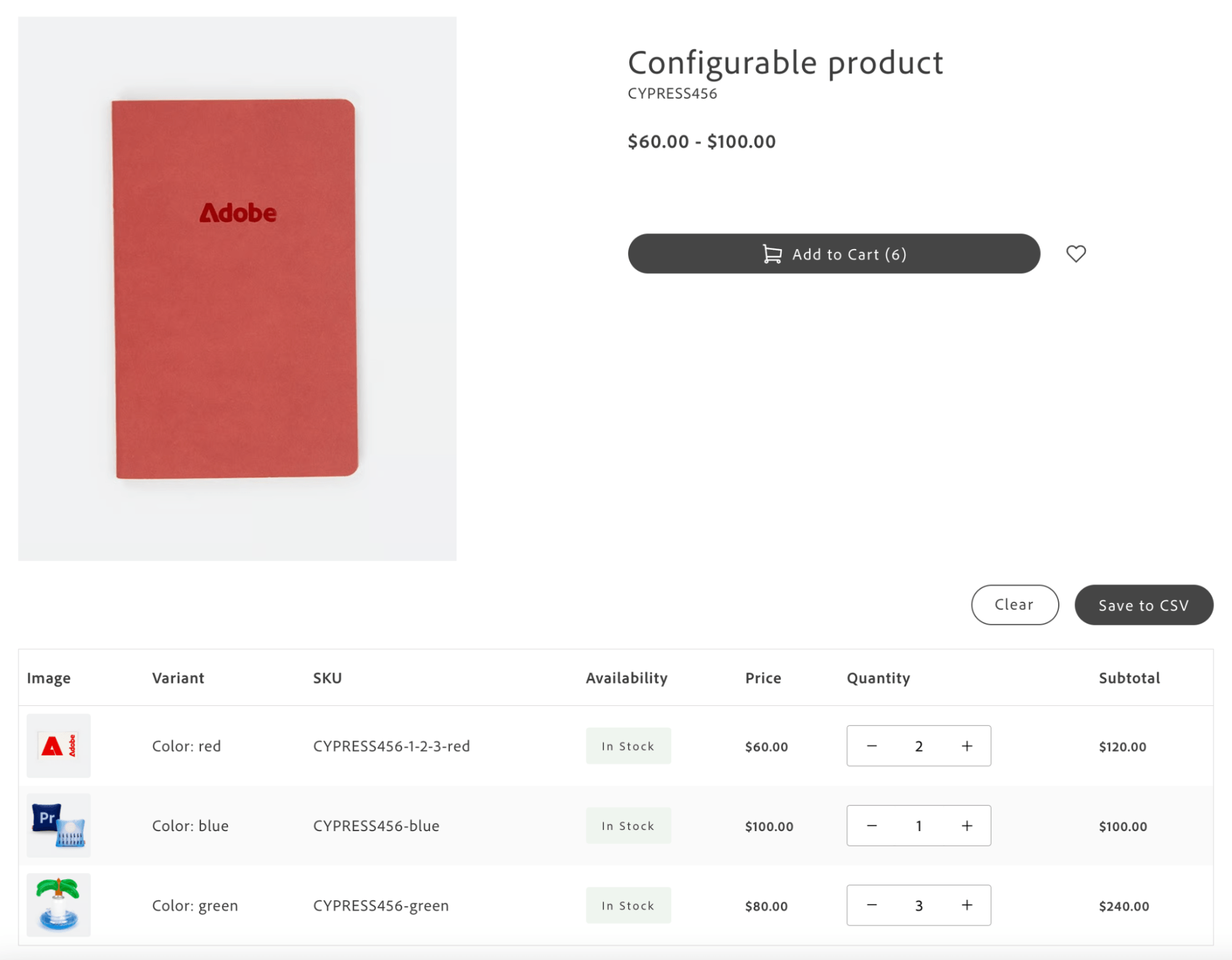\n</Diagram>\n\n## Configuration\n\n\n| Parameter | Type | Req? | Description |\n|---|---|---|---|\n| `className` | `string` | No | CSS class applied to the container root. |\n| `initialVariants` | `ProductVariant[]` | No | Initial array of product variants to display. When provided, automatically emits `quick-order/grid-ordering-variants`. If not provided, the component listens for the event from external sources. |\n| `onVariantsLoaded` | `(variants: VariantWithQuantity[]) => void` | No | Callback invoked when variants are successfully loaded and initialized (all quantities start at 0). |\n| `onSelectedVariantsChange` | `(data: VariantTableData[]) => void` | No | Debounced callback invoked when user changes quantities. Receives only variants with quantity > 0. `VariantTableData`: `{ sku: string; name: string; inStock: boolean; attributes: Record<string, {label, value}>; price: number; quantity: number; subtotal: number; image: string }`. |\n| `debounceMs` | `number` | No | Debounce delay in milliseconds for `onSelectedVariantsChange` and event emissions. Default: `300`. |\n| `initialLoading` | `boolean` | No | Initial loading state before variants are loaded. Default: `true`. |\n| `visibleVariantsLimit` | `number` | No | Number of variant rows displayed initially before showing the **\"Show All\"** option. Default: `10`. Set to a very high number (for example, `1000`) to display all variants without collapsing the list. |\n| `columns` | `Array<{ key: string; label: string; sortBy?: 'asc' \\| 'desc' \\| true }>` | No | Custom column configuration. Default: `[{ key: 'image', label: 'Image' }, { key: 'sku', label: 'SKU' }, { key: 'availability', label: 'Availability' }, { key: 'price', label: 'Price' }, { key: 'quantity', label: 'Quantity' }, { key: 'subtotal', label: 'Subtotal' }]`. When using custom columns, provide corresponding slot implementations for custom column keys. |\n| `slots` | `object` | No | Slots for Actions, ImageCell, SKUCell, AvailabilityCell, PriceCell, QuantityCell, SubtotalCell, and custom column keys. See [Slots](https://experienceleague.adobe.com/developer/commerce/storefront/dropins-b2b/quick-order/slots/). |\n\n\n## Architecture\n\nGrid Ordering replaces standard PDP interactions such as quantity selection and configurable product option selection. Because Grid Ordering allows selecting multiple variants at once, the standard PDP add-to-cart flow (single product with selected options) no longer applies. The grid provides a bulk-selection interface. The container handles variant selection and UI; the PDP integration layer (Product Details block) processes selections and executes the bulk add-to-cart operation.\n\n## Usage\n\nThe Product Details block integrates QuickOrderVariantsGrid when Grid Ordering is enabled for configurable products. The example below shows the pattern; the block provides `readBlockConfig`, `product`, and `gridOrderingContainer`:\n\n```js\n\n\n// Identify whether this feature is enabled based on the block config\nconst { 'grid-ordering-enabled': gridOrderingEnabledString = 'false' } = readBlockConfig(block);\nconst gridOrderingEnabled = gridOrderingEnabledString === 'true';\n\n// Based on product data, identify whether the feature should be enabled for a specific product\n// The Grid Ordering B2B feature (Quick Order drop-in) is enabled only for configurable products\nconst isGridOrderingView = gridOrderingEnabled && product?.productType === 'complex' && !product?.isBundle;\nlet gridOrderingSelectedVariants = [];\n\n// Conditionally render Grid Ordering container\nisGridOrderingView\n ? quickOrderProvider.render(QuickOrderVariantsGrid, {\n className: 'quick-order-variants-grid',\n columns: [\n { key: 'image', label: 'Image' },\n { key: 'variantOptionAttributes', label: 'Variant' },\n { key: 'sku', label: 'SKU' },\n { key: 'availability', label: 'Availability' },\n { key: 'price', label: 'Price' },\n { key: 'quantity', label: 'Quantity' },\n { key: 'subtotal', label: 'Subtotal' },\n ],\n slots: {\n VariantOptionAttributesCell: (ctx) => {\n const { variant } = ctx;\n const { variantOptionAttributes } = variant.product;\n\n const cellWrapper = document.createElement('div');\n\n variantOptionAttributes.forEach((attr) => {\n const attributeWrapper = document.createElement('div');\n attributeWrapper.classList.add('product-details__variants-grid-attribute');\n const label = document.createElement('strong');\n label.textContent = `$:`;\n const value = document.createElement('span');\n value.textContent = attr.value;\n attributeWrapper.appendChild(label);\n attributeWrapper.appendChild(value);\n cellWrapper.appendChild(attributeWrapper);\n });\n ctx.appendChild(cellWrapper);\n },\n },\n })($gridOrderingContainer)\n : null;\n```\n\n## Slots\n\n\n| Slot | Context | Description |\n|-----|---------|-------------|\n| `Actions` | `{ onClear: () => void; onSaveToCsv: () => void; onCollectData: () => VariantTableData[]; isDisabled: boolean; variantsCount: number }` | Replace the entire action bar (Clear, Save to CSV, Collect Data buttons). |\n| `ImageCell` | `{ variant: ProductVariant; quantity: number; onQuantityChange: (sku, qty) => void }` | Customize image cell rendering for each variant row. |\n| `SKUCell` | `{ variant: ProductVariant; quantity: number; onQuantityChange: (sku, qty) => void }` | Customize SKU cell rendering. |\n| `AvailabilityCell` | `{ variant: ProductVariant; quantity: number; onQuantityChange: (sku, qty) => void }` | Customize availability/stock status cell. |\n| `PriceCell` | `{ variant: ProductVariant; quantity: number; onQuantityChange: (sku, qty) => void }` | Customize price display. |\n| `QuantityCell` | `{ variant: ProductVariant; quantity: number; onQuantityChange: (sku, qty) => void }` | Replace the quantity input/incrementer with custom controls. |\n| `SubtotalCell` | `{ variant: ProductVariant; quantity: number; onQuantityChange: (sku, qty) => void }` | Customize subtotal calculation and display. |\n| `[CustomColumnKey]Cell` | `{ variant: ProductVariant; quantity: number; onQuantityChange: (sku, qty) => void }` | Custom rendering for any custom column defined in `columns`. The slot name should match the column `key` value with the `Cell` suffix. |\n\n\n## Events\n\n- **Listens:** `quick-order/grid-ordering-variants` (variant data from PDP integration), `quick-order/grid-ordering-reset-selected-variants` (resets all quantities when emitted by integration layer, for example, after successful add-to-cart).\n- **Emits:** `quick-order/grid-ordering-variants` (when `initialVariants` is provided), `quick-order/grid-ordering-selected-variants` (when selection changes; debounced).\n\n## Admin panel\n\nNo container-specific settings. Grid Ordering is enabled via the Product Details block configuration. See the for setup."
|
|
335
|
+
},
|
|
336
|
+
{
|
|
337
|
+
"path": "dropins-b2b/quick-order/dictionary",
|
|
338
|
+
"title": "Quick Order Dictionary",
|
|
339
|
+
"description": "Customize user-facing text and labels in the Quick Order drop-in for localization and branding.",
|
|
340
|
+
"content": "The **Quick Order dictionary** holds all user-facing text, labels, and messages in the drop-in. Customize it to localize the drop-in, match your brand voice, or override default text without changing the drop-in source. Each string uses a unique key path under `QuickOrder` (i18n pattern).\n\n## How to customize\n\nOverride dictionary values during drop-in initialization. The drop-in deep-merges your values with the defaults. Include only the keys you want to change.\n\n```javascript\n\n\nawait initializers.mountImmediately(initialize, {\n langDefinitions: {\n default: {\n QuickOrder: {\n QuickOrderItem: {\n addAllToCart: 'Add All to Cart',\n emptyList: 'No products in the list',\n },\n CsvFileInput: {\n title: 'Add from File',\n downloadSample: 'Download sample',\n },\n },\n },\n },\n});\n```\n\nFor multi-language support and advanced patterns, see [Dictionary customization](https://experienceleague.adobe.com/developer/commerce/storefront/dropins/all/dictionaries/).\n\n## Default keys and values\n\nOverride via `langDefinitions` in the initializer or via placeholders (for example, `placeholders/quick-order.json` in the boilerplate).\n\n### QuickOrder.Search\n\n| Key | Default (example) |\n|-----|--------------------|\n| `placeholder` | \"Search by SKU...\" |\n| `ariaLabel` | \"Search for products by SKU\" |\n| `emptyState` | \"No results found\" |\n| `resultsAvailable` | \"results available\" |\n| `resultAvailable` | \"result available\" |\n| `srInstructions` | \"Use arrow keys or Tab to navigate, Enter or Space to select, Escape to close.\" |\n\n### QuickOrder.SkuListInput\n\n| Key | Default (example) |\n|-----|--------------------|\n| `title` | \"Add Products by SKU\" |\n| `helperText` | \"Use commas or paragraphs to separate SKUs.\" |\n| `textArea.label` | \"Enter Multiple SKUs\" |\n| `textArea.placeholder` | \"Enter SKUs here...\" |\n| `button` | \"Add to List\" |\n\n### QuickOrder.CsvFileInput\n\n| Key | Default (example) |\n|-----|--------------------|\n| `title` | \"Add from File\" |\n| `helperText` | \"File must be in .csv format and include \\\"SKU\\\" and \\\"QTY\\\" columns\" |\n| `downloadSample` | \"Download sample\" |\n| `inputLabel` | \"Choose File\" |\n| `selectedFile` | \"Selected file\" |\n| `uploadCSVErrors.invalidFile` | \"Invalid CSV file\" |\n| `uploadCSVErrors.emptyFile` | \"File is empty\" |\n| `uploadCSVErrors.missingColumns` | \"Must contain \\\"SKU\\\" and \\\"QTY\\\" columns\" |\n| `uploadCSVErrors.extraColumns` | \"Must contain only \\\"SKU\\\" and \\\"QTY\\\" columns\" |\n| `uploadCSVErrors.maxRowsExceeded` | File exceeds maximum of `` rows |\n| `uploadCSVErrors.skuRequired` | Row ``: SKU is required |\n| `uploadCSVErrors.invalidQuantity` | Row ``: QTY must be a positive integer |\n| `uploadCSVErrors.noValidData` | \"File contains no valid data rows\" |\n| `uploadCSVErrors.onlyCSV` | \"Only CSV files are allowed\" |\n| `uploadCSVErrors.failedToRead` | \"Failed to read file\" |\n| `uploadCSVErrors.failedToParse` | \"Failed to parse CSV file\" |\n\n### QuickOrder.QuickOrderItem\n\n| Key | Default (example) |\n|-----|--------------------|\n| `title` | \"Enter SKU or search by Product Name\" |\n| `quantity` | \"Quantity: \" |\n| `price` | \"Price: \" |\n| `sku` | \"SKU\" |\n| `remove` / `removeItem` | \"Remove\" / \"Remove item\" |\n| `showOptions` / `hideOptions` | \"Show additional options\" / \"Hide additional options\" |\n| `additionalOptions` / `noAdditionalOptions` | \"Additional options\" / \"No additional options available\" |\n| `emptyList` | \"No products in the list\" |\n| `loading` | \"Loading...\" |\n| `productNotFound` | \"Product not found\" |\n| `productNotFoundDescription` | The product with SKU `` could not be found |\n| `configurableProductError` | \"Configuration required\" |\n| `configurableProductErrorDescription` | \"Use ProductOptions Slot in QuickOrderItems container to enable configurable product options.\" |\n| `configurableOptionsWarning` / `configurableOptionsWarningDescription` | \"Product configuration required\" / \"Please select all required product options before adding to cart\" |\n| `productOptions` | \"Product Options\" |\n| `outOfStock` | \"Out of Stock\" |\n| `addAllToCart` | \"Add to Cart\" |\n| `disabledMessage` | \"Quick Order feature disabled\" |\n| `notification.validationError` | \"Product(s) require your attention\" |\n| `notification.backendError` | \"An error occurred while adding products to the cart\" |\n| `notification.success` | `` product(s) successfully added to the cart |\n| `notification.partialSuccess` | `` of `` products were added to the cart. Some products could not be added |\n| `notification.unexpectedError` | \"An unexpected error has occurred\" |\n\n### QuickOrder.VariantsGrid (Grid Ordering on PDP)\n\n| Key | Default (example) |\n|-----|--------------------|\n| `imageColumn` | \"Image\" |\n| `attributesColumn` | \"Attributes\" |\n| `skuColumn` | \"SKU\" |\n| `availabilityColumn` | \"Availability\" |\n| `priceColumn` | \"Price\" |\n| `minOrderColumn` | \"Min Order / Pack Size\" |\n| `quantityColumn` | \"Quantity\" |\n| `subtotalColumn` | \"Subtotal\" |\n| `clearButton` | \"Clear\" |\n| `saveToCsvButton` | \"Save to CSV\" |\n| `collectDataButton` | \"Collect Data\" |\n| `inStock` / `outOfStock` | \"In Stock\" / \"Out of Stock\" |\n| `tableCaption` | \"Product Variants Grid\" |\n| `quantityLabel` | \"Quantity for\" |\n| `showAll` / `showLess` | \"Show All Items\" / \"Show Less\" |"
|
|
341
|
+
},
|
|
342
|
+
{
|
|
343
|
+
"path": "dropins-b2b/quick-order/events",
|
|
344
|
+
"title": "Quick Order Data & Events",
|
|
345
|
+
"description": "Learn about the events used by the Quick Order drop-in and the data available within those events.",
|
|
346
|
+
"content": "The **Quick Order** drop-in uses the [event bus](https://experienceleague.adobe.com/developer/commerce/storefront/sdk/reference/events) to coordinate containers (**QuickOrderCsvUpload**, **QuickOrderItems**, **QuickOrderMultipleSku**) and to integrate with the Cart drop-in. Events coordinate adding items, loading states, and add-to-cart success or error handling.\n\n## Events reference\n\n\n| Event | Direction | Description |\n|-------|-----------|-------------|\n| [`quick-order/add-items`](#quick-orderadd-items-emits-and-listens) | Emits and listens | Items added via CSV upload, multiple SKU entry, or Quick Order search within QuickOrderItems. Payload: `SubmitSkuValue` (array of `{ sku, quantity }`). Triggers product fetch and list update in QuickOrderItems. |\n| [`quick-order/loading`](#quick-orderloading-emits-and-listens) | Emits and listens | Loading state changed. Payload: `boolean`. Disables inputs and shows loading indicators while processing. |\n| [`quick-order/add-to-cart`](#quick-orderadd-to-cart-emits) | Emits | Request to add items to cart when no custom `handleAddToCart` is used. Payload: array of cart item values. Default cart handler processes items. |\n| [`quick-order/add-to-cart-error`](#quick-orderadd-to-cart-error-emits) | Emits | Add-to-cart operation failed. Payload: `{ message: string }`. Shows error notification. |\n| [`b2b-quick-order/error`](#b2b-quick-ordererror-emits) | Emits | Emitted when a network error occurs during any Quick Order API call. |\n| [`quick-order/grid-ordering-variants`](#quick-ordergrid-ordering-variants-emits-and-listens) | Emits and listens | Provides variant data to `QuickOrderVariantsGrid`. Emitted externally or when `initialVariants` is set. |\n| [`quick-order/grid-ordering-selected-variants`](#quick-ordergrid-ordering-selected-variants-emits) | Emits | Notifies when selected variants or quantities change in the `QuickOrderVariantsGrid`. Debounced. |\n| [`quick-order/grid-ordering-reset-selected-variants`](#quick-ordergrid-ordering-reset-selected-variants-listens) | Listens | Resets the current grid selection (clears all quantities). |\n| [`cart/product/added`](#cartproductadded-listens) | Listens | Products added to cart successfully. Payload: `any[]`. Quick Order shows success notification. |\n\n\n> **Note**\n>\nThe drop-in also emits `quick-order/add-to-cart-success` (payload: `void`) internally when the add-to-cart operation completes. For integration, listen to `cart/product/added` from the Cart drop-in instead.\n\n\n## Event details\n\n### `quick-order/add-items` (emits and listens)\n\nQuickOrderCsvUpload and QuickOrderMultipleSku emit this when the user adds items via CSV or the SKU text area. QuickOrderItems also emits it when the user adds a product via the integrated search (autocomplete). QuickOrderItems listens, fetches product data, and updates the list.\n\n#### Event payload\n\n```typescript\ntype SubmitSkuValue = Array<{ sku: string; quantity: number }>;\n```\n\n#### When triggered\n\n- After CSV file is validated and parsed (QuickOrderCsvUpload)\n- After user clicks \"Add to List\" in QuickOrderMultipleSku with parsed SKUs\n- When user selects a product from the search autocomplete in QuickOrderItems\n\n#### Example\n\n```js\n\nevents.on('quick-order/add-items', (payload) => {\n console.log('Items to add:', payload); // SubmitSkuValue\n});\n```\n\n### `quick-order/loading` (emits and listens)\n\nContainers emit this when a loading state starts or ends (for example, while fetching products or adding to cart).\n\n#### Event payload\n\n```typescript\nboolean\n```\n\n#### Example\n\n```js\n\nevents.on('quick-order/loading', (isLoading) => {\n console.log('Quick Order loading:', isLoading);\n});\n```\n\n### `quick-order/add-to-cart` (emits)\n\nQuickOrderItems emits this when the user clicks \"Add All to Cart\" and no custom `handleAddToCart` is provided. A default handler may listen and call the Cart API.\n\n#### Event payload\n\n```typescript\nany[] // Cart item values (sku, quantity, options, and so on)\n```\n\n### `quick-order/add-to-cart-error` (emits)\n\nQuickOrderItems emits this when add-to-cart fails (backend error or custom handler returns an error message string).\n\n#### Event payload\n\n```typescript\n{ message: string }\n```\n\n#### Example\n\n```js\n\nevents.on('quick-order/add-to-cart-error', ({ message }) => {\n console.error('Add to cart failed:', message);\n});\n```\n\n### `cart/product/added` (listens)\n\nThe Cart drop-in emits this when products are added to the cart. Quick Order listens and shows a success notification.\n\n#### Event payload\n\n```typescript\nany[]\n```\n\n### `b2b-quick-order/error` (emits)\n\nEmitted when a network error occurs during any Quick Order API call. Does not fire for intentional user cancellations (`AbortError`).\n\n#### Event payload\n\n```typescript\n{\n source: 'auth';\n type: 'network';\n error: Error;\n}\n```\n\n#### Example\n\n```js\n\nevents.on('b2b-quick-order/error', ({ source, type, error }) => {\n console.error('Quick Order network error:', error.message);\n});\n```\n\n### `quick-order/grid-ordering-variants` (emits and listens)\n\nProvides variant data to `QuickOrderVariantsGrid`. Emitted externally by the integration layer (for example, the Product Details block) after fetching product variants. Also emitted by `QuickOrderVariantsGrid` itself when `initialVariants` is provided as a prop. Not required if `initialVariants` is passed directly.\n\n#### Event payload\n\n```typescript\nProductVariant[] // Array of product variants\n```\n\n#### Example\n\n```js\n\n// Emit after fetching variants from the PDP\nevents.emit('quick-order/grid-ordering-variants', productVariants);\n```\n\n### `quick-order/grid-ordering-selected-variants` (emits)\n\nEmitted by `QuickOrderVariantsGrid` when the user changes quantities for any variant. Payload contains only variants with `quantity > 0`. Emissions are debounced. Captured by the PDP integration layer to execute bulk add-to-cart.\n\n#### Event payload\n\n```typescript\nArray<{\n sku: string;\n name: string;\n inStock: boolean;\n attributes: Record<string, { label: string; value: string }>;\n price: number;\n quantity: number;\n subtotal: number;\n image: string;\n}>\n```\n\n#### Example\n\n```js\n\nevents.on('quick-order/grid-ordering-selected-variants', (selectedVariants) => {\n console.log('Selected variants:', selectedVariants);\n // selectedVariants contains only variants with quantity > 0\n});\n```\n\n### `quick-order/grid-ordering-reset-selected-variants` (listens)\n\nListens for this event to reset all quantities in the `QuickOrderVariantsGrid` to zero. Typically emitted by the integration layer after a successful add-to-cart operation.\n\n#### Event payload\n\n```typescript\nvoid\n```\n\n#### Example\n\n```js\n\n// Reset the grid after successful add-to-cart\nevents.emit('quick-order/grid-ordering-reset-selected-variants');\n```\n\n## PDP integration events (internal)\n\nQuickOrderItems emits PDP-scoped events to enable reuse of PDP containers (for example, ProductPrice, ProductOptions) within the Quick Order interface:\n\n\n| Event | Payload | Description |\n|-------|---------|--------------|\n| `/pdp/data` | `OrderItem` | Scoped event for product data updates per item. |\n| `/pdp/values` | option values | Captures selected product options for configurable products. |\n\n\nThese events are used internally by the slot system and typically do not require custom handling.\n\n## Grid Ordering events\n\nThe QuickOrderVariantsGrid container (Grid Ordering on PDP) uses these events:\n\n\n| Event | Direction | Description |\n|-------|-----------|-------------|\n| `quick-order/grid-ordering-variants` | Emitted externally (integration layer) | Provides variant data to QuickOrderVariantsGrid. Payload: array of product variants. Typically emitted after variants are fetched on the PDP. Not required if `initialVariants` prop is used. |\n| `quick-order/grid-ordering-selected-variants` | Emitted by QuickOrderVariantsGrid | Notifies when selected variants or quantities change. Payload: array of selected variants (quantity > 0) with enriched data (sku, attributes, price, quantity, subtotal). Captured by PDP integration for bulk add-to-cart. Emissions are debounced. |\n| `quick-order/grid-ordering-reset-selected-variants` | Emitted externally | Resets current grid selection (clears all quantities). Typically used after successful add-to-cart. |\n\n\n## Listening to events\n\nAll Quick Order events use the centralized event bus:\n\n```js\n\nevents.on('quick-order/add-items', handleAddItems);\nevents.on('quick-order/loading', handleLoading);\nevents.on('quick-order/add-to-cart-error', handleAddToCartError);\nevents.on('cart/product/added', handleCartProductAdded);\n\n// Clean up when needed\nevents.off('quick-order/add-items', handleAddItems);\n```\n\n> **Tip**\n>\nWhen using a custom `handleAddToCart` in QuickOrderItems, you control redirects and error messages; the drop-in still emits `quick-order/add-to-cart-error` when your handler returns an error message string."
|
|
347
|
+
},
|
|
348
|
+
{
|
|
349
|
+
"path": "dropins-b2b/quick-order/functions",
|
|
350
|
+
"title": "Quick Order Functions",
|
|
351
|
+
"description": "API functions provided by the Quick Order drop-in for programmatic access to store configuration.",
|
|
352
|
+
"content": "The Quick Order drop-in exposes API functions for store configuration. Use them to determine whether Quick Order is enabled. Containers use this to show or hide the disabled overlay.\n\n## Functions reference\n\n\n| Function | Description |\n| --- | --- |\n| [`getStoreConfig`](#getstoreconfig) | Returns store configuration including the Quick Order feature flag (`quickOrderActive`). |\n\n\n## getStoreConfig\n\nFetches store configuration via GraphQL and returns `quickorder_active` (mapped to `quickOrderActive`). The drop-in uses it to show a disabled overlay when Quick Order is off in Adobe Commerce Admin.\n\n```ts\nconst getStoreConfig = async (): Promise<{\n storeConfig: {\n quickOrderActive: boolean;\n };\n}>\n```\n\n### Returns\n\n- `storeConfig.quickOrderActive` — `true` when Quick Order is enabled in store config.\n\n### Example\n\n```js\n\nconst { storeConfig } = await getStoreConfig();\nif (storeConfig.quickOrderActive) {\n console.log('Quick Order is enabled');\n} else {\n console.log('Quick Order is disabled');\n}\n```\n\n> **Note**\n>\nThe initializer sets the GraphQL endpoint via `setEndpoint()` and loads store config during initialization. Containers read the feature state from the drop-in context. Call `getStoreConfig` in your block only when building custom logic around the feature flag.\n\n\n## API dependencies\n\nQuick Order does not implement or duplicate APIs for product data, search, or add-to-cart. Instead, it relies on external APIs provided by the PDP, Cart, and Product Discovery drop-ins (for example, `getProductsData`, `productsSearch`, Cart add-to-cart). This approach avoids code duplication, maintains consistency with existing logic, and preserves extensibility. You can pass custom API methods in the same way when needed. See the [QuickOrderItems](https://experienceleague.adobe.com/developer/commerce/storefront/dropins-b2b/quick-order/containers/quick-order-items/) container for required and optional parameters."
|
|
353
|
+
},
|
|
354
|
+
{
|
|
355
|
+
"path": "dropins-b2b/quick-order/initialization",
|
|
356
|
+
"title": "Quick Order initialization",
|
|
357
|
+
"description": "Configure the Quick Order drop-in with language definitions and store configuration.",
|
|
358
|
+
"content": "The **Quick Order initializer** configures the Quick Order B2B drop-in for bulk ordering: it sets the GraphQL endpoint (Core Service), loads placeholders from `placeholders/quick-order.json`, and passes language definitions. The drop-in reads the store configuration (`quickOrderActive`) to enable or disable the feature.\n\n## Configuration options\n\n\n| Parameter | Type | Req? | Description |\n|---|---|---|---|\n| `langDefinitions` | [`LangDefinitions`](#langdefinitions) | No | Language definitions for internationalization (i18n). Override dictionary keys for localization or branding. |\n| `quickOrderActive` | `boolean` | No | Override for the Quick Order feature flag. When `false`, containers show a disabled overlay. By default the drop-in reads this from store config (`storeConfig.quickorder_active`). |\n\n\n## Default configuration\n\nDefaults when no configuration is provided:\n\n```javascript title=\"scripts/initializers/quick-order.js\"\n\n\nawait initializeDropin(async () => {\n setEndpoint(CORE_FETCH_GRAPHQL);\n const labels = await fetchPlaceholders('placeholders/quick-order.json');\n const langDefinitions = {\n default: { ...labels },\n };\n return initializers.mountImmediately(initialize, { langDefinitions });\n})();\n```\n\n> **Note**\n>\nThe boilerplate uses `initializeDropin` to coordinate initialization order. The `labels` from `placeholders/quick-order.json` are spread into `langDefinitions.default`. The drop-in deep-merges these with its built-in defaults.\n\n\n## Language definitions\n\nOverride dictionary keys for localization or branding. The `langDefinitions` object maps locale keys to custom strings that override default text for the drop-in.\n\n```javascript title=\"scripts/initializers/quick-order.js\"\nconst langDefinitions = {\n default: {\n QuickOrder: {\n QuickOrderItem: {\n addAllToCart: 'Add All to Cart',\n emptyList: 'No products in the list',\n // ... other keys — see Dictionary page\n },\n },\n },\n};\n\nreturn initializers.mountImmediately(initialize, { langDefinitions });\n```\n\n> **Tip**\n>\nFor the full list of keys and multi-language support, see the [Quick Order Dictionary](https://experienceleague.adobe.com/developer/commerce/storefront/dropins-b2b/quick-order/dictionary/). For patterns and placeholders, see [Dictionary customization](https://experienceleague.adobe.com/developer/commerce/storefront/dropins/all/dictionaries/).\n\n\n## Store configuration\n\nThe drop-in reads store config from Adobe Commerce:\n\n\n| Config key | Description |\n| ---------- | ----------- |\n| `quickorder_active` | When `false`, Quick Order is disabled; all containers show a disabled overlay. |\n\n\nEnable Quick Order in Adobe Commerce Admin: **Stores** > **Settings** > **Configuration** > **General** > **B2B Features** > **Enable Quick Order**. Apply the configuration to both `.page` and `.live` when using this drop-in.\n\n## Configuration types\n\n### LangDefinitions\n\nMaps locale identifiers to dictionaries of key-value pairs. The `default` locale is used as the fallback when no specific locale matches.\n\n```typescript\nlangDefinitions?: {\n [locale: string]: {\n [key: string]: string | Record<string, string>;\n };\n};\n```"
|
|
359
|
+
},
|
|
360
|
+
{
|
|
361
|
+
"path": "dropins-b2b/quick-order/quick-start",
|
|
362
|
+
"title": "Quick Order Quick Start",
|
|
363
|
+
"description": "Quick reference and getting started guide for the Quick Order B2B drop-in.",
|
|
364
|
+
"content": "Enable bulk ordering by SKU, search, and CSV upload in your B2B storefront with the Quick Order drop-in for Adobe Storefront. This drop-in provides fast product ordering and Grid Ordering for configurable products.\n\n## Block DOM skeleton\n\nThe block creates the container divs, then runs `provider.render` into them. Use these class names when building your block or matching the boilerplate:\n\n- `.quick-order-title` — Page title (optional; boilerplate uses Header component).\n- `.quick-order-main-container` — Wrapper for the two-column layout.\n- `.quick-order-items-container` — Target for QuickOrderItems.\n- `.quick-order-right-side` — Wrapper for the right column.\n- `.quick-order-multiple-sku-container` — Target for QuickOrderMultipleSku.\n- `.quick-order-csv-upload-container` — Target for QuickOrderCsvUpload.\n\n## Quick example\n\nThe in the Commerce boilerplate uses this pattern for the Quick Order page with all three containers:\n\n```js\n// 1. Import initializers (Quick Order + dependencies: cart, PDP, search)\n\n\n// 2. Import containers, provider, APIs, and commerce helpers\n\n\n// 3. Render in your block (for example, commerce-b2b-quick-order)\nexport default async function decorate(block) {\n const itemsContainer = block.querySelector('.quick-order-items-container');\n const multipleSkuContainer = block.querySelector('.quick-order-multiple-sku-container');\n const csvUploadContainer = block.querySelector('.quick-order-csv-upload-container');\n\n quickOrderProvider.render(QuickOrderItems, {\n getProductsData: pdpApi.getProductsData,\n productsSearch: searchApi.search,\n searchFilter: [\n { attribute: 'categoryPath', eq: '' },\n { attribute: 'visibility', in: ['Search', 'Catalog, Search'] },\n ],\n handleAddToCart: async (values) => {\n if (!values.length) return;\n try {\n await cartApi.addProductsToCart(values);\n window.location.href = rootLink('/cart');\n } catch (error) {\n return error.message || 'Failed to add products to cart.';\n }\n },\n slots: { ProductPrice: (ctx) => { /* ... */ }, ProductOptions: (ctx) => { /* ... */ } },\n })(itemsContainer);\n\n quickOrderProvider.render(QuickOrderMultipleSku, { className: 'quick-order-multiple-sku' })(multipleSkuContainer);\n quickOrderProvider.render(QuickOrderCsvUpload, { className: 'quick-order-csv-upload' })(csvUploadContainer);\n}\n```\n\n**New to drop-ins?** See [Using drop-ins](https://experienceleague.adobe.com/developer/commerce/storefront/dropins/all/quick-start/) for step-by-step instructions.\n\n## Quick reference\n\n**Import paths:**\n- Initializer: `import '../../scripts/initializers/quick-order.js'`\n- Containers: `import ContainerName from '@dropins/storefront-quick-order/containers/ContainerName.js'`\n- Provider: `import { render } from '@dropins/storefront-quick-order/render.js'`\n\n**Package:** `@dropins/storefront-quick-order`\n\n**Example containers:** `QuickOrderCsvUpload`, `QuickOrderItems`, `QuickOrderMultipleSku`\n\n## Learn more\n\n- [Containers](https://experienceleague.adobe.com/developer/commerce/storefront/dropins-b2b/quick-order/containers/) — Available UI components and configuration options\n- [Initialization](https://experienceleague.adobe.com/developer/commerce/storefront/dropins-b2b/quick-order/initialization/) — Configure initializer and language definitions\n- [Events](https://experienceleague.adobe.com/developer/commerce/storefront/dropins-b2b/quick-order/events/) — Event-driven coordination between containers\n- [Slots](https://experienceleague.adobe.com/developer/commerce/storefront/dropins-b2b/quick-order/slots/) — Extend containers with custom content\n- [Dictionary](https://experienceleague.adobe.com/developer/commerce/storefront/dropins-b2b/quick-order/dictionary/) — i18n keys and customization\n- [Styles](https://experienceleague.adobe.com/developer/commerce/storefront/dropins-b2b/quick-order/styles/) — CSS classes and styling"
|
|
365
|
+
},
|
|
366
|
+
{
|
|
367
|
+
"path": "dropins-b2b/quick-order/slots",
|
|
368
|
+
"title": "Quick Order Slots",
|
|
369
|
+
"description": "Customize UI sections in the Quick Order drop-in using slots.",
|
|
370
|
+
"content": "The Quick Order B2B drop-in exposes slots for specific UI sections, primarily on **QuickOrderItems**. Use slots to replace or extend the product price, product options (configurables), add-to-cart button, and search UI. See [Extending drop-in components](https://experienceleague.adobe.com/developer/commerce/storefront/dropins/all/extending/) for slot behavior.\n\n\n| Container | Slots |\n|-----------|-------|\n| [QuickOrderItems](#quickorderitems-slots) | `ProductPrice`, `ProductOptions`, `AddAllToCartButton`, `QuickOrderItemSearch`, `QuickOrderSearchAutocompleteItem` |\n| [QuickOrderMultipleSku](https://experienceleague.adobe.com/developer/commerce/storefront/dropins-b2b/quick-order/containers/quick-order-multiple-sku/) | `AddToListButton` (optional) |\n| [QuickOrderVariantsGrid](https://experienceleague.adobe.com/developer/commerce/storefront/dropins-b2b/quick-order/containers/quick-order-variants-grid/#slots) | `Actions`, `ImageCell`, `SKUCell`, `AvailabilityCell`, `PriceCell`, `QuantityCell`, `SubtotalCell`, `VariantOptionAttributesCell`, custom column keys |\n\n\n## QuickOrderItems slots\n\nThe `QuickOrderItems` slots let you replace the default product price, configurable product options, \"Add All to Cart\" button, and search/autocomplete UI.\n\n```typescript\ninterface QuickOrderItemsProps {\n slots?: {\n ProductPrice?: SlotProps<ProductPriceContext>;\n ProductOptions?: SlotProps<ProductOptionsContext>;\n AddAllToCartButton?: SlotProps<AddAllToCartContext>;\n QuickOrderItemSearch?: SlotProps<QuickOrderItemSearchContext>;\n QuickOrderSearchAutocompleteItem?: SlotProps<QuickOrderSearchAutocompleteItemContext>;\n };\n}\n```\n\n### ProductPrice slot\n\nContext: `{ item: OrderItem; scope: string }`. Use this slot to render price with the PDP drop-in `ProductPrice` container (or a custom component) for correct tier pricing and currency. The boilerplate passes `scope` and `initialData: ctx.item` to the PDP container.\n\n### ProductOptions slot\n\nContext: `{ item: OrderItem; scope: string }`. Use this slot to render configurable product options (for example, size, color) with the PDP drop-in `ProductOptions` container. Required for configurables in the Quick Order list so users can select options before adding to cart.\n\n### AddAllToCartButton slot\n\nContext: `{ handleAddToCart: () => void; clearItems: () => void; loading: boolean; isDisabledButton: boolean }`. Replace the default \"Add All to Cart\" button with custom UI or behavior. Call `handleAddToCart()` to trigger add-to-cart. Call `clearItems()` after success to reset the list.\n\n### QuickOrderItemSearch slot\n\nContext: `{ item: OrderItem; scope: string; handleSearchChange: (e: Event) => void; searchResults: OrderItem[]; searchValue: string; shouldShowResults: boolean; handleItemClick: (item: OrderItem) => void }`. Customize the search input and results area for adding or replacing an item via search.\n\n### QuickOrderSearchAutocompleteItem slot\n\nContext: `{ item: OrderItem; index: number; activeIndex: number; createItemClickHandler: (item: OrderItem) => () => void }`. Customize how each search result option renders in the autocomplete list.\n\n## Example: ProductPrice and ProductOptions\n\nThe Commerce boilerplate wires PDP containers into Quick Order so each list item shows price and options correctly:\n\n```js\n\n\nquickOrderProvider.render(QuickOrderItems, {\n getProductsData: pdpApi.getProductsData,\n productsSearch: searchApi.search,\n handleAddToCart: async (values) => { /* ... */ },\n slots: {\n ProductPrice: (ctx) => {\n const priceContainer = document.createElement('div');\n priceContainer.className = 'product-price-slot';\n pdpProvider.render(ProductPrice, { scope: ctx.scope, initialData: ctx.item })(priceContainer);\n ctx.replaceWith(priceContainer);\n },\n ProductOptions: (ctx) => {\n const optionsContainer = document.createElement('div');\n optionsContainer.className = 'product-options-slot';\n pdpProvider.render(ProductOptions, { scope: ctx.scope })(optionsContainer);\n ctx.replaceWith(optionsContainer);\n },\n },\n})(quickOrderItemsContainer);\n```\n\n> **Tip**\n>\nFor configurable products, providing the `ProductOptions` slot is required so users can select options before adding to cart; otherwise validation will show \"Configuration required\" for those items.\n\n\n## QuickOrderMultipleSku slots\n\nThe `QuickOrderMultipleSku` container exposes one slot for customizing the \"Add to List\" button.\n\n```typescript\ninterface QuickOrderMultipleSkuProps {\n slots?: {\n AddToListButton?: SlotProps<{\n handleAddToList: (values?: SubmitSkuValue) => void;\n loading: boolean;\n textAreaValue: string;\n }>;\n };\n}\n```\n\n### AddToListButton slot\n\nContext: `{ handleAddToList: (values?: SubmitSkuValue) => void; loading: boolean; textAreaValue: string }`. Use this to replace the default \"Add to List\" button with custom UI. Call `handleAddToList()` to trigger the add-items flow.\n\n#### Example\n\n```js\n\n\nquickOrderProvider.render(QuickOrderMultipleSku, {\n slots: {\n AddToListButton: (ctx) => {\n const { handleAddToList, loading, textAreaValue } = ctx;\n const button = document.createElement('button');\n button.textContent = loading ? 'Adding...' : 'Custom Add to List';\n button.disabled = loading;\n button.addEventListener('click', () => handleAddToList());\n ctx.replaceWith(button);\n },\n },\n})(quickOrderMultipleSkuContainer);\n```\n\n## QuickOrderVariantsGrid slots\n\nThe `QuickOrderVariantsGrid` container exposes slots for customizing each cell type in the variants grid, as well as the action bar.\n\n```typescript\ninterface QuickOrderVariantsGridProps {\n slots?: {\n Actions?: SlotProps<{ onClear: () => void; onSaveToCsv: () => void; onCollectData: () => VariantTableData[]; isDisabled: boolean; variantsCount: number }>;\n ImageCell?: SlotProps<{ variant: ProductVariant; quantity: number; onQuantityChange: (sku: string, qty: number) => void }>;\n SKUCell?: SlotProps<{ variant: ProductVariant; quantity: number; onQuantityChange: (sku: string, qty: number) => void }>;\n AvailabilityCell?: SlotProps<{ variant: ProductVariant; quantity: number; onQuantityChange: (sku: string, qty: number) => void }>;\n PriceCell?: SlotProps<{ variant: ProductVariant; quantity: number; onQuantityChange: (sku: string, qty: number) => void }>;\n QuantityCell?: SlotProps<{ variant: ProductVariant; quantity: number; onQuantityChange: (sku: string, qty: number) => void }>;\n SubtotalCell?: SlotProps<{ variant: ProductVariant; quantity: number; onQuantityChange: (sku: string, qty: number) => void }>;\n [customColumnKey: string]: SlotProps<{ variant: ProductVariant; quantity: number; onQuantityChange: (sku: string, qty: number) => void }> | undefined;\n };\n}\n```\n\n### Actions slot\n\nContext: `{ onClear, onSaveToCsv, onCollectData, isDisabled, variantsCount }`. Replace the entire action bar (Clear, Save to CSV, and Collect Data buttons) with custom UI.\n\n### ImageCell slot\n\nContext: `{ variant, quantity, onQuantityChange }`. Customize image cell rendering for each variant row.\n\n### SKUCell slot\n\nContext: `{ variant, quantity, onQuantityChange }`. Customize the SKU cell rendering.\n\n### AvailabilityCell slot\n\nContext: `{ variant, quantity, onQuantityChange }`. Customize availability/stock status display.\n\n### PriceCell slot\n\nContext: `{ variant, quantity, onQuantityChange }`. Customize price display for each variant.\n\n### QuantityCell slot\n\nContext: `{ variant, quantity, onQuantityChange }`. Replace the quantity input with custom controls. Call `onQuantityChange(sku, qty)` to update state.\n\n### SubtotalCell slot\n\nContext: `{ variant, quantity, onQuantityChange }`. Customize subtotal calculation and display.\n\n### Custom column slots\n\nFor any column defined in the `columns` prop with a custom `key`, provide a slot named `Cell`. Context is the same as other cell slots.\n\n#### Example: Custom VariantOptionAttributesCell\n\n```js\n\n\nquickOrderProvider.render(QuickOrderVariantsGrid, {\n columns: [{ key: 'variantOptionAttributes', label: 'Variant' }],\n slots: {\n VariantOptionAttributesCell: (ctx) => {\n const { variant } = ctx;\n const { variantOptionAttributes } = variant.product;\n const cellWrapper = document.createElement('div');\n variantOptionAttributes.forEach((attr) => {\n const item = document.createElement('div');\n item.textContent = `$: $`;\n cellWrapper.appendChild(item);\n });\n ctx.appendChild(cellWrapper);\n },\n },\n})(gridOrderingContainer);\n```"
|
|
371
|
+
},
|
|
372
|
+
{
|
|
373
|
+
"path": "dropins-b2b/quick-order/styles",
|
|
374
|
+
"title": "Quick Order styles",
|
|
375
|
+
"description": "CSS classes and customization for the Quick Order B2B drop-in block and containers.",
|
|
376
|
+
"content": "This page lists CSS classes for the Quick Order block layout and Grid Ordering (PDP) visibility. The Commerce boilerplate uses these classes. For design tokens and styling, see [Styling Drop-In Components](https://experienceleague.adobe.com/developer/commerce/storefront/dropins/all/styling/).\n\n## Quick Order block (commerce-b2b-quick-order)\n\nAdd or override these classes in the block CSS (for example, `blocks/commerce-b2b-quick-order/commerce-b2b-quick-order.css`). Source: .\n\n```css\n.commerce-b2b-quick-order {\n padding: var(--spacing-large) 0;\n}\n\n.quick-order-main-container {\n display: flex;\n flex-direction: column;\n gap: var(--spacing-medium);\n width: 100%;\n}\n\n.quick-order-items-container {\n width: 100%;\n}\n\n.quick-order-right-side {\n display: flex;\n flex-direction: column;\n gap: var(--spacing-medium);\n width: 100%;\n}\n\n.quick-order-multiple-sku-container,\n.quick-order-csv-upload-container {\n width: 100%;\n}\n\n@media (min-width: 800px) {\n .quick-order-main-container {\n flex-direction: row;\n align-items: flex-start;\n gap: var(--spacing-medium);\n }\n\n .quick-order-items-container {\n flex: 2;\n min-width: 0;\n }\n\n .quick-order-right-side {\n flex: 1;\n min-width: 0;\n border-left: 1px solid var(--color-neutral-400);\n padding-left: var(--spacing-medium);\n }\n}\n```\n\n- **`.commerce-b2b-quick-order`** — Wrapper for the Quick Order block; vertical padding.\n- **`.quick-order-main-container`** — Flex container: column on small screens, row on wider (800px+).\n- **`.quick-order-items-container`** — Holds the QuickOrderItems container; takes 2/3 width on desktop.\n- **`.quick-order-right-side`** — Holds QuickOrderMultipleSku and QuickOrderCsvUpload; 1/3 width on desktop with left border and padding.\n- **`.quick-order-multiple-sku-container`**, **`.quick-order-csv-upload-container`** — Wrappers for the two right-side containers.\n\n## Grid Ordering (product details)\n\nWhen Grid Ordering is enabled for configurable products, the Product Details block uses these classes to show or hide the variants grid. Source: .\n\n```css\n.product-details__variants-grid-attribute strong {\n font-weight: var(--type-body-1-strong-font);\n margin-right: var(--spacing-xxsmall);\n}\n\n.product-details__grid-ordering--enabled {\n display: block;\n}\n\n.product-details__grid-ordering--disabled {\n display: none;\n}\n```\n\n- **`.product-details__grid-ordering--enabled`** — Shown when Grid Ordering is on; contains the QuickOrderVariantsGrid.\n- **`.product-details__grid-ordering--disabled`** — Hidden when Grid Ordering is off.\n\n## Drop-in component classes\n\nThe Quick Order drop-in uses additional BEM-style and data attributes for items list, search, CSV input, and notifications. Use browser DevTools to inspect elements; many are prefixed with `b2b-quick-order-` or `dropin-` from the drop-in package. For the source CSS, see the (when available)."
|
|
377
|
+
},
|
|
378
|
+
{
|
|
379
|
+
"path": "dropins-b2b/quote-management",
|
|
380
|
+
"title": "Quote Management overview",
|
|
381
|
+
"description": "Learn about the features and functions of the Quote Management drop-in component.",
|
|
382
|
+
"content": "The Quote Management drop-in enables negotiable quote requests, quote lifecycle management, and tracking for Adobe Commerce storefronts. It also supports quote status updates, comments, and attachments.\n\n## Supported Commerce features\n\nThe following table provides an overview of the Adobe Commerce features that the Quote Management drop-in supports:\n\n| Feature | Status |\n| ------- | ------ |\n| Request negotiable quotes | |\n| Quote management and tracking | |\n| Quote status updates | |\n| Quote comments and attachments | |\n| Quote pricing summary | |\n| Product list management | |\n| Quote actions (print, copy, delete) | |\n| Draft quote saving | |\n| Quote expiration handling | |\n| Customer authentication integration | |\n| Permission-based access control | |\n| Event-driven architecture | |\n| Internationalization (i18n) support | |\n| Responsive design | |\n| Quote templates for repeat ordering | |\n| Quote duplication | |\n| Convert quotes to orders | |\n\n## Section topics\n\nThe topics in this section will help you understand how to customize and use the Quote Management drop-in effectively within your B2B storefront.\n\n### Quick Start\n\nProvides quick reference information and a getting started guide for the Quote Management drop-in. This topic covers package details, import paths, and basic usage examples to help you integrate Quote Management functionality into your site.\n\n### Initialization\n\nDescribes how to configure the Quote Management drop-in initializer with language definitions, permissions, and custom models. This customization allows you to align the drop-in with your B2B workflow requirements and brand standards.\n\n### Containers\n\nDescribes the structural elements of the Quote Management drop-in, focusing on how each container manages and displays content. Includes configuration options and customization settings to optimize the B2B user experience.\n\n### Functions\n\nDescribes the API functions available in the Quote Management drop-in. These functions allow developers to retrieve quote data, request new quotes, and manage quote lifecycle operations programmatically.\n\n### Events\n\nExplains the event-driven architecture of the Quote Management drop-in, including available events and how to listen for them to integrate with other storefront components.\n\n### Slots\n\nDescribes the customizable content areas within Quote Management containers that can be replaced with custom components to tailor the user experience.\n\n### Dictionary\n\nProvides the complete list of internationalization (i18n) keys used in the Quote Management drop-in for translating text content into different languages.\n\n### Styles\n\nDescribes how to customize the appearance of the Quote Management drop-in using CSS. Provides guidelines and examples for applying styles to various components within the drop-in to maintain brand consistency."
|
|
383
|
+
},
|
|
384
|
+
{
|
|
385
|
+
"path": "dropins-b2b/quote-management/containers",
|
|
386
|
+
"title": "Quote Management Containers",
|
|
387
|
+
"description": "Overview of containers available in the Quote Management drop-in.",
|
|
388
|
+
"content": "The **Quote Management** drop-in provides pre-built container components for integrating into your storefront.\n\n\n## What are Containers?\n\nContainers are pre-built UI components that combine functionality, state management, and presentation. They provide a complete solution for specific features and can be customized through props, slots, and CSS.\n\n## Available Containers\n\n\n| Container | Description |\n| --------- | ----------- |\n| [ItemsQuoted](https://experienceleague.adobe.com/developer/commerce/storefront/dropins-b2b/quote-management/containers/items-quoted/) | Displays a summary of items that have been quoted, providing a quick overview of quoted products. |\n| [ItemsQuotedTemplate](https://experienceleague.adobe.com/developer/commerce/storefront/dropins-b2b/quote-management/containers/items-quoted-template/) | Displays items stored in a quote template for reuse in future quote requests. |\n| [ManageNegotiableQuote](https://experienceleague.adobe.com/developer/commerce/storefront/dropins-b2b/quote-management/containers/manage-negotiable-quote/) | Provides comprehensive quote management capabilities for existing quotes. |\n| [ManageNegotiableQuoteTemplate](https://experienceleague.adobe.com/developer/commerce/storefront/dropins-b2b/quote-management/containers/manage-negotiable-quote-template/) | Provides the interface for managing quote templates with template-specific actions and details. |\n| [OrderSummary](https://experienceleague.adobe.com/developer/commerce/storefront/dropins-b2b/quote-management/containers/order-summary/) | Displays a comprehensive pricing breakdown for quotes including subtotal calculations, applied discounts, tax information, and grand total. |\n| [OrderSummaryLine](https://experienceleague.adobe.com/developer/commerce/storefront/dropins-b2b/quote-management/containers/order-summary-line/) | Renders individual line items within the order summary such as subtotal, shipping, or tax rows. |\n| [QuoteCommentsList](https://experienceleague.adobe.com/developer/commerce/storefront/dropins-b2b/quote-management/containers/quote-comments-list/) | Displays all comments and communications between buyer and seller for a negotiable quote. |\n| [QuoteHistoryLog](https://experienceleague.adobe.com/developer/commerce/storefront/dropins-b2b/quote-management/containers/quote-history-log/) | Shows the complete history of actions, status changes, and updates for a quote throughout its lifecycle. |\n| [QuoteSummaryList](https://experienceleague.adobe.com/developer/commerce/storefront/dropins-b2b/quote-management/containers/quote-summary-list/) | Displays quote metadata including quote ID, status, dates, buyer information, and shipping details. |\n| [QuoteTemplateCommentsList](https://experienceleague.adobe.com/developer/commerce/storefront/dropins-b2b/quote-management/containers/quote-template-comments-list/) | Displays all comments associated with a quote template. |\n| [QuoteTemplateHistoryLog](https://experienceleague.adobe.com/developer/commerce/storefront/dropins-b2b/quote-management/containers/quote-template-history-log/) | Shows the complete history of changes and updates for a quote template. |\n| [QuoteTemplatesListTable](https://experienceleague.adobe.com/developer/commerce/storefront/dropins-b2b/quote-management/containers/quote-templates-list-table/) | Displays all quote templates in a paginated table with search, filter, and action capabilities. |\n| [QuotesListTable](https://experienceleague.adobe.com/developer/commerce/storefront/dropins-b2b/quote-management/containers/quotes-list-table/) | Displays a list of quotes with pagination capabilities, status indicators, page size selection, and item range display. |\n| [RequestNegotiableQuoteForm](https://experienceleague.adobe.com/developer/commerce/storefront/dropins-b2b/quote-management/containers/request-negotiable-quote-form/) | Enables customers to request new negotiable quotes from their cart contents. |\n| [ShippingAddressDisplay](https://experienceleague.adobe.com/developer/commerce/storefront/dropins-b2b/quote-management/containers/shipping-address-display/) | Shows the selected shipping address for a quote or a warning if there is no shipping address set. |\n\n\n> **Tip**\n>\nEach container is designed to work independently but can be composed together to create comprehensive user experiences."
|
|
389
|
+
},
|
|
390
|
+
{
|
|
391
|
+
"path": "dropins-b2b/quote-management/containers/items-quoted",
|
|
392
|
+
"title": "ItemsQuoted Container",
|
|
393
|
+
"description": "Learn about the ItemsQuoted container in the Quote Management drop-in.",
|
|
394
|
+
"content": "The `ItemsQuoted` container displays a summary of items that have been quoted, providing a quick overview of quoted products. It shows product information and pricing, quantity and discount details, subtotal calculations, and action buttons for quote management.\n\nThe component includes responsive design for mobile and desktop viewing.\n\n\n## Configuration\n\nThe `ItemsQuoted` container provides the following configuration options:\n\n\n| Parameter | Type | Req? | Description |\n|---|---|---|---|\n| `quoteData` | `NegotiableQuoteModel` | No | Quote data object. Auto-populated from drop-in state when omitted. |\n| `onItemCheckboxChange` | `function` | No | Callback when item checkbox is toggled. Use for tracking selections or custom validation. |\n| `onItemDropdownChange` | `function` | No | Callback when item action dropdown changes. Use for custom action handling or analytics. |\n| `onUpdate` | `function` | No | Callback on form submission (`quantity/note` updates). Use for custom validation or tracking. |\n| `onRemoveItemsRef` | `function` | No | Provides access to internal item removal handler. Use for custom removal workflows. |\n| `onRemoveModalStateChange` | `function` | No | Callback when remove confirmation modal `opens/closes`. Use for tracking or custom modal logic. |\n| `initialData` | `object` | No | Preloaded data for the model before backend data is fetched. Use for testing, SSR, or improving initial load. |\n\n\n## Slots\n\nThis container exposes the following slots for customization:\n\n\n| Slot | Type | Required | Description |\n|------|------|----------|-------------|\n| `ProductListTable` | `function` | No | Customizes the quoted items table. Use to replace or wrap the default table UI while keeping the built-in handlers for item selection, dropdown actions, quantity changes, and submission. |\n| `QuotePricesSummary` | `SlotProps` | No | Customizes the pricing summary for quoted items. Use to change how totals and price breakdowns are displayed. |\n\n\n## Usage\n\nThe following example demonstrates how to use the `ItemsQuoted` container:\n\n```js\n\n\nawait provider.render(ItemsQuoted, {\n onItemCheckboxChange: (itemCheckbox) => console.log('ItemCheckboxChange', itemCheckbox),\n onItemDropdownChange: (itemDropdown) => console.log('ItemDropdownChange', itemDropdown),\n slots: {\n // Add custom slot implementations here\n }\n})(block);\n```"
|
|
395
|
+
},
|
|
396
|
+
{
|
|
397
|
+
"path": "dropins-b2b/quote-management/containers/items-quoted-template",
|
|
398
|
+
"title": "ItemsQuotedTemplate Container",
|
|
399
|
+
"description": "Learn about the ItemsQuotedTemplate container in the Quote Management drop-in.",
|
|
400
|
+
"content": "The `ItemsQuotedTemplate` container displays items stored in a quote template for reuse in future quote requests.\n\n\n## Configuration\n\nThe `ItemsQuotedTemplate` container provides the following configuration options:\n\n\n| Parameter | Type | Req? | Description |\n|---|---|---|---|\n| `templateData` | `NegotiableQuoteTemplateModel` | No | Template data object. Auto-populated from drop-in state when omitted. |\n| `initialData` | `object` | No | Preloaded data for the model before backend data is fetched. Use for testing, SSR, or improving initial load. |\n\n\n## Slots\n\nThis container exposes the following slots for customization:\n\n\n| Slot | Type | Required | Description |\n|------|------|----------|-------------|\n| `ProductListTable` | `function` | No | Customizes the quote template items table. Use to replace or wrap the default table UI while keeping the built-in handlers for dropdown actions, quantity changes, and submission. |\n| `QuotePricesSummary` | `SlotProps` | No | Customizes the pricing summary for quote template items. Use to change how totals and price breakdowns are displayed. |\n\n\n## Usage\n\nThe following example demonstrates how to use the `ItemsQuotedTemplate` container:\n\n```js\n\n\n// Omit templateData to use drop-in state. When passing from parent:\nconst templateData = props.templateData;\nawait provider.render(ItemsQuotedTemplate, {\n templateData,\n})(block);\n```"
|
|
401
|
+
},
|
|
402
|
+
{
|
|
403
|
+
"path": "dropins-b2b/quote-management/containers/manage-negotiable-quote",
|
|
404
|
+
"title": "ManageNegotiableQuote Container",
|
|
405
|
+
"description": "Learn about the ManageNegotiableQuote container in the Quote Management drop-in.",
|
|
406
|
+
"content": "The `ManageNegotiableQuote` container provides comprehensive quote management capabilities for existing quotes. It displays quote details (creation date, sales rep, expiration), manages quote status and updates, shows the product list with pricing and quantity controls, provides quote actions (print, copy, delete, send for review), displays shipping information, and includes a quote comments section.\n\nAll actions respect permission-based access control.\n\n\n## Configuration\n\nThe `ManageNegotiableQuote` container provides the following configuration options:\n\n\n| Parameter | Type | Req? | Description |\n|---|---|---|---|\n| `onActionsDropdownChange` | `function` | No | Callback when the actions dropdown selection changes. Use for custom action handling, analytics, or to intercept actions before they execute. |\n| `onActionsButtonClick` | `function` | No | Callback when an action button is clicked. Use for custom action handling, analytics, or to add additional behavior when users trigger quote actions. |\n| `onSendForReview` | `function` | No | Callback when the quote is sent for review. Use to implement custom notifications, trigger follow-up workflows, or integrate with external systems. |\n| `maxFiles` | `number` | No | Sets the maximum number of files that can be attached when sending a quote for review. Enforces company policies on attachment limits and prevents excessive file uploads that could impact performance or storage. |\n| `maxFileSize` | `number` | No | Sets the maximum file size in bytes for attachments. Controls the upper limit for individual file uploads. Use to prevent large file uploads that could impact performance, storage, or network bandwidth. |\n| `acceptedFileTypes` | `string[]` | No | Specifies an array of MIME types allowed for file attachments (for example, `\\['application/pdf', 'image/jpeg', 'image/png'\\]`). Use to restrict uploads to specific document types required by your quote approval process. |\n| `onDuplicateQuote` | `function` | No | Callback when the quote is duplicated. Use to implement custom notifications, navigate to the new quote, or sync with external systems. |\n| `initialData` | `object` | No | Preloaded data for the model before backend data is fetched. Use for testing, SSR, or improving initial load. |\n\n\n## Slots\n\nThis container exposes the following slots for customization:\n\n\n| Slot | Type | Required | Description |\n|------|------|----------|-------------|\n| `QuoteName` | `SlotProps` | No | Customize the quote name display and rename functionality. Use to add custom icons, styling, or additional metadata next to the quote name. |\n| `QuoteStatus` | `SlotProps` | No | Customize how the quote status is displayed. Use to add custom status badges, colors, or additional status information. |\n| `Banner` | `SlotProps` | No | Customize the alert banner shown for specific quote states (submitted, pending, expired). Use to provide custom messaging or styling for different quote statuses. |\n| `DuplicateQuoteWarningBanner` | `SlotProps` | No | Customizes the warning banner shown after duplicating a quote when the new quote contains out-of-stock items. Use to change the messaging, styling, or dismissal behavior. |\n| `Details` | `SlotProps` | No | Customize the quote metadata display (created date, sales rep, expiration). Use to add additional fields, reorder information, or apply custom formatting. |\n| `ActionBar` | `SlotProps` | No | Customize the action buttons and dropdown menu for quote operations. Use to add custom actions, reorder existing actions, or integrate with external systems. |\n| `QuoteContent` | `SlotProps` | No | Customize the entire tabbed content area containing items, comments, and history. Use to add new tabs, reorder tabs, or completely replace the tabbed interface. |\n| `ItemsQuotedTab` | `SlotProps` | No | Customize the Items Quoted tab content. Use to add additional product information, custom filtering, or integrate with inventory systems. |\n| `CommentsTab` | `SlotProps` | No | Customize the Comments tab displaying quote discussions. Use to add custom comment filters, sorting, or rich text formatting. |\n| `HistoryLogTab` | `SlotProps` | No | Customize the History Log tab showing quote activity. Use to add custom filtering, grouping by action type, or export functionality. |\n| `ShippingInformationTitle` | `SlotProps` | No | Customize the shipping section heading. Use to add icons, tooltips, or additional contextual information about shipping requirements. |\n| `ShippingInformation` | `function` | No | Customize the shipping address display and selection. Use to integrate with third-party shipping services, add address validation, or provide custom address formatting. |\n| `QuoteCommentsTitle` | `SlotProps` | No | Customize the quote comments section heading. Use to add help text, character limits, or formatting guidelines. |\n| `QuoteComments` | `SlotProps` | No | Customize the comment input field. Use to add rich text editing, @mentions, file attachments inline, or comment templates. |\n| `AttachFilesField` | `function` | No | Customize the file attachment input control. Use to integrate with document management systems, add drag-and-drop functionality, or provide custom file previews. |\n| `AttachedFilesList` | `function` | No | Customize how attached files are displayed. Use to add file previews, virus scanning status, or integration with external document viewers. |\n| `Footer` | `function` | No | Customize the Send for Review button and footer actions. Use to add additional submission options, validation steps, or approval workflow controls. |\n\n\n## Usage\n\nThe following example demonstrates how to use the `ManageNegotiableQuote` container:\n\n```js\n\n\nawait provider.render(ManageNegotiableQuote, {\n acceptedFileTypes: ACCEPTED_FILE_TYPES,\n onActionsButtonClick: (action) => { switch (action) { case 'print': window.print(); break; default: break; } },\n slots: { Footer: async (ctx) => { ctx.appendChild(checkoutButtonContainer); // Get the current user email currentUserEmail = await getCurrentUserEmail(); // Checkout button is enabled if the quote can be checked out // and the current user email is the same as the quote email const enabled = ctx.quoteData?.canCheckout && currentUserEmail === ctx.quoteData?.email; // Initial render renderCheckoutButton(ctx, enabled); // Re-render on state changes ctx.onChange((next) => { // Checkout button is enabled if the quote can be checked out // and the current user email is the same as the quote email const nextEnabled = next.quoteData?.canCheckout && currentUserEmail === next.quoteData?.email; renderCheckoutButton(next, nextEnabled); }); }, ShippingInformation: (ctx) => { // Append the address error container to the shipping information container ctx.appendChild(addressErrorContainer); const shippingInformation = document.createElement('div'); shippingInformation.classList.add('negotiable-quote__select-shipping-information'); ctx.appendChild(shippingInformation); const progressSpinner = document.createElement('div'); progressSpinner.classList.add('negotiable-quote__progress-spinner-container'); progressSpinner.setAttribute('hidden', true); ctx.appendChild(progressSpinner); UI.render(ProgressSpinner, { className: 'negotiable-quote__progress-spinner', size: 'large', })(progressSpinner); ctx.onChange((next) => { // Remove existing content from the shipping information container shippingInformation.innerHTML = ''; const { quoteData } = next; if (!quoteData) return; if (!quoteData.canSendForReview) return; if (quoteData.canSendForReview) { accountRenderer.render(Addresses, { minifiedView: false, withActionsInMinifiedView: false, selectable: true, className: 'negotiable-quote__shipping-information-addresses', selectShipping: true, defaultSelectAddressId: 0, onAddressData: (params) => { const { data, isDataValid: isValid } = params; const addressUid = data?.uid; if (!isValid) return; if (!addressUid) return; progressSpinner.removeAttribute('hidden'); shippingInformation.setAttribute('hidden', true); setShippingAddress({ quoteUid: quoteId, addressId: addressUid, }).finally(() => { progressSpinner.setAttribute('hidden', true); shippingInformation.removeAttribute('hidden'); }); }, onSubmit: (event, formValid) => { if (!formValid) return; const formValues = getFormValues(event.target); const [regionCode, regionId] = formValues.region?.split(', ') || []; const regionIdNumber = parseInt(regionId, 10); // iterate through the object entries and combine the values of keys that have // a prefix of 'street' into an array const streetInputValues = Object.entries(formValues) .filter(([key]) => key.startsWith('street')) .map(([_, value]) => value); const createCustomerAddressInput = { city: formValues.city, company: formValues.company, countryCode: formValues.countryCode, defaultBilling: !!formValues.defaultBilling || false, defaultShipping: !!formValues.defaultShipping || false, fax: formValues.fax, firstname: formValues.firstName, lastname: formValues.lastName, middlename: formValues.middlename, postcode: formValues.postcode, prefix: formValues.prefix, region: regionCode ? { regionCode, regionId: regionIdNumber, } : undefined, street: streetInputValues, suffix: formValues.suffix, telephone: formValues.telephone, vatId: formValues.vatId, }; progressSpinner.removeAttribute('hidden'); shippingInformation.setAttribute('hidden', true); createCustomerAddress(createCustomerAddressInput) .then((result) => { const addressUid = typeof result === 'string' ? result : result?.uid; if (!addressUid) { throw new Error('Address uid not returned from createCustomerAddress.'); } return setShippingAddress({ quoteUid: quoteId, addressId: addressUid, }); }) .catch((error) => { addressErrorContainer.removeAttribute('hidden'); UI.render(InLineAlert, { type: 'error', description: `$`, })(addressErrorContainer); }) .finally(() => { progressSpinner.setAttribute('hidden', true); shippingInformation.removeAttribute('hidden'); }); }, })(shippingInformation); } }); }, }\n})(block);\n```"
|
|
407
|
+
},
|
|
408
|
+
{
|
|
409
|
+
"path": "dropins-b2b/quote-management/containers/manage-negotiable-quote-template",
|
|
410
|
+
"title": "ManageNegotiableQuoteTemplate Container",
|
|
411
|
+
"description": "Learn about the ManageNegotiableQuoteTemplate container in the Quote Management drop-in.",
|
|
412
|
+
"content": "The `ManageNegotiableQuoteTemplate` container provides the interface for managing quote templates with template-specific actions and details.\n\n\n## Configuration\n\nThe `ManageNegotiableQuoteTemplate` container provides the following configuration options:\n\n\n| Parameter | Type | Req? | Description |\n|---|---|---|---|\n| `onActionsButtonClick` | `function` | No | Callback when an action button is clicked. Use for custom action handling, analytics, or to add additional behavior when users trigger template actions. |\n| `onSendForReview` | `function` | No | Callback when the quote template is sent for review. Use to implement custom notifications, trigger follow-up workflows, or integrate with external systems. |\n| `maxFiles` | `number` | No | Sets the maximum number of files that can be attached when sending a quote template for review. Use to enforce attachment limits and prevent excessive uploads. |\n| `maxFileSize` | `number` | No | Sets the maximum file size in bytes for quote template attachments. Use to prevent large uploads and provide consistent UX for file validation. |\n| `acceptedFileTypes` | `string[]` | No | Specifies an array of MIME types allowed for quote template attachments (for example `\\['application/pdf', 'image/jpeg', 'image/png'\\]`). Use to restrict uploads to supported document types. |\n| `initialData` | `object` | No | Preloaded data for the model before backend data is fetched. Use for testing, SSR, or improving initial load. |\n\n\n## Slots\n\nThis container exposes the following slots for customization:\n\n\n| Slot | Type | Required | Description |\n|------|------|----------|-------------|\n| `TemplateName` | `SlotProps` | No | Customizes the template name area, including the rename affordance. Use to change how the template name is displayed or to add additional metadata next to it. |\n| `TemplateStatus` | `SlotProps` | No | Customizes how the template status is displayed. Use to change the status label, badge styling, or status-specific messaging. |\n| `Banner` | `SlotProps` | No | Customizes the alert banner area for template state changes and actions. Use to add custom messaging for template lifecycle events (for example, updated, in review, accepted). |\n| `Details` | `SlotProps` | No | Customizes the template details section. Use to add or reorder template metadata and apply custom formatting. |\n| `ActionBar` | `SlotProps` | No | Customizes the action bar for quote template operations. Use to add custom actions, reorder controls, or integrate with external workflows. |\n| `ReferenceDocuments` | `function` | No | Customizes the reference documents section. Use to replace the default list UI or to customize add, edit, and remove behavior. |\n| `ItemsTable` | `SlotProps` | No | Customizes the template items section container. Use to wrap or replace the default items table layout. |\n| `ItemsQuotedTab` | `SlotProps` | No | Customizes the Items Quoted tab for template items. Use to add additional item details, custom actions, or supplemental content. |\n| `CommentsTab` | `SlotProps` | No | Customizes the Comments tab for quote template discussions. Use to change how comments are displayed or to add validation and formatting. |\n| `HistoryLogTab` | `SlotProps` | No | Customizes the History Log tab for template activity. Use to filter, group, or extend the activity feed. |\n| `CommentsTitle` | `SlotProps` | No | Customizes the comments section heading for a quote template. Use to add help text or additional context for commenters. |\n| `Comments` | `SlotProps` | No | Customizes the comments section content for a quote template. Use to replace the default comments UI or to integrate with an external commenting system. |\n| `AttachFilesField` | `function` | No | Customizes the file attachment input for a quote template. Use to add drag-and-drop UX, validation messaging, or integrations with document storage. |\n| `AttachedFilesList` | `function` | No | Customizes how attached files are displayed for a quote template. Use to add previews, custom removal UX, or external viewers. |\n| `HistoryLogTitle` | `SlotProps` | No | Customizes the history log section heading for a quote template. Use to add contextual help or status indicators. |\n| `HistoryLog` | `SlotProps` | No | Customizes the history log content for a quote template. Use to change formatting, sorting, or grouping of history entries. |\n| `Footer` | `function` | No | Customizes the footer actions for quote template management. Use to change submit and accept controls, add validation steps, or show custom status messaging. |\n| `ShippingInformationTitle` | `SlotProps` | No | Customizes the shipping information section heading for a quote template. Use to add icons, tooltips, or additional context. |\n| `ShippingInformation` | `function` | No | Customizes the shipping information section for a quote template. Use to replace the default display or integrate with custom shipping workflows. |\n\n\n## Usage\n\nThe following example demonstrates how to use the `ManageNegotiableQuoteTemplate` container:\n\n```js\n\n\nawait provider.render(ManageNegotiableQuoteTemplate, {\n acceptedFileTypes: ACCEPTED_FILE_TYPES,\n slots: { ShippingInformation: (ctx) => { // Append the address error container to the shipping information container ctx.appendChild(addressErrorContainer); const shippingInformation = document.createElement('div'); shippingInformation.classList.add('negotiable-quote-template__select-shipping-information'); ctx.appendChild(shippingInformation); const progressSpinner = document.createElement('div'); progressSpinner.classList.add('negotiable-quote-template__progress-spinner-container'); progressSpinner.setAttribute('hidden', true); ctx.appendChild(progressSpinner); UI.render(ProgressSpinner, { className: 'negotiable-quote-template__progress-spinner', size: 'large', })(progressSpinner); ctx.onChange((next) => { // Remove existing content from the shipping information container shippingInformation.innerHTML = ''; const { templateData } = next; if (!templateData) return; if (!templateData.canSendForReview) return; if (templateData.canSendForReview) { accountRenderer.render(Addresses, { minifiedView: false, withActionsInMinifiedView: false, selectable: true, className: 'negotiable-quote-template__shipping-information-addresses', selectShipping: true, defaultSelectAddressId: 0, showShippingCheckBox: false, showBillingCheckBox: false, onAddressData: (params) => { const { data, isDataValid: isValid } = params; const addressUid = data?.uid; if (!isValid) return; if (!addressUid) return; progressSpinner.removeAttribute('hidden'); shippingInformation.setAttribute('hidden', true); addQuoteTemplateShippingAddress({ templateId: quoteTemplateId, shippingAddress: { customerAddressUid: addressUid, }, }).finally(() => { progressSpinner.setAttribute('hidden', true); shippingInformation.removeAttribute('hidden'); }); }, onSubmit: (event, formValid) => { if (!formValid) return; const formValues = getFormValues(event.target); const [regionCode, _regionId] = formValues.region?.split(', ') || []; // iterate through the object entries and combine the values of keys that have // a prefix of 'street' into an array const streetInputValues = Object.entries(formValues) .filter(([key]) => key.startsWith('street')) .map(([_, value]) => value); const addressInput = { firstname: formValues.firstName, lastname: formValues.lastName, company: formValues.company, street: streetInputValues, city: formValues.city, region: regionCode, postcode: formValues.postcode, countryCode: formValues.countryCode, telephone: formValues.telephone, }; // These values are not part of the standard address input const additionalAddressInput = { vat_id: formValues.vatId, }; progressSpinner.removeAttribute('hidden'); shippingInformation.setAttribute('hidden', true); addQuoteTemplateShippingAddress({ templateId: quoteTemplateId, shippingAddress: { address: { ...addressInput, additionalInput: additionalAddressInput, }, customerNotes: formValues.customerNotes, }, }) .catch((error) => { addressErrorContainer.removeAttribute('hidden'); UI.render(InLineAlert, { type: 'error', description: `$`, })(addressErrorContainer); }) .finally(() => { progressSpinner.setAttribute('hidden', true); shippingInformation.removeAttribute('hidden'); }); }, })(shippingInformation); } }); }, }\n})(block);\n```"
|
|
413
|
+
},
|
|
414
|
+
{
|
|
415
|
+
"path": "dropins-b2b/quote-management/containers/order-summary",
|
|
416
|
+
"title": "OrderSummary Container",
|
|
417
|
+
"description": "Learn about the OrderSummary container in the Quote Management drop-in.",
|
|
418
|
+
"content": "The `OrderSummary` container displays a comprehensive pricing breakdown for quotes including subtotal calculations, applied discounts, tax information, and grand total. This component provides transparency in quote pricing.\n\n\n## Configuration\n\nThe `OrderSummary` container provides the following configuration options:\n\n\n| Parameter | Type | Req? | Description |\n|---|---|---|---|\n| `showTotalSaved` | `boolean` | No | S`hows/hides` total savings amount. |\n| `updateLineItems` | `function` | No | Callback to transform line items before display. Use for custom line item logic. |\n| `initialData` | `object` | No | Preloaded data for the model before backend data is fetched. Use for testing, SSR, or improving initial load. |\n\n\n## Slots\n\nThis container does not expose any customizable slots.\n\n## Usage\n\nThe following example demonstrates how to use the `OrderSummary` container:\n\n```js\n\n\nawait provider.render(OrderSummary, {\n showTotalSaved: true,\n updateLineItems: () => {},\n initialData: {},\n})(block);\n```"
|
|
419
|
+
},
|
|
420
|
+
{
|
|
421
|
+
"path": "dropins-b2b/quote-management/containers/order-summary-line",
|
|
422
|
+
"title": "OrderSummaryLine Container",
|
|
423
|
+
"description": "Learn about the OrderSummaryLine container in the Quote Management drop-in.",
|
|
424
|
+
"content": "The `OrderSummaryLine` container renders individual line items within the order summary such as subtotal, shipping, or tax rows.\n\n\n## Configuration\n\nThe `OrderSummaryLine` container provides the following configuration options:\n\n\n| Parameter | Type | Req? | Description |\n|---|---|---|---|\n| `label` | `VNode \\| string` | Yes | Yes \\| Label text or component for the line item. |\n| `price` | `VNode<HTMLAttributes<HTMLSpanElement>>` | Yes | Price component for the line item. |\n| `classSuffixes` | `Array<string>` | No | Provides an array of CSS class suffixes for styling variants. Use to apply different visual styles to order summary line items based on their type or context. |\n| `labelClassSuffix` | `string` | No | CSS class suffix specifically for the label. |\n| `testId` | `string` | No | Test ID for automated testing. |\n| `children` | `any` | No | Child elements to render within the container |\n| `initialData` | `object` | No | Preloaded data for the model before backend data is fetched. Use for testing, SSR, or improving initial load. |\n\n\n## Slots\n\nThis container does not expose any customizable slots.\n\n## Usage\n\nThe following example demonstrates how to use the `OrderSummaryLine` container:\n\n```js\n\n\n// In updateLineItems or a slot - lineItem from quote prices/order summary data\nconst label = lineItem.label ?? 'Subtotal';\nconst price = document.createElement('span');\nprice.textContent = lineItem.formattedValue ?? String(lineItem.value ?? 0);\nawait provider.render(OrderSummaryLine, {\n label,\n price,\n classSuffixes: [lineItem.key]\n})(block);\n```"
|
|
425
|
+
},
|
|
426
|
+
{
|
|
427
|
+
"path": "dropins-b2b/quote-management/containers/quote-comments-list",
|
|
428
|
+
"title": "QuoteCommentsList Container",
|
|
429
|
+
"description": "Learn about the QuoteCommentsList container in the Quote Management drop-in.",
|
|
430
|
+
"content": "The `QuoteCommentsList` container displays all comments and communications between buyer and seller for a negotiable quote.\n\n\n## Configuration\n\nThe `QuoteCommentsList` container provides the following configuration options:\n\n\n| Parameter | Type | Req? | Description |\n|---|---|---|---|\n| `quoteData` | `NegotiableQuoteModel` | No | Quote data object. Auto-populated from drop-in state when omitted. |\n| `initialData` | `object` | No | Preloaded data for the model before backend data is fetched. Use for testing, SSR, or improving initial load. |\n\n\n## Slots\n\nThis container does not expose any customizable slots.\n\n## Usage\n\nThe following example demonstrates how to use the `QuoteCommentsList` container:\n\n```js\n\n\n// Omit quoteData to use drop-in state. When passing from parent:\nconst quoteData = props.quoteData;\nawait provider.render(QuoteCommentsList, {\n quoteData,\n})(block);\n```"
|
|
431
|
+
},
|
|
432
|
+
{
|
|
433
|
+
"path": "dropins-b2b/quote-management/containers/quote-history-log",
|
|
434
|
+
"title": "QuoteHistoryLog Container",
|
|
435
|
+
"description": "Learn about the QuoteHistoryLog container in the Quote Management drop-in.",
|
|
436
|
+
"content": "The `QuoteHistoryLog` container shows the complete history of actions, status changes, and updates for a quote throughout its lifecycle.\n\n\n## Configuration\n\nThe `QuoteHistoryLog` container provides the following configuration options:\n\n\n| Parameter | Type | Req? | Description |\n|---|---|---|---|\n| `quoteData` | `NegotiableQuoteModel` | No | Quote data object. Auto-populated from drop-in state when omitted. |\n| `initialData` | `object` | No | Preloaded data for the model before backend data is fetched. Use for testing, SSR, or improving initial load. |\n\n\n## Slots\n\nThis container does not expose any customizable slots.\n\n## Usage\n\nThe following example demonstrates how to use the `QuoteHistoryLog` container:\n\n```js\n\n\n// Omit quoteData to use drop-in state. When passing from parent:\nconst quoteData = props.quoteData;\nawait provider.render(QuoteHistoryLog, {\n quoteData,\n})(block);\n```"
|
|
437
|
+
},
|
|
438
|
+
{
|
|
439
|
+
"path": "dropins-b2b/quote-management/containers/quote-summary-list",
|
|
440
|
+
"title": "QuoteSummaryList Container",
|
|
441
|
+
"description": "Learn about the QuoteSummaryList container in the Quote Management drop-in.",
|
|
442
|
+
"content": "The `QuoteSummaryList` container displays quote metadata including quote ID, status, dates, buyer information, and shipping details.\n\n\n## Configuration\n\nThe `QuoteSummaryList` container provides the following configuration options:\n\n\n| Parameter | Type | Req? | Description |\n|---|---|---|---|\n| `hideHeading` | `boolean` | No | Hides the list heading when true. |\n| `hideFooter` | `boolean` | No | Hides item footers when true. |\n| `routeProduct` | `function` | No | Generates product detail URLs. Receives item data as a parameter and returns a URL string. Use to create links to product pages, add query parameters, or integrate with your application's product routing system. |\n| `showMaxItems` | `boolean` | No | Shows maximum item count indicator when true. |\n| `attributesToHide` | `SwitchableAttributes[]` | No | Specifies an array of product attributes to hide from display. Use to customize which product attributes are visible in the quote summary, reducing visual clutter or focusing on specific attribute types. |\n| `accordion` | `boolean` | No | Enables accordion-style collapsible items when true. |\n| `variant` | `'primary' \\| 'secondary'` | No | Visual variant (primary or secondary). |\n| `showDiscount` | `boolean` | No | Shows discount information when true. |\n| `showSavings` | `boolean` | No | Shows savings amount when true. |\n| `initialData` | `object` | No | Preloaded data for the model before backend data is fetched. Use for testing, SSR, or improving initial load. |\n\n\n## Slots\n\nThis container exposes the following slots for customization:\n\n\n| Slot | Type | Required | Description |\n|------|------|----------|-------------|\n| `Heading` | `SlotProps` | No | Customize the heading displaying the item count. Receives the total quantity and quote ID. Use to add custom branding, icons, or additional quote metadata in the header. |\n| `Footer` | `SlotProps` | No | Customize the footer section below individual quote items. Receives the item data. Use to add custom actions like add to cart, remove, or item-specific notes for each line item. |\n| `Thumbnail` | `SlotProps` | No | Customize the product image display for each item. Receives the item and default image props. Use to add image overlays, badges for discounted items, or custom image loading behavior. |\n| `ProductAttributes` | `SlotProps` | No | Customize how product attributes (size, color) are displayed for each item. Receives the item data. Use to add custom formatting, grouping, or additional attribute information. |\n| `QuoteSummaryFooter` | `SlotProps` | No | Customize the View More button and footer actions for the entire quote list. Receives the display state. Use to add additional actions like export to PDF or email quote. |\n| `QuoteItem` | `SlotProps` | No | Customize the entire quote item row. Receives comprehensive item data and formatting functions. Use for complete control over item rendering, such as custom layouts for mobile versus desktop. |\n| `ItemTitle` | `SlotProps` | No | Customize the product title display for each item. Receives the item data. Use to add product badges, custom linking, or additional product information inline with the title. |\n| `ItemPrice` | `SlotProps` | No | Customize the unit price display for each item. Receives the item data. Use to add price comparison, original pricing with strikethrough, or custom currency formatting. |\n| `ItemTotal` | `SlotProps` | No | Customize the line total display for each item. Receives the item data. Use to add savings calculations, tax breakdowns, or custom total formatting with discounts highlighted. |\n| `ItemSku` | `SlotProps` | No | Customize the SKU display for each item. Receives the item data. Use to add copy-to-clipboard functionality, links to product pages, or custom SKU formatting. |\n\n\n## Usage\n\nThe following example demonstrates how to use the `QuoteSummaryList` container:\n\n```js\n\n\nawait provider.render(QuoteSummaryList, {\n hideHeading: true,\n hideFooter: true,\n variant: 'secondary',\n routeProduct: (item) => `/product/${item.url?.urlKey ?? item.sku}`,\n slots: {\n // Add custom slot implementations here\n }\n})(block);\n```"
|
|
443
|
+
},
|
|
444
|
+
{
|
|
445
|
+
"path": "dropins-b2b/quote-management/containers/quote-template-comments-list",
|
|
446
|
+
"title": "QuoteTemplateCommentsList Container",
|
|
447
|
+
"description": "Learn about the QuoteTemplateCommentsList container in the Quote Management drop-in.",
|
|
448
|
+
"content": "The `QuoteTemplateCommentsList` container displays all comments associated with a quote template.\n\n\n## Configuration\n\nThe `QuoteTemplateCommentsList` container provides the following configuration options:\n\n\n| Parameter | Type | Req? | Description |\n|---|---|---|---|\n| `templateData` | `NegotiableQuoteTemplateModel` | No | Template data object. Auto-populated from drop-in state when omitted. |\n| `initialData` | `object` | No | Preloaded data for the model before backend data is fetched. Use for testing, SSR, or improving initial load. |\n\n\n## Slots\n\nThis container does not expose any customizable slots.\n\n## Usage\n\nThe following example demonstrates how to use the `QuoteTemplateCommentsList` container:\n\n```js\n\n\n// Omit templateData to use drop-in state. When passing from parent:\nconst templateData = props.templateData;\nawait provider.render(QuoteTemplateCommentsList, {\n templateData,\n})(block);\n```"
|
|
449
|
+
},
|
|
450
|
+
{
|
|
451
|
+
"path": "dropins-b2b/quote-management/containers/quote-template-history-log",
|
|
452
|
+
"title": "QuoteTemplateHistoryLog Container",
|
|
453
|
+
"description": "Learn about the QuoteTemplateHistoryLog container in the Quote Management drop-in.",
|
|
454
|
+
"content": "The `QuoteTemplateHistoryLog` container shows the complete history of changes and updates for a quote template.\n\n\n## Configuration\n\nThe `QuoteTemplateHistoryLog` container provides the following configuration options:\n\n\n| Parameter | Type | Req? | Description |\n|---|---|---|---|\n| `templateData` | `NegotiableQuoteTemplateModel` | No | Template data object. Auto-populated from drop-in state when omitted. |\n| `initialData` | `object` | No | Preloaded data for the model before backend data is fetched. Use for testing, SSR, or improving initial load. |\n\n\n## Slots\n\nThis container does not expose any customizable slots.\n\n## Usage\n\nThe following example demonstrates how to use the `QuoteTemplateHistoryLog` container:\n\n```js\n\n\n// Omit templateData to use drop-in state. When passing from parent:\nconst templateData = props.templateData;\nawait provider.render(QuoteTemplateHistoryLog, {\n templateData,\n})(block);\n```"
|
|
455
|
+
},
|
|
456
|
+
{
|
|
457
|
+
"path": "dropins-b2b/quote-management/containers/quote-templates-list-table",
|
|
458
|
+
"title": "QuoteTemplatesListTable Container",
|
|
459
|
+
"description": "Learn about the QuoteTemplatesListTable container in the Quote Management drop-in.",
|
|
460
|
+
"content": "The `QuoteTemplatesListTable` container displays all quote templates in a paginated table with search, filter, and action capabilities.\n\n\n## Configuration\n\nThe `QuoteTemplatesListTable` container provides the following configuration options:\n\n\n| Parameter | Type | Req? | Description |\n|---|---|---|---|\n| `pageSize` | `number` | No | Sets the number of items displayed per page for pagination. Controls how many quote template items appear in each page view. Use to optimize display for different screen sizes or match user preferences. |\n| `showItemRange` | `boolean` | No | Shows item range indicator when true. |\n| `showPageSizePicker` | `boolean` | No | Shows page size selector when true. |\n| `showPagination` | `boolean` | No | Shows pagination controls when true. |\n| `onViewQuoteTemplate` | `function` | No | Callback when viewing a template. Receives template ID, name, and status. |\n| `onGenerateQuoteFromTemplate` | `function` | No | Callback when generating quote from template. Receives template and quote IDs. |\n| `onPageSizeChange` | `function` | No | Callback when page size changes. |\n| `onPageChange` | `function` | No | Callback when page changes. |\n| `initialData` | `object` | No | Preloaded data for the model before backend data is fetched. Use for testing, SSR, or improving initial load. |\n\n\n## Slots\n\nThis container exposes the following slots for customization:\n\n\n| Slot | Type | Required | Description |\n|------|------|----------|-------------|\n| `Name` | `SlotProps` | No | Customize template name cell. |\n| `State` | `SlotProps` | No | Customize state cell (active/inactive). |\n| `Status` | `SlotProps` | No | Customize status cell. |\n| `ValidUntil` | `SlotProps` | No | Customize valid until date cell. |\n| `MinQuoteTotal` | `SlotProps` | No | Customize minimum quote total cell. |\n| `OrdersPlaced` | `SlotProps` | No | Customize orders placed count cell. |\n| `LastOrdered` | `SlotProps` | No | Customize last ordered date cell. |\n| `Actions` | `function` | No | Customize actions cell (view, generate quote buttons). |\n| `EmptyTemplates` | `SlotProps` | No | Customize empty state message when no templates exist. |\n| `ItemRange` | `SlotProps` | No | Customize item range display (for example '1-10 of 50'). |\n| `PageSizePicker` | `function` | No | Customize page size selector. |\n| `Pagination` | `function` | No | Customize pagination controls. |\n\n\n## Usage\n\nThe following example demonstrates how to use the `QuoteTemplatesListTable` container:\n\n```js\n\n\nawait provider.render(QuoteTemplatesListTable, {\n // Append quote template id to the url to navigate to render the details view onViewQuoteTemplate: (id) => { window.location.href = `$?quoteTemplateId=$`; },\n pageSize: 10,\n showItemRange: true,\n showPageSizePicker: true,\n showPagination: true\n})(block);\n```"
|
|
461
|
+
},
|
|
462
|
+
{
|
|
463
|
+
"path": "dropins-b2b/quote-management/containers/quotes-list-table",
|
|
464
|
+
"title": "QuotesListTable Container",
|
|
465
|
+
"description": "Learn about the QuotesListTable container in the Quote Management drop-in.",
|
|
466
|
+
"content": "The `QuotesListTable` container displays a list of quotes with pagination capabilities. It includes quote list display with status indicators, pagination controls, page size selection, item range display, and responsive table design.\n\n\n## Configuration\n\nThe `QuotesListTable` container provides the following configuration options:\n\n\n| Parameter | Type | Req? | Description |\n|---|---|---|---|\n| `pageSize` | `number` | No | Sets the number of items displayed per page for pagination. Controls how many quote items appear in each page view. Use to optimize display for different screen sizes or match user preferences. |\n| `showItemRange` | `boolean` | No | Shows item range indicator when true. |\n| `showPageSizePicker` | `boolean` | No | Shows page size selector when true. |\n| `showPagination` | `boolean` | No | Shows pagination controls when true. |\n| `onViewQuote` | `function` | No | Callback when viewing a quote. Receives quote ID, name, and status. |\n| `onPageSizeChange` | `function` | No | Callback when page size changes. |\n| `onPageChange` | `function` | No | Callback when page changes. |\n| `initialData` | `object` | No | Preloaded data for the model before backend data is fetched. Use for testing, SSR, or improving initial load. |\n\n\n## Slots\n\nThis container exposes the following slots for customization:\n\n\n| Slot | Type | Required | Description |\n|------|------|----------|-------------|\n| `QuoteName` | `SlotProps` | No | Customize quote name cell. |\n| `Created` | `SlotProps` | No | Customize created date cell. |\n| `CreatedBy` | `SlotProps` | No | Customize created by (buyer name) cell. |\n| `Status` | `SlotProps` | No | Customize status cell. |\n| `LastUpdated` | `SlotProps` | No | Customize last updated date cell. |\n| `QuoteTemplate` | `SlotProps` | No | Customize quote template reference cell. |\n| `QuoteTotal` | `SlotProps` | No | Customize quote total amount cell. |\n| `Actions` | `function` | No | Customize actions cell (view button). |\n| `EmptyQuotes` | `SlotProps` | No | Customize empty state message when no quotes exist. |\n| `ItemRange` | `SlotProps` | No | Customize item range display (for example '1-10 of 50'). |\n| `PageSizePicker` | `function` | No | Customize page size selector. |\n| `Pagination` | `function` | No | Customize pagination controls. |\n\n\n## Usage\n\nThe following example demonstrates how to use the `QuotesListTable` container:\n\n```js\n\n\nawait provider.render(QuotesListTable, {\n onViewQuote: (id, _quoteName, _status) => { // Append quote id to the url to navigate to render the manage quote view window.location.href = `$?quoteid=$`; },\n showItemRange: true,\n showPageSizePicker: true,\n showPagination: true\n})(block);\n```"
|
|
467
|
+
},
|
|
468
|
+
{
|
|
469
|
+
"path": "dropins-b2b/quote-management/containers/request-negotiable-quote-form",
|
|
470
|
+
"title": "RequestNegotiableQuoteForm Container",
|
|
471
|
+
"description": "Learn about the RequestNegotiableQuoteForm container in the Quote Management drop-in.",
|
|
472
|
+
"content": "The `RequestNegotiableQuoteForm` container enables customers to request new negotiable quotes from their cart contents. This component handles quote name and comment input, draft saving functionality, form validation and error handling, and `success/error` messaging.\n\nIt includes support for file attachments and integrates with cart contents.\n\n\n## Configuration\n\nThe `RequestNegotiableQuoteForm` container provides the following configuration options:\n\n\n| Parameter | Type | Req? | Description |\n|---|---|---|---|\n| `cartId` | `string` | Yes | Specifies the cart ID to create the quote from. Required to identify which shopping cart contains the items to be quoted. |\n| `maxFiles` | `number` | No | Sets the maximum number of files that can be attached when sending a quote for review. Enforces company policies on attachment limits and prevents excessive file uploads that could impact performance or storage. |\n| `maxFileSize` | `number` | No | Sets the maximum file size in bytes for attachments. Controls the upper limit for individual file uploads. Use to prevent large file uploads that could impact performance, storage, or network bandwidth. |\n| `acceptedFileTypes` | `string[]` | No | Specifies an array of allowed MIME types for file attachments. Use to restrict uploads to specific document types required by your quote approval process (for example, `\\['application/pdf', 'image/jpeg', 'image/png'\\]`). |\n| `initialData` | `object` | No | Preloaded data for the model before backend data is fetched. Use for testing, SSR, or improving initial load. |\n\n\n## Slots\n\nThis container exposes the following slots for customization:\n\n\n| Slot | Type | Required | Description |\n|------|------|----------|-------------|\n| `ErrorBanner` | `SlotProps` | No | Customize the error message display when quote submission fails. Receives the error message. Use to add custom error tracking, retry mechanisms, or support contact information. |\n| `SuccessBanner` | `SlotProps` | No | Customize the success message display after quote submission. Receives the success message. Use to add next steps, links to the quote details page, or custom celebration animations. |\n| `Title` | `SlotProps` | No | Customize the form heading. Receives the title text. Use to add custom branding, help icons, or contextual information about the quote process. |\n| `CommentField` | `function` | No | Customize the comment input field. Receives form state and error handlers. Use to add character counters, rich text editing, comment templates, or AI-assisted comment generation. |\n| `QuoteNameField` | `function` | No | Customize the quote name input field. Receives form state and error handlers. Use to add auto-naming logic based on cart contents, validation rules, or naming conventions specific to your organization. |\n| `AttachFileField` | `function` | No | Customize the file attachment input control. Receives upload handler and form state. Use to add drag-and-drop functionality, file previews, or integration with document management systems. |\n| `AttachedFilesList` | `function` | No | Customize how attached files are displayed. Receives the file list and removal handler. Use to add file previews, virus scanning status, download links, or file metadata display. |\n| `RequestButton` | `function` | No | Customize the primary submit button for requesting a quote. Receives the submission handler and form state. Use to add confirmation dialogs, custom loading states, or multi-step submission workflows. |\n| `SaveDraftButton` | `function` | No | Customize the draft save button for saving incomplete quote requests. Receives the save handler and form state. Use to add auto-save functionality, draft naming conventions, or draft management interfaces. |\n\n\n## Usage\n\nThe following example demonstrates how to use the `RequestNegotiableQuoteForm` container:\n\n```js\n\n\nawait provider.render(RequestNegotiableQuoteForm, {\n cartId,\n acceptedFileTypes: ACCEPTED_FILE_TYPES\n})(block);\n```"
|
|
473
|
+
},
|
|
474
|
+
{
|
|
475
|
+
"path": "dropins-b2b/quote-management/containers/shipping-address-display",
|
|
476
|
+
"title": "ShippingAddressDisplay Container",
|
|
477
|
+
"description": "Learn about the ShippingAddressDisplay container in the Quote Management drop-in.",
|
|
478
|
+
"content": "The `ShippingAddressDisplay` container shows the selected shipping address for a quote or a warning if there is no shipping address set.\n\n\n## Configuration\n\nThe `ShippingAddressDisplay` container provides the following configuration options:\n\n\n| Parameter | Type | Req? | Description |\n|---|---|---|---|\n| `shippingAddress` | `ShippingAddress` | No | Provides the shipping address object to display for the quote. Contains address details such as street, city, region, postal code, and country. Required to render the address information in the container. |\n| `loading` | `boolean` | No | Controls the loading state of the container. Shows a loading indicator when set to `true` while address data is being fetched or processed. Use to provide visual feedback during async operations. |\n| `initialData` | `object` | No | Preloaded data for the model before backend data is fetched. Use for testing, SSR, or improving initial load. |\n\n\n## Slots\n\nThis container does not expose any customizable slots.\n\n## Usage\n\nThe following example demonstrates how to use the `ShippingAddressDisplay` container:\n\n```js\n\n\n// Omit shippingAddress to use drop-in state. When passing from parent:\nconst address = props.quoteData?.shipping_address;\nawait provider.render(ShippingAddressDisplay, {\n shippingAddress: address,\n loading: false,\n})(block);\n```"
|
|
479
|
+
},
|
|
480
|
+
{
|
|
481
|
+
"path": "dropins-b2b/quote-management/dictionary",
|
|
482
|
+
"title": "Quote Management Dictionary",
|
|
483
|
+
"description": "Customize user-facing text and labels in the Quote Management drop-in for localization and branding.",
|
|
484
|
+
"content": "The **Quote Management dictionary** contains all user-facing text, labels, and messages displayed by this drop-in. Customize the dictionary to:\n\n- **Localize** the drop-in for different languages and regions\n- **Customize** labels and messages to match your brand voice\n- **Override** default text without modifying source code for the drop-in\n\nDictionaries use the **i18n (internationalization)** pattern, where each text string is identified by a unique key path.\n\n\n## How to customize\n\nThe Quote Management drop-in dictionary comes from the default `en_US` dictionary shipped in the Quote Management repo (`src/i18n/en_US.json`).\n\nIn the current Quote Management implementation, the `langDefinitions` value passed into `initialize.init()` is stored in config but is not applied to the UI provider that renders the containers. If you need to override dictionary values without forking the drop-in, provide your own `UIProvider` and `Render` wrapper with a full `langDefinitions` object.\n\n```javascript\n\n\n// Copy the defaults from the JSON block on this page, then change the keys you need.\nconst langDefinitions = {\n default: {\n ConfirmationModal: {\n cancel: 'Custom value',\n confirm: 'Confirm',\n },\n // ... include the rest of the default dictionary ...\n },\n};\n\nconst provider = new Render();\n\nawait provider.render(ItemsQuoted, {\n // container props\n})(block);\n```\n\nTo avoid missing strings, start from the defaults on this page and change only the keys you need. For multi-language support and advanced patterns, see the [Dictionary customization guide](https://experienceleague.adobe.com/developer/commerce/storefront/dropins/all/dictionaries/).\n\n## Default keys and values\n\nBelow are the default English (`en_US`) strings provided by the **Quote Management** drop-in:\n\n```json title=\"en_US.json\"\n{\n \"ConfirmationModal\": {\n \"cancel\": \"Cancel\",\n \"confirm\": \"Confirm\"\n },\n \"NegotiableQuote\": {\n \"Request\": {\n \"title\": \"Request a Quote\",\n \"comment\": \"Comment\",\n \"commentError\": \"Please add your comment\",\n \"quoteName\": \"Quote name\",\n \"quoteNameError\": \"Please add a quote name\",\n \"attachmentsError\": \"Error uploading attachments\",\n \"maxFilesExceeded\": \"Maximum file(s) allowed\",\n \"maxFileSizeExceeded\": \"File size exceeds maximum limit of \",\n \"invalidFileType\": \"File type not accepted\",\n \"removeFile\": \"Remove file\",\n \"uploading\": \"Uploading...\",\n \"uploadSuccess\": \"Upload complete\",\n \"uploadError\": \"Upload failed\",\n \"requestCta\": \"Request a Quote\",\n \"saveDraftCta\": \"Save as draft\",\n \"error\": {\n \"header\": \"Error\",\n \"unauthenticated\": \"Please sign in to request a quote.\",\n \"unauthorized\": \"You are not authorized to request a quote.\",\n \"missingCart\": \"Could not find a valid cart.\"\n },\n \"success\": {\n \"header\": \"Success\",\n \"submitted\": \"Quote request submitted successfully!\",\n \"draftSaved\": \"Quote saved as draft successfully!\"\n }\n },\n \"Manage\": {\n \"createdLabel\": \"Created:\",\n \"salesRepLabel\": \"Sales Rep:\",\n \"expiresLabel\": \"Expires:\",\n \"actionsLabel\": \"Actions\",\n \"actions\": {\n \"remove\": \"Remove\"\n },\n \"attachFile\": \"Attach File\",\n \"attachFiles\": \"Attach Files\",\n \"fileUploadError\": \"Failed to upload file. Please try again.\",\n \"maxFilesExceeded\": \"Maximum file(s) allowed\",\n \"maxFileSizeExceeded\": \"File size exceeds maximum limit of \",\n \"invalidFileType\": \"File type not accepted\",\n \"removeFile\": \"Remove file\",\n \"uploading\": \"Uploading...\",\n \"uploadSuccess\": \"Upload complete\",\n \"uploadError\": \"Upload failed\",\n \"bannerTitle\": \"Alert\",\n \"bannerStatusMessages\": {\n \"submitted\": \"This quote is currently locked for editing. It will become available once released by the Merchant.\",\n \"pending\": \"This quote is currently locked for editing. It will become available once released by the Merchant.\",\n \"expired\": \"Your quote has expired and the product prices have been updated as per the latest prices in your catalog. You can either re-submit the quote to seller for further negotiation or go to checkout.\"\n },\n \"actionButtons\": {\n \"close\": \"Close quote\",\n \"delete\": \"Delete quote\",\n \"print\": \"Print quote\",\n \"createTemplate\": \"Create quote template\",\n \"createCopy\": \"Create copy\",\n \"sendForReview\": \"Send for review\"\n },\n \"confirmationModal\": {\n \"cancel\": \"Cancel\",\n \"delete\": {\n \"title\": \"Delete Quote\",\n \"message\": \"Are you sure you want to delete this quote?\",\n \"confirm\": \"Delete\",\n \"errorHeading\": \"Error\",\n \"errorFallback\": \"Failed to delete quote\",\n \"successHeading\": \"Success\",\n \"successDescription\": \"Quote has been successfully deleted\"\n },\n \"duplicate\": {\n \"title\": \"Duplicate Quote\",\n \"message\": \"Are you sure you want to create a copy of this quote?\",\n \"confirm\": \"Create Copy\",\n \"errorHeading\": \"Error\",\n \"errorFallback\": \"Failed to duplicate quote\",\n \"successHeading\": \"Success\",\n \"successDescription\": \"Quote has been successfully duplicated. You will be redirected to the new quote shortly.\",\n \"outOfStockWarningHeading\": \"Alert\",\n \"outOfStockWarningMessage\": \"Some items were skipped during duplication due to errors.\"\n },\n \"close\": {\n \"message\": \"Are you sure you want to close this quote?\",\n \"confirm\": \"Close\",\n \"confirmLoading\": \"Closing...\",\n \"successHeading\": \"Success\",\n \"successDescription\": \"Quote has been successfully closed\"\n },\n \"createTemplate\": {\n \"message\": \"Are you sure you want to create a quote template from this quote?\",\n \"confirm\": \"Create Template\",\n \"confirmLoading\": \"Creating...\",\n \"successHeading\": \"Success\",\n \"successDescription\": \"Quote template has been successfully created\",\n \"errorHeading\": \"Error\",\n \"errorFallback\": \"Failed to create quote template\"\n },\n \"noItemsSelected\": {\n \"title\": \"Please Select Quote Items\",\n \"message\": \"Please select at least one quote item to proceed.\",\n \"confirm\": \"Ok\"\n }\n },\n \"shippingInformation\": {\n \"title\": \"Shipping Information\"\n },\n \"shippingAddress\": {\n \"noAddress\": \"No shipping address has been set for this quote.\",\n \"noAddressHeading\": \"No Shipping Address\",\n \"noAddressDescription\": \"Please select or enter a shipping address.\"\n },\n \"quoteComments\": {\n \"title\": \"Quote Comments\",\n \"placeholder\": \"Add your comment\",\n \"emptyState\": \"No comments yet\",\n \"by\": \"by\",\n \"attachments\": \"Attachments:\"\n },\n \"productListTable\": {\n \"headers\": {\n \"productName\": \"Product name\",\n \"sku\": \"SKU\",\n \"price\": \"Price\",\n \"quantity\": \"Quantity\",\n \"discount\": \"Discount\",\n \"subtotal\": \"Subtotal\",\n \"actions\": \"Actions\"\n },\n \"submitButton\": \"Update\",\n \"actions\": {\n \"editNoteToSeller\": \"Edit note to seller\",\n \"remove\": \"Remove\"\n },\n \"notes\": {\n \"header\": \"NOTES\",\n \"leftANote\": \"left a note:\",\n \"buyer\": \"Buyer\",\n \"seller\": \"Seller\"\n },\n \"outOfStock\": \"Out of Stock\",\n \"outOfStockMessage\": \"This item is currently out of stock.\"\n },\n \"rename\": {\n \"title\": \"Rename Quote\",\n \"quoteNameLabel\": \"Quote name\",\n \"reasonLabel\": \"Reason for change\",\n \"renameButton\": \"Rename\",\n \"cancelButton\": \"Cancel\",\n \"errorHeading\": \"Error\",\n \"quoteNameRequired\": \"Quote name is required\",\n \"errorDefault\": \"Failed to rename quote. Please try again.\",\n \"successHeading\": \"Success\",\n \"successMessage\": \"Quote renamed successfully!\"\n },\n \"lineItemNote\": {\n \"title\": \"Leave a note to seller\",\n \"productLabel\": \"Name & SKU\",\n \"skuLabel\": \"SKU\",\n \"priceLabel\": \"Price\",\n \"stockLabel\": \"Stock\",\n \"quantityLabel\": \"Qty\",\n \"discountLabel\": \"Discount\",\n \"subtotalLabel\": \"Subtotal\",\n \"noteLabel\": \"Note to seller\",\n \"notePlaceholder\": \"Can I get a discount on this?\",\n \"noteHelper\": \"The seller will see the note when you send the quote back.\",\n \"confirmButton\": \"Confirm\",\n \"cancelButton\": \"Cancel\",\n \"noteError\": \"Please enter a note\",\n \"quantityError\": \"Quantity must be greater than 0\"\n },\n \"tabbedContent\": {\n \"itemsQuoted\": \"Items quoted\",\n \"comments\": \"Comments\",\n \"historyLog\": \"History log\"\n },\n \"quotePricesSummary\": {\n \"subtotal\": {\n \"excludingTax\": \"Quote Subtotal (excluding tax)\"\n },\n \"appliedTaxes\": \"Applied Taxes\",\n \"grandTotal\": {\n \"includingTax\": \"Quote Grand Total (including tax)\"\n }\n },\n \"updateQuantitiesModal\": {\n \"title\": \"Change Quote Items\",\n \"description\": \"Making changes to any quote item changes the terms of the quote. After you update the quote, return it to the seller for review and approval.\",\n \"cancelButton\": \"Cancel\",\n \"updateButton\": \"Apply Changes\",\n \"successHeading\": \"Success\",\n \"successMessage\": \"Quote quantities have been successfully updated.\",\n \"errorHeading\": \"Error\",\n \"errorMessage\": \"Failed to update quote quantities. Please try again.\"\n },\n \"removeItemsModal\": {\n \"title\": \"Change Quote Items\",\n \"description\": \"Making changes to any quote item changes the terms of the quote. After you update the quote, return it to the seller for review and approval.\",\n \"cancelButton\": \"Cancel\",\n \"confirmButton\": \"Remove\",\n \"confirmButtonRemoving\": \"Removing...\",\n \"successHeading\": \"Success\",\n \"successMessage\": \"Quote items have been successfully removed.\",\n \"errorHeading\": \"Error\",\n \"errorMessage\": \"Failed to remove quote items. Please try again.\"\n }\n },\n \"PriceSummary\": {\n \"taxToBeDetermined\": \"TBD\",\n \"orderSummary\": \"Order Summary\",\n \"giftOptionsTax\": {\n \"printedCard\": {\n \"title\": \"Printed card\",\n \"inclTax\": \"Including taxes\",\n \"exclTax\": \"excluding taxes\"\n },\n \"itemGiftWrapping\": {\n \"title\": \"Item gift wrapping\",\n \"inclTax\": \"Including taxes\",\n \"exclTax\": \"excluding taxes\"\n },\n \"orderGiftWrapping\": {\n \"title\": \"Order gift wrapping\",\n \"inclTax\": \"Including taxes\",\n \"exclTax\": \"excluding taxes\"\n }\n },\n \"subTotal\": {\n \"label\": \"Subtotal\",\n \"withTaxes\": \"Including taxes\",\n \"withoutTaxes\": \"excluding taxes\"\n },\n \"shipping\": {\n \"label\": \"Shipping\",\n \"withTaxes\": \"Including taxes\",\n \"withoutTaxes\": \"excluding taxes\"\n },\n \"taxes\": {\n \"total\": \"Tax Total\",\n \"totalOnly\": \"Tax\",\n \"breakdown\": \"Taxes\",\n \"showBreakdown\": \"Show Tax Breakdown\",\n \"hideBreakdown\": \"Hide Tax Breakdown\"\n },\n \"total\": {\n \"free\": \"Free\",\n \"label\": \"Total\",\n \"withoutTax\": \"Total excluding taxes\",\n \"saved\": \"Total saved\"\n }\n },\n \"QuoteSummaryList\": {\n \"discountedPrice\": \"Discounted Price\",\n \"discountPercentage\": \"% off\",\n \"editQuote\": \"Edit\",\n \"file\": \" file\",\n \"files\": \" files\",\n \"heading\": \"Negotiable Quote ()\",\n \"listOfQuoteItems\": \"List of Quote Items\",\n \"regularPrice\": \"Regular Price\",\n \"savingsAmount\": \"Savings\",\n \"viewMore\": \"View more\"\n }\n },\n \"NegotiableQuoteTemplate\": {\n \"Manage\": {\n \"createdLabel\": \"Created:\",\n \"salesRepLabel\": \"Sales Rep:\",\n \"expiresLabel\": \"Expires:\",\n \"templateIdLabel\": \"Template ID:\",\n \"referenceDocuments\": {\n \"title\": \"Reference Documents\",\n \"add\": \"Add\",\n \"edit\": \"Edit\",\n \"remove\": \"Remove\",\n \"noReferenceDocuments\": \"No reference documents\",\n \"form\": {\n \"title\": \"Document Information\",\n \"documentNameLabel\": \"Document name\",\n \"documentIdentifierLabel\": \"Document identifier\",\n \"referenceUrlLabel\": \"Reference URL\",\n \"addButton\": \"Add to Quote Template\",\n \"updateButton\": \"Update Document\",\n \"cancelButton\": \"Cancel\",\n \"documentNameRequired\": \"Document name is required\",\n \"documentIdentifierRequired\": \"Document identifier is required\",\n \"referenceUrlRequired\": \"Reference URL is required\",\n \"invalidUrl\": \"Please enter a valid URL\",\n \"errorHeading\": \"Error\",\n \"duplicateUidError\": \"A document with this identifier already exists in the template. Please use a different identifier.\"\n }\n },\n \"shippingInformation\": {\n \"title\": \"Shipping Information\"\n },\n \"comments\": {\n \"title\": \"Comments\"\n },\n \"historyLog\": {\n \"title\": \"History Log\"\n },\n \"tabs\": {\n \"itemsQuoted\": \"Items Quoted\",\n \"comments\": \"Comments\",\n \"historyLog\": \"History Log\"\n },\n \"templateComments\": {\n \"title\": \"Template Comments\",\n \"placeholder\": \"Add your comment\"\n },\n \"actionsLabel\": \"Actions\",\n \"actionButtons\": {\n \"sendForReview\": \"Send for review\",\n \"delete\": \"Delete template\",\n \"cancel\": \"Cancel template\",\n \"accept\": \"Accept\",\n \"generateQuote\": \"Generate quote\"\n },\n \"removeItemsModal\": {\n \"title\": \"Change Quote Template Items\",\n \"description\": \"Making changes to any quote template item changes the terms of the template. After you update the template, return it to the seller for review and approval.\",\n \"cancelButton\": \"Cancel\",\n \"confirmButton\": \"Remove\",\n \"confirmButtonRemoving\": \"Removing...\",\n \"successHeading\": \"Success\",\n \"successMessage\": \"Quote template items have been successfully removed.\",\n \"errorHeading\": \"Error\",\n \"errorMessage\": \"Failed to remove quote template items. Please try again.\"\n },\n \"updateQuantitiesModal\": {\n \"title\": \"Change Quote Template Items\",\n \"description\": \"Making changes to any quote template item changes the terms of the template. After you update the template, return it to the seller for review and approval.\",\n \"cancelButton\": \"Cancel\",\n \"updateButton\": \"Apply Changes\",\n \"successHeading\": \"Success\",\n \"successMessage\": \"Quote template quantities have been successfully updated.\",\n \"errorHeading\": \"Error\",\n \"errorMessage\": \"Failed to update quote template quantities. Please try again.\"\n },\n \"confirmationModal\": {\n \"cancel\": \"Cancel\",\n \"delete\": {\n \"title\": \"Delete Quote Template\",\n \"message\": \"Are you sure you want to delete this quote template?\",\n \"confirm\": \"Delete\",\n \"errorHeading\": \"Error\",\n \"errorFallback\": \"Failed to delete quote template\",\n \"successHeading\": \"Success\",\n \"successDescription\": \"Quote template has been successfully deleted\"\n },\n \"cancelTemplate\": {\n \"title\": \"Cancel Quote Template\",\n \"message\": \"Are you sure you want to cancel this quote template?\",\n \"confirm\": \"Cancel Template\",\n \"errorHeading\": \"Error\",\n \"errorFallback\": \"Failed to cancel quote template\",\n \"successHeading\": \"Success\",\n \"successDescription\": \"Quote template has been successfully cancelled\"\n },\n \"accept\": {\n \"title\": \"Accept Quote Template\",\n \"message\": \"Are you sure you want to accept this quote template?\",\n \"confirm\": \"Accept\",\n \"confirmLoading\": \"Accepting...\",\n \"successHeading\": \"Quote Template Accepted\",\n \"successDescription\": \"Quote template has been successfully accepted.\",\n \"errorHeading\": \"Error\",\n \"errorFallback\": \"Failed to accept quote template. Please try again.\"\n },\n \"generateQuote\": {\n \"message\": \"Are you sure you want to generate a quote from this template?\",\n \"confirm\": \"Generate Quote\",\n \"confirmLoading\": \"Generating...\",\n \"successHeading\": \"Quote Generated\",\n \"successDescription\": \"Quote has been successfully generated from the template.\",\n \"errorHeading\": \"Error\",\n \"errorFallback\": \"Failed to generate quote from template. Please try again.\"\n }\n },\n \"quotePricesSummary\": {\n \"subtotal\": {\n \"excludingTax\": \"Quote Template Subtotal (excluding tax)\"\n },\n \"appliedTaxes\": \"Applied Taxes\",\n \"grandTotal\": {\n \"includingTax\": \"Quote Template Grand Total (including tax)\"\n }\n },\n \"lineItemNoteModal\": {\n \"errorHeading\": \"Error\"\n },\n \"rename\": {\n \"title\": \"Rename Quote Template\",\n \"templateNameLabel\": \"Template name\",\n \"reasonLabel\": \"Reason for change\",\n \"renameButton\": \"Rename\",\n \"cancelButton\": \"Cancel\",\n \"errorHeading\": \"Error\",\n \"templateNameRequired\": \"Template name is required\",\n \"errorDefault\": \"Failed to rename quote template. Please try again.\",\n \"successHeading\": \"Success\",\n \"successMessage\": \"Quote template renamed successfully!\"\n },\n \"unsavedChangesWarningHeading\": \"Unsaved Changes\",\n \"unsavedChangesWarningMessage\": \"The quote template must be submitted for review to save the changes.\",\n \"shippingAddressWarningHeading\": \"No Shipping Address\",\n \"shippingAddressWarningMessage\": \"No shipping address has been set for this quote template.\"\n }\n },\n \"historyLog\": {\n \"changeTypes\": {\n \"created\": \"Quote Created\",\n \"updated\": \"Quote Updated\",\n \"statusChanged\": \"Status Changed\",\n \"commentAdded\": \"Comment Added\",\n \"expirationChanged\": \"Expiration Changed\"\n },\n \"noteTypes\": {\n \"buyerNoteAdded\": \"Buyer Note Added\",\n \"sellerNoteAdded\": \"Seller Note Added\"\n },\n \"authorLabels\": {\n \"buyer\": \"(Buyer)\",\n \"seller\": \"(Seller)\"\n },\n \"changeDetails\": {\n \"comment\": \"Comment: \\\"\\\"\",\n \"statusChangedFromTo\": \"Status changed from to \",\n \"statusSetTo\": \"Status set to \",\n \"expirationChangedFromTo\": \"Expiration changed from to \",\n \"expirationSetTo\": \"Expiration set to \",\n \"totalChangedFromTo\": \"Total changed from to \",\n \"customChange\": \": changed from \\\"\\\" to \\\"\\\"\",\n \"productsRemovedFromCatalog\": \"Products removed from catalog: \",\n \"productsRemovedFromQuote\": \"Products removed from quote: \",\n \"noDetailsAvailable\": \"No details available\"\n },\n \"emptyState\": \"No history available for this quote.\"\n },\n \"QuoteManagement\": {\n \"QuotesListTable\": {\n \"quoteName\": \"Quote Name\",\n \"created\": \"Created\",\n \"createdBy\": \"Created By\",\n \"status\": \"Status\",\n \"lastUpdated\": \"Last Updated\",\n \"quoteTemplate\": \"Quote Template\",\n \"quoteTotal\": \"Quote Total\",\n \"actions\": \"Action\"\n },\n \"QuoteTemplatesListTable\": {\n \"name\": \"Template Name\",\n \"state\": \"State\",\n \"status\": \"Status\",\n \"validUntil\": \"Valid Until\",\n \"minQuoteTotal\": \"Min. Quote Total (Negotiated)\",\n \"ordersPlaced\": \"Orders Placed\",\n \"lastOrdered\": \"Last Ordered\",\n \"actions\": \"Action\",\n \"view\": \"View\"\n }\n }\n}\n```"
|
|
485
|
+
},
|
|
486
|
+
{
|
|
487
|
+
"path": "dropins-b2b/quote-management/events",
|
|
488
|
+
"title": "Quote Management Data & Events",
|
|
489
|
+
"description": "Learn about the events used by the Quote Management drop-in and the data available within those events.",
|
|
490
|
+
"content": "The **Quote Management** drop-in uses the [event bus](https://experienceleague.adobe.com/developer/commerce/storefront/sdk/reference/events) to emit and listen to events for communication between drop-ins and external integrations.\n\n\n## Events reference\n\n{/* EVENTS_TABLE_START */}\n\n\n| Event | Direction | Description |\n|-------|-----------|-------------|\n| [quote-management/file-upload-error](#quote-managementfile-upload-error-emits) | Emits | Emitted when a specific condition or state change occurs. |\n| [quote-management/line-item-note-set](#quote-managementline-item-note-set-emits) | Emits | Emitted when a specific condition or state change occurs. |\n| [quote-management/negotiable-quote-delete-error](#quote-managementnegotiable-quote-delete-error-emits) | Emits | Emitted when a specific condition or state change occurs. |\n| [quote-management/negotiable-quote-deleted](#quote-managementnegotiable-quote-deleted-emits) | Emits | Emitted when a specific condition or state change occurs. |\n| [quote-management/negotiable-quote-requested](#quote-managementnegotiable-quote-requested-emits) | Emits | Emitted when a specific condition or state change occurs. |\n| [quote-management/quote-data/error](#quote-managementquote-dataerror-emits) | Emits | Emitted when an error occurs. |\n| [quote-management/quote-data/initialized](#quote-managementquote-datainitialized-emits) | Emits | Emitted when the component completes initialization. |\n| [quote-management/quote-template-data/error](#quote-managementquote-template-dataerror-emits) | Emits | Emitted when an error occurs. |\n| [quote-management/quote-template-deleted](#quote-managementquote-template-deleted-emits) | Emits | Emitted when a specific condition or state change occurs. |\n| [quote-management/quote-template-generated](#quote-managementquote-template-generated-emits) | Emits | Emitted when a specific condition or state change occurs. |\n| [quote-management/quote-templates-data](#quote-managementquote-templates-data-emits) | Emits | Emitted when a specific condition or state change occurs. |\n| [auth/permissions](#authpermissions-listens) | Listens | Fired by Auth (`auth`) when permissions are updated. |\n| [checkout/updated](#checkoutupdated-listens) | Listens | Fired by Checkout (`checkout`) when the component state is updated. |\n| [quote-management/initialized](#quote-managementinitialized-emits-and-listens) | Emits and listens | Emitted when the component completes initialization. |\n| [quote-management/negotiable-quote-close-error](#quote-managementnegotiable-quote-close-error-emits-and-listens) | Emits and listens | Emitted and consumed for internal and external communication. |\n| [quote-management/negotiable-quote-closed](#quote-managementnegotiable-quote-closed-emits-and-listens) | Emits and listens | Emitted and consumed for internal and external communication. |\n| [quote-management/permissions](#quote-managementpermissions-emits-and-listens) | Emits and listens | Emitted when permissions are updated. |\n| [quote-management/quantities-updated](#quote-managementquantities-updated-emits-and-listens) | Emits and listens | Emitted and consumed for internal and external communication. |\n| [quote-management/quote-data](#quote-managementquote-data-emits-and-listens) | Emits and listens | Emitted and consumed for internal and external communication. |\n| [quote-management/quote-duplicated](#quote-managementquote-duplicated-emits-and-listens) | Emits and listens | Emitted and consumed for internal and external communication. |\n| [quote-management/quote-items-removed](#quote-managementquote-items-removed-emits-and-listens) | Emits and listens | Emitted and consumed for internal and external communication. |\n| [quote-management/quote-renamed](#quote-managementquote-renamed-emits-and-listens) | Emits and listens | Emitted and consumed for internal and external communication. |\n| [quote-management/quote-sent-for-review](#quote-managementquote-sent-for-review-emits-and-listens) | Emits and listens | Emitted and consumed for internal and external communication. |\n| [quote-management/quote-template-data](#quote-managementquote-template-data-emits-and-listens) | Emits and listens | Emitted and consumed for internal and external communication. |\n| [quote-management/shipping-address-set](#quote-managementshipping-address-set-emits-and-listens) | Emits and listens | Emitted and consumed for internal and external communication. |\n\n\n{/* EVENTS_TABLE_END */}\n\n## Event details\n\nThe following sections provide detailed information about each event, including its direction, event payload, and usage examples.\n\n### `auth/permissions` (listens)\n\nFired by Auth (`auth`) when Adobe Commerce permissions are updated.\n\n#### Event payload\n\n```typescript\nAuthPermissionsPayload\n```\n\n#### Example\n\n```js\n\nevents.on('auth/permissions', (payload) => {\n console.log('auth/permissions event received:', payload);\n // Add your custom logic here\n});\n```\n\n### `checkout/updated` (listens)\n\nFired by Checkout (`checkout`) when the component state is updated. Quote Management uses it to reload quote data when the checkout type is `quote`.\n\n#### Event payload\n\n#### Example\n\n```js\n\nevents.on('checkout/updated', (payload) => {\n console.log('checkout/updated event received:', payload);\n // Add your custom logic here\n});\n```\n\n### `quote-management/file-upload-error` (emits)\n\nEmitted when `uploadFile()` fails to upload or finalize a file attachment.\n\n#### Event payload\n\n```typescript\n{\n error: string;\n fileName?: string;\n}\n```\n\n#### Example\n\n```js\n\nevents.on('quote-management/file-upload-error', (payload) => {\n console.log('quote-management/file-upload-error event received:', payload);\n // Add your custom logic here\n});\n```\n\n### `quote-management/initialized` (emits and listens)\n\nEmitted when the Quote Management initializer finishes loading store configuration.\n\n#### Event payload\n\n```typescript\n{\n config: StoreConfigModel;\n}\n```\n\nSee [`StoreConfigModel`](#storeconfigmodel) for full type definition.\n\n#### Example\n\n```js\n\nevents.on('quote-management/initialized', (payload) => {\n console.log('quote-management/initialized event received:', payload);\n // Add your custom logic here\n});\n```\n\n### `quote-management/line-item-note-set` (emits)\n\nEmitted after `setLineItemNote()` updates a line item note for a negotiable quote.\n\n#### Event payload\n\n```typescript\n{\n quote: NegotiableQuoteModel;\n input: {\n quoteUid: string;\n itemUid: string;\n note: string;\n quantity?: number;\n}\n}\n```\n\nSee [`NegotiableQuoteModel`](#negotiablequotemodel) for full type definition.\n\n#### Example\n\n```js\n\nevents.on('quote-management/line-item-note-set', (payload) => {\n console.log('quote-management/line-item-note-set event received:', payload);\n // Add your custom logic here\n});\n```\n\n### `quote-management/negotiable-quote-close-error` (emits and listens)\n\nEmitted when `closeNegotiableQuote()` fails to close one or more negotiable quotes.\n\n#### Event payload\n\n```typescript\n{\n error: Error;\n attemptedQuoteUids: string[];\n}\n```\n\n#### Example\n\n```js\n\nevents.on('quote-management/negotiable-quote-close-error', (payload) => {\n console.log('quote-management/negotiable-quote-close-error event received:', payload);\n // Add your custom logic here\n});\n```\n\n### `quote-management/negotiable-quote-closed` (emits and listens)\n\nEmitted after `closeNegotiableQuote()` closes one or more negotiable quotes.\n\n#### Event payload\n\n```typescript\n{\n closedQuoteUids: string[];\n resultStatus: string;\n}\n```\n\n#### Example\n\n```js\n\nevents.on('quote-management/negotiable-quote-closed', (payload) => {\n console.log('quote-management/negotiable-quote-closed event received:', payload);\n // Add your custom logic here\n});\n```\n\n### `quote-management/negotiable-quote-delete-error` (emits)\n\nEmitted when `deleteQuote()` fails to delete one or more negotiable quotes.\n\n#### Event payload\n\n```typescript\n{\n error: Error;\n attemptedQuoteUids: string[];\n}\n```\n\n#### Example\n\n```js\n\nevents.on('quote-management/negotiable-quote-delete-error', (payload) => {\n console.log('quote-management/negotiable-quote-delete-error event received:', payload);\n // Add your custom logic here\n});\n```\n\n### `quote-management/negotiable-quote-deleted` (emits)\n\nEmitted after `deleteQuote()` deletes one or more negotiable quotes.\n\n#### Event payload\n\n```typescript\n{\n deletedQuoteUids: string[];\n resultStatus: string;\n}\n```\n\n#### Example\n\n```js\n\nevents.on('quote-management/negotiable-quote-deleted', (payload) => {\n console.log('quote-management/negotiable-quote-deleted event received:', payload);\n // Add your custom logic here\n});\n```\n\n### `quote-management/negotiable-quote-requested` (emits)\n\nEmitted after `requestNegotiableQuote()` creates a negotiable quote from a cart.\n\n#### Event payload\n\n```typescript\n{\n quote: NegotiableQuoteModel | null;\n input: {\n cartId: string;\n quoteName: string;\n comment?: string;\n attachments?: { key: string }[];\n isDraft?: boolean;\n}\n}\n```\n\nSee [`NegotiableQuoteModel`](#negotiablequotemodel) for full type definition.\n\n#### Example\n\n```js\n\nevents.on('quote-management/negotiable-quote-requested', (payload) => {\n console.log('quote-management/negotiable-quote-requested event received:', payload);\n // Add your custom logic here\n});\n```\n\n### `quote-management/permissions` (emits and listens)\n\nEmitted when the permissions state for Quote Management changes (for example, after `a`uth/permission`s` is processed or on logout).\n\n#### Event payload\n\n```typescript\ntypeof state.permissions\n```\n\n#### Example\n\n```js\n\nevents.on('quote-management/permissions', (payload) => {\n console.log('quote-management/permissions event received:', payload);\n // Add your custom logic here\n});\n```\n\n### `quote-management/quantities-updated` (emits and listens)\n\nEmitted after `updateQuantities()` updates item quantities in a negotiable quote.\n\n#### Event payload\n\n```typescript\n{\n quote: NegotiableQuoteModel;\n input: {\n quoteUid: string;\n items: Array<{ quoteItemUid: string; quantity: number }>;\n}\n}\n```\n\nSee [`NegotiableQuoteModel`](#negotiablequotemodel) for full type definition.\n\n#### Example\n\n```js\n\nevents.on('quote-management/quantities-updated', (payload) => {\n console.log('quote-management/quantities-updated event received:', payload);\n // Add your custom logic here\n});\n```\n\n### `quote-management/quote-data` (emits and listens)\n\nEmitted when negotiable quote data is loaded or updated.\n\n#### Event payload\n\n```typescript\n{\n quote: NegotiableQuoteModel;\n permissions: typeof state.permissions;\n}\n```\n\nSee [`NegotiableQuoteModel`](#negotiablequotemodel) for full type definition.\n\n#### Example\n\n```js\n\nevents.on('quote-management/quote-data', (payload) => {\n console.log('quote-management/quote-data event received:', payload);\n // Add your custom logic here\n});\n```\n\n### `quote-management/quote-data/error` (emits)\n\nEmitted when Quote Management fails to load negotiable quote data during initialization.\n\n#### Event payload\n\n```typescript\n{\n error: Error;\n}\n```\n\n#### Example\n\n```js\n\nevents.on('quote-management/quote-data/error', (payload) => {\n console.log('quote-management/quote-data/error event received:', payload);\n // Add your custom logic here\n});\n```\n\n### `quote-management/quote-data/initialized` (emits)\n\nEmitted the first time Quote Management successfully loads negotiable quote data during initialization.\n\n#### Event payload\n\n```typescript\n{\n quote: NegotiableQuoteModel;\n permissions: typeof state.permissions;\n}\n```\n\nSee [`NegotiableQuoteModel`](#negotiablequotemodel) for full type definition.\n\n#### Example\n\n```js\n\nevents.on('quote-management/quote-data/initialized', (payload) => {\n console.log('quote-management/quote-data/initialized event received:', payload);\n // Add your custom logic here\n});\n```\n\n### `quote-management/quote-duplicated` (emits and listens)\n\nEmitted after `duplicateQuote()` creates a copy of a negotiable quote.\n\n#### Event payload\n\n```typescript\n{\n quote: NegotiableQuoteModel;\n input: {\n quoteUid: string;\n duplicatedQuoteUid: string;\n}\n hasOutOfStockItems?: boolean;\n}\n```\n\nSee [`NegotiableQuoteModel`](#negotiablequotemodel) for full type definition.\n\n#### Example\n\n```js\n\nevents.on('quote-management/quote-duplicated', (payload) => {\n console.log('quote-management/quote-duplicated event received:', payload);\n // Add your custom logic here\n});\n```\n\n### `quote-management/quote-items-removed` (emits and listens)\n\nEmitted after `removeNegotiableQuoteItems()` removes one or more items from a negotiable quote.\n\n#### Event payload\n\n```typescript\n{\n quote: NegotiableQuoteModel;\n removedItemUids: string[];\n input: RemoveNegotiableQuoteItemsInput;\n}\n```\n\nSee [`NegotiableQuoteModel`](#negotiablequotemodel) for full type definition.\n\n#### Example\n\n```js\n\nevents.on('quote-management/quote-items-removed', (payload) => {\n console.log('quote-management/quote-items-removed event received:', payload);\n // Add your custom logic here\n});\n```\n\n### `quote-management/quote-renamed` (emits and listens)\n\nEmitted after `renameNegotiableQuote()` updates the name (and optional comment) of a negotiable quote.\n\n#### Event payload\n\n```typescript\n{\n quote: NegotiableQuoteModel;\n input: {\n quoteUid: string;\n quoteName: string;\n quoteComment?: string;\n}\n}\n```\n\nSee [`NegotiableQuoteModel`](#negotiablequotemodel) for full type definition.\n\n#### Example\n\n```js\n\nevents.on('quote-management/quote-renamed', (payload) => {\n console.log('quote-management/quote-renamed event received:', payload);\n // Add your custom logic here\n});\n```\n\n### `quote-management/quote-sent-for-review` (emits and listens)\n\nEmitted after `sendForReview()` submits a negotiable quote for merchant review.\n\n#### Event payload\n\n```typescript\n{\n quote: NegotiableQuoteModel;\n input: {\n quoteUid: string;\n comment?: string;\n attachments?: { key: string }[];\n}\n}\n```\n\nSee [`NegotiableQuoteModel`](#negotiablequotemodel) for full type definition.\n\n#### Example\n\n```js\n\nevents.on('quote-management/quote-sent-for-review', (payload) => {\n console.log('quote-management/quote-sent-for-review event received:', payload);\n // Add your custom logic here\n});\n```\n\n### `quote-management/quote-template-data` (emits and listens)\n\nEmitted when quote template data is loaded or updated.\n\n#### Event payload\n\n```typescript\n{\n quoteTemplate: NegotiableQuoteTemplateModel;\n permissions: typeof state.permissions;\n}\n```\n\nSee [`NegotiableQuoteTemplateModel`](#negotiablequotetemplatemodel) for full type definition.\n\n#### Example\n\n```js\n\nevents.on('quote-management/quote-template-data', (payload) => {\n console.log('quote-management/quote-template-data event received:', payload);\n // Add your custom logic here\n});\n```\n\n### `quote-management/quote-template-data/error` (emits)\n\nEmitted when Quote Management fails to load quote template data during initialization.\n\n#### Event payload\n\n```typescript\n{\n error: Error;\n}\n```\n\n#### Example\n\n```js\n\nevents.on('quote-management/quote-template-data/error', (payload) => {\n console.log('quote-management/quote-template-data/error event received:', payload);\n // Add your custom logic here\n});\n```\n\n### `quote-management/quote-template-deleted` (emits)\n\nEmitted after `deleteQuoteTemplate()` deletes a quote template.\n\n#### Event payload\n\n```typescript\n{\n templateId: string;\n}\n```\n\n#### Example\n\n```js\n\nevents.on('quote-management/quote-template-deleted', (payload) => {\n console.log('quote-management/quote-template-deleted event received:', payload);\n // Add your custom logic here\n});\n```\n\n### `quote-management/quote-template-generated` (emits)\n\nEmitted after `generateQuoteFromTemplate()` creates a new negotiable quote from a template.\n\n#### Event payload\n\n```typescript\n{\n quoteId: string;\n}\n```\n\n#### Example\n\n```js\n\nevents.on('quote-management/quote-template-generated', (payload) => {\n console.log('quote-management/quote-template-generated event received:', payload);\n // Add your custom logic here\n});\n```\n\n### `quote-management/quote-templates-data` (emits)\n\nEmitted after `getQuoteTemplates()` loads the quote templates list.\n\n#### Event payload\n\n```typescript\n{\n quoteTemplates: NegotiableQuoteTemplatesListModel;\n permissions: typeof state.permissions;\n}\n```\n\nSee [`NegotiableQuoteTemplatesListModel`](#negotiablequotetemplateslistmodel) for full type definition.\n\n#### Example\n\n```js\n\nevents.on('quote-management/quote-templates-data', (payload) => {\n console.log('quote-management/quote-templates-data event received:', payload);\n // Add your custom logic here\n});\n```\n\n### `quote-management/shipping-address-set` (emits and listens)\n\nEmitted after `setShippingAddress()` updates the shipping address for a negotiable quote.\n\n#### Event payload\n\n```typescript\n{\n quote: NegotiableQuoteModel;\n input: {\n quoteUid: string;\n addressId?: number;\n addressData?: AddressInput;\n}\n}\n```\n\nSee [`NegotiableQuoteModel`](#negotiablequotemodel) for full type definition.\n\n#### Example\n\n```js\n\nevents.on('quote-management/shipping-address-set', (payload) => {\n console.log('quote-management/shipping-address-set event received:', payload);\n // Add your custom logic here\n});\n```\n\n## Data Models\n\nThe following data models are used in event payloads for this drop-in.\n\n### NegotiableQuoteModel\n\nUsed in: [`quote-management/line-item-note-set`](#quote-managementline-item-note-set-emits), [`quote-management/negotiable-quote-requested`](#quote-managementnegotiable-quote-requested-emits), [`quote-management/quantities-updated`](#quote-managementquantities-updated-emits-and-listens), [`quote-management/quote-data`](#quote-managementquote-data-emits-and-listens), [`quote-management/quote-data/initialized`](#quote-managementquote-datainitialized-emits), [`quote-management/quote-duplicated`](#quote-managementquote-duplicated-emits-and-listens), [`quote-management/quote-items-removed`](#quote-managementquote-items-removed-emits-and-listens), [`quote-management/quote-renamed`](#quote-managementquote-renamed-emits-and-listens), [`quote-management/quote-sent-for-review`](#quote-managementquote-sent-for-review-emits-and-listens), [`quote-management/shipping-address-set`](#quote-managementshipping-address-set-emits-and-listens).\n\n```ts\ninterface NegotiableQuoteModel {\n uid: string;\n name: string;\n createdAt: string;\n salesRepName: string;\n expirationDate: string;\n updatedAt: string;\n status: NegotiableQuoteStatus;\n isVirtual: boolean;\n buyer: {\n firstname: string;\n lastname: string;\n };\n email?: string;\n templateName?: string;\n totalQuantity: number;\n comments?: {\n uid: string;\n createdAt: string;\n author: {\n firstname: string;\n lastname: string;\n };\n text: string;\n attachments?: {\n name: string;\n url: string;\n }[];\n }[];\n history?: NegotiableQuoteHistoryEntry[];\n prices: {\n appliedDiscounts?: Discount[];\n appliedTaxes?: Tax[];\n discount?: Currency;\n grandTotal?: Currency;\n grandTotalExcludingTax?: Currency;\n shippingExcludingTax?: Currency;\n shippingIncludingTax?: Currency;\n subtotalExcludingTax?: Currency;\n subtotalIncludingTax?: Currency;\n subtotalWithDiscountExcludingTax?: Currency;\n totalTax?: Currency;\n };\n items: CartItemModel[];\n shippingAddresses?: ShippingAddress[];\n canCheckout: boolean;\n canSendForReview: boolean;\n lockedForEditing?: boolean;\n canDelete: boolean;\n canClose: boolean;\n canUpdateQuote: boolean;\n readOnly: boolean;\n}\n```\n\n### NegotiableQuoteTemplateModel\n\nUsed in: [`quote-management/quote-template-data`](#quote-managementquote-template-data-emits-and-listens).\n\n```ts\ninterface NegotiableQuoteTemplateModel {\n id: string;\n uid: string;\n name: string;\n createdAt: string;\n updatedAt: string;\n expirationDate?: string;\n status: NegotiableQuoteTemplateStatus;\n salesRepName: string;\n buyer: {\n firstname: string;\n lastname: string;\n };\n comments?: QuoteTemplateComment[];\n history?: NegotiableQuoteHistoryEntry[];\n prices: {\n subtotalExcludingTax?: Currency;\n subtotalIncludingTax?: Currency;\n subtotalWithDiscountExcludingTax?: Currency;\n grandTotal?: Currency;\n appliedTaxes?: {\n amount: Currency;\n label: string;\n }[];\n };\n items: CartItemModel[];\n shippingAddresses?: ShippingAddress[];\n referenceDocuments?: {\n uid: string;\n name: string;\n identifier?: string;\n url: string;\n }[];\n // Template-specific fields\n quantityThresholds?: {\n min?: number;\n max?: number;\n };\n canAccept: boolean;\n canDelete: boolean;\n canReopen: boolean;\n canCancel: boolean;\n canSendForReview: boolean;\n canGenerateQuoteFromTemplate: boolean;\n canEditTemplateItems: boolean;\n}\n```\n\n### NegotiableQuoteTemplatesListModel\n\nUsed in: [`quote-management/quote-templates-data`](#quote-managementquote-templates-data-emits).\n\n```ts\ninterface NegotiableQuoteTemplatesListModel {\n items: NegotiableQuoteTemplateListEntry[];\n pageInfo: {\n currentPage: number;\n pageSize: number;\n totalPages: number;\n };\n totalCount: number;\n paginationInfo?: PaginationInfo;\n sortFields?: {\n default: string;\n options: Array<{\n label: string;\n value: string;\n }>;\n };\n}\n```\n\n### StoreConfigModel\n\nUsed in: [`quote-management/initialized`](#quote-managementinitialized-emits-and-listens).\n\n```ts\ninterface StoreConfigModel {\n quoteSummaryDisplayTotal: number;\n quoteSummaryMaxItems: number;\n quoteDisplaySettings: {\n zeroTax: boolean;\n subtotal: QuoteDisplayAmount;\n price: QuoteDisplayAmount;\n shipping: QuoteDisplayAmount;\n fullSummary: boolean;\n grandTotal: boolean;\n };\n useConfigurableParentThumbnail: boolean;\n quoteMinimumAmount: number | null;\n quoteMinimumAmountMessage: string | null;\n}\n```"
|
|
491
|
+
},
|
|
492
|
+
{
|
|
493
|
+
"path": "dropins-b2b/quote-management/functions",
|
|
494
|
+
"title": "Quote Management Functions",
|
|
495
|
+
"description": "API functions provided by the Quote Management drop-in for programmatic control and customization.",
|
|
496
|
+
"content": "The Quote Management drop-in provides API functions for managing negotiable quotes and quote templates, including creating quote requests, working with quote templates, managing items and quantities, and handling attachments.\n\n\n| Function | Description |\n| --- | --- |\n| [`acceptQuoteTemplate`](#acceptquotetemplate) | Accepts a negotiable quote template. |\n| [`addQuoteTemplateLineItemNote`](#addquotetemplatelineitemnote) | Adds a buyer's note to a specific item in a negotiable quote template. |\n| [`addQuoteTemplateShippingAddress`](#addquotetemplateshippingaddress) | Assigns a shipping address to a negotiable quote template. |\n| [`cancelQuoteTemplate`](#cancelquotetemplate) | Cancels a negotiable quote template. |\n| [`closeNegotiableQuote`](#closenegotiablequote) | Closes one or more negotiable quotes and emits success or error events with operation results. |\n| [`createQuoteTemplate`](#createquotetemplate) | Creates a new negotiable quote template from an existing quote. |\n| [`deleteQuote`](#deletequote) | Deletes one or more negotiable quotes. |\n| [`deleteQuoteTemplate`](#deletequotetemplate) | Permanently deletes a negotiable quote template. |\n| [`duplicateQuote`](#duplicatequote) | Creates a copy of a negotiable quote and emits an event with the duplicated quote data. |\n| [`generateQuoteFromTemplate`](#generatequotefromtemplate) | Generates a negotiable quote from an accepted quote template. |\n| [`getQuoteData`](#getquotedata) | Retrieves negotiable quote details by ID and emits an event with the latest quote data. |\n| [`getQuoteTemplateData`](#getquotetemplatedata) | Fetches negotiable quote template data by template ID. |\n| [`getQuoteTemplates`](#getquotetemplates) | Retrieves the list of negotiable quote templates for the authenticated customer and emits an event with the template list. |\n| [`getStoreConfig`](#getstoreconfig) | Retrieves store configuration used by Quote Management. |\n| [`negotiableQuotes`](#negotiablequotes) | Retrieves the list of negotiable quotes for the authenticated customer. |\n| [`openQuoteTemplate`](#openquotetemplate) | Opens an existing negotiable quote template. |\n| [`removeNegotiableQuoteItems`](#removenegotiablequoteitems) | Removes one or more items from a negotiable quote and emits an event with the updated quote data. |\n| [`removeQuoteTemplateItems`](#removequotetemplateitems) | Removes one or more products from an existing negotiable quote template. |\n| [`renameNegotiableQuote`](#renamenegotiablequote) | Renames a negotiable quote. |\n| [`requestNegotiableQuote`](#requestnegotiablequote) | Creates a new negotiable quote request from the current cart. |\n| [`sendForReview`](#sendforreview) | Submits a negotiable quote for review by the seller. |\n| [`sendQuoteTemplateForReview`](#sendquotetemplateforreview) | Submits a negotiable quote template for review by the seller. |\n| [`setQuoteTemplateExpirationDate`](#setquotetemplateexpirationdate) | Sets the expiration date for a negotiable quote template. |\n| [`setLineItemNote`](#setlineitemnote) | Sets a note for a specific negotiable quote line item and emits events with the updated quote data. |\n| [`setShippingAddress`](#setshippingaddress) | Sets or updates the shipping address for a negotiable quote. |\n| [`updateQuantities`](#updatequantities) | Updates the quantities of items in a negotiable quote. |\n| [`updateQuoteTemplateItemQuantities`](#updatequotetemplateitemquantities) | Changes the quantity of one or more items in an existing negotiable quote template. |\n| [`uploadFile`](#uploadfile) | Uploads a file attachment and returns a key for associating the file with a quote or quote template. |\n\n\n## acceptQuoteTemplate\n\nAccepts a negotiable quote template. This action finalizes the acceptance of a quote template from the buyer's side, returns the updated template data on success, and emits an event for successful acceptance.\n\n```ts\nconst acceptQuoteTemplate = async (\n params: AcceptQuoteTemplateParams\n): Promise<any>\n```\n\n\n| Parameter | Type | Req? | Description |\n|---|---|---|---|\n| `params` | `AcceptQuoteTemplateParams` | Yes | An object of type \\`AcceptQuoteTemplateParams\\` containing the template UID and acceptance details. See the type definition for available fields. |\n\n\n### Events\n\nEmits the [`quote-management/quote-template-data`](https://experienceleague.adobe.com/developer/commerce/storefront/dropins-b2b/quote-management/events/#quote-managementquote-template-data-emits-and-listens) event.\n\n### Returns\n\nReturns [`NegotiableQuoteModel`](#negotiablequotemodel).\n\n## addQuoteTemplateLineItemNote\n\nAdds a buyer's note to a specific item in a negotiable quote template. This allows buyers to provide additional information or special instructions for individual line items.\n\n```ts\nconst addQuoteTemplateLineItemNote = async (\n params: AddQuoteTemplateLineItemNoteParams\n): Promise<any>\n```\n\n\n| Parameter | Type | Req? | Description |\n|---|---|---|---|\n| `params` | `AddQuoteTemplateLineItemNoteParams` | Yes | An object of type \\`AddQuoteTemplateLineItemNoteParams\\` containing the template UID, item UID, and note text to add to a specific line item. |\n\n\n### Events\n\nEmits the [`quote-management/quote-template-data`](https://experienceleague.adobe.com/developer/commerce/storefront/dropins-b2b/quote-management/events/#quote-managementquote-template-data-emits-and-listens) event.\n\n### Returns\n\nReturns `void`.\n\n## addQuoteTemplateShippingAddress\n\nAssigns a shipping address to a negotiable quote template. This can be either a previously-defined customer address (by ID) or a new address provided with full details.\n\n```ts\nconst addQuoteTemplateShippingAddress = async (\n params: AddQuoteTemplateShippingAddressParams\n): Promise<any>\n```\n\n\n| Parameter | Type | Req? | Description |\n|---|---|---|---|\n| `params` | `AddQuoteTemplateShippingAddressParams` | Yes | An object of type \\`AddQuoteTemplateShippingAddressParams\\` containing the template UID and shipping address details (street, city, region, postal code, country). |\n\n\n### Events\n\nEmits the [`quote-management/quote-template-data`](https://experienceleague.adobe.com/developer/commerce/storefront/dropins-b2b/quote-management/events/#quote-managementquote-template-data-emits-and-listens) event.\n\n### Returns\n\nReturns `void`.\n\n## cancelQuoteTemplate\n\nCancels a negotiable quote template. This action allows buyers to cancel a quote template they no longer need, with an optional comment to provide the reason for cancellation. Returns the updated template data on success and emits an event for successful cancellation.\n\n```ts\nconst cancelQuoteTemplate = async (\n params: CancelQuoteTemplateParams\n): Promise<any>\n```\n\n\n| Parameter | Type | Req? | Description |\n|---|---|---|---|\n| `params` | `CancelQuoteTemplateParams` | Yes | An object of type \\`CancelQuoteTemplateParams\\` containing the template UID to cancel. This moves the quote template to canceled status. |\n\n\n### Events\n\nEmits the [`quote-management/quote-template-data`](https://experienceleague.adobe.com/developer/commerce/storefront/dropins-b2b/quote-management/events/#quote-managementquote-template-data-emits-and-listens) event.\n\n### Returns\n\nReturns `void`.\n\n## closeNegotiableQuote\n\nCloses one or more negotiable quotes and emits success or error events with operation results.\n\n```ts\nconst closeNegotiableQuote = async (\n input: CloseNegotiableQuoteInput\n): Promise<CloseNegotiableQuoteResult>\n```\n\n\n| Parameter | Type | Req? | Description |\n|---|---|---|---|\n| `input` | [`CloseNegotiableQuoteInput`](#closenegotiablequoteinput) | Yes | An object containing an array of quote UIDs to close. Required field: `quoteUids` (array of strings, must not be empty). |\n\n\n### Events\n\nEmits the following events: [`quote-management/negotiable-quote-close-error`](https://experienceleague.adobe.com/developer/commerce/storefront/dropins-b2b/quote-management/events/#quote-managementnegotiable-quote-close-error-emits-and-listens), [`quote-management/negotiable-quote-closed`](https://experienceleague.adobe.com/developer/commerce/storefront/dropins-b2b/quote-management/events/#quote-managementnegotiable-quote-closed-emits-and-listens).\n\n### Returns\n\nReturns `CloseNegotiableQuoteResult`.\n\n## createQuoteTemplate\n\nCreates a new negotiable quote template from an existing quote. Returns the newly created template data on success and emits an event with the template data and user permissions.\n\n```ts\nconst createQuoteTemplate = async (\n quoteId: string\n): Promise<NegotiableQuoteTemplateModel | null>\n```\n\n\n| Parameter | Type | Req? | Description |\n|---|---|---|---|\n| `quoteId` | `string` | Yes | The unique identifier for the negotiable quote to convert into a reusable template. Creates a template that can be used to generate similar quotes in the future. |\n\n\n### Events\n\nEmits the [`quote-management/quote-template-data`](https://experienceleague.adobe.com/developer/commerce/storefront/dropins-b2b/quote-management/events/#quote-managementquote-template-data-emits-and-listens) event.\n\n### Returns\n\nReturns [`NegotiableQuoteTemplateModel`](#negotiablequotetemplatemodel) or `null`.\n\n## deleteQuote\n\nDeletes one or more negotiable quotes. Deleted quotes become invisible from both the Admin and storefront. On success, it emits an event with the deleted quote UIDs.\n\n```ts\nconst deleteQuote = async (\n quoteUids: string[] | string\n): Promise<DeleteQuoteOutput>\n```\n\n\n| Parameter | Type | Req? | Description |\n|---|---|---|---|\n| `quoteUids` | `string[] \\| string` | Yes | One or more negotiable quote unique identifiers to delete. Can be a single UID string or an array of UIDs for batch deletion. This permanently removes the quotes. |\n\n\n### Events\n\nEmits the following events: [`quote-management/negotiable-quote-delete-error`](https://experienceleague.adobe.com/developer/commerce/storefront/dropins-b2b/quote-management/events/#quote-managementnegotiable-quote-delete-error-emits), [`quote-management/negotiable-quote-deleted`](https://experienceleague.adobe.com/developer/commerce/storefront/dropins-b2b/quote-management/events/#quote-managementnegotiable-quote-deleted-emits).\n\n### Returns\n\nReturns `DeleteQuoteOutput`.\n\n## deleteQuoteTemplate\n\nPermanently deletes a negotiable quote template. This action removes the template from the system, returns a success result, and emits an event for successful deletion. This operation is irreversible.\n\n```ts\nconst deleteQuoteTemplate = async (\n params: DeleteQuoteTemplateParams\n): Promise<any>\n```\n\n\n| Parameter | Type | Req? | Description |\n|---|---|---|---|\n| `params` | `DeleteQuoteTemplateParams` | Yes | An object of type \\`DeleteQuoteTemplateParams\\` containing the template UID to delete. This permanently removes the quote template. |\n\n\n### Events\n\nEmits the [`quote-management/quote-template-deleted`](https://experienceleague.adobe.com/developer/commerce/storefront/dropins-b2b/quote-management/events/#quote-managementquote-template-deleted-emits) event.\n\n### Returns\n\nReturns `void`.\n\n## duplicateQuote\n\nCreates a copy of a negotiable quote and emits an event with the duplicated quote data.\n\n### Signature\n\n```typescript\nfunction duplicateQuote(input: DuplicateQuoteInput): Promise<NegotiableQuoteModel | null>\n```\n\n### Parameters\n\n\n| Parameter | Type | Required | Description |\n|---|---|---|---|\n| `input` | [`DuplicateQuoteInput`](#duplicatequoteinput) | Yes | An object containing the original quote UID, duplicated quote UID, and optional out-of-stock flag. Required fields: `quoteUid` (string), `duplicatedQuoteUid` (string). Optional field: `hasOutOfStockItems` (boolean). |\n\n\n### Returns\n\nReturns `Promise<NegotiableQuoteModel | null>`.\n\n### Events\n\nEmits the [`quote-management/quote-duplicated`](https://experienceleague.adobe.com/developer/commerce/storefront/dropins-b2b/quote-management/events/#quote-managementquote-duplicated-emits-and-listens) event.\n\n---\n\n## generateQuoteFromTemplate\n\nGenerates a negotiable quote from an accepted quote template. This creates a new quote based on the template's configuration and items.\n\n```ts\nconst generateQuoteFromTemplate = async (\n params: GenerateQuoteFromTemplateParams\n): Promise<any>\n```\n\n\n| Parameter | Type | Req? | Description |\n|---|---|---|---|\n| `params` | `GenerateQuoteFromTemplateParams` | Yes | An object of type \\`GenerateQuoteFromTemplateParams\\` containing the template UID and any customization parameters. Creates a new negotiable quote based on the template structure. |\n\n\n### Events\n\nEmits the [`quote-management/quote-template-generated`](https://experienceleague.adobe.com/developer/commerce/storefront/dropins-b2b/quote-management/events/#quote-managementquote-template-generated-emits) event.\n\n### Returns\n\nReturns `void`.\n\n## getQuoteData\n\nRetrieves negotiable quote details by ID and emits an event with the latest quote data.\n\n```ts\nconst getQuoteData = async (\n quoteId: string\n): Promise<any>\n```\n\n\n| Parameter | Type | Req? | Description |\n|---|---|---|---|\n| `quoteId` | `string` | Yes | The unique identifier for the negotiable quote to retrieve. Returns complete quote details including items, prices, history, comments, and negotiation status. |\n\n\n### Events\n\nEmits the [`quote-management/quote-data`](https://experienceleague.adobe.com/developer/commerce/storefront/dropins-b2b/quote-management/events/#quote-managementquote-data-emits-and-listens) event.\n\n### Returns\n\nReturns `void`.\n\n## getQuoteTemplateData\n\nFetches negotiable quote template data by template ID. Returns the transformed template data on success and emits an event with the template data and user permissions.\n\n```ts\nconst getQuoteTemplateData = async (\n templateId: string\n): Promise<NegotiableQuoteTemplateModel | null>\n```\n\n\n| Parameter | Type | Req? | Description |\n|---|---|---|---|\n| `templateId` | `string` | Yes | The unique identifier for the quote template to retrieve. Returns template details including structure, items, and configuration settings. |\n\n\n### Events\n\nEmits the [`quote-management/quote-template-data`](https://experienceleague.adobe.com/developer/commerce/storefront/dropins-b2b/quote-management/events/#quote-managementquote-template-data-emits-and-listens) event.\n\n### Returns\n\nReturns [`NegotiableQuoteTemplateModel`](#negotiablequotetemplatemodel) or `null`.\n\n## getQuoteTemplates\n\nRetrieves the list of negotiable quote templates for the authenticated customer and emits an event with the template list.\n\n```ts\nconst getQuoteTemplates = async (\n params: GetQuoteTemplatesParams = {}\n): Promise<NegotiableQuoteTemplatesListModel>\n```\n\n\n| Parameter | Type | Req? | Description |\n|---|---|---|---|\n| `params` | `GetQuoteTemplatesParams` | No | An optional object of type \\`GetQuoteTemplatesParams\\` containing pagination and filter criteria (currentPage, pageSize, filter). Omit to retrieve all templates with default pagination. |\n\n\n### Events\n\nEmits the [`quote-management/quote-templates-data`](https://experienceleague.adobe.com/developer/commerce/storefront/dropins-b2b/quote-management/events/#quote-managementquote-templates-data-emits) event.\n\n### Returns\n\nReturns [`NegotiableQuoteTemplatesListModel`](#negotiablequotetemplateslistmodel).\n\n## getStoreConfig\n\nRetrieves store configuration used by Quote Management.\n\n```ts\nconst getStoreConfig = async (): Promise<StoreConfigModel>\n```\n\n### Events\n\nDoes not emit any drop-in events.\n\n### Returns\n\nReturns [`StoreConfigModel`](#storeconfigmodel).\n\n## negotiableQuotes\n\nRetrieves the list of negotiable quotes for the authenticated customer.\n\n```ts\nconst negotiableQuotes = async (\n params: NegotiableQuotesParams = {}\n): Promise<NegotiableQuotesListModel>\n```\n\n\n| Parameter | Type | Req? | Description |\n|---|---|---|---|\n| `params` | `NegotiableQuotesParams` | No | An optional object of type \\`NegotiableQuotesParams\\` containing pagination and filter criteria (currentPage, pageSize, filter). Omit to retrieve all negotiable quotes with default pagination. |\n\n\n### Events\n\nDoes not emit any drop-in events.\n\n### Returns\n\nReturns [`NegotiableQuotesListModel`](#negotiablequoteslistmodel).\n\n## openQuoteTemplate\n\nOpens an existing negotiable quote template. This action allows buyers to reopen a quote template for viewing or editing, returns the updated template data on success, and emits an event with the template data.\n\n```ts\nconst openQuoteTemplate = async (\n params: OpenQuoteTemplateParams\n): Promise<any>\n```\n\n\n| Parameter | Type | Req? | Description |\n|---|---|---|---|\n| `params` | `OpenQuoteTemplateParams` | Yes | An object of type \\`OpenQuoteTemplateParams\\` containing the template UID to open or activate. This makes the template available for generating quotes. |\n\n\n### Events\n\nEmits the [`quote-management/quote-template-data`](https://experienceleague.adobe.com/developer/commerce/storefront/dropins-b2b/quote-management/events/#quote-managementquote-template-data-emits-and-listens) event.\n\n### Returns\n\nReturns `void`.\n\n## removeNegotiableQuoteItems\n\nRemoves one or more items from a negotiable quote and emits an event with the updated quote data.\n\n```ts\nconst removeNegotiableQuoteItems = async (\n input: RemoveNegotiableQuoteItemsInput\n): Promise<NegotiableQuoteModel | null>\n```\n\n\n| Parameter | Type | Req? | Description |\n|---|---|---|---|\n| `input` | [`RemoveNegotiableQuoteItemsInput`](#removenegotiablequoteitemsinput) | Yes | An object containing the quote UID and an array of item UIDs to remove. Required fields: `quoteUid` (string), `quoteItemUids` (array of strings, must not be empty). |\n\n\n### Events\n\nEmits the [`quote-management/quote-items-removed`](https://experienceleague.adobe.com/developer/commerce/storefront/dropins-b2b/quote-management/events/#quote-managementquote-items-removed-emits-and-listens) event.\n\n### Returns\n\nReturns [`NegotiableQuoteModel`](#negotiablequotemodel) or `null`.\n\n## removeQuoteTemplateItems\n\nRemoves one or more products from an existing negotiable quote template. This allows you to delete items from a template by providing their unique identifiers.\n\n```ts\nconst removeQuoteTemplateItems = async (\n params: RemoveQuoteTemplateItemsParams\n): Promise<any>\n```\n\n\n| Parameter | Type | Req? | Description |\n|---|---|---|---|\n| `params` | `RemoveQuoteTemplateItemsParams` | Yes | An object of type \\`RemoveQuoteTemplateItemsParams\\` containing the template UID and an array of item UIDs to remove from the template. |\n\n\n### Events\n\nEmits the [`quote-management/quote-template-data`](https://experienceleague.adobe.com/developer/commerce/storefront/dropins-b2b/quote-management/events/#quote-managementquote-template-data-emits-and-listens) event.\n\n### Returns\n\nReturns `void`.\n\n## renameNegotiableQuote\n\nRenames a negotiable quote. It supports renaming quotes with or without a comment explaining the reason for the rename, returns the updated quote data on success, and emits an event for successful renames.\n\n```ts\nconst renameNegotiableQuote = async (\n input: RenameNegotiableQuoteInput\n): Promise<NegotiableQuoteModel | null>\n```\n\n\n| Parameter | Type | Req? | Description |\n|---|---|---|---|\n| `input` | [`RenameNegotiableQuoteInput`](#renamenegotiablequoteinput) | Yes | An object containing the quote UID, new quote name, and optional comment. Required fields: `quoteUid` (string), `quoteName` (string). Optional field: `quoteComment` (string). |\n\n\n### Events\n\nEmits the [`quote-management/quote-renamed`](https://experienceleague.adobe.com/developer/commerce/storefront/dropins-b2b/quote-management/events/#quote-managementquote-renamed-emits-and-listens) event.\n\n### Returns\n\nReturns [`NegotiableQuoteModel`](#negotiablequotemodel) or `null`.\n\n## requestNegotiableQuote\n\nCreates a new negotiable quote request from the current cart. This initiates the quote negotiation workflow, converting cart items into a quote that can be reviewed and negotiated by the seller.\n\n```ts\nconst requestNegotiableQuote = async (\n input: RequestNegotiableQuoteInput\n): Promise<NegotiableQuoteModel | null>\n```\n\n\n| Parameter | Type | Req? | Description |\n|---|---|---|---|\n| `input` | [`RequestNegotiableQuoteInput`](#requestnegotiablequoteinput) | Yes | An object containing the cart ID, quote name, comment, optional draft flag, and optional file attachments. Required fields: `cartId` (string), `quoteName` (string), `comment` (string). Optional fields: `isDraft` (boolean), `attachments` (array of objects with `key` property). |\n\n\n### Events\n\nEmits the [`quote-management/negotiable-quote-requested`](https://experienceleague.adobe.com/developer/commerce/storefront/dropins-b2b/quote-management/events/#quote-managementnegotiable-quote-requested-emits) event.\n\n### Returns\n\nReturns [`NegotiableQuoteModel`](#negotiablequotemodel) or `null`.\n\n## sendForReview\n\nSubmits a negotiable quote for review by the seller. It supports submitting quotes with or without a comment, returns the updated quote data on success, and emits an event for successful submissions.\n\n```ts\nconst sendForReview = async (\n input: SendForReviewInput\n): Promise<NegotiableQuoteModel | null>\n```\n\n\n| Parameter | Type | Req? | Description |\n|---|---|---|---|\n| `input` | [`SendForReviewInput`](#sendforreviewinput) | Yes | An object containing the quote UID and optional comment and attachments. Required field: `quoteUid` (string). Optional fields: `comment` (string), `attachments` (array of objects with `key` property). |\n\n\n### Events\n\nEmits the [`quote-management/quote-sent-for-review`](https://experienceleague.adobe.com/developer/commerce/storefront/dropins-b2b/quote-management/events/#quote-managementquote-sent-for-review-emits-and-listens) event.\n\n### Returns\n\nReturns [`NegotiableQuoteModel`](#negotiablequotemodel) or `null`.\n\n## sendQuoteTemplateForReview\n\nSubmits a negotiable quote template for review by the seller. It supports submitting templates with optional name, comment, and reference document links, returns the updated template data on success, and emits an event for successful submissions.\n\n```ts\nconst sendQuoteTemplateForReview = async (\n params: SendQuoteTemplateForReviewParams\n): Promise<any>\n```\n\n\n| Parameter | Type | Req? | Description |\n|---|---|---|---|\n| `params` | `SendQuoteTemplateForReviewParams` | Yes | An object of type \\`SendQuoteTemplateForReviewParams\\` containing the template UID and optional review notes. Submits the template for review by the seller or approver. |\n\n\n### Events\n\nEmits the [`quote-management/quote-template-data`](https://experienceleague.adobe.com/developer/commerce/storefront/dropins-b2b/quote-management/events/#quote-managementquote-template-data-emits-and-listens) event.\n\n### Returns\n\nReturns `void`.\n\n## setQuoteTemplateExpirationDate\n\nSets the expiration date for a negotiable quote template. The function calls the mutation.\n\n```ts\nconst setQuoteTemplateExpirationDate = async (\n params: SetQuoteTemplateExpirationDateParams\n): Promise<NegotiableQuoteTemplateModel | null>\n```\n\n\n| Parameter | Type | Req? | Description |\n|---|---|---|---|\n| `params` | [`SetQuoteTemplateExpirationDateParams`](#setquotetemplateexpirationdateparams) | Yes | An object containing the `templateId` (string) of the quote template and the `expirationDate` (string) to set. |\n\n\n### Events\n\nDoes not emit any drop-in events.\n\n### Returns\n\nReturns [`NegotiableQuoteTemplateModel`](#negotiablequotetemplatemodel) or `null`.\n\n## setLineItemNote\n\nSets a note for a specific negotiable quote line item and emits events with the updated quote data.\n\n```ts\nconst setLineItemNote = async (\n input: SetLineItemNoteInput\n): Promise<NegotiableQuoteModel | null>\n```\n\n\n| Parameter | Type | Req? | Description |\n|---|---|---|---|\n| `input` | [`SetLineItemNoteInput`](#setlineitemnoteinput) | Yes | An object containing the quote UID, item UID, note text, and optional quantity. Required fields: `quoteUid` (string), `itemUid` (string), `note` (string). Optional field: `quantity` (number). |\n\n\n### Events\n\nEmits the following events: [`quote-management/line-item-note-set`](https://experienceleague.adobe.com/developer/commerce/storefront/dropins-b2b/quote-management/events/#quote-managementline-item-note-set-emits), [`quote-management/quote-data`](https://experienceleague.adobe.com/developer/commerce/storefront/dropins-b2b/quote-management/events/#quote-managementquote-data-emits-and-listens).\n\n### Returns\n\nReturns [`NegotiableQuoteModel`](#negotiablequotemodel) or `null`.\n\n## setShippingAddress\n\nSets or updates the shipping address for a negotiable quote. It supports setting the address using either a saved customer address ID or by providing new address data. Returns the updated quote data on success and emits an event for successful updates.\n\n```ts\nconst setShippingAddress = async (\n input: SetShippingAddressInput\n): Promise<NegotiableQuoteModel | null>\n```\n\n\n| Parameter | Type | Req? | Description |\n|---|---|---|---|\n| `input` | [`SetShippingAddressInput`](#setshippingaddressinput) | Yes | An object containing the quote UID and either a saved address ID or new address data. Required field: `quoteUid` (string). Provide either `addressId` (number) for a saved address OR `addressData` (object) for a new address. Cannot provide both. |\n\n\n### Examples\n\n```ts\nadditionalInput: {\n vat_id: 'GB123456789',\n custom_attribute: 'value',\n delivery_instructions: 'Leave at door'\n}\n```\n\n### Events\n\nEmits the [`quote-management/shipping-address-set`](https://experienceleague.adobe.com/developer/commerce/storefront/dropins-b2b/quote-management/events/#quote-managementshipping-address-set-emits-and-listens) event.\n\n### Returns\n\nReturns [`NegotiableQuoteModel`](#negotiablequotemodel) or `null`.\n\n## updateQuantities\n\nUpdates the quantities of items in a negotiable quote. It validates input, transforms the request to `GraphQL` format, returns the updated quote data on success, and emits an event for successful updates.\n\n```ts\nconst updateQuantities = async (\n input: UpdateQuantitiesInput\n): Promise<NegotiableQuoteModel | null>\n```\n\n\n| Parameter | Type | Req? | Description |\n|---|---|---|---|\n| `input` | [`UpdateQuantitiesInput`](#updatequantitiesinput) | Yes | An object containing the quote UID and an array of items with their new quantities. Required fields: `quoteUid` (string), `items` (array of objects, each with `quoteItemUid` (string) and `quantity` (number, must be positive integer)). |\n\n\n### Events\n\nEmits the [`quote-management/quantities-updated`](https://experienceleague.adobe.com/developer/commerce/storefront/dropins-b2b/quote-management/events/#quote-managementquantities-updated-emits-and-listens) event.\n\n### Returns\n\nReturns [`NegotiableQuoteModel`](#negotiablequotemodel) or `null`.\n\n## updateQuoteTemplateItemQuantities\n\nChanges the quantity of one or more items in an existing negotiable quote template. This allows updating item quantities, including optional `min/max` quantity constraints when the template uses `min/max` quantity settings.\n\n```ts\nconst updateQuoteTemplateItemQuantities = async (\n params: UpdateQuoteTemplateItemQuantitiesParams\n): Promise<any>\n```\n\n\n| Parameter | Type | Req? | Description |\n|---|---|---|---|\n| `params` | `UpdateQuoteTemplateItemQuantitiesParams` | Yes | An object of type \\`UpdateQuoteTemplateItemQuantitiesParams\\` containing the template UID and an array of item quantity updates (item UID and new quantity for each item). |\n\n\n### Events\n\nEmits the [`quote-management/quote-template-data`](https://experienceleague.adobe.com/developer/commerce/storefront/dropins-b2b/quote-management/events/#quote-managementquote-template-data-emits-and-listens) event.\n\n### Returns\n\nReturns `void`.\n\n## uploadFile\n\nUploads a file attachment and returns a key for associating the file with a quote or quote template.\n\n```ts\nconst uploadFile = async (\n file: File\n): Promise<{ key: string }>\n```\n\n\n| Parameter | Type | Req? | Description |\n|---|---|---|---|\n| `file` | `File` | Yes | The File object to upload and attach to a quote. Supports specification documents, purchase orders, or any supporting files that provide context for quote requests. |\n\n\n### Events\n\nEmits the [`quote-management/file-upload-error`](https://experienceleague.adobe.com/developer/commerce/storefront/dropins-b2b/quote-management/events/#quote-managementfile-upload-error-emits) event.\n\n### Returns\n\nReturns `{ key: string }`.\n\n## Type Definitions\n\nThe following input types are used by functions in this drop-in.\n\n### CloseNegotiableQuoteInput\n\nThe `CloseNegotiableQuoteInput` type is used by [`closeNegotiableQuote`](#closenegotiablequote).\n\n```ts\ninterface CloseNegotiableQuoteInput {\n /** Array of quote UIDs to close (must not be empty) */\n quoteUids: string[];\n}\n```\n\n### DuplicateQuoteInput\n\nThe `DuplicateQuoteInput` type is used by [`duplicateQuote`](#duplicatequote).\n\n```ts\ninterface DuplicateQuoteInput {\n /** The unique identifier of the original quote to duplicate */\n quoteUid: string;\n /** The unique identifier of the duplicated quote */\n duplicatedQuoteUid: string;\n /** Optional flag indicating if the duplicated quote has out-of-stock items */\n hasOutOfStockItems?: boolean;\n}\n```\n\n### RemoveNegotiableQuoteItemsInput\n\nThe `RemoveNegotiableQuoteItemsInput` type is used by [`removeNegotiableQuoteItems`](#removenegotiablequoteitems).\n\n```ts\ninterface RemoveNegotiableQuoteItemsInput {\n /** The unique identifier of the negotiable quote */\n quoteUid: string;\n /** Array of quote item UIDs to remove (must not be empty) */\n quoteItemUids: string[];\n}\n```\n\n### RenameNegotiableQuoteInput\n\nThe `RenameNegotiableQuoteInput` type is used by [`renameNegotiableQuote`](#renamenegotiablequote).\n\n```ts\ninterface RenameNegotiableQuoteInput {\n /** The unique identifier of the negotiable quote */\n quoteUid: string;\n /** The new name for the quote */\n quoteName: string;\n /** Optional comment explaining the reason for the rename */\n quoteComment?: string;\n}\n```\n\n### RequestNegotiableQuoteInput\n\nThe `RequestNegotiableQuoteInput` type is used by [`requestNegotiableQuote`](#requestnegotiablequote).\n\n```ts\ninterface RequestNegotiableQuoteInput {\n /** The unique identifier of the cart to create the quote from */\n cartId: string;\n /** The name for the negotiable quote */\n quoteName: string;\n /** The comment or message to include with the quote request */\n comment: string;\n /** Whether to save as a draft (optional) */\n isDraft?: boolean;\n /** Array of file attachment keys (optional) */\n attachments?: { key: string }[];\n}\n```\n\n### SendForReviewInput\n\nThe `SendForReviewInput` type is used by [`sendForReview`](#sendforreview).\n\n```ts\ninterface SendForReviewInput {\n /** The unique identifier of the negotiable quote */\n quoteUid: string;\n /** Optional comment to include with the submission */\n comment?: string;\n /** Optional array of file attachment keys */\n attachments?: { key: string }[];\n}\n```\n\n### SetQuoteTemplateExpirationDateParams\n\nThe `SetQuoteTemplateExpirationDateParams` type is used by [`setQuoteTemplateExpirationDate`](#setquotetemplateexpirationdate).\n\n```ts\ninterface SetQuoteTemplateExpirationDateParams {\n templateId: string;\n expirationDate: string;\n}\n```\n\n### SetLineItemNoteInput\n\nThe `SetLineItemNoteInput` type is used by [`setLineItemNote`](#setlineitemnote).\n\n```ts\ninterface SetLineItemNoteInput {\n /** The unique identifier of the negotiable quote */\n quoteUid: string;\n /** The unique identifier of the quote line item */\n itemUid: string;\n /** The note text to set for the line item */\n note: string;\n /** Optional quantity for the line item */\n quantity?: number;\n}\n```\n\n### SetShippingAddressInput\n\nThe `SetShippingAddressInput` type is used by [`setShippingAddress`](#setshippingaddress).\n\n```ts\ninterface SetShippingAddressInput {\n /** The unique identifier of the negotiable quote */\n quoteUid: string;\n /** The ID of a saved customer address (use this OR addressData, not both) */\n addressId?: number;\n /** New address data (use this OR addressId, not both) */\n addressData?: AddressInput;\n}\n\ninterface AddressInput {\n /** City name */\n city: string;\n /** Optional company name */\n company?: string;\n /** Two-letter country code (e.g., 'US') */\n countryCode: string;\n /** First name */\n firstname: string;\n /** Last name */\n lastname: string;\n /** Postal/ZIP code */\n postcode: string;\n /** Optional state/province name */\n region?: string;\n /** Optional state/province ID */\n regionId?: number;\n /** Whether to save this address to the customer's address book */\n saveInAddressBook?: boolean;\n /** Street address lines (array) */\n street: string[];\n /** Phone number */\n telephone: string;\n /** Additional custom fields for the address */\n additionalInput?: Record<string, any>;\n}\n```\n\n### UpdateQuantitiesInput\n\nThe `UpdateQuantitiesInput` type is used by [`updateQuantities`](#updatequantities).\n\n```ts\ninterface UpdateQuantitiesInput {\n /** The unique identifier of the negotiable quote */\n quoteUid: string;\n /** Array of items with their new quantities */\n items: QuantityItem[];\n}\n\ninterface QuantityItem {\n /** The unique ID of the quote item */\n quoteItemUid: string;\n /** The new quantity for the item (must be greater than 0 and an integer) */\n quantity: number;\n}\n```\n\n## Data Models\n\nThe following data models are used by functions in this drop-in.\n\n### NegotiableQuoteModel\n\nThe `NegotiableQuoteModel` object is returned by the following functions: [`duplicateQuote`](#duplicatequote), [`removeNegotiableQuoteItems`](#removenegotiablequoteitems), [`renameNegotiableQuote`](#renamenegotiablequote), [`requestNegotiableQuote`](#requestnegotiablequote), [`sendForReview`](#sendforreview), [`setLineItemNote`](#setlineitemnote), [`setShippingAddress`](#setshippingaddress), [`updateQuantities`](#updatequantities).\n\n```ts\ninterface NegotiableQuoteModel {\n uid: string;\n name: string;\n createdAt: string;\n salesRepName: string;\n expirationDate: string;\n updatedAt: string;\n status: NegotiableQuoteStatus;\n isVirtual: boolean;\n buyer: {\n firstname: string;\n lastname: string;\n };\n email?: string;\n templateName?: string;\n totalQuantity: number;\n comments?: {\n uid: string;\n createdAt: string;\n author: {\n firstname: string;\n lastname: string;\n };\n text: string;\n attachments?: {\n name: string;\n url: string;\n }[];\n }[];\n history?: NegotiableQuoteHistoryEntry[];\n prices: {\n appliedDiscounts?: Discount[];\n appliedTaxes?: Tax[];\n discount?: Currency;\n grandTotal?: Currency;\n grandTotalExcludingTax?: Currency;\n shippingExcludingTax?: Currency;\n shippingIncludingTax?: Currency;\n subtotalExcludingTax?: Currency;\n subtotalIncludingTax?: Currency;\n subtotalWithDiscountExcludingTax?: Currency;\n totalTax?: Currency;\n };\n items: CartItemModel[];\n shippingAddresses?: ShippingAddress[];\n canCheckout: boolean;\n canSendForReview: boolean;\n lockedForEditing?: boolean;\n canDelete: boolean;\n canClose: boolean;\n canUpdateQuote: boolean;\n readOnly: boolean;\n}\n```\n\n### NegotiableQuoteTemplateModel\n\nThe `NegotiableQuoteTemplateModel` object is returned by the following functions: [`createQuoteTemplate`](#createquotetemplate), [`getQuoteTemplateData`](#getquotetemplatedata), [`setQuoteTemplateExpirationDate`](#setquotetemplateexpirationdate).\n\n```ts\ninterface NegotiableQuoteTemplateModel {\n id: string;\n uid: string;\n name: string;\n createdAt: string;\n updatedAt: string;\n expirationDate?: string;\n status: NegotiableQuoteTemplateStatus;\n salesRepName: string;\n buyer: {\n firstname: string;\n lastname: string;\n };\n comments?: QuoteTemplateComment[];\n history?: NegotiableQuoteHistoryEntry[];\n prices: {\n subtotalExcludingTax?: Currency;\n subtotalIncludingTax?: Currency;\n subtotalWithDiscountExcludingTax?: Currency;\n grandTotal?: Currency;\n appliedTaxes?: {\n amount: Currency;\n label: string;\n }[];\n };\n items: CartItemModel[];\n shippingAddresses?: ShippingAddress[];\n referenceDocuments?: {\n uid: string;\n name: string;\n identifier?: string;\n url: string;\n }[];\n // Template-specific fields\n quantityThresholds?: {\n min?: number;\n max?: number;\n };\n canAccept: boolean;\n canDelete: boolean;\n canReopen: boolean;\n canCancel: boolean;\n canSendForReview: boolean;\n canGenerateQuoteFromTemplate: boolean;\n canEditTemplateItems: boolean;\n}\n```\n\n### NegotiableQuoteTemplatesListModel\n\nThe `NegotiableQuoteTemplatesListModel` object is returned by the following functions: [`getQuoteTemplates`](#getquotetemplates).\n\n```ts\ninterface NegotiableQuoteTemplatesListModel {\n items: NegotiableQuoteTemplateListEntry[];\n pageInfo: {\n currentPage: number;\n pageSize: number;\n totalPages: number;\n };\n totalCount: number;\n paginationInfo?: PaginationInfo;\n sortFields?: {\n default: string;\n options: Array<{\n label: string;\n value: string;\n }>;\n };\n}\n```\n\n### NegotiableQuotesListModel\n\nThe `NegotiableQuotesListModel` object is returned by the following functions: [`negotiableQuotes`](#negotiablequotes).\n\n```ts\ninterface NegotiableQuotesListModel {\n items: NegotiableQuoteListEntry[];\n pageInfo: {\n currentPage: number;\n pageSize: number;\n totalPages: number;\n };\n totalCount: number;\n paginationInfo?: PaginationInfo;\n sortFields?: {\n default: string;\n options: Array<{\n label: string;\n value: string;\n }>;\n };\n}\n```\n\n### StoreConfigModel\n\nThe `StoreConfigModel` object is returned by the following functions: [`getStoreConfig`](#getstoreconfig).\n\n```ts\ninterface StoreConfigModel {\n quoteSummaryDisplayTotal: number;\n quoteSummaryMaxItems: number;\n quoteDisplaySettings: {\n zeroTax: boolean;\n subtotal: QuoteDisplayAmount;\n price: QuoteDisplayAmount;\n shipping: QuoteDisplayAmount;\n fullSummary: boolean;\n grandTotal: boolean;\n };\n useConfigurableParentThumbnail: boolean;\n quoteMinimumAmount: number | null;\n quoteMinimumAmountMessage: string | null;\n}\n```\n\n\n{/* This documentation is auto-generated from the drop-in source repository: REPO_URL */}"
|
|
497
|
+
},
|
|
498
|
+
{
|
|
499
|
+
"path": "dropins-b2b/quote-management/initialization",
|
|
500
|
+
"title": "Quote Management initialization",
|
|
501
|
+
"description": "Configure the Quote Management drop-in with language definitions, custom data models, and drop-in-specific options.",
|
|
502
|
+
"content": "The **Quote Management initializer** configures the drop-in for managing negotiable quotes, quote templates, and quote workflows. Use initialization to set quote identifiers, customize data models, and enable internationalization for multi-language B2B storefronts.\n\n\n## Configuration options\n\nThe following table describes the configuration options available for the **Quote Management** initializer:\n\n\n| Parameter | Type | Req? | Description |\n|---|---|---|---|\n| `langDefinitions` | [`LangDefinitions`](#langdefinitions) | No | Language definitions for internationalization (i18n). Override dictionary keys for localization or branding. |\n| `quoteId` | `string` | No | Quote identifier used to load and display a specific negotiable quote. Pass this to initialize the drop-in with quote details on page load. |\n| `quoteTemplateId` | `string` | No | Quote template identifier used to load and display a specific quote template. Pass this to initialize the drop-in with template details on page load. |\n\n\n## Default configuration\n\nThe initializer runs with these defaults when no configuration is provided:\n\n```javascript title=\"scripts/initializers/quote-management.js\"\n\n\n// All configuration options are optional\nawait initializers.mountImmediately(initialize, {\n langDefinitions: {}, // Uses built-in English strings\n models: {}, // Uses default data models\n // Drop-in-specific defaults:\n // quoteId: undefined // See configuration options below\n // quoteTemplateId: undefined // See configuration options below\n});\n```\n\n## Language definitions\n\nOverride dictionary keys for localization or branding. The `langDefinitions` object maps locale keys to custom strings that override default text for the drop-in.\n\n```javascript title=\"scripts/initializers/quote-management.js\"\n\n\nconst customStrings = {\n 'AddToCart': 'Add to Bag',\n 'Checkout': 'Complete Purchase',\n 'Price': 'Cost',\n};\n\nconst langDefinitions = {\n default: customStrings,\n};\n\nawait initializers.mountImmediately(initialize, { langDefinitions });\n```\n\n> **Tip**\n>\nFor complete dictionary customization including all available keys and multi-language support, see the [Quote Management Dictionary](https://experienceleague.adobe.com/developer/commerce/storefront/dropins-b2b/quote-management/dictionary/) page.\n\n\n## Customizing data models\n\nExtend or transform data models by providing custom transformer functions. Use the `models` option to add custom fields or modify existing data structures returned from the backend.\n\n### Available models\n\nThe following models can be customized through the `models` configuration option:\n\n\n| Model | Description |\n|---|---|\n| [`NegotiableQuoteModel`](#negotiablequotemodel) | Transforms negotiable quote data from `GraphQL` including quote details, status, items, totals, comments, and history. Use this to add custom fields or modify existing quote data structures. |\n\n\nThe following example shows how to customize the `NegotiableQuoteModel` model for the **Quote Management** drop-in:\n\n```javascript title=\"scripts/initializers/quote-management.js\"\n\n\nconst models = {\n NegotiableQuoteModel: {\n transformer: (data) => ({\n // Add urgency badge for expiring quotes (within 7 days)\n isExpiringSoon: data?.expirationDate && \n new Date(data.expirationDate) - Date.now() < 7 * 24 * 60 * 60 * 1000,\n // Custom status display for better UX\n statusDisplay: data?.status === 'SUBMITTED' ? 'Pending Review' : data?.status,\n // Add formatted expiration date\n expirationFormatted: data?.expirationDate ? \n new Date(data.expirationDate).toLocaleDateString() : null,\n }),\n },\n};\n\nawait initializers.mountImmediately(initialize, { models });\n```\n\n## Drop-in configuration\n\nThe **Quote Management initializer** configures the drop-in for managing negotiable quotes, quote templates, and quote workflows. Use initialization to set quote identifiers, customize data models, and enable internationalization for multi-language B2B storefronts.\n\n```javascript title=\"scripts/initializers/quote-management.js\"\n\n\nawait initializers.mountImmediately(initialize, {\n langDefinitions: {},\n quoteId: 'abc123',\n quoteTemplateId: 'abc123',\n});\n```\n\n> **Note**\n>\nRefer to the [Configuration options](#configuration-options) table for detailed descriptions of each option.\n\n\n## Configuration types\n\nThe following TypeScript definitions show the structure of each configuration object:\n\n### langDefinitions\n\nMaps locale identifiers to dictionaries of key-value pairs. The `default` locale is used as the fallback when no specific locale matches. Each dictionary key corresponds to a text string used in the drop-in UI.\n\n```typescript\nlangDefinitions?: {\n [locale: string]: {\n [key: string]: string;\n };\n};\n```\n\n## Model definitions\n\nThe following TypeScript definitions show the structure of each customizable model:\n\n### NegotiableQuoteModel\n\n```typescript\ninterface NegotiableQuoteModel {\n uid: string;\n name: string;\n createdAt: string;\n salesRepName: string;\n expirationDate: string;\n updatedAt: string;\n status: NegotiableQuoteStatus;\n isVirtual: boolean;\n buyer: {\n firstname: string;\n lastname: string;\n };\n email?: string;\n templateName?: string;\n totalQuantity: number;\n comments?: {\n uid: string;\n createdAt: string;\n author: {\n firstname: string;\n lastname: string;\n };\n text: string;\n attachments?: {\n name: string;\n url: string;\n }[];\n }[];\n history?: NegotiableQuoteHistoryEntry[];\n prices: {\n appliedDiscounts?: Discount[];\n appliedTaxes?: Tax[];\n discount?: Currency;\n grandTotal?: Currency;\n grandTotalExcludingTax?: Currency;\n shippingExcludingTax?: Currency;\n shippingIncludingTax?: Currency;\n subtotalExcludingTax?: Currency;\n subtotalIncludingTax?: Currency;\n subtotalWithDiscountExcludingTax?: Currency;\n totalTax?: Currency;\n };\n items: CartItemModel[];\n shippingAddresses?: ShippingAddress[];\n canCheckout: boolean;\n canSendForReview: boolean;\n lockedForEditing?: boolean;\n canDelete: boolean;\n canClose: boolean;\n canUpdateQuote: boolean;\n readOnly: boolean;\n}\n```"
|
|
503
|
+
},
|
|
504
|
+
{
|
|
505
|
+
"path": "dropins-b2b/quote-management/quick-start",
|
|
506
|
+
"title": "Quote Management Quick Start",
|
|
507
|
+
"description": "Quick reference and getting started guide for the Quote Management drop-in.",
|
|
508
|
+
"content": "Get started with the Quote Management drop-in to enable B2B quote negotiation and management in your storefront.\n\n\n## Quick example\n\nThe Quote Management drop-in is included in the . This example shows the basic pattern:\n\n```js\n// 1. Import initializer (handles all setup)\n\n// 2. Import the container you need\n\n// 3. Import the provider\n\n// 4. Render in your block\nexport default async function decorate(block) {\n await provider.render(ItemsQuoted, {\n // Configuration options - see Containers page\n })(block);\n}\n```\n\n**New to drop-ins?** See the [Using drop-ins](https://experienceleague.adobe.com/developer/commerce/storefront/dropins/all/quick-start/) guide for complete step-by-step instructions.\n\n## Quick reference\n\n**Import paths:**\n- Initializer: `import '../../scripts/initializers/quote-management.js'`\n- Containers: `import ContainerName from '@dropins/storefront-quote-management/containers/ContainerName.js'`\n- Provider: `import { render } from '@dropins/storefront-quote-management/render.js'`\n\n**Package:** `@dropins/storefront-quote-management`\n\n**Version:** 1.1.2 (verify compatibility with your Commerce instance)\n\n**Example container:** `ItemsQuoted`\n\n## Learn more\n\n- [Containers](https://experienceleague.adobe.com/developer/commerce/storefront/dropins-b2b/quote-management/containers/) - Available UI components and configuration options\n- [Initialization](https://experienceleague.adobe.com/developer/commerce/storefront/dropins-b2b/quote-management/initialization/) - Customize initializer settings and data models\n- [Functions](https://experienceleague.adobe.com/developer/commerce/storefront/dropins-b2b/quote-management/functions/) - Control drop-in behavior programmatically\n- [Events](https://experienceleague.adobe.com/developer/commerce/storefront/dropins-b2b/quote-management/events/) - Listen to and respond to drop-in state changes\n- [Slots](https://experienceleague.adobe.com/developer/commerce/storefront/dropins-b2b/quote-management/slots/) - Extend containers with custom content"
|
|
509
|
+
},
|
|
510
|
+
{
|
|
511
|
+
"path": "dropins-b2b/quote-management/slots",
|
|
512
|
+
"title": "Quote Management Slots",
|
|
513
|
+
"description": "Customize UI sections in the Quote Management drop-in using slots.",
|
|
514
|
+
"content": "The Quote Management drop-in exposes slots for customizing specific UI sections. Use slots to replace or extend container components. For default properties available to all slots, see [Extending drop-in components](https://experienceleague.adobe.com/developer/commerce/storefront/dropins/all/extending/).\n\n\n| Container | Slots |\n|-----------|-------|\n| [`ItemsQuoted`](#itemsquoted-slots) | `ProductListTable`, `QuotePricesSummary` |\n| [`ItemsQuotedTemplate`](#itemsquotedtemplate-slots) | `ProductListTable`, `QuotePricesSummary` |\n| [`ManageNegotiableQuote`](#managenegotiablequote-slots) | `QuoteName`, `QuoteStatus`, `Banner`, `DuplicateQuoteWarningBanner`, `Details`, `ActionBar`, `QuoteContent`, `ItemsQuotedTab`, `CommentsTab`, `HistoryLogTab`, `ShippingInformationTitle`, `ShippingInformation`, `QuoteCommentsTitle`, `QuoteComments`, `AttachFilesField`, `AttachedFilesList`, `Footer` |\n| [`ManageNegotiableQuoteTemplate`](#managenegotiablequotetemplate-slots) | `TemplateName`, `TemplateStatus`, `Banner`, `Details`, `ActionBar`, `ReferenceDocuments`, `ItemsTable`, `ItemsQuotedTab`, `CommentsTab`, `HistoryLogTab`, `CommentsTitle`, `Comments`, `AttachFilesField`, `AttachedFilesList`, `HistoryLogTitle`, `HistoryLog`, `Footer`, `ShippingInformationTitle`, `ShippingInformation` |\n| [`QuoteSummaryList`](#quotesummarylist-slots) | `Heading`, `Footer`, `Thumbnail`, `ProductAttributes`, `QuoteSummaryFooter`, `QuoteItem`, `ItemTitle`, `ItemPrice`, `ItemTotal`, `ItemSku` |\n| [`QuoteTemplatesListTable`](#quotetemplateslisttable-slots) | `Name`, `State`, `Status`, `ValidUntil`, `MinQuoteTotal`, `OrdersPlaced`, `LastOrdered`, `Actions`, `EmptyTemplates`, `ItemRange`, `PageSizePicker`, `Pagination` |\n| [`QuotesListTable`](#quoteslisttable-slots) | `QuoteName`, `Created`, `CreatedBy`, `Status`, `LastUpdated`, `QuoteTemplate`, `QuoteTotal`, `Actions`, `EmptyQuotes`, `ItemRange`, `PageSizePicker`, `Pagination` |\n| [`RequestNegotiableQuoteForm`](#requestnegotiablequoteform-slots) | `ErrorBanner`, `SuccessBanner`, `Title`, `CommentField`, `QuoteNameField`, `AttachFileField`, `AttachedFilesList`, `RequestButton`, `SaveDraftButton` |\n\n\n## ItemsQuoted slots\n\nThe slots for the `ItemsQuoted` container allow you to customize its appearance and behavior.\n\n```typescript\ninterface ItemsQuotedProps {\n slots?: {\n ProductListTable?: SlotProps<{\n items: NegotiableQuoteModel['items'];\n canEdit: boolean;\n readOnly?: boolean;\n onItemCheckboxChange?: (\n item: CartItemModel,\n isSelected: boolean\n ) => void;\n onItemDropdownChange?: (\n item: CartItemModel,\n action: string\n ) => void;\n onQuantityChange?: (\n item: CartItemModel,\n newQuantity: number\n ) => void;\n onUpdate?: (e: SubmitEvent) => void;\n dropdownSelections?: Record<string, string | undefined>;\n }>;\n QuotePricesSummary?: SlotProps<{\n items: NegotiableQuoteModel['items'];\n prices: NegotiableQuoteModel['prices'];\n }>;\n };\n}\n```\n\n### QuotePricesSummary slot\n\nThe `QuotePricesSummary` slot allows you to customize the quote prices summary section of the `ItemsQuoted` container.\n\n#### Example\n\n```js\n\n\nawait provider.render(ItemsQuoted, {\n slots: {\n QuotePricesSummary: (ctx) => {\n // Your custom implementation\n const element = document.createElement('div');\n element.innerText = 'Custom QuotePricesSummary';\n ctx.appendChild(element);\n }\n }\n})(block);\n```\n\n## ItemsQuotedTemplate slots\n\nThe slots for the `ItemsQuotedTemplate` container allow you to customize its appearance and behavior.\n\n```typescript\ninterface ItemsQuotedTemplateProps {\n slots?: {\n ProductListTable?: SlotProps<{\n items: NegotiableQuoteTemplateModel['items'];\n canEdit: boolean;\n dropdownSelections: Record<string, string | undefined>;\n handleItemDropdownChange: (item: CartItemModel, action: string) => void;\n handleQuantityChange: (item: CartItemModel, newQuantity: number) => void;\n handleUpdate: (e: SubmitEvent) => void;\n onItemDropdownChange?: (item: any, action: string) => void;\n }>;\n QuotePricesSummary?: SlotProps<{\n items: NegotiableQuoteTemplateModel['items'];\n prices: NegotiableQuoteTemplateModel['prices'];\n }>;\n };\n}\n```\n\n### ProductListTable slot\n\nThe `ProductListTable` slot allows you to customize the product list table section of the `ItemsQuotedTemplate` container.\n\n#### Example\n\n```js\n\n\nawait provider.render(ItemsQuotedTemplate, {\n slots: {\n ProductListTable: (ctx) => {\n // Your custom implementation\n const element = document.createElement('div');\n element.innerText = 'Custom ProductListTable';\n ctx.appendChild(element);\n }\n }\n})(block);\n```\n\n### QuotePricesSummary slot\n\nThe `QuotePricesSummary` slot allows you to customize the quote prices summary section of the `ItemsQuotedTemplate` container.\n\n#### Example\n\n```js\n\n\nawait provider.render(ItemsQuotedTemplate, {\n slots: {\n QuotePricesSummary: (ctx) => {\n // Your custom implementation\n const element = document.createElement('div');\n element.innerText = 'Custom QuotePricesSummary';\n ctx.appendChild(element);\n }\n }\n})(block);\n```\n\n## ManageNegotiableQuote slots\n\nThe slots for the `ManageNegotiableQuote` container allow you to customize its appearance and behavior.\n\n```typescript\ninterface ManageNegotiableQuoteProps {\n slots?: {\n QuoteName?: SlotProps<{\n quoteName?: string;\n quoteData?: NegotiableQuoteModel;\n }>;\n QuoteStatus?: SlotProps<{\n quoteStatus?: string;\n quoteData?: NegotiableQuoteModel;\n }>;\n Banner?: SlotProps<{\n quoteData?: NegotiableQuoteModel;\n }>;\n DuplicateQuoteWarningBanner?: SlotProps<{\n outOfStockWarning?: boolean;\n }>;\n Details?: SlotProps<{\n quoteData?: NegotiableQuoteModel;\n }>;\n ActionBar?: SlotProps<{\n quoteData?: NegotiableQuoteModel;\n actionsBarDropdownValue?: string;\n }>;\n QuoteContent?: SlotProps<{\n quoteData?: NegotiableQuoteModel;\n }>;\n ItemsQuotedTab?: SlotProps<{\n quoteData?: NegotiableQuoteModel;\n }>;\n CommentsTab?: SlotProps<{\n quoteData?: NegotiableQuoteModel;\n }>;\n HistoryLogTab?: SlotProps<{\n quoteData?: NegotiableQuoteModel;\n }>;\n ShippingInformationTitle?: SlotProps<{\n quoteData?: NegotiableQuoteModel;\n }>;\n ShippingInformation?: SlotProps<{\n quoteData?: NegotiableQuoteModel;\n loading?: boolean;\n setLoading?: (loading: boolean) => void;\n }>;\n QuoteCommentsTitle?: SlotProps<{\n quoteData?: NegotiableQuoteModel;\n }>;\n QuoteComments?: SlotProps<{\n quoteData?: NegotiableQuoteModel;\n }>;\n AttachFilesField?: SlotProps<{\n onFileChange: (files: File[]) => void;\n attachedFiles: AttachedFile[];\n fileUploadError: string | undefined;\n disabled?: boolean;\n }>;\n AttachedFilesList?: SlotProps<{\n files: AttachedFile[];\n onRemove: (key: string) => void;\n disabled?: boolean;\n }>;\n Footer?: SlotProps<{\n quoteData?: NegotiableQuoteModel;\n comment?: string;\n isSubmitting?: boolean;\n attachments?: AttachedFile[];\n handleSendForReview: () => void;\n }>;\n };\n}\n```\n\n### QuoteName slot\n\nThe `QuoteName` slot allows you to customize the quote name section of the `ManageNegotiableQuote` container.\n\n#### Example\n\n```js\n\n\nawait provider.render(ManageNegotiableQuote, {\n slots: {\n QuoteName: (ctx) => {\n // Your custom implementation\n const element = document.createElement('div');\n element.innerText = 'Custom QuoteName';\n ctx.appendChild(element);\n }\n }\n})(block);\n```\n\n### QuoteStatus slot\n\nThe `QuoteStatus` slot allows you to customize the quote status section of the `ManageNegotiableQuote` container.\n\n#### Example\n\n```js\n\n\nawait provider.render(ManageNegotiableQuote, {\n slots: {\n QuoteStatus: (ctx) => {\n // Your custom implementation\n const element = document.createElement('div');\n element.innerText = 'Custom QuoteStatus';\n ctx.appendChild(element);\n }\n }\n})(block);\n```\n\n### Banner slot\n\nThe Banner slot allows you to customize the banner section of the `ManageNegotiableQuote` container.\n\n#### Example\n\n```js\n\n\nawait provider.render(ManageNegotiableQuote, {\n slots: {\n Banner: (ctx) => {\n // Your custom implementation\n const element = document.createElement('div');\n element.innerText = 'Custom Banner';\n ctx.appendChild(element);\n }\n }\n})(block);\n```\n\n### DuplicateQuoteWarningBanner slot\n\nThe `DuplicateQuoteWarningBanner` slot allows you to customize the duplicate quote warning banner section of the `ManageNegotiableQuote` container.\n\n#### Example\n\n```js\n\n\nawait provider.render(ManageNegotiableQuote, {\n slots: {\n DuplicateQuoteWarningBanner: (ctx) => {\n // Your custom implementation\n const element = document.createElement('div');\n element.innerText = 'Custom DuplicateQuoteWarningBanner';\n ctx.appendChild(element);\n }\n }\n})(block);\n```\n\n### Details slot\n\nThe Details slot allows you to customize the details section of the `ManageNegotiableQuote` container.\n\n#### Example\n\n```js\n\n\nawait provider.render(ManageNegotiableQuote, {\n slots: {\n Details: (ctx) => {\n // Your custom implementation\n const element = document.createElement('div');\n element.innerText = 'Custom Details';\n ctx.appendChild(element);\n }\n }\n})(block);\n```\n\n### ActionBar slot\n\nThe `ActionBar` slot allows you to customize the action bar section of the `ManageNegotiableQuote` container.\n\n#### Example\n\n```js\n\n\nawait provider.render(ManageNegotiableQuote, {\n slots: {\n ActionBar: (ctx) => {\n // Your custom implementation\n const element = document.createElement('div');\n element.innerText = 'Custom ActionBar';\n ctx.appendChild(element);\n }\n }\n})(block);\n```\n\n### QuoteContent slot\n\nThe `QuoteContent` slot allows you to customize the quote content section of the `ManageNegotiableQuote` container.\n\n#### Example\n\n```js\n\n\nawait provider.render(ManageNegotiableQuote, {\n slots: {\n QuoteContent: (ctx) => {\n // Your custom implementation\n const element = document.createElement('div');\n element.innerText = 'Custom QuoteContent';\n ctx.appendChild(element);\n }\n }\n})(block);\n```\n\n### ItemsQuotedTab slot\n\nThe `ItemsQuotedTab` slot allows you to customize the items quoted tab section of the `ManageNegotiableQuote` container.\n\n#### Example\n\n```js\n\n\nawait provider.render(ManageNegotiableQuote, {\n slots: {\n ItemsQuotedTab: (ctx) => {\n // Your custom implementation\n const element = document.createElement('div');\n element.innerText = 'Custom ItemsQuotedTab';\n ctx.appendChild(element);\n }\n }\n})(block);\n```\n\n### CommentsTab slot\n\nThe `CommentsTab` slot allows you to customize the comments tab section of the `ManageNegotiableQuote` container.\n\n#### Example\n\n```js\n\n\nawait provider.render(ManageNegotiableQuote, {\n slots: {\n CommentsTab: (ctx) => {\n // Your custom implementation\n const element = document.createElement('div');\n element.innerText = 'Custom CommentsTab';\n ctx.appendChild(element);\n }\n }\n})(block);\n```\n\n### HistoryLogTab slot\n\nThe `HistoryLogTab` slot allows you to customize the history log tab section of the `ManageNegotiableQuote` container.\n\n#### Example\n\n```js\n\n\nawait provider.render(ManageNegotiableQuote, {\n slots: {\n HistoryLogTab: (ctx) => {\n // Your custom implementation\n const element = document.createElement('div');\n element.innerText = 'Custom HistoryLogTab';\n ctx.appendChild(element);\n }\n }\n})(block);\n```\n\n### ShippingInformationTitle slot\n\nThe `ShippingInformationTitle` slot allows you to customize the shipping information title section of the `ManageNegotiableQuote` container.\n\n#### Example\n\n```js\n\n\nawait provider.render(ManageNegotiableQuote, {\n slots: {\n ShippingInformationTitle: (ctx) => {\n // Your custom implementation\n const element = document.createElement('div');\n element.innerText = 'Custom ShippingInformationTitle';\n ctx.appendChild(element);\n }\n }\n})(block);\n```\n\n### QuoteCommentsTitle slot\n\nThe `QuoteCommentsTitle` slot allows you to customize the quote comments title section of the `ManageNegotiableQuote` container.\n\n#### Example\n\n```js\n\n\nawait provider.render(ManageNegotiableQuote, {\n slots: {\n QuoteCommentsTitle: (ctx) => {\n // Your custom implementation\n const element = document.createElement('div');\n element.innerText = 'Custom QuoteCommentsTitle';\n ctx.appendChild(element);\n }\n }\n})(block);\n```\n\n### QuoteComments slot\n\nThe `QuoteComments` slot allows you to customize the quote comments section of the `ManageNegotiableQuote` container.\n\n#### Example\n\n```js\n\n\nawait provider.render(ManageNegotiableQuote, {\n slots: {\n QuoteComments: (ctx) => {\n // Your custom implementation\n const element = document.createElement('div');\n element.innerText = 'Custom QuoteComments';\n ctx.appendChild(element);\n }\n }\n})(block);\n```\n\n## ManageNegotiableQuoteTemplate slots\n\nThe slots for the `ManageNegotiableQuoteTemplate` container allow you to customize its appearance and behavior.\n\n```typescript\ninterface ManageNegotiableQuoteTemplateProps {\n slots?: {\n TemplateName?: SlotProps<{\n templateName?: string;\n templateData?: NegotiableQuoteTemplateModel;\n templateDisplayName?: string;\n isRenameDisabled?: boolean;\n }>;\n TemplateStatus?: SlotProps<{\n templateStatus?: string;\n templateData?: NegotiableQuoteTemplateModel;\n }>;\n Banner?: SlotProps<{\n templateData?: NegotiableQuoteTemplateModel;\n }>;\n Details?: SlotProps<{\n templateData?: NegotiableQuoteTemplateModel;\n }>;\n ActionBar?: SlotProps<{\n templateData?: NegotiableQuoteTemplateModel;\n }>;\n ReferenceDocuments?: SlotProps<{\n templateData?: NegotiableQuoteTemplateModel;\n referenceDocuments?: ReferenceDocument[];\n isEditable?: boolean;\n onAddDocument?: () => void;\n onEditDocument?: (document: ReferenceDocument) => void;\n onRemoveDocument?: (document: ReferenceDocument) => void;\n referenceDocumentsTitle?: string;\n }>;\n ItemsTable?: SlotProps<{\n templateData?: NegotiableQuoteTemplateModel;\n }>;\n ItemsQuotedTab?: SlotProps<{\n templateData?: NegotiableQuoteTemplateModel;\n }>;\n CommentsTab?: SlotProps<{\n templateData?: NegotiableQuoteTemplateModel;\n }>;\n HistoryLogTab?: SlotProps<{\n templateData?: NegotiableQuoteTemplateModel;\n }>;\n CommentsTitle?: SlotProps<{\n templateData?: NegotiableQuoteTemplateModel;\n }>;\n Comments?: SlotProps<{\n templateData?: NegotiableQuoteTemplateModel;\n }>;\n AttachFilesField?: SlotProps<{\n templateData?: NegotiableQuoteTemplateModel;\n onFileChange: (files: File[]) => void;\n attachedFiles: AttachedFile[];\n fileUploadError: string | undefined;\n disabled: boolean;\n }>;\n AttachedFilesList?: SlotProps<{\n templateData?: NegotiableQuoteTemplateModel;\n files: AttachedFile[];\n onRemove: (key: string) => void;\n disabled: boolean;\n }>;\n HistoryLogTitle?: SlotProps<{\n templateData?: NegotiableQuoteTemplateModel;\n }>;\n HistoryLog?: SlotProps<{\n templateData?: NegotiableQuoteTemplateModel;\n }>;\n Footer?: SlotProps<{\n templateData?: NegotiableQuoteTemplateModel;\n comment?: string;\n isSubmitting?: boolean;\n attachedFiles?: AttachedFile[];\n referenceDocuments?: ReferenceDocument[];\n hasUnsavedChanges?: boolean;\n handleSendForReview: () => void;\n showAcceptButton?: boolean;\n renameTemplateName?: string;\n renameReason?: string;\n }>;\n ShippingInformationTitle?: SlotProps<{\n templateData?: NegotiableQuoteTemplateModel;\n }>;\n ShippingInformation?: SlotProps<{\n templateData?: NegotiableQuoteTemplateModel;\n loading?: boolean;\n setLoading?: (loading: boolean) => void;\n }>;\n };\n}\n```\n\n### TemplateName slot\n\nThe `TemplateName` slot allows you to customize the template name section of the `ManageNegotiableQuoteTemplate` container.\n\n#### Example\n\n```js\n\n\nawait provider.render(ManageNegotiableQuoteTemplate, {\n slots: {\n TemplateName: (ctx) => {\n // Your custom implementation\n const element = document.createElement('div');\n element.innerText = 'Custom TemplateName';\n ctx.appendChild(element);\n }\n }\n})(block);\n```\n\n### TemplateStatus slot\n\nThe `TemplateStatus` slot allows you to customize the template status section of the `ManageNegotiableQuoteTemplate` container.\n\n#### Example\n\n```js\n\n\nawait provider.render(ManageNegotiableQuoteTemplate, {\n slots: {\n TemplateStatus: (ctx) => {\n // Your custom implementation\n const element = document.createElement('div');\n element.innerText = 'Custom TemplateStatus';\n ctx.appendChild(element);\n }\n }\n})(block);\n```\n\n### Banner slot\n\nThe Banner slot allows you to customize the banner section of the `ManageNegotiableQuoteTemplate` container.\n\n#### Example\n\n```js\n\n\nawait provider.render(ManageNegotiableQuoteTemplate, {\n slots: {\n Banner: (ctx) => {\n // Your custom implementation\n const element = document.createElement('div');\n element.innerText = 'Custom Banner';\n ctx.appendChild(element);\n }\n }\n})(block);\n```\n\n### Details slot\n\nThe Details slot allows you to customize the details section of the `ManageNegotiableQuoteTemplate` container.\n\n#### Example\n\n```js\n\n\nawait provider.render(ManageNegotiableQuoteTemplate, {\n slots: {\n Details: (ctx) => {\n // Your custom implementation\n const element = document.createElement('div');\n element.innerText = 'Custom Details';\n ctx.appendChild(element);\n }\n }\n})(block);\n```\n\n### ActionBar slot\n\nThe `ActionBar` slot allows you to customize the action bar section of the `ManageNegotiableQuoteTemplate` container.\n\n#### Example\n\n```js\n\n\nawait provider.render(ManageNegotiableQuoteTemplate, {\n slots: {\n ActionBar: (ctx) => {\n // Your custom implementation\n const element = document.createElement('div');\n element.innerText = 'Custom ActionBar';\n ctx.appendChild(element);\n }\n }\n})(block);\n```\n\n### ItemsTable slot\n\nThe `ItemsTable` slot allows you to customize the items table section of the `ManageNegotiableQuoteTemplate` container.\n\n#### Example\n\n```js\n\n\nawait provider.render(ManageNegotiableQuoteTemplate, {\n slots: {\n ItemsTable: (ctx) => {\n // Your custom implementation\n const element = document.createElement('div');\n element.innerText = 'Custom ItemsTable';\n ctx.appendChild(element);\n }\n }\n})(block);\n```\n\n### ItemsQuotedTab slot\n\nThe `ItemsQuotedTab` slot allows you to customize the items quoted tab section of the `ManageNegotiableQuoteTemplate` container.\n\n#### Example\n\n```js\n\n\nawait provider.render(ManageNegotiableQuoteTemplate, {\n slots: {\n ItemsQuotedTab: (ctx) => {\n // Your custom implementation\n const element = document.createElement('div');\n element.innerText = 'Custom ItemsQuotedTab';\n ctx.appendChild(element);\n }\n }\n})(block);\n```\n\n### CommentsTab slot\n\nThe `CommentsTab` slot allows you to customize the comments tab section of the `ManageNegotiableQuoteTemplate` container.\n\n#### Example\n\n```js\n\n\nawait provider.render(ManageNegotiableQuoteTemplate, {\n slots: {\n CommentsTab: (ctx) => {\n // Your custom implementation\n const element = document.createElement('div');\n element.innerText = 'Custom CommentsTab';\n ctx.appendChild(element);\n }\n }\n})(block);\n```\n\n### HistoryLogTab slot\n\nThe `HistoryLogTab` slot allows you to customize the history log tab section of the `ManageNegotiableQuoteTemplate` container.\n\n#### Example\n\n```js\n\n\nawait provider.render(ManageNegotiableQuoteTemplate, {\n slots: {\n HistoryLogTab: (ctx) => {\n // Your custom implementation\n const element = document.createElement('div');\n element.innerText = 'Custom HistoryLogTab';\n ctx.appendChild(element);\n }\n }\n})(block);\n```\n\n### CommentsTitle slot\n\nThe `CommentsTitle` slot allows you to customize the comments title section of the `ManageNegotiableQuoteTemplate` container.\n\n#### Example\n\n```js\n\n\nawait provider.render(ManageNegotiableQuoteTemplate, {\n slots: {\n CommentsTitle: (ctx) => {\n // Your custom implementation\n const element = document.createElement('div');\n element.innerText = 'Custom CommentsTitle';\n ctx.appendChild(element);\n }\n }\n})(block);\n```\n\n### Comments slot\n\nThe Comments slot allows you to customize the comments section of the `ManageNegotiableQuoteTemplate` container.\n\n#### Example\n\n```js\n\n\nawait provider.render(ManageNegotiableQuoteTemplate, {\n slots: {\n Comments: (ctx) => {\n // Your custom implementation\n const element = document.createElement('div');\n element.innerText = 'Custom Comments';\n ctx.appendChild(element);\n }\n }\n})(block);\n```\n\n### HistoryLogTitle slot\n\nThe `HistoryLogTitle` slot allows you to customize the history log title section of the `ManageNegotiableQuoteTemplate` container.\n\n#### Example\n\n```js\n\n\nawait provider.render(ManageNegotiableQuoteTemplate, {\n slots: {\n HistoryLogTitle: (ctx) => {\n // Your custom implementation\n const element = document.createElement('div');\n element.innerText = 'Custom HistoryLogTitle';\n ctx.appendChild(element);\n }\n }\n})(block);\n```\n\n### HistoryLog slot\n\nThe `HistoryLog` slot allows you to customize the history log section of the `ManageNegotiableQuoteTemplate` container.\n\n#### Example\n\n```js\n\n\nawait provider.render(ManageNegotiableQuoteTemplate, {\n slots: {\n HistoryLog: (ctx) => {\n // Your custom implementation\n const element = document.createElement('div');\n element.innerText = 'Custom HistoryLog';\n ctx.appendChild(element);\n }\n }\n})(block);\n```\n\n### ShippingInformationTitle slot\n\nThe `ShippingInformationTitle` slot allows you to customize the shipping information title section of the `ManageNegotiableQuoteTemplate` container.\n\n#### Example\n\n```js\n\n\nawait provider.render(ManageNegotiableQuoteTemplate, {\n slots: {\n ShippingInformationTitle: (ctx) => {\n // Your custom implementation\n const element = document.createElement('div');\n element.innerText = 'Custom ShippingInformationTitle';\n ctx.appendChild(element);\n }\n }\n})(block);\n```\n\n## QuoteSummaryList slots\n\nThe slots for the `QuoteSummaryList` container allow you to customize its appearance and behavior.\n\n```typescript\ninterface QuoteSummaryListProps {\n slots?: {\n Heading?: SlotProps<{ count: number; quoteId: string }>;\n Footer?: SlotProps<{ item: NegotiableQuoteItemModel }>;\n Thumbnail?: SlotProps<{\n item: NegotiableQuoteItemModel;\n defaultImageProps: ImageProps;\n }>;\n ProductAttributes?: SlotProps<{ item: NegotiableQuoteItemModel }>;\n QuoteSummaryFooter?: SlotProps<{\n displayMaxItems: boolean;\n }>;\n QuoteItem?: SlotProps;\n ItemTitle?: SlotProps<{ item: NegotiableQuoteItemModel }>;\n ItemPrice?: SlotProps<{ item: NegotiableQuoteItemModel }>;\n ItemTotal?: SlotProps<{ item: NegotiableQuoteItemModel }>;\n ItemSku?: SlotProps<{ item: NegotiableQuoteItemModel }>;\n };\n}\n```\n\n### Heading slot\n\nThe Heading slot allows you to customize the heading section of the `QuoteSummaryList` container.\n\n#### Example\n\n```js\n\n\nawait provider.render(QuoteSummaryList, {\n slots: {\n Heading: (ctx) => {\n // Your custom implementation\n const element = document.createElement('div');\n element.innerText = 'Custom Heading';\n ctx.appendChild(element);\n }\n }\n})(block);\n```\n\n### Footer slot\n\nThe Footer slot allows you to customize the footer section of the `QuoteSummaryList` container.\n\n#### Example\n\n```js\n\n\nawait provider.render(QuoteSummaryList, {\n slots: {\n Footer: (ctx) => {\n // Your custom implementation\n const element = document.createElement('div');\n element.innerText = 'Custom Footer';\n ctx.appendChild(element);\n }\n }\n})(block);\n```\n\n### Thumbnail slot\n\nThe Thumbnail slot allows you to customize the thumbnail section of the `QuoteSummaryList` container.\n\n#### Example\n\n```js\n\n\nawait provider.render(QuoteSummaryList, {\n slots: {\n Thumbnail: (ctx) => {\n // Your custom implementation\n const element = document.createElement('div');\n element.innerText = 'Custom Thumbnail';\n ctx.appendChild(element);\n }\n }\n})(block);\n```\n\n### ProductAttributes slot\n\nThe `ProductAttributes` slot allows you to customize the product attributes section of the `QuoteSummaryList` container.\n\n#### Example\n\n```js\n\n\nawait provider.render(QuoteSummaryList, {\n slots: {\n ProductAttributes: (ctx) => {\n // Your custom implementation\n const element = document.createElement('div');\n element.innerText = 'Custom ProductAttributes';\n ctx.appendChild(element);\n }\n }\n})(block);\n```\n\n### QuoteSummaryFooter slot\n\nThe `QuoteSummaryFooter` slot allows you to customize the quote summary footer section of the `QuoteSummaryList` container.\n\n#### Example\n\n```js\n\n\nawait provider.render(QuoteSummaryList, {\n slots: {\n QuoteSummaryFooter: (ctx) => {\n // Your custom implementation\n const element = document.createElement('div');\n element.innerText = 'Custom QuoteSummaryFooter';\n ctx.appendChild(element);\n }\n }\n})(block);\n```\n\n### QuoteItem slot\n\nThe `QuoteItem` slot allows you to customize the quote item section of the `QuoteSummaryList` container.\n\n#### Example\n\n```js\n\n\nawait provider.render(QuoteSummaryList, {\n slots: {\n QuoteItem: (ctx) => {\n // Your custom implementation\n const element = document.createElement('div');\n element.innerText = 'Custom QuoteItem';\n ctx.appendChild(element);\n }\n }\n})(block);\n```\n\n### ItemTitle slot\n\nThe `ItemTitle` slot allows you to customize the item title section of the `QuoteSummaryList` container.\n\n#### Example\n\n```js\n\n\nawait provider.render(QuoteSummaryList, {\n slots: {\n ItemTitle: (ctx) => {\n // Your custom implementation\n const element = document.createElement('div');\n element.innerText = 'Custom ItemTitle';\n ctx.appendChild(element);\n }\n }\n})(block);\n```\n\n### ItemPrice slot\n\nThe `ItemPrice` slot allows you to customize the item price section of the `QuoteSummaryList` container.\n\n#### Example\n\n```js\n\n\nawait provider.render(QuoteSummaryList, {\n slots: {\n ItemPrice: (ctx) => {\n // Your custom implementation\n const element = document.createElement('div');\n element.innerText = 'Custom ItemPrice';\n ctx.appendChild(element);\n }\n }\n})(block);\n```\n\n### ItemTotal slot\n\nThe `ItemTotal` slot allows you to customize the item total section of the `QuoteSummaryList` container.\n\n#### Example\n\n```js\n\n\nawait provider.render(QuoteSummaryList, {\n slots: {\n ItemTotal: (ctx) => {\n // Your custom implementation\n const element = document.createElement('div');\n element.innerText = 'Custom ItemTotal';\n ctx.appendChild(element);\n }\n }\n})(block);\n```\n\n### ItemSku slot\n\nThe `ItemSku` slot allows you to customize the item sku section of the `QuoteSummaryList` container.\n\n#### Example\n\n```js\n\n\nawait provider.render(QuoteSummaryList, {\n slots: {\n ItemSku: (ctx) => {\n // Your custom implementation\n const element = document.createElement('div');\n element.innerText = 'Custom ItemSku';\n ctx.appendChild(element);\n }\n }\n})(block);\n```\n\n## QuoteTemplatesListTable slots\n\nThe slots for the `QuoteTemplatesListTable` container allow you to customize its appearance and behavior.\n\n```typescript\ninterface QuoteTemplatesListTableProps {\n slots?: {\n Name?: SlotProps<{ template: NegotiableQuoteTemplateListEntry }>;\n State?: SlotProps<{ template: NegotiableQuoteTemplateListEntry }>;\n Status?: SlotProps<{ template: NegotiableQuoteTemplateListEntry }>;\n ValidUntil?: SlotProps<{ template: NegotiableQuoteTemplateListEntry }>;\n MinQuoteTotal?: SlotProps<{ template: NegotiableQuoteTemplateListEntry }>;\n OrdersPlaced?: SlotProps<{ template: NegotiableQuoteTemplateListEntry }>;\n LastOrdered?: SlotProps<{ template: NegotiableQuoteTemplateListEntry }>;\n Actions?: SlotProps<{\n template: NegotiableQuoteTemplateListEntry;\n onViewQuoteTemplate?: (id: string, name: string, status: string) => void;\n onGenerateQuoteFromTemplate?: (id: string, name: string) => void;\n }>;\n EmptyTemplates?: SlotProps;\n ItemRange?: SlotProps<{\n startItem: number;\n endItem: number;\n totalCount: number;\n currentPage: number;\n pageSize: number;\n }>;\n PageSizePicker?: SlotProps<{\n pageSize: number;\n pageSizeOptions: number[];\n onPageSizeChange?: (pageSize: number) => void;\n }>;\n Pagination?: SlotProps<{\n currentPage: number;\n totalPages: number;\n onChange?: (page: number) => void;\n }>;\n };\n}\n```\n\n### Name slot\n\nThe Name slot allows you to customize the name section of the `QuoteTemplatesListTable` container.\n\n#### Example\n\n```js\n\n\nawait provider.render(QuoteTemplatesListTable, {\n slots: {\n Name: (ctx) => {\n // Your custom implementation\n const element = document.createElement('div');\n element.innerText = 'Custom Name';\n ctx.appendChild(element);\n }\n }\n})(block);\n```\n\n### State slot\n\nThe State slot allows you to customize the state section of the `QuoteTemplatesListTable` container.\n\n#### Example\n\n```js\n\n\nawait provider.render(QuoteTemplatesListTable, {\n slots: {\n State: (ctx) => {\n // Your custom implementation\n const element = document.createElement('div');\n element.innerText = 'Custom State';\n ctx.appendChild(element);\n }\n }\n})(block);\n```\n\n### Status slot\n\nThe Status slot allows you to customize the status section of the `QuoteTemplatesListTable` container.\n\n#### Example\n\n```js\n\n\nawait provider.render(QuoteTemplatesListTable, {\n slots: {\n Status: (ctx) => {\n // Your custom implementation\n const element = document.createElement('div');\n element.innerText = 'Custom Status';\n ctx.appendChild(element);\n }\n }\n})(block);\n```\n\n### ValidUntil slot\n\nThe `ValidUntil` slot allows you to customize the valid until section of the `QuoteTemplatesListTable` container.\n\n#### Example\n\n```js\n\n\nawait provider.render(QuoteTemplatesListTable, {\n slots: {\n ValidUntil: (ctx) => {\n // Your custom implementation\n const element = document.createElement('div');\n element.innerText = 'Custom ValidUntil';\n ctx.appendChild(element);\n }\n }\n})(block);\n```\n\n### MinQuoteTotal slot\n\nThe `MinQuoteTotal` slot allows you to customize the min quote total section of the `QuoteTemplatesListTable` container.\n\n#### Example\n\n```js\n\n\nawait provider.render(QuoteTemplatesListTable, {\n slots: {\n MinQuoteTotal: (ctx) => {\n // Your custom implementation\n const element = document.createElement('div');\n element.innerText = 'Custom MinQuoteTotal';\n ctx.appendChild(element);\n }\n }\n})(block);\n```\n\n### OrdersPlaced slot\n\nThe `OrdersPlaced` slot allows you to customize the orders placed section of the `QuoteTemplatesListTable` container.\n\n#### Example\n\n```js\n\n\nawait provider.render(QuoteTemplatesListTable, {\n slots: {\n OrdersPlaced: (ctx) => {\n // Your custom implementation\n const element = document.createElement('div');\n element.innerText = 'Custom OrdersPlaced';\n ctx.appendChild(element);\n }\n }\n})(block);\n```\n\n### LastOrdered slot\n\nThe `LastOrdered` slot allows you to customize the last ordered section of the `QuoteTemplatesListTable` container.\n\n#### Example\n\n```js\n\n\nawait provider.render(QuoteTemplatesListTable, {\n slots: {\n LastOrdered: (ctx) => {\n // Your custom implementation\n const element = document.createElement('div');\n element.innerText = 'Custom LastOrdered';\n ctx.appendChild(element);\n }\n }\n})(block);\n```\n\n### EmptyTemplates slot\n\nThe `EmptyTemplates` slot allows you to customize the empty templates section of the `QuoteTemplatesListTable` container.\n\n#### Example\n\n```js\n\n\nawait provider.render(QuoteTemplatesListTable, {\n slots: {\n EmptyTemplates: (ctx) => {\n // Your custom implementation\n const element = document.createElement('div');\n element.innerText = 'Custom EmptyTemplates';\n ctx.appendChild(element);\n }\n }\n})(block);\n```\n\n### ItemRange slot\n\nThe `ItemRange` slot allows you to customize the item range section of the `QuoteTemplatesListTable` container.\n\n#### Example\n\n```js\n\n\nawait provider.render(QuoteTemplatesListTable, {\n slots: {\n ItemRange: (ctx) => {\n // Your custom implementation\n const element = document.createElement('div');\n element.innerText = 'Custom ItemRange';\n ctx.appendChild(element);\n }\n }\n})(block);\n```\n\n## QuotesListTable slots\n\nThe slots for the `QuotesListTable` container allow you to customize its appearance and behavior.\n\n```typescript\ninterface QuotesListTableProps {\n slots?: {\n QuoteName?: SlotProps<{ quote: NegotiableQuoteListEntry }>;\n Created?: SlotProps<{ quote: NegotiableQuoteListEntry }>;\n CreatedBy?: SlotProps<{ quote: NegotiableQuoteListEntry }>;\n Status?: SlotProps<{ quote: NegotiableQuoteListEntry }>;\n LastUpdated?: SlotProps<{ quote: NegotiableQuoteListEntry }>;\n QuoteTemplate?: SlotProps<{ quote: NegotiableQuoteListEntry }>;\n QuoteTotal?: SlotProps<{ quote: NegotiableQuoteListEntry }>;\n Actions?: SlotProps<{\n quote: NegotiableQuoteListEntry;\n onViewQuote?: (id: string, name: string, status: string) => void;\n }>;\n EmptyQuotes?: SlotProps;\n ItemRange?: SlotProps<{\n startItem: number;\n endItem: number;\n totalCount: number;\n currentPage: number;\n pageSize: number;\n }>;\n PageSizePicker?: SlotProps<{\n pageSize: number;\n pageSizeOptions: number[];\n onPageSizeChange?: (pageSize: number) => void;\n }>;\n Pagination?: SlotProps<{\n currentPage: number;\n totalPages: number;\n onChange?: (page: number) => void;\n }>;\n };\n}\n```\n\n### QuoteName slot\n\nThe `QuoteName` slot allows you to customize the quote name section of the `QuotesListTable` container.\n\n#### Example\n\n```js\n\n\nawait provider.render(QuotesListTable, {\n slots: {\n QuoteName: (ctx) => {\n // Your custom implementation\n const element = document.createElement('div');\n element.innerText = 'Custom QuoteName';\n ctx.appendChild(element);\n }\n }\n})(block);\n```\n\n### Created slot\n\nThe Created slot allows you to customize the created section of the `QuotesListTable` container.\n\n#### Example\n\n```js\n\n\nawait provider.render(QuotesListTable, {\n slots: {\n Created: (ctx) => {\n // Your custom implementation\n const element = document.createElement('div');\n element.innerText = 'Custom Created';\n ctx.appendChild(element);\n }\n }\n})(block);\n```\n\n### CreatedBy slot\n\nThe `CreatedBy` slot allows you to customize the created by section of the `QuotesListTable` container.\n\n#### Example\n\n```js\n\n\nawait provider.render(QuotesListTable, {\n slots: {\n CreatedBy: (ctx) => {\n // Your custom implementation\n const element = document.createElement('div');\n element.innerText = 'Custom CreatedBy';\n ctx.appendChild(element);\n }\n }\n})(block);\n```\n\n### Status slot\n\nThe Status slot allows you to customize the status section of the `QuotesListTable` container.\n\n#### Example\n\n```js\n\n\nawait provider.render(QuotesListTable, {\n slots: {\n Status: (ctx) => {\n // Your custom implementation\n const element = document.createElement('div');\n element.innerText = 'Custom Status';\n ctx.appendChild(element);\n }\n }\n})(block);\n```\n\n### LastUpdated slot\n\nThe `LastUpdated` slot allows you to customize the last updated section of the `QuotesListTable` container.\n\n#### Example\n\n```js\n\n\nawait provider.render(QuotesListTable, {\n slots: {\n LastUpdated: (ctx) => {\n // Your custom implementation\n const element = document.createElement('div');\n element.innerText = 'Custom LastUpdated';\n ctx.appendChild(element);\n }\n }\n})(block);\n```\n\n### QuoteTemplate slot\n\nThe `QuoteTemplate` slot allows you to customize the quote template section of the `QuotesListTable` container.\n\n#### Example\n\n```js\n\n\nawait provider.render(QuotesListTable, {\n slots: {\n QuoteTemplate: (ctx) => {\n // Your custom implementation\n const element = document.createElement('div');\n element.innerText = 'Custom QuoteTemplate';\n ctx.appendChild(element);\n }\n }\n})(block);\n```\n\n### QuoteTotal slot\n\nThe `QuoteTotal` slot allows you to customize the quote total section of the `QuotesListTable` container.\n\n#### Example\n\n```js\n\n\nawait provider.render(QuotesListTable, {\n slots: {\n QuoteTotal: (ctx) => {\n // Your custom implementation\n const element = document.createElement('div');\n element.innerText = 'Custom QuoteTotal';\n ctx.appendChild(element);\n }\n }\n})(block);\n```\n\n### EmptyQuotes slot\n\nThe `EmptyQuotes` slot allows you to customize the empty quotes section of the `QuotesListTable` container.\n\n#### Example\n\n```js\n\n\nawait provider.render(QuotesListTable, {\n slots: {\n EmptyQuotes: (ctx) => {\n // Your custom implementation\n const element = document.createElement('div');\n element.innerText = 'Custom EmptyQuotes';\n ctx.appendChild(element);\n }\n }\n})(block);\n```\n\n### ItemRange slot\n\nThe `ItemRange` slot allows you to customize the item range section of the `QuotesListTable` container.\n\n#### Example\n\n```js\n\n\nawait provider.render(QuotesListTable, {\n slots: {\n ItemRange: (ctx) => {\n // Your custom implementation\n const element = document.createElement('div');\n element.innerText = 'Custom ItemRange';\n ctx.appendChild(element);\n }\n }\n})(block);\n```\n\n## RequestNegotiableQuoteForm slots\n\nThe slots for the `RequestNegotiableQuoteForm` container allow you to customize its appearance and behavior.\n\n```typescript\ninterface RequestNegotiableQuoteFormProps {\n slots?: {\n ErrorBanner?: SlotProps<{\n message: string,\n }>;\n SuccessBanner?: SlotProps<{\n message: string,\n }>;\n Title?: SlotProps<{\n text: string,\n }>;\n CommentField?: SlotProps<{\n formErrors: Record<string, string>;\n isFormDisabled: boolean;\n setFormErrors: (errors: Record<string, string>) => void;\n }>;\n QuoteNameField?: SlotProps<{\n formErrors: Record<string, string>;\n isFormDisabled: boolean;\n setFormErrors: (errors: Record<string, string>) => void;\n }>;\n AttachFileField?: SlotProps<{\n onChange: (files: File[]) => void, formErrors: Record<string, string>,\n isFormDisabled: boolean,\n attachedFiles: AttachedFile[]\n }>;\n AttachedFilesList?: SlotProps<{\n files: AttachedFile[];\n onRemove: (key: string) => void;\n disabled?: boolean;\n }>;\n RequestButton?: SlotProps<{\n requestNegotiableQuote: typeof requestNegotiableQuote;\n formErrors: Record<string, string>;\n isFormDisabled: boolean;\n setIsFormDisabled: (isFormDisabled: boolean) => void;\n }>;\n SaveDraftButton?: SlotProps<{\n requestNegotiableQuote: typeof requestNegotiableQuote;\n formErrors: Record<string, string>;\n isFormDisabled: boolean;\n setIsFormDisabled: (isFormDisabled: boolean) => void;\n }>;\n };\n}\n```\n\n### ErrorBanner slot\n\nThe `ErrorBanner` slot allows you to customize the error banner section of the `RequestNegotiableQuoteForm` container.\n\n#### Example\n\n```js\n\n\nawait provider.render(RequestNegotiableQuoteForm, {\n slots: {\n ErrorBanner: (ctx) => {\n // Your custom implementation\n const element = document.createElement('div');\n element.innerText = 'Custom ErrorBanner';\n ctx.appendChild(element);\n }\n }\n})(block);\n```\n\n### SuccessBanner slot\n\nThe `SuccessBanner` slot allows you to customize the success banner section of the `RequestNegotiableQuoteForm` container.\n\n#### Example\n\n```js\n\n\nawait provider.render(RequestNegotiableQuoteForm, {\n slots: {\n SuccessBanner: (ctx) => {\n // Your custom implementation\n const element = document.createElement('div');\n element.innerText = 'Custom SuccessBanner';\n ctx.appendChild(element);\n }\n }\n})(block);\n```\n\n### Title slot\n\nThe Title slot allows you to customize the title section of the `RequestNegotiableQuoteForm` container.\n\n#### Example\n\n```js\n\n\nawait provider.render(RequestNegotiableQuoteForm, {\n slots: {\n Title: (ctx) => {\n // Your custom implementation\n const element = document.createElement('div');\n element.innerText = 'Custom Title';\n ctx.appendChild(element);\n }\n }\n})(block);\n```\n\n### CommentField slot\n\nThe `CommentField` slot allows you to customize the comment field section of the `RequestNegotiableQuoteForm` container.\n\n#### Example\n\n```js\n\n\nawait provider.render(RequestNegotiableQuoteForm, {\n slots: {\n CommentField: (ctx) => {\n // Your custom implementation\n const element = document.createElement('div');\n element.innerText = 'Custom CommentField';\n ctx.appendChild(element);\n }\n }\n})(block);\n```\n\n### QuoteNameField slot\n\nThe `QuoteNameField` slot allows you to customize the quote name field section of the `RequestNegotiableQuoteForm` container.\n\n#### Example\n\n```js\n\n\nawait provider.render(RequestNegotiableQuoteForm, {\n slots: {\n QuoteNameField: (ctx) => {\n // Your custom implementation\n const element = document.createElement('div');\n element.innerText = 'Custom QuoteNameField';\n ctx.appendChild(element);\n }\n }\n})(block);\n```\n\n### RequestButton slot\n\nThe `RequestButton` slot allows you to customize the request button section of the `RequestNegotiableQuoteForm` container.\n\n#### Example\n\n```js\n\n\nawait provider.render(RequestNegotiableQuoteForm, {\n slots: {\n RequestButton: (ctx) => {\n // Your custom implementation\n const element = document.createElement('div');\n element.innerText = 'Custom RequestButton';\n ctx.appendChild(element);\n }\n }\n})(block);\n```\n\n### SaveDraftButton slot\n\nThe `SaveDraftButton` slot allows you to customize the save draft button section of the `RequestNegotiableQuoteForm` container.\n\n#### Example\n\n```js\n\n\nawait provider.render(RequestNegotiableQuoteForm, {\n slots: {\n SaveDraftButton: (ctx) => {\n // Your custom implementation\n const element = document.createElement('div');\n element.innerText = 'Custom SaveDraftButton';\n ctx.appendChild(element);\n }\n }\n})(block);\n```"
|
|
515
|
+
},
|
|
516
|
+
{
|
|
517
|
+
"path": "dropins-b2b/quote-management/styles",
|
|
518
|
+
"title": "Quote Management styles",
|
|
519
|
+
"description": "CSS classes and customization examples for the Quote Management drop-in.",
|
|
520
|
+
"content": "Customize the Quote Management drop-in using CSS classes and design tokens. This page covers the Quote Management-specific container classes and customization examples. For comprehensive information about design tokens, responsive breakpoints, and styling best practices, see [Styling Drop-In Components](https://experienceleague.adobe.com/developer/commerce/storefront/dropins/all/styling/).\n\n\n## Customization example\n\nAdd this to the CSS file of the specific where you're using the Quote Management drop-in.\n\nFor a complete list of available design tokens (colors, spacing, typography, and more), see the [Design tokens reference](https://experienceleague.adobe.com/developer/commerce/storefront/dropins/all/styling/#design-tokens-reference).\n\n```css title=\"styles/styles.css\" del={2-3} ins={4-5}\n.attached-files-list {\n gap: var(--spacing-small, 8px);\n margin: var(--spacing-medium, 16px) 0;\n gap: var(--spacing-medium, 8px);\n margin: var(--spacing-large, 16px) 0;\n}\n```\n\n## Container classes\n\nThe Quote Management drop-in uses BEM-style class naming. Use the browser DevTools to inspect elements and find specific class names.\n\n```css\n/* ActionsBar */\n.quote-management-actions-bar {}\n.quote-management-actions-bar__button {}\n.quote-management-actions-bar__buttons {}\n.quote-management-actions-bar__container {}\n.quote-management-actions-bar__dropdown {}\n\n/* AttachedFilesList */\n.attached-files-list {}\n.attached-files-list__error-icon {}\n.attached-files-list__item {}\n.attached-files-list__item--error {}\n.attached-files-list__item--success {}\n.attached-files-list__item--uploading {}\n.attached-files-list__item-error {}\n.attached-files-list__item-icon {}\n.attached-files-list__item-info {}\n.attached-files-list__item-main {}\n.attached-files-list__item-name {}\n.attached-files-list__item-size {}\n.attached-files-list__remove-button {}\n.attached-files-list__spinner {}\n.attached-files-list__success-icon {}\n\n/* ConfirmationModal */\n.confirmation-modal__actions {}\n.confirmation-modal__banner {}\n.confirmation-modal__content {}\n.confirmation-modal__message {}\n.confirmation-modal__title {}\n.dropin-in-line-alert {}\n.dropin-modal {}\n.dropin-modal__body {}\n.dropin-modal__body--medium {}\n.dropin-modal__content {}\n.dropin-modal__header {}\n\n/* ItemsQuoted */\n.quote-management-items-quoted {}\n\n/* LineItemNoteModal */\n.dropin-in-line-alert {}\n.dropin-modal__close-button {}\n.dropin-modal__header-title-content {}\n.quote-management-line-item-note-modal {}\n.quote-management-line-item-note-modal__actions {}\n.quote-management-line-item-note-modal__cancel-button {}\n.quote-management-line-item-note-modal__confirm-button {}\n.quote-management-line-item-note-modal__content {}\n.quote-management-line-item-note-modal__details {}\n.quote-management-line-item-note-modal__details-table {}\n.quote-management-line-item-note-modal__discount {}\n.quote-management-line-item-note-modal__error-banner {}\n.quote-management-line-item-note-modal__error-text {}\n.quote-management-line-item-note-modal__form-field {}\n.quote-management-line-item-note-modal__helper-text {}\n.quote-management-line-item-note-modal__product-info {}\n.quote-management-line-item-note-modal__product-name {}\n.quote-management-line-item-note-modal__product-sku {}\n.quote-management-line-item-note-modal__quantity-input {}\n.quote-management-line-item-note-modal__stock {}\n.quote-management-line-item-note-modal__success-banner {}\n.quote-management-line-item-note-modal__table-error {}\n\n/* ManageNegotiableQuote */\n.quote-management-manage-negotiable-quote {}\n.quote-management-manage-negotiable-quote__action-bar {}\n.quote-management-manage-negotiable-quote__attach-files {}\n.quote-management-manage-negotiable-quote__banner {}\n.quote-management-manage-negotiable-quote__detail {}\n.quote-management-manage-negotiable-quote__detail-content {}\n.quote-management-manage-negotiable-quote__detail-title {}\n.quote-management-manage-negotiable-quote__details {}\n.quote-management-manage-negotiable-quote__footer {}\n.quote-management-manage-negotiable-quote__header {}\n.quote-management-manage-negotiable-quote__item-actions {}\n.quote-management-manage-negotiable-quote__quote-actions {}\n.quote-management-manage-negotiable-quote__quote-comments-container {}\n.quote-management-manage-negotiable-quote__quote-comments-title {}\n.quote-management-manage-negotiable-quote__quote-name {}\n.quote-management-manage-negotiable-quote__quote-name-title {}\n.quote-management-manage-negotiable-quote__quote-name-wrapper {}\n.quote-management-manage-negotiable-quote__quote-status {}\n.quote-management-manage-negotiable-quote__rename-button {}\n.quote-management-manage-negotiable-quote__shipping-information-container {}\n.quote-management-manage-negotiable-quote__shipping-information-title {}\n\n/* ManageNegotiableQuoteTemplate */\n.quote-management-manage-negotiable-quote-template {}\n.quote-management-manage-negotiable-quote-template__attach-files {}\n.quote-management-manage-negotiable-quote-template__banner {}\n.quote-management-manage-negotiable-quote-template__comments-container {}\n.quote-management-manage-negotiable-quote-template__comments-title {}\n.quote-management-manage-negotiable-quote-template__detail {}\n.quote-management-manage-negotiable-quote-template__detail-content {}\n.quote-management-manage-negotiable-quote-template__detail-title {}\n.quote-management-manage-negotiable-quote-template__details {}\n.quote-management-manage-negotiable-quote-template__file-error {}\n.quote-management-manage-negotiable-quote-template__footer {}\n.quote-management-manage-negotiable-quote-template__header {}\n.quote-management-manage-negotiable-quote-template__history-log-container {}\n.quote-management-manage-negotiable-quote-template__history-log-title {}\n.quote-management-manage-negotiable-quote-template__items-table {}\n.quote-management-manage-negotiable-quote-template__reference-documents {}\n.quote-management-manage-negotiable-quote-template__reference-documents-container {}\n.quote-management-manage-negotiable-quote-template__reference-documents-title {}\n.quote-management-manage-negotiable-quote-template__rename-button {}\n.quote-management-manage-negotiable-quote-template__shipping-information-container {}\n.quote-management-manage-negotiable-quote-template__shipping-information-title {}\n.quote-management-manage-negotiable-quote-template__template-name-title {}\n.quote-management-manage-negotiable-quote-template__template-name-wrapper {}\n.quote-management-manage-negotiable-quote-template__template-status {}\n\n/* OrderSummary */\n.dropin-accordion-section__content-container {}\n.dropin-divider {}\n.quote-order-summary {}\n.quote-order-summary__caption {}\n.quote-order-summary__content {}\n.quote-order-summary__discount {}\n.quote-order-summary__divider-primary {}\n.quote-order-summary__divider-secondary {}\n.quote-order-summary__entry {}\n.quote-order-summary__heading {}\n.quote-order-summary__label {}\n.quote-order-summary__price {}\n.quote-order-summary__primary {}\n.quote-order-summary__secondary {}\n.quote-order-summary__shipping--edit {}\n.quote-order-summary__shipping--hide {}\n.quote-order-summary__shipping--state {}\n.quote-order-summary__shipping--zip {}\n.quote-order-summary__shippingLink {}\n.quote-order-summary__spinner {}\n.quote-order-summary__taxEntry {}\n.quote-order-summary__taxes {}\n.quote-order-summary__total {}\n\n/* OrderSummaryLine */\n.quote-order-summary__label {}\n.quote-order-summary__label--bold {}\n.quote-order-summary__label--muted {}\n.quote-order-summary__price {}\n.quote-order-summary__price--bold {}\n.quote-order-summary__price--muted {}\n\n/* ProductListTable */\n.quote-management-product-list-table-container {}\n.quote-management-product-list-table-container__submit-container {}\n.quote-management-product-list-table__bundle-option {}\n.quote-management-product-list-table__bundle-option-label {}\n.quote-management-product-list-table__bundle-option-value {}\n.quote-management-product-list-table__bundle-option-value-original-price {}\n.quote-management-product-list-table__bundle-option-values {}\n.quote-management-product-list-table__checkbox {}\n.quote-management-product-list-table__configurable-option {}\n.quote-management-product-list-table__configurable-option-label {}\n.quote-management-product-list-table__configurable-option-value {}\n.quote-management-product-list-table__discount-container {}\n.quote-management-product-list-table__note-content {}\n.quote-management-product-list-table__note-edit-icon {}\n.quote-management-product-list-table__note-item {}\n.quote-management-product-list-table__note-meta {}\n.quote-management-product-list-table__note-text {}\n.quote-management-product-list-table__notes-container {}\n.quote-management-product-list-table__notes-header {}\n.quote-management-product-list-table__notes-list {}\n.quote-management-product-list-table__notes-row-wrapper {}\n.quote-management-product-list-table__product-name {}\n.quote-management-product-list-table__product-name-container {}\n.quote-management-product-list-table__quantity {}\n.quote-management-product-list-table__quantity-input {}\n.quote-management-product-list-table__sku {}\n\n/* QuoteCommentsList */\n.quote-management-quote-comments-list {}\n.quote-management-quote-comments-list__attachment-link {}\n.quote-management-quote-comments-list__attachments {}\n.quote-management-quote-comments-list__attachments-label {}\n.quote-management-quote-comments-list__author {}\n.quote-management-quote-comments-list__by {}\n.quote-management-quote-comments-list__date {}\n.quote-management-quote-comments-list__empty-state {}\n.quote-management-quote-comments-list__header {}\n.quote-management-quote-comments-list__item {}\n.quote-management-quote-comments-list__text {}\n\n/* QuoteHistoryLog */\n.quote-management-quote-history-log {}\n.quote-management-quote-history-log__empty {}\n.quote-management-quote-history-log__entries {}\n.quote-management-quote-history-log__entry {}\n.quote-management-quote-history-log__entry-author {}\n.quote-management-quote-history-log__entry-change {}\n.quote-management-quote-history-log__entry-changes {}\n.quote-management-quote-history-log__entry-date {}\n.quote-management-quote-history-log__entry-header {}\n.quote-management-quote-history-log__entry-meta {}\n.quote-management-quote-history-log__entry-type {}\n\n/* QuotePricesSummary */\n.quote-management-quote-prices-summary {}\n.quote-management-quote-prices-summary__accordion {}\n.quote-management-quote-prices-summary__entry {}\n.quote-management-quote-prices-summary__label {}\n.quote-management-quote-prices-summary__label--strong {}\n.quote-management-quote-prices-summary__value {}\n\n/* QuoteSummaryList */\n.dropin-cart-item__quantity {}\n.quote-management-quote-summary-list {}\n.quote-management-quote-summary-list-accordion {}\n.quote-management-quote-summary-list-accordion__section {}\n.quote-management-quote-summary-list-footer__action {}\n.quote-management-quote-summary-list__background--secondary {}\n.quote-management-quote-summary-list__content {}\n.quote-management-quote-summary-list__heading {}\n.quote-management-quote-summary-list__heading--full-width {}\n.quote-management-quote-summary-list__heading-divider {}\n.quote-management-quote-summary-list__out-of-stock-message {}\n\n/* QuoteTemplatesListTable */\n.quote-management-quote-templates-list-table {}\n.quote-management-quote-templates-list-table__actions-cell {}\n.quote-management-quote-templates-list-table__table {}\n.quote-templates-list-table__empty-state {}\n.quote-templates-list-table__footer {}\n.quote-templates-list-table__item-range {}\n.quote-templates-list-table__page-size-picker {}\n.quote-templates-list-table__pagination {}\n\n/* QuotesListTable */\n.dropin-picker {}\n.dropin-picker__select {}\n.quote-management-quotes-list-table {}\n.quotes-list-table__empty-state {}\n.quotes-list-table__footer {}\n.quotes-list-table__item-range {}\n.quotes-list-table__page-size-picker {}\n.quotes-list-table__pagination {}\n\n/* ReferenceDocumentFormModal */\n.dropin-in-line-alert {}\n.dropin-modal__close-button {}\n.quote-management-reference-document-form-modal {}\n.quote-management-reference-document-form-modal__actions {}\n.quote-management-reference-document-form-modal__cancel-button {}\n.quote-management-reference-document-form-modal__content {}\n.quote-management-reference-document-form-modal__error-banner {}\n.quote-management-reference-document-form-modal__error-text {}\n.quote-management-reference-document-form-modal__save-button {}\n.quote-management-reference-document-form-modal__success-banner {}\n\n/* ReferenceDocumentsList */\n.quote-management-reference-documents-list {}\n.quote-management-reference-documents-list__add-button {}\n.quote-management-reference-documents-list__content {}\n.quote-management-reference-documents-list__document {}\n.quote-management-reference-documents-list__document-actions {}\n.quote-management-reference-documents-list__document-link {}\n.quote-management-reference-documents-list__edit-button {}\n.quote-management-reference-documents-list__empty {}\n.quote-management-reference-documents-list__header {}\n.quote-management-reference-documents-list__info-icon {}\n.quote-management-reference-documents-list__remove-button {}\n.quote-management-reference-documents-list__separator {}\n.quote-management-reference-documents-list__title {}\n\n/* RenameQuoteModal */\n.dropin-in-line-alert {}\n.dropin-modal__close-button {}\n.dropin-modal__header-title-content {}\n.quote-management-rename-quote-modal {}\n.quote-management-rename-quote-modal__actions {}\n.quote-management-rename-quote-modal__cancel-button {}\n.quote-management-rename-quote-modal__content {}\n.quote-management-rename-quote-modal__error-banner {}\n.quote-management-rename-quote-modal__error-text {}\n.quote-management-rename-quote-modal__save-button {}\n.quote-management-rename-quote-modal__success-banner {}\n\n/* RequestNegotiableQuoteForm */\n.request-negotiable-quote-form {}\n.request-negotiable-quote-form__actions {}\n.request-negotiable-quote-form__attach-file-field {}\n.request-negotiable-quote-form__error-banner {}\n.request-negotiable-quote-form__title {}\n\n/* ShippingAddressDisplay */\n.quote-management-shipping-address-display {}\n.quote-management-shipping-address-display--empty {}\n.quote-management-shipping-address-display__field {}\n.quote-management-shipping-address-display__name {}\n.quote-management-shipping-address-display__no-address {}\n\n/* TabbedContent */\n.quote-management-tabbed-content {}\n.quote-management-tabbed-content__active-tab-content {}\n.quote-management-tabbed-content__tab {}\n.quote-management-tabbed-content__tab--active {}\n.quote-management-tabbed-content__tabs {}\n```\n\nFor the source CSS files, see the ."
|
|
521
|
+
},
|
|
522
|
+
{
|
|
523
|
+
"path": "dropins-b2b/requisition-list",
|
|
524
|
+
"title": "Requisition List overview",
|
|
525
|
+
"description": "Learn about the features and functions of the Requisition List drop-in component.",
|
|
526
|
+
"content": "The Requisition List drop-in lets B2B customers manage requisition lists on Adobe Commerce storefronts. It supports multiple lists per account. Company users can add products to a list from product detail pages and product list pages.\n\n## Supported Commerce features\n\nThe following table provides an overview of the Adobe Commerce features that the Requisition List drop-in supports:\n\n| Feature | Status |\n| ------- | ------ |\n| Create and manage requisition lists | |\n| Multiple requisition lists per account | |\n| Add products from product pages | |\n| Add products from list pages | |\n| Requisition list item management | |\n| Update item quantities | |\n| Delete items and lists | |\n| Add list items to cart | |\n| Move items between lists | |\n| Copy items between lists | |\n| Batch item operations | |\n| Requisition list grid view | |\n| Customer authentication required | |\n| GraphQL API integration | |"
|
|
527
|
+
},
|
|
528
|
+
{
|
|
529
|
+
"path": "dropins-b2b/requisition-list/containers",
|
|
530
|
+
"title": "Requisition List Containers",
|
|
531
|
+
"description": "Overview of containers available in the Requisition List drop-in.",
|
|
532
|
+
"content": "The **Requisition List** drop-in provides pre-built container components for integrating into your storefront.\n\n\n## What are Containers?\n\nContainers are pre-built UI components that combine functionality, state management, and presentation. They provide a complete solution for specific features and can be customized through props, slots, and CSS.\n\n## Available Containers\n\n\n| Container | Description |\n| --------- | ----------- |\n| [RequisitionListForm](https://experienceleague.adobe.com/developer/commerce/storefront/dropins-b2b/requisition-list/containers/requisition-list-form/) | Provides a form for creating or editing the requisition list's name and description. |\n| [RequisitionListGrid](https://experienceleague.adobe.com/developer/commerce/storefront/dropins-b2b/requisition-list/containers/requisition-list-grid/) | Displays requisition lists in a grid layout with filtering, sorting, and selection capabilities. |\n| [RequisitionListHeader](https://experienceleague.adobe.com/developer/commerce/storefront/dropins-b2b/requisition-list/containers/requisition-list-header/) | Displays header information for a requisition list including name, description, and action buttons. |\n| [RequisitionListSelector](https://experienceleague.adobe.com/developer/commerce/storefront/dropins-b2b/requisition-list/containers/requisition-list-selector/) | Provides a selector interface for choosing a requisition list when adding products from the catalog. |\n| [RequisitionListView](https://experienceleague.adobe.com/developer/commerce/storefront/dropins-b2b/requisition-list/containers/requisition-list-view/) | Displays the contents of a specific requisition list including items, quantities, and management actions. |\n\n\n> **Tip**\n>\nEach container is designed to work independently but can be composed together to create comprehensive user experiences."
|
|
533
|
+
},
|
|
534
|
+
{
|
|
535
|
+
"path": "dropins-b2b/requisition-list/containers/requisition-list-form",
|
|
536
|
+
"title": "RequisitionListForm Container",
|
|
537
|
+
"description": "Learn about the RequisitionListForm container in the Requisition List drop-in.",
|
|
538
|
+
"content": "Provides a form for creating or editing requisition list details including name and description.\n\n\n## Configuration\n\nThe `RequisitionListForm` container provides the following configuration options:\n\n\n| Parameter | Type | Req? | Description |\n|---|---|---|---|\n| `mode` | `RequisitionListFormMode` | Yes | Sets the form mode to determine whether to create a new requisition list or update an existing one. Use `create` for new lists and `update` when modifying existing lists. Controls form behavior and validation rules. |\n| `requisitionListUid` | `string` | No | Specifies the unique identifier for the requisition list being updated. Required when mode is `update` to load and modify the existing list data from the backend. |\n| `defaultValues` | `RequisitionListFormValues` | No | Pre-populates form values for the requisition list. Use to prepopulate the form when creating from a template, duplicating an existing list, or restoring previously entered data. |\n| `onSuccess` | `function` | No | Callback function to handle successful form completion. Use to implement custom success handling, navigation, or notifications. |\n| `onError` | `function` | No | Callback function to handle errors when form submission fails. Use to implement custom error handling, logging, or user notifications. |\n| `onCancel` | `function` | Yes | Callback function to handle form cancellation when users cancel the form. Use to implement navigation back to the list view or close modal dialogs. |\n| `initialData` | `object` | No | Preloaded data for the model before backend data is fetched. Use for testing, SSR, or improving initial load. |\n\n\n## Slots\n\nThis container does not expose any customizable slots.\n\n## Usage\n\nThe following example demonstrates how to use the `RequisitionListForm` container:\n\n```js\n\n\nawait provider.render(RequisitionListForm, {\n mode: undefined, // Optional - omit to use drop-in state\n onCancel: (cancel) => console.log('Cancel', cancel),\n requisitionListUid: \"abc-123\", // Get from URL params or context\n})(block);\n```"
|
|
539
|
+
},
|
|
540
|
+
{
|
|
541
|
+
"path": "dropins-b2b/requisition-list/containers/requisition-list-grid",
|
|
542
|
+
"title": "RequisitionListGrid Container",
|
|
543
|
+
"description": "Learn about the RequisitionListGrid container in the Requisition List drop-in.",
|
|
544
|
+
"content": "Displays requisition lists in a grid layout with filtering, sorting, and selection capabilities.\n\n\n## Configuration\n\nThe `RequisitionListGrid` container provides the following configuration options:\n\n\n| Parameter | Type | Req? | Description |\n|---|---|---|---|\n| `routeRequisitionListDetails` | `function` | No | Generates the URL for navigating to the requisition list details page. Returns a URL string or performs navigation. Use to implement custom routing logic, add query parameters when users click on a list, or integrate with your application's routing system. |\n| `fallbackRoute` | `string` | No | Fallback URL to redirect when requisition lists are not enabled. Defaults to '/`customer/account`' |\n| `initialData` | `object` | No | Preloaded data for the model before backend data is fetched. Use for testing, SSR, or improving initial load. |\n\n\n## Slots\n\nThis container exposes the following slots for customization:\n\n\n| Slot | Type | Required | Description |\n|------|------|----------|-------------|\n| `Header` | `SlotProps` | No | Customize grid header section. |\n\n\n## Usage\n\nThe following example demonstrates how to use the `RequisitionListGrid` container:\n\n```js\n\n\nawait provider.render(RequisitionListGrid, {\n routeRequisitionListDetails: (uid) => `/customer/requisition-lists/$`,\n slots: {\n // Add custom slot implementations here\n }\n})(block);\n```"
|
|
545
|
+
},
|
|
546
|
+
{
|
|
547
|
+
"path": "dropins-b2b/requisition-list/containers/requisition-list-header",
|
|
548
|
+
"title": "RequisitionListHeader Container",
|
|
549
|
+
"description": "Learn about the RequisitionListHeader container in the Requisition List drop-in.",
|
|
550
|
+
"content": "Displays header information for a requisition list including name, description, and action buttons.\n\n\n## Configuration\n\nThe `RequisitionListHeader` container provides the following configuration options:\n\n\n| Parameter | Type | Req? | Description |\n|---|---|---|---|\n| `requisitionList` | `RequisitionList` | Yes | Provides the requisition list data object containing name, description, and metadata. Required to display the list information in the header. Contains all list details needed for rendering the header section. |\n| `routeRequisitionListGrid` | `function` | No | Generates the URL for navigating back to the requisition list grid view. Returns a URL string or performs navigation. Use to implement breadcrumb navigation, back buttons, or integrate with your application's routing system. |\n| `onUpdate` | `function` | No | Callback function to handle requisition list updates when the name or description changes. Use to refresh the parent component or show success notifications. |\n| `onAlert` | `function` | No | Callback function to handle alert notifications when alerts are displayed. |\n| `enrichConfigurableProducts` | `function` | No | Enriches the configurable products contained in requisition list items. Takes an array of items and returns the same array with configured product data attached. |\n| `initialData` | `object` | No | Preloaded data for the model before backend data is fetched. Use for testing, SSR, or improving initial load. |\n\n\n## Slots\n\nThis container does not expose any customizable slots.\n\n## Usage\n\nThe following example demonstrates how to use the `RequisitionListHeader` container:\n\n```js\n\n\nawait provider.render(RequisitionListHeader, {\n requisitionList: undefined, // Auto-populated from drop-in state, or provide explicitly\n routeRequisitionListGrid: () => '/customer/requisition-lists',\n onUpdate: (update) => console.log('Update', update),\n})(block);\n```"
|
|
551
|
+
},
|
|
552
|
+
{
|
|
553
|
+
"path": "dropins-b2b/requisition-list/containers/requisition-list-selector",
|
|
554
|
+
"title": "RequisitionListSelector Container",
|
|
555
|
+
"description": "Learn about the RequisitionListSelector container in the Requisition List drop-in.",
|
|
556
|
+
"content": "Provides a selector interface for choosing a requisition list when adding products from the catalog.\n\n\n## Configuration\n\nThe `RequisitionListSelector` container provides the following configuration options:\n\n\n| Parameter | Type | Req? | Description |\n|---|---|---|---|\n| `canCreate` | `boolean` | No | Controls whether users can create new requisition lists from the selector dropdown. The default value is `true` if you don't set this parameter to `false`, which restricts users from adding products to the existing lists. The `false` setting is useful when list creation should happen through a separate flow or requires additional permissions. |\n| `sku` | `string` | Yes | Specifies the product SKU to add to the selected requisition list. Required to identify the exact product variant being added. Must match a valid product SKU in your catalog. |\n| `selectedOptions` | `string[]` | No | Provides an array of selected product option IDs for configurable products. Captures variant selections such as size, color, or other configurable attributes. Required for configurable products to identify the specific variant being added. |\n| `quantity` | `number` | No | Sets the quantity of the product to add to the requisition list. Defaults to 1 if not specified. Use to allow bulk additions or pre-populate quantities from previous orders or saved preferences. |\n| `matchBySKU` | `boolean` | No | Controls how the active state is determined: If set to `true`, it only checks the product SKU. If set to `false`, it checks both the SKU and the selected configurable option UIDs. By default, it uses SKU-only matching (true). Use `false` on product detail pages (PDP) for configurable products so the button is only active when the exact variant (same SKU and selected options) is in the requisition list. Use `true` on product listing pages (PLP), where specific variants can't be selected. |\n| `beforeAddProdToReqList` | `function` | No | Callback function to handle validation before the Add to Requisition List dropdown opens when the button is clicked. Use to validate if the product can be added directly (for example, check if a configurable product needs options selected) and redirect to the product detail page if needed. If the callback throws an error or rejects, the dropdown will not open, enabling patterns like redirecting complex products to their detail pages. |\n| `initialData` | `object` | No | Preloaded data for the model before backend data is fetched. Use for testing, SSR, or improving initial load. |\n\n\n## Slots\n\nThis container does not expose any customizable slots.\n\n## Usage\n\nThe following example demonstrates how to use the `RequisitionListSelector` container:\n\n```js\n\n\nawait provider.render(RequisitionListSelector, {\n sku: product.sku,\n quantity: pdpApi.getProductConfigurationValues()?.quantity || 1,\n selectedOptions: currentOptions,\n beforeAddProdToReqList: async () => { // Check if all required product options are selected const needsOptionSelection = !validateRequiredOptions(product, currentOptions); if (needsOptionSelection) { // Show inline alert if (inlineAlert) { inlineAlert.remove(); } inlineAlert = await UI.render(InLineAlert, { heading: labels.Global?.SelectProductOptionsBeforeRequisition || 'Please select product options', description: labels.Global?.SelectProductOptionsBeforeRequisitionDescription || 'Please select all required product options before adding to a requisition list.', icon: h(Icon, { source: 'Warning' }), type: 'warning', variant: 'secondary', 'aria-live': 'assertive', role: 'alert', onDismiss: () => { if (inlineAlert) { inlineAlert.remove(); inlineAlert = null; } }, })($alert); // Scroll the alert into view setTimeout(() => { $alert.scrollIntoView({ behavior: 'smooth', block: 'center', }); }, 100); // Throw error to prevent modal from opening throw new Error('Product options must be selected'); } }\n})(block);\n```"
|
|
557
|
+
},
|
|
558
|
+
{
|
|
559
|
+
"path": "dropins-b2b/requisition-list/containers/requisition-list-view",
|
|
560
|
+
"title": "RequisitionListView Container",
|
|
561
|
+
"description": "Learn about the RequisitionListView container in the Requisition List drop-in.",
|
|
562
|
+
"content": "Displays the contents of a specific requisition list, including items, quantities, and management actions. Provides functionality to view products, update quantities, delete items, add items to cart, and manage the requisition list itself.\n\n<Diagram caption=\"RequisitionListView container\">\n 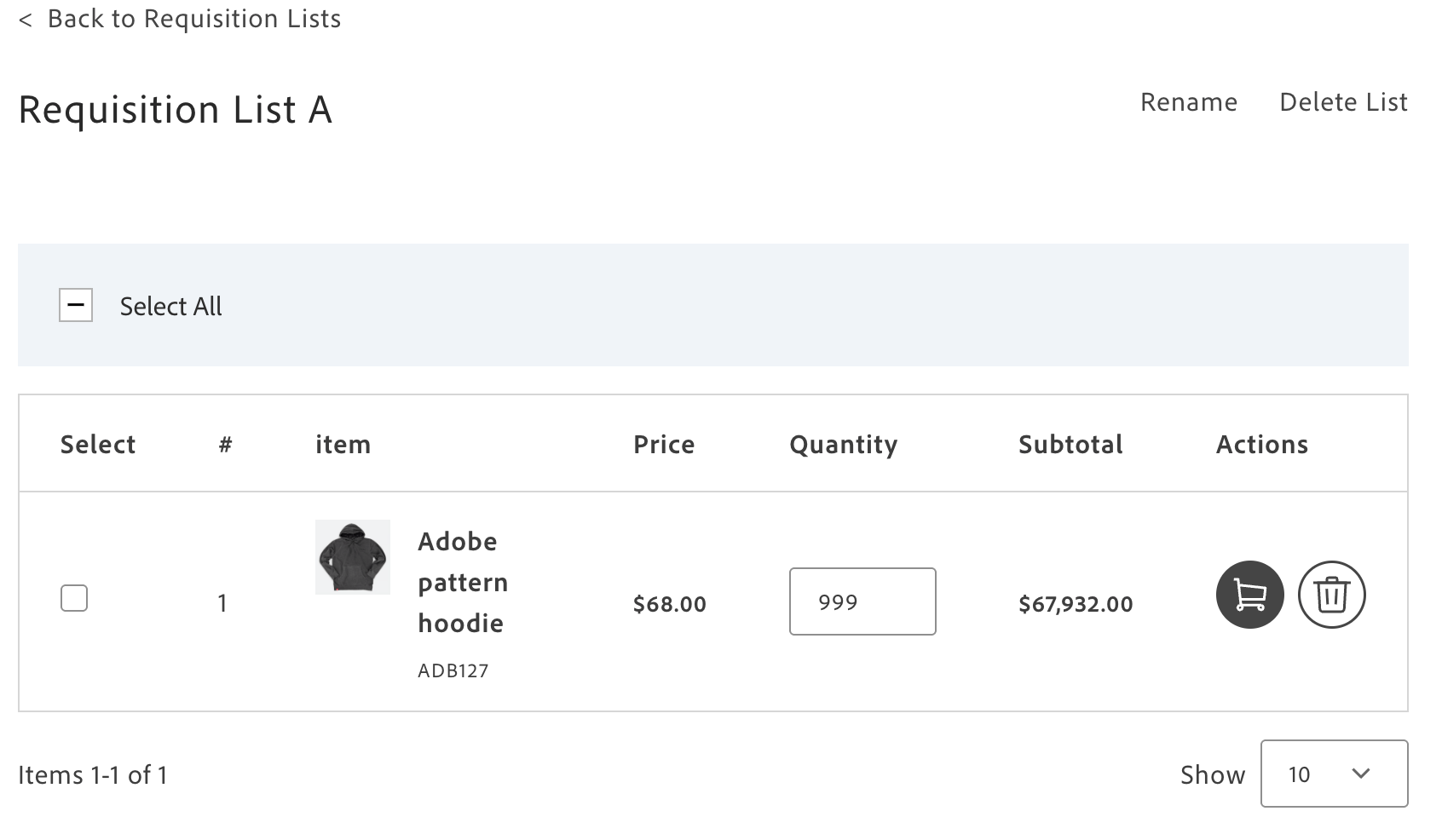\n</Diagram>\n\n\n## Configuration\n\nThe `RequisitionListView` container provides the following configuration options:\n\n\n| Parameter | Type | Req? | Description |\n|---|---|---|---|\n| `requisitionListUid` | `string` | Yes | Specifies the UID of the requisition list to display. Must be a base64-encoded string. If an invalid UID is provided, renders the `NotFound` state. Fetches the requisition list data internally using this identifier. |\n| `skipProductLoading` | `boolean` | No | Controls whether to skip automatic product data fetching on component mount. Set to true in test environments to prevent API calls or when product data is loaded externally. |\n| `pageSize` | `number` | No | Sets the number of items displayed per page for pagination. Controls how many requisition list items appear in each page view. Defaults to DEFAULT_PAGE_SIZE if not specified. |\n| `selectedItems` | `Set<string>` | Yes | Provides a Set of selected item UIDs for batch operations. Tracks which items are selected for actions like adding to cart or deleting. Required to enable multi-select functionality. |\n| `routeRequisitionListGrid` | `function` | No | Generates the URL for navigating back to the requisition list grid view. Use to implement breadcrumb navigation, back buttons, or custom routing logic that preserves query parameters or application state. |\n| `fallbackRoute` | `string` | No | Sets the fallback URL to redirect when requisition lists are not enabled or unavailable. Defaults to '/`customer/account`'. Use to provide graceful degradation when B2B features are disabled. |\n| `getProductData` | `function` | Yes | Fetches products by SKU from the catalog service. Takes an array of SKUs and returns an array of products with all their data. |\n| `enrichConfigurableProducts` | `function` | Yes | Enriches the configurable products contained in requisition list items. Takes an array of items and returns the same array with configured product data attached. |\n| `initialData` | `object` | No | Preloaded data for the model before backend data is fetched. Use for testing, SSR, or improving initial load. |\n\n\n## Slots\n\nThis container does not expose any customizable slots.\n\n## Usage\n\nThe following example demonstrates how to use the `RequisitionListView` container:\n\n```js\n\n\nawait provider.render(RequisitionListView, {\n requisitionListUid,\n routeRequisitionListGrid: () => `/customer/requisition-lists`\n})(block);\n```\n\n{/* This documentation is auto-generated from: https://github.com/adobe-commerce/storefront-requisition-list */}"
|
|
563
|
+
},
|
|
564
|
+
{
|
|
565
|
+
"path": "dropins-b2b/requisition-list/dictionary",
|
|
566
|
+
"title": "Requisition List Dictionary",
|
|
567
|
+
"description": "Customize user-facing text and labels in the Requisition List drop-in for localization and branding.",
|
|
568
|
+
"content": "The **Requisition List dictionary** contains all user-facing text, labels, and messages displayed by this drop-in. Customize the dictionary to:\n\n- **Localize** the drop-in for different languages and regions\n- **Customize** labels and messages to match your brand voice\n- **Override** default text without modifying source code for the drop-in\n\nDictionaries use the **i18n (internationalization)** pattern, where each text string is identified by a unique key path.\n\n\n## How to customize\n\nOverride dictionary values during drop-in initialization. The drop-in deep-merges your custom values with the defaults.\n\n```javascript\n\nawait initialize({\n langDefinitions: {\n en_US: {\n \"RequisitionList\": {\n \"containerTitle\": {\n \"0\": \"Custom value\",\n \"1\": \"Custom value\"\n }\n }\n }\n }\n});\n```\n\nYou only need to include the keys you want to change. For multi-language support and advanced patterns, see the [Dictionary customization guide](https://experienceleague.adobe.com/developer/commerce/storefront/dropins/all/dictionaries/).\n\n## Default keys and values\n\nBelow are the default English (`en_US`) strings provided by the **Requisition List** drop-in:\n\n```json title=\"en_US.json\"\n{\n \"RequisitionList\": {\n \"containerTitle\": \"Requisition Lists\",\n \"RequisitionListWrapper\": {\n \"name\": \"Name & Description\",\n \"itemsCount\": \"Items\",\n \"lastUpdated\": \"Latest activity\",\n \"actions\": \"Actions\",\n \"loginMsg\": \"Please login\",\n \"deleteRequisitionListTitle\": \"Are you sure you want to delete this Requisition List?\",\n \"deleteRequisitionListMessage\": \"Requisition List will be permanently deleted. This action can not be undone.\",\n \"confirmAction\": \"Confirm\",\n \"cancelAction\": \"Cancel\",\n \"emptyList\": \"No Requisition Lists found\"\n },\n \"AddNewReqList\": {\n \"addNewReqListBtn\": \"Add new Requisition List\"\n },\n \"RequisitionListItem\": {\n \"actionUpdate\": \"Update\",\n \"actionDelete\": \"Delete\"\n },\n \"RequisitionListForm\": {\n \"actionCancel\": \"Cancel\",\n \"actionSave\": \"Save\",\n \"requiredField\": \"This is a required field.\",\n \"nameMinLength\": \"Name must be at least characters long.\",\n \"nameInvalidCharacters\": \"Name contains invalid characters. Only letters, numbers, spaces, and basic punctuation are allowed.\",\n \"floatingLabel\": \"Requisition List Name *\",\n \"placeholder\": \"Requisition List Name\",\n \"label\": \"Description\",\n \"updateTitle\": \"Update Requisition List\",\n \"createTitle\": \"Create Requisition List\",\n \"addToRequisitionList\": \"Add to Requisition List\"\n },\n \"RequisitionListSelector\": {\n \"addToNewRequisitionList\": \"Add to New Requisition List\",\n \"addToSelected\": \"Add to Selected List\"\n },\n \"RequisitionListAlert\": {\n \"errorCreate\": \"Error creating requisition list.\",\n \"successCreate\": \"Requisition list created successfully.\",\n \"errorAddToCart\": \"Error adding item to cart.\",\n \"successAddToCart\": \"Item(s) added to cart successfully.\",\n \"errorUpdateQuantity\": \"Error updating quantity.\",\n \"successUpdateQuantity\": \"Item quantity updated successfully.\",\n \"errorUpdate\": \"Error updating requisition list.\",\n \"successUpdate\": \"Requisition list updated successfully.\",\n \"errorDeleteItem\": \"Error deleting item.\",\n \"successDeleteItem\": \"Item(s) deleted successfully.\",\n \"errorDeleteReqList\": \"Error deleting requisition list.\",\n \"successDeleteReqList\": \"Requisition list deleted successfully.\",\n \"errorMove\": \"Error moving item(s) to cart.\",\n \"successMove\": \"Item(s) successfully moved to cart.\",\n \"partialMoveSuccess\": \" product(s) successfully added and product(s) couldn't be added to your shopping cart.\",\n \"errorAddToRequisitionList\": \"Error adding item(s) to requisition list.\",\n \"successAddToRequisitionList\": \"Item(s) successfully added to requisition list.\"\n },\n \"RequisitionListView\": {\n \"actionDelete\": \"Delete\",\n \"statusDeleting\": \"Deleting...\",\n \"actionDeleteSelected\": \"Delete Selected\",\n \"actionDeleteSelectedItems\": \"Delete selected items\",\n \"actionSelect\": \"Select\",\n \"actionSelectAll\": \"Select All\",\n \"actionSelectNone\": \"Select None\",\n \"actionAddToCart\": \"Add to Cart\",\n \"statusAddingToCart\": \"Adding...\",\n \"actionAddSelectedToCart\": \"Add Selected to Cart\",\n \"statusBulkAddingToCart\": \"Adding to Cart...\",\n \"actionUpdateQuantity\": \"Update\",\n \"statusUpdatingQuantity\": \"Updating...\",\n \"errorUpdateQuantity\": \"Error updating quantity\",\n \"successUpdateQuantity\": \"Item quantity updated successfully.\",\n \"actionBackToRequisitionListsOverview\": \"Back to requisition lists overview\",\n \"actionBackToRequisitionLists\": \"Back to Requisition Lists\",\n \"actionRename\": \"Rename\",\n \"actionDeleteList\": \"Delete List\",\n \"deleteListTitle\": \"Delete Requisition List?\",\n \"deleteListMessage\": \"Are you sure you want to delete this requisition list? This action cannot be undone.\",\n \"deleteItemsTitle\": \"Delete Item(s)?\",\n \"deleteItemsMessage\": \"Are you sure you want to delete the selected item(s) from this requisition list? This action cannot be undone.\",\n \"confirmAction\": \"Delete\",\n \"cancelAction\": \"Cancel\",\n \"emptyRequisitionList\": \" Requisition List is empty\",\n \"productListTable\": {\n \"headers\": {\n \"productName\": \"Product name\",\n \"sku\": \"SKU\",\n \"price\": \"Price\",\n \"quantity\": \"Quantity\",\n \"subtotal\": \"Subtotal\",\n \"actions\": \"Actions\"\n },\n \"itemQuantity\": \"Item quantity\",\n \"outOfStock\": \"Out of stock\",\n \"onlyXLeftInStock\": \"Only left in stock\"\n },\n \"errorLoadPage\": \"Failed to load page\",\n \"errorLoadingProducts\": \"Failed to load product data\",\n \"notFoundTitle\": \"Requisition List Not Found\",\n \"notFoundMessage\": \"The requisition list you are looking for does not exist or you do not have access to it.\",\n \"notFoundActionLabel\": \"Back to Requisition Lists\"\n },\n \"RequisitionListsNotEnabled\": {\n \"title\": \"Requisition Lists Not Available\",\n \"message\": \"Requisition Lists are not available. Please contact your administrator for more information.\",\n \"actionLabel\": \"Go to My Account\"\n },\n \"PageSizePicker\": {\n \"show\": \"Show\",\n \"itemsPerPage\": \"Items per page\"\n },\n \"PaginationItemsCounter\": {\n \"itemsCounter\": \"Items - of \"\n }\n }\n}\n```"
|
|
569
|
+
},
|
|
570
|
+
{
|
|
571
|
+
"path": "dropins-b2b/requisition-list/events",
|
|
572
|
+
"title": "Requisition List Events and Data",
|
|
573
|
+
"description": "Learn about the events used by the Requisition List drop-in and the data available within those events.",
|
|
574
|
+
"content": "The **Requisition List** drop-in uses the [event bus](https://experienceleague.adobe.com/developer/commerce/storefront/sdk/reference/events) to emit and listen to events for communication between drop-ins and external integrations.\n\n\n## Events reference\n\n{/* EVENTS_TABLE_START */}\n\n\n| Event | Direction | Description |\n|-------|-----------|-------------|\n| [requisitionList/alert](#requisitionlistalert-emits-and-listens) | Emits and listens | Emitted when an alert or notification is triggered. |\n| [requisitionList/data](#requisitionlistdata-emits-and-listens) | Emits and listens | Emitted when data is available or changes. |\n| [requisitionList/initialized](#requisitionlistinitialized-emits-and-listens) | Emits and listens | Emitted when the component completes initialization. |\n| [requisitionLists/data](#requisitionlistsdata-emits-and-listens) | Emits and listens | Emitted when data is available or changes. |\n\n\n{/* EVENTS_TABLE_END */}\n\n## Event details\n\nThe following sections provide detailed information about each event, including its direction, event payload, and usage examples.\n\n### `requisitionList/alert` (emits and listens)\n\nEmitted when the drop-in shows an alert or notification related to requisition list actions.\n\n#### Event payload\n\n```typescript\nRequisitionListActionPayload\n```\n\nSee [`RequisitionListActionPayload`](#requisitionlistactionpayload) for full type definition.\n\n#### Example\n\n```js\n\nevents.on('requisitionList/alert', (payload) => {\n console.log('requisitionList/alert event received:', payload);\n // Add your custom logic here\n});\n```\n\n### `requisitionList/data` (emits and listens)\n\nTriggered when data is available or changes. It emits and listens for updates to a single requisition list.\n\n#### Event payload\n\n```typescript\nRequisitionList | null\n```\n\nSee [`RequisitionList`](#requisitionlist) for full type definition.\n\n#### Example\n\n```js\n\nevents.on('requisitionList/data', (payload) => {\n console.log('requisitionList/data event received:', payload);\n // Add your custom logic here\n});\n```\n\n### `requisitionList/initialized` (emits and listens)\n\nTriggered when the component completes initialization.\n\n#### Event payload\n\n#### Example\n\n```js\n\nevents.on('requisitionList/initialized', (payload) => {\n console.log('requisitionList/initialized event received:', payload);\n // Add your custom logic here\n});\n```\n\n### `requisitionLists/data` (emits and listens)\n\nTriggered when data is available or changes. It emits and listens for updates to the collection of requisition lists.\n\n#### Event payload\n\n```typescript\nRequisitionList[] | null\n```\n\nSee [`RequisitionList`](#requisitionlist) for full type definition.\n\n#### Example\n\n```js\n\nevents.on('requisitionLists/data', (payload) => {\n console.log('requisitionLists/data event received:', payload);\n // Add your custom logic here\n});\n```\n\n## Data Models\n\nThe following data models are used in event payloads for this drop-in.\n\n### RequisitionList\n\nUsed in: [`requisitionList/data`](#requisitionlistdata-emits-and-listens), [`requisitionLists/data`](#requisitionlistsdata-emits-and-listens).\n\n```ts\ninterface RequisitionList {\n uid: string;\n name: string;\n description: string;\n updated_at: string;\n items_count: number;\n items: Item[];\n page_info?: PageInfo;\n}\n```\n\n### RequisitionListActionPayload\n\nUsed in: [`requisitionList/alert`](#requisitionlistalert-emits-and-listens).\n\n```ts\ninterface RequisitionListActionPayload {\n action: 'add' | 'delete' | 'update' | 'move';\n type: 'success' | 'error';\n context: 'product' | 'requisitionList';\n skus?: string[]; // for product-related actions\n message?: string[]; // for uncontrolled/custom messages\n }\n```"
|
|
575
|
+
},
|
|
576
|
+
{
|
|
577
|
+
"path": "dropins-b2b/requisition-list/functions",
|
|
578
|
+
"title": "Requisition List Functions",
|
|
579
|
+
"description": "API functions provided by the Requisition List drop-in for programmatic control and customization.",
|
|
580
|
+
"content": "The Requisition List drop-in provides **12 API functions** for managing requisition lists and their items, including creating lists, adding/removing products, and managing list metadata.\n\n\n| Function | Description |\n| --- | --- |\n| [`addProductsToRequisitionList`](#addproductstorequisitionlist) | Adds products to a requisition list. |\n| [`addRequisitionListItemsToCart`](#addrequisitionlistitemstocart) | Adds the chosen items from a requisition list to the logged-in user's cart. |\n| [`copyItemsBetweenRequisitionLists`](#copyitemsbetweenrequisitionlists) | Copies items from one requisition list to another for a logged-in user. |\n| [`createRequisitionList`](#createrequisitionlist) | Creates a new requisition list with the name and description provided for the logged-in user. |\n| [`deleteRequisitionList`](#deleterequisitionlist) | Deletes a requisition list identified by UID. |\n| [`deleteRequisitionListItems`](#deleterequisitionlistitems) | Deletes items from a requisition list. |\n| [`getRequisitionList`](#getrequisitionlist) | Returns information about the requested requisition list for the logged-in user. |\n| [`getRequisitionLists`](#getrequisitionlists) | Returns the requisition lists for the logged-in user. |\n| [`getStoreConfig`](#getstoreconfig) | Returns details about the store configuration. |\n| [`moveItemsBetweenRequisitionLists`](#moveitemsbetweenrequisitionlists) | Moves items from one requisition list to another for a logged-in user. |\n| [`updateRequisitionList`](#updaterequisitionlist) | Updates an existing requisition list with the name and description provided for the logged-in user. |\n| [`updateRequisitionListItems`](#updaterequisitionlistitems) | Updates the items of an existing requisition list with the quantity and options provided for the logged-in user. |\n\n\n## addProductsToRequisitionList\n\nAdds products to a requisition list.\n\n```ts\nconst addProductsToRequisitionList = async (\n requisitionListUid: string,\n requisitionListItems: Array<RequisitionListItemsInput>\n): Promise<RequisitionList | null>\n```\n\n\n| Parameter | Type | Req? | Description |\n|---|---|---|---|\n| `requisitionListUid` | `string` | Yes | The unique identifier for the requisition list to which products will be added. |\n| `requisitionListItems` | `Array<RequisitionListItemsInput>` | Yes | An array of product objects to add to the requisition list. Each object includes the product SKU, quantity, and optional configuration like parent SKU for configurable products, selected options (color, size), and entered options (custom text fields). |\n\n\n### Events\n\nEmits the `requisitionList/data` event.\n\n### Returns\n\nReturns [`RequisitionList`](#requisitionlist) or `null`.\n\n## addRequisitionListItemsToCart\n\nAdds the chosen items from a requisition list to the logged-in user's cart.\n\n```ts\nconst addRequisitionListItemsToCart = async (\n requisitionListUid: string,\n requisitionListItemUids: Array<string>\n): Promise<Array<AddToCartError> | null>\n```\n\n\n| Parameter | Type | Req? | Description |\n|---|---|---|---|\n| `requisitionListUid` | `string` | Yes | The unique identifier for the requisition list containing the items to add to the cart. |\n| `requisitionListItemUids` | `Array<string>` | Yes | An array of requisition list item UIDs to add to the cart. These are the unique identifiers for specific items within the list, not product SKUs. |\n\n\n### Events\n\nDoes not emit any drop-in events.\n\n### Returns\n\nReturns `Array<AddToCartError> | null`.\n\n## createRequisitionList\n\nCreates a new requisition list with the name and description provided for the logged-in user.\n\n```ts\nconst createRequisitionList = async (\n name: string,\n description?: string\n): Promise<RequisitionList | null>\n```\n\n\n| Parameter | Type | Req? | Description |\n|---|---|---|---|\n| `name` | `string` | Yes | The display name for the new requisition list. This helps users identify and organize their lists (for example, `Office Supplies Q1`, `Weekly Inventory Restock`). |\n| `description` | `string` | No | An optional text description providing additional context about the requisition list's purpose or contents (for example, `Monthly recurring orders for maintenance supplies`). |\n\n\n### Events\n\nEmits the `requisitionList/data` event.\n\n### Returns\n\nReturns [`RequisitionList`](#requisitionlist) or `null`.\n\n## deleteRequisitionList\n\nDeletes a requisition list identified by uid.\n\n```ts\nconst deleteRequisitionList = async (\n requisitionListUid: string\n): Promise<{\n items: RequisitionList[];\n page_info: any;\n status: any;\n} | null>\n```\n\n\n| Parameter | Type | Req? | Description |\n|---|---|---|---|\n| `requisitionListUid` | `string` | Yes | The unique identifier for the requisition list to delete. This operation is permanent and removes the list and all its items. |\n\n\n### Events\n\nEmits the `requisitionLists/data` event.\n\n### Returns\n\n```ts\nPromise<{\n items: RequisitionList[];\n page_info: any;\n status: any;\n} | null>\n```\n\nSee [`RequisitionList`](#requisitionlist).\n\n## deleteRequisitionListItems\n\nDeletes items from a requisition list.\n\n```ts\nconst deleteRequisitionListItems = async (\n requisitionListUid: string,\n items: Array<string>,\n pageSize: number,\n currentPage: number,\n enrichConfigurableProducts?: (items: Item[]) => Promise<Item[]>\n): Promise<RequisitionList | null>\n```\n\n\n| Parameter | Type | Req? | Description |\n|---|---|---|---|\n| `requisitionListUid` | `string` | Yes | The unique identifier for the requisition list from which items will be removed. |\n| `items` | `Array<string>` | Yes | An array of requisition list item UIDs to remove. These are the unique identifiers returned in the list's items array, not product SKUs. |\n| `pageSize` | `number` | Yes | The number of items to return per page in the updated requisition list response. |\n| `currentPage` | `number` | Yes | The page number for pagination (1-indexed). Used to retrieve a specific page of items after deletion. |\n| `enrichConfigurableProducts` | `items: Item[]` | No | See function signature above |\n\n\n### Events\n\nEmits the `requisitionList/data` event.\n\n### Returns\n\nReturns [`RequisitionList`](#requisitionlist) or `null`.\n\n## getRequisitionList\n\nReturns information about the requested requisition list for the logged-in user.\n\n```ts\nconst getRequisitionList = async (\n requisitionListID: string,\n currentPage?: number,\n pageSize?: number,\n enrichConfigurableProducts?: (items: Item[]) => Promise<Item[]>\n): Promise<RequisitionList | null>\n```\n\n\n| Parameter | Type | Req? | Description |\n|---|---|---|---|\n| `requisitionListID` | `string` | Yes | The unique identifier for the requisition list to retrieve. Returns the list metadata and all items. |\n| `currentPage` | `number` | No | The page number for pagination (1-indexed). Defaults to page 1 if not specified. |\n| `pageSize` | `number` | No | The number of items to return per page. Controls pagination of the requisition list items. |\n| `enrichConfigurableProducts` | `items: Item[]` | No | See function signature above |\n\n\n### Events\n\nEmits the `requisitionList/data` event.\n\n### Returns\n\nReturns [`RequisitionList`](#requisitionlist) or `null`.\n\n## getRequisitionLists\n\nReturns the requisition lists for the logged-in user.\n\n```ts\nconst getRequisitionLists = async (\n currentPage?: number,\n pageSize?: number,\n listItemsPageSize?: number\n): Promise<RequisitionList[] | null>\n```\n\n\n| Parameter | Type | Req? | Description |\n|---|---|---|---|\n| `currentPage` | `number` | No | The page number for pagination (1-indexed). Used to navigate through multiple pages of requisition lists. |\n| `pageSize` | `number` | No | The number of requisition lists to return per page. Controls how many lists appear on each page. |\n| `listItemsPageSize` | `number` | No | Sets how many items are loaded per list in each GraphQL request. The default is `100`. If a list has more than 100 items, additional requests are automatically made so users (like on a PDP “already on list” view) can see all items. |\n\n\n### Events\n\nEmits the `requisitionLists/data` event.\n\n### Returns\n\nReturns an array of [`RequisitionList`](#requisitionlist) objects or `null`.\n\n## getStoreConfig\n\nReturns details about the store configuration.\n\n```ts\nconst getStoreConfig = async (): Promise<any>\n```\n\n### Events\n\nDoes not emit any drop-in events.\n\n### Returns\n\nReturns `void`.\n\n## updateRequisitionList\n\nUpdates an existing requisition list with the name and description provided for the logged-in user.\n\n```ts\nconst updateRequisitionList = async (\n requisitionListUid: string,\n name: string,\n description?: string,\n pageSize?: number,\n currentPage?: number,\n enrichConfigurableProducts?: (items: Item[]) => Promise<Item[]>\n): Promise<RequisitionList | null>\n```\n\n\n| Parameter | Type | Req? | Description |\n|---|---|---|---|\n| `requisitionListUid` | `string` | Yes | The unique identifier for the requisition list to update. |\n| `name` | `string` | Yes | The new display name for the requisition list. Updates the list's title. |\n| `description` | `string` | No | The new text description for the requisition list. Updates the list's purpose or context information. |\n| `pageSize` | `number` | No | The number of items to return per page in the updated requisition list response. |\n| `currentPage` | `number` | No | The page number for pagination (1-indexed) in the updated requisition list response. |\n| `enrichConfigurableProducts` | `items: Item[]` | No | See function signature above |\n\n\n### Events\n\nEmits the `requisitionList/data` event.\n\n### Returns\n\nReturns [`RequisitionList`](#requisitionlist) or `null`.\n\n## updateRequisitionListItems\n\nUpdates the items of an existing requisition list with the quantity and options provided for the logged-in user.\n\n```ts\nconst updateRequisitionListItems = async (\n requisitionListUid: string,\n requisitionListItems: Array<UpdateRequisitionListItemsInput>,\n pageSize: number,\n currentPage: number,\n enrichConfigurableProducts?: (items: Item[]) => Promise<Item[]>\n): Promise<RequisitionList | null>\n```\n\n\n| Parameter | Type | Req? | Description |\n|---|---|---|---|\n| `requisitionListUid` | `string` | Yes | The unique identifier for the requisition list containing the items to update. |\n| `requisitionListItems` | `Array<UpdateRequisitionListItemsInput>` | Yes | An array of requisition list items to update. Each object includes the item UID and the fields to modify (such as quantity, selected options, or entered options). |\n| `pageSize` | `number` | Yes | The number of items to return per page in the updated requisition list response. |\n| `currentPage` | `number` | Yes | The page number for pagination (1-indexed) in the updated requisition list response. |\n| `enrichConfigurableProducts` | `items: Item[]` | No | See function signature above |\n\n\n### Events\n\nEmits the `requisitionList/data` event.\n\n### Returns\n\nReturns [`RequisitionList`](#requisitionlist) or `null`.\n\n## moveItemsBetweenRequisitionLists\n\nMoves items from one requisition list to another for a logged-in user.\n\n```ts\nconst moveItemsBetweenRequisitionLists = async (\n sourceRequisitionListUid: string,\n destinationRequisitionListUid: string,\n requisitionListItemUids: string[],\n pageSize: number,\n currentPage: number\n): Promise<MoveItemsResult | null>\n```\n\n\n| Parameter | Type | Req? | Description |\n|---|---|---|---|\n| `sourceRequisitionListUid` | `string` | Yes | The unique identifier for the requisition list from which items will be moved. |\n| `destinationRequisitionListUid` | `string` | Yes | The unique identifier for the requisition list to which items will be moved. |\n| `requisitionListItemUids` | `string[]` | Yes | An array of requisition list item UIDs to move. These are the unique identifiers for specific items within the source list. |\n| `pageSize` | `number` | Yes | The number of items to return per page in the updated requisition list responses. |\n| `currentPage` | `number` | Yes | The page number for pagination (1-indexed) in the updated requisition list responses. |\n\n\n### Events\n\nEmits the `requisitionList/data` event for the source list after items are moved.\n\n### Returns\n\nReturns an object with the following structure, or `null` if the operation fails:\n\n```ts\ninterface MoveItemsResult {\n sourceList: RequisitionList | null;\n destinationList: RequisitionList | null;\n}\n```\n\n- `sourceList`: The updated source requisition list after items have been moved, or `null` if not available.\n- `destinationList`: The updated destination requisition list after items have been added, or `null` if not available.\n\n## copyItemsBetweenRequisitionLists\n\nCopies items from one requisition list to another for a logged-in user.\n\n```ts\nconst copyItemsBetweenRequisitionLists = async (\n sourceRequisitionListUid: string,\n destinationRequisitionListUid: string,\n requisitionListItemUids: string[]\n): Promise<CopyItemsResult | null>\n```\n\n\n| Parameter | Type | Req? | Description |\n|---|---|---|---|\n| `sourceRequisitionListUid` | `string` | Yes | The unique identifier for the requisition list from which items will be copied. |\n| `destinationRequisitionListUid` | `string` | Yes | The unique identifier for the requisition list to which items will be copied. |\n| `requisitionListItemUids` | `string[]` | Yes | An array of requisition list item UIDs to copy. These are the unique identifiers for specific items within the source list. |\n\n\n### Events\n\nDoes not emit any drop-in events.\n\n### Returns\n\nReturns an object with the following structure, or `null` if the operation fails:\n\n```ts\ninterface CopyItemsResult {\n destinationList: RequisitionList | null;\n}\n```\n\n- `destinationList`: The updated destination requisition list after items have been copied, or `null` if not available.\n\n## Data Models\n\nThe following data models are used by functions in this drop-in.\n\n### RequisitionList\n\nThe `RequisitionList` object is returned by the following functions: [`addProductsToRequisitionList`](#addproductstorequisitionlist), [`createRequisitionList`](#createrequisitionlist), [`deleteRequisitionList`](#deleterequisitionlist), [`deleteRequisitionListItems`](#deleterequisitionlistitems), [`getRequisitionList`](#getrequisitionlist), [`getRequisitionLists`](#getrequisitionlists), [`updateRequisitionList`](#updaterequisitionlist), [`updateRequisitionListItems`](#updaterequisitionlistitems), [`moveItemsBetweenRequisitionLists`](#moveitemsbetweenrequisitionlists), [`copyItemsBetweenRequisitionLists`](#copyitemsbetweenrequisitionlists).\n\n```ts\ninterface RequisitionList {\n uid: string;\n name: string;\n description: string;\n updated_at: string;\n items_count: number;\n items: Item[];\n page_info?: PageInfo;\n}\n```\n\n{/* This documentation is auto-generated from the drop-in source repository: REPO_URL */}"
|
|
581
|
+
},
|
|
582
|
+
{
|
|
583
|
+
"path": "dropins-b2b/requisition-list/initialization",
|
|
584
|
+
"title": "Requisition List initialization",
|
|
585
|
+
"description": "Configure the Requisition List drop-in with language definitions, custom data models, and drop-in-specific options.",
|
|
586
|
+
"content": "The **Requisition List initializer** configures the drop-in for managing saved product lists and recurring orders. Use initialization to customize how requisition list data is displayed and enable internationalization for multi-language B2B storefronts.\n\n\n## Configuration options\n\nThe following table describes the configuration options available for the **Requisition List** initializer:\n\n\n| Parameter | Type | Req? | Description |\n|---|---|---|---|\n| `langDefinitions` | [`LangDefinitions`](#langdefinitions) | No | Language definitions for internationalization (i18n). Override dictionary keys for localization or branding. |\n\n\n## Default configuration\n\nThe initializer runs with these defaults when no configuration is provided:\n\n```javascript title=\"scripts/initializers/requisition-list.js\"\n\n\n// All configuration options are optional\nawait initializers.mountImmediately(initialize, {\n langDefinitions: {}, // Uses built-in English strings\n models: {}, // Uses default data models\n});\n```\n\n## Language definitions\n\nOverride dictionary keys for localization or branding. The `langDefinitions` object maps locale keys to custom strings that override default text for the drop-in.\n\n```javascript title=\"scripts/initializers/requisition-list.js\"\n\n\nconst customStrings = {\n 'AddToCart': 'Add to Bag',\n 'Checkout': 'Complete Purchase',\n 'Price': 'Cost',\n};\n\nconst langDefinitions = {\n default: customStrings,\n};\n\nawait initializers.mountImmediately(initialize, { langDefinitions });\n```\n\n> **Tip**\n>\nFor complete dictionary customization including all available keys and multi-language support, see the [Requisition List Dictionary](https://experienceleague.adobe.com/developer/commerce/storefront/dropins-b2b/requisition-list/dictionary/) page.\n\n\n## Customizing data models\n\nExtend or transform data models by providing custom transformer functions. Use the `models` option to add custom fields or modify existing data structures returned from the backend.\n\n### Available models\n\nThe following models can be customized through the `models` configuration option:\n\n\n| Model | Description |\n|---|---|\n| [`RequisitionListModel`](#requisitionlistmodel) | Transforms requisition list data from `GraphQL` including list details, items, quantities, and metadata. Use this to add custom fields or modify existing requisition list data structures. |\n| [`RequisitionListItemModel`](#requisitionlistitemmodel) | Transforms requisition list item data including product details, quantities, and custom options. Use this to add custom fields or modify item data structures. |\n\n\nThe following example shows how to customize the `RequisitionListModel` model for the **Requisition List** drop-in:\n\n```javascript title=\"scripts/initializers/requisition-list.js\"\n\n\nconst models = {\n RequisitionListModel: {\n transformer: (data) => ({\n // Add formatted last updated date\n lastUpdatedDisplay: data?.updated_at ? \n new Date(data.updated_at).toLocaleDateString() : null,\n // Add total items summary\n itemsSummary: `${data?.items_count || 0} items`,\n // Add list description preview (first 50 chars)\n descriptionPreview: data?.description ? \n data.description.substring(0, 50) + '...' : null,\n }),\n },\n};\n\nawait initializers.mountImmediately(initialize, { models });\n```\n\n\n## Configuration types\n\nThe following TypeScript definitions show the structure of each configuration object:\n\n### langDefinitions\n\nMaps locale identifiers to dictionaries of key-value pairs. The `default` locale is used as the fallback when no specific locale matches. Each dictionary key corresponds to a text string used in the drop-in UI.\n\n```typescript\nlangDefinitions?: {\n [locale: string]: {\n [key: string]: string;\n };\n};\n```\n\n\n## Model definitions\n\nThe following TypeScript definitions show the structure of each customizable model:\n\n### RequisitionListModel\n\n```typescript\nexport interface RequisitionList {\n uid: string;\n name: string;\n description: string;\n updated_at: string;\n items_count: number;\n items: Item[];\n page_info?: PageInfo;\n}\n\nexport interface PageInfo {\n page_size: number;\n current_page: number;\n total_pages: number;\n}\n```\n\n### RequisitionListItemModel\n\n```typescript\nexport interface Item {\n uid: string;\n sku: string;\n product: Product;\n quantity: number;\n customizable_options?: {\n uid: string;\n is_required: boolean;\n label: string;\n sort_order: number;\n type: string;\n values: {\n uid: string;\n label: string;\n price: { type: string; units: string; value: number };\n value: string;\n }[];\n }[];\n bundle_options?: {\n uid: string;\n label: string;\n type: string;\n values: {\n uid: string;\n label: string;\n original_price: { value: number; currency: string };\n priceV2: { value: number; currency: string };\n quantity: number;\n }[];\n }[];\n configurable_options?: {\n option_uid: string;\n option_label: string;\n value_uid: string;\n value_label: string;\n }[];\n links?: {\n uid: string;\n price?: number;\n sample_url?: string;\n sort_order?: number;\n title?: string;\n }[];\n samples?: {\n url?: string;\n sort_order?: number;\n title?: string;\n }[];\n gift_card_options?: {\n amount?: { value?: number; currency?: string; };\n custom_giftcard_amount?: { value?: number; currency?: string; };\n message?: string;\n recipient_email?: string;\n recipient_name?: string;\n sender_name?: string;\n sender_email?: string;\n };\n}\n\nexport interface Product {\n sku: string;\n parent_sku: string;\n name: string;\n shortDescription: string;\n metaDescription: string;\n metaKeyword: string;\n metaTitle: string;\n description: string;\n addToCartAllowed: boolean;\n url: string;\n urlKey: string;\n externalId: string;\n images: {\n url: string;\n label: string;\n roles: string[];\n }[];\n}\n```"
|
|
587
|
+
},
|
|
588
|
+
{
|
|
589
|
+
"path": "dropins-b2b/requisition-list/quick-start",
|
|
590
|
+
"title": "Requisition List Quick Start",
|
|
591
|
+
"description": "Quick reference and getting started guide for the Requisition List drop-in.",
|
|
592
|
+
"content": "Get started with the Requisition List drop-in to enable reusable product lists for repeat B2B ordering.\n\n\n## Quick example\n\nThe Requisition List drop-in is included in the . This example shows the basic pattern:\n\n```js\n// 1. Import initializer (handles all setup)\n\n// 2. Import the container you need\n\n// 3. Import the provider\n\n// 4. Render in your block\nexport default async function decorate(block) {\n await provider.render(RequisitionListForm, {\n // Configuration options - see Containers page\n })(block);\n}\n```\n\n**New to drop-ins?** See the [Using drop-ins](https://experienceleague.adobe.com/developer/commerce/storefront/dropins/all/quick-start/) guide for complete step-by-step instructions.\n\n## Quick reference\n\n**Import paths:**\n- Initializer: `import '../../scripts/initializers/requisition-list.js'`\n- Containers: `import ContainerName from '@dropins/storefront-requisition-list/containers/ContainerName.js'`\n- Provider: `import { render } from '@dropins/storefront-requisition-list/render.js'`\n\n**Package:** `@dropins/storefront-requisition-list`\n\n**Version:** 1.2.0 (verify compatibility with your Commerce instance)\n\n**Example container:** `RequisitionListForm`\n\n## Learn more\n\n- [Containers](https://experienceleague.adobe.com/developer/commerce/storefront/dropins-b2b/requisition-list/containers/) - Available UI components and configuration options\n- [Initialization](https://experienceleague.adobe.com/developer/commerce/storefront/dropins-b2b/requisition-list/initialization/) - Customize initializer settings and data models\n- [Functions](https://experienceleague.adobe.com/developer/commerce/storefront/dropins-b2b/requisition-list/functions/) - Control drop-in behavior programmatically\n- [Events](https://experienceleague.adobe.com/developer/commerce/storefront/dropins-b2b/requisition-list/events/) - Listen to and respond to drop-in state changes\n- [Slots](https://experienceleague.adobe.com/developer/commerce/storefront/dropins-b2b/requisition-list/slots/) - Extend containers with custom content"
|
|
593
|
+
},
|
|
594
|
+
{
|
|
595
|
+
"path": "dropins-b2b/requisition-list/slots",
|
|
596
|
+
"title": "Requisition List Slots",
|
|
597
|
+
"description": "Customize UI sections in the Requisition List drop-in using slots.",
|
|
598
|
+
"content": "The Requisition List drop-in exposes slots for customizing specific UI sections. Use slots to replace or extend container components. For default properties available to all slots, see [Extending drop-in components](https://experienceleague.adobe.com/developer/commerce/storefront/dropins/all/extending/).\n\n\n| Container | Slots |\n|-----------|-------|\n| [`RequisitionListGrid`](#requisitionlistgrid-slots) | `Header` |\n\n\n## RequisitionListGrid slots\n\nThe slots for the `RequisitionListGrid` container allow you to customize its appearance and behavior.\n\n```typescript\ninterface RequisitionListGridProps {\n slots?: {\n Header?: SlotProps;\n };\n}\n```\n\n### Header slot\n\nThe Header slot allows you to customize the header section of the `RequisitionListGrid` container.\n\n#### Example\n\n```js\n\n\nawait provider.render(RequisitionListGrid, {\n slots: {\n Header: (ctx) => {\n // Your custom implementation\n const element = document.createElement('div');\n element.innerText = 'Custom Header';\n ctx.appendChild(element);\n }\n }\n})(block);\n```"
|
|
599
|
+
},
|
|
600
|
+
{
|
|
601
|
+
"path": "dropins-b2b/requisition-list/styles",
|
|
602
|
+
"title": "Requisition List styles",
|
|
603
|
+
"description": "CSS classes and customization examples for the Requisition List drop-in.",
|
|
604
|
+
"content": "Customize the Requisition List drop-in using CSS classes and design tokens. This page covers the Requisition List-specific container classes and customization examples. For comprehensive information about design tokens, responsive breakpoints, and styling best practices, see [Styling Drop-In Components](https://experienceleague.adobe.com/developer/commerce/storefront/dropins/all/styling/).\n\n\n## Customization example\n\nAdd this to the CSS file of the specific where you're using the Requisition List drop-in.\n\nFor a complete list of available design tokens (colors, spacing, typography, and more), see the [Design tokens reference](https://experienceleague.adobe.com/developer/commerce/storefront/dropins/all/styling/#design-tokens-reference).\n\n```css title=\"styles/styles.css\" del={2-2} ins={3-3}\n.requisition-list-view__batch-actions {\n --batch-actions-background: #f0f4f8;\n --batch-actions-background: var(--color-brand-800);\n}\n```\n\n## Container classes\n\nThe Requisition List drop-in uses BEM-style class naming. Use the browser DevTools to inspect elements and find specific class names.\n\n```css\n/* BatchActions */\n.requisition-list-view__batch-actions {}\n.requisition-list-view__batch-actions-buttons {}\n.requisition-list-view__batch-actions-count-badge {}\n.requisition-list-view__batch-actions-delete-icon {}\n.requisition-list-view__batch-actions-left {}\n.requisition-list-view__batch-actions-select-label {}\n.requisition-list-view__batch-actions-select-toggle {}\n.requisition-list-view__batch-actions-select-toggle--active {}\n.requisition-list-view__bulk-actions {}\n\n/* EmptyList */\n.empty-list {}\n\n/* NotFound */\n.not-found {}\n\n/* PageSizePicker */\n.page-size-picker {}\n.page-size-picker__label {}\n.page-size-picker__select {}\n\n/* PaginationItemsCounter */\n.pagination-items-counter {}\n\n/* ProductListTable */\n.requisition-list-view-product-list-table-container {}\n.requisition-list-view-product-list-table-container__submit-container {}\n.requisition-list-view-product-list-table__checkbox {}\n.requisition-list-view-product-list-table__discount-container {}\n.requisition-list-view-product-list-table__index-container {}\n.requisition-list-view-product-list-table__item-container {}\n.requisition-list-view-product-list-table__item-details {}\n.requisition-list-view-product-list-table__low-stock {}\n.requisition-list-view-product-list-table__out-of-stock {}\n.requisition-list-view-product-list-table__product-configurable-name {}\n.requisition-list-view-product-list-table__product-name {}\n.requisition-list-view-product-list-table__quantity {}\n.requisition-list-view-product-list-table__sku {}\n.requisition-list-view-product-list-table__thumbnail {}\n\n/* RequisitionListActions */\n.requisition-list-actions {}\n.requisition-list-actions--selectable {}\n.requisition-list-actions__title {}\n\n/* RequisitionListForm */\n.requisition-list-form {}\n.requisition-list-form__actions {}\n.requisition-list-form__form {}\n.requisition-list-form__notification {}\n.requisition-list-form__title {}\n.requisition-list-form_progress-spinner {}\n\n/* RequisitionListGridWrapper */\n.dropin-button--tertiary {}\n.requisition-list-empty-list {}\n.requisition-list-grid-wrapper__actions {}\n.requisition-list-grid-wrapper__add-new {}\n.requisition-list-grid-wrapper__content {}\n.requisition-list-grid-wrapper__list-header {}\n.requisition-list-grid-wrapper__name__description {}\n.requisition-list-grid-wrapper__name__title {}\n.requisition-list-grid-wrapper__pagination {}\n.requisition-list-grid-wrapper__pagination-picker {}\n.requisition-list__alert-wrapper {}\n\n/* RequisitionListHeader */\n.requisition-list-header {}\n.requisition-list-header__action-link {}\n.requisition-list-header__actions {}\n.requisition-list-header__back {}\n.requisition-list-header__back-arrow {}\n.requisition-list-header__back-link {}\n.requisition-list-header__description {}\n.requisition-list-header__main {}\n.requisition-list-header__title {}\n.requisition-list-header__title-section {}\n\n/* RequisitionListModal */\n.dropin-modal {}\n.dropin-modal__body--full {}\n.dropin-modal__body--medium {}\n.dropin-modal__content {}\n.dropin-modal__header-title {}\n.dropin-modal__header-title-content {}\n.requisition-list-modal {}\n.requisition-list-modal--overlay {}\n.requisition-list-modal__buttons {}\n.requisition-list-modal__spinner {}\n\n/* RequisitionListPicker */\n.dropin-card--secondary {}\n.dropin-card__content {}\n.requisition-list-picker__form {}\n.requisition-list-picker__actions {}\n.requisition-list-picker__available-lists {}\n\n/* RequisitionListSelector */\n.requisition-list-actions {}\n.requisition-list-modal {}\n\n/* RequisitionListView */\n.requisition-list-view__container {}\n.requisition-list-view__loading {}\n.requisition-list-view__pagination {}\n.requisition-list-view__pagination-picker {}\n```\n\nFor the source CSS files, see the ."
|
|
605
|
+
}
|
|
606
|
+
]
|
|
607
|
+
}
|