@dropins/mcp 0.1.0
This diff represents the content of publicly available package versions that have been released to one of the supported registries. The information contained in this diff is provided for informational purposes only and reflects changes between package versions as they appear in their respective public registries.
- package/LICENSE.md +127 -0
- package/README.md +314 -0
- package/dist/common/project-reader.d.ts +55 -0
- package/dist/common/project-reader.js +173 -0
- package/dist/common/registry-loader.d.ts +101 -0
- package/dist/common/registry-loader.js +386 -0
- package/dist/common/response-handling.d.ts +12 -0
- package/dist/common/response-handling.js +21 -0
- package/dist/common/sanitize.d.ts +8 -0
- package/dist/common/sanitize.js +45 -0
- package/dist/common/synonyms.d.ts +9 -0
- package/dist/common/synonyms.js +127 -0
- package/dist/common/telemetry.d.ts +14 -0
- package/dist/common/telemetry.js +54 -0
- package/dist/common/types.d.ts +308 -0
- package/dist/common/types.js +1 -0
- package/dist/common/version.d.ts +2 -0
- package/dist/common/version.js +14 -0
- package/dist/index.d.ts +2 -0
- package/dist/index.js +136 -0
- package/dist/operations/analyze-project.d.ts +13 -0
- package/dist/operations/analyze-project.js +125 -0
- package/dist/operations/check-block-health.d.ts +19 -0
- package/dist/operations/check-block-health.js +1149 -0
- package/dist/operations/check-config.d.ts +13 -0
- package/dist/operations/check-config.js +228 -0
- package/dist/operations/explain-event-flow.d.ts +16 -0
- package/dist/operations/explain-event-flow.js +218 -0
- package/dist/operations/get-upgrade-diff.d.ts +13 -0
- package/dist/operations/get-upgrade-diff.js +144 -0
- package/dist/operations/list-api-functions.d.ts +13 -0
- package/dist/operations/list-api-functions.js +53 -0
- package/dist/operations/list-containers.d.ts +13 -0
- package/dist/operations/list-containers.js +44 -0
- package/dist/operations/list-design-tokens.d.ts +13 -0
- package/dist/operations/list-design-tokens.js +47 -0
- package/dist/operations/list-events.d.ts +16 -0
- package/dist/operations/list-events.js +39 -0
- package/dist/operations/list-graphql-queries.d.ts +19 -0
- package/dist/operations/list-graphql-queries.js +84 -0
- package/dist/operations/list-i18n-keys.d.ts +19 -0
- package/dist/operations/list-i18n-keys.js +105 -0
- package/dist/operations/list-models.d.ts +16 -0
- package/dist/operations/list-models.js +80 -0
- package/dist/operations/list-slots.d.ts +16 -0
- package/dist/operations/list-slots.js +81 -0
- package/dist/operations/scaffold-block.d.ts +31 -0
- package/dist/operations/scaffold-block.js +331 -0
- package/dist/operations/scaffold-extension.d.ts +28 -0
- package/dist/operations/scaffold-extension.js +346 -0
- package/dist/operations/scaffold-slot.d.ts +22 -0
- package/dist/operations/scaffold-slot.js +189 -0
- package/dist/operations/search-commerce-docs.d.ts +16 -0
- package/dist/operations/search-commerce-docs.js +101 -0
- package/dist/operations/search-docs.d.ts +23 -0
- package/dist/operations/search-docs.js +298 -0
- package/dist/operations/suggest-event-handler.d.ts +16 -0
- package/dist/operations/suggest-event-handler.js +175 -0
- package/dist/operations/suggest-slot-implementation.d.ts +19 -0
- package/dist/operations/suggest-slot-implementation.js +183 -0
- package/dist/registry/api-functions.json +3045 -0
- package/dist/registry/block-patterns.json +78 -0
- package/dist/registry/containers.json +2003 -0
- package/dist/registry/design-tokens.json +577 -0
- package/dist/registry/docs/boilerplate.json +55 -0
- package/dist/registry/docs/dropins-all.json +97 -0
- package/dist/registry/docs/dropins-b2b.json +607 -0
- package/dist/registry/docs/dropins-cart.json +163 -0
- package/dist/registry/docs/dropins-checkout.json +193 -0
- package/dist/registry/docs/dropins-order.json +139 -0
- package/dist/registry/docs/dropins-payment-services.json +73 -0
- package/dist/registry/docs/dropins-personalization.json +67 -0
- package/dist/registry/docs/dropins-product-details.json +139 -0
- package/dist/registry/docs/dropins-product-discovery.json +85 -0
- package/dist/registry/docs/dropins-recommendations.json +67 -0
- package/dist/registry/docs/dropins-user-account.json +121 -0
- package/dist/registry/docs/dropins-user-auth.json +103 -0
- package/dist/registry/docs/dropins-wishlist.json +85 -0
- package/dist/registry/docs/get-started.json +85 -0
- package/dist/registry/docs/how-tos.json +19 -0
- package/dist/registry/docs/index.json +139 -0
- package/dist/registry/docs/licensing.json +19 -0
- package/dist/registry/docs/merchants.json +523 -0
- package/dist/registry/docs/resources.json +13 -0
- package/dist/registry/docs/sdk.json +139 -0
- package/dist/registry/docs/setup.json +145 -0
- package/dist/registry/docs/troubleshooting.json +19 -0
- package/dist/registry/events.json +2200 -0
- package/dist/registry/examples/index.json +19 -0
- package/dist/registry/examples/storefront-checkout.json +377 -0
- package/dist/registry/examples/storefront-quote-management.json +49 -0
- package/dist/registry/extensions.json +272 -0
- package/dist/registry/graphql.json +3469 -0
- package/dist/registry/i18n.json +1873 -0
- package/dist/registry/models.json +1001 -0
- package/dist/registry/sdk.json +2357 -0
- package/dist/registry/slots.json +2270 -0
- package/dist/registry/tools-components.json +595 -0
- package/dist/resources/guides.d.ts +7 -0
- package/dist/resources/guides.js +625 -0
- package/dist/resources/handlers.d.ts +31 -0
- package/dist/resources/handlers.js +322 -0
- package/package.json +47 -0
|
@@ -0,0 +1,103 @@
|
|
|
1
|
+
{
|
|
2
|
+
"section": "dropins/user-auth",
|
|
3
|
+
"label": "User Auth Drop-in",
|
|
4
|
+
"pageCount": 16,
|
|
5
|
+
"pages": [
|
|
6
|
+
{
|
|
7
|
+
"path": "dropins/user-auth",
|
|
8
|
+
"title": "User auth overview",
|
|
9
|
+
"description": "Learn about the user authentication drop-in component and supported Commerce features.",
|
|
10
|
+
"content": "The user auth drop-in component provides user authentication so customers can sign up, log in, and log out of your storefront.\n\n## Supported Commerce features\n\nThe following table provides an overview of the Adobe Commerce features that the user auth drop-in component supports:\n\n| Feature | Status |\n| -------------------------------------- | -------------------------------------------- |\n| Account confirmation email | |\n| Custom customer attributes for sign up | |\n| ReCAPTCHA protection for web forms | |\n| Retrieve password | |\n| Sign in | |\n| Sign up | |"
|
|
11
|
+
},
|
|
12
|
+
{
|
|
13
|
+
"path": "dropins/user-auth/containers",
|
|
14
|
+
"title": "User Auth Containers",
|
|
15
|
+
"description": "Overview of containers available in the User Auth drop-in.",
|
|
16
|
+
"content": "The **User Auth** drop-in provides pre-built container components for integrating into your storefront.\n\n\n## What are Containers?\n\nContainers are pre-built UI components that combine functionality, state management, and presentation. They provide a complete solution for specific features and can be customized through props, slots, and CSS.\n\n## Available Containers\n\n\n| Container | Description |\n| --------- | ----------- |\n| [AuthCombine](https://experienceleague.adobe.com/developer/commerce/storefront/dropins/user-auth/containers/auth-combine/) | Learn about the `AuthCombine` container. |\n| [ResetPassword](https://experienceleague.adobe.com/developer/commerce/storefront/dropins/user-auth/containers/reset-password/) | Learn about the `ResetPassword` container. |\n| [SignIn](https://experienceleague.adobe.com/developer/commerce/storefront/dropins/user-auth/containers/sign-in/) | Learn about the `SignIn` container in the `UserAuth` drop-in. |\n| [SignUp](https://experienceleague.adobe.com/developer/commerce/storefront/dropins/user-auth/containers/sign-up/) | Learn about the `SignUp` container in the `UserAuth` drop-in. |\n| [SuccessNotification](https://experienceleague.adobe.com/developer/commerce/storefront/dropins/user-auth/containers/success-notification/) | Learn about the `SuccessNotification` container in the `UserAuth` drop-in. |\n| [UpdatePassword](https://experienceleague.adobe.com/developer/commerce/storefront/dropins/user-auth/containers/update-password/) | Learn about the `UpdatePassword` container. |\n\n\n> **Tip**\n>\nEach container is designed to work independently but can be composed together to create comprehensive user experiences."
|
|
17
|
+
},
|
|
18
|
+
{
|
|
19
|
+
"path": "dropins/user-auth/containers/auth-combine",
|
|
20
|
+
"title": "AuthCombine container",
|
|
21
|
+
"description": "Ship one dialog that switches between sign-in, sign-up, and reset-password flows using built-in navigation links between forms.",
|
|
22
|
+
"content": "The AuthCombine container renders a dialog that combines the sign-in, sign-up, and reset password forms. The user can switch between the forms using the provided links.\n\n<Diagram caption=\"AuthCombine container\">\n 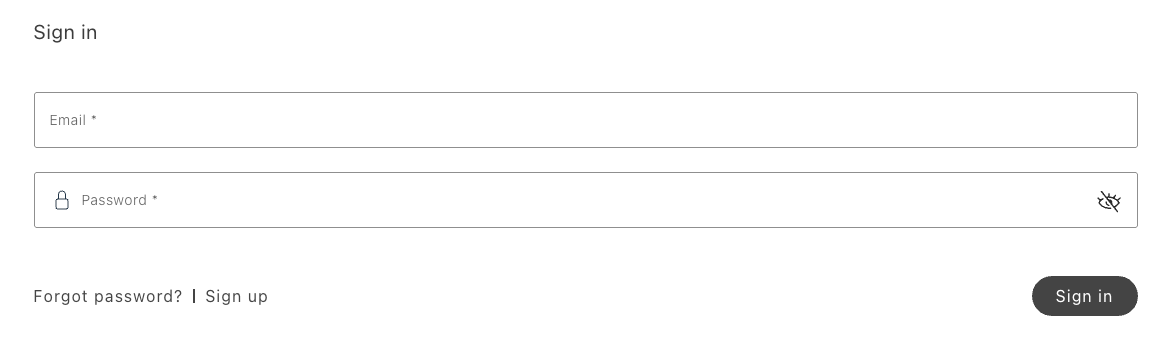\n</Diagram>\n\n## AuthCombine configurations\n\nThe AuthCombine container provides the following configuration options:\n\n\n## Example\n\nThe following example renders the AuthCombine container with the provided form configurations.\n\n```javascript\n{\n authRenderer.render(AuthCombine, {\n signInFormConfig,\n signUpFormConfig,\n resetPasswordFormConfig,\n })(signInForm);\n};\n```"
|
|
23
|
+
},
|
|
24
|
+
{
|
|
25
|
+
"path": "dropins/user-auth/containers/reset-password",
|
|
26
|
+
"title": "ResetPassword container",
|
|
27
|
+
"description": "Collect an email address to trigger Adobe Commerce password reset emails with links that continue the flow in UpdatePassword.",
|
|
28
|
+
"content": "The ResetPassword container renders a dialog that initiates the process of resetting the user's password. The user must provide their email address to receive a password reset link.\n\n<Diagram caption=\"ResetPassword container\">\n 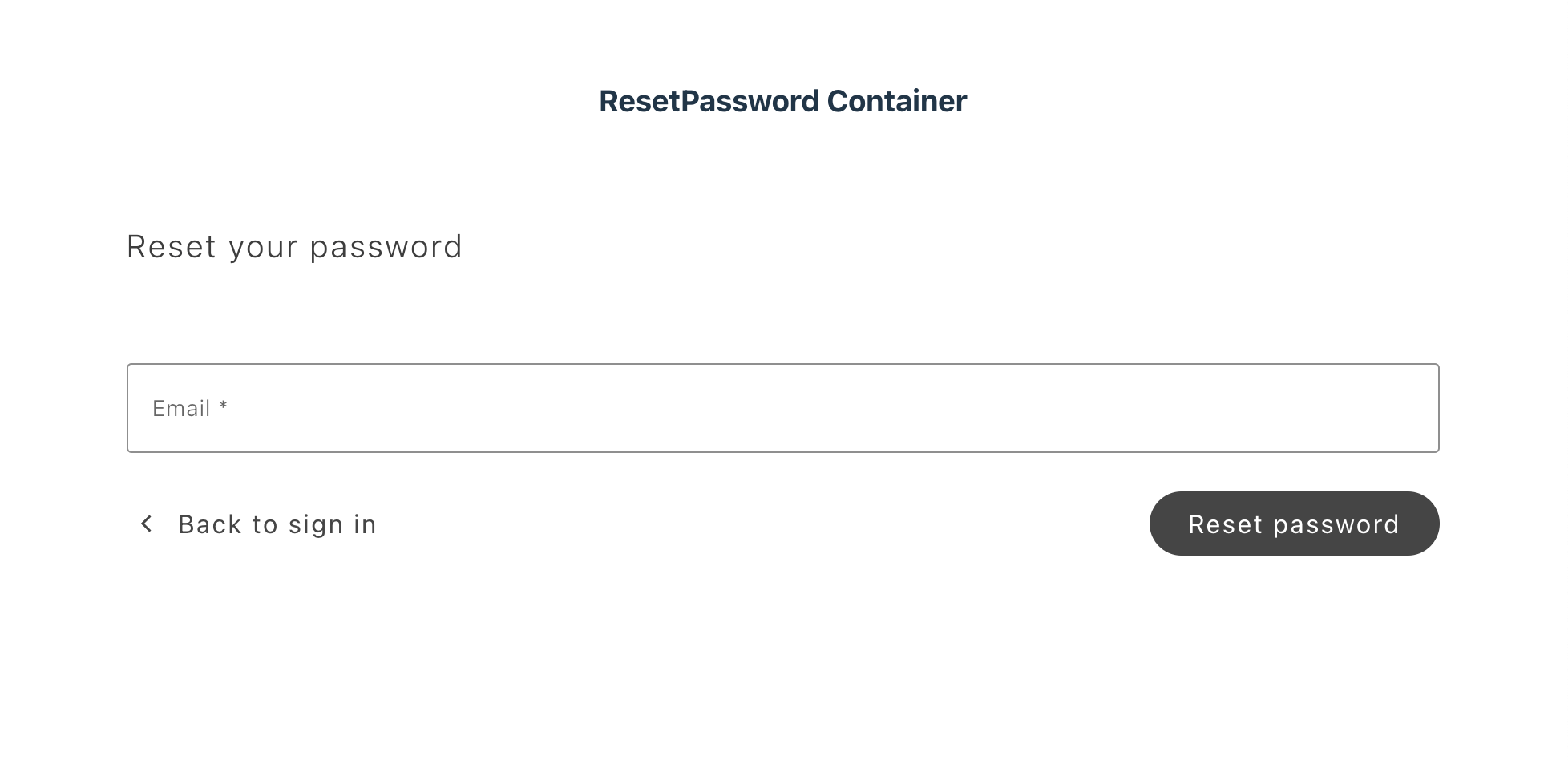\n</Diagram>\n\nUpon success, Commerce sends the user an email with a link in the following format: \n\n```text\nhttps://www.example.com/customer/account/createPassword/?email=<user_email>&id=<user_id>&token=<token>\n```\n\nThe user will also see an appropriate notification on the storefront. Clicking the link leads the user to the .\n\n<Diagram caption=\"ResetPassword response\">\n 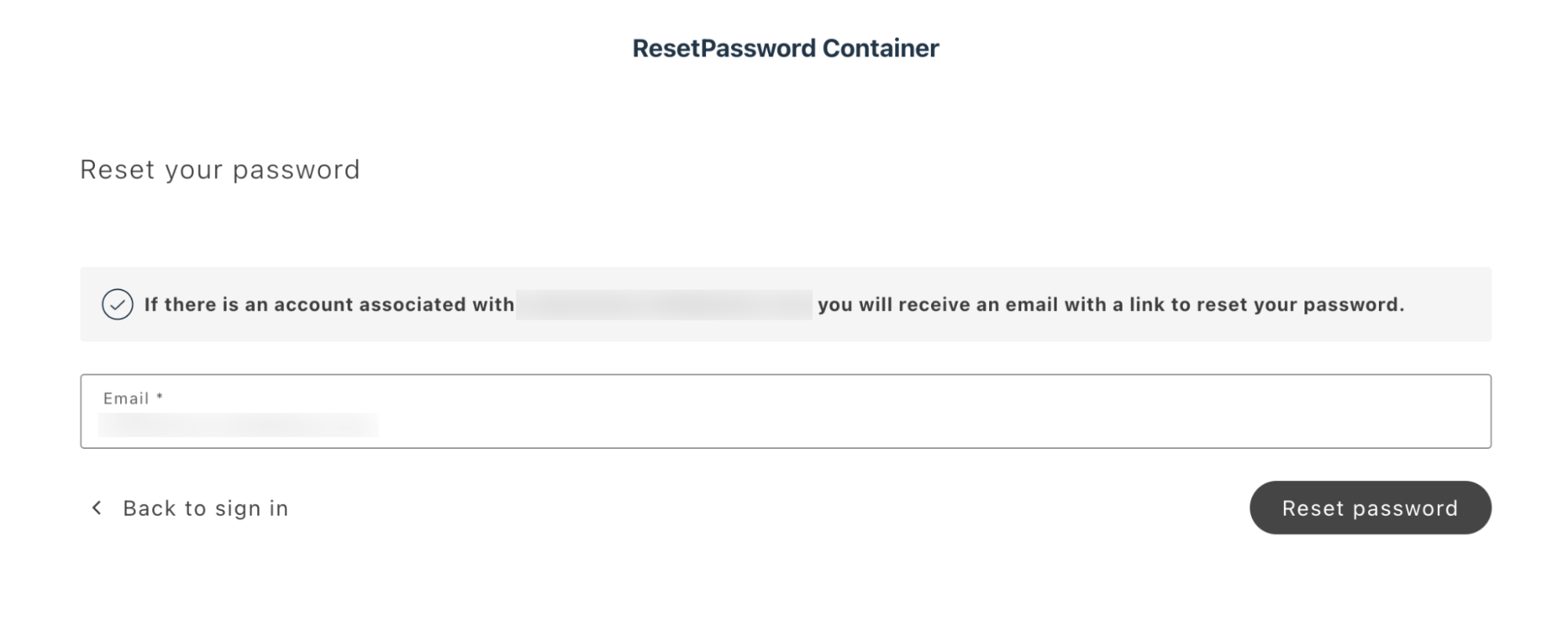\n</Diagram>\n\n## ResetPassword configurations\n\nThe ResetPassword container provides the following configuration options:\n\n\n## Example\n\nThe following example checks whether the user is authenticated. If the user is authenticated, the user is redirected to the customer account page. If the user is not authenticated, the user is redirected to the ResetPassword container. \n\n```javascript\nexport default async function decorate(block) {\n if (checkIsAuthenticated()) {\n window.location.href = CUSTOMER_ACCOUNT_PATH;\n } else {\n await authRenderer.render(ResetPassword, {\n routeSignIn: () => CUSTOMER_LOGIN_PATH,\n })(block);\n }\n\n events.on('authenticated', (authenticated) => {\n if (authenticated) window.location.href = CUSTOMER_ACCOUNT_PATH;\n });\n}\n```"
|
|
29
|
+
},
|
|
30
|
+
{
|
|
31
|
+
"path": "dropins/user-auth/containers/sign-in",
|
|
32
|
+
"title": "SignIn container",
|
|
33
|
+
"description": "Learn about the SignIn container in the UserAuth drop-in.",
|
|
34
|
+
"content": "The SignIn container helps render different screens that enable the customer to log in to an account. The container supports multiple scenarios, including standard logins for existing accounts and for accounts that are process of being confirmed.\n\nIf customers are required to confirm an email address to create an account, the **Stores** > Configuration > **Customers** > **Customer Configuration** > **Create New Account Options** > **Require Emails Confirmation** setting in the Commerce Admin must be set to **Yes**.\n\n## Simple login\n\nThe standard login screen can be displayed when an account has already been created or confirmed, or when email configuration is disabled.\n\nUpon a successful login, the SignIn container renders the container. This container can be overridden using the Slots API.\n\nAlternatively, if you pass the routeRedirectOnSignIn property, the user will be redirected to the specified URL after successful login. (Neither SuccessNotification nor Slot content will be rendered.)\n\n<Diagram caption=\"SignIn standard login container\">\n 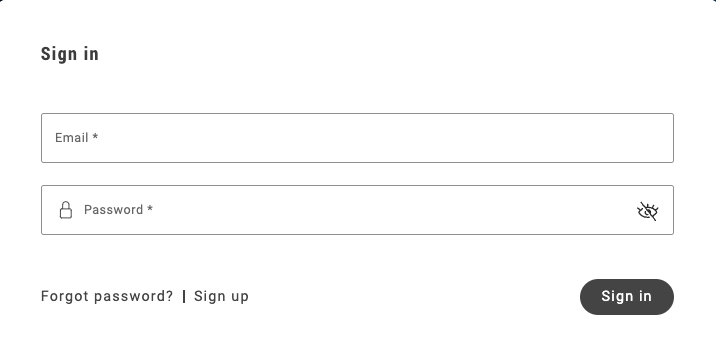\n</Diagram>\n\n## Log in to an unconfirmed account\n\nThis scenario is applicable when email confirmation has been enabled, and the user has created an account, but has not confirmed their email.\n\nIf the user attempts to log in with credentials for an unconfirmed account, they will see a custom notification allowing them to resend the confirmation email. When the user clicks on the **Resend confirmation email** link shown below, Commerce sends a new confirmation email to the user.\n\n<Diagram caption=\"SignIn standard login container\">\n 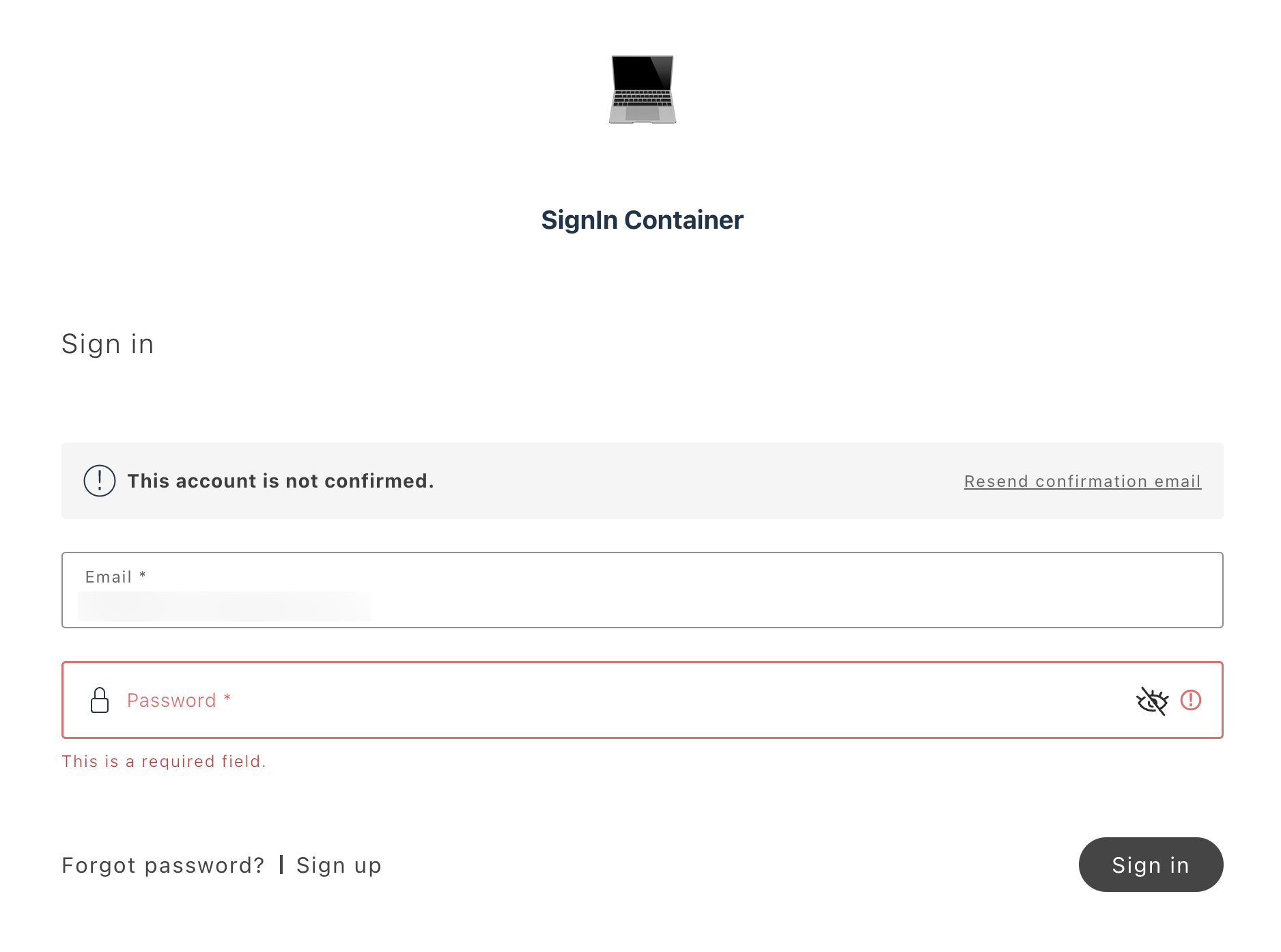\n</Diagram>\n\n## Confirmation from email\n\nThe SignIn container processes email confirmations when users click on the confirmation link sent to their email. The link format is:\n\n`https://www.example.com/customer/account/confirm/?back_url=&email=<user_email>&id=<user_id>&key=<confirmation_key>`\n\nThe following steps describe the flow:\n\n- Email confirmation is enabled in the Commerce Admin.\n- The user has created an account and received the email confirmation link.\n- The user clicks on the link and gets redirected to the email confirmation page with the SignIn drop-in.\n\n<Aside>\n To enable the email confirmation functionality, you must pass the `enableEmailConfirmation`\n property with a true value during integration.\n\n\n<Diagram caption=\"SignIn standard login container\">\n 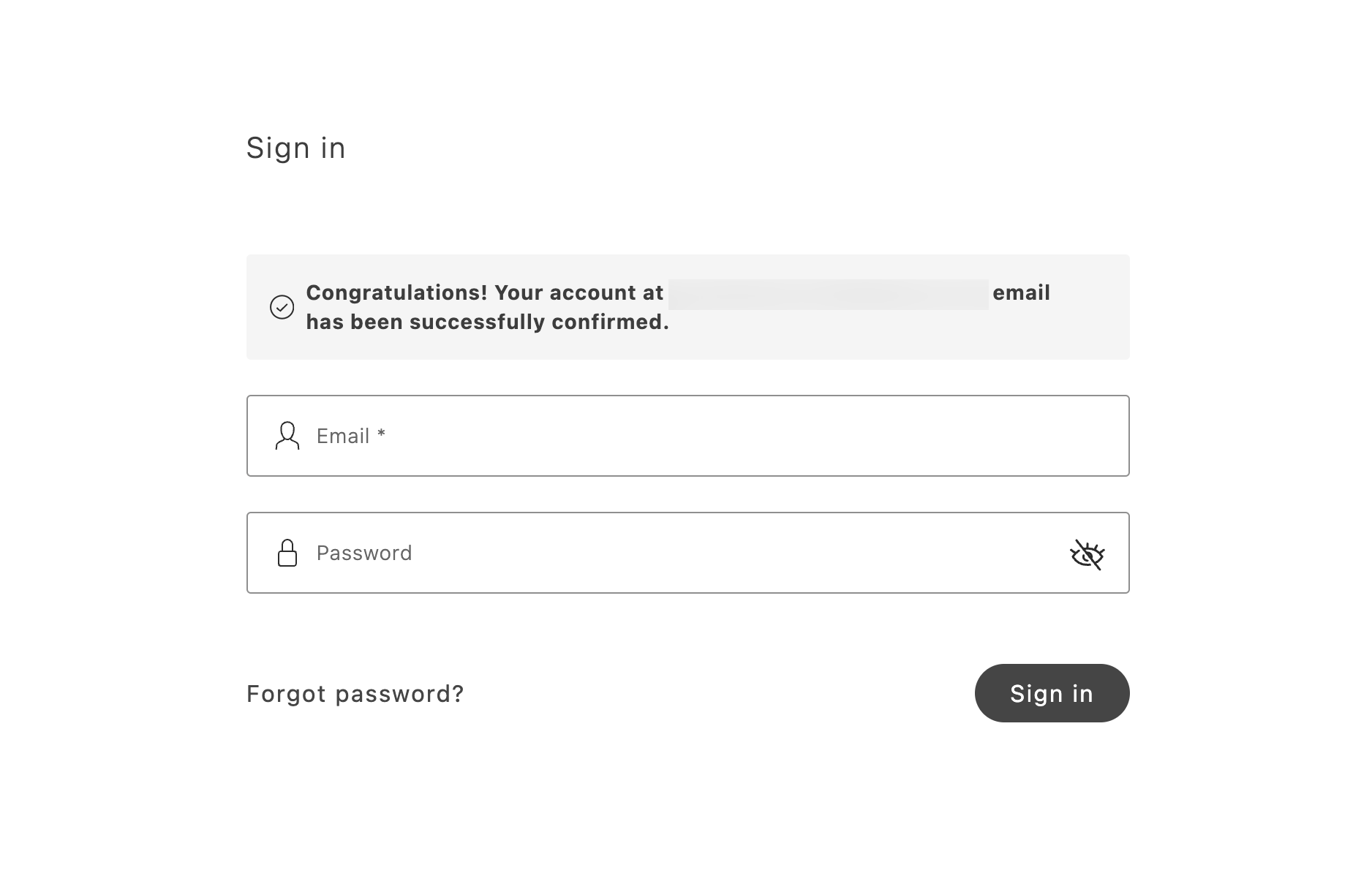\n</Diagram>\n\n## SignIn configurations\n\nThe SignIn container provides the following configuration options:\n\n<OptionsTable\n compact\n options={[\n ['Option', 'Type', 'Req?', 'Description'],\n [\n 'slots',\n 'SuccessNotification',\n 'No',\n 'Renders the SuccessNotification container or a custom component on successful sign-in when routeRedirectOnSignIn is absent.',\n ],\n ['labels', 'Record<string, string>', 'No', 'Sets text labels that describe the container.'],\n [\n 'formSize',\n 'default | small',\n 'No',\n 'Controls form paddings and spacing. Use \"small\" to embed the form in small layout containers like a dropdown in the header.',\n ],\n [\n 'renderSignUpLink',\n 'boolean',\n 'No',\n 'Controls the visibility of the “Sign up” link next to the “Forgot Password” link.',\n ],\n [\n 'initialEmailValue',\n 'string',\n 'No',\n 'Sets an initial value for the email input (prefilled sign-in form).',\n ],\n [\n 'enableEmailConfirmation',\n 'boolean',\n 'No',\n 'Enables the container to handle email confirmation.',\n ],\n [\n 'hideCloseBtnOnEmailConfirmation',\n 'boolean',\n 'No',\n 'Controls the visibility of the “Close” button on the email confirmation view.',\n ],\n [\n 'routeRedirectOnEmailConfirmationClose',\n 'function',\n 'No',\n 'Determines where the user is redirected when the “Close” button on the email confirmation view is clicked.',\n ],\n [\n 'routeForgotPassword',\n 'function',\n 'No',\n 'Determines where the “Forgot password?” link redirects the customer.',\n ],\n [\n 'routeSignUp',\n 'function',\n 'No',\n 'Determines where the “Sign up” link redirects the customer (link visibility is based on the renderSignUpLink property).',\n ],\n [\n 'routeRedirectOnSignIn',\n 'function',\n 'No',\n 'Determines the page to which the user should be redirected after sign-in. If provided, the user won’t be redirected to the SuccessNotification container or any slot-defined override.',\n ],\n [\n 'onSuccessCallback',\n 'function',\n 'No',\n 'Callback that runs when the user successfully logs in, receiving userName and status as parameters.',\n ],\n [\n 'apiErrorMessageOverride',\n '(error: \\\\{ message: string \\\\}) => string',\n 'No',\n 'Overrides API error messages. Receives the original error object and returns a replacement message string for brand-specific or user-friendly login error messages.',\n ],\n [\n 'onErrorCallback',\n 'function',\n 'No',\n 'Callback that runs when an error occurs, receiving the error object as a parameter.',\n ],\n [\n 'onSignUpLinkClick',\n 'function',\n 'No',\n 'Executed on clicking the “Sign up” link before redirect (link visibility is based on the renderSignUpLink property).',\n ],\n ]}\n/>\n\n## Example\n\nThe following example renders the SignIn container.\n\n```javascript\nexport default async function decorate(block) {\n if (checkIsAuthenticated()) {\n window.location.href = CUSTOMER_ACCOUNT_PATH;\n } else {\n await authRenderer.render(SignIn, {\n enableEmailConfirmation: true,\n routeForgotPassword: () => CUSTOMER_FORGOTPASSWORD_PATH,\n slots: {\n SuccessNotification: (ctx) => {\n const userName = ctx?.isSuccessful?.userName || '';\n\n const elem = document.createElement('div');\n\n authRenderer.render(SuccessNotification, {\n labels: {\n headingText: `Welcome $!`,\n messageText: 'You have successfully logged in.',\n },\n slots: {\n SuccessNotificationActions: (innerCtx) => {\n const primaryBtn = document.createElement('div');\n\n authRenderer.render(Button, {\n children: 'My Account',\n\n onClick: () => {\n window.location.href = CUSTOMER_ACCOUNT_PATH;\n },\n })(primaryBtn);\n\n innerCtx.appendChild(primaryBtn);\n\n const secondaryButton = document.createElement('div');\n secondaryButton.style.display = 'flex';\n secondaryButton.style.justifyContent = 'center';\n secondaryButton.style.marginTop = 'var(--spacing-xsmall)';\n\n authRenderer.render(Button, {\n children: 'Logout',\n variant: 'tertiary',\n onClick: async () => {\n await authApi.revokeCustomerToken();\n window.location.href = '/';\n },\n })(secondaryButton);\n\n innerCtx.appendChild(secondaryButton);\n },\n },\n })(elem);\n\n ctx.appendChild(elem);\n },\n },\n })(block);\n }\n}\n```"
|
|
35
|
+
},
|
|
36
|
+
{
|
|
37
|
+
"path": "dropins/user-auth/containers/sign-up",
|
|
38
|
+
"title": "SignUp container",
|
|
39
|
+
"description": "Learn about the SignIn container in the UserAuth drop-in.",
|
|
40
|
+
"content": "The SignUp container provides a form where the user enters the details required to create a new account. The execution of this form can vary, depending on how Commerce is configured:\n\n- If email confirmations have been enabled, the user account is not activated until the user clicks on the confirmation link that Commerce sends to the user's email address.\n\n- If the customer account contains custom attributes, these must be configured to be available to the form. See for more information.\n\n## Simple container\n\nA SignUp container can collect minimal information, such as name, email, and password, to create a new account. Alternatively, it can collect additional information, such as addresses, if the `addressesData` property is passed.\n\nBy default, upon a successful registration, the SignUp container renders the container.\n\nThe user is logged on when the `isAutoSignInEnabled` property is passed.\n\nIf the `routeRedirectOnSignIn` property is passed, the user is redirected to the specified URL after a successful login. Neither the SuccessNotification container nor slots will be rendered.\n\nIn this scenario, email confirmation must be disabled.\n\n<Diagram caption=\"SignIn standard login container\">\n 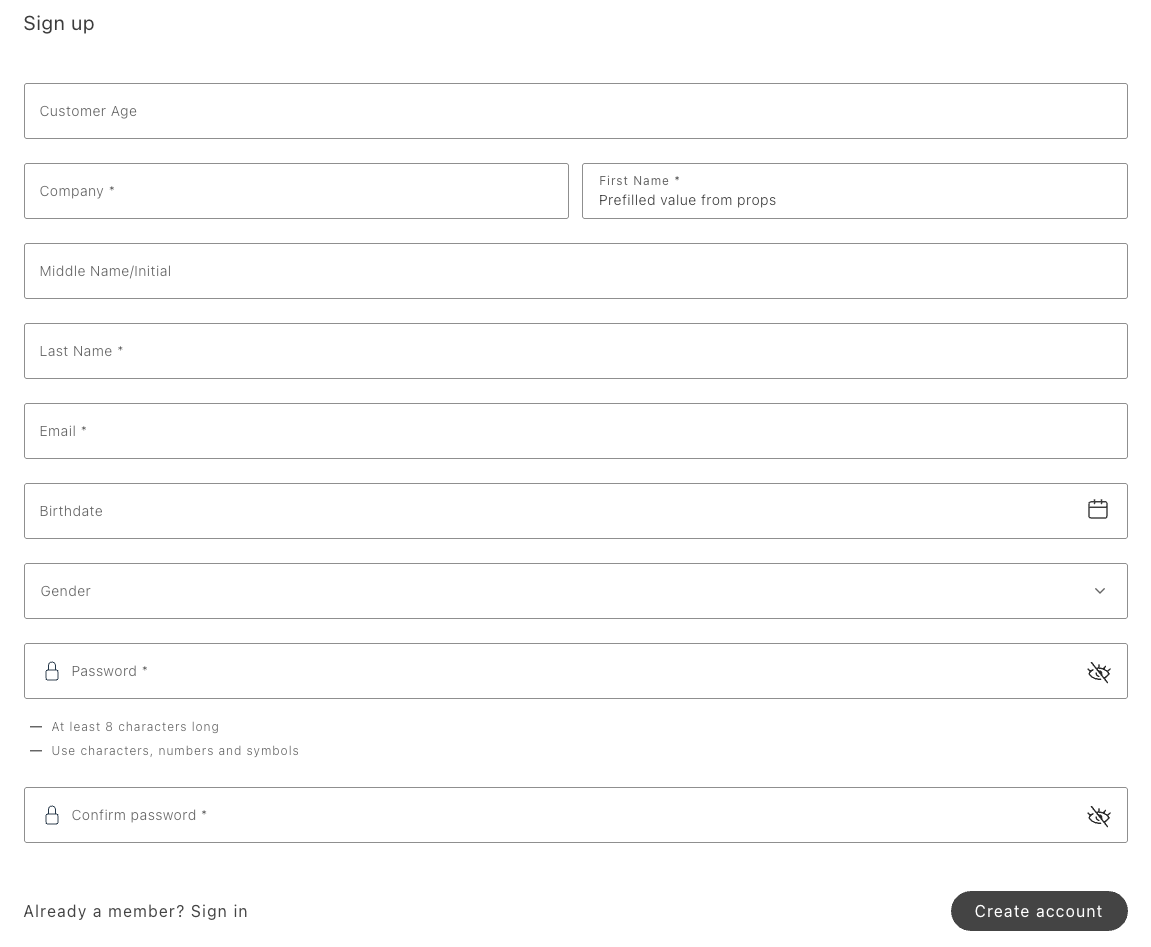\n</Diagram>\n\n## Registration with email confirmation enabled\n\nIf a user creates an account when email confirmation is enabled, a different form is rendered in place of the sign-up form to inform the user about the next steps. Automatic sign-in is not possible if email confirmation is enabled.\n\n<Diagram caption=\"SignIn standard login container\">\n 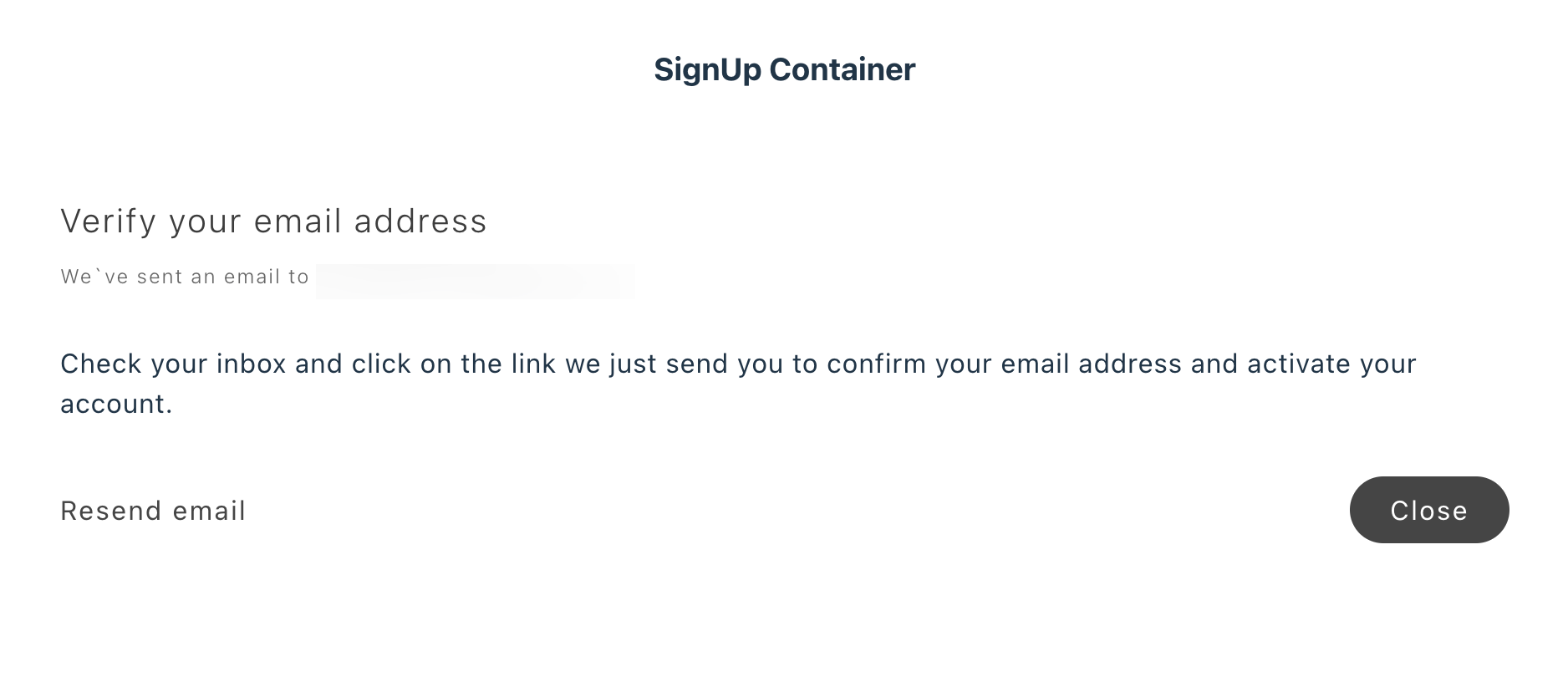\n</Diagram>\n\n## SignUp configurations\n\nThe SignUp container provides the following configuration options:\n\n\n### Example\n\nThe following example redirects the user to the account page if they are already authenticated. If not, the user is redirected first to the login page, then to the account page.\n\n```javascript\nexport default async function decorate(block) {\n const isAuthenticated = !!getCookie('auth_dropin_user_token');\n\n if (isAuthenticated) {\n window.location.href = '/customer/account';\n } else {\n await authRenderer.render(SignUp, {\n hideCloseBtnOnEmailConfirmation: true,\n routeSignIn: () => '/customer/login',\n routeRedirectOnSignIn: () => '/customer/account',\n })(block);\n }\n}\n```"
|
|
41
|
+
},
|
|
42
|
+
{
|
|
43
|
+
"path": "dropins/user-auth/containers/success-notification",
|
|
44
|
+
"title": "SuccessNotification container",
|
|
45
|
+
"description": "Learn about the SuccessNotification container in the UserAuth drop-in.",
|
|
46
|
+
"content": "The SuccessNotification container displays a message to the user after a successful action, such as signing up or updating a password. The SignIn, SignUp, and UpdatePassword containers can pass the SuccessNotification container as a slot.\n\nIn the following diagram, a SignIn container has passed the SuccessNotification container, which defines the displayed text and action buttons.\n\n<Diagram caption=\"SuccessNotification container\">\n 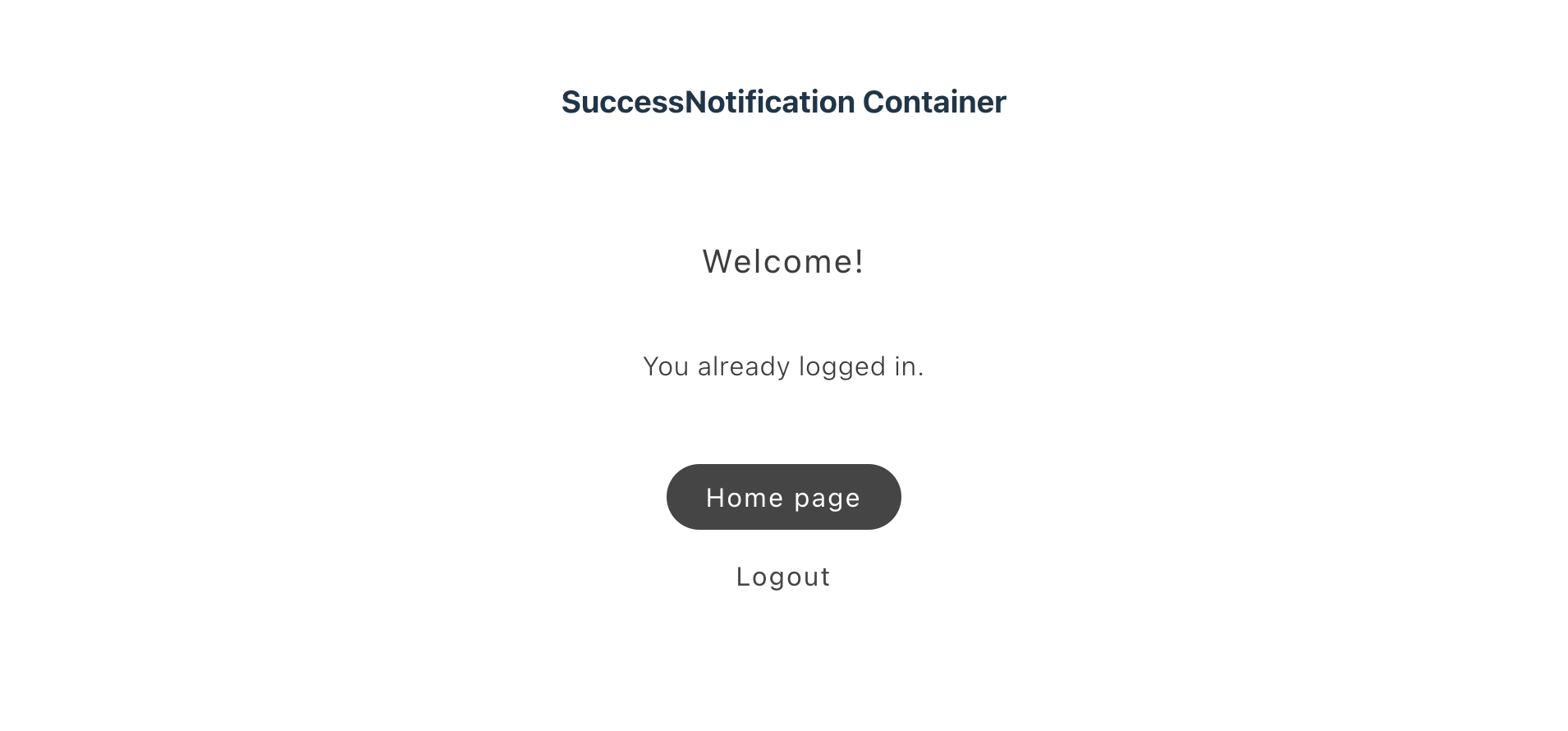\n</Diagram>\n\n## SuccessNotification configurations\n\nThe SuccessNotification container provides the following configuration options:\n\n\n## Example\n\nThe following example renders the SignIn container. On success, the container displays a welcome heading, a message, and two action buttons: \"My Account\" and \"Logout\".\n\n```javascript\nexport default async function decorate(block) {\n if (checkIsAuthenticated()) {\n window.location.href = CUSTOMER_ACCOUNT_PATH;\n } else {\n await authRenderer.render(SignIn, {\n enableEmailConfirmation: true,\n routeForgotPassword: () => CUSTOMER_FORGOTPASSWORD_PATH,\n slots: {\n SuccessNotification: (ctx) => {\n const userName = ctx?.isSuccessful?.userName || '';\n\n const elem = document.createElement('div');\n\n authRenderer.render(SuccessNotification, {\n labels: {\n headingText: `Welcome $!`,\n messageText: 'You have successfully logged in.',\n },\n slots: {\n SuccessNotificationActions: (innerCtx) => {\n const primaryBtn = document.createElement('div');\n\n authRenderer.render(Button, {\n children: 'My Account',\n\n onClick: () => {\n window.location.href = CUSTOMER_ACCOUNT_PATH;\n },\n })(primaryBtn);\n\n innerCtx.appendChild(primaryBtn);\n\n const secondaryButton = document.createElement('div');\n secondaryButton.style.display = 'flex';\n secondaryButton.style.justifyContent = 'center';\n secondaryButton.style.marginTop = 'var(--spacing-xsmall)';\n\n authRenderer.render(Button, {\n children: 'Logout',\n variant: 'tertiary',\n onClick: async () => {\n await authApi.revokeCustomerToken();\n window.location.href = '/';\n },\n })(secondaryButton);\n\n innerCtx.appendChild(secondaryButton);\n },\n },\n })(elem);\n\n ctx.appendChild(elem);\n },\n },\n })(block);\n }\n}\n```"
|
|
47
|
+
},
|
|
48
|
+
{
|
|
49
|
+
"path": "dropins/user-auth/containers/update-password",
|
|
50
|
+
"title": "UpdatePassword container",
|
|
51
|
+
"description": "Finish password resets from email deep links with optional auto sign-in, redirects, and slot overrides after the shopper sets a new password.",
|
|
52
|
+
"content": "The UpdatePassword container continues the process of resetting the user's password that began in the . The user clicks a link in an email to navigate to the UpdatePassword container, where they can enter a new password.\n\nUpon a successful password update, the UpdatePassword container renders the container. \n\nThe UpdatePassword container can be overridden using the Slots API.\n\nIf the `signInOnSuccess` property is passed, the user will be automatically logged in and redirected to the value specified in `routeRedirectOnSignIn`. This property overrides SuccessNotification or custom slot content.\n\nIf the `routeRedirectOnPasswordUpdate` property is passed, the user will be redirected to the specified URL after a successful password update. This property overrides the SuccessNotification container or custom slot content.\n\n<Diagram caption=\"UpdatePassword container\">\n \n</Diagram>\n\n## UpdatePassword configurations\n\nThe UpdatePassword container provides the following configuration options:\n\n\n### Example\n\nThe following example uses the UpdatePassword container to change the user's password. If successful, the SuccessNotification container is rendered.\n\n```javascript\nexport default async function decorate(block) {\n if (checkIsAuthenticated()) {\n window.location.href = CUSTOMER_ACCOUNT_PATH;\n } else {\n await authRenderer.render(UpdatePassword, {\n routeWrongUrlRedirect: () => CUSTOMER_LOGIN_PATH,\n routeSignInPage: () => CUSTOMER_LOGIN_PATH,\n slots: {\n SuccessNotification: (ctx) => {\n const userName = ctx?.isSuccessful?.userName || '';\n\n const elem = document.createElement('div');\n\n authRenderer.render(SuccessNotification, {\n labels: {\n headingText: `Welcome $!`,\n messageText: 'Your password has been successfully updated.',\n },\n slots: {\n SuccessNotificationActions: (innerCtx) => {\n const primaryBtn = document.createElement('div');\n\n authRenderer.render(Button, {\n children: 'My Account',\n\n onClick: () => {\n window.location.href = CUSTOMER_ACCOUNT_PATH;\n },\n })(primaryBtn);\n\n innerCtx.appendChild(primaryBtn);\n\n const secondaryButton = document.createElement('div');\n secondaryButton.style.display = 'flex';\n secondaryButton.style.justifyContent = 'center';\n secondaryButton.style.marginTop = 'var(--spacing-xsmall)';\n\n authRenderer.render(Button, {\n children: 'Logout',\n variant: 'tertiary',\n onClick: async () => {\n await authApi.revokeCustomerToken();\n window.location.href = '/';\n },\n })(secondaryButton);\n\n innerCtx.appendChild(secondaryButton);\n },\n },\n })(elem);\n\n ctx.appendChild(elem);\n },\n },\n })(block);\n }\n}\n```"
|
|
53
|
+
},
|
|
54
|
+
{
|
|
55
|
+
"path": "dropins/user-auth/dictionary",
|
|
56
|
+
"title": "User Auth Dictionary",
|
|
57
|
+
"description": "Customize user-facing text and labels in the User Auth drop-in for localization and branding.",
|
|
58
|
+
"content": "The **User Auth dictionary** contains all user-facing text, labels, and messages displayed by this drop-in. Customize the dictionary to:\n\n- **Localize** the drop-in for different languages and regions\n- **Customize** labels and messages to match your brand voice\n- **Override** default text without modifying source code for the drop-in\n\nDictionaries use the **i18n (internationalization)** pattern, where each text string is identified by a unique key path.\n\n\n## How to customize\n\nOverride dictionary values during drop-in initialization. The drop-in deep-merges your custom values with the defaults.\n\n```javascript\n\nawait initialize({\n langDefinitions: {\n en_US: {\n \"Auth\": {\n \"PasswordValidationMessage\": {\n \"chartTwoSymbols\": \"Custom value\",\n \"chartThreeSymbols\": \"Custom value\"\n }\n }\n }\n }\n});\n```\n\nYou only need to include the keys you want to change. For multi-language support and advanced patterns, see the [Dictionary customization guide](https://experienceleague.adobe.com/developer/commerce/storefront/dropins/all/dictionaries/).\n\n## Default keys and values\n\nBelow are the default English (`en_US`) strings provided by the **User Auth** drop-in:\n\n```json title=\"en_US.json\"\n{\n \"Auth\": {\n \"PasswordValidationMessage\": {\n \"chartTwoSymbols\": \"Use characters and numbers or symbols\",\n \"chartThreeSymbols\": \"Use characters, numbers and symbols\",\n \"chartFourSymbols\": \"Use uppercase characters, lowercase characters, numbers and symbols\",\n \"messageLengthPassword\": \"At least characters long\"\n },\n \"ResetPasswordForm\": {\n \"title\": \"Reset your password\",\n \"buttonPrimary\": \"Reset password\",\n \"buttonSecondary\": \"Back to sign in\",\n \"formAriaLabel\": \"Reset your password form\"\n },\n \"SignInForm\": {\n \"title\": \"Sign in\",\n \"buttonPrimary\": \"Sign in\",\n \"buttonSecondary\": \"Sign up\",\n \"buttonTertiary\": \"Forgot password?\"\n },\n \"SignUpForm\": {\n \"title\": \"Sign up\",\n \"buttonPrimary\": \"Create account\",\n \"buttonSecondary\": \"Already a member? Sign in\",\n \"keepMeLoggedText\": \"Keep me logged in after account creation\",\n \"failedCreateCustomerAddress\": \"Failed to create customer addresses:\",\n \"confirmPassword\": {\n \"placeholder\": \"Confirm password\",\n \"floatingLabel\": \"Confirm password *\",\n \"passwordMismatch\": \"Passwords do not match. Please make sure both password fields are identical.\"\n }\n },\n \"UpdatePasswordForm\": {\n \"title\": \"Update password\",\n \"buttonPrimary\": \"Update password\"\n },\n \"FormText\": {\n \"requiredFieldError\": \"This is a required field.\",\n \"numericError\": \"Only numeric values are allowed.\",\n \"alphaNumWithSpacesError\": \"Only alphanumeric characters and spaces are allowed.\",\n \"alphaNumericError\": \"Only alphanumeric characters are allowed.\",\n \"alphaError\": \"Only alphabetic characters are allowed.\",\n \"emailError\": \"Please enter a valid email address.\",\n \"dateError\": \"Please enter a valid date.\",\n \"dateLengthError\": \"Date must be between and .\",\n \"dateMaxError\": \"Date must be less than or equal to .\",\n \"dateMinError\": \"Date must be greater than or equal to .\",\n \"urlError\": \"Please enter a valid URL, e.g., https://www.website.com.\",\n \"lengthTextError\": \"Text length must be between and characters.\"\n },\n \"EmailConfirmationForm\": {\n \"title\": \"Verify your email address\",\n \"subtitle\": \"We`ve sent an email to\",\n \"mainText\": \"Check your inbox and click on the link we just send you to confirm your email address and activate your account.\",\n \"buttonSecondary\": \"Resend email\",\n \"buttonPrimary\": \"Close\",\n \"accountConfirmMessage\": \"Account confirmed\",\n \"accountConfirmationEmailSuccessMessage\": \"Congratulations! Your account at email has been successfully confirmed.\"\n },\n \"Notification\": {\n \"errorNotification\": \"Your password update failed due to validation errors. Please check your information and try again.\",\n \"updatePasswordMessage\": \"The password has been updated.\",\n \"updatePasswordActionMessage\": \"Sign in\",\n \"successPasswordResetEmailNotification\": \"If there is an account associated with you will receive an email with a link to reset your password.\",\n \"resendEmailNotification\": {\n \"informationText\": \"This account is not confirmed.\",\n \"buttonText\": \"Resend confirmation email\"\n },\n \"emailConfirmationMessage\": \"Please check your email for confirmation link.\",\n \"technicalErrors\": {\n \"technicalErrorSendEmail\": \"A technical error occurred while trying to send the email. Please try again later.\"\n }\n },\n \"SuccessNotification\": {\n \"headingText\": \"Welcome!\",\n \"messageText\": \"We are glad to see you!\",\n \"primaryButtonText\": \"Continue shopping\",\n \"secondaryButtonText\": \"Logout\"\n },\n \"Api\": {\n \"customerTokenErrorMessage\": \"Unable to log in. Please try again later or contact support if the issue persists.\"\n },\n \"InputPassword\": {\n \"placeholder\": \"Password\",\n \"floatingLabel\": \"Password *\"\n }\n }\n}\n```"
|
|
59
|
+
},
|
|
60
|
+
{
|
|
61
|
+
"path": "dropins/user-auth/events",
|
|
62
|
+
"title": "User Auth Data & Events",
|
|
63
|
+
"description": "Learn about the events used by the User Auth drop-in and the data available within those events.",
|
|
64
|
+
"content": "The **User Auth** drop-in uses the [event bus](https://experienceleague.adobe.com/developer/commerce/storefront/sdk/reference/events) to emit and listen to events for communication between drop-ins and external integrations.\n\n\n## Events reference\n\n{/* EVENTS_TABLE_START */}\n\n\n| Event | Direction | Description |\n|-------|-----------|-------------|\n| [authenticated](#authenticated-emits) | Emits | Emitted when the user's authentication state changes. |\n| [auth/adobe-commerce-optimizer](#authadobe-commerce-optimizer-emits) | Emits | Emitted when Adobe Commerce Optimizer data is loaded or updated. |\n| [auth/error](#autherror-emits) | Emits | Emitted when an error occurs. |\n| [auth/group-uid](#authgroup-uid-emits) | Emits | Emitted when the customer group UID is set or changes. |\n| [auth/permissions](#authpermissions-emits) | Emits | Emitted when permissions are updated. |\n\n\n{/* EVENTS_TABLE_END */}\n\n## Event details\n\nThe following sections provide detailed information about each event, including its direction, event payload, and usage examples.\n\n\n### `authenticated` (emits)\n\nEmitted when the user's authentication state changes — on login, logout, token verification, and session expiration.\n\n#### Event payload\n\n```typescript\nboolean\n```\n\nThe payload is `true` when the user is authenticated and `false` when they are not.\n\n#### Example\n\n```js\n\nevents.on('authenticated', (isAuthenticated) => {\n if (isAuthenticated) {\n // User is logged in — load personalised content, redirect, etc.\n } else {\n // User is logged out — clear state, redirect to login, etc.\n }\n});\n```\n\n\n### `auth/adobe-commerce-optimizer` (emits)\n\nEmitted when Adobe Commerce Optimizer data is loaded or updated.\n\n#### Event payload\n\n```typescript\nAdobeCommerceOptimizerModel\n```\n\nSee [`AdobeCommerceOptimizerModel`](#adobecommerceoptimizermodel) for full type definition.\n\n\n#### Example\n\n```js\n\nevents.on('auth/adobe-commerce-optimizer', (payload) => {\n console.log('auth/adobe-commerce-optimizer event received:', payload);\n // Add your custom logic here\n});\n```\n\n\n### `auth/error` (emits)\n\nEmitted when an error occurs.\n\n#### Event payload\n\n```typescript\n{ source: string; type: string; error: Error | string }\n```\n\n\n#### Example\n\n```js\n\nevents.on('auth/error', (payload) => {\n console.log('auth/error event received:', payload);\n // Add your custom logic here\n});\n```\n\n\n### `auth/group-uid` (emits)\n\nEmitted when the customer group UID is set or changes.\n\n#### Event payload\n\n```typescript\nstring\n```\n\n\n#### Example\n\n```js\n\nevents.on('auth/group-uid', (payload) => {\n console.log('auth/group-uid event received:', payload);\n // Add your custom logic here\n});\n```\n\n\n### `auth/permissions` (emits)\n\nEmitted when permissions are updated.\n\n#### Event payload\n\n```typescript\nPermissionsModel\n```\n\nSee [`PermissionsModel`](#permissionsmodel) for full type definition.\n\n\n#### Example\n\n```js\n\nevents.on('auth/permissions', (payload) => {\n console.log('auth/permissions event received:', payload);\n // Add your custom logic here\n});\n```\n\n\n## Data Models\n\nThe following data models are used in event payloads for this drop-in.\n\n### AdobeCommerceOptimizerModel\n\nUsed in: [`auth/adobe-commerce-optimizer`](#authadobe-commerce-optimizer-emits).\n\n```ts\ninterface AdobeCommerceOptimizerModel {\n priceBookId: string;\n}\n```\n\n### PermissionsModel\n\nUsed in: [`auth/permissions`](#authpermissions-emits).\n\n```ts\ninterface PermissionsModel {\n all?: boolean;\n admin?: boolean;\n [key: string]: boolean;\n}\n```"
|
|
65
|
+
},
|
|
66
|
+
{
|
|
67
|
+
"path": "dropins/user-auth/functions",
|
|
68
|
+
"title": "User Auth Functions",
|
|
69
|
+
"description": "API functions provided by the User Auth drop-in for programmatic control and customization.",
|
|
70
|
+
"content": "The User Auth drop-in provides API functions that enable you to programmatically control behavior, fetch data, and integrate with Adobe Commerce backend services.\n\n\n| Function | Description |\n| --- | --- |\n| [`confirmEmail`](#confirmemail) | Completes the customer activation process using the supplied `customerEmail` and `customerConfirmationKey` parameters. |\n| [`createCustomer`](#createcustomer) | Creates a customer account based on the data supplied in the forms parameter. |\n| [`createCustomerAddress`](#createcustomeraddress) | Defines a new customer address. |\n| [`getAdobeCommerceOptimizerData`](#getadobecommerceoptimizerdata) | This function fetches Adobe Commerce Optimizer data. |\n| [`getAttributesForm`](#getattributesform) | Retrieves EAV attributes associated with customer and customer address frontend forms. |\n| [`getCustomerData`](#getcustomerdata) | Retrieves data about the customer represented by the `auth_dropin_user_token` cookie value. |\n| [`getCustomerRolePermissions`](#getcustomerrolepermissions) | Retrieves customer role permissions. |\n| [`getCustomerToken`](#getcustomertoken) | Handles the sign-in operation. |\n| [`getStoreConfig`](#getstoreconfig) | Calls the `storeConfig` query to retrieve store configuration data. |\n| [`requestPasswordResetEmail`](#requestpasswordresetemail) | Initiates the process of resetting a customer's password. |\n| [`resendConfirmationEmail`](#resendconfirmationemail) | Resends the email confirmation to the customer using the supplied `customerEmail` parameter. |\n| [`resetPassword`](#resetpassword) | Resets a customer's password using the supplied email, `resetPasswordToken`, and `newPassword` parameters. |\n| [`revokeCustomerToken`](#revokecustomertoken) | Revokes the customer's token and clears the authentication cookie. |\n| [`verifyToken`](#verifytoken) | Checks the validity of the provided authentication token. |\n\n\n## confirmEmail\n\nThe `confirmEmail` function completes the customer activation process using the supplied `customerEmail` and `customerConfirmationKey` parameters. Adobe Commerce sends the confirmation key to the customer when they request to create an account. The function calls the .\n\n```ts\nconst confirmEmail = async (\n { customerEmail, customerConfirmationKey, }: confirmEmailProps\n): Promise<confirmEmailResponse | undefined>\n```\n\n\n| Parameter | Type | Req? | Description |\n|---|---|---|---|\n| `customerEmail` | `string` | Yes | The customer's email address. |\n| `customerConfirmationKey` | `string` | Yes | The confirmation key sent by Adobe Commerce. |\n\n\n### Events\n\nDoes not emit any drop-in events.\n\n### Returns\n\nReturns `confirmEmailResponse | undefined`.\n\n## createCustomer\n\nThe `createCustomer` function creates a customer account based on the data supplied in the `forms` parameter. By default, the function calls the . If the `apiVersion2` parameter is set to `true`, the function calls the .\n\n```ts\nconst createCustomer = async (\n forms: Customer,\n apiVersion2: boolean\n): Promise<CustomerModel>\n```\n\n\n| Parameter | Type | Req? | Description |\n|---|---|---|---|\n| `forms` | `Customer` | Yes | Customer account data including email, password, firstName, lastName, and optional custom attributes. |\n| `apiVersion2` | `boolean` | Yes | Whether to use the v2 API (createCustomerV2 mutation) instead of the original createCustomer mutation. |\n\n\n### Events\n\nDoes not emit any drop-in events.\n\n### Returns\n\nReturns [`CustomerModel`](#customermodel).\n\n## createCustomerAddress\n\nThe `createCustomerAddress` function defines a new customer address. The customer can subsequently designate the address for billing or shipping orders. The function calls the .\n\n```ts\nconst createCustomerAddress = async (\n address: AddressFormProps\n): Promise<string>\n```\n\n\n| Parameter | Type | Req? | Description |\n|---|---|---|---|\n| `address` | `AddressFormProps` | Yes | The new customer address including street, city, region, country, postal code, and optional fields like company name and phone number. |\n\n\n### Events\n\nDoes not emit any drop-in events.\n\n### Returns\n\nReturns `string`.\n\n## getAdobeCommerceOptimizerData\n\nThe `getAdobeCommerceOptimizerData` function fetches Adobe Commerce Optimizer data.\n\n```ts\nconst getAdobeCommerceOptimizerData = async (): Promise<AdobeCommerceOptimizerModel>\n```\n\n### Events\n\nEmits the [`auth/adobe-commerce-optimizer`](https://experienceleague.adobe.com/developer/commerce/storefront/dropins/user-auth/events/#authadobe-commerce-optimizer-emits) event.\n\n### Returns\n\nReturns [`AdobeCommerceOptimizerModel`](#adobecommerceoptimizermodel).\n\n## getAttributesForm\n\nThe `getAttributesForm` function retrieves EAV attributes associated with customer and customer address frontend forms. The function calls the .\n\n```ts\nconst getAttributesForm = async (\n formCode: string\n): Promise<AttributesFormModel[]>\n```\n\n\n| Parameter | Type | Req? | Description |\n|---|---|---|---|\n| `formCode` | `string` | Yes | The form code, one of: customer_account_create, customer_account_edit, customer_address_create, or customer_address_edit. |\n\n\n### Events\n\nDoes not emit any drop-in events.\n\n### Returns\n\nReturns `AttributesFormModel[]`.\n\n## getCustomerData\n\nThe `getCustomerData` function retrieves data about the customer represented by the value of the `auth_dropin_user_token` parameter. The function calls the .\n\n```ts\nconst getCustomerData = async (\n user_token: string\n): Promise<CustomerModel>\n```\n\n\n| Parameter | Type | Req? | Description |\n|---|---|---|---|\n| `user_token` | `string` | Yes | The customer authentication token from the auth_dropin_user_token cookie. |\n\n\n### Events\n\nDoes not emit any drop-in events.\n\n### Returns\n\nReturns [`CustomerModel`](#customermodel).\n\n## getCustomerRolePermissions\n\nThe `getCustomerRolePermissions` function retrieves customer role permissions. It uses efficient caching to minimize API calls and returns either cached data immediately or a promise for fresh data.\n\n```ts\nconst getCustomerRolePermissions = async (): Promise<PermissionsModel>\n```\n\n### Events\n\nEmits the [`auth/permissions`](https://experienceleague.adobe.com/developer/commerce/storefront/dropins/user-auth/events/#authpermissions-emits) event.\n\n### Returns\n\nReturns [`PermissionsModel`](#permissionsmodel).\n\n## getCustomerToken\n\nThe `getCustomerToken` function handles the sign-in operation. It requires `email` and `password` (and accepts additional optional properties on the parameter object) and performs the following actions under the hood:\n\n1. Retrieves the customer token.\n2. Fetches customer data using the token.\n3. Sets the `auth_dropin_firstname` and `auth_dropin_user_token` cookies.\n4. Publishes an event.\n5. Emits an \"authenticated\" event.\n\nYou can use the `getCustomerToken` function to build a custom authentication flow that remains fully integrated with other drop-in components. The function calls the .\n\n```ts\nconst getCustomerToken = async (\n { email, password, translations, onErrorCallback, handleSetInLineAlertProps, }: getCustomerTokenProps\n): Promise<{\n errorMessage: string;\n userName: string;\n userEmail: string;\n}>\n```\n\n\n| Parameter | Type | Req? | Description |\n|---|---|---|---|\n| `email` | `string` | Yes | The customer's email address (or username, depending on store configuration). |\n| `password` | `string` | Yes | The customer's password. |\n\n\nAdditional optional properties on the same object may include `translations`, `onErrorCallback`, and `handleSetInLineAlertProps`. See `getCustomerTokenProps` in the drop-in source for the full type.\n\n### Events\n\nDoes not emit any drop-in events.\n\n### Returns\n\n```ts\nPromise<{\n errorMessage: string;\n userName: string;\n userEmail: string;\n}>\n```\n\n## getStoreConfig\n\nThe `getStoreConfig` function calls the to retrieve store configuration data.\n\n```ts\nconst getStoreConfig = async (): Promise<StoreConfigModel>\n```\n\n### Events\n\nDoes not emit any drop-in events.\n\n### Returns\n\nReturns [`StoreConfigModel`](#storeconfigmodel).\n\n## requestPasswordResetEmail\n\nThe `requestPasswordResetEmail` function initiates the process of resetting a customer's password. The function calls the .\n\n```ts\nconst requestPasswordResetEmail = async (\n email: string\n): Promise<PasswordResetEmailModel>\n```\n\n\n| Parameter | Type | Req? | Description |\n|---|---|---|---|\n| `email` | `string` | Yes | The email address of the customer requesting a password reset. |\n\n\n### Events\n\nDoes not emit any drop-in events.\n\n### Returns\n\nReturns [`PasswordResetEmailModel`](#passwordresetemailmodel).\n\n## resendConfirmationEmail\n\nThe `resendConfirmationEmail` function resends the email confirmation to the customer using the supplied `customerEmail` parameter. The function calls the , which is included in the Storefront Compatibility Package.\n\n```ts\nconst resendConfirmationEmail = async (\n customerEmail: string\n): Promise<resendConfirmationEmailResponse>\n```\n\n\n| Parameter | Type | Req? | Description |\n|---|---|---|---|\n| `customerEmail` | `string` | Yes | The email address of the customer who needs the confirmation email resent. |\n\n\n### Events\n\nDoes not emit any drop-in events.\n\n### Returns\n\nReturns `resendConfirmationEmailResponse`.\n\n## resetPassword\n\nThe `resetPassword` function resets a customer's password using the supplied `email`, `resetPasswordToken`, and `newPassword` parameters. The function calls the .\n\n```ts\nconst resetPassword = async (\n email: string,\n resetPasswordToken: string,\n newPassword: string\n): Promise<ResetPasswordModel>\n```\n\n\n| Parameter | Type | Req? | Description |\n|---|---|---|---|\n| `email` | `string` | Yes | The email address of the customer resetting their password. |\n| `resetPasswordToken` | `string` | Yes | The password reset token sent to the customer's email. |\n| `newPassword` | `string` | Yes | The new password for the customer account. |\n\n\n### Events\n\nDoes not emit any drop-in events.\n\n### Returns\n\nReturns [`ResetPasswordModel`](#resetpasswordmodel).\n\n## revokeCustomerToken\n\nThe `revokeCustomerToken` function revokes the customer's token and clears the authentication cookie. It then publishes an ACDL event and emits an \"authenticated\" event. This API can also be used to build a custom sign-out flow that stays fully integrated with other drop-in components. The function calls the .\n\n```ts\nconst revokeCustomerToken = async (): Promise<RevokeCustomerTokenModel>\n```\n\n### Events\n\nDoes not emit any drop-in events.\n\n### Returns\n\nReturns [`RevokeCustomerTokenModel`](#revokecustomertokenmodel).\n\n## verifyToken\n\nThe `verifyToken` function checks the validity of the provided authentication token. It verifies the token by making a `GraphQL` request to validate the customer. If valid, it emits an `authenticated` event with `true` and the customer's group ID. If invalid or missing, it emits an `authenticated` event with `false`, removes the token cookie, and clears the authentication header.\n\n```ts\nconst verifyToken = async (\n authType = 'Authorization',\n type = 'Bearer'\n): Promise<any>\n```\n\n\n| Parameter | Type | Req? | Description |\n|---|---|---|---|\n| `authType` | `string` | No | The HTTP header name to use for authentication. Defaults to \\`Authorization\\`. This allows customization of the authentication header if your backend uses a different header name. |\n| `type` | `string` | No | The authentication scheme type to use. Defaults to \\`Bearer\\`. This is prepended to the token value in the authentication header (e.g., \\`Bearer <token>\\`). |\n\n\n### Events\n\nDoes not emit any drop-in events.\n\n### Returns\n\nReturns `void`.\n\n## Data Models\n\nThe following data models are used by functions in this drop-in.\n\n### AdobeCommerceOptimizerModel\n\nThe `AdobeCommerceOptimizerModel` object is returned by the following functions: [`getAdobeCommerceOptimizerData`](#getadobecommerceoptimizerdata).\n\n```ts\ninterface AdobeCommerceOptimizerModel {\n priceBookId: string;\n}\n```\n\n### CustomerModel\n\nThe `CustomerModel` object is returned by the following functions: [`createCustomer`](#createcustomer), [`getCustomerData`](#getcustomerdata).\n\n```ts\ninterface CustomerModel {\n firstName: string;\n lastName: string;\n email: string;\n groupUid: string;\n customAttributes?: Record<string, string>[];\n errors?: { message: string }[];\n}\n```\n\n### PasswordResetEmailModel\n\nThe `PasswordResetEmailModel` object is returned by the following functions: [`requestPasswordResetEmail`](#requestpasswordresetemail).\n\n```ts\ninterface PasswordResetEmailModel {\n message: string | '';\n success: boolean;\n}\n```\n\n### PermissionsModel\n\nThe `PermissionsModel` object is returned by the following functions: [`getCustomerRolePermissions`](#getcustomerrolepermissions).\n\n```ts\ninterface PermissionsModel {\n all?: boolean;\n admin?: boolean;\n [key: string]: boolean;\n}\n```\n\n### ResetPasswordModel\n\nThe `ResetPasswordModel` object is returned by the following functions: [`resetPassword`](#resetpassword).\n\n```ts\ninterface ResetPasswordModel {\n message: string | '';\n success: boolean;\n}\n```\n\n### RevokeCustomerTokenModel\n\nThe `RevokeCustomerTokenModel` object is returned by the following functions: [`revokeCustomerToken`](#revokecustomertoken).\n\n```ts\ninterface RevokeCustomerTokenModel {\n message: string | '';\n success: boolean;\n}\n```\n\n### StoreConfigModel\n\nThe `StoreConfigModel` object is returned by the following functions: [`getStoreConfig`](#getstoreconfig).\n\n```ts\ninterface StoreConfigModel {\n autocompleteOnStorefront: boolean;\n minLength: number;\n requiredCharacterClasses: number;\n createAccountConfirmation: boolean;\n customerAccessTokenLifetime: number;\n}\n```\n\n\n{/* This documentation is auto-generated from the drop-in source repository: REPO_URL */}"
|
|
71
|
+
},
|
|
72
|
+
{
|
|
73
|
+
"path": "dropins/user-auth/initialization",
|
|
74
|
+
"title": "User Auth initialization",
|
|
75
|
+
"description": "Configure the User Auth drop-in with language definitions, custom data models, and drop-in-specific options.",
|
|
76
|
+
"content": "The **User Auth initializer** configures authentication and authorization features including login, registration, password management, and session handling. Use initialization to customize authentication flows and user data models.\n\n\n## Configuration options\n\nThe following table describes the configuration options available for the **User Auth** initializer:\n\n\n| Parameter | Type | Req? | Description |\n|---|---|---|---|\n| `langDefinitions` | [`LangDefinitions`](#langdefinitions) | No | Language definitions for internationalization (i18n). Override dictionary keys for localization or branding. |\n| `models` | [`Record<string, any>`](#models) | No | Custom data models for type transformations. Extend or modify default models with custom fields and transformers. |\n| `authHeaderConfig` | [`authHeaderConfig`](#authheaderconfig) | No | Configures authentication header format for API requests including custom header names and token prefix format (e.g., 'Bearer', 'Token'). |\n| `customerPermissionRoles` | `boolean` | No | |\n| `adobeCommerceOptimizer` | `boolean` | No | |\n\n\n## Default configuration\n\nThe initializer runs with these defaults when no configuration is provided:\n\n```javascript title=\"scripts/initializers/user-auth.js\"\n\n\n// All configuration options are optional\nawait initializers.mountImmediately(initialize, {\n langDefinitions: {}, // Uses built-in English strings\n models: {}, // Uses default data models\n // Drop-in-specific defaults:\n // authHeaderConfig: undefined // See configuration options below\n // customerPermissionRoles: undefined // See configuration options below\n // adobeCommerceOptimizer: undefined // See configuration options below\n});\n```\n\n## Language definitions\n\nOverride dictionary keys for localization or branding. The `langDefinitions` object maps locale keys to custom strings that override default text for the drop-in.\n\n```javascript title=\"scripts/initializers/user-auth.js\"\n\n\nconst customStrings = {\n 'AddToCart': 'Add to Bag',\n 'Checkout': 'Complete Purchase',\n 'Price': 'Cost',\n};\n\nconst langDefinitions = {\n default: customStrings,\n};\n\nawait initializers.mountImmediately(initialize, { langDefinitions });\n```\n\n> **Tip**\n>\nFor complete dictionary customization including all available keys and multi-language support, see the [User Auth Dictionary](https://experienceleague.adobe.com/developer/commerce/storefront/dropins/user-auth/dictionary/) page.\n\n\n## Customizing data models\n\nExtend or transform data models by providing custom transformer functions. Use the `models` option to add custom fields or modify existing data structures returned from the backend.\n\n### Available models\n\nThe following models can be customized through the `models` configuration option:\n\n\n| Model | Description |\n|---|---|\n| [`CustomerModel`](#customermodel) | Transforms customer authentication data including profile information, addresses, and account settings. Use this to add custom fields or modify user data structures. |\n\n\nThe following example shows how to customize the `CustomerModel` model for the **User Auth** drop-in:\n\n```javascript title=\"scripts/initializers/user-auth.js\"\n\n\nconst models = {\n CustomerModel: {\n transformer: (data) => ({\n // Add custom fields from backend data\n customField: data?.custom_field,\n promotionBadge: data?.promotion?.label,\n // Transform existing fields\n displayPrice: data?.price?.value ? `$` : 'N/A',\n }),\n },\n};\n\nawait initializers.mountImmediately(initialize, { models });\n```\n\n## Drop-in configuration\n\nThe **User Auth initializer** configures authentication and authorization features including login, registration, password management, and session handling. Use initialization to customize authentication flows and user data models.\n\n```javascript title=\"scripts/initializers/user-auth.js\"\n\n\nawait initializers.mountImmediately(initialize, {\n langDefinitions: {},\n authHeaderConfig: {},\n customerPermissionRoles: true,\n adobeCommerceOptimizer: true,\n models: {},\n});\n```\n\n> **Note**\n>\nRefer to the [Configuration options](#configuration-options) table for detailed descriptions of each option.\n\n\n## Configuration types\n\nThe following TypeScript definitions show the structure of each configuration object:\n\n### authHeaderConfig\n\nConfigures authentication header format for API requests including custom header names and token prefix format (e.g., 'Bearer', 'Token').\n\n```typescript\nauthHeaderConfig?: {\n header: string;\n tokenPrefix: string;\n }\n```\n\n### langDefinitions\n\nMaps locale identifiers to dictionaries of key-value pairs. The `default` locale is used as the fallback when no specific locale matches. Each dictionary key corresponds to a text string used in the drop-in UI.\n\n```typescript\nlangDefinitions?: {\n [locale: string]: {\n [key: string]: string;\n };\n};\n```\n\n### models\n\nMaps model names to transformer functions. Each transformer receives data from GraphQL and returns a modified or extended version. Use the `Model<T>` type from `@dropins/tools` to create type-safe transformers.\n\n```typescript\nmodels?: {\n [modelName: string]: Model<any>;\n};\n```\n\n\n## Model definitions\n\nThe following TypeScript definitions show the structure of each customizable model:\n\n### CustomerModel\n\n```typescript\nexport interface CustomerModel {\n firstName: string;\n lastName: string;\n email: string;\n groupUid: string;\n customAttributes?: Record<string, string>[];\n errors?: { message: string }[];\n}\n```"
|
|
77
|
+
},
|
|
78
|
+
{
|
|
79
|
+
"path": "dropins/user-auth/quick-start",
|
|
80
|
+
"title": "User Auth Quick Start",
|
|
81
|
+
"description": "Quick reference and getting started guide for the User Auth drop-in.",
|
|
82
|
+
"content": "The User Auth drop-in handles customer authentication flows including sign-in, account creation, password reset, and email confirmation with support for both guest and registered users.\n\n\n## Quick example\n\nThe User Auth drop-in is included in the . This example shows the basic pattern:\n\n```js\n// 1. Import initializer (handles all setup)\n\n// 2. Import the container you need\n\n// 3. Import the provider\n\n// 4. Render in your block\nexport default async function decorate(block) {\n await provider.render(AuthCombine, {\n // Configuration options - see Containers page\n })(block);\n}\n```\n\n**New to drop-ins?** See the [Using drop-ins](https://experienceleague.adobe.com/developer/commerce/storefront/dropins/all/quick-start/) guide for complete step-by-step instructions.\n\n\n## Quick reference\n\n**Import paths:**\n- Initializer: `import '../../scripts/initializers/auth.js'`\n- Containers: `import ContainerName from '@dropins/storefront-auth/containers/ContainerName.js'`\n- Provider: `import { render } from '@dropins/storefront-auth/render.js'`\n\n**Package:** `@dropins/storefront-auth`\n\n**Version:** 3.2.0 (verify compatibility with your Commerce instance)\n\n**Example container:** `AuthCombine`\n\n## Learn more\n\n- [Containers](https://experienceleague.adobe.com/developer/commerce/storefront/dropins/user-auth/containers/) - Available UI components and configuration options\n- [Initialization](https://experienceleague.adobe.com/developer/commerce/storefront/dropins/user-auth/initialization/) - Customize initializer settings and data models\n- [Functions](https://experienceleague.adobe.com/developer/commerce/storefront/dropins/user-auth/functions/) - Control drop-in behavior programmatically\n- [Events](https://experienceleague.adobe.com/developer/commerce/storefront/dropins/user-auth/events/) - Listen to and respond to drop-in state changes\n- [Slots](https://experienceleague.adobe.com/developer/commerce/storefront/dropins/user-auth/slots/) - Extend containers with custom content"
|
|
83
|
+
},
|
|
84
|
+
{
|
|
85
|
+
"path": "dropins/user-auth/recaptcha",
|
|
86
|
+
"title": "reCAPTCHA integration",
|
|
87
|
+
"description": "Learn how to integrate the reCAPTCHA module with your storefront.",
|
|
88
|
+
"content": "The `reCAPTCHA` module enables `reCAPTCHA` protection, which is natively supported by Adobe Commerce. It supports both **reCAPTCHA v3 Invisible** and **reCAPTCHA Enterprise**. The module automatically detects the configured type in Commerce Admin and loads the appropriate script and API.\n\nThe module also provides an API that allows merchants to integrate `reCAPTCHA` protection into custom form implementations.\n\n in the _Admin Systems Guide_ describes how to configure Adobe Commerce.\n\n:::note[Using the Commerce Boilerplate?]\nThe `reCAPTCHA` module is implemented in the within the `/scripts/initializers/index.js` file. The boilerplate calls `setEndpoint`, `enableLogger`, and `setConfig` during app initialization. If your form is part of a drop-in component, `reCAPTCHA` is already configured. You only need to call `initReCaptcha` and `verifyReCaptcha` in your form.\n:::\n\n:::caution[Mixed reCAPTCHA types]\nAll forms must use the same reCAPTCHA type, either all v3 or all Enterprise. If the Commerce Admin configuration has some forms configured with v3 and others with Enterprise, the module will log a warning and **disable reCAPTCHA entirely**. Update your Commerce Admin configuration so all forms use the same type.\n:::\n\n\n## Integration\n\nTo integrate the `reCAPTCHA` module, follow these steps. **The calling order matters** because each step depends on completing the previous step.\n\n\n1. **Set the endpoint and fetch configuration.**\n\n Call `setEndpoint` (if needed) and `setConfig` during app initialization. `setConfig` fetches the reCAPTCHA configuration from Commerce via the `recaptchaFormConfig` GraphQL endpoint, then stores it in `sessionStorage`.\n\n ```javascript\n import * as reCAPTCHA from '@dropins/tools/recaptcha.js';\n\n reCAPTCHA.setEndpoint('https://www.example.com/graphql');\n await reCAPTCHA.setConfig();\n ```\n\n2. **Initialize `reCAPTCHA` on pages with protected forms.**\n\n Call `initReCaptcha` to load the Google `reCAPTCHA` script and render badges. Do **not** call this at the top level of the application. Call it only on pages that have forms protected by `reCAPTCHA`.\n\n ```javascript\n await reCAPTCHA.initReCaptcha();\n ```\n\n3. **Get a token on form submission.**\n\n Call `verifyReCaptcha` when the user submits the form. Pass the returned token in the `X-ReCaptcha` header.\n\n ```javascript\n const token = await reCAPTCHA.verifyReCaptcha();\n if (token) {\n fetchGraphQlApi.setFetchGraphQlHeader('X-ReCaptcha', token);\n }\n // Proceed with the GraphQL mutation\n ```\n\n4. **Commerce validates the token.** If validation fails, Commerce returns an error.\n\n\n### Flow for forms covered by Adobe Commerce natively\n\nUse the following workflow for standard Adobe Commerce integrations (login, registration, contact, and so on):\n\n\n1. Call `verifyReCaptcha` to retrieve the `reCAPTCHA` token.\n1. Set the token in the `X-ReCaptcha` header.\n1. Send the GraphQL mutation. Commerce validates the token server-side and returns an error if validation fails.\n\n\n### Flow for custom form integrations\n\nFor custom forms not natively covered by Commerce, you need to add an inline badge container and call `setConfig` with your badge ID. `setConfig` is safe to call even if the global initializer has already run. The fetch uses `force-cache` and the badge entry is additive.\n\n```javascript\n\n\n// Create a badge container in your form\nconst badgeId = 'my-custom-form-badge';\nconst badge = document.createElement('div');\nbadge.id = badgeId;\nform.appendChild(badge);\n\n// Configure and initialize\nreCAPTCHA.setEndpoint(CORE_FETCH_GRAPHQL);\nawait reCAPTCHA.setConfig([{ badgeId }]);\nawait reCAPTCHA.initReCaptcha(0); // 0ms delay if already in an idle callback\n\n// On submit\nconst token = await reCAPTCHA.verifyReCaptcha();\n```\n\n:::tip\nThe `configList` parameter in `setConfig` does **not** override or filter the backend configuration. It only adds extra DOM containers for inline badge rendering. The backend determines which forms are enabled and which `reCAPTCHA` type (v3 or Enterprise) is used.\n:::\n\n## reCAPTCHA API\n\nThe `reCAPTCHA` package exposes the following APIs:\n\n- `setEndpoint`\n- `setConfig`\n- `initReCaptcha`\n- `verifyReCaptcha`\n- `enableLogger`\n\n### setEndpoint\n\nSets the GraphQL endpoint that the module uses to fetch the configuration. This is optional if `reCAPTCHA` uses the same endpoint used by the rest of the application. It inherits from the `fetch-graphql` package.\n\n**Must be called before `setConfig`** if the endpoint differs from the default.\n\n#### Usage\n\n```javascript\n\nreCAPTCHA.setEndpoint('https://www.example.com/graphql');\n```\n\n### setConfig\n\nFetches the `reCAPTCHA` configuration from Commerce via the GraphQL endpoint, then stores the normalized result in `sessionStorage`. The module queries all known form types in a single request and determines the `reCAPTCHA` type (v3 or Enterprise) automatically.\n\n**Must be called before `initReCaptcha` and `verifyReCaptcha`.**\n\n#### Parameters\n\n| Parameter | Type | Description |\n| ------------ | ------------------ | ---------------------------------------------------------------------------------------------------------------------------------------- |\n| `configList` | `PropsFormTypes[]` | Optional. Array of `{ badgeId: string }` objects specifying additional DOM element IDs where inline reCAPTCHA badges should be rendered. |\n\n#### Usage\n\nThe following example calls the `setConfig` function without parameters for standard Commerce forms:\n\n```javascript\n\nawait reCAPTCHA.setConfig();\n```\n\nNow pass a `configList` to add inline badge containers for custom forms:\n\n```javascript\nawait reCAPTCHA.setConfig([{ badgeId: 'my-form-badge' }]);\n```\n\nThe `configList` entries are **additive**. This example shows how to add extra badge containers to the forms returned by the backend. They do not filter, restrict, or override which forms are enabled.\n\n### initReCaptcha\n\nThis function loads the Google `reCAPTCHA` script and initializes badges. The module automatically selects the correct script based on the configured `reCAPTCHA` type:\n\n- **v3**: `https://www.google.com/recaptcha/api.js`\n- **Enterprise**: `https://www.google.com/recaptcha/enterprise.js`\n\n**This function must be called after calling `setConfig`.** Call `initReCaptcha` on pages with protected forms, not globally. Otherwise, the reCAPTCHA scripts load on every page.\n\n#### Parameters\n\n| Parameter | Type | Default | Description |\n| ----------------- | -------- | ------- | ---------------------------------------------------------------------------------------------------------------------------------------- |\n| `lazyLoadTimeout` | `number` | `3000` | Delay in milliseconds before loading the script. Use `0` when calling from an idle callback or when the form is already in the viewport. |\n\n#### Usage\n\n```javascript\n\n// Default: 3-second lazy load delay\nawait reCAPTCHA.initReCaptcha();\n\n// No delay (e.g., inside requestIdleCallback)\nawait reCAPTCHA.initReCaptcha(0);\n```\n\n### verifyReCaptcha\n\nRetrieves a `reCAPTCHA` token via the Google API. The Enterprise type uses `grecaptcha.enterprise.execute()`. The v3 type uses `grecaptcha.execute()`. If `reCAPTCHA` is disabled in the Commerce Admin, the function returns `undefined`, allowing forms to proceed without protection.\n\n**Must be called after `setConfig` and `initReCaptcha`.**\n\n#### Usage\n\nFor forms supported by native Adobe Commerce functionality, pass the token as an `X-ReCaptcha` header:\n\n```javascript\n\nconst token = await reCAPTCHA.verifyReCaptcha();\nif (token) {\n fetchGraphQlApi.setFetchGraphQlHeader('X-ReCaptcha', token);\n}\n// Proceed with mutation — Commerce validates the token server-side\n```\n\nFor custom forms, validate the token on the server side or client side according to your implementation.\n\n### enableLogger\n\nEnables `[ReCaptcha]`-prefixed debug-logging in the browser console. The logs trace the full lifecycle for development and debugging:\n\n- Config fetch and normalization (which forms are enabled, which type is detected)\n- Forms skipped due to missing `website_key`\n- Mixed-type warnings\n- Script loading URL\n- Badge rendering per form\n- Token requests and results\n\n\n#### Usage\n\n```javascript\n\nreCAPTCHA.enableLogger(true);\n```\n\n## Limitations\n\n- **Mixed `reCAPTCHA` types are not supported.** If you configure the Commerce Admin with both v3 and Enterprise types, the module disables reCAPTCHA entirely and logs a warning. All forms must use the same type.\n- **Per-form type support is planned** for a future release. This will allow the v3 type on some forms and the Enterprise type on others, simultaneously.\n- **Forms with empty `website_key`** are skipped. If a form is enabled in Commerce Admin but has no website key configured, it is treated as disabled and a debug log is emitted."
|
|
89
|
+
},
|
|
90
|
+
{
|
|
91
|
+
"path": "dropins/user-auth/slots",
|
|
92
|
+
"title": "User Auth Slots",
|
|
93
|
+
"description": "Customize UI sections in the User Auth drop-in using slots. Replace or extend SignIn, SignUp, ResetPassword, UpdatePassword, and SuccessNotification containers with custom slot render functions.",
|
|
94
|
+
"content": "The User Auth drop-in exposes slots for customizing specific UI sections. Use slots to replace or extend container components. Slot render functions receive a context object (for example, `DefaultSlotContext`, `ResetPasswordSlotContext`) with properties such as `isLoading`, `isSuccessful`, and where relevant `passwordError`. For default properties available to all slots, see [Extending drop-in components](https://experienceleague.adobe.com/developer/commerce/storefront/dropins/all/extending/).\n\n\n> **Slot usage best practices**\n>\nDo not use context methods inside other context methods (for example, `appendChild()` inside `onChange()`). See [Slots best practices](https://experienceleague.adobe.com/developer/commerce/storefront/dropins/all/slots/#best-practice-for-dynamic-slot-content) for details and examples.\n\n\n| Container | Slots |\n|-----------|-------|\n| [`SignIn`](#signin-slots) | `Title`, `Form`, `Buttons`, `SuccessNotification` |\n| [`SignUp`](#signup-slots) | `Title`, `Form`, `Buttons`, `SuccessNotification`, `PrivacyPolicyConsent` |\n| [`ResetPassword`](#resetpassword-slots) | `Title`, `Form`, `Buttons` |\n| [`SuccessNotification`](#successnotification-slots) | `SuccessNotificationActions` |\n| [`UpdatePassword`](#updatepassword-slots) | `Title`, `Form`, `Buttons`, `SuccessNotification` |\n\n\n## SignIn slots\n\nThe slots for the `SignIn` container allow you to customize its appearance and behavior.\n\n```typescript\ninterface SignInProps {\n slots?: {\n Title?: SlotProps<DefaultSlotContext>;\n Form?: SlotProps<DefaultSlotContext>;\n Buttons?: SlotProps<DefaultSlotContext>;\n SuccessNotification?: SlotProps<DefaultSlotContext>;\n };\n}\n```\n\n### Title slot\n\nThe `Title` slot allows you to customize the form title/header.\n\n### Form slot\n\nThe `Form` slot allows you to customize the main form area (email + password fields and layout).\n\n### Buttons slot\n\nThe `Buttons` slot allows you to customize the button row (for example, forgot password, sign up link, submit).\n\n#### Example\n\n```js\n\n\nawait provider.render(SignIn, {\n slots: {\n Title: (ctx) => {\n const element = document.createElement('p');\n element.innerText = 'Welcome. Please login to shop with your account.';\n ctx.appendChild(element);\n },\n Form: (ctx) => {\n const wrapper = document.createElement('div');\n wrapper.innerHTML = 'Enter your credentials below.';\n ctx.prependSibling(wrapper);\n },\n Buttons: (ctx) => {\n const element = document.createElement('div');\n element.className = 'signin-buttons';\n ctx.appendChild(element);\n }\n }\n})(block);\n```\n\n### SuccessNotification slot\n\nThe `SuccessNotification` slot allows you to customize the success notification section of the `SignIn` container.\n\n#### Example\n\n```js\n\n\nawait provider.render(SignIn, {\n slots: {\n SuccessNotification: (ctx) => {\n // Your custom implementation\n const element = document.createElement('div');\n element.innerText = 'Custom SuccessNotification';\n ctx.appendChild(element);\n }\n }\n})(block);\n```\n\n## SignUp slots\n\nThe slots for the `SignUp` container allow you to customize its appearance and behavior.\n\n```typescript\ninterface SignUpProps {\n slots?: {\n Title?: SlotProps<DefaultSlotContext>;\n Form?: SlotProps<DefaultSlotContext>;\n Buttons?: SlotProps<DefaultSlotContext>;\n SuccessNotification?: SlotProps<DefaultSlotContext>;\n PrivacyPolicyConsent: SlotProps;\n };\n}\n```\n\n### Title slot\n\nThe `Title` slot allows you to customize the form title/header.\n\n### Form slot\n\nThe `Form` slot allows you to customize the main form area (password, confirm password, consent, and more).\n\n### Buttons slot\n\nThe `Buttons` slot allows you to customize the button row (for example, sign in link, submit).\n\n#### Example\n\n```js\n\n\nawait provider.render(SignUp, {\n slots: {\n Title: (ctx) => {\n const element = document.createElement('h2');\n element.innerText = 'Create an account';\n ctx.appendChild(element);\n },\n Form: (ctx) => {\n const element = document.createElement('div');\n element.className = 'custom-signup-form';\n ctx.appendChild(element);\n },\n Buttons: (ctx) => {\n const element = document.createElement('div');\n element.className = 'signup-buttons';\n ctx.appendChild(element);\n }\n }\n})(block);\n```\n\n### SuccessNotification slot\n\nThe `SuccessNotification` slot allows you to customize the success notification section of the `SignUp` container.\n\n#### Example\n\n```js\n\n\nawait provider.render(SignUp, {\n slots: {\n SuccessNotification: (ctx) => {\n // Your custom implementation\n const element = document.createElement('div');\n element.innerText = 'Custom SuccessNotification';\n ctx.appendChild(element);\n }\n }\n})(block);\n```\n\n### PrivacyPolicyConsent slot\n\nThe `PrivacyPolicyConsent` slot allows you to customize the privacy policy consent section of the `SignUp` container.\n\n#### Example\n\n```js\n\n\nawait provider.render(SignUp, {\n slots: {\n PrivacyPolicyConsent: (ctx) => {\n // Your custom implementation\n const element = document.createElement('div');\n element.innerText = 'Custom PrivacyPolicyConsent';\n ctx.appendChild(element);\n }\n }\n})(block);\n```\n\n## ResetPassword slots\n\nThe slots for the `ResetPassword` container allow you to customize its appearance and behavior. The slot context (for example, `ResetPasswordSlotContext`) includes properties such as `isLoading`.\n\n```typescript\ninterface ResetPasswordProps {\n slots?: {\n Title?: SlotProps<ResetPasswordSlotContext>;\n Form?: SlotProps<ResetPasswordSlotContext>;\n Buttons?: SlotProps<ResetPasswordSlotContext>;\n };\n}\n```\n\n### Title slot\n\nThe `Title` slot allows you to customize the form title/header for the reset password flow.\n\n### Form slot\n\nThe `Form` slot allows you to customize the main form area (for example, email field for requesting the reset link).\n\n### Buttons slot\n\nThe `Buttons` slot allows you to customize the button row (for example, submit to request reset link).\n\n#### Example\n\n```js\n\n\nawait provider.render(ResetPassword, {\n slots: {\n Title: (ctx) => {\n const element = document.createElement('h2');\n element.innerText = 'Reset your password';\n ctx.appendChild(element);\n },\n Form: (ctx) => {\n const element = document.createElement('div');\n element.className = 'custom-reset-password-form';\n ctx.appendChild(element);\n },\n Buttons: (ctx) => {\n const element = document.createElement('div');\n element.className = 'reset-password-buttons';\n ctx.appendChild(element);\n }\n }\n})(block);\n```\n\n## SuccessNotification slots\n\nThe slots for the `SuccessNotification` container allow you to customize its appearance and behavior.\n\n```typescript\ninterface SuccessNotificationProps {\n slots?: {\n SuccessNotificationActions?: SlotProps;\n };\n}\n```\n\n### SuccessNotificationActions slot\n\nThe `SuccessNotificationActions` slot allows you to customize the success notification actions section of the `SuccessNotification` container.\n\n#### Example\n\n```js\n\n\nawait provider.render(SuccessNotification, {\n slots: {\n SuccessNotificationActions: (ctx) => {\n // Your custom implementation\n const element = document.createElement('div');\n element.innerText = 'Custom SuccessNotificationActions';\n ctx.appendChild(element);\n }\n }\n})(block);\n```\n\n## UpdatePassword slots\n\nThe slots for the `UpdatePassword` container allow you to customize its appearance and behavior.\n\n```typescript\ninterface UpdatePasswordProps {\n slots?: {\n Title?: SlotProps<DefaultSlotContext>;\n Form?: SlotProps<DefaultSlotContext>;\n Buttons?: SlotProps<DefaultSlotContext>;\n SuccessNotification?: SlotProps<DefaultSlotContext>;\n };\n}\n```\n\n### Title slot\n\nThe `Title` slot allows you to customize the form title/header.\n\n### Form slot\n\nThe `Form` slot allows you to customize the update-password form (for example, new password field and layout).\n\n### Buttons slot\n\nThe `Buttons` slot allows you to customize the submit button area.\n\n#### Example\n\n```js\n\n\nawait provider.render(UpdatePassword, {\n slots: {\n Title: (ctx) => {\n const element = document.createElement('h2');\n element.innerText = 'Set a new password';\n ctx.appendChild(element);\n },\n Form: (ctx) => {\n const element = document.createElement('div');\n element.className = 'custom-update-password-form';\n ctx.appendChild(element);\n },\n Buttons: (ctx) => {\n const element = document.createElement('div');\n element.className = 'update-password-buttons';\n ctx.appendChild(element);\n }\n }\n})(block);\n```\n\n### SuccessNotification slot\n\nThe `SuccessNotification` slot allows you to customize the success notification section of the `UpdatePassword` container.\n\n#### Example\n\n```js\n\n\nawait provider.render(UpdatePassword, {\n slots: {\n SuccessNotification: (ctx) => {\n // Your custom implementation\n const element = document.createElement('div');\n element.innerText = 'Custom SuccessNotification';\n ctx.appendChild(element);\n }\n }\n})(block);\n```"
|
|
95
|
+
},
|
|
96
|
+
{
|
|
97
|
+
"path": "dropins/user-auth/styles",
|
|
98
|
+
"title": "User Auth styles",
|
|
99
|
+
"description": "CSS classes and customization examples for the User Auth drop-in.",
|
|
100
|
+
"content": "Customize the User Auth drop-in using CSS classes and design tokens. This page covers the User Auth-specific container classes and customization examples. For comprehensive information about design tokens, responsive breakpoints, and styling best practices, see [Styling Drop-In Components](https://experienceleague.adobe.com/developer/commerce/storefront/dropins/all/styling/).\n\n\n## Customization example\n\nAdd this to the CSS file of the specific where you're using the User Auth drop-in.\n\nFor a complete list of available design tokens (colors, spacing, typography, and more), see the [Design tokens reference](https://experienceleague.adobe.com/developer/commerce/storefront/dropins/all/styling/#design-tokens-reference).\n\n```css title=\"styles/styles.css\" del={2-3} ins={4-5}\n.auth-email-confirmation-form {\n border-radius: 8px;\n background-color: var(--color-neutral-50, #fff);\n border-radius: 12px;\n background-color: var(--color-brand-50, #fff);\n}\n```\n\n## Container classes\n\nThe User Auth drop-in uses BEM-style class naming. Use the browser DevTools to inspect elements and find specific class names.\n\n```css\n/* Button */\n.auth-button {}\n.auth-button__loader {}\n.auth-button__text {}\n.auth-button__wrapper {}\n.auth-custom-button__loader {}\n.enableLoader {}\n\n/* EmailConfirmationForm */\n.auth-email-confirmation-form {}\n.auth-email-confirmation-form--small {}\n.auth-email-confirmation-form__buttons {}\n.auth-email-confirmation-form__notification {}\n.auth-email-confirmation-form__subtitle {}\n.auth-email-confirmation-form__text {}\n.auth-email-confirmation-form__title {}\n\n/* Form */\n.auth-form {}\n\n/* ResetPasswordForm */\n.auth-reset-password-form {}\n.auth-reset-password-form--small {}\n.auth-reset-password-form__buttons {}\n.auth-reset-password-form__form {}\n.auth-reset-password-form__form__item {}\n.auth-reset-password-form__notification {}\n.auth-reset-password-form__title {}\n\n/* SignInForm */\n.auth-sign-in-form {}\n.auth-sign-in-form--small {}\n.auth-sign-in-form__button--signup {}\n.auth-sign-in-form__form {}\n.auth-sign-in-form__form__buttons {}\n.auth-sign-in-form__form__buttons__combine {}\n.auth-sign-in-form__form__email {}\n.auth-sign-in-form__form__password {}\n.auth-sign-in-form__notification {}\n.auth-sign-in-form__resend-email-notification {}\n.auth-sign-in-form__title {}\n\n/* SignUpForm */\n.auth-sign-up-form {}\n.auth-sign-up-form--small {}\n.auth-sign-up-form-buttons {}\n.auth-sign-up-form__automatic-login {}\n.auth-sign-up-form__form {}\n.auth-sign-up-form__form__confirm-wrapper {}\n.auth-sign-up-form__form__field {}\n.auth-sign-up-form__form__field--confirm-password {}\n.auth-sign-up-form__notification {}\n.auth-sign-up-form__title {}\n\n/* SuccessNotificationForm */\n.auth-success-notification-form {}\n.auth-success-notification-form--small {}\n.auth-success-notification-form__button--top {}\n.auth-success-notification-form__content-text {}\n.auth-success-notification-form__title {}\n\n/* UpdatePasswordForm */\n.auth-update-password-form {}\n.auth-update-password-form--small {}\n.auth-update-password-form__form {}\n.auth-update-password-form__form__item {}\n.auth-update-password-form__notification {}\n.auth-update-password-form__notification--show {}\n.auth-update-password-form__title {}\n```"
|
|
101
|
+
}
|
|
102
|
+
]
|
|
103
|
+
}
|
|
@@ -0,0 +1,85 @@
|
|
|
1
|
+
{
|
|
2
|
+
"section": "dropins/wishlist",
|
|
3
|
+
"label": "Wishlist Drop-in",
|
|
4
|
+
"pageCount": 13,
|
|
5
|
+
"pages": [
|
|
6
|
+
{
|
|
7
|
+
"path": "dropins/wishlist",
|
|
8
|
+
"title": "Wishlist overview",
|
|
9
|
+
"description": "Learn about the purpose, features, and use cases for the wishlist drop-in component.",
|
|
10
|
+
"content": "The wishlist drop-in component provides both guests and registered customers with a mechanism to store products they are interested in purchasing later.\n\nThe wishlist component is fully customizable and can be integrated into your storefront to enhance the shopping experience.\n\n## Use cases\n\nThe wishlist drop-in component offers a variety of fully customizable controls to highlight your products (according to your brand's aesthetics) and create interactive experiences. Use cases include:\n\n- **Save for later**: Users can save products they find interesting to a dedicated location for quick access when they are ready to make a purchase.\n- **Synchronization**: When a guest user creates an account or logs in, their wishlist items automatically sync across all devices where they are signed in.\n\n## Supported Commerce features\n\nThe following table provides an overview of the Adobe Commerce features that the wishlist drop-in component supports:\n\n| Feature | Status |\n| ---------------- | -------------------------------------------- |\n| Wishlist a product for customers | |\n| Move a product from wishlist to cart | |\n| Move a product from cart to wishlist | |"
|
|
11
|
+
},
|
|
12
|
+
{
|
|
13
|
+
"path": "dropins/wishlist/containers",
|
|
14
|
+
"title": "Wishlist Containers",
|
|
15
|
+
"description": "Overview of containers available in the Wishlist drop-in.",
|
|
16
|
+
"content": "The **Wishlist** drop-in provides pre-built container components for integrating into your storefront.\n\n\n## What are Containers?\n\nContainers are pre-built UI components that combine functionality, state management, and presentation. They provide a complete solution for specific features and can be customized through props, slots, and CSS.\n\n## Available Containers\n\n\n| Container | Description |\n| --------- | ----------- |\n| [Wishlist](https://experienceleague.adobe.com/developer/commerce/storefront/dropins/wishlist/containers/wishlist/) | Learn about the wishlist container. |\n| [WishlistAlert](https://experienceleague.adobe.com/developer/commerce/storefront/dropins/wishlist/containers/wishlist-alert/) | Learn about the `WishlistAlert` container. |\n| [WishlistItem](https://experienceleague.adobe.com/developer/commerce/storefront/dropins/wishlist/containers/wishlist-item/) | Learn about the `WishlistItem` container. |\n| [WishlistToggle](https://experienceleague.adobe.com/developer/commerce/storefront/dropins/wishlist/containers/wishlist-toggle/) | Learn about the `WishlistToggle` container. |\n\n\n> **Tip**\n>\nEach container is designed to work independently but can be composed together to create comprehensive user experiences."
|
|
17
|
+
},
|
|
18
|
+
{
|
|
19
|
+
"path": "dropins/wishlist/containers/wishlist",
|
|
20
|
+
"title": "Wishlist container",
|
|
21
|
+
"description": "Show the full wishlist, route shoppers to PDPs or empty states, and drive add-to-cart and refinement callbacks from configuration props.",
|
|
22
|
+
"content": "This container manages and displays the list of products on a user's wishlist.\nA container's behavior is controlled by configuration options like `moveProdToCart`, `getProductData`, and `refineProduct`, and routing via `routeEmptyWishlistCTA`, `routeProdDetailPage`, and `routeToWishlist`.\n\n<Diagram caption=\"Wishlist container\">\n \n</Diagram>\n\n## Configurations\n\nThe `Wishlist` container provides the following configuration options:\n\n\n## Example\n\nThe following example demonstrates how to render the `Wishlist` container:\n\n```javascript\nprovider.render(Wishlist, {\n moveProdToCart: cartApi.addProductsToCart,\n routeProdDetailPage: (product) => rootLink(`/products/$/$`),\n getProductData: pdpApi.getProductData,\n getRefinedProduct: pdpApi.getRefinedProduct,\n });\n```"
|
|
23
|
+
},
|
|
24
|
+
{
|
|
25
|
+
"path": "dropins/wishlist/containers/wishlist-alert",
|
|
26
|
+
"title": "WishlistAlert container",
|
|
27
|
+
"description": "Flash inline alerts after wishlist actions succeed or fail so shoppers get immediate feedback next to the list or toggle.",
|
|
28
|
+
"content": "The `WishlistAlert` container displays notifications that give feedback about actions performed in a wishlist drop-in component.\n\n<Diagram caption=\"WishlistAlert container\">\n \n</Diagram>\n\n## Configurations\n\nThe `WishlistAlert` container provides the following configuration options:\n\n\n## Example\n\nThe following example demonstrates how to render the `WishlistAlert` container:\n\n```javascript\nprovider.render(Wishlist, {\n action: 'add', // or 'remove', 'move', 'addError', 'removeError'\n item: { product: { name: 'Sample Product' } },\n routeToWishlist: '/wishlist',\n });\n```"
|
|
29
|
+
},
|
|
30
|
+
{
|
|
31
|
+
"path": "dropins/wishlist/containers/wishlist-item",
|
|
32
|
+
"title": "WishlistItem container",
|
|
33
|
+
"description": "Render one wishlist product with move-to-cart, customize-for-configurable, and routing hooks tied to your catalog enrichment pipeline.",
|
|
34
|
+
"content": "The `WishlistItem` container manages and displays a single product from a wishlist. It allows users to interact with the product, such as moving it to the cart or navigating to the product details page.\n\nFor complex products that have no variant selected in the wishlist, the **Move To Cart** button becomes a **Customize** button. Users must select a variant first by navigating to the product details page.\nIts behavior is driven by configuration options such as `moveProdToCart`, `getProductData`, `getRefinedProduct` and routing via `routeProdDetailPage` callbacks.\n\n<Diagram caption=\"WishlistItem container\">\n \n</Diagram>\n\n## Configurations\n\nThe `WishlistItem` container provides the following configuration options:\n\n\n## Example\n\nThe following example demonstrates how to render the `WishlistItem` container:\n\n```javascript\nprovider.render(WishlistItem, {\n item: sampleWishlistItem,\n moveProdToCart: cartApi.addProductsToCart,\n routeProdDetailPage: (product) => rootLink(`/products/$/$`),\n getProductData: pdpApi.getProductData,\n getRefinedProduct: pdpApi.getRefinedProduct\n });\n```"
|
|
35
|
+
},
|
|
36
|
+
{
|
|
37
|
+
"path": "dropins/wishlist/containers/wishlist-toggle",
|
|
38
|
+
"title": "WishlistToggle container",
|
|
39
|
+
"description": "Add a compact wishlist heart or icon with configurable sizes so PDPs and cards can add or remove SKUs without opening the full list.",
|
|
40
|
+
"content": "The `WishlistToggle` container provides a button for adding and removing specific products.\nConfiguration options drive its behavior and appearance, such as size and variant.\n\n<Diagram caption=\"Wishlist container\">\n \n</Diagram>\n\n## Configurations\n\nThe `WishlistToggle` container provides the following configuration options:\n\n\n## Example\n\nThe following example demonstrates how to render the `Wishlist` container:\n\n```javascript\nprovider.render(WishlistToggle, {\n product: sampleProduct,\n iconWishlisted: ,\n iconToWishlist: ,\n size: 'medium',\n variant: 'primary',\n labelToWishlist: 'Add to Wishlist',\n labelWishlisted: 'Remove from Wishlist',\n });\n```"
|
|
41
|
+
},
|
|
42
|
+
{
|
|
43
|
+
"path": "dropins/wishlist/dictionary",
|
|
44
|
+
"title": "Wishlist Dictionary",
|
|
45
|
+
"description": "Customize user-facing text and labels in the Wishlist drop-in for localization and branding.",
|
|
46
|
+
"content": "The **Wishlist dictionary** contains all user-facing text, labels, and messages displayed by this drop-in. Customize the dictionary to:\n\n- **Localize** the drop-in for different languages and regions\n- **Customize** labels and messages to match your brand voice\n- **Override** default text without modifying source code for the drop-in\n\nDictionaries use the **i18n (internationalization)** pattern, where each text string is identified by a unique key path.\n\n\n## How to customize\n\nOverride dictionary values during drop-in initialization. The drop-in deep-merges your custom values with the defaults.\n\n```javascript\n\nawait initialize({\n langDefinitions: {\n en_US: {\n \"Wishlist\": {\n \"EmptyWishlist\": {\n \"heading\": \"My Custom Title\",\n \"message\": \"Your custom message here\"\n }\n }\n }\n }\n});\n```\n\nYou only need to include the keys you want to change. For multi-language support and advanced patterns, see the [Dictionary customization guide](https://experienceleague.adobe.com/developer/commerce/storefront/dropins/all/dictionaries/).\n\n## Default keys and values\n\nBelow are the default English (`en_US`) strings provided by the **Wishlist** drop-in:\n\n```json title=\"en_US.json\"\n{\n \"Wishlist\": {\n \"EmptyWishlist\": {\n \"heading\": \"Your wishlist is empty\",\n \"message\": \"Add items by clicking on the heart icon.\",\n \"cta\": \"Start shopping\"\n },\n \"Wishlist\": {\n \"heading\": \"Wishlist \",\n \"loading\": \"Loading...\",\n \"ariaLabelAddToWishlist\": \"add to wishlist\",\n \"ariaLabelRemoveFromWishlist\": \"remove from wishlist\"\n },\n \"Alert\": {\n \"addProduct\": {\n \"heading\": \"Added to wishlist\",\n \"message\": \" has been added to your wishlist\"\n },\n \"removeProduct\": {\n \"heading\": \"Removed from wishlist\",\n \"message\": \" has been removed from your wishlist\"\n },\n \"moveToCart\": {\n \"heading\": \"Moved to cart\",\n \"message\": \" has been moved to your cart\"\n },\n \"addError\": {\n \"heading\": \"Error\",\n \"message\": \"Failed to add product to wishlist\"\n },\n \"removeError\": {\n \"heading\": \"Error\",\n \"message\": \"Failed to remove from wishlist\"\n },\n \"viewWishlist\": \"View wishlist\"\n },\n \"Login\": {\n \"sync\": \" to sync your saved items across all your devices.\",\n \"logIn\": \"Log in\"\n }\n },\n \"ProductItem\": {\n \"CartActionButton\": \"Move To Cart\",\n \"TrashActionButton\": \"Remove this product from wishlist\",\n \"CustomizeActionButton\": \"Customize\"\n }\n}\n```"
|
|
47
|
+
},
|
|
48
|
+
{
|
|
49
|
+
"path": "dropins/wishlist/events",
|
|
50
|
+
"title": "Wishlist Data & Events",
|
|
51
|
+
"description": "Learn about the events used by the Wishlist drop-in and the data available within those events.",
|
|
52
|
+
"content": "The **Wishlist** drop-in uses the [event bus](https://experienceleague.adobe.com/developer/commerce/storefront/sdk/reference/events) to emit and listen to events for communication between drop-ins and external integrations.\n\n\n## Events reference\n\n{/* EVENTS_TABLE_START */}\n\n\n| Event | Direction | Description |\n|-------|-----------|-------------|\n| [wishlist/initialized](#wishlistinitialized-emits) | Emits | Emitted when the component completes initialization. |\n| [wishlist/alert](#wishlistalert-emits-and-listens) | Emits and listens | Emitted when the wishlist shows an alert or notification. |\n| [wishlist/data](#wishlistdata-emits-and-listens) | Emits and listens | Triggered when data is available or changes. |\n| [wishlist/reset](#wishlistreset-emits-and-listens) | Emits and listens | Triggered when the component state is reset. |\n\n\n{/* EVENTS_TABLE_END */}\n\n## Event details\n\nThe following sections provide detailed information about each event, including its direction, event payload, and usage examples.\n\n\n### `wishlist/alert` (emits and listens)\n\nEmitted when the wishlist shows an alert or notification.\n\n#### Event payload\n\n```typescript\nWishlistActionPayload | null\n```\n\nSee [`WishlistActionPayload`](#wishlistactionpayload) for full type definition.\n\n\n#### Example\n\n```js\n\nevents.on('wishlist/alert', (payload) => {\n console.log('wishlist/alert event received:', payload);\n // Add your custom logic here\n});\n```\n\n\n### `wishlist/data` (emits and listens)\n\nEmitted when wishlist data is updated or retrieved. This event is triggered after operations like adding items, removing items, or updating quantities in the wishlist.\n\n#### Event payload\n\n```typescript\nWishlist | null\n```\n\nSee [`Wishlist`](#wishlist) for full type definition.\n\n\n#### Example\n\n```js\n\nevents.on('wishlist/data', (payload) => {\n console.log('wishlist/data event received:', payload);\n // Add your custom logic here\n});\n```\n\n\n### `wishlist/initialized` (emits)\n\nEmitted when the wishlist component completes initialization. This indicates the wishlist is ready to display items and accept user interactions.\n\n#### Event payload\n\n```typescript\nWishlist | null\n```\n\nSee [`Wishlist`](#wishlist) for full type definition.\n\n\n#### Example\n\n```js\n\nevents.on('wishlist/initialized', (payload) => {\n console.log('wishlist/initialized event received:', payload);\n // Add your custom logic here\n});\n```\n\n\n### `wishlist/reset` (emits and listens)\n\nTriggered when the component state is reset.\n\n#### Event payload\n\n\n#### Example\n\n```js\n\nevents.on('wishlist/reset', (payload) => {\n console.log('wishlist/reset event received:', payload);\n // Add your custom logic here\n});\n```\n\n\n## Data Models\n\nThe following data models are used in event payloads for this drop-in.\n\n### Wishlist\n\nUsed in: [`wishlist/data`](#wishlistdata-emits-and-listens), [`wishlist/initialized`](#wishlistinitialized-emits).\n\n```ts\ninterface Wishlist {\n id: string;\n updated_at: string;\n sharing_code: string;\n items_count: number;\n items: Item[];\n}\n```\n\n### WishlistActionPayload\n\nUsed in: [`wishlist/alert`](#wishlistalert-emits-and-listens).\n\n```ts\ninterface WishlistActionPayload {\n action: WishlistAlertProps.action;\n item: WishlistAlertProps.item;\n }\n```"
|
|
53
|
+
},
|
|
54
|
+
{
|
|
55
|
+
"path": "dropins/wishlist/functions",
|
|
56
|
+
"title": "Wishlist Functions",
|
|
57
|
+
"description": "API functions provided by the Wishlist drop-in for programmatic control and customization.",
|
|
58
|
+
"content": "The Wishlist drop-in provides API functions that enable you to programmatically control behavior, fetch data, and integrate with Adobe Commerce backend services.\n\n\n| Function | Description |\n| --- | --- |\n| [`addProductsToWishlist`](#addproductstowishlist) | Add products to a user's wishlist. |\n| [`clearPersistedLocalStorage`](#clearpersistedlocalstorage) | Removes the persisted wishlist data from local storage. |\n| [`getDefaultWishlist`](#getdefaultwishlist) | Fetches the authenticated customer's default (first) wishlist. |\n| [`getGuestWishlist`](#getguestwishlist) | Returns the current guest wishlist from persisted storage. |\n| [`getPersistedWishlistData`](#getpersistedwishlistdata) | Returns wishlist data from browser storage. |\n| [`getStoreConfig`](#getstoreconfig) | Retrieves the store configuration, which includes various settings and preferences for the store. |\n| [`getWishlistById`](#getwishlistbyid) | Retrieves a wishlist by its ID. |\n| [`getWishlistItemFromStorage`](#getwishlistitemfromstorage) | Looks up a specific wishlist item in browser storage by SKU and option UIDs. |\n| [`getWishlists`](#getwishlists) | Retrieves all wishlists associated with a user. |\n| [`initializeWishlist`](#initializewishlist) | Initializes wishlist state for the drop-in. |\n| [`mergeWishlists`](#mergewishlists) | Merge a wishlist from local storage with one belonging to a registered user. |\n| [`removeProductsFromWishlist`](#removeproductsfromwishlist) | Remove products from a user's wishlist. |\n| [`resetWishlist`](#resetwishlist) | Resets the wishlist by clearing the current wishlist ID and marking the user as unauthenticated. |\n| [`setPersistedWishlistData`](#setpersistedwishlistdata) | Persists wishlist data to browser storage. |\n| [`updateProductsInWishlist`](#updateproductsinwishlist) | Update the quantity of products in a user's wishlist. |\n\n\n## addProductsToWishlist\n\nThe `addProductsToWishlist` function allows you to add products to a user's wishlist. This function is typically used when a user wants to save a product for later purchase. The function calls the mutation.\n\n```ts\nconst addProductsToWishlist = async (\n items: [ { sku: string; quantity: number; optionsUIDs?: string[]; // should be the options available for the product enteredOptions?: { uid: string; value: string }[]; // refer to both selected and entered options } ]\n): Promise<Wishlist | null>\n```\n\n\n| Parameter | Type | Req? | Description |\n|---|---|---|---|\n| `sku` | `string` | Yes | The product identifier (SKU) for the product. For configurable products (like a shirt available in multiple colors and sizes), use the child product SKU that represents the specific variant selected by the customer (for example, \\`MS09-M-Blue\\` for a medium blue shirt). |\n| `quantity` | `number` | Yes | The number of items. This value must be a positive number. |\n| `optionsUIDs` | `string[]` | No | An array of option UIDs for configurable products—the selected options (such as color or size) that identify the variant. Use the product query to retrieve available option UIDs for a product. |\n\n\n### Events\n\nEmits the [`wishlist/data`](https://experienceleague.adobe.com/developer/commerce/storefront/dropins/wishlist/events/#wishlistdata-emits-and-listens) event with the updated wishlist information after adding the products. This event may be emitted multiple times depending on the operation flow (for example, creating a new wishlist, merging wishlists, or updating an existing wishlist).\n\n### Returns\n\nReturns [`Wishlist`](#wishlist) or `null`.\n\n## getStoreConfig\n\nThe `getStoreConfig` function retrieves the store configuration, which includes various settings and preferences for the store.\n\n```ts\nconst getStoreConfig = async (): Promise<StoreConfigModel | null>\n```\n\n### Events\n\nDoes not emit any drop-in events.\n\n### Returns\n\nReturns [`StoreConfigModel`](#storeconfigmodel) or `null`.\n\n## getWishlistById\n\nThe `getWishlistById` function returns a customer's wishlist by ID, using the query, with the contents defined by the `wishlist_v2` object.\n\n```ts\nconst getWishlistById = async (\n wishlistId: string\n): Promise<void | Wishlist | null>\n```\n\n\n| Parameter | Type | Req? | Description |\n|---|---|---|---|\n| `wishlistId` | `string` | Yes | The unique identifier of the wishlist to retrieve. |\n\n\n### Events\n\nEmits the [`wishlist/data`](https://experienceleague.adobe.com/developer/commerce/storefront/dropins/wishlist/events/#wishlistdata-emits-and-listens) event with the retrieved wishlist information.\n\n### Returns\n\nReturns `void | Wishlist | null`. See [`Wishlist`](#wishlist).\n\n## getWishlists\n\nThe `getWishlists` function retrieves all wishlists associated with a user. This is useful for displaying all wishlists a user has created.\n\n```ts\nconst getWishlists = async (): Promise<void | Wishlist[] | null>\n```\n\n### Events\n\nDoes not emit any drop-in events.\n\n### Returns\n\nReturns `void | Wishlist[] | null`. See [`Wishlist`](#wishlist).\n\n## initializeWishlist\n\nThe `initializeWishlist` function loads wishlist state when the drop-in starts. Call it during setup so containers receive data before rendering.\n\n```ts\nconst initializeWishlist = async (): Promise<Wishlist | null>\n```\n\n### Events\n\nEmits the following events: [`wishlist/data`](https://experienceleague.adobe.com/developer/commerce/storefront/dropins/wishlist/events/#wishlistdata-emits-and-listens), [`wishlist/initialized`](https://experienceleague.adobe.com/developer/commerce/storefront/dropins/wishlist/events/#wishlistinitialized-emits).\n\n### Returns\n\nReturns [`Wishlist`](#wishlist) or `null`.\n\n## mergeWishlists\n\nThe `mergeWishlists` function allows you to merge a wishlist from local storage with one belonging to a registered user. This is useful when a user wants to synchronize both local and remote wishlists into one wishlist after logging in.\n\n### Signature\n\n```typescript\nfunction mergeWishlists(wishlist: Wishlist): Promise<Wishlist | null>\n```\n\n---\n\n## removeProductsFromWishlist\n\nThe `removeProductsFromWishlist` function allows you to remove products from a user's wishlist. The function calls the mutation.\n\n```ts\nconst removeProductsFromWishlist = async (\n items: Array<Item>\n): Promise<Wishlist | null>\n```\n\n\n| Parameter | Type | Req? | Description |\n|---|---|---|---|\n| `items` | `Array<Item>` | Yes | An array of wishlist item identifiers to remove from the wishlist. |\n\n\n### Events\n\nEmits the [`wishlist/data`](https://experienceleague.adobe.com/developer/commerce/storefront/dropins/wishlist/events/#wishlistdata-emits-and-listens) event with the updated wishlist information after removing the products. This event may be emitted multiple times depending on whether the wishlist becomes empty after removal.\n\n### Returns\n\nReturns [`Wishlist`](#wishlist) or `null`.\n\n## resetWishlist\n\nThe `resetWishlist` function resets the wishlist by clearing the current wishlist ID and marking the user as unauthenticated. It returns a promise that resolves to `null`.\n\n```ts\nconst resetWishlist = async (): Promise<Wishlist | null>\n```\n\n### Events\n\nDoes not emit any drop-in events.\n\n### Returns\n\nReturns [`Wishlist`](#wishlist) or `null`.\n\n## updateProductsInWishlist\n\nThe `updateProductsInWishlist` function allows you to update the quantity of products in a user's wishlist. The function calls the mutation.\n\n```ts\nconst updateProductsInWishlist = async (\n items: { wishlistItemId: string; quantity: number; description: string; selectedOptions?: string[]; enteredOptions?: { uid: string; value: string }[]; }[]\n): Promise<Wishlist | null>\n```\n\n\n| Parameter | Type | Req? | Description |\n|---|---|---|---|\n| `wishlistItemId` | `string` | Yes | The unique identifier of the wishlist item to update. This ID is returned in the wishlist data structure when you retrieve a wishlist (not the product SKU). Each item in a wishlist has its own unique ID, even if multiple items reference the same product. |\n| `quantity` | `number` | Yes | The new quantity for the item. This replaces the current quantity (it does not increment). For example, setting this to \\`2\\` will change the quantity to 2, regardless of the previous value. This value must be a positive number. |\n| `description` | `string` | Yes | A text description. |\n| `selectedOptions` | `string[]` | No | An array of option UIDs to update the selected product options for configurable products. For example, if a customer wants to change the size from \\*\\*Medium\\*\\* to \\*\\*Large\\*\\*, you would provide the UID for the Large option. These are the same type of option UIDs used when selecting product options. |\n| `enteredOptions` | `{ uid: string; value: string }[]` | No | An array of custom options that allow text input for customizable products. Each object contains a \\`uid\\` (the unique identifier for the custom option field from the product data) and a \\`value\\` (the text the customer entered). These are typically used for personalization like engravings or custom messages. |\n\n\n### Events\n\nDoes not emit any drop-in events.\n\n### Returns\n\nReturns [`Wishlist`](#wishlist) or `null`.\n\n## clearPersistedLocalStorage\n\nThe `clearPersistedLocalStorage` function removes the persisted wishlist data from local storage. Used during sign-out or wishlist reset flows to clean up guest session data.\n\n```ts\nconst clearPersistedLocalStorage = (): void\n```\n\n### Events\n\nDoes not emit any drop-in events.\n\n### Returns\n\nReturns `void`.\n\n## getDefaultWishlist\n\nThe `getDefaultWishlist` function fetches all wishlists for the authenticated customer and returns the first one as the default. Sets the retrieved wishlist ID in the drop-in state.\n\n```ts\nconst getDefaultWishlist = async (): Promise<Wishlist | null>\n```\n\n### Events\n\nDoes not emit any drop-in events.\n\n### Returns\n\nReturns [`Wishlist`](#wishlist) or `null` if the customer has no wishlists.\n\n## getGuestWishlist\n\nThe `getGuestWishlist` function retrieves the current guest wishlist from persisted browser storage. Used internally by `initializeWishlist` when the user is not authenticated.\n\n```ts\nconst getGuestWishlist = async (): Promise<Wishlist | {}>\n```\n\n### Events\n\nDoes not emit any drop-in events.\n\n### Returns\n\nReturns [`Wishlist`](#wishlist) or an empty object `{}` when no guest wishlist exists.\n\n## getPersistedWishlistData\n\nThe `getPersistedWishlistData` function returns wishlist data from browser storage. Reads from `sessionStorage` for authenticated users and `localStorage` for guests. Returns an empty wishlist object when no data is stored.\n\n```ts\nconst getPersistedWishlistData = (guest?: boolean): Wishlist | {}\n```\n\n\n| Parameter | Type | Req? | Description |\n|---|---|---|---|\n| `guest` | `boolean` | No | When `true`, forces reading from `localStorage` regardless of authentication state. Defaults to `false`. |\n\n\n### Events\n\nDoes not emit any drop-in events.\n\n### Returns\n\nReturns [`Wishlist`](#wishlist) or `{}` when no data is found.\n\n## getWishlistItemFromStorage\n\nThe `getWishlistItemFromStorage` function looks up a specific wishlist item in browser storage by its product SKU and option UIDs. Useful for checking whether a product (with specific configuration) is already in the wishlist.\n\n```ts\nconst getWishlistItemFromStorage = (\n productSku: string,\n optionUIDs?: string[]\n): WishlistItem | undefined\n```\n\n\n| Parameter | Type | Req? | Description |\n|---|---|---|---|\n| `productSku` | `string` | Yes | The SKU of the product to look up. |\n| `optionUIDs` | `string[]` | No | An array of selected option UIDs for configurable products. Defaults to an empty array. |\n\n\n### Events\n\nDoes not emit any drop-in events.\n\n### Returns\n\nReturns the matching wishlist item or `undefined` when not found.\n\n## setPersistedWishlistData\n\nThe `setPersistedWishlistData` function persists wishlist data to browser storage. Writes to `sessionStorage` for authenticated users and `localStorage` for guests. Passing `null` removes the stored wishlist.\n\n```ts\nconst setPersistedWishlistData = (data: Wishlist | null): void\n```\n\n\n| Parameter | Type | Req? | Description |\n|---|---|---|---|\n| `data` | `Wishlist \\| null` | Yes | The wishlist data to persist. Pass `null` to remove the stored data. |\n\n\n### Events\n\nDoes not emit any drop-in events.\n\n### Returns\n\nReturns `void`.\n\n## Data Models\n\nThe following data models are used by functions in this drop-in.\n\n### StoreConfigModel\n\nThe `StoreConfigModel` object is returned by the following functions: [`getStoreConfig`](#getstoreconfig).\n\n```ts\ninterface StoreConfigModel {\n wishlistIsEnabled: boolean;\n wishlistMaxNumber: number;\n wishlistMultipleListIsEnabled: boolean;\n}\n```\n\n### Wishlist\n\nThe `Wishlist` object is returned by the following functions: [`addProductsToWishlist`](#addproductstowishlist), [`getWishlistById`](#getwishlistbyid), [`getWishlists`](#getwishlists), [`initializeWishlist`](#initializewishlist), [`mergeWishlists`](#mergewishlists), [`removeProductsFromWishlist`](#removeproductsfromwishlist), [`resetWishlist`](#resetwishlist), [`updateProductsInWishlist`](#updateproductsinwishlist).\n\n```ts\ninterface Wishlist {\n id: string;\n updated_at: string;\n sharing_code: string;\n items_count: number;\n items: Item[];\n}\n```"
|
|
59
|
+
},
|
|
60
|
+
{
|
|
61
|
+
"path": "dropins/wishlist/initialization",
|
|
62
|
+
"title": "Wishlist initialization",
|
|
63
|
+
"description": "Configure the Wishlist drop-in with language definitions, custom data models, and drop-in-specific options.",
|
|
64
|
+
"content": "The **Wishlist initializer** configures wishlist functionality including saving items, sharing lists, and managing multiple wishlists. Use initialization to customize wishlist behavior and data models.\n\n\n## Configuration options\n\nThe following table describes the configuration options available for the **Wishlist** initializer:\n\n\n| Parameter | Type | Req? | Description |\n|---|---|---|---|\n| `langDefinitions` | [`LangDefinitions`](#langdefinitions) | No | Provides language definitions for internationalization (i18n). Overrides dictionary keys for localization or branding. |\n| `isGuestWishlistEnabled` | `boolean` | No | Allows guest users to create and manage wishlists without authentication when set to true. Stores guest wishlists in browser storage. |\n| `storeCode` | `string` | No | Scopes wishlist data (cookies and browser storage) per store. Shares wishlist data across all stores when omitted or set to `default`. |\n\n\n## Default configuration\n\nThe initializer runs with these defaults when no configuration is provided:\n\n```javascript title=\"scripts/initializers/wishlist.js\"\n\n\n// All configuration options are optional\nawait initializers.mountImmediately(initialize, {\n langDefinitions: {}, // Uses built-in English strings\n models: {}, // Uses default data models\n // Drop-in-specific defaults:\n // isGuestWishlistEnabled: undefined // See configuration options below\n});\n```\n\n## Language definitions\n\nOverride dictionary keys for localization or branding. The `langDefinitions` object maps locale keys to custom strings that override default text for the drop-in.\n\n```javascript title=\"scripts/initializers/wishlist.js\"\n\n\nconst customStrings = {\n 'AddToCart': 'Add to Bag',\n 'Checkout': 'Complete Purchase',\n 'Price': 'Cost',\n};\n\nconst langDefinitions = {\n default: customStrings,\n};\n\nawait initializers.mountImmediately(initialize, { langDefinitions });\n```\n\n> **Tip**\n>\nFor complete dictionary customization including all available keys and multi-language support, see the [Wishlist Dictionary](https://experienceleague.adobe.com/developer/commerce/storefront/dropins/wishlist/dictionary/) page.\n\n\n## Customizing data models\n\nExtend or transform data models by providing custom transformer functions. Use the `models` option to add custom fields or modify existing data structures returned from the backend.\n\n### Available models\n\nThe following models can be customized through the `models` configuration option:\n\n> **Note**\n>\nNo customizable models are available for this drop-in.\n\n\nThe following example shows the general `models` configuration pattern used across Commerce drop-ins (for reference if you extend the initializer):\n\n```javascript title=\"scripts/initializers/wishlist.js\"\n\n\nconst models = {\n CustomModel: {\n transformer: (data) => ({\n // Add custom fields from backend data\n customField: data?.custom_field,\n promotionBadge: data?.promotion?.label,\n // Transform existing fields\n displayPrice: data?.price?.value ? `$` : 'N/A',\n }),\n },\n};\n\nawait initializers.mountImmediately(initialize, { models });\n```\n\n## Drop-in configuration\n\nThe **Wishlist initializer** configures wishlist functionality including saving items, sharing lists, and managing multiple wishlists. Use initialization to customize wishlist behavior and data models.\n\n```javascript title=\"scripts/initializers/wishlist.js\"\n\n\nawait initializers.mountImmediately(initialize, {\n langDefinitions: {},\n isGuestWishlistEnabled: true,\n});\n```\n\n> **Note**\n>\nRefer to the [Configuration options](#configuration-options) table for detailed descriptions of each option.\n\n\n## Configuration types\n\nThe following TypeScript definitions show the structure of each configuration object:\n\n### langDefinitions\n\nMaps locale identifiers to dictionaries of key-value pairs. The `default` locale is used as the fallback when no specific locale matches. Each dictionary key corresponds to a text string used in the drop-in UI.\n\n```typescript\nlangDefinitions?: {\n [locale: string]: {\n [key: string]: string;\n };\n};\n```"
|
|
65
|
+
},
|
|
66
|
+
{
|
|
67
|
+
"path": "dropins/wishlist/quick-start",
|
|
68
|
+
"title": "Wishlist Quick Start",
|
|
69
|
+
"description": "Quick reference and getting started guide for the Wishlist drop-in.",
|
|
70
|
+
"content": "The Wishlist drop-in enables customers to save products for later purchase, manage multiple wishlists, and easily move items between wishlists and cart.\n\n\n## Quick example\n\nThe Wishlist drop-in is included in the . This example shows the basic pattern:\n\n```js\n// 1. Import initializer (handles all setup)\n\n// 2. Import the container you need\n\n// 3. Import the provider\n\n// 4. Render in your block\nexport default async function decorate(block) {\n await provider.render(Wishlist, {\n // Configuration options - see Containers page\n })(block);\n}\n```\n\n**New to drop-ins?** See the [Using drop-ins](https://experienceleague.adobe.com/developer/commerce/storefront/dropins/all/quick-start/) guide for complete step-by-step instructions.\n\n\n## Quick reference\n\n**Import paths:**\n- Initializer: `import '../../scripts/initializers/wishlist.js'`\n- Containers: `import ContainerName from '@dropins/storefront-wishlist/containers/ContainerName.js'`\n- Provider: `import { render } from '@dropins/storefront-wishlist/render.js'`\n\n**Package:** `@dropins/storefront-wishlist`\n\n**Version:** 3.2.0 (verify compatibility with your Commerce instance)\n\n**Example container:** `Wishlist`\n\n## Learn more\n\n- [Containers](https://experienceleague.adobe.com/developer/commerce/storefront/dropins/wishlist/containers/) - Available UI components and configuration options\n- [Initialization](https://experienceleague.adobe.com/developer/commerce/storefront/dropins/wishlist/initialization/) - Customize initializer settings and data models\n- [Functions](https://experienceleague.adobe.com/developer/commerce/storefront/dropins/wishlist/functions/) - Control drop-in behavior programmatically\n- [Events](https://experienceleague.adobe.com/developer/commerce/storefront/dropins/wishlist/events/) - Listen to and respond to drop-in state changes\n- [Slots](https://experienceleague.adobe.com/developer/commerce/storefront/dropins/wishlist/slots/) - Extend containers with custom content"
|
|
71
|
+
},
|
|
72
|
+
{
|
|
73
|
+
"path": "dropins/wishlist/slots",
|
|
74
|
+
"title": "Wishlist Slots",
|
|
75
|
+
"description": "Customize UI sections in the Wishlist drop-in using slots.",
|
|
76
|
+
"content": "The Wishlist drop-in exposes slots for customizing specific UI sections. Use slots to replace or extend container components. For default properties available to all slots, see [Extending drop-in components](https://experienceleague.adobe.com/developer/commerce/storefront/dropins/all/extending/).\n\n\n| Container | Slots |\n|-----------|-------|\n| [`Wishlist`](#wishlist-slots) | `image` |\n\n\n## Wishlist slots\n\nThe slots for the Wishlist container allow you to customize its appearance and behavior.\n\n```typescript\ninterface WishlistProps {\n slots?: {\n image?: SlotProps<{\n defaultImageProps: ImageProps;\n item: Item;\n }>;\n };\n}\n```\n\n### image slot\n\nThe image slot allows you to customize the image section of the Wishlist container.\n\n#### Example\n\n```js\n\n\nawait provider.render(Wishlist, {\n slots: {\n image: (ctx) => {\n // Your custom implementation\n const element = document.createElement('div');\n element.innerText = 'Custom image';\n ctx.appendChild(element);\n }\n }\n})(block);\n```"
|
|
77
|
+
},
|
|
78
|
+
{
|
|
79
|
+
"path": "dropins/wishlist/styles",
|
|
80
|
+
"title": "Wishlist styles",
|
|
81
|
+
"description": "CSS classes and customization examples for the Wishlist drop-in.",
|
|
82
|
+
"content": "Customize the Wishlist drop-in using CSS classes and design tokens. This page covers the Wishlist-specific container classes and customization examples. For comprehensive information about design tokens, responsive breakpoints, and styling best practices, see [Styling Drop-In Components](https://experienceleague.adobe.com/developer/commerce/storefront/dropins/all/styling/).\n\n\n## Customization example\n\nAdd this to to customize the Wishlist drop-in.\n\nFor a complete list of available design tokens (colors, spacing, typography, and more), see the [Design tokens reference](https://experienceleague.adobe.com/developer/commerce/storefront/dropins/all/styling/#design-tokens-reference).\n\n```css title=\"styles/styles.css\" del={2-2} ins={3-3}\n.wishlist-login__sign-in {\n color: var(--color-neutral-800);\n color: var(--color-brand-800);\n}\n```\n\n## Container classes\n\nThe Wishlist drop-in uses BEM-style class naming. Use the browser DevTools to inspect elements and find specific class names.\n\n```css\n/* EmptyWishlist */\n.dropin-card {}\n.dropin-card--secondary {}\n.dropin-illustrated-message__heading {}\n.dropin-illustrated-message__message {}\n.wishlist-empty-wishlist {}\n.wishlist-empty-wishlist__wrapper {}\n\n/* ImageCarousel */\n.image-carousel {}\n.image-carousel-image {}\n.image-switcher {}\n.image-switcher-active {}\n.image-switcher-area {}\n.image-switcher-inactive {}\n\n/* Login */\n.wishlist-login__link {}\n.wishlist-login__sign-in {}\n\n/* ProductItem */\n.strikethrough {}\n.wishlist-product-item {}\n.wishlist-product-item-button__remove {}\n.wishlist-product-item-discounted-price {}\n.wishlist-product-item-image {}\n.wishlist-product-item-move-to-cart {}\n.wishlist-product-item-name {}\n.wishlist-product-item-option__attribute {}\n.wishlist-product-item-option__label {}\n.wishlist-product-item-options {}\n.wishlist-product-item-price {}\n.wishlist-product-item-tax {}\n.wishlist-product-item__content {}\n.wishlist-product-item__title {}\n\n/* Wishlist */\n.dropin-skeleton {}\n.dropin-skeleton-row {}\n.wishlist-wishlist {}\n.wishlist-wishlist__content {}\n.wishlist-wishlist__content--empty {}\n.wishlist-wishlist__heading {}\n.wishlist-wishlist__heading-count {}\n.wishlist-wishlist__heading-text {}\n```"
|
|
83
|
+
}
|
|
84
|
+
]
|
|
85
|
+
}
|