@dropins/mcp 0.1.0
This diff represents the content of publicly available package versions that have been released to one of the supported registries. The information contained in this diff is provided for informational purposes only and reflects changes between package versions as they appear in their respective public registries.
- package/LICENSE.md +127 -0
- package/README.md +314 -0
- package/dist/common/project-reader.d.ts +55 -0
- package/dist/common/project-reader.js +173 -0
- package/dist/common/registry-loader.d.ts +101 -0
- package/dist/common/registry-loader.js +386 -0
- package/dist/common/response-handling.d.ts +12 -0
- package/dist/common/response-handling.js +21 -0
- package/dist/common/sanitize.d.ts +8 -0
- package/dist/common/sanitize.js +45 -0
- package/dist/common/synonyms.d.ts +9 -0
- package/dist/common/synonyms.js +127 -0
- package/dist/common/telemetry.d.ts +14 -0
- package/dist/common/telemetry.js +54 -0
- package/dist/common/types.d.ts +308 -0
- package/dist/common/types.js +1 -0
- package/dist/common/version.d.ts +2 -0
- package/dist/common/version.js +14 -0
- package/dist/index.d.ts +2 -0
- package/dist/index.js +136 -0
- package/dist/operations/analyze-project.d.ts +13 -0
- package/dist/operations/analyze-project.js +125 -0
- package/dist/operations/check-block-health.d.ts +19 -0
- package/dist/operations/check-block-health.js +1149 -0
- package/dist/operations/check-config.d.ts +13 -0
- package/dist/operations/check-config.js +228 -0
- package/dist/operations/explain-event-flow.d.ts +16 -0
- package/dist/operations/explain-event-flow.js +218 -0
- package/dist/operations/get-upgrade-diff.d.ts +13 -0
- package/dist/operations/get-upgrade-diff.js +144 -0
- package/dist/operations/list-api-functions.d.ts +13 -0
- package/dist/operations/list-api-functions.js +53 -0
- package/dist/operations/list-containers.d.ts +13 -0
- package/dist/operations/list-containers.js +44 -0
- package/dist/operations/list-design-tokens.d.ts +13 -0
- package/dist/operations/list-design-tokens.js +47 -0
- package/dist/operations/list-events.d.ts +16 -0
- package/dist/operations/list-events.js +39 -0
- package/dist/operations/list-graphql-queries.d.ts +19 -0
- package/dist/operations/list-graphql-queries.js +84 -0
- package/dist/operations/list-i18n-keys.d.ts +19 -0
- package/dist/operations/list-i18n-keys.js +105 -0
- package/dist/operations/list-models.d.ts +16 -0
- package/dist/operations/list-models.js +80 -0
- package/dist/operations/list-slots.d.ts +16 -0
- package/dist/operations/list-slots.js +81 -0
- package/dist/operations/scaffold-block.d.ts +31 -0
- package/dist/operations/scaffold-block.js +331 -0
- package/dist/operations/scaffold-extension.d.ts +28 -0
- package/dist/operations/scaffold-extension.js +346 -0
- package/dist/operations/scaffold-slot.d.ts +22 -0
- package/dist/operations/scaffold-slot.js +189 -0
- package/dist/operations/search-commerce-docs.d.ts +16 -0
- package/dist/operations/search-commerce-docs.js +101 -0
- package/dist/operations/search-docs.d.ts +23 -0
- package/dist/operations/search-docs.js +298 -0
- package/dist/operations/suggest-event-handler.d.ts +16 -0
- package/dist/operations/suggest-event-handler.js +175 -0
- package/dist/operations/suggest-slot-implementation.d.ts +19 -0
- package/dist/operations/suggest-slot-implementation.js +183 -0
- package/dist/registry/api-functions.json +3045 -0
- package/dist/registry/block-patterns.json +78 -0
- package/dist/registry/containers.json +2003 -0
- package/dist/registry/design-tokens.json +577 -0
- package/dist/registry/docs/boilerplate.json +55 -0
- package/dist/registry/docs/dropins-all.json +97 -0
- package/dist/registry/docs/dropins-b2b.json +607 -0
- package/dist/registry/docs/dropins-cart.json +163 -0
- package/dist/registry/docs/dropins-checkout.json +193 -0
- package/dist/registry/docs/dropins-order.json +139 -0
- package/dist/registry/docs/dropins-payment-services.json +73 -0
- package/dist/registry/docs/dropins-personalization.json +67 -0
- package/dist/registry/docs/dropins-product-details.json +139 -0
- package/dist/registry/docs/dropins-product-discovery.json +85 -0
- package/dist/registry/docs/dropins-recommendations.json +67 -0
- package/dist/registry/docs/dropins-user-account.json +121 -0
- package/dist/registry/docs/dropins-user-auth.json +103 -0
- package/dist/registry/docs/dropins-wishlist.json +85 -0
- package/dist/registry/docs/get-started.json +85 -0
- package/dist/registry/docs/how-tos.json +19 -0
- package/dist/registry/docs/index.json +139 -0
- package/dist/registry/docs/licensing.json +19 -0
- package/dist/registry/docs/merchants.json +523 -0
- package/dist/registry/docs/resources.json +13 -0
- package/dist/registry/docs/sdk.json +139 -0
- package/dist/registry/docs/setup.json +145 -0
- package/dist/registry/docs/troubleshooting.json +19 -0
- package/dist/registry/events.json +2200 -0
- package/dist/registry/examples/index.json +19 -0
- package/dist/registry/examples/storefront-checkout.json +377 -0
- package/dist/registry/examples/storefront-quote-management.json +49 -0
- package/dist/registry/extensions.json +272 -0
- package/dist/registry/graphql.json +3469 -0
- package/dist/registry/i18n.json +1873 -0
- package/dist/registry/models.json +1001 -0
- package/dist/registry/sdk.json +2357 -0
- package/dist/registry/slots.json +2270 -0
- package/dist/registry/tools-components.json +595 -0
- package/dist/resources/guides.d.ts +7 -0
- package/dist/resources/guides.js +625 -0
- package/dist/resources/handlers.d.ts +31 -0
- package/dist/resources/handlers.js +322 -0
- package/package.json +47 -0
|
@@ -0,0 +1,85 @@
|
|
|
1
|
+
{
|
|
2
|
+
"section": "dropins/product-discovery",
|
|
3
|
+
"label": "Product Discovery Drop-in",
|
|
4
|
+
"pageCount": 13,
|
|
5
|
+
"pages": [
|
|
6
|
+
{
|
|
7
|
+
"path": "dropins/product-discovery",
|
|
8
|
+
"title": "Product Discovery overview",
|
|
9
|
+
"description": "Learn about the purpose, features, and use cases for the Product Discovery drop-in component.",
|
|
10
|
+
"content": "The Product Discovery drop-in enables you to display and customize product search results, category listings, and faceted navigation within your storefront.\n\nThe Product Discovery drop-in component provides a set of modular, event-driven containers—such as product lists, facets, sort controls, and pagination—that can be used individually or composed together to build tailored product listing pages (PLPs), category pages, and quick search experiences.\n\nEach container reacts to search events orchestrated by the **[search](https://experienceleague.adobe.com/developer/commerce/storefront/dropins/product-discovery/functions/)** API functions, ensuring the UI stays in sync as shoppers search, filter, sort, and paginate through results. Multiple search instances can run on the same page using scoped contexts, allowing for features like a full-page PLP and a quick search overlay.\n\n## Data Flows\n\n### PLP Search\n\n<Diagram \n type=\"mermaid\" \n caption=\"Event Driven Architecture — Search\"\n code={`sequenceDiagram\n participant U as User\n participant API as search() API\n participant EB as Event Bus\n participant SR as SearchResults\n participant F as Facets\n participant P as Pagination\n participant S as SortBy\n participant GQL as GraphQL API\n %% Initial search\n U->>API: search({phrase: \"shirts\"})\n API->>GQL: request data from Catalog Services\n GQL-->>API: return results\n API->>EB: emit('search/loading', true)\n API->>EB: emit('search/result', { request, result })\n API->>EB: emit('search/loading', false)\n \n %% All containers receive loading and result events\n EB->>SR: search/loading\nsearch/result\n EB->>F: search/loading\nsearch/result\n EB->>P: search/loading\nsearch/result\n EB->>S: search/loading\nsearch/result\n`}\n/>\n\n### Scoped Quick Search Flow (pop-over)\n\n(scope: \"popover\")\n participant GQL as GraphQL API\n %% Quick search\n U->>API: search({phrase: \"shirt\"}, {scope: \"popover\"})\n API->>GQL: request data from Catalog Services\n GQL-->>API: return results\n API->>EB: emit('search/loading', true, {scope: \"popover\"})\n API->>EB: emit('search/result', { request, result }, {scope: \"popover\"})\n API->>EB: emit('search/loading', false, {scope: \"popover\"})\n \n %% Only SearchResults receives events (scoped)\n EB->>SR: search/loading\nsearch/result (scope: \"popover\")\n`}\n/>\n\n## Core Design Principles\n- **Event-Driven**: Container communication via a central event bus\n- **Modular**: UI is split into purpose-specific containers\n- **Scoped**: Supports multiple isolated search instances with full ACDL compliance\n\n## Key capabilities\n- Composable. Use `SearchResults`, `Facets`, `Pagination`, and `SortBy` containers to build your desired layout.\n- Scoped search contexts to support multiple independent search areas on a single page (for example, PLP and quick search).\n- Slot-based customization: extend or replace UI parts, such as headers, footers, or product action areas.\n- Pre-selected filters, sort order, and pagination stay in sync with the current search state.\n- Pre-integrated data collection events compatible with ACDL for each stage of the search lifecycle.\n\n## Use cases\n\n- Product listing pages (PLPs) – Display results by filtering, sorting, and paginating.\n- Category pages – Show products and refinements scoped to a specific category.\n- Quick search overlays to provide instant results as shoppers type.\n\n## Supported Commerce features\n\nThe following table provides an overview of the Adobe Commerce features that the Product Discovery drop-in component supports:\n\n| Feature | Status |\n| ---------------- | -------------------------------------------- |\n| Simple Product View | |\n| Complex Product View | |"
|
|
11
|
+
},
|
|
12
|
+
{
|
|
13
|
+
"path": "dropins/product-discovery/containers",
|
|
14
|
+
"title": "Product Discovery Containers",
|
|
15
|
+
"description": "Overview of containers available in the Product Discovery drop-in.",
|
|
16
|
+
"content": "The **Product Discovery** drop-in provides pre-built container components for integrating into your storefront.\n\n\n## What are Containers?\n\nContainers are pre-built UI components that combine functionality, state management, and presentation. They provide a complete solution for specific features and can be customized through props, slots, and CSS.\n\n## Available Containers\n\n\n| Container | Description |\n| --------- | ----------- |\n| [Facets](https://experienceleague.adobe.com/developer/commerce/storefront/dropins/product-discovery/containers/facets/) | Learn about the Facets container and configurations for the Product Discovery drop-in component v3.0.0. |\n| [Pagination](https://experienceleague.adobe.com/developer/commerce/storefront/dropins/product-discovery/containers/pagination/) | Learn about the Pagination container and configurations for the Product Discovery drop-in component v3.0.0. |\n| [SearchResults](https://experienceleague.adobe.com/developer/commerce/storefront/dropins/product-discovery/containers/search-results/) | Learn about the `SearchResults` container and configurations for the Product Discovery drop-in component v3.0.0. |\n| [SortBy](https://experienceleague.adobe.com/developer/commerce/storefront/dropins/product-discovery/containers/sort-by/) | Learn about the `SortBy` container and configurations for the Product Discovery drop-in component v3.0.0. |\n\n\n> **Tip**\n>\nEach container is designed to work independently but can be composed together to create comprehensive user experiences."
|
|
17
|
+
},
|
|
18
|
+
{
|
|
19
|
+
"path": "dropins/product-discovery/containers/facets",
|
|
20
|
+
"title": "Facets container",
|
|
21
|
+
"description": "Learn about the Facets container and configurations for the Product Discovery drop-in component v3.0.0.",
|
|
22
|
+
"content": "The Facets container lists and manages search filters (facets) to refine product search results.\n\n## Import\n\n```javascript\n\n```\n\n## Configurations\n\nThe `Facets` container provides the following configuration options:\n\n\n## Basic Usage\n\n```javascript\n// Basic facets container\nawait provider.render(Facets)($container);\n\n// With scope and callback\nawait provider.render(Facets, {\n scope: 'popover',\n onFilterChange: (filters) => {\n console.log('Filters changed:', filters);\n }\n})($container);\n```\n\n## Slots\n\nThe `Facets` container supports several customization slots. For detailed information about available slots and their usage, see [Product Discovery Slots](https://experienceleague.adobe.com/developer/commerce/storefront/dropins/product-discovery/slots/).\n\n### Example Slot Usage\n\n```javascript\nslots: {\n FacetBucketLabel: (ctx) => {\n // Here we are overriding the default Facet labels.\n const $label = document.createElement('span');\n $label.innerText = `${ctx.data.name ?? ctx.data.title} ($)`;\n\n // If the facet has an icon, add it to the label\n if (ctx.data.icon) {\n const $icon = document.createElement('img');\n $icon.className = 'facet-bucket-label__icon';\n $icon.src = ctx.data.icon;\n $label.prepend($icon);\n }\n\n ctx.replaceWith($label);\n },\n}\n```\n\n### Real-time Updates\n\nThe container automatically updates when search events are received:\n\n1. **Search Results**: Updates available facets based on results\n2. **Filter Changes**: Automatically triggers new searches with updated filters\n\n### Scope Support\n\nThe Facets container supports isolated instances through scope configuration:\n\n```javascript\n// Global scope (default) Listens to all search events\nawait provider.render(Facets)($container);\n\n// Only listens to events with scope: 'popover'\nawait provider.render(Facets, { scope: 'popover' })($container);\n```\n\n### Selected Filters Display\n\n- Shows all currently selected filters as removable buttons\n- Displays filter labels with appropriate formatting (including currency for price ranges)\n- Provides individual remove functionality for each selected filter\n\n### Clear All Functionality\n\n- \"Clear All\" button to remove all selected filters at once\n- Automatically triggers a new search with no filters applied\n\n## Integration Examples\n\n### Basic PLP Setup\n\n```javascript\nawait provider.render(Facets)($facetsContainer);\n```\n\n### Category-Based Filtering\n\n```javascript\nawait provider.render(Facets, {\n onFilterChange: (filters) => {\n console.log('Electronics filters changed:', filters);\n }\n})($electronicsFacets);\n```\n\n### Scoped Facets\n\n```javascript\nawait provider.render(Facets, {\n scope: 'popover',\n onFilterChange: (filters) => {\n // Quick search filters\n console.log('Popover filters:', filters);\n }\n})($popoverFacets);\n```\n\n## Best Practices\n\n1. **Scope Management**: Use unique scope identifiers for multiple instances\n2. **Scope Configuration**: Use appropriate scope identifiers for multiple instances\n3. **Filter Callbacks**: Use `onFilterChange` for custom filter handling\n4. **Real-time Updates**: Let the container handle updates automatically\n5. **Performance**: Use scoping to limit unnecessary updates\n6. **Slot Customization**: Use slots for merchant-specific facet styling\n\n## Troubleshooting\n\n### Common Issues\n\n1. **Container Not Updating**: Check scope configuration and event handling\n2. **Slots Not Rendering**: Ensure the element is added to the slot using `ctx.appendChild()`, `ctx.replaceWith()`, etc.\n3. **Performance Issues**: Use proper scoping to limit unnecessary updates\n4. **Styling Conflicts**: Use specific CSS classes to avoid conflicts\n\n### Facet Selection Behavior\n\n- **Dynamic Facets**: Facets are automatically generated based on search results and available product attributes.\n- **Category-Relative Filtering**: If a `categoryPath` is provided in the search, facet selections will automatically include the categoryPath to ensure filters are relative to the current category."
|
|
23
|
+
},
|
|
24
|
+
{
|
|
25
|
+
"path": "dropins/product-discovery/containers/pagination",
|
|
26
|
+
"title": "Pagination container",
|
|
27
|
+
"description": "Learn about the Pagination container and configurations for the Product Discovery drop-in component v3.0.0.",
|
|
28
|
+
"content": "The `Pagination` container handles paging for search results. It shows next, previous, and page number controls and keeps the page in sync with the results.\n\n## Import\n\n```javascript\n\n```\n\n## Configurations\n\nThe `Pagination` container provides the following configuration options:\n\n\n## Basic Usage\n\n```javascript\nawait provider.render(Pagination)($container);\n```\n\n## Features\n\n### Automatic Page Management\n\n- **Page State**: Automatically tracks current page and total pages from search results\n- **Page Info**: Extracts pagination data from `pageInfo.currentPage` and `pageInfo.totalPages`\n- **Conditional Rendering**: Only renders when pagination data is available\n- **Search Integration**: Page changes trigger new search calls with updated page parameters\n\n### Navigation Controls\n\n- **Page Numbers**: Direct navigation to specific pages\n- **Current Page Display**: Shows current page position\n- **Total Pages**: Displays total number of available pages\n- **Responsive Design**: Adapts to different screen sizes\n\n### Scope Support\n\nThe Pagination container supports isolated instances through scope configuration:\n\n```javascript\n// Global scope (default) Listens to all search events\nawait provider.render(Pagination)($container);\n\n// Only listens to events with scope: 'popover'\nawait provider.render(Pagination, { scope: 'popover' })($container);\n```\n\n## Real-time Updates\n\nThe container automatically updates when search events are received:\n\n1. **Search Results**: Updates pagination based on `pageInfo` from results\n2. **Page Changes**: Automatically triggers new searches with updated page\n\n## Integration Examples\n\n### Basic PLP Setup\n\n```javascript\nawait provider.render(Pagination, {\n onPageChange: (page) => {\n // scroll to the top of the page after changing pages\n window.scrollTo({ top: 0, behavior: 'smooth' });\n }\n})($paginationContainer);\n```\n\n## Best Practices\n\n1. **Scope Management**: Use unique scope identifiers for multiple instances\n2. **Page Callbacks**: Use `onPageChange` for custom page handling\n3. **Real-time Updates**: Let the container handle updates automatically\n\n## Troubleshooting\n\n### Common Issues\n\n1. **Container Not Updating**: Check scope configuration and event handling\n2. **Page Not Changing**: Verify search API is being called with correct page\n3. **Container Not Rendering**: Ensure search results include `pageInfo` data\n4. **Styling Conflicts**: Use specific CSS classes to avoid conflicts\n\n### Pagination Behavior\n\n- **Conditional Rendering**: Container only renders when `currentPage` and `totalPages` are available\n- **Search Integration**: Page changes automatically trigger new search calls\n- **State Management**: Page state is maintained through search variables"
|
|
29
|
+
},
|
|
30
|
+
{
|
|
31
|
+
"path": "dropins/product-discovery/containers/search-results",
|
|
32
|
+
"title": "SearchResults container",
|
|
33
|
+
"description": "Learn about the SearchResults container and configurations for the Product Discovery drop-in component v3.0.0.",
|
|
34
|
+
"content": "The SearchResults container displays products for the current search. You can customize it with slots and run separate instances; the container handles loading states, errors, and real-time updates.\n\n## Import\n\n```javascript\n\n```\n\n## Configurations\n\nThe `SearchResults` container provides the following configuration options:\n\n\n## Basic Usage\n\n```javascript\n// Basic search results container\nawait provider.render(SearchResults, {\n skeletonCount: 12,\n routeProduct: (product) => `/product/$`\n})($container);\n\n// With scope for isolated instance\nawait provider.render(SearchResults, {\n skeletonCount: 6,\n scope: 'popover',\n routeProduct: (product) => `/product/$`\n})($container);\n\n// With callback for custom handling\nawait provider.render(SearchResults, {\n skeletonCount: 12,\n onSearchResult: (products) => {\n console.log('Received', products.length, 'results');\n }\n})($container);\n```\n\n## Slots\n\nThe `SearchResults` container supports several customization slots. For detailed information about available slots and their usage, see [Product Discovery Slots](https://experienceleague.adobe.com/developer/commerce/storefront/dropins/product-discovery/slots/).\n\n### Example Slot Usage\n\n```javascript\nslots: {\n Header: (ctx) => {\n const header = document.createElement('div');\n header.innerHTML = `\n <h2>Search Results</h2>\n <p>Found $ products\n `;\n ctx.appendChild(header);\n },\n \n ProductActions: (ctx) => {\n const actions = document.createElement('div');\n \n const addToCartBtn = document.createElement('button');\n addToCartBtn.textContent = 'Add to Cart';\n addToCartBtn.onclick = () => addToCart(ctx.product);\n \n const quickViewBtn = document.createElement('button');\n quickViewBtn.textContent = 'Quick View';\n quickViewBtn.onclick = () => openQuickView(ctx.product);\n \n actions.appendChild(addToCartBtn);\n actions.appendChild(quickViewBtn);\n \n ctx.appendChild(actions);\n }\n}\n```\n\n## Features\n\n### Automatic Loading States\n\n- **Skeleton Loading**: Configurable skeleton items while fetching results\n- **Loading Indicators**: Automatic loading state management\n- **Error Handling**: Graceful error display with user-friendly messages\n- **Empty States**: Appropriate messaging when no results are found\n\n### Real-time Updates\n\nThe container automatically updates when search events are received:\n\n1. **Search Start**: Shows loading state with skeleton items\n2. **Search Results**: Updates with new product data\n3. **Search Complete**: Removes loading state\n4. **Error Handling**: Displays error state if applicable\n\n### Product Routing\n\nCustomize how products link to their detail pages:\n\n```javascript\n// Basic product routing\nrouteProduct: (product) => `/product/$`\n```\n\n## Integration Examples\n\n### Basic PLP Setup\n\n```javascript\nawait provider.render(SearchResults, {\n skeletonCount: 12,\n routeProduct: (product) => `/product/$`\n})($searchResults);\n```\n\n### Quick Search Popover\n\n```javascript\nawait render.render(SearchResults, {\n skeletonCount: pageSize,\n scope: 'popover',\n routeProduct: ({ urlKey, sku }) => rootLink(`/products/$/$`),\n onSearchResult: (results) => {\n searchResult.style.display = results.length > 0 ? 'block' : 'none';\n },\n slots: {\n Footer: async (ctx) => {\n // View all results button\n const viewAllResultsWrapper = document.createElement('div');\n\n const viewAllResultsButton = await UI.render(Button, {\n children: labels.Global?.SearchViewAll,\n variant: 'secondary',\n href: rootLink('/search'),\n })(viewAllResultsWrapper);\n\n ctx.appendChild(viewAllResultsWrapper);\n\n ctx.onChange((next) => {\n viewAllResultsButton?.setProps((prev) => ({\n ...prev,\n href: `${rootLink('/search')}?q=${encodeURIComponent(next.variables?.phrase || '')}`,\n }));\n });\n },\n },\n})(searchResult);\n```\n\n### Search Results Integration\n\n```javascript\nawait provider.render(SearchResults, {\n routeProduct: (product) => rootLink(`/products/$/$`),\n slots: {\n ProductActions: (ctx) => {\n // Wrapper\n const wrapper = document.createElement('div');\n wrapper.className = 'product-discovery-product-actions';\n \n // Add to Cart Button\n const addToCartBtn = document.createElement('button');\n addToCartBtn.className = 'product-discovery-product-actions__add-to-cart';\n addToCartBtn.innerText = placeholders.Global.AddToCartLabel;\n addToCartBtn.addEventListener('click', () => console.log(ctx.product));\n\n // Append element to Slot\n ctx.appendChild(addToCartBtn);\n },\n },\n})($productList);\n```\n\n## Best Practices\n\n1. **Scope Management**: Use unique scope identifiers for multiple instances\n2. **Slot Customization**: Use slots for merchant-specific customization\n3. **Performance**: Use lazy loading for off-screen containers\n4. **Error Handling**: Let the container handle errors automatically\n5. **Real-time Updates**: Let the container handle updates automatically\n\n## Troubleshooting\n\n### Common Issues\n\n1. **Container Not Updating**: Check scope configuration and event handling\n2. **Slots Not Rendering**: Ensure the element is added to the slot using `ctx.appendChild()`, `ctx.replaceWith()`, etc.\n3. **Styling Conflicts**: Use specific CSS classes to avoid conflicts"
|
|
35
|
+
},
|
|
36
|
+
{
|
|
37
|
+
"path": "dropins/product-discovery/containers/sort-by",
|
|
38
|
+
"title": "SortBy container",
|
|
39
|
+
"description": "Learn about the SortBy container and configurations for the Product Discovery drop-in component v3.0.0.",
|
|
40
|
+
"content": "The SortBy container manages sorting for search results, offers customizable criteria, and automatically maintains sort state for both default and custom options.\n\n## Import\n\n```javascript\n\n```\n\n## Configurations\n\nThe `SortBy` container provides the following configuration options:\n\n\n## Basic Usage\n\n```javascript\n// Basic sort by container\nawait provider.render(SortBy)($container);\n\n// With sort change callback\nawait provider.render(SortBy, {\n onSortChange: (value) => {\n console.log('Sort changed:', value);\n }\n})($container);\n\n// With scope\nawait provider.render(SortBy, {\n scope: 'popover',\n onSortChange: (value) => {\n console.log('Sort changed:', value);\n }\n})($container);\n```\n\n## Features\n\n### Sort Options\n\nThe container's sort options are dynamically driven by Adobe Commerce rules and option labels:\n\n- **Dynamic Population**: Sort options are automatically populated from search metadata\n- **Commerce Rules**: Available sort attributes are determined by Adobe Commerce configuration\n- **Option Labels**: Display text comes from Commerce system labels and translations\n- **Context-Aware**: Sort options may vary based on category, product type, or search context\n\n### Sort State Management\n\n- **Automatic Updates**: Sort state updates automatically with search parameters\n- **Search Integration**: Sort changes trigger new search calls with updated parameters\n- **State Persistence**: Sort preferences maintained across search requests\n\n### Scope Support\n\nThe SortBy container supports isolated instances through scope configuration:\n\n```javascript\n// Global scope (default) Listens to all search events\nawait provider.render(SortBy)($container);\n\n// Only listens to events with scope: 'popover'\nawait provider.render(SortBy, { scope: 'popover' })($container);\n```\n\n## Real-time Updates\n\nThe container automatically updates when search events are received:\n\n1. **Search Results**: Updates sort options based on available attributes\n2. **Sort Changes**: Automatically triggers new searches with updated sort\n\n## Integration Examples\n\n### Basic PLP Setup\n\n```javascript\nawait provider.render(SortBy, {\n onSortChange: (value) => {\n console.log('Sort order changed:', value);\n }\n})($sortByContainer);\n```\n\n## Best Practices\n\n1. **Scope Management**: Use unique scope identifiers for multiple instances\n2. **Sort Callbacks**: Use `onSortChange` for custom sort handling\n3. **Real-time Updates**: Let the container manage updates automatically.\n\n## Troubleshooting\n\n### Common Issues\n\n1. **Container Not Updating**: Check scope configuration and event handling\n2. **Sort Not Changing**: Verify search API is being called with correct sort\n3. **Styling Conflicts**: Use specific CSS classes to avoid conflicts\n\n### Sort Behavior\n\n- **Dynamic Options**: Sort options are automatically populated from search metadata\n- **State Persistence**: Sort state is maintained across search requests\n- **Search Integration**: Sort changes trigger new search calls with updated parameters"
|
|
41
|
+
},
|
|
42
|
+
{
|
|
43
|
+
"path": "dropins/product-discovery/dictionary",
|
|
44
|
+
"title": "Product Discovery Dictionary",
|
|
45
|
+
"description": "Customize user-facing text and labels in the Product Discovery drop-in for localization and branding.",
|
|
46
|
+
"content": "The **Product Discovery dictionary** contains all user-facing text, labels, and messages displayed by this drop-in. Customize the dictionary to:\n\n- **Localize** the drop-in for different languages and regions\n- **Customize** labels and messages to match your brand voice\n- **Override** default text without modifying source code for the drop-in\n\nDictionaries use the **i18n (internationalization)** pattern, where each text string is identified by a unique key path.\n\n\n## How to customize\n\nOverride dictionary values during drop-in initialization. The drop-in deep-merges your custom values with the defaults.\n\n```javascript\n\nawait initialize({\n langDefinitions: {\n en_US: {\n \"Search\": {\n \"PLP\": {\n \"noResults\": \"No items found\",\n \"searchError\": \"Custom value\"\n }\n }\n }\n }\n});\n```\n\nYou only need to include the keys you want to change. For multi-language support and advanced patterns, see the [Dictionary customization guide](https://experienceleague.adobe.com/developer/commerce/storefront/dropins/all/dictionaries/).\n\n## Default keys and values\n\nBelow are the default English (`en_US`) strings provided by the **Product Discovery** drop-in:\n\n```json title=\"en_US.json\"\n{\n \"Search\": {\n \"PLP\": {\n \"noResults\": \"Your search returned no results.\",\n \"searchError\": \"An error occurred while searching.\"\n },\n \"Facet\": {\n \"showMore\": \"Show more\",\n \"showLess\": \"Show less\",\n \"clearAll\": \"Clear all\"\n },\n \"SortBy\": {\n \"title\": \"Sort by\",\n \"lowToHigh\": \"Low to High\",\n \"highToLow\": \"High to Low\"\n }\n }\n}\n```"
|
|
47
|
+
},
|
|
48
|
+
{
|
|
49
|
+
"path": "dropins/product-discovery/events",
|
|
50
|
+
"title": "Product Discovery Data & Events",
|
|
51
|
+
"description": "Learn about the events used by the Product Discovery drop-in and the data available within those events.",
|
|
52
|
+
"content": "The **Product Discovery** drop-in uses the [event bus](https://experienceleague.adobe.com/developer/commerce/storefront/sdk/reference/events) to emit and listen to events for communication between drop-ins and external integrations.\n\n\n## Events reference\n\n{/* EVENTS_TABLE_START */}\n\n\n| Event | Direction | Description |\n|-------|-----------|-------------|\n| [search/error](#searcherror-emits-and-listens) | Emits and listens | Triggered when an error occurs. |\n| [search/loading](#searchloading-emits-and-listens) | Emits and listens | Triggered when loading state changes. |\n| [search/result](#searchresult-emits-and-listens) | Emits and listens | Triggered when results are available. |\n\n\n{/* EVENTS_TABLE_END */}\n\n## Event details\n\nThe following sections provide detailed information about each event, including its direction, event payload, and usage examples.\n\n\n### `search/error` (emits and listens)\n\nEmitted when an error occurs during search operations such as query execution or facet loading.\n\n#### Event payload\n\n```typescript\nstring\n```\n\n\n#### Example\n\n```js\n\nevents.on('search/error', (payload) => {\n console.log('search/error event received:', payload);\n // Add your custom logic here\n});\n```\n\n\n### `search/loading` (emits and listens)\n\nTriggered when loading state changes.\n\n#### Event payload\n\n```typescript\nboolean\n```\n\n\n#### Example\n\n```js\n\nevents.on('search/loading', (payload) => {\n console.log('search/loading event received:', payload);\n // Add your custom logic here\n});\n```\n\n\n### `search/result` (emits and listens)\n\nTriggered when results are available.\n\n#### Event payload\n\n```typescript\n{\n result: ProductSearchResult;\n request: SearchVariables;\n}\n```\n\nSee [`ProductSearchResult`](#productsearchresult) and [`SearchVariables`](#searchvariables) for full type definitions.\n\n\n#### Example\n\n```js\n\nevents.on('search/result', (payload) => {\n console.log('search/result event received:', payload);\n // Add your custom logic here\n});\n```\n\n\n## Data Models\n\nThe following data models are used in event payloads for this drop-in.\n\n### ProductSearchResult\n\nUsed in: [`search/result`](#searchresult-emits-and-listens).\n\n```ts\ninterface ProductSearchResult {\n facets: SearchFacet[];\n items: Product[];\n pageInfo: {\n currentPage: number;\n totalPages: number;\n totalItems: number;\n pageSize: number;\n };\n suggestions?: string[];\n totalCount: number;\n metadata?: {\n filterableAttributes: RefineOption[];\n sortableAttributes: RefineOption[];\n };\n}\n```\n\n### SearchVariables\n\nUsed in: [`search/result`](#searchresult-emits-and-listens).\n\n```ts\ninterface SearchVariables {\n scope?: Scope;\n phrase?: string;\n filter?: SearchFilter[];\n sort?: SortOrder[];\n currentPage?: number;\n pageSize?: number;\n context?: SearchContext;\n}\n```"
|
|
53
|
+
},
|
|
54
|
+
{
|
|
55
|
+
"path": "dropins/product-discovery/functions",
|
|
56
|
+
"title": "Product Discovery Functions",
|
|
57
|
+
"description": "API functions provided by the Product Discovery drop-in for programmatic control and customization.",
|
|
58
|
+
"content": "The Product Discovery drop-in provides API functions that enable you to programmatically control behavior, fetch data, and integrate with Adobe Commerce backend services.\n\n\n| Function | Description |\n| --- | --- |\n| [`search`](#search) | Performs a product search using the provided parameters. |\n\n\n## search\n\nThe `search` function performs a product search using the parameters you pass. It updates the search context and emits events consumed by containers such as `SearchResults`, `Facets`, `Pagination`, and `SortBy`.\n\nPassing `null` as the `request` parameter clears the current search state and resets related containers.\n\n```ts\nconst search = async (\n request: SearchVariables | null,\n options: SearchOptions = {}\n): Promise<ProductSearchResult>\n```\n\n\n| Parameter | Type | Req? | Description |\n|---|---|---|---|\n| `request` | `SearchVariables \\| null` | Yes | Search variables including \\`phrase\\` (search term), \\`pageSize\\` (results per page), \\`currentPage\\` (page number), \\`filter\\` (array of filter conditions), and \\`sort\\` (array of sort criteria). Pass \\`null\\` to clear the search state. |\n| `options` | `SearchOptions` | No | Optional search configuration options. |\n\n\n### Events\n\nEmits the [`search/loading`](https://experienceleague.adobe.com/developer/commerce/storefront/dropins/product-discovery/events/#searchloading-emits-and-listens), [`search/result`](https://experienceleague.adobe.com/developer/commerce/storefront/dropins/product-discovery/events/#searchresult-emits-and-listens), and [`search/error`](https://experienceleague.adobe.com/developer/commerce/storefront/dropins/product-discovery/events/#searcherror-emits-and-listens) events during the search lifecycle to update containers with search state and results.\n\n### Returns\n\nReturns [`ProductSearchResult`](#productsearchresult).\n\n## Data Models\n\nThe following data models are used by functions in this drop-in.\n\n### ProductSearchResult\n\nThe `ProductSearchResult` object is returned by the following functions: [`search`](#search).\n\n```ts\ninterface ProductSearchResult {\n facets: SearchFacet[];\n items: Product[];\n pageInfo: {\n currentPage: number;\n totalPages: number;\n totalItems: number;\n pageSize: number;\n };\n suggestions?: string[];\n totalCount: number;\n metadata?: {\n filterableAttributes: RefineOption[];\n sortableAttributes: RefineOption[];\n };\n}\n```\n\n\n{/* This documentation is auto-generated from the drop-in source repository: REPO_URL */}"
|
|
59
|
+
},
|
|
60
|
+
{
|
|
61
|
+
"path": "dropins/product-discovery/initialization",
|
|
62
|
+
"title": "Product Discovery initialization",
|
|
63
|
+
"description": "Configure the Product Discovery drop-in with language definitions, custom data models, and drop-in-specific options.",
|
|
64
|
+
"content": "The **Product Discovery initializer** configures search and filtering functionality, including faceted search, sorting, and product listing. Use initialization to customize search behavior and product discovery data models.\n\n\n## Configuration options\n\nThe following table describes the configuration options available for the **Product Discovery** initializer:\n\n\n| Parameter | Type | Req? | Description |\n|---|---|---|---|\n| `langDefinitions` | [`LangDefinitions`](#langdefinitions) | No | Language definitions for internationalization (i18n). Override dictionary keys for localization or branding. |\n| `models` | [`Record<string, any>`](#models) | No | Custom data models for type transformations. Extend or modify default models with custom fields and transformers. |\n\n\n## Default configuration\n\nThe initializer runs with these defaults when no configuration is provided:\n\n```javascript title=\"scripts/initializers/product-discovery.js\"\n\n\n// All configuration options are optional\nawait initializers.mountImmediately(initialize, {\n langDefinitions: {}, // Uses built-in English strings\n models: {}, // Uses default data models\n \n});\n```\n\n## Language definitions\n\nOverride dictionary keys for localization or branding. The `langDefinitions` object maps locale keys to custom strings that override default text for the drop-in.\n\n```javascript title=\"scripts/initializers/product-discovery.js\"\n\n\nconst customStrings = {\n 'AddToCart': 'Add to Bag',\n 'Checkout': 'Complete Purchase',\n 'Price': 'Cost',\n};\n\nconst langDefinitions = {\n default: customStrings,\n};\n\nawait initializers.mountImmediately(initialize, { langDefinitions });\n```\n\n> **Tip**\n>\nFor complete dictionary customization including all available keys and multi-language support, see the [Product Discovery Dictionary](https://experienceleague.adobe.com/developer/commerce/storefront/dropins/product-discovery/dictionary/) page.\n\n\n## Customizing data models\n\nExtend or transform data models by providing custom transformer functions. Use the `models` option to add custom fields or modify existing data structures returned from the backend.\n\n### Available models\n\nThe following models can be customized through the `models` configuration option:\n\n\n| Model | Description |\n|---|---|\n| [`Product`](#product) | Transforms Product data from `GraphQL`. |\n| [`ProductSearchResult`](#productsearchresult) | Transforms `ProductSearchResult` data from `GraphQL`. |\n\n\nThe following example shows how to customize the `Product` model for the **Product Discovery** drop-in:\n\n```javascript title=\"scripts/initializers/product-discovery.js\"\n\n\nconst models = {\n Product: {\n transformer: (data) => ({\n // Add custom fields from backend data\n customField: data?.custom_field,\n promotionBadge: data?.promotion?.label,\n // Transform existing fields\n displayPrice: data?.price?.value ? `$` : 'N/A',\n }),\n },\n};\n\nawait initializers.mountImmediately(initialize, { models });\n```\n\n\n## Configuration types\n\nThe following TypeScript definitions show the structure of each configuration object:\n\n### langDefinitions\n\nMaps locale identifiers to dictionaries of key-value pairs. The `default` locale is used as the fallback when no specific locale matches. Each dictionary key corresponds to a text string used in the drop-in UI.\n\n```typescript\nlangDefinitions?: {\n [locale: string]: {\n [key: string]: string;\n };\n};\n```\n\n### models\n\nMaps model names to transformer functions. Each transformer receives data from GraphQL and returns a modified or extended version. Use the `Model<T>` type from `@dropins/tools` to create type-safe transformers.\n\n```typescript\nmodels?: {\n [modelName: string]: Model<any>;\n};\n```\n\n\n## Model definitions\n\nThe following TypeScript definitions show the structure of each customizable model:\n\n### Product\n\n```typescript\nexport interface ProductSearchResponse {\n productSearch: ProductSearchResult;\n}\n```\n\n### ProductSearchResult\n\n```typescript\nexport interface ProductSearchResult {\n facets: SearchFacet[];\n items: Product[];\n pageInfo: {\n currentPage: number;\n totalPages: number;\n totalItems: number;\n pageSize: number;\n };\n suggestions?: string[];\n totalCount: number;\n metadata?: {\n filterableAttributes: RefineOption[];\n sortableAttributes: RefineOption[];\n };\n}\n```"
|
|
65
|
+
},
|
|
66
|
+
{
|
|
67
|
+
"path": "dropins/product-discovery/quick-start",
|
|
68
|
+
"title": "Product Discovery Quick Start",
|
|
69
|
+
"description": "Quick reference and getting started guide for the Product Discovery drop-in.",
|
|
70
|
+
"content": "The Product Discovery drop-in powers search and category browsing with AI-enhanced results, faceted filtering, sorting options, and customizable product listings.\n\n\n## Quick example\n\nThe Product Discovery drop-in is included in the . This example shows the basic pattern:\n\n```js\n// 1. Import initializer (handles all setup)\n\n// 2. Import the container you need\n\n// 3. Import the provider\n\n// 4. Render in your block\nexport default async function decorate(block) {\n await provider.render(Facets, {\n // Configuration options - see Containers page\n })(block);\n}\n```\n\n**New to drop-ins?** See the [Using drop-ins](https://experienceleague.adobe.com/developer/commerce/storefront/dropins/all/quick-start/) guide for complete step-by-step instructions.\n\n\n## Quick reference\n\n**Import paths:**\n- Initializer: `import '../../scripts/initializers/search.js'`\n- Containers: `import ContainerName from '@dropins/storefront-product-discovery/containers/ContainerName.js'`\n- Provider: `import { render } from '@dropins/storefront-product-discovery/render.js'`\n\n**Package:** `@dropins/storefront-product-discovery`\n\n**Version:** 3.1.0 (verify compatibility with your Commerce instance)\n\n**Example container:** `Facets`\n\n## Learn more\n\n- [Containers](https://experienceleague.adobe.com/developer/commerce/storefront/dropins/product-discovery/containers/) - Available UI components and configuration options\n- [Initialization](https://experienceleague.adobe.com/developer/commerce/storefront/dropins/product-discovery/initialization/) - Customize initializer settings and data models\n- [Functions](https://experienceleague.adobe.com/developer/commerce/storefront/dropins/product-discovery/functions/) - Control drop-in behavior programmatically\n- [Events](https://experienceleague.adobe.com/developer/commerce/storefront/dropins/product-discovery/events/) - Listen to and respond to drop-in state changes\n- [Slots](https://experienceleague.adobe.com/developer/commerce/storefront/dropins/product-discovery/slots/) - Extend containers with custom content"
|
|
71
|
+
},
|
|
72
|
+
{
|
|
73
|
+
"path": "dropins/product-discovery/slots",
|
|
74
|
+
"title": "Product Discovery Slots",
|
|
75
|
+
"description": "Customize UI sections in the Product Discovery drop-in using slots.",
|
|
76
|
+
"content": "The Product Discovery drop-in exposes slots for customizing specific UI sections. Use slots to replace or extend container components. For default properties available to all slots, see [Extending drop-in components](https://experienceleague.adobe.com/developer/commerce/storefront/dropins/all/extending/).\n\n\n| Container | Slots |\n|-----------|-------|\n| [`Facets`](#facets-slots) | `Facet`, `SelectedFacets`, `Facets`, `FacetBucket`, `FacetBucketLabel` |\n| [`SearchResults`](#searchresults-slots) | `ProductActions`, `ProductPrice`, `ProductName`, `ProductImage`, `NoResults`, `Header`, `Footer` |\n\n\n> **Slot usage best practice**\n>\nDo not use context methods inside other context methods (for example, `appendChild()` inside `onChange()`). See [Slots best practices](https://experienceleague.adobe.com/developer/commerce/storefront/dropins/all/slots/#best-practice-for-dynamic-slot-content) for details and examples.\n\n\n## Facets slots\n\nThe slots for the Facets container allow you to customize its appearance and behavior.\n\n```typescript\ninterface FacetsProps {\n slots?: {\n Facet?: SlotProps<{ data: SearchFacet }>;\n SelectedFacets?: SlotProps<{ data: SearchFacet[] }>;\n Facets?: SlotProps<{ data: SearchFacet[] }>;\n FacetBucket?: SlotProps<{ data: FacetBucket }>;\n FacetBucketLabel?: SlotProps<{ data: FacetBucket }>;\n };\n}\n```\n\n### Facet slot\n\nThe Facet slot allows you to customize the facet section of the Facets container.\n\n#### Example\n\n```js\n\n\nawait provider.render(Facets, {\n slots: {\n Facet: (ctx) => {\n // Your custom implementation\n const element = document.createElement('div');\n element.innerText = 'Custom Facet';\n ctx.appendChild(element);\n }\n }\n})(block);\n```\n\n### SelectedFacets slot\n\nThe `SelectedFacets` slot allows you to customize the selected facets section of the Facets container.\n\n#### Example\n\n```js\n\n\nawait provider.render(Facets, {\n slots: {\n SelectedFacets: (ctx) => {\n // Your custom implementation\n const element = document.createElement('div');\n element.innerText = 'Custom SelectedFacets';\n ctx.appendChild(element);\n }\n }\n})(block);\n```\n\n### Facets slot\n\nThe Facets slot allows you to customize the facets section of the Facets container.\n\n#### Example\n\n```js\n\n\nawait provider.render(Facets, {\n slots: {\n Facets: (ctx) => {\n // Your custom implementation\n const element = document.createElement('div');\n element.innerText = 'Custom Facets';\n ctx.appendChild(element);\n }\n }\n})(block);\n```\n\n### FacetBucket slot\n\nThe `FacetBucket` slot allows you to customize the facet bucket section of the Facets container.\n\n#### Example\n\n```js\n\n\nawait provider.render(Facets, {\n slots: {\n FacetBucket: (ctx) => {\n // Your custom implementation\n const element = document.createElement('div');\n element.innerText = 'Custom FacetBucket';\n ctx.appendChild(element);\n }\n }\n})(block);\n```\n\n### FacetBucketLabel slot\n\nThe `FacetBucketLabel` slot allows you to customize the facet bucket label section of the Facets container.\n\n#### Example\n\n```js\n\n\nawait provider.render(Facets, {\n slots: {\n FacetBucketLabel: (ctx) => {\n // Your custom implementation\n const element = document.createElement('div');\n element.innerText = 'Custom FacetBucketLabel';\n ctx.appendChild(element);\n }\n }\n})(block);\n```\n\n## SearchResults slots\n\nThe slots for the `SearchResults` container allow you to customize its appearance and behavior.\n\n```typescript\ninterface SearchResultsProps {\n slots?: {\n ProductActions?: SlotProps<SlotDefaultContext>;\n ProductPrice?: SlotProps<SlotDefaultContext>;\n ProductName?: SlotProps<SlotDefaultContext>;\n ProductImage?: SlotProps<SlotDefaultContext & { defaultImageProps: ImageProps }>;\n NoResults?: SlotProps<{ error: string | null; variables: SearchVariables | null }>;\n Header?: SlotProps<{ products: Product[]; variables: SearchVariables | null }>;\n Footer?: SlotProps<{ products: Product[]; variables: SearchVariables | null }>;\n };\n}\n```\n\n### ProductActions slot\n\nThe `ProductActions` slot allows you to customize the product actions section of the `SearchResults` container.\n\n#### Example\n\n```js\n\n\nawait provider.render(SearchResults, {\n slots: {\n ProductActions: (ctx) => {\n // Your custom implementation\n const element = document.createElement('div');\n element.innerText = 'Custom ProductActions';\n ctx.appendChild(element);\n }\n }\n})(block);\n```\n\n### ProductPrice slot\n\nThe `ProductPrice` slot allows you to customize the product price section of the `SearchResults` container.\n\n#### Example\n\n```js\n\n\nawait provider.render(SearchResults, {\n slots: {\n ProductPrice: (ctx) => {\n // Your custom implementation\n const element = document.createElement('div');\n element.innerText = 'Custom ProductPrice';\n ctx.appendChild(element);\n }\n }\n})(block);\n```\n\n### ProductName slot\n\nThe `ProductName` slot allows you to customize the product name section of the `SearchResults` container.\n\n#### Example\n\n```js\n\n\nawait provider.render(SearchResults, {\n slots: {\n ProductName: (ctx) => {\n // Your custom implementation\n const element = document.createElement('div');\n element.innerText = 'Custom ProductName';\n ctx.appendChild(element);\n }\n }\n})(block);\n```\n\n### ProductImage slot\n\nThe `ProductImage` slot allows you to customize the product image section of the `SearchResults` container.\n\n#### Example\n\n```js\n\n\nawait provider.render(SearchResults, {\n slots: {\n ProductImage: (ctx) => {\n // Your custom implementation\n const element = document.createElement('div');\n element.innerText = 'Custom ProductImage';\n ctx.appendChild(element);\n }\n }\n})(block);\n```\n\n### NoResults slot\n\nThe `NoResults` slot allows you to customize the no results section of the `SearchResults` container.\n\n#### Example\n\n```js\n\n\nawait provider.render(SearchResults, {\n slots: {\n NoResults: (ctx) => {\n // Your custom implementation\n const element = document.createElement('div');\n element.innerText = 'Custom NoResults';\n ctx.appendChild(element);\n }\n }\n})(block);\n```\n\n### Header slot\n\nThe Header slot allows you to customize the header section of the `SearchResults` container.\n\n#### Example\n\n```js\n\n\nawait provider.render(SearchResults, {\n slots: {\n Header: (ctx) => {\n // Your custom implementation\n const element = document.createElement('div');\n element.innerText = 'Custom Header';\n ctx.appendChild(element);\n }\n }\n})(block);\n```\n\n### Footer slot\n\nThe Footer slot allows you to customize the footer section of the `SearchResults` container.\n\n#### Example\n\n```js\n\n\nawait provider.render(SearchResults, {\n slots: {\n Footer: (ctx) => {\n // Your custom implementation\n const element = document.createElement('div');\n element.innerText = 'Custom Footer';\n ctx.appendChild(element);\n }\n }\n})(block);\n```"
|
|
77
|
+
},
|
|
78
|
+
{
|
|
79
|
+
"path": "dropins/product-discovery/styles",
|
|
80
|
+
"title": "Product Discovery styles",
|
|
81
|
+
"description": "CSS classes and customization examples for the Product Discovery drop-in.",
|
|
82
|
+
"content": "Customize the Product Discovery drop-in using CSS classes and design tokens. This page covers the Product Discovery-specific container classes and customization examples. For comprehensive information about design tokens, responsive breakpoints, and styling best practices, see [Styling Drop-In Components](https://experienceleague.adobe.com/developer/commerce/storefront/dropins/all/styling/).\n\n\n## Customization example\n\nAdd this to the CSS file of the specific where you're using the Product Discovery drop-in.\n\nFor a complete list of available design tokens (colors, spacing, typography, and more), see the [Design tokens reference](https://experienceleague.adobe.com/developer/commerce/storefront/dropins/all/styling/#design-tokens-reference).\n\n```css title=\"styles/styles.css\" del={2-2} ins={3-3}\n.product-discovery-facet {\n padding-block: var(--spacing-small);\n padding-block: var(--spacing-medium);\n}\n```\n\n## Container classes\n\nThe Product Discovery drop-in uses BEM-style class naming. Use the browser DevTools to inspect elements and find specific class names.\n\n```css\n/* Facet */\n.dropin-price--bold {}\n.dropin-price--small {}\n.dropin-price-range {}\n.dropin-radio-button__label {}\n.product-discovery-facet {}\n.product-discovery-facet--last {}\n.product-discovery-facet__bucket {}\n.product-discovery-facet__header {}\n\n/* FacetList */\n.dropin-divider {}\n.dropin-price--bold {}\n.dropin-price--small {}\n.dropin-price-range {}\n.dropin-radio-button {}\n.product-discovery-facet-list {}\n.product-discovery-facet-list__facet-options {}\n.product-discovery-facet-list__facet-options--hidden {}\n.product-discovery-facet-list__selected-filters {}\n\n/* ProductList */\n.dropin-product-item-card {}\n.dropin-product-item-card__skeleton__image {}\n.product-discovery-product-list {}\n.product-discovery-product-list__container {}\n.product-discovery-product-list__grid {}\n\n/* SearchAlertMessage */\n.product-discovery-search-alert-message {}\n.product-discovery-search-alert-message__content {}\n.product-discovery-search-alert-message__wrapper {}\n```"
|
|
83
|
+
}
|
|
84
|
+
]
|
|
85
|
+
}
|
|
@@ -0,0 +1,67 @@
|
|
|
1
|
+
{
|
|
2
|
+
"section": "dropins/recommendations",
|
|
3
|
+
"label": "Recommendations Drop-in",
|
|
4
|
+
"pageCount": 10,
|
|
5
|
+
"pages": [
|
|
6
|
+
{
|
|
7
|
+
"path": "dropins/recommendations",
|
|
8
|
+
"title": "Product Recommendations overview",
|
|
9
|
+
"description": "Learn about the features and functions of the product recommendations drop-in component.",
|
|
10
|
+
"content": "The product recommendations drop-in component provides a powerful way to suggest products to customers based on their browsing patterns and behaviors. These recommendations are displayed as units with descriptive labels such as \"Customers who viewed this product also viewed\" or \"Customers who bought this product also bought\". The component can be managed and deployed across different store views directly from the Adobe Commerce Admin.\n\n## Supported Commerce features\n\nThe following table provides an overview of the Adobe Commerce features that the product recommendations component supports:\n\n| Feature | Status |\n| ---------------------------------------------------------------- | -------------------------------------------- |\n| Product-based recommendations | |\n| Category-based recommendations | |\n| Personalized recommendations | |\n| Real-time recommendation updates | |\n| Multiple recommendation types per page | |\n| Custom recommendation labels | |\n| A/B testing support | |\n| Analytics integration | |\n| Cross-sell recommendations | |\n| Up-sell recommendations | |\n| Related products | |\n| Recently viewed products | |\n| Popular products | |\n| Trending products | |\n| No-code UI configurations | |\n| Slots for extensibility | |\n\n## Section topics\n\nThe topics in this section will help you understand how to customize and use the product recommendations effectively within your storefront.\n\n### Quick Start\n\nProvides quick reference information and getting started guide for the Recommendations drop-in. This topic covers package details, import paths, and basic usage examples to help you integrate product recommendations into your site. Visit the [Recommendations quick start](https://experienceleague.adobe.com/developer/commerce/storefront/dropins/recommendations/quick-start/) page to get started.\n\n### Styles\n\nDescribes how to customize the appearance of the product recommendations using CSS. We provide guidelines and examples for applying styles to various components within the drop-in. This customization allows brands to align the drop-in component's look and feel with their overall design aesthetic, enhancing brand consistency across the platform. Visit the [recommendations styles](https://experienceleague.adobe.com/developer/commerce/storefront/dropins/recommendations/styles/) page to learn more.\n\n### Containers\n\nDescribes the structural elements of the product recommendations, specifically focusing on how the container manages and displays content. It includes information on configuration options and how to leverage these settings to customize the user experience. Understanding the container is essential for developers looking to optimize the layout and styling of the recommendations. Visit the [recommendations containers](https://experienceleague.adobe.com/developer/commerce/storefront/dropins/recommendations/containers/) page to learn more.\n\n### Slots\n\nSlots allow developers to customize the appearance of the product recommendations by adding or modifying content within specific sections of the drop-in component. Visit the [recommendations slots](https://experienceleague.adobe.com/developer/commerce/storefront/dropins/recommendations/slots/) page to learn more.\n\n### Functions\n\nDescribes the API functions available in the Product Recommendations drop-in. These functions allow developers to retrieve and display detailed recommendation information dynamically. Visit the [Recommendations Functions](https://experienceleague.adobe.com/developer/commerce/storefront/dropins/recommendations/functions/) page to learn more."
|
|
11
|
+
},
|
|
12
|
+
{
|
|
13
|
+
"path": "dropins/recommendations/containers",
|
|
14
|
+
"title": "Recommendations Containers",
|
|
15
|
+
"description": "Overview of containers available in the Recommendations drop-in.",
|
|
16
|
+
"content": "The **Recommendations** drop-in provides pre-built container components for integrating into your storefront.\n\n\n## What are Containers?\n\nContainers are pre-built UI components that combine functionality, state management, and presentation. They provide a complete solution for specific features and can be customized through props, slots, and CSS.\n\n## Available Containers\n\n\n| Container | Description |\n| --------- | ----------- |\n| [ProductList](https://experienceleague.adobe.com/developer/commerce/storefront/dropins/recommendations/containers/product-list/) | Learn about the `ProductList` container. |\n\n\n> **Tip**\n>\nEach container is designed to work independently but can be composed together to create comprehensive user experiences."
|
|
17
|
+
},
|
|
18
|
+
{
|
|
19
|
+
"path": "dropins/recommendations/containers/product-list",
|
|
20
|
+
"title": "ProductList container",
|
|
21
|
+
"description": "Show Adobe Commerce product recommendations for the active SKU using routing callbacks plus recId and placement configuration.",
|
|
22
|
+
"content": "The `ProductList` container manages and displays a list of recommended products based on the current product. Its behavior is driven by configuration options such as `currentSku`, `recId`, and `routing` through `routeProduct` callbacks.\n\n<Diagram caption=\"ProductList container\">\n 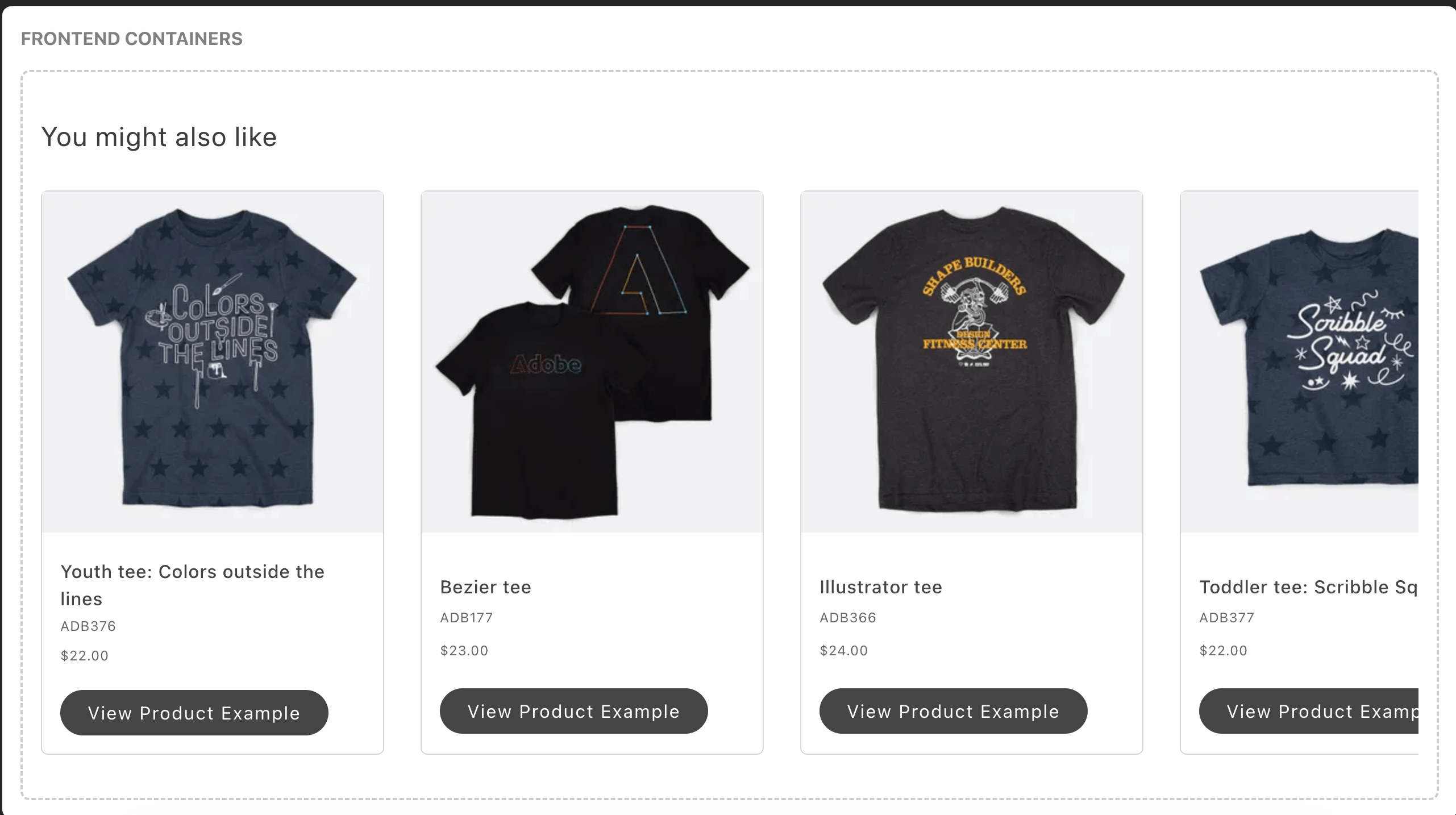\n</Diagram>\n\n## Configurations\n\nThe `ProductList` container provides the following configuration options:\n\n\nThe `ProductListProps` interface has the following shape:\n\n```ts\nexport interface ProductListProps extends HTMLAttributes<HTMLDivElement> {\n recId: string;\n currentSku: string;\n initialData?: {\n recommendations?: {\n results: RecommendationUnitModel[];\n totalProducts: number;\n };\n };\n hideHeading?: boolean;\n routeProduct?: (item: Item) => string;\n cartSkus?: string[];\n userPurchaseHistory?: any[];\n userViewHistory?: any[];\n slots?: {\n Heading?: SlotProps;\n Footer?: SlotProps;\n Title?: SlotProps<{\n item: Item;\n productUrl: string;\n }>;\n Sku?: SlotProps<{\n item: Item;\n }>;\n Price?: SlotProps<{\n item: Item;\n }>;\n Thumbnail?: SlotProps<{\n item: any;\n defaultImageProps: ImageProps;\n }>;\n };\n}\n```\n\nThe `RecommendationUnitModel` object has the following shape:\n\n```ts\nexport interface RecommendationUnitModel {\n displayOrder: number;\n pageType: PageType;\n title: string;\n items: Item[];\n totalProducts: number;\n typeId: string;\n unitId: string;\n unitName: string;\n}\n\nexport type PageType = 'Product'; // Always hardcoded to 'Product' per requirements\n\nexport interface Item {\n uid: string;\n sku: string;\n name: string;\n urlKey: string;\n images: ItemImage[];\n price: FinalPrice;\n priceRange?: {\n minimum?: FinalPrice;\n maximum?: FinalPrice;\n };\n visibility: string;\n queryType: string;\n itemType: string;\n}\n\ninterface ItemImage {\n label: string;\n roles: string[];\n url: string;\n}\n\nexport interface Price {\n value: number | null;\n currency: string | null;\n}\n\nexport interface FinalPrice {\n final?: {\n amount?: Price;\n };\n}\n\nexport interface RecommendationsResponse {\n results: RecommendationUnitModel[];\n totalResults: number;\n}\n\nexport interface GraphQLResponse {\n errors?: Array<{ message: string }>;\n data?: {\n recommendations: RecommendationsResponse;\n };\n}\n```\n\n## Supported Slots\n\nThe `ProductList` container supports the following slots:\n\n* **Heading** - Customize the recommendations heading\n* **Footer** - Customize the action button area (Add to Cart / View Product)\n* **Title** - Customize the product title display\n* **Sku** - Customize the SKU display\n* **Price** - Customize the price display\n* **Thumbnail** - Customize the product image display\n\nEach slot receives context data relevant to its purpose, allowing for highly customizable product displays.\n\n## Example configuration\n\nThe following example demonstrates how to render the `ProductList` container with the `recId`, `currentSku`, and `routeProduct` callbacks with different slots:\n\n```js\n\n// Render Container\nprovider.render(ProductList, {\n recId: 'recommendation-unit-1',\n routeProduct: (item) => `/products/$`,\n currentSku: 'ADB150',\n hideHeading: false,\n slots: {\n // Example of how to prepend or append to the default Heading\n Heading: (ctx) => {\n const heading = document.createElement('div');\n heading.innerText = 'Slot: Content before default heading';\n ctx.prependChild(heading);\n const footer = document.createElement('div');\n footer.innerText = 'Slot: Content after default heading';\n ctx.appendChild(footer);\n },\n\n // Example of how to prepend or append to the default Thumbnail\n Thumbnail: (ctx) => {\n const thumbnail = document.createElement('div');\n thumbnail.innerText = 'Slot: Content before default thumbnail';\n ctx.prependChild(thumbnail);\n const footer = document.createElement('div');\n footer.innerText = 'Slot: Content after default thumbnail';\n ctx.appendChild(footer);\n },\n\n // Example of how to prepend or append to the default Price\n Price: (ctx) => {\n const price = document.createElement('div');\n price.innerText = 'Slot: Content before default price';\n ctx.prependChild(price);\n const footer = document.createElement('div');\n footer.innerText = 'Slot: Content after default price';\n ctx.appendChild(footer);\n },\n\n // Example of how to replace default Footer with a custom footer based on product type\n Footer: (ctx) => {\n const wrapper = document.createElement('div');\n wrapper.className = 'footer__wrapper';\n const addToCart = document.createElement('div');\n addToCart.className = 'footer__button--add-to-cart';\n wrapper.appendChild(addToCart);\n\n if (ctx.product.itemType === 'SimpleProductView') {\n // Add to Cart Button\n UI.render(Button, {\n children: 'Add to Cart',\n onClick: () => {\n // Call add to cart function from cart/api\n console.log('Add to Cart');\n },\n variant: 'primary',\n })(addToCart);\n } else {\n // View Product Button\n UI.render(Button, {\n children: 'Select Options',\n onClick: () => {\n console.log('Select Options');\n window.location.href = ctx.product.urlKey;\n },\n variant: 'tertiary',\n })(addToCart);\n }\n ctx.replaceWith(wrapper);\n },\n },\n}));\n\n```\n\n## Key Features\n\n- **Automatic Data Fetching**: Fetches recommendations based on `currentSku` and other context\n- **Intersection Observer**: Automatically tracks when recommendations are viewed\n- **Event Publishing**: Publishes render and view events for analytics\n- **Loading States**: Handles loading states during data fetching\n- **Empty States**: Gracefully handles empty recommendation results\n- **Internationalization**: Supports multiple languages through i18n\n- **Customizable Slots**: Extensive customization options for all UI elements"
|
|
23
|
+
},
|
|
24
|
+
{
|
|
25
|
+
"path": "dropins/recommendations/dictionary",
|
|
26
|
+
"title": "Recommendations Dictionary",
|
|
27
|
+
"description": "Customize user-facing text and labels in the Recommendations drop-in for localization and branding.",
|
|
28
|
+
"content": "The **Recommendations dictionary** contains all user-facing text, labels, and messages displayed by this drop-in. Customize the dictionary to:\n\n- **Localize** the drop-in for different languages and regions\n- **Customize** labels and messages to match your brand voice\n- **Override** default text without modifying source code for the drop-in\n\nDictionaries use the **i18n (internationalization)** pattern, where each text string is identified by a unique key path.\n\n\n## How to customize\n\nOverride dictionary values during drop-in initialization. The drop-in deep-merges your custom values with the defaults.\n\n```javascript\n\nawait initialize({\n langDefinitions: {\n en_US: {\n \"Recommendations\": {\n \"ProductList\": {\n \"addToCart\": \"Custom value\",\n \"selectOptions\": \"Custom value\"\n }\n }\n }\n }\n});\n```\n\nYou only need to include the keys you want to change. For multi-language support and advanced patterns, see the [Dictionary customization guide](https://experienceleague.adobe.com/developer/commerce/storefront/dropins/all/dictionaries/).\n\n## Default keys and values\n\nBelow are the default English (`en_US`) strings provided by the **Recommendations** drop-in:\n\n```json title=\"en_US.json\"\n{\n \"Recommendations\": {\n \"ProductList\": {\n \"addToCart\": \"Add To Cart\",\n \"selectOptions\": \"Select Options\",\n \"viewProduct\": \"View Product\"\n }\n }\n}\n```"
|
|
29
|
+
},
|
|
30
|
+
{
|
|
31
|
+
"path": "dropins/recommendations/events",
|
|
32
|
+
"title": "Recommendations Data & Events",
|
|
33
|
+
"description": "Learn about the events used by the Recommendations drop-in and the data available within those events.",
|
|
34
|
+
"content": "The **Recommendations** drop-in uses the [event bus](https://experienceleague.adobe.com/developer/commerce/storefront/sdk/reference/events) to emit and listen to events for communication between drop-ins and external integrations.\n\n\n## Events reference\n\n{/* EVENTS_TABLE_START */}\n\n\n| Event | Direction | Description |\n|-------|-----------|-------------|\n| [recommendations/data](#recommendationsdata-emits-and-listens) | Emits and listens | Triggered when data is available or changes. |\n\n\n{/* EVENTS_TABLE_END */}\n\n## Event details\n\nThe following sections provide detailed information about each event, including its direction, event payload, and usage examples.\n\n\n### `recommendations/data` (emits and listens)\n\nEmitted when product recommendations are loaded. This includes recommended products based on user behavior, cart contents, or product associations.\n\n#### Event payload\n\n```typescript\nRecommendationUnitModel[] | null\n```\n\nSee [`RecommendationUnitModel`](#recommendationunitmodel) for full type definition.\n\n\n#### Example\n\n```js\n\nevents.on('recommendations/data', (payload) => {\n console.log('recommendations/data event received:', payload);\n // Add your custom logic here\n});\n```\n\n\n## Data Models\n\nThe following data models are used in event payloads for this drop-in.\n\n### RecommendationUnitModel\n\nUsed in: [`recommendations/data`](#recommendationsdata-emits-and-listens).\n\n```ts\ninterface RecommendationUnitModel {\n displayOrder: number;\n pageType: PageType;\n title: string;\n items: Item[];\n totalProducts: number;\n typeId: string;\n unitId: string;\n unitName: string;\n}\n```"
|
|
35
|
+
},
|
|
36
|
+
{
|
|
37
|
+
"path": "dropins/recommendations/functions",
|
|
38
|
+
"title": "Recommendations Functions",
|
|
39
|
+
"description": "API functions provided by the Recommendations drop-in for programmatic control and customization.",
|
|
40
|
+
"content": "The Recommendations drop-in provides API functions that enable you to programmatically control behavior, fetch data, and integrate with Adobe Commerce backend services.\n\n\n| Function | Description |\n| --- | --- |\n| [`getRecommendationsByUnitIds`](#getrecommendationsbyunitids) | Retrieves product recommendations based on various parameters such as current SKU, recommendation ID, and user history. |\n| [`publishRecsItemAddToCartClick`](#publishrecsitemaddtocartclick) | Publishes an event when a user adds a recommended product to their cart, used for tracking recommendation performance. |\n\n\n## getRecommendationsByUnitIds\n\nThe `getRecommendationsByUnitIds` function retrieves product recommendations based on various parameters such as current SKU, recommendation ID, and user history. It calls the GraphQL query and transforms the response into a standardized format.\n\n```ts\nconst getRecommendationsByUnitIds = async (\n params: GetRecommendationsProps\n): Promise<RecommendationUnitModel[] | null>\n```\n\n\n| Parameter | Type | Req? | Description |\n|---|---|---|---|\n| `params` | `GetRecommendationsProps` | Yes | Parameters for retrieving recommendations including \\`pageType\\` (where recommendations are shown), \\`currentSku\\` (product being viewed), \\`cartSkus\\` (items in cart), \\`userPurchaseHistory\\` (previous purchases), and \\`userViewHistory\\` (previously viewed products). |\n\n\n### Events\n\nEmits the [`recommendations/data`](https://experienceleague.adobe.com/developer/commerce/storefront/dropins/recommendations/events/#recommendationsdata-emits-and-listens) event with the transformed recommendations data as the payload.\n\n### Returns\n\nReturns an array of [`RecommendationUnitModel`](#recommendationunitmodel) objects or `null`.\n\n## publishRecsItemAddToCartClick\n\nThe `publishRecsItemAddToCartClick` function publishes an event when a user adds a recommended product to their cart, used for tracking recommendation performance.\n\n```ts\nconst publishRecsItemAddToCartClick = async (\n params: PublishParams\n): any\n```\n\n\n| Parameter | Type | Req? | Description |\n|---|---|---|---|\n| `params` | `PublishParams` | Yes | Parameters for the add-to-cart event including the recommended product details and recommendation unit information. |\n\n\n### Examples\n\nFrom product recommendations block:\n\n```js\n\npublishRecsItemAddToCartClick({\n recommendationUnit,\n pagePlacement: 'product-list',\n yOffsetTop: addToCart.getBoundingClientRect().top ?? 0,\n yOffsetBottom:\n addToCart.getBoundingClientRect().bottom ?? 0,\n productId: ctx.index,\n})\n```\n\n### Events\n\nDoes not emit any drop-in events.\n\n### Returns\n\nReturns `void`.\n\n## Data Models\n\nThe following data models are used by functions in this drop-in.\n\n### RecommendationUnitModel\n\nThe `RecommendationUnitModel` object is returned by the following functions: [`getRecommendationsByUnitIds`](#getrecommendationsbyunitids).\n\n```ts\ninterface RecommendationUnitModel {\n displayOrder: number;\n pageType: PageType;\n title: string;\n items: Item[];\n totalProducts: number;\n typeId: string;\n unitId: string;\n unitName: string;\n}\n```\n\n\n{/* This documentation is auto-generated from the drop-in source repository: REPO_URL */}"
|
|
41
|
+
},
|
|
42
|
+
{
|
|
43
|
+
"path": "dropins/recommendations/initialization",
|
|
44
|
+
"title": "Recommendations initialization",
|
|
45
|
+
"description": "Configure the Recommendations drop-in with language definitions, custom data models, and drop-in-specific options.",
|
|
46
|
+
"content": "The **Recommendations initializer** configures product recommendation features including personalized suggestions, frequently bought together, and related products. Use initialization to customize recommendation algorithms and data models.\n\n\n## Configuration options\n\nThe following table describes the configuration options available for the **Recommendations** initializer:\n\n\n| Parameter | Type | Req? | Description |\n|---|---|---|---|\n| `langDefinitions` | [`LangDefinitions`](#langdefinitions) | No | Language definitions for internationalization (i18n). Override dictionary keys for localization or branding. |\n| `models` | [`Record<string, any>`](#models) | No | Custom data models for type transformations. Extend or modify default models with custom fields and transformers. |\n\n\n## Default configuration\n\nThe initializer runs with these defaults when no configuration is provided:\n\n```javascript title=\"scripts/initializers/recommendations.js\"\n\n\n// All configuration options are optional\nawait initializers.mountImmediately(initialize, {\n langDefinitions: {}, // Uses built-in English strings\n models: {}, // Uses default data models\n \n});\n```\n\n## Language definitions\n\nOverride dictionary keys for localization or branding. The `langDefinitions` object maps locale keys to custom strings that override default text for the drop-in.\n\n```javascript title=\"scripts/initializers/recommendations.js\"\n\n\nconst customStrings = {\n 'AddToCart': 'Add to Bag',\n 'Checkout': 'Complete Purchase',\n 'Price': 'Cost',\n};\n\nconst langDefinitions = {\n default: customStrings,\n};\n\nawait initializers.mountImmediately(initialize, { langDefinitions });\n```\n\n> **Tip**\n>\nFor complete dictionary customization including all available keys and multi-language support, see the [Recommendations Dictionary](https://experienceleague.adobe.com/developer/commerce/storefront/dropins/recommendations/dictionary/) page.\n\n\n## Customizing data models\n\nExtend or transform data models by providing custom transformer functions. Use the `models` option to add custom fields or modify existing data structures returned from the backend.\n\n### Available models\n\nThe following models can be customized through the `models` configuration option:\n\n\n| Model | Description |\n|---|---|\n| [`RecommendationUnitModel`](#recommendationunitmodel) | Transforms recommendation data from Adobe Sensei including product suggestions, recommendation types, and tracking identifiers. Use this to add custom fields or modify recommendation display logic. |\n\n\nThe following example shows how to customize the `RecommendationUnitModel` model for the **Recommendations** drop-in:\n\n```javascript title=\"scripts/initializers/recommendations.js\"\n\n\nconst models = {\n RecommendationUnitModel: {\n transformer: (data) => ({\n // Add custom fields from backend data\n customField: data?.custom_field,\n promotionBadge: data?.promotion?.label,\n // Transform existing fields\n displayPrice: data?.price?.value ? `$` : 'N/A',\n }),\n },\n};\n\nawait initializers.mountImmediately(initialize, { models });\n```\n\n\n## Configuration types\n\nThe following TypeScript definitions show the structure of each configuration object:\n\n### langDefinitions\n\nMaps locale identifiers to dictionaries of key-value pairs. The `default` locale is used as the fallback when no specific locale matches. Each dictionary key corresponds to a text string used in the drop-in UI.\n\n```typescript\nlangDefinitions?: {\n [locale: string]: {\n [key: string]: string;\n };\n};\n```\n\n### models\n\nMaps model names to transformer functions. Each transformer receives data from GraphQL and returns a modified or extended version. Use the `Model<T>` type from `@dropins/tools` to create type-safe transformers.\n\n```typescript\nmodels?: {\n [modelName: string]: Model<any>;\n};\n```\n\n\n## Model definitions\n\nThe following TypeScript definitions show the structure of each customizable model:\n\n### RecommendationUnitModel\n\n```typescript\nexport interface RecommendationUnitModel {\n displayOrder: number;\n pageType: PageType;\n title: string;\n items: Item[];\n totalProducts: number;\n typeId: string;\n unitId: string;\n unitName: string;\n}\n```"
|
|
47
|
+
},
|
|
48
|
+
{
|
|
49
|
+
"path": "dropins/recommendations/quick-start",
|
|
50
|
+
"title": "Recommendations Quick Start",
|
|
51
|
+
"description": "Quick reference and getting started guide for the Recommendations drop-in.",
|
|
52
|
+
"content": "The Recommendations drop-in displays personalized product recommendations powered by Adobe Sensei, with support for various recommendation types and customizable display layouts.\n\n\n## Quick example\n\nThe Recommendations drop-in is included in the . This example shows the basic pattern:\n\n```js\n// 1. Import initializer (handles all setup)\n\n// 2. Import the container you need\n\n// 3. Import the provider\n\n// 4. Render in your block\nexport default async function decorate(block) {\n await provider.render(ProductList, {\n // Configuration options - see Containers page\n })(block);\n}\n```\n\n**New to drop-ins?** See the [Using drop-ins](https://experienceleague.adobe.com/developer/commerce/storefront/dropins/all/quick-start/) guide for complete step-by-step instructions.\n\n\n## Quick reference\n\n**Import paths:**\n- Initializer: `import '../../scripts/initializers/recommendations.js'`\n- Containers: `import ContainerName from '@dropins/storefront-recommendations/containers/ContainerName.js'`\n- Provider: `import { render } from '@dropins/storefront-recommendations/render.js'`\n\n**Package:** `@dropins/storefront-recommendations`\n\n**Version:** 4.0.1 (verify compatibility with your Commerce instance)\n\n**Example container:** `ProductList`\n\n## Learn more\n\n- [Containers](https://experienceleague.adobe.com/developer/commerce/storefront/dropins/recommendations/containers/) - Available UI components and configuration options\n- [Initialization](https://experienceleague.adobe.com/developer/commerce/storefront/dropins/recommendations/initialization/) - Customize initializer settings and data models\n- [Functions](https://experienceleague.adobe.com/developer/commerce/storefront/dropins/recommendations/functions/) - Control drop-in behavior programmatically\n- [Events](https://experienceleague.adobe.com/developer/commerce/storefront/dropins/recommendations/events/) - Listen to and respond to drop-in state changes\n- [Slots](https://experienceleague.adobe.com/developer/commerce/storefront/dropins/recommendations/slots/) - Extend containers with custom content"
|
|
53
|
+
},
|
|
54
|
+
{
|
|
55
|
+
"path": "dropins/recommendations/slots",
|
|
56
|
+
"title": "Recommendations Slots",
|
|
57
|
+
"description": "Customize UI sections in the Recommendations drop-in using slots.",
|
|
58
|
+
"content": "The Recommendations drop-in exposes slots for customizing specific UI sections. Use slots to replace or extend container components. For default properties available to all slots, see [Extending drop-in components](https://experienceleague.adobe.com/developer/commerce/storefront/dropins/all/extending/).\n\n\n| Container | Slots |\n|-----------|-------|\n| [`ProductList`](#productlist-slots) | `Heading`, `Footer`, `Title`, `Sku`, `Price`, `Thumbnail` |\n\n\n> **Slot usage best practice**\n>\nDo not use context methods inside other context methods (for example, `appendChild()` inside `onChange()`). See [Slots best practices](https://experienceleague.adobe.com/developer/commerce/storefront/dropins/all/slots/#best-practice-for-dynamic-slot-content) for details and examples.\n\n\n## ProductList slots\n\nThe slots for the `ProductList` container allow you to customize its appearance and behavior.\n\n```typescript\ninterface ProductListProps {\n slots?: {\n Heading?: SlotProps;\n Footer?: SlotProps;\n Title?: SlotProps<{\n item: Item;\n productUrl: string;\n }>;\n Sku?: SlotProps<{\n item: Item;\n }>;\n Price?: SlotProps<{\n item: Item;\n }>;\n Thumbnail?: SlotProps<{\n item: any;\n defaultImageProps: ImageProps;\n }>;\n };\n}\n```\n\n### Heading slot\n\nThe Heading slot allows you to customize the heading section of the `ProductList` container.\n\n#### Example\n\n```js\n\n\nawait provider.render(ProductList, {\n slots: {\n Heading: (ctx) => {\n // Your custom implementation\n const element = document.createElement('div');\n element.innerText = 'Custom Heading';\n ctx.appendChild(element);\n }\n }\n})(block);\n```\n\n### Footer slot\n\nThe Footer slot allows you to customize the footer section of the `ProductList` container.\n\n#### Example\n\n```js\n\n\nawait provider.render(ProductList, {\n slots: {\n Footer: (ctx) => {\n // Your custom implementation\n const element = document.createElement('div');\n element.innerText = 'Custom Footer';\n ctx.appendChild(element);\n }\n }\n})(block);\n```\n\n### Title slot\n\nThe Title slot allows you to customize the title section of the `ProductList` container.\n\n#### Example\n\n```js\n\n\nawait provider.render(ProductList, {\n slots: {\n Title: (ctx) => {\n // Your custom implementation\n const element = document.createElement('div');\n element.innerText = 'Custom Title';\n ctx.appendChild(element);\n }\n }\n})(block);\n```\n\n### Sku slot\n\nThe Sku slot allows you to customize the sku section of the `ProductList` container.\n\n#### Example\n\n```js\n\n\nawait provider.render(ProductList, {\n slots: {\n Sku: (ctx) => {\n // Your custom implementation\n const element = document.createElement('div');\n element.innerText = 'Custom Sku';\n ctx.appendChild(element);\n }\n }\n})(block);\n```\n\n### Price slot\n\nThe Price slot allows you to customize the price section of the `ProductList` container.\n\n#### Example\n\n```js\n\n\nawait provider.render(ProductList, {\n slots: {\n Price: (ctx) => {\n // Your custom implementation\n const element = document.createElement('div');\n element.innerText = 'Custom Price';\n ctx.appendChild(element);\n }\n }\n})(block);\n```\n\n### Thumbnail slot\n\nThe Thumbnail slot allows you to customize the thumbnail section of the `ProductList` container.\n\n#### Example\n\n```js\n\n\nawait provider.render(ProductList, {\n slots: {\n Thumbnail: (ctx) => {\n // Your custom implementation\n const element = document.createElement('div');\n element.innerText = 'Custom Thumbnail';\n ctx.appendChild(element);\n }\n }\n})(block);\n```"
|
|
59
|
+
},
|
|
60
|
+
{
|
|
61
|
+
"path": "dropins/recommendations/styles",
|
|
62
|
+
"title": "Recommendations styles",
|
|
63
|
+
"description": "CSS classes and customization examples for the Recommendations drop-in.",
|
|
64
|
+
"content": "Customize the Recommendations drop-in using CSS classes and design tokens. This page covers the Recommendations-specific container classes and customization examples. For comprehensive information about design tokens, responsive breakpoints, and styling best practices, see [Styling Drop-In Components](https://experienceleague.adobe.com/developer/commerce/storefront/dropins/all/styling/).\n\n\n## Customization example\n\nAdd this to the CSS file of the specific where you're using the Recommendations drop-in.\n\nFor a complete list of available design tokens (colors, spacing, typography, and more), see the [Design tokens reference](https://experienceleague.adobe.com/developer/commerce/storefront/dropins/all/styling/#design-tokens-reference).\n\n```css title=\"styles/styles.css\" del={2-2} ins={3-3}\n.recommendations-product-list {\n gap: var(--spacing-size-6);\n gap: var(--color-brand-800);\n}\n```\n\n## Container classes\n\nThe Recommendations drop-in uses BEM-style class naming. Use the browser DevTools to inspect elements and find specific class names.\n\n```css\n/* ProductList */\n.dropin-button--primary {}\n.dropin-price--default {}\n.dropin-product-item-card {}\n.dropin-product-item-card__price {}\n.dropin-product-item-card__sku {}\n.recommendations-carousel__content {}\n.recommendations-product-list {}\n.recommendations-product-list--empty {}\n.recommendations-product-list__heading {}\n```"
|
|
65
|
+
}
|
|
66
|
+
]
|
|
67
|
+
}
|