buildanything 1.7.1 → 2.0.0
This diff represents the content of publicly available package versions that have been released to one of the supported registries. The information contained in this diff is provided for informational purposes only and reflects changes between package versions as they appear in their respective public registries.
- package/.claude-plugin/marketplace.json +3 -3
- package/.claude-plugin/plugin.json +9 -3
- package/CHANGELOG.md +112 -0
- package/README.md +2 -2
- package/agents/a11y-architect.md +166 -0
- package/agents/business-model.md +80 -29
- package/agents/code-architect.md +75 -0
- package/agents/code-reviewer.md +255 -0
- package/agents/code-simplifier.md +64 -0
- package/agents/design-brand-guardian.md +293 -53
- package/agents/design-critic.md +139 -0
- package/agents/design-inclusive-visuals-specialist.md +6 -19
- package/agents/design-ui-designer.md +335 -56
- package/agents/design-ux-architect.md +403 -55
- package/agents/design-ux-researcher.md +264 -49
- package/agents/engineering-ai-engineer.md +26 -36
- package/agents/engineering-backend-architect.md +185 -36
- package/agents/engineering-data-engineer.md +225 -43
- package/agents/engineering-devops-automator.md +227 -74
- package/agents/engineering-frontend-developer.md +210 -34
- package/agents/engineering-mobile-app-builder.md +6 -1
- package/agents/engineering-rapid-prototyper.md +30 -9
- package/agents/engineering-security-engineer.md +263 -61
- package/agents/engineering-senior-developer.md +128 -19
- package/agents/engineering-sre.md +84 -0
- package/agents/engineering-technical-writer.md +285 -41
- package/agents/feature-intel.md +110 -0
- package/agents/ios-app-review-guardian.md +66 -0
- package/agents/ios-foundation-models-specialist.md +64 -0
- package/agents/ios-storekit-specialist.md +59 -0
- package/agents/ios-swift-architect.md +129 -0
- package/agents/ios-swift-search.md +137 -0
- package/agents/ios-swift-ui-design.md +136 -0
- package/agents/marketing-app-store-optimizer.md +246 -64
- package/agents/planner.md +216 -0
- package/agents/pr-test-analyzer.md +63 -0
- package/agents/product-feedback-synthesizer.md +8 -2
- package/agents/refactor-cleaner.md +102 -0
- package/agents/security-reviewer.md +128 -0
- package/agents/silent-failure-hunter.md +54 -0
- package/agents/swift-build-resolver.md +119 -0
- package/agents/swift-reviewer.md +112 -0
- package/agents/tech-feasibility.md +21 -1
- package/agents/testing-api-tester.md +236 -59
- package/agents/testing-evidence-collector.md +26 -1
- package/agents/testing-performance-benchmarker.md +21 -1
- package/agents/testing-reality-checker.md +6 -1
- package/agents/visual-research.md +116 -0
- package/bin/adapters/cycle-counter-tool.ts +155 -0
- package/bin/adapters/scribe-tool.ts +71 -0
- package/bin/adapters/state-save-tool.ts +130 -0
- package/bin/adapters/write-lease-tool.ts +127 -0
- package/bin/buildanything-runtime.js +15 -0
- package/bin/buildanything-runtime.ts +328 -0
- package/bin/setup.js +83 -8
- package/commands/add-feature.md +2 -0
- package/commands/build.md +752 -332
- package/commands/fix.md +65 -0
- package/commands/self-check.md +121 -0
- package/commands/setup.md +114 -0
- package/commands/ux-review.md +63 -0
- package/commands/verify.md +69 -0
- package/docs/migration/agents.yaml +729 -0
- package/docs/migration/phase-graph.yaml +1088 -0
- package/docs/migration/sdk-host-compat.md +18 -0
- package/hooks/compile-writer-owner-cache.ts +171 -0
- package/hooks/hooks.json +36 -0
- package/hooks/pre-tool-use +19 -0
- package/hooks/pre-tool-use.ts +776 -0
- package/hooks/record-mode-transitions.ts +178 -0
- package/hooks/session-start +89 -2
- package/hooks/subagent-start +17 -0
- package/hooks/subagent-start.ts +471 -0
- package/hooks/subagent-stop +17 -0
- package/hooks/subagent-stop.ts +153 -0
- package/package.json +28 -5
- package/protocols/architecture-schema.md +171 -0
- package/protocols/build-fix.md +52 -0
- package/protocols/cleanup.md +54 -0
- package/protocols/decision-log.md +131 -0
- package/protocols/eval-harness.md +61 -0
- package/protocols/fake-data-detector.md +64 -0
- package/protocols/ios-context.md +234 -0
- package/protocols/ios-frameworks-map.md +323 -0
- package/protocols/ios-phase-branches.md +337 -0
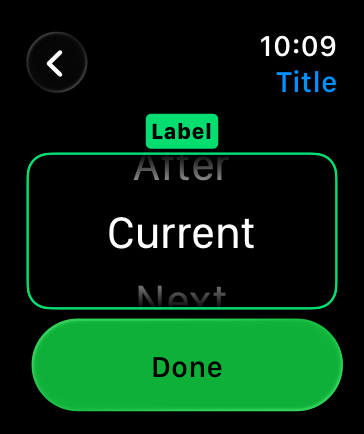
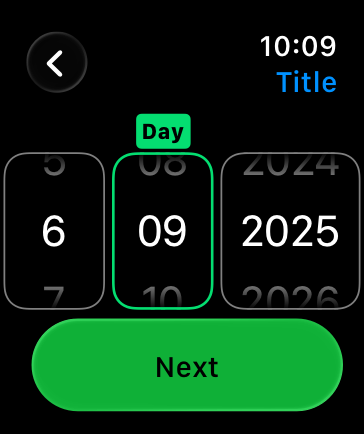
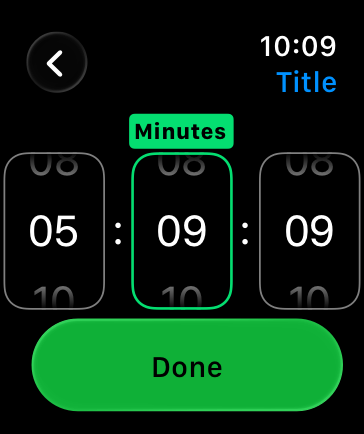
- package/protocols/ios-preflight.md +27 -0
- package/protocols/launch-readiness.md +258 -0
- package/protocols/metric-loop.md +153 -0
- package/protocols/smoke-test.md +118 -0
- package/protocols/state-schema.json +388 -0
- package/protocols/state-schema.md +172 -0
- package/protocols/verify.md +127 -0
- package/protocols/visual-dna.md +185 -0
- package/protocols/web-phase-branches.md +351 -0
- package/skills/ios/_VENDORED.md +62 -0
- package/skills/ios/activitykit/LICENSE +131 -0
- package/skills/ios/activitykit/SKILL.md +505 -0
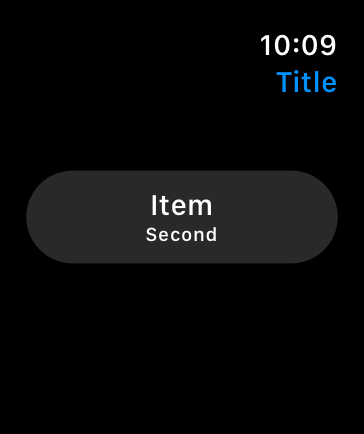
- package/skills/ios/activitykit/references/activitykit-patterns.md +868 -0
- package/skills/ios/app-intents/LICENSE +131 -0
- package/skills/ios/app-intents/SKILL.md +494 -0
- package/skills/ios/app-intents/references/appintents-advanced.md +1076 -0
- package/skills/ios/app-store-connect-metadata/SKILL.md +148 -0
- package/skills/ios/apple-on-device-ai/LICENSE +131 -0
- package/skills/ios/apple-on-device-ai/SKILL.md +505 -0
- package/skills/ios/apple-on-device-ai/references/coreml-conversion.md +425 -0
- package/skills/ios/apple-on-device-ai/references/coreml-optimization.md +344 -0
- package/skills/ios/apple-on-device-ai/references/foundation-models.md +508 -0
- package/skills/ios/apple-on-device-ai/references/mlx-swift.md +285 -0
- package/skills/ios/asc-privacy-manifest/SKILL.md +350 -0
- package/skills/ios/hig-components-content/SKILL.md +86 -0
- package/skills/ios/hig-components-content/references/activity-views.md +79 -0
- package/skills/ios/hig-components-content/references/charts.md +180 -0
- package/skills/ios/hig-components-content/references/collections.md +48 -0
- package/skills/ios/hig-components-content/references/color-wells.md +42 -0
- package/skills/ios/hig-components-content/references/image-views.md +82 -0
- package/skills/ios/hig-components-content/references/image-wells.md +34 -0
- package/skills/ios/hig-components-content/references/lockups.md +78 -0
- package/skills/ios/hig-components-content/references/web-views.md +36 -0
- package/skills/ios/hig-components-controls/SKILL.md +88 -0
- package/skills/ios/hig-components-controls/references/combo-boxes.md +40 -0
- package/skills/ios/hig-components-controls/references/controls.md +112 -0
- package/skills/ios/hig-components-controls/references/gauges.md +74 -0
- package/skills/ios/hig-components-controls/references/labels.md +92 -0
- package/skills/ios/hig-components-controls/references/pickers.md +128 -0
- package/skills/ios/hig-components-controls/references/rating-indicators.md +38 -0
- package/skills/ios/hig-components-controls/references/segmented-controls.md +94 -0
- package/skills/ios/hig-components-controls/references/sliders.md +92 -0
- package/skills/ios/hig-components-controls/references/steppers.md +40 -0
- package/skills/ios/hig-components-controls/references/text-fields.md +88 -0
- package/skills/ios/hig-components-controls/references/text-views.md +56 -0
- package/skills/ios/hig-components-controls/references/toggles.md +127 -0
- package/skills/ios/hig-components-controls/references/token-fields.md +48 -0
- package/skills/ios/hig-components-controls/references/virtual-keyboards.md +156 -0
- package/skills/ios/hig-components-dialogs/SKILL.md +76 -0
- package/skills/ios/hig-components-dialogs/references/action-sheets.md +74 -0
- package/skills/ios/hig-components-dialogs/references/alerts.md +158 -0
- package/skills/ios/hig-components-dialogs/references/digit-entry-views.md +32 -0
- package/skills/ios/hig-components-dialogs/references/popovers.md +81 -0
- package/skills/ios/hig-components-dialogs/references/sheets.md +157 -0
- package/skills/ios/hig-components-layout/SKILL.md +99 -0
- package/skills/ios/hig-components-layout/references/boxes.md +48 -0
- package/skills/ios/hig-components-layout/references/column-views.md +44 -0
- package/skills/ios/hig-components-layout/references/lists-and-tables.md +99 -0
- package/skills/ios/hig-components-layout/references/ornaments.md +56 -0
- package/skills/ios/hig-components-layout/references/outline-views.md +64 -0
- package/skills/ios/hig-components-layout/references/panels.md +75 -0
- package/skills/ios/hig-components-layout/references/scroll-views.md +123 -0
- package/skills/ios/hig-components-layout/references/sidebars.md +109 -0
- package/skills/ios/hig-components-layout/references/split-views.md +110 -0
- package/skills/ios/hig-components-layout/references/tab-bars.md +173 -0
- package/skills/ios/hig-components-layout/references/tab-views.md +68 -0
- package/skills/ios/hig-components-layout/references/windows.md +188 -0
- package/skills/ios/hig-components-menus/SKILL.md +81 -0
- package/skills/ios/hig-components-menus/references/action-button.md +61 -0
- package/skills/ios/hig-components-menus/references/buttons.md +261 -0
- package/skills/ios/hig-components-menus/references/context-menus.md +105 -0
- package/skills/ios/hig-components-menus/references/disclosure-controls.md +84 -0
- package/skills/ios/hig-components-menus/references/dock-menus.md +40 -0
- package/skills/ios/hig-components-menus/references/edit-menus.md +88 -0
- package/skills/ios/hig-components-menus/references/menus.md +171 -0
- package/skills/ios/hig-components-menus/references/pop-up-buttons.md +70 -0
- package/skills/ios/hig-components-menus/references/pull-down-buttons.md +77 -0
- package/skills/ios/hig-components-menus/references/the-menu-bar.md +303 -0
- package/skills/ios/hig-components-menus/references/toolbars.md +256 -0
- package/skills/ios/hig-components-search/SKILL.md +68 -0
- package/skills/ios/hig-components-search/references/page-controls.md +120 -0
- package/skills/ios/hig-components-search/references/path-controls.md +40 -0
- package/skills/ios/hig-components-search/references/search-fields.md +189 -0
- package/skills/ios/hig-components-status/SKILL.md +80 -0
- package/skills/ios/hig-components-status/references/activity-rings.md +105 -0
- package/skills/ios/hig-components-status/references/progress-indicators.md +116 -0
- package/skills/ios/hig-components-status/references/status-bars.md +38 -0
- package/skills/ios/hig-components-system/SKILL.md +88 -0
- package/skills/ios/hig-components-system/references/app-clips.md +387 -0
- package/skills/ios/hig-components-system/references/app-shortcuts.md +114 -0
- package/skills/ios/hig-components-system/references/complications.md +425 -0
- package/skills/ios/hig-components-system/references/home-screen-quick-actions.md +42 -0
- package/skills/ios/hig-components-system/references/live-activities.md +442 -0
- package/skills/ios/hig-components-system/references/notifications.md +153 -0
- package/skills/ios/hig-components-system/references/top-shelf.md +135 -0
- package/skills/ios/hig-components-system/references/watch-faces.md +40 -0
- package/skills/ios/hig-components-system/references/widgets.md +517 -0
- package/skills/ios/hig-foundations/SKILL.md +98 -0
- package/skills/ios/hig-foundations/references/accessibility.md +291 -0
- package/skills/ios/hig-foundations/references/app-icons.md +210 -0
- package/skills/ios/hig-foundations/references/branding.md +44 -0
- package/skills/ios/hig-foundations/references/color.md +274 -0
- package/skills/ios/hig-foundations/references/dark-mode.md +116 -0
- package/skills/ios/hig-foundations/references/icons.md +263 -0
- package/skills/ios/hig-foundations/references/images.md +176 -0
- package/skills/ios/hig-foundations/references/immersive-experiences.md +174 -0
- package/skills/ios/hig-foundations/references/inclusion.md +189 -0
- package/skills/ios/hig-foundations/references/layout.md +425 -0
- package/skills/ios/hig-foundations/references/materials.md +238 -0
- package/skills/ios/hig-foundations/references/motion.md +103 -0
- package/skills/ios/hig-foundations/references/privacy.md +231 -0
- package/skills/ios/hig-foundations/references/right-to-left.md +206 -0
- package/skills/ios/hig-foundations/references/sf-symbols.md +310 -0
- package/skills/ios/hig-foundations/references/spatial-layout.md +142 -0
- package/skills/ios/hig-foundations/references/typography.md +1146 -0
- package/skills/ios/hig-foundations/references/writing.md +91 -0
- package/skills/ios/hig-inputs/SKILL.md +94 -0
- package/skills/ios/hig-inputs/references/apple-pencil-and-scribble.md +148 -0
- package/skills/ios/hig-inputs/references/camera-control.md +107 -0
- package/skills/ios/hig-inputs/references/digital-crown.md +83 -0
- package/skills/ios/hig-inputs/references/eyes.md +120 -0
- package/skills/ios/hig-inputs/references/focus-and-selection.md +120 -0
- package/skills/ios/hig-inputs/references/game-controls.md +156 -0
- package/skills/ios/hig-inputs/references/gestures.md +208 -0
- package/skills/ios/hig-inputs/references/gyro-and-accelerometer.md +40 -0
- package/skills/ios/hig-inputs/references/keyboards.md +234 -0
- package/skills/ios/hig-inputs/references/nearby-interactions.md +70 -0
- package/skills/ios/hig-inputs/references/pointing-devices.md +237 -0
- package/skills/ios/hig-inputs/references/remotes.md +67 -0
- package/skills/ios/hig-inputs/references/spatial-interactions.md +70 -0
- package/skills/ios/hig-patterns/SKILL.md +104 -0
- package/skills/ios/hig-patterns/references/charting-data.md +81 -0
- package/skills/ios/hig-patterns/references/collaboration-and-sharing.md +86 -0
- package/skills/ios/hig-patterns/references/drag-and-drop.md +134 -0
- package/skills/ios/hig-patterns/references/entering-data.md +69 -0
- package/skills/ios/hig-patterns/references/feedback.md +67 -0
- package/skills/ios/hig-patterns/references/file-management.md +135 -0
- package/skills/ios/hig-patterns/references/going-full-screen.md +79 -0
- package/skills/ios/hig-patterns/references/launching.md +81 -0
- package/skills/ios/hig-patterns/references/live-viewing-apps.md +79 -0
- package/skills/ios/hig-patterns/references/loading.md +59 -0
- package/skills/ios/hig-patterns/references/managing-accounts.md +107 -0
- package/skills/ios/hig-patterns/references/managing-notifications.md +99 -0
- package/skills/ios/hig-patterns/references/modality.md +82 -0
- package/skills/ios/hig-patterns/references/multitasking.md +131 -0
- package/skills/ios/hig-patterns/references/offering-help.md +117 -0
- package/skills/ios/hig-patterns/references/onboarding.md +69 -0
- package/skills/ios/hig-patterns/references/playing-audio.md +124 -0
- package/skills/ios/hig-patterns/references/playing-haptics.md +280 -0
- package/skills/ios/hig-patterns/references/playing-video.md +180 -0
- package/skills/ios/hig-patterns/references/printing.md +50 -0
- package/skills/ios/hig-patterns/references/ratings-and-reviews.md +48 -0
- package/skills/ios/hig-patterns/references/searching.md +70 -0
- package/skills/ios/hig-patterns/references/settings.md +84 -0
- package/skills/ios/hig-patterns/references/undo-and-redo.md +58 -0
- package/skills/ios/hig-patterns/references/workouts.md +76 -0
- package/skills/ios/hig-platforms/SKILL.md +84 -0
- package/skills/ios/hig-platforms/references/designing-for-games.md +159 -0
- package/skills/ios/hig-platforms/references/designing-for-ios.md +66 -0
- package/skills/ios/hig-platforms/references/designing-for-ipados.md +64 -0
- package/skills/ios/hig-platforms/references/designing-for-macos.md +70 -0
- package/skills/ios/hig-platforms/references/designing-for-tvos.md +68 -0
- package/skills/ios/hig-platforms/references/designing-for-visionos.md +85 -0
- package/skills/ios/hig-platforms/references/designing-for-watchos.md +74 -0
- package/skills/ios/hig-project-context/SKILL.md +133 -0
- package/skills/ios/hig-technologies/SKILL.md +107 -0
- package/skills/ios/hig-technologies/references/airplay.md +125 -0
- package/skills/ios/hig-technologies/references/always-on.md +62 -0
- package/skills/ios/hig-technologies/references/apple-pay.md +441 -0
- package/skills/ios/hig-technologies/references/augmented-reality.md +247 -0
- package/skills/ios/hig-technologies/references/carekit.md +224 -0
- package/skills/ios/hig-technologies/references/carplay.md +119 -0
- package/skills/ios/hig-technologies/references/game-center.md +343 -0
- package/skills/ios/hig-technologies/references/generative-ai.md +110 -0
- package/skills/ios/hig-technologies/references/healthkit.md +120 -0
- package/skills/ios/hig-technologies/references/homekit.md +343 -0
- package/skills/ios/hig-technologies/references/icloud.md +52 -0
- package/skills/ios/hig-technologies/references/id-verifier.md +73 -0
- package/skills/ios/hig-technologies/references/imessage-apps-and-stickers.md +105 -0
- package/skills/ios/hig-technologies/references/in-app-purchase.md +263 -0
- package/skills/ios/hig-technologies/references/live-photos.md +54 -0
- package/skills/ios/hig-technologies/references/mac-catalyst.md +216 -0
- package/skills/ios/hig-technologies/references/machine-learning.md +394 -0
- package/skills/ios/hig-technologies/references/maps.md +221 -0
- package/skills/ios/hig-technologies/references/nfc.md +51 -0
- package/skills/ios/hig-technologies/references/photo-editing.md +40 -0
- package/skills/ios/hig-technologies/references/researchkit.md +134 -0
- package/skills/ios/hig-technologies/references/shareplay.md +142 -0
- package/skills/ios/hig-technologies/references/shazamkit.md +47 -0
- package/skills/ios/hig-technologies/references/sign-in-with-apple.md +288 -0
- package/skills/ios/hig-technologies/references/siri.md +523 -0
- package/skills/ios/hig-technologies/references/tap-to-pay-on-iphone.md +208 -0
- package/skills/ios/hig-technologies/references/voiceover.md +90 -0
- package/skills/ios/hig-technologies/references/wallet.md +420 -0
- package/skills/ios/ios-26-platform/SKILL.md +53 -0
- package/skills/ios/ios-26-platform/references/automatic-adoption.md +161 -0
- package/skills/ios/ios-26-platform/references/backward-compat.md +238 -0
- package/skills/ios/ios-26-platform/references/liquid-glass.md +255 -0
- package/skills/ios/ios-26-platform/references/swiftui-apis.md +277 -0
- package/skills/ios/ios-26-platform/references/toolbar-navigation.md +250 -0
- package/skills/ios/ios-bootstrap/SKILL.md +107 -0
- package/skills/ios/ios-bootstrap/references/apple-docs-mcp-config.md +28 -0
- package/skills/ios/ios-bootstrap/references/new-project-dialog.md +41 -0
- package/skills/ios/ios-bootstrap/references/xcode-mcp-config.md +29 -0
- package/skills/ios/ios-debugger-agent/LICENSE +21 -0
- package/skills/ios/ios-debugger-agent/SKILL.md +58 -0
- package/skills/ios/ios-debugger-agent/agents/openai.yaml +4 -0
- package/skills/ios/ios-entitlements-generator/SKILL.md +47 -0
- package/skills/ios/ios-info-plist-hardening/SKILL.md +130 -0
- package/skills/ios/ios-maestro-flow-author/SKILL.md +68 -0
- package/skills/ios/ios-maestro-flow-author/references/input-and-scroll.yaml +17 -0
- package/skills/ios/ios-maestro-flow-author/references/modal-and-dismiss.yaml +14 -0
- package/skills/ios/ios-maestro-flow-author/references/onboarding-flow.yaml +16 -0
- package/skills/ios/ios-maestro-flow-author/references/tab-navigation.yaml +13 -0
- package/skills/ios/ios-maestro-flow-author/references/tap-and-assert.yaml +9 -0
- package/skills/ios/swift-accessibility/LICENSE +21 -0
- package/skills/ios/swift-accessibility/SKILL.md +371 -0
- package/skills/ios/swift-accessibility/examples/before-after-appkit.md +446 -0
- package/skills/ios/swift-accessibility/examples/before-after-swiftui.md +441 -0
- package/skills/ios/swift-accessibility/examples/before-after-uikit.md +464 -0
- package/skills/ios/swift-accessibility/references/assistive-access.md +441 -0
- package/skills/ios/swift-accessibility/references/display-settings.md +491 -0
- package/skills/ios/swift-accessibility/references/dynamic-type.md +420 -0
- package/skills/ios/swift-accessibility/references/media-accessibility.md +421 -0
- package/skills/ios/swift-accessibility/references/motor-input.md +393 -0
- package/skills/ios/swift-accessibility/references/nutrition-labels.md +362 -0
- package/skills/ios/swift-accessibility/references/platform-specifics.md +515 -0
- package/skills/ios/swift-accessibility/references/semantic-structure.md +585 -0
- package/skills/ios/swift-accessibility/references/testing-auditing.md +507 -0
- package/skills/ios/swift-accessibility/references/voice-control.md +317 -0
- package/skills/ios/swift-accessibility/references/voiceover-swiftui.md +584 -0
- package/skills/ios/swift-accessibility/references/voiceover-uikit.md +519 -0
- package/skills/ios/swift-accessibility/references/wcag-mapping.md +167 -0
- package/skills/ios/swift-accessibility/resources/audit-template.swift +128 -0
- package/skills/ios/swift-accessibility/resources/qa-checklist.md +258 -0
- package/skills/ios/swift-actor-persistence/SKILL.md +143 -0
- package/skills/ios/swift-concurrency/LICENSE +21 -0
- package/skills/ios/swift-concurrency/SKILL.md +171 -0
- package/skills/ios/swift-concurrency/references/_index.md +50 -0
- package/skills/ios/swift-concurrency/references/actors.md +660 -0
- package/skills/ios/swift-concurrency/references/async-algorithms.md +847 -0
- package/skills/ios/swift-concurrency/references/async-await-basics.md +266 -0
- package/skills/ios/swift-concurrency/references/async-sequences.md +710 -0
- package/skills/ios/swift-concurrency/references/core-data.md +560 -0
- package/skills/ios/swift-concurrency/references/glossary.md +135 -0
- package/skills/ios/swift-concurrency/references/linting.md +155 -0
- package/skills/ios/swift-concurrency/references/memory-management.md +569 -0
- package/skills/ios/swift-concurrency/references/migration.md +1104 -0
- package/skills/ios/swift-concurrency/references/performance.md +593 -0
- package/skills/ios/swift-concurrency/references/sendable.md +598 -0
- package/skills/ios/swift-concurrency/references/tasks.md +636 -0
- package/skills/ios/swift-concurrency/references/testing.md +592 -0
- package/skills/ios/swift-concurrency/references/threading.md +495 -0
- package/skills/ios/swift-concurrency-6-2/SKILL.md +216 -0
- package/skills/ios/swift-protocol-di-testing/SKILL.md +190 -0
- package/skills/ios/swift-security-expert/LICENSE +21 -0
- package/skills/ios/swift-security-expert/SKILL.md +470 -0
- package/skills/ios/swift-security-expert/references/biometric-authentication.md +565 -0
- package/skills/ios/swift-security-expert/references/certificate-trust.md +592 -0
- package/skills/ios/swift-security-expert/references/common-anti-patterns.md +690 -0
- package/skills/ios/swift-security-expert/references/compliance-owasp-mapping.md +537 -0
- package/skills/ios/swift-security-expert/references/credential-storage-patterns.md +721 -0
- package/skills/ios/swift-security-expert/references/cryptokit-public-key.md +505 -0
- package/skills/ios/swift-security-expert/references/cryptokit-symmetric.md +497 -0
- package/skills/ios/swift-security-expert/references/keychain-access-control.md +508 -0
- package/skills/ios/swift-security-expert/references/keychain-fundamentals.md +596 -0
- package/skills/ios/swift-security-expert/references/keychain-item-classes.md +476 -0
- package/skills/ios/swift-security-expert/references/keychain-sharing.md +458 -0
- package/skills/ios/swift-security-expert/references/migration-legacy-stores.md +727 -0
- package/skills/ios/swift-security-expert/references/secure-enclave.md +539 -0
- package/skills/ios/swift-security-expert/references/testing-security-code.md +781 -0
- package/skills/ios/swift-testing-expert/LICENSE +21 -0
- package/skills/ios/swift-testing-expert/SKILL.md +79 -0
- package/skills/ios/swift-testing-expert/references/_index.md +12 -0
- package/skills/ios/swift-testing-expert/references/async-testing-and-waiting.md +127 -0
- package/skills/ios/swift-testing-expert/references/expectations.md +145 -0
- package/skills/ios/swift-testing-expert/references/fundamentals.md +141 -0
- package/skills/ios/swift-testing-expert/references/migration-from-xctest.md +127 -0
- package/skills/ios/swift-testing-expert/references/parallelization-and-isolation.md +95 -0
- package/skills/ios/swift-testing-expert/references/parameterized-testing.md +284 -0
- package/skills/ios/swift-testing-expert/references/performance-and-best-practices.md +187 -0
- package/skills/ios/swift-testing-expert/references/traits-and-tags.md +114 -0
- package/skills/ios/swift-testing-expert/references/xcode-workflows.md +70 -0
- package/skills/ios/swiftdata-pro/LICENSE +21 -0
- package/skills/ios/swiftdata-pro/SKILL.md +102 -0
- package/skills/ios/swiftdata-pro/agents/openai.yaml +10 -0
- package/skills/ios/swiftdata-pro/assets/swiftdata-pro-icon.png +0 -0
- package/skills/ios/swiftdata-pro/assets/swiftdata-pro-icon.svg +29 -0
- package/skills/ios/swiftdata-pro/references/class-inheritance.md +104 -0
- package/skills/ios/swiftdata-pro/references/cloudkit.md +10 -0
- package/skills/ios/swiftdata-pro/references/core-rules.md +20 -0
- package/skills/ios/swiftdata-pro/references/indexing.md +27 -0
- package/skills/ios/swiftdata-pro/references/predicates.md +73 -0
- package/skills/ios/swiftui-design-principles/AGENTS.md +21 -0
- package/skills/ios/swiftui-design-principles/LICENSE +21 -0
- package/skills/ios/swiftui-design-principles/README.md +41 -0
- package/skills/ios/swiftui-design-principles/SKILL.md +605 -0
- package/skills/ios/swiftui-design-principles/metadata.json +10 -0
- package/skills/ios/swiftui-design-tokens/SKILL.md +475 -0
- package/skills/ios/swiftui-liquid-glass/LICENSE +21 -0
- package/skills/ios/swiftui-liquid-glass/SKILL.md +95 -0
- package/skills/ios/swiftui-liquid-glass/agents/openai.yaml +4 -0
- package/skills/ios/swiftui-liquid-glass/references/liquid-glass.md +280 -0
- package/skills/ios/swiftui-performance-audit/LICENSE +21 -0
- package/skills/ios/swiftui-performance-audit/SKILL.md +111 -0
- package/skills/ios/swiftui-performance-audit/agents/openai.yaml +4 -0
- package/skills/ios/swiftui-performance-audit/references/code-smells.md +150 -0
- package/skills/ios/swiftui-performance-audit/references/demystify-swiftui-performance-wwdc23.md +46 -0
- package/skills/ios/swiftui-performance-audit/references/optimizing-swiftui-performance-instruments.md +29 -0
- package/skills/ios/swiftui-performance-audit/references/profiling-intake.md +44 -0
- package/skills/ios/swiftui-performance-audit/references/report-template.md +47 -0
- package/skills/ios/swiftui-performance-audit/references/understanding-hangs-in-your-app.md +33 -0
- package/skills/ios/swiftui-performance-audit/references/understanding-improving-swiftui-performance.md +52 -0
- package/skills/ios/swiftui-pro/LICENSE +21 -0
- package/skills/ios/swiftui-pro/SKILL.md +108 -0
- package/skills/ios/swiftui-pro/agents/openai.yaml +10 -0
- package/skills/ios/swiftui-pro/assets/swiftui-pro-icon.png +0 -0
- package/skills/ios/swiftui-pro/assets/swiftui-pro-icon.svg +29 -0
- package/skills/ios/swiftui-pro/references/accessibility.md +13 -0
- package/skills/ios/swiftui-pro/references/api.md +39 -0
- package/skills/ios/swiftui-pro/references/data.md +43 -0
- package/skills/ios/swiftui-pro/references/design.md +31 -0
- package/skills/ios/swiftui-pro/references/hygiene.md +9 -0
- package/skills/ios/swiftui-pro/references/navigation.md +14 -0
- package/skills/ios/swiftui-pro/references/performance.md +46 -0
- package/skills/ios/swiftui-pro/references/swift.md +56 -0
- package/skills/ios/swiftui-pro/references/views.md +35 -0
- package/skills/ios/swiftui-ui-patterns/LICENSE +21 -0
- package/skills/ios/swiftui-ui-patterns/SKILL.md +100 -0
- package/skills/ios/swiftui-ui-patterns/agents/openai.yaml +4 -0
- package/skills/ios/swiftui-ui-patterns/references/app-wiring.md +201 -0
- package/skills/ios/swiftui-ui-patterns/references/async-state.md +96 -0
- package/skills/ios/swiftui-ui-patterns/references/components-index.md +50 -0
- package/skills/ios/swiftui-ui-patterns/references/controls.md +57 -0
- package/skills/ios/swiftui-ui-patterns/references/deeplinks.md +66 -0
- package/skills/ios/swiftui-ui-patterns/references/focus.md +90 -0
- package/skills/ios/swiftui-ui-patterns/references/form.md +97 -0
- package/skills/ios/swiftui-ui-patterns/references/grids.md +71 -0
- package/skills/ios/swiftui-ui-patterns/references/haptics.md +71 -0
- package/skills/ios/swiftui-ui-patterns/references/input-toolbar.md +51 -0
- package/skills/ios/swiftui-ui-patterns/references/lightweight-clients.md +93 -0
- package/skills/ios/swiftui-ui-patterns/references/list.md +86 -0
- package/skills/ios/swiftui-ui-patterns/references/loading-placeholders.md +38 -0
- package/skills/ios/swiftui-ui-patterns/references/macos-settings.md +71 -0
- package/skills/ios/swiftui-ui-patterns/references/matched-transitions.md +59 -0
- package/skills/ios/swiftui-ui-patterns/references/media.md +73 -0
- package/skills/ios/swiftui-ui-patterns/references/menu-bar.md +101 -0
- package/skills/ios/swiftui-ui-patterns/references/navigationstack.md +159 -0
- package/skills/ios/swiftui-ui-patterns/references/overlay.md +45 -0
- package/skills/ios/swiftui-ui-patterns/references/performance.md +62 -0
- package/skills/ios/swiftui-ui-patterns/references/previews.md +48 -0
- package/skills/ios/swiftui-ui-patterns/references/scroll-reveal.md +133 -0
- package/skills/ios/swiftui-ui-patterns/references/scrollview.md +87 -0
- package/skills/ios/swiftui-ui-patterns/references/searchable.md +71 -0
- package/skills/ios/swiftui-ui-patterns/references/sheets.md +155 -0
- package/skills/ios/swiftui-ui-patterns/references/split-views.md +72 -0
- package/skills/ios/swiftui-ui-patterns/references/tabview.md +114 -0
- package/skills/ios/swiftui-ui-patterns/references/theming.md +71 -0
- package/skills/ios/swiftui-ui-patterns/references/title-menus.md +93 -0
- package/skills/ios/swiftui-ui-patterns/references/top-bar.md +49 -0
- package/skills/ios/swiftui-view-refactor/LICENSE +21 -0
- package/skills/ios/swiftui-view-refactor/SKILL.md +207 -0
- package/skills/ios/swiftui-view-refactor/agents/openai.yaml +4 -0
- package/skills/ios/swiftui-view-refactor/references/mv-patterns.md +161 -0
- package/skills/ios/widgetkit/LICENSE +131 -0
- package/skills/ios/widgetkit/SKILL.md +502 -0
- package/skills/ios/widgetkit/references/widgetkit-advanced.md +871 -0
- package/skills/ios/writing-for-interfaces/SKILL.md +75 -0
- package/skills/web/accessibility/SKILL.md +146 -0
- package/skills/web/aceternity-ui/SKILL.md +719 -0
- package/skills/web/aceternity-ui/metadata.json +10 -0
- package/skills/web/api-design/SKILL.md +523 -0
- package/skills/web/chart-accessibility/SKILL.md +332 -0
- package/skills/web/composition-patterns/AGENTS.md +946 -0
- package/skills/web/composition-patterns/README.md +60 -0
- package/skills/web/composition-patterns/SKILL.md +89 -0
- package/skills/web/composition-patterns/metadata.json +11 -0
- package/skills/web/composition-patterns/rules/_sections.md +29 -0
- package/skills/web/composition-patterns/rules/_template.md +24 -0
- package/skills/web/composition-patterns/rules/architecture-avoid-boolean-props.md +100 -0
- package/skills/web/composition-patterns/rules/architecture-compound-components.md +112 -0
- package/skills/web/composition-patterns/rules/patterns-children-over-render-props.md +87 -0
- package/skills/web/composition-patterns/rules/patterns-explicit-variants.md +100 -0
- package/skills/web/composition-patterns/rules/react19-no-forwardref.md +42 -0
- package/skills/web/composition-patterns/rules/state-context-interface.md +191 -0
- package/skills/web/composition-patterns/rules/state-decouple-implementation.md +113 -0
- package/skills/web/composition-patterns/rules/state-lift-state.md +125 -0
- package/skills/web/cost-aware-llm-pipeline/SKILL.md +183 -0
- package/skills/web/database-migrations/SKILL.md +429 -0
- package/skills/web/deployment-patterns/SKILL.md +427 -0
- package/skills/web/docker-patterns/SKILL.md +364 -0
- package/skills/web/e2e-testing/SKILL.md +326 -0
- package/skills/web/lighthouse-ci/SKILL.md +361 -0
- package/skills/web/mcp-server-patterns/SKILL.md +69 -0
- package/skills/web/next-best-practices/SKILL.md +153 -0
- package/skills/web/next-best-practices/async-patterns.md +87 -0
- package/skills/web/next-best-practices/bundling.md +180 -0
- package/skills/web/next-best-practices/data-patterns.md +297 -0
- package/skills/web/next-best-practices/debug-tricks.md +105 -0
- package/skills/web/next-best-practices/directives.md +73 -0
- package/skills/web/next-best-practices/error-handling.md +227 -0
- package/skills/web/next-best-practices/file-conventions.md +140 -0
- package/skills/web/next-best-practices/font.md +245 -0
- package/skills/web/next-best-practices/functions.md +108 -0
- package/skills/web/next-best-practices/hydration-error.md +91 -0
- package/skills/web/next-best-practices/image.md +173 -0
- package/skills/web/next-best-practices/metadata.md +301 -0
- package/skills/web/next-best-practices/parallel-routes.md +287 -0
- package/skills/web/next-best-practices/route-handlers.md +146 -0
- package/skills/web/next-best-practices/rsc-boundaries.md +159 -0
- package/skills/web/next-best-practices/runtime-selection.md +39 -0
- package/skills/web/next-best-practices/scripts.md +141 -0
- package/skills/web/next-best-practices/self-hosting.md +371 -0
- package/skills/web/next-best-practices/suspense-boundaries.md +67 -0
- package/skills/web/next-cache-components/SKILL.md +411 -0
- package/skills/web/postgres-best-practices/SKILL.md +14 -0
- package/skills/web/postgres-best-practices/references/schema-design.md +9 -0
- package/skills/web/react-best-practices/AGENTS.md +3810 -0
- package/skills/web/react-best-practices/README.md +123 -0
- package/skills/web/react-best-practices/SKILL.md +149 -0
- package/skills/web/react-best-practices/metadata.json +15 -0
- package/skills/web/react-best-practices/rules/_sections.md +46 -0
- package/skills/web/react-best-practices/rules/_template.md +28 -0
- package/skills/web/react-best-practices/rules/advanced-effect-event-deps.md +56 -0
- package/skills/web/react-best-practices/rules/advanced-event-handler-refs.md +55 -0
- package/skills/web/react-best-practices/rules/advanced-init-once.md +42 -0
- package/skills/web/react-best-practices/rules/advanced-use-latest.md +39 -0
- package/skills/web/react-best-practices/rules/async-api-routes.md +38 -0
- package/skills/web/react-best-practices/rules/async-cheap-condition-before-await.md +37 -0
- package/skills/web/react-best-practices/rules/async-defer-await.md +82 -0
- package/skills/web/react-best-practices/rules/async-dependencies.md +51 -0
- package/skills/web/react-best-practices/rules/async-parallel.md +28 -0
- package/skills/web/react-best-practices/rules/async-suspense-boundaries.md +99 -0
- package/skills/web/react-best-practices/rules/bundle-analyzable-paths.md +63 -0
- package/skills/web/react-best-practices/rules/bundle-barrel-imports.md +60 -0
- package/skills/web/react-best-practices/rules/bundle-conditional.md +31 -0
- package/skills/web/react-best-practices/rules/bundle-defer-third-party.md +49 -0
- package/skills/web/react-best-practices/rules/bundle-dynamic-imports.md +35 -0
- package/skills/web/react-best-practices/rules/bundle-preload.md +50 -0
- package/skills/web/react-best-practices/rules/client-event-listeners.md +74 -0
- package/skills/web/react-best-practices/rules/client-localstorage-schema.md +71 -0
- package/skills/web/react-best-practices/rules/client-passive-event-listeners.md +48 -0
- package/skills/web/react-best-practices/rules/client-swr-dedup.md +56 -0
- package/skills/web/react-best-practices/rules/js-batch-dom-css.md +107 -0
- package/skills/web/react-best-practices/rules/js-cache-function-results.md +80 -0
- package/skills/web/react-best-practices/rules/js-cache-property-access.md +28 -0
- package/skills/web/react-best-practices/rules/js-cache-storage.md +70 -0
- package/skills/web/react-best-practices/rules/js-combine-iterations.md +32 -0
- package/skills/web/react-best-practices/rules/js-early-exit.md +50 -0
- package/skills/web/react-best-practices/rules/js-flatmap-filter.md +60 -0
- package/skills/web/react-best-practices/rules/js-hoist-regexp.md +45 -0
- package/skills/web/react-best-practices/rules/js-index-maps.md +37 -0
- package/skills/web/react-best-practices/rules/js-length-check-first.md +49 -0
- package/skills/web/react-best-practices/rules/js-min-max-loop.md +82 -0
- package/skills/web/react-best-practices/rules/js-request-idle-callback.md +105 -0
- package/skills/web/react-best-practices/rules/js-set-map-lookups.md +24 -0
- package/skills/web/react-best-practices/rules/js-tosorted-immutable.md +57 -0
- package/skills/web/react-best-practices/rules/rendering-activity.md +26 -0
- package/skills/web/react-best-practices/rules/rendering-animate-svg-wrapper.md +47 -0
- package/skills/web/react-best-practices/rules/rendering-conditional-render.md +40 -0
- package/skills/web/react-best-practices/rules/rendering-content-visibility.md +38 -0
- package/skills/web/react-best-practices/rules/rendering-hoist-jsx.md +46 -0
- package/skills/web/react-best-practices/rules/rendering-hydration-no-flicker.md +82 -0
- package/skills/web/react-best-practices/rules/rendering-hydration-suppress-warning.md +30 -0
- package/skills/web/react-best-practices/rules/rendering-resource-hints.md +85 -0
- package/skills/web/react-best-practices/rules/rendering-script-defer-async.md +68 -0
- package/skills/web/react-best-practices/rules/rendering-svg-precision.md +28 -0
- package/skills/web/react-best-practices/rules/rendering-usetransition-loading.md +75 -0
- package/skills/web/react-best-practices/rules/rerender-defer-reads.md +39 -0
- package/skills/web/react-best-practices/rules/rerender-dependencies.md +45 -0
- package/skills/web/react-best-practices/rules/rerender-derived-state-no-effect.md +40 -0
- package/skills/web/react-best-practices/rules/rerender-derived-state.md +29 -0
- package/skills/web/react-best-practices/rules/rerender-functional-setstate.md +74 -0
- package/skills/web/react-best-practices/rules/rerender-lazy-state-init.md +58 -0
- package/skills/web/react-best-practices/rules/rerender-memo-with-default-value.md +38 -0
- package/skills/web/react-best-practices/rules/rerender-memo.md +44 -0
- package/skills/web/react-best-practices/rules/rerender-move-effect-to-event.md +45 -0
- package/skills/web/react-best-practices/rules/rerender-no-inline-components.md +82 -0
- package/skills/web/react-best-practices/rules/rerender-simple-expression-in-memo.md +35 -0
- package/skills/web/react-best-practices/rules/rerender-split-combined-hooks.md +64 -0
- package/skills/web/react-best-practices/rules/rerender-transitions.md +40 -0
- package/skills/web/react-best-practices/rules/rerender-use-deferred-value.md +59 -0
- package/skills/web/react-best-practices/rules/rerender-use-ref-transient-values.md +73 -0
- package/skills/web/react-best-practices/rules/server-after-nonblocking.md +73 -0
- package/skills/web/react-best-practices/rules/server-auth-actions.md +96 -0
- package/skills/web/react-best-practices/rules/server-cache-lru.md +41 -0
- package/skills/web/react-best-practices/rules/server-cache-react.md +76 -0
- package/skills/web/react-best-practices/rules/server-dedup-props.md +65 -0
- package/skills/web/react-best-practices/rules/server-hoist-static-io.md +149 -0
- package/skills/web/react-best-practices/rules/server-no-shared-module-state.md +50 -0
- package/skills/web/react-best-practices/rules/server-parallel-fetching.md +83 -0
- package/skills/web/react-best-practices/rules/server-parallel-nested-fetching.md +34 -0
- package/skills/web/react-best-practices/rules/server-serialization.md +38 -0
- package/skills/web/seo/SKILL.md +154 -0
- package/skills/web/web-design-guidelines/SKILL.md +39 -0
- package/skills/web/zap-scan-config/SKILL.md +444 -0
- package/skills/web/zap-scan-config/assets/.gitkeep +9 -0
- package/skills/web/zap-scan-config/assets/github_action.yml +207 -0
- package/skills/web/zap-scan-config/assets/gitlab_ci.yml +226 -0
- package/skills/web/zap-scan-config/assets/zap_automation.yaml +196 -0
- package/skills/web/zap-scan-config/assets/zap_context.xml +192 -0
- package/skills/web/zap-scan-config/references/EXAMPLE.md +40 -0
- package/skills/web/zap-scan-config/references/api_testing_guide.md +475 -0
- package/skills/web/zap-scan-config/references/authentication_guide.md +431 -0
- package/skills/web/zap-scan-config/references/false_positive_handling.md +427 -0
- package/skills/web/zap-scan-config/references/owasp_mapping.md +255 -0
- package/src/lrr/aggregator.ts +80 -0
- package/src/orchestrator/hooks/context-header.ts +95 -0
- package/src/orchestrator/hooks/token-accounting-emitter.ts +77 -0
- package/src/orchestrator/hooks/token-accounting.ts +101 -0
- package/src/orchestrator/mcp/cycle-counter.ts +129 -0
- package/src/orchestrator/mcp/scribe.ts +283 -0
- package/src/orchestrator/mcp/state-save.ts +149 -0
- package/src/orchestrator/mcp/write-lease.ts +167 -0
- package/src/orchestrator/phase4-shared-context.ts +41 -0
- package/src/orchestrator/schemas/backward-edge.ts +46 -0
- package/agents/agentic-identity-trust.md +0 -121
- package/agents/data-consolidation-agent.md +0 -39
- package/agents/design-image-prompt-engineer.md +0 -105
- package/agents/design-visual-storyteller.md +0 -147
- package/agents/design-whimsy-injector.md +0 -89
- package/agents/engineering-autonomous-optimization-architect.md +0 -105
- package/agents/market-intel.md +0 -35
- package/agents/marketing-instagram-curator.md +0 -111
- package/agents/marketing-reddit-community-builder.md +0 -121
- package/agents/marketing-social-media-strategist.md +0 -74
- package/agents/marketing-tiktok-strategist.md +0 -123
- package/agents/marketing-twitter-engager.md +0 -124
- package/agents/marketing-wechat-official-account.md +0 -143
- package/agents/marketing-xiaohongshu-specialist.md +0 -136
- package/agents/marketing-zhihu-strategist.md +0 -160
- package/agents/product-behavioral-nudge-engine.md +0 -78
- package/agents/project-management-experiment-tracker.md +0 -102
- package/agents/report-distribution-agent.md +0 -43
- package/agents/risk-analysis.md +0 -45
- package/agents/sales-data-extraction-agent.md +0 -46
- package/agents/specialized-cultural-intelligence-strategist.md +0 -65
- package/agents/specialized-developer-advocate.md +0 -146
- package/agents/support-analytics-reporter.md +0 -133
- package/agents/support-executive-summary-generator.md +0 -64
- package/agents/support-finance-tracker.md +0 -145
- package/agents/support-legal-compliance-checker.md +0 -129
- package/agents/support-support-responder.md +0 -91
- package/agents/testing-accessibility-auditor.md +0 -110
- package/agents/testing-test-results-analyzer.md +0 -97
- package/agents/testing-tool-evaluator.md +0 -76
- package/agents/testing-workflow-optimizer.md +0 -99
- package/agents/user-research.md +0 -40
|
@@ -0,0 +1,128 @@
|
|
|
1
|
+
---
|
|
2
|
+
title: "Pickers | Apple Developer Documentation"
|
|
3
|
+
source: https://developer.apple.com/design/human-interface-guidelines/pickers
|
|
4
|
+
|
|
5
|
+
# Pickers
|
|
6
|
+
|
|
7
|
+
A picker displays one or more scrollable lists of distinct values that people can choose from.
|
|
8
|
+
|
|
9
|
+
|
|
10
|
+
|
|
11
|
+
The system provides several styles of pickers, each of which offers different types of selectable values and has a different appearance. The exact values shown in a picker, and their order, depend on the device language.
|
|
12
|
+
|
|
13
|
+
Pickers help people enter information by letting them choose single or multipart values. Date pickers specifically offer additional ways to choose values, like selecting a day in a calendar view or entering dates and times using a numeric keypad.
|
|
14
|
+
|
|
15
|
+
## [Best practices](https://developer.apple.com/design/human-interface-guidelines/pickers#Best-practices)
|
|
16
|
+
|
|
17
|
+
**Consider using a picker to offer medium-to-long lists of items.** If you need to display a fairly short list of choices, consider using a [pull-down button](https://developer.apple.com/design/human-interface-guidelines/pull-down-buttons) instead of a picker. Although a picker makes it easy to scroll quickly through many items, it may add too much visual weight to a short list of items. On the other hand, if you need to present a very large set of items, consider using a [list or table](https://developer.apple.com/design/human-interface-guidelines/lists-and-tables). Lists and tables can adjust in height, and tables can include an index, which makes it much faster to target a section of the list.
|
|
18
|
+
|
|
19
|
+
**Use predictable and logically ordered values.** Before people interact with a picker, many of its values can be hidden. It’s best when people can predict what the hidden values are, such as with an alphabetized list of countries, so they can move through the items quickly.
|
|
20
|
+
|
|
21
|
+
**Avoid switching views to show a picker.** A picker works well when displayed in context, below or in proximity to the field people are editing. A picker typically appears at the bottom of a window or in a popover.
|
|
22
|
+
|
|
23
|
+
**Consider providing less granularity when specifying minutes in a date picker.** By default, a minute list includes 60 values (0 to 59). You can optionally increase the minute interval as long as it divides evenly into 60. For example, you might want quarter-hour intervals (0, 15, 30, and 45).
|
|
24
|
+
|
|
25
|
+
## [Platform considerations](https://developer.apple.com/design/human-interface-guidelines/pickers#Platform-considerations)
|
|
26
|
+
|
|
27
|
+
_No additional considerations for visionOS._
|
|
28
|
+
|
|
29
|
+
### [iOS, iPadOS](https://developer.apple.com/design/human-interface-guidelines/pickers#iOS-iPadOS)
|
|
30
|
+
|
|
31
|
+
A date picker is an efficient interface for selecting a specific date, time, or both, using touch, a keyboard, or a pointing device. You can display a date picker in one of the following styles:
|
|
32
|
+
|
|
33
|
+
* Compact — A button that displays editable date and time content in a modal view.
|
|
34
|
+
|
|
35
|
+
* Inline — For time only, a button that displays wheels of values; for dates and times, an inline calendar view.
|
|
36
|
+
|
|
37
|
+
* Wheels — A set of scrolling wheels that also supports data entry through built-in or external keyboards.
|
|
38
|
+
|
|
39
|
+
* Automatic — A system-determined style based on the current platform and date picker mode.
|
|
40
|
+
|
|
41
|
+
|
|
42
|
+
|
|
43
|
+
|
|
44
|
+
A date picker has four modes, each of which presents a different set of selectable values.
|
|
45
|
+
|
|
46
|
+
* Date — Displays months, days of the month, and years.
|
|
47
|
+
|
|
48
|
+
* Time — Displays hours, minutes, and (optionally) an AM/PM designation.
|
|
49
|
+
|
|
50
|
+
* Date and time — Displays dates, hours, minutes, and (optionally) an AM/PM designation.
|
|
51
|
+
|
|
52
|
+
* Countdown timer — Displays hours and minutes, up to a maximum of 23 hours and 59 minutes. This mode isn’t available in the inline or compact styles.
|
|
53
|
+
|
|
54
|
+
|
|
55
|
+
|
|
56
|
+
|
|
57
|
+
The exact values shown in a date picker, and their order, depend on the device location.
|
|
58
|
+
|
|
59
|
+
Here are several examples of date pickers showing different combinations of style and mode.
|
|
60
|
+
|
|
61
|
+
* Compact
|
|
62
|
+
* Inline
|
|
63
|
+
* Wheels
|
|
64
|
+
|
|
65
|
+
|
|
66
|
+
|
|
67
|
+
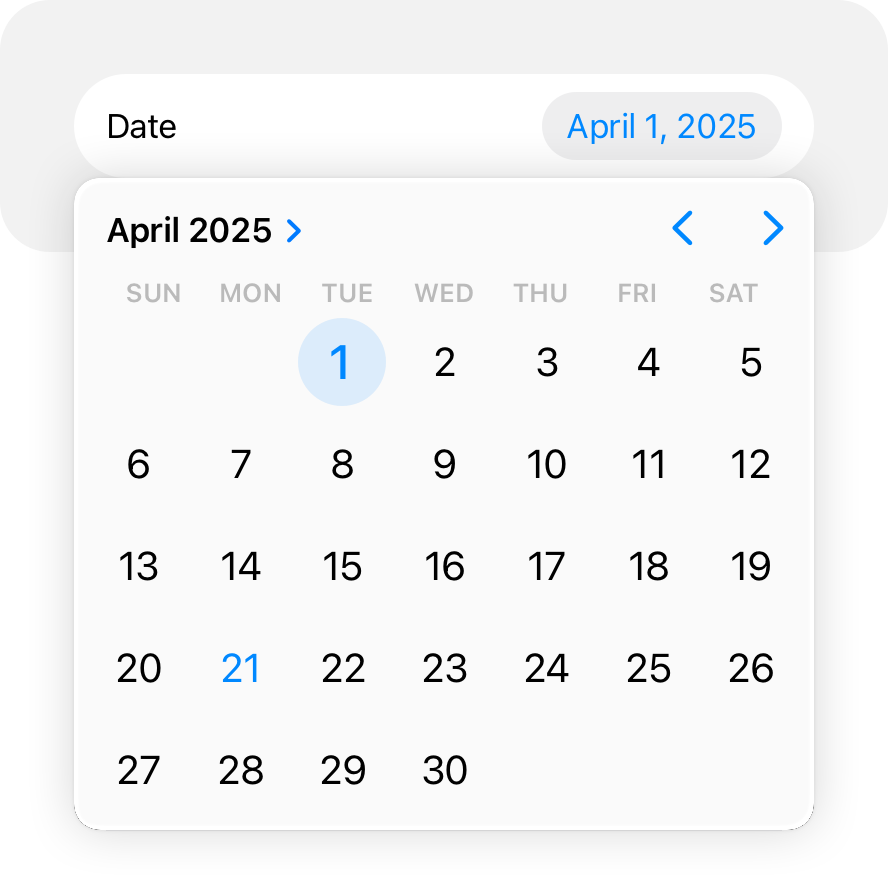In a compact layout, a picker opens as a popover over your content.
|
|
68
|
+
|
|
69
|
+
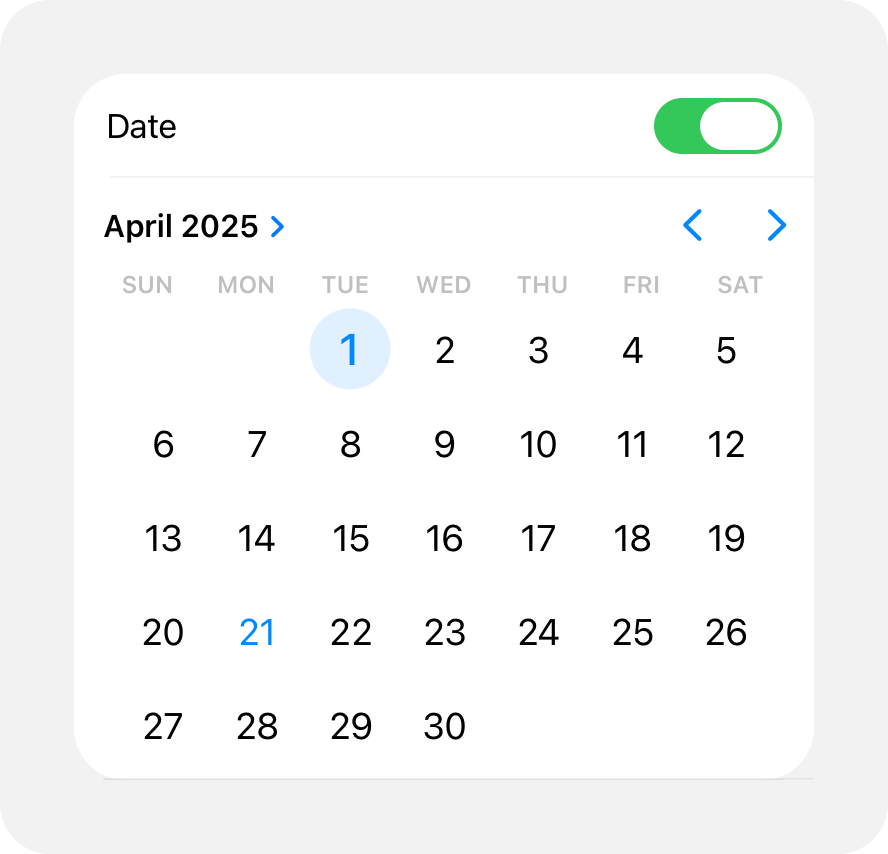In an inline layout, a picker opens inline with your content.
|
|
70
|
+
|
|
71
|
+
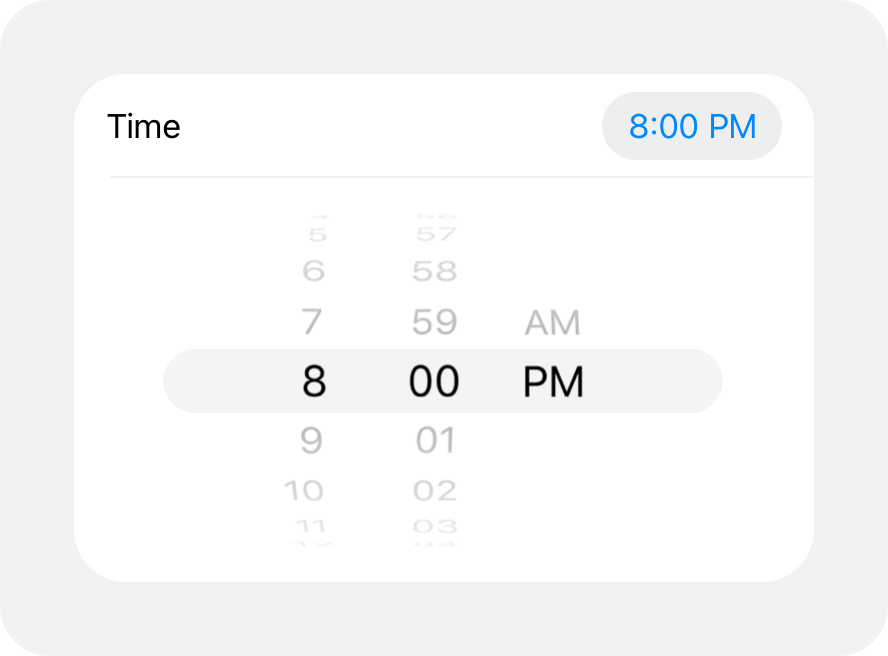Another example of an inline picker uses wheels to choose values for date and time.
|
|
72
|
+
|
|
73
|
+
**Use a compact date picker when space is constrained.** The compact style displays a button that shows the current value in your app’s accent color. When people tap the button, the date picker opens a modal view, providing access to a familiar calendar-style editor and time picker. Within the modal view, people can make multiple edits to dates and times before tapping outside the view to confirm their choices.
|
|
74
|
+
|
|
75
|
+
### [macOS](https://developer.apple.com/design/human-interface-guidelines/pickers#macOS)
|
|
76
|
+
|
|
77
|
+
**Choose a date picker style that suits your app.** There are two styles of date pickers in macOS: textual and graphical. The textual style is useful when you’re working with limited space and you expect people to make specific date and time selections. The graphical style is useful when you want to give people the option of browsing through days in a calendar or selecting a range of dates, or when the look of a clock face is appropriate for your app.
|
|
78
|
+
|
|
79
|
+
For developer guidance, see [`NSDatePicker`](https://developer.apple.com/documentation/AppKit/NSDatePicker).
|
|
80
|
+
|
|
81
|
+
### [tvOS](https://developer.apple.com/design/human-interface-guidelines/pickers#tvOS)
|
|
82
|
+
|
|
83
|
+
Pickers are available in tvOS with SwiftUI. For developer guidance, see [`Picker`](https://developer.apple.com/documentation/SwiftUI/Picker).
|
|
84
|
+
|
|
85
|
+
### [watchOS](https://developer.apple.com/design/human-interface-guidelines/pickers#watchOS)
|
|
86
|
+
|
|
87
|
+
Pickers display lists of items that people navigate using the Digital Crown, which helps people manage selections in a precise and engaging way.
|
|
88
|
+
|
|
89
|
+
A picker can display a list of items using the wheels style. watchOS can also display date and time pickers using the wheels style. For developer guidance, see [`Picker`](https://developer.apple.com/documentation/SwiftUI/Picker) and [`DatePicker`](https://developer.apple.com/documentation/SwiftUI/DatePicker).
|
|
90
|
+
|
|
91
|
+
|
|
92
|
+
|
|
93
|
+
|
|
94
|
+
|
|
95
|
+
|
|
96
|
+
|
|
97
|
+
You can configure a picker to display an outline, caption, and scrolling indicator.
|
|
98
|
+
|
|
99
|
+
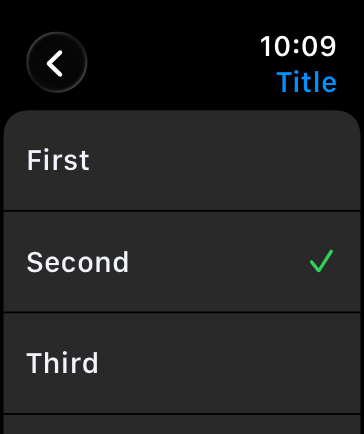
For longer lists, the navigation link displays the picker as a button. When someone taps the button, the system shows the list of options. The person can also scrub through the options using the Digital Crown without tapping the button. For developer guidance, see [`navigationLink`](https://developer.apple.com/documentation/SwiftUI/PickerStyle/navigationLink).
|
|
100
|
+
|
|
101
|
+
|
|
102
|
+
|
|
103
|
+
|
|
104
|
+
|
|
105
|
+
## [Resources](https://developer.apple.com/design/human-interface-guidelines/pickers#Resources)
|
|
106
|
+
|
|
107
|
+
#### [Related](https://developer.apple.com/design/human-interface-guidelines/pickers#Related)
|
|
108
|
+
|
|
109
|
+
[Pull-down buttons](https://developer.apple.com/design/human-interface-guidelines/pull-down-buttons)
|
|
110
|
+
|
|
111
|
+
[Lists and tables](https://developer.apple.com/design/human-interface-guidelines/lists-and-tables)
|
|
112
|
+
|
|
113
|
+
#### [Developer documentation](https://developer.apple.com/design/human-interface-guidelines/pickers#Developer-documentation)
|
|
114
|
+
|
|
115
|
+
[`Picker`](https://developer.apple.com/documentation/SwiftUI/Picker) — SwiftUI
|
|
116
|
+
|
|
117
|
+
[`UIDatePicker`](https://developer.apple.com/documentation/UIKit/UIDatePicker) — UIKit
|
|
118
|
+
|
|
119
|
+
[`UIPickerView`](https://developer.apple.com/documentation/UIKit/UIPickerView) — UIKit
|
|
120
|
+
|
|
121
|
+
[`NSDatePicker`](https://developer.apple.com/documentation/AppKit/NSDatePicker) — AppKit
|
|
122
|
+
|
|
123
|
+
## [Change log](https://developer.apple.com/design/human-interface-guidelines/pickers#Change-log)
|
|
124
|
+
|
|
125
|
+
Date| Changes
|
|
126
|
+
---|---
|
|
127
|
+
June 5, 2023| Updated guidance for using pickers in watchOS.
|
|
128
|
+
|
|
@@ -0,0 +1,38 @@
|
|
|
1
|
+
---
|
|
2
|
+
title: "Rating indicators | Apple Developer Documentation"
|
|
3
|
+
source: https://developer.apple.com/design/human-interface-guidelines/rating-indicators
|
|
4
|
+
|
|
5
|
+
# Rating indicators
|
|
6
|
+
|
|
7
|
+
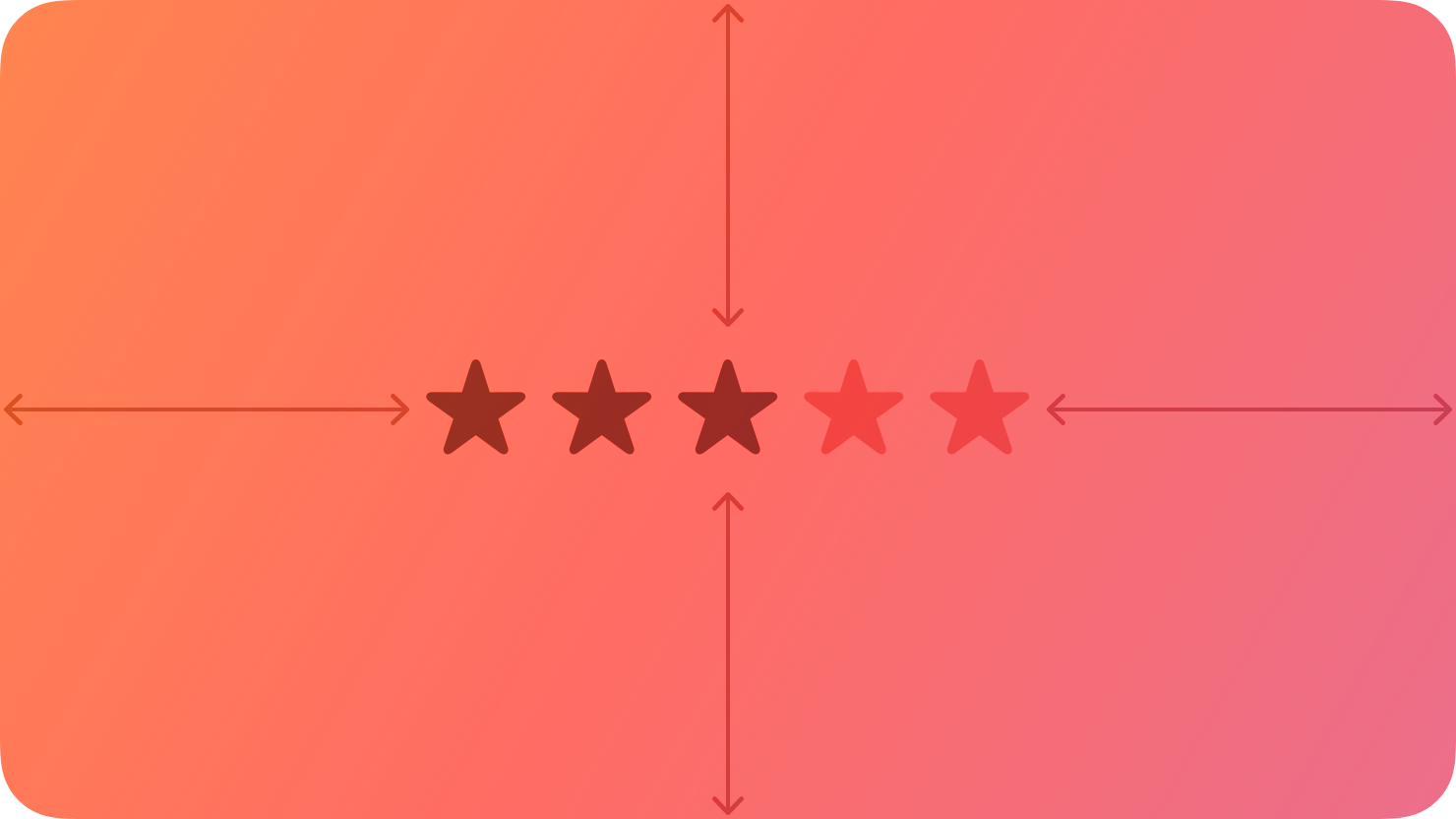
A rating indicator uses a series of horizontally arranged graphical symbols — by default, stars — to communicate a ranking level.
|
|
8
|
+
|
|
9
|
+
|
|
10
|
+
|
|
11
|
+
A rating indicator doesn’t display partial symbols; it rounds the value to display complete symbols only. Within a rating indicator, symbols are always the same distance apart and don’t expand or shrink to fit the component’s width.
|
|
12
|
+
|
|
13
|
+
## [Best practices](https://developer.apple.com/design/human-interface-guidelines/rating-indicators#Best-practices)
|
|
14
|
+
|
|
15
|
+
**Make it easy to change rankings.** When presenting a list of ranked items, let people adjust the rank of individual items inline without navigating to a separate editing screen.
|
|
16
|
+
|
|
17
|
+
**If you replace the star with a custom symbol, make sure that its purpose is clear.** The star is a very recognizable ranking symbol, and people may not associate other symbols with a rating scale.
|
|
18
|
+
|
|
19
|
+
## [Platform considerations](https://developer.apple.com/design/human-interface-guidelines/rating-indicators#Platform-considerations)
|
|
20
|
+
|
|
21
|
+
_No additional considerations for macOS. Not supported in iOS, iPadOS, tvOS, visionOS, or watchOS._
|
|
22
|
+
|
|
23
|
+
## [Resources](https://developer.apple.com/design/human-interface-guidelines/rating-indicators#Resources)
|
|
24
|
+
|
|
25
|
+
#### [Related](https://developer.apple.com/design/human-interface-guidelines/rating-indicators#Related)
|
|
26
|
+
|
|
27
|
+
[Ratings and reviews](https://developer.apple.com/design/human-interface-guidelines/ratings-and-reviews)
|
|
28
|
+
|
|
29
|
+
#### [Developer documentation](https://developer.apple.com/design/human-interface-guidelines/rating-indicators#Developer-documentation)
|
|
30
|
+
|
|
31
|
+
[`NSLevelIndicator.Style.rating`](https://developer.apple.com/documentation/AppKit/NSLevelIndicator/Style/rating) — AppKit
|
|
32
|
+
|
|
33
|
+
## [Change log](https://developer.apple.com/design/human-interface-guidelines/rating-indicators#Change-log)
|
|
34
|
+
|
|
35
|
+
Date| Changes
|
|
36
|
+
---|---
|
|
37
|
+
September 23, 2022| New page.
|
|
38
|
+
|
|
@@ -0,0 +1,94 @@
|
|
|
1
|
+
---
|
|
2
|
+
title: "Segmented controls | Apple Developer Documentation"
|
|
3
|
+
source: https://developer.apple.com/design/human-interface-guidelines/segmented-controls
|
|
4
|
+
|
|
5
|
+
# Segmented controls
|
|
6
|
+
|
|
7
|
+
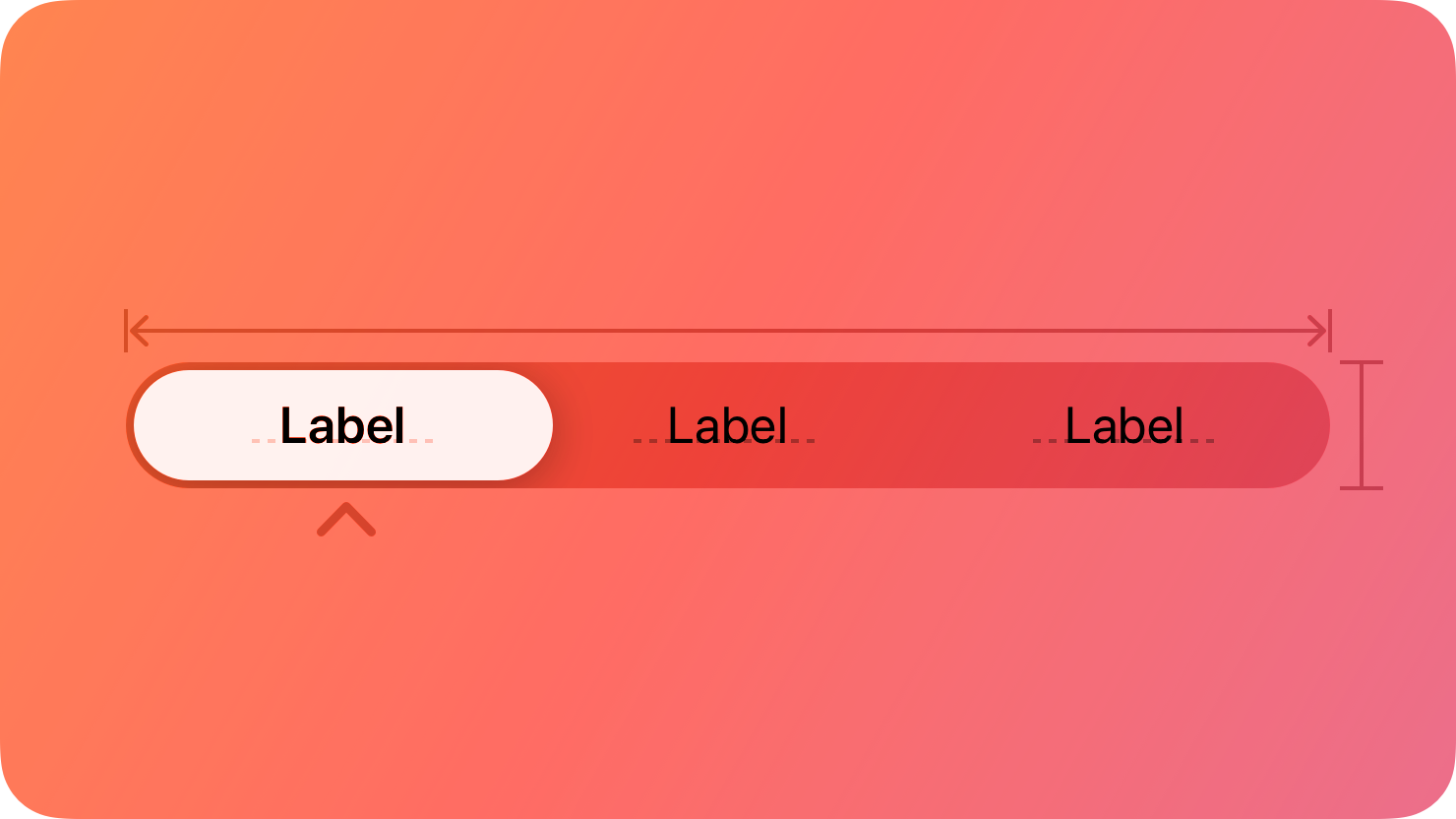
A segmented control is a linear set of two or more segments, each of which functions as a button.
|
|
8
|
+
|
|
9
|
+
|
|
10
|
+
|
|
11
|
+
Within a segmented control, all segments are usually equal in width. Like [buttons](https://developer.apple.com/design/human-interface-guidelines/buttons), segments can contain text or images. Segments can also have text labels beneath them (or beneath the control as a whole).
|
|
12
|
+
|
|
13
|
+
A segmented control offers a single choice from among a set of options, or in macOS, either a single choice or multiple choices. For example, in macOS Keynote people can select only one segment in the alignment options control to align selected text. In contrast, people can choose multiple segments in the font attributes control to combine styles like bold, italics, and underline. The toolbar of a Keynote window also uses a segmented control to let people show and hide various editing panes within the main window area.
|
|
14
|
+
|
|
15
|
+
Single choice
|
|
16
|
+
|
|
17
|
+
Multiple choices
|
|
18
|
+
|
|
19
|
+
In addition to representing the state of a single or multiple-choice selection, a segmented control can function as a set of buttons that perform actions without showing a selection state. For example, the Reply, Reply all, and Forward buttons in macOS Mail. For developer guidance, see [`isMomentary`](https://developer.apple.com/documentation/UIKit/UISegmentedControl/isMomentary) and [`NSSegmentedControl.SwitchTracking.momentary`](https://developer.apple.com/documentation/AppKit/NSSegmentedControl/SwitchTracking/momentary).
|
|
20
|
+
|
|
21
|
+
## [Best practices](https://developer.apple.com/design/human-interface-guidelines/segmented-controls#Best-practices)
|
|
22
|
+
|
|
23
|
+
**Use a segmented control to provide closely related choices that affect an object, state, or view.** For example, a segmented control in an inspector could let people choose one or more attributes to apply to a selection, or a segmented control in a toolbar could offer a set of actions to perform on the current view.
|
|
24
|
+
|
|
25
|
+
|
|
26
|
+
|
|
27
|
+
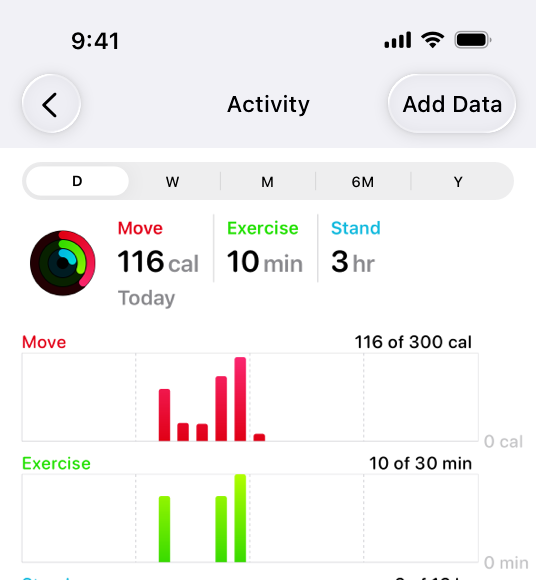
In the iOS Health app, a segmented control provides a choice of time ranges for the activity graphs to display.
|
|
28
|
+
|
|
29
|
+
**Consider a segmented control when it’s important to group functions together, or to clearly show their selection state.** Unlike other button styles, segmented controls preserve their grouping regardless of the view size or where they appear. This grouping can also help people understand at a glance which controls are currently selected.
|
|
30
|
+
|
|
31
|
+
**Keep control types consistent within a single segmented control.** Don’t assign actions to segments in a control that otherwise represents selection state, and don’t show a selection state for segments in a control that otherwise performs actions.
|
|
32
|
+
|
|
33
|
+
**Limit the number of segments in a control.** Too many segments can be hard to parse and time-consuming to navigate. Aim for no more than about five to seven segments in a wide interface and no more than about five segments on iPhone.
|
|
34
|
+
|
|
35
|
+
**In general, keep segment size consistent.** When all segments have equal width, a segmented control feels balanced. To the extent possible, it’s best to keep icon and title widths consistent too.
|
|
36
|
+
|
|
37
|
+
## [Content](https://developer.apple.com/design/human-interface-guidelines/segmented-controls#Content)
|
|
38
|
+
|
|
39
|
+
**Prefer using either text or images — not a mix of both — in a single segmented control.** Although individual segments can contain text labels or images, mixing the two in a single control can lead to a disconnected and confusing interface.
|
|
40
|
+
|
|
41
|
+
**As much as possible, use content with a similar size in each segment.** Because all segments typically have equal width, it doesn’t look good if content fills some segments but not others.
|
|
42
|
+
|
|
43
|
+
**Use nouns or noun phrases for segment labels.** Write text that describes each segment and uses [title-style capitalization](https://support.apple.com/guide/applestyleguide/c-apsgb744e4a3/web#apdca93e113f1d64). A segmented control that displays text labels doesn’t need introductory text.
|
|
44
|
+
|
|
45
|
+
## [Platform considerations](https://developer.apple.com/design/human-interface-guidelines/segmented-controls#Platform-considerations)
|
|
46
|
+
|
|
47
|
+
_Not supported in watchOS._
|
|
48
|
+
|
|
49
|
+
### [iOS, iPadOS](https://developer.apple.com/design/human-interface-guidelines/segmented-controls#iOS-iPadOS)
|
|
50
|
+
|
|
51
|
+
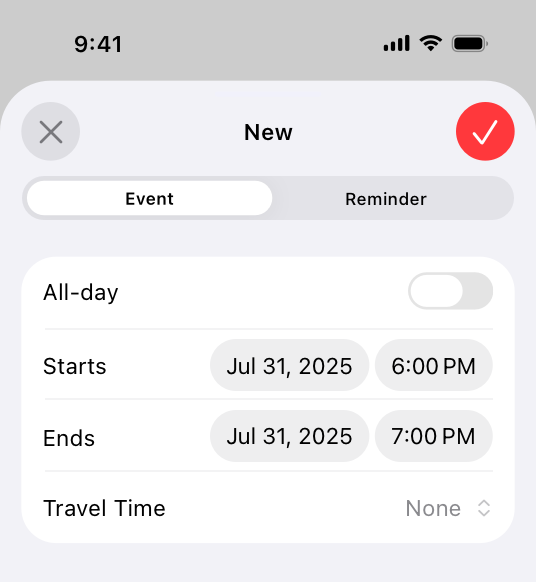
**Consider a segmented control to switch between closely related subviews.** A segmented control can be useful as a way to quickly switch between related subviews. For example, the segmented control in Calendar’s New Event sheet switches between the subviews for creating a new event and a new reminder. For switching between completely separate sections of an app, use a [tab bar](https://developer.apple.com/design/human-interface-guidelines/tab-bars) instead.
|
|
52
|
+
|
|
53
|
+
|
|
54
|
+
|
|
55
|
+
### [macOS](https://developer.apple.com/design/human-interface-guidelines/segmented-controls#macOS)
|
|
56
|
+
|
|
57
|
+
**Consider using introductory text to clarify the purpose of a segmented control.** When the control uses symbols or interface icons, you could also add a label below each segment to clarify its meaning. If your app includes tooltips, provide one for each segment in a segmented control.
|
|
58
|
+
|
|
59
|
+
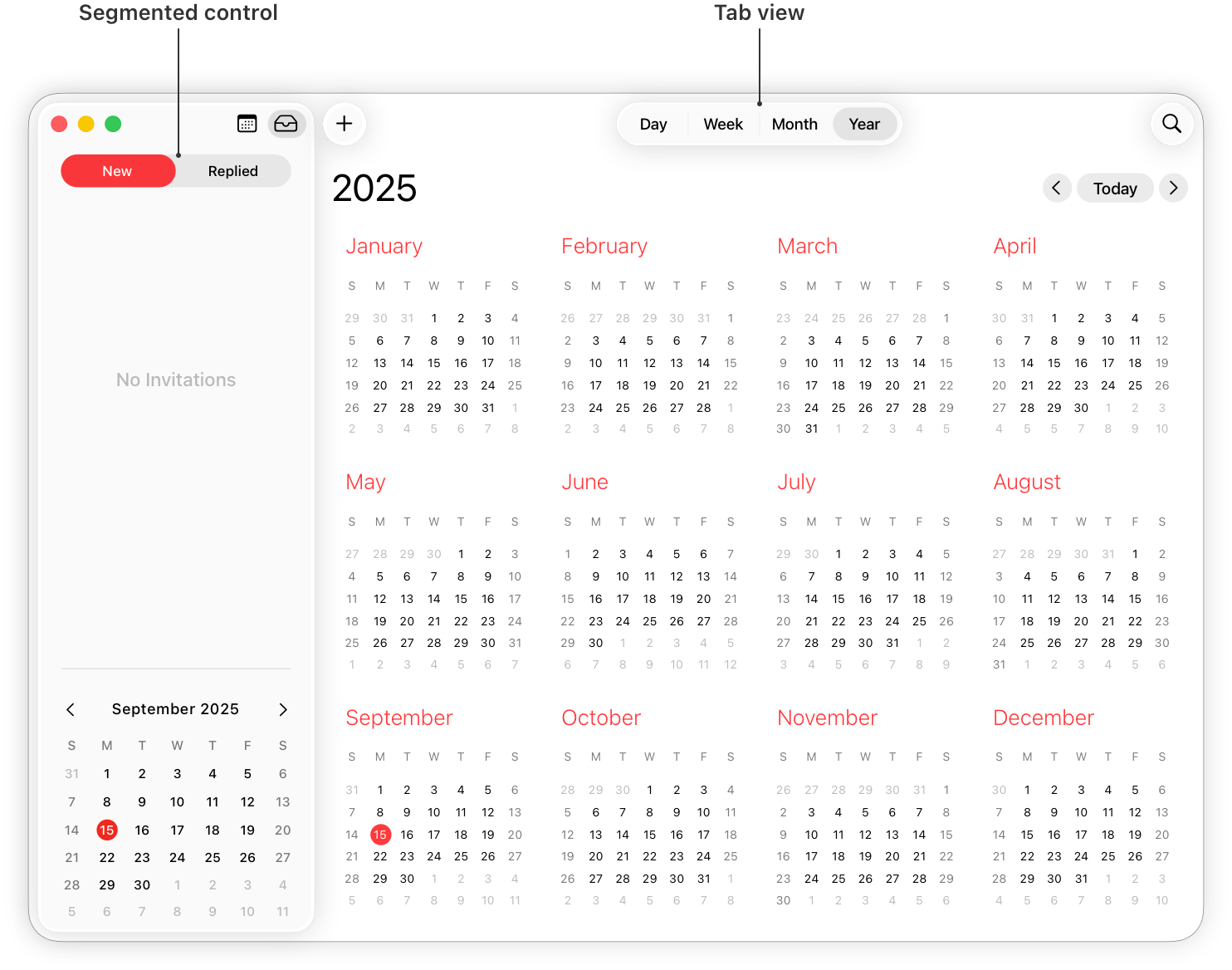
**Use a tab view in the main window area — instead of a segmented control — for view switching.** A [tab view](https://developer.apple.com/design/human-interface-guidelines/tab-views) supports efficient view switching and is similar in appearance to a [box](https://developer.apple.com/design/human-interface-guidelines/boxes) combined with a segmented control. Consider using a segmented control to help people switch views in a toolbar or inspector pane.
|
|
60
|
+
|
|
61
|
+
|
|
62
|
+
|
|
63
|
+
**Consider supporting spring loading.** On a Mac equipped with a Magic Trackpad, spring loading lets people activate a segment by dragging selected items over it and force clicking without dropping the selected items. People can also continue dragging the items after a segment activates.
|
|
64
|
+
|
|
65
|
+
### [tvOS](https://developer.apple.com/design/human-interface-guidelines/segmented-controls#tvOS)
|
|
66
|
+
|
|
67
|
+
**Consider using a split view instead of a segmented control on screens that perform content filtering.** People generally find it easy to navigate back and forth between content and filtering options using a split view. Depending on its placement, a segmented control may not be as easy to access.
|
|
68
|
+
|
|
69
|
+
**Avoid putting other focusable elements close to segmented controls.** Segments become selected when focus moves to them, not when people click them. Carefully consider where you position a segmented control relative to other interface elements. If other focusable elements are too close, people might accidentally focus on them when attempting to switch between segments.
|
|
70
|
+
|
|
71
|
+
### [visionOS](https://developer.apple.com/design/human-interface-guidelines/segmented-controls#visionOS)
|
|
72
|
+
|
|
73
|
+
When people look at a segmented control that uses icons, the system displays a tooltip that contains the descriptive text you supply.
|
|
74
|
+
|
|
75
|
+
## [Resources](https://developer.apple.com/design/human-interface-guidelines/segmented-controls#Resources)
|
|
76
|
+
|
|
77
|
+
#### [Related](https://developer.apple.com/design/human-interface-guidelines/segmented-controls#Related)
|
|
78
|
+
|
|
79
|
+
[Split views](https://developer.apple.com/design/human-interface-guidelines/split-views)
|
|
80
|
+
|
|
81
|
+
#### [Developer documentation](https://developer.apple.com/design/human-interface-guidelines/segmented-controls#Developer-documentation)
|
|
82
|
+
|
|
83
|
+
[`segmented`](https://developer.apple.com/documentation/SwiftUI/PickerStyle/segmented) — SwiftUI
|
|
84
|
+
|
|
85
|
+
[`UISegmentedControl`](https://developer.apple.com/documentation/UIKit/UISegmentedControl) — UIKit
|
|
86
|
+
|
|
87
|
+
[`NSSegmentedControl`](https://developer.apple.com/documentation/AppKit/NSSegmentedControl) — AppKit
|
|
88
|
+
|
|
89
|
+
## [Change log](https://developer.apple.com/design/human-interface-guidelines/segmented-controls#Change-log)
|
|
90
|
+
|
|
91
|
+
Date| Changes
|
|
92
|
+
---|---
|
|
93
|
+
June 21, 2023| Updated to include guidance for visionOS.
|
|
94
|
+
|
|
@@ -0,0 +1,92 @@
|
|
|
1
|
+
---
|
|
2
|
+
title: "Sliders | Apple Developer Documentation"
|
|
3
|
+
source: https://developer.apple.com/design/human-interface-guidelines/sliders
|
|
4
|
+
|
|
5
|
+
# Sliders
|
|
6
|
+
|
|
7
|
+
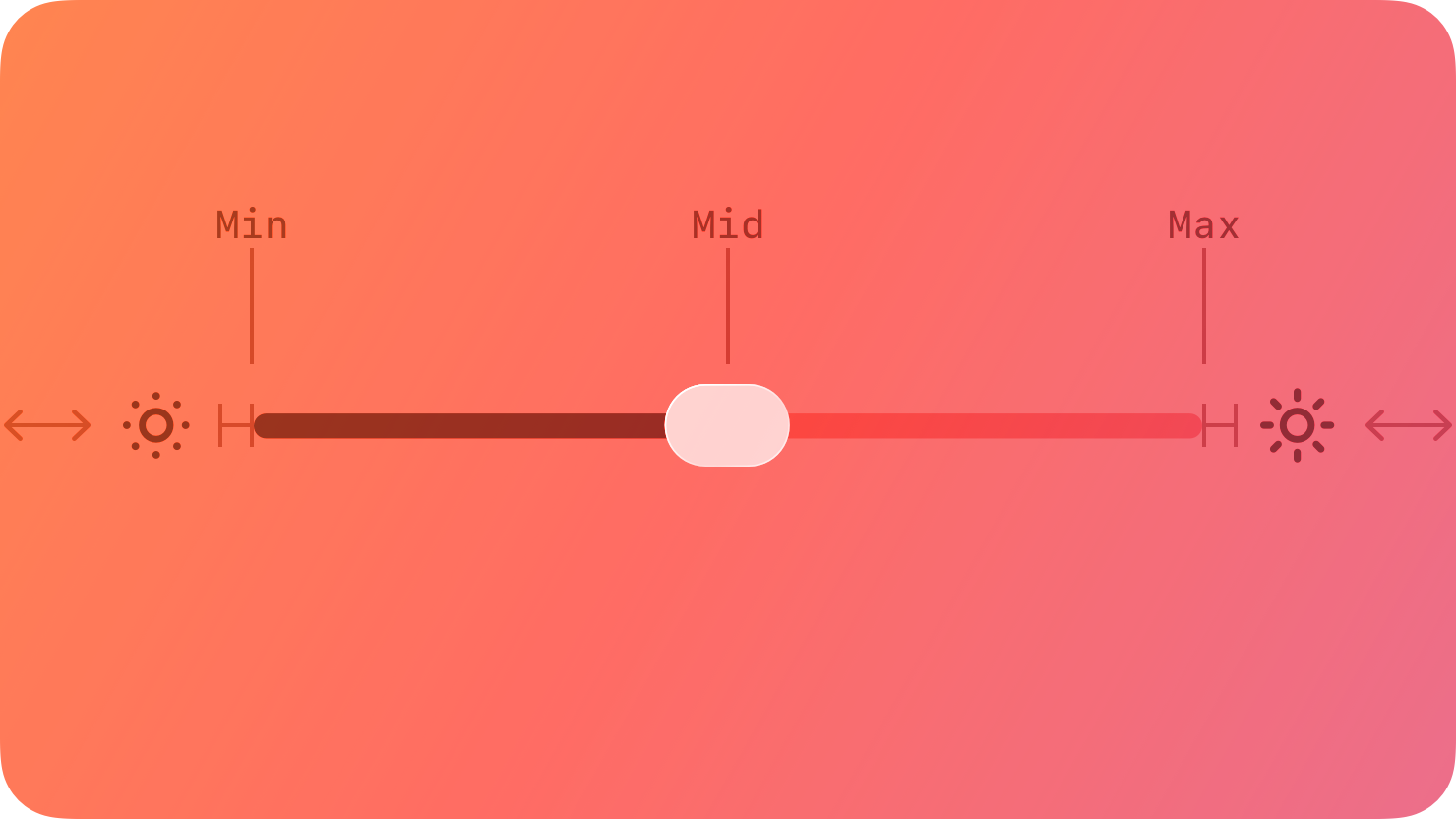
A slider is a horizontal track with a control, called a thumb, that people can adjust between a minimum and maximum value.
|
|
8
|
+
|
|
9
|
+
|
|
10
|
+
|
|
11
|
+
As a slider’s value changes, the portion of track between the minimum value and the thumb fills with color. A slider can optionally display left and right icons that illustrate the meaning of the minimum and maximum values.
|
|
12
|
+
|
|
13
|
+
## [Best practices](https://developer.apple.com/design/human-interface-guidelines/sliders#Best-practices)
|
|
14
|
+
|
|
15
|
+
**Customize a slider’s appearance if it adds value.** You can adjust a slider’s appearance — including track color, thumb image and tint color, and left and right icons — to blend with your app’s design and communicate intent. A slider that adjusts image size, for example, could show a small image icon on the left and a large image icon on the right.
|
|
16
|
+
|
|
17
|
+
**Use familiar slider directions.** People expect the minimum and maximum sides of sliders to be consistent in all apps, with minimum values on the leading side and maximum values on the trailing side (for horizontal sliders) and minimum values at the bottom and maximum values at the top (for vertical sliders). For example, people expect to be able to move a horizontal slider that represents a percentage from 0 percent on the leading side to 100 percent on the trailing side.
|
|
18
|
+
|
|
19
|
+
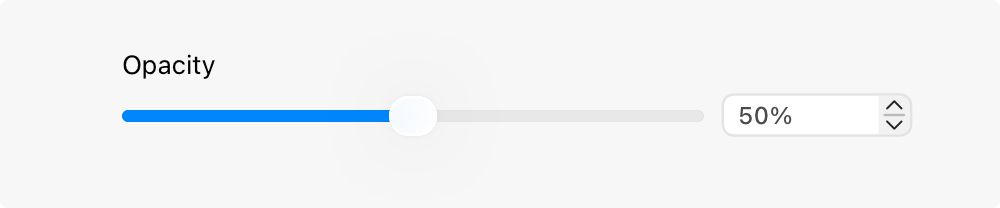
**Consider supplementing a slider with a corresponding text field and stepper.** Especially when a slider represents a wide range of values, people may appreciate seeing the exact slider value and having the ability to enter a specific value in a text field. Adding a stepper provides a convenient way for people to increment in whole values. For related guidance, see [Text fields](https://developer.apple.com/design/human-interface-guidelines/text-fields) and [Steppers](https://developer.apple.com/design/human-interface-guidelines/steppers).
|
|
20
|
+
|
|
21
|
+
|
|
22
|
+
|
|
23
|
+
## [Platform considerations](https://developer.apple.com/design/human-interface-guidelines/sliders#Platform-considerations)
|
|
24
|
+
|
|
25
|
+
_Not supported in tvOS._
|
|
26
|
+
|
|
27
|
+
### [iOS, iPadOS](https://developer.apple.com/design/human-interface-guidelines/sliders#iOS-iPadOS)
|
|
28
|
+
|
|
29
|
+
**Don’t use a slider to adjust audio volume.** If you need to provide volume control in your app, use a volume view, which is customizable and includes a volume-level slider and a control for changing the active audio output device. For guidance, see [Playing audio](https://developer.apple.com/design/human-interface-guidelines/playing-audio).
|
|
30
|
+
|
|
31
|
+
### [macOS](https://developer.apple.com/design/human-interface-guidelines/sliders#macOS)
|
|
32
|
+
|
|
33
|
+
Sliders in macOS can also include tick marks, making it easier for people to pinpoint a specific value within the range.
|
|
34
|
+
|
|
35
|
+
In a linear slider either with or without tick marks, the thumb is a narrow lozenge shape, and the portion of track between the minimum value and the thumb is filled with color. A linear slider often includes supplementary icons that illustrate the meaning of the minimum and maximum values.
|
|
36
|
+
|
|
37
|
+
In a circular slider, the thumb appears as a small circle. Tick marks, when present, appear as evenly spaced dots around the circumference of the slider.
|
|
38
|
+
|
|
39
|
+
Linear slider without tick marks
|
|
40
|
+
|
|
41
|
+
Linear slider with tick marks
|
|
42
|
+
|
|
43
|
+
Circular slider
|
|
44
|
+
|
|
45
|
+
**Consider giving live feedback as the value of a slider changes.** Live feedback shows people results in real time. For example, your Dock icons are dynamically scaled when adjusting the Size slider in Dock settings.
|
|
46
|
+
|
|
47
|
+
**Choose a slider style that matches peoples’ expectations.** A horizontal slider is ideal when moving between a fixed starting and ending point. For example, a graphics app might offer a horizontal slider for setting the opacity level of an object between 0 and 100 percent. Use circular sliders when values repeat or continue indefinitely. For example, a graphics app might use a circular slider to adjust the rotation of an object between 0 and 360 degrees. An animation app might use a circular slider to adjust how many times an object spins when animated — four complete rotations equals four spins, or 1440 degrees of rotation.
|
|
48
|
+
|
|
49
|
+
**Consider using a label to introduce a slider.** Labels generally use [sentence-style capitalization](https://help.apple.com/applestyleguide/#/apsgb744e4a3?sub=apdca93e113f1d64) and end with a colon. For guidance, see [Labels](https://developer.apple.com/design/human-interface-guidelines/labels).
|
|
50
|
+
|
|
51
|
+
**Use tick marks to increase clarity and accuracy.** Tick marks help people understand the scale of measurements and make it easier to locate specific values.
|
|
52
|
+
|
|
53
|
+
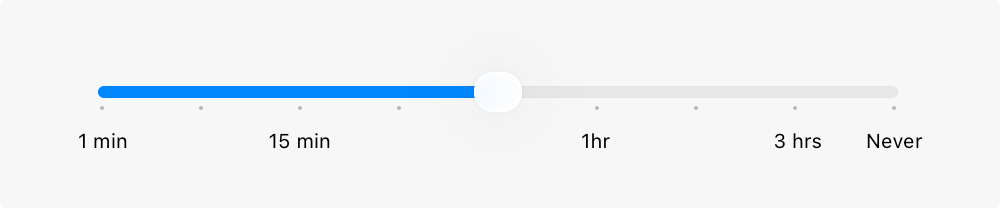
|
|
54
|
+
|
|
55
|
+
**Consider adding labels to tick marks for even greater clarity.** Labels can be numbers or words, depending on the slider’s values. It’s unnecessary to label every tick mark unless doing so is needed to reduce confusion. In many cases, labeling only the minimum and maximum values is sufficient. When the values of the slider are nonlinear, like in the Energy Saver settings pane, periodic labels provide context. It’s also a good idea to provide a [tooltip](https://developer.apple.com/design/human-interface-guidelines/offering-help#macOS-visionOS) that displays the value of the thumb when people hold their pointer over it.
|
|
56
|
+
|
|
57
|
+
### [visionOS](https://developer.apple.com/design/human-interface-guidelines/sliders#visionOS)
|
|
58
|
+
|
|
59
|
+
**Prefer horizontal sliders.** It’s generally easier for people to gesture from side to side than up and down.
|
|
60
|
+
|
|
61
|
+
### [watchOS](https://developer.apple.com/design/human-interface-guidelines/sliders#watchOS)
|
|
62
|
+
|
|
63
|
+
A slider is a horizontal track — appearing as a set of discrete steps or as a continuous bar — that represents a finite range of values. People can tap buttons on the sides of the slider to increase or decrease its value by a predefined amount.
|
|
64
|
+
|
|
65
|
+
Discrete
|
|
66
|
+
|
|
67
|
+
Continuous
|
|
68
|
+
|
|
69
|
+
**If necessary, create custom glyphs to communicate what the slider does.** The system displays plus and minus signs by default.
|
|
70
|
+
|
|
71
|
+
## [Resources](https://developer.apple.com/design/human-interface-guidelines/sliders#Resources)
|
|
72
|
+
|
|
73
|
+
#### [Related](https://developer.apple.com/design/human-interface-guidelines/sliders#Related)
|
|
74
|
+
|
|
75
|
+
[Steppers](https://developer.apple.com/design/human-interface-guidelines/steppers)
|
|
76
|
+
|
|
77
|
+
[Pickers](https://developer.apple.com/design/human-interface-guidelines/pickers)
|
|
78
|
+
|
|
79
|
+
#### [Developer documentation](https://developer.apple.com/design/human-interface-guidelines/sliders#Developer-documentation)
|
|
80
|
+
|
|
81
|
+
[`Slider`](https://developer.apple.com/documentation/SwiftUI/Slider) — SwiftUI
|
|
82
|
+
|
|
83
|
+
[`UISlider`](https://developer.apple.com/documentation/UIKit/UISlider) — UIKit
|
|
84
|
+
|
|
85
|
+
[`NSSlider`](https://developer.apple.com/documentation/AppKit/NSSlider) — AppKit
|
|
86
|
+
|
|
87
|
+
## [Change log](https://developer.apple.com/design/human-interface-guidelines/sliders#Change-log)
|
|
88
|
+
|
|
89
|
+
Date| Changes
|
|
90
|
+
---|---
|
|
91
|
+
June 21, 2023| Updated to include guidance for visionOS.
|
|
92
|
+
|
|
@@ -0,0 +1,40 @@
|
|
|
1
|
+
---
|
|
2
|
+
title: "Steppers | Apple Developer Documentation"
|
|
3
|
+
source: https://developer.apple.com/design/human-interface-guidelines/steppers
|
|
4
|
+
|
|
5
|
+
# Steppers
|
|
6
|
+
|
|
7
|
+
A stepper is a two-segment control that people use to increase or decrease an incremental value.
|
|
8
|
+
|
|
9
|
+
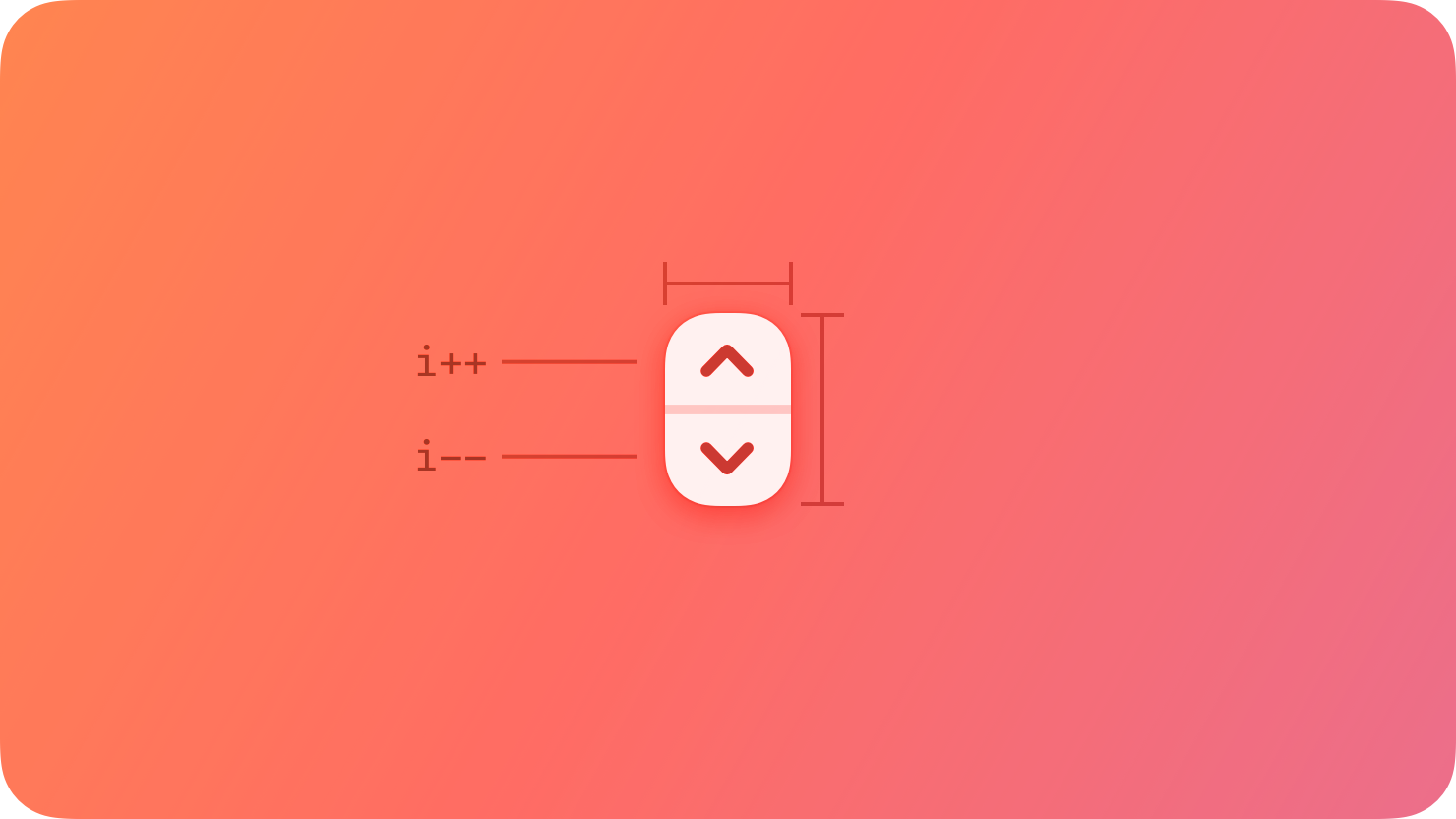
|
|
10
|
+
|
|
11
|
+
A stepper sits next to a field that displays its current value, because the stepper itself doesn’t display a value.
|
|
12
|
+
|
|
13
|
+
## [Best practices](https://developer.apple.com/design/human-interface-guidelines/steppers#Best-practices)
|
|
14
|
+
|
|
15
|
+
**Make the value that a stepper affects obvious.** A stepper itself doesn’t display any values, so make sure people know which value they’re changing when they use a stepper.
|
|
16
|
+
|
|
17
|
+
**Consider pairing a stepper with a text field when large value changes are likely.** Steppers work well by themselves for making small changes that require a few taps or clicks. By contrast, people appreciate the option to use a field to enter specific values, especially when the values they use can vary widely. On a printing screen, for example, it can help to have both a stepper and a text field to set the number of copies.
|
|
18
|
+
|
|
19
|
+
## [Platform considerations](https://developer.apple.com/design/human-interface-guidelines/steppers#Platform-considerations)
|
|
20
|
+
|
|
21
|
+
_No additional considerations for iOS, iPadOS, or visionOS. Not supported in watchOS or tvOS._
|
|
22
|
+
|
|
23
|
+
### [macOS](https://developer.apple.com/design/human-interface-guidelines/steppers#macOS)
|
|
24
|
+
|
|
25
|
+
**For large value ranges, consider supporting Shift-click to change the value quickly.** If your app benefits from larger changes in a stepper’s value, it can be useful to let people Shift-click the stepper to change the value by more than the default increment (by 10 times the default, for example).
|
|
26
|
+
|
|
27
|
+
## [Resources](https://developer.apple.com/design/human-interface-guidelines/steppers#Resources)
|
|
28
|
+
|
|
29
|
+
#### [Related](https://developer.apple.com/design/human-interface-guidelines/steppers#Related)
|
|
30
|
+
|
|
31
|
+
[Pickers](https://developer.apple.com/design/human-interface-guidelines/pickers)
|
|
32
|
+
|
|
33
|
+
[Text fields](https://developer.apple.com/design/human-interface-guidelines/text-fields)
|
|
34
|
+
|
|
35
|
+
#### [Developer documentation](https://developer.apple.com/design/human-interface-guidelines/steppers#Developer-documentation)
|
|
36
|
+
|
|
37
|
+
[`UIStepper`](https://developer.apple.com/documentation/UIKit/UIStepper) — UIKit
|
|
38
|
+
|
|
39
|
+
[`NSStepper`](https://developer.apple.com/documentation/AppKit/NSStepper) — AppKit
|
|
40
|
+
|
|
@@ -0,0 +1,88 @@
|
|
|
1
|
+
---
|
|
2
|
+
title: "Text fields | Apple Developer Documentation"
|
|
3
|
+
source: https://developer.apple.com/design/human-interface-guidelines/text-fields
|
|
4
|
+
|
|
5
|
+
# Text fields
|
|
6
|
+
|
|
7
|
+
A text field is a rectangular area in which people enter or edit small, specific pieces of text.
|
|
8
|
+
|
|
9
|
+
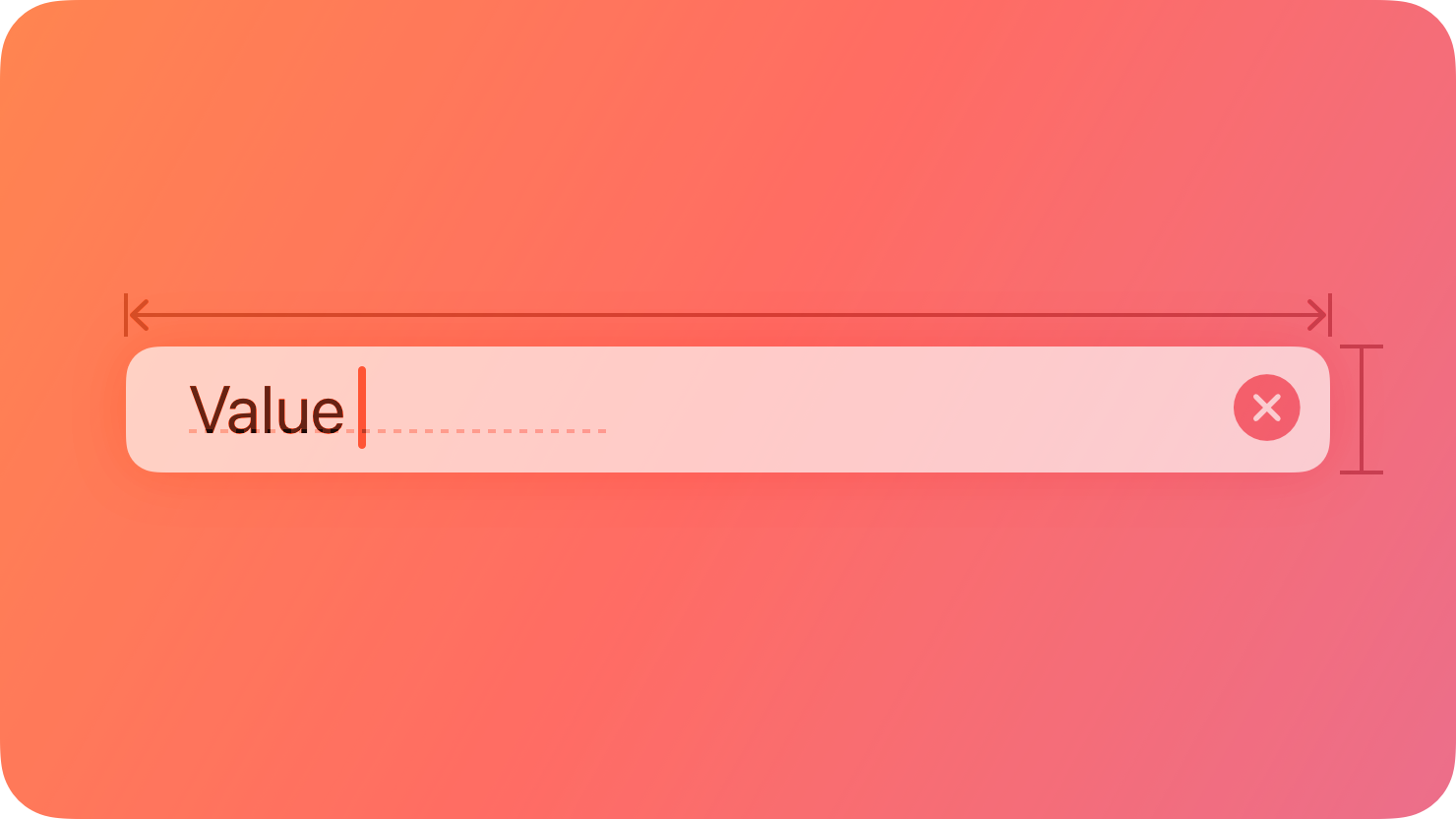
|
|
10
|
+
|
|
11
|
+
## [Best practices](https://developer.apple.com/design/human-interface-guidelines/text-fields#Best-practices)
|
|
12
|
+
|
|
13
|
+
**Use a text field to request a small amount of information, such as a name or an email address.** To let people input larger amounts of text, use a [text view](https://developer.apple.com/design/human-interface-guidelines/text-views) instead.
|
|
14
|
+
|
|
15
|
+
**Show a hint in a text field to help communicate its purpose.** A text field can contain placeholder text — such as “Email” or “Password” — when there’s no other text in the field. Because placeholder text disappears when people start typing, it can also be useful to include a separate label describing the field to remind people of its purpose.
|
|
16
|
+
|
|
17
|
+
**Use secure text fields to hide private data.** Always use a secure text field when your app asks for sensitive data, such as a password. For developer guidance, see [`SecureField`](https://developer.apple.com/documentation/SwiftUI/SecureField).
|
|
18
|
+
|
|
19
|
+
**To the extent possible, match the size of a text field to the quantity of anticipated text.** The size of a text field helps people visually gauge the amount of information to provide.
|
|
20
|
+
|
|
21
|
+
**Evenly space multiple text fields.** If your layout includes multiple text fields, leave enough space between them so people can easily see which input field belongs with each introductory label. Stack multiple text fields vertically when possible, and use consistent widths to create a more organized layout. For example, the first and last name fields on an address form might be one width, while the address and city fields might be a different width.
|
|
22
|
+
|
|
23
|
+
**Ensure that tabbing between multiple fields flows as people expect.** When tabbing between fields, move focus in a logical sequence. The system attempts to achieve this result automatically, so you won’t need to customize this too often.
|
|
24
|
+
|
|
25
|
+
**Validate fields when it makes sense.** For example, if the only legitimate value for a field is a string of digits, your app needs to alert people if they’ve entered characters other than digits. The appropriate time to check the data depends on the context: when entering an email address, it’s best to validate when people switch to another field; when creating a user name or password, validation needs to happen before people switch to another field.
|
|
26
|
+
|
|
27
|
+
**Use a number formatter to help with numeric data.** A number formatter automatically configures the text field to accept only numeric values. It can also display the value in a specific way, such as with a certain number of decimal places, as a percentage, or as currency. Don’t assume the actual presentation of data, however, as formatting can vary significantly based on people’s locale.
|
|
28
|
+
|
|
29
|
+
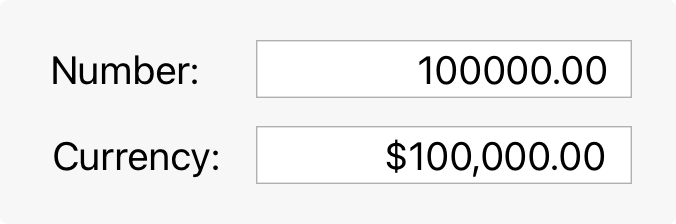Formatted text
|
|
30
|
+
|
|
31
|
+
**Adjust line breaks according to the needs of the field.** By default, the system clips any text extending beyond the bounds of a text field. Alternatively, you can set up a text field to wrap text to a new line at the character or word level, or to truncate (indicated by an ellipsis) at the beginning, middle, or end.
|
|
32
|
+
|
|
33
|
+
Clipped text
|
|
34
|
+
|
|
35
|
+
Wrapped text
|
|
36
|
+
|
|
37
|
+
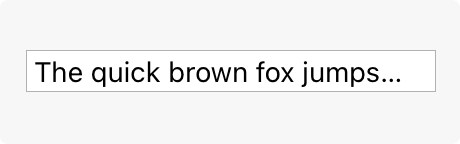Truncated text
|
|
38
|
+
|
|
39
|
+
**Consider using an expansion tooltip to show the full version of clipped or truncated text.** An expansion tooltip behaves like a regular [tooltip](https://developer.apple.com/design/human-interface-guidelines/offering-help#macOS-visionOS) and appears when someone places the pointer over the field.
|
|
40
|
+
|
|
41
|
+
**In iOS, iPadOS, tvOS, and visionOS apps, show the appropriate keyboard type.** Several different keyboard types are available, each designed to facilitate a different type of input, such as numbers or URLs. To streamline data entry, display the keyboard that’s appropriate for the type of content people are entering. For guidance, see [Virtual keyboards](https://developer.apple.com/design/human-interface-guidelines/virtual-keyboards).
|
|
42
|
+
|
|
43
|
+
**Minimize text entry in your tvOS and watchOS apps.** Entering long passages of text or filling out numerous text fields is time-consuming on Apple TV and Apple Watch. Minimize text input and consider gathering information more efficiently, such as with buttons.
|
|
44
|
+
|
|
45
|
+
## [Platform considerations](https://developer.apple.com/design/human-interface-guidelines/text-fields#Platform-considerations)
|
|
46
|
+
|
|
47
|
+
_No additional considerations for tvOS or visionOS._
|
|
48
|
+
|
|
49
|
+
### [iOS, iPadOS](https://developer.apple.com/design/human-interface-guidelines/text-fields#iOS-iPadOS)
|
|
50
|
+
|
|
51
|
+
**Display a Clear button in the trailing end of a text field to help people erase their input.** When this element is present, people can tap it to clear the text field’s contents, without having to keep tapping the Delete key.
|
|
52
|
+
|
|
53
|
+
**Use images and buttons to provide clarity and functionality in text fields.** You can display custom images in both ends of a text field, or you can add a system-provided button, such as the Bookmarks button. In general, use the leading end of a text field to indicate a field’s purpose and the trailing end to offer additional features, such as bookmarking.
|
|
54
|
+
|
|
55
|
+
### [macOS](https://developer.apple.com/design/human-interface-guidelines/text-fields#macOS)
|
|
56
|
+
|
|
57
|
+
**Consider using a combo box if you need to pair text input with a list of choices.** For related guidance, see [Combo boxes](https://developer.apple.com/design/human-interface-guidelines/combo-boxes).
|
|
58
|
+
|
|
59
|
+
### [watchOS](https://developer.apple.com/design/human-interface-guidelines/text-fields#watchOS)
|
|
60
|
+
|
|
61
|
+
**Present a text field only when necessary.** Whenever possible, prefer displaying a list of options rather than requiring text entry.
|
|
62
|
+
|
|
63
|
+
## [Resources](https://developer.apple.com/design/human-interface-guidelines/text-fields#Resources)
|
|
64
|
+
|
|
65
|
+
#### [Related](https://developer.apple.com/design/human-interface-guidelines/text-fields#Related)
|
|
66
|
+
|
|
67
|
+
[Text views](https://developer.apple.com/design/human-interface-guidelines/text-views)
|
|
68
|
+
|
|
69
|
+
[Combo boxes](https://developer.apple.com/design/human-interface-guidelines/combo-boxes)
|
|
70
|
+
|
|
71
|
+
[Entering data](https://developer.apple.com/design/human-interface-guidelines/entering-data)
|
|
72
|
+
|
|
73
|
+
#### [Developer documentation](https://developer.apple.com/design/human-interface-guidelines/text-fields#Developer-documentation)
|
|
74
|
+
|
|
75
|
+
[`TextField`](https://developer.apple.com/documentation/SwiftUI/TextField) — SwiftUI
|
|
76
|
+
|
|
77
|
+
[`SecureField`](https://developer.apple.com/documentation/SwiftUI/SecureField) — SwiftUI
|
|
78
|
+
|
|
79
|
+
[`UITextField`](https://developer.apple.com/documentation/UIKit/UITextField) — UIKit
|
|
80
|
+
|
|
81
|
+
[`NSTextField`](https://developer.apple.com/documentation/AppKit/NSTextField) — AppKit
|
|
82
|
+
|
|
83
|
+
## [Change log](https://developer.apple.com/design/human-interface-guidelines/text-fields#Change-log)
|
|
84
|
+
|
|
85
|
+
Date| Changes
|
|
86
|
+
---|---
|
|
87
|
+
June 5, 2023| Updated guidance to reflect changes in watchOS 10.
|
|
88
|
+
|
|
@@ -0,0 +1,56 @@
|
|
|
1
|
+
---
|
|
2
|
+
title: "Text views | Apple Developer Documentation"
|
|
3
|
+
source: https://developer.apple.com/design/human-interface-guidelines/text-views
|
|
4
|
+
|
|
5
|
+
# Text views
|
|
6
|
+
|
|
7
|
+
A text view displays multiline, styled text content, which can optionally be editable.
|
|
8
|
+
|
|
9
|
+
|
|
10
|
+
|
|
11
|
+
Text views can be any height and allow scrolling when the content extends outside of the view. By default, content within a text view is aligned to the leading edge and uses the system label color. In iOS, iPadOS, and visionOS, if a text view is editable, a keyboard appears when people select the view.
|
|
12
|
+
|
|
13
|
+
## [Best practices](https://developer.apple.com/design/human-interface-guidelines/text-views#Best-practices)
|
|
14
|
+
|
|
15
|
+
**Use a text view when you need to display text that’s long, editable, or in a special format.** Text views differ from [text fields](https://developer.apple.com/design/human-interface-guidelines/text-fields) and [labels](https://developer.apple.com/design/human-interface-guidelines/labels) in that they provide the most options for displaying specialized text and receiving text input. If you need to display a small amount of text, it’s simpler to use a label or — if the text is editable — a text field.
|
|
16
|
+
|
|
17
|
+
**Keep text legible.** Although you can use multiple fonts, colors, and alignments in creative ways, it’s essential to maintain the readability of your content. It’s a good idea to adopt Dynamic Type so your text still looks good if people change text size on their device. Be sure to test your content with accessibility options turned on, such as bold text. For guidance, see [Accessibility](https://developer.apple.com/design/human-interface-guidelines/accessibility) and [Typography](https://developer.apple.com/design/human-interface-guidelines/typography).
|
|
18
|
+
|
|
19
|
+
**Make useful text selectable.** If a text view contains useful information such as an error message, a serial number, or an IP address, consider letting people select and copy it for pasting elsewhere.
|
|
20
|
+
|
|
21
|
+
## [Platform considerations](https://developer.apple.com/design/human-interface-guidelines/text-views#Platform-considerations)
|
|
22
|
+
|
|
23
|
+
_No additional considerations for macOS, visionOS, or watchOS._
|
|
24
|
+
|
|
25
|
+
### [iOS, iPadOS](https://developer.apple.com/design/human-interface-guidelines/text-views#iOS-iPadOS)
|
|
26
|
+
|
|
27
|
+
**Show the appropriate keyboard type.** Several different keyboard types are available, each designed to facilitate a different type of input. To streamline data entry, the keyboard you display when editing a text view needs to be appropriate for the type of content. For guidance, see [Virtual keyboards](https://developer.apple.com/design/human-interface-guidelines/virtual-keyboards).
|
|
28
|
+
|
|
29
|
+
### [tvOS](https://developer.apple.com/design/human-interface-guidelines/text-views#tvOS)
|
|
30
|
+
|
|
31
|
+
You can display text in tvOS using a text view. Because text input in tvOS is minimal by design, tvOS uses [text fields](https://developer.apple.com/design/human-interface-guidelines/text-fields) for editable text instead.
|
|
32
|
+
|
|
33
|
+
## [Resources](https://developer.apple.com/design/human-interface-guidelines/text-views#Resources)
|
|
34
|
+
|
|
35
|
+
#### [Related](https://developer.apple.com/design/human-interface-guidelines/text-views#Related)
|
|
36
|
+
|
|
37
|
+
[Labels](https://developer.apple.com/design/human-interface-guidelines/labels)
|
|
38
|
+
|
|
39
|
+
[Text fields](https://developer.apple.com/design/human-interface-guidelines/text-fields)
|
|
40
|
+
|
|
41
|
+
[Combo boxes](https://developer.apple.com/design/human-interface-guidelines/combo-boxes)
|
|
42
|
+
|
|
43
|
+
#### [Developer documentation](https://developer.apple.com/design/human-interface-guidelines/text-views#Developer-documentation)
|
|
44
|
+
|
|
45
|
+
[`Text`](https://developer.apple.com/documentation/SwiftUI/Text) — SwiftUI
|
|
46
|
+
|
|
47
|
+
[`UITextView`](https://developer.apple.com/documentation/UIKit/UITextView) — UIKit
|
|
48
|
+
|
|
49
|
+
[`NSTextView`](https://developer.apple.com/documentation/AppKit/NSTextView) — AppKit
|
|
50
|
+
|
|
51
|
+
## [Change log](https://developer.apple.com/design/human-interface-guidelines/text-views#Change-log)
|
|
52
|
+
|
|
53
|
+
Date| Changes
|
|
54
|
+
---|---
|
|
55
|
+
June 5, 2023| Updated guidance to reflect changes in watchOS 10.
|
|
56
|
+
|