@tencent-rtc/mcp 1.3.1 → 1.3.2
This diff represents the content of publicly available package versions that have been released to one of the supported registries. The information contained in this diff is provided for informational purposes only and reflects changes between package versions as they appear in their respective public registries.
- package/index.js +4 -0
- package/index.js.map +1 -1
- package/package.json +1 -1
- package/resource/doc/chatuikit/faq/web_sdk/faq.md +125 -0
- package/resource/doc/chatuikit/flutter/faq.md +17 -114
- package/resource/doc/chatuikit/flutter/integrate_tuikit_Flutter.md +86 -722
- package/resource/doc/roomkit/vue/features/call-user-to-room.md +256 -0
- package/resource/doc/roomkit/vue/features/device-detection.md +388 -0
- package/resource/doc/roomkit/vue/features/device-state.md +480 -0
- package/resource/doc/roomkit/vue/features/free-beauty-panel.md +238 -0
- package/resource/doc/roomkit/vue/features/room-chat.md +427 -0
- package/resource/doc/roomkit/vue/features/room-participant-state.md +407 -0
- package/resource/doc/roomkit/vue/features/room-state.md +291 -0
- package/resource/doc/roomkit/vue/features/room-view.md +338 -0
- package/resource/doc/roomkit/vue/features/schedule-room.md +349 -0
- package/resource/doc/roomkit/vue/features/screen-share.md +333 -0
- package/resource/doc/roomkit/vue/features/virtual-background.md +287 -0
- package/resource/doc/roomkit/vue/features/workflow.md +553 -0
- package/resource/doc/roomkit/vue/integration.md +479 -0
- package/resource/doc/roomkit/vue/workflow.md +487 -0
- package/resource/doc/tuicallkit/react/api.md +21 -0
- package/resource/doc/tuicallkit/vue/api.md +21 -0
- package/tools/definitions/get_web_room_feature_detail_def.js +95 -0
- package/tools/definitions/get_web_room_feature_detail_def.js.map +1 -0
- package/tools/definitions/get_web_room_uikit_integration_def.js +44 -0
- package/tools/definitions/get_web_room_uikit_integration_def.js.map +1 -0
- package/tools/index.js +4 -2
- package/tools/index.js.map +1 -1
- package/tools/room/get-web-room-feature-detail.js +68 -0
- package/tools/room/get-web-room-feature-detail.js.map +1 -0
- package/tools/room/get-web-room-integration.js +43 -0
- package/tools/room/get-web-room-integration.js.map +1 -0
- package/utils/report-cls-client.js +1 -1
- package/utils/report-es-client.js +1 -1
- package/resource/doc/chatuikit/flutter/integrate_only_tuichat_Flutter.md +0 -333
- package/resource/doc/chatuikit/flutter/quick_start_Flutter.md +0 -217
- package/resource/doc/roomkit/vue/states/device-state.md +0 -369
- package/resource/doc/roomkit/vue/states/login-state.md +0 -59
- package/resource/doc/roomkit/vue/states/room-list-state.md +0 -355
- package/resource/doc/roomkit/vue/states/room-participant-state.md +0 -388
- package/tools/room/get-web-room-state-detail.js +0 -31
- package/tools/room/get-web-room-state-detail.js.map +0 -1
|
@@ -0,0 +1,287 @@
|
|
|
1
|
+
# Virtual Background
|
|
2
|
+
|
|
3
|
+
Virtual background feature allows users to replace their real background with a custom image or apply blur effects during video calls or live streams. With this feature, users can effectively protect privacy, hide cluttered backgrounds, or showcase corporate image through specific backgrounds.
|
|
4
|
+
|
|
5
|
+
## Use Cases
|
|
6
|
+
|
|
7
|
+
- **Remote Work/Meetings:** When attending meetings at home or in public places, use background blur or virtual background to hide the real environment and protect personal privacy.
|
|
8
|
+
|
|
9
|
+
- **Online Education:** Teachers use unified teaching backgrounds to create a professional classroom atmosphere.
|
|
10
|
+
|
|
11
|
+
- **Brand Display:** Company employees use backgrounds with company logos in external meetings to enhance brand image.
|
|
12
|
+
|
|
13
|
+
- **Fun Interaction:** In social scenarios, users can change to interesting background images to increase interaction fun.
|
|
14
|
+
|
|
15
|
+
## Prerequisites
|
|
16
|
+
|
|
17
|
+
- **User Status:** User has completed login authentication through useLoginState, refer to [Integration Overview](https://write.woa.com/document/197379797539790848), and is in **logged in** state.
|
|
18
|
+
|
|
19
|
+
- **Environment Dependencies:** The project has imported `tuikit-atomicx-vue3`.
|
|
20
|
+
|
|
21
|
+
- **Device Requirements:** A camera device must be available, and the user has granted camera access permission. If the user denies authorization, the virtual background feature will not be available.
|
|
22
|
+
|
|
23
|
+
- **Resource Dependencies:** Virtual background feature depends on AI model files. To ensure the browser can properly load and run these files, you need to complete the following steps:
|
|
24
|
+
|
|
25
|
+
- Publish the `node_modules/trtc-sdk-v5/assets` directory to CDN or static resource server, see [SDK Documentation](https://web.sdk.qcloud.com/trtc/webrtc/doc/zh-cn/tutorial-36-advanced-virtual-background.html) for details.
|
|
26
|
+
|
|
27
|
+
- If choosing [Solution 1: Quick Integration Using UI Components](https://write.woa.com/#1362aad9-2836-4931-b947-2f0f7836d284), when using the [VirtualBackgroundPanel](https://github.com/Tencent-RTC/TUIKit_Vue3/tree/main/packages/tuikit-atomicx-vue3/src/components/VirtualBackgroundPanel) component, you need to pass the `assetsPath` static resource address through props.
|
|
28
|
+
|
|
29
|
+
- If choosing [Solution 2: Custom Integration Using Underlying API](https://write.woa.com/#b941dd3e-0f43-48af-8aa4-8818ab74a80e), when using the [initVirtualBackground](https://web.sdk.qcloud.com/trtc/live/web/doc/zh/index.html#initVirtualBackground) interface, you need to pass the `assetsPath` static resource address.
|
|
30
|
+
|
|
31
|
+
## Implementing Virtual Background Feature
|
|
32
|
+
|
|
33
|
+
This feature provides two integration solutions, and you can choose the most suitable one based on your business requirements:
|
|
34
|
+
|
|
35
|
+
- **Solution 1 (Recommended):** Quick integration using UI components. Directly import the virtual background panel component ([VirtualBackgroundPanel](https://github.com/Tencent-RTC/TUIKit_Vue3/tree/main/packages/tuikit-atomicx-vue3/src/components/VirtualBackgroundPanel)) provided by `tuikit-atomicx-vue3`, and embed it into your application's dialog or sidebar with the lowest development cost.
|
|
36
|
+
|
|
37
|
+
- **Solution 2 (Advanced):** Custom integration using underlying API. Implement UI and interaction logic based on atomicx-core SDK API [useVirtualBackgroundState](https://web.sdk.qcloud.com/trtc/live/web/doc/zh/index.html#module-VirtualBackgroundState) state hook with the highest flexibility.
|
|
38
|
+
|
|
39
|
+
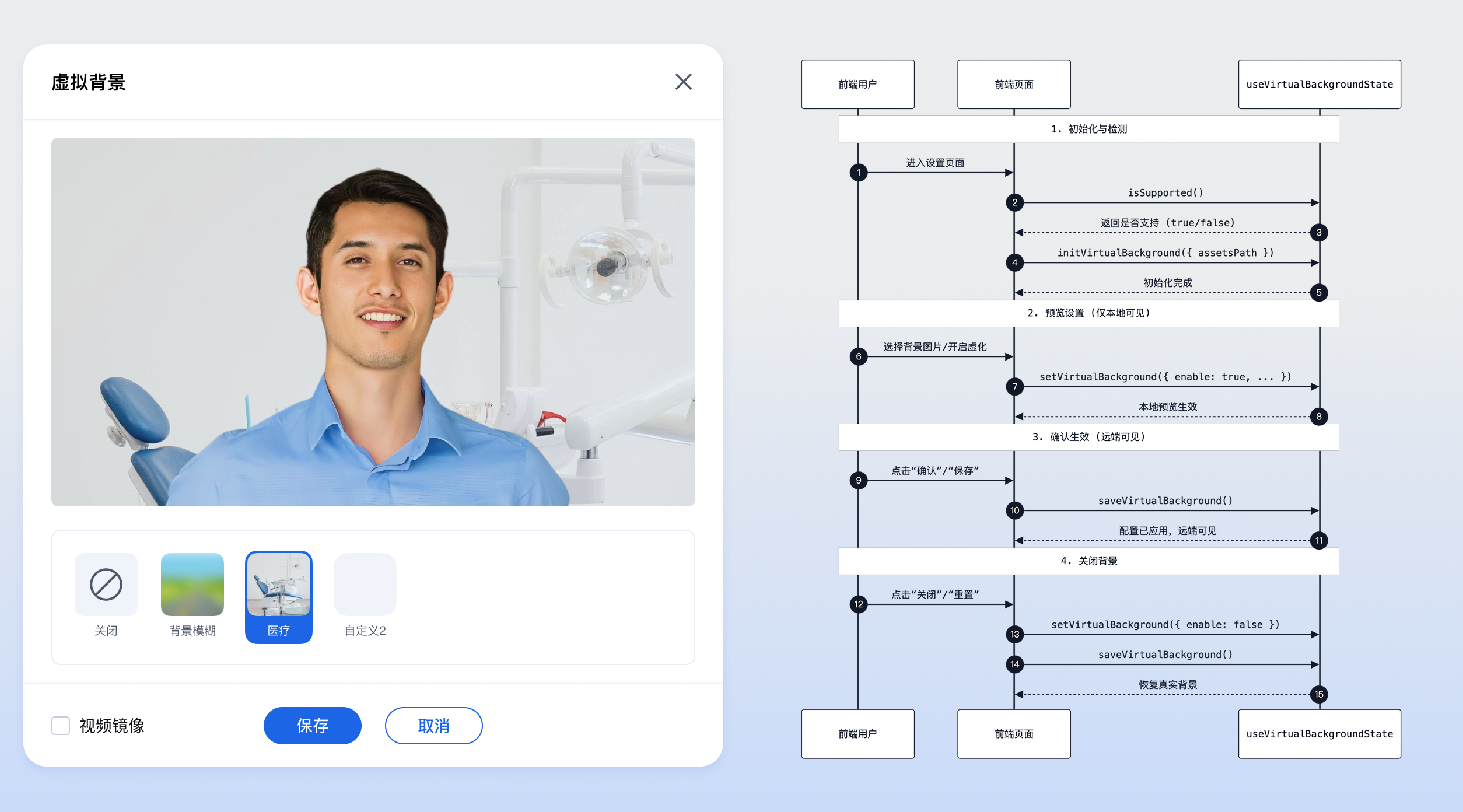
|
|
40
|
+
|
|
41
|
+
Virtual Background
|
|
42
|
+
|
|
43
|
+
## Solution 1: Quick Integration Using UI Components
|
|
44
|
+
|
|
45
|
+
`tuikit-atomicx-vue3` provides core settings panel components:
|
|
46
|
+
|
|
47
|
+
- [**VirtualBackgroundPanel**](https://github.com/Tencent-RTC/TUIKit_Vue3/tree/main/packages/tuikit-atomicx-vue3/src/components/VirtualBackgroundPanel)**:** Configuration panel for virtual background, including background blur, image selection, and preview functionality.
|
|
48
|
+
|
|
49
|
+
### Step 1: Import Component
|
|
50
|
+
|
|
51
|
+
```typescript
|
|
52
|
+
import { VirtualBackgroundPanel } from 'tuikit-atomicx-vue3/room';
|
|
53
|
+
```
|
|
54
|
+
|
|
55
|
+
### Step 2: Use Component
|
|
56
|
+
|
|
57
|
+
It is generally recommended to place [VirtualBackgroundPanel](https://github.com/Tencent-RTC/TUIKit_Vue3/tree/main/packages/tuikit-atomicx-vue3/src/components/VirtualBackgroundPanel) in a dialog or modal, triggered by clicking a button.
|
|
58
|
+
|
|
59
|
+
**The following example demonstrates how to implement a complete interaction to open virtual background settings by clicking a button:**
|
|
60
|
+
|
|
61
|
+
> **Note:**
|
|
62
|
+
>
|
|
63
|
+
> - Publish the `node_modules/trtc-sdk-v5/assets` directory to CDN or static resource server, see [SDK Documentation](https://web.sdk.qcloud.com/trtc/webrtc/doc/zh-cn/tutorial-36-advanced-virtual-background.html) for details.
|
|
64
|
+
> - When using the [VirtualBackgroundPanel](https://github.com/Tencent-RTC/TUIKit_Vue3/tree/main/packages/tuikit-atomicx-vue3/src/components/VirtualBackgroundPanel) component, pass the `assetsPath` static resource address through props.
|
|
65
|
+
> - All TUIKit components must be wrapped inside [UIKitProvider](https://write.woa.com/document/197379797539790848), otherwise they will not be able to obtain context dependencies, resulting in style abnormalities.
|
|
66
|
+
|
|
67
|
+
```typescript
|
|
68
|
+
<template>
|
|
69
|
+
<UIKitProvider theme="light" language="en-US">
|
|
70
|
+
<div class="toolbar-container">
|
|
71
|
+
<!-- 1. Trigger button -->
|
|
72
|
+
<button @click="openSettings">Set Virtual Background</button>
|
|
73
|
+
|
|
74
|
+
<!-- 2. Settings dialog -->
|
|
75
|
+
<div v-if="showSettings" class="modal-mask">
|
|
76
|
+
<div class="modal-content">
|
|
77
|
+
<div class="modal-header">
|
|
78
|
+
<span>Virtual Background</span>
|
|
79
|
+
<button @click="showSettings = false">Close</button>
|
|
80
|
+
</div>
|
|
81
|
+
|
|
82
|
+
<div class="modal-body">
|
|
83
|
+
<!-- 3. Import panel component -->
|
|
84
|
+
<!-- @close event: triggered when user clicks close button inside panel (if any) -->
|
|
85
|
+
<VirtualBackgroundPanel assetsPath='https://xxxx/assets' @close="showSettings = false" />
|
|
86
|
+
</div>
|
|
87
|
+
</div>
|
|
88
|
+
</div>
|
|
89
|
+
</div>
|
|
90
|
+
</UIKitProvider>
|
|
91
|
+
</template>
|
|
92
|
+
|
|
93
|
+
<script setup lang="ts">
|
|
94
|
+
import { ref } from 'vue';
|
|
95
|
+
import { UIKitProvider } from '@tencentcloud/uikit-base-component-vue3';
|
|
96
|
+
import { VirtualBackgroundPanel, useVirtualBackgroundState, useDeviceState } from 'tuikit-atomicx-vue3/room';
|
|
97
|
+
|
|
98
|
+
const showSettings = ref(false);
|
|
99
|
+
const { isSupported } = useVirtualBackgroundState();
|
|
100
|
+
const { cameraList } = useDeviceState();
|
|
101
|
+
|
|
102
|
+
const openSettings = () => {
|
|
103
|
+
// 1. Check if browser supports virtual background
|
|
104
|
+
if (!isSupported()) {
|
|
105
|
+
alert('Current browser does not support virtual background');
|
|
106
|
+
return;
|
|
107
|
+
}
|
|
108
|
+
|
|
109
|
+
// 2. Check if camera is available
|
|
110
|
+
if (cameraList.value.length === 0) {
|
|
111
|
+
alert('No camera detected, unable to set virtual background');
|
|
112
|
+
return;
|
|
113
|
+
}
|
|
114
|
+
|
|
115
|
+
// 3. Open settings panel
|
|
116
|
+
showSettings.value = true;
|
|
117
|
+
};
|
|
118
|
+
</script>
|
|
119
|
+
|
|
120
|
+
<style scoped>
|
|
121
|
+
.modal-mask{position:fixed;top:0;left:0;width:100%;height:100%;background:rgba(0,0,0,0.5);display:flex;justify-content:center;align-items:center;z-index:1000}.modal-content{background:white;width:600px;border-radius:8px;overflow:hidden}.modal-header{padding:16px;display:flex;justify-content:space-between;border-bottom:1px solid #eee}
|
|
122
|
+
</style>
|
|
123
|
+
```
|
|
124
|
+
|
|
125
|
+
## Solution 2: Custom Integration Using Underlying API
|
|
126
|
+
|
|
127
|
+
This section mainly introduces how to implement virtual background through atomicx-core SDK API [**useVirtualBackgroundState**](https://web.sdk.qcloud.com/trtc/live/web/doc/zh/index.html#module-VirtualBackgroundState) interface.
|
|
128
|
+
|
|
129
|
+
### Step 1: Initialization and Detection
|
|
130
|
+
|
|
131
|
+
Before calling the virtual background feature, you must first check if the browser supports it and initialize the resource path.
|
|
132
|
+
|
|
133
|
+
> **Note:**
|
|
134
|
+
>
|
|
135
|
+
> - Publish the node_modules/trtc-sdk-v5/assets directory to CDN or static resource server, see [SDK Documentation](https://web.sdk.qcloud.com/trtc/webrtc/doc/zh-cn/tutorial-36-advanced-virtual-background.html) for details.
|
|
136
|
+
> - When using the [initVirtualBackground](https://web.sdk.qcloud.com/trtc/live/web/doc/zh/index.html#initVirtualBackground) interface, pass the assetsPath static resource address.
|
|
137
|
+
> - Virtual background feature depends on camera devices. You can use [useDeviceState](https://web.sdk.qcloud.com/trtc/live/web/doc/zh/index.html#module-DeviceState) to check device status.
|
|
138
|
+
> - [cameraList](https://web.sdk.qcloud.com/trtc/live/web/doc/zh/index.html#cameraList): List of currently available camera devices. If the list is empty, it means no camera is detected or camera permission is denied.
|
|
139
|
+
|
|
140
|
+
```typescript
|
|
141
|
+
import { onMounted } from 'vue';
|
|
142
|
+
import { useVirtualBackgroundState } from 'tuikit-atomicx-vue3/room';
|
|
143
|
+
|
|
144
|
+
const { isSupported, initVirtualBackground } = useVirtualBackgroundState();
|
|
145
|
+
|
|
146
|
+
onMounted(async () => {
|
|
147
|
+
// 1. Check browser compatibility
|
|
148
|
+
if (!isSupported()) {
|
|
149
|
+
console.warn('Current browser does not support virtual background');
|
|
150
|
+
return;
|
|
151
|
+
}
|
|
152
|
+
|
|
153
|
+
// 2. Initialize resources
|
|
154
|
+
try {
|
|
155
|
+
await initVirtualBackground({ assetsPath: './assets' });
|
|
156
|
+
console.log('Virtual background initialized');
|
|
157
|
+
} catch (error) {
|
|
158
|
+
console.error('Initialization failed', error);
|
|
159
|
+
}
|
|
160
|
+
});
|
|
161
|
+
```
|
|
162
|
+
|
|
163
|
+
### Step 2: Set Preview
|
|
164
|
+
|
|
165
|
+
Before the user confirms applying the background, a preview effect is usually required. Using the [setVirtualBackground](https://web.sdk.qcloud.com/trtc/live/web/doc/zh/index.html#setVirtualBackground) method can set the preview effect, which will not be applied to the video stream visible to remote users.
|
|
166
|
+
|
|
167
|
+
> **Note:**
|
|
168
|
+
>
|
|
169
|
+
|
|
170
|
+
> Calling `setVirtualBackground` only takes effect in the local preview screen, remote users will not see the virtual background effect. You need to call `saveVirtualBackground` to synchronize it to the remote video stream.
|
|
171
|
+
>
|
|
172
|
+
|
|
173
|
+
```typescript
|
|
174
|
+
import { useVirtualBackgroundState } from 'tuikit-atomicx-vue3/room';
|
|
175
|
+
|
|
176
|
+
const { setVirtualBackground } = useVirtualBackgroundState();
|
|
177
|
+
|
|
178
|
+
// Enable background blur preview
|
|
179
|
+
const previewBlur = async () => {
|
|
180
|
+
await setVirtualBackground({
|
|
181
|
+
enable: true,
|
|
182
|
+
type: 'blur',
|
|
183
|
+
level: 0.5 // Blur level, optional
|
|
184
|
+
});
|
|
185
|
+
};
|
|
186
|
+
|
|
187
|
+
// Enable background image preview
|
|
188
|
+
const previewImage = async (imageUrl: string) => {
|
|
189
|
+
await setVirtualBackground({
|
|
190
|
+
enable: true,
|
|
191
|
+
type: 'image',
|
|
192
|
+
source: imageUrl // Image URL, supports local or network path
|
|
193
|
+
});
|
|
194
|
+
};
|
|
195
|
+
```
|
|
196
|
+
|
|
197
|
+
### Step 3: Save and Apply
|
|
198
|
+
|
|
199
|
+
After the user confirms the preview effect is satisfactory, call [saveVirtualBackground](https://web.sdk.qcloud.com/trtc/live/web/doc/zh/index.html#saveVirtualBackground) to actually apply the configuration to the current video stream, at which point remote users will see the effect.
|
|
200
|
+
|
|
201
|
+
```typescript
|
|
202
|
+
import { useVirtualBackgroundState } from 'tuikit-atomicx-vue3/room';
|
|
203
|
+
|
|
204
|
+
const { saveVirtualBackground } = useVirtualBackgroundState();
|
|
205
|
+
|
|
206
|
+
const confirmSettings = async () => {
|
|
207
|
+
try {
|
|
208
|
+
await saveVirtualBackground();
|
|
209
|
+
console.log('Virtual background applied');
|
|
210
|
+
} catch (error) {
|
|
211
|
+
console.error('Save failed', error);
|
|
212
|
+
}
|
|
213
|
+
};
|
|
214
|
+
```
|
|
215
|
+
|
|
216
|
+
### Step 4: Disable Virtual Background
|
|
217
|
+
|
|
218
|
+
If you need to disable virtual background and restore the real background, you can set its `enable` property to `false` and save.
|
|
219
|
+
|
|
220
|
+
```typescript
|
|
221
|
+
import { useVirtualBackgroundState } from 'tuikit-atomicx-vue3/room';
|
|
222
|
+
|
|
223
|
+
const { setVirtualBackground, saveVirtualBackground } = useVirtualBackgroundState();
|
|
224
|
+
|
|
225
|
+
const disableVirtualBackground = async () => {
|
|
226
|
+
// 1. Set to disabled state
|
|
227
|
+
await setVirtualBackground({ enable: false });
|
|
228
|
+
// 2. Save and apply
|
|
229
|
+
await saveVirtualBackground();
|
|
230
|
+
};
|
|
231
|
+
```
|
|
232
|
+
|
|
233
|
+
## Development Notes
|
|
234
|
+
|
|
235
|
+
- **Resource File Path:** The `assetsPath` in `initVirtualBackground` must correctly point to the directory of AI model files. If the path is incorrect, virtual background will not start. Please refer to [SDK Documentation](https://web.sdk.qcloud.com/trtc/webrtc/doc/zh-cn/tutorial-36-advanced-virtual-background.html) to obtain the resource file package.
|
|
236
|
+
|
|
237
|
+
- **Performance Consumption:** Enabling virtual background consumes high CPU and GPU resources. On low-end devices, it may cause video frame drops or overheating. It is recommended to prompt users to disable it when device performance is insufficient.
|
|
238
|
+
|
|
239
|
+
- **Browser Compatibility:** Not all browsers support virtual background (depending on WebAssembly and SIMD features). Be sure to call `isSupported()` for checking before UI rendering.
|
|
240
|
+
|
|
241
|
+
- **Image Format:** Custom background images are recommended to use `jpg` or `png` format, and resolution should not be too large (recommended within 1920x1080) to avoid affecting loading speed and memory consumption.
|
|
242
|
+
|
|
243
|
+
## FAQ
|
|
244
|
+
|
|
245
|
+
### **Running Demo in Chrome shows flipped and laggy screen?**
|
|
246
|
+
|
|
247
|
+
Virtual background plugin uses GPU acceleration. You need to find and enable hardware acceleration mode in browser settings. You can copy `chrome://settings/system` to the browser address bar and enable hardware acceleration mode.
|
|
248
|
+
|
|
249
|
+
### **Why does the computer overheat or the fan runs at high speed after enabling virtual background?**
|
|
250
|
+
|
|
251
|
+
Virtual background feature requires real-time recognition of human contours and image processing, which has certain requirements for CPU and GPU computing power. It is recommended to disable this feature when not needed, or avoid enabling it on low-end devices.
|
|
252
|
+
|
|
253
|
+
### **Initialization failed with error "assets load failed", what to do?**
|
|
254
|
+
|
|
255
|
+
Please check if the `assetsPath` passed in `initVirtualBackground` is correct. Ensure that the path contains the necessary AI model files and can be directly accessed through the browser. If it is a cross-domain resource, CORS policy needs to be configured.
|
|
256
|
+
|
|
257
|
+
### **Does virtual background support mobile browsers?**
|
|
258
|
+
|
|
259
|
+
Due to performance limitations of mobile browsers and differences in WebAssembly support, the experience may not be as stable as desktop. It is recommended to use it primarily on desktop Chrome (recommended 94+), Edge, and other mainstream browsers, and perform proper compatibility checks with `isSupported()`.
|
|
260
|
+
|
|
261
|
+
### **Unable to use virtual background in local development?**
|
|
262
|
+
|
|
263
|
+
WebRTC-related features usually require running in an HTTPS environment, or `localhost` / `127.0.0.1`. Please ensure that your development environment meets secure context requirements.
|
|
264
|
+
|
|
265
|
+
## **Sample Project**
|
|
266
|
+
|
|
267
|
+
Tencent Cloud provides a sample project [atomicx-vite-vue3-ts](https://github.com/Tencent-RTC/TUIRoomKit/tree/main/Web/example/atomicx-vite-vue3-ts) on GitHub, which you can refer to implement complete RoomKit features.
|
|
268
|
+
|
|
269
|
+
## API Documentation
|
|
270
|
+
|
|
271
|
+
<table>
|
|
272
|
+
<tr>
|
|
273
|
+
<td rowspan="1" colSpan="1" >**State/Component**</td>
|
|
274
|
+
|
|
275
|
+
<td rowspan="1" colSpan="1" >**Feature Description**</td>
|
|
276
|
+
|
|
277
|
+
<td rowspan="1" colSpan="1" >**API Documentation**</td>
|
|
278
|
+
</tr>
|
|
279
|
+
|
|
280
|
+
<tr>
|
|
281
|
+
<td rowspan="1" colSpan="1" >**useVirtualBackgroundState**</td>
|
|
282
|
+
|
|
283
|
+
<td rowspan="1" colSpan="1" >Virtual background management</td>
|
|
284
|
+
|
|
285
|
+
<td rowspan="1" colSpan="1" >[API Documentation](https://web.sdk.qcloud.com/trtc/live/web/doc/zh/index.html#module-VirtualBackgroundState)</td>
|
|
286
|
+
</tr>
|
|
287
|
+
</table>
|