@modern-js/main-doc 2.0.0-beta.3 → 2.0.0-beta.4
This diff represents the content of publicly available package versions that have been released to one of the supported registries. The information contained in this diff is provided for informational purposes only and reflects changes between package versions as they appear in their respective public registries.
- package/.turbo/turbo-build.log +1 -1
- package/en/docusaurus-plugin-content-docs/current/apis/app/commands/inspect.md +0 -4
- package/en/docusaurus-plugin-content-docs/current/components/init-app.md +42 -0
- package/en/docusaurus-plugin-content-docs/current/configure/app/server/routes.md +2 -4
- package/en/docusaurus-plugin-content-docs/current/configure/app/tools/esbuild.md +16 -39
- package/en/docusaurus-plugin-content-docs/current/guides/basic-features/css/css-in-js.md +38 -0
- package/en/docusaurus-plugin-content-docs/current/guides/basic-features/css/css-modules.md +86 -0
- package/en/docusaurus-plugin-content-docs/current/guides/basic-features/css/less-sass.md +17 -0
- package/en/docusaurus-plugin-content-docs/current/guides/basic-features/css/postcss.md +81 -0
- package/en/docusaurus-plugin-content-docs/current/guides/basic-features/css/tailwindcss.md +95 -0
- package/en/docusaurus-plugin-content-docs/current/guides/basic-features/data-fetch.md +66 -0
- package/en/docusaurus-plugin-content-docs/current/guides/basic-features/routes.md +270 -0
- package/en/docusaurus-plugin-content-docs/current/guides/concept/entries.md +116 -0
- package/en/docusaurus-plugin-content-docs/current/guides/concept/lifecycle.md +15 -0
- package/en/docusaurus-plugin-content-docs/current/guides/get-started/quick-start.md +162 -0
- package/en/docusaurus-plugin-content-docs/current/guides/get-started/upgrade.md +78 -0
- package/{zh/tutorials/first-app → en/docusaurus-plugin-content-docs/current/guides}/overview.md +4 -4
- package/en/docusaurus-plugin-content-docs/current/tutorials/foundations/introduction.md +1 -1
- package/en/docusaurus-plugin-content-docs/current.json +11 -11
- package/package.json +3 -3
- package/zh/apis/app/commands/inspect.md +0 -4
- package/zh/apis/app/commands/new.md +1 -1
- package/zh/apis/app/hooks/src/index_.md +6 -5
- package/zh/components/debug-app.md +18 -0
- package/zh/components/global-proxy.md +28 -0
- package/zh/components/init-app.md +44 -0
- package/zh/components/prerequisites.md +19 -0
- package/zh/configure/app/server/routes.md +2 -4
- package/zh/configure/app/tools/esbuild.md +16 -39
- package/zh/guides/advanced-features/bff/bff-proxy.md +1 -1
- package/zh/guides/advanced-features/compatibility.md +2 -38
- package/zh/guides/advanced-features/custom-app.md +15 -17
- package/zh/guides/advanced-features/ssg.md +6 -6
- package/zh/guides/advanced-features/ssr.md +94 -51
- package/zh/guides/advanced-features/testing.md +33 -1
- package/zh/guides/advanced-features/web-server.md +2 -2
- package/zh/guides/basic-features/css/tailwindcss.md +2 -6
- package/zh/guides/basic-features/html.md +182 -0
- package/zh/guides/basic-features/mock.md +3 -9
- package/zh/guides/basic-features/proxy.md +2 -27
- package/zh/guides/concept/entries.md +4 -5
- package/zh/guides/get-started/quick-start.md +6 -78
- package/zh/guides/get-started/upgrade.md +8 -8
- package/zh/guides/topic-detail/model/quick-start.md +1 -1
- package/zh/guides/topic-detail/model/test-model.md +2 -2
- package/zh/guides/topic-detail/monorepo/intro.md +1 -1
- package/zh/guides/troubleshooting/dependencies.md +0 -69
- package/zh/tutorials/first-app/_category_.json +1 -1
- package/zh/tutorials/first-app/c01-start.md +94 -0
- package/zh/tutorials/first-app/{c05-component/5.1-use-ui-library.md → c02-component.md} +13 -15
- package/zh/tutorials/first-app/c03-css.md +305 -0
- package/zh/tutorials/first-app/{c08-client-side-routing/8.1-code-based-routing.md → c04-routes.md} +52 -39
- package/zh/tutorials/first-app/c05-loader.md +82 -0
- package/zh/tutorials/first-app/c06-model.md +256 -0
- package/zh/tutorials/first-app/c07-container.md +268 -0
- package/zh/tutorials/first-app/c08-entries.md +134 -0
- package/zh/tutorials/foundations/introduction.md +1 -1
- package/en/docusaurus-plugin-content-docs/current/configure/app/output/enable-modern-mode.md +0 -34
- package/zh/apis/generator/overview.md +0 -32
- package/zh/configure/app/output/enable-modern-mode.md +0 -34
- package/zh/guides/topic-detail/monorepo/deploy.md +0 -43
- package/zh/tutorials/first-app/c01-getting-started/1.1-prerequisites.md +0 -25
- package/zh/tutorials/first-app/c01-getting-started/1.2-minimal-mwa.md +0 -118
- package/zh/tutorials/first-app/c01-getting-started/1.3-dev-command.md +0 -29
- package/zh/tutorials/first-app/c01-getting-started/1.4-enable-ssr.md +0 -47
- package/zh/tutorials/first-app/c01-getting-started/1.5-start-command.md +0 -18
- package/zh/tutorials/first-app/c01-getting-started/1.6-create-repo.md +0 -31
- package/zh/tutorials/first-app/c01-getting-started/_category_.json +0 -3
- package/zh/tutorials/first-app/c02-generator-and-studio/2.1-generator.md +0 -79
- package/zh/tutorials/first-app/c02-generator-and-studio/2.2-boilerplates.md +0 -34
- package/zh/tutorials/first-app/c02-generator-and-studio/2.3-configuration.md +0 -19
- package/zh/tutorials/first-app/c02-generator-and-studio/_category_.json +0 -3
- package/zh/tutorials/first-app/c03-ide/3.1-setting-up.md +0 -55
- package/zh/tutorials/first-app/c03-ide/3.2-hints-in-ide.md +0 -60
- package/zh/tutorials/first-app/c03-ide/3.3-autofix-in-ide.md +0 -11
- package/zh/tutorials/first-app/c03-ide/3.4-autofix-in-cli.md +0 -63
- package/zh/tutorials/first-app/c03-ide/_category_.json +0 -3
- package/zh/tutorials/first-app/c04-es6-plus-and-ts/4.1-use-es6-plus.md +0 -54
- package/zh/tutorials/first-app/c04-es6-plus-and-ts/4.2-use-typescript.md +0 -135
- package/zh/tutorials/first-app/c04-es6-plus-and-ts/4.3-compatibility.md +0 -67
- package/zh/tutorials/first-app/c04-es6-plus-and-ts/_category_.json +0 -3
- package/zh/tutorials/first-app/c05-component/5.2-use-standalone-component.md +0 -72
- package/zh/tutorials/first-app/c05-component/_category_.json +0 -3
- package/zh/tutorials/first-app/c06-css-and-component/6.1-css-in-js.md +0 -110
- package/zh/tutorials/first-app/c06-css-and-component/6.2-utility-class.md +0 -143
- package/zh/tutorials/first-app/c06-css-and-component/6.3-postcss.md +0 -84
- package/zh/tutorials/first-app/c06-css-and-component/6.4-design-system.md +0 -83
- package/zh/tutorials/first-app/c06-css-and-component/6.5-storybook.md +0 -77
- package/zh/tutorials/first-app/c06-css-and-component/6.6-testing.md +0 -104
- package/zh/tutorials/first-app/c06-css-and-component/_category_.json +0 -3
- package/zh/tutorials/first-app/c07-app-entry/7.1-intro.md +0 -69
- package/zh/tutorials/first-app/c07-app-entry/7.2-add-entry-in-cli.md +0 -100
- package/zh/tutorials/first-app/c07-app-entry/7.3-manage-entries-by-hand.md +0 -69
- package/zh/tutorials/first-app/c07-app-entry/_category_.json +0 -3
- package/zh/tutorials/first-app/c08-client-side-routing/_category_.json +0 -3
- package/zh/tutorials/first-app/c09-bff/9.1-serverless.md +0 -30
- package/zh/tutorials/first-app/c09-bff/9.2-enable-bff.md +0 -95
- package/zh/tutorials/first-app/c09-bff/9.3-fetch-bff.md +0 -131
- package/zh/tutorials/first-app/c09-bff/_category_.json +0 -3
- package/zh/tutorials/first-app/c10-model/10.1-application-architecture.md +0 -21
- package/zh/tutorials/first-app/c10-model/10.2-add-model.md +0 -185
- package/zh/tutorials/first-app/c10-model/10.3-use-model.md +0 -55
- package/zh/tutorials/first-app/c10-model/10.4-testing.md +0 -69
- package/zh/tutorials/first-app/c10-model/_category_.json +0 -3
- package/zh/tutorials/first-app/c11-container/11.1-use-model-with-app-state.md +0 -240
- package/zh/tutorials/first-app/c11-container/11.2-add-container.md +0 -109
- package/zh/tutorials/first-app/c11-container/11.3-use-loader.md +0 -63
- package/zh/tutorials/first-app/c11-container/11.4-testing.md +0 -56
- package/zh/tutorials/first-app/c11-container/_category_.json +0 -3
|
@@ -4,7 +4,7 @@
|
|
|
4
4
|
"description": "The label for version current"
|
|
5
5
|
},
|
|
6
6
|
"sidebar.tutorialsSidebar.category.基础": {
|
|
7
|
-
"message": "
|
|
7
|
+
"message": "Basic",
|
|
8
8
|
"description": "The label for category 基础 in sidebar tutorialsSidebar"
|
|
9
9
|
},
|
|
10
10
|
"sidebar.tutorialsSidebar.category.创建第一个应用": {
|
|
@@ -56,23 +56,23 @@
|
|
|
56
56
|
"description": "The label for category 11: 添加容器组件 in sidebar tutorialsSidebar"
|
|
57
57
|
},
|
|
58
58
|
"sidebar.guidesSidebar.category.开始": {
|
|
59
|
-
"message": "
|
|
59
|
+
"message": "Start",
|
|
60
60
|
"description": "The label for category 开始 in sidebar guidesSidebar"
|
|
61
61
|
},
|
|
62
62
|
"sidebar.guidesSidebar.category.核心概念": {
|
|
63
|
-
"message": "
|
|
63
|
+
"message": "Core Concept",
|
|
64
64
|
"description": "The label for category 核心概念 in sidebar guidesSidebar"
|
|
65
65
|
},
|
|
66
66
|
"sidebar.guidesSidebar.category.基础功能": {
|
|
67
|
-
"message": "
|
|
67
|
+
"message": "Basic Features",
|
|
68
68
|
"description": "The label for category 基础功能 in sidebar guidesSidebar"
|
|
69
69
|
},
|
|
70
70
|
"sidebar.guidesSidebar.category.CSS 开发方案": {
|
|
71
|
-
"message": "CSS
|
|
71
|
+
"message": "CSS Development",
|
|
72
72
|
"description": "The label for category CSS 开发方案 in sidebar guidesSidebar"
|
|
73
73
|
},
|
|
74
74
|
"sidebar.guidesSidebar.category.进阶功能": {
|
|
75
|
-
"message": "
|
|
75
|
+
"message": "Advanced Features",
|
|
76
76
|
"description": "The label for category 进阶功能 in sidebar guidesSidebar"
|
|
77
77
|
},
|
|
78
78
|
"sidebar.guidesSidebar.category.BFF": {
|
|
@@ -80,15 +80,15 @@
|
|
|
80
80
|
"description": "The label for category BFF in sidebar guidesSidebar"
|
|
81
81
|
},
|
|
82
82
|
"sidebar.guidesSidebar.category.专题详解": {
|
|
83
|
-
"message": "
|
|
83
|
+
"message": "Topic Detail",
|
|
84
84
|
"description": "The label for category 专题详解 in sidebar guidesSidebar"
|
|
85
85
|
},
|
|
86
86
|
"sidebar.guidesSidebar.category.Reduck 状态管理": {
|
|
87
|
-
"message": "Reduck
|
|
87
|
+
"message": "Reduck State Manager",
|
|
88
88
|
"description": "The label for category Reduck 状态管理 in sidebar guidesSidebar"
|
|
89
89
|
},
|
|
90
90
|
"sidebar.guidesSidebar.category.微前端": {
|
|
91
|
-
"message": "
|
|
91
|
+
"message": "Micro-frontend",
|
|
92
92
|
"description": "The label for category 微前端 in sidebar guidesSidebar"
|
|
93
93
|
},
|
|
94
94
|
"sidebar.guidesSidebar.category.Monorepo": {
|
|
@@ -96,11 +96,11 @@
|
|
|
96
96
|
"description": "The label for category Monorepo in sidebar guidesSidebar"
|
|
97
97
|
},
|
|
98
98
|
"sidebar.guidesSidebar.category.包版本管理": {
|
|
99
|
-
"message": "
|
|
99
|
+
"message": "Package Version Manager",
|
|
100
100
|
"description": "The label for category 包版本管理 in sidebar guidesSidebar"
|
|
101
101
|
},
|
|
102
102
|
"sidebar.guidesSidebar.category.自定义插件": {
|
|
103
|
-
"message": "
|
|
103
|
+
"message": "Customized plugins",
|
|
104
104
|
"description": "The label for category 自定义插件 in sidebar guidesSidebar"
|
|
105
105
|
},
|
|
106
106
|
"sidebar.guidesSidebar.category.项目生成器": {
|
package/package.json
CHANGED
|
@@ -11,20 +11,20 @@
|
|
|
11
11
|
"modern",
|
|
12
12
|
"modern.js"
|
|
13
13
|
],
|
|
14
|
-
"version": "2.0.0-beta.
|
|
14
|
+
"version": "2.0.0-beta.4",
|
|
15
15
|
"publishConfig": {
|
|
16
16
|
"registry": "https://registry.npmjs.org/",
|
|
17
17
|
"access": "public"
|
|
18
18
|
},
|
|
19
19
|
"peerDependencies": {
|
|
20
|
-
"@modern-js/builder-doc": "2.0.0-beta.
|
|
20
|
+
"@modern-js/builder-doc": "2.0.0-beta.4"
|
|
21
21
|
},
|
|
22
22
|
"devDependencies": {
|
|
23
23
|
"ts-node": "^10",
|
|
24
24
|
"fs-extra": "^10",
|
|
25
25
|
"@types/node": "^16",
|
|
26
26
|
"@types/fs-extra": "^9",
|
|
27
|
-
"@modern-js/builder-doc": "2.0.0-beta.
|
|
27
|
+
"@modern-js/builder-doc": "2.0.0-beta.4"
|
|
28
28
|
},
|
|
29
29
|
"scripts": {
|
|
30
30
|
"build": "npx ts-node ./scripts/sync.ts"
|
|
@@ -33,7 +33,3 @@ modern inspect --env production
|
|
|
33
33
|
### SSR 配置
|
|
34
34
|
|
|
35
35
|
如果项目开启了 SSR 能力,则在 `dist` 目录会另外生成一份 `webpack.ssr.inspect.js` 文件,对应 SSR 构建时的 webpack 配置。
|
|
36
|
-
|
|
37
|
-
### Modern 配置
|
|
38
|
-
|
|
39
|
-
如果项目开启了 [enableModernMode](/docs/configure/app/output/enable-modern-mode) 选项,则在 `dist` 目录会另外生成一份 `webpack.modern.inspect.js` 文件,对应现代浏览器的 webpack 配置。
|
|
@@ -12,11 +12,12 @@ sidebar_position: 3
|
|
|
12
12
|
只需要 `src/index.[tj]s` 默认导出函数:
|
|
13
13
|
|
|
14
14
|
```js title=src/index.js
|
|
15
|
-
import
|
|
15
|
+
import ReactDOM from 'react-dom/client';
|
|
16
|
+
import { bootstrap } from '@edenx/runtime';
|
|
16
17
|
|
|
17
|
-
export default App => {
|
|
18
|
+
export default (App: React.ComponentType) => {
|
|
18
19
|
// do something before bootstrap...
|
|
19
|
-
bootstrap(App, 'root');
|
|
20
|
+
bootstrap(App, 'root', undefined, ReactDOM);
|
|
20
21
|
};
|
|
21
22
|
```
|
|
22
23
|
|
|
@@ -28,8 +29,8 @@ export default App => {
|
|
|
28
29
|
|
|
29
30
|
```js title=src/index.jsx
|
|
30
31
|
import React from 'react';
|
|
31
|
-
import ReactDOM from 'react-dom';
|
|
32
|
+
import ReactDOM from 'react-dom/client';
|
|
32
33
|
import App from './App';
|
|
33
34
|
|
|
34
|
-
ReactDOM.
|
|
35
|
+
ReactDOM.createRoot(document.getElementById('root')!).render(<App />);
|
|
35
36
|
```
|
|
@@ -0,0 +1,18 @@
|
|
|
1
|
+
在项目中执行 `pnpm run dev` 即可启动项目:
|
|
2
|
+
|
|
3
|
+
```bash
|
|
4
|
+
$ pnpm run dev
|
|
5
|
+
|
|
6
|
+
> modern dev
|
|
7
|
+
|
|
8
|
+
info Starting dev server...
|
|
9
|
+
info App running at:
|
|
10
|
+
|
|
11
|
+
> Local: http://localhost:8080/
|
|
12
|
+
> Network: http://10.94.58.87:8080/
|
|
13
|
+
> Network: http://10.254.68.105:8080/
|
|
14
|
+
|
|
15
|
+
Client ✔ done in 76.10ms
|
|
16
|
+
```
|
|
17
|
+
|
|
18
|
+
在浏览器中打开 `http://localhost:8000/`,可以看到页面内容。
|
|
@@ -0,0 +1,28 @@
|
|
|
1
|
+
|
|
2
|
+
Modern.js 提供了开箱即用的全局代理插件 `@modern-js/plugin-proxy`,该插件底层基于 [whistle](https://github.com/avwo/whistle),可用来查看、修改 HTTP/HTTPS 的请求和响应,也可作为 HTTP 代理服务器使用。
|
|
3
|
+
|
|
4
|
+
### 设置代理规则
|
|
5
|
+
|
|
6
|
+
引入代理插件并填写规则后,执行 `pnpm run dev`,Modern.js 会在开发服务器启动之后,自动启用代理服务器。
|
|
7
|
+
|
|
8
|
+
具体代理规则,可通过 [`dev.proxy`](/docs/configure/app/dev/proxy) 选项或 `config/proxy.js` 文件进行设置。
|
|
9
|
+
|
|
10
|
+
### 代理服务器 UI 界面
|
|
11
|
+
|
|
12
|
+
安装代理插件并配置代理规则后, 执行 `pnpm run dev` 命令:
|
|
13
|
+
|
|
14
|
+
```bash
|
|
15
|
+
App running at:
|
|
16
|
+
|
|
17
|
+
Local: http://localhost:8080/
|
|
18
|
+
Network: http://192.168.0.1:8080/
|
|
19
|
+
|
|
20
|
+
ℹ info Starting the proxy server.....
|
|
21
|
+
✔ success Proxy Server start on localhost:8899
|
|
22
|
+
```
|
|
23
|
+
|
|
24
|
+
在控制台中可以看到代理服务器成功启动。
|
|
25
|
+
|
|
26
|
+
访问 `http://localhost:8899`,显示下图所示的 UI 界面后,即可通过界面设置规则。
|
|
27
|
+
|
|
28
|
+
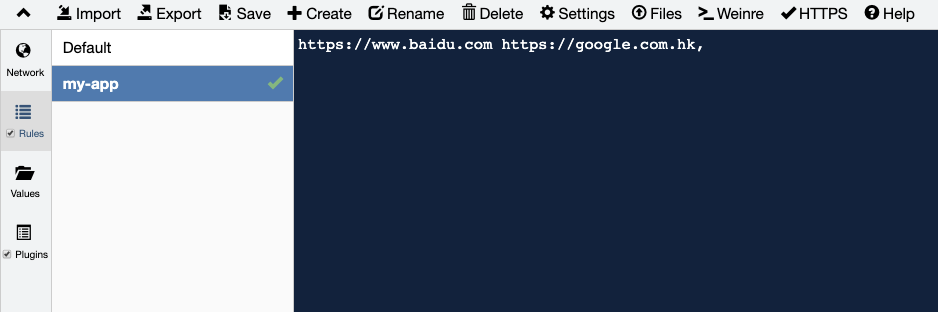
|
|
@@ -0,0 +1,44 @@
|
|
|
1
|
+
|
|
2
|
+
Modern.js 生成器会提供一个可交互的问答界面,根据结果初始化项目,按照默认的选择进行初始化:
|
|
3
|
+
|
|
4
|
+
```bash
|
|
5
|
+
? 请选择你想创建的工程类型 应用
|
|
6
|
+
? 请选择开发语言 TS
|
|
7
|
+
? 请选择包管理工具 pnpm
|
|
8
|
+
```
|
|
9
|
+
|
|
10
|
+
在生成项目后,Modern.js 会自动安装依赖、创建 git 仓库。
|
|
11
|
+
|
|
12
|
+
```bash
|
|
13
|
+
[INFO] 依赖自动安装成功
|
|
14
|
+
[INFO] git 仓库初始化成功
|
|
15
|
+
[INFO] 创建成功!
|
|
16
|
+
可在新项目的目录下运行以下命令:
|
|
17
|
+
pnpm run dev # 按开发环境的要求,运行和调试项目
|
|
18
|
+
pnpm run build # 按产品环境的要求,构建项目
|
|
19
|
+
pnpm run start # 按产品环境的要求,运行项目
|
|
20
|
+
pnpm run lint # 检查和修复所有代码
|
|
21
|
+
pnpm run new # 继续创建更多项目要素,比如应用入口
|
|
22
|
+
```
|
|
23
|
+
|
|
24
|
+
:::note
|
|
25
|
+
Modern.js 生成器除了在项目初始化时工作外,也能在后续研发中生成项目各种粒度的模块,并非一用即抛开。
|
|
26
|
+
:::
|
|
27
|
+
|
|
28
|
+
现在,项目结构如下:
|
|
29
|
+
|
|
30
|
+
```
|
|
31
|
+
.
|
|
32
|
+
├── node_modules
|
|
33
|
+
├── src
|
|
34
|
+
│ ├── modern-app-env.d.ts
|
|
35
|
+
│ └── routes
|
|
36
|
+
│ ├── index.css
|
|
37
|
+
│ ├── layout.tsx
|
|
38
|
+
│ └── page.tsx
|
|
39
|
+
├── modern.config.ts
|
|
40
|
+
├── package.json
|
|
41
|
+
├── pnpm-lock.yaml
|
|
42
|
+
├── README.md
|
|
43
|
+
└── tsconfig.json
|
|
44
|
+
```
|
|
@@ -0,0 +1,19 @@
|
|
|
1
|
+
### Node.js
|
|
2
|
+
|
|
3
|
+
需要 [Node.js LTS](https://github.com/nodejs/Release),并确保 Node 版本大于等于 16.18.1
|
|
4
|
+
|
|
5
|
+
Modern.js 推荐在开发环境里先安装 [nvm](https://github.com/nvm-sh/nvm#install--update-script),在 shell 里集成[自动切换 node 版本的脚本](https://github.com/nvm-sh/nvm#deeper-shell-integration)。
|
|
6
|
+
|
|
7
|
+
然后只要仓库根目录下有内容为 `lts/fermium` 或 `lts/gallium` 的 `.nvmrc` 文件,进入这个仓库时就会自动安装或切换到正确的 Node.js 版本。
|
|
8
|
+
|
|
9
|
+
### pnpm
|
|
10
|
+
|
|
11
|
+
推荐使用 [pnpm](https://pnpm.io/installation) 来管理依赖:
|
|
12
|
+
|
|
13
|
+
```bash
|
|
14
|
+
npm install -g pnpm
|
|
15
|
+
```
|
|
16
|
+
|
|
17
|
+
:::note
|
|
18
|
+
Modern.js 同样支持使用 `yarn`、`npm` 进行依赖管理。
|
|
19
|
+
:::
|
|
@@ -52,16 +52,14 @@ export default defineConfig({
|
|
|
52
52
|
"entryName": "page-a",
|
|
53
53
|
"entryPath": "html/page-a/index.html",
|
|
54
54
|
"isSPA": true,
|
|
55
|
-
"isSSR": false
|
|
56
|
-
"enableModernMode": false
|
|
55
|
+
"isSSR": false
|
|
57
56
|
},
|
|
58
57
|
{
|
|
59
58
|
"urlPath": "/b",
|
|
60
59
|
"entryName": "page-a",
|
|
61
60
|
"entryPath": "html/page-a/index.html",
|
|
62
61
|
"isSPA": true,
|
|
63
|
-
"isSSR": false
|
|
64
|
-
"enableModernMode": false
|
|
62
|
+
"isSSR": false
|
|
65
63
|
},
|
|
66
64
|
]
|
|
67
65
|
}
|
|
@@ -3,59 +3,36 @@ title: tools.esbuild
|
|
|
3
3
|
sidebar_label: esbuild
|
|
4
4
|
---
|
|
5
5
|
|
|
6
|
-
|
|
7
|
-
|
|
6
|
+
- 类型: `Object`
|
|
7
|
+
- 默认值: `undefined`
|
|
8
8
|
|
|
9
9
|
## 介绍
|
|
10
10
|
|
|
11
|
-
|
|
12
|
-
|
|
13
|
-
Modern.js 基于 esbuild 提供了代码编译和压缩的能力,在大型工程中开启后,**可以大幅度减少代码压缩所需的时间,同时有效避免 OOM (heap out of memory) 问题**。
|
|
14
|
-
|
|
15
|
-
使用 esbuild 压缩虽然带来了构建效率上的提升,但 esbuild 的压缩比例是低于 terser 的,因此**构建产物的体积会增大**,请根据业务情况酌情使用(比较适合中后台场景)。
|
|
16
|
-
|
|
17
|
-
对于压缩工具之间的详细对比,可以参考 [minification-benchmarks](https://github.com/privatenumber/minification-benchmarks)。
|
|
18
|
-
|
|
19
|
-
:::info
|
|
20
|
-
除了代码压缩外,esbuild 也可以代替 babel 进行代码编译,优点是可以提升编译速度,缺点是无法使用丰富的 babel 插件能力。
|
|
11
|
+
:::tip esbuild 介绍
|
|
12
|
+
[esbuild](https://esbuild.github.io/) 是一款基于 Golang 开发的前端构建工具,具有打包、编译和压缩 JavaScript 代码的功能,相比传统的打包编译工具,esbuild 在性能上有显著提升。在代码压缩方面,相比 webpack 内置的 terser 压缩器,esbuild 在性能上有数十倍的提升。
|
|
21
13
|
:::
|
|
22
14
|
|
|
23
|
-
|
|
24
|
-
|
|
25
|
-
### target
|
|
15
|
+
Modern.js 提供了 esbuild 插件,让你能使用 esbuild 代替 babel-loader、ts-loader 和 terser 等库进行代码编译和压缩。在大型工程中开启后,**可以大幅度减少代码编译和压缩所需的时间,同时有效避免 OOM (heap out of memory) 问题**。
|
|
26
16
|
|
|
27
|
-
|
|
28
|
-
* 默认值: `'esnext'`
|
|
29
|
-
|
|
30
|
-
为生成的 JavaScript 和 CSS 代码设置目标环境。
|
|
31
|
-
|
|
32
|
-
可以直接设置为 JavaScript 语言版本,比如 `es5`,`es6`,`es2020`。也可以设置为若干个目标环境,每个目标环境都是一个环境名称后跟一个版本号。比如 `['chrome58', 'edge16' ,'firefox57']`。
|
|
33
|
-
|
|
34
|
-
支持设置以下环境:
|
|
17
|
+
## 配置项
|
|
35
18
|
|
|
36
|
-
|
|
37
|
-
- edge
|
|
38
|
-
- firefox
|
|
39
|
-
- ie
|
|
40
|
-
- ios
|
|
41
|
-
- node
|
|
42
|
-
- opera
|
|
43
|
-
- safari
|
|
19
|
+
你可以通过 `tools.esbuild` 配置项来设置 esbuild 编译行为。
|
|
44
20
|
|
|
45
|
-
|
|
21
|
+
```js title="modern.config.ts"
|
|
22
|
+
import { defineConfig } from '@modern-js/app-tools';
|
|
46
23
|
|
|
47
|
-
```typescript title="modern.config.ts"
|
|
48
24
|
export default defineConfig({
|
|
49
25
|
tools: {
|
|
50
26
|
esbuild: {
|
|
51
|
-
|
|
27
|
+
loader: {
|
|
28
|
+
target: 'chrome61',
|
|
29
|
+
},
|
|
30
|
+
minimize: {
|
|
31
|
+
target: 'chrome61',
|
|
32
|
+
},
|
|
52
33
|
},
|
|
53
34
|
},
|
|
54
35
|
});
|
|
55
36
|
```
|
|
56
37
|
|
|
57
|
-
|
|
58
|
-
设置 `target` 为 `es5` 时,需要保证所有代码被 babel 转义为 es5 代码,否则会导致 esbuild 编译报错:`Transforming 'xxx' to the configured target environment ("es5") is not supported yet`。
|
|
59
|
-
|
|
60
|
-
`target` 字段的详细介绍可以参考 [esbuild - target](https://esbuild.github.io/api/#target)。
|
|
61
|
-
:::
|
|
38
|
+
完整配置项请参考 [Modern.js Builder - esbuild 插件配置](https://modernjs.dev/builder/zh/plugins/plugin-esbuild.html#%E9%85%8D%E7%BD%AE)。
|
|
@@ -25,8 +25,8 @@ Modern.js 中还提供了基于浏览器 [UA](https://developer.mozilla.org/zh-C
|
|
|
25
25
|
可以通过微生成器开启该功能:
|
|
26
26
|
|
|
27
27
|
```bash
|
|
28
|
-
?
|
|
29
|
-
?
|
|
28
|
+
? 请选择你想要的操作 启用可选功能
|
|
29
|
+
? 启用可选功能 启用「基于 UA 的 Polyfill」功能
|
|
30
30
|
```
|
|
31
31
|
|
|
32
32
|
安装依赖后,配置 `output.polyfill` 为 `ua` 并且执行 `pnpm run build && pnpm run start` 启动服务器后,访问页面可以看到 HTML 产物中包含如下脚本:
|
|
@@ -40,42 +40,6 @@ Modern.js 中还提供了基于浏览器 [UA](https://developer.mozilla.org/zh-C
|
|
|
40
40
|
|
|
41
41
|

|
|
42
42
|
|
|
43
|
-
|
|
44
|
-
## 差异化分发
|
|
45
|
-
|
|
46
|
-
Modern.js 提供了运行时基于浏览器 User Agent 的差异化分发方案, 设置 [`output.enableModernMode`](/docs/configure/app/output/enable-modern-mode) 后, 生产环境会自动构建出针对现代浏览器语法未降级的 JS 产物和针对旧版本浏览器带有 Polyfill 的 JS 产物:
|
|
47
|
-
|
|
48
|
-
```bash title="dist/static/js"
|
|
49
|
-
├── 370.95db0e84-es6.js
|
|
50
|
-
├── 370.95db0e84-es6.js.map
|
|
51
|
-
├── 370.ace5d8a0.js
|
|
52
|
-
├── 370.ace5d8a0.js.map
|
|
53
|
-
├── main.64eb3bc7-es6.js
|
|
54
|
-
├── main.64eb3bc7-es6.js.map
|
|
55
|
-
├── main.c8aab430.js
|
|
56
|
-
├── main.c8aab430.js.map
|
|
57
|
-
├── runtime-main.9ad9a46b-es6.js
|
|
58
|
-
├── runtime-main.9ad9a46b-es6.js.map
|
|
59
|
-
├── runtime-main.dccca6e0.js
|
|
60
|
-
└── runtime-main.dccca6e0.js.map
|
|
61
|
-
```
|
|
62
|
-
|
|
63
|
-
同时 HTML 也会构建出对应的 ES6 版本:
|
|
64
|
-
|
|
65
|
-
```js title="dist/html/main/index-es6.html"
|
|
66
|
-
<script defer="defer" src="/static/js/370.95db0e84-es6.js"></script>
|
|
67
|
-
```
|
|
68
|
-
|
|
69
|
-
```js title="dist/html/main/index.html"
|
|
70
|
-
<script defer="defer" src="/static/js/370.ace5d8a0.js"></script>
|
|
71
|
-
```
|
|
72
|
-
|
|
73
|
-
通过 `pnpm run build && pnpm run start` 启动服务器, 访问页面时,会根据浏览器信息决定返回 `index-es6.html` 还是 `index.html`。
|
|
74
|
-
|
|
75
|
-
:::info 注
|
|
76
|
-
内部目前使用 [@babel/compat-data](https://github.com/babel/babel/blob/main/packages/babel-compat-data/data/native-modules.json) 来判断具体浏览器是否支持 es6 语法。
|
|
77
|
-
:::
|
|
78
|
-
|
|
79
43
|
## Browserslist 配置
|
|
80
44
|
|
|
81
45
|
Modern.js 支持在项目根目录 `package.json` 文件中的 `browserslist` 字段(或单独的 `.browserslistrc` 文件)指定项目覆盖的目标浏览器范围。该值会被 [`@babel/preset-env`](https://babeljs.io/docs/en/babel-preset-env) 和 [`autoprefixer`](https://github.com/postcss/autoprefixer) 用来确定需要转换的 JavaScript 语法特性和需要添加的 CSS 浏览器前缀。
|
|
@@ -16,7 +16,7 @@ import ReactDOM from 'react-dom/client'
|
|
|
16
16
|
import { bootstrap } from '@modern-js/runtime';
|
|
17
17
|
|
|
18
18
|
|
|
19
|
-
export default App => {
|
|
19
|
+
export default (App: React.ComponentType) => {
|
|
20
20
|
// do something before bootstrap...
|
|
21
21
|
bootstrap(App, 'root', undefined, ReactDOM);
|
|
22
22
|
};
|
|
@@ -29,32 +29,30 @@ export default App => {
|
|
|
29
29
|
Modern.js 生成的文件内容如下:
|
|
30
30
|
|
|
31
31
|
```js
|
|
32
|
-
import customRender from '@/src/index.js';
|
|
33
|
-
import { createApp, bootstrap } from '@modern-js/runtime';
|
|
34
32
|
import React from 'react';
|
|
35
|
-
import
|
|
33
|
+
import ReactDOM from 'react-dom/client';
|
|
34
|
+
import customBootstrap from '@_edenx_src/index.tsx';
|
|
35
|
+
import App from '@_edenx_src/App';
|
|
36
|
+
import { router, state } from '@edenx/runtime/plugins';
|
|
36
37
|
|
|
37
|
-
const IS_BROWSER = typeof window !== 'undefined';
|
|
38
|
+
const IS_BROWSER = typeof window !== 'undefined' && window.name !== 'nodejs';
|
|
38
39
|
const MOUNT_ID = 'root';
|
|
39
40
|
|
|
40
41
|
let AppWrapper = null;
|
|
41
42
|
|
|
42
|
-
|
|
43
|
+
function render() {
|
|
43
44
|
AppWrapper = createApp({
|
|
44
45
|
// runtime 的插件参数...
|
|
45
|
-
})(App)
|
|
46
|
-
|
|
47
|
-
|
|
48
|
-
|
|
49
|
-
|
|
46
|
+
})(App)
|
|
47
|
+
if (IS_BROWSER) {
|
|
48
|
+
customBootstrap(AppWrapper);
|
|
49
|
+
}
|
|
50
|
+
return AppWrapper
|
|
51
|
+
}
|
|
50
52
|
|
|
51
|
-
|
|
53
|
+
AppWrapper = render();
|
|
52
54
|
|
|
53
|
-
|
|
54
|
-
module.hot.accept('<path>/src/App', () => {
|
|
55
|
-
renderApp();
|
|
56
|
-
});
|
|
57
|
-
}
|
|
55
|
+
export default AppWrapper;;
|
|
58
56
|
```
|
|
59
57
|
|
|
60
58
|
## 完全接管 Webpack 入口
|
|
@@ -12,8 +12,8 @@ SSG 是构建阶段的解决方案,因此仅对生产环境有效。通过 `de
|
|
|
12
12
|
我们首先需要执行 `pnpm run new` 启用 SSG 功能:
|
|
13
13
|
|
|
14
14
|
```bash
|
|
15
|
-
?
|
|
16
|
-
?
|
|
15
|
+
? 请选择你想要的操作 启用可选功能
|
|
16
|
+
? 启用可选功能 启用「SSG」功能
|
|
17
17
|
```
|
|
18
18
|
|
|
19
19
|
SSG 在**约定式路由**和**自控式路由**下的使用方式不同。
|
|
@@ -49,7 +49,7 @@ SSG 在**约定式路由**和**自控式路由**下的使用方式不同。
|
|
|
49
49
|
|
|
50
50
|
在 `src/routes/page.tsx` 中添加组件代码:
|
|
51
51
|
|
|
52
|
-
```jsx title="src/
|
|
52
|
+
```jsx title="src/routes/page.tsx"
|
|
53
53
|
export default () => {
|
|
54
54
|
return <div>Index Page</div>
|
|
55
55
|
}
|
|
@@ -133,7 +133,7 @@ export default defineConfig({
|
|
|
133
133
|
修改上述 `src/App.ts` 的代码为:
|
|
134
134
|
|
|
135
135
|
```tsx title="App.ts"
|
|
136
|
-
import { useRuntimeContext,
|
|
136
|
+
import { useRuntimeContext, useLoader } from '@modern-js/runtime';
|
|
137
137
|
import { Routes, Route, BrowserRouter } from '@modern-js/runtime/router';
|
|
138
138
|
import { StaticRouter } from '@modern-js/runtime/router/server';
|
|
139
139
|
|
|
@@ -142,9 +142,9 @@ const Router = typeof window === 'undefined' ? StaticRouter : BrowserRouter;
|
|
|
142
142
|
export default () => {
|
|
143
143
|
const { context } = useRuntimeContext();
|
|
144
144
|
|
|
145
|
-
const { data } =
|
|
145
|
+
const { data } = useLoader(async () => ({
|
|
146
146
|
message: Math.random(),
|
|
147
|
-
}));
|
|
147
|
+
}), { static: true });
|
|
148
148
|
|
|
149
149
|
return (
|
|
150
150
|
<Router location={context.request.pathname}>
|