@modern-js/main-doc 2.0.0-beta.3 → 2.0.0-beta.4
This diff represents the content of publicly available package versions that have been released to one of the supported registries. The information contained in this diff is provided for informational purposes only and reflects changes between package versions as they appear in their respective public registries.
- package/.turbo/turbo-build.log +1 -1
- package/en/docusaurus-plugin-content-docs/current/apis/app/commands/inspect.md +0 -4
- package/en/docusaurus-plugin-content-docs/current/components/init-app.md +42 -0
- package/en/docusaurus-plugin-content-docs/current/configure/app/server/routes.md +2 -4
- package/en/docusaurus-plugin-content-docs/current/configure/app/tools/esbuild.md +16 -39
- package/en/docusaurus-plugin-content-docs/current/guides/basic-features/css/css-in-js.md +38 -0
- package/en/docusaurus-plugin-content-docs/current/guides/basic-features/css/css-modules.md +86 -0
- package/en/docusaurus-plugin-content-docs/current/guides/basic-features/css/less-sass.md +17 -0
- package/en/docusaurus-plugin-content-docs/current/guides/basic-features/css/postcss.md +81 -0
- package/en/docusaurus-plugin-content-docs/current/guides/basic-features/css/tailwindcss.md +95 -0
- package/en/docusaurus-plugin-content-docs/current/guides/basic-features/data-fetch.md +66 -0
- package/en/docusaurus-plugin-content-docs/current/guides/basic-features/routes.md +270 -0
- package/en/docusaurus-plugin-content-docs/current/guides/concept/entries.md +116 -0
- package/en/docusaurus-plugin-content-docs/current/guides/concept/lifecycle.md +15 -0
- package/en/docusaurus-plugin-content-docs/current/guides/get-started/quick-start.md +162 -0
- package/en/docusaurus-plugin-content-docs/current/guides/get-started/upgrade.md +78 -0
- package/{zh/tutorials/first-app → en/docusaurus-plugin-content-docs/current/guides}/overview.md +4 -4
- package/en/docusaurus-plugin-content-docs/current/tutorials/foundations/introduction.md +1 -1
- package/en/docusaurus-plugin-content-docs/current.json +11 -11
- package/package.json +3 -3
- package/zh/apis/app/commands/inspect.md +0 -4
- package/zh/apis/app/commands/new.md +1 -1
- package/zh/apis/app/hooks/src/index_.md +6 -5
- package/zh/components/debug-app.md +18 -0
- package/zh/components/global-proxy.md +28 -0
- package/zh/components/init-app.md +44 -0
- package/zh/components/prerequisites.md +19 -0
- package/zh/configure/app/server/routes.md +2 -4
- package/zh/configure/app/tools/esbuild.md +16 -39
- package/zh/guides/advanced-features/bff/bff-proxy.md +1 -1
- package/zh/guides/advanced-features/compatibility.md +2 -38
- package/zh/guides/advanced-features/custom-app.md +15 -17
- package/zh/guides/advanced-features/ssg.md +6 -6
- package/zh/guides/advanced-features/ssr.md +94 -51
- package/zh/guides/advanced-features/testing.md +33 -1
- package/zh/guides/advanced-features/web-server.md +2 -2
- package/zh/guides/basic-features/css/tailwindcss.md +2 -6
- package/zh/guides/basic-features/html.md +182 -0
- package/zh/guides/basic-features/mock.md +3 -9
- package/zh/guides/basic-features/proxy.md +2 -27
- package/zh/guides/concept/entries.md +4 -5
- package/zh/guides/get-started/quick-start.md +6 -78
- package/zh/guides/get-started/upgrade.md +8 -8
- package/zh/guides/topic-detail/model/quick-start.md +1 -1
- package/zh/guides/topic-detail/model/test-model.md +2 -2
- package/zh/guides/topic-detail/monorepo/intro.md +1 -1
- package/zh/guides/troubleshooting/dependencies.md +0 -69
- package/zh/tutorials/first-app/_category_.json +1 -1
- package/zh/tutorials/first-app/c01-start.md +94 -0
- package/zh/tutorials/first-app/{c05-component/5.1-use-ui-library.md → c02-component.md} +13 -15
- package/zh/tutorials/first-app/c03-css.md +305 -0
- package/zh/tutorials/first-app/{c08-client-side-routing/8.1-code-based-routing.md → c04-routes.md} +52 -39
- package/zh/tutorials/first-app/c05-loader.md +82 -0
- package/zh/tutorials/first-app/c06-model.md +256 -0
- package/zh/tutorials/first-app/c07-container.md +268 -0
- package/zh/tutorials/first-app/c08-entries.md +134 -0
- package/zh/tutorials/foundations/introduction.md +1 -1
- package/en/docusaurus-plugin-content-docs/current/configure/app/output/enable-modern-mode.md +0 -34
- package/zh/apis/generator/overview.md +0 -32
- package/zh/configure/app/output/enable-modern-mode.md +0 -34
- package/zh/guides/topic-detail/monorepo/deploy.md +0 -43
- package/zh/tutorials/first-app/c01-getting-started/1.1-prerequisites.md +0 -25
- package/zh/tutorials/first-app/c01-getting-started/1.2-minimal-mwa.md +0 -118
- package/zh/tutorials/first-app/c01-getting-started/1.3-dev-command.md +0 -29
- package/zh/tutorials/first-app/c01-getting-started/1.4-enable-ssr.md +0 -47
- package/zh/tutorials/first-app/c01-getting-started/1.5-start-command.md +0 -18
- package/zh/tutorials/first-app/c01-getting-started/1.6-create-repo.md +0 -31
- package/zh/tutorials/first-app/c01-getting-started/_category_.json +0 -3
- package/zh/tutorials/first-app/c02-generator-and-studio/2.1-generator.md +0 -79
- package/zh/tutorials/first-app/c02-generator-and-studio/2.2-boilerplates.md +0 -34
- package/zh/tutorials/first-app/c02-generator-and-studio/2.3-configuration.md +0 -19
- package/zh/tutorials/first-app/c02-generator-and-studio/_category_.json +0 -3
- package/zh/tutorials/first-app/c03-ide/3.1-setting-up.md +0 -55
- package/zh/tutorials/first-app/c03-ide/3.2-hints-in-ide.md +0 -60
- package/zh/tutorials/first-app/c03-ide/3.3-autofix-in-ide.md +0 -11
- package/zh/tutorials/first-app/c03-ide/3.4-autofix-in-cli.md +0 -63
- package/zh/tutorials/first-app/c03-ide/_category_.json +0 -3
- package/zh/tutorials/first-app/c04-es6-plus-and-ts/4.1-use-es6-plus.md +0 -54
- package/zh/tutorials/first-app/c04-es6-plus-and-ts/4.2-use-typescript.md +0 -135
- package/zh/tutorials/first-app/c04-es6-plus-and-ts/4.3-compatibility.md +0 -67
- package/zh/tutorials/first-app/c04-es6-plus-and-ts/_category_.json +0 -3
- package/zh/tutorials/first-app/c05-component/5.2-use-standalone-component.md +0 -72
- package/zh/tutorials/first-app/c05-component/_category_.json +0 -3
- package/zh/tutorials/first-app/c06-css-and-component/6.1-css-in-js.md +0 -110
- package/zh/tutorials/first-app/c06-css-and-component/6.2-utility-class.md +0 -143
- package/zh/tutorials/first-app/c06-css-and-component/6.3-postcss.md +0 -84
- package/zh/tutorials/first-app/c06-css-and-component/6.4-design-system.md +0 -83
- package/zh/tutorials/first-app/c06-css-and-component/6.5-storybook.md +0 -77
- package/zh/tutorials/first-app/c06-css-and-component/6.6-testing.md +0 -104
- package/zh/tutorials/first-app/c06-css-and-component/_category_.json +0 -3
- package/zh/tutorials/first-app/c07-app-entry/7.1-intro.md +0 -69
- package/zh/tutorials/first-app/c07-app-entry/7.2-add-entry-in-cli.md +0 -100
- package/zh/tutorials/first-app/c07-app-entry/7.3-manage-entries-by-hand.md +0 -69
- package/zh/tutorials/first-app/c07-app-entry/_category_.json +0 -3
- package/zh/tutorials/first-app/c08-client-side-routing/_category_.json +0 -3
- package/zh/tutorials/first-app/c09-bff/9.1-serverless.md +0 -30
- package/zh/tutorials/first-app/c09-bff/9.2-enable-bff.md +0 -95
- package/zh/tutorials/first-app/c09-bff/9.3-fetch-bff.md +0 -131
- package/zh/tutorials/first-app/c09-bff/_category_.json +0 -3
- package/zh/tutorials/first-app/c10-model/10.1-application-architecture.md +0 -21
- package/zh/tutorials/first-app/c10-model/10.2-add-model.md +0 -185
- package/zh/tutorials/first-app/c10-model/10.3-use-model.md +0 -55
- package/zh/tutorials/first-app/c10-model/10.4-testing.md +0 -69
- package/zh/tutorials/first-app/c10-model/_category_.json +0 -3
- package/zh/tutorials/first-app/c11-container/11.1-use-model-with-app-state.md +0 -240
- package/zh/tutorials/first-app/c11-container/11.2-add-container.md +0 -109
- package/zh/tutorials/first-app/c11-container/11.3-use-loader.md +0 -63
- package/zh/tutorials/first-app/c11-container/11.4-testing.md +0 -56
- package/zh/tutorials/first-app/c11-container/_category_.json +0 -3
|
@@ -1,240 +0,0 @@
|
|
|
1
|
-
---
|
|
2
|
-
title: 完整使用 Model
|
|
3
|
-
---
|
|
4
|
-
|
|
5
|
-
上一章节中,我们初步引入**客户端应用架构**,从【 视图组件 】中拆分出【 业务模型(Model)】,`page.tsx` 中不再包含 UI 无关的业务逻辑实现细节,只需要使用 Model,就能实现同样的功能。
|
|
6
|
-
|
|
7
|
-
这一章节中,我们要进一步利用 Model 中实现的业务逻辑,让 `archived/page.ts` 也从 BFF 获取数据,实现 Archive 按钮,点击按钮能把联系人归档,只显示在 Archives 列表里,不显示在 All 列表里。
|
|
8
|
-
|
|
9
|
-
先改造 `Item` 组件,增加 Archive 按钮的交互实现:
|
|
10
|
-
|
|
11
|
-
```tsx title="src/contacts/routes/components/Item/index.tsx"
|
|
12
|
-
import Avatar from '../Avatar';
|
|
13
|
-
|
|
14
|
-
type InfoProps = {
|
|
15
|
-
avatar: string;
|
|
16
|
-
name: string;
|
|
17
|
-
email: string;
|
|
18
|
-
archived?: boolean;
|
|
19
|
-
};
|
|
20
|
-
|
|
21
|
-
const Item = ({
|
|
22
|
-
info,
|
|
23
|
-
onArchive,
|
|
24
|
-
}: {
|
|
25
|
-
info: InfoProps;
|
|
26
|
-
onArchive?: () => void;
|
|
27
|
-
}) => {
|
|
28
|
-
const { avatar, name, email, archived } = info;
|
|
29
|
-
return (
|
|
30
|
-
<div className="flex p-4 items-center border-gray-200 border-b">
|
|
31
|
-
<Avatar src={avatar} />
|
|
32
|
-
<div className="ml-4 custom-text-gray flex-1 flex justify-between">
|
|
33
|
-
<div className="flex-1">
|
|
34
|
-
<p>{name}</p>
|
|
35
|
-
<p>{email}</p>
|
|
36
|
-
</div>
|
|
37
|
-
<button
|
|
38
|
-
type="button"
|
|
39
|
-
disabled={archived}
|
|
40
|
-
onClick={onArchive}
|
|
41
|
-
className={`text-white font-bold py-2 px-4 rounded-full ${
|
|
42
|
-
archived
|
|
43
|
-
? 'bg-gray-400 cursor-default'
|
|
44
|
-
: 'bg-blue-500 hover:bg-blue-700'
|
|
45
|
-
}`}
|
|
46
|
-
>
|
|
47
|
-
{archived ? 'Archived' : 'Archive'}
|
|
48
|
-
</button>
|
|
49
|
-
</div>
|
|
50
|
-
</div>
|
|
51
|
-
);
|
|
52
|
-
};
|
|
53
|
-
|
|
54
|
-
export default Item;
|
|
55
|
-
```
|
|
56
|
-
|
|
57
|
-
两个页面需要共用同一套状态(联系人列表数据、联系人是否被归档),并且由于 Archives 列表和 All 列表都可能是第一屏页面(从不同 URL 访问),这两个组件都需要包含加载初始数据的逻辑(如果客户端没有联系人列表数据,就请求 BFF),所以这类两个组件公用的实现逻辑应该合并到一起:
|
|
58
|
-
|
|
59
|
-
我们创建一个新的 `Contacts` 组件:
|
|
60
|
-
|
|
61
|
-
import Tabs from '@theme/Tabs';
|
|
62
|
-
import TabItem from '@theme/TabItem';
|
|
63
|
-
|
|
64
|
-
<Tabs>
|
|
65
|
-
<TabItem value="macOS" label="macOS" default>
|
|
66
|
-
|
|
67
|
-
```bash
|
|
68
|
-
mkdir -p src/contacts/routes/components/Contacts/
|
|
69
|
-
touch src/contacts/routes/components/Contacts/index.tsx
|
|
70
|
-
```
|
|
71
|
-
|
|
72
|
-
</TabItem>
|
|
73
|
-
<TabItem value="Windows" label="Windows">
|
|
74
|
-
|
|
75
|
-
```powershell
|
|
76
|
-
mkdir -p src/contacts/routes/components/Contacts/
|
|
77
|
-
ni src/contacts/routes/components/Contacts/index.tsx
|
|
78
|
-
```
|
|
79
|
-
|
|
80
|
-
</TabItem>
|
|
81
|
-
</Tabs>
|
|
82
|
-
|
|
83
|
-
修改`components/Contacts/index.tsx` ,内容如下:
|
|
84
|
-
|
|
85
|
-
```tsx title="src/contacts/routes/components/Contacts/index.tsx"
|
|
86
|
-
import { useEffect } from 'react';
|
|
87
|
-
import { useLocalModel } from '@modern-js/runtime/model';
|
|
88
|
-
import { List } from 'antd';
|
|
89
|
-
import contacts from '../../models/contacts';
|
|
90
|
-
import Item from '../Item';
|
|
91
|
-
|
|
92
|
-
const Contacts = ({ source }: { source: 'archived' | 'items' }) => {
|
|
93
|
-
const [state, actions] = useLocalModel(contacts);
|
|
94
|
-
const { items, error, pending } = state;
|
|
95
|
-
useEffect(() => {
|
|
96
|
-
if (!items.length && !error && !pending) {
|
|
97
|
-
actions.load();
|
|
98
|
-
}
|
|
99
|
-
});
|
|
100
|
-
|
|
101
|
-
const data = state.items.filter(item =>
|
|
102
|
-
source === 'archived' ? item.archived : true,
|
|
103
|
-
);
|
|
104
|
-
|
|
105
|
-
return (
|
|
106
|
-
(items.length && (
|
|
107
|
-
<List
|
|
108
|
-
dataSource={data}
|
|
109
|
-
renderItem={info => (
|
|
110
|
-
<Item
|
|
111
|
-
key={info.email}
|
|
112
|
-
info={info}
|
|
113
|
-
onArchive={() => {
|
|
114
|
-
actions.archive(info.email);
|
|
115
|
-
}}
|
|
116
|
-
/>
|
|
117
|
-
)}
|
|
118
|
-
/>
|
|
119
|
-
)) || (
|
|
120
|
-
<div className="p-4 items-center border-gray-200 border-b border-t custom-text-gray">
|
|
121
|
-
Pending...
|
|
122
|
-
</div>
|
|
123
|
-
)
|
|
124
|
-
);
|
|
125
|
-
};
|
|
126
|
-
|
|
127
|
-
export default Contacts;
|
|
128
|
-
```
|
|
129
|
-
|
|
130
|
-
最后改造 `page.tsx` 和 `archived/page.ts`,利用 Contacts 实现 Archives 列表和 All 列表:
|
|
131
|
-
|
|
132
|
-
```tsx title="src/contacts/page.tsx"
|
|
133
|
-
import Contacts from './components/Contacts';
|
|
134
|
-
import 'ladda/dist/ladda.min.css';
|
|
135
|
-
import 'tailwindcss/base.css';
|
|
136
|
-
import 'tailwindcss/components.css';
|
|
137
|
-
import 'tailwindcss/utilities.css';
|
|
138
|
-
import './styles/utils.css';
|
|
139
|
-
|
|
140
|
-
function Index() {
|
|
141
|
-
return (
|
|
142
|
-
<div className="container lg mx-auto">
|
|
143
|
-
<Contacts source="items" />
|
|
144
|
-
</div>
|
|
145
|
-
);
|
|
146
|
-
}
|
|
147
|
-
|
|
148
|
-
export default Index;
|
|
149
|
-
```
|
|
150
|
-
|
|
151
|
-
```tsx title="src/contacts/archived/page.tsx"
|
|
152
|
-
import Contacts from './components/Contacts';
|
|
153
|
-
|
|
154
|
-
function Index() {
|
|
155
|
-
return (
|
|
156
|
-
<div className="container lg mx-auto">
|
|
157
|
-
<Contacts source="archived" />
|
|
158
|
-
</div>
|
|
159
|
-
);
|
|
160
|
-
}
|
|
161
|
-
|
|
162
|
-
export default Index;
|
|
163
|
-
```
|
|
164
|
-
|
|
165
|
-
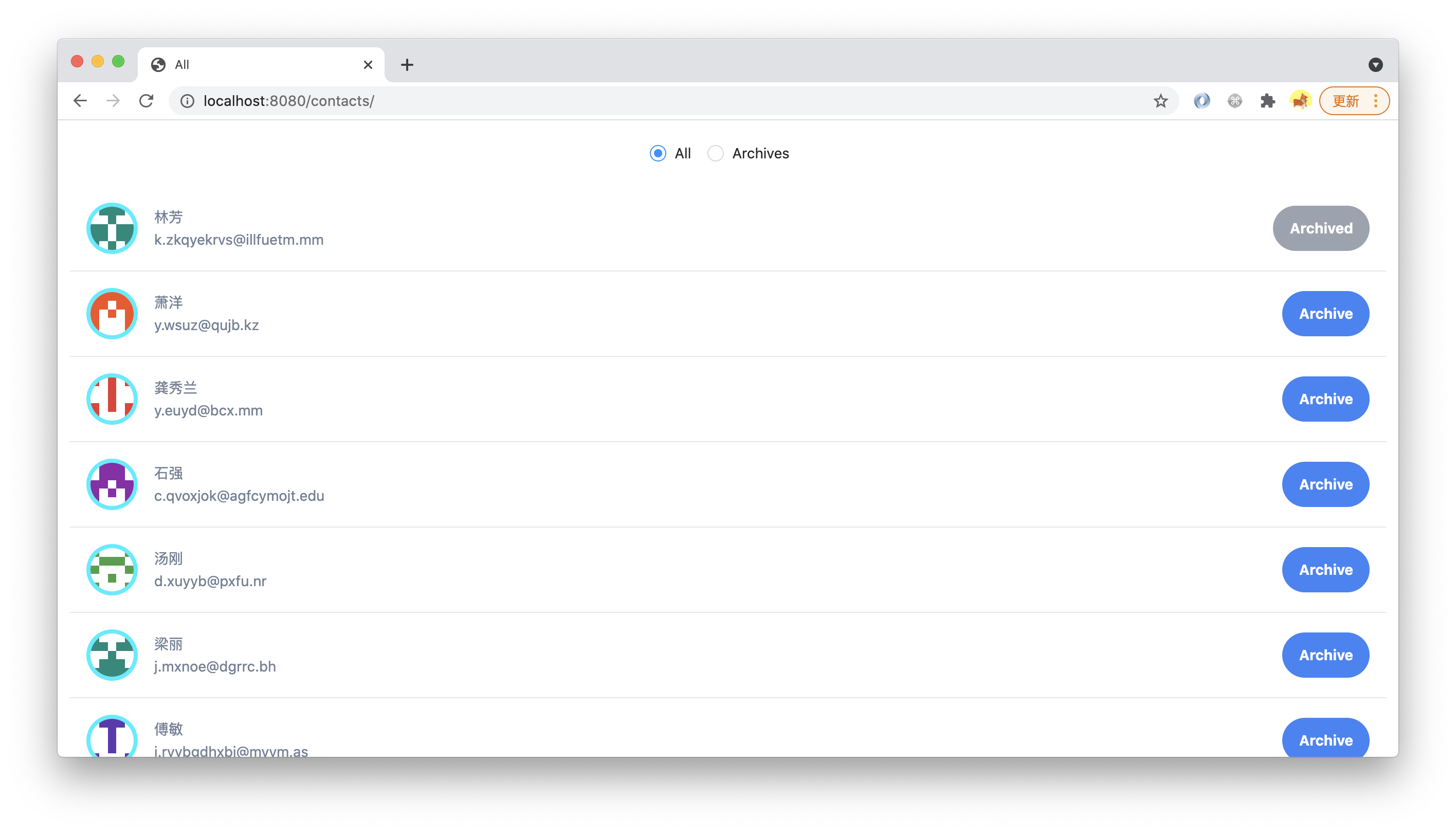
执行 `pnpm run dev`,访问 `http://localhost:8080/contacts/`,点击 Archive 按钮后,可以看到按钮置灰:
|
|
166
|
-
|
|
167
|
-
|
|
168
|
-
|
|
169
|
-
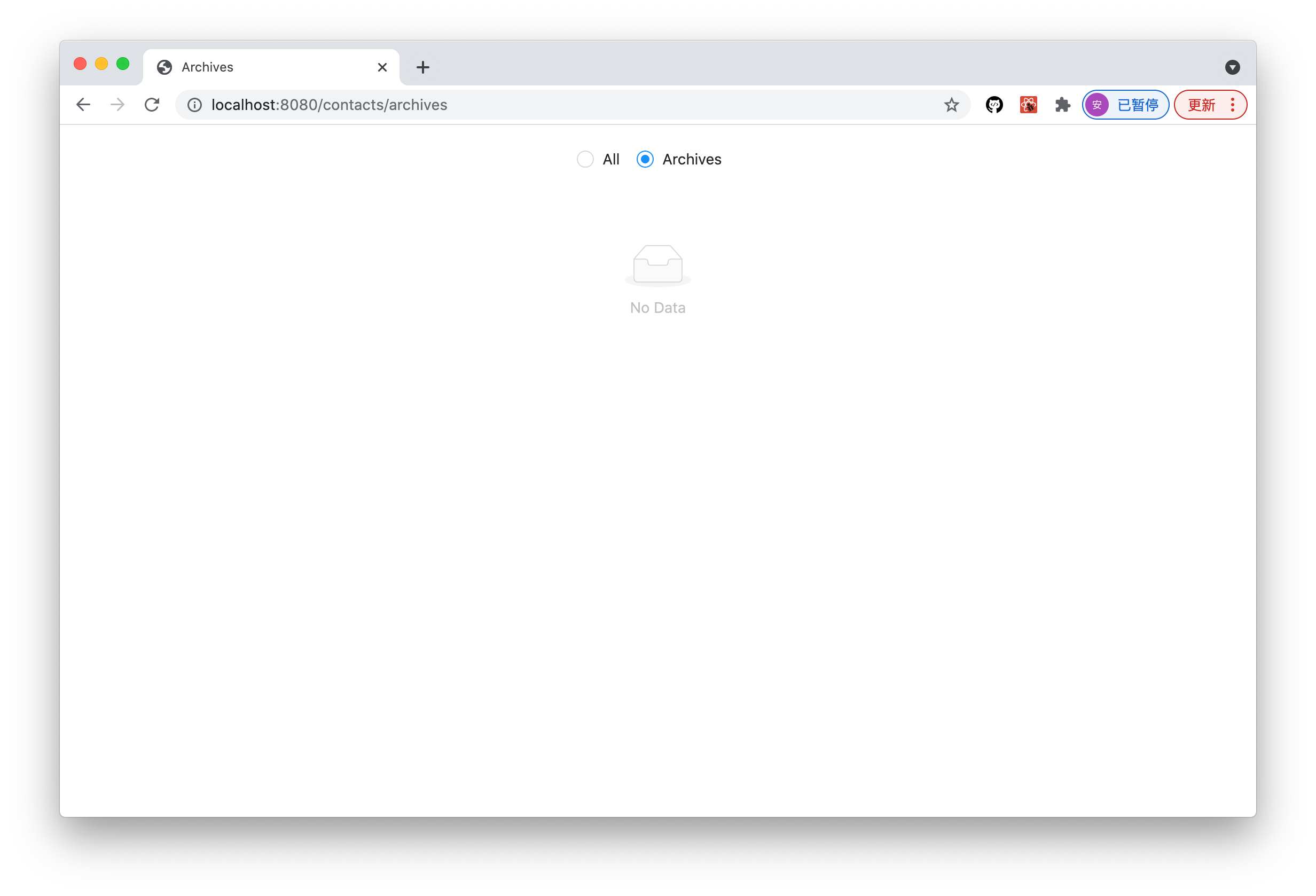
接下来点击顶部导航,切换到 Archives 列表,我们预期的时候能看到列表里显示刚才归档的联系人,但实际上列表是空的:
|
|
170
|
-
|
|
171
|
-
|
|
172
|
-
|
|
173
|
-
出现这个问题的原因是,我们继续沿用了上一节的 `useLocalModel` API 来使用 Model,状态被保存到了组件内部的 state 里,而 `All` 列表和 `Archives` 列表中分别调用的 `Contacts` 组件,是两个各自独立的组件.
|
|
174
|
-
|
|
175
|
-
所以它们有各自独立的内部 state,互相不共享状态,渲染 `Archives` 列表的时候,`items` 仍然是初始状态。
|
|
176
|
-
|
|
177
|
-
要解决这个问题,一种方式把 `useLocalModel` 的逻辑提升到父组件里,把状态分别传给两个 `Contacts` 组件。更清晰、完善的方式,是启用全局唯一的「 应用状态 」,两个 `Contacts` 组件「 连接 」应用状态。
|
|
178
|
-
|
|
179
|
-
在 Modern.js 里实现应用状态管理很简单,只需要把 `useLocalModel` 换成 `useModel`。
|
|
180
|
-
|
|
181
|
-
修改 `components/Contacts/index.tsx` 的内容:
|
|
182
|
-
|
|
183
|
-
|
|
184
|
-
```tsx title="src/contacts/routes/components/Contacts/index.tsx"
|
|
185
|
-
import { useEffect } from 'react';
|
|
186
|
-
import { useModel } from '@modern-js/runtime/model';
|
|
187
|
-
import { List } from 'antd';
|
|
188
|
-
import contacts from '../../models/contacts';
|
|
189
|
-
import Item from '../Item';
|
|
190
|
-
|
|
191
|
-
const Contacts = ({ source }: { source: 'archived' | 'items' }) => {
|
|
192
|
-
const [state, actions] = useModel(contacts);
|
|
193
|
-
const { items, error, pending } = state;
|
|
194
|
-
useEffect(() => {
|
|
195
|
-
if (!items.length && !error && !pending) {
|
|
196
|
-
actions.load();
|
|
197
|
-
}
|
|
198
|
-
});
|
|
199
|
-
|
|
200
|
-
const data = state.items.filter(item =>
|
|
201
|
-
source === 'archived' ? item.archived : true,
|
|
202
|
-
);
|
|
203
|
-
|
|
204
|
-
return (
|
|
205
|
-
(items.length && (
|
|
206
|
-
<List
|
|
207
|
-
dataSource={data}
|
|
208
|
-
renderItem={info => (
|
|
209
|
-
<Item
|
|
210
|
-
key={info.email}
|
|
211
|
-
info={info}
|
|
212
|
-
onArchive={() => {
|
|
213
|
-
actions.archive(info.email);
|
|
214
|
-
}}
|
|
215
|
-
/>
|
|
216
|
-
)}
|
|
217
|
-
/>
|
|
218
|
-
)) || (
|
|
219
|
-
<div className="p-4 items-center border-gray-200 border-b border-t custom-text-gray">
|
|
220
|
-
Pending...
|
|
221
|
-
</div>
|
|
222
|
-
)
|
|
223
|
-
);
|
|
224
|
-
};
|
|
225
|
-
|
|
226
|
-
export default Contacts;
|
|
227
|
-
```
|
|
228
|
-
|
|
229
|
-
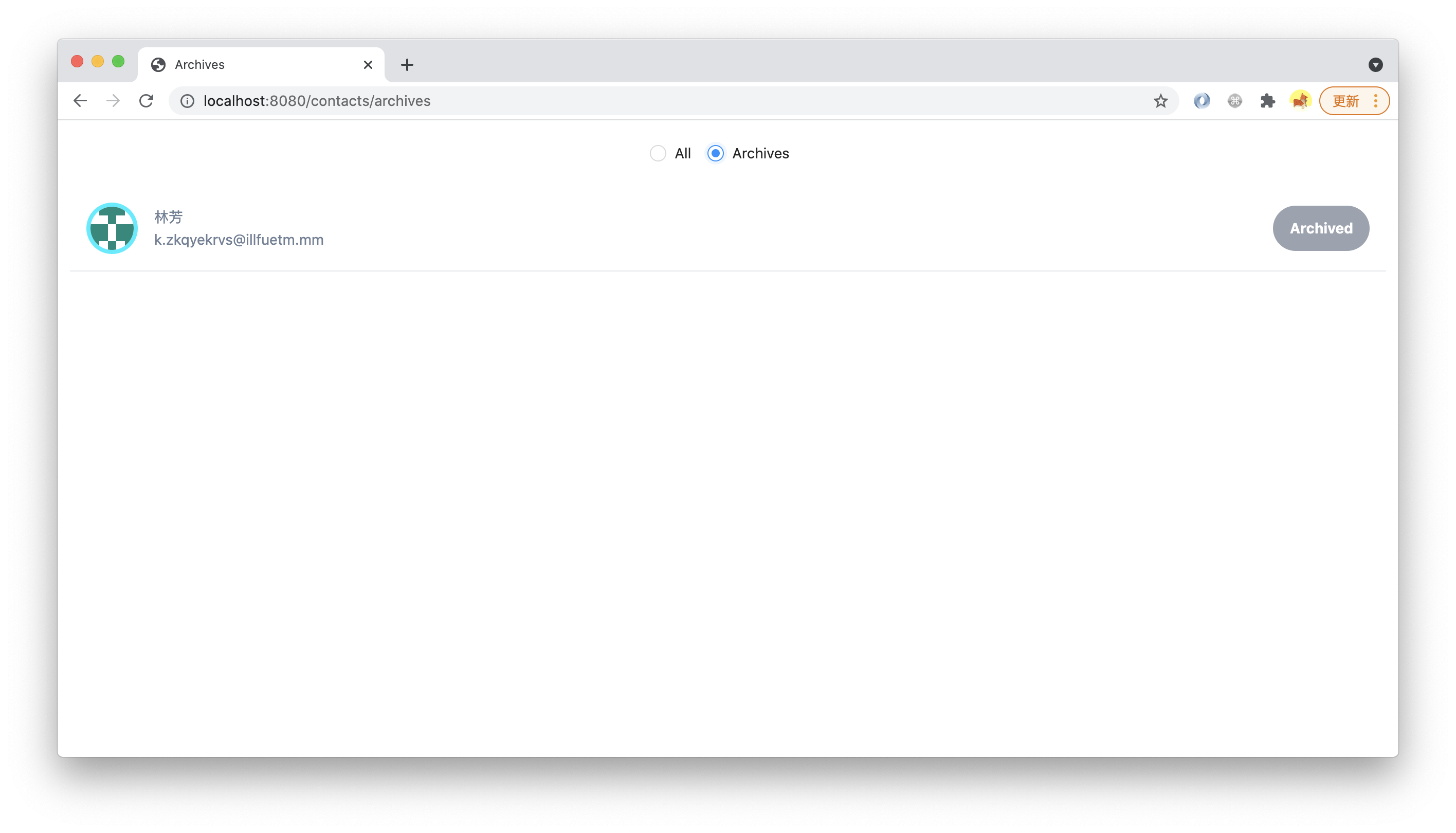
重新执行 `pnpm run dev`,重复刚才的操作,可以看到 Archives 列表能正常显示了:
|
|
230
|
-
|
|
231
|
-
|
|
232
|
-
|
|
233
|
-
:::info 注
|
|
234
|
-
useModel API 还可以设置 Selector,只连接这个 Model 定义的状态中的局部。
|
|
235
|
-
:::
|
|
236
|
-
|
|
237
|
-
---
|
|
238
|
-
|
|
239
|
-
> 本小节的代码可以在[这里查看](https://github.com/modern-js-dev/modern-js-examples/tree/main/tutorials/c11/hello-modern)。
|
|
240
|
-
|
|
@@ -1,109 +0,0 @@
|
|
|
1
|
-
---
|
|
2
|
-
title: 容器组件(Container)
|
|
3
|
-
---
|
|
4
|
-
|
|
5
|
-
前两个章节中,我们把项目中的业务逻辑拆分成了两个 layer,一个是【 视图组件 】,另一个是 【 业务模块 】。
|
|
6
|
-
|
|
7
|
-
【 视图组件 】 负责 UI 展示、交互等;【 业务模块 】负责实现 UI 无关的业务逻辑,专门管理状态,既可以是组件状态(局部,不唯一),也可以是应用状态(全局,唯一)。
|
|
8
|
-
|
|
9
|
-
像 `components/Contacts/index.tsx` 这样使用了 `useModel` API 的组件,其实已经在**客户端应用架构**中扮演一种新的角色,负责把 View 和 Model 这两个 layer 连接起来,类似传统 MVC 架构中 Controller 的角色,也类似一种 ViewController。
|
|
10
|
-
|
|
11
|
-
因为这种组件属于一种新的功能模块,在 Modern.js 里我们沿用习惯,把它们称作【 容器组件(Container)】。
|
|
12
|
-
|
|
13
|
-
容器组件推荐放在专门的 `containers/` 目录里,我们执行以下命令:
|
|
14
|
-
|
|
15
|
-
import Tabs from '@theme/Tabs';
|
|
16
|
-
import TabItem from '@theme/TabItem';
|
|
17
|
-
|
|
18
|
-
<Tabs>
|
|
19
|
-
<TabItem value="macOS" label="macOS" default>
|
|
20
|
-
|
|
21
|
-
```bash
|
|
22
|
-
mkdir -p src/contacts/routes/containers/
|
|
23
|
-
mv src/contacts/routes/components/Contacts/index.tsx src/contacts/routes/containers/Contacts.tsx
|
|
24
|
-
rm -r src/contacts/routes/components/Contacts/
|
|
25
|
-
```
|
|
26
|
-
|
|
27
|
-
</TabItem>
|
|
28
|
-
<TabItem value="Windows" label="Windows">
|
|
29
|
-
|
|
30
|
-
```powershell
|
|
31
|
-
mkdir -p src/contacts/containers/
|
|
32
|
-
mv src/contacts/components/Contacts/index.tsx src/contacts/containers/Contacts.tsx
|
|
33
|
-
rm -r src/contacts/components/Contacts/
|
|
34
|
-
```
|
|
35
|
-
|
|
36
|
-
</TabItem>
|
|
37
|
-
</Tabs>
|
|
38
|
-
|
|
39
|
-
修改 `containers/Contacts.tsx` 的代码:
|
|
40
|
-
|
|
41
|
-
```tsx
|
|
42
|
-
import Item from '../components/Item';
|
|
43
|
-
import contacts from '../models/contacts';
|
|
44
|
-
```
|
|
45
|
-
|
|
46
|
-
修改 `page.tsx` 和 `archives/page.tsx` 的代码:
|
|
47
|
-
|
|
48
|
-
```tsx
|
|
49
|
-
import Contacts from './containers/Contacts';
|
|
50
|
-
```
|
|
51
|
-
|
|
52
|
-
重构完成,现在的项目结构是:
|
|
53
|
-
|
|
54
|
-
```md
|
|
55
|
-
.
|
|
56
|
-
├── .eslintrc.js
|
|
57
|
-
├── .gitignore
|
|
58
|
-
├── .husky
|
|
59
|
-
├── .npmrc
|
|
60
|
-
├── .nvmrc
|
|
61
|
-
├── .prettierrc
|
|
62
|
-
├── .vscode
|
|
63
|
-
├── README.md
|
|
64
|
-
├── api
|
|
65
|
-
│ └── contacts.ts
|
|
66
|
-
├── modern.config.ts
|
|
67
|
-
├── package.json
|
|
68
|
-
├── pnpm-lock.yaml
|
|
69
|
-
├── src
|
|
70
|
-
│ ├── .eslintrc.js
|
|
71
|
-
│ ├── contacts
|
|
72
|
-
│ │ └── routes
|
|
73
|
-
│ │ ├── archives
|
|
74
|
-
│ │ │ └── page.tsx
|
|
75
|
-
│ │ ├── components
|
|
76
|
-
│ │ │ ├── Avatar
|
|
77
|
-
│ │ │ │ ├── index.stories.tsx
|
|
78
|
-
│ │ │ │ └── index.tsx
|
|
79
|
-
│ │ │ └── Item
|
|
80
|
-
│ │ │ ├── index.test.tsx
|
|
81
|
-
│ │ │ └── index.tsx
|
|
82
|
-
│ │ ├── containers
|
|
83
|
-
│ │ │ └── Contacts.tsx
|
|
84
|
-
│ │ ├── index.css
|
|
85
|
-
│ │ ├── layout.tsx
|
|
86
|
-
│ │ ├── models
|
|
87
|
-
│ │ │ ├── contacts.test.ts
|
|
88
|
-
│ │ │ └── contacts.ts
|
|
89
|
-
│ │ ├── page.tsx
|
|
90
|
-
│ │ └── styles
|
|
91
|
-
│ │ └── utils.css
|
|
92
|
-
│ ├── landing-page
|
|
93
|
-
│ │ └── routes
|
|
94
|
-
│ │ ├── index.css
|
|
95
|
-
│ │ ├── layout.tsx
|
|
96
|
-
│ │ └── page.tsx
|
|
97
|
-
│ └── modern-app-env.d.ts
|
|
98
|
-
└── tsconfig.json
|
|
99
|
-
```
|
|
100
|
-
|
|
101
|
-
`components/` 里的【 视图组件 】,都是目录形式,如 `Avatar/index.tsx`。而 `containers/` 里的【 容器组件 】,都是单文件形式,如 `contacts.tsx`。**这是我们推荐的一种最佳实践**。
|
|
102
|
-
|
|
103
|
-
在 [添加 UI 组件(Component)](../c06-css-and-component/6.1-css-in-js.md) 章节提到过,【 视图组件 】用目录形式,是因为【 视图组件 】负责实现 UI 展示和交互细节,可以演变的复杂,用目录形式,可以方便增加子文件,包括专用的资源(图片等)、专用子组件、CSS 文件等,在这个目录内部可以随意重构,只考虑最小局部。
|
|
104
|
-
|
|
105
|
-
而【 容器组件 】只负责连接,是一个胶水层,复杂的业务逻辑和实现细节都交给 View 层和 Model 层去实现,【 容器组件 】自己应该保持简单清晰,不应该包含复杂实现细节,所以不应该有内部结构,采用单文件形式不但更简洁,也能起到约束作用,提醒开发者不要把容器组件写复杂。
|
|
106
|
-
|
|
107
|
-
---
|
|
108
|
-
|
|
109
|
-
> 本小节的代码可以在[这里查看](https://github.com/modern-js-dev/modern-js-examples/tree/main/tutorials/c11/hello-modern-2)。
|
|
@@ -1,63 +0,0 @@
|
|
|
1
|
-
---
|
|
2
|
-
title: 使用 Loader
|
|
3
|
-
---
|
|
4
|
-
|
|
5
|
-
到目前为止,我们都是用 `useEffect` 来请求 BFF,加载联系人列表数据。
|
|
6
|
-
|
|
7
|
-
在启用 SSR 的情况下,`useEffect` 在服务器端是不会执行的,所以 SSR 过程中不会加载数据,这种 SSR 只能渲染很有限的 UI,是低价值的。
|
|
8
|
-
|
|
9
|
-
可以在当前项目中开启 [SSR](/docs/configure/app/server/ssr),看下这种效果。
|
|
10
|
-
|
|
11
|
-
```js
|
|
12
|
-
export default defineConfig({
|
|
13
|
-
server: {
|
|
14
|
-
ssr: true,
|
|
15
|
-
},
|
|
16
|
-
});
|
|
17
|
-
```
|
|
18
|
-
|
|
19
|
-
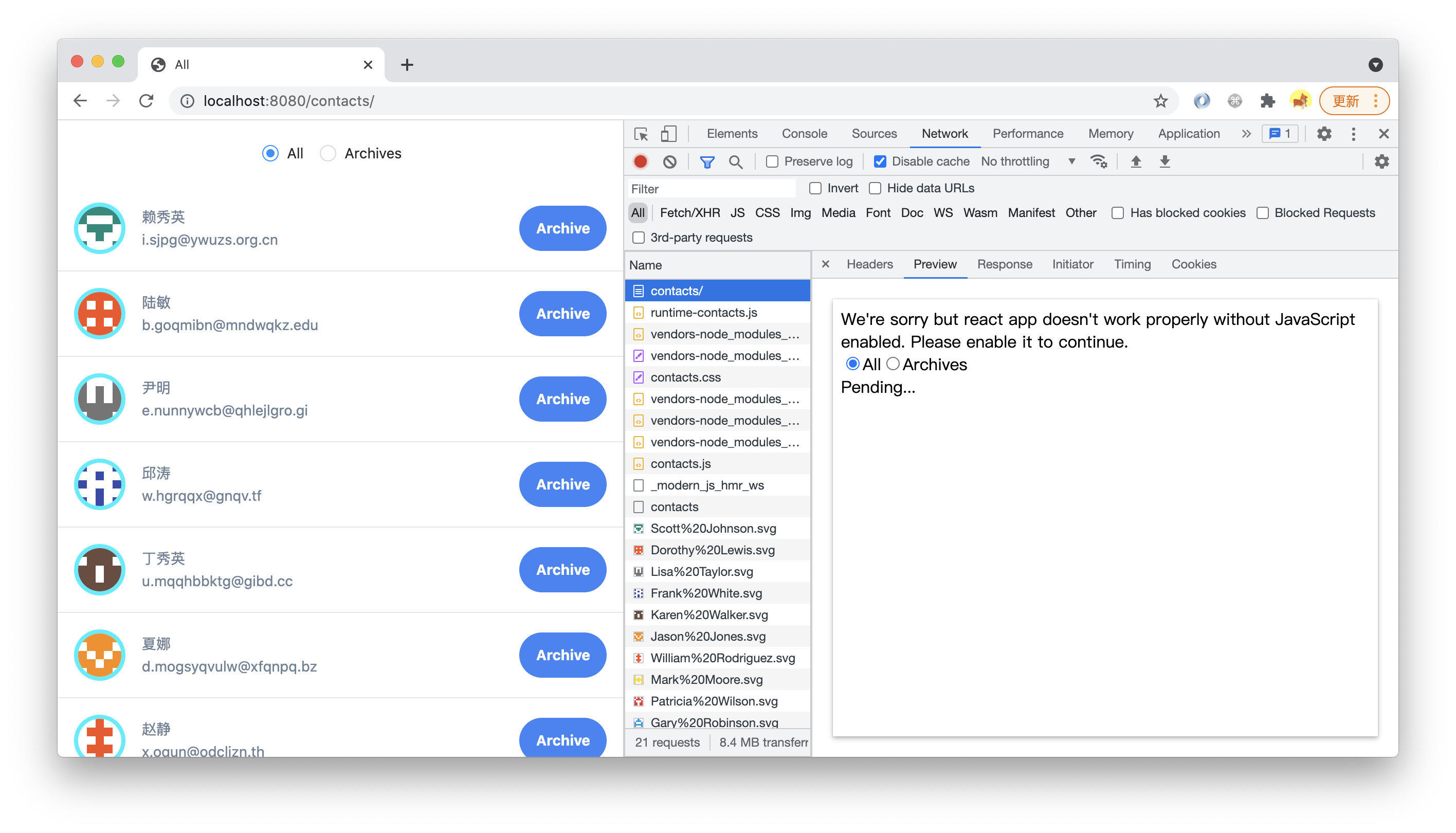
执行 `pnpm run dev`,在 devtools 的 network 面板里查看 HTML 请求的 Preview 面板,可以看到 SSR 的渲染结果只有导航栏和 Pending... 字符,并没有联系人数据:
|
|
20
|
-
|
|
21
|
-
|
|
22
|
-
|
|
23
|
-
前面提到过,应用工程里的 SSR 实现是 Serverless SSR,不仅在部署、运维环节,在开发环节对 Server 也是无感的,项目里不需要专门写服务器的实现。
|
|
24
|
-
|
|
25
|
-
上述加载初始数据的业务逻辑,也不应该像传统模式一样,在客户端代码和服务器端代码中分别实现。
|
|
26
|
-
|
|
27
|
-
Modern.js 提供一个叫 `useLoader` 的 hooks API,在这种场景下替代 `useEffect`,能自动在 SSR 环节做**预加载**,先获取足够的数据,再运行 app 代码渲染 HTML。
|
|
28
|
-
|
|
29
|
-
同时,在 CSR 环节中,自动检查当前 loader 需要的数据,如果在 SSR 环节中已经预加载,在客户端就不再重复执行 loader,直接用现成数据;反之就在客户端执行 loader(相当于一种 fallback)。
|
|
30
|
-
|
|
31
|
-
`useLoader` 的使用很简单,把当前项目中 `Contacts` 组件中的 `useEffect` 代码替换成:
|
|
32
|
-
|
|
33
|
-
```js
|
|
34
|
-
useLoader(
|
|
35
|
-
async () => {
|
|
36
|
-
if (!items.length && !error && !pending) {
|
|
37
|
-
return actions.load();
|
|
38
|
-
}
|
|
39
|
-
return Promise.resolve();
|
|
40
|
-
},
|
|
41
|
-
{
|
|
42
|
-
params: 'contacts',
|
|
43
|
-
},
|
|
44
|
-
);
|
|
45
|
-
```
|
|
46
|
-
|
|
47
|
-
`useLoader` API 要求返回一个 promise,用于判断这个 loader 是否完成。第二个参数是当前 Loader 的唯一标识。
|
|
48
|
-
|
|
49
|
-
同时,在文件顶部的导入 `useLoader`:
|
|
50
|
-
|
|
51
|
-
```js
|
|
52
|
-
import { useLoader } from '@modern-js/runtime';
|
|
53
|
-
```
|
|
54
|
-
|
|
55
|
-
重新执行 `pnpm run dev`,查看 `view-source:http://localhost:8080/contacts/`,或在 devtools 的 Network 面板里查看 HTML 请求的「 Preview 」,可以看到 SSR 渲染出来的 HTML 已经包含完整的 UI:
|
|
56
|
-
|
|
57
|
-
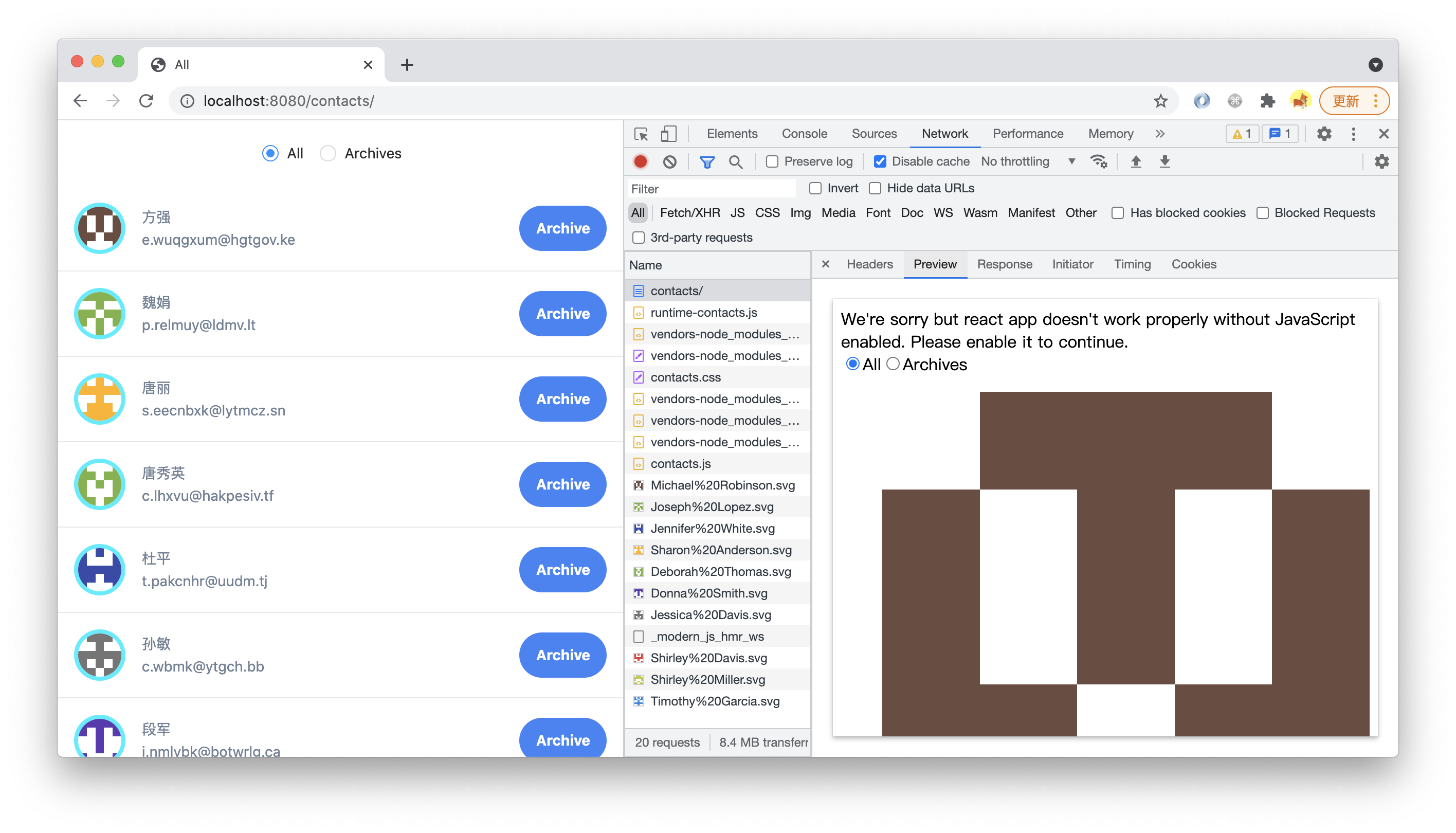
|
|
58
|
-
|
|
59
|
-
查看 `http://localhost:8080/contacts/`,可以看到首屏是没有 pending 过程的。
|
|
60
|
-
|
|
61
|
-
---
|
|
62
|
-
|
|
63
|
-
> 本小节的代码可以在[这里查看](https://github.com/modern-js-dev/modern-js-examples/tree/main/tutorials/c11/hello-modern-3)。
|
|
@@ -1,56 +0,0 @@
|
|
|
1
|
-
---
|
|
2
|
-
title: 测试容器组件
|
|
3
|
-
---
|
|
4
|
-
|
|
5
|
-
跟[测试组件](../c06-css-and-component/6.6-testing.md)中一样,不需要做任何配置,可以直接给Model 写测试用例。
|
|
6
|
-
|
|
7
|
-
以 `containers/Contacts.tsx` 为例,我们创建对应的 `.test` 文件:
|
|
8
|
-
|
|
9
|
-
import Tabs from '@theme/Tabs';
|
|
10
|
-
import TabItem from '@theme/TabItem';
|
|
11
|
-
|
|
12
|
-
<Tabs>
|
|
13
|
-
<TabItem value="macOS" label="macOS" default>
|
|
14
|
-
|
|
15
|
-
```bash
|
|
16
|
-
touch src/contacts/routes/containers/contacts.test.tsx
|
|
17
|
-
```
|
|
18
|
-
|
|
19
|
-
</TabItem>
|
|
20
|
-
<TabItem value="Windows" label="Windows">
|
|
21
|
-
|
|
22
|
-
```powershell
|
|
23
|
-
ni src/contacts/routes/containers/contacts.test.tsx
|
|
24
|
-
```
|
|
25
|
-
|
|
26
|
-
</TabItem>
|
|
27
|
-
</Tabs>
|
|
28
|
-
|
|
29
|
-
在测试用例中可以使用 Modern.js 提供的 API 进行渲染,并通过 API 返回的工具函数进行断言。
|
|
30
|
-
|
|
31
|
-
测试用例文件的示例:
|
|
32
|
-
|
|
33
|
-
```ts
|
|
34
|
-
import { renderApp, waitFor } from '@modern-js/runtime/testing';
|
|
35
|
-
import ContactContainer from './Contacts';
|
|
36
|
-
|
|
37
|
-
describe('test contracts model', () => {
|
|
38
|
-
it('actions works well', async () => {
|
|
39
|
-
const { getByText } = renderApp(<ContactContainer source="items" />);
|
|
40
|
-
|
|
41
|
-
await waitFor(() => {
|
|
42
|
-
expect(getByText('Pending...')).toBeInTheDocument();
|
|
43
|
-
});
|
|
44
|
-
});
|
|
45
|
-
});
|
|
46
|
-
```
|
|
47
|
-
|
|
48
|
-
:::info 注
|
|
49
|
-
更多相关内容可以查看 [Test API](/docs/apis/app/runtime/testing/renderApp)。
|
|
50
|
-
:::
|
|
51
|
-
|
|
52
|
-
执行 `pnpm run test`,可以看到测试报告。
|
|
53
|
-
|
|
54
|
-
---
|
|
55
|
-
|
|
56
|
-
> 本小节的代码可以在[这里查看](https://github.com/modern-js-dev/modern-js-examples/tree/main/tutorials/c11/hello-modern-4)。
|