@tencent-rtc/mcp 1.3.8 → 1.3.9
This diff represents the content of publicly available package versions that have been released to one of the supported registries. The information contained in this diff is provided for informational purposes only and reflects changes between package versions as they appear in their respective public registries.
- package/package.json +1 -1
- package/resource/doc/chatuikit/android/integration.md +499 -203
- package/resource/doc/chatuikit/android/workflow.md +713 -0
- package/resource/doc/chatuikit/flutter/integration.md +1 -1
- package/resource/doc/livekit/voice/android/voice-audience-list.md +334 -0
- package/resource/doc/livekit/voice/android/voice-audio-effect.md +380 -0
- package/resource/doc/livekit/voice/android/voice-barrage.md +565 -0
- package/resource/doc/livekit/voice/android/voice-co-guest-interaction.md +745 -0
- package/resource/doc/livekit/voice/android/voice-gift.md +822 -0
- package/resource/doc/livekit/voice/android/voice-host-interaction.md +703 -0
- package/resource/doc/livekit/voice/android/voice-integration.md +940 -0
- package/resource/doc/livekit/voice/android/voice-room-list.md +575 -0
- package/resource/doc/livekit/voice/flutter/voice-co-guest-interaction.md +675 -0
- package/resource/doc/livekit/voice/flutter/voice-integration.md +936 -0
- package/resource/doc/livekit/voice/ios/voice-audience-list.md +339 -0
- package/resource/doc/livekit/voice/ios/voice-audio-effect.md +370 -0
- package/resource/doc/livekit/voice/ios/voice-barrage.md +517 -0
- package/resource/doc/livekit/voice/ios/voice-co-guest-interaction.md +708 -0
- package/resource/doc/livekit/voice/ios/voice-gift.md +783 -0
- package/resource/doc/livekit/voice/ios/voice-host-interaction.md +770 -0
- package/resource/doc/livekit/voice/ios/voice-integration.md +898 -0
- package/resource/doc/livekit/voice/ios/voice-room-list.md +485 -0
- package/resource/doc/roomkit/vue/integration.md +179 -288
- package/resource/doc/roomkit/vue/workflow.md +499 -253
- package/resource/doc/tuicallkit/android/integration.md +539 -83
- package/resource/doc/tuicallkit/android/workflow.md +441 -0
- package/tools/common/present-scenario-choice.js +16 -0
- package/tools/common/present-scenario-choice.js.map +1 -0
- package/tools/definitions/get_native_call_uikit_integration_def.js +25 -9
- package/tools/definitions/get_native_call_uikit_integration_def.js.map +1 -1
- package/tools/definitions/get_native_chat_uikit_integration_def.js +36 -14
- package/tools/definitions/get_native_chat_uikit_integration_def.js.map +1 -1
- package/tools/definitions/get_native_live_uikit_integration_def.js +55 -29
- package/tools/definitions/get_native_live_uikit_integration_def.js.map +1 -1
- package/tools/definitions/get_native_live_uikit_interaction_def.js +43 -54
- package/tools/definitions/get_native_live_uikit_interaction_def.js.map +1 -1
- package/tools/definitions/get_web_room_feature_detail_def.js +52 -55
- package/tools/definitions/get_web_room_feature_detail_def.js.map +1 -1
- package/tools/definitions/get_web_room_uikit_integration_def.js +41 -25
- package/tools/definitions/get_web_room_uikit_integration_def.js.map +1 -1
- package/tools/definitions/present_scenario_choice_def.js +53 -0
- package/tools/definitions/present_scenario_choice_def.js.map +1 -0
- package/tools/definitions/record_prompt_def.js +26 -21
- package/tools/definitions/record_prompt_def.js.map +1 -1
- package/tools/definitions/record_result_def.js +20 -4
- package/tools/definitions/record_result_def.js.map +1 -1
- package/tools/index.js +2 -0
- package/tools/index.js.map +1 -1
- package/tools/live/get-native-live-uikit-integration.js +110 -34
- package/tools/live/get-native-live-uikit-integration.js.map +1 -1
- package/tools/live/get_native_live_uikit_interaction.js +128 -35
- package/tools/live/get_native_live_uikit_interaction.js.map +1 -1
- package/utils/report-cls-client.js +1 -1
- package/utils/report-es-client.js +1 -1
|
@@ -1,40 +1,35 @@
|
|
|
1
|
-
This
|
|
2
|
-
<table>
|
|
3
|
-
<tr>
|
|
4
|
-
<td rowspan="1" colSpan="1" >1v1 Video Call</td>
|
|
1
|
+
This document describes how to rapidly integrate the TUICallKit component. You can complete the following key steps within 10 minutes and obtain a complete audio and video call interface.
|
|
5
2
|
|
|
6
|
-
|
|
7
|
-
</tr>
|
|
3
|
+
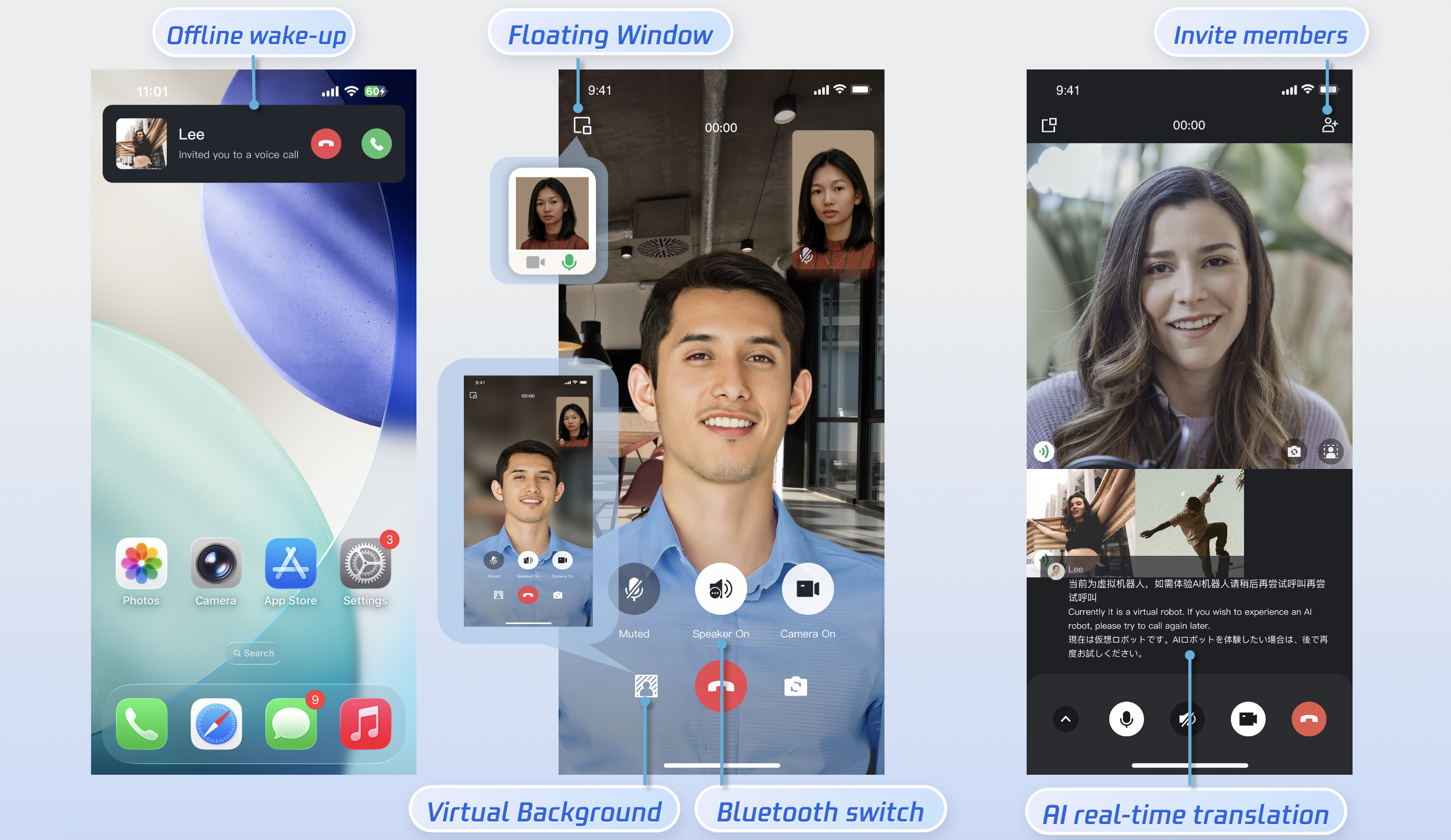
|
|
8
4
|
|
|
9
|
-
<tr>
|
|
10
|
-
<td rowspan="1" colSpan="1" >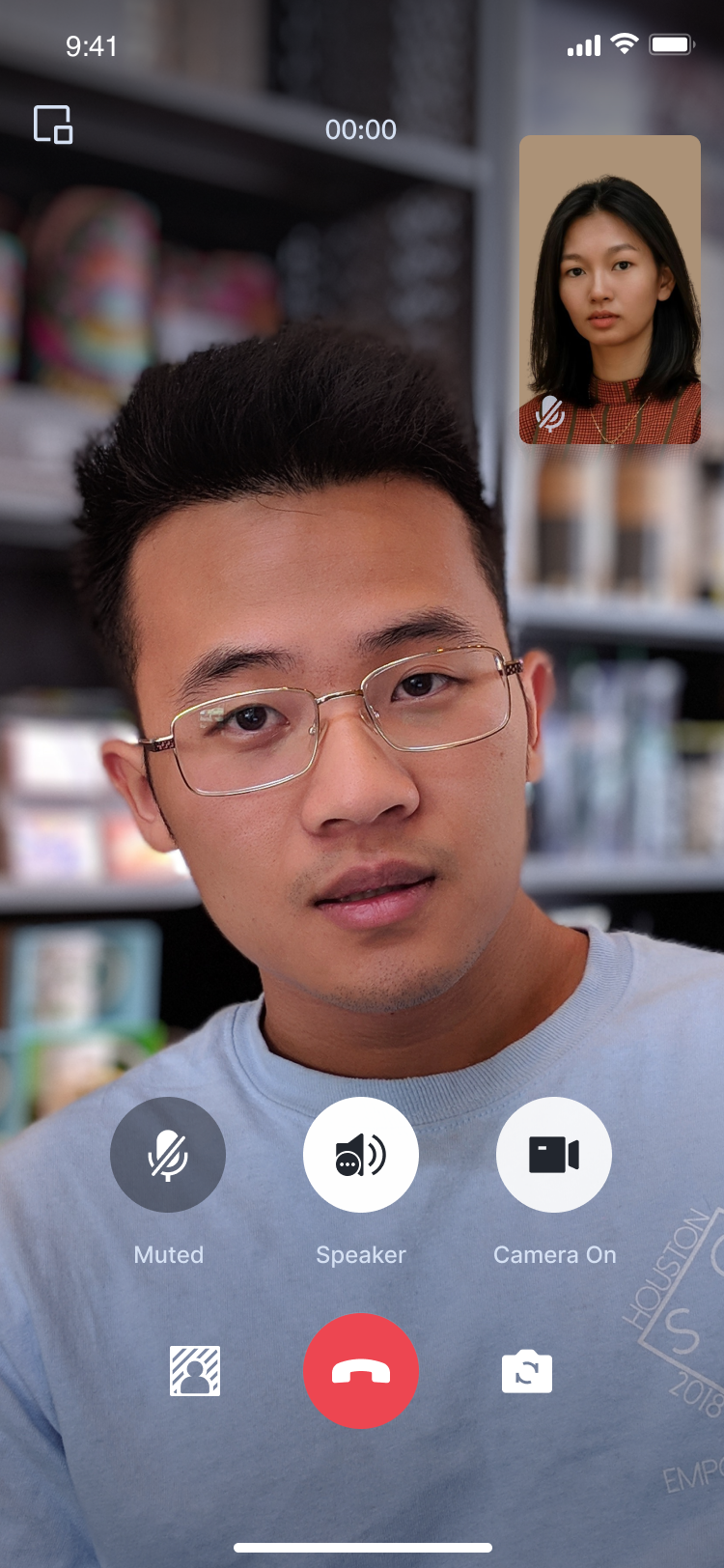</td>
|
|
11
5
|
|
|
12
|
-
|
|
13
|
-
</tr>
|
|
14
|
-
</table>
|
|
6
|
+
## Preparations
|
|
15
7
|
|
|
8
|
+
### **Environmental Requirements**
|
|
9
|
+
- **Android Version Requirements**: Android 5.0 (SDK API Level 21) and above.
|
|
16
10
|
|
|
17
|
-
|
|
18
|
-
- Android 5.0 (SDK API level 21) or later.
|
|
11
|
+
- **Gradle Version Requirements**: Gradle 4.2.1 and above.
|
|
19
12
|
|
|
20
|
-
-
|
|
13
|
+
- **Device Requirements**: Mobile devices running Android 5.0 or higher.
|
|
21
14
|
|
|
22
|
-
-
|
|
15
|
+
- **Networking Requirements**: The device must be able to connect to the public network.
|
|
23
16
|
|
|
24
17
|
|
|
25
|
-
|
|
18
|
+
### Service Activation
|
|
26
19
|
|
|
27
|
-
|
|
20
|
+
Please refer to the [Service Activation](https://write.woa.com/document/140196392040579072) documentation to obtain your SDKAppID and SDKSecretKey. These credentials will be required in the subsequent [login](https://write.woa.com/#b83bb482-a7f3-4dd7-9fab-fdb92749432e) step.
|
|
28
21
|
|
|
29
|
-
##
|
|
22
|
+
## Implementation
|
|
30
23
|
|
|
31
|
-
|
|
24
|
+
### Step 1.Importing Components
|
|
32
25
|
|
|
33
|
-
|
|
26
|
+
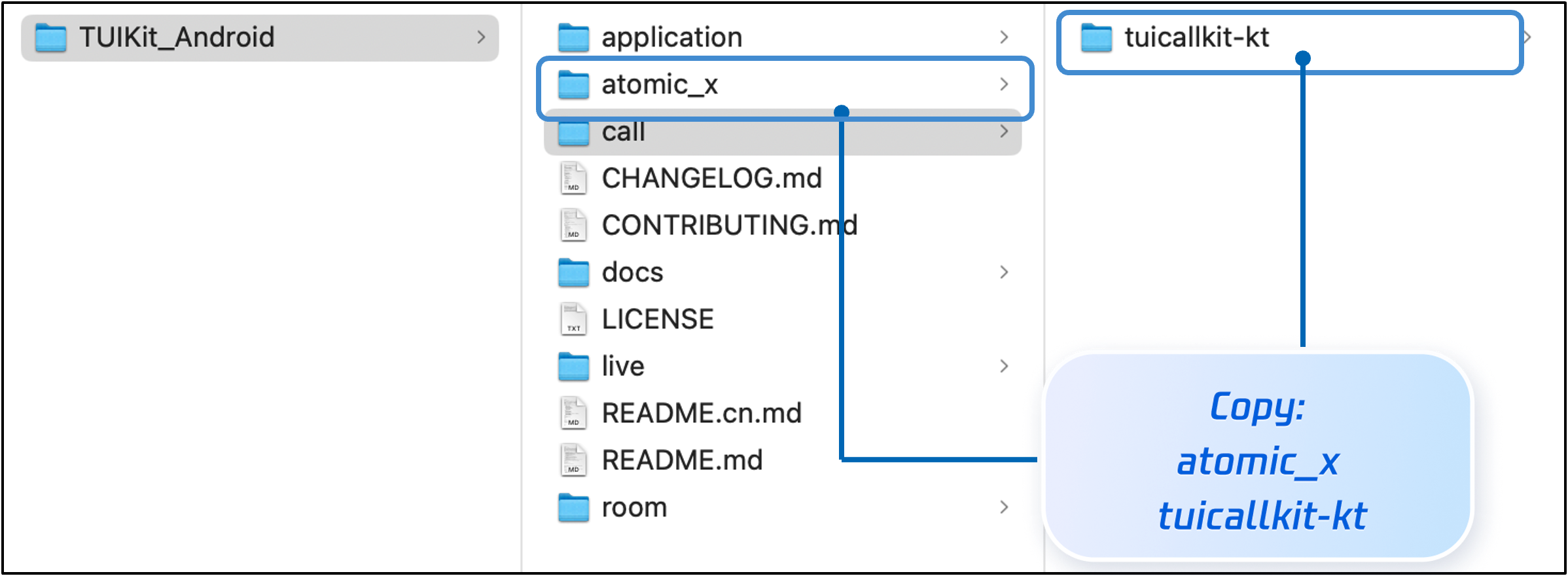
Clone or download the code from [GitHub](https://github.com/Tencent-RTC/TUIKit_Android). Then, copy the `atomic_x` directory (under `TUIKit_Android`) and the `tuicallkit-kt` subdirectory (under `call`) to the directory at the same level as your project's app directory, as shown below.
|
|
34
27
|
|
|
28
|
+
|
|
35
29
|
|
|
36
|
-
|
|
37
|
-
|
|
30
|
+
|
|
31
|
+
### Step 2.Project Configuration
|
|
32
|
+
1. Locate the `settings.gradle.kts` (or s`ettings.gradle`) file in the project root directory. Add the following code to import the `tuicallkit-kt` and `atomic_x` components into your project.
|
|
38
33
|
|
|
39
34
|
|
|
40
35
|
|
|
@@ -43,15 +38,17 @@ Go to [GitHub](https://github.com/tencentyun/TUICalling), clone or download the
|
|
|
43
38
|
【setting.gradle.kts】
|
|
44
39
|
``` java
|
|
45
40
|
include(":tuicallkit-kt")
|
|
41
|
+
include(":atomic_x")
|
|
46
42
|
```
|
|
47
43
|
|
|
48
44
|
|
|
49
45
|
【settings.gradle】
|
|
50
46
|
``` java
|
|
51
47
|
include ':tuicallkit-kt'
|
|
48
|
+
include ':atomic_x'
|
|
52
49
|
```
|
|
53
50
|
|
|
54
|
-
2.
|
|
51
|
+
2. Locate the `build.gradle.kts (or build.gradle)` file under the app directory, and add the following code in `dependencies` to declare the app's dependency on the component.
|
|
55
52
|
|
|
56
53
|
|
|
57
54
|
|
|
@@ -76,21 +73,20 @@ dependencies {
|
|
|
76
73
|
> **Note:**
|
|
77
74
|
>
|
|
78
75
|
|
|
79
|
-
> The
|
|
76
|
+
> The TUICallKit project internally depends on `TRTC SDK`,`IM SDK`,`tuicallengine` and public library `tuicore` by default. Developers do not need to configure them separately. If needed, just modify the version number in `tuicallkit-kt/build.gradle` file to upgrade.
|
|
80
77
|
>
|
|
81
78
|
|
|
82
|
-
3. Since the SDK uses Java
|
|
79
|
+
3. `proguard-rules.pro`**Configuration**:Since the SDK internally uses Java reflection, certain classes must be added to the non-obfuscation list (ProGuard exclusion list). Please add the following configuration to the end of the `proguard-rules.pro` file:
|
|
83
80
|
|
|
84
81
|
``` java
|
|
85
82
|
-keep class com.tencent.** { *; }
|
|
86
83
|
```
|
|
87
|
-
4. In the
|
|
84
|
+
4. `AndroidManifest.xml`**Configuration**:In the AndroidManifest.xml file within the app directory, add `tools:replace="android:allowBackup"` within the <application> node to overwrite the component's default settings and apply your own configuration.
|
|
88
85
|
|
|
89
86
|
``` java
|
|
90
87
|
// app/src/main/AndroidManifest.xml
|
|
91
|
-
|
|
92
|
-
|
|
93
|
-
android:name=".DemoApplication"
|
|
88
|
+
<application
|
|
89
|
+
android:name=".BaseApplication"
|
|
94
90
|
android:allowBackup="false"
|
|
95
91
|
android:icon="@drawable/app_ic_launcher"
|
|
96
92
|
android:label="@string/app_name"
|
|
@@ -98,16 +94,17 @@ dependencies {
|
|
|
98
94
|
android:theme="@style/AppTheme"
|
|
99
95
|
tools:replace="android:allowBackup">
|
|
100
96
|
```
|
|
101
|
-
5. We suggest you compile and run once. If you encounter any issues, you may try our [Github demo](https://github.com/Tencent-RTC/TUICallKit/tree/main/Android). By comparison, you can identify potential differences and resolve encountered issues. During integration and use, if any issues arise, you are welcome to provide [feedback](https://github.com/Tencent-RTC/TUICallKit/issues) to us.
|
|
102
97
|
|
|
98
|
+
### Step 3.Login
|
|
103
99
|
|
|
104
|
-
|
|
100
|
+
Add the following code in your project. It enables logging in to the TUI component by calling the relevant APIs in TUICore. This procedure is critical. Only after a successful login can you properly use the features provided by TUICallKit.
|
|
105
101
|
|
|
106
|
-
Add the following code to your project. It works by calling the relevant interfaces in TUICore to complete the login to TUI Component. This step is very important, only after successfully logging in, you can normally use the features offered by TUICallKit.
|
|
107
102
|
|
|
108
103
|
|
|
109
104
|
|
|
110
|
-
|
|
105
|
+
|
|
106
|
+
|
|
107
|
+
【Android(Kotlin)】
|
|
111
108
|
``` java
|
|
112
109
|
import com.tencent.qcloud.tuicore.TUILogin
|
|
113
110
|
import com.tencent.qcloud.tuicore.interfaces.TUICallback
|
|
@@ -117,25 +114,23 @@ class MainActivity : ComponentActivity() {
|
|
|
117
114
|
override fun onCreate(savedInstanceState: Bundle?) {
|
|
118
115
|
super.onCreate(savedInstanceState)
|
|
119
116
|
|
|
120
|
-
|
|
121
|
-
val
|
|
122
|
-
val
|
|
123
|
-
val secretKey = "****" //
|
|
124
|
-
|
|
125
|
-
val userSig = GenerateTestUserSig.genTestUserSig(userId, sdkAppId, secretKey)
|
|
126
|
-
|
|
117
|
+
|
|
118
|
+
val userId = "denny" // replace with your UserId
|
|
119
|
+
val sdkAppId = 0 // replace with the SDKAppID obtained from the console
|
|
120
|
+
val secretKey = "****" // replace with the SecretKey obtained from the console
|
|
121
|
+
val userSig = GenerateTestUserSig.genTestUserSig(userId, sdkAppId, secretKey)
|
|
127
122
|
TUILogin.login(this, sdkAppId, userId, userSig, object : TUICallback() {
|
|
128
123
|
override fun onSuccess() {
|
|
129
124
|
}
|
|
130
125
|
override fun onError(errorCode: Int, errorMessage: String) {
|
|
131
126
|
}
|
|
132
|
-
})
|
|
133
|
-
// end
|
|
127
|
+
})
|
|
134
128
|
}
|
|
135
129
|
}
|
|
136
130
|
```
|
|
137
131
|
|
|
138
|
-
|
|
132
|
+
|
|
133
|
+
【Android(Java)】
|
|
139
134
|
``` java
|
|
140
135
|
import com.tencent.qcloud.tuicore.TUILogin;
|
|
141
136
|
import com.tencent.qcloud.tuicore.interfaces.TUICallback;
|
|
@@ -145,14 +140,11 @@ public class MainActivity extends AppCompatActivity {
|
|
|
145
140
|
@Override
|
|
146
141
|
public void onCreate(Bundle savedInstanceState) {
|
|
147
142
|
super.onCreate(savedInstanceState);
|
|
148
|
-
|
|
149
|
-
//begin
|
|
150
|
-
String userID = "denny"; // Please replace with your UserId
|
|
151
|
-
int sdkAppID = 0; // Please replace with the SDKAppID obtained from the console in step 1
|
|
152
|
-
String secretKey = "****"; // Please replace with the SecretKey obtained from the console in step 1
|
|
153
143
|
|
|
144
|
+
String userId = "denny"; // replace with your UserId
|
|
145
|
+
int sdkAppId = 0; // replace with the SDKAppID obtained in step 1 on the console
|
|
146
|
+
String secretKey = "****"; // replace with the SecretKey obtained in step 1 on the console
|
|
154
147
|
String userSig = GenerateTestUserSig.genTestUserSig(userId, sdkAppId, secretKey);
|
|
155
|
-
|
|
156
148
|
TUILogin.login(this, sdkAppId, userId, userSig, new TUICallback() {
|
|
157
149
|
@Override
|
|
158
150
|
public void onSuccess() {
|
|
@@ -162,9 +154,9 @@ public class MainActivity extends AppCompatActivity {
|
|
|
162
154
|
public void onError(int errorCode, String errorMessage) {
|
|
163
155
|
}
|
|
164
156
|
});
|
|
165
|
-
//end
|
|
166
157
|
}
|
|
167
158
|
}
|
|
159
|
+
|
|
168
160
|
```
|
|
169
161
|
<table>
|
|
170
162
|
<tr>
|
|
@@ -180,7 +172,7 @@ public class MainActivity extends AppCompatActivity {
|
|
|
180
172
|
|
|
181
173
|
<td rowspan="1" colSpan="1" >String</td>
|
|
182
174
|
|
|
183
|
-
<td rowspan="1" colSpan="1" >
|
|
175
|
+
<td rowspan="1" colSpan="1" >Only allowing a combination of uppercase and lowercase letters (a-z A-Z), numbers (0-9), hyphens, and underscores.</td>
|
|
184
176
|
</tr>
|
|
185
177
|
|
|
186
178
|
<tr>
|
|
@@ -188,7 +180,7 @@ public class MainActivity extends AppCompatActivity {
|
|
|
188
180
|
|
|
189
181
|
<td rowspan="1" colSpan="1" >int</td>
|
|
190
182
|
|
|
191
|
-
<td rowspan="1" colSpan="1" >The unique identifier SDKAppID
|
|
183
|
+
<td rowspan="1" colSpan="1" >The unique identifier SDKAppID of the audio and video application created in the [Tencent Real-Time Communication (TRTC) Console](https://trtc.io/login?fro=gt&s_url=https%3A%2F%2Fconsole.trtc.io%2F).</td>
|
|
192
184
|
</tr>
|
|
193
185
|
|
|
194
186
|
<tr>
|
|
@@ -196,7 +188,7 @@ public class MainActivity extends AppCompatActivity {
|
|
|
196
188
|
|
|
197
189
|
<td rowspan="1" colSpan="1" >String</td>
|
|
198
190
|
|
|
199
|
-
<td rowspan="1" colSpan="1" >SDKSecretKey
|
|
191
|
+
<td rowspan="1" colSpan="1" >The SDKSecretKey of the audio/video application created in the [Tencent Real-Time Communication (TRTC) Console](https://trtc.io/login?fro=gt&s_url=https%3A%2F%2Fconsole.trtc.io%2F).</td>
|
|
200
192
|
</tr>
|
|
201
193
|
|
|
202
194
|
<tr>
|
|
@@ -204,83 +196,547 @@ public class MainActivity extends AppCompatActivity {
|
|
|
204
196
|
|
|
205
197
|
<td rowspan="1" colSpan="1" >String</td>
|
|
206
198
|
|
|
207
|
-
<td rowspan="1" colSpan="1" >A security signature
|
|
199
|
+
<td rowspan="1" colSpan="1" >A security protection signature used to authenticate user login, confirm whether the user is genuine, and prevent malicious attackers from misappropriating your cloud service usage rights.</td>
|
|
208
200
|
</tr>
|
|
209
201
|
</table>
|
|
210
202
|
|
|
211
203
|
|
|
212
|
-
> **Note:**
|
|
204
|
+
> **Note :**
|
|
213
205
|
>
|
|
214
|
-
> - **Development
|
|
215
|
-
> - **Production
|
|
206
|
+
> - **Development environment**: If you are in the local development and debugging stage, you can adopt the local [GenerateTestUserSig.genTestUserSig](https://github.com/Tencent-RTC/TUIKit_Android/blob/main/application/debug/src/main/java/com/tencent/qcloud/tuikit/debug/GenerateTestUserSig.java) function to generate userSig. In this method, the SDKSecretKey is very easy to decompile and reverse engineer. Once your key is leaked, attackers can steal your Tencent Cloud traffic.
|
|
207
|
+
> - **Production environment**: If your project is ready to launch, use [server-side generation of UserSig](https://write.woa.com/document/89644530319802368).
|
|
208
|
+
|
|
209
|
+
|
|
210
|
+
### Step 4.Set Nickname and Avatar [Optional]
|
|
211
|
+
|
|
212
|
+
After a successful login, you can call the `setSelfInfo` function to set your nickname and avatar. The set nickname and avatar will be displayed on the caller/callee interface.
|
|
213
|
+
|
|
214
|
+
|
|
215
|
+
|
|
216
|
+
|
|
217
|
+
|
|
218
|
+
|
|
219
|
+
【Android(Kotlin)】
|
|
220
|
+
``` java
|
|
221
|
+
import com.tencent.qcloud.tuikit.tuicallkit.TUICallKit
|
|
222
|
+
|
|
223
|
+
val nickname = "jack"
|
|
224
|
+
val avatar = "https:/****/user_avatar.png"
|
|
225
|
+
TUICallKit.createInstance(context).setSelfInfo(nickname, avatar, null)
|
|
226
|
+
```
|
|
227
|
+
|
|
228
|
+
|
|
229
|
+
【Android(Java)】
|
|
230
|
+
``` java
|
|
231
|
+
import com.tencent.qcloud.tuikit.tuicallkit.TUICallKit;
|
|
232
|
+
|
|
233
|
+
String nickname = "jack";
|
|
234
|
+
String avatar = "https:/****/user_avatar.png";
|
|
235
|
+
TUICallKit.createInstance(context).setSelfInfo(nickname, avatar, null);
|
|
236
|
+
```
|
|
237
|
+
<table>
|
|
238
|
+
<tr>
|
|
239
|
+
<td rowspan="1" colSpan="1" >Parameter</td>
|
|
240
|
+
|
|
241
|
+
<td rowspan="1" colSpan="1" >Type</td>
|
|
242
|
+
|
|
243
|
+
<td rowspan="1" colSpan="1" >Description</td>
|
|
244
|
+
</tr>
|
|
245
|
+
|
|
246
|
+
<tr>
|
|
247
|
+
<td rowspan="1" colSpan="1" >nickname</td>
|
|
248
|
+
|
|
249
|
+
<td rowspan="1" colSpan="1" >String</td>
|
|
250
|
+
|
|
251
|
+
<td rowspan="1" colSpan="1" >Target user's nickname</td>
|
|
252
|
+
</tr>
|
|
253
|
+
|
|
254
|
+
<tr>
|
|
255
|
+
<td rowspan="1" colSpan="1" >avatar</td>
|
|
256
|
+
|
|
257
|
+
<td rowspan="1" colSpan="1" >String</td>
|
|
258
|
+
|
|
259
|
+
<td rowspan="1" colSpan="1" >Target user's avatar</td>
|
|
260
|
+
</tr>
|
|
261
|
+
</table>
|
|
262
|
+
|
|
263
|
+
|
|
264
|
+
### Step 5.Initiating a Call
|
|
265
|
+
|
|
266
|
+
The caller initiates a call by invoking the `calls` function and specifying the media type (voice or video) and the callee's User ID list (userIdList). The calls interface supports both one-to-one and group calls. A one-to-one call is initiated when the userIDList contains only a single User ID; a group call is initiated when it contains multiple User IDs.
|
|
267
|
+
|
|
268
|
+
|
|
269
|
+
|
|
270
|
+
|
|
271
|
+
|
|
272
|
+
|
|
273
|
+
【Kotlin】
|
|
274
|
+
``` java
|
|
275
|
+
import com.tencent.qcloud.tuikit.tuicallkit.TUICallKit
|
|
276
|
+
import io.trtc.tuikit.atomicxcore.api.call.CallMediaType
|
|
277
|
+
import io.trtc.tuikit.atomicxcore.api.call.CallParams
|
|
278
|
+
|
|
279
|
+
val userIdList = mutableListOf<String>()
|
|
280
|
+
userIdList.add("mike")
|
|
281
|
+
val mediaType = CallMediaType.Audio
|
|
282
|
+
val callParams = CallParams()
|
|
283
|
+
TUICallKit.createInstance(context).calls(userIdList, mediaType, params, null)
|
|
284
|
+
```
|
|
285
|
+
|
|
286
|
+
|
|
287
|
+
【Java】
|
|
288
|
+
``` java
|
|
289
|
+
|
|
290
|
+
import com.tencent.qcloud.tuikit.tuicallkit.TUICallKit;
|
|
291
|
+
import io.trtc.tuikit.atomicxcore.api.call.CallMediaType;
|
|
292
|
+
import io.trtc.tuikit.atomicxcore.api.call.CallParams;
|
|
293
|
+
|
|
294
|
+
List<String> userIdList = new ArrayList<>();
|
|
295
|
+
userIdList.add("mike");
|
|
296
|
+
CallMediaType mediaType = CallMediaType.Audio;
|
|
297
|
+
CallParams params = new CallParams();
|
|
298
|
+
TUICallKit.createInstance(this).calls(userIdList, mediaType, params, null);
|
|
299
|
+
```
|
|
300
|
+
<table>
|
|
301
|
+
<tr>
|
|
302
|
+
<td rowspan="1" colSpan="1" >Parameter</td>
|
|
303
|
+
|
|
304
|
+
<td rowspan="1" colSpan="1" >Type</td>
|
|
305
|
+
|
|
306
|
+
<td rowspan="1" colSpan="1" >Description</td>
|
|
307
|
+
</tr>
|
|
308
|
+
|
|
309
|
+
<tr>
|
|
310
|
+
<td rowspan="1" colSpan="1" >userIdList</td>
|
|
311
|
+
|
|
312
|
+
<td rowspan="1" colSpan="1" >List<String></td>
|
|
313
|
+
|
|
314
|
+
<td rowspan="1" colSpan="1" >Target user ID list</td>
|
|
315
|
+
</tr>
|
|
316
|
+
|
|
317
|
+
<tr>
|
|
318
|
+
<td rowspan="1" colSpan="1" >mediaType</td>
|
|
319
|
+
|
|
320
|
+
<td rowspan="1" colSpan="1" >[CallMediaType](https://liteav.sdk.cloudcachetci.com/doc/product/tuikit/atomic-x/android/en/-atomic-x%20-core%20-a-p-i/io.trtc.tuikit.atomicxcore.api.call/-call-media-type/index.html)</td>
|
|
321
|
+
|
|
322
|
+
<td rowspan="1" colSpan="1" >Media type of the call, such as video call, voice call</td>
|
|
323
|
+
</tr>
|
|
324
|
+
|
|
325
|
+
<tr>
|
|
326
|
+
<td rowspan="1" colSpan="1" >params</td>
|
|
327
|
+
|
|
328
|
+
<td rowspan="1" colSpan="1" >[CallParams](https://liteav.sdk.cloudcachetci.com/doc/product/tuikit/atomic-x/android/en/-atomic-x%20-core%20-a-p-i/io.trtc.tuikit.atomicxcore.api.call/-call-params/index.html)</td>
|
|
329
|
+
|
|
330
|
+
<td rowspan="1" colSpan="1" >Call extension parameters, such as room number, call invitation timeout.</td>
|
|
331
|
+
</tr>
|
|
332
|
+
</table>
|
|
333
|
+
|
|
334
|
+
|
|
335
|
+
### Step 6.Answering a Call
|
|
336
|
+
|
|
337
|
+
Once the callee successfully logs in, the caller can initiate a call, and the callee will receive the call invitation, accompanied by a ringtone and vibration.
|
|
338
|
+
|
|
339
|
+
## More Features
|
|
340
|
+
|
|
341
|
+
### Enabling Floating Window
|
|
342
|
+
|
|
343
|
+
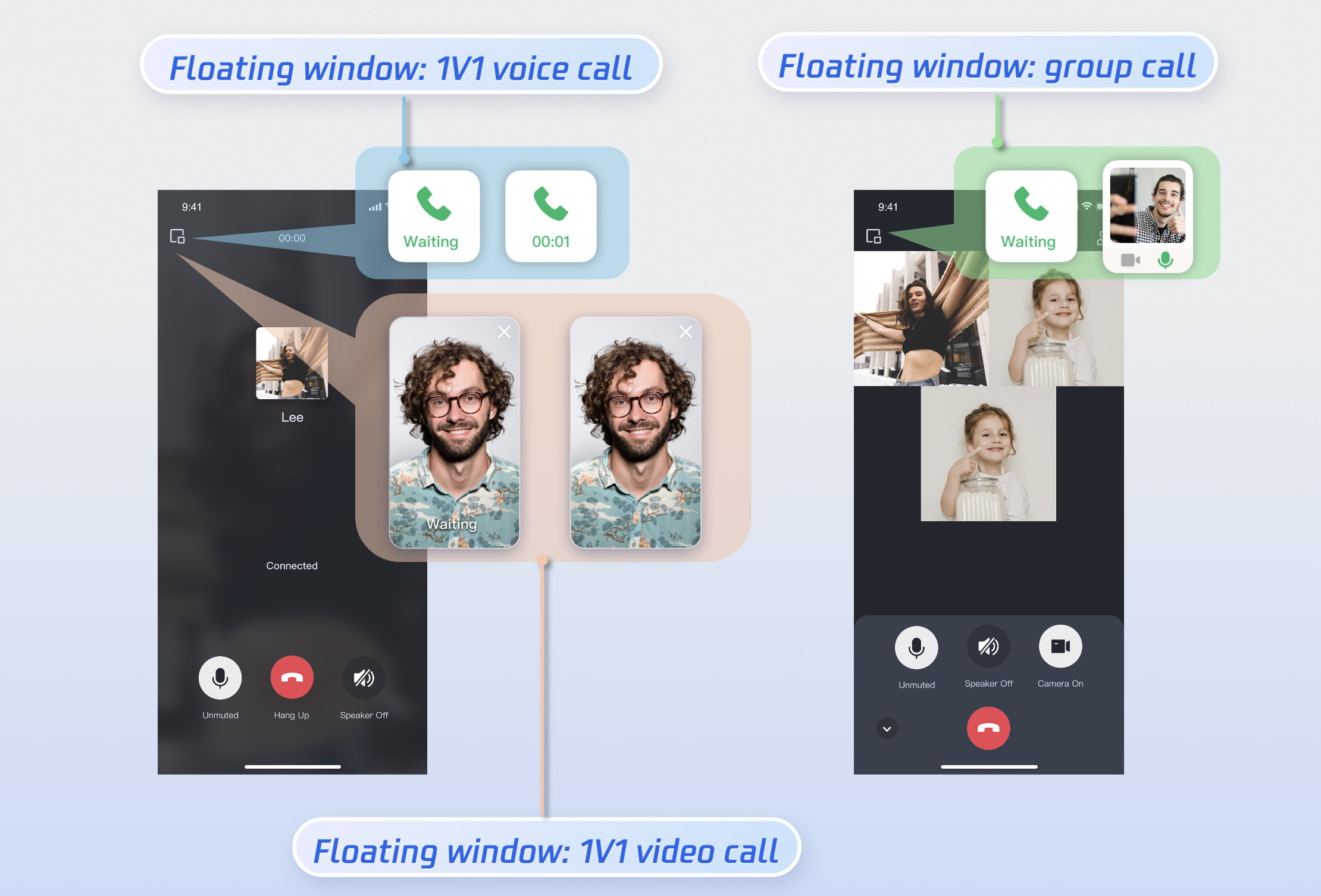
You can enable/disable the floating window feature by calling [enableFloatWindow](https://write.woa.com/document/95824745037205504). This feature should be enabled when initializing the TUICallKit component, with the default status being Off (false).
|
|
344
|
+
|
|
345
|
+
|
|
216
346
|
|
|
217
347
|
|
|
218
|
-
## Step 5. Make your first phone call
|
|
219
348
|
|
|
220
|
-
After user login success, invoke the [calls](https://write.woa.com/document/95824745037205504) method of TUICallKit, specifying the callee's userID and the type of call, to initiate an audio/video call. The callee will receive an incoming call invitation.
|
|
221
349
|
|
|
222
350
|
|
|
223
351
|
|
|
224
352
|
|
|
225
353
|
【Kotlin】
|
|
226
354
|
``` java
|
|
227
|
-
import com.tencent.qcloud.tuikit.tuicallengine.TUICallDefine
|
|
228
355
|
import com.tencent.qcloud.tuikit.tuicallkit.TUICallKit
|
|
229
356
|
|
|
230
|
-
|
|
231
|
-
list.add("mike")
|
|
232
|
-
TUICallKit.createInstance(context).calls(list, TUICallDefine.MediaType.Audio, null, null)
|
|
357
|
+
TUICallKit.createInstance(this).enableFloatWindow(true)
|
|
233
358
|
```
|
|
234
359
|
|
|
235
360
|
|
|
236
361
|
【Java】
|
|
237
362
|
``` java
|
|
238
|
-
import com.tencent.qcloud.tuikit.tuicallengine.TUICallDefine;
|
|
239
363
|
import com.tencent.qcloud.tuikit.tuicallkit.TUICallKit;
|
|
240
364
|
|
|
241
|
-
|
|
242
|
-
|
|
243
|
-
|
|
365
|
+
TUICallKit.createInstance(this).enableFloatWindow(true);
|
|
366
|
+
```
|
|
367
|
+
|
|
368
|
+
**Details:** Default false, the floating window button in the top-left corner of the call interface is hidden. Set to true to display.
|
|
369
|
+
|
|
370
|
+
### Enabling Banner
|
|
371
|
+
|
|
372
|
+
You can enable or disable the incoming call banner display by calling `enableIncomingBanner`. By default, this feature is disabled (false). When the callee receives an inbound call, the full-screen call waiting interface is shown first. When the banner is enabled, a notification banner will display initially, switching to the full-screen view as required. Note that displaying the banner requires floating window permission. The exact display behavior depends on permission settings and whether the app is running in the foreground or background. For details, refer to the [incoming call display policy for the callee](https://write.woa.com/document/145196717502525440).
|
|
373
|
+
|
|
374
|
+
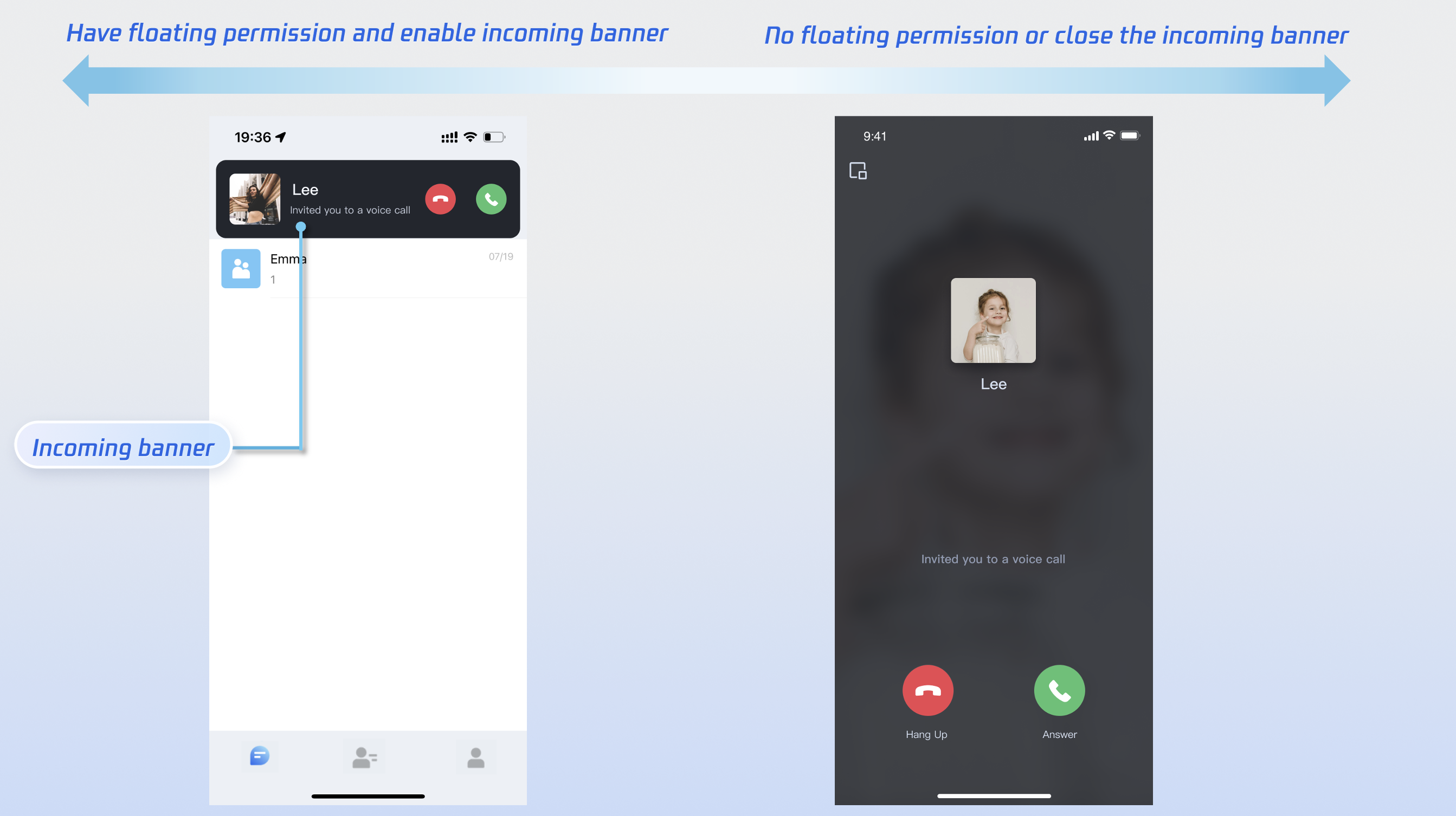
|
|
375
|
+
|
|
376
|
+
|
|
377
|
+
|
|
378
|
+
|
|
379
|
+
|
|
380
|
+
|
|
381
|
+
|
|
382
|
+
【Android(Kotlin)】
|
|
383
|
+
``` java
|
|
384
|
+
import com.tencent.qcloud.tuikit.tuicallkit.TUICallKit
|
|
385
|
+
|
|
386
|
+
TUICallKit.createInstance(context).enableIncomingBanner(true)
|
|
387
|
+
```
|
|
388
|
+
|
|
389
|
+
|
|
390
|
+
【Android(Java)】
|
|
391
|
+
``` java
|
|
392
|
+
import com.tencent.qcloud.tuikit.tuicallkit.TUICallKit;
|
|
393
|
+
|
|
394
|
+
TUICallKit.createInstance(context).enableIncomingBanner(true);
|
|
395
|
+
```
|
|
396
|
+
|
|
397
|
+
**Details:** Default false. The callee side pops up the full-screen call waiting interface by default when receiving an invitation. When enabled, a banner is displayed first, then the full-screen call interface is pulled up as needed.
|
|
398
|
+
|
|
399
|
+
### Multi-Person Calling
|
|
400
|
+
|
|
401
|
+
When the caller uses the `calls` method to initiate a call, if the list of called users exceeds one person, it is automatically recognized as a multi-person call. Other members can then join this multi-person call using the `join` method.
|
|
402
|
+
- **Initiating a Multi-person Call:** When the `calls` method is used to initiate a call, if the callee User ID list (userIdList) contains more than one user, it will be automatically deemed a multi-person call.
|
|
403
|
+
|
|
404
|
+
|
|
405
|
+
|
|
406
|
+
|
|
407
|
+
|
|
408
|
+
|
|
409
|
+
|
|
410
|
+
【Android(Kotlin)】
|
|
411
|
+
``` java
|
|
412
|
+
import com.tencent.cloud.tuikit.engine.call.TUICallDefine
|
|
413
|
+
import com.tencent.qcloud.tuikit.tuicallkit.TUICallKit
|
|
414
|
+
import io.trtc.tuikit.atomicxcore.api.call.CallMediaType
|
|
415
|
+
import io.trtc.tuikit.atomicxcore.api.call.CallParams
|
|
416
|
+
|
|
417
|
+
val userIdList = mutableListOf<String>()
|
|
418
|
+
userIdList.add("mike")
|
|
419
|
+
userIdList.add("tate")
|
|
420
|
+
val mediaType = CallMediaType.Audio
|
|
421
|
+
val params = CallParams()
|
|
422
|
+
TUICallKit.createInstance(context).calls(userIdList, mediaType, params, null)
|
|
423
|
+
```
|
|
424
|
+
|
|
425
|
+
|
|
426
|
+
【Android(Java)】
|
|
427
|
+
``` java
|
|
428
|
+
import com.tencent.cloud.tuikit.engine.call.TUICallDefine;
|
|
429
|
+
import com.tencent.qcloud.tuikit.tuicallkit.TUICallKit;
|
|
430
|
+
import io.trtc.tuikit.atomicxcore.api.call.CallMediaType;
|
|
431
|
+
import io.trtc.tuikit.atomicxcore.api.call.CallParams;
|
|
432
|
+
|
|
433
|
+
List<String> userIdList = new ArrayList<>();
|
|
434
|
+
userIdList.add("mike");
|
|
435
|
+
userIdList.add("tate");
|
|
436
|
+
CallMediaType mediaType = CallMediaType.Audio;
|
|
437
|
+
CallParams params = new CallParams();
|
|
438
|
+
TUICallKit.createInstance(context).calls(userIdList, mediaType, params, null);
|
|
244
439
|
```
|
|
245
440
|
<table>
|
|
246
441
|
<tr>
|
|
247
|
-
<td rowspan="1" colSpan="1" >
|
|
442
|
+
<td rowspan="1" colSpan="1" >Parameter</td>
|
|
443
|
+
|
|
444
|
+
<td rowspan="1" colSpan="1" >Type</td>
|
|
445
|
+
|
|
446
|
+
<td rowspan="1" colSpan="1" >Description</td>
|
|
447
|
+
</tr>
|
|
448
|
+
|
|
449
|
+
<tr>
|
|
450
|
+
<td rowspan="1" colSpan="1" >userIdList</td>
|
|
451
|
+
|
|
452
|
+
<td rowspan="1" colSpan="1" >List<String></td>
|
|
248
453
|
|
|
249
|
-
<td rowspan="1" colSpan="1" >
|
|
454
|
+
<td rowspan="1" colSpan="1" >Target user ID list</td>
|
|
250
455
|
</tr>
|
|
251
456
|
|
|
252
457
|
<tr>
|
|
253
|
-
<td rowspan="1" colSpan="1"
|
|
458
|
+
<td rowspan="1" colSpan="1" >mediaType</td>
|
|
459
|
+
|
|
460
|
+
<td rowspan="1" colSpan="1" >[CallMediaType](https://liteav.sdk.cloudcachetci.com/doc/product/tuikit/atomic-x/android/en/-atomic-x%20-core%20-a-p-i/io.trtc.tuikit.atomicxcore.api.call/-call-media-type/index.html)</td>
|
|
254
461
|
|
|
255
|
-
<td rowspan="1" colSpan="1"
|
|
462
|
+
<td rowspan="1" colSpan="1" >Media type of the call, such as video call, voice call</td>
|
|
463
|
+
</tr>
|
|
464
|
+
|
|
465
|
+
<tr>
|
|
466
|
+
<td rowspan="1" colSpan="1" >params</td>
|
|
467
|
+
|
|
468
|
+
<td rowspan="1" colSpan="1" >[CallParams](https://liteav.sdk.cloudcachetci.com/doc/product/tuikit/atomic-x/android/en/-atomic-x%20-core%20-a-p-i/io.trtc.tuikit.atomicxcore.api.call/-call-params/index.html)</td>
|
|
469
|
+
|
|
470
|
+
<td rowspan="1" colSpan="1" >Call extension parameters, such as room number, call invitation timeout.</td>
|
|
256
471
|
</tr>
|
|
257
472
|
</table>
|
|
258
473
|
|
|
259
474
|
|
|
260
|
-
|
|
475
|
+
- **Joining a Multi-person Call:** You can use the `join` method to enter the specified multi-person call.
|
|
261
476
|
|
|
262
|
-
## Additional Features
|
|
263
|
-
- [Setting Nickname, Avatar](https://write.woa.com/document/140283519901868032)
|
|
264
477
|
|
|
265
|
-
|
|
478
|
+
|
|
479
|
+
|
|
266
480
|
|
|
267
|
-
- [Offline Push](https://write.woa.com/document/95821638488313856)
|
|
268
481
|
|
|
269
|
-
- [Group Call](https://write.woa.com/document/140196498678116352)
|
|
270
482
|
|
|
271
|
-
|
|
483
|
+
【Android(Kotlin)】
|
|
484
|
+
``` java
|
|
485
|
+
import com.tencent.qcloud.tuikit.tuicallkit.TUICallKit
|
|
272
486
|
|
|
273
|
-
|
|
487
|
+
val callId = "123456"
|
|
488
|
+
TUICallKit.createInstance(this).join(callId, null)
|
|
489
|
+
```
|
|
274
490
|
|
|
275
|
-
- [Call Status Monitoring](https://write.woa.com/document/140196527978475520)
|
|
276
491
|
|
|
277
|
-
|
|
492
|
+
【Android(Java)】
|
|
493
|
+
``` java
|
|
494
|
+
import com.tencent.qcloud.tuikit.tuicallkit.TUICallKit;
|
|
495
|
+
|
|
496
|
+
String callId = "123456";
|
|
497
|
+
TUICallKit.createInstance(this).join(callId, null);
|
|
498
|
+
```
|
|
499
|
+
<table>
|
|
500
|
+
<tr>
|
|
501
|
+
<td rowspan="1" colSpan="1" >Parameter</td>
|
|
502
|
+
|
|
503
|
+
<td rowspan="1" colSpan="1" >Type</td>
|
|
504
|
+
|
|
505
|
+
<td rowspan="1" colSpan="1" >Description</td>
|
|
506
|
+
</tr>
|
|
507
|
+
|
|
508
|
+
<tr>
|
|
509
|
+
<td rowspan="1" colSpan="1" >callId</td>
|
|
510
|
+
|
|
511
|
+
<td rowspan="1" colSpan="1" >String</td>
|
|
512
|
+
|
|
513
|
+
<td rowspan="1" colSpan="1" >The unique ID for this call.</td>
|
|
514
|
+
</tr>
|
|
515
|
+
</table>
|
|
516
|
+
|
|
517
|
+
|
|
518
|
+
|
|
519
|
+
### Language Settings
|
|
520
|
+
- **Supported Languages:** We currently support Simplified Chinese, Traditional Chinese, English, Japanese, and Arabic.
|
|
521
|
+
|
|
522
|
+
- **Switching Languages:** By default, the language of TUICallKit is consistent with the mobile operating system's language setting. To switch the language, you can use the `TUIThemeManager.getInstance().changeLanguage` method.
|
|
523
|
+
|
|
524
|
+
|
|
525
|
+
|
|
526
|
+
|
|
527
|
+
|
|
528
|
+
|
|
529
|
+
|
|
530
|
+
【Android(Kotlin)】
|
|
531
|
+
``` java
|
|
532
|
+
import com.tencent.qcloud.tuicore.TUIThemeManager;
|
|
533
|
+
|
|
534
|
+
public class MainActivity extends BaseActivity {
|
|
535
|
+
@Override
|
|
536
|
+
public void onCreate(Bundle savedInstanceState) {
|
|
537
|
+
super.onCreate(savedInstanceState)
|
|
538
|
+
|
|
539
|
+
val language = TUIThemeManager.LANGUAGE_ZH_CN
|
|
540
|
+
TUIThemeManager.getInstance().changeLanguage(applicationContext, language)
|
|
541
|
+
}
|
|
542
|
+
}
|
|
543
|
+
```
|
|
544
|
+
|
|
545
|
+
|
|
546
|
+
【Android(Java)】
|
|
547
|
+
``` java
|
|
548
|
+
import com.tencent.qcloud.tuicore.TUIThemeManager;
|
|
549
|
+
|
|
550
|
+
public class MainActivity extends BaseActivity {
|
|
551
|
+
@Override
|
|
552
|
+
public void onCreate(Bundle savedInstanceState) {
|
|
553
|
+
super.onCreate(savedInstanceState);
|
|
554
|
+
String language = TUIThemeManager.LANGUAGE_EN;
|
|
555
|
+
TUIThemeManager.getInstance().changeLanguage(getApplicationContext(), language);
|
|
556
|
+
}
|
|
557
|
+
}
|
|
558
|
+
```
|
|
559
|
+
<table>
|
|
560
|
+
<tr>
|
|
561
|
+
<td rowspan="1" colSpan="1" >Parameter</td>
|
|
562
|
+
|
|
563
|
+
<td rowspan="1" colSpan="1" >Type</td>
|
|
564
|
+
|
|
565
|
+
<td rowspan="1" colSpan="1" >Description</td>
|
|
566
|
+
</tr>
|
|
567
|
+
|
|
568
|
+
<tr>
|
|
569
|
+
<td rowspan="1" colSpan="1" >language</td>
|
|
570
|
+
|
|
571
|
+
<td rowspan="1" colSpan="1" >String</td>
|
|
572
|
+
|
|
573
|
+
<td rowspan="1" colSpan="1" >- TUIThemeManager.LANGUAGE_EN: English.<br>- TUIThemeManager.LANGUAGE_AR: Arabic.<br>- TUIThemeManager.LANGUAGE_ZH_HK: Traditional Chinese.<br>- TUIThemeManager.LANGUAGE_ZH_CN: Simplified Chinese.</td>
|
|
574
|
+
</tr>
|
|
575
|
+
</table>
|
|
576
|
+
|
|
577
|
+
|
|
578
|
+
> **Note:**
|
|
579
|
+
>
|
|
580
|
+
|
|
581
|
+
> If you need to set up other languages, please contact us at **info_rtc@tencent.com** for assistance.
|
|
582
|
+
>
|
|
583
|
+
|
|
584
|
+
|
|
585
|
+
|
|
586
|
+
### Ringtone Setting
|
|
587
|
+
|
|
588
|
+
You can set the default ringtone, incoming call silent mode, and Offline Push Ringtone in the following ways:
|
|
589
|
+
- **Setting Default Ringtone (Method 1):** If you include TUICallKit component via source code, you can replace the resource file ([ringtone when initiating a call](https://github.com/Tencent-RTC/TUIKit_Android/tree/main/call/tuicallkit-kt/src/main/res/raw), [ringtone when receiving a call](https://github.com/Tencent-RTC/TUIKit_Android/blob/main/call/tuicallkit-kt/src/main/res/raw/phone_ringing.mp3)) to set a custom default ringtone.
|
|
590
|
+
|
|
591
|
+
- **Setting Default Ringtone (Method 2):** Use the `setCallingBell` interface to set the incoming call ringtone received by the callee.
|
|
592
|
+
|
|
593
|
+
|
|
594
|
+
|
|
595
|
+
|
|
596
|
+
|
|
597
|
+
|
|
598
|
+
|
|
599
|
+
【Android(Kotlin)】
|
|
600
|
+
``` java
|
|
601
|
+
import com.tencent.qcloud.tuikit.tuicallkit.TUICallKit
|
|
602
|
+
|
|
603
|
+
val filePath = "***/callingBell.mp3"
|
|
604
|
+
TUICallKit.createInstance(context).setCallingBell(filePath)
|
|
605
|
+
```
|
|
606
|
+
|
|
607
|
+
|
|
608
|
+
【Android(Java)】
|
|
609
|
+
``` java
|
|
610
|
+
import com.tencent.qcloud.tuikit.tuicallkit.TUICallKit;
|
|
611
|
+
|
|
612
|
+
String filePath = "***/callingBell.mp3";
|
|
613
|
+
TUICallKit.createInstance(context).setCallingBell(filePath);
|
|
614
|
+
```
|
|
615
|
+
|
|
616
|
+
**Details:**The local file path of the ringtone. Only local file paths can be imported here. Ensure the file directory is accessible to the app. The ringtone setting is bound to the device. Replacing the user will not affect the ringtone. To restore the default ringtone, pass an empty string ("") as the filePath.
|
|
617
|
+
<table>
|
|
618
|
+
<tr>
|
|
619
|
+
<td rowspan="1" colSpan="1" >Parameter</td>
|
|
620
|
+
|
|
621
|
+
<td rowspan="1" colSpan="1" >Type</td>
|
|
622
|
+
|
|
623
|
+
<td rowspan="1" colSpan="1" >Description</td>
|
|
624
|
+
</tr>
|
|
625
|
+
|
|
626
|
+
<tr>
|
|
627
|
+
<td rowspan="1" colSpan="1" >filePath</td>
|
|
628
|
+
|
|
629
|
+
<td rowspan="1" colSpan="1" >String</td>
|
|
630
|
+
|
|
631
|
+
<td rowspan="1" colSpan="1" >ringtone file path</td>
|
|
632
|
+
</tr>
|
|
633
|
+
</table>
|
|
634
|
+
|
|
635
|
+
|
|
636
|
+
- **Incoming call silent mode:** You can set mute mode through `enableMuteMode`.
|
|
637
|
+
|
|
638
|
+
|
|
639
|
+
|
|
640
|
+
|
|
641
|
+
|
|
642
|
+
|
|
643
|
+
|
|
644
|
+
【Android(Kotlin)】
|
|
645
|
+
``` java
|
|
646
|
+
import com.tencent.qcloud.tuikit.tuicallkit.TUICallKit
|
|
647
|
+
|
|
648
|
+
TUICallKit.createInstance(context).enableMuteMode(true)
|
|
649
|
+
```
|
|
650
|
+
|
|
651
|
+
|
|
652
|
+
【Android(Java)】
|
|
653
|
+
``` java
|
|
654
|
+
import com.tencent.qcloud.tuikit.tuicallkit.TUICallKit;
|
|
655
|
+
|
|
656
|
+
TUICallKit.createInstance(context).enableMuteMode(true);
|
|
657
|
+
```
|
|
658
|
+
|
|
659
|
+
**Details:** When set to true, incoming call requests will not trigger ringtone playback (silent mode).
|
|
660
|
+
|
|
661
|
+
- **Custom offline push ringtone**: Please refer to: [FCM Offline Push customizes incoming call ringtone](https://write.woa.com/document/95821638488313856).
|
|
662
|
+
|
|
663
|
+
|
|
664
|
+
## Customizing Your UI
|
|
665
|
+
|
|
666
|
+
### Replacing Icon Button
|
|
667
|
+
|
|
668
|
+
You can directly replace the icons under the [res\drawable-xxhdpi](https://github.com/Tencent-RTC/TUIKit_Android/tree/main/atomic_x/src/main/res-callview/drawable-xxhdpi) folder to ensure the icon color and style remain consistent throughout the entire App. The following list shows basic feature buttons. You can replace the corresponding icons to fit your own business scenario.
|
|
669
|
+
|
|
670
|
+
|
|
671
|
+
|
|
672
|
+
|
|
673
|
+
|
|
674
|
+
|
|
675
|
+
|
|
676
|
+
Commonly Used Icon File Name List
|
|
677
|
+
<table>
|
|
678
|
+
<tr>
|
|
679
|
+
<td rowspan="1" colSpan="1" >Icon</td>
|
|
680
|
+
|
|
681
|
+
<td rowspan="1" colSpan="1" >File name</td>
|
|
682
|
+
|
|
683
|
+
<td rowspan="1" colSpan="1" >Description</td>
|
|
684
|
+
</tr>
|
|
685
|
+
|
|
686
|
+
<tr>
|
|
687
|
+
<td rowspan="1" colSpan="1" ></td>
|
|
688
|
+
|
|
689
|
+
<td rowspan="1" colSpan="1" >callview_ic_dialing.png</td>
|
|
690
|
+
|
|
691
|
+
<td rowspan="1" colSpan="1" >Answer incoming call icon</td>
|
|
692
|
+
</tr>
|
|
693
|
+
|
|
694
|
+
<tr>
|
|
695
|
+
<td rowspan="1" colSpan="1" ><br></td>
|
|
696
|
+
|
|
697
|
+
<td rowspan="1" colSpan="1" >callview_ic_hangup.png</td>
|
|
698
|
+
|
|
699
|
+
<td rowspan="1" colSpan="1" >Hang Up Call icon</td>
|
|
700
|
+
</tr>
|
|
701
|
+
|
|
702
|
+
<tr>
|
|
703
|
+
<td rowspan="1" colSpan="1" ><br></td>
|
|
704
|
+
|
|
705
|
+
<td rowspan="1" colSpan="1" >callview_ic_mic_unmute.png</td>
|
|
706
|
+
|
|
707
|
+
<td rowspan="1" colSpan="1" >Turn off the mic icon</td>
|
|
708
|
+
</tr>
|
|
709
|
+
|
|
710
|
+
<tr>
|
|
711
|
+
<td rowspan="1" colSpan="1" ><br></td>
|
|
712
|
+
|
|
713
|
+
<td rowspan="1" colSpan="1" >callview_ic_handsfree_disable.png</td>
|
|
714
|
+
|
|
715
|
+
<td rowspan="1" colSpan="1" >Turn off the speaker icon</td>
|
|
716
|
+
</tr>
|
|
717
|
+
|
|
718
|
+
<tr>
|
|
719
|
+
<td rowspan="1" colSpan="1" ><br></td>
|
|
720
|
+
|
|
721
|
+
<td rowspan="1" colSpan="1" >callview_ic_camera_disable.png</td>
|
|
722
|
+
|
|
723
|
+
<td rowspan="1" colSpan="1" >Camera Off icon</td>
|
|
724
|
+
</tr>
|
|
725
|
+
|
|
726
|
+
<tr>
|
|
727
|
+
<td rowspan="1" colSpan="1" ><br></td>
|
|
728
|
+
|
|
729
|
+
<td rowspan="1" colSpan="1" >callview_ic_add_user_black.png</td>
|
|
730
|
+
|
|
731
|
+
<td rowspan="1" colSpan="1" >Invite user icon during call</td>
|
|
732
|
+
</tr>
|
|
733
|
+
</table>
|
|
278
734
|
|
|
279
735
|
|
|
280
736
|
## FAQs
|
|
281
737
|
|
|
282
738
|
If you encounter any issues during integration and use, please refer to [Frequently Asked Questions](https://write.woa.com/document/145196717502525440).
|
|
283
739
|
|
|
284
|
-
##
|
|
740
|
+
## Contact Us
|
|
285
741
|
|
|
286
|
-
If you have any suggestions or
|
|
742
|
+
If you have any questions or suggestions during integration or usage, feel free to join our [Telegram](https://t.me/+Lmw2MSqW6ethMGM1) group or [contact us](https://trtc.io/contact) for support.
|