@tencent-rtc/mcp 1.3.8 → 1.3.9
This diff represents the content of publicly available package versions that have been released to one of the supported registries. The information contained in this diff is provided for informational purposes only and reflects changes between package versions as they appear in their respective public registries.
- package/package.json +1 -1
- package/resource/doc/chatuikit/android/integration.md +499 -203
- package/resource/doc/chatuikit/android/workflow.md +713 -0
- package/resource/doc/chatuikit/flutter/integration.md +1 -1
- package/resource/doc/livekit/voice/android/voice-audience-list.md +334 -0
- package/resource/doc/livekit/voice/android/voice-audio-effect.md +380 -0
- package/resource/doc/livekit/voice/android/voice-barrage.md +565 -0
- package/resource/doc/livekit/voice/android/voice-co-guest-interaction.md +745 -0
- package/resource/doc/livekit/voice/android/voice-gift.md +822 -0
- package/resource/doc/livekit/voice/android/voice-host-interaction.md +703 -0
- package/resource/doc/livekit/voice/android/voice-integration.md +940 -0
- package/resource/doc/livekit/voice/android/voice-room-list.md +575 -0
- package/resource/doc/livekit/voice/flutter/voice-co-guest-interaction.md +675 -0
- package/resource/doc/livekit/voice/flutter/voice-integration.md +936 -0
- package/resource/doc/livekit/voice/ios/voice-audience-list.md +339 -0
- package/resource/doc/livekit/voice/ios/voice-audio-effect.md +370 -0
- package/resource/doc/livekit/voice/ios/voice-barrage.md +517 -0
- package/resource/doc/livekit/voice/ios/voice-co-guest-interaction.md +708 -0
- package/resource/doc/livekit/voice/ios/voice-gift.md +783 -0
- package/resource/doc/livekit/voice/ios/voice-host-interaction.md +770 -0
- package/resource/doc/livekit/voice/ios/voice-integration.md +898 -0
- package/resource/doc/livekit/voice/ios/voice-room-list.md +485 -0
- package/resource/doc/roomkit/vue/integration.md +179 -288
- package/resource/doc/roomkit/vue/workflow.md +499 -253
- package/resource/doc/tuicallkit/android/integration.md +539 -83
- package/resource/doc/tuicallkit/android/workflow.md +441 -0
- package/tools/common/present-scenario-choice.js +16 -0
- package/tools/common/present-scenario-choice.js.map +1 -0
- package/tools/definitions/get_native_call_uikit_integration_def.js +25 -9
- package/tools/definitions/get_native_call_uikit_integration_def.js.map +1 -1
- package/tools/definitions/get_native_chat_uikit_integration_def.js +36 -14
- package/tools/definitions/get_native_chat_uikit_integration_def.js.map +1 -1
- package/tools/definitions/get_native_live_uikit_integration_def.js +55 -29
- package/tools/definitions/get_native_live_uikit_integration_def.js.map +1 -1
- package/tools/definitions/get_native_live_uikit_interaction_def.js +43 -54
- package/tools/definitions/get_native_live_uikit_interaction_def.js.map +1 -1
- package/tools/definitions/get_web_room_feature_detail_def.js +52 -55
- package/tools/definitions/get_web_room_feature_detail_def.js.map +1 -1
- package/tools/definitions/get_web_room_uikit_integration_def.js +41 -25
- package/tools/definitions/get_web_room_uikit_integration_def.js.map +1 -1
- package/tools/definitions/present_scenario_choice_def.js +53 -0
- package/tools/definitions/present_scenario_choice_def.js.map +1 -0
- package/tools/definitions/record_prompt_def.js +26 -21
- package/tools/definitions/record_prompt_def.js.map +1 -1
- package/tools/definitions/record_result_def.js +20 -4
- package/tools/definitions/record_result_def.js.map +1 -1
- package/tools/index.js +2 -0
- package/tools/index.js.map +1 -1
- package/tools/live/get-native-live-uikit-integration.js +110 -34
- package/tools/live/get-native-live-uikit-integration.js.map +1 -1
- package/tools/live/get_native_live_uikit_interaction.js +128 -35
- package/tools/live/get_native_live_uikit_interaction.js.map +1 -1
- package/utils/report-cls-client.js +1 -1
- package/utils/report-es-client.js +1 -1
|
@@ -1,287 +1,583 @@
|
|
|
1
|
-
This
|
|
1
|
+
TUIKit Compose is a Jetpack Compose component library based on Tencent Cloud IM SDK, providing complete solutions for instant messaging features such as chat, conversation list, and contact management. This document describes how to manually integrate these components and implement core functionality.
|
|
2
2
|
|
|
3
|
-
|
|
4
|
-
>
|
|
5
|
-
> - Starting from version 5.7.1435, TUIKit supports modular integration and the classic UI. You can integrate the necessary modules according to your needs.
|
|
6
|
-
> - Starting from version 6.9.3557, TUIKit introduces a brand new minimalist UI.
|
|
3
|
+
## Key Concepts
|
|
7
4
|
|
|
5
|
+
TUIKit Compose provides a complete set of instant messaging UI components, depending on the AtomicXCore data layer below and capable of building various functional Pages above.
|
|
6
|
+
- Page Layer: Complete functional pages encapsulated based on TUIKit Compose components: ChatPage, ContactsPage, ConversationsPage, which you can use directly.
|
|
8
7
|
|
|
9
|
-
|
|
8
|
+
- TUIKit Compose (UI Component Layer): Jetpack Compose components built on AtomicXCore, which you can embed into your existing App pages.
|
|
10
9
|
|
|
11
|
-
|
|
12
|
-
- Android Studio-Giraffe
|
|
10
|
+
- AtomicXCore (Data Layer): Provides data management and business logic, including various Stores and Managers.
|
|
13
11
|
|
|
14
|
-
- Gradle-7.2
|
|
15
12
|
|
|
16
|
-
|
|
13
|
+
## Prerequisites
|
|
14
|
+
- Android Studio Ladybug | 2024.2.1 and above
|
|
17
15
|
|
|
18
|
-
-
|
|
16
|
+
- Android 5.0 and above system version
|
|
19
17
|
|
|
18
|
+
- Gradle 8.9 and above
|
|
20
19
|
|
|
21
|
-
|
|
22
|
-
1. Download the TUIKit source code from [GitHub](https://github.com/TencentCloud/chat-uikit-android). Ensure that the TUIKit folder is at the same level as your project folder, for example:
|
|
20
|
+
- Android Gradle Plugin 8.6 and above
|
|
23
21
|
|
|
22
|
+
- JDK 17 and above
|
|
24
23
|
|
|
25
|
-
|
|
24
|
+
- Kotlin 1.9.0 and above
|
|
26
25
|
|
|
27
|
-
|
|
26
|
+
- A valid Tencent Cloud account and Chat application. You can refer to [Enable Service](https://trtc.io/document/45907?product=chat&menulabel=uikit&platform=android) to get the following information from the console:
|
|
28
27
|
|
|
29
|
-
|
|
30
|
-
|
|
31
|
-
|
|
32
|
-
|
|
33
|
-
|
|
34
|
-
|
|
35
|
-
|
|
36
|
-
|
|
37
|
-
|
|
38
|
-
|
|
39
|
-
|
|
40
|
-
|
|
41
|
-
|
|
42
|
-
|
|
43
|
-
|
|
28
|
+
- SDKAppID: The ID of the Chat application obtained from the console, which is the unique identifier of the application
|
|
29
|
+
|
|
30
|
+
- SDKSecretKey: The secret key of the application
|
|
31
|
+
|
|
32
|
+
|
|
33
|
+
> **Note:**
|
|
34
|
+
>
|
|
35
|
+
> - This project currently only supports manual integration and does not support integration through package managers like Maven.
|
|
36
|
+
> - To ensure a stable build environment, please strictly follow the official compatibility requirements for configuration:
|
|
37
|
+
> - For compatibility between Gradle, Android Gradle Plugin, JDK and Android Studio, please refer to the Android official documentation: [Version Notes](https://developer.android.com/build/releases/gradle-plugin#updating-gradle).
|
|
38
|
+
> - For version correspondence between Kotlin, Android Gradle Plugin and Gradle, please refer to the Kotlin official documentation: [Kotlin-Gradle Plugin Compatibility](https://kotlinlang.org/docs/gradle-configure-project.html#apply-the-plugin).
|
|
39
|
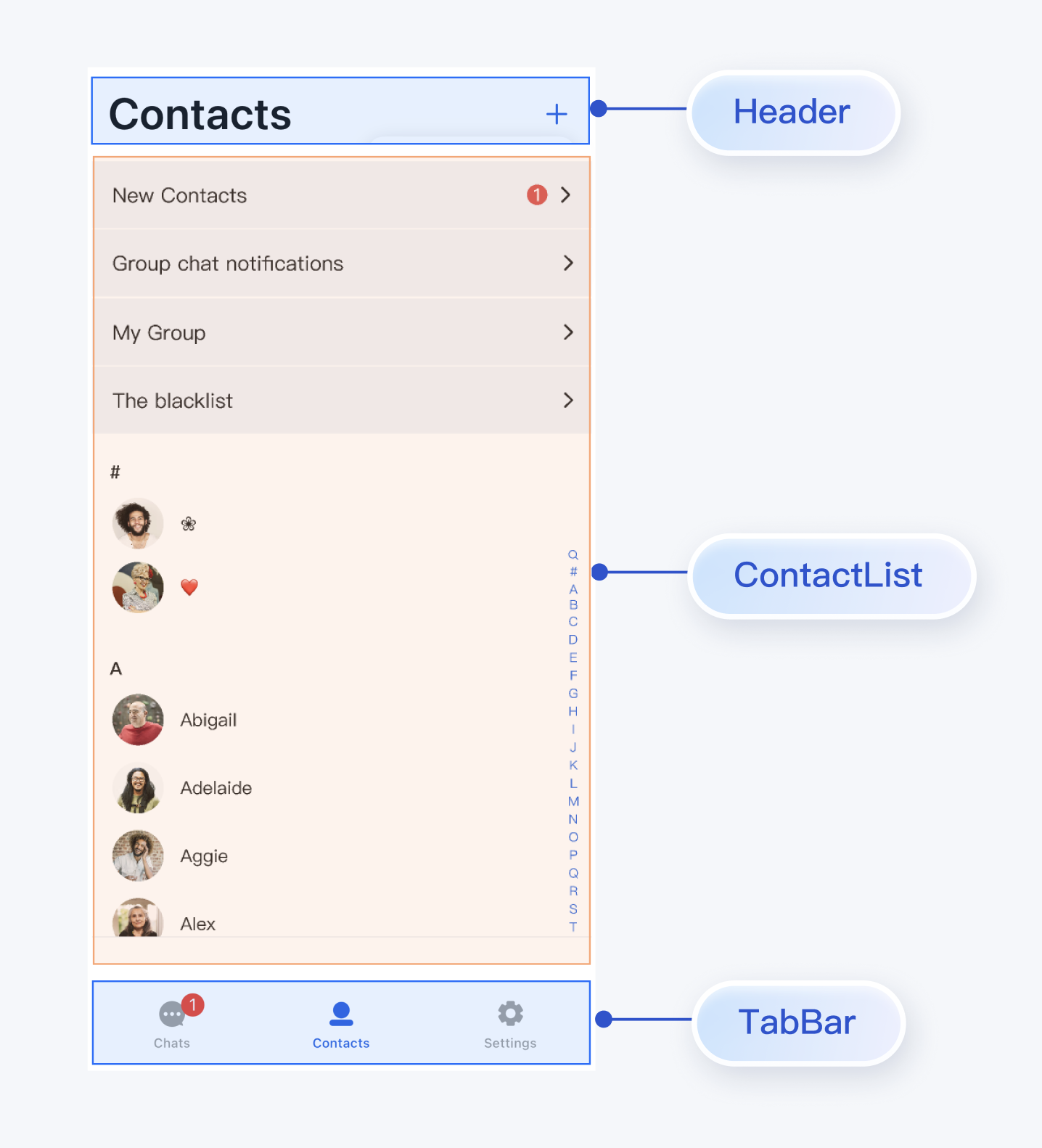
+
|
|
40
|
+
> We recommend that you choose a version combination that fully matches your project requirements according to the above guidelines.
|
|
41
|
+
>
|
|
42
|
+
|
|
43
|
+
|
|
44
|
+
## Integrate and Import Components
|
|
45
|
+
|
|
46
|
+
### Download Source Code
|
|
47
|
+
1. Download [TUIKit Compose](https://github.com/Tencent-RTC/TUIKit_android_compose) source code from GitHub:
|
|
48
|
+
|
|
49
|
+
``` bash
|
|
50
|
+
git clone https://github.com/Tencent-RTC/TUIKit_Android_Compose.git
|
|
51
|
+
```
|
|
52
|
+
|
|
53
|
+
Project directory structure description:
|
|
54
|
+
|
|
55
|
+
``` bash
|
|
56
|
+
atomic-x/
|
|
57
|
+
├── src/main/
|
|
58
|
+
│ ├── java/io/trtc/tuikit/atomicx/ # UI component source code (required integration)
|
|
59
|
+
│ ├── messagelist/ # Message list component
|
|
60
|
+
│ ├── messageinput/ # Message input component
|
|
61
|
+
│ ├── conversationlist/ # Conversation list component
|
|
62
|
+
│ ├── contactlist/ # Contact list component
|
|
63
|
+
│ ├── basecomponent/ # Base components
|
|
64
|
+
│ └── ... # Other UI components
|
|
65
|
+
│ # Resource files (required integration)
|
|
66
|
+
│ ├── res/ # Common resources
|
|
67
|
+
│ ├── res-message-list/ # Message list component resources
|
|
68
|
+
│ ├── res-message-input/ # Message input component resources
|
|
69
|
+
│ ├── res-conversation-list/ # Conversation list component resources
|
|
70
|
+
│ └── ... # Other component resources
|
|
71
|
+
chat/
|
|
72
|
+
├── uikit/src/main/java/io/trtc/tuikit/chat/pages # Page components (reference implementation)
|
|
73
|
+
│ ├── ChatPage.kt
|
|
74
|
+
│ ├── ContactsPage.kt
|
|
75
|
+
│ └── ConversationsPage.kt
|
|
76
|
+
└── demo/ # Sample application (optional reference)
|
|
77
|
+
```
|
|
78
|
+
|
|
79
|
+
### Integrate Components
|
|
80
|
+
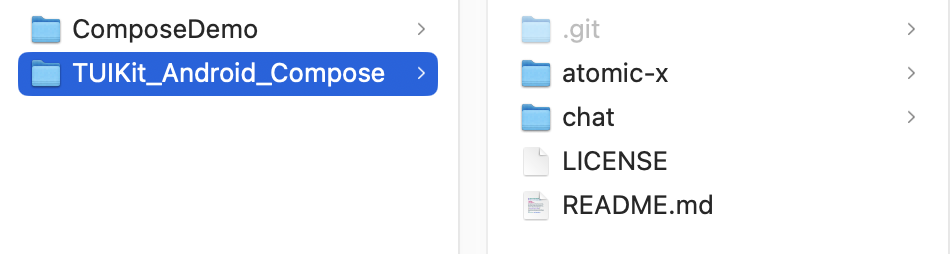
1. Copy the component directory completely to your Android project, as shown in the figure below, where ComposeDemo is the sample project and TUIKit_Android_Compose is the component source code downloaded from GitHub:
|
|
81
|
+
|
|
82
|
+
|
|
83
|
+
|
|
84
|
+
2. Add TUIKit Compose components in your settings.gradle.kts/settings.gradle file:
|
|
44
85
|
|
|
45
|
-
|
|
46
|
-
|
|
47
|
-
|
|
86
|
+
|
|
87
|
+
> **Note:**
|
|
88
|
+
>
|
|
89
|
+
|
|
90
|
+
> TUIKit_Android_Compose can be placed anywhere, as long as the relative path is correctly set in settings.gradle.
|
|
91
|
+
>
|
|
92
|
+
|
|
93
|
+
|
|
48
94
|
|
|
49
|
-
|
|
50
|
-
|
|
51
|
-
|
|
95
|
+
|
|
96
|
+
|
|
97
|
+
【Kotlin DSL (Recommended)】
|
|
98
|
+
``` java
|
|
99
|
+
// settings.gradle.kts
|
|
100
|
+
include(":atomicx")
|
|
101
|
+
project(":atomicx").projectDir = file("../TUIKit_Android_Compose/atomic-x")
|
|
102
|
+
```
|
|
103
|
+
|
|
104
|
+
|
|
105
|
+
【Groovy DSL】
|
|
106
|
+
``` java
|
|
107
|
+
// settings.gradle
|
|
108
|
+
include ':atomicx'
|
|
109
|
+
project(':atomicx').projectDir = new File(settingsDir, '../TUIKit_Android_Compose/atomic-x')
|
|
110
|
+
```
|
|
111
|
+
|
|
112
|
+
3. Add the following dependencies in the build.gradle.kts/build.gradle of the app module:
|
|
113
|
+
|
|
114
|
+
|
|
52
115
|
|
|
53
|
-
|
|
54
|
-
|
|
55
|
-
|
|
116
|
+
|
|
117
|
+
|
|
118
|
+
【Kotlin DSL (Recommended)】
|
|
119
|
+
``` java
|
|
120
|
+
// app/build.gradle.kts
|
|
121
|
+
dependencies {
|
|
122
|
+
implementation(project(":atomicx"))
|
|
123
|
+
}
|
|
124
|
+
```
|
|
125
|
+
|
|
126
|
+
|
|
127
|
+
【Groovy DSL】
|
|
128
|
+
``` java
|
|
129
|
+
// app/build.gradle
|
|
130
|
+
dependencies {
|
|
131
|
+
api project(':atomicx')
|
|
132
|
+
}
|
|
133
|
+
```
|
|
56
134
|
|
|
57
|
-
|
|
58
|
-
|
|
59
|
-
|
|
135
|
+
|
|
136
|
+
> **Note:**
|
|
137
|
+
>
|
|
138
|
+
> - When using the local integration solution, if you need to upgrade, you need to get the latest component code from GitHub and overwrite the TUIKit Compose directory in your local project.
|
|
139
|
+
> - When there are conflicts between private modifications and remote changes, manual merging and conflict resolution are required.
|
|
140
|
+
|
|
141
|
+
|
|
142
|
+
### Configure Project
|
|
143
|
+
1. Find the AndroidManifest.xml file in the app directory, add `tools:replace="android:allowBackup"` in the `application` node to override the settings in the component and use your own settings.
|
|
144
|
+
|
|
145
|
+
``` java
|
|
146
|
+
// app/src/main/AndroidManifest.xml
|
|
147
|
+
<application
|
|
148
|
+
android:name=".BaseApplication"
|
|
149
|
+
android:allowBackup="false"
|
|
150
|
+
android:icon="@drawable/app_ic_launcher"
|
|
151
|
+
android:label="@string/app_name"
|
|
152
|
+
android:largeHeap="true"
|
|
153
|
+
android:theme="@style/AppTheme"
|
|
154
|
+
tools:replace="android:allowBackup">
|
|
155
|
+
```
|
|
156
|
+
2. Configure dependencies.
|
|
157
|
+
|
|
158
|
+
|
|
159
|
+
Add the following dependencies in your project's gradle/libs.versions.toml file:
|
|
160
|
+
|
|
161
|
+
``` python
|
|
162
|
+
# gradle/libs.versions.toml
|
|
163
|
+
[versions]
|
|
164
|
+
agp = "8.13.0"
|
|
165
|
+
kotlin = "2.0.21"
|
|
166
|
+
coreKtx = "1.10.1"
|
|
167
|
+
junit = "4.13.2"
|
|
168
|
+
junitVersion = "1.1.5"
|
|
169
|
+
espressoCore = "3.5.1"
|
|
170
|
+
appcompat = "1.7.1"
|
|
171
|
+
material = "1.13.0"
|
|
172
|
+
runner = "1.0.2"
|
|
173
|
+
espressoCoreVersion = "3.0.2"
|
|
174
|
+
appcompatV7 = "28.0.0"
|
|
60
175
|
|
|
61
|
-
|
|
62
|
-
|
|
63
|
-
|
|
176
|
+
tuicore = "8.6.7021"
|
|
177
|
+
lifecycleRuntimeKtx = "2.8.7"
|
|
178
|
+
ui = "1.8.0"
|
|
179
|
+
foundation = "1.8.0"
|
|
180
|
+
composeBom = "2024.09.00"
|
|
181
|
+
activityCompose = "1.10.1"
|
|
182
|
+
activity = "1.8.0"
|
|
183
|
+
constraintlayout = "2.2.1"
|
|
64
184
|
|
|
65
|
-
|
|
66
|
-
|
|
67
|
-
|
|
185
|
+
[libraries]
|
|
186
|
+
androidx-core-ktx = { group = "androidx.core", name = "core-ktx", version.ref = "coreKtx" }
|
|
187
|
+
junit = { group = "junit", name = "junit", version.ref = "junit" }
|
|
188
|
+
androidx-junit = { group = "androidx.test.ext", name = "junit", version.ref = "junitVersion" }
|
|
189
|
+
androidx-espresso-core = { group = "androidx.test.espresso", name = "espresso-core", version.ref = "espressoCore" }
|
|
190
|
+
androidx-appcompat = { group = "androidx.appcompat", name = "appcompat", version.ref = "appcompat" }
|
|
191
|
+
material = { group = "com.google.android.material", name = "material", version.ref = "material" }
|
|
192
|
+
runner = { group = "com.android.support.test", name = "runner", version.ref = "runner" }
|
|
193
|
+
espresso-core = { group = "com.android.support.test.espresso", name = "espresso-core", version.ref = "espressoCoreVersion" }
|
|
194
|
+
appcompat-v7 = { group = "com.android.support", name = "appcompat-v7", version.ref = "appcompatV7" }
|
|
68
195
|
|
|
69
|
-
|
|
70
|
-
|
|
71
|
-
|
|
196
|
+
androidx-lifecycle-viewmodel-compose = { module = "androidx.lifecycle:lifecycle-viewmodel-compose", version.ref = "lifecycleRuntimeKtx" }
|
|
197
|
+
androidx-compose-bom = { group = "androidx.compose", name = "compose-bom", version.ref = "composeBom" }
|
|
198
|
+
androidx-compose-foundation = { group = "androidx.compose.foundation", name = "foundation", version.ref = "foundation" }
|
|
199
|
+
androidx-compose-ui = { group = "androidx.compose.ui", name = "ui", version.ref = "ui" }
|
|
200
|
+
androidx-compose-ui-graphics = { group = "androidx.compose.ui", name = "ui-graphics" }
|
|
201
|
+
androidx-ui-tooling = { group = "androidx.compose.ui", name = "ui-tooling" }
|
|
202
|
+
androidx-compose-material3 = { group = "androidx.compose.material3", name = "material3" }
|
|
203
|
+
androidx-activity-compose = { group = "androidx.activity", name = "activity-compose", version.ref = "activityCompose" }
|
|
204
|
+
androidx-lifecycle-runtime-ktx = { group = "androidx.lifecycle", name = "lifecycle-runtime-ktx", version.ref = "lifecycleRuntimeKtx" }
|
|
205
|
+
androidx-ui-tooling-preview = { group = "androidx.compose.ui", name = "ui-tooling-preview" }
|
|
206
|
+
androidx-ui-test-manifest = { group = "androidx.compose.ui", name = "ui-test-manifest" }
|
|
207
|
+
tuicore = { module = "com.tencent.liteav.tuikit:tuicore", version.ref = "tuicore" }
|
|
208
|
+
com-tencent-mmkv = { group = "com.tencent", name = "mmkv", version = "1.3.14" }
|
|
72
209
|
|
|
73
|
-
|
|
74
|
-
|
|
75
|
-
|
|
210
|
+
[plugins]
|
|
211
|
+
android-application = { id = "com.android.application", version.ref = "agp" }
|
|
212
|
+
kotlin-android = { id = "org.jetbrains.kotlin.android", version.ref = "kotlin" }
|
|
213
|
+
android-library = { id = "com.android.library", version.ref = "agp" }
|
|
76
214
|
|
|
77
|
-
|
|
78
|
-
include ':tuiemojiplugin'
|
|
79
|
-
project(':tuiemojiplugin').projectDir = new File(settingsDir, '../TUIKit/TUIEmojiPlugin/tuiemojiplugin')
|
|
215
|
+
kotlin-compose = { id = "org.jetbrains.kotlin.plugin.compose", version.ref = "kotlin" }
|
|
80
216
|
```
|
|
81
|
-
3.
|
|
217
|
+
3. Enable Compose support.
|
|
82
218
|
|
|
83
|
-
``` java
|
|
84
|
-
dependencies {
|
|
85
|
-
api project(':tuiconversation')
|
|
86
|
-
api project(':tuicontact')
|
|
87
|
-
api project(':tuichat')
|
|
88
|
-
api project(':tuisearch')
|
|
89
|
-
api project(':tuicommunity')
|
|
90
|
-
api project(':tuicallkit-kt')
|
|
91
|
-
api project(':tuiroomkit')
|
|
92
|
-
// Integrate speech-to-text plugin, supported from version 7.5
|
|
93
|
-
api project(':tuivoicetotextplugin')
|
|
94
|
-
// Integrate translation plugin, supported from version 7.2 (Value-added feature activation is required. Please contact Tencent Cloud sales)
|
|
95
|
-
api project(':tuitranslationplugin')
|
|
96
|
-
// Integrate emoji reaction plugin, supported from version 7.8 (To use this module, you need to purchase the Premium Edition)
|
|
97
|
-
api project(':tuiemojiplugin')
|
|
98
|
-
// Integrate group chain plugin, supported from version 7.1
|
|
99
|
-
api 'com.tencent.imsdk:tuigroupnote-plugin:8.4.6667'
|
|
100
|
-
// Integrate group voting plugin, supported from version 7.1
|
|
101
|
-
api 'com.tencent.imsdk:tuipoll-plugin:8.4.6667'
|
|
102
|
-
// Integrate session grouping plugin, supported from version 7.3
|
|
103
|
-
api 'com.tencent.imsdk:tuiconversationgroup-plugin:8.4.6667'
|
|
104
|
-
// Integrate session tagging plugin, supported from version 7.3
|
|
105
|
-
api 'com.tencent.imsdk:tuiconversationmark-plugin:8.4.6667'
|
|
106
|
-
// Integrate message push plugin, supported from version 7.6
|
|
107
|
-
api 'com.tencent.timpush:timpush:8.4.6667'
|
|
108
|
-
// Integrate the corresponding manufacturer's push package as needed
|
|
109
|
-
api 'com.tencent.timpush:fcm:8.4.6667'
|
|
110
|
-
api 'com.tencent.timpush:xiaomi:8.4.6667'
|
|
111
|
-
api 'com.tencent.timpush:meizu:8.4.6667'
|
|
112
|
-
api 'com.tencent.timpush:oppo:8.4.6667'
|
|
113
|
-
api 'com.tencent.timpush:vivo:8.4.6667'
|
|
114
|
-
api 'com.tencent.timpush:huawei:8.4.6667'
|
|
115
|
-
api 'com.tencent.timpush:honor:8.4.6667'
|
|
116
|
-
}
|
|
117
|
-
```
|
|
118
|
-
4. Add the following to the `gradle.properties` file to automatically convert third-party libraries to use AndroidX:
|
|
119
|
-
|
|
120
|
-
``` java
|
|
121
|
-
android.enableJetifier=true
|
|
122
|
-
```
|
|
123
|
-
5.
|
|
124
219
|
|
|
125
|
-
Add the following
|
|
220
|
+
Add the following configuration in the build.gradle.kts/build.gradle of the app module:
|
|
126
221
|
|
|
127
222
|
|
|
128
223
|
|
|
129
224
|
|
|
130
|
-
Kotlin support:
|
|
131
225
|
|
|
132
|
-
|
|
133
|
-
|
|
134
|
-
|
|
135
|
-
|
|
136
|
-
|
|
226
|
+
【Kotlin DSL (Recommended)】
|
|
227
|
+
``` java
|
|
228
|
+
// app/build.gradle.kts
|
|
229
|
+
plugins {
|
|
230
|
+
// Add Compose plugin
|
|
231
|
+
alias(libs.plugins.kotlin.compose)
|
|
232
|
+
}
|
|
233
|
+
android {
|
|
234
|
+
// Enable Compose
|
|
235
|
+
buildFeatures {
|
|
236
|
+
compose = true
|
|
137
237
|
}
|
|
138
|
-
|
|
139
|
-
|
|
140
|
-
|
|
238
|
+
}
|
|
239
|
+
```
|
|
240
|
+
|
|
241
|
+
|
|
242
|
+
【Groovy DSL】
|
|
243
|
+
``` java
|
|
244
|
+
// app/build.gradle
|
|
245
|
+
plugins {
|
|
246
|
+
// Add Compose plugin
|
|
247
|
+
id libs.plugins.kotlin.compose.get().pluginId
|
|
248
|
+
}
|
|
249
|
+
android {
|
|
250
|
+
// Enable Compose
|
|
251
|
+
buildFeatures {
|
|
252
|
+
compose true
|
|
141
253
|
}
|
|
142
|
-
|
|
143
|
-
|
|
254
|
+
}
|
|
255
|
+
```
|
|
256
|
+
|
|
257
|
+
4. Configure obfuscation rules.
|
|
144
258
|
|
|
145
|
-
|
|
259
|
+
|
|
260
|
+
Add the following obfuscation rules to your app/proguard-rules.pro file:
|
|
146
261
|
|
|
147
262
|
``` java
|
|
148
|
-
|
|
149
|
-
|
|
150
|
-
|
|
151
|
-
maven { url "https://mirrors.tencent.com/nexus/repository/maven-public/" }
|
|
152
|
-
}
|
|
153
|
-
dependencies {
|
|
154
|
-
classpath 'com.android.tools.build:gradle:8.0.2'
|
|
155
|
-
classpath "org.jetbrains.kotlin:kotlin-gradle-plugin:1.9.0"
|
|
156
|
-
}
|
|
157
|
-
}
|
|
158
|
-
```
|
|
263
|
+
-keep class com.tencent.** { *; }
|
|
264
|
+
```
|
|
265
|
+
5. Click **File > Sync Project with Gradle Files** in Android Studio to integrate components.
|
|
159
266
|
|
|
160
|
-
> **Note:**
|
|
161
|
-
>
|
|
162
|
-
> - The compatibility between Kotlin, Gradle, and AGP versions can be [viewed here](https://kotlinlang.org/docs/gradle-configure-project.html#apply-the-plugin).
|
|
163
|
-
> - To respect the copyright of emoji designs, the Chat Demo/TUIKit project does not include cutouts of large emoji elements. Please replace them with your own designs or other emoji packs for which you hold the copyright before officially launching for commercial use. **The default smiley face emoji pack shown below is copyrighted by Tencent RTC** and is available for licensed use for a fee. If you need to obtain a license, please [contact us](https://trtc.io/contact).
|
|
164
267
|
|
|
165
|
-
|
|
166
|
-
>
|
|
268
|
+
## Integration Steps
|
|
167
269
|
|
|
168
|
-
|
|
270
|
+
### Step 1: Configure User Authentication
|
|
169
271
|
|
|
272
|
+
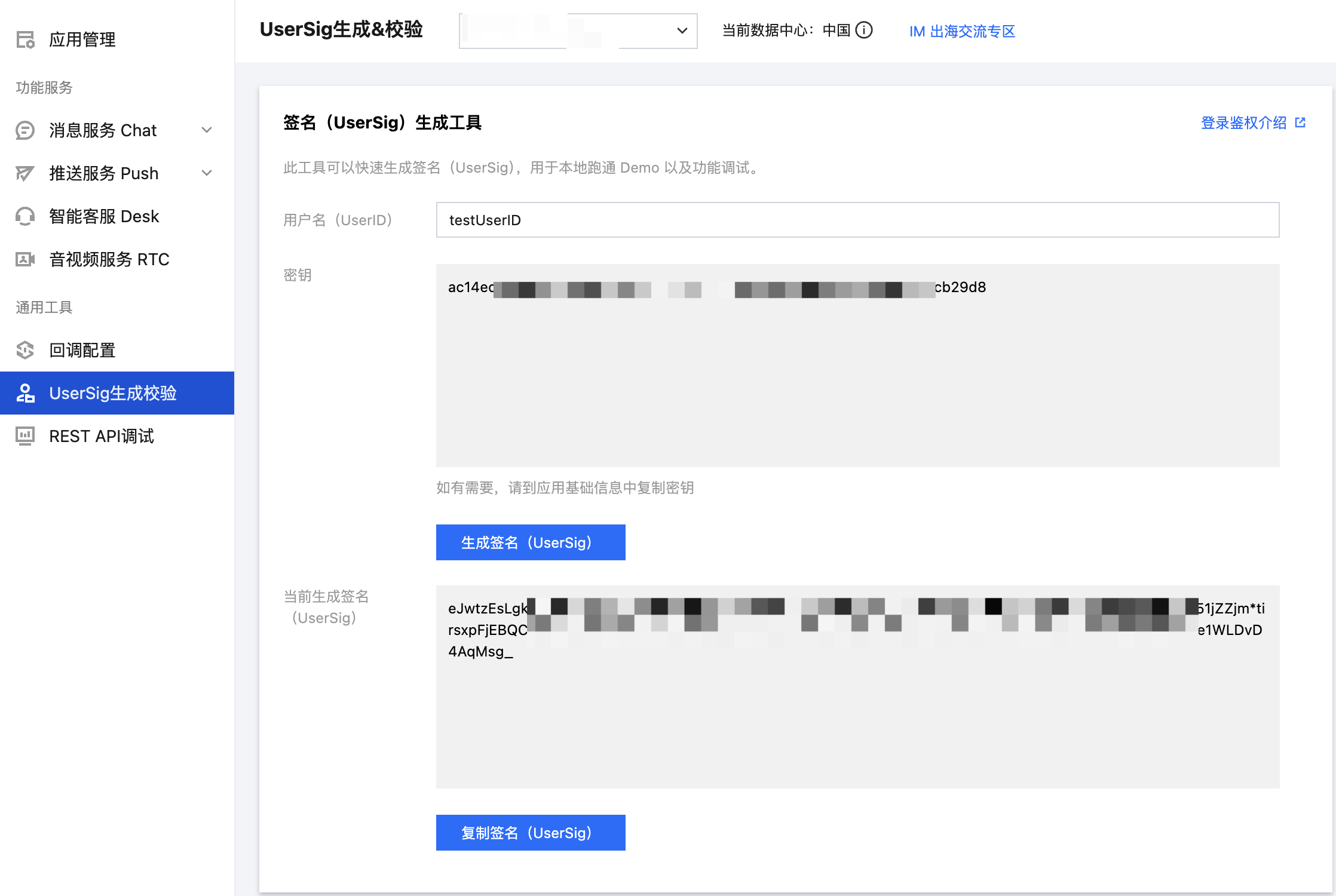
Get UserSig based on UserID in [Chat Console](https://console.trtc.io/usersig) for subsequent user authentication during login.
|
|
170
273
|
|
|
171
|
-
|
|
274
|
+
|
|
172
275
|
|
|
173
|
-
7. **[Optional] **Delete unnecessary UI files
|
|
174
|
-
The classic and minimalist UI do not affect each other, and they can run independently. Their files are in separate folders. Take TUIChat as an example:
|
|
175
276
|
|
|
277
|
+
### Step 2: User Login
|
|
176
278
|
|
|
177
|
-
|
|
279
|
+
You can only use the component functions normally after login authentication. You can call the login interface and pass in the SDKAPPID and userSig obtained above for login authentication:
|
|
280
|
+
``` swift
|
|
281
|
+
// User login
|
|
282
|
+
LoginStore.shared.login(context, SDKAPPID, userID, userSig,
|
|
283
|
+
object : CompletionHandler {
|
|
284
|
+
override fun onSuccess() {
|
|
285
|
+
// Login successful, can navigate to chat or conversation page
|
|
286
|
+
}
|
|
287
|
+
override fun onFailure(code: Int, desc: String) {
|
|
288
|
+
// Login failed, can show error dialog
|
|
289
|
+
}
|
|
290
|
+
})
|
|
291
|
+
```
|
|
178
292
|
|
|
293
|
+
> **Note:**
|
|
294
|
+
>
|
|
179
295
|
|
|
180
|
-
|
|
181
|
-
|
|
296
|
+
> In a formal production environment, it is recommended to generate UserSig on your server side. When UserSig is needed, your App should send a request to the business server to get dynamic UserSig for authentication. For details, see [Server-side UserSig Generation](https://console.trtc.io/usersig).
|
|
297
|
+
>
|
|
182
298
|
|
|
183
|
-
> **Note:**
|
|
184
|
-
>
|
|
185
299
|
|
|
186
|
-
|
|
187
|
-
|
|
300
|
+
### Step 3: Build Conversation List Interface
|
|
301
|
+
|
|
302
|
+
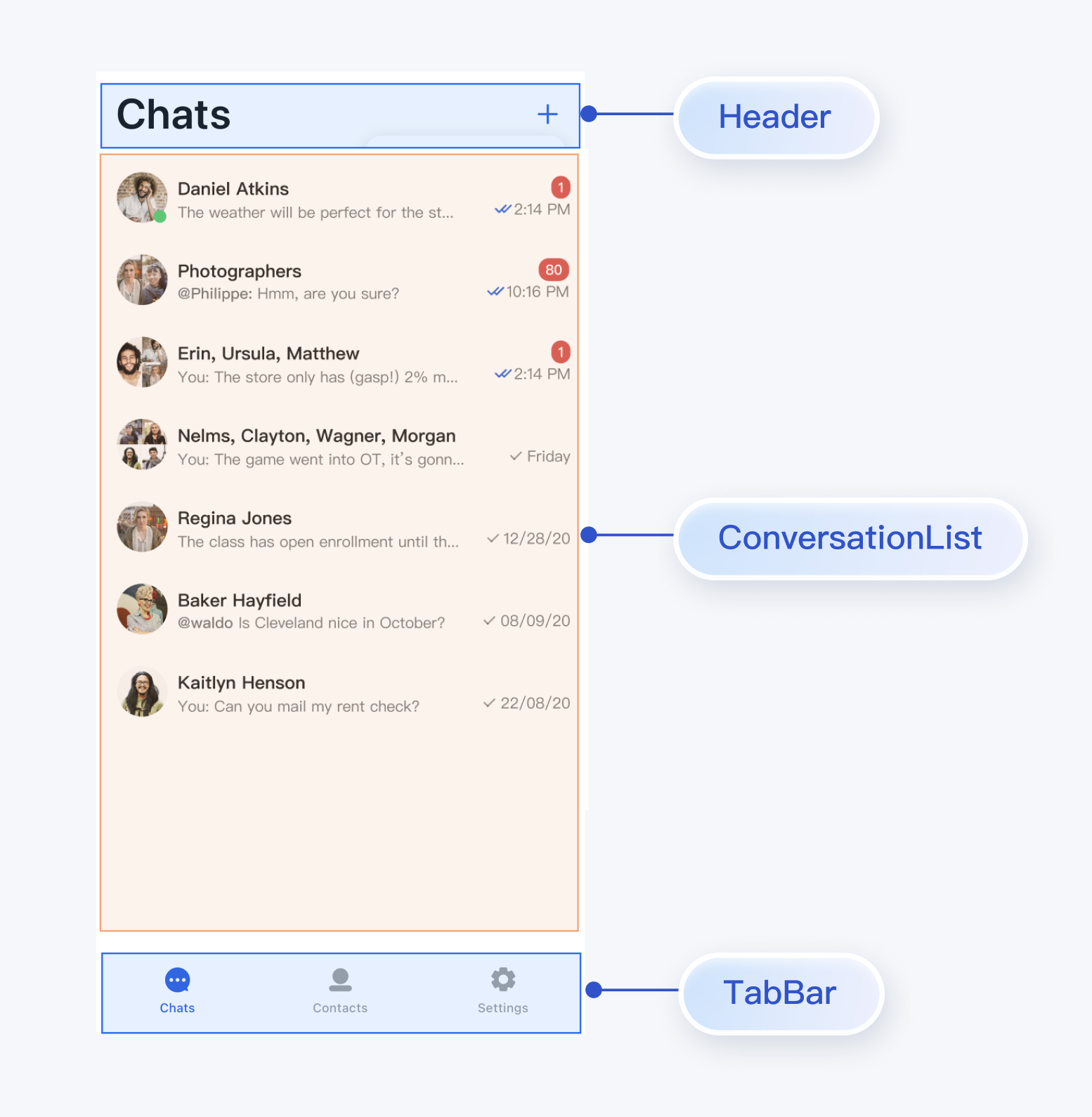
You can build a conversation list page based on the ConversationList component in TUIKit Compose. The built-in functions of ConversationList are:
|
|
303
|
+
- Display user's conversation list, including single chat and group chat conversations
|
|
188
304
|
|
|
305
|
+
- Support user operations on individual conversations: pin, delete, clear conversation messages, etc.
|
|
189
306
|
|
|
190
|
-
## Build Basic Interfaces
|
|
191
307
|
|
|
192
|
-
|
|
308
|
+
You can integrate ConversationList directly into existing App pages, or build a complete new conversation list page. One assembled UI effect is shown in the figure below:
|
|
193
309
|
|
|
194
|
-
|
|
195
|
-
- **How to handle error "Manifest merger failed : Attribute application@allowBackup value=(true) from AndroidManifest.xml"?**
|
|
310
|
+
|
|
196
311
|
|
|
197
312
|
|
|
198
|
-
|
|
199
|
-
You can delete the `allowBackup` property from the `AndroidManifest.xml` file to disable the backup and restore feature. You can also add `tools:replace="android:allowBackup"` to the `application` node of the `AndroidManifest.xml` file to overwrite the Chat SDK configuration with your own configuration.
|
|
313
|
+
To encapsulate ConversationList as a conversation list page, you can refer to the implementation in the `chat/uikit/src/main/java/io/trtc/tuikit/chat/pages/ConversationsPage.kt` file. `ConversationsPage` mainly does the following:
|
|
200
314
|
|
|
315
|
+
1. Added headerView above ConversationList.
|
|
201
316
|
|
|
202
|
-
|
|
317
|
+
2. Pass click conversation list cell events.
|
|
203
318
|
|
|
204
|
-
|
|
205
|
-
|
|
206
|
-
|
|
207
|
-
|
|
319
|
+
|
|
320
|
+
The core sample code is shown below:
|
|
321
|
+
|
|
322
|
+
``` swift
|
|
323
|
+
@Composable
|
|
324
|
+
fun ConversationsPage(
|
|
325
|
+
onConversationClick: (ConversationInfo) -> Unit = {},
|
|
326
|
+
editContent: @Composable () -> Unit = {},
|
|
327
|
+
) {
|
|
328
|
+
val colors = LocalTheme.current.colors
|
|
329
|
+
Column(
|
|
330
|
+
modifier = Modifier
|
|
331
|
+
.fillMaxSize()
|
|
332
|
+
.background(Colors.Transparent)
|
|
333
|
+
) {
|
|
208
334
|
|
|
209
|
-
|
|
210
|
-
|
|
211
|
-
|
|
212
|
-
android:icon="@mipmap/ic_launcher"
|
|
213
|
-
android:label="@string/app_name"
|
|
214
|
-
android:roundIcon="@mipmap/ic_launcher_round"
|
|
215
|
-
android:supportsRtl="true"
|
|
216
|
-
android:theme="@style/Theme.MyApplication"
|
|
217
|
-
tools:replace="android:allowBackup">
|
|
218
|
-
<activity android:name=".MainActivity">
|
|
219
|
-
<intent-filter>
|
|
220
|
-
<action android:name="android.intent.action.MAIN" />
|
|
221
|
-
<category android:name="android.intent.category.LAUNCHER" />
|
|
222
|
-
</intent-filter>
|
|
223
|
-
</activity>
|
|
224
|
-
</application>
|
|
335
|
+
PageHeader(stringResource(R.string.chat_uikit_chat)) {
|
|
336
|
+
editContent()
|
|
337
|
+
}
|
|
225
338
|
|
|
226
|
-
|
|
339
|
+
Box(modifier = Modifier.fillMaxSize(), contentAlignment = Alignment.Center) {
|
|
340
|
+
ConversationList(modifier = Modifier.navigationBarsPadding(), onConversationClick = onConversationClick)
|
|
341
|
+
}
|
|
342
|
+
}
|
|
343
|
+
}
|
|
227
344
|
```
|
|
228
|
-
- **How to handle error "NDK at /Users/***/Library/Android/sdk/ndk-bundle did not have a source.properties file"?**
|
|
229
345
|
|
|
346
|
+
### Step 4: Build Chat Interface
|
|
230
347
|
|
|
231
|
-
|
|
348
|
+
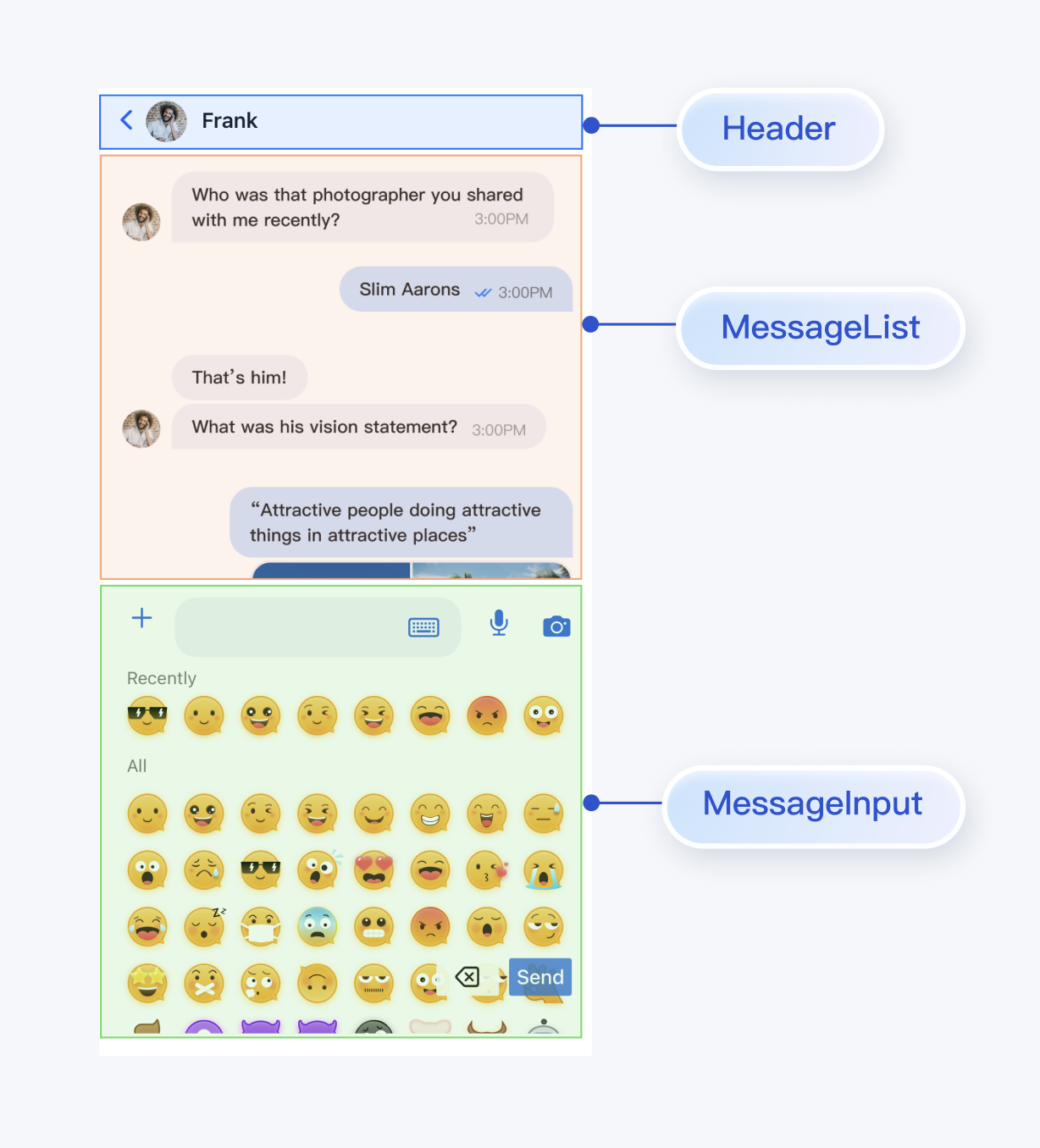
You can build a chat page based on the MessageList and MessageInput components in TUIKit Compose.
|
|
232
349
|
|
|
233
|
-
-
|
|
350
|
+
The built-in functions of MessageList are:
|
|
351
|
+
- Display single chat or group chat message lists.
|
|
234
352
|
|
|
353
|
+
- Support operations on individual messages: view large images of image messages, play video or voice messages, copy text messages, recall messages, delete messages, etc.
|
|
235
354
|
|
|
236
|
-
The possible cause is that your API level is lower than expected. You need to enable `MultiDex` support in the `build.gradle` file in App and add `multiDexEnabled true` and the corresponding dependencies:
|
|
237
355
|
|
|
238
|
-
|
|
239
|
-
|
|
240
|
-
|
|
241
|
-
|
|
242
|
-
|
|
243
|
-
|
|
244
|
-
|
|
245
|
-
|
|
356
|
+
The built-in functions of MessageInput are:
|
|
357
|
+
|
|
358
|
+
- Support users to compose and send various types of messages: text, emoji, images, voice, video, files, etc.
|
|
359
|
+
|
|
360
|
+
|
|
361
|
+
You can integrate MessageList and MessageInput directly into existing App pages, or build a complete new chat page. One assembled UI effect is shown in the figure below:
|
|
362
|
+
|
|
363
|
+
|
|
364
|
+
|
|
365
|
+
|
|
366
|
+
To assemble MessageList and MessageInput into a chat page, you can refer to the implementation in the `chat/uikit/src/main/java/io/trtc/tuikit/chat/pages/ChatPage.kt` file. `ChatPage` mainly does the following:
|
|
367
|
+
|
|
368
|
+
1. Added headerView at the top to display the conversation name.
|
|
369
|
+
|
|
370
|
+
2. Vertically concatenated MessageList and MessageInput according to mobile user habits.
|
|
371
|
+
|
|
372
|
+
|
|
373
|
+
The core sample code is shown below:
|
|
374
|
+
|
|
375
|
+
``` swift
|
|
376
|
+
@Composable
|
|
377
|
+
fun ChatPage(
|
|
378
|
+
conversationID: String,
|
|
379
|
+
locateMessage: MessageInfo? = null,
|
|
380
|
+
onUserClick: (String) -> Unit,
|
|
381
|
+
onChatHeaderClick: (String) -> Unit,
|
|
382
|
+
onBackClick: () -> Unit,
|
|
383
|
+
) {
|
|
246
384
|
...
|
|
247
|
-
|
|
248
|
-
|
|
249
|
-
|
|
385
|
+
|
|
386
|
+
val avatarUrl = conversationState.value?.avatarURL
|
|
387
|
+
val displayName = conversationState.value?.title
|
|
388
|
+
val colors = LocalTheme.current.colors
|
|
389
|
+
Scaffold(
|
|
390
|
+
modifier = Modifier
|
|
391
|
+
.background(color = colors.bgColorOperate)
|
|
392
|
+
.fillMaxSize()
|
|
393
|
+
.wrapContentHeight(), topBar = {
|
|
394
|
+
Box(
|
|
395
|
+
modifier = Modifier
|
|
396
|
+
.background(color = colors.bgColorOperate)
|
|
397
|
+
.fillMaxWidth()
|
|
398
|
+
.statusBarsPadding()
|
|
399
|
+
) {
|
|
400
|
+
ChatHeader(
|
|
401
|
+
avatarUrl = avatarUrl,
|
|
402
|
+
name = displayName ?: "",
|
|
403
|
+
onBackClick = onBackClick,
|
|
404
|
+
onAvatarClick = {
|
|
405
|
+
onChatHeaderClick(conversationID)
|
|
406
|
+
}
|
|
407
|
+
)
|
|
408
|
+
}
|
|
409
|
+
},
|
|
410
|
+
bottomBar = {
|
|
411
|
+
Box(
|
|
412
|
+
modifier = Modifier
|
|
413
|
+
.fillMaxWidth()
|
|
414
|
+
.background(color = colors.bgColorOperate)
|
|
415
|
+
) {
|
|
416
|
+
MessageInput(modifier = Modifier.navigationBarsPadding(), conversationID = conversationID)
|
|
417
|
+
}
|
|
418
|
+
|
|
419
|
+
}) { padding ->
|
|
420
|
+
Box(
|
|
421
|
+
modifier = Modifier
|
|
422
|
+
.padding(padding)
|
|
423
|
+
) {
|
|
424
|
+
MessageList(conversationID = conversationID, locateMessage = locateMessage) {
|
|
425
|
+
onUserClick(it)
|
|
426
|
+
}
|
|
427
|
+
}
|
|
428
|
+
}
|
|
250
429
|
}
|
|
251
430
|
```
|
|
252
431
|
|
|
253
|
-
|
|
432
|
+
### Step 5: Build Contact Interface
|
|
254
433
|
|
|
255
|
-
|
|
256
|
-
|
|
257
|
-
|
|
258
|
-
|
|
259
|
-
|
|
260
|
-
|
|
434
|
+
You can build a contact page based on the ContactList component in TUIKit Compose. The built-in functions of ContactList are:
|
|
435
|
+
- View friend request list.
|
|
436
|
+
|
|
437
|
+
- View joined group list.
|
|
438
|
+
|
|
439
|
+
- Handle group invitations and applications.
|
|
440
|
+
|
|
441
|
+
- Manage blacklist.
|
|
442
|
+
|
|
443
|
+
- View friends.
|
|
444
|
+
|
|
445
|
+
|
|
446
|
+
You can integrate ContactList directly into existing Apps, or build a complete new contact list page. One assembled UI effect is shown in the figure below:
|
|
447
|
+
|
|
448
|
+
|
|
449
|
+
|
|
450
|
+
|
|
451
|
+
To encapsulate ContactList as a contact list page, you can refer to the implementation in the `chat/uikit/src/main/java/io/trtc/tuikit/chat/pages/ContactsPage.kt` file. `ContactsPage` mainly does the following:
|
|
452
|
+
|
|
453
|
+
1. Added headerView above ContactList.
|
|
454
|
+
|
|
455
|
+
2. Pass click contact list cell events.
|
|
456
|
+
|
|
457
|
+
|
|
458
|
+
The core sample code is shown below:
|
|
459
|
+
|
|
460
|
+
``` swift
|
|
461
|
+
@Composable
|
|
462
|
+
fun ContactsPage(
|
|
463
|
+
onContactClick: (ContactInfo) -> Unit = {},
|
|
464
|
+
onGroupClick: (ContactInfo) -> Unit = {},
|
|
465
|
+
editContent: @Composable () -> Unit = {},
|
|
466
|
+
) {
|
|
467
|
+
|
|
468
|
+
val colors = LocalTheme.current.colors
|
|
469
|
+
Column(
|
|
470
|
+
modifier = Modifier
|
|
471
|
+
.fillMaxSize()
|
|
472
|
+
.background(Colors.Transparent)
|
|
473
|
+
) {
|
|
474
|
+
PageHeader(stringResource(R.string.chat_uikit_contacts)) {
|
|
475
|
+
editContent()
|
|
476
|
+
}
|
|
477
|
+
|
|
478
|
+
Box(
|
|
479
|
+
modifier = Modifier
|
|
480
|
+
.fillMaxSize()
|
|
481
|
+
.navigationBarsPadding(), contentAlignment = Alignment.Center
|
|
482
|
+
) {
|
|
483
|
+
ContactList(onGroupClick = onGroupClick, onContactClick = onContactClick)
|
|
484
|
+
}
|
|
261
485
|
}
|
|
262
486
|
}
|
|
263
487
|
```
|
|
264
|
-
- **How to handle error "Plugin with id 'kotlin-android' not found."?**
|
|
265
488
|
|
|
489
|
+
### Step 6: Improve Navigation Logic Between Interfaces
|
|
266
490
|
|
|
267
|
-
|
|
491
|
+
ConversationsPage, ChatPage, and ContactsPage expose some user click events. You can customize events to implement interactions between pages:
|
|
492
|
+
<table>
|
|
493
|
+
<tr>
|
|
494
|
+
<td rowspan="1" colSpan="1" >Page</td>
|
|
268
495
|
|
|
269
|
-
|
|
496
|
+
<td rowspan="1" colSpan="1" >Callback</td>
|
|
270
497
|
|
|
498
|
+
<td rowspan="1" colSpan="1" >Suggested Navigation Logic</td>
|
|
499
|
+
</tr>
|
|
271
500
|
|
|
272
|
-
|
|
501
|
+
<tr>
|
|
502
|
+
<td rowspan="1" colSpan="1" >**ConversationsPage**</td>
|
|
273
503
|
|
|
274
|
-
|
|
275
|
-
|
|
276
|
-
|
|
277
|
-
|
|
278
|
-
|
|
279
|
-
|
|
280
|
-
|
|
504
|
+
<td rowspan="1" colSpan="1" >`onConversationClick: (ConversationInfo) -> Unit`</td>
|
|
505
|
+
|
|
506
|
+
<td rowspan="1" colSpan="1" >Triggered when clicking a conversation in the conversation list, suggest navigating to chat page (ChatPage).</td>
|
|
507
|
+
</tr>
|
|
508
|
+
|
|
509
|
+
<tr>
|
|
510
|
+
<td rowspan="2" colSpan="1" >**ContactsPage**</td>
|
|
511
|
+
|
|
512
|
+
<td rowspan="1" colSpan="1" >`onContactClick: (ContactInfo) -> Unit`</td>
|
|
513
|
+
|
|
514
|
+
<td rowspan="1" colSpan="1" >Triggered when clicking a contact cell, suggest navigating to user info page (C2CChatSetting).</td>
|
|
515
|
+
</tr>
|
|
516
|
+
|
|
517
|
+
<tr>
|
|
518
|
+
<td rowspan="1" colSpan="1" >`onGroupClick: (ContactInfo) -> Unit`</td>
|
|
519
|
+
|
|
520
|
+
<td rowspan="1" colSpan="1" >Triggered when clicking a group cell, suggest navigating to group chat page (ChatPage).</td>
|
|
521
|
+
</tr>
|
|
522
|
+
|
|
523
|
+
<tr>
|
|
524
|
+
<td rowspan="3" colSpan="1" >**ChatPage**</td>
|
|
525
|
+
|
|
526
|
+
<td rowspan="1" colSpan="1" >`onUserClick: (String) -> Unit`</td>
|
|
527
|
+
|
|
528
|
+
<td rowspan="1" colSpan="1" >Triggered when clicking user avatar or nickname in messages, suggest navigating to user info page (C2CChatSetting).</td>
|
|
529
|
+
</tr>
|
|
530
|
+
|
|
531
|
+
<tr>
|
|
532
|
+
<td rowspan="1" colSpan="1" >`onChatHeaderClick: (String) -> Unit`</td>
|
|
533
|
+
|
|
534
|
+
<td rowspan="1" colSpan="1" >Triggered when clicking avatar in navigation bar, suggest navigating to user info page (C2CChatSetting) or group chat info page (GroupChatSetting)</td>
|
|
535
|
+
</tr>
|
|
536
|
+
|
|
537
|
+
<tr>
|
|
538
|
+
<td rowspan="1" colSpan="1" >`onBackClick: () -> Unit`</td>
|
|
539
|
+
|
|
540
|
+
<td rowspan="1" colSpan="1" >Triggered when clicking back button, suggest returning to previous page.</td>
|
|
541
|
+
</tr>
|
|
542
|
+
</table>
|
|
543
|
+
|
|
544
|
+
|
|
545
|
+
**chat/demo/app/src/main/java/io/trtc/tuikit/chat/MainActivity.kt** and **chat/demo/app/src/main/java/io/trtc/tuikit/chat/chat/ChatActivity.kt** serve as the glue layer for the above Pages, implementing callback events for each Page. The core sample code is as follows:
|
|
546
|
+
``` java
|
|
547
|
+
// chat/demo/app/src/main/java/io/trtc/tuikit/chat/MainActivity.kt
|
|
548
|
+
|
|
549
|
+
// Click conversation list cell to navigate
|
|
550
|
+
ConversationsPage(onConversationClick = {
|
|
551
|
+
activity?.startActivity(
|
|
552
|
+
Intent(activity, ChatActivity::class.java).apply {
|
|
553
|
+
putExtra("conversationID", it.conversationID)
|
|
554
|
+
}
|
|
555
|
+
)
|
|
556
|
+
})
|
|
281
557
|
|
|
282
|
-
|
|
558
|
+
// Click contact page to navigate
|
|
559
|
+
ContactsPage(onGroupClick = {
|
|
560
|
+
ChatSettingActivity.start(context, "", it.contactID, true)
|
|
561
|
+
}, onContactClick = {
|
|
562
|
+
ChatSettingActivity.start(context, it.contactID, "", true)
|
|
563
|
+
})
|
|
564
|
+
```
|
|
565
|
+
``` java
|
|
566
|
+
// chat/demo/app/src/main/java/io/trtc/tuikit/chat/chat/ChatActivity.kt
|
|
283
567
|
|
|
284
|
-
|
|
568
|
+
// Click chat page to navigate
|
|
569
|
+
ChatPage(
|
|
570
|
+
conversationID = conversationID,
|
|
571
|
+
locateMessage = message,
|
|
572
|
+
onUserClick = {
|
|
573
|
+
handleChatSettingNavigation(it)
|
|
574
|
+
}, onChatHeaderClick = {
|
|
575
|
+
val userID = getUserID(conversationID)
|
|
576
|
+
val groupID = getGroupID(conversationID)
|
|
577
|
+
handleChatSettingNavigation(userID, groupID)
|
|
578
|
+
}, onBackClick = { finish() })
|
|
579
|
+
```
|
|
285
580
|
|
|
581
|
+
You can refer to the above callback descriptions and reference code to implement interaction logic between Pages.
|
|
286
582
|
|
|
287
583
|
|