@tencent-rtc/mcp 1.3.8 → 1.3.9
This diff represents the content of publicly available package versions that have been released to one of the supported registries. The information contained in this diff is provided for informational purposes only and reflects changes between package versions as they appear in their respective public registries.
- package/package.json +1 -1
- package/resource/doc/chatuikit/android/integration.md +499 -203
- package/resource/doc/chatuikit/android/workflow.md +713 -0
- package/resource/doc/chatuikit/flutter/integration.md +1 -1
- package/resource/doc/livekit/voice/android/voice-audience-list.md +334 -0
- package/resource/doc/livekit/voice/android/voice-audio-effect.md +380 -0
- package/resource/doc/livekit/voice/android/voice-barrage.md +565 -0
- package/resource/doc/livekit/voice/android/voice-co-guest-interaction.md +745 -0
- package/resource/doc/livekit/voice/android/voice-gift.md +822 -0
- package/resource/doc/livekit/voice/android/voice-host-interaction.md +703 -0
- package/resource/doc/livekit/voice/android/voice-integration.md +940 -0
- package/resource/doc/livekit/voice/android/voice-room-list.md +575 -0
- package/resource/doc/livekit/voice/flutter/voice-co-guest-interaction.md +675 -0
- package/resource/doc/livekit/voice/flutter/voice-integration.md +936 -0
- package/resource/doc/livekit/voice/ios/voice-audience-list.md +339 -0
- package/resource/doc/livekit/voice/ios/voice-audio-effect.md +370 -0
- package/resource/doc/livekit/voice/ios/voice-barrage.md +517 -0
- package/resource/doc/livekit/voice/ios/voice-co-guest-interaction.md +708 -0
- package/resource/doc/livekit/voice/ios/voice-gift.md +783 -0
- package/resource/doc/livekit/voice/ios/voice-host-interaction.md +770 -0
- package/resource/doc/livekit/voice/ios/voice-integration.md +898 -0
- package/resource/doc/livekit/voice/ios/voice-room-list.md +485 -0
- package/resource/doc/roomkit/vue/integration.md +179 -288
- package/resource/doc/roomkit/vue/workflow.md +499 -253
- package/resource/doc/tuicallkit/android/integration.md +539 -83
- package/resource/doc/tuicallkit/android/workflow.md +441 -0
- package/tools/common/present-scenario-choice.js +16 -0
- package/tools/common/present-scenario-choice.js.map +1 -0
- package/tools/definitions/get_native_call_uikit_integration_def.js +25 -9
- package/tools/definitions/get_native_call_uikit_integration_def.js.map +1 -1
- package/tools/definitions/get_native_chat_uikit_integration_def.js +36 -14
- package/tools/definitions/get_native_chat_uikit_integration_def.js.map +1 -1
- package/tools/definitions/get_native_live_uikit_integration_def.js +55 -29
- package/tools/definitions/get_native_live_uikit_integration_def.js.map +1 -1
- package/tools/definitions/get_native_live_uikit_interaction_def.js +43 -54
- package/tools/definitions/get_native_live_uikit_interaction_def.js.map +1 -1
- package/tools/definitions/get_web_room_feature_detail_def.js +52 -55
- package/tools/definitions/get_web_room_feature_detail_def.js.map +1 -1
- package/tools/definitions/get_web_room_uikit_integration_def.js +41 -25
- package/tools/definitions/get_web_room_uikit_integration_def.js.map +1 -1
- package/tools/definitions/present_scenario_choice_def.js +53 -0
- package/tools/definitions/present_scenario_choice_def.js.map +1 -0
- package/tools/definitions/record_prompt_def.js +26 -21
- package/tools/definitions/record_prompt_def.js.map +1 -1
- package/tools/definitions/record_result_def.js +20 -4
- package/tools/definitions/record_result_def.js.map +1 -1
- package/tools/index.js +2 -0
- package/tools/index.js.map +1 -1
- package/tools/live/get-native-live-uikit-integration.js +110 -34
- package/tools/live/get-native-live-uikit-integration.js.map +1 -1
- package/tools/live/get_native_live_uikit_interaction.js +128 -35
- package/tools/live/get_native_live_uikit_interaction.js.map +1 -1
- package/utils/report-cls-client.js +1 -1
- package/utils/report-es-client.js +1 -1
|
@@ -1,32 +1,37 @@
|
|
|
1
|
-
TUIRoomKit is an audio/video
|
|
1
|
+
TUIRoomKit is an audio/video room UI application launched by Tencent Cloud. This upgrade introduces a brand new atomic component integration solution, allowing developers to flexibly combine these atomic components to build personalized audio/video room interfaces.
|
|
2
2
|
|
|
3
|
-
|
|
3
|
+
> **Recommended: Use More Efficient AI Integration Assistant**
|
|
4
|
+
>
|
|
4
5
|
|
|
5
|
-
>
|
|
6
|
+
> We provide you with a brand new AI integration method. Simply describe your requirements to automatically generate integration code, greatly improving development efficiency.
|
|
6
7
|
>
|
|
7
8
|
|
|
8
|
-
>
|
|
9
|
+
> [Click here to experience AI integration immediately](https://cloud.tencent.com/document/product/647/127873)
|
|
9
10
|
>
|
|
10
11
|
|
|
11
12
|
|
|
12
|
-
|
|
13
|
+
This document describes how to integrate TUIRoomKit into existing Vue3 projects, and how to customize TUIRoomKit's styles, layouts, and functionality.
|
|
14
|
+
- Desktop Multi-person Conference
|
|
13
15
|
|
|
16
|
+
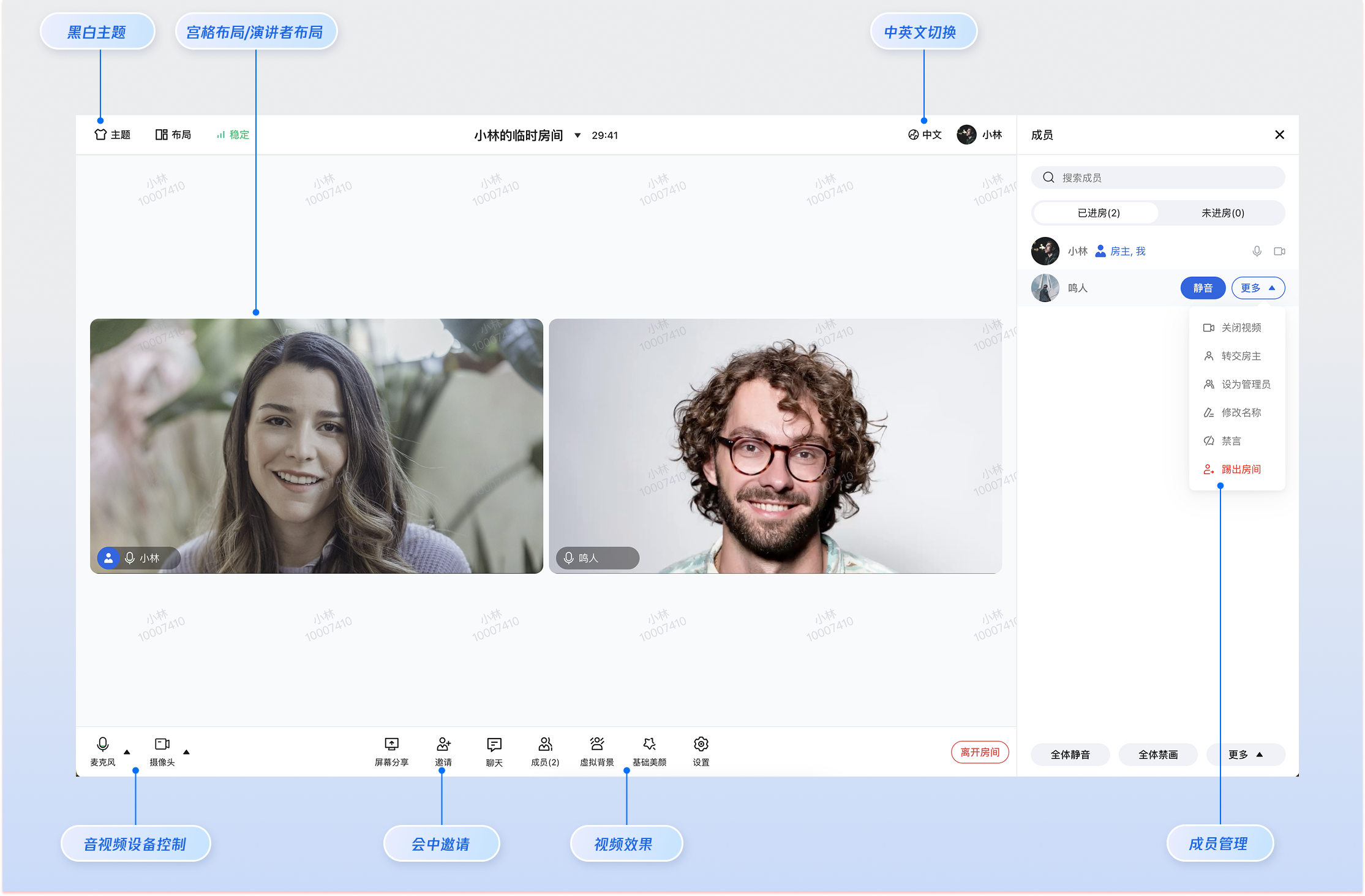
|
|
14
17
|
|
|
15
|
-
|
|
18
|
+
- H5 Multi-person Conference
|
|
19
|
+
|
|
20
|
+
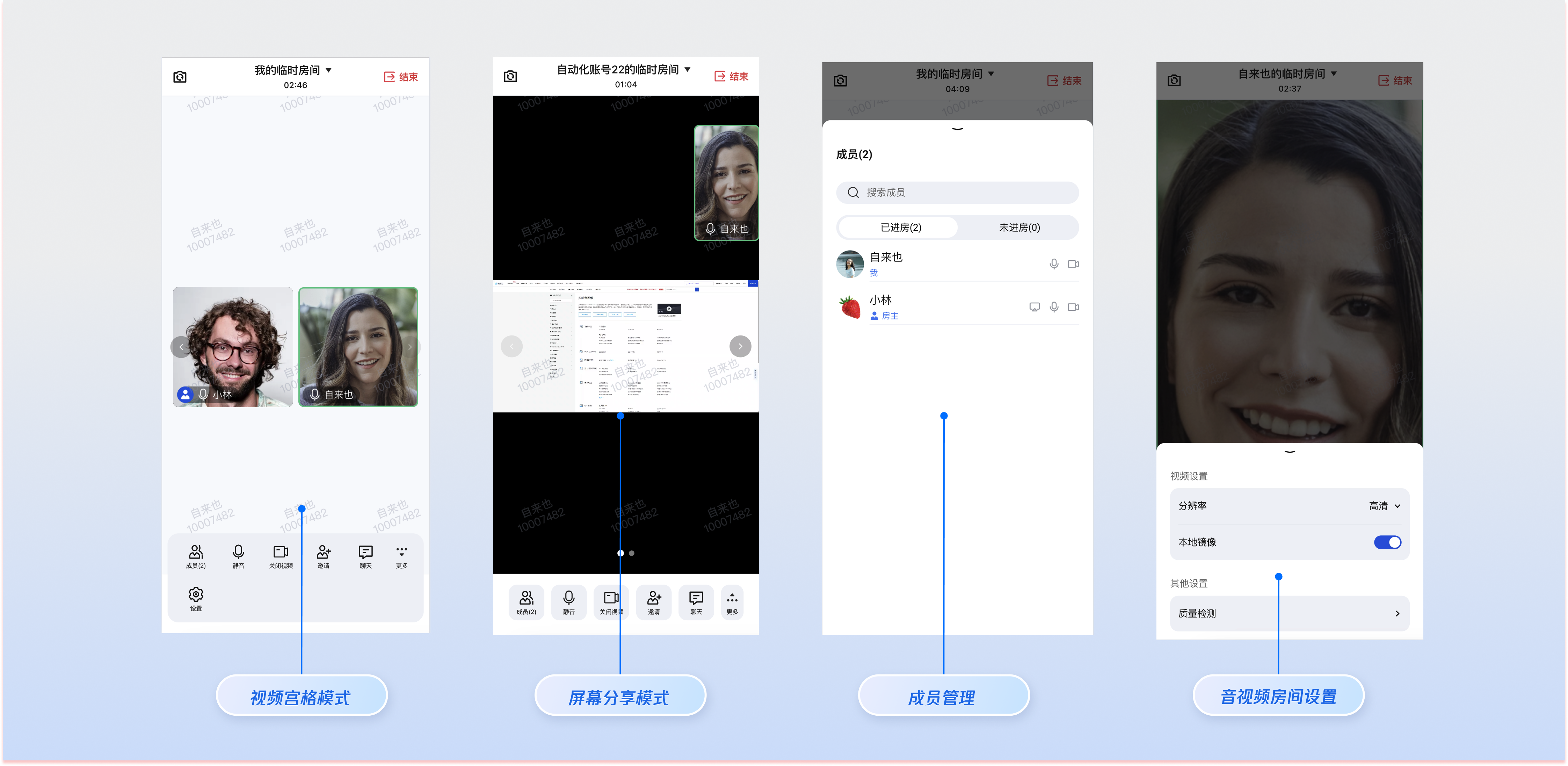
|
|
16
21
|
|
|
17
22
|
|
|
18
23
|
## Prerequisites
|
|
19
24
|
|
|
20
|
-
###
|
|
25
|
+
### Service Activation
|
|
21
26
|
|
|
22
|
-
Please refer to [
|
|
27
|
+
Please refer to [Service Activation](https://cloud.tencent.com/document/product/647/104842) to get the TUIRoomKit trial version, and obtain the following information from the [Application Management](https://console.cloud.tencent.com/trtc) page:
|
|
23
28
|
- **SDKAppID**: Application identifier, Tencent Cloud completes billing statistics based on `SDKAppID`.
|
|
24
29
|
|
|
25
|
-
- **SDKSecretKey**: Application secret key, used for
|
|
30
|
+
- **SDKSecretKey**: Application secret key, used for key information in initialization configuration files.
|
|
26
31
|
|
|
27
32
|
|
|
28
33
|
### Environment Preparation
|
|
29
|
-
- **Node.js**: ≥ 18.19.1 (
|
|
34
|
+
- **Node.js**: ≥ 18.19.1 (Recommended to use official LTS version).
|
|
30
35
|
|
|
31
36
|
- **Vue**: ≥ 3.4.21.
|
|
32
37
|
|
|
@@ -46,289 +51,145 @@ Install the following dependencies in your business project.
|
|
|
46
51
|
|
|
47
52
|
【npm】
|
|
48
53
|
``` bash
|
|
49
|
-
npm install tuikit-atomicx-vue3 @tencentcloud/uikit-base-component-vue3 @tencentcloud/
|
|
54
|
+
npm install @tencentcloud/roomkit-web-vue3@latest tuikit-atomicx-vue3 @tencentcloud/uikit-base-component-vue3 @tencentcloud/universal-api
|
|
50
55
|
```
|
|
51
56
|
|
|
52
57
|
|
|
53
58
|
【pnpm】
|
|
54
59
|
``` bash
|
|
55
|
-
pnpm install tuikit-atomicx-vue3 @tencentcloud/uikit-base-component-vue3 @tencentcloud/
|
|
60
|
+
pnpm install @tencentcloud/roomkit-web-vue3@latest tuikit-atomicx-vue3 @tencentcloud/uikit-base-component-vue3 @tencentcloud/universal-api
|
|
56
61
|
```
|
|
57
62
|
|
|
58
63
|
|
|
59
64
|
【yarn】
|
|
60
65
|
``` bash
|
|
61
|
-
yarn add tuikit-atomicx-vue3 @tencentcloud/uikit-base-component-vue3 @tencentcloud/
|
|
62
|
-
```
|
|
63
|
-
|
|
64
|
-
### Step 2: Configure Development Environment
|
|
65
|
-
|
|
66
|
-
If your project does not yet support TypeScript and SCSS, please install the corresponding environment dependencies first. If already installed, you can skip this step.
|
|
67
|
-
|
|
68
|
-
|
|
69
|
-
|
|
70
|
-
|
|
71
|
-
【npm】
|
|
72
|
-
``` bash
|
|
73
|
-
npm install typescript sass -S -D
|
|
66
|
+
yarn add @tencentcloud/roomkit-web-vue3@latest tuikit-atomicx-vue3 @tencentcloud/uikit-base-component-vue3 @tencentcloud/universal-api
|
|
74
67
|
```
|
|
75
68
|
|
|
69
|
+
### Step 2: **Import **TUIRoomKit** Components**
|
|
70
|
+
``` typescript
|
|
71
|
+
<template>
|
|
72
|
+
<ConferenceMainView v-if="isPC"></ConferenceMainView>
|
|
73
|
+
<ConferenceMainViewH5 v-else></ConferenceMainViewH5>
|
|
74
|
+
</template>
|
|
75
|
+
<script setup>
|
|
76
|
+
import { ref } from 'vue';
|
|
77
|
+
import { ConferenceMainView, ConferenceMainViewH5 } from '@tencentcloud/roomkit-web-vue3';
|
|
78
|
+
import { getPlatform } from '@tencentcloud/universal-api';
|
|
79
|
+
|
|
80
|
+
const isPC = ref(getPlatform() === 'pc');
|
|
81
|
+
</script>
|
|
76
82
|
|
|
77
|
-
【pnpm】
|
|
78
|
-
``` bash
|
|
79
|
-
pnpm install typescript sass -S -D
|
|
80
83
|
```
|
|
81
84
|
|
|
85
|
+
### Step 3: Configure App.vue File
|
|
82
86
|
|
|
83
|
-
|
|
84
|
-
|
|
85
|
-
yarn add typescript sass -S -D
|
|
86
|
-
```
|
|
87
|
-
|
|
88
|
-
### Step 3: Copy Core Source Code Files
|
|
87
|
+
Merge the following content into your project's App.vue file to configure global UI styles and user login logic:
|
|
88
|
+
- Configure global `UIKitProvider`: Import the `UIKitProvider` component and set default theme and language;
|
|
89
89
|
|
|
90
|
-
|
|
91
|
-
``` bash
|
|
92
|
-
git clone https://github.com/Tencent-RTC/TUIRoomKit.git --depth=1
|
|
93
|
-
cd TUIRoomKit/Web/example/atomicx-vite-vue3-ts
|
|
94
|
-
```
|
|
90
|
+
- User Login: Execute `login` and `setSelfInfo` in the `onMounted` hook;
|
|
95
91
|
|
|
96
|
-
|
|
92
|
+
``` typescript
|
|
93
|
+
<template>
|
|
94
|
+
<!-- Step 1: Configure global UIKitProvider -->
|
|
95
|
+
<UIKitProvider theme="light" language="en-US">
|
|
96
|
+
<!-- Your business component containing ConferenceMainView -->
|
|
97
|
+
</UIKitProvider>
|
|
98
|
+
</template>
|
|
99
|
+
|
|
100
|
+
<script setup>
|
|
101
|
+
import { UIKitProvider } from '@tencentcloud/uikit-base-component-vue3';
|
|
102
|
+
import { onMounted } from 'vue';
|
|
103
|
+
import { useLoginState } from 'tuikit-atomicx-vue3/room';
|
|
104
|
+
|
|
105
|
+
// step 2: User login
|
|
106
|
+
const { login, setSelfInfo } = useLoginState();
|
|
107
|
+
const SDKAppID = 0; // Note: Please replace with SDKAppID obtained from TRTC Console
|
|
108
|
+
const userId = 'Enter your real userId'; // Note: Please replace with real userId
|
|
109
|
+
const userName = 'Enter your real userName'; // Note: Please replace with real userName
|
|
110
|
+
const userSig = 'Enter your real userSig'; // Note: For generating temporary userSig, please refer to https://cloud.tencent.com/document/product/647/17275#console
|
|
111
|
+
onMounted(async () => {
|
|
112
|
+
try {
|
|
113
|
+
await login({
|
|
114
|
+
userId,
|
|
115
|
+
userSig,
|
|
116
|
+
sdkAppId: SDKAppID,
|
|
117
|
+
});
|
|
118
|
+
await setSelfInfo({
|
|
119
|
+
userName,
|
|
120
|
+
avatarUrl: '',
|
|
121
|
+
});
|
|
122
|
+
} catch (error: any) {
|
|
123
|
+
console.error('Login failed:', error);
|
|
124
|
+
}
|
|
125
|
+
});
|
|
126
|
+
</script>
|
|
127
|
+
|
|
128
|
+
<!-- Step 3: Configure global styles (These styles override default styles of scaffolded new projects, configure as needed)-->
|
|
129
|
+
<style>
|
|
130
|
+
html, body {
|
|
131
|
+
padding: 0 !important;
|
|
132
|
+
margin: 0 !important;
|
|
133
|
+
}
|
|
134
|
+
|
|
135
|
+
#app {
|
|
136
|
+
width: 100% !important;
|
|
137
|
+
height: 100% !important;
|
|
138
|
+
padding: 0 !important;
|
|
139
|
+
margin: 0 !important;
|
|
140
|
+
max-width: 100% !important;
|
|
141
|
+
max-height: 100% !important;
|
|
142
|
+
text-align: left !important;
|
|
143
|
+
overflow: hidden;
|
|
144
|
+
}
|
|
145
|
+
</style>
|
|
146
|
+
```
|
|
147
|
+
|
|
148
|
+
### Step 4: Start New Conference
|
|
149
|
+
|
|
150
|
+
Conference hosts can start a new conference by calling the `conference.start` interface. Other participants can refer to the description in [Step 6](https://write.woa.com/#061c9593-1112-4763-aff2-7289b3af0c41) and call the `conference.join` interface to join the conference.
|
|
97
151
|
|
|
98
152
|
> **Note:**
|
|
99
153
|
>
|
|
100
154
|
|
|
101
|
-
>
|
|
102
|
-
>
|
|
103
|
-
|
|
104
|
-
<table>
|
|
105
|
-
<tr>
|
|
106
|
-
<td rowspan="1" colSpan="1" >Source Path (Sample Project)</td>
|
|
107
|
-
|
|
108
|
-
<td rowspan="1" colSpan="1" >Target Path (Your Project)</td>
|
|
109
|
-
|
|
110
|
-
<td rowspan="1" colSpan="1" >Description</td>
|
|
111
|
-
</tr>
|
|
112
|
-
|
|
113
|
-
<tr>
|
|
114
|
-
<td rowspan="1" colSpan="1" >src/assets/</td>
|
|
115
|
-
|
|
116
|
-
<td rowspan="1" colSpan="1" >src/assets/</td>
|
|
117
|
-
|
|
118
|
-
<td rowspan="1" colSpan="1" >Contains static resources such as background images and icons.</td>
|
|
119
|
-
</tr>
|
|
120
|
-
|
|
121
|
-
<tr>
|
|
122
|
-
<td rowspan="1" colSpan="1" >src/components/</td>
|
|
123
|
-
|
|
124
|
-
<td rowspan="1" colSpan="1" >src/components/</td>
|
|
125
|
-
|
|
126
|
-
<td rowspan="1" colSpan="1" >Contains all TUIRoomKit atomic UI components</td>
|
|
127
|
-
</tr>
|
|
128
|
-
|
|
129
|
-
<tr>
|
|
130
|
-
<td rowspan="1" colSpan="1" >src/hooks/</td>
|
|
131
|
-
|
|
132
|
-
<td rowspan="1" colSpan="1" >src/hooks/</td>
|
|
133
|
-
|
|
134
|
-
<td rowspan="1" colSpan="1" >Contains TUIRoomKit business logic processing</td>
|
|
135
|
-
</tr>
|
|
136
|
-
|
|
137
|
-
<tr>
|
|
138
|
-
<td rowspan="1" colSpan="1" >src/i18n/</td>
|
|
139
|
-
|
|
140
|
-
<td rowspan="1" colSpan="1" >src/i18n/</td>
|
|
141
|
-
|
|
142
|
-
<td rowspan="1" colSpan="1" >Contains multi-language configuration files</td>
|
|
143
|
-
</tr>
|
|
144
|
-
|
|
145
|
-
<tr>
|
|
146
|
-
<td rowspan="1" colSpan="1" >src/utils/</td>
|
|
147
|
-
|
|
148
|
-
<td rowspan="1" colSpan="1" >src/utils/</td>
|
|
149
|
-
|
|
150
|
-
<td rowspan="1" colSpan="1" >Contains common utility functions</td>
|
|
151
|
-
</tr>
|
|
152
|
-
|
|
153
|
-
<tr>
|
|
154
|
-
<td rowspan="1" colSpan="1" >src/config/</td>
|
|
155
|
-
|
|
156
|
-
<td rowspan="1" colSpan="1" >src/config/</td>
|
|
157
|
-
|
|
158
|
-
<td rowspan="1" colSpan="1" >Contains `basic-info-config.js` and other application configuration information (focus on this file for first-time integration)</td>
|
|
159
|
-
</tr>
|
|
160
|
-
|
|
161
|
-
<tr>
|
|
162
|
-
<td rowspan="1" colSpan="1" >src/views/home.vue</td>
|
|
163
|
-
|
|
164
|
-
<td rowspan="1" colSpan="1" >src/views/home.vue</td>
|
|
165
|
-
|
|
166
|
-
<td rowspan="1" colSpan="1" >This page contains device detection and room creation/join entry features</td>
|
|
167
|
-
</tr>
|
|
168
|
-
|
|
169
|
-
<tr>
|
|
170
|
-
<td rowspan="1" colSpan="1" >src/views/room.vue</td>
|
|
171
|
-
|
|
172
|
-
<td rowspan="1" colSpan="1" >src/views/room.vue</td>
|
|
173
|
-
|
|
174
|
-
<td rowspan="1" colSpan="1" >This page is the core meeting interface of TUIRoomKit, integrating complete header, video layout, control bar and sidebar panels</td>
|
|
175
|
-
</tr>
|
|
176
|
-
</table>
|
|
177
|
-
|
|
178
|
-
|
|
179
|
-
### Step 4: Configure Page Routes
|
|
180
|
-
|
|
181
|
-
Please configure your Vue Router to map home.vue to the homepage and room.vue to the meeting room page.
|
|
182
|
-
|
|
183
|
-
> **Note:**
|
|
155
|
+
> Please refer to Step 3 and call the `conference.start` interface to start a conference after successful user login.
|
|
184
156
|
>
|
|
185
|
-
> - If your business project already has a `src/router/index.ts` file, please merge the following content into the existing code.
|
|
186
|
-
> - If routes have not been configured yet, please create a new `src/router/index.ts` file and add the following configuration.
|
|
187
157
|
|
|
188
158
|
``` typescript
|
|
189
|
-
|
|
190
|
-
|
|
191
|
-
|
|
192
|
-
|
|
193
|
-
|
|
194
|
-
|
|
195
|
-
history: createWebHistory(),
|
|
196
|
-
routes: [
|
|
197
|
-
{
|
|
198
|
-
path: '/',
|
|
199
|
-
redirect: '/home',
|
|
159
|
+
import { conference } from '@tencentcloud/roomkit-web-vue3';
|
|
160
|
+
const startConference = async () => {
|
|
161
|
+
await conference.start({
|
|
162
|
+
roomId: '123456', // Please replace with your real roomId
|
|
163
|
+
options: {
|
|
164
|
+
roomName: 'My Temporary Conference',
|
|
200
165
|
},
|
|
201
|
-
|
|
202
|
-
|
|
203
|
-
|
|
204
|
-
component: Home,
|
|
205
|
-
},
|
|
206
|
-
{
|
|
207
|
-
path: '/room',
|
|
208
|
-
name: 'Room',
|
|
209
|
-
component: Room,
|
|
210
|
-
},
|
|
211
|
-
],
|
|
212
|
-
});
|
|
213
|
-
|
|
214
|
-
export default router;
|
|
166
|
+
});
|
|
167
|
+
}
|
|
168
|
+
startConference();
|
|
215
169
|
```
|
|
216
170
|
|
|
217
|
-
### Step 5:
|
|
218
|
-
|
|
219
|
-
You need to merge the following content into the App.vue file in your project to configure global UI styles and user login logic:
|
|
220
|
-
- Configure global `UIKitProvider`: Import the `UIKitProvider` component and set default theme and language;
|
|
171
|
+
### Step 5: Join Existing Conference
|
|
221
172
|
|
|
222
|
-
|
|
223
|
-
|
|
224
|
-
- User login: Execute login and setSelfInfo in the `onMounted` hook;
|
|
225
|
-
|
|
226
|
-
``` typescript
|
|
227
|
-
<template>
|
|
228
|
-
<!-- Step 1: Configure global UIKitProvider -->
|
|
229
|
-
<UIKitProvider theme="light" language="zh-CN">
|
|
230
|
-
<!-- Step 2: Import page routes -->
|
|
231
|
-
<router-view />
|
|
232
|
-
</UIKitProvider>
|
|
233
|
-
</template>
|
|
234
|
-
|
|
235
|
-
<!-- Note: Add lang="ts" to enable TypeScript support -->
|
|
236
|
-
<script setup lang="ts">
|
|
237
|
-
import { UIKitProvider } from '@tencentcloud/uikit-base-component-vue3';
|
|
238
|
-
import { onMounted } from 'vue';
|
|
239
|
-
import { SDKAPPID, genTestUserSig } from './config/basic-info-config';
|
|
240
|
-
import { RoomEvent, useLoginState, useRoomModal } from 'tuikit-atomicx-vue3/room';
|
|
241
|
-
|
|
242
|
-
// step 3: User login
|
|
243
|
-
const { login, setSelfInfo } = useLoginState();
|
|
244
|
-
const { handleErrorWithModal } = useRoomModal();
|
|
245
|
-
const userId = `user_${Math.ceil(Math.random(0,1)*999)}`;
|
|
246
|
-
const userName = userId;
|
|
247
|
-
const userSig = genTestUserSig(userId);
|
|
248
|
-
onMounted(async () => {
|
|
249
|
-
try {
|
|
250
|
-
await login({
|
|
251
|
-
userId,
|
|
252
|
-
userSig,
|
|
253
|
-
sdkAppId: SDKAPPID,
|
|
254
|
-
});
|
|
255
|
-
await setSelfInfo({
|
|
256
|
-
userName,
|
|
257
|
-
avatarUrl: '',
|
|
258
|
-
});
|
|
259
|
-
} catch (error: any) {
|
|
260
|
-
console.error('Login failed:', error);
|
|
261
|
-
handleErrorWithModal(error);
|
|
262
|
-
}
|
|
263
|
-
});
|
|
264
|
-
</script>
|
|
265
|
-
|
|
266
|
-
<!-- Step 4: Configure global styles (these styles are used to override default styles of new projects built with scaffolding, can be configured as needed) -->
|
|
267
|
-
<style>
|
|
268
|
-
html, body {
|
|
269
|
-
padding: 0 !important;
|
|
270
|
-
margin: 0 !important;
|
|
271
|
-
}
|
|
272
|
-
|
|
273
|
-
#app {
|
|
274
|
-
width: 100% !important;
|
|
275
|
-
height: 100% !important;
|
|
276
|
-
padding: 0 !important;
|
|
277
|
-
margin: 0 !important;
|
|
278
|
-
max-width: 100% !important;
|
|
279
|
-
max-height: 100% !important;
|
|
280
|
-
text-align: left !important;
|
|
281
|
-
overflow: hidden;
|
|
282
|
-
}
|
|
283
|
-
</style>
|
|
284
|
-
```
|
|
285
|
-
|
|
286
|
-
### Step 6: Configure src/main.ts File
|
|
287
|
-
|
|
288
|
-
Merge the route and multi-language configuration into the entry file src/main.ts in your project:
|
|
173
|
+
Participants can join a conference started by the conference host in [Step 4](https://write.woa.com/#7e2fb3c2-2b17-4445-985d-4af641ff66be) by calling the `conference.join` interface and filling in the corresponding roomId parameter.
|
|
289
174
|
|
|
290
175
|
> **Note:**
|
|
291
176
|
>
|
|
292
177
|
|
|
293
|
-
>
|
|
178
|
+
> Please refer to Step 3 and call the `conference.join` interface to join a conference after successful user login.
|
|
294
179
|
>
|
|
295
180
|
|
|
296
181
|
``` typescript
|
|
297
|
-
|
|
298
|
-
|
|
299
|
-
|
|
300
|
-
//
|
|
301
|
-
|
|
302
|
-
|
|
303
|
-
|
|
304
|
-
|
|
305
|
-
// Step 2: Configure multi-language resources
|
|
306
|
-
import { i18next } from '@tencentcloud/uikit-base-component-vue3';
|
|
307
|
-
import { enResource, zhResource } from './i18n';
|
|
308
|
-
export const addI18n = (lng: string, resource: any, deep = true, overwrite = false) => {
|
|
309
|
-
i18next.addResourceBundle(lng, 'translation', resource.translation, deep, overwrite);
|
|
310
|
-
};
|
|
311
|
-
addI18n('en-US', { translation: enResource }, true, true);
|
|
312
|
-
addI18n('zh-CN', { translation: zhResource }, true, true);
|
|
182
|
+
import { conference } from '@tencentcloud/roomkit-web-vue3';
|
|
183
|
+
const joinConference = async () => {
|
|
184
|
+
await conference.join({
|
|
185
|
+
roomId: '123456', // Please replace with your real roomId
|
|
186
|
+
});
|
|
187
|
+
}
|
|
188
|
+
joinConference();
|
|
313
189
|
```
|
|
314
190
|
|
|
315
191
|
## Start Project
|
|
316
192
|
|
|
317
|
-
### Configure Application Information
|
|
318
|
-
|
|
319
|
-
Find the `src/config/basic-info-config.js` configuration file in your project directory, and fill in the `SDKAppID` and `SDKSecretKey` you obtained from the Tencent Cloud Console into the corresponding variables.
|
|
320
|
-
|
|
321
|
-
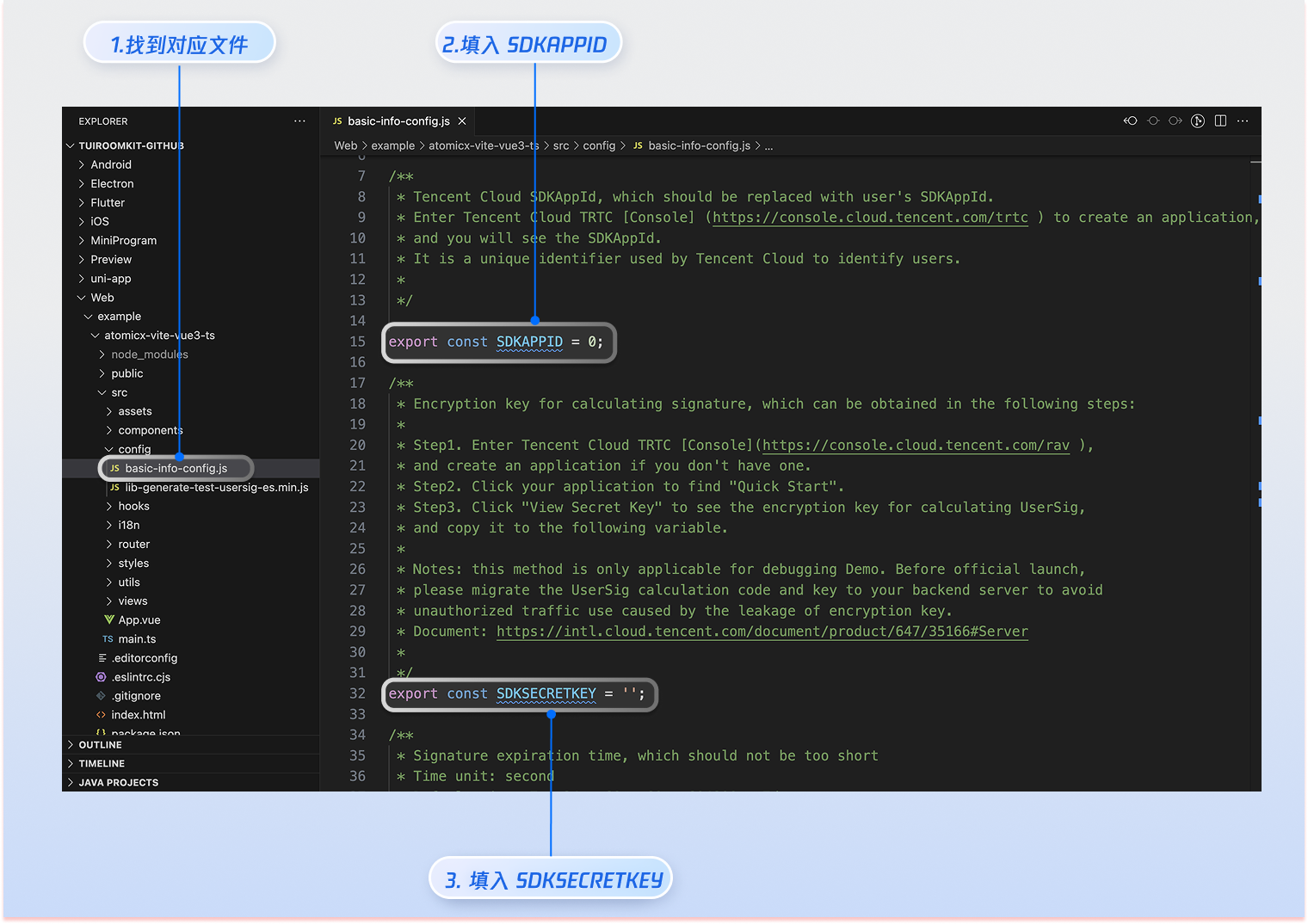
|
|
322
|
-
|
|
323
|
-
|
|
324
|
-
> **Warning:**
|
|
325
|
-
>
|
|
326
|
-
> - In the Demo example in this document, authentication is performed by configuring `SDKSecretKey` in client-side code, but `SDKSecretKey` can be easily decompiled and reverse engineered. Once the key is leaked, attackers can steal your Tencent Cloud traffic. Therefore, **this method is only suitable for local Demo testing and function debugging**.
|
|
327
|
-
> - **In formal production environments**, it is recommended to generate UserSig on your server side. When UserSig is needed, have your App request dynamic UserSig from the business server for authentication. For details, see [How to Calculate UserSig in Formal Operation Phase?](https://cloud.tencent.com/document/product/647/17275#formal)
|
|
328
|
-
|
|
329
|
-
|
|
330
|
-
### Start Development Server
|
|
331
|
-
|
|
332
193
|
|
|
333
194
|
|
|
334
195
|
|
|
@@ -349,16 +210,16 @@ pnpm run dev
|
|
|
349
210
|
yarn run dev
|
|
350
211
|
```
|
|
351
212
|
|
|
352
|
-
After successful startup, please open the debug address (usually http://localhost:5173) in your browser to access the application. You will see the
|
|
213
|
+
After successful startup, please open the debug address (usually http://localhost:5173) in your browser to access the application. You will see the conference interface as shown below:
|
|
353
214
|
|
|
354
|
-

|
|
355
216
|
|
|
356
217
|
|
|
357
|
-
## UI Customization
|
|
218
|
+
## Quick UI Customization
|
|
358
219
|
|
|
359
220
|
### Theme and Language
|
|
360
221
|
|
|
361
|
-
Modify the default values
|
|
222
|
+
Modify the default values of theme and language by configuring the parameters of `UIKitProvider` in App.vue.
|
|
362
223
|
<table>
|
|
363
224
|
<tr>
|
|
364
225
|
<td rowspan="1" colSpan="1" >UIKitProvider Parameter</td>
|
|
@@ -386,7 +247,7 @@ Modify the default values for theme and language by configuring the parameters o
|
|
|
386
247
|
</table>
|
|
387
248
|
|
|
388
249
|
``` typescript
|
|
389
|
-
<UIKitProvider theme="light" language="
|
|
250
|
+
<UIKitProvider theme="light" language="en-US">
|
|
390
251
|
<router-view />
|
|
391
252
|
</UIKitProvider>
|
|
392
253
|
|
|
@@ -394,11 +255,56 @@ Modify the default values for theme and language by configuring the parameters o
|
|
|
394
255
|
import { UIKitProvider } from '@tencentcloud/uikit-base-component-vue3';
|
|
395
256
|
```
|
|
396
257
|
|
|
397
|
-
###
|
|
258
|
+
### Configure User Contact List
|
|
259
|
+
|
|
260
|
+
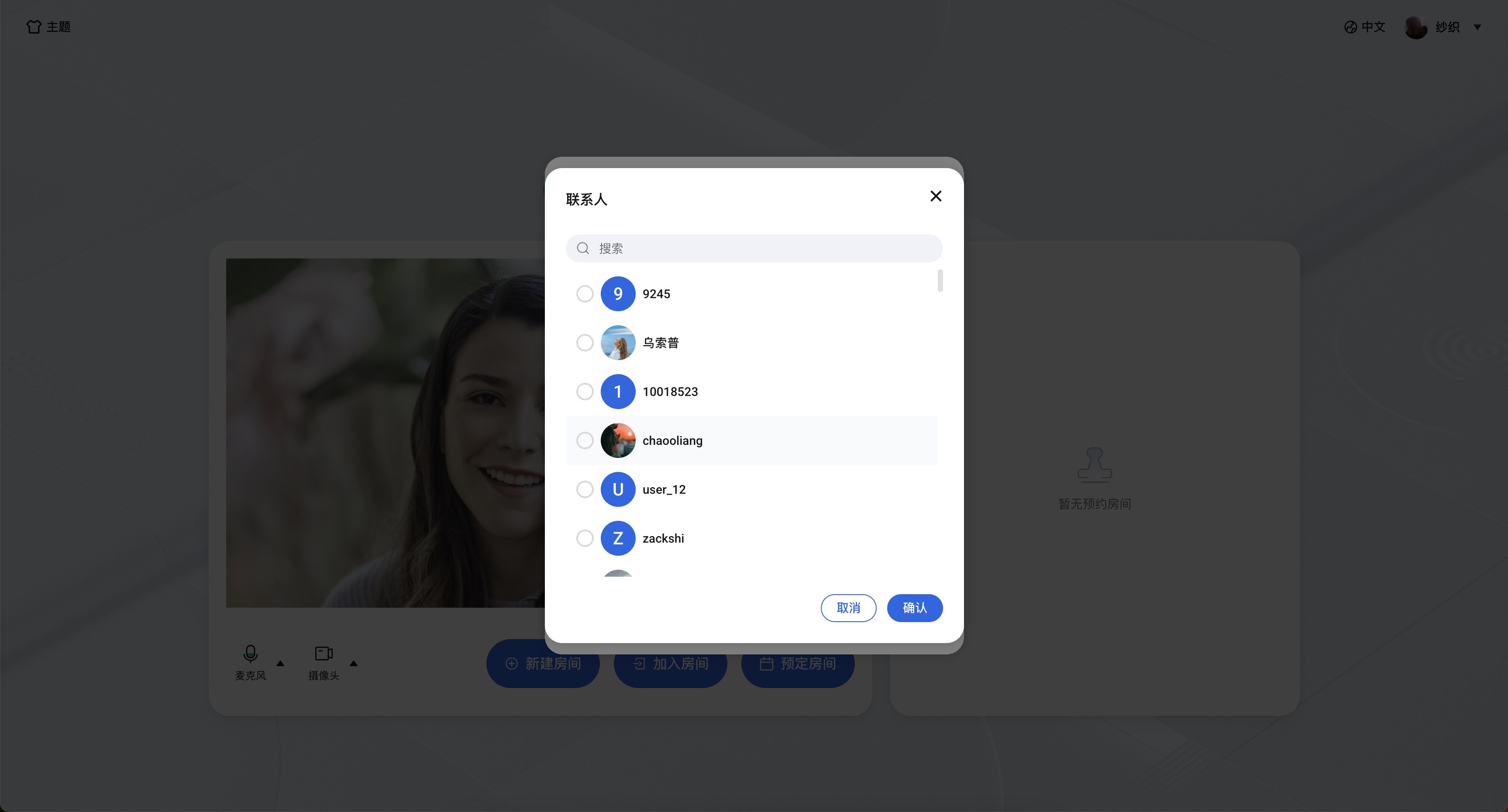
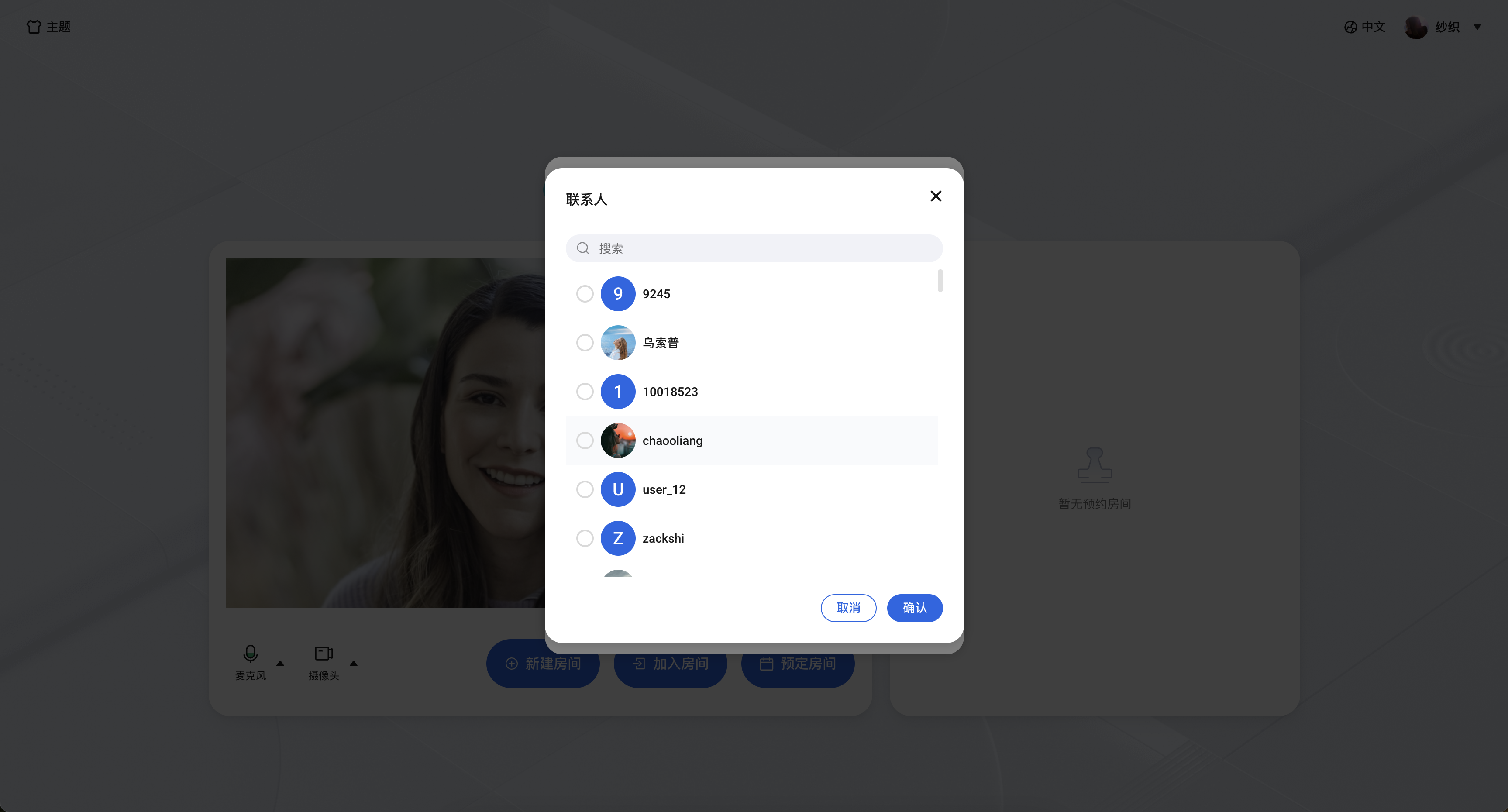
TUIRoomKit scheduled meeting user selection list and in-meeting call user selection list display user relationship chain list by default. Please refer to the following steps to batch import user relationship chains:
|
|
261
|
+
|
|
262
|
+
Step 1: Use [Account Management > Import Multiple Accounts](https://cloud.tencent.com/document/product/269/4919) REST API interface to batch import user accounts;
|
|
263
|
+
|
|
264
|
+
Step 2: Use [Friend Management > Import Friends](https://cloud.tencent.com/document/product/269/8301) REST API interface to batch import user relationship chains;
|
|
265
|
+
|
|
266
|
+
|
|
267
|
+
|
|
268
|
+
|
|
269
|
+
## TUIRoomKit Interface Customization
|
|
270
|
+
|
|
271
|
+
### Source Code Export
|
|
272
|
+
|
|
273
|
+
|
|
274
|
+
|
|
275
|
+
【Vue3】
|
|
276
|
+
1. Execute source code export script, default copy path is `./src/components/RoomKit`
|
|
277
|
+
|
|
278
|
+
``` bash
|
|
279
|
+
node ./node_modules/@tencentcloud/roomkit-web-vue3/scripts/eject.js
|
|
280
|
+
```
|
|
281
|
+
2. Confirm according to script prompt whether to copy TUIRoomKit source code to `./src/components/RoomKit` directory. If you need to customize the copy directory, please enter 'y', otherwise enter 'n'.
|
|
282
|
+
|
|
283
|
+
|
|
284
|
+

|
|
285
|
+
|
|
286
|
+
3. After source code export, TUIRoomKit source code will be added to your specified project path. At this time, you need to manually change the references of ConferenceMainView component, ConferenceMainViewH5 component and conference object from npm package address to the relative path address of TUIRoom source code.
|
|
287
|
+
|
|
288
|
+
``` typescript
|
|
289
|
+
- import { ConferenceMainView, conference } from '@tencentcloud/roomkit-web-vue3';
|
|
290
|
+
// Replace reference path to the real path of TUIRoomKit source code
|
|
291
|
+
+ import { ConferenceMainView, ConferenceMainViewH5, conference } from './components/RoomKit/index.ts';
|
|
292
|
+
```
|
|
293
|
+
4. Configure ESLint Validation
|
|
294
|
+
|
|
398
295
|
|
|
399
|
-
|
|
296
|
+
If you encounter ESLint errors when running the project after exporting TUIRoomKit source code, you can add the RoomKit folder to the `.eslintignore` file to ignore ESLint detection.
|
|
297
|
+
``` javascript
|
|
298
|
+
// Please replace with the real path of TUIRoomKit source code
|
|
299
|
+
src/components/RoomKit
|
|
300
|
+
```
|
|
301
|
+
|
|
302
|
+
### Custom Room Stream Layout
|
|
303
|
+
|
|
304
|
+
TUIRoomKit currently supports three stream layouts: grid, sidebar, and top bar, with grid layout as default.
|
|
400
305
|
``` typescript
|
|
401
|
-
//
|
|
306
|
+
// RoomKit/views/ConferenceMainView/index.vue
|
|
307
|
+
import { RoomLayoutTemplate } from 'tuikit-atomicx-vue3/room';
|
|
402
308
|
// Change default video stream layout to sidebar layout
|
|
403
309
|
const participantViewLayout = ref(RoomLayoutTemplate.SidebarLayout);
|
|
404
310
|
function handleLayoutUpdate(layout: RoomLayoutTemplate) {
|
|
@@ -412,53 +318,42 @@ function handleLayoutUpdate(layout: RoomLayoutTemplate) {
|
|
|
412
318
|
}
|
|
413
319
|
```
|
|
414
320
|
|
|
415
|
-
### Custom Video Stream
|
|
321
|
+
### Custom Video Stream Widgets
|
|
416
322
|
|
|
417
|
-
|
|
323
|
+
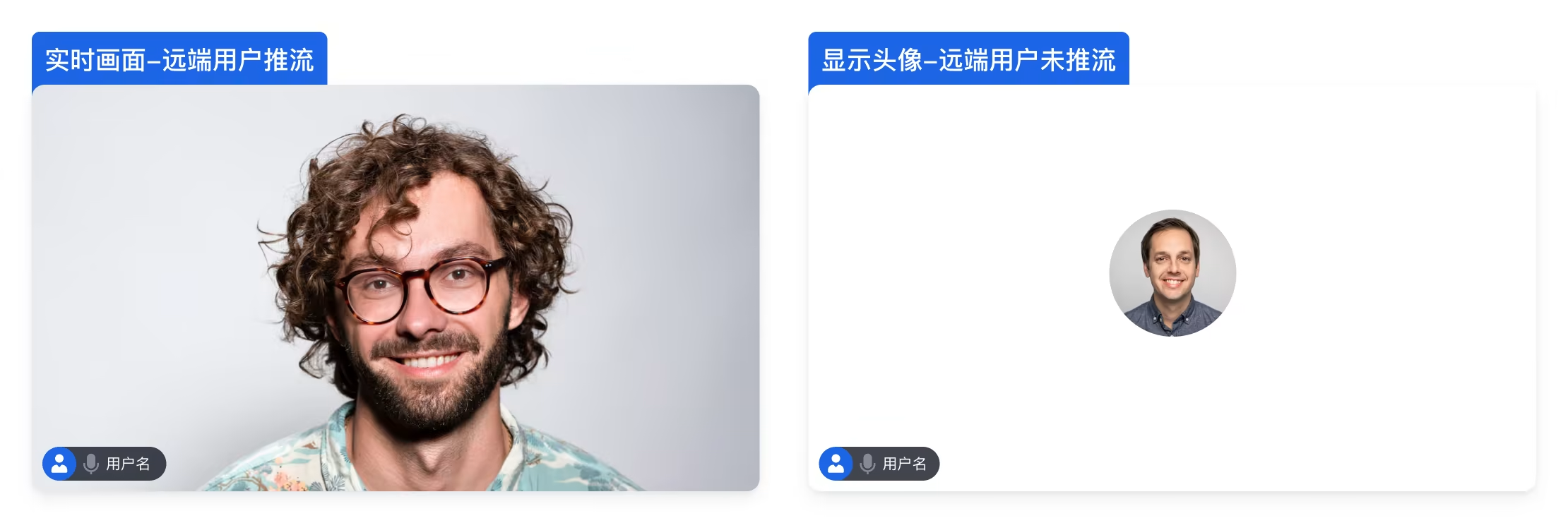
TUIRoomKit default video stream widgets are shown in the figure. To customize video stream widgets, please modify the `RoomKit/components/RoomLayoutView/ParticipantViewUI/ParticipantViewUI.vue` component.
|
|
418
324
|
|
|
419
325
|
|
|
420
326
|
|
|
421
327
|
|
|
422
|
-
|
|
423
|
-
|
|
424
|
-
The TUIRoomKit scheduled meeting user selection list and in-meeting call user selection list default to displaying the user relationship chain list. To batch import user relationship chain, refer to the following steps:
|
|
425
|
-
|
|
426
|
-
Step 1: Use the [Account Management > Import Multiple Accounts](https://cloud.tencent.com/document/product/269/4919) REST API interface to batch import user accounts;
|
|
427
|
-
|
|
428
|
-
Step 2: Use the [Friend Management > Import Friends](https://cloud.tencent.com/document/product/269/8301) REST API interface to batch import user relationship chain;
|
|
429
|
-
|
|
430
|
-
|
|
431
|
-
|
|
432
|
-
|
|
433
|
-
## FAQ
|
|
328
|
+
## Frequently Asked Questions
|
|
434
329
|
|
|
435
330
|
#### **TUIRoomKit works normally during local development, but cannot properly capture user's camera or microphone devices after deployment to online environment?**
|
|
436
|
-
- **Cause Analysis:**
|
|
331
|
+
- **Root Cause Analysis:** Browsers have strict restrictions on the capture of audio and video devices (microphone, camera) for security and privacy protection considerations. Capture operations are only allowed in secure environments. Secure environment protocols include: https://, localhost, file://, etc. HTTP protocol is considered insecure, and browsers will prohibit access to media devices by default.
|
|
437
332
|
|
|
438
|
-
- **Solution:** If everything works normally in local (localhost) testing, but capture fails after deployment, please immediately check whether your webpage is deployed on
|
|
333
|
+
- **Solution:** If everything works normally in your local (localhost) testing, but capture fails after deployment, please immediately check whether your webpage is deployed on HTTP protocol. You must use HTTPS protocol to deploy your webpage and ensure you have valid security certificates.
|
|
439
334
|
|
|
440
|
-
- **Related Resources:** For more details about URL domain and protocol restrictions, please
|
|
335
|
+
- **Related Resources:** For more details about URL domain and protocol restrictions, please refer to [URL Domain and Protocol Restrictions](https://cloud.tencent.com/document/product/647/17249#URL-.E5.9F.9F.E5.90.8D.E5.8D.8F.E8.AE.AE.E9.99.90.E5.88.B6).
|
|
441
336
|
|
|
442
337
|
|
|
443
|
-
#### **Does TUIRoomKit support integration
|
|
338
|
+
#### **Does TUIRoomKit support iframe integration?**
|
|
444
339
|
|
|
445
|
-
Yes. When integrating TUIRoomKit using iframe, you need to configure the allow attribute in the iframe tag to grant necessary browser permissions (microphone, camera, screen sharing, fullscreen, etc.), example
|
|
340
|
+
Yes. When integrating TUIRoomKit using iframe, you need to configure the allow attribute in the iframe tag to grant necessary browser permissions (microphone, camera, screen sharing, fullscreen, etc.), as shown in the example below:
|
|
446
341
|
``` typescript
|
|
447
342
|
// Enable microphone, camera, screen sharing, fullscreen permissions
|
|
448
343
|
<iframe allow="microphone; camera; display-capture; display; fullscreen;">
|
|
449
344
|
```
|
|
450
345
|
|
|
451
|
-
#### Does TUIRoomKit support setting
|
|
346
|
+
#### Does TUIRoomKit support setting internal network proxy?
|
|
452
347
|
|
|
453
|
-
Yes. Please refer to the following
|
|
348
|
+
Yes. Please refer to the following guidance to set internal network proxy parameters. For more internal network proxy information, please refer to [Dealing with Firewall Restrictions](https://web.sdk.qcloud.com/trtc/webrtc/doc/zh-cn/tutorial-34-advanced-proxy.html).
|
|
454
349
|
``` typescript
|
|
455
|
-
// Please set
|
|
350
|
+
// Please set internal network proxy parameters before entering room
|
|
456
351
|
import TUIRoomEngine from '@tencentcloud/tuiroom-engine-js';
|
|
457
352
|
import { useRoomEngine } from 'tuikit-atomicx-vue3/room';
|
|
458
353
|
const { roomEngine } = useRoomEngine();
|
|
459
354
|
|
|
460
355
|
TUIRoomEngine.once('ready', () => {
|
|
461
|
-
const trtcCloud = roomEngine.instance?.getTRTCCloud()
|
|
356
|
+
const trtcCloud = roomEngine.instance?.getTRTCCloud();
|
|
462
357
|
trtcCloud.callExperimentalAPI(JSON.stringify({
|
|
463
358
|
api: 'setNetworkProxy',
|
|
464
359
|
params: {
|
|
@@ -473,7 +368,3 @@ TUIRoomEngine.once('ready', () => {
|
|
|
473
368
|
}));
|
|
474
369
|
});
|
|
475
370
|
```
|
|
476
|
-
|
|
477
|
-
## Contact Us
|
|
478
|
-
|
|
479
|
-
If you have any questions or suggestions during the integration or usage process, please feel free to [contact us](https://cloud.tencent.com/document/product/269/59590) to submit feedback.
|