@tencent-rtc/mcp 1.3.8 → 1.3.9
This diff represents the content of publicly available package versions that have been released to one of the supported registries. The information contained in this diff is provided for informational purposes only and reflects changes between package versions as they appear in their respective public registries.
- package/package.json +1 -1
- package/resource/doc/chatuikit/android/integration.md +499 -203
- package/resource/doc/chatuikit/android/workflow.md +713 -0
- package/resource/doc/chatuikit/flutter/integration.md +1 -1
- package/resource/doc/livekit/voice/android/voice-audience-list.md +334 -0
- package/resource/doc/livekit/voice/android/voice-audio-effect.md +380 -0
- package/resource/doc/livekit/voice/android/voice-barrage.md +565 -0
- package/resource/doc/livekit/voice/android/voice-co-guest-interaction.md +745 -0
- package/resource/doc/livekit/voice/android/voice-gift.md +822 -0
- package/resource/doc/livekit/voice/android/voice-host-interaction.md +703 -0
- package/resource/doc/livekit/voice/android/voice-integration.md +940 -0
- package/resource/doc/livekit/voice/android/voice-room-list.md +575 -0
- package/resource/doc/livekit/voice/flutter/voice-co-guest-interaction.md +675 -0
- package/resource/doc/livekit/voice/flutter/voice-integration.md +936 -0
- package/resource/doc/livekit/voice/ios/voice-audience-list.md +339 -0
- package/resource/doc/livekit/voice/ios/voice-audio-effect.md +370 -0
- package/resource/doc/livekit/voice/ios/voice-barrage.md +517 -0
- package/resource/doc/livekit/voice/ios/voice-co-guest-interaction.md +708 -0
- package/resource/doc/livekit/voice/ios/voice-gift.md +783 -0
- package/resource/doc/livekit/voice/ios/voice-host-interaction.md +770 -0
- package/resource/doc/livekit/voice/ios/voice-integration.md +898 -0
- package/resource/doc/livekit/voice/ios/voice-room-list.md +485 -0
- package/resource/doc/roomkit/vue/integration.md +179 -288
- package/resource/doc/roomkit/vue/workflow.md +499 -253
- package/resource/doc/tuicallkit/android/integration.md +539 -83
- package/resource/doc/tuicallkit/android/workflow.md +441 -0
- package/tools/common/present-scenario-choice.js +16 -0
- package/tools/common/present-scenario-choice.js.map +1 -0
- package/tools/definitions/get_native_call_uikit_integration_def.js +25 -9
- package/tools/definitions/get_native_call_uikit_integration_def.js.map +1 -1
- package/tools/definitions/get_native_chat_uikit_integration_def.js +36 -14
- package/tools/definitions/get_native_chat_uikit_integration_def.js.map +1 -1
- package/tools/definitions/get_native_live_uikit_integration_def.js +55 -29
- package/tools/definitions/get_native_live_uikit_integration_def.js.map +1 -1
- package/tools/definitions/get_native_live_uikit_interaction_def.js +43 -54
- package/tools/definitions/get_native_live_uikit_interaction_def.js.map +1 -1
- package/tools/definitions/get_web_room_feature_detail_def.js +52 -55
- package/tools/definitions/get_web_room_feature_detail_def.js.map +1 -1
- package/tools/definitions/get_web_room_uikit_integration_def.js +41 -25
- package/tools/definitions/get_web_room_uikit_integration_def.js.map +1 -1
- package/tools/definitions/present_scenario_choice_def.js +53 -0
- package/tools/definitions/present_scenario_choice_def.js.map +1 -0
- package/tools/definitions/record_prompt_def.js +26 -21
- package/tools/definitions/record_prompt_def.js.map +1 -1
- package/tools/definitions/record_result_def.js +20 -4
- package/tools/definitions/record_result_def.js.map +1 -1
- package/tools/index.js +2 -0
- package/tools/index.js.map +1 -1
- package/tools/live/get-native-live-uikit-integration.js +110 -34
- package/tools/live/get-native-live-uikit-integration.js.map +1 -1
- package/tools/live/get_native_live_uikit_interaction.js +128 -35
- package/tools/live/get_native_live_uikit_interaction.js.map +1 -1
- package/utils/report-cls-client.js +1 -1
- package/utils/report-es-client.js +1 -1
|
@@ -0,0 +1,708 @@
|
|
|
1
|
+
**AtomicXCore** provides the [CoGuestStore](https://tencent-rtc.github.io/TUIKit_iOS/documentation/atomicxcore/cogueststore) and [LiveSeatStore](https://tencent-rtc.github.io/TUIKit_iOS/documentation/atomicxcore/liveseatstore) modules, which handle the complete workflow for audience mic-link requests in live streaming scenarios. You don’t need to worry about complex state synchronization or signaling interactions—simply call a few straightforward methods to add robust audio/video interaction between hosts and viewers in your live broadcast. This guide walks you through how to quickly implement voice mic-link functionality in your iOS app using `CoGuestStore` and `LiveSeatStore`.
|
|
2
|
+
|
|
3
|
+
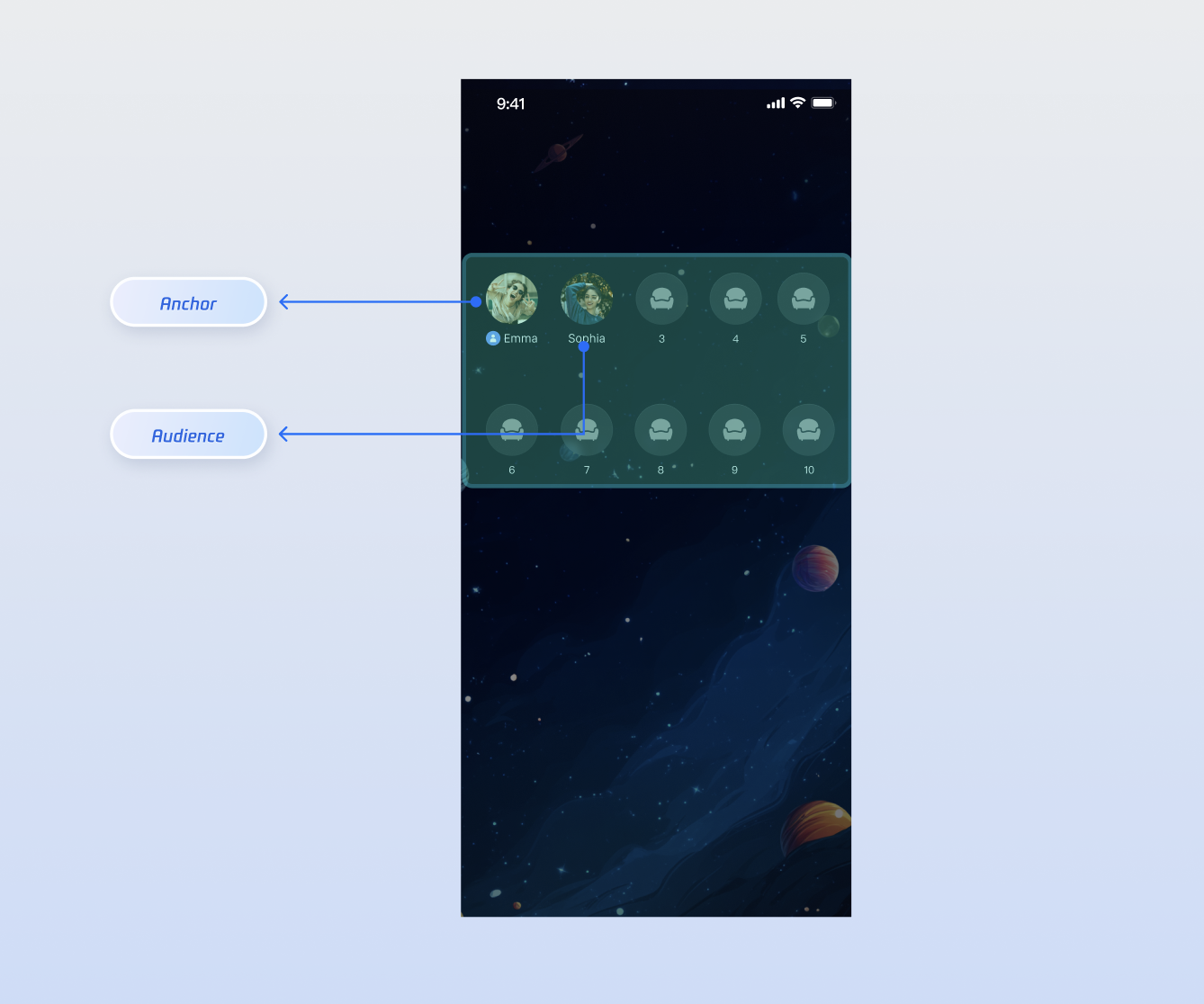
|
|
4
|
+
|
|
5
|
+
|
|
6
|
+
## Core Scenarios
|
|
7
|
+
|
|
8
|
+
`CoGuestStore` and `LiveSeatStore` support the following core live interaction scenarios:
|
|
9
|
+
- **Audience Request to Join Mic**: Viewers can actively request to join the mic; the host can approve or reject these requests.
|
|
10
|
+
|
|
11
|
+
- **Host Invites Audience to Mic**: The host can proactively invite any viewer in the live room to join the mic.
|
|
12
|
+
|
|
13
|
+
- **Host Manages Mic Seats**: The host can manage users on mic seats, including removing users, muting, and locking seats.
|
|
14
|
+
|
|
15
|
+
|
|
16
|
+
## Implementation
|
|
17
|
+
|
|
18
|
+
### Step 1: Component Integration
|
|
19
|
+
|
|
20
|
+
Refer to the [Quick Start](https://write.woa.com/document/194571595685527552) to integrate **AtomicXCore**.
|
|
21
|
+
|
|
22
|
+
### Step 2: Implement Audience Mic-Link Request
|
|
23
|
+
|
|
24
|
+
#### Audience Side Implementation
|
|
25
|
+
|
|
26
|
+
As an audience member, your main tasks are **initiating a request, handling the response**, and **leaving the mic proactively**.
|
|
27
|
+
1. **Initiate Mic-Link Request**
|
|
28
|
+
|
|
29
|
+
|
|
30
|
+
When the user taps the "Request Mic-Link" button in the UI, call the `applyForSeat` method.
|
|
31
|
+
|
|
32
|
+
``` swift
|
|
33
|
+
import AtomicXCore
|
|
34
|
+
|
|
35
|
+
let liveId = "Room ID"
|
|
36
|
+
var guestStore: CoGuestStore {
|
|
37
|
+
CoGuestStore.create(liveID: liveID)
|
|
38
|
+
}
|
|
39
|
+
|
|
40
|
+
// User taps "Request Mic-Link"
|
|
41
|
+
func requestToConnect() {
|
|
42
|
+
// timeout: Request timeout, e.g., 30 seconds
|
|
43
|
+
guestStore.applyForSeat(timeout: 30.0, extraInfo: nil) { result in
|
|
44
|
+
switch result {
|
|
45
|
+
case .success():
|
|
46
|
+
print("Mic-link request sent, waiting for host response...")
|
|
47
|
+
case .failure(let error):
|
|
48
|
+
print("Failed to send request: \(error.message)")
|
|
49
|
+
}
|
|
50
|
+
}
|
|
51
|
+
}
|
|
52
|
+
```
|
|
53
|
+
2. **Listen for Host Response**
|
|
54
|
+
|
|
55
|
+
|
|
56
|
+
Subscribe to `guestEventPublisher` to receive the host’s response.
|
|
57
|
+
|
|
58
|
+
``` swift
|
|
59
|
+
import AtomicXCore
|
|
60
|
+
import Combine
|
|
61
|
+
|
|
62
|
+
// Subscribe to events during view controller initialization
|
|
63
|
+
func subscribeGuestEvents() {
|
|
64
|
+
guestStore.guestEventPublisher
|
|
65
|
+
.sink { [weak self] event in
|
|
66
|
+
if case let .onGuestApplicationResponded(isAccept, hostUser) = event {
|
|
67
|
+
if isAccept {
|
|
68
|
+
print("Host \(hostUser.userName) accepted your request, preparing to join mic")
|
|
69
|
+
// 1. Open microphone
|
|
70
|
+
DeviceStore.shared.openLocalMicrophone(completion: nil)
|
|
71
|
+
// 2. Update UI, e.g., disable request button, show "on mic" status
|
|
72
|
+
} else {
|
|
73
|
+
print("Host \(hostUser.userName) rejected your request")
|
|
74
|
+
// Show popup to inform user of rejection
|
|
75
|
+
}
|
|
76
|
+
}
|
|
77
|
+
}
|
|
78
|
+
.store(in: &cancellables) // Manage subscription lifecycle
|
|
79
|
+
}
|
|
80
|
+
```
|
|
81
|
+
3. **Leave Mic Proactively**
|
|
82
|
+
|
|
83
|
+
|
|
84
|
+
When an audience member on mic wants to end the interaction, call `disConnect` to return to regular audience status.
|
|
85
|
+
|
|
86
|
+
``` swift
|
|
87
|
+
// User taps "Leave Mic" button
|
|
88
|
+
func leaveSeat() {
|
|
89
|
+
guestStore.disConnect { result in
|
|
90
|
+
switch result {
|
|
91
|
+
case .success():
|
|
92
|
+
print("Successfully left mic")
|
|
93
|
+
case .failure(let error):
|
|
94
|
+
print("Failed to leave mic: \(error.message)")
|
|
95
|
+
}
|
|
96
|
+
}
|
|
97
|
+
}
|
|
98
|
+
```
|
|
99
|
+
4. **(Optional) Cancel Request**
|
|
100
|
+
|
|
101
|
+
|
|
102
|
+
If the audience member wants to withdraw the request before the host responds, call `cancelApplication`.
|
|
103
|
+
|
|
104
|
+
``` swift
|
|
105
|
+
// User taps "Cancel Request" while waiting
|
|
106
|
+
func cancelRequest() {
|
|
107
|
+
guestStore.cancelApplication { result in
|
|
108
|
+
switch result {
|
|
109
|
+
case .success():
|
|
110
|
+
print("Request cancelled")
|
|
111
|
+
case .failure(let error):
|
|
112
|
+
print("Failed to cancel request: \(error.message)")
|
|
113
|
+
}
|
|
114
|
+
}
|
|
115
|
+
}
|
|
116
|
+
```
|
|
117
|
+
|
|
118
|
+
#### Host Side Implementation
|
|
119
|
+
|
|
120
|
+
As the host, your main tasks are **receiving requests, displaying the request list**, and **handling requests**.
|
|
121
|
+
1. **Listen for New Mic-Link Requests**
|
|
122
|
+
|
|
123
|
+
|
|
124
|
+
Subscribe to `hostEventPublisher` to be notified immediately when a new audience request arrives.
|
|
125
|
+
|
|
126
|
+
``` swift
|
|
127
|
+
import AtomicXCore
|
|
128
|
+
import Combine
|
|
129
|
+
|
|
130
|
+
let liveId = "Room ID"
|
|
131
|
+
var guestStore: CoGuestStore {
|
|
132
|
+
CoGuestStore.create(liveID: liveID)
|
|
133
|
+
}
|
|
134
|
+
|
|
135
|
+
// Subscribe to host events
|
|
136
|
+
guestStore.hostEventPublisher
|
|
137
|
+
.sink { [weak self] event in
|
|
138
|
+
if case let .onGuestApplicationReceived(guestUser) = event {
|
|
139
|
+
print("Received mic-link request from audience \(guestUser.userName)")
|
|
140
|
+
// Update UI, e.g., show a red dot on the "Request List" button
|
|
141
|
+
}
|
|
142
|
+
}
|
|
143
|
+
.store(in: &cancellables)
|
|
144
|
+
```
|
|
145
|
+
2. **Display Request List**
|
|
146
|
+
|
|
147
|
+
|
|
148
|
+
The `CoGuestStore` state maintains the current list of applicants in real time. Subscribe to it to refresh your UI.
|
|
149
|
+
|
|
150
|
+
``` swift
|
|
151
|
+
import AtomicXCore
|
|
152
|
+
import Combine
|
|
153
|
+
|
|
154
|
+
// Subscribe to state changes
|
|
155
|
+
guestStore.state
|
|
156
|
+
.subscribe(StatePublisherSelector(keyPath: \CoGuestState.applicants)) // Only care about applicant list changes
|
|
157
|
+
.removeDuplicates()
|
|
158
|
+
.sink { applicants in
|
|
159
|
+
print("Current number of applicants: \(applicants.count)")
|
|
160
|
+
// Refresh your "Applicant List" UI here
|
|
161
|
+
// self.applicantListView.update(with: applicants)
|
|
162
|
+
}
|
|
163
|
+
.store(in: &cancellables)
|
|
164
|
+
```
|
|
165
|
+
3. **Handle Mic-Link Requests**
|
|
166
|
+
|
|
167
|
+
|
|
168
|
+
When you select an audience member from the list and tap "Accept" or "Reject", call the corresponding method.
|
|
169
|
+
|
|
170
|
+
``` swift
|
|
171
|
+
// Host taps "Accept" button, passing applicant's userID
|
|
172
|
+
func accept(userId: String) {
|
|
173
|
+
guestStore.acceptApplication(userID: userId) { result in
|
|
174
|
+
if case .success = result {
|
|
175
|
+
print("Accepted \(userId)'s request, they are joining the mic")
|
|
176
|
+
}
|
|
177
|
+
}
|
|
178
|
+
}
|
|
179
|
+
|
|
180
|
+
// Host taps "Reject" button
|
|
181
|
+
func reject(userId: String) {
|
|
182
|
+
guestStore.rejectApplication(userID: userId) { result in
|
|
183
|
+
if case .success = result {
|
|
184
|
+
print("Rejected \(userId)'s request")
|
|
185
|
+
}
|
|
186
|
+
}
|
|
187
|
+
}
|
|
188
|
+
```
|
|
189
|
+
|
|
190
|
+
### Step 3: Implement Host-Initiated Mic-Link Invitation
|
|
191
|
+
|
|
192
|
+
#### Host Side Implementation
|
|
193
|
+
1. **Invite Audience to Mic**
|
|
194
|
+
|
|
195
|
+
|
|
196
|
+
When the host selects a viewer from the audience list and taps "Invite to Mic", call the `inviteToSeat` method.
|
|
197
|
+
|
|
198
|
+
``` swift
|
|
199
|
+
// Host selects audience and initiates invitation
|
|
200
|
+
func invite(userId: String) {
|
|
201
|
+
// timeout: Invitation timeout
|
|
202
|
+
guestStore.inviteToSeat(userID: userId, timeout: 30.0, extraInfo: nil) { result in
|
|
203
|
+
if case .success = result {
|
|
204
|
+
print("Invitation sent to \(userId), waiting for response...")
|
|
205
|
+
}
|
|
206
|
+
}
|
|
207
|
+
}
|
|
208
|
+
```
|
|
209
|
+
2. **Listen for Audience Response**
|
|
210
|
+
|
|
211
|
+
|
|
212
|
+
Listen for the `onHostInvitationResponded` event via `hostEventPublisher`.
|
|
213
|
+
|
|
214
|
+
``` swift
|
|
215
|
+
// Add to hostEventPublisher subscription
|
|
216
|
+
if case let .onHostInvitationResponded(isAccept, guestUser) = event {
|
|
217
|
+
if isAccept {
|
|
218
|
+
print("Audience \(guestUser.userName) accepted your invitation")
|
|
219
|
+
} else {
|
|
220
|
+
print("Audience \(guestUser.userName) rejected your invitation")
|
|
221
|
+
}
|
|
222
|
+
}
|
|
223
|
+
```
|
|
224
|
+
|
|
225
|
+
#### Audience Side Implementation
|
|
226
|
+
1. **Receive Host Invitation**
|
|
227
|
+
|
|
228
|
+
|
|
229
|
+
Listen for the `onHostInvitationReceived` event via `guestEventPublisher`.
|
|
230
|
+
|
|
231
|
+
``` swift
|
|
232
|
+
// Add to guestEventPublisher subscription
|
|
233
|
+
if case let .onHostInvitationReceived(hostUser) = event {
|
|
234
|
+
print("Received mic-link invitation from host \(hostUser.userName)")
|
|
235
|
+
// Show a dialog for the user to choose "Accept" or "Reject"
|
|
236
|
+
// self.showInvitationDialog(from: hostUser)
|
|
237
|
+
}
|
|
238
|
+
```
|
|
239
|
+
2. **Respond to Invitation**
|
|
240
|
+
|
|
241
|
+
|
|
242
|
+
When the user makes a choice in the dialog, call the corresponding method.
|
|
243
|
+
|
|
244
|
+
``` swift
|
|
245
|
+
let inviterId = "Host ID who sent the invitation" // Get from onHostInvitationReceived event
|
|
246
|
+
|
|
247
|
+
// User taps "Accept"
|
|
248
|
+
func accept() {
|
|
249
|
+
guestStore.acceptInvitation(inviterID: inviterId) { result in
|
|
250
|
+
if case .success = result {
|
|
251
|
+
// 2. Open microphone
|
|
252
|
+
DeviceStore.shared.openLocalMicrophone(completion: nil)
|
|
253
|
+
}
|
|
254
|
+
}
|
|
255
|
+
}
|
|
256
|
+
|
|
257
|
+
// User taps "Reject"
|
|
258
|
+
func reject() {
|
|
259
|
+
guestStore.rejectInvitation(inviterID: inviterId) { result in
|
|
260
|
+
// ...
|
|
261
|
+
}
|
|
262
|
+
}
|
|
263
|
+
```
|
|
264
|
+
|
|
265
|
+
## Advanced Features
|
|
266
|
+
|
|
267
|
+
Once a user is on mic, the host may need to manage mic seats. The following features are primarily provided by `LiveSeatStore`, which functions with `CoGuestStore`.
|
|
268
|
+
|
|
269
|
+
### On-Mic Users Control Their Own Microphone
|
|
270
|
+
|
|
271
|
+
On-mic users (including the host) can control their own microphone mute status via the `LiveSeatStore` interface.
|
|
272
|
+
|
|
273
|
+
#### Implementation:
|
|
274
|
+
1. **Mute:** Call `muteMicrophone()`. This is a one-way request with no callback.
|
|
275
|
+
|
|
276
|
+
2. **Unmute:** Call `unmuteMicrophone(completion:)`.
|
|
277
|
+
|
|
278
|
+
|
|
279
|
+
#### Example Code:
|
|
280
|
+
``` swift
|
|
281
|
+
let seatStore = LiveSeatStore.create(liveID: liveId)
|
|
282
|
+
|
|
283
|
+
seatStore.muteMicrophone() // Mute
|
|
284
|
+
|
|
285
|
+
seatStore.unmuteMicrophone(completion: nil) // Unmute
|
|
286
|
+
```
|
|
287
|
+
|
|
288
|
+
#### unmuteMicrophone Parameters:
|
|
289
|
+
<table>
|
|
290
|
+
<tr>
|
|
291
|
+
<td rowspan="1" colSpan="1" >**Parameter**</td>
|
|
292
|
+
|
|
293
|
+
<td rowspan="1" colSpan="1" >**Type**</td>
|
|
294
|
+
|
|
295
|
+
<td rowspan="1" colSpan="1" >**Description**</td>
|
|
296
|
+
</tr>
|
|
297
|
+
|
|
298
|
+
<tr>
|
|
299
|
+
<td rowspan="1" colSpan="1" >`completion`</td>
|
|
300
|
+
|
|
301
|
+
<td rowspan="1" colSpan="1" >`CompletionClosure?`</td>
|
|
302
|
+
|
|
303
|
+
<td rowspan="1" colSpan="1" >Callback after the operation completes.</td>
|
|
304
|
+
</tr>
|
|
305
|
+
</table>
|
|
306
|
+
|
|
307
|
+
|
|
308
|
+
### Host Remotely Controls On-Mic User’s Microphone
|
|
309
|
+
|
|
310
|
+
The host can perform "force mute" or "invite to unmute" operations on other on-mic users.
|
|
311
|
+
|
|
312
|
+
#### Implementation:
|
|
313
|
+
1. **Force Mute (Lock):** The host calls `closeRemoteMicrophone` to forcibly mute the target user's microphone and lock their mic control. The muted user will receive the `onLocalMicrophoneClosedByAdmin` event via `liveSeatEventPublisher`, and their local "Open Microphone" button should become disabled.
|
|
314
|
+
|
|
315
|
+
2. **Invite to Unmute (Unlock):** The host calls `openRemoteMicrophone`—this does not forcibly open the user's mic, but unlocks their mic control, allowing them to unmute themselves. The target user receives the `onLocalMicrophoneOpenedByAdmin` event, their "Open Microphone" button should become enabled, but they remain muted until they unmute themselves.
|
|
316
|
+
|
|
317
|
+
3. **User Unmutes Themselves:** After receiving the unlock notification, the user must actively call `LiveSeatStore`'s `unmuteMicrophone()` to actually unmute and be heard in the room.
|
|
318
|
+
|
|
319
|
+
|
|
320
|
+
#### Example Code:
|
|
321
|
+
|
|
322
|
+
##### Host Side:
|
|
323
|
+
``` swift
|
|
324
|
+
let targetUserId = "userD"
|
|
325
|
+
|
|
326
|
+
// 1. Force mute and lock userD
|
|
327
|
+
seatStore.closeRemoteMicrophone(userID: targetUserId) { result in
|
|
328
|
+
if case .success = result {
|
|
329
|
+
print("\(targetUserId) has been muted and locked")
|
|
330
|
+
}
|
|
331
|
+
}
|
|
332
|
+
|
|
333
|
+
// 2. Unlock userD’s microphone control (userD remains muted)
|
|
334
|
+
seatStore.openRemoteMicrophone(userID: targetUserId, policy: .unlockOnly) { result in
|
|
335
|
+
if case .success = result {
|
|
336
|
+
print("Invited \(targetUserId) to open microphone (unlocked)")
|
|
337
|
+
}
|
|
338
|
+
}
|
|
339
|
+
```
|
|
340
|
+
|
|
341
|
+
##### Audience Side:
|
|
342
|
+
``` swift
|
|
343
|
+
// userD listens for host actions
|
|
344
|
+
seatStore.liveSeatEventPublisher
|
|
345
|
+
.sink { event in
|
|
346
|
+
switch event {
|
|
347
|
+
case .onLocalMicrophoneClosedByAdmin:
|
|
348
|
+
print("Muted by host")
|
|
349
|
+
// self.muteButton.isEnabled = false
|
|
350
|
+
case .onLocalMicrophoneOpenedByAdmin(policy: _):
|
|
351
|
+
print("Host unlocked mute control")
|
|
352
|
+
// self.muteButton.isEnabled = true
|
|
353
|
+
// self.muteButton.setTitle("Open Microphone")
|
|
354
|
+
default:
|
|
355
|
+
break
|
|
356
|
+
}
|
|
357
|
+
}
|
|
358
|
+
.store(in: &cancellables)
|
|
359
|
+
```
|
|
360
|
+
|
|
361
|
+
#### closeRemoteMicrophone Parameters:
|
|
362
|
+
<table>
|
|
363
|
+
<tr>
|
|
364
|
+
<td rowspan="1" colSpan="1" >**Parameter**</td>
|
|
365
|
+
|
|
366
|
+
<td rowspan="1" colSpan="1" >**Type**</td>
|
|
367
|
+
|
|
368
|
+
<td rowspan="1" colSpan="1" >**Description**</td>
|
|
369
|
+
</tr>
|
|
370
|
+
|
|
371
|
+
<tr>
|
|
372
|
+
<td rowspan="1" colSpan="1" >`userID`</td>
|
|
373
|
+
|
|
374
|
+
<td rowspan="1" colSpan="1" >`String`</td>
|
|
375
|
+
|
|
376
|
+
<td rowspan="1" colSpan="1" >The userID of the target user.</td>
|
|
377
|
+
</tr>
|
|
378
|
+
|
|
379
|
+
<tr>
|
|
380
|
+
<td rowspan="1" colSpan="1" >`completion`</td>
|
|
381
|
+
|
|
382
|
+
<td rowspan="1" colSpan="1" >`CompletionClosure?`</td>
|
|
383
|
+
|
|
384
|
+
<td rowspan="1" colSpan="1" >Callback after the request completes.</td>
|
|
385
|
+
</tr>
|
|
386
|
+
</table>
|
|
387
|
+
|
|
388
|
+
|
|
389
|
+
#### openRemoteMicrophone Parameters:
|
|
390
|
+
<table>
|
|
391
|
+
<tr>
|
|
392
|
+
<td rowspan="1" colSpan="1" >**Parameter**</td>
|
|
393
|
+
|
|
394
|
+
<td rowspan="1" colSpan="1" >**Type**</td>
|
|
395
|
+
|
|
396
|
+
<td rowspan="1" colSpan="1" >**Description**</td>
|
|
397
|
+
</tr>
|
|
398
|
+
|
|
399
|
+
<tr>
|
|
400
|
+
<td rowspan="1" colSpan="1" >`userID`</td>
|
|
401
|
+
|
|
402
|
+
<td rowspan="1" colSpan="1" >`String`</td>
|
|
403
|
+
|
|
404
|
+
<td rowspan="1" colSpan="1" >The userID of the target user.</td>
|
|
405
|
+
</tr>
|
|
406
|
+
|
|
407
|
+
<tr>
|
|
408
|
+
<td rowspan="1" colSpan="1" >`completion`</td>
|
|
409
|
+
|
|
410
|
+
<td rowspan="1" colSpan="1" >`CompletionClosure?`</td>
|
|
411
|
+
|
|
412
|
+
<td rowspan="1" colSpan="1" >Callback after the request completes.</td>
|
|
413
|
+
</tr>
|
|
414
|
+
</table>
|
|
415
|
+
|
|
416
|
+
|
|
417
|
+
### Host Removes On-Mic User from the Seat
|
|
418
|
+
|
|
419
|
+
#### Implementation:
|
|
420
|
+
1. **Remove User from Mic:** The host can call `kickUserOutOfSeat` to forcibly remove a specified user from the mic seat.
|
|
421
|
+
|
|
422
|
+
2. **Listen for Event Notification:** The removed user will receive the `onKickedOffSeat` event via `CoGuestStore.guestEventPublisher`.
|
|
423
|
+
|
|
424
|
+
|
|
425
|
+
#### Example Code:
|
|
426
|
+
``` swift
|
|
427
|
+
// Suppose you want to remove "userB"
|
|
428
|
+
let targetUserId = "userB"
|
|
429
|
+
seatStore.kickUserOutOfSeat(userID: targetUserId) { result in
|
|
430
|
+
switch result {
|
|
431
|
+
case .success:
|
|
432
|
+
print("\(targetUserId) has been removed from the mic seat")
|
|
433
|
+
case .failure(let error):
|
|
434
|
+
print("Failed to remove user: \(error.message)")
|
|
435
|
+
}
|
|
436
|
+
}
|
|
437
|
+
|
|
438
|
+
// "userB" receives the removal event
|
|
439
|
+
guestStore
|
|
440
|
+
.guestEventPublisher
|
|
441
|
+
.receive(on: RunLoop.main)
|
|
442
|
+
.sink { [weak self] event in
|
|
443
|
+
guard let self = self else { return }
|
|
444
|
+
switch event {
|
|
445
|
+
case .onKickedOffSeat(seatIndex: _, hostUser: _):
|
|
446
|
+
// Show toast notification
|
|
447
|
+
default:
|
|
448
|
+
break
|
|
449
|
+
}
|
|
450
|
+
}
|
|
451
|
+
.store(in: &cancellables)
|
|
452
|
+
|
|
453
|
+
```
|
|
454
|
+
|
|
455
|
+
#### kickUserOutOfSeat Parameters:
|
|
456
|
+
<table>
|
|
457
|
+
<tr>
|
|
458
|
+
<td rowspan="1" colSpan="1" >**Parameter**</td>
|
|
459
|
+
|
|
460
|
+
<td rowspan="1" colSpan="1" >**Type**</td>
|
|
461
|
+
|
|
462
|
+
<td rowspan="1" colSpan="1" >**Description**</td>
|
|
463
|
+
</tr>
|
|
464
|
+
|
|
465
|
+
<tr>
|
|
466
|
+
<td rowspan="1" colSpan="1" >`userID`</td>
|
|
467
|
+
|
|
468
|
+
<td rowspan="1" colSpan="1" >`String`</td>
|
|
469
|
+
|
|
470
|
+
<td rowspan="1" colSpan="1" >The userID of the user to be removed from the mic seat.</td>
|
|
471
|
+
</tr>
|
|
472
|
+
|
|
473
|
+
<tr>
|
|
474
|
+
<td rowspan="1" colSpan="1" >`completion`</td>
|
|
475
|
+
|
|
476
|
+
<td rowspan="1" colSpan="1" >`CompletionClosure?`</td>
|
|
477
|
+
|
|
478
|
+
<td rowspan="1" colSpan="1" >Callback after the request completes.</td>
|
|
479
|
+
</tr>
|
|
480
|
+
</table>
|
|
481
|
+
|
|
482
|
+
|
|
483
|
+
### Host Locks and Unlocks Mic Seats
|
|
484
|
+
|
|
485
|
+
The host can lock or unlock a specific mic seat.
|
|
486
|
+
|
|
487
|
+
#### Implementation:
|
|
488
|
+
1. **Lock Seat:** The host can call `lockSeat` to lock the seat at the specified index. Once locked, audience members cannot occupy this seat via `applyForSeat` or `takeSeat`.
|
|
489
|
+
|
|
490
|
+
2. **Unlock Seat:** Call `unlockSeat` to unlock the seat, making it available again.
|
|
491
|
+
|
|
492
|
+
|
|
493
|
+
#### Example Code:
|
|
494
|
+
``` swift
|
|
495
|
+
// Lock seat #2
|
|
496
|
+
seatStore.lockSeat(seatIndex: 2) { result in
|
|
497
|
+
if case .success = result {
|
|
498
|
+
print("Seat #2 locked")
|
|
499
|
+
}
|
|
500
|
+
}
|
|
501
|
+
|
|
502
|
+
// Unlock seat #2
|
|
503
|
+
seatStore.unlockSeat(seatIndex: 2) { result in
|
|
504
|
+
if case .success = result {
|
|
505
|
+
print("Seat #2 unlocked")
|
|
506
|
+
}
|
|
507
|
+
}
|
|
508
|
+
```
|
|
509
|
+
|
|
510
|
+
#### lockSeat Parameters:
|
|
511
|
+
<table>
|
|
512
|
+
<tr>
|
|
513
|
+
<td rowspan="1" colSpan="1" >**Parameter**</td>
|
|
514
|
+
|
|
515
|
+
<td rowspan="1" colSpan="1" >**Type**</td>
|
|
516
|
+
|
|
517
|
+
<td rowspan="1" colSpan="1" >**Description**</td>
|
|
518
|
+
</tr>
|
|
519
|
+
|
|
520
|
+
<tr>
|
|
521
|
+
<td rowspan="1" colSpan="1" >`seatIndex`</td>
|
|
522
|
+
|
|
523
|
+
<td rowspan="1" colSpan="1" >`Int`</td>
|
|
524
|
+
|
|
525
|
+
<td rowspan="1" colSpan="1" >Index of the seat to lock.</td>
|
|
526
|
+
</tr>
|
|
527
|
+
|
|
528
|
+
<tr>
|
|
529
|
+
<td rowspan="1" colSpan="1" >`completion`</td>
|
|
530
|
+
|
|
531
|
+
<td rowspan="1" colSpan="1" >`CompletionClosure?`</td>
|
|
532
|
+
|
|
533
|
+
<td rowspan="1" colSpan="1" >Callback after the request completes.</td>
|
|
534
|
+
</tr>
|
|
535
|
+
</table>
|
|
536
|
+
|
|
537
|
+
|
|
538
|
+
#### unlockSeat Parameters:
|
|
539
|
+
<table>
|
|
540
|
+
<tr>
|
|
541
|
+
<td rowspan="1" colSpan="1" >**Parameter**</td>
|
|
542
|
+
|
|
543
|
+
<td rowspan="1" colSpan="1" >**Type**</td>
|
|
544
|
+
|
|
545
|
+
<td rowspan="1" colSpan="1" >**Description**</td>
|
|
546
|
+
</tr>
|
|
547
|
+
|
|
548
|
+
<tr>
|
|
549
|
+
<td rowspan="1" colSpan="1" >`seatIndex`</td>
|
|
550
|
+
|
|
551
|
+
<td rowspan="1" colSpan="1" >`Int`</td>
|
|
552
|
+
|
|
553
|
+
<td rowspan="1" colSpan="1" >Index of the seat to unlock.</td>
|
|
554
|
+
</tr>
|
|
555
|
+
|
|
556
|
+
<tr>
|
|
557
|
+
<td rowspan="1" colSpan="1" >`completion`</td>
|
|
558
|
+
|
|
559
|
+
<td rowspan="1" colSpan="1" >`CompletionClosure?`</td>
|
|
560
|
+
|
|
561
|
+
<td rowspan="1" colSpan="1" >Callback after the request completes.</td>
|
|
562
|
+
</tr>
|
|
563
|
+
</table>
|
|
564
|
+
|
|
565
|
+
|
|
566
|
+
### Move Mic Seats
|
|
567
|
+
|
|
568
|
+
Hosts and on-mic users can call `moveUserToSeat(userID:targetIndex:policy:completion:)` to move users between mic seats.
|
|
569
|
+
|
|
570
|
+
#### Implementation:
|
|
571
|
+
1. **Host Moves User to Mic Seat:** The host can use this API to move any user to a specified mic seat. Provide the target user's `userID`, the target seat index as `targetIndex`, and use the `policy` parameter to specify the seat movement strategy if the target seat is occupied (see parameter details below).
|
|
572
|
+
|
|
573
|
+
2. **On-Mic User Moves Themselves:** On-mic users can also call this API to move themselves. In this case, `userID` must be the user's own ID, `targetIndex` is the desired new seat index, and the `policy` parameter is ignored. If the target seat is occupied, the move fails with an error.
|
|
574
|
+
|
|
575
|
+
|
|
576
|
+
#### Example Code:
|
|
577
|
+
``` swift
|
|
578
|
+
seatStore.moveUserToSeat(userID: "userC",
|
|
579
|
+
targetIndex: newSeatIndex,
|
|
580
|
+
policy: .abortWhenOccupied) { result in
|
|
581
|
+
if case .success = result {
|
|
582
|
+
print("Successfully moved to seat #\(newSeatIndex)")
|
|
583
|
+
} else {
|
|
584
|
+
print("Move failed, seat may be occupied")
|
|
585
|
+
}
|
|
586
|
+
}
|
|
587
|
+
```
|
|
588
|
+
|
|
589
|
+
#### moveUserToSeat Parameters:
|
|
590
|
+
<table>
|
|
591
|
+
<tr>
|
|
592
|
+
<td rowspan="1" colSpan="1" >**Parameter**</td>
|
|
593
|
+
|
|
594
|
+
<td rowspan="1" colSpan="1" >**Type**</td>
|
|
595
|
+
|
|
596
|
+
<td rowspan="1" colSpan="1" >**Description**</td>
|
|
597
|
+
</tr>
|
|
598
|
+
|
|
599
|
+
<tr>
|
|
600
|
+
<td rowspan="1" colSpan="1" >`userID`</td>
|
|
601
|
+
|
|
602
|
+
<td rowspan="1" colSpan="1" >`String`</td>
|
|
603
|
+
|
|
604
|
+
<td rowspan="1" colSpan="1" >The userID of the user to move.</td>
|
|
605
|
+
</tr>
|
|
606
|
+
|
|
607
|
+
<tr>
|
|
608
|
+
<td rowspan="1" colSpan="1" >`targetIndex`</td>
|
|
609
|
+
|
|
610
|
+
<td rowspan="1" colSpan="1" >`Int`</td>
|
|
611
|
+
|
|
612
|
+
<td rowspan="1" colSpan="1" >Target seat index.</td>
|
|
613
|
+
</tr>
|
|
614
|
+
|
|
615
|
+
<tr>
|
|
616
|
+
<td rowspan="1" colSpan="1" >`policy`</td>
|
|
617
|
+
|
|
618
|
+
<td rowspan="1" colSpan="1" >`MoveSeatPolicy?`</td>
|
|
619
|
+
|
|
620
|
+
<td rowspan="1" colSpan="1" >Seat movement policy if the target seat is occupied:<br>- `abortWhenOccupied`: Abort move if seat is occupied (default)<br>- `forceReplace`: Force replace the user on the target seat; replaced user will be removed<br>- `swapPosition`: Swap positions with the user on the target seat.</td>
|
|
621
|
+
</tr>
|
|
622
|
+
|
|
623
|
+
<tr>
|
|
624
|
+
<td rowspan="1" colSpan="1" >`completion`</td>
|
|
625
|
+
|
|
626
|
+
<td rowspan="1" colSpan="1" >`CompletionClosure?`</td>
|
|
627
|
+
|
|
628
|
+
<td rowspan="1" colSpan="1" >Callback after the request completes.</td>
|
|
629
|
+
</tr>
|
|
630
|
+
</table>
|
|
631
|
+
|
|
632
|
+
|
|
633
|
+
## API Documentation
|
|
634
|
+
|
|
635
|
+
For detailed information about all public interfaces, properties, and methods of [CoGuestStore](https://tencent-rtc.github.io/TUIKit_iOS/documentation/atomicxcore/cogueststore), [LiveSeatStore](https://tencent-rtc.github.io/TUIKit_iOS/documentation/atomicxcore/liveseatstore), and related classes, refer to the official [AtomicXCore](https://tencent-rtc.github.io/TUIKit_iOS/documentation/atomicxcore) framework API documentation. The relevant stores used in this guide are as follows:
|
|
636
|
+
<table>
|
|
637
|
+
<tr>
|
|
638
|
+
<td rowspan="1" colSpan="1" >**Store/Component**</td>
|
|
639
|
+
|
|
640
|
+
<td rowspan="1" colSpan="1" >**Feature Description**</td>
|
|
641
|
+
|
|
642
|
+
<td rowspan="1" colSpan="1" >**API Documentation**</td>
|
|
643
|
+
</tr>
|
|
644
|
+
|
|
645
|
+
<tr>
|
|
646
|
+
<td rowspan="1" colSpan="1" >CoGuestStore</td>
|
|
647
|
+
|
|
648
|
+
<td rowspan="1" colSpan="1" >Audience mic-link management: mic-link requests/invitations/accept/reject, member permission control (microphone/camera), state synchronization.</td>
|
|
649
|
+
|
|
650
|
+
<td rowspan="1" colSpan="1" >[API Documentation](https://tencent-rtc.github.io/TUIKit_iOS/documentation/atomicxcore/cogueststore)</td>
|
|
651
|
+
</tr>
|
|
652
|
+
|
|
653
|
+
<tr>
|
|
654
|
+
<td rowspan="1" colSpan="1" >LiveSeatStore</td>
|
|
655
|
+
|
|
656
|
+
<td rowspan="1" colSpan="1" >Mic seat management: mute/unmute, lock/unlock seats, remove users from mic, remote mic control, mic seat list state monitoring</td>
|
|
657
|
+
|
|
658
|
+
<td rowspan="1" colSpan="1" >[API Documentation](https://tencent-rtc.github.io/TUIKit_iOS/documentation/atomicxcore/liveseatstore)</td>
|
|
659
|
+
</tr>
|
|
660
|
+
</table>
|
|
661
|
+
|
|
662
|
+
|
|
663
|
+
## FAQs
|
|
664
|
+
|
|
665
|
+
### What’s the difference between voice room mic-link and video live mic-link implementation?
|
|
666
|
+
|
|
667
|
+
The main differences are in business logic and UI presentation:
|
|
668
|
+
- `Video Live: `The core is the video feed. Use `LiveCoreView` as the main component to render video streams for the host and mic-linked viewers. The UI focuses on video layout and sizing, and you can add overlays (nickname, placeholder image) via `VideoViewDelegate`. Both camera and microphone can be enabled.
|
|
669
|
+
|
|
670
|
+
- `Voice Room:` The core is the mic seat grid. Do not use `LiveCoreView`; instead, build a grid UI (e.g., `UICollectionView`) based on the `LiveSeatStore`'s `state` (especially `seatList`). The UI focuses on real-time display of each seat’s `SeatInfo` status: occupied, muted, locked, and speaking status. Only the microphone needs to be enabled.
|
|
671
|
+
|
|
672
|
+
|
|
673
|
+
### How do I refresh mic seat info (e.g., occupied, muted) in the UI in real time?
|
|
674
|
+
|
|
675
|
+
Subscribe to the `seatList` property in `LiveSeatState`, which is a reactive `[SeatInfo]` array. Any changes will notify you to re-render the mic seat list. Iterate through this array to:
|
|
676
|
+
- Get user info on each seat via `seatInfo.userInfo`.
|
|
677
|
+
|
|
678
|
+
- Check if a seat is locked via `seatInfo.isLocked`.
|
|
679
|
+
|
|
680
|
+
- Check mic status of the user via `seatInfo.userInfo.microphoneStatus`.
|
|
681
|
+
|
|
682
|
+
|
|
683
|
+
### What’s the difference between microphone interfaces in LiveSeatStore and DeviceStore?
|
|
684
|
+
|
|
685
|
+
This is an important distinction. `DeviceStore` manages the physical device, while `LiveSeatStore` manages mic seat business logic (audio stream).
|
|
686
|
+
|
|
687
|
+
`DeviceStore`:
|
|
688
|
+
- `openLocalMicrophone`: Requests system permission and starts the microphone hardware for audio capture. This is a time-consuming operation.
|
|
689
|
+
|
|
690
|
+
- `closeLocalMicrophone`: Stops audio capture and releases the microphone device.
|
|
691
|
+
|
|
692
|
+
|
|
693
|
+
`LiveSeatStore`:
|
|
694
|
+
|
|
695
|
+
- `muteMicrophone`: Mute. Stops sending local audio stream to remote, but the microphone hardware remains running.
|
|
696
|
+
|
|
697
|
+
- `unmuteMicrophone`: Unmute. Resumes sending audio stream to remote.
|
|
698
|
+
|
|
699
|
+
|
|
700
|
+
**Recommended workflow: **"Open the device once, control mute/unmute while on mic"
|
|
701
|
+
|
|
702
|
+
1. **When joining mic:** When an audience member successfully joins the mic, call `openLocalMicrophone` once to start the device.
|
|
703
|
+
|
|
704
|
+
2. **While on mic:** All "mute" and "unmute" actions while on mic should use `muteMicrophone` and `unmuteMicrophone` to control the audio stream.
|
|
705
|
+
|
|
706
|
+
3. **When leaving mic:** When leaving mic (e.g., calling `disconnect`), call `closeLocalMicrophone` to release the device.
|
|
707
|
+
|
|
708
|
+
|