@tencent-rtc/mcp 1.3.8 → 1.3.9
This diff represents the content of publicly available package versions that have been released to one of the supported registries. The information contained in this diff is provided for informational purposes only and reflects changes between package versions as they appear in their respective public registries.
- package/package.json +1 -1
- package/resource/doc/chatuikit/android/integration.md +499 -203
- package/resource/doc/chatuikit/android/workflow.md +713 -0
- package/resource/doc/chatuikit/flutter/integration.md +1 -1
- package/resource/doc/livekit/voice/android/voice-audience-list.md +334 -0
- package/resource/doc/livekit/voice/android/voice-audio-effect.md +380 -0
- package/resource/doc/livekit/voice/android/voice-barrage.md +565 -0
- package/resource/doc/livekit/voice/android/voice-co-guest-interaction.md +745 -0
- package/resource/doc/livekit/voice/android/voice-gift.md +822 -0
- package/resource/doc/livekit/voice/android/voice-host-interaction.md +703 -0
- package/resource/doc/livekit/voice/android/voice-integration.md +940 -0
- package/resource/doc/livekit/voice/android/voice-room-list.md +575 -0
- package/resource/doc/livekit/voice/flutter/voice-co-guest-interaction.md +675 -0
- package/resource/doc/livekit/voice/flutter/voice-integration.md +936 -0
- package/resource/doc/livekit/voice/ios/voice-audience-list.md +339 -0
- package/resource/doc/livekit/voice/ios/voice-audio-effect.md +370 -0
- package/resource/doc/livekit/voice/ios/voice-barrage.md +517 -0
- package/resource/doc/livekit/voice/ios/voice-co-guest-interaction.md +708 -0
- package/resource/doc/livekit/voice/ios/voice-gift.md +783 -0
- package/resource/doc/livekit/voice/ios/voice-host-interaction.md +770 -0
- package/resource/doc/livekit/voice/ios/voice-integration.md +898 -0
- package/resource/doc/livekit/voice/ios/voice-room-list.md +485 -0
- package/resource/doc/roomkit/vue/integration.md +179 -288
- package/resource/doc/roomkit/vue/workflow.md +499 -253
- package/resource/doc/tuicallkit/android/integration.md +539 -83
- package/resource/doc/tuicallkit/android/workflow.md +441 -0
- package/tools/common/present-scenario-choice.js +16 -0
- package/tools/common/present-scenario-choice.js.map +1 -0
- package/tools/definitions/get_native_call_uikit_integration_def.js +25 -9
- package/tools/definitions/get_native_call_uikit_integration_def.js.map +1 -1
- package/tools/definitions/get_native_chat_uikit_integration_def.js +36 -14
- package/tools/definitions/get_native_chat_uikit_integration_def.js.map +1 -1
- package/tools/definitions/get_native_live_uikit_integration_def.js +55 -29
- package/tools/definitions/get_native_live_uikit_integration_def.js.map +1 -1
- package/tools/definitions/get_native_live_uikit_interaction_def.js +43 -54
- package/tools/definitions/get_native_live_uikit_interaction_def.js.map +1 -1
- package/tools/definitions/get_web_room_feature_detail_def.js +52 -55
- package/tools/definitions/get_web_room_feature_detail_def.js.map +1 -1
- package/tools/definitions/get_web_room_uikit_integration_def.js +41 -25
- package/tools/definitions/get_web_room_uikit_integration_def.js.map +1 -1
- package/tools/definitions/present_scenario_choice_def.js +53 -0
- package/tools/definitions/present_scenario_choice_def.js.map +1 -0
- package/tools/definitions/record_prompt_def.js +26 -21
- package/tools/definitions/record_prompt_def.js.map +1 -1
- package/tools/definitions/record_result_def.js +20 -4
- package/tools/definitions/record_result_def.js.map +1 -1
- package/tools/index.js +2 -0
- package/tools/index.js.map +1 -1
- package/tools/live/get-native-live-uikit-integration.js +110 -34
- package/tools/live/get-native-live-uikit-integration.js.map +1 -1
- package/tools/live/get_native_live_uikit_interaction.js +128 -35
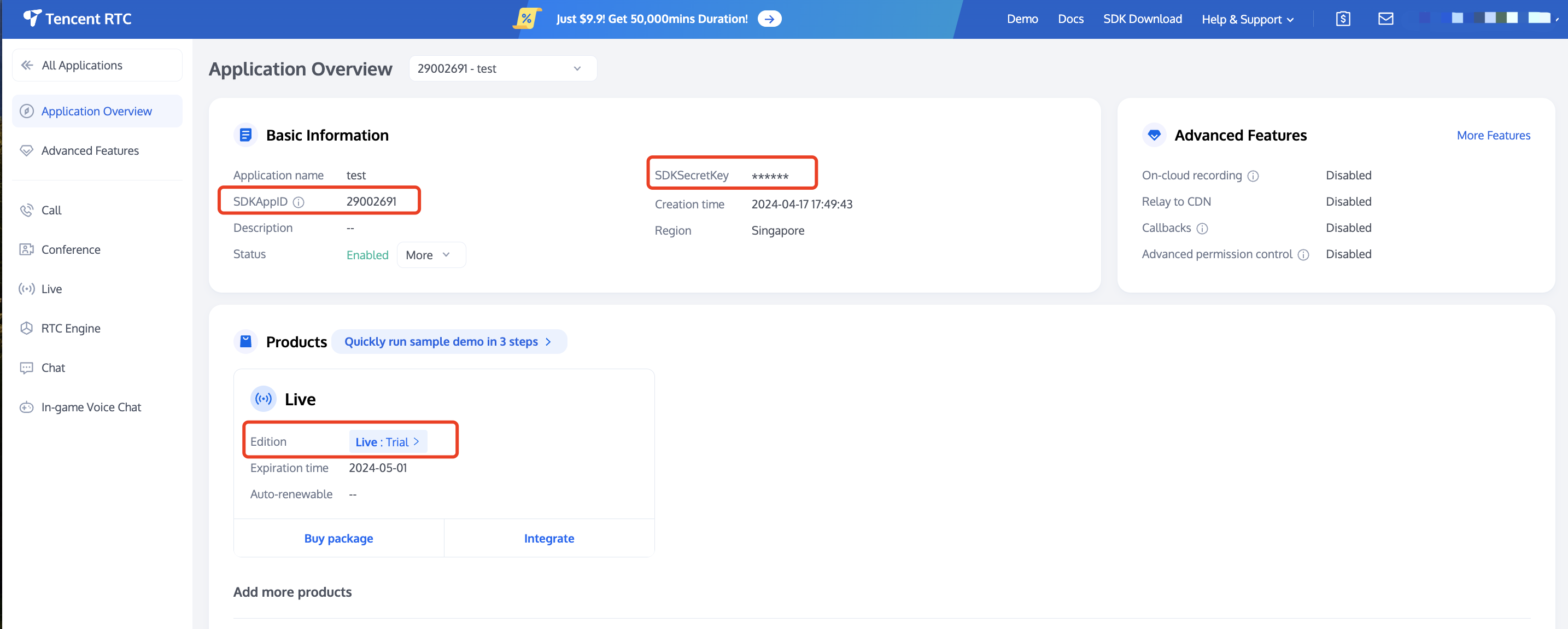
- package/tools/live/get_native_live_uikit_interaction.js.map +1 -1
- package/utils/report-cls-client.js +1 -1
- package/utils/report-es-client.js +1 -1
|
@@ -0,0 +1,936 @@
|
|
|
1
|
+
This document guides you through building a voice chat room application with host broadcasting and audience participation features using the **AtomicXCore** SDK's `LiveListStore` and `LiveSeatStore`.
|
|
2
|
+
|
|
3
|
+
## Core Concepts
|
|
4
|
+
|
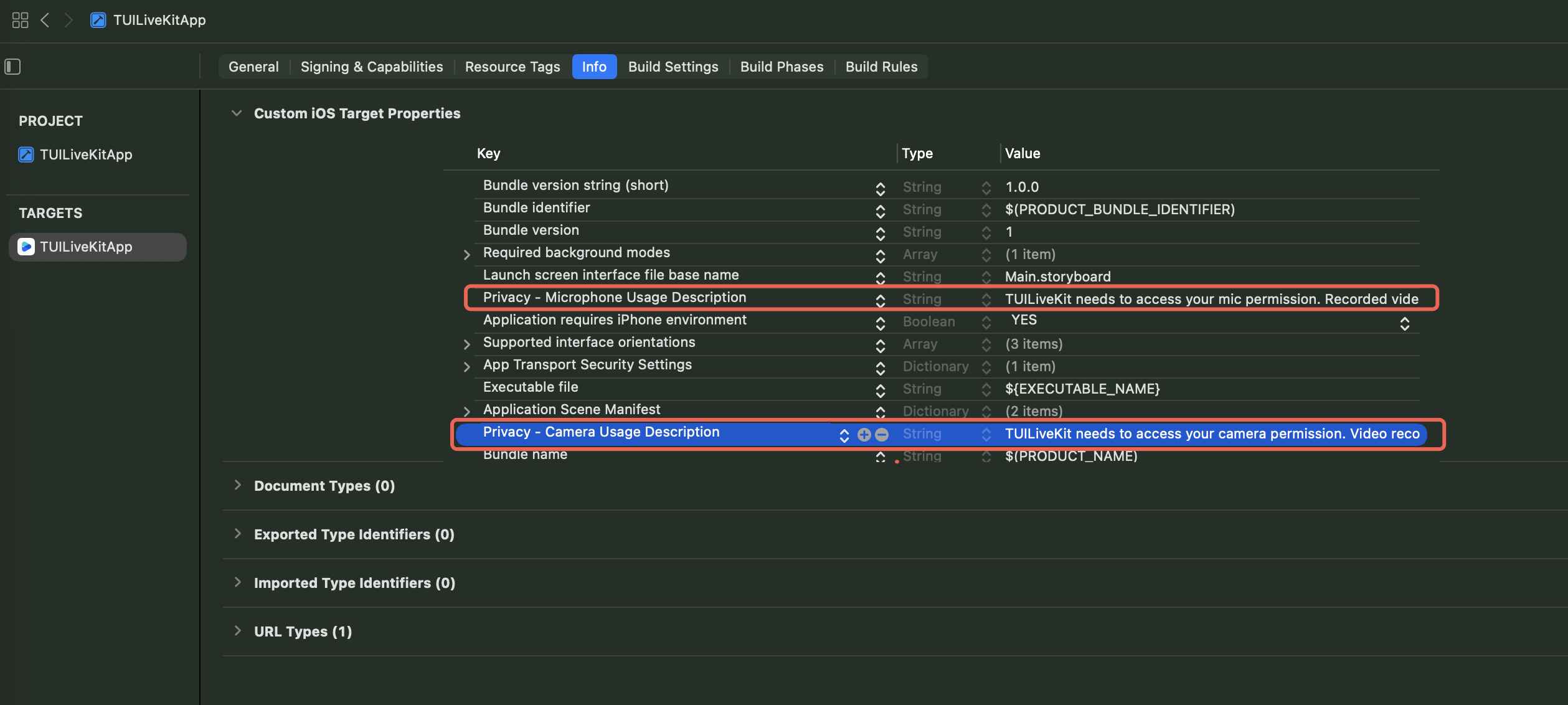
|
5
|
+
Before starting integration, please go through the following table to understand several core concepts related to `LiveSeatStore`:
|
|
6
|
+
<table>
|
|
7
|
+
<tr>
|
|
8
|
+
<td rowspan="1" colSpan="1" >**Core Concepts**</td>
|
|
9
|
+
|
|
10
|
+
<td rowspan="1" colSpan="1" >**Type**</td>
|
|
11
|
+
|
|
12
|
+
<td rowspan="1" colSpan="1" >**Core Responsibilities and Description**</td>
|
|
13
|
+
</tr>
|
|
14
|
+
|
|
15
|
+
<tr>
|
|
16
|
+
<td rowspan="1" colSpan="1" >[LiveSeatStore](https://tencent-rtc.github.io/TUIKit_Flutter/api_live_live_seat_store/LiveSeatStore-class.html)</td>
|
|
17
|
+
|
|
18
|
+
<td rowspan="1" colSpan="1" >`class`</td>
|
|
19
|
+
|
|
20
|
+
<td rowspan="1" colSpan="1" >The core of seat management is responsible for managing ALL seat information and related operations in the room.<br>Expose the real-time microphone position list data stream through `liveSeatState.seatList`.</td>
|
|
21
|
+
</tr>
|
|
22
|
+
|
|
23
|
+
<tr>
|
|
24
|
+
<td rowspan="1" colSpan="1" >[LiveSeatState](https://tencent-rtc.github.io/TUIKit_Flutter/api_live_live_seat_store/LiveSeatState-class.html)</td>
|
|
25
|
+
|
|
26
|
+
<td rowspan="1" colSpan="1" >`class`</td>
|
|
27
|
+
|
|
28
|
+
<td rowspan="1" colSpan="1" >Represent the current status of the microphone position.<br>- `seatList` is a `ValueListenable<List<SeatInfo>>` type that stores the real-time status of the seat position list;<br>- `speakingUsers` signifies the person currently speaking and the corresponding volume.</td>
|
|
29
|
+
</tr>
|
|
30
|
+
|
|
31
|
+
<tr>
|
|
32
|
+
<td rowspan="1" colSpan="1" >[SeatInfo](https://tencent-rtc.github.io/TUIKit_Flutter/api_live_live_seat_store/SeatInfo-class.html)</td>
|
|
33
|
+
|
|
34
|
+
<td rowspan="1" colSpan="1" >`class`</td>
|
|
35
|
+
|
|
36
|
+
<td rowspan="1" colSpan="1" >The data model of one microphone position. The seat position list (`seatList`) pushed by `LiveSeatStore` consists of multiple `SeatInfo` objects. Key field:<br>- `index` (the index of the seat position).<br>- `isLocked` (whether the seat position is locked).<br>- `userInfo` (user information on the seat position. If the seat position is empty, this field is also an empty object).</td>
|
|
37
|
+
</tr>
|
|
38
|
+
|
|
39
|
+
<tr>
|
|
40
|
+
<td rowspan="1" colSpan="1" >[SeatUserInfo](https://tencent-rtc.github.io/TUIKit_Flutter/api_live_live_seat_store/SeatUserInfo-class.html)</td>
|
|
41
|
+
|
|
42
|
+
<td rowspan="1" colSpan="1" >`class`</td>
|
|
43
|
+
|
|
44
|
+
<td rowspan="1" colSpan="1" >The detailed data model of the on-mic user. When a user successfully gets on mic, the `userInfo` field in `SeatInfo` will be filled with this user. Key field:<br>- `userID` (user's unique ID)<br>- `userName` (user's nickname)<br>- `avatarURL` (user's profile photo URL)<br>- `microphoneStatus` (Mic status)<br>- `cameraStatus` (Camera status).</td>
|
|
45
|
+
</tr>
|
|
46
|
+
</table>
|
|
47
|
+
|
|
48
|
+
|
|
49
|
+
## Preparations
|
|
50
|
+
|
|
51
|
+
### Step 1: Activate the Services
|
|
52
|
+
|
|
53
|
+
See [Activate Service](https://write.woa.com/document/141936672617742336) to obtain either the trial or paid version of the SDK.Then, go to [the Console](https://console.trtc.io/app) for application management, and get the following:
|
|
54
|
+
- `SDKAppID`: Application identifier (required). Tencent Cloud uses `SDKAppID` for billing and details.
|
|
55
|
+
|
|
56
|
+
- `SDKSecretKey`: Application secret key, used to initialize the configuration file with secret information.
|
|
57
|
+
|
|
58
|
+
|
|
59
|
+
|
|
60
|
+
|
|
61
|
+
### Step 2: Import AtomicXCore into Your Project
|
|
62
|
+
1. **Install component**: Please add `atomic_x_core` dependency in your `pubspec.yaml` file, then execute `flutter pub get`.
|
|
63
|
+
|
|
64
|
+
``` yaml
|
|
65
|
+
dependencies:
|
|
66
|
+
atomic_x_core: ^3.6.0
|
|
67
|
+
```
|
|
68
|
+
2. **Configure project permissions:** Android and iOS projects all are needed to configure permissions.
|
|
69
|
+
|
|
70
|
+
|
|
71
|
+
|
|
72
|
+
|
|
73
|
+
【Android】
|
|
74
|
+
|
|
75
|
+
Add permission to use microphone in file `android/app/src/main/AndroidManifest.xml`.
|
|
76
|
+
``` xml
|
|
77
|
+
<uses-permission android:name="android.permission.RECORD_AUDIO" />
|
|
78
|
+
```
|
|
79
|
+
|
|
80
|
+
【iOS】
|
|
81
|
+
|
|
82
|
+
Add permission to use microphone in file `ios` directory **Podfile** and `ios/Runner` directory `Info.plist`.
|
|
83
|
+
|
|
84
|
+
**Podfile**
|
|
85
|
+
``` ruby
|
|
86
|
+
post_install do |installer|
|
|
87
|
+
installer.pods_project.targets.each do |target|
|
|
88
|
+
flutter_additional_ios_build_settings(target)
|
|
89
|
+
target.build_configurations.each do |config|
|
|
90
|
+
config.build_settings['GCC_PREPROCESSOR_DEFINITIONS'] ||= [
|
|
91
|
+
'$(inherited)',
|
|
92
|
+
'PERMISSION_MICROPHONE=1',
|
|
93
|
+
]
|
|
94
|
+
end
|
|
95
|
+
end
|
|
96
|
+
end
|
|
97
|
+
```
|
|
98
|
+
|
|
99
|
+
**Info.plist**
|
|
100
|
+
``` xml
|
|
101
|
+
<key>NSMicrophoneUsageDescription</key>
|
|
102
|
+
<string>TUILiveKit needs to access your microphone permission. Recorded video will have sound when enabled</string>
|
|
103
|
+
```
|
|
104
|
+
|
|
105
|
+
|
|
106
|
+
|
|
107
|
+
|
|
108
|
+
|
|
109
|
+
### Step 3: Implement Login Logic
|
|
110
|
+
|
|
111
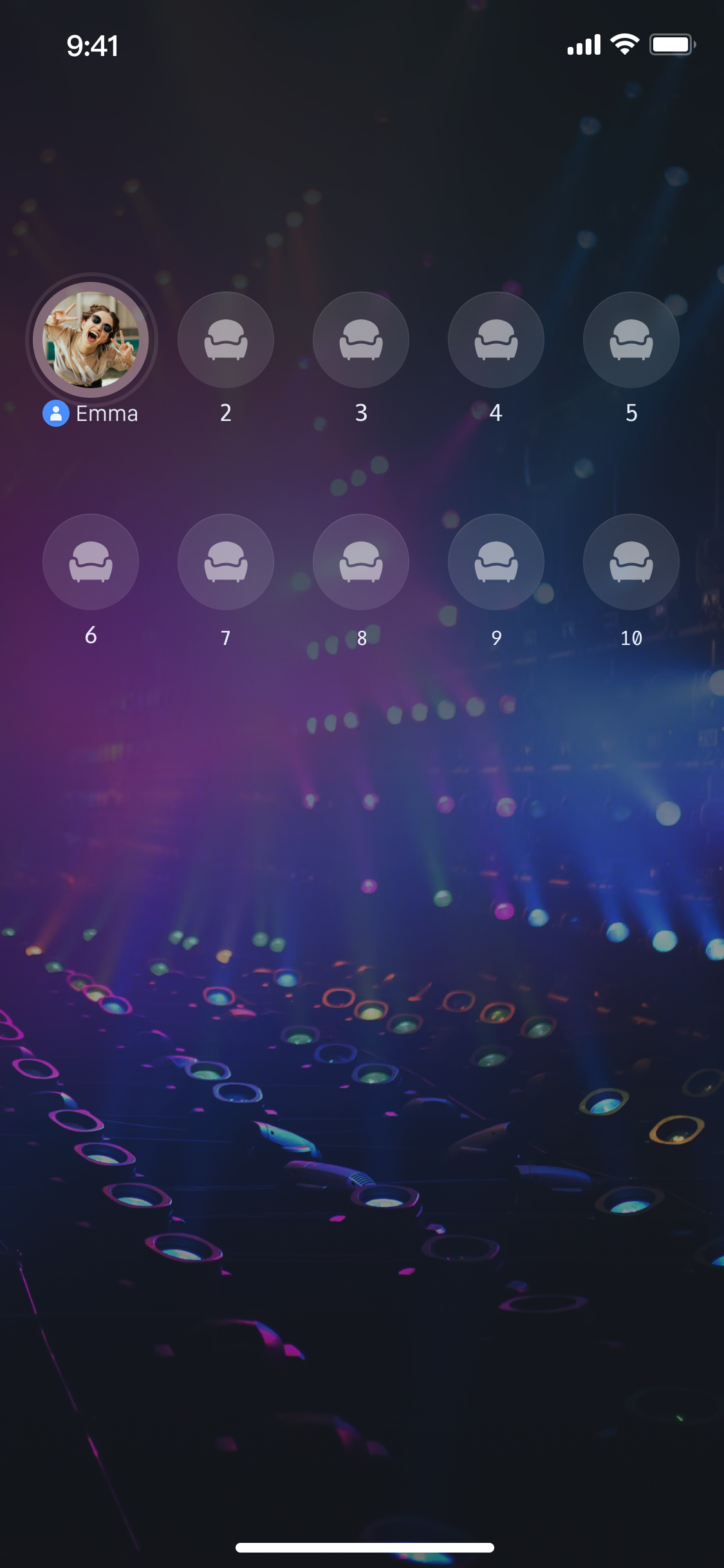
|
+
Call `LoginStore.shared.login` in the project to complete login. **This is the key premise for using **`AtomicXCore`** all functions**.
|
|
112
|
+
|
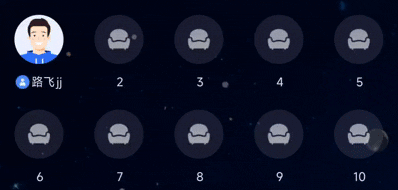
|
113
|
+
> **Important:**
|
|
114
|
+
>
|
|
115
|
+
|
|
116
|
+
> We recommend calling LoginStore.shared.login after successful log-in to your App's user account to ensure clear and consistent login service logic.
|
|
117
|
+
>
|
|
118
|
+
|
|
119
|
+
``` java
|
|
120
|
+
import 'package:flutter/material.dart';
|
|
121
|
+
import 'package:atomic_x_core/atomicxcore.dart';
|
|
122
|
+
|
|
123
|
+
// main.dart
|
|
124
|
+
void main() async {
|
|
125
|
+
WidgetsFlutterBinding.ensureInitialized();
|
|
126
|
+
|
|
127
|
+
// Log in.
|
|
128
|
+
final result = await LoginStore.shared.login(
|
|
129
|
+
sdkAppID: 1400000001, // Replace with your sdkAppID
|
|
130
|
+
userID: "test_001", // Replace with your user ID
|
|
131
|
+
userSig: "xxxxxxxxxxx", // Replace with your userSig
|
|
132
|
+
);
|
|
133
|
+
|
|
134
|
+
if (result.isSuccess) {
|
|
135
|
+
debugPrint("login success");
|
|
136
|
+
} else {
|
|
137
|
+
debugPrint("login failed code: ${result.code}, message: ${result.message}");
|
|
138
|
+
}
|
|
139
|
+
|
|
140
|
+
runApp(const MyApp());
|
|
141
|
+
}
|
|
142
|
+
```
|
|
143
|
+
|
|
144
|
+
**Login API parameter description:**
|
|
145
|
+
<table>
|
|
146
|
+
<tr>
|
|
147
|
+
<td rowspan="1" colSpan="1" >**Parameter**</td>
|
|
148
|
+
|
|
149
|
+
<td rowspan="1" colSpan="1" >**Type**</td>
|
|
150
|
+
|
|
151
|
+
<td rowspan="1" colSpan="1" >**Description**</td>
|
|
152
|
+
</tr>
|
|
153
|
+
|
|
154
|
+
<tr>
|
|
155
|
+
<td rowspan="1" colSpan="1" >`sdkAppID`</td>
|
|
156
|
+
|
|
157
|
+
<td rowspan="1" colSpan="1" >`Int`</td>
|
|
158
|
+
|
|
159
|
+
<td rowspan="1" colSpan="1" >Get this from [TRTC console > Application management](https://console.trtc.io/app).</td>
|
|
160
|
+
</tr>
|
|
161
|
+
|
|
162
|
+
<tr>
|
|
163
|
+
<td rowspan="1" colSpan="1" >`userID`</td>
|
|
164
|
+
|
|
165
|
+
<td rowspan="1" colSpan="1" >`String`</td>
|
|
166
|
+
|
|
167
|
+
<td rowspan="1" colSpan="1" >The unique ID for the current user. Must contain only English letters, numbers, hyphens, and underscores.</td>
|
|
168
|
+
</tr>
|
|
169
|
+
|
|
170
|
+
<tr>
|
|
171
|
+
<td rowspan="1" colSpan="1" >`userSig`</td>
|
|
172
|
+
|
|
173
|
+
<td rowspan="1" colSpan="1" >`String`</td>
|
|
174
|
+
|
|
175
|
+
<td rowspan="1" colSpan="1" >A ticket for Tencent Cloud authentication. Please note:<br>- **Development Environment**: You can use the local `GenerateTestUserSig.genTestSig` function to generate a UserSig or generate a temporary UserSig via the [UserSig Generation Tool](https://console.trtc.io/usersig).<br>- **Production Environment**: To prevent key leakage, you must use a server-side method to generate UserSig. For details, see [Generating UserSig on the Server](https://write.woa.com/document/176189003854483456).<br>- For more information, see [How to Calculate and Use UserSig](https://write.woa.com/document/89644530319802368).</td>
|
|
176
|
+
</tr>
|
|
177
|
+
</table>
|
|
178
|
+
|
|
179
|
+
|
|
180
|
+
## Building a Basic Voice Chat Room
|
|
181
|
+
|
|
182
|
+
### Step 1: Host Room Creation
|
|
183
|
+
|
|
184
|
+
Follow these steps to quickly set up a voice chat room as the host.
|
|
185
|
+
|
|
186
|
+
#### 1. **Initialize the Seat Store**
|
|
187
|
+
|
|
188
|
+
On your anchor page, create a `LiveSeatStore` instance. You need to listen to changes in `liveSeatStore.liveSeatState` for real-time seat updates and UI rendering.
|
|
189
|
+
``` java
|
|
190
|
+
import 'package:flutter/material.dart';
|
|
191
|
+
import 'package:atomic_x_core/atomicxcore.dart';
|
|
192
|
+
|
|
193
|
+
// YourAnchorPage represents your host homepage
|
|
194
|
+
class YourAnchorPage extends StatefulWidget {
|
|
195
|
+
const YourAnchorPage({super.key});
|
|
196
|
+
|
|
197
|
+
@override
|
|
198
|
+
State<YourAnchorPage> createState() => _YourAnchorPageState();
|
|
199
|
+
}
|
|
200
|
+
|
|
201
|
+
class _YourAnchorPageState extends State<YourAnchorPage> {
|
|
202
|
+
final _liveListStore = LiveListStore.shared;
|
|
203
|
+
final _deviceStore = DeviceStore.shared;
|
|
204
|
+
|
|
205
|
+
// Initialize LiveSeatStore with liveID
|
|
206
|
+
final String _liveID = "test_voice_room_001";
|
|
207
|
+
late final LiveSeatStore _liveSeatStore;
|
|
208
|
+
late final VoidCallback _seatListListener = _onSeatListChanged;
|
|
209
|
+
|
|
210
|
+
@override
|
|
211
|
+
void initState() {
|
|
212
|
+
super.initState();
|
|
213
|
+
_liveSeatStore = LiveSeatStore.create(_liveID);
|
|
214
|
+
|
|
215
|
+
// Listen to microphone position list adjustment
|
|
216
|
+
_observeSeatList();
|
|
217
|
+
}
|
|
218
|
+
|
|
219
|
+
void _observeSeatList() {
|
|
220
|
+
// Listen to changes in liveSeatState.seatList and refresh your mic seat UI
|
|
221
|
+
_liveSeatStore.liveSeatState.seatList.addListener(_seatListListener);
|
|
222
|
+
}
|
|
223
|
+
|
|
224
|
+
void _onSeatListChanged() {
|
|
225
|
+
// Render your mic seat UI here based on seatInfoList
|
|
226
|
+
final seatInfoList = _liveSeatStore.liveSeatState.seatList.value;
|
|
227
|
+
debugPrint("Seat list updated: ${seatInfoList.length} seats");
|
|
228
|
+
setState(() {});
|
|
229
|
+
}
|
|
230
|
+
|
|
231
|
+
@override
|
|
232
|
+
void dispose() {
|
|
233
|
+
_liveSeatStore.liveSeatState.seatList.removeListener(_seatListListener);
|
|
234
|
+
super.dispose();
|
|
235
|
+
}
|
|
236
|
+
|
|
237
|
+
@override
|
|
238
|
+
Widget build(BuildContext context) {
|
|
239
|
+
// Assume that you have your own layout
|
|
240
|
+
return Container();
|
|
241
|
+
}
|
|
242
|
+
}
|
|
243
|
+
```
|
|
244
|
+
|
|
245
|
+
#### Turn on Microphone
|
|
246
|
+
|
|
247
|
+
Turn on the microphone by calling the `DeviceStore``openLocalMicrophone` API. Sample code:
|
|
248
|
+
``` java
|
|
249
|
+
class _YourAnchorPageState extends State<YourAnchorPage> {
|
|
250
|
+
// ... Other code ...
|
|
251
|
+
|
|
252
|
+
void _openDevices() {
|
|
253
|
+
// Turn the mic on
|
|
254
|
+
DeviceStore.shared.openLocalMicrophone();
|
|
255
|
+
}
|
|
256
|
+
}
|
|
257
|
+
```
|
|
258
|
+
|
|
259
|
+
#### 3. Start Voice Chat
|
|
260
|
+
|
|
261
|
+
By calling the `LiveListStore``createLive` API to start a voice chat room live stream, sample code:
|
|
262
|
+
``` java
|
|
263
|
+
class _YourAnchorPageState extends State<YourAnchorPage> {
|
|
264
|
+
// ... Other code ...
|
|
265
|
+
final String _liveID = "test_voice_room_001";
|
|
266
|
+
|
|
267
|
+
@override
|
|
268
|
+
void initState() {
|
|
269
|
+
super.initState();
|
|
270
|
+
// ... Other code ...
|
|
271
|
+
|
|
272
|
+
// Start Voice Chat
|
|
273
|
+
_startLive();
|
|
274
|
+
}
|
|
275
|
+
|
|
276
|
+
Future<void> _startLive() async {
|
|
277
|
+
// 1. Prepare the LiveInfo object
|
|
278
|
+
final liveInfo = LiveInfo(
|
|
279
|
+
// 2. Set the room id
|
|
280
|
+
liveID: _liveID,
|
|
281
|
+
// 3. Set the room name
|
|
282
|
+
liveName: "test voice chat room",
|
|
283
|
+
// 4. Configured as a voice chat room (enable seat)
|
|
284
|
+
isSeatEnabled: true,
|
|
285
|
+
// 5. Room owner on seat by default
|
|
286
|
+
keepOwnerOnSeat: true,
|
|
287
|
+
// 6. Set the seat layout template (for example, 70 is the 10-seat template)
|
|
288
|
+
// Important: According to the product specification, input the correct ID
|
|
289
|
+
seatLayoutTemplateID: 70,
|
|
290
|
+
// 7. Set the microphone mode, such as apply for microphone mode
|
|
291
|
+
seatMode: TakeSeatMode.apply,
|
|
292
|
+
// 8. Set the maximum number of microphone slots
|
|
293
|
+
maxSeatCount: 10,
|
|
294
|
+
);
|
|
295
|
+
|
|
296
|
+
// 9. Call createLive to start live streaming
|
|
297
|
+
final result = await _liveListStore.createLive(liveInfo);
|
|
298
|
+
|
|
299
|
+
if (result.isSuccess) {
|
|
300
|
+
debugPrint("Response startLive onSuccess");
|
|
301
|
+
// Once created successfully, the room owner will join the stage by default. At this point, you can call unmuteMicrophone
|
|
302
|
+
_liveSeatStore.unmuteMicrophone();
|
|
303
|
+
} else {
|
|
304
|
+
debugPrint("Response startLive onError: ${result.message}");
|
|
305
|
+
}
|
|
306
|
+
}
|
|
307
|
+
}
|
|
308
|
+
```
|
|
309
|
+
|
|
310
|
+
**LiveInfo parameter description:**
|
|
311
|
+
<table>
|
|
312
|
+
<tr>
|
|
313
|
+
<td rowspan="1" colSpan="1" >**Parameter Name**</td>
|
|
314
|
+
|
|
315
|
+
<td rowspan="1" colSpan="1" >**Type**</td>
|
|
316
|
+
|
|
317
|
+
<td rowspan="1" colSpan="1" >**Attribute**</td>
|
|
318
|
+
|
|
319
|
+
<td rowspan="1" colSpan="1" >**Description**</td>
|
|
320
|
+
</tr>
|
|
321
|
+
|
|
322
|
+
<tr>
|
|
323
|
+
<td rowspan="1" colSpan="1" >`liveID`</td>
|
|
324
|
+
|
|
325
|
+
<td rowspan="1" colSpan="1" >`String`</td>
|
|
326
|
+
|
|
327
|
+
<td rowspan="1" colSpan="1" >Required</td>
|
|
328
|
+
|
|
329
|
+
<td rowspan="1" colSpan="1" >Unique identifier of the live streaming room.</td>
|
|
330
|
+
</tr>
|
|
331
|
+
|
|
332
|
+
<tr>
|
|
333
|
+
<td rowspan="1" colSpan="1" >`liveName`</td>
|
|
334
|
+
|
|
335
|
+
<td rowspan="1" colSpan="1" >`String`</td>
|
|
336
|
+
|
|
337
|
+
<td rowspan="1" colSpan="1" >Optional.</td>
|
|
338
|
+
|
|
339
|
+
<td rowspan="1" colSpan="1" >Title of the live streaming room.</td>
|
|
340
|
+
</tr>
|
|
341
|
+
|
|
342
|
+
<tr>
|
|
343
|
+
<td rowspan="1" colSpan="1" >`notice`</td>
|
|
344
|
+
|
|
345
|
+
<td rowspan="1" colSpan="1" >`String`</td>
|
|
346
|
+
|
|
347
|
+
<td rowspan="1" colSpan="1" >Optional.</td>
|
|
348
|
+
|
|
349
|
+
<td rowspan="1" colSpan="1" >Announcement information of the live streaming room.</td>
|
|
350
|
+
</tr>
|
|
351
|
+
|
|
352
|
+
<tr>
|
|
353
|
+
<td rowspan="1" colSpan="1" >`isMessageDisable`</td>
|
|
354
|
+
|
|
355
|
+
<td rowspan="1" colSpan="1" >`bool`</td>
|
|
356
|
+
|
|
357
|
+
<td rowspan="1" colSpan="1" >Optional.</td>
|
|
358
|
+
|
|
359
|
+
<td rowspan="1" colSpan="1" >Whether to mute (`true`: yes, `false`: no).</td>
|
|
360
|
+
</tr>
|
|
361
|
+
|
|
362
|
+
<tr>
|
|
363
|
+
<td rowspan="1" colSpan="1" >`isPublicVisible`</td>
|
|
364
|
+
|
|
365
|
+
<td rowspan="1" colSpan="1" >`bool`</td>
|
|
366
|
+
|
|
367
|
+
<td rowspan="1" colSpan="1" >Optional.</td>
|
|
368
|
+
|
|
369
|
+
<td rowspan="1" colSpan="1" >Whether publicly visible (`true`: yes, `false`: no).</td>
|
|
370
|
+
</tr>
|
|
371
|
+
|
|
372
|
+
<tr>
|
|
373
|
+
<td rowspan="1" colSpan="1" >`isSeatEnabled`</td>
|
|
374
|
+
|
|
375
|
+
<td rowspan="1" colSpan="1" >`bool`</td>
|
|
376
|
+
|
|
377
|
+
<td rowspan="1" colSpan="1" >Optional.</td>
|
|
378
|
+
|
|
379
|
+
<td rowspan="1" colSpan="1" >Whether to enable the seat feature (`true`: yes, `false`: no).</td>
|
|
380
|
+
</tr>
|
|
381
|
+
|
|
382
|
+
<tr>
|
|
383
|
+
<td rowspan="1" colSpan="1" >`keepOwnerOnSeat`</td>
|
|
384
|
+
|
|
385
|
+
<td rowspan="1" colSpan="1" >`bool`</td>
|
|
386
|
+
|
|
387
|
+
<td rowspan="1" colSpan="1" >Optional.</td>
|
|
388
|
+
|
|
389
|
+
<td rowspan="1" colSpan="1" >Whether to keep the room owner on the seat.</td>
|
|
390
|
+
</tr>
|
|
391
|
+
|
|
392
|
+
<tr>
|
|
393
|
+
<td rowspan="1" colSpan="1" >`maxSeatCount`</td>
|
|
394
|
+
|
|
395
|
+
<td rowspan="1" colSpan="1" >`int`</td>
|
|
396
|
+
|
|
397
|
+
<td rowspan="1" colSpan="1" >Optional.</td>
|
|
398
|
+
|
|
399
|
+
<td rowspan="1" colSpan="1" >Maximum number of microphones.</td>
|
|
400
|
+
</tr>
|
|
401
|
+
|
|
402
|
+
<tr>
|
|
403
|
+
<td rowspan="1" colSpan="1" >`seatMode`</td>
|
|
404
|
+
|
|
405
|
+
<td rowspan="1" colSpan="1" >`TakeSeatMode`</td>
|
|
406
|
+
|
|
407
|
+
<td rowspan="1" colSpan="1" >Optional.</td>
|
|
408
|
+
|
|
409
|
+
<td rowspan="1" colSpan="1" >Microphone mode (`free`: Free to Join the Podium, `apply`: request to speak).</td>
|
|
410
|
+
</tr>
|
|
411
|
+
|
|
412
|
+
<tr>
|
|
413
|
+
<td rowspan="1" colSpan="1" >`seatLayoutTemplateID`</td>
|
|
414
|
+
|
|
415
|
+
<td rowspan="1" colSpan="1" >`int`</td>
|
|
416
|
+
|
|
417
|
+
<td rowspan="1" colSpan="1" >Required</td>
|
|
418
|
+
|
|
419
|
+
<td rowspan="1" colSpan="1" >Mic position layout template `ID.`</td>
|
|
420
|
+
</tr>
|
|
421
|
+
|
|
422
|
+
<tr>
|
|
423
|
+
<td rowspan="1" colSpan="1" >`coverURL`</td>
|
|
424
|
+
|
|
425
|
+
<td rowspan="1" colSpan="1" >`String`</td>
|
|
426
|
+
|
|
427
|
+
<td rowspan="1" colSpan="1" >Optional.</td>
|
|
428
|
+
|
|
429
|
+
<td rowspan="1" colSpan="1" >thumbnail URL of the live streaming room.</td>
|
|
430
|
+
</tr>
|
|
431
|
+
|
|
432
|
+
<tr>
|
|
433
|
+
<td rowspan="1" colSpan="1" >`backgroundURL`</td>
|
|
434
|
+
|
|
435
|
+
<td rowspan="1" colSpan="1" >`String`</td>
|
|
436
|
+
|
|
437
|
+
<td rowspan="1" colSpan="1" >Optional.</td>
|
|
438
|
+
|
|
439
|
+
<td rowspan="1" colSpan="1" >background image URL of the live streaming room.</td>
|
|
440
|
+
</tr>
|
|
441
|
+
|
|
442
|
+
<tr>
|
|
443
|
+
<td rowspan="1" colSpan="1" >`categoryList`</td>
|
|
444
|
+
|
|
445
|
+
<td rowspan="1" colSpan="1" >`List<int>`</td>
|
|
446
|
+
|
|
447
|
+
<td rowspan="1" colSpan="1" >Optional.</td>
|
|
448
|
+
|
|
449
|
+
<td rowspan="1" colSpan="1" >Category tag list of the live streaming room.</td>
|
|
450
|
+
</tr>
|
|
451
|
+
|
|
452
|
+
<tr>
|
|
453
|
+
<td rowspan="1" colSpan="1" >`activityStatus`</td>
|
|
454
|
+
|
|
455
|
+
<td rowspan="1" colSpan="1" >`int`</td>
|
|
456
|
+
|
|
457
|
+
<td rowspan="1" colSpan="1" >Optional.</td>
|
|
458
|
+
|
|
459
|
+
<td rowspan="1" colSpan="1" >Live stream status.</td>
|
|
460
|
+
</tr>
|
|
461
|
+
|
|
462
|
+
<tr>
|
|
463
|
+
<td rowspan="1" colSpan="1" >`isGiftEnabled`</td>
|
|
464
|
+
|
|
465
|
+
<td rowspan="1" colSpan="1" >`bool`</td>
|
|
466
|
+
|
|
467
|
+
<td rowspan="1" colSpan="1" >Optional.</td>
|
|
468
|
+
|
|
469
|
+
<td rowspan="1" colSpan="1" >Whether to enable the gift function (`true`: yes, `false`: no).</td>
|
|
470
|
+
</tr>
|
|
471
|
+
</table>
|
|
472
|
+
|
|
473
|
+
|
|
474
|
+
#### 4. Build a Mic Seat UI
|
|
475
|
+
|
|
476
|
+
> **Note:**
|
|
477
|
+
>
|
|
478
|
+
|
|
479
|
+
> For the business code of the Mic Seat `UI` effect, see the [seat_grid_widget.dart](https://github.com/Tencent-RTC/TUIKit_Flutter/blob/main/live/livekit/lib/seat_grid_widget/seat_grid_widget.dart) file in the `TUILiveKit` open-source project to learn about the complete implementation logic.
|
|
480
|
+
>
|
|
481
|
+
|
|
482
|
+
|
|
483
|
+
Through the `LiveSeatStore` instance, listen to changes in `liveSeatState.seatList` to get seat data in real time for rendering your UI. You can listen to the data on the page (such as `YourAnchorPage` or `YourAudiencePage`) in the following ways:
|
|
484
|
+
``` java
|
|
485
|
+
class _YourAnchorPageState extends State<YourAnchorPage> {
|
|
486
|
+
// ... Other code ...
|
|
487
|
+
late final LiveSeatStore _liveSeatStore;
|
|
488
|
+
late final VoidCallback _seatListListener = _onSeatListChanged;
|
|
489
|
+
|
|
490
|
+
@override
|
|
491
|
+
void initState() {
|
|
492
|
+
super.initState();
|
|
493
|
+
_liveSeatStore = LiveSeatStore.create("your_live_id");
|
|
494
|
+
// ... Other code ...
|
|
495
|
+
|
|
496
|
+
// Listen to seatList transition
|
|
497
|
+
_observeSeatList();
|
|
498
|
+
}
|
|
499
|
+
|
|
500
|
+
void _observeSeatList() {
|
|
501
|
+
// Listen to changes in liveSeatState.seatList and refresh your mic seat UI
|
|
502
|
+
_liveSeatStore.liveSeatState.seatList.addListener(_seatListListener);
|
|
503
|
+
}
|
|
504
|
+
|
|
505
|
+
void _onSeatListChanged() {
|
|
506
|
+
// seatInfoList is the latest microphone position list (List<SeatInfo>)
|
|
507
|
+
final seatInfoList = _liveSeatStore.liveSeatState.seatList.value;
|
|
508
|
+
// Render your mic seat UI here based on seatInfoList
|
|
509
|
+
debugPrint("Seat list updated: ${seatInfoList.length} seats");
|
|
510
|
+
setState(() {});
|
|
511
|
+
}
|
|
512
|
+
|
|
513
|
+
@override
|
|
514
|
+
void dispose() {
|
|
515
|
+
_liveSeatStore.liveSeatState.seatList.removeListener(_seatListListener);
|
|
516
|
+
super.dispose();
|
|
517
|
+
}
|
|
518
|
+
|
|
519
|
+
@override
|
|
520
|
+
Widget build(BuildContext context) {
|
|
521
|
+
return ValueListenableBuilder<List<SeatInfo>>(
|
|
522
|
+
valueListenable: _liveSeatStore.liveSeatState.seatList,
|
|
523
|
+
builder: (context, seatList, child) {
|
|
524
|
+
return GridView.builder(
|
|
525
|
+
gridDelegate: const SliverGridDelegateWithFixedCrossAxisCount(
|
|
526
|
+
crossAxisCount: 4,
|
|
527
|
+
),
|
|
528
|
+
itemCount: seatList.length,
|
|
529
|
+
itemBuilder: (context, index) {
|
|
530
|
+
final seat = seatList[index];
|
|
531
|
+
return _buildSeatItem(seat);
|
|
532
|
+
},
|
|
533
|
+
);
|
|
534
|
+
},
|
|
535
|
+
);
|
|
536
|
+
}
|
|
537
|
+
|
|
538
|
+
Widget _buildSeatItem(SeatInfo seat) {
|
|
539
|
+
// Build one mic seat UI
|
|
540
|
+
return Container();
|
|
541
|
+
}
|
|
542
|
+
}
|
|
543
|
+
```
|
|
544
|
+
|
|
545
|
+
#### 5. End Voice Chat
|
|
546
|
+
|
|
547
|
+
After the voice chat, the room owner can call the `LiveListStore`'s `endLive` API to end the chat. The `SDK` will handle the logic of stopping streaming and terminating the room.
|
|
548
|
+
``` java
|
|
549
|
+
class _YourAnchorPageState extends State<YourAnchorPage> {
|
|
550
|
+
// ... Other code ...
|
|
551
|
+
|
|
552
|
+
// End Voice Chat
|
|
553
|
+
Future<void> _stopLive() async {
|
|
554
|
+
final result = await _liveListStore.endLive();
|
|
555
|
+
|
|
556
|
+
if (result.isSuccess) {
|
|
557
|
+
debugPrint("endLive success");
|
|
558
|
+
} else {
|
|
559
|
+
debugPrint("endLive error: ${result.message}");
|
|
560
|
+
}
|
|
561
|
+
}
|
|
562
|
+
}
|
|
563
|
+
```
|
|
564
|
+
|
|
565
|
+
### Step 2: Audience Joins the Voice Chat Room
|
|
566
|
+
|
|
567
|
+
Enable audience members to join the voice chat room with the following steps.
|
|
568
|
+
|
|
569
|
+
#### 1. **Initialize the Seat Store**
|
|
570
|
+
|
|
571
|
+
On your audience page, create a `LiveSeatStore` instance and listen to changes in `liveSeatState.seatList` to render the mic seat UI.
|
|
572
|
+
``` java
|
|
573
|
+
import 'package:flutter/material.dart';
|
|
574
|
+
import 'package:atomic_x_core/atomicxcore.dart';
|
|
575
|
+
|
|
576
|
+
// YourAudiencePage represents your audience page
|
|
577
|
+
class YourAudiencePage extends StatefulWidget {
|
|
578
|
+
const YourAudiencePage({super.key});
|
|
579
|
+
|
|
580
|
+
@override
|
|
581
|
+
State<YourAudiencePage> createState() => _YourAudiencePageState();
|
|
582
|
+
}
|
|
583
|
+
|
|
584
|
+
class _YourAudiencePageState extends State<YourAudiencePage> {
|
|
585
|
+
final _liveListStore = LiveListStore.shared;
|
|
586
|
+
|
|
587
|
+
// Ensure the liveID matches the room owner
|
|
588
|
+
final String _liveID = "test_voice_room_001";
|
|
589
|
+
late final LiveSeatStore _liveSeatStore;
|
|
590
|
+
late final VoidCallback _seatListListener = _onSeatListChanged;
|
|
591
|
+
|
|
592
|
+
@override
|
|
593
|
+
void initState() {
|
|
594
|
+
super.initState();
|
|
595
|
+
_liveSeatStore = LiveSeatStore.create(_liveID);
|
|
596
|
+
|
|
597
|
+
// Listen to microphone position list adjustment
|
|
598
|
+
_observeSeatList();
|
|
599
|
+
}
|
|
600
|
+
|
|
601
|
+
void _observeSeatList() {
|
|
602
|
+
// Listen to changes in liveSeatState.seatList and refresh your mic seat UI
|
|
603
|
+
_liveSeatStore.liveSeatState.seatList.addListener(_seatListListener);
|
|
604
|
+
}
|
|
605
|
+
|
|
606
|
+
void _onSeatListChanged() {
|
|
607
|
+
// Render your mic seat UI here based on seatInfoList
|
|
608
|
+
final seatInfoList = _liveSeatStore.liveSeatState.seatList.value;
|
|
609
|
+
debugPrint("AudiencePage Seat list updated: ${seatInfoList.length} seats");
|
|
610
|
+
setState(() {});
|
|
611
|
+
}
|
|
612
|
+
|
|
613
|
+
@override
|
|
614
|
+
void dispose() {
|
|
615
|
+
_liveSeatStore.liveSeatState.seatList.removeListener(_seatListListener);
|
|
616
|
+
super.dispose();
|
|
617
|
+
}
|
|
618
|
+
|
|
619
|
+
@override
|
|
620
|
+
Widget build(BuildContext context) {
|
|
621
|
+
// Assume that you have your own layout
|
|
622
|
+
return Container();
|
|
623
|
+
}
|
|
624
|
+
}
|
|
625
|
+
```
|
|
626
|
+
|
|
627
|
+
#### 2. **Join the Voice Chat Room**
|
|
628
|
+
|
|
629
|
+
By calling the `LiveListStore``joinLive` API to join a voice chat room, sample code:
|
|
630
|
+
``` java
|
|
631
|
+
class _YourAudiencePageState extends State<YourAudiencePage> {
|
|
632
|
+
// ... Other code ...
|
|
633
|
+
|
|
634
|
+
@override
|
|
635
|
+
void initState() {
|
|
636
|
+
super.initState();
|
|
637
|
+
// ... Other code ...
|
|
638
|
+
|
|
639
|
+
// Enter a voice chat room
|
|
640
|
+
_joinLive();
|
|
641
|
+
}
|
|
642
|
+
|
|
643
|
+
Future<void> _joinLive() async {
|
|
644
|
+
// Call joinLive to enter a voice chat room
|
|
645
|
+
final result = await _liveListStore.joinLive(_liveID);
|
|
646
|
+
|
|
647
|
+
if (result.isSuccess) {
|
|
648
|
+
debugPrint("joinLive success");
|
|
649
|
+
} else {
|
|
650
|
+
debugPrint("joinLive error: ${result.message}");
|
|
651
|
+
}
|
|
652
|
+
}
|
|
653
|
+
}
|
|
654
|
+
```
|
|
655
|
+
|
|
656
|
+
#### 3. Build a Mic Seat UI
|
|
657
|
+
|
|
658
|
+
The process for the audience to build a Mic Seat UI is the same as that for the Anchor. Refer to [Build a Mic Seat UI](https://write.woa.com/#4.-.E6.9E.84.E5.BB.BA.E9.BA.A6.E4.BD.8D-ui-.E7.95.8C.E9.9D.A2).
|
|
659
|
+
|
|
660
|
+
#### 4. **Leave the Voice Chat Room**
|
|
661
|
+
|
|
662
|
+
When the audience logs out of the voice chat room, they need to call the `LiveListStore`'s `leaveLive` API to exit.
|
|
663
|
+
``` java
|
|
664
|
+
class _YourAudiencePageState extends State<YourAudiencePage> {
|
|
665
|
+
// ... Other code ...
|
|
666
|
+
|
|
667
|
+
Future<void> _leaveLive() async {
|
|
668
|
+
final result = await _liveListStore.leaveLive();
|
|
669
|
+
|
|
670
|
+
if (result.isSuccess) {
|
|
671
|
+
debugPrint("leaveLive success");
|
|
672
|
+
} else {
|
|
673
|
+
debugPrint("leaveLive error: ${result.message}");
|
|
674
|
+
}
|
|
675
|
+
}
|
|
676
|
+
}
|
|
677
|
+
```
|
|
678
|
+
|
|
679
|
+
### Run and Test
|
|
680
|
+
|
|
681
|
+
After completing the above steps, you can complete a most basic voice chat live streaming scenario. You can refer to [various voice chat room scenarios](https://write.woa.com/#.E4.B8.B0.E5.AF.8C.E8.AF.AD.E8.81.8A.E6.88.BF.E5.9C.BA.E6.99.AF) to refine the voice chat scenario.
|
|
682
|
+
|
|
683
|
+
|
|
684
|
+
|
|
685
|
+
|
|
686
|
+
## Advanced Features
|
|
687
|
+
|
|
688
|
+
### Implementing On-Mic User Voice Waves
|
|
689
|
+
|
|
690
|
+
In a voice chat room scenario, a common need is to display a wave animation on the avatar of an on-mic user when they speak, notifying all room users "who is speaking". `LiveSeatStore` provides the `speakingUsers` data stream, specialized for implementing this feature.
|
|
691
|
+
|
|
692
|
+
|
|
693
|
+
|
|
694
|
+
|
|
695
|
+
#### Implementation
|
|
696
|
+
|
|
697
|
+
> **Note:**
|
|
698
|
+
>
|
|
699
|
+
|
|
700
|
+
> When an Anchor speaks, a wave animation effect is shown. See the [seat_grid_widget.dart](https://github.com/Tencent-RTC/TUIKit_Flutter/blob/main/live/livekit/lib/seat_grid_widget/seat_grid_widget.dart) file in the `TUILiveKit` open-source project to learn about the complete implementation logic.
|
|
701
|
+
>
|
|
702
|
+
|
|
703
|
+
|
|
704
|
+
On `YourAnchorPage` or `YourAudiencePage`, listen for `speakingUsers` transition and refresh the "speaking" status. Sample code:
|
|
705
|
+
``` java
|
|
706
|
+
class _YourAnchorPageState extends State<YourAnchorPage> {
|
|
707
|
+
late final VoidCallback _speakingUsersListener = _onSpeakingUsersChanged;
|
|
708
|
+
// ... Other code ...
|
|
709
|
+
|
|
710
|
+
@override
|
|
711
|
+
void initState() {
|
|
712
|
+
super.initState();
|
|
713
|
+
// ... Other code ...
|
|
714
|
+
|
|
715
|
+
// Listen to speakingUsers transition
|
|
716
|
+
_observeSpeakingUsersState();
|
|
717
|
+
}
|
|
718
|
+
|
|
719
|
+
void _observeSpeakingUsersState() {
|
|
720
|
+
// Listen for liveSeatState.speakingUsers transition and refresh the "speaking" status
|
|
721
|
+
_liveSeatStore.liveSeatState.speakingUsers.addListener(_speakingUsersListener);
|
|
722
|
+
}
|
|
723
|
+
|
|
724
|
+
void _onSpeakingUsersChanged() {
|
|
725
|
+
// Pass the user ID collection of "speaking" users to the UI and update the UI state
|
|
726
|
+
final speakingUserMap = _liveSeatStore.liveSeatState.speakingUsers.value;
|
|
727
|
+
debugPrint("Speaking users updated: ${speakingUserMap.length} users");
|
|
728
|
+
setState(() {});
|
|
729
|
+
}
|
|
730
|
+
|
|
731
|
+
@override
|
|
732
|
+
void dispose() {
|
|
733
|
+
_liveSeatStore.liveSeatState.speakingUsers.removeListener(_speakingUsersListener);
|
|
734
|
+
super.dispose();
|
|
735
|
+
}
|
|
736
|
+
|
|
737
|
+
@override
|
|
738
|
+
Widget build(BuildContext context) {
|
|
739
|
+
return ValueListenableBuilder<Map<String, int>>(
|
|
740
|
+
valueListenable: _liveSeatStore.liveSeatState.speakingUsers,
|
|
741
|
+
builder: (context, speakingUsers, child) {
|
|
742
|
+
// speakingUsers is a Map where the key is userID and the value is volume
|
|
743
|
+
return YourSpeakingIndicatorWidget(speakingUsers: speakingUsers);
|
|
744
|
+
},
|
|
745
|
+
);
|
|
746
|
+
}
|
|
747
|
+
}
|
|
748
|
+
|
|
749
|
+
// Example: Speaking indicator component
|
|
750
|
+
class YourSpeakingIndicatorWidget extends StatelessWidget {
|
|
751
|
+
final Map<String, int> speakingUsers;
|
|
752
|
+
|
|
753
|
+
const YourSpeakingIndicatorWidget({
|
|
754
|
+
super.key,
|
|
755
|
+
required this.speakingUsers,
|
|
756
|
+
});
|
|
757
|
+
|
|
758
|
+
@override
|
|
759
|
+
Widget build(BuildContext context) {
|
|
760
|
+
return Container();
|
|
761
|
+
}
|
|
762
|
+
}
|
|
763
|
+
```
|
|
764
|
+
|
|
765
|
+
## Enriching Voice Chat Room Scenario
|
|
766
|
+
|
|
767
|
+
After completing the basic voice chat room features, you can refer to the following feature guide to add various interactive gameplay features to the voice chat room.
|
|
768
|
+
<table>
|
|
769
|
+
<tr>
|
|
770
|
+
<td rowspan="1" colSpan="1" >**Feature**</td>
|
|
771
|
+
|
|
772
|
+
<td rowspan="1" colSpan="1" >**Feature Description**</td>
|
|
773
|
+
|
|
774
|
+
<td rowspan="1" colSpan="1" >**Feature Stores**</td>
|
|
775
|
+
|
|
776
|
+
<td rowspan="1" colSpan="1" >**Implementation Guide**</td>
|
|
777
|
+
</tr>
|
|
778
|
+
|
|
779
|
+
<tr>
|
|
780
|
+
<td rowspan="1" colSpan="1" >**Audience Take Seat**</td>
|
|
781
|
+
|
|
782
|
+
<td rowspan="1" colSpan="1" >Audience members can apply to take a seat and interact with the host in real time.</td>
|
|
783
|
+
|
|
784
|
+
<td rowspan="1" colSpan="1" >[CoGuestStore](https://tencent-rtc.github.io/TUIKit_Flutter/api_live_co_guest_store/CoGuestStore-class.html)</td>
|
|
785
|
+
|
|
786
|
+
<td rowspan="1" colSpan="1" >[Implementation](https://write.woa.com/document/200555772867563520)</td>
|
|
787
|
+
</tr>
|
|
788
|
+
|
|
789
|
+
<tr>
|
|
790
|
+
<td rowspan="1" colSpan="1" >**Add Barrage Chat**</td>
|
|
791
|
+
|
|
792
|
+
<td rowspan="1" colSpan="1" >Room members can send and receive real-time text messages.</td>
|
|
793
|
+
|
|
794
|
+
<td rowspan="1" colSpan="1" >[BarrageStore](https://tencent-rtc.github.io/TUIKit_Flutter/api_barrage_barrage_store/BarrageStore-class.html)</td>
|
|
795
|
+
|
|
796
|
+
<td rowspan="1" colSpan="1" >[Implementation](https://write.woa.com/document/200455584809943040)</td>
|
|
797
|
+
</tr>
|
|
798
|
+
|
|
799
|
+
<tr>
|
|
800
|
+
<td rowspan="1" colSpan="1" >**Gift System**</td>
|
|
801
|
+
|
|
802
|
+
<td rowspan="1" colSpan="1" >Audience can send virtual gifts to hosts to increase interaction and engagement.</td>
|
|
803
|
+
|
|
804
|
+
<td rowspan="1" colSpan="1" >[GiftStore](https://tencent-rtc.github.io/TUIKit_Flutter/api_gift_gift_store/GiftStore-class.html)</td>
|
|
805
|
+
|
|
806
|
+
<td rowspan="1" colSpan="1" >[Implementation](https://write.woa.com/document/200455585142341632)</td>
|
|
807
|
+
</tr>
|
|
808
|
+
</table>
|
|
809
|
+
|
|
810
|
+
|
|
811
|
+
## API documentation
|
|
812
|
+
<table>
|
|
813
|
+
<tr>
|
|
814
|
+
<td rowspan="1" colSpan="1" >**Store/Component**</td>
|
|
815
|
+
|
|
816
|
+
<td rowspan="1" colSpan="1" >**Feature Description**</td>
|
|
817
|
+
|
|
818
|
+
<td rowspan="1" colSpan="1" >**API Reference**</td>
|
|
819
|
+
</tr>
|
|
820
|
+
|
|
821
|
+
<tr>
|
|
822
|
+
<td rowspan="1" colSpan="1" >**LiveListStore**</td>
|
|
823
|
+
|
|
824
|
+
<td rowspan="1" colSpan="1" >Full lifecycle management of live streaming room: create/join/leave/terminate room, query room list, modify live information (name, notice), listen to live streaming status (for example, being kicked out, ended).</td>
|
|
825
|
+
|
|
826
|
+
<td rowspan="1" colSpan="1" >[API documentation](https://tencent-rtc.github.io/TUIKit_Flutter/api_live_live_list_store/LiveListStore-class.html)</td>
|
|
827
|
+
</tr>
|
|
828
|
+
|
|
829
|
+
<tr>
|
|
830
|
+
<td rowspan="1" colSpan="1" >**LiveSeatStore**</td>
|
|
831
|
+
|
|
832
|
+
<td rowspan="1" colSpan="1" >Core of seat management: manage seat list, Anchor status, and related operations (taking a seat, leaving a seat, removing user, locking seat, switching microphone on or off/camera), listen to seat events.</td>
|
|
833
|
+
|
|
834
|
+
<td rowspan="1" colSpan="1" >[API documentation](https://tencent-rtc.github.io/TUIKit_Flutter/api_live_live_seat_store/LiveSeatStore-class.html)</td>
|
|
835
|
+
</tr>
|
|
836
|
+
|
|
837
|
+
<tr>
|
|
838
|
+
<td rowspan="1" colSpan="1" >**DeviceStore**</td>
|
|
839
|
+
|
|
840
|
+
<td rowspan="1" colSpan="1" >Audio/Video device control: microphone (on/off, volume), camera (on/off, switchover, video quality), screen sharing, monitor device status in real time.</td>
|
|
841
|
+
|
|
842
|
+
<td rowspan="1" colSpan="1" >[API documentation](https://tencent-rtc.github.io/TUIKit_Flutter/api_device_device_store/DeviceStore-class.html)</td>
|
|
843
|
+
</tr>
|
|
844
|
+
|
|
845
|
+
<tr>
|
|
846
|
+
<td rowspan="1" colSpan="1" >**CoGuestStore**</td>
|
|
847
|
+
|
|
848
|
+
<td rowspan="1" colSpan="1" >Audience co-broadcasting management: join microphone application/invite/grant/deny, member permission control (microphone/camera), state synchronization.</td>
|
|
849
|
+
|
|
850
|
+
<td rowspan="1" colSpan="1" >[API documentation](https://tencent-rtc.github.io/TUIKit_Flutter/api_live_co_guest_store/CoGuestStore-class.html)</td>
|
|
851
|
+
</tr>
|
|
852
|
+
|
|
853
|
+
<tr>
|
|
854
|
+
<td rowspan="1" colSpan="1" >**CoHostStore**</td>
|
|
855
|
+
|
|
856
|
+
<td rowspan="1" colSpan="1" >Anchor cross-room connection: support for multiple layout templates (dynamic grid, etc.), initiate/accept/reject connection, and interactive management of co-broadcasting Anchors.</td>
|
|
857
|
+
|
|
858
|
+
<td rowspan="1" colSpan="1" >[API documentation](https://tencent-rtc.github.io/TUIKit_Flutter/api_live_co_host_store/CoHostStore-class.html)</td>
|
|
859
|
+
</tr>
|
|
860
|
+
|
|
861
|
+
<tr>
|
|
862
|
+
<td rowspan="1" colSpan="1" >**BattleStore**</td>
|
|
863
|
+
|
|
864
|
+
<td rowspan="1" colSpan="1" >Anchor PK battle: initiate PK (duration configuration/competitor), manage PK status (start/end), synchronize score, listen to battle results.</td>
|
|
865
|
+
|
|
866
|
+
<td rowspan="1" colSpan="1" >[API documentation](https://tencent-rtc.github.io/TUIKit_Flutter/api_live_battle_store/BattleStore-class.html)</td>
|
|
867
|
+
</tr>
|
|
868
|
+
|
|
869
|
+
<tr>
|
|
870
|
+
<td rowspan="1" colSpan="1" >**GiftStore**</td>
|
|
871
|
+
|
|
872
|
+
<td rowspan="1" colSpan="1" >Gift interaction: get gift list, send/receive gifts, listen to gift events (including sender, gift details).</td>
|
|
873
|
+
|
|
874
|
+
<td rowspan="1" colSpan="1" >[API documentation](https://tencent-rtc.github.io/TUIKit_Flutter/api_gift_gift_store/GiftStore-class.html)</td>
|
|
875
|
+
</tr>
|
|
876
|
+
|
|
877
|
+
<tr>
|
|
878
|
+
<td rowspan="1" colSpan="1" >**BarrageStore**</td>
|
|
879
|
+
|
|
880
|
+
<td rowspan="1" colSpan="1" >Danmaku function: send text/custom barrage item, maintain bullet screen list, monitor danmaku status in real time.</td>
|
|
881
|
+
|
|
882
|
+
<td rowspan="1" colSpan="1" >[API documentation](https://tencent-rtc.github.io/TUIKit_Flutter/api_barrage_barrage_store/BarrageStore-class.html)</td>
|
|
883
|
+
</tr>
|
|
884
|
+
|
|
885
|
+
<tr>
|
|
886
|
+
<td rowspan="1" colSpan="1" >**LikeStore**</td>
|
|
887
|
+
|
|
888
|
+
<td rowspan="1" colSpan="1" >Like interaction: send likes, listen to like events, sync total likes.</td>
|
|
889
|
+
|
|
890
|
+
<td rowspan="1" colSpan="1" >[API documentation](https://tencent-rtc.github.io/TUIKit_Flutter/api_live_like_store/LikeStore-class.html)</td>
|
|
891
|
+
</tr>
|
|
892
|
+
|
|
893
|
+
<tr>
|
|
894
|
+
<td rowspan="1" colSpan="1" >**LiveAudienceStore**</td>
|
|
895
|
+
|
|
896
|
+
<td rowspan="1" colSpan="1" >Audience management: get real-time audience list (ID/name/avatar), check audience size, listen to Enter/Exit Event.</td>
|
|
897
|
+
|
|
898
|
+
<td rowspan="1" colSpan="1" >[API documentation](https://tencent-rtc.github.io/TUIKit_Flutter/api_live_live_audience_store/LiveAudienceStore-class.html)</td>
|
|
899
|
+
</tr>
|
|
900
|
+
|
|
901
|
+
<tr>
|
|
902
|
+
<td rowspan="1" colSpan="1" >**AudioEffectStore**</td>
|
|
903
|
+
|
|
904
|
+
<td rowspan="1" colSpan="1" >Audio effects: voice-changing (child voice/male voice), reverberation (KTV), ear monitoring adjustment, switch special effects in real time.</td>
|
|
905
|
+
|
|
906
|
+
<td rowspan="1" colSpan="1" >[API documentation](https://tencent-rtc.github.io/TUIKit_Flutter/api_device_audio_effect_store/AudioEffectStore-class.html)</td>
|
|
907
|
+
</tr>
|
|
908
|
+
|
|
909
|
+
<tr>
|
|
910
|
+
<td rowspan="1" colSpan="1" >**BaseBeautyStore**</td>
|
|
911
|
+
|
|
912
|
+
<td rowspan="1" colSpan="1" >Basic beauty filter: adjust skin smoothing/whitening/rosy (0-100 levels), reset beauty status, sync effect parameters.</td>
|
|
913
|
+
|
|
914
|
+
<td rowspan="1" colSpan="1" >[API documentation](https://tencent-rtc.github.io/TUIKit_Flutter/api_device_base_beauty_store/BaseBeautyStore-class.html)</td>
|
|
915
|
+
</tr>
|
|
916
|
+
</table>
|
|
917
|
+
|
|
918
|
+
|
|
919
|
+
## FAQs
|
|
920
|
+
|
|
921
|
+
### Audience Enters the Room with No Sound
|
|
922
|
+
- **Check device permissions**: Please ensure `App` has declared and obtained system authorization for microphone in `Info.plist` (iOS) or `AndroidManifest.xml` (Android).
|
|
923
|
+
|
|
924
|
+
- **Check the homeowner side**: Whether the room owner has normally called `DeviceStore.shared.openLocalMicrophone()` to open the microphone.
|
|
925
|
+
|
|
926
|
+
- **Check the network**: Please check whether the device network connection is normal.
|
|
927
|
+
|
|
928
|
+
|
|
929
|
+
### Microphone Position List Not Displayed or Refreshed
|
|
930
|
+
- **Check Store initialization**: Please ensure you have already used the same `liveID` to correctly create the `LiveSeatStore` instance (`LiveSeatStore.create(liveID)`) before `createLive` or `joinLive`.
|
|
931
|
+
|
|
932
|
+
- **Check data listening**: Please check whether you have used `addListener` correctly to listen to `liveSeatStore.liveSeatState.seatList`, and ensure to call `removeListener` in `dispose` to remove listener.
|
|
933
|
+
|
|
934
|
+
- **Check API call**: Please ensure the `createLive` (room owner) or `joinLive` (listener) API has been successfully called (confirm when `isSuccess` in the callback result is `true`).
|
|
935
|
+
|
|
936
|
+
|