node-red-contrib-huemagic 2.8.2 → 4.0.0
This diff represents the content of publicly available package versions that have been released to one of the supported registries. The information contained in this diff is provided for informational purposes only and reflects changes between package versions as they appear in their respective public registries.
- package/CHANGELOG.md +229 -0
- package/README.md +806 -729
- package/examples/Hue Bridge.json +189 -35
- package/examples/Hue Brightness.json +124 -14
- package/examples/Hue Buttons.json +88 -0
- package/examples/Hue Group.json +575 -63
- package/examples/Hue Light.json +805 -58
- package/examples/Hue Magic.json +69 -24
- package/examples/Hue Motion.json +110 -42
- package/examples/Hue Rules.json +105 -37
- package/examples/Hue Scene.json +145 -28
- package/examples/Hue Temperature.json +124 -14
- package/huemagic/animations/001-sunny.json +22 -22
- package/huemagic/animations/002-cloudy.json +46 -46
- package/huemagic/animations/003-nightsky.json +20 -20
- package/huemagic/animations/004-sunrise.json +54 -54
- package/huemagic/animations/005-sunset.json +46 -46
- package/huemagic/animations/006-fireplace.json +74 -74
- package/huemagic/animations/007-spring.json +31 -31
- package/huemagic/animations/008-autmn.json +23 -23
- package/huemagic/animations/009-winter.json +23 -23
- package/huemagic/animations/010-dirtyfog.json +23 -23
- package/huemagic/animations/011-lgbt.json +49 -50
- package/huemagic/animations/012-rasta.json +28 -29
- package/huemagic/animations/013-strobo.json +30 -31
- package/huemagic/animations/014-randomrainbow.json +30 -31
- package/huemagic/animations/015-sos.json +158 -159
- package/huemagic/animations/016-milkyway.json +83 -0
- package/huemagic/animations/017-beach.json +40 -0
- package/huemagic/animations/018-forest.json +43 -0
- package/huemagic/animations/019-christmas.json +30 -0
- package/huemagic/animations/020-superhero.json +56 -0
- package/huemagic/animations/021-neoncity.json +52 -0
- package/huemagic/animations/previews/001-sunny.gif +0 -0
- package/huemagic/animations/previews/002-cloudy.gif +0 -0
- package/huemagic/animations/previews/003-nightsky.gif +0 -0
- package/huemagic/animations/previews/004-sunrise.gif +0 -0
- package/huemagic/animations/previews/005-sunset.gif +0 -0
- package/huemagic/animations/previews/006-fireplace.gif +0 -0
- package/huemagic/animations/previews/007-spring.gif +0 -0
- package/huemagic/animations/previews/008-autmn.gif +0 -0
- package/huemagic/animations/previews/009-winter.gif +0 -0
- package/huemagic/animations/previews/010-dirtyfog.gif +0 -0
- package/huemagic/animations/previews/011-lgbt.gif +0 -0
- package/huemagic/animations/previews/012-rasta.gif +0 -0
- package/huemagic/animations/previews/013-strobo.gif +0 -0
- package/huemagic/animations/previews/014-randomrainbow.gif +0 -0
- package/huemagic/animations/previews/015-sos.gif +0 -0
- package/huemagic/animations/previews/016-milkyway.gif +0 -0
- package/huemagic/animations/previews/017-beach.gif +0 -0
- package/huemagic/animations/previews/018-forest.gif +0 -0
- package/huemagic/animations/previews/019-christmas.gif +0 -0
- package/huemagic/animations/previews/020-superhero.gif +0 -0
- package/huemagic/animations/previews/021-neoncity.gif +0 -0
- package/huemagic/hue-bridge-config.html +105 -61
- package/huemagic/hue-bridge-config.js +629 -319
- package/huemagic/hue-bridge.html +41 -21
- package/huemagic/hue-bridge.js +191 -398
- package/huemagic/hue-brightness.html +130 -49
- package/huemagic/hue-brightness.js +131 -35
- package/huemagic/hue-buttons.html +197 -0
- package/huemagic/hue-buttons.js +152 -0
- package/huemagic/hue-group.html +137 -60
- package/huemagic/hue-group.js +394 -367
- package/huemagic/hue-light.html +133 -59
- package/huemagic/hue-light.js +551 -336
- package/huemagic/hue-magic.html +91 -237
- package/huemagic/hue-magic.js +57 -27
- package/huemagic/hue-motion.html +128 -50
- package/huemagic/hue-motion.js +116 -87
- package/huemagic/hue-rules.html +121 -50
- package/huemagic/hue-rules.js +84 -64
- package/huemagic/hue-scene.html +96 -115
- package/huemagic/hue-scene.js +65 -96
- package/huemagic/hue-temperature.html +130 -49
- package/huemagic/hue-temperature.js +136 -32
- package/huemagic/icons/hue-bridge.png +0 -0
- package/huemagic/icons/hue-bridge.svg +3 -0
- package/huemagic/icons/hue-brightness.png +0 -0
- package/huemagic/icons/hue-brightness.svg +11 -0
- package/huemagic/icons/hue-buttons.png +0 -0
- package/huemagic/icons/hue-buttons.svg +4 -0
- package/huemagic/icons/hue-group.png +0 -0
- package/huemagic/icons/hue-group.svg +12 -0
- package/huemagic/icons/hue-light.png +0 -0
- package/huemagic/icons/hue-light.svg +3 -0
- package/huemagic/icons/hue-magic.png +0 -0
- package/huemagic/icons/hue-magic.svg +3 -0
- package/huemagic/icons/hue-motion.png +0 -0
- package/huemagic/icons/hue-motion.svg +9 -0
- package/huemagic/icons/hue-rules.png +0 -0
- package/huemagic/icons/hue-rules.svg +4 -0
- package/huemagic/icons/hue-scene.png +0 -0
- package/huemagic/icons/hue-scene.svg +5 -0
- package/huemagic/icons/hue-temperature.png +0 -0
- package/huemagic/icons/hue-temperature.svg +7 -0
- package/huemagic/locales/de/hue-bridge-config.html +17 -12
- package/huemagic/locales/de/hue-bridge-config.json +7 -5
- package/huemagic/locales/de/hue-bridge.html +64 -145
- package/huemagic/locales/de/hue-bridge.json +6 -17
- package/huemagic/locales/de/hue-brightness.html +52 -38
- package/huemagic/locales/de/hue-brightness.json +7 -2
- package/huemagic/locales/de/hue-buttons.html +58 -0
- package/huemagic/locales/de/hue-buttons.json +28 -0
- package/huemagic/locales/de/hue-group.html +46 -122
- package/huemagic/locales/de/hue-group.json +4 -2
- package/huemagic/locales/de/hue-light.html +68 -116
- package/huemagic/locales/de/hue-light.json +5 -2
- package/huemagic/locales/de/hue-magic.html +65 -57
- package/huemagic/locales/de/hue-magic.json +2 -1
- package/huemagic/locales/de/hue-motion.html +48 -44
- package/huemagic/locales/de/hue-motion.json +6 -3
- package/huemagic/locales/de/hue-rules.html +68 -73
- package/huemagic/locales/de/hue-rules.json +5 -2
- package/huemagic/locales/de/hue-scene.html +23 -32
- package/huemagic/locales/de/hue-scene.json +5 -2
- package/huemagic/locales/de/hue-temperature.html +53 -36
- package/huemagic/locales/de/hue-temperature.json +7 -2
- package/huemagic/locales/en-US/hue-bridge-config.html +17 -12
- package/huemagic/locales/en-US/hue-bridge-config.json +5 -3
- package/huemagic/locales/en-US/hue-bridge.html +64 -145
- package/huemagic/locales/en-US/hue-bridge.json +5 -16
- package/huemagic/locales/en-US/hue-brightness.html +52 -38
- package/huemagic/locales/en-US/hue-brightness.json +10 -3
- package/huemagic/locales/en-US/hue-buttons.html +58 -0
- package/huemagic/locales/en-US/hue-buttons.json +34 -0
- package/huemagic/locales/en-US/hue-group.html +46 -122
- package/huemagic/locales/en-US/hue-group.json +7 -3
- package/huemagic/locales/en-US/hue-light.html +68 -116
- package/huemagic/locales/en-US/hue-light.json +8 -3
- package/huemagic/locales/en-US/hue-magic.html +65 -57
- package/huemagic/locales/en-US/hue-magic.json +3 -1
- package/huemagic/locales/en-US/hue-motion.html +48 -44
- package/huemagic/locales/en-US/hue-motion.json +9 -4
- package/huemagic/locales/en-US/hue-rules.html +68 -73
- package/huemagic/locales/en-US/hue-rules.json +5 -2
- package/huemagic/locales/en-US/hue-scene.html +23 -32
- package/huemagic/locales/en-US/hue-scene.json +5 -2
- package/huemagic/locales/en-US/hue-temperature.html +53 -36
- package/huemagic/locales/en-US/hue-temperature.json +10 -3
- package/huemagic/utils/api.js +290 -0
- package/huemagic/utils/color.js +382 -0
- package/{utils → huemagic/utils}/merge.js +9 -6
- package/huemagic/utils/messages.js +447 -0
- package/package.json +12 -12
- package/examples/Hue Switch.json +0 -40
- package/examples/Hue Tap.json +0 -40
- package/huemagic/assets/anime.js +0 -8
- package/huemagic/hue-switch.html +0 -119
- package/huemagic/hue-switch.js +0 -113
- package/huemagic/hue-tap.html +0 -119
- package/huemagic/hue-tap.js +0 -74
- package/huemagic/icons/hue-button.png +0 -0
- package/huemagic/icons/hue-switch.png +0 -0
- package/huemagic/icons/hue-tap.png +0 -0
- package/huemagic/locales/de/hue-switch.html +0 -50
- package/huemagic/locales/de/hue-switch.json +0 -31
- package/huemagic/locales/de/hue-tap.html +0 -41
- package/huemagic/locales/de/hue-tap.json +0 -23
- package/huemagic/locales/en-US/hue-switch.html +0 -50
- package/huemagic/locales/en-US/hue-switch.json +0 -31
- package/huemagic/locales/en-US/hue-tap.html +0 -41
- package/huemagic/locales/en-US/hue-tap.json +0 -23
- package/utils/messages.js +0 -571
- package/utils/rgb.js +0 -188
|
@@ -1,50 +1,67 @@
|
|
|
1
|
-
<script type="text/
|
|
2
|
-
|
|
1
|
+
<script type="text/markdown" data-help-name="hue-temperature">
|
|
2
|
+
The "Hue Temperature" node can call up and report the current ambient temperature from a suitable sensor on the bridge.
|
|
3
3
|
|
|
4
|
-
|
|
5
|
-
<p>Select the preconfigured Hue Bridge and hit the search button to find all available temperature sensors. Type in the name of the sensor manually or keep the default device name. Note that events will only sent on deploy (once) and if the temperature changes. If necessary, all status updates of this node can be ignored by activating the "Skip events" option.</p>
|
|
4
|
+
### Setup
|
|
6
5
|
|
|
7
|
-
|
|
8
|
-
<p>The event message that the temperature sensor sends contains the following data in the <b>msg.payload</b> object:</p>
|
|
9
|
-
<dl class="message-properties">
|
|
10
|
-
<dt>celsius<span class="property-type">float</span></dt>
|
|
11
|
-
<dd>Temperature in Celsius</dd>
|
|
6
|
+
Select the pre-configured Hue Bridge and click the search button to find all the available sensors. If you already know the ID of the sensor, you can also enter it here manually. You can either assign a new name for the sensor internally or choose the predefined name of the sensor. Optionally, you can also deactivate all automatic status messages for this node by clicking the setting "Skip events from node". The node will then no longer issue device updates. Alternatively, you can also choose whether the node's initialization message should not be suppressed when Node-RED is started. If you activate this setting, you will receive a status message for the currently selected sensor after each deployment.
|
|
12
7
|
|
|
13
|
-
|
|
14
|
-
<dd>Temperature in Fahrenheit</dd>
|
|
8
|
+
If you do not select a sensor and use the node configuration in this way, the node works in the so-called "universal mode". In this mode, the node receives and outputs all status messages of the same type. You can also apply settings in universal mode to a specific sensor by transferring the corresponding sensor ID as a string in `msg.topic` together with your settings.
|
|
15
9
|
|
|
16
|
-
|
|
17
|
-
<dd>Temperature value of the sensor (original value)</dd>
|
|
10
|
+
### Get status
|
|
18
11
|
|
|
19
|
-
|
|
20
|
-
<dd>ISO 8601 date string of the last temperature change</dd>
|
|
21
|
-
</dl>
|
|
12
|
+
Outputs the current status of the sensor as soon as a `msg.payload` object with the following content has been transferred to the node. Alternatively, you can also press the button in the Node-RED interface without having to pass a message to the node beforehand.
|
|
22
13
|
|
|
23
|
-
|
|
24
|
-
<p>Additional information about the sensor is going to be sent to the <b>msg.info</b> object:</p>
|
|
25
|
-
<dl class="message-properties">
|
|
26
|
-
<dt>id<span class="property-type">int</span></dt>
|
|
27
|
-
<dd>Numerical id of the sensor as registered on the bridge</dd>
|
|
14
|
+
: status (boolean): Returns the current status of the sensor
|
|
28
15
|
|
|
29
|
-
|
|
30
|
-
<dd>Unique Id of the sensor (typically hardware id)</dd>
|
|
16
|
+
### Switch the sensor on / off
|
|
31
17
|
|
|
32
|
-
|
|
33
|
-
<dd>Name for the sensor</dd>
|
|
18
|
+
If necessary, the sensor can be switched on and off remotely. If the sensor has been switched off, it no longer registers any temperature changes and accordingly no longer outputs them. To do this, pass an object with the following content:
|
|
34
19
|
|
|
35
|
-
|
|
36
|
-
<dd>Sensor type (e.g. Daylight, CLIPTemperature, ZGPSwitch)</dd>
|
|
20
|
+
: payload (boolean): `true` switches the sensor on, `false` switches it off
|
|
37
21
|
|
|
38
|
-
|
|
39
|
-
<dd>Software version of the sensor</dd>
|
|
22
|
+
### Status messages from the node
|
|
40
23
|
|
|
41
|
-
|
|
42
|
-
<dd>Current battery level of the temperature sensor in percent</dd>
|
|
24
|
+
As soon as the sensor has registered a temperature change, the following status message is returned by the node:
|
|
43
25
|
|
|
44
|
-
|
|
45
|
-
<dd>The model object of the sensor includes model specific information like the model.id, model.manufacturer, model.name and model.type</dd>
|
|
46
|
-
</dl>
|
|
26
|
+
#### Status object under `msg.payload`
|
|
47
27
|
|
|
48
|
-
|
|
49
|
-
|
|
28
|
+
: active (boolean): Indicates whether the sensor is switched on or off
|
|
29
|
+
: reachable (boolean | string): `true` if the sensor is connected to the bridge, `unknown` if the connection status deviates
|
|
30
|
+
: connectionStatus (string): The current connection status with the bridge in the form of a string. Can contain `connected`, `disconnected`, `connectivity_issue` or `unidirectional_incoming` as a value
|
|
31
|
+
: celsius (float): Indicates the current ambient temperature in °C (degrees Celsius)
|
|
32
|
+
: fahrenheit (float): Indicates the current ambient temperature in °F (degrees Fahrenheit)
|
|
33
|
+
: temperatureIs (string): Describes the current temperature with the values ´very cold´, ´cold´, ´slightly cold´, ´comfortable´, ´slightly warm´, ´warm´, ´hot´ or ´very hot´
|
|
34
|
+
: deviceValue (float): The original value of the temperature from the sensor
|
|
35
|
+
: updated (string): Time of the last update of the resource by HueMagic (ISO 8601)
|
|
36
|
+
|
|
37
|
+
#### Information about the sensor under `msg.info`
|
|
38
|
+
|
|
39
|
+
: id (string): Indicates the new ID of the sensor
|
|
40
|
+
: idV1 (string | boolean): Indicates the old ID of the sensor
|
|
41
|
+
: uniqueId (string): The unique ID of the sensor
|
|
42
|
+
: deviceId (string): The unique ID of the device
|
|
43
|
+
: name (string): The currently set name of the sensor
|
|
44
|
+
: type (string): The type of the sensor (always `temperature`)
|
|
45
|
+
: softwareVersion (string): The current firmware of the sensor
|
|
46
|
+
: battery (float): The current battery level of the sensor
|
|
47
|
+
: batteryState (string): The current status of the battery level. Can contain `normal`, `low` or `critical` as a value
|
|
48
|
+
: model (object): Contains the model information of the sensor under `id`, `manufacturer`, `name`, `type` and `certified`
|
|
49
|
+
|
|
50
|
+
#### Status changes under `msg.updated`
|
|
51
|
+
|
|
52
|
+
Lists individual parameters in the form of an object that have changed compared to the last state of the sensor. If no changes have been registered, this object is empty.
|
|
53
|
+
|
|
54
|
+
#### Last status of the sensor under `msg.lastState`
|
|
55
|
+
|
|
56
|
+
Contains the complete status object (see output values above) of the last status before the last registered change. If the last state of HueMagic has not yet been registered, it will output `false`.
|
|
57
|
+
|
|
58
|
+
#### Last command under `msg.command` (optional)
|
|
59
|
+
|
|
60
|
+
If the status of the node has changed via a certain command, the entire command that was executed is also output. Otherwise this object will not be output by the node.
|
|
61
|
+
|
|
62
|
+
### Examples from HueMagic
|
|
63
|
+
|
|
64
|
+
HueMagic provides some sample configurations for this node. To import a full featured example into your Node-RED interface, click on the Node-RED menu icon, then select "Import" and navigate to "Examples" in the sidebar of the popup. Then select the HueMagic folder and your desired node to import a sample flow.
|
|
65
|
+
|
|
66
|
+
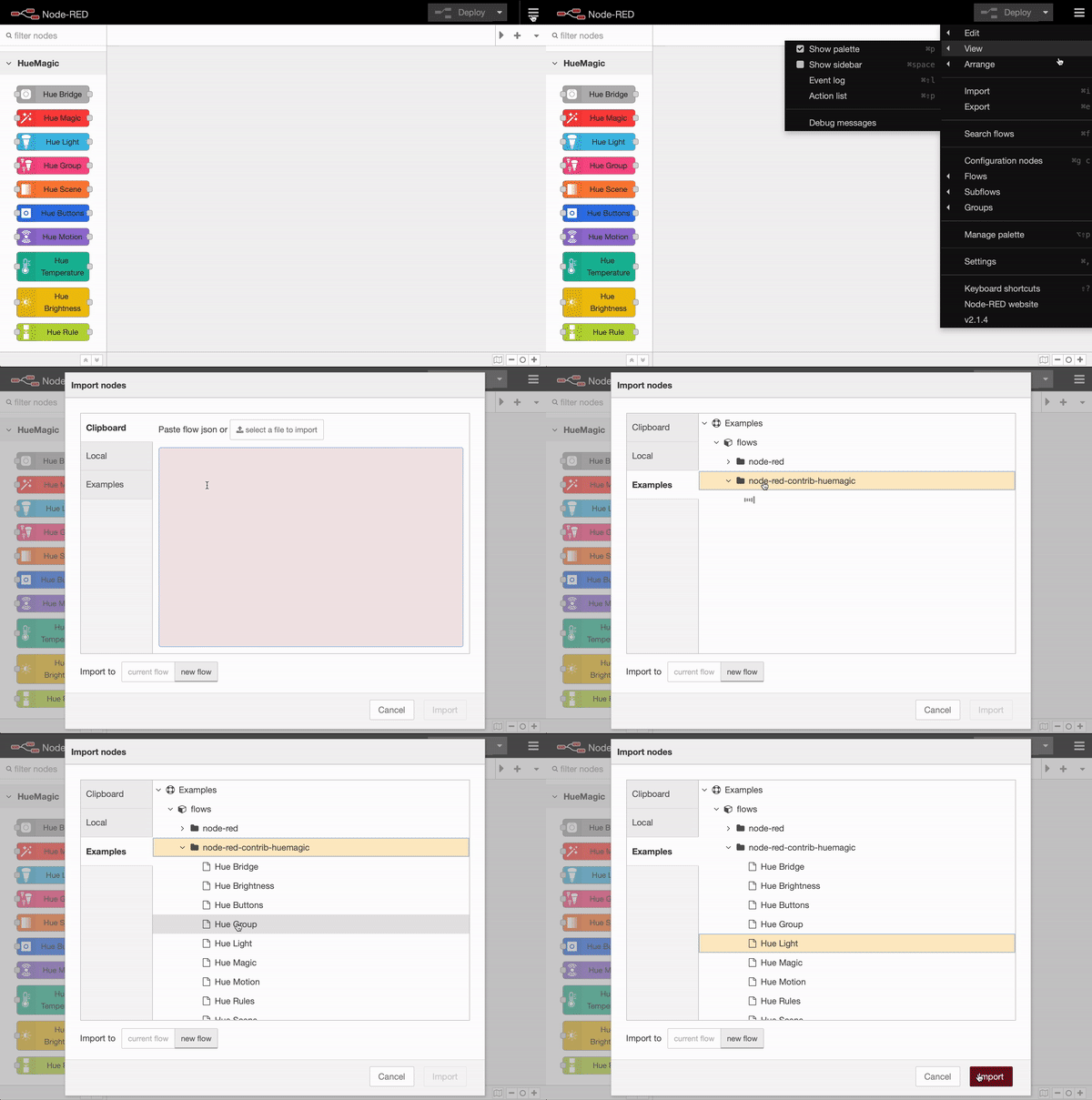
|
|
50
67
|
</script>
|
|
@@ -5,12 +5,14 @@
|
|
|
5
5
|
{
|
|
6
6
|
"name": "Name",
|
|
7
7
|
"sensor": "Sensor",
|
|
8
|
-
"skipevents": "Skip events",
|
|
9
8
|
"skipevents-node": "Skip events from node",
|
|
9
|
+
"sendinitevents-node": "Do not suppress initialization event",
|
|
10
10
|
"input-name": "Sensor name",
|
|
11
11
|
"searching": "searching temperature sensors…",
|
|
12
12
|
"none-found": "No temperature sensors found.",
|
|
13
|
-
"unknown-error": "Something went wrong. Please retry."
|
|
13
|
+
"unknown-error": "Something went wrong. Please retry.",
|
|
14
|
+
"universalevents": "Universal Events",
|
|
15
|
+
"universalevents-node": "Receives all messages from other nodes of the same type (only in universal mode)"
|
|
14
16
|
},
|
|
15
17
|
"node":
|
|
16
18
|
{
|
|
@@ -18,7 +20,12 @@
|
|
|
18
20
|
"not-configured": "not configured",
|
|
19
21
|
"init": "initializing…",
|
|
20
22
|
"not-reachable": "not reachable!",
|
|
21
|
-
"
|
|
23
|
+
"input": "status query",
|
|
24
|
+
"output": "temperature (changed)",
|
|
25
|
+
"universal": "universal mode",
|
|
26
|
+
"command": "executing command…",
|
|
27
|
+
"deactivated": "deactivated",
|
|
28
|
+
"statusmsg": "Status queried successfully…"
|
|
22
29
|
}
|
|
23
30
|
}
|
|
24
31
|
}
|
|
@@ -0,0 +1,290 @@
|
|
|
1
|
+
const axios = require('axios');
|
|
2
|
+
const dayjs = require('dayjs');
|
|
3
|
+
const https = require('https');
|
|
4
|
+
const EventSource = require('eventsource');
|
|
5
|
+
|
|
6
|
+
function API()
|
|
7
|
+
{
|
|
8
|
+
// STORAGE
|
|
9
|
+
this.bridge = null;
|
|
10
|
+
this.ipAddress = null;
|
|
11
|
+
this.accessKey = null;
|
|
12
|
+
this.events = null;
|
|
13
|
+
|
|
14
|
+
//
|
|
15
|
+
// INITIALIZE
|
|
16
|
+
this.init = function({ ip, key = 'default' })
|
|
17
|
+
{
|
|
18
|
+
const scope = this;
|
|
19
|
+
|
|
20
|
+
// FORCE RELOAD?
|
|
21
|
+
const forceReload = (this.ipAddress != ip.toString().trim());
|
|
22
|
+
|
|
23
|
+
// STORE ACCESS INFORMATION
|
|
24
|
+
this.ipAddress = ip.toString().trim();
|
|
25
|
+
this.accessKey = key.toString().trim();
|
|
26
|
+
|
|
27
|
+
// GET BRIDGE
|
|
28
|
+
return new Promise(function(resolve, reject)
|
|
29
|
+
{
|
|
30
|
+
if(scope.bridge !== null && forceReload === false)
|
|
31
|
+
{
|
|
32
|
+
resolve(scope.bridge);
|
|
33
|
+
}
|
|
34
|
+
else
|
|
35
|
+
{
|
|
36
|
+
// GET BRIDGE INFORMATION
|
|
37
|
+
axios({
|
|
38
|
+
"method": "GET",
|
|
39
|
+
"url": "https://" + ip + "/api/config",
|
|
40
|
+
"headers": { "Content-Type": "application/json; charset=utf-8" },
|
|
41
|
+
"httpsAgent": new https.Agent({ rejectUnauthorized: false }),
|
|
42
|
+
})
|
|
43
|
+
.then(function(response)
|
|
44
|
+
{
|
|
45
|
+
scope.bridge = response.data;
|
|
46
|
+
resolve(scope.bridge);
|
|
47
|
+
})
|
|
48
|
+
.catch(function(error)
|
|
49
|
+
{
|
|
50
|
+
reject(error);
|
|
51
|
+
});
|
|
52
|
+
}
|
|
53
|
+
});
|
|
54
|
+
}
|
|
55
|
+
|
|
56
|
+
//
|
|
57
|
+
// MAKE A REQUEST
|
|
58
|
+
this.request = function({ method = 'GET', ressource = null, data = null, version = 2 })
|
|
59
|
+
{
|
|
60
|
+
const scope = this;
|
|
61
|
+
return new Promise(function(resolve, reject)
|
|
62
|
+
{
|
|
63
|
+
// BUILD REQUEST OBJECT
|
|
64
|
+
var request = {
|
|
65
|
+
"method": method,
|
|
66
|
+
"url": "https://" + scope.ipAddress,
|
|
67
|
+
"headers": {
|
|
68
|
+
"Content-Type": "application/json; charset=utf-8",
|
|
69
|
+
"hue-application-key": scope.accessKey
|
|
70
|
+
},
|
|
71
|
+
"httpsAgent": new https.Agent({ rejectUnauthorized: false }), // Node is somehow not able to parse the official Philips Hue PEM
|
|
72
|
+
};
|
|
73
|
+
|
|
74
|
+
// HAS RESSOURCE? -> APPEND
|
|
75
|
+
if(ressource !== null)
|
|
76
|
+
{
|
|
77
|
+
if(version === 2)
|
|
78
|
+
{
|
|
79
|
+
ressource = (ressource !== "all") ? "/"+ressource : "";
|
|
80
|
+
request['url'] += "/clip/v2/resource" + ressource;
|
|
81
|
+
}
|
|
82
|
+
else if(version === 1)
|
|
83
|
+
{
|
|
84
|
+
request['url'] += "/api/" + scope.accessKey + ressource;
|
|
85
|
+
}
|
|
86
|
+
}
|
|
87
|
+
|
|
88
|
+
// HAS DATA? -> INSERT
|
|
89
|
+
if(data !== null) {
|
|
90
|
+
request['data'] = data;
|
|
91
|
+
}
|
|
92
|
+
|
|
93
|
+
// RUN REQUEST
|
|
94
|
+
axios(request)
|
|
95
|
+
.then(function(response)
|
|
96
|
+
{
|
|
97
|
+
if(version === 2)
|
|
98
|
+
{
|
|
99
|
+
if(response.data.errors.length > 0)
|
|
100
|
+
{
|
|
101
|
+
reject(response.data.errors);
|
|
102
|
+
}
|
|
103
|
+
else
|
|
104
|
+
{
|
|
105
|
+
resolve(response.data.data);
|
|
106
|
+
}
|
|
107
|
+
}
|
|
108
|
+
else if(version === 1)
|
|
109
|
+
{
|
|
110
|
+
resolve(response.data);
|
|
111
|
+
}
|
|
112
|
+
})
|
|
113
|
+
.catch(function(error)
|
|
114
|
+
{
|
|
115
|
+
reject(error);
|
|
116
|
+
});
|
|
117
|
+
});
|
|
118
|
+
}
|
|
119
|
+
|
|
120
|
+
//
|
|
121
|
+
// SUBSCRIBE TO BRIDGE EVENTS
|
|
122
|
+
this.subscribe = function(callback)
|
|
123
|
+
{
|
|
124
|
+
const scope = this;
|
|
125
|
+
return new Promise(function(resolve, reject)
|
|
126
|
+
{
|
|
127
|
+
if(scope.events === null)
|
|
128
|
+
{
|
|
129
|
+
var sseURL = "https://" + scope.ipAddress + "/eventstream/clip/v2";
|
|
130
|
+
|
|
131
|
+
// INITIALIZE EVENT SOURCE
|
|
132
|
+
scope.events = new EventSource(sseURL, {
|
|
133
|
+
headers: { 'hue-application-key': scope.accessKey },
|
|
134
|
+
https: { rejectUnauthorized: false },
|
|
135
|
+
});
|
|
136
|
+
|
|
137
|
+
// PIPE MESSAGE TO TARGET FUNCTION
|
|
138
|
+
scope.events.onmessage = function(event)
|
|
139
|
+
{
|
|
140
|
+
if(event && event.type === 'message' && event.data)
|
|
141
|
+
{
|
|
142
|
+
const messages = JSON.parse(event.data);
|
|
143
|
+
for (var i = messages.length - 1; i >= 0; i--)
|
|
144
|
+
{
|
|
145
|
+
const message = messages[i];
|
|
146
|
+
if(message.type === "update")
|
|
147
|
+
{
|
|
148
|
+
callback(message.data);
|
|
149
|
+
}
|
|
150
|
+
}
|
|
151
|
+
}
|
|
152
|
+
};
|
|
153
|
+
|
|
154
|
+
// CONNECTED?
|
|
155
|
+
scope.events.onopen = function()
|
|
156
|
+
{
|
|
157
|
+
resolve(true);
|
|
158
|
+
}
|
|
159
|
+
|
|
160
|
+
// ERROR? -> RETRY?
|
|
161
|
+
scope.events.onerror = function(error)
|
|
162
|
+
{
|
|
163
|
+
console.log("HueMagic:", "Connection to bridge lost. Trying to reconnect again in 30 seconds…", err);
|
|
164
|
+
setTimeout(function(){ scope.subscribe(callback); }, 30000);
|
|
165
|
+
resolve(true);
|
|
166
|
+
}
|
|
167
|
+
}
|
|
168
|
+
else
|
|
169
|
+
{
|
|
170
|
+
scope.unsubscribe();
|
|
171
|
+
scope.subscribe(callback);
|
|
172
|
+
}
|
|
173
|
+
});
|
|
174
|
+
}
|
|
175
|
+
|
|
176
|
+
//
|
|
177
|
+
// UNSUBSCRIBE
|
|
178
|
+
this.unsubscribe = function()
|
|
179
|
+
{
|
|
180
|
+
if(this.events !== null) { this.events.close(); }
|
|
181
|
+
this.events = null;
|
|
182
|
+
}
|
|
183
|
+
|
|
184
|
+
//
|
|
185
|
+
// GET FULL/ROOT RESSOURCE
|
|
186
|
+
this.fullRessource = function(ressource, allRessources = {})
|
|
187
|
+
{
|
|
188
|
+
const scope = this;
|
|
189
|
+
var fullRessource = Object.assign({}, ressource);
|
|
190
|
+
|
|
191
|
+
if(ressource["owner"])
|
|
192
|
+
{
|
|
193
|
+
fullRessource = scope.fullRessource(allRessources[fullRessource["owner"]["rid"]], allRessources);
|
|
194
|
+
}
|
|
195
|
+
else if(ressource["type"] === "device" || ressource["type"] === "room" || ressource["type"] === "zone" || ressource["type"] === "bridge_home")
|
|
196
|
+
{
|
|
197
|
+
// RESOLVE SERVICES
|
|
198
|
+
var allServices = {};
|
|
199
|
+
|
|
200
|
+
for (var i = ressource["services"].length - 1; i >= 0; i--)
|
|
201
|
+
{
|
|
202
|
+
const targetService = ressource["services"][i];
|
|
203
|
+
const targetType = targetService["rtype"];
|
|
204
|
+
const targetID = targetService["rid"];
|
|
205
|
+
|
|
206
|
+
if(!allServices[targetType]) { allServices[targetType] = {}; }
|
|
207
|
+
allServices[targetType][targetID] = Object.assign({}, allRessources[targetID]);
|
|
208
|
+
}
|
|
209
|
+
|
|
210
|
+
// REPLACE SERVICES
|
|
211
|
+
fullRessource["services"] = allServices;
|
|
212
|
+
}
|
|
213
|
+
|
|
214
|
+
return fullRessource;
|
|
215
|
+
}
|
|
216
|
+
|
|
217
|
+
//
|
|
218
|
+
// PROCESS RESSOURCES
|
|
219
|
+
this.processRessources = function(ressources)
|
|
220
|
+
{
|
|
221
|
+
const scope = this;
|
|
222
|
+
|
|
223
|
+
// SET CURRENT DATE/TIME
|
|
224
|
+
const currentDateTime = dayjs().format();
|
|
225
|
+
|
|
226
|
+
// ACTION!
|
|
227
|
+
return new Promise(function(resolve, reject)
|
|
228
|
+
{
|
|
229
|
+
let ressourceList = {};
|
|
230
|
+
let processedRessources = {
|
|
231
|
+
_groupsOf: {}
|
|
232
|
+
};
|
|
233
|
+
|
|
234
|
+
// CREATE ID BASED OBJECT OF ALL RESSOURCES
|
|
235
|
+
ressources.forEach(function(ressource, index)
|
|
236
|
+
{
|
|
237
|
+
// IS BUTTON? -> REMOVE PREVIOUS STATE
|
|
238
|
+
if(ressource.type === "button")
|
|
239
|
+
{
|
|
240
|
+
delete ressource["button"];
|
|
241
|
+
}
|
|
242
|
+
|
|
243
|
+
ressourceList[ressource.id] = ressource;
|
|
244
|
+
});
|
|
245
|
+
|
|
246
|
+
// GET FULL RESSOURCES OF EACH OBJECT
|
|
247
|
+
ressources.forEach(function(ressource, index)
|
|
248
|
+
{
|
|
249
|
+
// GET FULL RESSOURCE
|
|
250
|
+
let fullRessource = scope.fullRessource(ressource, ressourceList);
|
|
251
|
+
|
|
252
|
+
// ADD CURRENT DATE/TIME
|
|
253
|
+
fullRessource["updated"] = currentDateTime;
|
|
254
|
+
|
|
255
|
+
// ALL ALL TYPES BEHIND RESSOURCE
|
|
256
|
+
fullRessource["types"] = [ fullRessource["type"] ];
|
|
257
|
+
|
|
258
|
+
// RESSOURCE HAS SERVICES?
|
|
259
|
+
if(fullRessource["services"])
|
|
260
|
+
{
|
|
261
|
+
let additionalServiceTypes = Object.keys(fullRessource["services"]);
|
|
262
|
+
|
|
263
|
+
// SET ADDITIONAL TYPES BEHIND RECCOURCE
|
|
264
|
+
fullRessource["types"] = fullRessource["types"].concat(additionalServiceTypes);
|
|
265
|
+
}
|
|
266
|
+
|
|
267
|
+
// RESOURCE HAS GROUPED SERVICES?
|
|
268
|
+
if(fullRessource["grouped_services"])
|
|
269
|
+
{
|
|
270
|
+
for (var g = fullRessource["grouped_services"].length - 1; g >= 0; g--)
|
|
271
|
+
{
|
|
272
|
+
const groupedService = fullRessource["grouped_services"][g];
|
|
273
|
+
const groupedServiceID = groupedService["rid"];
|
|
274
|
+
|
|
275
|
+
if(!processedRessources["_groupsOf"][groupedServiceID]) { processedRessources["_groupsOf"][groupedServiceID] = []; }
|
|
276
|
+
processedRessources["_groupsOf"][groupedServiceID].push(fullRessource.id);
|
|
277
|
+
}
|
|
278
|
+
}
|
|
279
|
+
|
|
280
|
+
// GIVE FULL RESSOURCE BACK TO COLLECTION
|
|
281
|
+
processedRessources[fullRessource.id] = fullRessource;
|
|
282
|
+
});
|
|
283
|
+
|
|
284
|
+
resolve(processedRessources);
|
|
285
|
+
});
|
|
286
|
+
}
|
|
287
|
+
}
|
|
288
|
+
|
|
289
|
+
// EXPORT
|
|
290
|
+
module.exports = new API;
|