node-red-contrib-huemagic 2.8.2 → 4.0.0
This diff represents the content of publicly available package versions that have been released to one of the supported registries. The information contained in this diff is provided for informational purposes only and reflects changes between package versions as they appear in their respective public registries.
- package/CHANGELOG.md +229 -0
- package/README.md +806 -729
- package/examples/Hue Bridge.json +189 -35
- package/examples/Hue Brightness.json +124 -14
- package/examples/Hue Buttons.json +88 -0
- package/examples/Hue Group.json +575 -63
- package/examples/Hue Light.json +805 -58
- package/examples/Hue Magic.json +69 -24
- package/examples/Hue Motion.json +110 -42
- package/examples/Hue Rules.json +105 -37
- package/examples/Hue Scene.json +145 -28
- package/examples/Hue Temperature.json +124 -14
- package/huemagic/animations/001-sunny.json +22 -22
- package/huemagic/animations/002-cloudy.json +46 -46
- package/huemagic/animations/003-nightsky.json +20 -20
- package/huemagic/animations/004-sunrise.json +54 -54
- package/huemagic/animations/005-sunset.json +46 -46
- package/huemagic/animations/006-fireplace.json +74 -74
- package/huemagic/animations/007-spring.json +31 -31
- package/huemagic/animations/008-autmn.json +23 -23
- package/huemagic/animations/009-winter.json +23 -23
- package/huemagic/animations/010-dirtyfog.json +23 -23
- package/huemagic/animations/011-lgbt.json +49 -50
- package/huemagic/animations/012-rasta.json +28 -29
- package/huemagic/animations/013-strobo.json +30 -31
- package/huemagic/animations/014-randomrainbow.json +30 -31
- package/huemagic/animations/015-sos.json +158 -159
- package/huemagic/animations/016-milkyway.json +83 -0
- package/huemagic/animations/017-beach.json +40 -0
- package/huemagic/animations/018-forest.json +43 -0
- package/huemagic/animations/019-christmas.json +30 -0
- package/huemagic/animations/020-superhero.json +56 -0
- package/huemagic/animations/021-neoncity.json +52 -0
- package/huemagic/animations/previews/001-sunny.gif +0 -0
- package/huemagic/animations/previews/002-cloudy.gif +0 -0
- package/huemagic/animations/previews/003-nightsky.gif +0 -0
- package/huemagic/animations/previews/004-sunrise.gif +0 -0
- package/huemagic/animations/previews/005-sunset.gif +0 -0
- package/huemagic/animations/previews/006-fireplace.gif +0 -0
- package/huemagic/animations/previews/007-spring.gif +0 -0
- package/huemagic/animations/previews/008-autmn.gif +0 -0
- package/huemagic/animations/previews/009-winter.gif +0 -0
- package/huemagic/animations/previews/010-dirtyfog.gif +0 -0
- package/huemagic/animations/previews/011-lgbt.gif +0 -0
- package/huemagic/animations/previews/012-rasta.gif +0 -0
- package/huemagic/animations/previews/013-strobo.gif +0 -0
- package/huemagic/animations/previews/014-randomrainbow.gif +0 -0
- package/huemagic/animations/previews/015-sos.gif +0 -0
- package/huemagic/animations/previews/016-milkyway.gif +0 -0
- package/huemagic/animations/previews/017-beach.gif +0 -0
- package/huemagic/animations/previews/018-forest.gif +0 -0
- package/huemagic/animations/previews/019-christmas.gif +0 -0
- package/huemagic/animations/previews/020-superhero.gif +0 -0
- package/huemagic/animations/previews/021-neoncity.gif +0 -0
- package/huemagic/hue-bridge-config.html +105 -61
- package/huemagic/hue-bridge-config.js +629 -319
- package/huemagic/hue-bridge.html +41 -21
- package/huemagic/hue-bridge.js +191 -398
- package/huemagic/hue-brightness.html +130 -49
- package/huemagic/hue-brightness.js +131 -35
- package/huemagic/hue-buttons.html +197 -0
- package/huemagic/hue-buttons.js +152 -0
- package/huemagic/hue-group.html +137 -60
- package/huemagic/hue-group.js +394 -367
- package/huemagic/hue-light.html +133 -59
- package/huemagic/hue-light.js +551 -336
- package/huemagic/hue-magic.html +91 -237
- package/huemagic/hue-magic.js +57 -27
- package/huemagic/hue-motion.html +128 -50
- package/huemagic/hue-motion.js +116 -87
- package/huemagic/hue-rules.html +121 -50
- package/huemagic/hue-rules.js +84 -64
- package/huemagic/hue-scene.html +96 -115
- package/huemagic/hue-scene.js +65 -96
- package/huemagic/hue-temperature.html +130 -49
- package/huemagic/hue-temperature.js +136 -32
- package/huemagic/icons/hue-bridge.png +0 -0
- package/huemagic/icons/hue-bridge.svg +3 -0
- package/huemagic/icons/hue-brightness.png +0 -0
- package/huemagic/icons/hue-brightness.svg +11 -0
- package/huemagic/icons/hue-buttons.png +0 -0
- package/huemagic/icons/hue-buttons.svg +4 -0
- package/huemagic/icons/hue-group.png +0 -0
- package/huemagic/icons/hue-group.svg +12 -0
- package/huemagic/icons/hue-light.png +0 -0
- package/huemagic/icons/hue-light.svg +3 -0
- package/huemagic/icons/hue-magic.png +0 -0
- package/huemagic/icons/hue-magic.svg +3 -0
- package/huemagic/icons/hue-motion.png +0 -0
- package/huemagic/icons/hue-motion.svg +9 -0
- package/huemagic/icons/hue-rules.png +0 -0
- package/huemagic/icons/hue-rules.svg +4 -0
- package/huemagic/icons/hue-scene.png +0 -0
- package/huemagic/icons/hue-scene.svg +5 -0
- package/huemagic/icons/hue-temperature.png +0 -0
- package/huemagic/icons/hue-temperature.svg +7 -0
- package/huemagic/locales/de/hue-bridge-config.html +17 -12
- package/huemagic/locales/de/hue-bridge-config.json +7 -5
- package/huemagic/locales/de/hue-bridge.html +64 -145
- package/huemagic/locales/de/hue-bridge.json +6 -17
- package/huemagic/locales/de/hue-brightness.html +52 -38
- package/huemagic/locales/de/hue-brightness.json +7 -2
- package/huemagic/locales/de/hue-buttons.html +58 -0
- package/huemagic/locales/de/hue-buttons.json +28 -0
- package/huemagic/locales/de/hue-group.html +46 -122
- package/huemagic/locales/de/hue-group.json +4 -2
- package/huemagic/locales/de/hue-light.html +68 -116
- package/huemagic/locales/de/hue-light.json +5 -2
- package/huemagic/locales/de/hue-magic.html +65 -57
- package/huemagic/locales/de/hue-magic.json +2 -1
- package/huemagic/locales/de/hue-motion.html +48 -44
- package/huemagic/locales/de/hue-motion.json +6 -3
- package/huemagic/locales/de/hue-rules.html +68 -73
- package/huemagic/locales/de/hue-rules.json +5 -2
- package/huemagic/locales/de/hue-scene.html +23 -32
- package/huemagic/locales/de/hue-scene.json +5 -2
- package/huemagic/locales/de/hue-temperature.html +53 -36
- package/huemagic/locales/de/hue-temperature.json +7 -2
- package/huemagic/locales/en-US/hue-bridge-config.html +17 -12
- package/huemagic/locales/en-US/hue-bridge-config.json +5 -3
- package/huemagic/locales/en-US/hue-bridge.html +64 -145
- package/huemagic/locales/en-US/hue-bridge.json +5 -16
- package/huemagic/locales/en-US/hue-brightness.html +52 -38
- package/huemagic/locales/en-US/hue-brightness.json +10 -3
- package/huemagic/locales/en-US/hue-buttons.html +58 -0
- package/huemagic/locales/en-US/hue-buttons.json +34 -0
- package/huemagic/locales/en-US/hue-group.html +46 -122
- package/huemagic/locales/en-US/hue-group.json +7 -3
- package/huemagic/locales/en-US/hue-light.html +68 -116
- package/huemagic/locales/en-US/hue-light.json +8 -3
- package/huemagic/locales/en-US/hue-magic.html +65 -57
- package/huemagic/locales/en-US/hue-magic.json +3 -1
- package/huemagic/locales/en-US/hue-motion.html +48 -44
- package/huemagic/locales/en-US/hue-motion.json +9 -4
- package/huemagic/locales/en-US/hue-rules.html +68 -73
- package/huemagic/locales/en-US/hue-rules.json +5 -2
- package/huemagic/locales/en-US/hue-scene.html +23 -32
- package/huemagic/locales/en-US/hue-scene.json +5 -2
- package/huemagic/locales/en-US/hue-temperature.html +53 -36
- package/huemagic/locales/en-US/hue-temperature.json +10 -3
- package/huemagic/utils/api.js +290 -0
- package/huemagic/utils/color.js +382 -0
- package/{utils → huemagic/utils}/merge.js +9 -6
- package/huemagic/utils/messages.js +447 -0
- package/package.json +12 -12
- package/examples/Hue Switch.json +0 -40
- package/examples/Hue Tap.json +0 -40
- package/huemagic/assets/anime.js +0 -8
- package/huemagic/hue-switch.html +0 -119
- package/huemagic/hue-switch.js +0 -113
- package/huemagic/hue-tap.html +0 -119
- package/huemagic/hue-tap.js +0 -74
- package/huemagic/icons/hue-button.png +0 -0
- package/huemagic/icons/hue-switch.png +0 -0
- package/huemagic/icons/hue-tap.png +0 -0
- package/huemagic/locales/de/hue-switch.html +0 -50
- package/huemagic/locales/de/hue-switch.json +0 -31
- package/huemagic/locales/de/hue-tap.html +0 -41
- package/huemagic/locales/de/hue-tap.json +0 -23
- package/huemagic/locales/en-US/hue-switch.html +0 -50
- package/huemagic/locales/en-US/hue-switch.json +0 -31
- package/huemagic/locales/en-US/hue-tap.html +0 -41
- package/huemagic/locales/en-US/hue-tap.json +0 -23
- package/utils/messages.js +0 -571
- package/utils/rgb.js +0 -188
|
@@ -1,174 +1,93 @@
|
|
|
1
|
-
<script type="text/
|
|
2
|
-
|
|
1
|
+
<script type="text/markdown" data-help-name="hue-bridge-node">
|
|
2
|
+
The "Hue Bridge" node is a universal node that can output all settings of the bridge and status messages from other nodes.
|
|
3
3
|
|
|
4
|
-
|
|
5
|
-
<p>Select the preconfigured Hue Bridge and choose if the selected bridge should automatically find and install firmware and other device updates. If you activate the "Skip global events" option, this node will not send messages from updated and active devices and other ressources.</p>
|
|
4
|
+
### Setup
|
|
6
5
|
|
|
7
|
-
|
|
8
|
-
<p>Retrieves the current status / settings of the bridge by injecting any input value</p>
|
|
9
|
-
<dl class="message-properties">
|
|
10
|
-
<dt>true<span class="property-type">boolean (example)</span></dt>
|
|
11
|
-
<dd>Triggers an output of the current status / settings</dd>
|
|
12
|
-
</dl>
|
|
6
|
+
First select the desired Hue Bridge. You can optionally deactivate all automatic status messages for this node by clicking the setting “Skip global device updates / messages on this node”. The node will then no longer issue device updates.
|
|
13
7
|
|
|
14
|
-
|
|
15
|
-
<p>Use TouchLink to pair new devices or old devices after a bridge reset. This is commonly known in the community as "Lamp stealer". Pass the <b>touchLink</b> property to <b>msg.payload</b>.</p>
|
|
16
|
-
<dl class="message-properties">
|
|
17
|
-
<dt>touchLink<span class="property-type">boolean (example)</span></dt>
|
|
18
|
-
<dd>Pairs lights / devices</dd>
|
|
19
|
-
</dl>
|
|
8
|
+
Alternatively, you can also choose whether the initialization messages of all nodes should not be suppressed when Node-RED is started. If you activate this setting, you will receive a status message from all resources connected to the bridge after each deployment.
|
|
20
9
|
|
|
21
|
-
|
|
22
|
-
<p>Use the Fetch command to retrieve various information from the Hue Bridge when needed. Pass the <b>fetch</b> property to <b>msg.payload</b>.</p>
|
|
23
|
-
<dl class="message-properties">
|
|
24
|
-
<dt>users<span class="property-type">string</span></dt>
|
|
25
|
-
<dd>Returns an array of User objects in msg.users & bridge information in msg.info</dd>
|
|
10
|
+
### Get settings / status
|
|
26
11
|
|
|
27
|
-
|
|
28
|
-
<dd>Returns an array of Light objects in msg.lights & bridge information in msg.info</dd>
|
|
12
|
+
Outputs the current status / settings of the bridge as soon as the following message has been sent to the node. Alternatively, you can also press the button in the Node-RED interface without having to pass a message to the node beforehand.
|
|
29
13
|
|
|
30
|
-
|
|
31
|
-
<dd>Returns an array of Group objects in msg.groups & bridge information in msg.info</dd>
|
|
14
|
+
: payload (boolean): Returns the current status of the bridge
|
|
32
15
|
|
|
33
|
-
|
|
34
|
-
<dd>Returns an array of Sensor objects in msg.sensors & bridge information in msg.info</dd>
|
|
16
|
+
### Trigger TouchLink scan
|
|
35
17
|
|
|
36
|
-
|
|
37
|
-
<dd>Returns an array of Scene objects in msg.scenes & bridge information in msg.info</dd>
|
|
18
|
+
You can couple new or old devices to the bridge using a "TouchLink scan" (e.g. after a reset). To do this, transfer the object `msg.payload` with the following content:
|
|
38
19
|
|
|
39
|
-
|
|
40
|
-
<dd>Returns an array of Rule objects in msg.rules & bridge information in msg.info</dd>
|
|
20
|
+
: touchLink (boolean): Couples old or new devices with the bridge
|
|
41
21
|
|
|
42
|
-
|
|
43
|
-
<dd>Returns an array of Schedule objects in msg.schedules & bridge information in msg.info</dd>
|
|
22
|
+
### Get all devices and resources
|
|
44
23
|
|
|
45
|
-
|
|
46
|
-
<dd>Returns an array of ResourceLink objects in msg.resourceLinks & bridge information in msg.info</dd>
|
|
24
|
+
With the "fetch" command you can output a list of specific devices that are currently connected to the bridge. To do this, transfer the object `msg.payload` with the following content:
|
|
47
25
|
|
|
48
|
-
|
|
49
|
-
<dd>Returns an array of all available time zones in msg.timeZones & bridge information in msg.info</dd>
|
|
26
|
+
: fetch (string | array [string, ...]): Can accept `light`, `group`, `button`, `motion`, `temperature`, `light_level` or `rule` as value(s)
|
|
50
27
|
|
|
51
|
-
|
|
52
|
-
<dd>Returns an object of all available internet services information in msg.internetServices & bridge information in msg.info</dd>
|
|
28
|
+
### Change Hue Bridge settings
|
|
53
29
|
|
|
54
|
-
|
|
55
|
-
<dd>Returns an object of all available portal information in msg.portal & bridge information in msg.info</dd>
|
|
56
|
-
</dl>
|
|
30
|
+
You can use the following command to change specific settings on the bridge. Please note that changing the network settings requires reconfiguring the bridge on HueMagic. Transfer the object `msg.payload.settings` with the following setting options to the node:
|
|
57
31
|
|
|
58
|
-
|
|
59
|
-
|
|
60
|
-
|
|
61
|
-
|
|
62
|
-
|
|
32
|
+
: name (string): Changes the name of the bridge and must contain at least 4 to a maximum of 16 characters
|
|
33
|
+
: zigbeeChannel (int): Changes the current ZigBee channel (either `11`, `15`, `20`, `25` or `0`)
|
|
34
|
+
: ipAddress (string): Changes the IP address in the network settings
|
|
35
|
+
: dhcpEnabled (boolean): `true`, activates DHCP in the network settings, `false`, deactivates the setting
|
|
36
|
+
: netmask (string): Changes the network mask in the network settings
|
|
37
|
+
: gateway (string): Specifies the gateway in the network settings
|
|
38
|
+
: proxyAddress (string): Sets a proxy address in the network settings
|
|
39
|
+
: proxyPort (string | int): Specifies the port of the proxy in the network settings
|
|
40
|
+
: timeZone (string): Changes the currently set time zone on the bridge
|
|
63
41
|
|
|
64
|
-
|
|
65
|
-
<dd>ZigBee channel (for communicating with lights)</dd>
|
|
42
|
+
### Status messages from the node
|
|
66
43
|
|
|
67
|
-
|
|
68
|
-
<dd>IP address (risky)</dd>
|
|
44
|
+
The status reports of the "Hue Bridge" node are dynamic. Although they follow a certain pattern, their output can vary depending on what action has just been carried out on the node.
|
|
69
45
|
|
|
70
|
-
|
|
71
|
-
<dd>Whether or not DHCP is enabled</dd>
|
|
46
|
+
#### Status object under `msg.payload`
|
|
72
47
|
|
|
73
|
-
|
|
74
|
-
|
|
48
|
+
: id (string): Unique ID of the Hue Bridge
|
|
49
|
+
: name (string): Currently set name
|
|
50
|
+
: factoryNew (boolean): Indicator whether the bridge is brand new
|
|
51
|
+
: replacesBridgeId (string | boolean): Outputs the old bridge ID (if a migration was carried out) or outputs `false`
|
|
52
|
+
: dataStoreVersion (string): Version of the data store
|
|
53
|
+
: starterKitId (string | boolean): Name of the starter kit created in the factory or `false`
|
|
54
|
+
: softwareVersion (string): Software version of the bridge
|
|
55
|
+
: apiVersion (string): API version of the bridge
|
|
56
|
+
: zigbeeChannel (int): Currently used ZigBee channel
|
|
57
|
+
: macAddress (string): MAC address of the bridge
|
|
58
|
+
: ipAddress (string): IP address of the bridge
|
|
59
|
+
: dhcpEnabled (boolean): Indicates whether DHCP is enabled
|
|
60
|
+
: netmask (string): Netmask of the bridge
|
|
61
|
+
: gateway (string): Gateway of the bridge
|
|
62
|
+
: proxyAddress (string | false): Currently used proxy address or `false`
|
|
63
|
+
: proxyPort (string): Currently used proxy port
|
|
64
|
+
: utcTime (string): UTC time on the bridge
|
|
65
|
+
: timeZone (string): Currently set time zone on the bridge
|
|
66
|
+
: localTime (string): Local time zone
|
|
67
|
+
: portalServicesEnabled (boolean): Indicates whether portal services are enabled
|
|
68
|
+
: portalConnected (boolean): Indicates whether the bridge is connected to the portal
|
|
69
|
+
: linkButtonEnabled (boolean): Indicates whether the link button is enabled
|
|
70
|
+
: touchlinkEnabled (boolean): Indicates whether TouchLink is enabled
|
|
71
|
+
: autoUpdatesEnabled (boolean): Indicates whether the HueMagic will automatically check for updates
|
|
72
|
+
: users (array [object, ...]): List of all users on the bridge (array with objects)
|
|
73
|
+
: updated (string): Time of the last update of the resource by HueMagic (ISO 8601)
|
|
74
|
+
: model (object): Contains the model information of the bridge under `id`, `manufacturer` and `name`
|
|
75
75
|
|
|
76
|
-
|
|
77
|
-
<dd>Gateway (risky)</dd>
|
|
76
|
+
#### Fetch results under `msg.results` (optional)
|
|
78
77
|
|
|
79
|
-
|
|
80
|
-
<dd>Proxy address</dd>
|
|
78
|
+
If the "fetch" command has been used on the node, the bridge outputs the corresponding results under the `msg.results` object. The object contains the queried resource groups, which in turn contain all the corresponding resources in the form of an array.
|
|
81
79
|
|
|
82
|
-
|
|
83
|
-
<dd>Proxy port</dd>
|
|
80
|
+
#### Global status messages under `msg.updated` (optional)
|
|
84
81
|
|
|
85
|
-
|
|
86
|
-
<dd>Time zone</dd>
|
|
87
|
-
</dl>
|
|
82
|
+
Unless deactivated, the node issues an updated status message for each resource on the bridge. The status message under * msg.updated * follows the pattern of the respective resource and varies depending on the type of device that was last updated.
|
|
88
83
|
|
|
89
|
-
|
|
90
|
-
<p>The event message that the bridge sends contains the following data in the <b>msg.payload</b> object:</p>
|
|
91
|
-
<dl class="message-properties">
|
|
92
|
-
<dt>id<span class="property-type">string</span></dt>
|
|
93
|
-
<dd>Unique ID of the Hue Bridge</dd>
|
|
84
|
+
#### Last command under `msg.command` (optional)
|
|
94
85
|
|
|
95
|
-
|
|
96
|
-
<dd>Name of the bridge</dd>
|
|
86
|
+
If the status of the node has changed via a certain command, the entire command that was executed is also output. Otherwise this object will not be output by the node.
|
|
97
87
|
|
|
98
|
-
|
|
99
|
-
<dd>Whether or not the bridge is factory new</dd>
|
|
88
|
+
### Examples from HueMagic
|
|
100
89
|
|
|
101
|
-
|
|
102
|
-
<dd>Replaces bridge id (for migrating from old bridges)</dd>
|
|
90
|
+
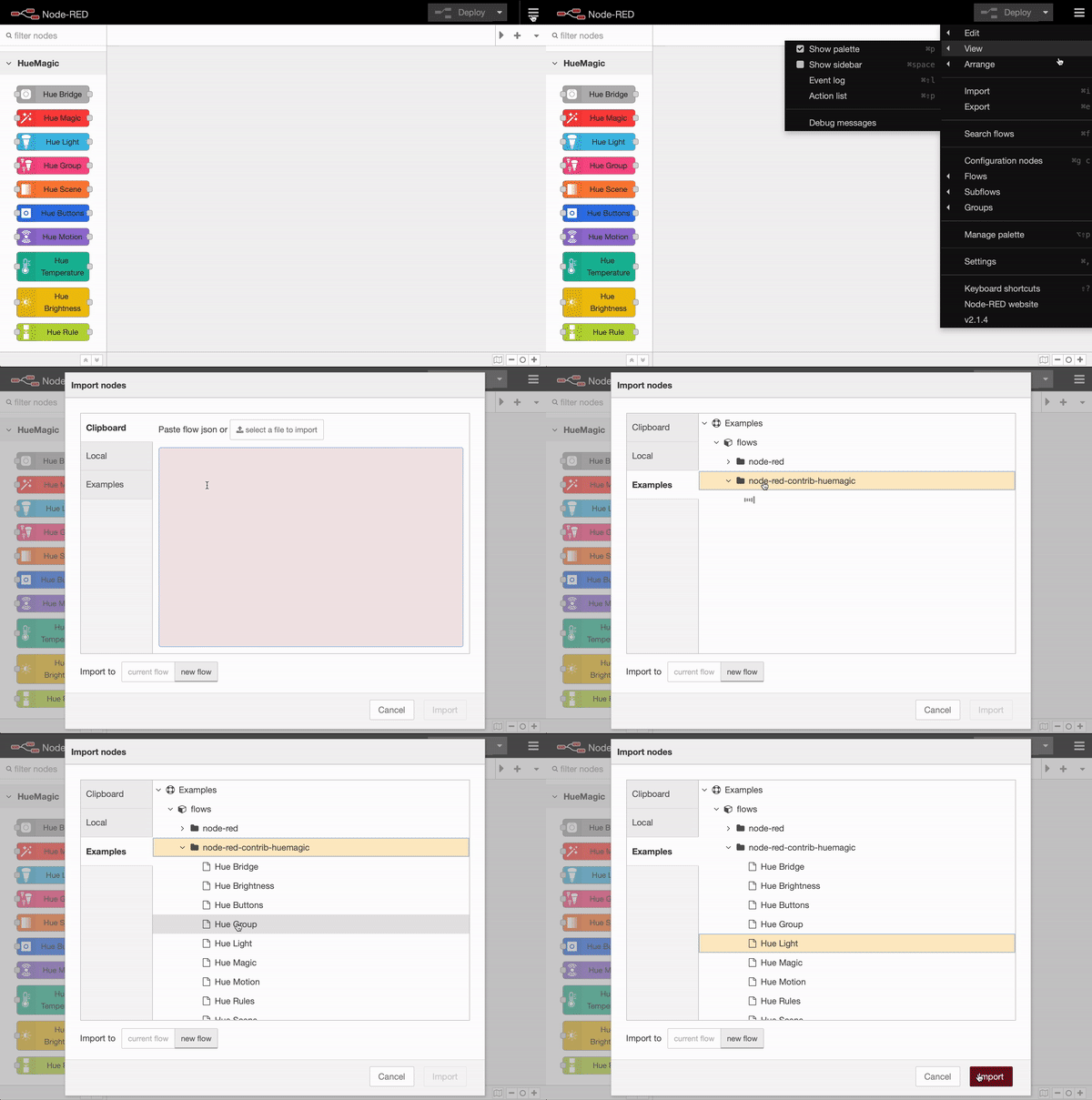
HueMagic provides some sample configurations for this node. To import a full featured example into your Node-RED interface, click on the Node-RED menu icon, then select "Import" and navigate to "Examples" in the sidebar of the popup. Then select the HueMagic folder and your desired node to import a sample flow.
|
|
103
91
|
|
|
104
|
-
|
|
105
|
-
<dd>Data store version</dd>
|
|
106
|
-
|
|
107
|
-
<dt>starterKitId<span class="property-type">string</span></dt>
|
|
108
|
-
<dd>Name of the starterkit created in the factory</dd>
|
|
109
|
-
|
|
110
|
-
<dt>softwareVersion<span class="property-type">string</span></dt>
|
|
111
|
-
<dd>Software version of the bridge</dd>
|
|
112
|
-
|
|
113
|
-
<dt>apiVersion<span class="property-type">string</span></dt>
|
|
114
|
-
<dd>API version of the bridge</dd>
|
|
115
|
-
|
|
116
|
-
<dt>zigbeeChannel<span class="property-type">int</span></dt>
|
|
117
|
-
<dd>ZigBee channel (for communicating with lights)</dd>
|
|
118
|
-
|
|
119
|
-
<dt>macAddress<span class="property-type">string</span></dt>
|
|
120
|
-
<dd>MAC address</dd>
|
|
121
|
-
|
|
122
|
-
<dt>ipAddress<span class="property-type">string</span></dt>
|
|
123
|
-
<dd>IP address</dd>
|
|
124
|
-
|
|
125
|
-
<dt>dhcpEnabled<span class="property-type">boolean</span></dt>
|
|
126
|
-
<dd>Whether or not DHCP is enabled</dd>
|
|
127
|
-
|
|
128
|
-
<dt>netmask<span class="property-type">string</span></dt>
|
|
129
|
-
<dd>Netmask</dd>
|
|
130
|
-
|
|
131
|
-
<dt>gateway<span class="property-type">string</span></dt>
|
|
132
|
-
<dd>Gateway</dd>
|
|
133
|
-
|
|
134
|
-
<dt>proxyAddress<span class="property-type">string</span></dt>
|
|
135
|
-
<dd>Proxy address</dd>
|
|
136
|
-
|
|
137
|
-
<dt>proxyPort<span class="property-type">string</span></dt>
|
|
138
|
-
<dd>Proxy port</dd>
|
|
139
|
-
|
|
140
|
-
<dt>utcTime<span class="property-type">string</span></dt>
|
|
141
|
-
<dd>UTC time of the bridge</dd>
|
|
142
|
-
|
|
143
|
-
<dt>timeZone<span class="property-type">string</span></dt>
|
|
144
|
-
<dd>Time zone</dd>
|
|
145
|
-
|
|
146
|
-
<dt>localTime<span class="property-type">string</span></dt>
|
|
147
|
-
<dd>Local time of the bridge</dd>
|
|
148
|
-
|
|
149
|
-
<dt>portalServicesEnabled<span class="property-type">boolean</span></dt>
|
|
150
|
-
<dd>Whether or not portal services are enabled</dd>
|
|
151
|
-
|
|
152
|
-
<dt>portalConnected<span class="property-type">boolean</span></dt>
|
|
153
|
-
<dd>Whether or not portal is connected</dd>
|
|
154
|
-
|
|
155
|
-
<dt>linkButtonEnabled<span class="property-type">boolean</span></dt>
|
|
156
|
-
<dd>Whether or not link button is enabled</dd>
|
|
157
|
-
|
|
158
|
-
<dt>touchlinkEnabled<span class="property-type">boolean</span></dt>
|
|
159
|
-
<dd>Whether or not TouchLink is enabled</dd>
|
|
160
|
-
|
|
161
|
-
<dt>model<span class="property-type">object</span></dt>
|
|
162
|
-
<dd>The model object of the bridge includes model specific information like the model.id, model.manufacturer and model.name</dd>
|
|
163
|
-
</dl>
|
|
164
|
-
|
|
165
|
-
<h3>Global update events</h3>
|
|
166
|
-
<p>The bridge also sends events when a certain active resource (lights, groups, sensors, etc.) changes its status.</p>
|
|
167
|
-
<dl class="message-properties">
|
|
168
|
-
<dt>msg.updated<span class="property-type">object</span></dt>
|
|
169
|
-
<dd>The whole object of the device (check docs)</dd>
|
|
170
|
-
|
|
171
|
-
<dt>msg.type<span class="property-type">string</span></dt>
|
|
172
|
-
<dd>Can be one of the following: light, group, rule, motion, brightness, temperature, switch, tap</dd>
|
|
173
|
-
</dl>
|
|
92
|
+
|
|
174
93
|
</script>
|
|
@@ -5,10 +5,8 @@
|
|
|
5
5
|
{
|
|
6
6
|
"name": "Name",
|
|
7
7
|
"input-name": "Hue Bridge name",
|
|
8
|
-
"
|
|
9
|
-
"
|
|
10
|
-
"skipglobalevents": "Skip global events",
|
|
11
|
-
"skipglobalevents-info": "Skip global device updates / messages on this node"
|
|
8
|
+
"skipglobalevents-info": "Skip global device updates / messages on this node",
|
|
9
|
+
"sendinitevents-node": "Do not suppress initialization event"
|
|
12
10
|
},
|
|
13
11
|
"node":
|
|
14
12
|
{
|
|
@@ -18,21 +16,12 @@
|
|
|
18
16
|
"connected": "connected",
|
|
19
17
|
"starting-tl": "starting TouchLink…",
|
|
20
18
|
"started-tl": "TouchLink started…",
|
|
21
|
-
"f-
|
|
22
|
-
"f-lights": "fetching lights…",
|
|
23
|
-
"f-groups": "fetching groups…",
|
|
24
|
-
"f-sensors": "fetching sensors…",
|
|
25
|
-
"f-scenes": "fetching scenes…",
|
|
26
|
-
"f-rules": "fetching rules…",
|
|
27
|
-
"f-schedules": "fetching schedules…",
|
|
28
|
-
"f-rlinks": "fetching resource links…",
|
|
29
|
-
"f-timezones": "fetching timezones…",
|
|
30
|
-
"f-internet": "fetching Internet Services…",
|
|
31
|
-
"f-portal": "fetching Portal…",
|
|
19
|
+
"f-ressources": "fetching ressources…",
|
|
32
20
|
"updating-settings": "updating settings…",
|
|
33
21
|
"settings-updated": "settings updated",
|
|
34
22
|
"input": "settings / fetch",
|
|
35
|
-
"output": "bridge information"
|
|
23
|
+
"output": "bridge information",
|
|
24
|
+
"statusmsg": "Status queried successfully…"
|
|
36
25
|
}
|
|
37
26
|
}
|
|
38
27
|
}
|
|
@@ -1,53 +1,67 @@
|
|
|
1
|
-
<script type="text/
|
|
2
|
-
|
|
1
|
+
<script type="text/markdown" data-help-name="hue-brightness">
|
|
2
|
+
The "Hue Brightness" node can read the current light level from a suitable sensor on the bridge.
|
|
3
3
|
|
|
4
|
-
|
|
5
|
-
<p>Select the preconfigured Hue Bridge and hit the search button to find all available Lux sensors. Type in the name of the sensor manually or keep the default device name. Note that events will only be sent on deploy (once) and if the light level changes. If necessary, all status updates of this node can be ignored by activating the "Skip events" option.</p>
|
|
4
|
+
### Setup
|
|
6
5
|
|
|
7
|
-
|
|
8
|
-
<p>The event message that the light sensor sends contains the following data in the <b>msg.payload</b> object:</p>
|
|
9
|
-
<dl class="message-properties">
|
|
10
|
-
<dt>lux<span class="property-type">int</span></dt>
|
|
11
|
-
<dd>Real lux value</dd>
|
|
6
|
+
Select the pre-configured Hue Bridge and click the search button to find all the available sensors. If you already know the ID of the sensor, you can also enter it here manually. You can either assign a new name for the sensor internally or choose the predefined name of the sensor. Optionally, you can also deactivate all automatic status messages for this node by clicking the setting "Skip events from node". The node will then no longer issue device updates. Alternatively, you can also choose whether the node's initialization message should not be suppressed when Node-RED is started. If you activate this setting, you will receive a status message for the currently selected sensor after each deployment.
|
|
12
7
|
|
|
13
|
-
|
|
14
|
-
<dd>Light level</dd>
|
|
8
|
+
If you do not select a sensor and use the node configuration in this way, the node works in the so-called "universal mode". In this mode, the node receives and outputs all status messages of the same type. You can also apply settings in universal mode to a specific sensor by transferring the corresponding sensor ID as a string in `msg.topic` together with your settings.
|
|
15
9
|
|
|
16
|
-
|
|
17
|
-
<dd>True if it's dark</dd>
|
|
10
|
+
### Get status
|
|
18
11
|
|
|
19
|
-
|
|
20
|
-
<dd>True if daylight recognized</dd>
|
|
12
|
+
Outputs the current status of the sensor as soon as a `msg.payload` object with the following content has been transferred to the node. Alternatively, you can also press the button in the Node-RED interface without having to pass a message to the node beforehand.
|
|
21
13
|
|
|
22
|
-
|
|
23
|
-
<dd>ISO 8601 date string of the last light level update</dd>
|
|
24
|
-
</dl>
|
|
14
|
+
: status (boolean): Returns the current status of the sensor
|
|
25
15
|
|
|
26
|
-
|
|
27
|
-
<p>Additional information about the sensor is going to be sent to the <b>msg.info</b> object:</p>
|
|
28
|
-
<dl class="message-properties">
|
|
29
|
-
<dt>id<span class="property-type">int</span></dt>
|
|
30
|
-
<dd>Numerical id of the sensor as registered on the bridge</dd>
|
|
16
|
+
### Turn the sensor on / off
|
|
31
17
|
|
|
32
|
-
|
|
33
|
-
<dd>Unique Id of the sensor (typically hardware id)</dd>
|
|
18
|
+
If necessary, the sensor can be turned on and off remotely. If the sensor has been turned off, it no longer registers any changes in light level and accordingly no longer outputs them. To do this, pass an object with the following content:
|
|
34
19
|
|
|
35
|
-
|
|
36
|
-
<dd>Name for the sensor</dd>
|
|
20
|
+
: payload (boolean): `true` switches the sensor on, `false` switches it off
|
|
37
21
|
|
|
38
|
-
|
|
39
|
-
<dd>Sensor type (e.g. Daylight, CLIPTemperature, ZGPSwitch)</dd>
|
|
22
|
+
### Status messages from the node
|
|
40
23
|
|
|
41
|
-
|
|
42
|
-
<dd>Software version of the sensor</dd>
|
|
24
|
+
As soon as the sensor has detected a change in the light level, the following status message is returned:
|
|
43
25
|
|
|
44
|
-
|
|
45
|
-
<dd>Current battery level of the sensor in percent</dd>
|
|
26
|
+
#### Status object under `msg.payload`
|
|
46
27
|
|
|
47
|
-
|
|
48
|
-
|
|
49
|
-
|
|
28
|
+
: active (boolean): Indicates whether the sensor is turned on or off
|
|
29
|
+
: reachable (boolean | string): `true` if the sensor is connected to the bridge, `unknown` if the connection status deviates
|
|
30
|
+
: connectionStatus (string): The current connection status with the bridge in the form of a string. Can contain `connected`,` disconnected`, `connectivity_issue` or `unidirectional_incoming` as a value
|
|
31
|
+
: lux (int): Indicates the real LUX value of the light level
|
|
32
|
+
: lightLevel (int): Indicates the light intensity of the sensor
|
|
33
|
+
: dark (boolean): `true`, if darkness was registered
|
|
34
|
+
: daylight (boolean): `true`, if daylight was registered
|
|
35
|
+
: updated (string): Time of the last update of the resource by HueMagic (ISO 8601)
|
|
50
36
|
|
|
51
|
-
|
|
52
|
-
|
|
37
|
+
#### Information about the sensor under `msg.info`
|
|
38
|
+
|
|
39
|
+
: id (string): Indicates the new ID of the sensor
|
|
40
|
+
: idV1 (string | boolean): Indicates the old ID of the sensor
|
|
41
|
+
: uniqueId (string): The unique ID of the sensor
|
|
42
|
+
: deviceId (string): The unique ID of the device
|
|
43
|
+
: name (string): The currently set name of the sensor
|
|
44
|
+
: type (string): The type of the sensor (always `light_level`)
|
|
45
|
+
: softwareVersion (string): The current firmware of the sensor
|
|
46
|
+
: battery (float): The current battery level of the sensor
|
|
47
|
+
: batteryState (string): The current status of the battery level. Can contain `normal`, `low` or `critical` as a value
|
|
48
|
+
: model (object): Contains the model information of the sensor under `id`, `manufacturer`, `name`, `type` and `certified`
|
|
49
|
+
|
|
50
|
+
#### Status changes under `msg.updated`
|
|
51
|
+
|
|
52
|
+
Lists individual parameters in the form of an object that have changed compared to the last state of the sensor. If no changes have been registered, this object is empty.
|
|
53
|
+
|
|
54
|
+
#### Last status of the sensor under `msg.lastState`
|
|
55
|
+
|
|
56
|
+
Contains the complete status object (see output values above) of the last status before the last registered change. If the last state of HueMagic has not yet been registered, it will output `false`.
|
|
57
|
+
|
|
58
|
+
#### Last command under `msg.command` (optional)
|
|
59
|
+
|
|
60
|
+
If the status of the node has changed via a certain command, the entire command that was executed is also output. Otherwise this object will not be output by the node.
|
|
61
|
+
|
|
62
|
+
### Examples from HueMagic
|
|
63
|
+
|
|
64
|
+
HueMagic provides some sample configurations for this node. To import a full featured example into your Node-RED interface, click on the Node-RED menu icon, then select "Import" and navigate to "Examples" in the sidebar of the popup. Then select the HueMagic folder and your desired node to import a sample flow.
|
|
65
|
+
|
|
66
|
+

|
|
53
67
|
</script>
|
|
@@ -5,24 +5,31 @@
|
|
|
5
5
|
{
|
|
6
6
|
"name": "Name",
|
|
7
7
|
"input-name": "Brightness sensor name",
|
|
8
|
-
"skipevents": "Skip events",
|
|
9
8
|
"skipevents-node": "Skip events from node",
|
|
9
|
+
"sendinitevents-node": "Do not suppress initialization event",
|
|
10
10
|
"searching": "Searching sensors…",
|
|
11
11
|
"none-found": "No brightness sensors found!",
|
|
12
12
|
"unknown-error": "Something went wrong. Please retry.",
|
|
13
13
|
"sensor": "Sensor",
|
|
14
|
-
"all": "All groups / lights"
|
|
14
|
+
"all": "All groups / lights",
|
|
15
|
+
"universalevents": "Universal Events",
|
|
16
|
+
"universalevents-node": "Receives all messages from other nodes of the same type (only in universal mode)"
|
|
15
17
|
},
|
|
16
18
|
"node":
|
|
17
19
|
{
|
|
18
20
|
"title": "Hue Brightness",
|
|
19
21
|
"not-configured": "not configured",
|
|
22
|
+
"deactivated": "deactivated",
|
|
20
23
|
"init": "initializing…",
|
|
21
24
|
"not-reachable": "not reachable",
|
|
22
25
|
"lux": "__lux__ Lux",
|
|
23
26
|
"lux-dark": "__lux__ Lux (dark)",
|
|
24
27
|
"lux-daylight": "__lux__ Lux (daylight)",
|
|
25
|
-
"
|
|
28
|
+
"input": "status query",
|
|
29
|
+
"output": "brightness (changed)",
|
|
30
|
+
"universal": "universal mode",
|
|
31
|
+
"command": "executing command…",
|
|
32
|
+
"statusmsg": "Status queried successfully…"
|
|
26
33
|
}
|
|
27
34
|
}
|
|
28
35
|
}
|
|
@@ -0,0 +1,58 @@
|
|
|
1
|
+
<script type="text/markdown" data-help-name="hue-buttons">
|
|
2
|
+
The "Hue Buttons" node receives switching events from input devices connected to the bridge.
|
|
3
|
+
|
|
4
|
+
### Setup
|
|
5
|
+
|
|
6
|
+
Select the pre-configured Hue Bridge and hit the search button to find all the available switches/buttons. If you already know the ID of the switch, you can also enter it here manually. You can either assign a new name for the switch internally or keep the predefined name of the device. Optionally, you can also deactivate all automatic status messages for this node by clicking the setting "Skip events from node". The node will then no longer output any switching events. Alternatively, you can also choose whether the node's initialization message should not be suppressed when Node-RED is started. If you activate this setting, you will receive a status message for the currently selected switch after each deployment.
|
|
7
|
+
|
|
8
|
+
If you do not select a switch/button and use the node configuration in this way, the node works in the so-called "universal mode". In this mode, the node receives and outputs all status messages of the same type.
|
|
9
|
+
|
|
10
|
+
### Get status
|
|
11
|
+
|
|
12
|
+
Outputs the current status of the switch/button as soon as a `msg.payload` object with the following content has been passed to the node. Alternatively, you can also press the button in the Node-RED interface without having to pass a message to the node beforehand.
|
|
13
|
+
|
|
14
|
+
: status (boolean): Returns the current status of the switch/button
|
|
15
|
+
|
|
16
|
+
### Status messages from the node
|
|
17
|
+
|
|
18
|
+
As soon as a key has been pressed, the following status message is returned by the node:
|
|
19
|
+
|
|
20
|
+
#### Status object under `msg.payload`
|
|
21
|
+
|
|
22
|
+
: reachable (boolean | string): `true` if the switch/button is connected to the bridge, `unknown` if the connection status deviates
|
|
23
|
+
: connectionStatus (string): The current connection status with the bridge in the form of a string. Can contain `connected`, `disconnected`, `connectivity_issue` or `unidirectional_incoming` as a value
|
|
24
|
+
: button (int | boolean): Numeric ID of the key that was last pressed or `false` if no key was pressed
|
|
25
|
+
: action (string | boolean): `false` if no key was pressed or `initial_press`, `repeat` , `short_release`, `long_release` or `double_short_release` in the form of a string
|
|
26
|
+
: updated (string): Time of the last update of the resource by HueMagic (ISO 8601)
|
|
27
|
+
|
|
28
|
+
#### Information about the switch/button under `msg.info`
|
|
29
|
+
|
|
30
|
+
: id (string): Indicates the new ID of the switch/button
|
|
31
|
+
: idV1 (string | boolean): Indicates the old ID of the switch/button
|
|
32
|
+
: uniqueId (string): The unique ID of the switch/button
|
|
33
|
+
: deviceId (string): The unique ID of the device
|
|
34
|
+
: name (string): The currently set name of the switch/button
|
|
35
|
+
: type (string): The type of the switch/button (always `button`)
|
|
36
|
+
: softwareVersion (string): The current firmware of the switch/button
|
|
37
|
+
: battery (float): The current battery level of the switch/button
|
|
38
|
+
: batteryState (string): The current status of the battery level. Can contain `normal`, `low` or `critical` as a value
|
|
39
|
+
: model (object): Contains the model information of the switch/button under `id` , `manufacturer`, `name`, `type` and `certified`
|
|
40
|
+
|
|
41
|
+
#### Status changes under `msg.updated`
|
|
42
|
+
|
|
43
|
+
Lists individual parameters in the form of an object that have changed compared to the last state of the switch/button. If no changes have been registered, this object is empty.
|
|
44
|
+
|
|
45
|
+
#### Last status of the switch/button under `msg.lastState`
|
|
46
|
+
|
|
47
|
+
Contains the complete status object (see output values above) of the last status before the last registered change. If the last state of HueMagic has not yet been registered, it will output `false`.
|
|
48
|
+
|
|
49
|
+
#### Last command under `msg.command` (optional)
|
|
50
|
+
|
|
51
|
+
If the status of the node has changed via a certain command, the entire command that was executed is also output. Otherwise this object will not be output by the node.
|
|
52
|
+
|
|
53
|
+
### Examples from HueMagic
|
|
54
|
+
|
|
55
|
+
HueMagic provides some sample configurations for this node. To import a full featured example into your Node-RED interface, click on the Node-RED menu icon, then select "Import" and navigate to "Examples" in the sidebar of the popup. Then select the HueMagic folder and your desired node to import a sample flow.
|
|
56
|
+
|
|
57
|
+

|
|
58
|
+
</script>
|
|
@@ -0,0 +1,34 @@
|
|
|
1
|
+
{
|
|
2
|
+
"hue-buttons":
|
|
3
|
+
{
|
|
4
|
+
"config":
|
|
5
|
+
{
|
|
6
|
+
"name": "Name",
|
|
7
|
+
"input-name": "Button name",
|
|
8
|
+
"skipevents-node": "Skip events from node",
|
|
9
|
+
"sendinitevents-node": "Do not suppress initialization event",
|
|
10
|
+
"searching": "Searching Hue Buttons…",
|
|
11
|
+
"none-found": "No Hue Button found!",
|
|
12
|
+
"unknown-error": "Something went wrong. Please retry.",
|
|
13
|
+
"button": "Button",
|
|
14
|
+
"universalevents": "Universal Events",
|
|
15
|
+
"universalevents-node": "Receives all messages from other nodes of the same type (only in universal mode)"
|
|
16
|
+
},
|
|
17
|
+
"node":
|
|
18
|
+
{
|
|
19
|
+
"title": "Hue Buttons",
|
|
20
|
+
"not-configured": "not configured",
|
|
21
|
+
"waiting": "waiting…",
|
|
22
|
+
"button-on": "On",
|
|
23
|
+
"action-pressed": "pressed",
|
|
24
|
+
"action-holded": "held",
|
|
25
|
+
"action-shortreleased": "short released",
|
|
26
|
+
"action-longreleased": "long released",
|
|
27
|
+
"input": "status query",
|
|
28
|
+
"output": "pressed button",
|
|
29
|
+
"universal": "universal mode",
|
|
30
|
+
"command": "executing command…",
|
|
31
|
+
"statusmsg": "Status queried successfully…"
|
|
32
|
+
}
|
|
33
|
+
}
|
|
34
|
+
}
|