node-red-contrib-huemagic 2.8.2 → 4.0.0
This diff represents the content of publicly available package versions that have been released to one of the supported registries. The information contained in this diff is provided for informational purposes only and reflects changes between package versions as they appear in their respective public registries.
- package/CHANGELOG.md +229 -0
- package/README.md +806 -729
- package/examples/Hue Bridge.json +189 -35
- package/examples/Hue Brightness.json +124 -14
- package/examples/Hue Buttons.json +88 -0
- package/examples/Hue Group.json +575 -63
- package/examples/Hue Light.json +805 -58
- package/examples/Hue Magic.json +69 -24
- package/examples/Hue Motion.json +110 -42
- package/examples/Hue Rules.json +105 -37
- package/examples/Hue Scene.json +145 -28
- package/examples/Hue Temperature.json +124 -14
- package/huemagic/animations/001-sunny.json +22 -22
- package/huemagic/animations/002-cloudy.json +46 -46
- package/huemagic/animations/003-nightsky.json +20 -20
- package/huemagic/animations/004-sunrise.json +54 -54
- package/huemagic/animations/005-sunset.json +46 -46
- package/huemagic/animations/006-fireplace.json +74 -74
- package/huemagic/animations/007-spring.json +31 -31
- package/huemagic/animations/008-autmn.json +23 -23
- package/huemagic/animations/009-winter.json +23 -23
- package/huemagic/animations/010-dirtyfog.json +23 -23
- package/huemagic/animations/011-lgbt.json +49 -50
- package/huemagic/animations/012-rasta.json +28 -29
- package/huemagic/animations/013-strobo.json +30 -31
- package/huemagic/animations/014-randomrainbow.json +30 -31
- package/huemagic/animations/015-sos.json +158 -159
- package/huemagic/animations/016-milkyway.json +83 -0
- package/huemagic/animations/017-beach.json +40 -0
- package/huemagic/animations/018-forest.json +43 -0
- package/huemagic/animations/019-christmas.json +30 -0
- package/huemagic/animations/020-superhero.json +56 -0
- package/huemagic/animations/021-neoncity.json +52 -0
- package/huemagic/animations/previews/001-sunny.gif +0 -0
- package/huemagic/animations/previews/002-cloudy.gif +0 -0
- package/huemagic/animations/previews/003-nightsky.gif +0 -0
- package/huemagic/animations/previews/004-sunrise.gif +0 -0
- package/huemagic/animations/previews/005-sunset.gif +0 -0
- package/huemagic/animations/previews/006-fireplace.gif +0 -0
- package/huemagic/animations/previews/007-spring.gif +0 -0
- package/huemagic/animations/previews/008-autmn.gif +0 -0
- package/huemagic/animations/previews/009-winter.gif +0 -0
- package/huemagic/animations/previews/010-dirtyfog.gif +0 -0
- package/huemagic/animations/previews/011-lgbt.gif +0 -0
- package/huemagic/animations/previews/012-rasta.gif +0 -0
- package/huemagic/animations/previews/013-strobo.gif +0 -0
- package/huemagic/animations/previews/014-randomrainbow.gif +0 -0
- package/huemagic/animations/previews/015-sos.gif +0 -0
- package/huemagic/animations/previews/016-milkyway.gif +0 -0
- package/huemagic/animations/previews/017-beach.gif +0 -0
- package/huemagic/animations/previews/018-forest.gif +0 -0
- package/huemagic/animations/previews/019-christmas.gif +0 -0
- package/huemagic/animations/previews/020-superhero.gif +0 -0
- package/huemagic/animations/previews/021-neoncity.gif +0 -0
- package/huemagic/hue-bridge-config.html +105 -61
- package/huemagic/hue-bridge-config.js +629 -319
- package/huemagic/hue-bridge.html +41 -21
- package/huemagic/hue-bridge.js +191 -398
- package/huemagic/hue-brightness.html +130 -49
- package/huemagic/hue-brightness.js +131 -35
- package/huemagic/hue-buttons.html +197 -0
- package/huemagic/hue-buttons.js +152 -0
- package/huemagic/hue-group.html +137 -60
- package/huemagic/hue-group.js +394 -367
- package/huemagic/hue-light.html +133 -59
- package/huemagic/hue-light.js +551 -336
- package/huemagic/hue-magic.html +91 -237
- package/huemagic/hue-magic.js +57 -27
- package/huemagic/hue-motion.html +128 -50
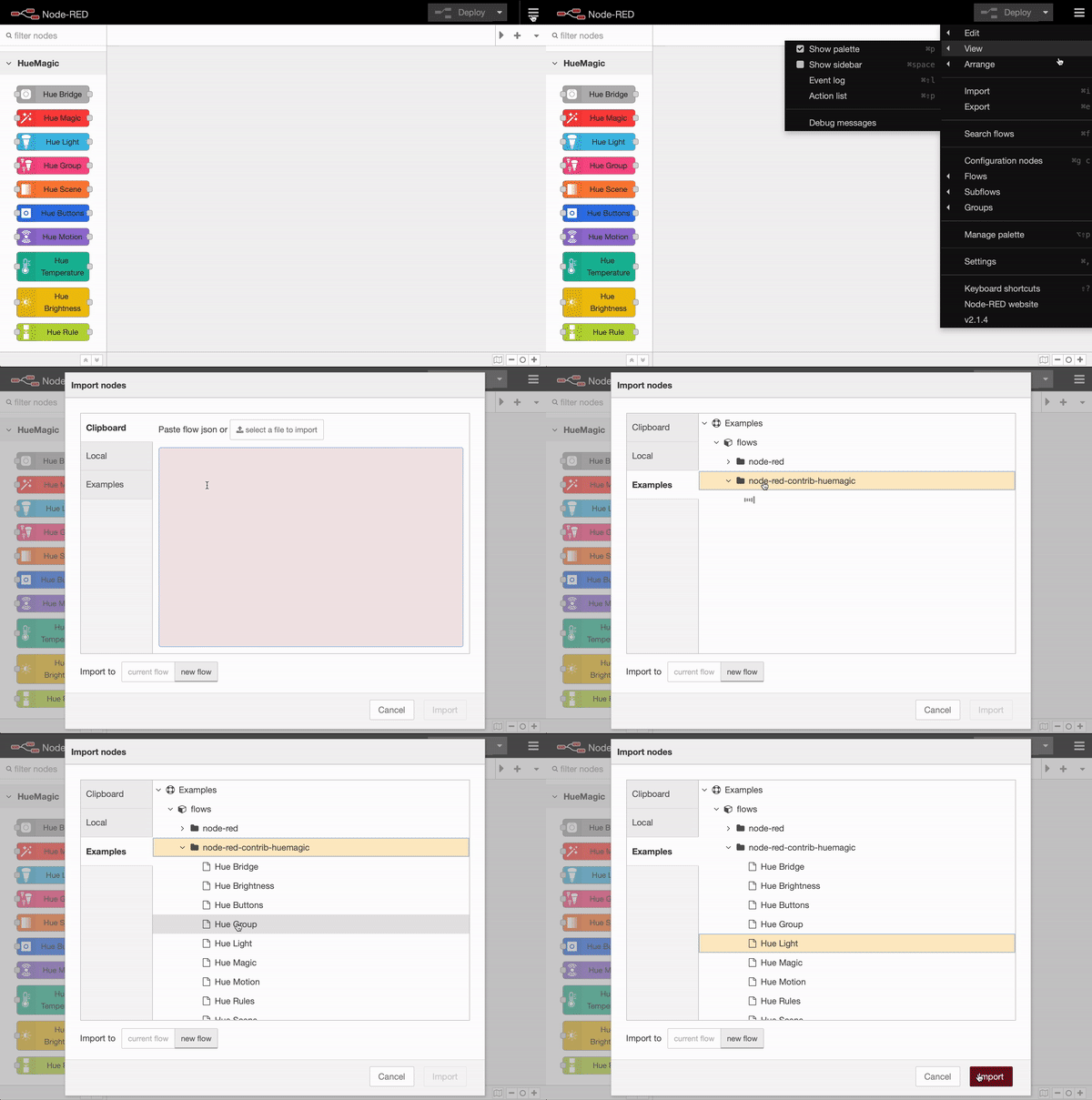
- package/huemagic/hue-motion.js +116 -87
- package/huemagic/hue-rules.html +121 -50
- package/huemagic/hue-rules.js +84 -64
- package/huemagic/hue-scene.html +96 -115
- package/huemagic/hue-scene.js +65 -96
- package/huemagic/hue-temperature.html +130 -49
- package/huemagic/hue-temperature.js +136 -32
- package/huemagic/icons/hue-bridge.png +0 -0
- package/huemagic/icons/hue-bridge.svg +3 -0
- package/huemagic/icons/hue-brightness.png +0 -0
- package/huemagic/icons/hue-brightness.svg +11 -0
- package/huemagic/icons/hue-buttons.png +0 -0
- package/huemagic/icons/hue-buttons.svg +4 -0
- package/huemagic/icons/hue-group.png +0 -0
- package/huemagic/icons/hue-group.svg +12 -0
- package/huemagic/icons/hue-light.png +0 -0
- package/huemagic/icons/hue-light.svg +3 -0
- package/huemagic/icons/hue-magic.png +0 -0
- package/huemagic/icons/hue-magic.svg +3 -0
- package/huemagic/icons/hue-motion.png +0 -0
- package/huemagic/icons/hue-motion.svg +9 -0
- package/huemagic/icons/hue-rules.png +0 -0
- package/huemagic/icons/hue-rules.svg +4 -0
- package/huemagic/icons/hue-scene.png +0 -0
- package/huemagic/icons/hue-scene.svg +5 -0
- package/huemagic/icons/hue-temperature.png +0 -0
- package/huemagic/icons/hue-temperature.svg +7 -0
- package/huemagic/locales/de/hue-bridge-config.html +17 -12
- package/huemagic/locales/de/hue-bridge-config.json +7 -5
- package/huemagic/locales/de/hue-bridge.html +64 -145
- package/huemagic/locales/de/hue-bridge.json +6 -17
- package/huemagic/locales/de/hue-brightness.html +52 -38
- package/huemagic/locales/de/hue-brightness.json +7 -2
- package/huemagic/locales/de/hue-buttons.html +58 -0
- package/huemagic/locales/de/hue-buttons.json +28 -0
- package/huemagic/locales/de/hue-group.html +46 -122
- package/huemagic/locales/de/hue-group.json +4 -2
- package/huemagic/locales/de/hue-light.html +68 -116
- package/huemagic/locales/de/hue-light.json +5 -2
- package/huemagic/locales/de/hue-magic.html +65 -57
- package/huemagic/locales/de/hue-magic.json +2 -1
- package/huemagic/locales/de/hue-motion.html +48 -44
- package/huemagic/locales/de/hue-motion.json +6 -3
- package/huemagic/locales/de/hue-rules.html +68 -73
- package/huemagic/locales/de/hue-rules.json +5 -2
- package/huemagic/locales/de/hue-scene.html +23 -32
- package/huemagic/locales/de/hue-scene.json +5 -2
- package/huemagic/locales/de/hue-temperature.html +53 -36
- package/huemagic/locales/de/hue-temperature.json +7 -2
- package/huemagic/locales/en-US/hue-bridge-config.html +17 -12
- package/huemagic/locales/en-US/hue-bridge-config.json +5 -3
- package/huemagic/locales/en-US/hue-bridge.html +64 -145
- package/huemagic/locales/en-US/hue-bridge.json +5 -16
- package/huemagic/locales/en-US/hue-brightness.html +52 -38
- package/huemagic/locales/en-US/hue-brightness.json +10 -3
- package/huemagic/locales/en-US/hue-buttons.html +58 -0
- package/huemagic/locales/en-US/hue-buttons.json +34 -0
- package/huemagic/locales/en-US/hue-group.html +46 -122
- package/huemagic/locales/en-US/hue-group.json +7 -3
- package/huemagic/locales/en-US/hue-light.html +68 -116
- package/huemagic/locales/en-US/hue-light.json +8 -3
- package/huemagic/locales/en-US/hue-magic.html +65 -57
- package/huemagic/locales/en-US/hue-magic.json +3 -1
- package/huemagic/locales/en-US/hue-motion.html +48 -44
- package/huemagic/locales/en-US/hue-motion.json +9 -4
- package/huemagic/locales/en-US/hue-rules.html +68 -73
- package/huemagic/locales/en-US/hue-rules.json +5 -2
- package/huemagic/locales/en-US/hue-scene.html +23 -32
- package/huemagic/locales/en-US/hue-scene.json +5 -2
- package/huemagic/locales/en-US/hue-temperature.html +53 -36
- package/huemagic/locales/en-US/hue-temperature.json +10 -3
- package/huemagic/utils/api.js +290 -0
- package/huemagic/utils/color.js +382 -0
- package/{utils → huemagic/utils}/merge.js +9 -6
- package/huemagic/utils/messages.js +447 -0
- package/package.json +12 -12
- package/examples/Hue Switch.json +0 -40
- package/examples/Hue Tap.json +0 -40
- package/huemagic/assets/anime.js +0 -8
- package/huemagic/hue-switch.html +0 -119
- package/huemagic/hue-switch.js +0 -113
- package/huemagic/hue-tap.html +0 -119
- package/huemagic/hue-tap.js +0 -74
- package/huemagic/icons/hue-button.png +0 -0
- package/huemagic/icons/hue-switch.png +0 -0
- package/huemagic/icons/hue-tap.png +0 -0
- package/huemagic/locales/de/hue-switch.html +0 -50
- package/huemagic/locales/de/hue-switch.json +0 -31
- package/huemagic/locales/de/hue-tap.html +0 -41
- package/huemagic/locales/de/hue-tap.json +0 -23
- package/huemagic/locales/en-US/hue-switch.html +0 -50
- package/huemagic/locales/en-US/hue-switch.json +0 -31
- package/huemagic/locales/en-US/hue-tap.html +0 -41
- package/huemagic/locales/en-US/hue-tap.json +0 -23
- package/utils/messages.js +0 -571
- package/utils/rgb.js +0 -188
|
@@ -1,151 +1,75 @@
|
|
|
1
|
-
<script type="text/
|
|
2
|
-
|
|
1
|
+
<script type="text/markdown" data-help-name="hue-group">
|
|
2
|
+
The "Hue Group" node can control several lights behind a group on the bridge at the same time.
|
|
3
3
|
|
|
4
|
-
|
|
5
|
-
<p>Select the preconfigured Hue Bridge and hit the search button to find all available preconfigured groups. Type in the name of the group manually or keep the default name. Note that events will only be sent if the group state is changed. If necessary, all status updates of this node can be ignored by activating the "Skip events" option.</p>
|
|
4
|
+
### Setup
|
|
6
5
|
|
|
7
|
-
|
|
8
|
-
<p>Changes the group on / off state based on the passed in <b>msg.payload</b> values of:</p>
|
|
9
|
-
<dl class="message-properties">
|
|
10
|
-
<dt>msg.payload<span class="property-type">boolean</span></dt>
|
|
11
|
-
<dd>Will turn on or turn off all lights inside the group with their previous configuration (color and brightness)</dd>
|
|
12
|
-
</dl>
|
|
6
|
+
Select the pre-configured Hue Bridge and hit the search button to find all available groups. If you already know the ID of a group, you can also enter it here manually. You can either assign a new name for the group internally or choose the predefined name. Optionally, you can also deactivate all automatic status messages for this node by clicking the setting "Skip events from node". The node will then no longer issue any updates. Alternatively, you can also choose whether the node's initialization message should not be suppressed when Node-RED is started. If you activate this setting, you will receive a status message for the currently selected group after each deployment.
|
|
13
7
|
|
|
14
|
-
|
|
15
|
-
<p>Changes the group state, effect, color and brightness based on the passed in <b>msg.payload</b> values of:</p>
|
|
16
|
-
<dl class="message-properties">
|
|
17
|
-
<dt class="optional">on<span class="property-type">boolean</span></dt>
|
|
18
|
-
<dd>True to turn on all the lights inside the group, false to turn them off</dd>
|
|
8
|
+
If you do not select a group and use the node configuration in this way, the node works in the so-called "universal mode". In this mode, the node receives and outputs all status messages of the same type. You can also apply settings in universal mode to a specific group by transferring the corresponding group ID as a string in `msg.topic` together with your settings.
|
|
19
9
|
|
|
20
|
-
|
|
21
|
-
<dd>Optionally configurable brightness of the lights in percent (0-100)</dd>
|
|
10
|
+
### Get status
|
|
22
11
|
|
|
23
|
-
|
|
24
|
-
<dd>Optionally configurable brightness level of the lights (0-254)</dd>
|
|
12
|
+
Outputs the current status of the group as soon as a `msg.payload` object with the following content has been passed to the node. Alternatively, you can also press the button in the Node-RED interface without having to pass a message to the node beforehand.
|
|
25
13
|
|
|
26
|
-
|
|
27
|
-
<dd>Increment brightness by given percentage value</dd>
|
|
14
|
+
: status (boolean): Returns the current status of the group
|
|
28
15
|
|
|
29
|
-
|
|
30
|
-
<dd>Decrement brightness by given percentage value</dd>
|
|
16
|
+
### Turn on / off (simple)
|
|
31
17
|
|
|
32
|
-
|
|
33
|
-
<dd>If the option is set, turned off lights in the group are ignored when "incrementBrightness / decrementBrightness" is set</dd>
|
|
18
|
+
To quickly turn an entire group on or off in simple mode, pass an object with the following content to the node. Please note that the command will only be executed if the current status of the group does not match your desired status. This means that all lights have to be switched off before you can switch them on with the `true` command.
|
|
34
19
|
|
|
35
|
-
|
|
36
|
-
<dd>Optionally configurable RGB color value of all lights inside the group. You don't need to pass the RGB value if you already passed a HEX value</dd>
|
|
20
|
+
: payload (boolean): `true` switches the whole group on, `false` switches them off
|
|
37
21
|
|
|
38
|
-
|
|
39
|
-
<dd>Optionally configurable HEX color value of all lights inside the group. You don't need to pass the HEX value if you already passed a RGB value</dd>
|
|
22
|
+
### Group commands (extended)
|
|
40
23
|
|
|
41
|
-
|
|
42
|
-
<dd>Optionally configurable human readable color name in english like "red" or "random" for a random color</dd>
|
|
24
|
+
In addition to simply switching it on and off, there are also many other options available for controlling the group. All nodes in HueMagic can be controlled with additive commands. This means that you can first pass one setting and then another setting in a later command without discarding the previous setting. Transfer the following parameters to an `msg.payload` object to make more extensive settings for the group:
|
|
43
25
|
|
|
44
|
-
|
|
45
|
-
|
|
26
|
+
: on (boolean): `true` switches the entire group on, `false` switches it off (please note the note above)
|
|
27
|
+
: toggle (boolean | any): Toggles between switching on and off, depending on the previous status of the group
|
|
28
|
+
: brightness (int | string): Percentage value of the light brightness (0-100) or a string with the value `auto` to automatically set the light brightness based on the current time
|
|
29
|
+
: brightnessLevel (int): Numerical value of the light brightness (0-254)
|
|
30
|
+
: color (string): `random` to set a random color or an English color name (e.g. `red`)
|
|
31
|
+
: hex (string): Color value in hexadecimal in the form of a string
|
|
32
|
+
: rgb (array [0,0,0]): Color value in RGB format in the form of an array
|
|
33
|
+
: xyColor (object {x [float], y [float]}): Color value in the XY color format in the form of an object
|
|
34
|
+
: image (string): Path of an image (local or on the web) to set the current color of the group to the average color of the image
|
|
35
|
+
: colorTemp (int | string): Value between 153 and 500 to set the color temperature of the group or the values `cold`, `normal`, `warm`, `hot` and `auto` - where `auto` is the color temperature based on the current time
|
|
36
|
+
: transitionTime (float): Transition time of the current setting in seconds. If `0` is passed, the group changes to the desired setting immediately. If you pass it to `3`, the group changes to the desired setting with a slight transition in the next 3 seconds
|
|
37
|
+
: colorloop (float): Plays a “colorloop” animation for the selected duration in seconds and then changes back to the group's original state
|
|
38
|
+
: alert (float): Plays an "alert" animation for the selected duration in seconds and then switches back to the original status of the group
|
|
46
39
|
|
|
47
|
-
|
|
48
|
-
<dd>Optionally configurable temporary value which eases transition of an effect (value in seconds, 0 for instant, 5 for five seconds)</dd>
|
|
40
|
+
### Status messages from the node
|
|
49
41
|
|
|
50
|
-
|
|
51
|
-
<dd>Optionally configurable color loop effect. Float = disables the effect after x seconds / Boolean to turn on / off the effect</dd>
|
|
42
|
+
If a change in the group is detected, the following status message is returned from the node. Please note that the group only outputs status messages when either the last light is switched off or when the first light is switched on (if all were switched off beforehand).
|
|
52
43
|
|
|
53
|
-
|
|
54
|
-
<dd>Optionally configurable color temperature of the group lights from 153 to 500</dd>
|
|
44
|
+
In contrast to the "Hue Light" node, you have much less status information available here, as a group can contain many different device types with different values that cannot be combined.
|
|
55
45
|
|
|
56
|
-
|
|
57
|
-
<dd>Increment/decrement color temperature by given value</dd>
|
|
46
|
+
#### Status object under `msg.payload`
|
|
58
47
|
|
|
59
|
-
|
|
60
|
-
|
|
48
|
+
: on (boolean): State of the group, where `true` stands for on and `false` for off
|
|
49
|
+
: updated (string): Time of the last update of the resource by HueMagic (ISO 8601)
|
|
61
50
|
|
|
62
|
-
|
|
63
|
-
<dd>Returns the current status message of the node without taking any action</dd>
|
|
64
|
-
</dl>
|
|
51
|
+
#### Information about the group under `msg.info`
|
|
65
52
|
|
|
66
|
-
|
|
67
|
-
|
|
68
|
-
|
|
69
|
-
|
|
70
|
-
<dd>Will turn on or turn off all lights inside the group with their previous configuration (color and brightness)</dd>
|
|
71
|
-
</dl>
|
|
53
|
+
: id (string): Indicates the new ID of the group
|
|
54
|
+
: idV1 (string | boolean): Indicates the old ID of the group
|
|
55
|
+
: name (string): The currently set name of the group
|
|
56
|
+
: type (string): The type of the group (always `group`)
|
|
72
57
|
|
|
73
|
-
|
|
74
|
-
<p>Plays an alert effect based on the passed in <b>msg.payload</b> values of:</p>
|
|
75
|
-
<dl class="message-properties">
|
|
76
|
-
<dt>alert<span class="property-type">int</span></dt>
|
|
77
|
-
<dd>Configurable amount of seconds to play the alert effect (max 30)</dd>
|
|
58
|
+
#### Status changes under `msg.updated`
|
|
78
59
|
|
|
79
|
-
|
|
80
|
-
<dd>Optionally configurable RGB color value of the alert effect. You don't need to pass the RGB value if you already passed a HEX value</dd>
|
|
60
|
+
Lists individual parameters in the form of an object that have changed compared to the last state of the group. If no changes have been registered, this object is empty.
|
|
81
61
|
|
|
82
|
-
|
|
83
|
-
<dd>Optionally configurable HEX color value of the alert effect. You don't need to pass the HEX value if you already passed a RGB value</dd>
|
|
62
|
+
#### Last status of the light under `msg.lastState`
|
|
84
63
|
|
|
85
|
-
|
|
86
|
-
<dd>Optionally configurable human readable color name in english like "red" or "random" for a random color</dd>
|
|
87
|
-
</dl>
|
|
64
|
+
Contains the complete status object (see output values above) of the last status before the last change. If the last state of HueMagic has not yet been registered, it will output `false`.
|
|
88
65
|
|
|
89
|
-
|
|
90
|
-
<p>The event message that the group sends contains the following data in the <b>msg.payload</b> object:</p>
|
|
91
|
-
<dl class="message-properties">
|
|
92
|
-
<dt>on<span class="property-type">boolean</span></dt>
|
|
93
|
-
<dd>True for on, false for off</dd>
|
|
66
|
+
#### Last command under `msg.command` (optional)
|
|
94
67
|
|
|
95
|
-
|
|
96
|
-
<dd>True if all lights in the group are on, false if not</dd>
|
|
68
|
+
If the status of the node has changed via a certain command, the entire command that was executed is also output. Otherwise this object will not be output by the node.
|
|
97
69
|
|
|
98
|
-
|
|
99
|
-
<dd>True if any lights in the group are on, false if none are on</dd>
|
|
70
|
+
### Examples from HueMagic
|
|
100
71
|
|
|
101
|
-
|
|
102
|
-
<dd>Current brightness of all lights in the whole group in percent</dd>
|
|
72
|
+
HueMagic provides some sample configurations for this node. To import a full featured example into your Node-RED interface, click on the Node-RED menu icon, then select "Import" and navigate to "Examples" in the sidebar of the popup. Then select the HueMagic folder and your desired node to import a sample flow.
|
|
103
73
|
|
|
104
|
-
|
|
105
|
-
<dd>Current brightness level of all lights in the whole group (0-254)</dd>
|
|
106
|
-
|
|
107
|
-
<dt class="optional">rgb<span class="property-type">array[int,int,int]</span></dt>
|
|
108
|
-
<dd>Current RGB color value of all lights in the group (if supported)</dd>
|
|
109
|
-
|
|
110
|
-
<dt class="optional">hex<span class="property-type">string</span></dt>
|
|
111
|
-
<dd>Current HEX color value of all lights in the group (if supported)</dd>
|
|
112
|
-
|
|
113
|
-
<dt class="optional">color<span class="property-type">string</span></dt>
|
|
114
|
-
<dd>Current color name of all lights in the group (if supported)</dd>
|
|
115
|
-
|
|
116
|
-
<dt class="optional">colorTemp<span class="property-type">int</span></dt>
|
|
117
|
-
<dd>Current color temperature of all lights in average in the group (if supported)</dd>
|
|
118
|
-
|
|
119
|
-
<dt>updated<span class="property-type">ISO 8601 date string</span></dt>
|
|
120
|
-
<dd>ISO 8601 date string of the last group state update</dd>
|
|
121
|
-
</dl>
|
|
122
|
-
|
|
123
|
-
<h3>Additional Group Info</h3>
|
|
124
|
-
<p>Additional information about the group is going to be sent to the <b>msg.info</b> object:</p>
|
|
125
|
-
<dl class="message-properties">
|
|
126
|
-
<dt>id<span class="property-type">int</span></dt>
|
|
127
|
-
<dd>Group Id, generated automatically by the bridge</dd>
|
|
128
|
-
|
|
129
|
-
<dt>lightIds<span class="property-type">array[int…]</span></dt>
|
|
130
|
-
<dd>An array of light ids associated with the group</dd>
|
|
131
|
-
|
|
132
|
-
<dt>name<span class="property-type">string</span></dt>
|
|
133
|
-
<dd>Name for the group</dd>
|
|
134
|
-
|
|
135
|
-
<dt>type<span class="property-type">string</span></dt>
|
|
136
|
-
<dd>Type of group (e.g. LightGroup, Luminaire, LightSource, Room)</dd>
|
|
137
|
-
|
|
138
|
-
<dt class="optional">model<span class="property-type">object</span></dt>
|
|
139
|
-
<dd>Huejay (the API behind HueMagic) maintains a list of Philips Hue supported luminaire models. The Group model attribute returns optionally a GroupModel object. This object contains more information about the model like the model.id, model.manufacturer, model.name, model.type, model.colorGamut and model.friendsOfHue</dd>
|
|
140
|
-
</dl>
|
|
141
|
-
|
|
142
|
-
<h3>Universal Mode (optional)</h3>
|
|
143
|
-
<p>Defines the group Id on the Hue Bridge manually if not configured in the node properties (deactivates group update events):</p>
|
|
144
|
-
<dl class="message-properties">
|
|
145
|
-
<dt>msg.topic<span class="property-type">int</span></dt>
|
|
146
|
-
<dd>Manual definition of the group Id</dd>
|
|
147
|
-
</dl>
|
|
148
|
-
|
|
149
|
-
<h3>Last State Information</h3>
|
|
150
|
-
<p>This node also sends the entire last state data (before the update) in the <b>msg.lastState</b> object. It can either contain false (boolean) or the objects payload (msg.lastState.payload) and info (msg.lastState.info). The return value "false" is only sent if there was no last state, e.g. when the node was newly created or restarted.</p>
|
|
74
|
+
|
|
151
75
|
</script>
|
|
@@ -5,15 +5,17 @@
|
|
|
5
5
|
{
|
|
6
6
|
"name": "Name",
|
|
7
7
|
"input-name": "Group name",
|
|
8
|
-
"skipevents": "Skip events",
|
|
9
8
|
"skipevents-node": "Skip events from node",
|
|
9
|
+
"sendinitevents-node": "Do not suppress initialization event",
|
|
10
10
|
"searching": "Searching groups…",
|
|
11
11
|
"none-found": "No groups found!",
|
|
12
12
|
"unknown-error": "Something went wrong. Please retry.",
|
|
13
13
|
"group": "Group",
|
|
14
14
|
"colornamer": "Colornamer",
|
|
15
15
|
"colornamer-info": "Activate color naming",
|
|
16
|
-
"all": "All groups / lights"
|
|
16
|
+
"all": "All groups / lights",
|
|
17
|
+
"universalevents": "Universal Events",
|
|
18
|
+
"universalevents-node": "Receives all messages from other nodes of the same type (only in universal mode)"
|
|
17
19
|
},
|
|
18
20
|
"node":
|
|
19
21
|
{
|
|
@@ -31,7 +33,9 @@
|
|
|
31
33
|
"error-invalid-sat": "Invalid saturation setting. Only 0 - 254 allowed.",
|
|
32
34
|
"error-invalid-temp": "Invalid color temprature. Only 153 - 500 allowed.",
|
|
33
35
|
"input": "turn on / off",
|
|
34
|
-
"output": "status"
|
|
36
|
+
"output": "status",
|
|
37
|
+
"command": "executing command…",
|
|
38
|
+
"statusmsg": "Status queried successfully…"
|
|
35
39
|
}
|
|
36
40
|
}
|
|
37
41
|
}
|
|
@@ -1,145 +1,97 @@
|
|
|
1
|
-
<script type="text/
|
|
2
|
-
|
|
1
|
+
<script type="text/markdown" data-help-name="hue-light">
|
|
2
|
+
The "Hue Light" node can control lights connected to the bridge and receive their status messages.
|
|
3
3
|
|
|
4
|
-
|
|
5
|
-
<p>Select the preconfigured Hue Bridge and hit the search button to find all available lights. Type in the name of the light manually or keep the default device name. Note that events will only be sent if the light bulb state is changed. If necessary, all status updates of this node can be ignored by activating the "Skip events" option.</p>
|
|
4
|
+
### Setup
|
|
6
5
|
|
|
7
|
-
|
|
8
|
-
<p>Changes the light on / off state based on the passed in <b>msg.payload</b> values of:</p>
|
|
9
|
-
<dl class="message-properties">
|
|
10
|
-
<dt>msg.payload<span class="property-type">boolean</span></dt>
|
|
11
|
-
<dd>Will turn on or turn off the light with its previous configuration (color and brightness)</dd>
|
|
12
|
-
</dl>
|
|
6
|
+
Select the pre-configured Hue Bridge and hit the search button to find all the available lights. If you already know the ID of a light, you can also enter it here manually. You can either assign a new name for the light internally or choose the predefined name. Optionally, you can also deactivate all automatic status messages for this node by clicking the setting "Skip events from node". The node will then no longer issue device updates. Alternatively, you can also choose whether the node's initialization message should not be suppressed when Node-RED is started. If you activate this setting, you will receive a status message for the currently selected light after each deployment.
|
|
13
7
|
|
|
14
|
-
|
|
15
|
-
<p>Changes the light state, effect, color and brightness based on the passed in <b>msg.payload</b> values of:</p>
|
|
16
|
-
<dl class="message-properties">
|
|
17
|
-
<dt class="optional">on<span class="property-type">boolean</span></dt>
|
|
18
|
-
<dd>True to turn on the light bulb, false to turn it off</dd>
|
|
8
|
+
If you activate the setting "Activate color naming", the node will try to describe the currently set light color for each status message. You will then receive an additional parameter with the English description of the currently set color in the output.
|
|
19
9
|
|
|
20
|
-
|
|
21
|
-
<dd>Optionally configurable brightness of the light in percent (0-100)</dd>
|
|
10
|
+
If you do not select a light and use the node configuration in this way, the node works in the so-called "universal mode". In this mode, the node receives and outputs all status messages of the same type. You can also apply settings in universal mode to a specific light by transferring the corresponding light ID as a string in `msg.topic` together with your settings.
|
|
22
11
|
|
|
23
|
-
|
|
24
|
-
<dd>Optionally configurable brightness level of the light (0-254)</dd>
|
|
12
|
+
### Get status
|
|
25
13
|
|
|
26
|
-
|
|
27
|
-
<dd>Increment brightness by given percentage value</dd>
|
|
14
|
+
Outputs the current status of the light as soon as a `msg.payload` object with the following content has been passed to the node. Alternatively, you can also press the button in the Node-RED interface without having to pass a message to the node beforehand.
|
|
28
15
|
|
|
29
|
-
|
|
30
|
-
<dd>Decrement brightness by given percentage value</dd>
|
|
16
|
+
: status (boolean): Returns the current status of the light
|
|
31
17
|
|
|
32
|
-
|
|
33
|
-
<dd>Optionally configurable RGB color value of the light bulb. You don't need to pass the RGB value if you already passed a HEX value</dd>
|
|
18
|
+
### Turn light on / off (simple)
|
|
34
19
|
|
|
35
|
-
|
|
36
|
-
<dd>Optionally configurable HEX color value of the light bulb. You don't need to pass the HEX value if you already passed a RGB value</dd>
|
|
20
|
+
To quickly switch a light on or off in simple mode, pass an object with the following content to the node:
|
|
37
21
|
|
|
38
|
-
|
|
39
|
-
<dd>Optionally configurable human readable color name in english like "red" or "random" for a random color</dd>
|
|
22
|
+
: payload (boolean): `true` switches the light on, `false` switches it off
|
|
40
23
|
|
|
41
|
-
|
|
42
|
-
<dd>Optionally configurable image path (remote or local) to apply the most dominant color to the light</dd>
|
|
24
|
+
### Light commands (extended)
|
|
43
25
|
|
|
44
|
-
|
|
45
|
-
<dd>Optionally configurable temporary value which eases transition of an effect (value in seconds, 0 for instant, 5 for five seconds)</dd>
|
|
26
|
+
In addition to simply switching it on and off, there are also many other options available for controlling the light. All nodes in HueMagic can be controlled with additive commands. This means that you can first pass one setting and then another setting in a later command without discarding the previous setting. Transfer the following parameters to a `msg.payload` object to make more extensive settings on the light:
|
|
46
27
|
|
|
47
|
-
|
|
48
|
-
|
|
28
|
+
: on (boolean): `true` switches the light on, `false` switches it off
|
|
29
|
+
: toggle (boolean | any): Toggles between switching on and off, depending on the previous status of the light
|
|
30
|
+
: brightness (int | string): Percentage value of the light brightness (0-100) or a string with the value `auto` to automatically set the brightness based on the current time
|
|
31
|
+
: brightnessLevel (int): Numerical value of the light brightness (0-254)
|
|
32
|
+
: incrementBrightness (int | boolean): Specifies by how many percent the light should be made brighter or `true` to make the light brighter in 10% steps
|
|
33
|
+
: decrementBrightness (int | boolean): Specifies the percentage by which the light should be made darker or `true` to make the light darker in 10% steps
|
|
34
|
+
: color (string): `random` to set a random color or an English color name (e.g. `red`)
|
|
35
|
+
: hex (string): Color value in hexadecimal in the form of a string
|
|
36
|
+
: rgb (array [0,0,0]): Color value in RGB format in the form of an array
|
|
37
|
+
: xyColor (object {x [float], y [float]}): Color value in the XY color format in the form of an object
|
|
38
|
+
: gradient (object {hex […]}): An object with a supported color object (e.g. `hex`,` rgb`, ...) and several colors to set a gradient to supported lights
|
|
39
|
+
: mixColor (object): A color to be mixed with the current light color. Can accept `color`, `hex`, `rgb` or `xyColor` objects and optionally `amount` (int) to indicate the mixing ratio in percent
|
|
40
|
+
: image (string): Path of an image (local or on the web) to set the current color of the light to the average color of the image
|
|
41
|
+
: saturation (int): percentage of the saturation of the current color (beta)
|
|
42
|
+
: colorTemp (int | string): Value between 153 and 500 to set the color temperature of the light or the values `cold`, `normal`, `warm`, `hot` and `auto` - where `auto` is the color temperature based on the current time
|
|
43
|
+
: incrementColorTemp (int | boolean): Value by how much the color temperature should be warmer or `true` to make the color temperature warmer in steps of 50
|
|
44
|
+
: decrementColorTemp (int | boolean): Value by how much the color temperature should be colder or `true` to make the color temperature colder in steps of 50
|
|
45
|
+
: transitionTime (float): Transition time of the current setting in seconds. If `0` is entered, the light changes to the desired setting immediately. If `3` is entered, the light changes to the desired setting with a slight transition in the next 3 seconds
|
|
46
|
+
: colorloop (float): Plays a "colorloop" animation for the selected duration in seconds and then switches back to the original state of the light
|
|
47
|
+
: alert (float): Plays an "alert" animation for the selected duration in seconds and then switches back to the original state of the light
|
|
49
48
|
|
|
50
|
-
|
|
51
|
-
<dd>Optionally configurable color temperature of the light from 153 to 500</dd>
|
|
49
|
+
### Status messages from the node
|
|
52
50
|
|
|
53
|
-
|
|
54
|
-
<dd>Increment/decrement color temperature by given value</dd>
|
|
51
|
+
As soon as a change in the light settings has been detected (regardless of whether via Node-RED or externally), the following status message is returned by the node:
|
|
55
52
|
|
|
56
|
-
|
|
57
|
-
<dd>Optionally configurable color saturation of the light in percent (from 0 to 100)</dd>
|
|
53
|
+
#### Status object under `msg.payload`
|
|
58
54
|
|
|
59
|
-
|
|
60
|
-
|
|
61
|
-
|
|
55
|
+
: on (boolean): State of the light, where `true` stands for on and `false` for off
|
|
56
|
+
: brightness (int | boolean): Current brightness in percent or `false`, if the light does not support a brightness setting
|
|
57
|
+
: brightnessLevel (int | boolean): Current brightness from 0-254 or `false`, if the light does not support a brightness setting
|
|
58
|
+
: reachable (boolean | string): `true` if the light is connected to the bridge, `unknown` if the connection status deviates
|
|
59
|
+
: connectionStatus (string): The current connection status with the bridge in the form of a string. Can contain `connected`, `disconnected`, `connectivity_issue` or `unidirectional_incoming` as a value
|
|
60
|
+
: rgb (array [int, int, int] | optional): Current light color in the form of an RGB value, if the light can display colors
|
|
61
|
+
: hex (string | optional): Current light color in the form of a hexadecimal value if the light can display colors
|
|
62
|
+
: xyColor (object {x [float], y [float]} | optional): Current light color in the form of an XY value, if the light can display colors
|
|
63
|
+
: color (string | optional): Current light name in English, if the light can display colors and the corresponding setting of the node has been activated
|
|
64
|
+
: gradient (object | optional): Current gradient setting with all available color units in the form of an array, if the light supports gradient settings, where `colors` outputs the colors, `numColors` the number of set colors in the gradient and `totalColors` the maximum possible Number of colors the resource can support in the gradient
|
|
65
|
+
: colorTemp (int | boolean | optional): Current color temperature of the light, if the light can display color temperatures and a color temperature has been set
|
|
66
|
+
: colorTempName (string | optional): Current color temperature of the light in the form of a descriptive string with the values `cold`,`normal`, `warm` or `hot`, if the light can display color temperatures and a color temperature has been set. Otherwise `unknown` is output
|
|
67
|
+
: updated (string): Time of the last update of the resource by HueMagic (ISO 8601)
|
|
62
68
|
|
|
63
|
-
|
|
64
|
-
<p>Turns the light on or off depending on the current state based on the passed in <b>msg.payload</b> value of:</p>
|
|
65
|
-
<dl class="message-properties">
|
|
66
|
-
<dt>toggle<span class="property-type">any</span></dt>
|
|
67
|
-
<dd>Will turn on or turn off the light with the previous configuration (color and brightness)</dd>
|
|
68
|
-
</dl>
|
|
69
|
+
#### Information about the light under `msg.info`
|
|
69
70
|
|
|
70
|
-
|
|
71
|
-
|
|
72
|
-
|
|
73
|
-
|
|
74
|
-
|
|
71
|
+
: id (string): Indicates the new ID of the light
|
|
72
|
+
: idV1 (string | boolean): Indicates the old ID of the light
|
|
73
|
+
: uniqueId (string): The unique ID of the light
|
|
74
|
+
: deviceId (string): The unique ID of the device
|
|
75
|
+
: name (string): The currently set name of the light
|
|
76
|
+
: type (string): The type of light (always `light`)
|
|
77
|
+
: softwareVersion (string): The current firmware of the light
|
|
78
|
+
: model (object): Contains the model information of the light under `id`, `manufacturer`, `name`, `type`, `certified`, `friendsOfHue`, `colorGamut` and `colorGamutType`
|
|
75
79
|
|
|
76
|
-
|
|
77
|
-
<dd>Optionally configurable RGB color value of the alert effect. You don't need to pass the RGB value if you already passed a HEX value</dd>
|
|
80
|
+
#### Status changes under `msg.updated`
|
|
78
81
|
|
|
79
|
-
|
|
80
|
-
<dd>Optionally configurable HEX color value of the alert effect. You don't need to pass the HEX value if you already passed a RGB value</dd>
|
|
82
|
+
Lists individual parameters in the form of an object that have changed compared to the last state of the light. If no changes have been registered, this object is empty.
|
|
81
83
|
|
|
82
|
-
|
|
83
|
-
<dd>Optionally configurable human readable color name in english like "red" or "random" for a random color</dd>
|
|
84
|
-
</dl>
|
|
84
|
+
#### Last status of the light under `msg.lastState`
|
|
85
85
|
|
|
86
|
-
|
|
87
|
-
<p>The event message that the light bulb sends contains the following data in the <b>msg.payload</b> object:</p>
|
|
88
|
-
<dl class="message-properties">
|
|
89
|
-
<dt>on<span class="property-type">boolean</span></dt>
|
|
90
|
-
<dd>True for on, false for off</dd>
|
|
86
|
+
Contains the complete status object (see output values above) of the last status before the last change. If the last state of HueMagic has not yet been registered, it will output `false`.
|
|
91
87
|
|
|
92
|
-
|
|
93
|
-
<dd>Current brightness of the light bulb in percent</dd>
|
|
88
|
+
#### Last command under `msg.command` (optional)
|
|
94
89
|
|
|
95
|
-
|
|
96
|
-
<dd>Current brightness level of the light bulb (0-254)</dd>
|
|
90
|
+
If the status of the node has changed via a certain command, the entire command that was executed is also output. Otherwise this object will not be output by the node.
|
|
97
91
|
|
|
98
|
-
|
|
99
|
-
<dd>Current RGB color value of the light bulb (if supported)</dd>
|
|
92
|
+
### Examples from HueMagic
|
|
100
93
|
|
|
101
|
-
|
|
102
|
-
<dd>Current HEX color value of the light bulb (if supported)</dd>
|
|
94
|
+
HueMagic provides some sample configurations for this node. To import a full featured example into your Node-RED interface, click on the Node-RED menu icon, then select "Import" and navigate to "Examples" in the sidebar of the popup. Then select the HueMagic folder and your desired node to import a sample flow.
|
|
103
95
|
|
|
104
|
-
|
|
105
|
-
<dd>Current color name of the light bulb (if supported)</dd>
|
|
106
|
-
|
|
107
|
-
<dt class="optional">colorTemp<span class="property-type">int</span></dt>
|
|
108
|
-
<dd>Current color temperature of the light (if supported)</dd>
|
|
109
|
-
|
|
110
|
-
<dt>updated<span class="property-type">ISO 8601 date string</span></dt>
|
|
111
|
-
<dd>ISO 8601 date string of the last light state update</dd>
|
|
112
|
-
</dl>
|
|
113
|
-
|
|
114
|
-
<h3>Additional Light Bulb Info</h3>
|
|
115
|
-
<p>Additional information about the light bulb is going to be sent to the <b>msg.info</b> object:</p>
|
|
116
|
-
<dl class="message-properties">
|
|
117
|
-
<dt>id<span class="property-type">int</span></dt>
|
|
118
|
-
<dd>Numerical id of the light as registered on the bridge</dd>
|
|
119
|
-
|
|
120
|
-
<dt>uniqueId<span class="property-type">string</span></dt>
|
|
121
|
-
<dd>Unique Id of the light (typically hardware id)</dd>
|
|
122
|
-
|
|
123
|
-
<dt>name<span class="property-type">string</span></dt>
|
|
124
|
-
<dd>Name for the light</dd>
|
|
125
|
-
|
|
126
|
-
<dt>type<span class="property-type">string</span></dt>
|
|
127
|
-
<dd>Type of light (e.g. Extended Color Light, Dimmable Light)</dd>
|
|
128
|
-
|
|
129
|
-
<dt>softwareVersion<span class="property-type">float</span></dt>
|
|
130
|
-
<dd>Software version of the light</dd>
|
|
131
|
-
|
|
132
|
-
<dt>model<span class="property-type">object</span></dt>
|
|
133
|
-
<dd>The model object of the light includes model specific information like the model.id, model.manufacturer, model.name, model.type, model.colorGamut and model.friendsOfHue</dd>
|
|
134
|
-
</dl>
|
|
135
|
-
|
|
136
|
-
<h3>Universal Mode (optional)</h3>
|
|
137
|
-
<p>Defines the light Id on the Hue Bridge manually if not configured in the node properties (deactivates light update events):</p>
|
|
138
|
-
<dl class="message-properties">
|
|
139
|
-
<dt>msg.topic<span class="property-type">int</span></dt>
|
|
140
|
-
<dd>Manual definition of the light bulb Id</dd>
|
|
141
|
-
</dl>
|
|
142
|
-
|
|
143
|
-
<h3>Last State Information</h3>
|
|
144
|
-
<p>This node also sends the entire last state data (before the update) in the <b>msg.lastState</b> object. It can either contain false (boolean) or the objects payload (msg.lastState.payload) and info (msg.lastState.info). The return value "false" is only sent if there was no last state, e.g. when the node was newly created or restarted.</p>
|
|
96
|
+

|
|
145
97
|
</script>
|
|
@@ -5,14 +5,16 @@
|
|
|
5
5
|
{
|
|
6
6
|
"name": "Name",
|
|
7
7
|
"input-name": "Light name",
|
|
8
|
-
"skipevents": "Skip events",
|
|
9
8
|
"skipevents-node": "Skip events from node",
|
|
9
|
+
"sendinitevents-node": "Do not suppress initialization event",
|
|
10
10
|
"searching": "Searching lights…",
|
|
11
11
|
"none-found": "No lights found!",
|
|
12
12
|
"unknown-error": "Something went wrong. Please retry.",
|
|
13
13
|
"light": "Light",
|
|
14
14
|
"colornamer": "Colornamer",
|
|
15
|
-
"colornamer-info": "Activate color naming"
|
|
15
|
+
"colornamer-info": "Activate color naming",
|
|
16
|
+
"universalevents": "Universal Events",
|
|
17
|
+
"universalevents-node": "Receives all messages from other nodes of the same type (only in universal mode)"
|
|
16
18
|
},
|
|
17
19
|
"node":
|
|
18
20
|
{
|
|
@@ -26,8 +28,11 @@
|
|
|
26
28
|
"turned-off": "turned off",
|
|
27
29
|
"error-no-id": "No light Id defined. Please check the docs.",
|
|
28
30
|
"error-input": "input error",
|
|
31
|
+
"error-invalid-temp": "Invalid color temprature. Only 153 - 500 allowed.",
|
|
29
32
|
"input": "turn on / off",
|
|
30
|
-
"output": "status"
|
|
33
|
+
"output": "status",
|
|
34
|
+
"command": "executing command…",
|
|
35
|
+
"statusmsg": "Status queried successfully…"
|
|
31
36
|
}
|
|
32
37
|
}
|
|
33
38
|
}
|