lighthouse 8.0.0-dev.20210709 → 8.0.0
This diff represents the content of publicly available package versions that have been released to one of the supported registries. The information contained in this diff is provided for informational purposes only and reflects changes between package versions as they appear in their respective public registries.
- package/docs/architecture.md +101 -0
- package/docs/authenticated-pages.md +44 -0
- package/docs/bug-labels.md +35 -0
- package/docs/configuration.md +213 -0
- package/docs/emulation.md +32 -0
- package/docs/error-reporting.md +42 -0
- package/docs/hacking-tips.md +55 -0
- package/docs/headless-chrome.md +119 -0
- package/docs/lantern.md +55 -0
- package/docs/new-audits.md +99 -0
- package/docs/performance-budgets.md +187 -0
- package/docs/plugins.md +374 -0
- package/docs/puppeteer.md +95 -0
- package/docs/readme.md +164 -0
- package/docs/recipes/auth/README.md +129 -0
- package/docs/recipes/auth/example-lh-auth.js +81 -0
- package/docs/recipes/auth/package.json +11 -0
- package/docs/recipes/auth/server/public/dashboard-unauthenticated.html +21 -0
- package/docs/recipes/auth/server/public/dashboard.html +25 -0
- package/docs/recipes/auth/server/public/home-unauthenticated.html +27 -0
- package/docs/recipes/auth/server/public/home.html +17 -0
- package/docs/recipes/auth/server/public/unauthenticated.html +22 -0
- package/docs/recipes/auth/server/server.js +85 -0
- package/docs/recipes/custom-audit/custom-config.js +36 -0
- package/docs/recipes/custom-audit/package.json +8 -0
- package/docs/recipes/custom-audit/readme.md +32 -0
- package/docs/recipes/custom-audit/searchable-audit.js +46 -0
- package/docs/recipes/custom-audit/searchable-gatherer.js +32 -0
- package/docs/recipes/custom-gatherer-puppeteer/custom-audit.js +34 -0
- package/{root.js → docs/recipes/custom-gatherer-puppeteer/custom-config.js} +23 -2
- package/docs/recipes/custom-gatherer-puppeteer/custom-gatherer.js +51 -0
- package/docs/recipes/custom-gatherer-puppeteer/package.json +13 -0
- package/docs/recipes/custom-gatherer-puppeteer/readme.md +7 -0
- package/docs/recipes/custom-gatherer-puppeteer/test.sh +9 -0
- package/docs/recipes/gulp/gulpfile.js +79 -0
- package/docs/recipes/gulp/package.json +12 -0
- package/docs/recipes/gulp/public/index.html +22 -0
- package/docs/recipes/gulp/readme.md +6 -0
- package/docs/recipes/integration-test/README.md +14 -0
- package/docs/recipes/integration-test/example-lh-auth.test.js +160 -0
- package/docs/recipes/integration-test/package.json +9 -0
- package/docs/recipes/lighthouse-plugin-example/audits/preload-as.js +46 -0
- package/docs/recipes/lighthouse-plugin-example/package.json +11 -0
- package/docs/recipes/lighthouse-plugin-example/plugin-recipe-screenshot.png +0 -0
- package/docs/recipes/lighthouse-plugin-example/plugin.js +24 -0
- package/docs/recipes/lighthouse-plugin-example/readme.md +53 -0
- package/docs/releasing.md +164 -0
- package/docs/scoring.md +79 -0
- package/docs/throttling.md +150 -0
- package/docs/understanding-results.md +209 -0
- package/docs/v8-perf-faq.md +244 -0
- package/docs/variability.md +150 -0
- package/jest.config.js +0 -3
- package/lighthouse-cli/bin.js +8 -6
- package/lighthouse-core/audits/accessibility/aria-command-name.js +1 -1
- package/lighthouse-core/audits/accessibility/aria-meter-name.js +1 -1
- package/lighthouse-core/audits/accessibility/aria-progressbar-name.js +1 -1
- package/lighthouse-core/audits/accessibility/aria-tooltip-name.js +1 -1
- package/lighthouse-core/audits/accessibility/aria-treeitem-name.js +1 -1
- package/lighthouse-core/audits/apple-touch-icon.js +0 -1
- package/lighthouse-core/audits/audit.js +3 -3
- package/lighthouse-core/audits/autocomplete.js +2 -2
- package/lighthouse-core/audits/byte-efficiency/byte-efficiency-audit.js +14 -29
- package/lighthouse-core/audits/byte-efficiency/duplicated-javascript.js +2 -3
- package/lighthouse-core/audits/byte-efficiency/efficient-animated-content.js +1 -1
- package/lighthouse-core/audits/byte-efficiency/legacy-javascript.js +2 -3
- package/lighthouse-core/audits/byte-efficiency/modern-image-formats.js +15 -55
- package/lighthouse-core/audits/byte-efficiency/offscreen-images.js +4 -8
- package/lighthouse-core/audits/byte-efficiency/render-blocking-resources.js +8 -15
- package/lighthouse-core/audits/byte-efficiency/total-byte-weight.js +9 -10
- package/lighthouse-core/audits/byte-efficiency/unminified-css.js +1 -1
- package/lighthouse-core/audits/byte-efficiency/unminified-javascript.js +1 -1
- package/lighthouse-core/audits/byte-efficiency/unused-css-rules.js +1 -1
- package/lighthouse-core/audits/byte-efficiency/unused-javascript.js +1 -2
- package/lighthouse-core/audits/byte-efficiency/uses-long-cache-ttl.js +2 -2
- package/lighthouse-core/audits/byte-efficiency/uses-optimized-images.js +1 -2
- package/lighthouse-core/audits/byte-efficiency/uses-responsive-images.js +24 -46
- package/lighthouse-core/audits/byte-efficiency/uses-text-compression.js +1 -1
- package/lighthouse-core/audits/critical-request-chains.js +0 -1
- package/lighthouse-core/audits/csp-xss.js +1 -1
- package/lighthouse-core/audits/diagnostics.js +0 -1
- package/lighthouse-core/audits/dobetterweb/geolocation-on-start.js +0 -1
- package/lighthouse-core/audits/dobetterweb/inspector-issues.js +1 -1
- package/lighthouse-core/audits/dobetterweb/notification-on-start.js +0 -1
- package/lighthouse-core/audits/dobetterweb/uses-http2.js +0 -1
- package/lighthouse-core/audits/final-screenshot.js +4 -8
- package/lighthouse-core/audits/font-display.js +0 -1
- package/lighthouse-core/audits/installable-manifest.js +3 -4
- package/lighthouse-core/audits/largest-contentful-paint-element.js +0 -1
- package/lighthouse-core/audits/long-tasks.js +1 -1
- package/lighthouse-core/audits/maskable-icon.js +0 -1
- package/lighthouse-core/audits/metrics/first-contentful-paint-3g.js +2 -4
- package/lighthouse-core/audits/metrics/first-contentful-paint.js +2 -4
- package/lighthouse-core/audits/metrics/first-meaningful-paint.js +2 -4
- package/lighthouse-core/audits/metrics/interactive.js +2 -4
- package/lighthouse-core/audits/metrics/largest-contentful-paint.js +2 -4
- package/lighthouse-core/audits/metrics/max-potential-fid.js +2 -4
- package/lighthouse-core/audits/metrics/speed-index.js +2 -4
- package/lighthouse-core/audits/metrics/total-blocking-time.js +2 -10
- package/lighthouse-core/audits/metrics.js +2 -4
- package/lighthouse-core/audits/performance-budget.js +0 -1
- package/lighthouse-core/audits/predictive-perf.js +6 -9
- package/lighthouse-core/audits/preload-fonts.js +1 -11
- package/lighthouse-core/audits/preload-lcp-image.js +5 -18
- package/lighthouse-core/audits/redirects.js +8 -10
- package/lighthouse-core/audits/screenshot-thumbnails.js +13 -28
- package/lighthouse-core/audits/seo/canonical.js +1 -2
- package/lighthouse-core/audits/seo/font-size.js +4 -4
- package/lighthouse-core/audits/seo/hreflang.js +2 -3
- package/lighthouse-core/audits/seo/http-status-code.js +16 -21
- package/lighthouse-core/audits/seo/is-crawlable.js +3 -4
- package/lighthouse-core/audits/seo/robots-txt.js +2 -2
- package/lighthouse-core/audits/seo/tap-targets.js +5 -5
- package/lighthouse-core/audits/server-response-time.js +2 -20
- package/lighthouse-core/audits/splash-screen.js +0 -1
- package/lighthouse-core/audits/themed-omnibox.js +0 -1
- package/lighthouse-core/audits/third-party-facades.js +0 -1
- package/lighthouse-core/audits/third-party-summary.js +3 -1
- package/lighthouse-core/audits/timing-budget.js +2 -4
- package/lighthouse-core/audits/uses-rel-preconnect.js +9 -14
- package/lighthouse-core/audits/uses-rel-preload.js +2 -13
- package/lighthouse-core/computed/main-thread-tasks.js +2 -2
- package/lighthouse-core/computed/metrics/cumulative-layout-shift.js +3 -3
- package/lighthouse-core/computed/metrics/first-contentful-paint-all-frames.js +6 -6
- package/lighthouse-core/computed/metrics/first-contentful-paint.js +8 -9
- package/lighthouse-core/computed/metrics/first-meaningful-paint.js +9 -10
- package/lighthouse-core/computed/metrics/interactive.js +24 -25
- package/lighthouse-core/computed/metrics/lantern-first-contentful-paint.js +6 -6
- package/lighthouse-core/computed/metrics/lantern-first-meaningful-paint.js +6 -6
- package/lighthouse-core/computed/metrics/lantern-largest-contentful-paint.js +6 -6
- package/lighthouse-core/computed/metrics/lantern-metric.js +8 -16
- package/lighthouse-core/computed/metrics/largest-contentful-paint-all-frames.js +7 -7
- package/lighthouse-core/computed/metrics/largest-contentful-paint.js +9 -10
- package/lighthouse-core/computed/metrics/max-potential-fid.js +11 -8
- package/lighthouse-core/computed/metrics/metric.js +5 -32
- package/lighthouse-core/computed/metrics/speed-index.js +5 -6
- package/lighthouse-core/computed/metrics/timing-summary.js +45 -55
- package/lighthouse-core/computed/metrics/total-blocking-time.js +29 -36
- package/lighthouse-core/computed/page-dependency-graph.js +14 -14
- package/lighthouse-core/computed/resource-summary.js +7 -3
- package/lighthouse-core/computed/speedline.js +3 -3
- package/lighthouse-core/computed/trace-of-tab.js +86 -15
- package/lighthouse-core/computed/user-timings.js +5 -5
- package/lighthouse-core/config/default-config.js +0 -1
- package/lighthouse-core/fraggle-rock/config/config.js +7 -9
- package/lighthouse-core/fraggle-rock/config/default-config.js +2 -40
- package/lighthouse-core/fraggle-rock/config/filters.js +6 -39
- package/lighthouse-core/fraggle-rock/config/validation.js +4 -4
- package/lighthouse-core/fraggle-rock/gather/base-artifacts.js +19 -54
- package/lighthouse-core/fraggle-rock/gather/navigation-runner.js +10 -21
- package/lighthouse-core/fraggle-rock/gather/runner-helpers.js +2 -2
- package/lighthouse-core/fraggle-rock/gather/snapshot-runner.js +2 -2
- package/lighthouse-core/fraggle-rock/gather/timespan-runner.js +2 -2
- package/lighthouse-core/gather/driver/prepare.js +0 -3
- package/lighthouse-core/gather/fetcher.js +2 -0
- package/lighthouse-core/gather/gather-runner.js +14 -2
- package/lighthouse-core/gather/gatherers/image-elements.js +61 -24
- package/lighthouse-core/gather/gatherers/inspector-issues.js +2 -2
- package/lighthouse-core/gather/gatherers/script-elements.js +12 -45
- package/lighthouse-core/gather/gatherers/seo/font-size.js +5 -5
- package/lighthouse-core/gather/gatherers/seo/tap-targets.js +12 -64
- package/lighthouse-core/gather/gatherers/service-worker.js +3 -20
- package/lighthouse-core/gather/gatherers/trace-compat.js +1 -1
- package/lighthouse-core/gather/gatherers/trace-elements.js +3 -15
- package/lighthouse-core/gather/gatherers/trace.js +4 -13
- package/lighthouse-core/gather/gatherers/viewport-dimensions.js +1 -1
- package/lighthouse-core/lib/dependency-graph/simulator/network-analyzer.js +2 -13
- package/lighthouse-core/lib/emulation.js +2 -0
- package/lighthouse-core/lib/i18n/i18n.js +2 -2
- package/lighthouse-core/lib/i18n/locales/ar-XB.json +141 -141
- package/lighthouse-core/lib/i18n/locales/ar.json +143 -143
- package/lighthouse-core/lib/i18n/locales/bg.json +143 -143
- package/lighthouse-core/lib/i18n/locales/ca.json +141 -141
- package/lighthouse-core/lib/i18n/locales/cs.json +141 -141
- package/lighthouse-core/lib/i18n/locales/da.json +141 -141
- package/lighthouse-core/lib/i18n/locales/de.json +142 -142
- package/lighthouse-core/lib/i18n/locales/el.json +141 -141
- package/lighthouse-core/lib/i18n/locales/en-GB.json +141 -141
- package/lighthouse-core/lib/i18n/locales/en-US.ctc.json +6659 -0
- package/lighthouse-core/lib/i18n/locales/en-US.json +144 -150
- package/lighthouse-core/lib/i18n/locales/en-XA.json +141 -141
- package/lighthouse-core/lib/i18n/locales/en-XL.ctc.json +6628 -0
- package/lighthouse-core/lib/i18n/locales/en-XL.json +144 -150
- package/lighthouse-core/lib/i18n/locales/es-419.json +141 -141
- package/lighthouse-core/lib/i18n/locales/es.json +141 -141
- package/lighthouse-core/lib/i18n/locales/fi.json +143 -143
- package/lighthouse-core/lib/i18n/locales/fil.json +142 -142
- package/lighthouse-core/lib/i18n/locales/fr.json +141 -141
- package/lighthouse-core/lib/i18n/locales/he.json +142 -142
- package/lighthouse-core/lib/i18n/locales/hi.json +143 -143
- package/lighthouse-core/lib/i18n/locales/hr.json +141 -141
- package/lighthouse-core/lib/i18n/locales/hu.json +143 -143
- package/lighthouse-core/lib/i18n/locales/id.json +143 -143
- package/lighthouse-core/lib/i18n/locales/it.json +143 -143
- package/lighthouse-core/lib/i18n/locales/ja.json +143 -143
- package/lighthouse-core/lib/i18n/locales/ko.json +143 -143
- package/lighthouse-core/lib/i18n/locales/lt.json +143 -143
- package/lighthouse-core/lib/i18n/locales/lv.json +143 -143
- package/lighthouse-core/lib/i18n/locales/nl.json +141 -141
- package/lighthouse-core/lib/i18n/locales/no.json +141 -141
- package/lighthouse-core/lib/i18n/locales/pl.json +141 -141
- package/lighthouse-core/lib/i18n/locales/pt-PT.json +141 -141
- package/lighthouse-core/lib/i18n/locales/pt.json +141 -141
- package/lighthouse-core/lib/i18n/locales/ro.json +144 -144
- package/lighthouse-core/lib/i18n/locales/ru.json +143 -143
- package/lighthouse-core/lib/i18n/locales/sk.json +142 -142
- package/lighthouse-core/lib/i18n/locales/sl.json +141 -141
- package/lighthouse-core/lib/i18n/locales/sr-Latn.json +143 -143
- package/lighthouse-core/lib/i18n/locales/sr.json +143 -143
- package/lighthouse-core/lib/i18n/locales/sv.json +142 -142
- package/lighthouse-core/lib/i18n/locales/ta.json +141 -141
- package/lighthouse-core/lib/i18n/locales/te.json +143 -143
- package/lighthouse-core/lib/i18n/locales/th.json +143 -143
- package/lighthouse-core/lib/i18n/locales/tr.json +143 -143
- package/lighthouse-core/lib/i18n/locales/uk.json +141 -141
- package/lighthouse-core/lib/i18n/locales/vi.json +143 -143
- package/lighthouse-core/lib/i18n/locales/zh-HK.json +141 -141
- package/lighthouse-core/lib/i18n/locales/zh-TW.json +143 -143
- package/lighthouse-core/lib/i18n/locales/zh.json +143 -143
- package/lighthouse-core/lib/lh-error.js +2 -2
- package/lighthouse-core/lib/minify-trace.js +1 -1
- package/lighthouse-core/lib/network-request.js +1 -17
- package/lighthouse-core/lib/page-functions.js +5 -6
- package/lighthouse-core/lib/rect-helpers.js +3 -3
- package/lighthouse-core/lib/sd-validation/assets/jsonldcontext.json +7137 -0
- package/lighthouse-core/lib/sd-validation/assets/schema-tree.json +9900 -0
- package/{report/report-assets.js → lighthouse-core/lib/sd-validation/helpers/walk-object.js} +20 -12
- package/lighthouse-core/lib/sd-validation/json-expander.js +56 -0
- package/lighthouse-core/lib/sd-validation/json-linter.js +49 -0
- package/lighthouse-core/lib/sd-validation/jsonld-keyword-validator.js +50 -0
- package/lighthouse-core/lib/sd-validation/line-number-from-jsonld-path.js +60 -0
- package/lighthouse-core/lib/sd-validation/schema-validator.js +146 -0
- package/lighthouse-core/lib/sd-validation/scripts/download-jsonldcontext.js +30 -0
- package/lighthouse-core/lib/sd-validation/scripts/generate-schema-tree.js +97 -0
- package/lighthouse-core/lib/sd-validation/sd-validation.js +77 -0
- package/lighthouse-core/lib/tappable-rects.js +1 -1
- package/lighthouse-core/lib/tracehouse/trace-processor.js +42 -116
- package/lighthouse-core/lib/url-shim.js +2 -29
- package/lighthouse-core/report/html/html-report-assets.js +38 -0
- package/{report/README.md → lighthouse-core/report/html/readme.md} +11 -7
- package/{report → lighthouse-core/report/html}/renderer/category-renderer.js +0 -0
- package/{report → lighthouse-core/report/html}/renderer/crc-details-renderer.js +0 -0
- package/{report → lighthouse-core/report/html}/renderer/details-renderer.js +1 -1
- package/{report → lighthouse-core/report/html}/renderer/dom.js +0 -0
- package/{report → lighthouse-core/report/html}/renderer/element-screenshot-renderer.js +0 -0
- package/{report → lighthouse-core/report/html}/renderer/i18n.js +1 -1
- package/{report → lighthouse-core/report/html}/renderer/logger.js +0 -0
- package/{report → lighthouse-core/report/html}/renderer/performance-category-renderer.js +0 -0
- package/{report → lighthouse-core/report/html}/renderer/psi.js +0 -0
- package/{report → lighthouse-core/report/html}/renderer/pwa-category-renderer.js +0 -0
- package/{report → lighthouse-core/report/html}/renderer/report-renderer.js +0 -0
- package/{report → lighthouse-core/report/html}/renderer/report-ui-features.js +3 -3
- package/{report → lighthouse-core/report/html}/renderer/snippet-renderer.js +0 -0
- package/{report → lighthouse-core/report/html}/renderer/text-encoding.js +0 -0
- package/{report → lighthouse-core/report/html}/renderer/util.js +4 -7
- package/{report/assets/styles.css → lighthouse-core/report/html/report-styles.css} +0 -0
- package/{report/assets/standalone-template.html → lighthouse-core/report/html/report-template.html} +41 -1
- package/{report/assets → lighthouse-core/report/html}/templates.html +0 -0
- package/{report → lighthouse-core/report}/report-generator.js +1 -1
- package/lighthouse-core/runner.js +1 -1
- package/package.json +12 -13
- package/readme.md +2 -2
- package/third-party/chromium-synchronization/inspector-issueAdded-types-test.js +2 -3
- package/third-party/chromium-synchronization/installability-errors-test.js +2 -2
- package/third-party/download-content-shell/download-content-shell.js +1 -2
- package/third-party/snyk/snapshot.json +1 -1
- package/tsconfig.json +1 -0
- package/types/artifacts.d.ts +21 -41
- package/types/audit.d.ts +0 -2
- package/types/config.d.ts +2 -16
- package/types/externs.d.ts +0 -1
- package/types/gatherer.d.ts +13 -13
- package/types/html-renderer.d.ts +14 -14
- package/types/i18n.d.ts +1 -1
- package/lighthouse-core/audits/byte-efficiency/uses-responsive-images-snapshot.js +0 -94
- package/lighthouse-core/computed/image-records.js +0 -62
- package/lighthouse-core/computed/metrics/navigation-metric.js +0 -46
- package/lighthouse-core/computed/processed-navigation.js +0 -21
- package/lighthouse-core/computed/processed-trace.js +0 -21
- package/lighthouse-core/gather/gatherers/gather-context.js +0 -25
- package/lighthouse-core/gather/gatherers/host-form-factor.js +0 -31
- package/lighthouse-core/gather/gatherers/host-user-agent.js +0 -29
- package/lighthouse-core/lib/lh-trace-processor.js +0 -46
- package/report/clients/standalone.js +0 -52
- package/report/test/renderer/category-renderer-test.js +0 -488
- package/report/test/renderer/crc-details-renderer-test.js +0 -115
- package/report/test/renderer/details-renderer-test.js +0 -843
- package/report/test/renderer/dom-test.js +0 -157
- package/report/test/renderer/element-screenshot-renderer-test.js +0 -189
- package/report/test/renderer/i18n-test.js +0 -146
- package/report/test/renderer/performance-category-renderer-test.js +0 -332
- package/report/test/renderer/psi-test.js +0 -152
- package/report/test/renderer/pwa-category-renderer-test.js +0 -303
- package/report/test/renderer/report-renderer-test.js +0 -325
- package/report/test/renderer/report-ui-features-test.js +0 -572
- package/report/test/renderer/snippet-renderer-test.js +0 -291
- package/report/test/renderer/text-encoding-test.js +0 -41
- package/report/test/renderer/util-test.js +0 -388
- package/report/test/report-generator-test.js +0 -145
|
@@ -0,0 +1,164 @@
|
|
|
1
|
+
### Release guide for maintainers
|
|
2
|
+
|
|
3
|
+
This doc is only relevant to core member.
|
|
4
|
+
|
|
5
|
+
## Release Policy
|
|
6
|
+
|
|
7
|
+
### Cadence
|
|
8
|
+
|
|
9
|
+
We aim to release every 3 weeks. Our schedule is set as follows: Two days before the [expected Chromium branch point](https://www.chromium.org/developers/calendar) (which is every six weeks) and again exactly 3 weeks after that day. These are Tuesdays.
|
|
10
|
+
|
|
11
|
+
For example, following this schedule, we will attempt a release on these dates:
|
|
12
|
+
|
|
13
|
+
* _Sep 29 2020_ (M87)
|
|
14
|
+
* Oct 20 2020
|
|
15
|
+
* _Nov 10 2020_ (M88)
|
|
16
|
+
* Dec 1 2020
|
|
17
|
+
* ...
|
|
18
|
+
|
|
19
|
+
Italicized dates are two days before the expected Chromium branch point.
|
|
20
|
+
|
|
21
|
+
The planned ship dates are added to the internal Lighthouse calendar.
|
|
22
|
+
|
|
23
|
+
If a release is necessary outside these scheduled dates, we may choose to skip the next scheduled release.
|
|
24
|
+
|
|
25
|
+
In general, the above release dates are when new versions will be available in npm. Within 2 weeks, it will be reflected in LR / PSI. Some 10 weeks later, it will be available in Stable Chrome.
|
|
26
|
+
|
|
27
|
+
### Release manager
|
|
28
|
+
|
|
29
|
+
Release manager is appointed, according to the list below. However, if the appointed manager is absent, the next engineer in line in the list would own it.
|
|
30
|
+
|
|
31
|
+
@cjamcl, @adamraine
|
|
32
|
+
|
|
33
|
+
Release manager follows the below _Release Process_.
|
|
34
|
+
|
|
35
|
+
### Release publicity
|
|
36
|
+
|
|
37
|
+
Note: actively undergoing changes by @exterkamp and @egsweeny.
|
|
38
|
+
|
|
39
|
+
1. Release mgr copies changelog to a new [Releases](https://github.com/GoogleChrome/lighthouse/releases). Tags and ships it.
|
|
40
|
+
1. Release mgr tells the _LH public_ Hangout chat about the new version.
|
|
41
|
+
1. V & Kayce write and publish the [/updates](https://developers.google.com/web/updates/) blog post
|
|
42
|
+
1. Addy writes the tweet (linking the /updates post) and sends it on [@____lighthouse](https://twitter.com/____lighthouse).
|
|
43
|
+
|
|
44
|
+
### Versioning
|
|
45
|
+
|
|
46
|
+
We follow [semver](https://semver.org/) versioning semantics (`vMajor.Minor.Patch`). Breaking changes will bump the major version. New features or bug fixes will bump the minor version. If a release contains no new features, then we'll only bump the patch version.
|
|
47
|
+
|
|
48
|
+
## Release Process
|
|
49
|
+
|
|
50
|
+
### On the scheduled release date
|
|
51
|
+
|
|
52
|
+
Before starting, you should announce to the LH eng channel that you are releasing,
|
|
53
|
+
and that no new PRs should be merged until you are done.
|
|
54
|
+
|
|
55
|
+
```sh
|
|
56
|
+
# Run the tests.
|
|
57
|
+
bash ./lighthouse-core/scripts/release/test.sh
|
|
58
|
+
```
|
|
59
|
+
|
|
60
|
+
Confirm DevTools integration will work:
|
|
61
|
+
```sh
|
|
62
|
+
# Change into the newly-created pristine folder.
|
|
63
|
+
cd ../lighthouse-pristine
|
|
64
|
+
|
|
65
|
+
yarn test-devtools
|
|
66
|
+
|
|
67
|
+
# Do some manual testing on a number of sites.
|
|
68
|
+
yarn open-devtools
|
|
69
|
+
|
|
70
|
+
# Done with DevTools for now, will open a CL later.
|
|
71
|
+
|
|
72
|
+
# Leave pristine folder.
|
|
73
|
+
cd ../lighthouse
|
|
74
|
+
```
|
|
75
|
+
|
|
76
|
+
### Lightrider
|
|
77
|
+
|
|
78
|
+
Confirm Lightrider integration will work.
|
|
79
|
+
|
|
80
|
+
1. See the internal README for updating Lighthouse: go/lightrider-doc
|
|
81
|
+
1. Roll to the canary feed in a workspace
|
|
82
|
+
1. Run the tests
|
|
83
|
+
1. Update/fix any failing tests
|
|
84
|
+
1. All good: Hold on submitting a CL until after cutting a release
|
|
85
|
+
|
|
86
|
+
### Open the PR
|
|
87
|
+
|
|
88
|
+
Now that the integrations are confirmed to work, go back to `lighthouse` folder.
|
|
89
|
+
|
|
90
|
+
```sh
|
|
91
|
+
# Prepare the commit, replace x.x.x with the desired version
|
|
92
|
+
bash ./lighthouse-core/scripts/release/prepare-commit.sh x.x.x
|
|
93
|
+
|
|
94
|
+
# Rebaseline DevTools tests one more time (only version number should change).
|
|
95
|
+
yarn build-devtools && yarn update:test-devtools
|
|
96
|
+
```
|
|
97
|
+
|
|
98
|
+
1. Edit changelog.md before opening the PR
|
|
99
|
+
1. Open the PR with title `vx.x.x`
|
|
100
|
+
1. Hold until approved and merged
|
|
101
|
+
|
|
102
|
+
### Cut the release
|
|
103
|
+
|
|
104
|
+
```sh
|
|
105
|
+
# One last test (this script uses origin/master, so we also get the commit with the new changelog - that commit should be HEAD).
|
|
106
|
+
bash ./lighthouse-core/scripts/release/test.sh
|
|
107
|
+
# Package everything for publishing
|
|
108
|
+
bash ./lighthouse-core/scripts/release/prepare-package.sh
|
|
109
|
+
|
|
110
|
+
# Make sure you're in the Lighthouse pristine repo we just tested.
|
|
111
|
+
cd ../lighthouse-pristine
|
|
112
|
+
|
|
113
|
+
# Last chance to abort.
|
|
114
|
+
git status
|
|
115
|
+
git log
|
|
116
|
+
|
|
117
|
+
# Publish tag.
|
|
118
|
+
git push --follow-tags
|
|
119
|
+
|
|
120
|
+
# Publish to npm.
|
|
121
|
+
npm publish
|
|
122
|
+
|
|
123
|
+
# Publish viewer and treemap.
|
|
124
|
+
yarn deploy-viewer
|
|
125
|
+
yarn deploy-treemap
|
|
126
|
+
```
|
|
127
|
+
|
|
128
|
+
### Extensions
|
|
129
|
+
|
|
130
|
+
If the extensions changed, publish them.
|
|
131
|
+
|
|
132
|
+
```sh
|
|
133
|
+
# Publish the extensions (if it changed).
|
|
134
|
+
open https://chrome.google.com/webstore/developer/edit/blipmdconlkpinefehnmjammfjpmpbjk
|
|
135
|
+
cd dist/extension-package/
|
|
136
|
+
echo "Upload the package zip to CWS dev dashboard..."
|
|
137
|
+
# Be in lighthouse-extension-owners group
|
|
138
|
+
# Open <https://chrome.google.com/webstore/developer/dashboard>
|
|
139
|
+
# Click _Edit_ on lighthouse
|
|
140
|
+
# _Upload Updated Package_
|
|
141
|
+
# Select `lighthouse-X.X.X.X.zip`
|
|
142
|
+
# _Publish_ at the bottom
|
|
143
|
+
|
|
144
|
+
# For Firefox: https://addons.mozilla.org/en-US/developers/addon/google-lighthouse/versions/submit/
|
|
145
|
+
|
|
146
|
+
# * Tell the world!!! *
|
|
147
|
+
echo "Complete the _Release publicity_ tasks documented above"
|
|
148
|
+
|
|
149
|
+
# Roll the tagged commit to Chromium and update the CL you made. Do not land, see next section.
|
|
150
|
+
# Roll the tagged commit to LR and land the CL.
|
|
151
|
+
```
|
|
152
|
+
|
|
153
|
+
### Chromium CL
|
|
154
|
+
|
|
155
|
+
```sh
|
|
156
|
+
git checkout vx.x.x # Checkout the specific version.
|
|
157
|
+
yarn build-devtools
|
|
158
|
+
yarn devtools ~/src/devtools/devtools-frontend
|
|
159
|
+
|
|
160
|
+
cd ~/src/devtools/devtools-frontend
|
|
161
|
+
git new-branch rls
|
|
162
|
+
git commit -am "[Lighthouse] Roll Lighthouse x.x.x"
|
|
163
|
+
git cl upload -b 772558
|
|
164
|
+
```
|
package/docs/scoring.md
ADDED
|
@@ -0,0 +1,79 @@
|
|
|
1
|
+
# Lighthouse Scores
|
|
2
|
+
|
|
3
|
+
## How is the Performance score calculated?
|
|
4
|
+
|
|
5
|
+
➡️ Please read [Lighthouse Performance Scoring at web.dev](https://web.dev/performance-scoring/).
|
|
6
|
+
|
|
7
|
+
## How is the PWA (Progressive Web App) score calculated?
|
|
8
|
+
|
|
9
|
+
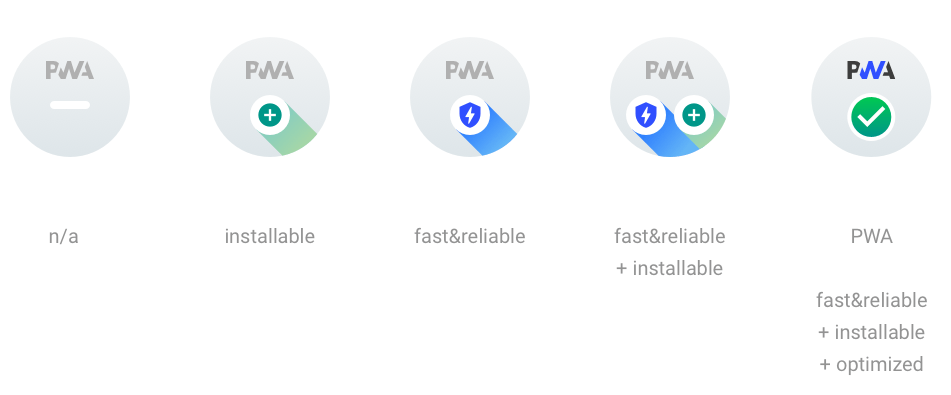
The PWA category doesn't get a 0-100 score, but instead is evaluated in 3 separate groups (Fast and reliable, Installable, and PWA Optimized). In order to satisfy each grouping (and get the associated badge), every audit within the group must be passing.
|
|
10
|
+
|
|
11
|
+
|
|
12
|
+
|
|
13
|
+
Note on https redirects: some metrics in this category have issues with https redirects because of TLS-handshake errors. More specifically you will run into this when using the ```simplehttp2server``` npm package. Subsequent metrics will fail after the https redirects (see [#1217](https://github.com/GoogleChrome/lighthouse/issues/1217), [#5910](https://github.com/GoogleChrome/lighthouse/issues/5910)).
|
|
14
|
+
|
|
15
|
+
## How is the Best Practices score calculated?
|
|
16
|
+
|
|
17
|
+
All audits in the Best Practices category are equally weighted. Therefore, implementing each audit correctly will increase your overall score by ~6 points.
|
|
18
|
+
|
|
19
|
+
## How is the SEO score calculated?
|
|
20
|
+
|
|
21
|
+
All audits in the SEO category are [equally weighted](https://github.com/GoogleChrome/lighthouse/blob/080c6b4b9fec6dfcaf8e0cd8d09c3224465e4fd3/lighthouse-core/config/default-config.js#L531-L547), with the exception ofStructured Data, which is an unscored manual audit. Therefore, implementing each audit correctly will increase your overall score by ~8 points.
|
|
22
|
+
|
|
23
|
+
|
|
24
|
+
## How is the accessibility score calculated?
|
|
25
|
+
|
|
26
|
+
<!-- To regnerate score weights, run `node lighthouse-core/scripts/print-a11y-scoring.js`-->
|
|
27
|
+
|
|
28
|
+
The accessibility score is a weighted average. The specific weights for v7 are as follows:
|
|
29
|
+
|
|
30
|
+
(See the [v6 scoring explanation](https://github.com/GoogleChrome/lighthouse/blob/v6.5.0/docs/scoring.md#how-is-the-accessibility-score-calculated))
|
|
31
|
+
|
|
32
|
+
| audit id | weight |
|
|
33
|
+
|-|-|
|
|
34
|
+
| aria-allowed-attr | 4.1% |
|
|
35
|
+
| aria-hidden-body | 4.1% |
|
|
36
|
+
| aria-required-attr | 4.1% |
|
|
37
|
+
| aria-required-children | 4.1% |
|
|
38
|
+
| aria-required-parent | 4.1% |
|
|
39
|
+
| aria-roles | 4.1% |
|
|
40
|
+
| aria-valid-attr-value | 4.1% |
|
|
41
|
+
| aria-valid-attr | 4.1% |
|
|
42
|
+
| button-name | 4.1% |
|
|
43
|
+
| duplicate-id-aria | 4.1% |
|
|
44
|
+
| image-alt | 4.1% |
|
|
45
|
+
| input-image-alt | 4.1% |
|
|
46
|
+
| label | 4.1% |
|
|
47
|
+
| meta-refresh | 4.1% |
|
|
48
|
+
| meta-viewport | 4.1% |
|
|
49
|
+
| video-caption | 4.1% |
|
|
50
|
+
| accesskeys | 1.2% |
|
|
51
|
+
| aria-command-name | 1.2% |
|
|
52
|
+
| aria-hidden-focus | 1.2% |
|
|
53
|
+
| aria-input-field-name | 1.2% |
|
|
54
|
+
| aria-meter-name | 1.2% |
|
|
55
|
+
| aria-progressbar-name | 1.2% |
|
|
56
|
+
| aria-toggle-field-name | 1.2% |
|
|
57
|
+
| aria-tooltip-name | 1.2% |
|
|
58
|
+
| aria-treeitem-name | 1.2% |
|
|
59
|
+
| bypass | 1.2% |
|
|
60
|
+
| color-contrast | 1.2% |
|
|
61
|
+
| definition-list | 1.2% |
|
|
62
|
+
| dlitem | 1.2% |
|
|
63
|
+
| document-title | 1.2% |
|
|
64
|
+
| duplicate-id-active | 1.2% |
|
|
65
|
+
| frame-title | 1.2% |
|
|
66
|
+
| html-has-lang | 1.2% |
|
|
67
|
+
| html-lang-valid | 1.2% |
|
|
68
|
+
| link-name | 1.2% |
|
|
69
|
+
| list | 1.2% |
|
|
70
|
+
| listitem | 1.2% |
|
|
71
|
+
| object-alt | 1.2% |
|
|
72
|
+
| tabindex | 1.2% |
|
|
73
|
+
| td-headers-attr | 1.2% |
|
|
74
|
+
| th-has-data-cells | 1.2% |
|
|
75
|
+
| valid-lang | 1.2% |
|
|
76
|
+
| form-field-multiple-labels | 0.8% |
|
|
77
|
+
| heading-order | 0.8% |
|
|
78
|
+
|
|
79
|
+
Each audit is a pass/fail, meaning there is no room for partial points for getting an audit half-right. For example, that means if half your buttons have screenreader friendly names, and half do not, you don't get "half" of the weighted average - you get a 0 because it needs to be implemented correctly *throughout* the page.
|
|
@@ -0,0 +1,150 @@
|
|
|
1
|
+
# Network Throttling
|
|
2
|
+
|
|
3
|
+
Lighthouse applies network throttling to emulate the ~85th percentile mobile connection speed even when run on much faster fiber connections.
|
|
4
|
+
|
|
5
|
+
## The mobile network throttling preset
|
|
6
|
+
|
|
7
|
+
This is the standard recommendation for mobile throttling:
|
|
8
|
+
|
|
9
|
+
- Latency: 150ms
|
|
10
|
+
- Throughput: 1.6Mbps down / 750 Kbps up.
|
|
11
|
+
- Packet loss: none.
|
|
12
|
+
|
|
13
|
+
These exact figures are [defined in the Lighthouse configuration](https://github.com/GoogleChrome/lighthouse/blob/v6.4.1/lighthouse-core/config/constants.js#L22-L29) and used as [Lighthouse's throttling default](https://github.com/GoogleChrome/lighthouse/blob/v6.4.1/lighthouse-core/config/constants.js#L59).
|
|
14
|
+
They represent roughly the bottom 25% of 4G connections and top 25% of 3G connections (in Lighthouse this configuration is currently called "Slow 4G" but used to be labeled as "Fast 3G").
|
|
15
|
+
This preset is identical to the [WebPageTest's "Mobile 3G - Fast"](https://github.com/WPO-Foundation/webpagetest/blob/master/www/settings/connectivity.ini.sample) and, due to a lower latency, slightly faster for some pages than the [WebPageTest "4G" preset](https://github.com/WPO-Foundation/webpagetest/blob/master/www/settings/connectivity.ini.sample).
|
|
16
|
+
|
|
17
|
+
## Types of network throttling
|
|
18
|
+
|
|
19
|
+
Within web performance testing, there are four typical styles of network throttling:
|
|
20
|
+
|
|
21
|
+
1. **_Simulated throttling_**, which Lighthouse uses by **default**, uses a simulation of a page load, based on the data observed in the initial unthrottled load. This approach makes it both very fast and deterministic. However, due to the imperfect nature of predicting alternate execution paths, there is inherent inaccuracy that is summarized in this doc: [Lighthouse Metric Variability and Accuracy](https://docs.google.com/document/d/1BqtL-nG53rxWOI5RO0pItSRPowZVnYJ_gBEQCJ5EeUE/edit). The TLDR: while it's roughly as accurate or better than DevTools throttling for most sites, it suffers from edge cases and a deep investigation to performance should use _Packet-level_ throttling tools.
|
|
22
|
+
1. **_Request-level throttling_** , also referred to as **_Applied throttling_** in the Audits panel or _`devtools` throttling_ in Lighthouse configuration, is how throttling is implemented with Chrome DevTools. In real mobile connectivity, latency affects things at the packet level rather than the request level. As a result, this throttling isn't highly accurate. It also has a few more downsides that are summarized in [Network Throttling & Chrome - status](https://docs.google.com/document/d/1TwWLaLAfnBfbk5_ZzpGXegPapCIfyzT4MWuZgspKUAQ/edit). The TLDR: while it's a [decent approximation](https://docs.google.com/document/d/10lfVdS1iDWCRKQXPfbxEn4Or99D64mvNlugP1AQuFlE/edit), it's not a sufficient model of a slow connection. The [multipliers used in Lighthouse](https://github.com/GoogleChrome/lighthouse/blob/3be483287a530fb560c843b7299ef9cfe91ce1cc/lighthouse-core/lib/emulation.js#L33-L39) attempt to correct for the differences.
|
|
23
|
+
1. **_Proxy-level_** throttling tools do not affect UDP data, so they're decent, but not ideal.
|
|
24
|
+
1. **_Packet-level_** throttling tools are able to make the most accurate network simulation. While this approach can model real network conditions most effectively, it also can introduce [more variance](https://docs.google.com/document/d/1BqtL-nG53rxWOI5RO0pItSRPowZVnYJ_gBEQCJ5EeUE/edit) than request-level or simulated throttling. [WebPageTest uses](https://github.com/WPO-Foundation/wptagent/blob/master/docs/remote_trafficshaping.md) packet-level throttling.
|
|
25
|
+
|
|
26
|
+
Lighthouse, by default, uses simulated throttling as it provides both quick evaluation and minimized variance. However, some may want to experiment with more accurate throttling... [Learn more about these throttling types and how they behave in in different scenarios](https://www.debugbear.com/blog/network-throttling-methods).
|
|
27
|
+
|
|
28
|
+
## DevTools' Lighthouse Panel Throttling
|
|
29
|
+
|
|
30
|
+
In Chrome 79 and earlier, you could choose between [the throttling types](#types-of-throttling) of Simulated, Applied, and none.
|
|
31
|
+
|
|
32
|
+
Starting with Chrome 80, the Audits panel is simplifying the throttling configuration:
|
|
33
|
+
|
|
34
|
+
1. _Simulated throttling_ remains the default setting. This matches the setup of PageSpeed Insights and the Lighthouse CLI default, so this provides cross-tool consistency.
|
|
35
|
+
1. _No throttling_ is removed as it leads to innacurate scoring and misleading metric results.
|
|
36
|
+
1. Within the Audits panel settings, you can uncheck the _Simulated throttling_ checkbox to use _Applied throttling_. For the moment, we are keeping this _Applied throttling_ option available for users of the [`View Trace` button](https://developers.google.com/web/updates/2018/04/devtools#traces). Under applied throttling, the trace matches the metrics values, whereas under Simulated things do not currently match up.
|
|
37
|
+
|
|
38
|
+
We plan to improve the experience of viewing a trace under simulated throttling. At that point, the _Applied throttling_ option will be removed and _Simulated throttling_ will be the only option within the DevTools Audits panel. Of course, CLI users can still control the exact [configuration](../readme.md#cli-options) of throttling.
|
|
39
|
+
|
|
40
|
+
## How do I get packet-level throttling?
|
|
41
|
+
|
|
42
|
+
This Performance Calendar article, [Testing with Realistic Networking Conditions](https://calendar.perfplanet.com/2016/testing-with-realistic-networking-conditions/), has a good explanation of packet-level traffic shaping (which applies across TCP/UDP/ICMP) and recommendations.
|
|
43
|
+
|
|
44
|
+
The `throttle` npm package appears to be the most usable Mac/Linux commandline app for managing your network connection. Important to note: it changes your **entire** machine's network interface. Also, **`throttle` requires `sudo`** (as all packet-level shapers do).
|
|
45
|
+
|
|
46
|
+
**Windows?** As of today, there is no single cross-platform tool for throttling. But there are two recommended **Windows 7** network shaping utilities: [WinShaper](https://calendar.perfplanet.com/2016/testing-with-realistic-networking-conditions/#introducing_winshaper) and [Clumsy](http://jagt.github.io/clumsy/).
|
|
47
|
+
|
|
48
|
+
For **Windows 10** [NetLimiter](https://www.netlimiter.com/buy/nl4lite/standard-license/1/0) (Paid option) and [TMeter](http://www.tmeter.ru/en/) (Freeware Edition) are the most usable solutions.
|
|
49
|
+
|
|
50
|
+
### `throttle` set up
|
|
51
|
+
|
|
52
|
+
```sh
|
|
53
|
+
# Install with npm
|
|
54
|
+
npm install @sitespeed.io/throttle -g
|
|
55
|
+
# Ensure you have Node.js installed and npm is in your $PATH (https://nodejs.org/en/download/)
|
|
56
|
+
|
|
57
|
+
# To use the recommended throttling values:
|
|
58
|
+
throttle --up 768 --down 1638 --rtt 150
|
|
59
|
+
|
|
60
|
+
# or even simpler (using a predefined profile)
|
|
61
|
+
throttle 3gfast
|
|
62
|
+
|
|
63
|
+
# To disable throttling
|
|
64
|
+
throttle --stop
|
|
65
|
+
```
|
|
66
|
+
|
|
67
|
+
For more information and a complete list of features visit the documentation on [sitespeed.io website](https://www.sitespeed.io/documentation/throttle/).
|
|
68
|
+
|
|
69
|
+
### Using Lighthouse with `throttle`
|
|
70
|
+
|
|
71
|
+
```sh
|
|
72
|
+
# Enable system traffic throttling
|
|
73
|
+
throttle 3gfast
|
|
74
|
+
|
|
75
|
+
# Run Lighthouse with its own network throttling disabled (while leaving CPU throttling)
|
|
76
|
+
lighthouse --throttling-method=devtools \
|
|
77
|
+
--throttling.requestLatencyMs=0 \
|
|
78
|
+
--throttling.downloadThroughputKbps=0 \
|
|
79
|
+
--throttling.uploadThroughputKbps=0 \
|
|
80
|
+
https://example.com
|
|
81
|
+
|
|
82
|
+
# Disable the traffic throttling once you see "Gathering trace"
|
|
83
|
+
throttle --stop
|
|
84
|
+
```
|
|
85
|
+
|
|
86
|
+
# CPU Throttling
|
|
87
|
+
|
|
88
|
+
Lighthouse applies CPU throttling to emulate a mid-tier mobile device even when run on far more powerful desktop hardware.
|
|
89
|
+
|
|
90
|
+
## Benchmarking CPU Power
|
|
91
|
+
|
|
92
|
+
Unlike network throttling where objective criteria like RTT and throughput allow targeting of a specific environment, CPU throttling is expressed relative to the performance of the host device. This poses challenges to [variability in results across devices](./variability.md), so it's important to calibrate your device before attempting to compare different reports.
|
|
93
|
+
|
|
94
|
+
Lighthouse computes and saves a `benchmarkIndex` as a rough approximation of the host device's CPU performance with every report. You can find this value under the title "CPU/Memory Power" at the bottom of the Lighthouse report:
|
|
95
|
+
|
|
96
|
+
<img src="https://user-images.githubusercontent.com/2301202/96950078-1b03d380-14af-11eb-9583-fbf8133315b2.png" alt="Screenshot of CPU/Memory Power in Lighthouse report" width=600 border=1 />
|
|
97
|
+
|
|
98
|
+
**NOTE:** In Lighthouse 6.3 BenchmarkIndex changed its definition to better align with changes in Chrome 86. Benchmark index values prior to 6.3 and Chrome 86 may differ.
|
|
99
|
+
|
|
100
|
+
Below is a table of various device classes and their approximate ranges of `benchmarkIndex` as of Chrome m86 along with a few other benchmarks. The amount of variation in each class is quite high. Even the same device can be purchased with multiple different processors and memory options.
|
|
101
|
+
|
|
102
|
+
| - | High-End Desktop | Low-End Desktop | High-End Mobile | Mid-Tier Mobile | Low-End Mobile |
|
|
103
|
+
| ----------------------------------- | ---------------- | --------------- | --------------- | --------------- | ----------------- |
|
|
104
|
+
| Example Device | 16" Macbook Pro | Intel NUC i3 | Samsung S10 | Moto G4 | Samsung Galaxy J2 |
|
|
105
|
+
| **Lighthouse BenchmarkIndex** | 1500-2000 | 1000-1500 | 800-1200 | 125-800 | <125 |
|
|
106
|
+
| Octane 2.0 | 30000-45000 | 20000-35000 | 15000-25000 | 2000-20000 | <2000 |
|
|
107
|
+
| Speedometer 2.0 | 90-200 | 50-90 | 20-50 | 10-20 | <10 |
|
|
108
|
+
| JavaScript Execution of a News Site | 2-4s | 4-8s | 4-8s | 8-20s | 20-40s |
|
|
109
|
+
|
|
110
|
+
|
|
111
|
+
## Calibrating the CPU slowdown
|
|
112
|
+
|
|
113
|
+
By default, Lighthouse uses **a constant 4x CPU multiplier** which moves a typical run in the high-end desktop bracket somewhere into the mid-tier mobile bracket.
|
|
114
|
+
|
|
115
|
+
You may choose to calibrate if your benchmarkIndex is in a different range than the above table would expect. Additionally, when Lighthouse is run from the CLI with default settings on an underpowered device, a warning will be added to the report suggesting you calibrate the slowdown:
|
|
116
|
+
|
|
117
|
+

|
|
118
|
+
|
|
119
|
+
The `--throttling.cpuSlowdownMultiplier` CLI flag allows you to configure the throttling level applied. On a weaker machine, you can lower it from the default of 4x to something more appropriate.
|
|
120
|
+
|
|
121
|
+
The [Lighthouse CPU slowdown calculator webapp](https://lighthouse-cpu-throttling-calculator.vercel.app/) will compute what mutiplier to use from the `CPU/Memory Power` value from the bottom of the report.
|
|
122
|
+
|
|
123
|
+
<a href="https://lighthouse-cpu-throttling-calculator.vercel.app/">
|
|
124
|
+
<img src="https://user-images.githubusercontent.com/39191/101436708-8a991b00-38c3-11eb-89c5-7d43752932e9.png" width=300>
|
|
125
|
+
</a>
|
|
126
|
+
|
|
127
|
+
Alternatively, consider the below table of the various `cpuSlowdownMultiplier`s you might want to use to target different devices along with the possible range:
|
|
128
|
+
|
|
129
|
+
| - | High-End Desktop | Low-End Desktop | High-End Mobile | Mid-Tier Mobile | Low-End Mobile |
|
|
130
|
+
| ---------------- | ---------------- | --------------- | --------------- | --------------- | -------------- |
|
|
131
|
+
| High-End Desktop | 1x | 2x (1-4) | 2x (1-4) | 4x (2-10) | 10x (5-20) |
|
|
132
|
+
| Low-End Desktop | - | 1x | 1x | 2x (1-5) | 5x (3-10) |
|
|
133
|
+
| High-End Mobile | - | - | 1x | 2x (1-5) | 5x (3-10) |
|
|
134
|
+
| Mid-Tier Mobile | - | - | - | 1x | 2x (1-5) |
|
|
135
|
+
| Low-End Mobile | - | - | - | - | 1x |
|
|
136
|
+
|
|
137
|
+
|
|
138
|
+
If your device's BenchmarkIndex falls on the _higher_ end of its bracket, use a _higher_ multiplier from the range in the table. If your device's BenchmarkIndex falls on the _lower_ end of its bracket, use a _lower_ multiplier from the range in the table. If it's somewhere in the middle, use the suggested multiplier.
|
|
139
|
+
|
|
140
|
+
```bash
|
|
141
|
+
# Run Lighthouse with a custom CPU slowdown multiplier
|
|
142
|
+
lighthouse --throttling.cpuSlowdownMultiplier=6 https://example.com
|
|
143
|
+
```
|
|
144
|
+
|
|
145
|
+
## Types of CPU Throttling
|
|
146
|
+
|
|
147
|
+
Within web performance testing, there are two typical styles of CPU throttling:
|
|
148
|
+
|
|
149
|
+
1. **_Simulated throttling_**, which Lighthouse uses by **default**, uses a simulation of a page load, based on the data observed in the initial unthrottled load. This approach makes it very fast. However, due to the imperfect nature of predicting alternate execution paths, there is inherent inaccuracy that is summarized in this doc: [Lighthouse Metric Variability and Accuracy](https://docs.google.com/document/d/1BqtL-nG53rxWOI5RO0pItSRPowZVnYJ_gBEQCJ5EeUE/edit). The TLDR: while it's fairly accurate for most circumstances, it suffers from edge cases and a deep investigation to performance should use _applied_ CPU throttling tools.
|
|
150
|
+
1. **_Applied throttling_** , also called _`devtools` throttling_ in Lighthouse configuration. This method actually interrupts execution of CPU work at periodic intervals to emulate a slower processor. It is [fairly accurate](https://docs.google.com/document/d/1jGHeGjjjzfTAE2WHXipKF3aqwF2bFA6r0B877nFtBpc/edit) and much easier than obtaining target hardware. The same underlying principle can be used by [linux cgroups](https://www.kernel.org/doc/html/latest/scheduler/sched-bwc.html) to throttle any process, not just the browser. Other tools like [WebPageTest use applied CPU throttling](https://github.com/WPO-Foundation/wptagent/commit/f7fe0d6b5b01bd1b042a1fe3144c68a6bff846a6) offered by DevTools.
|
|
@@ -0,0 +1,209 @@
|
|
|
1
|
+
# Understanding the Results
|
|
2
|
+
|
|
3
|
+
The result object contains all the audit information Lighthouse determined about the page. In fact, everything you see in the HTML report, even the screenshots, is a rendering of information contained in the result object. You might need to work directly with the result object if you use [Lighthouse programmatically](https://github.com/GoogleChrome/lighthouse/blob/master/docs/readme.md#using-programmatically), consume the JSON output of the [CLI](https://github.com/GoogleChrome/lighthouse#using-the-node-cli), explore [Lighthouse results in HTTPArchive](https://github.com/GoogleChrome/lighthouse#lighthouse-integrations), or work on the report generation code that reads the Lighthouse JSON and outputs HTML.
|
|
4
|
+
|
|
5
|
+
## Lighthouse Result Object (LHR)
|
|
6
|
+
|
|
7
|
+
The top-level Lighthouse Result object (LHR) is what the lighthouse node module returns and the entirety of the JSON output of the CLI. It contains some metadata about the run and the results in the various subproperties below.
|
|
8
|
+
|
|
9
|
+
For an always up-to-date definition of the LHR, take a look [at our typedefs](https://github.com/GoogleChrome/lighthouse/blob/master/types/lhr.d.ts).
|
|
10
|
+
|
|
11
|
+
### Properties
|
|
12
|
+
|
|
13
|
+
| Name | Description |
|
|
14
|
+
| - | - |
|
|
15
|
+
| lighthouseVersion | The version of Lighthouse with which this result was generated. |
|
|
16
|
+
| fetchTime | The ISO-8601 timestamp of when the result was generated. |
|
|
17
|
+
| userAgent | The user agent string of the version of Chrome that was used by Lighthouse. |
|
|
18
|
+
| requestedUrl | The URL that was supplied to Lighthouse and initially navigated to. |
|
|
19
|
+
| finalUrl | The URL that Lighthouse ended up auditing after redirects were followed. |
|
|
20
|
+
| [audits](#audits) | An object containing the results of the audits. |
|
|
21
|
+
| [configSettings](#config-settings) | An object containing information about the configuration used by Lighthouse. |
|
|
22
|
+
| [timing](#timing) | An object containing information about how long Lighthouse spent auditing. |
|
|
23
|
+
| [categories](#categories) | An object containing the different categories, their scores, and references to the audits that comprise them. |
|
|
24
|
+
| [categoryGroups](#category-groups) | An object containing the display groups of audits for the report. |
|
|
25
|
+
| runtimeError | An object `{code: string, message: string};` providing a top-level error message that, if present, indicates a serious enough problem that this Lighthouse result may need to be discarded. |
|
|
26
|
+
| runWarnings | Array of top-level warnings for this Lighthouse run. |
|
|
27
|
+
|
|
28
|
+
### Example
|
|
29
|
+
```json
|
|
30
|
+
{
|
|
31
|
+
"lighthouseVersion": "5.1.0",
|
|
32
|
+
"fetchTime": "2019-05-05T20:50:54.185Z",
|
|
33
|
+
"userAgent": "Mozilla/5.0 (Macintosh; Intel Mac OS X 10_13_3) AppleWebKit/537.36 (KHTML, like Gecko) Chrome/66.0.3358.0 Safari/537.36",
|
|
34
|
+
"requestedUrl": "http://example.com",
|
|
35
|
+
"finalUrl": "https://www.example.com/",
|
|
36
|
+
"audits": {...},
|
|
37
|
+
"configSettings": {...},
|
|
38
|
+
"timing": {...},
|
|
39
|
+
"categories": {...},
|
|
40
|
+
"categoryGroups": {...},
|
|
41
|
+
}
|
|
42
|
+
```
|
|
43
|
+
|
|
44
|
+
|
|
45
|
+
<a name="audits"></a>
|
|
46
|
+
## `audits`
|
|
47
|
+
|
|
48
|
+
An object containing the results of the audits, keyed by their name.
|
|
49
|
+
|
|
50
|
+
### Audit Properties
|
|
51
|
+
| Name | Type | Description |
|
|
52
|
+
| -- | -- | -- |
|
|
53
|
+
| id | `string` | The string identifier of the audit in kebab case. |
|
|
54
|
+
| title | `string` | The display name of the audit. The text can change depending on if the audit passed or failed. It may contain markdown code. |
|
|
55
|
+
| description | `string` | A more detailed description that describes why the audit is important and links to Lighthouse documentation on the audit, markdown links supported. |
|
|
56
|
+
| explanation | <code>string|undefined</code> | A string indicating the reason for audit failure. |
|
|
57
|
+
| warnings | <code>string[]|undefined</code> | Messages identifying potentially invalid cases |
|
|
58
|
+
| errorMessage | <code>string|undefined</code> | A message set |
|
|
59
|
+
| numericValue | <code>number|undefined</code> | The unscored value determined by the audit. Typically this will match the score if there's no additional information to impart. For performance audits, this value is typically a number indicating the metric value. |
|
|
60
|
+
| displayValue | <code>string|undefined</code> | The string to display in the report alongside audit results. If empty, nothing additional is shown. This is typically used to explain additional information such as the number and nature of failing items. |
|
|
61
|
+
| score | <code>number|null</code> | The scored value determined by the audit provided in the numeric range `0-1`, or null if `scoreDisplayMode` indicates not scored. |
|
|
62
|
+
| scoreDisplayMode | <code>"binary" | "numeric" | "error" | "manual" | "notApplicable" | "informative"</code> | A string identifying how the score should be interpreted for display i.e. is the audit pass/fail (score of 1 or 0), did it fail, should it be ignored, or are there shades of gray (scores between 0-1 inclusive). If set as `informative`, `notApplicable`, `manual`, or `error`, then `score` will be null and should be ignored. |
|
|
63
|
+
| details | `Object` | Extra information found by the audit necessary for display. The structure of this object varies from audit to audit. The [structure of this object](https://github.com/GoogleChrome/lighthouse/blob/master/types/audit-details.d.ts) is somewhat stable between minor version bumps as this object is used to render the HTML report. |
|
|
64
|
+
|
|
65
|
+
|
|
66
|
+
### Example
|
|
67
|
+
```json
|
|
68
|
+
{
|
|
69
|
+
"is-on-https": {
|
|
70
|
+
"id": "is-on-https",
|
|
71
|
+
"title": "Does not use HTTPS",
|
|
72
|
+
"description": "All sites should be protected with HTTPS, even ones that don't handle sensitive data. HTTPS prevents intruders from tampering with or passively listening in on the communications between your app and your users, and is a prerequisite for HTTP/2 and many new web platform APIs. [Learn more](https://developers.google.com/web/tools/lighthouse/audits/https).",
|
|
73
|
+
"score": 0,
|
|
74
|
+
"scoreDisplayMode": "binary",
|
|
75
|
+
"displayValue": "1 insecure request found",
|
|
76
|
+
"details": {
|
|
77
|
+
"type": "table",
|
|
78
|
+
"headings": [
|
|
79
|
+
{
|
|
80
|
+
"key": "url",
|
|
81
|
+
"itemType": "url",
|
|
82
|
+
"text": "Insecure URL"
|
|
83
|
+
}
|
|
84
|
+
],
|
|
85
|
+
"items": [
|
|
86
|
+
{
|
|
87
|
+
"url": "http://ajax.googleapis.com/ajax/libs/jquery/2.1.1/jquery.min.js"
|
|
88
|
+
}
|
|
89
|
+
]
|
|
90
|
+
}
|
|
91
|
+
},
|
|
92
|
+
},
|
|
93
|
+
"custom-audit": {
|
|
94
|
+
"name": "custom-audit",
|
|
95
|
+
...
|
|
96
|
+
}
|
|
97
|
+
}
|
|
98
|
+
```
|
|
99
|
+
|
|
100
|
+
|
|
101
|
+
<a name="config-settings"></a>
|
|
102
|
+
## `configSettings`
|
|
103
|
+
|
|
104
|
+
An object containing information about the configuration used by Lighthouse.
|
|
105
|
+
|
|
106
|
+
### Example
|
|
107
|
+
```json
|
|
108
|
+
{
|
|
109
|
+
"output": [
|
|
110
|
+
"json"
|
|
111
|
+
],
|
|
112
|
+
"maxWaitForLoad": 45000,
|
|
113
|
+
"throttlingMethod": "devtools",
|
|
114
|
+
"throttling": {
|
|
115
|
+
"rttMs": 150,
|
|
116
|
+
"throughputKbps": 1638.4,
|
|
117
|
+
"requestLatencyMs": 562.5,
|
|
118
|
+
"downloadThroughputKbps": 1474.5600000000002,
|
|
119
|
+
"uploadThroughputKbps": 675,
|
|
120
|
+
"cpuSlowdownMultiplier": 4
|
|
121
|
+
},
|
|
122
|
+
"gatherMode": false,
|
|
123
|
+
"disableStorageReset": false,
|
|
124
|
+
"formFactor": "mobile",
|
|
125
|
+
"blockedUrlPatterns": null,
|
|
126
|
+
"additionalTraceCategories": null,
|
|
127
|
+
"extraHeaders": null,
|
|
128
|
+
"onlyAudits": null,
|
|
129
|
+
"onlyCategories": null,
|
|
130
|
+
"skipAudits": null
|
|
131
|
+
}
|
|
132
|
+
```
|
|
133
|
+
|
|
134
|
+
<a name="timing"></a>
|
|
135
|
+
## `timing`
|
|
136
|
+
|
|
137
|
+
An object containing information about how long Lighthouse spent auditing.
|
|
138
|
+
|
|
139
|
+
### Properties
|
|
140
|
+
| Name | Type | Description |
|
|
141
|
+
| -- | -- | -- |
|
|
142
|
+
| total | `number` | The total time spent in milliseconds loading the page and evaluating audits. |
|
|
143
|
+
|
|
144
|
+
### Example
|
|
145
|
+
```json
|
|
146
|
+
{
|
|
147
|
+
"total": 32189
|
|
148
|
+
}
|
|
149
|
+
```
|
|
150
|
+
|
|
151
|
+
<a name="categories"></a>
|
|
152
|
+
## `categories`
|
|
153
|
+
|
|
154
|
+
An array containing the different categories, their scores, and the results of the audits in the categories.
|
|
155
|
+
|
|
156
|
+
### CategoryEntry Properties
|
|
157
|
+
| Name | Type | Description |
|
|
158
|
+
| -- | -- | -- |
|
|
159
|
+
| id | `string` | The string identifier of the category. |
|
|
160
|
+
| title | `string` | The human-friendly display name of the category. |
|
|
161
|
+
| description | `string` | A brief description of the purpose of the category, supports markdown links. |
|
|
162
|
+
| score | `number` | The overall score of the category, the weighted average of all its audits. |
|
|
163
|
+
| auditRefs | `AuditEntry[]` | An array of all the audit results in the category. |
|
|
164
|
+
|
|
165
|
+
### AuditEntry Properties
|
|
166
|
+
| Name | Type | Description |
|
|
167
|
+
| -- | -- | -- |
|
|
168
|
+
| id | `string` | The string identifier of the category. |
|
|
169
|
+
| weight | `number` | The weight of the audit's score in the overall category score. |
|
|
170
|
+
| group | `string` | |
|
|
171
|
+
|
|
172
|
+
### Example
|
|
173
|
+
```json
|
|
174
|
+
{
|
|
175
|
+
"pwa": {
|
|
176
|
+
"id": "pwa",
|
|
177
|
+
"title": "Progressive Web App",
|
|
178
|
+
"description": "PWAs are awesome. [Learn more](...)",
|
|
179
|
+
"score": 0.54,
|
|
180
|
+
"auditRefs": [
|
|
181
|
+
{
|
|
182
|
+
"id": "is-on-https",
|
|
183
|
+
"weight": 1
|
|
184
|
+
}
|
|
185
|
+
]
|
|
186
|
+
}
|
|
187
|
+
}
|
|
188
|
+
```
|
|
189
|
+
|
|
190
|
+
<a name="category-groups"></a>
|
|
191
|
+
## `categoryGroups`
|
|
192
|
+
|
|
193
|
+
An object containing the display groups of audits for the report, keyed by the group ID found in the config.
|
|
194
|
+
|
|
195
|
+
### GroupEntry Properties
|
|
196
|
+
| Name | Type | Description |
|
|
197
|
+
| -- | -- | -- |
|
|
198
|
+
| title | `string` | The title of the display group. |
|
|
199
|
+
| description | `string` | A brief description of the purpose of the display group. |
|
|
200
|
+
|
|
201
|
+
### Example
|
|
202
|
+
```json
|
|
203
|
+
{
|
|
204
|
+
"metrics": {
|
|
205
|
+
"title": "Metrics",
|
|
206
|
+
"description": "These metrics are super cool."
|
|
207
|
+
},
|
|
208
|
+
}
|
|
209
|
+
```
|