lighthouse 8.0.0-dev.20210709 → 8.0.0
This diff represents the content of publicly available package versions that have been released to one of the supported registries. The information contained in this diff is provided for informational purposes only and reflects changes between package versions as they appear in their respective public registries.
- package/docs/architecture.md +101 -0
- package/docs/authenticated-pages.md +44 -0
- package/docs/bug-labels.md +35 -0
- package/docs/configuration.md +213 -0
- package/docs/emulation.md +32 -0
- package/docs/error-reporting.md +42 -0
- package/docs/hacking-tips.md +55 -0
- package/docs/headless-chrome.md +119 -0
- package/docs/lantern.md +55 -0
- package/docs/new-audits.md +99 -0
- package/docs/performance-budgets.md +187 -0
- package/docs/plugins.md +374 -0
- package/docs/puppeteer.md +95 -0
- package/docs/readme.md +164 -0
- package/docs/recipes/auth/README.md +129 -0
- package/docs/recipes/auth/example-lh-auth.js +81 -0
- package/docs/recipes/auth/package.json +11 -0
- package/docs/recipes/auth/server/public/dashboard-unauthenticated.html +21 -0
- package/docs/recipes/auth/server/public/dashboard.html +25 -0
- package/docs/recipes/auth/server/public/home-unauthenticated.html +27 -0
- package/docs/recipes/auth/server/public/home.html +17 -0
- package/docs/recipes/auth/server/public/unauthenticated.html +22 -0
- package/docs/recipes/auth/server/server.js +85 -0
- package/docs/recipes/custom-audit/custom-config.js +36 -0
- package/docs/recipes/custom-audit/package.json +8 -0
- package/docs/recipes/custom-audit/readme.md +32 -0
- package/docs/recipes/custom-audit/searchable-audit.js +46 -0
- package/docs/recipes/custom-audit/searchable-gatherer.js +32 -0
- package/docs/recipes/custom-gatherer-puppeteer/custom-audit.js +34 -0
- package/{root.js → docs/recipes/custom-gatherer-puppeteer/custom-config.js} +23 -2
- package/docs/recipes/custom-gatherer-puppeteer/custom-gatherer.js +51 -0
- package/docs/recipes/custom-gatherer-puppeteer/package.json +13 -0
- package/docs/recipes/custom-gatherer-puppeteer/readme.md +7 -0
- package/docs/recipes/custom-gatherer-puppeteer/test.sh +9 -0
- package/docs/recipes/gulp/gulpfile.js +79 -0
- package/docs/recipes/gulp/package.json +12 -0
- package/docs/recipes/gulp/public/index.html +22 -0
- package/docs/recipes/gulp/readme.md +6 -0
- package/docs/recipes/integration-test/README.md +14 -0
- package/docs/recipes/integration-test/example-lh-auth.test.js +160 -0
- package/docs/recipes/integration-test/package.json +9 -0
- package/docs/recipes/lighthouse-plugin-example/audits/preload-as.js +46 -0
- package/docs/recipes/lighthouse-plugin-example/package.json +11 -0
- package/docs/recipes/lighthouse-plugin-example/plugin-recipe-screenshot.png +0 -0
- package/docs/recipes/lighthouse-plugin-example/plugin.js +24 -0
- package/docs/recipes/lighthouse-plugin-example/readme.md +53 -0
- package/docs/releasing.md +164 -0
- package/docs/scoring.md +79 -0
- package/docs/throttling.md +150 -0
- package/docs/understanding-results.md +209 -0
- package/docs/v8-perf-faq.md +244 -0
- package/docs/variability.md +150 -0
- package/jest.config.js +0 -3
- package/lighthouse-cli/bin.js +8 -6
- package/lighthouse-core/audits/accessibility/aria-command-name.js +1 -1
- package/lighthouse-core/audits/accessibility/aria-meter-name.js +1 -1
- package/lighthouse-core/audits/accessibility/aria-progressbar-name.js +1 -1
- package/lighthouse-core/audits/accessibility/aria-tooltip-name.js +1 -1
- package/lighthouse-core/audits/accessibility/aria-treeitem-name.js +1 -1
- package/lighthouse-core/audits/apple-touch-icon.js +0 -1
- package/lighthouse-core/audits/audit.js +3 -3
- package/lighthouse-core/audits/autocomplete.js +2 -2
- package/lighthouse-core/audits/byte-efficiency/byte-efficiency-audit.js +14 -29
- package/lighthouse-core/audits/byte-efficiency/duplicated-javascript.js +2 -3
- package/lighthouse-core/audits/byte-efficiency/efficient-animated-content.js +1 -1
- package/lighthouse-core/audits/byte-efficiency/legacy-javascript.js +2 -3
- package/lighthouse-core/audits/byte-efficiency/modern-image-formats.js +15 -55
- package/lighthouse-core/audits/byte-efficiency/offscreen-images.js +4 -8
- package/lighthouse-core/audits/byte-efficiency/render-blocking-resources.js +8 -15
- package/lighthouse-core/audits/byte-efficiency/total-byte-weight.js +9 -10
- package/lighthouse-core/audits/byte-efficiency/unminified-css.js +1 -1
- package/lighthouse-core/audits/byte-efficiency/unminified-javascript.js +1 -1
- package/lighthouse-core/audits/byte-efficiency/unused-css-rules.js +1 -1
- package/lighthouse-core/audits/byte-efficiency/unused-javascript.js +1 -2
- package/lighthouse-core/audits/byte-efficiency/uses-long-cache-ttl.js +2 -2
- package/lighthouse-core/audits/byte-efficiency/uses-optimized-images.js +1 -2
- package/lighthouse-core/audits/byte-efficiency/uses-responsive-images.js +24 -46
- package/lighthouse-core/audits/byte-efficiency/uses-text-compression.js +1 -1
- package/lighthouse-core/audits/critical-request-chains.js +0 -1
- package/lighthouse-core/audits/csp-xss.js +1 -1
- package/lighthouse-core/audits/diagnostics.js +0 -1
- package/lighthouse-core/audits/dobetterweb/geolocation-on-start.js +0 -1
- package/lighthouse-core/audits/dobetterweb/inspector-issues.js +1 -1
- package/lighthouse-core/audits/dobetterweb/notification-on-start.js +0 -1
- package/lighthouse-core/audits/dobetterweb/uses-http2.js +0 -1
- package/lighthouse-core/audits/final-screenshot.js +4 -8
- package/lighthouse-core/audits/font-display.js +0 -1
- package/lighthouse-core/audits/installable-manifest.js +3 -4
- package/lighthouse-core/audits/largest-contentful-paint-element.js +0 -1
- package/lighthouse-core/audits/long-tasks.js +1 -1
- package/lighthouse-core/audits/maskable-icon.js +0 -1
- package/lighthouse-core/audits/metrics/first-contentful-paint-3g.js +2 -4
- package/lighthouse-core/audits/metrics/first-contentful-paint.js +2 -4
- package/lighthouse-core/audits/metrics/first-meaningful-paint.js +2 -4
- package/lighthouse-core/audits/metrics/interactive.js +2 -4
- package/lighthouse-core/audits/metrics/largest-contentful-paint.js +2 -4
- package/lighthouse-core/audits/metrics/max-potential-fid.js +2 -4
- package/lighthouse-core/audits/metrics/speed-index.js +2 -4
- package/lighthouse-core/audits/metrics/total-blocking-time.js +2 -10
- package/lighthouse-core/audits/metrics.js +2 -4
- package/lighthouse-core/audits/performance-budget.js +0 -1
- package/lighthouse-core/audits/predictive-perf.js +6 -9
- package/lighthouse-core/audits/preload-fonts.js +1 -11
- package/lighthouse-core/audits/preload-lcp-image.js +5 -18
- package/lighthouse-core/audits/redirects.js +8 -10
- package/lighthouse-core/audits/screenshot-thumbnails.js +13 -28
- package/lighthouse-core/audits/seo/canonical.js +1 -2
- package/lighthouse-core/audits/seo/font-size.js +4 -4
- package/lighthouse-core/audits/seo/hreflang.js +2 -3
- package/lighthouse-core/audits/seo/http-status-code.js +16 -21
- package/lighthouse-core/audits/seo/is-crawlable.js +3 -4
- package/lighthouse-core/audits/seo/robots-txt.js +2 -2
- package/lighthouse-core/audits/seo/tap-targets.js +5 -5
- package/lighthouse-core/audits/server-response-time.js +2 -20
- package/lighthouse-core/audits/splash-screen.js +0 -1
- package/lighthouse-core/audits/themed-omnibox.js +0 -1
- package/lighthouse-core/audits/third-party-facades.js +0 -1
- package/lighthouse-core/audits/third-party-summary.js +3 -1
- package/lighthouse-core/audits/timing-budget.js +2 -4
- package/lighthouse-core/audits/uses-rel-preconnect.js +9 -14
- package/lighthouse-core/audits/uses-rel-preload.js +2 -13
- package/lighthouse-core/computed/main-thread-tasks.js +2 -2
- package/lighthouse-core/computed/metrics/cumulative-layout-shift.js +3 -3
- package/lighthouse-core/computed/metrics/first-contentful-paint-all-frames.js +6 -6
- package/lighthouse-core/computed/metrics/first-contentful-paint.js +8 -9
- package/lighthouse-core/computed/metrics/first-meaningful-paint.js +9 -10
- package/lighthouse-core/computed/metrics/interactive.js +24 -25
- package/lighthouse-core/computed/metrics/lantern-first-contentful-paint.js +6 -6
- package/lighthouse-core/computed/metrics/lantern-first-meaningful-paint.js +6 -6
- package/lighthouse-core/computed/metrics/lantern-largest-contentful-paint.js +6 -6
- package/lighthouse-core/computed/metrics/lantern-metric.js +8 -16
- package/lighthouse-core/computed/metrics/largest-contentful-paint-all-frames.js +7 -7
- package/lighthouse-core/computed/metrics/largest-contentful-paint.js +9 -10
- package/lighthouse-core/computed/metrics/max-potential-fid.js +11 -8
- package/lighthouse-core/computed/metrics/metric.js +5 -32
- package/lighthouse-core/computed/metrics/speed-index.js +5 -6
- package/lighthouse-core/computed/metrics/timing-summary.js +45 -55
- package/lighthouse-core/computed/metrics/total-blocking-time.js +29 -36
- package/lighthouse-core/computed/page-dependency-graph.js +14 -14
- package/lighthouse-core/computed/resource-summary.js +7 -3
- package/lighthouse-core/computed/speedline.js +3 -3
- package/lighthouse-core/computed/trace-of-tab.js +86 -15
- package/lighthouse-core/computed/user-timings.js +5 -5
- package/lighthouse-core/config/default-config.js +0 -1
- package/lighthouse-core/fraggle-rock/config/config.js +7 -9
- package/lighthouse-core/fraggle-rock/config/default-config.js +2 -40
- package/lighthouse-core/fraggle-rock/config/filters.js +6 -39
- package/lighthouse-core/fraggle-rock/config/validation.js +4 -4
- package/lighthouse-core/fraggle-rock/gather/base-artifacts.js +19 -54
- package/lighthouse-core/fraggle-rock/gather/navigation-runner.js +10 -21
- package/lighthouse-core/fraggle-rock/gather/runner-helpers.js +2 -2
- package/lighthouse-core/fraggle-rock/gather/snapshot-runner.js +2 -2
- package/lighthouse-core/fraggle-rock/gather/timespan-runner.js +2 -2
- package/lighthouse-core/gather/driver/prepare.js +0 -3
- package/lighthouse-core/gather/fetcher.js +2 -0
- package/lighthouse-core/gather/gather-runner.js +14 -2
- package/lighthouse-core/gather/gatherers/image-elements.js +61 -24
- package/lighthouse-core/gather/gatherers/inspector-issues.js +2 -2
- package/lighthouse-core/gather/gatherers/script-elements.js +12 -45
- package/lighthouse-core/gather/gatherers/seo/font-size.js +5 -5
- package/lighthouse-core/gather/gatherers/seo/tap-targets.js +12 -64
- package/lighthouse-core/gather/gatherers/service-worker.js +3 -20
- package/lighthouse-core/gather/gatherers/trace-compat.js +1 -1
- package/lighthouse-core/gather/gatherers/trace-elements.js +3 -15
- package/lighthouse-core/gather/gatherers/trace.js +4 -13
- package/lighthouse-core/gather/gatherers/viewport-dimensions.js +1 -1
- package/lighthouse-core/lib/dependency-graph/simulator/network-analyzer.js +2 -13
- package/lighthouse-core/lib/emulation.js +2 -0
- package/lighthouse-core/lib/i18n/i18n.js +2 -2
- package/lighthouse-core/lib/i18n/locales/ar-XB.json +141 -141
- package/lighthouse-core/lib/i18n/locales/ar.json +143 -143
- package/lighthouse-core/lib/i18n/locales/bg.json +143 -143
- package/lighthouse-core/lib/i18n/locales/ca.json +141 -141
- package/lighthouse-core/lib/i18n/locales/cs.json +141 -141
- package/lighthouse-core/lib/i18n/locales/da.json +141 -141
- package/lighthouse-core/lib/i18n/locales/de.json +142 -142
- package/lighthouse-core/lib/i18n/locales/el.json +141 -141
- package/lighthouse-core/lib/i18n/locales/en-GB.json +141 -141
- package/lighthouse-core/lib/i18n/locales/en-US.ctc.json +6659 -0
- package/lighthouse-core/lib/i18n/locales/en-US.json +144 -150
- package/lighthouse-core/lib/i18n/locales/en-XA.json +141 -141
- package/lighthouse-core/lib/i18n/locales/en-XL.ctc.json +6628 -0
- package/lighthouse-core/lib/i18n/locales/en-XL.json +144 -150
- package/lighthouse-core/lib/i18n/locales/es-419.json +141 -141
- package/lighthouse-core/lib/i18n/locales/es.json +141 -141
- package/lighthouse-core/lib/i18n/locales/fi.json +143 -143
- package/lighthouse-core/lib/i18n/locales/fil.json +142 -142
- package/lighthouse-core/lib/i18n/locales/fr.json +141 -141
- package/lighthouse-core/lib/i18n/locales/he.json +142 -142
- package/lighthouse-core/lib/i18n/locales/hi.json +143 -143
- package/lighthouse-core/lib/i18n/locales/hr.json +141 -141
- package/lighthouse-core/lib/i18n/locales/hu.json +143 -143
- package/lighthouse-core/lib/i18n/locales/id.json +143 -143
- package/lighthouse-core/lib/i18n/locales/it.json +143 -143
- package/lighthouse-core/lib/i18n/locales/ja.json +143 -143
- package/lighthouse-core/lib/i18n/locales/ko.json +143 -143
- package/lighthouse-core/lib/i18n/locales/lt.json +143 -143
- package/lighthouse-core/lib/i18n/locales/lv.json +143 -143
- package/lighthouse-core/lib/i18n/locales/nl.json +141 -141
- package/lighthouse-core/lib/i18n/locales/no.json +141 -141
- package/lighthouse-core/lib/i18n/locales/pl.json +141 -141
- package/lighthouse-core/lib/i18n/locales/pt-PT.json +141 -141
- package/lighthouse-core/lib/i18n/locales/pt.json +141 -141
- package/lighthouse-core/lib/i18n/locales/ro.json +144 -144
- package/lighthouse-core/lib/i18n/locales/ru.json +143 -143
- package/lighthouse-core/lib/i18n/locales/sk.json +142 -142
- package/lighthouse-core/lib/i18n/locales/sl.json +141 -141
- package/lighthouse-core/lib/i18n/locales/sr-Latn.json +143 -143
- package/lighthouse-core/lib/i18n/locales/sr.json +143 -143
- package/lighthouse-core/lib/i18n/locales/sv.json +142 -142
- package/lighthouse-core/lib/i18n/locales/ta.json +141 -141
- package/lighthouse-core/lib/i18n/locales/te.json +143 -143
- package/lighthouse-core/lib/i18n/locales/th.json +143 -143
- package/lighthouse-core/lib/i18n/locales/tr.json +143 -143
- package/lighthouse-core/lib/i18n/locales/uk.json +141 -141
- package/lighthouse-core/lib/i18n/locales/vi.json +143 -143
- package/lighthouse-core/lib/i18n/locales/zh-HK.json +141 -141
- package/lighthouse-core/lib/i18n/locales/zh-TW.json +143 -143
- package/lighthouse-core/lib/i18n/locales/zh.json +143 -143
- package/lighthouse-core/lib/lh-error.js +2 -2
- package/lighthouse-core/lib/minify-trace.js +1 -1
- package/lighthouse-core/lib/network-request.js +1 -17
- package/lighthouse-core/lib/page-functions.js +5 -6
- package/lighthouse-core/lib/rect-helpers.js +3 -3
- package/lighthouse-core/lib/sd-validation/assets/jsonldcontext.json +7137 -0
- package/lighthouse-core/lib/sd-validation/assets/schema-tree.json +9900 -0
- package/{report/report-assets.js → lighthouse-core/lib/sd-validation/helpers/walk-object.js} +20 -12
- package/lighthouse-core/lib/sd-validation/json-expander.js +56 -0
- package/lighthouse-core/lib/sd-validation/json-linter.js +49 -0
- package/lighthouse-core/lib/sd-validation/jsonld-keyword-validator.js +50 -0
- package/lighthouse-core/lib/sd-validation/line-number-from-jsonld-path.js +60 -0
- package/lighthouse-core/lib/sd-validation/schema-validator.js +146 -0
- package/lighthouse-core/lib/sd-validation/scripts/download-jsonldcontext.js +30 -0
- package/lighthouse-core/lib/sd-validation/scripts/generate-schema-tree.js +97 -0
- package/lighthouse-core/lib/sd-validation/sd-validation.js +77 -0
- package/lighthouse-core/lib/tappable-rects.js +1 -1
- package/lighthouse-core/lib/tracehouse/trace-processor.js +42 -116
- package/lighthouse-core/lib/url-shim.js +2 -29
- package/lighthouse-core/report/html/html-report-assets.js +38 -0
- package/{report/README.md → lighthouse-core/report/html/readme.md} +11 -7
- package/{report → lighthouse-core/report/html}/renderer/category-renderer.js +0 -0
- package/{report → lighthouse-core/report/html}/renderer/crc-details-renderer.js +0 -0
- package/{report → lighthouse-core/report/html}/renderer/details-renderer.js +1 -1
- package/{report → lighthouse-core/report/html}/renderer/dom.js +0 -0
- package/{report → lighthouse-core/report/html}/renderer/element-screenshot-renderer.js +0 -0
- package/{report → lighthouse-core/report/html}/renderer/i18n.js +1 -1
- package/{report → lighthouse-core/report/html}/renderer/logger.js +0 -0
- package/{report → lighthouse-core/report/html}/renderer/performance-category-renderer.js +0 -0
- package/{report → lighthouse-core/report/html}/renderer/psi.js +0 -0
- package/{report → lighthouse-core/report/html}/renderer/pwa-category-renderer.js +0 -0
- package/{report → lighthouse-core/report/html}/renderer/report-renderer.js +0 -0
- package/{report → lighthouse-core/report/html}/renderer/report-ui-features.js +3 -3
- package/{report → lighthouse-core/report/html}/renderer/snippet-renderer.js +0 -0
- package/{report → lighthouse-core/report/html}/renderer/text-encoding.js +0 -0
- package/{report → lighthouse-core/report/html}/renderer/util.js +4 -7
- package/{report/assets/styles.css → lighthouse-core/report/html/report-styles.css} +0 -0
- package/{report/assets/standalone-template.html → lighthouse-core/report/html/report-template.html} +41 -1
- package/{report/assets → lighthouse-core/report/html}/templates.html +0 -0
- package/{report → lighthouse-core/report}/report-generator.js +1 -1
- package/lighthouse-core/runner.js +1 -1
- package/package.json +12 -13
- package/readme.md +2 -2
- package/third-party/chromium-synchronization/inspector-issueAdded-types-test.js +2 -3
- package/third-party/chromium-synchronization/installability-errors-test.js +2 -2
- package/third-party/download-content-shell/download-content-shell.js +1 -2
- package/third-party/snyk/snapshot.json +1 -1
- package/tsconfig.json +1 -0
- package/types/artifacts.d.ts +21 -41
- package/types/audit.d.ts +0 -2
- package/types/config.d.ts +2 -16
- package/types/externs.d.ts +0 -1
- package/types/gatherer.d.ts +13 -13
- package/types/html-renderer.d.ts +14 -14
- package/types/i18n.d.ts +1 -1
- package/lighthouse-core/audits/byte-efficiency/uses-responsive-images-snapshot.js +0 -94
- package/lighthouse-core/computed/image-records.js +0 -62
- package/lighthouse-core/computed/metrics/navigation-metric.js +0 -46
- package/lighthouse-core/computed/processed-navigation.js +0 -21
- package/lighthouse-core/computed/processed-trace.js +0 -21
- package/lighthouse-core/gather/gatherers/gather-context.js +0 -25
- package/lighthouse-core/gather/gatherers/host-form-factor.js +0 -31
- package/lighthouse-core/gather/gatherers/host-user-agent.js +0 -29
- package/lighthouse-core/lib/lh-trace-processor.js +0 -46
- package/report/clients/standalone.js +0 -52
- package/report/test/renderer/category-renderer-test.js +0 -488
- package/report/test/renderer/crc-details-renderer-test.js +0 -115
- package/report/test/renderer/details-renderer-test.js +0 -843
- package/report/test/renderer/dom-test.js +0 -157
- package/report/test/renderer/element-screenshot-renderer-test.js +0 -189
- package/report/test/renderer/i18n-test.js +0 -146
- package/report/test/renderer/performance-category-renderer-test.js +0 -332
- package/report/test/renderer/psi-test.js +0 -152
- package/report/test/renderer/pwa-category-renderer-test.js +0 -303
- package/report/test/renderer/report-renderer-test.js +0 -325
- package/report/test/renderer/report-ui-features-test.js +0 -572
- package/report/test/renderer/snippet-renderer-test.js +0 -291
- package/report/test/renderer/text-encoding-test.js +0 -41
- package/report/test/renderer/util-test.js +0 -388
- package/report/test/report-generator-test.js +0 -145
|
@@ -0,0 +1,101 @@
|
|
|
1
|
+
# Architecture
|
|
2
|
+
|
|
3
|
+
_Some incomplete notes_
|
|
4
|
+
|
|
5
|
+
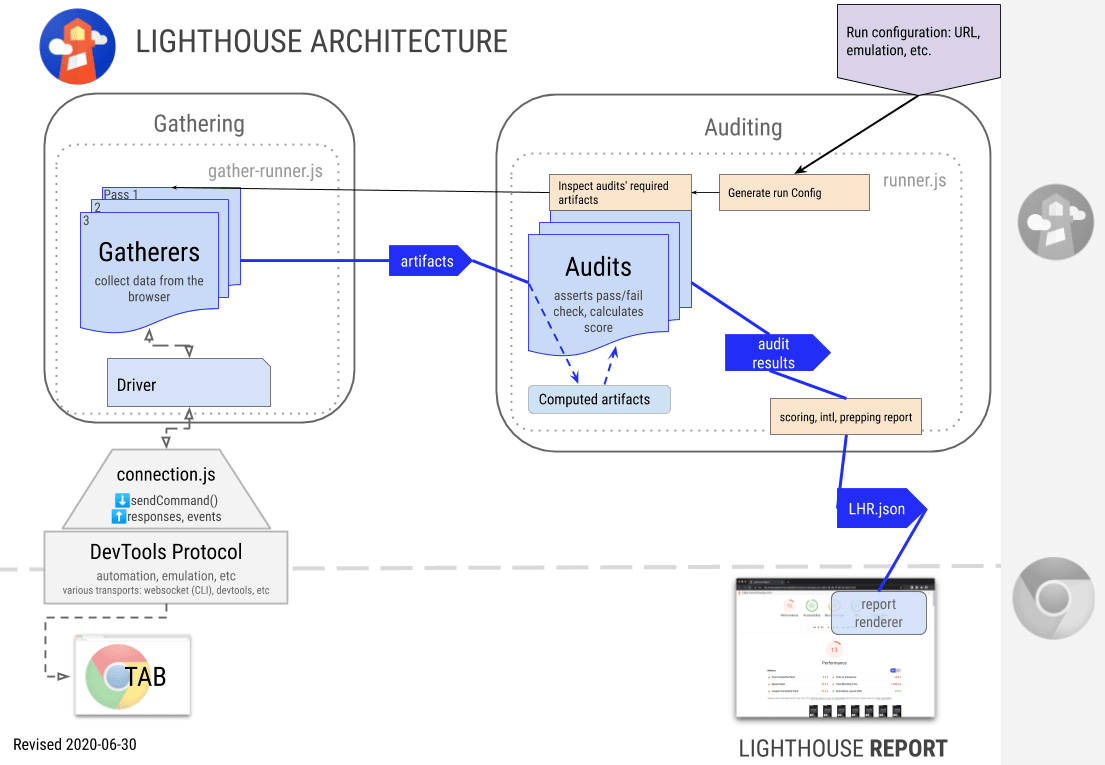
|
|
6
|
+
|
|
7
|
+
## Components & Terminology
|
|
8
|
+
|
|
9
|
+
* **Driver** - Interfaces with [Chrome Debugging Protocol](https://developer.chrome.com/devtools/docs/debugger-protocol) ([API viewer](https://chromedevtools.github.io/debugger-protocol-viewer/))
|
|
10
|
+
* **Gatherers** - Uses Driver to collect information about the page. Minimal post-processing. Run Lighthouse with `--gather-mode` to see the 3 primary outputs from gathering:
|
|
11
|
+
1. `artifacts.json`: The output from all [gatherers](../lighthouse-core/gather/gatherers).
|
|
12
|
+
2. `defaultPass.trace.json`: Most performance characteristics come from here. You can view it in the DevTools Peformance panel.
|
|
13
|
+
3. `defaultPass.devtoolslog.json`: A log of all the [DevTools Protocol](https://chromedevtools.github.io/devtools-protocol/) events. Primary signal about network requests and page state.
|
|
14
|
+
* **Audit** - The [audits](../lighthouse-core/audits) are tests for a single feature/optimization/metric. Using the Artifacts as input, an audit evaluates a test and resolves to a numeric score. See [Understanding Results](./understanding-results.md) for details of the LHR (Lighthouse Result object).
|
|
15
|
+
* **Computed Artifacts** - [Generated](../lighthouse-core/computed) on-demand from artifacts, these add additional meaning, and are often shared amongst multiple audits.
|
|
16
|
+
* **Report** - The report UI, created client-side from the LHR. See [HTML Report Generation Overview](../lighthouse-core/report/html/readme.md) for details.
|
|
17
|
+
|
|
18
|
+
### Audit/Report terminology
|
|
19
|
+
* **Category** - Roll-up collection of audits and audit groups into a user-facing section of the report (eg. `Best Practices`). Applies weighting and overall scoring to the section. Examples: PWA, Accessibility, Best Practices.
|
|
20
|
+
* **Audit title** - Short user-visible title for the successful audit. eg. “All image elements have `[alt]` attributes.”
|
|
21
|
+
* **Audit failureTitle** - Short user-visible title for a failing audit. eg. “Some image elements do not have `[alt]` attributes.”
|
|
22
|
+
* **Audit description** - Explanation of why the user should care about the audit. Not necessarily how to fix it, unless there is no external link that explains it. ([See description guidelines](../CONTRIBUTING.md#audit-description-guidelines)). eg. “Informative elements should aim for short, descriptive alternate text. Decorative elements can be ignored with an empty alt attribute. [Learn more].”
|
|
23
|
+
|
|
24
|
+
## Protocol
|
|
25
|
+
|
|
26
|
+
* _Interacting with Chrome:_ The Chrome protocol connection maintained via [WebSocket](https://github.com/websockets/ws) for the CLI [`chrome.debuggger` API](https://developer.chrome.com/extensions/debugger) when in the Chrome extension.
|
|
27
|
+
* _Event binding & domains_: Some domains must be `enable()`d so they issue events. Once enabled, they flush any events that represent state. As such, network events will only issue after the domain is enabled. All the protocol agents resolve their `Domain.enable()` callback _after_ they have flushed any pending events. See example:
|
|
28
|
+
|
|
29
|
+
```js
|
|
30
|
+
// will NOT work
|
|
31
|
+
driver.sendCommand('Security.enable').then(_ => {
|
|
32
|
+
driver.on('Security.securityStateChanged', state => { /* ... */ });
|
|
33
|
+
})
|
|
34
|
+
|
|
35
|
+
// WILL work! happy happy. :)
|
|
36
|
+
driver.on('Security.securityStateChanged', state => { /* ... */ }); // event binding is synchronous
|
|
37
|
+
driver.sendCommand('Security.enable');
|
|
38
|
+
```
|
|
39
|
+
|
|
40
|
+
* _Debugging the protocol_: Read [Better debugging of the Protocol](https://github.com/GoogleChrome/lighthouse/issues/184).
|
|
41
|
+
|
|
42
|
+
## Understanding a Trace
|
|
43
|
+
|
|
44
|
+
`lighthouse-core/lib/tracehouse/trace-processor.js` provides the core transformation of a trace into more meaningful objects. Each raw trace event has a monotonically increasing timestamp in microseconds, a thread ID, a process ID, a duration in microseconds (potentially), and other applicable metadata properties such as the event type, the task name, the frame, etc. [Learn more about trace events](https://docs.google.com/document/d/1CvAClvFfyA5R-PhYUmn5OOQtYMH4h6I0nSsKchNAySU/preview).
|
|
45
|
+
|
|
46
|
+
### Example Trace Event
|
|
47
|
+
```js
|
|
48
|
+
{
|
|
49
|
+
'pid': 41904, // process ID
|
|
50
|
+
'tid': 1295, // thread ID
|
|
51
|
+
'ts': 1676836141, // timestamp in microseconds
|
|
52
|
+
'ph': 'X', // trace event type
|
|
53
|
+
'cat': 'toplevel', // trace category from which this event came
|
|
54
|
+
'name': 'MessageLoop::RunTask', // relatively human-readable description of the trace event
|
|
55
|
+
'dur': 64, // duration of the task in microseconds
|
|
56
|
+
'args': {}, // contains additional data such as frame when applicable
|
|
57
|
+
}
|
|
58
|
+
```
|
|
59
|
+
|
|
60
|
+
### Trace-of-Tab
|
|
61
|
+
|
|
62
|
+
Trace-of-tab identifies trace events for key moments (navigation start, first meaningful paint, DOM content loaded, trace end, etc) and provides filtered views of just the main process and the main thread events. Because the timestamps are not necessarily interesting in isolation, trace-of-tab also calculates the times in milliseconds of key moments relative to navigation start, thus providing the typical interpretation of first meaningful paint in ms.
|
|
63
|
+
|
|
64
|
+
```js
|
|
65
|
+
{
|
|
66
|
+
processEvents: [/* all trace events in the main process */],
|
|
67
|
+
mainThreadEvents: [/* all trace events on the main thread */],
|
|
68
|
+
timings: {
|
|
69
|
+
timeOrigin: 0, // timeOrigin is always 0 ms
|
|
70
|
+
firstPaint: 150, // firstPaint time in ms after time origin
|
|
71
|
+
/* other key moments */
|
|
72
|
+
traceEnd: 16420, // traceEnd time in ms after time origin
|
|
73
|
+
},
|
|
74
|
+
timestamps: {
|
|
75
|
+
timeOrigin: 623000000, // timeOrigin timestamp in microseconds, marks the start of the navigation of interest
|
|
76
|
+
firstPaint: 623150000, // firstPaint timestamp in microseconds
|
|
77
|
+
/* other key moments */
|
|
78
|
+
traceEnd: 639420000, // traceEnd timestamp in microseconds
|
|
79
|
+
},
|
|
80
|
+
}
|
|
81
|
+
```
|
|
82
|
+
|
|
83
|
+
### Tracing Processor
|
|
84
|
+
|
|
85
|
+
Tracing processor takes the output of trace of tab and identifies the top-level main thread tasks, their durations, and corresponding impact on page responsiveness. Tracing processor also translates task timestamps to milliseconds since navigation start for easier interpretation in computed gatherers and audits.
|
|
86
|
+
|
|
87
|
+
## Audits
|
|
88
|
+
|
|
89
|
+
The return value of each audit [takes this shape](https://github.com/GoogleChrome/lighthouse/blob/623b789497f6c87f85d366b4038deae5dc701c90/types/audit.d.ts#L69-L87).
|
|
90
|
+
|
|
91
|
+
The `details` object is parsed in report-renderer.js. View other audits for guidance on how to structure `details`.
|
|
92
|
+
|
|
93
|
+
## Lighthouse-core internal module dependencies
|
|
94
|
+
|
|
95
|
+

|
|
96
|
+
|
|
97
|
+
(Generated June 30, 2020 via `madge lighthouse-core/index.js --image arch.png --layout dot --exclude="(locales\/)|(stack-packs\/packs)"`)
|
|
98
|
+
|
|
99
|
+
## Lantern
|
|
100
|
+
|
|
101
|
+
[Lantern](./lantern.md) is how Lighthouse simulates network and cpu throttling.
|
|
@@ -0,0 +1,44 @@
|
|
|
1
|
+
# Running Lighthouse on Authenticated Pages
|
|
2
|
+
|
|
3
|
+
Default runs of Lighthouse load a page as a "new user", with no previous session or storage data. This means that pages requiring authenticated access do not work without additional setup. You have a few options for running Lighthouse on pages behind a login:
|
|
4
|
+
|
|
5
|
+
## Option 1: Script the login with Puppeteer
|
|
6
|
+
|
|
7
|
+
[Puppeteer](https://pptr.dev) is the most flexible approach for running Lighthouse on pages requiring authentication.
|
|
8
|
+
|
|
9
|
+
See [a working demo at /docs/recipes/auth](./recipes/auth).
|
|
10
|
+
|
|
11
|
+
View our full documentation for using [Lighthouse along with Puppeteer](https://github.com/GoogleChrome/lighthouse/blob/master/docs/puppeteer.md).
|
|
12
|
+
|
|
13
|
+
## Option 2: Leverage logged-in state with Chrome DevTools
|
|
14
|
+
|
|
15
|
+
The Audits panel in Chrome DevTools will never clear your cookies, so you can log in to the target site and then run Lighthouse. If `localStorage` or `indexedDB` is important for your authentication purposes, be sure to uncheck `Clear storage`.
|
|
16
|
+
|
|
17
|
+
## Option 3: Pass custom request headers with Lighthouse CLI
|
|
18
|
+
|
|
19
|
+
CLI:
|
|
20
|
+
```sh
|
|
21
|
+
lighthouse http://www.example.com --view --extra-headers="{\"Authorization\":\"...\"}"
|
|
22
|
+
```
|
|
23
|
+
|
|
24
|
+
Node:
|
|
25
|
+
```js
|
|
26
|
+
const result = await lighthouse('http://www.example.com', {
|
|
27
|
+
extraHeaders: {
|
|
28
|
+
Authorization: '...',
|
|
29
|
+
},
|
|
30
|
+
});
|
|
31
|
+
```
|
|
32
|
+
|
|
33
|
+
You could also set the `Cookie` header, but beware: it will [override any other Cookies you expect to be there](https://github.com/GoogleChrome/lighthouse/pull/9170). For a more flexible cookie-based approach, use [puppeteer (Option 1)](./recipes/auth/README.md) instead.
|
|
34
|
+
|
|
35
|
+
## Option 4: Open a debug instance of Chrome and manually log in
|
|
36
|
+
|
|
37
|
+
1. Globally install lighthouse: `npm i -g lighthouse` or `yarn global add lighthouse`. `chrome-debug` is now in your PATH. This binary launches a standalone Chrome instance with an open debugging port.
|
|
38
|
+
1. Run chrome-debug. This logs the debugging port of your Chrome instance.
|
|
39
|
+
1. Navigate to your site and log in.
|
|
40
|
+
1. In a separate terminal, run `lighthouse http://mysite.com --disable-storage-reset --port port-number`, using the port number from chrome-debug.
|
|
41
|
+
|
|
42
|
+
## Option 5: Reuse a prepared Chrome User Profile
|
|
43
|
+
|
|
44
|
+
This option is currently under development. Track or join the discussion here: [#8957](https://github.com/GoogleChrome/lighthouse/issues/8957).
|
|
@@ -0,0 +1,35 @@
|
|
|
1
|
+
Given the new onslaught of issues that folks in the community are filing, we thought it might be good to explain some of our
|
|
2
|
+
bug labeling and triaging practices to the community.
|
|
3
|
+
|
|
4
|
+
## Bug Triaging Overview
|
|
5
|
+
Every week, there is a new "bug sheriff" (assigned from the core Lighthouse team) and their job is to go through and triage incoming bugs and pay attention to bugs
|
|
6
|
+
where we need more information from the reporter. Therefore, depending on the week, you might be hearing from a different
|
|
7
|
+
bug sheriff about your bug.
|
|
8
|
+
|
|
9
|
+
## Labeling Bugs
|
|
10
|
+
|
|
11
|
+
Here are the different (actively used) labels and what they mean, organized by category bucket:
|
|
12
|
+
|
|
13
|
+
### Priority Labels
|
|
14
|
+
- P0: Urgent issue- drop everything and deal with immediately
|
|
15
|
+
- P1: We want to work on this in the next few weeks
|
|
16
|
+
- P1.5: We want to work on this in the next few months
|
|
17
|
+
- P2: We want to work on this in the next few quarters.
|
|
18
|
+
- P3: Good idea, useful for future thinking.
|
|
19
|
+
|
|
20
|
+
### Process labels
|
|
21
|
+
- Needs more information: issue that hasn't been prioritized yet because we need more information from the bug creator. If we don't hear back in 2 weeks, we will close out the bug.
|
|
22
|
+
- Pending close: issue that we will soon close.
|
|
23
|
+
- Needs priority: issue that needs to be prioritized by team (as P0, P1, P1.5, etc.)
|
|
24
|
+
- Needs investigation: issue that we need to dig into to understand what is going on (mostly for bugs)
|
|
25
|
+
|
|
26
|
+
### Type of incoming issue labels
|
|
27
|
+
- Bug: something is wrong on our end and needs to be fixed.
|
|
28
|
+
- Feature: suggestion of new thing to implement.
|
|
29
|
+
- Internal cleanup: nothing is wrong but clean up and/or refactor of the existing way we're doing something.
|
|
30
|
+
- Question: question from community. Good fodder for new documentation that needs to be written.
|
|
31
|
+
|
|
32
|
+
### Other labels
|
|
33
|
+
- Good first issue: for new external contributor, these issues can be useful for them to tackle.
|
|
34
|
+
- Help wanted: issues that could use help from the community.
|
|
35
|
+
|
|
@@ -0,0 +1,213 @@
|
|
|
1
|
+
# Lighthouse Configuration
|
|
2
|
+
|
|
3
|
+
The Lighthouse config object is the primary method of customizing Lighthouse to suit your use case. Using a custom config, you can limit the audits to run, add additional loads of the page under special conditions, add your own custom checks, tweak the scoring, and more.
|
|
4
|
+
|
|
5
|
+
Read more about the [architecture of Lighthouse](./architecture.md).
|
|
6
|
+
|
|
7
|
+
## Usage
|
|
8
|
+
|
|
9
|
+
You can specify a custom config file when using Lighthouse through the CLI or consuming the npm module yourself.
|
|
10
|
+
|
|
11
|
+
**custom-config.js file**
|
|
12
|
+
```js
|
|
13
|
+
module.exports = {
|
|
14
|
+
extends: 'lighthouse:default',
|
|
15
|
+
settings: {
|
|
16
|
+
onlyAudits: [
|
|
17
|
+
'first-meaningful-paint',
|
|
18
|
+
'speed-index',
|
|
19
|
+
'interactive',
|
|
20
|
+
],
|
|
21
|
+
},
|
|
22
|
+
};
|
|
23
|
+
```
|
|
24
|
+
|
|
25
|
+
**Use config file via CLI**
|
|
26
|
+
```sh
|
|
27
|
+
lighthouse --config-path=path/to/custom-config.js https://example.com
|
|
28
|
+
```
|
|
29
|
+
|
|
30
|
+
**Use config file via Node**
|
|
31
|
+
```js
|
|
32
|
+
const lighthouse = require('lighthouse');
|
|
33
|
+
const config = require('./path/to/custom-config.js');
|
|
34
|
+
lighthouse('https://example.com/', {port: 9222}, config);
|
|
35
|
+
```
|
|
36
|
+
|
|
37
|
+
## Properties
|
|
38
|
+
|
|
39
|
+
| Name | Type |
|
|
40
|
+
| - | - |
|
|
41
|
+
| extends | <code>string|undefined</code> |
|
|
42
|
+
| settings | <code>Object|undefined</code> |
|
|
43
|
+
| passes | <code>Object[]</code> |
|
|
44
|
+
| audits | <code>string[]</code> |
|
|
45
|
+
| categories | <code>Object|undefined</code> |
|
|
46
|
+
| groups | <code>Object|undefined</code> |
|
|
47
|
+
|
|
48
|
+
### `extends: "lighthouse:default"|undefined`
|
|
49
|
+
|
|
50
|
+
The `extends` property controls if your configuration should inherit from the default Lighthouse configuration. [Learn more.](#config-extension)
|
|
51
|
+
|
|
52
|
+
#### Example
|
|
53
|
+
```js
|
|
54
|
+
{
|
|
55
|
+
extends: 'lighthouse:default',
|
|
56
|
+
}
|
|
57
|
+
```
|
|
58
|
+
|
|
59
|
+
### `settings: Object|undefined`
|
|
60
|
+
|
|
61
|
+
The settings property controls various aspects of running Lighthouse such as CPU/network throttling and which audits should run.
|
|
62
|
+
|
|
63
|
+
#### Example
|
|
64
|
+
```js
|
|
65
|
+
{
|
|
66
|
+
settings: {
|
|
67
|
+
onlyCategories: ['performance'],
|
|
68
|
+
onlyAudits: ['works-offline'],
|
|
69
|
+
}
|
|
70
|
+
}
|
|
71
|
+
```
|
|
72
|
+
|
|
73
|
+
#### Options
|
|
74
|
+
For full list see [our config settings typedef](https://github.com/GoogleChrome/lighthouse/blob/575e29b8b6634bfb280bc820efea6795f3dd9017/types/externs.d.ts#L141-L186).
|
|
75
|
+
|
|
76
|
+
| Name | Type | Description |
|
|
77
|
+
| -- | -- | -- |
|
|
78
|
+
| onlyCategories | `string[]` | Includes only the specified categories in the final report. Additive with `onlyAudits` and reduces the time to audit a page. |
|
|
79
|
+
| onlyAudits | `string[]` | Includes only the specified audits in the final report. Additive with `onlyCategories` and reduces the time to audit a page. |
|
|
80
|
+
| skipAudits | `string[]` | Excludes the specified audits from the final report. Takes priority over `onlyCategories`, not usable in conjuction with `onlyAudits`, and reduces the time to audit a page. |
|
|
81
|
+
|
|
82
|
+
### `passes: Object[]`
|
|
83
|
+
|
|
84
|
+
The passes property controls how to load the requested URL and what information to gather about the page while loading. Each entry in the passes array represents one load of the page (e.g. 4 entries in `passes` will load the page 4 times), so be judicious about adding multiple entries here to avoid extending run times.
|
|
85
|
+
|
|
86
|
+
Each `passes` entry defines basic settings such as how long to wait for the page to load and whether to record a trace file. Additionally a list of **gatherers** to use is defined per pass. Gatherers can read information from the page to generate artifacts which are later used by audits to provide you with a Lighthouse report. For more information on implementing a custom gatherer and the role they play in building a Lighthouse report, refer to the [recipes](https://github.com/GoogleChrome/lighthouse/blob/master/docs/recipes/custom-audit). Also note that `artifacts.devtoolsLogs` will be automatically populated for every pass. Gatherers also have access to this data within the `afterPass` as `traceData.devtoolsLog` (However, most will find the higher-level `traceData.networkRecords` more useful).
|
|
87
|
+
|
|
88
|
+
For list of default pass values, see [our config constants](https://github.com/GoogleChrome/lighthouse/blob/8f500e00243e07ef0a80b39334bedcc8ddc8d3d0/lighthouse-core/config/constants.js#L50-L61).
|
|
89
|
+
|
|
90
|
+
#### Example
|
|
91
|
+
```js
|
|
92
|
+
{
|
|
93
|
+
passes: [
|
|
94
|
+
{
|
|
95
|
+
passName: 'fastPass',
|
|
96
|
+
gatherers: ['fast-gatherer'],
|
|
97
|
+
},
|
|
98
|
+
{
|
|
99
|
+
passName: 'slowPass',
|
|
100
|
+
recordTrace: true,
|
|
101
|
+
useThrottling: true,
|
|
102
|
+
networkQuietThresholdMs: 5000,
|
|
103
|
+
gatherers: ['slow-gatherer'],
|
|
104
|
+
}
|
|
105
|
+
]
|
|
106
|
+
}
|
|
107
|
+
```
|
|
108
|
+
|
|
109
|
+
#### Options
|
|
110
|
+
| Name | Type | Description |
|
|
111
|
+
| -- | -- | -- |
|
|
112
|
+
| passName | `string` | A unique identifier for the pass used in audits and during config extension. |
|
|
113
|
+
| recordTrace | `boolean` | Records a [trace](https://github.com/GoogleChrome/lighthouse/blob/master/docs/architecture.md#understanding-a-trace) of the pass when enabled. Available to gatherers during `afterPass` as `traceData.trace` and to audits in `artifacts.traces`. |
|
|
114
|
+
| useThrottling | `boolean` | Enables throttling of the pass when enabled. |
|
|
115
|
+
| pauseAfterLoadMs | `number` | The number of milliseconds to wait after the load event before the pass can continue. Used to ensure the page has had time for post-load JavaScript to execute before ending a trace. (Default: 0) |
|
|
116
|
+
| networkQuietThresholdMs | `number` | The number of milliseconds since the last network request to wait before the page should be considered to have reached 'network quiet'. Used to ensure the page has had time for the full waterfall of network requests to complete before ending a trace. (Default: 5000) |
|
|
117
|
+
| pauseAfterNetworkQuietMs | `number` | The number of milliseconds to wait after 'network quiet' before the pass can continue. Used to ensure the page has had time for post-network-quiet JavaScript to execute before ending a trace. (Default: 0) |
|
|
118
|
+
| blockedUrlPatterns | `string[]` | URLs of requests to block while loading the page. Basic wildcard support using `*`. |
|
|
119
|
+
| gatherers | `string[]` | The list of gatherers to run on this pass. This property is required and on extension will be concatenated with the existing set of gatherers. |
|
|
120
|
+
|
|
121
|
+
### `audits: string[]`
|
|
122
|
+
|
|
123
|
+
The audits property controls which audits to run and include with your Lighthouse report. See [more examples](#more-examples) to see how to add custom audits to your config.
|
|
124
|
+
|
|
125
|
+
#### Example
|
|
126
|
+
```js
|
|
127
|
+
{
|
|
128
|
+
audits: [
|
|
129
|
+
'first-contentful-paint',
|
|
130
|
+
'byte-efficiency/uses-optimized-images',
|
|
131
|
+
]
|
|
132
|
+
}
|
|
133
|
+
```
|
|
134
|
+
|
|
135
|
+
|
|
136
|
+
### `categories: Object|undefined`
|
|
137
|
+
|
|
138
|
+
The categories property controls how to score and organize the audit results in the report. Each category defined in the config will have an entry in the `categories` property of Lighthouse's output. The category output contains the child audit results along with an overall score for the category.
|
|
139
|
+
|
|
140
|
+
**Note:** many modules consuming Lighthouse have no need to group or score all the audit results; in these cases, it's fine to omit a categories section.
|
|
141
|
+
|
|
142
|
+
#### Example
|
|
143
|
+
```js
|
|
144
|
+
{
|
|
145
|
+
categories: {
|
|
146
|
+
performance: {
|
|
147
|
+
title: 'Performance',
|
|
148
|
+
description: 'This category judges your performance',
|
|
149
|
+
auditRefs: [
|
|
150
|
+
{id: 'first-meaningful-paint', weight: 2, group: 'metrics'},
|
|
151
|
+
{id: 'first-contentful-paint', weight: 3, group: 'metrics'},
|
|
152
|
+
{id: 'interactive', weight: 5, group: 'metrics'},
|
|
153
|
+
],
|
|
154
|
+
}
|
|
155
|
+
}
|
|
156
|
+
}
|
|
157
|
+
```
|
|
158
|
+
|
|
159
|
+
#### Options
|
|
160
|
+
| Name | Type | Description |
|
|
161
|
+
| -- | -- | -- |
|
|
162
|
+
| title | `string` | The display name of the category. |
|
|
163
|
+
| description | `string` | The displayed description of the category. |
|
|
164
|
+
| auditRefs | `Object[]` | The audits to include in the category. |
|
|
165
|
+
| auditRefs[$i].id | `string` | The ID of the audit to include. |
|
|
166
|
+
| auditRefs[$i].weight | `number` | The weight of the audit in the scoring of the category. |
|
|
167
|
+
| auditRefs[$i].group | `string` (optional) | The ID of the [display group](#groups-objectundefined) of the audit. |
|
|
168
|
+
|
|
169
|
+
### `groups: Object|undefined`
|
|
170
|
+
|
|
171
|
+
The groups property controls how to visually group audits within a category. For example, this is what enables the grouped rendering of metrics and accessibility audits in the report.
|
|
172
|
+
|
|
173
|
+
**Note: The report-renderer has display logic that's hardcoded to specific audit group names. Adding arbitrary groups without additional rendering logic may not perform as expected.**
|
|
174
|
+
|
|
175
|
+
#### Example
|
|
176
|
+
```js
|
|
177
|
+
{
|
|
178
|
+
categories: {
|
|
179
|
+
performance: {
|
|
180
|
+
auditRefs: [
|
|
181
|
+
{id: 'my-performance-metric', weight: 2, group: 'metrics'},
|
|
182
|
+
],
|
|
183
|
+
}
|
|
184
|
+
},
|
|
185
|
+
groups: {
|
|
186
|
+
'metrics': {
|
|
187
|
+
title: 'Metrics',
|
|
188
|
+
description: 'These metrics encapsulate your web app\'s performance across a number of dimensions.'
|
|
189
|
+
},
|
|
190
|
+
}
|
|
191
|
+
}
|
|
192
|
+
```
|
|
193
|
+
|
|
194
|
+
## Config Extension
|
|
195
|
+
|
|
196
|
+
The stock Lighthouse configurations can be extended if you only need to make small tweaks, such as adding an audit or skipping an audit, but wish to still run most of what Lighthouse offers. When adding the `extends: 'lighthouse:default'` property to your config, the default passes, audits, groups, and categories will be automatically included, allowing you modify settings or add additional audits to a pass.
|
|
197
|
+
|
|
198
|
+
Please note that the `extends` property only supports extension of `lighthouse:default`. Other internal configs found in the [lighthouse-core/config](https://github.com/GoogleChrome/lighthouse/tree/master/lighthouse-core/config) directory can be used by importing the config object from file reference, or by using the [`--preset`](https://github.com/GoogleChrome/lighthouse#cli-options) CLI flag.
|
|
199
|
+
|
|
200
|
+
See [more examples below](#more-examples) to view different types of extensions in action.
|
|
201
|
+
|
|
202
|
+
**Config extension is the recommended way to run custom Lighthouse**. If there's a use case that extension doesn't currently solve, we'd love to [hear from you](https://github.com/GoogleChrome/lighthouse/issues/new)!
|
|
203
|
+
|
|
204
|
+
## More Examples
|
|
205
|
+
|
|
206
|
+
The best examples are the ones Lighthouse uses itself! There are several reference configuration files that are maintained as part of Lighthouse.
|
|
207
|
+
|
|
208
|
+
* [lighthouse-core/config/default-config.js](https://github.com/GoogleChrome/lighthouse/blob/master/lighthouse-core/config/default-config.js)
|
|
209
|
+
* [lighthouse-core/config/lr-desktop-config.js](https://github.com/GoogleChrome/lighthouse/blob/master/lighthouse-core/config/lr-desktop-config.js)
|
|
210
|
+
* [lighthouse-core/config/lr-mobile-config.js](https://github.com/GoogleChrome/lighthouse/blob/master/lighthouse-core/config/lr-mobile-config.js)
|
|
211
|
+
* [lighthouse-core/config/perf-config.js](https://github.com/GoogleChrome/lighthouse/blob/master/lighthouse-core/config/perf-config.js)
|
|
212
|
+
* [docs/recipes/custom-audit/custom-config.js](https://github.com/GoogleChrome/lighthouse/blob/master/docs/recipes/custom-audit/custom-config.js)
|
|
213
|
+
* [pwmetrics](https://github.com/paulirish/pwmetrics/blob/v4.1.1/lib/perf-config.ts)
|
|
@@ -0,0 +1,32 @@
|
|
|
1
|
+
|
|
2
|
+
# Emulation in Lighthouse
|
|
3
|
+
|
|
4
|
+
In Lighthouse, "Emulation" refers to the screen/viewport emulation and UserAgent string spoofing.
|
|
5
|
+
["Throttling"](./throttling.md) covers the similar topics around network and CPU throttling/simulation.
|
|
6
|
+
|
|
7
|
+
With the default configuration, Lighthouse emulates a mobile device. There's [a `desktop` configuration](../lighthouse-core/config/desktop-config.js), available to CLI users with `--preset=desktop`, which applies a consistent desktop environment and scoring calibration. This is recommended as a replacement for `--emulated-form-factor=desktop`.
|
|
8
|
+
|
|
9
|
+
### Advanced emulation setups
|
|
10
|
+
|
|
11
|
+
Some products use Lighthouse in scenarios where emulation is applied outside of Lighthouse (e.g. by Puppeteer) or running against Chrome on real mobile devices.
|
|
12
|
+
|
|
13
|
+
You must always set `formFactor`. It doesn't control emulation, but it determines how Lighthouse should interpret the run in regards to scoring performance metrics and skipping mobile-only tests in desktop.
|
|
14
|
+
|
|
15
|
+
You can choose how `screenEmulation` is applied. It can accept an object of `{width: number, height: number, deviceScaleRatio: number, mobile: boolean, disabled: false}` to apply that screen emulation or an object of `{disabled: true}` if Lighthouse should avoid applying screen emulation. It's typically set to disabled if either emulation is applied outside of Lighthouse, or it's being run on a mobile device. The `mobile` boolean applies overlay scrollbars and a few other mobile-specific screen emulation characteristics.
|
|
16
|
+
|
|
17
|
+
You can choose how to handle userAgent emulation. The `emulatedUserAgent` property accepts either a `string` to apply the provided userAgent or a `boolean` -- `true` if the default UA spoofing should be applied (default) or `false` if no UA spoofing should be applied. Typically `false` is used if UA spoofing is applied outside of Lighthouse or on a mobile device. You can also redundantly apply userAgent emulation with no risk.
|
|
18
|
+
|
|
19
|
+
If you're using Lighthouse on a mobile device, you want to set `--screenEmulation.disabled` and `--throttling.cpuSlowdownMultiplier=1`. (`--formFactor=mobile` is the default already).
|
|
20
|
+
|
|
21
|
+
### Changes made in v7
|
|
22
|
+
|
|
23
|
+
In Lighthouse v7, most of the configuration regarding emulation changed to be more intuitive and clear. The [tracking issue](https://github.com/GoogleChrome/lighthouse/issues/10910
|
|
24
|
+
) captures additional motivations.
|
|
25
|
+
|
|
26
|
+
* Removed: The `emulatedFormFactor` property (which determined how emulation is applied).
|
|
27
|
+
* Removed: The `TestedAsMobileDevice` artifact. Instead of being inferred, the explicit `formFactor` property is used.
|
|
28
|
+
* Removed: The `internalDisableDeviceScreenEmulation` property. It's equivalent to the new `--screenEmulation.disabled=true`.
|
|
29
|
+
* Added: The `formFactor` property.
|
|
30
|
+
* Added: The `screenEmulation` property.
|
|
31
|
+
* Added: The `emulatedUserAgent` property.
|
|
32
|
+
* (`throttling` and `throttlingMethod` remain unchanged)
|
|
@@ -0,0 +1,42 @@
|
|
|
1
|
+
# Error Reporting Explained
|
|
2
|
+
|
|
3
|
+
## What's going on?
|
|
4
|
+
|
|
5
|
+
The Lighthouse team is constantly trying to improve the reliability of our tools, so we've added error tracking functionality to the CLI. Given your consent, we would like to anonymously report runtime exceptions using [Sentry](https://sentry.io/welcome/). We will use this information to detect new bugs and avoid regressions.
|
|
6
|
+
|
|
7
|
+
Only CLI users are currently impacted. DevTools, extension, and node module users will not have errors reported.
|
|
8
|
+
|
|
9
|
+
## What will happen if I opt-in?
|
|
10
|
+
Runtime exceptions will be reported to the team along with information on your environment such as the URL you tested, your OS, and Chrome version. See [what data gets reported](#what-data-gets-reported).
|
|
11
|
+
|
|
12
|
+
## What will happen if I do not opt-in?
|
|
13
|
+
Runtime exceptions will not be reported to the team. Your ability to use Lighthouse will not be affected in any way.
|
|
14
|
+
|
|
15
|
+
## What data gets reported?
|
|
16
|
+
|
|
17
|
+
* The URL you tested
|
|
18
|
+
* The runtime settings used (throttling enabled/disabled, emulation, etc)
|
|
19
|
+
* The message, stack trace, and associated data of the error
|
|
20
|
+
* The file path of Lighthouse node module on your machine
|
|
21
|
+
* Your Lighthouse version
|
|
22
|
+
* Your Chrome version
|
|
23
|
+
* Your operating system
|
|
24
|
+
|
|
25
|
+
[This code search](https://github.com/GoogleChrome/lighthouse/search?l=JavaScript&q=Sentry.&type=&utf8=%E2%9C%93) reveals where Sentry methods are used.
|
|
26
|
+
|
|
27
|
+
## How do I opt-in?
|
|
28
|
+
The first time you run the CLI you will be prompted with a message asking you if Lighthouse can anonymously report runtime exceptions. You can give a direct response of `yes` or `no` (`y`, `n`, and pressing enter which defaults to `no` are also acceptable responses), and you will not be prompted again. If no response is given within 20 seconds, a `no` response will be assumed and you will not be prompted again.
|
|
29
|
+
|
|
30
|
+
Running Lighthouse with `--enable-error-reporting` will report errors regardless of the saved preference.
|
|
31
|
+
|
|
32
|
+
## How do I keep error reporting disabled?
|
|
33
|
+
As mentioned, if you do not respond to the CLI prompt within 20 seconds, a `no` response will be assumed and you will not be prompted again.
|
|
34
|
+
|
|
35
|
+
Non-interactive terminal sessions (`process.stdout.isTTY === false`) and invocations with the `CI` environment variable (`process.env.CI === true`), common on CI providers like Travis and AppVeyor, will not be prompted and error reporting will remain disabled.
|
|
36
|
+
|
|
37
|
+
Running Lighthouse with `--no-enable-error-reporting` will keep error reporting disabled regardless of the saved preference.
|
|
38
|
+
|
|
39
|
+
## How do I change my opt-in preference?
|
|
40
|
+
Your response to the prompt will be saved to your home directory `~/.config/configstore/lighthouse.json` and used on future runs. To trigger a re-prompt, simply delete this file and Lighthouse will ask again on the next run. You can also edit this json file directly.
|
|
41
|
+
|
|
42
|
+
As mentioned above, any explicit `--[no-]enable-error-reporting` flags will override the saved preference.
|
|
@@ -0,0 +1,55 @@
|
|
|
1
|
+
A few assorted scripts and tips to make hacking on Lighthouse a bit easier
|
|
2
|
+
|
|
3
|
+
## Evaluate Lighthouse's runtime performance
|
|
4
|
+
|
|
5
|
+
Lighthouse has instrumentation to collect timing data for its operations. The data is exposed at `LHR.timing.entries`. You can generate a trace from this data for closer analysis.
|
|
6
|
+
|
|
7
|
+

|
|
8
|
+
[View example trace](https://ahead-daughter.surge.sh/paulirish.json.timing.trace.html)
|
|
9
|
+
|
|
10
|
+
To generate, run `yarn timing-trace` with the LHR json:
|
|
11
|
+
```sh
|
|
12
|
+
lighthouse http://example.com --output=json --output-path=lhr.json
|
|
13
|
+
yarn timing-trace lhr.json
|
|
14
|
+
```
|
|
15
|
+
|
|
16
|
+
That will generate `lhr.json.timing.trace.json`. Then, drag 'n drop that file into `chrome://tracing`.
|
|
17
|
+
|
|
18
|
+
## Unhandled promise rejections
|
|
19
|
+
|
|
20
|
+
Getting errors like these?
|
|
21
|
+
|
|
22
|
+
> (node:12732) UnhandledPromiseRejectionWarning: Unhandled promise rejection (rejection id: 1)
|
|
23
|
+
> (node:12732) DeprecationWarning: Unhandled promise rejections are deprecated. In the future, promise rejections that are not handled will terminate the Node.js process with a non-zero exit code.
|
|
24
|
+
|
|
25
|
+
Use [`--trace-warnings`](https://medium.com/@jasnell/introducing-process-warnings-in-node-v6-3096700537ee) to get actual stack traces.
|
|
26
|
+
|
|
27
|
+
```sh
|
|
28
|
+
node --trace-warnings lighthouse-cli http://example.com
|
|
29
|
+
```
|
|
30
|
+
|
|
31
|
+
## Iterating on the report
|
|
32
|
+
|
|
33
|
+
This will generate new reports from the same results json.
|
|
34
|
+
|
|
35
|
+
```sh
|
|
36
|
+
# capture some results first:
|
|
37
|
+
lighthouse --output=json http://example.com > temp.report.json
|
|
38
|
+
|
|
39
|
+
# quickly generate reports:
|
|
40
|
+
node generate_report.js > temp.report.html; open temp.report.html
|
|
41
|
+
```
|
|
42
|
+
```js
|
|
43
|
+
// generate_report.js
|
|
44
|
+
'use strict';
|
|
45
|
+
|
|
46
|
+
const ReportGenerator = require('./lighthouse-core/report/report-generator');
|
|
47
|
+
const results = require('./temp.report.json');
|
|
48
|
+
const html = ReportGenerator.generateReportHtml(results);
|
|
49
|
+
|
|
50
|
+
console.log(html);
|
|
51
|
+
```
|
|
52
|
+
|
|
53
|
+
## Using Audit Classes Directly, Providing Your Own Artifacts
|
|
54
|
+
|
|
55
|
+
See [gist](https://gist.github.com/connorjclark/d4555ad90ae5b5ecf793ad2d46ca52db).
|
|
@@ -0,0 +1,119 @@
|
|
|
1
|
+
# Running Lighthouse using headless Chrome
|
|
2
|
+
|
|
3
|
+
## CLI (headless)
|
|
4
|
+
|
|
5
|
+
Setup:
|
|
6
|
+
|
|
7
|
+
```sh
|
|
8
|
+
# Lighthouse requires Node 12 LTS (12.x) or later.
|
|
9
|
+
curl -sL https://deb.nodesource.com/setup_12.x | sudo -E bash - &&\
|
|
10
|
+
sudo apt-get install -y nodejs npm
|
|
11
|
+
|
|
12
|
+
# get chromium (stable)
|
|
13
|
+
apt-get install chromium
|
|
14
|
+
|
|
15
|
+
# install lighthouse
|
|
16
|
+
npm i -g lighthouse
|
|
17
|
+
```
|
|
18
|
+
|
|
19
|
+
Kick off run of Lighthouse using headless Chrome:
|
|
20
|
+
|
|
21
|
+
```sh
|
|
22
|
+
lighthouse --chrome-flags="--headless" https://github.com
|
|
23
|
+
```
|
|
24
|
+
|
|
25
|
+
## CLI (xvfb)
|
|
26
|
+
|
|
27
|
+
Alternatively, you can run full Chrome + xvfb instead of headless mode. These steps worked on Debian Jessie:
|
|
28
|
+
|
|
29
|
+
```sh
|
|
30
|
+
# get node 12
|
|
31
|
+
curl -sL https://deb.nodesource.com/setup_12.x | sudo -E bash -
|
|
32
|
+
sudo apt-get install -y nodejs npm
|
|
33
|
+
|
|
34
|
+
# get chromium (stable) and Xvfb
|
|
35
|
+
apt-get install chromium-browser xvfb
|
|
36
|
+
|
|
37
|
+
# install lighthouse
|
|
38
|
+
npm i -g lighthouse
|
|
39
|
+
```
|
|
40
|
+
|
|
41
|
+
Run it:
|
|
42
|
+
|
|
43
|
+
```sh
|
|
44
|
+
export DISPLAY=:1.5
|
|
45
|
+
TMP_PROFILE_DIR=$(mktemp -d -t lighthouse.XXXXXXXXXX)
|
|
46
|
+
|
|
47
|
+
# start up chromium inside xvfb
|
|
48
|
+
xvfb-run --server-args='-screen 0, 1024x768x16' \
|
|
49
|
+
chromium-browser --user-data-dir=$TMP_PROFILE_DIR
|
|
50
|
+
--start-maximized \
|
|
51
|
+
--no-first-run \
|
|
52
|
+
--remote-debugging-port=9222 "about:blank"
|
|
53
|
+
|
|
54
|
+
# Kick off Lighthouse run on same port as debugging port.
|
|
55
|
+
lighthouse --port=9222 https://github.com
|
|
56
|
+
```
|
|
57
|
+
|
|
58
|
+
## Posting Lighthouse reports to GitHub Gists
|
|
59
|
+
|
|
60
|
+
Be sure to replace `${GITHUB_OWNER}` and `${GITHUB_TOKEN}` with your own credentials. The code below is tested on Ubuntu.
|
|
61
|
+
|
|
62
|
+
```sh
|
|
63
|
+
apt-get install -y nodejs npm chromium jq
|
|
64
|
+
npm install -g lighthouse
|
|
65
|
+
|
|
66
|
+
# Run lighthouse as JSON, pipe it to jq to wrangle and send it to GitHub Gist via curl
|
|
67
|
+
# so Lighthouse Viewer can grab it.
|
|
68
|
+
lighthouse "http://localhost" --chrome-flags="--no-sandbox --headless" \
|
|
69
|
+
--output json \
|
|
70
|
+
| jq -r "{ description: \"YOUR TITLE HERE\", public: \"false\", files: {\"$(date "+%Y%m%d").lighthouse.report.json\": {content: (. | tostring) }}}" \
|
|
71
|
+
| curl -sS -X POST -H 'Content-Type: application/json' \
|
|
72
|
+
-u ${GITHUB_OWNER}:${GITHUB_TOKEN} \
|
|
73
|
+
-d @- https://api.github.com/gists > results.gist
|
|
74
|
+
|
|
75
|
+
# Let's be nice and add the Lighthouse Viewer link in the Gist description.
|
|
76
|
+
GID=$(cat results.gist | jq -r '.id') && \
|
|
77
|
+
curl -sS -X POST -H 'Content-Type: application/json' \
|
|
78
|
+
-u ${GITHUB_OWNER}:${GITHUB_TOKEN} \
|
|
79
|
+
-d "{ \"description\": \"YOUR TITLE HERE - Lighthouse: https://googlechrome.github.io/lighthouse/viewer/?gist=${GID}\" }" "https://api.github.com/gists/${GID}" > updated.gist
|
|
80
|
+
```
|
|
81
|
+
|
|
82
|
+
## Node module
|
|
83
|
+
|
|
84
|
+
Install:
|
|
85
|
+
|
|
86
|
+
```sh
|
|
87
|
+
yarn add lighthouse
|
|
88
|
+
```
|
|
89
|
+
|
|
90
|
+
Run it:
|
|
91
|
+
|
|
92
|
+
```javascript
|
|
93
|
+
const lighthouse = require('lighthouse');
|
|
94
|
+
const chromeLauncher = require('chrome-launcher');
|
|
95
|
+
|
|
96
|
+
function launchChromeAndRunLighthouse(url, flags = {}, config = null) {
|
|
97
|
+
return chromeLauncher.launch(flags).then(chrome => {
|
|
98
|
+
flags.port = chrome.port;
|
|
99
|
+
return lighthouse(url, flags, config).then(results =>
|
|
100
|
+
chrome.kill().then(() => results));
|
|
101
|
+
});
|
|
102
|
+
}
|
|
103
|
+
|
|
104
|
+
const flags = {
|
|
105
|
+
chromeFlags: ['--headless']
|
|
106
|
+
};
|
|
107
|
+
|
|
108
|
+
launchChromeAndRunLighthouse('https://github.com', flags).then(results => {
|
|
109
|
+
// Use results!
|
|
110
|
+
});
|
|
111
|
+
```
|
|
112
|
+
|
|
113
|
+
## Other resources
|
|
114
|
+
|
|
115
|
+
Other resources you might find helpful:
|
|
116
|
+
|
|
117
|
+
- [Getting Started with Headless Chrome](https://developers.google.com/web/updates/2017/04/headless-chrome)
|
|
118
|
+
- Example [Dockerfile](https://github.com/ebidel/lighthouse-ci/blob/master/builder/Dockerfile)
|
|
119
|
+
- Lighthouse's GitHub Actions [`.ci.yml`](https://github.com/GoogleChrome/lighthouse/blob/master/.github/workflows/ci.yml)
|