lighthouse 8.0.0-dev.20210709 → 8.0.0
This diff represents the content of publicly available package versions that have been released to one of the supported registries. The information contained in this diff is provided for informational purposes only and reflects changes between package versions as they appear in their respective public registries.
- package/docs/architecture.md +101 -0
- package/docs/authenticated-pages.md +44 -0
- package/docs/bug-labels.md +35 -0
- package/docs/configuration.md +213 -0
- package/docs/emulation.md +32 -0
- package/docs/error-reporting.md +42 -0
- package/docs/hacking-tips.md +55 -0
- package/docs/headless-chrome.md +119 -0
- package/docs/lantern.md +55 -0
- package/docs/new-audits.md +99 -0
- package/docs/performance-budgets.md +187 -0
- package/docs/plugins.md +374 -0
- package/docs/puppeteer.md +95 -0
- package/docs/readme.md +164 -0
- package/docs/recipes/auth/README.md +129 -0
- package/docs/recipes/auth/example-lh-auth.js +81 -0
- package/docs/recipes/auth/package.json +11 -0
- package/docs/recipes/auth/server/public/dashboard-unauthenticated.html +21 -0
- package/docs/recipes/auth/server/public/dashboard.html +25 -0
- package/docs/recipes/auth/server/public/home-unauthenticated.html +27 -0
- package/docs/recipes/auth/server/public/home.html +17 -0
- package/docs/recipes/auth/server/public/unauthenticated.html +22 -0
- package/docs/recipes/auth/server/server.js +85 -0
- package/docs/recipes/custom-audit/custom-config.js +36 -0
- package/docs/recipes/custom-audit/package.json +8 -0
- package/docs/recipes/custom-audit/readme.md +32 -0
- package/docs/recipes/custom-audit/searchable-audit.js +46 -0
- package/docs/recipes/custom-audit/searchable-gatherer.js +32 -0
- package/docs/recipes/custom-gatherer-puppeteer/custom-audit.js +34 -0
- package/{root.js → docs/recipes/custom-gatherer-puppeteer/custom-config.js} +23 -2
- package/docs/recipes/custom-gatherer-puppeteer/custom-gatherer.js +51 -0
- package/docs/recipes/custom-gatherer-puppeteer/package.json +13 -0
- package/docs/recipes/custom-gatherer-puppeteer/readme.md +7 -0
- package/docs/recipes/custom-gatherer-puppeteer/test.sh +9 -0
- package/docs/recipes/gulp/gulpfile.js +79 -0
- package/docs/recipes/gulp/package.json +12 -0
- package/docs/recipes/gulp/public/index.html +22 -0
- package/docs/recipes/gulp/readme.md +6 -0
- package/docs/recipes/integration-test/README.md +14 -0
- package/docs/recipes/integration-test/example-lh-auth.test.js +160 -0
- package/docs/recipes/integration-test/package.json +9 -0
- package/docs/recipes/lighthouse-plugin-example/audits/preload-as.js +46 -0
- package/docs/recipes/lighthouse-plugin-example/package.json +11 -0
- package/docs/recipes/lighthouse-plugin-example/plugin-recipe-screenshot.png +0 -0
- package/docs/recipes/lighthouse-plugin-example/plugin.js +24 -0
- package/docs/recipes/lighthouse-plugin-example/readme.md +53 -0
- package/docs/releasing.md +164 -0
- package/docs/scoring.md +79 -0
- package/docs/throttling.md +150 -0
- package/docs/understanding-results.md +209 -0
- package/docs/v8-perf-faq.md +244 -0
- package/docs/variability.md +150 -0
- package/jest.config.js +0 -3
- package/lighthouse-cli/bin.js +8 -6
- package/lighthouse-core/audits/accessibility/aria-command-name.js +1 -1
- package/lighthouse-core/audits/accessibility/aria-meter-name.js +1 -1
- package/lighthouse-core/audits/accessibility/aria-progressbar-name.js +1 -1
- package/lighthouse-core/audits/accessibility/aria-tooltip-name.js +1 -1
- package/lighthouse-core/audits/accessibility/aria-treeitem-name.js +1 -1
- package/lighthouse-core/audits/apple-touch-icon.js +0 -1
- package/lighthouse-core/audits/audit.js +3 -3
- package/lighthouse-core/audits/autocomplete.js +2 -2
- package/lighthouse-core/audits/byte-efficiency/byte-efficiency-audit.js +14 -29
- package/lighthouse-core/audits/byte-efficiency/duplicated-javascript.js +2 -3
- package/lighthouse-core/audits/byte-efficiency/efficient-animated-content.js +1 -1
- package/lighthouse-core/audits/byte-efficiency/legacy-javascript.js +2 -3
- package/lighthouse-core/audits/byte-efficiency/modern-image-formats.js +15 -55
- package/lighthouse-core/audits/byte-efficiency/offscreen-images.js +4 -8
- package/lighthouse-core/audits/byte-efficiency/render-blocking-resources.js +8 -15
- package/lighthouse-core/audits/byte-efficiency/total-byte-weight.js +9 -10
- package/lighthouse-core/audits/byte-efficiency/unminified-css.js +1 -1
- package/lighthouse-core/audits/byte-efficiency/unminified-javascript.js +1 -1
- package/lighthouse-core/audits/byte-efficiency/unused-css-rules.js +1 -1
- package/lighthouse-core/audits/byte-efficiency/unused-javascript.js +1 -2
- package/lighthouse-core/audits/byte-efficiency/uses-long-cache-ttl.js +2 -2
- package/lighthouse-core/audits/byte-efficiency/uses-optimized-images.js +1 -2
- package/lighthouse-core/audits/byte-efficiency/uses-responsive-images.js +24 -46
- package/lighthouse-core/audits/byte-efficiency/uses-text-compression.js +1 -1
- package/lighthouse-core/audits/critical-request-chains.js +0 -1
- package/lighthouse-core/audits/csp-xss.js +1 -1
- package/lighthouse-core/audits/diagnostics.js +0 -1
- package/lighthouse-core/audits/dobetterweb/geolocation-on-start.js +0 -1
- package/lighthouse-core/audits/dobetterweb/inspector-issues.js +1 -1
- package/lighthouse-core/audits/dobetterweb/notification-on-start.js +0 -1
- package/lighthouse-core/audits/dobetterweb/uses-http2.js +0 -1
- package/lighthouse-core/audits/final-screenshot.js +4 -8
- package/lighthouse-core/audits/font-display.js +0 -1
- package/lighthouse-core/audits/installable-manifest.js +3 -4
- package/lighthouse-core/audits/largest-contentful-paint-element.js +0 -1
- package/lighthouse-core/audits/long-tasks.js +1 -1
- package/lighthouse-core/audits/maskable-icon.js +0 -1
- package/lighthouse-core/audits/metrics/first-contentful-paint-3g.js +2 -4
- package/lighthouse-core/audits/metrics/first-contentful-paint.js +2 -4
- package/lighthouse-core/audits/metrics/first-meaningful-paint.js +2 -4
- package/lighthouse-core/audits/metrics/interactive.js +2 -4
- package/lighthouse-core/audits/metrics/largest-contentful-paint.js +2 -4
- package/lighthouse-core/audits/metrics/max-potential-fid.js +2 -4
- package/lighthouse-core/audits/metrics/speed-index.js +2 -4
- package/lighthouse-core/audits/metrics/total-blocking-time.js +2 -10
- package/lighthouse-core/audits/metrics.js +2 -4
- package/lighthouse-core/audits/performance-budget.js +0 -1
- package/lighthouse-core/audits/predictive-perf.js +6 -9
- package/lighthouse-core/audits/preload-fonts.js +1 -11
- package/lighthouse-core/audits/preload-lcp-image.js +5 -18
- package/lighthouse-core/audits/redirects.js +8 -10
- package/lighthouse-core/audits/screenshot-thumbnails.js +13 -28
- package/lighthouse-core/audits/seo/canonical.js +1 -2
- package/lighthouse-core/audits/seo/font-size.js +4 -4
- package/lighthouse-core/audits/seo/hreflang.js +2 -3
- package/lighthouse-core/audits/seo/http-status-code.js +16 -21
- package/lighthouse-core/audits/seo/is-crawlable.js +3 -4
- package/lighthouse-core/audits/seo/robots-txt.js +2 -2
- package/lighthouse-core/audits/seo/tap-targets.js +5 -5
- package/lighthouse-core/audits/server-response-time.js +2 -20
- package/lighthouse-core/audits/splash-screen.js +0 -1
- package/lighthouse-core/audits/themed-omnibox.js +0 -1
- package/lighthouse-core/audits/third-party-facades.js +0 -1
- package/lighthouse-core/audits/third-party-summary.js +3 -1
- package/lighthouse-core/audits/timing-budget.js +2 -4
- package/lighthouse-core/audits/uses-rel-preconnect.js +9 -14
- package/lighthouse-core/audits/uses-rel-preload.js +2 -13
- package/lighthouse-core/computed/main-thread-tasks.js +2 -2
- package/lighthouse-core/computed/metrics/cumulative-layout-shift.js +3 -3
- package/lighthouse-core/computed/metrics/first-contentful-paint-all-frames.js +6 -6
- package/lighthouse-core/computed/metrics/first-contentful-paint.js +8 -9
- package/lighthouse-core/computed/metrics/first-meaningful-paint.js +9 -10
- package/lighthouse-core/computed/metrics/interactive.js +24 -25
- package/lighthouse-core/computed/metrics/lantern-first-contentful-paint.js +6 -6
- package/lighthouse-core/computed/metrics/lantern-first-meaningful-paint.js +6 -6
- package/lighthouse-core/computed/metrics/lantern-largest-contentful-paint.js +6 -6
- package/lighthouse-core/computed/metrics/lantern-metric.js +8 -16
- package/lighthouse-core/computed/metrics/largest-contentful-paint-all-frames.js +7 -7
- package/lighthouse-core/computed/metrics/largest-contentful-paint.js +9 -10
- package/lighthouse-core/computed/metrics/max-potential-fid.js +11 -8
- package/lighthouse-core/computed/metrics/metric.js +5 -32
- package/lighthouse-core/computed/metrics/speed-index.js +5 -6
- package/lighthouse-core/computed/metrics/timing-summary.js +45 -55
- package/lighthouse-core/computed/metrics/total-blocking-time.js +29 -36
- package/lighthouse-core/computed/page-dependency-graph.js +14 -14
- package/lighthouse-core/computed/resource-summary.js +7 -3
- package/lighthouse-core/computed/speedline.js +3 -3
- package/lighthouse-core/computed/trace-of-tab.js +86 -15
- package/lighthouse-core/computed/user-timings.js +5 -5
- package/lighthouse-core/config/default-config.js +0 -1
- package/lighthouse-core/fraggle-rock/config/config.js +7 -9
- package/lighthouse-core/fraggle-rock/config/default-config.js +2 -40
- package/lighthouse-core/fraggle-rock/config/filters.js +6 -39
- package/lighthouse-core/fraggle-rock/config/validation.js +4 -4
- package/lighthouse-core/fraggle-rock/gather/base-artifacts.js +19 -54
- package/lighthouse-core/fraggle-rock/gather/navigation-runner.js +10 -21
- package/lighthouse-core/fraggle-rock/gather/runner-helpers.js +2 -2
- package/lighthouse-core/fraggle-rock/gather/snapshot-runner.js +2 -2
- package/lighthouse-core/fraggle-rock/gather/timespan-runner.js +2 -2
- package/lighthouse-core/gather/driver/prepare.js +0 -3
- package/lighthouse-core/gather/fetcher.js +2 -0
- package/lighthouse-core/gather/gather-runner.js +14 -2
- package/lighthouse-core/gather/gatherers/image-elements.js +61 -24
- package/lighthouse-core/gather/gatherers/inspector-issues.js +2 -2
- package/lighthouse-core/gather/gatherers/script-elements.js +12 -45
- package/lighthouse-core/gather/gatherers/seo/font-size.js +5 -5
- package/lighthouse-core/gather/gatherers/seo/tap-targets.js +12 -64
- package/lighthouse-core/gather/gatherers/service-worker.js +3 -20
- package/lighthouse-core/gather/gatherers/trace-compat.js +1 -1
- package/lighthouse-core/gather/gatherers/trace-elements.js +3 -15
- package/lighthouse-core/gather/gatherers/trace.js +4 -13
- package/lighthouse-core/gather/gatherers/viewport-dimensions.js +1 -1
- package/lighthouse-core/lib/dependency-graph/simulator/network-analyzer.js +2 -13
- package/lighthouse-core/lib/emulation.js +2 -0
- package/lighthouse-core/lib/i18n/i18n.js +2 -2
- package/lighthouse-core/lib/i18n/locales/ar-XB.json +141 -141
- package/lighthouse-core/lib/i18n/locales/ar.json +143 -143
- package/lighthouse-core/lib/i18n/locales/bg.json +143 -143
- package/lighthouse-core/lib/i18n/locales/ca.json +141 -141
- package/lighthouse-core/lib/i18n/locales/cs.json +141 -141
- package/lighthouse-core/lib/i18n/locales/da.json +141 -141
- package/lighthouse-core/lib/i18n/locales/de.json +142 -142
- package/lighthouse-core/lib/i18n/locales/el.json +141 -141
- package/lighthouse-core/lib/i18n/locales/en-GB.json +141 -141
- package/lighthouse-core/lib/i18n/locales/en-US.ctc.json +6659 -0
- package/lighthouse-core/lib/i18n/locales/en-US.json +144 -150
- package/lighthouse-core/lib/i18n/locales/en-XA.json +141 -141
- package/lighthouse-core/lib/i18n/locales/en-XL.ctc.json +6628 -0
- package/lighthouse-core/lib/i18n/locales/en-XL.json +144 -150
- package/lighthouse-core/lib/i18n/locales/es-419.json +141 -141
- package/lighthouse-core/lib/i18n/locales/es.json +141 -141
- package/lighthouse-core/lib/i18n/locales/fi.json +143 -143
- package/lighthouse-core/lib/i18n/locales/fil.json +142 -142
- package/lighthouse-core/lib/i18n/locales/fr.json +141 -141
- package/lighthouse-core/lib/i18n/locales/he.json +142 -142
- package/lighthouse-core/lib/i18n/locales/hi.json +143 -143
- package/lighthouse-core/lib/i18n/locales/hr.json +141 -141
- package/lighthouse-core/lib/i18n/locales/hu.json +143 -143
- package/lighthouse-core/lib/i18n/locales/id.json +143 -143
- package/lighthouse-core/lib/i18n/locales/it.json +143 -143
- package/lighthouse-core/lib/i18n/locales/ja.json +143 -143
- package/lighthouse-core/lib/i18n/locales/ko.json +143 -143
- package/lighthouse-core/lib/i18n/locales/lt.json +143 -143
- package/lighthouse-core/lib/i18n/locales/lv.json +143 -143
- package/lighthouse-core/lib/i18n/locales/nl.json +141 -141
- package/lighthouse-core/lib/i18n/locales/no.json +141 -141
- package/lighthouse-core/lib/i18n/locales/pl.json +141 -141
- package/lighthouse-core/lib/i18n/locales/pt-PT.json +141 -141
- package/lighthouse-core/lib/i18n/locales/pt.json +141 -141
- package/lighthouse-core/lib/i18n/locales/ro.json +144 -144
- package/lighthouse-core/lib/i18n/locales/ru.json +143 -143
- package/lighthouse-core/lib/i18n/locales/sk.json +142 -142
- package/lighthouse-core/lib/i18n/locales/sl.json +141 -141
- package/lighthouse-core/lib/i18n/locales/sr-Latn.json +143 -143
- package/lighthouse-core/lib/i18n/locales/sr.json +143 -143
- package/lighthouse-core/lib/i18n/locales/sv.json +142 -142
- package/lighthouse-core/lib/i18n/locales/ta.json +141 -141
- package/lighthouse-core/lib/i18n/locales/te.json +143 -143
- package/lighthouse-core/lib/i18n/locales/th.json +143 -143
- package/lighthouse-core/lib/i18n/locales/tr.json +143 -143
- package/lighthouse-core/lib/i18n/locales/uk.json +141 -141
- package/lighthouse-core/lib/i18n/locales/vi.json +143 -143
- package/lighthouse-core/lib/i18n/locales/zh-HK.json +141 -141
- package/lighthouse-core/lib/i18n/locales/zh-TW.json +143 -143
- package/lighthouse-core/lib/i18n/locales/zh.json +143 -143
- package/lighthouse-core/lib/lh-error.js +2 -2
- package/lighthouse-core/lib/minify-trace.js +1 -1
- package/lighthouse-core/lib/network-request.js +1 -17
- package/lighthouse-core/lib/page-functions.js +5 -6
- package/lighthouse-core/lib/rect-helpers.js +3 -3
- package/lighthouse-core/lib/sd-validation/assets/jsonldcontext.json +7137 -0
- package/lighthouse-core/lib/sd-validation/assets/schema-tree.json +9900 -0
- package/{report/report-assets.js → lighthouse-core/lib/sd-validation/helpers/walk-object.js} +20 -12
- package/lighthouse-core/lib/sd-validation/json-expander.js +56 -0
- package/lighthouse-core/lib/sd-validation/json-linter.js +49 -0
- package/lighthouse-core/lib/sd-validation/jsonld-keyword-validator.js +50 -0
- package/lighthouse-core/lib/sd-validation/line-number-from-jsonld-path.js +60 -0
- package/lighthouse-core/lib/sd-validation/schema-validator.js +146 -0
- package/lighthouse-core/lib/sd-validation/scripts/download-jsonldcontext.js +30 -0
- package/lighthouse-core/lib/sd-validation/scripts/generate-schema-tree.js +97 -0
- package/lighthouse-core/lib/sd-validation/sd-validation.js +77 -0
- package/lighthouse-core/lib/tappable-rects.js +1 -1
- package/lighthouse-core/lib/tracehouse/trace-processor.js +42 -116
- package/lighthouse-core/lib/url-shim.js +2 -29
- package/lighthouse-core/report/html/html-report-assets.js +38 -0
- package/{report/README.md → lighthouse-core/report/html/readme.md} +11 -7
- package/{report → lighthouse-core/report/html}/renderer/category-renderer.js +0 -0
- package/{report → lighthouse-core/report/html}/renderer/crc-details-renderer.js +0 -0
- package/{report → lighthouse-core/report/html}/renderer/details-renderer.js +1 -1
- package/{report → lighthouse-core/report/html}/renderer/dom.js +0 -0
- package/{report → lighthouse-core/report/html}/renderer/element-screenshot-renderer.js +0 -0
- package/{report → lighthouse-core/report/html}/renderer/i18n.js +1 -1
- package/{report → lighthouse-core/report/html}/renderer/logger.js +0 -0
- package/{report → lighthouse-core/report/html}/renderer/performance-category-renderer.js +0 -0
- package/{report → lighthouse-core/report/html}/renderer/psi.js +0 -0
- package/{report → lighthouse-core/report/html}/renderer/pwa-category-renderer.js +0 -0
- package/{report → lighthouse-core/report/html}/renderer/report-renderer.js +0 -0
- package/{report → lighthouse-core/report/html}/renderer/report-ui-features.js +3 -3
- package/{report → lighthouse-core/report/html}/renderer/snippet-renderer.js +0 -0
- package/{report → lighthouse-core/report/html}/renderer/text-encoding.js +0 -0
- package/{report → lighthouse-core/report/html}/renderer/util.js +4 -7
- package/{report/assets/styles.css → lighthouse-core/report/html/report-styles.css} +0 -0
- package/{report/assets/standalone-template.html → lighthouse-core/report/html/report-template.html} +41 -1
- package/{report/assets → lighthouse-core/report/html}/templates.html +0 -0
- package/{report → lighthouse-core/report}/report-generator.js +1 -1
- package/lighthouse-core/runner.js +1 -1
- package/package.json +12 -13
- package/readme.md +2 -2
- package/third-party/chromium-synchronization/inspector-issueAdded-types-test.js +2 -3
- package/third-party/chromium-synchronization/installability-errors-test.js +2 -2
- package/third-party/download-content-shell/download-content-shell.js +1 -2
- package/third-party/snyk/snapshot.json +1 -1
- package/tsconfig.json +1 -0
- package/types/artifacts.d.ts +21 -41
- package/types/audit.d.ts +0 -2
- package/types/config.d.ts +2 -16
- package/types/externs.d.ts +0 -1
- package/types/gatherer.d.ts +13 -13
- package/types/html-renderer.d.ts +14 -14
- package/types/i18n.d.ts +1 -1
- package/lighthouse-core/audits/byte-efficiency/uses-responsive-images-snapshot.js +0 -94
- package/lighthouse-core/computed/image-records.js +0 -62
- package/lighthouse-core/computed/metrics/navigation-metric.js +0 -46
- package/lighthouse-core/computed/processed-navigation.js +0 -21
- package/lighthouse-core/computed/processed-trace.js +0 -21
- package/lighthouse-core/gather/gatherers/gather-context.js +0 -25
- package/lighthouse-core/gather/gatherers/host-form-factor.js +0 -31
- package/lighthouse-core/gather/gatherers/host-user-agent.js +0 -29
- package/lighthouse-core/lib/lh-trace-processor.js +0 -46
- package/report/clients/standalone.js +0 -52
- package/report/test/renderer/category-renderer-test.js +0 -488
- package/report/test/renderer/crc-details-renderer-test.js +0 -115
- package/report/test/renderer/details-renderer-test.js +0 -843
- package/report/test/renderer/dom-test.js +0 -157
- package/report/test/renderer/element-screenshot-renderer-test.js +0 -189
- package/report/test/renderer/i18n-test.js +0 -146
- package/report/test/renderer/performance-category-renderer-test.js +0 -332
- package/report/test/renderer/psi-test.js +0 -152
- package/report/test/renderer/pwa-category-renderer-test.js +0 -303
- package/report/test/renderer/report-renderer-test.js +0 -325
- package/report/test/renderer/report-ui-features-test.js +0 -572
- package/report/test/renderer/snippet-renderer-test.js +0 -291
- package/report/test/renderer/text-encoding-test.js +0 -41
- package/report/test/renderer/util-test.js +0 -388
- package/report/test/report-generator-test.js +0 -145
package/docs/plugins.md
ADDED
|
@@ -0,0 +1,374 @@
|
|
|
1
|
+
# Plugin Handbook
|
|
2
|
+
|
|
3
|
+
## Table of Contents
|
|
4
|
+
|
|
5
|
+
1. [Introduction](#introduction)
|
|
6
|
+
1. [What is a Lighthouse Plugin?](#what-is-a-lighthouse-plugin)
|
|
7
|
+
1. [Comparing a Plugin vs. Custom Config](#comparing-a-plugin-vs-custom-config)
|
|
8
|
+
1. [Getting Started](#getting-started)
|
|
9
|
+
1. [API](#api)
|
|
10
|
+
1. [Plugin Config](#plugin-config)
|
|
11
|
+
1. [Plugin Audits](#plugin-audits)
|
|
12
|
+
1. [Best Practices](#best-practices)
|
|
13
|
+
1. [Naming](#naming)
|
|
14
|
+
1. [Scoring](#scoring)
|
|
15
|
+
1. [Common Mistakes](#common-mistakes)
|
|
16
|
+
1. [Examples](#examples)
|
|
17
|
+
|
|
18
|
+
## Introduction
|
|
19
|
+
|
|
20
|
+
If you're new to Lighthouse development, start by reading up on the overall [architecture](./architecture.md), how [configuration](./configuration.md) works, and what makes a [good audit](./new-audits.md) before continuing.
|
|
21
|
+
|
|
22
|
+
### What is a Lighthouse Plugin?
|
|
23
|
+
|
|
24
|
+
Lighthouse plugins are a way to extend the functionality of Lighthouse with insight from domain experts (that's you!) and easily share this extra functionality with other Lighthouse users. At its core, a plugin is a node module that implements a set of checks that will be run by Lighthouse and added to the report as a new category.
|
|
25
|
+
|
|
26
|
+
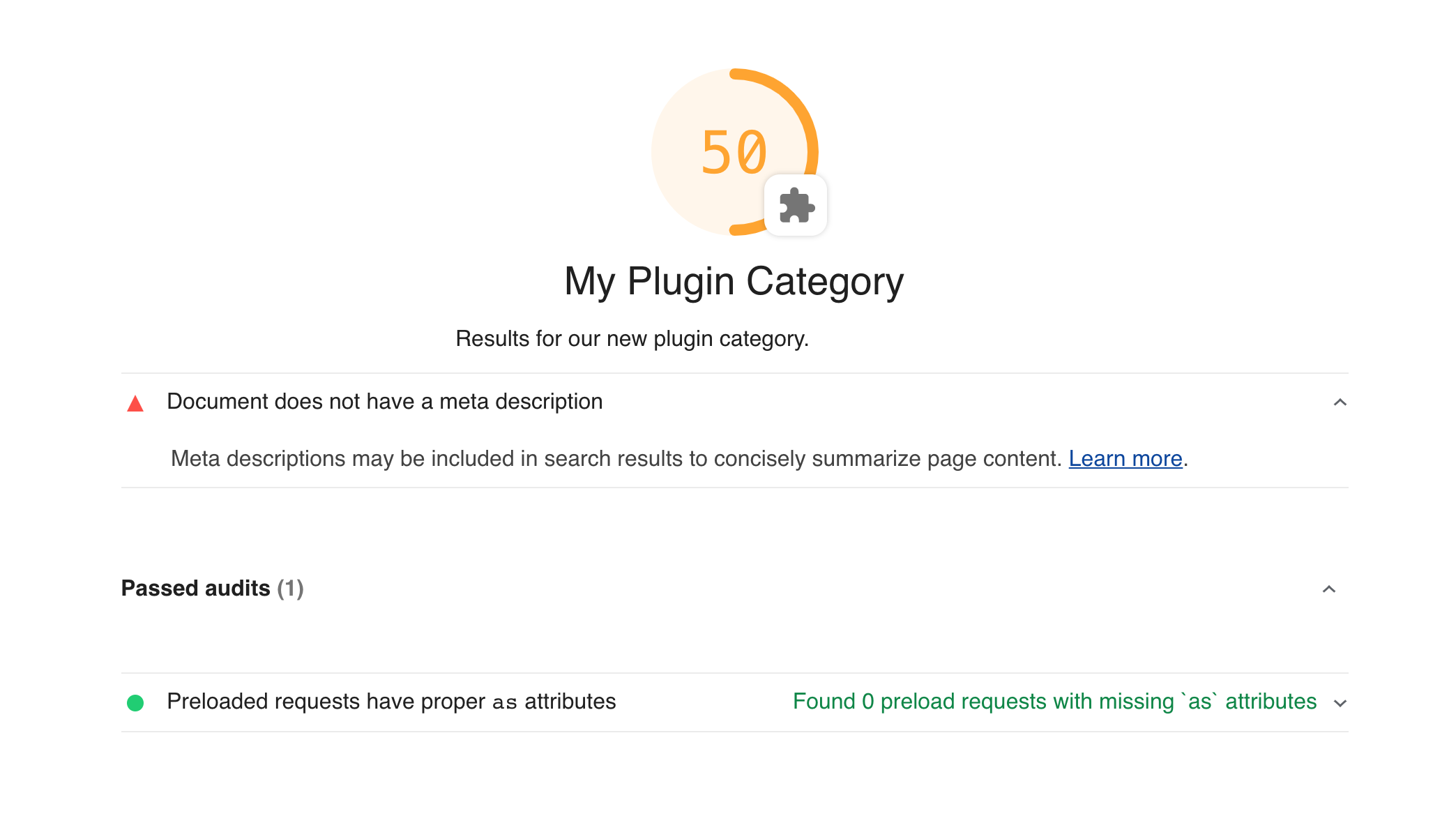
|
|
27
|
+
|
|
28
|
+
### Comparing a Plugin vs. Custom Config
|
|
29
|
+
|
|
30
|
+
Plugins are easily shared and have a stable API that won't change between minor version bumps but are also more limited in scope than a [custom Lighthouse configuration](./configuration.md). Before getting started with plugins, think about your current needs, and consult the table below to decide which is best for you.
|
|
31
|
+
|
|
32
|
+
| Capability | Plugin | Custom Config |
|
|
33
|
+
| -------------------------------------------- | ------ | ------------- |
|
|
34
|
+
| Include your own custom audits | ✅ | ✅ |
|
|
35
|
+
| Add a custom category | ✅ | ✅ |
|
|
36
|
+
| Easily shareable and extensible on NPM | ✅ | ❌ |
|
|
37
|
+
| Semver-stable API | ✅ | ❌ |
|
|
38
|
+
| Gather custom data from the page (artifacts) | ❌ | ✅ |
|
|
39
|
+
| Modify core categories | ❌ | ✅ |
|
|
40
|
+
| Modify `config.settings` properties | ❌ | ✅ |
|
|
41
|
+
|
|
42
|
+
### Getting Started
|
|
43
|
+
|
|
44
|
+
To develop a Lighthouse plugin, you'll need to write three things:
|
|
45
|
+
|
|
46
|
+
1. A `package.json` file to define your plugin's dependencies and point to your `plugin.js` file.
|
|
47
|
+
1. A `plugin.js` file to declare your plugin's audits, category name, and scoring.
|
|
48
|
+
1. Custom audit files that will contain the primary logic of the checks you want to perform.
|
|
49
|
+
|
|
50
|
+
To see a fully functioning example, see our [plugin recipe](./recipes/lighthouse-plugin-example/readme.md).
|
|
51
|
+
|
|
52
|
+
#### `package.json`
|
|
53
|
+
|
|
54
|
+
A Lighthouse plugin is just a node module with a name that starts with `lighthouse-plugin-`. Any dependencies you need are up to you. However, do not depend on Lighthouse directly, use [`peerDependencies`](http://npm.github.io/using-pkgs-docs/package-json/types/peerdependencies.html) to alert dependents, and `devDependencies` for your own local development:
|
|
55
|
+
|
|
56
|
+
**Example `package.json`**
|
|
57
|
+
|
|
58
|
+
```json
|
|
59
|
+
{
|
|
60
|
+
"name": "lighthouse-plugin-cats",
|
|
61
|
+
"main": "plugin.js",
|
|
62
|
+
"peerDependencies": {
|
|
63
|
+
"lighthouse": "^8.0.0"
|
|
64
|
+
},
|
|
65
|
+
"devDependencies": {
|
|
66
|
+
"lighthouse": "^8.0.0"
|
|
67
|
+
}
|
|
68
|
+
}
|
|
69
|
+
```
|
|
70
|
+
|
|
71
|
+
#### `plugin.js`
|
|
72
|
+
|
|
73
|
+
This file contains the configuration for your plugin. It can be called anything you like, just ensure it is referenced by the `"main"` property in your `package.json`.
|
|
74
|
+
|
|
75
|
+
**Example `plugin.js`**
|
|
76
|
+
|
|
77
|
+
```js
|
|
78
|
+
module.exports = {
|
|
79
|
+
// Additional audits to run on information Lighthouse gathered.
|
|
80
|
+
audits: [{path: 'lighthouse-plugin-cats/audits/has-cat-images.js'}],
|
|
81
|
+
|
|
82
|
+
// A new category in the report for the plugin output.
|
|
83
|
+
category: {
|
|
84
|
+
title: 'Cats',
|
|
85
|
+
description:
|
|
86
|
+
'When integrated into your website effectively, cats deliver delight and bemusement.',
|
|
87
|
+
auditRefs: [{id: 'has-cat-images-id', weight: 1}],
|
|
88
|
+
},
|
|
89
|
+
};
|
|
90
|
+
```
|
|
91
|
+
|
|
92
|
+
#### Custom Audits
|
|
93
|
+
|
|
94
|
+
These files contain the logic that will generate results for the Lighthouse report. An audit is a class with two important properties:
|
|
95
|
+
|
|
96
|
+
1. `meta` - This contains important information about how the audit will be referenced and how it will be displayed in the HTML report.
|
|
97
|
+
2. `audit` - This is a function that should return the audit's results. See [API > Plugin Audits](#plugin-audits).
|
|
98
|
+
|
|
99
|
+
**Example `audits/has-cat-images.js`**
|
|
100
|
+
|
|
101
|
+
```js
|
|
102
|
+
const Audit = require('lighthouse').Audit;
|
|
103
|
+
|
|
104
|
+
class CatAudit extends Audit {
|
|
105
|
+
static get meta() {
|
|
106
|
+
return {
|
|
107
|
+
id: 'has-cat-images-id',
|
|
108
|
+
title: 'Page has least one cat image',
|
|
109
|
+
failureTitle: 'Page does not have at least one cat image',
|
|
110
|
+
description:
|
|
111
|
+
'Pages should have lots of cat images to keep users happy. ' +
|
|
112
|
+
'Consider adding a picture of a cat to your page improve engagement.',
|
|
113
|
+
requiredArtifacts: ['ImageElements'],
|
|
114
|
+
};
|
|
115
|
+
}
|
|
116
|
+
|
|
117
|
+
static audit(artifacts) {
|
|
118
|
+
// Artifacts requested in `requiredArtifacts` above are passed to your audit.
|
|
119
|
+
// See the "API -> Plugin Audits" section below for what artifacts are available.
|
|
120
|
+
const images = artifacts.ImageElements;
|
|
121
|
+
const catImages = images.filter(image => image.src.toLowerCase().includes('cat'));
|
|
122
|
+
|
|
123
|
+
return {
|
|
124
|
+
// Give users a 100 if they had a cat image, 0 if they didn't.
|
|
125
|
+
score: catImages.length > 0 ? 1 : 0,
|
|
126
|
+
// Also return the total number of cat images that can be used by report JSON consumers.
|
|
127
|
+
numericValue: catImages.length,
|
|
128
|
+
};
|
|
129
|
+
}
|
|
130
|
+
}
|
|
131
|
+
|
|
132
|
+
module.exports = CatAudit;
|
|
133
|
+
```
|
|
134
|
+
|
|
135
|
+
#### Run the plugin locally in development
|
|
136
|
+
|
|
137
|
+
```sh
|
|
138
|
+
# be in your plugin directory, and have lighthouse as a devDependency.
|
|
139
|
+
NODE_PATH=.. yarn lighthouse https://example.com --plugins=lighthouse-plugin-example --only-categories=lighthouse-plugin-example --view
|
|
140
|
+
# Note: we add the parent directory to NODE_PATH as a hack to allow Lighthouse to find this plugin.
|
|
141
|
+
# This is useful for local development, but is not necessary when your plugin consuming from NPM as
|
|
142
|
+
# a node module.
|
|
143
|
+
```
|
|
144
|
+
|
|
145
|
+
## API
|
|
146
|
+
|
|
147
|
+
### Plugin Config
|
|
148
|
+
|
|
149
|
+
The plugin config file (see `plugin.js` in the [example](#pluginjs) and [recipe](./recipes/lighthouse-plugin-example/plugin.js)) is a subset of the available [configuration](./configuration.md) for full custom Lighthouse config files.
|
|
150
|
+
|
|
151
|
+
A plugin config is an object that has at least two properties: `audits` and `category`.
|
|
152
|
+
|
|
153
|
+
#### `audits`
|
|
154
|
+
|
|
155
|
+
Defines the new audits the plugin adds. It is an array of string paths to the audit files. Each path should be treated as an absolute string a user of your module might pass to `require`, so use paths of the form `lighthouse-plugin-<your plugin>/path/to/audits/audit-file.js`.
|
|
156
|
+
|
|
157
|
+
**Type**: `Array<{path: string}>`
|
|
158
|
+
|
|
159
|
+
#### `category`
|
|
160
|
+
|
|
161
|
+
Defines the display strings of the plugin's category and configures audit scoring and grouping. It is an object with at least two properties `title` and `auditRefs`.
|
|
162
|
+
|
|
163
|
+
- `title: string` **REQUIRED** - The display name of the plugin's category in the report.
|
|
164
|
+
- `description: string` _OPTIONAL_ - A more detailed description of the category's purpose.
|
|
165
|
+
- `manualDescription: string` _OPTIONAL_ - A more detailed description of all of the manual audits in a plugin. Only use this if you've added manual audits.
|
|
166
|
+
- `auditRefs: Array<{id: string, weight: number, group?: string}>` **REQUIRED** - The list of audits to include in the plugin category along with their overall weight in the score of the plugin category. Each audit ref may optionally reference a group ID from `groups`.
|
|
167
|
+
|
|
168
|
+
#### `groups`
|
|
169
|
+
|
|
170
|
+
Defines the audit groups used for display in the HTML report.
|
|
171
|
+
|
|
172
|
+
It is an object whose keys are the group IDs and whose values are objects with the following properties:
|
|
173
|
+
|
|
174
|
+
- `title: string` **REQUIRED** - The display name of the group in the report.
|
|
175
|
+
- `description: string` _OPTIONAL_ - A more detailed description of the group's purpose.
|
|
176
|
+
|
|
177
|
+
**Example of Category with Groups**
|
|
178
|
+
|
|
179
|
+
<img alt="audit group with groups" src="https://user-images.githubusercontent.com/2301202/56936017-86d3ce80-6aba-11e9-9a43-39bf3810b551.png" width=550>
|
|
180
|
+
|
|
181
|
+
**Example of Category _without_ Groups**
|
|
182
|
+
|
|
183
|
+
<img alt="audit group without groups" src="https://user-images.githubusercontent.com/2301202/56936043-c0a4d500-6aba-11e9-9e37-0bc131010a37.png" width=550>
|
|
184
|
+
|
|
185
|
+
### Plugin Audits
|
|
186
|
+
|
|
187
|
+
A plugin audit is a class that implements at least two properties: `meta` and `audit()`.
|
|
188
|
+
|
|
189
|
+
#### `meta`
|
|
190
|
+
|
|
191
|
+
The `meta` property is a static getter for the metadata of an [audit](#custom-audits). It should return an object with the following properties:
|
|
192
|
+
|
|
193
|
+
- `id: string` **REQUIRED** - The string identifier of the audit, in kebab case, typically matching the file name.
|
|
194
|
+
- `title: string` **REQUIRED** - Short, user-visible title for the audit when successful.
|
|
195
|
+
- `failureTitle: string` _OPTIONAL_ - Short, user-visible title for the audit when failing.
|
|
196
|
+
- `description: string` **REQUIRED** - A more detailed description that describes why the audit is important and links to Lighthouse documentation on the audit; markdown links supported.
|
|
197
|
+
- `requiredArtifacts: Array<string>` **REQUIRED** - A list of artifacts that must be present for the audit to execute. See [Available Artifacts](#available-artifacts) for what's available to plugins.
|
|
198
|
+
- `scoreDisplayMode: "numeric" | "binary" | "manual" | "informative"` _OPTIONAL_ - A string identifying how the score should be interpreted for display.
|
|
199
|
+
|
|
200
|
+
See [Best Practices > Naming](#naming) for best practices on the display strings.
|
|
201
|
+
|
|
202
|
+
#### `audit(artifacts, context)`
|
|
203
|
+
|
|
204
|
+
The `audit()` property is a function the computes the audit results for the report. It accepts two arguments: `artifacts` and `context`. `artifacts` is an object whose keys will be the values you passed to `requiredArtifacts` in the `meta` object. `context` is an internal object whose primary use in plugins is to derive network request information (see [Using Network Requests](#using-network-requests)).
|
|
205
|
+
|
|
206
|
+
The primary objective of the audit function is to return a `score` from `0` to `1` based on the data observed in `artifacts`. There are several other properties that can be returned by an audit to control additional display features. For the complete list, see the [audit results documentation](./understanding-results.md#audit-properties) and [type information](https://github.com/GoogleChrome/lighthouse/blob/623b789497f6c87f85d366b4038deae5dc701c90/types/audit.d.ts#L69-L87).
|
|
207
|
+
|
|
208
|
+
#### Available Artifacts
|
|
209
|
+
|
|
210
|
+
The following artifacts are available for use in the audits of Lighthouse plugins. For more detailed information on their usage and purpose, see the [type information](https://github.com/GoogleChrome/lighthouse/blob/623b789497f6c87f85d366b4038deae5dc701c90/types/artifacts.d.ts#L20-L70).
|
|
211
|
+
|
|
212
|
+
- `devtoolsLogs`
|
|
213
|
+
- `fetchTime`
|
|
214
|
+
- `settings`
|
|
215
|
+
- `traces`
|
|
216
|
+
- `BenchmarkIndex`
|
|
217
|
+
- `ConsoleMessages`
|
|
218
|
+
- `HostUserAgent`
|
|
219
|
+
- `ImageElements`
|
|
220
|
+
- `LinkElements`
|
|
221
|
+
- `MetaElements`
|
|
222
|
+
- `NetworkUserAgent`
|
|
223
|
+
- `RuntimeExceptions`
|
|
224
|
+
- `ScriptElements`
|
|
225
|
+
- `Stacks`
|
|
226
|
+
- `Timing`
|
|
227
|
+
- `URL`
|
|
228
|
+
- `ViewportDimensions`
|
|
229
|
+
- `WebAppManifest`
|
|
230
|
+
|
|
231
|
+
While Lighthouse has more artifacts with information about the page than are in this list, those artifacts are considered experimental and their structure or existence could change at any time. Only use artifacts not on the list above if you are comfortable living on the bleeding edge and can tolerate unannounced breaking changes.
|
|
232
|
+
|
|
233
|
+
If you're interested in other page information not mentioned here, please file an issue. We'd love to help.
|
|
234
|
+
|
|
235
|
+
#### Using Network Requests
|
|
236
|
+
|
|
237
|
+
You might have noticed that a simple array of network requests is missing from the list above. The source information for network requests made by the page is actually contained in the `devtoolsLogs` artifact, which contains all the of DevTools Protocol traffic recorded during page load. The network request objects are derived from this message log at audit time.
|
|
238
|
+
|
|
239
|
+
See below for an example of an audit that processes network requests.
|
|
240
|
+
|
|
241
|
+
```js
|
|
242
|
+
const {Audit, NetworkRecords} = require('lighthouse');
|
|
243
|
+
|
|
244
|
+
class HeaderPoliceAudit {
|
|
245
|
+
static get meta() {
|
|
246
|
+
return {
|
|
247
|
+
id: 'header-police-audit-id',
|
|
248
|
+
title: 'All headers stripped of debug data',
|
|
249
|
+
failureTitle: 'Headers contained debug data',
|
|
250
|
+
description: 'Pages should mask debug data in production.',
|
|
251
|
+
requiredArtifacts: ['devtoolsLogs'],
|
|
252
|
+
};
|
|
253
|
+
}
|
|
254
|
+
|
|
255
|
+
static async audit(artifacts, context) {
|
|
256
|
+
// Lighthouse loads the page multiple times: while offline, without javascript, etc.
|
|
257
|
+
// Use the devtools log from the default pass of the page.
|
|
258
|
+
const devtoolsLog = artifacts.devtoolsLogs[Audit.DEFAULT_PASS];
|
|
259
|
+
// Request the network records from the devtools log.
|
|
260
|
+
// The `context` argument is passed in to allow Lighthouse to cache the result and not re-compute the network requests for every audit that needs them.
|
|
261
|
+
const requests = await NetworkRecords.request(devtoolsLog, context);
|
|
262
|
+
|
|
263
|
+
// Do whatever you need to with the network requests.
|
|
264
|
+
const badRequests = requests.filter(request =>
|
|
265
|
+
request.responseHeaders.some(header => header.name.toLowerCase() === 'x-debug-data')
|
|
266
|
+
);
|
|
267
|
+
|
|
268
|
+
return {
|
|
269
|
+
score: badRequests.length === 0 ? 1 : 0,
|
|
270
|
+
};
|
|
271
|
+
}
|
|
272
|
+
}
|
|
273
|
+
|
|
274
|
+
module.exports = HeaderPoliceAudit;
|
|
275
|
+
```
|
|
276
|
+
|
|
277
|
+
## Best Practices
|
|
278
|
+
|
|
279
|
+
### Naming
|
|
280
|
+
|
|
281
|
+
> There are only two hard things in Computer Science: cache invalidation and naming things.
|
|
282
|
+
> Phil Karlton
|
|
283
|
+
|
|
284
|
+
There are several display strings you will need to write in the course of plugin development. To ensure your plugin users have a consistent experience with the rest of the Lighthouse report, follow these guidelines.
|
|
285
|
+
|
|
286
|
+
#### Category Titles
|
|
287
|
+
|
|
288
|
+
Write category titles that are short (fewer than 20 characters), ideally a single word or acronym. Avoid unnecessary prefixes like "Lighthouse" or "Plugin" which will already be clear from the context of the report.
|
|
289
|
+
|
|
290
|
+
#### Category Descriptions
|
|
291
|
+
|
|
292
|
+
Write category descriptions that provide context for your plugin's audits and link to where users can learn more or ask questions about their advice.
|
|
293
|
+
|
|
294
|
+
#### Audit Titles
|
|
295
|
+
|
|
296
|
+
Write audit titles in the _present_ tense that _describe_ what the page is successfully or unsuccessfully doing.
|
|
297
|
+
|
|
298
|
+
**DO**
|
|
299
|
+
|
|
300
|
+
> Document has a `<title>` element
|
|
301
|
+
|
|
302
|
+
> Document does not have a `<title>` element
|
|
303
|
+
|
|
304
|
+
> Uses HTTPS
|
|
305
|
+
|
|
306
|
+
> Does not use HTTPS
|
|
307
|
+
|
|
308
|
+
> Tap targets are sized appropriately
|
|
309
|
+
|
|
310
|
+
> Tap targets are not sized appropriately
|
|
311
|
+
|
|
312
|
+
**DON'T**
|
|
313
|
+
|
|
314
|
+
> Good job on `alt` attributes
|
|
315
|
+
|
|
316
|
+
> Fix your headers
|
|
317
|
+
|
|
318
|
+
#### Audit Descriptions
|
|
319
|
+
|
|
320
|
+
Write audit descriptions that provide brief context for why the audit is important and link to more detailed guides on how to follow its advice. Markdown links are supported, so use them!
|
|
321
|
+
|
|
322
|
+
**DO**
|
|
323
|
+
|
|
324
|
+
> Interactive elements like buttons and links should be large enough (48x48px), and have enough space around them, to be easy enough to tap without overlapping onto other elements. [Learn more](https://developers.google.com/web/fundamentals/accessibility/accessible-styles#multi-device_responsive_design).
|
|
325
|
+
|
|
326
|
+
> All sites should be protected with HTTPS, even ones that don\'t handle sensitive data. HTTPS prevents intruders from tampering with or passively listening in on the communications between your app and your users, and is a prerequisite for HTTP/2 and many new web platform APIs. [Learn more](https://developers.google.com/web/tools/lighthouse/audits/https).
|
|
327
|
+
|
|
328
|
+
**DON'T**
|
|
329
|
+
|
|
330
|
+
> Images need alt attributes.
|
|
331
|
+
|
|
332
|
+
> 4.8.4.4 Requirements for providing text to act as an alternative for images
|
|
333
|
+
> Except where otherwise specified, the alt attribute.... 10,000 words later... and that is everything you need to know about the `alt` attribute!
|
|
334
|
+
|
|
335
|
+
### Scoring
|
|
336
|
+
|
|
337
|
+
1. Weight each audit by its importance.
|
|
338
|
+
1. Differentiate scores within an audit by returning a number _between_ `0` and `1`. Scores greater than `0.9` will be hidden in "Passed Audits" section by default.
|
|
339
|
+
1. Avoid inflating scores unnecessarily by marking audits as not applicable. When an audit's advice doesn't apply, simply `return {score: null, notApplicable: true}`.
|
|
340
|
+
|
|
341
|
+
### Common Mistakes
|
|
342
|
+
|
|
343
|
+
The web is a diverse place, and your plugin will be run on pages you never thought existed. Here are a few things to keep in mind when writing your audit to avoid common bugs. The Lighthouse team has made all of these mistakes below, so you're in good company!
|
|
344
|
+
|
|
345
|
+
#### Forgetting to Filter
|
|
346
|
+
|
|
347
|
+
Most audits will have a specific use case in mind that will apply to most elements or requests, but there are corner cases that come up fairly frequently that are easy to forget.
|
|
348
|
+
|
|
349
|
+
**Examples:**
|
|
350
|
+
|
|
351
|
+
- Non-network network requests (`blob:`, `data:`, `file:`, etc)
|
|
352
|
+
- Non-javascript scripts (`type="x-shader/x-vertex"`, `type="application/ld+json"`, etc)
|
|
353
|
+
- Tracking pixel images (images with size 1x1, 0x0, etc)
|
|
354
|
+
|
|
355
|
+
#### Forgetting to Normalize
|
|
356
|
+
|
|
357
|
+
Most artifacts will try to represent as truthfully as possible what was observed from the page. When possible, the values are normalized according to the spec as you would access them from the DOM, but typically no transformation beyond this is done. This means that some values will have leading or trailing whitespace, be mixed-case, potentially missing, relative URLs instead of absolute, etc.
|
|
358
|
+
|
|
359
|
+
**Examples:**
|
|
360
|
+
|
|
361
|
+
- Header names and values
|
|
362
|
+
- Script `type` values
|
|
363
|
+
- Script `src` values
|
|
364
|
+
|
|
365
|
+
## Examples
|
|
366
|
+
|
|
367
|
+
- [Cinememe Plugin](https://github.com/exterkamp/lighthouse-plugin-cinememe) - Find and reward dank cinememes (5MB+ animated GIFs ;)
|
|
368
|
+
- [YouTube Embed](https://github.com/connorjclark/lighthouse-plugin-yt) - Identifies YouTube embeds
|
|
369
|
+
- [Lighthouse Plugin Recipe](./recipes/lighthouse-plugin-example)
|
|
370
|
+
- [Field Performance](https://github.com/treosh/lighthouse-plugin-field-performance) - A plugin to gather and display Chrome UX Report field data
|
|
371
|
+
- [Publisher Ads Audits](https://github.com/googleads/pub-ads-lighthouse-plugin) - a well-written, but complex, plugin
|
|
372
|
+
- [Green Web Foundation](https://github.com/thegreenwebfoundation/lighthouse-plugin-greenhouse) - A plugin to see which domains run on renewable power.
|
|
373
|
+
- [requests-content-md5](https://www.npmjs.com/package/lighthouse-plugin-md5) - Generates MD5 hashes from the content of network requests..
|
|
374
|
+
|
|
@@ -0,0 +1,95 @@
|
|
|
1
|
+
# Using Puppeteer with Lighthouse
|
|
2
|
+
|
|
3
|
+
## Recipes
|
|
4
|
+
|
|
5
|
+
### [Using Puppeteer for authenticated pages](./recipes/auth/README.md)
|
|
6
|
+
|
|
7
|
+
### [Using Puppeteer in a custom gatherer](https://github.com/GoogleChrome/lighthouse/tree/master/docs/recipes/custom-gatherer-puppeteer)
|
|
8
|
+
|
|
9
|
+
## General Process
|
|
10
|
+
|
|
11
|
+
### Option 1: Launch Chrome with Puppeteer and handoff to Lighthouse
|
|
12
|
+
|
|
13
|
+
The example below shows how to inject CSS into the page before Lighthouse audits the page.
|
|
14
|
+
A similar approach can be taken for injecting JavaScript.
|
|
15
|
+
|
|
16
|
+
```js
|
|
17
|
+
const puppeteer = require('puppeteer');
|
|
18
|
+
const lighthouse = require('lighthouse');
|
|
19
|
+
const {URL} = require('url');
|
|
20
|
+
|
|
21
|
+
(async() => {
|
|
22
|
+
const url = 'https://www.chromestatus.com/features';
|
|
23
|
+
|
|
24
|
+
// Use Puppeteer to launch headful Chrome and don't use its default 800x600 viewport.
|
|
25
|
+
const browser = await puppeteer.launch({
|
|
26
|
+
headless: false,
|
|
27
|
+
defaultViewport: null,
|
|
28
|
+
});
|
|
29
|
+
|
|
30
|
+
// Wait for Lighthouse to open url, then inject our stylesheet.
|
|
31
|
+
browser.on('targetchanged', async target => {
|
|
32
|
+
const page = await target.page();
|
|
33
|
+
if (page && page.url() === url) {
|
|
34
|
+
await page.addStyleTag({content: '* {color: red}'});
|
|
35
|
+
}
|
|
36
|
+
});
|
|
37
|
+
|
|
38
|
+
// Lighthouse will open the URL.
|
|
39
|
+
// Puppeteer will observe `targetchanged` and inject our stylesheet.
|
|
40
|
+
const {lhr} = await lighthouse(url, {
|
|
41
|
+
port: (new URL(browser.wsEndpoint())).port,
|
|
42
|
+
output: 'json',
|
|
43
|
+
logLevel: 'info',
|
|
44
|
+
});
|
|
45
|
+
|
|
46
|
+
console.log(`Lighthouse scores: ${Object.values(lhr.categories).map(c => c.score).join(', ')}`);
|
|
47
|
+
|
|
48
|
+
await browser.close();
|
|
49
|
+
})();
|
|
50
|
+
```
|
|
51
|
+
|
|
52
|
+
### Option 2: Launch Chrome with Lighthouse/chrome-launcher and handoff to Puppeteer
|
|
53
|
+
|
|
54
|
+
When using Lighthouse programmatically, you'll often use chrome-launcher to launch Chrome.
|
|
55
|
+
Puppeteer can reconnect to this existing browser instance like so:
|
|
56
|
+
|
|
57
|
+
```js
|
|
58
|
+
const chromeLauncher = require('chrome-launcher');
|
|
59
|
+
const puppeteer = require('puppeteer');
|
|
60
|
+
const lighthouse = require('lighthouse');
|
|
61
|
+
const request = require('request');
|
|
62
|
+
const util = require('util');
|
|
63
|
+
|
|
64
|
+
(async() => {
|
|
65
|
+
|
|
66
|
+
const URL = 'https://www.chromestatus.com/features';
|
|
67
|
+
|
|
68
|
+
const opts = {
|
|
69
|
+
//chromeFlags: ['--headless'],
|
|
70
|
+
logLevel: 'info',
|
|
71
|
+
output: 'json'
|
|
72
|
+
};
|
|
73
|
+
|
|
74
|
+
// Launch chrome using chrome-launcher.
|
|
75
|
+
const chrome = await chromeLauncher.launch(opts);
|
|
76
|
+
opts.port = chrome.port;
|
|
77
|
+
|
|
78
|
+
// Connect to it using puppeteer.connect().
|
|
79
|
+
const resp = await util.promisify(request)(`http://localhost:${opts.port}/json/version`);
|
|
80
|
+
const {webSocketDebuggerUrl} = JSON.parse(resp.body);
|
|
81
|
+
const browser = await puppeteer.connect({browserWSEndpoint: webSocketDebuggerUrl});
|
|
82
|
+
|
|
83
|
+
// Run Lighthouse.
|
|
84
|
+
const {lhr} = await lighthouse(URL, opts, null);
|
|
85
|
+
console.log(`Lighthouse scores: ${Object.values(lhr.categories).map(c => c.score).join(', ')}`);
|
|
86
|
+
|
|
87
|
+
await browser.disconnect();
|
|
88
|
+
await chrome.kill();
|
|
89
|
+
|
|
90
|
+
})();
|
|
91
|
+
```
|
|
92
|
+
|
|
93
|
+
--------------
|
|
94
|
+
|
|
95
|
+
**Note**: https://github.com/GoogleChrome/lighthouse/issues/3837 tracks the overall discussion for making Lighthouse work in concert with Puppeteer. Some things, like A/B testing the perf of UI changes, are tricky or not yet possible.
|
package/docs/readme.md
ADDED
|
@@ -0,0 +1,164 @@
|
|
|
1
|
+
This directory contains useful documentation, examples (keep reading),
|
|
2
|
+
and [recipes](./recipes/) to get you started. For an overview of Lighthouse's
|
|
3
|
+
internals, see [Lighthouse Architecture](architecture.md).
|
|
4
|
+
|
|
5
|
+
## Using programmatically
|
|
6
|
+
|
|
7
|
+
The example below shows how to run Lighthouse programmatically as a Node module. It
|
|
8
|
+
assumes you've installed Lighthouse as a dependency (`yarn add --dev lighthouse`).
|
|
9
|
+
|
|
10
|
+
```javascript
|
|
11
|
+
const fs = require('fs');
|
|
12
|
+
const lighthouse = require('lighthouse');
|
|
13
|
+
const chromeLauncher = require('chrome-launcher');
|
|
14
|
+
|
|
15
|
+
(async () => {
|
|
16
|
+
const chrome = await chromeLauncher.launch({chromeFlags: ['--headless']});
|
|
17
|
+
const options = {logLevel: 'info', output: 'html', onlyCategories: ['performance'], port: chrome.port};
|
|
18
|
+
const runnerResult = await lighthouse('https://example.com', options);
|
|
19
|
+
|
|
20
|
+
// `.report` is the HTML report as a string
|
|
21
|
+
const reportHtml = runnerResult.report;
|
|
22
|
+
fs.writeFileSync('lhreport.html', reportHtml);
|
|
23
|
+
|
|
24
|
+
// `.lhr` is the Lighthouse Result as a JS object
|
|
25
|
+
console.log('Report is done for', runnerResult.lhr.finalUrl);
|
|
26
|
+
console.log('Performance score was', runnerResult.lhr.categories.performance.score * 100);
|
|
27
|
+
|
|
28
|
+
await chrome.kill();
|
|
29
|
+
})();
|
|
30
|
+
```
|
|
31
|
+
|
|
32
|
+
### Performance-only Lighthouse run
|
|
33
|
+
|
|
34
|
+
Many modules consuming Lighthouse are only interested in the performance numbers.
|
|
35
|
+
You can limit the audits you run to a particular category or set of audits.
|
|
36
|
+
|
|
37
|
+
```js
|
|
38
|
+
// ...
|
|
39
|
+
const flags = {onlyCategories: ['performance']};
|
|
40
|
+
launchChromeAndRunLighthouse(url, flags).then( // ...
|
|
41
|
+
```
|
|
42
|
+
|
|
43
|
+
You can also craft your own config (e.g. [experimental-config.js](https://github.com/GoogleChrome/lighthouse/blob/master/lighthouse-core/config/experimental-config.js)) for custom runs. Also see the [basic custom audit recipe](https://github.com/GoogleChrome/lighthouse/tree/master/docs/recipes/custom-audit).
|
|
44
|
+
|
|
45
|
+
### Differences from CLI flags
|
|
46
|
+
|
|
47
|
+
Note that some flag functionality is only available to the CLI. The set of shared flags that work in both node and CLI can be found [in our typedefs](https://github.com/GoogleChrome/lighthouse/blob/888bd6dc9d927a734a8e20ea8a0248baa5b425ed/typings/externs.d.ts#L82-L119). In most cases, the functionality is not offered in the node module simply because it is easier and more flexible to do it yourself.
|
|
48
|
+
|
|
49
|
+
| CLI Flag | Differences in Node |
|
|
50
|
+
| - | - |
|
|
51
|
+
| `port` | Only specifies which port to use, Chrome is not launched for you. |
|
|
52
|
+
| `chromeFlags` | Ignored, Chrome is not launched for you. |
|
|
53
|
+
| `outputPath` | Ignored, output is returned as string in `.report` property. |
|
|
54
|
+
| `saveAssets` | Ignored, artifacts are returned in `.artifacts` property. |
|
|
55
|
+
| `view` | Ignored, use the `open` npm module if you want this functionality. |
|
|
56
|
+
| `enableErrorReporting` | Ignored, error reporting is always disabled for node. |
|
|
57
|
+
| `listAllAudits` | Ignored, not relevant in programmatic use. |
|
|
58
|
+
| `listTraceCategories` | Ignored, not relevant in programmatic use. |
|
|
59
|
+
| `configPath` | Ignored, pass the config in as the 3rd argument to `lighthouse`. |
|
|
60
|
+
| `preset` | Ignored, pass the config in as the 3rd argument to `lighthouse`. |
|
|
61
|
+
| `verbose` | Ignored, use `logLevel` instead. |
|
|
62
|
+
| `quiet` | Ignored, use `logLevel` instead. |
|
|
63
|
+
|
|
64
|
+
### Turn on logging
|
|
65
|
+
|
|
66
|
+
If you want to see log output as Lighthouse runs, set an appropriate logging level in your code and pass
|
|
67
|
+
the `logLevel` flag when calling `lighthouse`.
|
|
68
|
+
|
|
69
|
+
```javascript
|
|
70
|
+
const flags = {logLevel: 'info'};
|
|
71
|
+
|
|
72
|
+
launchChromeAndRunLighthouse('https://example.com', flags).then(...);
|
|
73
|
+
```
|
|
74
|
+
|
|
75
|
+
## Configuration
|
|
76
|
+
In order to extend the Lighthouse configuration programmatically, you need to pass the config object as the 3rd argument. If omitted, a default configuration is used.
|
|
77
|
+
|
|
78
|
+
**Example:**
|
|
79
|
+
```js
|
|
80
|
+
{
|
|
81
|
+
extends: 'lighthouse:default',
|
|
82
|
+
settings: {
|
|
83
|
+
onlyAudits: [
|
|
84
|
+
'first-meaningful-paint',
|
|
85
|
+
'speed-index',
|
|
86
|
+
'interactive',
|
|
87
|
+
],
|
|
88
|
+
},
|
|
89
|
+
}
|
|
90
|
+
```
|
|
91
|
+
|
|
92
|
+
You can extend base configuration from [lighthouse:default](https://github.com/GoogleChrome/lighthouse/blob/master/lighthouse-core/config/default-config.js), or you can build up your own configuration from scratch to have complete control.
|
|
93
|
+
|
|
94
|
+
For more information on the types of config you can provide, see [Lighthouse Configuration](https://github.com/GoogleChrome/lighthouse/blob/master/docs/configuration.md).
|
|
95
|
+
|
|
96
|
+
## Testing on a site with authentication
|
|
97
|
+
|
|
98
|
+
When installed globally via `npm i -g lighthouse` or `yarn global add lighthouse`,
|
|
99
|
+
`chrome-debug` is added to your `PATH`. This binary launches a standalone Chrome
|
|
100
|
+
instance with an open debugging port.
|
|
101
|
+
|
|
102
|
+
1. Run `chrome-debug`. This will log the debugging port of your Chrome instance
|
|
103
|
+
1. Navigate to your site and log in.
|
|
104
|
+
1. In a separate terminal tab, run `lighthouse http://mysite.com --port port-number` using the port number from chrome-debug.
|
|
105
|
+
|
|
106
|
+
## Testing on a site with an untrusted certificate
|
|
107
|
+
|
|
108
|
+
When testing a site with an untrusted certificate, Chrome will be unable to load the page and so the Lighthouse report will mostly contain errors.
|
|
109
|
+
|
|
110
|
+
If this certificate **is one you control** and is necessary for development (for instance, `localhost` with a self-signed certificate for local HTTP/2 testing), we recommend you _add the certificate to your locally-trusted certificate store_. In Chrome, see `Settings` > `Privacy and Security` > `Manage certificates` or consult instructions for adding to the certificate store in your operating system.
|
|
111
|
+
|
|
112
|
+
Alternatively, you can instruct Chrome to ignore the invalid certificate by adding the Lighthouse CLI flag `--chrome-flags="--ignore-certificate-errors"`. However, you must be as careful with this flag as it's equivalent to browsing the web with TLS disabled. Any content loaded by the test page (e.g. third-party scripts or iframed ads) will *also* not be subject to certificate checks, [opening up avenues for MitM attacks](https://www.chromium.org/Home/chromium-security/education/tls#TOC-What-security-properties-does-TLS-give-me-). For these reasons, we recommend the earlier solution of adding the certificate to your local cert store.
|
|
113
|
+
|
|
114
|
+
## Testing on a mobile device
|
|
115
|
+
|
|
116
|
+
Lighthouse can run against a real mobile device. You can follow the [Remote Debugging on Android (Legacy Workflow)](https://developer.chrome.com/devtools/docs/remote-debugging-legacy) up through step 3.3, but the TL;DR is install & run adb, enable USB debugging, then port forward 9222 from the device to the machine with Lighthouse.
|
|
117
|
+
|
|
118
|
+
You'll likely want to use the CLI flags `--screenEmulation.disabled --throttling.cpuSlowdownMultiplier=1` to disable any additional emulation.
|
|
119
|
+
|
|
120
|
+
```sh
|
|
121
|
+
$ adb kill-server
|
|
122
|
+
|
|
123
|
+
$ adb devices -l
|
|
124
|
+
* daemon not running. starting it now on port 5037 *
|
|
125
|
+
* daemon started successfully *
|
|
126
|
+
00a2fd8b1e631fcb device usb:335682009X product:bullhead model:Nexus_5X device:bullhead
|
|
127
|
+
|
|
128
|
+
$ adb forward tcp:9222 localabstract:chrome_devtools_remote
|
|
129
|
+
|
|
130
|
+
$ lighthouse --port=9222 --screenEmulation.disabled --throttling.cpuSlowdownMultiplier=1 https://example.com
|
|
131
|
+
```
|
|
132
|
+
|
|
133
|
+
## Lighthouse as trace processor
|
|
134
|
+
|
|
135
|
+
Lighthouse can be used to analyze trace and performance data collected from other tools (like WebPageTest and ChromeDriver). The `traces` and `devtoolsLogs` artifact items can be provided using a string for the absolute path on disk if they're saved with `.trace.json` and `.devtoolslog.json` file extensions, respectively. The `devtoolsLogs` array is captured from the `Network` and `Page` domains (a la ChromeDriver's [enableNetwork and enablePage options](https://sites.google.com/a/chromium.org/chromedriver/capabilities#TOC-perfLoggingPrefs-object)).
|
|
136
|
+
|
|
137
|
+
As an example, here's a trace-only run that reports on user timings and critical request chains:
|
|
138
|
+
|
|
139
|
+
### `config.json`
|
|
140
|
+
|
|
141
|
+
```json
|
|
142
|
+
{
|
|
143
|
+
"settings": {
|
|
144
|
+
"auditMode": "/User/me/lighthouse/lighthouse-core/test/fixtures/artifacts/perflog/",
|
|
145
|
+
},
|
|
146
|
+
"audits": [
|
|
147
|
+
"user-timings",
|
|
148
|
+
"critical-request-chains"
|
|
149
|
+
],
|
|
150
|
+
|
|
151
|
+
"categories": {
|
|
152
|
+
"performance": {
|
|
153
|
+
"name": "Performance Metrics",
|
|
154
|
+
"description": "These encapsulate your web app's performance.",
|
|
155
|
+
"audits": [
|
|
156
|
+
{"id": "user-timings", "weight": 1},
|
|
157
|
+
{"id": "critical-request-chains", "weight": 1}
|
|
158
|
+
]
|
|
159
|
+
}
|
|
160
|
+
}
|
|
161
|
+
}
|
|
162
|
+
```
|
|
163
|
+
|
|
164
|
+
Then, run with: `lighthouse --config-path=config.json http://www.random.url`
|