kiro-agent-team 1.0.0
This diff represents the content of publicly available package versions that have been released to one of the supported registries. The information contained in this diff is provided for informational purposes only and reflects changes between package versions as they appear in their respective public registries.
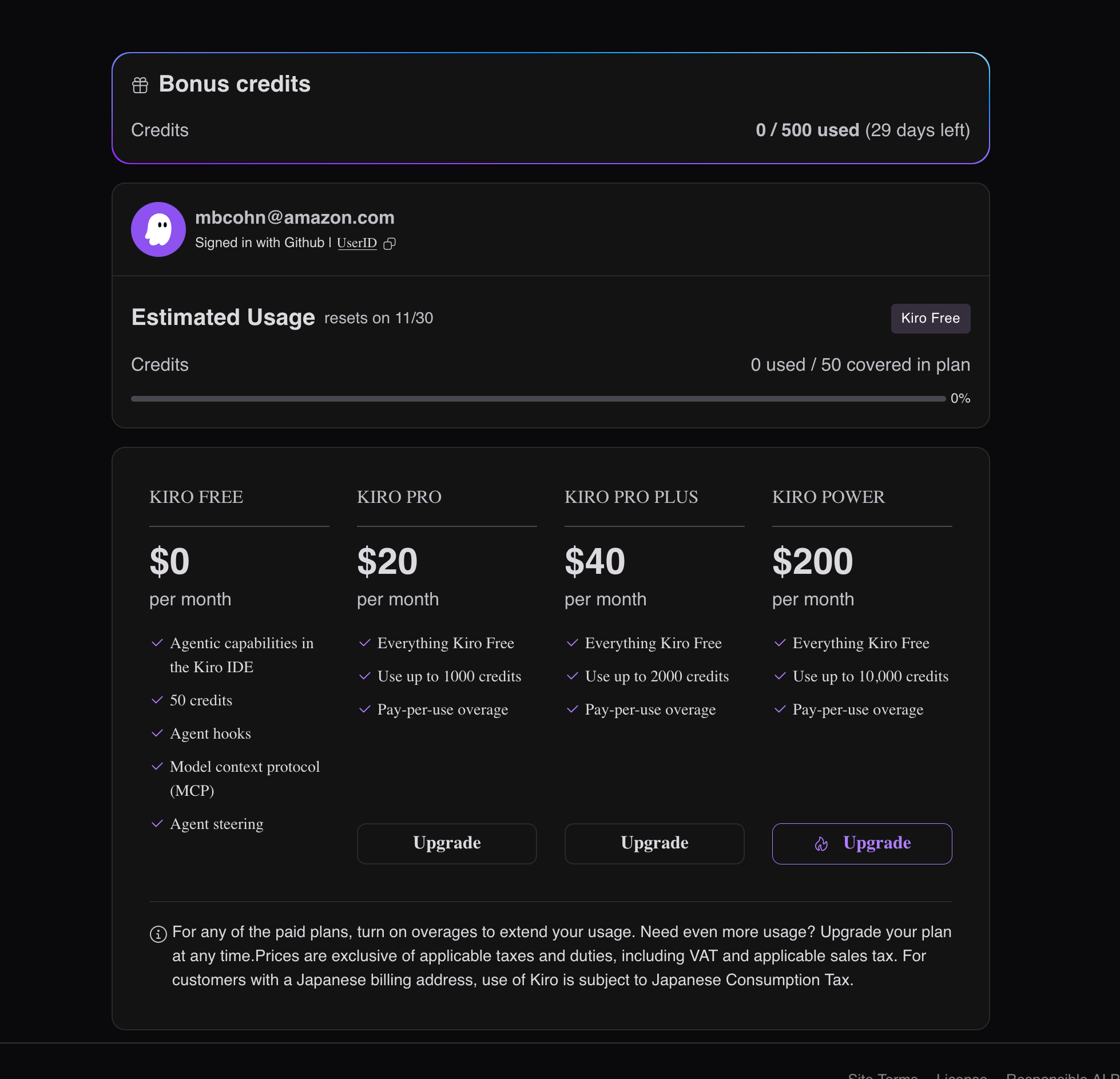
- package/.kiro/README.md +228 -0
- package/.kiro/agents/backend-engineer.json +6 -0
- package/.kiro/agents/backend-engineer.md +643 -0
- package/.kiro/agents/database-specialist.json +6 -0
- package/.kiro/agents/database-specialist.md +390 -0
- package/.kiro/agents/development-logger.json +6 -0
- package/.kiro/agents/development-logger.md +265 -0
- package/.kiro/agents/devops-engineer.json +6 -0
- package/.kiro/agents/devops-engineer.md +287 -0
- package/.kiro/agents/frontend-architect.json +6 -0
- package/.kiro/agents/frontend-architect.md +1032 -0
- package/.kiro/agents/hooks/backend-engineer-hooks.yaml +540 -0
- package/.kiro/agents/hooks/database-specialist-hooks.yaml +488 -0
- package/.kiro/agents/hooks/development-logger-hooks.yaml +361 -0
- package/.kiro/agents/hooks/devops-engineer-hooks.yaml +345 -0
- package/.kiro/agents/hooks/frontend-architect-hooks.yaml +521 -0
- package/.kiro/agents/hooks/project-manager-hooks.yaml +513 -0
- package/.kiro/agents/hooks/security-specialist-hooks.yaml +358 -0
- package/.kiro/agents/hooks/test-orchestrator-hooks.yaml +380 -0
- package/.kiro/agents/hooks/ui-ux-designer-hooks.yaml +353 -0
- package/.kiro/agents/project-manager.json +6 -0
- package/.kiro/agents/project-manager.md +344 -0
- package/.kiro/agents/prompts/backend-engineer-system.md +815 -0
- package/.kiro/agents/prompts/database-specialist-system.md +332 -0
- package/.kiro/agents/prompts/development-logger-system.md +232 -0
- package/.kiro/agents/prompts/devops-engineer-system.md +260 -0
- package/.kiro/agents/prompts/frontend-architect-system.md +305 -0
- package/.kiro/agents/prompts/project-manager-system.md +285 -0
- package/.kiro/agents/prompts/security-specialist-system.md +231 -0
- package/.kiro/agents/prompts/test-orchestrator-system.md +214 -0
- package/.kiro/agents/prompts/ui-ux-designer-system.md +270 -0
- package/.kiro/agents/security-specialist.json +6 -0
- package/.kiro/agents/security-specialist.md +277 -0
- package/.kiro/agents/test-orchestrator.json +6 -0
- package/.kiro/agents/test-orchestrator.md +266 -0
- package/.kiro/agents/ui-ux-designer.json +6 -0
- package/.kiro/agents/ui-ux-designer.md +284 -0
- package/.kiro/devlog/00-START-HERE.md +444 -0
- package/.kiro/devlog/COMPLETE-WORKFLOW.md +553 -0
- package/.kiro/devlog/DEVLOG-INTEGRATION.md +413 -0
- package/.kiro/devlog/DEVLOG-PROCESS-FLOWS.md +484 -0
- package/.kiro/devlog/DEVLOG-QUICK-REF.md +299 -0
- package/.kiro/devlog/DEVLOG.md +22 -0
- package/.kiro/devlog/IMPLEMENTATION-COMPLETE.txt +434 -0
- package/.kiro/devlog/IMPLEMENTATION-SUMMARY.md +358 -0
- package/.kiro/devlog/README.md +363 -0
- package/.kiro/devlog/devlog-update.bat +136 -0
- package/.kiro/devlog/devlog-update.sh +275 -0
- package/.kiro/devlog/feature-completion-hook.bat +78 -0
- package/.kiro/devlog/feature-completion-hook.sh +84 -0
- package/.kiro/documentation/cli.md +31 -0
- package/.kiro/documentation/docs_cli.md +41 -0
- package/.kiro/documentation/docs_cli_authentication.md +43 -0
- package/.kiro/documentation/docs_cli_autocomplete.md +132 -0
- package/.kiro/documentation/docs_cli_billing.md +31 -0
- package/.kiro/documentation/docs_cli_billing_contact-support.md +43 -0
- package/.kiro/documentation/docs_cli_billing_managing-taxes.md +67 -0
- package/.kiro/documentation/docs_cli_billing_related-questions.md +49 -0
- package/.kiro/documentation/docs_cli_billing_subscription-portal.md +31 -0
- package/.kiro/documentation/docs_cli_chat.md +84 -0
- package/.kiro/documentation/docs_cli_chat_configuration.md +40 -0
- package/.kiro/documentation/docs_cli_chat_context.md +258 -0
- package/.kiro/documentation/docs_cli_chat_git-aware-selection.md +41 -0
- package/.kiro/documentation/docs_cli_chat_images.md +53 -0
- package/.kiro/documentation/docs_cli_chat_manage-prompts.md +216 -0
- package/.kiro/documentation/docs_cli_chat_model-selection.md +153 -0
- package/.kiro/documentation/docs_cli_chat_permissions.md +68 -0
- package/.kiro/documentation/docs_cli_chat_planning-agent.md +230 -0
- package/.kiro/documentation/docs_cli_chat_responding.md +123 -0
- package/.kiro/documentation/docs_cli_chat_security.md +87 -0
- package/.kiro/documentation/docs_cli_chat_subagents.md +77 -0
- package/.kiro/documentation/docs_cli_code-intelligence.md +251 -0
- package/.kiro/documentation/docs_cli_custom-agents.md +37 -0
- package/.kiro/documentation/docs_cli_custom-agents_configuration-reference.md +941 -0
- package/.kiro/documentation/docs_cli_custom-agents_creating.md +93 -0
- package/.kiro/documentation/docs_cli_custom-agents_examples.md +360 -0
- package/.kiro/documentation/docs_cli_custom-agents_troubleshooting.md +180 -0
- package/.kiro/documentation/docs_cli_enterprise_billing.md +33 -0
- package/.kiro/documentation/docs_cli_enterprise_concepts.md +34 -0
- package/.kiro/documentation/docs_cli_enterprise_getting-started.md +19 -0
- package/.kiro/documentation/docs_cli_enterprise_iam.md +251 -0
- package/.kiro/documentation/docs_cli_enterprise_monitor-and-track.md +15 -0
- package/.kiro/documentation/docs_cli_enterprise_monitor-and-track_dashboard.md +62 -0
- package/.kiro/documentation/docs_cli_enterprise_monitor-and-track_prompt-logging.md +165 -0
- package/.kiro/documentation/docs_cli_enterprise_monitor-and-track_user-activity.md +123 -0
- package/.kiro/documentation/docs_cli_enterprise_settings.md +15 -0
- package/.kiro/documentation/docs_cli_enterprise_subscribe.md +36 -0
- package/.kiro/documentation/docs_cli_enterprise_subscription-management.md +55 -0
- package/.kiro/documentation/docs_cli_enterprise_supported-regions.md +39 -0
- package/.kiro/documentation/docs_cli_experimental.md +282 -0
- package/.kiro/documentation/docs_cli_experimental_checkpointing.md +439 -0
- package/.kiro/documentation/docs_cli_experimental_delegate.md +422 -0
- package/.kiro/documentation/docs_cli_experimental_knowledge-management.md +449 -0
- package/.kiro/documentation/docs_cli_experimental_tangent-mode.md +357 -0
- package/.kiro/documentation/docs_cli_experimental_thinking.md +331 -0
- package/.kiro/documentation/docs_cli_experimental_todo-lists.md +385 -0
- package/.kiro/documentation/docs_cli_hooks.md +207 -0
- package/.kiro/documentation/docs_cli_installation.md +235 -0
- package/.kiro/documentation/docs_cli_mcp.md +106 -0
- package/.kiro/documentation/docs_cli_mcp_configuration.md +294 -0
- package/.kiro/documentation/docs_cli_mcp_examples.md +273 -0
- package/.kiro/documentation/docs_cli_mcp_governance.md +436 -0
- package/.kiro/documentation/docs_cli_mcp_security.md +77 -0
- package/.kiro/documentation/docs_cli_migrating-from-q.md +129 -0
- package/.kiro/documentation/docs_cli_privacy-and-security.md +83 -0
- package/.kiro/documentation/docs_cli_privacy-and-security_compliance-validation.md +17 -0
- package/.kiro/documentation/docs_cli_privacy-and-security_data-protection.md +104 -0
- package/.kiro/documentation/docs_cli_privacy-and-security_firewalls.md +26 -0
- package/.kiro/documentation/docs_cli_privacy-and-security_infrastructure-security.md +10 -0
- package/.kiro/documentation/docs_cli_privacy-and-security_vpc-endpoints.md +41 -0
- package/.kiro/documentation/docs_cli_reference_built-in-tools.md +624 -0
- package/.kiro/documentation/docs_cli_reference_cli-commands.md +689 -0
- package/.kiro/documentation/docs_cli_reference_settings.md +294 -0
- package/.kiro/documentation/docs_cli_reference_slash-commands.md +559 -0
- package/.kiro/documentation/docs_cli_steering.md +84 -0
- package/.kiro/guides/AGENT_WORKFLOW_GUIDE.md +294 -0
- package/.kiro/guides/DEVLOG.md +882 -0
- package/.kiro/guides/IMPLEMENTATION_EXAMPLES.md +611 -0
- package/.kiro/guides/PIV Loop.md +122 -0
- package/.kiro/guides/PIV Loop.png +0 -0
- package/.kiro/guides/PIVLoop.png +0 -0
- package/.kiro/guides/QUICK_REFERENCE.md +202 -0
- package/.kiro/guides/README.md +149 -0
- package/.kiro/guides/advanced-patterns.md +514 -0
- package/.kiro/guides/agent-coordination.md +434 -0
- package/.kiro/guides/core-workflows.md +409 -0
- package/.kiro/guides/emergency-procedures.md +414 -0
- package/.kiro/guides/project-evaluation.md +534 -0
- package/.kiro/guides/quality-assurance.md +431 -0
- package/.kiro/guides/quick-start.md +235 -0
- package/.kiro/guides/troubleshooting.md +575 -0
- package/.kiro/guides/walkthroughs.md +711 -0
- package/.kiro/prompts/add-to-devlog.md +263 -0
- package/.kiro/prompts/code-review-fix.md +18 -0
- package/.kiro/prompts/code-review-hackathon.md +167 -0
- package/.kiro/prompts/code-review-security.md +454 -0
- package/.kiro/prompts/code-review.md +113 -0
- package/.kiro/prompts/create-prd.md +151 -0
- package/.kiro/prompts/execute-backend.md +257 -0
- package/.kiro/prompts/execute-frontend.md +438 -0
- package/.kiro/prompts/execute-logging.md +491 -0
- package/.kiro/prompts/execute-security.md +482 -0
- package/.kiro/prompts/execute-testing.md +528 -0
- package/.kiro/prompts/execute.md +101 -0
- package/.kiro/prompts/execution-report.md +72 -0
- package/.kiro/prompts/implement-fix.md +228 -0
- package/.kiro/prompts/plan-feature.md +433 -0
- package/.kiro/prompts/prime.md +73 -0
- package/.kiro/prompts/quality-metrics.md +622 -0
- package/.kiro/prompts/quickstart.md +318 -0
- package/.kiro/prompts/rca.md +220 -0
- package/.kiro/prompts/system-review.md +189 -0
- package/README.md +32 -0
- package/bin/cli.js +97 -0
- package/package.json +33 -0
|
@@ -0,0 +1,132 @@
|
|
|
1
|
+
# Completions & autocomplete
|
|
2
|
+
Kiro CLI provides two AI-powered assistance features to help you work more efficiently in your terminal:
|
|
3
|
+
* **Autocomplete Dropdown Menu** : A graphical menu showing available command options
|
|
4
|
+
* **Inline Suggestions** : Gray "ghost text" that appears as you type
|
|
5
|
+
|
|
6
|
+
|
|
7
|
+
These features work independently and support hundreds of popular command line tools including `git`, `npm`, `docker`, and `aws`.
|
|
8
|
+
## Autocomplete dropdown menu[](https://kiro.dev/docs/cli/autocomplete/#autocomplete-dropdown-menu)
|
|
9
|
+
The autocomplete dropdown appears to the right of your cursor when typing commands, showing available options, subcommands, and arguments that you can select using arrow keys.
|
|
10
|
+
### Using autocomplete[](https://kiro.dev/docs/cli/autocomplete/#using-autocomplete)
|
|
11
|
+
The autocomplete dropdown is automatically enabled after you install Kiro CLI:
|
|
12
|
+
1. Open your terminal or command prompt
|
|
13
|
+
2. Start typing a command
|
|
14
|
+
3. A graphical menu will appear showing available options
|
|
15
|
+
4. Use arrow keys to navigate suggestions
|
|
16
|
+
5. Press **Tab** or **Enter** to select an option
|
|
17
|
+
|
|
18
|
+
|
|
19
|
+
### Configuration[](https://kiro.dev/docs/cli/autocomplete/#configuration)
|
|
20
|
+
Customize the autocomplete behavior:
|
|
21
|
+
bash
|
|
22
|
+
```
|
|
23
|
+
|
|
24
|
+
# Enable/disable autocomplete
|
|
25
|
+
kiro-cli settings autocomplete.disable false # enable
|
|
26
|
+
kiro-cli settings autocomplete.disable true # disable
|
|
27
|
+
|
|
28
|
+
# Change theme
|
|
29
|
+
kiro-cli theme dark
|
|
30
|
+
kiro-cli theme light
|
|
31
|
+
kiro-cli theme system
|
|
32
|
+
|
|
33
|
+
# View current theme
|
|
34
|
+
kiro-cli theme
|
|
35
|
+
|
|
36
|
+
# List available themes
|
|
37
|
+
kiro-cli theme --list
|
|
38
|
+
|
|
39
|
+
|
|
40
|
+
```
|
|
41
|
+
|
|
42
|
+
## Inline suggestions[](https://kiro.dev/docs/cli/autocomplete/#inline-suggestions)
|
|
43
|
+
Inline suggestions appear as gray "ghost text" directly on your command line as you type. This feature works independently from the dropdown menu.
|
|
44
|
+
### Using inline suggestions[](https://kiro.dev/docs/cli/autocomplete/#using-inline-suggestions)
|
|
45
|
+
Inline suggestions are enabled by default:
|
|
46
|
+
1. Start typing a command
|
|
47
|
+
2. Gray ghost text will appear showing potential completions
|
|
48
|
+
3. Press the **right arrow key** or **Tab** to accept
|
|
49
|
+
4. Continue typing to ignore the suggestion
|
|
50
|
+
|
|
51
|
+
|
|
52
|
+
### Managing inline suggestions[](https://kiro.dev/docs/cli/autocomplete/#managing-inline-suggestions)
|
|
53
|
+
Control inline suggestions with the `kiro-cli inline` command:
|
|
54
|
+
bash
|
|
55
|
+
```
|
|
56
|
+
|
|
57
|
+
# Enable inline suggestions
|
|
58
|
+
kiro-cli inline enable
|
|
59
|
+
|
|
60
|
+
# Disable inline suggestions
|
|
61
|
+
kiro-cli inline disable
|
|
62
|
+
|
|
63
|
+
# Check current status
|
|
64
|
+
kiro-cli inline status
|
|
65
|
+
|
|
66
|
+
# Set customization
|
|
67
|
+
kiro-cli inline set-customization [ARN]
|
|
68
|
+
|
|
69
|
+
# Show available customizations
|
|
70
|
+
kiro-cli inline show-customizations
|
|
71
|
+
|
|
72
|
+
|
|
73
|
+
```
|
|
74
|
+
|
|
75
|
+
## Supported tools[](https://kiro.dev/docs/cli/autocomplete/#supported-tools)
|
|
76
|
+
The autocomplete system supports hundreds of command line tools:
|
|
77
|
+
### Popular tools[](https://kiro.dev/docs/cli/autocomplete/#popular-tools)
|
|
78
|
+
* **Git** : Branch names, commit hashes, file paths
|
|
79
|
+
* **Docker** : Container names, image tags, commands
|
|
80
|
+
* **npm/yarn** : Package names, scripts, dependencies
|
|
81
|
+
* **kubectl** : Resources, namespaces, contexts
|
|
82
|
+
* **terraform** : Resources, providers, variables
|
|
83
|
+
* **aws** : Services, regions, resource names
|
|
84
|
+
|
|
85
|
+
|
|
86
|
+
### Language tools[](https://kiro.dev/docs/cli/autocomplete/#language-tools)
|
|
87
|
+
* **Python** : `pip`, `poetry`, `conda`
|
|
88
|
+
* **Node.js** : `npm`, `yarn`, `pnpm`
|
|
89
|
+
* **Ruby** : `gem`, `bundle`
|
|
90
|
+
* **Go** : `go mod`, `go build`
|
|
91
|
+
|
|
92
|
+
|
|
93
|
+
### System tools[](https://kiro.dev/docs/cli/autocomplete/#system-tools)
|
|
94
|
+
* Standard Unix/Linux commands
|
|
95
|
+
* Package managers (`apt`, `brew`, `yum`)
|
|
96
|
+
* File operations (`ls`, `find`, `grep`)
|
|
97
|
+
|
|
98
|
+
|
|
99
|
+
## Troubleshooting[](https://kiro.dev/docs/cli/autocomplete/#troubleshooting)
|
|
100
|
+
### Autocomplete not working[](https://kiro.dev/docs/cli/autocomplete/#autocomplete-not-working)
|
|
101
|
+
If autocomplete isn't appearing:
|
|
102
|
+
1. Verify installation: `kiro-cli --version`
|
|
103
|
+
2. Check if disabled: `kiro-cli settings autocomplete.disable`
|
|
104
|
+
3. Restart your terminal
|
|
105
|
+
4. Try a different shell (bash, zsh, fish)
|
|
106
|
+
|
|
107
|
+
|
|
108
|
+
### Inline suggestions issues[](https://kiro.dev/docs/cli/autocomplete/#inline-suggestions-issues)
|
|
109
|
+
If inline suggestions aren't working:
|
|
110
|
+
1. Check status: `kiro-cli inline status`
|
|
111
|
+
2. Enable if disabled: `kiro-cli inline enable`
|
|
112
|
+
3. Verify shell compatibility
|
|
113
|
+
4. Check terminal emulator support
|
|
114
|
+
|
|
115
|
+
|
|
116
|
+
Page updated: November 16, 2025
|
|
117
|
+
[Hooks](https://kiro.dev/docs/cli/hooks/)
|
|
118
|
+
[Code Intelligence](https://kiro.dev/docs/cli/code-intelligence/)
|
|
119
|
+
On this page
|
|
120
|
+
* [Autocomplete dropdown menu](https://kiro.dev/docs/cli/autocomplete/#autocomplete-dropdown-menu)
|
|
121
|
+
* [Using autocomplete](https://kiro.dev/docs/cli/autocomplete/#using-autocomplete)
|
|
122
|
+
* [Configuration](https://kiro.dev/docs/cli/autocomplete/#configuration)
|
|
123
|
+
* [Inline suggestions](https://kiro.dev/docs/cli/autocomplete/#inline-suggestions)
|
|
124
|
+
* [Using inline suggestions](https://kiro.dev/docs/cli/autocomplete/#using-inline-suggestions)
|
|
125
|
+
* [Managing inline suggestions](https://kiro.dev/docs/cli/autocomplete/#managing-inline-suggestions)
|
|
126
|
+
* [Supported tools](https://kiro.dev/docs/cli/autocomplete/#supported-tools)
|
|
127
|
+
* [Popular tools](https://kiro.dev/docs/cli/autocomplete/#popular-tools)
|
|
128
|
+
* [Language tools](https://kiro.dev/docs/cli/autocomplete/#language-tools)
|
|
129
|
+
* [System tools](https://kiro.dev/docs/cli/autocomplete/#system-tools)
|
|
130
|
+
* [Troubleshooting](https://kiro.dev/docs/cli/autocomplete/#troubleshooting)
|
|
131
|
+
* [Autocomplete not working](https://kiro.dev/docs/cli/autocomplete/#autocomplete-not-working)
|
|
132
|
+
* [Inline suggestions issues](https://kiro.dev/docs/cli/autocomplete/#inline-suggestions-issues)
|
|
@@ -0,0 +1,31 @@
|
|
|
1
|
+
# Billing for individuals
|
|
2
|
+
Kiro offers four distinct service tiers designed to meet different development needs: **Kiro Free** , **Kiro Pro** , **Kiro Pro+** , and **Kiro Power**. Each tier provides progressively more capabilities.
|
|
3
|
+
New Kiro users are automatically enrolled in a 30 day free trial. The free trial is a temporary enhancement to the perpetual **Kiro Free** tier that allows you to test Pro features by providing 500 credits to use over a 30 day trial period. After your trial, you'll need to choose one of Kiro's paid tiers or switch to the perpetual **Kiro Free** tier, and any unused credits will expire.
|
|
4
|
+
**Info**
|
|
5
|
+
If you upgrade tiers during the 30 day trial, you'll keep the 500 credits, but any unused trial credits will expire after the 30 days are complete. For example, if you upgrade to the Pro tier within 30 days, you'll have 1,500 credits (1,000 Pro + 500 Trial). After 30 days, unused trial credit expires, leaving you with the Pro tier credits.
|
|
6
|
+
Credits are consumed fractionally based on each request. Simple edits and shorter prompts will use fewer credits than complex, lengthy tasks. This means that fractional credits allow you to get more value from your credit allocation.
|
|
7
|
+
## Tier comparison[](https://kiro.dev/docs/cli/billing/#tier-comparison)
|
|
8
|
+
Tier | Credits | Overage
|
|
9
|
+
---|---|---
|
|
10
|
+
Trial | 500 | Not available
|
|
11
|
+
Free | 50 | Not available
|
|
12
|
+
Pro | 1,000 | Opt-in
|
|
13
|
+
Pro+ | 2,000 | Opt-in
|
|
14
|
+
Power | 10,000 | Opt-in
|
|
15
|
+
## Billing practices[](https://kiro.dev/docs/cli/billing/#billing-practices)
|
|
16
|
+
Note the following billing practices when you subscribe, downgrade, unsubscribe, and incur overages:
|
|
17
|
+
* If you are on the **Kiro Free** tier, have never upgraded before, and **upgrade** to the Pro, Pro+, or Power tier mid-month, you are charged a prorated fee, but immediately get access to your new plan's full credit limits. For example, if you subscribe to Pro on April 15th, you'll be charged half the subscription fee and be able to use all of the credits for that tier. Additionally, if you decide to **upgrade** again on April 20th to Pro+, you'll get backdated prorated fees and access to the full credit limits of that tier, as if you directly upgraded to Pro+ on April 15th. After that, you'll be charged the full amount.
|
|
18
|
+
* If you are on any paid tier, such as the Pro, Pro+, or Power tier, and **upgrade** to another paid tier, you are charged a retroactive fee for the entire month based on the price difference. For example, if you upgrade from a Pro to a Pro+ tier, you'll be charged the difference in the subscription fee and at the end of the month, Kiro will recalculate the entire month's usage under the new tier's credits. In this case, if you used 1,010 credits, that would be 10 credits over the Pro cap, however since you upgrade to the Pro+ tier, you avoided paying an overage fee.
|
|
19
|
+
**Info**
|
|
20
|
+
If you're on a paid tier, switch to the **Kiro Free** tier, and then switch back to a paid tier, the payment behavior will be the same as above. Note that downgrades take effect in the following month and upgrades are effective immediately.
|
|
21
|
+
* If you **downgrade** from Pro+ to Pro tier mid-month, you are charged the full fee for that month. For example, if you downgrade on June 2nd, you'll be charged the full Pro+ subscription fee for the month of June. From July onward, you will be charged the Pro fee.
|
|
22
|
+
* If you **incur overages** , you are charged the total overage fees for the month at the end of the current billing cycle.
|
|
23
|
+
* For all tiers, your **usage cap** renews at the beginning of the next billing cycle.
|
|
24
|
+
|
|
25
|
+
|
|
26
|
+
Page updated: November 15, 2025
|
|
27
|
+
[Code Intelligence](https://kiro.dev/docs/cli/code-intelligence/)
|
|
28
|
+
[Managing your Kiro CLI subscription](https://kiro.dev/docs/cli/billing/subscription-portal/)
|
|
29
|
+
On this page
|
|
30
|
+
* [Tier comparison](https://kiro.dev/docs/cli/billing/#tier-comparison)
|
|
31
|
+
* [Billing practices](https://kiro.dev/docs/cli/billing/#billing-practices)
|
|
@@ -0,0 +1,43 @@
|
|
|
1
|
+
# Contacting billing support
|
|
2
|
+
If you need assistance with billing questions, payment issues, subscription changes, or other account-related concerns, you can contact our billing support team directly.
|
|
3
|
+
## When to contact billing support[](https://kiro.dev/docs/cli/billing/contact-support/#when-to-contact-billing-support)
|
|
4
|
+
Contact billing support for help with:
|
|
5
|
+
* **Payment issues** - Failed payments, updating payment methods, or billing errors
|
|
6
|
+
* **Subscription questions** - Plan changes, upgrade/downgrade assistance, or billing cycle inquiries
|
|
7
|
+
* **Account access** - Issues accessing your account or billing dashboard
|
|
8
|
+
* **Refund requests** - Questions about refunds or billing disputes
|
|
9
|
+
* **Usage clarification** - Understanding your usage charges or tier limits
|
|
10
|
+
* **Invoice questions** - Requesting copies of invoices or clarifying charges
|
|
11
|
+
|
|
12
|
+
|
|
13
|
+
## How to contact support[](https://kiro.dev/docs/cli/billing/contact-support/#how-to-contact-support)
|
|
14
|
+
You can contact billing support in two ways:
|
|
15
|
+
### Option 1: Command line[](https://kiro.dev/docs/cli/billing/contact-support/#option-1-command-line)
|
|
16
|
+
Use the Kiro CLI issue reporting command:
|
|
17
|
+
bash
|
|
18
|
+
```
|
|
19
|
+
|
|
20
|
+
kiro-cli issue
|
|
21
|
+
|
|
22
|
+
|
|
23
|
+
```
|
|
24
|
+
|
|
25
|
+
### Option 2: From within chat[](https://kiro.dev/docs/cli/billing/contact-support/#option-2-from-within-chat)
|
|
26
|
+
If you're already in a Kiro CLI chat session, you can use the built-in issue reporting tool to create a GitHub issue with pre-filled context. Just tell Kiro in natural language about the issue that you want to report, and it will help you create the issue on GitHub.
|
|
27
|
+
Both methods will help you create a support request that gets routed to our billing team.
|
|
28
|
+
## What information you'll need[](https://kiro.dev/docs/cli/billing/contact-support/#what-information-youll-need)
|
|
29
|
+
When creating your support request, include:
|
|
30
|
+
* **Issue title** - Brief description of your billing concern
|
|
31
|
+
* **Detailed description** - Specific information about your billing question or issue
|
|
32
|
+
* **Account details** - Your Kiro account email and subscription information
|
|
33
|
+
* **Context** - Any relevant error messages or circumstances
|
|
34
|
+
|
|
35
|
+
|
|
36
|
+
## Tips for effective support requests[](https://kiro.dev/docs/cli/billing/contact-support/#tips-for-effective-support-requests)
|
|
37
|
+
To help us resolve your issue quickly:
|
|
38
|
+
* **Be specific** - Clearly describe the billing problem you're experiencing
|
|
39
|
+
* **Include relevant details** - Account email, subscription tier, approximate dates of issues
|
|
40
|
+
* **Mention previous attempts** - Let us know if you've tried any troubleshooting steps
|
|
41
|
+
|
|
42
|
+
|
|
43
|
+
**Info**
|
|
@@ -0,0 +1,67 @@
|
|
|
1
|
+
# Managing your taxes
|
|
2
|
+
This section provides answers to tax collection, VAT, and billing address questions for Kiro.
|
|
3
|
+
## Why do I see information for Amazon web services, inc. For my Kiro purchase?[](https://kiro.dev/docs/cli/billing/managing-taxes/#why-do-i-see-information-for-amazon-web-services-inc-for-my-kiro-purchase)
|
|
4
|
+
Amazon Web Services, Inc. is the service provider for Kiro. Amazon Web Services, Inc. ("AWSI") is established and operates in the United States. AWSI is registered for Sales Tax in the states shown [here](https://aws.amazon.com/tax-help/united-states/). AWSI is also registered for VAT in countries where indirect tax laws require foreign providers of Electronically Supplied Services ("ESS") to register and collect local VAT. AWSI treats Kiro as Downloaded Software in the USA and as ESS outside of the USA. If required by your country's Indirect Tax laws, AWS will collect Indirect Taxes from you, issue a tax invoice, and remit it to the tax authority in AWS's name. In some countries, AWS is not required to collect Indirect Taxes from you and remit it to the tax authority in AWS's name if you have a valid tax registration number ("TRN") in that country. You need to add your TRN to your Stripe Account Customer Profile, and you may be required to self-assess VAT depending on local regulations.
|
|
5
|
+
Please see below jurisdictions where tax will be charged on Kiro purchases:
|
|
6
|
+
Country Name | Tax Collected From | Tax Rate
|
|
7
|
+
---|---|---
|
|
8
|
+
AUSTRALIA | B2C | 10%
|
|
9
|
+
AUSTRIA | B2B/B2C | 20%
|
|
10
|
+
BANGLADESH | B2B | 15%
|
|
11
|
+
BELGIUM | B2B/B2C | 21%
|
|
12
|
+
BULGARIA | B2C | 20%
|
|
13
|
+
CANADA | B2B/B2C | Varies by Province
|
|
14
|
+
CHILE | B2C | 19%
|
|
15
|
+
CZECH REPUBLIC | B2B/B2C | 21%
|
|
16
|
+
FRANCE | B2C | 20%
|
|
17
|
+
GERMANY | B2C | 19%
|
|
18
|
+
INDIA | B2C | 18%
|
|
19
|
+
INDONESIA | B2B/B2C | 11%
|
|
20
|
+
ISRAEL | N/A | 18%
|
|
21
|
+
ITALY | B2C | 22%
|
|
22
|
+
JAPAN | B2B/B2C | 10%
|
|
23
|
+
KOREA (REPUBLIC OF KOREA) | B2C | 10%
|
|
24
|
+
MALAYSIA | B2B/B2C | 8%
|
|
25
|
+
NEPAL | B2B | 13%
|
|
26
|
+
NETHERLANDS | B2C | 21%
|
|
27
|
+
NEW ZEALAND | B2C | 15%
|
|
28
|
+
NORWAY | B2B/B2C | 25%
|
|
29
|
+
POLAND | B2C | 23%
|
|
30
|
+
PORTUGAL | B2B/B2C | 23%
|
|
31
|
+
ROMANIA | B2C | 19%
|
|
32
|
+
SINGAPORE | B2C | 9%
|
|
33
|
+
SOUTH AFRICA | B2B/B2C | 15%
|
|
34
|
+
SPAIN | B2C | 21%
|
|
35
|
+
SWEDEN | B2B/B2C | 25%
|
|
36
|
+
SWITZERLAND | B2B/B2C | 8.1%
|
|
37
|
+
TAIWAN | B2C | 5%
|
|
38
|
+
THAILAND | B2C | 7%
|
|
39
|
+
UK | B2C | 20%
|
|
40
|
+
UNITED ARAB EMIRATES | B2B/B2C | 5%
|
|
41
|
+
UNITED STATES (US) | B2B/B2C | Varies by state
|
|
42
|
+
## How does AWS determine my location to determine the applicable taxes for my account(s)?[](https://kiro.dev/docs/cli/billing/managing-taxes/#how-does-aws-determine-my-location-to-determine-the-applicable-taxes-for-my-accounts)
|
|
43
|
+
AWS will use your customer billing address you provide when purchasing Kiro. If the billing address entered is invalid, you will get a customer_tax_location_invalid error.
|
|
44
|
+
## I am a B2B (business) customer, my company's tax registration number (TRN) is on our stripe/AWS accounts, so why are we being charged VAT rather than using reverse charge and self-assessing VAT?[](https://kiro.dev/docs/cli/billing/managing-taxes/#i-am-a-b2b-business-customer-my-companys-tax-registration-number-trn-is-on-our-stripeaws-accounts-so-why-are-we-being-charged-vat-rather-than-using-reverse-charge-and-self-assessing-vat)
|
|
45
|
+
Kiro is billed using a different platform (not the AWS Console). If you are a B2B customer who has provided its TRN in your AWS Account, you will need to also include for your Kiro account through your customer portal. In addition, certain jurisdictions require AWS to charge and collect tax on both B2B and B2C purchases, in these jurisdictions AWS is responsible, and you will not be able to Self-Assess.
|
|
46
|
+
## If I update my tax, account, or billing address mid-month, how is VAT calculated?[](https://kiro.dev/docs/cli/billing/managing-taxes/#if-i-update-my-tax-account-or-billing-address-mid-month-how-is-vat-calculated)
|
|
47
|
+
AWS will use your billing address at the time of your purchase, or changes to your subscription such as upgrades or renewals.
|
|
48
|
+
## I receive special status/relief from paying VAT. How do I check that I am not charged VAT?[](https://kiro.dev/docs/cli/billing/managing-taxes/#i-receive-special-statusrelief-from-paying-vat-how-do-i-check-that-i-am-not-charged-vat)
|
|
49
|
+
Special status/relief status from paying VAT is coming soon.
|
|
50
|
+
## What payment currencies and payment methods are supported by AWS inc. For Kiro purchases?[](https://kiro.dev/docs/cli/billing/managing-taxes/#what-payment-currencies-and-payment-methods-are-supported-by-aws-inc-for-kiro-purchases)
|
|
51
|
+
We accept all major credit cards. Kiro usage is invoiced in USD.
|
|
52
|
+
## My VAT invoice, and/or AWS seller appears incorrectly.[](https://kiro.dev/docs/cli/billing/managing-taxes/#my-vat-invoice-andor-aws-seller-appears-incorrectly)
|
|
53
|
+
Please contact [Kiro billing support](https://support.aws.amazon.com/#/contacts/kiro).
|
|
54
|
+
## What tax registration numbers (trns) and formats are accepted?[](https://kiro.dev/docs/cli/billing/managing-taxes/#what-tax-registration-numbers-trns-and-formats-are-accepted)
|
|
55
|
+
Kiro will accept TRNs based on the requirements set forth by the country in which the customer is located. When a customer adds a TRN, Kiro will check that the formatting is correct.
|
|
56
|
+
Page updated: November 16, 2025
|
|
57
|
+
[Managing your Kiro CLI subscription](https://kiro.dev/docs/cli/billing/subscription-portal/)
|
|
58
|
+
[Related questions](https://kiro.dev/docs/cli/billing/related-questions/)
|
|
59
|
+
On this page
|
|
60
|
+
* [Why do I see information for Amazon web services, inc. For my Kiro purchase?](https://kiro.dev/docs/cli/billing/managing-taxes/#why-do-i-see-information-for-amazon-web-services-inc-for-my-kiro-purchase)
|
|
61
|
+
* [How does AWS determine my location to determine the applicable taxes for my account(s)?](https://kiro.dev/docs/cli/billing/managing-taxes/#how-does-aws-determine-my-location-to-determine-the-applicable-taxes-for-my-accounts)
|
|
62
|
+
* [I am a B2B (business) customer, my company's tax registration number (TRN) is on our stripe/AWS accounts, so why are we being charged VAT rather than using reverse charge and self-assessing VAT?](https://kiro.dev/docs/cli/billing/managing-taxes/#i-am-a-b2b-business-customer-my-companys-tax-registration-number-trn-is-on-our-stripeaws-accounts-so-why-are-we-being-charged-vat-rather-than-using-reverse-charge-and-self-assessing-vat)
|
|
63
|
+
* [If I update my tax, account, or billing address mid-month, how is VAT calculated?](https://kiro.dev/docs/cli/billing/managing-taxes/#if-i-update-my-tax-account-or-billing-address-mid-month-how-is-vat-calculated)
|
|
64
|
+
* [I receive special status/relief from paying VAT. How do I check that I am not charged VAT?](https://kiro.dev/docs/cli/billing/managing-taxes/#i-receive-special-statusrelief-from-paying-vat-how-do-i-check-that-i-am-not-charged-vat)
|
|
65
|
+
* [What payment currencies and payment methods are supported by AWS inc. For Kiro purchases?](https://kiro.dev/docs/cli/billing/managing-taxes/#what-payment-currencies-and-payment-methods-are-supported-by-aws-inc-for-kiro-purchases)
|
|
66
|
+
* [My VAT invoice, and/or AWS seller appears incorrectly.](https://kiro.dev/docs/cli/billing/managing-taxes/#my-vat-invoice-andor-aws-seller-appears-incorrectly)
|
|
67
|
+
* [What tax registration numbers (trns) and formats are accepted?](https://kiro.dev/docs/cli/billing/managing-taxes/#what-tax-registration-numbers-trns-and-formats-are-accepted)
|
|
@@ -0,0 +1,49 @@
|
|
|
1
|
+
# Related questions
|
|
2
|
+
This section provides answers to billing, subscriptions, and payment questions for Kiro.
|
|
3
|
+
## Which countries or regions are supported for paid plans?[](https://kiro.dev/docs/cli/billing/related-questions/#which-countries-or-regions-are-supported-for-paid-plans)
|
|
4
|
+
Currently, you can purchase a Kiro paid plan with a billing address in Afghanistan, Algeria, Angola, Antigua and Barbuda, Argentina, Armenia, Aruba, Australia, Austria, Azerbaijan, Bangladesh, Belgium, Belize, Bermuda, Bhutan, Bolivia, Bosnia and Herzegovina, Botswana, Brazil, Brunei, Bulgaria, Burkina Faso, Burundi, Cambodia, Canada, Cape Verde, Cayman Islands, Central African Republic, Chad, Chile, China, Colombia, Comoros, Congo, Cook Islands, Costa Rica, Croatia, Curacao, Cyprus, Czech Republic, Democratic Republic of the Congo, Denmark, Djibouti, Dominica, Dominican Republic, East Timor, Ecuador, El Salvador, Equatorial Guinea, Eritrea, Estonia, Ethiopia, Falkland Islands, Fiji, Finland, France, French Guiana, Gabon, Gambia, Germany, Gibraltar, Greece, Greenland, Grenada, Guatemala, Guinea, Guinea-Bissau, Guyana, Haiti, Honduras, Hong Kong SAR, Hungary, India, Indonesia, Iraq, Ireland, Israel, Italy, Jamaica, Japan, Jordan, Kiribati, Kosovo, Latvia, Lebanon, Lesotho, Liberia, Libya, Lithuania, Luxembourg, Macao, Macedonia, Madagascar, Malawi, Malaysia, Maldives, Mali, Malta, Mauritania, Mexico, Mongolia, Montenegro, Morocco, Mozambique, Myanmar, Namibia, Nauru, Nepal, Netherlands, New Zealand, Nicaragua, Niger, Norway, Palestinian Territories, Panama, Papua New Guinea, Paraguay, Philippines, Poland, Portugal, Qatar, Romania, Rwanda, Saint Kitts and Nevis, Saint Lucia, Saint Vincent and the Grenadines, Samoa, San Marino, Seychelles, Sierra Leone, Singapore, Slovakia, Slovenia, Solomon Islands, Somalia, South Africa, South Korea, South Sudan, Spain, Sri Lanka, Swaziland, Sweden, Switzerland, Tajikistan, Tanzania, Thailand, Togo, Tonga, Trinidad and Tobago, Tunisia, Turkmenistan, Tuvalu, United Arab Emirates, United Kingdom, United States of America, Uruguay, Uzbekistan, Vanuatu, Vatican City State, Venezuela, and Yemen. More countries or regions will be added soon.
|
|
5
|
+
## What is a credit?[](https://kiro.dev/docs/cli/billing/related-questions/#what-is-a-credit)
|
|
6
|
+
A credit is a unit of work in response to user prompts. Simple prompts can consume less than 1 credit. More complex prompts, such as executing a spec task, typically cost more than 1 credit. Additionally, different models consume credits at different rates, with a prompt executed via Sonnet 4 costing more credits than executing it with Auto. For example, a given task that consumes X credits to execute in Auto, will cost you 1.3X credits to execute via Sonnet 4. Credits are metered to the second decimal point, so the least number of credits a task can consume is 0.01 credits.
|
|
7
|
+
## What paid plan should I choose if I'm not sure about my future usage?[](https://kiro.dev/docs/cli/billing/related-questions/#what-paid-plan-should-i-choose-if-im-not-sure-about-my-future-usage)
|
|
8
|
+
Many customers are still exploring agentic development, and we expect that learning curve to continue beyond the first month. We don’t want you to have to predict your future usage or “time” upgrades to get a fair deal—we want you focused on building. A good path is to start on Pro and, if needed, enable overage so you can continue working without friction. If you later decide you need more, upgrade when you’re ready. In your first paid month we’ll discount for what you already paid and charge a single prorated amount for the higher plan back to the day you first became paid, so you won’t pay more than if you had upgraded earlier. For example, in a 30-day month if you start Pro on day 15 ($10 for the rest of the month) and later switch to Pro+ the same month, we discount for the $10 and charge $20—net $10—so you finish the month on Pro+ with one prorated allowance. From Month 2 onward, upgrades charge the full price difference and we re-rate the whole month under the higher plan’s limits, which also prevents overpaying.
|
|
9
|
+
## What paid plan should I choose once my Kiro usage is stable?[](https://kiro.dev/docs/cli/billing/related-questions/#what-paid-plan-should-i-choose-once-my-kiro-usage-is-stable)
|
|
10
|
+
Our intent with Kiro’s pricing is to let most developers work comfortably without micromanaging usage or worrying about surprises. Once your usage settles into a pattern, choose the smallest subscription plan that reliably covers a typical month, with a little headroom. That reflects our goal of making your default experience predictable: if you prefer a fixed bill, leave overage off and your usage will pause at the cap; if you prefer continuity during occasional spikes, keep overage on. If those spikes become frequent, or your month-end overage spend starts to approach the price difference to the next tier, moving up will usually lower your total cost while keeping things simple.
|
|
11
|
+
## What happens when I reach the monthly limit of my plan?[](https://kiro.dev/docs/cli/billing/related-questions/#what-happens-when-i-reach-the-monthly-limit-of-my-plan)
|
|
12
|
+
If you hit the limit, requests pause until your limits reset at the start of the next month.
|
|
13
|
+
The **Kiro Free** tier has fixed monthly limits and does not allow overage. If you hit a Free limit, you can upgrade to a paid plan for immediate additional capacity.
|
|
14
|
+
On paid plans, you can enable overage to continue working uninterrupted beyond your included limits. You can also upgrade to a higher plan at any time, and the higher usage limits immediately apply.
|
|
15
|
+
## I'm near month-end. Should I upgrade now or rely on overage?[](https://kiro.dev/docs/cli/billing/related-questions/#im-near-month-end-should-i-upgrade-now-or-rely-on-overage)
|
|
16
|
+
If you're on a paid plan and only have a few days left, turning on overage is often the simplest way to finish the month unless your month-to-date overage cost is approaching the price difference to the next tier. When that "breakeven" point is reached, upgrading will usually lower your total bill and raise your limits immediately. In your first paid month, if you do upgrade late, we apply a discount for what you've already paid and charge a single prorated amount for the higher plan back to the day you first became paid, so you don't overpay for waiting a bit. From Month 2 onward, mid-month upgrades charge the full price difference and we re-rate the whole month under the higher plan.
|
|
17
|
+
## What happens to my bonus credits if I upgrade early?[](https://kiro.dev/docs/cli/billing/related-questions/#what-happens-to-my-bonus-credits-if-i-upgrade-early)
|
|
18
|
+
If you are within the 30 day trial period for the bonus credits, those credits will carry over for the remainder of the 30 day trial period, independent of the plan you upgrade to.
|
|
19
|
+
## How does proration work during the initial month that I upgrade from the free trial or Kiro free tier to paying?[](https://kiro.dev/docs/cli/billing/related-questions/#how-does-proration-work-during-the-initial-month-that-i-upgrade-from-the-free-trial-or-kiro-free-tier-to-paying)
|
|
20
|
+
During the month that you first upgrade to a paid plan, the plan charges are pro-rated by days remaining in the month. For example, in a 30-day month, if you upgrade to Pro ($20) with 10 days left (i.e., on day 21), you pay $6.67 (10/30 of $20) and receive access to Pro credit limits immediately. Informally, because you’re on Pro for one-third of the month, you pay one-third of the price, but get the full monthly quota of your new plan immediately.
|
|
21
|
+
If you later upgrade to Pro+ ($40) in that same first paid month, we discount the $6.67 you already paid for Pro and charge $13.33 (10⁄30 of $40), so your net extra payment is $6.66 at the time of upgrade. On your invoice, this appears as a discount line for the earlier Pro charge and a prorated charge line for Pro+.
|
|
22
|
+
## How does proration work after the first upgrade?[](https://kiro.dev/docs/cli/billing/related-questions/#how-does-proration-work-after-the-first-upgrade)
|
|
23
|
+
Prorated pay only applies to the first upgrade. After the first upgrade, any future upgrade, at any day of the month, will be charged in full and users will receive full plan limits.
|
|
24
|
+
## What happens to my existing overage if I upgrade during the middle of the month?[](https://kiro.dev/docs/cli/billing/related-questions/#what-happens-to-my-existing-overage-if-i-upgrade-during-the-middle-of-the-month)
|
|
25
|
+
Our intent is that you shouldn’t have to “time” an upgrade or pay twice for the same usage. When you upgrade to a higher subscription plan mid-month, we re-evaluate your month-to-date usage under the higher plan, so you get the benefit of its larger limits.
|
|
26
|
+
## When does Kiro bill me?[](https://kiro.dev/docs/cli/billing/related-questions/#when-does-kiro-bill-me)
|
|
27
|
+
Kiro bills on a calendar month. Your billing month starts at 12:00 a.m. (UTC) on the first day of the month and ends at 11:59 p.m. (UTC) on the last day. The exact timing of your monthly charge will depend on your local timezone. If you upgrade mid-month, we will bill you immediately for the cost of the new plan discounted by the cost of the prior plan. Overage is included as separate line items on your month’s bill.
|
|
28
|
+
## Why might a single action span more than one credit?[](https://kiro.dev/docs/cli/billing/related-questions/#why-might-a-single-action-span-more-than-one-credit)
|
|
29
|
+
Some actions require much more context or generate more output than average, such as working across a large codebase or executing a highly complex build. When that happens, the total token usage can exceed the limit for a single request, and Kiro will count it as more than one credit. You’ll see the count right after the interaction finishes.
|
|
30
|
+
## How does Kiro help optimize my costs?[](https://kiro.dev/docs/cli/billing/related-questions/#how-does-kiro-help-optimize-my-costs)
|
|
31
|
+
Kiro is engineered to minimize redundant LLM work. We reuse context where possible and apply provider‑level efficiencies, such as token‑efficient tool use and prompt caching when available, to cut underlying token spend without adding friction to your workflow. You pay by request, not by token, and we pass efficiency gains through Kiro's pricing plan design rather than asking you to micromanage prompts.
|
|
32
|
+
Page updated: December 17, 2025
|
|
33
|
+
[Managing your taxes](https://kiro.dev/docs/cli/billing/managing-taxes/)
|
|
34
|
+
[Contacting billing support](https://kiro.dev/docs/cli/billing/contact-support/)
|
|
35
|
+
On this page
|
|
36
|
+
* [Which countries or regions are supported for paid plans?](https://kiro.dev/docs/cli/billing/related-questions/#which-countries-or-regions-are-supported-for-paid-plans)
|
|
37
|
+
* [What is a credit?](https://kiro.dev/docs/cli/billing/related-questions/#what-is-a-credit)
|
|
38
|
+
* [What paid plan should I choose if I'm not sure about my future usage?](https://kiro.dev/docs/cli/billing/related-questions/#what-paid-plan-should-i-choose-if-im-not-sure-about-my-future-usage)
|
|
39
|
+
* [What paid plan should I choose once my Kiro usage is stable?](https://kiro.dev/docs/cli/billing/related-questions/#what-paid-plan-should-i-choose-once-my-kiro-usage-is-stable)
|
|
40
|
+
* [What happens when I reach the monthly limit of my plan?](https://kiro.dev/docs/cli/billing/related-questions/#what-happens-when-i-reach-the-monthly-limit-of-my-plan)
|
|
41
|
+
* [I'm near month-end. Should I upgrade now or rely on overage?](https://kiro.dev/docs/cli/billing/related-questions/#im-near-month-end-should-i-upgrade-now-or-rely-on-overage)
|
|
42
|
+
* [What happens to my bonus credits if I upgrade early?](https://kiro.dev/docs/cli/billing/related-questions/#what-happens-to-my-bonus-credits-if-i-upgrade-early)
|
|
43
|
+
* [How does proration work during the initial month that I upgrade from the free trial or Kiro free tier to paying?](https://kiro.dev/docs/cli/billing/related-questions/#how-does-proration-work-during-the-initial-month-that-i-upgrade-from-the-free-trial-or-kiro-free-tier-to-paying)
|
|
44
|
+
* [How does proration work after the first upgrade?](https://kiro.dev/docs/cli/billing/related-questions/#how-does-proration-work-after-the-first-upgrade)
|
|
45
|
+
* [What happens to my existing overage if I upgrade during the middle of the month?](https://kiro.dev/docs/cli/billing/related-questions/#what-happens-to-my-existing-overage-if-i-upgrade-during-the-middle-of-the-month)
|
|
46
|
+
* [When does Kiro bill me?](https://kiro.dev/docs/cli/billing/related-questions/#when-does-kiro-bill-me)
|
|
47
|
+
* [Why might a single action span more than one credit?](https://kiro.dev/docs/cli/billing/related-questions/#why-might-a-single-action-span-more-than-one-credit)
|
|
48
|
+
* [How does Kiro help optimize my costs?](https://kiro.dev/docs/cli/billing/related-questions/#how-does-kiro-help-optimize-my-costs)
|
|
49
|
+
* [How can I retrieve my User ID?](https://kiro.dev/docs/cli/billing/related-questions/#how-can-i-retrieve-my-user-id)
|
|
@@ -0,0 +1,31 @@
|
|
|
1
|
+
# Managing Your Kiro Subscription
|
|
2
|
+
Your Kiro subscription gives you access to powerful AI-powered development tools. You can manage your subscription, view usage, and update billing information through the subscription portal.
|
|
3
|
+
## Accessing the subscription portal[](https://kiro.dev/docs/cli/billing/subscription-portal/#accessing-the-subscription-portal)
|
|
4
|
+
Follow [this link](https://app.kiro.dev/account/usage) to the portal.
|
|
5
|
+
You can also use the `/usage` command to remind you of the URL.
|
|
6
|
+
## What you can do in the portal[](https://kiro.dev/docs/cli/billing/subscription-portal/#what-you-can-do-in-the-portal)
|
|
7
|
+
Once you're in the subscription portal, you can:
|
|
8
|
+
* **View current plan** and usage statistics
|
|
9
|
+
* **Upgrade or downgrade** your subscription
|
|
10
|
+
* **Update payment methods** and billing information
|
|
11
|
+
* **Download invoices** and billing history
|
|
12
|
+
* **Manage team members** (for team plans)
|
|
13
|
+
* **Cancel your subscription** if needed
|
|
14
|
+
|
|
15
|
+
|
|
16
|
+
|
|
17
|
+
## Need help?[](https://kiro.dev/docs/cli/billing/subscription-portal/#need-help)
|
|
18
|
+
If you need assistance with your subscription, you can:
|
|
19
|
+
* Visit our [billing support page](https://kiro.dev/billing/contact-support)
|
|
20
|
+
* Email us at billing@kiro.dev
|
|
21
|
+
* Use the help chat in the subscription portal
|
|
22
|
+
|
|
23
|
+
|
|
24
|
+
Page updated: November 16, 2025
|
|
25
|
+
[Billing for individuals](https://kiro.dev/docs/cli/billing/)
|
|
26
|
+
[Managing your taxes](https://kiro.dev/docs/cli/billing/managing-taxes/)
|
|
27
|
+
On this page
|
|
28
|
+
* [Accessing the subscription portal](https://kiro.dev/docs/cli/billing/subscription-portal/#accessing-the-subscription-portal)
|
|
29
|
+
* [From the IDE](https://kiro.dev/docs/cli/billing/subscription-portal/#from-the-ide)
|
|
30
|
+
* [What you can do in the portal](https://kiro.dev/docs/cli/billing/subscription-portal/#what-you-can-do-in-the-portal)
|
|
31
|
+
* [Need help?](https://kiro.dev/docs/cli/billing/subscription-portal/#need-help)
|
|
@@ -0,0 +1,84 @@
|
|
|
1
|
+
# Chat
|
|
2
|
+
The Kiro CLI provides an interactive chat mode that lets you have natural conversations with AI directly in your terminal. This feature brings the power of conversational AI to your command-line workflow.
|
|
3
|
+
## Starting a session[](https://kiro.dev/docs/cli/chat/#starting-a-session)
|
|
4
|
+
To start a chat session
|
|
5
|
+
bash
|
|
6
|
+
```
|
|
7
|
+
|
|
8
|
+
kiro-cli
|
|
9
|
+
|
|
10
|
+
|
|
11
|
+
```
|
|
12
|
+
|
|
13
|
+
Or start a chat with a specific context:
|
|
14
|
+
bash
|
|
15
|
+
```
|
|
16
|
+
|
|
17
|
+
kiro-cli --agent myagent
|
|
18
|
+
|
|
19
|
+
|
|
20
|
+
```
|
|
21
|
+
|
|
22
|
+
## Entering multi-line statements[](https://kiro.dev/docs/cli/chat/#entering-multi-line-statements)
|
|
23
|
+
To enter multi-line statements, use the `/editor` command or type `Ctrl(^) + J` to insert new-line for multi-line prompt
|
|
24
|
+
bash
|
|
25
|
+
```
|
|
26
|
+
|
|
27
|
+
/editor
|
|
28
|
+
|
|
29
|
+
|
|
30
|
+
```
|
|
31
|
+
|
|
32
|
+
This opens your default editor (defaults to vi) where you can compose longer, multi-line prompts. After you save and close the editor, the content will be sent as your message to Kiro.
|
|
33
|
+
You can also:
|
|
34
|
+
* Use the [`/reply`](https://kiro.dev/docs/cli/chat/responding) command to open your editor with the most recent assistant message quoted for reply, which is useful for multi-line responses to previous messages.
|
|
35
|
+
|
|
36
|
+
|
|
37
|
+
## Conversation persistence[](https://kiro.dev/docs/cli/chat/#conversation-persistence)
|
|
38
|
+
Kiro can remember your conversations based on the folder where you started them. When you start a session where you previously chatted with Kiro, you can tell Kiro to automatically load that conversation history, allowing you to seamlessly continue your discussion.
|
|
39
|
+
### Directory-based persistence[](https://kiro.dev/docs/cli/chat/#directory-based-persistence)
|
|
40
|
+
If it's your first time chatting in that directory, Kiro will start a new conversation (taking into consideration any designated context).
|
|
41
|
+
To explicitly resume a conversation in the current directory, use:
|
|
42
|
+
bash
|
|
43
|
+
```
|
|
44
|
+
|
|
45
|
+
$ kiro-cli chat --resume
|
|
46
|
+
|
|
47
|
+
|
|
48
|
+
```
|
|
49
|
+
|
|
50
|
+
### Manually saving and loading conversations[](https://kiro.dev/docs/cli/chat/#manually-saving-and-loading-conversations)
|
|
51
|
+
You can also manually save and load conversations using the following commands while in a chat session:
|
|
52
|
+
bash
|
|
53
|
+
```
|
|
54
|
+
|
|
55
|
+
/save [path] – Saves your current conversation to a JSON file.
|
|
56
|
+
|
|
57
|
+
Add -f or --force to overwrite an existing file
|
|
58
|
+
|
|
59
|
+
Examples:
|
|
60
|
+
|
|
61
|
+
/save ./my-project-conversation -f
|
|
62
|
+
|
|
63
|
+
/save /home/user/project/my-project-conversation.json
|
|
64
|
+
|
|
65
|
+
You cannot use ~ to denote your home directory.
|
|
66
|
+
|
|
67
|
+
/load [path] – Loads a conversation from a previously saved JSON file
|
|
68
|
+
|
|
69
|
+
Example: /load ./my-project-conversation.json
|
|
70
|
+
|
|
71
|
+
|
|
72
|
+
```
|
|
73
|
+
|
|
74
|
+
**Info**
|
|
75
|
+
The `/save` and `/load` commands operate independently of the directory where the conversation was originally created. When loading a conversation, be mindful that it will replace your current conversation regardless of which directory it was saved from.
|
|
76
|
+
Page updated: November 16, 2025
|
|
77
|
+
[Authentication](https://kiro.dev/docs/cli/authentication/)
|
|
78
|
+
[Model selection](https://kiro.dev/docs/cli/chat/model-selection/)
|
|
79
|
+
On this page
|
|
80
|
+
* [Starting a session](https://kiro.dev/docs/cli/chat/#starting-a-session)
|
|
81
|
+
* [Entering multi-line statements](https://kiro.dev/docs/cli/chat/#entering-multi-line-statements)
|
|
82
|
+
* [Conversation persistence](https://kiro.dev/docs/cli/chat/#conversation-persistence)
|
|
83
|
+
* [Directory-based persistence](https://kiro.dev/docs/cli/chat/#directory-based-persistence)
|
|
84
|
+
* [Manually saving and loading conversations](https://kiro.dev/docs/cli/chat/#manually-saving-and-loading-conversations)
|
|
@@ -0,0 +1,40 @@
|
|
|
1
|
+
# Configuration
|
|
2
|
+
### Configuration file paths[](https://kiro.dev/docs/cli/chat/configuration/#configuration-file-paths)
|
|
3
|
+
You can configure Kiro CLI to match your development preferences and team standards. You can set configuration in one of three scopes:
|
|
4
|
+
1. **Global** - Configuration that is applied across all the projects where Kiro is used - `<user-home>/.kiro/`
|
|
5
|
+
2. **Project** - Configuration specific to a project - `<project-root>/.kiro`
|
|
6
|
+
3. **Agent** - Configuration defined in the agent configuration file - `<user-home | project-root>/.kiro/agents`
|
|
7
|
+
|
|
8
|
+
Configuration | Global Scope | Project Scope
|
|
9
|
+
---|---|---
|
|
10
|
+
MCP servers | `~/.kiro/settings/mcp.json` | `.kiro/settings/mcp.json`
|
|
11
|
+
Prompts | `~/.kiro/prompts` | `.kiro/prompts`
|
|
12
|
+
Custom agents | `~/.kiro/agents` | `.kiro/agents`
|
|
13
|
+
Steering | `~/.kiro/steering` | `.kiro/steering`
|
|
14
|
+
Settings | `~/.kiro/settings/cli.json` |
|
|
15
|
+
### What can you configure at these scopes[](https://kiro.dev/docs/cli/chat/configuration/#what-can-you-configure-at-these-scopes)
|
|
16
|
+
Configuration | User Scope | Project Scope | Agent Scope
|
|
17
|
+
---|---|---|---
|
|
18
|
+
MCP servers | Yes | Yes | Yes
|
|
19
|
+
Prompts | Yes | Yes | No
|
|
20
|
+
Custom agents | Yes | Yes | N/A
|
|
21
|
+
Steering | Yes | Yes | Yes
|
|
22
|
+
Settings | Yes | N/A | N/A
|
|
23
|
+
### Resolving configuration conflicts[](https://kiro.dev/docs/cli/chat/configuration/#resolving-configuration-conflicts)
|
|
24
|
+
Configuration conflicts are resolved by selecting the configuration that is closest to where you are interacting with Kiro CLI. For example, if you have a MCP configuration in both global and project `mcp.json` files, when you are chatting with Kiro in the project folder, the MCP configuration from the project folder will be applied.
|
|
25
|
+
Since you can also define a custom agents at a global and project scope, if there is a conflict between at the same level with the agent configuration, then Kiro CLI will choose the configuration from the agent.
|
|
26
|
+
Here's the priority order of how configuration is rationalized:
|
|
27
|
+
Configuration | Priority
|
|
28
|
+
---|---
|
|
29
|
+
MCP servers | Agent > Project > Global
|
|
30
|
+
Prompts | Project > Global
|
|
31
|
+
Custom agents | Project > Global
|
|
32
|
+
Steering | Project > Global
|
|
33
|
+
Since MCP servers can be configured in three scopes and there is a `includeMcpJson` setting in an agent configuration, MCP servers are handled slightly differently. Refer [MCP server loading priority](https://kiro.dev/docs/cli/mcp/#mcp-server-loading-priority)
|
|
34
|
+
Page updated: December 10, 2025
|
|
35
|
+
[Security considerations](https://kiro.dev/docs/cli/chat/security/)
|
|
36
|
+
[Custom agents](https://kiro.dev/docs/cli/custom-agents/)
|
|
37
|
+
On this page
|
|
38
|
+
* [Configuration file paths](https://kiro.dev/docs/cli/chat/configuration/#configuration-file-paths)
|
|
39
|
+
* [What can you configure at these scopes](https://kiro.dev/docs/cli/chat/configuration/#what-can-you-configure-at-these-scopes)
|
|
40
|
+
* [Resolving configuration conflicts](https://kiro.dev/docs/cli/chat/configuration/#resolving-configuration-conflicts)
|