@tencent-rtc/mcp 1.3.0 → 1.3.2
This diff represents the content of publicly available package versions that have been released to one of the supported registries. The information contained in this diff is provided for informational purposes only and reflects changes between package versions as they appear in their respective public registries.
- package/index.js +4 -0
- package/index.js.map +1 -1
- package/package.json +2 -2
- package/resource/doc/chatuikit/faq/web_sdk/faq.md +125 -0
- package/resource/doc/chatuikit/flutter/faq.md +17 -114
- package/resource/doc/chatuikit/flutter/integrate_tuikit_Flutter.md +86 -722
- package/resource/doc/chatuikit/react/integration.md +430 -49
- package/resource/doc/chatuikit/react/workflow.md +258 -0
- package/resource/doc/chatuikit/vue/integration.md +355 -144
- package/resource/doc/chatuikit/vue/workflow.md +395 -0
- package/resource/doc/roomkit/vue/features/call-user-to-room.md +256 -0
- package/resource/doc/roomkit/vue/features/device-detection.md +388 -0
- package/resource/doc/roomkit/vue/features/device-state.md +480 -0
- package/resource/doc/roomkit/vue/features/free-beauty-panel.md +238 -0
- package/resource/doc/roomkit/vue/features/room-chat.md +427 -0
- package/resource/doc/roomkit/vue/features/room-participant-state.md +407 -0
- package/resource/doc/roomkit/vue/features/room-state.md +291 -0
- package/resource/doc/roomkit/vue/features/room-view.md +338 -0
- package/resource/doc/roomkit/vue/features/schedule-room.md +349 -0
- package/resource/doc/roomkit/vue/features/screen-share.md +333 -0
- package/resource/doc/roomkit/vue/features/virtual-background.md +287 -0
- package/resource/doc/roomkit/vue/features/workflow.md +553 -0
- package/resource/doc/roomkit/vue/integration.md +479 -0
- package/resource/doc/roomkit/vue/workflow.md +487 -0
- package/resource/doc/tuicallkit/react/api.md +21 -0
- package/resource/doc/tuicallkit/vue/api.md +21 -0
- package/tools/chat/get-web-chat-integration.js +31 -14
- package/tools/chat/get-web-chat-integration.js.map +1 -1
- package/tools/definitions/get_web_chat_uikit_integration_def.js +19 -12
- package/tools/definitions/get_web_chat_uikit_integration_def.js.map +1 -1
- package/tools/definitions/get_web_room_feature_detail_def.js +95 -0
- package/tools/definitions/get_web_room_feature_detail_def.js.map +1 -0
- package/tools/definitions/get_web_room_uikit_integration_def.js +44 -0
- package/tools/definitions/get_web_room_uikit_integration_def.js.map +1 -0
- package/tools/index.js +4 -4
- package/tools/index.js.map +1 -1
- package/tools/live/get-web-live-uikit-integration.js +1 -1
- package/tools/room/get-web-room-feature-detail.js +68 -0
- package/tools/room/get-web-room-feature-detail.js.map +1 -0
- package/tools/room/get-web-room-integration.js +43 -0
- package/tools/room/get-web-room-integration.js.map +1 -0
- package/utils/generate-structured-result.js +2 -2
- package/utils/generate-structured-result.js.map +1 -1
- package/utils/report-cls-client.js +1 -1
- package/utils/report-es-client.js +1 -1
- package/resource/doc/chatuikit/flutter/integrate_only_tuichat_Flutter.md +0 -333
- package/resource/doc/chatuikit/flutter/quick_start_Flutter.md +0 -217
- package/resource/doc/chatuikit/react/chat_window_integration.md +0 -94
- package/resource/doc/chatuikit/vue/chat_window_integration.md +0 -156
- package/resource/doc/roomkit/vue/states/device-state.md +0 -369
- package/resource/doc/roomkit/vue/states/login-state.md +0 -59
- package/resource/doc/roomkit/vue/states/room-list-state.md +0 -355
- package/resource/doc/roomkit/vue/states/room-participant-state.md +0 -388
- package/tools/chat/get-web-chat-window-integration.js +0 -28
- package/tools/chat/get-web-chat-window-integration.js.map +0 -1
- package/tools/definitions/get_web_chat_window_integration_def.js +0 -26
- package/tools/definitions/get_web_chat_window_integration_def.js.map +0 -1
- package/tools/room/get-web-room-state-detail.js +0 -31
- package/tools/room/get-web-room-state-detail.js.map +0 -1
|
@@ -0,0 +1,395 @@
|
|
|
1
|
+
# Vue Chat TUIKit Code Generation Workflow Instructions
|
|
2
|
+
|
|
3
|
+
## 📋 Instruction Purpose
|
|
4
|
+
|
|
5
|
+
Provide Agents with a **code generation blueprint for implementing Vue Chat TUIKit core features** and guide Agents to **prioritize using real-time documentation content obtained from tools**, specifically targeting Vue3 Web application scenarios.
|
|
6
|
+
|
|
7
|
+
---
|
|
8
|
+
|
|
9
|
+
## 🛑 Agent Execution Hard Constraints (Guardrails)
|
|
10
|
+
|
|
11
|
+
Agents must strictly follow these instructions when generating code:
|
|
12
|
+
|
|
13
|
+
### 1. Documentation-Driven Integration
|
|
14
|
+
- Must strictly follow the steps in `llm_code_generation_instructions_md` from tool return results
|
|
15
|
+
- **Must strictly generate code according to example code in integration documentation**, do not modify code structure and implementation methods arbitrarily
|
|
16
|
+
- Code generation should completely follow best practices and examples provided by integration documentation to ensure code correctness and runnability
|
|
17
|
+
|
|
18
|
+
### 2. CSS Style Mandatory Standards 🔴
|
|
19
|
+
- **Must strictly generate according to complete CSS style code in integration documentation**, including:
|
|
20
|
+
- Official CSS class names (such as `.chat-layout`, `.chat-content-panel`, etc.)
|
|
21
|
+
- Official CSS variable definitions (such as `--bg-color-operate`, `--stroke-color-primary`, etc.)
|
|
22
|
+
- Official layout structure and style properties
|
|
23
|
+
- Official `#app` style configuration
|
|
24
|
+
- **Prohibit creating any custom style class names or modifying official styles**
|
|
25
|
+
- All style code must be completely copied from integration documentation without modification
|
|
26
|
+
|
|
27
|
+
### 3. Silent Integration Execution 🔥
|
|
28
|
+
**CRITICAL**: After all code writing is completed, dependencies must be automatically installed and the project started in the final step without waiting for user confirmation.
|
|
29
|
+
|
|
30
|
+
**Mandatory Execution Requirements**:
|
|
31
|
+
- **No Asking**: Do not ask users whether they need to start the project
|
|
32
|
+
- **No Waiting**: Do not wait for users to manually execute startup commands
|
|
33
|
+
- **Must Automate**: Must immediately execute integration steps after code completion
|
|
34
|
+
- **Batch Execution**: Dependency installation and startup commands must be completed in the same execute_command call
|
|
35
|
+
|
|
36
|
+
**Standard Execution Command**:
|
|
37
|
+
```bash
|
|
38
|
+
cd [project_path] && npm install && npm run dev
|
|
39
|
+
```
|
|
40
|
+
|
|
41
|
+
### 4. Zero External Configuration
|
|
42
|
+
- Prohibit automatically creating any `config.js` or `.env` files
|
|
43
|
+
- Key credentials like SDKAppID, UserID, and UserSig must be directly injected into code variables
|
|
44
|
+
|
|
45
|
+
### 5. Automatic Authentication Credential Acquisition
|
|
46
|
+
- Must call `get_usersig` tool to obtain test credentials, prohibit requiring users to manually input
|
|
47
|
+
- UserID generation should remain simple (prohibit concatenating dynamic timestamps to prevent logic errors)
|
|
48
|
+
|
|
49
|
+
### 6. Default Active Conversation
|
|
50
|
+
- Integration logic must include `setActiveConversation` call
|
|
51
|
+
- Default to open `C2Cadministrator` conversation
|
|
52
|
+
|
|
53
|
+
### 7. Vue3 Composition API
|
|
54
|
+
- Prioritize using `<script setup>` syntax
|
|
55
|
+
- Use Vue3 Composition API (ref, reactive, computed, etc.)
|
|
56
|
+
- Correctly import and use TUIKit components
|
|
57
|
+
|
|
58
|
+
### 8. chat-only Mode Feature Restrictions (⚠️ Default Constraints + Exceptions When Users Actively Request)
|
|
59
|
+
|
|
60
|
+
**Default Behavior**:
|
|
61
|
+
When users choose chat-only mode, Agents **default exclude** the following extended features:
|
|
62
|
+
- **Default no Sidebar integration** (sidebar)
|
|
63
|
+
- **Default no ChatSetting integration** (chat settings)
|
|
64
|
+
- **Default no in-conversation search functionality integration**
|
|
65
|
+
- **Default no ConversationList integration** (conversation list)
|
|
66
|
+
- **Default only retain core chat components**: `Chat`, `MessageList`, `ChatHeader`, `MessageInput`
|
|
67
|
+
|
|
68
|
+
**Exception Handling**:
|
|
69
|
+
If users **explicitly request** adding certain extended features (such as "need ChatSetting", "want to integrate search", etc.), Agents **should allow and execute**:
|
|
70
|
+
- ✅ On the basis of core chat components, additionally integrate features explicitly requested by users
|
|
71
|
+
- ✅ Only add features explicitly requested by users, do not arbitrarily expand other features
|
|
72
|
+
- ✅ Correctly integrate required components according to integration documentation specifications
|
|
73
|
+
|
|
74
|
+
**Judgment Criteria**:
|
|
75
|
+
- User requirements contain explicit feature keywords (such as "ChatSetting", "search", "settings", "sidebar", etc.)
|
|
76
|
+
- Users explicitly state they need a certain extended feature
|
|
77
|
+
|
|
78
|
+
---
|
|
79
|
+
|
|
80
|
+
## 📦 TUIKit Version and Dependency Automation
|
|
81
|
+
|
|
82
|
+
After Agents generate code, they must automatically execute the following dependency chain:
|
|
83
|
+
|
|
84
|
+
### 1. Core Dependency Version Recommendations
|
|
85
|
+
|
|
86
|
+
```json
|
|
87
|
+
{
|
|
88
|
+
"@tencentcloud/chat-uikit-vue3": "latest",
|
|
89
|
+
"@tencentcloud/call-uikit-vue": "latest"
|
|
90
|
+
}
|
|
91
|
+
```
|
|
92
|
+
|
|
93
|
+
### 2. Build Environment Patches (Vite/esbuild)
|
|
94
|
+
|
|
95
|
+
If a Vite project is detected, Agents must automatically add patch configuration in `package.json` to be compatible with esbuild-wasm:
|
|
96
|
+
|
|
97
|
+
```json
|
|
98
|
+
{
|
|
99
|
+
"overrides": {
|
|
100
|
+
"esbuild": "npm:esbuild-wasm@latest"
|
|
101
|
+
},
|
|
102
|
+
"resolutions": {
|
|
103
|
+
"esbuild": "npm:esbuild-wasm@latest"
|
|
104
|
+
}
|
|
105
|
+
}
|
|
106
|
+
```
|
|
107
|
+
|
|
108
|
+
---
|
|
109
|
+
|
|
110
|
+
## 📦 Vue3 TUIKit Component Description
|
|
111
|
+
|
|
112
|
+
When generating code, Agents must understand and correctly use the following Vue3 components:
|
|
113
|
+
|
|
114
|
+
| Component Name | Description | Use Case |
|
|
115
|
+
|----------------|-------------|----------|
|
|
116
|
+
| `ConversationList` | Conversation list component | full-featured mode, display all conversations |
|
|
117
|
+
| `Chat` | Conversation container component | All modes, main chat container |
|
|
118
|
+
| `MessageList` | Conversation message list component | Display chat message history |
|
|
119
|
+
| `ChatHeader` | Conversation header information component | Display conversation title, member information, etc. |
|
|
120
|
+
| `MessageInput` | Input box component | Message input and sending |
|
|
121
|
+
| `ChatSetting` | Single chat and group chat management component | Conversation settings, group management, etc. |
|
|
122
|
+
| `Search` | Cloud search component | Search messages, contacts, etc. |
|
|
123
|
+
| `ContactList` | Contact component | full-featured mode, address book functionality |
|
|
124
|
+
|
|
125
|
+
**Important Notes**:
|
|
126
|
+
- Agents must strictly generate code according to component names and usage in integration documentation
|
|
127
|
+
- Do not create or modify component names arbitrarily
|
|
128
|
+
- Specific component usage methods are subject to integration documentation returned by tools
|
|
129
|
+
|
|
130
|
+
---
|
|
131
|
+
|
|
132
|
+
## 🛠️ Integration Mode Distribution (Goals)
|
|
133
|
+
|
|
134
|
+
According to user requirements, Agents must choose corresponding execution paths:
|
|
135
|
+
|
|
136
|
+
### 1. Full-Featured Integration (full-featured)
|
|
137
|
+
|
|
138
|
+
**Objective**: Implement complete IM application similar to WeChat
|
|
139
|
+
|
|
140
|
+
**Core Components**:
|
|
141
|
+
- `ConversationList` (conversation list)
|
|
142
|
+
- `Chat` (chat container)
|
|
143
|
+
- `ContactList` (address book)
|
|
144
|
+
- `Search` (cloud search)
|
|
145
|
+
|
|
146
|
+
**Execution Reference**:
|
|
147
|
+
- Refer to real-time acquired `integration.md` instructions in tool return results
|
|
148
|
+
|
|
149
|
+
**Applicable Scenarios**:
|
|
150
|
+
- Build independent chat applications
|
|
151
|
+
- Need complete conversation management, address book, group management functionality
|
|
152
|
+
- As core functional module of Web applications
|
|
153
|
+
|
|
154
|
+
---
|
|
155
|
+
|
|
156
|
+
### 2. Chat Window Only Integration (chat-only)
|
|
157
|
+
|
|
158
|
+
**Objective**: Suitable for pure dialogue scenarios like customer service, consultation, detail page private chat
|
|
159
|
+
|
|
160
|
+
**Core Components**:
|
|
161
|
+
- `Chat` (chat container)
|
|
162
|
+
- `MessageList` (message list)
|
|
163
|
+
- `ChatHeader` (chat header)
|
|
164
|
+
- `MessageInput` (input box)
|
|
165
|
+
|
|
166
|
+
**Execution Reference**:
|
|
167
|
+
- Refer to real-time acquired `integration.md` instructions in tool return results
|
|
168
|
+
|
|
169
|
+
**Applicable Scenarios**:
|
|
170
|
+
- Customer service consultation scenarios (users click consultation button to enter chat page)
|
|
171
|
+
- Medical online consultation (patient-doctor one-on-one communication)
|
|
172
|
+
- Order detail page private chat (buyer-seller communication)
|
|
173
|
+
- Private messaging functionality in social applications
|
|
174
|
+
|
|
175
|
+
**🔴 Default Excluded Features (Agents Must Comply)**:
|
|
176
|
+
|
|
177
|
+
When generating chat-only mode code, Agents **default exclude** the following features and components:
|
|
178
|
+
|
|
179
|
+
1. **Default no Sidebar integration (sidebar)**
|
|
180
|
+
- Default no generation of any sidebar-related code
|
|
181
|
+
- Default no import of conversation list, address book and other sidebar components
|
|
182
|
+
- Chat window should default to independent, sidebar-free pure chat interface
|
|
183
|
+
|
|
184
|
+
2. **Default no ChatSetting integration (chat settings)**
|
|
185
|
+
- Default no generation of conversation settings, group management and other functionality
|
|
186
|
+
- Default no addition of settings button on the right side of ChatHeader
|
|
187
|
+
- Default no import of ChatSetting component
|
|
188
|
+
|
|
189
|
+
3. **Default no in-conversation search functionality integration**
|
|
190
|
+
- Default no addition of message search functionality
|
|
191
|
+
- Default no addition of search entry in chat interface
|
|
192
|
+
- Default no import of Search component
|
|
193
|
+
|
|
194
|
+
4. **Default no ConversationList integration (conversation list)**
|
|
195
|
+
- In chat-only mode, users specify conversation ID through external routing/parameters
|
|
196
|
+
- Default no need for conversation switching functionality
|
|
197
|
+
|
|
198
|
+
---
|
|
199
|
+
|
|
200
|
+
**⚠️ Exception Handling When Users Actively Request**:
|
|
201
|
+
|
|
202
|
+
If users **explicitly request** adding certain extended features in chat-only mode, Agents **should allow and execute**:
|
|
203
|
+
|
|
204
|
+
**Trigger Conditions** (any one satisfied):
|
|
205
|
+
- Users explicitly state: "need ChatSetting", "want to integrate chat settings", "add conversation settings functionality"
|
|
206
|
+
- Users explicitly state: "need Search", "want to add search functionality", "integrate in-conversation search"
|
|
207
|
+
- Users explicitly state: "need Sidebar", "want to add sidebar"
|
|
208
|
+
- Users explicitly propose other extended feature requirements
|
|
209
|
+
|
|
210
|
+
**Agent Execution Process**:
|
|
211
|
+
1. ✅ **Confirm User Requirements**: Recognize that users actively request adding extended features
|
|
212
|
+
2. ✅ **Allow Integration**: On the basis of chat-only mode, additionally integrate components requested by users
|
|
213
|
+
3. ✅ **Maintain Restraint**: Only add features explicitly requested by users, do not arbitrarily expand other features
|
|
214
|
+
4. ✅ **Follow Documentation**: Correctly integrate required components according to integration documentation specifications
|
|
215
|
+
|
|
216
|
+
---
|
|
217
|
+
|
|
218
|
+
## 📞 Extended Features: Audio/Video Calling (TUICallKit)
|
|
219
|
+
|
|
220
|
+
If requirements contain "calling" or "video" functionality, Agents must execute:
|
|
221
|
+
|
|
222
|
+
### Component Mounting
|
|
223
|
+
- Use `Teleport` to mount TUICallKit component to body
|
|
224
|
+
|
|
225
|
+
### Interaction Injection
|
|
226
|
+
|
|
227
|
+
**Inject calling buttons in the right slot of ChatHeader component**:
|
|
228
|
+
- Icons: phone, camera, etc.
|
|
229
|
+
- Component usage methods refer to integration documentation
|
|
230
|
+
|
|
231
|
+
**Single Chat Logic**:
|
|
232
|
+
- Initiate calls through `TUICallKitServer.call`
|
|
233
|
+
- UserID automatically taken from currently active conversation
|
|
234
|
+
|
|
235
|
+
**Group Chat Logic**:
|
|
236
|
+
- Need to integrate member selection component
|
|
237
|
+
- Guide users to select group members before initiating calls
|
|
238
|
+
|
|
239
|
+
---
|
|
240
|
+
|
|
241
|
+
## ✍️ Agent Code Generation Example Instructions (Prompts)
|
|
242
|
+
|
|
243
|
+
When Agents start writing code, they should follow these semantic logics:
|
|
244
|
+
|
|
245
|
+
**Full-Featured Integration (full-featured)**:
|
|
246
|
+
> "According to `full-featured` mode, generate a Vue3 TUIKit integration page for me. Please automatically configure `C2Cadministrator` default active conversation and inject credentials obtained by `get_usersig` tool. Prohibit creating config files. **🔴 Important: Must strictly generate according to complete CSS style code in integration documentation, prohibit any customization or modification.**"
|
|
247
|
+
|
|
248
|
+
**Chat Window Only Integration (chat-only)**:
|
|
249
|
+
> "According to `chat-only` mode, generate a Vue3 TUIKit chat window for me. Please automatically configure `C2Cadministrator` default active conversation and inject credentials obtained by `get_usersig` tool. Prohibit creating config files. **Strictly exclude Sidebar, ChatSetting, in-conversation search and other features, only retain core chat components. 🔴 Important: Must strictly generate according to complete CSS style code in integration documentation, prohibit any custom styles.**"
|
|
250
|
+
|
|
251
|
+
---
|
|
252
|
+
|
|
253
|
+
## 📝 Key Points Summary
|
|
254
|
+
|
|
255
|
+
| Category | Requirement |
|
|
256
|
+
|----------|-------------|
|
|
257
|
+
| **Framework Version** | Specifically for Vue3 projects |
|
|
258
|
+
| **Documentation Priority** | Strictly follow latest documentation instructions returned by tools |
|
|
259
|
+
| **🔴 CSS Styles** | **Strictly follow integration documentation CSS, prohibit any customization or modification** |
|
|
260
|
+
| **Silent Integration** | Automatically install dependencies and start development server after code writing completion |
|
|
261
|
+
| **Credential Injection** | Automatically call `get_usersig`, directly inject into code |
|
|
262
|
+
| **Default Conversation** | Automatically activate `C2Cadministrator` conversation |
|
|
263
|
+
| **Dependency Management** | Automatically detect and install required dependency packages |
|
|
264
|
+
| **Build Tools** | Vite projects need to add esbuild-wasm patch configuration |
|
|
265
|
+
| **Integration Modes** | Support full-featured (complete) and chat-only (chat only) two modes |
|
|
266
|
+
| **chat-only Restrictions** | ⚠️ Default exclude Sidebar, ChatSetting, search functionality; allow integration when users actively request |
|
|
267
|
+
|
|
268
|
+
---
|
|
269
|
+
|
|
270
|
+
## 🎯 Agent Execution Checklist
|
|
271
|
+
|
|
272
|
+
After completing code generation, Agents must confirm all the following items:
|
|
273
|
+
|
|
274
|
+
### Project Initialization
|
|
275
|
+
- [ ] Created Vue3 project or integrated into existing project
|
|
276
|
+
- [ ] Installed `@tencentcloud/chat-uikit-vue3` dependency
|
|
277
|
+
- [ ] If audio/video calling is needed, installed `@tencentcloud/call-uikit-vue`
|
|
278
|
+
- [ ] If Vite project, added esbuild-wasm patch configuration
|
|
279
|
+
|
|
280
|
+
### Code Generation
|
|
281
|
+
- [ ] Correctly registered TUIKit components in main.js
|
|
282
|
+
- [ ] Created main chat container component (ChatContainer.vue or similar)
|
|
283
|
+
- [ ] Components use `<script setup>` syntax
|
|
284
|
+
- [ ] 🔴 **CSS Styles Strictly Compliant**:
|
|
285
|
+
- [ ] Completely obtained all CSS style code from integration documentation
|
|
286
|
+
- [ ] Used official class names from integration documentation
|
|
287
|
+
- [ ] Completely copied CSS variable definitions from integration documentation
|
|
288
|
+
- [ ] Used layout style configuration from integration documentation
|
|
289
|
+
- [ ] Prohibited creating any custom style class names
|
|
290
|
+
- [ ] Prohibited modifying any style properties from integration documentation
|
|
291
|
+
- [ ] Style code completely consistent with integration documentation
|
|
292
|
+
|
|
293
|
+
### Credentials and Login
|
|
294
|
+
- [ ] 🔴 Called `get_usersig` tool to obtain test credentials
|
|
295
|
+
- [ ] Directly injected SDKAppID, UserID, UserSig into code
|
|
296
|
+
- [ ] Prohibited creating config.js or .env files
|
|
297
|
+
- [ ] Implemented TUILogin.login() login logic
|
|
298
|
+
|
|
299
|
+
### Conversation Activation
|
|
300
|
+
- [ ] Added logic to default activate `C2Cadministrator` conversation
|
|
301
|
+
- [ ] Used correct API (setActiveConversation)
|
|
302
|
+
|
|
303
|
+
### Integration Mode
|
|
304
|
+
- [ ] Selected correct integration mode according to user requirements (full-featured or chat-only)
|
|
305
|
+
- [ ] full-featured mode: Integrated ConversationList, Chat, Contact and other components
|
|
306
|
+
- [ ] chat-only mode: Integrated core components (Chat, MessageList, ChatHeader, MessageInput)
|
|
307
|
+
- [ ] chat-only mode: Judged whether extended features need integration according to user requirements
|
|
308
|
+
- [ ] If users did not actively request, confirmed not including Sidebar, ChatSetting, Search and other components
|
|
309
|
+
- [ ] If users actively requested (such as "need ChatSetting"), additionally integrated features explicitly requested by users
|
|
310
|
+
|
|
311
|
+
### Audio/Video Calling (Optional)
|
|
312
|
+
- [ ] If calling functionality is needed, used Teleport to mount TUICallKit
|
|
313
|
+
- [ ] Added calling buttons in right slot of ChatHeader component
|
|
314
|
+
- [ ] Implemented single chat and group chat calling logic
|
|
315
|
+
|
|
316
|
+
### Final Check
|
|
317
|
+
- [ ] Called `record_result` to record integration results
|
|
318
|
+
- [ ] Automatically installed dependencies (npm install)
|
|
319
|
+
- [ ] Automatically started development server (npm run dev)
|
|
320
|
+
- [ ] Project can run normally without errors
|
|
321
|
+
|
|
322
|
+
---
|
|
323
|
+
|
|
324
|
+
## 💡 Common Issue Handling
|
|
325
|
+
|
|
326
|
+
### 1. Vite Build Errors
|
|
327
|
+
|
|
328
|
+
**Problem Symptoms**: Vite project reports esbuild-related errors when running
|
|
329
|
+
|
|
330
|
+
**Cause**: Some dependency packages are incompatible with esbuild
|
|
331
|
+
|
|
332
|
+
**Solution**:
|
|
333
|
+
Add patch configuration in `package.json`:
|
|
334
|
+
```json
|
|
335
|
+
{
|
|
336
|
+
"overrides": {
|
|
337
|
+
"esbuild": "npm:esbuild-wasm@latest"
|
|
338
|
+
},
|
|
339
|
+
"resolutions": {
|
|
340
|
+
"esbuild": "npm:esbuild-wasm@latest"
|
|
341
|
+
}
|
|
342
|
+
}
|
|
343
|
+
```
|
|
344
|
+
|
|
345
|
+
### 2. chat-only Mode Contains Unwanted Features
|
|
346
|
+
|
|
347
|
+
**Problem Symptoms**: chat-only mode generated code contains Sidebar, ChatSetting or in-conversation search functionality not requested by users
|
|
348
|
+
|
|
349
|
+
**Cause**: Agent did not correctly judge user requirements and arbitrarily added extended features
|
|
350
|
+
|
|
351
|
+
**Judgment Criteria**:
|
|
352
|
+
- ✅ **Should Add**: Users explicitly state "need ChatSetting", "want to integrate search", "add settings functionality", etc.
|
|
353
|
+
- ❌ **Should Not Add**: Users only say "build chat-only chat window" without mentioning extended features
|
|
354
|
+
|
|
355
|
+
**Solution**: Regenerate code, ensure default does not include extended features
|
|
356
|
+
|
|
357
|
+
### 3. CSS Styles Do Not Conform to Integration Documentation
|
|
358
|
+
|
|
359
|
+
**Problem Symptoms**: Generated code uses custom style class names or modified official styles
|
|
360
|
+
|
|
361
|
+
**Cause**: Agent did not strictly generate code according to CSS styles in integration documentation
|
|
362
|
+
|
|
363
|
+
**Solution**:
|
|
364
|
+
1. Re-call `get_web_chat_uikit_integration` to obtain latest integration documentation
|
|
365
|
+
2. Completely copy all CSS style code from integration documentation
|
|
366
|
+
3. Strictly use class names, variable names, style properties according to integration documentation
|
|
367
|
+
4. Prohibit any form of modification or customization
|
|
368
|
+
|
|
369
|
+
---
|
|
370
|
+
|
|
371
|
+
## 🔗 Related Tool References
|
|
372
|
+
|
|
373
|
+
### Must-Use Tools
|
|
374
|
+
|
|
375
|
+
#### `get_usersig` - Obtain Complete Test Credentials (Mandatory Call)
|
|
376
|
+
**Purpose**: Generate complete test account and authentication credentials, including:
|
|
377
|
+
- `SDKAppID`: Application identifier
|
|
378
|
+
- `userID`: Test user ID
|
|
379
|
+
- `userSig`: User signature (valid for 7 days)
|
|
380
|
+
|
|
381
|
+
**Call Timing**: Must call before generating login code
|
|
382
|
+
|
|
383
|
+
**Usage Constraints**:
|
|
384
|
+
- ✅ Must use complete credentials returned by tool
|
|
385
|
+
- ❌ Prohibit requiring users to manually fill in SDKAppID and secretKey
|
|
386
|
+
- ❌ Prohibit creating configuration files to store credentials
|
|
387
|
+
|
|
388
|
+
#### `record_result` - Record Integration Results
|
|
389
|
+
**Purpose**: Record integration process and results for statistics and analysis
|
|
390
|
+
|
|
391
|
+
---
|
|
392
|
+
|
|
393
|
+
**Applicable Framework**: Vue3
|
|
394
|
+
**TUIKit Version**: @tencentcloud/chat-uikit-vue3 > 4.0.0
|
|
395
|
+
**Build Tools**: Vite (Recommended) / Webpack
|
|
@@ -0,0 +1,256 @@
|
|
|
1
|
+
The in-room call feature allows users within a meeting (inviter) to send real-time invitations to users outside the room (invitees). This feature is implemented based on `Atomicx State Hooks` and helps developers quickly build interactive scenarios with proactive invitation capabilities.
|
|
2
|
+
|
|
3
|
+
## Use Cases
|
|
4
|
+
- **Collaborative Office:** During remote meetings, if cross-departmental decisions are involved, you can invite external experts to join the meeting with one click, shortening communication paths.
|
|
5
|
+
|
|
6
|
+
- **Live Teaching:** During the teaching process, if teachers find that some students are absent, they can directly invite them to join the class.
|
|
7
|
+
|
|
8
|
+
- **Internet Medical Consultation:** During case analysis, the primary physician can invite senior doctors to enter the virtual consultation room for multi-party consultation through the call feature, or doctors can call patients in the waiting room for consultations.
|
|
9
|
+
|
|
10
|
+
|
|
11
|
+
## Prerequisites
|
|
12
|
+
|
|
13
|
+
Before integrating this feature, please ensure the following conditions are met:
|
|
14
|
+
- **Inviter (User A):** The user has completed login authentication through `useLoginState`, refer to [Integration Overview](https://write.woa.com/document/197379797539790848), and is already in a room as the room owner or member, refer to [Room Lifecycle](https://write.woa.com/document/197379861957083136).
|
|
15
|
+
|
|
16
|
+
- **Invitee (User B):** The user has completed login authentication through `useLoginState`, refer to [Integration Overview](https://write.woa.com/document/197379797539790848), to receive signaling events.
|
|
17
|
+
|
|
18
|
+
- **Environment Dependencies:** The project has correctly installed and imported `tuikit-atomicx-vue3`.
|
|
19
|
+
|
|
20
|
+
|
|
21
|
+
## Implementing In-Room Call Feature
|
|
22
|
+
|
|
23
|
+
The core process for implementing in-room calls is as follows:
|
|
24
|
+
|
|
25
|
+
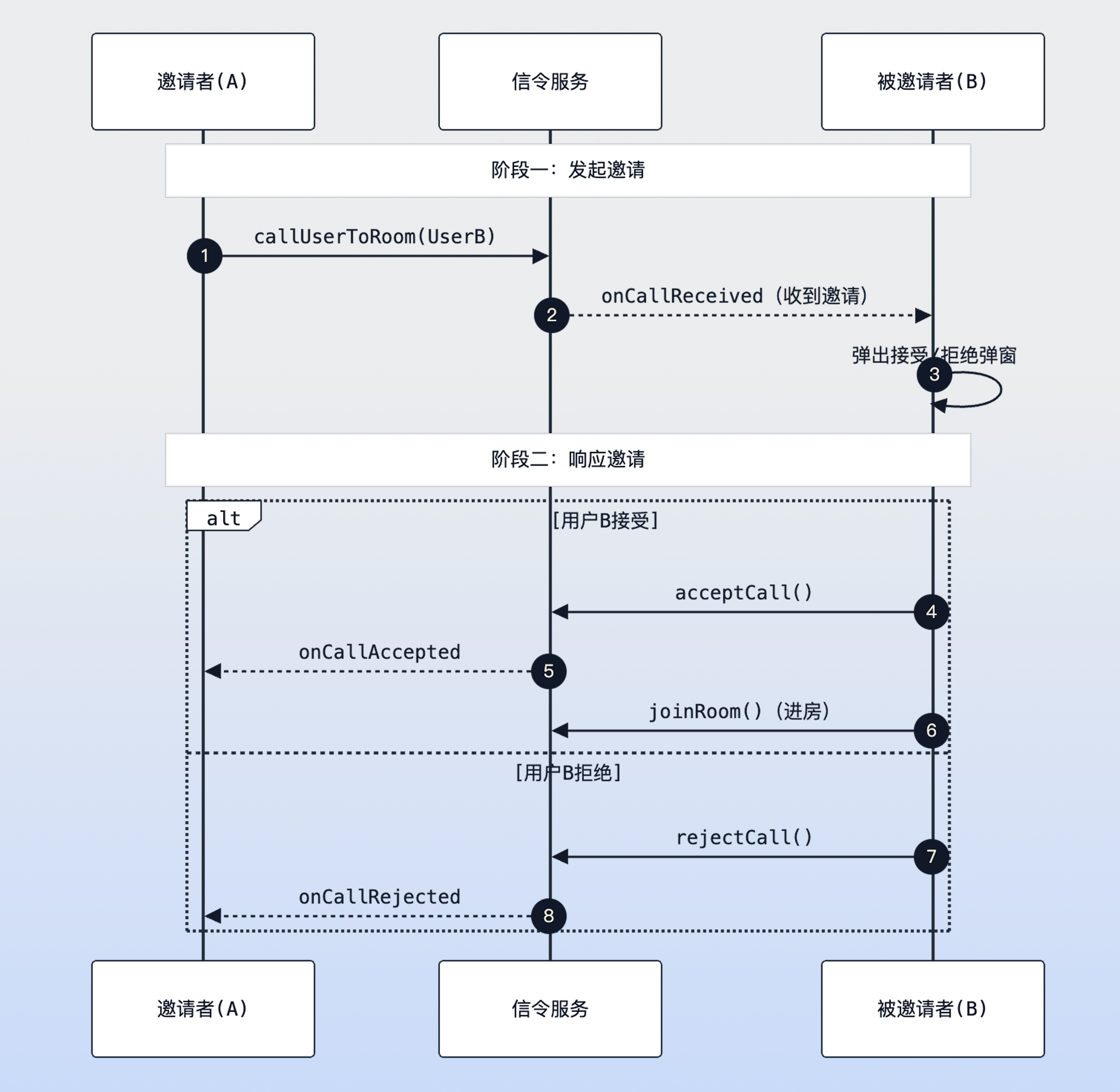
|
|
26
|
+
|
|
27
|
+
In-room call sequence diagram
|
|
28
|
+
|
|
29
|
+
|
|
30
|
+
### Step 1: Initiate Call (Inviter)
|
|
31
|
+
|
|
32
|
+
The inviter calls the [callUserToRoom](https://web.sdk.qcloud.com/trtc/live/web/doc/zh/index.html#callUserToRoom) interface to initiate an invitation. Please ensure the inviter is currently in the room (i.e., [currentRoom](https://web.sdk.qcloud.com/trtc/live/web/doc/zh/index.html#currentRoom) is not empty), otherwise the call cannot be initiated.
|
|
33
|
+
``` typescript
|
|
34
|
+
import { useRoomState } from 'tuikit-atomicx-vue3/room';
|
|
35
|
+
|
|
36
|
+
const { currentRoom, callUserToRoom } = useRoomState();
|
|
37
|
+
|
|
38
|
+
const inviteUser = async () => {
|
|
39
|
+
// In-room calls must be associated with an existing roomId, so check the current user's room status first
|
|
40
|
+
if (!currentRoom.value) {
|
|
41
|
+
console.warn('Please enter a room first before initiating an invitation');
|
|
42
|
+
return;
|
|
43
|
+
}
|
|
44
|
+
|
|
45
|
+
try {
|
|
46
|
+
const resultMap = await callUserToRoom({
|
|
47
|
+
roomId: currentRoom.value.roomId, // Room ID the invitee will join
|
|
48
|
+
userIdList: ['user1', 'user2'], // Target user ID array, supports single or multiple users
|
|
49
|
+
timeout: 60, // Invitation validity period (seconds), both parties will trigger onCallTimeout after timeout
|
|
50
|
+
// extensionInfo can be used to pass business custom data, such as invitation type, additional messages, etc.
|
|
51
|
+
extensionInfo: JSON.stringify({ type: 'emergency', priority: 'high' })
|
|
52
|
+
});
|
|
53
|
+
|
|
54
|
+
// resultMap returns the status corresponding to each userId, such as Success, AlreadyInRoom (already in room) or AlreadyInCalling (in call)
|
|
55
|
+
console.log('Invitation sent successfully, detailed status map:', resultMap);
|
|
56
|
+
} catch (error) {
|
|
57
|
+
console.error('Failed to send call request, please check network or login status:', error);
|
|
58
|
+
}
|
|
59
|
+
};
|
|
60
|
+
```
|
|
61
|
+
|
|
62
|
+
### Step 2: Listen for Call Events (Invitee)
|
|
63
|
+
|
|
64
|
+
The invitee needs to listen for the `onCallReceived` event. It is recommended to implement this in long-lived components such as `App.vue` to ensure the user can respond regardless of which page they are on.
|
|
65
|
+
``` typescript
|
|
66
|
+
import { ref, onMounted, onUnmounted } from 'vue';
|
|
67
|
+
import { useRoomState, RoomEvent } from 'tuikit-atomicx-vue3/room';
|
|
68
|
+
|
|
69
|
+
const {
|
|
70
|
+
subscribeEvent,
|
|
71
|
+
unsubscribeEvent,
|
|
72
|
+
acceptCall,
|
|
73
|
+
rejectCall,
|
|
74
|
+
joinRoom,
|
|
75
|
+
currentRoom
|
|
76
|
+
} = useRoomState();
|
|
77
|
+
|
|
78
|
+
const showInviteDialog = ref(false); // Control UI dialog visibility
|
|
79
|
+
const currentCallInfo = ref(null); // Cache the received invitation context
|
|
80
|
+
|
|
81
|
+
const handleCallReceived = async ({ roomInfo, call, extensionInfo }) => {
|
|
82
|
+
// Conflict handling: If the user is currently in a meeting, according to business policy, usually should directly reject new invitations to prevent interference
|
|
83
|
+
if (currentRoom.value?.roomId) {
|
|
84
|
+
await rejectCall({ roomId: roomInfo.roomId });
|
|
85
|
+
return;
|
|
86
|
+
}
|
|
87
|
+
|
|
88
|
+
// Record invitation details for displaying inviter name or business transparent data in UI
|
|
89
|
+
currentCallInfo.value = { roomInfo, call };
|
|
90
|
+
showInviteDialog.value = true;
|
|
91
|
+
};
|
|
92
|
+
|
|
93
|
+
// Accept invitation logic
|
|
94
|
+
const onUserAccept = async () => {
|
|
95
|
+
if (!currentCallInfo.value) return;
|
|
96
|
+
const { roomId } = currentCallInfo.value.roomInfo;
|
|
97
|
+
|
|
98
|
+
try {
|
|
99
|
+
// Key process A: Respond to signaling. Inform the inviter that it has been accepted so they can update UI (e.g., display "Other party answered")
|
|
100
|
+
await acceptCall({ roomId });
|
|
101
|
+
|
|
102
|
+
// Key process B: Execute room entry. Only by calling joinRoom will the audio and video push-pull stream link be truly opened
|
|
103
|
+
await joinRoom({ roomId });
|
|
104
|
+
} catch (error) {
|
|
105
|
+
console.error('Room entry operation failed after accepting call:', error);
|
|
106
|
+
} finally {
|
|
107
|
+
closeDialog();
|
|
108
|
+
}
|
|
109
|
+
};
|
|
110
|
+
|
|
111
|
+
// Reject invitation logic
|
|
112
|
+
const onUserReject = async () => {
|
|
113
|
+
if (currentCallInfo.value) {
|
|
114
|
+
// Inform the inviter that it has been rejected, the inviter will receive onCallRejected event
|
|
115
|
+
await rejectCall({ roomId: currentCallInfo.value.roomInfo.roomId });
|
|
116
|
+
}
|
|
117
|
+
closeDialog();
|
|
118
|
+
};
|
|
119
|
+
|
|
120
|
+
const closeDialog = () => {
|
|
121
|
+
showInviteDialog.value = false;
|
|
122
|
+
currentCallInfo.value = null;
|
|
123
|
+
};
|
|
124
|
+
|
|
125
|
+
// Event full lifecycle management: Ensure listening on component mount and removal on destroy to prevent event overflow
|
|
126
|
+
onMounted(() => {
|
|
127
|
+
subscribeEvent(RoomEvent.onCallReceived, handleCallReceived);
|
|
128
|
+
|
|
129
|
+
// Listen for various exceptions/sync events that cause invitation to end, ensuring UI dialog can close in time
|
|
130
|
+
subscribeEvent(RoomEvent.onCallCancelled, closeDialog); // Inviter cancelled the call
|
|
131
|
+
subscribeEvent(RoomEvent.onCallTimeout, closeDialog); // Call timed out without response
|
|
132
|
+
subscribeEvent(RoomEvent.onCallHandledByOtherDevice, closeDialog); // User already handled the call on another device
|
|
133
|
+
});
|
|
134
|
+
|
|
135
|
+
onUnmounted(() => {
|
|
136
|
+
// Remove all listeners to avoid continuing to execute handleCallReceived after component destruction, causing memory leaks or errors
|
|
137
|
+
unsubscribeEvent(RoomEvent.onCallReceived, handleCallReceived);
|
|
138
|
+
unsubscribeEvent(RoomEvent.onCallCancelled, closeDialog);
|
|
139
|
+
unsubscribeEvent(RoomEvent.onCallTimeout, closeDialog);
|
|
140
|
+
unsubscribeEvent(RoomEvent.onCallHandledByOtherDevice, closeDialog);
|
|
141
|
+
});
|
|
142
|
+
```
|
|
143
|
+
|
|
144
|
+
## Practical Tutorial: Improving Call Connection Rate
|
|
145
|
+
|
|
146
|
+
To achieve higher call connection rates in business scenarios, in addition to implementing basic functions, it is recommended to refer to the following strategies to optimize user experience:
|
|
147
|
+
|
|
148
|
+
### 1. Enhanced Call Awareness (Avoid Users Missing Calls)
|
|
149
|
+
|
|
150
|
+
Due to Web characteristics, browser mute or page running in background state may cause users to miss calls.
|
|
151
|
+
- **Visual Reminder**: Use [Page Visibility API](https://developer.mozilla.org/en-US/docs/Web/API/Page_Visibility_API) to detect page visibility status. If the page is in the background, you can implement title bar flashing prompts by cyclically modifying `document.title` (e.g.: "【New Invitation】UserA invites you to the meeting...") to attract user attention.
|
|
152
|
+
|
|
153
|
+
- **Audio Reminder**: Play high-priority alert ringtone when the `onCallReceived` event is triggered. Note: Must comply with browser's [Autoplay Policy](https://developer.mozilla.org/zh-CN/docs/Web/Media/Guides/Autoplay), most browsers will restrict audio autoplay in the absence of user interaction (such as clicks, touches, or key presses).
|
|
154
|
+
|
|
155
|
+
|
|
156
|
+
### 2. Enrich Invitation Context (Improve Answering Willingness)
|
|
157
|
+
|
|
158
|
+
Invitations lacking clear intent are easily rejected by users. It is recommended to fully utilize the `extensionInfo` field to pass key business information to improve users' willingness to answer.
|
|
159
|
+
- **Pass Business Context**: Use `extensionInfo` to transparently pass business fields such as `reason` (e.g.: "Project emergency review"), `level` (e.g.: "P0 troubleshooting"), etc., to inform users of the urgency and importance of the call.
|
|
160
|
+
|
|
161
|
+
|
|
162
|
+
### 3. Multi-Channel Reach Backup (Ensure Message Delivery)
|
|
163
|
+
|
|
164
|
+
Limited by Web mechanisms, when the browser process ends, real-time signaling cannot be received. It is recommended to adopt the following alternative solutions to ensure reach:
|
|
165
|
+
- **Browser System Notifications**: Guide users to authorize [Web Notification API](https://developer.mozilla.org/en-US/docs/Web/API/Notification). As long as the browser process is not closed (including minimized or in background tabs), OS-level pop-up notifications can be triggered to effectively remind users.
|
|
166
|
+
|
|
167
|
+
- **Multi-Channel Reach**: It is recommended to combine backend business logic to send meeting links through **SMS**, **Email**, or **Enterprise WeChat** and other external channels when detecting that users are offline or timeout without response, achieving all-around reach.
|
|
168
|
+
|
|
169
|
+
|
|
170
|
+
### 4. Intelligent Retry Mechanism (Solve "Room Entry Failed After Accepting Invitation")
|
|
171
|
+
|
|
172
|
+
In weak network or other unstable environments, calling `joinRoom` after users click accept invitation may experience occasional failures.
|
|
173
|
+
- **Automatic Retry**: It is recommended to introduce 2-3 automatic retry mechanisms (recommended combined with exponential backoff strategy) in the exception handling logic (`catch`) of `onUserAccept` to maximize ensuring users can successfully join the meeting after clicking "accept".
|
|
174
|
+
|
|
175
|
+
|
|
176
|
+
## Development Notes
|
|
177
|
+
1. **Accepting Invitation Does Not Equal Entering Room**
|
|
178
|
+
|
|
179
|
+
|
|
180
|
+
`acceptCall` is only a signaling layer reply (informing the other party that the call has been answered). Users must manually call `await joinRoom({ roomId })` immediately after calling `acceptCall` to truly enter the audio and video room.
|
|
181
|
+
|
|
182
|
+
2. **Lifecycle Management**
|
|
183
|
+
|
|
184
|
+
|
|
185
|
+
Please be sure to call `unsubscribeEvent` in the component destruction cycle (`onUnmounted`). If listeners are not cleaned up, when users switch pages, listeners from old pages will remain in memory, causing one invitation to pop up multiple windows or logic to execute repeatedly.
|
|
186
|
+
|
|
187
|
+
3. **Timeout Settings**
|
|
188
|
+
|
|
189
|
+
|
|
190
|
+
If the `timeout` parameter is not set, in some network exceptions or program crash situations, invitations may remain in a suspended state for a long time, making it impossible to initiate another call to that user. It is recommended to set it to 30-60 seconds.
|
|
191
|
+
|
|
192
|
+
|
|
193
|
+
## Common Questions
|
|
194
|
+
1. **How to pass custom parameters when calling (e.g., "Emergency meeting from XX")?**
|
|
195
|
+
|
|
196
|
+
|
|
197
|
+
Use the `extensionInfo` parameter of `callUserToRoom` to pass a JSON string. The invitee can parse the string to obtain business information in the `extensionInfo` field of the `onCallReceived` event.
|
|
198
|
+
|
|
199
|
+
2. **If the invitee is not online, can they receive the invitation after coming online?**
|
|
200
|
+
|
|
201
|
+
|
|
202
|
+
No. The invitation event is an instantaneous signaling action, and the SDK currently does not resend call notifications received while offline.
|
|
203
|
+
|
|
204
|
+
3. **Can issued invitations be cancelled?**
|
|
205
|
+
|
|
206
|
+
|
|
207
|
+
Yes. Call `cancelCall({ roomId, userIdList })` to cancel. At this time, the invitee will receive the `onCallCancelled` event, and you need to listen to this event to close the UI dialog on the invitee side.
|
|
208
|
+
|
|
209
|
+
4. **What to do if room entry fails after accepting?**
|
|
210
|
+
|
|
211
|
+
|
|
212
|
+
Check if you have logged in to `TUIRoomEngine`, retry `joinRoom({ roomId })` and capture error prompts to the user; if necessary, provide a "retry" button on the UI.
|
|
213
|
+
|
|
214
|
+
5. **How to prompt when the other party is busy or already in another room?**
|
|
215
|
+
|
|
216
|
+
|
|
217
|
+
If `AlreadyInRoom` / `AlreadyInCalling` appears in the return value `resultMap` of `callUserToRoom`, you should prompt on the inviter UI "The other party is busy/already in a meeting" and decide whether to retry later.
|
|
218
|
+
|
|
219
|
+
6. **Dialog not closing after timeout/cancellation?**
|
|
220
|
+
|
|
221
|
+
|
|
222
|
+
Make sure to listen to `onCallTimeout`, `onCallCancelled`, `onCallHandledByOtherDevice`, and uniformly close the dialog and clear current invitation data in the callback.
|
|
223
|
+
|
|
224
|
+
7. **How to handle simultaneous ringing on multiple devices?**
|
|
225
|
+
|
|
226
|
+
|
|
227
|
+
After accepting/rejecting on any device, other devices will receive `onCallHandledByOtherDevice`, and you need to close dialogs on other ends to avoid repeated processing.
|
|
228
|
+
|
|
229
|
+
8. **How should extensionInfo be agreed upon?**
|
|
230
|
+
|
|
231
|
+
|
|
232
|
+
It is recommended to use a JSON string and agree on fields (e.g., `type`, `priority`, `from`), parse and display friendly text (e.g., "Emergency meeting from XX") in `handleCallReceived`.
|
|
233
|
+
|
|
234
|
+
|
|
235
|
+
## **Sample Project**
|
|
236
|
+
|
|
237
|
+
Tencent Cloud provides a sample project [atomicx-vite-vue3-ts](https://github.com/Tencent-RTC/TUIRoomKit/tree/main/Web/example/atomicx-vite-vue3-ts) on GitHub, which you can refer to for implementing complete RoomKit functionality.
|
|
238
|
+
|
|
239
|
+
## API Documentation
|
|
240
|
+
<table>
|
|
241
|
+
<tr>
|
|
242
|
+
<td rowspan="1" colSpan="1" >**State/Component**</td>
|
|
243
|
+
|
|
244
|
+
<td rowspan="1" colSpan="1" >**Feature Description**</td>
|
|
245
|
+
|
|
246
|
+
<td rowspan="1" colSpan="1" >**API Documentation**</td>
|
|
247
|
+
</tr>
|
|
248
|
+
|
|
249
|
+
<tr>
|
|
250
|
+
<td rowspan="1" colSpan="1" >**useRoomState**</td>
|
|
251
|
+
|
|
252
|
+
<td rowspan="1" colSpan="1" >Room state management (create, join, schedule, etc.)</td>
|
|
253
|
+
|
|
254
|
+
<td rowspan="1" colSpan="1" >[API Documentation](https://web.sdk.qcloud.com/trtc/live/web/doc/zh/index.html#module-RoomState)</td>
|
|
255
|
+
</tr>
|
|
256
|
+
</table>
|