@tencent-rtc/mcp 1.3.0 → 1.3.2
This diff represents the content of publicly available package versions that have been released to one of the supported registries. The information contained in this diff is provided for informational purposes only and reflects changes between package versions as they appear in their respective public registries.
- package/index.js +4 -0
- package/index.js.map +1 -1
- package/package.json +2 -2
- package/resource/doc/chatuikit/faq/web_sdk/faq.md +125 -0
- package/resource/doc/chatuikit/flutter/faq.md +17 -114
- package/resource/doc/chatuikit/flutter/integrate_tuikit_Flutter.md +86 -722
- package/resource/doc/chatuikit/react/integration.md +430 -49
- package/resource/doc/chatuikit/react/workflow.md +258 -0
- package/resource/doc/chatuikit/vue/integration.md +355 -144
- package/resource/doc/chatuikit/vue/workflow.md +395 -0
- package/resource/doc/roomkit/vue/features/call-user-to-room.md +256 -0
- package/resource/doc/roomkit/vue/features/device-detection.md +388 -0
- package/resource/doc/roomkit/vue/features/device-state.md +480 -0
- package/resource/doc/roomkit/vue/features/free-beauty-panel.md +238 -0
- package/resource/doc/roomkit/vue/features/room-chat.md +427 -0
- package/resource/doc/roomkit/vue/features/room-participant-state.md +407 -0
- package/resource/doc/roomkit/vue/features/room-state.md +291 -0
- package/resource/doc/roomkit/vue/features/room-view.md +338 -0
- package/resource/doc/roomkit/vue/features/schedule-room.md +349 -0
- package/resource/doc/roomkit/vue/features/screen-share.md +333 -0
- package/resource/doc/roomkit/vue/features/virtual-background.md +287 -0
- package/resource/doc/roomkit/vue/features/workflow.md +553 -0
- package/resource/doc/roomkit/vue/integration.md +479 -0
- package/resource/doc/roomkit/vue/workflow.md +487 -0
- package/resource/doc/tuicallkit/react/api.md +21 -0
- package/resource/doc/tuicallkit/vue/api.md +21 -0
- package/tools/chat/get-web-chat-integration.js +31 -14
- package/tools/chat/get-web-chat-integration.js.map +1 -1
- package/tools/definitions/get_web_chat_uikit_integration_def.js +19 -12
- package/tools/definitions/get_web_chat_uikit_integration_def.js.map +1 -1
- package/tools/definitions/get_web_room_feature_detail_def.js +95 -0
- package/tools/definitions/get_web_room_feature_detail_def.js.map +1 -0
- package/tools/definitions/get_web_room_uikit_integration_def.js +44 -0
- package/tools/definitions/get_web_room_uikit_integration_def.js.map +1 -0
- package/tools/index.js +4 -4
- package/tools/index.js.map +1 -1
- package/tools/live/get-web-live-uikit-integration.js +1 -1
- package/tools/room/get-web-room-feature-detail.js +68 -0
- package/tools/room/get-web-room-feature-detail.js.map +1 -0
- package/tools/room/get-web-room-integration.js +43 -0
- package/tools/room/get-web-room-integration.js.map +1 -0
- package/utils/generate-structured-result.js +2 -2
- package/utils/generate-structured-result.js.map +1 -1
- package/utils/report-cls-client.js +1 -1
- package/utils/report-es-client.js +1 -1
- package/resource/doc/chatuikit/flutter/integrate_only_tuichat_Flutter.md +0 -333
- package/resource/doc/chatuikit/flutter/quick_start_Flutter.md +0 -217
- package/resource/doc/chatuikit/react/chat_window_integration.md +0 -94
- package/resource/doc/chatuikit/vue/chat_window_integration.md +0 -156
- package/resource/doc/roomkit/vue/states/device-state.md +0 -369
- package/resource/doc/roomkit/vue/states/login-state.md +0 -59
- package/resource/doc/roomkit/vue/states/room-list-state.md +0 -355
- package/resource/doc/roomkit/vue/states/room-participant-state.md +0 -388
- package/tools/chat/get-web-chat-window-integration.js +0 -28
- package/tools/chat/get-web-chat-window-integration.js.map +0 -1
- package/tools/definitions/get_web_chat_window_integration_def.js +0 -26
- package/tools/definitions/get_web_chat_window_integration_def.js.map +0 -1
- package/tools/room/get-web-room-state-detail.js +0 -31
- package/tools/room/get-web-room-state-detail.js.map +0 -1
package/index.js
CHANGED
|
@@ -5,6 +5,10 @@ import { ServerConfig } from './server-config.js';
|
|
|
5
5
|
// 启动服务器
|
|
6
6
|
async function main() {
|
|
7
7
|
ServerConfig.getInstance();
|
|
8
|
+
const { SDKAppID } = ServerConfig.getInstance().getConfig();
|
|
9
|
+
if (isNaN(SDKAppID)) {
|
|
10
|
+
throw new Error('You have not configured the SDKAppID, or the configured SDKAppID is invalid. Please configure the correct SDKAppID through the `env` parameter in MCP.');
|
|
11
|
+
}
|
|
8
12
|
const server = createServer();
|
|
9
13
|
const transport = new StdioServerTransport();
|
|
10
14
|
await server.connect(transport);
|
package/index.js.map
CHANGED
|
@@ -1 +1 @@
|
|
|
1
|
-
{"version":3,"file":"index.js","sourceRoot":"","sources":["../src/index.ts"],"names":[],"mappings":";AAEA,OAAO,EAAE,oBAAoB,EAAE,MAAM,2CAA2C,CAAC;AACjF,OAAO,EAAE,YAAY,EAAE,MAAM,aAAa,CAAC;AAC3C,OAAO,EAAE,YAAY,EAAE,MAAM,oBAAoB,CAAC;AAElD,QAAQ;AACR,KAAK,UAAU,IAAI;IACjB,YAAY,CAAC,WAAW,EAAE,CAAC;IAC3B,MAAM,MAAM,GAAc,YAAY,EAAE,CAAC;IACzC,MAAM,SAAS,GAAG,IAAI,oBAAoB,EAAE,CAAC;IAC7C,MAAM,MAAM,CAAC,OAAO,CAAC,SAAS,CAAC,CAAC;IAChC,OAAO,CAAC,KAAK,CAAC,0CAA0C,CAAC,CAAC;AAC5D,CAAC;AAED,IAAI,EAAE,CAAC,KAAK,CAAC,CAAC,KAAK,EAAE,EAAE;IACrB,OAAO,CAAC,KAAK,CAAC,eAAe,EAAE,KAAK,CAAC,CAAC;IACtC,OAAO,CAAC,IAAI,CAAC,CAAC,CAAC,CAAC;AAClB,CAAC,CAAC,CAAC"}
|
|
1
|
+
{"version":3,"file":"index.js","sourceRoot":"","sources":["../src/index.ts"],"names":[],"mappings":";AAEA,OAAO,EAAE,oBAAoB,EAAE,MAAM,2CAA2C,CAAC;AACjF,OAAO,EAAE,YAAY,EAAE,MAAM,aAAa,CAAC;AAC3C,OAAO,EAAE,YAAY,EAAE,MAAM,oBAAoB,CAAC;AAElD,QAAQ;AACR,KAAK,UAAU,IAAI;IACjB,YAAY,CAAC,WAAW,EAAE,CAAC;IAC3B,MAAM,EAAE,QAAQ,EAAE,GAAG,YAAY,CAAC,WAAW,EAAE,CAAC,SAAS,EAAE,CAAC;IAC5D,IAAI,KAAK,CAAC,QAAQ,CAAC,EAAE,CAAC;QACpB,MAAM,IAAI,KAAK,CAAC,wJAAwJ,CAAC,CAAC;IAC5K,CAAC;IACD,MAAM,MAAM,GAAc,YAAY,EAAE,CAAC;IACzC,MAAM,SAAS,GAAG,IAAI,oBAAoB,EAAE,CAAC;IAC7C,MAAM,MAAM,CAAC,OAAO,CAAC,SAAS,CAAC,CAAC;IAChC,OAAO,CAAC,KAAK,CAAC,0CAA0C,CAAC,CAAC;AAC5D,CAAC;AAED,IAAI,EAAE,CAAC,KAAK,CAAC,CAAC,KAAK,EAAE,EAAE;IACrB,OAAO,CAAC,KAAK,CAAC,eAAe,EAAE,KAAK,CAAC,CAAC;IACtC,OAAO,CAAC,IAAI,CAAC,CAAC,CAAC,CAAC;AAClB,CAAC,CAAC,CAAC"}
|
package/package.json
CHANGED
|
@@ -1,6 +1,6 @@
|
|
|
1
1
|
{
|
|
2
2
|
"name": "@tencent-rtc/mcp",
|
|
3
|
-
"version": "1.3.
|
|
3
|
+
"version": "1.3.2",
|
|
4
4
|
"description": "Tencent Cloud MCP Server for SDK",
|
|
5
5
|
"type": "module",
|
|
6
6
|
"main": "index.js",
|
|
@@ -12,7 +12,7 @@
|
|
|
12
12
|
"dependencies": {
|
|
13
13
|
"@grpc/grpc-js": "^1.5.1",
|
|
14
14
|
"@grpc/proto-loader": "^0.6.6",
|
|
15
|
-
"@modelcontextprotocol/sdk": "
|
|
15
|
+
"@modelcontextprotocol/sdk": "1.10.1",
|
|
16
16
|
"@tencentcloud/sdk-mcp": "^1.0.3",
|
|
17
17
|
"@types/express": "^5.0.1",
|
|
18
18
|
"@types/hashring": "^3.2.1",
|
|
@@ -160,3 +160,128 @@ For detailed documentation, please refer to: https://trtc.io/document/49561?prod
|
|
|
160
160
|
|
|
161
161
|
### Q: How to delete conversation history messages in SDK?
|
|
162
162
|
**A:** SDK provides the `clearHistoryMessage` API to clear conversation history messages. For detailed documentation, please refer to: https://trtc.io/document/53498?product=chat&menulabel=core%20sdk&platform=javascript.
|
|
163
|
+
|
|
164
|
+
### Q: How to get the number of unhandled group join requests and how to handle group join applications in Chat SDK and Chat Engine?
|
|
165
|
+
**A:** According to the customer's usage scenario, solutions are provided from both Chat SDK and Chat Engine. When users query such questions, please provide accurate answers based on the actual scenario.
|
|
166
|
+
## Scenario 1: Solution when the customer integrates Chat SDK without UI
|
|
167
|
+
- Get Group Application List During Initialization, API: [getGroupApplicationList](https://trtc.io/document/48465?product=chat&menulabel=core%20sdk&platform=javascript#c69d4d7c-3f0b-4486-b31a-190e6176a1c5)
|
|
168
|
+
- Get the Number of Unhandled Group Join Requests. Based on the list data returned by `getGroupApplicationList`, `applicationType = 0` represents the number of group join requests.
|
|
169
|
+
```typescript
|
|
170
|
+
let unhandledCount = 0;
|
|
171
|
+
let promise = chat.getGroupApplicationList();
|
|
172
|
+
promise.then(function(imResponse) {
|
|
173
|
+
const { applicationList } = imResponse.data;
|
|
174
|
+
applicationList.forEach((item) => {
|
|
175
|
+
// item.applicant - Applicant's userID
|
|
176
|
+
// item.applicantNick - Applicant's nickname
|
|
177
|
+
// item.groupID - Group ID
|
|
178
|
+
// item.groupName - Group name
|
|
179
|
+
// item.applicationType - Application type: 0 for join group request, 2 for invitation to join group
|
|
180
|
+
// item.userID - When applicationType = 2, this is the invited user's userID
|
|
181
|
+
// item.note - Additional message, not supported for group invitations, returns empty string
|
|
182
|
+
if (item.applicationType === 0) {
|
|
183
|
+
unhandledCount++;
|
|
184
|
+
}
|
|
185
|
+
});
|
|
186
|
+
}).catch(function(imError) {});
|
|
187
|
+
```
|
|
188
|
+
- Update Unread Count When Receiving Group Join Requests Online
|
|
189
|
+
This requires listening to the [MESSAGE_RECEIVED](https://trtc.io/document/47967?product=chat&menulabel=core%20sdk&platform=javascript#d39fb50f-f0f2-4b67-9b15-acd7e8608105) event.
|
|
190
|
+
```typescript
|
|
191
|
+
// For Message data structure details, please refer to https://trtc.io/document/47990?product=chat&menulabel=core%20sdk&platform=javascript
|
|
192
|
+
let unhandledCount = 0;
|
|
193
|
+
let onMessageReceived = function(event) {
|
|
194
|
+
const messageList = event.data;
|
|
195
|
+
messageList.forEach((message) => {
|
|
196
|
+
if (message?.type === 'TIMGroupSystemNoticeElem') {
|
|
197
|
+
if (message.payload?.operationType === 1) {
|
|
198
|
+
unhandledCount++;
|
|
199
|
+
}
|
|
200
|
+
}
|
|
201
|
+
})
|
|
202
|
+
};
|
|
203
|
+
chat.on(TencentCloudChat.EVENT.MESSAGE_RECEIVED, onMessageReceived);
|
|
204
|
+
```
|
|
205
|
+
- Handle Group Join Applications
|
|
206
|
+
API: [handleGroupApplication](https://trtc.io/document/48465?product=chat&menulabel=core%20sdk&platform=javascript#processing-(approving-or-rejecting)-a-group-join-request)
|
|
207
|
+
|
|
208
|
+
```typescript
|
|
209
|
+
// Handle group join requests by getting the pending list
|
|
210
|
+
let promise = chat.getGroupApplicationList();
|
|
211
|
+
promise.then(function(imResponse) {
|
|
212
|
+
const { applicationList } = imResponse.data;
|
|
213
|
+
applicationList.forEach((item) => {
|
|
214
|
+
if (item.applicationType === 0) {
|
|
215
|
+
chat.handleGroupApplication({
|
|
216
|
+
handleAction: 'Agree',
|
|
217
|
+
application: {...item},
|
|
218
|
+
});
|
|
219
|
+
}
|
|
220
|
+
});
|
|
221
|
+
}).catch(function(imError) {});
|
|
222
|
+
```
|
|
223
|
+
|
|
224
|
+
## Scenario 2: Solution when the customer integrates Chat UIKit with UI or integrates ChatEngine
|
|
225
|
+
- Get Group Application List During Initialization, API: [getGroupApplicationList](https://web.sdk.qcloud.com/im/doc/chat-engine/en/ITUIGroupService.html#getGroupApplicationList)
|
|
226
|
+
- Get the Number of Unhandled Group Join Requests. Based on the list data returned by `getGroupApplicationList`, `applicationType = 0` represents the number of group join requests.
|
|
227
|
+
```typescript
|
|
228
|
+
import { TUIGroupService } from '@tencentcloud/chat-uikit-engine-lite';
|
|
229
|
+
|
|
230
|
+
let unhandledCount = 0;
|
|
231
|
+
let promise = TUIGroupService.getGroupApplicationList();
|
|
232
|
+
promise.then(function(imResponse) {
|
|
233
|
+
const { applicationList } = imResponse.data;
|
|
234
|
+
applicationList.forEach((item) => {
|
|
235
|
+
// item.applicant - Applicant's userID
|
|
236
|
+
// item.applicantNick - Applicant's nickname
|
|
237
|
+
// item.groupID - Group ID
|
|
238
|
+
// item.groupName - Group name
|
|
239
|
+
// item.applicationType - Application type: 0 for join group request, 2 for invitation to join group
|
|
240
|
+
// item.userID - When applicationType = 2, this is the invited user's userID
|
|
241
|
+
// item.note - Additional message, not supported for group invitations, returns empty string
|
|
242
|
+
if (item.applicationType === 0) {
|
|
243
|
+
unhandledCount++;
|
|
244
|
+
}
|
|
245
|
+
});
|
|
246
|
+
}).catch(function(imError) {});
|
|
247
|
+
```
|
|
248
|
+
- Update Unread Count When Receiving Group Join Requests Online
|
|
249
|
+
This requires monitoring the [GroupStore](https://web.sdk.qcloud.com/im/doc/chat-engine/en/global.html#GroupStore) provided `groupSystemNoticeList` key through TUIStore.
|
|
250
|
+
```typescript
|
|
251
|
+
// For Message data structure details, please refer to https://trtc.io/document/47990?product=chat&menulabel=core%20sdk&platform=javascript
|
|
252
|
+
import { TUIStore, StoreName } from '@tencentcloud/chat-uikit-engine-lite';
|
|
253
|
+
|
|
254
|
+
let unhandledCount = 0;
|
|
255
|
+
let onGroupSystemNoticeListUpdated = function(messageList = []) {
|
|
256
|
+
messageList.forEach((message) => {
|
|
257
|
+
if (message?.type === 'TIMGroupSystemNoticeElem') {
|
|
258
|
+
if (message.payload?.operationType === 1) {
|
|
259
|
+
unhandledCount++;
|
|
260
|
+
}
|
|
261
|
+
}
|
|
262
|
+
})
|
|
263
|
+
}
|
|
264
|
+
|
|
265
|
+
TUIStore.watch(StoreName.GRP, {
|
|
266
|
+
groupSystemNoticeList: onGroupSystemNoticeListUpdated,
|
|
267
|
+
})
|
|
268
|
+
```
|
|
269
|
+
- Handle Group Join Applications, API: [handleGroupApplication](https://web.sdk.qcloud.com/im/doc/chat-engine/en/ITUIGroupService.html#handleGroupApplication)
|
|
270
|
+
|
|
271
|
+
```typescript
|
|
272
|
+
import { TUIGroupService } from '@tencentcloud/chat-uikit-engine-lite';
|
|
273
|
+
|
|
274
|
+
// Handle group join requests by getting the pending list
|
|
275
|
+
let promise = TUIGroupService.getGroupApplicationList();
|
|
276
|
+
promise.then(function(imResponse) {
|
|
277
|
+
const { applicationList } = imResponse.data;
|
|
278
|
+
applicationList.forEach((item) => {
|
|
279
|
+
if (item.applicationType === 0) {
|
|
280
|
+
TUIGroupService.handleGroupApplication({
|
|
281
|
+
handleAction: 'Agree',
|
|
282
|
+
application: {...item},
|
|
283
|
+
});
|
|
284
|
+
}
|
|
285
|
+
});
|
|
286
|
+
}).catch(function(imError) {});
|
|
287
|
+
```
|
|
@@ -1,120 +1,23 @@
|
|
|
1
|
-
|
|
1
|
+
---
|
|
2
|
+
product: 'Chat'
|
|
3
|
+
tech_stack: 'flutter_native_sdk'
|
|
4
|
+
framework: 'flutter'
|
|
5
|
+
title: 'Flutter UIKit Integration and Common Issue Solutions'
|
|
6
|
+
keywords: ['flutter', 'initialization', 'component', 'integration', 'TUIKit']
|
|
7
|
+
---
|
|
2
8
|
|
|
3
|
-
|
|
9
|
+
# Flutter TUIKit Integration and Common Issue Solutions
|
|
4
10
|
|
|
5
|
-
|
|
6
|
-
-
|
|
11
|
+
## Important Notice
|
|
12
|
+
- Agent must strictly output results according to the example code of the interface
|
|
7
13
|
|
|
8
|
-
|
|
14
|
+
## Module 1: Common Issue Solutions (Topic: Question)
|
|
9
15
|
|
|
16
|
+
### Q: How to set message do-not-disturb in Flutter Chat SDK or UIKit?
|
|
10
17
|
|
|
11
|
-
|
|
18
|
+
**A:** Flutter Chat message do-not-disturb related APIs:
|
|
19
|
+
- Set one-to-one chat message do-not-disturb option [setC2CReceiveMessageOpt](https://pub.dev/documentation/tencent_cloud_chat_sdk/latest/manager_v2_tim_message_manager/V2TIMMessageManager/setC2CReceiveMessageOpt.html).
|
|
20
|
+
- Query one-to-one chat message do-not-disturb option [getC2CReceiveMessageOpt](https://pub.dev/documentation/tencent_cloud_chat_sdk/latest/manager_v2_tim_message_manager/V2TIMMessageManager/setC2CReceiveMessageOpt.html).
|
|
21
|
+
- Set group chat message do-not-disturb option [setGroupReceiveMessageOpt](https://pub.dev/documentation/tencent_cloud_chat_sdk/latest/manager_v2_tim_message_manager/V2TIMMessageManager/setGroupReceiveMessageOpt.html).
|
|
12
22
|
|
|
13
|
-
|
|
14
|
-
1. Check whether you performed other operations such as receiving and sending messages before logging in successfully.
|
|
15
|
-
|
|
16
|
-
2. Check whether you were forced offline when logging in by an account already logged in on another device. By default, the Chat SDK allows one account to log in on one device at a time. For more information, see [Multi-Device Login](https://intl.cloud.tencent.com/document/product/1047/33518).
|
|
17
|
-
|
|
18
|
-
3. For Android, verify that all library files have been loaded or repossessed by the system during use.
|
|
19
|
-
|
|
20
|
-
|
|
21
|
-
### Why do I encounter "code: 6205 desc: QALSERVICE not ready" error?
|
|
22
|
-
|
|
23
|
-
This error is caused by calling `stopQALService` after initialization. To fix it, refer to the [configuration method](https://blog.csdn.net/qq_16131393/article/details/54895733) shared by one of our customers.
|
|
24
|
-
|
|
25
|
-
### Why do not emojis appear or appear as gibberish in messages?
|
|
26
|
-
|
|
27
|
-
Chat does not provide emoji packs. You must align the actual parsing by yourself.
|
|
28
|
-
|
|
29
|
-
There are two ways to use emojis:
|
|
30
|
-
- Use index in TIMFaceElem to identify the index of the emojis. For example, an Android device and an iOS device have the same set of emojis and index 2 represents the smile emoji. When index=2, both devices send and receive the same indexed emoji.
|
|
31
|
-
|
|
32
|
-
- Use data in TIMFaceElem. For example, the names of emoji images are string-type. Use the word "smile" to represent the smile emoji, and store "smile" in data. Then, both iOS and Android devices use data as the key to retrieve and display the corresponding emoji.
|
|
33
|
-
|
|
34
|
-
|
|
35
|
-
You can also use the two fields at the same time. For example, use data to specify the emoji set and index to indicate the specific index in this emoji set. This way, you can implement many different emoji effects as in QQ. It is possible to store more complex data structures in data as long as the devices follow the same parsing rules.
|
|
36
|
-
|
|
37
|
-
|
|
38
|
-
### Why do I encounter error 10002 during operations?
|
|
39
|
-
|
|
40
|
-
This status code is returned when a network exception, timeout, or ticket switching failure occurs during server-side authentication. If you see this status code, wait a moment and try again.
|
|
41
|
-
|
|
42
|
-
### Why do I encounter error 6200 or 6201 when receiving or sending messages?
|
|
43
|
-
|
|
44
|
-
This status code is returned when the client is offline, times out, or is disconnected. Error 6200 is defined as no network connection during request sending, whereas error 6201 is defined as no network connection during response sending. When you encounter this status code, check the network condition or wait for the network to restore and try again.
|
|
45
|
-
|
|
46
|
-
### Why do I encounter error 20003 when receiving and sending messages?
|
|
47
|
-
|
|
48
|
-
This error code is returned when UserID is invalid or UserID has not been imported to Chat. To fix it, check whether UserID has been imported to Tencent Cloud.
|
|
49
|
-
|
|
50
|
-
### Why do I encounter error 6010 when playing audio messages?
|
|
51
|
-
|
|
52
|
-
This error code is returned when audio messages that are no longer retained by the roaming server are requested. To fix it, you can [increase the message roaming duration](https://intl.cloud.tencent.com/document/product/1047/34419) or download audio files to local storage and play them. However, expired files cannot be restored. Different SDK versions allow you to increase the retention duration for different message types. For more information, see [Message Storage](https://intl.cloud.tencent.com/document/product/1047/33524).
|
|
53
|
-
|
|
54
|
-
### Why do I encounter errors 70001, 70003, 70009, and 70013 during account authentication?
|
|
55
|
-
|
|
56
|
-
These errors occur because UserID and UserSig do not match. To fix it, check the validity of UserID and UserSig. Among them, error 70001 means UserSig has expired, error 70003 means a verification failure due to a truncated UserSig, error 70009 means UserSig verification failed (possibly due to mixing the keys or private keys of other SDKAppIDs when generating UserSig), and error 70013 means UserID does not match.
|
|
57
|
-
|
|
58
|
-
### Why do I encounter the error code -2 or -5 when the web client app is using the Chat SDK?
|
|
59
|
-
- -2: Indicates that a web app request to the server failed, usually due to network problems. Web apps send requests to the server by using the HTTP Long Polling method, and this status code is returned when a network problem occurs. To fix it, check your network or try again.
|
|
60
|
-
|
|
61
|
-
- -5: When the login attempt is not completed and the SDK has not received the a2key and tinyID returned by the server, directly calling other APIs returns the "tinyid or a2 is empty" error message and -5 error code.
|
|
62
|
-
|
|
63
|
-
|
|
64
|
-
### What should I do when the SDK on the armeabi platform reports "java.lang.UnsatisfiedLinkError: No implementation found for"?
|
|
65
|
-
|
|
66
|
-
Copy jni/armeabi-v7a/libImSDK.so in the Chat SDK’s aar file to the src/main/jniLibs/armeabi directory in your source code project and load it in build.gradle.
|
|
67
|
-
|
|
68
|
-
### How can I resolve x86_64 and i386 architecture errors when the app has been launched in App Store?
|
|
69
|
-
|
|
70
|
-
This error occurs because App Store does not support the x86_64 and i386 architecture. The solution is as follows:
|
|
71
|
-
1. Clear the project compilation cache:
|
|
72
|
-
Select **Product** > **clean**, press Alt until "clean build Folder..." appears and wait for the operation to complete.
|
|
73
|
-
|
|
74
|
-
2. Remove the x86_64 and i386 architecture not supported by App Store:
|
|
75
|
-
a. Select **TARGETS** > **Build Phases**.
|
|
76
|
-
b. Click the plus sign and select **New Run Script Phase**.
|
|
77
|
-
c. Add the following code:
|
|
78
|
-
|
|
79
|
-
``` bash
|
|
80
|
-
APP_PATH="${TARGET_BUILD_DIR}/${WRAPPER_NAME}"
|
|
81
|
-
|
|
82
|
-
# This script loops through the frameworks embedded in the application and
|
|
83
|
-
|
|
84
|
-
# removes unused architectures.
|
|
85
|
-
|
|
86
|
-
find "$APP_PATH" -name '*.framework' -type d | while read -r FRAMEWORK
|
|
87
|
-
do
|
|
88
|
-
FRAMEWORK_EXECUTABLE_NAME=$(defaults read "$FRAMEWORK/Info.plist" CFBundleExecutable)
|
|
89
|
-
FRAMEWORK_EXECUTABLE_PATH="$FRAMEWORK/$FRAMEWORK_EXECUTABLE_NAME"
|
|
90
|
-
echo "Executable is $FRAMEWORK_EXECUTABLE_PATH"
|
|
91
|
-
|
|
92
|
-
EXTRACTED_ARCHS=()
|
|
93
|
-
|
|
94
|
-
for ARCH in $ARCHS
|
|
95
|
-
do
|
|
96
|
-
echo "Extracting $ARCH from $FRAMEWORK_EXECUTABLE_NAME"
|
|
97
|
-
lipo -extract "$ARCH" "$FRAMEWORK_EXECUTABLE_PATH" -o "$FRAMEWORK_EXECUTABLE_PATH-$ARCH"
|
|
98
|
-
EXTRACTED_ARCHS+=("$FRAMEWORK_EXECUTABLE_PATH-$ARCH")
|
|
99
|
-
done
|
|
100
|
-
|
|
101
|
-
echo "Merging extracted architectures: ${ARCHS}"
|
|
102
|
-
lipo -o "$FRAMEWORK_EXECUTABLE_PATH-merged" -create "${EXTRACTED_ARCHS[@]}"
|
|
103
|
-
rm "${EXTRACTED_ARCHS[@]}"
|
|
104
|
-
|
|
105
|
-
echo "Replacing original executable with thinned version"
|
|
106
|
-
rm "$FRAMEWORK_EXECUTABLE_PATH"
|
|
107
|
-
mv "$FRAMEWORK_EXECUTABLE_PATH-merged" "$FRAMEWORK_EXECUTABLE_PATH"
|
|
108
|
-
|
|
109
|
-
done
|
|
110
|
-
```
|
|
111
|
-
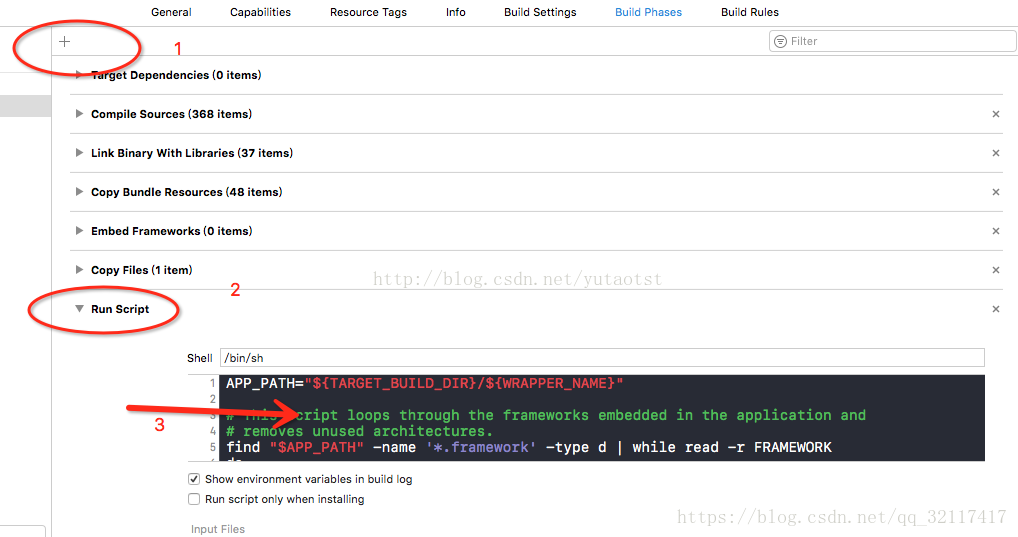
|
|
112
|
-
|
|
113
|
-
3. Package the app and upload it again.
|
|
114
|
-
|
|
115
|
-
|
|
116
|
-
### Can developers directly utilize the emoticon packs demonstrated in the Chat various client demos/TUIKit projects?
|
|
117
|
-
|
|
118
|
-
To respect the copyright of emoji designs, the Chat Demo/TUIKit project does not include cutouts of large emoji elements. Please replace them with your own designs or other emoji packs for which you hold the copyright before officially launching for commercial use. **The default smiley face emoji pack shown below is copyrighted by Tencent RTC** and is available for licensed use for a fee. If you need to obtain a license, please [contact us](https://trtc.io/contact).
|
|
119
|
-
|
|
120
|
-
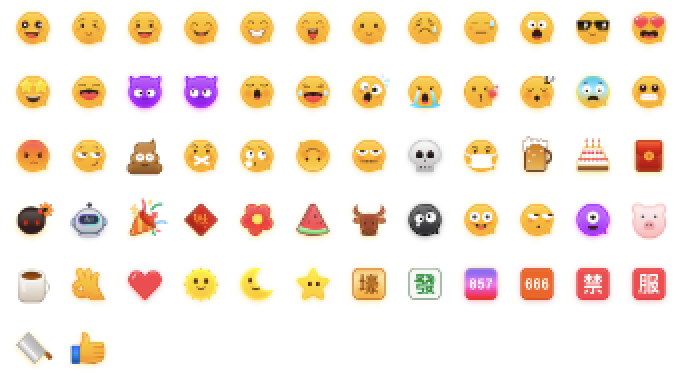
|
|
23
|
+
Message do-not-disturb documentation (no UI): https://cloud.tencent.com/document/product/269/75355
|