@tencent-rtc/mcp 1.3.0 → 1.3.2
This diff represents the content of publicly available package versions that have been released to one of the supported registries. The information contained in this diff is provided for informational purposes only and reflects changes between package versions as they appear in their respective public registries.
- package/index.js +4 -0
- package/index.js.map +1 -1
- package/package.json +2 -2
- package/resource/doc/chatuikit/faq/web_sdk/faq.md +125 -0
- package/resource/doc/chatuikit/flutter/faq.md +17 -114
- package/resource/doc/chatuikit/flutter/integrate_tuikit_Flutter.md +86 -722
- package/resource/doc/chatuikit/react/integration.md +430 -49
- package/resource/doc/chatuikit/react/workflow.md +258 -0
- package/resource/doc/chatuikit/vue/integration.md +355 -144
- package/resource/doc/chatuikit/vue/workflow.md +395 -0
- package/resource/doc/roomkit/vue/features/call-user-to-room.md +256 -0
- package/resource/doc/roomkit/vue/features/device-detection.md +388 -0
- package/resource/doc/roomkit/vue/features/device-state.md +480 -0
- package/resource/doc/roomkit/vue/features/free-beauty-panel.md +238 -0
- package/resource/doc/roomkit/vue/features/room-chat.md +427 -0
- package/resource/doc/roomkit/vue/features/room-participant-state.md +407 -0
- package/resource/doc/roomkit/vue/features/room-state.md +291 -0
- package/resource/doc/roomkit/vue/features/room-view.md +338 -0
- package/resource/doc/roomkit/vue/features/schedule-room.md +349 -0
- package/resource/doc/roomkit/vue/features/screen-share.md +333 -0
- package/resource/doc/roomkit/vue/features/virtual-background.md +287 -0
- package/resource/doc/roomkit/vue/features/workflow.md +553 -0
- package/resource/doc/roomkit/vue/integration.md +479 -0
- package/resource/doc/roomkit/vue/workflow.md +487 -0
- package/resource/doc/tuicallkit/react/api.md +21 -0
- package/resource/doc/tuicallkit/vue/api.md +21 -0
- package/tools/chat/get-web-chat-integration.js +31 -14
- package/tools/chat/get-web-chat-integration.js.map +1 -1
- package/tools/definitions/get_web_chat_uikit_integration_def.js +19 -12
- package/tools/definitions/get_web_chat_uikit_integration_def.js.map +1 -1
- package/tools/definitions/get_web_room_feature_detail_def.js +95 -0
- package/tools/definitions/get_web_room_feature_detail_def.js.map +1 -0
- package/tools/definitions/get_web_room_uikit_integration_def.js +44 -0
- package/tools/definitions/get_web_room_uikit_integration_def.js.map +1 -0
- package/tools/index.js +4 -4
- package/tools/index.js.map +1 -1
- package/tools/live/get-web-live-uikit-integration.js +1 -1
- package/tools/room/get-web-room-feature-detail.js +68 -0
- package/tools/room/get-web-room-feature-detail.js.map +1 -0
- package/tools/room/get-web-room-integration.js +43 -0
- package/tools/room/get-web-room-integration.js.map +1 -0
- package/utils/generate-structured-result.js +2 -2
- package/utils/generate-structured-result.js.map +1 -1
- package/utils/report-cls-client.js +1 -1
- package/utils/report-es-client.js +1 -1
- package/resource/doc/chatuikit/flutter/integrate_only_tuichat_Flutter.md +0 -333
- package/resource/doc/chatuikit/flutter/quick_start_Flutter.md +0 -217
- package/resource/doc/chatuikit/react/chat_window_integration.md +0 -94
- package/resource/doc/chatuikit/vue/chat_window_integration.md +0 -156
- package/resource/doc/roomkit/vue/states/device-state.md +0 -369
- package/resource/doc/roomkit/vue/states/login-state.md +0 -59
- package/resource/doc/roomkit/vue/states/room-list-state.md +0 -355
- package/resource/doc/roomkit/vue/states/room-participant-state.md +0 -388
- package/tools/chat/get-web-chat-window-integration.js +0 -28
- package/tools/chat/get-web-chat-window-integration.js.map +0 -1
- package/tools/definitions/get_web_chat_window_integration_def.js +0 -26
- package/tools/definitions/get_web_chat_window_integration_def.js.map +0 -1
- package/tools/room/get-web-room-state-detail.js +0 -31
- package/tools/room/get-web-room-state-detail.js.map +0 -1
|
@@ -0,0 +1,291 @@
|
|
|
1
|
+
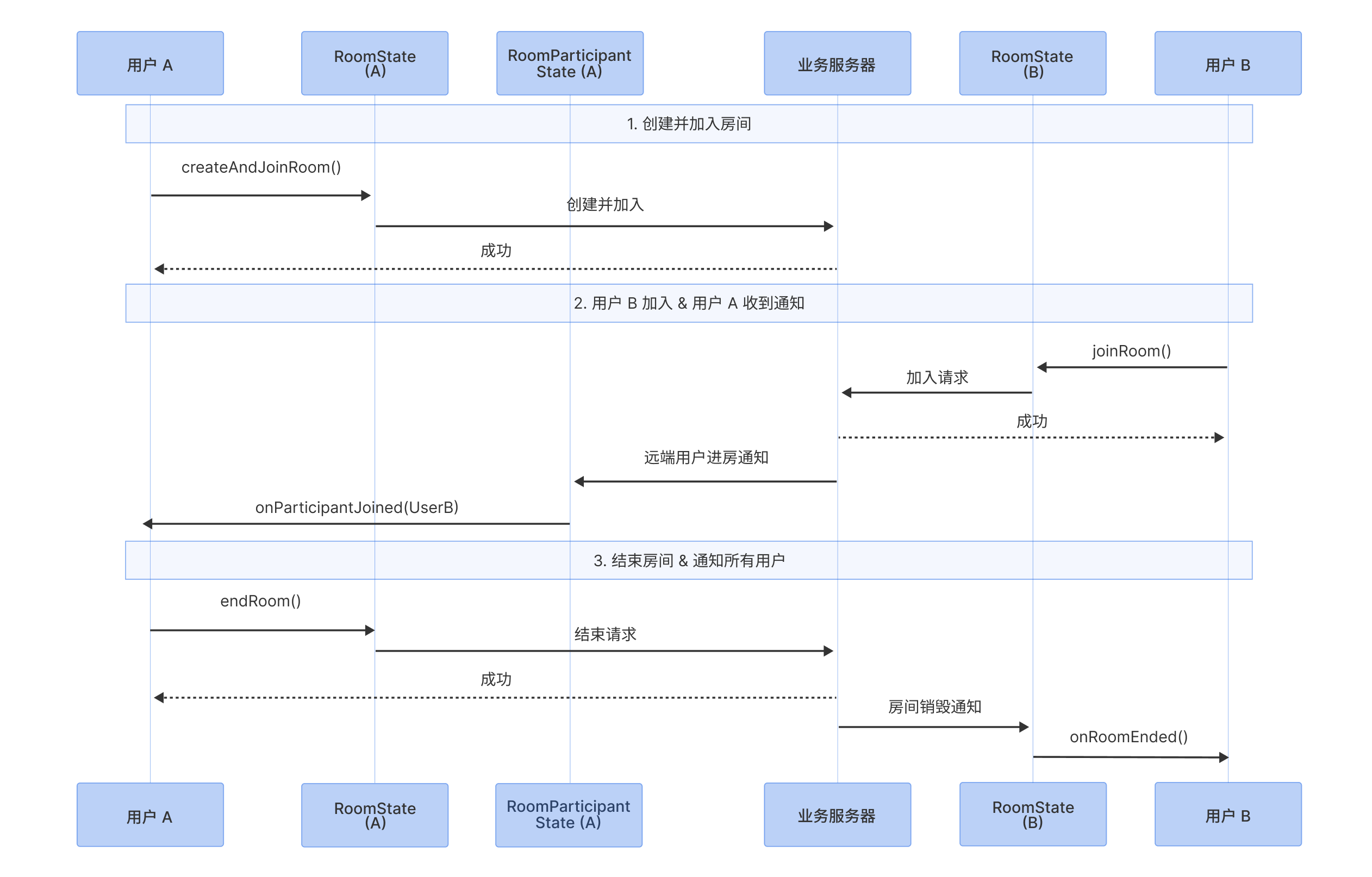
This document will guide you in detail on how to use Atomicx's [useRoomState](https://web.sdk.qcloud.com/trtc/live/web/doc/zh/index.html#module-RoomState) to manage the complete lifecycle of a room, including creating, joining, leaving, and ending a room, as well as handling key room status notifications. The following sequence diagram demonstrates the main process from room creation to destruction.
|
|
2
|
+
|
|
3
|
+
|
|
4
|
+
|
|
5
|
+
|
|
6
|
+
## Feature Introduction
|
|
7
|
+
|
|
8
|
+
[useRoomState](https://web.sdk.qcloud.com/trtc/live/web/doc/zh/index.html#module-RoomState) is the core Hook responsible for room management in the Atomicx solution. It encapsulates complex underlying signaling processes, and developers can drive room state through simple reactive data and method calls.
|
|
9
|
+
- **Create & Join:** Create and join a room through [createAndJoinRoom](https://web.sdk.qcloud.com/trtc/live/web/doc/zh/index.html#createAndJoinRoom) method, or join an existing room through [joinRoom](https://web.sdk.qcloud.com/trtc/live/web/doc/zh/index.html#joinRoom) method.
|
|
10
|
+
|
|
11
|
+
- **Real-time State Sync:** The `useRoomState` Hook internally maintains [currentRoom](https://web.sdk.qcloud.com/trtc/live/web/doc/zh/index.html#currentRoom) reactive data, automatically synchronizing room name, mode, member count and other information.
|
|
12
|
+
|
|
13
|
+
- **Role-based Exit Mechanism:** Provides clear operational boundaries for different roles. Regular members can use [leaveRoom](https://web.sdk.qcloud.com/trtc/live/web/doc/zh/index.html#leaveRoom) to exit; while the room owner (host) has [endRoom](https://web.sdk.qcloud.com/trtc/live/web/doc/zh/index.html#endRoom) permission to end the room and destroy room resources with one click.
|
|
14
|
+
|
|
15
|
+
|
|
16
|
+
## **Prerequisites**
|
|
17
|
+
|
|
18
|
+
User has completed login authentication through [useLoginState](https://web.sdk.qcloud.com/trtc/live/web/doc/zh/index.html#module-LoginState), please refer to [Integration Overview](https://write.woa.com/document/197379797539790848).
|
|
19
|
+
|
|
20
|
+
## Implementing Room Management
|
|
21
|
+
|
|
22
|
+
### Step 1: Import useRoomState
|
|
23
|
+
``` typescript
|
|
24
|
+
import { useRoomState } from 'tuikit-atomicx-vue3/room';
|
|
25
|
+
|
|
26
|
+
const {
|
|
27
|
+
createAndJoinRoom,
|
|
28
|
+
joinRoom,
|
|
29
|
+
leaveRoom,
|
|
30
|
+
endRoom,
|
|
31
|
+
currentRoom
|
|
32
|
+
} = useRoomState();
|
|
33
|
+
```
|
|
34
|
+
|
|
35
|
+
### Step 2: Create Room
|
|
36
|
+
|
|
37
|
+
Create room (room owner): Use [createAndJoinRoom](https://web.sdk.qcloud.com/trtc/live/web/doc/zh/index.html#createAndJoinRoom), after successful call the user will automatically obtain room owner permissions.
|
|
38
|
+
|
|
39
|
+
> **Note:**
|
|
40
|
+
>
|
|
41
|
+
|
|
42
|
+
> The roomId specified when creating a room is recommended to be generated and issued by the business backend to ensure global uniqueness and stability of the room ID.
|
|
43
|
+
>
|
|
44
|
+
|
|
45
|
+
- **Example 1: User creates room**
|
|
46
|
+
|
|
47
|
+
``` typescript
|
|
48
|
+
import { useRoomState } from 'tuikit-atomicx-vue3/room';
|
|
49
|
+
const { createAndJoinRoom } = useRoomState();
|
|
50
|
+
|
|
51
|
+
await createAndJoinRoom({
|
|
52
|
+
roomId: 'YOUR_ROOM_ID', // Specify room ID, generated by business backend
|
|
53
|
+
})
|
|
54
|
+
```
|
|
55
|
+
- **Example 2: User creates room and specifies room name**
|
|
56
|
+
|
|
57
|
+
``` typescript
|
|
58
|
+
import { useRoomState } from 'tuikit-atomicx-vue3/room';
|
|
59
|
+
const { createAndJoinRoom } = useRoomState();
|
|
60
|
+
|
|
61
|
+
await createAndJoinRoom({
|
|
62
|
+
roomId: 'YOUR_ROOM_ID', // Specify room ID, generated by business backend
|
|
63
|
+
options: {
|
|
64
|
+
roomName: 'My Temporary Room'
|
|
65
|
+
}
|
|
66
|
+
})
|
|
67
|
+
```
|
|
68
|
+
- **Example 3: User creates password-protected room**
|
|
69
|
+
|
|
70
|
+
``` typescript
|
|
71
|
+
import { useRoomState } from 'tuikit-atomicx-vue3/room';
|
|
72
|
+
const { createAndJoinRoom } = useRoomState();
|
|
73
|
+
|
|
74
|
+
await createAndJoinRoom({
|
|
75
|
+
roomId: 'YOUR_ROOM_ID', // Specify room ID, generated by business backend
|
|
76
|
+
options: {
|
|
77
|
+
roomName: 'My Temporary Room',
|
|
78
|
+
password: '123456',
|
|
79
|
+
}
|
|
80
|
+
})
|
|
81
|
+
```
|
|
82
|
+
|
|
83
|
+
> **Note:**
|
|
84
|
+
>
|
|
85
|
+
|
|
86
|
+
> Creator automatically joins the room when calling [createAndJoinRoom](https://web.sdk.qcloud.com/trtc/live/web/doc/zh/index.html#createAndJoinRoom), no password required.
|
|
87
|
+
>
|
|
88
|
+
|
|
89
|
+
- **Example 4: User creates room and configures member management settings**
|
|
90
|
+
|
|
91
|
+
``` typescript
|
|
92
|
+
import { useRoomState } from 'tuikit-atomicx-vue3/room';
|
|
93
|
+
const { createAndJoinRoom } = useRoomState();
|
|
94
|
+
|
|
95
|
+
await createAndJoinRoom({
|
|
96
|
+
roomId: 'YOUR_ROOM_ID', // Specify room ID, generated by business backend
|
|
97
|
+
options: {
|
|
98
|
+
roomName: 'My Temporary Room',
|
|
99
|
+
password: '123456',
|
|
100
|
+
isAllMicrophoneDisabled: true, // Enable mute all
|
|
101
|
+
isAllCameraDisabled: true, // Enable disable all videos
|
|
102
|
+
isAllScreenShareDisabled: true, // Enable disable all screen sharing
|
|
103
|
+
isAllMessageDisabled: true, // Enable disable all in-meeting messages
|
|
104
|
+
}
|
|
105
|
+
})
|
|
106
|
+
```
|
|
107
|
+
|
|
108
|
+
> **Note:**
|
|
109
|
+
>
|
|
110
|
+
|
|
111
|
+
> Member management configuration only applies to regular members, room owner and administrators are not restricted. To modify member management configuration after room creation or manage individual member permissions, please refer to [Member Management](https://write.woa.com/document/197380064613830656).
|
|
112
|
+
>
|
|
113
|
+
|
|
114
|
+
|
|
115
|
+
### Step 3: User joins existing room
|
|
116
|
+
|
|
117
|
+
Logged-in users can call [joinRoom](https://web.sdk.qcloud.com/trtc/live/web/doc/zh/index.html#joinRoom) to join an existing room. Atomicx only supports users joining one room at a time.
|
|
118
|
+
- **Example 1: User joins room**
|
|
119
|
+
|
|
120
|
+
``` typescript
|
|
121
|
+
import { useRoomState } from 'tuikit-atomicx-vue3/room';
|
|
122
|
+
const { joinRoom } = useRoomState();
|
|
123
|
+
|
|
124
|
+
await joinRoom({
|
|
125
|
+
roomId: 'YOUR_ROOM_ID', // Specify room ID, generated by business backend
|
|
126
|
+
})
|
|
127
|
+
```
|
|
128
|
+
- **Example 2: User joins password-protected room**
|
|
129
|
+
|
|
130
|
+
``` typescript
|
|
131
|
+
import { useRoomState } from 'tuikit-atomicx-vue3/room';
|
|
132
|
+
const { joinRoom } = useRoomState();
|
|
133
|
+
|
|
134
|
+
await joinRoom({
|
|
135
|
+
roomId: 'YOUR_ROOM_ID', // Specify room ID, generated by business backend
|
|
136
|
+
password: '123456',
|
|
137
|
+
})
|
|
138
|
+
```
|
|
139
|
+
|
|
140
|
+
### Step 4: Update room information
|
|
141
|
+
|
|
142
|
+
Room owner can use [updateRoomInfo](https://web.sdk.qcloud.com/trtc/live/web/doc/zh/index.html#updateRoomInfo) to update room name and password after creating a room.
|
|
143
|
+
``` typescript
|
|
144
|
+
import { useRoomState } from 'tuikit-atomicx-vue3/room';
|
|
145
|
+
const { updateRoomInfo } = useRoomState();
|
|
146
|
+
|
|
147
|
+
await updateRoomInfo({
|
|
148
|
+
roomId: 'YOUR_ROOM_ID', // Specify room ID, generated by business backend
|
|
149
|
+
options: {
|
|
150
|
+
roomName: 'New Room Name',
|
|
151
|
+
password: '234567',
|
|
152
|
+
},
|
|
153
|
+
})
|
|
154
|
+
```
|
|
155
|
+
|
|
156
|
+
> **Note:**
|
|
157
|
+
>
|
|
158
|
+
|
|
159
|
+
> Room owner must be in the room to call [updateRoomInfo](https://web.sdk.qcloud.com/trtc/live/web/doc/zh/index.html#updateRoomInfo). If room owner has left the room, they need to rejoin before updating room information.
|
|
160
|
+
>
|
|
161
|
+
|
|
162
|
+
|
|
163
|
+
### Step 5: Leave room
|
|
164
|
+
|
|
165
|
+
Both room owner and regular users can call [leaveRoom](https://web.sdk.qcloud.com/trtc/live/web/doc/zh/index.html#leaveRoom) interface to leave the room. Prerequisite for using this interface is that the user has joined the room through [createAndJoinRoom](https://web.sdk.qcloud.com/trtc/live/web/doc/zh/index.html#createAndJoinRoom) or [joinRoom](https://web.sdk.qcloud.com/trtc/live/web/doc/zh/index.html#joinRoom) interface.
|
|
166
|
+
``` typescript
|
|
167
|
+
import { useRoomState } from 'tuikit-atomicx-vue3/room';
|
|
168
|
+
const { leaveRoom } = useRoomState();
|
|
169
|
+
|
|
170
|
+
await leaveRoom();
|
|
171
|
+
```
|
|
172
|
+
|
|
173
|
+
### Step 6: Destroy room
|
|
174
|
+
|
|
175
|
+
Only room owner can call [endRoom](https://web.sdk.qcloud.com/trtc/live/web/doc/zh/index.html#endRoom) interface to destroy the room. Prerequisite for using this interface is that the user has created a room through [createAndJoinRoom](https://web.sdk.qcloud.com/trtc/live/web/doc/zh/index.html#createAndJoinRoom) or has obtained room owner status.
|
|
176
|
+
``` typescript
|
|
177
|
+
import { useRoomState } from 'tuikit-atomicx-vue3/room';
|
|
178
|
+
const { endRoom } = useRoomState();
|
|
179
|
+
|
|
180
|
+
await endRoom();
|
|
181
|
+
```
|
|
182
|
+
|
|
183
|
+
> **Note:**
|
|
184
|
+
>
|
|
185
|
+
> - If room owner leaves the room without calling [endRoom](https://web.sdk.qcloud.com/trtc/live/web/doc/zh/index.html#endRoom), the room will continue to exist until automatic reclamation conditions are met (6 consecutive hours without users).
|
|
186
|
+
> - Room owner can transfer owner status to other users through [transferOwner](https://web.sdk.qcloud.com/trtc/live/web/doc/zh/index.html#transferOwner) interface.
|
|
187
|
+
|
|
188
|
+
|
|
189
|
+
### Step 7: Handle abnormal exit
|
|
190
|
+
|
|
191
|
+
#### Handle room destroyed event
|
|
192
|
+
|
|
193
|
+
Regular users can handle room destruction business interaction by listening to `RoomEvent.onRoomEnded` event.
|
|
194
|
+
``` typescript
|
|
195
|
+
import { useRoomState, RoomEvent } from 'tuikit-atomicx-vue3/room';
|
|
196
|
+
import { TUIMessageBox } from '@tencentcloud/uikit-base-component-vue3';
|
|
197
|
+
const { subscribeEvent, unsubscribeEvent } = useRoomState();
|
|
198
|
+
|
|
199
|
+
function onRoomEnded() {
|
|
200
|
+
TUIMessageBox.alert({
|
|
201
|
+
title: 'Notice',
|
|
202
|
+
content: 'Room owner has ended the room',
|
|
203
|
+
});
|
|
204
|
+
}
|
|
205
|
+
|
|
206
|
+
// Subscribe to RoomEvent when component loads
|
|
207
|
+
subscribeEvent(RoomEvent.onRoomEnded, onRoomEnded);
|
|
208
|
+
// Unsubscribe from RoomEvent when component is destroyed
|
|
209
|
+
unsubscribeEvent(RoomEvent.onRoomEnded, onRoomEnded);
|
|
210
|
+
```
|
|
211
|
+
|
|
212
|
+
#### Handle user kicked from room event
|
|
213
|
+
|
|
214
|
+
Regular users can handle being kicked from room business interaction by listening to `RoomParticipantEvent.onKickedFromRoom` event.
|
|
215
|
+
``` typescript
|
|
216
|
+
import { useRoomParticipantState, RoomParticipantEvent, KickedOutOfRoomReason } from 'tuikit-atomicx-vue3/room';
|
|
217
|
+
import { TUIMessageBox } from '@tencentcloud/uikit-base-component-vue3';
|
|
218
|
+
|
|
219
|
+
const { subscribeEvent, unsubscribeEvent } = useRoomParticipantState();
|
|
220
|
+
|
|
221
|
+
function onKickedFromRoom({ reason }: { reason: KickedOutOfRoomReason; message: string }) {
|
|
222
|
+
let notice = '';
|
|
223
|
+
switch (reason) {
|
|
224
|
+
case KickedOutOfRoomReason.KickedByAdmin:
|
|
225
|
+
notice = 'You have been removed from the room by the host';
|
|
226
|
+
break;
|
|
227
|
+
case KickedOutOfRoomReason.ReplacedByAnotherDevice:
|
|
228
|
+
notice = 'Your account has been logged in on another device';
|
|
229
|
+
break;
|
|
230
|
+
case KickedOutOfRoomReason.KickedByServer:
|
|
231
|
+
notice = 'You have been removed from the room by the server';
|
|
232
|
+
break;
|
|
233
|
+
case KickedOutOfRoomReason.ConnectionTimeout:
|
|
234
|
+
notice = 'Network connection timeout, exiting room';
|
|
235
|
+
break;
|
|
236
|
+
case KickedOutOfRoomReason.InvalidStatusOnReconnect:
|
|
237
|
+
notice = 'Room has been destroyed or you were removed during offline period';
|
|
238
|
+
break;
|
|
239
|
+
case KickedOutOfRoomReason.RoomLimitExceeded:
|
|
240
|
+
notice = 'Room capacity reached, unable to join';
|
|
241
|
+
break;
|
|
242
|
+
default:
|
|
243
|
+
notice = 'You have been removed from the room';
|
|
244
|
+
break;
|
|
245
|
+
}
|
|
246
|
+
TUIMessageBox.alert({
|
|
247
|
+
title: 'Notice',
|
|
248
|
+
content: notice,
|
|
249
|
+
});
|
|
250
|
+
}
|
|
251
|
+
|
|
252
|
+
// Subscribe to RoomParticipantEvent when component loads
|
|
253
|
+
subscribeEvent(RoomParticipantEvent.onKickedFromRoom, onKickedFromRoom);
|
|
254
|
+
// Unsubscribe from RoomParticipantEvent when component is destroyed
|
|
255
|
+
unsubscribeEvent(RoomParticipantEvent.onKickedFromRoom, onKickedFromRoom);
|
|
256
|
+
```
|
|
257
|
+
|
|
258
|
+
## Advanced Implementation
|
|
259
|
+
|
|
260
|
+
The current document introduces quickly creating and immediately joining a room, suitable for instant multi-party audio/video communication scenarios.
|
|
261
|
+
|
|
262
|
+
However, in real business scenarios, we often need to plan ahead: set room topics, schedule specific start and end times, and invite participants. Participants can receive reminders before the multi-party audio/video room starts and join on time.
|
|
263
|
+
|
|
264
|
+
Atomicx provides complete scheduled room capabilities, including:
|
|
265
|
+
- **Schedule Room:** Set multi-party room time and participant list in advance.
|
|
266
|
+
|
|
267
|
+
- **Schedule List**: View and manage all upcoming multi-party rooms under your name.
|
|
268
|
+
|
|
269
|
+
- **Meeting Reminders:** Support automatic reminder logic before start.
|
|
270
|
+
|
|
271
|
+
|
|
272
|
+
If you need to implement more complex business multi-party audio/video room management logic as described above, please refer to: [Schedule Room](https://write.woa.com/document/197380092150673408).
|
|
273
|
+
|
|
274
|
+
|
|
275
|
+
## FAQ
|
|
276
|
+
|
|
277
|
+
### If there are no users in the room but the room has not been destroyed, will the room exist forever?
|
|
278
|
+
|
|
279
|
+
When there are no users in the room for 6 consecutive hours, the backend will attempt to reclaim the room.
|
|
280
|
+
|
|
281
|
+
### If there are no users in the room but the room has not been destroyed, will there be any charges?
|
|
282
|
+
|
|
283
|
+
Rooms without users but not yet destroyed only occupy package group count, do not consume minutes and do not generate additional charges.
|
|
284
|
+
|
|
285
|
+
### Can a user join multiple rooms simultaneously?
|
|
286
|
+
|
|
287
|
+
The `useRoomState` provided by Atomicx is a singleton interface and only supports users joining one room at a time. If you need to support a user joining multiple rooms simultaneously, please feel free to [contact us](https://cloud.tencent.com/document/product/647/19906) to submit feedback.
|
|
288
|
+
|
|
289
|
+
### What is the maximum number of users that can join a room simultaneously?
|
|
290
|
+
|
|
291
|
+
The upper limit on the number of users in a room is related to your package. For details, please check [TUIRoomKit Package Description](https://cloud.tencent.com/document/product/647/104842#function).
|
|
@@ -0,0 +1,338 @@
|
|
|
1
|
+
This document will guide you in using Atomicx's core view component `RoomView` to implement video rendering for real-time audio and video rooms. By configuring layout templates and utilizing component slots, you can quickly implement video layout switching and personalized customization.
|
|
2
|
+
|
|
3
|
+
`RoomView` is the main container component responsible for video rendering in Atomicx. It automatically handles video stream subscription, rendering, and release. You only need to focus on its layout configuration and UI enhancement.
|
|
4
|
+
|
|
5
|
+

|
|
6
|
+
|
|
7
|
+
|
|
8
|
+
## Core Capabilities
|
|
9
|
+
|
|
10
|
+
`RoomView`, as the core view container for multi-party audio and video rooms, has built-in multiple enterprise-grade audio and video processing capabilities:
|
|
11
|
+
- **Intelligent Performance Management**: Supports lazy loading of video streams within the viewport, and can automatically switch between high and low-definition streams based on stream area size and number of remote streams, significantly reducing system energy consumption and bandwidth usage.
|
|
12
|
+
|
|
13
|
+
- **Fine-grained Sorting Strategy**: The system automatically adjusts frame order based on roles (host priority) and media status (audio and video enabled priority).
|
|
14
|
+
|
|
15
|
+
- **Interactive Speaker Mode**: Supports double-clicking to lock the main screen, and in sidebar or top bar layouts, supports collapsing non-core areas to focus on presentation content.
|
|
16
|
+
|
|
17
|
+
- **Immersive Visual Design**: All video windows are forced to maintain a standard `16:9` ratio, combined with interactive display toolbars, providing an interference-free multi-party audio and video room experience.
|
|
18
|
+
|
|
19
|
+
|
|
20
|
+
## Customizable Range
|
|
21
|
+
|
|
22
|
+
`RoomView` focuses only on underlying video stream playback, while giving developers all "presentation rights" at the view layer. Using `RoomView`, you can freely define:
|
|
23
|
+
- **Layout Switching**: Transform layouts in real-time according to business scenarios (e.g., speaker mode or discussion mode).
|
|
24
|
+
|
|
25
|
+
- **Video Widget UI:** Including name tags, volume dynamic waveforms, role badges, etc.
|
|
26
|
+
|
|
27
|
+
|
|
28
|
+
## **Prerequisites**
|
|
29
|
+
- The user has completed login authentication through [useLoginState](https://web.sdk.qcloud.com/trtc/live/web/doc/zh/index.html#module-LoginState), please refer to [Integration Overview](https://write.woa.com/document/197379797539790848).
|
|
30
|
+
|
|
31
|
+
- The user has entered a room through [useRoomState](https://web.sdk.qcloud.com/trtc/live/web/doc/zh/index.html#module-RoomState), refer to [Room Management](https://write.woa.com/document/197379861957083136).
|
|
32
|
+
|
|
33
|
+
- Global `UIKitProvider` has been configured in `App.vue`, please refer to [Configure App.vue](https://cloud.tencent.com/document/product/647/81962#ce98ee15-b0cb-43af-81da-70f51231430e).
|
|
34
|
+
|
|
35
|
+
|
|
36
|
+
## Implementing Video Layout Feature
|
|
37
|
+
|
|
38
|
+
### Step 1: Import and Render Basic Layout
|
|
39
|
+
|
|
40
|
+
In your meeting page (e.g., RoomLayoutView.vue), import `RoomView` and the layout enum `RoomLayoutTemplate`.
|
|
41
|
+
``` typescript
|
|
42
|
+
<template>
|
|
43
|
+
<div class="room-container">
|
|
44
|
+
<RoomView />
|
|
45
|
+
</div>
|
|
46
|
+
</template>
|
|
47
|
+
|
|
48
|
+
<script setup lang="ts">
|
|
49
|
+
import { ref } from 'vue';
|
|
50
|
+
import { RoomView } from 'tuikit-atomicx-vue3/room';
|
|
51
|
+
</script>
|
|
52
|
+
|
|
53
|
+
<style lang="scss">
|
|
54
|
+
.room-container {
|
|
55
|
+
width: 100%;
|
|
56
|
+
height: 100%;
|
|
57
|
+
}
|
|
58
|
+
</style>
|
|
59
|
+
```
|
|
60
|
+
|
|
61
|
+
> **Note:**
|
|
62
|
+
>
|
|
63
|
+
|
|
64
|
+
> `RoomView` will automatically fill the parent container's height and width, please ensure its parent container has explicit dimensions.
|
|
65
|
+
>
|
|
66
|
+
|
|
67
|
+
|
|
68
|
+
### Step 2: Switch Layout Mode
|
|
69
|
+
|
|
70
|
+
You can dynamically update the `layoutTemplate` attribute value of `RoomView` based on business logic (e.g., clicking a switch button).
|
|
71
|
+
<table>
|
|
72
|
+
<tr>
|
|
73
|
+
<td rowspan="1" colSpan="1" >Property Name</td>
|
|
74
|
+
|
|
75
|
+
<td rowspan="1" colSpan="1" >Type</td>
|
|
76
|
+
|
|
77
|
+
<td rowspan="1" colSpan="1" >Default Value</td>
|
|
78
|
+
|
|
79
|
+
<td rowspan="1" colSpan="1" >Description</td>
|
|
80
|
+
</tr>
|
|
81
|
+
|
|
82
|
+
<tr>
|
|
83
|
+
<td rowspan="1" colSpan="1" >`layoutTemplate`</td>
|
|
84
|
+
|
|
85
|
+
<td rowspan="1" colSpan="1" >`RoomLayoutTemplate`</td>
|
|
86
|
+
|
|
87
|
+
<td rowspan="1" colSpan="1" >`RoomLayoutTemplate.GridLayout`</td>
|
|
88
|
+
|
|
89
|
+
<td rowspan="1" colSpan="1" >Video stream layout</td>
|
|
90
|
+
</tr>
|
|
91
|
+
</table>
|
|
92
|
+
|
|
93
|
+
|
|
94
|
+
`RoomLayoutTemplate` optional value analysis:
|
|
95
|
+
<table>
|
|
96
|
+
<tr>
|
|
97
|
+
<td rowspan="1" colSpan="1" >Layout Mode</td>
|
|
98
|
+
|
|
99
|
+
<td rowspan="1" colSpan="1" >Enum Value</td>
|
|
100
|
+
|
|
101
|
+
<td rowspan="1" colSpan="1" >Description</td>
|
|
102
|
+
</tr>
|
|
103
|
+
|
|
104
|
+
<tr>
|
|
105
|
+
<td rowspan="1" colSpan="1" >Grid Layout</td>
|
|
106
|
+
|
|
107
|
+
<td rowspan="1" colSpan="1" >`RoomLayoutTemplate.GridLayout`</td>
|
|
108
|
+
|
|
109
|
+
<td rowspan="1" colSpan="1" >Default layout. All participant screens are evenly arranged, supports pagination when participants exceed 9 people.</td>
|
|
110
|
+
</tr>
|
|
111
|
+
|
|
112
|
+
<tr>
|
|
113
|
+
<td rowspan="1" colSpan="1" >Sidebar Layout</td>
|
|
114
|
+
|
|
115
|
+
<td rowspan="1" colSpan="1" >`RoomLayoutTemplate.SidebarLayout`</td>
|
|
116
|
+
|
|
117
|
+
<td rowspan="1" colSpan="1" >Main screen is prominently displayed, with other participant screens arranged in a sidebar format, suitable for speeches, reports, and other scenarios.</td>
|
|
118
|
+
</tr>
|
|
119
|
+
|
|
120
|
+
<tr>
|
|
121
|
+
<td rowspan="1" colSpan="1" >Top Bar Layout</td>
|
|
122
|
+
|
|
123
|
+
<td rowspan="1" colSpan="1" >`RoomLayoutTemplate.CinemaLayout`</td>
|
|
124
|
+
|
|
125
|
+
<td rowspan="1" colSpan="1" >Main screen is prominently displayed, with other participant screens arranged in a top bar format, suitable for speeches, reports, and other scenarios.<br></td>
|
|
126
|
+
</tr>
|
|
127
|
+
</table>
|
|
128
|
+
|
|
129
|
+
``` typescript
|
|
130
|
+
<template>
|
|
131
|
+
<!-- Add layout switch buttons -->
|
|
132
|
+
<div class="layout-switcher">
|
|
133
|
+
<button @click="switchLayout(RoomLayoutTemplate.GridLayout)">Grid</button>
|
|
134
|
+
<button @click="switchLayout(RoomLayoutTemplate.SidebarLayout)">Sidebar</button>
|
|
135
|
+
<button @click="switchLayout(RoomLayoutTemplate.CinemaLayout)">Top Bar</button>
|
|
136
|
+
</div>
|
|
137
|
+
<div class="room-container">
|
|
138
|
+
<RoomView :layoutTemplate="currentLayout" />
|
|
139
|
+
</div>
|
|
140
|
+
</template>
|
|
141
|
+
|
|
142
|
+
<script setup lang="ts">
|
|
143
|
+
import { ref } from 'vue';
|
|
144
|
+
import { RoomView, RoomLayoutTemplate } from 'tuikit-atomicx-vue3/room';
|
|
145
|
+
// Default to grid layout
|
|
146
|
+
const currentLayout = ref(RoomLayoutTemplate.GridLayout);
|
|
147
|
+
|
|
148
|
+
// Switch layout
|
|
149
|
+
const switchLayout = (layout: RoomLayoutTemplate) => {
|
|
150
|
+
currentLayout.value = layout;
|
|
151
|
+
};
|
|
152
|
+
</script>
|
|
153
|
+
|
|
154
|
+
<style lang="scss">
|
|
155
|
+
.room-container {
|
|
156
|
+
width: 100%;
|
|
157
|
+
height: 100%;
|
|
158
|
+
}
|
|
159
|
+
</style>
|
|
160
|
+
```
|
|
161
|
+
|
|
162
|
+
### Step 3: Implement Video Stream Widget Information
|
|
163
|
+
|
|
164
|
+
You can customize UI display content for video screens (e.g., set nicknames, add custom icons) by using the `participantViewUI` slot.
|
|
165
|
+
|
|
166
|
+
|
|
167
|
+
|
|
168
|
+
<table>
|
|
169
|
+
<tr>
|
|
170
|
+
<td rowspan="1" colSpan="1" >Slot Parameter</td>
|
|
171
|
+
|
|
172
|
+
<td rowspan="1" colSpan="1" >Type</td>
|
|
173
|
+
|
|
174
|
+
<td rowspan="1" colSpan="1" >Description</td>
|
|
175
|
+
</tr>
|
|
176
|
+
|
|
177
|
+
<tr>
|
|
178
|
+
<td rowspan="1" colSpan="1" >`participant`</td>
|
|
179
|
+
|
|
180
|
+
<td rowspan="1" colSpan="1" >`RoomParticipant`</td>
|
|
181
|
+
|
|
182
|
+
<td rowspan="1" colSpan="1" >Participant object corresponding to the current video stream, containing real-time status information such as user's `userId`, `userName`, `role`, etc.</td>
|
|
183
|
+
</tr>
|
|
184
|
+
|
|
185
|
+
<tr>
|
|
186
|
+
<td rowspan="1" colSpan="1" >`streamType`</td>
|
|
187
|
+
|
|
188
|
+
<td rowspan="1" colSpan="1" >`VideoStreamType`</td>
|
|
189
|
+
|
|
190
|
+
<td rowspan="1" colSpan="1" >Distinguish whether the current is camera stream (Camera) or screen share stream (Screen)</td>
|
|
191
|
+
</tr>
|
|
192
|
+
</table>
|
|
193
|
+
|
|
194
|
+
|
|
195
|
+
#### Prepare Visual Resources
|
|
196
|
+
|
|
197
|
+
To provide complete interactive feedback, it is recommended to prepare the following icons in advance:
|
|
198
|
+
- Microphone status icons: Distinguish between enabled, muted, and dynamic volume bars.
|
|
199
|
+
|
|
200
|
+
- Identity icons: Used to distinguish room owner (Owner), administrator (Admin), and regular members.
|
|
201
|
+
|
|
202
|
+
- Network signal icons: Display real-time uplink/downlink network quality.
|
|
203
|
+
|
|
204
|
+
|
|
205
|
+
> **Special Note:**
|
|
206
|
+
>
|
|
207
|
+
|
|
208
|
+
> We provide copyright-free icons in the @tencentcloud/uikit-base-component-vue3 npm package in the sample project, which you can directly import and use.
|
|
209
|
+
>
|
|
210
|
+
|
|
211
|
+
|
|
212
|
+
#### Implementation Code Example
|
|
213
|
+
1. Add file `ParticipantViewUI.vue` to implement UI rendering logic for a single video stream widget layer.
|
|
214
|
+
|
|
215
|
+
``` typescript
|
|
216
|
+
<template>
|
|
217
|
+
<div class="stream-cover-container">
|
|
218
|
+
<div class="corner-user-info-container">
|
|
219
|
+
<div
|
|
220
|
+
v-if="showMasterIcon || showAdminIcon"
|
|
221
|
+
:class="{ 'master-icon': showMasterIcon, 'admin-icon': showAdminIcon }"
|
|
222
|
+
>
|
|
223
|
+
<IconUser />
|
|
224
|
+
</div>
|
|
225
|
+
<div v-if="!isScreenStream" :class="['audio-icon-container']">
|
|
226
|
+
<div class="audio-level-container">
|
|
227
|
+
<div class="audio-level" :style="audioLevelStyle" />
|
|
228
|
+
</div>
|
|
229
|
+
<IconMicOff v-if="!isMicrophoneOn" class="audio-icon" size="20" />
|
|
230
|
+
<IconMicOn v-else class="audio-icon" size="20" />
|
|
231
|
+
</div>
|
|
232
|
+
<span class="user-name" :title="displayName">
|
|
233
|
+
{{ displayName }}
|
|
234
|
+
</span>
|
|
235
|
+
</div>
|
|
236
|
+
</div>
|
|
237
|
+
</template>
|
|
238
|
+
|
|
239
|
+
<script setup lang="ts">
|
|
240
|
+
import { computed, defineProps } from 'vue';
|
|
241
|
+
import {
|
|
242
|
+
IconUser,
|
|
243
|
+
IconMicOff,
|
|
244
|
+
IconMicOn,
|
|
245
|
+
} from '@tencentcloud/uikit-base-component-vue3';
|
|
246
|
+
import { RoomParticipantRole, DeviceStatus, VideoStreamType, useRoomParticipantState } from 'tuikit-atomicx-vue3/room';
|
|
247
|
+
import type { RoomParticipant } from 'tuikit-atomicx-vue3/room';
|
|
248
|
+
|
|
249
|
+
interface Props {
|
|
250
|
+
participant: RoomParticipant;
|
|
251
|
+
streamType: VideoStreamType;
|
|
252
|
+
}
|
|
253
|
+
const props = defineProps<Props>();
|
|
254
|
+
|
|
255
|
+
const { speakingUsers } = useRoomParticipantState();
|
|
256
|
+
const speakingAudioVolume = computed(() => speakingUsers.value.get(props.participant.userId) || 0);
|
|
257
|
+
const audioLevelStyle = computed(() => {
|
|
258
|
+
if (props.participant.microphoneStatus === DeviceStatus.Off || !speakingAudioVolume.value) {
|
|
259
|
+
return '';
|
|
260
|
+
}
|
|
261
|
+
return `height: ${speakingAudioVolume.value * 4}%`;
|
|
262
|
+
});
|
|
263
|
+
|
|
264
|
+
const isMicrophoneOn = computed(() => props.participant.microphoneStatus === DeviceStatus.On);
|
|
265
|
+
const displayName = computed(() => props.participant.nameCard || props.participant.userName || props.participant.userId);
|
|
266
|
+
|
|
267
|
+
const showMasterIcon = computed(() => {
|
|
268
|
+
const { role } = props.participant;
|
|
269
|
+
return role === RoomParticipantRole.Owner && props.streamType === VideoStreamType.Camera;
|
|
270
|
+
});
|
|
271
|
+
|
|
272
|
+
const showAdminIcon = computed(() => {
|
|
273
|
+
const { role } = props.participant;
|
|
274
|
+
return (role === RoomParticipantRole.Admin && props.streamType === VideoStreamType.Camera);
|
|
275
|
+
});
|
|
276
|
+
</script>
|
|
277
|
+
|
|
278
|
+
<style lang="scss" scoped>
|
|
279
|
+
.stream-cover-container { position: absolute; top: 0; left: 0; width: 100%; height: 100%; border-radius: 12px; pointer-events: none; .corner-user-info-container { position: absolute; bottom: 8px; left: 8px; display: flex; align-content: center; align-items: center; box-sizing: border-box; min-width: 118px; max-width: calc(100% - 24px); padding-right: 10px; height: 32px; overflow: hidden; font-size: 14px; color: var(--uikit-color-white-1); border-radius: 16px; background-color: var(--uikit-color-black-5); .master-icon, .admin-icon { display: flex; flex-shrink: 0; align-items: center; justify-content: center; width: 32px; height: 32px; margin-left: 0; border-radius: 50%; background-color: var(--button-color-primary-default); } .admin-icon { background-color: var(--text-color-warning); } .audio-icon-container { margin-left: 4px; position: relative; width: 20px; height: 20px; flex-shrink: 0; min-width: 20px; &:first-child { margin-left: 8px; } .audio-level-container { position: absolute; top: 2px; left: 6px; display: flex; flex-flow: column-reverse wrap; justify-content: space-between; width: 8px; height: 12px; overflow: hidden; border-radius: 4px; .audio-level { width: 100%; background-color: var(--text-color-success); transition: height 0.2s; } } .audio-icon { position: absolute; top: 0; left: 0; } } .user-name { margin-left: 4px; overflow: hidden; text-overflow: ellipsis; white-space: nowrap; min-width: 0; } .screen-icon { flex-shrink: 0; min-width: 0; color: var(--uikit-color-white-1); margin-left: 4px; margin-right: 2px; } .screen-info { margin-left: 4px; font-size: 12px; color: var(--uikit-color-white-1); flex-shrink: 0; min-width: 0; } }}
|
|
280
|
+
</style>
|
|
281
|
+
```
|
|
282
|
+
2. Configure `RoomView` slot to render video stream widget content on the page.
|
|
283
|
+
|
|
284
|
+
``` typescript
|
|
285
|
+
<template>
|
|
286
|
+
<div class="room-container">
|
|
287
|
+
<RoomView :layout-template="currentLayout">
|
|
288
|
+
<template #participantViewUI="{ participant, streamType }">
|
|
289
|
+
<ParticipantViewUI :participant="participant" :stream-type="streamType" />
|
|
290
|
+
</template>
|
|
291
|
+
</RoomView>
|
|
292
|
+
</div>
|
|
293
|
+
</template>
|
|
294
|
+
|
|
295
|
+
<script setup lang="ts">
|
|
296
|
+
import { ref } from 'vue';
|
|
297
|
+
import { RoomView, RoomLayoutTemplate } from 'tuikit-atomicx-vue3/room';
|
|
298
|
+
// Import the newly added ParticipantViewUI.vue file
|
|
299
|
+
import ParticipantViewUI from './ParticipantViewUI.vue';
|
|
300
|
+
|
|
301
|
+
// Default to grid layout
|
|
302
|
+
const currentLayout = ref(RoomLayoutTemplate.GridLayout);
|
|
303
|
+
</script>
|
|
304
|
+
```
|
|
305
|
+
|
|
306
|
+
## API Documentation
|
|
307
|
+
<table>
|
|
308
|
+
<tr>
|
|
309
|
+
<td rowspan="1" colSpan="1" >**State/Component**</td>
|
|
310
|
+
|
|
311
|
+
<td rowspan="1" colSpan="1" >**Feature Description**</td>
|
|
312
|
+
|
|
313
|
+
<td rowspan="1" colSpan="1" >**API Documentation**</td>
|
|
314
|
+
</tr>
|
|
315
|
+
|
|
316
|
+
<tr>
|
|
317
|
+
<td rowspan="1" colSpan="1" >**useRoomParticipantState**</td>
|
|
318
|
+
|
|
319
|
+
<td rowspan="1" colSpan="1" >Contains room user data and user management interface.</td>
|
|
320
|
+
|
|
321
|
+
<td rowspan="1" colSpan="1" >[API Documentation](https://web.sdk.qcloud.com/trtc/live/web/doc/zh/index.html#module-RoomParticipantState)</td>
|
|
322
|
+
</tr>
|
|
323
|
+
</table>
|
|
324
|
+
|
|
325
|
+
|
|
326
|
+
## Common Questions
|
|
327
|
+
|
|
328
|
+
### **Does RoomView include screen share stream rendering?**
|
|
329
|
+
|
|
330
|
+
`RoomView` has built-in remote screen share stream rendering. For local screen sharing, you need to complete local screen share placeholder UI through the `participantViewUI` slot.
|
|
331
|
+
|
|
332
|
+
### Does RoomView include default UI widgets?
|
|
333
|
+
|
|
334
|
+
`RoomView` has no default UI widgets internally. You can refer to [RoomView Open Source Usage Example](https://github.com/Tencent-RTC/TUIRoomKit/tree/main/Web/example/atomicx-vite-vue3-ts/src/components/RoomLayoutView) to quickly complete custom UI widgets.
|
|
335
|
+
|
|
336
|
+
### If the layouts provided by RoomView do not meet requirements, can more optional layouts be provided?
|
|
337
|
+
|
|
338
|
+
`RoomView` currently supports grid layout, sidebar, and top bar layouts. If you have customization needs, please [contact us](https://cloud.tencent.com/document/product/647/19906).
|