@tencent-rtc/mcp 1.3.0 → 1.3.2
This diff represents the content of publicly available package versions that have been released to one of the supported registries. The information contained in this diff is provided for informational purposes only and reflects changes between package versions as they appear in their respective public registries.
- package/index.js +4 -0
- package/index.js.map +1 -1
- package/package.json +2 -2
- package/resource/doc/chatuikit/faq/web_sdk/faq.md +125 -0
- package/resource/doc/chatuikit/flutter/faq.md +17 -114
- package/resource/doc/chatuikit/flutter/integrate_tuikit_Flutter.md +86 -722
- package/resource/doc/chatuikit/react/integration.md +430 -49
- package/resource/doc/chatuikit/react/workflow.md +258 -0
- package/resource/doc/chatuikit/vue/integration.md +355 -144
- package/resource/doc/chatuikit/vue/workflow.md +395 -0
- package/resource/doc/roomkit/vue/features/call-user-to-room.md +256 -0
- package/resource/doc/roomkit/vue/features/device-detection.md +388 -0
- package/resource/doc/roomkit/vue/features/device-state.md +480 -0
- package/resource/doc/roomkit/vue/features/free-beauty-panel.md +238 -0
- package/resource/doc/roomkit/vue/features/room-chat.md +427 -0
- package/resource/doc/roomkit/vue/features/room-participant-state.md +407 -0
- package/resource/doc/roomkit/vue/features/room-state.md +291 -0
- package/resource/doc/roomkit/vue/features/room-view.md +338 -0
- package/resource/doc/roomkit/vue/features/schedule-room.md +349 -0
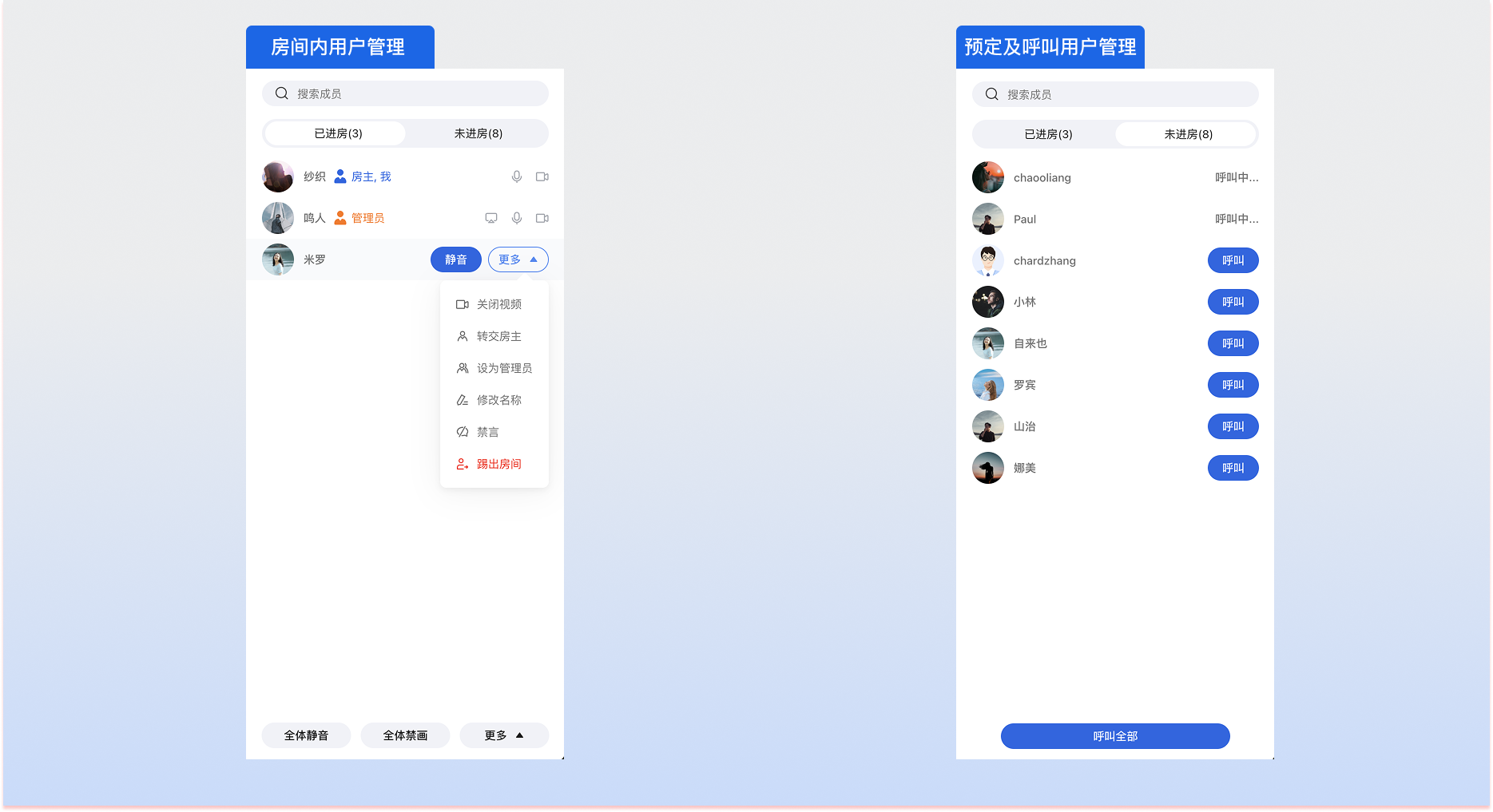
- package/resource/doc/roomkit/vue/features/screen-share.md +333 -0
- package/resource/doc/roomkit/vue/features/virtual-background.md +287 -0
- package/resource/doc/roomkit/vue/features/workflow.md +553 -0
- package/resource/doc/roomkit/vue/integration.md +479 -0
- package/resource/doc/roomkit/vue/workflow.md +487 -0
- package/resource/doc/tuicallkit/react/api.md +21 -0
- package/resource/doc/tuicallkit/vue/api.md +21 -0
- package/tools/chat/get-web-chat-integration.js +31 -14
- package/tools/chat/get-web-chat-integration.js.map +1 -1
- package/tools/definitions/get_web_chat_uikit_integration_def.js +19 -12
- package/tools/definitions/get_web_chat_uikit_integration_def.js.map +1 -1
- package/tools/definitions/get_web_room_feature_detail_def.js +95 -0
- package/tools/definitions/get_web_room_feature_detail_def.js.map +1 -0
- package/tools/definitions/get_web_room_uikit_integration_def.js +44 -0
- package/tools/definitions/get_web_room_uikit_integration_def.js.map +1 -0
- package/tools/index.js +4 -4
- package/tools/index.js.map +1 -1
- package/tools/live/get-web-live-uikit-integration.js +1 -1
- package/tools/room/get-web-room-feature-detail.js +68 -0
- package/tools/room/get-web-room-feature-detail.js.map +1 -0
- package/tools/room/get-web-room-integration.js +43 -0
- package/tools/room/get-web-room-integration.js.map +1 -0
- package/utils/generate-structured-result.js +2 -2
- package/utils/generate-structured-result.js.map +1 -1
- package/utils/report-cls-client.js +1 -1
- package/utils/report-es-client.js +1 -1
- package/resource/doc/chatuikit/flutter/integrate_only_tuichat_Flutter.md +0 -333
- package/resource/doc/chatuikit/flutter/quick_start_Flutter.md +0 -217
- package/resource/doc/chatuikit/react/chat_window_integration.md +0 -94
- package/resource/doc/chatuikit/vue/chat_window_integration.md +0 -156
- package/resource/doc/roomkit/vue/states/device-state.md +0 -369
- package/resource/doc/roomkit/vue/states/login-state.md +0 -59
- package/resource/doc/roomkit/vue/states/room-list-state.md +0 -355
- package/resource/doc/roomkit/vue/states/room-participant-state.md +0 -388
- package/tools/chat/get-web-chat-window-integration.js +0 -28
- package/tools/chat/get-web-chat-window-integration.js.map +0 -1
- package/tools/definitions/get_web_chat_window_integration_def.js +0 -26
- package/tools/definitions/get_web_chat_window_integration_def.js.map +0 -1
- package/tools/room/get-web-room-state-detail.js +0 -31
- package/tools/room/get-web-room-state-detail.js.map +0 -1
|
@@ -0,0 +1,407 @@
|
|
|
1
|
+
This document will guide you on how to manage participants in a room. Atomicx provides an out-of-the-box list component `RoomParticipantList` for quick integration, and exposes the [useRoomParticipantState](https://web.sdk.qcloud.com/trtc/live/web/doc/zh/index.html#module-RoomParticipantState) Hook to facilitate custom member control logic implementation.
|
|
2
|
+
|
|
3
|
+
## Feature Introduction
|
|
4
|
+
|
|
5
|
+
The member management module covers a complete set of capabilities for displaying user information and handling permissions in the room:
|
|
6
|
+
- **Real-time List Display:** Dynamically presents nicknames, roles, audio/video status, and volume fluctuation of all members in the room.
|
|
7
|
+
|
|
8
|
+
- **Permission Control:** Supports room owner or administrator to perform management operations such as kicking out, muting all, and transferring ownership.
|
|
9
|
+
|
|
10
|
+
- **Tiered Management:** Supports differentiated permission strategies for room owners, administrators, and regular members.
|
|
11
|
+
|
|
12
|
+
|
|
13
|
+
## Prerequisites
|
|
14
|
+
- User has completed login authentication through [useLoginState](https://web.sdk.qcloud.com/trtc/live/web/doc/zh/index.html#module-LoginState), please refer to [Integration Overview](https://write.woa.com/document/197379797539790848).
|
|
15
|
+
|
|
16
|
+
- User has entered the room through [useRoomState](https://web.sdk.qcloud.com/trtc/live/web/doc/zh/index.html#module-RoomState), please refer to [Room Management](https://write.woa.com/document/197379861957083136).
|
|
17
|
+
|
|
18
|
+
|
|
19
|
+
## Integrating Member Management Component
|
|
20
|
+
|
|
21
|
+
If you need to quickly build a member list interface, it's recommended to directly use the `RoomParticipantList` component. `RoomParticipantList` is an out-of-the-box participant list component with built-in complete member management UI and interactions.
|
|
22
|
+
|
|
23
|
+
|
|
24
|
+
|
|
25
|
+
|
|
26
|
+
Example code for integrating `RoomParticipantList` component:
|
|
27
|
+
``` typescript
|
|
28
|
+
<template>
|
|
29
|
+
<div class="room-page">
|
|
30
|
+
<!-- Participant list sidebar -->
|
|
31
|
+
<aside class="sidebar">
|
|
32
|
+
<div class="sidebar-header">
|
|
33
|
+
<span>Participants ({{ currentRoom.participantCount }})</span>
|
|
34
|
+
<IconClose />
|
|
35
|
+
</div>
|
|
36
|
+
|
|
37
|
+
<!-- Participant list component -->
|
|
38
|
+
<RoomParticipantList />
|
|
39
|
+
</aside>
|
|
40
|
+
</div>
|
|
41
|
+
</template>
|
|
42
|
+
|
|
43
|
+
<script setup lang="ts">
|
|
44
|
+
import { ref } from 'vue';
|
|
45
|
+
import { IconClose } from '@tencentcloud/uikit-base-component-vue3';
|
|
46
|
+
import {
|
|
47
|
+
RoomView,
|
|
48
|
+
RoomParticipantList,
|
|
49
|
+
useRoomState,
|
|
50
|
+
useRoomParticipantState
|
|
51
|
+
} from 'tuikit-atomicx-vue3/room';
|
|
52
|
+
|
|
53
|
+
const { currentRoom } = useRoomState();
|
|
54
|
+
const { participantList } = useRoomParticipantState();
|
|
55
|
+
</script>
|
|
56
|
+
|
|
57
|
+
<style scope>
|
|
58
|
+
.room-page {
|
|
59
|
+
width: 100vw;
|
|
60
|
+
height: 100vh;
|
|
61
|
+
min-width: 1150px;
|
|
62
|
+
display: flex;
|
|
63
|
+
flex-direction: row;
|
|
64
|
+
font-family: -apple-system, BlinkMacSystemFont, 'Segoe UI', Roboto, sans-serif;
|
|
65
|
+
position: relative;
|
|
66
|
+
overflow: hidden;
|
|
67
|
+
}
|
|
68
|
+
|
|
69
|
+
.sidebar {
|
|
70
|
+
position: absolute;
|
|
71
|
+
top: 0;
|
|
72
|
+
right: 0;
|
|
73
|
+
width: 400px;
|
|
74
|
+
height: 100%;
|
|
75
|
+
box-sizing: border-box;
|
|
76
|
+
}
|
|
77
|
+
|
|
78
|
+
.sidebar-header {
|
|
79
|
+
display: flex;
|
|
80
|
+
height: 60px;
|
|
81
|
+
justify-content: space-between;
|
|
82
|
+
align-items: center;
|
|
83
|
+
padding: 0px 20px;
|
|
84
|
+
}
|
|
85
|
+
</style>
|
|
86
|
+
```
|
|
87
|
+
|
|
88
|
+
> **Note:**
|
|
89
|
+
>
|
|
90
|
+
> - `RoomParticipantList` will automatically fill the height and width of its parent container, please ensure its parent container has explicit dimensions.
|
|
91
|
+
> - When using the `RoomParticipantList` component, ensure global `UIKitProvider` is configured in `App.vue`, please refer to [Configure App.vue](https://cloud.tencent.com/document/product/647/81962#ce98ee15-b0cb-43af-81da-70f51231430e).
|
|
92
|
+
|
|
93
|
+
|
|
94
|
+
## Implementing Member Management Features
|
|
95
|
+
|
|
96
|
+
If you need to customize member list UI or trigger management actions in specific business scenarios, please use [useRoomParticipantState](https://web.sdk.qcloud.com/trtc/live/web/doc/zh/index.html#module-RoomParticipantState).
|
|
97
|
+
|
|
98
|
+
### Step 1: Get Member List
|
|
99
|
+
|
|
100
|
+
Get reactive member data [participantList](https://web.sdk.qcloud.com/trtc/live/web/doc/zh/index.html#participantList) through [getParticipantList](https://web.sdk.qcloud.com/trtc/live/web/doc/zh/index.html#getParticipantList).
|
|
101
|
+
``` typescript
|
|
102
|
+
import { useRoomState, useRoomParticipantState } from 'tuikit-atomicx-vue3/room';
|
|
103
|
+
|
|
104
|
+
const { currentRoom } = useRoomState();
|
|
105
|
+
const { participantList, participantListCursor, getParticipantList } = useRoomParticipantState();
|
|
106
|
+
|
|
107
|
+
// Get room user list after successfully joining room
|
|
108
|
+
watch(() => currentRoom.value?.roomId, async () => {
|
|
109
|
+
await getParticipantList();
|
|
110
|
+
})
|
|
111
|
+
|
|
112
|
+
// Load more users when scrolling to bottom of list
|
|
113
|
+
const handleLoadMore = async () => {
|
|
114
|
+
if (participantListCursor.value) {
|
|
115
|
+
await getParticipantList({ cursor: participantListCursor.value });
|
|
116
|
+
}
|
|
117
|
+
};
|
|
118
|
+
```
|
|
119
|
+
|
|
120
|
+
> **Note:**
|
|
121
|
+
>
|
|
122
|
+
|
|
123
|
+
> Data successfully fetched by `getParticipantList` interface will be automatically maintained in `participantList`, UI only needs to render data from `participantList`.
|
|
124
|
+
>
|
|
125
|
+
|
|
126
|
+
|
|
127
|
+
### Step 2: Render Participant Information
|
|
128
|
+
|
|
129
|
+
Developers can use [participantList](https://web.sdk.qcloud.com/trtc/live/web/doc/zh/index.html#participantList) data to customize rendering of user information list.
|
|
130
|
+
``` typescript
|
|
131
|
+
<template>
|
|
132
|
+
<div class="participant-list">
|
|
133
|
+
<div class="list-header">
|
|
134
|
+
<h3>Participants ({{ participantList.length }})</h3>
|
|
135
|
+
<button @click="handleRefresh">
|
|
136
|
+
<IconRefresh />
|
|
137
|
+
</button>
|
|
138
|
+
</div>
|
|
139
|
+
<div class="list-content">
|
|
140
|
+
<div
|
|
141
|
+
v-for="participant in participantList"
|
|
142
|
+
:key="participant.userId"
|
|
143
|
+
class="participant-item"
|
|
144
|
+
>
|
|
145
|
+
<!-- Avatar -->
|
|
146
|
+
<Avatar
|
|
147
|
+
:user-id="participant.userId"
|
|
148
|
+
:avatar-url="participant.avatarUrl"
|
|
149
|
+
/>
|
|
150
|
+
|
|
151
|
+
<!-- User info -->
|
|
152
|
+
<div class="user-info">
|
|
153
|
+
<div class="user-name">
|
|
154
|
+
<span>{{ participant.userName }}</span>
|
|
155
|
+
<span v-if="participant.userId === localParticipant.userId" class="badge">Me</span>
|
|
156
|
+
<span
|
|
157
|
+
v-if="participant.role === RoomParticipantRole.Owner"
|
|
158
|
+
class="role-badge owner"
|
|
159
|
+
>
|
|
160
|
+
Owner
|
|
161
|
+
</span>
|
|
162
|
+
<span
|
|
163
|
+
v-else-if="participant.role === RoomParticipantRole.Admin"
|
|
164
|
+
class="role-badge admin"
|
|
165
|
+
>
|
|
166
|
+
Admin
|
|
167
|
+
</span>
|
|
168
|
+
</div>
|
|
169
|
+
</div>
|
|
170
|
+
|
|
171
|
+
<!-- Device status -->
|
|
172
|
+
<div class="device-status">
|
|
173
|
+
<IconMicOn
|
|
174
|
+
size="20"
|
|
175
|
+
v-if="participant.microphoneStatus === DeviceStatus.On"
|
|
176
|
+
class="icon-on"
|
|
177
|
+
/>
|
|
178
|
+
<IconMicOff size="20" v-else class="icon-off" />
|
|
179
|
+
<IconCameraOn
|
|
180
|
+
size="20"
|
|
181
|
+
v-if="participant.cameraStatus === DeviceStatus.On"
|
|
182
|
+
class="icon-on"
|
|
183
|
+
/>
|
|
184
|
+
<IconCameraOff size="20" v-else class="icon-off" />
|
|
185
|
+
</div>
|
|
186
|
+
</div>
|
|
187
|
+
</div>
|
|
188
|
+
</div>
|
|
189
|
+
</template>
|
|
190
|
+
|
|
191
|
+
<script setup lang="ts">
|
|
192
|
+
import { computed } from 'vue';
|
|
193
|
+
import { IconRefresh, IconMicOn, IconMicOff, IconCameraOn, IconCameraOff } from '@tencentcloud/uikit-base-component-vue3';
|
|
194
|
+
import {
|
|
195
|
+
useRoomParticipantState,
|
|
196
|
+
Avatar,
|
|
197
|
+
RoomParticipantRole,
|
|
198
|
+
DeviceStatus
|
|
199
|
+
} from 'tuikit-atomicx-vue3/room';
|
|
200
|
+
|
|
201
|
+
const {
|
|
202
|
+
localParticipant,
|
|
203
|
+
participantList,
|
|
204
|
+
getParticipantList,
|
|
205
|
+
transferOwner
|
|
206
|
+
} = useRoomParticipantState();
|
|
207
|
+
|
|
208
|
+
const handleRefresh = async () => {
|
|
209
|
+
await getParticipantList({ cursor: '' });
|
|
210
|
+
};
|
|
211
|
+
</script>
|
|
212
|
+
|
|
213
|
+
<style scoped>
|
|
214
|
+
.participant-list { display: flex; flex-direction: column; width: 400px; height: 100%; background-color: white;}.list-header { display: flex; align-items: center; justify-content: space-between; padding: 16px; border-bottom: 1px solid #e0e0e0;}.list-header h3 { margin: 0; font-size: 16px; font-weight: 600;}.list-content { flex: 1; overflow-y: auto; padding: 8px;}.participant-item { display: flex; align-items: center; gap: 12px; padding: 12px; border-radius: 8px; transition: background-color 0.2s;}.participant-item:hover { background-color: #f5f5f5;}.participant-item.is-local { background-color: #e3f2fd;}.user-info { flex: 1; min-width: 0;}.user-name { display: flex; align-items: center; gap: 6px; font-size: 14px; font-weight: 500;}.badge { padding: 2px 6px; background-color: #4caf50; color: white; border-radius: 3px; font-size: 12px;}.role-badge { padding: 2px 6px; border-radius: 3px; font-size: 12px;}.role-badge.owner { background-color: #ff9800; color: white;}.role-badge.admin { background-color: #2196f3; color: white;}.device-status { display: flex; gap: 8px;}.icon-on { color: #4caf50;}.icon-off { color: #999;}.action-button { padding: 4px 8px; background: transparent; border: none; cursor: pointer; border-radius: 4px; color: #666;}.action-button:hover { background-color: #f0f0f0;}
|
|
215
|
+
</style>
|
|
216
|
+
```
|
|
217
|
+
|
|
218
|
+
### Step 3: Set User Custom Information
|
|
219
|
+
|
|
220
|
+
Developers can use the [updateParticipantMetaData](https://web.sdk.qcloud.com/trtc/live/web/doc/zh/index.html#updateParticipantMetaData) interface to set custom data for users to **implement job titles**, **purchase status** and other capabilities. After updating, the `metaData` information will be maintained in the reactive data of the corresponding user in `participantList`.
|
|
221
|
+
``` typescript
|
|
222
|
+
<template>
|
|
223
|
+
<div v-for="participant in participantList" :key="participant.userId">
|
|
224
|
+
<span>{{ participant.userName }}</span>
|
|
225
|
+
<span v-if="participant.metaData">
|
|
226
|
+
{{ JSON.parse(participant.metaData).level }}
|
|
227
|
+
</span>
|
|
228
|
+
</div>
|
|
229
|
+
</template>
|
|
230
|
+
|
|
231
|
+
<script setup lang="ts">
|
|
232
|
+
import { computed } from 'vue';
|
|
233
|
+
import { IconRefresh, IconMicOn, IconMicOff, IconCameraOn, IconCameraOff } from '@tencentcloud/uikit-base-component-vue3';
|
|
234
|
+
import {
|
|
235
|
+
useRoomParticipantState,
|
|
236
|
+
} from 'tuikit-atomicx-vue3/room';
|
|
237
|
+
|
|
238
|
+
const {
|
|
239
|
+
updateParticipantMetaData,
|
|
240
|
+
} = useRoomParticipantState();
|
|
241
|
+
|
|
242
|
+
await updateParticipantMetaData({
|
|
243
|
+
userId: '', // Specify user id
|
|
244
|
+
metaData: JSON.stringify({ level: 1 }), // Business custom information
|
|
245
|
+
})
|
|
246
|
+
</script>
|
|
247
|
+
```
|
|
248
|
+
|
|
249
|
+
### Step 4: Manage Member Roles
|
|
250
|
+
|
|
251
|
+
Room owner can change user role to administrator through [setAdmin](https://web.sdk.qcloud.com/trtc/live/web/doc/zh/index.html#setAdmin) interface, and revoke user administrator status through [revokeAdmin](https://web.sdk.qcloud.com/trtc/live/web/doc/zh/index.html#revokeAdmin) method.
|
|
252
|
+
``` typescript
|
|
253
|
+
const { setAdmin, revokeAdmin } = useRoomParticipantState();
|
|
254
|
+
|
|
255
|
+
// Set regular user as administrator
|
|
256
|
+
await setAdmin({ userId });
|
|
257
|
+
|
|
258
|
+
// Change administrator to regular user
|
|
259
|
+
await revokeAdmin({ userId });
|
|
260
|
+
```
|
|
261
|
+
|
|
262
|
+
### Step 5: Manage Member Media Devices
|
|
263
|
+
|
|
264
|
+
Room owner and administrators can remotely control other members' media devices through [closeParticipantDevice](https://web.sdk.qcloud.com/trtc/live/web/doc/zh/index.html#closeParticipantDevice) interface to maintain a quiet and orderly meeting environment.
|
|
265
|
+
``` typescript
|
|
266
|
+
import { useRoomParticipantState, DeviceType } from 'tuikit-atomicx-vue3/room';
|
|
267
|
+
const { closeParticipantDevice } = useRoomParticipantState();
|
|
268
|
+
|
|
269
|
+
// Force close specified member's microphone
|
|
270
|
+
async function handleCloseUserMicrophone(userId: string) {
|
|
271
|
+
await closeParticipantDevice({
|
|
272
|
+
userId,
|
|
273
|
+
deviceType: DeviceType.Microphone,
|
|
274
|
+
});
|
|
275
|
+
}
|
|
276
|
+
|
|
277
|
+
// Force close specified member's camera
|
|
278
|
+
async function handleCloseUserCamera(userId: string) {
|
|
279
|
+
await closeParticipantDevice({
|
|
280
|
+
userId,
|
|
281
|
+
deviceType: DeviceType.Camera,
|
|
282
|
+
});
|
|
283
|
+
}
|
|
284
|
+
```
|
|
285
|
+
|
|
286
|
+
### Step 6: Enable Global State Management
|
|
287
|
+
|
|
288
|
+
Room owner and administrators can enable room global state management through [disableAllDevices](https://web.sdk.qcloud.com/trtc/live/web/doc/zh/index.html#disableAllDevices) and [disableAllMessages](https://web.sdk.qcloud.com/trtc/live/web/doc/zh/index.html#disableAllMessages) interfaces.
|
|
289
|
+
|
|
290
|
+
#### **Disable media devices of all regular users in the room**
|
|
291
|
+
``` typescript
|
|
292
|
+
import { useRoomParticipantState, DeviceType } from 'tuikit-atomicx-vue3/room';
|
|
293
|
+
const { closeParticipantDevice } = useRoomParticipantState();
|
|
294
|
+
|
|
295
|
+
// Force close all regular members' microphones
|
|
296
|
+
async function handleDisableAllMicrophone() {
|
|
297
|
+
await disableAllDevices({
|
|
298
|
+
deviceType: DeviceType.Microphone,
|
|
299
|
+
disable: true,
|
|
300
|
+
});
|
|
301
|
+
}
|
|
302
|
+
|
|
303
|
+
// Remove microphone restriction for all
|
|
304
|
+
async function handleEnableAllMicrophone() {
|
|
305
|
+
await disableAllDevices({
|
|
306
|
+
deviceType: DeviceType.Microphone,
|
|
307
|
+
disable: false,
|
|
308
|
+
});
|
|
309
|
+
}
|
|
310
|
+
|
|
311
|
+
// Force close all regular members' cameras
|
|
312
|
+
async function handleDisableAllCamera() {
|
|
313
|
+
await disableAllDevices({
|
|
314
|
+
deviceType: DeviceType.Camera,
|
|
315
|
+
disable: true,
|
|
316
|
+
});
|
|
317
|
+
}
|
|
318
|
+
|
|
319
|
+
// Remove camera restriction for all
|
|
320
|
+
async function handleEnableAllCamera() {
|
|
321
|
+
await disableAllDevices({
|
|
322
|
+
deviceType: DeviceType.Camera,
|
|
323
|
+
disable: false,
|
|
324
|
+
});
|
|
325
|
+
}
|
|
326
|
+
```
|
|
327
|
+
|
|
328
|
+
#### **Disable in-meeting chat for all regular users in the room**
|
|
329
|
+
``` typescript
|
|
330
|
+
import { useRoomParticipantState, DeviceType } from 'tuikit-atomicx-vue3/room';
|
|
331
|
+
const { disableAllMessages } = useRoomParticipantState();
|
|
332
|
+
|
|
333
|
+
// Force disable chat capability for all regular members
|
|
334
|
+
async function handleDisableAllMessage() {
|
|
335
|
+
await disableAllMessages({
|
|
336
|
+
disable: true,
|
|
337
|
+
});
|
|
338
|
+
}
|
|
339
|
+
```
|
|
340
|
+
|
|
341
|
+
### **Step 7:** Monitor Member Speaking Status
|
|
342
|
+
|
|
343
|
+
Through [speakingUsers](https://web.sdk.qcloud.com/trtc/live/web/doc/zh/index.html#speakingUsers), you can get real-time information about users currently speaking in the room and their volume levels.
|
|
344
|
+
``` typescript
|
|
345
|
+
const { speakingUsers } = useRoomParticipantState();
|
|
346
|
+
|
|
347
|
+
// Check if user is speaking
|
|
348
|
+
const isSpeaking = (userId: string) => speakingUsers.value.has(userId);
|
|
349
|
+
// Get user real-time volume (0-100)
|
|
350
|
+
const getVolume = (userId: string) => speakingUsers.value.get(userId) || 0;
|
|
351
|
+
```
|
|
352
|
+
|
|
353
|
+
### Step 8: Kick Out Room Members
|
|
354
|
+
|
|
355
|
+
Room owner and administrators can remove users from the room through [kickParticipant](https://web.sdk.qcloud.com/trtc/live/web/doc/zh/index.html#kickParticipant) interface.
|
|
356
|
+
``` typescript
|
|
357
|
+
const { kickParticipant } = useRoomParticipantState();
|
|
358
|
+
|
|
359
|
+
// Kick user out of room
|
|
360
|
+
await kickParticipant({ userId });
|
|
361
|
+
```
|
|
362
|
+
|
|
363
|
+
### Step 9: Invite Others to Join Room
|
|
364
|
+
|
|
365
|
+
In real business scenarios, you may need to initiate call invitations to users not yet in the room. Atomicx provides complete call system support, please see [In-Meeting Call](https://write.woa.com/document/197380078005506048).
|
|
366
|
+
|
|
367
|
+
## API Documentation
|
|
368
|
+
<table>
|
|
369
|
+
<tr>
|
|
370
|
+
<td rowspan="1" colSpan="1" >**State/Component**</td>
|
|
371
|
+
|
|
372
|
+
<td rowspan="1" colSpan="1" >**Feature Description**</td>
|
|
373
|
+
|
|
374
|
+
<td rowspan="1" colSpan="1" >**API Documentation**</td>
|
|
375
|
+
</tr>
|
|
376
|
+
|
|
377
|
+
<tr>
|
|
378
|
+
<td rowspan="1" colSpan="1" >**useRoomParticipantState**</td>
|
|
379
|
+
|
|
380
|
+
<td rowspan="1" colSpan="1" >Contains user data in the room and user management interfaces.</td>
|
|
381
|
+
|
|
382
|
+
<td rowspan="1" colSpan="1" >[API Documentation](https://web.sdk.qcloud.com/trtc/live/web/doc/zh/index.html#module-RoomParticipantState)</td>
|
|
383
|
+
</tr>
|
|
384
|
+
</table>
|
|
385
|
+
|
|
386
|
+
|
|
387
|
+
## Development Recommendations
|
|
388
|
+
|
|
389
|
+
**Permission Check:** In the UI layer, it's recommended to determine the current user's operation permissions through `participant.role`, hiding **kick out** or **mute** buttons for users without management permissions.
|
|
390
|
+
``` typescript
|
|
391
|
+
<script setup>
|
|
392
|
+
import { RoomParticipantRole } from 'tuikit-atomicx-vue3/room';
|
|
393
|
+
|
|
394
|
+
const { localParticipant } = useRoomParticipantState();
|
|
395
|
+
|
|
396
|
+
// Check if current user has admin permissions
|
|
397
|
+
const hasAdminPermission = computed(() => {
|
|
398
|
+
return localParticipant.value.role === RoomParticipantRole.Owner ||
|
|
399
|
+
localParticipant.value.role === RoomParticipantRole.Admin;
|
|
400
|
+
});
|
|
401
|
+
</script>
|
|
402
|
+
|
|
403
|
+
// Use in template
|
|
404
|
+
<template>
|
|
405
|
+
<button v-if="hasAdminPermission" @click="handleKick">Kick Out</button>
|
|
406
|
+
<template>
|
|
407
|
+
```
|