@nocobase/plugin-ai 2.3.0-alpha.1 → 3.0.0-alpha.2
This diff represents the content of publicly available package versions that have been released to one of the supported registries. The information contained in this diff is provided for informational purposes only and reflects changes between package versions as they appear in their respective public registries.
- package/dist/ai/docs/nocobase/ai-employees/block/ai-chat-box.md +133 -0
- package/dist/ai/docs/nocobase/ai-employees/knowledge-base/knowledge-base/documents.md +1 -1
- package/dist/ai/docs/nocobase/ai-employees/knowledge-base/knowledge-base/index.md +11 -7
- package/dist/ai/docs/nocobase/ai-employees/knowledge-base/knowledge-base/settings.md +12 -8
- package/dist/ai/docs/nocobase/ai-employees/knowledge-base/vector-database.md +3 -3
- package/dist/ai/docs/nocobase/ai-employees/workflow/nodes/knowledge/create-document.md +1 -1
- package/dist/ai/docs/nocobase/api/app/env.md +3 -1
- package/dist/ai/docs/nocobase/api/cli/index.md +14 -2
- package/dist/ai/docs/nocobase/api/cli/portal/config.md +44 -0
- package/dist/ai/docs/nocobase/api/cli/portal/create.md +48 -0
- package/dist/ai/docs/nocobase/api/cli/portal/deploy.md +39 -0
- package/dist/ai/docs/nocobase/api/cli/portal/destroy.md +41 -0
- package/dist/ai/docs/nocobase/api/cli/portal/dev.md +39 -0
- package/dist/ai/docs/nocobase/api/cli/portal/index.md +136 -0
- package/dist/ai/docs/nocobase/api/cli/portal/info.md +41 -0
- package/dist/ai/docs/nocobase/api/cli/portal/list.md +40 -0
- package/dist/ai/docs/nocobase/api/cli/portal/pull.md +43 -0
- package/dist/ai/docs/nocobase/api/cli/portal/push.md +41 -0
- package/dist/ai/docs/nocobase/building-tips/ai-fill-js-block-form.md +1092 -0
- package/dist/ai/docs/nocobase/data-sources/calendar/calendar-collection.md +100 -3
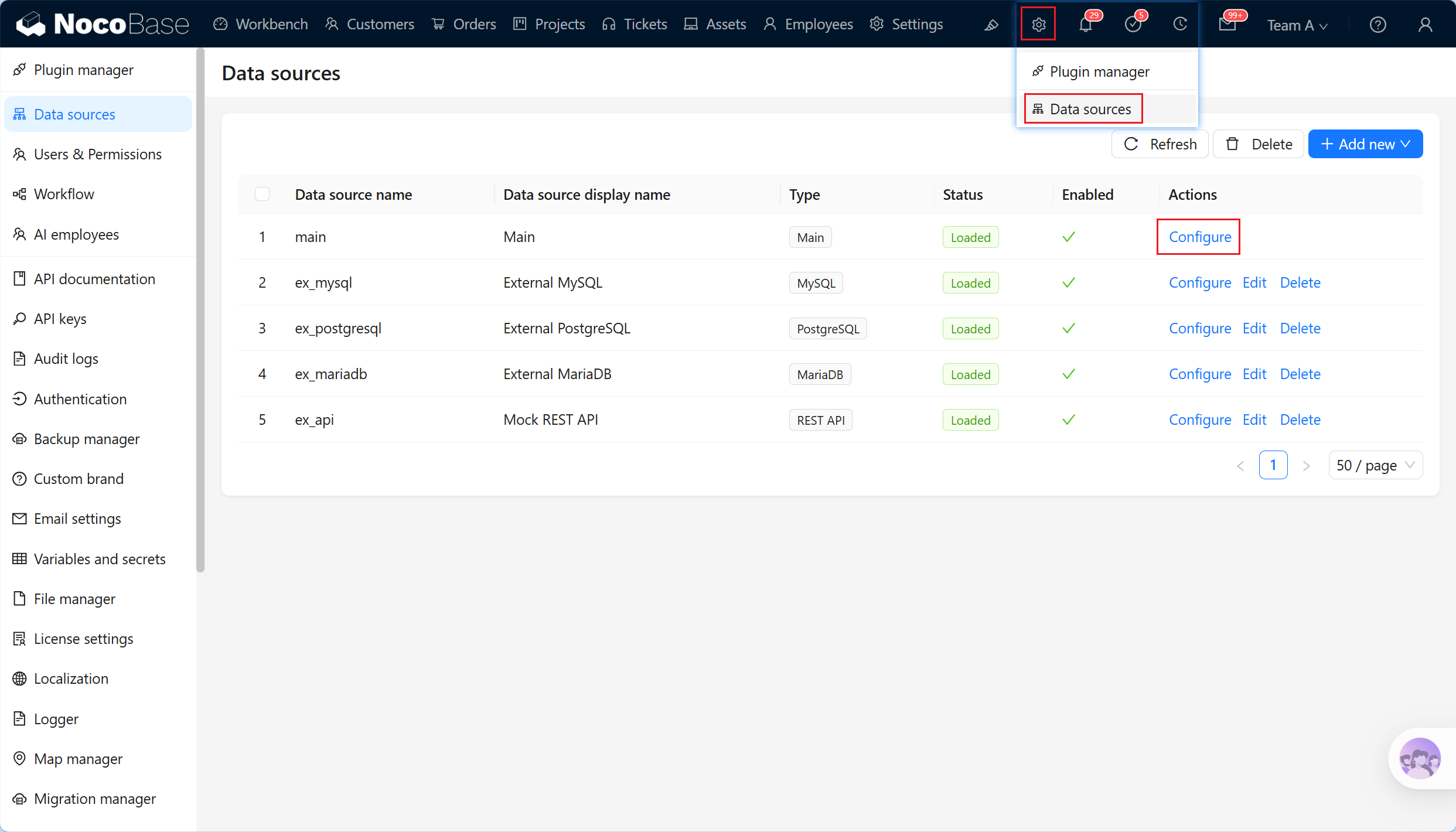
- package/dist/ai/docs/nocobase/data-sources/collection-comment/index.md +92 -39
- package/dist/ai/docs/nocobase/data-sources/collection-sql/index.md +150 -29
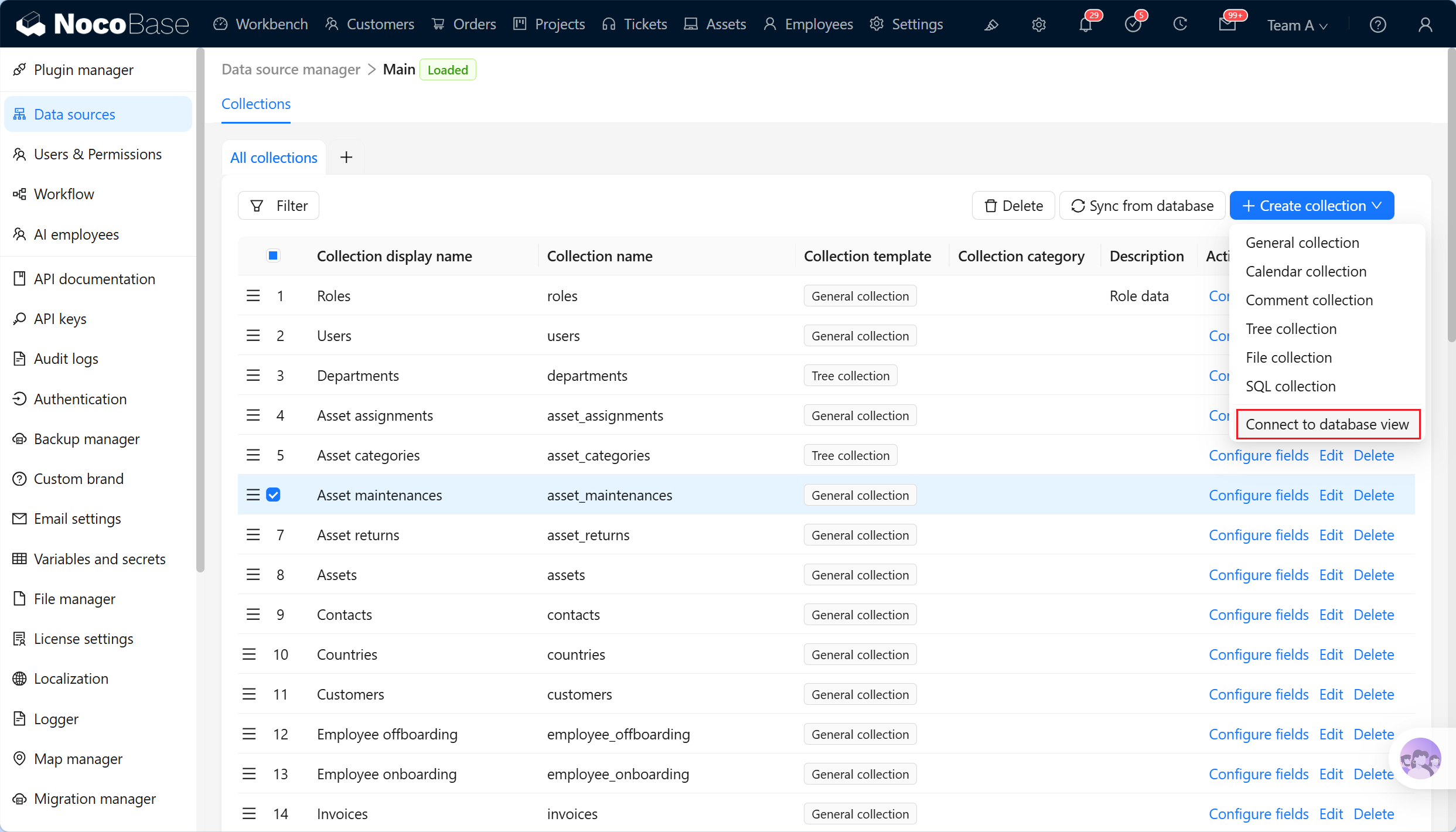
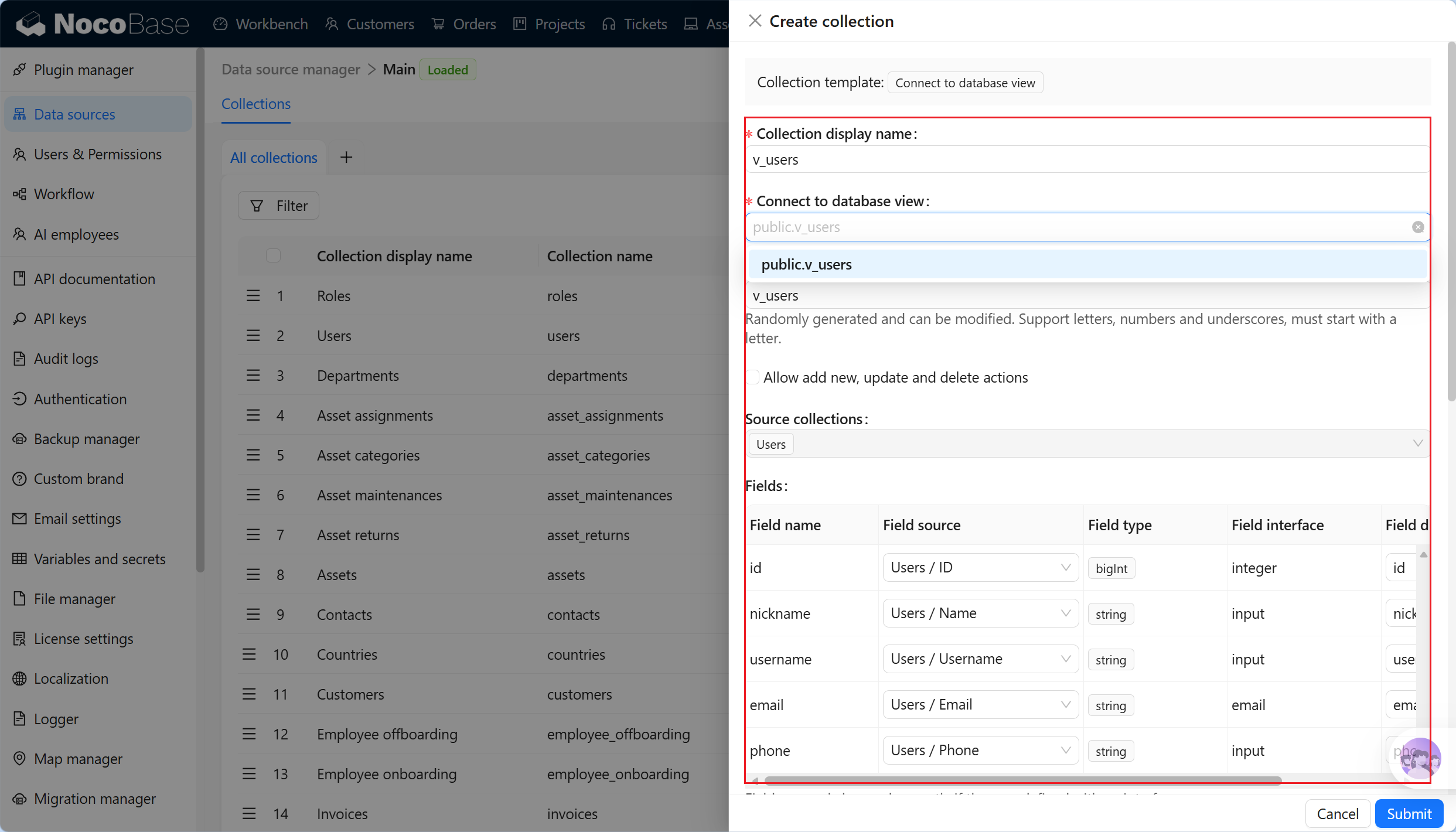
- package/dist/ai/docs/nocobase/data-sources/collection-tree/index.md +93 -5
- package/dist/ai/docs/nocobase/data-sources/collection-view/index.md +226 -4
- package/dist/ai/docs/nocobase/data-sources/data-modeling/collection-fields/advanced/china-region.md +122 -5
- package/dist/ai/docs/nocobase/data-sources/data-modeling/collection-fields/advanced/collection-select.md +105 -4
- package/dist/ai/docs/nocobase/data-sources/data-modeling/collection-fields/advanced/json.md +102 -4
- package/dist/ai/docs/nocobase/data-sources/data-modeling/collection-fields/advanced/nano-id.md +104 -4
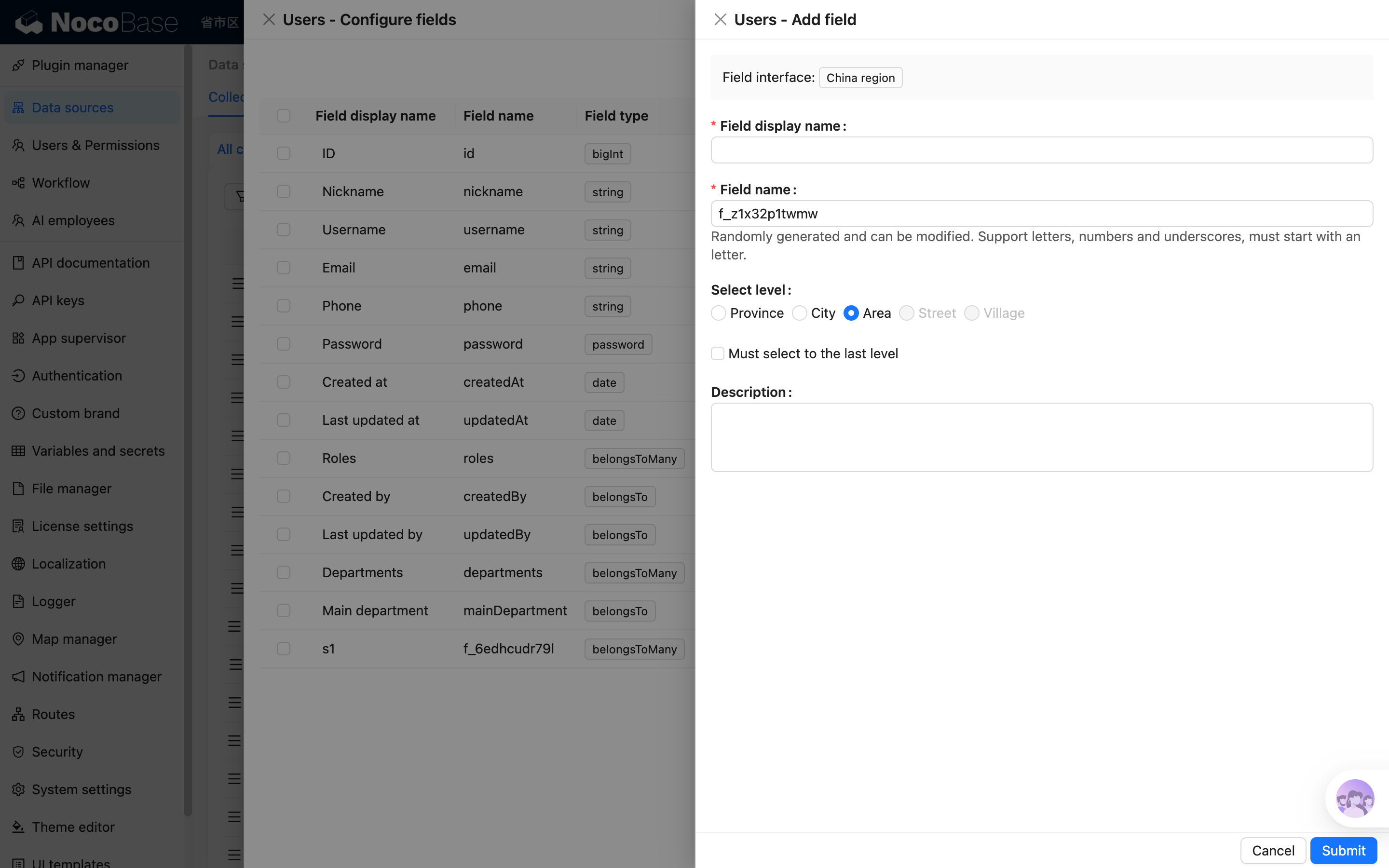
- package/dist/ai/docs/nocobase/data-sources/data-modeling/collection-fields/advanced/snowflake-id.md +108 -4
- package/dist/ai/docs/nocobase/data-sources/data-modeling/collection-fields/advanced/sort.md +3 -19
- package/dist/ai/docs/nocobase/data-sources/data-modeling/collection-fields/advanced/uuid.md +104 -4
- package/dist/ai/docs/nocobase/data-sources/data-modeling/collection-fields/associations/index.md +44 -8
- package/dist/ai/docs/nocobase/data-sources/data-modeling/collection-fields/basic/color.md +102 -4
- package/dist/ai/docs/nocobase/data-sources/data-modeling/collection-fields/basic/email.md +104 -4
- package/dist/ai/docs/nocobase/data-sources/data-modeling/collection-fields/basic/icon.md +102 -4
- package/dist/ai/docs/nocobase/data-sources/data-modeling/collection-fields/basic/input.md +112 -8
- package/dist/ai/docs/nocobase/data-sources/data-modeling/collection-fields/basic/integer.md +103 -4
- package/dist/ai/docs/nocobase/data-sources/data-modeling/collection-fields/basic/number.md +103 -4
- package/dist/ai/docs/nocobase/data-sources/data-modeling/collection-fields/basic/password.md +102 -4
- package/dist/ai/docs/nocobase/data-sources/data-modeling/collection-fields/basic/percent.md +104 -5
- package/dist/ai/docs/nocobase/data-sources/data-modeling/collection-fields/basic/phone.md +104 -4
- package/dist/ai/docs/nocobase/data-sources/data-modeling/collection-fields/basic/textarea.md +99 -8
- package/dist/ai/docs/nocobase/data-sources/data-modeling/collection-fields/basic/url.md +103 -4
- package/dist/ai/docs/nocobase/data-sources/data-modeling/collection-fields/choices/checkbox-group.md +105 -3
- package/dist/ai/docs/nocobase/data-sources/data-modeling/collection-fields/choices/checkbox.md +102 -4
- package/dist/ai/docs/nocobase/data-sources/data-modeling/collection-fields/choices/china-region.md +108 -5
- package/dist/ai/docs/nocobase/data-sources/data-modeling/collection-fields/choices/multiple-select.md +103 -5
- package/dist/ai/docs/nocobase/data-sources/data-modeling/collection-fields/choices/radio-group.md +106 -4
- package/dist/ai/docs/nocobase/data-sources/data-modeling/collection-fields/choices/select.md +103 -5
- package/dist/ai/docs/nocobase/data-sources/data-modeling/collection-fields/datetime/date.md +102 -4
- package/dist/ai/docs/nocobase/data-sources/data-modeling/collection-fields/datetime/datetime-without-tz.md +103 -5
- package/dist/ai/docs/nocobase/data-sources/data-modeling/collection-fields/datetime/datetime.md +103 -5
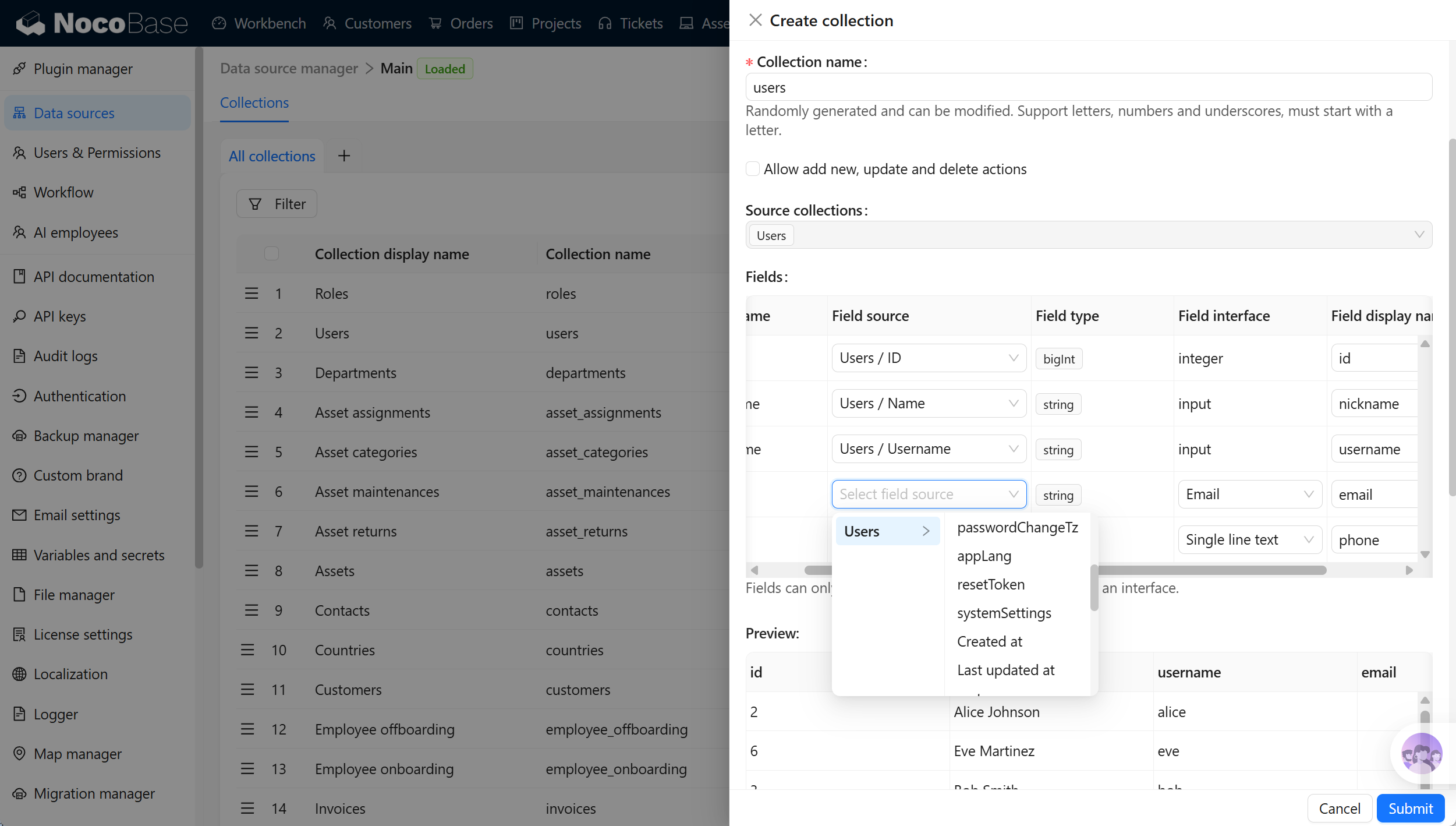
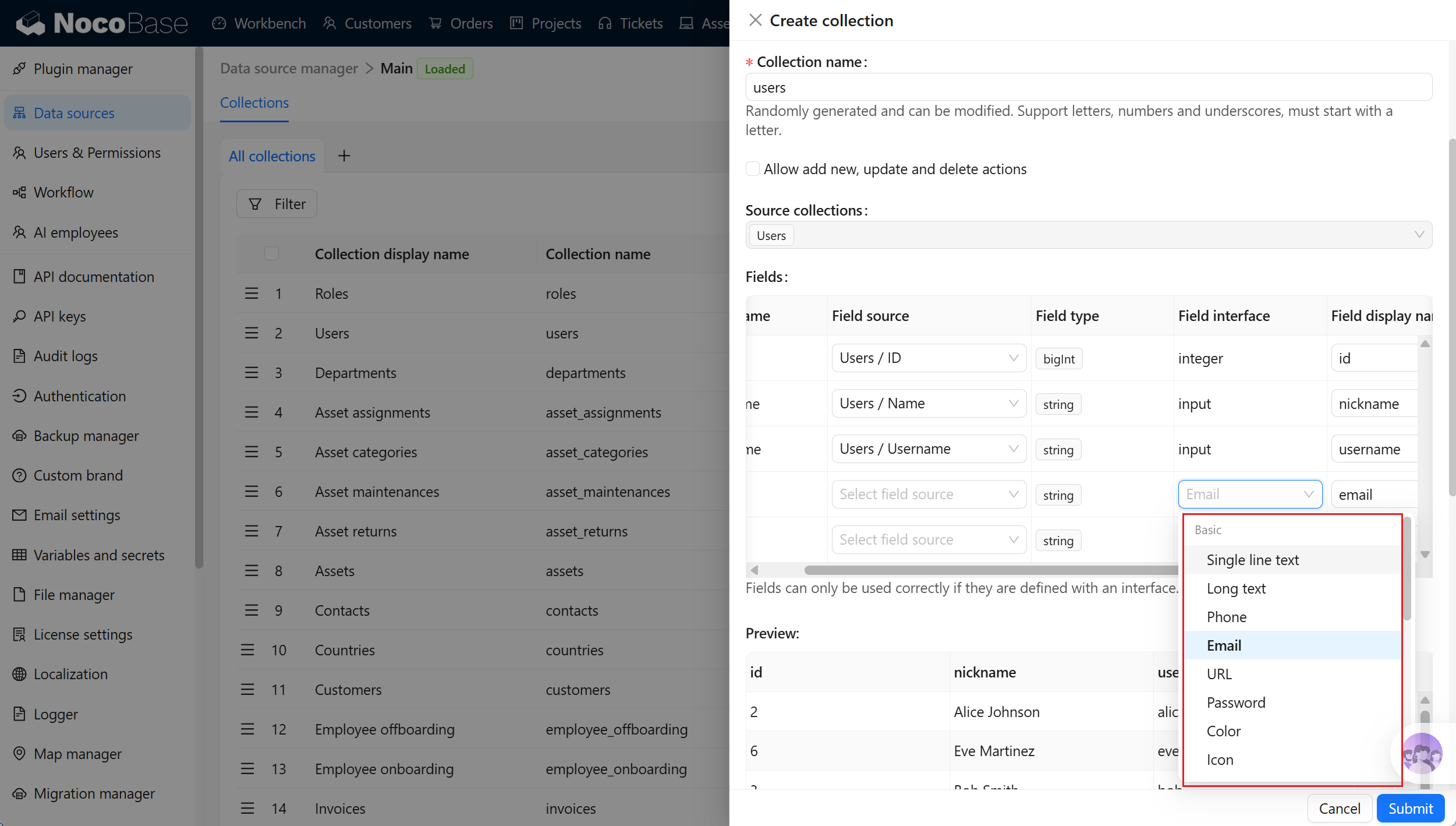
- package/dist/ai/docs/nocobase/data-sources/data-modeling/collection-fields/datetime/index.md +53 -47
- package/dist/ai/docs/nocobase/data-sources/data-modeling/collection-fields/datetime/time.md +102 -4
- package/dist/ai/docs/nocobase/data-sources/data-modeling/collection-fields/datetime/unix-timestamp.md +103 -5
- package/dist/ai/docs/nocobase/data-sources/data-modeling/collection-fields/geometric/circle.md +102 -4
- package/dist/ai/docs/nocobase/data-sources/data-modeling/collection-fields/geometric/line.md +103 -5
- package/dist/ai/docs/nocobase/data-sources/data-modeling/collection-fields/geometric/point.md +102 -4
- package/dist/ai/docs/nocobase/data-sources/data-modeling/collection-fields/geometric/polygon.md +102 -4
- package/dist/ai/docs/nocobase/data-sources/data-modeling/collection-fields/index.md +62 -16
- package/dist/ai/docs/nocobase/data-sources/data-modeling/collection-fields/media/markdown.md +104 -4
- package/dist/ai/docs/nocobase/data-sources/data-modeling/collection-fields/media/rich-text.md +105 -5
- package/dist/ai/docs/nocobase/data-sources/data-modeling/collection-fields/system-info/created-at.md +105 -5
- package/dist/ai/docs/nocobase/data-sources/data-modeling/collection-fields/system-info/created-by.md +103 -5
- package/dist/ai/docs/nocobase/data-sources/data-modeling/collection-fields/system-info/space.md +100 -6
- package/dist/ai/docs/nocobase/data-sources/data-modeling/collection-fields/system-info/table-oid.md +102 -4
- package/dist/ai/docs/nocobase/data-sources/data-modeling/collection-fields/system-info/updated-at.md +104 -5
- package/dist/ai/docs/nocobase/data-sources/data-modeling/collection-fields/system-info/updated-by.md +104 -6
- package/dist/ai/docs/nocobase/data-sources/data-modeling/collection-fields/validation.md +68 -58
- package/dist/ai/docs/nocobase/data-sources/data-modeling/collection.md +32 -13
- package/dist/ai/docs/nocobase/data-sources/data-modeling/index.md +41 -33
- package/dist/ai/docs/nocobase/data-sources/data-source-external-mariadb/index.md +114 -6
- package/dist/ai/docs/nocobase/data-sources/data-source-external-mssql/index.md +117 -6
- package/dist/ai/docs/nocobase/data-sources/data-source-external-mysql/index.md +103 -6
- package/dist/ai/docs/nocobase/data-sources/data-source-external-nocobase/index.md +75 -73
- package/dist/ai/docs/nocobase/data-sources/data-source-external-oracle/index.md +129 -11
- package/dist/ai/docs/nocobase/data-sources/data-source-external-postgres/index.md +110 -6
- package/dist/ai/docs/nocobase/data-sources/data-source-kingbase/index.md +75 -49
- package/dist/ai/docs/nocobase/data-sources/data-source-main/general-collection.md +116 -15
- package/dist/ai/docs/nocobase/data-sources/data-source-main/index.md +92 -62
- package/dist/ai/docs/nocobase/data-sources/data-source-main/inheritance-collection.md +97 -10
- package/dist/ai/docs/nocobase/data-sources/data-source-manager/external-database.md +97 -58
- package/dist/ai/docs/nocobase/data-sources/data-source-manager/index.md +32 -24
- package/dist/ai/docs/nocobase/data-sources/data-source-rest-api/index.md +115 -153
- package/dist/ai/docs/nocobase/data-sources/external/clickhouse.md +124 -0
- package/dist/ai/docs/nocobase/data-sources/external/doris.md +130 -0
- package/dist/ai/docs/nocobase/data-sources/external/index.md +140 -0
- package/dist/ai/docs/nocobase/data-sources/external/kingbase.md +129 -0
- package/dist/ai/docs/nocobase/data-sources/external/mariadb.md +126 -0
- package/dist/ai/docs/nocobase/data-sources/external/mssql.md +129 -0
- package/dist/ai/docs/nocobase/data-sources/external/mysql.md +115 -0
- package/dist/ai/docs/nocobase/data-sources/external/nocobase.md +159 -0
- package/dist/ai/docs/nocobase/data-sources/external/oceanbase.md +126 -0
- package/dist/ai/docs/nocobase/data-sources/external/oracle.md +158 -0
- package/dist/ai/docs/nocobase/data-sources/external/postgresql.md +122 -0
- package/dist/ai/docs/nocobase/data-sources/external/rest-api.md +245 -0
- package/dist/ai/docs/nocobase/data-sources/field-attachment-url/index.md +100 -12
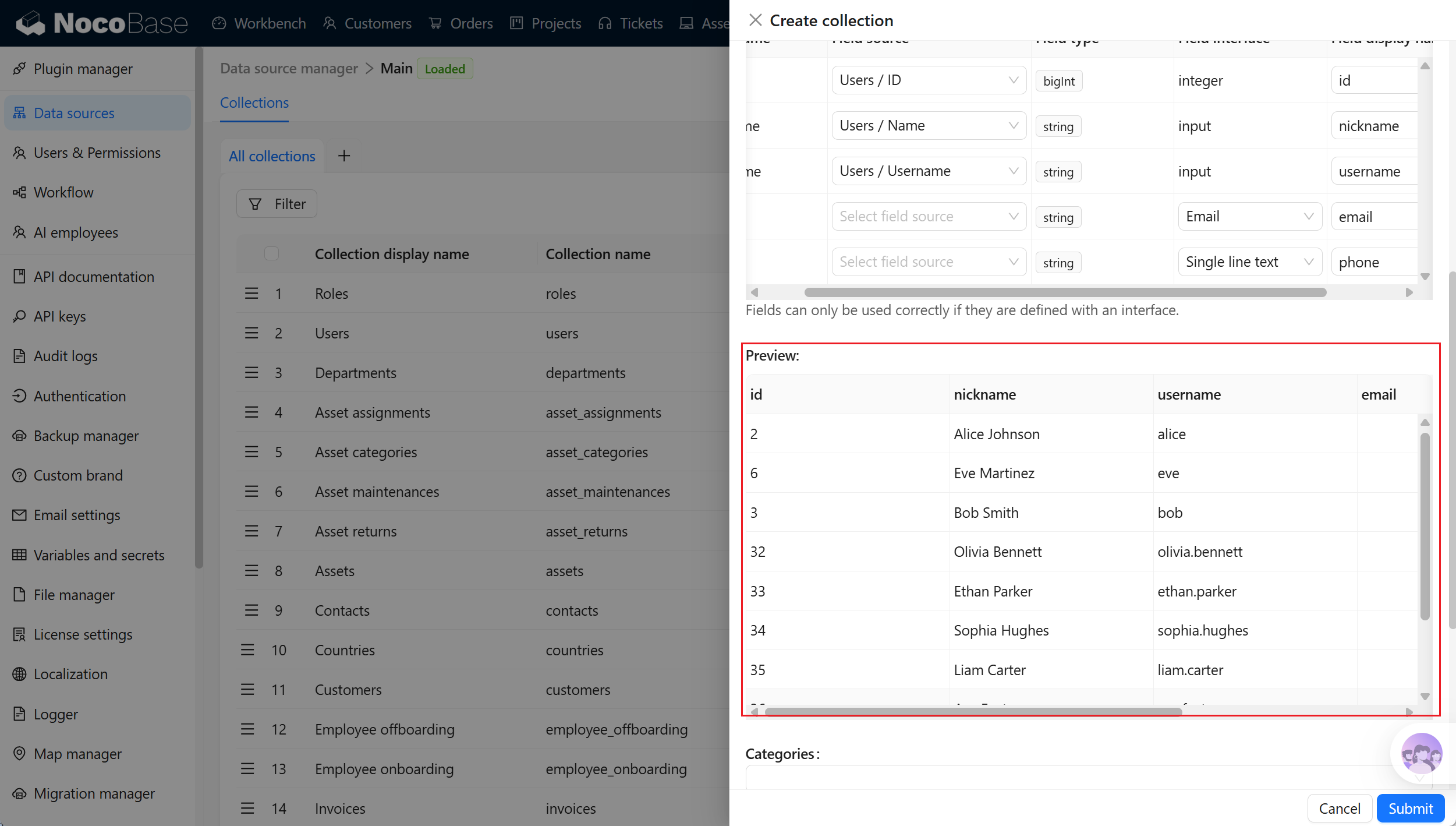
- package/dist/ai/docs/nocobase/data-sources/field-encryption/index.md +48 -47
- package/dist/ai/docs/nocobase/data-sources/field-formula/index.md +99 -5
- package/dist/ai/docs/nocobase/data-sources/field-markdown-vditor/index.md +105 -5
- package/dist/ai/docs/nocobase/data-sources/field-sequence/index.md +102 -5
- package/dist/ai/docs/nocobase/data-sources/field-signature/index.md +18 -16
- package/dist/ai/docs/nocobase/data-sources/field-sort/index.md +76 -73
- package/dist/ai/docs/nocobase/data-sources/file-manager/field-attachment.md +101 -7
- package/dist/ai/docs/nocobase/data-sources/file-manager/file-collection.md +101 -14
- package/dist/ai/docs/nocobase/data-sources/index.md +49 -33
- package/dist/ai/docs/nocobase/data-sources/main/index.md +130 -0
- package/dist/ai/docs/nocobase/data-sources/main/kingbase.md +147 -0
- package/dist/ai/docs/nocobase/data-sources/main/mariadb.md +59 -0
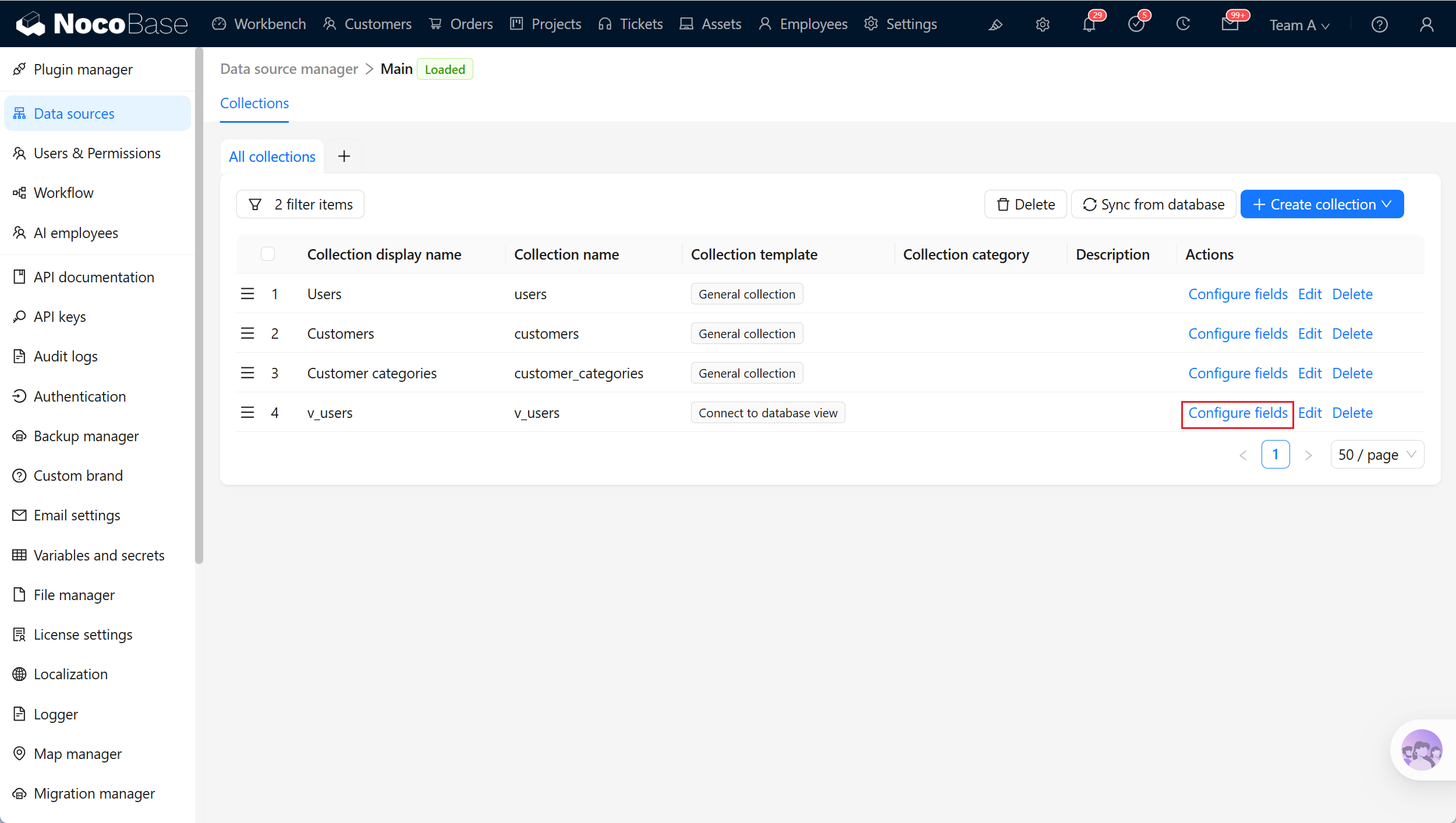
- package/dist/ai/docs/nocobase/data-sources/main/mysql.md +59 -0
- package/dist/ai/docs/nocobase/data-sources/main/oceanbase.md +62 -0
- package/dist/ai/docs/nocobase/data-sources/main/postgresql.md +61 -0
- package/dist/ai/docs/nocobase/file-manager/storage/index.md +66 -26
- package/dist/ai/docs/nocobase/file-manager/storage/s3-pro.md +58 -7
- package/dist/ai/docs/nocobase/get-started/installation/env.md +2 -2
- package/dist/ai/docs/nocobase/ops-management/migration-manager/built-in-tables.md +1 -2
- package/dist/ai/docs/nocobase/runjs/context/ai.md +194 -4
- package/dist/ai/tools/executeFrontendTool.d.ts +10 -0
- package/dist/ai/tools/executeFrontendTool.js +86 -0
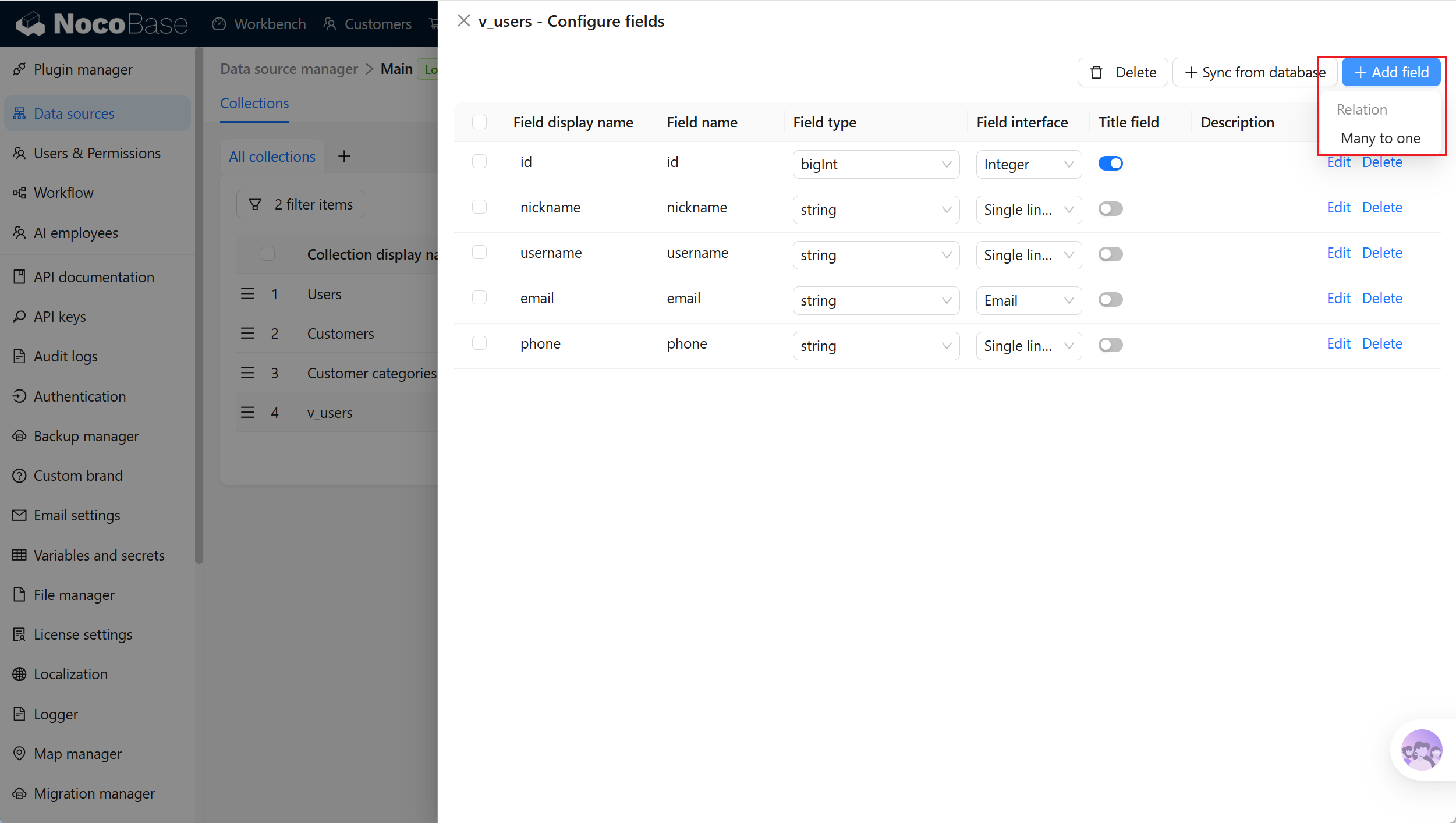
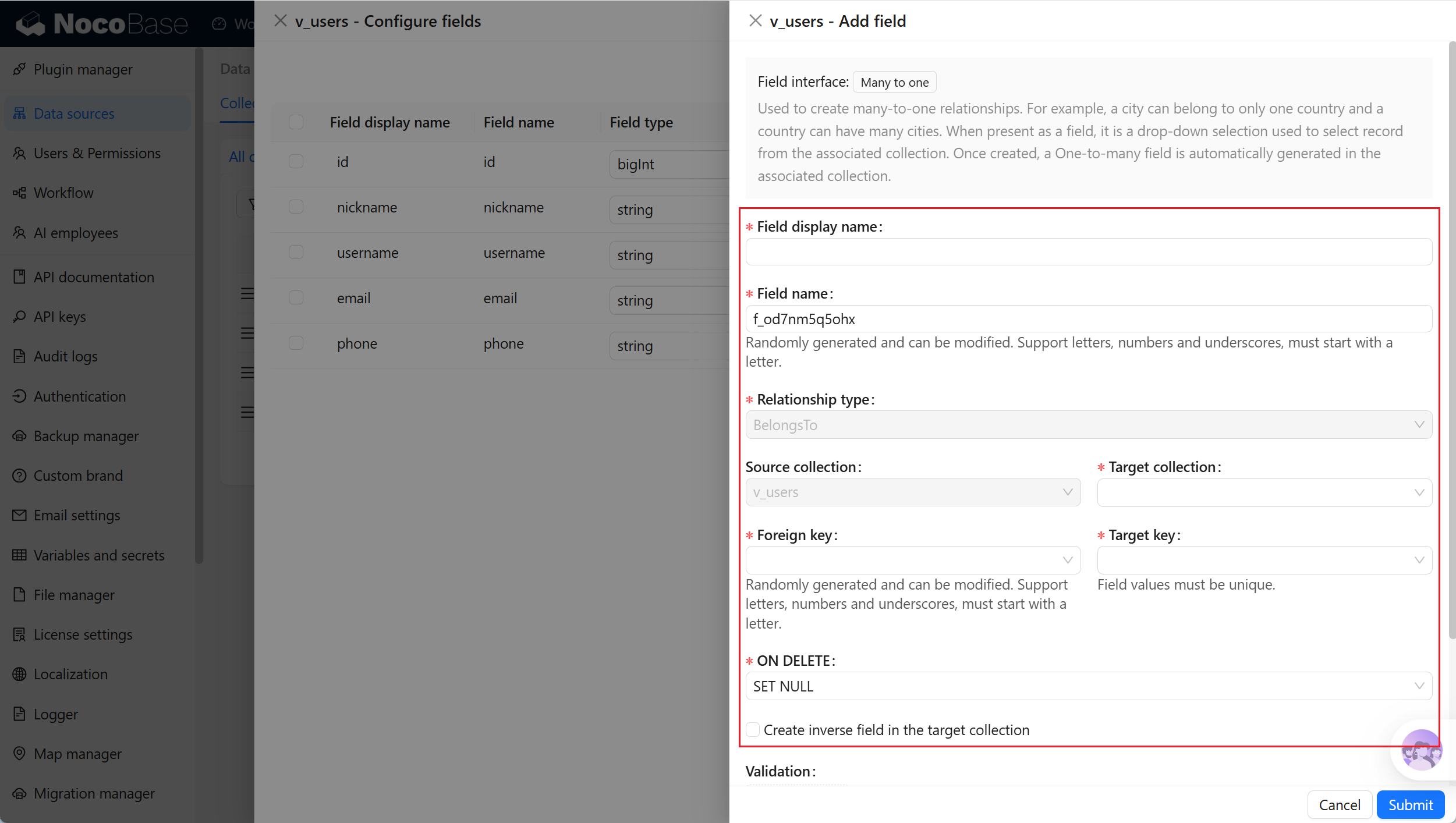
- package/dist/ai/tools/getSkill.js +1 -1
- package/dist/ai/tools/loadFrontendTool.d.ts +10 -0
- package/dist/ai/tools/loadFrontendTool.js +99 -0
- package/dist/client/244.8631eb5cf3f05e21.js +10 -0
- package/dist/client/{525.203778500aca5d05.js → 525.94dd4136c1361477.js} +1 -1
- package/dist/client/681.6ffbc9329b9ac242.js +10 -0
- package/dist/{client-v2/705.1d10027ff8cfdf79.js → client/705.19b642db34de438a.js} +1 -1
- package/dist/client/index.d.ts +1 -3
- package/dist/client/index.js +8 -8
- package/dist/client-v2/244.c428e645ecb94414.js +10 -0
- package/dist/client-v2/420.b2aedb1ff71fca0e.js +10 -0
- package/dist/client-v2/681.6890caa389564ff7.js +10 -0
- package/dist/client-v2/705.8dc34d43f02f322c.js +10 -0
- package/dist/client-v2/ai-employees/AIEmployeeShortcut.d.ts +2 -0
- package/dist/client-v2/ai-employees/AddContextButton.d.ts +2 -0
- package/dist/client-v2/ai-employees/chatbox/components/AIEmployeeSwitcher.d.ts +1 -0
- package/dist/client-v2/ai-employees/chatbox/components/ChatBoxUnreadBadge.d.ts +17 -0
- package/dist/client-v2/ai-employees/chatbox/components/Conversations.d.ts +9 -1
- package/dist/client-v2/ai-employees/chatbox/components/MessageRenderers.d.ts +1 -1
- package/dist/client-v2/ai-employees/chatbox/components/Messages.d.ts +5 -1
- package/dist/client-v2/ai-employees/chatbox/components/ModelSwitcher.d.ts +4 -0
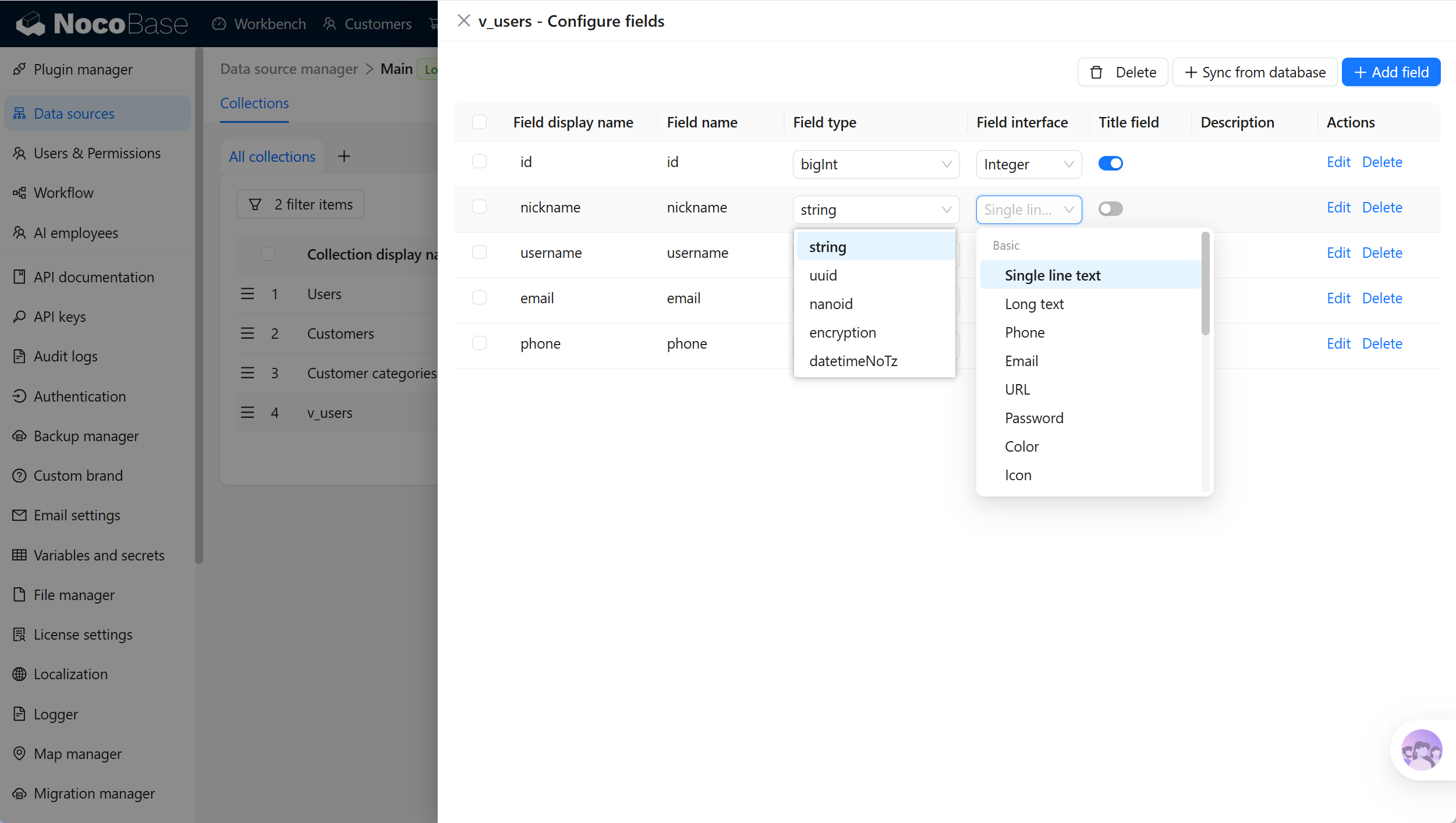
- package/dist/client-v2/ai-employees/chatbox/components/Sender.d.ts +33 -1
- package/dist/client-v2/ai-employees/chatbox/components/index.d.ts +1 -0
- package/dist/client-v2/ai-employees/chatbox/hooks/useChat.d.ts +8 -5
- package/dist/client-v2/ai-employees/chatbox/hooks/useChatBoxActions.d.ts +3 -2
- package/dist/client-v2/ai-employees/chatbox/hooks/useChatBoxEffect.d.ts +2 -1
- package/dist/client-v2/ai-employees/chatbox/hooks/useChatConversationActions.d.ts +3 -2
- package/dist/client-v2/ai-employees/chatbox/hooks/useChatMessageActions.d.ts +4 -2
- package/dist/client-v2/ai-employees/chatbox/hooks/useToolCallActions.d.ts +3 -1
- package/dist/client-v2/ai-employees/chatbox/hooks/useUploadFiles.d.ts +13 -3
- package/dist/client-v2/ai-employees/chatbox/hooks/useWorkflowTasks.d.ts +3 -2
- package/dist/client-v2/ai-employees/chatbox/index.d.ts +17 -0
- package/dist/client-v2/ai-employees/chatbox/roles.d.ts +2 -153
- package/dist/client-v2/ai-employees/chatbox/stores/chat-box.d.ts +46 -31
- package/dist/client-v2/ai-employees/chatbox/stores/chat-conversations.d.ts +7 -7
- package/dist/client-v2/ai-employees/chatbox/stores/chat-messages.d.ts +23 -18
- package/dist/client-v2/ai-employees/chatbox/stores/chat-sender.d.ts +43 -0
- package/dist/client-v2/ai-employees/chatbox/stores/chat-tool-call.d.ts +6 -5
- package/dist/client-v2/ai-employees/chatbox/stores/chat-tools.d.ts +11 -5
- package/dist/client-v2/ai-employees/chatbox/stores/mounted-chat-boxes.d.ts +20 -0
- package/dist/client-v2/ai-employees/chatbox/stores/runtime.d.ts +43 -0
- package/dist/client-v2/ai-employees/chatbox/stores/workflow-tasks.d.ts +22 -10
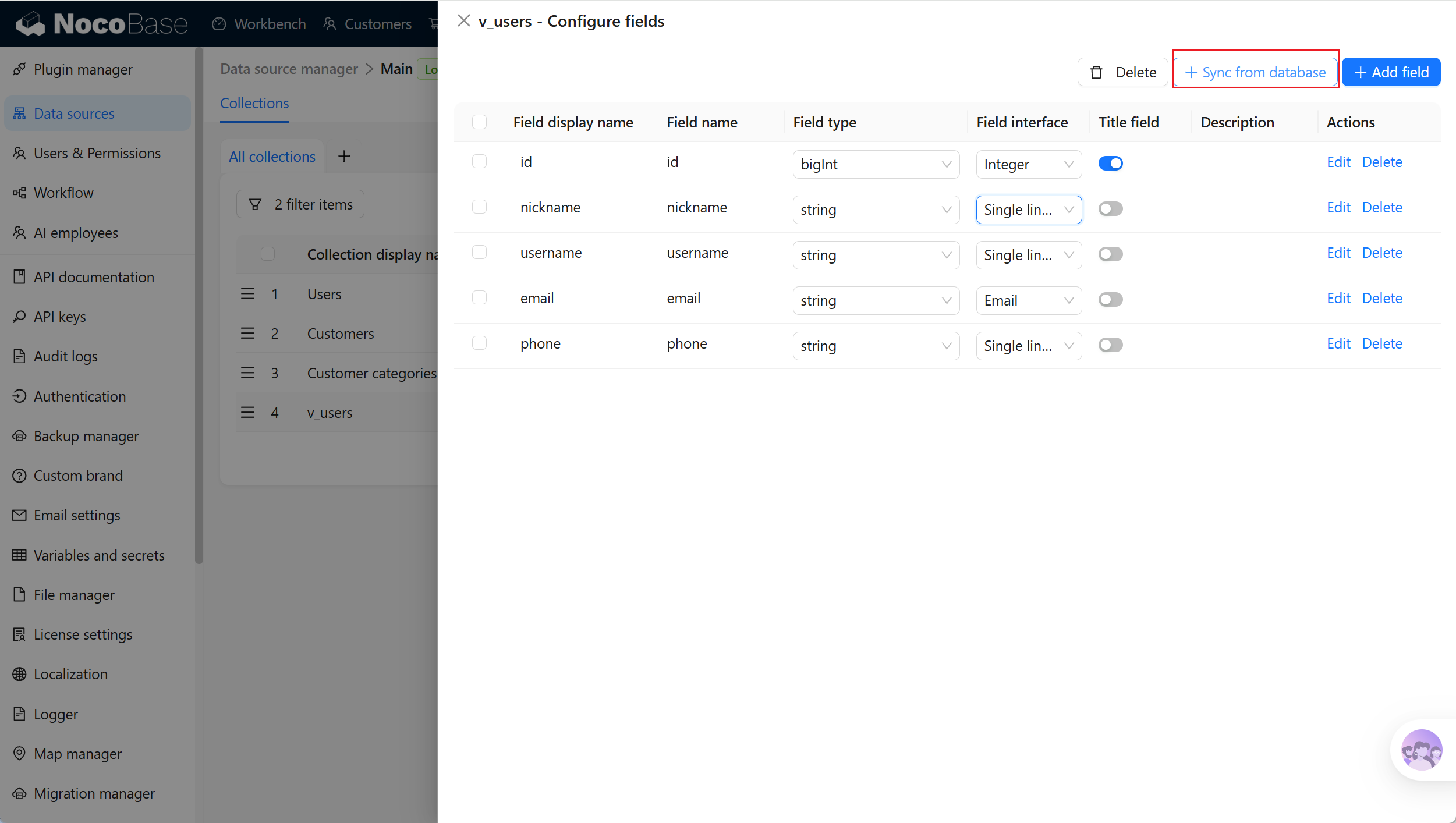
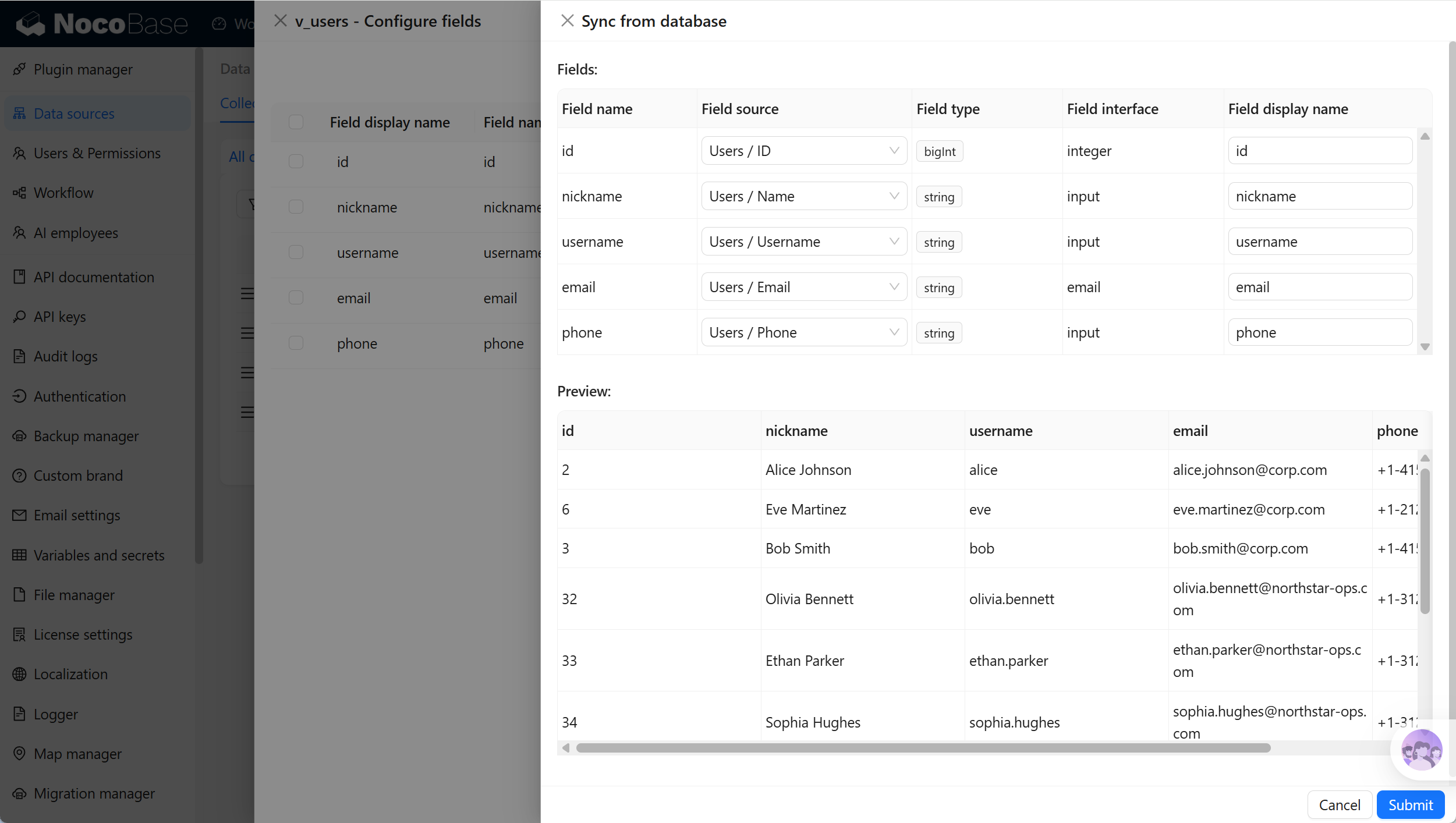
- package/dist/client-v2/ai-employees/chatbox/upload.d.ts +19 -0
- package/dist/client-v2/ai-employees/chatbox/utils.d.ts +28 -4
- package/dist/client-v2/ai-employees/frontend-tools.d.ts +11 -0
- package/dist/client-v2/ai-employees/tools/SuggestionsOptionsCard.d.ts +1 -1
- package/dist/client-v2/ai-employees/tools/WorkflowTaskOutputCard.d.ts +1 -1
- package/dist/client-v2/ai-employees/types.d.ts +30 -0
- package/dist/client-v2/block/ai-chat-box/AIChatBoxBlockModel.d.ts +21 -0
- package/dist/client-v2/block/ai-chat-box/AIChatBoxCoreModel.d.ts +13 -0
- package/dist/client-v2/block/ai-chat-box/components/AIChatBoxCoreView.d.ts +10 -0
- package/dist/client-v2/block/ai-chat-box/components/AIChatBoxView.d.ts +12 -0
- package/dist/client-v2/block/ai-chat-box/index.d.ts +14 -0
- package/dist/client-v2/block/ai-chat-box/settings.d.ts +12 -0
- package/dist/client-v2/block/ai-chat-box/sub-models.d.ts +26 -0
- package/dist/client-v2/block/ai-chat-box/types.d.ts +38 -0
- package/dist/client-v2/block/ai-chat-box/utils.d.ts +26 -0
- package/dist/client-v2/index.d.ts +3 -5
- package/dist/client-v2/index.js +3 -3
- package/dist/client-v2/llm-services/model-select.d.ts +33 -0
- package/dist/client-v2/llm-services/utils.d.ts +1 -0
- package/dist/client-v2/manager/ai-manager.d.ts +10 -3
- package/dist/client-v2/manager/frontend-tool-registry.d.ts +30 -0
- package/dist/client-v2/models/ai-employees/AIEmployeeActionModel.d.ts +4 -1
- package/dist/client-v2/models/ai-employees/AIEmployeeShortcutModel.d.ts +5 -0
- package/dist/client-v2/pages/EmployeesPage.d.ts +2 -0
- package/dist/client-v2/runjs/registerAIEmployeeRunJSFacade.d.ts +1 -0
- package/dist/common/ai-employee-validation.d.ts +15 -0
- package/dist/common/ai-employee-validation.js +61 -0
- package/dist/common/error-codes.d.ts +13 -0
- package/dist/common/error-codes.js +48 -0
- package/dist/common/frontend-tools.d.ts +26 -0
- package/dist/common/frontend-tools.js +57 -0
- package/dist/common/llm-service-models.d.ts +16 -0
- package/dist/common/llm-service-models.js +84 -0
- package/dist/externalVersion.js +16 -16
- package/dist/locale/en-US.json +67 -0
- package/dist/locale/zh-CN.json +67 -0
- package/dist/node_modules/@langchain/mistralai/package.json +1 -1
- package/dist/node_modules/@langchain/xai/package.json +1 -1
- package/dist/node_modules/fs-extra/package.json +1 -1
- package/dist/node_modules/jsonrepair/package.json +1 -1
- package/dist/node_modules/just-bash/package.json +1 -1
- package/dist/node_modules/nodejs-snowflake/package.json +1 -1
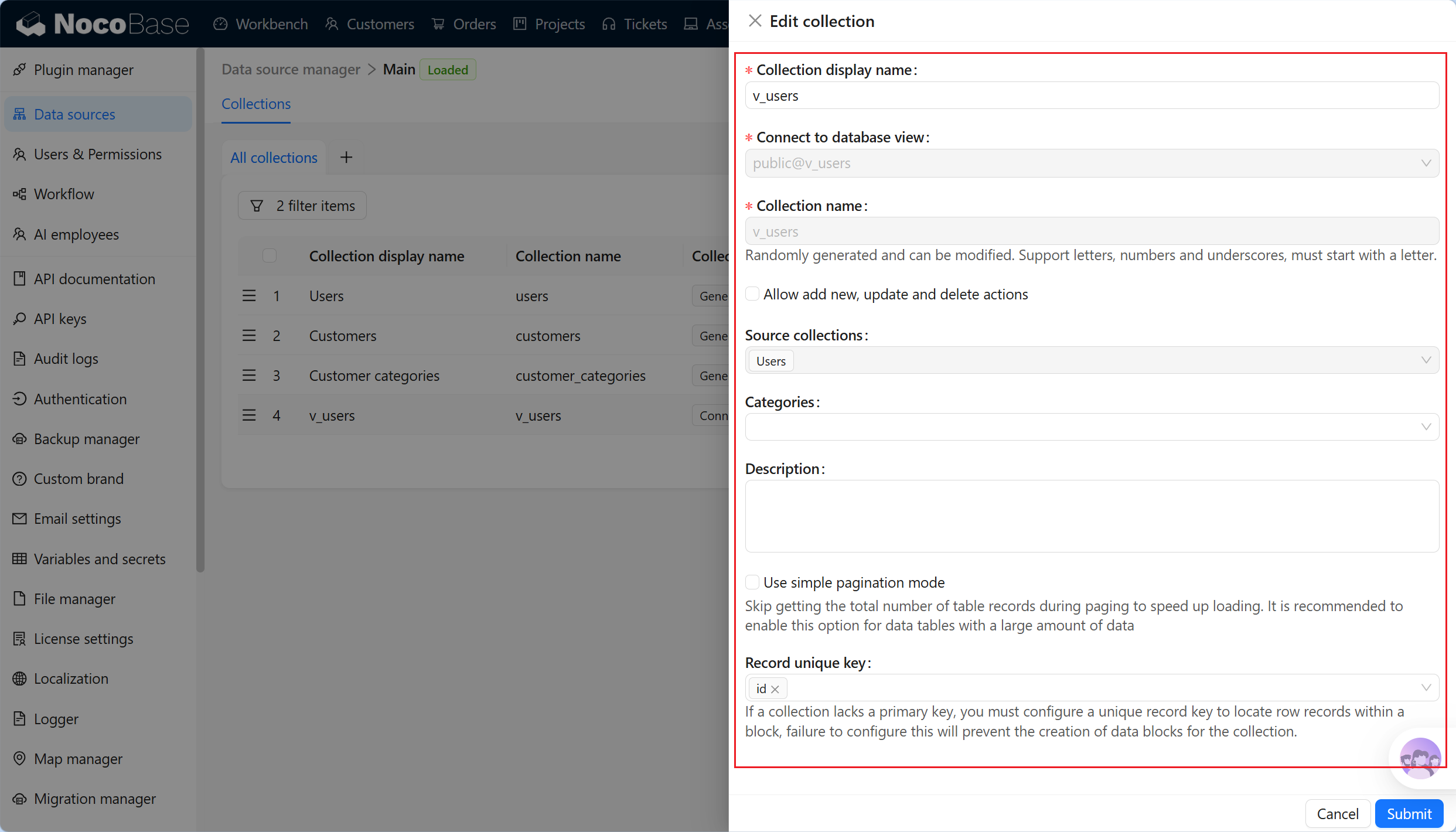
- package/dist/node_modules/openai/package.json +1 -1
- package/dist/node_modules/zod/package.json +1 -1
- package/dist/server/ai-employees/ai-conversations.d.ts +4 -1
- package/dist/server/ai-employees/ai-conversations.js +2 -0
- package/dist/server/ai-employees/ai-employee.d.ts +2 -1
- package/dist/server/ai-employees/ai-employee.js +26 -7
- package/dist/server/ai-employees/middleware/conversation.js +9 -2
- package/dist/server/collections/ai-conversations.js +5 -0
- package/dist/server/document-loader/constants.js +1 -1
- package/dist/server/frontend-tools.d.ts +25 -0
- package/dist/server/frontend-tools.js +171 -0
- package/dist/server/manager/work-context-handler.js +10 -3
- package/dist/server/plugin.d.ts +1 -0
- package/dist/server/plugin.js +25 -0
- package/dist/server/resource/aiConversations.d.ts +2 -0
- package/dist/server/resource/aiConversations.js +33 -3
- package/dist/server/resource/aiEmployees.d.ts +2 -0
- package/dist/server/resource/aiEmployees.js +62 -0
- package/dist/server/resource/aiWorkflowTasks.js +9 -1
- package/dist/server/resource/llmServices.d.ts +11 -0
- package/dist/server/resource/llmServices.js +85 -0
- package/dist/server/types/knowledge-base.type.d.ts +6 -2
- package/dist/swagger/common.d.ts +143 -0
- package/dist/swagger/common.js +144 -0
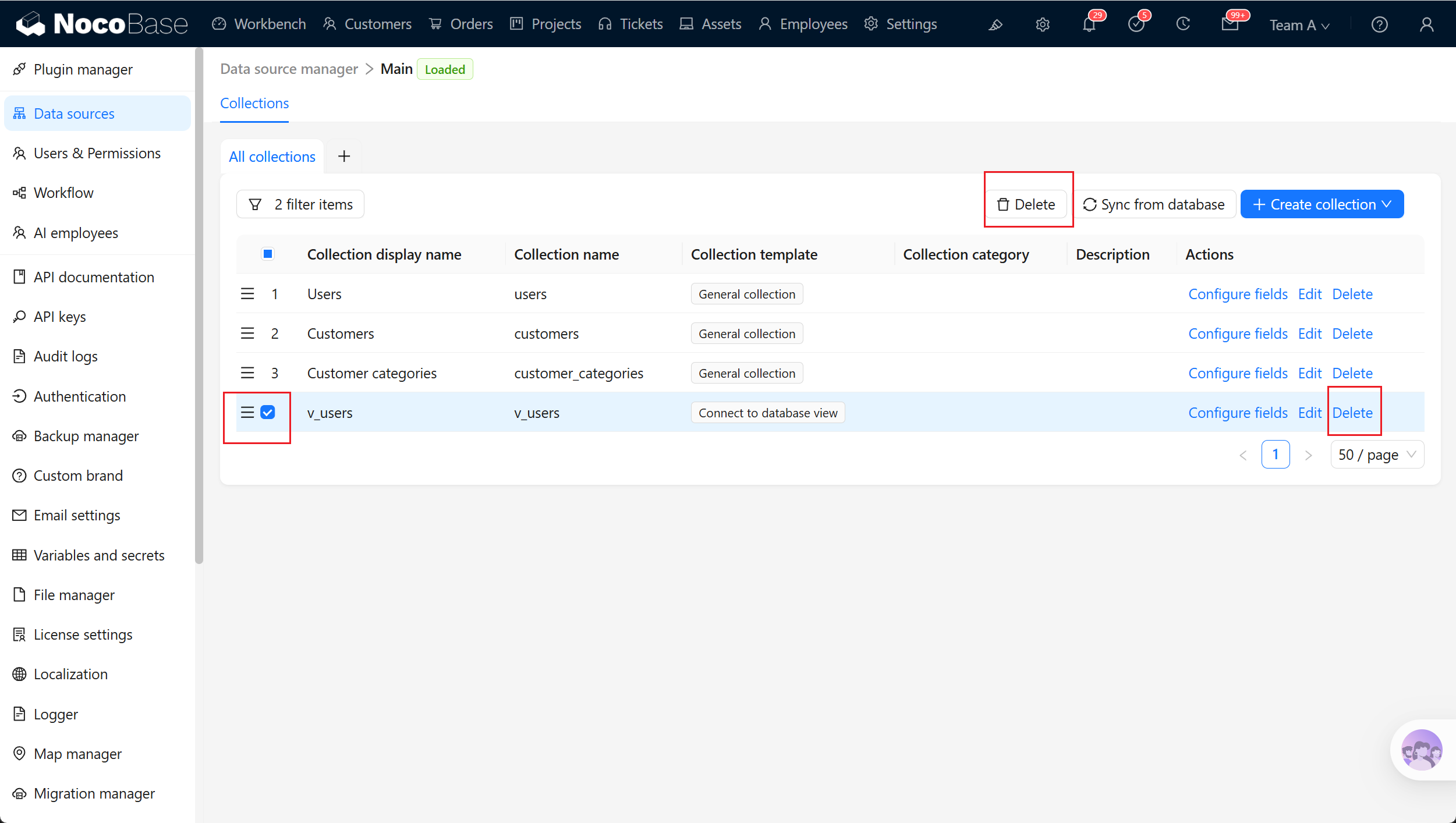
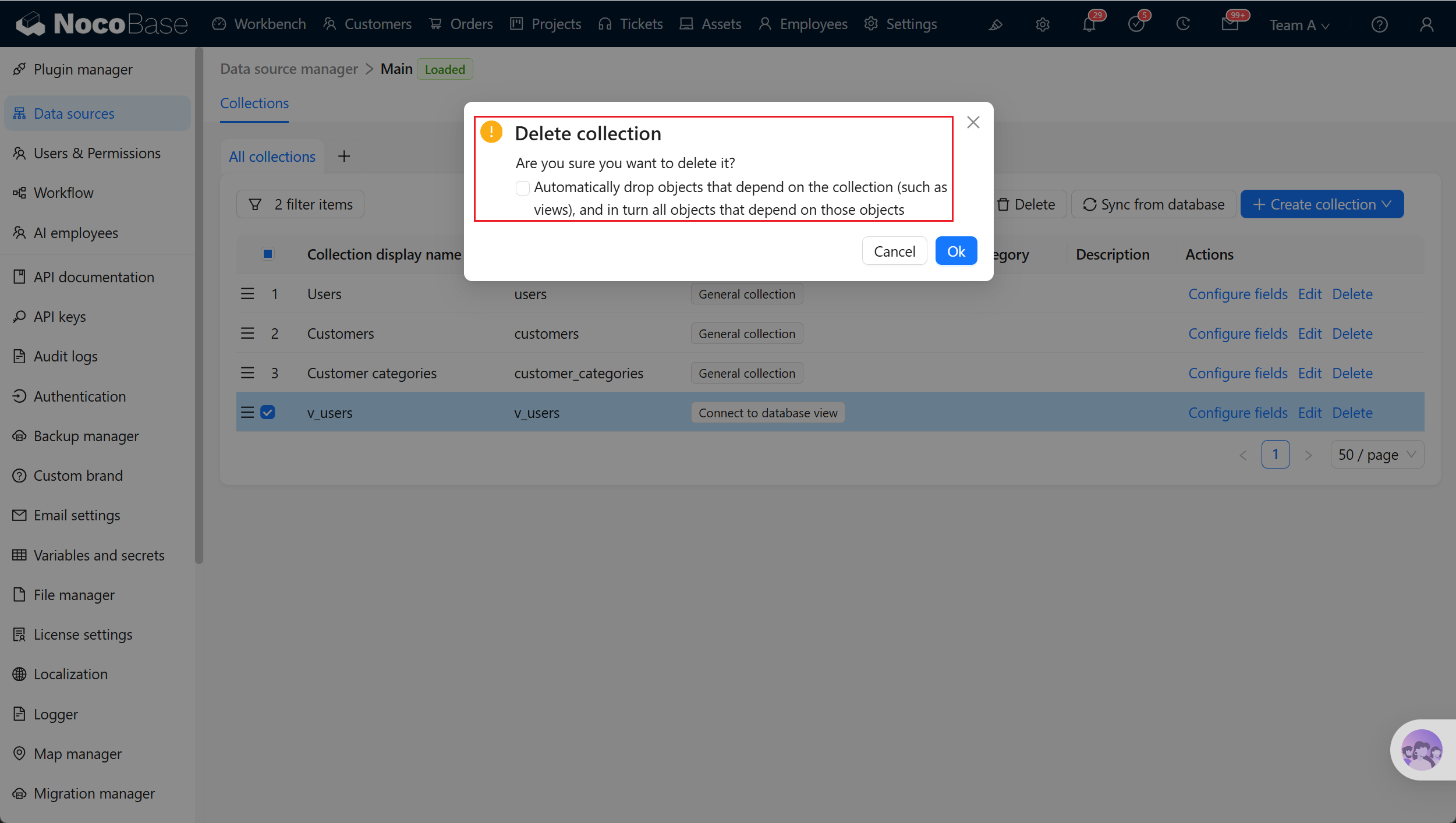
- package/dist/swagger/employees.d.ts +301 -0
- package/dist/swagger/employees.js +131 -0
- package/dist/swagger/index.d.ts +1588 -0
- package/dist/swagger/index.js +62 -0
- package/dist/swagger/llm.d.ts +555 -0
- package/dist/swagger/llm.js +247 -0
- package/dist/swagger/schemas.d.ts +736 -0
- package/dist/swagger/schemas.js +381 -0
- package/package.json +2 -2
- package/dist/ai/docs/nocobase/ai-employees/knowledge-base/vector-store.md +0 -24
- package/dist/ai/docs/nocobase/data-sources/development/index.md +0 -6
- package/dist/client/372.40eb52905e3f3049.js +0 -10
- package/dist/client/681.399948c18d753667.js +0 -10
- package/dist/client/705.380279da896021fb.js +0 -10
- package/dist/client-v2/372.8cc3fde09c9bec77.js +0 -10
- package/dist/client-v2/406.341be51205c674e0.js +0 -10
- package/dist/client-v2/681.082f4f1c7b841983.js +0 -10
- package/dist/client-v2/ai-employees/chatbox/stores/create-selectors.d.ts +0 -46
- package/dist/client-v2/ai-employees/chatbox/utils/normalizeTriggerTaskOptions.d.ts +0 -19
|
@@ -1,12 +1,234 @@
|
|
|
1
1
|
---
|
|
2
|
-
pkg: "@nocobase/plugin-
|
|
2
|
+
pkg: "@nocobase/plugin-data-source-main"
|
|
3
|
+
title: "Database views"
|
|
4
|
+
description: "Connect an existing database view as a data source, then configure its fields and display in NocoBase. Suitable for visual management of complex query results."
|
|
5
|
+
keywords: "database view,Collection View,view,NocoBase"
|
|
3
6
|
---
|
|
4
7
|
|
|
5
|
-
#
|
|
8
|
+
# Connect a database view
|
|
6
9
|
|
|
7
10
|
## Introduction
|
|
8
11
|
|
|
9
|
-
|
|
12
|
+
Connect a database view, such as a financial-report view maintained by a DBA, a filtered customer view, or an aggregated view synchronized across systems. This lets you reuse query logic that is already defined in the database.
|
|
10
13
|
|
|
14
|
+
:::tip Tip
|
|
11
15
|
|
|
12
|
-
|
|
16
|
+
Only regular views in the owner scope of the main database connection account are supported; materialized views are not supported. Even when the account has query permission for views owned by others, those views do not appear in the connection list. Before connecting a view, make sure it has stable column names and field types that NocoBase can identify.
|
|
17
|
+
|
|
18
|
+
:::
|
|
19
|
+
|
|
20
|
+
## Connect a database view
|
|
21
|
+
|
|
22
|
+
1. Open the data-source home page from the **Data sources** menu in system settings.
|
|
23
|
+
2. Select the **Main** data source in the data-source list and click **Configure** to open the main database.
|
|
24
|
+
3. In main database management, click **Create collection** and select **Connect to database view**.
|
|
25
|
+
|
|
26
|
+
|
|
27
|
+
|
|
28
|
+
|
|
29
|
+
|
|
30
|
+
| Setting | Description |
|
|
31
|
+
| --- | --- |
|
|
32
|
+
| Collection display name | The name displayed for the database view, such as `Financial report view` or `Customer statistics view`. Use a name that explains the purpose of the view. |
|
|
33
|
+
| Collection name | The identifier of the database view in NocoBase, used internally by APIs, relation fields, permissions, and workflows. It is generated automatically and can be changed manually. It supports only letters, numbers, and underscores, and must begin with a letter. |
|
|
34
|
+
| Database view | Select the database view to connect. NocoBase reads its field structure and query results. When editing, you can view the connected view but cannot switch to a different view. |
|
|
35
|
+
| Categories | Collection categories affect only organization in Data source management; they do not change the database view itself. |
|
|
36
|
+
| Description | A collection description. State who maintains the view, which data it queries, and which pages or reports use it. |
|
|
37
|
+
| Use simple pagination mode | Simple pagination mode. When enabled, Table blocks skip total-record-count queries during pagination. It is suitable for large views and can reduce query load. |
|
|
38
|
+
| Record unique key | The unique identifier for a record. Database views usually have no primary key, so choose a field that can uniquely locate a record. Without it, blocks might not view or edit records correctly. |
|
|
39
|
+
| Source collections | The sources of database view fields. This relates view fields to fields in existing collections so that NocoBase can identify Field types and Field interfaces. |
|
|
40
|
+
| Fields | Field-mapping settings. Confirm the name, title, data type, and interface type for each field in the view. |
|
|
41
|
+
| Preview | Preview database view results. Before saving, confirm that field mappings and display results meet expectations. |
|
|
42
|
+
| Allow add new, update and delete actions | Whether to allow create, update, and delete operations on the database view. When enabled, NocoBase provides the related page actions. Whether writes succeed still depends on whether the database view itself is writable and whether the database account has `INSERT`, `UPDATE`, and `DELETE` permissions. |
|
|
43
|
+
|
|
44
|
+
:::tip Tip
|
|
45
|
+
|
|
46
|
+
`Source collections` are source collections inferred from the database view. NocoBase identifies which existing collections most view fields originate from and limits the selectable **Field source** values during field mapping.
|
|
47
|
+
|
|
48
|
+
The inference result helps configure a view quickly. If the view has renamed fields, calculated fields, aggregations, or complex joins, the result might be incomplete, inaccurate, or impossible to infer. Confirm it manually in **Fields**.
|
|
49
|
+
|
|
50
|
+
:::
|
|
51
|
+
|
|
52
|
+
### Field mapping
|
|
53
|
+
|
|
54
|
+
Field mapping must be confirmed after connecting a database view. After a view is connected, NocoBase first infers the source and database type of each view field. When it can infer a source field, it automatically uses the existing field's Field type, Field interface, and Field display name. When it cannot infer a source, it provides an initial Field type based on the database type; then confirm the field type and interface manually.
|
|
55
|
+
|
|
56
|
+
[Learn more about field configuration](../data-modeling/collection-fields/index.md)
|
|
57
|
+
|
|
58
|
+
|
|
59
|
+
|
|
60
|
+
|
|
61
|
+
| Setting | Description |
|
|
62
|
+
| --- | --- |
|
|
63
|
+
| Field source | Select the existing collection and field from which the view field originates. After choosing a source, NocoBase can reuse its Field type and Field interface. |
|
|
64
|
+
| Field type | When a view field has no clear source, confirm its data type manually. |
|
|
65
|
+
| Field interface | Confirm how the field is displayed and entered in pages, such as Input, Number, Date, or Select. |
|
|
66
|
+
| Field display name | The name displayed for the field. Use a name that business users can recognize. |
|
|
67
|
+
|
|
68
|
+
For example, if a view returns `customer_name` and it comes from the **Customer name** field in the Customers collection, map it to that field. NocoBase can then reuse the original field's title, type, and interface configuration.
|
|
69
|
+
|
|
70
|
+
For fields returned by aggregations or calculations, such as `count(*) as total` or `sum(amount) as amount_total`, manually select the Field type and an appropriate Field interface.
|
|
71
|
+
|
|
72
|
+
:::tip Tip
|
|
73
|
+
|
|
74
|
+
`Field source` comes from NocoBase's inference of the database view and indicates which existing field a view field might correspond to. When a field has a `Field source`, NocoBase preferentially reuses the source field's Field type and Field interface.
|
|
75
|
+
|
|
76
|
+
When a source field cannot be inferred, or the inferred result does not match the business meaning, remove the `Field source` and select the `Field type`, `Field interface`, and `Field display name` manually.
|
|
77
|
+
|
|
78
|
+
:::
|
|
79
|
+
|
|
80
|
+
### Record unique key
|
|
81
|
+
|
|
82
|
+
A database view requires a Record unique key. Without one, you cannot create blocks in pages or view and edit records correctly. You can select one field or a combination of fields as the unique key. Suitable Record unique key fields usually meet these conditions:
|
|
83
|
+
|
|
84
|
+
- Field values are unique
|
|
85
|
+
- Field values are stable and do not change due to sorting, pagination, or statistical-calculation changes
|
|
86
|
+
- Fields are not empty
|
|
87
|
+
- Fields are always returned by the view
|
|
88
|
+
|
|
89
|
+
For a single-table view, return the original table primary key first. For a view based on multi-table joins or aggregations, retain a stable business ID in the database view or generate a stable unique field in the database.
|
|
90
|
+
|
|
91
|
+
### Allow create, update, and delete actions
|
|
92
|
+
|
|
93
|
+
If a database view supports writes, enable **Allow add new, update and delete actions**. NocoBase then allows create, update, and delete operations on the view in pages.
|
|
94
|
+
|
|
95
|
+
Database views are better suited to query results and are treated as read-only collections by default. Enable writes only after confirming that the database view supports the corresponding write operations and that database permissions allow them.
|
|
96
|
+
|
|
97
|
+
### Preview view results
|
|
98
|
+
|
|
99
|
+
Before saving, use **Preview** to inspect the view query result. Check the following:
|
|
100
|
+
|
|
101
|
+
- The view can be queried normally
|
|
102
|
+
- Fields are complete
|
|
103
|
+
- Field types and Field interfaces match the business meaning
|
|
104
|
+
- A Record unique key exists and is unique
|
|
105
|
+
- Unsupported field types need adjustment in the database
|
|
106
|
+
|
|
107
|
+
|
|
108
|
+
|
|
109
|
+
## Configure fields
|
|
110
|
+
|
|
111
|
+
After creating a database view, click **Configure fields** beside the view in the collection list to open field settings. Field settings maintain the view fields, how they display in the interface, and how database view fields map to NocoBase Field types and Field interfaces.
|
|
112
|
+
|
|
113
|
+
Ordinary database-view fields come from the database view. NocoBase does not add, modify, or delete actual columns in the view. In field settings, you can add only many-to-one relation fields to supplement business relations in NocoBase. A database view cannot be the target collection of a relation field, and it usually does not need a title field.
|
|
114
|
+
|
|
115
|
+
[Learn more about field configuration](../data-modeling/collection-fields/index.md)
|
|
116
|
+
|
|
117
|
+
|
|
118
|
+
|
|
119
|
+
### Add a relation field
|
|
120
|
+
|
|
121
|
+
Database views can add only many-to-one relation fields. A many-to-one relation field maps an existing view field to a primary key or unique field in a target collection. It lets pages display related records, but does not create actual fields or foreign-key constraints in the database view.
|
|
122
|
+
|
|
123
|
+
Click **Add field** to add a many-to-one relation field.
|
|
124
|
+
|
|
125
|
+
[Learn more about field configuration](../data-modeling/collection-fields/index.md)
|
|
126
|
+
|
|
127
|
+
|
|
128
|
+
|
|
129
|
+
|
|
130
|
+
| Setting | Description |
|
|
131
|
+
| --- | --- |
|
|
132
|
+
| Field display name | The name shown for the many-to-one relation field. Use a name that business users recognize, such as `Customer` or `Related order`. |
|
|
133
|
+
| Field name | The identifier used for the many-to-one relation field in NocoBase, including APIs, permissions, and workflows. |
|
|
134
|
+
| Source collection | The source collection, which is the current database view collection. It determines which collection field is selected for `Foreign key`; when adding a many-to-one relation to a database view, it normally remains the current view. |
|
|
135
|
+
| Target collection | The target collection to relate to. Usually choose a real collection, such as a general collection or an external database collection; you cannot select a database view. |
|
|
136
|
+
| Foreign key | The field in the current database view that stores the target-record identifier. This field must be returned reliably by the view query. |
|
|
137
|
+
| Target key | The target-collection field matched by `Foreign key`, usually a primary key or unique field. |
|
|
138
|
+
| Description | A field description. Record the relation meaning, data source, maintenance method, or cautions. |
|
|
139
|
+
|
|
140
|
+
### Field mapping
|
|
141
|
+
|
|
142
|
+
After a database view is connected, NocoBase infers its Field type from the view fields and source fields, then assigns a default Field interface. If the field source, display method, or business meaning does not meet expectations, adjust the mapping in field settings.
|
|
143
|
+
|
|
144
|
+
[Learn more about field configuration](../data-modeling/collection-fields/index.md)
|
|
145
|
+
|
|
146
|
+
|
|
147
|
+
|
|
148
|
+
:::tip Tip
|
|
149
|
+
|
|
150
|
+
- **Field interface** (interface type / UI type) determines how a field displays and interacts in the client, such as Input, Number, Select, or DateTime. It is the user-facing field classification
|
|
151
|
+
- **Field type** (data type) determines how NocoBase identifies the field's data. For view fields without a source field, it is normally inferred from the database field type, such as `string`, `integer`, `decimal`, `boolean`, or `datetime`
|
|
152
|
+
|
|
153
|
+
:::
|
|
154
|
+
|
|
155
|
+
:::warning Note
|
|
156
|
+
|
|
157
|
+
Changing Field source, Field type, or Field interface does not change the database view field type. It primarily affects page display, validation rules, and how NocoBase identifies the field.
|
|
158
|
+
|
|
159
|
+
:::
|
|
160
|
+
|
|
161
|
+
### Synchronize from database
|
|
162
|
+
|
|
163
|
+
When the database-side view field structure changes, open **Configure fields** and click **Sync from database** to read the field structure again. After synchronization, NocoBase updates fields: it adds fields newly returned by the view, removes fields that no longer exist in the view, and reconfirms field types and field sources.
|
|
164
|
+
|
|
165
|
+
|
|
166
|
+
|
|
167
|
+
|
|
168
|
+
:::warning Note
|
|
169
|
+
|
|
170
|
+
Renaming a field usually appears during synchronization as deleting the old field and adding a new field. Before synchronizing, confirm whether the old field is used by pages, permissions, workflows, or external APIs, to avoid broken configuration afterwards. Recheck Field type and Field interface after synchronization.
|
|
171
|
+
|
|
172
|
+
:::
|
|
173
|
+
|
|
174
|
+
### Edit a field
|
|
175
|
+
|
|
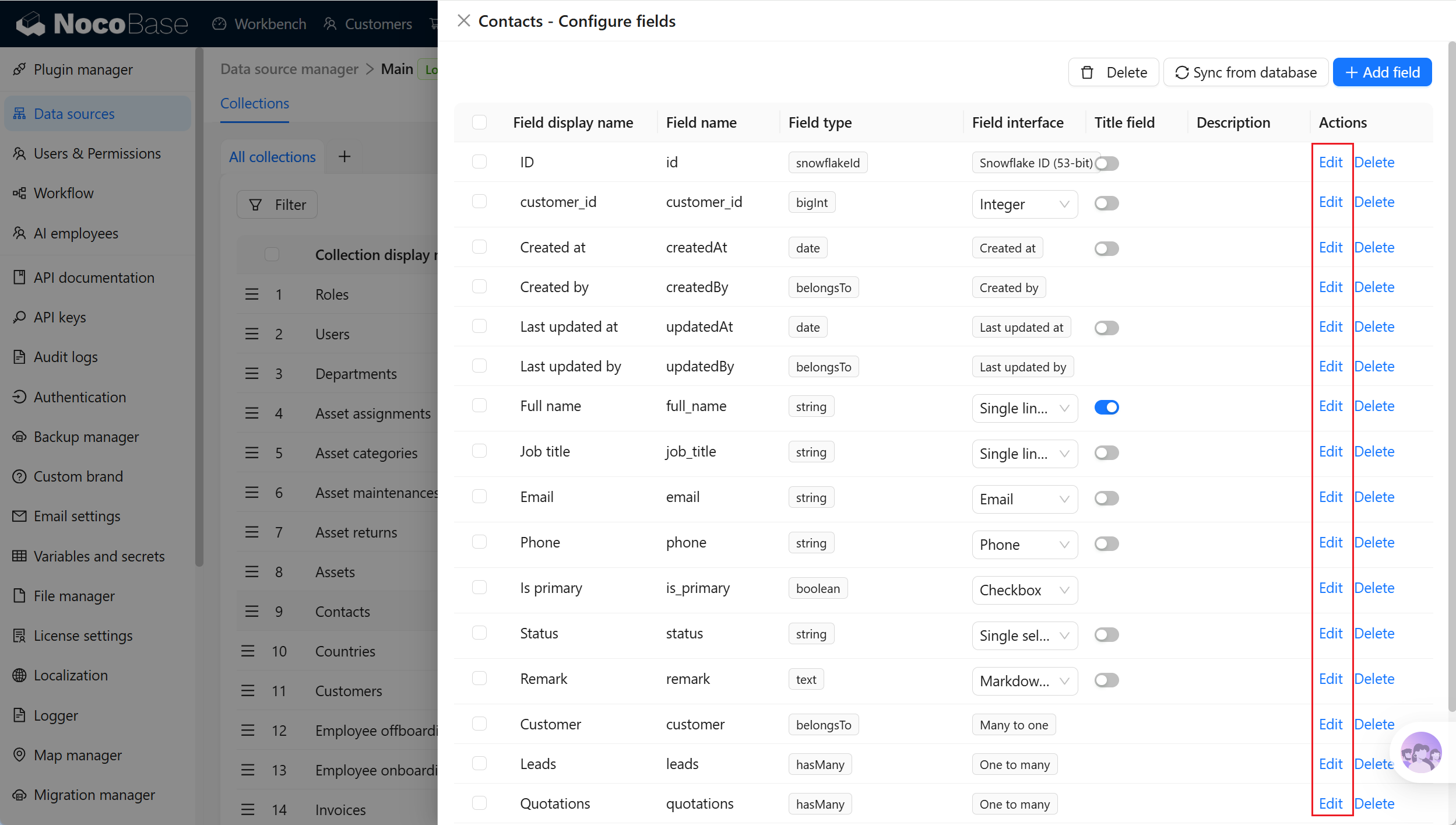
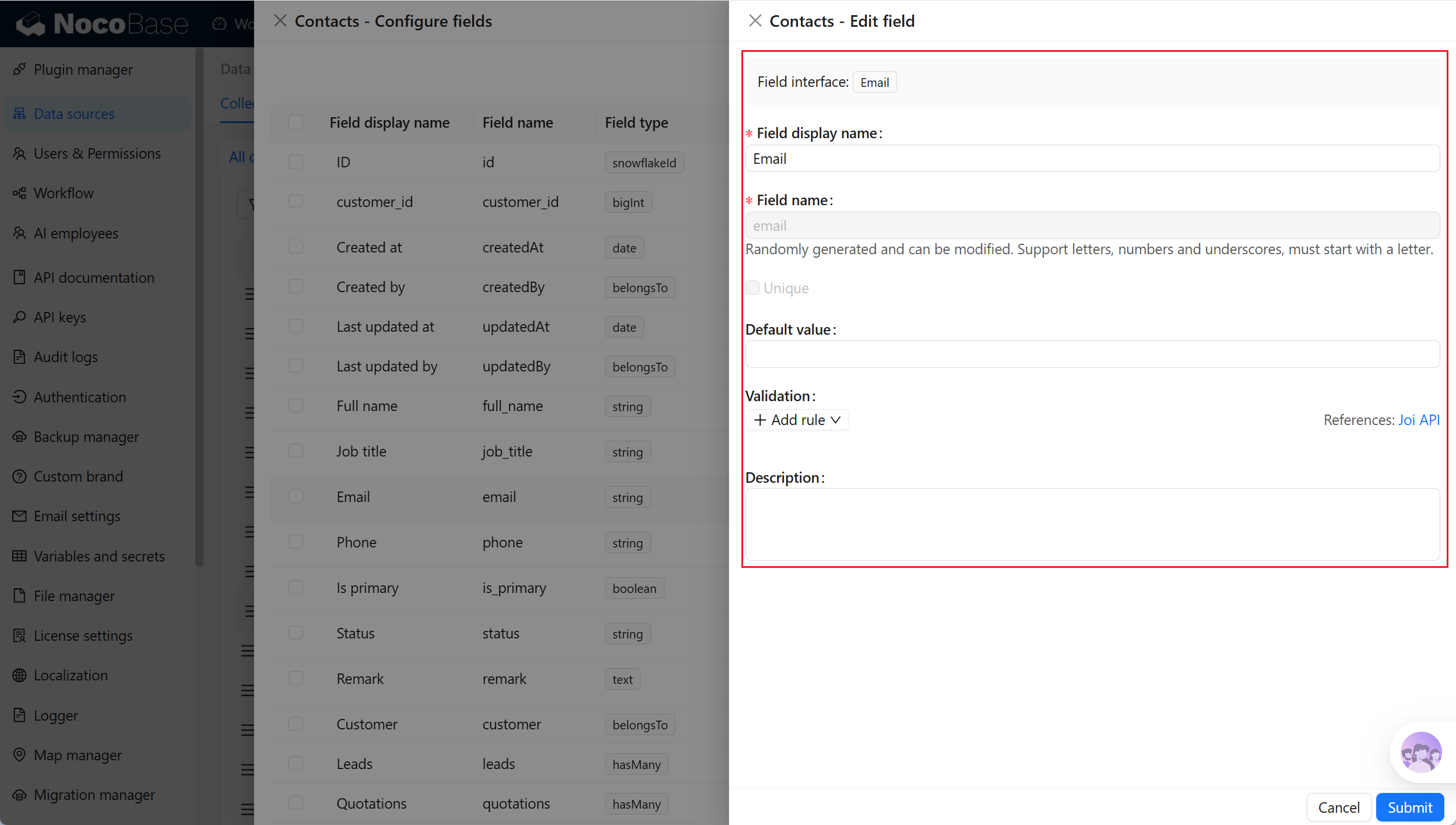
176
|
+
Click **Edit** beside a field to edit its configuration. Field editing is suitable for adjusting how a field displays and is used in NocoBase, such as its display name, description, validation rules, or field-specific settings.
|
|
177
|
+
|
|
178
|
+
[Learn more about field configuration](../data-modeling/collection-fields/index.md)
|
|
179
|
+
|
|
180
|
+
|
|
181
|
+
|
|
182
|
+
|
|
183
|
+
:::warning Note
|
|
184
|
+
|
|
185
|
+
Editing field configuration does not change the actual column name, field type, SQL expression, or index in the database view. To change the actual view structure, change the view in the database first, then use **Sync from database**.
|
|
186
|
+
|
|
187
|
+
:::
|
|
188
|
+
|
|
189
|
+
### Delete a field
|
|
190
|
+
|
|
191
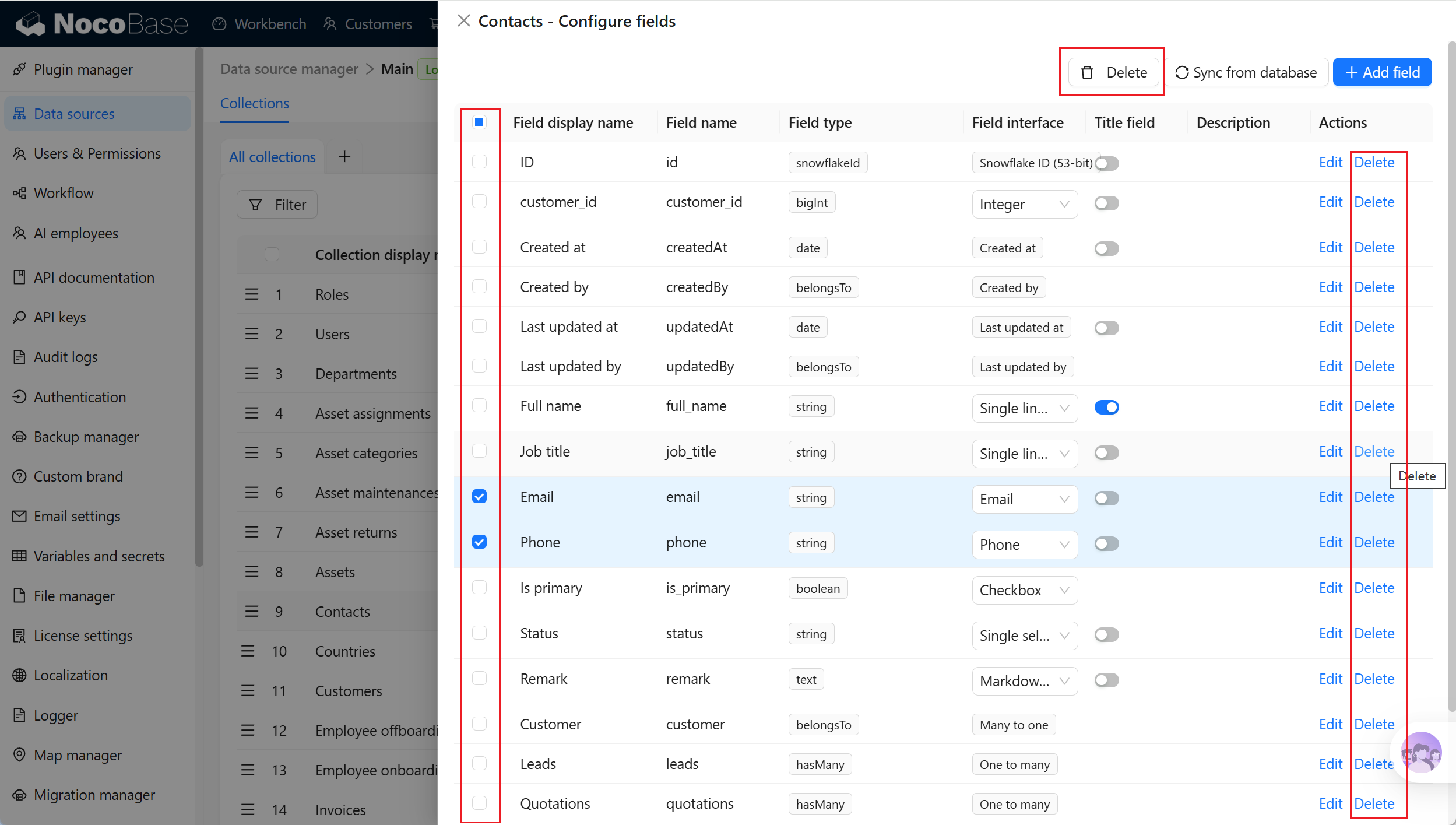
|
+
Click **Delete** beside a field to delete it. Deleting a field removes only the field stored in NocoBase; it does not delete the actual column in the database view.
|
|
192
|
+
|
|
193
|
+
[Learn more about field configuration](../data-modeling/collection-fields/index.md)
|
|
194
|
+
|
|
195
|
+
|
|
196
|
+
|
|
197
|
+
:::warning Note
|
|
198
|
+
|
|
199
|
+
Deleting a field can affect page blocks, filters, sorting, permissions, workflows, APIs, and existing configuration. Before deleting it, confirm whether the field is still used. If the database view still returns the column, NocoBase might identify the field again when you later run **Sync from database**.
|
|
200
|
+
|
|
201
|
+
:::
|
|
202
|
+
|
|
203
|
+
## Edit a view
|
|
204
|
+
|
|
205
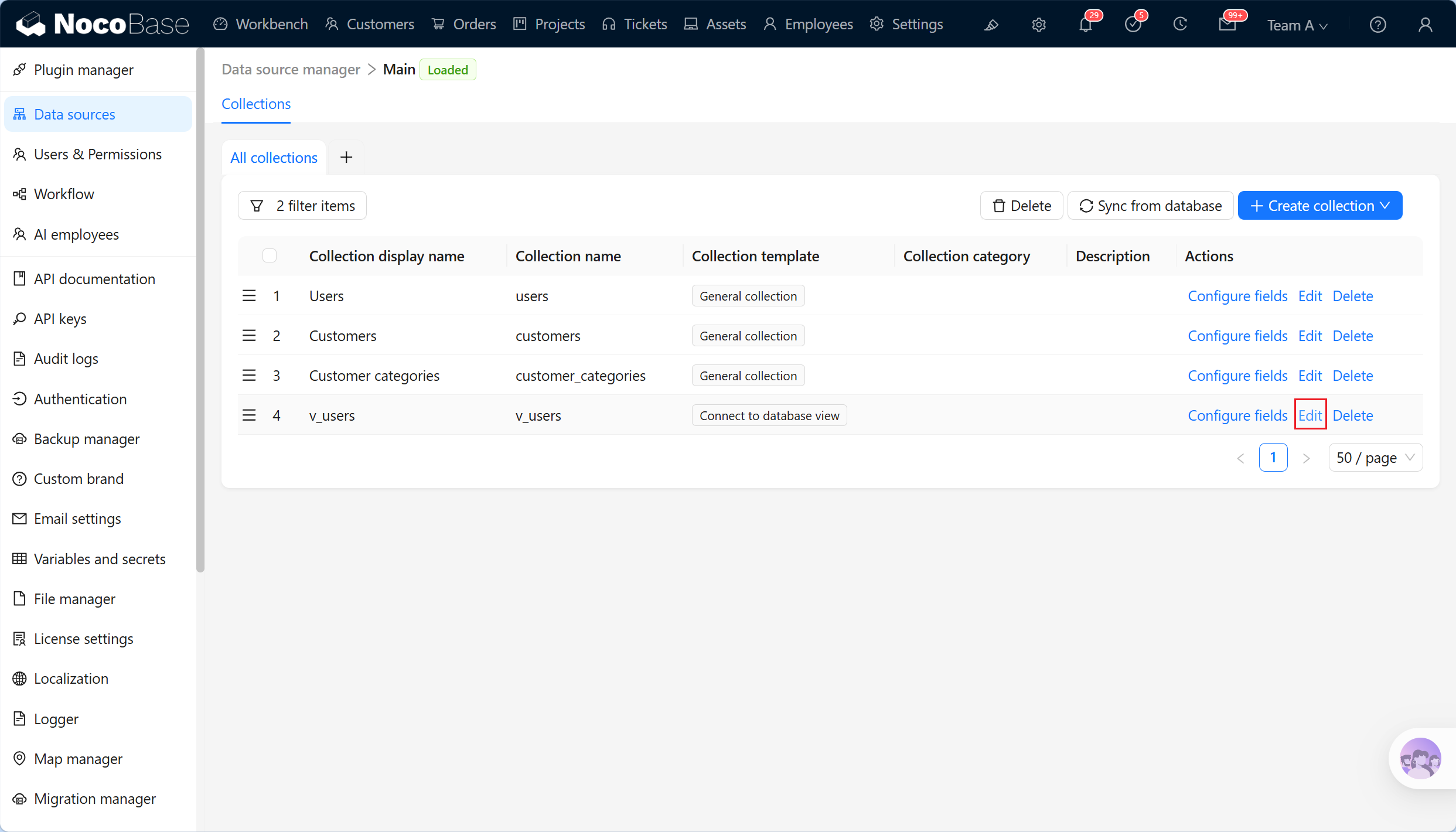
|
+
The SQL definition of a database view is maintained in the database. In the collection list, click **Edit** beside a database view to adjust its metadata and runtime settings in NocoBase; this does not modify the database view. To connect another database view, create a new database view collection.
|
|
206
|
+
|
|
207
|
+
|
|
208
|
+
|
|
209
|
+
|
|
210
|
+
| Setting | Description |
|
|
211
|
+
| --- | --- |
|
|
212
|
+
| Collection display name | The name displayed for the database view. Change it to a business-friendly name, such as `Financial report view` or `Customer statistics view`. |
|
|
213
|
+
| Collection name | The identifier of the database view in NocoBase. It cannot be changed when editing. |
|
|
214
|
+
| Database view | The currently connected database view. It is read-only when editing and cannot be switched to a different view. |
|
|
215
|
+
| Categories | Collection categories affect only organization in Data source management; they do not change the database view. |
|
|
216
|
+
| Description | A collection description. Record the view maintainer, query source, pages that use it, or reporting purpose. |
|
|
217
|
+
| Use simple pagination mode | When enabled, Table blocks skip total-record-count queries during pagination. It is suitable for database views with large data volumes. |
|
|
218
|
+
| Record unique key | The unique identifier for locating one record. Usually select a stable, unique view field or combination of fields. |
|
|
219
|
+
| Allow add new, update and delete actions | Whether to allow create, update, and delete operations. Enable it only when the database view itself supports writes and the database account has the required permissions. |
|
|
220
|
+
|
|
221
|
+
:::warning Note
|
|
222
|
+
|
|
223
|
+
After changing Record unique key or Allow add new, update and delete actions, recheck whether page blocks, permissions, and workflows still behave as expected.
|
|
224
|
+
|
|
225
|
+
:::
|
|
226
|
+
|
|
227
|
+
## Delete a view
|
|
228
|
+
|
|
229
|
+
In the collection list, click **Delete** beside a database view to delete the database view collection. Deleting it removes only the connection configuration and fields stored in NocoBase; it does not delete the view in the database.
|
|
230
|
+
|
|
231
|
+
Database views in the main database can also be selected and deleted in bulk. Before deleting, check whether page blocks, charts, permissions, workflows, or external APIs still use the database view collection.
|
|
232
|
+
|
|
233
|
+
|
|
234
|
+
|
package/dist/ai/docs/nocobase/data-sources/data-modeling/collection-fields/advanced/china-region.md
CHANGED
|
@@ -1,11 +1,128 @@
|
|
|
1
|
-
|
|
1
|
+
---
|
|
2
|
+
title: "China region"
|
|
3
|
+
description: "The China region field stores Chinese administrative divisions such as provinces, cities, and districts. It supports three-level cascading selection and hierarchical display."
|
|
4
|
+
keywords: "China region,province city district,administrative division field,three-level cascade,NocoBase"
|
|
5
|
+
---
|
|
6
|
+
|
|
7
|
+
# China region
|
|
8
|
+
|
|
9
|
+
<PluginInfo name="field-china-region"></PluginInfo>
|
|
2
10
|
|
|
3
11
|
## Introduction
|
|
4
12
|
|
|
5
|
-
|
|
13
|
+
In NocoBase, **China region** stores Chinese administrative-division information such as provinces, cities, and districts.
|
|
14
|
+
|
|
15
|
+
The China region field uses the built-in `chinaRegions` administrative-division collection and a cascading selector for data entry. Users select province, city, and district in order; values display as a complete hierarchical path.
|
|
16
|
+
|
|
17
|
+
For street and building-number information, use [Input](../basic/input.md) or [Textarea](../basic/textarea.md).
|
|
18
|
+
|
|
19
|
+
## Use cases
|
|
20
|
+
|
|
21
|
+
China region is suitable for these business scenarios:
|
|
22
|
+
|
|
23
|
+
- Locations of customers, contacts, stores, and projects
|
|
24
|
+
- Address basics such as registered residence, birthplace, and shipping region
|
|
25
|
+
- Service areas, sales territories, and project implementation areas
|
|
26
|
+
- Data that needs filtering or aggregation by province, city, and district
|
|
27
|
+
|
|
28
|
+
## Create and configure
|
|
29
|
+
|
|
30
|
+
On the collection's **Configure fields** page, click **Add field** and select **China region**.
|
|
31
|
+
|
|
32
|
+
|
|
33
|
+
|
|
34
|
+
| Setting | Description |
|
|
35
|
+
| --- | --- |
|
|
36
|
+
| Field interface | China region uses `chinaRegion`, which determines how the field is entered and displayed. |
|
|
37
|
+
| Field display name | Use a business-friendly name such as `Region`, `Service area`, or `Shipping region`. |
|
|
38
|
+
| Field name | The internal identifier used by APIs, relation fields, permissions, and workflows. It supports only letters, numbers, and underscores, and must begin with a letter. |
|
|
39
|
+
| Field type | China region is normally stored as a related record or structured value, depending on field configuration. |
|
|
40
|
+
| Selection level | Controls the deepest selectable level. `Province`, `City`, and `District` are supported; the default is `District`. |
|
|
41
|
+
| Require the last level | When enabled, users must select the configured deepest level before submitting. Otherwise, they can complete selection at an intermediate level. |
|
|
42
|
+
| Validation rules | Configure required validation and selection level as needed. |
|
|
43
|
+
| Description | Record the field meaning, entry requirements, data source, or maintainer. |
|
|
44
|
+
|
|
45
|
+
:::warning Note
|
|
46
|
+
|
|
47
|
+
Field names are referenced by page blocks, permissions, workflows, and APIs after creation. Confirm the name before creating the field to avoid later configuration changes.
|
|
48
|
+
|
|
49
|
+
:::
|
|
50
|
+
|
|
51
|
+
## Field behavior
|
|
52
|
+
|
|
53
|
+
| Behavior | Description |
|
|
54
|
+
| --- | --- |
|
|
55
|
+
| Default Field interface | `chinaRegion`. |
|
|
56
|
+
| Data source | The built-in `chinaRegions` administrative-division collection. |
|
|
57
|
+
| Page component | Uses a cascading selector in edit mode. |
|
|
58
|
+
| Selection levels | Supports Province, City, and District. |
|
|
59
|
+
| Display | Displays a `Province / City / District` path in read mode. |
|
|
60
|
+
| Filtering | Supports filtering by saved region values; capabilities depend on field configuration and blocks. |
|
|
61
|
+
| Multiple selection | Not supported. |
|
|
62
|
+
|
|
63
|
+
## Edit configuration
|
|
64
|
+
|
|
65
|
+
Click **Edit** beside the field to change its display name, description, validation rules, selection level, and whether the last level is required.
|
|
66
|
+
|
|
67
|
+
For a field from a synchronized main-database table, editing usually maps the database field to a NocoBase Field type and Field interface.
|
|
68
|
+
|
|
69
|
+
| Setting | Can be edited | Description |
|
|
70
|
+
| --- | --- | --- |
|
|
71
|
+
| Field display name | Yes | Changes the name displayed in the interface without changing the field identifier. |
|
|
72
|
+
| Field name | No | The identifier normally cannot be changed after creation. |
|
|
73
|
+
| Field interface | Conditional | Main-database and synchronized fields can be adjusted during mapping. |
|
|
74
|
+
| Field type | Conditional | Confirm that existing values are compatible before changing it. |
|
|
75
|
+
| Selection level | Yes | Changes the selectable deepest level to Province, City, or District. |
|
|
76
|
+
| Require the last level | Yes | Controls whether the configured deepest level must be selected before submission. |
|
|
77
|
+
| Validation rules | Yes | Adjusts required and other validation. |
|
|
78
|
+
| Description | Yes | Adds maintenance information for the field. |
|
|
79
|
+
|
|
80
|
+
:::warning Note
|
|
81
|
+
|
|
82
|
+
China region depends on the plugin-provided `chinaRegions` collection. Enable the **China region** field plugin before using it.
|
|
83
|
+
|
|
84
|
+
:::
|
|
85
|
+
|
|
86
|
+
## Delete field
|
|
87
|
+
|
|
88
|
+
Click **Delete** beside a China region field to delete it. You can also select multiple fields and delete them in the main data source.
|
|
89
|
+
|
|
90
|
+
Deleting a China region field created in the main database usually also deletes the actual database column and its values. For a synchronized or external-data-source field, the impact depends on the data source and field origin.
|
|
91
|
+
|
|
92
|
+
:::danger Warning
|
|
93
|
+
|
|
94
|
+
Deleting a field can affect page blocks, forms, filters, permissions, workflows, APIs, imports and exports, and existing data. Confirm that the field is no longer referenced before deleting it.
|
|
95
|
+
|
|
96
|
+
:::
|
|
97
|
+
|
|
98
|
+
## Use in pages
|
|
99
|
+
|
|
100
|
+
China region fields are suitable for addresses, regions, and statistical scenarios.
|
|
101
|
+
|
|
102
|
+
| Scenario | Use |
|
|
103
|
+
| --- | --- |
|
|
104
|
+
| Form block | Select province, city, and district with a cascading selector. |
|
|
105
|
+
| Details block | Display an administrative-division path. |
|
|
106
|
+
| Table block | Display the region of a record. |
|
|
107
|
+
| Filter block | Filter records by region. |
|
|
108
|
+
| Chart block | Aggregate business data by province, city, or district. |
|
|
109
|
+
|
|
110
|
+
### Edit mode
|
|
111
|
+
|
|
112
|
+
China region uses a cascading selector in edit mode.
|
|
113
|
+
|
|
114
|
+
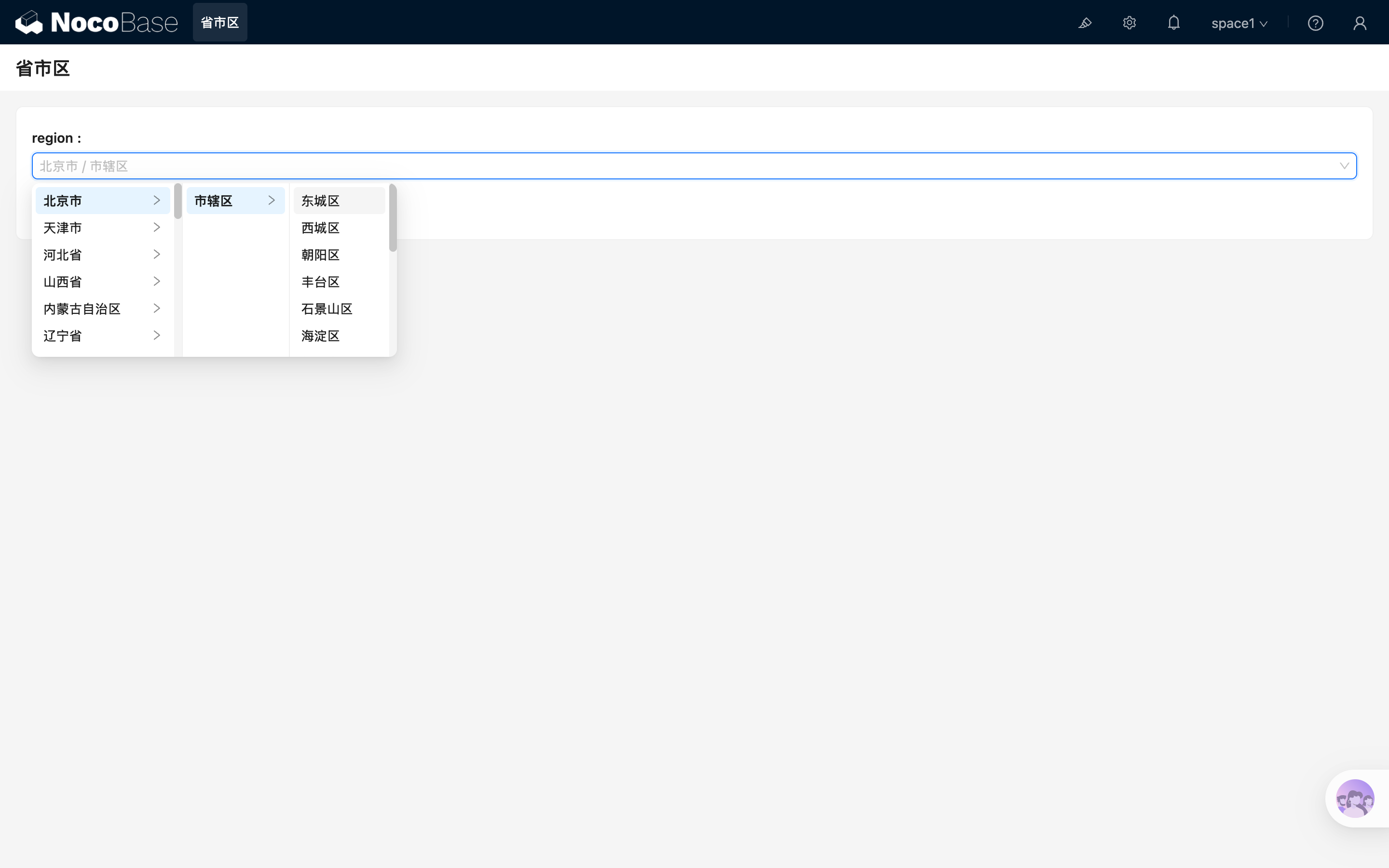
|
|
115
|
+
|
|
116
|
+
### Read mode
|
|
117
|
+
|
|
118
|
+
China region displays as a text path in read mode, for example:
|
|
6
119
|
|
|
7
|
-
|
|
120
|
+
```text
|
|
121
|
+
Beijing / Municipal district / Dongcheng District
|
|
122
|
+
```
|
|
8
123
|
|
|
9
|
-
##
|
|
124
|
+
## Related links
|
|
10
125
|
|
|
11
|
-
|
|
126
|
+
- [Fields](../index.md) - Learn about field categories and mapping.
|
|
127
|
+
- [Input](../basic/input.md) - Store detailed street addresses.
|
|
128
|
+
- [Textarea](../basic/textarea.md) - Store longer address descriptions.
|
|
@@ -1,11 +1,112 @@
|
|
|
1
|
-
|
|
1
|
+
---
|
|
2
|
+
title: "Collection select"
|
|
3
|
+
description: "The Collection select field selects one or more NocoBase collections."
|
|
4
|
+
keywords: "Collection select,collectionSelect,field,Field interface,NocoBase"
|
|
5
|
+
---
|
|
6
|
+
|
|
7
|
+
# Collection select
|
|
2
8
|
|
|
3
9
|
## Introduction
|
|
4
10
|
|
|
5
|
-
|
|
11
|
+
In NocoBase, **Collection select** selects one or more collections.
|
|
12
|
+
|
|
13
|
+
It is suitable for plugin configuration, rule configuration, and metadata management. It stores collection identifiers rather than business records. To select records from a collection, use a relation field instead.
|
|
14
|
+
|
|
15
|
+
## Use cases
|
|
16
|
+
|
|
17
|
+
Collection select fields are suitable for these business scenarios:
|
|
18
|
+
|
|
19
|
+
- Selecting target collections in plugin configuration
|
|
20
|
+
- Specifying collection scope in rule configuration
|
|
21
|
+
- Metadata management and template configuration
|
|
22
|
+
- Feature configuration that references collection identifiers
|
|
23
|
+
|
|
24
|
+
## Create and configure
|
|
25
|
+
|
|
26
|
+
On the collection's **Configure fields** page, click **Add field** and select **Collection select** to create this field.
|
|
27
|
+
|
|
28
|
+
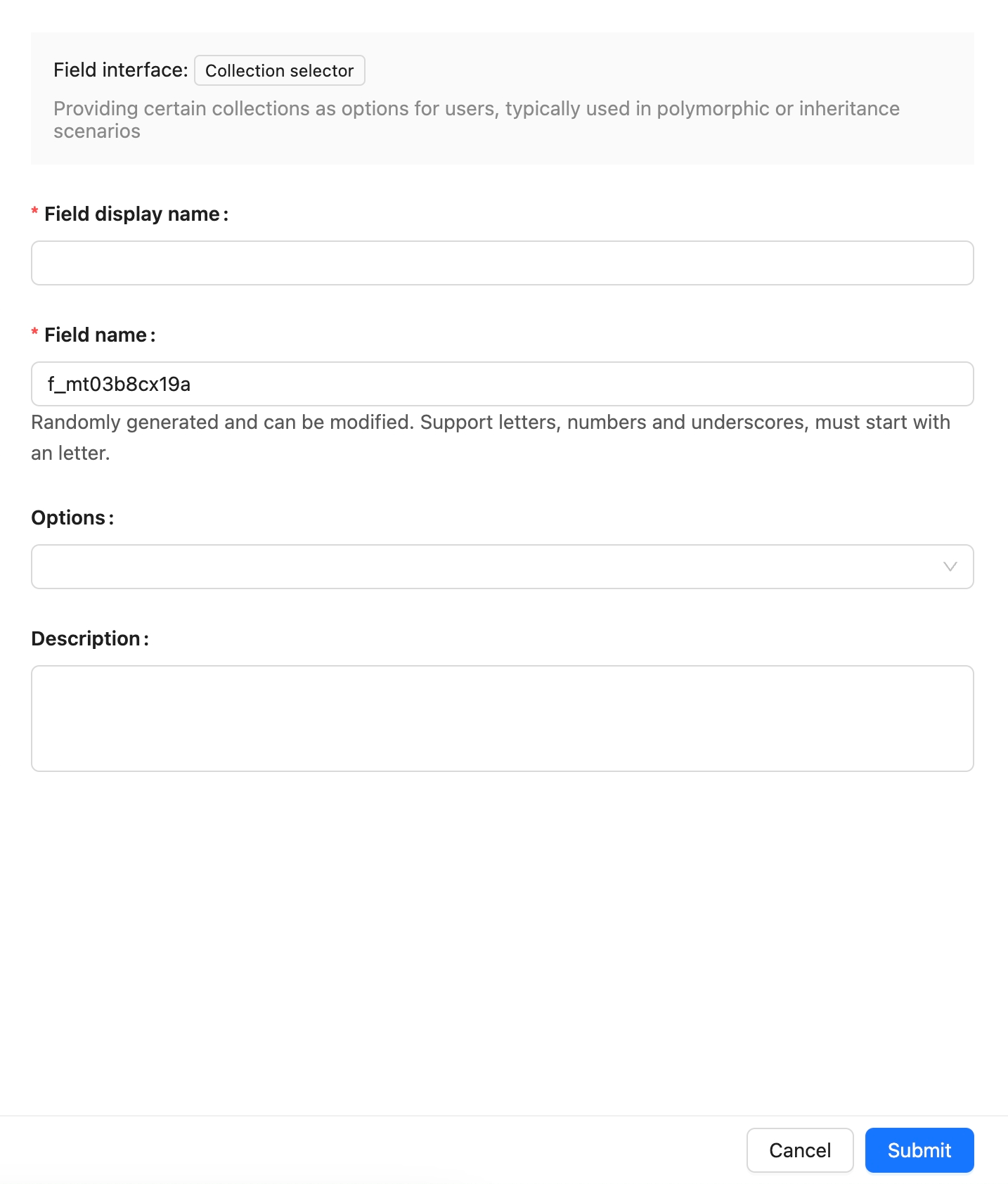
|
|
29
|
+
|
|
30
|
+
| Setting | Description |
|
|
31
|
+
| --- | --- |
|
|
32
|
+
| Field interface | The field interface. Collection select uses `collectionSelect`, which determines how the field is entered and displayed in pages. |
|
|
33
|
+
| Field display name | The name displayed for the field, such as `Target collection`, `Affected collection`, or `Data scope`. Use a name that business users can recognize. |
|
|
34
|
+
| Field name | The field identifier used internally by APIs, relation fields, permissions, and workflows. It usually cannot be changed after creation. It supports only letters, numbers, and underscores, and must begin with a letter. |
|
|
35
|
+
| Field type | The data-layer type. Collection select uses `string` by default. |
|
|
36
|
+
| Default value | The default value. When a new record has no value, NocoBase can fill this value automatically. |
|
|
37
|
+
| Validation rules | Validation rules. Supports base validation such as required and selection range. |
|
|
38
|
+
| Description | A field description. Record the field meaning, entry requirements, data source, or maintainer. |
|
|
39
|
+
|
|
40
|
+
:::warning Note
|
|
41
|
+
|
|
42
|
+
Field names are referenced by page blocks, permissions, workflows, and APIs after creation. Confirm the name before creating the field to avoid later configuration changes.
|
|
43
|
+
|
|
44
|
+
:::
|
|
45
|
+
|
|
46
|
+
## Field behavior
|
|
47
|
+
|
|
48
|
+
The default behavior of a Collection select field is as follows:
|
|
49
|
+
|
|
50
|
+
| Behavior | Description |
|
|
51
|
+
| --- | --- |
|
|
52
|
+
| Default Field interface | `collectionSelect`. |
|
|
53
|
+
| Default Field type | `string`. |
|
|
54
|
+
| Available Field types | `string`, `json`. |
|
|
55
|
+
| Page component | Uses a collection-selector component in edit mode. |
|
|
56
|
+
| Filtering | It is usually not used as a business filter field. |
|
|
57
|
+
| Sorting | It is usually not used for sorting. |
|
|
58
|
+
| Validation | Supports base validation such as required and selection range. |
|
|
59
|
+
|
|
60
|
+
## Edit configuration
|
|
61
|
+
|
|
62
|
+
After creation, click **Edit** beside the field to edit its configuration. Edit fields to adjust how they are displayed and used in NocoBase, such as the display name, description, default value, validation rules, or field-specific settings.
|
|
63
|
+
|
|
64
|
+
When a field comes from a synchronized main-database table, editing usually maps the database field to a NocoBase Field type and Field interface.
|
|
65
|
+
|
|
66
|
+
| Setting | Can be edited | Description |
|
|
67
|
+
| --- | --- | --- |
|
|
68
|
+
| Field display name | Yes | Changes the name displayed in the interface without changing the field identifier. |
|
|
69
|
+
| Field name | No | The field identifier normally cannot be changed in the edit form after creation. |
|
|
70
|
+
| Field interface | Conditional | Main-database fields and synchronized fields can be adjusted during field mapping. Changes affect page input, display, and validation. |
|
|
71
|
+
| Field type | Conditional | Main-database fields and synchronized fields can be adjusted during field mapping. Confirm that existing values can be used by the new type first. |
|
|
72
|
+
| Default value | Yes | Adjusts the default value for new records. |
|
|
73
|
+
| Validation rules | Yes | Adjusts field validation rules. |
|
|
74
|
+
| Description | Yes | Adds the field meaning, entry requirements, data source, or maintainer. |
|
|
75
|
+
|
|
76
|
+
:::warning Note
|
|
77
|
+
|
|
78
|
+
Changing a Field type or Field interface is more than changing a display name. It affects field storage, input components, validation rules, filters, and workflow-variable usage. When the field contains substantial existing data, confirm that its data format is compatible first.
|
|
79
|
+
|
|
80
|
+
:::
|
|
81
|
+
|
|
82
|
+
## Delete field
|
|
83
|
+
|
|
84
|
+
Click **Delete** beside a Collection select field to delete it. You can also select multiple fields and delete them in the main data source.
|
|
85
|
+
|
|
86
|
+
Deleting a Collection select field created in the main database usually also deletes the actual database column and its values. For a synchronized or external-data-source field, the impact depends on the corresponding data source and field origin.
|
|
87
|
+
|
|
88
|
+
:::danger Warning
|
|
89
|
+
|
|
90
|
+
Deleting a field can affect page blocks, forms, filters, permissions, workflows, APIs, imports and exports, and existing data. Confirm that the field is no longer referenced by business configuration before deleting it.
|
|
91
|
+
|
|
92
|
+
:::
|
|
93
|
+
|
|
94
|
+
## Use in pages
|
|
95
|
+
|
|
96
|
+
Collection select fields are suitable for configuration forms.
|
|
97
|
+
|
|
98
|
+
|
|
6
99
|
|
|
7
100
|
|
|
8
|
-
|
|
101
|
+
| Scenario | Use |
|
|
102
|
+
| --- | --- |
|
|
103
|
+
| Form block | Select one or more collections. |
|
|
104
|
+
| Details block | Display selected collections. |
|
|
105
|
+
| Plugin configuration | Specify the collections affected by a feature. |
|
|
106
|
+
| Workflows and rules | Use collection metadata in logic. |
|
|
9
107
|
|
|
108
|
+
## Related links
|
|
10
109
|
|
|
11
|
-
|
|
110
|
+
- [Fields](../index.md) - Learn about field categories and mapping.
|
|
111
|
+
- [General collection](../../../data-source-main/general-collection.md) - Create and manage fields in a collection.
|
|
112
|
+
- [Relation fields](../associations/index.md) - Select records from a collection.
|
|
@@ -1,13 +1,111 @@
|
|
|
1
|
+
---
|
|
2
|
+
title: "JSON"
|
|
3
|
+
description: "The JSON field stores structured or semi-structured data such as configuration objects and API-response fragments."
|
|
4
|
+
keywords: "JSON,json,field,Field interface,NocoBase"
|
|
5
|
+
---
|
|
6
|
+
|
|
1
7
|
# JSON
|
|
2
8
|
|
|
3
9
|
## Introduction
|
|
4
10
|
|
|
5
|
-
|
|
11
|
+
In NocoBase, the **JSON** field stores structured or semi-structured data.
|
|
12
|
+
|
|
13
|
+
It is suitable for external API response fragments, extended configuration, dynamic attributes, and other data with an unstable structure. It is flexible, but harder to filter, validate, and display than ordinary fields. When the structure is stable, split it into explicit fields first.
|
|
14
|
+
|
|
15
|
+
## Use cases
|
|
16
|
+
|
|
17
|
+
JSON fields are suitable for these business scenarios:
|
|
18
|
+
|
|
19
|
+
- Raw external API responses
|
|
20
|
+
- Dynamic extended attributes
|
|
21
|
+
- Complex configuration objects
|
|
22
|
+
- Temporary data that cannot yet be split into structured fields
|
|
23
|
+
|
|
24
|
+
## Create and configure
|
|
25
|
+
|
|
26
|
+
On the collection's **Configure fields** page, click **Add field** and select **JSON** to create this field.
|
|
27
|
+
|
|
28
|
+
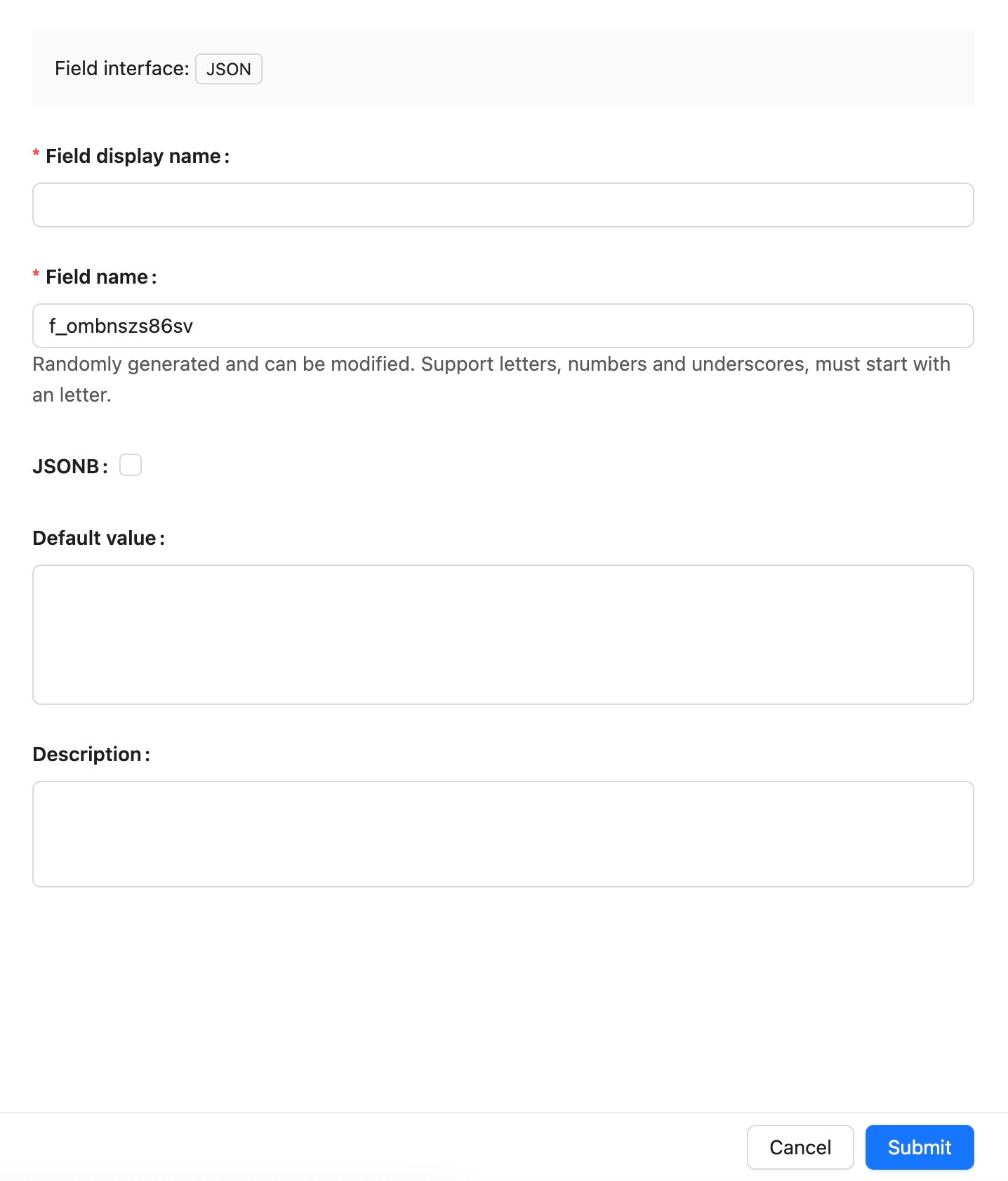
|
|
29
|
+
|
|
30
|
+
| Setting | Description |
|
|
31
|
+
| --- | --- |
|
|
32
|
+
| Field interface | The field interface. JSON uses `json`, which determines how the field is entered and displayed in pages. |
|
|
33
|
+
| Field display name | The name displayed for the field, such as `Extended information`, `API response`, or `Configuration`. Use a name that business users can recognize. |
|
|
34
|
+
| Field name | The field identifier used internally by APIs, relation fields, permissions, and workflows. It usually cannot be changed after creation. It supports only letters, numbers, and underscores, and must begin with a letter. |
|
|
35
|
+
| Field type | The data-layer type. JSON uses `json` by default. |
|
|
36
|
+
| Default value | The default value. When a new record has no value, NocoBase can fill this value automatically. |
|
|
37
|
+
| Validation rules | Validation rules. Supports valid-JSON and required validation. |
|
|
38
|
+
| Description | A field description. Record the field meaning, entry requirements, data source, or maintainer. |
|
|
39
|
+
|
|
40
|
+
:::warning Note
|
|
41
|
+
|
|
42
|
+
Field names are referenced by page blocks, permissions, workflows, and APIs after creation. Confirm the name before creating the field to avoid later configuration changes.
|
|
43
|
+
|
|
44
|
+
:::
|
|
45
|
+
|
|
46
|
+
## Field behavior
|
|
47
|
+
|
|
48
|
+
The default behavior of a JSON field is as follows:
|
|
49
|
+
|
|
50
|
+
| Behavior | Description |
|
|
51
|
+
| --- | --- |
|
|
52
|
+
| Default Field interface | `json`. |
|
|
53
|
+
| Default Field type | `json`. |
|
|
54
|
+
| Available Field types | `json`, `jsonb`. |
|
|
55
|
+
| Page component | Uses a JSON editor or text-input component in edit mode. |
|
|
56
|
+
| Filtering | Filtering depends on the database and field mapping; it is usually not a primary filter field. |
|
|
57
|
+
| Sorting | It is usually not used for sorting. |
|
|
58
|
+
| Validation | Supports valid-JSON and required validation. |
|
|
59
|
+
|
|
60
|
+
## Edit configuration
|
|
61
|
+
|
|
62
|
+
After creation, click **Edit** beside the field to edit its configuration. Edit fields to adjust how they are displayed and used in NocoBase, such as the display name, description, default value, validation rules, or field-specific settings.
|
|
63
|
+
|
|
64
|
+
When a field comes from a synchronized main-database table, editing usually maps the database field to a NocoBase Field type and Field interface.
|
|
65
|
+
|
|
66
|
+
| Setting | Can be edited | Description |
|
|
67
|
+
| --- | --- | --- |
|
|
68
|
+
| Field display name | Yes | Changes the name displayed in the interface without changing the field identifier. |
|
|
69
|
+
| Field name | No | The field identifier normally cannot be changed in the edit form after creation. |
|
|
70
|
+
| Field interface | Conditional | Main-database fields and synchronized fields can be adjusted during field mapping. Changes affect page input, display, and validation. |
|
|
71
|
+
| Field type | Conditional | Main-database fields and synchronized fields can be adjusted during field mapping. Confirm that existing values can be used by the new type first. |
|
|
72
|
+
| Default value | Yes | Adjusts the default value for new records. |
|
|
73
|
+
| Validation rules | Yes | Adjusts field validation rules. |
|
|
74
|
+
| Description | Yes | Adds the field meaning, entry requirements, data source, or maintainer. |
|
|
75
|
+
|
|
76
|
+
:::warning Note
|
|
77
|
+
|
|
78
|
+
Changing a Field type or Field interface is more than changing a display name. It affects field storage, input components, validation rules, filters, and workflow-variable usage. When the field contains substantial existing data, confirm that its data format is compatible first.
|
|
79
|
+
|
|
80
|
+
:::
|
|
81
|
+
|
|
82
|
+
## Delete field
|
|
83
|
+
|
|
84
|
+
Click **Delete** beside a JSON field to delete it. You can also select multiple fields and delete them in the main data source.
|
|
85
|
+
|
|
86
|
+
Deleting a JSON field created in the main database usually also deletes the actual database column and its values. For a synchronized or external-data-source field, the impact depends on the corresponding data source and field origin.
|
|
87
|
+
|
|
88
|
+
:::danger Warning
|
|
89
|
+
|
|
90
|
+
Deleting a field can affect page blocks, forms, filters, permissions, workflows, APIs, imports and exports, and existing data. Confirm that the field is no longer referenced by business configuration before deleting it.
|
|
91
|
+
|
|
92
|
+
:::
|
|
93
|
+
|
|
94
|
+
## Use in pages
|
|
95
|
+
|
|
96
|
+
JSON fields are suitable for integration and extended-configuration scenarios.
|
|
6
97
|
|
|
98
|
+
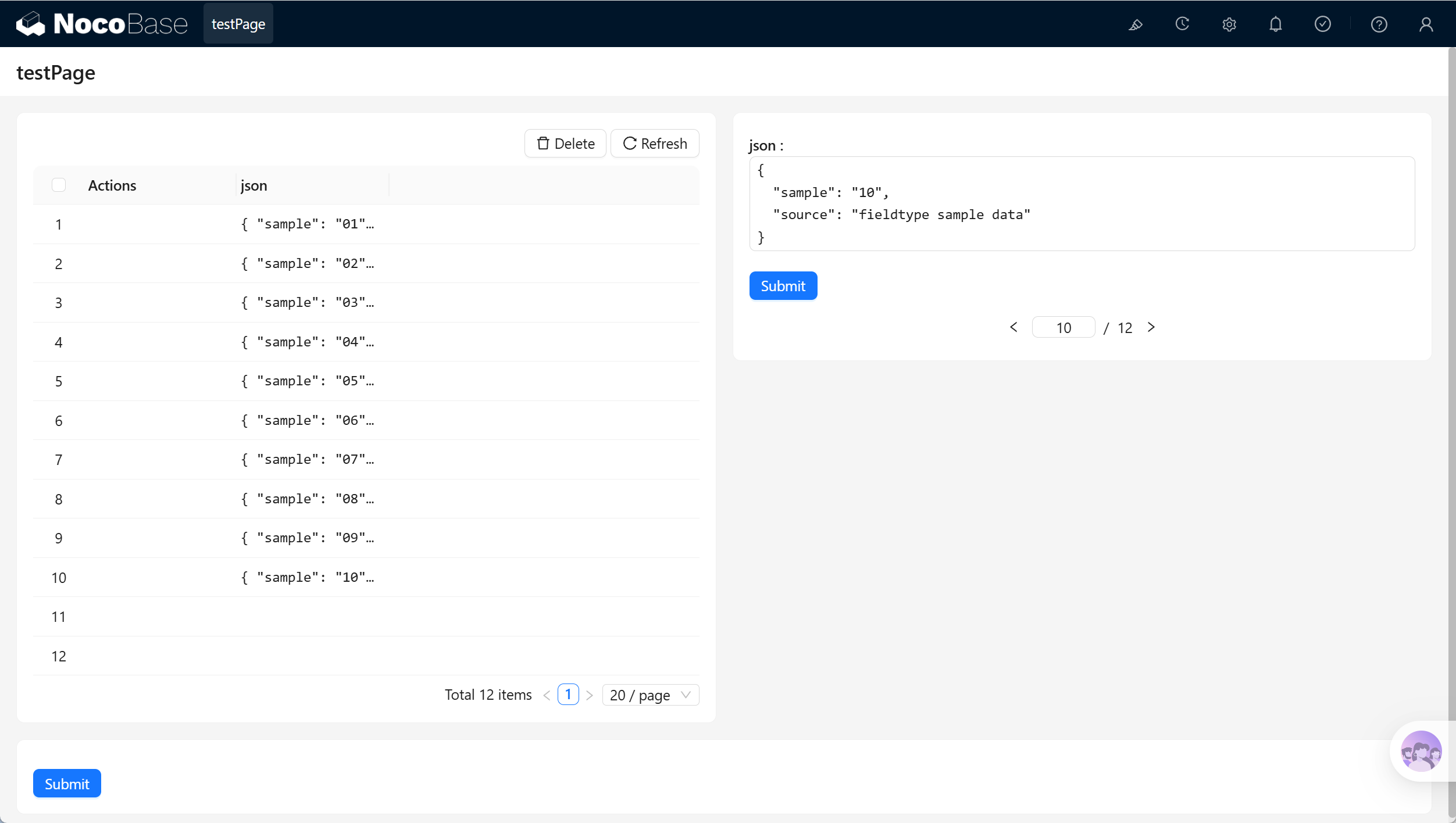
|
|
7
99
|
|
|
8
|
-

|
|
9
100
|
|
|
101
|
+
| Scenario | Use |
|
|
102
|
+
| --- | --- |
|
|
103
|
+
| Form block | Enter or edit JSON data. |
|
|
104
|
+
| Details block | Display structured content. |
|
|
105
|
+
| Workflows | Store or read external API response fragments. |
|
|
106
|
+
| APIs | Pass or return extended objects. |
|
|
10
107
|
|
|
11
|
-
##
|
|
108
|
+
## Related links
|
|
12
109
|
|
|
13
|
-
|
|
110
|
+
- [Fields](../index.md) - Learn about field categories and mapping.
|
|
111
|
+
- [General collection](../../../data-source-main/general-collection.md) - Create and manage fields in a collection.
|