@nocobase/plugin-ai 2.3.0-alpha.1 → 3.0.0-alpha.2
This diff represents the content of publicly available package versions that have been released to one of the supported registries. The information contained in this diff is provided for informational purposes only and reflects changes between package versions as they appear in their respective public registries.
- package/dist/ai/docs/nocobase/ai-employees/block/ai-chat-box.md +133 -0
- package/dist/ai/docs/nocobase/ai-employees/knowledge-base/knowledge-base/documents.md +1 -1
- package/dist/ai/docs/nocobase/ai-employees/knowledge-base/knowledge-base/index.md +11 -7
- package/dist/ai/docs/nocobase/ai-employees/knowledge-base/knowledge-base/settings.md +12 -8
- package/dist/ai/docs/nocobase/ai-employees/knowledge-base/vector-database.md +3 -3
- package/dist/ai/docs/nocobase/ai-employees/workflow/nodes/knowledge/create-document.md +1 -1
- package/dist/ai/docs/nocobase/api/app/env.md +3 -1
- package/dist/ai/docs/nocobase/api/cli/index.md +14 -2
- package/dist/ai/docs/nocobase/api/cli/portal/config.md +44 -0
- package/dist/ai/docs/nocobase/api/cli/portal/create.md +48 -0
- package/dist/ai/docs/nocobase/api/cli/portal/deploy.md +39 -0
- package/dist/ai/docs/nocobase/api/cli/portal/destroy.md +41 -0
- package/dist/ai/docs/nocobase/api/cli/portal/dev.md +39 -0
- package/dist/ai/docs/nocobase/api/cli/portal/index.md +136 -0
- package/dist/ai/docs/nocobase/api/cli/portal/info.md +41 -0
- package/dist/ai/docs/nocobase/api/cli/portal/list.md +40 -0
- package/dist/ai/docs/nocobase/api/cli/portal/pull.md +43 -0
- package/dist/ai/docs/nocobase/api/cli/portal/push.md +41 -0
- package/dist/ai/docs/nocobase/building-tips/ai-fill-js-block-form.md +1092 -0
- package/dist/ai/docs/nocobase/data-sources/calendar/calendar-collection.md +100 -3
- package/dist/ai/docs/nocobase/data-sources/collection-comment/index.md +92 -39
- package/dist/ai/docs/nocobase/data-sources/collection-sql/index.md +150 -29
- package/dist/ai/docs/nocobase/data-sources/collection-tree/index.md +93 -5
- package/dist/ai/docs/nocobase/data-sources/collection-view/index.md +226 -4
- package/dist/ai/docs/nocobase/data-sources/data-modeling/collection-fields/advanced/china-region.md +122 -5
- package/dist/ai/docs/nocobase/data-sources/data-modeling/collection-fields/advanced/collection-select.md +105 -4
- package/dist/ai/docs/nocobase/data-sources/data-modeling/collection-fields/advanced/json.md +102 -4
- package/dist/ai/docs/nocobase/data-sources/data-modeling/collection-fields/advanced/nano-id.md +104 -4
- package/dist/ai/docs/nocobase/data-sources/data-modeling/collection-fields/advanced/snowflake-id.md +108 -4
- package/dist/ai/docs/nocobase/data-sources/data-modeling/collection-fields/advanced/sort.md +3 -19
- package/dist/ai/docs/nocobase/data-sources/data-modeling/collection-fields/advanced/uuid.md +104 -4
- package/dist/ai/docs/nocobase/data-sources/data-modeling/collection-fields/associations/index.md +44 -8
- package/dist/ai/docs/nocobase/data-sources/data-modeling/collection-fields/basic/color.md +102 -4
- package/dist/ai/docs/nocobase/data-sources/data-modeling/collection-fields/basic/email.md +104 -4
- package/dist/ai/docs/nocobase/data-sources/data-modeling/collection-fields/basic/icon.md +102 -4
- package/dist/ai/docs/nocobase/data-sources/data-modeling/collection-fields/basic/input.md +112 -8
- package/dist/ai/docs/nocobase/data-sources/data-modeling/collection-fields/basic/integer.md +103 -4
- package/dist/ai/docs/nocobase/data-sources/data-modeling/collection-fields/basic/number.md +103 -4
- package/dist/ai/docs/nocobase/data-sources/data-modeling/collection-fields/basic/password.md +102 -4
- package/dist/ai/docs/nocobase/data-sources/data-modeling/collection-fields/basic/percent.md +104 -5
- package/dist/ai/docs/nocobase/data-sources/data-modeling/collection-fields/basic/phone.md +104 -4
- package/dist/ai/docs/nocobase/data-sources/data-modeling/collection-fields/basic/textarea.md +99 -8
- package/dist/ai/docs/nocobase/data-sources/data-modeling/collection-fields/basic/url.md +103 -4
- package/dist/ai/docs/nocobase/data-sources/data-modeling/collection-fields/choices/checkbox-group.md +105 -3
- package/dist/ai/docs/nocobase/data-sources/data-modeling/collection-fields/choices/checkbox.md +102 -4
- package/dist/ai/docs/nocobase/data-sources/data-modeling/collection-fields/choices/china-region.md +108 -5
- package/dist/ai/docs/nocobase/data-sources/data-modeling/collection-fields/choices/multiple-select.md +103 -5
- package/dist/ai/docs/nocobase/data-sources/data-modeling/collection-fields/choices/radio-group.md +106 -4
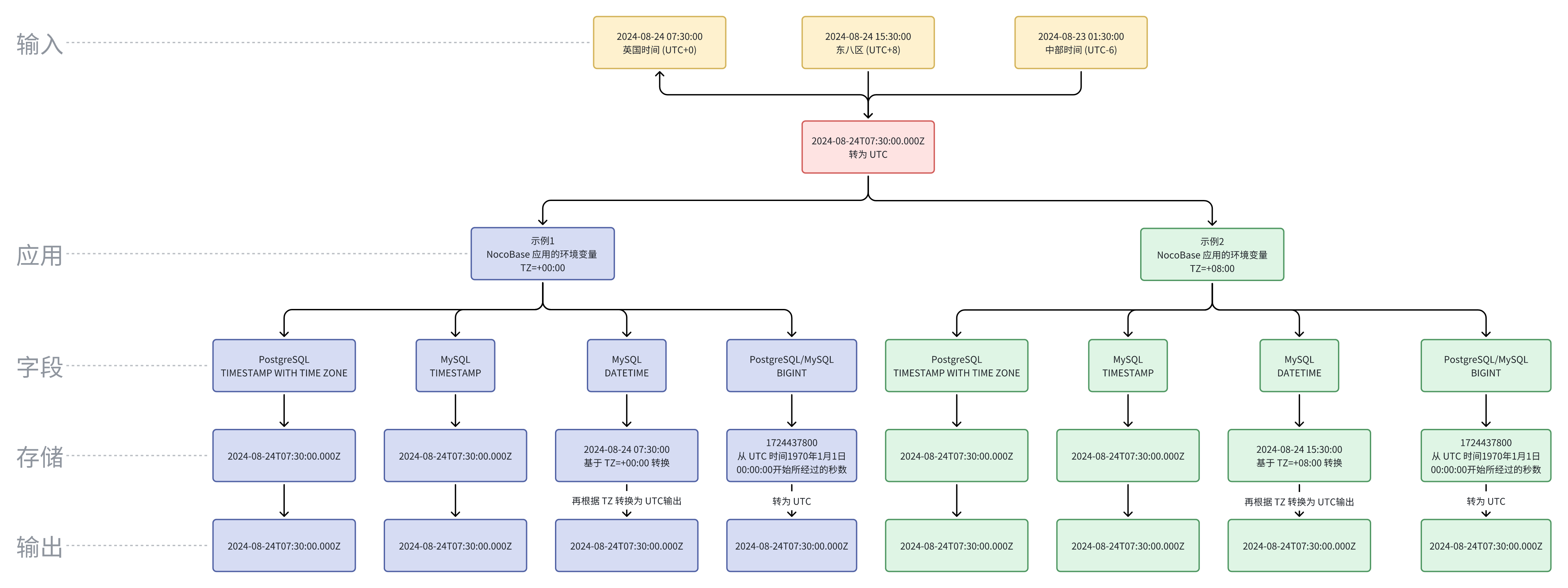
- package/dist/ai/docs/nocobase/data-sources/data-modeling/collection-fields/choices/select.md +103 -5
- package/dist/ai/docs/nocobase/data-sources/data-modeling/collection-fields/datetime/date.md +102 -4
- package/dist/ai/docs/nocobase/data-sources/data-modeling/collection-fields/datetime/datetime-without-tz.md +103 -5
- package/dist/ai/docs/nocobase/data-sources/data-modeling/collection-fields/datetime/datetime.md +103 -5
- package/dist/ai/docs/nocobase/data-sources/data-modeling/collection-fields/datetime/index.md +53 -47
- package/dist/ai/docs/nocobase/data-sources/data-modeling/collection-fields/datetime/time.md +102 -4
- package/dist/ai/docs/nocobase/data-sources/data-modeling/collection-fields/datetime/unix-timestamp.md +103 -5
- package/dist/ai/docs/nocobase/data-sources/data-modeling/collection-fields/geometric/circle.md +102 -4
- package/dist/ai/docs/nocobase/data-sources/data-modeling/collection-fields/geometric/line.md +103 -5
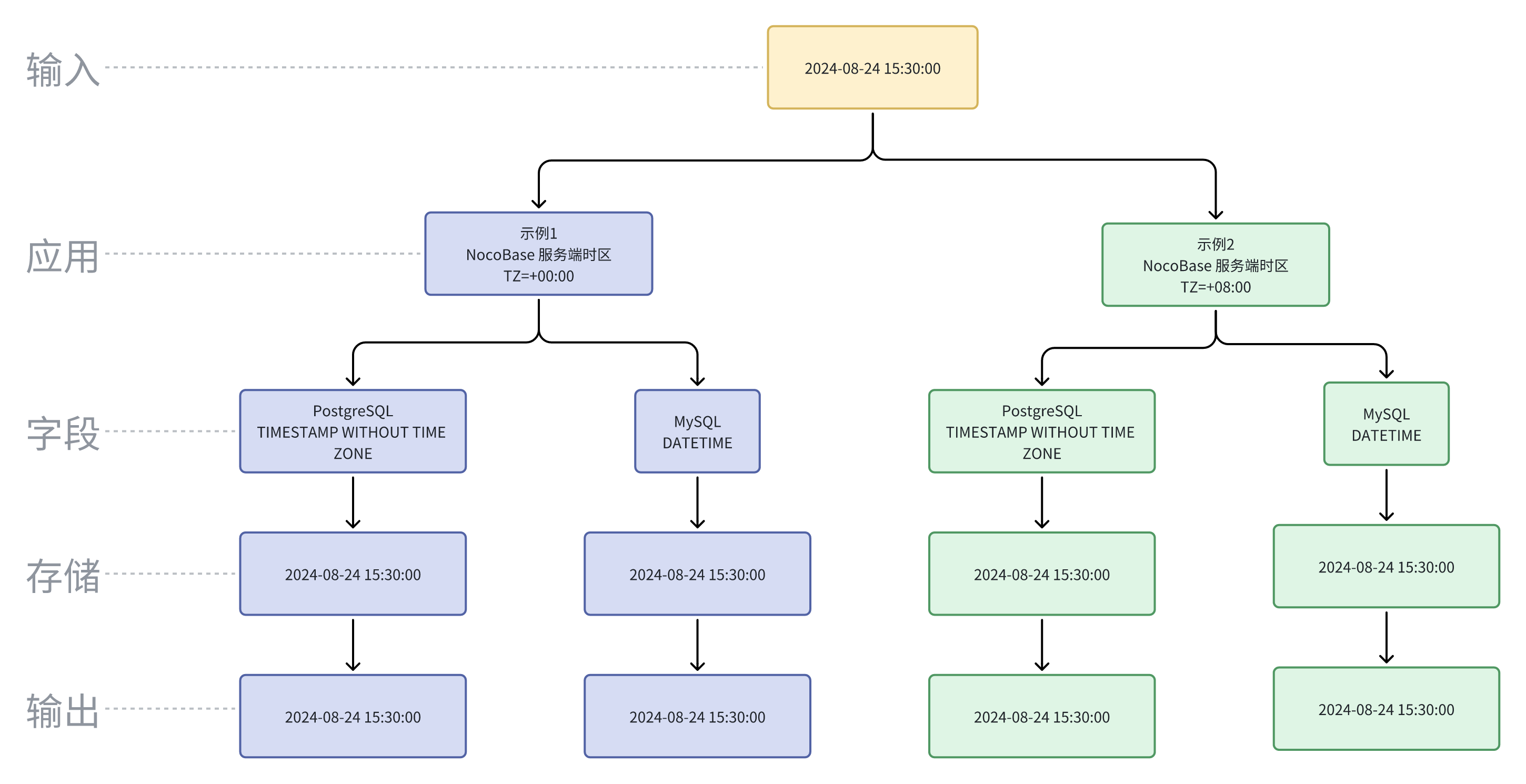
- package/dist/ai/docs/nocobase/data-sources/data-modeling/collection-fields/geometric/point.md +102 -4
- package/dist/ai/docs/nocobase/data-sources/data-modeling/collection-fields/geometric/polygon.md +102 -4
- package/dist/ai/docs/nocobase/data-sources/data-modeling/collection-fields/index.md +62 -16
- package/dist/ai/docs/nocobase/data-sources/data-modeling/collection-fields/media/markdown.md +104 -4
- package/dist/ai/docs/nocobase/data-sources/data-modeling/collection-fields/media/rich-text.md +105 -5
- package/dist/ai/docs/nocobase/data-sources/data-modeling/collection-fields/system-info/created-at.md +105 -5
- package/dist/ai/docs/nocobase/data-sources/data-modeling/collection-fields/system-info/created-by.md +103 -5
- package/dist/ai/docs/nocobase/data-sources/data-modeling/collection-fields/system-info/space.md +100 -6
- package/dist/ai/docs/nocobase/data-sources/data-modeling/collection-fields/system-info/table-oid.md +102 -4
- package/dist/ai/docs/nocobase/data-sources/data-modeling/collection-fields/system-info/updated-at.md +104 -5
- package/dist/ai/docs/nocobase/data-sources/data-modeling/collection-fields/system-info/updated-by.md +104 -6
- package/dist/ai/docs/nocobase/data-sources/data-modeling/collection-fields/validation.md +68 -58
- package/dist/ai/docs/nocobase/data-sources/data-modeling/collection.md +32 -13
- package/dist/ai/docs/nocobase/data-sources/data-modeling/index.md +41 -33
- package/dist/ai/docs/nocobase/data-sources/data-source-external-mariadb/index.md +114 -6
- package/dist/ai/docs/nocobase/data-sources/data-source-external-mssql/index.md +117 -6
- package/dist/ai/docs/nocobase/data-sources/data-source-external-mysql/index.md +103 -6
- package/dist/ai/docs/nocobase/data-sources/data-source-external-nocobase/index.md +75 -73
- package/dist/ai/docs/nocobase/data-sources/data-source-external-oracle/index.md +129 -11
- package/dist/ai/docs/nocobase/data-sources/data-source-external-postgres/index.md +110 -6
- package/dist/ai/docs/nocobase/data-sources/data-source-kingbase/index.md +75 -49
- package/dist/ai/docs/nocobase/data-sources/data-source-main/general-collection.md +116 -15
- package/dist/ai/docs/nocobase/data-sources/data-source-main/index.md +92 -62
- package/dist/ai/docs/nocobase/data-sources/data-source-main/inheritance-collection.md +97 -10
- package/dist/ai/docs/nocobase/data-sources/data-source-manager/external-database.md +97 -58
- package/dist/ai/docs/nocobase/data-sources/data-source-manager/index.md +32 -24
- package/dist/ai/docs/nocobase/data-sources/data-source-rest-api/index.md +115 -153
- package/dist/ai/docs/nocobase/data-sources/external/clickhouse.md +124 -0
- package/dist/ai/docs/nocobase/data-sources/external/doris.md +130 -0
- package/dist/ai/docs/nocobase/data-sources/external/index.md +140 -0
- package/dist/ai/docs/nocobase/data-sources/external/kingbase.md +129 -0
- package/dist/ai/docs/nocobase/data-sources/external/mariadb.md +126 -0
- package/dist/ai/docs/nocobase/data-sources/external/mssql.md +129 -0
- package/dist/ai/docs/nocobase/data-sources/external/mysql.md +115 -0
- package/dist/ai/docs/nocobase/data-sources/external/nocobase.md +159 -0
- package/dist/ai/docs/nocobase/data-sources/external/oceanbase.md +126 -0
- package/dist/ai/docs/nocobase/data-sources/external/oracle.md +158 -0
- package/dist/ai/docs/nocobase/data-sources/external/postgresql.md +122 -0
- package/dist/ai/docs/nocobase/data-sources/external/rest-api.md +245 -0
- package/dist/ai/docs/nocobase/data-sources/field-attachment-url/index.md +100 -12
- package/dist/ai/docs/nocobase/data-sources/field-encryption/index.md +48 -47
- package/dist/ai/docs/nocobase/data-sources/field-formula/index.md +99 -5
- package/dist/ai/docs/nocobase/data-sources/field-markdown-vditor/index.md +105 -5
- package/dist/ai/docs/nocobase/data-sources/field-sequence/index.md +102 -5
- package/dist/ai/docs/nocobase/data-sources/field-signature/index.md +18 -16
- package/dist/ai/docs/nocobase/data-sources/field-sort/index.md +76 -73
- package/dist/ai/docs/nocobase/data-sources/file-manager/field-attachment.md +101 -7
- package/dist/ai/docs/nocobase/data-sources/file-manager/file-collection.md +101 -14
- package/dist/ai/docs/nocobase/data-sources/index.md +49 -33
- package/dist/ai/docs/nocobase/data-sources/main/index.md +130 -0
- package/dist/ai/docs/nocobase/data-sources/main/kingbase.md +147 -0
- package/dist/ai/docs/nocobase/data-sources/main/mariadb.md +59 -0
- package/dist/ai/docs/nocobase/data-sources/main/mysql.md +59 -0
- package/dist/ai/docs/nocobase/data-sources/main/oceanbase.md +62 -0
- package/dist/ai/docs/nocobase/data-sources/main/postgresql.md +61 -0
- package/dist/ai/docs/nocobase/file-manager/storage/index.md +66 -26
- package/dist/ai/docs/nocobase/file-manager/storage/s3-pro.md +58 -7
- package/dist/ai/docs/nocobase/get-started/installation/env.md +2 -2
- package/dist/ai/docs/nocobase/ops-management/migration-manager/built-in-tables.md +1 -2
- package/dist/ai/docs/nocobase/runjs/context/ai.md +194 -4
- package/dist/ai/tools/executeFrontendTool.d.ts +10 -0
- package/dist/ai/tools/executeFrontendTool.js +86 -0
- package/dist/ai/tools/getSkill.js +1 -1
- package/dist/ai/tools/loadFrontendTool.d.ts +10 -0
- package/dist/ai/tools/loadFrontendTool.js +99 -0
- package/dist/client/244.8631eb5cf3f05e21.js +10 -0
- package/dist/client/{525.203778500aca5d05.js → 525.94dd4136c1361477.js} +1 -1
- package/dist/client/681.6ffbc9329b9ac242.js +10 -0
- package/dist/{client-v2/705.1d10027ff8cfdf79.js → client/705.19b642db34de438a.js} +1 -1
- package/dist/client/index.d.ts +1 -3
- package/dist/client/index.js +8 -8
- package/dist/client-v2/244.c428e645ecb94414.js +10 -0
- package/dist/client-v2/420.b2aedb1ff71fca0e.js +10 -0
- package/dist/client-v2/681.6890caa389564ff7.js +10 -0
- package/dist/client-v2/705.8dc34d43f02f322c.js +10 -0
- package/dist/client-v2/ai-employees/AIEmployeeShortcut.d.ts +2 -0
- package/dist/client-v2/ai-employees/AddContextButton.d.ts +2 -0
- package/dist/client-v2/ai-employees/chatbox/components/AIEmployeeSwitcher.d.ts +1 -0
- package/dist/client-v2/ai-employees/chatbox/components/ChatBoxUnreadBadge.d.ts +17 -0
- package/dist/client-v2/ai-employees/chatbox/components/Conversations.d.ts +9 -1
- package/dist/client-v2/ai-employees/chatbox/components/MessageRenderers.d.ts +1 -1
- package/dist/client-v2/ai-employees/chatbox/components/Messages.d.ts +5 -1
- package/dist/client-v2/ai-employees/chatbox/components/ModelSwitcher.d.ts +4 -0
- package/dist/client-v2/ai-employees/chatbox/components/Sender.d.ts +33 -1
- package/dist/client-v2/ai-employees/chatbox/components/index.d.ts +1 -0
- package/dist/client-v2/ai-employees/chatbox/hooks/useChat.d.ts +8 -5
- package/dist/client-v2/ai-employees/chatbox/hooks/useChatBoxActions.d.ts +3 -2
- package/dist/client-v2/ai-employees/chatbox/hooks/useChatBoxEffect.d.ts +2 -1
- package/dist/client-v2/ai-employees/chatbox/hooks/useChatConversationActions.d.ts +3 -2
- package/dist/client-v2/ai-employees/chatbox/hooks/useChatMessageActions.d.ts +4 -2
- package/dist/client-v2/ai-employees/chatbox/hooks/useToolCallActions.d.ts +3 -1
- package/dist/client-v2/ai-employees/chatbox/hooks/useUploadFiles.d.ts +13 -3
- package/dist/client-v2/ai-employees/chatbox/hooks/useWorkflowTasks.d.ts +3 -2
- package/dist/client-v2/ai-employees/chatbox/index.d.ts +17 -0
- package/dist/client-v2/ai-employees/chatbox/roles.d.ts +2 -153
- package/dist/client-v2/ai-employees/chatbox/stores/chat-box.d.ts +46 -31
- package/dist/client-v2/ai-employees/chatbox/stores/chat-conversations.d.ts +7 -7
- package/dist/client-v2/ai-employees/chatbox/stores/chat-messages.d.ts +23 -18
- package/dist/client-v2/ai-employees/chatbox/stores/chat-sender.d.ts +43 -0
- package/dist/client-v2/ai-employees/chatbox/stores/chat-tool-call.d.ts +6 -5
- package/dist/client-v2/ai-employees/chatbox/stores/chat-tools.d.ts +11 -5
- package/dist/client-v2/ai-employees/chatbox/stores/mounted-chat-boxes.d.ts +20 -0
- package/dist/client-v2/ai-employees/chatbox/stores/runtime.d.ts +43 -0
- package/dist/client-v2/ai-employees/chatbox/stores/workflow-tasks.d.ts +22 -10
- package/dist/client-v2/ai-employees/chatbox/upload.d.ts +19 -0
- package/dist/client-v2/ai-employees/chatbox/utils.d.ts +28 -4
- package/dist/client-v2/ai-employees/frontend-tools.d.ts +11 -0
- package/dist/client-v2/ai-employees/tools/SuggestionsOptionsCard.d.ts +1 -1
- package/dist/client-v2/ai-employees/tools/WorkflowTaskOutputCard.d.ts +1 -1
- package/dist/client-v2/ai-employees/types.d.ts +30 -0
- package/dist/client-v2/block/ai-chat-box/AIChatBoxBlockModel.d.ts +21 -0
- package/dist/client-v2/block/ai-chat-box/AIChatBoxCoreModel.d.ts +13 -0
- package/dist/client-v2/block/ai-chat-box/components/AIChatBoxCoreView.d.ts +10 -0
- package/dist/client-v2/block/ai-chat-box/components/AIChatBoxView.d.ts +12 -0
- package/dist/client-v2/block/ai-chat-box/index.d.ts +14 -0
- package/dist/client-v2/block/ai-chat-box/settings.d.ts +12 -0
- package/dist/client-v2/block/ai-chat-box/sub-models.d.ts +26 -0
- package/dist/client-v2/block/ai-chat-box/types.d.ts +38 -0
- package/dist/client-v2/block/ai-chat-box/utils.d.ts +26 -0
- package/dist/client-v2/index.d.ts +3 -5
- package/dist/client-v2/index.js +3 -3
- package/dist/client-v2/llm-services/model-select.d.ts +33 -0
- package/dist/client-v2/llm-services/utils.d.ts +1 -0
- package/dist/client-v2/manager/ai-manager.d.ts +10 -3
- package/dist/client-v2/manager/frontend-tool-registry.d.ts +30 -0
- package/dist/client-v2/models/ai-employees/AIEmployeeActionModel.d.ts +4 -1
- package/dist/client-v2/models/ai-employees/AIEmployeeShortcutModel.d.ts +5 -0
- package/dist/client-v2/pages/EmployeesPage.d.ts +2 -0
- package/dist/client-v2/runjs/registerAIEmployeeRunJSFacade.d.ts +1 -0
- package/dist/common/ai-employee-validation.d.ts +15 -0
- package/dist/common/ai-employee-validation.js +61 -0
- package/dist/common/error-codes.d.ts +13 -0
- package/dist/common/error-codes.js +48 -0
- package/dist/common/frontend-tools.d.ts +26 -0
- package/dist/common/frontend-tools.js +57 -0
- package/dist/common/llm-service-models.d.ts +16 -0
- package/dist/common/llm-service-models.js +84 -0
- package/dist/externalVersion.js +16 -16
- package/dist/locale/en-US.json +67 -0
- package/dist/locale/zh-CN.json +67 -0
- package/dist/node_modules/@langchain/mistralai/package.json +1 -1
- package/dist/node_modules/@langchain/xai/package.json +1 -1
- package/dist/node_modules/fs-extra/package.json +1 -1
- package/dist/node_modules/jsonrepair/package.json +1 -1
- package/dist/node_modules/just-bash/package.json +1 -1
- package/dist/node_modules/nodejs-snowflake/package.json +1 -1
- package/dist/node_modules/openai/package.json +1 -1
- package/dist/node_modules/zod/package.json +1 -1
- package/dist/server/ai-employees/ai-conversations.d.ts +4 -1
- package/dist/server/ai-employees/ai-conversations.js +2 -0
- package/dist/server/ai-employees/ai-employee.d.ts +2 -1
- package/dist/server/ai-employees/ai-employee.js +26 -7
- package/dist/server/ai-employees/middleware/conversation.js +9 -2
- package/dist/server/collections/ai-conversations.js +5 -0
- package/dist/server/document-loader/constants.js +1 -1
- package/dist/server/frontend-tools.d.ts +25 -0
- package/dist/server/frontend-tools.js +171 -0
- package/dist/server/manager/work-context-handler.js +10 -3
- package/dist/server/plugin.d.ts +1 -0
- package/dist/server/plugin.js +25 -0
- package/dist/server/resource/aiConversations.d.ts +2 -0
- package/dist/server/resource/aiConversations.js +33 -3
- package/dist/server/resource/aiEmployees.d.ts +2 -0
- package/dist/server/resource/aiEmployees.js +62 -0
- package/dist/server/resource/aiWorkflowTasks.js +9 -1
- package/dist/server/resource/llmServices.d.ts +11 -0
- package/dist/server/resource/llmServices.js +85 -0
- package/dist/server/types/knowledge-base.type.d.ts +6 -2
- package/dist/swagger/common.d.ts +143 -0
- package/dist/swagger/common.js +144 -0
- package/dist/swagger/employees.d.ts +301 -0
- package/dist/swagger/employees.js +131 -0
- package/dist/swagger/index.d.ts +1588 -0
- package/dist/swagger/index.js +62 -0
- package/dist/swagger/llm.d.ts +555 -0
- package/dist/swagger/llm.js +247 -0
- package/dist/swagger/schemas.d.ts +736 -0
- package/dist/swagger/schemas.js +381 -0
- package/package.json +2 -2
- package/dist/ai/docs/nocobase/ai-employees/knowledge-base/vector-store.md +0 -24
- package/dist/ai/docs/nocobase/data-sources/development/index.md +0 -6
- package/dist/client/372.40eb52905e3f3049.js +0 -10
- package/dist/client/681.399948c18d753667.js +0 -10
- package/dist/client/705.380279da896021fb.js +0 -10
- package/dist/client-v2/372.8cc3fde09c9bec77.js +0 -10
- package/dist/client-v2/406.341be51205c674e0.js +0 -10
- package/dist/client-v2/681.082f4f1c7b841983.js +0 -10
- package/dist/client-v2/ai-employees/chatbox/stores/create-selectors.d.ts +0 -46
- package/dist/client-v2/ai-employees/chatbox/utils/normalizeTriggerTaskOptions.d.ts +0 -19
package/dist/ai/docs/nocobase/data-sources/data-modeling/collection-fields/choices/select.md
CHANGED
|
@@ -1,13 +1,111 @@
|
|
|
1
|
-
|
|
1
|
+
---
|
|
2
|
+
title: "Select"
|
|
3
|
+
description: "The Select field stores one value from a fixed option set, such as status, level, or priority."
|
|
4
|
+
keywords: "Select,select,field,Field interface,NocoBase"
|
|
5
|
+
---
|
|
6
|
+
|
|
7
|
+
# Select
|
|
2
8
|
|
|
3
9
|
## Introduction
|
|
4
10
|
|
|
5
|
-
|
|
11
|
+
In NocoBase, the **Select** field stores one selected option value.
|
|
12
|
+
|
|
13
|
+
It is suitable for order statuses, customer levels, priorities, and other values from a fixed range. Use Multiple select when a record can contain more than one option.
|
|
14
|
+
|
|
15
|
+
## Use cases
|
|
16
|
+
|
|
17
|
+
Select fields are suitable for these business scenarios:
|
|
18
|
+
|
|
19
|
+
- Order status
|
|
20
|
+
- Customer level
|
|
21
|
+
- Priority
|
|
22
|
+
- Type and category values
|
|
23
|
+
|
|
24
|
+
## Create and configure
|
|
25
|
+
|
|
26
|
+
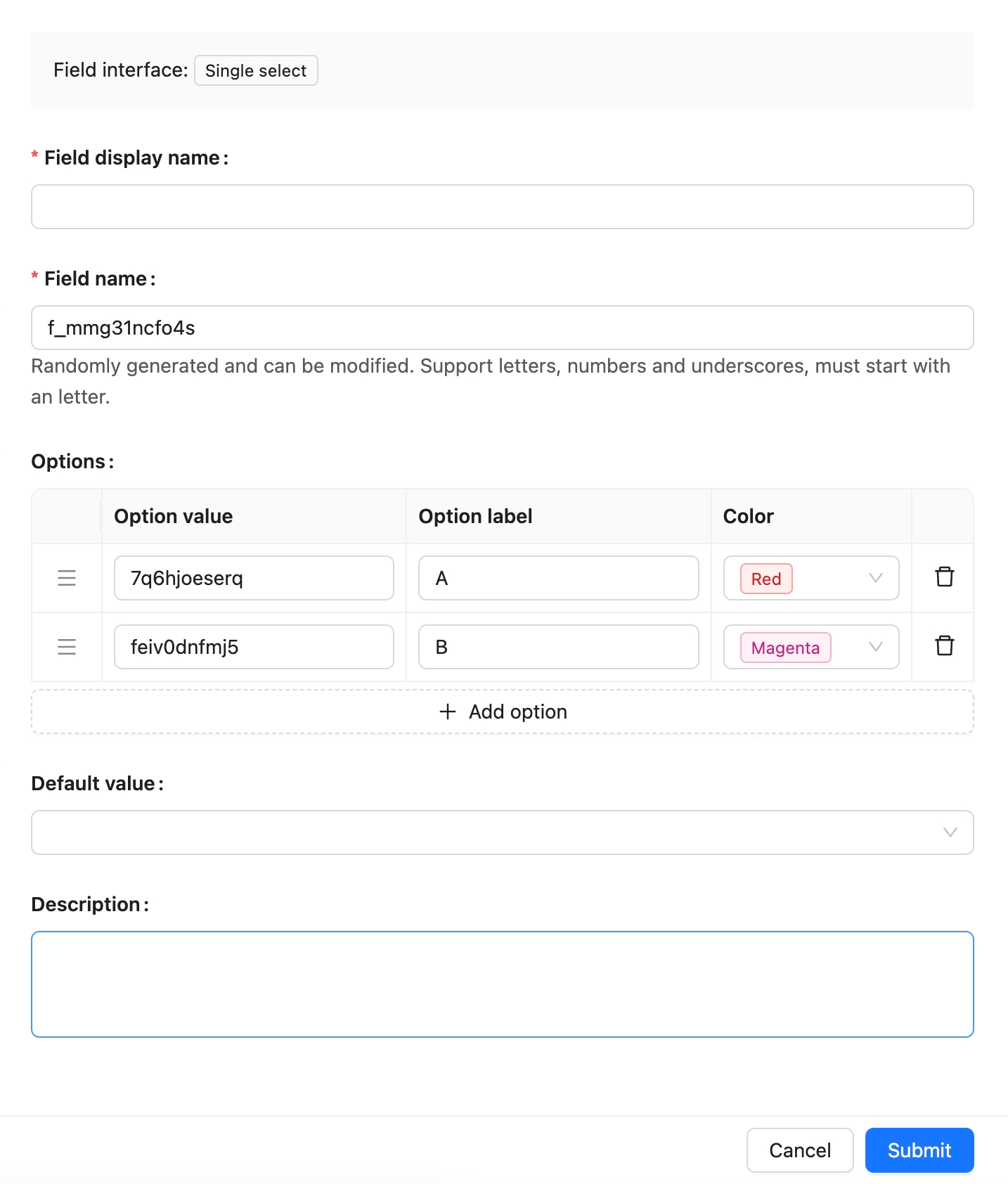
On the collection's **Configure fields** page, click **Add field** and select **Select** to create this field.
|
|
27
|
+
|
|
28
|
+
|
|
29
|
+
|
|
30
|
+
| Setting | Description |
|
|
31
|
+
| --- | --- |
|
|
32
|
+
| Field interface | The field interface. Select uses `select`, which determines how the field is entered and displayed in pages. |
|
|
33
|
+
| Field display name | The name displayed for the field, such as `Order status`, `Customer level`, or `Priority`. Use a name that business users can recognize. |
|
|
34
|
+
| Field name | The field identifier used internally by APIs, relation fields, permissions, and workflows. It usually cannot be changed after creation. It supports only letters, numbers, and underscores, and must begin with a letter. |
|
|
35
|
+
| Field type | The data-layer type. Select uses `string` by default. |
|
|
36
|
+
| Default value | The default value. When a new record has no value, NocoBase can fill this value automatically. |
|
|
37
|
+
| Validation rules | Validation rules. Supports required validation and configured option values. |
|
|
38
|
+
| Description | A field description. Record the field meaning, entry requirements, data source, or maintainer. |
|
|
39
|
+
|
|
40
|
+
:::warning Note
|
|
41
|
+
|
|
42
|
+
Field names are referenced by page blocks, permissions, workflows, and APIs after creation. Confirm the name before creating the field to avoid later configuration changes.
|
|
43
|
+
|
|
44
|
+
:::
|
|
45
|
+
|
|
46
|
+
## Field behavior
|
|
47
|
+
|
|
48
|
+
The default behavior of a Select field is as follows:
|
|
49
|
+
|
|
50
|
+
| Behavior | Description |
|
|
51
|
+
| --- | --- |
|
|
52
|
+
| Default Field interface | `select`. |
|
|
53
|
+
| Default Field type | `string`. |
|
|
54
|
+
| Available Field types | `string`. |
|
|
55
|
+
| Page component | Uses a Select component in edit mode. |
|
|
56
|
+
| Filtering | Supports option filters such as equals, does not equal, is empty, and is not empty. |
|
|
57
|
+
| Sorting | Supports sorting in Table blocks. |
|
|
58
|
+
| Validation | Supports required validation and configured option values. |
|
|
59
|
+
|
|
60
|
+
## Edit configuration
|
|
61
|
+
|
|
62
|
+
After creation, click **Edit** beside the field to edit its configuration. Edit fields to adjust how they are displayed and used in NocoBase, such as the display name, description, default value, validation rules, or field-specific settings.
|
|
63
|
+
|
|
64
|
+
When a field comes from a synchronized main-database table, editing usually maps the database field to a NocoBase Field type and Field interface.
|
|
65
|
+
|
|
66
|
+
| Setting | Can be edited | Description |
|
|
67
|
+
| --- | --- | --- |
|
|
68
|
+
| Field display name | Yes | Changes the name displayed in the interface without changing the field identifier. |
|
|
69
|
+
| Field name | No | The field identifier normally cannot be changed in the edit form after creation. |
|
|
70
|
+
| Field interface | Conditional | Main-database fields and synchronized fields can be adjusted during field mapping. Changes affect page input, display, and validation. |
|
|
71
|
+
| Field type | Conditional | Main-database fields and synchronized fields can be adjusted during field mapping. Confirm that existing values can be used by the new type first. |
|
|
72
|
+
| Default value | Yes | Adjusts the default value for new records. |
|
|
73
|
+
| Validation rules | Yes | Adjusts field validation rules. |
|
|
74
|
+
| Description | Yes | Adds the field meaning, entry requirements, data source, or maintainer. |
|
|
75
|
+
|
|
76
|
+
:::warning Note
|
|
77
|
+
|
|
78
|
+
Changing a Field type or Field interface is more than changing a display name. It affects field storage, input components, validation rules, filters, and workflow-variable usage. When the field contains substantial existing data, confirm that its data format is compatible first.
|
|
79
|
+
|
|
80
|
+
:::
|
|
81
|
+
|
|
82
|
+
## Delete field
|
|
83
|
+
|
|
84
|
+
Click **Delete** beside a Select field to delete it. You can also select multiple fields and delete them in the main data source.
|
|
85
|
+
|
|
86
|
+
Deleting a Select field created in the main database usually also deletes the actual database column and its values. For a synchronized or external-data-source field, the impact depends on the corresponding data source and field origin.
|
|
87
|
+
|
|
88
|
+
:::danger Warning
|
|
89
|
+
|
|
90
|
+
Deleting a field can affect page blocks, forms, filters, permissions, workflows, APIs, imports and exports, and existing data. Confirm that the field is no longer referenced by business configuration before deleting it.
|
|
91
|
+
|
|
92
|
+
:::
|
|
93
|
+
|
|
94
|
+
## Use in pages
|
|
95
|
+
|
|
96
|
+
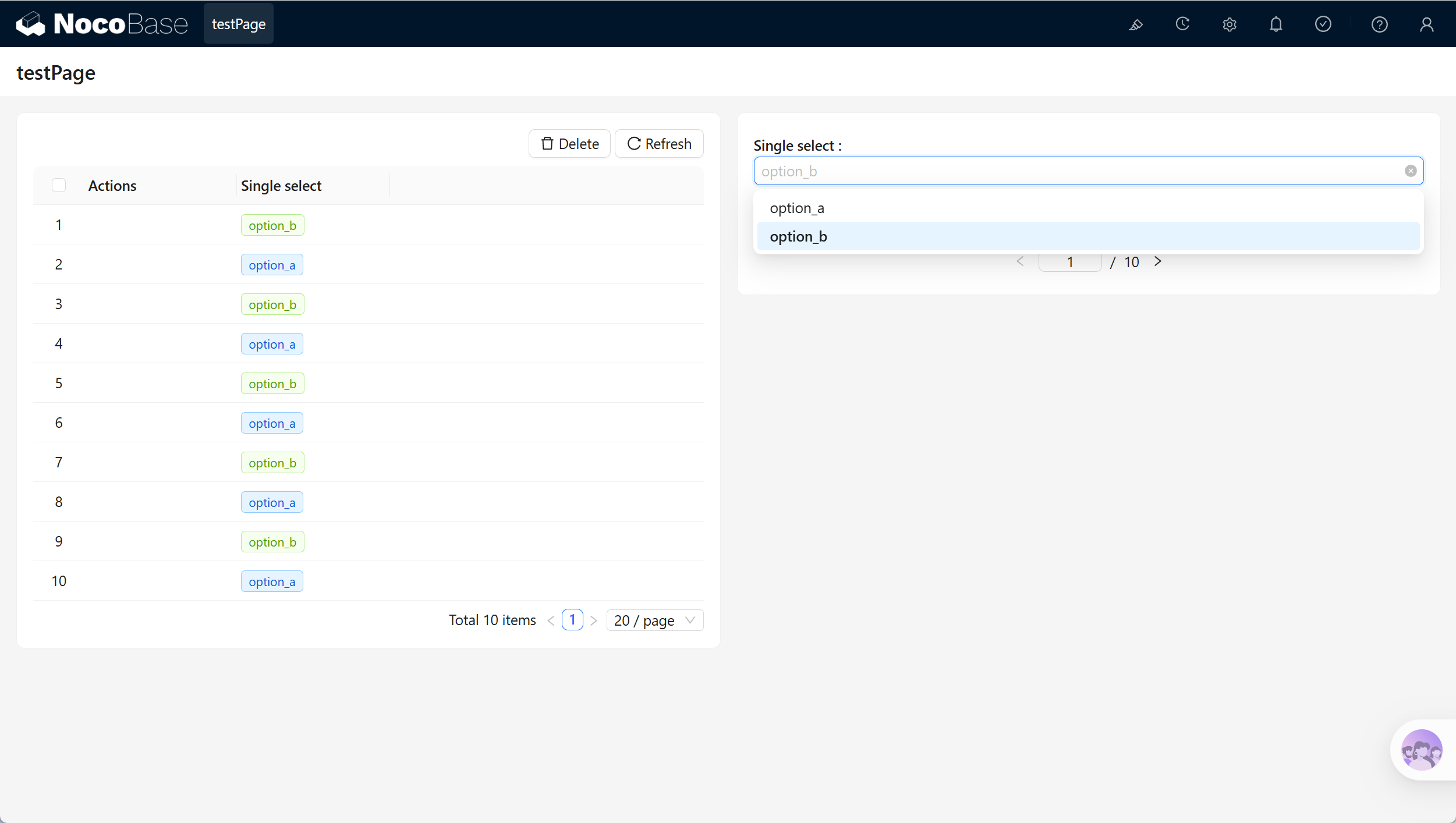
Select fields are suitable for fixed business states and single-choice data entry.
|
|
6
97
|
|
|
98
|
+
|
|
7
99
|
|
|
8
|
-

|
|
9
100
|
|
|
101
|
+
| Scenario | Use |
|
|
102
|
+
| --- | --- |
|
|
103
|
+
| Form block | Select one option. |
|
|
104
|
+
| Table block | Display, sort, and filter option values. |
|
|
105
|
+
| Details block | Display the selected option. |
|
|
106
|
+
| Workflows and permissions | Use the selected value in business conditions. |
|
|
10
107
|
|
|
11
|
-
##
|
|
108
|
+
## Related links
|
|
12
109
|
|
|
13
|
-
|
|
110
|
+
- [Fields](../index.md) - Learn about field categories and mapping.
|
|
111
|
+
- [General collection](../../../data-source-main/general-collection.md) - Create and manage fields in a collection.
|
|
@@ -1,13 +1,111 @@
|
|
|
1
|
+
---
|
|
2
|
+
title: "Date"
|
|
3
|
+
description: "The Date field stores a calendar date without requiring a time value."
|
|
4
|
+
keywords: "Date,dateOnly,field,Field interface,NocoBase"
|
|
5
|
+
---
|
|
6
|
+
|
|
1
7
|
# Date
|
|
2
8
|
|
|
3
9
|
## Introduction
|
|
4
10
|
|
|
5
|
-
|
|
11
|
+
In NocoBase, the **Date** field stores a calendar date.
|
|
12
|
+
|
|
13
|
+
It is suitable for signing dates, birthdays, due dates, and other values where only the date matters. Use DateTime when the time of day is also required.
|
|
14
|
+
|
|
15
|
+
## Use cases
|
|
16
|
+
|
|
17
|
+
Date fields are suitable for these business scenarios:
|
|
18
|
+
|
|
19
|
+
- Signing dates and effective dates
|
|
20
|
+
- Birthdays and anniversary dates
|
|
21
|
+
- Due dates and planned dates
|
|
22
|
+
- Business dates without a time of day
|
|
23
|
+
|
|
24
|
+
## Create and configure
|
|
25
|
+
|
|
26
|
+
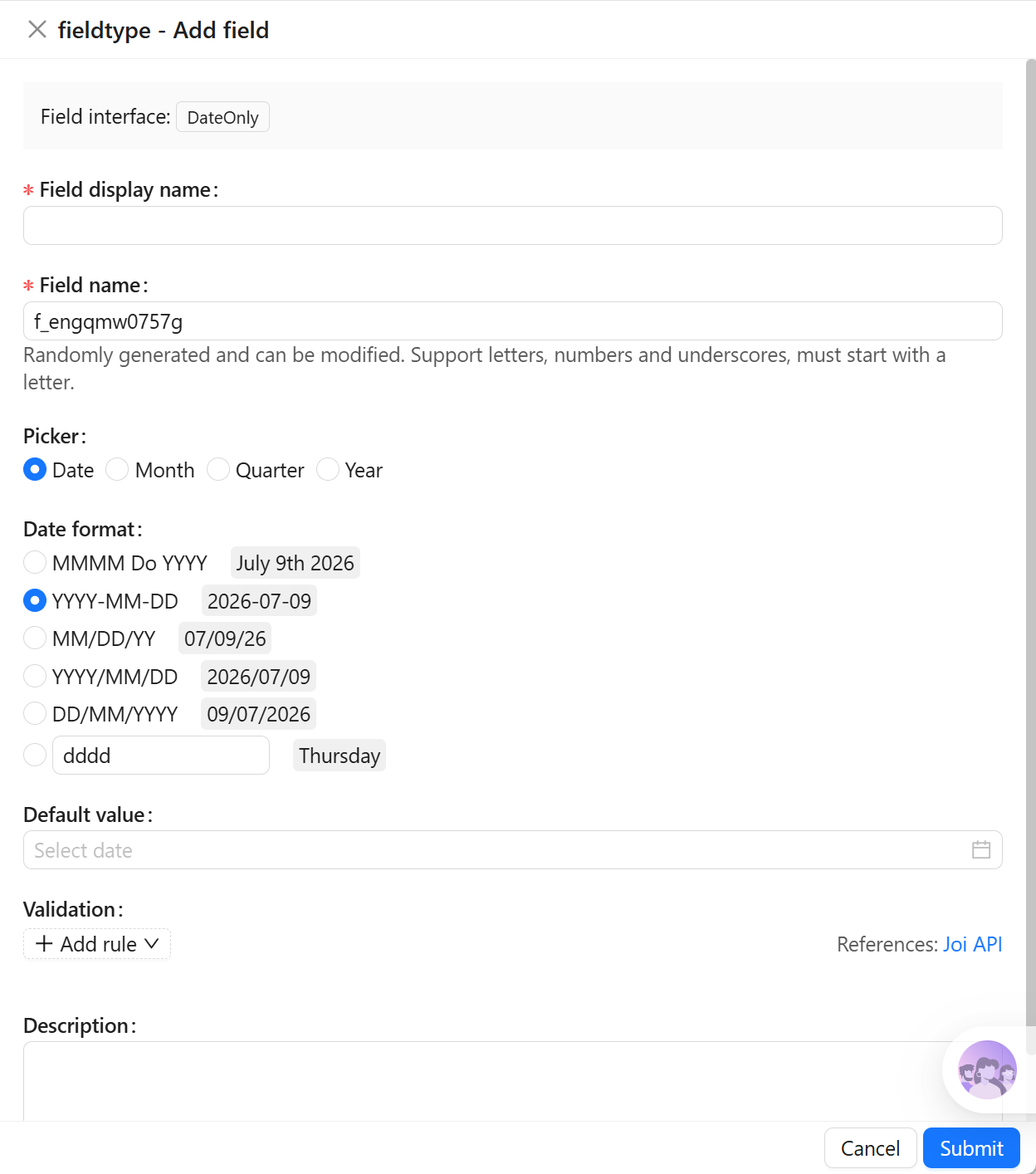
On the collection's **Configure fields** page, click **Add field** and select **Date** to create this field.
|
|
27
|
+
|
|
28
|
+
|
|
29
|
+
|
|
30
|
+
| Setting | Description |
|
|
31
|
+
| --- | --- |
|
|
32
|
+
| Field interface | The field interface. Date uses `dateOnly`, which determines how the field is entered and displayed in pages. |
|
|
33
|
+
| Field display name | The name displayed for the field, such as `Signing date`, `Due date`, or `Birthday`. Use a name that business users can recognize. |
|
|
34
|
+
| Field name | The field identifier used internally by APIs, relation fields, permissions, and workflows. It usually cannot be changed after creation. It supports only letters, numbers, and underscores, and must begin with a letter. |
|
|
35
|
+
| Field type | The data-layer type. Date uses `dateOnly` by default. |
|
|
36
|
+
| Default value | The default value. When a new record has no value, NocoBase can fill this value automatically. |
|
|
37
|
+
| Validation rules | Validation rules. Supports date-range and required validation. |
|
|
38
|
+
| Description | A field description. Record the field meaning, entry requirements, data source, or maintainer. |
|
|
39
|
+
|
|
40
|
+
:::warning Note
|
|
41
|
+
|
|
42
|
+
Field names are referenced by page blocks, permissions, workflows, and APIs after creation. Confirm the name before creating the field to avoid later configuration changes.
|
|
43
|
+
|
|
44
|
+
:::
|
|
45
|
+
|
|
46
|
+
## Field behavior
|
|
47
|
+
|
|
48
|
+
The default behavior of a Date field is as follows:
|
|
49
|
+
|
|
50
|
+
| Behavior | Description |
|
|
51
|
+
| --- | --- |
|
|
52
|
+
| Default Field interface | `dateOnly`. |
|
|
53
|
+
| Default Field type | `dateOnly`. |
|
|
54
|
+
| Available Field types | `dateOnly`, `date`. |
|
|
55
|
+
| Page component | Uses a date picker in edit mode. |
|
|
56
|
+
| Filtering | Supports date filters such as before, after, range, is empty, and is not empty. |
|
|
57
|
+
| Sorting | Supports chronological sorting in Table blocks. |
|
|
58
|
+
| Validation | Supports date-range and required validation. |
|
|
59
|
+
|
|
60
|
+
## Edit configuration
|
|
61
|
+
|
|
62
|
+
After creation, click **Edit** beside the field to edit its configuration. Edit fields to adjust how they are displayed and used in NocoBase, such as the display name, description, default value, validation rules, or field-specific settings.
|
|
63
|
+
|
|
64
|
+
When a field comes from a synchronized main-database table, editing usually maps the database field to a NocoBase Field type and Field interface.
|
|
65
|
+
|
|
66
|
+
| Setting | Can be edited | Description |
|
|
67
|
+
| --- | --- | --- |
|
|
68
|
+
| Field display name | Yes | Changes the name displayed in the interface without changing the field identifier. |
|
|
69
|
+
| Field name | No | The field identifier normally cannot be changed in the edit form after creation. |
|
|
70
|
+
| Field interface | Conditional | Main-database fields and synchronized fields can be adjusted during field mapping. Changes affect page input, display, and validation. |
|
|
71
|
+
| Field type | Conditional | Main-database fields and synchronized fields can be adjusted during field mapping. Confirm that existing values can be used by the new type first. |
|
|
72
|
+
| Default value | Yes | Adjusts the default value for new records. |
|
|
73
|
+
| Validation rules | Yes | Adjusts field validation rules. |
|
|
74
|
+
| Description | Yes | Adds the field meaning, entry requirements, data source, or maintainer. |
|
|
75
|
+
|
|
76
|
+
:::warning Note
|
|
77
|
+
|
|
78
|
+
Changing a Field type or Field interface is more than changing a display name. It affects field storage, input components, validation rules, filters, and workflow-variable usage. When the field contains substantial existing data, confirm that its data format is compatible first.
|
|
79
|
+
|
|
80
|
+
:::
|
|
81
|
+
|
|
82
|
+
## Delete field
|
|
83
|
+
|
|
84
|
+
Click **Delete** beside a Date field to delete it. You can also select multiple fields and delete them in the main data source.
|
|
85
|
+
|
|
86
|
+
Deleting a Date field created in the main database usually also deletes the actual database column and its values. For a synchronized or external-data-source field, the impact depends on the corresponding data source and field origin.
|
|
87
|
+
|
|
88
|
+
:::danger Warning
|
|
89
|
+
|
|
90
|
+
Deleting a field can affect page blocks, forms, filters, permissions, workflows, APIs, imports and exports, and existing data. Confirm that the field is no longer referenced by business configuration before deleting it.
|
|
91
|
+
|
|
92
|
+
:::
|
|
93
|
+
|
|
94
|
+
## Use in pages
|
|
95
|
+
|
|
96
|
+
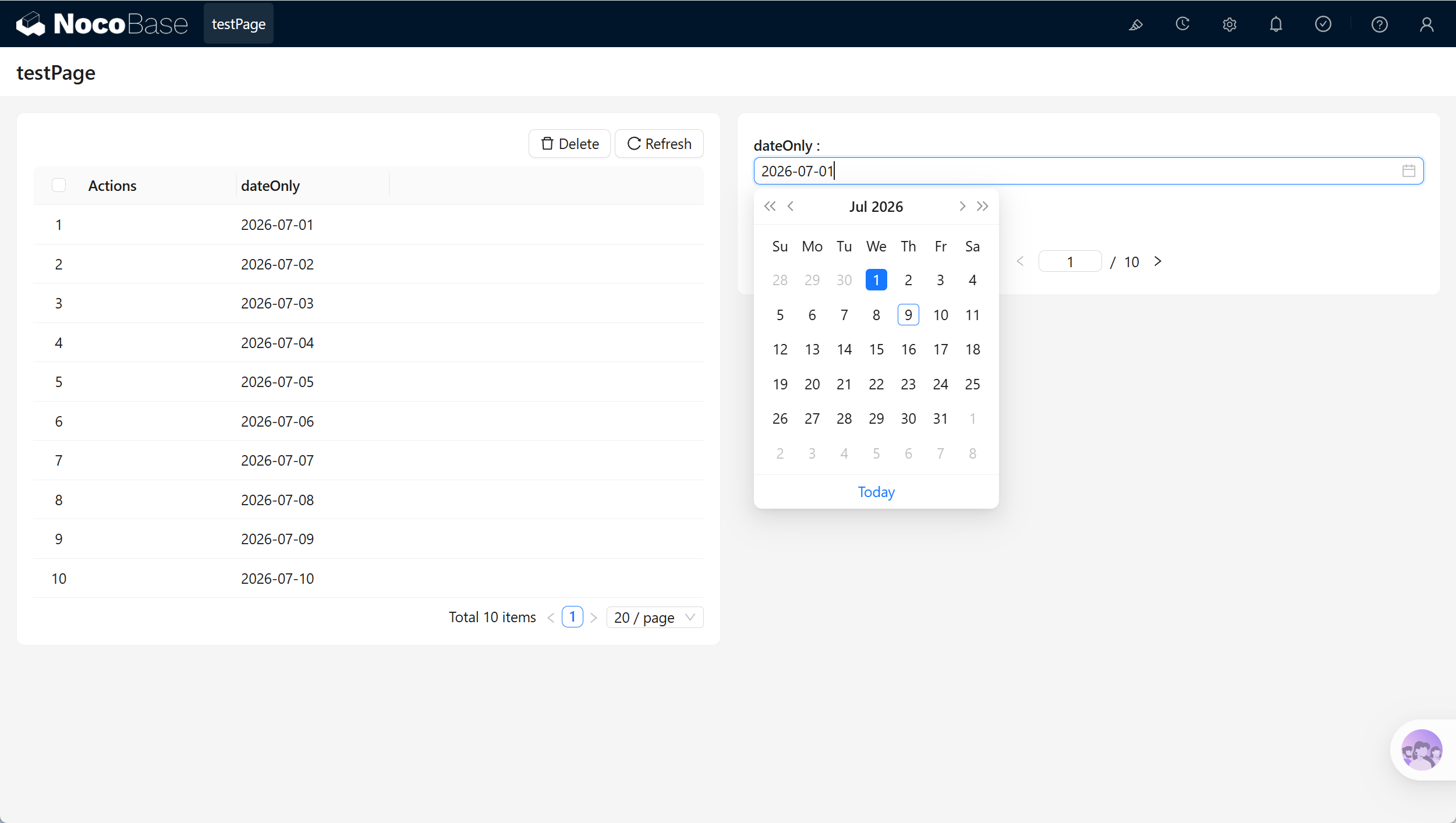
Date fields are suitable for date-only entry, display, and business conditions.
|
|
6
97
|
|
|
98
|
+
|
|
7
99
|
|
|
8
|
-
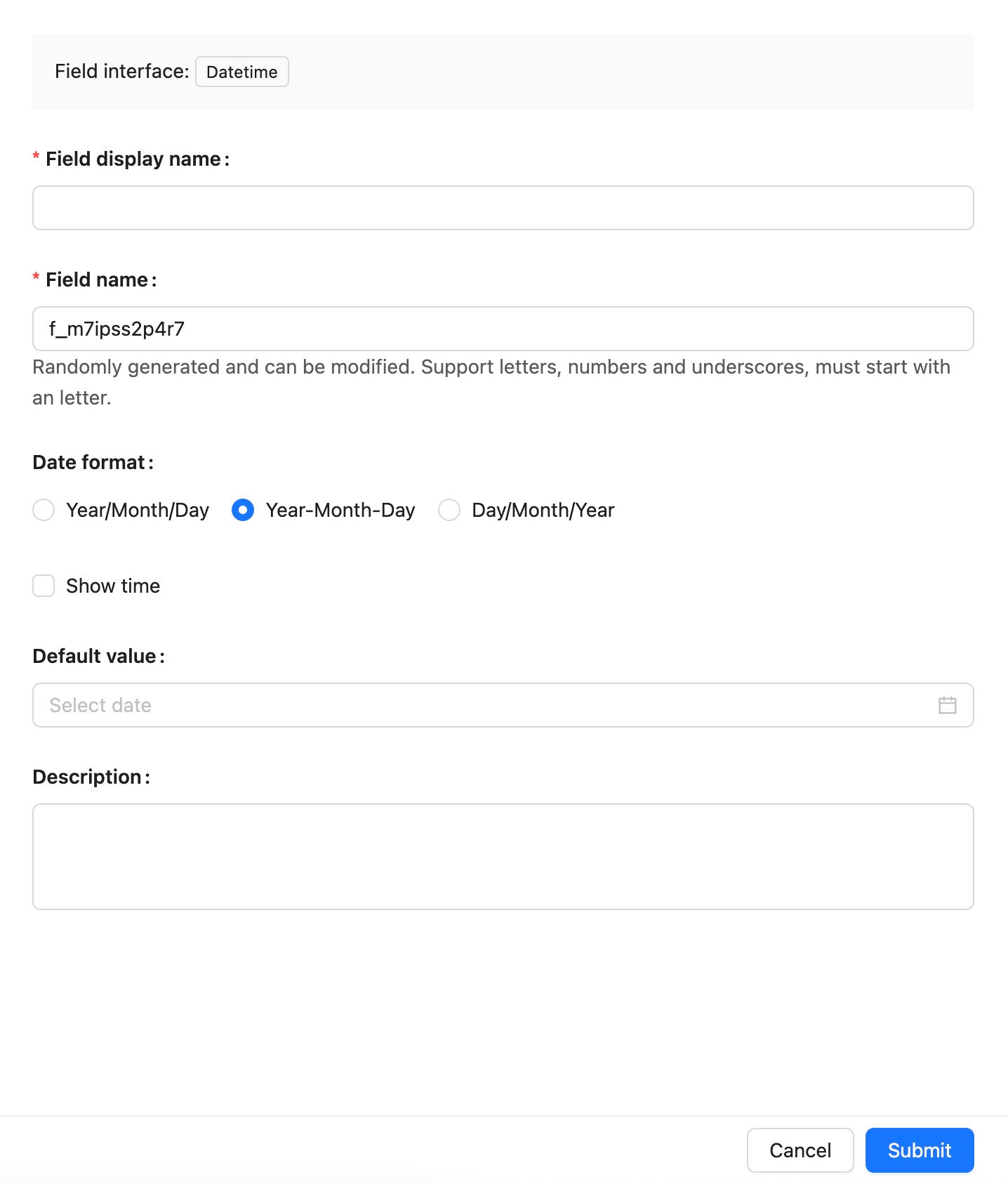
|
|
9
100
|
|
|
101
|
+
| Scenario | Use |
|
|
102
|
+
| --- | --- |
|
|
103
|
+
| Form block | Select a date. |
|
|
104
|
+
| Table block | Display, sort, and filter dates. |
|
|
105
|
+
| Details block | Display a date value. |
|
|
106
|
+
| Workflows and permissions | Use the date in business conditions. |
|
|
10
107
|
|
|
11
|
-
##
|
|
108
|
+
## Related links
|
|
12
109
|
|
|
13
|
-
|
|
110
|
+
- [Fields](../index.md) - Learn about field categories and mapping.
|
|
111
|
+
- [General collection](../../../data-source-main/general-collection.md) - Create and manage fields in a collection.
|
|
@@ -1,13 +1,111 @@
|
|
|
1
|
-
|
|
1
|
+
---
|
|
2
|
+
title: "DateTime (without time zone)"
|
|
3
|
+
description: "The DateTime (without time zone) field stores a local date and time without time-zone conversion."
|
|
4
|
+
keywords: "DateTime (without time zone),datetimeNoTz,field,Field interface,NocoBase"
|
|
5
|
+
---
|
|
6
|
+
|
|
7
|
+
# DateTime (without time zone)
|
|
2
8
|
|
|
3
9
|
## Introduction
|
|
4
10
|
|
|
5
|
-
|
|
11
|
+
In NocoBase, **DateTime (without time zone)** stores a local date and time without time-zone conversion.
|
|
12
|
+
|
|
13
|
+
It is suitable for local schedules, business hours, and values that must remain unchanged as entered. Use DateTime when the same instant must be interpreted consistently across time zones.
|
|
14
|
+
|
|
15
|
+
## Use cases
|
|
16
|
+
|
|
17
|
+
DateTime (without time zone) fields are suitable for these business scenarios:
|
|
18
|
+
|
|
19
|
+
- Local schedules and business hours
|
|
20
|
+
- Local appointment times
|
|
21
|
+
- Store opening and closing times with a date
|
|
22
|
+
- Time values imported without time-zone data
|
|
23
|
+
|
|
24
|
+
## Create and configure
|
|
25
|
+
|
|
26
|
+
On the collection's **Configure fields** page, click **Add field** and select **DateTime (without time zone)** to create this field.
|
|
27
|
+
|
|
28
|
+
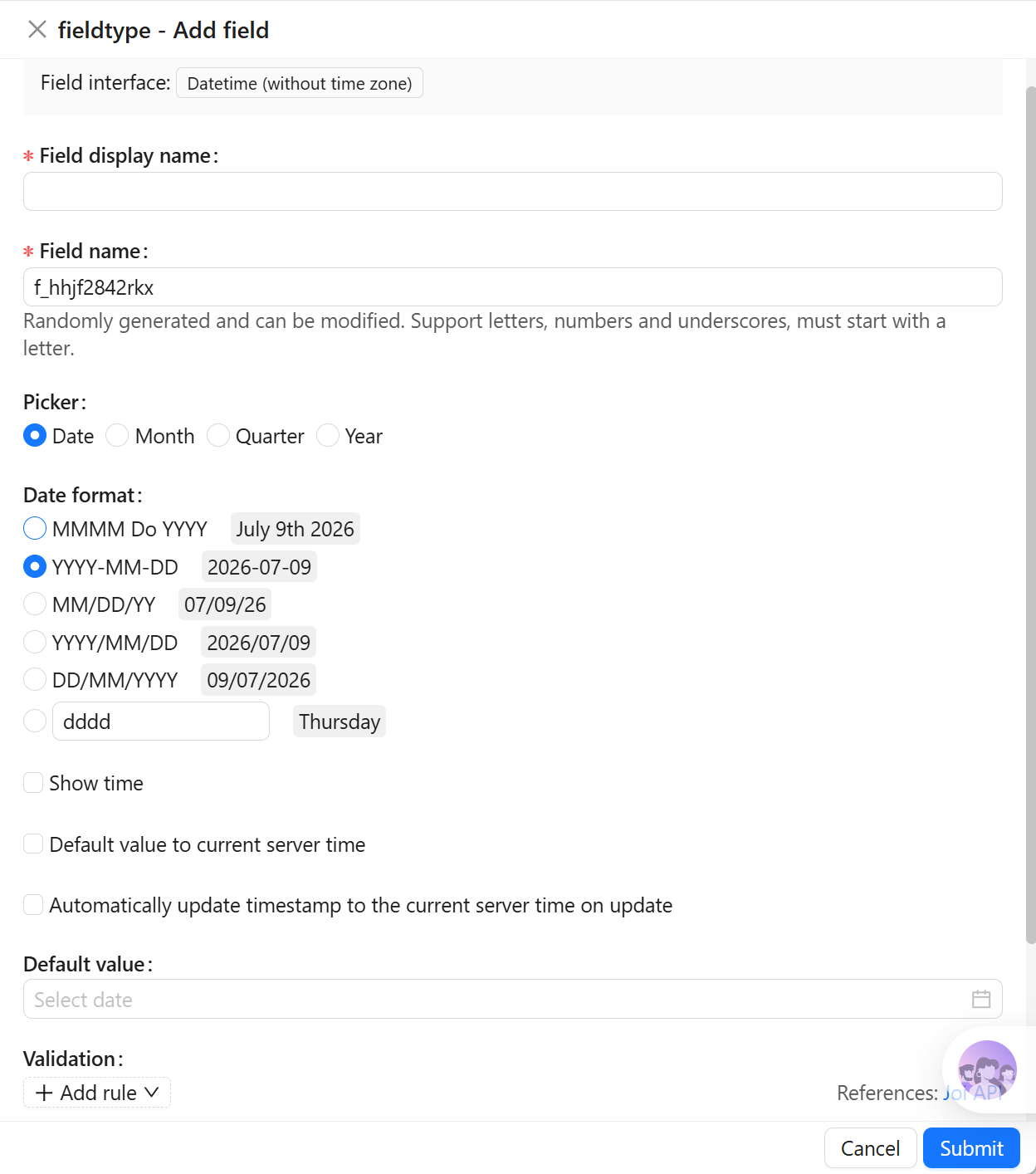
|
|
29
|
+
|
|
30
|
+
| Setting | Description |
|
|
31
|
+
| --- | --- |
|
|
32
|
+
| Field interface | The field interface. DateTime (without time zone) uses `datetimeNoTz`, which determines how the field is entered and displayed in pages. |
|
|
33
|
+
| Field display name | The name displayed for the field, such as `Local schedule`, `Business time`, or `Appointment time`. Use a name that business users can recognize. |
|
|
34
|
+
| Field name | The field identifier used internally by APIs, relation fields, permissions, and workflows. It usually cannot be changed after creation. It supports only letters, numbers, and underscores, and must begin with a letter. |
|
|
35
|
+
| Field type | The data-layer type. DateTime (without time zone) uses `datetimeNoTz` by default. |
|
|
36
|
+
| Default value | The default value. When a new record has no value, NocoBase can fill this value automatically. |
|
|
37
|
+
| Validation rules | Validation rules. Supports date-range and required validation. |
|
|
38
|
+
| Description | A field description. Record the field meaning, entry requirements, data source, or maintainer. |
|
|
39
|
+
|
|
40
|
+
:::warning Note
|
|
41
|
+
|
|
42
|
+
Field names are referenced by page blocks, permissions, workflows, and APIs after creation. Confirm the name before creating the field to avoid later configuration changes.
|
|
43
|
+
|
|
44
|
+
:::
|
|
45
|
+
|
|
46
|
+
## Field behavior
|
|
47
|
+
|
|
48
|
+
The default behavior of a DateTime (without time zone) field is as follows:
|
|
49
|
+
|
|
50
|
+
| Behavior | Description |
|
|
51
|
+
| --- | --- |
|
|
52
|
+
| Default Field interface | `datetimeNoTz`. |
|
|
53
|
+
| Default Field type | `datetimeNoTz`. |
|
|
54
|
+
| Available Field types | `datetimeNoTz`. |
|
|
55
|
+
| Page component | Uses a date-time picker in edit mode. |
|
|
56
|
+
| Filtering | Supports date-time filters such as before, after, range, is empty, and is not empty. |
|
|
57
|
+
| Sorting | Supports chronological sorting in Table blocks. |
|
|
58
|
+
| Validation | Supports date-range and required validation. |
|
|
59
|
+
|
|
60
|
+
## Edit configuration
|
|
61
|
+
|
|
62
|
+
After creation, click **Edit** beside the field to edit its configuration. Edit fields to adjust how they are displayed and used in NocoBase, such as the display name, description, default value, validation rules, or field-specific settings.
|
|
63
|
+
|
|
64
|
+
When a field comes from a synchronized main-database table, editing usually maps the database field to a NocoBase Field type and Field interface.
|
|
65
|
+
|
|
66
|
+
| Setting | Can be edited | Description |
|
|
67
|
+
| --- | --- | --- |
|
|
68
|
+
| Field display name | Yes | Changes the name displayed in the interface without changing the field identifier. |
|
|
69
|
+
| Field name | No | The field identifier normally cannot be changed in the edit form after creation. |
|
|
70
|
+
| Field interface | Conditional | Main-database fields and synchronized fields can be adjusted during field mapping. Changes affect page input, display, and validation. |
|
|
71
|
+
| Field type | Conditional | Main-database fields and synchronized fields can be adjusted during field mapping. Confirm that existing values can be used by the new type first. |
|
|
72
|
+
| Default value | Yes | Adjusts the default value for new records. |
|
|
73
|
+
| Validation rules | Yes | Adjusts field validation rules. |
|
|
74
|
+
| Description | Yes | Adds the field meaning, entry requirements, data source, or maintainer. |
|
|
75
|
+
|
|
76
|
+
:::warning Note
|
|
77
|
+
|
|
78
|
+
Changing a Field type or Field interface is more than changing a display name. It affects field storage, input components, validation rules, filters, and workflow-variable usage. When the field contains substantial existing data, confirm that its data format is compatible first.
|
|
79
|
+
|
|
80
|
+
:::
|
|
81
|
+
|
|
82
|
+
## Delete field
|
|
83
|
+
|
|
84
|
+
Click **Delete** beside a DateTime (without time zone) field to delete it. You can also select multiple fields and delete them in the main data source.
|
|
85
|
+
|
|
86
|
+
Deleting a DateTime (without time zone) field created in the main database usually also deletes the actual database column and its values. For a synchronized or external-data-source field, the impact depends on the corresponding data source and field origin.
|
|
87
|
+
|
|
88
|
+
:::danger Warning
|
|
89
|
+
|
|
90
|
+
Deleting a field can affect page blocks, forms, filters, permissions, workflows, APIs, imports and exports, and existing data. Confirm that the field is no longer referenced by business configuration before deleting it.
|
|
91
|
+
|
|
92
|
+
:::
|
|
93
|
+
|
|
94
|
+
## Use in pages
|
|
95
|
+
|
|
96
|
+
DateTime (without time zone) fields are suitable for local schedules and business time values.
|
|
6
97
|
|
|
98
|
+
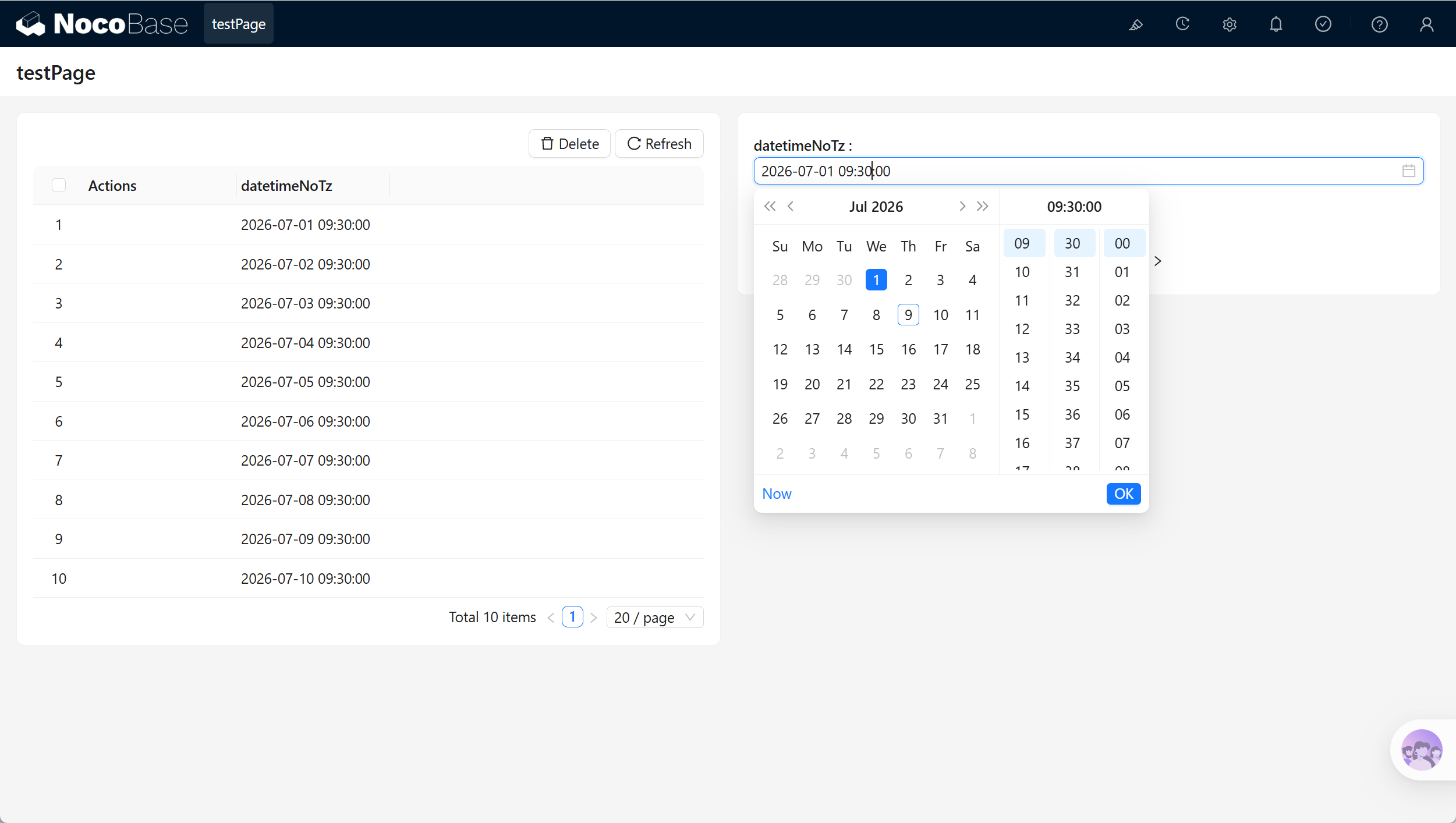
|
|
7
99
|
|
|
8
|
-

|
|
9
100
|
|
|
101
|
+
| Scenario | Use |
|
|
102
|
+
| --- | --- |
|
|
103
|
+
| Form block | Select a local date and time. |
|
|
104
|
+
| Table block | Display, sort, and filter local date-time values. |
|
|
105
|
+
| Details block | Display a local time value. |
|
|
106
|
+
| Workflows and permissions | Use the value in time-based conditions. |
|
|
10
107
|
|
|
11
|
-
##
|
|
108
|
+
## Related links
|
|
12
109
|
|
|
13
|
-
|
|
110
|
+
- [Fields](../index.md) - Learn about field categories and mapping.
|
|
111
|
+
- [General collection](../../../data-source-main/general-collection.md) - Create and manage fields in a collection.
|
package/dist/ai/docs/nocobase/data-sources/data-modeling/collection-fields/datetime/datetime.md
CHANGED
|
@@ -1,13 +1,111 @@
|
|
|
1
|
-
|
|
1
|
+
---
|
|
2
|
+
title: "DateTime"
|
|
3
|
+
description: "The DateTime field stores date and time values with time-zone information."
|
|
4
|
+
keywords: "DateTime,datetime,field,Field interface,NocoBase"
|
|
5
|
+
---
|
|
6
|
+
|
|
7
|
+
# DateTime
|
|
2
8
|
|
|
3
9
|
## Introduction
|
|
4
10
|
|
|
5
|
-
|
|
11
|
+
In NocoBase, the **DateTime** field stores a date and time with time-zone information.
|
|
12
|
+
|
|
13
|
+
It is suitable for event times, submission times, appointment times, and other time points that need consistent time-zone handling. Use DateTime (without time zone) when the value must remain a local time without conversion.
|
|
14
|
+
|
|
15
|
+
## Use cases
|
|
16
|
+
|
|
17
|
+
DateTime fields are suitable for these business scenarios:
|
|
18
|
+
|
|
19
|
+
- Meeting and appointment times
|
|
20
|
+
- Order submission and payment times
|
|
21
|
+
- System event and operation times
|
|
22
|
+
- Time points shared across time zones
|
|
23
|
+
|
|
24
|
+
## Create and configure
|
|
25
|
+
|
|
26
|
+
On the collection's **Configure fields** page, click **Add field** and select **DateTime** to create this field.
|
|
27
|
+
|
|
28
|
+

|
|
29
|
+
|
|
30
|
+
| Setting | Description |
|
|
31
|
+
| --- | --- |
|
|
32
|
+
| Field interface | The field interface. DateTime uses `datetime`, which determines how the field is entered and displayed in pages. |
|
|
33
|
+
| Field display name | The name displayed for the field, such as `Meeting time`, `Submission time`, or `Appointment time`. Use a name that business users can recognize. |
|
|
34
|
+
| Field name | The field identifier used internally by APIs, relation fields, permissions, and workflows. It usually cannot be changed after creation. It supports only letters, numbers, and underscores, and must begin with a letter. |
|
|
35
|
+
| Field type | The data-layer type. DateTime uses `datetimeTz` by default. |
|
|
36
|
+
| Default value | The default value. When a new record has no value, NocoBase can fill this value automatically. |
|
|
37
|
+
| Validation rules | Validation rules. Supports date-range and required validation. |
|
|
38
|
+
| Description | A field description. Record the field meaning, entry requirements, data source, or maintainer. |
|
|
39
|
+
|
|
40
|
+
:::warning Note
|
|
41
|
+
|
|
42
|
+
Field names are referenced by page blocks, permissions, workflows, and APIs after creation. Confirm the name before creating the field to avoid later configuration changes.
|
|
43
|
+
|
|
44
|
+
:::
|
|
45
|
+
|
|
46
|
+
## Field behavior
|
|
47
|
+
|
|
48
|
+
The default behavior of a DateTime field is as follows:
|
|
49
|
+
|
|
50
|
+
| Behavior | Description |
|
|
51
|
+
| --- | --- |
|
|
52
|
+
| Default Field interface | `datetime`. |
|
|
53
|
+
| Default Field type | `datetimeTz`. |
|
|
54
|
+
| Available Field types | `datetimeTz`, `date`. |
|
|
55
|
+
| Page component | Uses a date-time picker in edit mode. |
|
|
56
|
+
| Filtering | Supports date-time filters such as before, after, range, is empty, and is not empty. |
|
|
57
|
+
| Sorting | Supports chronological sorting in Table blocks. |
|
|
58
|
+
| Validation | Supports date-range and required validation. |
|
|
59
|
+
|
|
60
|
+
## Edit configuration
|
|
61
|
+
|
|
62
|
+
After creation, click **Edit** beside the field to edit its configuration. Edit fields to adjust how they are displayed and used in NocoBase, such as the display name, description, default value, validation rules, or field-specific settings.
|
|
63
|
+
|
|
64
|
+
When a field comes from a synchronized main-database table, editing usually maps the database field to a NocoBase Field type and Field interface.
|
|
65
|
+
|
|
66
|
+
| Setting | Can be edited | Description |
|
|
67
|
+
| --- | --- | --- |
|
|
68
|
+
| Field display name | Yes | Changes the name displayed in the interface without changing the field identifier. |
|
|
69
|
+
| Field name | No | The field identifier normally cannot be changed in the edit form after creation. |
|
|
70
|
+
| Field interface | Conditional | Main-database fields and synchronized fields can be adjusted during field mapping. Changes affect page input, display, and validation. |
|
|
71
|
+
| Field type | Conditional | Main-database fields and synchronized fields can be adjusted during field mapping. Confirm that existing values can be used by the new type first. |
|
|
72
|
+
| Default value | Yes | Adjusts the default value for new records. |
|
|
73
|
+
| Validation rules | Yes | Adjusts field validation rules. |
|
|
74
|
+
| Description | Yes | Adds the field meaning, entry requirements, data source, or maintainer. |
|
|
75
|
+
|
|
76
|
+
:::warning Note
|
|
77
|
+
|
|
78
|
+
Changing a Field type or Field interface is more than changing a display name. It affects field storage, input components, validation rules, filters, and workflow-variable usage. When the field contains substantial existing data, confirm that its data format is compatible first.
|
|
79
|
+
|
|
80
|
+
:::
|
|
81
|
+
|
|
82
|
+
## Delete field
|
|
83
|
+
|
|
84
|
+
Click **Delete** beside a DateTime field to delete it. You can also select multiple fields and delete them in the main data source.
|
|
85
|
+
|
|
86
|
+
Deleting a DateTime field created in the main database usually also deletes the actual database column and its values. For a synchronized or external-data-source field, the impact depends on the corresponding data source and field origin.
|
|
87
|
+
|
|
88
|
+
:::danger Warning
|
|
89
|
+
|
|
90
|
+
Deleting a field can affect page blocks, forms, filters, permissions, workflows, APIs, imports and exports, and existing data. Confirm that the field is no longer referenced by business configuration before deleting it.
|
|
91
|
+
|
|
92
|
+
:::
|
|
93
|
+
|
|
94
|
+
## Use in pages
|
|
95
|
+
|
|
96
|
+
DateTime fields are suitable for event records, schedules, and time-based business conditions.
|
|
6
97
|
|
|
98
|
+
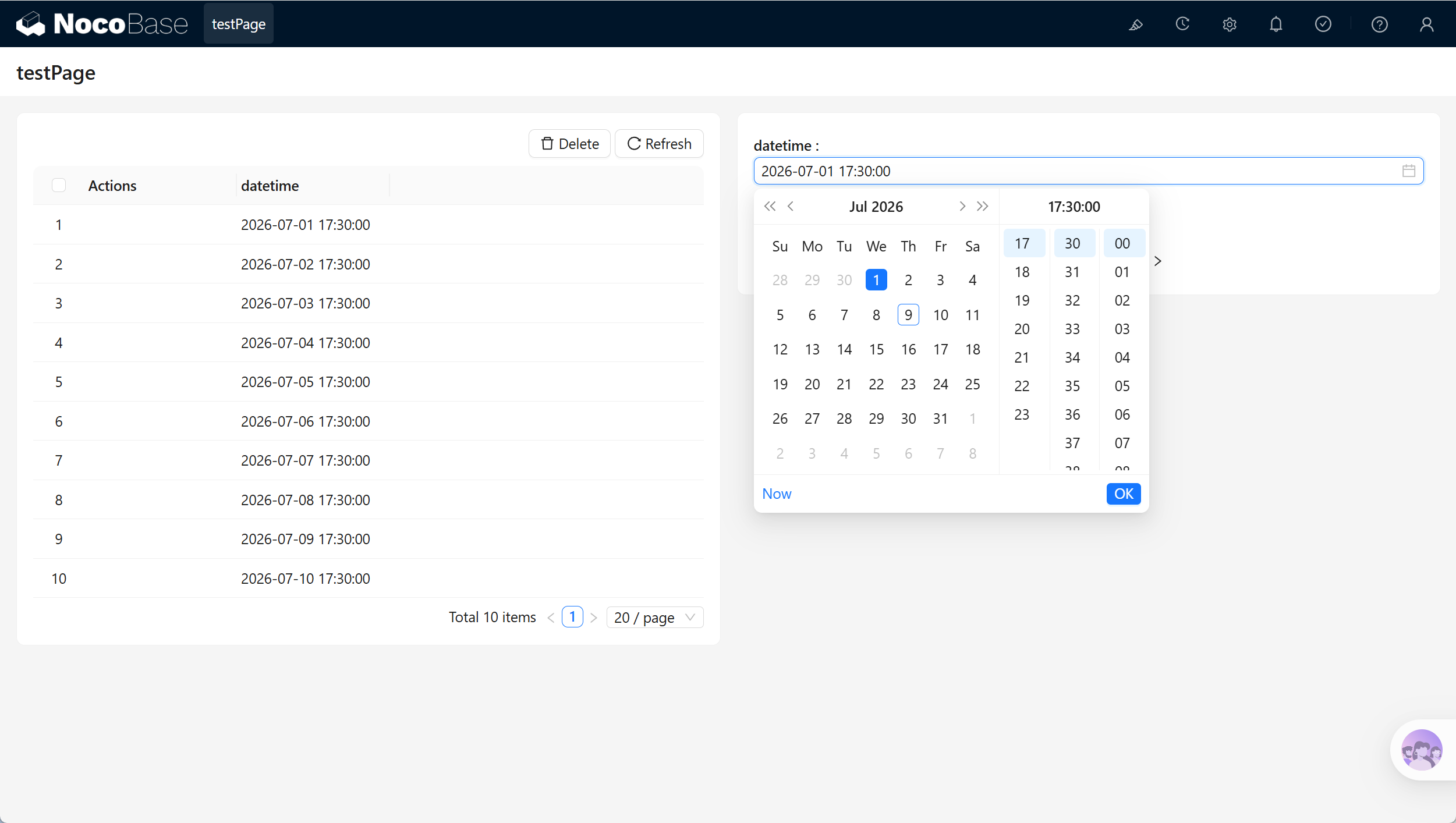
|
|
7
99
|
|
|
8
|
-

|
|
9
100
|
|
|
101
|
+
| Scenario | Use |
|
|
102
|
+
| --- | --- |
|
|
103
|
+
| Form block | Select a date and time. |
|
|
104
|
+
| Table block | Display, sort, and filter date-time values. |
|
|
105
|
+
| Details block | Display the time of one record. |
|
|
106
|
+
| Workflows and permissions | Use the value in time-based conditions. |
|
|
10
107
|
|
|
11
|
-
##
|
|
108
|
+
## Related links
|
|
12
109
|
|
|
13
|
-
|
|
110
|
+
- [Fields](../index.md) - Learn about field categories and mapping.
|
|
111
|
+
- [General collection](../../../data-source-main/general-collection.md) - Create and manage fields in a collection.
|
package/dist/ai/docs/nocobase/data-sources/data-modeling/collection-fields/datetime/index.md
CHANGED
|
@@ -1,72 +1,78 @@
|
|
|
1
|
-
|
|
1
|
+
---
|
|
2
|
+
title: "Overview"
|
|
3
|
+
description: "Date and time field types: with and without time zone, date, time, and Unix timestamp, including NocoBase, MySQL, and PostgreSQL type mappings."
|
|
4
|
+
keywords: "date and time,DateTime,time field,with time zone,without time zone,Unix timestamp,NocoBase"
|
|
5
|
+
---
|
|
2
6
|
|
|
3
|
-
|
|
7
|
+
# Overview
|
|
4
8
|
|
|
5
|
-
|
|
6
|
-
- **DateTime (without Time Zone):** This type stores date and time data without incorporating any time zone information.
|
|
7
|
-
- **Date (without Time):** This format exclusively stores date information, omitting any time component.
|
|
8
|
-
- **Time:** Stores only time information, excluding the date.
|
|
9
|
-
- **Unix Timestamp:** This type represents the number of seconds that have elapsed since January 1, 1970, and is stored as a Unix timestamp.
|
|
9
|
+
## Date and time field types
|
|
10
10
|
|
|
11
|
-
|
|
11
|
+
Date and time field types include:
|
|
12
12
|
|
|
13
|
-
|
|
14
|
-
|
|
15
|
-
|
|
16
|
-
|
|
17
|
-
|
|
18
|
-
| Time | 15:30:00 | Captures only the time, excluding any date details |
|
|
19
|
-
| Unix Timestamp | 1724437800 | Represents seconds since 1970-01-01 00:00:00 UTC |
|
|
13
|
+
- **DateTime (with time zone)** - Date-time values are normalized to Coordinated Universal Time (UTC) and converted between time zones when needed
|
|
14
|
+
- **DateTime (without time zone)** - Stores a date and time without time-zone information
|
|
15
|
+
- **Date (without time)** - Stores only the date, without a time component
|
|
16
|
+
- **Time** - Stores only the time, without a date component
|
|
17
|
+
- **Unix timestamp** - Stores a Unix timestamp, usually the number of seconds since January 1, 1970
|
|
20
18
|
|
|
21
|
-
|
|
19
|
+
Examples of date-related field types:
|
|
22
20
|
|
|
23
|
-
|
|
21
|
+
| Field type | Example value | Description |
|
|
22
|
+
| --- | --- | --- |
|
|
23
|
+
| DateTime (with time zone) | 2024-08-24T07:30:00.000Z | A date-time value normalized to UTC. |
|
|
24
|
+
| DateTime (without time zone) | 2024-08-24 15:30:00 | A date-time value without time-zone information. |
|
|
25
|
+
| Date (without time) | 2024-08-24 | Stores only date information. |
|
|
26
|
+
| Time | 15:30:00 | Stores only time information. |
|
|
27
|
+
| Unix timestamp | 1724437800 | Seconds elapsed since 00:00:00 UTC on January 1, 1970. |
|
|
24
28
|
|
|
25
|
-
|
|
26
|
-
|-------------------------------|----------------------------|----------------------------|----------------------------------------|
|
|
27
|
-
| DateTime (with Time Zone) | Datetime with timezone | TIMESTAMP<br/> DATETIME | TIMESTAMP WITH TIME ZONE |
|
|
28
|
-
| DateTime (without Time Zone) | Datetime without timezone | DATETIME | TIMESTAMP WITHOUT TIME ZONE |
|
|
29
|
-
| Date (without Time) | Date | DATE | DATE |
|
|
30
|
-
| Time | Time | TIME | TIME WITHOUT TIME ZONE |
|
|
31
|
-
| Unix Timestamp | Unix timestamp | INTEGER<br/>BIGINT | INTEGER<br/>BIGINT |
|
|
32
|
-
| Time (with Time Zone) | - | - | TIME WITH TIME ZONE |
|
|
29
|
+
## Data-source mapping
|
|
33
30
|
|
|
34
|
-
|
|
35
|
-
- MySQL’s TIMESTAMP type covers a range between `1970-01-01 00:00:01 UTC` and `2038-01-19 03:14:07 UTC`. For dates and times outside this range, it is recommended to use DATETIME or BIGINT to store Unix timestamps.
|
|
31
|
+
The following table compares NocoBase, MySQL, and PostgreSQL types:
|
|
36
32
|
|
|
37
|
-
|
|
33
|
+
| Field type | NocoBase | MySQL | PostgreSQL |
|
|
34
|
+
| --- | --- | --- | --- |
|
|
35
|
+
| DateTime (with time zone) | Datetime with timezone | TIMESTAMP<br/>DATETIME | TIMESTAMP WITH TIME ZONE |
|
|
36
|
+
| DateTime (without time zone) | Datetime without timezone | DATETIME | TIMESTAMP WITHOUT TIME ZONE |
|
|
37
|
+
| Date (without time) | Date | DATE | DATE |
|
|
38
|
+
| Time | Time | TIME | TIME WITHOUT TIME ZONE |
|
|
39
|
+
| Unix timestamp | Unix timestamp | INTEGER<br/>BIGINT | INTEGER<br/>BIGINT |
|
|
40
|
+
| Time (with time zone) | - | - | TIME WITH TIME ZONE |
|
|
38
41
|
|
|
39
|
-
|
|
42
|
+
Notes:
|
|
40
43
|
|
|
41
|
-
|
|
44
|
+
- MySQL `TIMESTAMP` supports values from UTC `1970-01-01 00:00:01` through `2038-01-19 03:14:07`. Outside this range, use DATETIME or BIGINT to store a Unix timestamp.
|
|
42
45
|
|
|
46
|
+
## Date and time storage flow
|
|
43
47
|
|
|
44
|
-
|
|
48
|
+
### With time zone
|
|
45
49
|
|
|
50
|
+
This flow includes DateTime (without time zone) and Unix timestamp handling.
|
|
46
51
|
|
|
47
|
-
|
|
48
|
-
- To accommodate a broader range of dates, NocoBase uses the DATETIME type in MySQL for DateTime (with Time Zone) fields. The date value stored is converted based on the server's TZ environment variable, meaning that if the TZ environment variable changes, the stored DateTime value will also change.
|
|
49
|
-
- Since there is a time zone difference between UTC and local time, directly displaying the raw UTC value could lead to user confusion.
|
|
52
|
+
|
|
50
53
|
|
|
51
|
-
|
|
54
|
+
Notes:
|
|
52
55
|
|
|
56
|
+
- To support a wider range of values, the NocoBase DateTime (with time zone) field uses DATETIME in MySQL. The stored date value is converted according to the server `TZ` environment variable. If the `TZ` environment variable changes, stored date-time values can change.
|
|
57
|
+
- UTC and local time differ by time zone. Displaying a raw UTC value directly can confuse users.
|
|
53
58
|
|
|
54
|
-
|
|
59
|
+
### Without time zone
|
|
55
60
|
|
|
61
|
+
|
|
56
62
|
|
|
57
63
|
## UTC
|
|
58
64
|
|
|
59
|
-
UTC (Coordinated Universal Time) is the global time standard used to coordinate and
|
|
65
|
+
UTC (Coordinated Universal Time) is the global time standard used to coordinate and unify time around the world. It is a high-precision time standard based on atomic clocks and synchronized with the time of the Earth's rotation.
|
|
60
66
|
|
|
61
|
-
|
|
67
|
+
UTC and local time differ by time zone. Displaying a raw UTC value directly can confuse users. For example:
|
|
62
68
|
|
|
63
|
-
|
|
|
64
|
-
|
|
65
|
-
| UTC
|
|
66
|
-
| UTC+8
|
|
67
|
-
| UTC+5
|
|
68
|
-
| UTC-5
|
|
69
|
-
| UTC+0
|
|
70
|
-
| UTC-6
|
|
69
|
+
| Time zone | Date and time |
|
|
70
|
+
| --- | --- |
|
|
71
|
+
| UTC | 2024-08-24T07:30:00.000Z |
|
|
72
|
+
| China Standard Time (UTC+8) | 2024-08-24 15:30:00 |
|
|
73
|
+
| UTC+5 | 2024-08-24 12:30:00 |
|
|
74
|
+
| UTC-5 | 2024-08-24 02:30:00 |
|
|
75
|
+
| UK time (UTC+0) | 2024-08-24 07:30:00 |
|
|
76
|
+
| Central Time (UTC-6) | 2024-08-23 01:30:00 |
|
|
71
77
|
|
|
72
|
-
These
|
|
78
|
+
These values represent the same moment in time; only the time zone differs.
|