@nocobase/plugin-ai 2.3.0-alpha.1 → 3.0.0-alpha.2
This diff represents the content of publicly available package versions that have been released to one of the supported registries. The information contained in this diff is provided for informational purposes only and reflects changes between package versions as they appear in their respective public registries.
- package/dist/ai/docs/nocobase/ai-employees/block/ai-chat-box.md +133 -0
- package/dist/ai/docs/nocobase/ai-employees/knowledge-base/knowledge-base/documents.md +1 -1
- package/dist/ai/docs/nocobase/ai-employees/knowledge-base/knowledge-base/index.md +11 -7
- package/dist/ai/docs/nocobase/ai-employees/knowledge-base/knowledge-base/settings.md +12 -8
- package/dist/ai/docs/nocobase/ai-employees/knowledge-base/vector-database.md +3 -3
- package/dist/ai/docs/nocobase/ai-employees/workflow/nodes/knowledge/create-document.md +1 -1
- package/dist/ai/docs/nocobase/api/app/env.md +3 -1
- package/dist/ai/docs/nocobase/api/cli/index.md +14 -2
- package/dist/ai/docs/nocobase/api/cli/portal/config.md +44 -0
- package/dist/ai/docs/nocobase/api/cli/portal/create.md +48 -0
- package/dist/ai/docs/nocobase/api/cli/portal/deploy.md +39 -0
- package/dist/ai/docs/nocobase/api/cli/portal/destroy.md +41 -0
- package/dist/ai/docs/nocobase/api/cli/portal/dev.md +39 -0
- package/dist/ai/docs/nocobase/api/cli/portal/index.md +136 -0
- package/dist/ai/docs/nocobase/api/cli/portal/info.md +41 -0
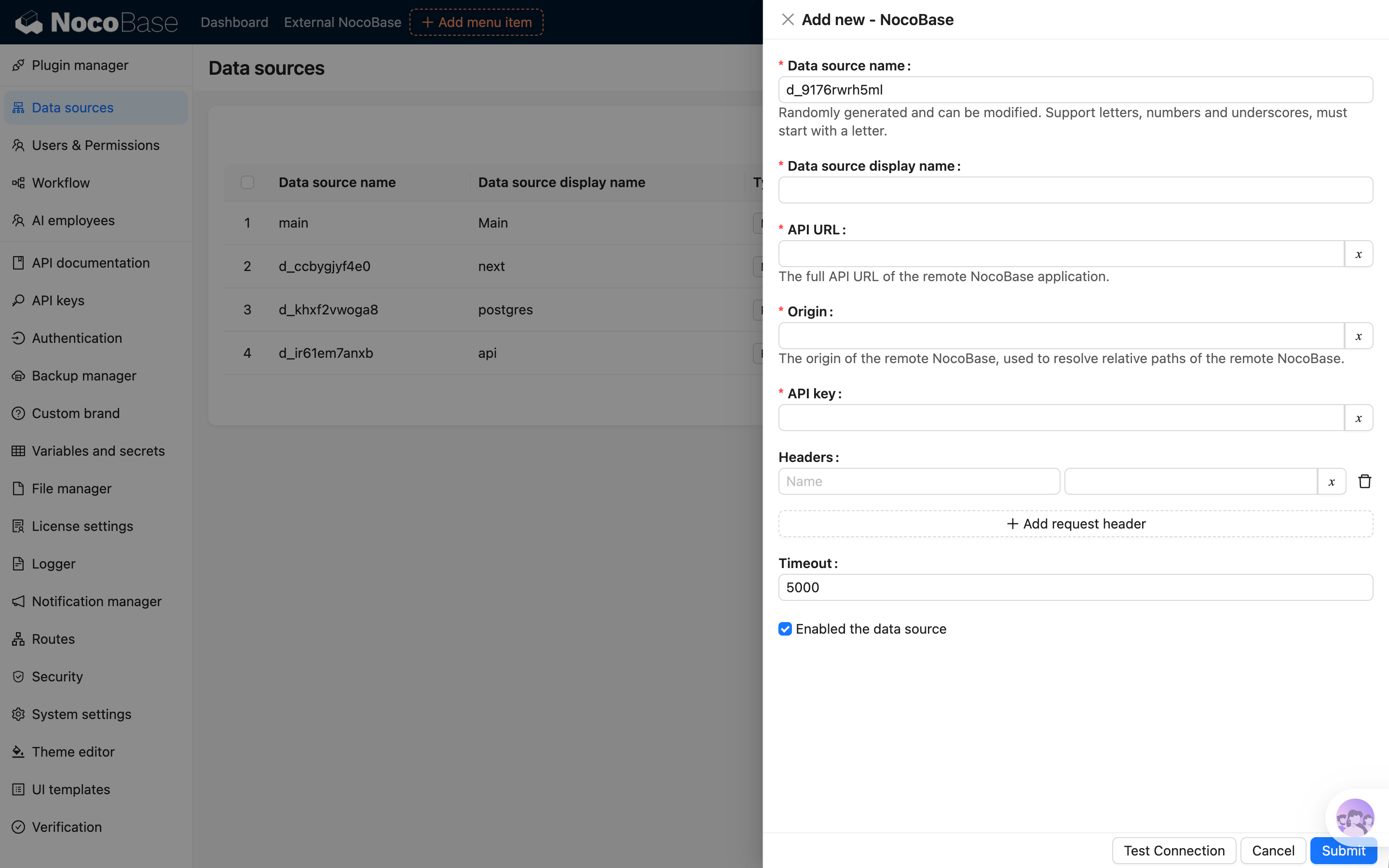
- package/dist/ai/docs/nocobase/api/cli/portal/list.md +40 -0
- package/dist/ai/docs/nocobase/api/cli/portal/pull.md +43 -0
- package/dist/ai/docs/nocobase/api/cli/portal/push.md +41 -0
- package/dist/ai/docs/nocobase/building-tips/ai-fill-js-block-form.md +1092 -0
- package/dist/ai/docs/nocobase/data-sources/calendar/calendar-collection.md +100 -3
- package/dist/ai/docs/nocobase/data-sources/collection-comment/index.md +92 -39
- package/dist/ai/docs/nocobase/data-sources/collection-sql/index.md +150 -29
- package/dist/ai/docs/nocobase/data-sources/collection-tree/index.md +93 -5
- package/dist/ai/docs/nocobase/data-sources/collection-view/index.md +226 -4
- package/dist/ai/docs/nocobase/data-sources/data-modeling/collection-fields/advanced/china-region.md +122 -5
- package/dist/ai/docs/nocobase/data-sources/data-modeling/collection-fields/advanced/collection-select.md +105 -4
- package/dist/ai/docs/nocobase/data-sources/data-modeling/collection-fields/advanced/json.md +102 -4
- package/dist/ai/docs/nocobase/data-sources/data-modeling/collection-fields/advanced/nano-id.md +104 -4
- package/dist/ai/docs/nocobase/data-sources/data-modeling/collection-fields/advanced/snowflake-id.md +108 -4
- package/dist/ai/docs/nocobase/data-sources/data-modeling/collection-fields/advanced/sort.md +3 -19
- package/dist/ai/docs/nocobase/data-sources/data-modeling/collection-fields/advanced/uuid.md +104 -4
- package/dist/ai/docs/nocobase/data-sources/data-modeling/collection-fields/associations/index.md +44 -8
- package/dist/ai/docs/nocobase/data-sources/data-modeling/collection-fields/basic/color.md +102 -4
- package/dist/ai/docs/nocobase/data-sources/data-modeling/collection-fields/basic/email.md +104 -4
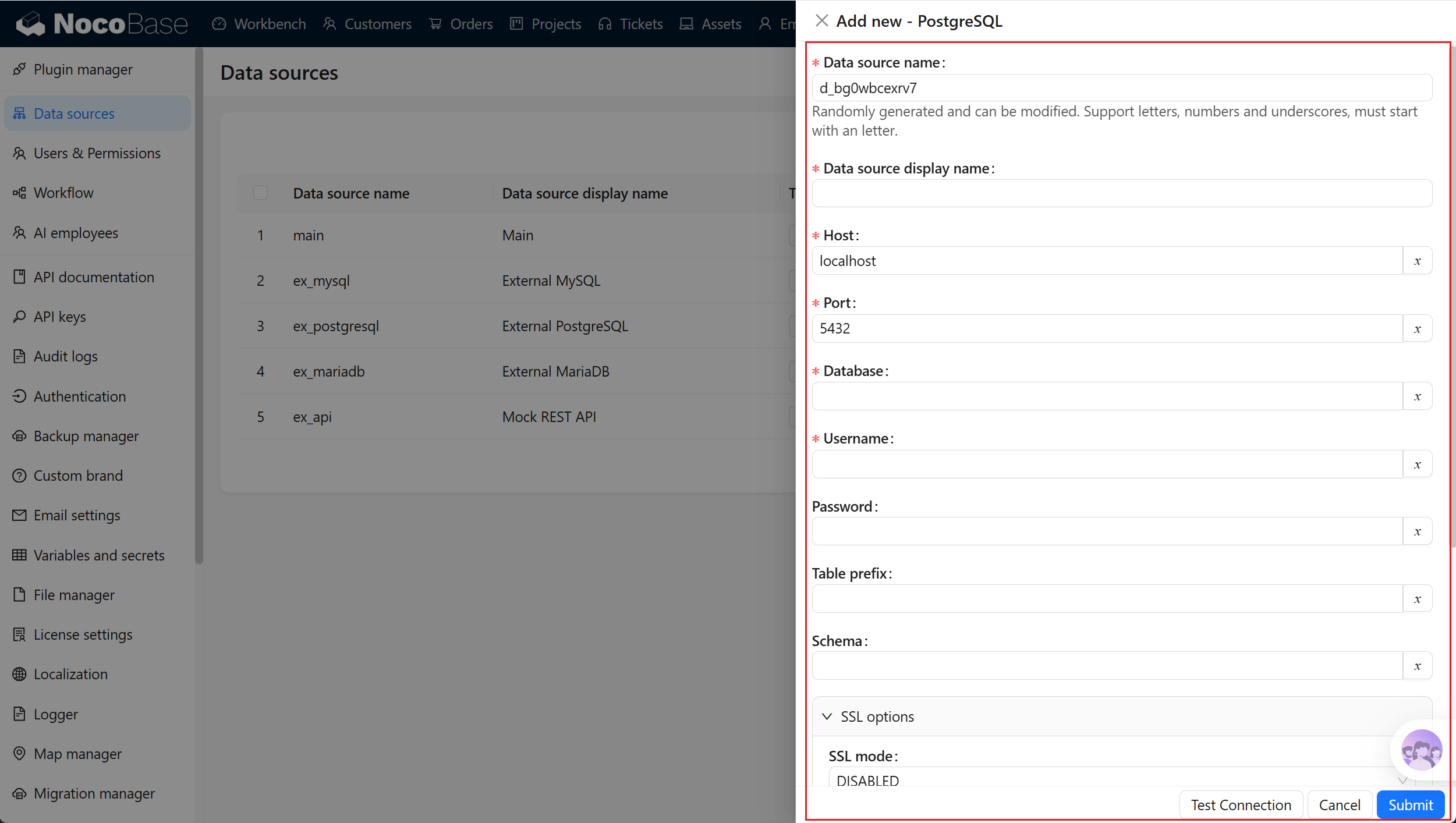
- package/dist/ai/docs/nocobase/data-sources/data-modeling/collection-fields/basic/icon.md +102 -4
- package/dist/ai/docs/nocobase/data-sources/data-modeling/collection-fields/basic/input.md +112 -8
- package/dist/ai/docs/nocobase/data-sources/data-modeling/collection-fields/basic/integer.md +103 -4
- package/dist/ai/docs/nocobase/data-sources/data-modeling/collection-fields/basic/number.md +103 -4
- package/dist/ai/docs/nocobase/data-sources/data-modeling/collection-fields/basic/password.md +102 -4
- package/dist/ai/docs/nocobase/data-sources/data-modeling/collection-fields/basic/percent.md +104 -5
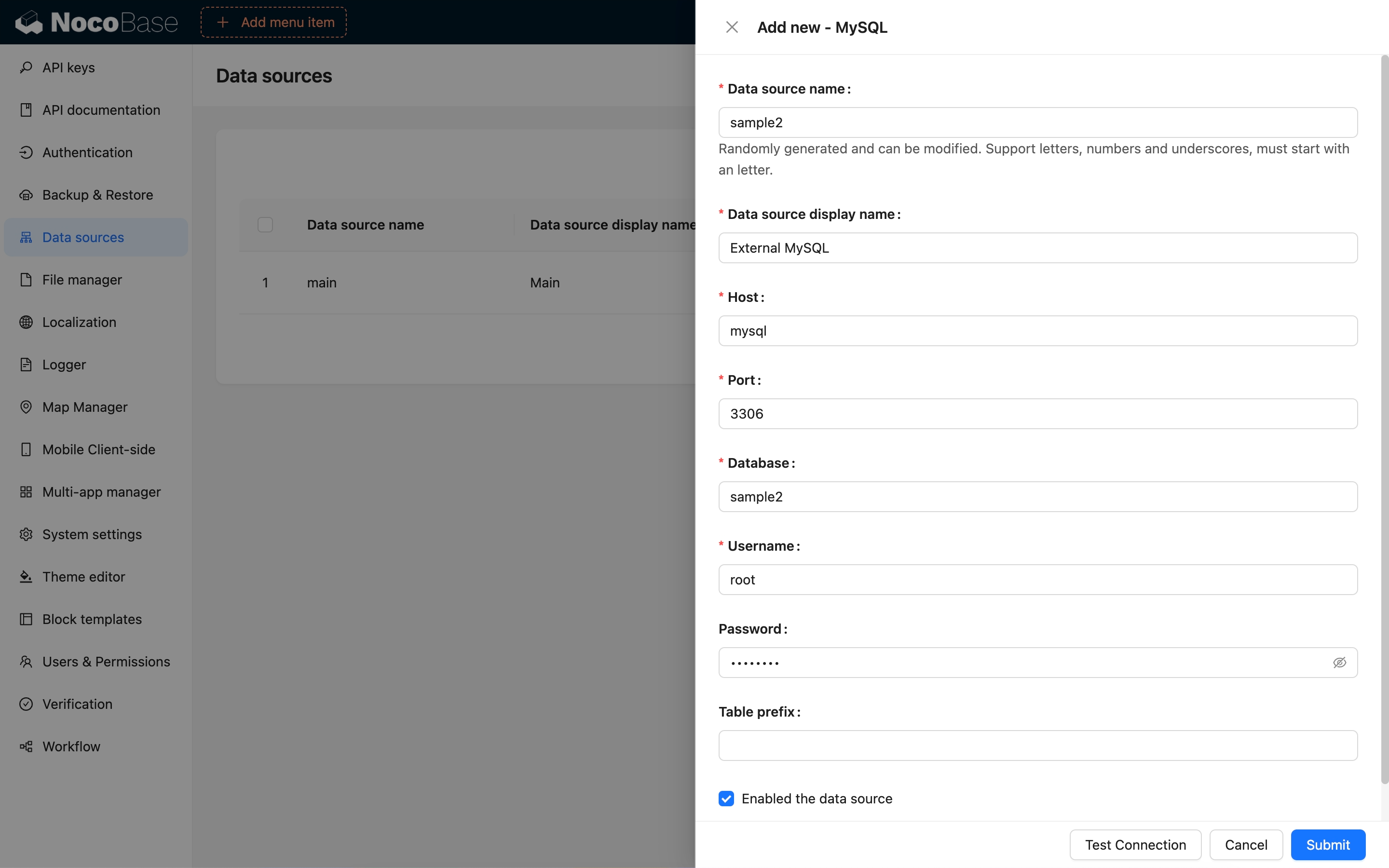
- package/dist/ai/docs/nocobase/data-sources/data-modeling/collection-fields/basic/phone.md +104 -4
- package/dist/ai/docs/nocobase/data-sources/data-modeling/collection-fields/basic/textarea.md +99 -8
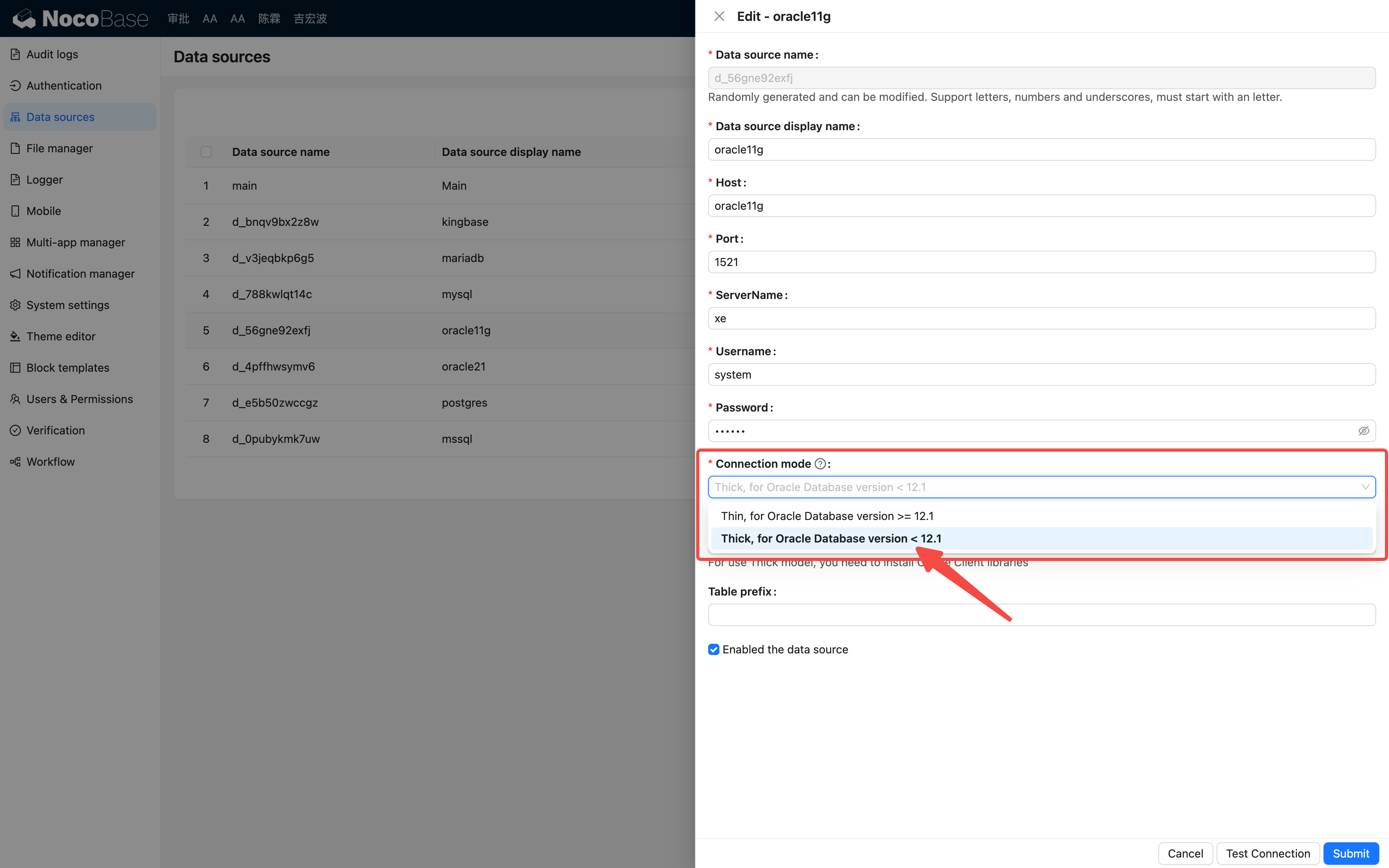
- package/dist/ai/docs/nocobase/data-sources/data-modeling/collection-fields/basic/url.md +103 -4
- package/dist/ai/docs/nocobase/data-sources/data-modeling/collection-fields/choices/checkbox-group.md +105 -3
- package/dist/ai/docs/nocobase/data-sources/data-modeling/collection-fields/choices/checkbox.md +102 -4
- package/dist/ai/docs/nocobase/data-sources/data-modeling/collection-fields/choices/china-region.md +108 -5
- package/dist/ai/docs/nocobase/data-sources/data-modeling/collection-fields/choices/multiple-select.md +103 -5
- package/dist/ai/docs/nocobase/data-sources/data-modeling/collection-fields/choices/radio-group.md +106 -4
- package/dist/ai/docs/nocobase/data-sources/data-modeling/collection-fields/choices/select.md +103 -5
- package/dist/ai/docs/nocobase/data-sources/data-modeling/collection-fields/datetime/date.md +102 -4
- package/dist/ai/docs/nocobase/data-sources/data-modeling/collection-fields/datetime/datetime-without-tz.md +103 -5
- package/dist/ai/docs/nocobase/data-sources/data-modeling/collection-fields/datetime/datetime.md +103 -5
- package/dist/ai/docs/nocobase/data-sources/data-modeling/collection-fields/datetime/index.md +53 -47
- package/dist/ai/docs/nocobase/data-sources/data-modeling/collection-fields/datetime/time.md +102 -4
- package/dist/ai/docs/nocobase/data-sources/data-modeling/collection-fields/datetime/unix-timestamp.md +103 -5
- package/dist/ai/docs/nocobase/data-sources/data-modeling/collection-fields/geometric/circle.md +102 -4
- package/dist/ai/docs/nocobase/data-sources/data-modeling/collection-fields/geometric/line.md +103 -5
- package/dist/ai/docs/nocobase/data-sources/data-modeling/collection-fields/geometric/point.md +102 -4
- package/dist/ai/docs/nocobase/data-sources/data-modeling/collection-fields/geometric/polygon.md +102 -4
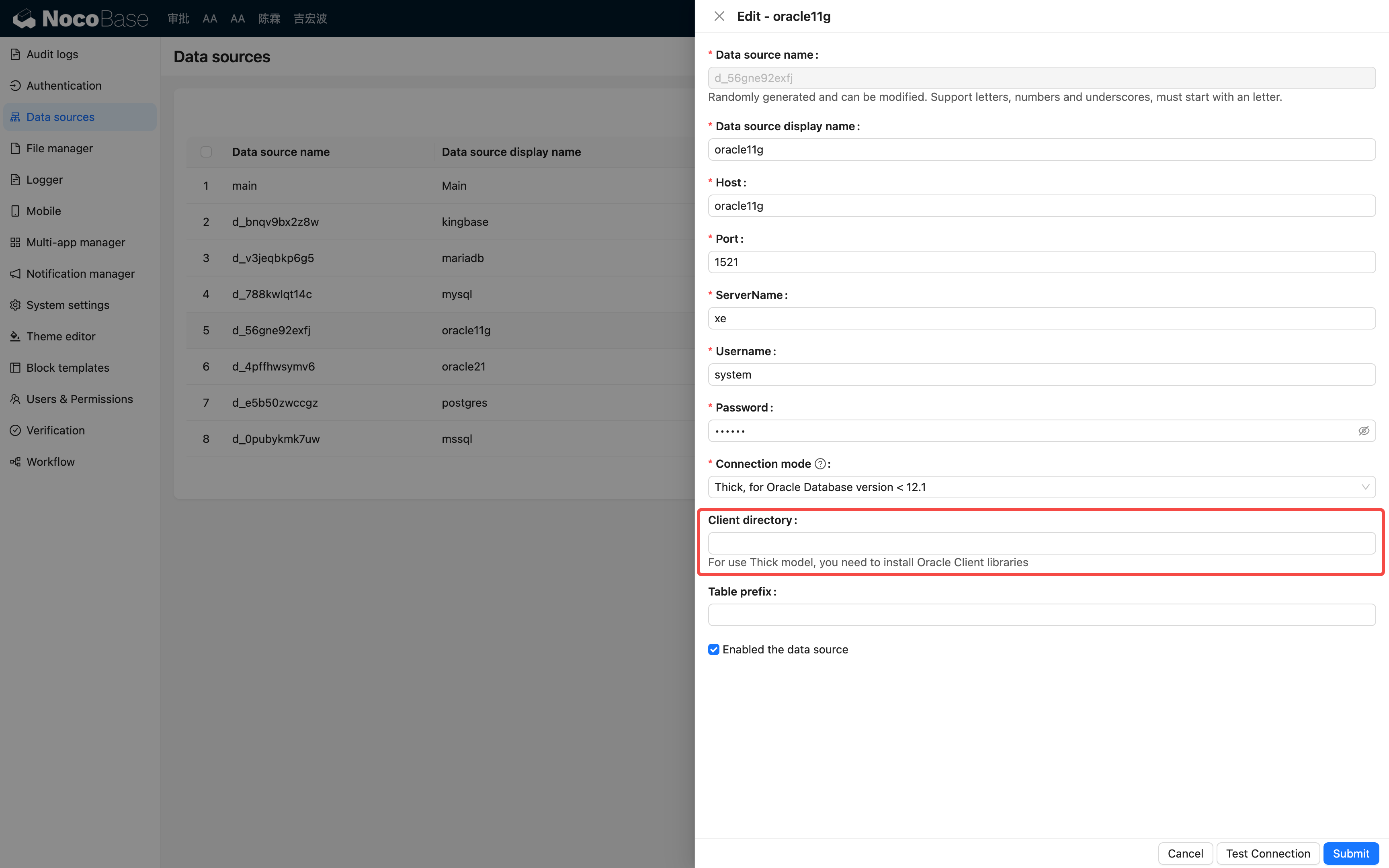
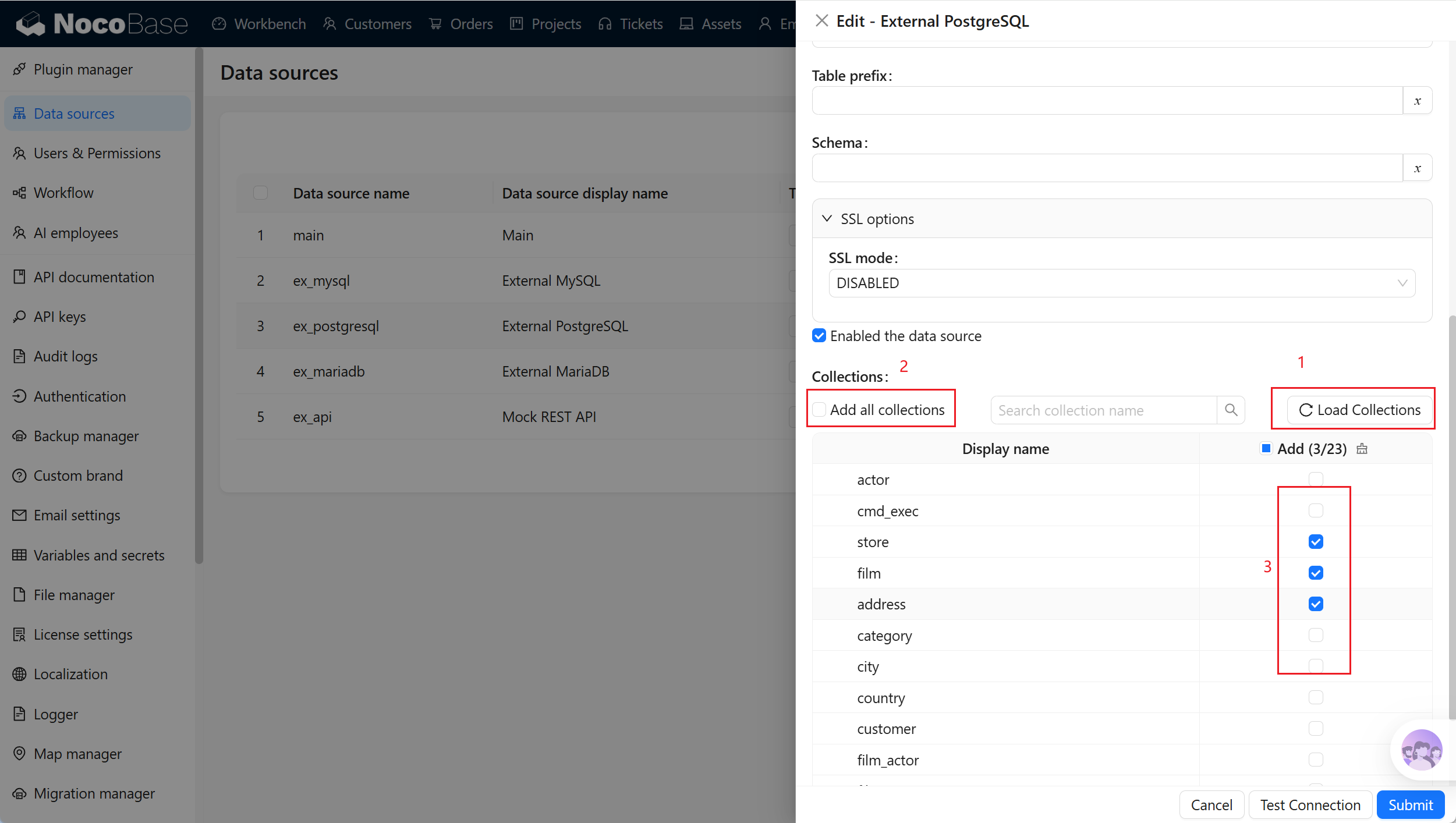
- package/dist/ai/docs/nocobase/data-sources/data-modeling/collection-fields/index.md +62 -16
- package/dist/ai/docs/nocobase/data-sources/data-modeling/collection-fields/media/markdown.md +104 -4
- package/dist/ai/docs/nocobase/data-sources/data-modeling/collection-fields/media/rich-text.md +105 -5
- package/dist/ai/docs/nocobase/data-sources/data-modeling/collection-fields/system-info/created-at.md +105 -5
- package/dist/ai/docs/nocobase/data-sources/data-modeling/collection-fields/system-info/created-by.md +103 -5
- package/dist/ai/docs/nocobase/data-sources/data-modeling/collection-fields/system-info/space.md +100 -6
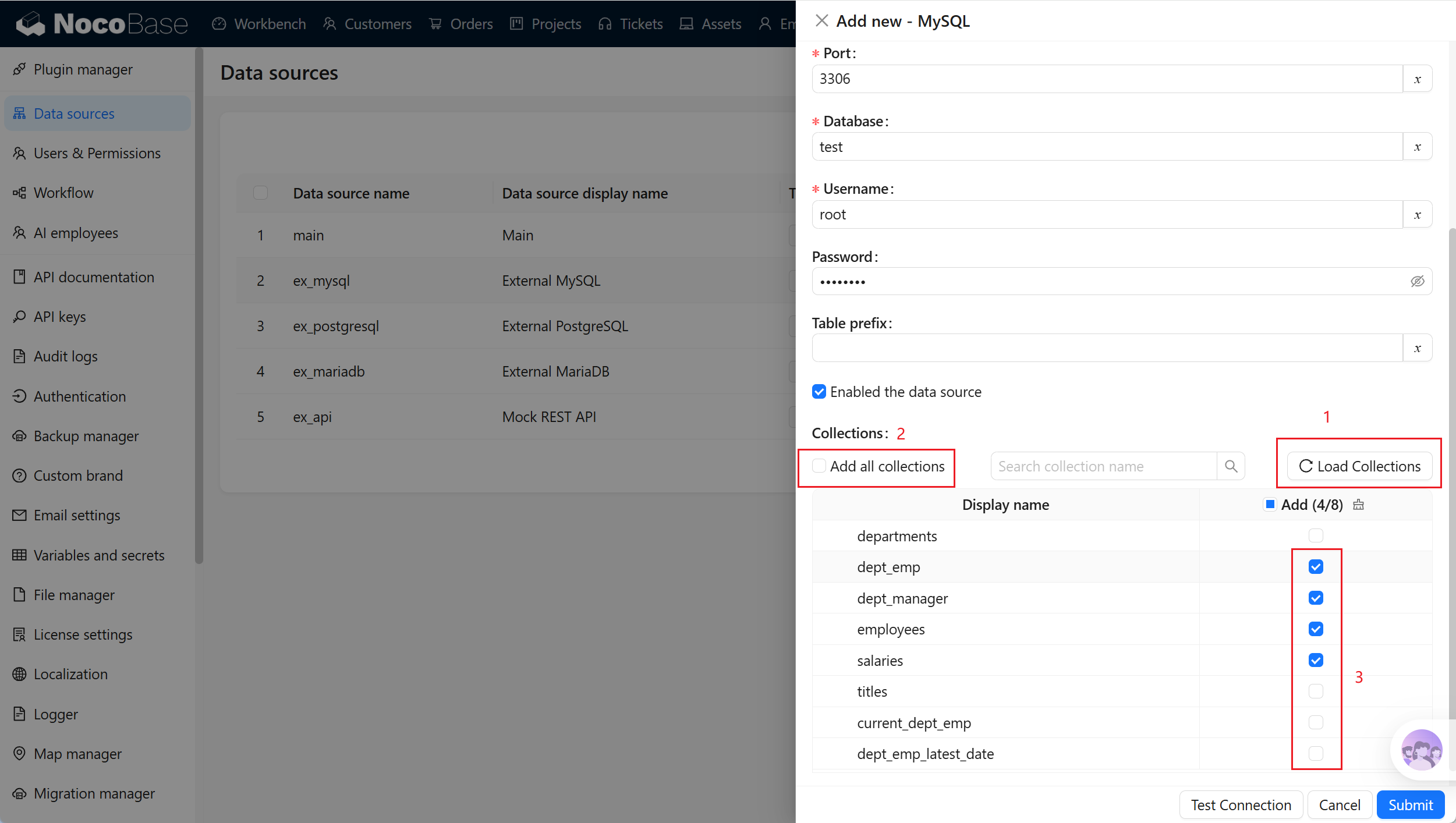
- package/dist/ai/docs/nocobase/data-sources/data-modeling/collection-fields/system-info/table-oid.md +102 -4
- package/dist/ai/docs/nocobase/data-sources/data-modeling/collection-fields/system-info/updated-at.md +104 -5
- package/dist/ai/docs/nocobase/data-sources/data-modeling/collection-fields/system-info/updated-by.md +104 -6
- package/dist/ai/docs/nocobase/data-sources/data-modeling/collection-fields/validation.md +68 -58
- package/dist/ai/docs/nocobase/data-sources/data-modeling/collection.md +32 -13
- package/dist/ai/docs/nocobase/data-sources/data-modeling/index.md +41 -33
- package/dist/ai/docs/nocobase/data-sources/data-source-external-mariadb/index.md +114 -6
- package/dist/ai/docs/nocobase/data-sources/data-source-external-mssql/index.md +117 -6
- package/dist/ai/docs/nocobase/data-sources/data-source-external-mysql/index.md +103 -6
- package/dist/ai/docs/nocobase/data-sources/data-source-external-nocobase/index.md +75 -73
- package/dist/ai/docs/nocobase/data-sources/data-source-external-oracle/index.md +129 -11
- package/dist/ai/docs/nocobase/data-sources/data-source-external-postgres/index.md +110 -6
- package/dist/ai/docs/nocobase/data-sources/data-source-kingbase/index.md +75 -49
- package/dist/ai/docs/nocobase/data-sources/data-source-main/general-collection.md +116 -15
- package/dist/ai/docs/nocobase/data-sources/data-source-main/index.md +92 -62
- package/dist/ai/docs/nocobase/data-sources/data-source-main/inheritance-collection.md +97 -10
- package/dist/ai/docs/nocobase/data-sources/data-source-manager/external-database.md +97 -58
- package/dist/ai/docs/nocobase/data-sources/data-source-manager/index.md +32 -24
- package/dist/ai/docs/nocobase/data-sources/data-source-rest-api/index.md +115 -153
- package/dist/ai/docs/nocobase/data-sources/external/clickhouse.md +124 -0
- package/dist/ai/docs/nocobase/data-sources/external/doris.md +130 -0
- package/dist/ai/docs/nocobase/data-sources/external/index.md +140 -0
- package/dist/ai/docs/nocobase/data-sources/external/kingbase.md +129 -0
- package/dist/ai/docs/nocobase/data-sources/external/mariadb.md +126 -0
- package/dist/ai/docs/nocobase/data-sources/external/mssql.md +129 -0
- package/dist/ai/docs/nocobase/data-sources/external/mysql.md +115 -0
- package/dist/ai/docs/nocobase/data-sources/external/nocobase.md +159 -0
- package/dist/ai/docs/nocobase/data-sources/external/oceanbase.md +126 -0
- package/dist/ai/docs/nocobase/data-sources/external/oracle.md +158 -0
- package/dist/ai/docs/nocobase/data-sources/external/postgresql.md +122 -0
- package/dist/ai/docs/nocobase/data-sources/external/rest-api.md +245 -0
- package/dist/ai/docs/nocobase/data-sources/field-attachment-url/index.md +100 -12
- package/dist/ai/docs/nocobase/data-sources/field-encryption/index.md +48 -47
- package/dist/ai/docs/nocobase/data-sources/field-formula/index.md +99 -5
- package/dist/ai/docs/nocobase/data-sources/field-markdown-vditor/index.md +105 -5
- package/dist/ai/docs/nocobase/data-sources/field-sequence/index.md +102 -5
- package/dist/ai/docs/nocobase/data-sources/field-signature/index.md +18 -16
- package/dist/ai/docs/nocobase/data-sources/field-sort/index.md +76 -73
- package/dist/ai/docs/nocobase/data-sources/file-manager/field-attachment.md +101 -7
- package/dist/ai/docs/nocobase/data-sources/file-manager/file-collection.md +101 -14
- package/dist/ai/docs/nocobase/data-sources/index.md +49 -33
- package/dist/ai/docs/nocobase/data-sources/main/index.md +130 -0
- package/dist/ai/docs/nocobase/data-sources/main/kingbase.md +147 -0
- package/dist/ai/docs/nocobase/data-sources/main/mariadb.md +59 -0
- package/dist/ai/docs/nocobase/data-sources/main/mysql.md +59 -0
- package/dist/ai/docs/nocobase/data-sources/main/oceanbase.md +62 -0
- package/dist/ai/docs/nocobase/data-sources/main/postgresql.md +61 -0
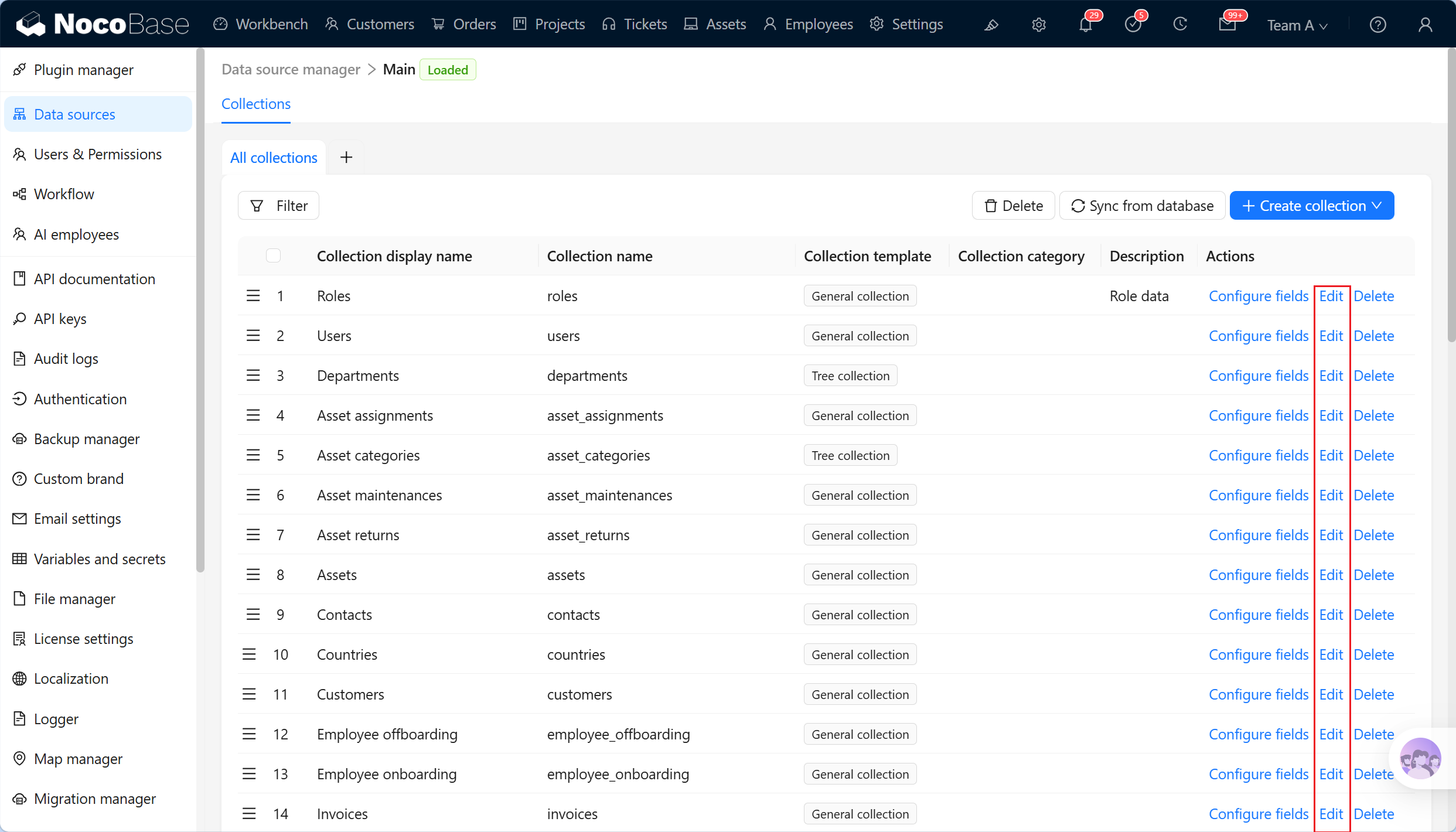
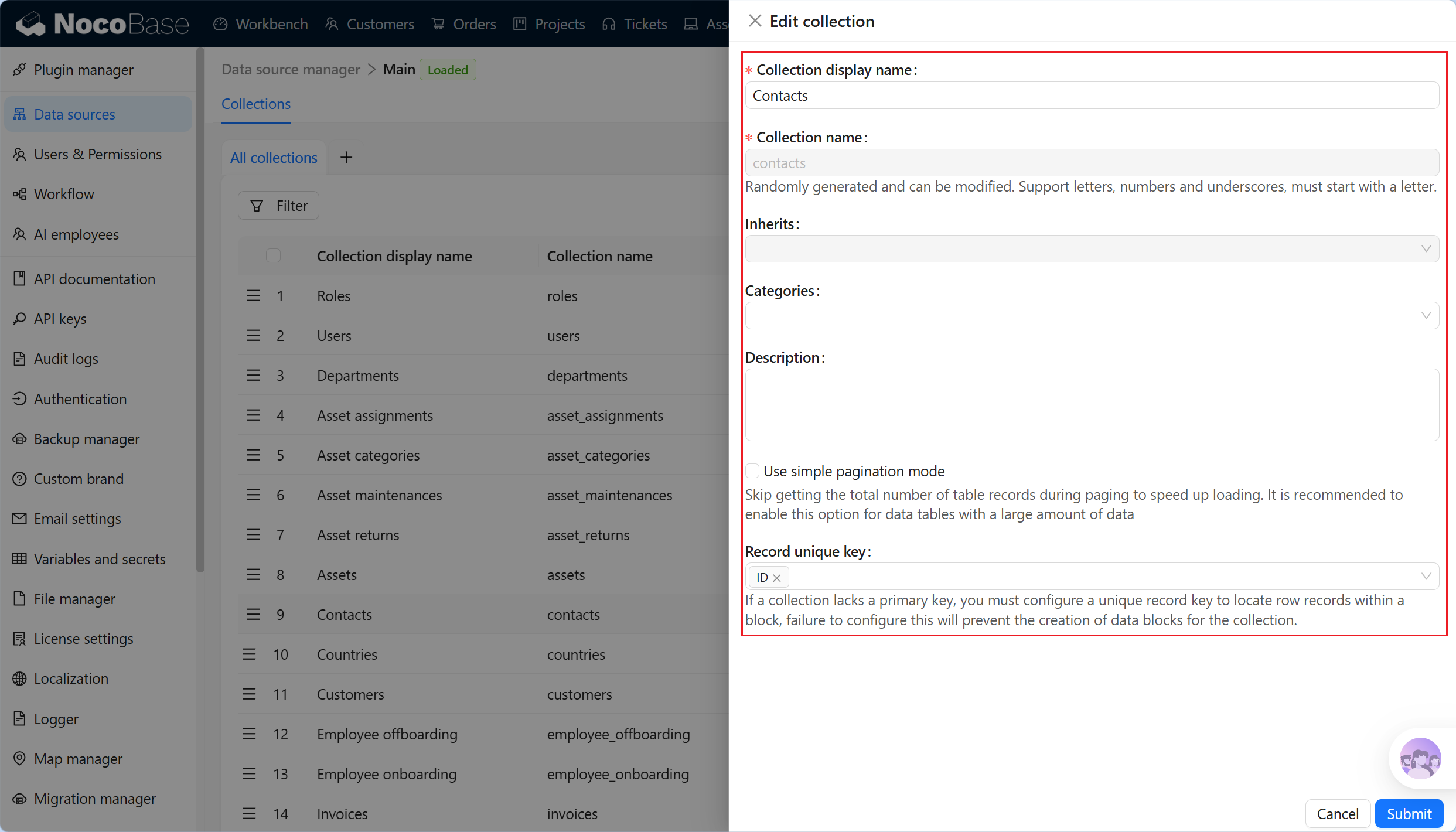
- package/dist/ai/docs/nocobase/file-manager/storage/index.md +66 -26
- package/dist/ai/docs/nocobase/file-manager/storage/s3-pro.md +58 -7
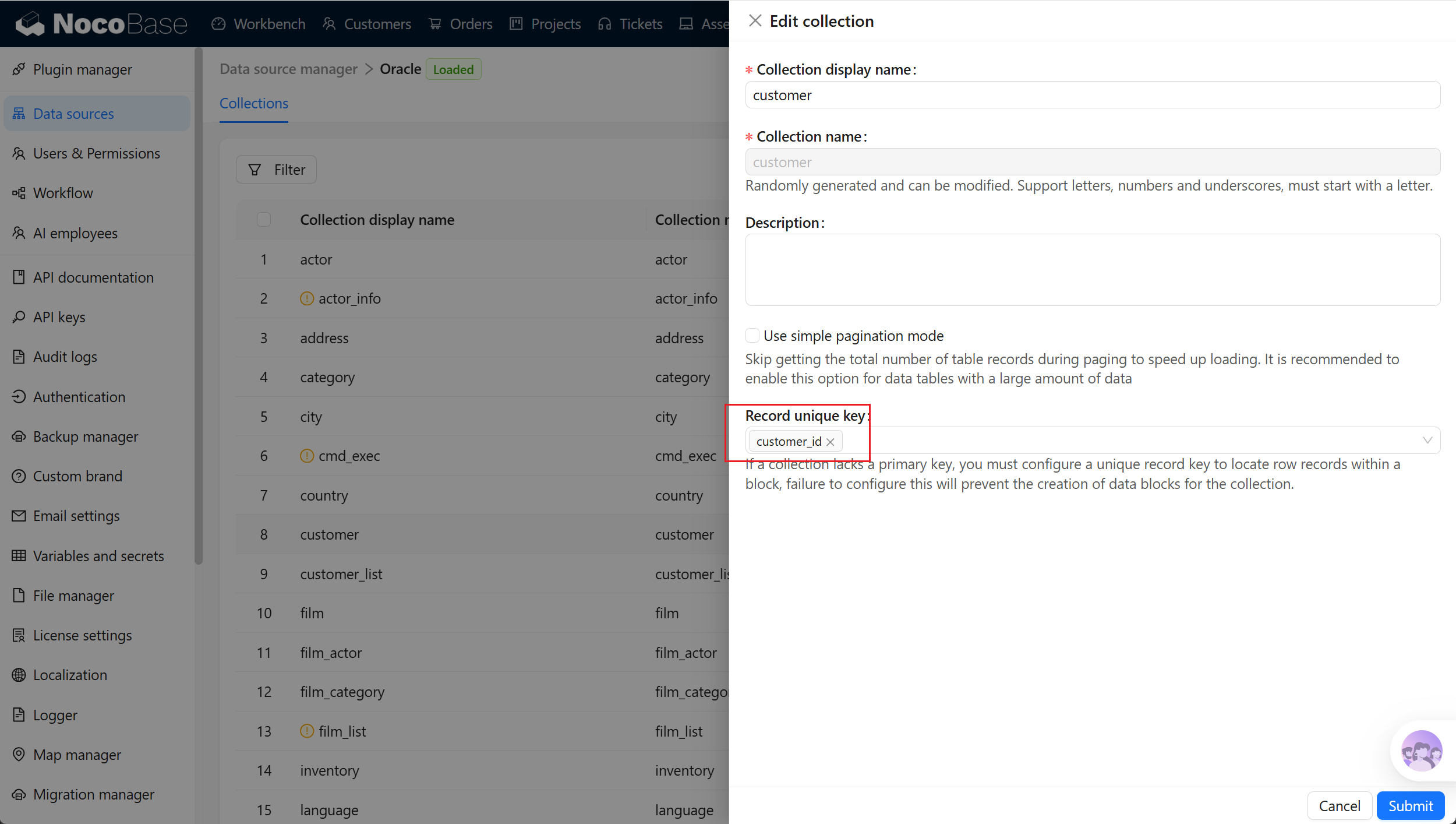
- package/dist/ai/docs/nocobase/get-started/installation/env.md +2 -2
- package/dist/ai/docs/nocobase/ops-management/migration-manager/built-in-tables.md +1 -2
- package/dist/ai/docs/nocobase/runjs/context/ai.md +194 -4
- package/dist/ai/tools/executeFrontendTool.d.ts +10 -0
- package/dist/ai/tools/executeFrontendTool.js +86 -0
- package/dist/ai/tools/getSkill.js +1 -1
- package/dist/ai/tools/loadFrontendTool.d.ts +10 -0
- package/dist/ai/tools/loadFrontendTool.js +99 -0
- package/dist/client/244.8631eb5cf3f05e21.js +10 -0
- package/dist/client/{525.203778500aca5d05.js → 525.94dd4136c1361477.js} +1 -1
- package/dist/client/681.6ffbc9329b9ac242.js +10 -0
- package/dist/{client-v2/705.1d10027ff8cfdf79.js → client/705.19b642db34de438a.js} +1 -1
- package/dist/client/index.d.ts +1 -3
- package/dist/client/index.js +8 -8
- package/dist/client-v2/244.c428e645ecb94414.js +10 -0
- package/dist/client-v2/420.b2aedb1ff71fca0e.js +10 -0
- package/dist/client-v2/681.6890caa389564ff7.js +10 -0
- package/dist/client-v2/705.8dc34d43f02f322c.js +10 -0
- package/dist/client-v2/ai-employees/AIEmployeeShortcut.d.ts +2 -0
- package/dist/client-v2/ai-employees/AddContextButton.d.ts +2 -0
- package/dist/client-v2/ai-employees/chatbox/components/AIEmployeeSwitcher.d.ts +1 -0
- package/dist/client-v2/ai-employees/chatbox/components/ChatBoxUnreadBadge.d.ts +17 -0
- package/dist/client-v2/ai-employees/chatbox/components/Conversations.d.ts +9 -1
- package/dist/client-v2/ai-employees/chatbox/components/MessageRenderers.d.ts +1 -1
- package/dist/client-v2/ai-employees/chatbox/components/Messages.d.ts +5 -1
- package/dist/client-v2/ai-employees/chatbox/components/ModelSwitcher.d.ts +4 -0
- package/dist/client-v2/ai-employees/chatbox/components/Sender.d.ts +33 -1
- package/dist/client-v2/ai-employees/chatbox/components/index.d.ts +1 -0
- package/dist/client-v2/ai-employees/chatbox/hooks/useChat.d.ts +8 -5
- package/dist/client-v2/ai-employees/chatbox/hooks/useChatBoxActions.d.ts +3 -2
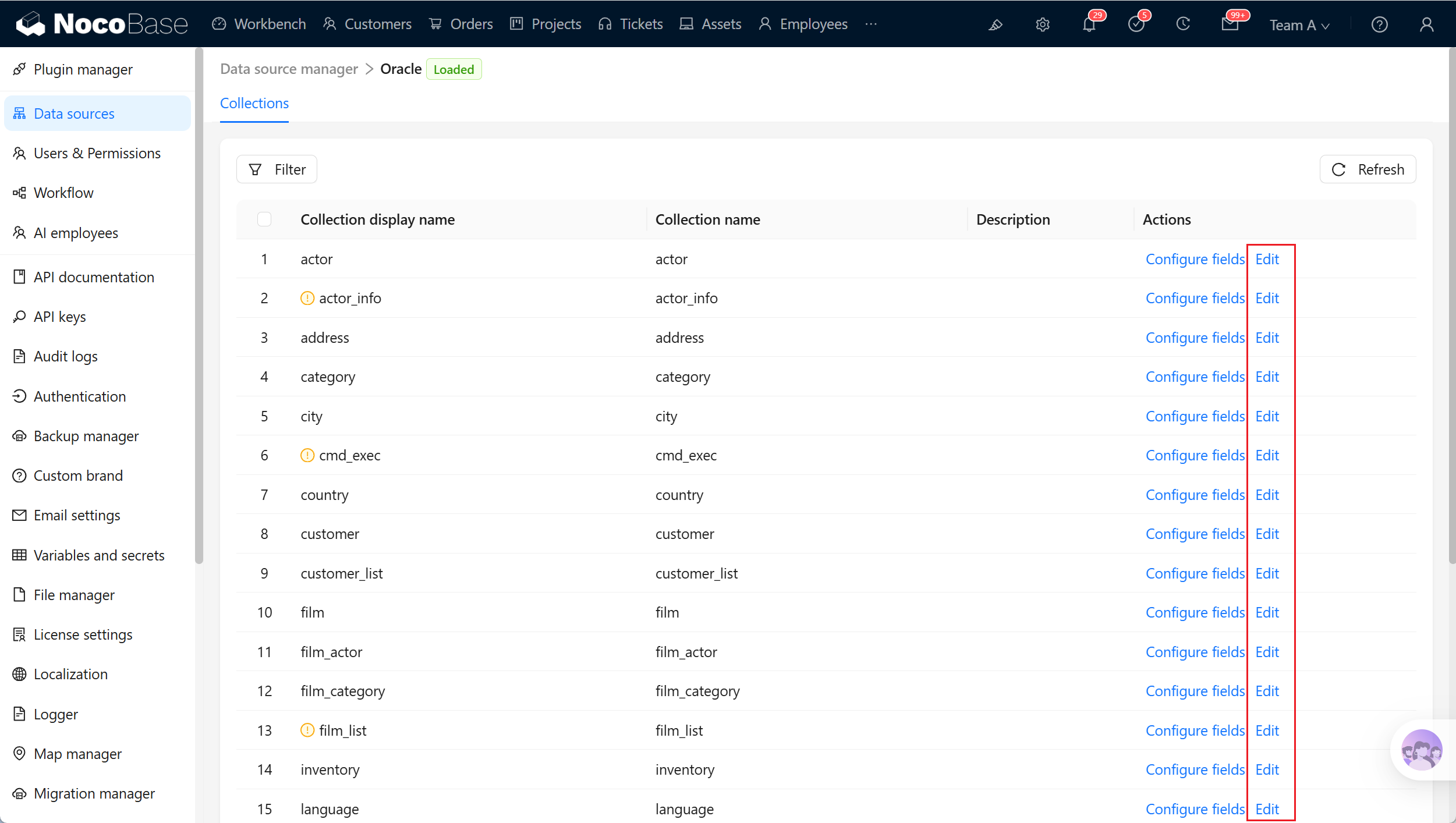
- package/dist/client-v2/ai-employees/chatbox/hooks/useChatBoxEffect.d.ts +2 -1
- package/dist/client-v2/ai-employees/chatbox/hooks/useChatConversationActions.d.ts +3 -2
- package/dist/client-v2/ai-employees/chatbox/hooks/useChatMessageActions.d.ts +4 -2
- package/dist/client-v2/ai-employees/chatbox/hooks/useToolCallActions.d.ts +3 -1
- package/dist/client-v2/ai-employees/chatbox/hooks/useUploadFiles.d.ts +13 -3
- package/dist/client-v2/ai-employees/chatbox/hooks/useWorkflowTasks.d.ts +3 -2
- package/dist/client-v2/ai-employees/chatbox/index.d.ts +17 -0
- package/dist/client-v2/ai-employees/chatbox/roles.d.ts +2 -153
- package/dist/client-v2/ai-employees/chatbox/stores/chat-box.d.ts +46 -31
- package/dist/client-v2/ai-employees/chatbox/stores/chat-conversations.d.ts +7 -7
- package/dist/client-v2/ai-employees/chatbox/stores/chat-messages.d.ts +23 -18
- package/dist/client-v2/ai-employees/chatbox/stores/chat-sender.d.ts +43 -0
- package/dist/client-v2/ai-employees/chatbox/stores/chat-tool-call.d.ts +6 -5
- package/dist/client-v2/ai-employees/chatbox/stores/chat-tools.d.ts +11 -5
- package/dist/client-v2/ai-employees/chatbox/stores/mounted-chat-boxes.d.ts +20 -0
- package/dist/client-v2/ai-employees/chatbox/stores/runtime.d.ts +43 -0
- package/dist/client-v2/ai-employees/chatbox/stores/workflow-tasks.d.ts +22 -10
- package/dist/client-v2/ai-employees/chatbox/upload.d.ts +19 -0
- package/dist/client-v2/ai-employees/chatbox/utils.d.ts +28 -4
- package/dist/client-v2/ai-employees/frontend-tools.d.ts +11 -0
- package/dist/client-v2/ai-employees/tools/SuggestionsOptionsCard.d.ts +1 -1
- package/dist/client-v2/ai-employees/tools/WorkflowTaskOutputCard.d.ts +1 -1
- package/dist/client-v2/ai-employees/types.d.ts +30 -0
- package/dist/client-v2/block/ai-chat-box/AIChatBoxBlockModel.d.ts +21 -0
- package/dist/client-v2/block/ai-chat-box/AIChatBoxCoreModel.d.ts +13 -0
- package/dist/client-v2/block/ai-chat-box/components/AIChatBoxCoreView.d.ts +10 -0
- package/dist/client-v2/block/ai-chat-box/components/AIChatBoxView.d.ts +12 -0
- package/dist/client-v2/block/ai-chat-box/index.d.ts +14 -0
- package/dist/client-v2/block/ai-chat-box/settings.d.ts +12 -0
- package/dist/client-v2/block/ai-chat-box/sub-models.d.ts +26 -0
- package/dist/client-v2/block/ai-chat-box/types.d.ts +38 -0
- package/dist/client-v2/block/ai-chat-box/utils.d.ts +26 -0
- package/dist/client-v2/index.d.ts +3 -5
- package/dist/client-v2/index.js +3 -3
- package/dist/client-v2/llm-services/model-select.d.ts +33 -0
- package/dist/client-v2/llm-services/utils.d.ts +1 -0
- package/dist/client-v2/manager/ai-manager.d.ts +10 -3
- package/dist/client-v2/manager/frontend-tool-registry.d.ts +30 -0
- package/dist/client-v2/models/ai-employees/AIEmployeeActionModel.d.ts +4 -1
- package/dist/client-v2/models/ai-employees/AIEmployeeShortcutModel.d.ts +5 -0
- package/dist/client-v2/pages/EmployeesPage.d.ts +2 -0
- package/dist/client-v2/runjs/registerAIEmployeeRunJSFacade.d.ts +1 -0
- package/dist/common/ai-employee-validation.d.ts +15 -0
- package/dist/common/ai-employee-validation.js +61 -0
- package/dist/common/error-codes.d.ts +13 -0
- package/dist/common/error-codes.js +48 -0
- package/dist/common/frontend-tools.d.ts +26 -0
- package/dist/common/frontend-tools.js +57 -0
- package/dist/common/llm-service-models.d.ts +16 -0
- package/dist/common/llm-service-models.js +84 -0
- package/dist/externalVersion.js +16 -16
- package/dist/locale/en-US.json +67 -0
- package/dist/locale/zh-CN.json +67 -0
- package/dist/node_modules/@langchain/mistralai/package.json +1 -1
- package/dist/node_modules/@langchain/xai/package.json +1 -1
- package/dist/node_modules/fs-extra/package.json +1 -1
- package/dist/node_modules/jsonrepair/package.json +1 -1
- package/dist/node_modules/just-bash/package.json +1 -1
- package/dist/node_modules/nodejs-snowflake/package.json +1 -1
- package/dist/node_modules/openai/package.json +1 -1
- package/dist/node_modules/zod/package.json +1 -1
- package/dist/server/ai-employees/ai-conversations.d.ts +4 -1
- package/dist/server/ai-employees/ai-conversations.js +2 -0
- package/dist/server/ai-employees/ai-employee.d.ts +2 -1
- package/dist/server/ai-employees/ai-employee.js +26 -7
- package/dist/server/ai-employees/middleware/conversation.js +9 -2
- package/dist/server/collections/ai-conversations.js +5 -0
- package/dist/server/document-loader/constants.js +1 -1
- package/dist/server/frontend-tools.d.ts +25 -0
- package/dist/server/frontend-tools.js +171 -0
- package/dist/server/manager/work-context-handler.js +10 -3
- package/dist/server/plugin.d.ts +1 -0
- package/dist/server/plugin.js +25 -0
- package/dist/server/resource/aiConversations.d.ts +2 -0
- package/dist/server/resource/aiConversations.js +33 -3
- package/dist/server/resource/aiEmployees.d.ts +2 -0
- package/dist/server/resource/aiEmployees.js +62 -0
- package/dist/server/resource/aiWorkflowTasks.js +9 -1
- package/dist/server/resource/llmServices.d.ts +11 -0
- package/dist/server/resource/llmServices.js +85 -0
- package/dist/server/types/knowledge-base.type.d.ts +6 -2
- package/dist/swagger/common.d.ts +143 -0
- package/dist/swagger/common.js +144 -0
- package/dist/swagger/employees.d.ts +301 -0
- package/dist/swagger/employees.js +131 -0
- package/dist/swagger/index.d.ts +1588 -0
- package/dist/swagger/index.js +62 -0
- package/dist/swagger/llm.d.ts +555 -0
- package/dist/swagger/llm.js +247 -0
- package/dist/swagger/schemas.d.ts +736 -0
- package/dist/swagger/schemas.js +381 -0
- package/package.json +2 -2
- package/dist/ai/docs/nocobase/ai-employees/knowledge-base/vector-store.md +0 -24
- package/dist/ai/docs/nocobase/data-sources/development/index.md +0 -6
- package/dist/client/372.40eb52905e3f3049.js +0 -10
- package/dist/client/681.399948c18d753667.js +0 -10
- package/dist/client/705.380279da896021fb.js +0 -10
- package/dist/client-v2/372.8cc3fde09c9bec77.js +0 -10
- package/dist/client-v2/406.341be51205c674e0.js +0 -10
- package/dist/client-v2/681.082f4f1c7b841983.js +0 -10
- package/dist/client-v2/ai-employees/chatbox/stores/create-selectors.d.ts +0 -46
- package/dist/client-v2/ai-employees/chatbox/utils/normalizeTriggerTaskOptions.d.ts +0 -19
|
@@ -0,0 +1,159 @@
|
|
|
1
|
+
---
|
|
2
|
+
title: "External NocoBase"
|
|
3
|
+
description: "Connect another NocoBase application as an external data source. Learn the configuration, available capabilities, and workflow limitations."
|
|
4
|
+
keywords: "external NocoBase,NocoBase data source,data source management,workflow,NocoBase"
|
|
5
|
+
---
|
|
6
|
+
|
|
7
|
+
# External NocoBase
|
|
8
|
+
|
|
9
|
+
## Introduction
|
|
10
|
+
|
|
11
|
+
An External NocoBase data source connects another NocoBase application to the current application, retaining metadata configured in the remote application, including collections, Field interfaces, titles, and relation fields.
|
|
12
|
+
|
|
13
|
+
Unlike an external database data source, External NocoBase normally does not require you to configure Field interfaces again or manually create relation fields. In addition to viewing, creating, editing, and deleting records, it supports file upload and preview, import and export, chart queries, and some workflow scenarios.
|
|
14
|
+
|
|
15
|
+
## Add a data source
|
|
16
|
+
|
|
17
|
+
After activating the plugin, add an External NocoBase data source in **Data source management** and enter the remote application's access information.
|
|
18
|
+
|
|
19
|
+
| Setting | Description |
|
|
20
|
+
| --- | --- |
|
|
21
|
+
| API address | The complete API address of the remote NocoBase application, for example `https://example.com/api` |
|
|
22
|
+
| Origin | The access origin of the remote NocoBase application, for example `https://example.com`. It is primarily used to handle local-file preview addresses in the remote application |
|
|
23
|
+
| API key | The credential used by the current application to access the remote NocoBase application |
|
|
24
|
+
| Request headers | Additional request headers passed to the remote application, such as space information |
|
|
25
|
+
| Timeout | The request timeout for accessing the remote application |
|
|
26
|
+
|
|
27
|
+
After you enable the data source, the system loads collections from the remote application.
|
|
28
|
+
|
|
29
|
+
|
|
30
|
+
|
|
31
|
+
## Permissions
|
|
32
|
+
|
|
33
|
+
External NocoBase data sources are affected by permissions in both the current and remote applications.
|
|
34
|
+
|
|
35
|
+
- The current application can configure access permissions for different collections and fields, as with other external data sources
|
|
36
|
+
- The remote application reads and operates the corresponding data according to the permissions of the configured API key
|
|
37
|
+
|
|
38
|
+
An External NocoBase data source does not return permission metadata used by the client to precisely control button visibility. Some buttons might not automatically hide according to permissions as they do for a main data source. Whether or not a button is visible, submitting an operation still passes through the current application's server-side permission check, and unauthorized operations are rejected.
|
|
39
|
+
|
|
40
|
+
:::warning Note
|
|
41
|
+
|
|
42
|
+
Prepare a dedicated API key for the External NocoBase data source and grant only the necessary collection and action permissions. If an operation fails although the current application permits it, check the permissions of the remote API key.
|
|
43
|
+
|
|
44
|
+
:::
|
|
45
|
+
|
|
46
|
+
## Use collections
|
|
47
|
+
|
|
48
|
+
After collections are loaded, select this data source in page configuration, block configuration, charts, or workflows to use collections from the remote application.
|
|
49
|
+
|
|
50
|
+
When the remote collection structure changes, reload collections in the current application.
|
|
51
|
+
|
|
52
|
+
## Capabilities
|
|
53
|
+
|
|
54
|
+
External NocoBase is mainly used to access collections and data from the remote application in the current application. The collection structure, field configuration, and actual data continue to be maintained by the remote application.
|
|
55
|
+
|
|
56
|
+
### Collections and fields
|
|
57
|
+
|
|
58
|
+
The current application loads metadata from the remote application, including collections, Field interfaces, titles, and relation fields. Unlike an external database data source, you normally do not need to configure Field interfaces again or manually create relation fields in the current application.
|
|
59
|
+
|
|
60
|
+
You cannot configure fields of an External NocoBase data source directly in the current application. To add a field, adjust a Field type, or modify a relation field, make the change in the remote application, then return to the current application and reload collections.
|
|
61
|
+
|
|
62
|
+
### Records and relation data
|
|
63
|
+
|
|
64
|
+
An External NocoBase data source supports viewing, creating, editing, and deleting records in page blocks, as well as viewing and maintaining relation data. The current application initiates operations and requests the remote application through the configured API key.
|
|
65
|
+
|
|
66
|
+
### Files and attachments
|
|
67
|
+
|
|
68
|
+
Files are uploaded to the storage used by the remote application. The current application initiates upload, preview, and download requests, while the file itself is not stored in the current application.
|
|
69
|
+
|
|
70
|
+
Origin is primarily used to handle preview addresses for files stored locally by the remote application. When the remote application returns a relative path, the current application uses Origin to complete the file access address. Set Origin to the public access address of the remote NocoBase application, for example:
|
|
71
|
+
|
|
72
|
+
```text
|
|
73
|
+
https://example.com
|
|
74
|
+
```
|
|
75
|
+
|
|
76
|
+
Do not use the API address as Origin.
|
|
77
|
+
|
|
78
|
+
### Import and export
|
|
79
|
+
|
|
80
|
+
Import and export are operations that read and write data sources through external files, and are both proxied to the remote application. The current application receives user actions, forwards requests, and returns download results, while the remote application performs the actual data reads and writes.
|
|
81
|
+
|
|
82
|
+
- **Import records**: The current application receives the uploaded import file and proxies it to the remote application for import
|
|
83
|
+
- **Export records**: The current application proxies a record-export request to the remote application. In synchronous mode, the record file returned by the remote application is streamed to the browser for download. In asynchronous mode, a local asynchronous task is created; it initiates record export in the remote application, synchronizes progress, and streams the record file from the remote application when the result is downloaded
|
|
84
|
+
- **Export attachments**: The current application proxies an attachment-export request to the remote application. In synchronous mode, the attachment archive returned by the remote application is streamed to the browser for download. In asynchronous mode, a local asynchronous task is created; it initiates attachment export in the remote application, synchronizes progress, and streams the attachment archive from the remote application when the result is downloaded
|
|
85
|
+
|
|
86
|
+
### Template printing
|
|
87
|
+
|
|
88
|
+
Template printing can use records from an External NocoBase data source. Print-template and print-action configurations are stored in the current application. When printing, the current application reads remote records and relation data, then generates the print file in the current application.
|
|
89
|
+
|
|
90
|
+
### Charts
|
|
91
|
+
|
|
92
|
+
#### Query panel
|
|
93
|
+
|
|
94
|
+
An External NocoBase data source can be used in a chart query panel. The current application processes query parameters according to locally configured chart, data-source, collection, and field permissions, then requests results from the remote application.
|
|
95
|
+
|
|
96
|
+
The remote API key also needs permission to access the corresponding data, otherwise the query fails.
|
|
97
|
+
|
|
98
|
+
#### SQL panel
|
|
99
|
+
|
|
100
|
+
The SQL panel is the SQL query mode of charts and is used only for queries. The current application stores the SQL configuration and initiates the request; SQL is proxied to the remote application for execution.
|
|
101
|
+
|
|
102
|
+
When using the SQL panel, local users need UI-configuration permission in the current application, and the remote API key needs UI-configuration permission in the remote application. Unlike the query panel, the SQL panel does not break query parameters down by collection and field permissions. Grant UI-configuration permissions to local users and the API key carefully.
|
|
103
|
+
|
|
104
|
+
### Workflows
|
|
105
|
+
|
|
106
|
+
External NocoBase data can involve two sets of workflows: one in the current application and one in the remote application. The current application handles events in local pages, buttons, and API request chains. After receiving a proxied request, the remote application processes it using its own workflow configuration.
|
|
107
|
+
|
|
108
|
+
The current application does not listen for internal create, update, or delete events from remote collections. Remote collection events are triggered only in the remote application.
|
|
109
|
+
|
|
110
|
+
#### Triggers
|
|
111
|
+
|
|
112
|
+
The following table describes how data-source-related triggers behave in the current and remote applications when the corresponding workflow is enabled.
|
|
113
|
+
|
|
114
|
+
| Trigger | Current application | Remote application | Description |
|
|
115
|
+
| --- | --- | --- | --- |
|
|
116
|
+
| Before request event | Triggered | Global mode only | In the current application, global mode is triggered and local mode is triggered according to bindings on current-application buttons. After the remote application receives a proxied request, only global mode is triggered |
|
|
117
|
+
| After request event | Triggered | Global mode only | In the current application, global mode is triggered and local mode is triggered according to bindings on current-application buttons. After the remote application receives a proxied request, only global mode is triggered |
|
|
118
|
+
| Custom action event | Triggered | Not triggered | A **Trigger workflow** button bound in the current application triggers a local workflow. Proxied CRUD requests do not trigger custom action events in the remote application |
|
|
119
|
+
| Collection event | Not triggered | Triggered | Actual data changes in the remote application, so the current application does not trigger local collection events. The remote application triggers its own collection events |
|
|
120
|
+
| Scheduled date-field trigger | Not triggered | Triggered | The current application does not trigger based on remote collection fields. The remote application triggers according to its own date-field configuration |
|
|
121
|
+
|
|
122
|
+
Triggers that do not depend on a data source are triggered in the current and remote applications according to their own configurations.
|
|
123
|
+
|
|
124
|
+
To orchestrate workflows that operate on External NocoBase data in the current application, use before-request events, after-request events, or custom action events. Existing workflows in the remote application run independently there.
|
|
125
|
+
|
|
126
|
+
#### Nodes
|
|
127
|
+
|
|
128
|
+
The following table lists only data-source-related nodes. General nodes such as conditions, calculations, loops, and JSON processing do not depend on the data-source type and can be used in ordinary workflows.
|
|
129
|
+
|
|
130
|
+
| Node | Available | Description |
|
|
131
|
+
| --- | --- | --- |
|
|
132
|
+
| Query records | Yes | Queries records in the remote application |
|
|
133
|
+
| Create record | Yes | Creates records in the remote application |
|
|
134
|
+
| Update record | Yes | Updates records in the remote application |
|
|
135
|
+
| Delete record | Yes | Deletes records in the remote application |
|
|
136
|
+
| SQL node | No | Workflow SQL nodes support database data sources only |
|
|
137
|
+
| Aggregate node | No | Aggregate nodes support database data sources only |
|
|
138
|
+
|
|
139
|
+
## FAQ
|
|
140
|
+
|
|
141
|
+
### Collections do not appear
|
|
142
|
+
|
|
143
|
+
Check whether the data source is enabled and whether the API address and API key are correct. The remote application must also allow the API key to access the corresponding collections.
|
|
144
|
+
|
|
145
|
+
### File upload succeeds but preview fails
|
|
146
|
+
|
|
147
|
+
When the current or remote application uses local file storage, check whether Origin is set to the public access address of the corresponding application. Origin must not be the API address.
|
|
148
|
+
|
|
149
|
+
### The current application permits the operation, but it fails
|
|
150
|
+
|
|
151
|
+
Check the permissions of the API key in the remote application. An External NocoBase data source is affected by both current-application and remote-application permissions.
|
|
152
|
+
|
|
153
|
+
### Collections cannot be used after a remote service failure
|
|
154
|
+
|
|
155
|
+
If the remote application returns a 502 error, restarts, or is temporarily unavailable, the current application might temporarily be unable to read remote collection metadata. After the remote service recovers, the current application automatically reloads metadata the next time a collection from the data source is accessed.
|
|
156
|
+
|
|
157
|
+
### Why can't fields be configured in the current application?
|
|
158
|
+
|
|
159
|
+
An External NocoBase data source uses the collection structure and field configuration of the remote application. Adjust fields in the remote application, then return to the current application and reload collections.
|
|
@@ -0,0 +1,126 @@
|
|
|
1
|
+
---
|
|
2
|
+
pkg: "@nocobase/plugin-data-source-oceanbase"
|
|
3
|
+
title: "External data source - OceanBase"
|
|
4
|
+
description: "Learn how to connect OceanBase as an external database in NocoBase, including supported versions, MySQL compatibility mode, connection settings, collection scope, permissions, and field mapping."
|
|
5
|
+
keywords: "external data source,OceanBase,external database,MySQL compatibility mode,field mapping,NocoBase"
|
|
6
|
+
---
|
|
7
|
+
|
|
8
|
+
# OceanBase
|
|
9
|
+
|
|
10
|
+
## Introduction
|
|
11
|
+
|
|
12
|
+
OceanBase can be connected to NocoBase as an external database. NocoBase reads tables, fields, and views from OceanBase and makes them available as collections in the external data source.
|
|
13
|
+
|
|
14
|
+
Unlike a [main data source](../main/index.md), the actual schema of an external OceanBase database continues to be maintained by the original business system, database client, or migration scripts. NocoBase reads the schema, stores field metadata, and lets you configure blocks, permissions, workflows, and APIs.
|
|
15
|
+
|
|
16
|
+
| Setting | Description |
|
|
17
|
+
| --- | --- |
|
|
18
|
+
| Supported version | OceanBase >= 4.3. |
|
|
19
|
+
| Commercial editions | Available in the Enterprise edition. |
|
|
20
|
+
| Plugin | `@nocobase/plugin-data-source-oceanbase`. |
|
|
21
|
+
| Database mode | Only MySQL compatibility mode is supported. |
|
|
22
|
+
|
|
23
|
+
External OceanBase is suitable when you need to:
|
|
24
|
+
|
|
25
|
+
- Connect a business database in an existing OceanBase MySQL tenant
|
|
26
|
+
- Build management pages in NocoBase without migrating historical data
|
|
27
|
+
- Apply permissions, workflow processing, data corrections, or reporting to existing tables
|
|
28
|
+
- Keep the database schema maintained by DBAs, migration scripts, or the original system
|
|
29
|
+
|
|
30
|
+
:::warning Note
|
|
31
|
+
|
|
32
|
+
OceanBase is supported as an external database only in MySQL compatibility mode. If it uses Oracle compatibility mode, NocoBase cannot read its schema and field types through the current plugin.
|
|
33
|
+
|
|
34
|
+
:::
|
|
35
|
+
|
|
36
|
+
## Plugin installation
|
|
37
|
+
|
|
38
|
+
This is a commercial plugin. For activation instructions, see the [Commercial plugin activation guide](https://www.nocobase.com/en/blog/nocobase-commercial-license-activation-guide).
|
|
39
|
+
|
|
40
|
+
## Add a data source
|
|
41
|
+
|
|
42
|
+
In **Data source management**, click **Add new**, select OceanBase, and then enter the connection details.
|
|
43
|
+
|
|
44
|
+
|
|
45
|
+
|
|
46
|
+
Common connection settings are as follows:
|
|
47
|
+
|
|
48
|
+
| Setting | Description |
|
|
49
|
+
| --- | --- |
|
|
50
|
+
| Data source name | The internal identifier used by blocks, permissions, workflows, and APIs. It cannot be changed after the data source is created. |
|
|
51
|
+
| Data source display name | The name displayed in the interface. Use a name that business users can recognize, such as `OceanBase business database` or `Reporting database`. |
|
|
52
|
+
| Host / Port | The OceanBase MySQL-compatible connection address and port. Use the port configured for the tenant or proxy. |
|
|
53
|
+
| Database | The name of the OceanBase database to connect to. |
|
|
54
|
+
| Username / Password | The account credentials used to connect to OceanBase. NocoBase can read only objects that this account is allowed to access; it does not grant access to, or read, objects private to other accounts. |
|
|
55
|
+
| Table prefix | A table-name prefix. When configured, NocoBase reads only tables and views that match the prefix, and removes the prefix from the generated NocoBase collection names. |
|
|
56
|
+
| Collections / Add all collections | Controls the connection scope. With **Add all collections** enabled, NocoBase connects all tables and views in the current scope. When disabled, it connects only the objects selected in **Collections**. |
|
|
57
|
+
| Enabled the data source | Whether to enable the data source. When disabled, its configuration is retained, but blocks, permissions, workflows, and APIs can no longer read its data. |
|
|
58
|
+
|
|
59
|
+
:::tip Tip
|
|
60
|
+
|
|
61
|
+
When OceanBase contains many objects, narrow the scope through `Database`, `Table prefix`, and **Collections** first. Connecting only the tables and views used by the current application keeps permissions, page building, and synchronization easier to maintain.
|
|
62
|
+
|
|
63
|
+
:::
|
|
64
|
+
|
|
65
|
+
## Select collections
|
|
66
|
+
|
|
67
|
+
After entering connection details, click **Load Collections** to read available tables and views from OceanBase. The results depend on the connection account, `Database`, `Table prefix`, and **Collections** settings.
|
|
68
|
+
|
|
69
|
+
By default, **Add all collections** is enabled, which connects all tables and views in the current scope. To connect only selected objects, disable **Add all collections** and select the required tables or views from the list.
|
|
70
|
+
|
|
71
|
+
|
|
72
|
+
|
|
73
|
+
:::warning Note
|
|
74
|
+
|
|
75
|
+
An external data source can connect up to 500 tables or views at a time. When OceanBase contains many objects, narrow the scope through `Database`, `Table prefix`, or **Collections** first.
|
|
76
|
+
|
|
77
|
+
:::
|
|
78
|
+
|
|
79
|
+
## Synchronize and configure fields
|
|
80
|
+
|
|
81
|
+
The external OceanBase schema is maintained in the database. NocoBase does not create fields, change field types, or delete actual fields in the external database.
|
|
82
|
+
|
|
83
|
+
When the OceanBase schema changes, run **Sync from database** from the data source to read collection and field metadata again. Synchronization updates the collections, fields, primary keys, unique keys, and field-type mapping metadata stored in NocoBase. It does not delete actual OceanBase tables or data.
|
|
84
|
+
|
|
85
|
+
After fields are synchronized, you can configure their titles, Field type, and Field interface in NocoBase. NocoBase relationship fields are also stored as relationship metadata in NocoBase and do not automatically add actual foreign-key columns to OceanBase tables.
|
|
86
|
+
|
|
87
|
+
## Field type mapping
|
|
88
|
+
|
|
89
|
+
NocoBase identifies OceanBase types according to MySQL compatibility rules and automatically maps them to appropriate Field types and Field interfaces. You can adjust the display interface in field settings.
|
|
90
|
+
|
|
91
|
+
| OceanBase type | NocoBase Field type | Available Field interfaces |
|
|
92
|
+
| --- | --- | --- |
|
|
93
|
+
| `TINYINT`, `SMALLINT`, `MEDIUMINT` | `integer`, `boolean`, `sort` | Integer, Sort, Checkbox, Switch, Select, Radio group. |
|
|
94
|
+
| `INT`, `INTEGER` | `integer`, `unixTimestamp`, `sort` | Integer, Sort, Unix timestamp, Select, Radio group. |
|
|
95
|
+
| `BIGINT` | `bigInt`, `snowflakeId`, `unixTimestamp`, `sort` | Integer, Sort, Unix timestamp, Created at, Updated at. |
|
|
96
|
+
| `FLOAT`, `DOUBLE` | `float` | Number, Percent. |
|
|
97
|
+
| `DECIMAL` | `decimal` | Number, Percent, Currency. |
|
|
98
|
+
| `CHAR`, `VARCHAR` | `string`, `uuid`, `nanoid`, `encryption` | Input, Email, Phone, Password, Color, Icon, Select, Radio group, UUID, Nano ID. |
|
|
99
|
+
| `TEXT` | `text` | Textarea, Markdown, Vditor, Rich text, URL. |
|
|
100
|
+
| `DATE` | `dateOnly` | Date. |
|
|
101
|
+
| `TIME` | `time` | Time. |
|
|
102
|
+
| `DATETIME` | `datetimeNoTz`, `datetimeTz`, `date` | Date, Time, Created at, Updated at. |
|
|
103
|
+
| `TIMESTAMP` | `datetimeTz`, `date` | Date, Time, Created at, Updated at. |
|
|
104
|
+
| `JSON` | `json`, `array` | JSON. |
|
|
105
|
+
|
|
106
|
+
:::warning Note
|
|
107
|
+
|
|
108
|
+
Unsupported OceanBase types are displayed separately in field settings. They require development support before they can be used as regular NocoBase fields.
|
|
109
|
+
|
|
110
|
+
:::
|
|
111
|
+
|
|
112
|
+
## Primary key and Record unique key
|
|
113
|
+
|
|
114
|
+
Collections used for block display and editing should have a primary key or unique field. NocoBase uses the primary key as the Record unique key when available.
|
|
115
|
+
|
|
116
|
+
For views, tables without a primary key, or composite-primary-key tables, configure **Record unique key** manually in the collection settings. Without a usable identifier, blocks might not view, edit, or delete records correctly.
|
|
117
|
+
|
|
118
|
+
|
|
119
|
+
|
|
120
|
+
|
|
121
|
+
|
|
122
|
+
## Related links
|
|
123
|
+
|
|
124
|
+
- [External databases](./index.md) - General external-database configuration and management.
|
|
125
|
+
- [Data source management](../data-source-manager/index.md) - Data-source entry points and management.
|
|
126
|
+
- [Collection fields](../data-modeling/collection-fields/index.md) - Field types and field mapping.
|
|
@@ -0,0 +1,158 @@
|
|
|
1
|
+
---
|
|
2
|
+
pkg: "@nocobase/plugin-data-source-external-oracle"
|
|
3
|
+
title: "External data source - Oracle"
|
|
4
|
+
description: "Learn how to connect Oracle as an external database in NocoBase, including supported versions, plugin installation, Thin and Thick connection modes, Client directory, permissions, and field mapping."
|
|
5
|
+
keywords: "external data source,Oracle,external database,Thin,Thick,Client directory,field mapping,NocoBase"
|
|
6
|
+
---
|
|
7
|
+
|
|
8
|
+
# Oracle
|
|
9
|
+
|
|
10
|
+
## Introduction
|
|
11
|
+
|
|
12
|
+
Oracle can be connected to NocoBase as an external database. NocoBase reads tables, fields, and views from Oracle and makes them available as collections in the external data source.
|
|
13
|
+
|
|
14
|
+
Unlike a [main data source](../main/index.md), the actual schema of an external Oracle database continues to be maintained by the original business system, database client, or migration scripts. NocoBase reads the schema, stores field metadata, and lets you configure blocks, permissions, workflows, and APIs.
|
|
15
|
+
|
|
16
|
+
| Setting | Description |
|
|
17
|
+
| --- | --- |
|
|
18
|
+
| Supported version | Oracle >= 11g. |
|
|
19
|
+
| Commercial editions | Available in the Enterprise edition. |
|
|
20
|
+
| Plugin | `@nocobase/plugin-data-source-external-oracle`. |
|
|
21
|
+
| Connection mode | Oracle Database 12.1 and later usually use Thin mode. Versions earlier than 12.1 use Thick mode. |
|
|
22
|
+
|
|
23
|
+
External Oracle is suitable when you need to:
|
|
24
|
+
|
|
25
|
+
- Connect an Oracle database used by an existing ERP, MES, WMS, CRM, or other business system
|
|
26
|
+
- Build management pages in NocoBase without migrating historical data
|
|
27
|
+
- Apply permissions, workflow processing, data corrections, or reporting to existing tables
|
|
28
|
+
- Keep the database schema maintained by DBAs, migration scripts, or the original system
|
|
29
|
+
|
|
30
|
+
:::warning Note
|
|
31
|
+
|
|
32
|
+
An external Oracle database is not a NocoBase system database. NocoBase does not manage its backups, restores, migrations, or schema changes.
|
|
33
|
+
|
|
34
|
+
:::
|
|
35
|
+
|
|
36
|
+
## Plugin installation
|
|
37
|
+
|
|
38
|
+
This is a commercial plugin. For activation instructions, see the [Commercial plugin activation guide](https://www.nocobase.com/en/blog/nocobase-commercial-license-activation-guide).
|
|
39
|
+
|
|
40
|
+
When you use Thick mode, install Oracle Client libraries in the NocoBase runtime environment and specify **Client directory** in the data-source settings.
|
|
41
|
+
|
|
42
|
+
## Install the Oracle client
|
|
43
|
+
|
|
44
|
+
Oracle Database 12.1 and later usually use Thin mode, which does not require an additional Oracle Client installation. Install Oracle Client libraries in the NocoBase runtime environment only when connecting to a version earlier than Oracle Database 12.1 or when Thick mode is required.
|
|
45
|
+
|
|
46
|
+
After selecting **Thick** mode in the data-source settings, make sure the machine running the NocoBase service can load Oracle Client.
|
|
47
|
+
|
|
48
|
+
|
|
49
|
+
|
|
50
|
+
On Linux, you can install Oracle Instant Client as follows:
|
|
51
|
+
|
|
52
|
+
```bash
|
|
53
|
+
apt-get update
|
|
54
|
+
apt-get install -y unzip wget libaio1
|
|
55
|
+
wget https://download.oracle.com/otn_software/linux/instantclient/1925000/instantclient-basic-linux.x64-19.25.0.0.0dbru.zip
|
|
56
|
+
unzip instantclient-basic-linux.x64-19.25.0.0.0dbru.zip -d /opt/
|
|
57
|
+
echo /opt/instantclient_19_25 > /etc/ld.so.conf.d/oracle-instantclient.conf
|
|
58
|
+
ldconfig
|
|
59
|
+
```
|
|
60
|
+
|
|
61
|
+
When Oracle Client is not installed in a system-default loadable location, enter the client library directory in **Client directory**. For the installation above, the directory is `/opt/instantclient_19_25`.
|
|
62
|
+
|
|
63
|
+
|
|
64
|
+
|
|
65
|
+
:::tip Tip
|
|
66
|
+
|
|
67
|
+
Configure `Client directory` only in Thick mode. Thin mode does not use this setting. For more initialization rules, see the [node-oracledb initialization documentation](https://node-oracledb.readthedocs.io/en/latest/user_guide/initialization.html).
|
|
68
|
+
|
|
69
|
+
:::
|
|
70
|
+
|
|
71
|
+
## Add a data source
|
|
72
|
+
|
|
73
|
+
In **Data source management**, click **Add new**, select Oracle, and then enter the connection details.
|
|
74
|
+
|
|
75
|
+

|
|
76
|
+
|
|
77
|
+
Common connection settings are as follows:
|
|
78
|
+
|
|
79
|
+
| Setting | Description |
|
|
80
|
+
| --- | --- |
|
|
81
|
+
| Data source name | The internal identifier used by blocks, permissions, workflows, and APIs. It cannot be changed after the data source is created. |
|
|
82
|
+
| Data source display name | The name displayed in the interface. Use a name that business users can recognize, such as `ERP Oracle` or `Finance database`. |
|
|
83
|
+
| Host / Port | The Oracle host address and port. The default port is usually `1521`. |
|
|
84
|
+
| ServerName | The Oracle service name configured for the database listener. |
|
|
85
|
+
| Username / Password | The account credentials used to connect to Oracle. NocoBase reads tables and views under the Owner of this account; it does not grant access to, or read, objects under other Owners. |
|
|
86
|
+
| Connection mode | The Oracle connection mode. Oracle Database 12.1 and later usually use Thin mode. Versions earlier than 12.1 use Thick mode. |
|
|
87
|
+
| Client directory | The directory containing Oracle Client libraries for Oracle Thick mode. Configure it only when Thick mode is selected. |
|
|
88
|
+
| Table prefix | A table-name prefix. When configured, NocoBase reads only tables and views that match the prefix, and removes the prefix from the generated NocoBase collection names. |
|
|
89
|
+
| Collections / Add all collections | Controls the connection scope. With **Add all collections** enabled, NocoBase connects all tables and views in the current Owner and prefix scope. When disabled, it connects only the objects selected in **Collections**. |
|
|
90
|
+
| Enabled the data source | Whether to enable the data source. When disabled, its configuration is retained, but blocks, permissions, workflows, and APIs can no longer read its data. |
|
|
91
|
+
|
|
92
|
+
:::tip Tip
|
|
93
|
+
|
|
94
|
+
In Oracle, the connection scope is primarily determined by the Owner of the connection account, `Table prefix`, and **Collections**. If an instance contains many objects, connect with a dedicated account for the business schema to prevent unrelated objects from being added to NocoBase.
|
|
95
|
+
|
|
96
|
+
:::
|
|
97
|
+
|
|
98
|
+
## Select collections
|
|
99
|
+
|
|
100
|
+
After entering connection details, click **Load Collections** to read available tables and views from Oracle. The results depend on the Owner of the connection account, `Table prefix`, and **Collections** settings.
|
|
101
|
+
|
|
102
|
+
By default, **Add all collections** is enabled, which connects all tables and views in the current scope. To connect only selected objects, disable **Add all collections** and select the required tables or views from the list.
|
|
103
|
+
|
|
104
|
+

|
|
105
|
+
|
|
106
|
+
:::warning Note
|
|
107
|
+
|
|
108
|
+
An external data source can connect up to 500 tables or views at a time. When Oracle contains many objects, narrow the scope through the Owner of the connection account, `Table prefix`, or **Collections** first.
|
|
109
|
+
|
|
110
|
+
:::
|
|
111
|
+
|
|
112
|
+
## Synchronize and configure fields
|
|
113
|
+
|
|
114
|
+
The external Oracle schema is maintained in the database. NocoBase does not create fields, change field types, or delete actual fields in the external database.
|
|
115
|
+
|
|
116
|
+
When the Oracle schema changes, run **Sync from database** from the data source to read collection and field metadata again. Synchronization updates the collections, fields, primary keys, unique keys, and field-type mapping metadata stored in NocoBase. It does not delete actual Oracle tables or data.
|
|
117
|
+
|
|
118
|
+
After fields are synchronized, you can configure their titles, Field type, and Field interface in NocoBase. NocoBase relationship fields are also stored as relationship metadata in NocoBase and do not automatically add actual foreign-key columns to Oracle tables.
|
|
119
|
+
|
|
120
|
+
## Field type mapping
|
|
121
|
+
|
|
122
|
+
NocoBase automatically maps Oracle types to appropriate Field types and Field interfaces. You can adjust the display interface in field settings.
|
|
123
|
+
|
|
124
|
+
| Oracle type | NocoBase Field type | Available Field interfaces |
|
|
125
|
+
| --- | --- | --- |
|
|
126
|
+
| `NUMBER` | `integer`, `float`, `boolean`, `bigInt`, `unixTimestamp`, `sort` | Integer, Number, Sort, Checkbox, Switch, Select, Radio group. |
|
|
127
|
+
| `BINARY_FLOAT`, `BINARY_DOUBLE`, `FLOAT` | `float` | Number, Percent. |
|
|
128
|
+
| `INTEGER`, `SMALLINT`, `PLSQL_INTEGER` | `integer`, `boolean`, `sort` | Integer, Sort, Checkbox, Switch, Select, Radio group. |
|
|
129
|
+
| `CHAR`, `NCHAR`, `VARCHAR2`, `NVARCHAR2` | `string`, `uuid`, `nanoid`, `datetimeNoTz` | Input, Email, Phone, Password, Color, Icon, Select, Radio group, UUID, Nano ID. |
|
|
130
|
+
| `LONG`, `NCLOB` | `string`, `text` | Input, Textarea, Markdown, Vditor, Rich text. |
|
|
131
|
+
| `CLOB` | `string` | Input, Textarea, Rich text. |
|
|
132
|
+
| `DATE` | `datetimeNoTz` | Date, Time, Created at, Updated at. |
|
|
133
|
+
| `TIMESTAMP` | `datetimeNoTz` | Date, Time, Created at, Updated at. |
|
|
134
|
+
| `TIMESTAMP WITH TIME ZONE`, `TIMESTAMP WITH LOCAL TIME ZONE` | `datetimeTz` | Date, Time, Created at, Updated at. |
|
|
135
|
+
| `ROWID`, `UROWID` | `string`, `text`, `integer` | Input, Textarea, Integer. |
|
|
136
|
+
| `JSON` | `json` | JSON. |
|
|
137
|
+
|
|
138
|
+
:::warning Note
|
|
139
|
+
|
|
140
|
+
Binary object types such as `BLOB` and `BFILE` are not automatically used as regular file fields. To manage attachments in pages, it is usually better to use a file collection or attachment field in NocoBase to store file metadata.
|
|
141
|
+
|
|
142
|
+
:::
|
|
143
|
+
|
|
144
|
+
## Primary key and Record unique key
|
|
145
|
+
|
|
146
|
+
Collections used for block display and editing should have a primary key or unique field. NocoBase uses the primary key as the Record unique key when available.
|
|
147
|
+
|
|
148
|
+
For views, tables without a primary key, or composite-primary-key tables, configure **Record unique key** manually in the collection settings. Without a usable identifier, blocks might not view, edit, or delete records correctly.
|
|
149
|
+
|
|
150
|
+
|
|
151
|
+
|
|
152
|
+
|
|
153
|
+
## Related links
|
|
154
|
+
|
|
155
|
+
- [External databases](./index.md) - General external-database configuration and management.
|
|
156
|
+
- [Data source management](../data-source-manager/index.md) - Data-source entry points and management.
|
|
157
|
+
- [Collection fields](../data-modeling/collection-fields/index.md) - Field types and field mapping.
|
|
158
|
+
- [node-oracledb initialization documentation](https://node-oracledb.readthedocs.io/en/latest/user_guide/initialization.html) - How Oracle Client libraries are loaded.
|
|
@@ -0,0 +1,122 @@
|
|
|
1
|
+
---
|
|
2
|
+
pkg: "@nocobase/plugin-data-source-external-postgres"
|
|
3
|
+
title: "External data source - PostgreSQL"
|
|
4
|
+
description: "Connect PostgreSQL as an external NocoBase database, including version support, plugin installation, connection configuration, Schema, SSL, permissions, and field mapping."
|
|
5
|
+
keywords: "external data source,PostgreSQL,external database,Schema,SSL,field mapping,NocoBase"
|
|
6
|
+
---
|
|
7
|
+
|
|
8
|
+
# PostgreSQL
|
|
9
|
+
|
|
10
|
+
## Introduction
|
|
11
|
+
|
|
12
|
+
PostgreSQL can be connected to NocoBase as an external database. NocoBase reads PostgreSQL tables, fields, and views and uses them as collections in the external data source.
|
|
13
|
+
|
|
14
|
+
Unlike the [main database](../main/index.md), the original business system, database client, or migration scripts continue to maintain the real PostgreSQL schema. NocoBase reads structure, stores field metadata, and configures blocks, permissions, workflows, and APIs.
|
|
15
|
+
|
|
16
|
+
| Setting | Description |
|
|
17
|
+
| --- | --- |
|
|
18
|
+
| Supported version | PostgreSQL >= 9.5. |
|
|
19
|
+
| Commercial editions | Standard, Professional, and Enterprise. |
|
|
20
|
+
| Plugin | `@nocobase/plugin-data-source-external-postgres`. |
|
|
21
|
+
|
|
22
|
+
Use external PostgreSQL to connect existing ERP, MES, WMS, or CRM databases; build management pages without migrating historical data; apply permissions, workflows, corrections, or reports to existing tables; and leave schema maintenance to DBAs, migration scripts, or the original system.
|
|
23
|
+
|
|
24
|
+
:::warning Note
|
|
25
|
+
|
|
26
|
+
External PostgreSQL is not the NocoBase system database. NocoBase does not manage its backup, restore, migrations, or schema changes.
|
|
27
|
+
|
|
28
|
+
:::
|
|
29
|
+
|
|
30
|
+
## Plugin installation
|
|
31
|
+
|
|
32
|
+
This is a commercial plugin. See the [commercial plugin activation guide](https://www.nocobase.com/en/blog/nocobase-commercial-license-activation-guide) for activation.
|
|
33
|
+
|
|
34
|
+
## Add a data source
|
|
35
|
+
|
|
36
|
+
In **Data source management**, click **Add new**, select PostgreSQL, and enter the connection information.
|
|
37
|
+
|
|
38
|
+
|
|
39
|
+
|
|
40
|
+
| Setting | Description |
|
|
41
|
+
| --- | --- |
|
|
42
|
+
| Data source name | Internal identifier used by blocks, permissions, workflows, and APIs. It cannot be changed after creation. |
|
|
43
|
+
| Data source display name | Name shown in the interface, such as ERP PostgreSQL or Reporting database. |
|
|
44
|
+
| Host / Port | PostgreSQL server address and port. The usual default port is `5432`. |
|
|
45
|
+
| Database | The PostgreSQL database to connect. |
|
|
46
|
+
| Username / Password | Connection credentials. NocoBase reads only objects that this account is allowed to access; it does not grant access to other users' private objects. |
|
|
47
|
+
| Schema | The PostgreSQL schema to read, such as `public`. When several schemas exist, set only the schema required by the current business use. |
|
|
48
|
+
| Table prefix | Limits reading to matching tables and views, and removes the prefix from the NocoBase collection name. |
|
|
49
|
+
| Collections / Add all collections | Controls the imported scope. With **Add all collections** enabled, NocoBase imports all tables and views in scope; otherwise it imports only selected objects. |
|
|
50
|
+
| Enabled the data source | Disables or enables access through blocks, permissions, workflows, and APIs while keeping the configuration. |
|
|
51
|
+
| SSL options | PostgreSQL SSL settings, including SSL mode, unauthorized-certificate handling, and CA, client-certificate, and client-key paths. |
|
|
52
|
+
|
|
53
|
+
:::tip Tip
|
|
54
|
+
|
|
55
|
+
For a database with many objects, narrow the scope with `Schema`, `Table prefix`, and **Collections**. Import only tables and views that the application needs so that permission configuration, page building, and later synchronization remain manageable.
|
|
56
|
+
|
|
57
|
+
:::
|
|
58
|
+
|
|
59
|
+
## Select collections
|
|
60
|
+
|
|
61
|
+
After connection settings are entered, click **Load Collections** to read available PostgreSQL tables and views. Results depend on the connection account, `Schema`, `Table prefix`, and **Collections** settings.
|
|
62
|
+
|
|
63
|
+
**Add all collections** is enabled by default and imports every table and view in the current scope. Disable it and select individual tables or views when only part of the database is needed.
|
|
64
|
+
|
|
65
|
+
|
|
66
|
+
|
|
67
|
+
:::warning Note
|
|
68
|
+
|
|
69
|
+
One external data source can import at most 500 tables or views. Narrow the scope with `Schema`, `Table prefix`, or **Collections** when PostgreSQL has many objects.
|
|
70
|
+
|
|
71
|
+
:::
|
|
72
|
+
|
|
73
|
+
## Synchronize and configure fields
|
|
74
|
+
|
|
75
|
+
PostgreSQL maintains the external table structure. NocoBase does not create columns, change column types, or delete real fields in external PostgreSQL.
|
|
76
|
+
|
|
77
|
+
When the PostgreSQL schema changes, use **Sync from database** to reread collection and field metadata. Synchronization updates NocoBase collections, fields, primary keys, unique keys, and type mappings; it does not delete real PostgreSQL tables or data.
|
|
78
|
+
|
|
79
|
+
After synchronization, configure field titles, Field types, and Field interfaces in NocoBase. NocoBase relation fields are relation metadata only and do not automatically add real foreign-key columns to PostgreSQL.
|
|
80
|
+
|
|
81
|
+
## Field type mapping
|
|
82
|
+
|
|
83
|
+
NocoBase automatically maps PostgreSQL types to suitable Field types and Field interfaces. You can adjust the display interface in field configuration.
|
|
84
|
+
|
|
85
|
+
| PostgreSQL type | NocoBase Field type | Available Field interfaces |
|
|
86
|
+
| --- | --- | --- |
|
|
87
|
+
| `BOOLEAN` | `boolean` | Checkbox, Switch. |
|
|
88
|
+
| `SMALLINT`, `INTEGER`, `SERIAL`, `SMALLSERIAL` | `integer`, `boolean`, `sort` | Integer, Sort, Checkbox, Switch, Select, Radio group. |
|
|
89
|
+
| `BIGINT`, `BIGSERIAL` | `bigInt`, `sort` | Integer, Sort, Checkbox, Switch, Select, Radio group, Unix timestamp, Created at, Updated at. |
|
|
90
|
+
| `REAL` | `float` | Number, Percent. |
|
|
91
|
+
| `DOUBLE PRECISION` | `double` | Number, Percent. |
|
|
92
|
+
| `DECIMAL`, `NUMERIC` | `decimal` | Number, Percent, Currency. |
|
|
93
|
+
| `VARCHAR`, `CHAR` | `string`, `password`, `uuid`, `nanoid` | Input, Email, Phone, Password, Color, Icon, Select, Radio group, UUID, Nano ID. |
|
|
94
|
+
| `TEXT` | `text`, `json` | Textarea, Markdown, Vditor, Rich text, URL, JSON. |
|
|
95
|
+
| `UUID` | `uuid` | UUID. |
|
|
96
|
+
| `JSON`, `JSONB` | `json` | JSON. |
|
|
97
|
+
| `TIMESTAMP` | `date` | Date, Time, Created at, Updated at. |
|
|
98
|
+
| `DATE` | `dateOnly` | Date. |
|
|
99
|
+
| `TIME` | `time` | Time. |
|
|
100
|
+
| `POINT`, `LINESTRING`, `POLYGON`, `CIRCLE` | `point`, `lineString`, `polygon`, `circle` | Point, Line string, Polygon, Circle, JSON. |
|
|
101
|
+
| `ARRAY` | `array` | Multiple select, Checkbox group. |
|
|
102
|
+
|
|
103
|
+
:::warning Note
|
|
104
|
+
|
|
105
|
+
Unsupported PostgreSQL types are shown separately in field configuration. They require development support before they can be used as normal NocoBase fields.
|
|
106
|
+
|
|
107
|
+
:::
|
|
108
|
+
|
|
109
|
+
## Primary key and Record unique key
|
|
110
|
+
|
|
111
|
+
Collections used for block display and editing should have a primary key or unique field. NocoBase uses the primary key as the Record unique key when available.
|
|
112
|
+
|
|
113
|
+
For views, tables without a primary key, or composite-primary-key tables, configure **Record unique key** manually. Without a usable identifier, blocks might not view, edit, or delete records correctly.
|
|
114
|
+
|
|
115
|
+
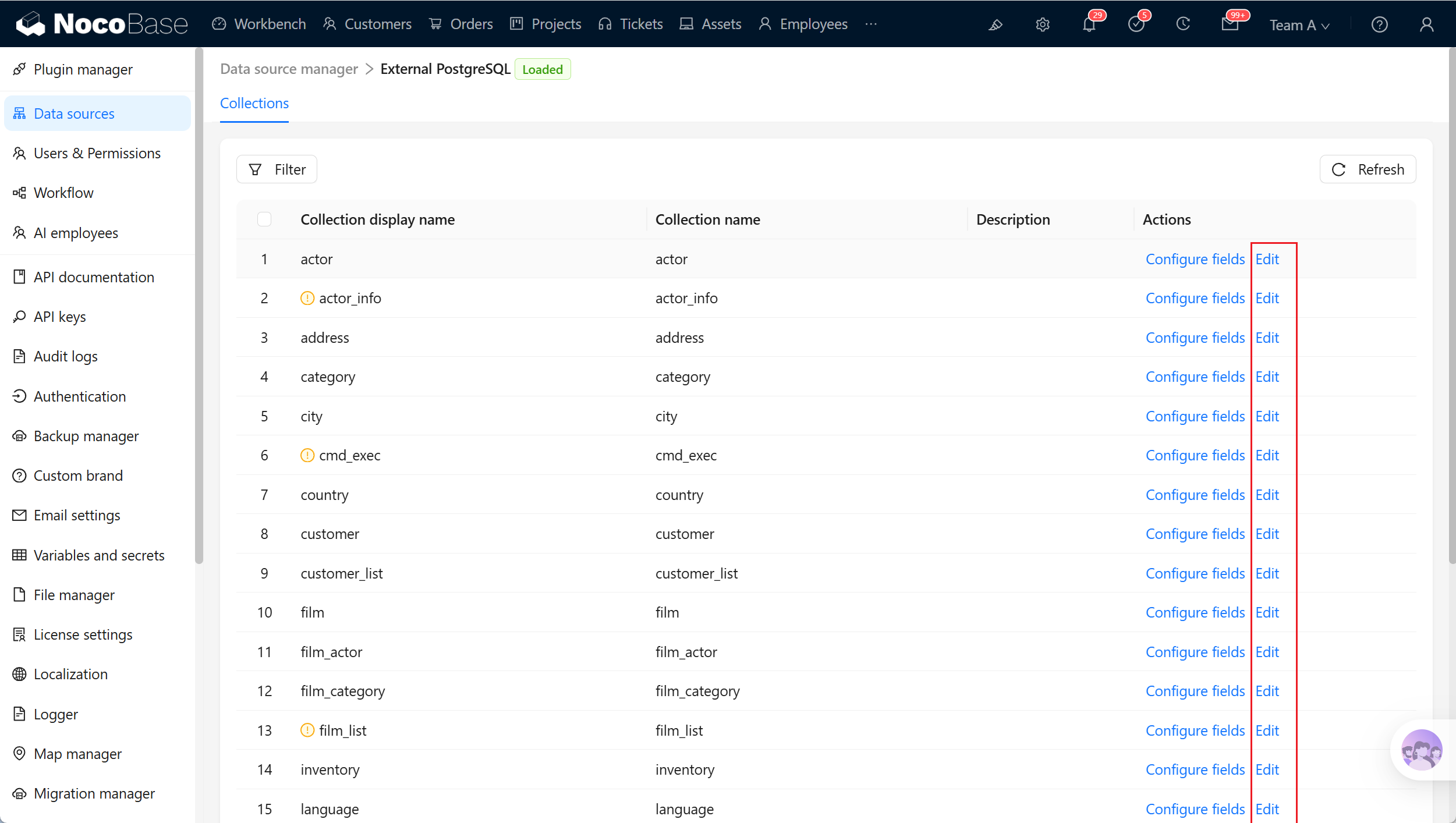
|
|
116
|
+
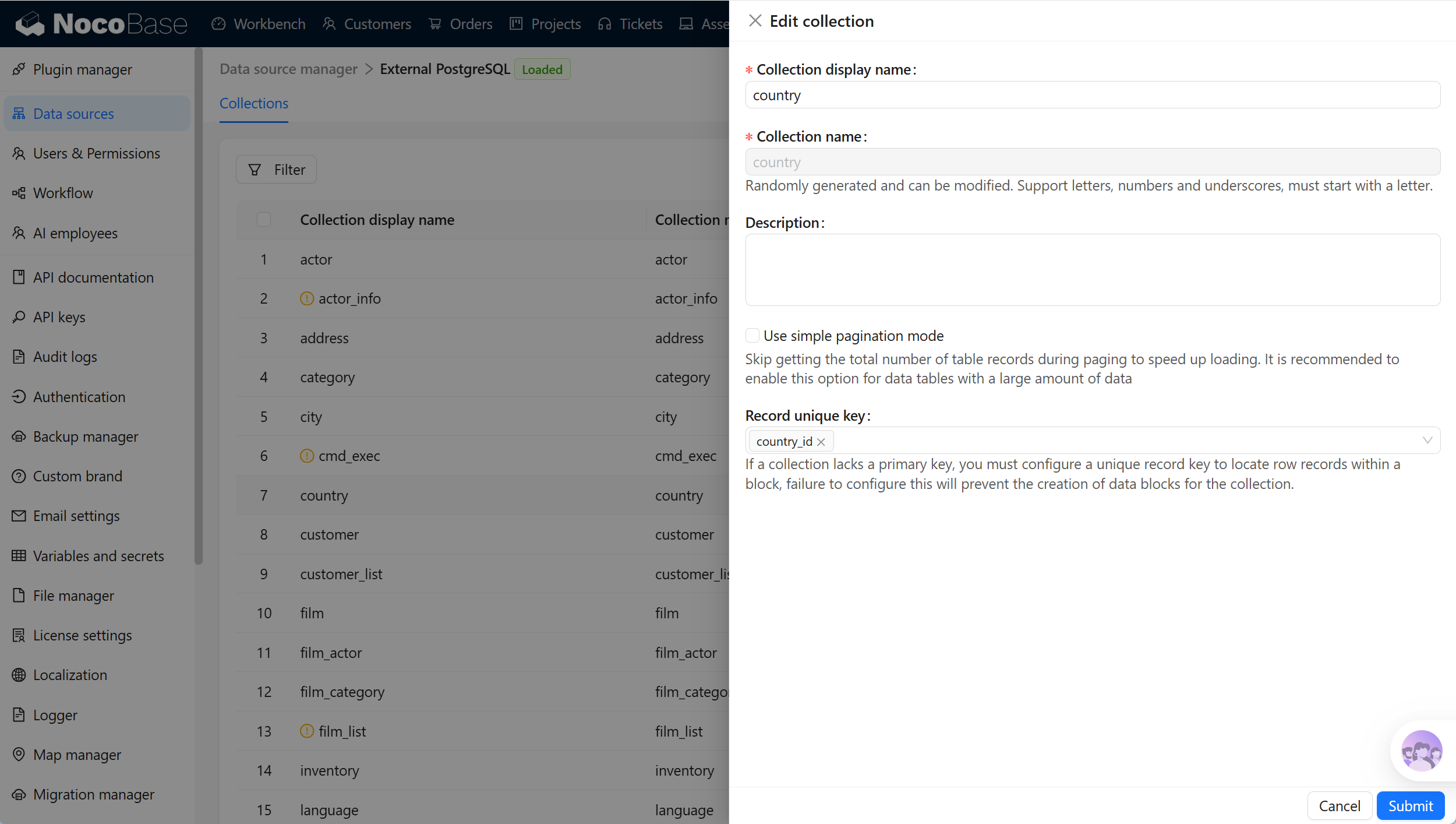
|
|
117
|
+
|
|
118
|
+
## Related links
|
|
119
|
+
|
|
120
|
+
- [External databases](./index.md) - General external-database configuration and management.
|
|
121
|
+
- [Data source management](../data-source-manager/index.md) - Data-source entry points and management.
|
|
122
|
+
- [Collection fields](../data-modeling/collection-fields/index.md) - Field types and mapping.
|