@nocobase/plugin-ai 2.3.0-alpha.1 → 3.0.0-alpha.2
This diff represents the content of publicly available package versions that have been released to one of the supported registries. The information contained in this diff is provided for informational purposes only and reflects changes between package versions as they appear in their respective public registries.
- package/dist/ai/docs/nocobase/ai-employees/block/ai-chat-box.md +133 -0
- package/dist/ai/docs/nocobase/ai-employees/knowledge-base/knowledge-base/documents.md +1 -1
- package/dist/ai/docs/nocobase/ai-employees/knowledge-base/knowledge-base/index.md +11 -7
- package/dist/ai/docs/nocobase/ai-employees/knowledge-base/knowledge-base/settings.md +12 -8
- package/dist/ai/docs/nocobase/ai-employees/knowledge-base/vector-database.md +3 -3
- package/dist/ai/docs/nocobase/ai-employees/workflow/nodes/knowledge/create-document.md +1 -1
- package/dist/ai/docs/nocobase/api/app/env.md +3 -1
- package/dist/ai/docs/nocobase/api/cli/index.md +14 -2
- package/dist/ai/docs/nocobase/api/cli/portal/config.md +44 -0
- package/dist/ai/docs/nocobase/api/cli/portal/create.md +48 -0
- package/dist/ai/docs/nocobase/api/cli/portal/deploy.md +39 -0
- package/dist/ai/docs/nocobase/api/cli/portal/destroy.md +41 -0
- package/dist/ai/docs/nocobase/api/cli/portal/dev.md +39 -0
- package/dist/ai/docs/nocobase/api/cli/portal/index.md +136 -0
- package/dist/ai/docs/nocobase/api/cli/portal/info.md +41 -0
- package/dist/ai/docs/nocobase/api/cli/portal/list.md +40 -0
- package/dist/ai/docs/nocobase/api/cli/portal/pull.md +43 -0
- package/dist/ai/docs/nocobase/api/cli/portal/push.md +41 -0
- package/dist/ai/docs/nocobase/building-tips/ai-fill-js-block-form.md +1092 -0
- package/dist/ai/docs/nocobase/data-sources/calendar/calendar-collection.md +100 -3
- package/dist/ai/docs/nocobase/data-sources/collection-comment/index.md +92 -39
- package/dist/ai/docs/nocobase/data-sources/collection-sql/index.md +150 -29
- package/dist/ai/docs/nocobase/data-sources/collection-tree/index.md +93 -5
- package/dist/ai/docs/nocobase/data-sources/collection-view/index.md +226 -4
- package/dist/ai/docs/nocobase/data-sources/data-modeling/collection-fields/advanced/china-region.md +122 -5
- package/dist/ai/docs/nocobase/data-sources/data-modeling/collection-fields/advanced/collection-select.md +105 -4
- package/dist/ai/docs/nocobase/data-sources/data-modeling/collection-fields/advanced/json.md +102 -4
- package/dist/ai/docs/nocobase/data-sources/data-modeling/collection-fields/advanced/nano-id.md +104 -4
- package/dist/ai/docs/nocobase/data-sources/data-modeling/collection-fields/advanced/snowflake-id.md +108 -4
- package/dist/ai/docs/nocobase/data-sources/data-modeling/collection-fields/advanced/sort.md +3 -19
- package/dist/ai/docs/nocobase/data-sources/data-modeling/collection-fields/advanced/uuid.md +104 -4
- package/dist/ai/docs/nocobase/data-sources/data-modeling/collection-fields/associations/index.md +44 -8
- package/dist/ai/docs/nocobase/data-sources/data-modeling/collection-fields/basic/color.md +102 -4
- package/dist/ai/docs/nocobase/data-sources/data-modeling/collection-fields/basic/email.md +104 -4
- package/dist/ai/docs/nocobase/data-sources/data-modeling/collection-fields/basic/icon.md +102 -4
- package/dist/ai/docs/nocobase/data-sources/data-modeling/collection-fields/basic/input.md +112 -8
- package/dist/ai/docs/nocobase/data-sources/data-modeling/collection-fields/basic/integer.md +103 -4
- package/dist/ai/docs/nocobase/data-sources/data-modeling/collection-fields/basic/number.md +103 -4
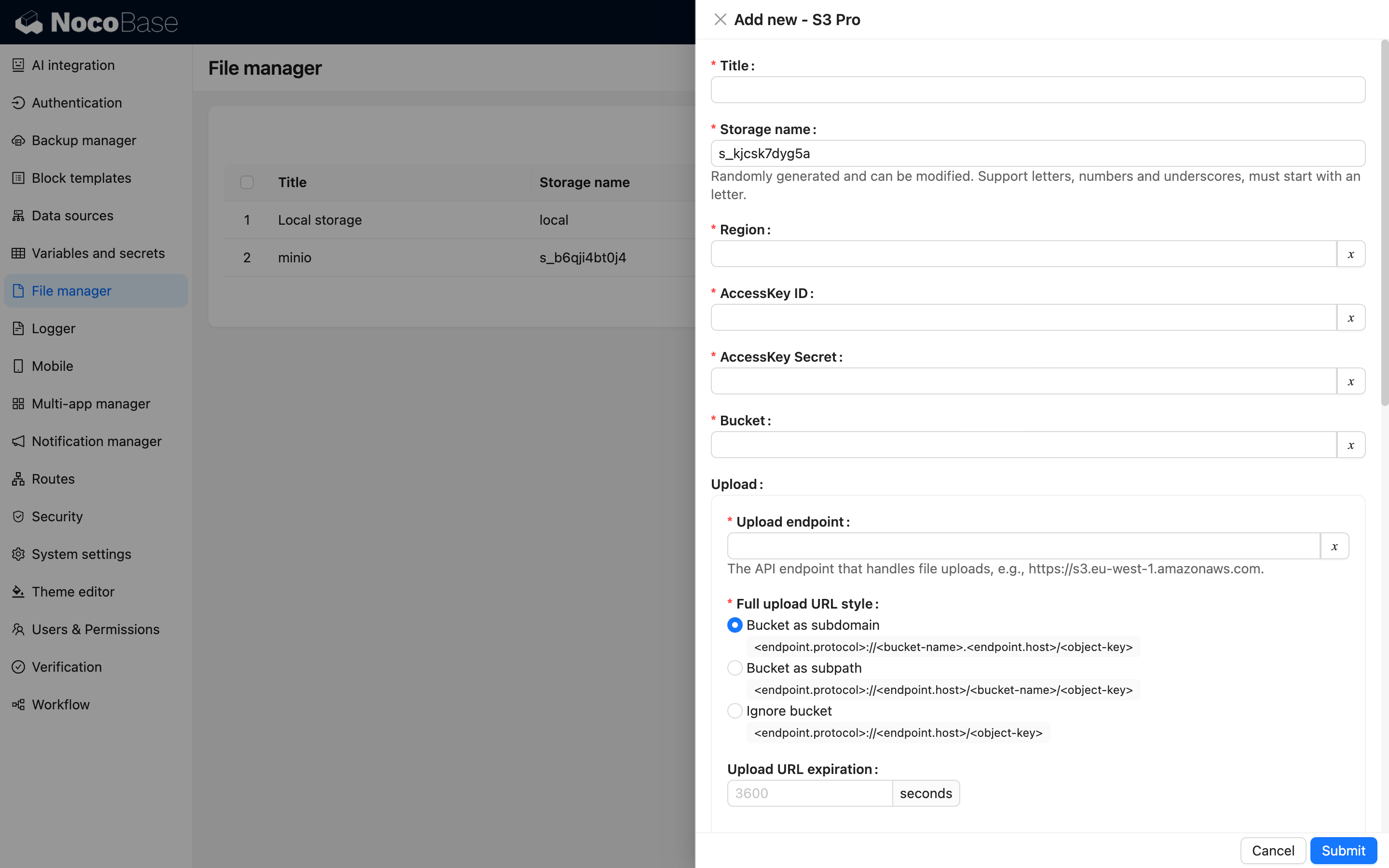
- package/dist/ai/docs/nocobase/data-sources/data-modeling/collection-fields/basic/password.md +102 -4
- package/dist/ai/docs/nocobase/data-sources/data-modeling/collection-fields/basic/percent.md +104 -5
- package/dist/ai/docs/nocobase/data-sources/data-modeling/collection-fields/basic/phone.md +104 -4
- package/dist/ai/docs/nocobase/data-sources/data-modeling/collection-fields/basic/textarea.md +99 -8
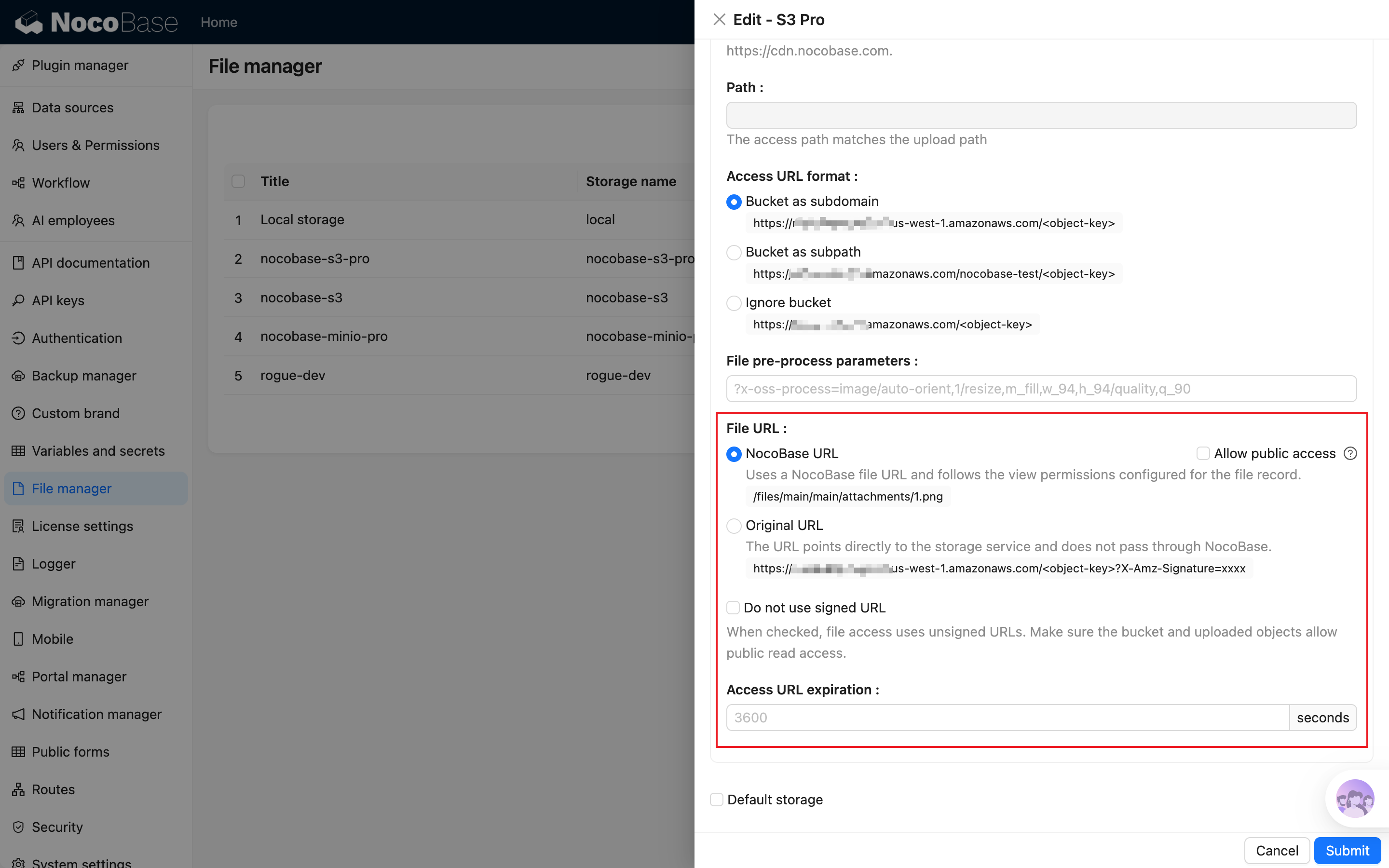
- package/dist/ai/docs/nocobase/data-sources/data-modeling/collection-fields/basic/url.md +103 -4
- package/dist/ai/docs/nocobase/data-sources/data-modeling/collection-fields/choices/checkbox-group.md +105 -3
- package/dist/ai/docs/nocobase/data-sources/data-modeling/collection-fields/choices/checkbox.md +102 -4
- package/dist/ai/docs/nocobase/data-sources/data-modeling/collection-fields/choices/china-region.md +108 -5
- package/dist/ai/docs/nocobase/data-sources/data-modeling/collection-fields/choices/multiple-select.md +103 -5
- package/dist/ai/docs/nocobase/data-sources/data-modeling/collection-fields/choices/radio-group.md +106 -4
- package/dist/ai/docs/nocobase/data-sources/data-modeling/collection-fields/choices/select.md +103 -5
- package/dist/ai/docs/nocobase/data-sources/data-modeling/collection-fields/datetime/date.md +102 -4
- package/dist/ai/docs/nocobase/data-sources/data-modeling/collection-fields/datetime/datetime-without-tz.md +103 -5
- package/dist/ai/docs/nocobase/data-sources/data-modeling/collection-fields/datetime/datetime.md +103 -5
- package/dist/ai/docs/nocobase/data-sources/data-modeling/collection-fields/datetime/index.md +53 -47
- package/dist/ai/docs/nocobase/data-sources/data-modeling/collection-fields/datetime/time.md +102 -4
- package/dist/ai/docs/nocobase/data-sources/data-modeling/collection-fields/datetime/unix-timestamp.md +103 -5
- package/dist/ai/docs/nocobase/data-sources/data-modeling/collection-fields/geometric/circle.md +102 -4
- package/dist/ai/docs/nocobase/data-sources/data-modeling/collection-fields/geometric/line.md +103 -5
- package/dist/ai/docs/nocobase/data-sources/data-modeling/collection-fields/geometric/point.md +102 -4
- package/dist/ai/docs/nocobase/data-sources/data-modeling/collection-fields/geometric/polygon.md +102 -4
- package/dist/ai/docs/nocobase/data-sources/data-modeling/collection-fields/index.md +62 -16
- package/dist/ai/docs/nocobase/data-sources/data-modeling/collection-fields/media/markdown.md +104 -4
- package/dist/ai/docs/nocobase/data-sources/data-modeling/collection-fields/media/rich-text.md +105 -5
- package/dist/ai/docs/nocobase/data-sources/data-modeling/collection-fields/system-info/created-at.md +105 -5
- package/dist/ai/docs/nocobase/data-sources/data-modeling/collection-fields/system-info/created-by.md +103 -5
- package/dist/ai/docs/nocobase/data-sources/data-modeling/collection-fields/system-info/space.md +100 -6
- package/dist/ai/docs/nocobase/data-sources/data-modeling/collection-fields/system-info/table-oid.md +102 -4
- package/dist/ai/docs/nocobase/data-sources/data-modeling/collection-fields/system-info/updated-at.md +104 -5
- package/dist/ai/docs/nocobase/data-sources/data-modeling/collection-fields/system-info/updated-by.md +104 -6
- package/dist/ai/docs/nocobase/data-sources/data-modeling/collection-fields/validation.md +68 -58
- package/dist/ai/docs/nocobase/data-sources/data-modeling/collection.md +32 -13
- package/dist/ai/docs/nocobase/data-sources/data-modeling/index.md +41 -33
- package/dist/ai/docs/nocobase/data-sources/data-source-external-mariadb/index.md +114 -6
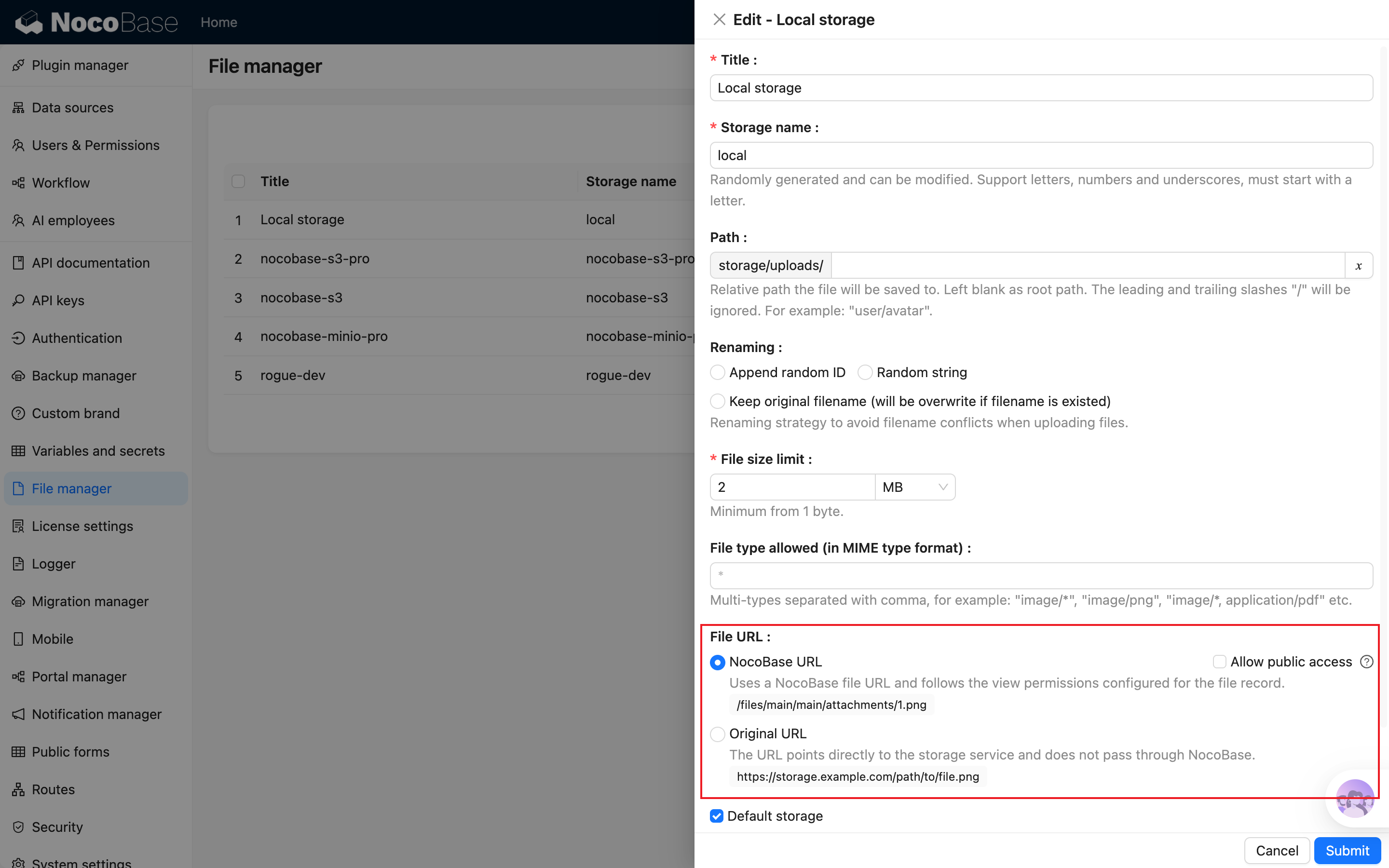
- package/dist/ai/docs/nocobase/data-sources/data-source-external-mssql/index.md +117 -6
- package/dist/ai/docs/nocobase/data-sources/data-source-external-mysql/index.md +103 -6
- package/dist/ai/docs/nocobase/data-sources/data-source-external-nocobase/index.md +75 -73
- package/dist/ai/docs/nocobase/data-sources/data-source-external-oracle/index.md +129 -11
- package/dist/ai/docs/nocobase/data-sources/data-source-external-postgres/index.md +110 -6
- package/dist/ai/docs/nocobase/data-sources/data-source-kingbase/index.md +75 -49
- package/dist/ai/docs/nocobase/data-sources/data-source-main/general-collection.md +116 -15
- package/dist/ai/docs/nocobase/data-sources/data-source-main/index.md +92 -62
- package/dist/ai/docs/nocobase/data-sources/data-source-main/inheritance-collection.md +97 -10
- package/dist/ai/docs/nocobase/data-sources/data-source-manager/external-database.md +97 -58
- package/dist/ai/docs/nocobase/data-sources/data-source-manager/index.md +32 -24
- package/dist/ai/docs/nocobase/data-sources/data-source-rest-api/index.md +115 -153
- package/dist/ai/docs/nocobase/data-sources/external/clickhouse.md +124 -0
- package/dist/ai/docs/nocobase/data-sources/external/doris.md +130 -0
- package/dist/ai/docs/nocobase/data-sources/external/index.md +140 -0
- package/dist/ai/docs/nocobase/data-sources/external/kingbase.md +129 -0
- package/dist/ai/docs/nocobase/data-sources/external/mariadb.md +126 -0
- package/dist/ai/docs/nocobase/data-sources/external/mssql.md +129 -0
- package/dist/ai/docs/nocobase/data-sources/external/mysql.md +115 -0
- package/dist/ai/docs/nocobase/data-sources/external/nocobase.md +159 -0
- package/dist/ai/docs/nocobase/data-sources/external/oceanbase.md +126 -0
- package/dist/ai/docs/nocobase/data-sources/external/oracle.md +158 -0
- package/dist/ai/docs/nocobase/data-sources/external/postgresql.md +122 -0
- package/dist/ai/docs/nocobase/data-sources/external/rest-api.md +245 -0
- package/dist/ai/docs/nocobase/data-sources/field-attachment-url/index.md +100 -12
- package/dist/ai/docs/nocobase/data-sources/field-encryption/index.md +48 -47
- package/dist/ai/docs/nocobase/data-sources/field-formula/index.md +99 -5
- package/dist/ai/docs/nocobase/data-sources/field-markdown-vditor/index.md +105 -5
- package/dist/ai/docs/nocobase/data-sources/field-sequence/index.md +102 -5
- package/dist/ai/docs/nocobase/data-sources/field-signature/index.md +18 -16
- package/dist/ai/docs/nocobase/data-sources/field-sort/index.md +76 -73
- package/dist/ai/docs/nocobase/data-sources/file-manager/field-attachment.md +101 -7
- package/dist/ai/docs/nocobase/data-sources/file-manager/file-collection.md +101 -14
- package/dist/ai/docs/nocobase/data-sources/index.md +49 -33
- package/dist/ai/docs/nocobase/data-sources/main/index.md +130 -0
- package/dist/ai/docs/nocobase/data-sources/main/kingbase.md +147 -0
- package/dist/ai/docs/nocobase/data-sources/main/mariadb.md +59 -0
- package/dist/ai/docs/nocobase/data-sources/main/mysql.md +59 -0
- package/dist/ai/docs/nocobase/data-sources/main/oceanbase.md +62 -0
- package/dist/ai/docs/nocobase/data-sources/main/postgresql.md +61 -0
- package/dist/ai/docs/nocobase/file-manager/storage/index.md +66 -26
- package/dist/ai/docs/nocobase/file-manager/storage/s3-pro.md +58 -7
- package/dist/ai/docs/nocobase/get-started/installation/env.md +2 -2
- package/dist/ai/docs/nocobase/ops-management/migration-manager/built-in-tables.md +1 -2
- package/dist/ai/docs/nocobase/runjs/context/ai.md +194 -4
- package/dist/ai/tools/executeFrontendTool.d.ts +10 -0
- package/dist/ai/tools/executeFrontendTool.js +86 -0
- package/dist/ai/tools/getSkill.js +1 -1
- package/dist/ai/tools/loadFrontendTool.d.ts +10 -0
- package/dist/ai/tools/loadFrontendTool.js +99 -0
- package/dist/client/244.8631eb5cf3f05e21.js +10 -0
- package/dist/client/{525.203778500aca5d05.js → 525.94dd4136c1361477.js} +1 -1
- package/dist/client/681.6ffbc9329b9ac242.js +10 -0
- package/dist/{client-v2/705.1d10027ff8cfdf79.js → client/705.19b642db34de438a.js} +1 -1
- package/dist/client/index.d.ts +1 -3
- package/dist/client/index.js +8 -8
- package/dist/client-v2/244.c428e645ecb94414.js +10 -0
- package/dist/client-v2/420.b2aedb1ff71fca0e.js +10 -0
- package/dist/client-v2/681.6890caa389564ff7.js +10 -0
- package/dist/client-v2/705.8dc34d43f02f322c.js +10 -0
- package/dist/client-v2/ai-employees/AIEmployeeShortcut.d.ts +2 -0
- package/dist/client-v2/ai-employees/AddContextButton.d.ts +2 -0
- package/dist/client-v2/ai-employees/chatbox/components/AIEmployeeSwitcher.d.ts +1 -0
- package/dist/client-v2/ai-employees/chatbox/components/ChatBoxUnreadBadge.d.ts +17 -0
- package/dist/client-v2/ai-employees/chatbox/components/Conversations.d.ts +9 -1
- package/dist/client-v2/ai-employees/chatbox/components/MessageRenderers.d.ts +1 -1
- package/dist/client-v2/ai-employees/chatbox/components/Messages.d.ts +5 -1
- package/dist/client-v2/ai-employees/chatbox/components/ModelSwitcher.d.ts +4 -0
- package/dist/client-v2/ai-employees/chatbox/components/Sender.d.ts +33 -1
- package/dist/client-v2/ai-employees/chatbox/components/index.d.ts +1 -0
- package/dist/client-v2/ai-employees/chatbox/hooks/useChat.d.ts +8 -5
- package/dist/client-v2/ai-employees/chatbox/hooks/useChatBoxActions.d.ts +3 -2
- package/dist/client-v2/ai-employees/chatbox/hooks/useChatBoxEffect.d.ts +2 -1
- package/dist/client-v2/ai-employees/chatbox/hooks/useChatConversationActions.d.ts +3 -2
- package/dist/client-v2/ai-employees/chatbox/hooks/useChatMessageActions.d.ts +4 -2
- package/dist/client-v2/ai-employees/chatbox/hooks/useToolCallActions.d.ts +3 -1
- package/dist/client-v2/ai-employees/chatbox/hooks/useUploadFiles.d.ts +13 -3
- package/dist/client-v2/ai-employees/chatbox/hooks/useWorkflowTasks.d.ts +3 -2
- package/dist/client-v2/ai-employees/chatbox/index.d.ts +17 -0
- package/dist/client-v2/ai-employees/chatbox/roles.d.ts +2 -153
- package/dist/client-v2/ai-employees/chatbox/stores/chat-box.d.ts +46 -31
- package/dist/client-v2/ai-employees/chatbox/stores/chat-conversations.d.ts +7 -7
- package/dist/client-v2/ai-employees/chatbox/stores/chat-messages.d.ts +23 -18
- package/dist/client-v2/ai-employees/chatbox/stores/chat-sender.d.ts +43 -0
- package/dist/client-v2/ai-employees/chatbox/stores/chat-tool-call.d.ts +6 -5
- package/dist/client-v2/ai-employees/chatbox/stores/chat-tools.d.ts +11 -5
- package/dist/client-v2/ai-employees/chatbox/stores/mounted-chat-boxes.d.ts +20 -0
- package/dist/client-v2/ai-employees/chatbox/stores/runtime.d.ts +43 -0
- package/dist/client-v2/ai-employees/chatbox/stores/workflow-tasks.d.ts +22 -10
- package/dist/client-v2/ai-employees/chatbox/upload.d.ts +19 -0
- package/dist/client-v2/ai-employees/chatbox/utils.d.ts +28 -4
- package/dist/client-v2/ai-employees/frontend-tools.d.ts +11 -0
- package/dist/client-v2/ai-employees/tools/SuggestionsOptionsCard.d.ts +1 -1
- package/dist/client-v2/ai-employees/tools/WorkflowTaskOutputCard.d.ts +1 -1
- package/dist/client-v2/ai-employees/types.d.ts +30 -0
- package/dist/client-v2/block/ai-chat-box/AIChatBoxBlockModel.d.ts +21 -0
- package/dist/client-v2/block/ai-chat-box/AIChatBoxCoreModel.d.ts +13 -0
- package/dist/client-v2/block/ai-chat-box/components/AIChatBoxCoreView.d.ts +10 -0
- package/dist/client-v2/block/ai-chat-box/components/AIChatBoxView.d.ts +12 -0
- package/dist/client-v2/block/ai-chat-box/index.d.ts +14 -0
- package/dist/client-v2/block/ai-chat-box/settings.d.ts +12 -0
- package/dist/client-v2/block/ai-chat-box/sub-models.d.ts +26 -0
- package/dist/client-v2/block/ai-chat-box/types.d.ts +38 -0
- package/dist/client-v2/block/ai-chat-box/utils.d.ts +26 -0
- package/dist/client-v2/index.d.ts +3 -5
- package/dist/client-v2/index.js +3 -3
- package/dist/client-v2/llm-services/model-select.d.ts +33 -0
- package/dist/client-v2/llm-services/utils.d.ts +1 -0
- package/dist/client-v2/manager/ai-manager.d.ts +10 -3
- package/dist/client-v2/manager/frontend-tool-registry.d.ts +30 -0
- package/dist/client-v2/models/ai-employees/AIEmployeeActionModel.d.ts +4 -1
- package/dist/client-v2/models/ai-employees/AIEmployeeShortcutModel.d.ts +5 -0
- package/dist/client-v2/pages/EmployeesPage.d.ts +2 -0
- package/dist/client-v2/runjs/registerAIEmployeeRunJSFacade.d.ts +1 -0
- package/dist/common/ai-employee-validation.d.ts +15 -0
- package/dist/common/ai-employee-validation.js +61 -0
- package/dist/common/error-codes.d.ts +13 -0
- package/dist/common/error-codes.js +48 -0
- package/dist/common/frontend-tools.d.ts +26 -0
- package/dist/common/frontend-tools.js +57 -0
- package/dist/common/llm-service-models.d.ts +16 -0
- package/dist/common/llm-service-models.js +84 -0
- package/dist/externalVersion.js +16 -16
- package/dist/locale/en-US.json +67 -0
- package/dist/locale/zh-CN.json +67 -0
- package/dist/node_modules/@langchain/mistralai/package.json +1 -1
- package/dist/node_modules/@langchain/xai/package.json +1 -1
- package/dist/node_modules/fs-extra/package.json +1 -1
- package/dist/node_modules/jsonrepair/package.json +1 -1
- package/dist/node_modules/just-bash/package.json +1 -1
- package/dist/node_modules/nodejs-snowflake/package.json +1 -1
- package/dist/node_modules/openai/package.json +1 -1
- package/dist/node_modules/zod/package.json +1 -1
- package/dist/server/ai-employees/ai-conversations.d.ts +4 -1
- package/dist/server/ai-employees/ai-conversations.js +2 -0
- package/dist/server/ai-employees/ai-employee.d.ts +2 -1
- package/dist/server/ai-employees/ai-employee.js +26 -7
- package/dist/server/ai-employees/middleware/conversation.js +9 -2
- package/dist/server/collections/ai-conversations.js +5 -0
- package/dist/server/document-loader/constants.js +1 -1
- package/dist/server/frontend-tools.d.ts +25 -0
- package/dist/server/frontend-tools.js +171 -0
- package/dist/server/manager/work-context-handler.js +10 -3
- package/dist/server/plugin.d.ts +1 -0
- package/dist/server/plugin.js +25 -0
- package/dist/server/resource/aiConversations.d.ts +2 -0
- package/dist/server/resource/aiConversations.js +33 -3
- package/dist/server/resource/aiEmployees.d.ts +2 -0
- package/dist/server/resource/aiEmployees.js +62 -0
- package/dist/server/resource/aiWorkflowTasks.js +9 -1
- package/dist/server/resource/llmServices.d.ts +11 -0
- package/dist/server/resource/llmServices.js +85 -0
- package/dist/server/types/knowledge-base.type.d.ts +6 -2
- package/dist/swagger/common.d.ts +143 -0
- package/dist/swagger/common.js +144 -0
- package/dist/swagger/employees.d.ts +301 -0
- package/dist/swagger/employees.js +131 -0
- package/dist/swagger/index.d.ts +1588 -0
- package/dist/swagger/index.js +62 -0
- package/dist/swagger/llm.d.ts +555 -0
- package/dist/swagger/llm.js +247 -0
- package/dist/swagger/schemas.d.ts +736 -0
- package/dist/swagger/schemas.js +381 -0
- package/package.json +2 -2
- package/dist/ai/docs/nocobase/ai-employees/knowledge-base/vector-store.md +0 -24
- package/dist/ai/docs/nocobase/data-sources/development/index.md +0 -6
- package/dist/client/372.40eb52905e3f3049.js +0 -10
- package/dist/client/681.399948c18d753667.js +0 -10
- package/dist/client/705.380279da896021fb.js +0 -10
- package/dist/client-v2/372.8cc3fde09c9bec77.js +0 -10
- package/dist/client-v2/406.341be51205c674e0.js +0 -10
- package/dist/client-v2/681.082f4f1c7b841983.js +0 -10
- package/dist/client-v2/ai-employees/chatbox/stores/create-selectors.d.ts +0 -46
- package/dist/client-v2/ai-employees/chatbox/utils/normalizeTriggerTaskOptions.d.ts +0 -19
|
@@ -0,0 +1,59 @@
|
|
|
1
|
+
---
|
|
2
|
+
pkg: "@nocobase/plugin-data-source-manager"
|
|
3
|
+
title: "Main data source - MariaDB"
|
|
4
|
+
description: "Learn the supported version, plugin installation, usage, and field mapping for MariaDB as the NocoBase main database."
|
|
5
|
+
keywords: "main data source,MariaDB,main database,field mapping,NocoBase"
|
|
6
|
+
---
|
|
7
|
+
|
|
8
|
+
# MariaDB
|
|
9
|
+
|
|
10
|
+
## Introduction
|
|
11
|
+
|
|
12
|
+
MariaDB can be used as the NocoBase main database. It stores NocoBase system-table data and business data in the main data source. Configure it when deploying NocoBase; it cannot be deleted after the application is running.
|
|
13
|
+
|
|
14
|
+
| Setting | Description |
|
|
15
|
+
| --- | --- |
|
|
16
|
+
| Supported version | >= 10.9. |
|
|
17
|
+
| Commercial editions | Community, Standard, Professional, and Enterprise. |
|
|
18
|
+
| Database type | MariaDB. |
|
|
19
|
+
|
|
20
|
+
MariaDB is similar to MySQL and is suitable as the main database for regular business systems.
|
|
21
|
+
|
|
22
|
+
## Plugin installation
|
|
23
|
+
|
|
24
|
+
MariaDB is built in and does not require a separate plugin.
|
|
25
|
+
|
|
26
|
+
## Usage
|
|
27
|
+
|
|
28
|
+
1. Select or enter MariaDB connection settings when deploying NocoBase.
|
|
29
|
+
2. After NocoBase starts, open **Data source management**, select **Main**, and manage collections and fields in the main database.
|
|
30
|
+
3. To connect tables that already exist in the database, use **Sync from database** on the main-database management page.
|
|
31
|
+
4. When configuring fields, use [Collections](../data-modeling/collection.md) and [Collection fields](../data-modeling/collection-fields/index.md) to choose Field types and Field interfaces.
|
|
32
|
+
|
|
33
|
+
## Field type mapping
|
|
34
|
+
|
|
35
|
+
When you create a field in NocoBase, NocoBase creates the corresponding MariaDB column. When you synchronize an existing table, NocoBase maps the MariaDB column type to a suitable Field type and Field interface. You can adjust the display interface in field configuration.
|
|
36
|
+
|
|
37
|
+
| MariaDB type | NocoBase Field type | Available Field interfaces |
|
|
38
|
+
| --- | --- | --- |
|
|
39
|
+
| `TINYINT`, `SMALLINT`, `MEDIUMINT` | `integer`, `boolean`, `sort` | Integer, Sort, Checkbox, Switch, Select, Radio group. |
|
|
40
|
+
| `INT`, `INTEGER` | `integer`, `unixTimestamp`, `sort` | Integer, Sort, Unix timestamp, Select, Radio group. |
|
|
41
|
+
| `BIGINT` | `bigInt`, `snowflakeId`, `unixTimestamp`, `sort` | Integer, Sort, Unix timestamp, Created at, Updated at. |
|
|
42
|
+
| `FLOAT`, `DOUBLE` | `float` | Number, Percent. |
|
|
43
|
+
| `DECIMAL` | `decimal` | Number, Percent, Currency. |
|
|
44
|
+
| `CHAR`, `VARCHAR` | `string`, `uuid`, `nanoid`, `encryption` | Input, Email, Phone, Password, Color, Icon, Select, Radio group, UUID, Nano ID. |
|
|
45
|
+
| `TINYTEXT`, `TEXT`, `MEDIUMTEXT`, `LONGTEXT` | `text` | Textarea, Markdown, Vditor, Rich text, URL. |
|
|
46
|
+
| `DATE` | `dateOnly` | Date. |
|
|
47
|
+
| `TIME` | `time` | Time. |
|
|
48
|
+
| `DATETIME` | `datetimeNoTz`, `datetimeTz`, `date` | Date, Time, Created at, Updated at. |
|
|
49
|
+
| `TIMESTAMP` | `datetimeTz`, `date` | Date, Time, Created at, Updated at. |
|
|
50
|
+
| `YEAR` | `string`, `integer` | Input, Integer, Date. |
|
|
51
|
+
| `JSON` | `json`, `array` | JSON. |
|
|
52
|
+
|
|
53
|
+
:::warning Note
|
|
54
|
+
|
|
55
|
+
Unsupported MariaDB types are shown separately in field configuration. They require development support before they can be used as normal NocoBase fields.
|
|
56
|
+
|
|
57
|
+
:::
|
|
58
|
+
|
|
59
|
+
For common configuration, see [Main database](./index.md).
|
|
@@ -0,0 +1,59 @@
|
|
|
1
|
+
---
|
|
2
|
+
pkg: "@nocobase/plugin-data-source-manager"
|
|
3
|
+
title: "Main data source - MySQL"
|
|
4
|
+
description: "Learn the supported version, plugin installation, usage, and field mapping for MySQL as the NocoBase main database."
|
|
5
|
+
keywords: "main data source,MySQL,main database,field mapping,NocoBase"
|
|
6
|
+
---
|
|
7
|
+
|
|
8
|
+
# MySQL
|
|
9
|
+
|
|
10
|
+
## Introduction
|
|
11
|
+
|
|
12
|
+
MySQL can be used as the NocoBase main database. It stores NocoBase system-table data and business data in the main data source. Configure it when deploying NocoBase; it cannot be deleted after the application is running.
|
|
13
|
+
|
|
14
|
+
| Setting | Description |
|
|
15
|
+
| --- | --- |
|
|
16
|
+
| Supported version | >= 8.0.17. |
|
|
17
|
+
| Commercial editions | Community, Standard, Professional, and Enterprise. |
|
|
18
|
+
| Database type | MySQL. |
|
|
19
|
+
|
|
20
|
+
MySQL is suitable as the main database for regular business systems.
|
|
21
|
+
|
|
22
|
+
## Plugin installation
|
|
23
|
+
|
|
24
|
+
MySQL is built in and does not require a separate plugin.
|
|
25
|
+
|
|
26
|
+
## Usage
|
|
27
|
+
|
|
28
|
+
1. Select or enter MySQL connection settings when deploying NocoBase.
|
|
29
|
+
2. After NocoBase starts, open **Data source management**, select **Main**, and manage collections and fields in the main database.
|
|
30
|
+
3. To connect tables that already exist in the database, use **Sync from database** on the main-database management page.
|
|
31
|
+
4. When configuring fields, use [Collections](../data-modeling/collection.md) and [Collection fields](../data-modeling/collection-fields/index.md) to choose Field types and Field interfaces.
|
|
32
|
+
|
|
33
|
+
## Field type mapping
|
|
34
|
+
|
|
35
|
+
When you create a field in NocoBase, NocoBase creates the corresponding MySQL column. When you synchronize an existing table, NocoBase maps the MySQL column type to a suitable Field type and Field interface. You can adjust the display interface in field configuration.
|
|
36
|
+
|
|
37
|
+
| MySQL type | NocoBase Field type | Available Field interfaces |
|
|
38
|
+
| --- | --- | --- |
|
|
39
|
+
| `TINYINT`, `SMALLINT`, `MEDIUMINT` | `integer`, `boolean`, `sort` | Integer, Sort, Checkbox, Switch, Select, Radio group. |
|
|
40
|
+
| `INT`, `INTEGER` | `integer`, `unixTimestamp`, `sort` | Integer, Sort, Unix timestamp, Select, Radio group. |
|
|
41
|
+
| `BIGINT` | `bigInt`, `snowflakeId`, `unixTimestamp`, `sort` | Integer, Sort, Unix timestamp, Created at, Updated at. |
|
|
42
|
+
| `FLOAT`, `DOUBLE` | `float` | Number, Percent. |
|
|
43
|
+
| `DECIMAL` | `decimal` | Number, Percent, Currency. |
|
|
44
|
+
| `CHAR`, `VARCHAR` | `string`, `uuid`, `nanoid`, `encryption` | Input, Email, Phone, Password, Color, Icon, Select, Radio group, UUID, Nano ID. |
|
|
45
|
+
| `TINYTEXT`, `TEXT`, `MEDIUMTEXT`, `LONGTEXT` | `text` | Textarea, Markdown, Vditor, Rich text, URL. |
|
|
46
|
+
| `DATE` | `dateOnly` | Date. |
|
|
47
|
+
| `TIME` | `time` | Time. |
|
|
48
|
+
| `DATETIME` | `datetimeNoTz`, `datetimeTz`, `date` | Date, Time, Created at, Updated at. |
|
|
49
|
+
| `TIMESTAMP` | `datetimeTz`, `date` | Date, Time, Created at, Updated at. |
|
|
50
|
+
| `YEAR` | `string`, `integer` | Input, Integer, Date. |
|
|
51
|
+
| `JSON` | `json`, `array` | JSON. |
|
|
52
|
+
|
|
53
|
+
:::warning Note
|
|
54
|
+
|
|
55
|
+
Unsupported MySQL types are shown separately in field configuration. They require development support before they can be used as normal NocoBase fields.
|
|
56
|
+
|
|
57
|
+
:::
|
|
58
|
+
|
|
59
|
+
For common configuration, see [Main database](./index.md).
|
|
@@ -0,0 +1,62 @@
|
|
|
1
|
+
---
|
|
2
|
+
pkg: "@nocobase/plugin-data-source-oceanbase"
|
|
3
|
+
title: "Main data source - OceanBase"
|
|
4
|
+
description: "Learn the supported version, plugin installation, usage, and field mapping for OceanBase as the NocoBase main database."
|
|
5
|
+
keywords: "main data source,OceanBase,main database,field mapping,NocoBase"
|
|
6
|
+
---
|
|
7
|
+
|
|
8
|
+
# OceanBase
|
|
9
|
+
|
|
10
|
+
## Introduction
|
|
11
|
+
|
|
12
|
+
OceanBase can be used as the NocoBase main database. It stores NocoBase system-table data and business data in the main data source. Configure it when deploying NocoBase; it cannot be deleted after the application is running.
|
|
13
|
+
|
|
14
|
+
| Setting | Description |
|
|
15
|
+
| --- | --- |
|
|
16
|
+
| Supported version | >= 4.3. |
|
|
17
|
+
| Commercial editions | Enterprise. |
|
|
18
|
+
| Database type | MySQL compatibility mode. |
|
|
19
|
+
|
|
20
|
+
:::warning Note
|
|
21
|
+
|
|
22
|
+
OceanBase is supported as the main database only in MySQL compatibility mode.
|
|
23
|
+
|
|
24
|
+
:::
|
|
25
|
+
|
|
26
|
+
## Plugin installation
|
|
27
|
+
|
|
28
|
+
OceanBase is provided by `@nocobase/plugin-data-source-oceanbase` and requires a commercial license.
|
|
29
|
+
|
|
30
|
+
## Usage
|
|
31
|
+
|
|
32
|
+
1. Select or enter OceanBase connection settings when deploying NocoBase.
|
|
33
|
+
2. After NocoBase starts, open **Data source management**, select **Main**, and manage collections and fields in the main database.
|
|
34
|
+
3. To connect tables that already exist in the database, use **Sync from database** on the main-database management page.
|
|
35
|
+
4. When configuring fields, use [Collections](../data-modeling/collection.md) and [Collection fields](../data-modeling/collection-fields/index.md) to choose Field types and Field interfaces.
|
|
36
|
+
|
|
37
|
+
## Field type mapping
|
|
38
|
+
|
|
39
|
+
When you create a field in NocoBase, NocoBase creates the corresponding OceanBase column. When you synchronize an existing table, NocoBase uses MySQL-compatible mapping to select a suitable Field type and Field interface. You can adjust the display interface in field configuration.
|
|
40
|
+
|
|
41
|
+
| OceanBase type | NocoBase Field type | Available Field interfaces |
|
|
42
|
+
| --- | --- | --- |
|
|
43
|
+
| `TINYINT`, `SMALLINT`, `MEDIUMINT` | `integer`, `boolean`, `sort` | Integer, Sort, Checkbox, Switch, Select, Radio group. |
|
|
44
|
+
| `INT`, `INTEGER` | `integer`, `unixTimestamp`, `sort` | Integer, Sort, Unix timestamp, Select, Radio group. |
|
|
45
|
+
| `BIGINT` | `bigInt`, `snowflakeId`, `unixTimestamp`, `sort` | Integer, Sort, Unix timestamp, Created at, Updated at. |
|
|
46
|
+
| `FLOAT`, `DOUBLE` | `float` | Number, Percent. |
|
|
47
|
+
| `DECIMAL` | `decimal` | Number, Percent, Currency. |
|
|
48
|
+
| `CHAR`, `VARCHAR` | `string`, `uuid`, `nanoid`, `encryption` | Input, Email, Phone, Password, Color, Icon, Select, Radio group, UUID, Nano ID. |
|
|
49
|
+
| `TEXT` | `text` | Textarea, Markdown, Vditor, Rich text, URL. |
|
|
50
|
+
| `DATE` | `dateOnly` | Date. |
|
|
51
|
+
| `TIME` | `time` | Time. |
|
|
52
|
+
| `DATETIME` | `datetimeNoTz`, `datetimeTz`, `date` | Date, Time, Created at, Updated at. |
|
|
53
|
+
| `TIMESTAMP` | `datetimeTz`, `date` | Date, Time, Created at, Updated at. |
|
|
54
|
+
| `JSON` | `json`, `array` | JSON. |
|
|
55
|
+
|
|
56
|
+
:::warning Note
|
|
57
|
+
|
|
58
|
+
Unsupported OceanBase types are shown separately in field configuration. They require development support before they can be used as normal NocoBase fields.
|
|
59
|
+
|
|
60
|
+
:::
|
|
61
|
+
|
|
62
|
+
For common configuration, see [Main database](./index.md).
|
|
@@ -0,0 +1,61 @@
|
|
|
1
|
+
---
|
|
2
|
+
pkg: "@nocobase/plugin-data-source-manager"
|
|
3
|
+
title: "Main data source - PostgreSQL"
|
|
4
|
+
description: "Learn the supported version, plugin installation, usage, and field mapping for PostgreSQL as the NocoBase main database."
|
|
5
|
+
keywords: "main data source,PostgreSQL,main database,field mapping,NocoBase"
|
|
6
|
+
---
|
|
7
|
+
|
|
8
|
+
# PostgreSQL
|
|
9
|
+
|
|
10
|
+
## Introduction
|
|
11
|
+
|
|
12
|
+
PostgreSQL can be used as the NocoBase main database. It stores NocoBase system-table data and business data in the main data source. Configure the main database when deploying NocoBase; it cannot be deleted after the application is running.
|
|
13
|
+
|
|
14
|
+
| Setting | Description |
|
|
15
|
+
| --- | --- |
|
|
16
|
+
| Supported version | >= 10. |
|
|
17
|
+
| Commercial editions | Community, Standard, Professional, and Enterprise. |
|
|
18
|
+
| Database type | PostgreSQL. |
|
|
19
|
+
|
|
20
|
+
PostgreSQL supports inheritance collections, which are suitable for data models that need inheritance.
|
|
21
|
+
|
|
22
|
+
## Plugin installation
|
|
23
|
+
|
|
24
|
+
PostgreSQL is built in and does not require a separate plugin.
|
|
25
|
+
|
|
26
|
+
## Usage
|
|
27
|
+
|
|
28
|
+
1. Select or enter PostgreSQL connection settings when deploying NocoBase.
|
|
29
|
+
2. After NocoBase starts, open **Data source management**, select **Main**, and manage collections and fields in the main database.
|
|
30
|
+
3. To connect tables that already exist in the database, use **Sync from database** on the main-database management page.
|
|
31
|
+
4. When configuring fields, use [Collections](../data-modeling/collection.md) and [Collection fields](../data-modeling/collection-fields/index.md) to choose Field types and Field interfaces.
|
|
32
|
+
|
|
33
|
+
## Field type mapping
|
|
34
|
+
|
|
35
|
+
When you create a field in NocoBase, NocoBase creates the corresponding PostgreSQL column. When you synchronize an existing table, NocoBase maps the PostgreSQL column type to a suitable Field type and Field interface. You can adjust the display interface in field configuration.
|
|
36
|
+
|
|
37
|
+
| PostgreSQL type | NocoBase Field type | Available Field interfaces |
|
|
38
|
+
| --- | --- | --- |
|
|
39
|
+
| `BOOLEAN` | `boolean` | Checkbox, Switch. |
|
|
40
|
+
| `SMALLINT`, `INTEGER`, `SERIAL`, `SMALLSERIAL` | `integer`, `boolean`, `sort` | Integer, Sort, Checkbox, Switch, Select, Radio group. |
|
|
41
|
+
| `BIGINT`, `BIGSERIAL` | `bigInt`, `sort` | Integer, Sort, Checkbox, Switch, Select, Radio group, Unix timestamp, Created at, Updated at. |
|
|
42
|
+
| `REAL` | `float` | Number, Percent. |
|
|
43
|
+
| `DOUBLE PRECISION` | `double` | Number, Percent. |
|
|
44
|
+
| `DECIMAL`, `NUMERIC` | `decimal` | Number, Percent, Currency. |
|
|
45
|
+
| `VARCHAR`, `CHAR` | `string`, `password`, `uuid`, `nanoid` | Input, Email, Phone, Password, Color, Icon, Select, Radio group, UUID, Nano ID. |
|
|
46
|
+
| `TEXT` | `text`, `json` | Textarea, Markdown, Vditor, Rich text, URL, JSON. |
|
|
47
|
+
| `UUID` | `uuid` | UUID. |
|
|
48
|
+
| `JSON`, `JSONB` | `json` | JSON. |
|
|
49
|
+
| `TIMESTAMP` | `date` | Date, Time, Created at, Updated at. |
|
|
50
|
+
| `DATE` | `dateOnly` | Date. |
|
|
51
|
+
| `TIME` | `time` | Time. |
|
|
52
|
+
| `POINT`, `LINESTRING`, `POLYGON`, `CIRCLE` | `point`, `lineString`, `polygon`, `circle` | Point, Line string, Polygon, Circle, JSON. |
|
|
53
|
+
| `ARRAY` | `array` | Multiple select, Checkbox group. |
|
|
54
|
+
|
|
55
|
+
:::warning Note
|
|
56
|
+
|
|
57
|
+
Unsupported PostgreSQL types are shown separately in field configuration. They require development support before they can be used as normal NocoBase fields.
|
|
58
|
+
|
|
59
|
+
:::
|
|
60
|
+
|
|
61
|
+
For common configuration, see [Main database](./index.md).
|
|
@@ -17,30 +17,6 @@ Currently, NocoBase has built-in support for the following engine types:
|
|
|
17
17
|
- [S3 Pro](./s3-pro)
|
|
18
18
|
|
|
19
19
|
The system automatically adds a local storage engine during installation, which can be used directly. You can also add new engines or edit the parameters of existing ones.
|
|
20
|
-
|
|
21
|
-
|
|
22
|
-
If you are already using a storage engine that only supports public access and want to migrate historical files to S3 Pro, see [Migrate to S3 Pro](./migrate-to-s3-pro.md).
|
|
23
|
-
|
|
24
|
-
## File Accessibility
|
|
25
|
-
|
|
26
|
-
Different storage engines support different file access controls. Before configuring a storage engine, confirm whether your files need private access:
|
|
27
|
-
|
|
28
|
-
| Storage engine | File accessibility |
|
|
29
|
-
| --- | --- |
|
|
30
|
-
| [Local Storage](./local) | Only public access is supported; private access is not supported |
|
|
31
|
-
| [Amazon S3](./amazon-s3) | Only public access is supported; private access is not supported |
|
|
32
|
-
| [Aliyun OSS](./aliyun-oss) | Only public access is supported; private access is not supported |
|
|
33
|
-
| [Tencent COS](./tencent-cos) | Only public access is supported; private access is not supported |
|
|
34
|
-
| [S3 Pro](./s3-pro) | Private access is supported through temporary signed URLs |
|
|
35
|
-
|
|
36
|
-
:::warning Note
|
|
37
|
-
|
|
38
|
-
Local Storage, Amazon S3, Aliyun OSS, and Tencent COS do not perform login authentication for file access and do not generate temporary signed URLs. After a file is uploaded, anyone who has the file access URL can access it directly.
|
|
39
|
-
|
|
40
|
-
If you need to store contracts, identity documents, internal materials, or other files that should not be public, use [S3 Pro](./s3-pro) and enable private access.
|
|
41
|
-
|
|
42
|
-
:::
|
|
43
|
-
|
|
44
20
|
## Common Parameters
|
|
45
21
|
|
|
46
22
|
In addition to the specific parameters for different engine types, the following are common parameters (using local storage as an example):
|
|
@@ -82,11 +58,75 @@ When checked, this is set as the system's default storage engine. When an attach
|
|
|
82
58
|
When checked, the uploaded file in the storage engine will be kept even when the data record in the attachment or file collection is deleted. By default, this is not checked, meaning the file in the storage engine will be deleted along with the record.
|
|
83
59
|
|
|
84
60
|
:::info{title=Tip}
|
|
85
|
-
|
|
61
|
+
When Original URL is selected, the final storage address is constructed from several parts:
|
|
86
62
|
|
|
87
63
|
```
|
|
88
64
|
<Public URL prefix>/<Path>/<Filename><Extension>
|
|
89
65
|
```
|
|
90
66
|
|
|
91
67
|
For example: `https://cdn.nocobase.com/app/user/avatar/20240529115151.png`.
|
|
92
|
-
|
|
68
|
+
|
|
69
|
+
When NocoBase URL is selected, the file record returns a NocoBase path in the `/files/...` format. The configuration above is still used when accessing the storage service.
|
|
70
|
+
:::
|
|
71
|
+
|
|
72
|
+
## File URLs and access control
|
|
73
|
+
|
|
74
|
+
A storage engine can return either a NocoBase URL or the storage service's original URL. NocoBase URL is the default. Select Original URL only when an external service must use the storage address directly.
|
|
75
|
+
|
|
76
|
+
This configuration applies per storage engine. After it is saved, both existing files and newly uploaded files under that engine return URLs in the selected form. Files are not moved or uploaded again.
|
|
77
|
+
|
|
78
|
+
|
|
79
|
+
|
|
80
|
+
### NocoBase URL
|
|
81
|
+
|
|
82
|
+
The file record returns an access path provided by NocoBase, for example:
|
|
83
|
+
|
|
84
|
+
```text
|
|
85
|
+
/files/main/main/attachments/1.png
|
|
86
|
+
```
|
|
87
|
+
|
|
88
|
+
Requests to this URL first pass through NocoBase and follow the view permissions configured for the corresponding file record. NocoBase reads the file or redirects to the address generated by the storage service only after the permission check succeeds.
|
|
89
|
+
|
|
90
|
+
This is the recommended default. The file record returns a NocoBase path, so callers do not need to know whether local or cloud storage is being used.
|
|
91
|
+
|
|
92
|
+
### Original URL
|
|
93
|
+
|
|
94
|
+
The file record directly returns the address generated by the storage service, for example:
|
|
95
|
+
|
|
96
|
+
```text
|
|
97
|
+
https://storage.example.com/path/to/file.png
|
|
98
|
+
```
|
|
99
|
+
|
|
100
|
+
This URL does not pass through NocoBase and does not check the file record's view permissions. For local storage, it is a local static file address. For cloud storage, it is usually an object storage or CDN address.
|
|
101
|
+
|
|
102
|
+
Select Original URL only when Markdown, an external page, or a third-party service must use the storage address directly.
|
|
103
|
+
|
|
104
|
+
:::warning Note
|
|
105
|
+
|
|
106
|
+
After Original URL is selected, anyone with a valid URL can bypass NocoBase permission checks and access the file. If the URL has no signature or expiration, make sure the bucket and file allow public read access.
|
|
107
|
+
|
|
108
|
+
:::
|
|
109
|
+
|
|
110
|
+
### Allow public access
|
|
111
|
+
|
|
112
|
+
Allow public access only takes effect when NocoBase URL is selected. When checked, the storage engine still returns a NocoBase URL, but NocoBase no longer checks the file record's permissions when the URL is accessed. Anyone with the URL can access the file.
|
|
113
|
+
|
|
114
|
+
This option does not change the storage service's own public-read configuration. It only controls whether NocoBase checks file record permissions.
|
|
115
|
+
|
|
116
|
+
### How to choose
|
|
117
|
+
|
|
118
|
+
| Use case | File URL | Allow public access |
|
|
119
|
+
| --- | --- | --- |
|
|
120
|
+
| Files must follow role and data permissions | NocoBase URL | Unchecked |
|
|
121
|
+
| A publicly shareable NocoBase file address is required | NocoBase URL | Checked |
|
|
122
|
+
| Markdown, an external page, or a third-party service must read the storage address directly | Original URL | Not applicable |
|
|
123
|
+
|
|
124
|
+
:::warning Note
|
|
125
|
+
|
|
126
|
+
[Local Storage](./local), [Amazon S3](./amazon-s3), [Aliyun OSS](./aliyun-oss), and [Tencent COS](./tencent-cos) do not generate temporary signed URLs. Even when NocoBase URL and file record permissions are enabled, anyone who has already obtained the storage service's original address can still access the file directly.
|
|
127
|
+
|
|
128
|
+
For contracts, identity documents, internal materials, or other files that should not be public, use [S3 Pro](./s3-pro) and refer to its dedicated access-control configuration.
|
|
129
|
+
|
|
130
|
+
:::
|
|
131
|
+
|
|
132
|
+
If you are already using a public storage engine and want to migrate existing files to S3 Pro, see [Migrate to S3 Pro](./migrate-to-s3-pro.md).
|
|
@@ -12,7 +12,7 @@ Building on the File Manager plugin, this adds support for S3 protocol-compatibl
|
|
|
12
12
|
|
|
13
13
|
1. Client-side upload: The file upload process does not go through the NocoBase server, but directly connects to the file storage service, providing a more efficient and faster upload experience.
|
|
14
14
|
|
|
15
|
-
2. Private access:
|
|
15
|
+
2. Private access: Signed URLs with an expiration are used by default. Unsigned URLs can also be generated for public buckets.
|
|
16
16
|
|
|
17
17
|
|
|
18
18
|
## Use Cases
|
|
@@ -39,6 +39,57 @@ Building on the File Manager plugin, this adds support for S3 protocol-compatibl
|
|
|
39
39
|
|
|
40
40
|
|
|
41
41
|
|
|
42
|
+
## URL Configuration
|
|
43
|
+
|
|
44
|
+
In addition to the File Manager's common NocoBase URL, Original URL, and Allow public access options, S3 Pro lets you configure upload and access URL formats separately and choose whether to use signed URLs. See [Storage Engine Overview](./index.md#file-urls-and-access-control) for the common options.
|
|
45
|
+
|
|
46
|
+
These options control different stages:
|
|
47
|
+
|
|
48
|
+
- NocoBase URL / Original URL controls which address the file record returns
|
|
49
|
+
- Allow public access controls whether file record view permissions are checked when a NocoBase URL is accessed
|
|
50
|
+
- Do not use signed URL controls whether the object storage service validates a URL signature
|
|
51
|
+
|
|
52
|
+
These settings can be combined independently. The recommended default is NocoBase URL, Allow public access unchecked, and signed URLs enabled.
|
|
53
|
+
|
|
54
|
+
|
|
55
|
+
|
|
56
|
+
### How to choose
|
|
57
|
+
|
|
58
|
+
| Use case | File URL | Allow public access | Do not use signed URL |
|
|
59
|
+
| --- | --- | --- | --- |
|
|
60
|
+
| Files must follow role and data permissions while the bucket remains private | NocoBase URL | Unchecked | Unchecked |
|
|
61
|
+
| A public NocoBase file address is required while the bucket remains private | NocoBase URL | Checked | Unchecked |
|
|
62
|
+
| An external service needs temporary access to the storage address | Original URL | Not applicable | Unchecked; configure Access URL expiration |
|
|
63
|
+
| A public bucket or CDN requires an unsigned original address | Original URL | Not applicable | Checked |
|
|
64
|
+
|
|
65
|
+
### Upload URL format
|
|
66
|
+
|
|
67
|
+
Upload URL format controls the S3 URL used by the client when uploading files. Select the format supported by your storage service. The configuration form displays an example based on the current Endpoint, Bucket, and path:
|
|
68
|
+
|
|
69
|
+
- Bucket as subdomain: `https://bucket-name.s3.example.com/path/to/object`
|
|
70
|
+
- Bucket as subpath: `https://s3.example.com/bucket-name/path/to/object`
|
|
71
|
+
- Ignore bucket: `https://upload.example.com/path/to/object`
|
|
72
|
+
|
|
73
|
+
### Access URL format
|
|
74
|
+
|
|
75
|
+
Access URL format controls whether the Bucket appears in the domain, in the path, or not at all when S3 Pro generates a file access address. It provides the same three formats as Upload URL format, but can be configured separately—for example, uploads can use an S3 Endpoint while access uses a CDN domain that does not include the Bucket.
|
|
76
|
+
|
|
77
|
+
This option affects Original URLs and the storage address that a NocoBase URL ultimately redirects to, but it does not change the NocoBase URL format itself.
|
|
78
|
+
|
|
79
|
+
### Do not use signed URL
|
|
80
|
+
|
|
81
|
+
S3 Pro uses signed URLs by default. A generated Original URL includes signature parameters, for example:
|
|
82
|
+
|
|
83
|
+
```text
|
|
84
|
+
https://bucket-name.s3.example.com/path/to/object?X-Amz-Signature=xxxx
|
|
85
|
+
```
|
|
86
|
+
|
|
87
|
+
The signed URL remains valid for the configured Access URL expiration, and the bucket can remain private. When NocoBase URL is used, NocoBase generates or redirects to a signed address after the permission check succeeds.
|
|
88
|
+
|
|
89
|
+
When Do not use signed URL is checked, S3 Pro generates an address without signature parameters. The bucket and uploaded objects must then allow public read access, and Access URL expiration no longer takes effect.
|
|
90
|
+
|
|
91
|
+
Do not use signed URL only controls whether the storage service validates a signature; it does not change NocoBase file record permissions. If NocoBase URL is selected and Allow public access is unchecked, the request must still pass the NocoBase permission check first.
|
|
92
|
+
|
|
42
93
|
|
|
43
94
|
|
|
44
95
|
## Service Provider Configuration
|
|
@@ -146,9 +197,9 @@ Building on the File Manager plugin, this adds support for S3 protocol-compatibl
|
|
|
146
197
|
|
|
147
198
|
|
|
148
199
|
|
|
149
|
-
#### Public Access (Optional)
|
|
200
|
+
#### Unsigned Public Access (Optional)
|
|
150
201
|
|
|
151
|
-
|
|
202
|
+
Configure this only when unsigned URLs are required, because the Bucket and uploaded objects must allow public read access. If you only need to share a public NocoBase URL, check Allow public access and keep signed URLs enabled; the Bucket does not need to be public.
|
|
152
203
|
|
|
153
204
|
1. Go to the Permissions panel, scroll down to Object Ownership, click edit, and enable ACLs.
|
|
154
205
|
|
|
@@ -162,7 +213,7 @@ This is an optional configuration. Configure it when you need to make uploaded f
|
|
|
162
213
|
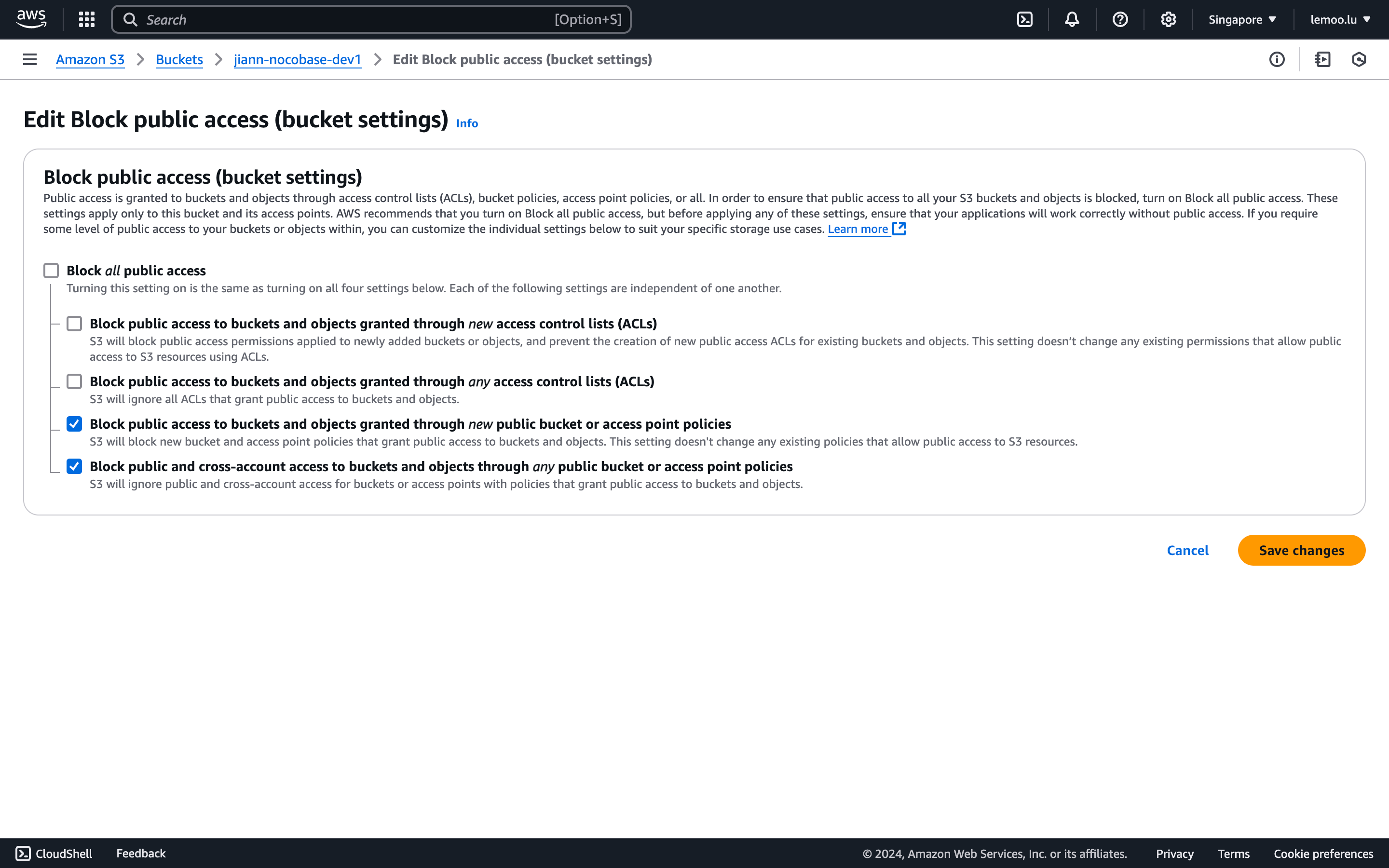
|
|
163
214
|
|
|
164
215
|
|
|
165
|
-
3. Check
|
|
216
|
+
3. Check Do not use signed URL in NocoBase.
|
|
166
217
|
|
|
167
218
|
|
|
168
219
|
#### Thumbnail Configuration (Optional)
|
|
@@ -193,7 +244,7 @@ This configuration is optional and is used to optimize image preview size or eff
|
|
|
193
244
|
5. In the NocoBase configuration, there are several points to note:
|
|
194
245
|
1. `Thumbnail rule`: Fill in image processing-related parameters, for example, `?width=100`. For details, refer to the [AWS documentation](https://docs.aws.amazon.com/solutions/latest/serverless-image-handler/use-supported-query-param-edits.html).
|
|
195
246
|
2. `Access endpoint`: Fill in the value of Outputs -> ApiEndpoint after deployment.
|
|
196
|
-
3.
|
|
247
|
+
3. Access URL format: Select **Ignore bucket** because the bucket name is already included in the configuration and is not needed in the access URL.
|
|
197
248
|
|
|
198
249
|
|
|
199
250
|
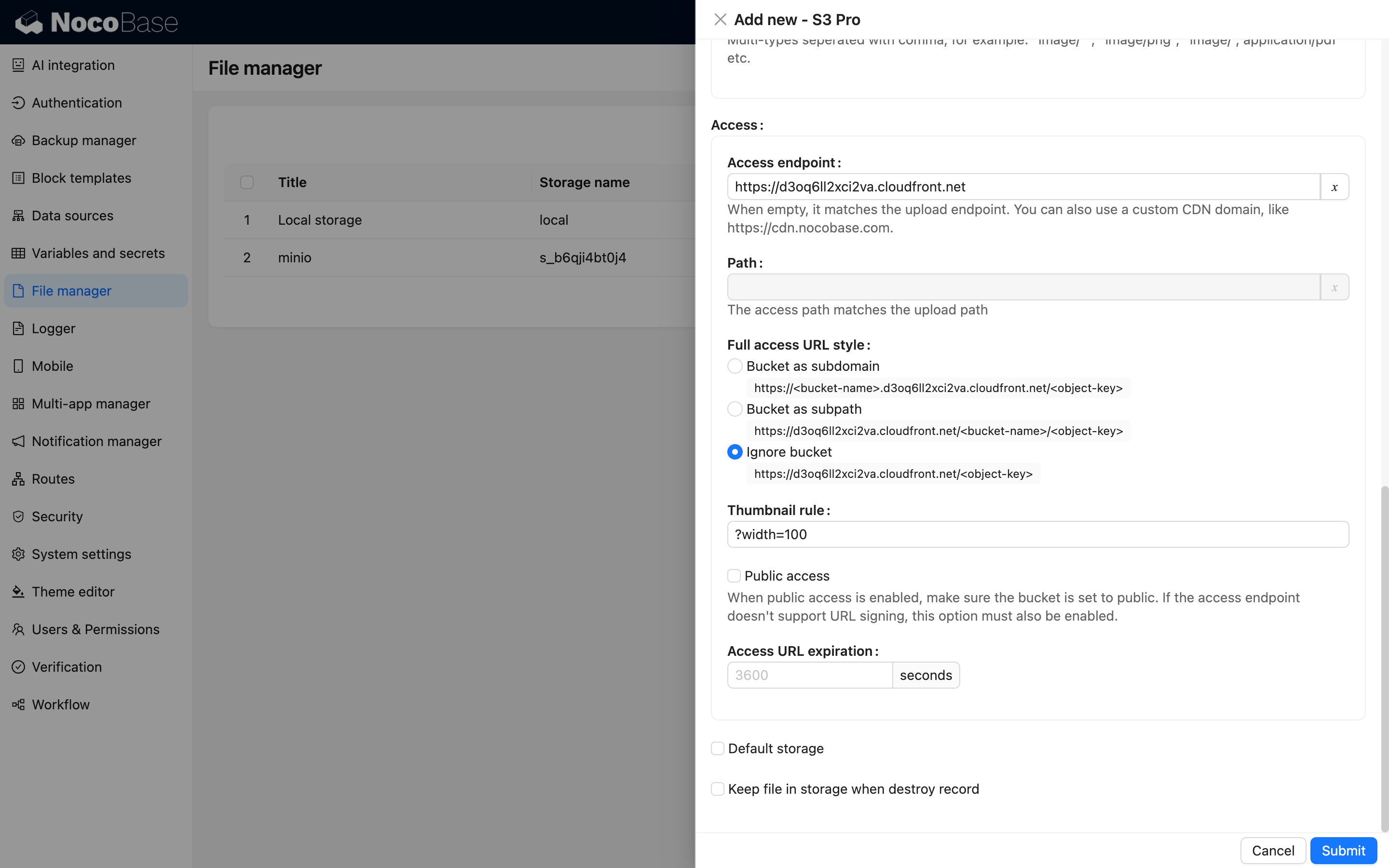
|
|
@@ -312,7 +363,7 @@ This configuration is optional and should only be used when you need to optimize
|
|
|
312
363
|
|
|
313
364
|
1. Fill in the `Thumbnail rule` related parameters. For specific parameter settings, refer to [Image Processing Parameters](https://www.alibabacloud.com/help/en/object-storage-service/latest/process-images).
|
|
314
365
|
|
|
315
|
-
2.
|
|
366
|
+
2. Upload URL format and Access URL format can use the same setting.
|
|
316
367
|
|
|
317
368
|
#### Configuration Example
|
|
318
369
|
|
|
@@ -357,7 +408,7 @@ This configuration is optional and should only be used when you need to optimize
|
|
|
357
408
|
- **AccessKey ID** and **AccessKey Secret** are the values saved in the previous step.
|
|
358
409
|
- **Region**: A self-hosted MinIO does not have the concept of a Region, so it can be configured as "auto".
|
|
359
410
|
- **Endpoint**: Fill in the domain name or IP address of your deployment.
|
|
360
|
-
-
|
|
411
|
+
- Set Access URL format to Bucket as subpath.
|
|
361
412
|
|
|
362
413
|
#### Configuration Example
|
|
363
414
|
|
|
@@ -146,7 +146,7 @@ For example, to add the `hello` plugin to the `my-nocobase-app` project, the plu
|
|
|
146
146
|
PLUGIN_PACKAGE_PREFIX can be configured as:
|
|
147
147
|
|
|
148
148
|
```bash
|
|
149
|
-
PLUGIN_PACKAGE_PREFIX=@nocobase/plugin-,@nocobase
|
|
149
|
+
PLUGIN_PACKAGE_PREFIX=@nocobase/plugin-,@nocobase/preset-,@my-nocobase-app/plugin-
|
|
150
150
|
```
|
|
151
151
|
|
|
152
152
|
The correspondence between plugin name and package name is as follows:
|
|
@@ -392,7 +392,7 @@ SERVER_REQUEST_WHITELIST=api.example.com,*.trusted.com,10.0.0.0/8,127.0.0.1
|
|
|
392
392
|
|
|
393
393
|
**When not set**: All `http` / `https` outbound requests are allowed to keep existing behavior. However, if the target is a loopback, private, link-local, or metadata address, or if a domain resolves to one of these addresses, the server logs a warning.
|
|
394
394
|
|
|
395
|
-
**When set**:
|
|
395
|
+
**When set**: The initial request and every redirect destination must match a whitelist entry; non-matching requests will raise an error before the next request is sent. Future versions may gradually tighten the default behavior. If your deployment needs to access internal services, configure an explicit whitelist in advance.
|
|
396
396
|
|
|
397
397
|
Supported formats:
|
|
398
398
|
|
|
@@ -336,9 +336,8 @@ The “Data type” column comes from built-in classification. System base data
|
|
|
336
336
|
| Table | Description | Data type | Default migration strategy | Version control | Backup/restore |
|
|
337
337
|
| --- | --- | --- | --- | --- | --- |
|
|
338
338
|
| `aiKnowledgeBaseDocs` | Document chunks and index metadata stored in knowledge bases | Business runtime data | Schema-only | Not included | Backed up |
|
|
339
|
-
| `aiKnowledgeBase` | Knowledge-base type, external ID, and base information | Business runtime data | Schema-only | Not included | Backed up |
|
|
339
|
+
| `aiKnowledgeBase` | Knowledge-base type, external ID, vector database, LLM service, embedding model, and base information | Business runtime data | Schema-only | Not included | Backed up |
|
|
340
340
|
| `aiVectorDatabases` | Vector database service and connection configuration | Business runtime data | Schema-only | Not included | Backed up |
|
|
341
|
-
| `aiVectorStoreConfig` | Relationship between vector database connections and embedding models | Business runtime data | Schema-only | Not included | Backed up |
|
|
342
341
|
|
|
343
342
|
### Environment variables
|
|
344
343
|
|