@nocobase/plugin-ai 2.3.0-alpha.1 → 3.0.0-alpha.2
This diff represents the content of publicly available package versions that have been released to one of the supported registries. The information contained in this diff is provided for informational purposes only and reflects changes between package versions as they appear in their respective public registries.
- package/dist/ai/docs/nocobase/ai-employees/block/ai-chat-box.md +133 -0
- package/dist/ai/docs/nocobase/ai-employees/knowledge-base/knowledge-base/documents.md +1 -1
- package/dist/ai/docs/nocobase/ai-employees/knowledge-base/knowledge-base/index.md +11 -7
- package/dist/ai/docs/nocobase/ai-employees/knowledge-base/knowledge-base/settings.md +12 -8
- package/dist/ai/docs/nocobase/ai-employees/knowledge-base/vector-database.md +3 -3
- package/dist/ai/docs/nocobase/ai-employees/workflow/nodes/knowledge/create-document.md +1 -1
- package/dist/ai/docs/nocobase/api/app/env.md +3 -1
- package/dist/ai/docs/nocobase/api/cli/index.md +14 -2
- package/dist/ai/docs/nocobase/api/cli/portal/config.md +44 -0
- package/dist/ai/docs/nocobase/api/cli/portal/create.md +48 -0
- package/dist/ai/docs/nocobase/api/cli/portal/deploy.md +39 -0
- package/dist/ai/docs/nocobase/api/cli/portal/destroy.md +41 -0
- package/dist/ai/docs/nocobase/api/cli/portal/dev.md +39 -0
- package/dist/ai/docs/nocobase/api/cli/portal/index.md +136 -0
- package/dist/ai/docs/nocobase/api/cli/portal/info.md +41 -0
- package/dist/ai/docs/nocobase/api/cli/portal/list.md +40 -0
- package/dist/ai/docs/nocobase/api/cli/portal/pull.md +43 -0
- package/dist/ai/docs/nocobase/api/cli/portal/push.md +41 -0
- package/dist/ai/docs/nocobase/building-tips/ai-fill-js-block-form.md +1092 -0
- package/dist/ai/docs/nocobase/data-sources/calendar/calendar-collection.md +100 -3
- package/dist/ai/docs/nocobase/data-sources/collection-comment/index.md +92 -39
- package/dist/ai/docs/nocobase/data-sources/collection-sql/index.md +150 -29
- package/dist/ai/docs/nocobase/data-sources/collection-tree/index.md +93 -5
- package/dist/ai/docs/nocobase/data-sources/collection-view/index.md +226 -4
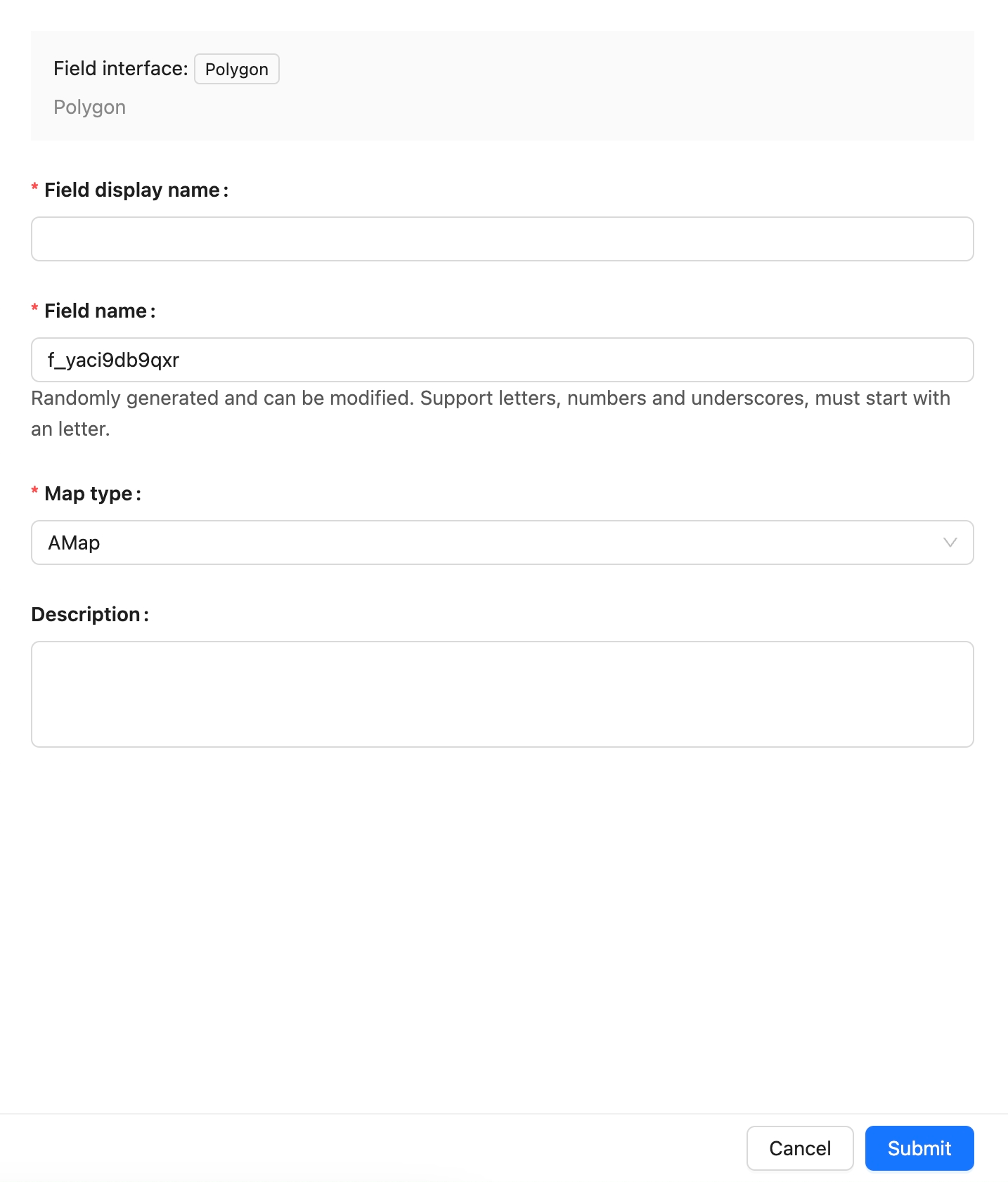
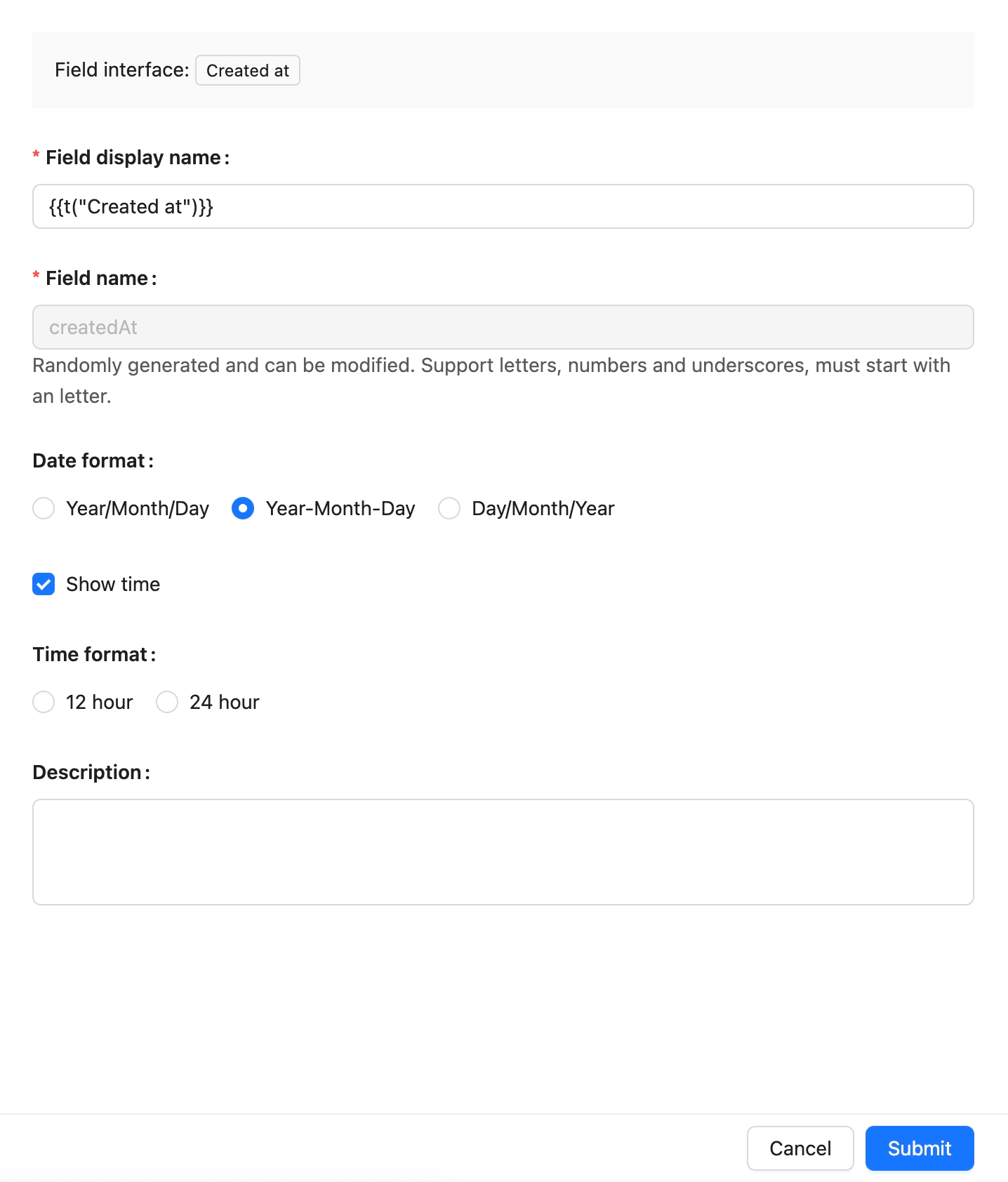
- package/dist/ai/docs/nocobase/data-sources/data-modeling/collection-fields/advanced/china-region.md +122 -5
- package/dist/ai/docs/nocobase/data-sources/data-modeling/collection-fields/advanced/collection-select.md +105 -4
- package/dist/ai/docs/nocobase/data-sources/data-modeling/collection-fields/advanced/json.md +102 -4
- package/dist/ai/docs/nocobase/data-sources/data-modeling/collection-fields/advanced/nano-id.md +104 -4
- package/dist/ai/docs/nocobase/data-sources/data-modeling/collection-fields/advanced/snowflake-id.md +108 -4
- package/dist/ai/docs/nocobase/data-sources/data-modeling/collection-fields/advanced/sort.md +3 -19
- package/dist/ai/docs/nocobase/data-sources/data-modeling/collection-fields/advanced/uuid.md +104 -4
- package/dist/ai/docs/nocobase/data-sources/data-modeling/collection-fields/associations/index.md +44 -8
- package/dist/ai/docs/nocobase/data-sources/data-modeling/collection-fields/basic/color.md +102 -4
- package/dist/ai/docs/nocobase/data-sources/data-modeling/collection-fields/basic/email.md +104 -4
- package/dist/ai/docs/nocobase/data-sources/data-modeling/collection-fields/basic/icon.md +102 -4
- package/dist/ai/docs/nocobase/data-sources/data-modeling/collection-fields/basic/input.md +112 -8
- package/dist/ai/docs/nocobase/data-sources/data-modeling/collection-fields/basic/integer.md +103 -4
- package/dist/ai/docs/nocobase/data-sources/data-modeling/collection-fields/basic/number.md +103 -4
- package/dist/ai/docs/nocobase/data-sources/data-modeling/collection-fields/basic/password.md +102 -4
- package/dist/ai/docs/nocobase/data-sources/data-modeling/collection-fields/basic/percent.md +104 -5
- package/dist/ai/docs/nocobase/data-sources/data-modeling/collection-fields/basic/phone.md +104 -4
- package/dist/ai/docs/nocobase/data-sources/data-modeling/collection-fields/basic/textarea.md +99 -8
- package/dist/ai/docs/nocobase/data-sources/data-modeling/collection-fields/basic/url.md +103 -4
- package/dist/ai/docs/nocobase/data-sources/data-modeling/collection-fields/choices/checkbox-group.md +105 -3
- package/dist/ai/docs/nocobase/data-sources/data-modeling/collection-fields/choices/checkbox.md +102 -4
- package/dist/ai/docs/nocobase/data-sources/data-modeling/collection-fields/choices/china-region.md +108 -5
- package/dist/ai/docs/nocobase/data-sources/data-modeling/collection-fields/choices/multiple-select.md +103 -5
- package/dist/ai/docs/nocobase/data-sources/data-modeling/collection-fields/choices/radio-group.md +106 -4
- package/dist/ai/docs/nocobase/data-sources/data-modeling/collection-fields/choices/select.md +103 -5
- package/dist/ai/docs/nocobase/data-sources/data-modeling/collection-fields/datetime/date.md +102 -4
- package/dist/ai/docs/nocobase/data-sources/data-modeling/collection-fields/datetime/datetime-without-tz.md +103 -5
- package/dist/ai/docs/nocobase/data-sources/data-modeling/collection-fields/datetime/datetime.md +103 -5
- package/dist/ai/docs/nocobase/data-sources/data-modeling/collection-fields/datetime/index.md +53 -47
- package/dist/ai/docs/nocobase/data-sources/data-modeling/collection-fields/datetime/time.md +102 -4
- package/dist/ai/docs/nocobase/data-sources/data-modeling/collection-fields/datetime/unix-timestamp.md +103 -5
- package/dist/ai/docs/nocobase/data-sources/data-modeling/collection-fields/geometric/circle.md +102 -4
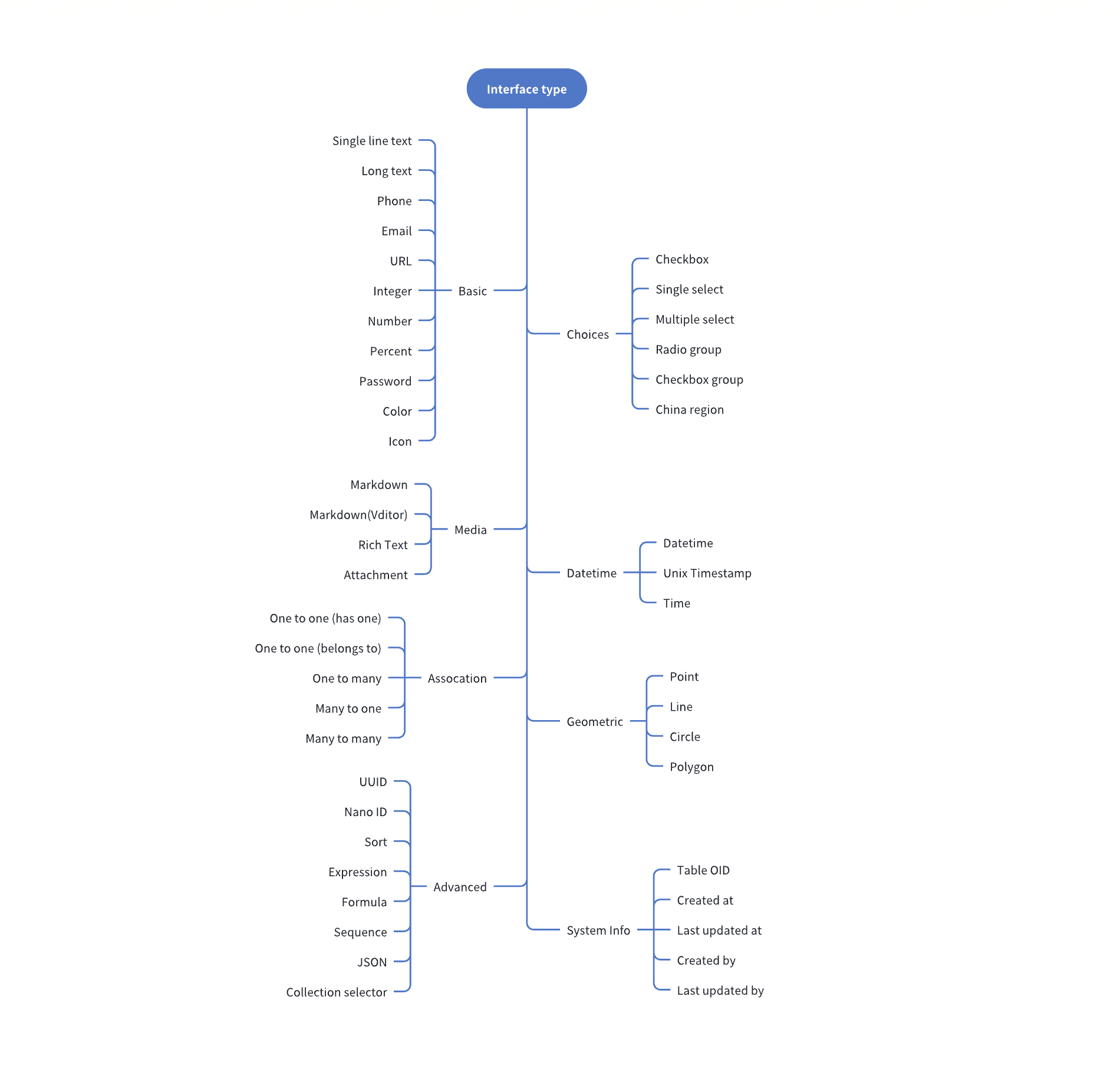
- package/dist/ai/docs/nocobase/data-sources/data-modeling/collection-fields/geometric/line.md +103 -5
- package/dist/ai/docs/nocobase/data-sources/data-modeling/collection-fields/geometric/point.md +102 -4
- package/dist/ai/docs/nocobase/data-sources/data-modeling/collection-fields/geometric/polygon.md +102 -4
- package/dist/ai/docs/nocobase/data-sources/data-modeling/collection-fields/index.md +62 -16
- package/dist/ai/docs/nocobase/data-sources/data-modeling/collection-fields/media/markdown.md +104 -4
- package/dist/ai/docs/nocobase/data-sources/data-modeling/collection-fields/media/rich-text.md +105 -5
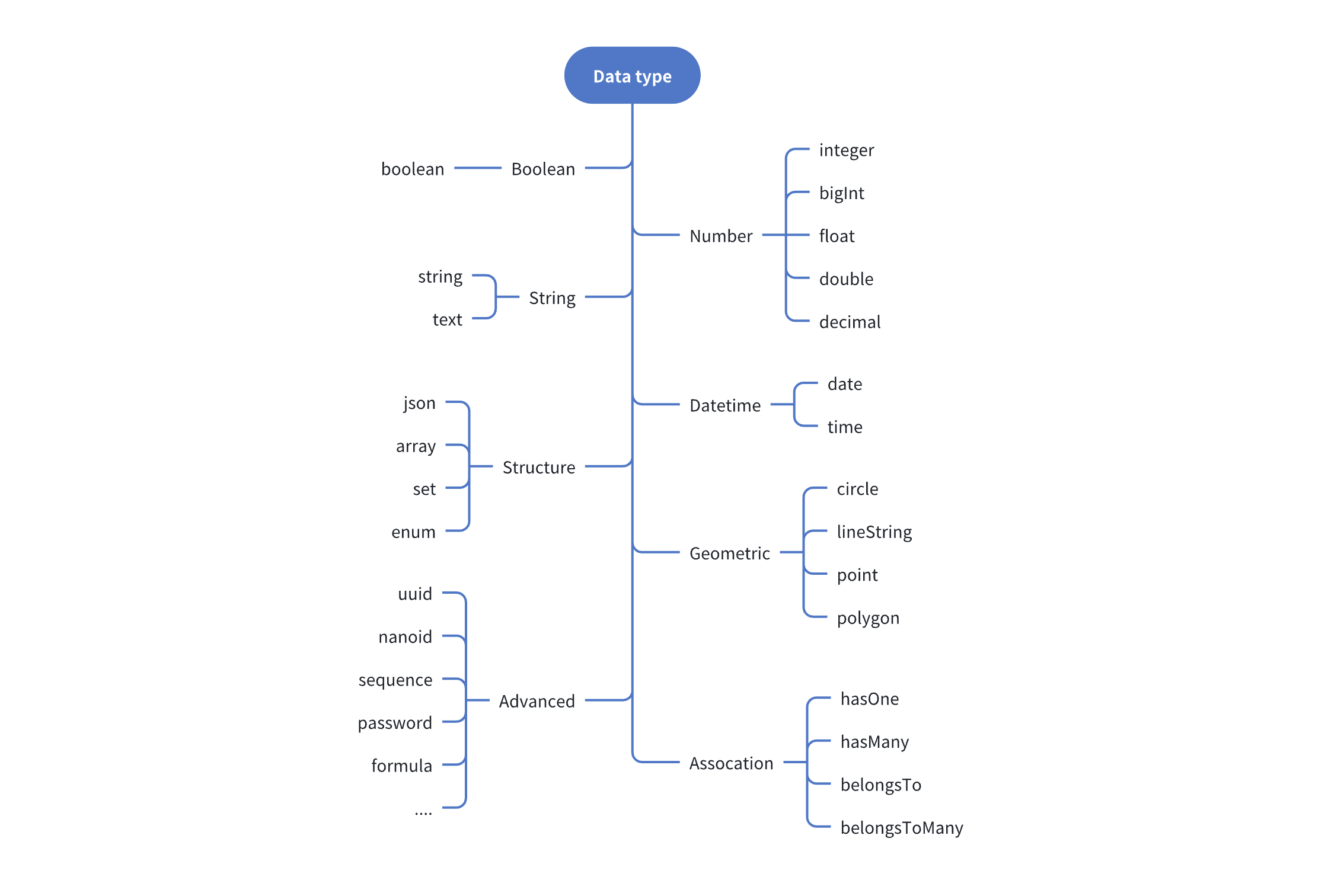
- package/dist/ai/docs/nocobase/data-sources/data-modeling/collection-fields/system-info/created-at.md +105 -5
- package/dist/ai/docs/nocobase/data-sources/data-modeling/collection-fields/system-info/created-by.md +103 -5
- package/dist/ai/docs/nocobase/data-sources/data-modeling/collection-fields/system-info/space.md +100 -6
- package/dist/ai/docs/nocobase/data-sources/data-modeling/collection-fields/system-info/table-oid.md +102 -4
- package/dist/ai/docs/nocobase/data-sources/data-modeling/collection-fields/system-info/updated-at.md +104 -5
- package/dist/ai/docs/nocobase/data-sources/data-modeling/collection-fields/system-info/updated-by.md +104 -6
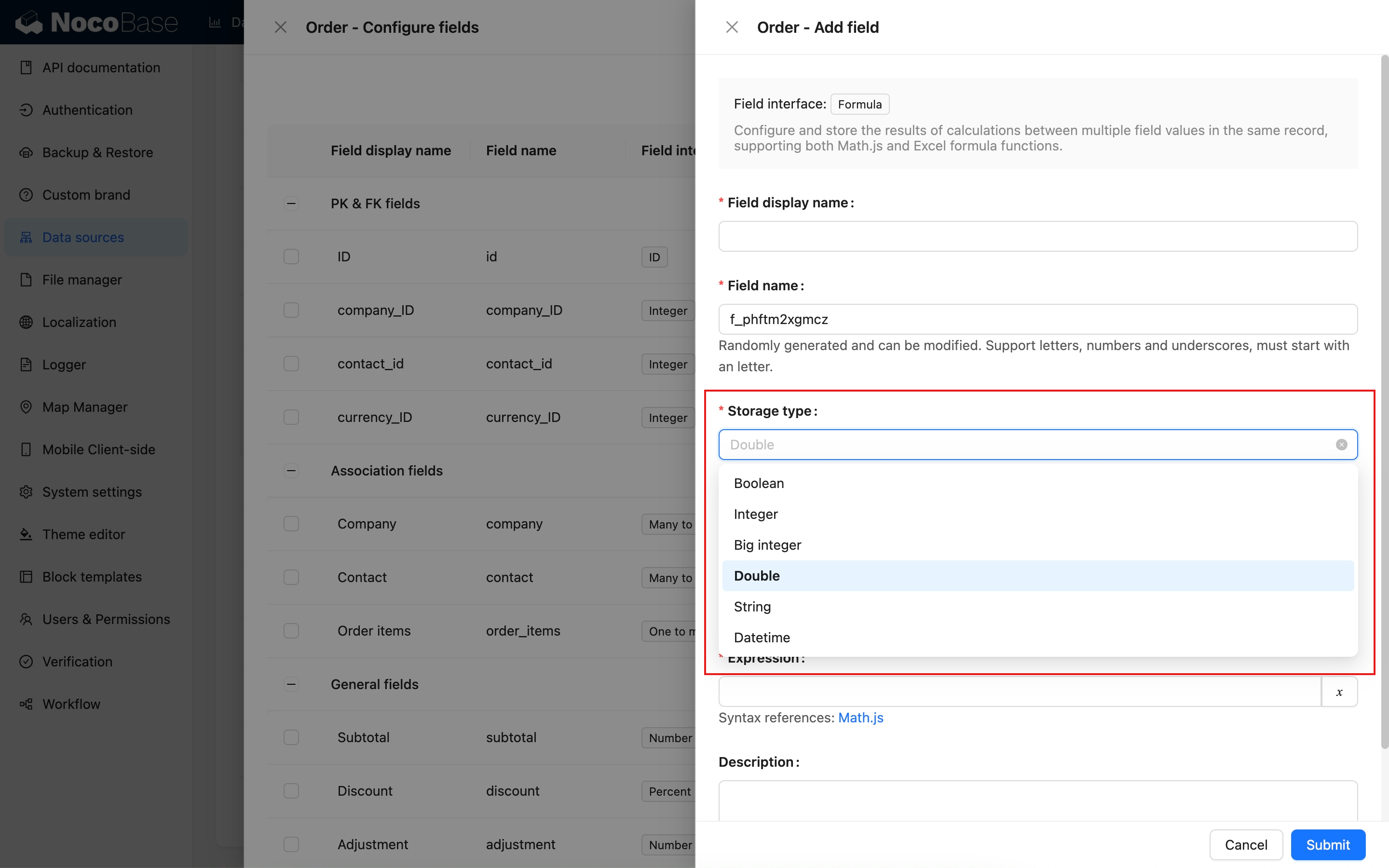
- package/dist/ai/docs/nocobase/data-sources/data-modeling/collection-fields/validation.md +68 -58
- package/dist/ai/docs/nocobase/data-sources/data-modeling/collection.md +32 -13
- package/dist/ai/docs/nocobase/data-sources/data-modeling/index.md +41 -33
- package/dist/ai/docs/nocobase/data-sources/data-source-external-mariadb/index.md +114 -6
- package/dist/ai/docs/nocobase/data-sources/data-source-external-mssql/index.md +117 -6
- package/dist/ai/docs/nocobase/data-sources/data-source-external-mysql/index.md +103 -6
- package/dist/ai/docs/nocobase/data-sources/data-source-external-nocobase/index.md +75 -73
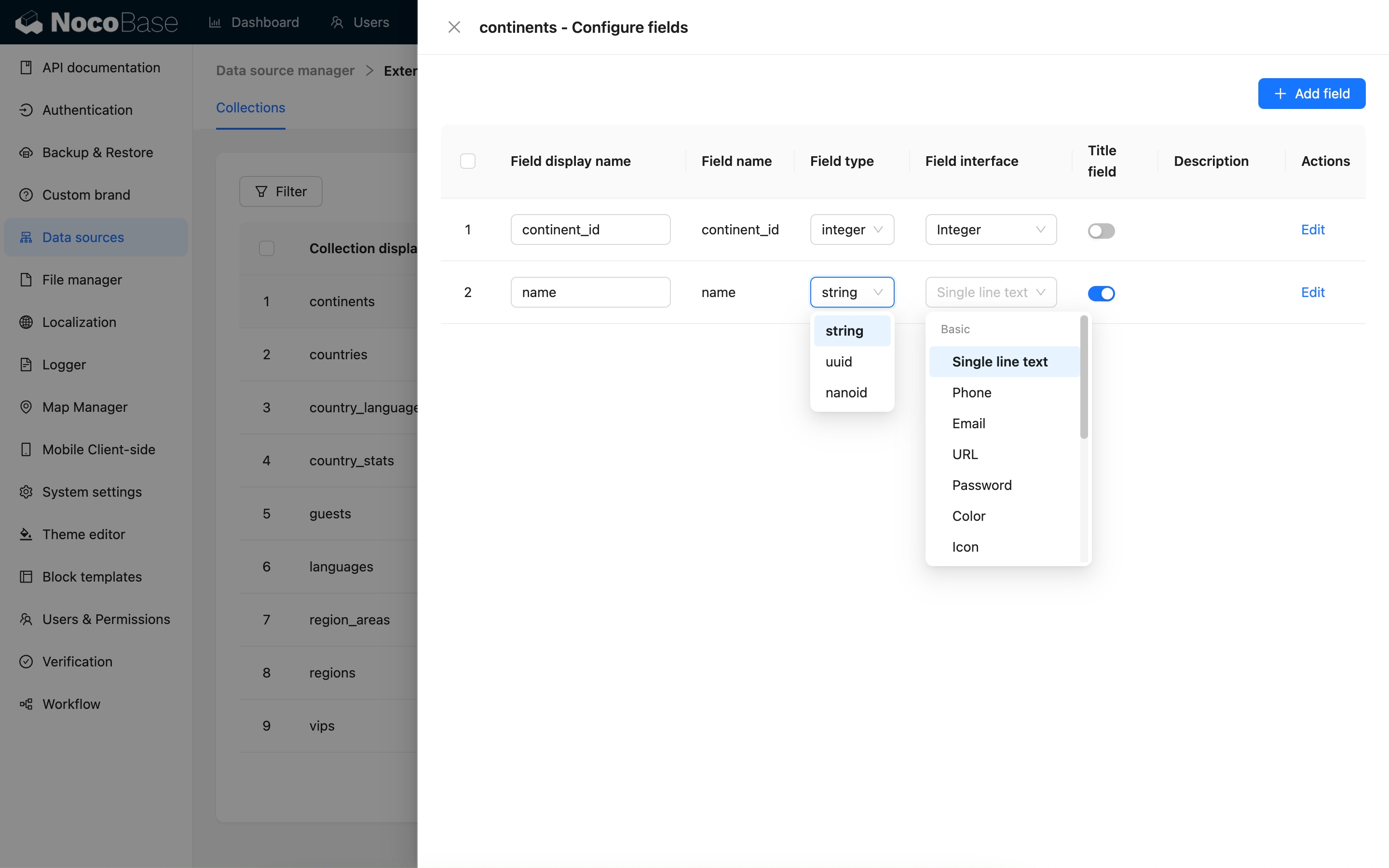
- package/dist/ai/docs/nocobase/data-sources/data-source-external-oracle/index.md +129 -11
- package/dist/ai/docs/nocobase/data-sources/data-source-external-postgres/index.md +110 -6
- package/dist/ai/docs/nocobase/data-sources/data-source-kingbase/index.md +75 -49
- package/dist/ai/docs/nocobase/data-sources/data-source-main/general-collection.md +116 -15
- package/dist/ai/docs/nocobase/data-sources/data-source-main/index.md +92 -62
- package/dist/ai/docs/nocobase/data-sources/data-source-main/inheritance-collection.md +97 -10
- package/dist/ai/docs/nocobase/data-sources/data-source-manager/external-database.md +97 -58
- package/dist/ai/docs/nocobase/data-sources/data-source-manager/index.md +32 -24
- package/dist/ai/docs/nocobase/data-sources/data-source-rest-api/index.md +115 -153
- package/dist/ai/docs/nocobase/data-sources/external/clickhouse.md +124 -0
- package/dist/ai/docs/nocobase/data-sources/external/doris.md +130 -0
- package/dist/ai/docs/nocobase/data-sources/external/index.md +140 -0
- package/dist/ai/docs/nocobase/data-sources/external/kingbase.md +129 -0
- package/dist/ai/docs/nocobase/data-sources/external/mariadb.md +126 -0
- package/dist/ai/docs/nocobase/data-sources/external/mssql.md +129 -0
- package/dist/ai/docs/nocobase/data-sources/external/mysql.md +115 -0
- package/dist/ai/docs/nocobase/data-sources/external/nocobase.md +159 -0
- package/dist/ai/docs/nocobase/data-sources/external/oceanbase.md +126 -0
- package/dist/ai/docs/nocobase/data-sources/external/oracle.md +158 -0
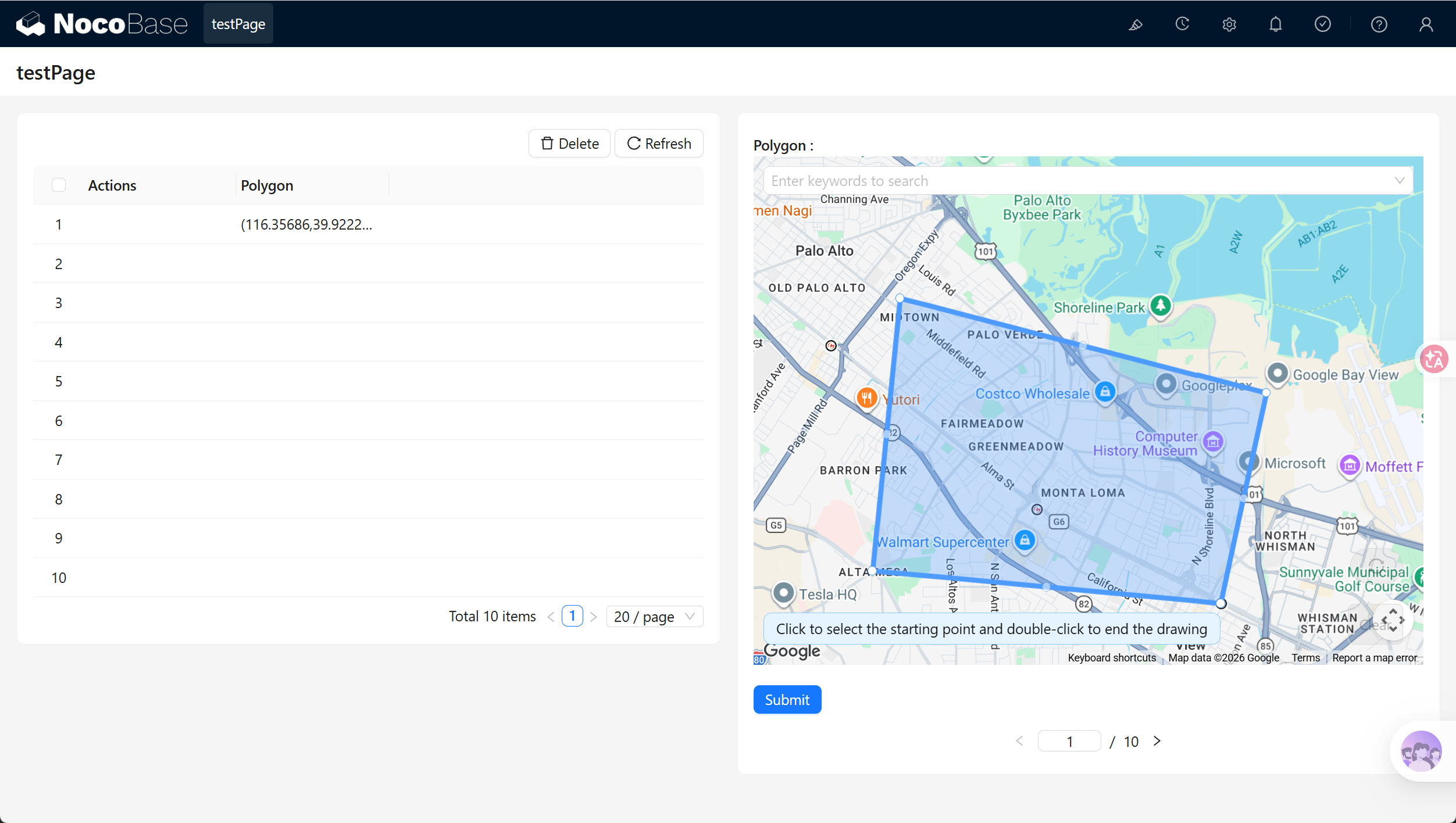
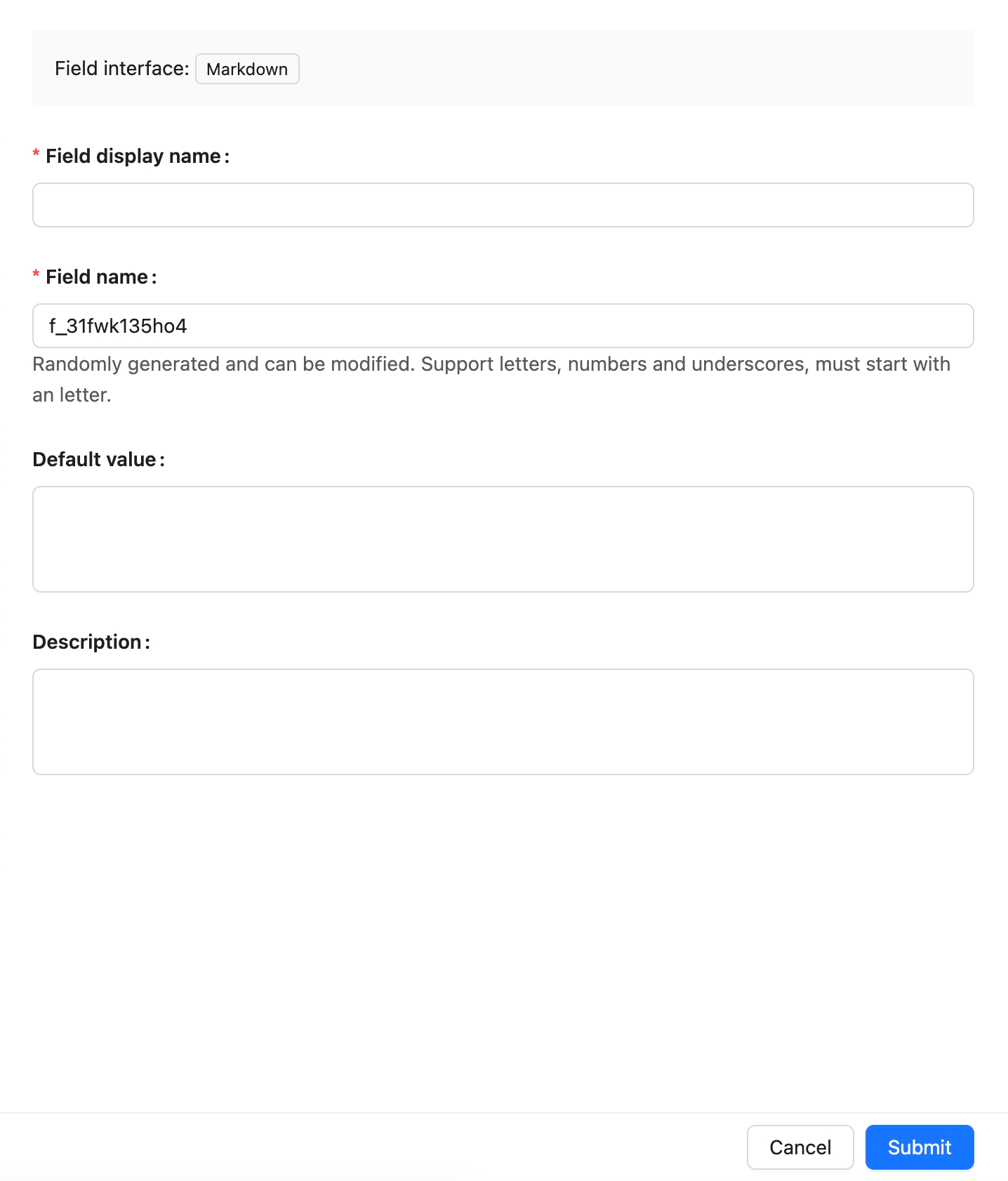
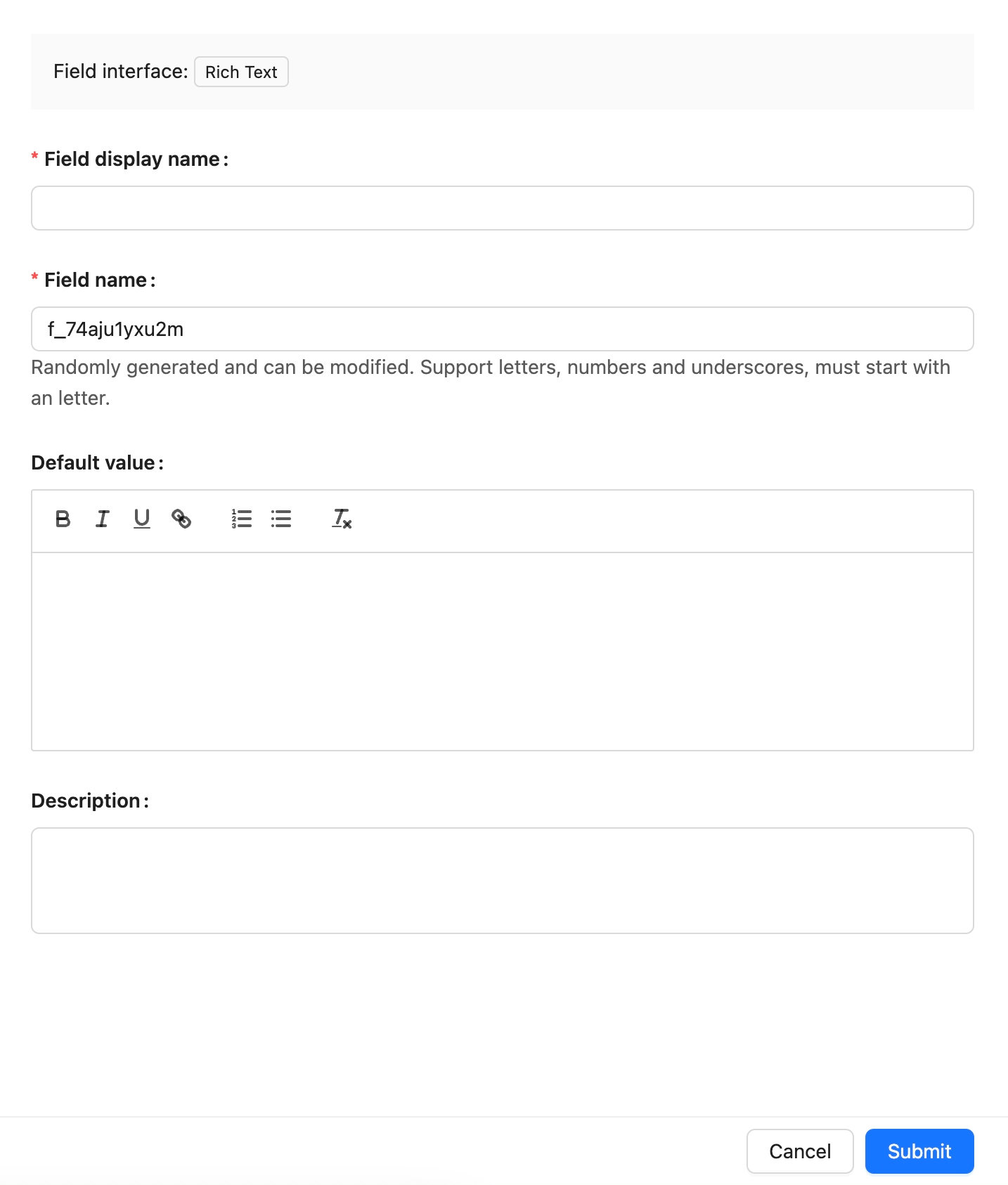
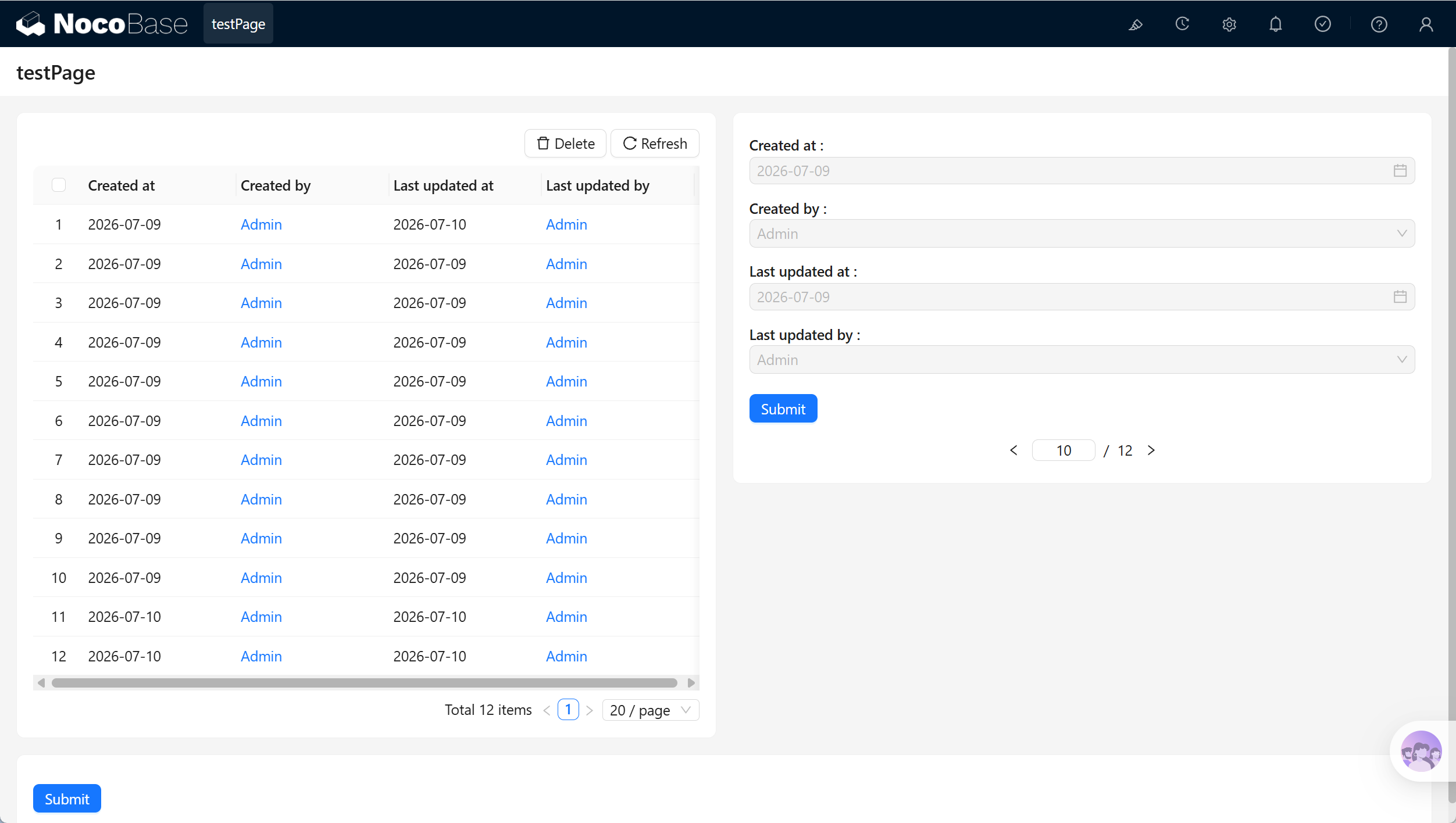
- package/dist/ai/docs/nocobase/data-sources/external/postgresql.md +122 -0
- package/dist/ai/docs/nocobase/data-sources/external/rest-api.md +245 -0
- package/dist/ai/docs/nocobase/data-sources/field-attachment-url/index.md +100 -12
- package/dist/ai/docs/nocobase/data-sources/field-encryption/index.md +48 -47
- package/dist/ai/docs/nocobase/data-sources/field-formula/index.md +99 -5
- package/dist/ai/docs/nocobase/data-sources/field-markdown-vditor/index.md +105 -5
- package/dist/ai/docs/nocobase/data-sources/field-sequence/index.md +102 -5
- package/dist/ai/docs/nocobase/data-sources/field-signature/index.md +18 -16
- package/dist/ai/docs/nocobase/data-sources/field-sort/index.md +76 -73
- package/dist/ai/docs/nocobase/data-sources/file-manager/field-attachment.md +101 -7
- package/dist/ai/docs/nocobase/data-sources/file-manager/file-collection.md +101 -14
- package/dist/ai/docs/nocobase/data-sources/index.md +49 -33
- package/dist/ai/docs/nocobase/data-sources/main/index.md +130 -0
- package/dist/ai/docs/nocobase/data-sources/main/kingbase.md +147 -0
- package/dist/ai/docs/nocobase/data-sources/main/mariadb.md +59 -0
- package/dist/ai/docs/nocobase/data-sources/main/mysql.md +59 -0
- package/dist/ai/docs/nocobase/data-sources/main/oceanbase.md +62 -0
- package/dist/ai/docs/nocobase/data-sources/main/postgresql.md +61 -0
- package/dist/ai/docs/nocobase/file-manager/storage/index.md +66 -26
- package/dist/ai/docs/nocobase/file-manager/storage/s3-pro.md +58 -7
- package/dist/ai/docs/nocobase/get-started/installation/env.md +2 -2
- package/dist/ai/docs/nocobase/ops-management/migration-manager/built-in-tables.md +1 -2
- package/dist/ai/docs/nocobase/runjs/context/ai.md +194 -4
- package/dist/ai/tools/executeFrontendTool.d.ts +10 -0
- package/dist/ai/tools/executeFrontendTool.js +86 -0
- package/dist/ai/tools/getSkill.js +1 -1
- package/dist/ai/tools/loadFrontendTool.d.ts +10 -0
- package/dist/ai/tools/loadFrontendTool.js +99 -0
- package/dist/client/244.8631eb5cf3f05e21.js +10 -0
- package/dist/client/{525.203778500aca5d05.js → 525.94dd4136c1361477.js} +1 -1
- package/dist/client/681.6ffbc9329b9ac242.js +10 -0
- package/dist/{client-v2/705.1d10027ff8cfdf79.js → client/705.19b642db34de438a.js} +1 -1
- package/dist/client/index.d.ts +1 -3
- package/dist/client/index.js +8 -8
- package/dist/client-v2/244.c428e645ecb94414.js +10 -0
- package/dist/client-v2/420.b2aedb1ff71fca0e.js +10 -0
- package/dist/client-v2/681.6890caa389564ff7.js +10 -0
- package/dist/client-v2/705.8dc34d43f02f322c.js +10 -0
- package/dist/client-v2/ai-employees/AIEmployeeShortcut.d.ts +2 -0
- package/dist/client-v2/ai-employees/AddContextButton.d.ts +2 -0
- package/dist/client-v2/ai-employees/chatbox/components/AIEmployeeSwitcher.d.ts +1 -0
- package/dist/client-v2/ai-employees/chatbox/components/ChatBoxUnreadBadge.d.ts +17 -0
- package/dist/client-v2/ai-employees/chatbox/components/Conversations.d.ts +9 -1
- package/dist/client-v2/ai-employees/chatbox/components/MessageRenderers.d.ts +1 -1
- package/dist/client-v2/ai-employees/chatbox/components/Messages.d.ts +5 -1
- package/dist/client-v2/ai-employees/chatbox/components/ModelSwitcher.d.ts +4 -0
- package/dist/client-v2/ai-employees/chatbox/components/Sender.d.ts +33 -1
- package/dist/client-v2/ai-employees/chatbox/components/index.d.ts +1 -0
- package/dist/client-v2/ai-employees/chatbox/hooks/useChat.d.ts +8 -5
- package/dist/client-v2/ai-employees/chatbox/hooks/useChatBoxActions.d.ts +3 -2
- package/dist/client-v2/ai-employees/chatbox/hooks/useChatBoxEffect.d.ts +2 -1
- package/dist/client-v2/ai-employees/chatbox/hooks/useChatConversationActions.d.ts +3 -2
- package/dist/client-v2/ai-employees/chatbox/hooks/useChatMessageActions.d.ts +4 -2
- package/dist/client-v2/ai-employees/chatbox/hooks/useToolCallActions.d.ts +3 -1
- package/dist/client-v2/ai-employees/chatbox/hooks/useUploadFiles.d.ts +13 -3
- package/dist/client-v2/ai-employees/chatbox/hooks/useWorkflowTasks.d.ts +3 -2
- package/dist/client-v2/ai-employees/chatbox/index.d.ts +17 -0
- package/dist/client-v2/ai-employees/chatbox/roles.d.ts +2 -153
- package/dist/client-v2/ai-employees/chatbox/stores/chat-box.d.ts +46 -31
- package/dist/client-v2/ai-employees/chatbox/stores/chat-conversations.d.ts +7 -7
- package/dist/client-v2/ai-employees/chatbox/stores/chat-messages.d.ts +23 -18
- package/dist/client-v2/ai-employees/chatbox/stores/chat-sender.d.ts +43 -0
- package/dist/client-v2/ai-employees/chatbox/stores/chat-tool-call.d.ts +6 -5
- package/dist/client-v2/ai-employees/chatbox/stores/chat-tools.d.ts +11 -5
- package/dist/client-v2/ai-employees/chatbox/stores/mounted-chat-boxes.d.ts +20 -0
- package/dist/client-v2/ai-employees/chatbox/stores/runtime.d.ts +43 -0
- package/dist/client-v2/ai-employees/chatbox/stores/workflow-tasks.d.ts +22 -10
- package/dist/client-v2/ai-employees/chatbox/upload.d.ts +19 -0
- package/dist/client-v2/ai-employees/chatbox/utils.d.ts +28 -4
- package/dist/client-v2/ai-employees/frontend-tools.d.ts +11 -0
- package/dist/client-v2/ai-employees/tools/SuggestionsOptionsCard.d.ts +1 -1
- package/dist/client-v2/ai-employees/tools/WorkflowTaskOutputCard.d.ts +1 -1
- package/dist/client-v2/ai-employees/types.d.ts +30 -0
- package/dist/client-v2/block/ai-chat-box/AIChatBoxBlockModel.d.ts +21 -0
- package/dist/client-v2/block/ai-chat-box/AIChatBoxCoreModel.d.ts +13 -0
- package/dist/client-v2/block/ai-chat-box/components/AIChatBoxCoreView.d.ts +10 -0
- package/dist/client-v2/block/ai-chat-box/components/AIChatBoxView.d.ts +12 -0
- package/dist/client-v2/block/ai-chat-box/index.d.ts +14 -0
- package/dist/client-v2/block/ai-chat-box/settings.d.ts +12 -0
- package/dist/client-v2/block/ai-chat-box/sub-models.d.ts +26 -0
- package/dist/client-v2/block/ai-chat-box/types.d.ts +38 -0
- package/dist/client-v2/block/ai-chat-box/utils.d.ts +26 -0
- package/dist/client-v2/index.d.ts +3 -5
- package/dist/client-v2/index.js +3 -3
- package/dist/client-v2/llm-services/model-select.d.ts +33 -0
- package/dist/client-v2/llm-services/utils.d.ts +1 -0
- package/dist/client-v2/manager/ai-manager.d.ts +10 -3
- package/dist/client-v2/manager/frontend-tool-registry.d.ts +30 -0
- package/dist/client-v2/models/ai-employees/AIEmployeeActionModel.d.ts +4 -1
- package/dist/client-v2/models/ai-employees/AIEmployeeShortcutModel.d.ts +5 -0
- package/dist/client-v2/pages/EmployeesPage.d.ts +2 -0
- package/dist/client-v2/runjs/registerAIEmployeeRunJSFacade.d.ts +1 -0
- package/dist/common/ai-employee-validation.d.ts +15 -0
- package/dist/common/ai-employee-validation.js +61 -0
- package/dist/common/error-codes.d.ts +13 -0
- package/dist/common/error-codes.js +48 -0
- package/dist/common/frontend-tools.d.ts +26 -0
- package/dist/common/frontend-tools.js +57 -0
- package/dist/common/llm-service-models.d.ts +16 -0
- package/dist/common/llm-service-models.js +84 -0
- package/dist/externalVersion.js +16 -16
- package/dist/locale/en-US.json +67 -0
- package/dist/locale/zh-CN.json +67 -0
- package/dist/node_modules/@langchain/mistralai/package.json +1 -1
- package/dist/node_modules/@langchain/xai/package.json +1 -1
- package/dist/node_modules/fs-extra/package.json +1 -1
- package/dist/node_modules/jsonrepair/package.json +1 -1
- package/dist/node_modules/just-bash/package.json +1 -1
- package/dist/node_modules/nodejs-snowflake/package.json +1 -1
- package/dist/node_modules/openai/package.json +1 -1
- package/dist/node_modules/zod/package.json +1 -1
- package/dist/server/ai-employees/ai-conversations.d.ts +4 -1
- package/dist/server/ai-employees/ai-conversations.js +2 -0
- package/dist/server/ai-employees/ai-employee.d.ts +2 -1
- package/dist/server/ai-employees/ai-employee.js +26 -7
- package/dist/server/ai-employees/middleware/conversation.js +9 -2
- package/dist/server/collections/ai-conversations.js +5 -0
- package/dist/server/document-loader/constants.js +1 -1
- package/dist/server/frontend-tools.d.ts +25 -0
- package/dist/server/frontend-tools.js +171 -0
- package/dist/server/manager/work-context-handler.js +10 -3
- package/dist/server/plugin.d.ts +1 -0
- package/dist/server/plugin.js +25 -0
- package/dist/server/resource/aiConversations.d.ts +2 -0
- package/dist/server/resource/aiConversations.js +33 -3
- package/dist/server/resource/aiEmployees.d.ts +2 -0
- package/dist/server/resource/aiEmployees.js +62 -0
- package/dist/server/resource/aiWorkflowTasks.js +9 -1
- package/dist/server/resource/llmServices.d.ts +11 -0
- package/dist/server/resource/llmServices.js +85 -0
- package/dist/server/types/knowledge-base.type.d.ts +6 -2
- package/dist/swagger/common.d.ts +143 -0
- package/dist/swagger/common.js +144 -0
- package/dist/swagger/employees.d.ts +301 -0
- package/dist/swagger/employees.js +131 -0
- package/dist/swagger/index.d.ts +1588 -0
- package/dist/swagger/index.js +62 -0
- package/dist/swagger/llm.d.ts +555 -0
- package/dist/swagger/llm.js +247 -0
- package/dist/swagger/schemas.d.ts +736 -0
- package/dist/swagger/schemas.js +381 -0
- package/package.json +2 -2
- package/dist/ai/docs/nocobase/ai-employees/knowledge-base/vector-store.md +0 -24
- package/dist/ai/docs/nocobase/data-sources/development/index.md +0 -6
- package/dist/client/372.40eb52905e3f3049.js +0 -10
- package/dist/client/681.399948c18d753667.js +0 -10
- package/dist/client/705.380279da896021fb.js +0 -10
- package/dist/client-v2/372.8cc3fde09c9bec77.js +0 -10
- package/dist/client-v2/406.341be51205c674e0.js +0 -10
- package/dist/client-v2/681.082f4f1c7b841983.js +0 -10
- package/dist/client-v2/ai-employees/chatbox/stores/create-selectors.d.ts +0 -46
- package/dist/client-v2/ai-employees/chatbox/utils/normalizeTriggerTaskOptions.d.ts +0 -19
package/dist/ai/docs/nocobase/data-sources/data-modeling/collection-fields/geometric/polygon.md
CHANGED
|
@@ -1,13 +1,111 @@
|
|
|
1
|
+
---
|
|
2
|
+
title: "Polygon"
|
|
3
|
+
description: "The Polygon field stores a geographic area such as a sales territory, delivery area, or risk area."
|
|
4
|
+
keywords: "Polygon,polygon,field,Field interface,NocoBase"
|
|
5
|
+
---
|
|
6
|
+
|
|
1
7
|
# Polygon
|
|
2
8
|
|
|
3
9
|
## Introduction
|
|
4
10
|
|
|
5
|
-
|
|
11
|
+
In NocoBase, the **Polygon** field stores a geographic area.
|
|
12
|
+
|
|
13
|
+
It is suitable for sales territories, delivery areas, risk areas, and other polygonal geographic data.
|
|
14
|
+
|
|
15
|
+
## Use cases
|
|
16
|
+
|
|
17
|
+
Polygon fields are suitable for these business scenarios:
|
|
18
|
+
|
|
19
|
+
- Sales territories
|
|
20
|
+
- Delivery areas
|
|
21
|
+
- Risk areas
|
|
22
|
+
- Other polygonal geographic data
|
|
23
|
+
|
|
24
|
+
## Create and configure
|
|
25
|
+
|
|
26
|
+
On the collection's **Configure fields** page, click **Add field** and select **Polygon** to create this field.
|
|
27
|
+
|
|
28
|
+
|
|
29
|
+
|
|
30
|
+
| Setting | Description |
|
|
31
|
+
| --- | --- |
|
|
32
|
+
| Field interface | The field interface. Polygon uses `polygon`, which determines how the field is entered and displayed in pages. |
|
|
33
|
+
| Field display name | The name displayed for the field, such as `Sales territory`, `Delivery area`, or `Risk area`. Use a name that business users can recognize. |
|
|
34
|
+
| Field name | The field identifier used internally by APIs, relation fields, permissions, and workflows. It usually cannot be changed after creation. It supports only letters, numbers, and underscores, and must begin with a letter. |
|
|
35
|
+
| Field type | The data-layer type. Polygon uses `polygon` by default. |
|
|
36
|
+
| Default value | The default value. When a new record has no value, NocoBase can fill this value automatically. |
|
|
37
|
+
| Validation rules | Validation rules. Supports base validation such as required. |
|
|
38
|
+
| Description | A field description. Record the field meaning, entry requirements, data source, or maintainer. |
|
|
39
|
+
|
|
40
|
+
:::warning Note
|
|
41
|
+
|
|
42
|
+
Field names are referenced by page blocks, permissions, workflows, and APIs after creation. Confirm the name before creating the field to avoid later configuration changes.
|
|
43
|
+
|
|
44
|
+
:::
|
|
45
|
+
|
|
46
|
+
## Field behavior
|
|
47
|
+
|
|
48
|
+
The default behavior of a Polygon field is as follows:
|
|
49
|
+
|
|
50
|
+
| Behavior | Description |
|
|
51
|
+
| --- | --- |
|
|
52
|
+
| Default Field interface | `polygon`. |
|
|
53
|
+
| Default Field type | `polygon`. |
|
|
54
|
+
| Available Field types | `polygon`. |
|
|
55
|
+
| Page component | Uses a map-drawing component in edit mode. |
|
|
56
|
+
| Filtering | Spatial filtering depends on map-plugin and data-source capabilities. |
|
|
57
|
+
| Sorting | It is usually not used for sorting. |
|
|
58
|
+
| Validation | Supports base validation such as required. |
|
|
59
|
+
|
|
60
|
+
## Edit configuration
|
|
61
|
+
|
|
62
|
+
After creation, click **Edit** beside the field to edit its configuration. Edit fields to adjust how they are displayed and used in NocoBase, such as the display name, description, default value, validation rules, or field-specific settings.
|
|
63
|
+
|
|
64
|
+
When a field comes from a synchronized main-database table, editing usually maps the database field to a NocoBase Field type and Field interface.
|
|
65
|
+
|
|
66
|
+
| Setting | Can be edited | Description |
|
|
67
|
+
| --- | --- | --- |
|
|
68
|
+
| Field display name | Yes | Changes the name displayed in the interface without changing the field identifier. |
|
|
69
|
+
| Field name | No | The field identifier normally cannot be changed in the edit form after creation. |
|
|
70
|
+
| Field interface | Conditional | Main-database fields and synchronized fields can be adjusted during field mapping. Changes affect page input, display, and validation. |
|
|
71
|
+
| Field type | Conditional | Main-database fields and synchronized fields can be adjusted during field mapping. Confirm that existing values can be used by the new type first. |
|
|
72
|
+
| Default value | Yes | Adjusts the default value for new records. |
|
|
73
|
+
| Validation rules | Yes | Adjusts field validation rules. |
|
|
74
|
+
| Description | Yes | Adds the field meaning, entry requirements, data source, or maintainer. |
|
|
75
|
+
|
|
76
|
+
:::warning Note
|
|
77
|
+
|
|
78
|
+
Changing a Field type or Field interface is more than changing a display name. It affects field storage, input components, validation rules, filters, and workflow-variable usage. When the field contains substantial existing data, confirm that its data format is compatible first.
|
|
79
|
+
|
|
80
|
+
:::
|
|
81
|
+
|
|
82
|
+
## Delete field
|
|
83
|
+
|
|
84
|
+
Click **Delete** beside a Polygon field to delete it. You can also select multiple fields and delete them in the main data source.
|
|
85
|
+
|
|
86
|
+
Deleting a Polygon field created in the main database usually also deletes the actual database column and its values. For a synchronized or external-data-source field, the impact depends on the corresponding data source and field origin.
|
|
87
|
+
|
|
88
|
+
:::danger Warning
|
|
89
|
+
|
|
90
|
+
Deleting a field can affect page blocks, forms, filters, permissions, workflows, APIs, imports and exports, and existing data. Confirm that the field is no longer referenced by business configuration before deleting it.
|
|
91
|
+
|
|
92
|
+
:::
|
|
93
|
+
|
|
94
|
+
## Use in pages
|
|
95
|
+
|
|
96
|
+
Polygon fields are suitable for map display and area-based geographic data.
|
|
6
97
|
|
|
98
|
+
|
|
7
99
|
|
|
8
|
-

|
|
9
100
|
|
|
101
|
+
| Scenario | Use |
|
|
102
|
+
| --- | --- |
|
|
103
|
+
| Form block | Draw or edit a polygon on a map. |
|
|
104
|
+
| Details block | Display a geographic area. |
|
|
105
|
+
| Map and geographic blocks | Show an area in a map context. |
|
|
106
|
+
| Workflows and APIs | Pass polygon data to business logic. |
|
|
10
107
|
|
|
11
|
-
##
|
|
108
|
+
## Related links
|
|
12
109
|
|
|
13
|
-
|
|
110
|
+
- [Fields](../index.md) - Learn about field categories and mapping.
|
|
111
|
+
- [General collection](../../../data-source-main/general-collection.md) - Create and manage fields in a collection.
|
|
@@ -1,36 +1,82 @@
|
|
|
1
|
-
|
|
1
|
+
---
|
|
2
|
+
title: "Fields"
|
|
3
|
+
description: "Learn the purpose of NocoBase fields, how to create and manage them, field-type use cases, creating fields from pages, and field mapping for main and external data sources."
|
|
4
|
+
keywords: "field,Field type,Field interface,field mapping,title field,unique constraint,relation field,NocoBase"
|
|
5
|
+
---
|
|
2
6
|
|
|
3
|
-
|
|
7
|
+
# Fields
|
|
4
8
|
|
|
5
|
-
|
|
9
|
+
## Introduction
|
|
6
10
|
|
|
11
|
+
In NocoBase, a **Field** is a business attribute in a [Collection](../collection.md). It describes the information that can be stored in a record and how that information is entered, displayed, filtered, and used in business logic.
|
|
7
12
|
|
|
8
|
-
|
|
13
|
+
| Definition | Description |
|
|
14
|
+
| --- | --- |
|
|
15
|
+
| Data it stores | For example, text, numbers, dates, files, statuses, relations, or JSON. |
|
|
16
|
+
| How pages use it | For example, Input, DatePicker, Select, attachment upload, or a relation selector for data entry and display. |
|
|
17
|
+
| How it participates in business capabilities | Fields are used by blocks, filters, sorting, permissions, workflows, APIs, and data import and export. |
|
|
9
18
|
|
|
19
|
+
A Field can correspond to:
|
|
10
20
|
|
|
11
|
-
|
|
21
|
+
- An actual database column in the main database
|
|
22
|
+
- An existing database column in an external database
|
|
23
|
+
- A field in a database view
|
|
24
|
+
- A field returned by an SQL query
|
|
25
|
+
- A field in a REST API response
|
|
26
|
+
- A relation field, system field, or virtual field in a collection
|
|
12
27
|
|
|
13
|
-
|
|
28
|
+
Think of a Field as one attribute of a business object. For example:
|
|
14
29
|
|
|
30
|
+
| Business object | Fields |
|
|
31
|
+
| --- | --- |
|
|
32
|
+
| Customer | Customer name, mobile number, customer level, and owner |
|
|
33
|
+
| Order | Order number, order amount, order status, and customer |
|
|
34
|
+
| Contract | Contract name, signing date, contract attachments, and approval status |
|
|
35
|
+
| Task | Task title, due date, priority, and assignee |
|
|
36
|
+
| File | File name, size, MIME type, and URL |
|
|
15
37
|
|
|
16
|
-
|
|
38
|
+
## Use cases
|
|
17
39
|
|
|
40
|
+
The following field categories help you decide which kind of field to choose. Open the relevant field documentation for configuration, type mapping, and cautions.
|
|
18
41
|
|
|
19
|
-
|
|
42
|
+
| Field category | Use cases |
|
|
43
|
+
| --- | --- |
|
|
44
|
+
| [Text fields](./basic/input.md) | Store names, numbers, descriptions, contact information, links, and similar content. |
|
|
45
|
+
| [Rich text fields](./media/rich-text.md) | Store longer content such as article bodies, documentation, processing plans, and code snippets. |
|
|
46
|
+
| [Number fields](./basic/number.md) | Store quantities, amounts, scores, percentages, and other numerical values. |
|
|
47
|
+
| [Date and time fields](./datetime/index.md) | Store timestamps, dates, times, and timestamps from external systems. |
|
|
48
|
+
| [Status and option fields](./choices/select.md) | Store values from a fixed range, such as enabled state, order status, customer level, and customer tags. |
|
|
49
|
+
| [Attachment fields](./media/field-attachment.md) | Upload files or store external-file addresses. |
|
|
50
|
+
| [Relation fields](./associations/index.md) | Express connections between collections, such as an order belonging to a customer, a customer having orders, or a user being related to roles. |
|
|
51
|
+
| [Identifier and code fields](./advanced/uuid.md) | Store internal primary keys, synchronized external IDs, public-access identifiers, and business codes. |
|
|
52
|
+
| [Geometric fields](./geometric/point.md) | Store spatial or geographic information, such as store locations, delivery routes, and service areas. |
|
|
53
|
+
| [System fields](./system-info/created-at.md) | Store system information maintained by NocoBase or the database, such as IDs, creation time, creator, and update time. |
|
|
54
|
+
| [Other fields](./advanced/json.md) | Handle field needs that do not directly belong to other categories, such as sorting, formulas, and JSON. |
|
|
20
55
|
|
|
21
|
-
|
|
56
|
+
## Field interface types
|
|
22
57
|
|
|
23
|
-
|
|
24
|
-
2. Configure the optional data type for the current Interface
|
|
58
|
+
NocoBase groups fields into the following categories from the Field interface perspective:
|
|
25
59
|
|
|
60
|
+
|
|
26
61
|
|
|
27
|
-
|
|
62
|
+
## Field data types
|
|
28
63
|
|
|
64
|
+
Each Field interface has a default data type. For example, a field with the Number interface uses `double` by default, but it can also use `float`, `decimal`, and other data types. The currently supported data types are:
|
|
29
65
|
|
|
30
|
-
|
|
66
|
+
|
|
31
67
|
|
|
32
|
-
|
|
33
|
-
2. Modify to a more suitable data type and Interface type as needed
|
|
68
|
+
## Field type mapping
|
|
34
69
|
|
|
70
|
+
The process for adding a field to a main data source is:
|
|
35
71
|
|
|
36
|
-
|
|
72
|
+
1. Select a Field interface type.
|
|
73
|
+
2. Configure a data type available for the selected interface.
|
|
74
|
+
|
|
75
|
+
|
|
76
|
+
|
|
77
|
+
The field-mapping process for an external data source is:
|
|
78
|
+
|
|
79
|
+
1. Map the external database column type automatically to the corresponding Field type and UI type (Field interface).
|
|
80
|
+
2. Change to a more suitable data type and interface type when needed.
|
|
81
|
+
|
|
82
|
+
|
package/dist/ai/docs/nocobase/data-sources/data-modeling/collection-fields/media/markdown.md
CHANGED
|
@@ -1,13 +1,113 @@
|
|
|
1
|
+
---
|
|
2
|
+
title: "Markdown"
|
|
3
|
+
description: "The Markdown field stores Markdown-formatted content such as documentation, processing plans, and knowledge-base articles."
|
|
4
|
+
keywords: "Markdown,markdown,field,Field interface,NocoBase"
|
|
5
|
+
---
|
|
6
|
+
|
|
1
7
|
# Markdown
|
|
2
8
|
|
|
3
9
|
## Introduction
|
|
4
10
|
|
|
5
|
-
|
|
11
|
+
In NocoBase, **Markdown** stores Markdown-formatted content.
|
|
12
|
+
|
|
13
|
+
It is suitable for documentation, processing plans, knowledge-base content, and change records. It stores text and renders it as Markdown in pages. For a WYSIWYG editing experience, use Rich text or Markdown Vditor.
|
|
14
|
+
|
|
15
|
+
## Use cases
|
|
16
|
+
|
|
17
|
+
Markdown fields are suitable for these business scenarios:
|
|
18
|
+
|
|
19
|
+
- Documentation
|
|
20
|
+
- Processing plans
|
|
21
|
+
- Knowledge-base content
|
|
22
|
+
- Change records
|
|
23
|
+
|
|
24
|
+
## Create and configure
|
|
25
|
+
|
|
26
|
+
On the collection's **Configure fields** page, click **Add field** and select **Markdown** to create this field.
|
|
27
|
+
|
|
28
|
+

|
|
29
|
+
|
|
30
|
+
| Setting | Description |
|
|
31
|
+
| --- | --- |
|
|
32
|
+
| Field interface | The field interface. Markdown uses `markdown`, which determines how the field is entered and displayed in pages. |
|
|
33
|
+
| Field display name | The name displayed for the field, such as `Documentation`, `Processing plan`, or `Body`. Use a name that business users can recognize. |
|
|
34
|
+
| Field name | The field identifier used internally by APIs, relation fields, permissions, and workflows. It usually cannot be changed after creation. It supports only letters, numbers, and underscores, and must begin with a letter. |
|
|
35
|
+
| Field type | The data-layer type. Markdown uses `text` by default. |
|
|
36
|
+
| Default value | The default value. When a new record has no value, NocoBase can fill this value automatically. |
|
|
37
|
+
| Validation rules | Validation rules. Supports length and required validation. |
|
|
38
|
+
| Description | A field description. Record the field meaning, entry requirements, data source, or maintainer. |
|
|
39
|
+
|
|
40
|
+
:::warning Note
|
|
41
|
+
|
|
42
|
+
Field names are referenced by page blocks, permissions, workflows, and APIs after creation. Confirm the name before creating the field to avoid later configuration changes.
|
|
43
|
+
|
|
44
|
+
:::
|
|
45
|
+
|
|
46
|
+
## Field behavior
|
|
47
|
+
|
|
48
|
+
The default behavior of a Markdown field is as follows:
|
|
49
|
+
|
|
50
|
+
| Behavior | Description |
|
|
51
|
+
| --- | --- |
|
|
52
|
+
| Default Field interface | `markdown`. |
|
|
53
|
+
| Default Field type | `text`. |
|
|
54
|
+
| Available Field types | `text`. |
|
|
55
|
+
| Page component | Uses a Markdown editor or text input in edit mode and renders Markdown in read mode. |
|
|
56
|
+
| Filtering | Supports text filters where supported by the data source. |
|
|
57
|
+
| Sorting | Supports sorting in Table blocks where supported by the data source. |
|
|
58
|
+
| Validation | Supports length and required validation. |
|
|
59
|
+
|
|
60
|
+
## Edit configuration
|
|
61
|
+
|
|
62
|
+
After creation, click **Edit** beside the field to edit its configuration. Edit fields to adjust how they are displayed and used in NocoBase, such as the display name, description, default value, validation rules, or field-specific settings.
|
|
63
|
+
|
|
64
|
+
When a field comes from a synchronized main-database table, editing usually maps the database field to a NocoBase Field type and Field interface.
|
|
65
|
+
|
|
66
|
+
| Setting | Can be edited | Description |
|
|
67
|
+
| --- | --- | --- |
|
|
68
|
+
| Field display name | Yes | Changes the name displayed in the interface without changing the field identifier. |
|
|
69
|
+
| Field name | No | The field identifier normally cannot be changed in the edit form after creation. |
|
|
70
|
+
| Field interface | Conditional | Main-database fields and synchronized fields can be adjusted during field mapping. Changes affect page input, display, and validation. |
|
|
71
|
+
| Field type | Conditional | Main-database fields and synchronized fields can be adjusted during field mapping. Confirm that existing values can be used by the new type first. |
|
|
72
|
+
| Default value | Yes | Adjusts the default value for new records. |
|
|
73
|
+
| Validation rules | Yes | Adjusts field validation rules. |
|
|
74
|
+
| Description | Yes | Adds the field meaning, entry requirements, data source, or maintainer. |
|
|
75
|
+
|
|
76
|
+
:::warning Note
|
|
77
|
+
|
|
78
|
+
Changing a Field type or Field interface is more than changing a display name. It affects field storage, input components, validation rules, filters, and workflow-variable usage. When the field contains substantial existing data, confirm that its data format is compatible first.
|
|
79
|
+
|
|
80
|
+
:::
|
|
81
|
+
|
|
82
|
+
## Delete field
|
|
83
|
+
|
|
84
|
+
Click **Delete** beside a Markdown field to delete it. You can also select multiple fields and delete them in the main data source.
|
|
85
|
+
|
|
86
|
+
Deleting a Markdown field created in the main database usually also deletes the actual database column and its values. For a synchronized or external-data-source field, the impact depends on the corresponding data source and field origin.
|
|
87
|
+
|
|
88
|
+
:::danger Warning
|
|
89
|
+
|
|
90
|
+
Deleting a field can affect page blocks, forms, filters, permissions, workflows, APIs, imports and exports, and existing data. Confirm that the field is no longer referenced by business configuration before deleting it.
|
|
91
|
+
|
|
92
|
+
:::
|
|
93
|
+
|
|
94
|
+
## Use in pages
|
|
95
|
+
|
|
96
|
+
Markdown fields are suitable for formatted textual content in forms and details.
|
|
6
97
|
|
|
98
|
+

|
|
7
99
|
|
|
8
|
-
|
|
9
100
|
|
|
101
|
+
| Scenario | Use |
|
|
102
|
+
| --- | --- |
|
|
103
|
+
| Form block | Enter or edit Markdown content. |
|
|
104
|
+
| Details block | Render Markdown content. |
|
|
105
|
+
| Table block | Display a shortened Markdown value. |
|
|
106
|
+
| Workflows and APIs | Pass Markdown text to business logic. |
|
|
10
107
|
|
|
11
|
-
##
|
|
108
|
+
## Related links
|
|
12
109
|
|
|
13
|
-
|
|
110
|
+
- [Fields](../index.md) - Learn about field categories and mapping.
|
|
111
|
+
- [General collection](../../../data-source-main/general-collection.md) - Create and manage fields in a collection.
|
|
112
|
+
- [Rich text](./rich-text.md) - Store WYSIWYG formatted content.
|
|
113
|
+
- [Markdown Vditor](../../../field-markdown-vditor/index.md) - Use a Vditor Markdown editor.
|
package/dist/ai/docs/nocobase/data-sources/data-modeling/collection-fields/media/rich-text.md
CHANGED
|
@@ -1,13 +1,113 @@
|
|
|
1
|
-
|
|
1
|
+
---
|
|
2
|
+
title: "Rich text"
|
|
3
|
+
description: "The Rich text field stores formatted content such as announcements, articles, email templates, and documentation."
|
|
4
|
+
keywords: "Rich text,richText,field,Field interface,NocoBase"
|
|
5
|
+
---
|
|
6
|
+
|
|
7
|
+
# Rich text
|
|
2
8
|
|
|
3
9
|
## Introduction
|
|
4
10
|
|
|
5
|
-
|
|
11
|
+
In NocoBase, **Rich text** stores formatted content.
|
|
12
|
+
|
|
13
|
+
It is suitable for announcement bodies, article bodies, email templates, and documentation. It provides an editing experience closer to WYSIWYG. Use Markdown or Markdown Vditor when the team prefers controllable plain-text formatting.
|
|
14
|
+
|
|
15
|
+
## Use cases
|
|
16
|
+
|
|
17
|
+
Rich text fields are suitable for these business scenarios:
|
|
18
|
+
|
|
19
|
+
- Announcement bodies
|
|
20
|
+
- Article bodies
|
|
21
|
+
- Email templates
|
|
22
|
+
- Product and help documentation
|
|
23
|
+
|
|
24
|
+
## Create and configure
|
|
25
|
+
|
|
26
|
+
On the collection's **Configure fields** page, click **Add field** and select **Rich text** to create this field.
|
|
27
|
+
|
|
28
|
+

|
|
29
|
+
|
|
30
|
+
| Setting | Description |
|
|
31
|
+
| --- | --- |
|
|
32
|
+
| Field interface | The field interface. Rich text uses `richText`, which determines how the field is entered and displayed in pages. |
|
|
33
|
+
| Field display name | The name displayed for the field, such as `Announcement body`, `Email template`, or `Product description`. Use a name that business users can recognize. |
|
|
34
|
+
| Field name | The field identifier used internally by APIs, relation fields, permissions, and workflows. It usually cannot be changed after creation. It supports only letters, numbers, and underscores, and must begin with a letter. |
|
|
35
|
+
| Field type | The data-layer type. Rich text uses `text` by default. |
|
|
36
|
+
| Default value | The default value. When a new record has no value, NocoBase can fill this value automatically. |
|
|
37
|
+
| Validation rules | Validation rules. Supports length and required validation. |
|
|
38
|
+
| Description | A field description. Record the field meaning, entry requirements, data source, or maintainer. |
|
|
39
|
+
|
|
40
|
+
:::warning Note
|
|
41
|
+
|
|
42
|
+
Field names are referenced by page blocks, permissions, workflows, and APIs after creation. Confirm the name before creating the field to avoid later configuration changes.
|
|
43
|
+
|
|
44
|
+
:::
|
|
45
|
+
|
|
46
|
+
## Field behavior
|
|
47
|
+
|
|
48
|
+
The default behavior of a Rich text field is as follows:
|
|
49
|
+
|
|
50
|
+
| Behavior | Description |
|
|
51
|
+
| --- | --- |
|
|
52
|
+
| Default Field interface | `richText`. |
|
|
53
|
+
| Default Field type | `text`. |
|
|
54
|
+
| Available Field types | `text`. |
|
|
55
|
+
| Page component | Uses a rich-text editor in edit mode and renders formatted content in read mode. |
|
|
56
|
+
| Filtering | Supports text filters where supported by the data source. |
|
|
57
|
+
| Sorting | Supports sorting in Table blocks where supported by the data source. |
|
|
58
|
+
| Validation | Supports length and required validation. |
|
|
59
|
+
|
|
60
|
+
## Edit configuration
|
|
61
|
+
|
|
62
|
+
After creation, click **Edit** beside the field to edit its configuration. Edit fields to adjust how they are displayed and used in NocoBase, such as the display name, description, default value, validation rules, or field-specific settings.
|
|
63
|
+
|
|
64
|
+
When a field comes from a synchronized main-database table, editing usually maps the database field to a NocoBase Field type and Field interface.
|
|
65
|
+
|
|
66
|
+
| Setting | Can be edited | Description |
|
|
67
|
+
| --- | --- | --- |
|
|
68
|
+
| Field display name | Yes | Changes the name displayed in the interface without changing the field identifier. |
|
|
69
|
+
| Field name | No | The field identifier normally cannot be changed in the edit form after creation. |
|
|
70
|
+
| Field interface | Conditional | Main-database fields and synchronized fields can be adjusted during field mapping. Changes affect page input, display, and validation. |
|
|
71
|
+
| Field type | Conditional | Main-database fields and synchronized fields can be adjusted during field mapping. Confirm that existing values can be used by the new type first. |
|
|
72
|
+
| Default value | Yes | Adjusts the default value for new records. |
|
|
73
|
+
| Validation rules | Yes | Adjusts field validation rules. |
|
|
74
|
+
| Description | Yes | Adds the field meaning, entry requirements, data source, or maintainer. |
|
|
75
|
+
|
|
76
|
+
:::warning Note
|
|
77
|
+
|
|
78
|
+
Changing a Field type or Field interface is more than changing a display name. It affects field storage, input components, validation rules, filters, and workflow-variable usage. When the field contains substantial existing data, confirm that its data format is compatible first.
|
|
79
|
+
|
|
80
|
+
:::
|
|
81
|
+
|
|
82
|
+
## Delete field
|
|
83
|
+
|
|
84
|
+
Click **Delete** beside a Rich text field to delete it. You can also select multiple fields and delete them in the main data source.
|
|
85
|
+
|
|
86
|
+
Deleting a Rich text field created in the main database usually also deletes the actual database column and its values. For a synchronized or external-data-source field, the impact depends on the corresponding data source and field origin.
|
|
87
|
+
|
|
88
|
+
:::danger Warning
|
|
89
|
+
|
|
90
|
+
Deleting a field can affect page blocks, forms, filters, permissions, workflows, APIs, imports and exports, and existing data. Confirm that the field is no longer referenced by business configuration before deleting it.
|
|
91
|
+
|
|
92
|
+
:::
|
|
93
|
+
|
|
94
|
+
## Use in pages
|
|
95
|
+
|
|
96
|
+
Rich text fields are suitable for WYSIWYG formatted content in forms and details.
|
|
6
97
|
|
|
98
|
+

|
|
7
99
|
|
|
8
|
-
|
|
9
100
|
|
|
101
|
+
| Scenario | Use |
|
|
102
|
+
| --- | --- |
|
|
103
|
+
| Form block | Enter or edit formatted content. |
|
|
104
|
+
| Details block | Render rich-text content. |
|
|
105
|
+
| Table block | Display a shortened rich-text value. |
|
|
106
|
+
| Workflows and APIs | Pass formatted content to business logic. |
|
|
10
107
|
|
|
11
|
-
##
|
|
108
|
+
## Related links
|
|
12
109
|
|
|
13
|
-
|
|
110
|
+
- [Fields](../index.md) - Learn about field categories and mapping.
|
|
111
|
+
- [General collection](../../../data-source-main/general-collection.md) - Create and manage fields in a collection.
|
|
112
|
+
- [Markdown](./markdown.md) - Store Markdown-formatted content.
|
|
113
|
+
- [Markdown Vditor](../../../field-markdown-vditor/index.md) - Use a Vditor Markdown editor.
|
package/dist/ai/docs/nocobase/data-sources/data-modeling/collection-fields/system-info/created-at.md
CHANGED
|
@@ -1,13 +1,113 @@
|
|
|
1
|
-
|
|
1
|
+
---
|
|
2
|
+
title: "Created at"
|
|
3
|
+
description: "The Created at field automatically records when a record was created."
|
|
4
|
+
keywords: "Created at,createdAt,field,Field interface,NocoBase"
|
|
5
|
+
---
|
|
6
|
+
|
|
7
|
+
# Created at
|
|
2
8
|
|
|
3
9
|
## Introduction
|
|
4
10
|
|
|
5
|
-
|
|
11
|
+
In NocoBase, **Created at** automatically records the time when a record was created.
|
|
12
|
+
|
|
13
|
+
It is usually generated by preset fields and is suitable for sorting, filtering, auditing, workflow conditions, and data statistics. For a manually entered business date, such as a signing or expiry date, use Date or DateTime.
|
|
14
|
+
|
|
15
|
+
## Use cases
|
|
16
|
+
|
|
17
|
+
Created at fields are suitable for these business scenarios:
|
|
18
|
+
|
|
19
|
+
- Audit and creation-time tracking
|
|
20
|
+
- Sorting and filtering by creation time
|
|
21
|
+
- Workflow conditions
|
|
22
|
+
- Data statistics
|
|
23
|
+
|
|
24
|
+
## Create and configure
|
|
25
|
+
|
|
26
|
+
On the collection's **Configure fields** page, click **Add field** and select **Created at** to create this field.
|
|
27
|
+
|
|
28
|
+
|
|
29
|
+
|
|
30
|
+
| Setting | Description |
|
|
31
|
+
| --- | --- |
|
|
32
|
+
| Field interface | The field interface. Created at uses `createdAt`, which determines how the field is entered and displayed in pages. |
|
|
33
|
+
| Field display name | The name displayed for the field, such as `Created at` or `Creation time`. Use a name that business users can recognize. |
|
|
34
|
+
| Field name | The field identifier used internally by APIs, relation fields, permissions, and workflows. It usually cannot be changed after creation. It supports only letters, numbers, and underscores, and must begin with a letter. |
|
|
35
|
+
| Field type | The data-layer type. Created at uses `date` by default. |
|
|
36
|
+
| Default value | The default value. When a new record has no value, NocoBase can fill this value automatically. |
|
|
37
|
+
| Validation rules | Validation rules. Is maintained automatically and normally does not require manual validation. |
|
|
38
|
+
| Description | A field description. Record the field meaning, entry requirements, data source, or maintainer. |
|
|
39
|
+
|
|
40
|
+
:::warning Note
|
|
41
|
+
|
|
42
|
+
Field names are referenced by page blocks, permissions, workflows, and APIs after creation. Confirm the name before creating the field to avoid later configuration changes.
|
|
43
|
+
|
|
44
|
+
:::
|
|
45
|
+
|
|
46
|
+
## Field behavior
|
|
47
|
+
|
|
48
|
+
The default behavior of a Created at field is as follows:
|
|
49
|
+
|
|
50
|
+
| Behavior | Description |
|
|
51
|
+
| --- | --- |
|
|
52
|
+
| Default Field interface | `createdAt`. |
|
|
53
|
+
| Default Field type | `date`. |
|
|
54
|
+
| Available Field types | `date`. |
|
|
55
|
+
| Page component | Is maintained automatically by the system. |
|
|
56
|
+
| Filtering | Supports date-time filtering. |
|
|
57
|
+
| Sorting | Supports chronological sorting in Table blocks. |
|
|
58
|
+
| Validation | Is maintained automatically and normally does not require manual validation. |
|
|
59
|
+
|
|
60
|
+
## Edit configuration
|
|
61
|
+
|
|
62
|
+
After creation, click **Edit** beside the field to edit its configuration. Edit fields to adjust how they are displayed and used in NocoBase, such as the display name, description, default value, validation rules, or field-specific settings.
|
|
63
|
+
|
|
64
|
+
When a field comes from a synchronized main-database table, editing usually maps the database field to a NocoBase Field type and Field interface.
|
|
65
|
+
|
|
66
|
+
| Setting | Can be edited | Description |
|
|
67
|
+
| --- | --- | --- |
|
|
68
|
+
| Field display name | Yes | Changes the name displayed in the interface without changing the field identifier. |
|
|
69
|
+
| Field name | No | The field identifier normally cannot be changed in the edit form after creation. |
|
|
70
|
+
| Field interface | Conditional | Main-database fields and synchronized fields can be adjusted during field mapping. Changes affect page input, display, and validation. |
|
|
71
|
+
| Field type | Conditional | Main-database fields and synchronized fields can be adjusted during field mapping. Confirm that existing values can be used by the new type first. |
|
|
72
|
+
| Default value | Yes | Adjusts the default value for new records. |
|
|
73
|
+
| Validation rules | Yes | Adjusts field validation rules. |
|
|
74
|
+
| Description | Yes | Adds the field meaning, entry requirements, data source, or maintainer. |
|
|
75
|
+
|
|
76
|
+
:::warning Note
|
|
77
|
+
|
|
78
|
+
Changing a Field type or Field interface is more than changing a display name. It affects field storage, input components, validation rules, filters, and workflow-variable usage. When the field contains substantial existing data, confirm that its data format is compatible first.
|
|
79
|
+
|
|
80
|
+
:::
|
|
81
|
+
|
|
82
|
+
## Delete field
|
|
83
|
+
|
|
84
|
+
Click **Delete** beside a Created at field to delete it. You can also select multiple fields and delete them in the main data source.
|
|
85
|
+
|
|
86
|
+
Deleting a Created at field created in the main database usually also deletes the actual database column and its values. For a synchronized or external-data-source field, the impact depends on the corresponding data source and field origin.
|
|
87
|
+
|
|
88
|
+
:::danger Warning
|
|
89
|
+
|
|
90
|
+
Deleting a field can affect page blocks, forms, filters, permissions, workflows, APIs, imports and exports, and existing data. Confirm that the field is no longer referenced by business configuration before deleting it.
|
|
91
|
+
|
|
92
|
+
:::
|
|
93
|
+
|
|
94
|
+
## Use in pages
|
|
95
|
+
|
|
96
|
+
Created at fields are suitable for audit, filters, and workflow conditions.
|
|
6
97
|
|
|
98
|
+
|
|
7
99
|
|
|
8
|
-

|
|
9
100
|
|
|
101
|
+
| Scenario | Use |
|
|
102
|
+
| --- | --- |
|
|
103
|
+
| Table block | Display, sort, and filter records by creation time. |
|
|
104
|
+
| Details block | Display the record creation time. |
|
|
105
|
+
| Filter block | Filter records by creation date. |
|
|
106
|
+
| Workflows and permissions | Use the creation time in conditions. |
|
|
10
107
|
|
|
11
|
-
##
|
|
108
|
+
## Related links
|
|
12
109
|
|
|
13
|
-
|
|
110
|
+
- [Fields](../index.md) - Learn about field categories and mapping.
|
|
111
|
+
- [General collection](../../../data-source-main/general-collection.md) - Create and manage fields in a collection.
|
|
112
|
+
- [Date](../datetime/date.md) - Store a manually entered business date.
|
|
113
|
+
- [DateTime](../datetime/datetime.md) - Store a manually entered business date and time.
|