bun-types 1.3.2-canary.20251106T140813 → 1.3.2
This diff represents the content of publicly available package versions that have been released to one of the supported registries. The information contained in this diff is provided for informational purposes only and reflects changes between package versions as they appear in their respective public registries.
- package/bun.d.ts +102 -6
- package/docs/bundler/bytecode.mdx +465 -0
- package/docs/bundler/css.mdx +1024 -0
- package/docs/bundler/esbuild.mdx +253 -0
- package/docs/bundler/executables.mdx +535 -0
- package/docs/bundler/fullstack.mdx +1064 -0
- package/docs/bundler/hot-reloading.mdx +229 -0
- package/docs/bundler/html-static.mdx +386 -0
- package/docs/bundler/index.mdx +1499 -0
- package/docs/bundler/loaders.mdx +356 -0
- package/docs/bundler/macros.mdx +328 -0
- package/docs/bundler/minifier.mdx +1306 -0
- package/docs/bundler/plugins.mdx +411 -0
- package/docs/feedback.mdx +85 -0
- package/docs/guides/binary/arraybuffer-to-array.mdx +29 -0
- package/docs/guides/binary/arraybuffer-to-blob.mdx +26 -0
- package/docs/guides/binary/arraybuffer-to-buffer.mdx +27 -0
- package/docs/guides/binary/arraybuffer-to-string.mdx +17 -0
- package/docs/guides/binary/arraybuffer-to-typedarray.mdx +41 -0
- package/docs/guides/binary/blob-to-arraybuffer.mdx +16 -0
- package/docs/guides/binary/blob-to-dataview.mdx +16 -0
- package/docs/guides/binary/blob-to-stream.mdx +16 -0
- package/docs/guides/binary/blob-to-string.mdx +17 -0
- package/docs/guides/binary/blob-to-typedarray.mdx +16 -0
- package/docs/guides/binary/buffer-to-arraybuffer.mdx +16 -0
- package/docs/guides/binary/buffer-to-blob.mdx +16 -0
- package/docs/guides/binary/buffer-to-readablestream.mdx +43 -0
- package/docs/guides/binary/buffer-to-string.mdx +27 -0
- package/docs/guides/binary/buffer-to-typedarray.mdx +16 -0
- package/docs/guides/binary/dataview-to-string.mdx +17 -0
- package/docs/guides/binary/typedarray-to-arraybuffer.mdx +27 -0
- package/docs/guides/binary/typedarray-to-blob.mdx +18 -0
- package/docs/guides/binary/typedarray-to-buffer.mdx +16 -0
- package/docs/guides/binary/typedarray-to-dataview.mdx +16 -0
- package/docs/guides/binary/typedarray-to-readablestream.mdx +43 -0
- package/docs/guides/binary/typedarray-to-string.mdx +18 -0
- package/docs/guides/deployment/aws-lambda.mdx +204 -0
- package/docs/guides/deployment/digital-ocean.mdx +161 -0
- package/docs/guides/deployment/google-cloud-run.mdx +197 -0
- package/docs/guides/deployment/railway.mdx +145 -0
- package/docs/guides/deployment/render.mdx +82 -0
- package/docs/guides/deployment/vercel.mdx +99 -0
- package/docs/guides/ecosystem/astro.mdx +82 -0
- package/docs/guides/ecosystem/discordjs.mdx +80 -0
- package/docs/guides/ecosystem/docker.mdx +151 -0
- package/docs/guides/ecosystem/drizzle.mdx +195 -0
- package/docs/guides/ecosystem/edgedb.mdx +257 -0
- package/docs/guides/ecosystem/elysia.mdx +31 -0
- package/docs/guides/ecosystem/express.mdx +43 -0
- package/docs/guides/ecosystem/hono.mdx +47 -0
- package/docs/guides/ecosystem/mongoose.mdx +92 -0
- package/docs/guides/ecosystem/neon-drizzle.mdx +234 -0
- package/docs/guides/ecosystem/neon-serverless-postgres.mdx +60 -0
- package/docs/guides/ecosystem/nextjs.mdx +57 -0
- package/docs/guides/ecosystem/nuxt.mdx +90 -0
- package/docs/guides/ecosystem/pm2.mdx +55 -0
- package/docs/guides/ecosystem/prisma-postgres.mdx +169 -0
- package/docs/guides/ecosystem/prisma.mdx +164 -0
- package/docs/guides/ecosystem/qwik.mdx +114 -0
- package/docs/guides/ecosystem/react.mdx +52 -0
- package/docs/guides/ecosystem/remix.mdx +97 -0
- package/docs/guides/ecosystem/sentry.mdx +54 -0
- package/docs/guides/ecosystem/solidstart.mdx +66 -0
- package/docs/guides/ecosystem/ssr-react.mdx +49 -0
- package/docs/guides/ecosystem/stric.mdx +54 -0
- package/docs/guides/ecosystem/sveltekit.mdx +138 -0
- package/docs/guides/ecosystem/systemd.mdx +114 -0
- package/docs/guides/ecosystem/upstash.mdx +87 -0
- package/docs/guides/ecosystem/vite.mdx +77 -0
- package/docs/guides/html-rewriter/extract-links.mdx +72 -0
- package/docs/guides/html-rewriter/extract-social-meta.mdx +97 -0
- package/docs/guides/http/cluster.mdx +69 -0
- package/docs/guides/http/fetch-unix.mdx +35 -0
- package/docs/guides/http/fetch.mdx +26 -0
- package/docs/guides/http/file-uploads.mdx +97 -0
- package/docs/guides/http/hot.mdx +28 -0
- package/docs/guides/http/proxy.mdx +26 -0
- package/docs/guides/http/server.mdx +48 -0
- package/docs/guides/http/simple.mdx +20 -0
- package/docs/guides/http/stream-file.mdx +50 -0
- package/docs/guides/http/stream-iterator.mdx +49 -0
- package/docs/guides/http/stream-node-streams-in-bun.mdx +22 -0
- package/docs/guides/http/tls.mdx +32 -0
- package/docs/guides/index.mdx +10 -0
- package/docs/guides/install/add-dev.mdx +28 -0
- package/docs/guides/install/add-git.mdx +38 -0
- package/docs/guides/install/add-optional.mdx +27 -0
- package/docs/guides/install/add-peer.mdx +45 -0
- package/docs/guides/install/add-tarball.mdx +35 -0
- package/docs/guides/install/add.mdx +44 -0
- package/docs/guides/install/azure-artifacts.mdx +76 -0
- package/docs/guides/install/cicd.mdx +43 -0
- package/docs/guides/install/custom-registry.mdx +32 -0
- package/docs/guides/install/from-npm-install-to-bun-install.mdx +230 -0
- package/docs/guides/install/git-diff-bun-lockfile.mdx +47 -0
- package/docs/guides/install/jfrog-artifactory.mdx +28 -0
- package/docs/guides/install/npm-alias.mdx +25 -0
- package/docs/guides/install/registry-scope.mdx +40 -0
- package/docs/guides/install/trusted.mdx +50 -0
- package/docs/guides/install/workspaces.mdx +70 -0
- package/docs/guides/install/yarnlock.mdx +50 -0
- package/docs/guides/process/argv.mdx +66 -0
- package/docs/guides/process/ctrl-c.mdx +18 -0
- package/docs/guides/process/ipc.mdx +69 -0
- package/docs/guides/process/nanoseconds.mdx +15 -0
- package/docs/guides/process/os-signals.mdx +41 -0
- package/docs/guides/process/spawn-stderr.mdx +34 -0
- package/docs/guides/process/spawn-stdout.mdx +28 -0
- package/docs/guides/process/spawn.mdx +43 -0
- package/docs/guides/process/stdin.mdx +62 -0
- package/docs/guides/read-file/arraybuffer.mdx +30 -0
- package/docs/guides/read-file/buffer.mdx +21 -0
- package/docs/guides/read-file/exists.mdx +18 -0
- package/docs/guides/read-file/json.mdx +19 -0
- package/docs/guides/read-file/mime.mdx +22 -0
- package/docs/guides/read-file/stream.mdx +28 -0
- package/docs/guides/read-file/string.mdx +24 -0
- package/docs/guides/read-file/uint8array.mdx +23 -0
- package/docs/guides/read-file/watch.mdx +66 -0
- package/docs/guides/runtime/build-time-constants.mdx +295 -0
- package/docs/guides/runtime/cicd.mdx +45 -0
- package/docs/guides/runtime/codesign-macos-executable.mdx +61 -0
- package/docs/guides/runtime/define-constant.mdx +149 -0
- package/docs/guides/runtime/delete-directory.mdx +39 -0
- package/docs/guides/runtime/delete-file.mdx +21 -0
- package/docs/guides/runtime/heap-snapshot.mdx +28 -0
- package/docs/guides/runtime/import-html.mdx +17 -0
- package/docs/guides/runtime/import-json.mdx +46 -0
- package/docs/guides/runtime/import-toml.mdx +32 -0
- package/docs/guides/runtime/import-yaml.mdx +104 -0
- package/docs/guides/runtime/read-env.mdx +37 -0
- package/docs/guides/runtime/set-env.mdx +51 -0
- package/docs/guides/runtime/shell.mdx +42 -0
- package/docs/guides/runtime/timezone.mdx +38 -0
- package/docs/guides/runtime/tsconfig-paths.mdx +31 -0
- package/docs/guides/runtime/typescript.mdx +51 -0
- package/docs/guides/runtime/vscode-debugger.mdx +48 -0
- package/docs/guides/runtime/web-debugger.mdx +103 -0
- package/docs/guides/streams/node-readable-to-arraybuffer.mdx +13 -0
- package/docs/guides/streams/node-readable-to-blob.mdx +13 -0
- package/docs/guides/streams/node-readable-to-json.mdx +14 -0
- package/docs/guides/streams/node-readable-to-string.mdx +14 -0
- package/docs/guides/streams/node-readable-to-uint8array.mdx +13 -0
- package/docs/guides/streams/to-array.mdx +16 -0
- package/docs/guides/streams/to-arraybuffer.mdx +16 -0
- package/docs/guides/streams/to-blob.mdx +16 -0
- package/docs/guides/streams/to-buffer.mdx +17 -0
- package/docs/guides/streams/to-json.mdx +16 -0
- package/docs/guides/streams/to-string.mdx +16 -0
- package/docs/guides/streams/to-typedarray.mdx +24 -0
- package/docs/guides/test/bail.mdx +24 -0
- package/docs/guides/test/coverage-threshold.mdx +67 -0
- package/docs/guides/test/coverage.mdx +49 -0
- package/docs/guides/test/happy-dom.mdx +73 -0
- package/docs/guides/test/migrate-from-jest.mdx +125 -0
- package/docs/guides/test/mock-clock.mdx +50 -0
- package/docs/guides/test/mock-functions.mdx +70 -0
- package/docs/guides/test/rerun-each.mdx +16 -0
- package/docs/guides/test/run-tests.mdx +116 -0
- package/docs/guides/test/skip-tests.mdx +43 -0
- package/docs/guides/test/snapshot.mdx +102 -0
- package/docs/guides/test/spy-on.mdx +49 -0
- package/docs/guides/test/svelte-test.mdx +113 -0
- package/docs/guides/test/testing-library.mdx +93 -0
- package/docs/guides/test/timeout.mdx +17 -0
- package/docs/guides/test/todo-tests.mdx +74 -0
- package/docs/guides/test/update-snapshots.mdx +49 -0
- package/docs/guides/test/watch-mode.mdx +24 -0
- package/docs/guides/util/base64.mdx +17 -0
- package/docs/guides/util/deep-equals.mdx +41 -0
- package/docs/guides/util/deflate.mdx +20 -0
- package/docs/guides/util/detect-bun.mdx +25 -0
- package/docs/guides/util/entrypoint.mdx +19 -0
- package/docs/guides/util/escape-html.mdx +24 -0
- package/docs/guides/util/file-url-to-path.mdx +16 -0
- package/docs/guides/util/gzip.mdx +20 -0
- package/docs/guides/util/hash-a-password.mdx +56 -0
- package/docs/guides/util/import-meta-dir.mdx +15 -0
- package/docs/guides/util/import-meta-file.mdx +15 -0
- package/docs/guides/util/import-meta-path.mdx +15 -0
- package/docs/guides/util/javascript-uuid.mdx +25 -0
- package/docs/guides/util/main.mdx +43 -0
- package/docs/guides/util/path-to-file-url.mdx +16 -0
- package/docs/guides/util/sleep.mdx +24 -0
- package/docs/guides/util/version.mdx +23 -0
- package/docs/guides/util/which-path-to-executable-bin.mdx +17 -0
- package/docs/guides/websocket/compression.mdx +33 -0
- package/docs/guides/websocket/context.mdx +74 -0
- package/docs/guides/websocket/pubsub.mdx +40 -0
- package/docs/guides/websocket/simple.mdx +35 -0
- package/docs/guides/write-file/append.mdx +54 -0
- package/docs/guides/write-file/basic.mdx +46 -0
- package/docs/guides/write-file/blob.mdx +30 -0
- package/docs/guides/write-file/cat.mdx +19 -0
- package/docs/guides/write-file/file-cp.mdx +18 -0
- package/docs/guides/write-file/filesink.mdx +54 -0
- package/docs/guides/write-file/response.mdx +19 -0
- package/docs/guides/write-file/stdout.mdx +23 -0
- package/docs/guides/write-file/stream.mdx +19 -0
- package/docs/guides/write-file/unlink.mdx +18 -0
- package/docs/index.mdx +133 -0
- package/docs/installation.mdx +365 -0
- package/docs/pm/bunx.mdx +83 -0
- package/docs/pm/catalogs.mdx +292 -0
- package/docs/pm/cli/add.mdx +179 -0
- package/docs/pm/cli/audit.mdx +60 -0
- package/docs/pm/cli/install.mdx +471 -0
- package/docs/pm/cli/link.mdx +48 -0
- package/docs/pm/cli/outdated.mdx +197 -0
- package/docs/pm/cli/patch.mdx +69 -0
- package/docs/pm/cli/pm.mdx +319 -0
- package/docs/pm/cli/publish.mdx +123 -0
- package/docs/pm/cli/remove.mdx +16 -0
- package/docs/pm/cli/update.mdx +140 -0
- package/docs/pm/cli/why.mdx +84 -0
- package/docs/pm/filter.mdx +102 -0
- package/docs/pm/global-cache.mdx +72 -0
- package/docs/pm/isolated-installs.mdx +205 -0
- package/docs/pm/lifecycle.mdx +57 -0
- package/docs/pm/lockfile.mdx +64 -0
- package/docs/pm/npmrc.mdx +111 -0
- package/docs/pm/overrides.mdx +83 -0
- package/docs/pm/scopes-registries.mdx +35 -0
- package/docs/pm/security-scanner-api.mdx +95 -0
- package/docs/pm/workspaces.mdx +109 -0
- package/docs/project/benchmarking.mdx +218 -0
- package/docs/project/bindgen.mdx +223 -0
- package/docs/project/building-windows.mdx +133 -0
- package/docs/project/contributing.mdx +343 -0
- package/docs/project/feedback.mdx +20 -0
- package/docs/project/license.mdx +78 -0
- package/docs/project/roadmap.mdx +8 -0
- package/docs/quickstart.mdx +240 -0
- package/docs/runtime/auto-install.mdx +97 -0
- package/docs/runtime/binary-data.mdx +846 -0
- package/docs/runtime/bun-apis.mdx +59 -0
- package/docs/runtime/bunfig.mdx +642 -0
- package/docs/runtime/c-compiler.mdx +204 -0
- package/docs/runtime/child-process.mdx +532 -0
- package/docs/runtime/color.mdx +267 -0
- package/docs/runtime/console.mdx +67 -0
- package/docs/runtime/cookies.mdx +454 -0
- package/docs/runtime/debugger.mdx +335 -0
- package/docs/runtime/environment-variables.mdx +214 -0
- package/docs/runtime/ffi.mdx +565 -0
- package/docs/runtime/file-io.mdx +306 -0
- package/docs/runtime/file-system-router.mdx +118 -0
- package/docs/runtime/file-types.mdx +354 -0
- package/docs/runtime/glob.mdx +181 -0
- package/docs/runtime/globals.mdx +72 -0
- package/docs/runtime/hashing.mdx +315 -0
- package/docs/runtime/html-rewriter.mdx +340 -0
- package/docs/runtime/http/cookies.mdx +79 -0
- package/docs/runtime/http/error-handling.mdx +40 -0
- package/docs/runtime/http/metrics.mdx +36 -0
- package/docs/runtime/http/routing.mdx +289 -0
- package/docs/runtime/http/server.mdx +647 -0
- package/docs/runtime/http/tls.mdx +101 -0
- package/docs/runtime/http/websockets.mdx +404 -0
- package/docs/runtime/index.mdx +223 -0
- package/docs/runtime/jsx.mdx +115 -0
- package/docs/runtime/module-resolution.mdx +342 -0
- package/docs/runtime/networking/dns.mdx +111 -0
- package/docs/runtime/networking/fetch.mdx +468 -0
- package/docs/runtime/networking/tcp.mdx +239 -0
- package/docs/runtime/networking/udp.mdx +129 -0
- package/docs/runtime/node-api.mdx +19 -0
- package/docs/runtime/nodejs-compat.mdx +468 -0
- package/docs/runtime/plugins.mdx +405 -0
- package/docs/runtime/redis.mdx +582 -0
- package/docs/runtime/s3.mdx +863 -0
- package/docs/runtime/secrets.mdx +336 -0
- package/docs/runtime/semver.mdx +57 -0
- package/docs/runtime/shell.mdx +637 -0
- package/docs/runtime/sql.mdx +1404 -0
- package/docs/runtime/sqlite.mdx +699 -0
- package/docs/runtime/streams.mdx +232 -0
- package/docs/runtime/templating/create.mdx +269 -0
- package/docs/runtime/templating/init.mdx +58 -0
- package/docs/runtime/transpiler.mdx +288 -0
- package/docs/runtime/typescript.mdx +58 -0
- package/docs/runtime/utils.mdx +922 -0
- package/docs/runtime/watch-mode.mdx +161 -0
- package/docs/runtime/web-apis.mdx +29 -0
- package/docs/runtime/workers.mdx +328 -0
- package/docs/runtime/yaml.mdx +469 -0
- package/docs/snippets/cli/add.mdx +166 -0
- package/docs/snippets/cli/build.mdx +196 -0
- package/docs/snippets/cli/feedback.mdx +17 -0
- package/docs/snippets/cli/init.mdx +84 -0
- package/docs/snippets/cli/install.mdx +173 -0
- package/docs/snippets/cli/link.mdx +163 -0
- package/docs/snippets/cli/outdated.mdx +140 -0
- package/docs/snippets/cli/patch.mdx +171 -0
- package/docs/snippets/cli/publish.mdx +198 -0
- package/docs/snippets/cli/remove.mdx +146 -0
- package/docs/snippets/cli/run.mdx +293 -0
- package/docs/snippets/cli/test.mdx +100 -0
- package/docs/snippets/cli/update.mdx +144 -0
- package/docs/snippets/product-card.mdx +32 -0
- package/docs/snippets/product-tiles.mdx +94 -0
- package/docs/test/code-coverage.mdx +409 -0
- package/docs/test/configuration.mdx +467 -0
- package/docs/test/dates-times.mdx +129 -0
- package/docs/test/discovery.mdx +90 -0
- package/docs/test/dom.mdx +226 -0
- package/docs/test/index.mdx +380 -0
- package/docs/test/lifecycle.mdx +348 -0
- package/docs/test/mocks.mdx +637 -0
- package/docs/test/reporters.mdx +117 -0
- package/docs/test/runtime-behavior.mdx +342 -0
- package/docs/test/snapshots.mdx +434 -0
- package/docs/test/writing-tests.mdx +635 -0
- package/docs/typescript.mdx +54 -0
- package/package.json +8 -6
- package/test.d.ts +2 -2
|
@@ -0,0 +1,699 @@
|
|
|
1
|
+
---
|
|
2
|
+
title: SQLite
|
|
3
|
+
description: Bun natively implements a high-performance SQLite3 driver.
|
|
4
|
+
---
|
|
5
|
+
|
|
6
|
+
Bun natively implements a high-performance [SQLite3](https://www.sqlite.org/) driver. To use it import from the built-in `bun:sqlite` module.
|
|
7
|
+
|
|
8
|
+
```ts db.ts icon="/icons/typescript.svg"
|
|
9
|
+
import { Database } from "bun:sqlite";
|
|
10
|
+
|
|
11
|
+
const db = new Database(":memory:");
|
|
12
|
+
const query = db.query("select 'Hello world' as message;");
|
|
13
|
+
query.get();
|
|
14
|
+
```
|
|
15
|
+
|
|
16
|
+
```txt
|
|
17
|
+
{ message: "Hello world" }
|
|
18
|
+
```
|
|
19
|
+
|
|
20
|
+
The API is simple, synchronous, and fast. Credit to [better-sqlite3](https://github.com/JoshuaWise/better-sqlite3) and its contributors for inspiring the API of `bun:sqlite`.
|
|
21
|
+
|
|
22
|
+
Features include:
|
|
23
|
+
|
|
24
|
+
- Transactions
|
|
25
|
+
- Parameters (named & positional)
|
|
26
|
+
- Prepared statements
|
|
27
|
+
- Datatype conversions (`BLOB` becomes `Uint8Array`)
|
|
28
|
+
- Map query results to classes without an ORM - `query.as(MyClass)`
|
|
29
|
+
- The fastest performance of any SQLite driver for JavaScript
|
|
30
|
+
- `bigint` support
|
|
31
|
+
- Multi-query statements (e.g. `SELECT 1; SELECT 2;`) in a single call to database.run(query)
|
|
32
|
+
|
|
33
|
+
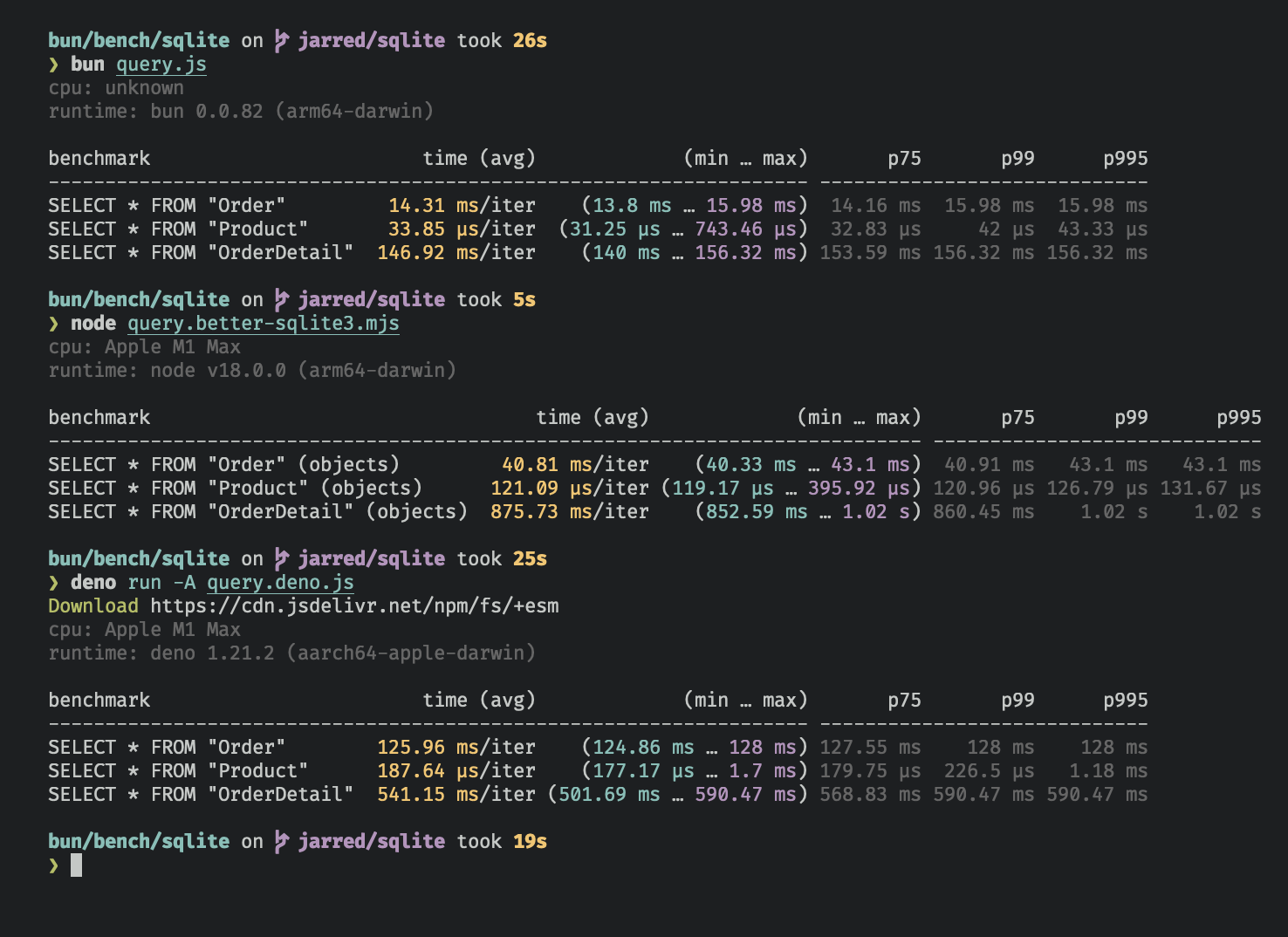
The `bun:sqlite` module is roughly 3-6x faster than `better-sqlite3` and 8-9x faster than `deno.land/x/sqlite` for read queries. Each driver was benchmarked against the [Northwind Traders](https://github.com/jpwhite3/northwind-SQLite3/blob/46d5f8a64f396f87cd374d1600dbf521523980e8/Northwind_large.sqlite.zip) dataset. View and run the [benchmark source](https://github.com/oven-sh/bun/tree/main/bench/sqlite).
|
|
34
|
+
|
|
35
|
+
<Frame caption="Benchmarked on an M1 MacBook Pro (64GB) running macOS 12.3.1">
|
|
36
|
+
|
|
38
|
+
</Frame>
|
|
39
|
+
|
|
40
|
+
---
|
|
41
|
+
|
|
42
|
+
## Database
|
|
43
|
+
|
|
44
|
+
To open or create a SQLite3 database:
|
|
45
|
+
|
|
46
|
+
```ts db.ts icon="/icons/typescript.svg"
|
|
47
|
+
import { Database } from "bun:sqlite";
|
|
48
|
+
|
|
49
|
+
const db = new Database("mydb.sqlite");
|
|
50
|
+
```
|
|
51
|
+
|
|
52
|
+
To open an in-memory database:
|
|
53
|
+
|
|
54
|
+
```ts db.ts icon="/icons/typescript.svg"
|
|
55
|
+
import { Database } from "bun:sqlite";
|
|
56
|
+
|
|
57
|
+
// all of these do the same thing
|
|
58
|
+
const db = new Database(":memory:");
|
|
59
|
+
const db = new Database();
|
|
60
|
+
const db = new Database("");
|
|
61
|
+
```
|
|
62
|
+
|
|
63
|
+
To open in `readonly` mode:
|
|
64
|
+
|
|
65
|
+
```ts db.ts icon="/icons/typescript.svg" highlight={2}
|
|
66
|
+
import { Database } from "bun:sqlite";
|
|
67
|
+
const db = new Database("mydb.sqlite", { readonly: true });
|
|
68
|
+
```
|
|
69
|
+
|
|
70
|
+
To create the database if the file doesn't exist:
|
|
71
|
+
|
|
72
|
+
```ts db.ts icon="/icons/typescript.svg" highlight={2}
|
|
73
|
+
import { Database } from "bun:sqlite";
|
|
74
|
+
const db = new Database("mydb.sqlite", { create: true });
|
|
75
|
+
```
|
|
76
|
+
|
|
77
|
+
### Strict mode
|
|
78
|
+
|
|
79
|
+
By default, `bun:sqlite` requires binding parameters to include the `$`, `:`, or `@` prefix, and does not throw an error if a parameter is missing.
|
|
80
|
+
|
|
81
|
+
To instead throw an error when a parameter is missing and allow binding without a prefix, set `strict: true` on the `Database` constructor:
|
|
82
|
+
|
|
83
|
+
```ts db.ts icon="/icons/typescript.svg" highlight={3}
|
|
84
|
+
import { Database } from "bun:sqlite";
|
|
85
|
+
|
|
86
|
+
const strict = new Database(":memory:", { strict: true });
|
|
87
|
+
|
|
88
|
+
// throws error because of the typo:
|
|
89
|
+
const query = strict.query("SELECT $message;").all({ message: "Hello world" });
|
|
90
|
+
|
|
91
|
+
const notStrict = new Database(":memory:");
|
|
92
|
+
// does not throw error:
|
|
93
|
+
notStrict.query("SELECT $message;").all({ message: "Hello world" });
|
|
94
|
+
```
|
|
95
|
+
|
|
96
|
+
### Load via ES module import
|
|
97
|
+
|
|
98
|
+
You can also use an import attribute to load a database.
|
|
99
|
+
|
|
100
|
+
```ts db.ts icon="/icons/typescript.svg" highlight={1}
|
|
101
|
+
import db from "./mydb.sqlite" with { type: "sqlite" };
|
|
102
|
+
|
|
103
|
+
console.log(db.query("select * from users LIMIT 1").get());
|
|
104
|
+
```
|
|
105
|
+
|
|
106
|
+
This is equivalent to the following:
|
|
107
|
+
|
|
108
|
+
```ts db.ts icon="/icons/typescript.svg"
|
|
109
|
+
import { Database } from "bun:sqlite";
|
|
110
|
+
const db = new Database("./mydb.sqlite");
|
|
111
|
+
```
|
|
112
|
+
|
|
113
|
+
### `.close(throwOnError: boolean = false)`
|
|
114
|
+
|
|
115
|
+
To close a database connection, but allow existing queries to finish, call `.close(false)`:
|
|
116
|
+
|
|
117
|
+
```ts db.ts icon="/icons/typescript.svg" highlight={3}
|
|
118
|
+
const db = new Database();
|
|
119
|
+
// ... do stuff
|
|
120
|
+
db.close(false);
|
|
121
|
+
```
|
|
122
|
+
|
|
123
|
+
To close the database and throw an error if there are any pending queries, call `.close(true)`:
|
|
124
|
+
|
|
125
|
+
```ts db.ts icon="/icons/typescript.svg" highlight={3}
|
|
126
|
+
const db = new Database();
|
|
127
|
+
// ... do stuff
|
|
128
|
+
db.close(true);
|
|
129
|
+
```
|
|
130
|
+
|
|
131
|
+
<Note>
|
|
132
|
+
`close(false)` is called automatically when the database is garbage collected. It is safe to call multiple times but
|
|
133
|
+
has no effect after the first.
|
|
134
|
+
</Note>
|
|
135
|
+
|
|
136
|
+
### `using` statement
|
|
137
|
+
|
|
138
|
+
You can use the `using` statement to ensure that a database connection is closed when the `using` block is exited.
|
|
139
|
+
|
|
140
|
+
```ts db.ts icon="/icons/typescript.svg" highlight={4, 5}
|
|
141
|
+
import { Database } from "bun:sqlite";
|
|
142
|
+
|
|
143
|
+
{
|
|
144
|
+
using db = new Database("mydb.sqlite");
|
|
145
|
+
using query = db.query("select 'Hello world' as message;");
|
|
146
|
+
console.log(query.get());
|
|
147
|
+
}
|
|
148
|
+
```
|
|
149
|
+
|
|
150
|
+
```txt
|
|
151
|
+
{ message: "Hello world" }
|
|
152
|
+
```
|
|
153
|
+
|
|
154
|
+
### `.serialize()`
|
|
155
|
+
|
|
156
|
+
`bun:sqlite` supports SQLite's built-in mechanism for [serializing](https://www.sqlite.org/c3ref/serialize.html) and [deserializing](https://www.sqlite.org/c3ref/deserialize.html) databases to and from memory.
|
|
157
|
+
|
|
158
|
+
```ts db.ts icon="/icons/typescript.svg" highlight={2}
|
|
159
|
+
const olddb = new Database("mydb.sqlite");
|
|
160
|
+
const contents = olddb.serialize(); // => Uint8Array
|
|
161
|
+
const newdb = Database.deserialize(contents);
|
|
162
|
+
```
|
|
163
|
+
|
|
164
|
+
Internally, `.serialize()` calls [`sqlite3_serialize`](https://www.sqlite.org/c3ref/serialize.html).
|
|
165
|
+
|
|
166
|
+
### `.query()`
|
|
167
|
+
|
|
168
|
+
Use the `db.query()` method on your `Database` instance to [prepare](https://www.sqlite.org/c3ref/prepare.html) a SQL query. The result is a `Statement` instance that will be cached on the `Database` instance. _The query will not be executed._
|
|
169
|
+
|
|
170
|
+
```ts db.ts icon="/icons/typescript.svg"
|
|
171
|
+
const query = db.query(`select "Hello world" as message`);
|
|
172
|
+
```
|
|
173
|
+
|
|
174
|
+
<Note>
|
|
175
|
+
Use the `.prepare()` method to prepare a query _without_ caching it on the `Database` instance.
|
|
176
|
+
|
|
177
|
+
```ts
|
|
178
|
+
// compile the prepared statement
|
|
179
|
+
const query = db.prepare("SELECT * FROM foo WHERE bar = ?");
|
|
180
|
+
```
|
|
181
|
+
|
|
182
|
+
</Note>
|
|
183
|
+
|
|
184
|
+
---
|
|
185
|
+
|
|
186
|
+
## WAL mode
|
|
187
|
+
|
|
188
|
+
SQLite supports [write-ahead log mode](https://www.sqlite.org/wal.html) (WAL) which dramatically improves performance, especially in situations with many concurrent readers and a single writer. It's broadly recommended to enable WAL mode for most typical applications.
|
|
189
|
+
|
|
190
|
+
To enable WAL mode, run this pragma query at the beginning of your application:
|
|
191
|
+
|
|
192
|
+
```ts db.ts icon="/icons/typescript.svg"
|
|
193
|
+
db.exec("PRAGMA journal_mode = WAL;");
|
|
194
|
+
```
|
|
195
|
+
|
|
196
|
+
<Accordion title="What is WAL mode?">
|
|
197
|
+
In WAL mode, writes to the database are written directly to a separate file called the "WAL file" (write-ahead log). This file will be later integrated into the main database file. Think of it as a buffer for pending writes. Refer to the [SQLite docs](https://www.sqlite.org/wal.html) for a more detailed overview.
|
|
198
|
+
|
|
199
|
+
On macOS, WAL files may be persistent by default. This is not a bug, it is how macOS configured the system version of SQLite.
|
|
200
|
+
|
|
201
|
+
</Accordion>
|
|
202
|
+
|
|
203
|
+
---
|
|
204
|
+
|
|
205
|
+
## Statements
|
|
206
|
+
|
|
207
|
+
A `Statement` is a _prepared query_, which means it's been parsed and compiled into an efficient binary form. It can be executed multiple times in a performant way.
|
|
208
|
+
|
|
209
|
+
Create a statement with the `.query` method on your `Database` instance.
|
|
210
|
+
|
|
211
|
+
```ts db.ts icon="/icons/typescript.svg"
|
|
212
|
+
const query = db.query(`select "Hello world" as message`);
|
|
213
|
+
```
|
|
214
|
+
|
|
215
|
+
Queries can contain parameters. These can be numerical (`?1`) or named (`$param` or `:param` or `@param`).
|
|
216
|
+
|
|
217
|
+
```ts db.ts icon="/icons/typescript.svg"
|
|
218
|
+
const query = db.query(`SELECT ?1, ?2;`);
|
|
219
|
+
const query = db.query(`SELECT $param1, $param2;`);
|
|
220
|
+
```
|
|
221
|
+
|
|
222
|
+
Values are bound to these parameters when the query is executed. A `Statement` can be executed with several different methods, each returning the results in a different form.
|
|
223
|
+
|
|
224
|
+
### Binding values
|
|
225
|
+
|
|
226
|
+
To bind values to a statement, pass an object to the `.all()`, `.get()`, `.run()`, or `.values()` method.
|
|
227
|
+
|
|
228
|
+
```ts db.ts icon="/icons/typescript.svg" highlight={2}
|
|
229
|
+
const query = db.query(`select $message;`);
|
|
230
|
+
query.all({ $message: "Hello world" });
|
|
231
|
+
```
|
|
232
|
+
|
|
233
|
+
You can bind using positional parameters too:
|
|
234
|
+
|
|
235
|
+
```ts db.ts icon="/icons/typescript.svg"
|
|
236
|
+
const query = db.query(`select ?1;`);
|
|
237
|
+
query.all("Hello world");
|
|
238
|
+
```
|
|
239
|
+
|
|
240
|
+
#### `strict: true` lets you bind values without prefixes
|
|
241
|
+
|
|
242
|
+
By default, the `$`, `:`, and `@` prefixes are **included** when binding values to named parameters. To bind without these prefixes, use the `strict` option in the `Database` constructor.
|
|
243
|
+
|
|
244
|
+
```ts db.ts icon="/icons/typescript.svg"
|
|
245
|
+
import { Database } from "bun:sqlite";
|
|
246
|
+
|
|
247
|
+
const db = new Database(":memory:", {
|
|
248
|
+
// bind values without prefixes
|
|
249
|
+
strict: true, // [!code ++]
|
|
250
|
+
});
|
|
251
|
+
|
|
252
|
+
const query = db.query(`select $message;`);
|
|
253
|
+
|
|
254
|
+
// strict: true
|
|
255
|
+
query.all({ message: "Hello world" });
|
|
256
|
+
|
|
257
|
+
// strict: false
|
|
258
|
+
// query.all({ $message: "Hello world" });
|
|
259
|
+
```
|
|
260
|
+
|
|
261
|
+
### `.all()`
|
|
262
|
+
|
|
263
|
+
Use `.all()` to run a query and get back the results as an array of objects.
|
|
264
|
+
|
|
265
|
+
```ts db.ts icon="/icons/typescript.svg" highlight={2}
|
|
266
|
+
const query = db.query(`select $message;`);
|
|
267
|
+
query.all({ $message: "Hello world" });
|
|
268
|
+
```
|
|
269
|
+
|
|
270
|
+
```txt
|
|
271
|
+
[{ message: "Hello world" }]
|
|
272
|
+
```
|
|
273
|
+
|
|
274
|
+
Internally, this calls [`sqlite3_reset`](https://www.sqlite.org/capi3ref.html#sqlite3_reset) and repeatedly calls [`sqlite3_step`](https://www.sqlite.org/capi3ref.html#sqlite3_step) until it returns `SQLITE_DONE`.
|
|
275
|
+
|
|
276
|
+
### `.get()`
|
|
277
|
+
|
|
278
|
+
Use `.get()` to run a query and get back the first result as an object.
|
|
279
|
+
|
|
280
|
+
```ts db.ts icon="/icons/typescript.svg" highlight={2}
|
|
281
|
+
const query = db.query(`select $message;`);
|
|
282
|
+
query.get({ $message: "Hello world" });
|
|
283
|
+
```
|
|
284
|
+
|
|
285
|
+
```txt
|
|
286
|
+
{ $message: "Hello world" }
|
|
287
|
+
```
|
|
288
|
+
|
|
289
|
+
Internally, this calls [`sqlite3_reset`](https://www.sqlite.org/capi3ref.html#sqlite3_reset) followed by [`sqlite3_step`](https://www.sqlite.org/capi3ref.html#sqlite3_step) until it no longer returns `SQLITE_ROW`. If the query returns no rows, `undefined` is returned.
|
|
290
|
+
|
|
291
|
+
### `.run()`
|
|
292
|
+
|
|
293
|
+
Use `.run()` to run a query and get back `undefined`. This is useful for schema-modifying queries (e.g. `CREATE TABLE`) or bulk write operations.
|
|
294
|
+
|
|
295
|
+
```ts db.ts icon="/icons/typescript.svg" highlight={2}
|
|
296
|
+
const query = db.query(`create table foo;`);
|
|
297
|
+
query.run();
|
|
298
|
+
```
|
|
299
|
+
|
|
300
|
+
```txt
|
|
301
|
+
{
|
|
302
|
+
lastInsertRowid: 0,
|
|
303
|
+
changes: 0,
|
|
304
|
+
}
|
|
305
|
+
```
|
|
306
|
+
|
|
307
|
+
Internally, this calls [`sqlite3_reset`](https://www.sqlite.org/capi3ref.html#sqlite3_reset) and calls [`sqlite3_step`](https://www.sqlite.org/capi3ref.html#sqlite3_step) once. Stepping through all the rows is not necessary when you don't care about the results.
|
|
308
|
+
|
|
309
|
+
The `lastInsertRowid` property returns the ID of the last row inserted into the database. The `changes` property is the number of rows affected by the query.
|
|
310
|
+
|
|
311
|
+
### `.as(Class)` - Map query results to a class
|
|
312
|
+
|
|
313
|
+
Use `.as(Class)` to run a query and get back the results as instances of a class. This lets you attach methods & getters/setters to results.
|
|
314
|
+
|
|
315
|
+
```ts db.ts icon="/icons/typescript.svg" highlight={10}
|
|
316
|
+
class Movie {
|
|
317
|
+
title: string;
|
|
318
|
+
year: number;
|
|
319
|
+
|
|
320
|
+
get isMarvel() {
|
|
321
|
+
return this.title.includes("Marvel");
|
|
322
|
+
}
|
|
323
|
+
}
|
|
324
|
+
|
|
325
|
+
const query = db.query("SELECT title, year FROM movies").as(Movie);
|
|
326
|
+
const movies = query.all();
|
|
327
|
+
const first = query.get();
|
|
328
|
+
|
|
329
|
+
console.log(movies[0].isMarvel);
|
|
330
|
+
console.log(first.isMarvel);
|
|
331
|
+
```
|
|
332
|
+
|
|
333
|
+
```txt
|
|
334
|
+
true
|
|
335
|
+
true
|
|
336
|
+
```
|
|
337
|
+
|
|
338
|
+
As a performance optimization, the class constructor is not called, default initializers are not run, and private fields are not accessible. This is more like using `Object.create` than `new`. The class's prototype is assigned to the object, methods are attached, and getters/setters are set up, but the constructor is not called.
|
|
339
|
+
|
|
340
|
+
The database columns are set as properties on the class instance.
|
|
341
|
+
|
|
342
|
+
### `.iterate()` (`@@iterator`)
|
|
343
|
+
|
|
344
|
+
Use `.iterate()` to run a query and incrementally return results. This is useful for large result sets that you want to process one row at a time without loading all the results into memory.
|
|
345
|
+
|
|
346
|
+
```ts db.ts icon="/icons/typescript.svg" highlight={2}
|
|
347
|
+
const query = db.query("SELECT * FROM foo");
|
|
348
|
+
for (const row of query.iterate()) {
|
|
349
|
+
console.log(row);
|
|
350
|
+
}
|
|
351
|
+
```
|
|
352
|
+
|
|
353
|
+
You can also use the `@@iterator` protocol:
|
|
354
|
+
|
|
355
|
+
```ts db.ts icon="/icons/typescript.svg" highlight={2}
|
|
356
|
+
const query = db.query("SELECT * FROM foo");
|
|
357
|
+
for (const row of query) {
|
|
358
|
+
console.log(row);
|
|
359
|
+
}
|
|
360
|
+
```
|
|
361
|
+
|
|
362
|
+
This feature was added in Bun v1.1.31.
|
|
363
|
+
|
|
364
|
+
### `.values()`
|
|
365
|
+
|
|
366
|
+
Use `values()` to run a query and get back all results as an array of arrays.
|
|
367
|
+
|
|
368
|
+
```ts db.ts icon="/icons/typescript.svg" highlight={3, 4}
|
|
369
|
+
const query = db.query(`select $message;`);
|
|
370
|
+
|
|
371
|
+
query.values({ $message: "Hello world" });
|
|
372
|
+
query.values(2);
|
|
373
|
+
```
|
|
374
|
+
|
|
375
|
+
```txt
|
|
376
|
+
[
|
|
377
|
+
[ "Iron Man", 2008 ],
|
|
378
|
+
[ "The Avengers", 2012 ],
|
|
379
|
+
[ "Ant-Man: Quantumania", 2023 ],
|
|
380
|
+
]
|
|
381
|
+
```
|
|
382
|
+
|
|
383
|
+
Internally, this calls [`sqlite3_reset`](https://www.sqlite.org/capi3ref.html#sqlite3_reset) and repeatedly calls [`sqlite3_step`](https://www.sqlite.org/capi3ref.html#sqlite3_step) until it returns `SQLITE_DONE`.
|
|
384
|
+
|
|
385
|
+
### `.finalize()`
|
|
386
|
+
|
|
387
|
+
Use `.finalize()` to destroy a `Statement` and free any resources associated with it. Once finalized, a `Statement` cannot be executed again. Typically, the garbage collector will do this for you, but explicit finalization may be useful in performance-sensitive applications.
|
|
388
|
+
|
|
389
|
+
```ts db.ts icon="/icons/typescript.svg" highlight={3}
|
|
390
|
+
const query = db.query("SELECT title, year FROM movies");
|
|
391
|
+
const movies = query.all();
|
|
392
|
+
query.finalize();
|
|
393
|
+
```
|
|
394
|
+
|
|
395
|
+
### `.toString()`
|
|
396
|
+
|
|
397
|
+
Calling `toString()` on a `Statement` instance prints the expanded SQL query. This is useful for debugging.
|
|
398
|
+
|
|
399
|
+
```ts db.ts icon="/icons/typescript.svg" highlight={6, 9, 12}
|
|
400
|
+
import { Database } from "bun:sqlite";
|
|
401
|
+
|
|
402
|
+
// setup
|
|
403
|
+
const query = db.query("SELECT $param;");
|
|
404
|
+
|
|
405
|
+
console.log(query.toString()); // => "SELECT NULL"
|
|
406
|
+
|
|
407
|
+
query.run(42);
|
|
408
|
+
console.log(query.toString()); // => "SELECT 42"
|
|
409
|
+
|
|
410
|
+
query.run(365);
|
|
411
|
+
console.log(query.toString()); // => "SELECT 365"
|
|
412
|
+
```
|
|
413
|
+
|
|
414
|
+
Internally, this calls [`sqlite3_expanded_sql`](https://www.sqlite.org/capi3ref.html#sqlite3_expanded_sql). The parameters are expanded using the most recently bound values.
|
|
415
|
+
|
|
416
|
+
## Parameters
|
|
417
|
+
|
|
418
|
+
Queries can contain parameters. These can be numerical (`?1`) or named (`$param` or `:param` or `@param`). Bind values to these parameters when executing the query:
|
|
419
|
+
|
|
420
|
+
```ts title="query.ts" icon="/icons/typescript.svg"
|
|
421
|
+
const query = db.query("SELECT * FROM foo WHERE bar = $bar");
|
|
422
|
+
const results = query.all({
|
|
423
|
+
$bar: "bar",
|
|
424
|
+
});
|
|
425
|
+
```
|
|
426
|
+
|
|
427
|
+
```txt
|
|
428
|
+
[{ "$bar": "bar" }]
|
|
429
|
+
```
|
|
430
|
+
|
|
431
|
+
Numbered (positional) parameters work too:
|
|
432
|
+
|
|
433
|
+
```ts db.ts icon="/icons/typescript.svg"
|
|
434
|
+
const query = db.query("SELECT ?1, ?2");
|
|
435
|
+
const results = query.all("hello", "goodbye");
|
|
436
|
+
```
|
|
437
|
+
|
|
438
|
+
```txt
|
|
439
|
+
[
|
|
440
|
+
{
|
|
441
|
+
"?1": "hello",
|
|
442
|
+
"?2": "goodbye",
|
|
443
|
+
},
|
|
444
|
+
];
|
|
445
|
+
```
|
|
446
|
+
|
|
447
|
+
---
|
|
448
|
+
|
|
449
|
+
## Integers
|
|
450
|
+
|
|
451
|
+
sqlite supports signed 64 bit integers, but JavaScript only supports signed 52 bit integers or arbitrary precision integers with `bigint`.
|
|
452
|
+
|
|
453
|
+
`bigint` input is supported everywhere, but by default `bun:sqlite` returns integers as `number` types. If you need to handle integers larger than 2^53, set `safeIntegers` option to `true` when creating a `Database` instance. This also validates that `bigint` passed to `bun:sqlite` do not exceed 64 bits.
|
|
454
|
+
|
|
455
|
+
By default, `bun:sqlite` returns integers as `number` types. If you need to handle integers larger than 2^53, you can use the `bigint` type.
|
|
456
|
+
|
|
457
|
+
### `safeIntegers: true`
|
|
458
|
+
|
|
459
|
+
When `safeIntegers` is `true`, `bun:sqlite` will return integers as `bigint` types:
|
|
460
|
+
|
|
461
|
+
```ts db.ts icon="/icons/typescript.svg" highlight={3}
|
|
462
|
+
import { Database } from "bun:sqlite";
|
|
463
|
+
|
|
464
|
+
const db = new Database(":memory:", { safeIntegers: true });
|
|
465
|
+
const query = db.query(`SELECT ${BigInt(Number.MAX_SAFE_INTEGER) + 102n} as max_int`);
|
|
466
|
+
const result = query.get();
|
|
467
|
+
|
|
468
|
+
console.log(result.max_int);
|
|
469
|
+
```
|
|
470
|
+
|
|
471
|
+
```txt
|
|
472
|
+
9007199254741093n
|
|
473
|
+
```
|
|
474
|
+
|
|
475
|
+
When `safeIntegers` is `true`, `bun:sqlite` will throw an error if a `bigint` value in a bound parameter exceeds 64 bits:
|
|
476
|
+
|
|
477
|
+
```ts db.ts icon="/icons/typescript.svg" highlight={3}
|
|
478
|
+
import { Database } from "bun:sqlite";
|
|
479
|
+
|
|
480
|
+
const db = new Database(":memory:", { safeIntegers: true });
|
|
481
|
+
db.run("CREATE TABLE test (id INTEGER PRIMARY KEY, value INTEGER)");
|
|
482
|
+
|
|
483
|
+
const query = db.query("INSERT INTO test (value) VALUES ($value)");
|
|
484
|
+
|
|
485
|
+
try {
|
|
486
|
+
query.run({ $value: BigInt(Number.MAX_SAFE_INTEGER) ** 2n });
|
|
487
|
+
} catch (e) {
|
|
488
|
+
console.log(e.message);
|
|
489
|
+
}
|
|
490
|
+
```
|
|
491
|
+
|
|
492
|
+
```txt
|
|
493
|
+
BigInt value '81129638414606663681390495662081' is out of range
|
|
494
|
+
```
|
|
495
|
+
|
|
496
|
+
### `safeIntegers: false` (default)
|
|
497
|
+
|
|
498
|
+
When `safeIntegers` is `false`, `bun:sqlite` will return integers as `number` types and truncate any bits beyond 53:
|
|
499
|
+
|
|
500
|
+
```ts db.ts icon="/icons/typescript.svg" highlight={3}
|
|
501
|
+
import { Database } from "bun:sqlite";
|
|
502
|
+
|
|
503
|
+
const db = new Database(":memory:", { safeIntegers: false });
|
|
504
|
+
const query = db.query(`SELECT ${BigInt(Number.MAX_SAFE_INTEGER) + 102n} as max_int`);
|
|
505
|
+
const result = query.get();
|
|
506
|
+
console.log(result.max_int);
|
|
507
|
+
```
|
|
508
|
+
|
|
509
|
+
```txt
|
|
510
|
+
9007199254741092
|
|
511
|
+
```
|
|
512
|
+
|
|
513
|
+
---
|
|
514
|
+
|
|
515
|
+
## Transactions
|
|
516
|
+
|
|
517
|
+
Transactions are a mechanism for executing multiple queries in an _atomic_ way; that is, either all of the queries succeed or none of them do. Create a transaction with the `db.transaction()` method:
|
|
518
|
+
|
|
519
|
+
```ts db.ts icon="/icons/typescript.svg" highlight={2}
|
|
520
|
+
const insertCat = db.prepare("INSERT INTO cats (name) VALUES ($name)");
|
|
521
|
+
const insertCats = db.transaction(cats => {
|
|
522
|
+
for (const cat of cats) insertCat.run(cat);
|
|
523
|
+
});
|
|
524
|
+
```
|
|
525
|
+
|
|
526
|
+
At this stage, we haven't inserted any cats! The call to `db.transaction()` returns a new function (`insertCats`) that _wraps_ the function that executes the queries.
|
|
527
|
+
|
|
528
|
+
To execute the transaction, call this function. All arguments will be passed through to the wrapped function; the return value of the wrapped function will be returned by the transaction function. The wrapped function also has access to the `this` context as defined where the transaction is executed.
|
|
529
|
+
|
|
530
|
+
```ts db.ts icon="/icons/typescript.svg" highlight={3}
|
|
531
|
+
const insert = db.prepare("INSERT INTO cats (name) VALUES ($name)");
|
|
532
|
+
const insertCats = db.transaction(cats => {
|
|
533
|
+
for (const cat of cats) insert.run(cat);
|
|
534
|
+
return cats.length;
|
|
535
|
+
});
|
|
536
|
+
|
|
537
|
+
const count = insertCats([{ $name: "Keanu" }, { $name: "Salem" }, { $name: "Crookshanks" }]);
|
|
538
|
+
|
|
539
|
+
console.log(`Inserted ${count} cats`);
|
|
540
|
+
```
|
|
541
|
+
|
|
542
|
+
The driver will automatically [`begin`](https://www.sqlite.org/lang_transaction.html) a transaction when `insertCats` is called and `commit` it when the wrapped function returns. If an exception is thrown, the transaction will be rolled back. The exception will propagate as usual; it is not caught.
|
|
543
|
+
|
|
544
|
+
<Note>
|
|
545
|
+
**Nested transactions** — Transaction functions can be called from inside other transaction functions. When doing so, the inner transaction becomes a [savepoint](https://www.sqlite.org/lang_savepoint.html).
|
|
546
|
+
|
|
547
|
+
<Accordion title="View nested transaction example">
|
|
548
|
+
|
|
549
|
+
```ts db.ts icon="/icons/typescript.svg"
|
|
550
|
+
// setup
|
|
551
|
+
import { Database } from "bun:sqlite";
|
|
552
|
+
const db = Database.open(":memory:");
|
|
553
|
+
db.run("CREATE TABLE expenses (id INTEGER PRIMARY KEY AUTOINCREMENT, note TEXT, dollars INTEGER);");
|
|
554
|
+
db.run("CREATE TABLE cats (id INTEGER PRIMARY KEY AUTOINCREMENT, name TEXT UNIQUE, age INTEGER)");
|
|
555
|
+
const insertExpense = db.prepare("INSERT INTO expenses (note, dollars) VALUES (?, ?)");
|
|
556
|
+
const insert = db.prepare("INSERT INTO cats (name, age) VALUES ($name, $age)");
|
|
557
|
+
const insertCats = db.transaction(cats => {
|
|
558
|
+
for (const cat of cats) insert.run(cat);
|
|
559
|
+
});
|
|
560
|
+
|
|
561
|
+
const adopt = db.transaction(cats => {
|
|
562
|
+
insertExpense.run("adoption fees", 20);
|
|
563
|
+
insertCats(cats); // nested transaction
|
|
564
|
+
});
|
|
565
|
+
|
|
566
|
+
adopt([
|
|
567
|
+
{ $name: "Joey", $age: 2 },
|
|
568
|
+
{ $name: "Sally", $age: 4 },
|
|
569
|
+
{ $name: "Junior", $age: 1 },
|
|
570
|
+
]);
|
|
571
|
+
```
|
|
572
|
+
|
|
573
|
+
</Accordion>
|
|
574
|
+
</Note>
|
|
575
|
+
|
|
576
|
+
Transactions also come with `deferred`, `immediate`, and `exclusive` versions.
|
|
577
|
+
|
|
578
|
+
```ts
|
|
579
|
+
insertCats(cats); // uses "BEGIN"
|
|
580
|
+
insertCats.deferred(cats); // uses "BEGIN DEFERRED"
|
|
581
|
+
insertCats.immediate(cats); // uses "BEGIN IMMEDIATE"
|
|
582
|
+
insertCats.exclusive(cats); // uses "BEGIN EXCLUSIVE"
|
|
583
|
+
```
|
|
584
|
+
|
|
585
|
+
### `.loadExtension()`
|
|
586
|
+
|
|
587
|
+
To load a [SQLite extension](https://www.sqlite.org/loadext.html), call `.loadExtension(name)` on your `Database` instance
|
|
588
|
+
|
|
589
|
+
```ts db.ts icon="/icons/typescript.svg" highlight={4}
|
|
590
|
+
import { Database } from "bun:sqlite";
|
|
591
|
+
|
|
592
|
+
const db = new Database();
|
|
593
|
+
db.loadExtension("myext");
|
|
594
|
+
```
|
|
595
|
+
|
|
596
|
+
<Note>
|
|
597
|
+
**MacOS users** By default, macOS ships with Apple's proprietary build of SQLite, which doesn't support extensions. To use extensions, you'll need to install a vanilla build of SQLite.
|
|
598
|
+
|
|
599
|
+
```bash terminal icon="terminal"
|
|
600
|
+
brew install sqlite
|
|
601
|
+
which sqlite # get path to binary
|
|
602
|
+
```
|
|
603
|
+
|
|
604
|
+
To point `bun:sqlite` to the new build, call `Database.setCustomSQLite(path)` before creating any `Database` instances. (On other operating systems, this is a no-op.) Pass a path to the SQLite `.dylib` file, _not_ the executable. With recent versions of Homebrew this is something like `/opt/homebrew/Cellar/sqlite/<version>/libsqlite3.dylib`.
|
|
605
|
+
|
|
606
|
+
```ts db.ts icon="/icons/typescript.svg" highlight={3}
|
|
607
|
+
import { Database } from "bun:sqlite";
|
|
608
|
+
|
|
609
|
+
Database.setCustomSQLite("/path/to/libsqlite.dylib");
|
|
610
|
+
|
|
611
|
+
const db = new Database();
|
|
612
|
+
db.loadExtension("myext");
|
|
613
|
+
```
|
|
614
|
+
|
|
615
|
+
</Note>
|
|
616
|
+
|
|
617
|
+
### `.fileControl(cmd: number, value: any)`
|
|
618
|
+
|
|
619
|
+
To use the advanced `sqlite3_file_control` API, call `.fileControl(cmd, value)` on your `Database` instance.
|
|
620
|
+
|
|
621
|
+
```ts db.ts icon="/icons/typescript.svg" highlight={6}
|
|
622
|
+
import { Database, constants } from "bun:sqlite";
|
|
623
|
+
|
|
624
|
+
const db = new Database();
|
|
625
|
+
// Ensure WAL mode is NOT persistent
|
|
626
|
+
// this prevents wal files from lingering after the database is closed
|
|
627
|
+
db.fileControl(constants.SQLITE_FCNTL_PERSIST_WAL, 0);
|
|
628
|
+
```
|
|
629
|
+
|
|
630
|
+
`value` can be:
|
|
631
|
+
|
|
632
|
+
- `number`
|
|
633
|
+
- `TypedArray`
|
|
634
|
+
- `undefined` or `null`
|
|
635
|
+
|
|
636
|
+
---
|
|
637
|
+
|
|
638
|
+
## Reference
|
|
639
|
+
|
|
640
|
+
```ts Type Reference icon="/icons/typescript.svg" expandable
|
|
641
|
+
class Database {
|
|
642
|
+
constructor(
|
|
643
|
+
filename: string,
|
|
644
|
+
options?:
|
|
645
|
+
| number
|
|
646
|
+
| {
|
|
647
|
+
readonly?: boolean;
|
|
648
|
+
create?: boolean;
|
|
649
|
+
readwrite?: boolean;
|
|
650
|
+
},
|
|
651
|
+
);
|
|
652
|
+
|
|
653
|
+
query<Params, ReturnType>(sql: string): Statement<Params, ReturnType>;
|
|
654
|
+
run(sql: string, params?: SQLQueryBindings): { lastInsertRowid: number; changes: number };
|
|
655
|
+
exec = this.run;
|
|
656
|
+
}
|
|
657
|
+
|
|
658
|
+
class Statement<Params, ReturnType> {
|
|
659
|
+
all(params: Params): ReturnType[];
|
|
660
|
+
get(params: Params): ReturnType | undefined;
|
|
661
|
+
run(params: Params): {
|
|
662
|
+
lastInsertRowid: number;
|
|
663
|
+
changes: number;
|
|
664
|
+
};
|
|
665
|
+
values(params: Params): unknown[][];
|
|
666
|
+
|
|
667
|
+
finalize(): void; // destroy statement and clean up resources
|
|
668
|
+
toString(): string; // serialize to SQL
|
|
669
|
+
|
|
670
|
+
columnNames: string[]; // the column names of the result set
|
|
671
|
+
columnTypes: string[]; // types based on actual values in first row (call .get()/.all() first)
|
|
672
|
+
declaredTypes: (string | null)[]; // types from CREATE TABLE schema (call .get()/.all() first)
|
|
673
|
+
paramsCount: number; // the number of parameters expected by the statement
|
|
674
|
+
native: any; // the native object representing the statement
|
|
675
|
+
|
|
676
|
+
as(Class: new () => ReturnType): this;
|
|
677
|
+
}
|
|
678
|
+
|
|
679
|
+
type SQLQueryBindings =
|
|
680
|
+
| string
|
|
681
|
+
| bigint
|
|
682
|
+
| TypedArray
|
|
683
|
+
| number
|
|
684
|
+
| boolean
|
|
685
|
+
| null
|
|
686
|
+
| Record<string, string | bigint | TypedArray | number | boolean | null>;
|
|
687
|
+
```
|
|
688
|
+
|
|
689
|
+
### Datatypes
|
|
690
|
+
|
|
691
|
+
| JavaScript type | SQLite type |
|
|
692
|
+
| --------------- | ---------------------- |
|
|
693
|
+
| `string` | `TEXT` |
|
|
694
|
+
| `number` | `INTEGER` or `DECIMAL` |
|
|
695
|
+
| `boolean` | `INTEGER` (1 or 0) |
|
|
696
|
+
| `Uint8Array` | `BLOB` |
|
|
697
|
+
| `Buffer` | `BLOB` |
|
|
698
|
+
| `bigint` | `INTEGER` |
|
|
699
|
+
| `null` | `NULL` |
|