bun-types 1.3.2-canary.20251106T140813 → 1.3.2
This diff represents the content of publicly available package versions that have been released to one of the supported registries. The information contained in this diff is provided for informational purposes only and reflects changes between package versions as they appear in their respective public registries.
- package/bun.d.ts +102 -6
- package/docs/bundler/bytecode.mdx +465 -0
- package/docs/bundler/css.mdx +1024 -0
- package/docs/bundler/esbuild.mdx +253 -0
- package/docs/bundler/executables.mdx +535 -0
- package/docs/bundler/fullstack.mdx +1064 -0
- package/docs/bundler/hot-reloading.mdx +229 -0
- package/docs/bundler/html-static.mdx +386 -0
- package/docs/bundler/index.mdx +1499 -0
- package/docs/bundler/loaders.mdx +356 -0
- package/docs/bundler/macros.mdx +328 -0
- package/docs/bundler/minifier.mdx +1306 -0
- package/docs/bundler/plugins.mdx +411 -0
- package/docs/feedback.mdx +85 -0
- package/docs/guides/binary/arraybuffer-to-array.mdx +29 -0
- package/docs/guides/binary/arraybuffer-to-blob.mdx +26 -0
- package/docs/guides/binary/arraybuffer-to-buffer.mdx +27 -0
- package/docs/guides/binary/arraybuffer-to-string.mdx +17 -0
- package/docs/guides/binary/arraybuffer-to-typedarray.mdx +41 -0
- package/docs/guides/binary/blob-to-arraybuffer.mdx +16 -0
- package/docs/guides/binary/blob-to-dataview.mdx +16 -0
- package/docs/guides/binary/blob-to-stream.mdx +16 -0
- package/docs/guides/binary/blob-to-string.mdx +17 -0
- package/docs/guides/binary/blob-to-typedarray.mdx +16 -0
- package/docs/guides/binary/buffer-to-arraybuffer.mdx +16 -0
- package/docs/guides/binary/buffer-to-blob.mdx +16 -0
- package/docs/guides/binary/buffer-to-readablestream.mdx +43 -0
- package/docs/guides/binary/buffer-to-string.mdx +27 -0
- package/docs/guides/binary/buffer-to-typedarray.mdx +16 -0
- package/docs/guides/binary/dataview-to-string.mdx +17 -0
- package/docs/guides/binary/typedarray-to-arraybuffer.mdx +27 -0
- package/docs/guides/binary/typedarray-to-blob.mdx +18 -0
- package/docs/guides/binary/typedarray-to-buffer.mdx +16 -0
- package/docs/guides/binary/typedarray-to-dataview.mdx +16 -0
- package/docs/guides/binary/typedarray-to-readablestream.mdx +43 -0
- package/docs/guides/binary/typedarray-to-string.mdx +18 -0
- package/docs/guides/deployment/aws-lambda.mdx +204 -0
- package/docs/guides/deployment/digital-ocean.mdx +161 -0
- package/docs/guides/deployment/google-cloud-run.mdx +197 -0
- package/docs/guides/deployment/railway.mdx +145 -0
- package/docs/guides/deployment/render.mdx +82 -0
- package/docs/guides/deployment/vercel.mdx +99 -0
- package/docs/guides/ecosystem/astro.mdx +82 -0
- package/docs/guides/ecosystem/discordjs.mdx +80 -0
- package/docs/guides/ecosystem/docker.mdx +151 -0
- package/docs/guides/ecosystem/drizzle.mdx +195 -0
- package/docs/guides/ecosystem/edgedb.mdx +257 -0
- package/docs/guides/ecosystem/elysia.mdx +31 -0
- package/docs/guides/ecosystem/express.mdx +43 -0
- package/docs/guides/ecosystem/hono.mdx +47 -0
- package/docs/guides/ecosystem/mongoose.mdx +92 -0
- package/docs/guides/ecosystem/neon-drizzle.mdx +234 -0
- package/docs/guides/ecosystem/neon-serverless-postgres.mdx +60 -0
- package/docs/guides/ecosystem/nextjs.mdx +57 -0
- package/docs/guides/ecosystem/nuxt.mdx +90 -0
- package/docs/guides/ecosystem/pm2.mdx +55 -0
- package/docs/guides/ecosystem/prisma-postgres.mdx +169 -0
- package/docs/guides/ecosystem/prisma.mdx +164 -0
- package/docs/guides/ecosystem/qwik.mdx +114 -0
- package/docs/guides/ecosystem/react.mdx +52 -0
- package/docs/guides/ecosystem/remix.mdx +97 -0
- package/docs/guides/ecosystem/sentry.mdx +54 -0
- package/docs/guides/ecosystem/solidstart.mdx +66 -0
- package/docs/guides/ecosystem/ssr-react.mdx +49 -0
- package/docs/guides/ecosystem/stric.mdx +54 -0
- package/docs/guides/ecosystem/sveltekit.mdx +138 -0
- package/docs/guides/ecosystem/systemd.mdx +114 -0
- package/docs/guides/ecosystem/upstash.mdx +87 -0
- package/docs/guides/ecosystem/vite.mdx +77 -0
- package/docs/guides/html-rewriter/extract-links.mdx +72 -0
- package/docs/guides/html-rewriter/extract-social-meta.mdx +97 -0
- package/docs/guides/http/cluster.mdx +69 -0
- package/docs/guides/http/fetch-unix.mdx +35 -0
- package/docs/guides/http/fetch.mdx +26 -0
- package/docs/guides/http/file-uploads.mdx +97 -0
- package/docs/guides/http/hot.mdx +28 -0
- package/docs/guides/http/proxy.mdx +26 -0
- package/docs/guides/http/server.mdx +48 -0
- package/docs/guides/http/simple.mdx +20 -0
- package/docs/guides/http/stream-file.mdx +50 -0
- package/docs/guides/http/stream-iterator.mdx +49 -0
- package/docs/guides/http/stream-node-streams-in-bun.mdx +22 -0
- package/docs/guides/http/tls.mdx +32 -0
- package/docs/guides/index.mdx +10 -0
- package/docs/guides/install/add-dev.mdx +28 -0
- package/docs/guides/install/add-git.mdx +38 -0
- package/docs/guides/install/add-optional.mdx +27 -0
- package/docs/guides/install/add-peer.mdx +45 -0
- package/docs/guides/install/add-tarball.mdx +35 -0
- package/docs/guides/install/add.mdx +44 -0
- package/docs/guides/install/azure-artifacts.mdx +76 -0
- package/docs/guides/install/cicd.mdx +43 -0
- package/docs/guides/install/custom-registry.mdx +32 -0
- package/docs/guides/install/from-npm-install-to-bun-install.mdx +230 -0
- package/docs/guides/install/git-diff-bun-lockfile.mdx +47 -0
- package/docs/guides/install/jfrog-artifactory.mdx +28 -0
- package/docs/guides/install/npm-alias.mdx +25 -0
- package/docs/guides/install/registry-scope.mdx +40 -0
- package/docs/guides/install/trusted.mdx +50 -0
- package/docs/guides/install/workspaces.mdx +70 -0
- package/docs/guides/install/yarnlock.mdx +50 -0
- package/docs/guides/process/argv.mdx +66 -0
- package/docs/guides/process/ctrl-c.mdx +18 -0
- package/docs/guides/process/ipc.mdx +69 -0
- package/docs/guides/process/nanoseconds.mdx +15 -0
- package/docs/guides/process/os-signals.mdx +41 -0
- package/docs/guides/process/spawn-stderr.mdx +34 -0
- package/docs/guides/process/spawn-stdout.mdx +28 -0
- package/docs/guides/process/spawn.mdx +43 -0
- package/docs/guides/process/stdin.mdx +62 -0
- package/docs/guides/read-file/arraybuffer.mdx +30 -0
- package/docs/guides/read-file/buffer.mdx +21 -0
- package/docs/guides/read-file/exists.mdx +18 -0
- package/docs/guides/read-file/json.mdx +19 -0
- package/docs/guides/read-file/mime.mdx +22 -0
- package/docs/guides/read-file/stream.mdx +28 -0
- package/docs/guides/read-file/string.mdx +24 -0
- package/docs/guides/read-file/uint8array.mdx +23 -0
- package/docs/guides/read-file/watch.mdx +66 -0
- package/docs/guides/runtime/build-time-constants.mdx +295 -0
- package/docs/guides/runtime/cicd.mdx +45 -0
- package/docs/guides/runtime/codesign-macos-executable.mdx +61 -0
- package/docs/guides/runtime/define-constant.mdx +149 -0
- package/docs/guides/runtime/delete-directory.mdx +39 -0
- package/docs/guides/runtime/delete-file.mdx +21 -0
- package/docs/guides/runtime/heap-snapshot.mdx +28 -0
- package/docs/guides/runtime/import-html.mdx +17 -0
- package/docs/guides/runtime/import-json.mdx +46 -0
- package/docs/guides/runtime/import-toml.mdx +32 -0
- package/docs/guides/runtime/import-yaml.mdx +104 -0
- package/docs/guides/runtime/read-env.mdx +37 -0
- package/docs/guides/runtime/set-env.mdx +51 -0
- package/docs/guides/runtime/shell.mdx +42 -0
- package/docs/guides/runtime/timezone.mdx +38 -0
- package/docs/guides/runtime/tsconfig-paths.mdx +31 -0
- package/docs/guides/runtime/typescript.mdx +51 -0
- package/docs/guides/runtime/vscode-debugger.mdx +48 -0
- package/docs/guides/runtime/web-debugger.mdx +103 -0
- package/docs/guides/streams/node-readable-to-arraybuffer.mdx +13 -0
- package/docs/guides/streams/node-readable-to-blob.mdx +13 -0
- package/docs/guides/streams/node-readable-to-json.mdx +14 -0
- package/docs/guides/streams/node-readable-to-string.mdx +14 -0
- package/docs/guides/streams/node-readable-to-uint8array.mdx +13 -0
- package/docs/guides/streams/to-array.mdx +16 -0
- package/docs/guides/streams/to-arraybuffer.mdx +16 -0
- package/docs/guides/streams/to-blob.mdx +16 -0
- package/docs/guides/streams/to-buffer.mdx +17 -0
- package/docs/guides/streams/to-json.mdx +16 -0
- package/docs/guides/streams/to-string.mdx +16 -0
- package/docs/guides/streams/to-typedarray.mdx +24 -0
- package/docs/guides/test/bail.mdx +24 -0
- package/docs/guides/test/coverage-threshold.mdx +67 -0
- package/docs/guides/test/coverage.mdx +49 -0
- package/docs/guides/test/happy-dom.mdx +73 -0
- package/docs/guides/test/migrate-from-jest.mdx +125 -0
- package/docs/guides/test/mock-clock.mdx +50 -0
- package/docs/guides/test/mock-functions.mdx +70 -0
- package/docs/guides/test/rerun-each.mdx +16 -0
- package/docs/guides/test/run-tests.mdx +116 -0
- package/docs/guides/test/skip-tests.mdx +43 -0
- package/docs/guides/test/snapshot.mdx +102 -0
- package/docs/guides/test/spy-on.mdx +49 -0
- package/docs/guides/test/svelte-test.mdx +113 -0
- package/docs/guides/test/testing-library.mdx +93 -0
- package/docs/guides/test/timeout.mdx +17 -0
- package/docs/guides/test/todo-tests.mdx +74 -0
- package/docs/guides/test/update-snapshots.mdx +49 -0
- package/docs/guides/test/watch-mode.mdx +24 -0
- package/docs/guides/util/base64.mdx +17 -0
- package/docs/guides/util/deep-equals.mdx +41 -0
- package/docs/guides/util/deflate.mdx +20 -0
- package/docs/guides/util/detect-bun.mdx +25 -0
- package/docs/guides/util/entrypoint.mdx +19 -0
- package/docs/guides/util/escape-html.mdx +24 -0
- package/docs/guides/util/file-url-to-path.mdx +16 -0
- package/docs/guides/util/gzip.mdx +20 -0
- package/docs/guides/util/hash-a-password.mdx +56 -0
- package/docs/guides/util/import-meta-dir.mdx +15 -0
- package/docs/guides/util/import-meta-file.mdx +15 -0
- package/docs/guides/util/import-meta-path.mdx +15 -0
- package/docs/guides/util/javascript-uuid.mdx +25 -0
- package/docs/guides/util/main.mdx +43 -0
- package/docs/guides/util/path-to-file-url.mdx +16 -0
- package/docs/guides/util/sleep.mdx +24 -0
- package/docs/guides/util/version.mdx +23 -0
- package/docs/guides/util/which-path-to-executable-bin.mdx +17 -0
- package/docs/guides/websocket/compression.mdx +33 -0
- package/docs/guides/websocket/context.mdx +74 -0
- package/docs/guides/websocket/pubsub.mdx +40 -0
- package/docs/guides/websocket/simple.mdx +35 -0
- package/docs/guides/write-file/append.mdx +54 -0
- package/docs/guides/write-file/basic.mdx +46 -0
- package/docs/guides/write-file/blob.mdx +30 -0
- package/docs/guides/write-file/cat.mdx +19 -0
- package/docs/guides/write-file/file-cp.mdx +18 -0
- package/docs/guides/write-file/filesink.mdx +54 -0
- package/docs/guides/write-file/response.mdx +19 -0
- package/docs/guides/write-file/stdout.mdx +23 -0
- package/docs/guides/write-file/stream.mdx +19 -0
- package/docs/guides/write-file/unlink.mdx +18 -0
- package/docs/index.mdx +133 -0
- package/docs/installation.mdx +365 -0
- package/docs/pm/bunx.mdx +83 -0
- package/docs/pm/catalogs.mdx +292 -0
- package/docs/pm/cli/add.mdx +179 -0
- package/docs/pm/cli/audit.mdx +60 -0
- package/docs/pm/cli/install.mdx +471 -0
- package/docs/pm/cli/link.mdx +48 -0
- package/docs/pm/cli/outdated.mdx +197 -0
- package/docs/pm/cli/patch.mdx +69 -0
- package/docs/pm/cli/pm.mdx +319 -0
- package/docs/pm/cli/publish.mdx +123 -0
- package/docs/pm/cli/remove.mdx +16 -0
- package/docs/pm/cli/update.mdx +140 -0
- package/docs/pm/cli/why.mdx +84 -0
- package/docs/pm/filter.mdx +102 -0
- package/docs/pm/global-cache.mdx +72 -0
- package/docs/pm/isolated-installs.mdx +205 -0
- package/docs/pm/lifecycle.mdx +57 -0
- package/docs/pm/lockfile.mdx +64 -0
- package/docs/pm/npmrc.mdx +111 -0
- package/docs/pm/overrides.mdx +83 -0
- package/docs/pm/scopes-registries.mdx +35 -0
- package/docs/pm/security-scanner-api.mdx +95 -0
- package/docs/pm/workspaces.mdx +109 -0
- package/docs/project/benchmarking.mdx +218 -0
- package/docs/project/bindgen.mdx +223 -0
- package/docs/project/building-windows.mdx +133 -0
- package/docs/project/contributing.mdx +343 -0
- package/docs/project/feedback.mdx +20 -0
- package/docs/project/license.mdx +78 -0
- package/docs/project/roadmap.mdx +8 -0
- package/docs/quickstart.mdx +240 -0
- package/docs/runtime/auto-install.mdx +97 -0
- package/docs/runtime/binary-data.mdx +846 -0
- package/docs/runtime/bun-apis.mdx +59 -0
- package/docs/runtime/bunfig.mdx +642 -0
- package/docs/runtime/c-compiler.mdx +204 -0
- package/docs/runtime/child-process.mdx +532 -0
- package/docs/runtime/color.mdx +267 -0
- package/docs/runtime/console.mdx +67 -0
- package/docs/runtime/cookies.mdx +454 -0
- package/docs/runtime/debugger.mdx +335 -0
- package/docs/runtime/environment-variables.mdx +214 -0
- package/docs/runtime/ffi.mdx +565 -0
- package/docs/runtime/file-io.mdx +306 -0
- package/docs/runtime/file-system-router.mdx +118 -0
- package/docs/runtime/file-types.mdx +354 -0
- package/docs/runtime/glob.mdx +181 -0
- package/docs/runtime/globals.mdx +72 -0
- package/docs/runtime/hashing.mdx +315 -0
- package/docs/runtime/html-rewriter.mdx +340 -0
- package/docs/runtime/http/cookies.mdx +79 -0
- package/docs/runtime/http/error-handling.mdx +40 -0
- package/docs/runtime/http/metrics.mdx +36 -0
- package/docs/runtime/http/routing.mdx +289 -0
- package/docs/runtime/http/server.mdx +647 -0
- package/docs/runtime/http/tls.mdx +101 -0
- package/docs/runtime/http/websockets.mdx +404 -0
- package/docs/runtime/index.mdx +223 -0
- package/docs/runtime/jsx.mdx +115 -0
- package/docs/runtime/module-resolution.mdx +342 -0
- package/docs/runtime/networking/dns.mdx +111 -0
- package/docs/runtime/networking/fetch.mdx +468 -0
- package/docs/runtime/networking/tcp.mdx +239 -0
- package/docs/runtime/networking/udp.mdx +129 -0
- package/docs/runtime/node-api.mdx +19 -0
- package/docs/runtime/nodejs-compat.mdx +468 -0
- package/docs/runtime/plugins.mdx +405 -0
- package/docs/runtime/redis.mdx +582 -0
- package/docs/runtime/s3.mdx +863 -0
- package/docs/runtime/secrets.mdx +336 -0
- package/docs/runtime/semver.mdx +57 -0
- package/docs/runtime/shell.mdx +637 -0
- package/docs/runtime/sql.mdx +1404 -0
- package/docs/runtime/sqlite.mdx +699 -0
- package/docs/runtime/streams.mdx +232 -0
- package/docs/runtime/templating/create.mdx +269 -0
- package/docs/runtime/templating/init.mdx +58 -0
- package/docs/runtime/transpiler.mdx +288 -0
- package/docs/runtime/typescript.mdx +58 -0
- package/docs/runtime/utils.mdx +922 -0
- package/docs/runtime/watch-mode.mdx +161 -0
- package/docs/runtime/web-apis.mdx +29 -0
- package/docs/runtime/workers.mdx +328 -0
- package/docs/runtime/yaml.mdx +469 -0
- package/docs/snippets/cli/add.mdx +166 -0
- package/docs/snippets/cli/build.mdx +196 -0
- package/docs/snippets/cli/feedback.mdx +17 -0
- package/docs/snippets/cli/init.mdx +84 -0
- package/docs/snippets/cli/install.mdx +173 -0
- package/docs/snippets/cli/link.mdx +163 -0
- package/docs/snippets/cli/outdated.mdx +140 -0
- package/docs/snippets/cli/patch.mdx +171 -0
- package/docs/snippets/cli/publish.mdx +198 -0
- package/docs/snippets/cli/remove.mdx +146 -0
- package/docs/snippets/cli/run.mdx +293 -0
- package/docs/snippets/cli/test.mdx +100 -0
- package/docs/snippets/cli/update.mdx +144 -0
- package/docs/snippets/product-card.mdx +32 -0
- package/docs/snippets/product-tiles.mdx +94 -0
- package/docs/test/code-coverage.mdx +409 -0
- package/docs/test/configuration.mdx +467 -0
- package/docs/test/dates-times.mdx +129 -0
- package/docs/test/discovery.mdx +90 -0
- package/docs/test/dom.mdx +226 -0
- package/docs/test/index.mdx +380 -0
- package/docs/test/lifecycle.mdx +348 -0
- package/docs/test/mocks.mdx +637 -0
- package/docs/test/reporters.mdx +117 -0
- package/docs/test/runtime-behavior.mdx +342 -0
- package/docs/test/snapshots.mdx +434 -0
- package/docs/test/writing-tests.mdx +635 -0
- package/docs/typescript.mdx +54 -0
- package/package.json +8 -6
- package/test.d.ts +2 -2
|
@@ -0,0 +1,46 @@
|
|
|
1
|
+
---
|
|
2
|
+
title: Import a JSON file
|
|
3
|
+
sidebarTitle: Import JSON
|
|
4
|
+
mode: center
|
|
5
|
+
---
|
|
6
|
+
|
|
7
|
+
Bun natively supports `.json` imports.
|
|
8
|
+
|
|
9
|
+
```json package.json icon="file-json"
|
|
10
|
+
{
|
|
11
|
+
"name": "bun",
|
|
12
|
+
"version": "1.0.0",
|
|
13
|
+
"author": {
|
|
14
|
+
"name": "John Dough",
|
|
15
|
+
"email": "john@dough.com"
|
|
16
|
+
}
|
|
17
|
+
}
|
|
18
|
+
```
|
|
19
|
+
|
|
20
|
+
---
|
|
21
|
+
|
|
22
|
+
Import the file like any other source file.
|
|
23
|
+
|
|
24
|
+
```ts data.ts icon="/icons/typescript.svg"
|
|
25
|
+
import data from "./package.json";
|
|
26
|
+
|
|
27
|
+
data.name; // => "bun"
|
|
28
|
+
data.version; // => "1.0.0"
|
|
29
|
+
data.author.name; // => "John Dough"
|
|
30
|
+
```
|
|
31
|
+
|
|
32
|
+
---
|
|
33
|
+
|
|
34
|
+
Bun also supports [Import Attributes](https://github.com/tc39/proposal-import-attributes/) and [JSON modules](https://github.com/tc39/proposal-json-modules) syntax.
|
|
35
|
+
|
|
36
|
+
```ts data.ts icon="/icons/typescript.svg"
|
|
37
|
+
import data from "./package.json" with { type: "json" };
|
|
38
|
+
|
|
39
|
+
data.name; // => "bun"
|
|
40
|
+
data.version; // => "1.0.0"
|
|
41
|
+
data.author.name; // => "John Dough"
|
|
42
|
+
```
|
|
43
|
+
|
|
44
|
+
---
|
|
45
|
+
|
|
46
|
+
See [Docs > Runtime > TypeScript](https://bun.com/docs/runtime/typescript) for more information on using TypeScript with Bun.
|
|
@@ -0,0 +1,32 @@
|
|
|
1
|
+
---
|
|
2
|
+
title: Import a TOML file
|
|
3
|
+
sidebarTitle: Import TOML
|
|
4
|
+
mode: center
|
|
5
|
+
---
|
|
6
|
+
|
|
7
|
+
Bun natively supports importing `.toml` files.
|
|
8
|
+
|
|
9
|
+
```toml data.toml icon="file-code"
|
|
10
|
+
name = "bun"
|
|
11
|
+
version = "1.0.0"
|
|
12
|
+
|
|
13
|
+
[author]
|
|
14
|
+
name = "John Dough"
|
|
15
|
+
email = "john@dough.com"
|
|
16
|
+
```
|
|
17
|
+
|
|
18
|
+
---
|
|
19
|
+
|
|
20
|
+
Import the file like any other source file.
|
|
21
|
+
|
|
22
|
+
```ts data.ts icon="/icons/typescript.svg"
|
|
23
|
+
import data from "./data.toml";
|
|
24
|
+
|
|
25
|
+
data.name; // => "bun"
|
|
26
|
+
data.version; // => "1.0.0"
|
|
27
|
+
data.author.name; // => "John Dough"
|
|
28
|
+
```
|
|
29
|
+
|
|
30
|
+
---
|
|
31
|
+
|
|
32
|
+
See [Docs > Runtime > TypeScript](https://bun.com/docs/runtime/typescript) for more information on using TypeScript with Bun.
|
|
@@ -0,0 +1,104 @@
|
|
|
1
|
+
---
|
|
2
|
+
title: Import a YAML file
|
|
3
|
+
sidebarTitle: Import YAML
|
|
4
|
+
mode: center
|
|
5
|
+
---
|
|
6
|
+
|
|
7
|
+
Bun natively supports `.yaml` and `.yml` imports.
|
|
8
|
+
|
|
9
|
+
```yaml config.yaml icon="file-code"
|
|
10
|
+
database:
|
|
11
|
+
host: localhost
|
|
12
|
+
port: 5432
|
|
13
|
+
name: myapp
|
|
14
|
+
|
|
15
|
+
server:
|
|
16
|
+
port: 3000
|
|
17
|
+
timeout: 30
|
|
18
|
+
|
|
19
|
+
features:
|
|
20
|
+
auth: true
|
|
21
|
+
rateLimit: true
|
|
22
|
+
```
|
|
23
|
+
|
|
24
|
+
---
|
|
25
|
+
|
|
26
|
+
Import the file like any other source file.
|
|
27
|
+
|
|
28
|
+
```ts config.ts icon="/icons/typescript.svg"
|
|
29
|
+
import config from "./config.yaml";
|
|
30
|
+
|
|
31
|
+
config.database.host; // => "localhost"
|
|
32
|
+
config.server.port; // => 3000
|
|
33
|
+
config.features.auth; // => true
|
|
34
|
+
```
|
|
35
|
+
|
|
36
|
+
---
|
|
37
|
+
|
|
38
|
+
You can also use named imports to destructure top-level properties:
|
|
39
|
+
|
|
40
|
+
```ts config.ts icon="/icons/typescript.svg"
|
|
41
|
+
import { database, server, features } from "./config.yaml";
|
|
42
|
+
|
|
43
|
+
console.log(database.name); // => "myapp"
|
|
44
|
+
console.log(server.timeout); // => 30
|
|
45
|
+
console.log(features.rateLimit); // => true
|
|
46
|
+
```
|
|
47
|
+
|
|
48
|
+
---
|
|
49
|
+
|
|
50
|
+
Bun also supports [Import Attributes](https://github.com/tc39/proposal-import-attributes) syntax:
|
|
51
|
+
|
|
52
|
+
```ts config.ts icon="/icons/typescript.svg"
|
|
53
|
+
import config from "./config.yaml" with { type: "yaml" };
|
|
54
|
+
|
|
55
|
+
config.database.port; // => 5432
|
|
56
|
+
```
|
|
57
|
+
|
|
58
|
+
---
|
|
59
|
+
|
|
60
|
+
For parsing YAML strings at runtime, use `Bun.YAML.parse()`:
|
|
61
|
+
|
|
62
|
+
```ts config.ts icon="/icons/typescript.svg"
|
|
63
|
+
const yamlString = `
|
|
64
|
+
name: John Doe
|
|
65
|
+
age: 30
|
|
66
|
+
hobbies:
|
|
67
|
+
- reading
|
|
68
|
+
- coding
|
|
69
|
+
`;
|
|
70
|
+
|
|
71
|
+
const data = Bun.YAML.parse(yamlString);
|
|
72
|
+
console.log(data.name); // => "John Doe"
|
|
73
|
+
console.log(data.hobbies); // => ["reading", "coding"]
|
|
74
|
+
```
|
|
75
|
+
|
|
76
|
+
---
|
|
77
|
+
|
|
78
|
+
## TypeScript Support
|
|
79
|
+
|
|
80
|
+
To add TypeScript support for your YAML imports, create a declaration file with `.d.ts` appended to the YAML filename (e.g., `config.yaml` → `config.yaml.d.ts`);
|
|
81
|
+
|
|
82
|
+
```ts config.yaml.d.ts icon="/icons/typescript.svg"
|
|
83
|
+
const contents: {
|
|
84
|
+
database: {
|
|
85
|
+
host: string;
|
|
86
|
+
port: number;
|
|
87
|
+
name: string;
|
|
88
|
+
};
|
|
89
|
+
server: {
|
|
90
|
+
port: number;
|
|
91
|
+
timeout: number;
|
|
92
|
+
};
|
|
93
|
+
features: {
|
|
94
|
+
auth: boolean;
|
|
95
|
+
rateLimit: boolean;
|
|
96
|
+
};
|
|
97
|
+
};
|
|
98
|
+
|
|
99
|
+
export = contents;
|
|
100
|
+
```
|
|
101
|
+
|
|
102
|
+
---
|
|
103
|
+
|
|
104
|
+
See [Docs > API > YAML](https://bun.com/docs/api/yaml) for complete documentation on YAML support in Bun.
|
|
@@ -0,0 +1,37 @@
|
|
|
1
|
+
---
|
|
2
|
+
title: Read environment variables
|
|
3
|
+
sidebarTitle: Read env variables
|
|
4
|
+
mode: center
|
|
5
|
+
---
|
|
6
|
+
|
|
7
|
+
The current environment variables can be accessed via `process.env`.
|
|
8
|
+
|
|
9
|
+
```ts index.ts icon="/icons/typescript.svg"
|
|
10
|
+
process.env.API_TOKEN; // => "secret"
|
|
11
|
+
```
|
|
12
|
+
|
|
13
|
+
---
|
|
14
|
+
|
|
15
|
+
Bun also exposes these variables via `Bun.env`, which is a simple alias of `process.env`.
|
|
16
|
+
|
|
17
|
+
```ts index.ts icon="/icons/typescript.svg"
|
|
18
|
+
Bun.env.API_TOKEN; // => "secret"
|
|
19
|
+
```
|
|
20
|
+
|
|
21
|
+
---
|
|
22
|
+
|
|
23
|
+
To print all currently-set environment variables to the command line, run `bun --print process.env`. This is useful for debugging.
|
|
24
|
+
|
|
25
|
+
```sh terminal icon="terminal"
|
|
26
|
+
bun --print process.env
|
|
27
|
+
```
|
|
28
|
+
|
|
29
|
+
```txt
|
|
30
|
+
BAZ=stuff
|
|
31
|
+
FOOBAR=aaaaaa
|
|
32
|
+
<lots more lines>
|
|
33
|
+
```
|
|
34
|
+
|
|
35
|
+
---
|
|
36
|
+
|
|
37
|
+
See [Docs > Runtime > Environment variables](https://bun.com/docs/runtime/env) for more information on using environment variables with Bun.
|
|
@@ -0,0 +1,51 @@
|
|
|
1
|
+
---
|
|
2
|
+
title: Set environment variables
|
|
3
|
+
sidebarTitle: Set env variables
|
|
4
|
+
mode: center
|
|
5
|
+
---
|
|
6
|
+
|
|
7
|
+
The current environment variables can be accessed via `process.env` or `Bun.env`.
|
|
8
|
+
|
|
9
|
+
```ts index.ts icon="/icons/typescript.svg"
|
|
10
|
+
Bun.env.API_TOKEN; // => "secret"
|
|
11
|
+
process.env.API_TOKEN; // => "secret"
|
|
12
|
+
```
|
|
13
|
+
|
|
14
|
+
---
|
|
15
|
+
|
|
16
|
+
Set these variables in a `.env` file.
|
|
17
|
+
|
|
18
|
+
Bun reads the following files automatically (listed in order of increasing precedence).
|
|
19
|
+
|
|
20
|
+
- `.env`
|
|
21
|
+
- `.env.production`, `.env.development`, `.env.test` (depending on value of `NODE_ENV`)
|
|
22
|
+
- `.env.local` (not loaded when `NODE_ENV=test`)
|
|
23
|
+
|
|
24
|
+
```txt .env icon="settings"
|
|
25
|
+
FOO=hello
|
|
26
|
+
BAR=world
|
|
27
|
+
```
|
|
28
|
+
|
|
29
|
+
---
|
|
30
|
+
|
|
31
|
+
Variables can also be set via the command line.
|
|
32
|
+
|
|
33
|
+
<CodeGroup>
|
|
34
|
+
|
|
35
|
+
```sh Linux/macOS icon="terminal"
|
|
36
|
+
FOO=helloworld bun run dev
|
|
37
|
+
```
|
|
38
|
+
|
|
39
|
+
```sh Windows icon="windows"
|
|
40
|
+
# Using CMD
|
|
41
|
+
set FOO=helloworld && bun run dev
|
|
42
|
+
|
|
43
|
+
# Using PowerShell
|
|
44
|
+
$env:FOO="helloworld"; bun run dev
|
|
45
|
+
```
|
|
46
|
+
|
|
47
|
+
</CodeGroup>
|
|
48
|
+
|
|
49
|
+
---
|
|
50
|
+
|
|
51
|
+
See [Docs > Runtime > Environment variables](https://bun.com/docs/runtime/env) for more information on using environment variables with Bun.
|
|
@@ -0,0 +1,42 @@
|
|
|
1
|
+
---
|
|
2
|
+
title: Run a Shell Command
|
|
3
|
+
sidebarTitle: Run shell command
|
|
4
|
+
mode: center
|
|
5
|
+
---
|
|
6
|
+
|
|
7
|
+
Bun Shell is a cross-platform bash-like shell built in to Bun.
|
|
8
|
+
|
|
9
|
+
It provides a simple way to run shell commands in JavaScript and TypeScript. To get started, import the `$` function from the `bun` package and use it to run shell commands.
|
|
10
|
+
|
|
11
|
+
```ts foo.ts icon="/icons/typescript.svg"
|
|
12
|
+
import { $ } from "bun";
|
|
13
|
+
|
|
14
|
+
await $`echo Hello, world!`; // => "Hello, world!"
|
|
15
|
+
```
|
|
16
|
+
|
|
17
|
+
---
|
|
18
|
+
|
|
19
|
+
The `$` function is a tagged template literal that runs the command and returns a promise that resolves with the command's output.
|
|
20
|
+
|
|
21
|
+
```ts foo.ts icon="/icons/typescript.svg"
|
|
22
|
+
import { $ } from "bun";
|
|
23
|
+
|
|
24
|
+
const output = await $`ls -l`.text();
|
|
25
|
+
console.log(output);
|
|
26
|
+
```
|
|
27
|
+
|
|
28
|
+
---
|
|
29
|
+
|
|
30
|
+
To get each line of the output as an array, use the `lines` method.
|
|
31
|
+
|
|
32
|
+
```ts foo.ts icon="/icons/typescript.svg"
|
|
33
|
+
import { $ } from "bun";
|
|
34
|
+
|
|
35
|
+
for await (const line of $`ls -l`.lines()) {
|
|
36
|
+
console.log(line);
|
|
37
|
+
}
|
|
38
|
+
```
|
|
39
|
+
|
|
40
|
+
---
|
|
41
|
+
|
|
42
|
+
See [Docs > API > Shell](https://bun.com/docs/runtime/shell) for complete documentation.
|
|
@@ -0,0 +1,38 @@
|
|
|
1
|
+
---
|
|
2
|
+
title: Set a time zone in Bun
|
|
3
|
+
sidebarTitle: Set time zone
|
|
4
|
+
mode: center
|
|
5
|
+
---
|
|
6
|
+
|
|
7
|
+
Bun supports programmatically setting a default time zone for the lifetime of the `bun` process. To do set, set the value of the `TZ` environment variable to a [valid timezone identifier](https://en.wikipedia.org/wiki/List_of_tz_database_time_zones).
|
|
8
|
+
|
|
9
|
+
<Note>
|
|
10
|
+
When running a file with `bun`, the timezone defaults to your system's configured local time zone.
|
|
11
|
+
|
|
12
|
+
When running tests with `bun test`, the timezone is set to `UTC` to make tests more deterministic.
|
|
13
|
+
|
|
14
|
+
</Note>
|
|
15
|
+
|
|
16
|
+
```ts process.ts icon="/icons/typescript.svg"
|
|
17
|
+
process.env.TZ = "America/New_York";
|
|
18
|
+
```
|
|
19
|
+
|
|
20
|
+
---
|
|
21
|
+
|
|
22
|
+
Alternatively, this can be set from the command line when running a Bun command.
|
|
23
|
+
|
|
24
|
+
```sh terminal icon="terminal"
|
|
25
|
+
TZ=America/New_York bun run dev
|
|
26
|
+
```
|
|
27
|
+
|
|
28
|
+
---
|
|
29
|
+
|
|
30
|
+
Once `TZ` is set, any `Date` instances will have that time zone. By default all dates use your system's configured time zone.
|
|
31
|
+
|
|
32
|
+
```ts process.ts icon="/icons/typescript.svg"
|
|
33
|
+
new Date().getHours(); // => 18
|
|
34
|
+
|
|
35
|
+
process.env.TZ = "America/New_York";
|
|
36
|
+
|
|
37
|
+
new Date().getHours(); // => 21
|
|
38
|
+
```
|
|
@@ -0,0 +1,31 @@
|
|
|
1
|
+
---
|
|
2
|
+
title: Re-map import paths
|
|
3
|
+
sidebarTitle: Re-map import paths
|
|
4
|
+
mode: center
|
|
5
|
+
---
|
|
6
|
+
|
|
7
|
+
Bun reads the `paths` field in your `tsconfig.json` to re-write import paths. This is useful for aliasing package names or avoiding long relative paths.
|
|
8
|
+
|
|
9
|
+
```json tsconfig.json icon="file-json"
|
|
10
|
+
{
|
|
11
|
+
"compilerOptions": {
|
|
12
|
+
"paths": {
|
|
13
|
+
"my-custom-name": ["zod"],
|
|
14
|
+
"@components/*": ["./src/components/*"]
|
|
15
|
+
}
|
|
16
|
+
}
|
|
17
|
+
}
|
|
18
|
+
```
|
|
19
|
+
|
|
20
|
+
---
|
|
21
|
+
|
|
22
|
+
With the above `tsconfig.json`, the following imports will be re-written:
|
|
23
|
+
|
|
24
|
+
```ts tsconfig.ts icon="/icons/typescript.svg"
|
|
25
|
+
import { z } from "my-custom-name"; // imports from "zod"
|
|
26
|
+
import { Button } from "@components/Button"; // imports from "./src/components/Button"
|
|
27
|
+
```
|
|
28
|
+
|
|
29
|
+
---
|
|
30
|
+
|
|
31
|
+
See [Docs > Runtime > TypeScript](https://bun.com/docs/runtime/typescript) for more information on using TypeScript with Bun.
|
|
@@ -0,0 +1,51 @@
|
|
|
1
|
+
---
|
|
2
|
+
title: Install TypeScript declarations for Bun
|
|
3
|
+
sidebarTitle: TypeScript types
|
|
4
|
+
mode: center
|
|
5
|
+
---
|
|
6
|
+
|
|
7
|
+
To install TypeScript definitions for Bun's built-in APIs in your project, install `@types/bun`.
|
|
8
|
+
|
|
9
|
+
```sh terminal icon="terminal"
|
|
10
|
+
bun add -d @types/bun # dev dependency
|
|
11
|
+
```
|
|
12
|
+
|
|
13
|
+
---
|
|
14
|
+
|
|
15
|
+
Below is the full set of recommended `compilerOptions` for a Bun project. With this `tsconfig.json`, you can use top-level await, extensioned or extensionless imports, and JSX.
|
|
16
|
+
|
|
17
|
+
```json package.json icon="file-json"
|
|
18
|
+
{
|
|
19
|
+
"compilerOptions": {
|
|
20
|
+
// Environment setup & latest features
|
|
21
|
+
"lib": ["ESNext"],
|
|
22
|
+
"target": "ESNext",
|
|
23
|
+
"module": "Preserve",
|
|
24
|
+
"moduleDetection": "force",
|
|
25
|
+
"jsx": "react-jsx",
|
|
26
|
+
"allowJs": true,
|
|
27
|
+
|
|
28
|
+
// Bundler mode
|
|
29
|
+
"moduleResolution": "bundler",
|
|
30
|
+
"allowImportingTsExtensions": true,
|
|
31
|
+
"verbatimModuleSyntax": true,
|
|
32
|
+
"noEmit": true,
|
|
33
|
+
|
|
34
|
+
// Best practices
|
|
35
|
+
"strict": true,
|
|
36
|
+
"skipLibCheck": true,
|
|
37
|
+
"noFallthroughCasesInSwitch": true,
|
|
38
|
+
"noUncheckedIndexedAccess": true,
|
|
39
|
+
"noImplicitOverride": true,
|
|
40
|
+
|
|
41
|
+
// Some stricter flags (disabled by default)
|
|
42
|
+
"noUnusedLocals": false,
|
|
43
|
+
"noUnusedParameters": false,
|
|
44
|
+
"noPropertyAccessFromIndexSignature": false
|
|
45
|
+
}
|
|
46
|
+
}
|
|
47
|
+
```
|
|
48
|
+
|
|
49
|
+
---
|
|
50
|
+
|
|
51
|
+
Refer to [Ecosystem > TypeScript](https://bun.com/docs/runtime/typescript) for a complete guide to TypeScript support in Bun.
|
|
@@ -0,0 +1,48 @@
|
|
|
1
|
+
---
|
|
2
|
+
title: Debugging Bun with the VS Code extension
|
|
3
|
+
sidebarTitle: VS Code debugger
|
|
4
|
+
mode: center
|
|
5
|
+
---
|
|
6
|
+
|
|
7
|
+
<Note>
|
|
8
|
+
VSCode extension support is currently buggy. We recommend the [Web
|
|
9
|
+
Debugger](https://bun.com/guides/runtime/web-debugger) for now.
|
|
10
|
+
</Note>
|
|
11
|
+
|
|
12
|
+
Bun speaks the [WebKit Inspector Protocol](https://github.com/oven-sh/bun/blob/main/packages/bun-inspector-protocol/src/protocol/jsc/index.d.ts) so you can debug your code with an interactive debugger.
|
|
13
|
+
|
|
14
|
+
---
|
|
15
|
+
|
|
16
|
+
To install the extension, visit the [Bun for Visual Studio Code](https://marketplace.visualstudio.com/items?itemName=oven.bun-vscode) page on the VS Code marketplace website, then click Install.
|
|
17
|
+
|
|
18
|
+
<Frame></Frame>
|
|
19
|
+
|
|
20
|
+
---
|
|
21
|
+
|
|
22
|
+
Alternatively, search `bun-vscode` in the Extensions tab of VS Code.
|
|
23
|
+
|
|
24
|
+
<Frame></Frame>
|
|
25
|
+
|
|
26
|
+
---
|
|
27
|
+
|
|
28
|
+
Make sure you are installing the extension published by the verified Oven organization.
|
|
29
|
+
|
|
30
|
+
<Frame></Frame>
|
|
31
|
+
|
|
32
|
+
---
|
|
33
|
+
|
|
34
|
+
Once installed, two new Bun-specific commands will appear in the Command Palette. To open the palette, click View > Command Palette, or type `Ctrl+Shift+P` (Windows, Linux) or `Cmd+Shift+P` on (Mac).
|
|
35
|
+
|
|
36
|
+
---
|
|
37
|
+
|
|
38
|
+
The `Bun: Run File` command will execute your code and print the output to the Debug Console in VS Code. Breakpoints will be ignored; this is similar to executing the file with `bun <file>` from the command line.
|
|
39
|
+
|
|
40
|
+
<Frame></Frame>
|
|
41
|
+
|
|
42
|
+
---
|
|
43
|
+
|
|
44
|
+
The `Bun: Debug File` command will execute your code and print the output to the Debug Console in VS Code. You can set breakpoints in your code by clicking to the left of a line number; a red dot should appear.
|
|
45
|
+
|
|
46
|
+
When you run the file with `Bun: Debug File`, execution will pause at the breakpoint. You can inspect the variables in scope and step through the code line-by-line using the VS Code controls.
|
|
47
|
+
|
|
48
|
+
<Frame></Frame>
|
|
@@ -0,0 +1,103 @@
|
|
|
1
|
+
---
|
|
2
|
+
title: Debugging Bun with the web debugger
|
|
3
|
+
sidebarTitle: Web debugger
|
|
4
|
+
mode: center
|
|
5
|
+
---
|
|
6
|
+
|
|
7
|
+
Bun speaks the [WebKit Inspector Protocol](https://github.com/oven-sh/bun/blob/main/packages/bun-vscode/types/jsc.d.ts). To enable debugging when running code with Bun, use the `--inspect` flag. For demonstration purposes, consider the following simple web server.
|
|
8
|
+
|
|
9
|
+
```ts server.ts icon="/icons/typescript.svg"
|
|
10
|
+
Bun.serve({
|
|
11
|
+
fetch(req) {
|
|
12
|
+
console.log(req.url);
|
|
13
|
+
return new Response("Hello, world!");
|
|
14
|
+
},
|
|
15
|
+
});
|
|
16
|
+
```
|
|
17
|
+
|
|
18
|
+
---
|
|
19
|
+
|
|
20
|
+
Let's run this file with the `--inspect` flag.
|
|
21
|
+
|
|
22
|
+
This automatically starts a WebSocket server on an available port that can be used to introspect the running Bun process. Various debugging tools can connect to this server to provide an interactive debugging experience.
|
|
23
|
+
|
|
24
|
+
Bun hosts a web-based debugger at [debug.bun.sh](https://debug.bun.sh). It is a modified version of WebKit's [Web Inspector Interface](https://webkit.org/web-inspector/web-inspector-interface/), which will look familiar to Safari users.
|
|
25
|
+
|
|
26
|
+
```sh terminal icon="terminal"
|
|
27
|
+
bun --inspect server.ts
|
|
28
|
+
```
|
|
29
|
+
|
|
30
|
+
```txt
|
|
31
|
+
------------------ Bun Inspector ------------------
|
|
32
|
+
Listening at:
|
|
33
|
+
ws://localhost:6499/0tqxs9exrgrm
|
|
34
|
+
|
|
35
|
+
Inspect in browser:
|
|
36
|
+
https://debug.bun.sh/#localhost:6499/0tqxs9exrgrm
|
|
37
|
+
------------------ Bun Inspector ------------------
|
|
38
|
+
```
|
|
39
|
+
|
|
40
|
+
---
|
|
41
|
+
|
|
42
|
+
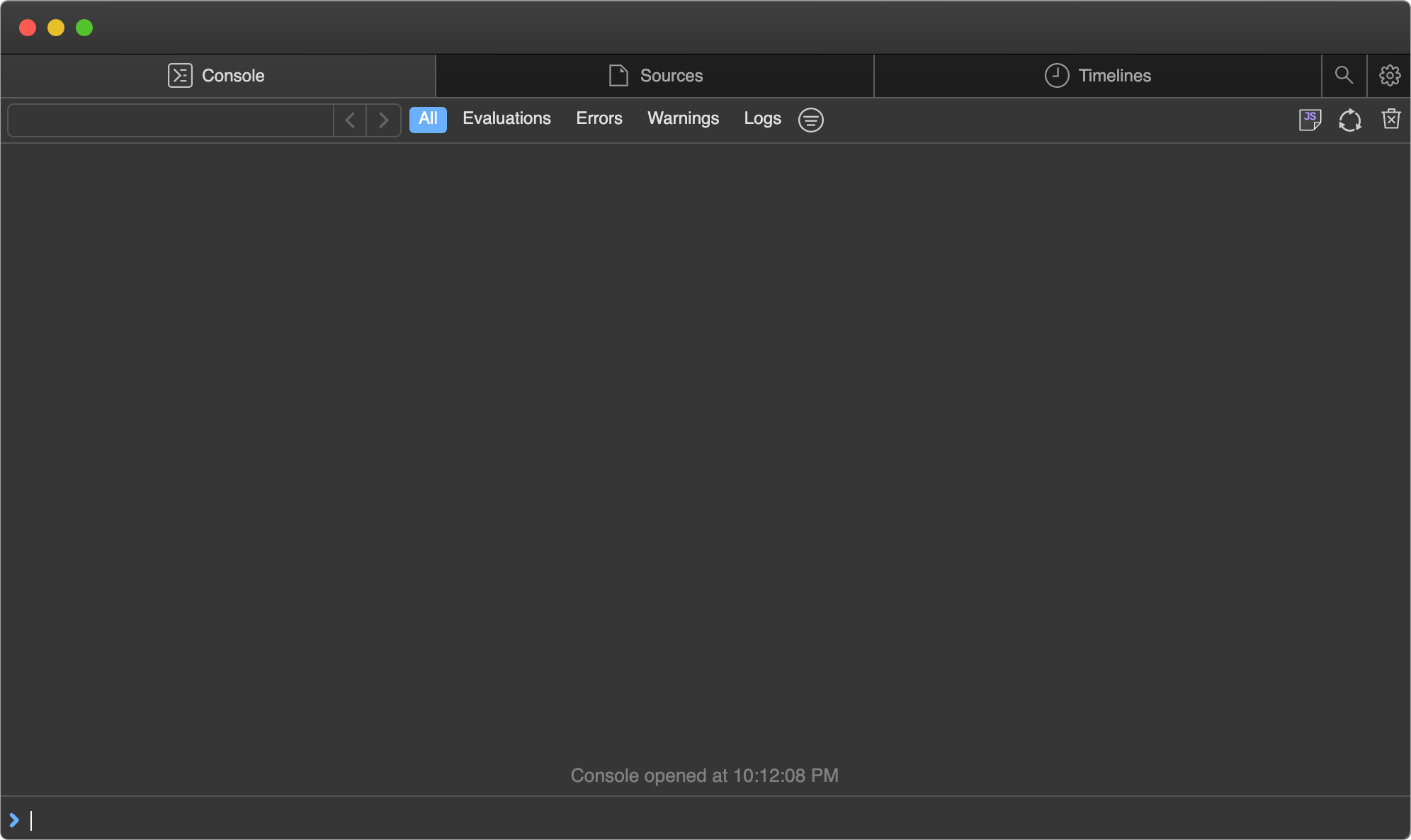
Open the provided `debug.bun.sh` URL in your browser to start a debugging session. From this interface, you'll be able to view the source code of the running file, view and set breakpoints, and execute code with the built-in console.
|
|
43
|
+
|
|
44
|
+
<Frame>
|
|
45
|
+
|
|
47
|
+
</Frame>
|
|
48
|
+
|
|
49
|
+
---
|
|
50
|
+
|
|
51
|
+
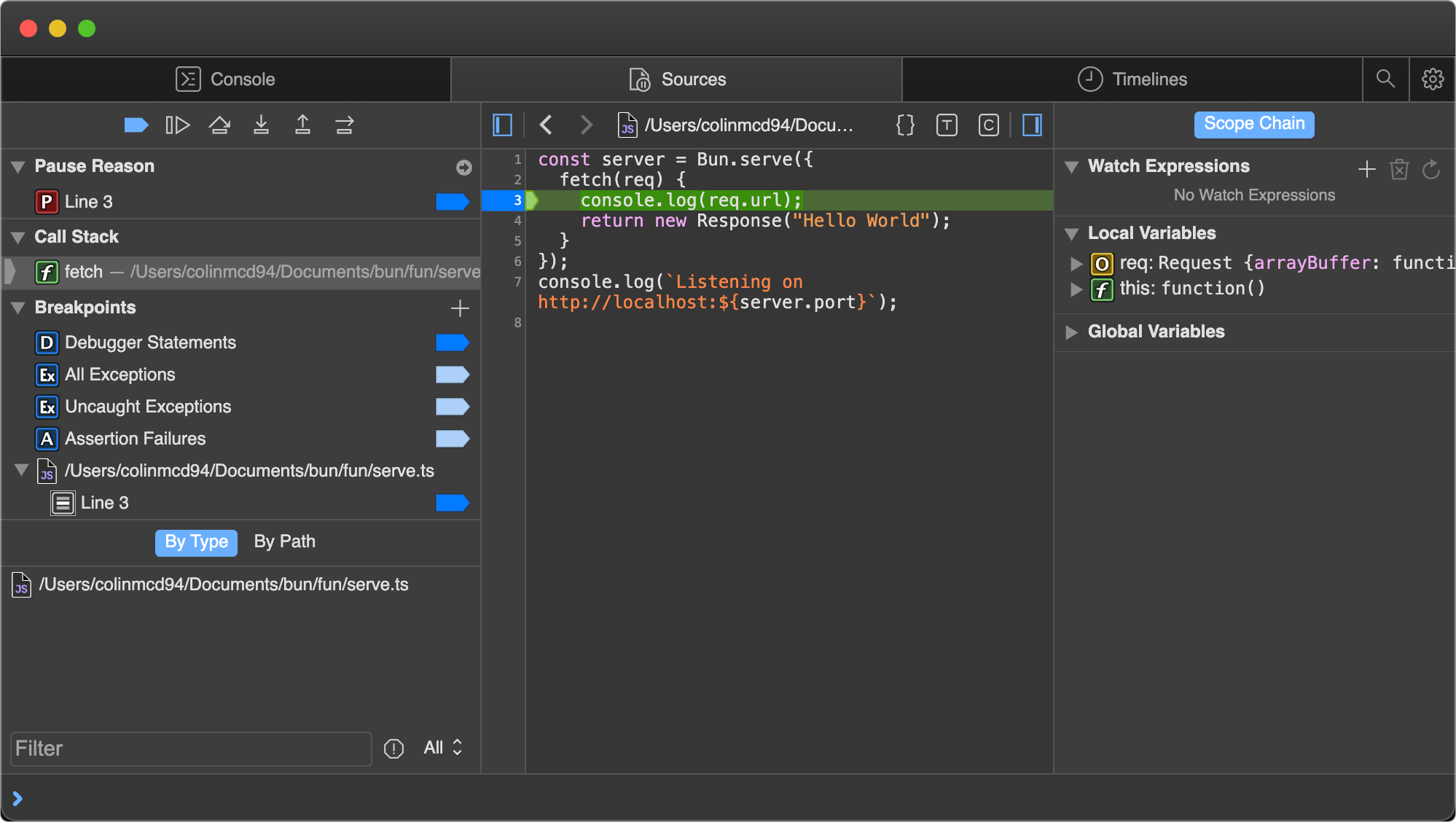
Let's set a breakpoint. Navigate to the Sources tab; you should see the code from earlier. Click on the line number `3` to set a breakpoint on our `console.log(req.url)` statement.
|
|
52
|
+
|
|
53
|
+
<Frame>
|
|
54
|
+

|
|
55
|
+
</Frame>
|
|
56
|
+
|
|
57
|
+
---
|
|
58
|
+
|
|
59
|
+
Then visit [`http://localhost:3000`](http://localhost:3000) in your web browser. This will send an HTTP request to our `localhost` web server. It will seem like the page isn't loading. Why? Because the program has paused execution at the breakpoint we set earlier.
|
|
60
|
+
|
|
61
|
+
Note how the UI has changed.
|
|
62
|
+
|
|
63
|
+
<Frame>
|
|
64
|
+
|
|
65
|
+
</Frame>
|
|
66
|
+
|
|
67
|
+
---
|
|
68
|
+
|
|
69
|
+
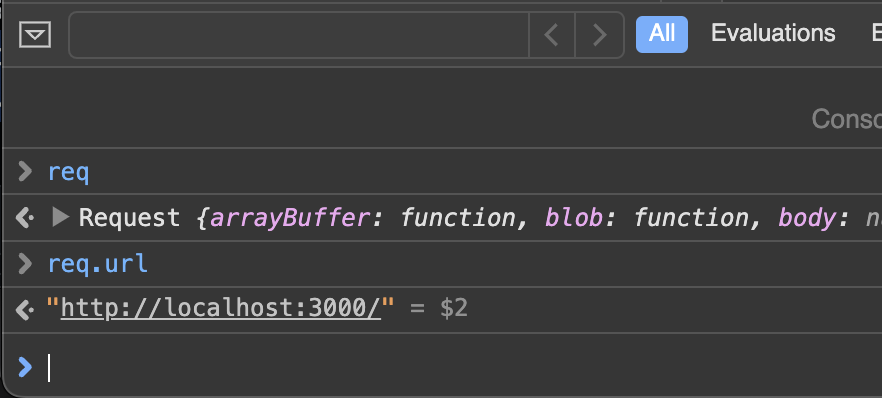
At this point there's a lot we can do to introspect the current execution environment. We can use the console at the bottom to run arbitrary code in the context of the program, with full access to the variables in scope at our breakpoint.
|
|
70
|
+
|
|
71
|
+
<Frame>
|
|
72
|
+
|
|
73
|
+
</Frame>
|
|
74
|
+
|
|
75
|
+
---
|
|
76
|
+
|
|
77
|
+
On the right side of the Sources pane, we can see all local variables currently in scope, and drill down to see their properties and methods. Here, we're inspecting the `req` variable.
|
|
78
|
+
|
|
79
|
+
<Frame>
|
|
80
|
+

|
|
81
|
+
</Frame>
|
|
82
|
+
|
|
83
|
+
---
|
|
84
|
+
|
|
85
|
+
In the upper left of the Sources pane, we can control the execution of the program.
|
|
86
|
+
|
|
87
|
+
<Frame>
|
|
88
|
+

|
|
89
|
+
</Frame>
|
|
90
|
+
|
|
91
|
+
---
|
|
92
|
+
|
|
93
|
+
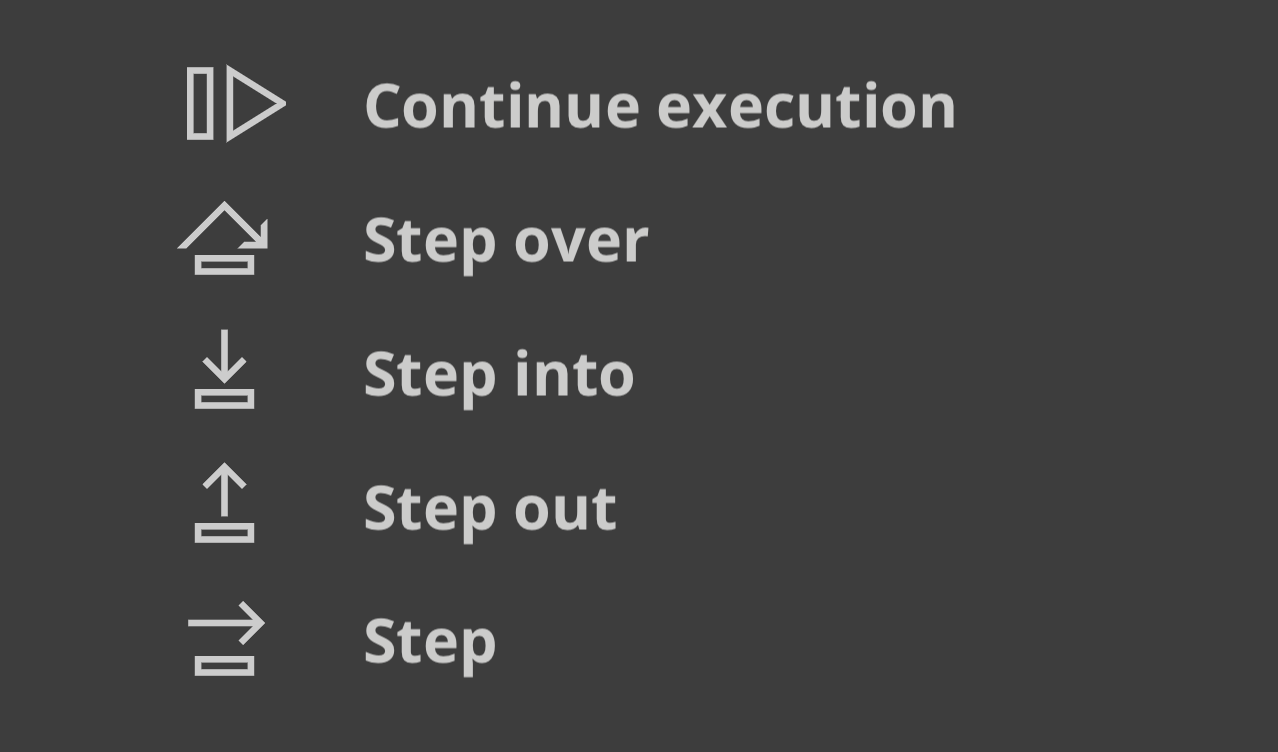
Here's a cheat sheet explaining the functions of the control flow buttons.
|
|
94
|
+
|
|
95
|
+
- _Continue script execution_ — continue running the program until the next breakpoint or exception.
|
|
96
|
+
- _Step over_ — The program will continue to the next line.
|
|
97
|
+
- _Step into_ — If the current statement contains a function call, the debugger will "step into" the called function.
|
|
98
|
+
- _Step out_ — If the current statement is a function call, the debugger will finish executing the call, then "step out" of the function to the location where it was called.
|
|
99
|
+
|
|
100
|
+
<Frame>
|
|
101
|
+
|
|
103
|
+
</Frame>
|
|
@@ -0,0 +1,13 @@
|
|
|
1
|
+
---
|
|
2
|
+
title: Convert a Node.js Readable to an ArrayBuffer
|
|
3
|
+
sidebarTitle: Readable to ArrayBuffer
|
|
4
|
+
mode: center
|
|
5
|
+
---
|
|
6
|
+
|
|
7
|
+
To convert a Node.js `Readable` stream to an `ArrayBuffer` in Bun, you can create a new `Response` object with the stream as the body, then use `arrayBuffer()` to read the stream into an `ArrayBuffer`.
|
|
8
|
+
|
|
9
|
+
```ts
|
|
10
|
+
import { Readable } from "stream";
|
|
11
|
+
const stream = Readable.from(["Hello, ", "world!"]);
|
|
12
|
+
const buf = await new Response(stream).arrayBuffer();
|
|
13
|
+
```
|
|
@@ -0,0 +1,13 @@
|
|
|
1
|
+
---
|
|
2
|
+
title: Convert a Node.js Readable to a Blob
|
|
3
|
+
sidebarTitle: Readable to Blob
|
|
4
|
+
mode: center
|
|
5
|
+
---
|
|
6
|
+
|
|
7
|
+
To convert a Node.js `Readable` stream to a [`Blob`](https://developer.mozilla.org/en-US/docs/Web/API/Blob) in Bun, you can create a new [`Response`](https://developer.mozilla.org/en-US/docs/Web/API/Response) object with the stream as the body, then use [`response.blob()`](https://developer.mozilla.org/en-US/docs/Web/API/Response/blob) to read the stream into a [`Blob`](https://developer.mozilla.org/en-US/docs/Web/API/Blob).
|
|
8
|
+
|
|
9
|
+
```ts
|
|
10
|
+
import { Readable } from "stream";
|
|
11
|
+
const stream = Readable.from(["Hello, ", "world!"]);
|
|
12
|
+
const blob = await new Response(stream).blob();
|
|
13
|
+
```
|
|
@@ -0,0 +1,14 @@
|
|
|
1
|
+
---
|
|
2
|
+
title: Convert a Node.js Readable to JSON
|
|
3
|
+
sidebarTitle: Readable to JSON
|
|
4
|
+
mode: center
|
|
5
|
+
---
|
|
6
|
+
|
|
7
|
+
To convert a Node.js `Readable` stream to a JSON object in Bun, you can create a new [`Response`](https://developer.mozilla.org/en-US/docs/Web/API/Response) object with the stream as the body, then use [`response.json()`](https://developer.mozilla.org/en-US/docs/Web/API/Response/json) to read the stream into a JSON object.
|
|
8
|
+
|
|
9
|
+
```ts
|
|
10
|
+
import { Readable } from "stream";
|
|
11
|
+
const stream = Readable.from([JSON.stringify({ hello: "world" })]);
|
|
12
|
+
const json = await new Response(stream).json();
|
|
13
|
+
console.log(json); // { hello: "world" }
|
|
14
|
+
```
|
|
@@ -0,0 +1,14 @@
|
|
|
1
|
+
---
|
|
2
|
+
title: Convert a Node.js Readable to a string
|
|
3
|
+
sidebarTitle: Readable to string
|
|
4
|
+
mode: center
|
|
5
|
+
---
|
|
6
|
+
|
|
7
|
+
To convert a Node.js `Readable` stream to a string in Bun, you can create a new [`Response`](https://developer.mozilla.org/en-US/docs/Web/API/Response) object with the stream as the body, then use [`response.text()`](https://developer.mozilla.org/en-US/docs/Web/API/Response/text) to read the stream into a string.
|
|
8
|
+
|
|
9
|
+
```ts
|
|
10
|
+
import { Readable } from "stream";
|
|
11
|
+
const stream = Readable.from([Buffer.from("Hello, world!")]);
|
|
12
|
+
const text = await new Response(stream).text();
|
|
13
|
+
console.log(text); // "Hello, world!"
|
|
14
|
+
```
|
|
@@ -0,0 +1,13 @@
|
|
|
1
|
+
---
|
|
2
|
+
title: Convert a Node.js Readable to an Uint8Array
|
|
3
|
+
sidebarTitle: Readable to Uint8Array
|
|
4
|
+
mode: center
|
|
5
|
+
---
|
|
6
|
+
|
|
7
|
+
To convert a Node.js `Readable` stream to an `Uint8Array` in Bun, you can create a new `Response` object with the stream as the body, then use `bytes()` to read the stream into an `Uint8Array`.
|
|
8
|
+
|
|
9
|
+
```ts
|
|
10
|
+
import { Readable } from "stream";
|
|
11
|
+
const stream = Readable.from(["Hello, ", "world!"]);
|
|
12
|
+
const buf = await new Response(stream).bytes();
|
|
13
|
+
```
|
|
@@ -0,0 +1,16 @@
|
|
|
1
|
+
---
|
|
2
|
+
title: Convert a ReadableStream to an array of chunks
|
|
3
|
+
sidebarTitle: Stream to array
|
|
4
|
+
mode: center
|
|
5
|
+
---
|
|
6
|
+
|
|
7
|
+
Bun provides a number of convenience functions for reading the contents of a [`ReadableStream`](https://developer.mozilla.org/en-US/docs/Web/API/ReadableStream) into different formats. The `Bun.readableStreamToArray` function reads the contents of a `ReadableStream` to an array of chunks.
|
|
8
|
+
|
|
9
|
+
```ts
|
|
10
|
+
const stream = new ReadableStream();
|
|
11
|
+
const str = await Bun.readableStreamToArray(stream);
|
|
12
|
+
```
|
|
13
|
+
|
|
14
|
+
---
|
|
15
|
+
|
|
16
|
+
See [Docs > API > Utils](https://bun.com/docs/api/utils#bun-readablestreamto) for documentation on Bun's other `ReadableStream` conversion functions.
|