bun-types 1.3.2-canary.20251106T140813 → 1.3.2
This diff represents the content of publicly available package versions that have been released to one of the supported registries. The information contained in this diff is provided for informational purposes only and reflects changes between package versions as they appear in their respective public registries.
- package/bun.d.ts +102 -6
- package/docs/bundler/bytecode.mdx +465 -0
- package/docs/bundler/css.mdx +1024 -0
- package/docs/bundler/esbuild.mdx +253 -0
- package/docs/bundler/executables.mdx +535 -0
- package/docs/bundler/fullstack.mdx +1064 -0
- package/docs/bundler/hot-reloading.mdx +229 -0
- package/docs/bundler/html-static.mdx +386 -0
- package/docs/bundler/index.mdx +1499 -0
- package/docs/bundler/loaders.mdx +356 -0
- package/docs/bundler/macros.mdx +328 -0
- package/docs/bundler/minifier.mdx +1306 -0
- package/docs/bundler/plugins.mdx +411 -0
- package/docs/feedback.mdx +85 -0
- package/docs/guides/binary/arraybuffer-to-array.mdx +29 -0
- package/docs/guides/binary/arraybuffer-to-blob.mdx +26 -0
- package/docs/guides/binary/arraybuffer-to-buffer.mdx +27 -0
- package/docs/guides/binary/arraybuffer-to-string.mdx +17 -0
- package/docs/guides/binary/arraybuffer-to-typedarray.mdx +41 -0
- package/docs/guides/binary/blob-to-arraybuffer.mdx +16 -0
- package/docs/guides/binary/blob-to-dataview.mdx +16 -0
- package/docs/guides/binary/blob-to-stream.mdx +16 -0
- package/docs/guides/binary/blob-to-string.mdx +17 -0
- package/docs/guides/binary/blob-to-typedarray.mdx +16 -0
- package/docs/guides/binary/buffer-to-arraybuffer.mdx +16 -0
- package/docs/guides/binary/buffer-to-blob.mdx +16 -0
- package/docs/guides/binary/buffer-to-readablestream.mdx +43 -0
- package/docs/guides/binary/buffer-to-string.mdx +27 -0
- package/docs/guides/binary/buffer-to-typedarray.mdx +16 -0
- package/docs/guides/binary/dataview-to-string.mdx +17 -0
- package/docs/guides/binary/typedarray-to-arraybuffer.mdx +27 -0
- package/docs/guides/binary/typedarray-to-blob.mdx +18 -0
- package/docs/guides/binary/typedarray-to-buffer.mdx +16 -0
- package/docs/guides/binary/typedarray-to-dataview.mdx +16 -0
- package/docs/guides/binary/typedarray-to-readablestream.mdx +43 -0
- package/docs/guides/binary/typedarray-to-string.mdx +18 -0
- package/docs/guides/deployment/aws-lambda.mdx +204 -0
- package/docs/guides/deployment/digital-ocean.mdx +161 -0
- package/docs/guides/deployment/google-cloud-run.mdx +197 -0
- package/docs/guides/deployment/railway.mdx +145 -0
- package/docs/guides/deployment/render.mdx +82 -0
- package/docs/guides/deployment/vercel.mdx +99 -0
- package/docs/guides/ecosystem/astro.mdx +82 -0
- package/docs/guides/ecosystem/discordjs.mdx +80 -0
- package/docs/guides/ecosystem/docker.mdx +151 -0
- package/docs/guides/ecosystem/drizzle.mdx +195 -0
- package/docs/guides/ecosystem/edgedb.mdx +257 -0
- package/docs/guides/ecosystem/elysia.mdx +31 -0
- package/docs/guides/ecosystem/express.mdx +43 -0
- package/docs/guides/ecosystem/hono.mdx +47 -0
- package/docs/guides/ecosystem/mongoose.mdx +92 -0
- package/docs/guides/ecosystem/neon-drizzle.mdx +234 -0
- package/docs/guides/ecosystem/neon-serverless-postgres.mdx +60 -0
- package/docs/guides/ecosystem/nextjs.mdx +57 -0
- package/docs/guides/ecosystem/nuxt.mdx +90 -0
- package/docs/guides/ecosystem/pm2.mdx +55 -0
- package/docs/guides/ecosystem/prisma-postgres.mdx +169 -0
- package/docs/guides/ecosystem/prisma.mdx +164 -0
- package/docs/guides/ecosystem/qwik.mdx +114 -0
- package/docs/guides/ecosystem/react.mdx +52 -0
- package/docs/guides/ecosystem/remix.mdx +97 -0
- package/docs/guides/ecosystem/sentry.mdx +54 -0
- package/docs/guides/ecosystem/solidstart.mdx +66 -0
- package/docs/guides/ecosystem/ssr-react.mdx +49 -0
- package/docs/guides/ecosystem/stric.mdx +54 -0
- package/docs/guides/ecosystem/sveltekit.mdx +138 -0
- package/docs/guides/ecosystem/systemd.mdx +114 -0
- package/docs/guides/ecosystem/upstash.mdx +87 -0
- package/docs/guides/ecosystem/vite.mdx +77 -0
- package/docs/guides/html-rewriter/extract-links.mdx +72 -0
- package/docs/guides/html-rewriter/extract-social-meta.mdx +97 -0
- package/docs/guides/http/cluster.mdx +69 -0
- package/docs/guides/http/fetch-unix.mdx +35 -0
- package/docs/guides/http/fetch.mdx +26 -0
- package/docs/guides/http/file-uploads.mdx +97 -0
- package/docs/guides/http/hot.mdx +28 -0
- package/docs/guides/http/proxy.mdx +26 -0
- package/docs/guides/http/server.mdx +48 -0
- package/docs/guides/http/simple.mdx +20 -0
- package/docs/guides/http/stream-file.mdx +50 -0
- package/docs/guides/http/stream-iterator.mdx +49 -0
- package/docs/guides/http/stream-node-streams-in-bun.mdx +22 -0
- package/docs/guides/http/tls.mdx +32 -0
- package/docs/guides/index.mdx +10 -0
- package/docs/guides/install/add-dev.mdx +28 -0
- package/docs/guides/install/add-git.mdx +38 -0
- package/docs/guides/install/add-optional.mdx +27 -0
- package/docs/guides/install/add-peer.mdx +45 -0
- package/docs/guides/install/add-tarball.mdx +35 -0
- package/docs/guides/install/add.mdx +44 -0
- package/docs/guides/install/azure-artifacts.mdx +76 -0
- package/docs/guides/install/cicd.mdx +43 -0
- package/docs/guides/install/custom-registry.mdx +32 -0
- package/docs/guides/install/from-npm-install-to-bun-install.mdx +230 -0
- package/docs/guides/install/git-diff-bun-lockfile.mdx +47 -0
- package/docs/guides/install/jfrog-artifactory.mdx +28 -0
- package/docs/guides/install/npm-alias.mdx +25 -0
- package/docs/guides/install/registry-scope.mdx +40 -0
- package/docs/guides/install/trusted.mdx +50 -0
- package/docs/guides/install/workspaces.mdx +70 -0
- package/docs/guides/install/yarnlock.mdx +50 -0
- package/docs/guides/process/argv.mdx +66 -0
- package/docs/guides/process/ctrl-c.mdx +18 -0
- package/docs/guides/process/ipc.mdx +69 -0
- package/docs/guides/process/nanoseconds.mdx +15 -0
- package/docs/guides/process/os-signals.mdx +41 -0
- package/docs/guides/process/spawn-stderr.mdx +34 -0
- package/docs/guides/process/spawn-stdout.mdx +28 -0
- package/docs/guides/process/spawn.mdx +43 -0
- package/docs/guides/process/stdin.mdx +62 -0
- package/docs/guides/read-file/arraybuffer.mdx +30 -0
- package/docs/guides/read-file/buffer.mdx +21 -0
- package/docs/guides/read-file/exists.mdx +18 -0
- package/docs/guides/read-file/json.mdx +19 -0
- package/docs/guides/read-file/mime.mdx +22 -0
- package/docs/guides/read-file/stream.mdx +28 -0
- package/docs/guides/read-file/string.mdx +24 -0
- package/docs/guides/read-file/uint8array.mdx +23 -0
- package/docs/guides/read-file/watch.mdx +66 -0
- package/docs/guides/runtime/build-time-constants.mdx +295 -0
- package/docs/guides/runtime/cicd.mdx +45 -0
- package/docs/guides/runtime/codesign-macos-executable.mdx +61 -0
- package/docs/guides/runtime/define-constant.mdx +149 -0
- package/docs/guides/runtime/delete-directory.mdx +39 -0
- package/docs/guides/runtime/delete-file.mdx +21 -0
- package/docs/guides/runtime/heap-snapshot.mdx +28 -0
- package/docs/guides/runtime/import-html.mdx +17 -0
- package/docs/guides/runtime/import-json.mdx +46 -0
- package/docs/guides/runtime/import-toml.mdx +32 -0
- package/docs/guides/runtime/import-yaml.mdx +104 -0
- package/docs/guides/runtime/read-env.mdx +37 -0
- package/docs/guides/runtime/set-env.mdx +51 -0
- package/docs/guides/runtime/shell.mdx +42 -0
- package/docs/guides/runtime/timezone.mdx +38 -0
- package/docs/guides/runtime/tsconfig-paths.mdx +31 -0
- package/docs/guides/runtime/typescript.mdx +51 -0
- package/docs/guides/runtime/vscode-debugger.mdx +48 -0
- package/docs/guides/runtime/web-debugger.mdx +103 -0
- package/docs/guides/streams/node-readable-to-arraybuffer.mdx +13 -0
- package/docs/guides/streams/node-readable-to-blob.mdx +13 -0
- package/docs/guides/streams/node-readable-to-json.mdx +14 -0
- package/docs/guides/streams/node-readable-to-string.mdx +14 -0
- package/docs/guides/streams/node-readable-to-uint8array.mdx +13 -0
- package/docs/guides/streams/to-array.mdx +16 -0
- package/docs/guides/streams/to-arraybuffer.mdx +16 -0
- package/docs/guides/streams/to-blob.mdx +16 -0
- package/docs/guides/streams/to-buffer.mdx +17 -0
- package/docs/guides/streams/to-json.mdx +16 -0
- package/docs/guides/streams/to-string.mdx +16 -0
- package/docs/guides/streams/to-typedarray.mdx +24 -0
- package/docs/guides/test/bail.mdx +24 -0
- package/docs/guides/test/coverage-threshold.mdx +67 -0
- package/docs/guides/test/coverage.mdx +49 -0
- package/docs/guides/test/happy-dom.mdx +73 -0
- package/docs/guides/test/migrate-from-jest.mdx +125 -0
- package/docs/guides/test/mock-clock.mdx +50 -0
- package/docs/guides/test/mock-functions.mdx +70 -0
- package/docs/guides/test/rerun-each.mdx +16 -0
- package/docs/guides/test/run-tests.mdx +116 -0
- package/docs/guides/test/skip-tests.mdx +43 -0
- package/docs/guides/test/snapshot.mdx +102 -0
- package/docs/guides/test/spy-on.mdx +49 -0
- package/docs/guides/test/svelte-test.mdx +113 -0
- package/docs/guides/test/testing-library.mdx +93 -0
- package/docs/guides/test/timeout.mdx +17 -0
- package/docs/guides/test/todo-tests.mdx +74 -0
- package/docs/guides/test/update-snapshots.mdx +49 -0
- package/docs/guides/test/watch-mode.mdx +24 -0
- package/docs/guides/util/base64.mdx +17 -0
- package/docs/guides/util/deep-equals.mdx +41 -0
- package/docs/guides/util/deflate.mdx +20 -0
- package/docs/guides/util/detect-bun.mdx +25 -0
- package/docs/guides/util/entrypoint.mdx +19 -0
- package/docs/guides/util/escape-html.mdx +24 -0
- package/docs/guides/util/file-url-to-path.mdx +16 -0
- package/docs/guides/util/gzip.mdx +20 -0
- package/docs/guides/util/hash-a-password.mdx +56 -0
- package/docs/guides/util/import-meta-dir.mdx +15 -0
- package/docs/guides/util/import-meta-file.mdx +15 -0
- package/docs/guides/util/import-meta-path.mdx +15 -0
- package/docs/guides/util/javascript-uuid.mdx +25 -0
- package/docs/guides/util/main.mdx +43 -0
- package/docs/guides/util/path-to-file-url.mdx +16 -0
- package/docs/guides/util/sleep.mdx +24 -0
- package/docs/guides/util/version.mdx +23 -0
- package/docs/guides/util/which-path-to-executable-bin.mdx +17 -0
- package/docs/guides/websocket/compression.mdx +33 -0
- package/docs/guides/websocket/context.mdx +74 -0
- package/docs/guides/websocket/pubsub.mdx +40 -0
- package/docs/guides/websocket/simple.mdx +35 -0
- package/docs/guides/write-file/append.mdx +54 -0
- package/docs/guides/write-file/basic.mdx +46 -0
- package/docs/guides/write-file/blob.mdx +30 -0
- package/docs/guides/write-file/cat.mdx +19 -0
- package/docs/guides/write-file/file-cp.mdx +18 -0
- package/docs/guides/write-file/filesink.mdx +54 -0
- package/docs/guides/write-file/response.mdx +19 -0
- package/docs/guides/write-file/stdout.mdx +23 -0
- package/docs/guides/write-file/stream.mdx +19 -0
- package/docs/guides/write-file/unlink.mdx +18 -0
- package/docs/index.mdx +133 -0
- package/docs/installation.mdx +365 -0
- package/docs/pm/bunx.mdx +83 -0
- package/docs/pm/catalogs.mdx +292 -0
- package/docs/pm/cli/add.mdx +179 -0
- package/docs/pm/cli/audit.mdx +60 -0
- package/docs/pm/cli/install.mdx +471 -0
- package/docs/pm/cli/link.mdx +48 -0
- package/docs/pm/cli/outdated.mdx +197 -0
- package/docs/pm/cli/patch.mdx +69 -0
- package/docs/pm/cli/pm.mdx +319 -0
- package/docs/pm/cli/publish.mdx +123 -0
- package/docs/pm/cli/remove.mdx +16 -0
- package/docs/pm/cli/update.mdx +140 -0
- package/docs/pm/cli/why.mdx +84 -0
- package/docs/pm/filter.mdx +102 -0
- package/docs/pm/global-cache.mdx +72 -0
- package/docs/pm/isolated-installs.mdx +205 -0
- package/docs/pm/lifecycle.mdx +57 -0
- package/docs/pm/lockfile.mdx +64 -0
- package/docs/pm/npmrc.mdx +111 -0
- package/docs/pm/overrides.mdx +83 -0
- package/docs/pm/scopes-registries.mdx +35 -0
- package/docs/pm/security-scanner-api.mdx +95 -0
- package/docs/pm/workspaces.mdx +109 -0
- package/docs/project/benchmarking.mdx +218 -0
- package/docs/project/bindgen.mdx +223 -0
- package/docs/project/building-windows.mdx +133 -0
- package/docs/project/contributing.mdx +343 -0
- package/docs/project/feedback.mdx +20 -0
- package/docs/project/license.mdx +78 -0
- package/docs/project/roadmap.mdx +8 -0
- package/docs/quickstart.mdx +240 -0
- package/docs/runtime/auto-install.mdx +97 -0
- package/docs/runtime/binary-data.mdx +846 -0
- package/docs/runtime/bun-apis.mdx +59 -0
- package/docs/runtime/bunfig.mdx +642 -0
- package/docs/runtime/c-compiler.mdx +204 -0
- package/docs/runtime/child-process.mdx +532 -0
- package/docs/runtime/color.mdx +267 -0
- package/docs/runtime/console.mdx +67 -0
- package/docs/runtime/cookies.mdx +454 -0
- package/docs/runtime/debugger.mdx +335 -0
- package/docs/runtime/environment-variables.mdx +214 -0
- package/docs/runtime/ffi.mdx +565 -0
- package/docs/runtime/file-io.mdx +306 -0
- package/docs/runtime/file-system-router.mdx +118 -0
- package/docs/runtime/file-types.mdx +354 -0
- package/docs/runtime/glob.mdx +181 -0
- package/docs/runtime/globals.mdx +72 -0
- package/docs/runtime/hashing.mdx +315 -0
- package/docs/runtime/html-rewriter.mdx +340 -0
- package/docs/runtime/http/cookies.mdx +79 -0
- package/docs/runtime/http/error-handling.mdx +40 -0
- package/docs/runtime/http/metrics.mdx +36 -0
- package/docs/runtime/http/routing.mdx +289 -0
- package/docs/runtime/http/server.mdx +647 -0
- package/docs/runtime/http/tls.mdx +101 -0
- package/docs/runtime/http/websockets.mdx +404 -0
- package/docs/runtime/index.mdx +223 -0
- package/docs/runtime/jsx.mdx +115 -0
- package/docs/runtime/module-resolution.mdx +342 -0
- package/docs/runtime/networking/dns.mdx +111 -0
- package/docs/runtime/networking/fetch.mdx +468 -0
- package/docs/runtime/networking/tcp.mdx +239 -0
- package/docs/runtime/networking/udp.mdx +129 -0
- package/docs/runtime/node-api.mdx +19 -0
- package/docs/runtime/nodejs-compat.mdx +468 -0
- package/docs/runtime/plugins.mdx +405 -0
- package/docs/runtime/redis.mdx +582 -0
- package/docs/runtime/s3.mdx +863 -0
- package/docs/runtime/secrets.mdx +336 -0
- package/docs/runtime/semver.mdx +57 -0
- package/docs/runtime/shell.mdx +637 -0
- package/docs/runtime/sql.mdx +1404 -0
- package/docs/runtime/sqlite.mdx +699 -0
- package/docs/runtime/streams.mdx +232 -0
- package/docs/runtime/templating/create.mdx +269 -0
- package/docs/runtime/templating/init.mdx +58 -0
- package/docs/runtime/transpiler.mdx +288 -0
- package/docs/runtime/typescript.mdx +58 -0
- package/docs/runtime/utils.mdx +922 -0
- package/docs/runtime/watch-mode.mdx +161 -0
- package/docs/runtime/web-apis.mdx +29 -0
- package/docs/runtime/workers.mdx +328 -0
- package/docs/runtime/yaml.mdx +469 -0
- package/docs/snippets/cli/add.mdx +166 -0
- package/docs/snippets/cli/build.mdx +196 -0
- package/docs/snippets/cli/feedback.mdx +17 -0
- package/docs/snippets/cli/init.mdx +84 -0
- package/docs/snippets/cli/install.mdx +173 -0
- package/docs/snippets/cli/link.mdx +163 -0
- package/docs/snippets/cli/outdated.mdx +140 -0
- package/docs/snippets/cli/patch.mdx +171 -0
- package/docs/snippets/cli/publish.mdx +198 -0
- package/docs/snippets/cli/remove.mdx +146 -0
- package/docs/snippets/cli/run.mdx +293 -0
- package/docs/snippets/cli/test.mdx +100 -0
- package/docs/snippets/cli/update.mdx +144 -0
- package/docs/snippets/product-card.mdx +32 -0
- package/docs/snippets/product-tiles.mdx +94 -0
- package/docs/test/code-coverage.mdx +409 -0
- package/docs/test/configuration.mdx +467 -0
- package/docs/test/dates-times.mdx +129 -0
- package/docs/test/discovery.mdx +90 -0
- package/docs/test/dom.mdx +226 -0
- package/docs/test/index.mdx +380 -0
- package/docs/test/lifecycle.mdx +348 -0
- package/docs/test/mocks.mdx +637 -0
- package/docs/test/reporters.mdx +117 -0
- package/docs/test/runtime-behavior.mdx +342 -0
- package/docs/test/snapshots.mdx +434 -0
- package/docs/test/writing-tests.mdx +635 -0
- package/docs/typescript.mdx +54 -0
- package/package.json +8 -6
- package/test.d.ts +2 -2
|
@@ -0,0 +1,123 @@
|
|
|
1
|
+
---
|
|
2
|
+
title: "bun publish"
|
|
3
|
+
description: Use `bun publish` to publish a package to the npm registry
|
|
4
|
+
---
|
|
5
|
+
|
|
6
|
+
import Publish from "/snippets/cli/publish.mdx";
|
|
7
|
+
|
|
8
|
+
`bun publish` will automatically pack your package into a tarball, strip catalog and workspace protocols from the `package.json` (resolving versions if necessary), and publish to the registry specified in your configuration files. Both `bunfig.toml` and `.npmrc` files are supported.
|
|
9
|
+
|
|
10
|
+
```sh terminal icon="terminal"
|
|
11
|
+
## Publishing the package from the current working directory
|
|
12
|
+
bun publish
|
|
13
|
+
```
|
|
14
|
+
|
|
15
|
+
```txt
|
|
16
|
+
bun publish v1.3.1 (ca7428e9)
|
|
17
|
+
|
|
18
|
+
packed 203B package.json
|
|
19
|
+
packed 224B README.md
|
|
20
|
+
packed 30B index.ts
|
|
21
|
+
packed 0.64KB tsconfig.json
|
|
22
|
+
|
|
23
|
+
Total files: 4
|
|
24
|
+
Shasum: 79e2b4377b63f4de38dc7ea6e5e9dbee08311a69
|
|
25
|
+
Integrity: sha512-6QSNlDdSwyG/+[...]X6wXHriDWr6fA==
|
|
26
|
+
Unpacked size: 1.1KB
|
|
27
|
+
Packed size: 0.76KB
|
|
28
|
+
Tag: latest
|
|
29
|
+
Access: default
|
|
30
|
+
Registry: http://localhost:4873/
|
|
31
|
+
|
|
32
|
+
+ publish-1@1.0.0
|
|
33
|
+
```
|
|
34
|
+
|
|
35
|
+
Alternatively, you can pack and publish your package separately by using `bun pm pack` followed by `bun publish` with the path to the output tarball.
|
|
36
|
+
|
|
37
|
+
```sh terminal icon="terminal"
|
|
38
|
+
bun pm pack
|
|
39
|
+
...
|
|
40
|
+
bun publish ./package.tgz
|
|
41
|
+
```
|
|
42
|
+
|
|
43
|
+
<Note>
|
|
44
|
+
`bun publish` will not run lifecycle scripts (`prepublishOnly/prepack/prepare/postpack/publish/postpublish`) if a
|
|
45
|
+
tarball path is provided. Scripts will only be run if the package is packed by `bun publish`.
|
|
46
|
+
</Note>
|
|
47
|
+
|
|
48
|
+
### `--access`
|
|
49
|
+
|
|
50
|
+
The `--access` flag can be used to set the access level of the package being published. The access level can be one of `public` or `restricted`. Unscoped packages are always public, and attempting to publish an unscoped package with `--access restricted` will result in an error.
|
|
51
|
+
|
|
52
|
+
```sh terminal icon="terminal"
|
|
53
|
+
bun publish --access public
|
|
54
|
+
```
|
|
55
|
+
|
|
56
|
+
`--access` can also be set in the `publishConfig` field of your `package.json`.
|
|
57
|
+
|
|
58
|
+
```json package.json icon="file-json"
|
|
59
|
+
{
|
|
60
|
+
"publishConfig": {
|
|
61
|
+
"access": "restricted"
|
|
62
|
+
}
|
|
63
|
+
}
|
|
64
|
+
```
|
|
65
|
+
|
|
66
|
+
### `--tag`
|
|
67
|
+
|
|
68
|
+
Set the tag of the package version being published. By default, the tag is `latest`. The initial version of a package is always given the `latest` tag in addition to the specified tag.
|
|
69
|
+
|
|
70
|
+
```sh terminal icon="terminal"
|
|
71
|
+
bun publish --tag alpha
|
|
72
|
+
```
|
|
73
|
+
|
|
74
|
+
`--tag` can also be set in the `publishConfig` field of your `package.json`.
|
|
75
|
+
|
|
76
|
+
```json package.json icon="file-json"
|
|
77
|
+
{
|
|
78
|
+
"publishConfig": {
|
|
79
|
+
"tag": "next"
|
|
80
|
+
}
|
|
81
|
+
}
|
|
82
|
+
```
|
|
83
|
+
|
|
84
|
+
### `--dry-run`
|
|
85
|
+
|
|
86
|
+
The `--dry-run` flag can be used to simulate the publish process without actually publishing the package. This is useful for verifying the contents of the published package without actually publishing the package.
|
|
87
|
+
|
|
88
|
+
```sh terminal icon="terminal"
|
|
89
|
+
bun publish --dry-run
|
|
90
|
+
```
|
|
91
|
+
|
|
92
|
+
### `--gzip-level`
|
|
93
|
+
|
|
94
|
+
Specify the level of gzip compression to use when packing the package. Only applies to `bun publish` without a tarball path argument. Values range from `0` to `9` (default is `9`).
|
|
95
|
+
|
|
96
|
+
### `--auth-type`
|
|
97
|
+
|
|
98
|
+
If you have 2FA enabled for your npm account, `bun publish` will prompt you for a one-time password. This can be done through a browser or the CLI. The `--auth-type` flag can be used to tell the npm registry which method you prefer. The possible values are `web` and `legacy`, with `web` being the default.
|
|
99
|
+
|
|
100
|
+
```sh terminal icon="terminal"
|
|
101
|
+
bun publish --auth-type legacy
|
|
102
|
+
...
|
|
103
|
+
This operation requires a one-time password.
|
|
104
|
+
Enter OTP: 123456
|
|
105
|
+
...
|
|
106
|
+
```
|
|
107
|
+
|
|
108
|
+
### `--otp`
|
|
109
|
+
|
|
110
|
+
Provide a one-time password directly to the CLI. If the password is valid, this will skip the extra prompt for a one-time password before publishing. Example usage:
|
|
111
|
+
|
|
112
|
+
```sh terminal icon="terminal"
|
|
113
|
+
bun publish --otp 123456
|
|
114
|
+
```
|
|
115
|
+
|
|
116
|
+
<Note>
|
|
117
|
+
`bun publish` respects the `NPM_CONFIG_TOKEN` environment variable which can be used when publishing in github actions
|
|
118
|
+
or automated workflows.
|
|
119
|
+
</Note>
|
|
120
|
+
|
|
121
|
+
---
|
|
122
|
+
|
|
123
|
+
<Publish />
|
|
@@ -0,0 +1,16 @@
|
|
|
1
|
+
---
|
|
2
|
+
title: "bun remove"
|
|
3
|
+
description: "Remove dependencies from your project"
|
|
4
|
+
---
|
|
5
|
+
|
|
6
|
+
import Remove from "/snippets/cli/remove.mdx";
|
|
7
|
+
|
|
8
|
+
## Basic Usage
|
|
9
|
+
|
|
10
|
+
```bash terminal icon="terminal"
|
|
11
|
+
bun remove ts-node
|
|
12
|
+
```
|
|
13
|
+
|
|
14
|
+
---
|
|
15
|
+
|
|
16
|
+
<Remove />
|
|
@@ -0,0 +1,140 @@
|
|
|
1
|
+
---
|
|
2
|
+
title: "bun update"
|
|
3
|
+
description: "Update dependencies to latest versions"
|
|
4
|
+
---
|
|
5
|
+
|
|
6
|
+
import Update from "/snippets/cli/update.mdx";
|
|
7
|
+
|
|
8
|
+
<Note>To upgrade your Bun CLI version, see [`bun upgrade`](/installation#upgrading).</Note>
|
|
9
|
+
|
|
10
|
+
To update all dependencies to the latest version:
|
|
11
|
+
|
|
12
|
+
```sh terminal icon="terminal"
|
|
13
|
+
bun update
|
|
14
|
+
```
|
|
15
|
+
|
|
16
|
+
To update a specific dependency to the latest version:
|
|
17
|
+
|
|
18
|
+
```sh terminal icon="terminal"
|
|
19
|
+
bun update [package]
|
|
20
|
+
```
|
|
21
|
+
|
|
22
|
+
## `--interactive`
|
|
23
|
+
|
|
24
|
+
For a more controlled update experience, use the `--interactive` flag to select which packages to update:
|
|
25
|
+
|
|
26
|
+
```sh terminal icon="terminal"
|
|
27
|
+
bun update --interactive
|
|
28
|
+
bun update -i
|
|
29
|
+
```
|
|
30
|
+
|
|
31
|
+
This launches an interactive terminal interface that shows all outdated packages with their current and target versions. You can then select which packages to update.
|
|
32
|
+
|
|
33
|
+
### Interactive Interface
|
|
34
|
+
|
|
35
|
+
The interface displays packages grouped by dependency type:
|
|
36
|
+
|
|
37
|
+
```txt
|
|
38
|
+
? Select packages to update - Space to toggle, Enter to confirm, a to select all, n to select none, i to invert, l to toggle latest
|
|
39
|
+
|
|
40
|
+
dependencies Current Target Latest
|
|
41
|
+
□ react 17.0.2 18.2.0 18.3.1
|
|
42
|
+
□ lodash 4.17.20 4.17.21 4.17.21
|
|
43
|
+
|
|
44
|
+
devDependencies Current Target Latest
|
|
45
|
+
□ typescript 4.8.0 5.0.0 5.3.3
|
|
46
|
+
□ @types/node 16.11.7 18.0.0 20.11.5
|
|
47
|
+
|
|
48
|
+
optionalDependencies Current Target Latest
|
|
49
|
+
□ some-optional-package 1.0.0 1.1.0 1.2.0
|
|
50
|
+
```
|
|
51
|
+
|
|
52
|
+
**Sections:**
|
|
53
|
+
|
|
54
|
+
- Packages are grouped under section headers: `dependencies`, `devDependencies`, `peerDependencies`, `optionalDependencies`
|
|
55
|
+
- Each section shows column headers aligned with the package data
|
|
56
|
+
|
|
57
|
+
**Columns:**
|
|
58
|
+
|
|
59
|
+
- **Package**: Package name (may have suffix like ` dev`, ` peer`, ` optional` for clarity)
|
|
60
|
+
- **Current**: Currently installed version
|
|
61
|
+
- **Target**: Version that would be installed (respects semver constraints)
|
|
62
|
+
- **Latest**: Latest available version
|
|
63
|
+
|
|
64
|
+
### Keyboard Controls
|
|
65
|
+
|
|
66
|
+
**Selection:**
|
|
67
|
+
|
|
68
|
+
- **Space**: Toggle package selection
|
|
69
|
+
- **Enter**: Confirm selections and update
|
|
70
|
+
- **a/A**: Select all packages
|
|
71
|
+
- **n/N**: Select none
|
|
72
|
+
- **i/I**: Invert selection
|
|
73
|
+
|
|
74
|
+
**Navigation:**
|
|
75
|
+
|
|
76
|
+
- **↑/↓ Arrow keys** or **j/k**: Move cursor
|
|
77
|
+
- **l/L**: Toggle between target and latest version for current package
|
|
78
|
+
|
|
79
|
+
**Exit:**
|
|
80
|
+
|
|
81
|
+
- **Ctrl+C** or **Ctrl+D**: Cancel without updating
|
|
82
|
+
|
|
83
|
+
### Visual Indicators
|
|
84
|
+
|
|
85
|
+
- **☑** Selected packages (will be updated)
|
|
86
|
+
- **□** Unselected packages
|
|
87
|
+
- **>** Current cursor position
|
|
88
|
+
- **Colors**: Red (major), yellow (minor), green (patch) version changes
|
|
89
|
+
- **Underlined**: Currently selected update target
|
|
90
|
+
|
|
91
|
+
### Package Grouping
|
|
92
|
+
|
|
93
|
+
Packages are organized in sections by dependency type:
|
|
94
|
+
|
|
95
|
+
- **dependencies** - Regular runtime dependencies
|
|
96
|
+
- **devDependencies** - Development dependencies
|
|
97
|
+
- **peerDependencies** - Peer dependencies
|
|
98
|
+
- **optionalDependencies** - Optional dependencies
|
|
99
|
+
|
|
100
|
+
Within each section, individual packages may have additional suffixes (` dev`, ` peer`, ` optional`) for extra clarity.
|
|
101
|
+
|
|
102
|
+
## `--recursive`
|
|
103
|
+
|
|
104
|
+
Use the `--recursive` flag with `--interactive` to update dependencies across all workspaces in a monorepo:
|
|
105
|
+
|
|
106
|
+
```sh terminal icon="terminal"
|
|
107
|
+
bun update --interactive --recursive
|
|
108
|
+
bun update -i -r
|
|
109
|
+
```
|
|
110
|
+
|
|
111
|
+
This displays an additional "Workspace" column showing which workspace each dependency belongs to.
|
|
112
|
+
|
|
113
|
+
## `--latest`
|
|
114
|
+
|
|
115
|
+
By default, `bun update` will update to the latest version of a dependency that satisfies the version range specified in your `package.json`.
|
|
116
|
+
|
|
117
|
+
To update to the latest version, regardless of if it's compatible with the current version range, use the `--latest` flag:
|
|
118
|
+
|
|
119
|
+
```sh terminal icon="terminal"
|
|
120
|
+
bun update --latest
|
|
121
|
+
```
|
|
122
|
+
|
|
123
|
+
In interactive mode, you can toggle individual packages between their target version (respecting semver) and latest version using the **l** key.
|
|
124
|
+
|
|
125
|
+
For example, with the following `package.json`:
|
|
126
|
+
|
|
127
|
+
```json package.json icon="file-json"
|
|
128
|
+
{
|
|
129
|
+
"dependencies": {
|
|
130
|
+
"react": "^17.0.2"
|
|
131
|
+
}
|
|
132
|
+
}
|
|
133
|
+
```
|
|
134
|
+
|
|
135
|
+
- `bun update` would update to a version that matches `17.x`.
|
|
136
|
+
- `bun update --latest` would update to a version that matches `18.x` or later.
|
|
137
|
+
|
|
138
|
+
---
|
|
139
|
+
|
|
140
|
+
<Update />
|
|
@@ -0,0 +1,84 @@
|
|
|
1
|
+
---
|
|
2
|
+
title: "bun why"
|
|
3
|
+
description: "Explain why a package is installed"
|
|
4
|
+
---
|
|
5
|
+
|
|
6
|
+
The `bun why` command explains why a package is installed in your project by showing the dependency chain that led to its installation.
|
|
7
|
+
|
|
8
|
+
## Usage
|
|
9
|
+
|
|
10
|
+
```bash terminal icon="terminal"
|
|
11
|
+
bun why <package>
|
|
12
|
+
```
|
|
13
|
+
|
|
14
|
+
## Arguments
|
|
15
|
+
|
|
16
|
+
- `<package>`: The name of the package to explain. Supports glob patterns like `@org/*` or `*-lodash`.
|
|
17
|
+
|
|
18
|
+
## Options
|
|
19
|
+
|
|
20
|
+
- `--top`: Show only the top-level dependencies instead of the complete dependency tree.
|
|
21
|
+
- `--depth <number>`: Maximum depth of the dependency tree to display.
|
|
22
|
+
|
|
23
|
+
## Examples
|
|
24
|
+
|
|
25
|
+
Check why a specific package is installed:
|
|
26
|
+
|
|
27
|
+
```bash terminal icon="terminal"
|
|
28
|
+
bun why react
|
|
29
|
+
```
|
|
30
|
+
|
|
31
|
+
```txt
|
|
32
|
+
react@18.2.0
|
|
33
|
+
└─ my-app@1.0.0 (requires ^18.0.0)
|
|
34
|
+
```
|
|
35
|
+
|
|
36
|
+
Check why all packages with a specific pattern are installed:
|
|
37
|
+
|
|
38
|
+
```bash terminal icon="terminal"
|
|
39
|
+
bun why "@types/*"
|
|
40
|
+
```
|
|
41
|
+
|
|
42
|
+
```txt
|
|
43
|
+
@types/react@18.2.15
|
|
44
|
+
└─ dev my-app@1.0.0 (requires ^18.0.0)
|
|
45
|
+
|
|
46
|
+
@types/react-dom@18.2.7
|
|
47
|
+
└─ dev my-app@1.0.0 (requires ^18.0.0)
|
|
48
|
+
```
|
|
49
|
+
|
|
50
|
+
Show only top-level dependencies:
|
|
51
|
+
|
|
52
|
+
```bash terminal icon="terminal"
|
|
53
|
+
bun why express --top
|
|
54
|
+
```
|
|
55
|
+
|
|
56
|
+
```txt
|
|
57
|
+
express@4.18.2
|
|
58
|
+
└─ my-app@1.0.0 (requires ^4.18.2)
|
|
59
|
+
```
|
|
60
|
+
|
|
61
|
+
Limit the dependency tree depth:
|
|
62
|
+
|
|
63
|
+
```bash terminal icon="terminal"
|
|
64
|
+
bun why express --depth 2
|
|
65
|
+
```
|
|
66
|
+
|
|
67
|
+
```txt
|
|
68
|
+
express@4.18.2
|
|
69
|
+
└─ express-pollyfill@1.20.1 (requires ^4.18.2)
|
|
70
|
+
└─ body-parser@1.20.1 (requires ^1.20.1)
|
|
71
|
+
└─ accepts@1.3.8 (requires ^1.3.8)
|
|
72
|
+
└─ (deeper dependencies hidden)
|
|
73
|
+
```
|
|
74
|
+
|
|
75
|
+
## Understanding the Output
|
|
76
|
+
|
|
77
|
+
The output shows:
|
|
78
|
+
|
|
79
|
+
- The package name and version being queried
|
|
80
|
+
- The dependency chain that led to its installation
|
|
81
|
+
- The type of dependency (dev, peer, optional, or production)
|
|
82
|
+
- The version requirement specified in each package's dependencies
|
|
83
|
+
|
|
84
|
+
For nested dependencies, the command shows the complete dependency tree by default, with indentation indicating the relationship hierarchy.
|
|
@@ -0,0 +1,102 @@
|
|
|
1
|
+
---
|
|
2
|
+
title: "bun --filter"
|
|
3
|
+
description: "Select packages by pattern in a monorepo using the --filter flag"
|
|
4
|
+
---
|
|
5
|
+
|
|
6
|
+
The `--filter` (or `-F`) flag is used for selecting packages by pattern in a monorepo. Patterns can be used to match package names or package paths, with full glob syntax support.
|
|
7
|
+
|
|
8
|
+
Currently `--filter` is supported by `bun install` and `bun outdated`, and can also be used to run scripts for multiple packages at once.
|
|
9
|
+
|
|
10
|
+
---
|
|
11
|
+
|
|
12
|
+
## Matching
|
|
13
|
+
|
|
14
|
+
### Package Name `--filter <pattern>`
|
|
15
|
+
|
|
16
|
+
Name patterns select packages based on the package name, as specified in `package.json`. For example, if you have packages `pkg-a`, `pkg-b` and `other`, you can match all packages with `*`, only `pkg-a` and `pkg-b` with `pkg*`, and a specific package by providing the full name of the package.
|
|
17
|
+
|
|
18
|
+
### Package Path `--filter ./<glob>`
|
|
19
|
+
|
|
20
|
+
Path patterns are specified by starting the pattern with `./`, and will select all packages in directories that match the pattern. For example, to match all packages in subdirectories of `packages`, you can use `--filter './packages/**'`. To match a package located in `packages/foo`, use `--filter ./packages/foo`.
|
|
21
|
+
|
|
22
|
+
---
|
|
23
|
+
|
|
24
|
+
## `bun install` and `bun outdated`
|
|
25
|
+
|
|
26
|
+
Both `bun install` and `bun outdated` support the `--filter` flag.
|
|
27
|
+
|
|
28
|
+
`bun install` by default will install dependencies for all packages in the monorepo. To install dependencies for specific packages, use `--filter`.
|
|
29
|
+
|
|
30
|
+
Given a monorepo with workspaces `pkg-a`, `pkg-b`, and `pkg-c` under `./packages`:
|
|
31
|
+
|
|
32
|
+
```bash terminal icon="terminal"
|
|
33
|
+
# Install dependencies for all workspaces except `pkg-c`
|
|
34
|
+
bun install --filter '!pkg-c'
|
|
35
|
+
|
|
36
|
+
# Install dependencies for packages in `./packages` (`pkg-a`, `pkg-b`, `pkg-c`)
|
|
37
|
+
bun install --filter './packages/*'
|
|
38
|
+
|
|
39
|
+
# Save as above, but exclude the root package.json
|
|
40
|
+
bun install --filter '!./' --filter './packages/*'
|
|
41
|
+
```
|
|
42
|
+
|
|
43
|
+
Similarly, `bun outdated` will display outdated dependencies for all packages in the monorepo, and `--filter` can be used to restrict the command to a subset of the packages:
|
|
44
|
+
|
|
45
|
+
```bash terminal icon="terminal"
|
|
46
|
+
# Display outdated dependencies for workspaces starting with `pkg-`
|
|
47
|
+
bun outdated --filter 'pkg-*'
|
|
48
|
+
|
|
49
|
+
# Display outdated dependencies for only the root package.json
|
|
50
|
+
bun outdated --filter './'
|
|
51
|
+
```
|
|
52
|
+
|
|
53
|
+
For more information on both these commands, see [`bun install`](/pm/cli/install) and [`bun outdated`](/pm/cli/outdated).
|
|
54
|
+
|
|
55
|
+
---
|
|
56
|
+
|
|
57
|
+
## Running scripts with `--filter`
|
|
58
|
+
|
|
59
|
+
Use the `--filter` flag to execute scripts in multiple packages at once:
|
|
60
|
+
|
|
61
|
+
```bash terminal icon="terminal"
|
|
62
|
+
bun --filter <pattern> <script>
|
|
63
|
+
```
|
|
64
|
+
|
|
65
|
+
Say you have a monorepo with two packages: `packages/api` and `packages/frontend`, both with a `dev` script that will start a local development server. Normally, you would have to open two separate terminal tabs, cd into each package directory, and run `bun dev`:
|
|
66
|
+
|
|
67
|
+
```bash terminal icon="terminal"
|
|
68
|
+
cd packages/api
|
|
69
|
+
bun dev
|
|
70
|
+
|
|
71
|
+
# in another terminal
|
|
72
|
+
cd packages/frontend
|
|
73
|
+
bun dev
|
|
74
|
+
```
|
|
75
|
+
|
|
76
|
+
Using `--filter`, you can run the `dev` script in both packages at once:
|
|
77
|
+
|
|
78
|
+
```bash terminal icon="terminal"
|
|
79
|
+
bun --filter '*' dev
|
|
80
|
+
```
|
|
81
|
+
|
|
82
|
+
Both commands will be run in parallel, and you will see a nice terminal UI showing their respective outputs:
|
|
83
|
+
|
|
84
|
+
<Frame>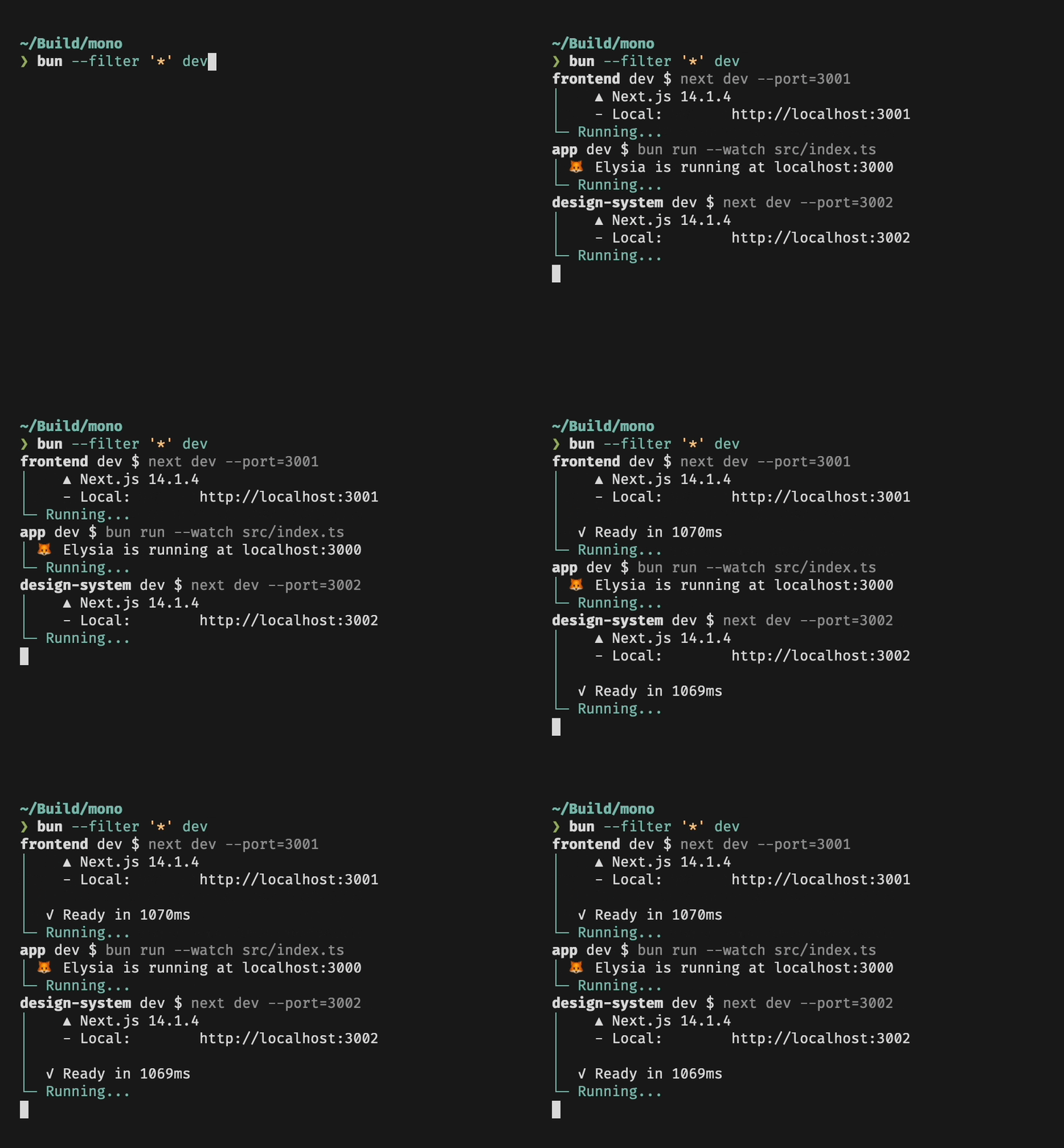</Frame>
|
|
85
|
+
|
|
86
|
+
### Running scripts in workspaces
|
|
87
|
+
|
|
88
|
+
Filters respect your [workspace configuration](/pm/workspaces): If you have a `package.json` file that specifies which packages are part of the workspace,
|
|
89
|
+
`--filter` will be restricted to only these packages. Also, in a workspace you can use `--filter` to run scripts in packages that are located anywhere in the workspace:
|
|
90
|
+
|
|
91
|
+
```bash terminal icon="terminal"
|
|
92
|
+
# Packages
|
|
93
|
+
# src/foo
|
|
94
|
+
# src/bar
|
|
95
|
+
|
|
96
|
+
# in src/bar: runs myscript in src/foo, no need to cd!
|
|
97
|
+
bun run --filter foo myscript
|
|
98
|
+
```
|
|
99
|
+
|
|
100
|
+
### Dependency Order
|
|
101
|
+
|
|
102
|
+
Bun will respect package dependency order when running scripts. Say you have a package `foo` that depends on another package `bar` in your workspace, and both packages have a `build` script. When you run `bun --filter '*' build`, you will notice that `foo` will only start running once `bar` is done.
|
|
@@ -0,0 +1,72 @@
|
|
|
1
|
+
---
|
|
2
|
+
title: "Global cache"
|
|
3
|
+
description: "How Bun stores and manages packages in its global cache"
|
|
4
|
+
---
|
|
5
|
+
|
|
6
|
+
All packages downloaded from the registry are stored in a global cache at `~/.bun/install/cache`, or the path defined by the environment variable `BUN_INSTALL_CACHE_DIR`. They are stored in subdirectories named like `${name}@${version}`, so multiple versions of a package can be cached.
|
|
7
|
+
|
|
8
|
+
<Accordion title="Configuring cache behavior">
|
|
9
|
+
|
|
10
|
+
```toml bunfig.toml icon="settings"
|
|
11
|
+
[install.cache]
|
|
12
|
+
# the directory to use for the cache
|
|
13
|
+
dir = "~/.bun/install/cache"
|
|
14
|
+
|
|
15
|
+
# when true, don't load from the global cache.
|
|
16
|
+
# Bun may still write to node_modules/.cache
|
|
17
|
+
disable = false
|
|
18
|
+
|
|
19
|
+
# when true, always resolve the latest versions from the registry
|
|
20
|
+
disableManifest = false
|
|
21
|
+
```
|
|
22
|
+
|
|
23
|
+
</Accordion>
|
|
24
|
+
|
|
25
|
+
---
|
|
26
|
+
|
|
27
|
+
## Minimizing re-downloads
|
|
28
|
+
|
|
29
|
+
Bun strives to avoid re-downloading packages multiple times. When installing a package, if the cache already contains a version in the range specified by `package.json`, Bun will use the cached package instead of downloading it again.
|
|
30
|
+
|
|
31
|
+
<Accordion title="Installation details">
|
|
32
|
+
If the semver version has pre-release suffix (`1.0.0-beta.0`) or a build suffix (`1.0.0+20220101`), it is replaced with a hash of that value instead, to reduce the chances of errors associated with long file paths.
|
|
33
|
+
|
|
34
|
+
When the `node_modules` folder exists, before installing, Bun checks that `node_modules` contains all expected packages with appropriate versions. If so `bun install` completes. Bun uses a custom JSON parser which stops parsing as soon as it finds `"name"` and `"version"`.
|
|
35
|
+
|
|
36
|
+
If a package is missing or has a version incompatible with the `package.json`, Bun checks for a compatible module in the cache. If found, it is installed into `node_modules`. Otherwise, the package will be downloaded from the registry then installed.
|
|
37
|
+
|
|
38
|
+
</Accordion>
|
|
39
|
+
|
|
40
|
+
---
|
|
41
|
+
|
|
42
|
+
## Fast copying
|
|
43
|
+
|
|
44
|
+
Once a package is downloaded into the cache, Bun still needs to copy those files into `node_modules`. Bun uses the fastest syscalls available to perform this task. On Linux, it uses hardlinks; on macOS, it uses `clonefile`.
|
|
45
|
+
|
|
46
|
+
---
|
|
47
|
+
|
|
48
|
+
## Saving disk space
|
|
49
|
+
|
|
50
|
+
Since Bun uses hardlinks to "copy" a module into a project's `node_modules` directory on Linux and Windows, the contents of the package only exist in a single location on disk, greatly reducing the amount of disk space dedicated to `node_modules`.
|
|
51
|
+
|
|
52
|
+
This benefit also applies to macOS, but there are exceptions. It uses `clonefile` which is copy-on-write, meaning it will not occupy disk space, but it will count towards drive's limit. This behavior is useful if something attempts to patch `node_modules/*`, so it's impossible to affect other installations.
|
|
53
|
+
|
|
54
|
+
<Accordion title="Installation strategies">
|
|
55
|
+
This behavior is configurable with the `--backend` flag, which is respected by all of Bun's package management commands.
|
|
56
|
+
|
|
57
|
+
- **`hardlink`**: Default on Linux and Windows.
|
|
58
|
+
- **`clonefile`** Default on macOS.
|
|
59
|
+
- **`clonefile_each_dir`**: Similar to `clonefile`, except it clones each file individually per directory. It is only available on macOS and tends to perform slower than `clonefile`.
|
|
60
|
+
- **`copyfile`**: The fallback used when any of the above fail. It is the slowest option. On macOS, it uses `fcopyfile()`; on Linux it uses `copy_file_range()`.
|
|
61
|
+
- **`symlink`**: Currently used only `file:` (and eventually `link:`) dependencies. To prevent infinite loops, it skips symlinking the `node_modules` folder.
|
|
62
|
+
|
|
63
|
+
If you install with `--backend=symlink`, Node.js won't resolve node_modules of dependencies unless each dependency has its own `node_modules` folder or you pass `--preserve-symlinks` to `node`. See [Node.js documentation on `--preserve-symlinks`](https://nodejs.org/api/cli.html#--preserve-symlinks).
|
|
64
|
+
|
|
65
|
+
```bash terminal icon="terminal"
|
|
66
|
+
bun install --backend symlink
|
|
67
|
+
node --preserve-symlinks ./foo.js
|
|
68
|
+
```
|
|
69
|
+
|
|
70
|
+
Bun's runtime does not currently expose an equivalent of `--preserve-symlinks`.
|
|
71
|
+
|
|
72
|
+
</Accordion>
|