@tencentcloud/sdk-mcp 1.3.8 → 1.3.9
This diff represents the content of publicly available package versions that have been released to one of the supported registries. The information contained in this diff is provided for informational purposes only and reflects changes between package versions as they appear in their respective public registries.
- package/package.json +1 -1
- package/resource/doc/chatuikit/android/integration.md +466 -484
- package/resource/doc/chatuikit/android/workflow.md +713 -0
- package/resource/doc/livekit/live/flutter/live-integration.md +208 -167
- package/resource/doc/livekit/voice/android/voice-audience-list.md +335 -0
- package/resource/doc/livekit/voice/android/voice-audio-effect.md +384 -0
- package/resource/doc/livekit/voice/android/voice-barrage.md +569 -0
- package/resource/doc/livekit/voice/android/voice-co-guest-interaction.md +748 -0
- package/resource/doc/livekit/voice/android/voice-gift.md +833 -0
- package/resource/doc/livekit/voice/android/voice-host-interaction.md +728 -0
- package/resource/doc/livekit/voice/android/voice-integration.md +886 -0
- package/resource/doc/livekit/voice/android/voice-room-list.md +493 -0
- package/resource/doc/livekit/voice/android/workflow.md +333 -0
- package/resource/doc/livekit/voice/flutter/voice-audience-list.md +337 -0
- package/resource/doc/livekit/voice/flutter/voice-audio-effect.md +739 -0
- package/resource/doc/livekit/voice/flutter/voice-barrage.md +578 -0
- package/resource/doc/livekit/voice/flutter/voice-co-guest-interaction.md +673 -0
- package/resource/doc/livekit/voice/flutter/voice-gift.md +812 -0
- package/resource/doc/livekit/voice/flutter/voice-integration.md +925 -0
- package/resource/doc/livekit/voice/flutter/voice-room-list.md +842 -0
- package/resource/doc/livekit/voice/flutter/workflow.md +359 -0
- package/resource/doc/livekit/voice/ios/voice-audience-list.md +335 -0
- package/resource/doc/livekit/voice/ios/voice-audio-effect.md +373 -0
- package/resource/doc/livekit/voice/ios/voice-barrage.md +529 -0
- package/resource/doc/livekit/voice/ios/voice-co-guest-interaction.md +701 -0
- package/resource/doc/livekit/voice/ios/voice-gift.md +785 -0
- package/resource/doc/livekit/voice/ios/voice-host-interaction.md +820 -0
- package/resource/doc/livekit/voice/ios/voice-integration.md +853 -0
- package/resource/doc/livekit/voice/ios/voice-room-list.md +467 -0
- package/resource/doc/livekit/voice/ios/workflow.md +358 -0
- package/resource/doc/livekit/voice/uni-app/voice-audience-list.md +264 -0
- package/resource/doc/livekit/voice/uni-app/voice-audio-effect.md +332 -0
- package/resource/doc/livekit/voice/uni-app/voice-barrage.md +482 -0
- package/resource/doc/livekit/voice/uni-app/voice-co-guest-interaction.md +944 -0
- package/resource/doc/livekit/voice/uni-app/voice-gift.md +716 -0
- package/resource/doc/livekit/voice/uni-app/voice-integration.md +613 -0
- package/resource/doc/livekit/voice/uni-app/voice-room-list.md +562 -0
- package/resource/doc/livekit/voice/uni-app/workflow.md +369 -0
- package/resource/doc/roomkit/vue/integration.md +119 -224
- package/resource/doc/roomkit/vue/workflow.md +472 -226
- package/resource/doc/tuicallkit/android/integration.md +675 -90
- package/resource/doc/tuicallkit/android/workflow.md +432 -0
- package/tools/common/present-scenario-choice.js +16 -0
- package/tools/common/present-scenario-choice.js.map +1 -0
- package/tools/definitions/get_native_call_uikit_integration_def.js +18 -2
- package/tools/definitions/get_native_call_uikit_integration_def.js.map +1 -1
- package/tools/definitions/get_native_chat_uikit_integration_def.js +29 -7
- package/tools/definitions/get_native_chat_uikit_integration_def.js.map +1 -1
- package/tools/definitions/get_native_live_uikit_integration_def.js +65 -40
- package/tools/definitions/get_native_live_uikit_integration_def.js.map +1 -1
- package/tools/definitions/get_native_live_uikit_interaction_def.js +42 -94
- package/tools/definitions/get_native_live_uikit_interaction_def.js.map +1 -1
- package/tools/definitions/get_web_room_feature_detail_def.js +29 -32
- package/tools/definitions/get_web_room_feature_detail_def.js.map +1 -1
- package/tools/definitions/get_web_room_uikit_integration_def.js +25 -9
- package/tools/definitions/get_web_room_uikit_integration_def.js.map +1 -1
- package/tools/definitions/present_scenario_choice_def.js +53 -0
- package/tools/definitions/present_scenario_choice_def.js.map +1 -0
- package/tools/definitions/record_prompt_def.js +6 -1
- package/tools/definitions/record_prompt_def.js.map +1 -1
- package/tools/definitions/record_result_def.js +20 -4
- package/tools/definitions/record_result_def.js.map +1 -1
- package/tools/index.js +2 -0
- package/tools/index.js.map +1 -1
- package/tools/live/get-native-live-uikit-integration.js +110 -34
- package/tools/live/get-native-live-uikit-integration.js.map +1 -1
- package/tools/live/get_native_live_uikit_interaction.js +128 -35
- package/tools/live/get_native_live_uikit_interaction.js.map +1 -1
- package/utils/report-cls-client.js +1 -1
- package/utils/report-es-client.js +1 -1
|
@@ -1,42 +1,33 @@
|
|
|
1
|
-
|
|
2
|
-
请先检查一下用户安卓项目是使用 Jetpack Compose 的,还是传统的 Android View 系统。然后根据不同的系统进行不同的修改,但是步骤都是按步骤进行操作!!
|
|
1
|
+
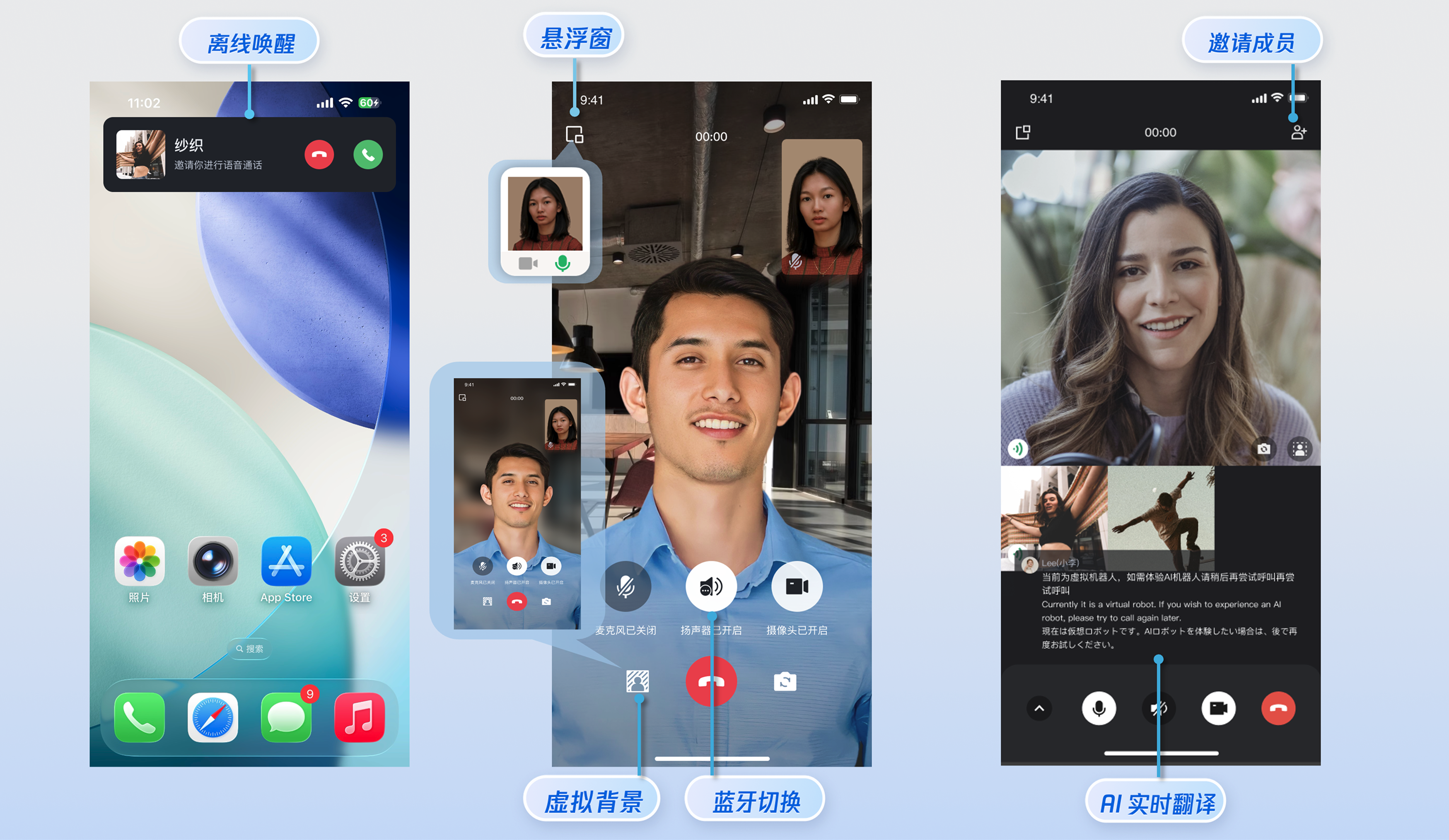
本文将介绍如何快速接入 TUICallKit 组件。您可以在 10 分钟内完成以下关键步骤,最终获得一个功能完备的音视频通话界面。
|
|
3
2
|
|
|
4
|
-
|
|
5
|
-
<tr>
|
|
6
|
-
<td rowspan="1" colSpan="1" >1v1 视频通话</td>
|
|
3
|
+
|
|
7
4
|
|
|
8
|
-
<td rowspan="1" colSpan="1" >群组通话</td>
|
|
9
|
-
</tr>
|
|
10
5
|
|
|
11
|
-
|
|
12
|
-
<td rowspan="1" colSpan="1" ></td>
|
|
13
|
-
|
|
14
|
-
<td rowspan="1" colSpan="1" >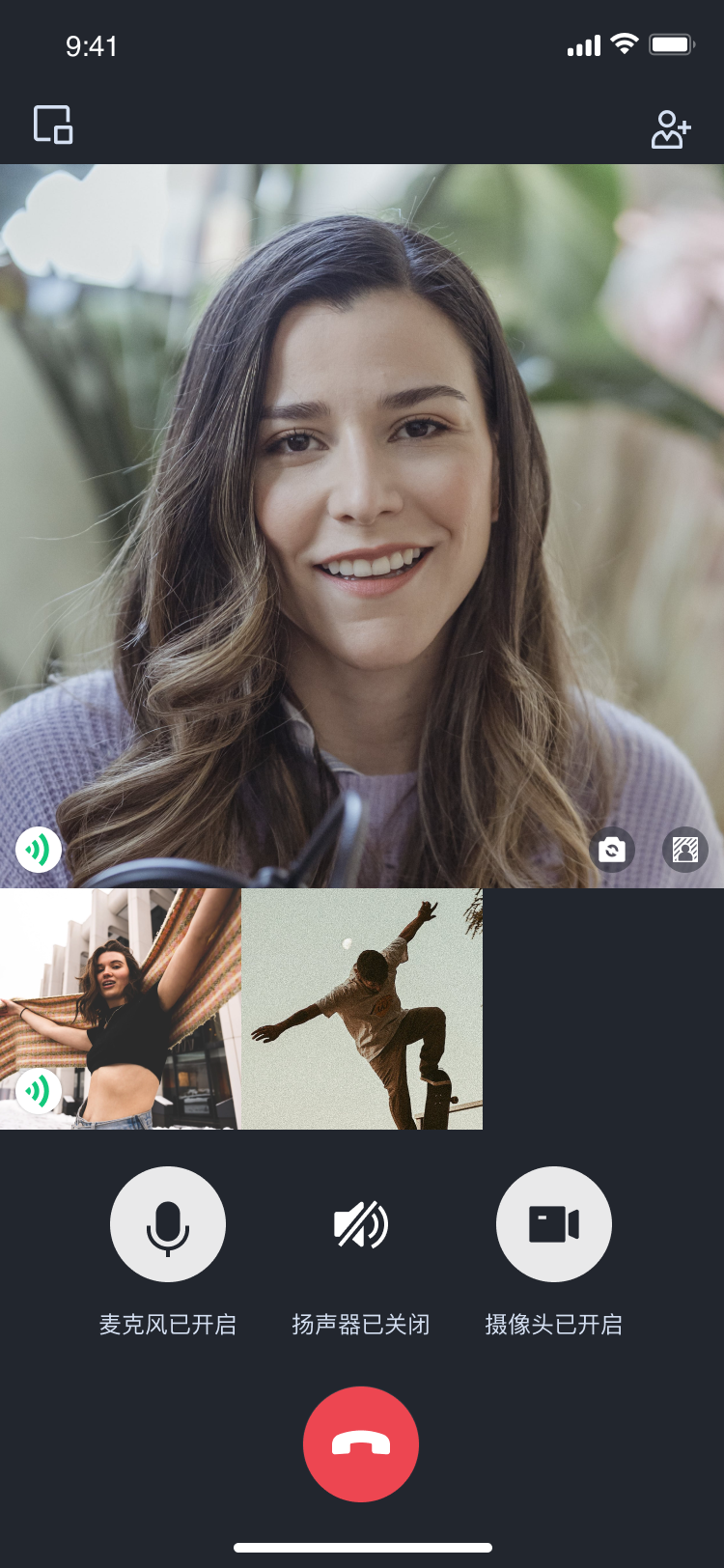</td>
|
|
15
|
-
</tr>
|
|
16
|
-
</table>
|
|
6
|
+
## 准备工作
|
|
17
7
|
|
|
8
|
+
### **环境要求**
|
|
9
|
+
- **Android 版本要求**:Android 5.0(SDK API Level 21)及以上版本。
|
|
18
10
|
|
|
19
|
-
|
|
20
|
-
- Android 5.0(SDK API Level 21)及以上版本。
|
|
11
|
+
- **Gradle 版本要求:**Gradle 4.2.1 及以上的版本。
|
|
21
12
|
|
|
22
|
-
-
|
|
13
|
+
- **设备需满足**:Android 5.0 及以上的手机设备。
|
|
23
14
|
|
|
24
|
-
- Android 5.0 及以上的手机设备。
|
|
25
15
|
|
|
16
|
+
### **开通服务**
|
|
26
17
|
|
|
27
|
-
|
|
18
|
+
在使用腾讯云提供的音视频服务前,您需要前往控制台,为应用开通音视频服务。具体步骤参见 [开通服务](https://write.woa.com/document/139743928960860160)。开通服务后,请记录`SDKAppID` 和`SDKSecretKey`,在后续的步骤([登录](https://write.woa.com/#step4))中会用到。
|
|
28
19
|
|
|
29
|
-
|
|
20
|
+
## 快速接入
|
|
30
21
|
|
|
31
|
-
|
|
22
|
+
### 步骤1:导入组件
|
|
32
23
|
|
|
33
|
-
在 [
|
|
24
|
+
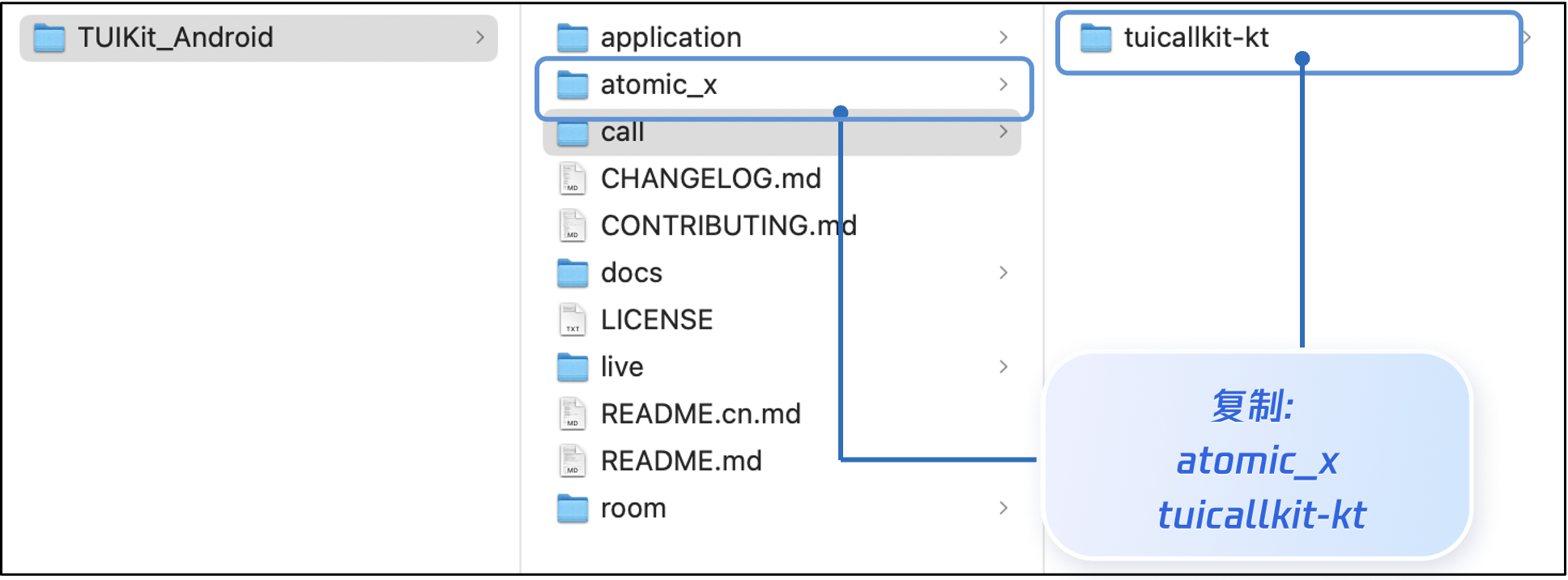
在 [GitHub](https://github.com/Tencent-RTC/TUIKit_Android) 中克隆或下载代码,然后将 `TUIKit_Android` 目录下的 `atomic_x` 和 `call` 目录下的 `tuicallkit-kt` 子目录复制到您当前工程的 app 同级目录中,如下图所示。
|
|
34
25
|
|
|
35
|
-
|
|
26
|
+
|
|
36
27
|
|
|
37
28
|
|
|
38
|
-
|
|
39
|
-
1. 在工程根目录下找到`settings.gradle.kts
|
|
29
|
+
### 步骤2:工程配置
|
|
30
|
+
1. 在工程根目录下找到`settings.gradle.kts`(或 `settings.gradle )`文件,增加如下代码,导入`tuicallkit-kt`、`atomic_x` 组件到项目中。
|
|
40
31
|
|
|
41
32
|
|
|
42
33
|
|
|
@@ -45,12 +36,14 @@
|
|
|
45
36
|
【setting.gradle.kts】
|
|
46
37
|
``` java
|
|
47
38
|
include(":tuicallkit-kt")
|
|
39
|
+
include(":atomic_x")
|
|
48
40
|
```
|
|
49
41
|
|
|
50
42
|
|
|
51
43
|
【settings.gradle】
|
|
52
44
|
``` java
|
|
53
45
|
include ':tuicallkit-kt'
|
|
46
|
+
include ':atomic_x'
|
|
54
47
|
```
|
|
55
48
|
|
|
56
49
|
2. 在 app 目录下找到 `build.gradle.kts(或build.gradle)` 文件,在`dependencies` 中增加如下代码,声明当前 app 对组件的依赖。
|
|
@@ -81,17 +74,16 @@ dependencies {
|
|
|
81
74
|
> TUICallKit 工程内部已经默认依赖:`TRTC SDK`、`IM SDK`、`tuicallengine` 以及公共库 `tuicore`,不需要开发者单独配置。如需进行版本升级,则修改`tuicallkit-kt/build.gradle`文件中的版本号即可。
|
|
82
75
|
>
|
|
83
76
|
|
|
84
|
-
3.
|
|
77
|
+
3. 由于 SDK 内部使用了 Java 反射特性,需要将部分类加入不混淆名单。请在 app 目录下的 `proguard-rules.pro` 文件末尾添加如下代码。添加完后,点击右上角的 **Sync Now**,同步代码。
|
|
85
78
|
|
|
86
79
|
``` java
|
|
87
80
|
-keep class com.tencent.** { *; }
|
|
88
81
|
```
|
|
89
|
-
4. 在 app目录下找到`AndroidManifest.xml` 文件,在 application 节点中添加 `tools:replace="android:allowBackup"`,覆盖组件内的设置,使用自己的设置。
|
|
82
|
+
4. 在 app 目录下找到`AndroidManifest.xml` 文件,在 application 节点中添加 `tools:replace="android:allowBackup"`,覆盖组件内的设置,使用自己的设置。
|
|
90
83
|
|
|
91
84
|
``` java
|
|
92
85
|
// app/src/main/AndroidManifest.xml
|
|
93
|
-
|
|
94
|
-
<application
|
|
86
|
+
<application
|
|
95
87
|
android:name=".BaseApplication"
|
|
96
88
|
android:allowBackup="false"
|
|
97
89
|
android:icon="@drawable/app_ic_launcher"
|
|
@@ -99,17 +91,32 @@ dependencies {
|
|
|
99
91
|
android:largeHeap="true"
|
|
100
92
|
android:theme="@style/AppTheme"
|
|
101
93
|
tools:replace="android:allowBackup">
|
|
102
|
-
```
|
|
103
|
-
5. 建议您编译并运行一次。如果遇到问题,建议您尝试运行我们的 [Github demo](https://github.com/Tencent-RTC/TUICallKit/tree/main/Android) 项目。通过比对,您可以找出潜在的区别并解决遇到的问题。在接入和使用过程中,如果遇到问题,欢迎向我们[反馈](https://github.com/Tencent-RTC/TUICallKit/issues)。
|
|
94
|
+
```
|
|
104
95
|
|
|
96
|
+
> **说明:**
|
|
97
|
+
>
|
|
105
98
|
|
|
106
|
-
|
|
99
|
+
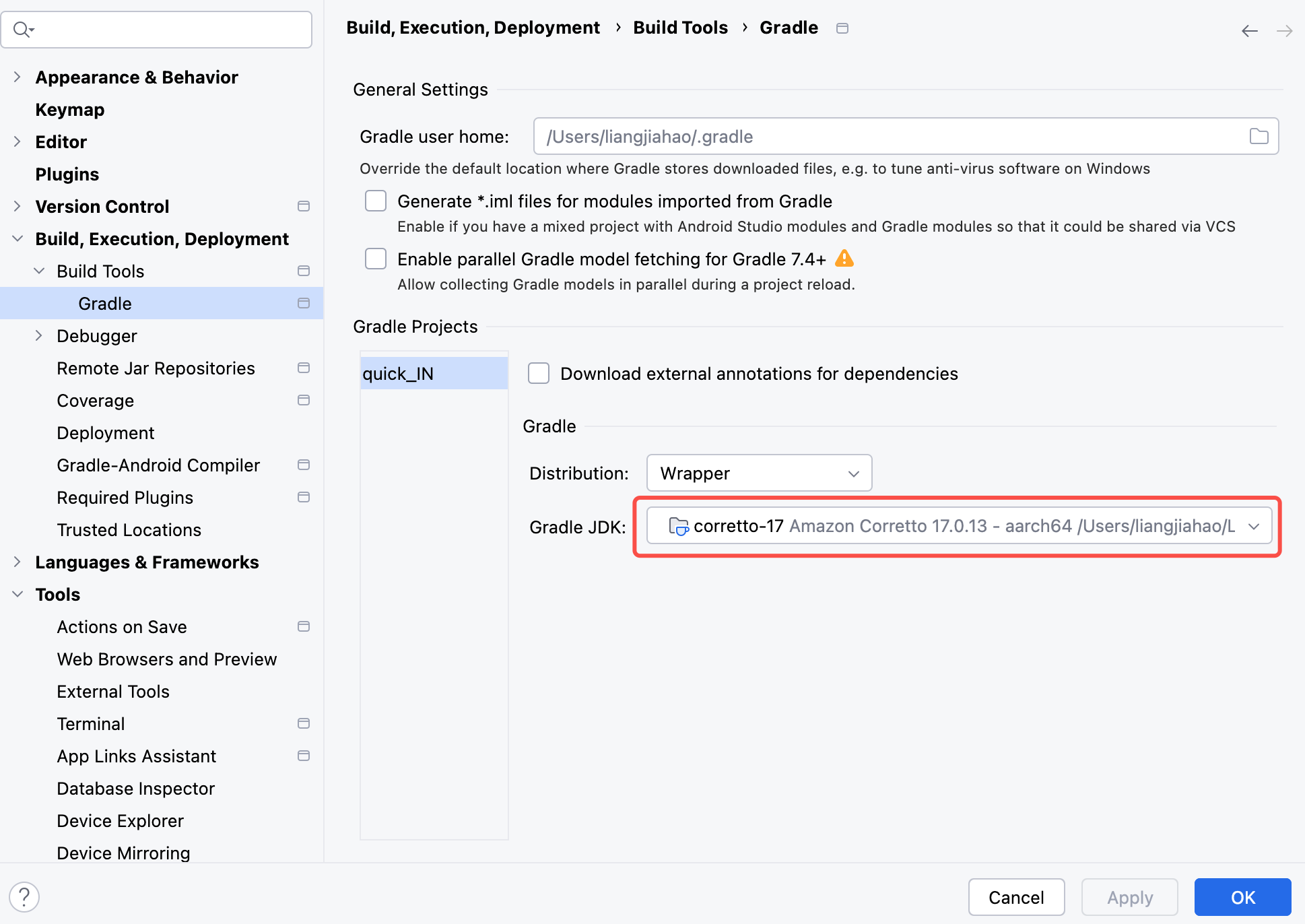
> 如果您集成 tuicallkit-kt 后报如下错误:
|
|
100
|
+
>
|
|
101
|
+

|
|
107
102
|
|
|
108
|
-
在您的项目中添加如下代码,它的作用是通过调用 TUICore 中的相关接口完成 TUI 组件的登录。这一步骤至关重要,只有在成功登录之后,您才能正常使用 TUICallKit 提供的各项功能。
|
|
109
103
|
|
|
104
|
+
> 原因是 AGP 8.0+ 要求 Gradle 运行时使用 Java 17 或更高版本。您可以在 Android Studio 中点击 Tools -> SDK Manager -> Build, Execution,Deployment -> Build Tools -> Gradle 配置 Gradle JDK 版本为 17 解决该问题
|
|
105
|
+
>
|
|
106
|
+
|
|
110
107
|
|
|
111
108
|
|
|
112
|
-
|
|
109
|
+
|
|
110
|
+
### 步骤3:登录
|
|
111
|
+
|
|
112
|
+
在您的项目中添加如下代码,调用 `login` 方法实现 TUI 组件的登录。这一步骤至关重要,只有在成功登录之后,您才能正常使用 TUICallKit 提供的各项功能。
|
|
113
|
+
|
|
114
|
+
|
|
115
|
+
|
|
116
|
+
|
|
117
|
+
|
|
118
|
+
|
|
119
|
+
【Android(Kotlin)】
|
|
113
120
|
``` java
|
|
114
121
|
import com.tencent.qcloud.tuicore.TUILogin
|
|
115
122
|
import com.tencent.qcloud.tuicore.interfaces.TUICallback
|
|
@@ -118,26 +125,23 @@ import com.tencent.qcloud.tuikit.tuicallkit.debug.GenerateTestUserSig
|
|
|
118
125
|
class MainActivity : ComponentActivity() {
|
|
119
126
|
override fun onCreate(savedInstanceState: Bundle?) {
|
|
120
127
|
super.onCreate(savedInstanceState)
|
|
121
|
-
|
|
122
|
-
// begin
|
|
123
|
-
val userId = "denny" // 请替换为您的UserId
|
|
124
|
-
val sdkAppId = 0 // 请替换为第一步在控制台得到的SDKAppID
|
|
125
|
-
val secretKey = "****" // 请替换为第一步在控制台得到的SecretKey
|
|
126
|
-
|
|
127
|
-
val userSig = GenerateTestUserSig.genTestUserSig(userId, sdkAppId, secretKey)
|
|
128
128
|
|
|
129
|
+
val userId = "denny" // 请替换为您的UserId
|
|
130
|
+
val sdkAppId = 0 // 请替换为在控制台得到的SDKAppID
|
|
131
|
+
val secretKey = "****" // 请替换为在控制台得到的SecretKey
|
|
132
|
+
val userSig = GenerateTestUserSig.genTestUserSig(userId, sdkAppId, secretKey)
|
|
129
133
|
TUILogin.login(this, sdkAppId, userId, userSig, object : TUICallback() {
|
|
130
134
|
override fun onSuccess() {
|
|
131
135
|
}
|
|
132
136
|
override fun onError(errorCode: Int, errorMessage: String) {
|
|
133
137
|
}
|
|
134
|
-
})
|
|
135
|
-
// end
|
|
138
|
+
})
|
|
136
139
|
}
|
|
137
140
|
}
|
|
138
141
|
```
|
|
139
142
|
|
|
140
|
-
|
|
143
|
+
|
|
144
|
+
【Android(Java)】
|
|
141
145
|
``` java
|
|
142
146
|
import com.tencent.qcloud.tuicore.TUILogin;
|
|
143
147
|
import com.tencent.qcloud.tuicore.interfaces.TUICallback;
|
|
@@ -147,14 +151,11 @@ public class MainActivity extends AppCompatActivity {
|
|
|
147
151
|
@Override
|
|
148
152
|
public void onCreate(Bundle savedInstanceState) {
|
|
149
153
|
super.onCreate(savedInstanceState);
|
|
150
|
-
|
|
151
|
-
//begin
|
|
154
|
+
|
|
152
155
|
String userId = "denny"; // 请替换为您的UserId
|
|
153
156
|
int sdkAppId = 0; // 请替换为第一步在控制台得到的SDKAppID
|
|
154
157
|
String secretKey = "****"; // 请替换为第一步在控制台得到的SecretKey
|
|
155
|
-
|
|
156
158
|
String userSig = GenerateTestUserSig.genTestUserSig(userId, sdkAppId, secretKey);
|
|
157
|
-
|
|
158
159
|
TUILogin.login(this, sdkAppId, userId, userSig, new TUICallback() {
|
|
159
160
|
@Override
|
|
160
161
|
public void onSuccess() {
|
|
@@ -164,9 +165,9 @@ public class MainActivity extends AppCompatActivity {
|
|
|
164
165
|
public void onError(int errorCode, String errorMessage) {
|
|
165
166
|
}
|
|
166
167
|
});
|
|
167
|
-
//end
|
|
168
168
|
}
|
|
169
169
|
}
|
|
170
|
+
|
|
170
171
|
```
|
|
171
172
|
<table>
|
|
172
173
|
<tr>
|
|
@@ -182,7 +183,7 @@ public class MainActivity extends AppCompatActivity {
|
|
|
182
183
|
|
|
183
184
|
<td rowspan="1" colSpan="1" >String</td>
|
|
184
185
|
|
|
185
|
-
<td rowspan="1" colSpan="1"
|
|
186
|
+
<td rowspan="1" colSpan="1" >只允许包含大小写英文字母(a-z A-Z)、数字(0-9)及下划线和连词符。</td>
|
|
186
187
|
</tr>
|
|
187
188
|
|
|
188
189
|
<tr>
|
|
@@ -213,90 +214,674 @@ public class MainActivity extends AppCompatActivity {
|
|
|
213
214
|
|
|
214
215
|
> **说明:**
|
|
215
216
|
>
|
|
216
|
-
> -
|
|
217
|
+
> - **开发环境**:如果您在本地开发调试阶段,可以采用本地 [GenerateTestUserSig.genTestUserSig](https://github.com/Tencent-RTC/TUIKit_Android/blob/main/application/debug/src/main/java/com/tencent/qcloud/tuikit/debug/GenerateTestUserSig.java) 函数生成 userSig。该方法中 secretKey 很容易被反编译逆向破解,一旦您的密钥泄露,攻击者就可以盗用您的腾讯云流量。
|
|
217
218
|
> - **生产环境**:如果您的项目要发布上线,请采用 [服务端生成 UserSig](https://write.woa.com/document/86735811695435776) 的方式。
|
|
218
219
|
|
|
219
220
|
|
|
220
|
-
|
|
221
|
+
### 步骤4:设置昵称和头像[可选]
|
|
222
|
+
|
|
223
|
+
首次登录的用户没有头像和昵称信息,您可以通过 `setSelfInfo` 接口设置头像和昵称:
|
|
224
|
+
|
|
225
|
+
|
|
226
|
+
|
|
227
|
+
|
|
228
|
+
|
|
229
|
+
|
|
230
|
+
【Android(Kotlin)】
|
|
231
|
+
``` java
|
|
232
|
+
import com.tencent.qcloud.tuikit.tuicallkit.TUICallKit
|
|
233
|
+
|
|
234
|
+
val name = "mike" // 目标用户的昵称。
|
|
235
|
+
val avatar = "https:/****/user_avatar.png" // 目标用户的头像。
|
|
236
|
+
TUICallKit.createInstance(applicationContext).setSelfInfo(name, avatar,
|
|
237
|
+
object : CompletionHandler {
|
|
238
|
+
override fun onSuccess() {
|
|
239
|
+
// 设置成功
|
|
240
|
+
}
|
|
241
|
+
override fun onFailure(code: Int, desc: String) {
|
|
242
|
+
// 设置失败
|
|
243
|
+
}
|
|
244
|
+
})
|
|
245
|
+
```
|
|
246
|
+
|
|
247
|
+
|
|
248
|
+
【Android(Java)】
|
|
249
|
+
``` java
|
|
250
|
+
import com.tencent.qcloud.tuikit.tuicallkit.TUICallKit;
|
|
251
|
+
|
|
252
|
+
String name = "mike"; // 目标用户的昵称。
|
|
253
|
+
String avatar = "https:/****/user_avatar.png"; // 目标用户的头像。
|
|
254
|
+
TUICallKit.createInstance(applicationContext).setSelfInfo(name, avatar,
|
|
255
|
+
new CompletionHandler() {
|
|
256
|
+
@Override
|
|
257
|
+
public void onSuccess() {
|
|
258
|
+
// 设置成功
|
|
259
|
+
}
|
|
260
|
+
|
|
261
|
+
@Override
|
|
262
|
+
public void onFailure(int code, String desc) {
|
|
263
|
+
// 设置失败
|
|
264
|
+
}
|
|
265
|
+
});
|
|
266
|
+
```
|
|
267
|
+
<table>
|
|
268
|
+
<tr>
|
|
269
|
+
<td rowspan="1" colSpan="1" >参数</td>
|
|
270
|
+
|
|
271
|
+
<td rowspan="1" colSpan="1" >类型</td>
|
|
272
|
+
|
|
273
|
+
<td rowspan="1" colSpan="1" >说明</td>
|
|
274
|
+
</tr>
|
|
275
|
+
|
|
276
|
+
<tr>
|
|
277
|
+
<td rowspan="1" colSpan="1" >nickname</td>
|
|
278
|
+
|
|
279
|
+
<td rowspan="1" colSpan="1" >String</td>
|
|
280
|
+
|
|
281
|
+
<td rowspan="1" colSpan="1" >目标用户的昵称。</td>
|
|
282
|
+
</tr>
|
|
283
|
+
|
|
284
|
+
<tr>
|
|
285
|
+
<td rowspan="1" colSpan="1" >avatar</td>
|
|
286
|
+
|
|
287
|
+
<td rowspan="1" colSpan="1" >String</td>
|
|
288
|
+
|
|
289
|
+
<td rowspan="1" colSpan="1" >目标用户的头像。</td>
|
|
290
|
+
</tr>
|
|
291
|
+
|
|
292
|
+
<tr>
|
|
293
|
+
<td rowspan="1" colSpan="1" >completion</td>
|
|
294
|
+
|
|
295
|
+
<td rowspan="1" colSpan="1" >CompletionHandler</td>
|
|
296
|
+
|
|
297
|
+
<td rowspan="1" colSpan="1" >异步操作的结果回调。</td>
|
|
298
|
+
</tr>
|
|
299
|
+
</table>
|
|
300
|
+
|
|
301
|
+
|
|
302
|
+
### 步骤5:发起通话
|
|
303
|
+
|
|
304
|
+
拨打方可以通过调用 `calls` 函数,并指定通话类型和被叫方的 userID,来发起语音或视频通话。`calls` 接口同时支持一对一通话和多人通话。当 userIDList 中包含一个 userID 时,为一对一通话;当 userIDList 包含多个 userID 时,则为多人通话。
|
|
305
|
+
|
|
306
|
+
|
|
307
|
+
|
|
308
|
+
|
|
309
|
+
|
|
310
|
+
|
|
311
|
+
【Kotlin】
|
|
312
|
+
``` java
|
|
313
|
+
import com.tencent.qcloud.tuikit.tuicallkit.TUICallKit
|
|
314
|
+
import io.trtc.tuikit.atomicxcore.api.call.CallMediaType
|
|
315
|
+
import io.trtc.tuikit.atomicxcore.api.call.CallParams
|
|
316
|
+
|
|
317
|
+
val userIdList = mutableListOf<String>()
|
|
318
|
+
userIdList.add("mike")
|
|
319
|
+
val mediaType = CallMediaType.Audio
|
|
320
|
+
val callParams = CallParams()
|
|
321
|
+
TUICallKit.createInstance(context).calls(userIdList, mediaType, params, object : CompletionHandler {
|
|
322
|
+
override fun onFailure(code: Int, desc: String) {
|
|
323
|
+
// 失败回调
|
|
324
|
+
}
|
|
325
|
+
override fun onSuccess() {
|
|
326
|
+
// 成功回调
|
|
327
|
+
}
|
|
328
|
+
})
|
|
329
|
+
```
|
|
330
|
+
|
|
331
|
+
|
|
332
|
+
【Java】
|
|
333
|
+
``` java
|
|
334
|
+
import com.tencent.qcloud.tuikit.tuicallkit.TUICallKit;
|
|
335
|
+
import io.trtc.tuikit.atomicxcore.api.call.CallMediaType;
|
|
336
|
+
import io.trtc.tuikit.atomicxcore.api.call.CallParams;
|
|
337
|
+
|
|
338
|
+
List<String> userIdList = new ArrayList<>();
|
|
339
|
+
userIdList.add("mike");
|
|
340
|
+
CallMediaType mediaType = CallMediaType.Audio;
|
|
341
|
+
CallParams params = new CallParams();
|
|
342
|
+
TUICallKit.createInstance(this).calls(userIdList, mediaType, params, new CompletionHandler() {
|
|
343
|
+
@Override
|
|
344
|
+
public void onFailure(int code, String desc) {
|
|
345
|
+
// 失败回调
|
|
346
|
+
}
|
|
347
|
+
@Override
|
|
348
|
+
public void onSuccess() {
|
|
349
|
+
// 成功回调
|
|
350
|
+
}
|
|
351
|
+
});
|
|
352
|
+
|
|
353
|
+
```
|
|
354
|
+
<table>
|
|
355
|
+
<tr>
|
|
356
|
+
<td rowspan="1" colSpan="1" >参数</td>
|
|
357
|
+
|
|
358
|
+
<td rowspan="1" colSpan="1" >类型</td>
|
|
359
|
+
|
|
360
|
+
<td rowspan="1" colSpan="1" >说明</td>
|
|
361
|
+
</tr>
|
|
362
|
+
|
|
363
|
+
<tr>
|
|
364
|
+
<td rowspan="1" colSpan="1" >userIdList</td>
|
|
365
|
+
|
|
366
|
+
<td rowspan="1" colSpan="1" >List<String></td>
|
|
367
|
+
|
|
368
|
+
<td rowspan="1" colSpan="1" >目标用户的 userId 列表。</td>
|
|
369
|
+
</tr>
|
|
370
|
+
|
|
371
|
+
<tr>
|
|
372
|
+
<td rowspan="1" colSpan="1" >mediaType</td>
|
|
373
|
+
|
|
374
|
+
<td rowspan="1" colSpan="1" >[CallMediaType](https://liteav.sdk.cloudcachetci.com/doc/product/tuikit/atomic-x/android/zh/-atomic-x%20-core%20-a-p-i/io.trtc.tuikit.atomicxcore.api.call/-call-media-type/index.html)</td>
|
|
375
|
+
|
|
376
|
+
<td rowspan="1" colSpan="1" >通话的媒体类型,例如视频通话、语音通话。<br>- Audio : 语音通话。<br>- Video : 视频通话。</td>
|
|
377
|
+
</tr>
|
|
378
|
+
|
|
379
|
+
<tr>
|
|
380
|
+
<td rowspan="1" colSpan="1" >params</td>
|
|
381
|
+
|
|
382
|
+
<td rowspan="1" colSpan="1" >[CallParams](https://liteav.sdk.cloudcachetci.com/doc/product/tuikit/atomic-x/android/zh/-atomic-x%20-core%20-a-p-i/io.trtc.tuikit.atomicxcore.api.call/-call-params/index.html)</td>
|
|
383
|
+
|
|
384
|
+
<td rowspan="1" colSpan="1" >通话扩展参数,例如房间号、通话邀请超时时间等。<br>- roomId : 此次通话的房间 ID。<br>- timeout : 发起通话等待的最长时间,超过该时间通话结束。<br>- userData : 发起通话时自定义扩展字段。<br>- chatGroupId : 与 chat 结合使用,Chat 群组的群 ID 。</td>
|
|
385
|
+
</tr>
|
|
386
|
+
|
|
387
|
+
<tr>
|
|
388
|
+
<td rowspan="1" colSpan="1" >completion</td>
|
|
389
|
+
|
|
390
|
+
<td rowspan="1" colSpan="1" >CompletionHandler</td>
|
|
391
|
+
|
|
392
|
+
<td rowspan="1" colSpan="1" >异步操作的结果回调。</td>
|
|
393
|
+
</tr>
|
|
394
|
+
</table>
|
|
395
|
+
|
|
396
|
+
|
|
397
|
+
### 步骤6:接听通话
|
|
398
|
+
|
|
399
|
+
接听端完成登录后,拨打端发起通话,接收端就可以收到通话邀请,同时伴随铃声和振动。
|
|
400
|
+
|
|
401
|
+
## 更多功能
|
|
402
|
+
|
|
403
|
+
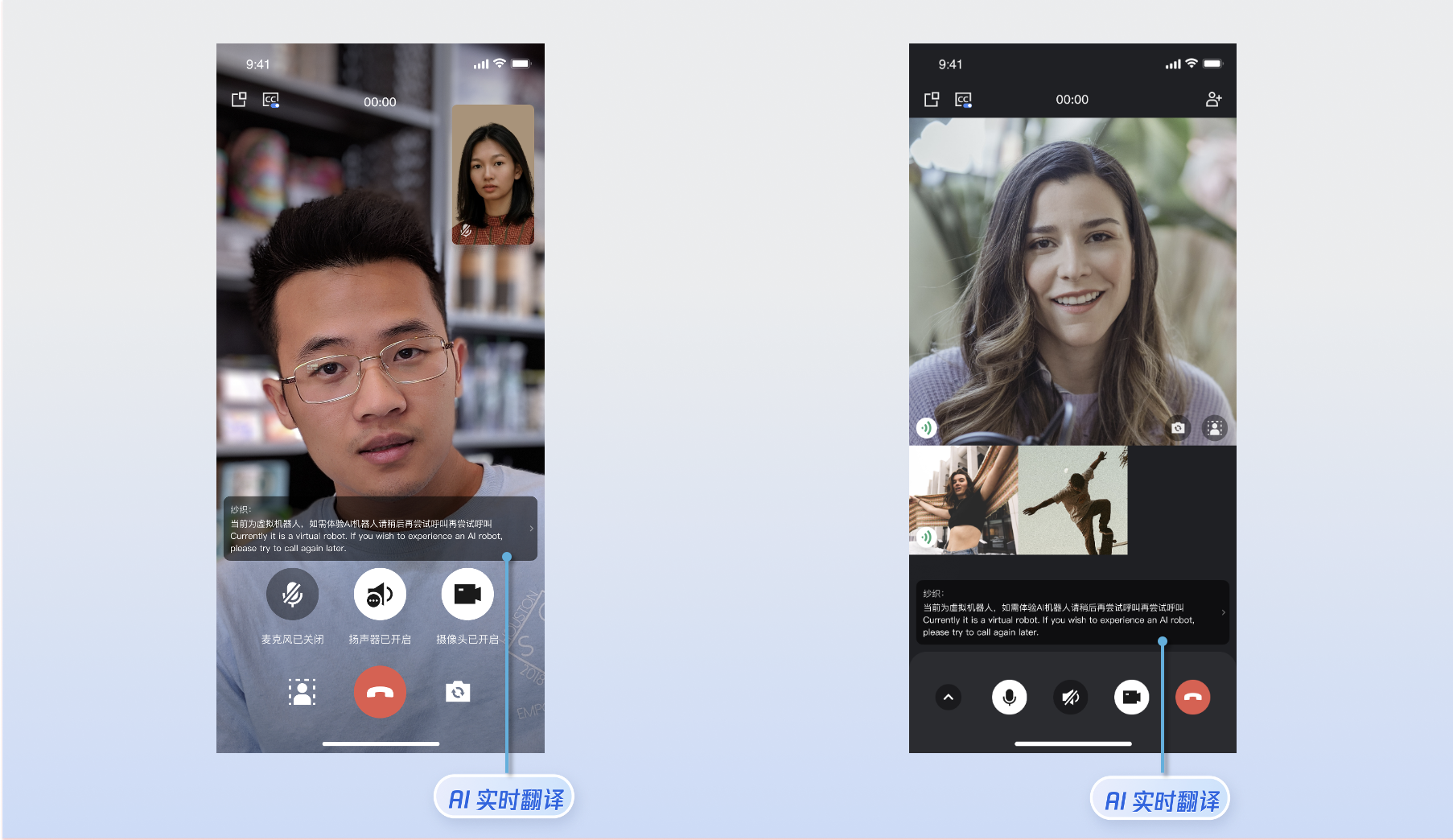
### AI 转录与翻译
|
|
404
|
+
|
|
405
|
+
您可以通过调用 `enableAITranscriber` 开启/关闭 AI 转录与翻译功能。
|
|
406
|
+
|
|
407
|
+
|
|
408
|
+
|
|
409
|
+
|
|
410
|
+
> **注意:**
|
|
411
|
+
>
|
|
412
|
+
> 1. 该功能默认为开启状态(enable = true)。如需关闭,请在发起通话前调用 `enableAITranscriber`(enable: false)。
|
|
413
|
+
> 2. AI 实时转录与翻译为增值服务。体验版赠送免费额度,可直接体验。如需开通正式版,请在 [实时音视频控制台](https://console.cloud.tencent.com/trtc) 开通套餐包,详见 [计费说明](https://cloud.tencent.com/document/product/647/111976)。
|
|
414
|
+
|
|
415
|
+
|
|
416
|
+
|
|
417
|
+
|
|
418
|
+
|
|
419
|
+
|
|
420
|
+
|
|
421
|
+
【Kotlin】
|
|
422
|
+
``` swift
|
|
423
|
+
TUICallKit.createInstance(context).enableAITranscriber(true)
|
|
424
|
+
```
|
|
425
|
+
|
|
426
|
+
|
|
427
|
+
【Java】
|
|
428
|
+
``` objectivec
|
|
429
|
+
TUICallKit.createInstance(context).enableAITranscriber(true);
|
|
430
|
+
```
|
|
431
|
+
|
|
432
|
+
**详情:**默认为 true,通话界面上显示 AI 翻译相关页面,设置为 false 后关闭。
|
|
433
|
+
|
|
434
|
+
### 开启悬浮窗功能
|
|
435
|
+
|
|
436
|
+
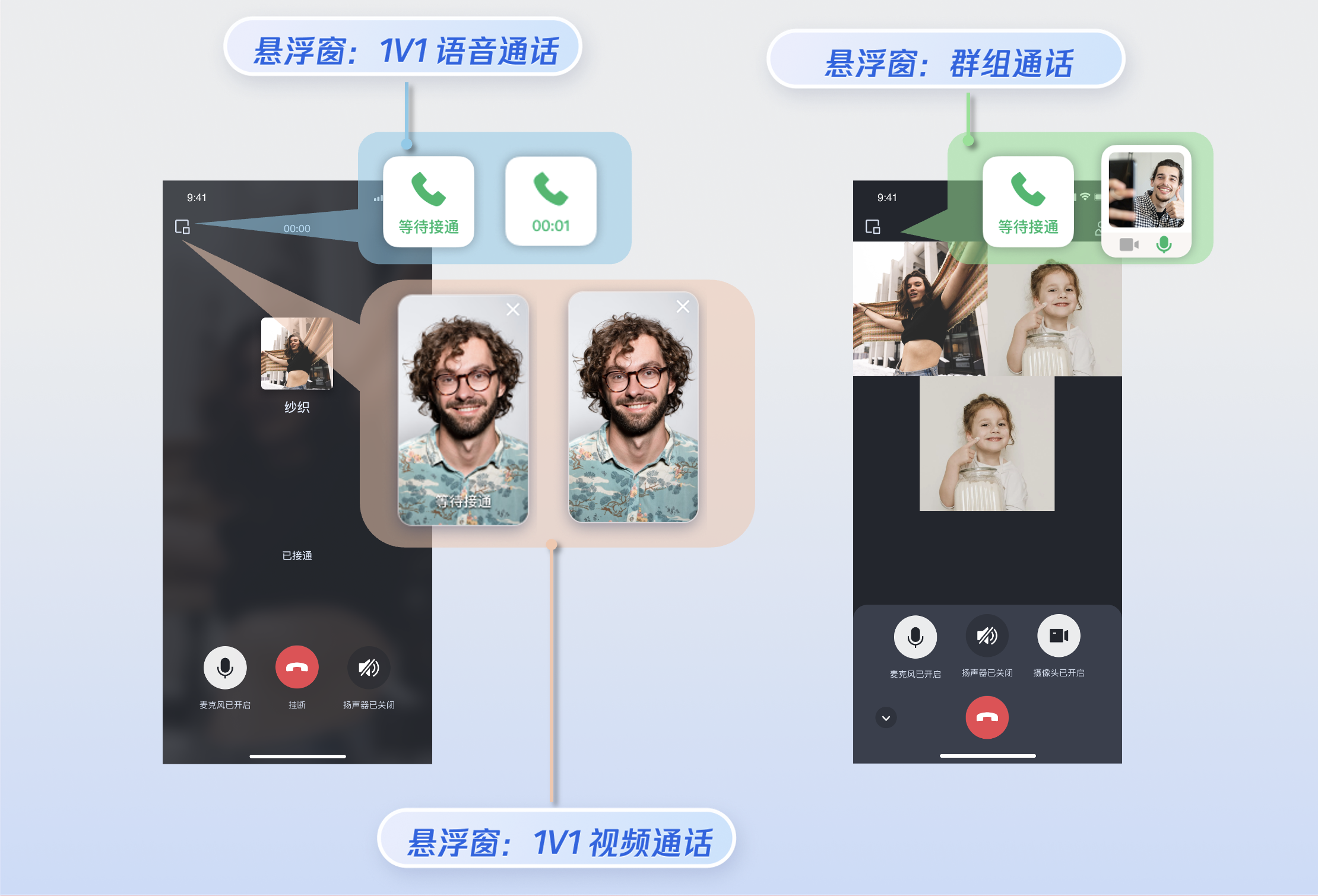
您可以通过调用 `enableFloatWindow` 开启/关闭悬浮窗功能,在初始化 TUICallKit 组件时启用该功能,默认状态为关闭(false)。可通过点击通话界面左上角的悬浮窗按钮,将通话界面缩小为悬浮窗形式。
|
|
437
|
+
|
|
438
|
+
|
|
439
|
+
|
|
440
|
+
|
|
441
|
+
|
|
442
|
+
|
|
443
|
+
|
|
444
|
+
|
|
445
|
+
|
|
446
|
+
【Kotlin】
|
|
447
|
+
``` java
|
|
448
|
+
import com.tencent.qcloud.tuikit.tuicallkit.TUICallKit
|
|
449
|
+
|
|
450
|
+
TUICallKit.createInstance(this).enableFloatWindow(true)
|
|
451
|
+
```
|
|
452
|
+
|
|
453
|
+
|
|
454
|
+
【Java】
|
|
455
|
+
``` java
|
|
456
|
+
import com.tencent.qcloud.tuikit.tuicallkit.TUICallKit;
|
|
457
|
+
|
|
458
|
+
TUICallKit.createInstance(this).enableFloatWindow(true);
|
|
459
|
+
```
|
|
460
|
+
|
|
461
|
+
**详情:**默认为 false,通话界面左上角的悬浮窗按钮隐藏,设置为 true 后显示。
|
|
462
|
+
|
|
463
|
+
### 开启来电横幅
|
|
464
|
+
|
|
465
|
+
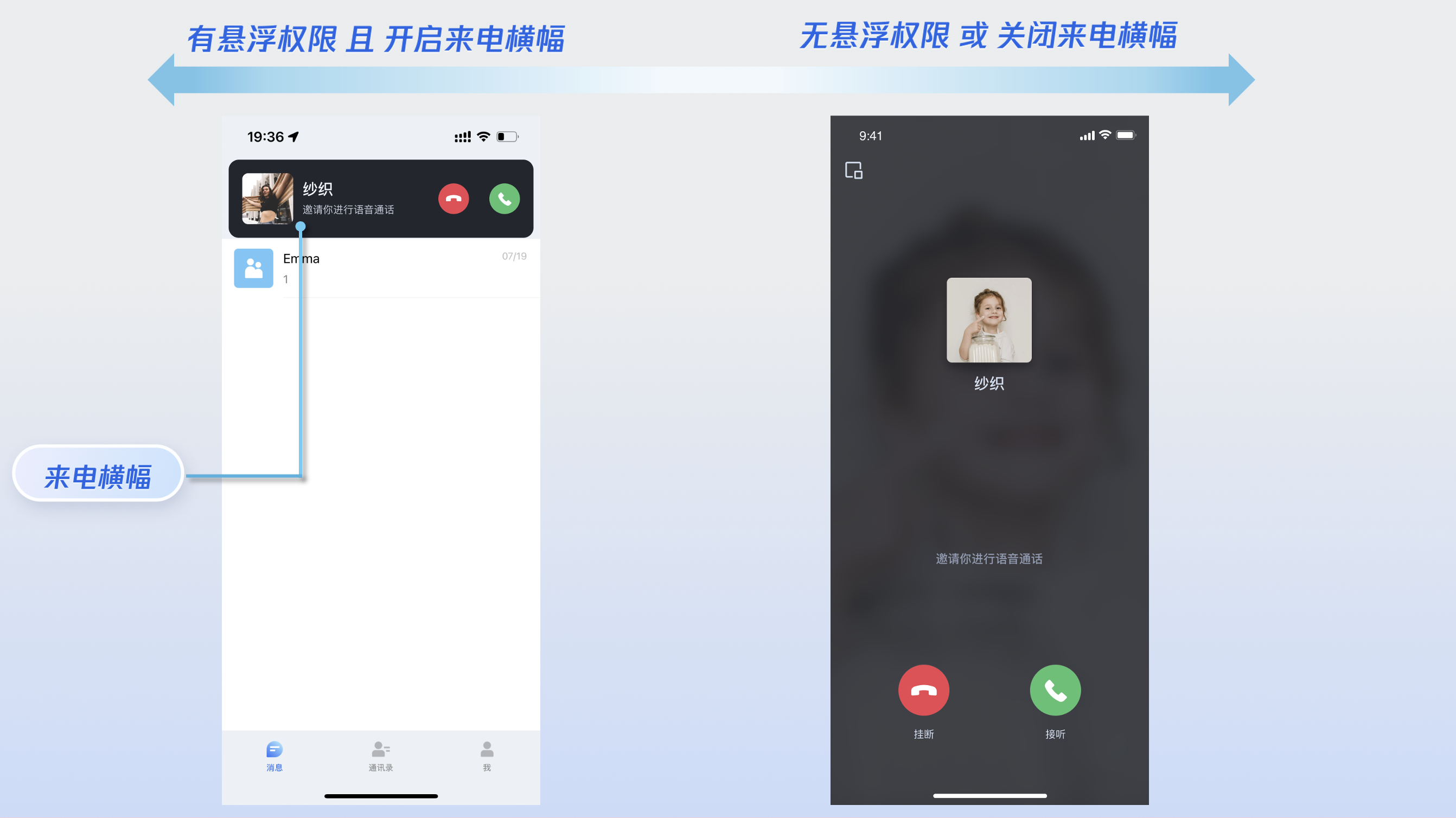
您可以通过调用 `enableIncomingBanner` 开启/关闭来电横幅显示,该功能默认为关闭状态(false)。当被叫端收到来电时,默认展示全屏通话等待界面。启用此功能后,将首先显示一个横幅通知,然后根据需要切换到全屏通话界面。请注意,显示来电横幅需要授予悬浮窗权限,具体的显示策略将根据权限设置及应用当前是否在前台或后台运行来决定,具体策略可参考:[被叫端来电显示策略](https://write.woa.com/document/86735803114926080)。
|
|
466
|
+
|
|
467
|
+
|
|
468
|
+
|
|
469
|
+
|
|
470
|
+
|
|
471
|
+
|
|
472
|
+
|
|
473
|
+
|
|
474
|
+
|
|
475
|
+
【Android(Kotlin)】
|
|
476
|
+
``` java
|
|
477
|
+
import com.tencent.qcloud.tuikit.tuicallkit.TUICallKit
|
|
478
|
+
|
|
479
|
+
TUICallKit.createInstance(context).enableIncomingBanner(true)
|
|
480
|
+
```
|
|
481
|
+
|
|
482
|
+
|
|
483
|
+
【Android(Java)】
|
|
484
|
+
``` java
|
|
485
|
+
import com.tencent.qcloud.tuikit.tuicallkit.TUICallKit;
|
|
486
|
+
|
|
487
|
+
TUICallKit.createInstance(context).enableIncomingBanner(true);
|
|
488
|
+
```
|
|
489
|
+
|
|
490
|
+
**详情:**默认为 false,被叫端收到邀请后默认弹出全屏通话等待界面。开启后先展示一个横幅,然后根据需要拉起全屏通话界面。
|
|
491
|
+
|
|
492
|
+
### 实现多人通话
|
|
493
|
+
|
|
494
|
+
主叫方使用 `calls` 方法发起通话时,若被叫用户列表超过一人,则自动视为群组通话。其他成员可通过 `join` 方法加入该多人通话。
|
|
495
|
+
- **发起多人通话:**使用 `calls` 方法发起通话时,若被叫用户列表(`userIdList`)超过一人,则自动视为群组通话。
|
|
496
|
+
|
|
497
|
+
|
|
498
|
+
|
|
221
499
|
|
|
222
|
-
在上述登录方法调用返回成功后,调用TUICallKit 的 [calls]方法,指定被叫方的用户列表和通话类型,发起音视频通话,被叫方可接收到来电邀请。
|
|
223
|
-
calls方法定义如下:
|
|
224
|
-
calls
|
|
225
|
-
发起单人或多人通话。
|
|
226
|
-
kotlin:
|
|
227
|
-
fun calls(
|
|
228
|
-
userIdList: List<String?>?, mediaType: TUICallDefine.MediaType?,
|
|
229
|
-
params: TUICallDefine.CallParams?, callback: TUICommonDefine.Callback?
|
|
230
|
-
)
|
|
231
|
-
Java:
|
|
232
|
-
void calls(List<String> userIdList, TUICallDefine.MediaType mediaType,
|
|
233
|
-
TUICallDefine.CallParams params, TUICommonDefine.Callback callback)
|
|
234
500
|
|
|
235
501
|
|
|
236
502
|
|
|
237
|
-
相关代码:引入依赖库和对应代码
|
|
238
503
|
【Kotlin】
|
|
239
504
|
``` java
|
|
240
505
|
import com.tencent.cloud.tuikit.engine.call.TUICallDefine
|
|
241
506
|
import com.tencent.qcloud.tuikit.tuicallkit.TUICallKit
|
|
507
|
+
import io.trtc.tuikit.atomicxcore.api.call.CallMediaType
|
|
508
|
+
import io.trtc.tuikit.atomicxcore.api.call.CallParams
|
|
509
|
+
|
|
510
|
+
val userIdList = mutableListOf<String>()
|
|
511
|
+
userIdList.add("mike")
|
|
512
|
+
userIdList.add("tate")
|
|
513
|
+
val mediaType = CallMediaType.Audio
|
|
514
|
+
val params = CallParams()
|
|
515
|
+
TUICallKit.createInstance(context).calls(userIdList, mediaType, params, object : CompletionHandler {
|
|
516
|
+
override fun onFailure(code: Int, desc: String) {
|
|
517
|
+
// 失败回调
|
|
518
|
+
}
|
|
519
|
+
override fun onSuccess() {
|
|
520
|
+
// 成功回调
|
|
521
|
+
}
|
|
522
|
+
})
|
|
523
|
+
```
|
|
524
|
+
|
|
525
|
+
|
|
526
|
+
【Java】
|
|
527
|
+
``` java
|
|
528
|
+
import com.tencent.cloud.tuikit.engine.call.TUICallDefine;
|
|
529
|
+
import com.tencent.qcloud.tuikit.tuicallkit.TUICallKit;
|
|
530
|
+
import io.trtc.tuikit.atomicxcore.api.call.CallMediaType;
|
|
531
|
+
import io.trtc.tuikit.atomicxcore.api.call.CallParams;
|
|
532
|
+
|
|
533
|
+
List<String> userIdList = new ArrayList<>();
|
|
534
|
+
userIdList.add("mike");
|
|
535
|
+
userIdList.add("tate");
|
|
536
|
+
CallMediaType mediaType = CallMediaType.Audio;
|
|
537
|
+
CallParams params = new CallParams();
|
|
538
|
+
TUICallKit.createInstance(context).calls(userIdList, mediaType, params, new CompletionHandler() {
|
|
539
|
+
@Override
|
|
540
|
+
public void onFailure(int code, String desc) {
|
|
541
|
+
// 失败回调
|
|
542
|
+
}
|
|
242
543
|
|
|
243
|
-
|
|
244
|
-
|
|
245
|
-
|
|
544
|
+
@Override
|
|
545
|
+
public void onSuccess() {
|
|
546
|
+
// 成功回调
|
|
547
|
+
}
|
|
548
|
+
});
|
|
549
|
+
```
|
|
550
|
+
<table>
|
|
551
|
+
<tr>
|
|
552
|
+
<td rowspan="1" colSpan="1" >参数</td>
|
|
553
|
+
|
|
554
|
+
<td rowspan="1" colSpan="1" >类型</td>
|
|
555
|
+
|
|
556
|
+
<td rowspan="1" colSpan="1" >说明</td>
|
|
557
|
+
</tr>
|
|
558
|
+
|
|
559
|
+
<tr>
|
|
560
|
+
<td rowspan="1" colSpan="1" >userIdList</td>
|
|
561
|
+
|
|
562
|
+
<td rowspan="1" colSpan="1" >List<String></td>
|
|
563
|
+
|
|
564
|
+
<td rowspan="1" colSpan="1" >目标用户的 userId 列表。</td>
|
|
565
|
+
</tr>
|
|
566
|
+
|
|
567
|
+
<tr>
|
|
568
|
+
<td rowspan="1" colSpan="1" >mediaType</td>
|
|
569
|
+
|
|
570
|
+
<td rowspan="1" colSpan="1" >[CallMediaType](https://liteav.sdk.cloudcachetci.com/doc/product/tuikit/atomic-x/android/zh/-atomic-x%20-core%20-a-p-i/io.trtc.tuikit.atomicxcore.api.call/-call-media-type/index.html)</td>
|
|
571
|
+
|
|
572
|
+
<td rowspan="1" colSpan="1" >通话的媒体类型,例如视频通话、语音通话。<br>- Audio : 语音通话。<br>- Video : 视频通话。</td>
|
|
573
|
+
</tr>
|
|
574
|
+
|
|
575
|
+
<tr>
|
|
576
|
+
<td rowspan="1" colSpan="1" >params</td>
|
|
577
|
+
|
|
578
|
+
<td rowspan="1" colSpan="1" >[CallParams](https://liteav.sdk.cloudcachetci.com/doc/product/tuikit/atomic-x/android/zh/-atomic-x%20-core%20-a-p-i/io.trtc.tuikit.atomicxcore.api.call/-call-params/index.html)</td>
|
|
579
|
+
|
|
580
|
+
<td rowspan="1" colSpan="1" >通话扩展参数,例如房间号、通话邀请超时时间等。<br>- roomId : 此次通话的房间 ID。<br>- timeout : 发起通话等待的最长时间,超过该时间通话结束。<br>- userData : 发起通话时自定义扩展字段。<br>- chatGroupId : 与 chat 结合使用,Chat 群组的群 ID 。</td>
|
|
581
|
+
</tr>
|
|
582
|
+
|
|
583
|
+
<tr>
|
|
584
|
+
<td rowspan="1" colSpan="1" >completion</td>
|
|
585
|
+
|
|
586
|
+
<td rowspan="1" colSpan="1" >CompletionHandler</td>
|
|
587
|
+
|
|
588
|
+
<td rowspan="1" colSpan="1" >异步操作的结果回调。</td>
|
|
589
|
+
</tr>
|
|
590
|
+
</table>
|
|
591
|
+
|
|
592
|
+
|
|
593
|
+
- **加入多人通话:**可使用 `join` 方法加入指定的群组通话。
|
|
594
|
+
|
|
595
|
+
|
|
596
|
+
|
|
597
|
+
|
|
598
|
+
|
|
599
|
+
|
|
600
|
+
|
|
601
|
+
【Kotlin】
|
|
602
|
+
``` java
|
|
603
|
+
import com.tencent.qcloud.tuikit.tuicallkit.TUICallKit
|
|
604
|
+
|
|
605
|
+
val callId = "123456" // 此次通话的 ID
|
|
606
|
+
TUICallKit.createInstance(this).join(callId, object : CompletionHandler {
|
|
607
|
+
override fun onFailure(code: Int, desc: String) {
|
|
608
|
+
// 失败回调
|
|
609
|
+
}
|
|
610
|
+
override fun onSuccess() {
|
|
611
|
+
// 成功回调
|
|
612
|
+
}
|
|
613
|
+
})
|
|
246
614
|
```
|
|
247
615
|
|
|
248
616
|
|
|
249
617
|
【Java】
|
|
250
618
|
``` java
|
|
251
|
-
import com.tencent.qcloud.tuikit.tuicallengine.TUICallDefine;
|
|
252
619
|
import com.tencent.qcloud.tuikit.tuicallkit.TUICallKit;
|
|
253
620
|
|
|
254
|
-
|
|
255
|
-
|
|
256
|
-
|
|
621
|
+
String callId = "123456"; // 此次通话的 ID
|
|
622
|
+
TUICallKit.createInstance(this).join(callId, new CompletionHandler() {
|
|
623
|
+
@Override
|
|
624
|
+
public void onFailure(int code, String desc) {
|
|
625
|
+
// 失败回调
|
|
626
|
+
}
|
|
627
|
+
|
|
628
|
+
@Override
|
|
629
|
+
public void onSuccess() {
|
|
630
|
+
// 成功回调
|
|
631
|
+
}
|
|
632
|
+
});
|
|
633
|
+
```
|
|
634
|
+
<table>
|
|
635
|
+
<tr>
|
|
636
|
+
<td rowspan="1" colSpan="1" >参数</td>
|
|
637
|
+
|
|
638
|
+
<td rowspan="1" colSpan="1" >类型</td>
|
|
639
|
+
|
|
640
|
+
<td rowspan="1" colSpan="1" >说明</td>
|
|
641
|
+
</tr>
|
|
642
|
+
|
|
643
|
+
<tr>
|
|
644
|
+
<td rowspan="1" colSpan="1" >callId</td>
|
|
645
|
+
|
|
646
|
+
<td rowspan="1" colSpan="1" >String</td>
|
|
647
|
+
|
|
648
|
+
<td rowspan="1" colSpan="1" >此次通话的唯一标识。</td>
|
|
649
|
+
</tr>
|
|
650
|
+
|
|
651
|
+
<tr>
|
|
652
|
+
<td rowspan="1" colSpan="1" >completion</td>
|
|
653
|
+
|
|
654
|
+
<td rowspan="1" colSpan="1" >CompletionHandler</td>
|
|
655
|
+
|
|
656
|
+
<td rowspan="1" colSpan="1" >异步操作的结果回调。</td>
|
|
657
|
+
</tr>
|
|
658
|
+
</table>
|
|
659
|
+
|
|
660
|
+
|
|
661
|
+
|
|
662
|
+
### 设置语言
|
|
663
|
+
- **支持的语言:**目前支持**简体中文、繁体中文、英文、日文和阿拉伯语。**
|
|
664
|
+
|
|
665
|
+
- **切换语言:**TUICallKit 默认语言与手机系统保持一致 。如果需要切换语言,可以使用 `TUIThemeManager.getInstance().changeLanguage `方法设置语言,以设置语言为英文的示例代码如下**。**
|
|
666
|
+
|
|
667
|
+
|
|
668
|
+
|
|
669
|
+
|
|
670
|
+
|
|
671
|
+
|
|
672
|
+
|
|
673
|
+
【Kotlin】
|
|
674
|
+
``` java
|
|
675
|
+
import com.tencent.qcloud.tuicore.TUIThemeManager;
|
|
676
|
+
|
|
677
|
+
public class MainActivity extends BaseActivity {
|
|
678
|
+
@Override
|
|
679
|
+
public void onCreate(Bundle savedInstanceState) {
|
|
680
|
+
super.onCreate(savedInstanceState)
|
|
681
|
+
|
|
682
|
+
val language = TUIThemeManager.LANGUAGE_ZH_CN // 设置的语言
|
|
683
|
+
TUIThemeManager.getInstance().changeLanguage(applicationContext, language)
|
|
684
|
+
}
|
|
685
|
+
}
|
|
686
|
+
```
|
|
687
|
+
|
|
688
|
+
|
|
689
|
+
【Java】
|
|
690
|
+
``` java
|
|
691
|
+
|
|
692
|
+
import com.tencent.qcloud.tuicore.TUIThemeManager;
|
|
693
|
+
|
|
694
|
+
public class MainActivity extends BaseActivity {
|
|
695
|
+
@Override
|
|
696
|
+
public void onCreate(Bundle savedInstanceState) {
|
|
697
|
+
super.onCreate(savedInstanceState);
|
|
698
|
+
String language = TUIThemeManager.LANGUAGE_EN; // 设置的语言
|
|
699
|
+
TUIThemeManager.getInstance().changeLanguage(getApplicationContext(), language);
|
|
700
|
+
}
|
|
701
|
+
}
|
|
702
|
+
|
|
703
|
+
```
|
|
704
|
+
<table>
|
|
705
|
+
<tr>
|
|
706
|
+
<td rowspan="1" colSpan="1" >参数</td>
|
|
707
|
+
|
|
708
|
+
<td rowspan="1" colSpan="1" >类型</td>
|
|
709
|
+
|
|
710
|
+
<td rowspan="1" colSpan="1" >说明</td>
|
|
711
|
+
</tr>
|
|
712
|
+
|
|
713
|
+
<tr>
|
|
714
|
+
<td rowspan="1" colSpan="1" >language</td>
|
|
715
|
+
|
|
716
|
+
<td rowspan="1" colSpan="1" >String</td>
|
|
717
|
+
|
|
718
|
+
<td rowspan="1" colSpan="1" >设置的语言:<br>- TUIThemeManager.LANGUAGE_EN:英文。<br>- TUIThemeManager.LANGUAGE_AR:阿拉伯语。<br>- TUIThemeManager.LANGUAGE_ZH_HK:中文繁体。<br>- TUIThemeManager.LANGUAGE_ZH_CN:中文简体。</td>
|
|
719
|
+
</tr>
|
|
720
|
+
</table>
|
|
721
|
+
|
|
722
|
+
|
|
723
|
+
> **说明:**
|
|
724
|
+
>
|
|
725
|
+
|
|
726
|
+
> 如需设置其他语言,请[联系我们](https://cloud.tencent.com/document/product/647/19906)获取协助。
|
|
727
|
+
>
|
|
728
|
+
|
|
729
|
+
|
|
730
|
+
|
|
731
|
+
### 设置铃声
|
|
732
|
+
|
|
733
|
+
您可通过以下方式设置默认铃声、来电静音模式、离线推送铃声:
|
|
734
|
+
- **设置默认铃声(方式1):**如果您通过源码依赖 TUICallKit 组件,您可以替换铃声资源文件([发起呼叫时的铃声](https://github.com/Tencent-RTC/TUIKit_Android/blob/main/call/tuicallkit-kt/src/main/res/raw/phone_dialing.mp3)、[接到呼叫时的铃声](https://github.com/Tencent-RTC/TUIKit_Android/blob/main/call/tuicallkit-kt/src/main/res/raw/phone_ringing.mp3))设置默认铃声。
|
|
735
|
+
|
|
736
|
+
- **设置默认铃声(方式2):**通过 [setCallingBell](https://cloud.tencent.com/document/product/647/78750#setCallingBell) 接口设置被叫端收到的来电铃声。
|
|
737
|
+
|
|
738
|
+
|
|
739
|
+
|
|
740
|
+
|
|
741
|
+
|
|
742
|
+
|
|
743
|
+
|
|
744
|
+
【Android(Kotlin)】
|
|
745
|
+
``` java
|
|
746
|
+
import com.tencent.qcloud.tuikit.tuicallkit.TUICallKit
|
|
747
|
+
|
|
748
|
+
val filePath = "***/callingBell.mp3"
|
|
749
|
+
TUICallKit.createInstance(context).setCallingBell(filePath)
|
|
750
|
+
```
|
|
751
|
+
|
|
752
|
+
|
|
753
|
+
【Android(Java)】
|
|
754
|
+
``` java
|
|
755
|
+
import com.tencent.qcloud.tuikit.tuicallkit.TUICallKit;
|
|
756
|
+
|
|
757
|
+
String filePath = "***/callingBell.mp3";
|
|
758
|
+
TUICallKit.createInstance(context).setCallingBell(filePath);
|
|
257
759
|
```
|
|
258
|
-
|
|
259
|
-
|
|
760
|
+
|
|
761
|
+
**详情:**这里仅限传入本地文件地址,需要确保该文件目录是应用可以访问的。铃声设置后与设备绑定,更换用户,铃声依旧会生效。如需恢复默认铃声,filePath传空即可。
|
|
260
762
|
<table>
|
|
261
763
|
<tr>
|
|
262
|
-
<td rowspan="1" colSpan="1"
|
|
764
|
+
<td rowspan="1" colSpan="1" >参数</td>
|
|
765
|
+
|
|
766
|
+
<td rowspan="1" colSpan="1" >类型</td>
|
|
263
767
|
|
|
264
|
-
<td rowspan="1" colSpan="1"
|
|
768
|
+
<td rowspan="1" colSpan="1" >说明</td>
|
|
265
769
|
</tr>
|
|
266
770
|
|
|
267
771
|
<tr>
|
|
268
|
-
<td rowspan="1" colSpan="1"
|
|
772
|
+
<td rowspan="1" colSpan="1" >filePath</td>
|
|
269
773
|
|
|
270
|
-
<td rowspan="1" colSpan="1"
|
|
774
|
+
<td rowspan="1" colSpan="1" >String</td>
|
|
775
|
+
|
|
776
|
+
<td rowspan="1" colSpan="1" >铃声文件的路径。</td>
|
|
271
777
|
</tr>
|
|
272
778
|
</table>
|
|
273
779
|
|
|
274
780
|
|
|
275
|
-
|
|
276
|
-
- [设置昵称、头像](https://cloud.tencent.com/document/product/647/104663)
|
|
781
|
+
- **来电静音模式:**您可以通过 [enableMuteMode](https://cloud.tencent.com/document/product/647/78750#enableMuteMode) 设置静音模式。
|
|
277
782
|
|
|
278
|
-
- [界面定制](https://write.woa.com/document/86735802075787264)
|
|
279
783
|
|
|
280
|
-
|
|
784
|
+
|
|
281
785
|
|
|
282
|
-
- [群组通话](https://write.woa.com/document/139754164343910400)
|
|
283
786
|
|
|
284
|
-
- [悬浮窗](https://write.woa.com/document/139754329641431040)
|
|
285
787
|
|
|
286
|
-
- [美颜特效](https://write.woa.com/document/116004093086711808)
|
|
287
788
|
|
|
288
|
-
|
|
789
|
+
【Android(Kotlin)】
|
|
790
|
+
``` java
|
|
791
|
+
import com.tencent.qcloud.tuikit.tuicallkit.TUICallKit
|
|
792
|
+
|
|
793
|
+
TUICallKit.createInstance(context).enableMuteMode(true)
|
|
794
|
+
```
|
|
289
795
|
|
|
290
|
-
- [监听通话状态](https://write.woa.com/document/139754713712799744)
|
|
291
796
|
|
|
292
|
-
|
|
797
|
+
【Android(Java)】
|
|
798
|
+
``` java
|
|
799
|
+
import com.tencent.qcloud.tuikit.tuicallkit.TUICallKit;
|
|
800
|
+
|
|
801
|
+
TUICallKit.createInstance(context).enableMuteMode(true);
|
|
802
|
+
```
|
|
803
|
+
|
|
804
|
+
**详情:**开启后,收到通话请求,不会播放来电铃声。
|
|
805
|
+
|
|
806
|
+
- **自定义离线推送铃声**:离线推送默认铃声是由系统决定的,可以在 手机设置 中,进入应用详情,查看或更改应用的通知铃声。
|
|
807
|
+
|
|
808
|
+
|
|
809
|
+
## 自定义您的 UI
|
|
810
|
+
|
|
811
|
+
### 替换图标按钮
|
|
812
|
+
|
|
813
|
+
您可以直接替换 [res\drawable-xxhdpi](https://github.com/Tencent-RTC/TUIKit_Android/tree/main/atomic_x/src/main/res-callview/drawable-xxhdpi) 文件夹下的图标,以确保整个 App 中的图标色调风格保持一致。以下列出了基本的功能按钮,您可以替换对应的图标以适配自己的业务场景。
|
|
814
|
+
|
|
815
|
+
|
|
816
|
+
|
|
817
|
+
|
|
818
|
+
|
|
819
|
+
|
|
820
|
+
|
|
821
|
+
常用图标文件名列表
|
|
822
|
+
<table>
|
|
823
|
+
<tr>
|
|
824
|
+
<td rowspan="1" colSpan="1" >图标</td>
|
|
825
|
+
|
|
826
|
+
<td rowspan="1" colSpan="1" >文件名称</td>
|
|
827
|
+
|
|
828
|
+
<td rowspan="1" colSpan="1" >说明</td>
|
|
829
|
+
</tr>
|
|
830
|
+
|
|
831
|
+
<tr>
|
|
832
|
+
<td rowspan="1" colSpan="1" ></td>
|
|
833
|
+
|
|
834
|
+
<td rowspan="1" colSpan="1" >callview_ic_dialing.png</td>
|
|
835
|
+
|
|
836
|
+
<td rowspan="1" colSpan="1" >接听来电图标</td>
|
|
837
|
+
</tr>
|
|
838
|
+
|
|
839
|
+
<tr>
|
|
840
|
+
<td rowspan="1" colSpan="1" ><br></td>
|
|
841
|
+
|
|
842
|
+
<td rowspan="1" colSpan="1" >callview_ic_hangup.png</td>
|
|
843
|
+
|
|
844
|
+
<td rowspan="1" colSpan="1" >挂断通话图标</td>
|
|
845
|
+
</tr>
|
|
846
|
+
|
|
847
|
+
<tr>
|
|
848
|
+
<td rowspan="1" colSpan="1" ><br></td>
|
|
849
|
+
|
|
850
|
+
<td rowspan="1" colSpan="1" >callview_ic_mic_unmute.png</td>
|
|
851
|
+
|
|
852
|
+
<td rowspan="1" colSpan="1" >关闭麦克风图标</td>
|
|
853
|
+
</tr>
|
|
854
|
+
|
|
855
|
+
<tr>
|
|
856
|
+
<td rowspan="1" colSpan="1" ><br></td>
|
|
857
|
+
|
|
858
|
+
<td rowspan="1" colSpan="1" >callview_ic_handsfree_disable.png</td>
|
|
859
|
+
|
|
860
|
+
<td rowspan="1" colSpan="1" >关闭扬声器图标</td>
|
|
861
|
+
</tr>
|
|
862
|
+
|
|
863
|
+
<tr>
|
|
864
|
+
<td rowspan="1" colSpan="1" ><br></td>
|
|
865
|
+
|
|
866
|
+
<td rowspan="1" colSpan="1" >callview_ic_camera_disable.png</td>
|
|
867
|
+
|
|
868
|
+
<td rowspan="1" colSpan="1" >关闭摄像头图标</td>
|
|
869
|
+
</tr>
|
|
870
|
+
|
|
871
|
+
<tr>
|
|
872
|
+
<td rowspan="1" colSpan="1" ><br></td>
|
|
873
|
+
|
|
874
|
+
<td rowspan="1" colSpan="1" >callview_ic_add_user_black.png</td>
|
|
875
|
+
|
|
876
|
+
<td rowspan="1" colSpan="1" >通话过程中邀请用户图标</td>
|
|
877
|
+
</tr>
|
|
878
|
+
</table>
|
|
293
879
|
|
|
294
880
|
|
|
295
881
|
## 常见问题
|
|
296
882
|
|
|
297
|
-
|
|
883
|
+
如果您在接入和使用中遇到问题,请参见 [常见问题](https://write.woa.com/document/86735803114926080)。
|
|
298
884
|
|
|
299
885
|
## 交流与反馈
|
|
300
|
-
- 如果您在使用过程中,有什么建议或者意见,可以在这里反馈:[TUICallKit 产品反馈问卷](https://wj.qq.com/s2/10622244/b9ae),感谢您的反馈。
|
|
301
886
|
|
|
302
|
-
|
|
887
|
+
如果您在使用过程中,有什么建议或者意见,可以 [联系我们](https://cloud.tencent.com/document/product/647/19906),感谢您的反馈。
|