@tencentcloud/sdk-mcp 1.3.8 → 1.3.9
This diff represents the content of publicly available package versions that have been released to one of the supported registries. The information contained in this diff is provided for informational purposes only and reflects changes between package versions as they appear in their respective public registries.
- package/package.json +1 -1
- package/resource/doc/chatuikit/android/integration.md +466 -484
- package/resource/doc/chatuikit/android/workflow.md +713 -0
- package/resource/doc/livekit/live/flutter/live-integration.md +208 -167
- package/resource/doc/livekit/voice/android/voice-audience-list.md +335 -0
- package/resource/doc/livekit/voice/android/voice-audio-effect.md +384 -0
- package/resource/doc/livekit/voice/android/voice-barrage.md +569 -0
- package/resource/doc/livekit/voice/android/voice-co-guest-interaction.md +748 -0
- package/resource/doc/livekit/voice/android/voice-gift.md +833 -0
- package/resource/doc/livekit/voice/android/voice-host-interaction.md +728 -0
- package/resource/doc/livekit/voice/android/voice-integration.md +886 -0
- package/resource/doc/livekit/voice/android/voice-room-list.md +493 -0
- package/resource/doc/livekit/voice/android/workflow.md +333 -0
- package/resource/doc/livekit/voice/flutter/voice-audience-list.md +337 -0
- package/resource/doc/livekit/voice/flutter/voice-audio-effect.md +739 -0
- package/resource/doc/livekit/voice/flutter/voice-barrage.md +578 -0
- package/resource/doc/livekit/voice/flutter/voice-co-guest-interaction.md +673 -0
- package/resource/doc/livekit/voice/flutter/voice-gift.md +812 -0
- package/resource/doc/livekit/voice/flutter/voice-integration.md +925 -0
- package/resource/doc/livekit/voice/flutter/voice-room-list.md +842 -0
- package/resource/doc/livekit/voice/flutter/workflow.md +359 -0
- package/resource/doc/livekit/voice/ios/voice-audience-list.md +335 -0
- package/resource/doc/livekit/voice/ios/voice-audio-effect.md +373 -0
- package/resource/doc/livekit/voice/ios/voice-barrage.md +529 -0
- package/resource/doc/livekit/voice/ios/voice-co-guest-interaction.md +701 -0
- package/resource/doc/livekit/voice/ios/voice-gift.md +785 -0
- package/resource/doc/livekit/voice/ios/voice-host-interaction.md +820 -0
- package/resource/doc/livekit/voice/ios/voice-integration.md +853 -0
- package/resource/doc/livekit/voice/ios/voice-room-list.md +467 -0
- package/resource/doc/livekit/voice/ios/workflow.md +358 -0
- package/resource/doc/livekit/voice/uni-app/voice-audience-list.md +264 -0
- package/resource/doc/livekit/voice/uni-app/voice-audio-effect.md +332 -0
- package/resource/doc/livekit/voice/uni-app/voice-barrage.md +482 -0
- package/resource/doc/livekit/voice/uni-app/voice-co-guest-interaction.md +944 -0
- package/resource/doc/livekit/voice/uni-app/voice-gift.md +716 -0
- package/resource/doc/livekit/voice/uni-app/voice-integration.md +613 -0
- package/resource/doc/livekit/voice/uni-app/voice-room-list.md +562 -0
- package/resource/doc/livekit/voice/uni-app/workflow.md +369 -0
- package/resource/doc/roomkit/vue/integration.md +119 -224
- package/resource/doc/roomkit/vue/workflow.md +472 -226
- package/resource/doc/tuicallkit/android/integration.md +675 -90
- package/resource/doc/tuicallkit/android/workflow.md +432 -0
- package/tools/common/present-scenario-choice.js +16 -0
- package/tools/common/present-scenario-choice.js.map +1 -0
- package/tools/definitions/get_native_call_uikit_integration_def.js +18 -2
- package/tools/definitions/get_native_call_uikit_integration_def.js.map +1 -1
- package/tools/definitions/get_native_chat_uikit_integration_def.js +29 -7
- package/tools/definitions/get_native_chat_uikit_integration_def.js.map +1 -1
- package/tools/definitions/get_native_live_uikit_integration_def.js +65 -40
- package/tools/definitions/get_native_live_uikit_integration_def.js.map +1 -1
- package/tools/definitions/get_native_live_uikit_interaction_def.js +42 -94
- package/tools/definitions/get_native_live_uikit_interaction_def.js.map +1 -1
- package/tools/definitions/get_web_room_feature_detail_def.js +29 -32
- package/tools/definitions/get_web_room_feature_detail_def.js.map +1 -1
- package/tools/definitions/get_web_room_uikit_integration_def.js +25 -9
- package/tools/definitions/get_web_room_uikit_integration_def.js.map +1 -1
- package/tools/definitions/present_scenario_choice_def.js +53 -0
- package/tools/definitions/present_scenario_choice_def.js.map +1 -0
- package/tools/definitions/record_prompt_def.js +6 -1
- package/tools/definitions/record_prompt_def.js.map +1 -1
- package/tools/definitions/record_result_def.js +20 -4
- package/tools/definitions/record_result_def.js.map +1 -1
- package/tools/index.js +2 -0
- package/tools/index.js.map +1 -1
- package/tools/live/get-native-live-uikit-integration.js +110 -34
- package/tools/live/get-native-live-uikit-integration.js.map +1 -1
- package/tools/live/get_native_live_uikit_interaction.js +128 -35
- package/tools/live/get_native_live_uikit_interaction.js.map +1 -1
- package/utils/report-cls-client.js +1 -1
- package/utils/report-es-client.js +1 -1
|
@@ -1,18 +1,23 @@
|
|
|
1
|
-
TUIRoomKit
|
|
1
|
+
TUIRoomKit 是腾讯云推出的音视频房间 UI 应用。本次升级引入了全新的原子化组件接入方案,开发者可以灵活组合这些原子化组件,以构建个性化的音视频房间界面。
|
|
2
2
|
|
|
3
|
-
|
|
3
|
+
> **推荐使用更高效的 AI 集成助手**
|
|
4
|
+
>
|
|
4
5
|
|
|
5
|
-
>
|
|
6
|
+
> 我们为您提供了全新的 AI 集成方式,只需要描述您的需求,即可自动生成集成代码,大幅提升开发效率。
|
|
6
7
|
>
|
|
7
8
|
|
|
8
|
-
>
|
|
9
|
+
> [点击这里,立即体验 AI 集成](https://cloud.tencent.com/document/product/647/127873)
|
|
9
10
|
>
|
|
10
11
|
|
|
11
12
|
|
|
12
|
-
|
|
13
|
+
本文档介绍如何将 TUIRoomKit 集成到现有的 Vue3 项目中,同时介绍如何对 TUIRoomKit 的样式、布局及功能进行自定义修改。
|
|
14
|
+
- 桌面端多人会议
|
|
15
|
+
|
|
16
|
+
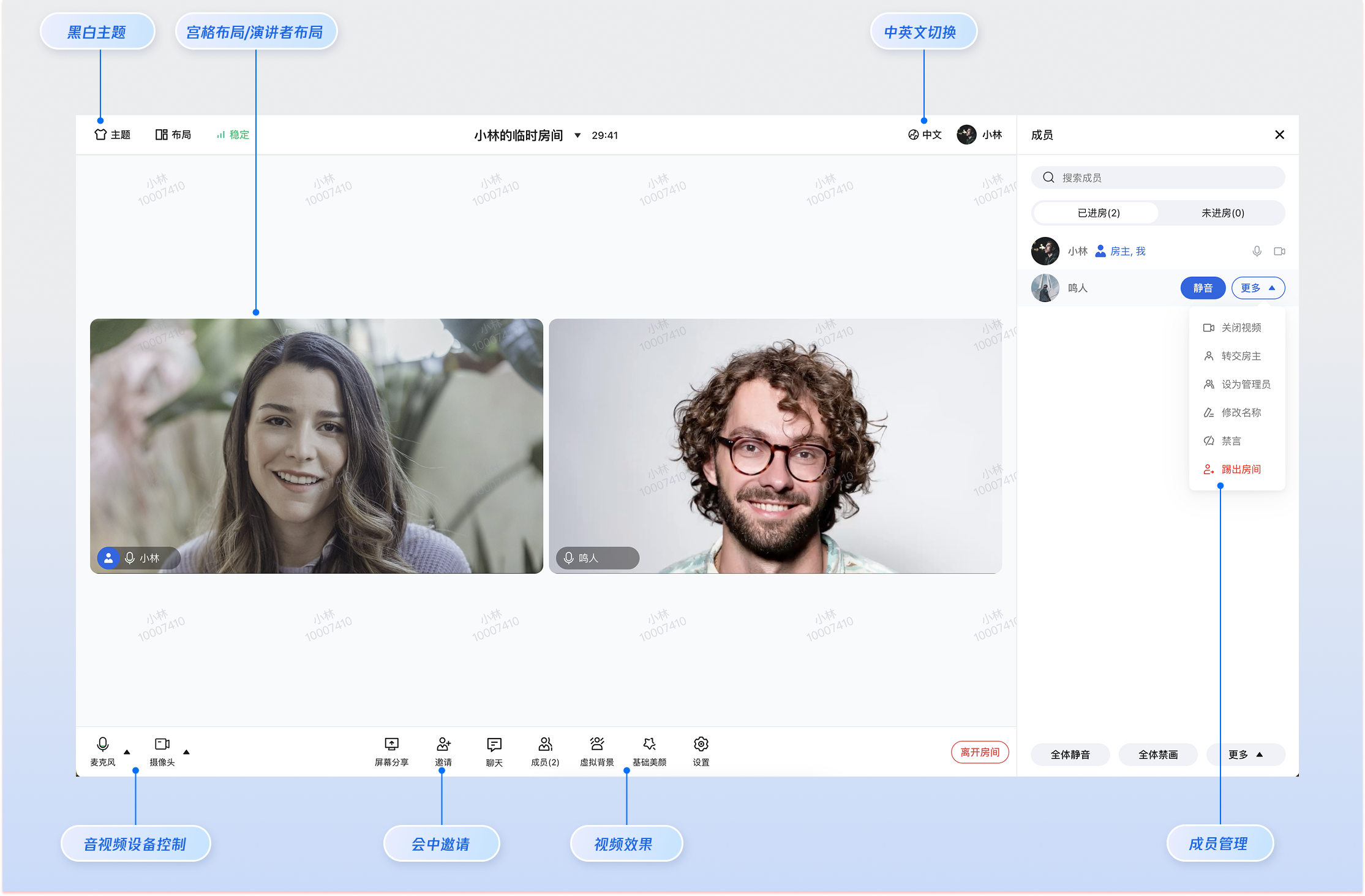
|
|
13
17
|
|
|
18
|
+
- H5 多人会议
|
|
14
19
|
|
|
15
|
-

|
|
16
21
|
|
|
17
22
|
|
|
18
23
|
## 前提条件
|
|
@@ -46,211 +51,69 @@ TUIRoomKit 是腾讯云推出的音视频会议 UI 应用。本次升级引入
|
|
|
46
51
|
|
|
47
52
|
【npm】
|
|
48
53
|
``` bash
|
|
49
|
-
npm install tuikit-atomicx-vue3 @tencentcloud/uikit-base-component-vue3 @tencentcloud/
|
|
54
|
+
npm install @tencentcloud/roomkit-web-vue3@latest tuikit-atomicx-vue3 @tencentcloud/uikit-base-component-vue3 @tencentcloud/universal-api
|
|
50
55
|
```
|
|
51
56
|
|
|
52
57
|
|
|
53
58
|
【pnpm】
|
|
54
59
|
``` bash
|
|
55
|
-
pnpm install tuikit-atomicx-vue3 @tencentcloud/uikit-base-component-vue3 @tencentcloud/
|
|
60
|
+
pnpm install @tencentcloud/roomkit-web-vue3@latest tuikit-atomicx-vue3 @tencentcloud/uikit-base-component-vue3 @tencentcloud/universal-api
|
|
56
61
|
```
|
|
57
62
|
|
|
58
63
|
|
|
59
64
|
【yarn】
|
|
60
65
|
``` bash
|
|
61
|
-
yarn add tuikit-atomicx-vue3 @tencentcloud/uikit-base-component-vue3 @tencentcloud/
|
|
62
|
-
```
|
|
63
|
-
|
|
64
|
-
### 步骤2:配置开发环境
|
|
65
|
-
|
|
66
|
-
如果您的项目尚未支持 TypeScript 和 SCSS,请先安装相应的环境依赖。如果已安装,您可以略过此步骤。
|
|
67
|
-
|
|
68
|
-
|
|
69
|
-
|
|
70
|
-
|
|
71
|
-
【npm】
|
|
72
|
-
``` bash
|
|
73
|
-
npm install typescript sass -S -D
|
|
66
|
+
yarn add @tencentcloud/roomkit-web-vue3@latest tuikit-atomicx-vue3 @tencentcloud/uikit-base-component-vue3 @tencentcloud/universal-api
|
|
74
67
|
```
|
|
75
68
|
|
|
76
|
-
|
|
77
|
-
【pnpm】
|
|
78
|
-
``` bash
|
|
79
|
-
pnpm install typescript sass -S -D
|
|
80
|
-
```
|
|
81
|
-
|
|
82
|
-
|
|
83
|
-
【yarn】
|
|
84
|
-
``` bash
|
|
85
|
-
yarn add typescript sass -S -D
|
|
86
|
-
```
|
|
87
|
-
|
|
88
|
-
### 步骤3:拷贝核心源码文件
|
|
89
|
-
|
|
90
|
-
克隆 TUIRoomKit 的 GitHub 仓库,并进入 PC 端 Vue3 示例目录。
|
|
91
|
-
``` bash
|
|
92
|
-
git clone https://github.com/Tencent-RTC/TUIRoomKit.git --depth=1
|
|
93
|
-
cd TUIRoomKit/Web/example/atomicx-vite-vue3-ts
|
|
94
|
-
```
|
|
95
|
-
|
|
96
|
-
拷贝 `TUIRoomKit/Web/example/atomicx-vite-vue3-ts/src` 路径下核心源码文件到您的业务项目中。
|
|
97
|
-
|
|
98
|
-
> **注意:**
|
|
99
|
-
>
|
|
100
|
-
|
|
101
|
-
> 拷贝源码文件时,请确保与您项目已有的文件夹进行合并,避免直接覆盖已有的同名文件夹。
|
|
102
|
-
>
|
|
103
|
-
|
|
104
|
-
<table>
|
|
105
|
-
<tr>
|
|
106
|
-
<td rowspan="1" colSpan="1" >源路径 (示例项目)</td>
|
|
107
|
-
|
|
108
|
-
<td rowspan="1" colSpan="1" >目标路径 (您的项目)</td>
|
|
109
|
-
|
|
110
|
-
<td rowspan="1" colSpan="1" >说明</td>
|
|
111
|
-
</tr>
|
|
112
|
-
|
|
113
|
-
<tr>
|
|
114
|
-
<td rowspan="1" colSpan="1" >src/assets/</td>
|
|
115
|
-
|
|
116
|
-
<td rowspan="1" colSpan="1" >src/assets/</td>
|
|
117
|
-
|
|
118
|
-
<td rowspan="1" colSpan="1" >包含背景图、图标等静态资源。</td>
|
|
119
|
-
</tr>
|
|
120
|
-
|
|
121
|
-
<tr>
|
|
122
|
-
<td rowspan="1" colSpan="1" >src/components/</td>
|
|
123
|
-
|
|
124
|
-
<td rowspan="1" colSpan="1" >src/components/</td>
|
|
125
|
-
|
|
126
|
-
<td rowspan="1" colSpan="1" >包含 TUIRoomKit 所有原子 UI 组件</td>
|
|
127
|
-
</tr>
|
|
128
|
-
|
|
129
|
-
<tr>
|
|
130
|
-
<td rowspan="1" colSpan="1" >src/hooks/</td>
|
|
131
|
-
|
|
132
|
-
<td rowspan="1" colSpan="1" >src/hooks/</td>
|
|
133
|
-
|
|
134
|
-
<td rowspan="1" colSpan="1" >包含 TUIRoomKit 业务逻辑处理</td>
|
|
135
|
-
</tr>
|
|
136
|
-
|
|
137
|
-
<tr>
|
|
138
|
-
<td rowspan="1" colSpan="1" >src/i18n/</td>
|
|
139
|
-
|
|
140
|
-
<td rowspan="1" colSpan="1" >src/i18n/</td>
|
|
141
|
-
|
|
142
|
-
<td rowspan="1" colSpan="1" >包含多语言配置文件</td>
|
|
143
|
-
</tr>
|
|
144
|
-
|
|
145
|
-
<tr>
|
|
146
|
-
<td rowspan="1" colSpan="1" >src/utils/</td>
|
|
147
|
-
|
|
148
|
-
<td rowspan="1" colSpan="1" >src/utils/</td>
|
|
149
|
-
|
|
150
|
-
<td rowspan="1" colSpan="1" >包含通用工具函数</td>
|
|
151
|
-
</tr>
|
|
152
|
-
|
|
153
|
-
<tr>
|
|
154
|
-
<td rowspan="1" colSpan="1" >src/config/</td>
|
|
155
|
-
|
|
156
|
-
<td rowspan="1" colSpan="1" >src/config/</td>
|
|
157
|
-
|
|
158
|
-
<td rowspan="1" colSpan="1" >包含 `basic-info-config.js` 等应用配置信息(首次接入请重点关注此文件)</td>
|
|
159
|
-
</tr>
|
|
160
|
-
|
|
161
|
-
<tr>
|
|
162
|
-
<td rowspan="1" colSpan="1" >src/views/home.vue</td>
|
|
163
|
-
|
|
164
|
-
<td rowspan="1" colSpan="1" >src/views/home.vue</td>
|
|
165
|
-
|
|
166
|
-
<td rowspan="1" colSpan="1" >该页面包含了设备检测、房间创建/加入的入口功能</td>
|
|
167
|
-
</tr>
|
|
168
|
-
|
|
169
|
-
<tr>
|
|
170
|
-
<td rowspan="1" colSpan="1" >src/views/room.vue</td>
|
|
171
|
-
|
|
172
|
-
<td rowspan="1" colSpan="1" >src/views/room.vue</td>
|
|
173
|
-
|
|
174
|
-
<td rowspan="1" colSpan="1" >该页面是 TUIRoomKit 的核心会议界面,集成了完整的头部、视频布局、控制栏和侧边面板</td>
|
|
175
|
-
</tr>
|
|
176
|
-
</table>
|
|
177
|
-
|
|
178
|
-
|
|
179
|
-
### 步骤4:配置页面路由
|
|
180
|
-
|
|
181
|
-
请配置您的 Vue Router,将 home.vue 映射到主页,将 room.vue 映射到会议室页面。
|
|
182
|
-
|
|
183
|
-
> **注意:**
|
|
184
|
-
>
|
|
185
|
-
> - 如果您的业务项目中已有 `src/router/index.ts` 文件,请将以下内容合并到已有代码中。
|
|
186
|
-
> - 如果尚未配置路由,请新建 `src/router/index.ts` 文件并添加以下配置。
|
|
187
|
-
|
|
69
|
+
### 步骤2:**引用 **TUIRoomKit** 组件**
|
|
188
70
|
``` typescript
|
|
189
|
-
|
|
190
|
-
|
|
191
|
-
|
|
192
|
-
|
|
193
|
-
|
|
194
|
-
|
|
195
|
-
|
|
196
|
-
|
|
197
|
-
|
|
198
|
-
|
|
199
|
-
|
|
200
|
-
},
|
|
201
|
-
{
|
|
202
|
-
path: '/home',
|
|
203
|
-
name: 'Home',
|
|
204
|
-
component: Home,
|
|
205
|
-
},
|
|
206
|
-
{
|
|
207
|
-
path: '/room',
|
|
208
|
-
name: 'Room',
|
|
209
|
-
component: Room,
|
|
210
|
-
},
|
|
211
|
-
],
|
|
212
|
-
});
|
|
71
|
+
<template>
|
|
72
|
+
<ConferenceMainView v-if="isPC"></ConferenceMainView>
|
|
73
|
+
<ConferenceMainViewH5 v-else></ConferenceMainViewH5>
|
|
74
|
+
</template>
|
|
75
|
+
<script setup>
|
|
76
|
+
import { ref } from 'vue';
|
|
77
|
+
import { ConferenceMainView, ConferenceMainViewH5 } from '@tencentcloud/roomkit-web-vue3';
|
|
78
|
+
import { getPlatform } from '@tencentcloud/universal-api';
|
|
79
|
+
|
|
80
|
+
const isPC = ref(getPlatform() === 'pc');
|
|
81
|
+
</script>
|
|
213
82
|
|
|
214
|
-
export default router;
|
|
215
83
|
```
|
|
216
84
|
|
|
217
|
-
### 步骤
|
|
218
|
-
|
|
219
|
-
您需要将以下内容合并到您项目中的 App.vue 文件,以配置全局 UI 样式和用户登录逻辑:
|
|
220
|
-
- 配置全局 `UIKitProvider`: 引入 `UIKitProvider` 组件,并设置默认主题和语言;
|
|
85
|
+
### 步骤3:配置 App.vue 文件
|
|
221
86
|
|
|
222
|
-
|
|
87
|
+
将以下内容合并到项目的 App.vue 文件中,以配置全局 UI 样式和用户登录逻辑:
|
|
88
|
+
- 配置全局 `UIKitProvider`:引入 `UIKitProvider` 组件,并设置默认主题和语言;
|
|
223
89
|
|
|
224
|
-
- 用户登录: 在 `onMounted` 钩子中执行 login 和 setSelfInfo
|
|
90
|
+
- 用户登录: 在 `onMounted` 钩子中执行 `login` 和 `setSelfInfo`;
|
|
225
91
|
|
|
226
92
|
``` typescript
|
|
227
93
|
<template>
|
|
228
94
|
<!-- Step 1: 配置全局 UIKitProvider -->
|
|
229
95
|
<UIKitProvider theme="light" language="zh-CN">
|
|
230
|
-
<!--
|
|
231
|
-
<router-view />
|
|
96
|
+
<!-- 您包含 ConferenceMainView 的业务组件 -->
|
|
232
97
|
</UIKitProvider>
|
|
233
98
|
</template>
|
|
234
99
|
|
|
235
|
-
|
|
236
|
-
<script setup lang="ts">
|
|
100
|
+
<script setup>
|
|
237
101
|
import { UIKitProvider } from '@tencentcloud/uikit-base-component-vue3';
|
|
238
102
|
import { onMounted } from 'vue';
|
|
239
|
-
import {
|
|
240
|
-
import { RoomEvent, useLoginState, useRoomModal } from 'tuikit-atomicx-vue3/room';
|
|
103
|
+
import { useLoginState } from 'tuikit-atomicx-vue3/room';
|
|
241
104
|
|
|
242
|
-
// step
|
|
105
|
+
// step 2: 用户登陆
|
|
243
106
|
const { login, setSelfInfo } = useLoginState();
|
|
244
|
-
const
|
|
245
|
-
const userId =
|
|
246
|
-
const userName =
|
|
247
|
-
const userSig =
|
|
107
|
+
const SDKAppID = 0; // 注意:请替换为实时音视频控制台获取的 SDKAppID 信息
|
|
108
|
+
const userId = '填入您真实的 userId'; // 注意:请替换为真实的 userId
|
|
109
|
+
const userName = '填入您真实的 userName'; // 注意:请替换为真实的 userName
|
|
110
|
+
const userSig = '填入您真实的 userSig'; // 注意:生成临时 userSig 请参考 https://cloud.tencent.com/document/product/647/17275#console
|
|
248
111
|
onMounted(async () => {
|
|
249
112
|
try {
|
|
250
113
|
await login({
|
|
251
114
|
userId,
|
|
252
115
|
userSig,
|
|
253
|
-
sdkAppId:
|
|
116
|
+
sdkAppId: SDKAppID,
|
|
254
117
|
});
|
|
255
118
|
await setSelfInfo({
|
|
256
119
|
userName,
|
|
@@ -258,12 +121,11 @@ export default router;
|
|
|
258
121
|
});
|
|
259
122
|
} catch (error: any) {
|
|
260
123
|
console.error('Login failed:', error);
|
|
261
|
-
handleErrorWithModal(error);
|
|
262
124
|
}
|
|
263
125
|
});
|
|
264
126
|
</script>
|
|
265
127
|
|
|
266
|
-
<!-- Step
|
|
128
|
+
<!-- Step 3: 配置全局样式(此样式用来覆盖脚手架搭建的新项目的默认样式,可按需配置)-->
|
|
267
129
|
<style>
|
|
268
130
|
html, body {
|
|
269
131
|
padding: 0 !important;
|
|
@@ -283,51 +145,50 @@ export default router;
|
|
|
283
145
|
</style>
|
|
284
146
|
```
|
|
285
147
|
|
|
286
|
-
### 步骤
|
|
148
|
+
### 步骤4:发起新的会议
|
|
287
149
|
|
|
288
|
-
|
|
150
|
+
会议主持人可以通过调用 `conference.start` 接口来发起一场新的会议,其他参会者可以参见 [步骤6](https://write.woa.com/#061c9593-1112-4763-aff2-7289b3af0c41) 的描述,调用 `conference.join` 接口加入该会议。
|
|
289
151
|
|
|
290
152
|
> **注意:**
|
|
291
153
|
>
|
|
292
154
|
|
|
293
|
-
>
|
|
155
|
+
> 请参考步骤 3 在用户登录成功后调用 `conference.start `接口发起会议。
|
|
294
156
|
>
|
|
295
157
|
|
|
296
158
|
``` typescript
|
|
297
|
-
|
|
298
|
-
|
|
299
|
-
|
|
300
|
-
//
|
|
301
|
-
|
|
302
|
-
|
|
303
|
-
|
|
304
|
-
|
|
305
|
-
|
|
306
|
-
|
|
307
|
-
import { enResource, zhResource } from './i18n';
|
|
308
|
-
export const addI18n = (lng: string, resource: any, deep = true, overwrite = false) => {
|
|
309
|
-
i18next.addResourceBundle(lng, 'translation', resource.translation, deep, overwrite);
|
|
310
|
-
};
|
|
311
|
-
addI18n('en-US', { translation: enResource }, true, true);
|
|
312
|
-
addI18n('zh-CN', { translation: zhResource }, true, true);
|
|
159
|
+
import { conference } from '@tencentcloud/roomkit-web-vue3';
|
|
160
|
+
const startConference = async () => {
|
|
161
|
+
await conference.start({
|
|
162
|
+
roomId: '123456', // 请替换为您真实的 roomId
|
|
163
|
+
options: {
|
|
164
|
+
roomName: '我的临时会议',
|
|
165
|
+
},
|
|
166
|
+
});
|
|
167
|
+
}
|
|
168
|
+
startConference();
|
|
313
169
|
```
|
|
314
170
|
|
|
315
|
-
|
|
316
|
-
|
|
317
|
-
### 配置应用信息
|
|
171
|
+
### 步骤5:进入已有会议
|
|
318
172
|
|
|
319
|
-
|
|
320
|
-
|
|
321
|
-
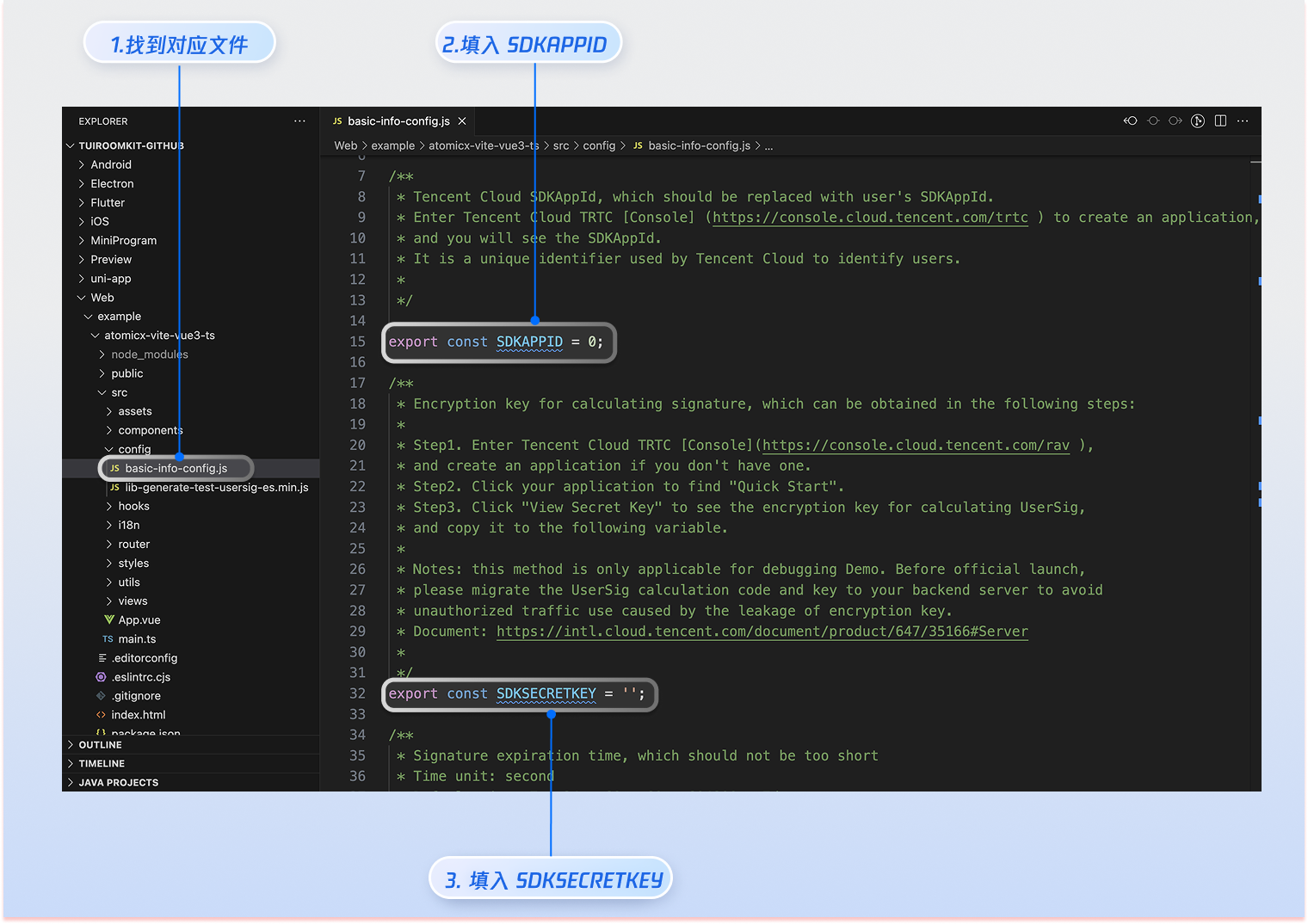
|
|
173
|
+
参与者可以通过调用 `conference.join` 接口,填写对应的 roomId 参数,来加入由会议主持人在 [步骤4](https://write.woa.com/#7e2fb3c2-2b17-4445-985d-4af641ff66be) 中发起的会议。
|
|
322
174
|
|
|
175
|
+
> **注意:**
|
|
176
|
+
>
|
|
323
177
|
|
|
324
|
-
>
|
|
178
|
+
> 请参考步骤 3 在用户登录成功后调用 `conference.join `接口加入会议。
|
|
325
179
|
>
|
|
326
|
-
> - 本文的 Demo 示例中通过在客户端代码中配置 `SDKSecretKey` 进行鉴权,但 `SDKSecretKey` 很容易被反编译逆向破解,一旦密钥泄露,攻击者就可以盗用您的腾讯云流量,因此该方法仅适合本地跑通 Demo 和功能调试。
|
|
327
|
-
> - 在正式的生产环境中,建议在您的服务端生成 UserSig,在需要 UserSig 时由您的 App 向业务服务器发起请求获取动态 UserSig 来进行鉴权。详见 [正式运行阶段如何计算 UserSig?](https://cloud.tencent.com/document/product/647/17275#formal)
|
|
328
180
|
|
|
181
|
+
``` typescript
|
|
182
|
+
import { conference } from '@tencentcloud/roomkit-web-vue3';
|
|
183
|
+
const joinConference = async () => {
|
|
184
|
+
await conference.join({
|
|
185
|
+
roomId: '123456', // 请替换为您真实的 roomId
|
|
186
|
+
});
|
|
187
|
+
}
|
|
188
|
+
joinConference();
|
|
189
|
+
```
|
|
329
190
|
|
|
330
|
-
|
|
191
|
+
## 启动项目
|
|
331
192
|
|
|
332
193
|
|
|
333
194
|
|
|
@@ -351,10 +212,10 @@ yarn run dev
|
|
|
351
212
|
|
|
352
213
|
启动成功后,请在浏览器中打开调试地址(通常为 http://localhost:5173)访问应用。您将看到如下所示的会议界面:
|
|
353
214
|
|
|
354
|
-

|
|
355
216
|
|
|
356
217
|
|
|
357
|
-
## UI
|
|
218
|
+
## UI 快速自定义
|
|
358
219
|
|
|
359
220
|
### 主题及语言
|
|
360
221
|
|
|
@@ -394,11 +255,56 @@ yarn run dev
|
|
|
394
255
|
import { UIKitProvider } from '@tencentcloud/uikit-base-component-vue3';
|
|
395
256
|
```
|
|
396
257
|
|
|
397
|
-
###
|
|
258
|
+
### 配置用户联系人列表
|
|
259
|
+
|
|
260
|
+
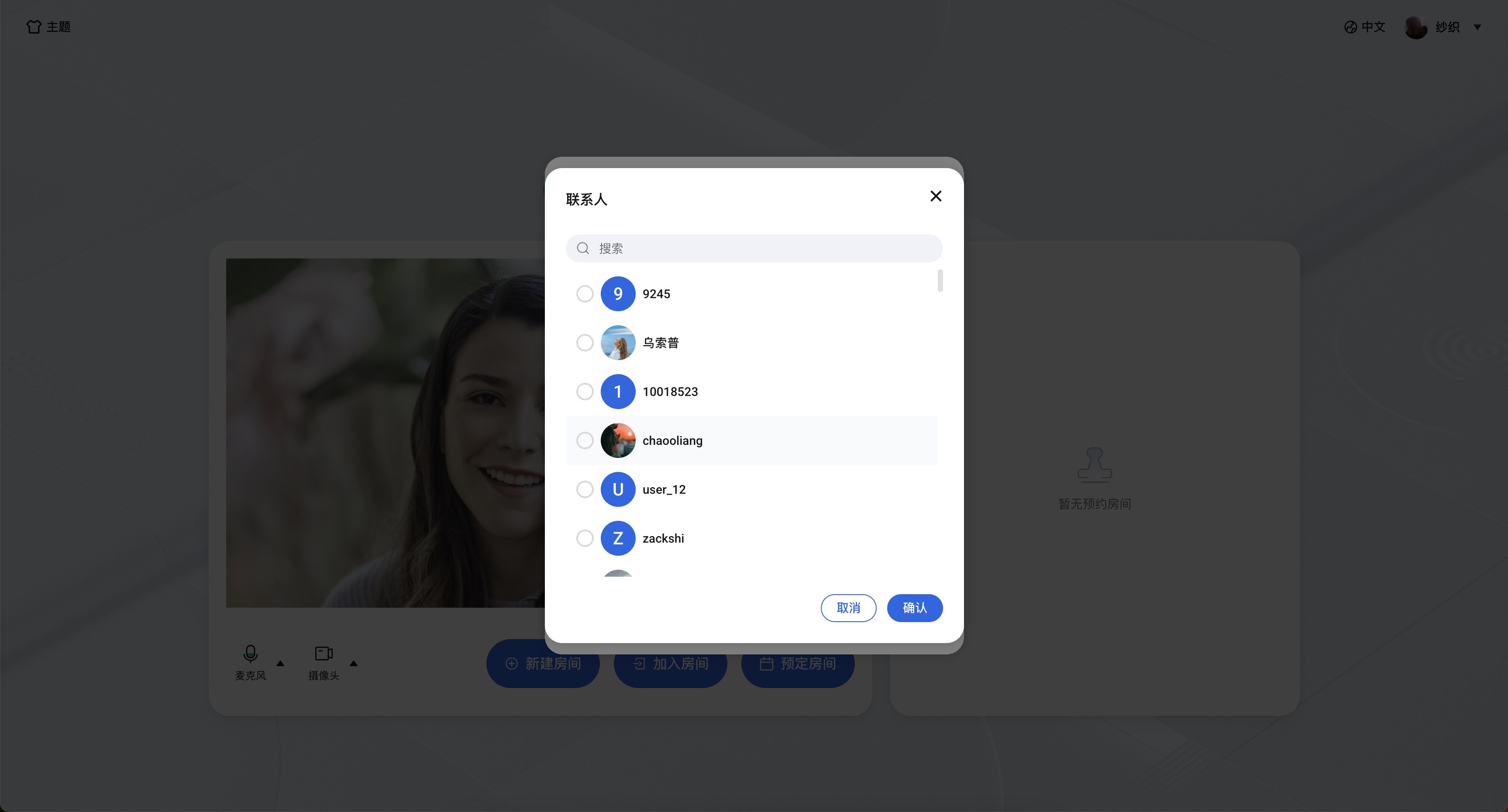
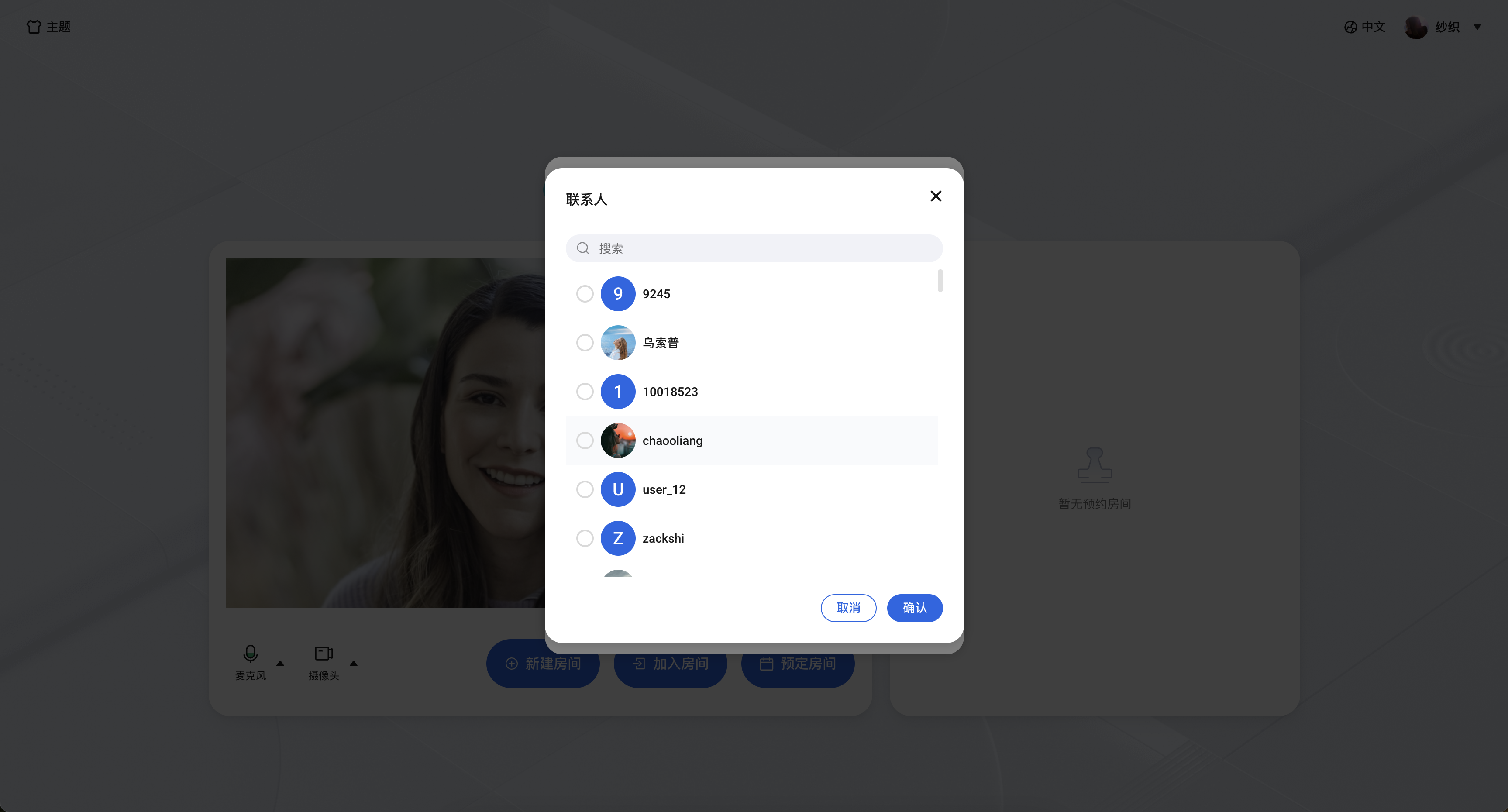
TUIRoomKit 预定会议用户选择列表和会中呼叫用户选择列表默认展示用户关系链列表,批量导入用户关系链请参考以下步骤:
|
|
261
|
+
|
|
262
|
+
步骤1:使用 [账号管理 > 导入多个账号](https://cloud.tencent.com/document/product/269/4919) REST API 接口批量导入用户账号;
|
|
263
|
+
|
|
264
|
+
步骤2:使用 [好友管理 > 导入好友](https://cloud.tencent.com/document/product/269/8301) REST API 接口批量导入用户关系链;
|
|
265
|
+
|
|
266
|
+
|
|
267
|
+
|
|
268
|
+
|
|
269
|
+
## TUIRoomKit 界面定制
|
|
270
|
+
|
|
271
|
+
### 源码导出
|
|
272
|
+
|
|
273
|
+
|
|
274
|
+
|
|
275
|
+
【Vue3】
|
|
276
|
+
1. 执行源码导出脚本,默认拷贝路径为 `./src/components/RoomKit`
|
|
277
|
+
|
|
278
|
+
``` bash
|
|
279
|
+
node ./node_modules/@tencentcloud/roomkit-web-vue3/scripts/eject.js
|
|
280
|
+
```
|
|
281
|
+
2. 根据脚本提示确认是否要将 TUIRoomKit 源码拷贝到 `./src/components/RoomKit` 目录。如您需要自定义拷贝目录请输入 'y', 否则输入'n'。
|
|
282
|
+
|
|
283
|
+
|
|
284
|
+

|
|
285
|
+
|
|
286
|
+
3. 源码导出后,在您指定的项目路径中会新增 TUIRoomKit 源码。此时,您需要手动将 ConferenceMainView 组件,ConferenceMainViewH5 组件的 conference 对象的引用从 npm 包地址更改为 TUIRoom 源码的相对路径地址。
|
|
287
|
+
|
|
288
|
+
``` typescript
|
|
289
|
+
- import { ConferenceMainView, conference } from '@tencentcloud/roomkit-web-vue3';
|
|
290
|
+
// 替换引用路径为 TUIRoomKit 源码的真实路径
|
|
291
|
+
+ import { ConferenceMainView, ConferenceMainViewH5, conference } from './components/RoomKit/index.ts';
|
|
292
|
+
```
|
|
293
|
+
4. 配置 ESLint 校验
|
|
294
|
+
|
|
295
|
+
|
|
296
|
+
如果您导出 TUIRoomKit 源码后运行项目出现 ESLint 报错,您可以在`.eslintignore`文件中添加 RoomKit 文件夹忽略 ESLint 检测。
|
|
297
|
+
``` javascript
|
|
298
|
+
// 请替换为 TUIRoomKit 源码真实路径
|
|
299
|
+
src/components/RoomKit
|
|
300
|
+
```
|
|
301
|
+
|
|
302
|
+
### 自定义房间流布局
|
|
398
303
|
|
|
399
304
|
TUIRoomKit 目前支持九宫格、侧边栏及顶部栏三种流布局,默认为九宫格布局。
|
|
400
305
|
``` typescript
|
|
401
|
-
//
|
|
306
|
+
// RoomKit/views/ConferenceMainView/index.vue
|
|
307
|
+
import { RoomLayoutTemplate } from 'tuikit-atomicx-vue3/room';
|
|
402
308
|
// 修改默认视频流布局为侧边栏布局
|
|
403
309
|
const participantViewLayout = ref(RoomLayoutTemplate.SidebarLayout);
|
|
404
310
|
function handleLayoutUpdate(layout: RoomLayoutTemplate) {
|
|
@@ -414,22 +320,11 @@ function handleLayoutUpdate(layout: RoomLayoutTemplate) {
|
|
|
414
320
|
|
|
415
321
|
### 自定义视频流挂件
|
|
416
322
|
|
|
417
|
-
TUIRoomKit
|
|
323
|
+
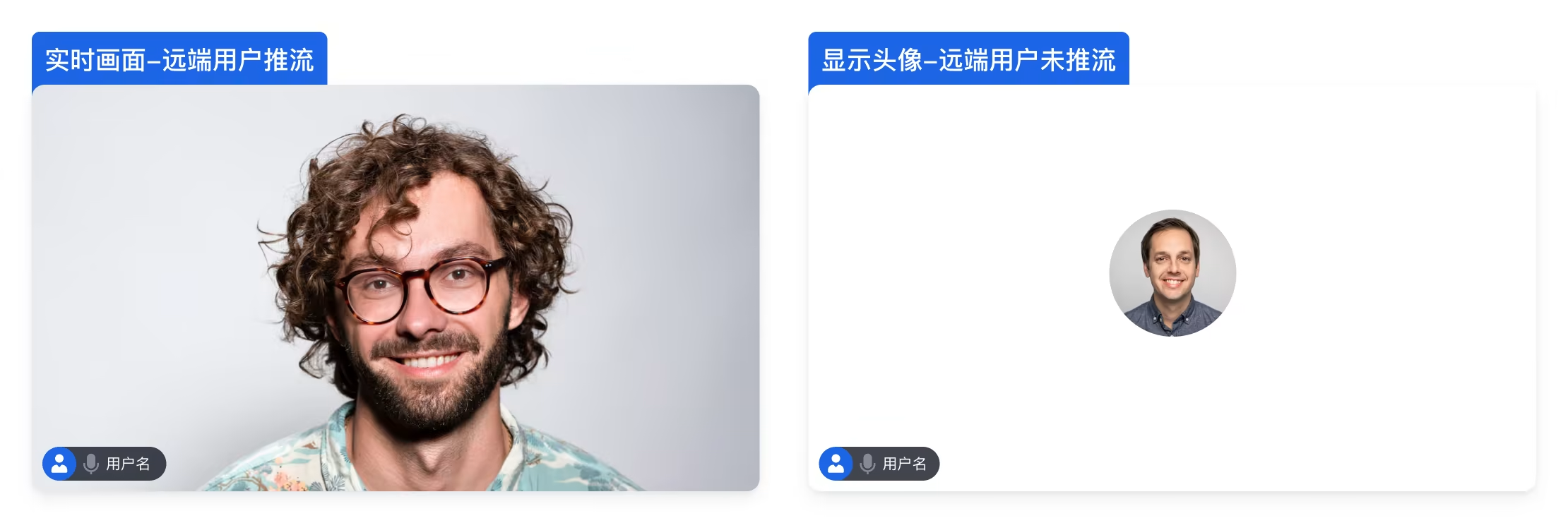
TUIRoomKit 默认视频流挂件如图所示,如需自定义视频流挂件请修改 `RoomKit/components/RoomLayoutView/ParticipantViewUI/ParticipantViewUI.vue` 组件。
|
|
418
324
|
|
|
419
325
|
|
|
420
326
|
|
|
421
327
|
|
|
422
|
-
### 配置用户联系人列表
|
|
423
|
-
|
|
424
|
-
TUIRoomKit 预定会议用户选择列表和会中呼叫用户选择列表默认展示用户关系链列表,批量导入用户关系链请参考以下步骤:
|
|
425
|
-
|
|
426
|
-
步骤1:使用 [账号管理 > 导入多个账号](https://cloud.tencent.com/document/product/269/4919) REST API 接口批量导入用户账号;
|
|
427
|
-
|
|
428
|
-
步骤2:使用 [好友管理 > 导入好友](https://cloud.tencent.com/document/product/269/8301) REST API 接口批量导入用户关系链;
|
|
429
|
-
|
|
430
|
-
|
|
431
|
-
|
|
432
|
-
|
|
433
328
|
## 常见问题
|
|
434
329
|
|
|
435
330
|
#### **TUIRoomKit 在本地开发时使用正常,但部署到线上环境后无法**正常采集用户的摄像头或麦克风设备**?**
|
|
@@ -458,7 +353,7 @@ import { useRoomEngine } from 'tuikit-atomicx-vue3/room';
|
|
|
458
353
|
const { roomEngine } = useRoomEngine();
|
|
459
354
|
|
|
460
355
|
TUIRoomEngine.once('ready', () => {
|
|
461
|
-
const trtcCloud = roomEngine.instance?.getTRTCCloud()
|
|
356
|
+
const trtcCloud = roomEngine.instance?.getTRTCCloud();
|
|
462
357
|
trtcCloud.callExperimentalAPI(JSON.stringify({
|
|
463
358
|
api: 'setNetworkProxy',
|
|
464
359
|
params: {
|