@tencentcloud/sdk-mcp 1.3.8 → 1.3.9
This diff represents the content of publicly available package versions that have been released to one of the supported registries. The information contained in this diff is provided for informational purposes only and reflects changes between package versions as they appear in their respective public registries.
- package/package.json +1 -1
- package/resource/doc/chatuikit/android/integration.md +466 -484
- package/resource/doc/chatuikit/android/workflow.md +713 -0
- package/resource/doc/livekit/live/flutter/live-integration.md +208 -167
- package/resource/doc/livekit/voice/android/voice-audience-list.md +335 -0
- package/resource/doc/livekit/voice/android/voice-audio-effect.md +384 -0
- package/resource/doc/livekit/voice/android/voice-barrage.md +569 -0
- package/resource/doc/livekit/voice/android/voice-co-guest-interaction.md +748 -0
- package/resource/doc/livekit/voice/android/voice-gift.md +833 -0
- package/resource/doc/livekit/voice/android/voice-host-interaction.md +728 -0
- package/resource/doc/livekit/voice/android/voice-integration.md +886 -0
- package/resource/doc/livekit/voice/android/voice-room-list.md +493 -0
- package/resource/doc/livekit/voice/android/workflow.md +333 -0
- package/resource/doc/livekit/voice/flutter/voice-audience-list.md +337 -0
- package/resource/doc/livekit/voice/flutter/voice-audio-effect.md +739 -0
- package/resource/doc/livekit/voice/flutter/voice-barrage.md +578 -0
- package/resource/doc/livekit/voice/flutter/voice-co-guest-interaction.md +673 -0
- package/resource/doc/livekit/voice/flutter/voice-gift.md +812 -0
- package/resource/doc/livekit/voice/flutter/voice-integration.md +925 -0
- package/resource/doc/livekit/voice/flutter/voice-room-list.md +842 -0
- package/resource/doc/livekit/voice/flutter/workflow.md +359 -0
- package/resource/doc/livekit/voice/ios/voice-audience-list.md +335 -0
- package/resource/doc/livekit/voice/ios/voice-audio-effect.md +373 -0
- package/resource/doc/livekit/voice/ios/voice-barrage.md +529 -0
- package/resource/doc/livekit/voice/ios/voice-co-guest-interaction.md +701 -0
- package/resource/doc/livekit/voice/ios/voice-gift.md +785 -0
- package/resource/doc/livekit/voice/ios/voice-host-interaction.md +820 -0
- package/resource/doc/livekit/voice/ios/voice-integration.md +853 -0
- package/resource/doc/livekit/voice/ios/voice-room-list.md +467 -0
- package/resource/doc/livekit/voice/ios/workflow.md +358 -0
- package/resource/doc/livekit/voice/uni-app/voice-audience-list.md +264 -0
- package/resource/doc/livekit/voice/uni-app/voice-audio-effect.md +332 -0
- package/resource/doc/livekit/voice/uni-app/voice-barrage.md +482 -0
- package/resource/doc/livekit/voice/uni-app/voice-co-guest-interaction.md +944 -0
- package/resource/doc/livekit/voice/uni-app/voice-gift.md +716 -0
- package/resource/doc/livekit/voice/uni-app/voice-integration.md +613 -0
- package/resource/doc/livekit/voice/uni-app/voice-room-list.md +562 -0
- package/resource/doc/livekit/voice/uni-app/workflow.md +369 -0
- package/resource/doc/roomkit/vue/integration.md +119 -224
- package/resource/doc/roomkit/vue/workflow.md +472 -226
- package/resource/doc/tuicallkit/android/integration.md +675 -90
- package/resource/doc/tuicallkit/android/workflow.md +432 -0
- package/tools/common/present-scenario-choice.js +16 -0
- package/tools/common/present-scenario-choice.js.map +1 -0
- package/tools/definitions/get_native_call_uikit_integration_def.js +18 -2
- package/tools/definitions/get_native_call_uikit_integration_def.js.map +1 -1
- package/tools/definitions/get_native_chat_uikit_integration_def.js +29 -7
- package/tools/definitions/get_native_chat_uikit_integration_def.js.map +1 -1
- package/tools/definitions/get_native_live_uikit_integration_def.js +65 -40
- package/tools/definitions/get_native_live_uikit_integration_def.js.map +1 -1
- package/tools/definitions/get_native_live_uikit_interaction_def.js +42 -94
- package/tools/definitions/get_native_live_uikit_interaction_def.js.map +1 -1
- package/tools/definitions/get_web_room_feature_detail_def.js +29 -32
- package/tools/definitions/get_web_room_feature_detail_def.js.map +1 -1
- package/tools/definitions/get_web_room_uikit_integration_def.js +25 -9
- package/tools/definitions/get_web_room_uikit_integration_def.js.map +1 -1
- package/tools/definitions/present_scenario_choice_def.js +53 -0
- package/tools/definitions/present_scenario_choice_def.js.map +1 -0
- package/tools/definitions/record_prompt_def.js +6 -1
- package/tools/definitions/record_prompt_def.js.map +1 -1
- package/tools/definitions/record_result_def.js +20 -4
- package/tools/definitions/record_result_def.js.map +1 -1
- package/tools/index.js +2 -0
- package/tools/index.js.map +1 -1
- package/tools/live/get-native-live-uikit-integration.js +110 -34
- package/tools/live/get-native-live-uikit-integration.js.map +1 -1
- package/tools/live/get_native_live_uikit_interaction.js +128 -35
- package/tools/live/get_native_live_uikit_interaction.js.map +1 -1
- package/utils/report-cls-client.js +1 -1
- package/utils/report-es-client.js +1 -1
|
@@ -1,612 +1,594 @@
|
|
|
1
|
-
TUIKit
|
|
2
|
-
TUIKit 从 6.9.3557 版本开始新增了全新的简约版 UI,之前的 UI 依旧保留,我们称之为经典版 UI,您可以根据需求自由选择经典版或简约版 UI。
|
|
1
|
+
TUIKit Compose 是基于腾讯云 IM SDK 的一套 Jetpack Compose 组件库,提供了聊天、会话列表、联系人管理等即时通信功能的完整解决方案。本文介绍如何手动集成该组件并实现核心功能。
|
|
3
2
|
|
|
4
|
-
|
|
3
|
+
## 关键概念
|
|
5
4
|
|
|
6
|
-
|
|
5
|
+
TUIKit Compose 提供了一套完整的即时通信 UI 组件,向下依赖 AtomicXCore 数据层,向上可构建各种功能性 Page。
|
|
6
|
+
- Page 层:基于 TUIKit Compose 组件封装的完整功能页面:ChatPage、ContactsPage、ConversationsPage,您可以直接使用。
|
|
7
7
|
|
|
8
|
-
|
|
9
|
-
>
|
|
8
|
+
- TUIKit Compose(UI 组件层):基于 AtomicXCore 构建的 Jetpack Compose 组件,您可将其嵌套到自己已有的 App 页面中。
|
|
10
9
|
|
|
11
|
-
|
|
12
|
-
>
|
|
10
|
+
- AtomicXCore(数据层):提供数据管理和业务逻辑,包含各种 Store 和 Manager。
|
|
13
11
|
|
|
14
12
|
|
|
15
|
-
##
|
|
16
|
-
- Android Studio
|
|
13
|
+
## 前提条件
|
|
14
|
+
- Android Studio Ladybug | 2024.2.1 及以上版本
|
|
17
15
|
|
|
18
|
-
-
|
|
16
|
+
- Android 5.0 及以上系统版本
|
|
19
17
|
|
|
20
|
-
-
|
|
18
|
+
- Gradle 8.9 及以上版本
|
|
21
19
|
|
|
22
|
-
-
|
|
20
|
+
- Android Gradle Plugin 8.6 及以上版本
|
|
23
21
|
|
|
24
|
-
-
|
|
22
|
+
- JDK 17 及以上版本
|
|
25
23
|
|
|
24
|
+
- Kotlin 1.9.0 及以上版本
|
|
26
25
|
|
|
27
|
-
|
|
28
|
-
1. 从 GitHub 下载 [TUIKit 源码](https://github.com/TencentCloud/TIMSDK/tree/master/Android)。使 TUIKit 文件夹跟自己的工程文件夹同级,例如:
|
|
26
|
+
- 一个有效的腾讯云账号及 Chat 应用。可参考 [开通服务](https://write.woa.com/document/107052220771086336) 从控制台获取以下信息:
|
|
29
27
|
|
|
30
|
-
|
|
28
|
+
- SDKAppID:App 在控制台获取的 Chat 应用的 ID,为应用的唯一标识
|
|
31
29
|
|
|
32
|
-
|
|
30
|
+
- SDKSecretKey:应用的密钥
|
|
31
|
+
|
|
33
32
|
|
|
34
|
-
|
|
35
|
-
|
|
36
|
-
|
|
37
|
-
|
|
38
|
-
|
|
39
|
-
|
|
40
|
-
project(':tuicore').projectDir = new File(settingsDir, '../TUIKit/TUICore/tuicore')
|
|
41
|
-
|
|
42
|
-
// 引入 IM 组件公共模块(必要模块)
|
|
43
|
-
include ':timcommon'
|
|
44
|
-
project(':timcommon').projectDir = new File(settingsDir, '../TUIKit/TIMCommon/timcommon')
|
|
45
|
-
|
|
46
|
-
// 引入聊天功能模块 (基础功能模块)
|
|
47
|
-
include ':tuichat'
|
|
48
|
-
project(':tuichat').projectDir = new File(settingsDir, '../TUIKit/TUIChat/tuichat')
|
|
49
|
-
|
|
50
|
-
// 引入关系链功能模块 (基础功能模块)
|
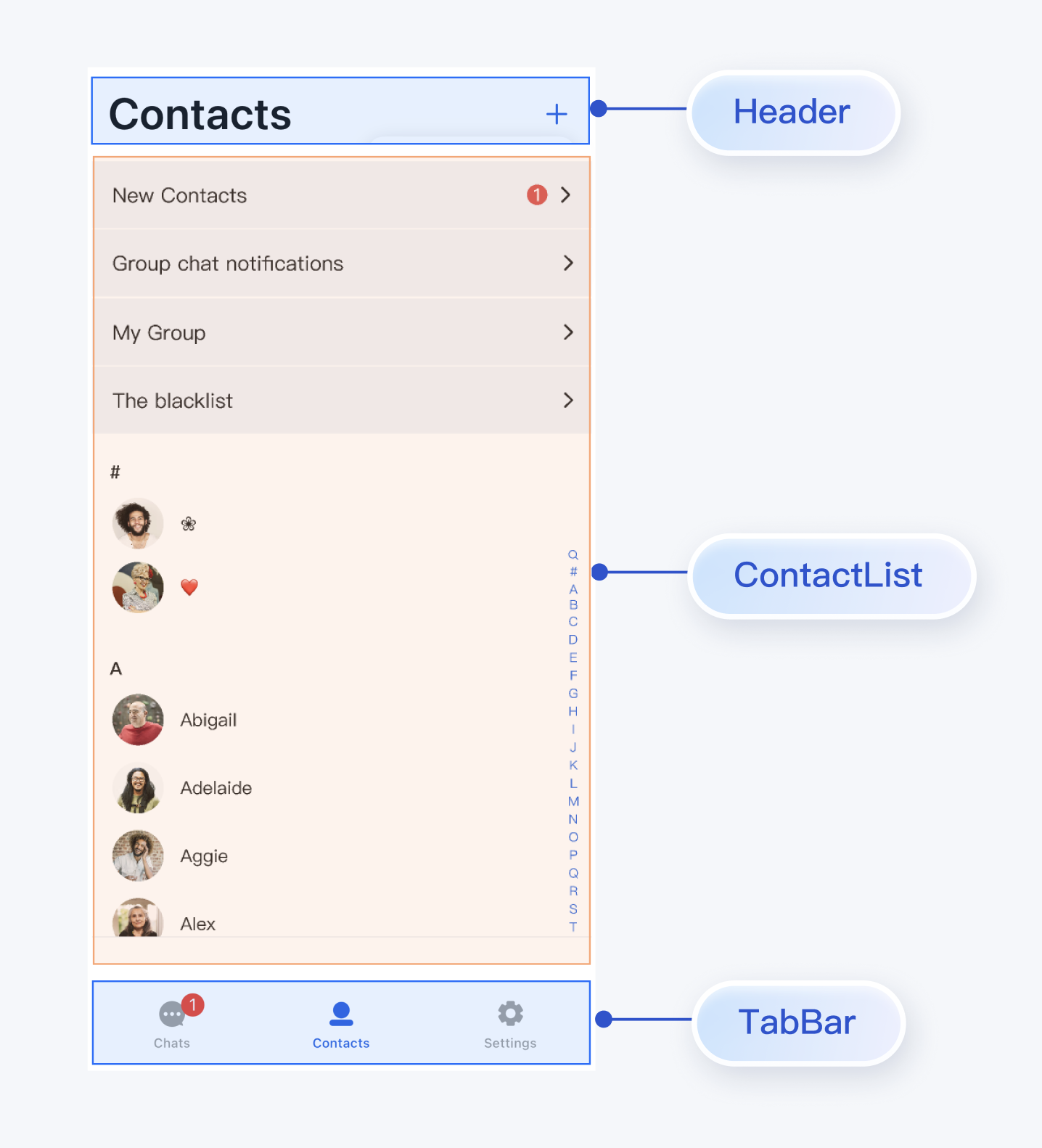
|
51
|
-
include ':tuicontact'
|
|
52
|
-
project(':tuicontact').projectDir = new File(settingsDir, '../TUIKit/TUIContact/tuicontact')
|
|
53
|
-
|
|
54
|
-
// 引入会话功能模块 (基础功能模块)
|
|
55
|
-
include ':tuiconversation'
|
|
56
|
-
project(':tuiconversation').projectDir = new File(settingsDir, '../TUIKit/TUIConversation/tuiconversation')
|
|
57
|
-
|
|
58
|
-
// 引入搜索功能模块(需要购买旗舰版或企业版套餐)
|
|
59
|
-
include ':tuisearch'
|
|
60
|
-
project(':tuisearch').projectDir = new File(settingsDir, '../TUIKit/TUISearch/tuisearch')
|
|
61
|
-
|
|
62
|
-
// 引入社群话题功能模块(需要购买旗舰版或企业版套餐)
|
|
63
|
-
include ':tuicommunity'
|
|
64
|
-
project(':tuicommunity').projectDir = new File(settingsDir, '../TUIKit/TUICommunity/tuicommunity')
|
|
65
|
-
|
|
66
|
-
// 引入音视频通话功能模块
|
|
67
|
-
include ':tuicallkit-kt'
|
|
68
|
-
project(':tuicallkit-kt').projectDir = new File(settingsDir, '../TUIKit/TUICallKit/tuicallkit-kt')
|
|
69
|
-
|
|
70
|
-
// 引入视频会议模块
|
|
71
|
-
include ':tuiroomkit'
|
|
72
|
-
project(':tuiroomkit').projectDir = new File(settingsDir, '../TUIKit/TUIRoomKit/tuiroomkit')
|
|
73
|
-
|
|
74
|
-
// 引入语音转文字插件,从 7.5 版本开始支持
|
|
75
|
-
include ':tuivoicetotextplugin'
|
|
76
|
-
project(':tuivoicetotextplugin').projectDir = new File(settingsDir, '../TUIKit/TUIVoiceToTextPlugin/tuivoicetotextplugin')
|
|
77
|
-
|
|
78
|
-
// 引入聊天消息翻译插件,从 7.2 版本开始支持(需单独购买翻译插件)
|
|
79
|
-
include ':tuitranslationplugin'
|
|
80
|
-
project(':tuitranslationplugin').projectDir = new File(settingsDir, '../TUIKit/TUITranslationPlugin/tuitranslationplugin')
|
|
81
|
-
|
|
82
|
-
// 引入表情回应插件,从 7.8 版本开始支持(需要购买旗舰版或企业版套餐)
|
|
83
|
-
include ':tuiemojiplugin'
|
|
84
|
-
project(':tuiemojiplugin').projectDir = new File(settingsDir, '../TUIKit/TUIEmojiPlugin/tuiemojiplugin')
|
|
85
|
-
```
|
|
86
|
-
3. 在 App 的 build.gradle 中添加:
|
|
87
|
-
|
|
88
|
-
``` typescript
|
|
89
|
-
dependencies {
|
|
90
|
-
api project(':tuiconversation')
|
|
91
|
-
api project(':tuicontact')
|
|
92
|
-
api project(':tuichat')
|
|
93
|
-
api project(':tuisearch')
|
|
94
|
-
api project(':tuicommunity')
|
|
95
|
-
api project(':tuicallkit-kt')
|
|
96
|
-
api project(':tuiroomkit')
|
|
97
|
-
// 集成语音转文字插件,从 7.5 版本开始支持
|
|
98
|
-
api project(':tuivoicetotextplugin')
|
|
99
|
-
// 集成翻译插件,从 7.2 版本开始支持(需单独购买翻译插件)
|
|
100
|
-
api project(':tuitranslationplugin')
|
|
101
|
-
// 集成表情回应插件,从 7.8 版本开始支持(需要购买旗舰版或企业版套餐)
|
|
102
|
-
api project(':tuiemojiplugin')
|
|
103
|
-
// 集成群接龙插件,从 7.1 版本开始支持
|
|
104
|
-
api "com.tencent.imsdk:tuigroupnote-plugin:8.4.6667"
|
|
105
|
-
// 集成群投票插件,从 7.1 版本开始支持
|
|
106
|
-
api "com.tencent.imsdk:tuipoll-plugin:8.4.6667"
|
|
107
|
-
// 集成会话分组插件,从 7.3 版本开始支持
|
|
108
|
-
api "com.tencent.imsdk:tuiconversationgroup-plugin:8.4.6667"
|
|
109
|
-
// 集成会话标记插件,从 7.3 版本开始支持
|
|
110
|
-
api "com.tencent.imsdk:tuiconversationmark-plugin:8.4.6667"
|
|
111
|
-
// 集成消息推送插件,从 7.6 版本开始支持
|
|
112
|
-
api 'com.tencent.timpush:timpush:8.4.6667'
|
|
113
|
-
// 按需集成对应厂商推送包
|
|
114
|
-
api 'com.tencent.timpush:fcm:8.4.6667'
|
|
115
|
-
api 'com.tencent.timpush:xiaomi:8.4.6667'
|
|
116
|
-
api 'com.tencent.timpush:meizu:8.4.6667'
|
|
117
|
-
api 'com.tencent.timpush:oppo:8.4.6667'
|
|
118
|
-
api 'com.tencent.timpush:vivo:8.4.6667'
|
|
119
|
-
api 'com.tencent.timpush:huawei:8.4.6667'
|
|
120
|
-
api 'com.tencent.timpush:honor:8.4.6667'
|
|
121
|
-
}
|
|
122
|
-
```
|
|
123
|
-
4. 在 gradle.properties 文件中加入下行,表示自动转换三方库以兼容 AndroidX:
|
|
33
|
+
> **说明:**
|
|
34
|
+
>
|
|
35
|
+
> - 本项目目前仅支持手动集成,暂不支持通过 Maven 等包管理器集成。
|
|
36
|
+
> - 为确保构建环境稳定,请严格遵循官方兼容性要求进行配置:
|
|
37
|
+
> - Gradle、Android Gradle Plugin、JDK 与 Android Studio 的兼容性,请参阅 Android 官方文档:[版本说明](https://developer.android.com/build/releases/gradle-plugin#updating-gradle)。
|
|
38
|
+
> - Kotlin、Android Gradle Plugin 与 Gradle 的版本对应关系,请参阅 Kotlin 官方文档:[Kotlin-Gradle 插件兼容性](https://kotlinlang.org/docs/gradle-configure-project.html#apply-the-plugin)。
|
|
124
39
|
|
|
125
|
-
|
|
126
|
-
|
|
127
|
-
```
|
|
128
|
-
5.
|
|
40
|
+
> 我们建议您根据上述指南,选择与项目要求完全匹配的版本组合。
|
|
41
|
+
>
|
|
129
42
|
|
|
130
|
-
添加 maven 仓库 和 Kotlin 支持,在 root 工程的 build.gradle 文件(与 settings.gradle 同级)中添加:
|
|
131
43
|
|
|
132
|
-
|
|
133
|
-
|
|
134
|
-
|
|
135
|
-
|
|
136
|
-
|
|
137
|
-
|
|
138
|
-
|
|
139
|
-
classpath 'com.android.tools.build:gradle:7.0.0'
|
|
140
|
-
classpath "org.jetbrains.kotlin:kotlin-gradle-plugin:1.5.31"
|
|
141
|
-
}
|
|
142
|
-
}
|
|
44
|
+
## 集成并引入组件
|
|
45
|
+
|
|
46
|
+
### 下载源码
|
|
47
|
+
1. 从 GitHub 下载 [TUIKit Compose](https://github.com/Tencent-RTC/TUIKit_android_compose) 源码:
|
|
48
|
+
|
|
49
|
+
``` bash
|
|
50
|
+
git clone https://github.com/Tencent-RTC/TUIKit_Android_Compose.git
|
|
143
51
|
```
|
|
144
52
|
|
|
145
|
-
|
|
53
|
+
项目目录结构说明:
|
|
54
|
+
|
|
55
|
+
``` bash
|
|
56
|
+
atomic-x/
|
|
57
|
+
├── src/main/
|
|
58
|
+
│ ├── java/io/trtc/tuikit/atomicx/ # UI 组件源码(必需集成)
|
|
59
|
+
│ ├── messagelist/ # 消息列表组件
|
|
60
|
+
│ ├── messageinput/ # 消息输入组件
|
|
61
|
+
│ ├── conversationlist/ # 会话列表组件
|
|
62
|
+
│ ├── contactlist/ # 联系人列表组件
|
|
63
|
+
│ ├── basecomponent/ # 基础组件
|
|
64
|
+
│ └── ... # 其他 UI 组件
|
|
65
|
+
│ # 资源文件(必需集成)
|
|
66
|
+
│ ├── res/ # 公共资源
|
|
67
|
+
│ ├── res-message-list/ # 消息列表组件资源
|
|
68
|
+
│ ├── res-message-input/ # 消息输入组件资源
|
|
69
|
+
│ ├── res-conversation-list/ # 会话列表组件资源
|
|
70
|
+
│ └── ... # 其他组件资源
|
|
71
|
+
chat/
|
|
72
|
+
├── uikit/src/main/java/io/trtc/tuikit/chat/pages # Page 组件(参考实现)
|
|
73
|
+
│ ├── ChatPage.kt
|
|
74
|
+
│ ├── ContactsPage.kt
|
|
75
|
+
│ └── ConversationsPage.kt
|
|
76
|
+
└── demo/ # 示例应用(可选参考)
|
|
77
|
+
```
|
|
146
78
|
|
|
147
|
-
|
|
148
|
-
|
|
149
|
-
|
|
150
|
-
|
|
151
|
-
|
|
152
|
-
|
|
153
|
-
|
|
154
|
-
classpath 'com.android.tools.build:gradle:8.0.2'
|
|
155
|
-
classpath "org.jetbrains.kotlin:kotlin-gradle-plugin:1.9.0"
|
|
156
|
-
}
|
|
157
|
-
}
|
|
158
|
-
```
|
|
79
|
+
### 集成组件
|
|
80
|
+
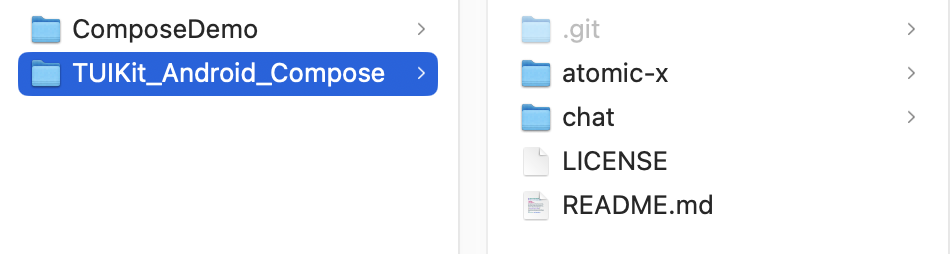
1. 将组件目录完整复制到您的 Android 项目中,如下图所示,其中 ComposeDemo 是示例项目,TUIKit_Android_Compose 是从 GitHub 上下载的组件源码:
|
|
81
|
+
|
|
82
|
+
|
|
83
|
+
|
|
84
|
+
2. 在您的 settings.gradle.kts/settings.gradle 文件中添加 TUIKit Compose 组件:
|
|
85
|
+
|
|
159
86
|
|
|
160
87
|
> **说明:**
|
|
161
88
|
>
|
|
162
|
-
> - Kotlin 、Gradle 和 AGP 的版本对应关系可以 [在此查看](https://kotlinlang.org/docs/gradle-configure-project.html#apply-the-plugin)。
|
|
163
|
-
> - 为了尊重版权,IM Demo/TUIKit 工程中默认不包含大表情元素切图。在正式上线商用前,请您替换为自己设计或拥有版权的其他表情包。请注意,下图所示的**默认小黄脸表情包版权属于腾讯云**。您可以通过升级至 [IM 企业版套餐](https://buy.cloud.tencent.com/avc) 免费使用该表情包。
|
|
164
89
|
|
|
165
|
-
>
|
|
90
|
+
> TUIKit_Android_Compose 可以放在任何位置,只要在 settings.gradle 中正确设置相对路径即可。
|
|
166
91
|
>
|
|
167
92
|
|
|
168
|
-
6. 同步工程,编译运行。工程结构预期效果如图所示:
|
|
169
|
-
|
|
170
|
-
<img src="https://qcloudimg.tencent-cloud.cn/raw/ce88f3a64812d6d40a26db6189be25b2.png" width="500" />
|
|
171
93
|
|
|
172
|
-
|
|
173
|
-
`经典版`和`简约版` UI 互不影响,可独立运行。`经典版`和`简约版`的 UI 文件都在各 TUI 组件中,放在不同的文件夹里,以 `TUIChat` 组件为例:
|
|
94
|
+
|
|
174
95
|
|
|
175
|
-
<img src="https://qcloudimg.tencent-cloud.cn/raw/179a15bb72b24a09cf7440c50e5c3442.png" width="400" />
|
|
176
96
|
|
|
97
|
+
【Kotlin DSL (推荐)】
|
|
98
|
+
``` java
|
|
99
|
+
// settings.gradle.kts
|
|
100
|
+
include(":atomicx")
|
|
101
|
+
project(":atomicx").projectDir = file("../TUIKit_Android_Compose/atomic-x")
|
|
102
|
+
```
|
|
177
103
|
|
|
178
|
-
classicui 文件夹中存放的是`经典版` UI 文件,minimalistui 文件夹中存放的是`简约版` UI 文件, 如果您要集成简约版 UI,可直接删除 classicui 文件夹,同时删除 AndroidManifest.xml 文件中经典版 UI 对应的 Activity 和 Service 。
|
|
179
|
-
|
|
180
104
|
|
|
181
|
-
|
|
182
|
-
|
|
105
|
+
【Groovy DSL】
|
|
106
|
+
``` java
|
|
107
|
+
// settings.gradle
|
|
108
|
+
include ':atomicx'
|
|
109
|
+
project(':atomicx').projectDir = new File(settingsDir, '../TUIKit_Android_Compose/atomic-x')
|
|
110
|
+
```
|
|
183
111
|
|
|
184
|
-
|
|
185
|
-
>
|
|
112
|
+
3. 在 app 模块的 build.gradle.kts/build.gradle 中添加下列依赖:
|
|
186
113
|
|
|
187
114
|
|
|
188
|
-
|
|
115
|
+
|
|
189
116
|
|
|
190
|
-
常用的聊天软件都是由会话列表、聊天窗口、好友列表、音视频通话等几个基本的界面组成,参考下面步骤,您仅需几行代码即可在项目中快速搭建这些 UI 界面。
|
|
191
117
|
|
|
192
|
-
|
|
118
|
+
【Kotlin DSL (推荐)】
|
|
193
119
|
``` java
|
|
194
|
-
//
|
|
195
|
-
|
|
196
|
-
|
|
197
|
-
|
|
198
|
-
}
|
|
199
|
-
|
|
200
|
-
@Override
|
|
201
|
-
public void onSuccess() {
|
|
202
|
-
}
|
|
203
|
-
});
|
|
120
|
+
// app/build.gradle.kts
|
|
121
|
+
dependencies {
|
|
122
|
+
implementation(project(":atomicx"))
|
|
123
|
+
}
|
|
204
124
|
```
|
|
205
125
|
|
|
206
|
-
> **注意**
|
|
207
|
-
>
|
|
208
126
|
|
|
209
|
-
|
|
210
|
-
|
|
127
|
+
【Groovy DSL】
|
|
128
|
+
``` java
|
|
129
|
+
// app/build.gradle
|
|
130
|
+
dependencies {
|
|
131
|
+
api project(':atomicx')
|
|
132
|
+
}
|
|
133
|
+
```
|
|
134
|
+
|
|
211
135
|
|
|
136
|
+
> **注意:**
|
|
137
|
+
>
|
|
138
|
+
> - 使用本地集成方案时,如需升级时需要从 GitHub 获取最新的组件代码,覆盖您本地项目的 TUIKit Compose 目录。
|
|
139
|
+
> - 当私有化修改和远端有冲突时,需要手动合并,处理冲突。
|
|
212
140
|
|
|
213
|
-
### 步骤2:创建 viewPager
|
|
214
|
-
1. 在 activity_main.xml 中添加界面布局:
|
|
215
141
|
|
|
216
|
-
|
|
217
|
-
|
|
218
|
-
<LinearLayout xmlns:android="http://schemas.android.com/apk/res/android"
|
|
219
|
-
android:layout_width="match_parent"
|
|
220
|
-
android:layout_height="match_parent"
|
|
221
|
-
android:orientation="vertical">
|
|
222
|
-
|
|
223
|
-
<androidx.viewpager2.widget.ViewPager2
|
|
224
|
-
android:id="@+id/view_pager"
|
|
225
|
-
android:layout_width="match_parent"
|
|
226
|
-
android:layout_height="0dp"
|
|
227
|
-
android:layout_weight = "1"/>
|
|
228
|
-
</LinearLayout>
|
|
229
|
-
```
|
|
230
|
-
2. 创建 FragmentAdapter.java 用来配合 ViewPager2 展示会话和联系人界面。
|
|
142
|
+
### 配置项目
|
|
143
|
+
1. 在 app 目录下找到 AndroidManifest.xml 文件,在 `application` 节点中添加 `tools:replace="android:allowBackup"`,覆盖组件内的设置,使用自己的设置。
|
|
231
144
|
|
|
232
145
|
``` java
|
|
233
|
-
|
|
234
|
-
|
|
235
|
-
|
|
236
|
-
|
|
237
|
-
|
|
238
|
-
|
|
239
|
-
|
|
240
|
-
|
|
241
|
-
|
|
242
|
-
|
|
243
|
-
|
|
244
|
-
|
|
245
|
-
|
|
246
|
-
|
|
247
|
-
|
|
248
|
-
|
|
249
|
-
|
|
250
|
-
|
|
146
|
+
// app/src/main/AndroidManifest.xml
|
|
147
|
+
<application
|
|
148
|
+
android:name=".BaseApplication"
|
|
149
|
+
android:allowBackup="false"
|
|
150
|
+
android:icon="@drawable/app_ic_launcher"
|
|
151
|
+
android:label="@string/app_name"
|
|
152
|
+
android:largeHeap="true"
|
|
153
|
+
android:theme="@style/AppTheme"
|
|
154
|
+
tools:replace="android:allowBackup">
|
|
155
|
+
```
|
|
156
|
+
2. 配置依赖项。
|
|
157
|
+
|
|
158
|
+
|
|
159
|
+
在您的项目工程的 gradle/libs.versions.toml 文件中添加如下依赖项:
|
|
160
|
+
|
|
161
|
+
``` python
|
|
162
|
+
# gradle/libs.versions.toml
|
|
163
|
+
[versions]
|
|
164
|
+
agp = "8.13.0"
|
|
165
|
+
kotlin = "2.0.21"
|
|
166
|
+
coreKtx = "1.10.1"
|
|
167
|
+
junit = "4.13.2"
|
|
168
|
+
junitVersion = "1.1.5"
|
|
169
|
+
espressoCore = "3.5.1"
|
|
170
|
+
appcompat = "1.7.1"
|
|
171
|
+
material = "1.13.0"
|
|
172
|
+
runner = "1.0.2"
|
|
173
|
+
espressoCoreVersion = "3.0.2"
|
|
174
|
+
appcompatV7 = "28.0.0"
|
|
251
175
|
|
|
252
|
-
|
|
253
|
-
|
|
254
|
-
|
|
176
|
+
tuicore = "8.6.7021"
|
|
177
|
+
lifecycleRuntimeKtx = "2.8.7"
|
|
178
|
+
ui = "1.8.0"
|
|
179
|
+
foundation = "1.8.0"
|
|
180
|
+
composeBom = "2024.09.00"
|
|
181
|
+
activityCompose = "1.10.1"
|
|
182
|
+
activity = "1.8.0"
|
|
183
|
+
constraintlayout = "2.2.1"
|
|
255
184
|
|
|
256
|
-
|
|
257
|
-
|
|
258
|
-
|
|
185
|
+
[libraries]
|
|
186
|
+
androidx-core-ktx = { group = "androidx.core", name = "core-ktx", version.ref = "coreKtx" }
|
|
187
|
+
junit = { group = "junit", name = "junit", version.ref = "junit" }
|
|
188
|
+
androidx-junit = { group = "androidx.test.ext", name = "junit", version.ref = "junitVersion" }
|
|
189
|
+
androidx-espresso-core = { group = "androidx.test.espresso", name = "espresso-core", version.ref = "espressoCore" }
|
|
190
|
+
androidx-appcompat = { group = "androidx.appcompat", name = "appcompat", version.ref = "appcompat" }
|
|
191
|
+
material = { group = "com.google.android.material", name = "material", version.ref = "material" }
|
|
192
|
+
runner = { group = "com.android.support.test", name = "runner", version.ref = "runner" }
|
|
193
|
+
espresso-core = { group = "com.android.support.test.espresso", name = "espresso-core", version.ref = "espressoCoreVersion" }
|
|
194
|
+
appcompat-v7 = { group = "com.android.support", name = "appcompat-v7", version.ref = "appcompatV7" }
|
|
259
195
|
|
|
260
|
-
|
|
261
|
-
|
|
262
|
-
|
|
196
|
+
androidx-lifecycle-viewmodel-compose = { module = "androidx.lifecycle:lifecycle-viewmodel-compose", version.ref = "lifecycleRuntimeKtx" }
|
|
197
|
+
androidx-compose-bom = { group = "androidx.compose", name = "compose-bom", version.ref = "composeBom" }
|
|
198
|
+
androidx-compose-foundation = { group = "androidx.compose.foundation", name = "foundation", version.ref = "foundation" }
|
|
199
|
+
androidx-compose-ui = { group = "androidx.compose.ui", name = "ui", version.ref = "ui" }
|
|
200
|
+
androidx-compose-ui-graphics = { group = "androidx.compose.ui", name = "ui-graphics" }
|
|
201
|
+
androidx-ui-tooling = { group = "androidx.compose.ui", name = "ui-tooling" }
|
|
202
|
+
androidx-compose-material3 = { group = "androidx.compose.material3", name = "material3" }
|
|
203
|
+
androidx-activity-compose = { group = "androidx.activity", name = "activity-compose", version.ref = "activityCompose" }
|
|
204
|
+
androidx-lifecycle-runtime-ktx = { group = "androidx.lifecycle", name = "lifecycle-runtime-ktx", version.ref = "lifecycleRuntimeKtx" }
|
|
205
|
+
androidx-ui-tooling-preview = { group = "androidx.compose.ui", name = "ui-tooling-preview" }
|
|
206
|
+
androidx-ui-test-manifest = { group = "androidx.compose.ui", name = "ui-test-manifest" }
|
|
207
|
+
tuicore = { module = "com.tencent.liteav.tuikit:tuicore", version.ref = "tuicore" }
|
|
208
|
+
com-tencent-mmkv = { group = "com.tencent", name = "mmkv", version = "1.3.14" }
|
|
263
209
|
|
|
264
|
-
|
|
265
|
-
|
|
266
|
-
|
|
267
|
-
|
|
268
|
-
return new Fragment();
|
|
269
|
-
}
|
|
270
|
-
return fragmentList.get(position);
|
|
271
|
-
}
|
|
210
|
+
[plugins]
|
|
211
|
+
android-application = { id = "com.android.application", version.ref = "agp" }
|
|
212
|
+
kotlin-android = { id = "org.jetbrains.kotlin.android", version.ref = "kotlin" }
|
|
213
|
+
android-library = { id = "com.android.library", version.ref = "agp" }
|
|
272
214
|
|
|
273
|
-
|
|
274
|
-
public int getItemCount() {
|
|
275
|
-
return fragmentList == null ? 0 : fragmentList.size();
|
|
276
|
-
}
|
|
277
|
-
}
|
|
215
|
+
kotlin-compose = { id = "org.jetbrains.kotlin.plugin.compose", version.ref = "kotlin" }
|
|
278
216
|
```
|
|
217
|
+
3. 开启 Compose 支持。
|
|
279
218
|
|
|
280
|
-
### 步骤3:构建核心 Fragment
|
|
281
219
|
|
|
282
|
-
|
|
220
|
+
在 app 模块的 build.gradle.kts/build.gradle 中添加下列配置:
|
|
283
221
|
|
|
284
|
-
在 MainActivity.java 的 onCreate 方法中添加以下代码:
|
|
285
222
|
|
|
223
|
+
|
|
286
224
|
|
|
287
225
|
|
|
288
|
-
|
|
226
|
+
【Kotlin DSL (推荐)】
|
|
289
227
|
``` java
|
|
290
|
-
|
|
291
|
-
|
|
292
|
-
|
|
293
|
-
|
|
294
|
-
|
|
295
|
-
|
|
296
|
-
|
|
297
|
-
|
|
298
|
-
|
|
299
|
-
|
|
300
|
-
|
|
301
|
-
mainViewPager.setAdapter(fragmentAdapter);
|
|
302
|
-
mainViewPager.setCurrentItem(0, false);
|
|
228
|
+
// app/build.gradle.kts
|
|
229
|
+
plugins {
|
|
230
|
+
// 添加 Compose 插件
|
|
231
|
+
alias(libs.plugins.kotlin.compose)
|
|
232
|
+
}
|
|
233
|
+
android {
|
|
234
|
+
// 开启 Compose
|
|
235
|
+
buildFeatures {
|
|
236
|
+
compose = true
|
|
237
|
+
}
|
|
238
|
+
}
|
|
303
239
|
```
|
|
304
240
|
|
|
305
|
-
|
|
241
|
+
|
|
242
|
+
【Groovy DSL】
|
|
306
243
|
``` java
|
|
307
|
-
|
|
308
|
-
|
|
309
|
-
|
|
310
|
-
|
|
311
|
-
|
|
312
|
-
|
|
313
|
-
|
|
314
|
-
|
|
315
|
-
|
|
316
|
-
|
|
317
|
-
|
|
318
|
-
mainViewPager.setAdapter(fragmentAdapter);
|
|
319
|
-
mainViewPager.setCurrentItem(0, false);
|
|
244
|
+
// app/build.gradle
|
|
245
|
+
plugins {
|
|
246
|
+
// 添加 Compose 插件
|
|
247
|
+
id libs.plugins.kotlin.compose.get().pluginId
|
|
248
|
+
}
|
|
249
|
+
android {
|
|
250
|
+
// 开启 Compose
|
|
251
|
+
buildFeatures {
|
|
252
|
+
compose true
|
|
253
|
+
}
|
|
254
|
+
}
|
|
320
255
|
```
|
|
321
256
|
|
|
322
|
-
|
|
257
|
+
4. 配置混淆规则。
|
|
258
|
+
|
|
323
259
|
|
|
324
|
-
|
|
260
|
+
在您的 app/proguard-rules.pro 文件中添加以下混淆规则:
|
|
325
261
|
|
|
262
|
+
``` java
|
|
263
|
+
-keep class com.tencent.** { *; }
|
|
264
|
+
```
|
|
265
|
+
5. Android Studio 中点击 **File > Sync Project with Gradle Files** 集成组件。
|
|
326
266
|
|
|
327
267
|
|
|
328
|
-
|
|
329
|
-
``` java
|
|
330
|
-
Bundle param = new Bundle();
|
|
331
|
-
param.putInt(TUIConstants.TUIChat.CHAT_TYPE, isGroup ? V2TIMConversation.V2TIM_GROUP : V2TIMConversation.V2TIM_C2C);
|
|
332
|
-
// 如果是 C2C 聊天,chatID 是对方的 UserID,如果是 Group 聊天,chatID 是 GroupID
|
|
333
|
-
param.putString(TUIConstants.TUIChat.CHAT_ID, chatID);
|
|
334
|
-
if (isGroup) {
|
|
335
|
-
TUICore.startActivity("TUIGroupChatActivity", param);
|
|
336
|
-
} else {
|
|
337
|
-
TUICore.startActivity("TUIC2CChatActivity", param);
|
|
338
|
-
}
|
|
339
|
-
```
|
|
268
|
+
## 接入步骤
|
|
340
269
|
|
|
341
|
-
|
|
342
|
-
``` java
|
|
343
|
-
Bundle param = new Bundle();
|
|
344
|
-
param.putInt(TUIConstants.TUIChat.CHAT_TYPE, isGroup ? V2TIMConversation.V2TIM_GROUP : V2TIMConversation.V2TIM_C2C);
|
|
345
|
-
// 如果是 C2C 聊天,chatID 是对方的 UserID,如果是 Group 聊天,chatID 是 GroupID
|
|
346
|
-
param.putString(TUIConstants.TUIChat.CHAT_ID, chatID);
|
|
347
|
-
if (isGroup) {
|
|
348
|
-
TUICore.startActivity("TUIGroupChatMinimalistActivity", param);
|
|
349
|
-
} else {
|
|
350
|
-
TUICore.startActivity("TUIC2CChatMinimalistActivity", param);
|
|
351
|
-
}
|
|
352
|
-
```
|
|
270
|
+
### 步骤1:配置用户鉴权
|
|
353
271
|
|
|
354
|
-
|
|
272
|
+
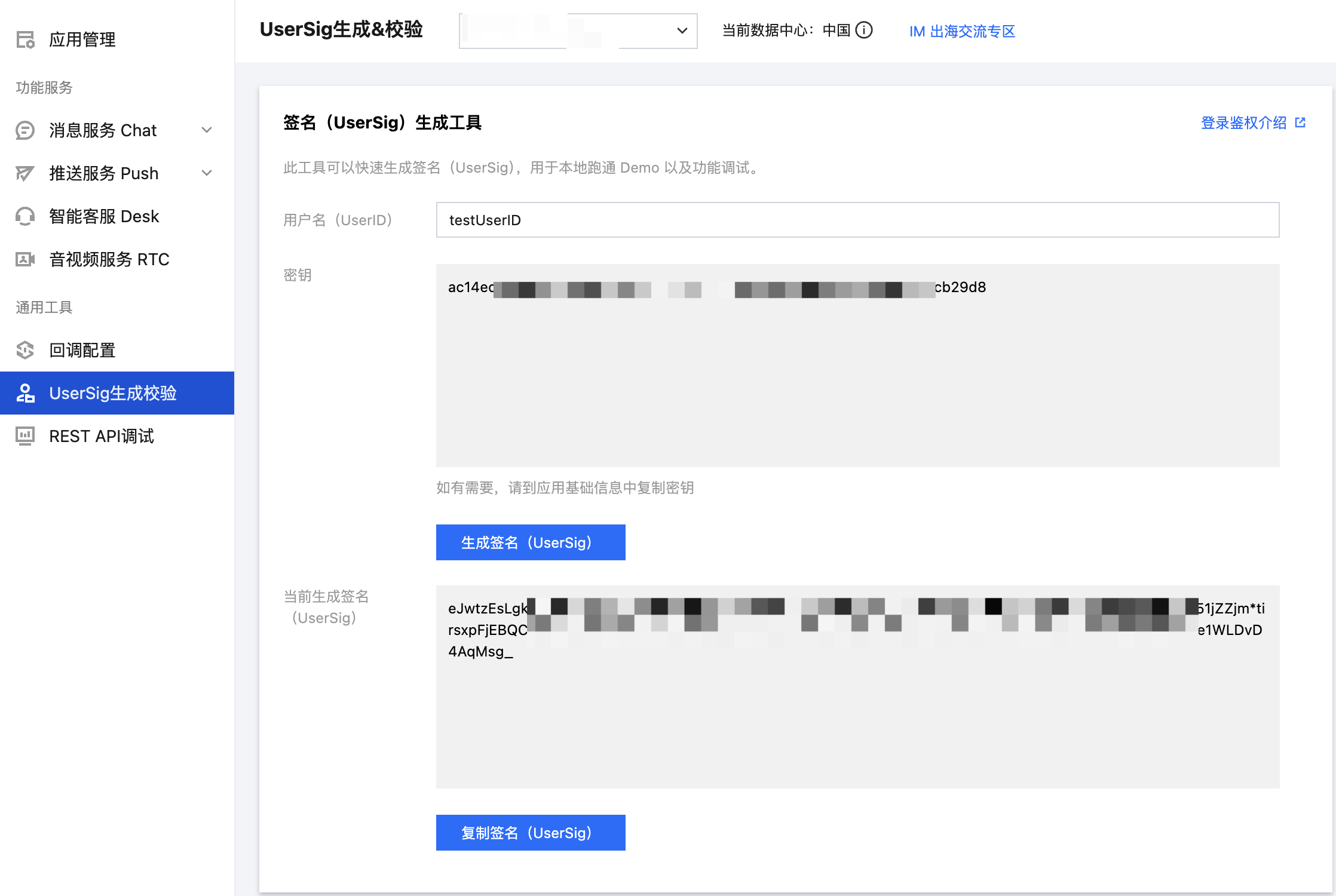
在 [即时通信 IM 控制台](https://console.cloud.tencent.com/im/tool-usersig) 根据 UserID 获取 UserSig 用于后续登录时的用户鉴权。
|
|
355
273
|
|
|
274
|
+
|
|
356
275
|
|
|
357
276
|
|
|
358
|
-
|
|
359
|
-
``` java
|
|
360
|
-
Fragment fragment;
|
|
361
|
-
// 如果是 C2C 聊天,chatID 是对方的 UserID,如果是 Group 聊天,chatID 是 GroupID
|
|
362
|
-
if (isGroup) {
|
|
363
|
-
GroupChatInfo groupChatInfo = new GroupChatInfo();
|
|
364
|
-
groupChatInfo.setId(chatID);
|
|
365
|
-
TUIGroupChatFragment tuiGroupChatFragment = new TUIGroupChatFragment();
|
|
366
|
-
tuiGroupChatFragment.setChatInfo(groupChatInfo);
|
|
367
|
-
fragment = tuiGroupChatFragment;
|
|
368
|
-
} else {
|
|
369
|
-
C2CChatInfo c2cChatInfo = new C2CChatInfo();
|
|
370
|
-
c2cChatInfo.setId(chatID);
|
|
371
|
-
TUIC2CChatFragment tuic2CChatFragment = new TUIC2CChatFragment();
|
|
372
|
-
tuic2CChatFragment.setChatInfo(c2cChatInfo);
|
|
373
|
-
fragment = tuic2CChatFragment;
|
|
374
|
-
}
|
|
375
|
-
getSupportFragmentManager().beginTransaction()
|
|
376
|
-
.add(R.id.chat_fragment_container, fragment).commitAllowingStateLoss();
|
|
377
|
-
```
|
|
277
|
+
### 步骤2:用户登录
|
|
378
278
|
|
|
379
|
-
|
|
380
|
-
```
|
|
381
|
-
|
|
382
|
-
|
|
383
|
-
|
|
384
|
-
|
|
385
|
-
|
|
386
|
-
|
|
387
|
-
|
|
388
|
-
|
|
389
|
-
}
|
|
390
|
-
|
|
391
|
-
c2cChatInfo.setId(chatID);
|
|
392
|
-
TUIC2CChatMinimalistFragment tuic2CChatFragment = new TUIC2CChatMinimalistFragment();
|
|
393
|
-
tuic2CChatFragment.setChatInfo(c2cChatInfo);
|
|
394
|
-
fragment = tuic2CChatFragment;
|
|
395
|
-
}
|
|
396
|
-
getSupportFragmentManager().beginTransaction()
|
|
397
|
-
.add(R.id.chat_fragment_container, fragment).commitAllowingStateLoss();
|
|
279
|
+
登录鉴权后才能正常使用组件的功能。您可以调用 login 接口,传入上文获取的 SDKAPPID、userSig 用于登录鉴权:
|
|
280
|
+
``` swift
|
|
281
|
+
// 用户登录
|
|
282
|
+
LoginStore.shared.login(context, SDKAPPID, userID, userSig,
|
|
283
|
+
object : CompletionHandler {
|
|
284
|
+
override fun onSuccess() {
|
|
285
|
+
// 登录成功,可跳转聊天或会话页
|
|
286
|
+
}
|
|
287
|
+
override fun onFailure(code: Int, desc: String) {
|
|
288
|
+
// 登录失败,可弹框报错
|
|
289
|
+
}
|
|
290
|
+
})
|
|
398
291
|
```
|
|
399
292
|
|
|
400
|
-
|
|
293
|
+
> **注意:**
|
|
294
|
+
>
|
|
401
295
|
|
|
402
|
-
|
|
403
|
-
|
|
404
|
-
<tr>
|
|
405
|
-
<td rowspan="1" colSpan="1" >视频通话</td>
|
|
296
|
+
> 在正式的生产环境中,建议在您的服务端生成 UserSig,在需要 UserSig 时由您的 App 向业务服务器发起请求获取动态 UserSig 来进行鉴权。详见 [服务端生成 UserSig](https://cloud.tencent.com/document/product/269/32688)。
|
|
297
|
+
>
|
|
406
298
|
|
|
407
|
-
<td rowspan="1" colSpan="1" >语音通话</td>
|
|
408
|
-
</tr>
|
|
409
299
|
|
|
410
|
-
|
|
411
|
-
|
|
300
|
+
### 步骤3: 构建会话列表界面
|
|
301
|
+
|
|
302
|
+
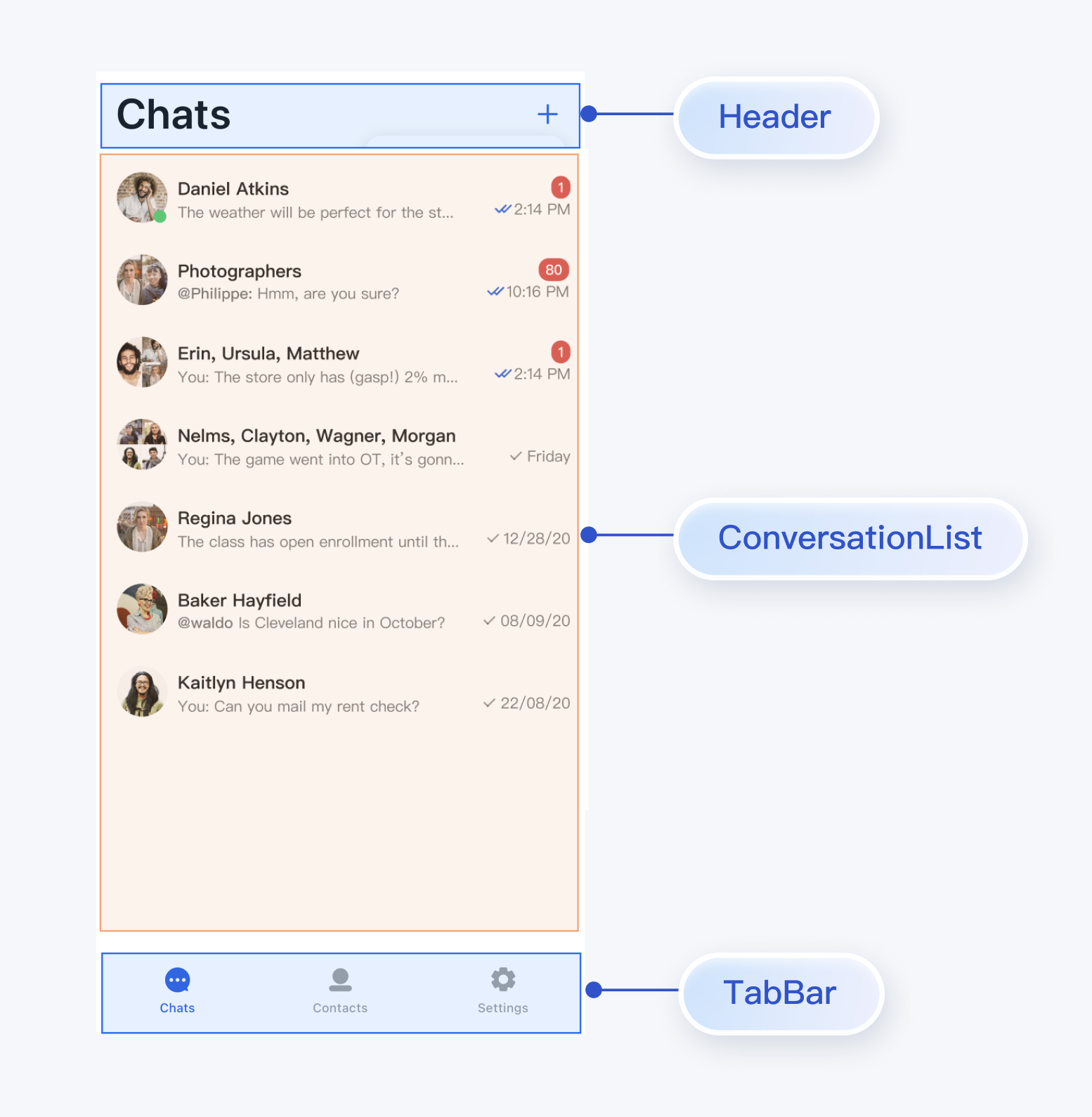
您可以基于 TUIKit Compose 中的 ConversationList 组件,构建一个会话列表页面。ConversationList 内建的功能是:
|
|
303
|
+
- 展示用户的会话列表,包含单聊和群聊会话
|
|
304
|
+
|
|
305
|
+
- 支持用户操作单个会话:置顶、删除、清空会话消息等
|
|
412
306
|
|
|
413
|
-
<td rowspan="1" colSpan="1" ></td>
|
|
414
|
-
</tr>
|
|
415
|
-
</table>
|
|
416
307
|
|
|
417
|
-
|
|
308
|
+
您可以将 ConversationList 直接集成到现有的 App 页面中,也可以新构建一个完整的会话列表页,组装后的一种 UI 效果如下图所示:
|
|
418
309
|
|
|
419
|
-
|
|
310
|
+
|
|
420
311
|
|
|
421
|
-
2. 在开通腾讯实时音视频服务功能区,单击**免费体验**即可开通 TUICallKit 的 7 天免费试用服务。
|
|
422
312
|
|
|
423
|
-
|
|
313
|
+
将 ConversationList 封装为会话列表页,可参考 `chat/uikit/src/main/java/io/trtc/tuikit/chat/pages/ConversationsPage.kt` 文件里的实现,`ConversationsPage` 主要做了以下工作:
|
|
424
314
|
|
|
425
|
-
|
|
315
|
+
1. 在 ConversationList 上方添加了 headerView。
|
|
426
316
|
|
|
317
|
+
2. 传递点击会话列表 cell 事件。
|
|
427
318
|
|
|
428
|
-
在 App 的 build.gradle 文件中添加对 `TUICallKit` 的依赖:
|
|
429
319
|
|
|
430
|
-
|
|
431
|
-
|
|
320
|
+
核心示例代码如下所示:
|
|
321
|
+
|
|
322
|
+
``` swift
|
|
323
|
+
@Composable
|
|
324
|
+
fun ConversationsPage(
|
|
325
|
+
onConversationClick: (ConversationInfo) -> Unit = {},
|
|
326
|
+
editContent: @Composable () -> Unit = {},
|
|
327
|
+
) {
|
|
328
|
+
val colors = LocalTheme.current.colors
|
|
329
|
+
Column(
|
|
330
|
+
modifier = Modifier
|
|
331
|
+
.fillMaxSize()
|
|
332
|
+
.background(Colors.Transparent)
|
|
333
|
+
) {
|
|
334
|
+
|
|
335
|
+
PageHeader(stringResource(R.string.chat_uikit_chat)) {
|
|
336
|
+
editContent()
|
|
337
|
+
}
|
|
338
|
+
|
|
339
|
+
Box(modifier = Modifier.fillMaxSize(), contentAlignment = Alignment.Center) {
|
|
340
|
+
ConversationList(modifier = Modifier.navigationBarsPadding(), onConversationClick = onConversationClick)
|
|
341
|
+
}
|
|
342
|
+
}
|
|
343
|
+
}
|
|
432
344
|
```
|
|
433
|
-
3. **发起和接收视频或语音通话**
|
|
434
345
|
|
|
435
|
-
|
|
436
|
-
<tr>
|
|
437
|
-
<td rowspan="1" colSpan="1" >消息页发起通话</td>
|
|
346
|
+
### 步骤4:构建聊天界面
|
|
438
347
|
|
|
439
|
-
|
|
440
|
-
</tr>
|
|
348
|
+
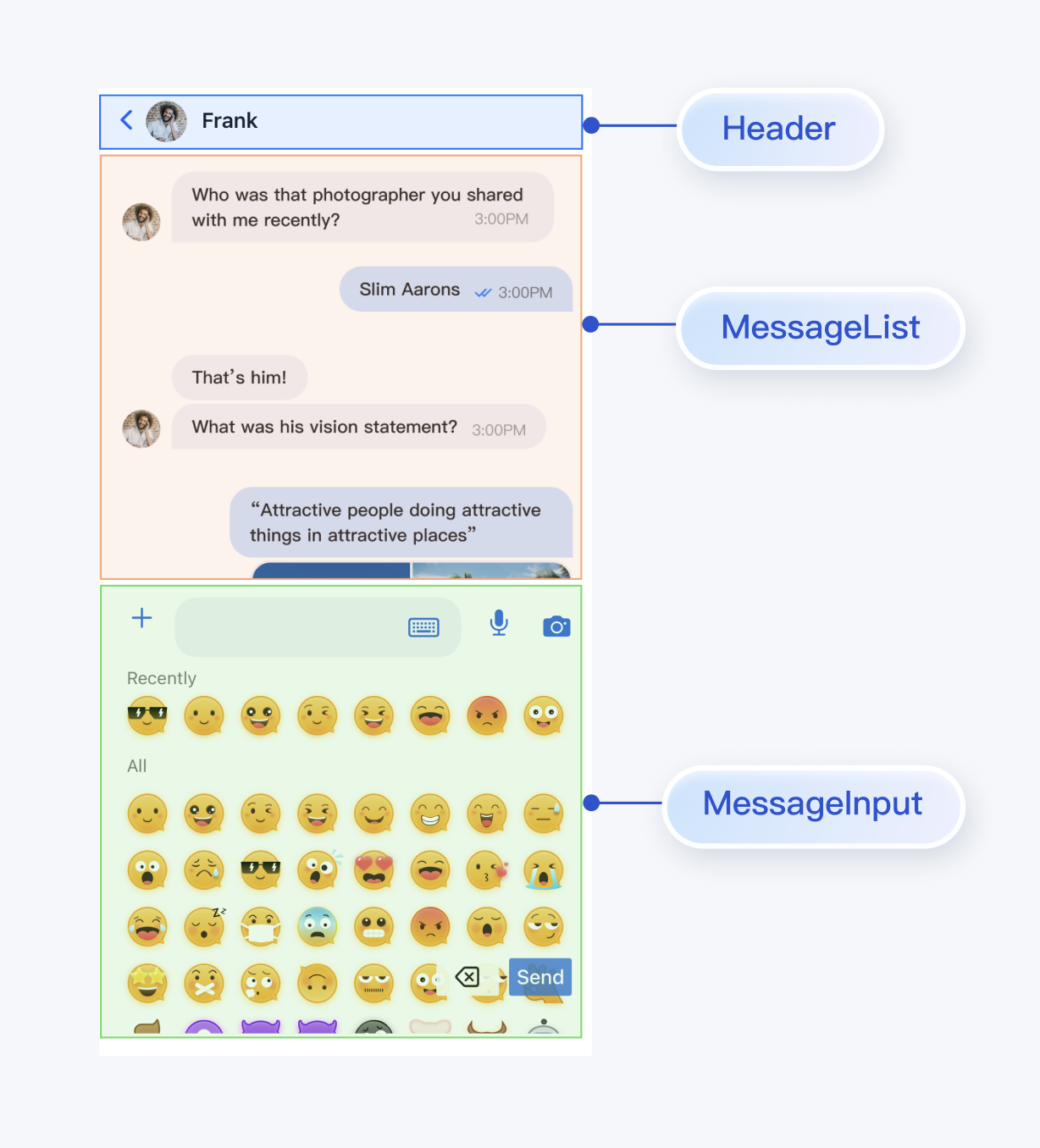
您可以基于 TUIKit Compose 中的 MessageList、MessageInput 组件,构建一个聊天页面。
|
|
441
349
|
|
|
442
|
-
|
|
443
|
-
|
|
350
|
+
MessageList 内建的功能是:
|
|
351
|
+
- 展示单聊或群聊消息列表。
|
|
444
352
|
|
|
445
|
-
|
|
446
|
-
</tr>
|
|
447
|
-
</table>
|
|
353
|
+
- 支持对单条消息操作:查看图片消息大图、播放视频或语音消息、复制文本消息、撤回消息、删除消息等。
|
|
448
354
|
|
|
449
355
|
|
|
450
|
-
|
|
356
|
+
MessageInput 内建的功能是:
|
|
451
357
|
|
|
452
|
-
|
|
358
|
+
- 支持用户组建并发送多种类型的消息:文本、表情、图片、语音、视频、文件等。
|
|
453
359
|
|
|
454
|
-
- 当用户离线收到通话邀请时,如需唤起 App 通话,需要使用离线推送能力。离线推送的实现请参考下一步。
|
|
455
360
|
|
|
456
|
-
|
|
457
|
-
实现音视频通话的离线推送,请参考以下几个步骤:
|
|
361
|
+
您可以将 MessageList 和 MessageInput 直接集成到现有的 App 页面中,也可以新构建一个完整的聊天页,组装后的一种 UI 效果如下图所示:
|
|
458
362
|
|
|
459
|
-
|
|
363
|
+
|
|
460
364
|
|
|
461
|
-
2. 集成 TUICallKit 组件。
|
|
462
365
|
|
|
463
|
-
|
|
366
|
+
将 MessageList 和 MessageInput 组装为聊天页,可参考 `chat/uikit/src/main/java/io/trtc/tuikit/chat/pages/ChatPage.kt` 文件里的实现,`ChatPage` 主要做了以下工作:
|
|
464
367
|
|
|
465
|
-
|
|
466
|
-
集成 TUIChat 和 TUICallkit 的组件后,在聊天界面发送语音消息时,即可**录制带 AI 降噪和自动增益的语音消息**。该功能需要购买 [音视频通话能力](https://cloud.tencent.com/document/product/1640/79968) 进阶版及以上套餐,仅 IMSDK 7.0 及以上版本支持。当套餐过期后,录制语音消息会切换到系统 API 进行录音。
|
|
467
|
-
下面是使用两台华为 P10 同时录制的语音消息对比:
|
|
368
|
+
1. 在最上方添加了 headerView,展示会话的名称。
|
|
468
369
|
|
|
469
|
-
|
|
470
|
-
<link rel="stylesheet" href="//cloudcache.tencentcs.com/open_proj/proj_qcloud_v2/gateway/portal/css/global-components.css?max_age=31536000&t=20180817" />
|
|
471
|
-
<link rel="stylesheet" href="//cloudcache.tencentcs.com/open_proj/proj_qcloud_v2/gateway/documentation/documentation-v4/css/pandect-20219091610.css" />
|
|
472
|
-
<link rel="stylesheet" href="//cloudcache.tencentcs.com/open_proj/proj_qcloud_v2/gateway/documentation/documentation-v4/css/import-2-markdown-20219091610.css" />
|
|
473
|
-
<link rel="stylesheet" href="//cloudcache.tencentcs.com/open_proj/proj_qcloud_v2/platform/documents/css/documents-202205161915.css" />
|
|
474
|
-
<link rel="stylesheet" href="//cloudcache.tencentcs.com/open_proj/proj_qcloud_v2/gateway/documentation/documentation-v4/css/pandect-202012171130.css" />
|
|
475
|
-
<link rel="stylesheet" href="//qcloudimg.tencent-cloud.cn/static/document/qcloud-document-sdk.v0.0.17.css" />
|
|
476
|
-
<link rel="stylesheet" href="//cloudcache.tencentcs.com/qcloud/main/components/document-feedback/document-feedback.944df9c907.css" />
|
|
477
|
-
<style>
|
|
478
|
-
* {
|
|
479
|
-
font-family: 'pingfang SC','helvetica neue',arial,'hiragino sans gb','microsoft yahei ui','microsoft yahei',simsun,sans-serif;
|
|
480
|
-
}
|
|
481
|
-
</style>
|
|
482
|
-
|
|
483
|
-
<div class="markdown-text-box">
|
|
484
|
-
<table style="text-align:center;vertical-align:middle;width:800px">
|
|
485
|
-
<tr>
|
|
486
|
-
<th style="text-align:center"><b>系统录制的语音消息<br /></b></th>
|
|
487
|
-
<th style="text-align:center"><b>TUICallkit 录制的带 AI 降噪和自动增益的语音消息<br /></b></th>
|
|
488
|
-
</tr>
|
|
489
|
-
<tr>
|
|
490
|
-
<td>
|
|
491
|
-
<audio id="audio" controls preload="none">
|
|
492
|
-
<source id="m4a" src="https://im.sdk.cloudcachetci.com/tools/resource/rain_system_record.m4a"></source>
|
|
493
|
-
</audio>
|
|
494
|
-
</td>
|
|
495
|
-
|
|
496
|
-
<td>
|
|
497
|
-
<audio id="audio" controls preload="none">
|
|
498
|
-
<source id="m4a" src="https://im.sdk.cloudcachetci.com/tools/resource/rain_tuicallkit_record_with_agc_aidenoise.m4a"></source>
|
|
499
|
-
</audio>
|
|
500
|
-
</td>
|
|
501
|
-
</tr>
|
|
502
|
-
</table>
|
|
370
|
+
2. 按照移动端用户使用习惯,上下拼接 MessageList 和 MessageInput。
|
|
503
371
|
|
|
504
|
-
</div>
|
|
505
372
|
|
|
373
|
+
核心示例代码如下所示:
|
|
506
374
|
|
|
375
|
+
``` swift
|
|
376
|
+
@Composable
|
|
377
|
+
fun ChatPage(
|
|
378
|
+
conversationID: String,
|
|
379
|
+
locateMessage: MessageInfo? = null,
|
|
380
|
+
onUserClick: (String) -> Unit,
|
|
381
|
+
onChatHeaderClick: (String) -> Unit,
|
|
382
|
+
onBackClick: () -> Unit,
|
|
383
|
+
) {
|
|
384
|
+
...
|
|
385
|
+
|
|
386
|
+
val avatarUrl = conversationState.value?.avatarURL
|
|
387
|
+
val displayName = conversationState.value?.title
|
|
388
|
+
val colors = LocalTheme.current.colors
|
|
389
|
+
Scaffold(
|
|
390
|
+
modifier = Modifier
|
|
391
|
+
.background(color = colors.bgColorOperate)
|
|
392
|
+
.fillMaxSize()
|
|
393
|
+
.wrapContentHeight(), topBar = {
|
|
394
|
+
Box(
|
|
395
|
+
modifier = Modifier
|
|
396
|
+
.background(color = colors.bgColorOperate)
|
|
397
|
+
.fillMaxWidth()
|
|
398
|
+
.statusBarsPadding()
|
|
399
|
+
) {
|
|
400
|
+
ChatHeader(
|
|
401
|
+
avatarUrl = avatarUrl,
|
|
402
|
+
name = displayName ?: "",
|
|
403
|
+
onBackClick = onBackClick,
|
|
404
|
+
onAvatarClick = {
|
|
405
|
+
onChatHeaderClick(conversationID)
|
|
406
|
+
}
|
|
407
|
+
)
|
|
408
|
+
}
|
|
409
|
+
},
|
|
410
|
+
bottomBar = {
|
|
411
|
+
Box(
|
|
412
|
+
modifier = Modifier
|
|
413
|
+
.fillMaxWidth()
|
|
414
|
+
.background(color = colors.bgColorOperate)
|
|
415
|
+
) {
|
|
416
|
+
MessageInput(modifier = Modifier.navigationBarsPadding(), conversationID = conversationID)
|
|
417
|
+
}
|
|
418
|
+
|
|
419
|
+
}) { padding ->
|
|
420
|
+
Box(
|
|
421
|
+
modifier = Modifier
|
|
422
|
+
.padding(padding)
|
|
423
|
+
) {
|
|
424
|
+
MessageList(conversationID = conversationID, locateMessage = locateMessage) {
|
|
425
|
+
onUserClick(it)
|
|
426
|
+
}
|
|
427
|
+
}
|
|
428
|
+
}
|
|
429
|
+
}
|
|
430
|
+
```
|
|
431
|
+
|
|
432
|
+
### 步骤5:构建联系人界面
|
|
433
|
+
|
|
434
|
+
您可以基于 TUIKit Compose 中的 ContactList 组件,构建一个联系人页面。ContactList 内建的功能是:
|
|
435
|
+
- 查看好友申请列表。
|
|
436
|
+
|
|
437
|
+
- 查看已加入的群列表。
|
|
438
|
+
|
|
439
|
+
- 处理群组邀请和申请。
|
|
440
|
+
|
|
441
|
+
- 管理黑名单列表。
|
|
442
|
+
|
|
443
|
+
- 查看好友。
|
|
444
|
+
|
|
445
|
+
|
|
446
|
+
您可以将 ContactList 直接集成到现有的 App 中,也可以新构建一个完整的联系人列表页,组装后的一种 UI 效果如下图所示:
|
|
507
447
|
|
|
448
|
+
|
|
449
|
+
|
|
450
|
+
|
|
451
|
+
将 ContactList 封装为联系人列表页,可参考 `chat/uikit/src/main/java/io/trtc/tuikit/chat/pages/ContactsPage.kt `文件里的实现,`ContactsPage` 主要做了以下工作:
|
|
452
|
+
|
|
453
|
+
1. 在 ContactList 上方添加了 headerView。
|
|
454
|
+
|
|
455
|
+
2. 传递点击联系人列表 cell 事件。
|
|
456
|
+
|
|
457
|
+
|
|
458
|
+
核心示例代码如下所示:
|
|
459
|
+
|
|
460
|
+
``` swift
|
|
461
|
+
@Composable
|
|
462
|
+
fun ContactsPage(
|
|
463
|
+
onContactClick: (ContactInfo) -> Unit = {},
|
|
464
|
+
onGroupClick: (ContactInfo) -> Unit = {},
|
|
465
|
+
editContent: @Composable () -> Unit = {},
|
|
466
|
+
) {
|
|
467
|
+
|
|
468
|
+
val colors = LocalTheme.current.colors
|
|
469
|
+
Column(
|
|
470
|
+
modifier = Modifier
|
|
471
|
+
.fillMaxSize()
|
|
472
|
+
.background(Colors.Transparent)
|
|
473
|
+
) {
|
|
474
|
+
PageHeader(stringResource(R.string.chat_uikit_contacts)) {
|
|
475
|
+
editContent()
|
|
476
|
+
}
|
|
508
477
|
|
|
478
|
+
Box(
|
|
479
|
+
modifier = Modifier
|
|
480
|
+
.fillMaxSize()
|
|
481
|
+
.navigationBarsPadding(), contentAlignment = Alignment.Center
|
|
482
|
+
) {
|
|
483
|
+
ContactList(onGroupClick = onGroupClick, onContactClick = onContactClick)
|
|
484
|
+
}
|
|
485
|
+
}
|
|
486
|
+
}
|
|
487
|
+
```
|
|
509
488
|
|
|
510
|
-
|
|
511
|
-
>
|
|
489
|
+
### 步骤6:完善界面间的跳转逻辑
|
|
512
490
|
|
|
513
|
-
|
|
514
|
-
|
|
491
|
+
ConversationsPage、ChatPage、ContactsPage 中暴露了一些用户点击事件,您可以自定义事件来实现页面间的交互:
|
|
492
|
+
<table>
|
|
493
|
+
<tr>
|
|
494
|
+
<td rowspan="1" colSpan="1" >Page</td>
|
|
515
495
|
|
|
496
|
+
<td rowspan="1" colSpan="1" >回调</td>
|
|
516
497
|
|
|
517
|
-
|
|
498
|
+
<td rowspan="1" colSpan="1" >建议跳转逻辑</td>
|
|
499
|
+
</tr>
|
|
518
500
|
|
|
519
|
-
|
|
520
|
-
|
|
521
|
-
IM SDK 中默认 `allowBackup` 的值为 `false` ,表示关闭应用的备份和恢复功能。
|
|
522
|
-
您可以在您的 `AndroidManifest.xml` 文件中删除 `allowBackup` 属性,表示关闭备份和恢复功能;也可以在 `AndroidManifest.xml` 文件的 application 节点中添加 `tools:replace="android:allowBackup"` 表示覆盖 IM SDK 的设置,使用您自己的设置。
|
|
523
|
-
|
|
524
|
-
例如:
|
|
525
|
-
``` xml
|
|
526
|
-
<manifest xmlns:android="http://schemas.android.com/apk/res/android"
|
|
527
|
-
xmlns:tools="http://schemas.android.com/tools"
|
|
528
|
-
package="com.tencent.qcloud.tuikit.myapplication">
|
|
529
|
-
|
|
530
|
-
<application
|
|
531
|
-
android:allowBackup="true"
|
|
532
|
-
android:name=".MApplication"
|
|
533
|
-
android:icon="@mipmap/ic_launcher"
|
|
534
|
-
android:label="@string/app_name"
|
|
535
|
-
android:roundIcon="@mipmap/ic_launcher_round"
|
|
536
|
-
android:supportsRtl="true"
|
|
537
|
-
android:theme="@style/Theme.MyApplication"
|
|
538
|
-
tools:replace="android:allowBackup">
|
|
539
|
-
<activity android:name=".MainActivity">
|
|
540
|
-
<intent-filter>
|
|
541
|
-
<action android:name="android.intent.action.MAIN" />
|
|
542
|
-
|
|
543
|
-
<category android:name="android.intent.category.LAUNCHER" />
|
|
544
|
-
</intent-filter>
|
|
545
|
-
</activity>
|
|
546
|
-
</application>
|
|
547
|
-
|
|
548
|
-
</manifest>
|
|
549
|
-
```
|
|
501
|
+
<tr>
|
|
502
|
+
<td rowspan="1" colSpan="1" >**ConversationsPage**</td>
|
|
550
503
|
|
|
551
|
-
|
|
504
|
+
<td rowspan="1" colSpan="1" >`onConversationClick: (ConversationInfo) -> Unit`</td>
|
|
552
505
|
|
|
553
|
-
|
|
554
|
-
|
|
506
|
+
<td rowspan="1" colSpan="1" >点击会话列表中的会话时触发,建议跳转到聊天页面(ChatPage)。</td>
|
|
507
|
+
</tr>
|
|
555
508
|
|
|
556
|
-
|
|
509
|
+
<tr>
|
|
510
|
+
<td rowspan="2" colSpan="1" >**ContactsPage**</td>
|
|
557
511
|
|
|
558
|
-
|
|
559
|
-
``` groovy
|
|
560
|
-
android {
|
|
561
|
-
defaultConfig {
|
|
562
|
-
...
|
|
563
|
-
minSdkVersion 19
|
|
564
|
-
targetSdkVersion 30
|
|
565
|
-
multiDexEnabled true
|
|
566
|
-
}
|
|
567
|
-
...
|
|
568
|
-
}
|
|
569
|
-
dependencies {
|
|
570
|
-
implementation "androidx.multidex:multidex:2.0.1"
|
|
571
|
-
}
|
|
572
|
-
```
|
|
512
|
+
<td rowspan="1" colSpan="1" >`onContactClick: (ContactInfo) -> Unit`</td>
|
|
573
513
|
|
|
574
|
-
|
|
575
|
-
|
|
576
|
-
public class MyApplication extends SomeOtherApplication {
|
|
577
|
-
@Override
|
|
578
|
-
protected void attachBaseContext(Context base) {
|
|
579
|
-
super.attachBaseContext(base);
|
|
580
|
-
MultiDex.install(this);
|
|
581
|
-
}
|
|
582
|
-
}
|
|
583
|
-
```
|
|
514
|
+
<td rowspan="1" colSpan="1" >点击联系人 cell 时触发,建议跳转用户信息页(C2CChatSetting)。</td>
|
|
515
|
+
</tr>
|
|
584
516
|
|
|
585
|
-
|
|
517
|
+
<tr>
|
|
518
|
+
<td rowspan="1" colSpan="1" >`onGroupClick: (ContactInfo) -> Unit`</td>
|
|
586
519
|
|
|
587
|
-
|
|
520
|
+
<td rowspan="1" colSpan="1" >点击群组 cell 时触发,建议跳转群聊页面(ChatPage)。</td>
|
|
521
|
+
</tr>
|
|
588
522
|
|
|
589
|
-
|
|
523
|
+
<tr>
|
|
524
|
+
<td rowspan="3" colSpan="1" >**ChatPage**</td>
|
|
590
525
|
|
|
591
|
-
|
|
592
|
-
``` typescript
|
|
593
|
-
# 避免删除代码逻辑
|
|
594
|
-
-dontshrink
|
|
595
|
-
-dontoptimize
|
|
596
|
-
# 避免混淆 TUIKit
|
|
597
|
-
-keep class com.tencent.qcloud.** { *; }
|
|
598
|
-
-keep class com.tencent.imsdk.** { *; }
|
|
599
|
-
-keep class * implements com.tencent.qcloud.tuicore.interfaces.TUIInitializer {}
|
|
600
|
-
```
|
|
526
|
+
<td rowspan="1" colSpan="1" >`onUserClick: (String) -> Unit`</td>
|
|
601
527
|
|
|
602
|
-
|
|
528
|
+
<td rowspan="1" colSpan="1" >点击消息中的用户头像或昵称时触发,建议跳转用户信息页(C2CChatSetting)。</td>
|
|
529
|
+
</tr>
|
|
603
530
|
|
|
604
|
-
|
|
605
|
-
|
|
606
|
-
|
|
607
|
-
|
|
608
|
-
|
|
531
|
+
<tr>
|
|
532
|
+
<td rowspan="1" colSpan="1" >`onChatHeaderClick: (String) -> Unit`</td>
|
|
533
|
+
|
|
534
|
+
<td rowspan="1" colSpan="1" >点击导航栏中的头像时触发,建议跳转用户信息页(C2CChatSetting)或群聊信息页(GroupChatSetting)</td>
|
|
535
|
+
</tr>
|
|
536
|
+
|
|
537
|
+
<tr>
|
|
538
|
+
<td rowspan="1" colSpan="1" >`onBackClick: () -> Unit`</td>
|
|
539
|
+
|
|
540
|
+
<td rowspan="1" colSpan="1" >点击返回按钮时触发,建议返回上一级页面。</td>
|
|
541
|
+
</tr>
|
|
542
|
+
</table>
|
|
543
|
+
|
|
544
|
+
|
|
545
|
+
**chat/demo/app/src/main/java/io/trtc/tuikit/chat/MainActivity.kt **和 **chat/demo/app/src/main/java/io/trtc/tuikit/chat/chat/ChatActivity.kt** 作为上述 Page 的粘合层,实现了各个 Page 的回调事件,核心示例代码如下:
|
|
546
|
+
``` java
|
|
547
|
+
// chat/demo/app/src/main/java/io/trtc/tuikit/chat/MainActivity.kt
|
|
548
|
+
|
|
549
|
+
// 点击会话列表 cell 跳转
|
|
550
|
+
ConversationsPage(onConversationClick = {
|
|
551
|
+
activity?.startActivity(
|
|
552
|
+
Intent(activity, ChatActivity::class.java).apply {
|
|
553
|
+
putExtra("conversationID", it.conversationID)
|
|
554
|
+
}
|
|
555
|
+
)
|
|
556
|
+
})
|
|
557
|
+
|
|
558
|
+
// 点击联系人页面跳转
|
|
559
|
+
ContactsPage(onGroupClick = {
|
|
560
|
+
ChatSettingActivity.start(context, "", it.contactID, true)
|
|
561
|
+
}, onContactClick = {
|
|
562
|
+
ChatSettingActivity.start(context, it.contactID, "", true)
|
|
563
|
+
})
|
|
609
564
|
```
|
|
565
|
+
``` java
|
|
566
|
+
// chat/demo/app/src/main/java/io/trtc/tuikit/chat/chat/ChatActivity.kt
|
|
567
|
+
|
|
568
|
+
// 点击聊天页面跳转
|
|
569
|
+
ChatPage(
|
|
570
|
+
conversationID = conversationID,
|
|
571
|
+
locateMessage = message,
|
|
572
|
+
onUserClick = {
|
|
573
|
+
handleChatSettingNavigation(it)
|
|
574
|
+
}, onChatHeaderClick = {
|
|
575
|
+
val userID = getUserID(conversationID)
|
|
576
|
+
val groupID = getGroupID(conversationID)
|
|
577
|
+
handleChatSettingNavigation(userID, groupID)
|
|
578
|
+
}, onBackClick = { finish() })
|
|
579
|
+
```
|
|
580
|
+
|
|
581
|
+
您可以参考上述回调说明及参考代码,实现 Page 之间交互逻辑。
|
|
582
|
+
|
|
583
|
+
## 常见问题
|
|
584
|
+
|
|
585
|
+
### 功能常见问题
|
|
586
|
+
|
|
587
|
+
**登录失败,提示签名错误**
|
|
588
|
+
|
|
589
|
+
请检查 SDKAppID 和 UserSig 是否正确,UserSig 是否已过期。可以参考上文 [配置用户鉴权](https://write.woa.com/#db72233d-96ad-4ea7-b9d1-b591996701b5) 重新生成 UserSig。
|
|
610
590
|
|
|
591
|
+
## 联系我们
|
|
611
592
|
|
|
593
|
+
如果您在接入或使用过程有任何疑问或者建议,欢迎 [联系我们](https://cloud.tencent.com/document/product/269/59590) 提交反馈。
|
|
612
594
|
|